
ǤǤ
Warnings
Operation
x Readtheseinstructionsandkeepthemforfuturereference.
x Carefullyfollowinstructionsandfollowdirectionscarefully.
x Donotusethisdevicenearwaterormoisture.
x Cleanamplifierhousingonlywithaslightlydampclothwithwater.
x Donotblockanyoftheventilationopenings.Installin
accordancewiththemanufacturer'sinstructions.
x Donotinstallnearanyheatsourcesuchasradiators,stoves,orotherelectricaldevicesthatpr oduceheat.
x Iftheprovidedplugdoesnotfiteasilyintoyouroutlet,consultanelectricianforreplacementofthe
obsoleteoutletbeforeattemptingtopoweruptheamplifier.
x Preventthepowercordfrombeingwalkedon,bent,stretchedorpinched,particularlyattheplugoratthe
pointwhereitexitsfromtheamplifier.
x Whenuncertainaboutspecifications,pleasefirstconsultthePyleAudiowebsiteandseetheFAQs.
x Ensurethisunitisplacedonastableandflatsurfaceandcanaccommodatetheweightofthisunit.
x Unplugthisunitduringlightningstormsorwhenitisunusedforanextendedperiodoftime.
x Donotleavethisdeviceunattendedwhenpoweredon.
x Referallservicingtoqualifiedservicepersonnel.Servicingisrequiredwhenthedevicehasbeendamaged
ormalfunctionsinanymanner.Thiswouldincludedamagetothepowersupplycordorplug,whenever
liquidhasbeenspilledorobjectshavefallenintothedevice,alsowhenthedevicehasbeenexposedtorain
ormoisture,whentheunitceasestooperatenormally,aswhenoriginallypurchased.
Iftheunitislikelytoundergoexcessvibrationthroughuse,yourmustproperlyinstalltheunitsecurelyandtherack
mountablereinforcementbracketsmustbeproperlyfitted.
Damagecausedbyinsufficientsupporti snotcoveredbythewarranty.
Topreventdamagetotheunit'spanels,alwaysuseprotectiveplasticcupsorwashersbeforetighteningmountingbolts.
Ventilationgapsbetweenunitsarenotrequired,howevercaremustbetakentoensurethatanunobstructedfreeflowof
cleanairispossiblefromthebackoftheunittothefront.Itisalsoimportantthatneitherairintakes,frontorsideexhaust
grillesarecovered.Theinternalairflowoftheseunitsaredesignedtominimizethemalfunctionoftheelectronics,and
promotecoolingair,foroptimalandsafeunitoperation.
PLEASENOTE:Usersmustensurethatanytypeofsmokeandrelatedsubstancesarenotallowedtoentertheamplifier.
Smokeyairiscorrosiveandprolongedexposurewillcauseirreparabledamageto youramplifier.
Donotexposetheamplifiertorainormoistureduringoperationorstorage.Iftheunitdoescomeintocontactwith
moisture,removetheACpowercordimmediatelyandleaveitinasuitablydryareatodry.Takeprecautionbefore
reconnectingtoapowersupply.
Beawarethatwhenanyequipmentistakenfromacoldtohumidlocation,condensationmayoccurinside.Alwaysallow
timefortheequipmenttoattainthesametemperatureasitsenvironmentbeforereconnectingtoapowersupply.
ǤǤ
BuiltͲinProtection
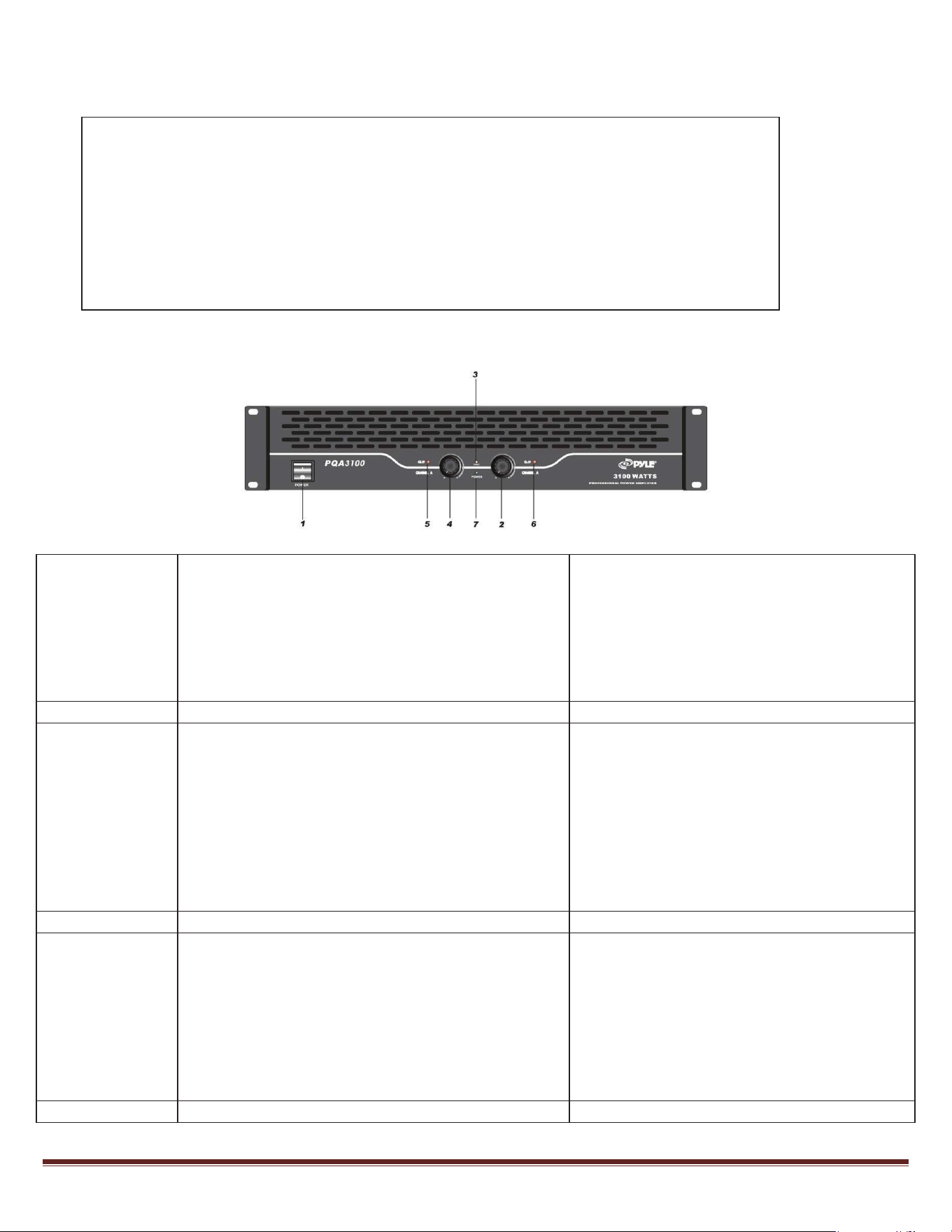
1. PowerON/OFF
PowerthedeviceONandthesoftstartand
waveshockpreventionactivates.Thesoft
bootͲupoftheamplifiertakesabout4seconds
tocompleteandasilent'doublenoise'canbe
heardindicatingtheunitisreadyfor
operation.Youcannowconnectyour speakers
totheunit.
2. ChannelBLevelAdjustment Usethisknobtoadjustvolume.
3. ProtectionLevelIndicator
ThisLEDlightsonafter4Ͳ6secondsafter
powerON.ItisnowinStandbystatus,ready
foruse.
Anotherpossiblereasonforthelight:Internal
temperatureisabove85degreesCelsius.
Anotherpossiblereasonforthelight:the
amplifierisnotfunctioningoptimallyandthe
centerͲvoltageshouldbeswitchedto
unbalanced.
4. ChannelALevelAdjustment Usethisknobtoadjustvolume.
5.and6. ChannelA/BCutͲWaveLED
Whentheoutputlevelismaxedout,thewaveͲ
cutproblemwillresult;pleasereducethe
inputlevels.
Anotherpossiblereasonforthelight:you
shouldnothavesoundfromaninputofone
signal,theLEDwillremainlitcontinuously.
Poweroftheamplifier,checkyourequipment
andrestart.
7. PowerLED BluelightindicatespowerON.
ThePQAamplifiersfeatureintegratedelectronicprotectionincluding:
x SoftstartfunctiontopreventwaveshockatpowerͲon
x DelayfunctionforpreventionofshockatswitchpowerͲon
x DCcurrentprotection
x OverͲelectriccurrentprotection
x CutͲwaveprotection
x Overheatprotection
AmplifierFunctionandOperation
ǤǤ
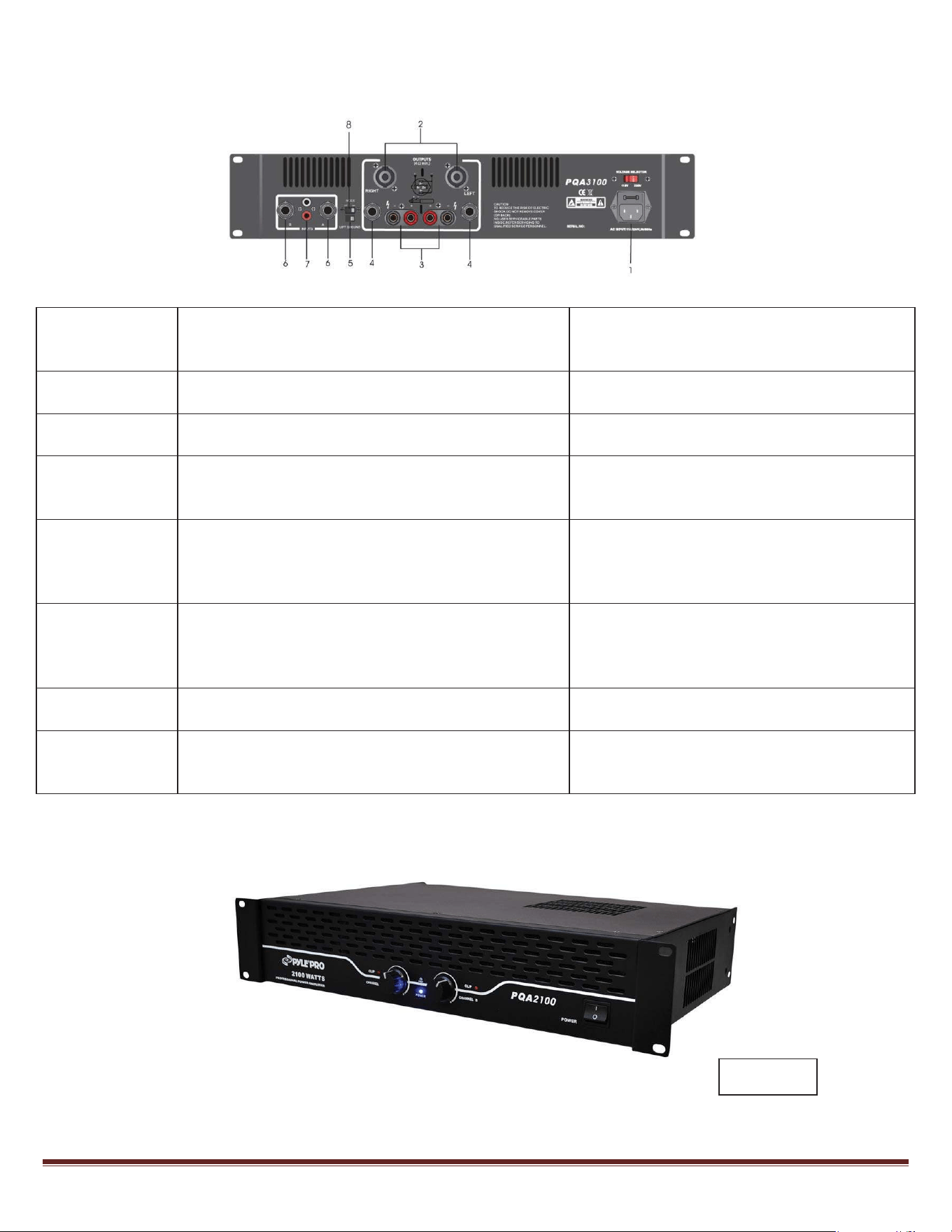
1. PowerCordReceptacleandFuse
Whenanelectricproblemoccurs,thefuse
preventsunnecessarypowertotheunitto
causeaproblem.
2. ChannelA/BSpeakonOutputSocket
AstheoperationisinStereoMode,connect
speakersbywayof1+2+;1Ͳ2Ͳ
3. ChannelA/BBindingOutputConnector
AstheoperationisinStere o Mode,connect
speakersbywayofRed+;BlackͲ
4. ChannelA/BJackOutputConnector
AstheoperationisinStere o Mode,connect
speakersbywayofTip=signal+;ring=signal;
sleeve=ground
5. GroundLiftSwitch
Settingtubsswitchtogroundandbreak,you
canbreakthegroundloopbetweenthe
amplifierandthechassisgroundsofvarious
components.Theresistoris100KOhm.
6. ChannelA/BJackInputConnector
Usingthe1/4''standard,unbalanced
connector,youcaninsertunbalancedand
balancedsignals.Tip=signal+;ring=signal;
sleeve=ground
7. ChannelA/BSignalAVConnector
ForUnbalanceduseONLY.Tip=signal;
sleeve=ground.
8.
BridgeMode
(*NotavailableinPQA2100)
ChannelAOutput+connectoristhe bridge
connector+;whiletheChannelBconnectoris
thebridgeconnectorͲ.
AmplifierFunctionandOperation
PQA2100
ǤǤ
TechnicalSpecs
Service
ServicemaybeobtainedfromanauthorizedPyleAudioservice center.ContactPyleAudioandmakesure
youhaveareceiptasproofofpurchasealongwiththedefectiveunit.Youwillbetheninstructedtosend
ordeliverthemalfunctioningunittoanauthorizedcenter.Theywillhandlethenecessarypaperworkand
repair.Remembertotransportyourunitintheoriginalfactorypackaging.