41617 EnSp Manual v2
05/16/19
BATTERY INSTALLATION AND REPLACEMENT:
Light Bar
Open the battery compartment on the back of the light by
sliding the back cover in the direction of the arrow. Insert 6 AA
batteries, noting polarity. Replace cover by sliding in opposite
direction.
Remote
NOTE: Remove battery isolation tab for first time use.
To replace exhausted battery, unscrew the battery cover on
the back of the remote. Insert 1 CR2032 battery, noting polarity.
Replace the cover and screw back in. Do not over
tighten screws.
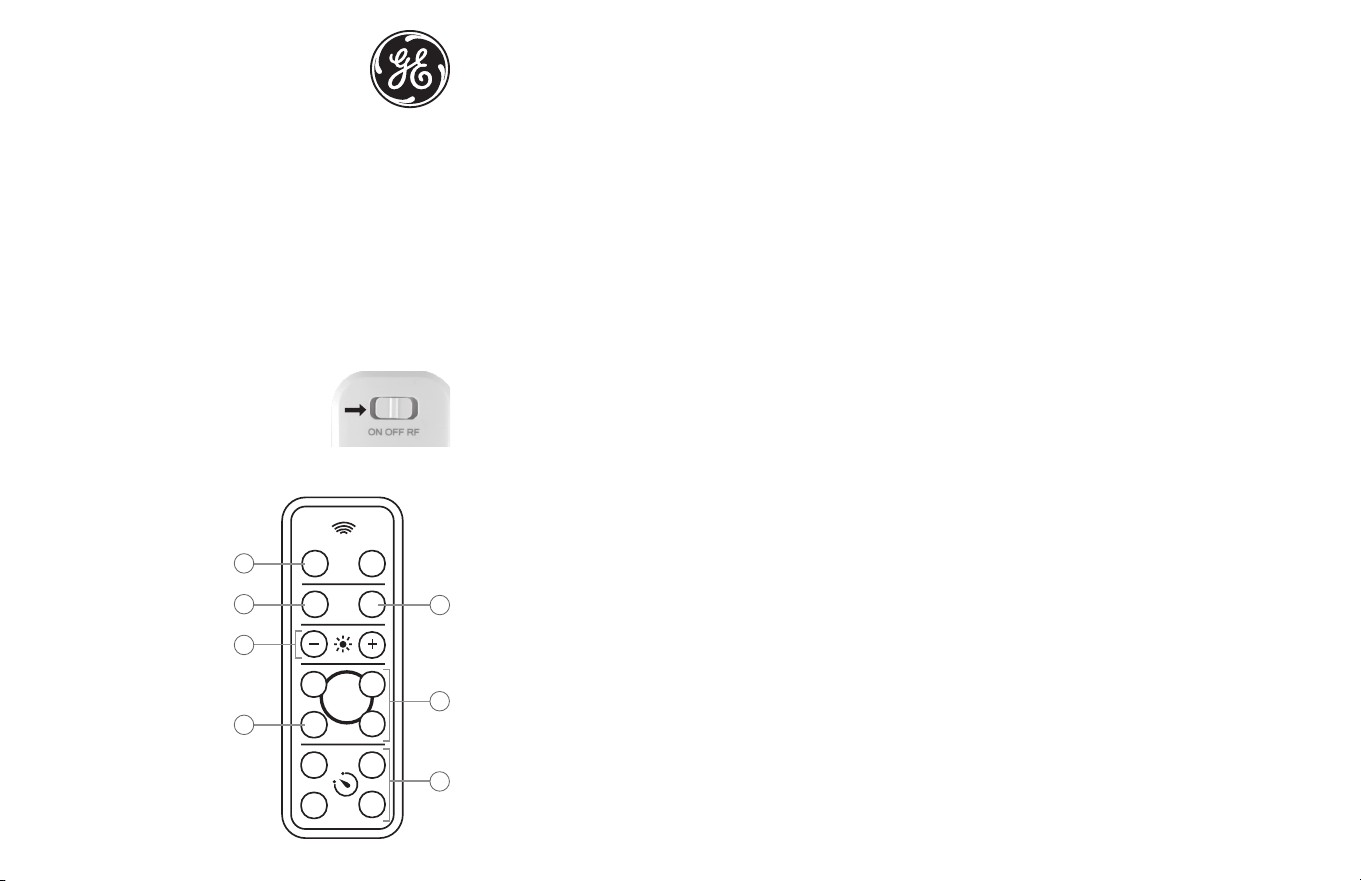
REMOTE OPERATION:
NOTE: Move switch on light bar to "RF" for
remote control functions.
1. On the remote, press the “ON” button to
turn the lights on. The default setting is white.
2. Pressing the “FADE” button will
slowly cycle through the
spectrum of colors.
3. Press the “WHITE” button
to switch the lights back to
white.
4. Use the “+” and “-” buttons
to brighten or dim the lights.
5. The “R,” “G” and “B” buttons
stand for red, green and
blue. These buttons allow
you to either select one
of these colors or blend
them to select the desired
color. Hold the “R,” “G” or “B”
button for three seconds
to go directly to that color
or press and release the
button to move through
the spectrum one color at
a time.
RF
ON OFF
WHITE
15 30
45
60
+
-
R
G
B
3
1
2
4
6
5
7
SAVE
FAD E
6. The “SAVE” button allows you to quickly return to your favorite
color. Once the desired color is found, hold the “SAVE” button
until the light flashes. The color will now be easily selectable by
pressing the “SAVE” button.
7. The “15,” “30,” “45” and “60” buttons automatically turn
the lights off after the number of minutes indicated
on the button.
MANUAL OPERATION:
1. Move switch to ON position to turn the light on. The only
color option in manual operation is white.
2. Move switch to OFF position to turn the light off.
MOUNTING INSTRUCTIONS:
NOTE: Mounting template is provided under the product.
To mount light: Remove back cover and mount in desired
location using screws and the included mounting template or
use double-sided tape for screwless mounting. Do not over
tighten screws. Reattach light to mounted back cover. Anchors
are included for installing screws in the sheetrock.
NOTE: Back cover may remain mounted when changing
batteries.
Functional range may be adversely affected by one or more of
the following factors: weather, radio frequency interference,
low transmitter battery or obstructions between the
transmitter and receiver.
If the remote control is not working, make sure the light bar is
set to RF on the slide switch. You can also try moving the light
bar to ensure there is no interference i the original location.
FCC STATEMENT:
SUPPLIERS DECLARATION OF CONFORMITY | MODEL #: 41617 | Jasco Products Co.,
10 E. Memorial Rd, Oklahoma City, OK 73114, www.byjasco.com
This device complies with Part 15 of the FCC rules. Operation is subject to the following
two conditions: (1) this device may not cause harmful interference, and (2) this device
must accept any interference received, including interference that may cause
undesired operation.
FCC NOTE: The manufacturer is not responsible for any radio or TV interference caused
by unauthorized modifications to this equipment. Such modifications could void the
user’s authority to operate the equipment.
NOTE: This equipment has been tested and found to comply with the limits for a
Class B digital device, pursuant to Part 15 of the FCC Rules. These limits are designed
to provide reasonable protection against harmful interference in a residential
installation. This equipment generates, uses and can radiate radio frequency
energy and, if not installed and used in accordance with the instructions, may cause
harmful interference to radio communications. However, there is no guarantee that
interference will not occur in a particular installation. If this equipment does cause
harmful interference to radio or television reception, which can be determined
by turning the equipment off and on, the user is encouraged to try to correct the
interference by one or more of the following measures:
• Reorient or relocate the receiving antenna.
• Increase the separation between the equipment and receiver.
• Connect the equipment into an outlet on a circuit different from that to which the
receiver is connected.
• Consult the dealer or an experienced radio/TV technician for help.
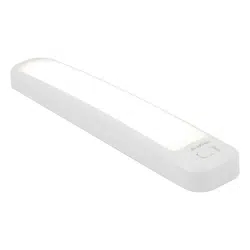
12" Color-Changing
LED Light Bar
MADE IN CHINA
GE is a trademark of General Electric Company and
is under license by Jasco Products Company LLC,
10 E. Memorial Rd., Oklahoma City, OK 73114.
This Jasco product comes with a 90-day limited
warranty. Visit www.byjasco.com for warranty details.
Questions? Contact our U.S.-based Consumer Care at
1-800-654-8483 between 7AM—8PM CST.
INSTALACIÓN DE PILAS:
Barra de iluminación
Abra el compartimento de las pilas ubicado en la parte posterior
de la luz deslizando la tapa en el sentido de la echa. Coloque
6 pilas “AA”, según la polaridad. Vuelva a colocar la tapa
deslizándola en sentido opuesto.
Remoto
NOTA: Para el primer uso, quite la cinta aislante de la pila.
Para cambiar las pilas, desatornille el compartimento ubicado
en la parte trasera del control remoto. Coloque 1 pila CR2032,
teniendo en cuenta el sentido de la polaridad. Vuelva a colocar
la tapa y el tornillo.No apriete los tornillos demasiado.
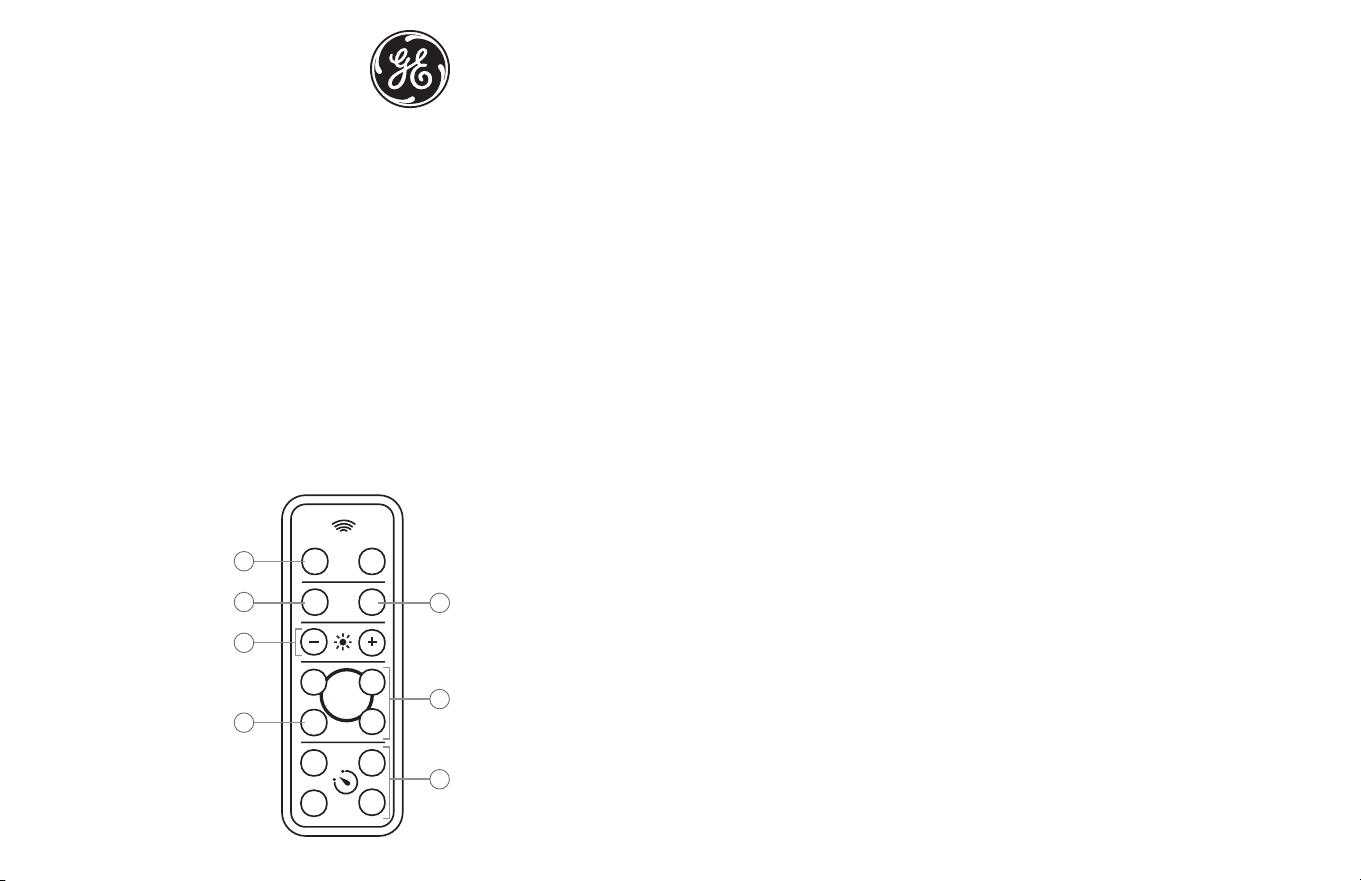
FUNCIONAMIENTO REMOTO:
NOTA:
Coloque el interruptor de la barra de iluminación en “RF”
para utilizar las funciones de control remoto.
1. En el remoto, presione “ON” para encender las luces. El modo
predeterminado es blanco.
2. Al presionar “FADE” se recorre el
espectro de colores lentamente.
3. Presione “WHITE” para volver
al blanco.
4. Use “+” y “-” para subir o bajar
las luces.
5. Los botones “R”, “G” y “B”
representan los colores rojo (R),
verde (G) y azul (B). Estos
botones le permiten seleccionar
uno de los colores o combinarlos
para elegir el color deseado.
Mantenga presionado el botón
“R”, “G” o “B” durante tres
segundos para ir directamente
a ese color o presione y suelte
el botón para desplazarse por el
espectro de a un color a la vez.
RF
ON OFF
WHITE
15 30
45
60
+
-
R
G
B
3
1
2
4
6
5
7
SAVE
FAD E
6. “SAVE” le permite volver a su color favorito rápidamente. Una vez
encontrado el color favorito, mantenga presionado “SAVE” hasta que
parpadee. Ahora el color se podrá elegir fácilmente al presionar “SAVE”.
7. “15,” “30,” “45” y “60” apagarán las luces de forma automática al pasar
los minutos indicados en el botón.
FUNCIONAMIENTO MANUAL:
1. Coloque el interruptor en ON para encender la luz. La única opción de
color en el funcionamiento manual es el blanco.
2. Coloque el interruptor en OFF para apagar la luz.
INSTRUCCIONES DE INSTALACIÓN:
NOTA: la plantilla de instalación se encuentra debajo del producto.
Para instalar la luz: Retire la tapa trasera e instálela en la ubicación
deseada utilizando tornillos y la plantilla de instalación incluida, o bien
utilice una cinta adhesiva de doble faz para un montaje sin tornillos. No
apriete los tornillos demasiado. Vuelva a colocar la luz en la tapa trasera
instalada. Se incluyen anclajes para instalar tornillos en un panel de yeso.
NOTA: la tapa de las pilas puede permanecer instalada al cambiarlas.
El rango de funcionamiento podría verse afectado por uno o más de los
siguientes factores: clima, interferencia de frecuencia radial, pila baja del
transmisor o bloqueos entre el transmisor y el receptor.
Si el control remoto no funciona, asegúrese de que la barra de
iluminación esté colocada en RF en el interruptor. Asimismo, puede
intentar mover la barra de iluminación para verificar que no haya
interferencia en la ubicación original.
DECLARACIÓN DE LA COMISIÓN FEDERAL DE COMUNICACIONES (FCC)
Declaración de conformidad del proveedor | Modelo #: 41617 | Jasco Products Co., 10 E.
Memorial Rd, Oklahoma City, OK 73114, www.byjasco.com
Este dispositivo cumple con las Especificaciones del apartado 15 de las normas de
la FCC y con las especificaciones de las normas radioeléctricas (RSS) del Ministerio
de Industria de Canadá aplicables a aparatos exentos de licencia. El funcionamiento
está sujeto a las siguientes dos condiciones: (1) este dispositivo no debe provocar
interferencia perjudicial, y (2) este dispositivo debe aceptar toda interferencia que
reciba, incluso la que pudiera causar un funcionamiento no deseado.
NOTA DE LA FCC: El fabricante no se hace responsable de ninguna interferencia de radio
o TV ocasionada por modificaciones no autorizadas efectuadas a este equipo. Dichas
modificaciones podrían anular la autoridad del usuario para utilizar el equipo.
NOTA: Este equipo ha sido probado y cumple con los límites para aparatos digitales de
Clase B, de conformidad con el apartado 15 de las normas de la FCC. Estos límites están
diseñados para proveer protección razonable contra interferencias perjudiciales en una
instalación residencial. Este
equipo genera, usa y puede irradiar energía de radiofrecuencias y, si no se instala
y usa según las instrucciones, puede provocar interferencia perjudicial a las
radiocomunicaciones. No obstante, no hay garantías de que no ocurrirá interferencia en
una instalación en particular. Si este equipo provoca
interferencia perjudicial a la recepción de radio o televisión, lo que puede determinarse
encendiendo y apagando el equipo, se recomienda que el usuario intente corregir la
interferencia por medio de la implementación de una o más de las siguientes medidas:
— Reorientar o reubicar la antena receptora.
— Incrementar la separación entre el equipo y el receptor.
— Conectar el equipo a un tomacorriente de un circuito diferente del circuito al que está
conectado el receptor.
— Consultar al distribuidor o a un técnico con experiencia en radio/televisión para
solicitar asistencia.
Barra de iluminación inalámbrica
de 12’’ con cambio de colores
HECHO EN CHINA
GE es una marca comercial de General Electric Company con
licencia otorgada a Jasco Products Company LLC,
10 E. Memorial Rd., Oklahoma City, OK 73114.
Este producto de Jasco tiene una garantía limitada de 90 días.
Visite www.byjasco.com para conocer los detalles de la garantía.
¿Preguntas? Comuníquese al 1-800-654-8483 entre las 7:00 a. m.
y las 8:00 p. m. CST (hora central estándar).