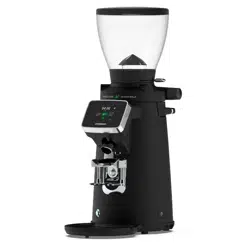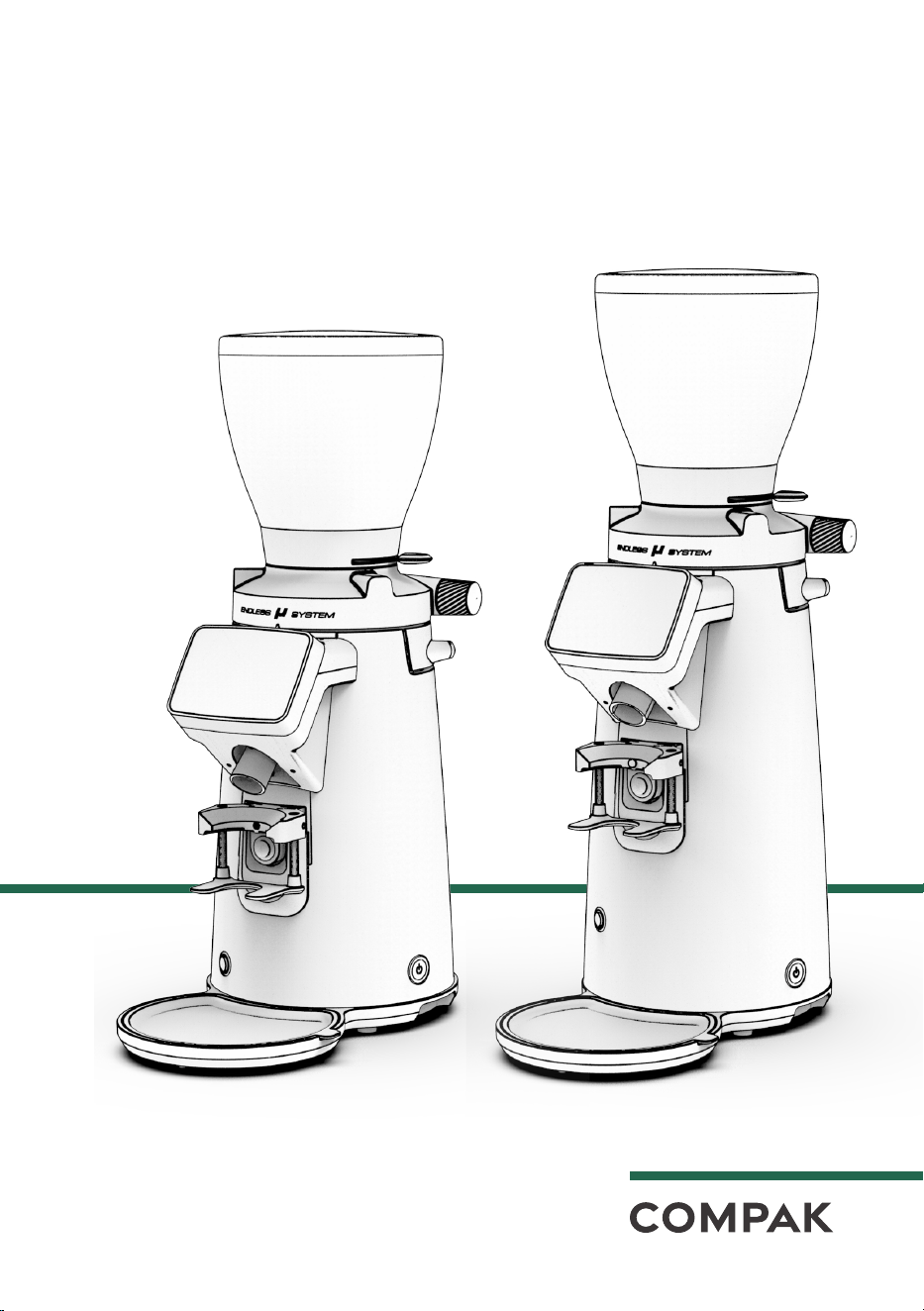
COFFEE GRINDER
USER MANUAL
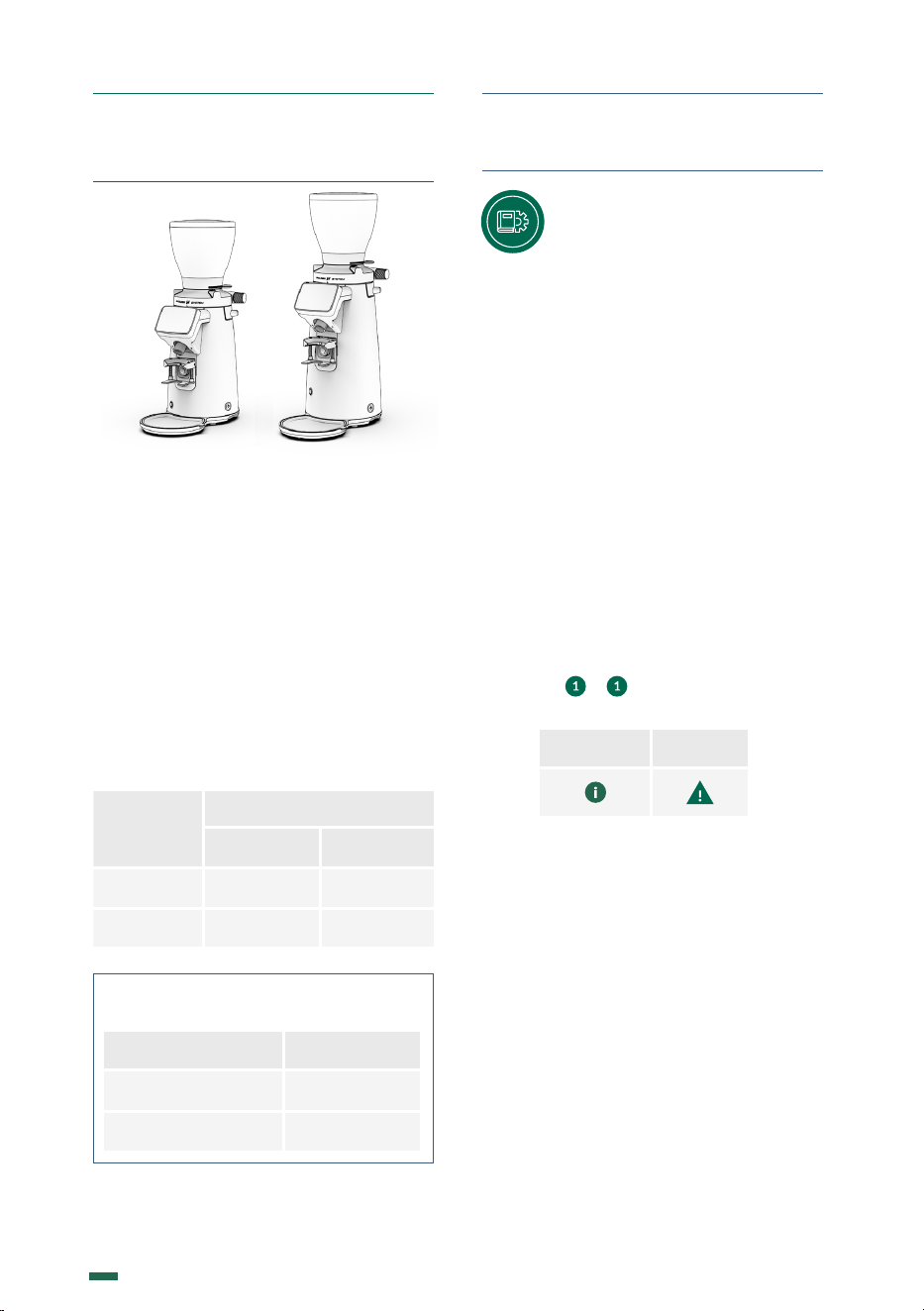
F8-F10

2
K09680H00 | PROC-CAL/002/03 USER MANUAL | V. 15/04/2024

3
K09680H00 | PROC-CAL/002/03 USER MANUAL | V. 15/04/2024
F8-F10
COFFEE GRINDER
1.
SAFETY
4
2.
DESCRIPTION
6
3.
INSTRUCTIONS
6
4.
IDENTIFICATION
7
5.
TECHNICAL CHARACTERISTICS
7
6.
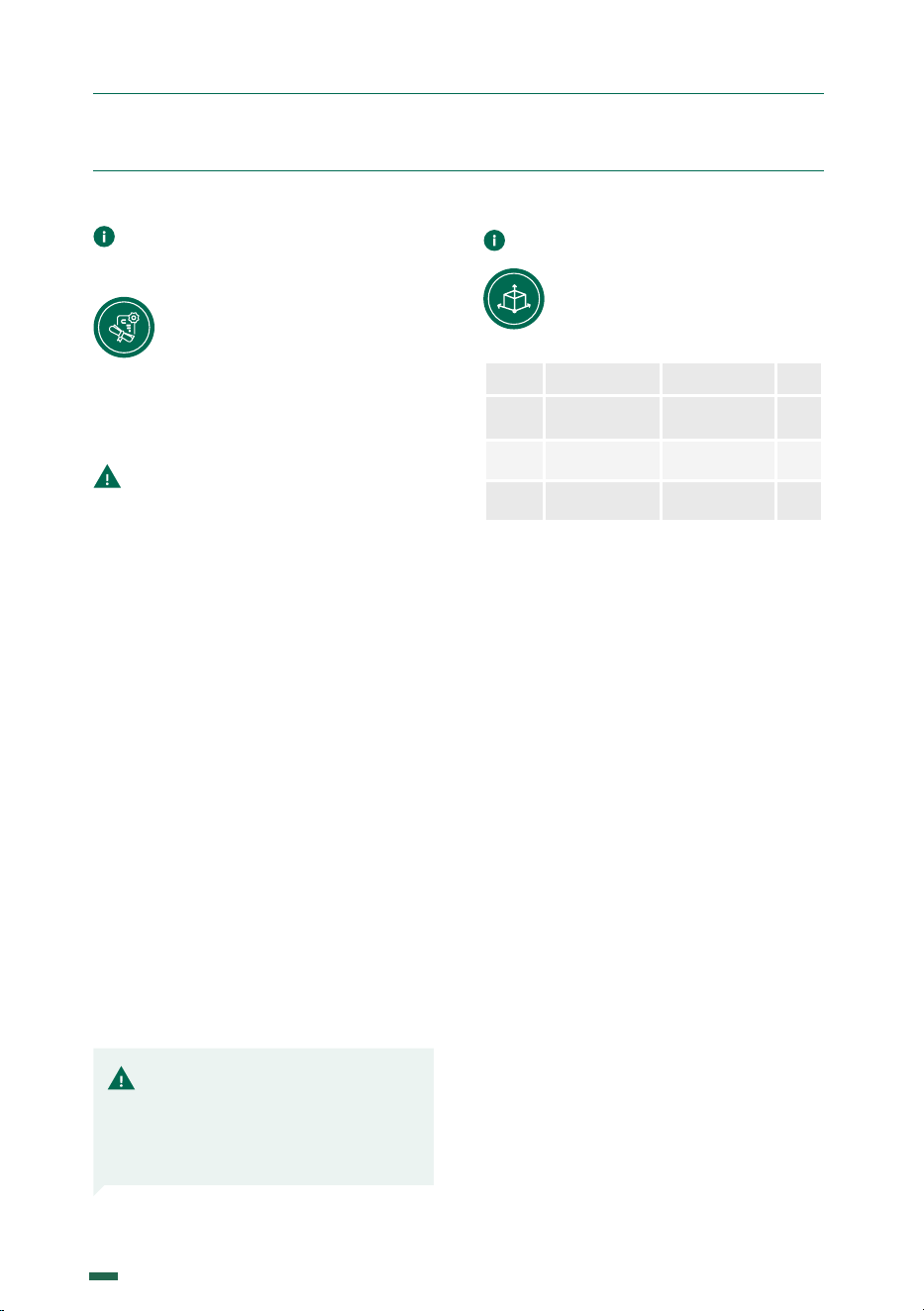
EXTERNAL COMPONENTS
9
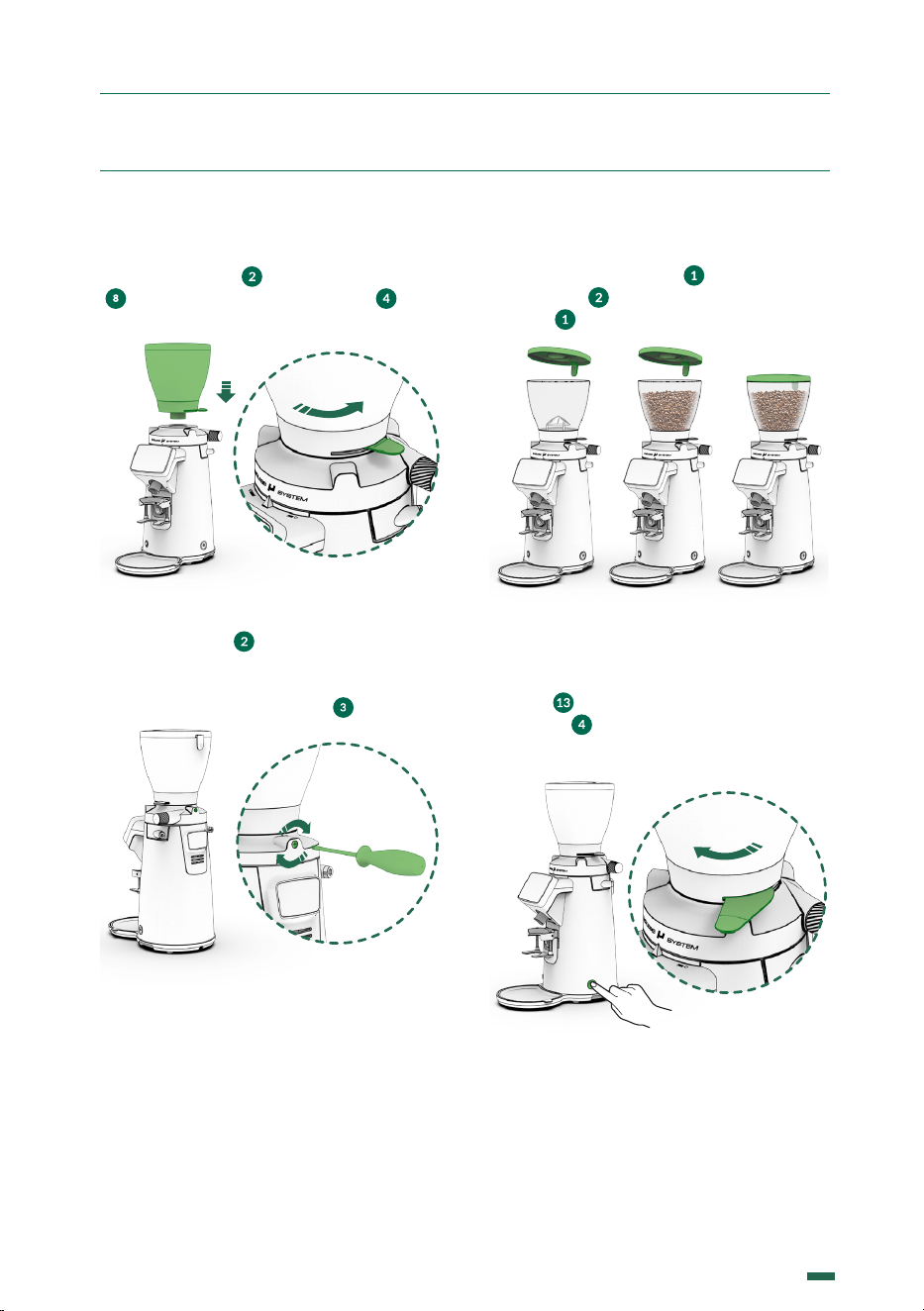
7.
INSTALLATION 10
8.
ADJUSTMENT 11
9.
OPERATION 13
10.
SETTINGS 15
11.
CLEANING 24
12.
MAINTENANCE 26
13.
DECLARATION OF CONFORMITY 29
CONTENTS
4
K09680H00 | PROC-CAL/002/03 USER MANUAL | V. 15/04/2024
1. SAFETY
This coee grinder
should only be used
for the function
for which it was designed:
grinding coee beans.
Do not use the
grinder to grind
other types of
foods such as nuts or to
grind finer granulated foods
such as sugar and others.
This device may be
used by children
aged 8 years and
over, by people with
reduced physical, sensory
or mental capacities and
by people without prior
experience/knowledge,
provided they have received
supervision or instructions
on the safe use of the
device and understand the
associated risks.
Children should not
play with the device.
Cleaning and
maintenance of the
device should not
be carried out by children
without supervision.
Do not allowing
liquids to come
into contact with
internal or external surfaces
while the appliance is on or
o, except for those parts
expressly mentioned in the
“CLEANING” section.
If, for any reason, this happens,
disconnect the power supply
immediately and dry all
surfaces carefully.
ADDITIONAL SAFETY MEASURES BUILT-IN
TO OUR GRINDERS:
• Special screw to keep the hopper fixed.
• Safety current cut-o by microswitch to access
the grinding unit
5
K09680H00 | PROC-CAL/002/03 USER MANUAL | V. 15/04/2024
1. SAFETY
If it is necessary to
access the interior,
where the electrical
components are located, go
to the nearest technical
service.
In the event of
any component
breaking, or for any
intervention we
recommend contacting
a technical services
centre, who will carry out
the repair or replacement,
guaranteeing that safety
standards are adhered to.
If the supplied cord is
damaged, it must be
replaced by the
manufacturer, its service agent
or similarly qualified persons in
order to avoid a hazard.
USERS SHOULD PAY
SPECIAL ATTENTION TO,
AND SCRUPULOUSLY
OBEY THE FOLLOWING
SAFETY INSTRUCTIONS
Any other use will be
considered improper
and dangerous.
NOTE: The manufacturer will not be liable for damage caused either by the
improper use of the device or by not following the stated safety measures.
These appliances are
intended to be used for
commercial
applications, for example in
kitchens of restaurants,
canteens, hospitals and in
commercial enterprises
such as bakeries,
butcheries, etc., but not for
continuous mass production of
food.
6
K09680H00 | PROC-CAL/002/03 USER MANUAL | V. 15/04/2024
SOUND LEVEL
The level of sound emitted is:
Model With coffee
F8
70 dB
F10
68 dB
2. DESCRIPTION
3.1. This manual is designed
to provide the necessary
information to correctly install,
use and maintain the grinder, as
well as to highlight precautions for users to
keep in mind.
To ensure the best operation of the coee
grinder, please follow the instructions as
outlined in this manual.
This manual should be saved for the life of
the grinder, and should always be at the
disposal of the operator.
3.2. This manual uses some special terms,
such as:
• Text in bold to highlight the importance
of some terms.
• Numbers in parentheses after a word,
which match the numbering of the
items in the image to the side or in the
image of the external components.
3. INSTRUCTIONS
Information Warning
Example: ( ) - Hopper Lid.
Icons:
Your new grinder has been designed using
the most sophisticated technologies in
existence. The result is a product of high
quality that oers the assurance of
the best results possible. Our products
are manufactured by hand, one by one,
following the strictest quality requirements.
In the manufacturing process, we use only
the highest quality materials (aluminum,
stainless steel, etc.) especially designated for
being in contact with food stu.
For the optimum functionality of the grinder
models described in this user manual, the
maximum work cycles are as follows:
Model
Work cycle
ON OFF
F8
8 s 40 s
F10
5 s 30 s
7
K09680H00 | PROC-CAL/002/03 USER MANUAL | V. 15/04/2024
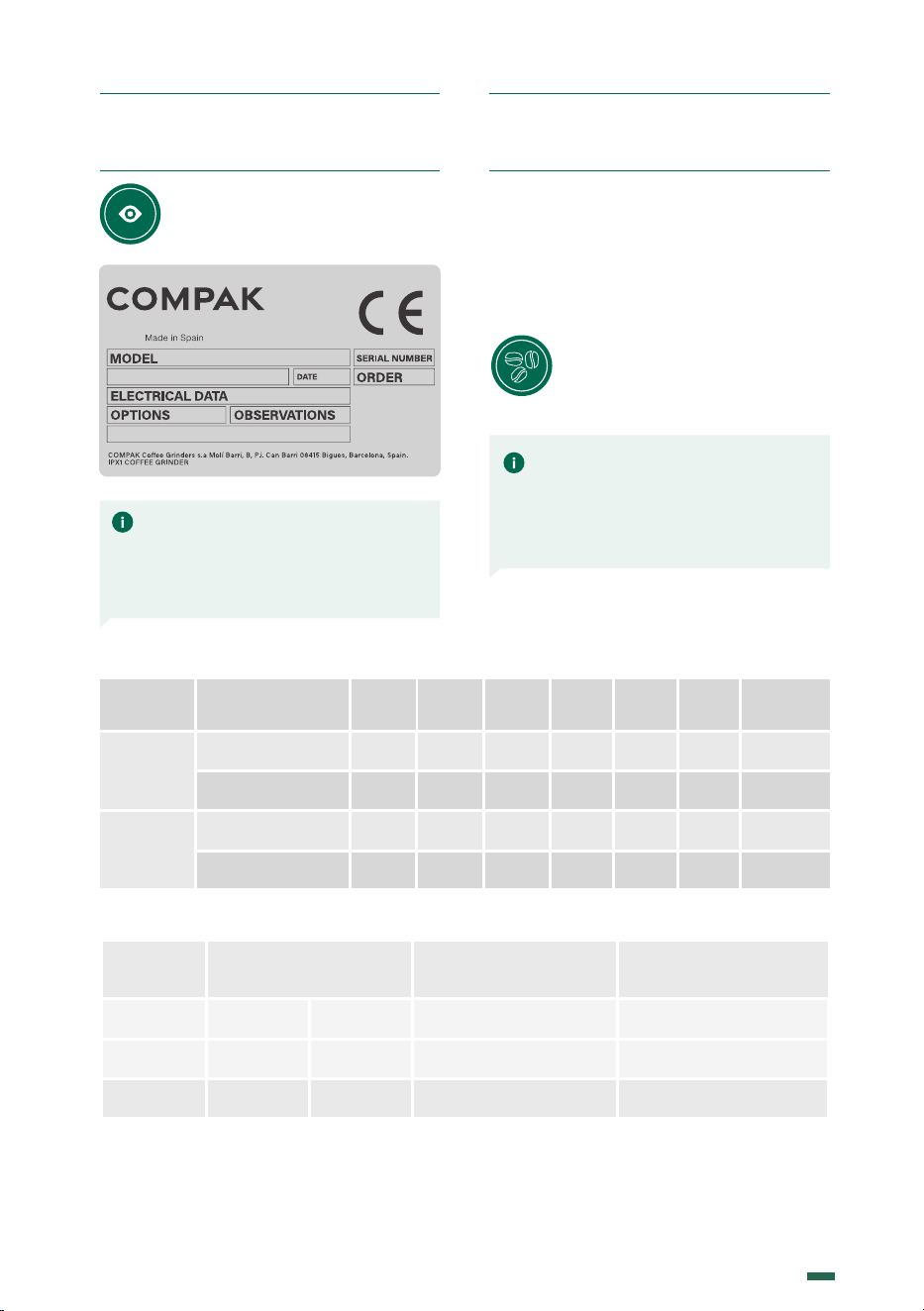
The technical characteristics
plate is indelibly marked with the
following information:
4. IDENTIFICATION
5.1. SCOPE
The coee grinders are intended for
commercial applications where ground
coee must be used, or in small shops
selling coee, but not for continuous mass
production of food.
This grinder should only be
used to grind coee beans.
Any other use is considered
improper and dangerous.
NOTE: The manufacturer reserves
the right to change the machine
components, according to the
requirements of each market, and
also for technological advances.
NOTE: The manufacturer is not
liable for damage to persons, goods,
or the machine itself, if the safety
regulations given in this manual are
not followed, or the machine is used
incorrectly.
5. TECH. CHARACTERISTICS
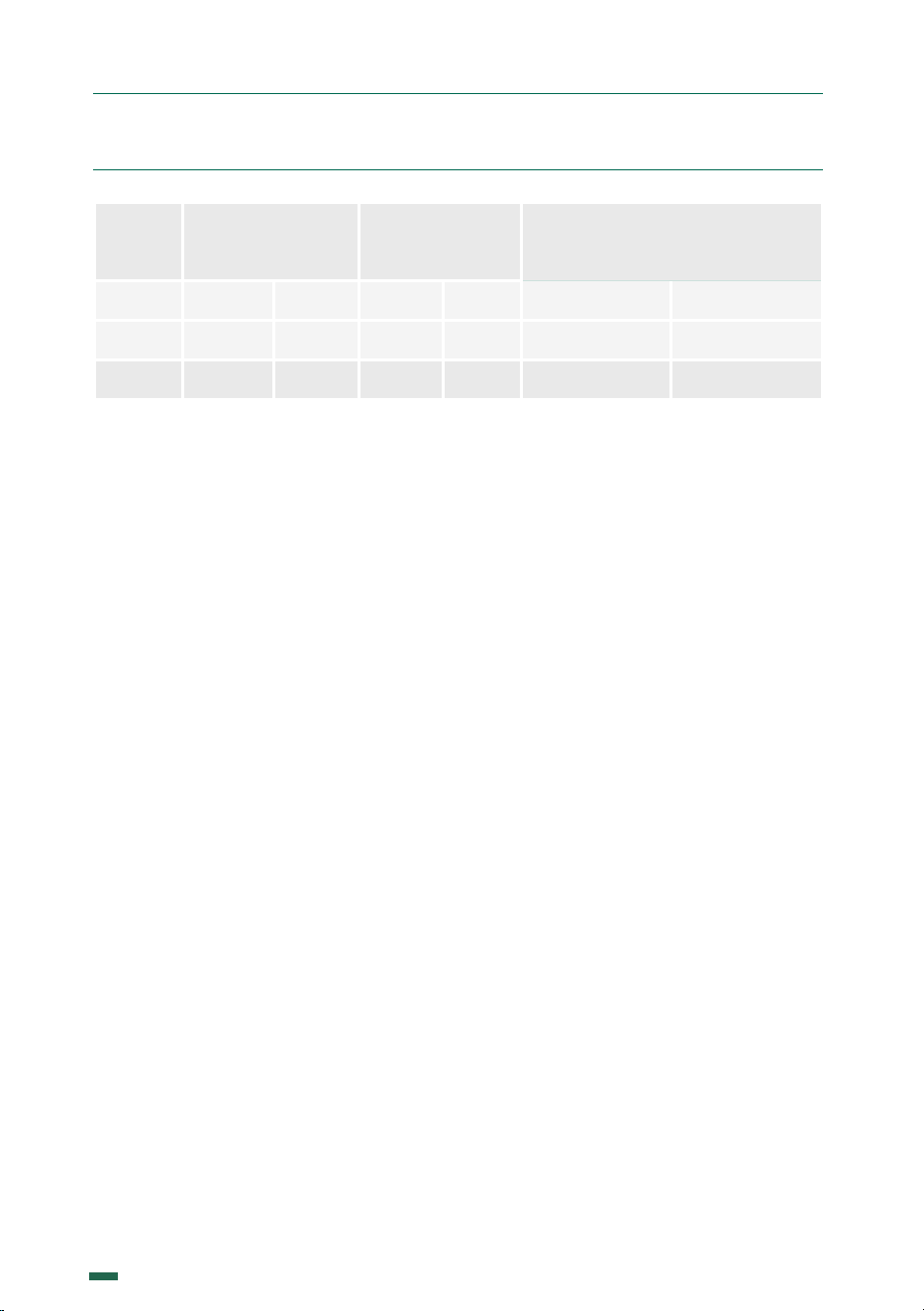
5.2. TECHNICAL DATA
Model
100 V
50 Hz
100 V
60 Hz
110 V
60 Hz
220 V
60 Hz
230 V
50 Hz
240 V
50 Hz
F8
Electrical Power
600 600 700 730 630 650
W
Spin Speed
1.270
1.530 1.580 1.500 1.290 1.310
rpm
F10
Electrical Power
750 770 800 780 950 970
W
Spin Speed
332,5 400 412,5 410 342,5 345
rpm
Model
Ø
Flat Burrs
Production 50 Hz* Production60 Hz*
F8
83 3,3 4,2 4,9
F10
68 Conic 2,7 4,25 5
mm in g/s g/s
8
K09680H00 | PROC-CAL/002/03 USER MANUAL | V. 15/04/2024
5. TECH. CHARACTERISTICS
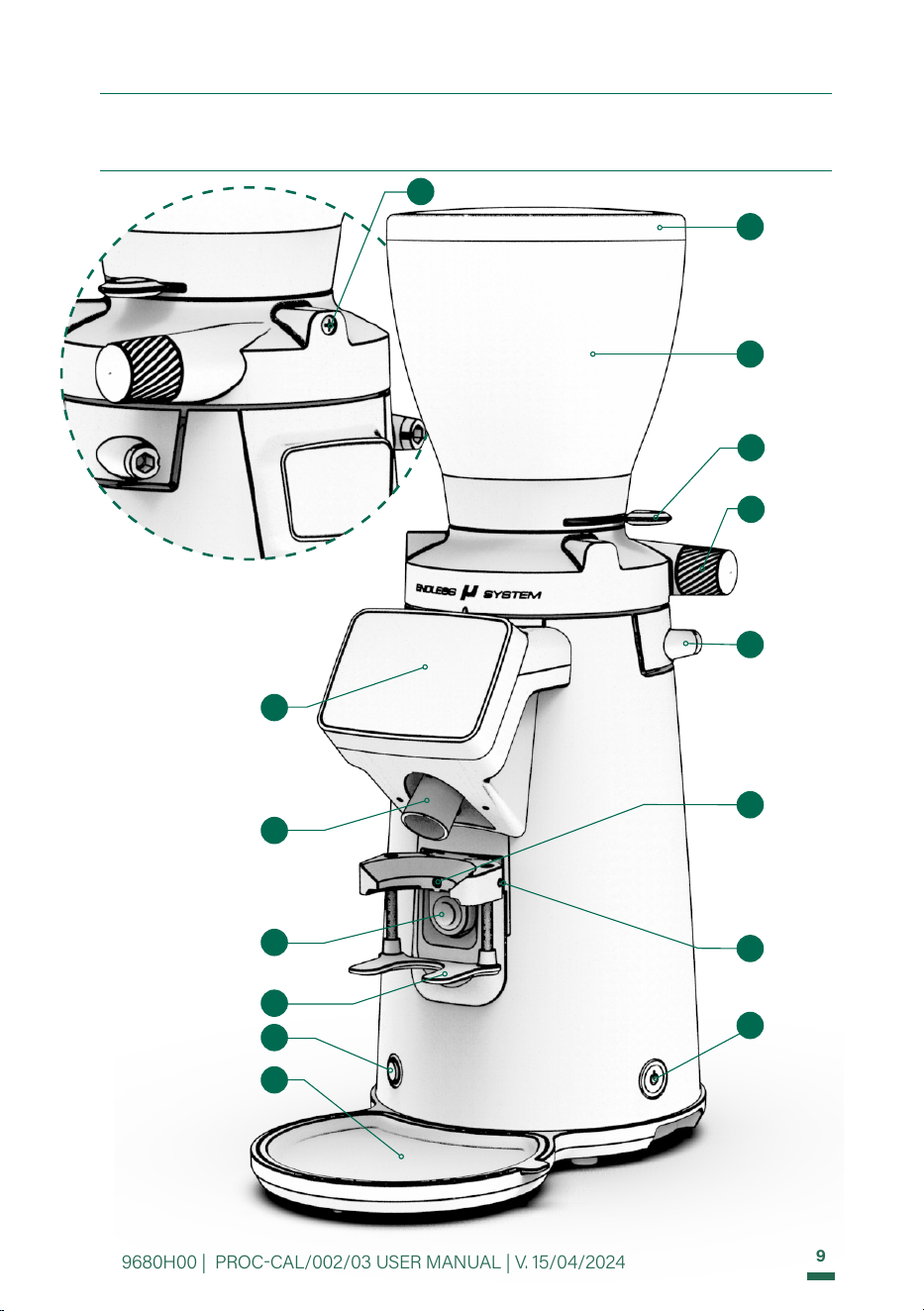
Model
Hopper capacity Net weight Height / Width / Depth
F8 1,25 3,08 15,36 33,86 617 x 230 x 385 24,3 x 9,05 x 15,15
F10 1,25 3,08 19,50 42,99 677 x 230 x 385 26,65 x 9,05 x 15,15
Kg lb Kg lb mm in
* Production and durability based on a medium roast coee and grinding point for Espresso.
There is a direct relation between the wear of the burrs and the increase in time per dose.
9
K09680H00 | PROC-CAL/002/03 USER MANUAL | V. 15/04/2024
1
2
10
15
14
12
11
6
6. EXTERNAL COMPONENTS F8-F10
TFT screen
Exit chute
Dose button
Coee
collection tray
Hopper
lid
Coee bean
hopper
Grind
regulator
knob
Lock
Load
System
Portafilter
adjustment
screw
4
Hopper
shutter
3
Hopper security screw
8
16
Refill button
Switch
ON-OFF
13
9
Portafilter holder
17
Portafilter
position
screw
10
K09680H00 | PROC-CAL/002/03 USER MANUAL | V. 15/04/2024
7. INSTALLATION
7.1. LEGAL NOTICES
The installer must read this instruction
manual carefully before installing the
machine.
The installation of the
device must be carried out
by qualified and authorised
personnel, obeying all the
current safety and hygiene regulations.
7.2. IMPORTANT WARNINGS
The operator must be a responsible
adult. Never a child nor someone without the
ability to accept that responsibility.
When handling the grinder, the following
precautions should be obeyed:
• When removing the grinder from
the packaging, always pull it by the
handles of the bag.
• Feet must not be bare.
• Hands and feet must be dry.
• Do not get the machine wet.
• Do not expose the machine to direct
sunlight or other atmospheric agents.
• Never insert any object into the coee
inlet or outlet while the appliance is
running. (Please remember that when
the grinder stops, the burrs will keep
turning for a short while).
• When unplugging the grinder, always
pull on the plug and never the power
cable to avoid a possible short circuit.
• Care is needed when handling cutting
burrs during cleaning.
7.3. WHERE TO USE IT
The appliance must be installed on a
solid and flat surface.
The minimum size for the
working space, to ensure you
get the best performance from
the machine, must be the following:
Model F8 F10
Height
640
25,2
700
27,6
mm
in
Width
250
9,8
250
9,8
mm
in
Depth
405
16
405
16
mm
in
• Install the grinders on tables that are
completely level and in areas free from
external vibrations
• Install the grinders in an area where
there are installations with a ground
connection.
• Avoid places where abrupt changes in
temperature, humidity or airflow may
occur.
7.4. INSTALLING THE COFFEE GRINDER
Before connecting the coee grinder, check
the following:
• The characteristics on the data plate
must match those of the electrical
mains network.
• The electrical connection plug
matches the socket into which it is to
be plugged.
• Ensure that the electrical power of
the facility is adequate for the power
consumed by the appliance.
• The point of connection to the electrical
mains network must be protected with
the appropriate electrical protection
device.
• The equipment must be correctly
connected to a ground connection
according to the current safety
regulations.
NOTE: This coee grinder should
not be installed in places (SUCH
AS INDUSTRIAL KITCHENS)
where are expected to be
cleaned using water jets or a
steam cleaner.
11
K09680H00 | PROC-CAL/002/03 USER MANUAL | V. 15/04/2024
8. ADJUSTMENT
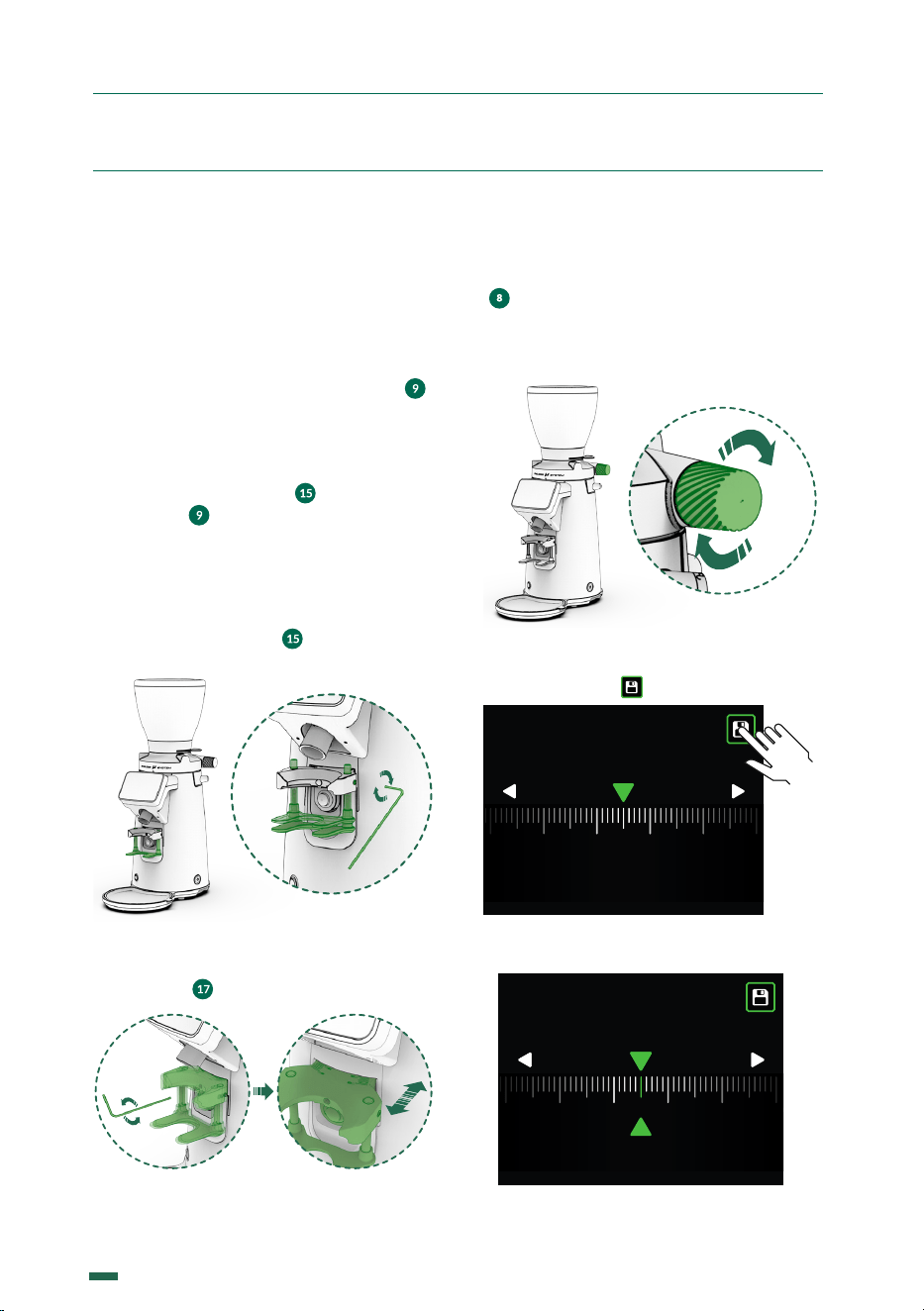
Remove the hopper lid ( ), fill the hopper
with coee ( ), and replace the lid on the
hopper ( ) (Fig. 3).
Fig. 3
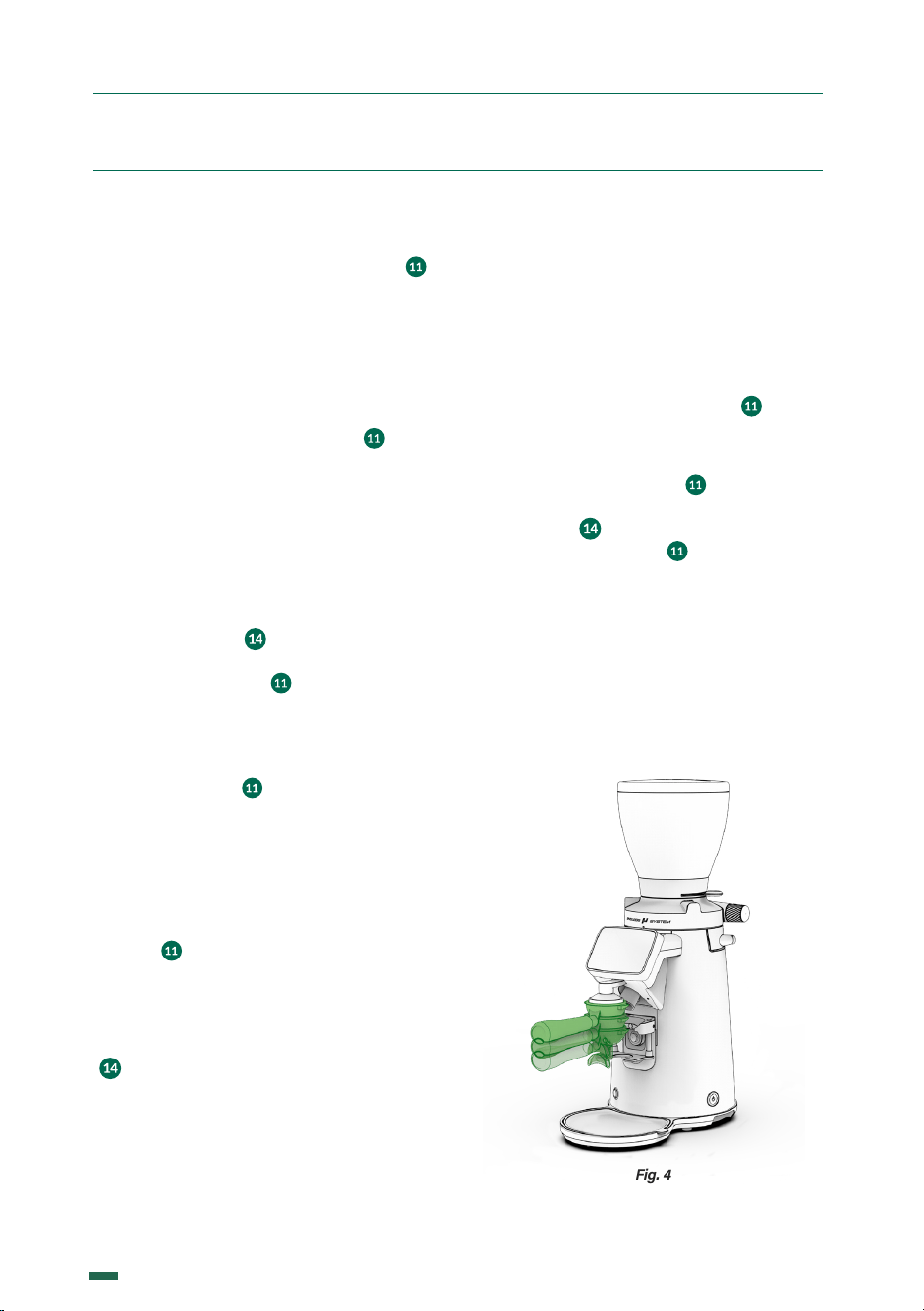
Plug in the grinder, and press the main power
switch ( ) to ON position, and open the
bean trap ( ) to allow coee to pass into the
grind chamber (Fig. 4).
Fig. 4
8.1. GRINDER SET UP
Place the hopper ( ) on the grind regulator
( ) and make sure the bean trap ( ) is in
the closed position (Fig. 1).
Fig. 1
Lock the hopper ( ) in place using a Phillips
head screw driver to gently tighten the
hopper security screw making it match to the
hole at the bean hopper collar ( ) (Fig. 2).
Fig. 2
12
K09680H00 | PROC-CAL/002/03 USER MANUAL | V. 15/04/2024
8. ADJUSTMENT
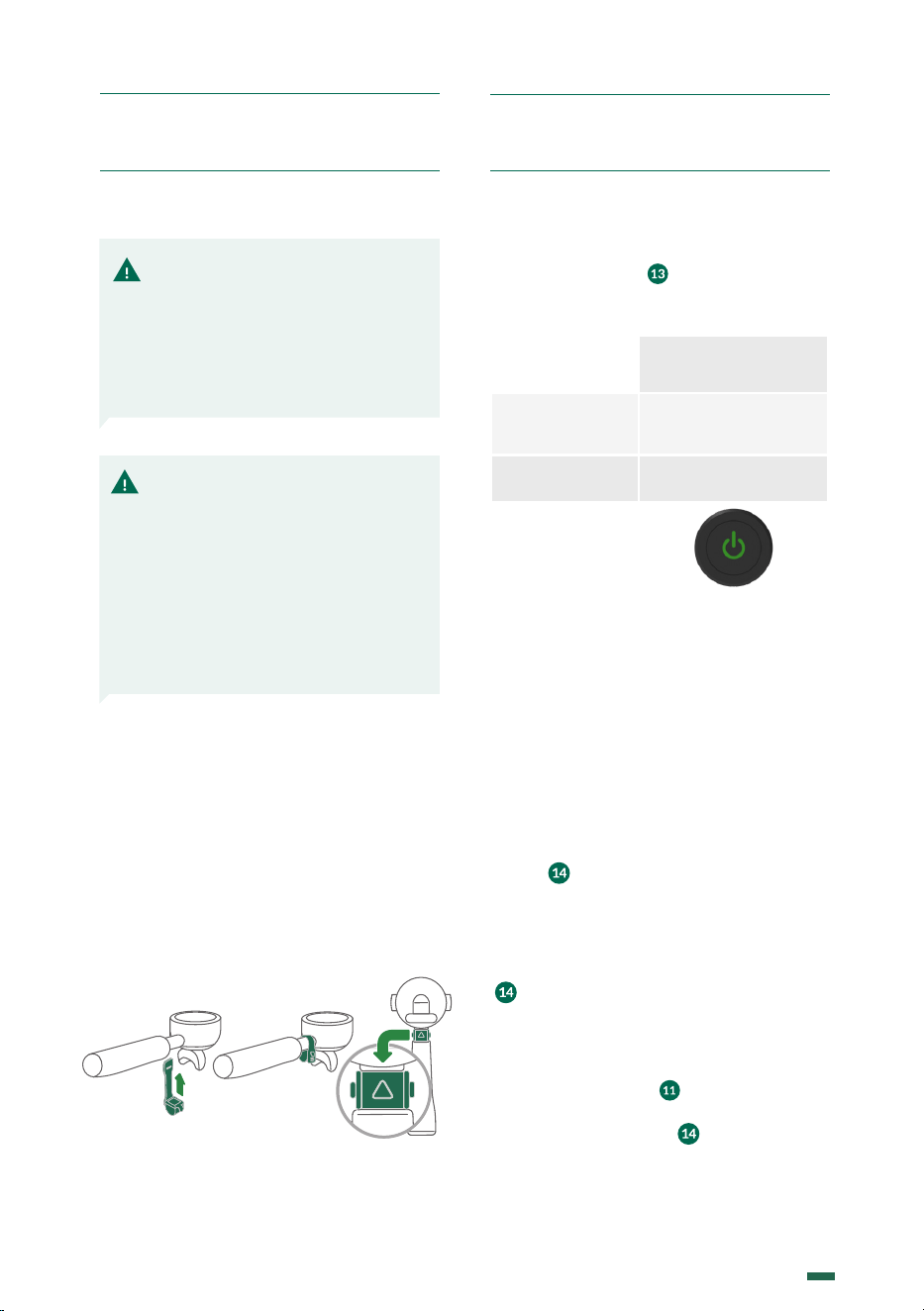
8.3. GRIND ADJUSTMENT SYSTEM
Everytime you turn the grind regulator knob
( ) the display will show the scale mesured
in microns. Turning the knob clockwise will
result in a coarser grind; turning the knob
counterclockwise will result in a finer grind.
Once you reach the desired grinding point,
you have the option to save the recipe by
pressing the icon .
After saving, you will see a marker appear on
the display showing the saved recipe.
8.2. ADJUSTING THE LOWER
PORTAFILTER SUPPORT
In order to ensure the proper distribution
of ground coee in the portafilter, while
supporting the portafilter in a hands-free
position during dosing, it is possible to adjust
the height of the lower portafilter support ( ),
also adjust forward and backwards the position
of the portafilter respect the coee exit chute.
To do this adjustment operation:
1. Loosen the screw ( ) on the lower
support ( ) by using the #3 Hex Allen
key included with your grinder.
2. Adjust the support to the desired
height using the portafilter as the point of
reference.
3. Tighten the screw ( ) with the #3 Hex
Allen key provided (Fig. 5).
Fig. 5
4. With the #3 Hex Allen key provided tighten
or untighten the screw located infront the
portafilter
( )
to find the right spot.
Fig. 6 Fig. 7
150µm 160µm 170µm140µm130µm
120µm
COARSEFINE
145µm
150µm 160µm 170µm140µm130µm120µm
COARSEFINE
145
µm
150µm 160µm 170µm140µm130µm120µm
145
µm
ESPRESSO
COARSEFINE
13
K09680H00 | PROC-CAL/002/03 USER MANUAL | V. 15/04/2024
8. ADJUSTMENT 9. OPERATION
8.4. PREPARATION OF THE
PORTAFILTER DETECTOR (OPTIONAL)
1. Place the detector on the double portafilter
(Fig. 1).
2. Check that the detector ring tab is properly
closed (Fig. 2).
3. Make sure that the arrow is in the correct
position on the lower side (Fig. 3).
Fig. 1 Fig. 2 Fig. 3
9.1. MAIN SWITCH
The main switch ( ) has the following
positions: AUTOMATIC / OFF / MANUAL
or ON /OFF.
F8 - F10
The equipment’s
electronic functions
are activated
ON
Equipment o
OFF
9.2. USAGE
Through the program menu (section 10.4.3),
it is possible to select three distinct functional
modes: PUSH, DETECTION and TOUCH.
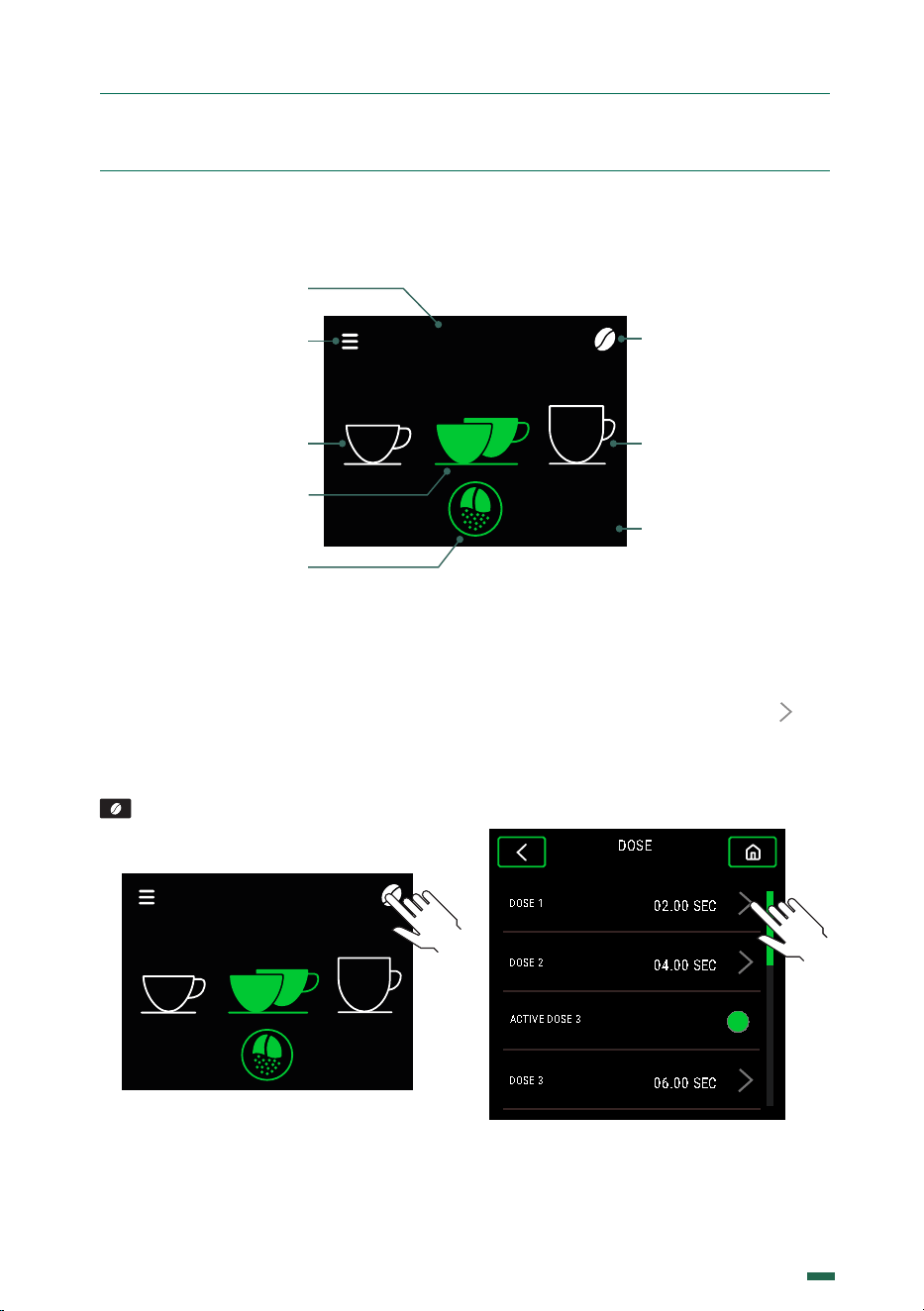
9.3. PUSH MODE
In the PUSH mode, a pre-programmed single,
double or triple dose can be set by simple
pressing the corresponding icon on the TFT
screen ( ).
The preselection of a single, double or triple
dose will remain active until it is changed by
pressing one of the three numbered icons. This
preselection is reflec ted on the TFT screen
( ) with the icon of the active selection in the
secondary color, and the rest of the icons in the
main color.
Dispensing the preselected dose by pressing
the lower pulse button ( ) one time. When the
grinding cycle begins, a timer countdown will
begin on the TFT screen ( ), which will count
down the timed dose cycle to zero.
NOTE: If the coee throughput
is very low, this is because the
coee is being ground very fine.
If the throughput is very high,
this is because the coee is being
ground very coarse. A perfect
Espresso is produced when the
grinding gives an infusion of 25
ml of coee in 25 seconds using
about 7 g of ground coee.
NOTE: It is recommended that
this operation be performed,
when changing to a finer
grinding, with the motor running,
to prevent coee from building
up between the burrs and
blocking the grinder.
14
K09680H00 | PROC-CAL/002/03 USER MANUAL | V. 15/04/2024
9.5. DETECTION MODE
In this operating mode, the grinder detects
the presence of the portafilter through
the movement of a fitted Tag. When the
portafilter with the mounted Tag comes
within range, the system identifies it and
automatically grinds DOSE 2 by pressing
the lower portafilter button ( ) once.
Once Dose 2 is detected, you have 5 seconds
to press the lower button ( ). If you want to
cancel the selection, you can press 1 on the
TFT screen ( ). If after 5 seconds, the lower
button is not pressed ( ), the grinder will
return to the standby mode.
9.6. TAMPER
9.6.1. Fixed Tamper (Optional)
Position the portafilter below the tamper and
push up to tamp the ground coee (Fig. 4).
Fig. 4
9. OPERATION
Once the grind cycle is initiated, it can be paused
by pressing the lower activation button ( ).
The cycle will pause, and will complete the
timed grind cycle if the lower activation
button is pressed again within 10 seconds.
After 10 seconds of inactivity, the grind cycle
will reset to the complete cycle time.
Grind pause can be activated or deactivated
by pressing the lower pulse button ( ). First,
set up by following these steps: MENU /
SETTINGS / GRIND PAUSE.
9.4. TOUCH MODE
In this mode of operation when making the
selection of single, double or triple doses of
coee by pressing the appropriate numeric
TFT icon screen ( ) starts grinding the
selected dose without the need to actuate
the lower dose button ( ).
The time set for that dose will decrease to
zero, at which point the dose ends.
Once the cycle starts grinding using the
lower dose button ( ) and is pressed again,
the grinding cycle will stop. If within 10
seconds it is pressed again, it will complete
the remaining time of the original dose time
setting. After 10 seconds of inactivity the
grinder will return to standby mode.
To pause by pressing the lower activation
button ( ), you can enable or disable,
accessing MENU / SETTINGS / GRIND
PAUSE .
Pause grinding may also be performed by
pressing the active icon on the TFT display
( ). This pause cannot be enabled or
disabled via the MENU.
15
K09680H00 | PROC-CAL/002/03 USER MANUAL | V. 15/04/2024
10. SETTINGS
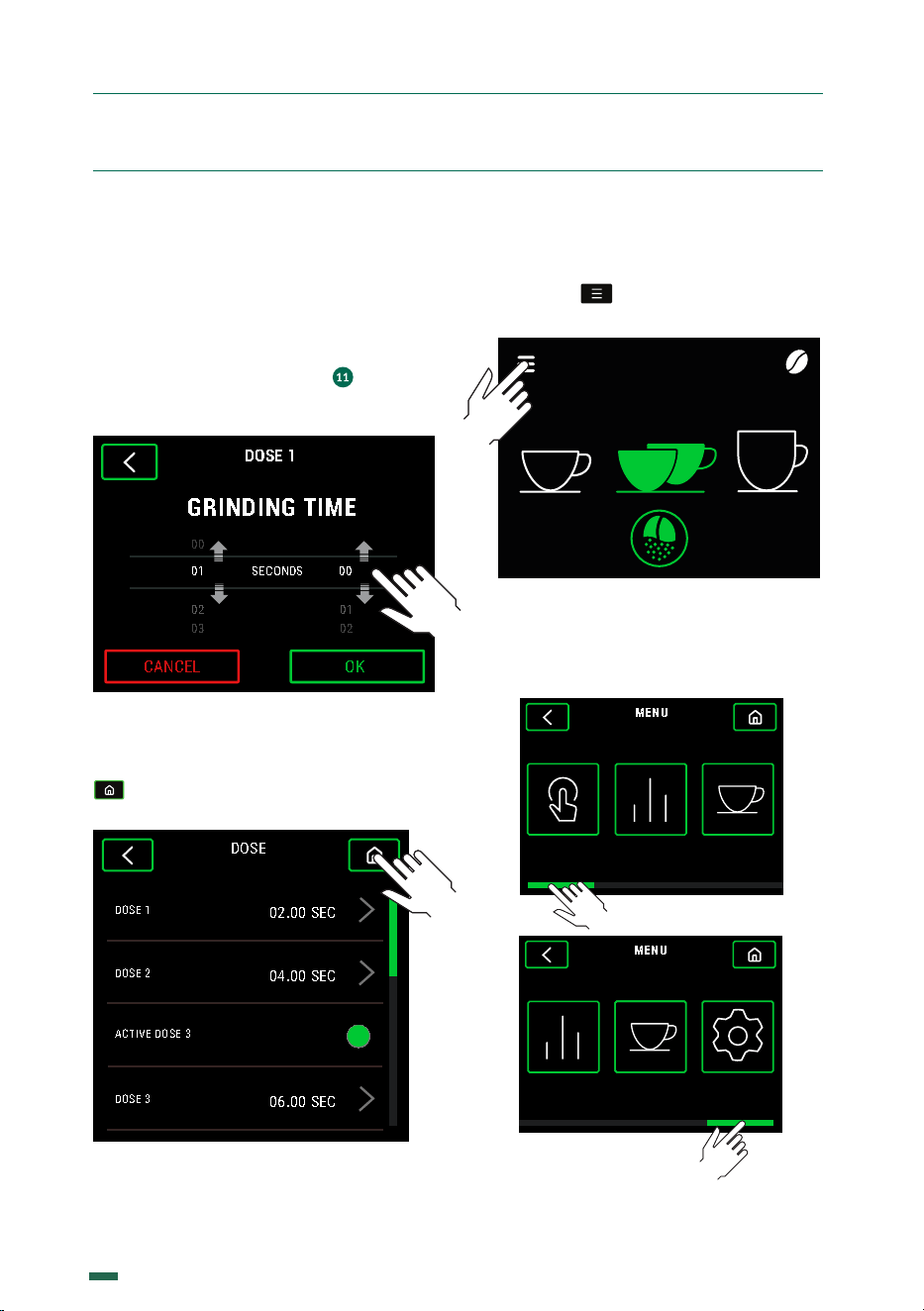
10.1. DISPLAY ICON GUIDE
10.2. GRIND TIME CONFIGURATIONS
10.2.1. The grinding times can be
configured for automatic, preselection and
instantaneous operation modes, and when
modified in one of the three modes they are
updated for all modes simultaneously.
To modify 1 dose, push the Coee Bean icon
of the Home menu and the dose time
menu will be accessed.
SEC
04.00
1 2 3
GRIND SIZE
154μm
F8 Ø83mm
SEL
ECT
10.2.2. Within the dose time menu you can
choose to change the time of 1, 2 or 3 doses
(if it is active), by pressing the symbol that
is in each of them, thus going to the dose
time configuration menu. To access dose
3, you must scroll down so that the option
appears.
DOSE
DOSE 1
02.00 SEC
DOSE 2
04.00 SEC
DOSE 3
06.00 SEC
ACTIVE DOSE 3
* In the case of 3 dose activation
Grind button
Dose 3*
SELECT
SEC
04.00
1 2 3
E8 Ø83mm
Active
mode
Grind Time
Configuration
Time of
active dose
Menu
Configuration
Dose 1
Dose 2 active
16
K09680H00 | PROC-CAL/002/03 USER MANUAL | V. 15/04/2024
10. SETTINGS
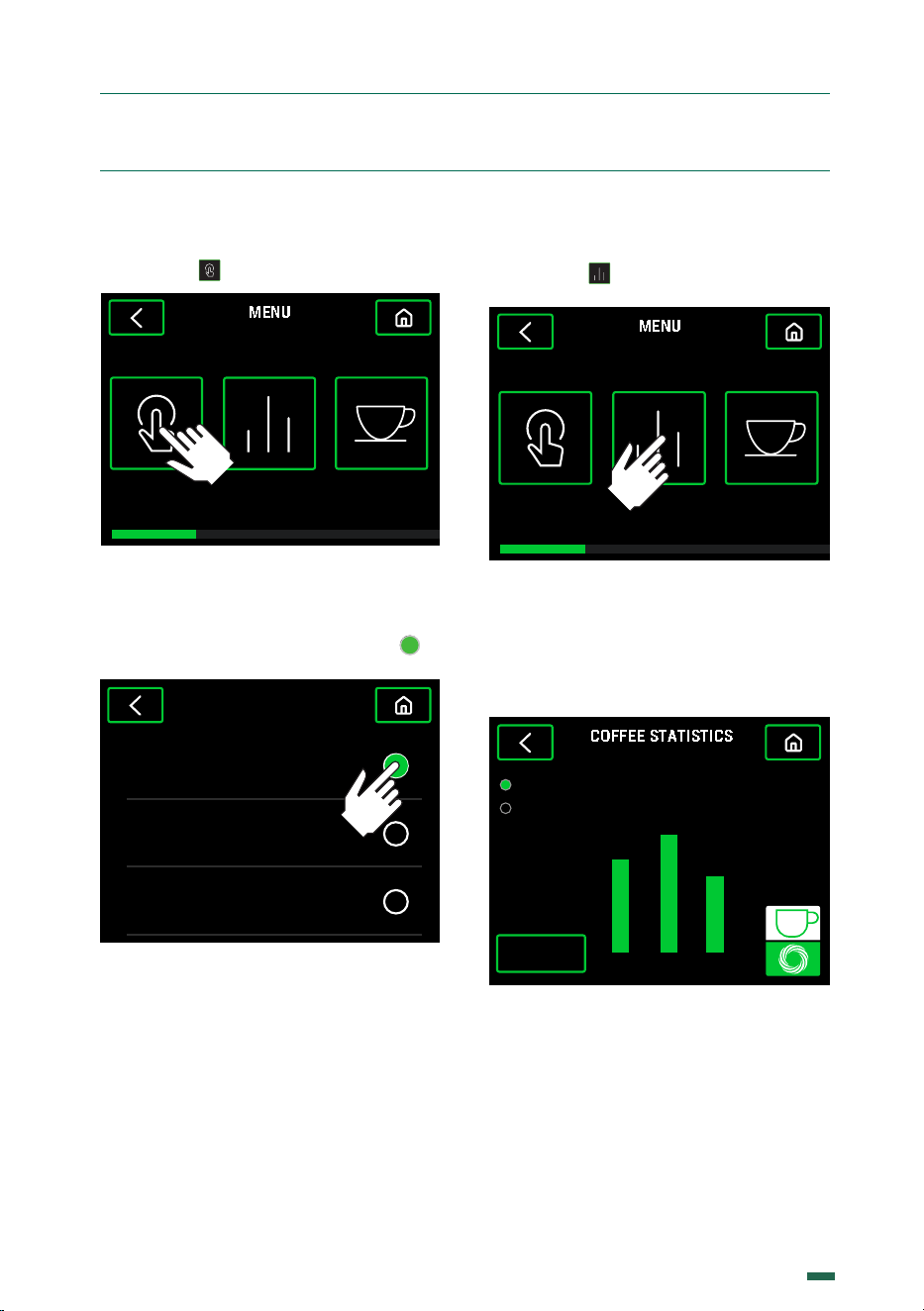
10.2.3. Inside the dose time configuration
menu, this can be changed by sliding the
seconds and tenths of a second up or down
until the desired time is obtained, it is also
possible to adjust the grinding time for each
dose using the portafilter. To do this, press
and hold the dosing button ( ) until the
desired time or coee quantity is reached. To
save the configured dose, press OK.
DOSE 1
02
03
01
02
00
01
SECONDS
00
GRINDING TIME
CANCEL
OK
10.2.4. When accepting, it will return to
the previous menu to be able to continue
changing more dose times or if the button
is pressed it will return to the Home
screen.
DOSE
DOSE 1
02.00 SEC
DOSE 2
04.00 SEC
DOSE 3
06.00 SEC
ACTIVE DOSE 3
10.3. ACCESS TO THE
CONFIGURATION MENU
10.3.1. Press
10.3.2. There are 5 options, use the
horizontal scroll to navigate between: Mode,
Statistics, Recipes and Settings.
SEC
04.00
1 2 3
GRIND SIZE
154μm
F8 Ø83mm
SEL
ECT
MENU
MODE RECIPESSTATISTICS
MENU
SETTINGSSTATISTICS RECIPES
MENU
MODE RECIPESSTATISTICS
MENU
SETTINGSSTATISTICS RECIPES
17
K09680H00 | PROC-CAL/002/03 USER MANUAL | V. 15/04/2024
10. SETTINGS
10.4. MODE MENU
10.4.1. Press in the configuration Menu.
MENU
MODE RECIPESSTATISTICS
10.4.2 There are three dierent options
to operate the grinder, Push, Detection
or Touch. Choose between the diferent
working modes by pressing the button .
TOUCH
PUSH
DETECTION
MODE
10.5. STATISTICS
10.5.1. Press
MENU
MODE RECIPESSTATISTICS
10.5.2. The number of independent doses
for each selection is shown, either absolute
which is from the date of installation of the
grinder, or relative from a counter reset date.
Burrs wear can also be checked here.
21 3
COFFEE STATISTICS
Relatives
Absoluts
5
4 3
RESET
Total:
12
18
K09680H00 | PROC-CAL/002/03 USER MANUAL | V. 15/04/2024
10. SETTINGS
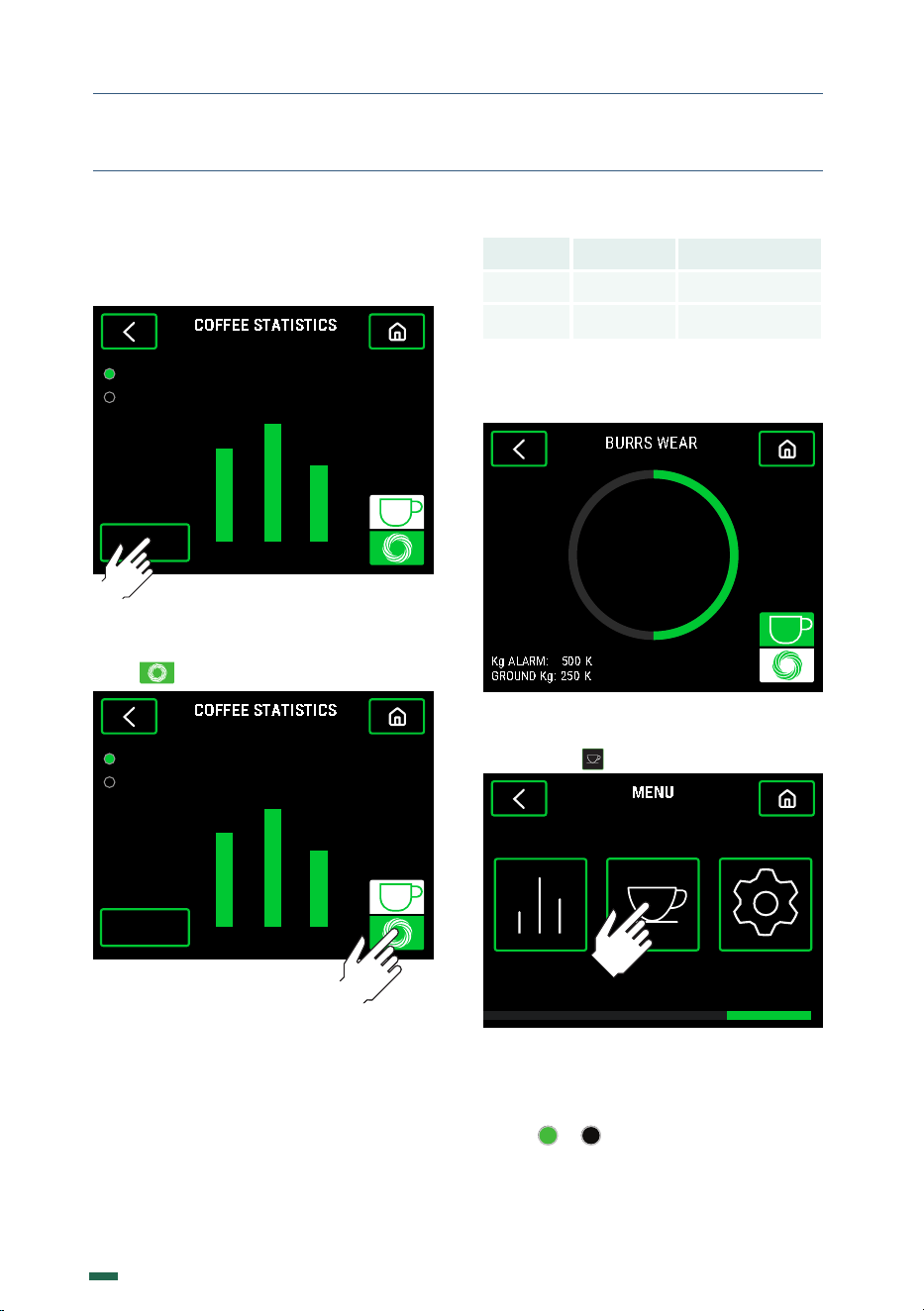
10.5.3. Relative Statistics can be reset by
pressing the Reset Relative button and then
entering the Password.
21 3
COFFEE STATISTICS
Relatives
Absoluts
5
4 3
RESET
Total:
12
10.5.4. To access the Burrs wear graph,
press
21 3
COFFEE STATISTICS
Relatives
Absoluts
5
4 3
RESET
Total:
12
10.5.5. There is a graphical view of the Burrs
wear in % as well as the Total ground Kg
and the Kg configured for the Burrs change
notice.
Model KG * KG Red Speed *
F8 800 5.000
F10 1.200 8.000
* Production and durability based on a medium roast coee and
grinding point for Espresso. There is a direct relation between
the wear of the burrs and the increase in time per dose
5 0
%
BURRS WEAR
Kg ALARM: 500 K
GROUND Kg: 250 K
10.6. RECIPES
10.6.1. Press
MENU
SETTINGSSTATISTICS RECIPES
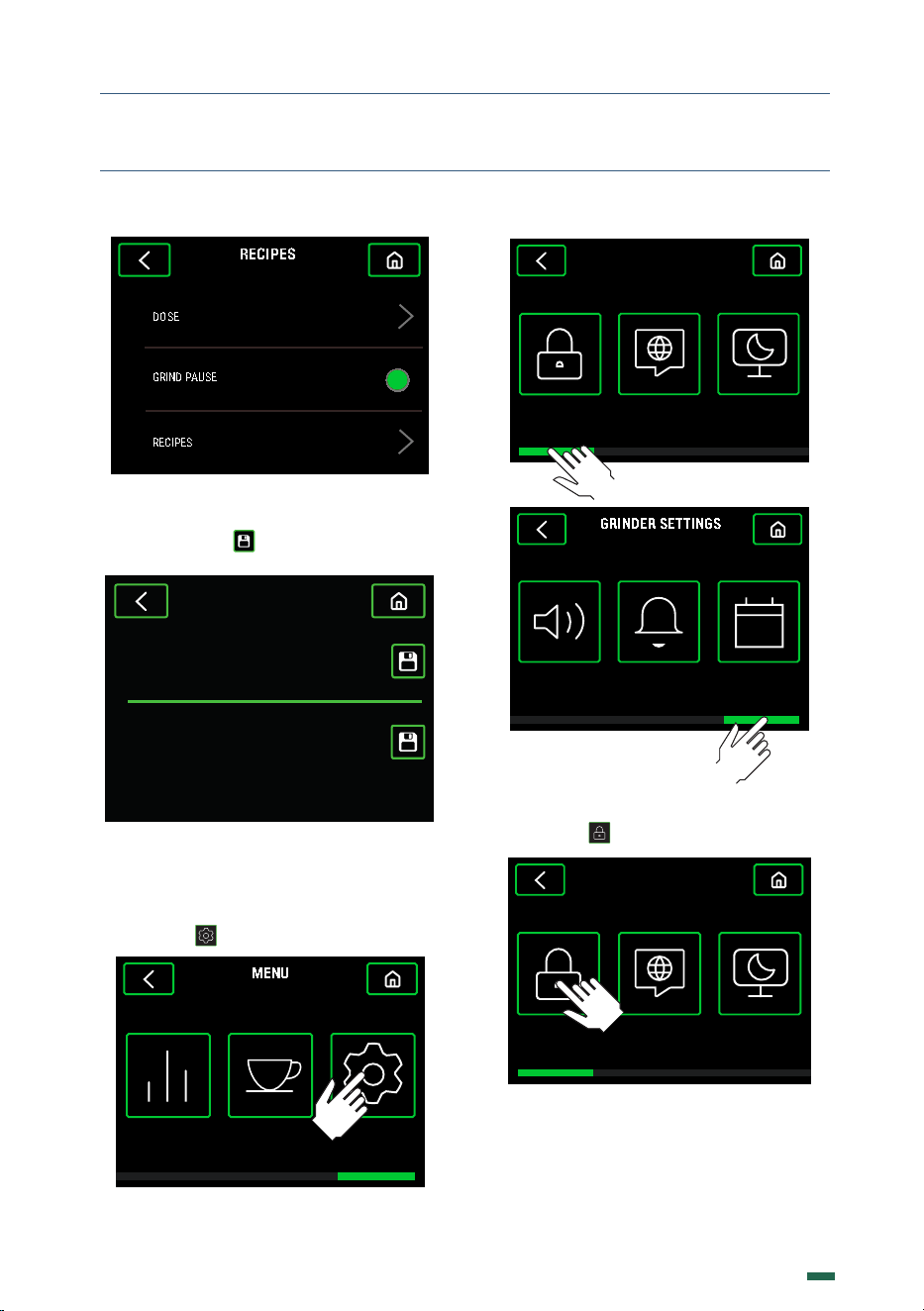
10.6.2 There are three options: Dose,
Grinding Pause and Recipes. If accessing
the menu to configure dose times, please
follow the steps in section 10.2.2. Press the
button or to toggle the grinding pause
ON or OFF. Pressing Recipes will access the
menu Grind Size.
19
K09680H00 | PROC-CAL/002/03 USER MANUAL | V. 15/04/2024
10. SETTINGS
SCREENSAVERLANGUAGEPASSWORD
GRINDER SETTINGS
GRINDER SETTINGS
SOUNDS DOSE ALARM DATE/HOUR
GRINDER SETTINGS
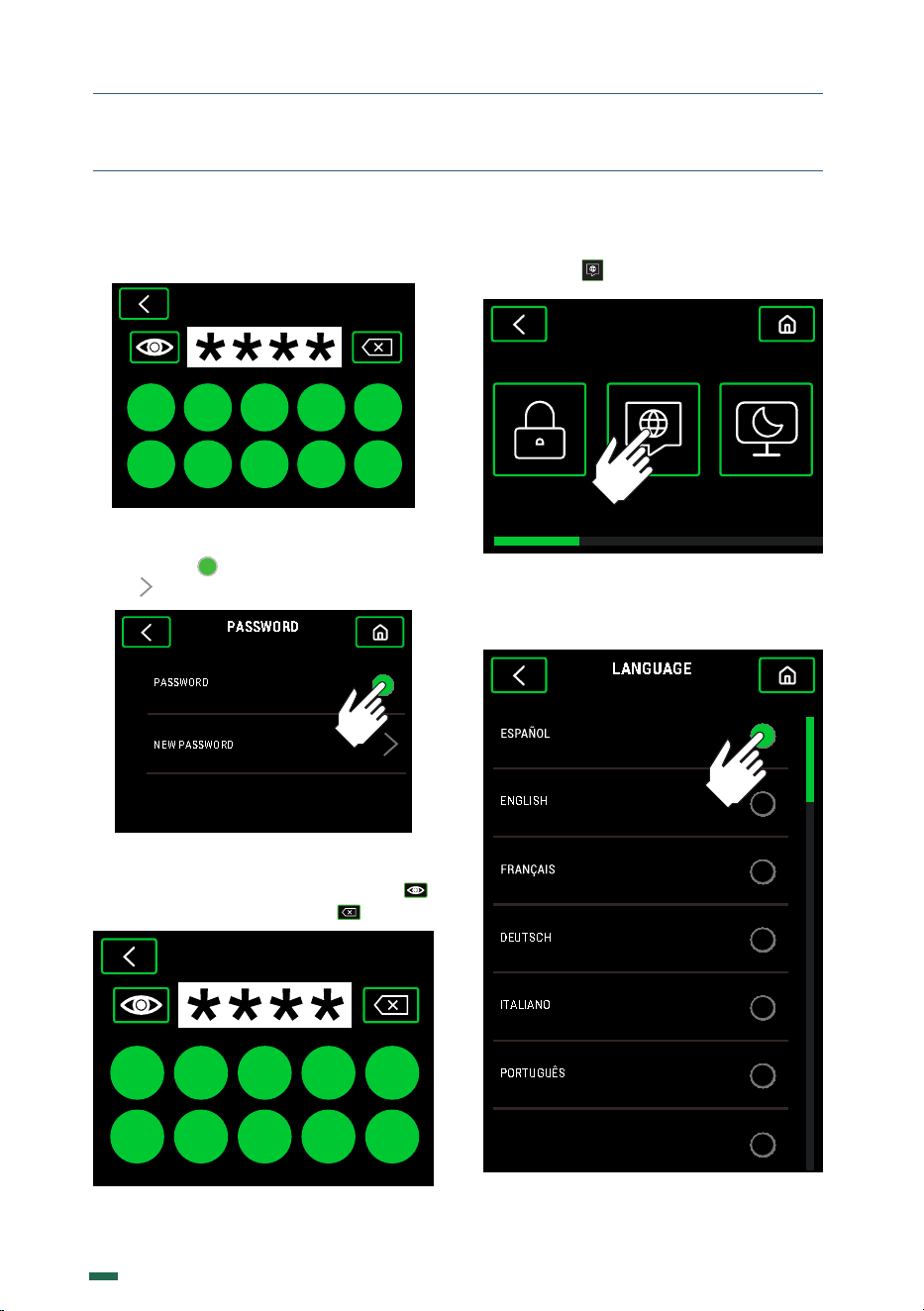
10.8. PASSWORD
10.8.1. Press
SCREENSAVERLANGUAGEPASSWORD
GRINDER SETTINGS
GRINDER SETTINGS
RECIPES
DOSE
GRIND PAUSE
RECIPES
In this menu, you can set a new Burr Zero
Point or configure the Espresso recipe by
pressing the icon .
GRIND SIZE
145 µm
0 µmBURR ZERO POINT
ESPRESSO
10.7. SETTINGS MENU
10.7.1. Press in the configuration menu.
MENU
SETTINGSSTATISTICS RECIPES
20
K09680H00 | PROC-CAL/002/03 USER MANUAL | V. 15/04/2024
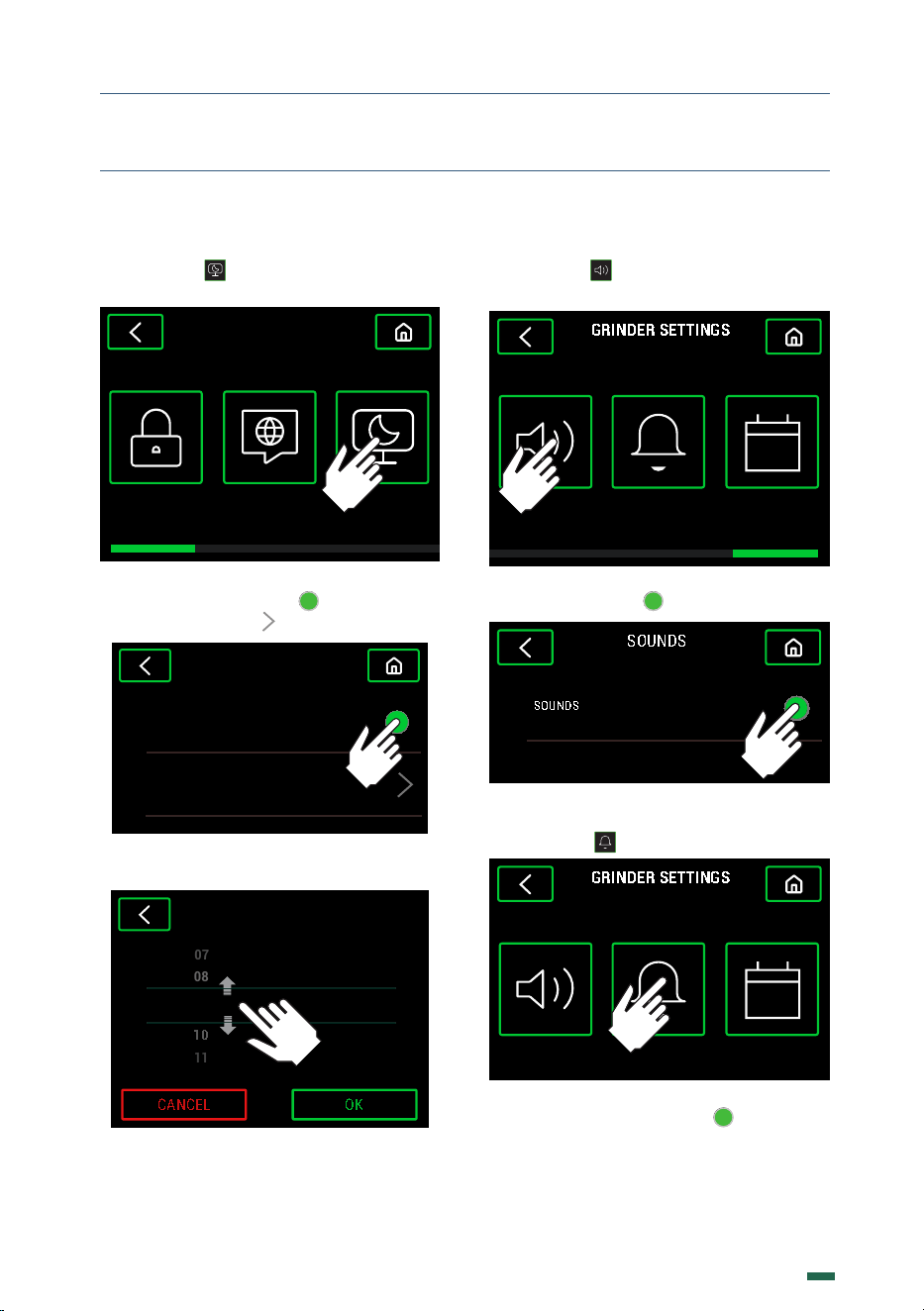
If the Password is active, enter the Default
one: 0000
PASSWORD
0 1 2 3 4
5 7 8 96
10.8.2. Activate or deactivate the Password
by pressing . To modify the Password
press
PASSWORD
PASSWORD
NEW PASSWORD
10.8.3. Enter a new 4 numbers Password.
Show or hide the numbers by pressing
or delete the numbers pressing
0 1 2 3 4
5 7 8 96
NEW PASSWORD
10.9. LANGUAGE
10.9.1. Press
SCREENSAVERLANGUAGEPASSWORD
GRINDER SETTINGS
GRINDER SETTINGS
10.9.2. Choose between the dierent
languages available using the vertical scroll.
LANGUAGE
PO RTUGUÊS
ITALIANO
DEUTSCH
ENGLISH
한국어
10. SETTINGS
21
K09680H00 | PROC-CAL/002/03 USER MANUAL | V. 15/04/2024
10. SETTINGS
10.10. SCREENSAVER
10.10.1. Press
SCREENSAVERLANGUAGEPASSWORD
GRINDER SETTINGS
GRINDER SETTINGS
10.10.2. Activate or deactivate the
Screensaver by pressing . To modify the
activation time press
SCREENSAVER
ACTIVATED
ACTIVATION TIME 05 MIN
10.10.3. Change the minutes by sliding up or
down and press the button OK to confirm.
SCREENSAVER
CANCEL
OK
11
10
MINUTES09
08
07
ACTIVATION TIME
10.11. SOUNDS
10.11.1. Press
SOUNDS DOSE ALARM DATE/HOUR
GRINDER SETTINGS
10.11.2. Activate or deactivate the sound by
pressing the button
SOUNDS
SOUNDS
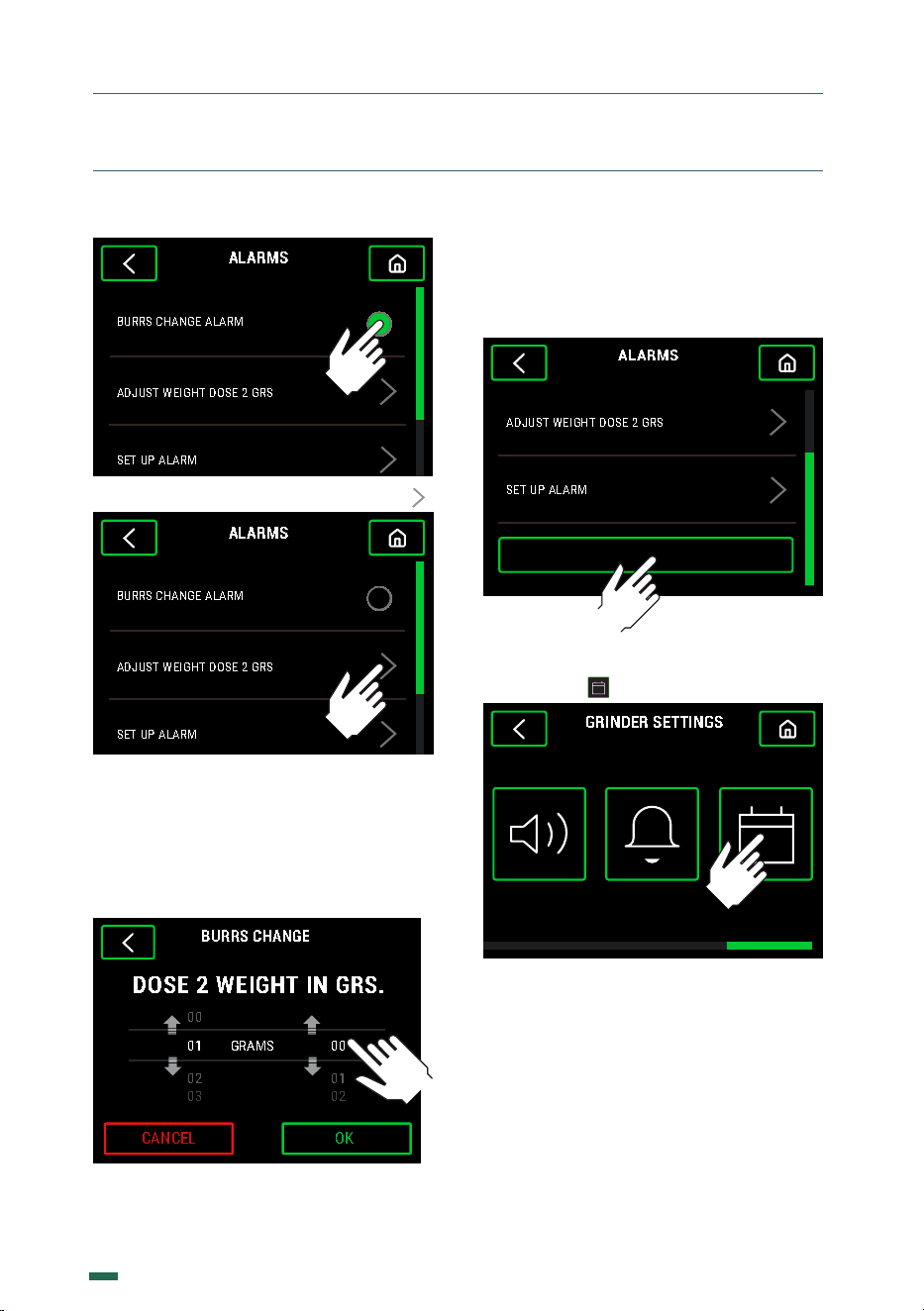
10.12. BURRS CHANGE ALARM
10.12.1. Press
SOUNDS DOSE ALARM DATE/HOUR
GRINDER SETTINGS
10.12.2. Activate or deactivate the Burrs
change alarm by pressing , adjust the
Weight of the Dose 2, the Burrs change
alarm Kg or Reset Alarm.
22
K09680H00 | PROC-CAL/002/03 USER MANUAL | V. 15/04/2024
ALARMS
BURRS CHANGE ALARM
ADJUST WEIGHT DOSE 2 GRS
SET UP ALARM
RESET ALARM
10.12.3. To set the Weight of Dose 2 press
ALARMS
BURRS CHANGE ALARM
ADJUST WEIGHT DOSE 2 GRS
SET UP ALARM
RESET ALARM
10.12.4. Change the grams of Dose 2 by
sliding the grams or tenths of a gram up or
down until the desired weight is reached and
press the button OK to accept.
Dose 2 will be the average weight used to
determine burr wear.
DOSE 2 WEIGHT IN GRS.
BURRS CHANGE
0 2
0 3
0 1
0 2
00
01
GRAMS
0 0
CANCEL
OK
10.12.5. To delete the stored data of the Burr
change alarm, i.e. once replaced the current
set of Burrs, scroll vertically, press the Reset
Alarm button and then enter the Password.
ALARMS
ADJUST WEIGHT DOSE 2 GRS
SET UP ALARM
RESET ALARM
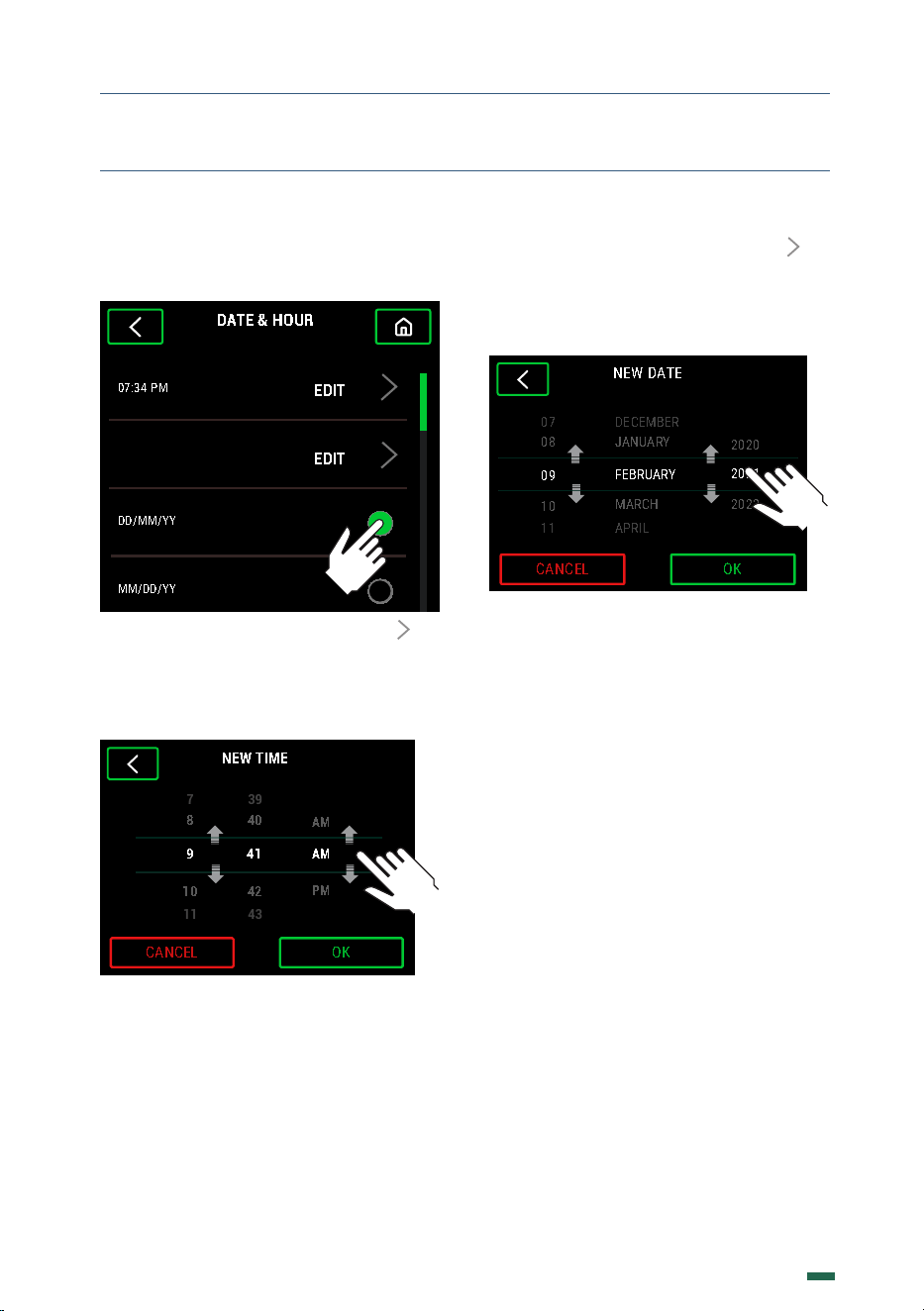
10.13. DATE/HOUR
10.13.1. Press
SOUNDS DOSE ALARM DATE/HOUR
GRINDER SETTINGS
10. SETTINGS
23
K09680H00 | PROC-CAL/002/03 USER MANUAL | V. 15/04/2024
10. SETTINGS
10.13.2. Edit both the time, the date, or the
way to show the date between DD/MM/YY
or MM/DD/YY.
DATE & HOUR
07:34 PM
EDIT
MM/DD/YY
DD/MM/YY
09 02 2023
EDIT
10.13.3. Edit the time by pressing to
access the time setting screen. Change the
hours, minutes, and seconds by sliding up or
down until the desired time is obtained and
press the button OK to confirm.
NEW TIME
OK
43
11
PM
42
10
AM
41
9
AM
40
8
39
7
CANCEL
10.13.4. Edit the date by pressing to
access the date setting screen. Change the
days, months, and years by sliding up or
down until the desired time is obtained and
press the button OK to confirm.
NEW DATE
APRIL
11
2022
MARCH
10
2021
FEBRUARY
09
2020
JANUARY
08
DECEMBER
07
CANCEL
OK
24
K09680H00 | PROC-CAL/002/03 USER MANUAL | V. 15/04/2024
11. CLEANING
11.1. GENERAL CLEANING
11.1.1. To ensure that the grinder functions
properly, and produces the highest quality
grind possible, the parts that come into
contact with coee should cleaned
periodically.
General Cleaning guidelines as follows:
• Always turn the main power switch to
the o position ( ).
• Unplug the machine from the power
source.
• Do not submerge the grinder in water
or use power washing devices.
• The appliance is not to be cleaned with
a water jet.
11.2. BEAN HOPPER CLEANING
11.2.1. In order to properly clean the bean
hopper ( ), first empty out all remaining
beans and fragments.
To remove the hopper, first close the bean
trap ( ), and then loosen the hopper lock
screw ( ) and lift the hopper straight up.
Clean the hopper ( ) with a moist soft cloth
or with a small amount of water and neutral
soap to eliminate any oily residue from the
beans.
Replace the bean hopper ( ) following the
same steps as the removal process, but in
reverse.
11.3. CLEANING THE COFFEE EXIT CHUTE
11.3.1. It is very important to maintain the
exit chute ( ) clean of coee in order to
assure the consistency of the dose and the
continued functioning of the grinder.
The dose activation button
(
11
)
along with
the portafilter holders should be wiped
periodically to prevent buildup of coee
grounds and oils.
In order to clean the coee outlet in F8
models, use the #3 Hex Allen key supplied to
loosen the screw that holds the nozzle and
thus be able to remove and clean it.
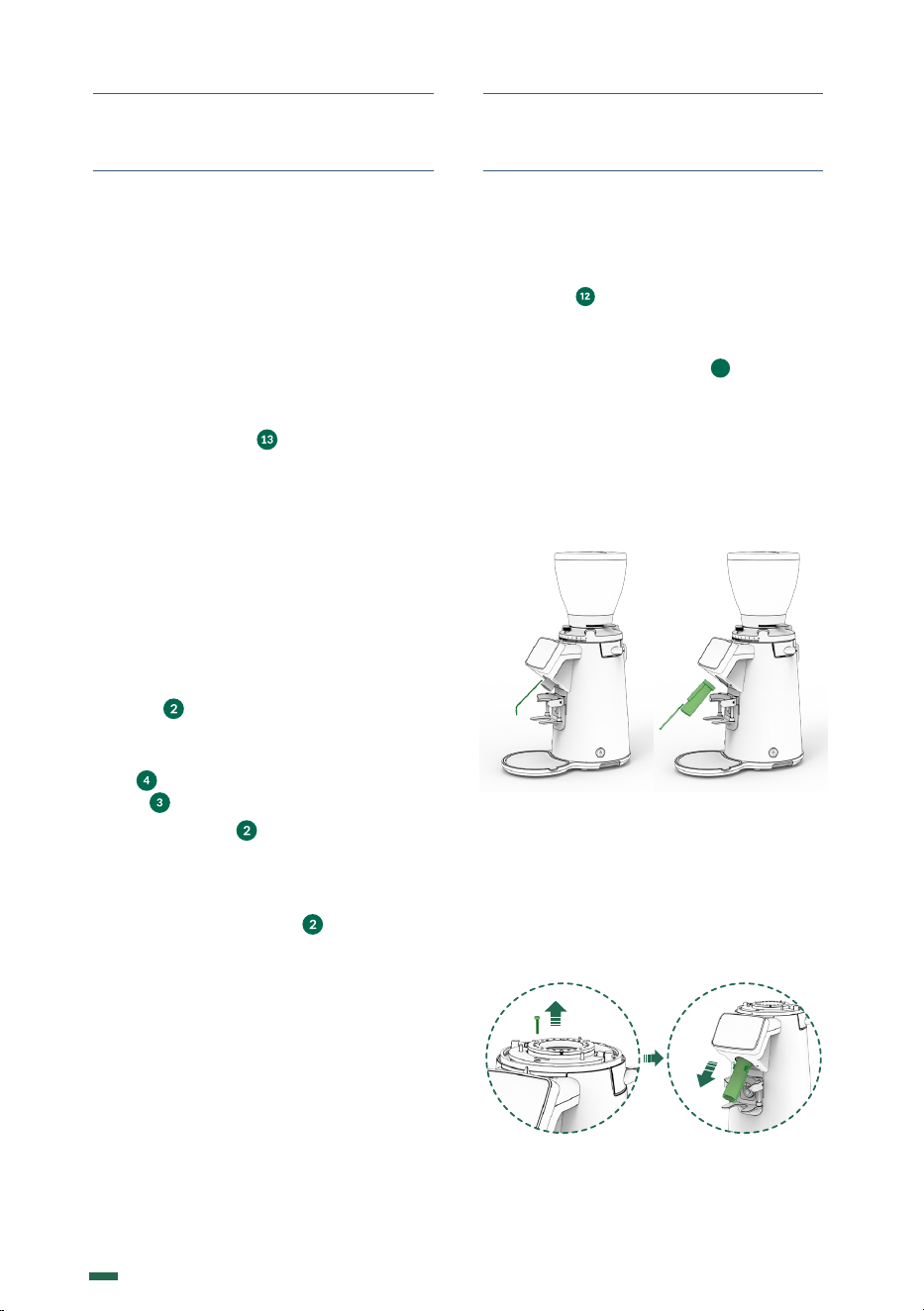
11.3.2. For the F10, to properly disassemble
the regulator, please follow the steps outlined
in section 12.3.10. to 12.3.12.. Use the #3
Hex Allen key supplied to loosen the screw
that holds the nozzle located on top of the
grinding cavity, according to (Fig. 1), and
remove it by pulling downwards, as shown
in (Fig. 2).
Fig. 10 Fig. 11
25
K09680H00 | PROC-CAL/002/03 USER MANUAL | V. 15/04/2024
11. CLEANING
11.4. CLEANING THE GRIND CHAMBER
It is recommended to clean the grind chamber
monthly using a cleaner. This process helps
eliminate any smelly residues from the coee
remnants, which can have a negative impact
on the quality of the brewed coee.
Please exercise caution when handling the
cutting burrs during the cleaning process.
The steps to follow are:
• In order to properly clean the
bean hopper ( ), first empty out all
remaining beans and fragments.
• Close the bean trap on the hopper
( )
and grind out the remaining coee in the
grind chamber.
• Pour the recommended grinder cleaning
product into the bean hopper ( ) and
open the bean trap
( )
, allowing the
cleaning product to pass into the grind
chamber.
• Grind the cleaning product at a
medium coarse grind setting until
the recommended amount is passed
through the system and nothing remains
in the grind chamber.
• Clean the hopper ( ) and refill with coee
beans.
• Discard the first 2-3 doses of coee to
assure that the residual cleaning product
is removed from the grind chamber and
set the grind regulator to the desired
setting
( )
.
• Following these steps will ensure that
the grinder is clean and ready for use.
• We do not recommend the taking apart
of the grind assembly unless changing
burrs, or removing a blockage/
obstruction in the grind chamber.
Removal of the grind assembly should
be performed by a qualified service
technician.
11.5. CLEANING THE OUTSIDE OF THE
GRINDER
To clean the exterior of the grinder, first wipe
with a dry soft cloth, and then gently wipe
with a damp cloth and neutral soap.
11.6. CLEANING THE TOUCH SCREEN
Proper cleaning should be done with a soft,
damp microfiber towel. Preferably distilled
water or other cleaning product specifically
designed for touch screen cleaning.
Turn o the grinder and gently wipe o the
screen using a circular motion.
26
K09680H00 | PROC-CAL/002/03 USER MANUAL | V. 15/04/2024
Not following the recommended
burr life guidelines can
compromise the safety of the
grinder.
These operation should be done
by a qualified service technician
wearing safety gloves.
12.1. GENERAL WARNING
Before performing any type of maintenance,
you should:
• Always turn OFF the main power switch
to the o position ( ).
• If the grinder is jammed, unplug it
from the power source and contact an
authorized service technician.
In case of breakdown or malfunction, turn o
the appliance, we should never try to repair
it, it is essential to call the nearest technical
service.
NOTE: Not following these
warnings can compromise the
safety of the grinder as well as the
user.
12.2. GENERAL MAINTENANCE OF
THE GRIND CHAMBER
To guarantee the eiciency and correct
operation of the grinder, it is essential to follow
manufacturer instructions and ensure that all
maintenance work is carried out by qualified
sta.
Dull burrs will result in; a lower quality grind,
greater heat generation in the coee and grinder,
increased electrical consumption, and finally it
puts additional stress on the grinder motor.
12.3. GRINDING GROUP MAINTENANCE
To perform grind chamber maintenance
please observe the following steps:
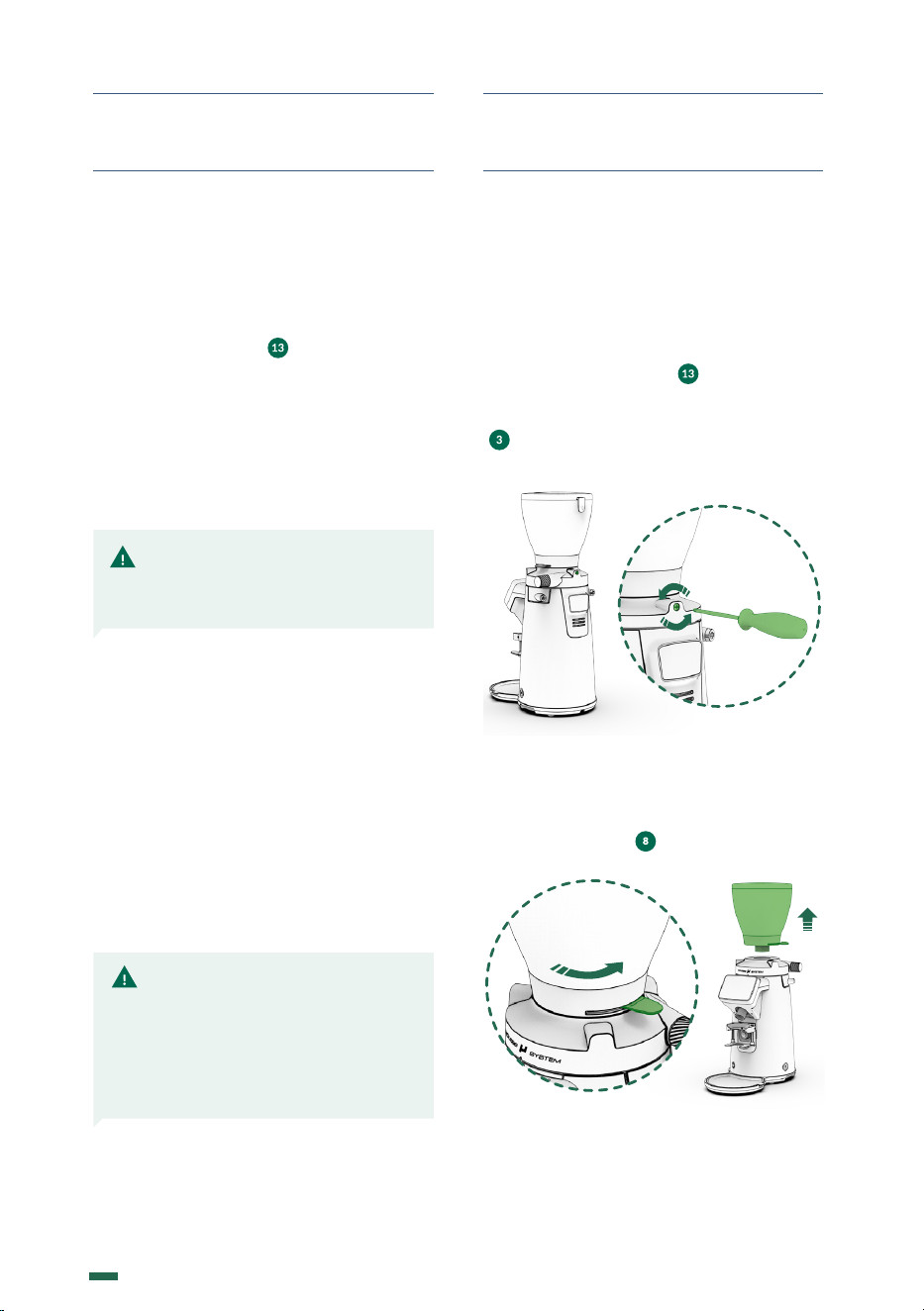
12.3.1. Turn o the grinder by making sure
the main power switch ( ) is on the OFF
position. Disconnect the plug from the power
source. Loosen the hopper security screw
( ) using a Phillips head screw driver as
seen in (Fig. 1).
Fig. 1
12.3.2. Check that the shutter is in the closed
position before removing the hopper from
the grind regulator ( ) (Fig. 2).
Fig. 2
12. MAINTENANCE
27
K09680H00 | PROC-CAL/002/03 USER MANUAL | V. 15/04/2024
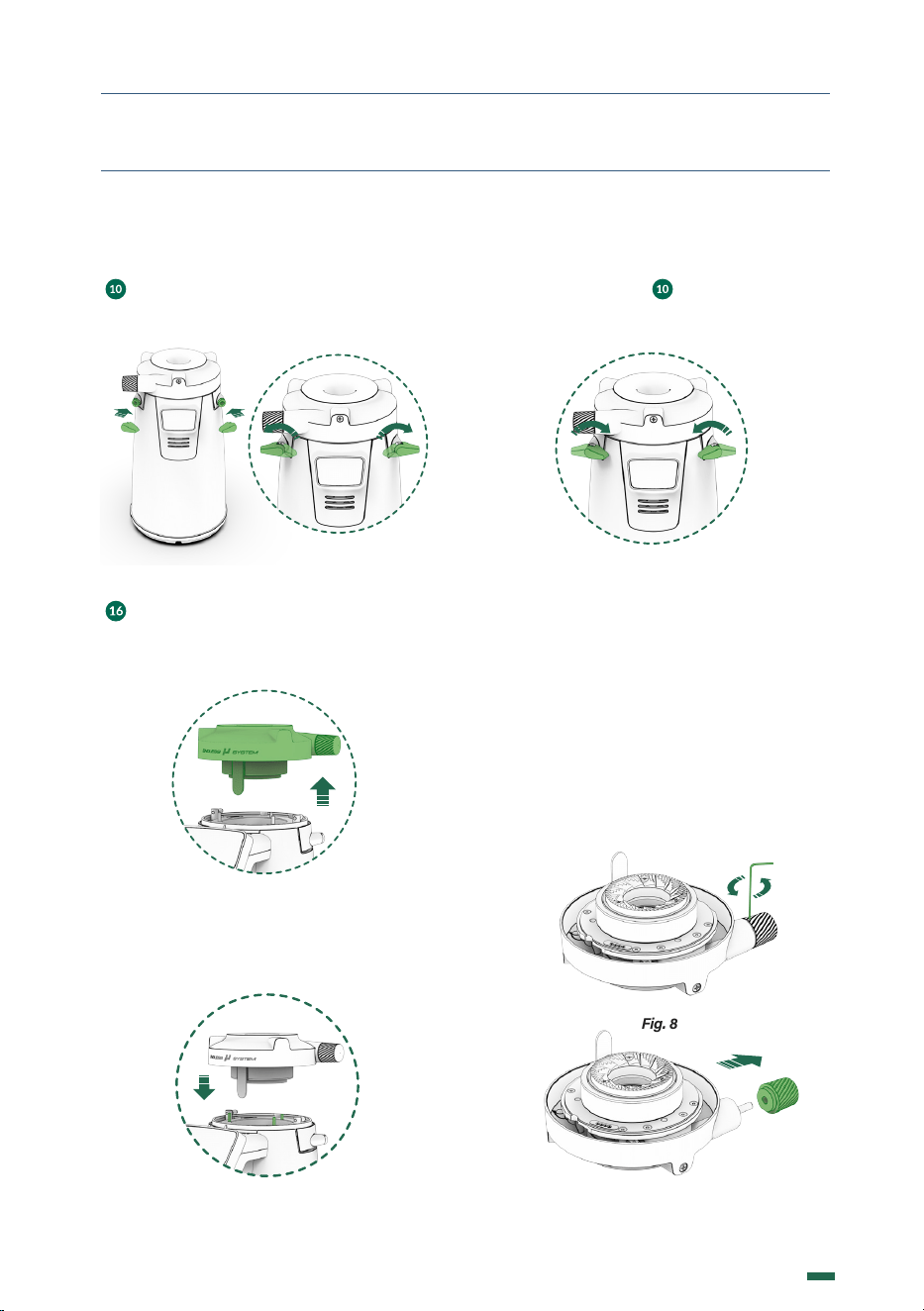
12.3.3. To access the grinding cavity, use a
#8 Hex Allen key on the Lock Load System
( ) as shown in Figure 3. Turn the key in the
direction indicated by the icons or as shown
in (Fig. 4).
Fig. 3 Fig. 4
12.3.4. Pull up holding the grind regulator
( )
, to access the grinding cavity, clean the
interior with the help of a brush or vacuum
cleaner and remove any coee residue from
the grinding cavity (Fig. 5).
Fig. 5
12.3.5. When reassembling the grind
regulator, face the silicon curtain in front and
the three holes with three pins in the grind
chamber (Fig. 6).
Fig. 6
12. MAINTENANCE
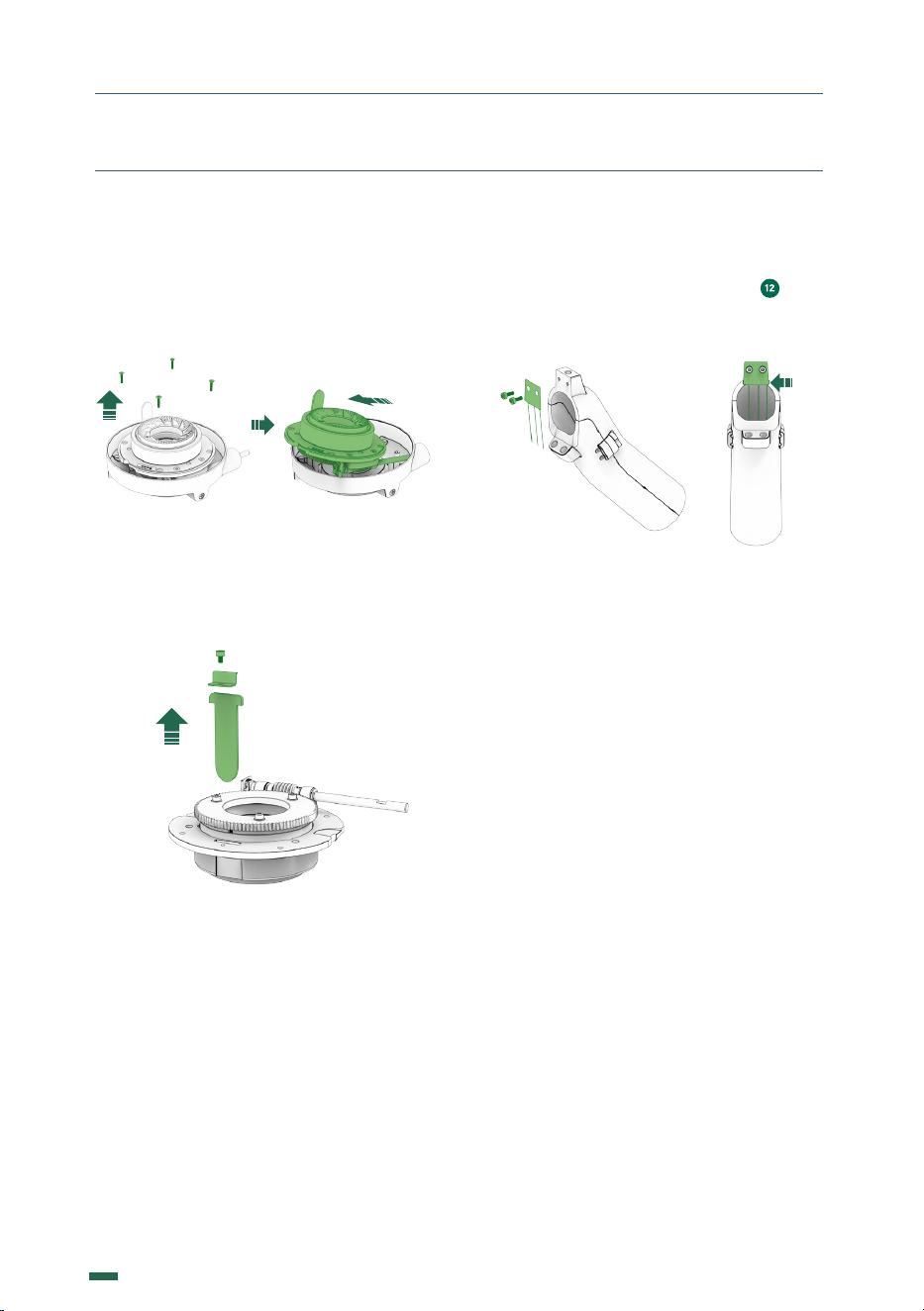
12.3.6. When the grinding regulator is in
place, lock the system using a #8 Hex Allen
key. Turn both sides ( ) as indicated by the
icons or as shown in (Fig. 7) until they are in
the working position.
Fig. 7
12.4. REPLACING THE CURTAIN OR
METAL GRID
The curtain or metal grid ensures consistency
in the dosage and reduces static electricity.
F8, are replaced using the instruction from
12.4.1., while F10 is replaced using the
instructions from 12.4.4.
12.4.1. After the point 12.3.4. use a #2 Hex
Allen key to untighten the screw enough to
can release the knob from the axis (Fig. 8)
& (Fig. 9).
Fig. 8
Fig. 9
28
K09680H00 | PROC-CAL/002/03 USER MANUAL | V. 15/04/2024
12. MAINTENANCE
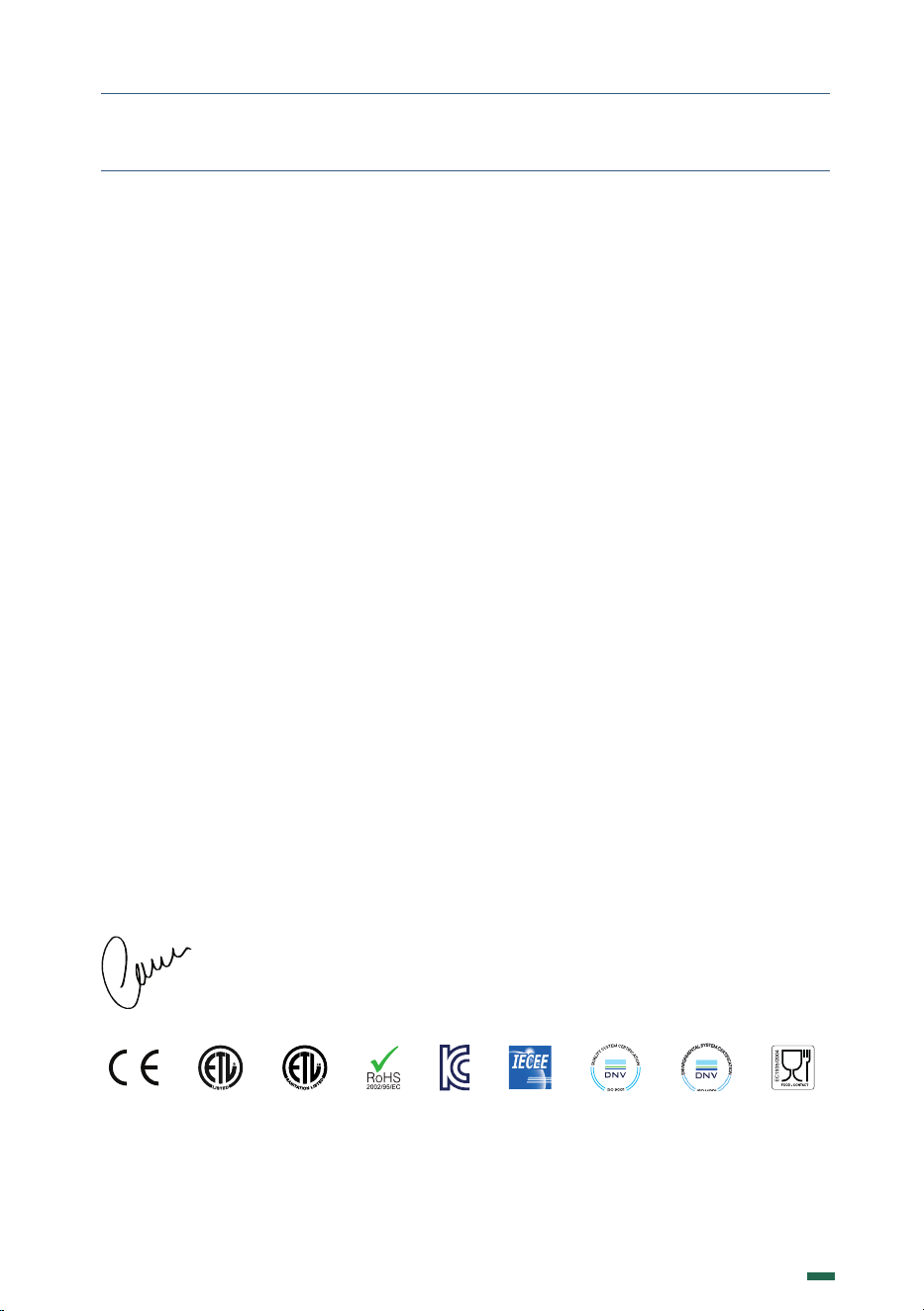
12.4.2. Using a #2.5 mm hex Allen key, loosen
the four screws securing the aluminum cover
to the top burr support (Fig. 10). Carefully
remove the aluminum cover from the top
burr support (Fig. 11).
Fig. 10 Fig. 11
12.4.3. Use a #3 Hex Allen key to untighten
the screw that holds the courtain, and pull up
to release (Fig. 12).
Fig. 12
12.4.4. After point 11.3.2. use a #2 Hex Allen
key to untighten the screws that hold the
metal grid to the coffee exit chute ( ). The
metal grid is positioned as shown in (Fig.
13ww)
Fig. 13
29
K09680H00 | PROC-CAL/002/03 USER MANUAL | V. 15/04/2024
13. DECLARATION OF CONFORMITY
In accordance with European community directives, quality certificates have been applied.
All materials have been adapted and technical reports are available at our offices.
2014/30/UE on the approximation of the laws of the Member States relating to
electromagnetic compatibility.
06/42/EC amending Directive 95/16/EC on the approximation of the laws of the Member
States relating to machinery
REG. 1935/2004 amending Directive 89/109/EC on the approximation of the laws of the
Member States relating to material and objects destinated to make contact with nutritional
products.
03/108/EC amending Directive 2002/96/EC on waste electrical and electronic equipment
(WEEE).
2014/34/UE on the harmonization of the laws of Member States relating to electrical
equipment designed for use within certain voltage limits.
2012/19/UE of 04/07/2012 on the approximation of the laws of the Member States on waste
electrical and electronic equipment (WEEE).
11/65/EU related to the restriction on the usage of certain dangerous substances with electrical
equipment and electronics.
Environment
Do not throw the applianceaway with the normal household waste; hand it in at an official
recycling collection point. By doing this, you will help to preserve the environment.
The Legal Representative
Jesús Ascaso
Compak Coee Grinders, s.a.
Molí Barri, Parcela B - Pol. Ind. Can Barri - 08415 Bigues i Riells - Barcelona - Spain
Ph. 34 93 703 13 00 - www.compak.es - info@compak.es

30
K09680H00 | PROC-CAL/002/03 USER MANUAL | V. 15/04/2024

31
K09680H00 | PROC-CAL/002/03 USER MANUAL | V. 15/04/2024
www.fsc.org
USER MANUAL
K09680H00 | PROC-CAL/002/03 USER MANUAL | V. 15/04/2024