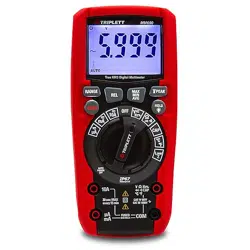
MMS1700
Solar Multimeter

2
Preface
Thank you for purchasing this brand new product. In order to use this product safely
and correctly, please read this manual thoroughly, especially the safety notes.
After reading this manual, it is recommended to keep the manual at an easily
accessible place, preferably close to the device, for future reference.
Measurement of over 1000V only applies to measured objects meeting the
two conditions below.
1. Disconnected from power system.
2. Insulated with ground.
For example: The open-circuit voltage of ungrounded PV panel
Do not use in circuits with voltage to ground over 1000 V! Otherwise it may
cause an electric shock.
Warning

3 4
I. Overview
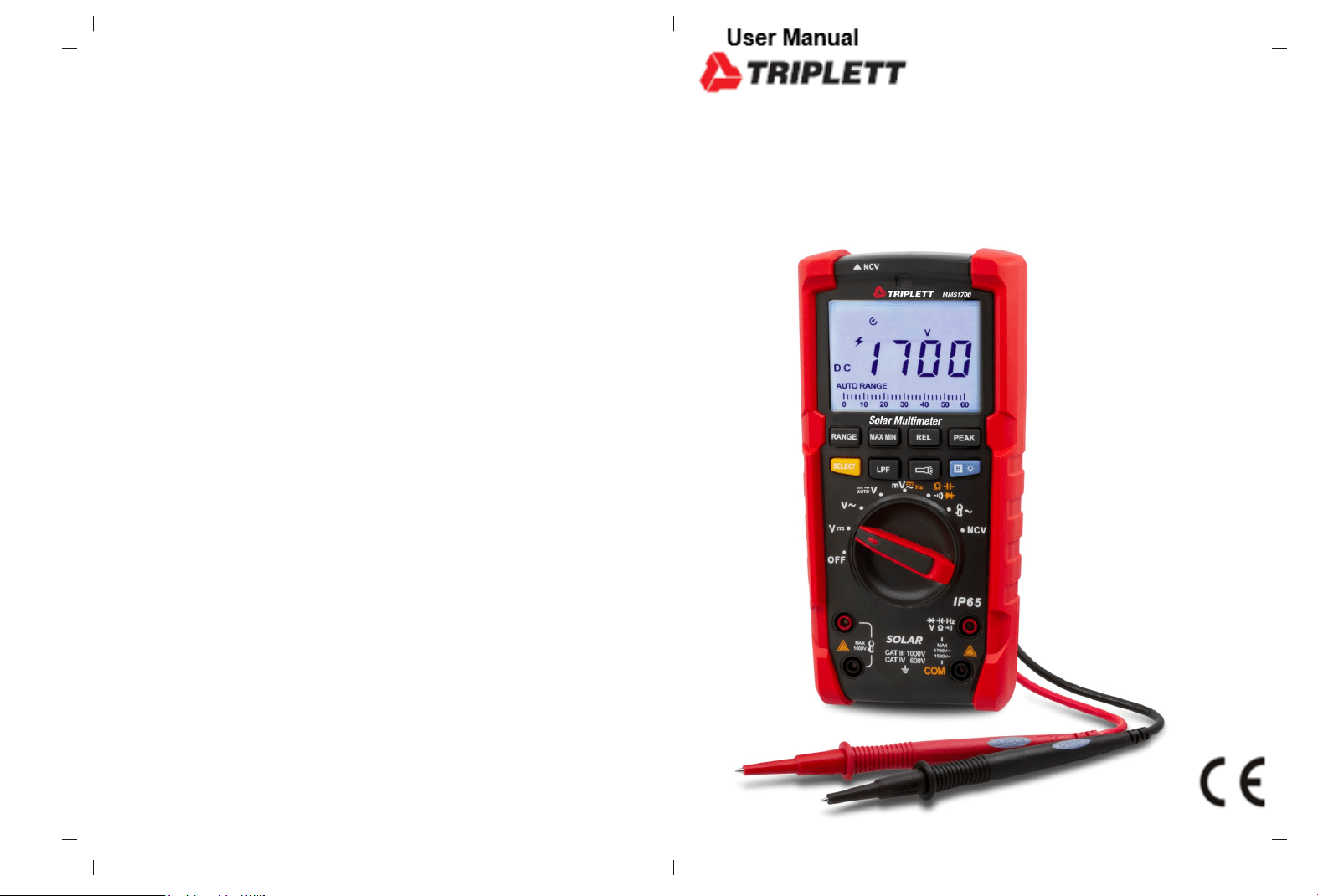
The MMS1700 is a 6000-count ture-RMS photovoltaic multimeter with high reliability
and high safety, featuring high voltage measurement (1700V/AC 1500V). Large
LCD display, high-resolution analog pointer display, full-range overload
protection and unique appearance design make it a new-generation electrical
measurement meter with practical performances. MMS1700 can be used to
measure AC/DC voltage, resistance, diode, continuity, capacitance, frequency,
auto AC/DC voltage, flex clamp current sensor, NCV, etc. This photovoltaic
multimeter has multiple functions such as data hold, relative measurement, peak
measurement, low pass filtering, low voltage indication, backlight, auto power off,
and more.
Mainly applied in schools, smelting, communication, manufacturing, petroleum, national
defense, electric and electrical fields, photovoltaic station, detection of electrical
equipment and dedicated measurement tools, better satisfying the measurement
requirements of automation, power distribution, electromechanics and others.
II.
Unpacking inspection
Unpack and take out the meter, please check carefully if the following items are
complete or intact. In case of shortage or damage, please contact your supplier.
User manual ---------------------------------------------- 1pcs
Test lead --------------------------------------------------- 1pair
9V battery ------------------------------------------------- 1pcs
Catalogue
I. Overview --------------------------------------------------------------------------------- 4
II. Unpacking inspection ----------------------------------------------------------------- 4
III. Safety information --------------------------------------------------------------------- 5
IV. Electrical symbols --------------------------------------------------------------------- 6
V. External structure --------------------------------------------------------------------- 7
VI. LCD display ---------------------------------------------------------------------------- 8
VII. Rotary switch and button function ------------------------------------------------ 9
VIII. Instruction for measurement operation ------------------------------------------ 11
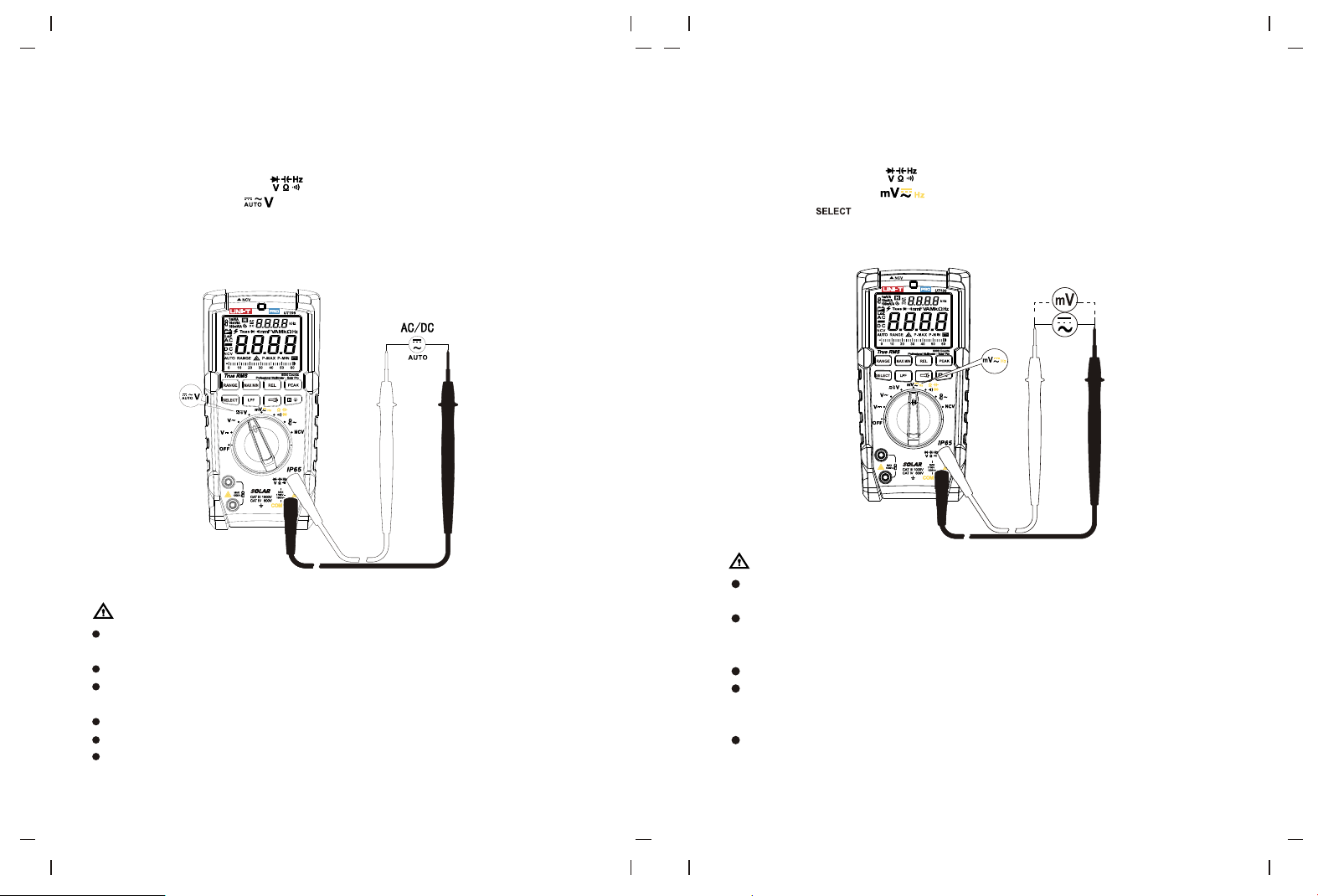
1. AC voltage measurement ------------------------------------------------------- 11
2. DC voltage measurement ------------------------------------------------------- 12
3. AUTO AC/DC voltage measurement ---------------------------------------- 13
4. AC/DC mV voltage measurement -------------------------------------------- 14
5. Frequency measurement ------------------------------------------------------15
6. Continuity measurement -------------------------------------------------------- 16
7. Resistance measurement ------------------------------------------------------ 17
8. Capacitance measurement ---------------------------------------------------- 18
9. Diode measurement ------------------------------------------------------------- 19
10. Flex clamp sensor measurement -------------------------------------------- 20
11. NCV sensing measurement --------------------------------------------------- 21
12. Other functions ------------------------------------------------------------------- 22
IX. General specifications -------------------------------------------------------------- 22
X. Technical specifications ------------------------------------------------------------- 23
XI. Maintenance --------------------------------------------------------------------------- 27
5 6
The meter is designed and produced strictly in accordance with Gb4793, EN61010-1,
EN61010-2-033, CAT III 1000V, CAT IV 600V, Double
otherwise the protection provided Insulation and Pollution Degree 2 Standards. Use the
meter as specified in the manual, by the meter may be compromised.
1. Check the clamp meter and test leads before use, guard against any damage or
abnormal phenomenon. If any abnormal condition were found: bare test lead,
damaged insulation, no display in LCD or others, please do not use it.
2. It is forbidden to use the meter prior to having battery cover in place, or otherwise
there will be electric shock.
3. The damaged test leads must be replaced by new ones with same models or
specifications.
4. Do not contact the bare wire, connector, unused input terminal or the circuit being
measured when the meter is in operation.
5. Be careful in measuring voltage higher than AC/DC 30V. keep finger within the
scope of finger protection position of test lead to avoid electric shock.
6. Set the function range switch at the maximum range position if the scope of
measured value couldn’t be defined.
7. Refrain from applying voltage over the rating value indicated at the meter between
terminals or between any terminal and grounding.
8. Function switch shall be set at the correct position prior to measurement. The
connection between test lead and circuit being measured must be disconnected
before converting the function switch. It is forbidden to perform gear conversion in
measurement to guard against damage to the meter.
9. Prior to measurement of on-line resistance and diode or the circuit on-off
measurement, the power of circuits being measured shall be powered off and all
capacitors shall be completely discharged.
10.Do not detect whether there is dangerous voltage by low pass filter as voltage
higher than the indicated value may exist. First, measure voltage to detect if there is
dangerous voltage in the condition that low pass filter is not selected, and then select
LPF function.
11.Only use test leads with same rated voltage, frequency, type, rated current as the
meter and test leads approved by safety certification EN/ IEC 61010-031 standard.
12.Remove the test leads from the meter prior to opening the battery cover.
13.Keep finger behind finger protection position of the probe if probe is used.
14.Refrain from storing or using the clamp meter in the explosive and flammable
environment with high temperature, high humidity and strong electromagnetic field.
15.Refrain from changing the internal wiring in the clamp meter to guard against
damage to the meter and danger.
16.When LCD display shows the icon “ ”, it is required to replace the battery in time
to ensure the measurement accuracy.
17.Power off the meter in time when measurement is completed. Take out battery
when clamp meter is not in use for a long time.
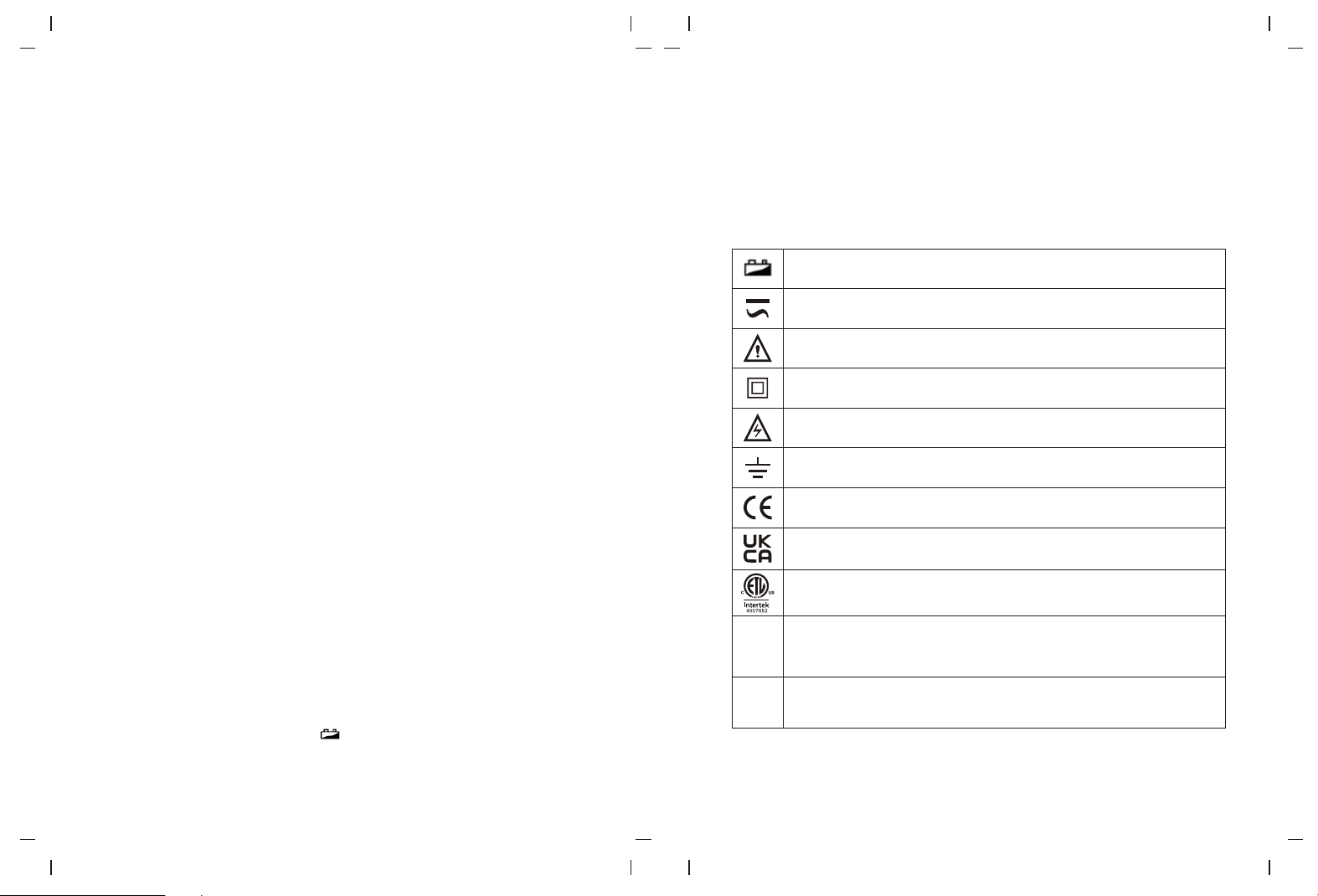
Low battery
AC/DC
Warning
Double insulation
High voltage
Grounding
Comply with EU directives
IV. Electrical symbols
III. Safety information
18. Measure a known voltage to ensure the meter works normally.
19. If the meter is not used in the way designated by the manufacturer, the protection
provided by the meter may be compromised.
Conforms to UL STD 61010-1,61010-2-033, Certified
to CSA STD C22.2 No. 61010-1, 61010-2-033.
It is applicable to testing and measuring circuits connected to the
distribution part of the building's low-voltage MAINS installation.
It is applicable to testing and measuring circuits connected at
the source of the building’s low-voltage MAINS installation.
CAT III
CAT IV
Conforms to UK standards
7 8
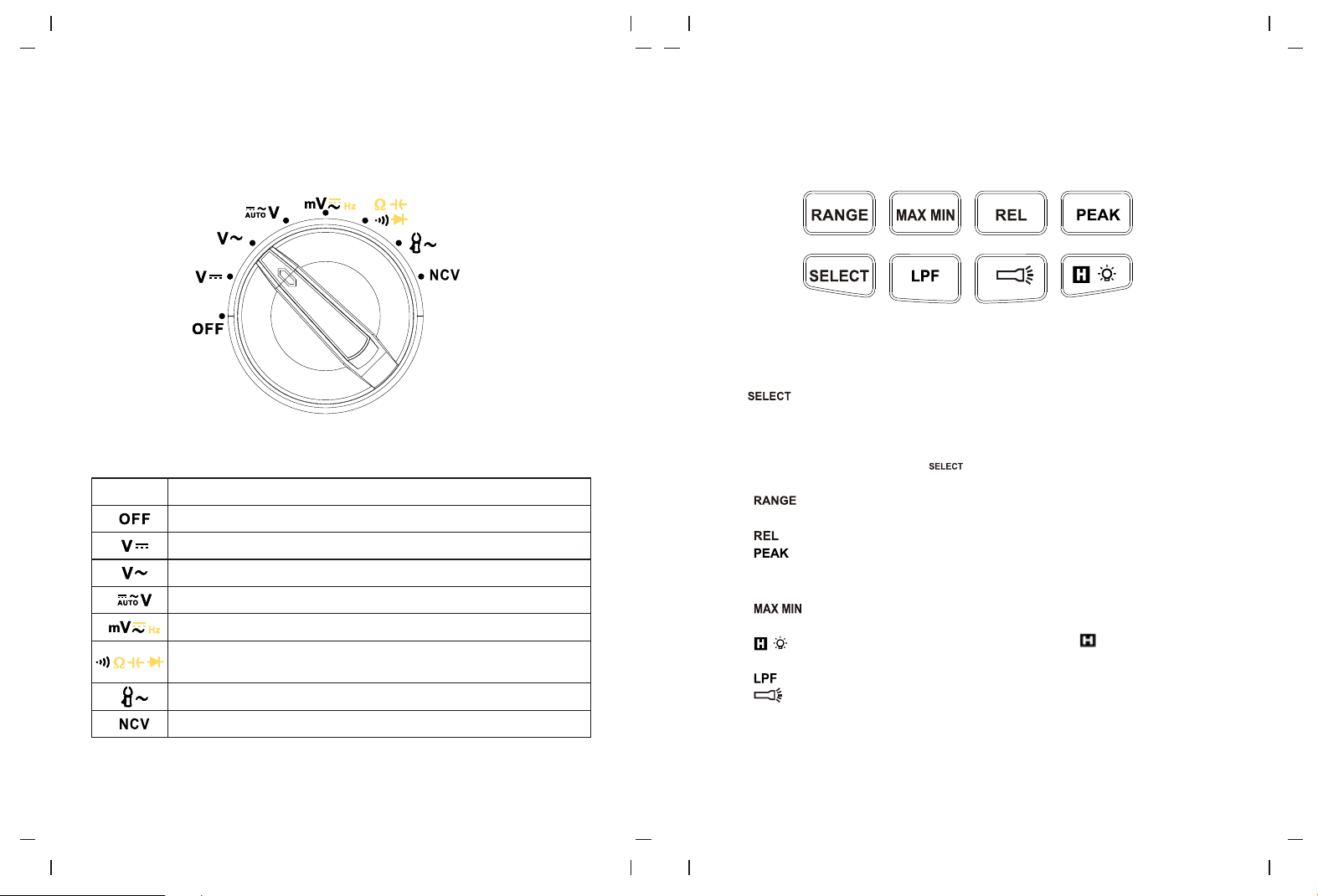
AUTO RANGE
1mV/A、10mV/A、100mV/A、
NCV
P-MAX/P-MIN
MIN/MAX
LoZ
µ
µ
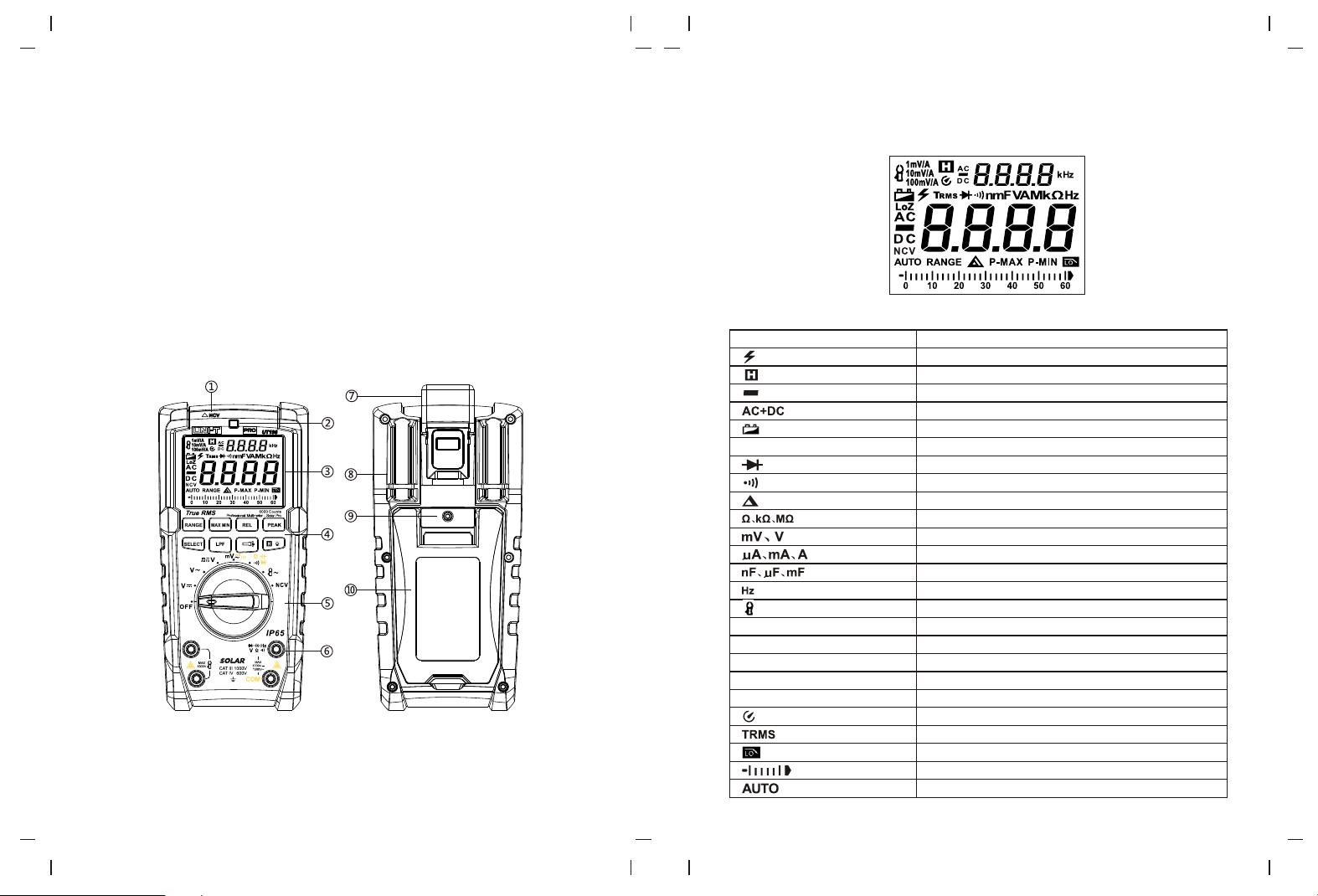
1.NCV sensing position
2.Indicator light
3.LCD display screen
4.Function button
5.Function switch
6.Input terminal
7.Strap hook
8.Test lead holder
9.Battery compartment screw
10.Kickstand
Description
AC/DC voltage over 30V
Data hold
Negative reading
AC/DC measurement
Low battery
Auto range
Diode measurement
Continuity measurement
Relative measurement
Resistance unit, ohm, kilohm, megaohm
Voltage unit: millivolt, volt
Current unit: microampere, milliampere, ampere
Capacitance unit: nanofarad, microfarad, millifarad
Frequency unit: hertz
Flex clamp sensor
Voltage/current output relation of flex clamp sensor
Non-contact voltage measurement
Peak measurement
Max/Min measurement
AC low impedance
Auto power off
True RMS
Low pass filter
Analog bar
Auto identify AC/DC voltage
Figure 2 Full symbols display
VI. LCD display
Symbols
V. External structure
Figure 1
9 10
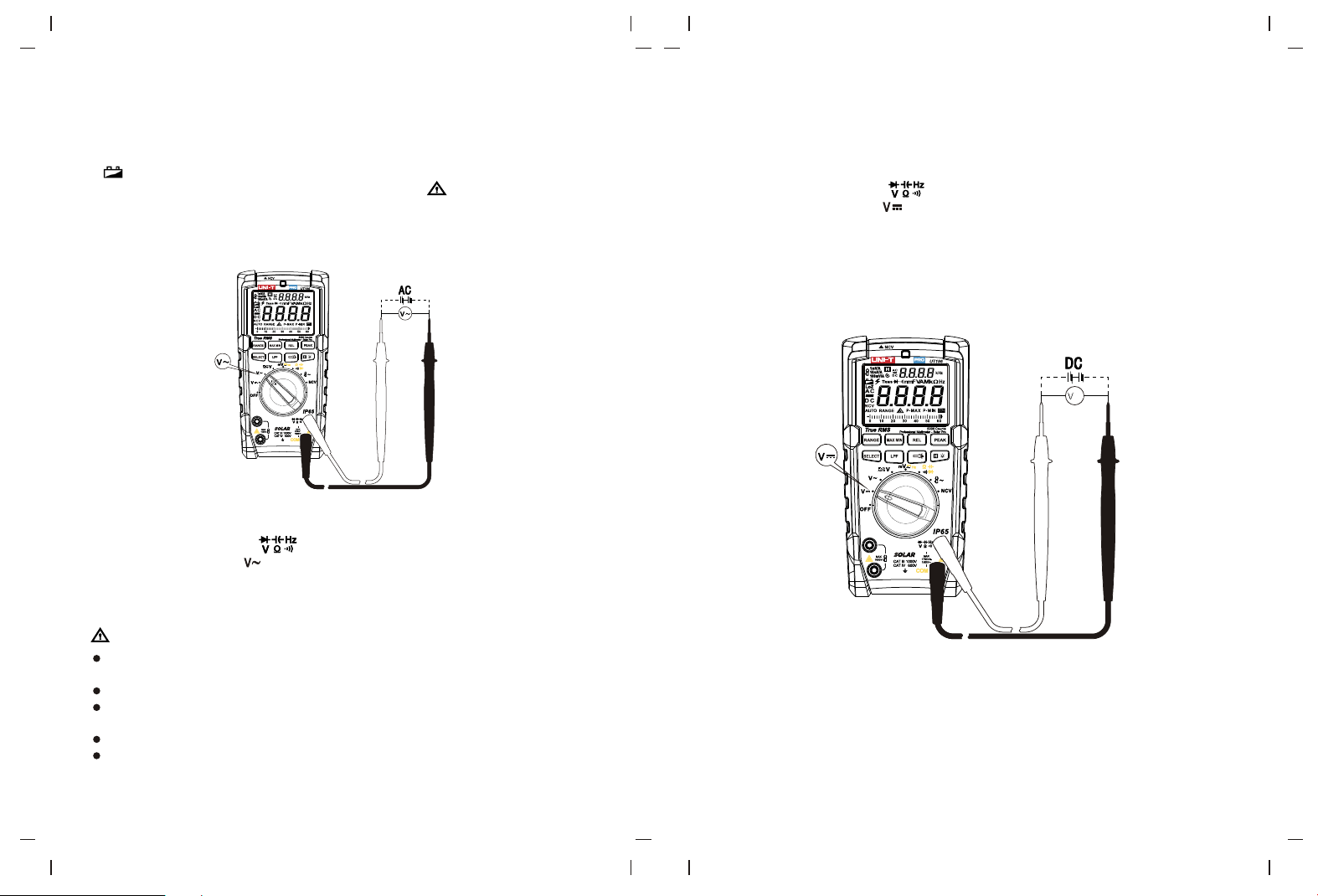
Description
Power off
DC voltage measurement
AC voltage measurement
Measurement of automatic identification of AC/DC voltage
AC/DC millivolt measurement, frequency measurement
Measure continuity, resistance, capacitance,
voltage of PN junction of diode.
Flex clamp sensor measurement
Non-contact voltage measurement
VII. Rotary switch and button function
Functions
Short press: press the button for less than 2 seconds.
Long press: press the button for ≥2s.
1.
1) Continuity/resistance/capacitance/diode: short press to cycle through continuity,
resistance, capacitance and diode.
2) mV/frequency: short press to cycle through AC mV, DC mV and frequency.
3) In OFF state, press and hold to power on, the meter enters Non-sleep mode,
the buzzer beeps 5 times every 15 minutes to prompt the meter is in ON state.
2. : Short press to enter auto range mode, long press to enter manual range
mode.
3. : Short press to enter or exit relative mode.
4. : Short press to switch between maximum measurement and minimum
measurement, long press to exit peak mode. In peak mode, the meter will exit auto
range and enter the maximum range.
5. : Short press to switch between maximum value and minimum value
measurement, long press to exit max/min mode.
6. : Short press to lock and hold the display value, “ ” is displayed on LCD,
short press again to release the lock. Long press to enable/disable backlight function.
7. : Short press to enter or exit LPF mode.On ACV,
8. : Short press to enter or exit flashlight function.
Button description:
Figure 3
Figure 4
11 12
µ
µ
VIII. Instruction for measurement operation
Please check the 9V battery prior to using the meter, if the meter is in low battery state,
“ ” will be displayed on the display screen, indicating that battery must be replaced
in time before use. Please also pay attention to the icon “ ” near the input terminal
of test lead, which warns that the measured voltage shall not exceed the indicated value
to ensure safe measurement.
Measurement steps:
1) Connect red test lead to terminal, and black test lead to “COM” terminal.
2) Set the rotary switch to .
3) Connect test lead in parallel to the power or load to be measured.
4) Read the measured voltage value from display screen, if the voltage is higher than
1500Vrms, the indicator will light up red constantly.
Warning
It is forbidden to measure voltage over 1500Vrms or 1700Vdc. Higher voltage may be
measured, but it may cause damage to the meter!
Be careful in measuring high voltage to avoid electric shock.
Disconnect test lead with measured circuit after all measurement operations are
completed.
Measure a known voltage before use to check if the meter functions normally.
If the input impedance is about 10MΩ, the load may cause measurement error in
high-impedance circuit. In most cases, if the impedance in circuit is less than 10kΩ,
the error can be negligible (≤0.1%).
1. AC voltage measurement
2. DC voltage measurement
Measurement steps:
1) Connect red test lead to terminal, and black test lead to “COM” terminal.
2) Set the rotary switch to .
3) Connect test lead in parallel to the power or load to be measured.
4) Read the measured voltage value from display screen, if the voltage is higher than
1700V, the indicator will light up red constantly; if the voltage is less than -15V,
negative-voltage indicator will light up red.
Figure 5
Figure 6
13 14
µ
3. AUTO AC/DC voltage measurement
Measurement steps:
1) Connect the red test lead to terminal, and black test lead to “COM” terminal.
2) Set the rotary switch to .
3) Connect test lead in parallel to the power or load to be measured. The meter can
automatically identify AC/DC voltage of power or load to be measured.
4) Read the measured voltage value from display screen.
Warning:
It is forbidden to measure voltage over 600Vrms or 600Vdc. Higher voltage may be
measured, but it may cause damage to the meter!
Be careful in measuring high voltage to avoid electric shock.
Disconnect test lead with measured circuit after all measurement operations are
completed.
Measure a known voltage before use to check if the meter functions normally.
Operate the meter again after the measurement is completed for 3 minutes.
To eliminate stray or spurious voltage, a load impedance of 2MΩ is provided in the
whole circuit of the meter.
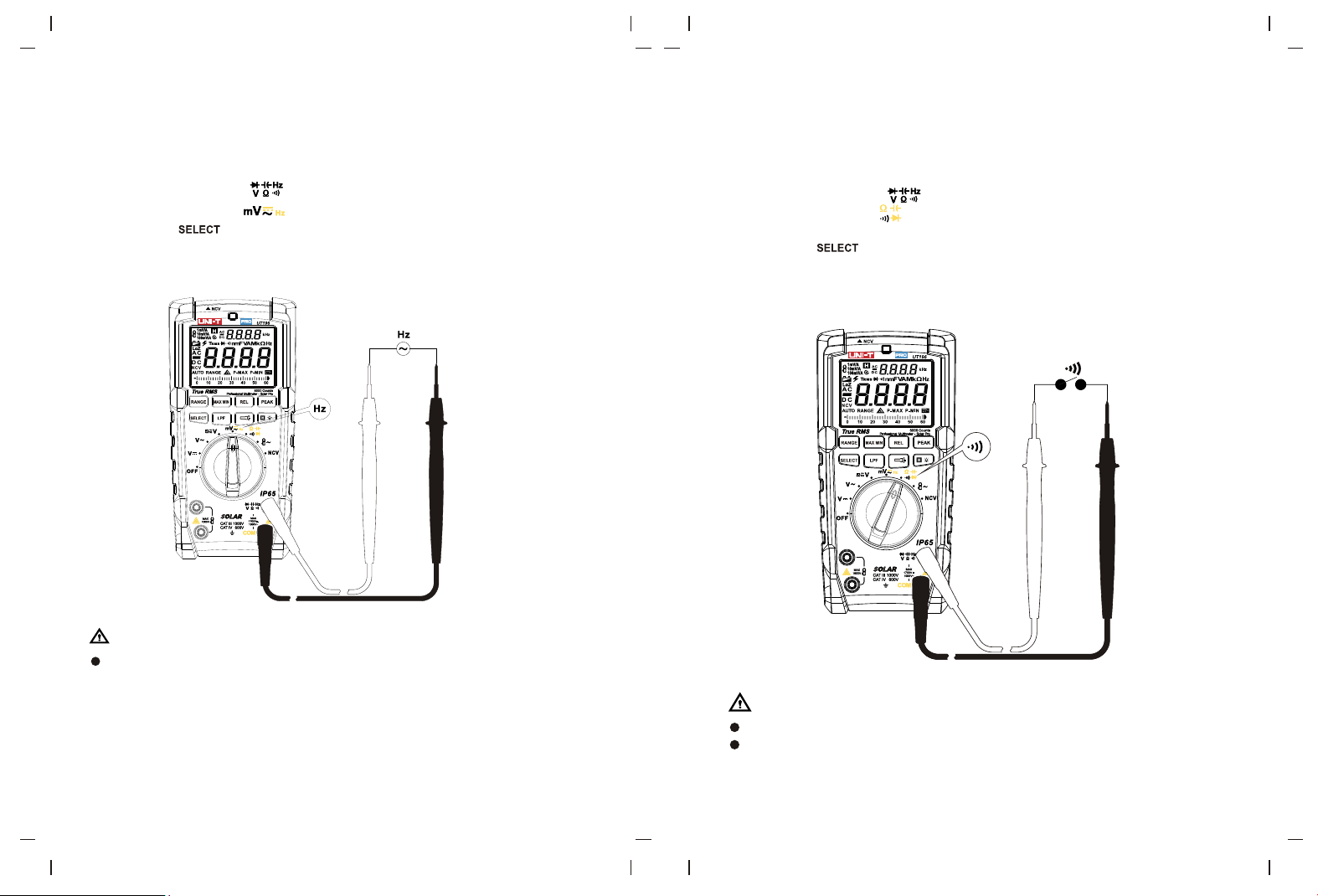
4. AC/DC mV voltage measurement
Measurement steps:
1) Connect red test lead to terminal, and black test lead to “COM” terminal.
2) Set the rotary switch to .
3) Short press to select mV~ or mV-.
4) Connect test lead in parallel to the power or load to be measured.
5) Read the measured voltage value from display screen.
Warning:
In mV position, if the input voltage is over the range, the protection circuit in the meter
may operate to decrease the input impedance. Do not input AC/DC voltage over 30V!
If it is not certain that whether high voltage exits in the measured sign, please first
conduct measurement in the condition of high voltage. Disconnect test lead with
measured circuit after all measurement operations are completed.
Measure a known voltage before use to check if the meter functions normally.
The input impedance is about 10MΩ for AC mV voltage measurement, the load may
cause measurement error in high-impedance circuit. In most cases, if the impedance
in circuit is less than 10kΩ, the error can be negligible (≤0.1%).
The input impedance is infinite (about 1G Ω) for DC Mv voltage measurement, there
is no attenuation in measuring weak signal, so the measurement accuracy is high.
If the test lead is open circuit, some digits will appear on the display, these digits will
not affect the measurement reading.
Figure 7
Figure 8
µ
µ
15 16
µ
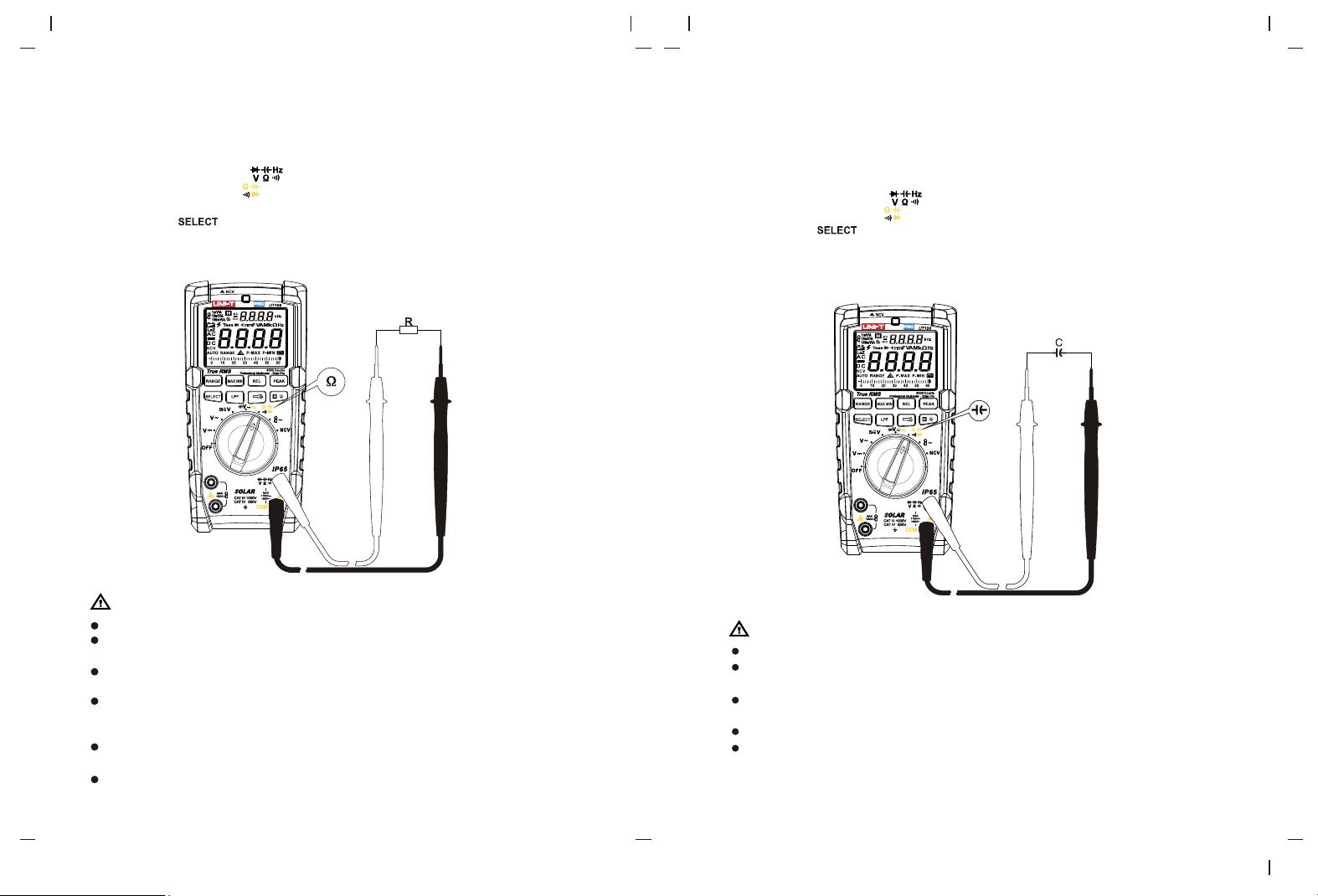
5. Frequency measurement
Measurement steps:
1) Connect red test lead to terminal, and black test lead to “COM” terminal.
2) Set the rotary switch to .
3) Short press to select frequency measurement function.
4) Read the measurement result from display screen.
Warning:
Do not input voltage over DC/AC 30V !
6. Continuity measurement
Measurement steps:
1) Connect red test lead to terminal, and black test lead to “COM” terminal.
2) Set the rotary switch to . Be sure that the power of the circuit to be measured
disconnected.is
3) Short press to select continuity measurement function.
4) Contact the desired test point of the circuit by the test probe tip.
5) If the measured resistance between the two ends is ≤10Ω, the continuity of the
circuit is thought to be in good condition and the buzzer beeps consecutively.
Warning:
Do not input voltage over DC/AC 30V !
Prior to the in-circuit continuity measurement, please turn off all powers in the
measured circuit and discharge all capacitors completely.
Figure 9
Figure 10
µ
17 18
µ
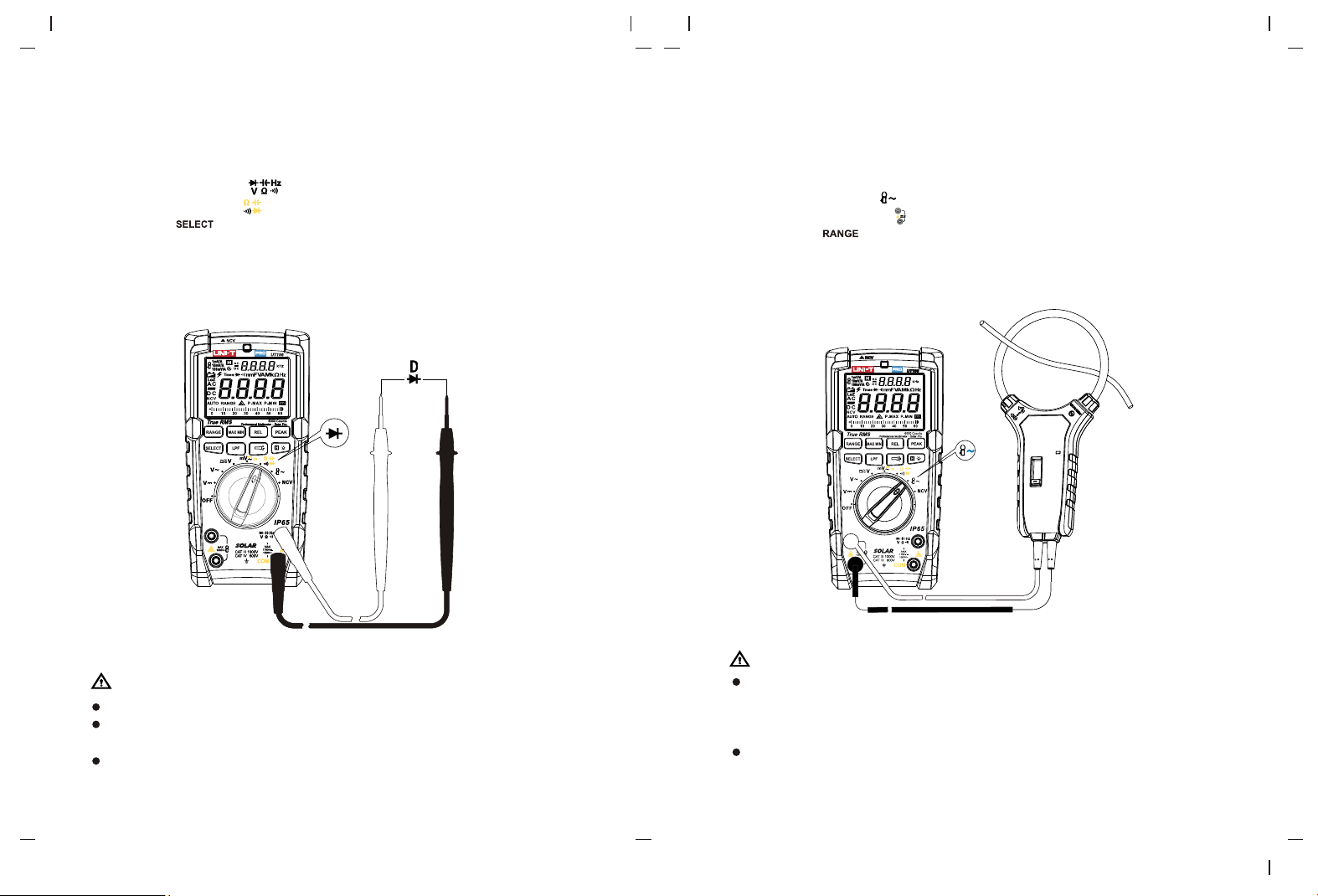
7. Resistance measurement
Measurement steps:
1) Connect red test lead to terminal, and black test lead to “COM” terminal.
2) Set the rotary switch to . Be sure that the power of the circuit to be measured is
disconnected.
3) Short press to select resistance measurement function.
4) Contact the desired test point of the circuit by the test probe tip.
5) Read the test result from display screen.
Warning:
Do not input voltage over DC/AC 30V !
If the measured resistance is open circuit or the resistance value exceeds the maximum
range, “OL” will appear on the display screen.
Prior to measuring in-circuit resistance, please turn off all powers in the measured
circuit and discharge all capacitors completely.
For low resistance measurement, the test lead may cause a measurement error of
about 0.1Ω~0.3Ω. To obtain accurate reading, please short-circuit the test lead and
conduct measurement in REL mode.
If the resistance is ≥ 0.5Ω when the test lead is short circuit, please check if the test
lead is loose or if there is any other abnormal phenomenon.
It is normal to take several seconds to stabilize the reading for measurement of high
resistance over 20MΩ.
8. Capacitance measurement
Measurement steps:
1) Connect red test lead to terminal, and black test lead to “COM” terminal.
2) Set the rotary switch to .
3) Short press to select capacitance function.
4) Contact the pin of capacitor by test probe tip.
5) The measurement time is about 30S for large capacitance measurement.
6) Read the test result from display screen.
Warning:
Do not input voltage over DC/AC 30V!
Discharge all capacitors completely prior to measurement, especially for capacitors
with high voltage.
If the measured capacitor is short circuit or the capacitance value exceeds the
maximum range, “OL” will appear on the display screen.
It is normal to take several seconds to stabilize the reading.
When there is no input, the meter displays a fixed value (intrinsic capacitance). For
small capacitance measurement, this value must be subtracted from the measured
value, or you can use the REL function for doing the subtraction automatically.
Figure 11
Figure 12
µ
19 20
µ
9. Diode measurement
Measurement steps:
1) Connect red test lead to terminal, and black test lead to “COM” terminal.
2) Set the rotary switch to .
3) Short press to select diode measurement function.
4) Connect red probe tip to the anode of diode, and black probe tip to the cathode.
5) Read the forward bias value from the display screen.
6) “OL” symbol appears when the diode is open or polarity is reversed. For silicon PN
junction, normal value: (500~800mV).
Warning:
Do not input voltage over DC/AC 30V!
Prior to measuring diode online, please turn off all powers in the measured circuit
and discharge all capacitors completely.
Test voltage range is about 3V.
10. Flex clamp sensor measurement
Measurement steps:
1) Set the rotary switch to .
2) Connect the flex clamp to , red probe to red terminal, black probe to black terminal.
3) Short press “ ” to manually select corresponding voltage/current ratio, the LCD
will indicate the corresponding relations for 1mV/A, 10mV/A, 100mV/A.
4) Read the test result from the display screen.
Warning:
The input impedance is infinite (about 1GΩ) there is no attenuation in measuring
weak signal, so the measurement accuracy is high. If the test lead is open circuit,
some digits will appear on the display, these digits will not affect the measurement
reading.
Do not input voltage over DC/AC 30V!
Figure 13
Figure 14
21 22
µ
Warning:
As the NCV detection judges whether there is voltage only through spatial
electromagnetic field, the detected voltage is only for reference. It doesn’t represent
that there is no voltage in the conductor, even though the NCV measurement result
is no voltage. Please do not judge whether there is voltage in the insulated/shielded
conductor through NCV measurement result, as conductor or socket dif fers in type
and design as well as insulation thickness, the detection result may be affected. The
applicable frequency of induction voltage is 50Hz/60Hz.
Grip the casing of the meter by hand when conducting NCV measurement.
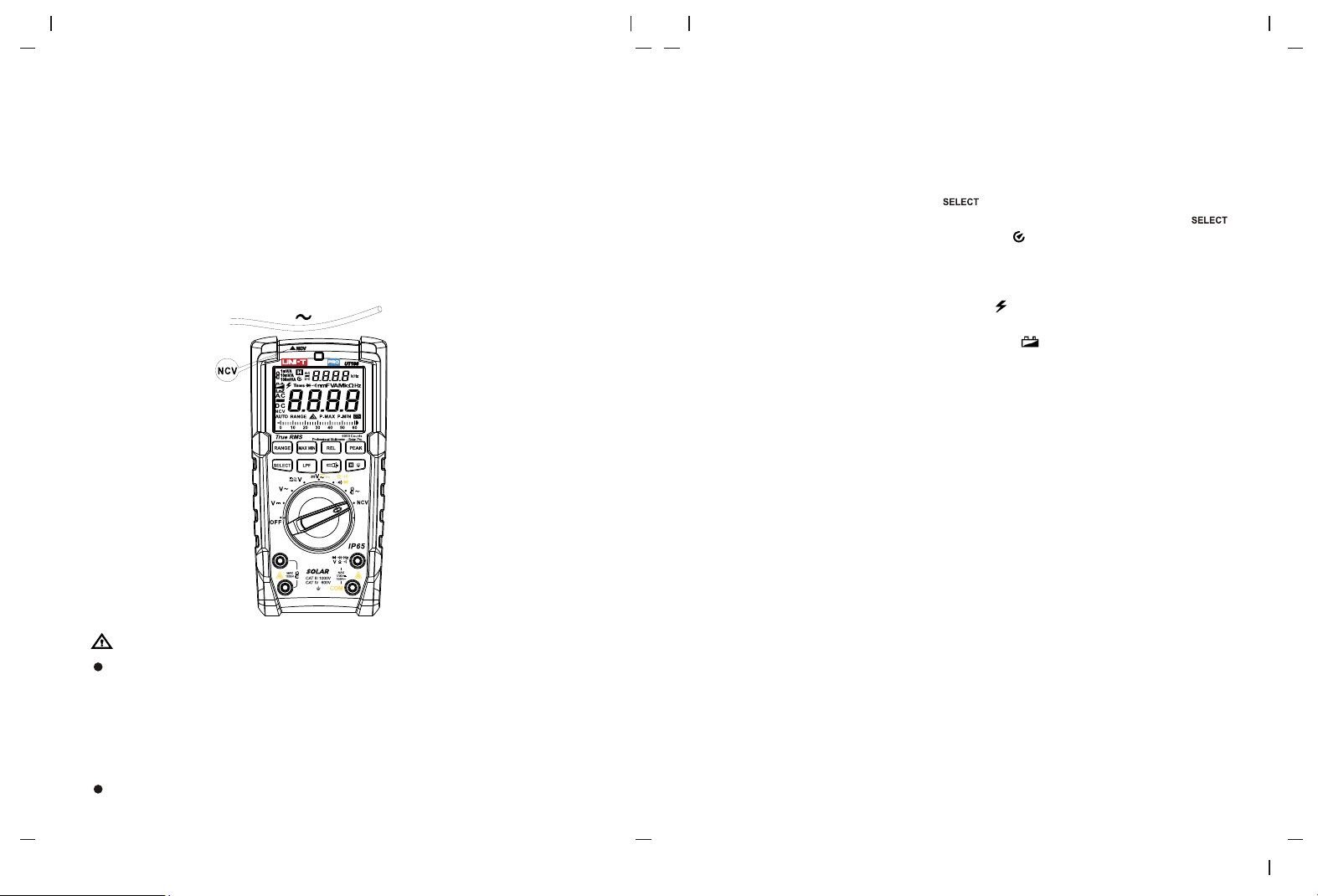
11. NCV sensing measurement
Measurement steps:
1) Turn the rotary switch to NCV position.
2) When the top-left corner marked with NCV closely contact the measured conductor
or socket, the red NCV indicator flashes at a frequency of 3Hz and the buzzer beeps
at a frequency of 3Hz.
3) LCD shows “EF” when no voltage is detected.
12. Other functions
1) The meter will switch to “Auto-off” state in 15 minutes of no any operation during
measurement. The buzzer will consecutively beep 5 times and make a long beep
sound for a time when the meter automatically powers off, then the meter enters into
sleep mode. In sleep mode, press to wake up the meter, the buzzer will beep
for a time when the meter wakes up. To disable auto-off function, hold down
and power on the meter in OFF state, the icon on LCD disappears and the buzzer
beeps for 3 times when auto-off function is disabled. To enable auto-off function, reboot
the meter.
2) High voltage alarm: For ACV/DCV measurement, if the measured voltage is ≥30V
or exceeds the range, LCD shows OL and “ ”, red backlight is on, the buzzer beeps
for 1 second.
3) Low voltage detection: The low battery symbol “ ” appears if the battery voltage is
≤ 7.5V approximately.
4) Dual display function: AC voltage - frequency (auxiliary display), AC current of flexible
coil - (auxiliary display), MAX/MIN/REL value - real-time value (auxiliary display).
IX. General specifications
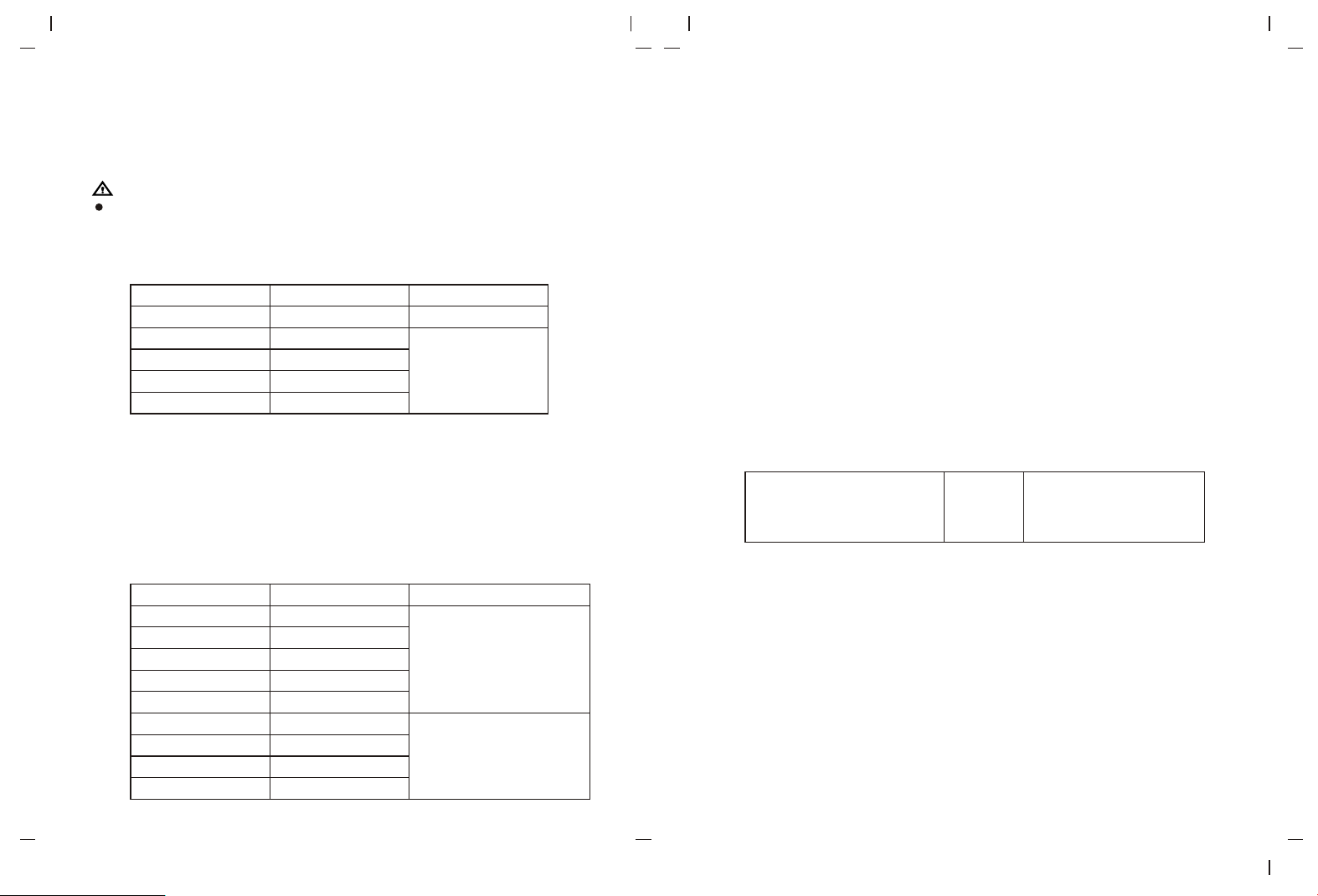
1. Maximum voltage between signal input terminal and COM terminal: Refer to the
protection instruction of input voltage of each range.
2. Display count: 6000, analog bar: 31 segments (speed ratio: 30 times per second).
3. Display updates 2 or 3 times per second.
4. Range: Auto/manual
5. Polarity display: Auto
6. Overrange indicator: OL
7. Low battery indication: ≤7.5V approximately
8. Operating temperature: 0°C~40°C (32°F~104°F)
9. Storage temperature: -10°C~50°C (14°F~122°F)
10.Relative humidity: ≤75%RH (0°C~30°C), ≤50%RH (30°C~40°C)
11.Operating altitude: ≤2000m
12.EMC: In accordance with EN61326-1: 2013, EN61326-2-2: 2013
13.Power supply: 9V battery
14.External dimension: 195mm x 95mm x 58mm
15.Weight: 485g
16.Category rating: EN61010-1, EN61010-2-033; CAT III 1000V / CAT IV 600V
17.Pollution degree: 2
18.Applicable in indoor environment
Figure 15
23 24
600.0mV
6.000V
60.00V
600.0V
1700V
0.1mV
0.001V
0.01V
0.1V
1V
±(0.5%+5)
±( )0.2%+5
600.0mV
6.000V
60.00V
600.0V
1500V
LPF ACV 6.000V
LPF ACV 60.00V
LPF ACV 600.0V
LPF ACV 1500V
0.1mV
0.001V
0.01V
0.1V
1V
0.001V
0.01V
0.1V
1V
45Hz 500Hz: ±(0.8%+3
500Hz∽1kHz: ±(1.8%+3)
∽ )
45Hz∽200Hz: ±(2%+9)
>200Hz: Not defined
(AUTO ACV/DCV) 600.0V
0.1V
DC∽500Hz:±(2.0%+3)
500Hz∽1kHz:±(4%+3)
X. Technical specifications
Accuracy: (a% reading + b digit), one year warranty±
Ambient temperature: 23 5 (73.4°F±9 ), relative temperature: ≤75%℃± ℃ °F
Warning:
Temperature to ensure accuracy: 18 ~28 , the fluctuation range of ambient ℃ ℃
temperature stabilizes within 1 . If temperature is <18 or > 28 , the additional ± ℃ ℃ ℃
temperature coefficient error is: 0.1 x (specified accuracy)/ .℃
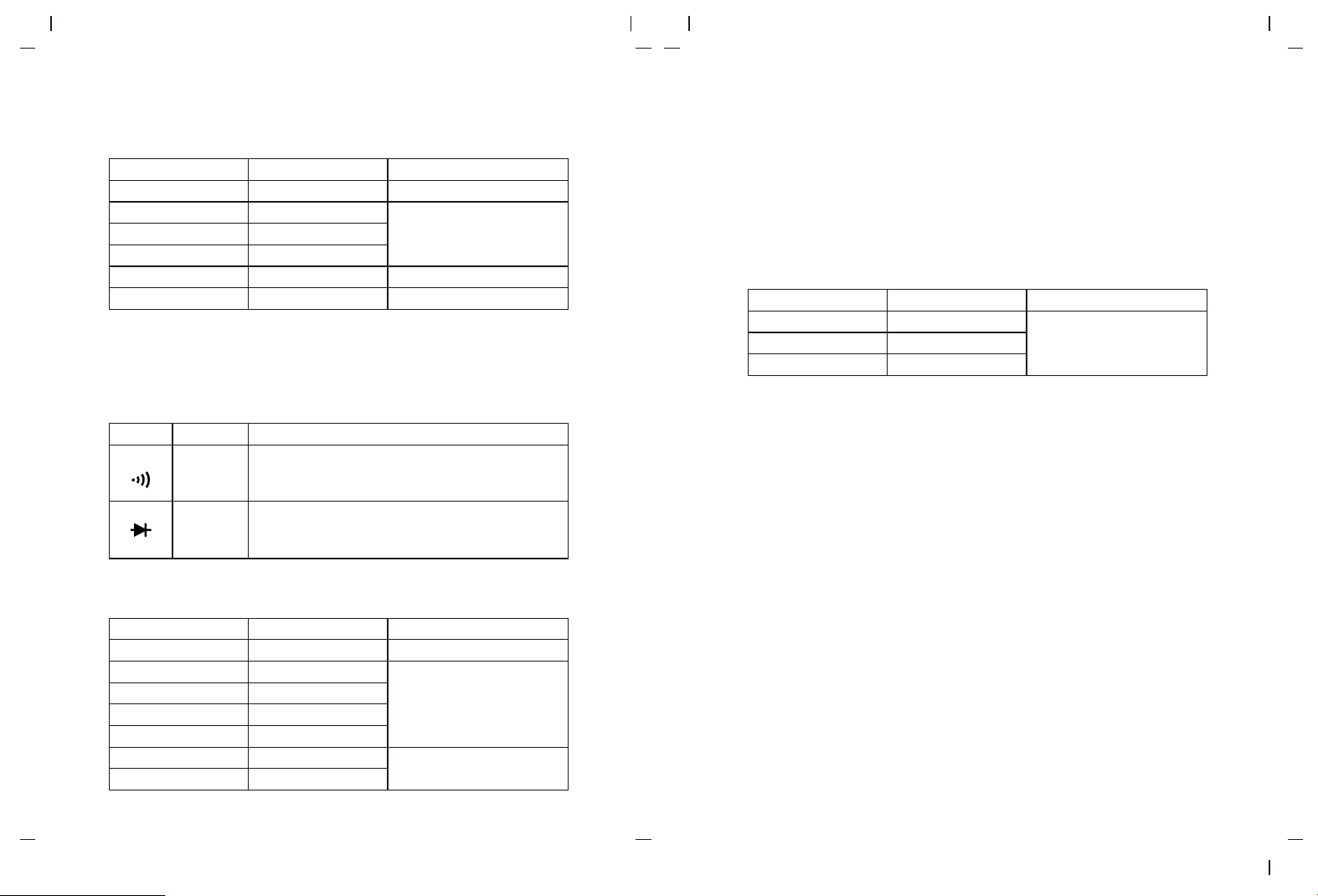
1.DC voltage measurement
Range
Resolution
Accuracy
* Input impedance: About 1GΩ for mV range, about 10MΩ for other ranges. For mV
measurement, if the input voltage exceeds the range, the protection circuit in the meter
will operate to decrease the input impedance.
* Accuracy range: 1%~100% of the range, short circuit allows least significant digits ≤5.
(It is normal that unstable digits may appear at open circuit for mV range.)
* Max input voltage: 1700V (the indicator light will be on and the buzzer will sound an
alarm at >1700V; LCD will display “OL” at >1750V)
* Overload protection: 1500Vrms or 1700Vdc
Range
Resolution
Accuracy
2. AC voltage measurement
* Input impedance: About 10MΩ. For mV measurement, if the input voltage exceeds the
range, the protection circuit in the meter will operate to decrease the input impedance.
* Display: True RMS
* Frequency response: 45Hz 1KHz~
* The AC crest factor could be 6 at 3000counts, and linearly decrease to about 3 at
6000counts. Add an error of ±1% for non-sinusoidal wave.
* The voltage frequency will also be measured and displayed when measuring AC
voltage, measurement range: 40Hz~1KHz, minimum measurement amplitude: input
amplitude ≥ minimum range ×10%.
* Accuracy guarantee: 1 ~100% of range. 1 ~5% of range: add 5 to the last digit. % %
circuit allows least significant digit ≤10.Short
* In ACV position, switch to manual range after entering LPF function.
* When LPF is turned on, LPF will impede voltage over 1.2 kHz. At about 1.2KHz, the
attenuation relative to 60Hz ≥-3db.
* Max input voltage: 1500V (the indicator light will be on and the buzzer will sound an
alarm at >1500V; LCD will display “OL” at >1600V).
* Overload protection: 1500Vrms or 1700Vdc.
3. Auto AC/DC voltage measurement
*
* Frequency response: DC~1KHz
* The meter automatically switches DCV/ACV measurement function, and defaults at
DCV function, there is only one range.
* Accuracy guarantee: 1~100%. 1~5%: add 5 to the last digit. Short circuit allows least
significant digit≤2.
* There is no LPF and PEAK detection function for auto AC/DC voltage measurement.
* Overload protection: 1500Vrms or 1700Vdc
Input impedance: About 2MΩ
25 26
600.0Ω
6.000kΩ
60.00kΩ
600.0kΩ
6.000MΩ
60.00MΩ
0.1Ω
0.001kΩ
0.01kΩ
0.1kΩ
0.001MΩ
0.01MΩ
±(1%+2)
±(0.8%+2)
±(1.2%+3)
±(2.5%+5)
0.1Ω
0.001V
60.00nF
600.0nF
6.000uF
60.00uF
600.0uF
6.000mF
60.00mF
0.01nF
0.1nF
0.001uF
0.01uF
0.1uF
0.001mF
0.01 Fm
±(1.9%+5)
±(5%+5)
±(0.8%+8)
30.00A
300.0A
3000A
0.01A
0.1A
1A
4. Resistance measurement
Range
Resolution
Accuracy
* For 600.0Ω: Measured result = displayed value – resistance of shorted test leads
* Open circuit voltage: About 1V
* Accuracy guarantee: 1%~100%
* Overload protection: 1500Vrms or 1700Vdc
5.Continuity and diode measurement
Range
Resolution
Accuracy
Broken circuit: Resistance ≥50Ω, no beep
Well-connected circuit: Resistance <10Ω,
audio/visual alarm
Open circuit voltage: About 3V
For normal diodes, the buzzer will beep once.
For short circuit, the buzzer will beep for a long time.
* Overload protection: 1500Vrms or 1700Vdc
6. Capacitance measurement
Range
Resolution
Accuracy
In REL mode: ±(3%+10)
* Overload protection: 1500Vrms or 1700Vdc
* Measurement result = displayed value – capacitance of open-circuit test leads. For
capacitance ≤60nF, it is recommended to deduct the open circuit reading in REL
mode.
* Accuracy guarantee: 5%~100%
* For the range of 60mF, the measurement time is about 20s.
7. Flex clamp sensor measurement
Range
Resolution
Accuracy
* Overload protection: 1000Vrms or 1000Vdc
* Frequency response: 45Hz~400Hz
* The indicated accuracy represents the accuracy of the multimeter.
* When monitoring online frequency at AC current position, the requirement below must
be satisfied: input amplitude ≥ range×10%
* Voltage-current relation:
a: 30A, 100mV(AC)=1A, start examination at 300mV, full-range scope (AC):
0.300V~3.00V, OL will be displayed when the voltage is >3.1V.
b: 300A, 10mV(AC)=1A, start examination at 300mV, full-range scope (AC):
0.300V~3.00V, OL will be displayed when the voltage is >3.1V.
c: 3000A, 1mV(AC)=1A, start examination at 300mV, full-range scope (AC):
0.300V~3.00V, OL will be displayed when the voltage is >3.1V.
27 28
8. Frequency measurement
Range
Resolution
Accuracy
* Frequency measurement scope: 10Hz 1MHz. Not specified for > Hz
≤99.99kHz: 200mVrms≤ input ≤20Vrms
>99.99kHz~1MHz: 600mVrms≤ input ≤20Vrms
>1MHz: Not specified
* Overload protection: 1500Vrms or 1700Vdc.
~ 1M
XI. Maintenance
Warning: Before opening the rear cover or battery cover of the meter, switch off the
power supply and remove the test leads.
1.General maintenance
Clean the meter casing with a damp cloth and mild detergent. Do not use abrasives
or solvents.
If there is any malfunction, stop using the meter and send it for maintenance.
The maintenance and service must be implemented by qualified professionals or
designated departments.
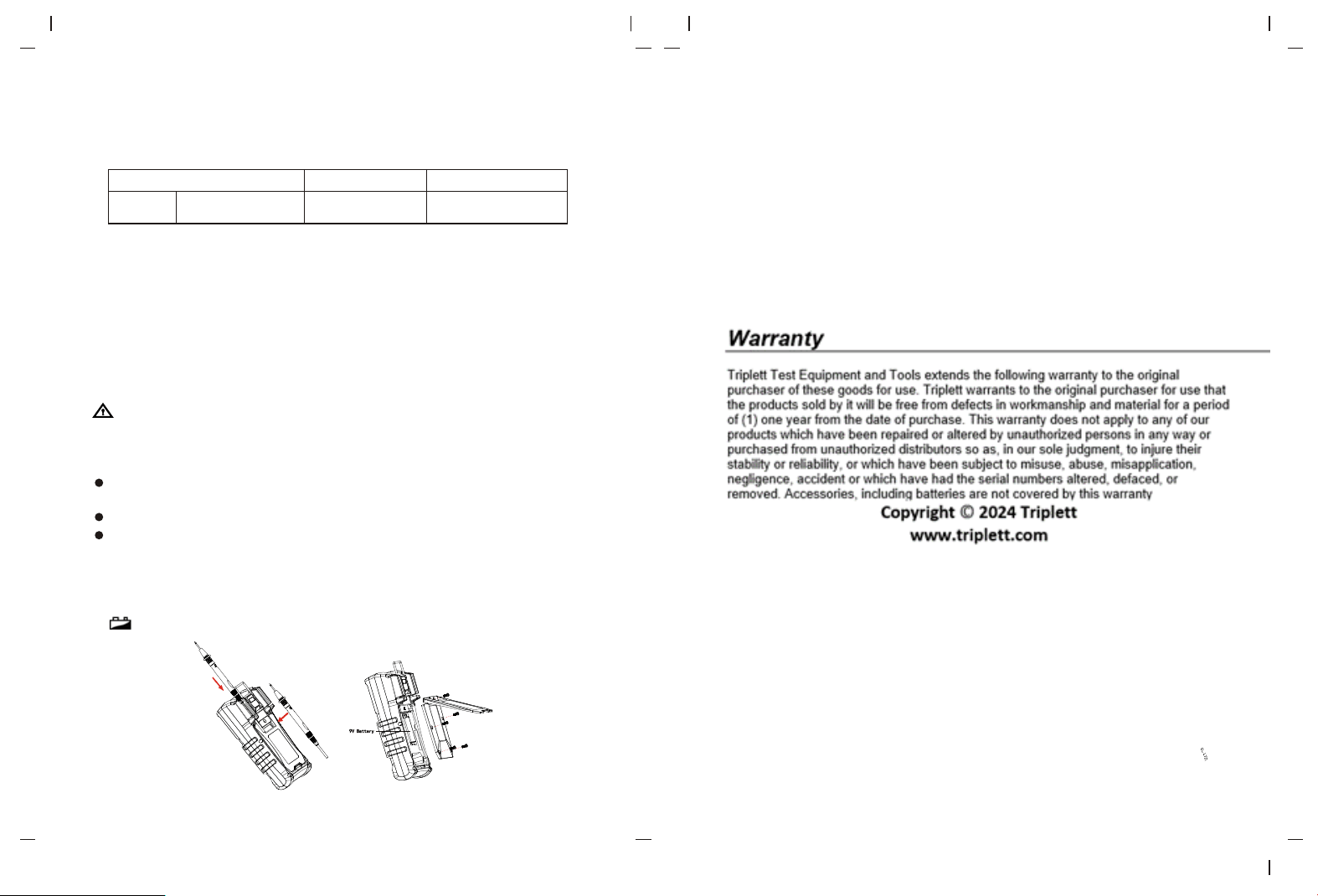
2.Battery replacement (Figure 16)
“ ” is displayed, please replace the battery in time to ensure measurement accuracy.
The contents of this manual are subject to change without prior notice
Figure 16
±(0.08%+4)
60.00H ~1.000MHzz 0.01Hz~0.001MHz
Frequency