36313
EN
Original Instructions
Version 1
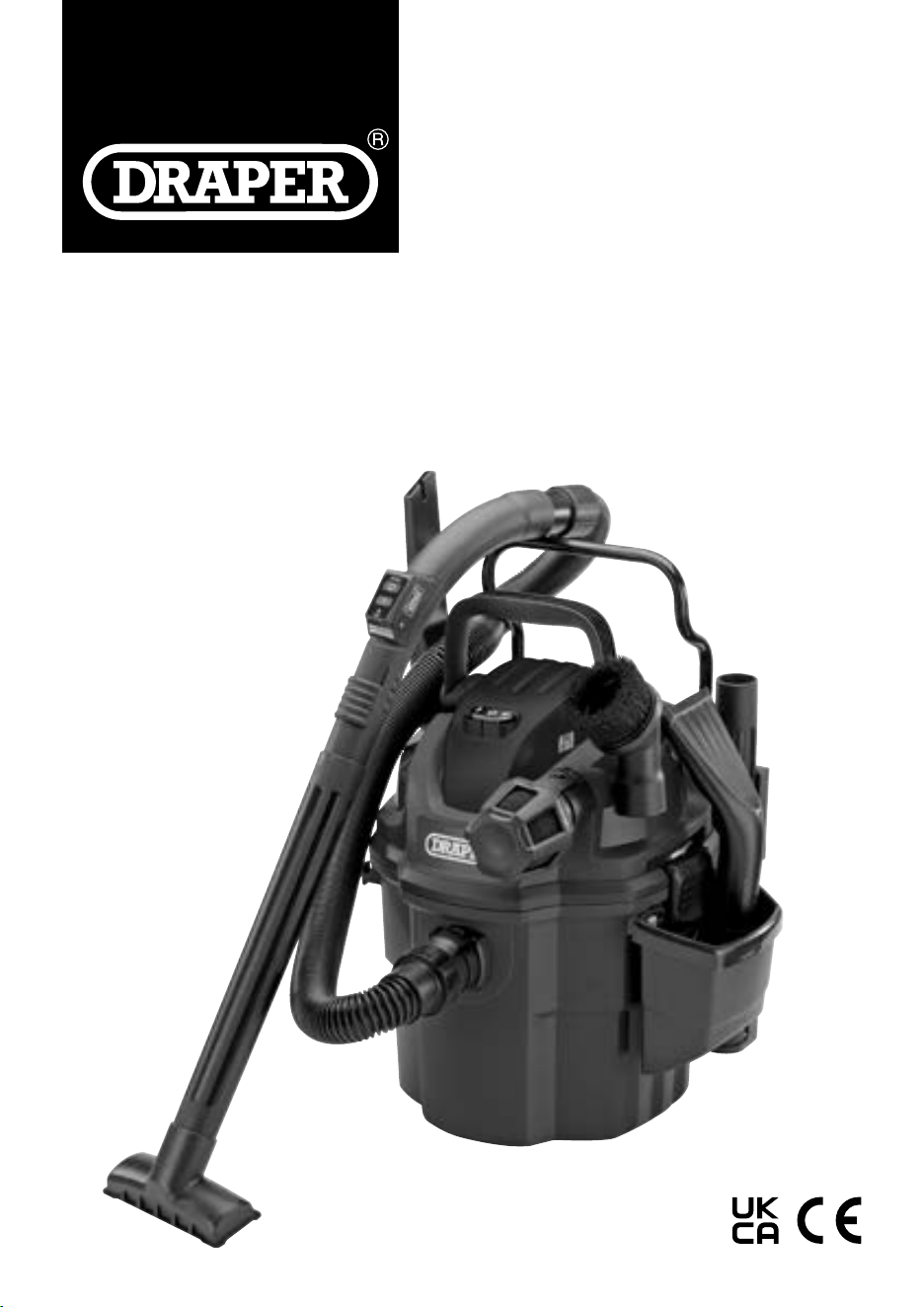
WET & DRY
VACUUM
CLEANER
1.1 Product Reference
User Manual for: Wet & Dry Vacuum Cleaner
Stock No: 36313
Part No: WDV18
1.2 Revisions
Version 1: May 2024
First release
As our manuals are continually updated, always ensure
that the latest version is used.
Download the latest version from:
drapertools.com/manuals
1.3 Understanding the Safety Content of
This Manual
WARNING!
– Situations or actions that may result
in personal injury or death.
CAUTION! – Situations or actions that may result
in damage to the product or surroundings.
Important: – Information or instructions of particular
importance.
1.4 Copyright © Notice
Copyright © Draper Tools Limited.
Permission is granted to reproduce this manual for
personal and educational use ONLY. Commercial
copying, redistribution, hiring or lending is strictly
prohibited.
No part of this manual may be stored in a retrieval system
or transmitted in any other form or means without written
permission from Draper Tools Limited.
In all cases, this copyright notice must remain intact.
1. Preface
These are the original product instructions. This
document is part of the product; retain it for the life
of the product, passing it on to subsequent holders.
Read this manual in full before attempting to
assemble, operate, or maintain this product.
This Draper Tools manual describes the purpose
of the product and contains all the necessary
information to ensure its correct and safe use.
Following all the instructions and guidance in
this manual will ensure the safety of both the
product and the operator and increase the
lifespan of the product.
All photographs and drawings within this manual are
supplied by Draper Tools to help illustrate correct
operation of the product.
Every eort has been made to ensure the
information contained in this manual is accurate.
However, Draper Tools reserves the right to amend
this document without prior warning. Always use the
latest version of the product manual.
– 2 –

2. Contents
– 3 –
EN
1. Preface 2
1.1 Product Reference 2
1.2 Revisions 2
1.3 Understanding the Safety Content
of This Manual 2
1.4 Copyright © Notice 2
2. Contents 3
3. Product Introduction 4
3.1 Intended Use 4
3.2 Specication 4
4. Explanation of Symbols 5
5. Health and Safety Information 6
5.1 General Health and Safety Precautions 6
5.2 Additional Health & Safety
For Vacuum Cleaners 6
5.3 Connection to the Power Supply 6
5.4 Residual Risk 7
6. Identication and Unpacking 8
6.1 Product Overview 8
6.2 What’s in the Box? 9
6.3 Packaging 9
7. Preparation Instructions 10
7.1 Unpacking & General Assembly 10
7.2 Mounting Rack & Storage Assembly 10
7.3 Securing the Mounting Rack to the Wall 11
7.4 Fitting the Vacuum to the Rack 12
7.5 Removing the Vacuum from the Rack 12
7.6 Assembly for Use (Fig.14 – Fig.17) 13
8. Operating Instructions 14
8.1 Dry Vacuuming (Fig.18 – Fig.21) 14
8.2 Wet Vacuuming (Fig.22 – Fig.23) 14
8.3 Blower Function 15
9. Remote Control Operation 16
9.1 Using the Remote Control 16
9.2 Setting/Resetting the Remote Control 16
9.3 Fitting and Replacing the Battery 16
10. Maintenance and Troubleshooting 18
10.1 Cleaning and Replacing
the Cartridge Filter 18
10.2 Cleaning Wet Foam Filter 18
10.3 Troubleshooting 18
11. Spares, Returns and Disposal 19
12. Warranty 19

– 4 –
3. Product Introduction
3.1 Intended Use
This vacuum cleaner has a 18 litre tank and is designed
to pick up both wet and dry materials. Supplied with a
rack for wall mounting during use and for storage. Ideally
suited for use in the workshop, garage or DIY work
around the home and garden.
Any other application beyond the conditions established
for use will be considered misuse. Draper Tools accepts
no responsibility for improper use of this product.
Read this manual in full before attempting to assemble,
operate or maintain the product, and retain it for later
use.
3.2 Specication
Stock No.: 36313
Part No.: WDV18
Rated Voltage: 230V/50Hz
Rated Input: 1500W
Vacuum Pressure: 19kpa
Air Flow: 40L/sec
Tank Capacity: 18L
Wet Capacity 10L
Filtration type: Cartridge
Protection Rating IPX4
Noise Emissions:
Sound Pressure Level: 75dB (A)
Sound Power Level: 89dB (A)
Power Cord Length: 5m
Remote Control Battery Required: 12V 23A Alkaline Battery
Net Weight (including accessories): 10.2kg

4. Explanation of Symbols
Read the instruction manual
Mandatory action required
Warning!
Do not incinerate or throw onto re
Rated voltage
1500
W
Rated input
Kilopascal rating
Suction rating
Wet capacity
Tank capacity
Power supply cable length
Water ingress protection rating
Continuous A-weighted sound power level
Class II construction
(Double insulated)
Net product weight
WEEE –
Waste Electrical & Electronic Equipment
Do not dispose of Waste Electrical & Electronic Equipment
in with domestic rubbish
European conformity
UK Conformity Assessed
– 5 –
EN

– 6 –
5. Health and Safety Information
Important: Read all the Health and Safety instructions
before attempting to operate, maintain or repair this
product. Failure to follow these instructions may result in
injury or damage to the user or the product.
5.1 General Health and Safety
Precautions
WARNING! To reduce the risk of electric shock
or injury:
• DO NOT leave the appliance unattended when
plugged in or switched on.
• ALWAYS switch o and unplug from the power supply
when not in use, changing accessories or performing
any maintenance.
• DO NOT use this appliance near ammable liquids,
gases or explosive vapours or dust. Sparks inside the
motor can ignite ammable vapours or dust.
• DANGER! DO NOT vacuum hot or glowing ash,
cigarette ends, matches or anything that is burning.
• Keep the cord away from hot surfaces and sharp
edges.
• DO NOT expose to rain or very damp conditions. Store
indoors.
• DO NOT pull or carry the appliance by the power cord.
• DO NOT pull the plug from the socket by the cord. To
unplug grasp the plug, not the cord.
• DO NOT use with a damaged or worn cord, plug or any
other parts.
• If the appliance is not working, has been damaged,
left outside or dropped in water, get it checked and
repaired by a qualied person.
• DO NOT run the appliance over the cord.
• DO NOT touch the cord or appliance with wet hands.
• This appliance can be used by children aged from 8
years and above and persons with reduced physical,
sensory or mental capabilities or lack of experience
and knowledge if they have been given supervision or
instruction concerning use of the appliance in a safe
way and understand the hazards involved. Children
shall not play with the appliance. Cleaning and user
maintenance shall not be made by children without
supervision.
5.2 Additional Health & Safety
For Vacuum Cleaners
• DO NOT modify the appliance and only use for its
intended use.
• Wear protective clothing and gloves.
• DO NOT allow untrained persons to operate the
cleaner.
• To reduce the risk of health hazards from vapours and
dust, DO NOT vacuum toxic materials.
• DO NOT use or store near hazardous materials.
• DO NOT use with a damaged lter or without a lter
installed.
• DO NOT place any objects into the ventilation
openings and DO NOT use if the ventilation openings
are blocked.
• The hose should be checked regularly and must not
be used if damaged.
• Unplug before connecting the hose.
• To reduce the risk of falls, take extra care when
cleaning stairs.
• Keep hair, loose clothing and ngers away from
openings and moving parts.
• Only use and replace with recommended parts and
attachments.
• DO NOT submerge the remote control hand grip in
liquid.
• When using as a blower:
− DO NOT point or direct the air hose at bystanders
or animals.
− Wear eye protection and a dust mask.
− Keep children and bystanders away from the work
area.
5.3 Connection to the Power Supply
This appliance is supplied with an approved plug and
cord for your safety.
If the power supply cord is damaged, it must be replaced
by Draper Tools, an authorised service agent or similarly
qualied personnel in order to avoid a hazard.
The damaged or incomplete plug, when cut from the
cord, shall be disabled to prevent connection to a live
electrical outlet.
This appliance is a Class II
†
and is designed for
connection to a power supply matching that detailed on
the rating label and compatible with the plug tted.

– 7 –
5. Health and Safety Information
EN
The value of the fuse tted is marked on the pin face of
the plug. Should the fuse need replacing, use a small
plain-slot screwdriver to remove the fuse cover. Ensure
the substitute is of the correct rating, approved to BS
1363/A and ASTA or BS Kite marked. This should only be
performed by suitably qualied personnel.
ASTA
BSI
If an extension lead is required, use an approved and
compatible lead rated for this appliance.
Follow all the instructions supplied with the extension
lead.
Important: Always follow the extension lead instructions
regarding maximum load while the cable is wound. It is
recommended that the power cord and/or the extension
lead are fully unwound before connecting to a power
supply. A coiled extension lead generates heat which
could melt the lead and cause a re. Check that the
extension lead is rated for outdoor use.
†
Double insulated : This product is double insulated
and does not require an earth connection to protect
against electric shock from accessible conductive parts
in the event of failure of the basic insulation.
5.4 Residual Risk
The safety instructions in this manual cannot account for
all possible conditions and situations that may occur.
Exercise common sense and caution when using this
product and protect against any additional conceivable
risks.
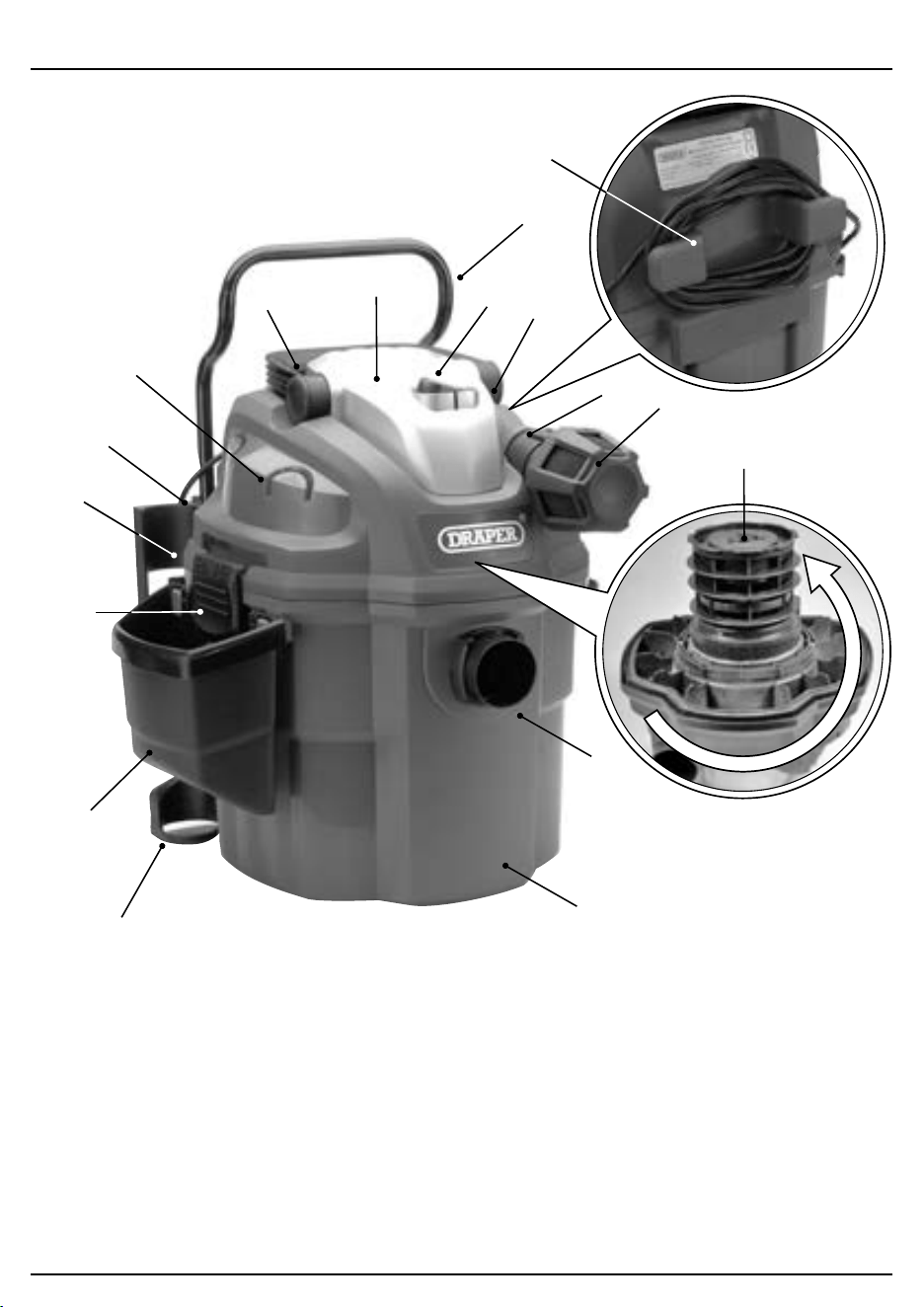
– 8 –– 8 –
1. Power head
2. Hose holding rod
3. Power switch
4. Blower port
5. Air/Noise diuser
6. Vacuum port
7. Collection tank
8. Accessory storage caddy
9. Tube storage
10. Latch × 2
11. Mounting rack
12. Release lever
13. Accessory holders
14. Handle
15. Filter cage (underside of power head)
16. Remote control reset button
17. Cord wrap
6. Identication and Unpacking
6.1 Product Overview
(3)
(16)
(5)
(4)
(1)
(15)
(2)
(6)
(7)
(11)
(12)
(17)
(13)
(14)
(8)
(10)
(9)
6. Identication and Unpacking
6.3 Packaging
Keep the product packaging for the duration of the
warranty period for reference should the product need to
be returned for repair.
WARNING! Keep packaging materials out of reach of
children. Dispose of packaging correctly and
responsibly and in accordance with local regulations.
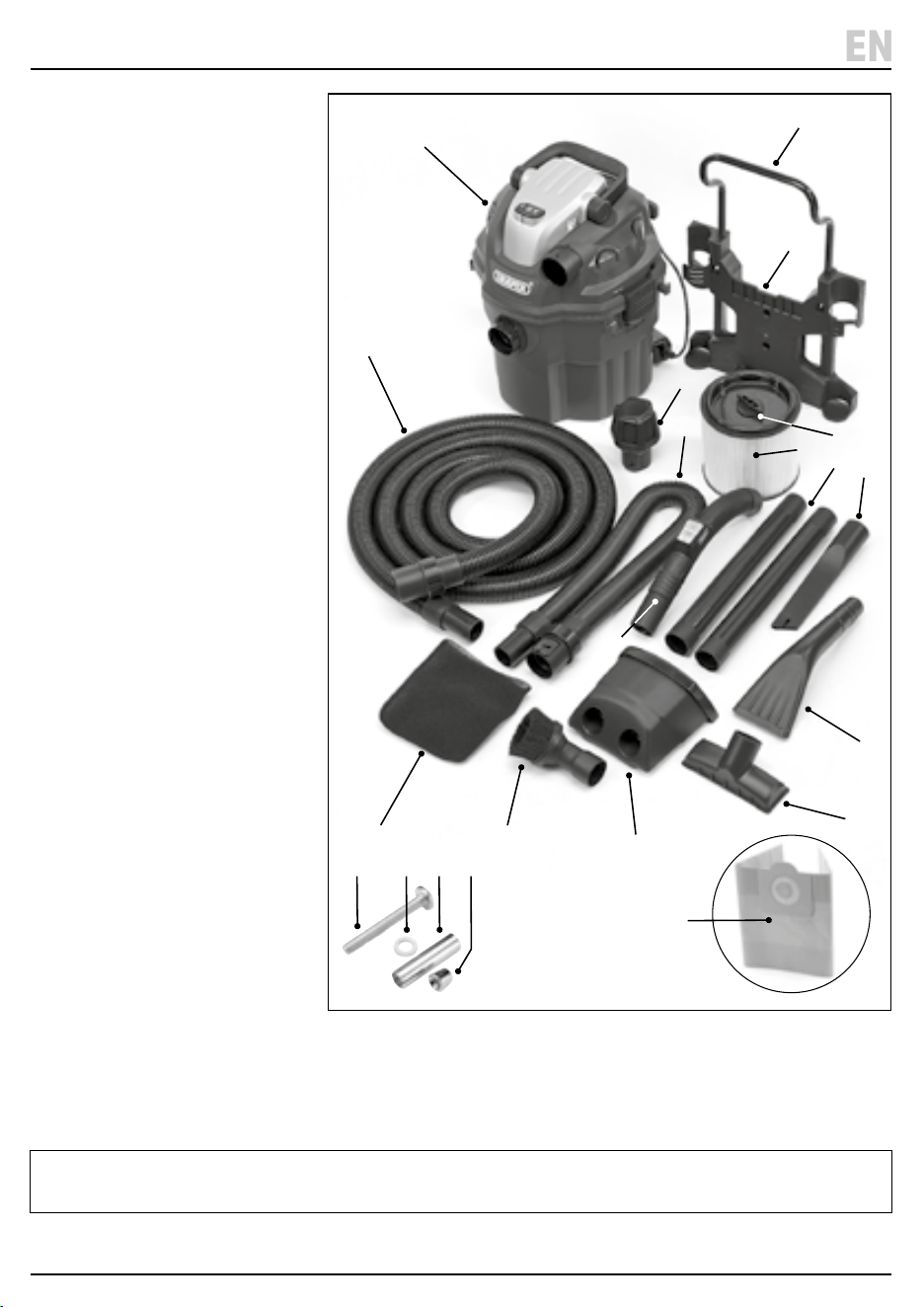
(A) 1 × Vacuum unit
(B) 1 × Diuser
(C) 1 × 4m hose
(D) 1 × 3m hose
(E) 1 × Foam Filter
(F) 1 × Upholstery brush
(G) 1 × Accessory storage caddy
(H) 1 × Utility nozzle
(I) 1 × Upholstery crevice nozzle
(J) 1 × Crevice tool
(K) 2 × Extension tube
(L) 1 × Remote control hand grip
(M) 1 × Filter
(M1) Cartridge lter
(M2) Filter retainer
(N) 1 × Mounting rack
(O) 1 × Hose holding rod
(P) 3 × Screw
(Q. 3 × Washers
(R) 3 × Expansion bolt
(S) 3 × Nuts
(T) Paper dustbag
(available separately)
Please visit drapertools.com for our full range of accessories and consumables.
– 9 –
EN
6.2 What’s in the Box?
Carefully remove the product from
the packaging and examine it for
any signs of damage that may have
occurred during shipment.
Before assembling the product, lay
the contents out and check them
against the parts shown below. If
any part is damaged or missing, do
not attempt to use the product.
Please contact the Draper Helpline;
contact details can be found at the
back of this manual.
(A)
(C)
(L)
(G)
(T)
(E) (F)
(P) (Q) (R) (S)
(K)
(J)
(M2)
(I)
(H)
(B)
(D)
(M1)
(O)
(N)
– 10 –
7. Preparation Instructions
Important: Before preparing or adjusting this product,
read and understand all the safety instructions listed in
this manual.
7.1 Unpacking & General Assembly
Important: Ensure that the vacuum cleaner is unplugged
from the power supply before assembling.
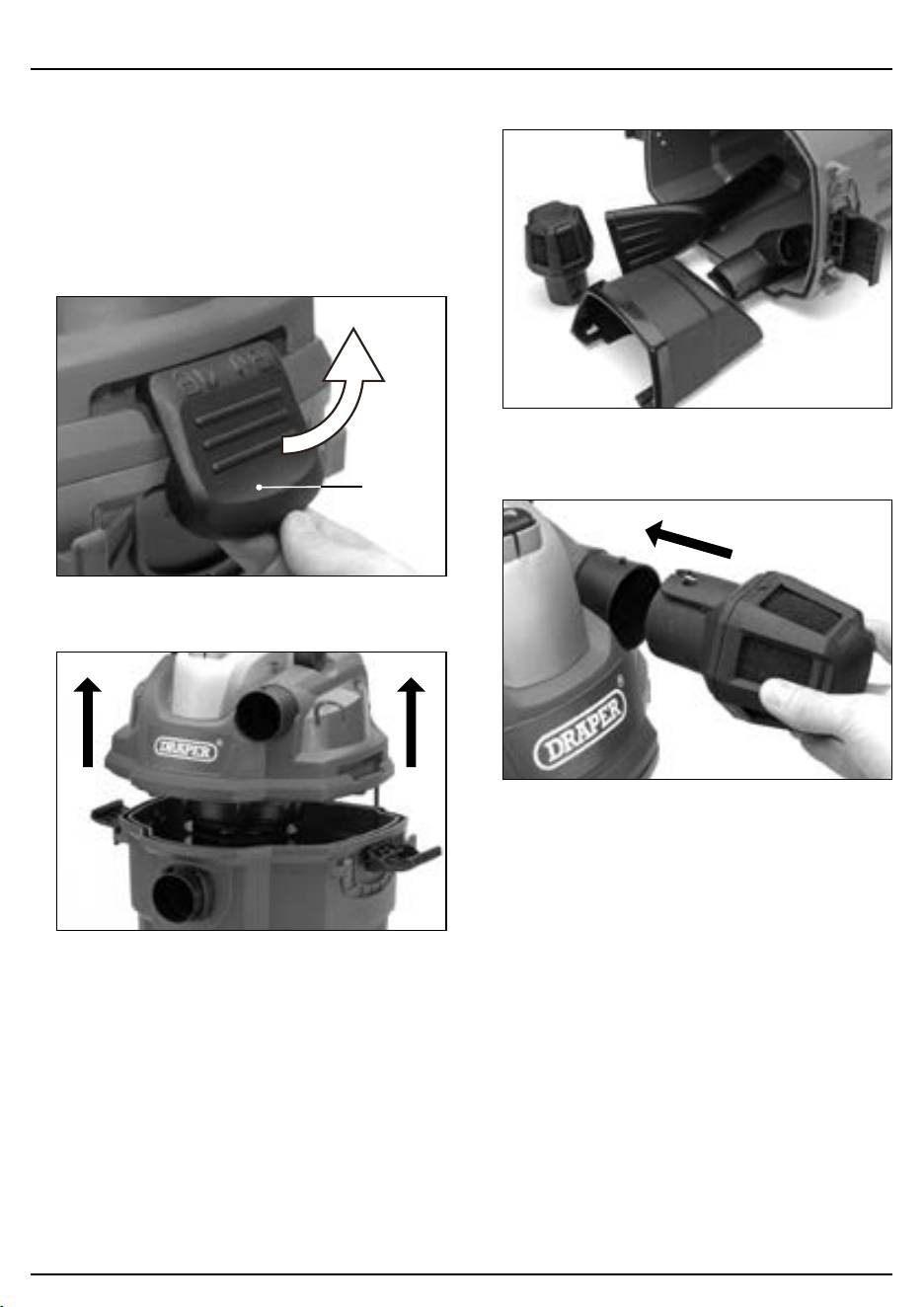
1. Release the latches (10).
1 Fig.
(10)
2. Lift the power head (1) o the tank (7).
2 Fig.
3. Remove all the accessories from inside the tank.
3 Fig.
4. Replace the power head and insert the diuser (5)
into the blower port (4) and turn to lock in place.
4 Fig.
7.2 Mounting Rack & Storage Assembly
Important:
• The rack should be mounted so that when the vacuum
is tted, the distance between the vacuum port (6)
and oor is less than 1.5metres.
• Secure the screws (P) to a wall stud or brick wall.
• Concrete House – DO NOT screw the rack directly to a
plaster board wall.
• DO NOT exceed the maximum weight limit of 18kg.
• DO NOT hang from or sit on the mounting rack.
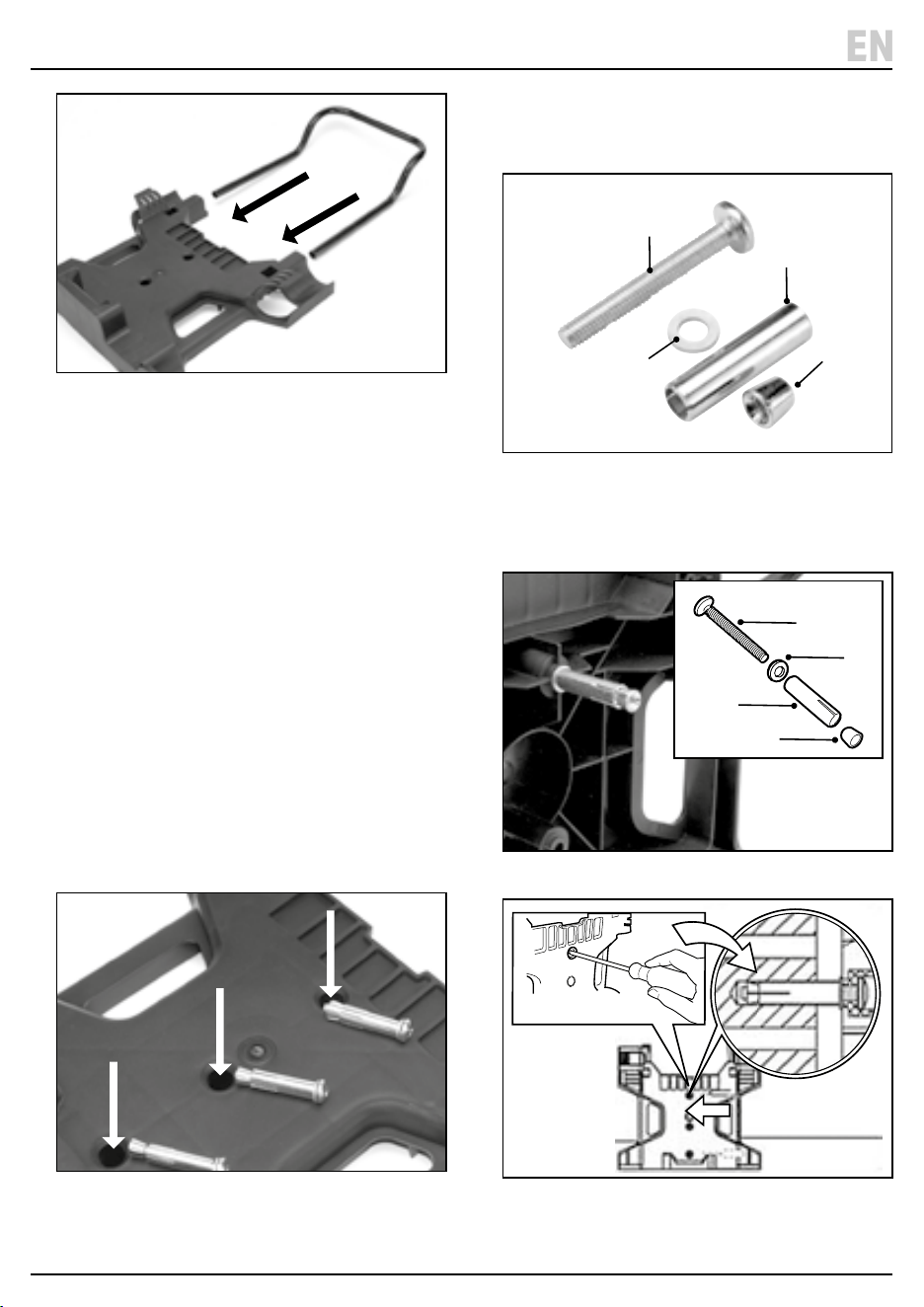
1. Insert the hose holding rod (O) into the two holes at
the top of the mounting rack (N). Ensure the curve of
the rod is directed away from the wall (Fig.5).
– 11 –
7. Preparation Instructions
EN
5 Fig.
2. Select a location on a wall stud or brick wall that is
less than 5metres from an electrical outlet. Select a
solid wall to x the mounting rack to.
3. Align the three screw holes in the mounting rack with
the wall studs. Ensure the rack is level and mark the
screw locations.
4. Drill holes to secure the rack to the wall.
– Stud Wall - drill a 3mm diameter
and 35-45mm depth pilot hole for each screw.
– Brick Wall – drill a 10mm diameter
and 45- 50mm deep hole for each screw.
• Important: ensure that the screw holes are drilled
into the brickwork and not the mortar.
7.3 Securing the Mounting Rack to
the Wall
1. Insert the three screws (P) supplied into the holes in
the rack. Add a washer (Q) and cover the screw with
the expansion bolt (R).
6 Fig.
2. Fit the nut (S) into the slot of the expansion bolt. Turn
the nut and bolt together for two full turns to ensure
nut and screw are secure.
7 Fig.
(P)
(R)
(Q)
(S)
3. Insert the three expansion bolts into the holes in the
solid wall. Tighten the bolts until the mounting rack is
secured to the wall.
8 Fig.
(P)
(Q)
(R)
(S)
9 Fig.
– 12 –
7. Preparation Instructions
7.4 Fitting the Vacuum to the Rack
1. Measure the distance from the top screw hole of the
rack to the closest electrical outlet and add 5m for the
power cord.
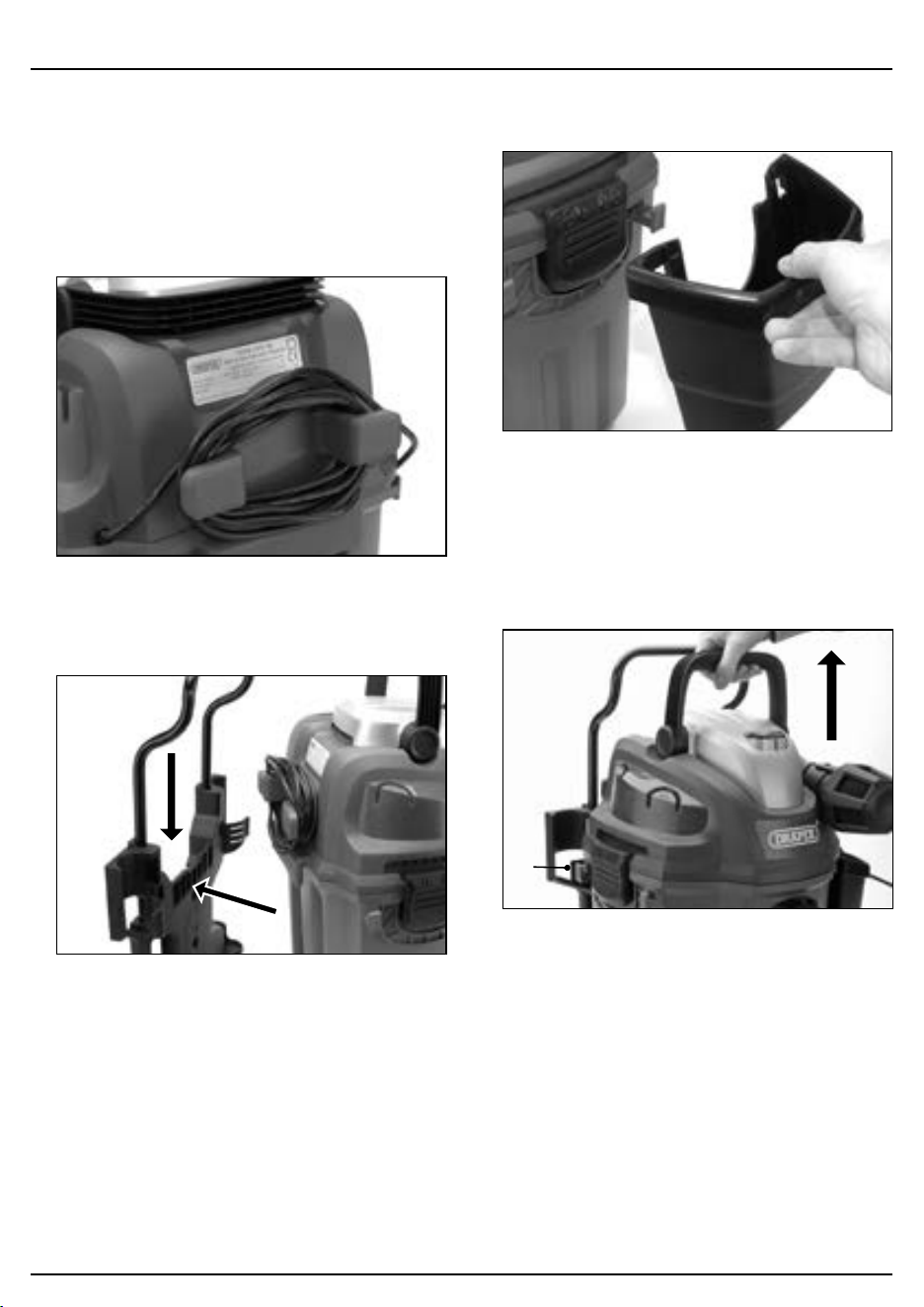
2. Wind the excess cord round the cord wrap (17) -
ensure the cord is not wrapped around the rack
mount (g.10).
10 Fig.
3. Fit the vacuum cleaner to the rack by aligning the
hanging hook with the slot and sliding it down until it
locks in place. (Fig.11).
11 Fig.
4. Attach the tool caddy (G) using the two hooks on the
container. Fig.12.
12 Fig.
7.5 Removing the Vacuum from the Rack
1. Unplug from the electrical outlet.
2. Press the release lever (12) on the left side of the rack.
3. Then lift the vacuum up and out of the rack by the
handle.
13
Fig.
(12)
7. Preparation Instructions
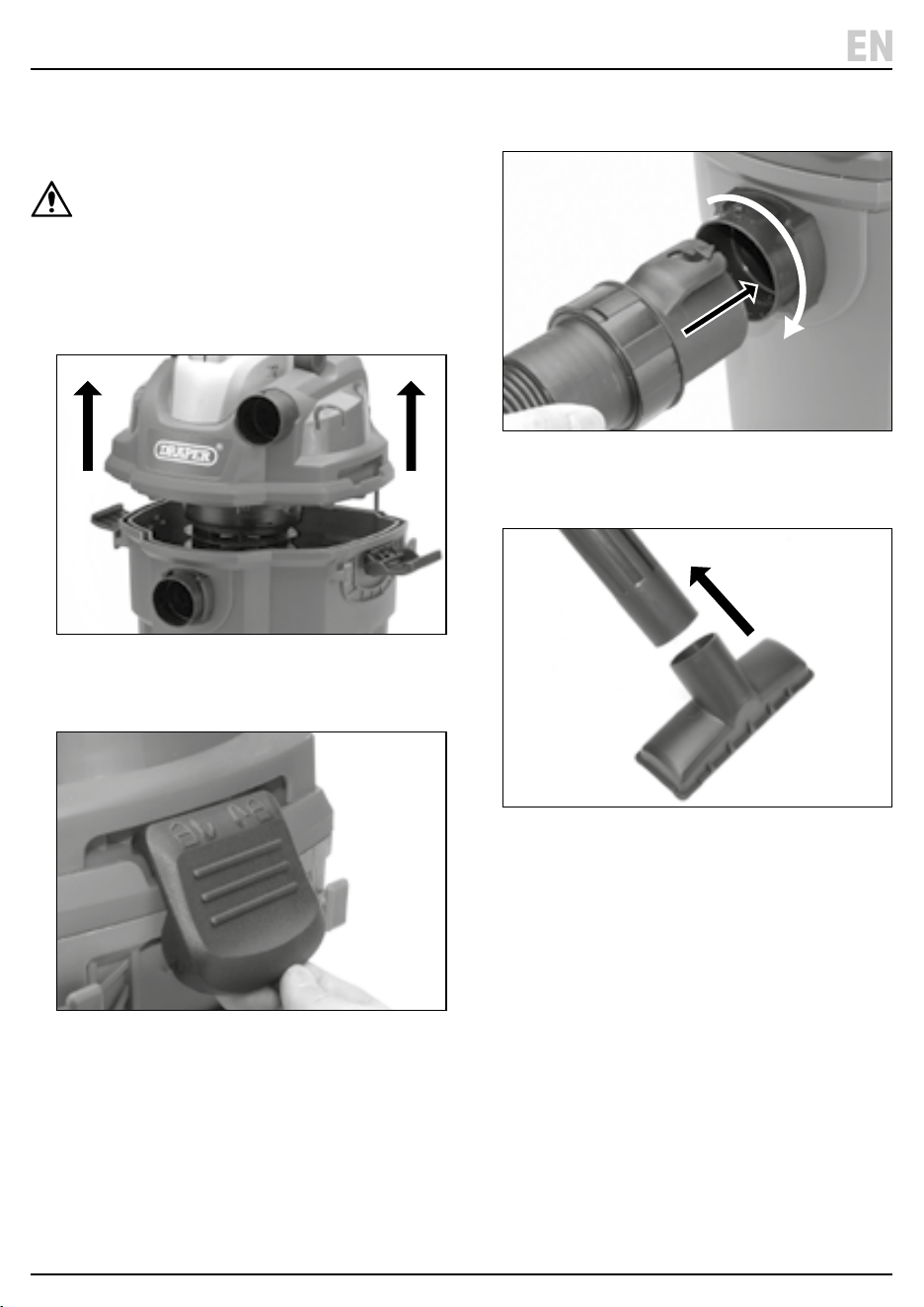
7.6 Assembly for Use (Fig.14 – Fig.17)
Note: The vacuum is supplied ready for dry vacuum
cleaning.
WARNING! Ensure the vacuum is unplugged
before assembling.
1. Unlatch the power head and remove any accessories.
Fit the lter cartridge (M) and a dust bag (U) if
required for dry vacuuming (Refer to Section 8.1) or
t the foam lter ( E) for wet cleaning (Refer to
section 8.2).
14 Fig.
2. Ret the power head (1) back onto the tank, and
secure in place using the two side latches (10).
15 Fig.
3. Insert the locking end of the hose (C) or (D) into the
vacuum port (6) of the tank and turn to lock in place.
16 Fig.
4. Select the desired accessory and push onto the end
of the suction tube.
17 Fig.
– 13 –
EN
8. Operating Instructions
– 14 –
Important: Before operating this product, read and
understand all the safety instructions listed in this
manual. Ensure that the product is fully assembled and
correctly prepared for use.
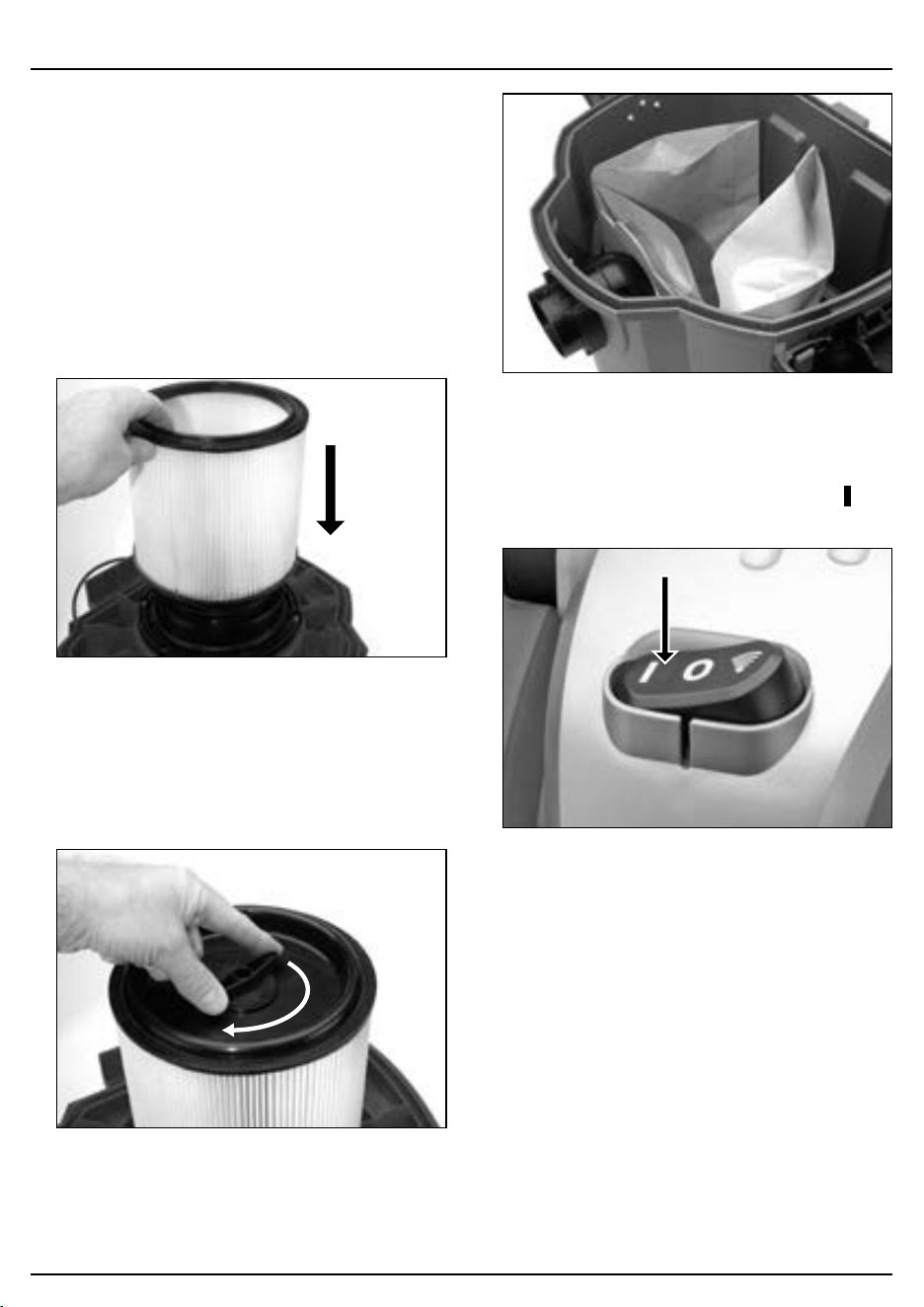
8.1 Dry Vacuuming (Fig.18 – Fig.21)
1. Ensure the vacuum is unplugged from the power
outlet.
2. Fit the cartridge lter (M1) over the lter cage (15)
with the at end nearest the power head. Ensure that
it is pushed down securely against the power head
and fully covers the lter cage.
18 Fig.
3. Place the lter retainer (M2) on top of the lter
cartridge and turn the handle clockwise to secure.
− DO NOT use the cartridge lter for liquid
vacuuming.
− Optional – for improved ltration, t a suitable
dust bag as well as the cartridge lter.
19 Fig.
20 Fig.
4. Assemble as per section 7.6.
5. Plug in and either hang the vacuum on the rack or use
o the rack.
6. Turn on by pushing the power switch (3) to the ‘ ’ ON
position.
21 Fig.
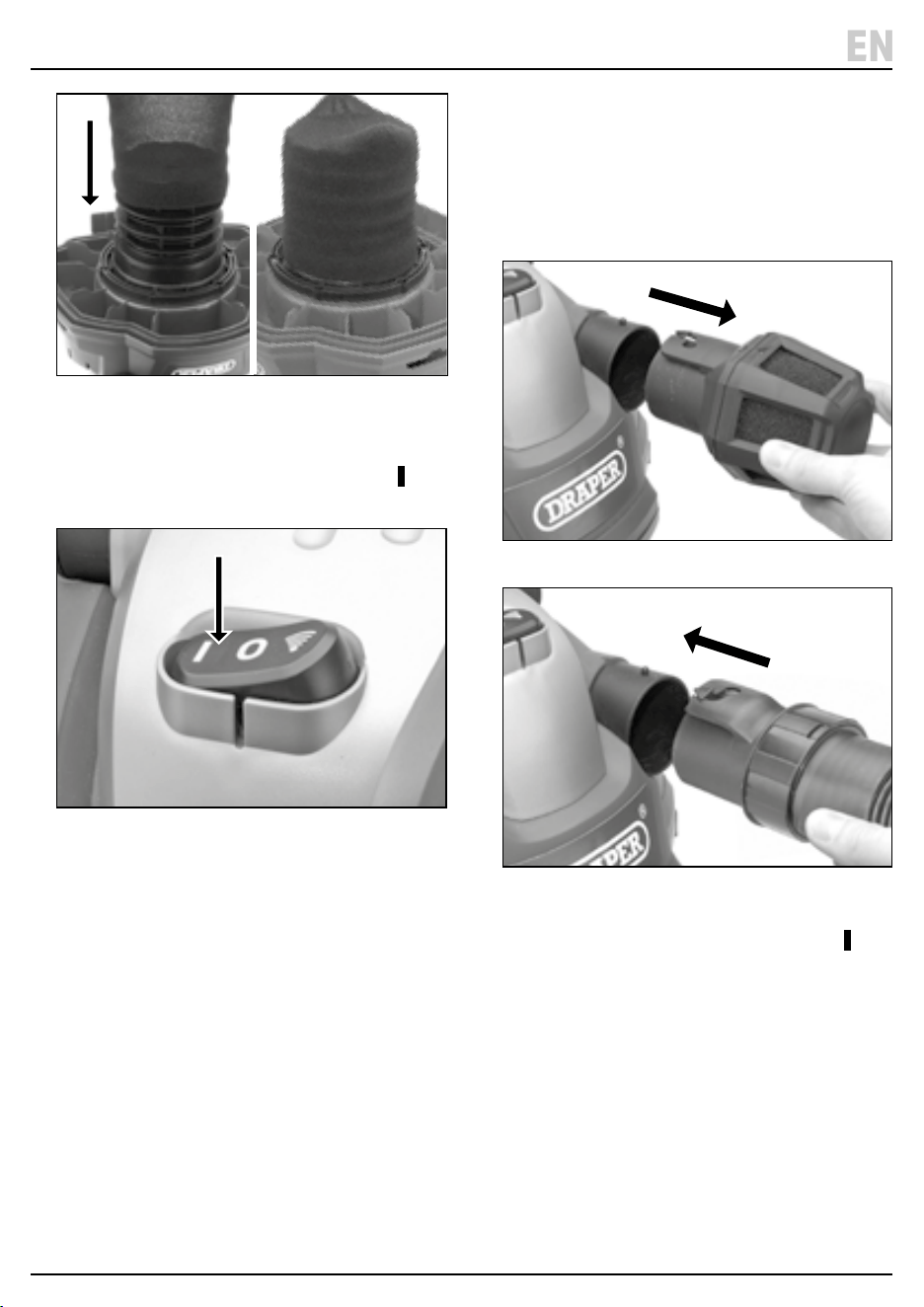
8.2 Wet Vacuuming
(Fig.22 – Fig.23)
Important: When vacuuming large quantities of liquid,
due to the weight it is recommended that the vacuum is
used o the rack.
1. Ensure the vacuum is unplugged from the power
outlet.
2. Remove the dustbag and cartridge lter (M1) if tted
by turning the retainer (M2) anti-clockwise and lifting
out.
3. Fit the foam lter ( E ) by carefully sliding the foam
sleeve completely over the lter cage.
8. Operating Instructions
22 Fig.
4. Assemble as per section 7.6
5. Plug in and use o the rack.
6. Turn on by pushing the power switch (3) to the ‘ ’ ON
position.
23 Fig.
Important:
− When vacuuming large quantities of liquids, DO
NOT immerse the tool nozzle completely in the
liquid. Leave a gap at the tip of the nozzle opening
to allow air ow.
− The vacuum is tted with a oat valve that stops
the suction action when the tank is full and
requires emptying.
8.3 Blower Function
1. Ensure the vacuum cleaner is switched o and
unplugged.
2. Check that the tank is empty before using the blower.
3. Remove the diuser and t the end of the hose to the
blower port (4) and lock into position.
24 Fig.
25 Fig.
4. Fit the required extension tube or nozzle.
5. Turn on by pushing the power switch (3) to the ‘ ’ ON
position.
– 15 –
EN
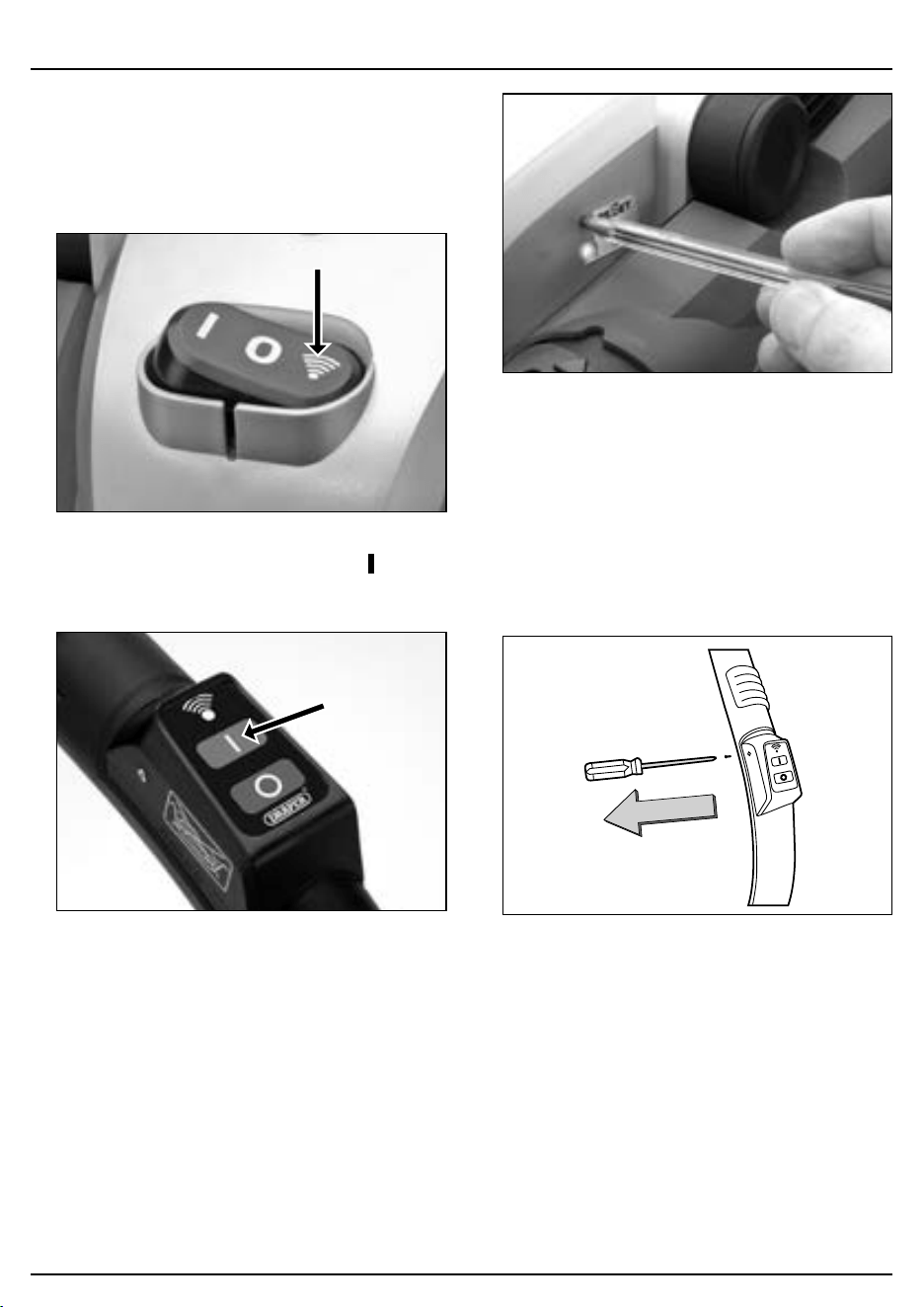
9. Remote Control Operation
9.1 Using the Remote Control
1. Fit the remote control hand grip (L) to the suction
hose.
2. Set the power switch (3) on the vacuum cleaner to the
remote control position (Fig.26).
26 Fig.
3. To turn the vacuum on, press and hold the ‘ ’ button
on the remote control (L) for at least one second.
27 Fig.
9.2 Setting/Resetting the Remote Control
1. Set the power switch (3) on the vacuum cleaner to the
remote control position.
2. Press the ‘RESET’ button (16) on the side of the power
head using a pen tip until the indicator under the
button lights up.
28 Fig.
3. Then within 15 seconds, press and hold either the
‘ON’ or ‘OFF’ button on the remote control handle to
reset. The light will blink three times if the remote
control is programmed and ready to be used.
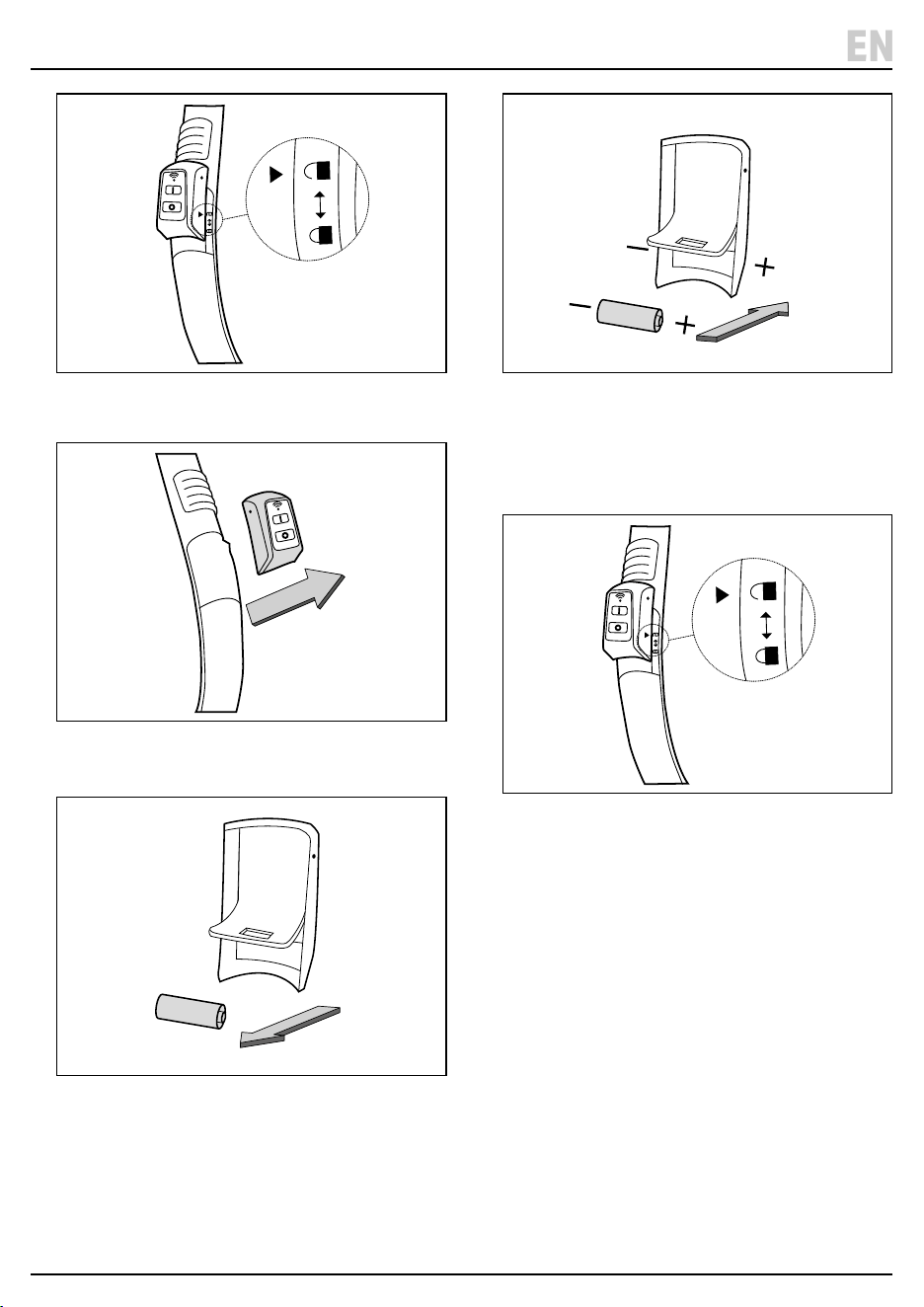
9.3 Fitting and Replacing the Battery
1. If the battery needs replacing, use a cross slot
screwdriver to remove the screws on the battery
compartment (Fig.29).
29 Fig.
2. Slide back the cover until the triangle aligns with the
unlock symbol on the handle (Fig. 30).
– 16 –
9. Remote Control Operation
30 Fig.
3. Remove the cover from the handle.
31 Fig.
4. Lift up the foam cover and remove the old battery.
32 Fig.
5. Insert the new battery – ensure the correct +/-
orientation.
33 Fig.
6. Replace the foam battery cover and ret the cover to
the handle.
7. Align the triangle with the unlock symbol and slide
the cover until it aligns with the locked symbol.
34 Fig.
8. Secure the cover with the screws.
– 17 –
EN

10. Maintenance and Troubleshooting
– 18 –
Problem Possible Cause Remedy
Vacuum not operating. No power supply. Check unit plugged in and power
supply is working correctly.
Faulty power cord. Unplug and examine power cord. If
damaged, contact the Draper Tools
helpline for assistance.
Switch not in the on
‘ ’
position. Move the switch to the
‘ ’
position
on the motor head.
Collection tank full. Empty collection tank.
Dust coming from motor cover. Dust lter is missing or damaged. Fit or replace dust lter.
Reduced eciency and motor/speed
vibration.
Blockage in tool, hose or tank
collection inlet.
Unplug vacuum and check for
blockage and clear.
Clean or replace lter.
Dust lter blocked by ne dust.
Remote control not working Battery is dead
Replace battery – refer to section 9.3.
10.3 Troubleshooting
Important: Always unplug from the power supply before
carrying out any cleaning, adjustments, servicing or
maintenance.
• Clean and maintain the vacuum correctly and
regularly to ensure optimum performance.
• Wet Vacuuming – To prevent the risk of mildew, empty
the tank and clean both inside and outside. Remove
the foam lter and allow to dry before storage.
• DO NOT use abrasives or solvents to clean this
product.
• The motor must be correctly ventilated during
operation, so avoid blocking the air inlets.
• If the plug or power supply cord is damaged it must,
for safety reason be replaced by Draper tools, an
authorised repairer or similarly qualied person in
order to avoid a hazard.
• When not in use, store in a safe, dry and childproof
location.
10.1 Cleaning and Replacing the
Cartridge Filter
1. Unlock and remove the lter retainer (M2) by turning
the handle anti-clockwise.
2. Lift out the cartridge lter (M1).
3. Gently tap or brush the lter to clean. For optimal
perform replace with a new lter.
4. Ret the lter over the lter cage with the at end of
the lter towards the power head. Carefully push the
lter in until it stops against the power head.
5. Place the lter retainer (M2) on top of the lter
cartridge and turn the handle clockwise to secure.
10.2 Cleaning Wet Foam Filter
1. Lift o the foam lter (E).
2. Clean the lter using a mild soap and water.
3. Allow lter to air dry before retting.
4. Ret by sliding the lter down over the lter cage,
ensuring the cage is completely covered.
– 19 –
11. Spares, Returns and Disposal
For spare parts, servicing, and repair and replacement
options, please contact the Draper Tools Product
Helpline for details of your nearest authorised agent.
Draper Tools will endeavour to hold any spare parts, if
applicable, for seven years from the date that it sells the
nal matching stock item.
Any servicing or repairs carried out by unauthorised
personnel or installation of spare parts not supplied by
Draper Tools will invalidate your warranty.
At the end of its working life, dispose of the product
responsibly and in line with local regulations. Recycle
where possible.
DO NOT burn or mutilate batteries; this may release toxic
or corrosive substances.
DO NOT dispose of this product with domestic waste;
most local authorities provide appropriate recycling
facilities.
EN
12. Warranty
Draper Tools products are carefully tested and inspected
before shipment and are guaranteed to be free from
defective materials and workmanship.
Should the tool develop a fault, return the complete tool
to your nearest distributor or contact Draper Tools
directly. Contact information can be found at the back of
this manual.
Proof of purchase must be provided.
If, upon inspection, it is found that the fault occurring is
due to defective materials or workmanship, repairs will
be carried out free of charge.
This warranty period covers
parts and labour for 12 months from the date of purchase.
Where tools have been hired out, the warranty period
covers 90 days from the date of purchase.
This warranty does not apply to any consumable parts,
batteries or normal wear and tear, nor does it cover any
damage caused by misuse, careless or unsafe handling,
alterations, accidents, or repairs attempted or made by
any personnel other than the authorised Draper Tools
repair agent.
In all cases, to make a claim for faulty workmanship or
materials within the standard warranty period, please
contact or return the product to the place of purchase.
Proof of purchase may be required.
If the place of purchase is no longer trading or if you
experience any diculties with your warranty, please
contact Customer Services with the product details and
your proof of purchase. Contact details can be found at
the back of this manual.
If the tool is not covered by the terms of this warranty,
repairs and carriage charges will be quoted and charged
accordingly.
This warranty supersedes any other guarantees
expressed or implied and variations of its terms are not
authorised.
Your Draper Tools guarantee is not eective until you can
produce, upon request, a dated receipt or invoice to
verify your purchase within the guarantee period.
Please note that this warranty is an additional benet
and does not aect your statutory rights.
Draper Tools Limited

© Published by Draper Tools Limited© Published by Draper Tools Limited
Delta International
Delta International BV
Oude Graaf 8
6002 NL
Weert
Netherlands
Contact Details
Draper Tools
Draper Tools Limited
Hursley Road
Chandler’s Ford
Eastleigh
Hampshire
SO53 1YF
UK
Website: drapertools.com
Email: [email protected]
Product Helpline: +44 (0) 23 8049 4344
Telephone Sales Desk: +44 (0) 23 8049 4333
General Enquiries: +44 (0) 23 8026 6355
Please contact the Draper Tools Product Helpline for repair and servicing enquiries.