
COOK
LIKE
A
GOD
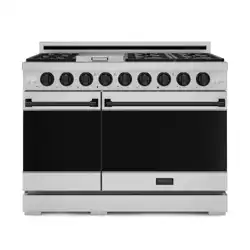
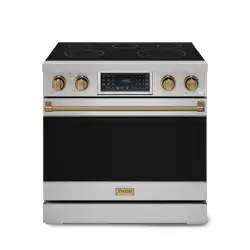
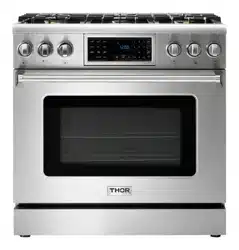
TRG MODELS
TRG3001 | TRG3601

USE AND CARE MANUAL
TRG MODELS
1TRG300 | TRG3601
PROFESSIONAL
GAS RANGET
TILT PANEL

TABLE OF CONTENTS
Warnings ...................................................................................................................................................... 2
Welcome ....................................................................................................................................................... 2
Before you start ........................................................................................................................................... 2
Safety and Warnings .................................................................................................................................... 3
Safety Symbols ............................................................................................................................................. 3
Electrical Shock Hazard ............................................................................................................................... 3
Tipping Hazard .............................................................................................................................................. 3
Explosion Hazard .......................................................................................................................................... 3
Fire Hazard ................................................................................................................................................... 4
Poisoning Hazard .......................................................................................................................................... 4
Hot Surface Hazard ...................................................................................................................................... 4
Other Safety Tips .......................................................................................................................................... 4
SELF-CLEANING OVEN SAFETY INSTRUCTIONS ........................................................................................ 5
Gas Supply Requirements ........................................................................................................................... 6
Safety Tips for Gas Operation ....................................................................................................................... 6
Dimensions and Clearances ........................................................................................................................ 6
Top Hood and cabinet specifications ............................................................................................................ 7
ANTI-TIP DEVICE INSTALLATION ................................................................................................................ 7
Anti-tip device installation - wall mount ...................................................................................................... 7
Electric Power Supply Requirements ......................................................................................................... 8
Install oven Knobs ........................................................................................................................................ 9
Install oven handle ....................................................................................................................................... 9
Install rubber pad on back panel ................................................................................................................ 10
Electrical Grounding Instructions .............................................................................................................. 10
Connect Range to Gas Supply .................................................................................................................... 10
Connect Range to Gas Supply ..................................................................................................................... 10
After installation ......................................................................................................................................... 10
First Use ..................................................................................................................................................... 11
Conditioning the oven ................................................................................................................................. 11
Cook top Safety Guideline ......................................................................................................................... 11
Surface Burner Ignition .............................................................................................................................. 11
Simmer and Boil ......................................................................................................................................... 11
Flame Size .................................................................................................................................................. 12
Power Failure ............................................................................................................................................. 12
Cook top ...................................................................................................................................................... 12
oven cooking guidelines ............................................................................................................................. 12
OVEN COOKING GUIDELINES ..................................................................................................................... 12

TABLE OF CONTENTS
The oven control panel ............................................................................................................................... 12
Setting the clock ........................................................................................................................................ 13
Setting the kitchen timer ........................................................................................................................... 13
Control Lockout .......................................................................................................................................... 13
Time Cooking ............................................................................................................................................. 13
Delay Start .................................................................................................................................................. 13
Turning the light on and off ........................................................................................................................ 14
Minimum and maximum settings .............................................................................................................. 14
Using the oven racks .................................................................................................................................. 14
Baking ........................................................................................................................................................ 15
Convection baking ...................................................................................................................................... 15
Convection roasting .................................................................................................................................... 15
Broiling ....................................................................................................................................................... 16
Using Keep Warm ....................................................................................................................................... 16
Using Sabbath ............................................................................................................................................ 16
Temp Adjust ................................................................................................................................................ 17
Temp Unit (Fahrenheit or Celsius temperature selection) ........................................................................ 17
Time of Day (12hr/24hr) ............................................................................................................................. 17
Sound On/Off .............................................................................................................................................. 17
Control lockout ........................................................................................................................................... 17
Self-cleaning .............................................................................................................................................. 18
Care and cleaning of the oven .................................................................................................................... 19
Cleaning Burner caps and brass flame spreaders .................................................................................... 20
Cleaning oven shelves ................................................................................................................................ 20
Cleaning broil/roast pan and slotted grid .................................................................................................. 20
Cleaning bake and broil burners ................................................................................................................ 20
Cleaning porcelain surfaces ...................................................................................................................... 20
Cleaning the oven glass window ................................................................................................................ 20
Cleaning the oven door gasket ................................................................................................................... 20
Cleaning stainless steel surfaces .............................................................................................................. 20
Troubleshooting Guide .............................................................................................................................. 21
Cook top ..................................................................................................................................................... 21
Oven ............................................................................................................................................................ 21
Information Code ....................................................................................................................................... 23
Removing the oven door ............................................................................................................................. 23
Replacing the oven door ............................................................................................................................ 24
Removing and replacing the storage drawer ............................................................................................. 24
Replacing the oven light ............................................................................................................................. 25
Replacing the burner parts ........................................................................................................................ 25
Warranty .................................................................................................................................................... 25

If the information in these instructions is not followed exactly, a fire or explosion may
result causing property damage, personal injury or death.
- Do not store or use gasoline or other flammable vapors and liquids in the vicinity of
this or any other appliance.
- WHAT TO DO IF YOU SMELL GAS
· Do not try to light any appliance.
· Do not touch any electrical switch.
· Do not use any phone in your building.
· Immediately call your gas supplier from a neighbor's phone. Follow the gas supplier's
instructions.
· If you cannot reach your gas supplier, call the fire department.
- Installation and service must be performed by a qualified installer, service agency or
the gas supplier.
What to do if you smell gas
· Do not light any appliance.
· Do not touch an electrical switch.
· Immediately call the gas supplier from a neighbor’s phone.
· Open a window and leave the area.
· Follow the gas supplier’s instructions.
· If you cannot reach the gas supplier, call the fire department.
WARNING
These are the most critical warnings summarized below
WARNINGS
2

Thank you for purchasing your indoor range. We appreciate your business and we recommend that you
read this entire User’s Manual before operating your new appliance for the first time.
This manual contains instructions on how to properly install and set up your new range, as well as
insights into the unique features that our product offers. Please keep this manual for future reference,
as it contains answers to questions that you might have as you begin to cook.
Thanks you
Never Operate the Top Surface Cooking Section of this Appliance Unattended
· Failure to follow this warning statement could result in fire, explosion, or burn hazard that could cause
property damage, personal injury, or death.
· If a fire should occur, keep away from the appliance and immediately call your fire department.
DO NOT ATTEMPT TO EXTINGUISH AN OIL/GREASE FIRE WITH WATER.
WARNING
Make sure that the anti-tip of the range has been properly installed.
√ Find the model and serial numbers on the CSA label in the bottom right-hand corner of the
backboard. Note these numbers down for future reference in the space provided in section ‘Warranty
and service’.
√ Read this guide, taking special note of the ‘Safety and warnings’ section. Remove all the packaging
from the oven(s) and cook top. Recycle items that you can. If any adhesive residue is left on surfaces,
remove this using dish washing liquid on a soft cloth. Do not use any harsh or abrasive cleaners.
√ Make sure you follow the instructions under ‘First use’ before using your range for cooking.
To reduce the risk of fire, electrical shock, injury to persons, or damage when using the appliance,
follow the important safety instructions listed below:
BEFORE YOU START
WELCOME
2
WARNING
CAUTION
CAUTION
IMPORTANT
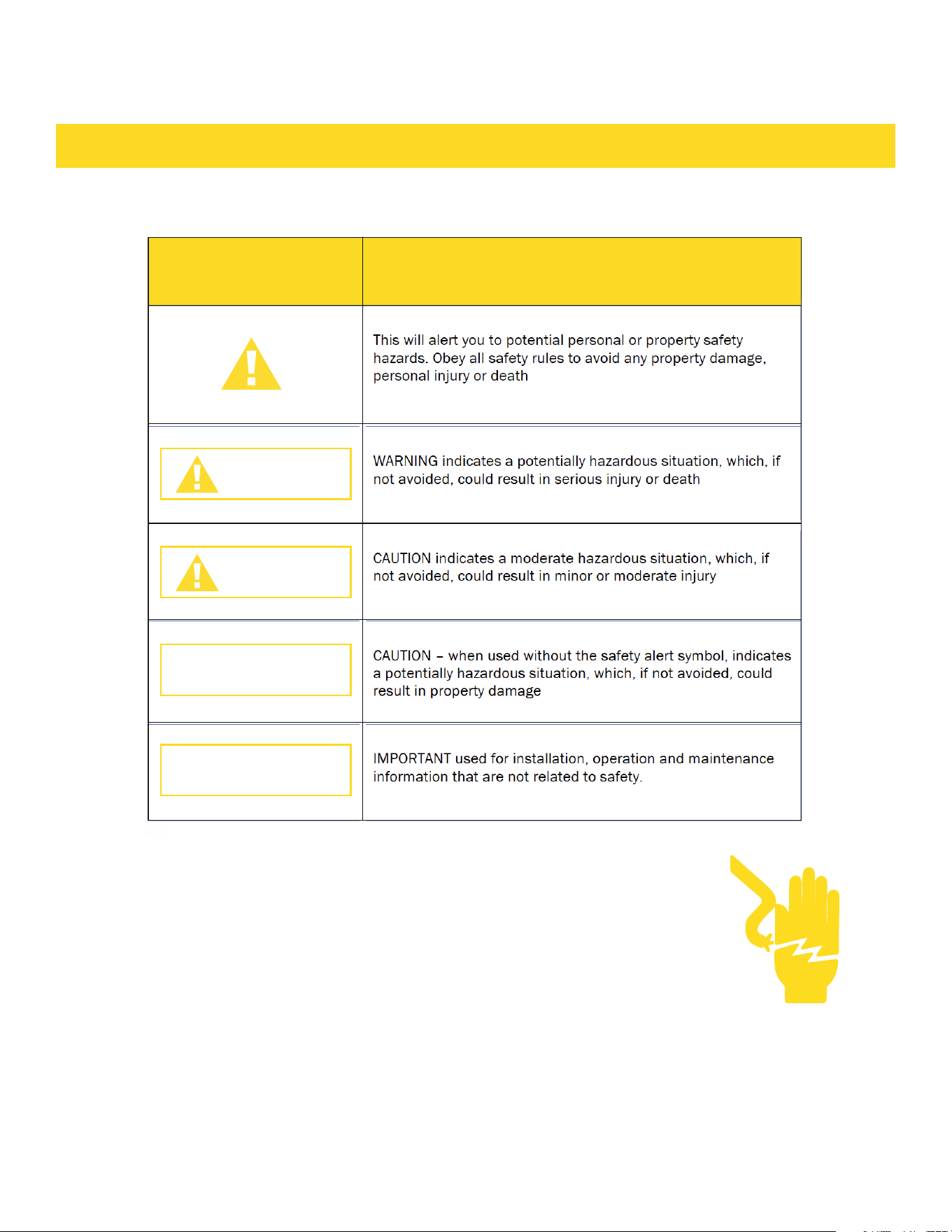
SYMBOL DEFINITION
SAFETY AND WARNINGS
SAFETY SYMBOLS
ELECTRICAL SHOCK HAZARD
Before removing a faulty oven light bulb, make sure you turn OFF the
power to the range at the main fuse or circuit breaker panel. If you don’t
know how to do this, contact an electrician.
Do not remove the kick panel or the back panel. Due to electrical wires
behind it, both panels should only be removed by a qualified technician.
This appliance is equipped with a three-prong grounding plug for your
protection against shock hazard and should be plugged directly into a
properly grounded power outlet. Do not under any circumstances cut or
remove the grounding prong from this plug.
Failure to follow this advice may result in death or electrical shock.
2

TIPPING HAZARD
All ranges can tip and cause injuries to adults and children. To
prevent tipping, install the anti-tip device supplied with your range.
Follow all installation instructions.
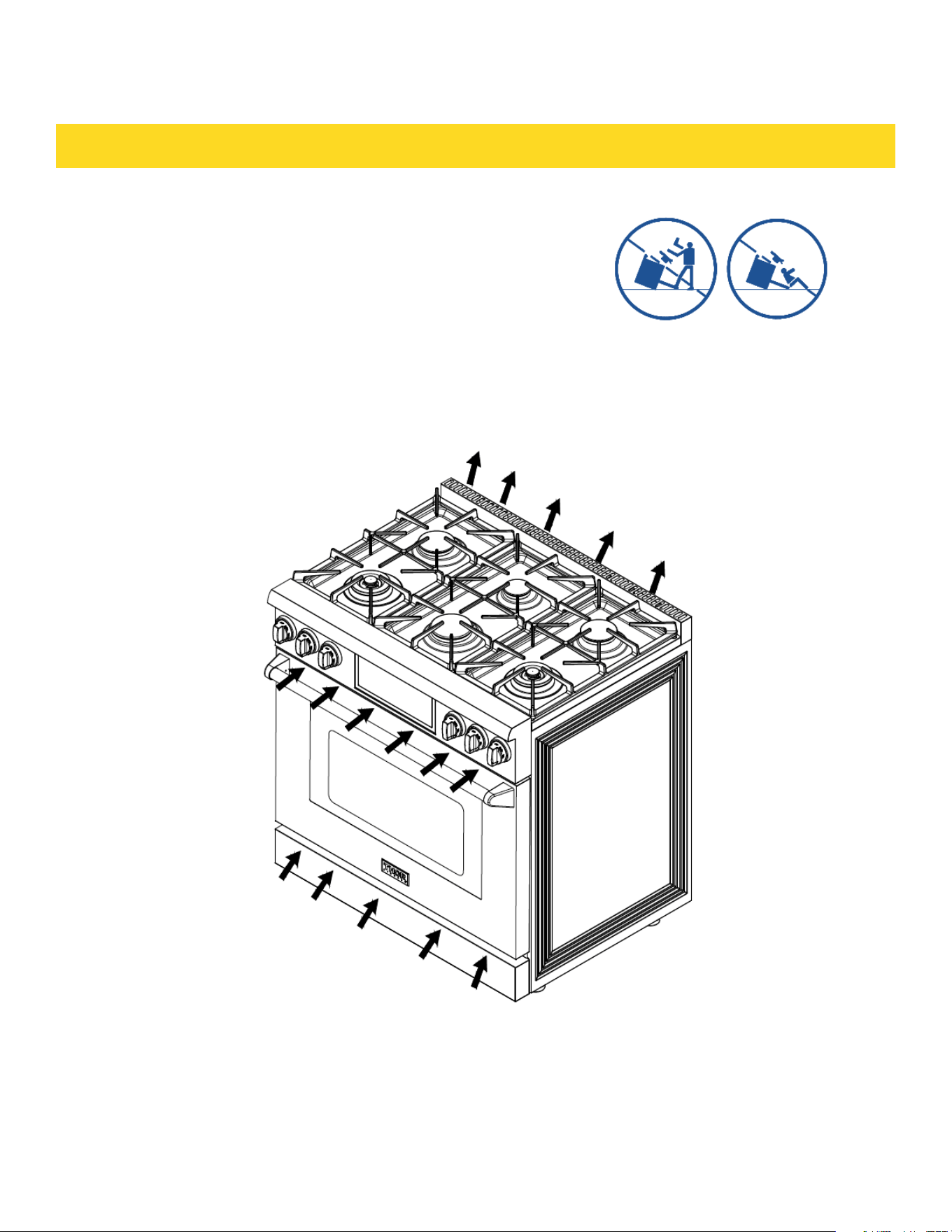
Even after the safety device is installed, do not step, lean or sit on
the oven door or place any heavy objects on it. Doing so may
result in personal injury.
Re-engage the anti-tip device if the range is moved. Do not
operate the range without the anti-tip device in place and engaged.
Make sure anti-tip device is installed as follows:
1) Slide the range forward.
2) Install the anti-tip device as described in the instruction sheet
3) Safely tilt the front section of the range and slide the range slowly back against the wall.
4) The rear pins should slide under the bracket. Do not use the appliance until it has been secured.
Failure to follow this advice may result in serious injury.
EXPLOSION HAZARD
If you smell gas, do not use the appliance. Open a window or door
to let the gas escape, then follow the instructions on the inside
front cover of this manual.
Do not use water on grease fires. A violent steam explosion may
result.
Turn all burners off, then smother fire or flame with a dry chemical
or foam-type extinguisher. Do not try to smother with flammable
blankets.
Do not heat unopened food containers such as cans. Build-up of
pressure may cause container to burst and result in injury.
Failure to follow this advice may result in injury or death.
SAFETY AND WARNINGS
3

FIRE HAZARD
Never use your appliance as a space heater. Persons could be
injured or a fire could start.
Keep the area around the appliance free from combustible
materials (e.g. wall coverings, curtains, drapes), gasoline and
other flammable vapors and liquids.
Clean the stove and burners regularly.
Do not let cooking grease or other flammable materials
accumulate on the surfaces or near the appliance.
Do not hang any articles (e.g. dish towels) off the oven handle.
Some fabrics may ignite or melt from the heat.
Never leave the cook top burners unattended when in use. Boil over causes smoking and greasy spill-
overs that may ignite.
Never spray an aerosol cleaner on or around the appliance while burners are lit, Be sure all the controls
are turned off and the appliance is cool. The aerosol gas and chemicals in such cleaners could, in the
presence of heat, ignite or cause metal parts to corrode.
Do not store flammables near cook top.
Flammable materials should not be stored in an oven or near the cook top. An accident could cause a
serious fire.
POISONING HAZARD
Never cover any slots, holes or passages in the oven bottom or
cover an entire rack or the oven floor with materials such as
aluminum foil. Doing so blocks airflow through the oven and may
cause carbon monoxide poisoning. Aluminum foil linings may also
trap heat, causing a fire hazard.
Clean the appliance with caution. If a wet sponge or cloth is used
to wipe spills on a hot cooking area, be careful to avoid steam
burn. Some cleaners can produce noxious fumes if applied to a
hot surface. Follow the directions of the cleaner manufacturer.
Never use this appliance as a space heater to heat or warm the
room. Doing so may result in carbon monoxide poisoning and
overheating of the appliance.
Failure to follow this advice may result in poisoning or death.
SAFETY AND WARNINGS
4

OTHER SAFETY TIPS
Read instructions before use
Read all the instructions before using the appliance. Use the appliance only for its intended purpose as
described in these instructions.
Read instructions before use
Read all the instructions before using the appliance. Use the appliance only for its intended purpose as
described in these instructions.
Install the stove properly
Be sure your stove is properly installed and grounded by a qualified technician.
Do not install or operate stove if damaged.
Do not operate the appliance if it is damaged or not working properly. If you received a damaged product,
contact your dealer or installer immediately.
Know how to turn off power in emergency
Be sure to have the installer show you where and how to turn off the power supply to the range (i.e. loca-
tion of the main fuse or circuit breaker panel) and where and how to turn off the gas supply to the range
in an emergency.
Do not leave children alone near stove
Children should not be left alone or unattended in the area where the appliance is in use. They should
never be allowed to play with the appliance or to sit or stand on any part of the appliance.
Do not store toys or candy over the stove
Do not regard the oven as a storage space. Storing in the oven space may cause unexpected injuries.
For safety reasons, do not store items of interest to children in cabinets above a range or at the back of
the range – children climbing on the range to reach items could be seriously injured.
HOT SURFACE HAZARD
Accessible parts may become hot during use.
Do not touch burners, areas near burners, the grill, griddle, grease drip- pans,
heating elements or interior surfaces of oven.
These may be hot enough to cause burns even though they are
dark in color. During and after use, do not touch, or let clothing or
other flammable materials contact these parts and surfaces until
they have had sufficient time to cool. Other parts and surfaces of
the appliance may become hot enough to cause burns - among
these areas are the grates, back trim and oven vents at the back
of the cook top, front edge, surfaces adjacent to the cook top, and
the oven door.
Use only dry potholders. Moist or damp potholders on hot
surfaces may result in burns from steam. Do not let potholder
touch hot heating elements. Do not use a towel or other bulky cloth.
Let hot grease cool before attempting to handle it. Failure to follow this advice could
result in burns and scalds.
SAFETY AND WARNINGS
4

Don’t wear lose clothing that could catch fire
Loose-fitting or hanging garments should never be worn while using the appliance.
Do not repair or replace parts yourself (unless recommended)
Do not repair or replace any part of the appliance unless specifically recommended in the manual. All
other servicing should be referred to a qualified technician. Technicians must disconnect the appliance
from the power supply before any servicing.
Careful opening oven door
Use care when opening the oven door by allowing warm air or steam escape before removing or replac-
ing food. Keep oven vent ducts unobstructed.
Do not touch hot oven shelves
Protect your hands from burning by making sure the oven is cool before sliding oven shelves into oven. If
a shelf must be removed while the oven is hot, do not let oven mitts or potholder contact the base of the
oven or hot heating elements in the oven.
Protect glass oven doors
Do not use harsh/abrasive cleaners, scourers or sharp metal scrapers to clean the oven door glass since
they scratch the surface, which may result in the glass shattering. Never step on oven door or place a
heavy object (like a Turkey) on it.
Check for gas leaks
When the appliance installed, check for gas leaks according to the instruction before use.
Ventilation hood is mandatory
This appliance should not be operated without a properly sized and operational ventilation hood.
Use proper gas conversion kit
This stove only uses natural gas. For LP gas, please use conversion kit (not included with the stove).
Please have a certified technician install the unit and kit. If planning to resell unit, please indicate wheth-
er it is natural gas or has LP kit installed.
Do not reach for items over the stove when it is lit
Be careful when reaching for items stored in cabinets above the appliance.
Read all instructions before using the product to ensure proper and safe operation.
Install or locate the product only in accordance with the provided Installation Instructions.
Do not attempt to adjust, repair, service or replace any part of your appliance unless it is specifically
recommended in this guide. Do not use the range as a space heater.
Do not leave children unattended in the area where the range is in use. Never allow children to sit or
stand on any part of the range. Do not let children play with the range.
All servicing should be referred to a qualified technician.
Have the technician show you the location of the gas shut off valve and how to shut it off in an emergency.
SAFETY AND WARNINGS
4

Always disconnect power to appliance before any type of servicing.
Do not use abrasive or caustic cleaners or detergents on this appliance. They may cause permanent
damage to the surface.
When cooking, set the burner controls so that the flame heats only the bottom of the utensil and does
not overlap at the sides of the utensil.
Utensils (pots and pans) that conduct heat slowly, i.e. glass pots, should be used in conjunction with
burner flames at a low or medium setting.
Turn off all controls and wait for appliance parts to cool down before touching them. Do not touch the
burner grates or surrounding areas until cool.
Do not use water on grease fires.
Clean appliance with caution.
Always turn pot handles to the side or back of the range. Do not turn handles towards the area where
they are easily burned. Handles should not extend over the adjacent burners.
Use the range only for cooking tasks as outlined in this manual. When using the range, do not touch the
grates, burner caps, burner bases, or any other parts in proximity to the flame. These components may
be hot enough to cause burns.
Use dry pot holders. Moist or damp pot holders on hot surfaces may result in burns from
steam.
Do not use a towel or other bulky cloth.
Do not heat unopened food containers. Buildup of pressure may cause the container to explode and
result in injury.
During and after use, do not touch interior surfaces of the oven until cool.
Do not let pot holder touch hot surface areas.
SELF-CLEANING OVEN SAFETY INSTRUCTIONS
Do not touch oven surfaces during self-clean operation. Keep children away from the oven during
self-cleaning. Failure to follow these instructions may cause burns. Before operating the self-clean
cycle,wiping off all excessive spillage, remove pans,shiny metal oven racks and other utensils from the
oven. Only enameled (not shiny) oven racks may be left in the oven. Do not use self-clean to clean other
parts, such as drip pans or bowls. Before operating the self-clean cycle, wipe grease and food soils from
the oven.
Excessive amount of grease may ignite leading to smoke damage to your home. If the self-cleaning
mode malfunctions, turn the oven off and disconnect the power supply. Have it serviced by a qualified
technician. Do not clean the door gasket. The door gasket is essential for a good seal. Care should
be taken not to rub, damage or move the gasket. Do not use oven cleaners. No commercial oven cleaner
or oven liner protective coating of any kind should be used in or around any part of the oven. Never keep
pet birds in the kitchen. Birds are extremely sensitive to the fumes released during an oven self-clean
cycle. Fumes may be harmful or fatal to birds. Move birds to a well-ventilated room.
SAFETY AND WARNINGS
5
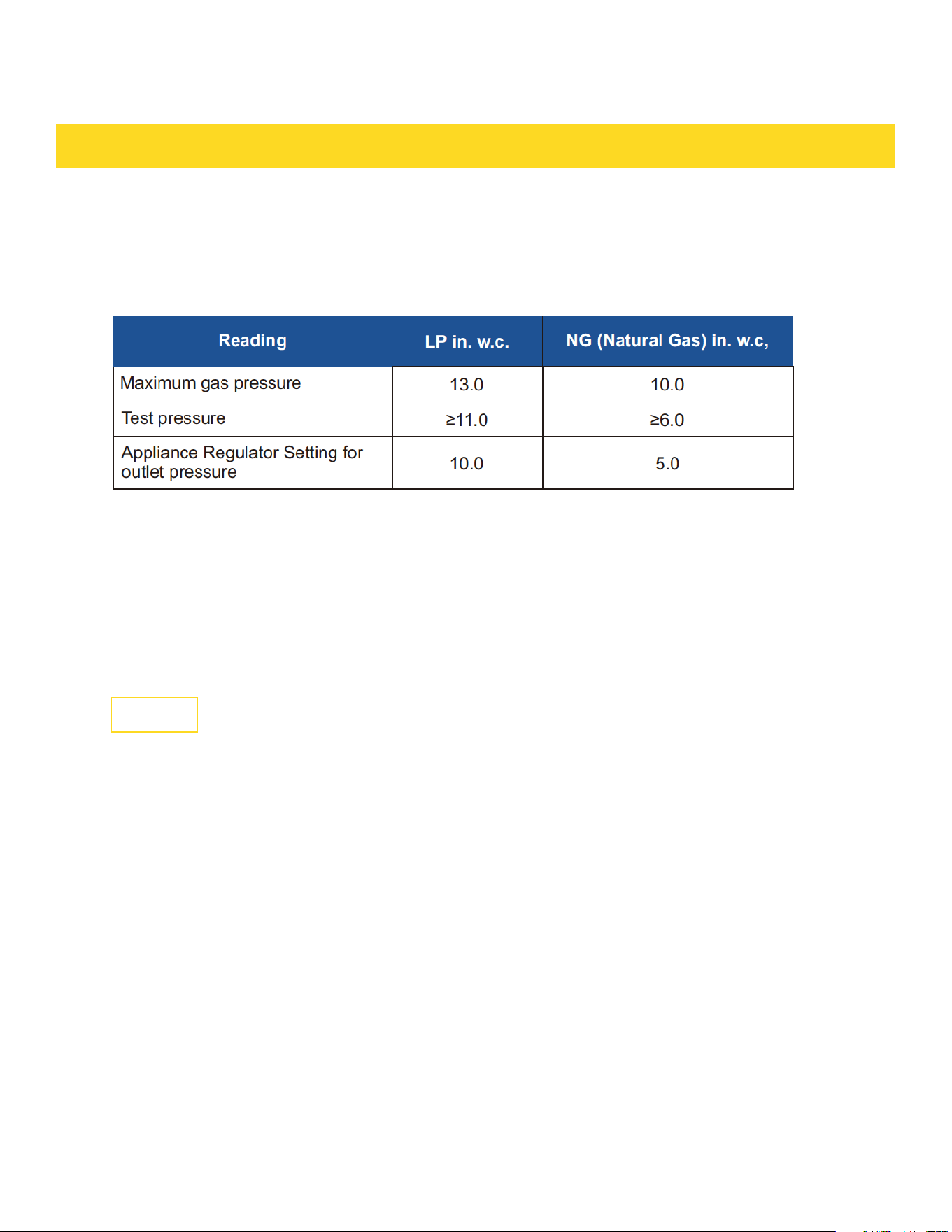
GAS SUPPLY REQUIREMENTS
Installation of this range must conform with local codes, or in the absence of local
codes, with national Fuel Gas Code ANSIZ223.1 / NFPA 54.
In Canada, installation must conform to the current natural Gas Installation /code, CAN
1-1.1-M81 and with local codes where applicable.
Safety tips for gas operation
Keep appliance area clear and free from combustible materials, gasoline, and other
flammable vapors.
Do not obstruct the flow of combustion air into the range and ventilation air away from
the range.
Ventilation: it is recommended that the unit be set under a powered, vented exhaust
hood of sufficient size and capacity.
Before installing the range, you must locate and secure the included anti-tip bracket to
the wall for your range.
CAUTION
The use of cabinets for storage above the appliance may result in a potential burn hazard. Combustible
items may ignite; metallic items may become hot and cause burns. If a cabinet storage is to be provided,
the risk can be reduced by installing a range hood that projects horizontally a minimum of 5" (12.7cm)
beyond the bottom of the cabinets.
The appliance shall not be used for space heating. This information is based on safety considerations.
NEVER use this appliance as a space heater to heat or warm the room. Doing so may result in carbon
monoxide poisoning and overheating of the oven.
All openings in the wall behind the appliance and in the floor under the appliance shall be sealed.
WARNING
WARNING
6
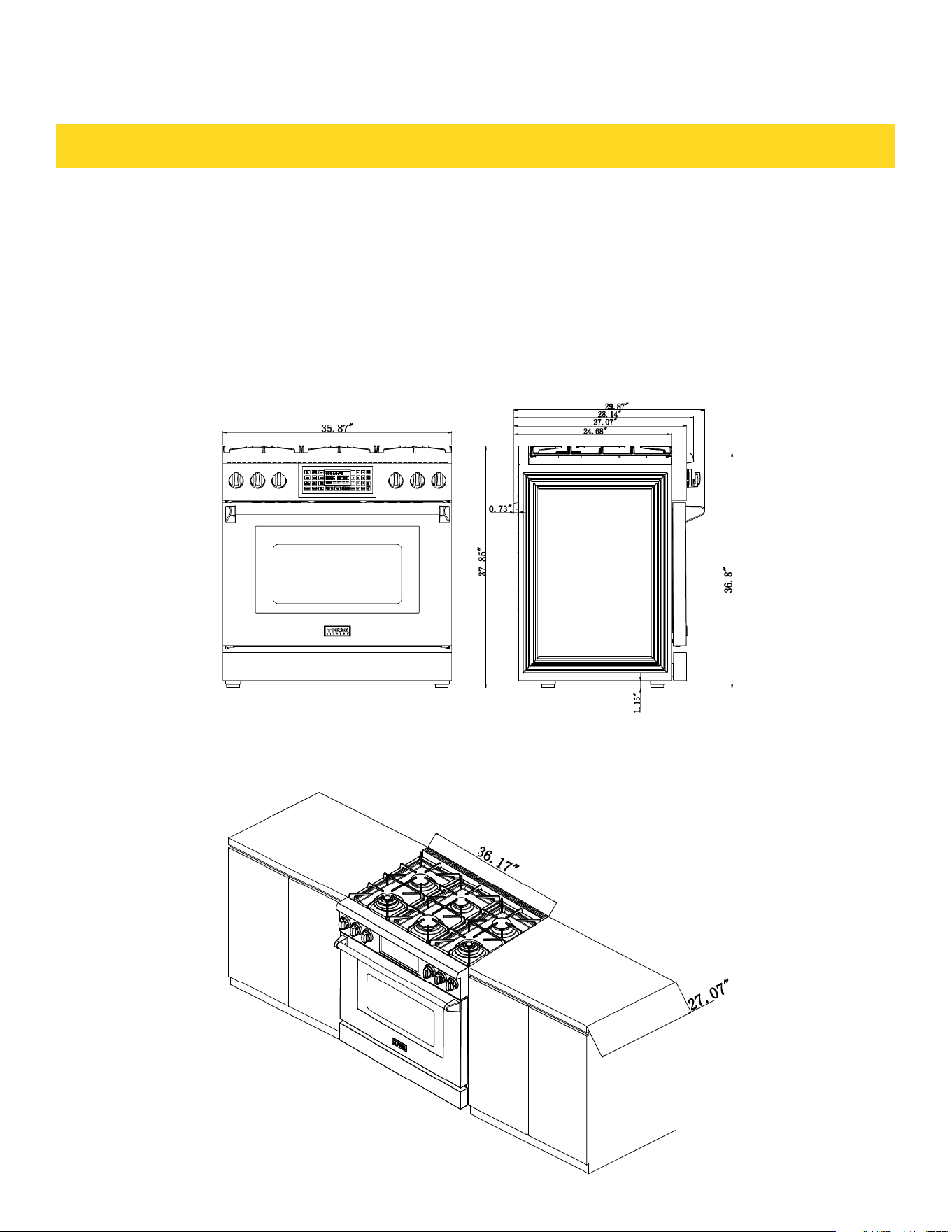
DIMENSIONS AND CLEARANCE
The range may be installed flush to the rear wall.
You may install a non-combustible material, such as tile, on the rear wall above the
range and up the vent hood.
It is not necessary to install non-combustible materials behind the range below the
counter top height.
The minimum distance from the side of the range above the counter top to combustible
sidewalls must be at least 10 inches.
The maximum depth of cabinets installed above cooking tops be 13 in (330mm).
36'' Gas Range Clearance
6
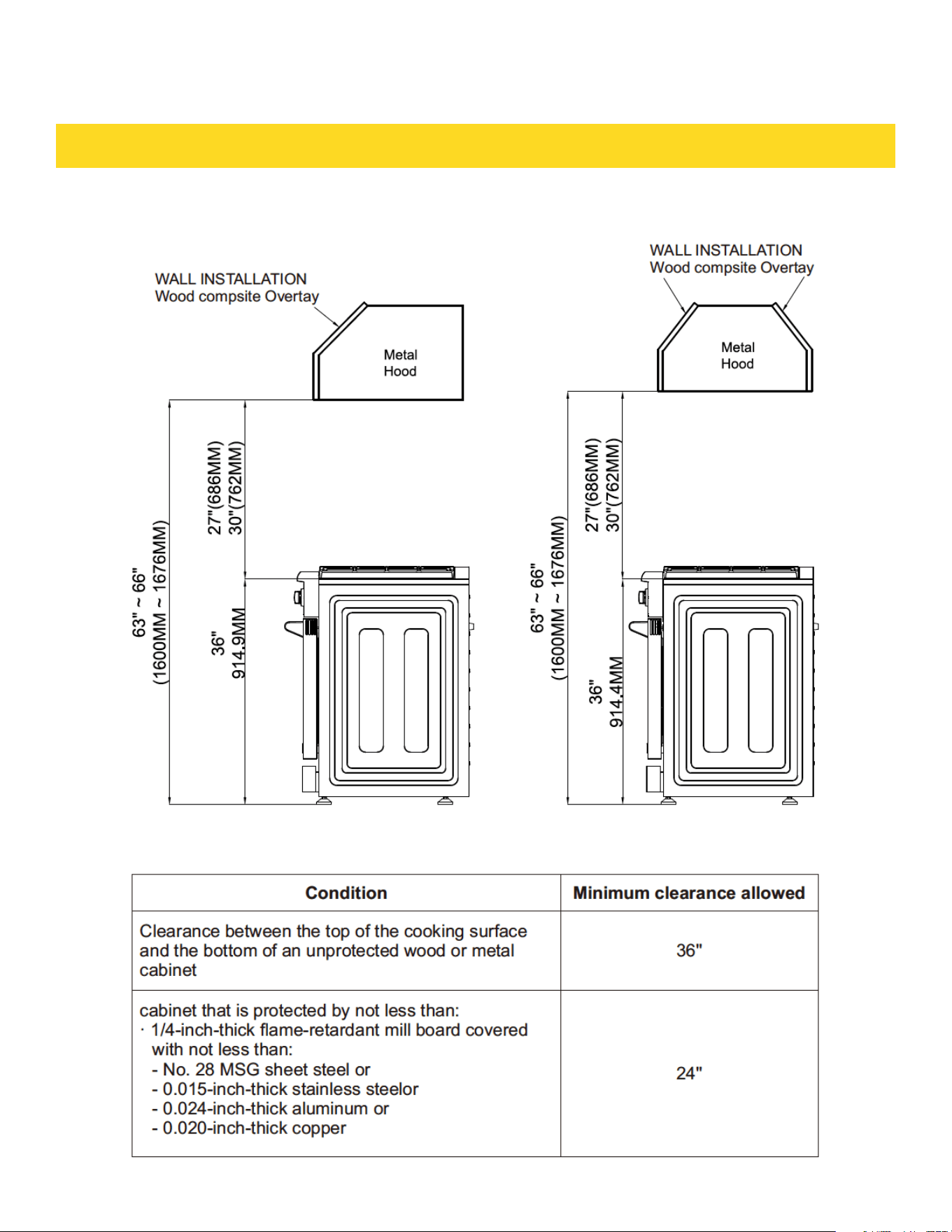
DIMENSIONS AND CLEARANCE
Top hood and cabinet specifications
7
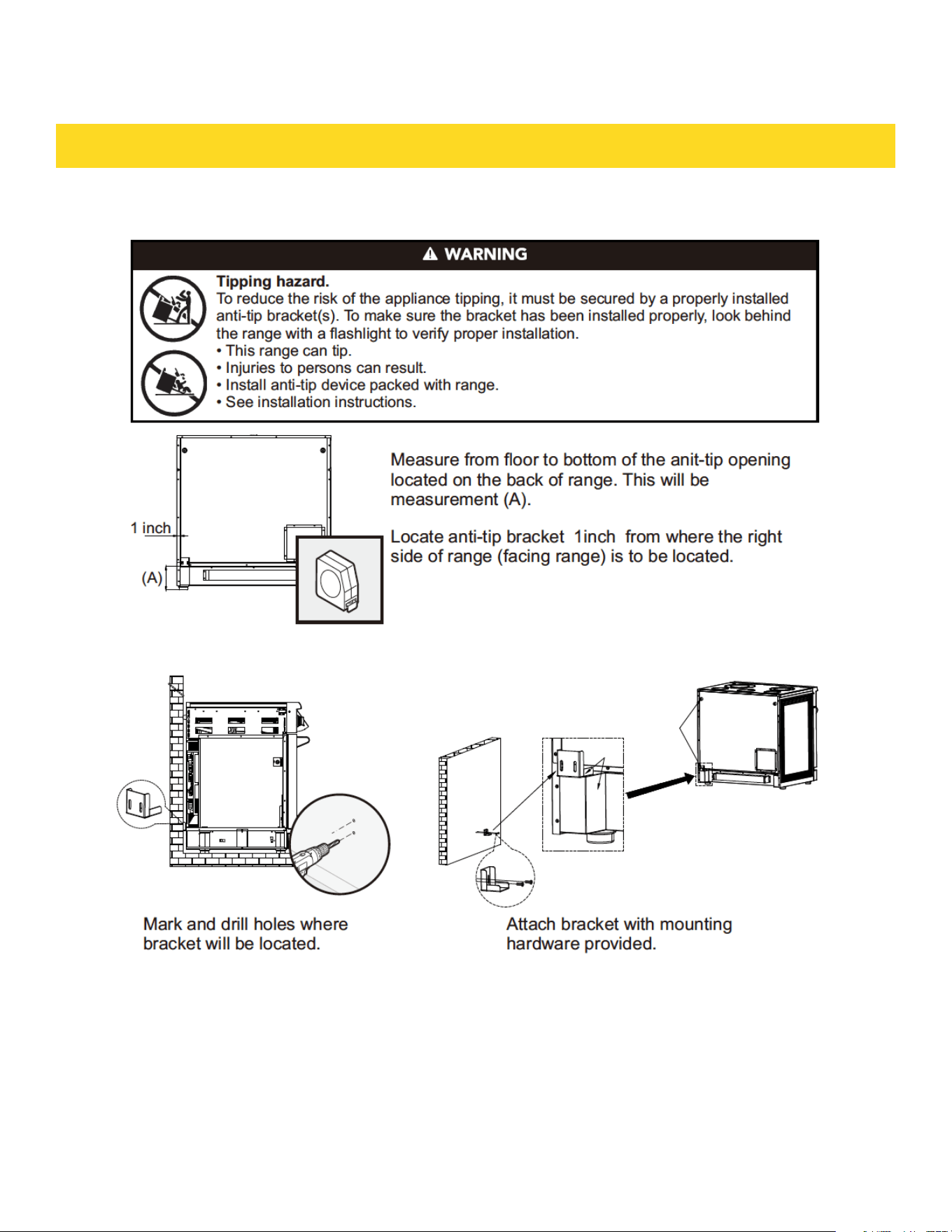
Anti-tip device installation - wall mount
ANTI-TIP DEVICE INSTALLATION
7
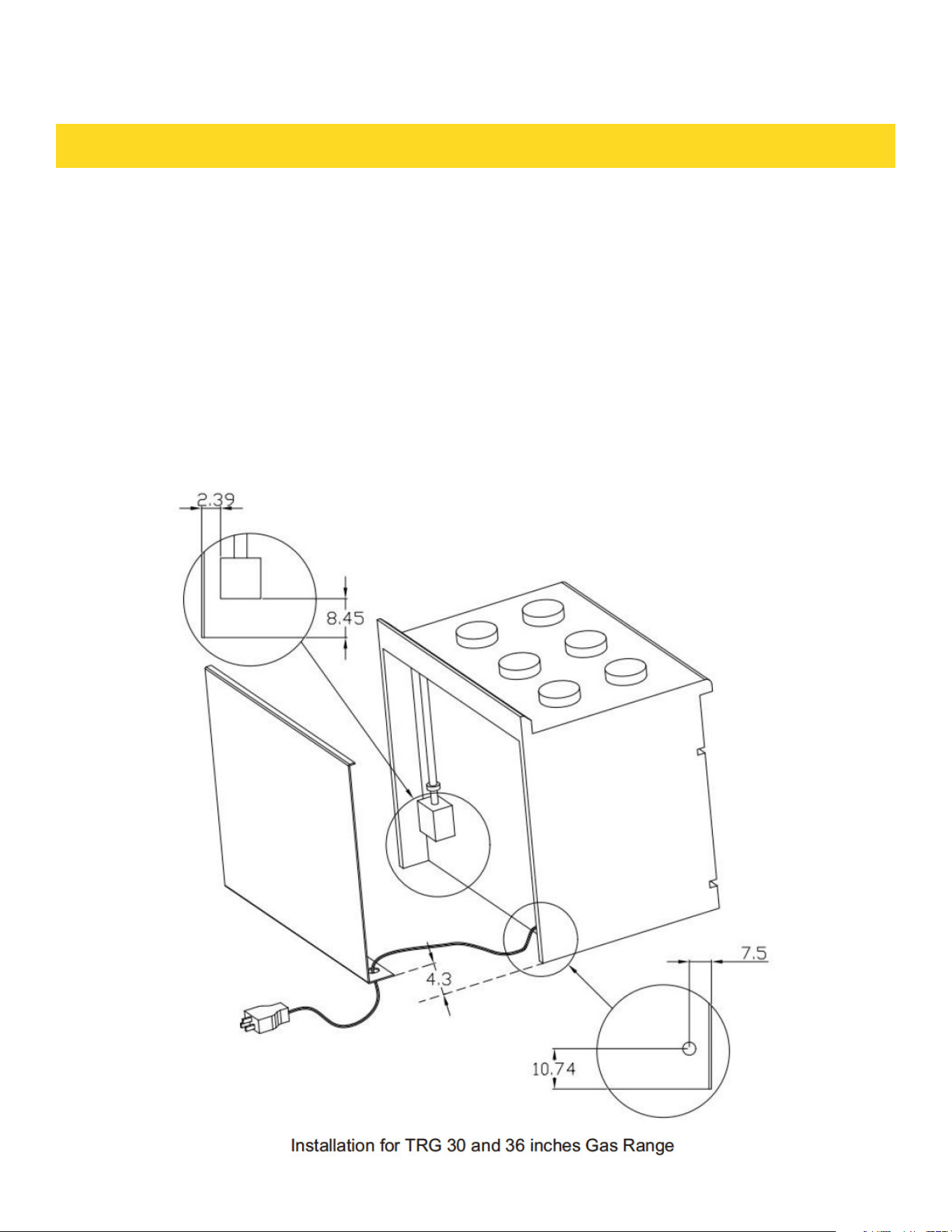
ELECTRIC POWER SUPPLY REQUIREMENTS
Your range must be electrically grounded in accordance with local codes or, in the absence of local
codes, in accordance with the National Electrical Code (ANSI/NFPA 70, latest edition).
In Canada, electrical grounding must be in accordance with the current CSA C22.1
Canadian Electrical Code Part 1 and/or local codes. A copy of this standard may be
obtained from: National Fire Protection Association, 1 Battery march Park, Quincy,
Massachusetts 02269-9101.
The power supply must be the correct polarity. Reverse polarity will result in continuous
sparking of the electrodes, even after flame ignition. If there is any doubt as to whether
the power supply has the correct polarity or grounded, have it checked by a qualified
electrician.
Use 120V, 60Hz, and properly grounded branch circuit protected by a 15-amp or 20-
amp circuit breaker or time delay fuse.
8
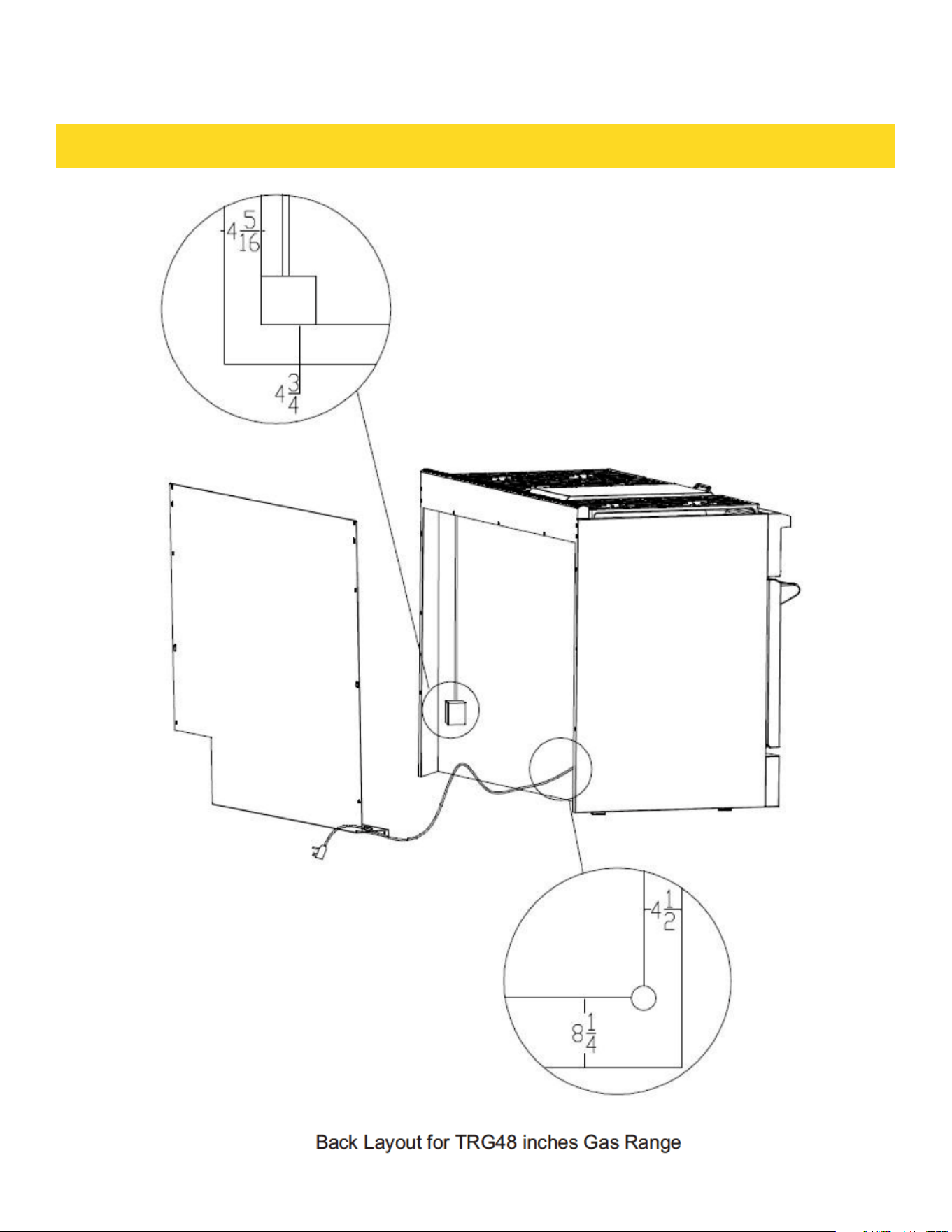
ELECTRIC POWER SUPPLY REQUIREMENTS
8
ELECTRIC POWER SUPPLY REQUIREMENTS
This indoor gas cooking appliance is equipped with a three-prong (grounding) plug for
your protection against shock hazard and should be plugged directly into a properly
grounded threepronged receptacle.
Where a standard two-prong wall receptacle is encountered, it is the responsibility and
obligationof the customer to have it replaced with a properly grounded three-prong wall
receptacle.
Do not cut or remove the grounding prong from the power cord.
Before connecting plug to the cord, disconnect the electrical supply.
Label all wires prior to disconnection when servicing controls. Wiring errors can cause
improper and dangerous operation. Verify proper operation after servicing.
WARNING
CAUTION
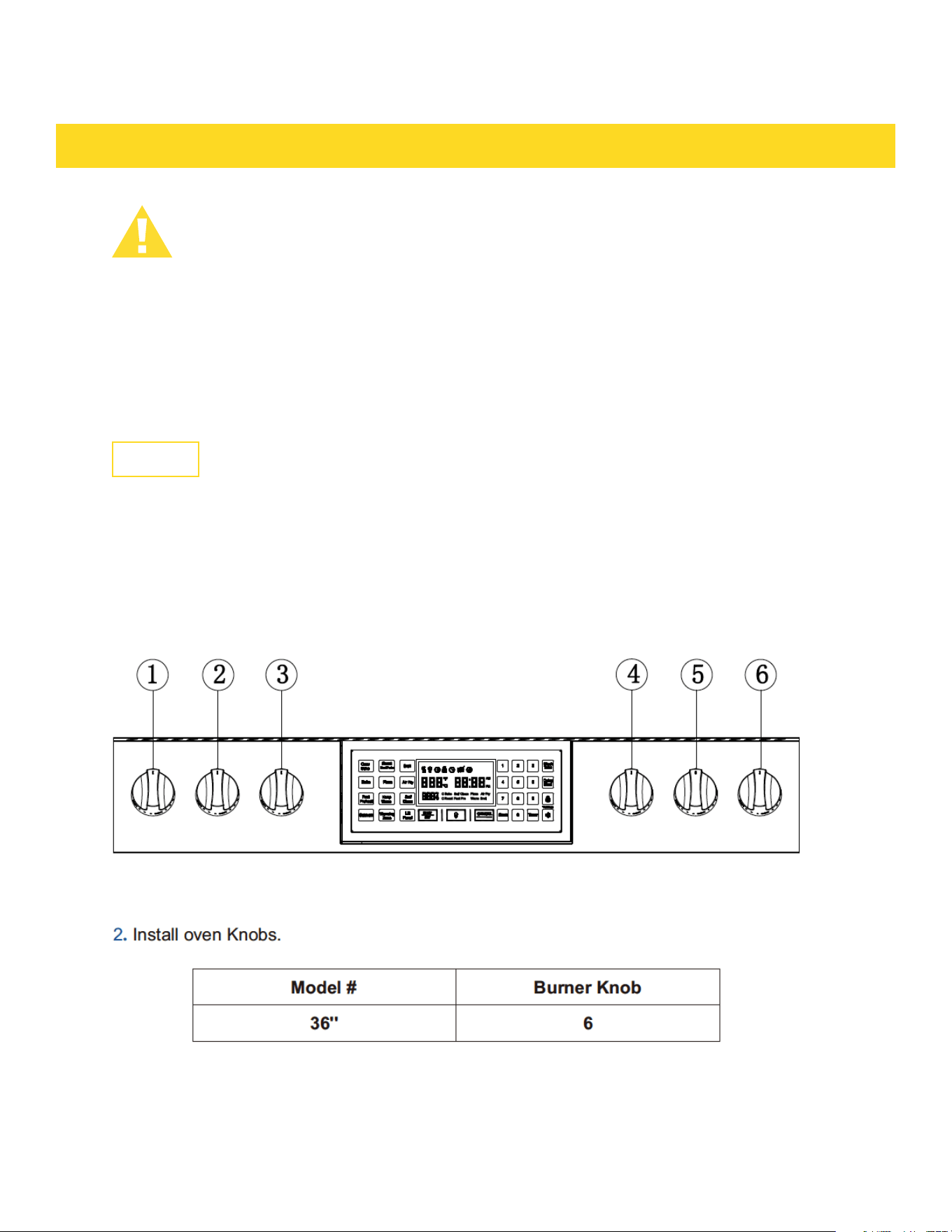
1. Check the knobs.
INSTALL OVEN KNOBS
9
ELECTRIC POWER SUPPLY REQUIREMENTS
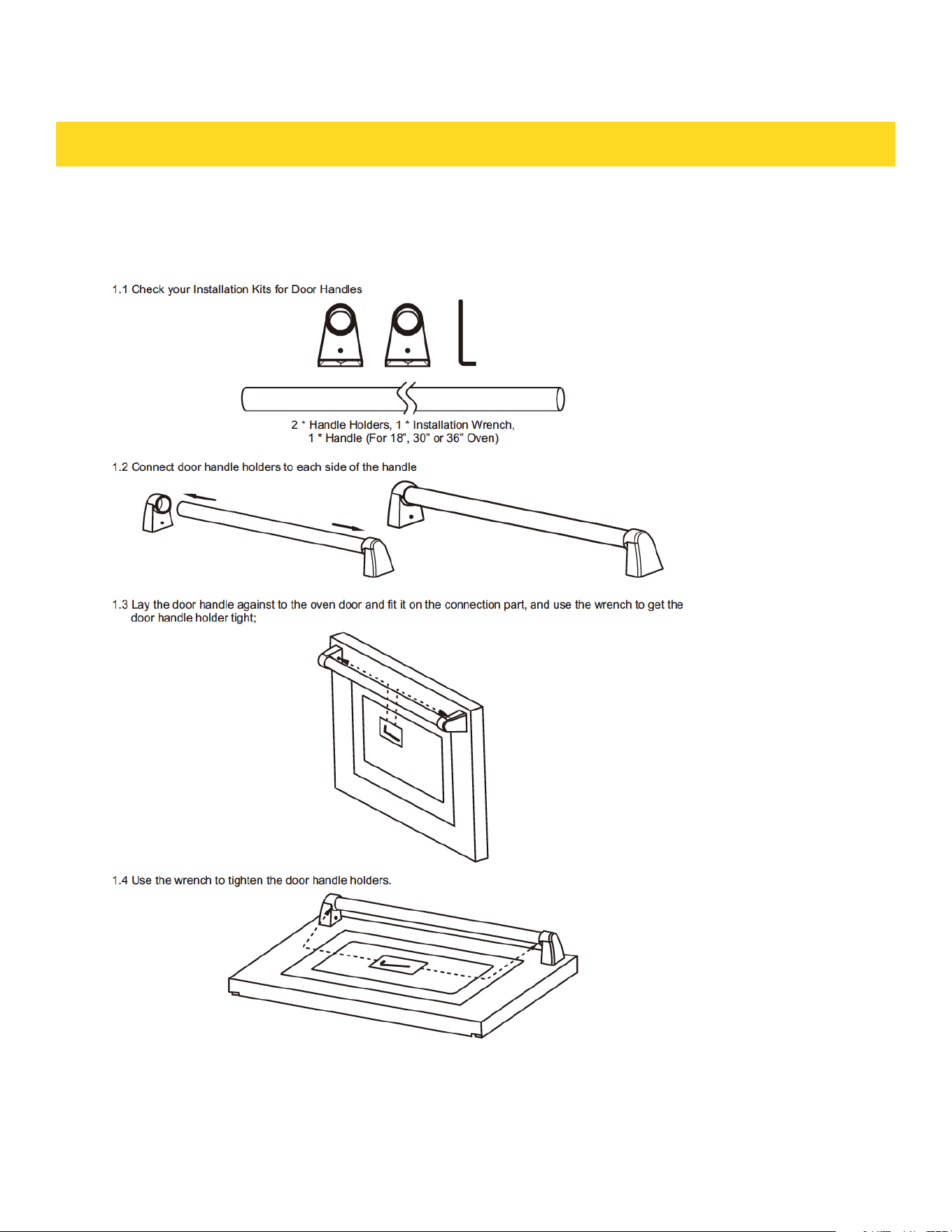
1. Your Thor range might have a KD handle that needs to be installed. Please Follow up the following
procedures for the oven door handle installation
INSTALL OVEN HANDLE
2. Check if the oven door handle is level and stable.
9
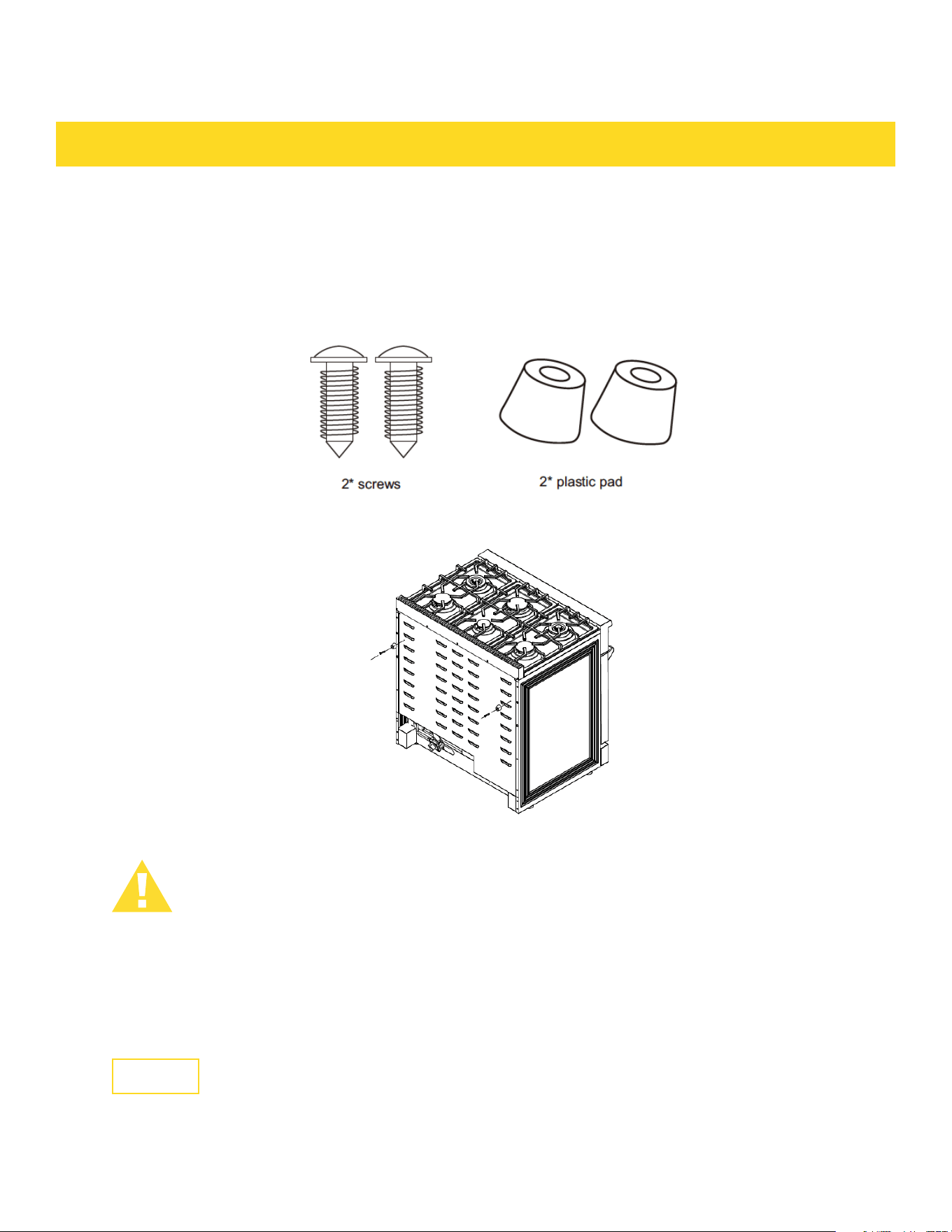
INSTALL RUBBER PAD ON BACK PANEL
ELECTRIC POWER SUPPLY REQUIREMENTS
To Prevent the range too close to the wall, there are 2 plastic pads oered with the user's manual,
please nd the accessories and follow the below steps:
1. check the installation kit packed with manual.
2. Install the 2 plastic pat as showed above.
ELECTRICAL GROUNDING INSTRUCTIONS
This indoor gas cooking appliance is equipped with a three-prong (grounding) plug for
your protection against shock hazard and should be plugged directly into a properly
grounded three- pronged receptacle.
Where a standard two-prong wall receptacle is encountered, it is the responsibility and
obligation of the customer to have it replaced with a properly grounded three-prong wall
receptacle.
Do not cut or remove the grounding prong from the power cord. Before connecting plug
to the cord, disconnect the electrical supply.
CAUTION
WARNING
10

CONNECT RANGE TO GAS SUPPLY
Most localities will require that the stove shutoff valve and gas connections be installed by a certified
technician or plumber. These instructions are for a professional. Gas installation specifications and reg-
ulations may vary so please consult your local codes before proceeding.
a. Install a manual gas line shut-off valve in the gas line as follows:
· in an easily accessed location outside the range.
· in the gas piping external to the appliance.
b. Install male 1/2” flare union adapter to 1/2” NPT internal thread elbow at inlet of
regulator.
On models equipped with standard twin burners, install the male pipe thread end of the 1/2” flare
union adapter to the 1/2” NPT internal thread at inlet of pressure regulator.
Use a wrench on the regulator fitting to avoid damage.
c. Install male 1/2” or 3/4” (3/4” refers to 48-inch gas range) flare union adapter to the
NPT internal thread of the manual shut-off valve, taking care to secure the shut-off
valve to keep it from turning.
d. The gas supply pressure for checking the regulator setting is 6 in.w.c. (Nature Gas)
and 11 inch.w.c. (LP gas) connect flexible gas line connector to the regulator on the
range. Position range to permit connection at the shut-off valve.
e. When all connections have been made, make sure all range controls are in the
position and turn on main gas supply valve.
f. Leak testing of the appliance shall be conducted according to the manufacturer’s
instructions. Use some soap water (50% water and 50% soap) or a leak detector at
all joints and connections to check for leaks in the system. Do not use a flame to
check for gas leaks.
g. The appliance must be isolated from the building’s gas supply piping system by
closing its individual manual shut-off valve during any pressure testing of the gas
supply piping system at test pressure equal to or less than 1/2 psig(3.5kPa).
CONNECT RANGE TO GAS SUPPLY
After installation
a. Check ignition of cooktop burners.
b. Check ignition of oven burner.
c. Visually check tubular burner (oven burner) re-ignition to be sure both rows of burner
ports are relighting each time.
d. Check for gas leaks at all gas connections (using a gas detector, never a flame).
e. Check oven bake and convection bake function.
10

FIRST USE
Conditioning will burn off any manufacturing residues and ensure that you get the best results right from
the start.
Follow these steps to condition your new stove’s oven:
1. Insert all the shelves. See ‘Positioning the shelves’ for instructions.
2. Turn on the ventilation hood above your range on high.
3. Heat the empty oven at the highest temperature for:
· 30 minutes using BAKE.
· 30 minutes using BROIL (some ovens only).
4. There will be a distinctive smell while you are conditioning the oven. This is normal, but make sure the
kitchen is well ventilated during the conditioning.
5. Once cooled, wipe out the oven with a damp cloth and mild detergent, and dry thoroughly.
6. Positioning the shelves.
7. Both the sides panel and shelves with safety stop to keep them sliding out of the oven when pulled
forward.
8. And the front stop prevents the shelves from against hitting the back of the oven.
CONDITIONING THE OVEN
11

COOKTOP SAFETY GUIDELINES
There are dual burners have the same low turn-down setting (SIM) for gentle simmering
(620 BTU/hr.). Use the SIM setting for melting chocolate and butter, cooking rice and
delicate sauces, simmering soups and stews, and keeping cooked food hot.
Never leave the cooktop unattended when in use. Boil over causes smoking and greasy
spills that may ignite.
Never allow flames to extend beyond cookware or curl up on sides. This could discolor
and damage the utensil and you may get burned touching the hot handle.
√ Keep handles out of the way. Turn handles so that they don’t extend over the edge of
the range or on a burner that is on.
Take care when deep-frying. Oil or fat can overheat very quickly, particularly on a high
setting
√ Make sure that all burner parts are properly in place. Incorrectly or incompletely
assembled burners may produce dangerous flames. See ‘Replacing the burner parts’ in
‘Care and cleaning’.
√ Keep the burners clean, especially after a spill or boil over, make sure you clean the
affected burners before using them again. Food residue may clog the igniter and the
notches of the flame spreader, stopping the burner from functioning correctly. See ‘Care
and cleaning’ for instructions.
√ Check that the burner flames. They should be blue with no yellow tipping, and burn
without fluttering all around the burner cap. If not, see ‘Troubleshooting’ for advice.
To light the top burners, push and turn the appropriate control knob counter clockwise to the “HI”
position. You will hear a clicking noise – the sound of the electric spark igniting the burner. Once burner
ignition has been achieved, then turn the burner control knob to adjust the desired heat setting.
NOTE: When one burner is turned to the “HI” position, the burner igniters will park. Do not attempt
to disassemble or clean around any burner while another burner is on. Do not touch any burner cap,
burner base, or igniter while the igniters are sparking.
SURFACE BURNER IGNITION
A smaller flame will give the best simmer results. Small flames offer precise cooking performance for
delicate foods, keeping food warm, melting chocolate or butter, and for cooking that need to cook over
low heat for a long time. The highest flame settings provides the maximum heat that is available on your
range. This setting should be used for heavy cooking loads such as water boiling or pasta cooking.
SIMMER AND BOIL
11

COOKTOP SAFETY GUIDELINES
FLAME SIZE
Warning: Top burner flame size should be adjusted so it does not extend beyond the edge of the
cooking utensil. This instruction is based on safety considerations.
When you select the flame size, watch the flame when you turn the knob.
Any flame larger than the bottom of the cookware is wasted.The flame should be steady and blue in
color. Foreign material in the gas line may cause an orange flame during initial operation.
POWER FAILURE
COOK TOP
COOK TOP
If the gas does not ignite within four seconds, turn off the valve and allow at least five minutes for any
gas to dissipate. Repeat the lighting procedure.
If the power fails, it is not capable of being safely placed in operation and user that no attempt should be
made to operate during power failure.
To prevent the cooktop from discoloring or staining, clean cooktop after each use, and wipe up acidic or
sugary spills as soon as the cooktop has cooled.
The sealed burners of your range are not sealed to your cooktop and are designed to be removed.
Boil overs or spills will not seep underneath the cooktop. The burners should be cleaned after each use.
· Do not block the ducts on the rear of the range when cooking in the oven. It is important that the flow of
warm air from the oven and fresh air into the oven burner never be interrupted. Avoid touching the vent
opening or nearby surfaces during oven or broiler operation because they are hot.
· Use all the oven modes with the oven door closed.
· Never use aluminum foil to cover the oven shelves or to line the floor of the oven. The trapped heat
can irreversibly damage the enamel and may even cause fire.
· Do not place water, ice, or any dish or tray directly on the oven floor, as this will irreversibly damage
the enamel.
· Do not cover the slotted grid of the broil/roast pan with aluminum foil. This will catch the grease and
could cause fire.
· Do not use plastic wrap or wax paper in the oven.
· For food safety reasons, do not leave food in the oven for longer than two hours before and after
cooking or defrosting. This is to avoid contamination by organisms which may cause food poisoning. Take
care during warmer weather.
According to the United Sates Department of Agriculture: DO NOT hold foods at temperatures
between 40ºF to 140ºF more than 2 hours. Cooking raw foods below 275ºF is not recommended.
Never cover any slots, holes or passages in the oven bottom or cover an entire rack with materials
such as aluminum foil. Doing so blocks air flow through the oven and may cause carbon monoxide
poisoning.
Aluminum foil lining may also trap heat, causing a fire hazard.
WARNING
WARNING
12
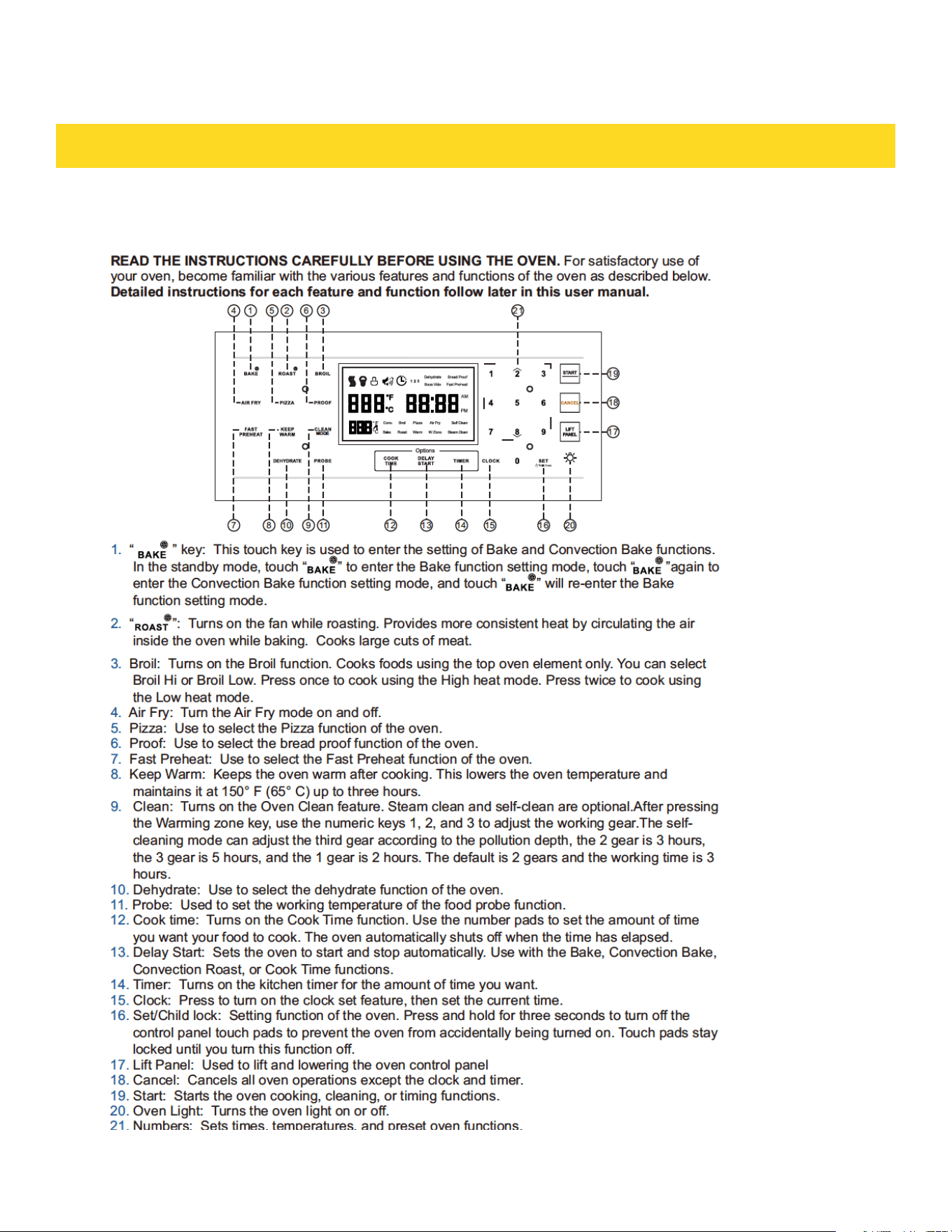
THE OVEN CONTROL PANEL
COOKTOP SAFETY GUIDELINES
12

SETTING THE KITCHEN TIMER
CONTROL LOCKOUT
SETTING THE CLOCK
OVEN COOKING GUIDELINES
The Clock must be set to the correct time of day for the automatic oven timing functions
to work properly.
· The time of day cannot be changed during timed cooking,delay-timed cooking, or a
self-cleaning cycle.
· You can choose between a 12-hour or 24-hour display. The default is 12-hour.
How to set the Clock
a. Touch Clock.
b. Touch Clock to select AM or PM. (Skip this step If you are setting the Clock to 24 hour
display mode).
c. Touch keys in the number pad to set the current time of day.
d. Touch START to save the changes.
The kitchen timer serves as an extra timer that will beep when the set time has elapsed. It does not start
or stop cooking functions. You can use the kitchen timer with any of the other oven functions.
How to set the timer
a. Touch Timer 0n/Off.
b. Touch number keys in the number pad to set the hours and minutes. The timer can
be set for any amount or time from 1 minute to 11 hours and 59 minutes.
If you make a mistake, touch Cancel,and then enter the amount of time again.
c. Touch START.
d. When the set time has elapsed, the oven will beep and the display will show End until
you touch Timer 0n/Off. You can cancel the timer at any time by touching Timer on/Off.
Control Lockout lets you lock the buttons on the touch pad so they cannot be activated accidently. You can
only activate Control Lockout when the oven is in standby mode.
How to activate the Control Lockout
a. Cancel or turn off all other functions.
b. Touch SETTING LOCK( hold 3 sec) for 3 seconds.
c. The oven will display "LOC" and the lock icon along with the current time.
NOTE
All other functions must be cancelled before you activate Control Lockout.
How to unlock the controls
Touch SETTING LOCK( hold 3 sec) for 3 seconds. "LOC' and the lock icon will disappear from the display.
13

In Timed Cooking mode, the oven turns on immediately and COOKS for the length of time you select. At
the end of the cooking time, the oven turns off automatically.
√ You can use the Timed Cooking only with another cooking operation (Convection Bake, Convection
Roast, Bake).
How to set the oven for Time Cooking
a. Touch the pad for the cooking operation you want,. e g. Bake. Enter the temperature you want, for
example, 400 °F, using the number pad. (The default temperature Is 350°F).
b. Touch Time Cooking. Enter the number of hours/minutes you want the oven to stay on using the
number pad. You can set the cooking time for any amount or time from 1 minute to 11 hours and 59
minutes.
c. Touch START to begin cooking. The temperature display will start to change once the oven
temperature reaches 100°F.
The oven will continue to cook until the set amount of time has elapsed, then turn off automatically
unless you set the Keep Warm feature. (Refer to the Using Keep Warm section on page 16) .
When Timed Cooking is done, the oven will beep 3 times.
TIME COOKING
DELAY START
OVEN COOKING GUIDELINES
Use caution with the Time Cooking or Delay Start features. You can use these features to cook cured
or frozen meats and most faults and vegetables. For food that can easily spoil, such as milk, eggs,
and unfrozen or fresh fish, meat, or poultry, chill them in the refrigerator first. Even when chilled,
they should not stand in the oven for more than 1 hour before cooking begins, and should be removed
promptly when cooking is completed. Eating spoiled food can result in sickness from food poisoning.
CAUTION
With Delay Start, the oven's timer turns the oven on and off at times you select In advance.
· You can use the Delay Start only With another cooking operation (Convection Bake, Convection Roast,
Bake).
· You can set the oven for a delay start before setting other cooking operations.
· The clock must be set to the current time.
How to set the oven for delay start
a. Position the oven rack(s) and place the food in the oven.
b. Touch the pad for the cooking operation you want, eg. Bake.The default temperature is 350 °F.
c. Enter the temperature you want, eg.375°F, using the number pad.
d. Set the cooking time If you want. (Refer to the section on the timed cooking feature on page 21).
e. Touch Delay Start. Use the number pad to set the time.
f. Touch START. The oven will begin to cook.
13
OVEN COOKING GUIDELINES
· The oven light turns on and door light turns off automatically when the door is opened.
· The oven light turns off automatically when the door is closed. You can turn the oven and door light on
and off manually by touching the Light.
TURNING THE LIGHT ON AND OFF
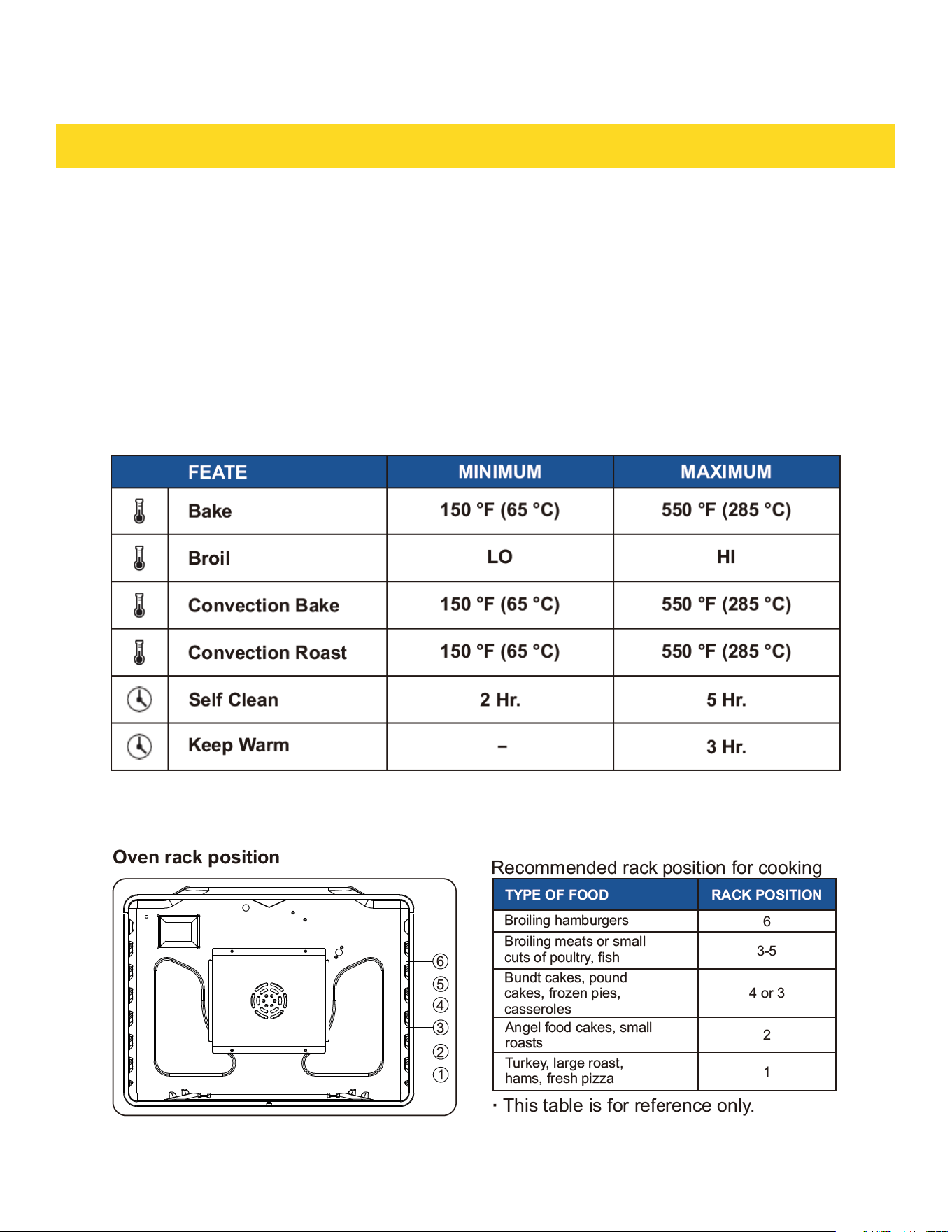
All of the features listed in the table below have minimum and maximum time or temperature settings. A
beep will sound each time a pad on the control panel is pressed and the entry is accepted. An error tone
will sound in the form of a long beep if the entered temperature or time is below the minimum or above
the maximum setting for the feature.
MINIMUM AND MAXIMUM SETTINGS
USING THE OVEN RACKS
14
OVEN COOKING GUIDELINES
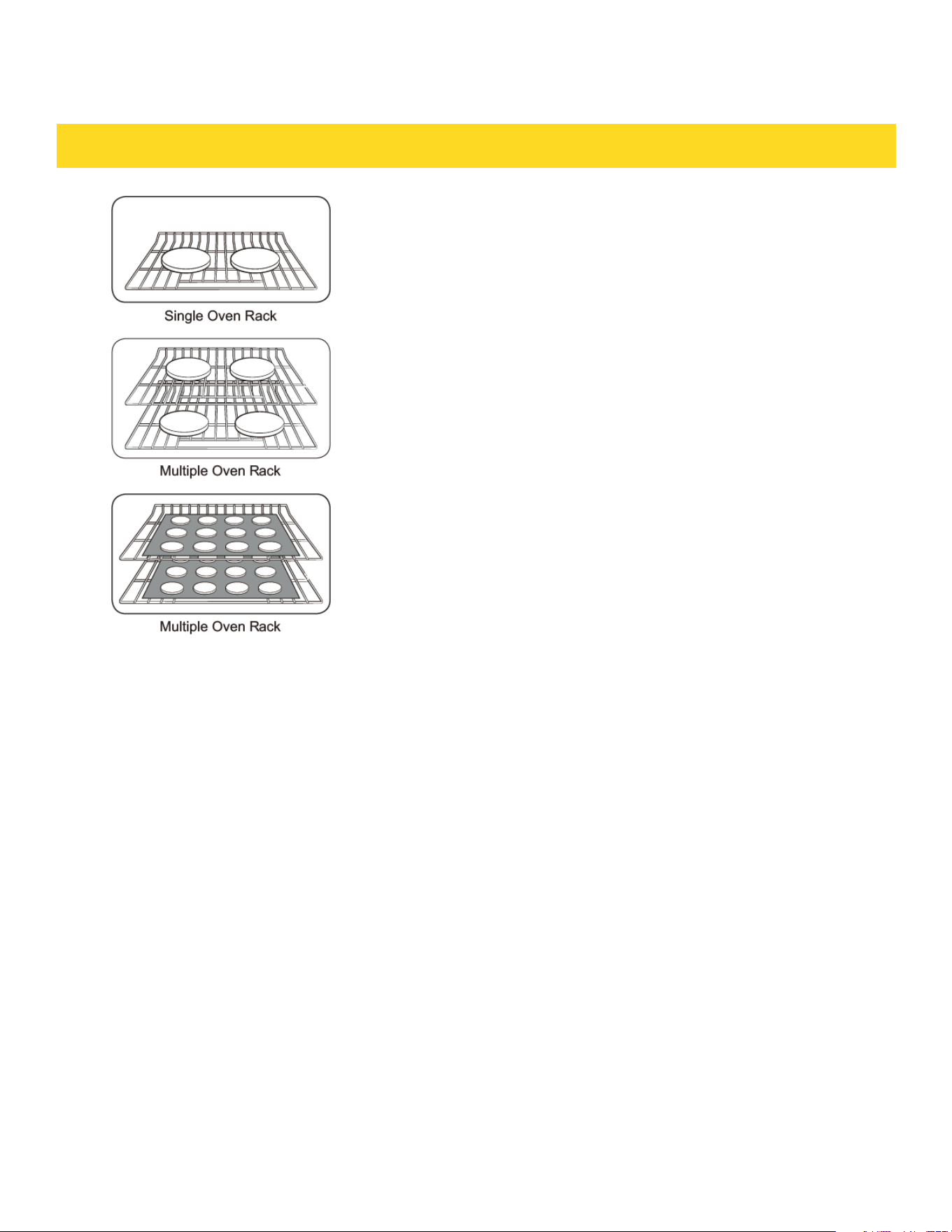
Rack and Pan placement
Centering baking pans in the oven as much as possible
will produce better results. If baking with more than one
pan, place the pans so each has at least 1 to 1 ½ of air
space around It.
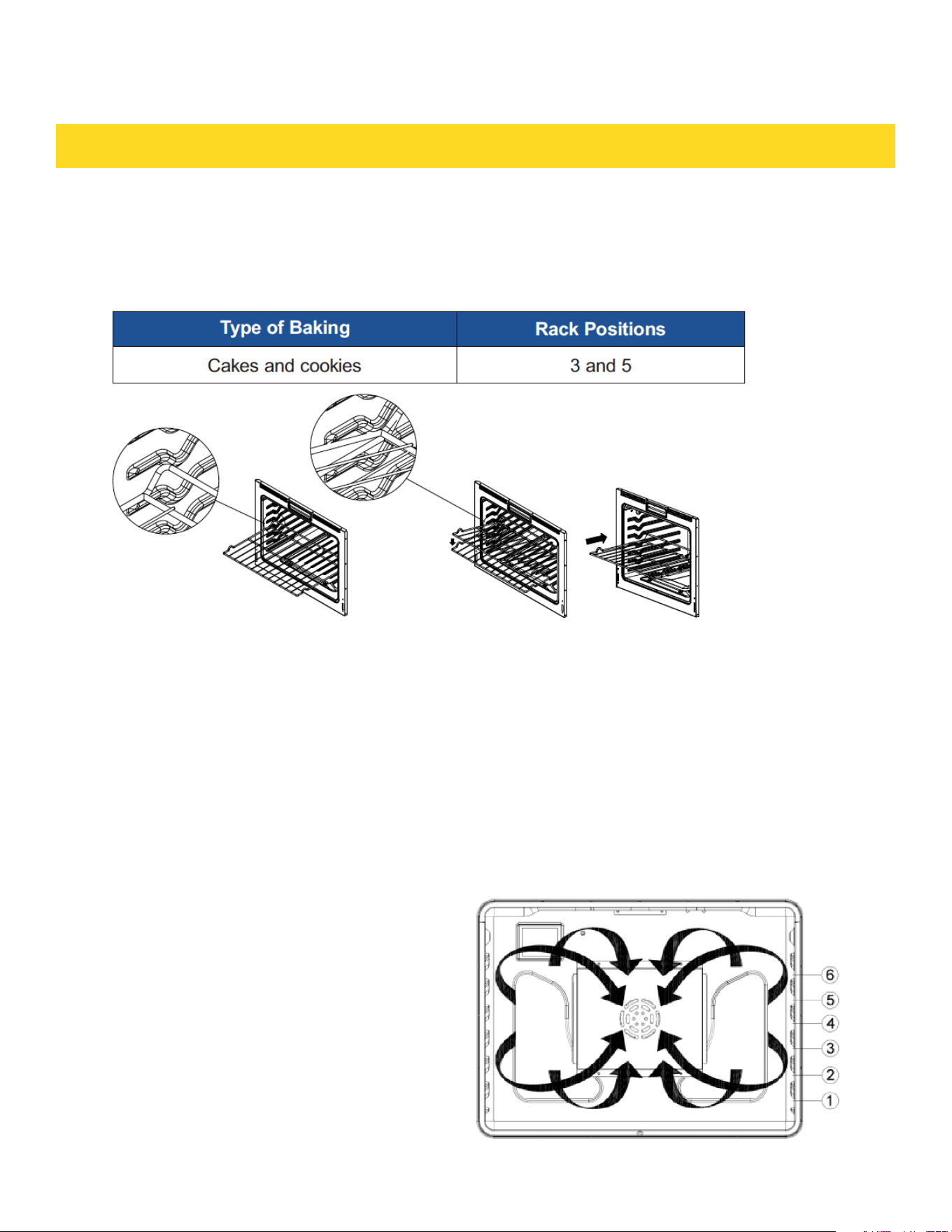
When baking on a single oven rack, place the oven rack
in position 3 or 4.
See the figure on the left.
When baking cakes and cookies on multiple racks, place
the oven racks in position 3 and 5.
Using Multiple Oven Racks
Before using the racks
Each rack has stops that need to be placed correctly on
the supports. These stops will keep the rack from coming
completely out
REMOVING THE RACKS
a. Pull the rack straight out until it stops.
b. Lift up the front of the rack, and then pull it out.
REPL ACING THE RACKS
c. Place the end of the rack on the support.
d. Tilt the front end up and push the rack in.
· Do not cover a rack with aluminum foll or place aluminum foll on the oven bottom.
This will hamper heat circulation, resulting in poor baking, and may damage the oven
bottom.
· Arrange the oven racks only when the oven is cool
14
OVEN COOKING GUIDELINES
The oven can be programmed to bake at any temperature from 150 °F to 550°F.Baking
temperature and time will vary depending on the ingredients and the size and shape or
the baking pan used. Dark or nonstick coatings may cook faster with more browning.
How to set the oven for baking
BAKING
a. Touch Bake.
b. Enter the temperature you want using the number pad, eg.3.7.5.
c. Touch START. The temperature display will start to change once the oven temperature reaches 100°F.
d. If you want to cancel baking or if you have finished, touch Cancel.
· Place food in the oven after preheating if the recipe calls for it.Preheating is very
important for good results when baking cakes,cookies, pastry, and breads. After the
oven has reached the desired temperature, the oven will beep 3 times.
NOTE
If you are using an oven thermometer in the oven cavity, the temperature registered by the thermometer
may differ from the actual set oven temperature.
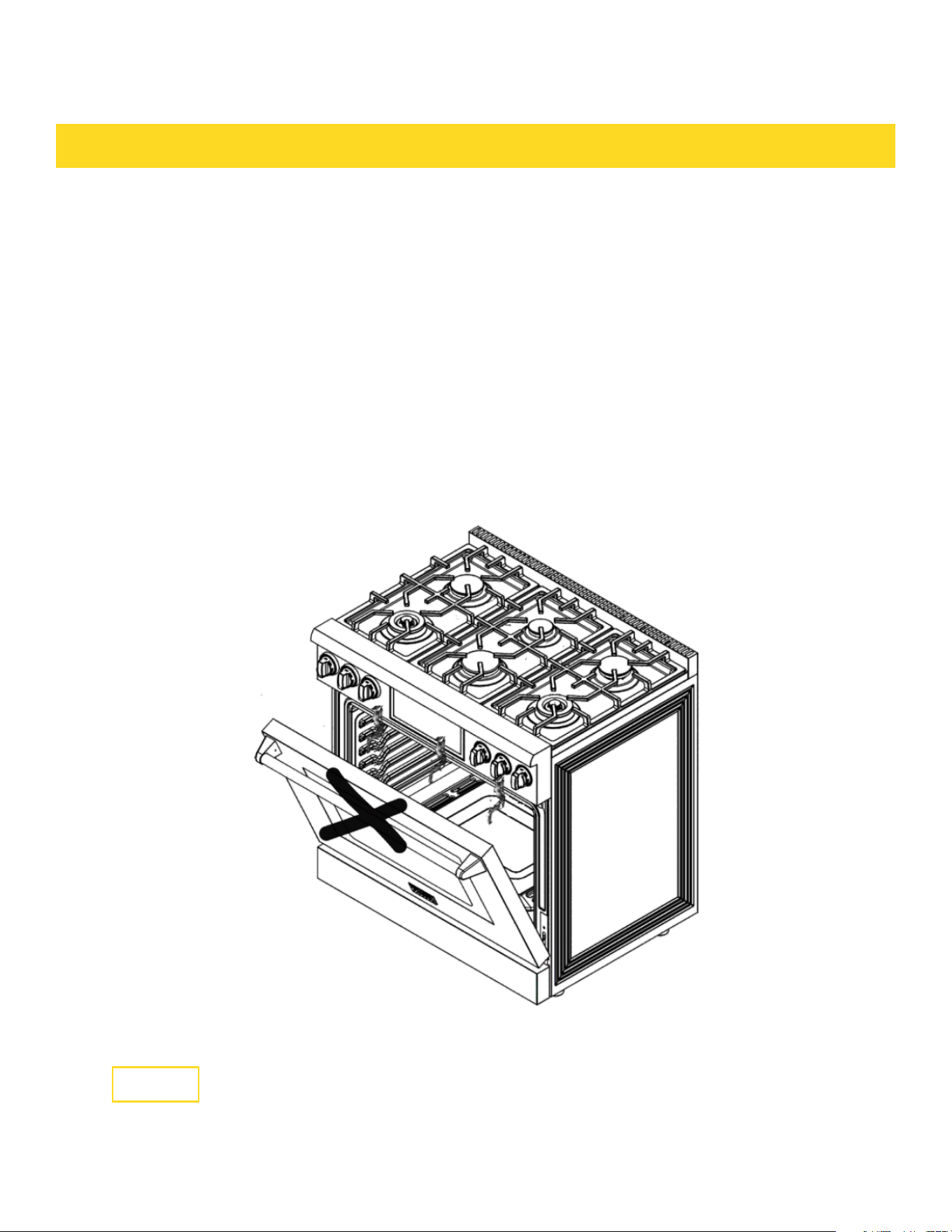
By using the Convection Bake, you will be able to
cook faster. Convection baking uses a fan to
circulate the oven's heat evenly and continuously
within the oven. This improved heat distribution
allows for even cooking and excellent results
while using multiple racks at the same time.
Foods cooked on a single oven rack will generally
cook faster and more evenly with convection
baking.Multiple oven rack cooking may have
slightly increased cooking times for some foods,
but the overall result is time saved.Breads and
pastries brown more evenly.You can program the
oven for convection baking at any temperature
between 150°F and 550 °F.
CONVECTION BAKING
15

OVEN COOKING GUIDELINES
Tips for convection baking
The amount of time you save will vary depending on the amount and type of food you are cooking. When
baking cookies or biscuit, you should use pans with no sides or very lows sides to allow the heated air to
circulate around the food. Using a pan with a dark finish will produce faster cooking times. When using
convection baking with a single rack, place the oven rack in position 3 or 4. If cooking on multiple racks,
place the oven racks in position 3 and 5. When baking a cake, using the bake mode (not the convection
bake mode) will produce better results.
How to set the oven to convection baking
a. Touch Bake.Enter the temperature you want, eg. 400 °F, using the number pad.
b. Touch START.
c. The temperature display will start to change once the oven temperature reaches 100°F.The oven will
beep 3 times when the oven reaches the adjusted oven temperature.
d. If you want to cancel convection baking or if you have finished, touch Cancel.
· The convection oven fan shuts off when the oven door is opened.
· Do NOT leave the door open tor long periods of time while using convection cooking or you may
shorten the life of the convection heating element.
NOTE
If you leave the oven door open for more than 1 minute when the oven is on,all heating
elements will shut off automatically.
NOTE
If you are using an oven thermometer in the oven cavity, the temperature registered by
the thermometer may differ from the actual set oven temperature.
Convection roasting
Convection roasting is good for cooking large tender cuts of meat uncovered.Heat comes from the top
heating element. The convection fan circulates the heated air evenly over and around the f0od. Meat and
poultry are browned on all sides as If they were cooked on a rotisserie. The heated air seals In juices
quickly for moist and tender results while. at the same time, creating a rich golden brown exterior. How
to set the oven Tor convection roasting.
1. Touch Roast.Enter the temperature you want. eg. 400 °F using the number pad.
2. Touch START.
3. The temperature display will start to change once the oven temperature reaches 100°F. The oven will
beep 3 times when the oven reaches the adjusted oven temperature.
4. If you want to cancel convection roasting or if you have finished, touch Cancel.
· The convection oven ran shuts off when the oven door is opened.
· DO NOT leave the door open for long periods of time while using convection cooking or you may
shorten the life of the convection heating element.
NOTE
If you leave the oven door open for more than 1 minute when the oven is on,all heating elements will
shut off automatically.
NOTE
If you are using an oven thermometer in the oven cavity, the temperature registered by the thermometer
may differ from the actual set oven temperature.
15
OVEN COOKING GUIDELINES
Broiling is a method of cooking tender cuts of meat by direct heat under the broil element of the oven.
The high heat cooks quickly and gives a rich, brown outer appearance. Broil mode is best for meats, fish,
and poultry up to 1" thick.
How to set the oven for broiling
a. Touch Broil once for HI or twice for LO.
b. Use LO to cook foods such as poultry or thick cuts of meat thoroughly without overbrowning them.
c. To start broiling, touch START.
d. Broil one side until the food is browned. Turn over and broil the other side.
e. Touch Cancel once you have finished cooking or if you want to cancel broiling.
NOTE
If you leave the oven door open for more than 1 minute when the oven is on,all heating elements will shut
off automatically.
BROILING
If you are using an oven thermometer in the oven cavity, the temperature registered by the thermometer
may differ from the actual set oven temperature.
Always broil with the oven door closed.
Use care when opening the door. Let hot air or steam escape before you remove food from or put food
into the oven.
CAUTION
16

OVEN COOKING GUIDELINES
USING KEEP WARM
Keep Warm will keep cooked food warm for serving up to 3 hours after cooking has
finished.
After 3 hours, the feature will shut off automatically. You can use the Keep Warm feature without any
other cooking operations or you can set it to activate after a timed or delay timed cooking operation.
You should not use this feature to reheat cold food.
How to use Keep Warm
a. Touch Keep Warm.
b. Touch START.
c. Touch Cancel at any time to turn the feature off.
How to set the oven to activate Keep Warm after a time cooking
a. Set up the oven for Time cooking.(Refer to Timed Cooking section on page 21).
b. Touch Keep Warm before touching START to begin cooking.
c. Touch Cancel at any time to tum the feature off.
USING SABBATH
You can use the Sabbath feature with baking only. The oven temperature may be set higher or lower
after setting the Sabbath feature. (The oven temperature adjustment feature should be used only
during Jewish holidays.) The display, however, will not change and tones will not sound when a change
occurs. Once the oven is properly set for baking with the Sabbath feature active, the oven will remain
continuously on until the Sabbath feature is cancelled. If the oven light is needed during the Sabbath,
touch Light before activating the Sabbath feature. Once the oven light is turned on and the Sabbath
feature is active, the oven light will remain on until the Sabbath feature is turned off. If the oven light
needs to be off, be sure to turn the oven light off before activating the Sabbath feature.
How to use the Sabbath feature
a. Touch Bake. The default temperature is 350 °F.
b. Enter the temperature you want, eg. 375 °F, by using the number pad.
c. Touch START. The temperature display will start to change once the oven temperature reaches 100 °F.
d. Touch Bake and Broil for three seconds at same time. The panel will display Set Sab.
e. Touch START. Activate the oven Sabbath function, the panel will display SAb, the oven heating work
automatically becomes 74 hours. Once SAb appears in the display, the oven will not beep or display
any further changes. You may change the oven temperature once baking has started. Remember that
the oven will not beep or display any further changes once the Sabbath feature is engaged.
f. You can turn the oven off at any time by touching Cancel. This will turn only the oven off. If you want to
deactivate the Sabbath feature, hold down Cancel for 3 seconds. Sab will disappear from the display.
16

· Do not to attempt to activate any other program feature except BAKE while the Sabbath feature is
active. ONLY the following key pads will function correctly with the Sabbath feature on: NUMBER, BAKE,
START and Cancel. All other keypads should not be used once the Sabbath feature is activated.
· You can change the oven temperature, but the display will not change and tones will not sound when a
change occurs. (The oven temperature adjustment feature should be used only on Jewish holidays.) After
changing the temperature while the unit is in Sabbath mode, there is a 15 second delay before the unit
recognizes the change.
· Should you experience a power failure or interruption, the oven will shut off. When power is returned,
the oven will not turn back on automatically. SAb will be displayed in the oven control display, but the
oven will not operate. Food may be safely removed from the oven while it is still in the Sabbath mode,
however the oven cannot be turned back on until after the Sabbath/ Holidays. After the Sabbath obser-
vance, turn off the Sabbath mode. Touch and hold down Cancel for 3 seconds simultaneously to turn the
Sabbath mode off. The oven may then be used with all normal functions. Do not open the oven door or
change the oven temperature for about 30 minutes after you have started Sabbath mode to allow the
oven to reach the set temperature.
OVEN COOKING GUIDELINES
The temperature in the oven has been calibrated at the factory. When first using the oven, be sure to
follow recipe times and temperatures. If you think the oven is too hot or too cool, you can correct the
temperature in the oven. Before correcting, test a recipe by using a temperature setting that is higher or
lower than the recommended temperature. The baking results should help you to decide how much of an
adjustment is needed. The oven temperature can be adjusted +35 °F (+19°C).
How to correct the oven temperature
· In the standby state, touch the "Set" key and the number "5" key for three seconds at the same time,
the temperature calibration will be set.
NOTE
This adjustment will not affect the broiling or the self- cleaning temperatures. The adjustment will be
retained in memory after a power failure.
TEMP UNIT (FAHRENHEIT OR CELSIUS TEMPERATURE SELECTION)
You can program the oven control to display the temperature in Fahrenheit or Celsius. The oven has been
preset at the factory to display in Fahrenheit.
How to change the display from Fahrenheit to Celsius or Celsius to Fahrenheit
· Touch the “Set” key and the number “4” key for three seconds to switch between °F/°C.
TEMP ADJUST
17

OVEN COOKING GUIDELINES
TIME OF DAY (12HR/24HR)
The oven control can be programmed to display time of day in the 12 hour or 24 hour mode.
The oven has been preset at the factory to display in the 12 hour mode.
How to change between the 12 and 24 hour time of day display
· Touch the "Set" button and the number "2" button for three seconds to switch the
12/24 hour clock mode.
Sound on/off
Using Sound On/OFF, you can set the oven controls to operate silently.
How to turn the sound on or off
· Touch the "Set" key and the number "3" key for three seconds to switch the sound
on/off mode.
Control lockout
This feature lets you lock the buttons on the touch pad so they cannot be activated
accidentally.After the lock, only "Cancel" and "SETTING" can operate.
How to activate the control lockout feature
a. Press SETTING/LOC(Hold 3 sec) for 3 seconds.
LoC and the lock icon appear in the display as well as the current time.
b. After activating the lockout in the non-cleaning function, the oven will lock the door and the screen
will display the lock icon. Only Cancel and SETTING/LOC(Hold 3 sec) can be operated, and other
buttons are invalid. If the oven is currently heating, press Cancel to stop the oven.
Press SETTING/LOC(Hold 3 sec) 3 sec can cancel the lockout function, and the
oven lock will automatically unlock.
c. After the lockout is activated in the self-cleaning function, the lock icon will be
displayed on the screen. Only Cancel and SETTING/LOC(Hold 3 sec) can be
operated, and other buttons are invalid. You can press Cancel to cancel self-cleaning, and if the
temperature in the oven is below 212 °F, the oven door lock will automatically unlock. Otherwise the
door will remain locked.
17

OVEN COOKING GUIDELINES
How to unlock the controls
a. Press SETTING/LOC(Hold 3 sec) for 3 seconds.
Loc and the lock icon will disappear from the display.
SELF-CLEANING
This self-cleaning oven uses high temperatures (well above cooking temperatures) to
burn off leftover grease and residue completely or reduce them to a finely powdered ash
that you can wipe away with a damp cloth.
· During the self-cleaning cycle, the outside of the oven will become very hot to the
touch. Do not leave small children unattended near the appliance.
· Some birds are extremely sensitive to the fumes given off during the self-cleaning
cycle of any oven. Move birds to another well-ventilated room.
· Do not line the oven walls, racks, bottom, or any other part of the oven with aluminum
foil. Doing so will result in poor heat distribution, poor baking results, and cause
permanent damage to the oven interior. Aluminum foil will melt and adhere to the
interior surface of the oven.
The oven door locks during self-cleaning. Do not force the oven door open. This can
damage the automatic door locking system. Use care when opening the oven door after
the self-cleaning cycle is complete. Stand to the side of the oven when opening the door
to allow hot air or steam to escape. The oven may still be VERY HOT.
Before a self-cleaning cycle
· We recommend venting your kitchen with an open window or using a ventilation fan or
hood during the self-cleaning cycle.
· Remove the wire rack, broil pan, broil pan insert, all cookware, and any aluminum foil
from the oven.
· Wipe up debris from the oven bottom.
· The silver-colored oven racks can be self-cleaned, but they will darken, lose their
luster, and become hard to slide.
· Residue on the front frame of the oven and outside the gasket on the door will need to
be cleaned by hand.
· Clean these areas with hot water, soap-filled steel-wool pads, or cleansers such as
Soft Scrub. Rinse well with clean water and dry.
· Do not clean the gasket. The fiberglass material of the oven door gasket cannot
withstand abrasion. It is essential for the gasket to remain intact. If you notice it
becoming worn or frayed, have it replaced.
· Make sure the oven light cover is in place and the oven light is off.
NOTE
Remove oven racks and accessories before starting the self- clean mode.
CAUTION
18

OVEN COOKING GUIDELINES
How to unlock the controls
a. Press SETTING/LOC(Hold 3 sec) for 3 seconds.
Loc and the lock icon will disappear from the display.
SELF-CLEANING
This self-cleaning oven uses high temperatures (well above cooking temperatures) to burn off leftover
grease and residue completely or reduce them to a finely powdered ash that you can wipe away with a
damp cloth.
· During the self-cleaning cycle, the outside of the oven will become very hot to the touch. Do not leave
small children unattended near the appliance.
· Some birds are extremely sensitive to the fumes given off during the self-cleaning cycle of any oven.
Move birds to another well-ventilated room.
· Do not line the oven walls, racks, bottom, or any other part of the oven with aluminum foil. Doing so
will result in poor heat distribution, poor baking results, and cause permanent damage to the oven
interior. Aluminum foil will melt and adhere to the interior surface of the oven.
The oven door locks during self-cleaning. Do not force the oven door open. This can damage the auto-
matic door locking system. Use care when opening the oven door after the self-cleaning cycle is com-
plete. Stand to the side of the oven when opening the door to allow hot air or steam to escape. The oven
may still be VERY HOT.
Before a self-cleaning cycle
· We recommend venting your kitchen with an open window or using a ventilation fan or hood during the
self-cleaning cycle.
· Remove the wire rack, broil pan, broil pan insert, all cookware, and any aluminum foil from the oven.
· Wipe up debris from the oven bottom.
· The silver-colored oven racks can be self-cleaned, but they will darken, lose their luster, and become
hard to slide.
· Residue on the front frame of the oven and outside the gasket on the door will need to be cleaned by
hand.
· Clean these areas with hot water, soap-filled steel-wool pads, or cleansers such as Soft Scrub. Rinse
well with clean water and dry.
· Do not clean the gasket. The fiberglass material of the oven door gasket cannot withstand abrasion. It
is essential for the gasket to remain intact. If you notice it becoming worn or frayed, have it replaced.
· Make sure the oven light cover is in place and the oven light is off.
NOTE
Remove oven racks and accessories before starting the self- clean mode.
CAUTION
18

How to run a self-cleaning cycle
a. Select the length of time for the self-cleaning operation, eg. 3 hours.
Touch Self Clean 2/3/5h once for a 3 hour clean time, twice for a 5 hour clean time, or 3 times for a 2
hour clean time.The default setting is 3 hours.
b. Touch START to start the self- cleaning cycle.The motor-driven door lock will engage
automatically.
NOTE
· You will not be able to start a self- cleaning cycle if the Control Lockout feature is activated or if the
oven's temperature is too hot.
· The oven door locks automatically. The display will show the cleaning time remaining. You cannot open
the oven door until the temperature drops to a safe/cool temperature.
c. When the self-cleaning cycle is done, End will appear in the display and the oven will beep 6 times.
How to delay the start of self-cleaning
a. Touch Self Clean 2/3/5h.Select the desired self-clean time by touching Self Clean 2/3/5h.
b. Touch Delay Start.
c. Enter the time you want the self-clean cycle to start.
d. Touch START.
The display will show Delay, Self clean, and the Lock icon. The motor-driven door lock will engage
automatically.
e. The Self- Cleaning cycle will turn on automatically at the set time.
How to turn off the self-cleaning feature
If you need to stop or interrupt a self-cleaning cycle:
a. Touch Cancel.
b. You will be able to open the oven door once the oven has cooled down for
approximately 1 hour.
After a self-cleaning cycle
· You may notice some white ash in the oven. Wipe it up with a damp cloth after the
oven cools. (If white spots remain, remove them with a soap-illed steel wool pad and
rinse thoroughly with a vinegar and water mixture.)
· If the oven is not clean after one cycle, repeat the cycle.
You cannot set the oven for cooking until the oven is cool enough for the door.
OVEN COOKING GUIDELINES
19
CARE AND CLEANING OF THE OVEN
WARNING
Be sure all controls are 0FF and all surfaces are COOL
before cleaning any part of the range.
If your range is moved for cleaning, servicing, or any
reason, be sure the Anti-Tip device is re-engaged properly when the
range is replaced. If you fail to re-engage the Anti-Tip device, the range could tip and cause serious
injury.
Oven Vent
· The oven vent is located above the back panel.
· This area could become hot during oven use.
· It is normal for steam to come out of the vent.
· The vent is important for proper air circulation. Never block this vent.
OVEN COOKING GUIDELINES
19

OVEN COOKING GUIDELINES
Cleaning painted parts and decorative trim
· For general cleaning, use a cloth with hot, soapy water.
· For more difficult residue and built-up grease, apply a liquid detergent directly onto the area and leave
for 30 to 60 minutes. Wipe with a damp cloth and dry.Do not use abrasive cleaners on any oven surface.
They can be scratched.
Cleaning stainless steel surfaces
a. Shake a bottle of Stainless Steel Appliance Cleaner or Polish well.
b. Place a small amount of stainless steel appliance cleaner or polish on a damp cloth or damp paper
towel.
c. Clean a small area, rubbing with the grain of the stainless steel if applicable.
d. Dry and buff with a clean, dry paper towel or soft cloth.
e. Repeat as necessary.
NOTE
· Do not use a steel-wool pad. It will scratch the surface.
· If a mineral oil-based stainless steel appliance cleaner has been used before to clean the appliance,
wash the surface with dish washing liquid and water prior to using the Stainless Steel Appliance
Cleaner or Polish.
Oven racks
· If the racks are left in the oven during a self-cleaning cycle, their color will turn slightly blue and the
finish will be dull. After the self-cleaning cycle is complete and the oven has cooled, rub the sides of
the racks with wax paper or a cloth containing a small amount of oil. This will help the racks glide more
easily on their tracks.
· Gliding racks may be cleaned by hand with an abrasive cleaner or steel wool.During cleaning, be careful
not to allow water or cleaner to enter the slides on the sides of rack.
NOTE
a. Do not clean in a dishwasher.
b. If the rack becomes hard to remove or replace, lightly wipe the oven rack guides with cooking oil. Do
not wipe cooking oil on the slides.
If the rack becomes difficult to slide, the rack may need to be lubricated using a graphite lubricant.
Oven door
· Use soap and water to thoroughly clean the top, sides, and front of the oven door. Rinse well. You may
use a glass cleaner on the outside glass of the oven door. DO NOT immerse the door in water. DO NOT
spray or allow water or the glass cleaner to enter the door vents. DO NOT use oven cleaners,cleaning
powders, or any harsh abrasive cleaning materials on the outside of the oven door. DO NOT clean the
oven door gasket. The oven door gasket is made of a woven material which is essential for a good seal.
Care should be taken not to rub, damage, or remove this gasket.
19

OVEN COOKING GUIDELINES
Cleaning burner caps and flame spreaders
a. Check that the burner is turned OFF and allow it to cool. Lift off the burner cap and
brass flame spreader. Wash them in hot soapy water, rinse, and dry.
b. Use a stiff nylon brush or straight-ended paper clip to clear the notches of a flame
spreader. Replace the flame spreader and burner cap correctly.
c. Before cleaning the cooktop, ensure that all burners are turned off and that all
components are cool enough to safely touch.
d. To avoid electrical shock or burns, turn off controls and ensure the cooktop is cool
before cleaning.
e. Do not use harsh or abrasive cleaning detergents, waxes, polishes, or commercial
cooktop cleaners to clean the cooktop.
f. Use only a sponge, soft cloth, fibrous or plastic brush, and nylon pad for cleaning.
g. Always dry components completely before using the cooktop.
h. Control Panel, Door Handle, Control Housing.
i. Clean the control panel, door handle and control housing with a solution of mild
detergent and warm water.
j. Do not use abrasive cleaners or scrubbers; they may permanently damage the
finish.
k. Dry the components with a soft, lint-free cloth.
Cleaning oven shelves
a. To remove stubborn or ‘baked-on’ soiling, scrub with a dampened, soap-filled,
nonmetal, non-abrasive pad, then wipe dry.
b. Apply a chrome cleaner with a damp sponge or cloth following manufacturer’s
instructions.
c. Wipe and dry.
Cleaning broil/roast pan and slotted grid
Pre-soak any stubborn soiling in a solution of mild detergent and hot water. Wash by hand or in a
dishwasher.
Cleaning bake and broil burners
Do not clean these parts. They self-clean during normal use.
20

Cleaning porcelain surfaces
Clean oven interior and inner door liners with a solution of mild detergents and hot
water. Rinse and dry with a soft, lint-free cloth. Do not use abrasives or commercial
oven cleaners.
Cleaning the oven glass window
Clean all glass surfaces with a solution of mild detergent and hot water. Use a mild
glass cleaner to remove fingerprint or smears.
Dry completely with a soft, lint-free cloth.
Cleaning the oven door gasket
Void cleaning this part. If you need to remove large food particles off it, proceed as
follows:
a. Dampen a sponge with clean hot water.
b. Gently wipe off the soiling, but do not rub.
c. Press a dry towel gently on the gasket to dry.
Do not use any cleaning detergents on the gasket. The gasket is essential for a good
seal.
CAUTION
Do not scratch, displace, or damage it.
Cleaning stainless steel surfaces
Do not use any cleaning product with chlorine bleach.
Do not use a steel wool pad; it will scratch the surface.
Use a hot, damp cloth with a mild detergent.
Use a clean, hot, damp cloth to remove soap. Dry with a dry, clean cloth.
OVEN COOKING GUIDELINES
20
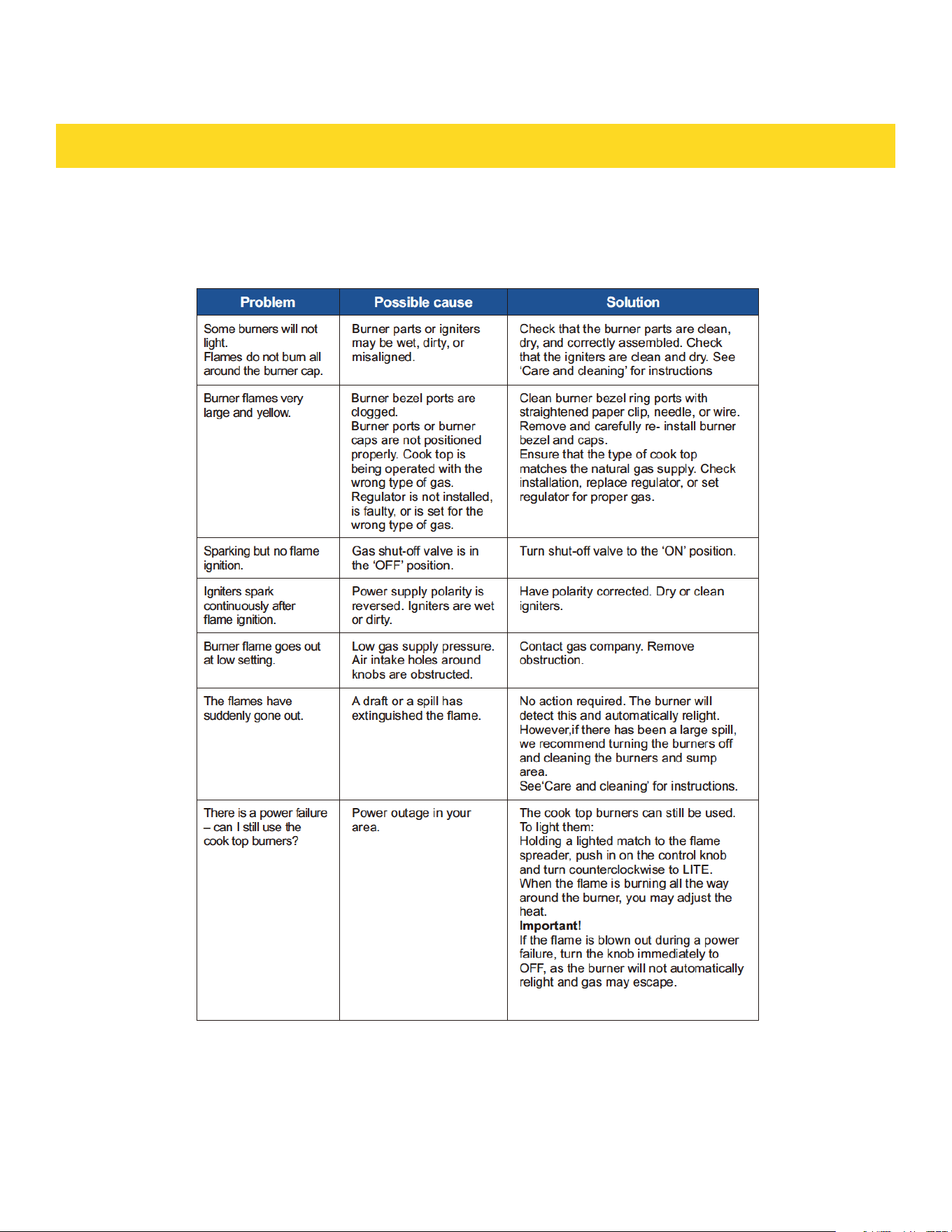
If you can’t find an answer to your problem in the chart below, or if the problem cannot be fixed, you will
need technical help. Contact your Authorized Service Center or Customer Care.
TROUBLESHOOTING GUIDE
COOK TOP
21
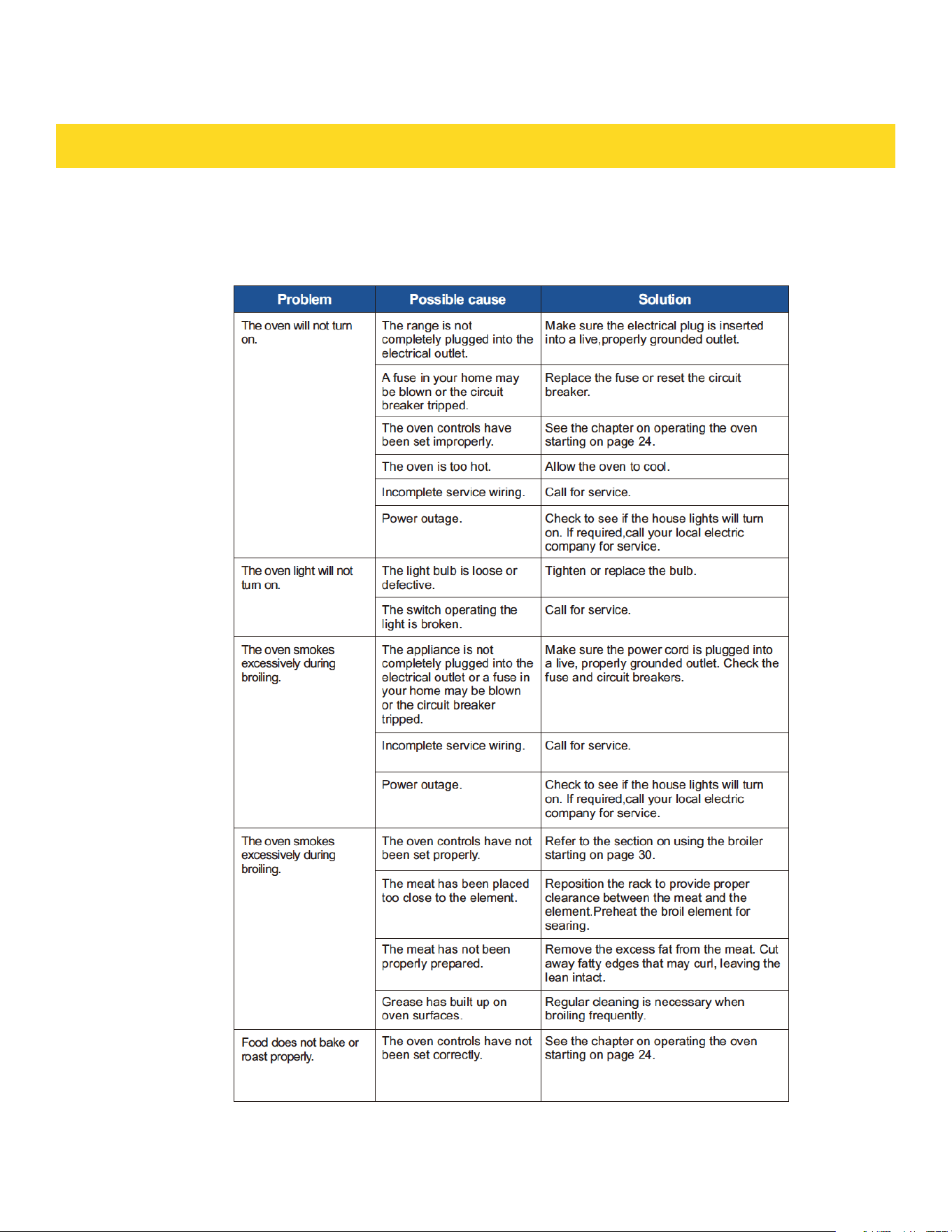
TROUBLESHOOTING GUIDE
OVEN
21
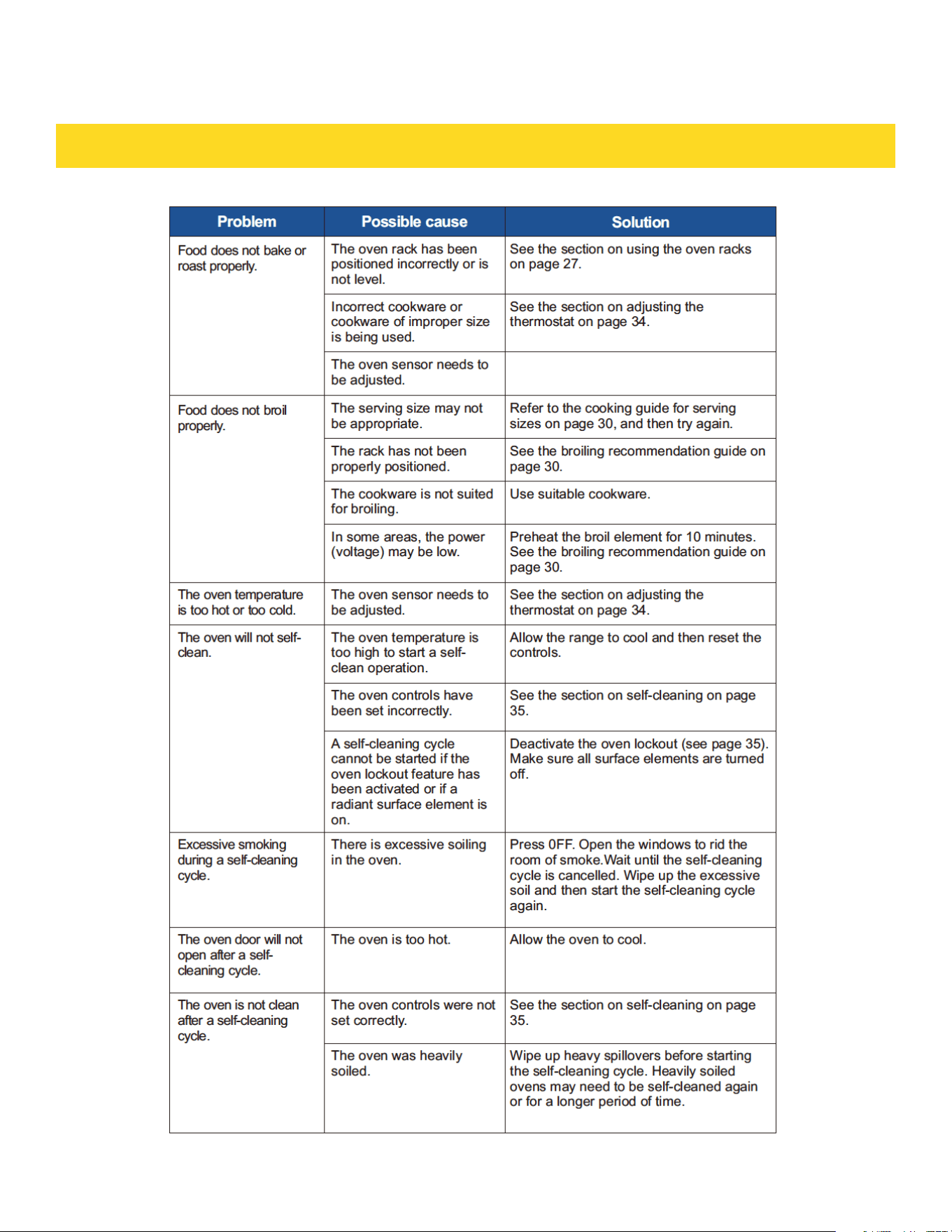
TROUBLESHOOTING GUIDE
22
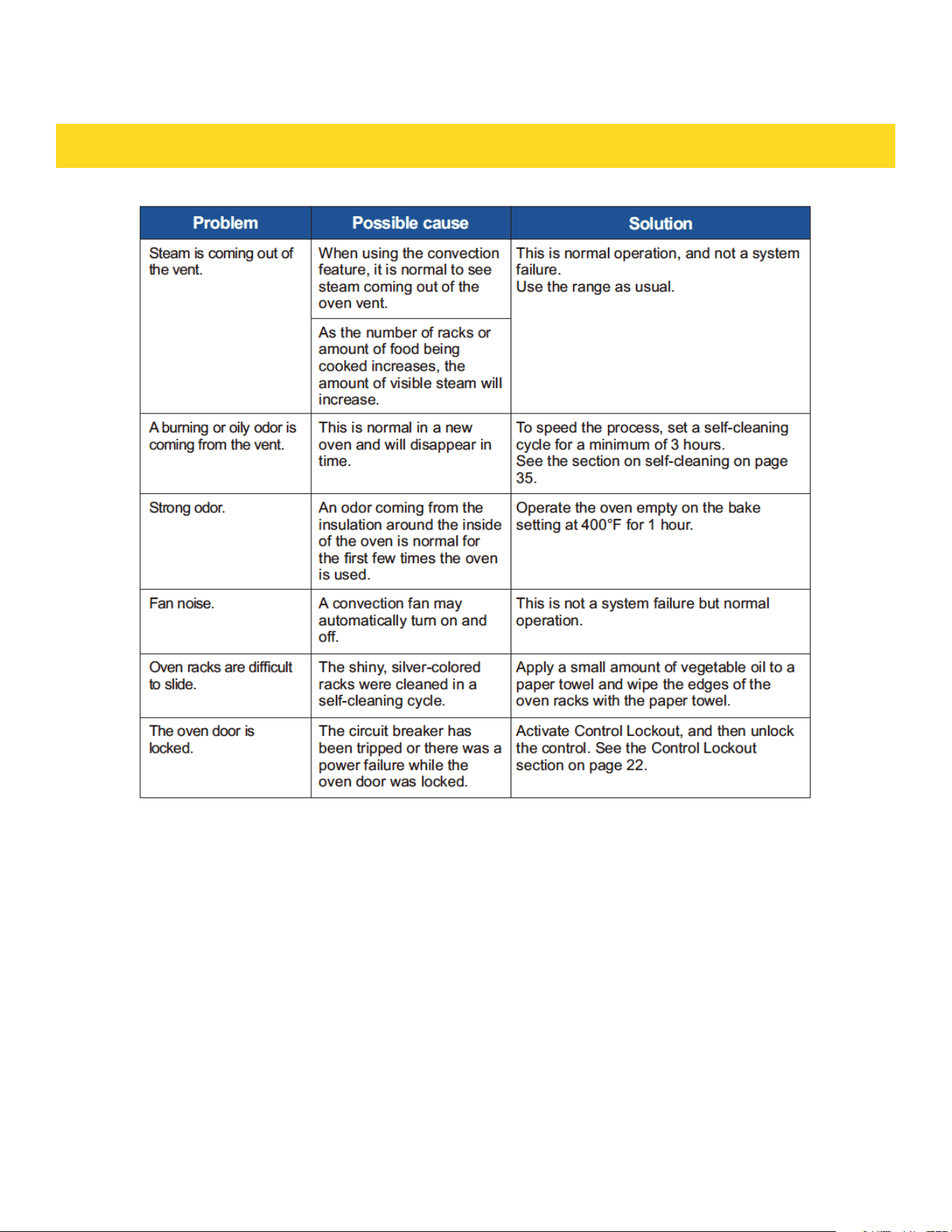
TROUBLESHOOTING GUIDE
22
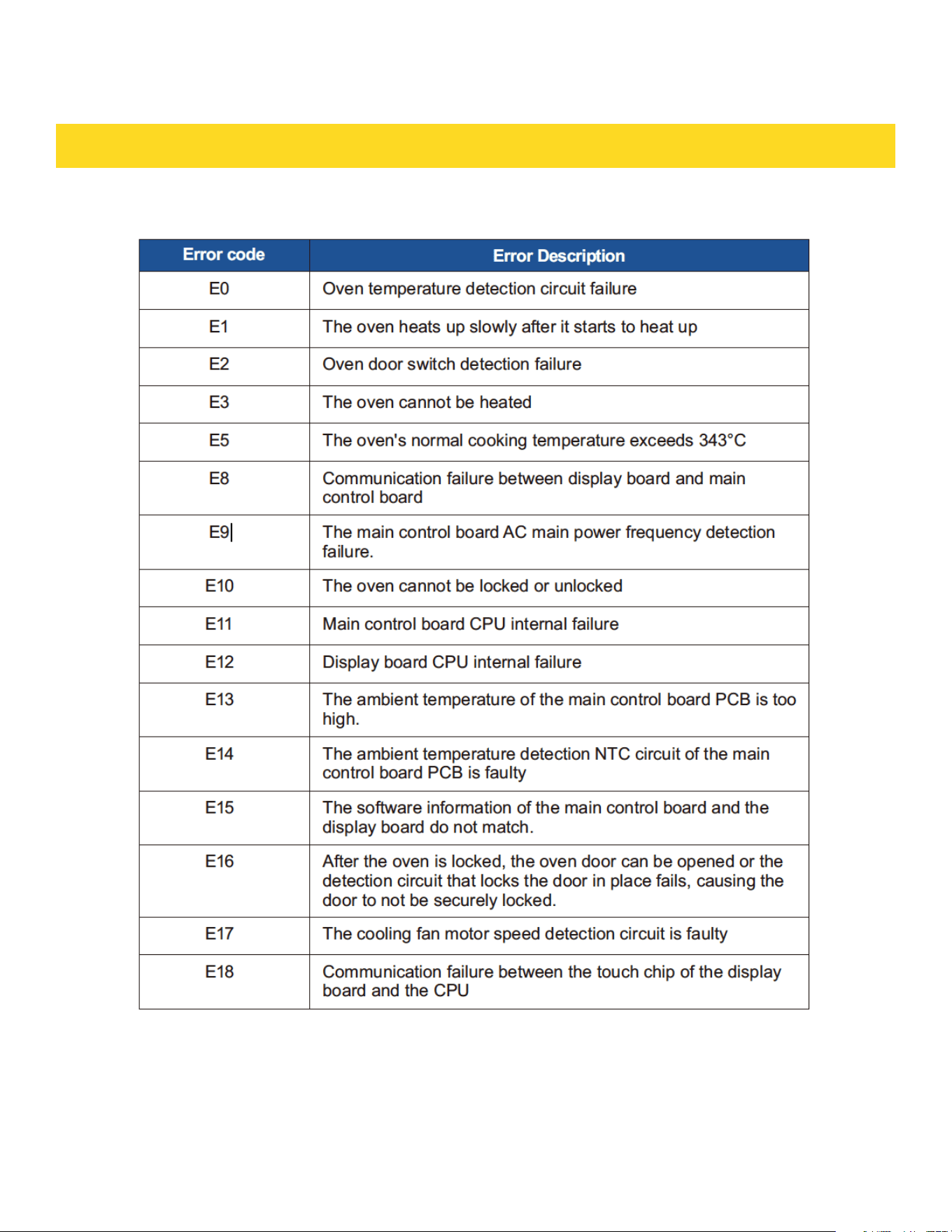
TROUBLESHOOTING GUIDE
INFORMATION CODE
23
TROUBLESHOOTING GUIDE
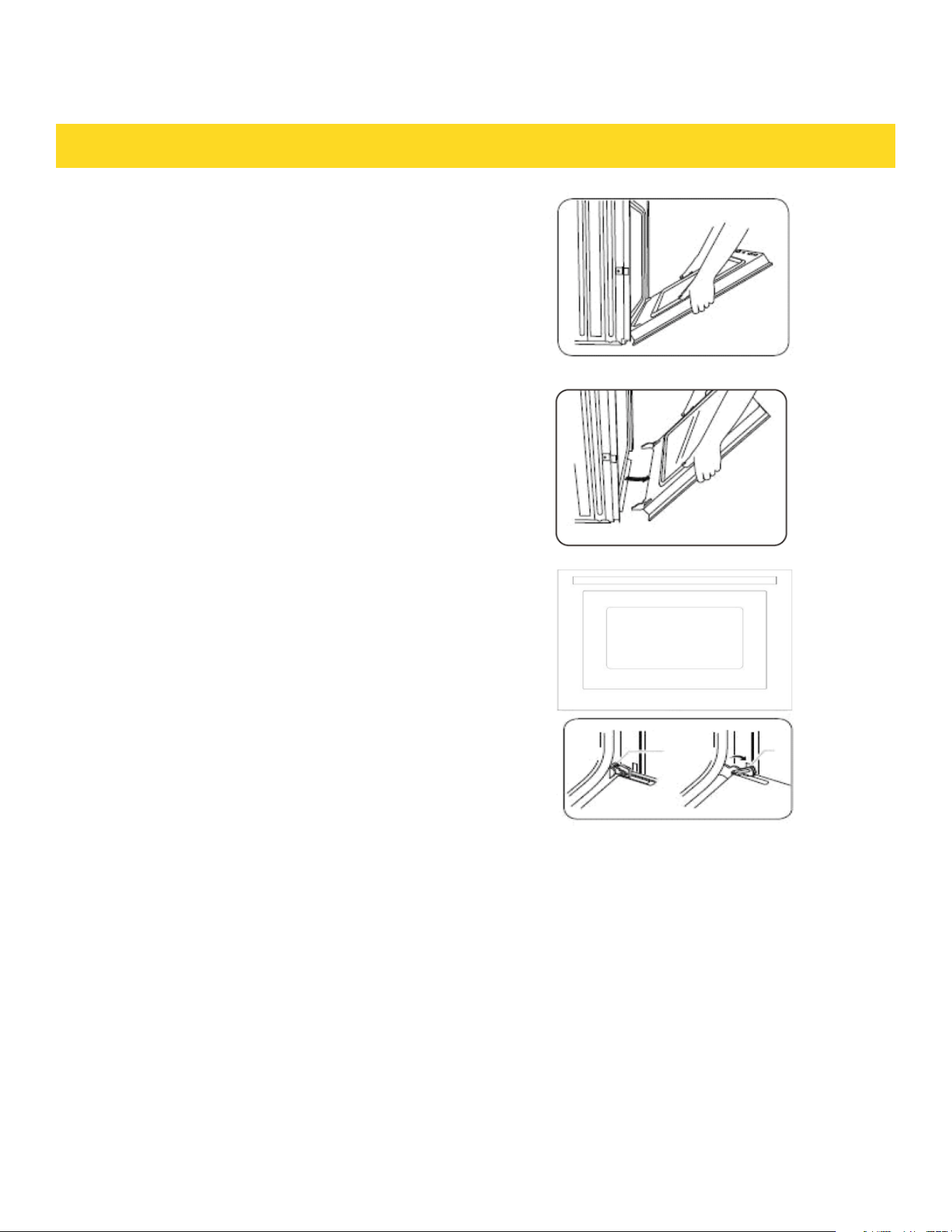
REMOVING THE OVEN DOOR
CAUTION
Remark:
a. When E5, E6, E7 appears, you can press Cancel to
cancel.
b. E9 is the power supply frequency monitoring: the
power supply frequency range is between
(38Hz~75Hz), each monitoring time is 5 minutes, if
the frequency continuously exceeds the range within 5
minutes, it is a fault; if there is no AC signal for 5S
continuously, the fault.
c. In the event of E1, E3, E8 failure, you can long press
the (START+Num9) key 3S to enter the door lock reset
action: the door lock motor turns 3S to stop 2S, and
stops after 12 consecutive times, press the Cancel
button to stop.
d. The door is very heavy. Be careful when removing and
lifting the door.
e. Do not lift the door by the handle.Use two hands to
remove an oven door. For double ovens, repeat the
process for each door.· Prior to removing the oven
door,prepare a surface where you will place covered
with a soft blanket. You can also use the corner posts
from your packaging material.· Open the oven door.
23
· Locate the oven door hinge locks in both
corners of the oven door, and then rotate the
hinge locks toward the oven door to the unlocked
position. If the door hinge lock is not rotated fully
(see illustration B on the left for an example of full
rotation), you will not be able to
remove the door properly.
· Oven door hinge lock in
· locked position Oven door hinge lock in unlocked
position
· Partially close the door to engage the door latch
locks.
The door will stop at this point.
· Using two hands, grasp the edges of the oven door.
Lift and pull the oven door toward you and remove.
You may need to gently shift the door from side to
side as you pull.
· Set the oven door aside on the prepared covered
work surface with the oven door resting on its
handle.
TROUBLESHOOTING GUIDE
REPLACING THE OVEN DOOR
· Hold the door firmly in an approximately open
position.
· Insert the hinge tongues into the slots making sure
that the notches on both sides drop into place as
shown.
· Open the door fully as shown.
· Fully close the levers on the left and right hinges,
as shown, then close the door.
24
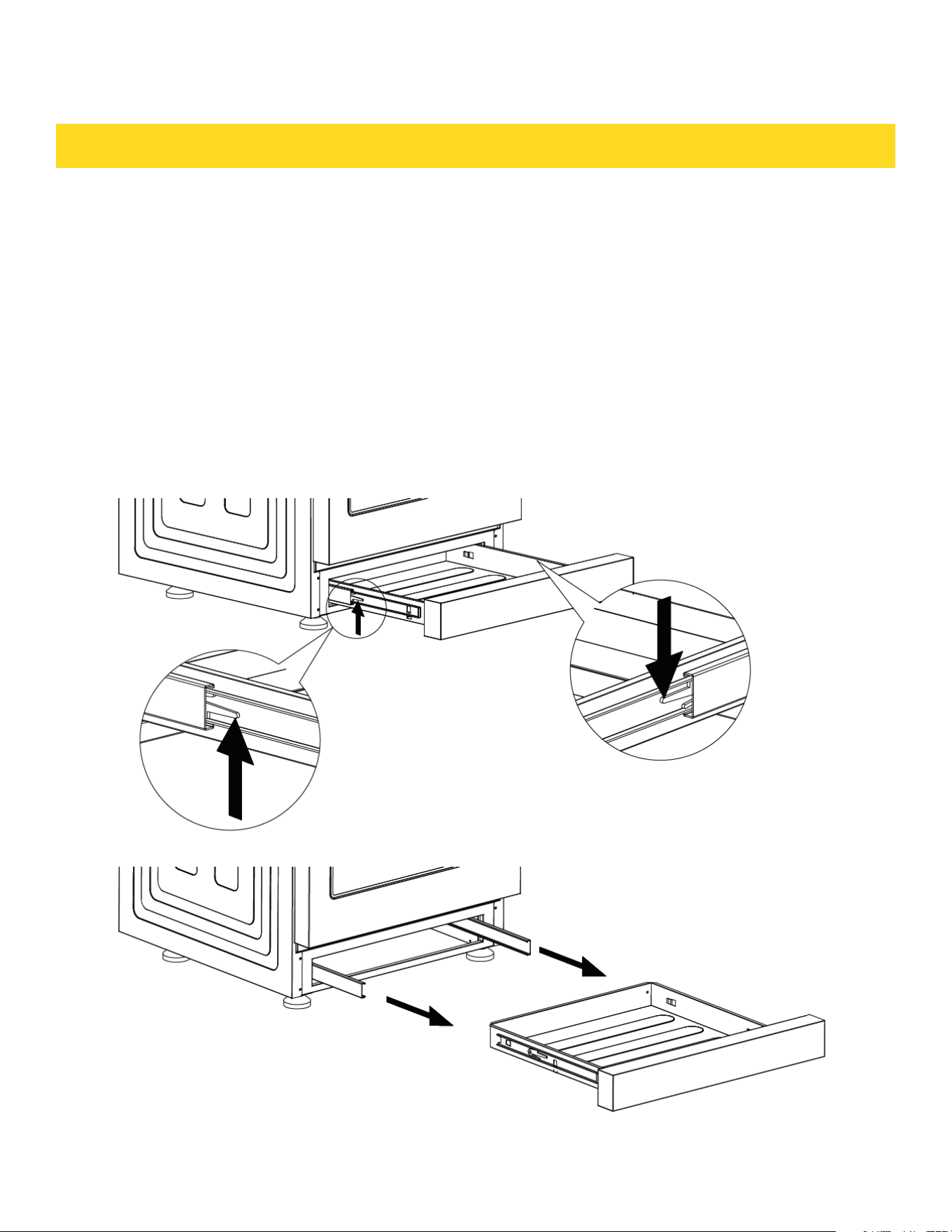
TROUBLESHOOTING GUIDE
REMOVING AND REPLACING THE STORAGE DRAWER
The storage drawer is a good place to store cookware and bakeware. Do not store
plastics or flammable material in the drawer. Clean the storage drawer with a damp
cloth or sponge. Never use harsh abrasives or scouring pads.
How to remove the storage drawer
a. Pull the drawer straight out until it stops.
b. Tilt the front of the drawer upward and pull the drawer out of your range.
How to replacing the storage drawer
a. Rest the drawer slides on the range stops.
b. Push directly backward until the drawer drops into place.
c. Slide the drawer all the way into the oven
24
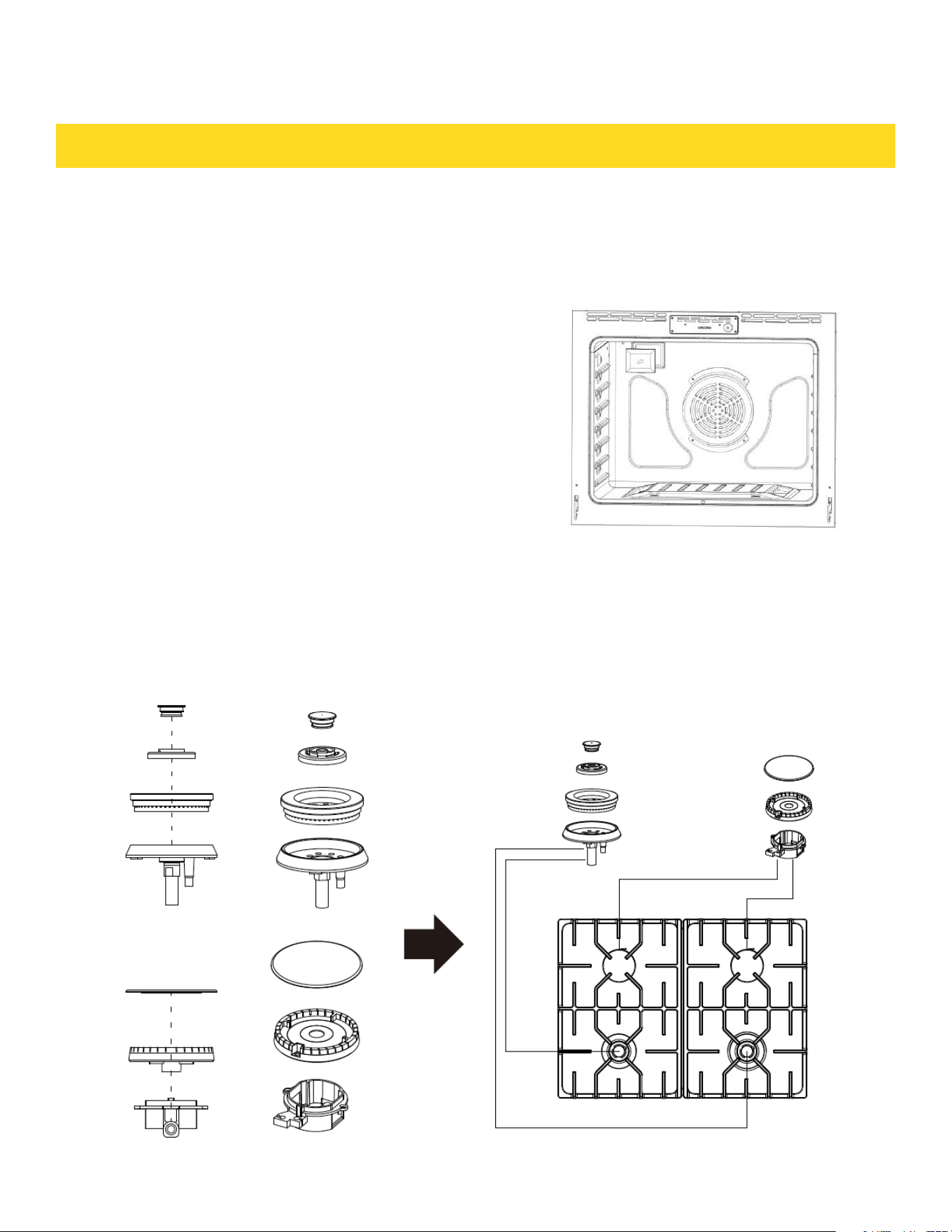
TROUBLESHOOTING GUIDE
Replacing the oven light
a. Make sure the oven and the bulb are cool.
b. Unplug the range or disconnect the power.
c. Turn the glass bulb cover in the back of the oven
counterclockwise to remove.
d. Turn the bulb counterclockwise to remove it from its socket.
e. Insert a new 40 watt appliance bulb,and then turn it clockwise
to tighten.Replace the bulb cover by turning clockwise.
f. Plug in the range or reconnect the power.
CAUTION
Before changing your oven light bulb,disconnect the
electrical power to the range at the main fuse or
circuit breaker panel.Make sure the oven and the bulb
are cool.
REPLACING THE BURNER PARTS
This diagram shows how to replace the burner parts. When replacing the burners, make sure that the
two locating pins on the bottom of the brass flame spreader are properly aligned with the locating pin
holes on the top of the simmer ring. Incorrect alignment will produce a potentially dangerous flame and
poor burner performance such as sparking/clicking.
25

WARRANTY
25
Warranty and Service
This product has been manufactured by Thor Group, 4651 E Airport Drive, California 91761
For Customer Service, please call (877) 288 - 8099
For the most up to date warranty and service policy, please refer to our website
WWW.THORKITCHEN.COM/WARRANTY-REGISTRATION
For in-warranty service requests, please visit our website at
WWW.THORKITCHEN.COM/SERVICE
Please Note: You must provide proof of purchase or installation date for any in-warranty
service requests
WARRANTY REGISTRATION
Scan theQR code or visit
thorkitchen.com/warranty
Input your product info
and select register
You’re done.
Let’s get cookin’.
You chose THOR Kitchen to enhance your culinary journey and
we’re stoked to have you in the club. Think of it as a secret
society of really savvy people, such as yourself, choosing
professional power and performance at an affordable price.
Register your product by following the steps below.
WELCOME
TO THE CLUB
WARRANTY NEED PARTS?