User Guide
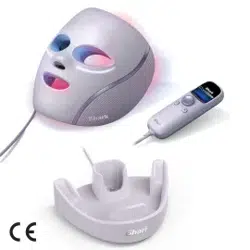
Cold therapy + LED Anti-Ageing & Skin Clearing Mask
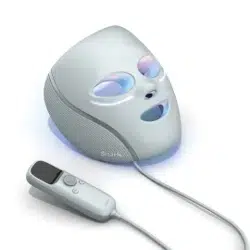
Under-Eye Cooling + LED Anti-Ageing & Blemish Repair Mask
2
SCAN TO GET STARTED.
Or visit sharkbeauty.co.uk for more.
TABLE OF CONTENTS
GET TO KNOW YOUR SHARK CRYOGLOW MASK ………………………………………………………… 3
WHAT’S IN THE BOX? ……………………………………………………………………………………………………… 3
CONTRAINDICATIONS …………………………………………………………………………………………………… 4
WARNINGS & PRECAUTIONS ………………………………………………………………………………………… 6
GETTING STARTED ………………………………………………………………………………………………………… 8
FITTING THE MASK ………………………………………………………………………………………………………… 9
GET TO KNOW THE REMOTE ………………………………………………………………………………………… 10
REMOTE SETTINGS ………………………………………………………………………………………………………… 11
LED SKIN ROUTINES ……………………………………………………………………………………………………… 12
UNDER-EYE COOLING …………………………………………………………………………………………………… 13
LEDS AND HOW THEY WORK ………………………………………………………………………………………… 14
UNDER-EYE CHILL PADS AND HOW THEY WORK ………………………………………………………… 15
RUNNING A SESSION ……………………………………………………………………………………………………… 16
SELECTING A ROUTINE …………………………………………………………………………………………………… 17
COOLING DURING A ROUTINE ……………………………………………………………………………………… 18
SELECTING UNDER-EYE COOLING ………………………………………………………………………………… 19
TIPS …………………………………………………………………………………………………………………………………… 20
PROGRESS TRACKER ……………………………………………………………………………………………………… 21
SETTINGS, MASK CARE & BATTERY CHARGING …………………………………………………………… 22
FAQ …………………………………………………………………………………………………………………………………… 23
TROUBLESHOOTING ……………………………………………………………………………………………………… 24
ERROR MESSAGES …………………………………………………………………………………………………………… 26
MANUFACTURER’S GUARANTEE …………………………………………………………………………………… 27
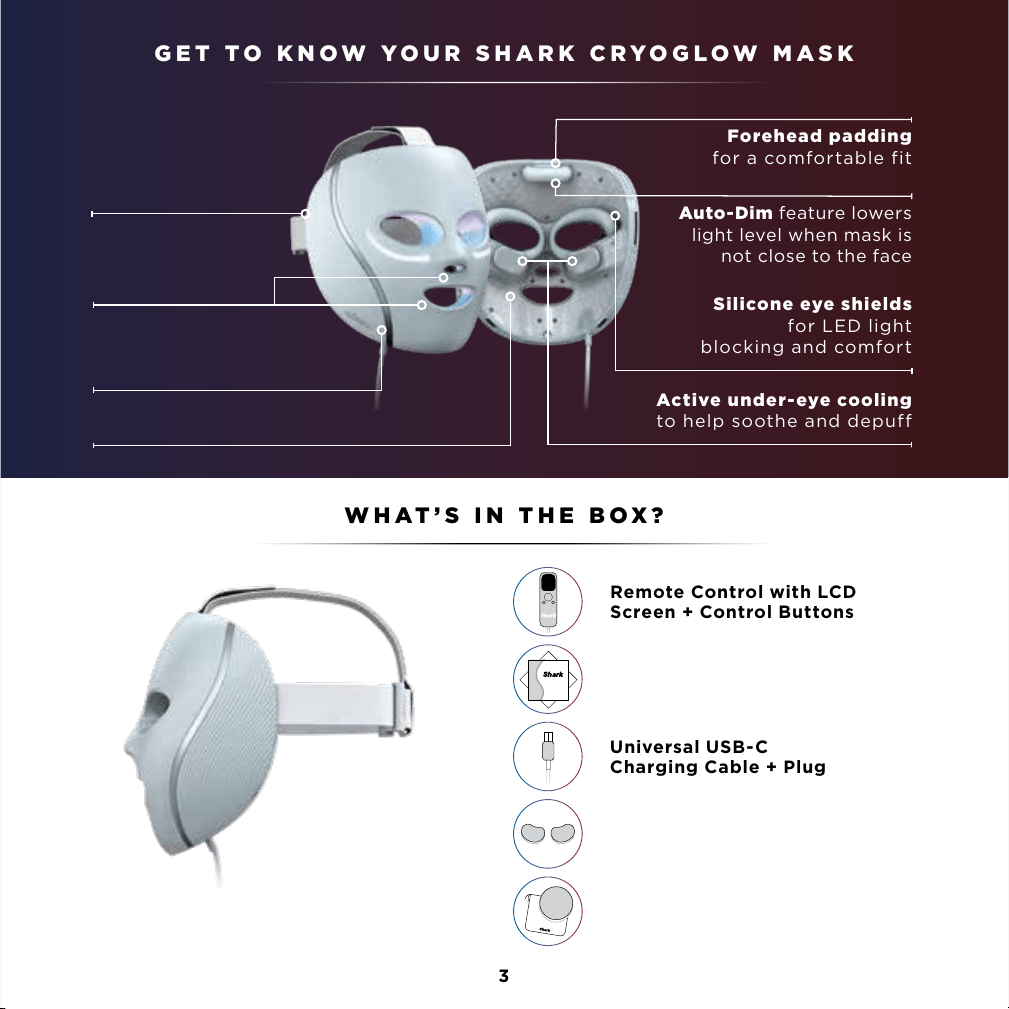
WHAT’S IN THE BOX?
32
GET TO KNOW YOUR SHARK CRYOGLOW MASK
Active under-eye cooling
to help soothe and depuff
Silicone eye shields
for LED light
blocking and comfort
Forehead padding
for a comfortable fit
Auto-Dim feature lowers
light level when mask is
not close to the face
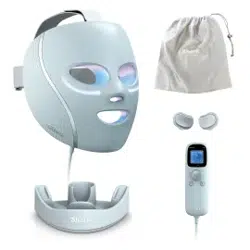
WHAT’S IN THE BOX?
Universal USB-C
Charging Cable + Plug
Remote Control with LCD
Screen + Control Buttons
Quick Start Guide
+ Skincare Guide
Storage Bag + Stand*
Optional clip-on chill pads
(*accessories may vary by model)
Shark CryoGlow Mask + Straps
Pre-Assembled
Mask and accessory colours may vary by model
Adjustable straps
designed for optimal
fit and comfort
Mouth and
nose holes for
breathability
Shield design for
even LED coverage
480 LEDs for broad, even coverage
4
Do not use the Shark CryoGlow Mask if you are taking:
Immediately stop using the device if you experience any discomfort.
Do not use the Shark CryoGlow Mask if you have any of the following medical conditions:
Do not use the Shark CryoGlow Mask if you have any of the following conditions on the
face, hairline, ears, or neck:
• Medication or supplements that cause sensitivity to light (photosensitivity), for
example, medications for severe inflammatory acne (i.e. isotretinoin or doxycycline).
• Retinal and/or macular disease, ocular
albinism, or any eye condition that
causes sensitivity to light
• Pregnant, nursing, or maybe pregnant
• Pacemaker or other electronic
implanted device
• Implants in the face
• Lack of sensation (e.g., numbness)
• Light sensitive skin disorder (e.g.,
lupus, porphyria)
• Recent facial surgery (until you have
been cleared by your doctor)
• Suspicious lesions or skin cancer
• Eczema
• Psoriasis
• Irregularly shaped, new, or changing
brown spots
• Birthmarks
• Broken skin, skin rash, or blisters
• Extreme light sensitivity of the eyes
(i.e., photophobia)
• Light-induced headaches
• Albinism
• Melasma (i.e., condition that causes
patches and spots)
• Sensitivity or allergy to plastic,
aluminum, or self-fastening material
• Tissue inflammation
• Skin infection, cold sore, or warts
• Active current outbreak of herpes
simplex virus (cold sores)
• History of herpes outbreaks without
receiving preventative treatment
• Facial treatment where the skin has
not fully healed, including neurotoxin,
dermal filler, micro needling, laser, or
chemical peel
CONTRAINDICATIONS
5
Do not apply Shark CryoGlow Mask’s cooling routines on the eyeball or upper eyelid.
Do not use the Shark CryoGlow Mask’s cooling routines if you have any of the following
medical conditions:
PRECAUTIONS: Consult a medical professional before using the Shark CryoGlow Mask if:
• Cold hypersensitivity
• Cold urticaria (i.e., hives brought on by cold temperatures)
• Circulatory insufficiency
• You have bruising on the face.
• You are experiencing skin sensitivity or irritation with retinol or benzoyl peroxide.
CONTRAINDICATIONS, CONTINUED
6
To reduce the risk of fire, thermal and chemical burns, electric shock, serious injury, or death, follow the precautions in
this section and the procedures in this manual. The remote control contains a rechargeable lithium-ion battery.
If damaged, the battery can overheat, catch fire, or leak a chemical that can burn skin and eyes.
SUPERVISION AND INTENDED USERS:
• Do not use if any of the conditions in “Contraindications” (pages 4–5) apply to you.
• Do not leave the equipment unattended when it is powered on.
• This equipment is not intended for use by persons with reduced physical, sensory, or mental
capabilities, or lack of experience and knowledge, unless they have been given supervision or
instruction concerning use of the equipment. Please refer to the contraindications before use.
• This equipment is not intended for use by children under 18 years old. Children should be supervised
to ensure they do not play with the equipment.
• To reduce the risk of entanglement and potential strangulation, keep cords out of reach of children.
• Small parts can be inhaled or swallowed by children—if any small parts break o or detach from the
product, dispose of safely.
• This equipment is only intended to be used by one person.
KEEP DRY.
• Keep the remote control dry. If it gets wet, do not charge or use—the battery may be damaged.
Follow disposal instructions.
• Water and electricity are a dangerous combination!
• Do not use this equipment in wet surroundings (e.g., in a bathtub, shower, or swimming pool).
• Do not let water run into the device.
• It is very important to keep the device dry. Any contact with water could damage the device.
• Do not use or store the device in the bathroom or near water.
• Do not charge or use the device if it has been left outdoors.
CHARGE SAFELY.
• Follow the charger manufacturer’s instructions.
• Only charge the equipment with the provided USB-C cable and charging brick: Dongguan Yinli
Electronics, model YLJXA-T050200. Do not use any other USB-C cable or charging brick.
• Check if the voltage indicated on the equipment corresponds to the local mains voltage before you
connect the equipment to avoid risk of electrocution or permanent damage to the equipment.
• If the wall socket used to power the equipment has poor connections, the plug will become hot. Make
sure you plug the equipment into a properly installed wall socket.
• Do not charge the device in the bathroom or near water,
• Do not charge the remote after contact with water.
• Always position the equipment so the charger is easy to reach while charging.
• Store USB-C cable properly after charging.
PROTECT THE REMOTE’S BATTERY FROM DAMAGE.
• Do not try to open the remote or replace the battery.
• Do not crush, drop, or damage the remote.
• Stop use or disconnect charging cable if the remote feels unusually hot or emits smoke or a bad smell.
• If liquid leaks from the remote, avoid contact. If liquid touches skin or eyes, wash with large amounts
of water and seek medical advice.
• Follow disposal instructions.
WARNINGS & PRECAUTIONS WARNINGS & PRECAUTIONS, CONTINUED
7
TRANSPORT AND STORAGE CONDITIONS
• Only transport and store the device in the following environmental conditions:
• Keep between -20°C (-4°F) and 45°C (113°F). For storage longer than 3 months, keep between 0°C (32°F) and
25°C (77°F).
• Keep between 5°C (41°F) to 32°C (89.6°F) at a relative humidity up to 85%, non-condensing.
• Keep between 35°C (95°F) to 60°C (140°F) at a water vapour pressure up to 50 hPa.
USE SAF ELY.
• The mask limits your vision. Do not wear while doing anything (such as driving) where limited vision poses a risk.
• CAUTION: The light emitted from this device may be harmful to the eyes. Infrared emitted from this
device may cause eye irritation. Do not stare at the light source.
• Do not use device when it has been left outdoors.
• If you are travelling by air, the mask should be carried in carry-on baggage and not
checked in. The device must be completely switched o.
• Do not use the mask outdoors. Only use the mask indoors under the following environmental conditions:
• Temperature: between 10°C and 30°C.
• A relative humidity range of 15% to 90%, non-condensing, but not requiring a water vapour
partial pressure greater than 50 hPa.
• An atmospheric pressure range of 700 hPa to 1060 hPa.
• Skin dryness, irritation, or redness may occur when using an LED routine. Apply a facial moisturiser if dryness occurs.
• To avoid the risk of temporary dry skin or hyperpigmentation, do not run back-to-back LED routines.
CHECK THE PRODUCT FOR DAMAGE BEFORE EACH USE.
• Inspect the inside of the mask and strap for cleanliness, cracks, or sharp edges.
• Check the chill pads for signs of corrosion.
• These conditions can irritate or damage your skin.
CLEAN PROPERLY.
• Clean the mask with a damp cloth.
• Avoid using chemical or alcohol based cleaners.
DO NOT REPAIR OR MODIFY.
• Do not attempt to repair or modify the mask or remote.
• Do not crush or dispose of in fire.
DISPOSAL INSERT.
• Dispose of the device according to local laws and requirements surrounding lithium-ion battery disposal.
POTENTIAL ELECTROMAGNETIC INTERFERENCE.
• WARNING: Use of this equipment adjacent to or stacked with other equipment should be avoided
because it could result in improper operation. If such use is necessary, this equipment and the other
equipment should be observed to verify that they are operating normally.
• WARNING: Use of accessories, transducers and cables other than those specified or provided by the
manufacturer of this equipment could result in increased electromagnetic emissions or decreased
electromagnetic immunity of this equipment and result in improper operation.
• WARNING: Portable radio frequency communications equipment (including peripherals such as antenna cables
and external antennas) should be used no closer than 12 inches (30 CM) to any part of the mask system, including
cables specified by the manufacturer. Otherwise, degradation of the performance of this equipment could result.
• WARNING: Do not leave mask exposed in direct sunlight.
WARNINGS & PRECAUTIONS, CONTINUED
8
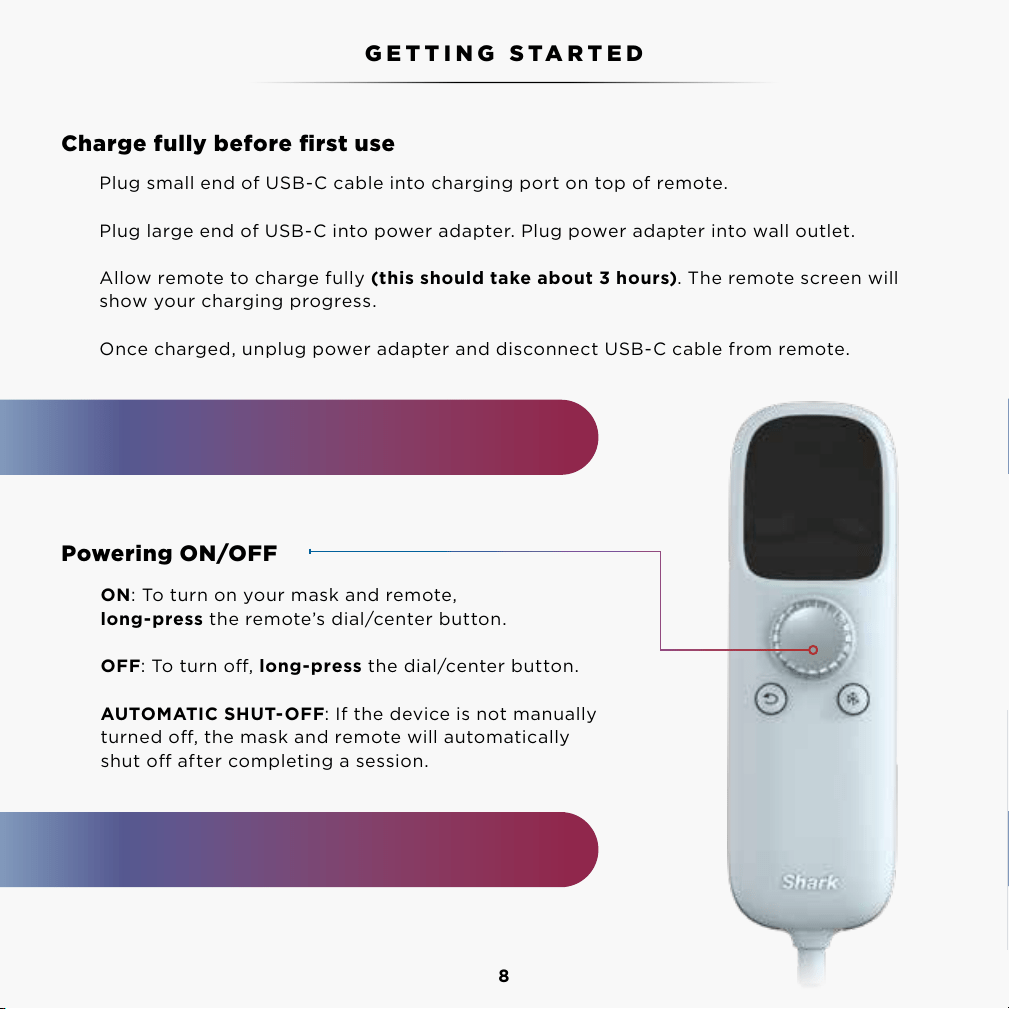
Plug small end of USB-C cable into charging port on top of remote.
Plug large end of USB-C into power adapter. Plug power adapter into wall outlet.
Allow remote to charge fully (this should take about 3 hours). The remote screen will
show your charging progress.
Once charged, unplug power adapter and disconnect USB-C cable from remote.
ON: To turn on your mask and remote,
long-press the remote’s dial/center button.
OFF: To turn o, long-press the dial/center button.
AUTOMATIC SHUT-OFF: If the device is not manually
turned o, the mask and remote will automatically
shut o after completing a session.
Charge fully before first use
Powering ON/OFF
GETTING STARTED
NOTE: Unplug before using face mask. Mask
will not work when plugged into wall outlet.
The mask fans will continue to run for 60 seconds
while the mask is powering down after a session.
Please read the Warnings, Instructions, and Countraindications before first use.
9
Demo video will run upon first use of the remote, please watch for further fit
and comfort instructions. You can also rewatch this video by heading to settings.
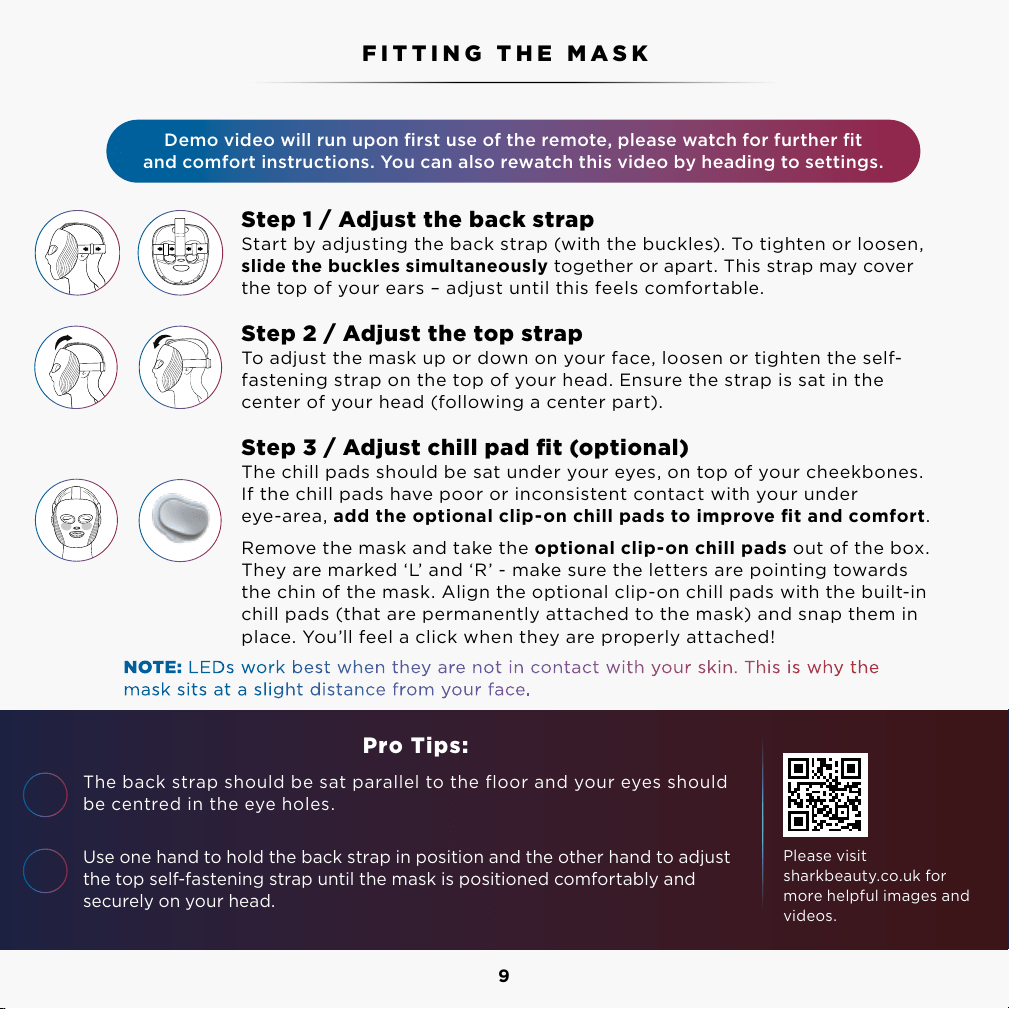
Step 1 / Adjust the back strap
Start by adjusting the back strap (with the buckles). To tighten or loosen,
slide the buckles simultaneously together or apart. This strap may cover
the top of your ears – adjust until this feels comfortable.
Step 2 / Adjust the top strap
To adjust the mask up or down on your face, loosen or tighten the self-
fastening strap on the top of your head. Ensure the strap is sat in the
center of your head (following a center part).
Step 3 / Adjust chill pad fit (optional)
The chill pads should be sat under your eyes, on top of your cheekbones.
If the chill pads have poor or inconsistent contact with your under
eye-area, add the optional clip-on chill pads to improve fit and comfort.
Remove the mask and take the optional clip-on chill pads out of the box.
They are marked ‘L’ and ‘R’ - make sure the letters are pointing towards
the chin of the mask. Align the optional clip-on chill pads with the built-in
chill pads (that are permanently attached to the mask) and snap them in
place. You’ll feel a click when they are properly attached!
Pro Tips:
The back strap should be sat parallel to the floor and your eyes should
be centred in the eye holes.
Use one hand to hold the back strap in position and the other hand to adjust
the top self-fastening strap until the mask is positioned comfortably and
securely on your head.
FITTING THE MASK
Please visit
sharkbeauty.co.uk for
more helpful images and
videos.
Please read the Warnings, Instructions, and Countraindications before first use.
1
2
Tighten Loosen
NOTE: LEDs work best when they are not in contact with your skin. This is why the
mask sits at a slight distance from your face.
10
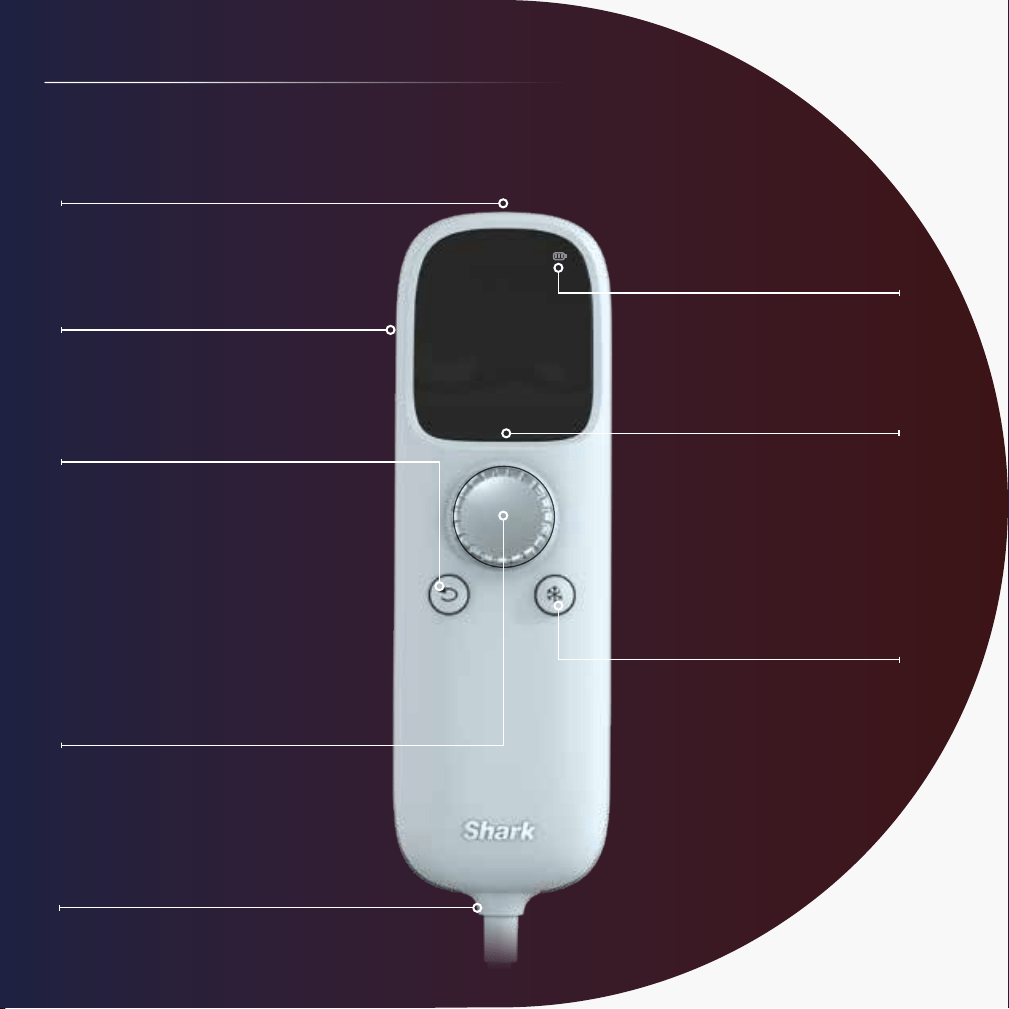
USB-Charging Port
Battery Life
Appears on the main menu
and active routine screen.
Dial (Power/Select)
Long-press center of dial
to turn the mask on or off.
Rotate dial left or right
to navigate the screen.
A quick press selects menu
items or goes to the next screen.
Mask Connection Cord
Back Button
Press to go to
previous screen.
Belt Clip
Use to attach to clothing
for a hands-free experience.
LCD Display
Main menu is
displayed currently.
Chill Button
Turn on/off/adjust cooling
anytime during routines.
GET TO KNOW THE REMOTE REMOTE SETTINGS
11
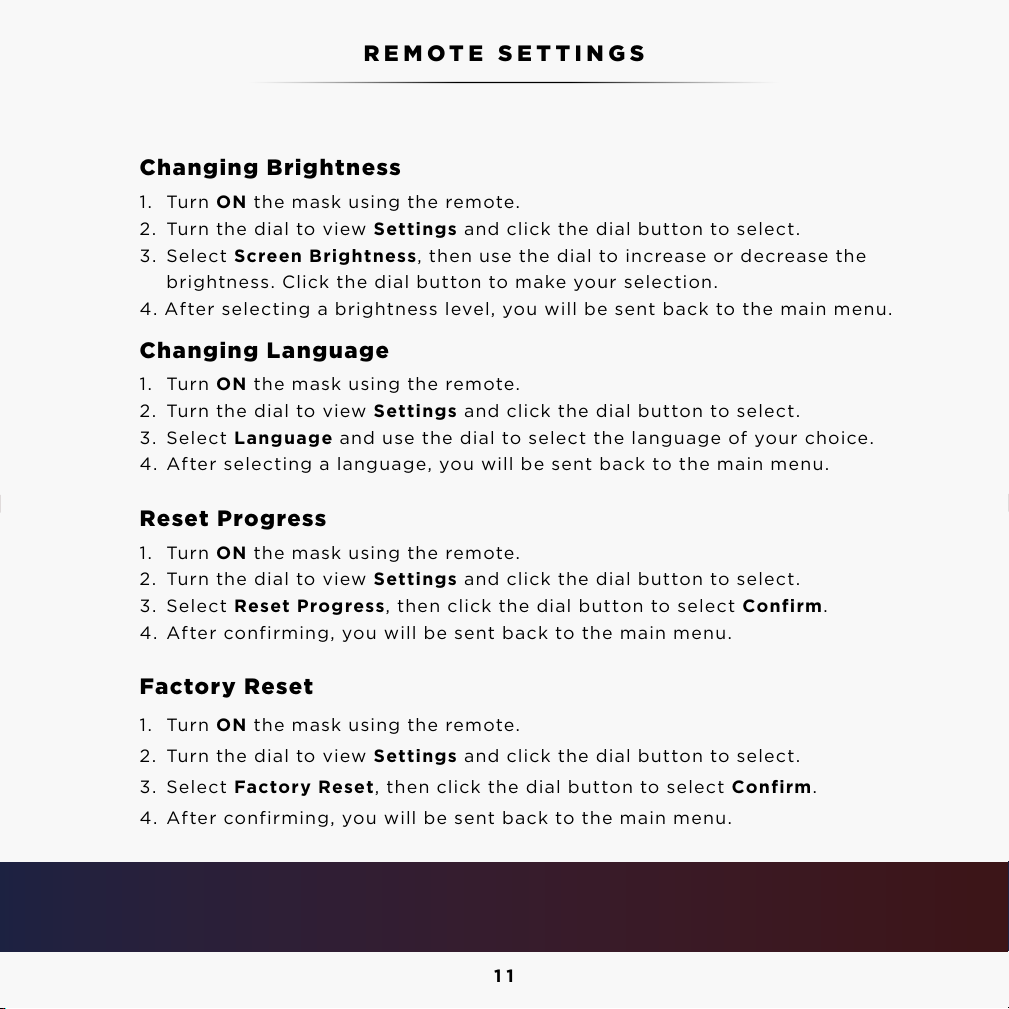
Changing Brightness
1. Turn ON the mask using the remote.
2. Turn the dial to view Settings and click the dial button to select.
3. Select Screen Brightness, then use the dial to increase or decrease the
brightness. Click the dial button to make your selection.
4. After selecting a brightness level, you will be sent back to the main menu.
Changing Language
1. Turn ON the mask using the remote.
2. Turn the dial to view Settings and click the dial button to select.
3. Select Language and use the dial to select the language of your choice.
4. After selecting a language, you will be sent back to the main menu.
Reset Progress
1. Turn ON the mask using the remote.
2. Turn the dial to view Settings and click the dial button to select.
3. Select Reset Progress, then click the dial button to select Confirm.
4. After confirming, you will be sent back to the main menu.
Factory Reset
1. Turn ON the mask using the remote.
2. Turn the dial to view Settings and click the dial button to select.
3. Select Factory Reset, then click the dial button to select Confirm.
4. After confirming, you will be sent back to the main menu.
GET TO KNOW THE REMOTE REMOTE SETTINGS
Pro Tips:
You can also replay the demo video on the remote and access our support page through settings!
12
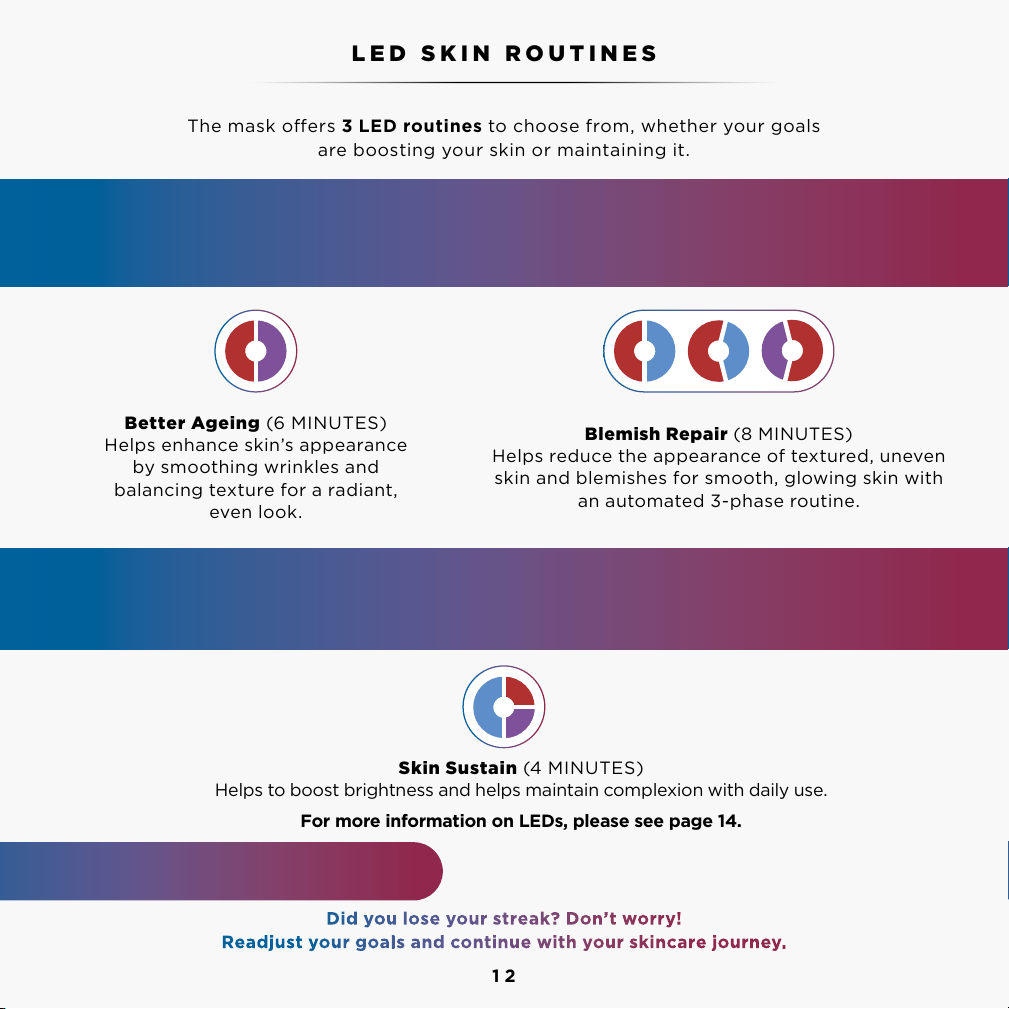
The mask oers 3 LED routines to choose from, whether your goals
are boosting your skin or maintaining it.
Better Ageing (6 MINUTES)
Helps enhance skin’s appearance
by smoothing wrinkles and
balancing texture for a radiant,
even look.
Blemish Repair (8 MINUTES)
Helps reduce the appearance of textured, uneven
skin and blemishes for smooth, glowing skin with
an automated 3-phase routine.
Skin Sustain (4 MINUTES)
Helps to boost brightness and helps maintain complexion with daily use.
For more information on LEDs, please see page 14.
LED SKIN ROUTINES
MAINTENANCE ROUTINE
Once you have achieved your target results using a boosting routine for a minimum of
8 weeks, switch to using Skin Sustain once daily to help maintain your results.
BOOSTING ROUTINES
For best results, select the Better Ageing or Blemish Repair routine below, and use your
selection once daily for a minimum of 8 weeks.
1 2 3
No UV light is emitted from this mask.
Did you lose your streak? Don’t worry!
Readjust your goals and continue with your skincare journey.
13
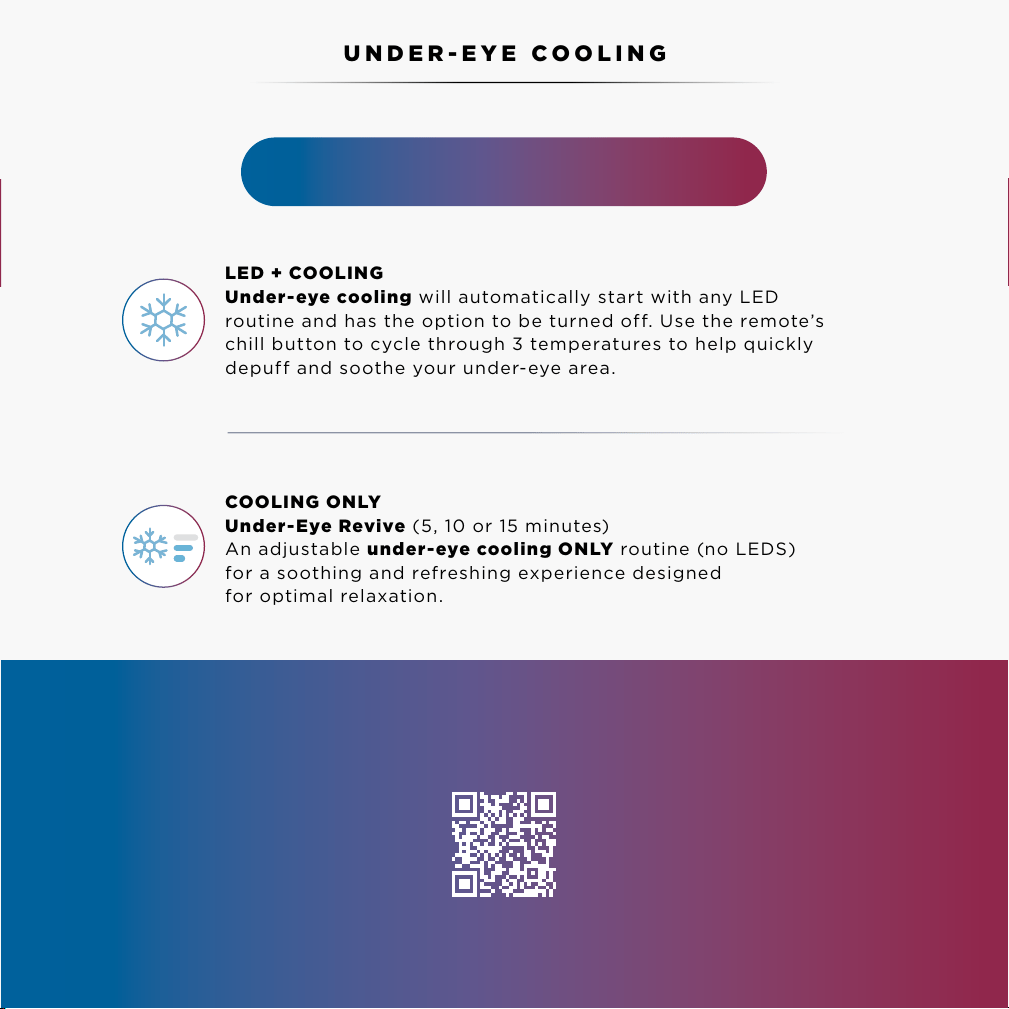
LED + COOLING
Under-eye cooling will automatically start with any LED
routine and has the option to be turned off. Use the remote’s
chill button to cycle through 3 temperatures to help quickly
depuff and soothe your under-eye area.
COOLING ONLY
Under-Eye Revive (5, 10 or 15 minutes)
An adjustable under-eye cooling ONLY routine (no LEDS)
for a soothing and refreshing experience designed
for optimal relaxation.
UNDER-EYE COOLING
Use cooling in the morning to help depu your
under-eyes and in the evening to relax!
Did you lose your streak? Don’t worry!
Readjust your goals and continue with your skincare journey.
FIND YOUR PERFECT ROUTINE
Scan the QR Code to take our quiz to find
the best routine for your skin concerns!
13
14
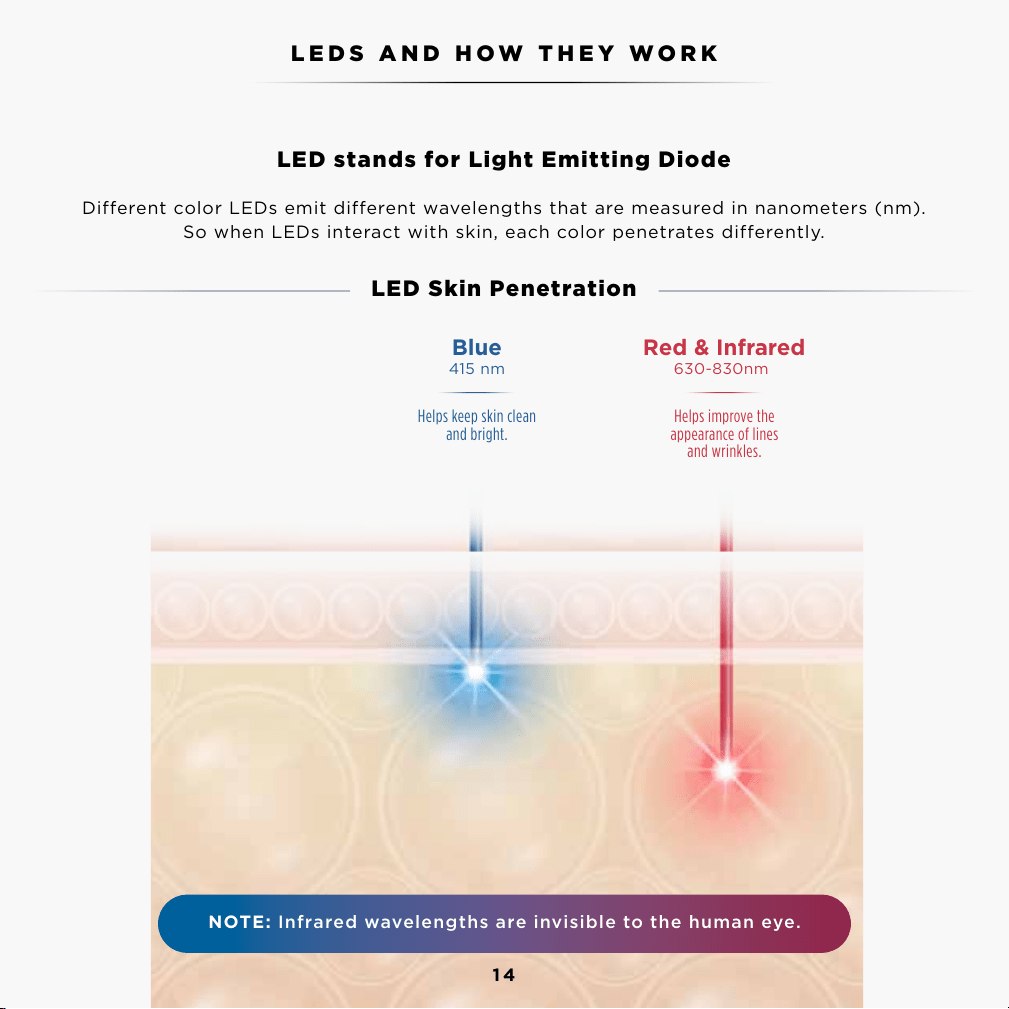
LED stands for Light Emitting Diode
Different color LEDs emit different wavelengths that are measured in nanometers (nm).
So when LEDs interact with skin, each color penetrates differently.
LED Skin Penetration
LEDS AND HOW THEY WORK
The under-eye chill pads use the Peltier Effect.
14
NOTE: Infrared wavelengths are invisible to the human eye.
630-830nm
Red & Infrared
Helps improve the
appearance of lines
and wrinkles.
415 nm
Blue
Helps keep skin clean
and bright.
LED WAVELENGTHS
& TOPICAL BENEFITS
DERMIS
EPIDERMIS
15
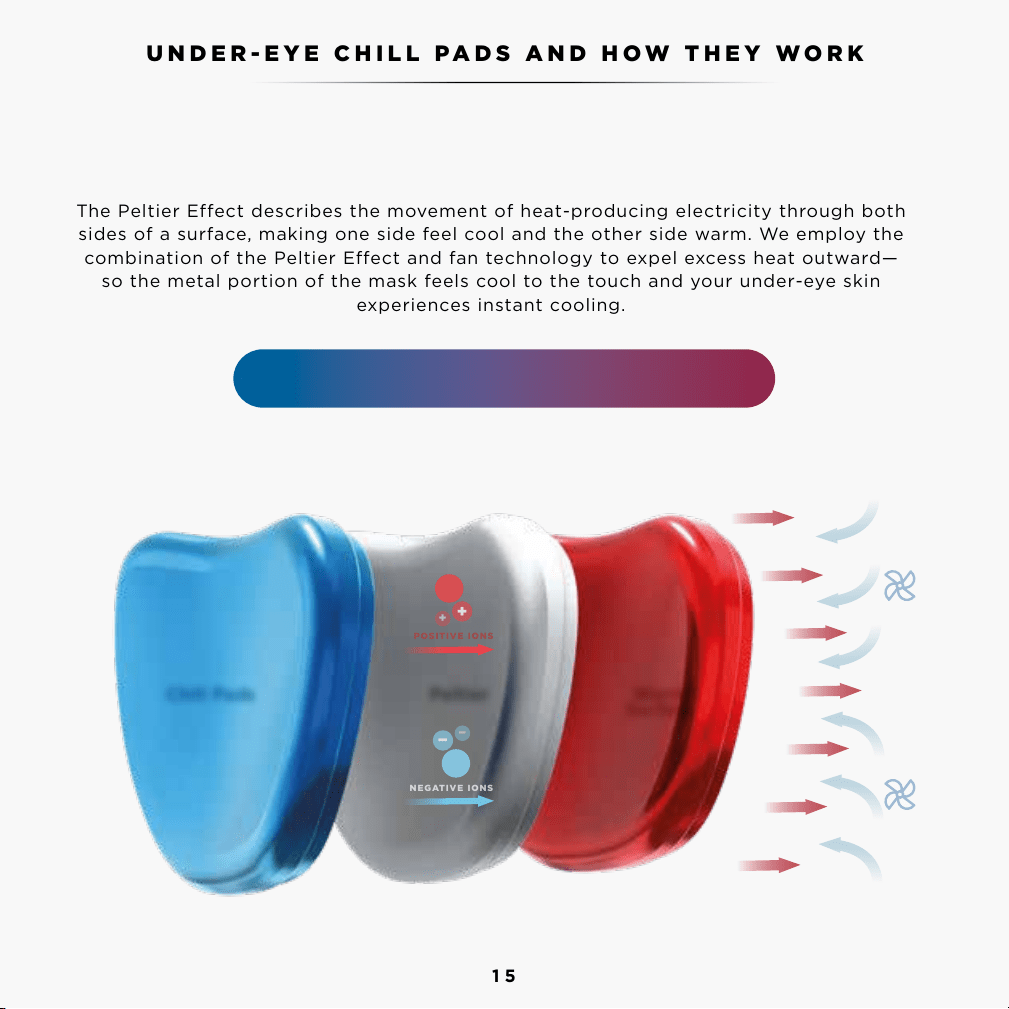
The Peltier Effect describes the movement of heat-producing electricity through both
sides of a surface, making one side feel cool and the other side warm. We employ the
combination of the Peltier Effect and fan technology to expel excess heat outward—
so the metal portion of the mask feels cool to the touch and your under-eye skin
experiences instant cooling.
UNDER-EYE CHILL PADS AND HOW THEY WORK
The under-eye chill pads use the Peltier Effect.
InstaChill Technology uses the Peltier Effect.
Chill Pads Warm
Surface
Peltier
−
−
−
+
+
+
POSITIVE IONS
NEGATIVE IONS
16
RUNNING A SESSION
Step 1 / Put on the mask
Begin with a clean, bare and dry face.
Step 2 / Adjust the back and top straps - full instructions on page 11.
Adjust the straps to position mask comfortably on your face. Slide buckles simultaneously
to adjust the back strap. To adjust the positioning of the back strap on your head, release
the top self-fastening strap and gently pull the back strap so that it sits parallel to the floor.
Step 3 / Power on
Turn on the mask by pressing and holding the remote’s dial button. On first use, a short demo video
on the remote screen, will show you how to fit the mask and interact with the remote.
Step 4 / Select and run a routine
Use the remote to choose a routine and begin by selecting “Start.” Under-eye cooling will
automatically turn on. Adjust the under-eye chill pads’ intensity to your desired level with the remote’s
chill button.
Step 5 / Remove and clean the mask
When your session is complete, remove the mask. Fans will run for 60 seconds to power down the chill
pads, then the mask will shut o automatically. Once you have taken o the mask, clean the mask with
a damp cloth. Continue with your daily skincare routine.
Note: Please read the Warnings, Instructions, and Contraindications before first use.
Make sure the mask has been fully charged before first use (this could take up to 3 hours).
How to fit Shark CryoGlow into your routine
Take the time with your first few uses to experiment with how Shark CryoGlow can best fit into your
existing routine. Give it a try in the morning to help you feel fresh for the day. If this doesn’t work,
try it in the evening to help you wind down and relax when you have more time.
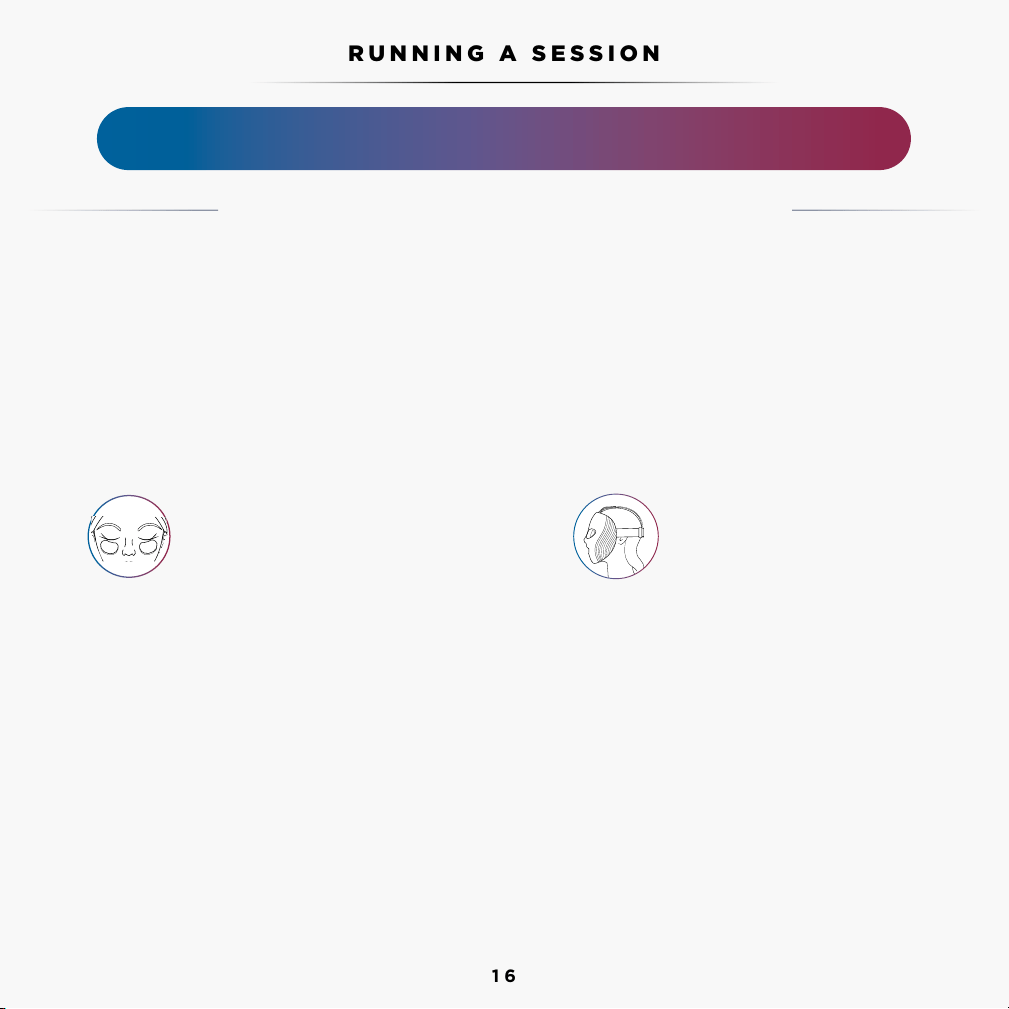
Chill pads should be positioned under the eyes,
making light contact with your skin. You may
need to attach the optional clip-on chill pads
available in the box to achieve best fit.
The top strap should be
positioned in the centre of
your head whilst the back strap
should be parallel to the floor.
17
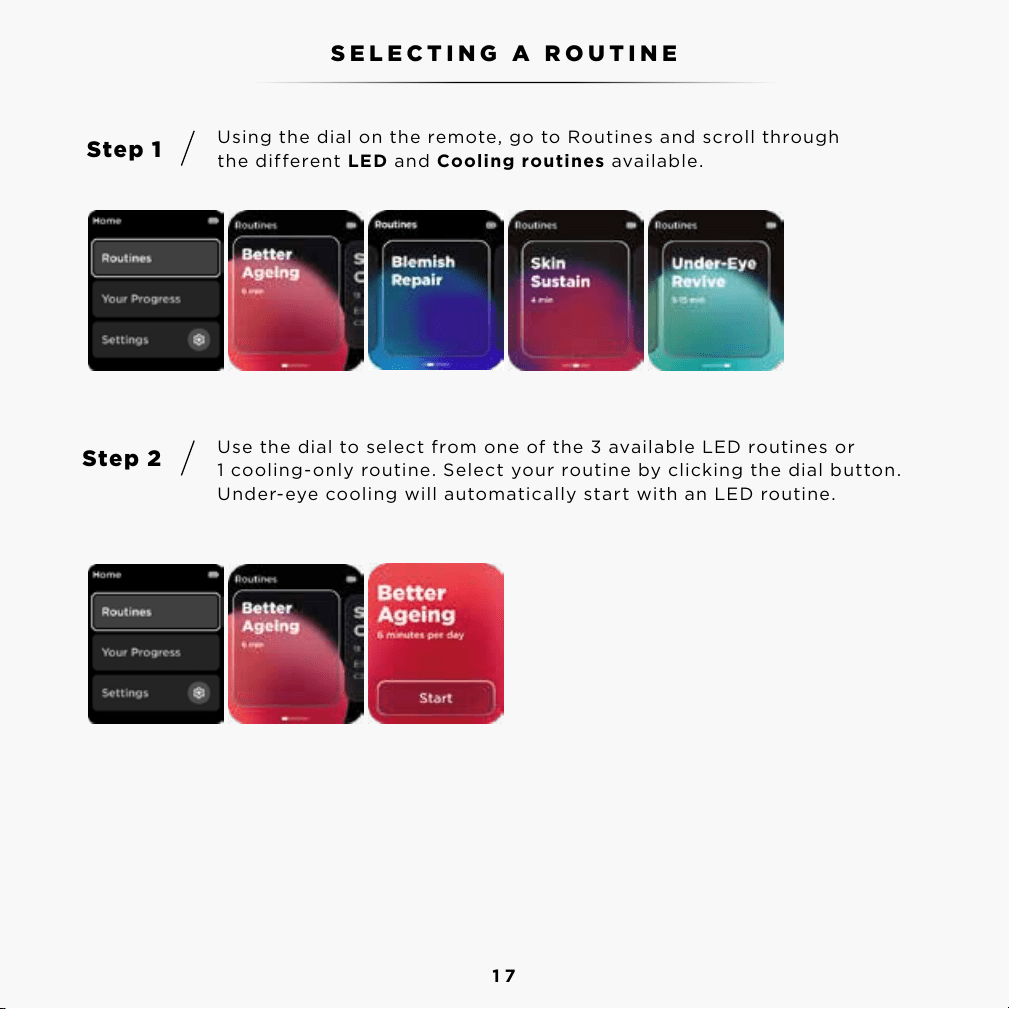
Using the dial on the remote, go to Routines and scroll through
the different LED and Cooling routines available.
Use the dial to select from one of the 3 available LED routines or
1 cooling-only routine. Select your routine by clicking the dial button.
Under-eye cooling will automatically start with an LED routine.
Step 1
Step 2
SELECTING A ROUTINE
18
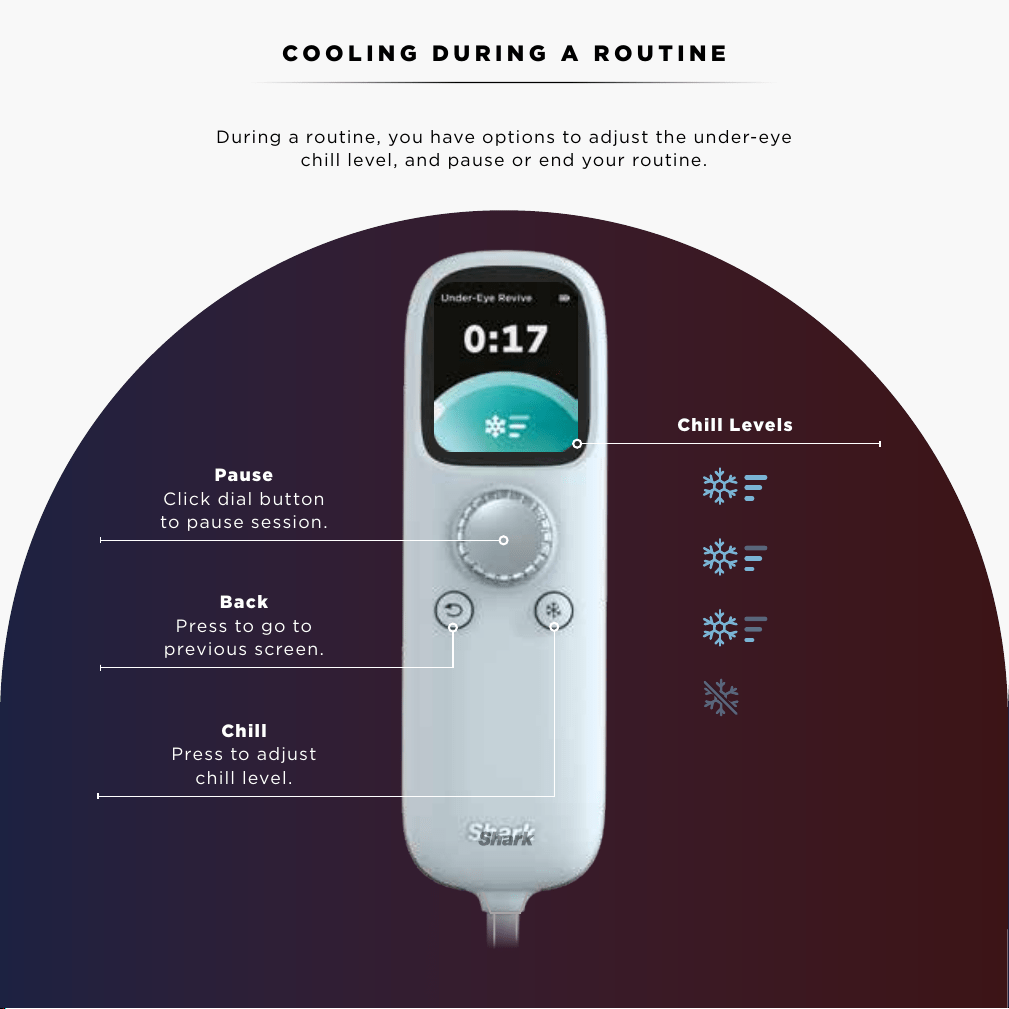
During a routine, you have options to adjust the under-eye
chill level, and pause or end your routine.
Pause
Click dial button
to pause session.
Back
Press to go to
previous screen.
Chill
Press to adjust
chill level.
Chill Levels
COOLING DURING A ROUTINE
Level 3
Level 2
Level 1
O
19
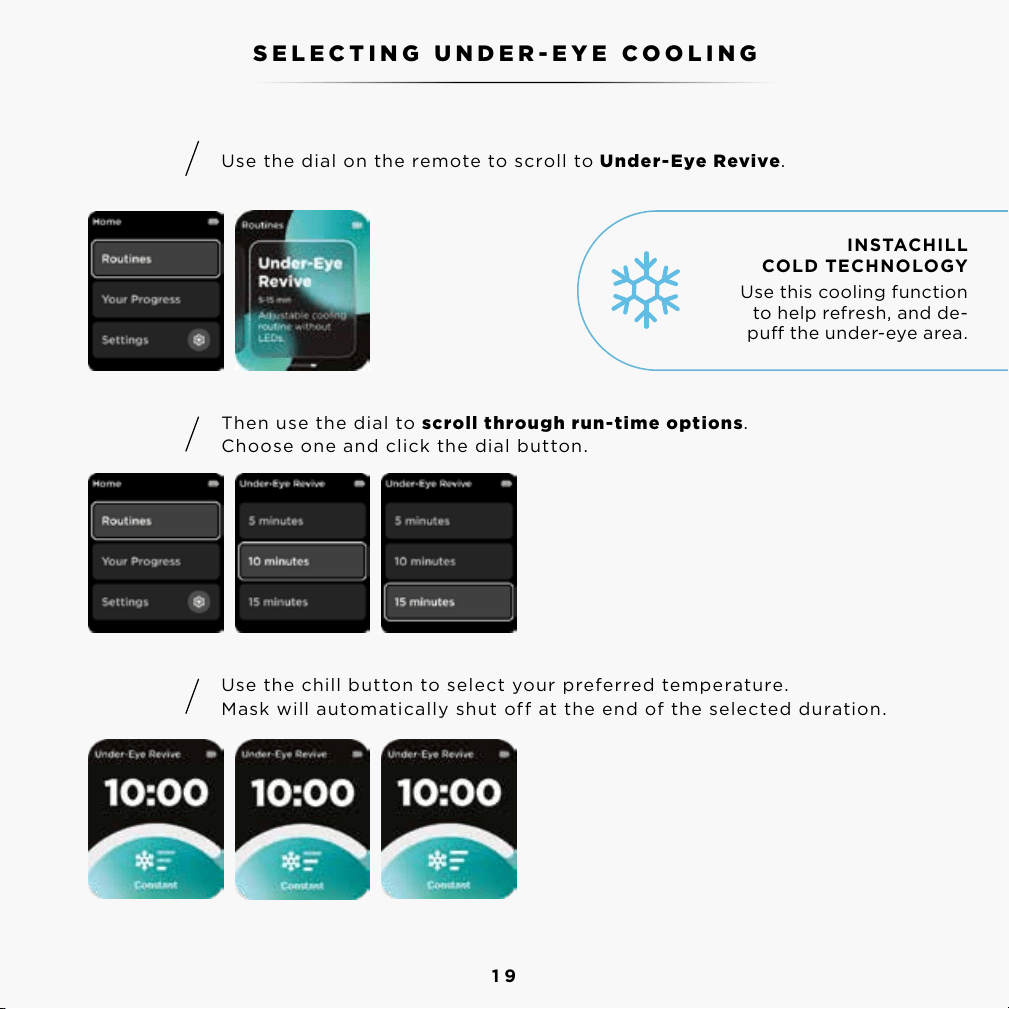
Use the dial on the remote to scroll to Under-Eye Revive.
Then use the dial to scroll through run-time options.
Choose one and click the dial button.
Use the chill button to select your preferred temperature.
Mask will automatically shut off at the end of the selected duration.
INSTACHILL
COLD TECHNOLOGY
Use this cooling function
to help refresh, and de-
pu the under-eye area.
SELECTING UNDER-EYE COOLING
Step 1
Step 2
Step 3
20
Result timing
• Results are achieved through consistent use of the same routine daily for 8 weeks
or more.
• After consistent use with the same boosting routine, keep going with that routine
to build on your progress. Or switch to another boosting routine to work toward
another skin goal.
• If you’ve achieved the skin goals you were working toward, you can switch to the
Skin Sustain routine to help maintain your skin condition over time.
What to expect
• You may experience dierent skin eects in the process of your skin journey when
consistently using LED routines.
• For the Better Ageing routine, skin dryness, irritation and redness might occur.
Only use once daily and apply a rich facial moisturiser after each routine.
• If you experience any undesirable pigmentation or darkening of the skin, please
discontinue use and contact SharkNinja at 0800 862 0453.
Take “before and after” pictures
• Be sure to take “before and after” pictures to document your journey while using
the LED skin routines.
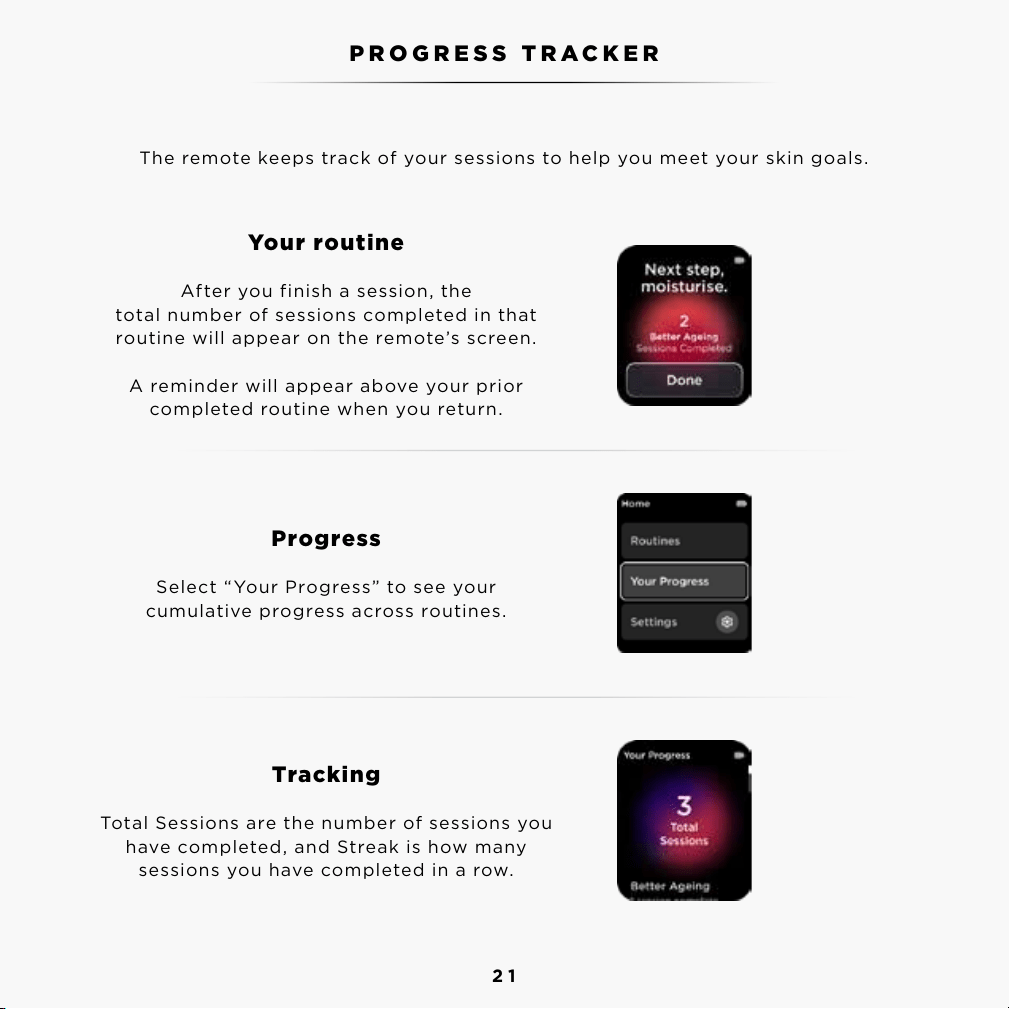
The remote keeps track of your sessions to help you meet your skin goals.
TIPS
21
Your routine
After you finish a session, the
total number of sessions completed in that
routine will appear on the remote’s screen.
A reminder will appear above your prior
completed routine when you return.
Progress
Select “Your Progress” to see your
cumulative progress across routines.
Tracking
Total Sessions are the number of sessions you
have completed, and Streak is how many
sessions you have completed in a row.
The remote keeps track of your sessions to help you meet your skin goals.
PROGRESS TRACKER
22
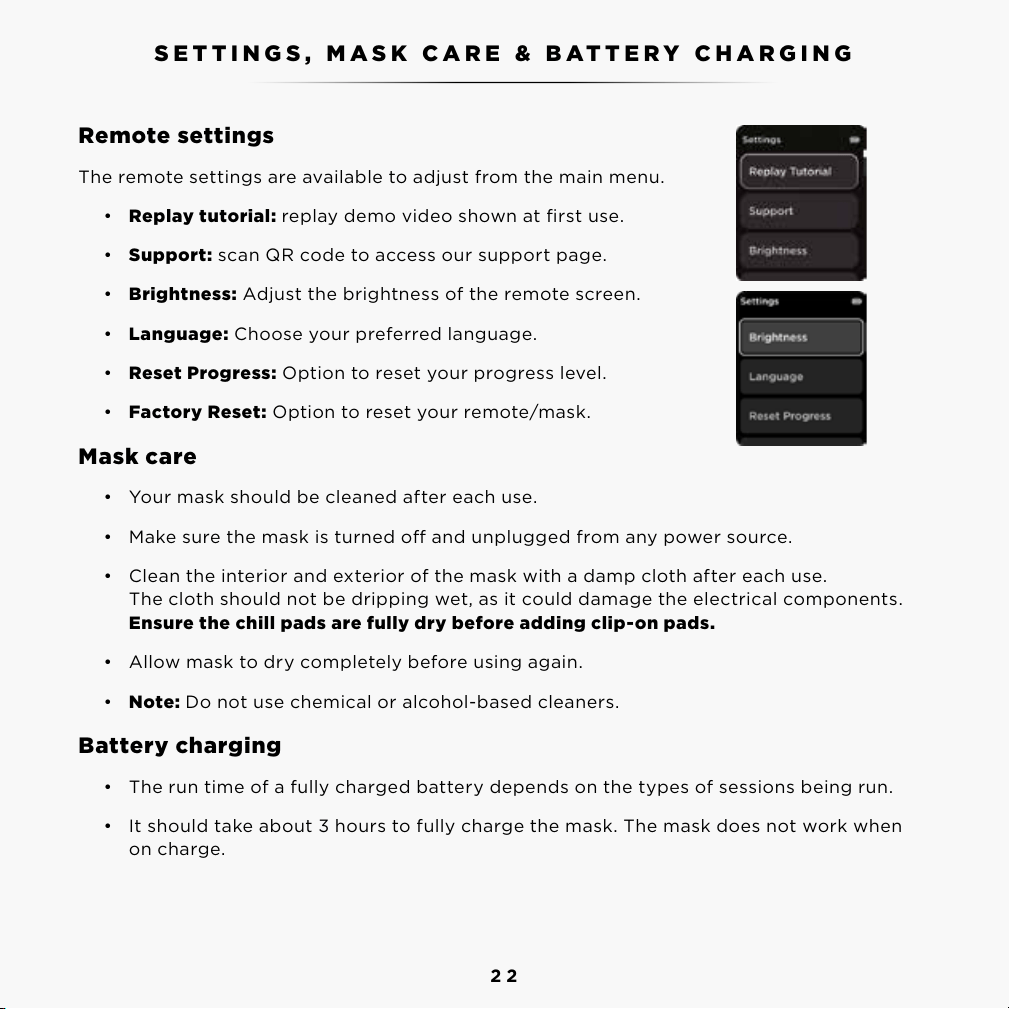
Remote settings
The remote settings are available to adjust from the main menu.
• Replay tutorial: replay demo video shown at first use.
• Support: scan QR code to access our support page.
• Brightness: Adjust the brightness of the remote screen.
• Language: Choose your preferred language.
• Reset Progress: Option to reset your progress level.
• Factory Reset: Option to reset your remote/mask.
Mask care
• Your mask should be cleaned after each use.
• Make sure the mask is turned o and unplugged from any power source.
• Clean the interior and exterior of the mask with a damp cloth after each use.
The cloth should not be dripping wet, as it could damage the electrical components.
Ensure the chill pads are fully dry before adding clip-on pads.
• Allow mask to dry completely before using again.
• Note: Do not use chemical or alcohol-based cleaners.
Battery charging
• The run time of a fully charged battery depends on the types of sessions being run.
• It should take about 3 hours to fully charge the mask. The mask does not work when
on charge.
SETTINGS, MASK CARE & BATTERY CHARGING FAQ
To see our full list of FAQ’s please visit sharkbeauty.co.uk
23
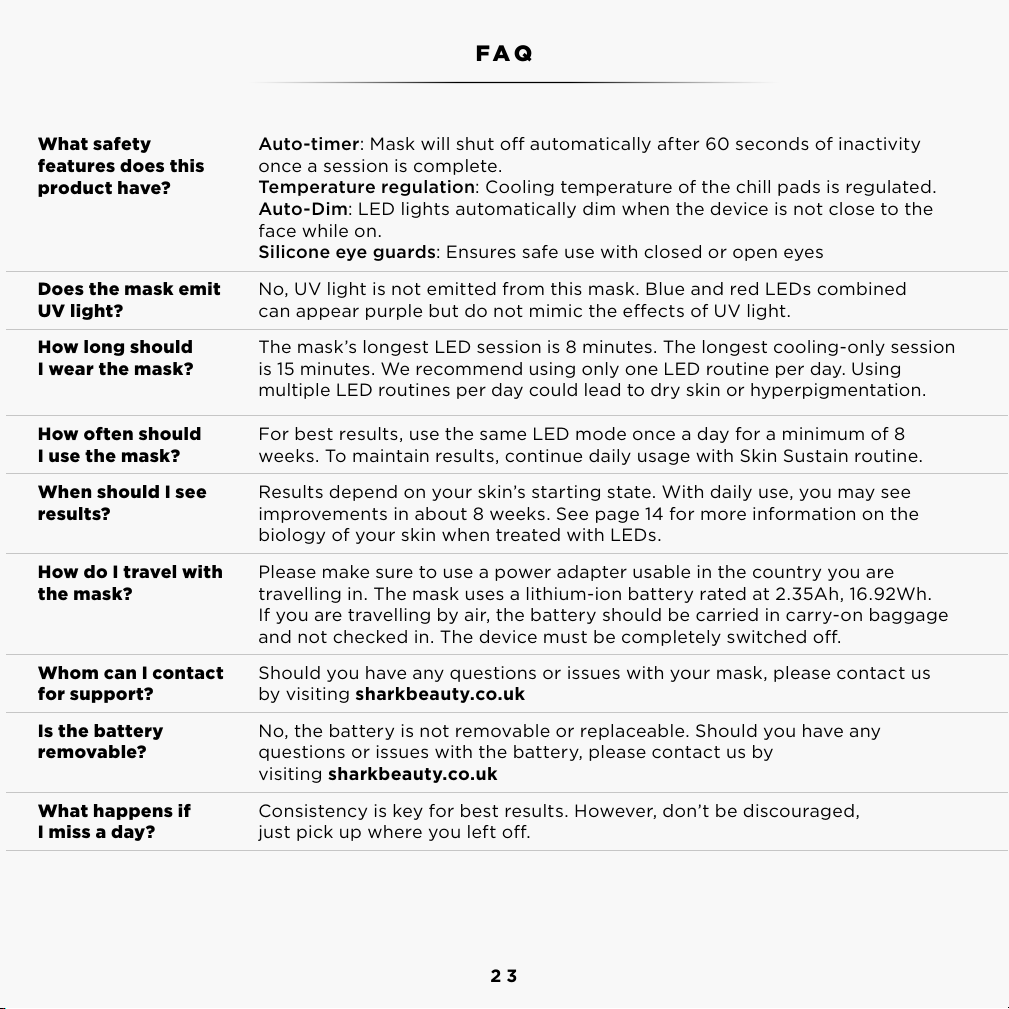
What safety
features does this
product have?
Auto-timer: Mask will shut o automatically after 60 seconds of inactivity
once a session is complete.
Temperature regulation: Cooling temperature of the chill pads is regulated.
Auto-Dim: LED lights automatically dim when the device is not close to the
face while on.
Silicone eye guards: Ensures safe use with closed or open eyes
Does the mask emit
UV light?
No, UV light is not emitted from this mask. Blue and red LEDs combined
can appear purple but do not mimic the eects of UV light.
How long should
I wear the mask?
The mask’s longest LED session is 8 minutes. The longest cooling-only session
is 15 minutes. We recommend using only one LED routine per day. Using
multiple LED routines per day could lead to dry skin or hyperpigmentation.
How often should
I use the mask?
For best results, use the same LED mode once a day for a minimum of 8
weeks. To maintain results, continue daily usage with Skin Sustain routine.
When should I see
results?
Results depend on your skin’s starting state. With daily use, you may see
improvements in about 8 weeks. See page 14 for more information on the
biology of your skin when treated with LEDs.
How do I travel with
the mask?
Please make sure to use a power adapter usable in the country you are
travelling in. The mask uses a lithium-ion battery rated at 2.35Ah, 16.92Wh.
If you are travelling by air,the battery should be carried in carry-on baggage
and not checked in. The device must be completely switched o.
Whom can I contact
for support?
Should you have any questions or issues with your mask, please contact us
by visiting sharkbeauty.co.uk
Is the battery
removable?
No, the battery is not removable or replaceable. Should you have any
questions or issues with the battery, please contact us by
visiting sharkbeauty.co.uk
What happens if
I miss a day?
Consistency is key for best results. However, don’t be discouraged,
just pick up where you left o.
FAQ
To see our full list of FAQ’s please visit sharkbeauty.co.uk

24
Battery level low
Device still will not power on
Charge the device using the
provided USB-C cable.
Long-press the dial button. If device
still will not turn on, please contact visit
support.sharkclean.co.uk.
The device does not power on
Possible cause Corrective action
TROUBLESHOOTING TROUBLESHOOTING
Possible defective battery
Defective charging cable
Please visit support.sharkclean.co.uk.
Please visit support.sharkclean.co.uk or
replace with a Shark USB-C cable and
adapter.
The battery will not charge
Possible cause
Possible cause
Corrective action
Wrong power adapter Make sure to use a 220-240V power
adapter.
The battery takes more than 3 hours to charge
Possible cause
Possible cause
Corrective action
Report any adverse events or issues to customer support at support.sharkclean.co.uk. We monitor
safety and performance continually and address any reported issues to maintain high safety standards.

25
Battery level low
The ambient temperature
is too high or too low
Chill pads still do not power on
Battery level too low to power the
chill pads. Please charge the device
using the provided USB-C cable.
Turn off the device and let sit for
90 seconds before turning back on.
If issue still occurs, stop use and
contact visit support.sharkclean.co.uk.
Please visit support.sharkclean.co.uk.
The chill pads do not power on
Possible cause Corrective action
TROUBLESHOOTING
Possible cause Corrective action
Device is powering down Wait 60 seconds for the device to
power down after the end of your
cooling session.
The cooling fans keep running after the session ends
Possible cause Corrective action
The straps are not properly
placed/fitted on your head
Revisit the “Fitting the Mask” section
of this User Guide for step-by-step
instructions. The chill pads should only
lightly contact your under-eye area.
The chill pads are digging into my under-eye area
26
ERROR MESSAGES
Error message Solution
Remote Over Temperature. Let remote cool
down before using.
Let remote cool down before using. The
mask should not be used in temperatures
higher than 86°F (30°C).
Remote Under Temperature. Let remote
warm up before using.
Let remote warm up before using. The mask
should not be used in temperatures lower
than 32°F (10°C).
Remote error A3. Call Customer Service. Call Customer Service.
Charger not recognised.
Use the provided Shark USB-C charging
cable and wall plug to charge the mask.
Remove remote from charger.
The mask’s battery is charged; remove it
from the charger.
Low Battery. Charge before use. The mask’s battery is low; please charge it.
Battery error B1. Call Customer Service. Call Customer Service.
Remote error B2. Charge the remote before
next use.
Charge the remote before next use using the
provided Shark USB-C charging cable and
wall plug.
Charging error C1. Disconnect and reconnect
to charge.
Disconnect and reconnect the remote to
charge using the provided Shark USB-C
charging cable and wall plug provided.
Fan error F1. Call Customer Service. Call Customer Service.
Error A1. Call Customer Service. Call Customer Service.
Error A2. Call Customer Service. Call Customer Service.

27
MANUFACTURER’S GUARANTEE
When a consumer buys a product in the UK, they get the benefit of legal rights relating to
the quality of the product (your “legal rights”). You can enforce your legal rights against your
retailer, including Shark if you bought your Shark appliance from sharkclean.co.uk. However,
at Shark we are so confident about the quality of our products that we give the owner an
additional, free parts and labour manufacturer’s guarantee of up to 2 years.
A household appliance like a Shark skincare appliance constitutes a sizeable investment. Your
new machine needs to work properly for as long as possible. The guarantee it comes with is
an important consideration - and reflects how much confidence the manufacturer has in its
product and manufacturing quality.
The manufacturer’s guarantee does not aect your legal rights.
How long are new Shark machines guaranteed for?
Our manufacturer’s guarantee lasts for one year from the date of purchase as standard, or for
two years if you register your purchase with us within
28 days. There is information on how to register below.
How do I register my Shark guarantee?
If you have purchased your Shark appliance directly from sharkclean.co.uk your guarantee is
registered automatically. If you bought it from anywhere else, you can register your guarantee
online within 28 days of purchase.
• To register online, please visit www.sharkclean.co.uk/register-guarantee or scan the QR code
in your instruction manual.
• Keep a note of the date you purchased the machine.
IMPORTANT:
• Keep your receipt if you bought your Shark skincare appliance from anywhere except
sharkclean.co.uk. You will need it to claim under your guarantee.
• The free Shark guarantee only applies to Shark owners living permanently in the UK.
What are the benefits of registering my free Shark guarantee?
When you register your guarantee, you will get an extra year of cover. We’ll also have your
details to hand if we ever need to get in touch. If you further agree to receive communications
from us, you can also receive tips and advice on how to get the best out of your Shark skincare
appliance and hear the latest news about new Shark technology and launches.
28
What is covered by the free Shark guarantee?
Repair or replacement (at Shark’s option) of your Shark machine, including all parts and labour,
due to defects in materials or workmanship.
What is not covered by the free Shark guarantee?
• Normal wear and tear.
• Accidental damage or faults caused by negligent use or care, misuse, neglect, careless
operation or handling of the Shark appliance which
is not in accordance with the Shark Operating Manual supplied with your machine.
• Damage caused by use of the Shark appliance for anything other than normal domestic
household purposes.
• Damage caused by use of parts not assembled or installed in accordance with the operating
instructions.
• Damage caused by use of parts and accessories which are not Shark Genuine Components
• Faulty installation (except where installed by Shark).
• Damage caused by repairs or alterations carried out by parties other than Shark or its agents.
How can I claim under the free Shark guarantee?
Contact our customer service helpline on 0800 862 0453. For service hours please visit
our website under ‘Contact Us’. It’s free to call, and you’ll be put straight through to a Shark
representative. You’ll also find online support at https://support.sharkclean.co.uk/. The Shark
representative will go through some troubleshooting with you, and if we conclude that the item
has failed, we will send you a replacement part or a returns label to send the defective item back
to us free of charge. When you have delivered the defective product to us, we will send you a
replacement.
Please remember that the item will need to be boxed when you return it to us, which can be any
suitable box; it does not have to be the original packaging.
Where can I buy genuine Shark spares and accessories?
Shark spares and accessories are developed by the same engineers who developed your Shark
skincare appliance. You’ll find a full range of Shark spares, replacement parts and accessories
for all Shark machines at www. sharkclean.co.uk. Please remember that damage caused by the
use of non-Shark spares and accessories will not be covered under your guarantee.
NOTESMANUFACTURER’S GUARANTEE (CONT.)

29
NOTES
SHARK is a registered trademark in the United Kingdom of SharkNinja Operating LLC.
© 2024 SharkNinja Operating LLC.
FW300UK_CryoGlow_UserGuide_MP_241007_Mv1
This marking indicates this product should not be disposed of with other household waste.
To prevent possible harm to the environment or human health from uncontrolled waste
disposal, recycle it responsibly to promote the sustainable reuse of material sources. To return
your used device, please use the return and collection systems or contact the retailer where
this product was purchased. They can take this product for environmentally safe recycling.