-8-
Step
3:
Hangingdisplay
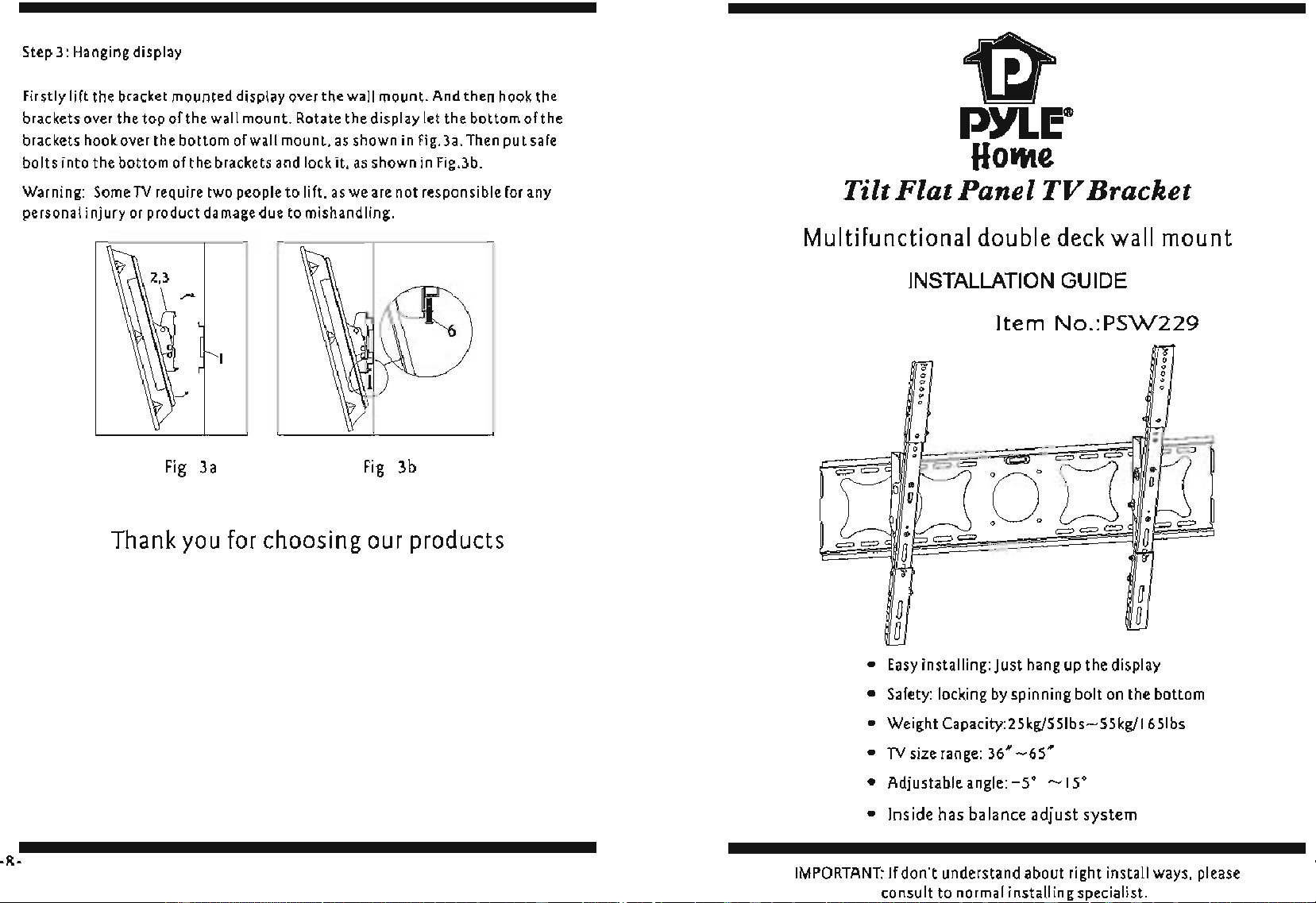
Firstly lift
the bracket mounted display over the wall mount.
And
then hook the
brackets
over
the top of
the
wall
mount. Rotate the display
let
the bottom of
the
brackets
hook over the bottom
of
wall mount,
as
shown
in
Fig.3a.
Then
put
safe
bolts into the bottom of
the
brackets
and
lock
it.
as
shown
in
Fig.3b.
Warning:
Some
TV
req
uire two people to lift.
as
we
are
not responsible
for
any
personal injury
or
product
damage
due
to mishandling.
Fig
3a
Fig
3b
Thank you for choosing our products
~
PYLE"
Hotlte
Tilt
Flat
Panel
TV
Bracket
Multifunctional double deck wall mount
INSTALLATION
GUIDE
Item
No.:P5W229
==
==
:
•
0
•
a
a
a
0
0
0
W
==
0
o 0
===
==
:
•
0
•
a
a
a
•
Easy
installing: Just hang
up
the display
=
=
• Safety: locking
by
spinning bolt on the bottom
• Weight Capacity:2Skg/SSlbs-SSkg/16Slbs
•
TV
size range:
36
....
-65'"
•
Adjustableangle:-S'
~15'
• Inside has balance adjust system
IMPORTANT:
If
don·t understand about right install ways. please
consult to normal installin specialist.
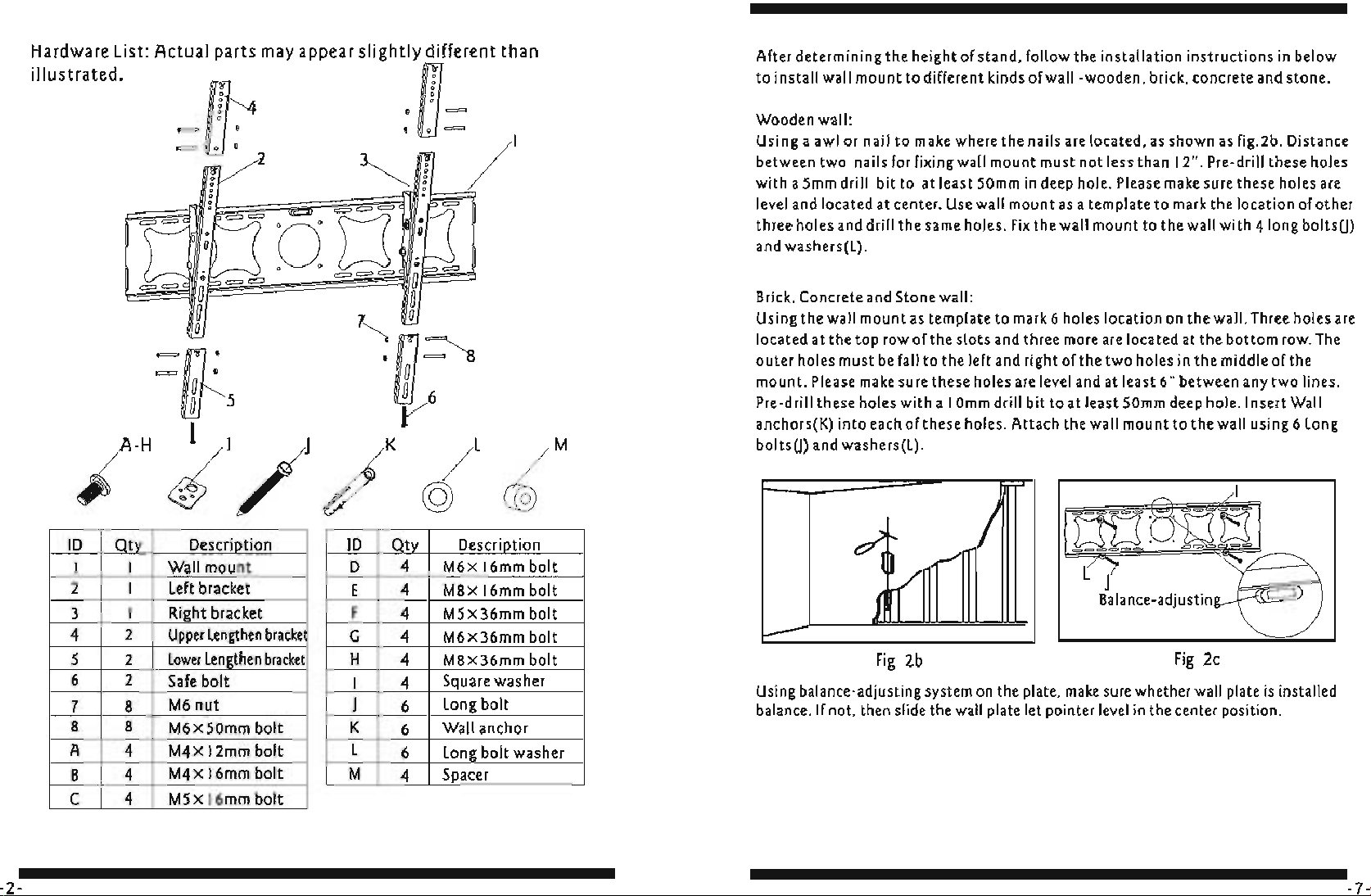
Hardware
List:
Actual parts
may
appear slightly different than
illustrated.
~
,
~
=
=lJ:
' ,
=/1
~!
=
==
;
==OW
: =
==
a
===
~
a 7 a
=~:
:Q~
=uf5
UL
I V
I-
H
f//I/J
/K
,L
a:
M
ID
Otv
Descriotion
ID
Qtv
Descriotion
I I
Wall mount D 4
M6
x
16mm
bolt
2
I
Lelt
bracket
E 4
M8
x
16mm
bolt
3
I Right bracket F
4
M5x36mm bolt
4
2
Upper
lengthen
bracke
G
4
M6
x 36mm bolt
5
2
lower
lengthen
bracket
H
4
M8
x 36mm bolt
6
2
Safe
bolt
I
4
Square
washer
7 8
M6
nut
J 6
long bolt
8 8
M6x50mm bolt K
6
Wall
anchor
A
4
M4x
12mm
bolt
l
6
long bolt washer
B 4
M4x
16mm
bolt
M
4
Spacer
C 4
M5x
16mm
bolt
-2-
After determ ining the height of stand, follow the installation instructions
in
below
to install wall mount to different
kinds
of wall-wooden.
brick,
concrete
and
stone.
Wooden
wall:
Using a awl or nail
to
make where the nails
are
located,
as
shown
as
fig.2b. Distance
between two nails for fixing wall mount
must
not
less
than 12", Pre-drill
these
holes
with a
5mm
drill bit to
at
least
50mm
in
deep
hole.
Please
make
sure
these
holes
are
level
and
located
at
center.
Use
wall mount
as
a template to
mark
the
location
of
other
three holes and drill the same holes.
Fix
the wall mount to the wall with 410ng
boltsm
and washers(l).
Brick.
Concrete
and
Stone wall:
Using the wall mount
as
template to
mark
6
holes
location
on
the wall.
Three
holes
are
located
at
the top
row
of
the
slots
and
three
more
are
located
at
the bottom
row.
The
outer holes must
be
lall to the lelt and right
olthe
two holes
in
the middle
olthe
mount.
Please
make
sure
these
holes
are
level
and
at
least
6"
between
any
two lines.
Pre-drill
these
holes
with a I
Omm
drill bit to
at
least
50mm
deep
hole. Insert Wall
anchors(K) into each
olthese
holes. Attach the wall mount to the wall using 6 long
boltsm and washers(l).
~
r-
I
~
~
f(
~:
L J
Balance-adjustin
I--
Fig
2b
Fig
2c
Using
balance-adjusting
system
on
the
plate.
make
sure
whether
wall
plate
is
installed
balance.
If
not.
then
slide
the
wall
plate
let pointer
level
in
the
center
position.
Step
2:
Attach mount to wall
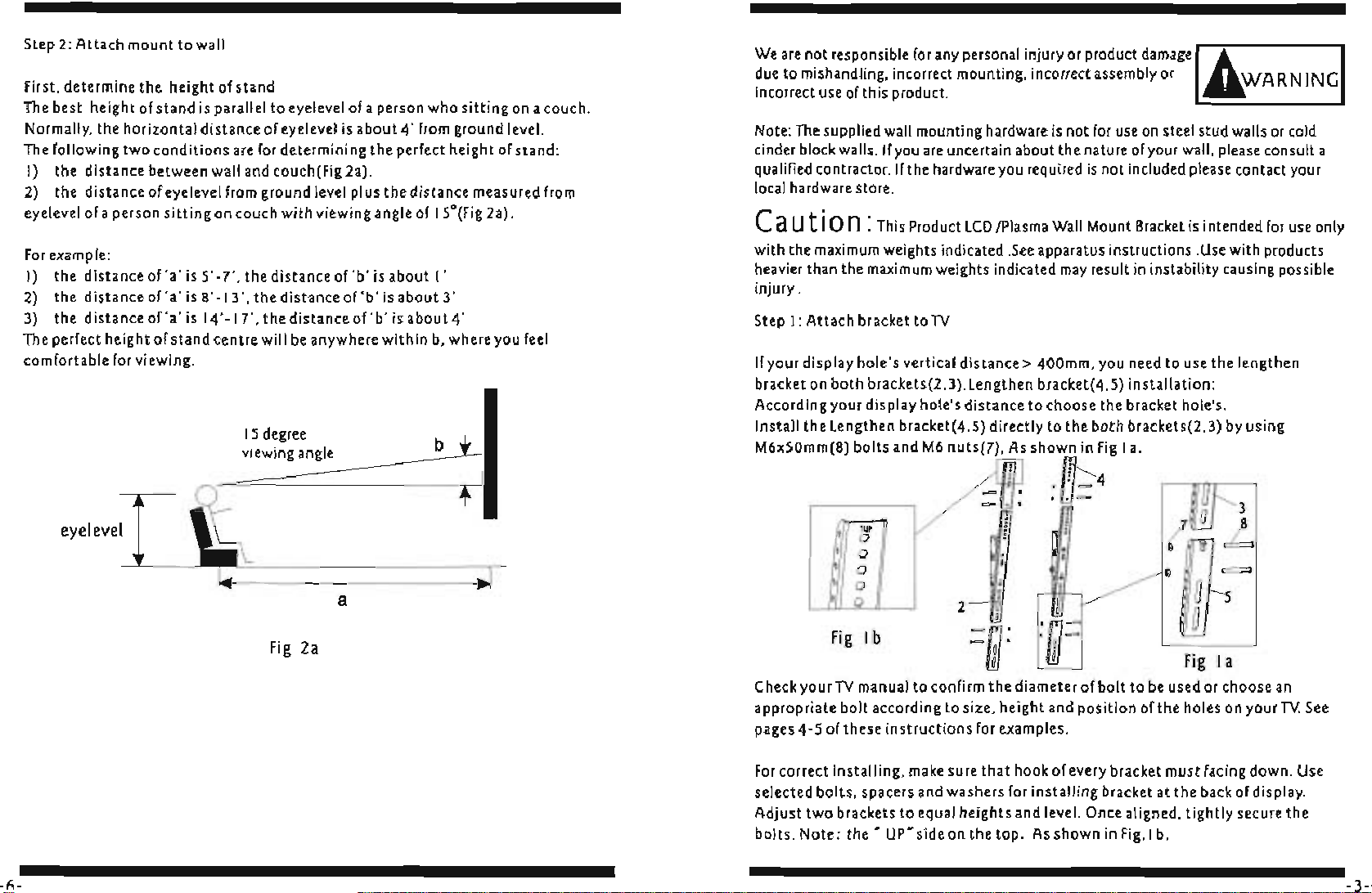
First, determine the
he
ight of stand
The best height of stand is parallel to eyelevel
of
a person who sitting
on
a couch.
Normally, the horizontal distance of eye level
is
about 4' fr
om
gro
u
nd
level.
The following two conditions are
for
determining the perfect height of
stand
:
I}
the distance between wall and couch(Fig
2a}
,
2)
the distance of eye level
from
ground level plus the distance measured
from
eyelevel of a person sitting on couch with viewing angle of
ISO(
Fi
g 2a) .
For
example:
I}
the distance
of
'a'
is 5' -7', the distance of
'b'
is
about I'
2)
the
distanceof'a'
i
sS'
-
13',thedistanceof'b'isabout3'
3)
the distance
of
'a
'
is
14' -17', the distance of
'b'
is
about
4'
The perfect height of stand centre will
be
anywhere within
b,
where you
feel
comfortable
for
viewing.
eyeleve
[
-6-
15
degree
view
i
ng
angle
Fig
2a
b
~
I
a
We
are
not responsible
for
any
personal injury
or
product damagel
~
I
due to mishandli
ng,
incorrect mounting, incorrect assembly
or
~WARN
I
NG
incorrect use
of
this product.
Note:
The
supplied
wall
mounti
ng
hardware
is
not
for
use
on
steel
st
ud walls
or
co
ld
cinder
block
walls.
If
you
are
uncertain about the nature
of
your wall, please consult a
qualified contractor.
If
the hardware you required is not included please contact your
local
hardware store.
e aut
ion:
Th
is Product
LCD
/P
lasma
Wall
Mou
nt
Bracket
is
intended
for
use only
with the
ma
x
imum
weights indicated
.See
apparatus instructions .
Use
with products
heavier than the
maximum
weights indicated
may
result
in
instability causing possible
injury .
Step
I: Attach bracket to
TV
If
your display hole's vertical distance> 400mm. you need to use the lengthen
bracket on both brackets(2,3},Lengthen bracket(4,S} installation :
According your display
holels distance to choose the bracket holels.
Insta
ll
the lengthen bracket(4,S} directly to the both brackets(2,3}
by
using
M6xSOmm(8}
bolts and
M6
nuts(7),
As
shown in
Fig
la,
J!G4
.
IJ=
~
m
. ,
""
0
,
0
0
i
0
,
,
0
2-
a
,
Fig
I b
Fig
I a
Check yourTV manual to confirm the diameter of bolt to
be
used or choose
an
appropriate bolt according to size. height and position
ofthe
holes
on
yourTV.
See
pages 4-5 of these instructions
for
examples.
For
correct installing.
make
sure
that
hook of every bracket must facing down. Use
selected bolts. spacers and washers
for
installing bracket at the back of display.
Adjust two brackets
to
equal heights and level. Once aligned. tightly secure the
bolts. Note:
the'
UP'
side on
the
top_
As
shown
in
Fig
. 1 b,
-3-
-4-
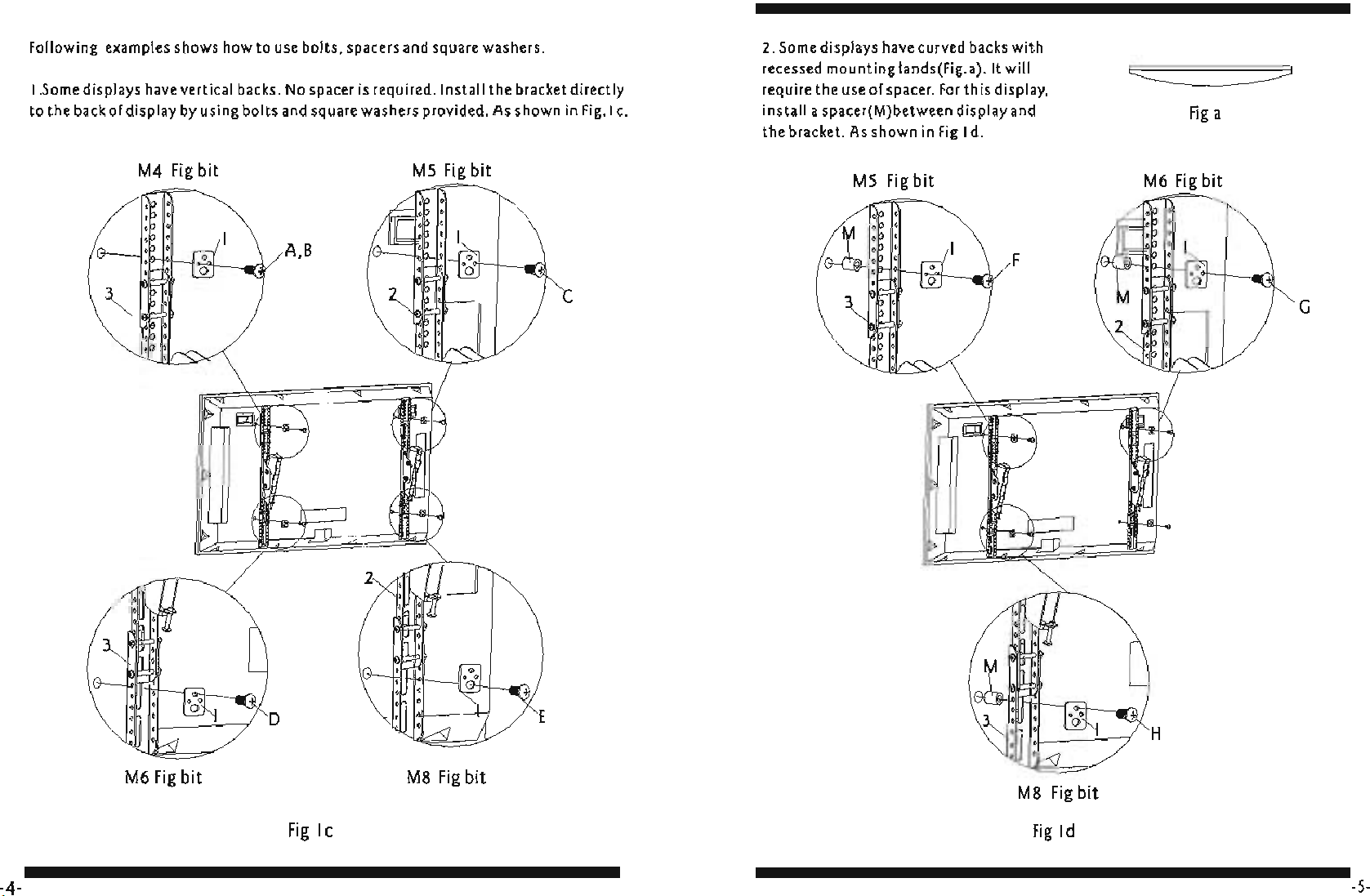
Following
examples
shows
how to
use
bolts.
spacers
and
square
washers.
I.Some displays
have
vertical
backs.
No
spacer
is
required. Install the
bracket
directly
to
the
back
of display
by
using
bolts
and
square
washers
provided.
As
shown
in
Fig.1
c.
M4
Fig
bit
M5
Fig
bit
A.B
o
M6
Fig
bit
M8
Fig
bit
Fig
Ie
2.
Some
displays
have
curved
backs
with
recessed mounting lands(Fig.a).lt
will
require
the
use
of
spacer.
For
this
display.
install a spacer(M)between display and
the bracket.
As
shown
in
Fig
I
d.
M5
Fig
bit
F
M8
Fig
bit
Fig
Id
Fig
a
M6
Fig
bit
G
-5-