3.1101.616357.0000000
原材料 机乐堂 JR-ZS299 双线圈车载无线充支架(仪表台款)-说明书
尺寸:60x90mm
材质:128g铜版纸 正反单色印刷 风琴折
User Manual
Dual-Coil Wireless Car Charger Holder
Operating steps (Dashboard)
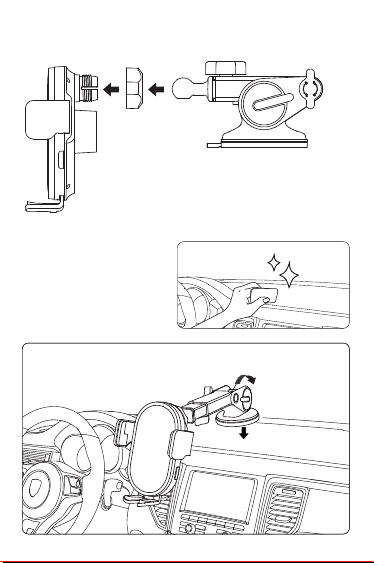
1. Put the universal ball into the nut
first, then insert it into the bolt on
the back of the holder; fasten the
nut clockwise to its position.
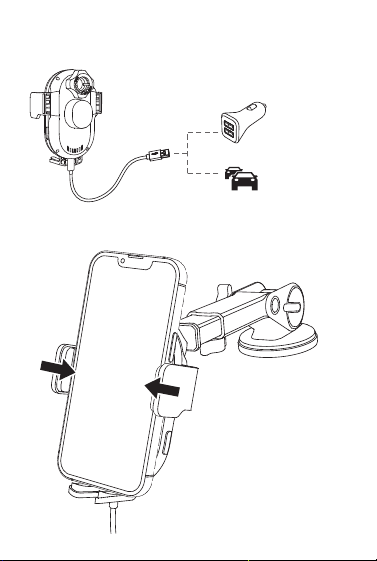
4. Use the Type-C charging cable in the package to
connect the charger and the car holder, the clamp
arms will automatically open.
5. Place your phone. The clamp arms will
automatically lock it.
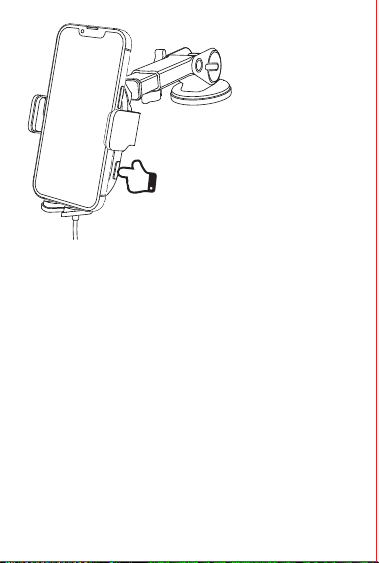
6. Press the side button to
open the clamp arms and
take out your phone.
2. Clean the windshield
or dashboard where
you need to install the
car mount with a wet
cloth, and wait for it to
dry;
3. Install the suction cup.
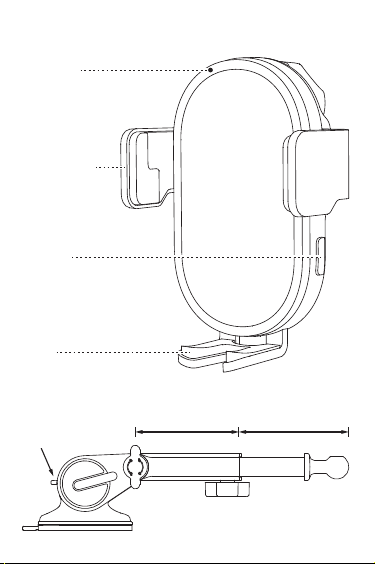
Lock lever
82mm/3.23” 85mm/3.35”
Product diagram
Dashboard
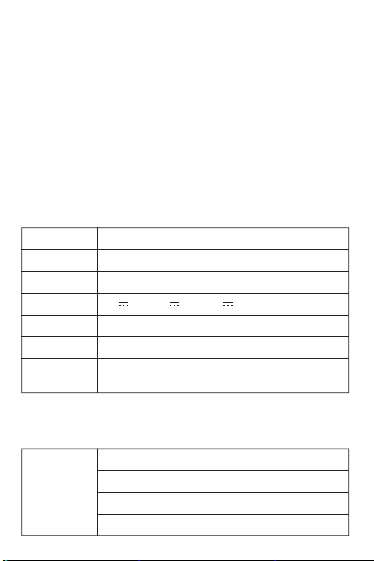
Parameters
Model
Name
Material
Input
Output
Input port
Applicable
phone size
JR-ZS299
Dual-Coil Wireless Car Charger Holder
ABS+PC
5V 2A 9V 2A 12V 2A
5W/7.5W/10W/15W (MAX)
Type-C
4.7-7”
Indicator light
Power on: constant blue light
Charging: blue light off
Standby: constant blue light
FOD: flashing blue light
LED ring
LED ring
(press and hold for
5s to turn on/off
the LED ring)
Foot
Clamp arm
Button
Please use a
QC3.0 car
charger
Warning
Do not disassemble or refit the product.
Do not store it in a wet environment.
Please keep the product away from heat and do not charge
it near a heat source.
Please prevent water or other liquid from entering the
product interface. Otherwise the product may be damaged.
Do not install the wireless car charger mount over an air
bag cover or within the air bag deployment zone.
During charging, make sure to remove the metallic/mag-
netic protective case or cards (like bank cards), etc. from
your device.
During charging, the charger may heat up. This is a normal
occurrence and won’t affect its performance. If the charger
or your phone is too hot, please disconnect the power
supply and let it cool down before restarting the charging
process.
Avoid using bent or damaged USB cables.
FCC Warning Statement
T
hese
limits are designed to provide reasonable protection
against harmful interference inaresidential installation.
Thisequipmentgeneratesuses
andcanradiateradiofrequency energy and, if not installed and
used in accordance with the instructions, may cause harmful
interference to radio communications.
However, there is no guarantee that interference will not occur
in a particular installation. If this equipment does cause
harmful interference to radio or television reception, which
canbedeterminedbyturningtheequipment off and on, the
user is encouraged to try to correct the interference by one or
more of the following measures: ‐‐ Reorientorrelocatethe
receiving antenna.
‐‐ Increasetheseparationbetweentheequipmentand
receiver.
‐‐ Connecttheequipmentintoanoutletonacircuitdifferent
fromthattowhichthereceiver is connected.
‐‐ Consultthedealeroranexperiencedradio/TVtechnicianfor
help.
1.
2.
3.
4.
5.
6.
7.
8.
Warranty Card
Model:
Purchase Date:
Distributor:
Customer Name:
Tel.:
Invoice Date:
User address (with postcode):
Warranty
A. If there is performance failure on this product and it’s not
cause by human error damage, we will provide 12-month
free warranty service for consumers from the date of
purchase.
B. Warranty Exceptions:
●
Human damage;
●
Beyond the warranty period;
●
Failure to provide valid purchase certificate;
●
Product damage caused by failure to follow the use,
maintain and preserve instructions;
●
Product damage caused by dismantle it or repair the
product without authorization, or immerse the product in
water;
●
Damage caused by other force majeure.
①
②
If the phone cannot be charged, please
check the following problems first:
1. Check if the phone supports wireless charging.
2. Check the back of your phone to see whether there is
any metal object which may affect wireless induction.
3. Check if the cable has any problem.
4. Check if the car charger has any problem.
If the phone still cannot be charged, please contact
customer service
3.1101.616357.0000000
原材料 机乐堂 JR-ZS299 双线圈车载无线充支架(仪表台款)-说明书
尺寸:60x90mm
材质:128g铜版纸 正反单色印刷 风琴折
User Manual
Dual-Coil Wireless Car Charger Holder
Operating steps (Dashboard)
1. Put the universal ball into the nut
first, then insert it into the bolt on
the back of the holder; fasten the
nut clockwise to its position.
4. Use the Type-C charging cable in the package to
connect the charger and the car holder, the clamp
arms will automatically open.
5. Place your phone. The clamp arms will
automatically lock it.
6. Press the side button to
open the clamp arms and
take out your phone.
2. Clean the windshield
or dashboard where
you need to install the
car mount with a wet
cloth, and wait for it to
dry;
3. Install the suction cup.
Lock lever
82mm/3.23” 85mm/3.35”
Product diagram
Dashboard
Parameters
Model
Name
Material
Input
Output
Input port
Applicable
phone size
JR-ZS299
Dual-Coil Wireless Car Charger Holder
ABS+PC
5V 2A 9V 2A 12V 2A
5W/7.5W/10W/15W (MAX)
Type-C
4.7-7”
Indicator light
Power on: constant blue light
Charging: blue light off
Standby: constant blue light
FOD: flashing blue light
LED ring
LED ring
(press and hold for
5s to turn on/off
the LED ring)
Foot
Clamp arm
Button
Please use a
QC3.0 car
charger
Warning
Do not disassemble or refit the product.
Do not store it in a wet environment.
Please keep the product away from heat and do not charge
it near a heat source.
Please prevent water or other liquid from entering the
product interface. Otherwise the product may be damaged.
Do not install the wireless car charger mount over an air
bag cover or within the air bag deployment zone.
During charging, make sure to remove the metallic/mag-
netic protective case or cards (like bank cards), etc. from
your device.
During charging, the charger may heat up. This is a normal
occurrence and won’t affect its performance. If the charger
or your phone is too hot, please disconnect the power
supply and let it cool down before restarting the charging
process.
Avoid using bent or damaged USB cables.
FCC Warning Statement
T
hese
limits are designed to provide reasonable protection
against harmful interference inaresidential installation.
Thisequipmentgeneratesuses
andcanradiateradiofrequency energy and, if not installed and
used in accordance with the instructions, may cause harmful
interference to radio communications.
However, there is no guarantee that interference will not occur
in a particular installation. If this equipment does cause
harmful interference to radio or television reception, which
canbedeterminedbyturningtheequipment off and on, the
user is encouraged to try to correct the interference by one or
more of the following measures: ‐‐ Reorientorrelocatethe
receiving antenna.
‐‐ Increasetheseparationbetweentheequipmentand
receiver.
‐‐ Connecttheequipmentintoanoutletonacircuitdifferent
fromthattowhichthereceiver is connected.
‐‐ Consultthedealeroranexperiencedradio/TVtechnicianfor
help.
1.
2.
3.
4.
5.
6.
7.
8.
Warranty Card
Model:
Purchase Date:
Distributor:
Customer Name:
Tel.:
Invoice Date:
User address (with postcode):
Warranty
A. If there is performance failure on this product and it’s not
cause by human error damage, we will provide 12-month
free warranty service for consumers from the date of
purchase.
B. Warranty Exceptions:
●
Human damage;
●
Beyond the warranty period;
●
Failure to provide valid purchase certificate;
●
Product damage caused by failure to follow the use,
maintain and preserve instructions;
●
Product damage caused by dismantle it or repair the
product without authorization, or immerse the product in
water;
●
Damage caused by other force majeure.
①
②
If the phone cannot be charged, please
check the following problems first:
1. Check if the phone supports wireless charging.
2. Check the back of your phone to see whether there is
any metal object which may affect wireless induction.
3. Check if the cable has any problem.
4. Check if the car charger has any problem.
If the phone still cannot be charged, please contact
customer service
3.1101.616357.0000000
原材料 机乐堂 JR-ZS299 双线圈车载无线充支架(仪表台款)-说明书
尺寸:60x90mm
材质:128g铜版纸 正反单色印刷 风琴折
User Manual
Dual-Coil Wireless Car Charger Holder
Operating steps (Dashboard)
1. Put the universal ball into the nut
first, then insert it into the bolt on
the back of the holder; fasten the
nut clockwise to its position.
4. Use the Type-C charging cable in the package to
connect the charger and the car holder, the clamp
arms will automatically open.
5. Place your phone. The clamp arms will
automatically lock it.
6. Press the side button to
open the clamp arms and
take out your phone.
2. Clean the windshield
or dashboard where
you need to install the
car mount with a wet
cloth, and wait for it to
dry;
3. Install the suction cup.
Lock lever
82mm/3.23” 85mm/3.35”
Product diagram
Dashboard
Parameters
Model
Name
Material
Input
Output
Input port
Applicable
phone size
JR-ZS299
Dual-Coil Wireless Car Charger Holder
ABS+PC
5V 2A 9V 2A 12V 2A
5W/7.5W/10W/15W (MAX)
Type-C
4.7-7”
Indicator light
Power on: constant blue light
Charging: blue light off
Standby: constant blue light
FOD: flashing blue light
LED ring
LED ring
(press and hold for
5s to turn on/off
the LED ring)
Foot
Clamp arm
Button
Please use a
QC3.0 car
charger
Warning
Do not disassemble or refit the product.
Do not store it in a wet environment.
Please keep the product away from heat and do not charge
it near a heat source.
Please prevent water or other liquid from entering the
product interface. Otherwise the product may be damaged.
Do not install the wireless car charger mount over an air
bag cover or within the air bag deployment zone.
During charging, make sure to remove the metallic/mag-
netic protective case or cards (like bank cards), etc. from
your device.
During charging, the charger may heat up. This is a normal
occurrence and won’t affect its performance. If the charger
or your phone is too hot, please disconnect the power
supply and let it cool down before restarting the charging
process.
Avoid using bent or damaged USB cables.
FCC Warning Statement
T
hese
limits are designed to provide reasonable protection
against harmful interference inaresidential installation.
Thisequipmentgeneratesuses
andcanradiateradiofrequency energy and, if not installed and
used in accordance with the instructions, may cause harmful
interference to radio communications.
However, there is no guarantee that interference will not occur
in a particular installation. If this equipment does cause
harmful interference to radio or television reception, which
canbedeterminedbyturningtheequipment off and on, the
user is encouraged to try to correct the interference by one or
more of the following measures: ‐‐ Reorientorrelocatethe
receiving antenna.
‐‐ Increasetheseparationbetweentheequipmentand
receiver.
‐‐ Connecttheequipmentintoanoutletonacircuitdifferent
fromthattowhichthereceiver is connected.
‐‐ Consultthedealeroranexperiencedradio/TVtechnicianfor
help.
1.
2.
3.
4.
5.
6.
7.
8.
Warranty Card
Model:
Purchase Date:
Distributor:
Customer Name:
Tel.:
Invoice Date:
User address (with postcode):
Warranty
A. If there is performance failure on this product and it’s not
cause by human error damage, we will provide 12-month
free warranty service for consumers from the date of
purchase.
B. Warranty Exceptions:
●
Human damage;
●
Beyond the warranty period;
●
Failure to provide valid purchase certificate;
●
Product damage caused by failure to follow the use,
maintain and preserve instructions;
●
Product damage caused by dismantle it or repair the
product without authorization, or immerse the product in
water;
●
Damage caused by other force majeure.
①
②
If the phone cannot be charged, please
check the following problems first:
1. Check if the phone supports wireless charging.
2. Check the back of your phone to see whether there is
any metal object which may affect wireless induction.
3. Check if the cable has any problem.
4. Check if the car charger has any problem.
If the phone still cannot be charged, please contact
customer service
3.1101.616357.0000000
原材料 机乐堂 JR-ZS299 双线圈车载无线充支架(仪表台款)-说明书
尺寸:60x90mm
材质:128g铜版纸 正反单色印刷 风琴折
User Manual
Dual-Coil Wireless Car Charger Holder
Operating steps (Dashboard)
1. Put the universal ball into the nut
first, then insert it into the bolt on
the back of the holder; fasten the
nut clockwise to its position.
4. Use the Type-C charging cable in the package to
connect the charger and the car holder, the clamp
arms will automatically open.
5. Place your phone. The clamp arms will
automatically lock it.
6. Press the side button to
open the clamp arms and
take out your phone.
2. Clean the windshield
or dashboard where
you need to install the
car mount with a wet
cloth, and wait for it to
dry;
3. Install the suction cup.
Lock lever
82mm/3.23” 85mm/3.35”
Product diagram
Dashboard
Parameters
Model
Name
Material
Input
Output
Input port
Applicable
phone size
JR-ZS299
Dual-Coil Wireless Car Charger Holder
ABS+PC
5V 2A 9V 2A 12V 2A
5W/7.5W/10W/15W (MAX)
Type-C
4.7-7”
Indicator light
Power on: constant blue light
Charging: blue light off
Standby: constant blue light
FOD: flashing blue light
LED ring
LED ring
(press and hold for
5s to turn on/off
the LED ring)
Foot
Clamp arm
Button
Please use a
QC3.0 car
charger
Warning
Do not disassemble or refit the product.
Do not store it in a wet environment.
Please keep the product away from heat and do not charge
it near a heat source.
Please prevent water or other liquid from entering the
product interface. Otherwise the product may be damaged.
Do not install the wireless car charger mount over an air
bag cover or within the air bag deployment zone.
During charging, make sure to remove the metallic/mag-
netic protective case or cards (like bank cards), etc. from
your device.
During charging, the charger may heat up. This is a normal
occurrence and won’t affect its performance. If the charger
or your phone is too hot, please disconnect the power
supply and let it cool down before restarting the charging
process.
Avoid using bent or damaged USB cables.
FCC Warning Statement
T
hese
limits are designed to provide reasonable protection
against harmful interference inaresidential installation.
Thisequipmentgeneratesuses
andcanradiateradiofrequency energy and, if not installed and
used in accordance with the instructions, may cause harmful
interference to radio communications.
However, there is no guarantee that interference will not occur
in a particular installation. If this equipment does cause
harmful interference to radio or television reception, which
canbedeterminedbyturningtheequipment off and on, the
user is encouraged to try to correct the interference by one or
more of the following measures: ‐‐ Reorientorrelocatethe
receiving antenna.
‐‐ Increasetheseparationbetweentheequipmentand
receiver.
‐‐ Connecttheequipmentintoanoutletonacircuitdifferent
fromthattowhichthereceiver is connected.
‐‐ Consultthedealeroranexperiencedradio/TVtechnicianfor
help.
1.
2.
3.
4.
5.
6.
7.
8.
Warranty Card
Model:
Purchase Date:
Distributor:
Customer Name:
Tel.:
Invoice Date:
User address (with postcode):
Warranty
A. If there is performance failure on this product and it’s not
cause by human error damage, we will provide 12-month
free warranty service for consumers from the date of
purchase.
B. Warranty Exceptions:
●
Human damage;
●
Beyond the warranty period;
●
Failure to provide valid purchase certificate;
●
Product damage caused by failure to follow the use,
maintain and preserve instructions;
●
Product damage caused by dismantle it or repair the
product without authorization, or immerse the product in
water;
●
Damage caused by other force majeure.
①
②
If the phone cannot be charged, please
check the following problems first:
1. Check if the phone supports wireless charging.
2. Check the back of your phone to see whether there is
any metal object which may affect wireless induction.
3. Check if the cable has any problem.
4. Check if the car charger has any problem.
If the phone still cannot be charged, please contact
customer service
3.1101.616357.0000000
原材料 机乐堂 JR-ZS299 双线圈车载无线充支架(仪表台款)-说明书
尺寸:60x90mm
材质:128g铜版纸 正反单色印刷 风琴折
User Manual
Dual-Coil Wireless Car Charger Holder
Operating steps (Dashboard)
1. Put the universal ball into the nut
first, then insert it into the bolt on
the back of the holder; fasten the
nut clockwise to its position.
4. Use the Type-C charging cable in the package to
connect the charger and the car holder, the clamp
arms will automatically open.
5. Place your phone. The clamp arms will
automatically lock it.
6. Press the side button to
open the clamp arms and
take out your phone.
2. Clean the windshield
or dashboard where
you need to install the
car mount with a wet
cloth, and wait for it to
dry;
3. Install the suction cup.
Lock lever
82mm/3.23” 85mm/3.35”
Product diagram
Dashboard
Parameters
Model
Name
Material
Input
Output
Input port
Applicable
phone size
JR-ZS299
Dual-Coil Wireless Car Charger Holder
ABS+PC
5V 2A 9V 2A 12V 2A
5W/7.5W/10W/15W (MAX)
Type-C
4.7-7”
Indicator light
Power on: constant blue light
Charging: blue light off
Standby: constant blue light
FOD: flashing blue light
LED ring
LED ring
(press and hold for
5s to turn on/off
the LED ring)
Foot
Clamp arm
Button
Please use a
QC3.0 car
charger
Warning
Do not disassemble or refit the product.
Do not store it in a wet environment.
Please keep the product away from heat and do not charge
it near a heat source.
Please prevent water or other liquid from entering the
product interface. Otherwise the product may be damaged.
Do not install the wireless car charger mount over an air
bag cover or within the air bag deployment zone.
During charging, make sure to remove the metallic/mag-
netic protective case or cards (like bank cards), etc. from
your device.
During charging, the charger may heat up. This is a normal
occurrence and won’t affect its performance. If the charger
or your phone is too hot, please disconnect the power
supply and let it cool down before restarting the charging
process.
Avoid using bent or damaged USB cables.
FCC Warning Statement
T
hese
limits are designed to provide reasonable protection
against harmful interference inaresidential installation.
Thisequipmentgeneratesuses
andcanradiateradiofrequency energy and, if not installed and
used in accordance with the instructions, may cause harmful
interference to radio communications.
However, there is no guarantee that interference will not occur
in a particular installation. If this equipment does cause
harmful interference to radio or television reception, which
canbedeterminedbyturningtheequipment off and on, the
user is encouraged to try to correct the interference by one or
more of the following measures: ‐‐ Reorientorrelocatethe
receiving antenna.
‐‐ Increasetheseparationbetweentheequipmentand
receiver.
‐‐ Connecttheequipmentintoanoutletonacircuitdifferent
fromthattowhichthereceiver is connected.
‐‐ Consultthedealeroranexperiencedradio/TVtechnicianfor
help.
1.
2.
3.
4.
5.
6.
7.
8.
Warranty Card
Model:
Purchase Date:
Distributor:
Customer Name:
Tel.:
Invoice Date:
User address (with postcode):
Warranty
A. If there is performance failure on this product and it’s not
cause by human error damage, we will provide 12-month
free warranty service for consumers from the date of
purchase.
B. Warranty Exceptions:
●
Human damage;
●
Beyond the warranty period;
●
Failure to provide valid purchase certificate;
●
Product damage caused by failure to follow the use,
maintain and preserve instructions;
●
Product damage caused by dismantle it or repair the
product without authorization, or immerse the product in
water;
●
Damage caused by other force majeure.
①
②
If the phone cannot be charged, please
check the following problems first:
1. Check if the phone supports wireless charging.
2. Check the back of your phone to see whether there is
any metal object which may affect wireless induction.
3. Check if the cable has any problem.
4. Check if the car charger has any problem.
If the phone still cannot be charged, please contact
customer service
3.1101.616357.0000000
原材料 机乐堂 JR-ZS299 双线圈车载无线充支架(仪表台款)-说明书
尺寸:60x90mm
材质:128g铜版纸 正反单色印刷 风琴折
User Manual
Dual-Coil Wireless Car Charger Holder
Operating steps (Dashboard)
1. Put the universal ball into the nut
first, then insert it into the bolt on
the back of the holder; fasten the
nut clockwise to its position.
4. Use the Type-C charging cable in the package to
connect the charger and the car holder, the clamp
arms will automatically open.
5. Place your phone. The clamp arms will
automatically lock it.
6. Press the side button to
open the clamp arms and
take out your phone.
2. Clean the windshield
or dashboard where
you need to install the
car mount with a wet
cloth, and wait for it to
dry;
3. Install the suction cup.
Lock lever
82mm/3.23” 85mm/3.35”
Product diagram
Dashboard
Parameters
Model
Name
Material
Input
Output
Input port
Applicable
phone size
JR-ZS299
Dual-Coil Wireless Car Charger Holder
ABS+PC
5V 2A 9V 2A 12V 2A
5W/7.5W/10W/15W (MAX)
Type-C
4.7-7”
Indicator light
Power on: constant blue light
Charging: blue light off
Standby: constant blue light
FOD: flashing blue light
LED ring
LED ring
(press and hold for
5s to turn on/off
the LED ring)
Foot
Clamp arm
Button
Please use a
QC3.0 car
charger
Warning
Do not disassemble or refit the product.
Do not store it in a wet environment.
Please keep the product away from heat and do not charge
it near a heat source.
Please prevent water or other liquid from entering the
product interface. Otherwise the product may be damaged.
Do not install the wireless car charger mount over an air
bag cover or within the air bag deployment zone.
During charging, make sure to remove the metallic/mag-
netic protective case or cards (like bank cards), etc. from
your device.
During charging, the charger may heat up. This is a normal
occurrence and won’t affect its performance. If the charger
or your phone is too hot, please disconnect the power
supply and let it cool down before restarting the charging
process.
Avoid using bent or damaged USB cables.
FCC Warning Statement
T
hese
limits are designed to provide reasonable protection
against harmful interference inaresidential installation.
Thisequipmentgeneratesuses
andcanradiateradiofrequency energy and, if not installed and
used in accordance with the instructions, may cause harmful
interference to radio communications.
However, there is no guarantee that interference will not occur
in a particular installation. If this equipment does cause
harmful interference to radio or television reception, which
canbedeterminedbyturningtheequipment off and on, the
user is encouraged to try to correct the interference by one or
more of the following measures: ‐‐ Reorientorrelocatethe
receiving antenna.
‐‐ Increasetheseparationbetweentheequipmentand
receiver.
‐‐ Connecttheequipmentintoanoutletonacircuitdifferent
fromthattowhichthereceiver is connected.
‐‐ Consultthedealeroranexperiencedradio/TVtechnicianfor
help.
1.
2.
3.
4.
5.
6.
7.
8.
Warranty Card
Model:
Purchase Date:
Distributor:
Customer Name:
Tel.:
Invoice Date:
User address (with postcode):
Warranty
A. If there is performance failure on this product and it’s not
cause by human error damage, we will provide 12-month
free warranty service for consumers from the date of
purchase.
B. Warranty Exceptions:
●
Human damage;
●
Beyond the warranty period;
●
Failure to provide valid purchase certificate;
●
Product damage caused by failure to follow the use,
maintain and preserve instructions;
●
Product damage caused by dismantle it or repair the
product without authorization, or immerse the product in
water;
●
Damage caused by other force majeure.
①
②
If the phone cannot be charged, please
check the following problems first:
1. Check if the phone supports wireless charging.
2. Check the back of your phone to see whether there is
any metal object which may affect wireless induction.
3. Check if the cable has any problem.
4. Check if the car charger has any problem.
If the phone still cannot be charged, please contact
customer service

3.1101.616357.0000000
原材料 机乐堂 JR-ZS299 双线圈车载无线充支架(仪表台款)-说明书
尺寸:60x90mm
材质:128g铜版纸 正反单色印刷 风琴折
User Manual
Dual-Coil Wireless Car Charger Holder
Operating steps (Dashboard)
1. Put the universal ball into the nut
first, then insert it into the bolt on
the back of the holder; fasten the
nut clockwise to its position.
4. Use the Type-C charging cable in the package to
connect the charger and the car holder, the clamp
arms will automatically open.
5. Place your phone. The clamp arms will
automatically lock it.
6. Press the side button to
open the clamp arms and
take out your phone.
2. Clean the windshield
or dashboard where
you need to install the
car mount with a wet
cloth, and wait for it to
dry;
3. Install the suction cup.
Lock lever
82mm/3.23” 85mm/3.35”
Product diagram
Dashboard
Parameters
Model
Name
Material
Input
Output
Input port
Applicable
phone size
JR-ZS299
Dual-Coil Wireless Car Charger Holder
ABS+PC
5V 2A 9V 2A 12V 2A
5W/7.5W/10W/15W (MAX)
Type-C
4.7-7”
Indicator light
Power on: constant blue light
Charging: blue light off
Standby: constant blue light
FOD: flashing blue light
LED ring
LED ring
(press and hold for
5s to turn on/off
the LED ring)
Foot
Clamp arm
Button
Please use a
QC3.0 car
charger
Warning
Do not disassemble or refit the product.
Do not store it in a wet environment.
Please keep the product away from heat and do not charge
it near a heat source.
Please prevent water or other liquid from entering the
product interface. Otherwise the product may be damaged.
Do not install the wireless car charger mount over an air
bag cover or within the air bag deployment zone.
During charging, make sure to remove the metallic/mag-
netic protective case or cards (like bank cards), etc. from
your device.
During charging, the charger may heat up. This is a normal
occurrence and won’t affect its performance. If the charger
or your phone is too hot, please disconnect the power
supply and let it cool down before restarting the charging
process.
Avoid using bent or damaged USB cables.
FCC Warning Statement
T
hese
limits are designed to provide reasonable protection
against harmful interference inaresidential installation.
Thisequipmentgeneratesuses
andcanradiateradiofrequency energy and, if not installed and
used in accordance with the instructions, may cause harmful
interference to radio communications.
However, there is no guarantee that interference will not occur
in a particular installation. If this equipment does cause
harmful interference to radio or television reception, which
canbedeterminedbyturningtheequipment off and on, the
user is encouraged to try to correct the interference by one or
more of the following measures: ‐‐ Reorientorrelocatethe
receiving antenna.
‐‐ Increasetheseparationbetweentheequipmentand
receiver.
‐‐ Connecttheequipmentintoanoutletonacircuitdifferent
fromthattowhichthereceiver is connected.
‐‐ Consultthedealeroranexperiencedradio/TVtechnicianfor
help.
1.
2.
3.
4.
5.
6.
7.
8.
Warranty Card
Model:
Purchase Date:
Distributor:
Customer Name:
Tel.:
Invoice Date:
User address (with postcode):
Warranty
A. If there is performance failure on this product and it’s not
cause by human error damage, we will provide 12-month
free warranty service for consumers from the date of
purchase.
B. Warranty Exceptions:
●
Human damage;
●
Beyond the warranty period;
●
Failure to provide valid purchase certificate;
●
Product damage caused by failure to follow the use,
maintain and preserve instructions;
●
Product damage caused by dismantle it or repair the
product without authorization, or immerse the product in
water;
●
Damage caused by other force majeure.
①
②
If the phone cannot be charged, please
check the following problems first:
1. Check if the phone supports wireless charging.
2. Check the back of your phone to see whether there is
any metal object which may affect wireless induction.
3. Check if the cable has any problem.
4. Check if the car charger has any problem.
If the phone still cannot be charged, please contact
customer service

3.1101.616357.0000000
原材料 机乐堂 JR-ZS299 双线圈车载无线充支架(仪表台款)-说明书
尺寸:60x90mm
材质:128g铜版纸 正反单色印刷 风琴折
User Manual
Dual-Coil Wireless Car Charger Holder
Operating steps (Dashboard)
1. Put the universal ball into the nut
first, then insert it into the bolt on
the back of the holder; fasten the
nut clockwise to its position.
4. Use the Type-C charging cable in the package to
connect the charger and the car holder, the clamp
arms will automatically open.
5. Place your phone. The clamp arms will
automatically lock it.
6. Press the side button to
open the clamp arms and
take out your phone.
2. Clean the windshield
or dashboard where
you need to install the
car mount with a wet
cloth, and wait for it to
dry;
3. Install the suction cup.
Lock lever
82mm/3.23” 85mm/3.35”
Product diagram
Dashboard
Parameters
Model
Name
Material
Input
Output
Input port
Applicable
phone size
JR-ZS299
Dual-Coil Wireless Car Charger Holder
ABS+PC
5V 2A 9V 2A 12V 2A
5W/7.5W/10W/15W (MAX)
Type-C
4.7-7”
Indicator light
Power on: constant blue light
Charging: blue light off
Standby: constant blue light
FOD: flashing blue light
LED ring
LED ring
(press and hold for
5s to turn on/off
the LED ring)
Foot
Clamp arm
Button
Please use a
QC3.0 car
charger
Warning
Do not disassemble or refit the product.
Do not store it in a wet environment.
Please keep the product away from heat and do not charge
it near a heat source.
Please prevent water or other liquid from entering the
product interface. Otherwise the product may be damaged.
Do not install the wireless car charger mount over an air
bag cover or within the air bag deployment zone.
During charging, make sure to remove the metallic/mag-
netic protective case or cards (like bank cards), etc. from
your device.
During charging, the charger may heat up. This is a normal
occurrence and won’t affect its performance. If the charger
or your phone is too hot, please disconnect the power
supply and let it cool down before restarting the charging
process.
Avoid using bent or damaged USB cables.
FCC Warning Statement
T
hese
limits are designed to provide reasonable protection
against harmful interference inaresidential installation.
Thisequipmentgeneratesuses
andcanradiateradiofrequency energy and, if not installed and
used in accordance with the instructions, may cause harmful
interference to radio communications.
However, there is no guarantee that interference will not occur
in a particular installation. If this equipment does cause
harmful interference to radio or television reception, which
canbedeterminedbyturningtheequipment off and on, the
user is encouraged to try to correct the interference by one or
more of the following measures: ‐‐ Reorientorrelocatethe
receiving antenna.
‐‐ Increasetheseparationbetweentheequipmentand
receiver.
‐‐ Connecttheequipmentintoanoutletonacircuitdifferent
fromthattowhichthereceiver is connected.
‐‐ Consultthedealeroranexperiencedradio/TVtechnicianfor
help.
1.
2.
3.
4.
5.
6.
7.
8.
Warranty Card
Model:
Purchase Date:
Distributor:
Customer Name:
Tel.:
Invoice Date:
User address (with postcode):
Warranty
A. If there is performance failure on this product and it’s not
cause by human error damage, we will provide 12-month
free warranty service for consumers from the date of
purchase.
B. Warranty Exceptions:
●
Human damage;
●
Beyond the warranty period;
●
Failure to provide valid purchase certificate;
●
Product damage caused by failure to follow the use,
maintain and preserve instructions;
●
Product damage caused by dismantle it or repair the
product without authorization, or immerse the product in
water;
●
Damage caused by other force majeure.
①
②
If the phone cannot be charged, please
check the following problems first:
1. Check if the phone supports wireless charging.
2. Check the back of your phone to see whether there is
any metal object which may affect wireless induction.
3. Check if the cable has any problem.
4. Check if the car charger has any problem.
If the phone still cannot be charged, please contact
customer service