0
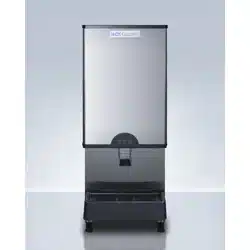
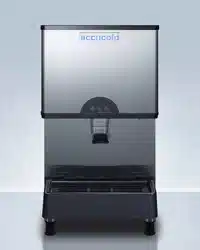
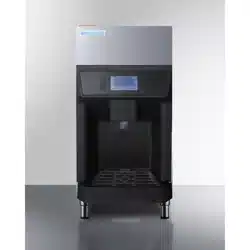
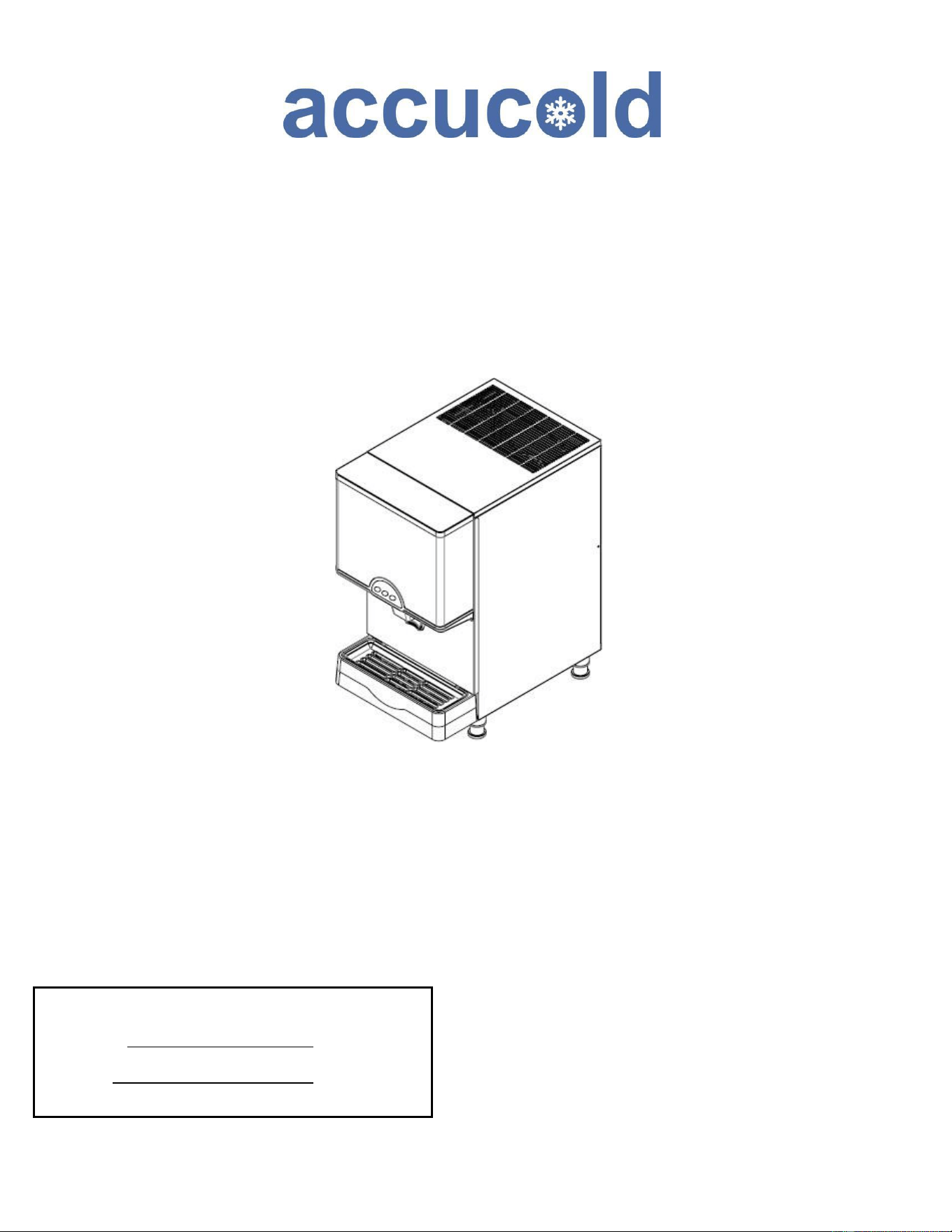
TABLETOP ICE & WATER DISPENSER
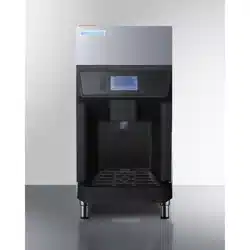
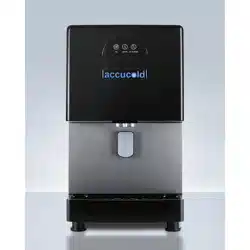
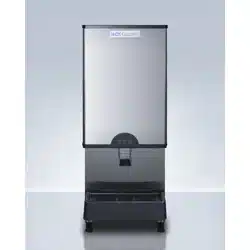
Models AIWD282 AIWD160
SCIWD282 AIWD450
User’s Manual
BEFORE USE, PLEASE READ AND FOLLOW
ALL SAFETY RULES AND OPERATING INSTRUCTIONS
FELIX STORCH, INC.
Summit Appliance Division
An ISO 9001:2015 registered company
770 Garrison Avenue
Bronx, New York 10474
Write Model and Serial Numbers here:
Model No.:
Ser. No.:

2
Table of Contents
Important Safeguards ............................................................................................. 3-5
Product Specification .............................................................................................. 6-9
Product Rating… .................................................................................................. 6
Location of Parts… ................................................................................................. 7-9
Unpacking, etc. ........................................................................................................... 10
Product Installation ..................................................................................................... 10-14
General Instructions ............................................................................................... 10
Requirements for plumbing .................................................................................... 11
Water Quality… ....................................................................................................... 11
Requirements for Power Supply.............................................................................. 12
Panel disassembly method ..................................................................................... 13
Connection method for water supply and drainage… ................... …………………..14
How to start the product ........................................................................................... 15-17
Button operation… ............................................................................................... 15
Function button description (FND display window) … ........................................... 16
Three drainage functions (forced drainage, automatic draining, water drainage)…17
Stop switch…....................................................................................................... 17
Product Maintenance ................................................................................................ 18-23
Actions required to prevent frost ........................................................................... 18
Emptying the drainage gutter (AIWD450)…………………………………………….18
Maintenance, repair, and disinfection… ............................................................... 19
Maintenance schedule… ...................................................................................... 20
Cautions when cleaning exterior panel (stainless steel)…………… ...................... 21
How to clean and disinfect .................................................................................. 22-23
Circuits Diagram ....................................................................................................... 24-25
Product Troubleshooting ......................................................................................... 26-27
Before Requesting Service................................................................ ………………..29
Product Warranty ......................................................................................................30
3
IMPORTANT SAFEGUARDS
2
Your safety and the safety of others are very important.
We have provided many important safety messages in this manual and on your appliance.
Always read and obey all safety messages.
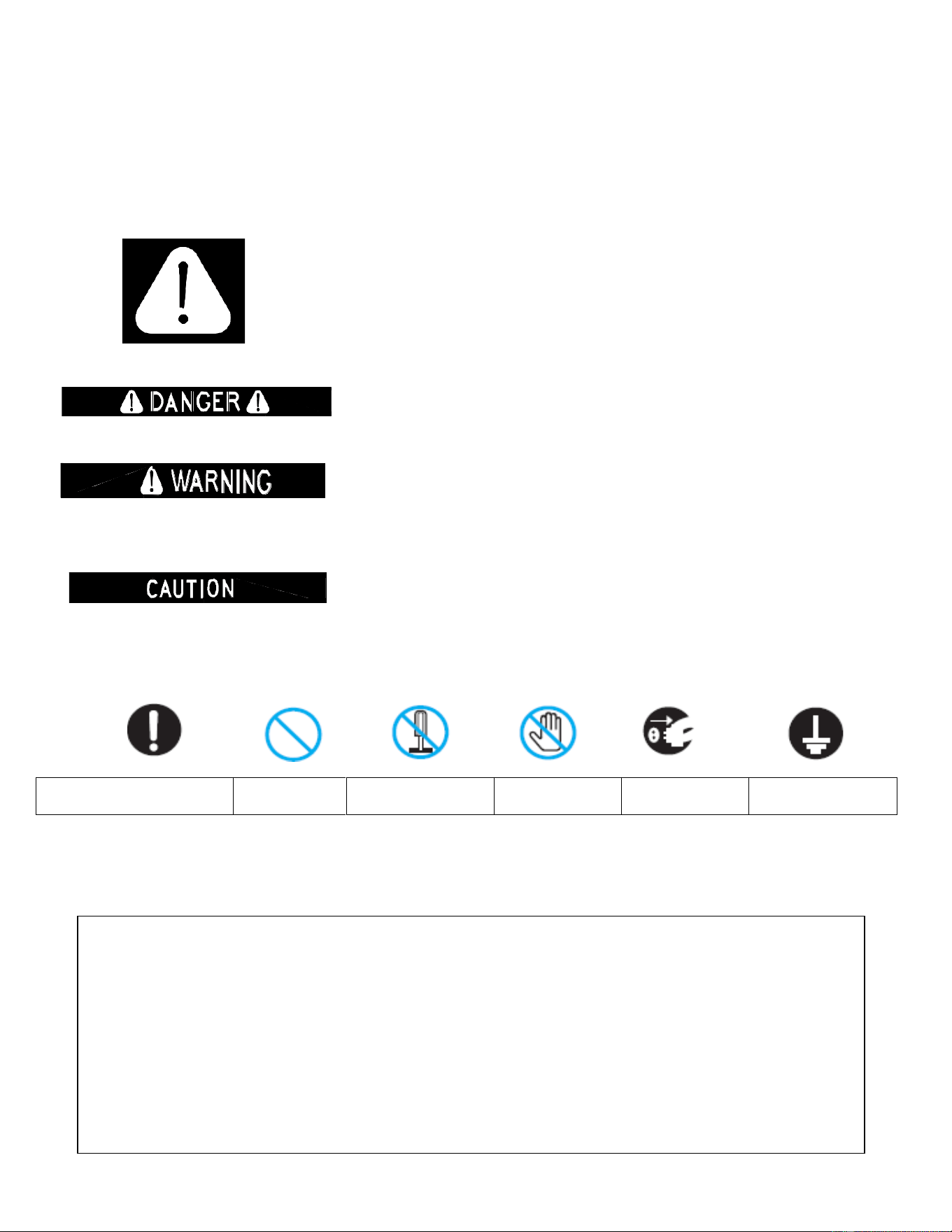
This is the Safety Alert Symbol. This symbol alerts you to potential hazards
that can injure or kill you and others.
Safety messages will follow the Safety Alert Symbol and either the words
"DANGER", "WARNING" OR "CAUTION".
DANGER means that failure to heed this safety statement may
result in severe personal injury or death.
WARNING means that failure to heed this safety statement
may result in extensive product damage, serious personal injury
or death.
CAUTION means that failure to heed this safety statement may
result in minor or moderate personal injury, or property or
equipment damage.
What you must obey
Prohibited
Disassembly
Prohibited
No Contact
Remove Power
Plug
Grounding
All safety messages will alert you to what the potential hazard is, tell you how to reduce the
chance of injury, and let you know what can happen if the instructions are not followed.
IMPORTANT SAFETY INSTRUCTIONS
WARNING: To reduce the risk of fire, electric shock or injury when using
your ice maker, follow these basic precautions:
·
Plug into grounded 3-prong outlet. Disconnect power before cleaning.
·
Do not remove grounding prong. ·Disconnect power before servicing.
·
Do not use an adapter. ·Replace all panels before operating.
·
Do not use an extension cord. · Use two or more people to move & install ice maker.
SAVE THESE INSTRUCTIONS
4
Before the ice/water dispenser is used, it must be properly positioned and installed as described
in this manual, so read the manual carefully. Accucold® by Summit Appliance strongly recommends that
you have a professional install your new machine. The warranty may be affected or voided by an incorrect
installation. To reduce the risk of fire, electrical shock or injury when using the ice/water dispenser follow
basic precautions, including the following:
• Plug into a grounded 3-prong outlet; do not remove
grounding prong, do not use an adapter, and do not use
an extension cord.
•
It is recommended that a separate circuit, serving only your ice maker, be provided. Use receptacles
that cannot be turned off by a switch or pull chain.
•
Do not connect or disconnect the electric plug when your hands are wet.
•
Never unplug the dispenser by pulling on the power cord. Always grip the plug firmly and pull straight
out from the outlet.
•
Never clean dispenser parts with flammable fluids. Do not store or use gasoline or other flammable
vapors and liquids in the vicinity of this or any other appliance. The fumes can create a fire hazard or
explosion.
•
Before proceeding with cleaning and maintenance operations, make sure the power line of the unit is
disconnected and the water line is shut off.
•
Before operating, put all panels back into place.
•
Never allow children to operate, play with the ice dispenser.
•
Do not touch the evaporator with your hand when the machine is operating.
•
Unplug the ice dispenser or disconnect power before cleaning or servicing. Failure to do
so can result in electrical shock or death.
•
Do not attempt to repair or replace any part of your ice dispenser unless it is specifically recommended
in this manual. All other servicing should be referred to a qualified technician.
•
Use two or more people to move and install the ice maker.
Failure to do so can result in back or other injury.
•
Never install or operate the unit in an enclosed area, such as a closed cabinet. To ensure proper
ventilation for your ice maker, the front of the unit must be completely unobstructed. Choose a well-
ventilated area with temperatures above 50°F (10°C) and below 100°F (38°C). The optimum supplied
water temperature would be below 50°F. This unit MUST be installed in an area protected from the
elements, such as wind, rain, water spray or drips.
•
The dispenser is for indoor use only.
•
The dispenser should not be located next to ovens, grills or other sources of high heat.
•
The dispenser must be installed with all electrical and water connections in accordance with state and
local codes. A standard electrical supply (115 V AC, 60 Hz, 15 A), properly grounded in accordance with
the National Electrical Code and local codes and ordinances, is required.
•
Do not kink or pinch the power supply cord between the dispenser and cabinet.
•
The fuse (or circuit breaker) size should be 15 amperes.
•
It is important for the dispenser to be leveled in order to work properly. Otherwise water may not flow
properly through the evaporator (ice mold). The ice production will be less than normal. You may need
to make several adjustments to level it.
•
All installations must be in accordance with local plumbing code requirements.

5
•
Make certain that hoses are not pinched, kinked or damaged during installation.
•
Check for leaks after water line is connected.
•
Although the unit has been tested and cleaned at the factory, due to long-term transit and storage, the
first batch of cubes must be discarded.
•
Remove the packing materials and clean the dispenser before using.
•
Turn on the water supply tap before switching on the ice maker. Never turn the water supply tap off
when the dispenser is working.
•
Except to take ice from the unit, keep the door closed in order to reduce ice melting and to promote
proper ice formation.
•
If the dispenser will not be used for a long time, before the next use it must be thoroughly cleaned.
Follow carefully any instructions provided for cleaning or use of sanitizing solution. Do not leave any
solution inside the dispenser after cleaning.
•
Do not touch the condenser fins. They are sharp and can be easily damaged.
•
DO NOT use solvent-based cleaning agents or abrasives on the interior. These cleaners may transmit
taste to the ice cubes, or damage or discolor the interior.
•
The ice machine cleaner contains acids. Do not use or mix with any other solvent-based cleaning
products. Use rubber gloves to protect hands. Carefully read the safety instructions on the container of
the ice machine cleaner.
•
Do not use the apparatus other than for its intended purpose.
•
Do not place heavy objects or containers containing water on the ice maker. The objects or
containers may fall and cause water to leak and the insulation may be weakened, resulting in a fire
due to a short circuit.
•
Do not install the product in a humid place or where there is a risk of water splashing. Insulation may
be weakened, resulting in short circuit, electric shock, or fire.
•
Do not use: If the product malfunctions, such as smoke or burning smell, unplug the power cord to
stop operation. If you continue operating in abnormal conditions, there is a risk of fire or electric
shock.
•
Do not use: Do not use if the outlet is loose or has a problem. There is a risk of fire due to electric
shock or short circuit.
•
Do not modify or repair the product yourself. Ignition or abnormal operation is dangerous and may
cause more trouble.
•
Do not allow electrical cords or plugs to be pinched or twisted. The cord or plug may be peeled and
there is a risk of fire or electric shock. If the cord or plug is peeled or damaged, be sure to ask the
service to replace it.
•
Do not damage the inside of the dispenser with a sharp tool. The ice reservoir may break or become
damaged.
•
When not in use for a long time, remove ice and water (to prevent winter frost), and unplug the power
cord from the outlet.
•
If there is a risk of slippery water or oil on the floor near the ice maker, please wipe it. There is a risk of
injury if you slip on the dispenser or get hands or feet in the bottom of the side.
•
When transferring this dispenser to another person, please hand it along with the instruction manual.
New users need a manual for safe use.
•
Do not put your hands or feet on the bottom of the ice maker. The bottom of the dispenser has iron
plates and various parts which may cause injury.
•
If you unplug the power plug from the wall outlet and plug it back in again, wait at least 5 minutes
before reinserting. If it is plugged in immediately, it may cause a trouble in operation of the freezer and
it may cause malfunction of the ice maker.
•
In areas where there is a lot of lime content in the water, please install a lime removal filter at the
entrance of the product water supply (the product life may be shortened by calcareous).
• Do not let children hang on the product. There is a danger of the
dispenser twitching or falling, resulting in injury. In particular, do not let children hang on the reservoir
not fixed to the product. Never allow children to operate, play with, or crawl inside the dispenser.
6
Product Specifications
WATER/ICE DISPENSER
Model
AIWD282/SCIWD282
AIWD450
AIWD160
AC Supply Voltage:
115 V 60 Hz, 1 PH
115 V 60 Hz, 1 PH
115 V 60 Hz, 1 PH
Refrigerant:
R404A
R404A
R134A
Amount of refrigerant:
11.29 oz
14.10oz
6.35 oz
Design Pressure: High
Side
360 PSIG
375 PSIG
250 PSIG
Design Pressure: Low
Side
190 PSIG
193 PSIG
150 PSIG
Compressor
LRA 40A
LRA 20A
LRA 53A
Fan Motor
115 V, 0.7 A
115 V, 1.1A
115 V, 0.2A
Geared Motor
115V, 1.6A
115V, 1.6A
115V, 1.6A
Maximum Fuse Size
20A
15A
20A
Max. HACR Breaker
(USA Only)
20A
15A
20A
Max. HACR Breaker
(Canada Only)
20A
15A
20A
Min. Circuit Ampacity
5.8A (570W)
14.47A (840W)
2.8A (322W)
FCC Identifier
ICTR-TR-E191162-OA
ICERT-TR-E213382-0A
Condensation Method
Air-cooled
Air-cooled
Air-cooled
Ice Shape
Nugget
Nugget
Nugget
Discharging method
Solenoid
Solenoid
Solenoid
SAVE THESE INSTRUCTIONS
7
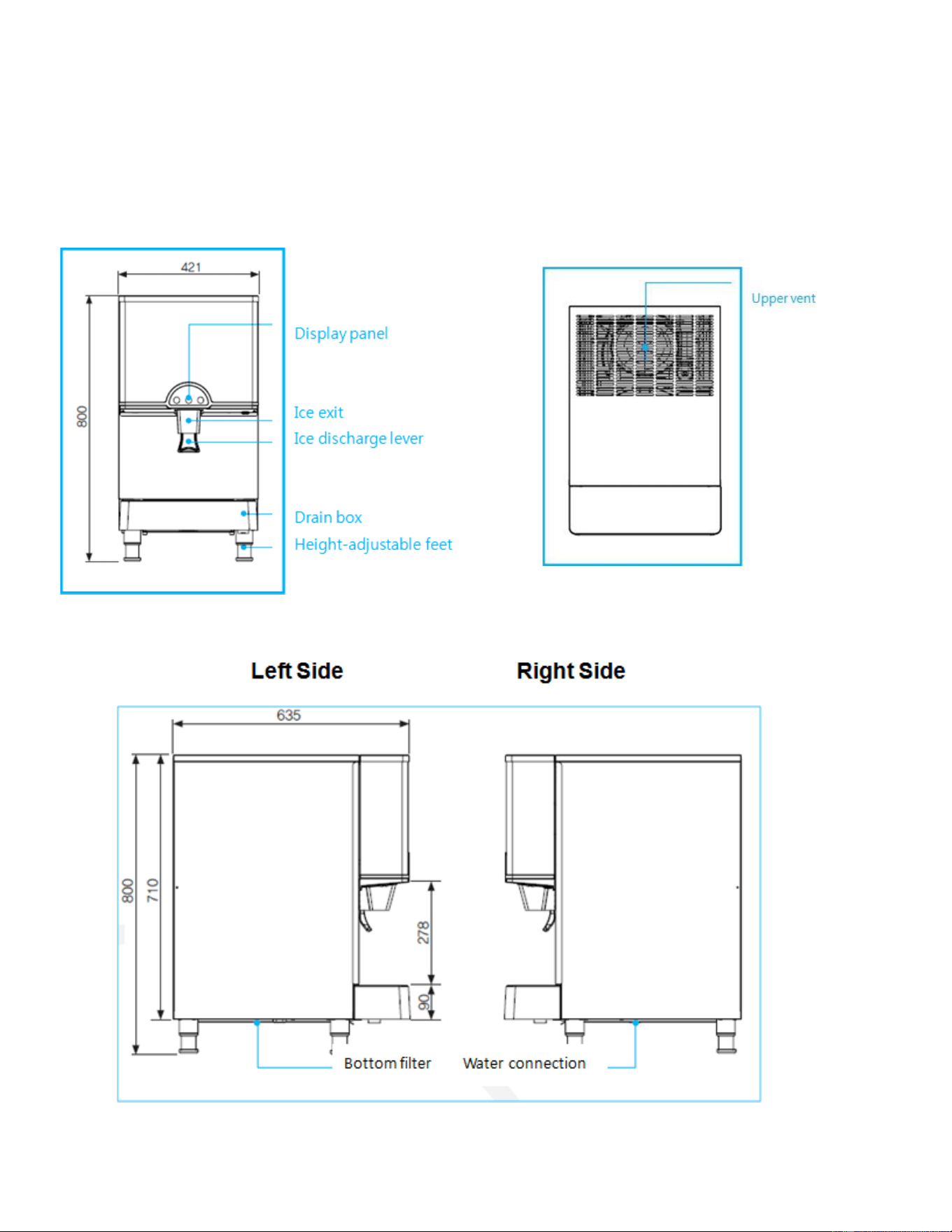
Location of Parts (AIWD282/SCIWD282)
Front Top/Bottom
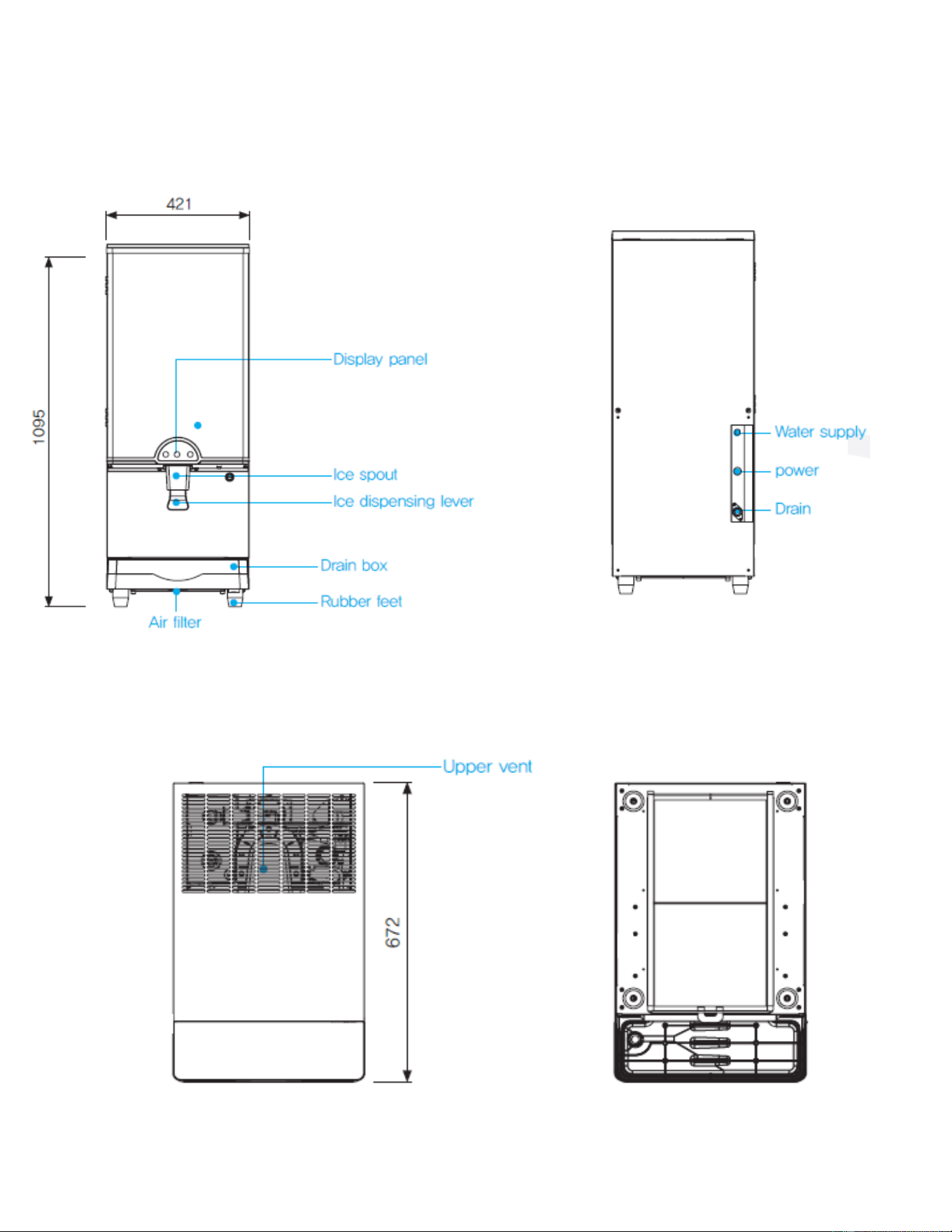
8
Location of Parts (AIWD450)
Front Rear
Top
Bottom
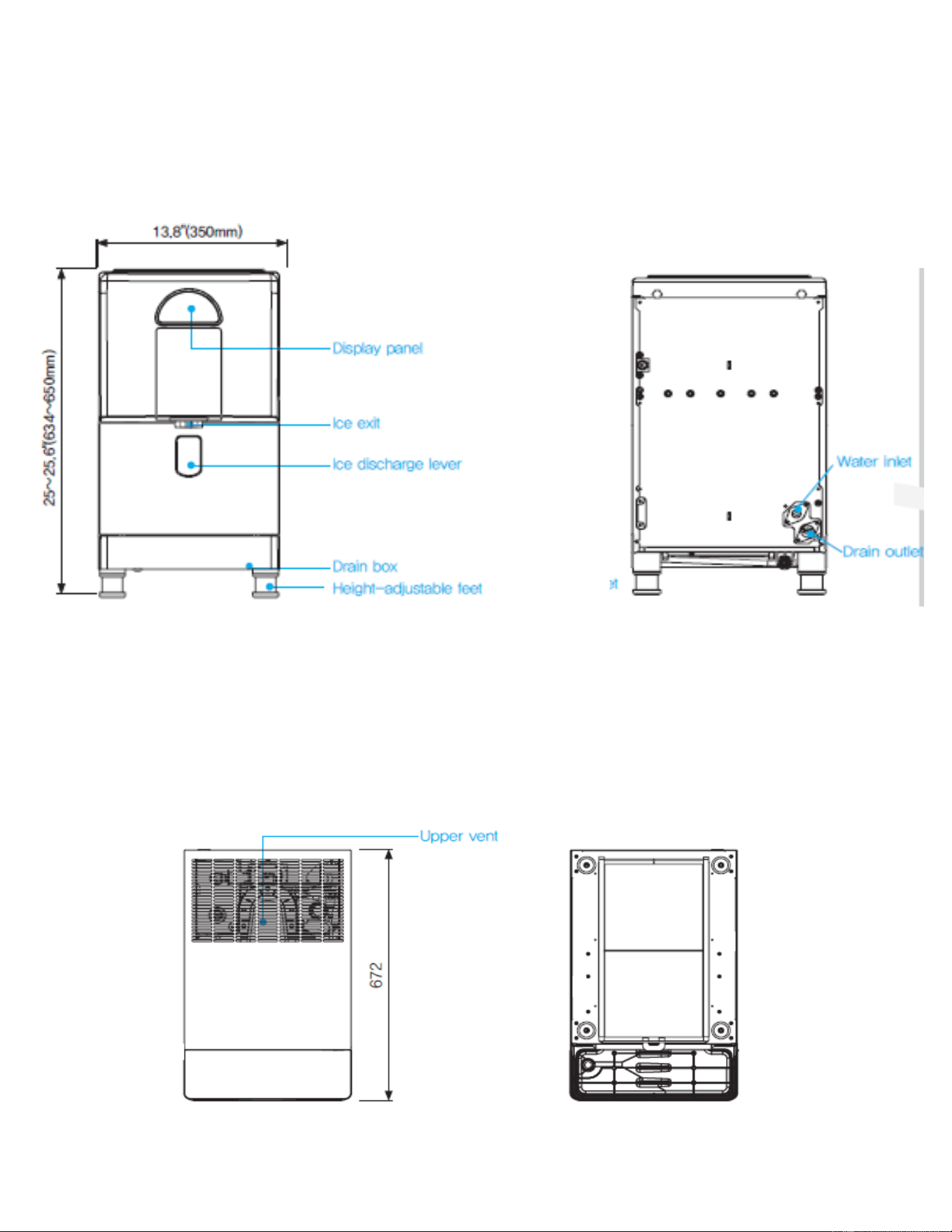
9
Location of Parts (AIWD160)
Front Rear
Top Bottom
10
Unpacking, etc.
•
After removing the packing materials, check the appearance of the dispenser for possible defects or
irregularities. If the product shows any irregularity in its appearance, contact the distributor.
•
All the packing materials (straps, box, Styrofoam, wood, etc.) should never be left within the reach of
children and should be disposed of according to local regulations.
•
For safety, the product should be installed and used with caution in accordance with the User’s
manual.
•
Incorrect installation or careless use of the product may damage or injure the environment, humans,
animals, and/or materials and property. The manufacturer does not bear any responsibility for the
aforesaid damage or injury.
•
The dispenser performs best at room temperature of 50~75°F and a supply of water at 50°F.
•
The dispenser should only be installed indoors and should NOT be installed near heat generators such as heaters,
stoves, or dishwashers
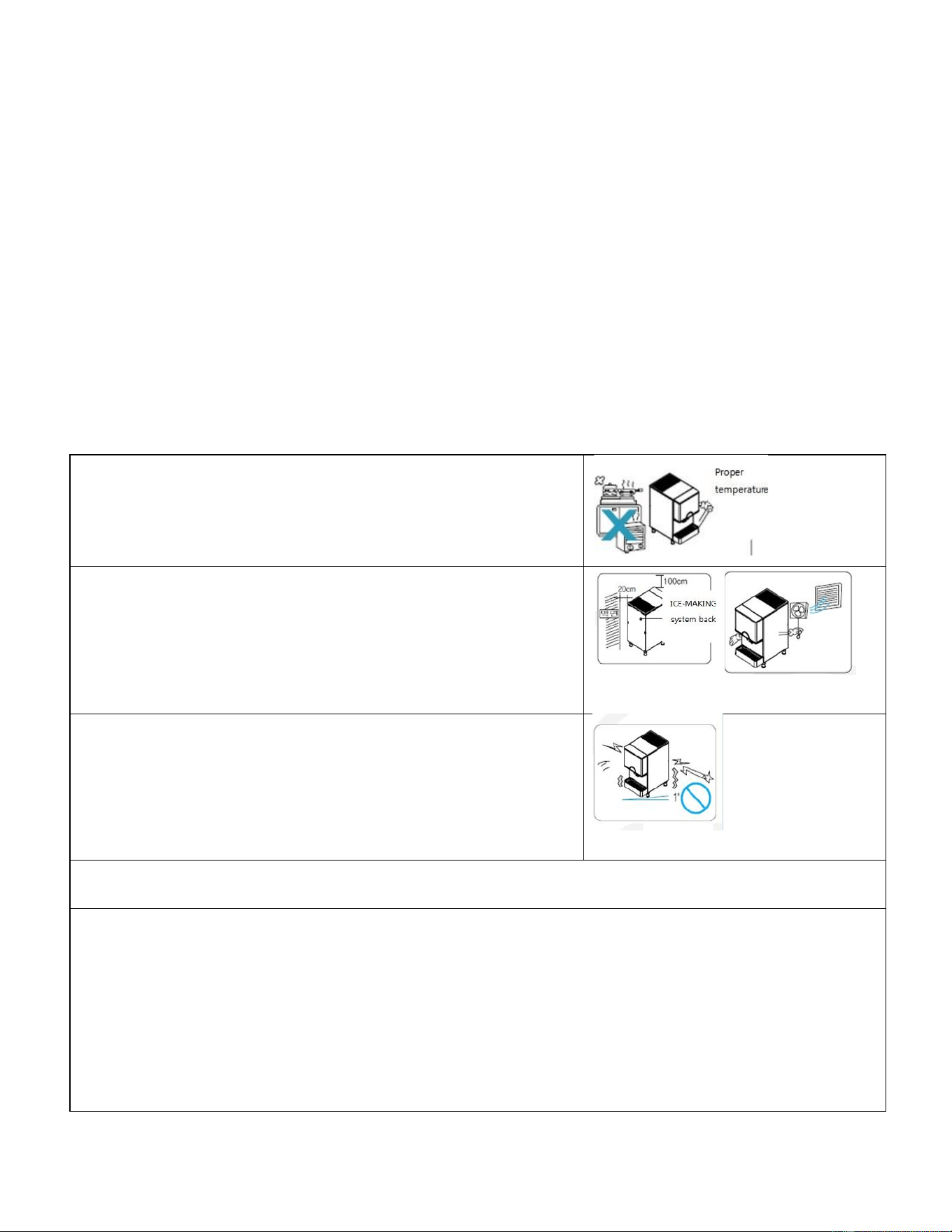
Product Installation
Where there is no heat source.
※ Install in a place where there is no heating device
such as a fireplace or a gas range and do not install in an
area outside the range of 10 ~ 38 ℃/50 ~100
o
F.
Allow enough ventilation
•
For normal operation, install the dispenser at least 4
inches away from the back wall and 6 inches above the top
of the dispenser.
※ Never block the upper vents and do not place any
load on it.
•
Poor ventilation will decrease the unit’s ability to
make ice.
Install on a flat surface
※ Unstable installation may cause vibration and noise.
The recommended angle of installation is 1
o
•
A flat surface is recommended because there is a
possibility that the product will fall and cause injury when
the installation is made in a sloping place.
•
Installation should be indoors in a clean place
•
The drain hose should be installed at an angle so that drainage is good.
•
During installation and use, water leakage may occur due to various reasons. It must be used at a
place where drainage facilities are fully equipped
•
When installing the product indoors (places such as living room, store, the floor where damage
may occur due to leakage), please install natural drainage facilities and waterproof the floor.
•
Even when installing in the kitchen, a drain hole must be provided, and a drain hose must be
connected.
•
The manufacturer shall not be held responsible for the spreading damage caused by insufficient
drainage facilities in case of the above-mentioned problems and problems due to water supply hose
deviation or breakage.

11
Requirements for plumbing
Plan the arrangement of the water supply pipes.
Connect a 1/4" diameter copper cable with the tap water pipe.
Install a shutoff valve between the tap water pipe and the product so that the user can operate the valve.
Do not install the shutoff valve at the back of the product. Do not use a self-piercing valve. If the tap water
has a high level of minerals, a pipeline filter will be required.
The pressure of the tap water should be maintained at a level between 20psi (1.4bar) and 80psi (5.5bar).
The tap water and drain pipeline should be planned and prepared at the place of installation. If an electric
outlet is available just at the back of the ice maker, installation may be easier. The electric power, tap water
pipeline and drain pipeline should satisfy all the provisions under local laws and regulations. For the position
of the tap water, refer to the installation specifications and drawings on pages 10 and 11.
Important Information:
The dispenser is designed for use in a fixed position but it
may be necessary to pull
the unit forward for service. Therefore, do not install any material at the front, upper or lower end of the
product which may act as an obstacle when moving the ice maker.
Water quality
•
There is no such thing as “perfectly pure” water. All kinds of water including tap water contain some
impurities. Rainwater absorbs impurities from the atmosphere or when it passes through soil. Some
impurities consist of solid particles called suspended solids and are filtered through micro filters. Any
remaining impurities cannot be filtered because they are chemically combined with water molecules.
These impurities are called dissolved solids.
•
The mineral content of the ice produced by the dispenser is reduced compared to the content in the
water before conversion into ice. Water containing a low level of impurities is rapidly frozen. The
reason for this is that the impurities elevate the temperature of the water. Through such action, most
of the impurities condensed in the water-tank of the dispenser form a hard precipitation called scale.
•
This dispenser reduces the mineral level by circulating water during the harvest cycle (the excessive
quantity is removed through the outlet tube). Each cycle requires about 0.64 quart (0.6ℓ) of water. For
each quart, about 0.5 quart is used in rinsing the water tank and the remaining quantity is removed
through the outlet pipe. In this process, some impurities unavoidably remain and may accumulate on
the internal parts of the ice maker, forming abnormally-shaped ice cubes. If a large quantity of mineral
scale accumulates, the lifespan of the dispenser may be reduced.
•
For best operation of the ice maker, impurities and minerals should be decomposed by washing
periodically. The method of cleaning the dispenser is described on pages 18 -19.
•
In general, it is best to use filtered water. Filters may remove not only bad odor but also particles.
Neutral water is not recommended.
•
Water softener is not recommended because it exchanges minerals. If the hardness of the water is
very high, softening may lead to the formation of opaque pieces of ice.
•
If you have any questions about the purity of your water, address your inquiry about water treatment
to an expert in water quality.
•
This product was thoroughly washed at the factory. However, check the cleanness of the inside before
use and keep it clean during use.
12
Requirements for power supply
120VAC, 60Hz, 15-amp circuit breaker and electric power are required. A separate circuit is required for
grounding.
The power cord of the product should be inserted into a suitable 3-prong grounding-type socket.
Important Information:
A Ground Fault Circuit Interrupter
(GFCI) is not recommended because it could cause
the operation of the product to stop.
Important Information: The provisions of the National Electric Code as well as any local laws and instructions
should be observed when installing the product
.
Electrical Connection
Do not, under any circumstances, cut or remove the third (ground) prong from the power cord. For personal
safety, this appliance must be properly grounded. The power cord of this appliance is equipped with a 3-
prong grounding plug that mates with a standard 3-prong grounding wall outlet to minimize the possibility
of electric shock hazard from the appliance. Have the wall outlet and circuit checked by a qualified
electrician to make sure the outlet is properly grounded. When a standard 2-prong wall outlet is
encountered, it is your responsibility and obligation to have it replaced with a properly grounded 3-prong
wall outlet. The dispenser should always be plugged into its own individual electrical outlet which has a
voltage rating that matches the rating label on the appliance. This provides the best performance and also
prevents overloading house wiring circuits which could cause a fire hazard from overheated wires. Never
unplug your dispenser by pulling on the power cord. Always grip the plug firmly and pull straight out from
the outlet. Repair or replace immediately all power cords that have become frayed or otherwise damaged.
Do not use a cord that shows cracks or abrasion damage along its length or at either end. When moving
the ice maker, be careful not to damage the power cord.
Extension Cord
Because of potential safety hazards under certain conditions, it is strongly recommended that you do not
use an extension cord with this dispenser.
Warning!
Do not use extension cords or 2-prong adapters. The product must be grounded.
Never cut off the grounding terminal of the 3-prong grounding plug.
13
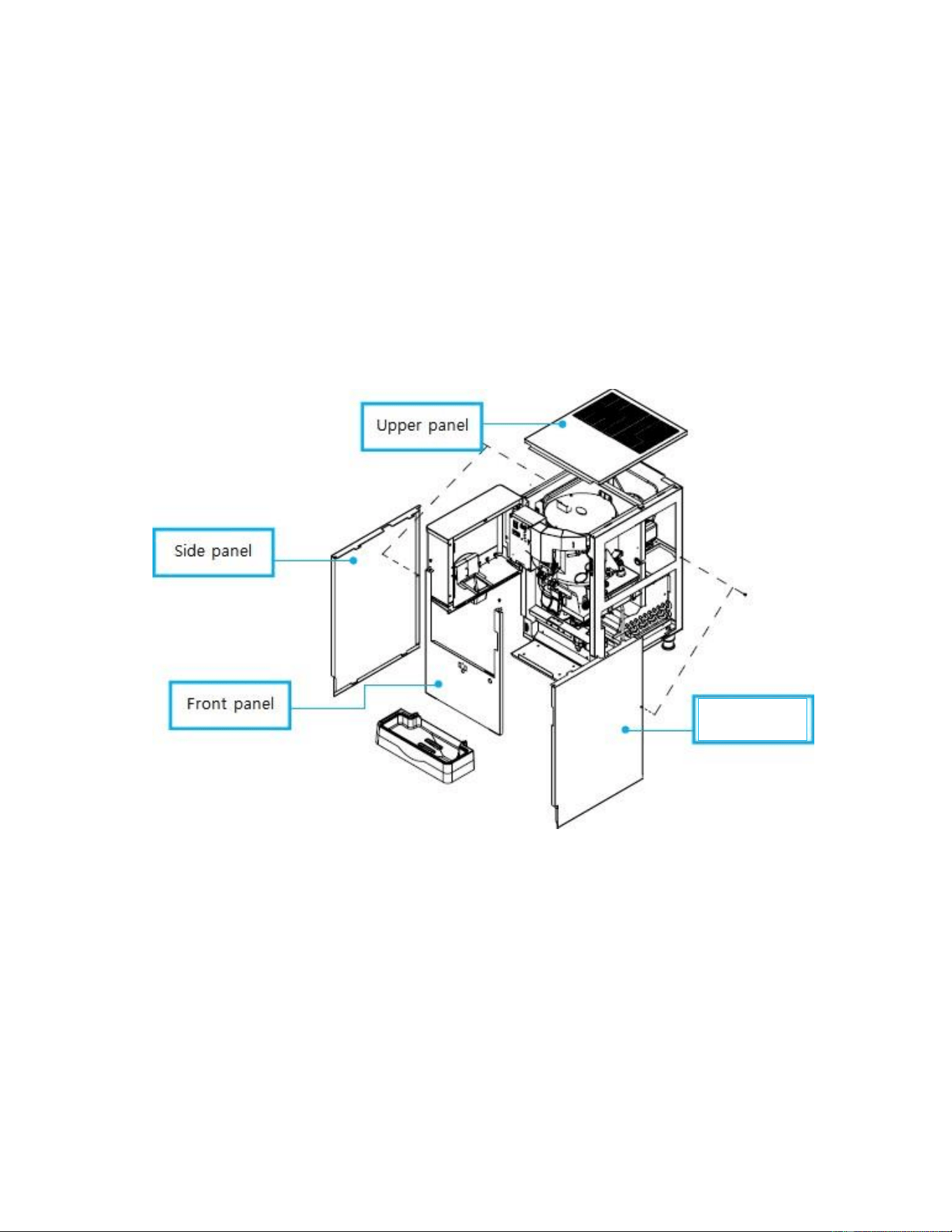
Panel Disassembly Method
1.
Upper panel: Open the front door and lift the upper panel, then the back magnets will be separated and
disassembled.
2.
Front panel: Remove the lower set screws of the drain box, then loosen the set screws on the top of
the front panel and pull out the front panel taking both sides.
3.
Side panel: Open the door, loosen the screws on the top of the front panel, push the front panel
forward, and slide the side panel forward to remove it.
•
Precede the assembly work in the reverse order of disassembly.
Side Panel
14
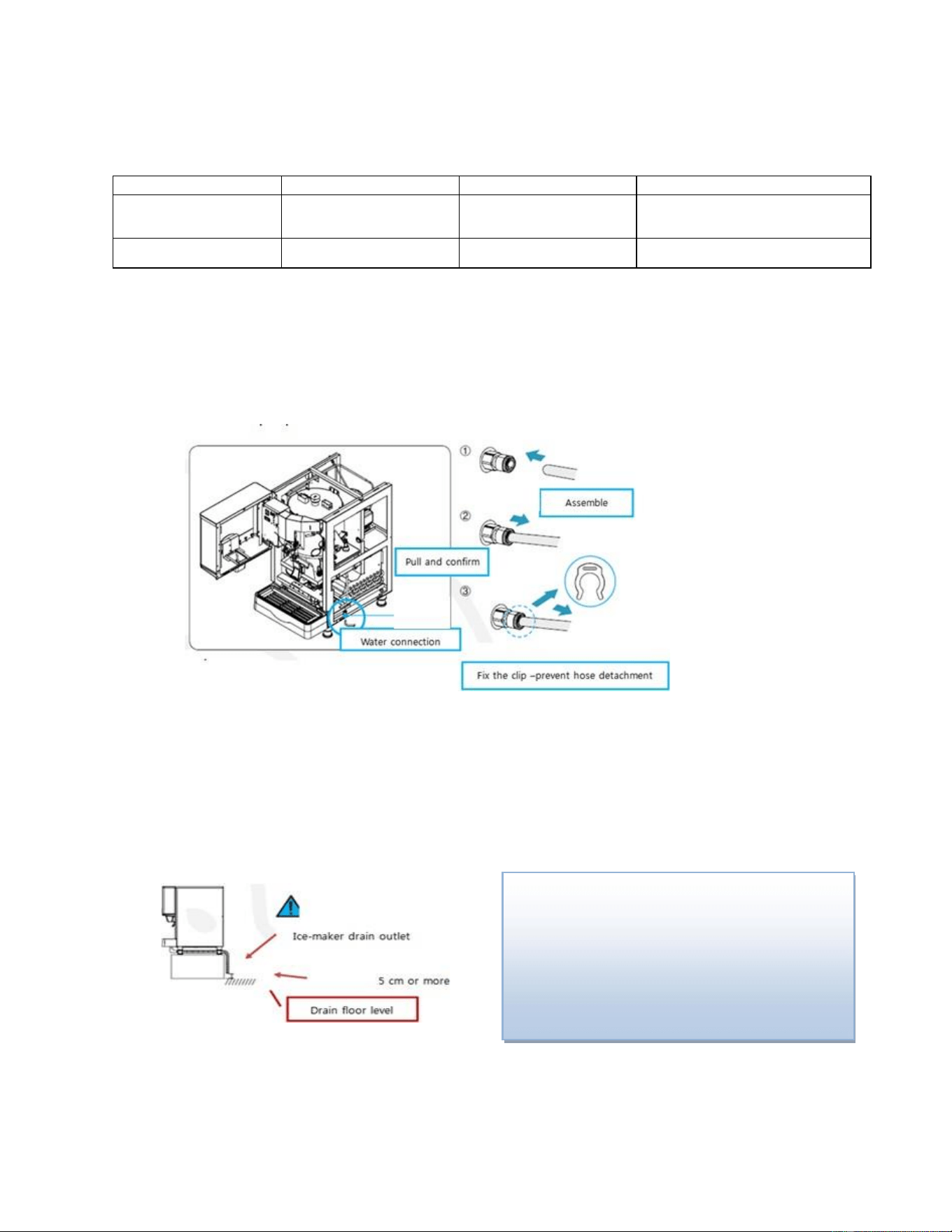
Connection to water supply and drainage [Connection of
water and drainage hoses]
Division
Proper water temperature
Water pressure
Hose to be used
ICE MAKING water supply
50 ~ 90
o
F
14.22 ~ 71.12 psi
20 ~ 80 psi
OD ø6.35
PE TUBE
NPT 3/8”
ICE MAKING drainage
-
-
ID ø20 hose
NPTF 3/4”
•
If the temperature of the ICE MAKING water supply is too high, the amount of ICE MAKING may
be reduced,
•
If the water pressure is too low, it may not be possible to freeze. In this case, an auxiliary
hydraulic pump should be installed.
•
Connect the ø6.35 PE TUBE to the bottom right of the product as shown in the picture and
secure the clip to prevent hose detachment.
After the installation is complete, please operate the product and check whether there is leakage in the water
supply and drainage parts.
•
Please connect a hose with an inner diameter of Φ20mm or more for the ice making drain hose and the drain
outlet should be 5cm above the drain floor level. If the drain outlet dips in the drainage, the drainage may flow
back into the dispenser and damage the product and the floor.
Be careful not to bend the drainage hose during
the installation and also confirm that the hose is
not exposed to fire or sharpness which may result
in the hose burst (This will become the cause of
the PL accident and the manufacturer shall not be
held responsible)
15
STARTING THE PRODUCT
1) Water supply hose protection --Do not place heavy objects on the water supply hose leading to the
water supply, or keep the hose from treading.
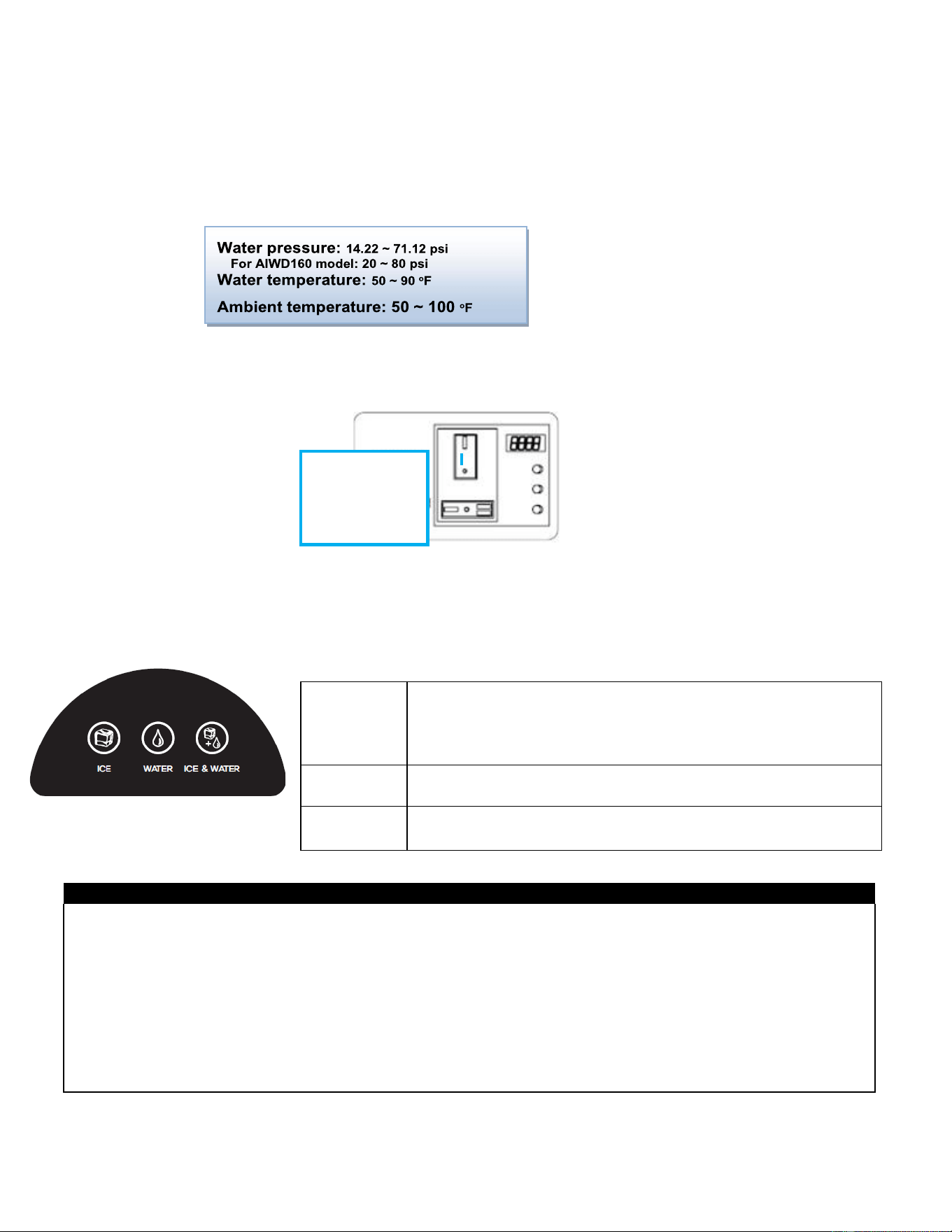
2) Proper water pressure, water temperature, ambient temperature
3) Please connect only the water you can drink.
Power connection - connect the dispenser to a dedicated outlet.
4) Water supply - open the faucet and let the water supply.
5) Ice making operation - Turn the ICE MAKING-OFF-WASH switch to ICE MAKING
6) Start ice production -There is a slight difference depending on the ambient temperature and water
temperature, ice starts to be generated from about 3 minutes after starting the ice making operation.
After about 70 minutes, the reservoir will be full of ice. (You can use ice after about 10 minutes.)
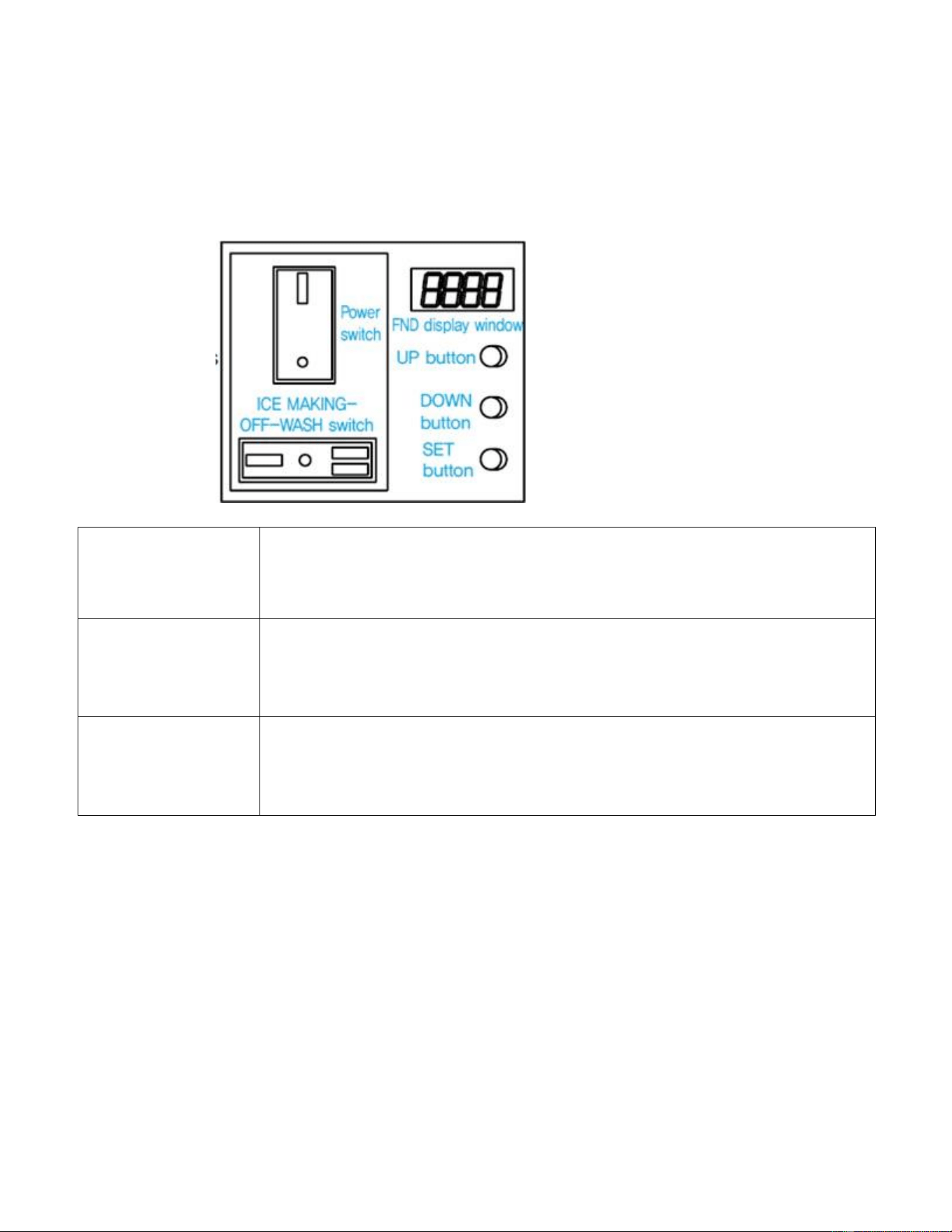
BUTTON OPERATION
NOTE: When the FULL light is on. The storage bin is full of ice. (AIWD450 model)
When ERROR occurs
- ICE-WATER-ICE & WATER button will flicker in order and will disappear when restarting after the action against
the ERROR.
Service cycle setting notification (parts check / replacement cycle notification)
- If the motor is running for more than 10,000 hours, the corresponding lamp blinks for 5 seconds in the initial stage
of the ice maker.
- If the motor is operated for more than 11,000 hours, all the buttons will blink for 5 seconds in 1 hour cycle.
※
If all the buttons are flashing, it is a signal to check / replace regular replacement parts and you should contact
the customer service center (paid service).
Failure to check / replace parts may result in higher repair costs.
ICE
- If you turn on the power, this will always come in first. The initial
water subtraction is done three times and then the ICE MAKING
operation is preceded. If you put the cup in the ice exit, you can
discharge the ice for the time set in F1.
WATER
Press the button to light up. If you put the cup on the ice exit, you
can discharge the water for the time set in F1.
ICE &
WATER
Press the button to light up. If you put the cup on the ice exit, you
can simultaneously discharge ice and water for the time set in F1.
ICE MAKING-
OFF-WASH
switch
16
Function Button Description (FND Display Window)
F. 1
Maximum Discharge
Time
① SOLENOID Maximum operating time adjustment function.
②3
rd
, 4
th
digits: 20 seconds (5 seconds ~ 30 seconds, Set Unit of one
second)
F. 2
Complete removal of
ice in the reservoir
①This function can be entered in "OFF" state of ICE MAKING-OFF-WASH
switch.
②Press two buttons (WATER, ICE) simultaneously for 3 seconds and Button
part LED lights up.
③ Press the discharge lever for continuous operation of SOLENOID and the
motor. Keep 'ON' state.
F. 3
Automatic ice
discharge function
① When ICE, WATER &ICE button is selected, ice is automatically emitted
for the set time.
② Automatic operation is not possible when OFF is set. (Manual operation)
③ Automatic discharge is performed for the set time of At01 ~ 99.
F. 4
Initial water
subtraction function
① It operates first when "ICE MAKING" switch is operated.
② FND 1
st
, 2
nd
digits (drain time) 30 seconds (oF ~ 99 seconds, Set Unit of
one second)
③ Water supply operation after drainage to high water level.
④ FND 3
rd
, 4
th
digits (number of repetitions) Standard: 3 times (1 ~ 9 times)
F. 5
Automatic drain
function
It operates when "ICE MAKING" switch is operated.
② FND 1
st
, 2
nd
digits (drain time): 2 seconds (oF ~ 9 seconds, Set Unit of one
second)
③ FND 3
rd
, 4
th
digits (drain interval): 1.0 hour (0.5 ~ 9.5 hours, every 30
minutes)
F. 6
ICE + WATER
volume control
①1
st
, 2
nd
digits Ice time Default 5 seconds (up to 99 seconds)
②3
rd
, 4
th
digits Water time Default 5 seconds (up to 99 seconds)
F. 7
UV LAMP time
adjustment
①1
st
, 2
nd
digit lighting time Default 3minutes (99 minutes possible)
②3
rd
, 4
th
digits off time Default 1 hour (9 hours available)
F. 8
Notify service period
setting
① A.1.0 After using 10,000 hours, the corresponding mode LED blinks for 5
seconds (for the first 5 seconds during ice making)
② A.1.1 After using 11,000 hours, all LEDs blink for 5 seconds (1 hour cycle)
F. 9
Cumulative uptime
① The FND display is displayed in year, month, day, and hour, and is
displayed in order from right to left.
② Cumulative operation time of product is expressed in hour unit.
③ Calculation example: 12 months for 1 year, 30 days for 1 month, 24 hours
for 1 day.
F. 10
Change temperature
unit
Function of setting the unit of temperature in degrees Celsius or Fahrenheit
F. 11
Evaporation inlet
temperature display
F. 12
Evaporation outlet
temperature display
F. 13
Choose ice water
discharge method
ordE : Discharge ice first and then discharge water
join : Simultaneous discharge of ice and water
17
Three Draining Functions
(Forced Draining, Automatic Draining, Water Draining)
Forced drainage
function
Must be implemented to prevent freezing in winter storage. Use this function for
cleaning the inside.
- Turn on the power switch and press the "DOWN + SET" button simultaneously for 3
seconds with any signal on the FND display. (30 seconds)
Automatic drain
function (F. 5)
Turn on the power switch and turn the ice making switch to "ICE MAKING" to start the
operation.
① FND 1
st
, 2
nd
digits (drain time): 2 seconds (oF ~ 99 seconds (09 seconds for
AIWD450 model) , Set Unit of one second).
② FND 3
rd
, 4
th
digits (drain interval): 1.0 hour.
(0.5 to 9.5 hours, every 30 minutes)
Initial water draining
function (F. 4)
Turn the power switch off and then on again (the ICE MAKING-OFF-WASH switch at
"ICE MAKING" position) to operate the function.
① Clean the water line and ice making cylinder thoroughly.
② FND 1
st
, 2
nd
(drain time) 30 seconds (oF ~ 99 seconds, Set Unit of one second).
③ Water supply operation to high water level after drainage.
④ FND 3
rd
, 4
th
digits (number of repetition) Reference: 3 times (1 ~ 9 times).
Stop switch
•
With the power switch turned on, turn the "ICE MAKING-OFF-WASH" switch to center OFF, then the
ice making stops and the motor runs for another 60 seconds.
•
This function protects the motor by removing the ice remaining in the product.
•
If you sell the remaining ice even when it is OFF, ice discharging will be done.
18
Actions required to prevent frost
(Water Removal in Water Tank and Evaporator)
•
If the ambient temperature falls below 0°C/32
o
F, water will freeze inside the machine and machine
operation will be impossible.
•
If not use in for a long period of time in the winter, be sure to completely remove the water inside the
body by following the instructions below. If you do not remove the water or if it is insufficient, it will cause
serious damage to the product. This shall not be guaranteed by the manufacturer and may result in
repair costs. Please observe the following points.
1. Turn on the power switch and press the DOWN + SET
button at the same time for 3 seconds with any signal
on the FND window. Forced drainage will be done for
30 seconds.
2. Turn off the power switch and disconnect the power
plug from the outlet.
3. Remove the upper panel → the front panel.
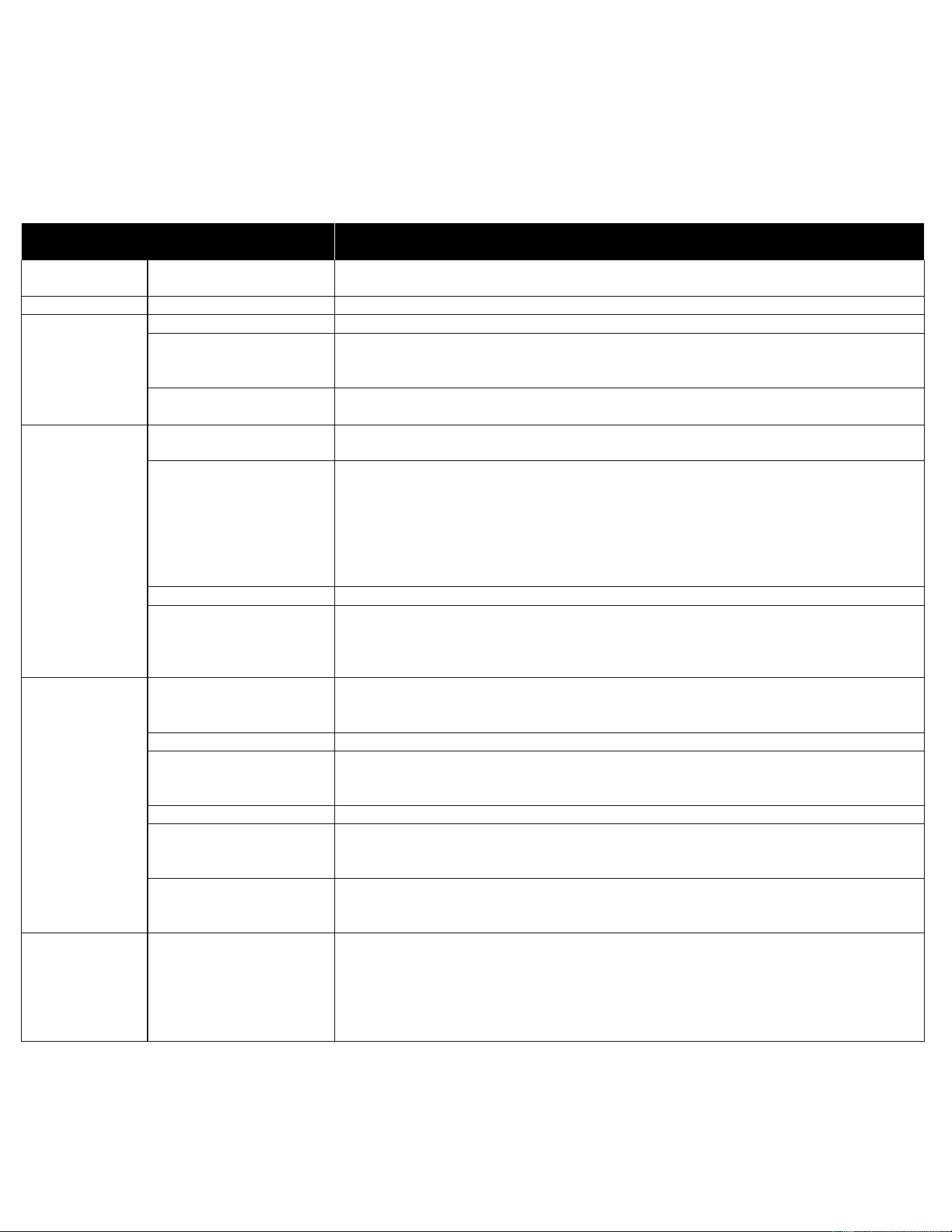
4. Remove the evaporator cylinder drain hose clamp
and remove the hose, and wait until the ice in the
evaporator cylinder completely melts down. It is
possible to remove internal water quickly by using
compressed air gun etc.
5. Reassemble the evaporator cylinder drain hose
and tighten the clamp.
6. Assemble in the order of left panel → upper
panel → front panel.
• AIWD450: back panel → upper panel
Emptying the drainage gutter (AIWD450)
• When the water in the front drain is full, a white float comes up, so empty out the drain and
pour water.
• (If water overflows, it may flow onto the floor, so empty it from time to time).

19
Maintenance, repair, and disinfection
※
Please keep the product according to the instruction manual and label provided.
● Be sure to have a qualified service technician service the product.
● To reduce the risk of electric shock, do not touch or disassemble the parts of the ice maker.
● Before service
- Turn off the power switch of the dispenser and the earth leakage breaker, and disconnect the power
plug from the outlet.
● Choking hazard - After performing maintenance and repair, make sure that all components (such as
fixtures, screws, bolts, etc.) are completely assembled.
- Be careful not to let any components fall into the ice making compartment and ice reservoir.
20
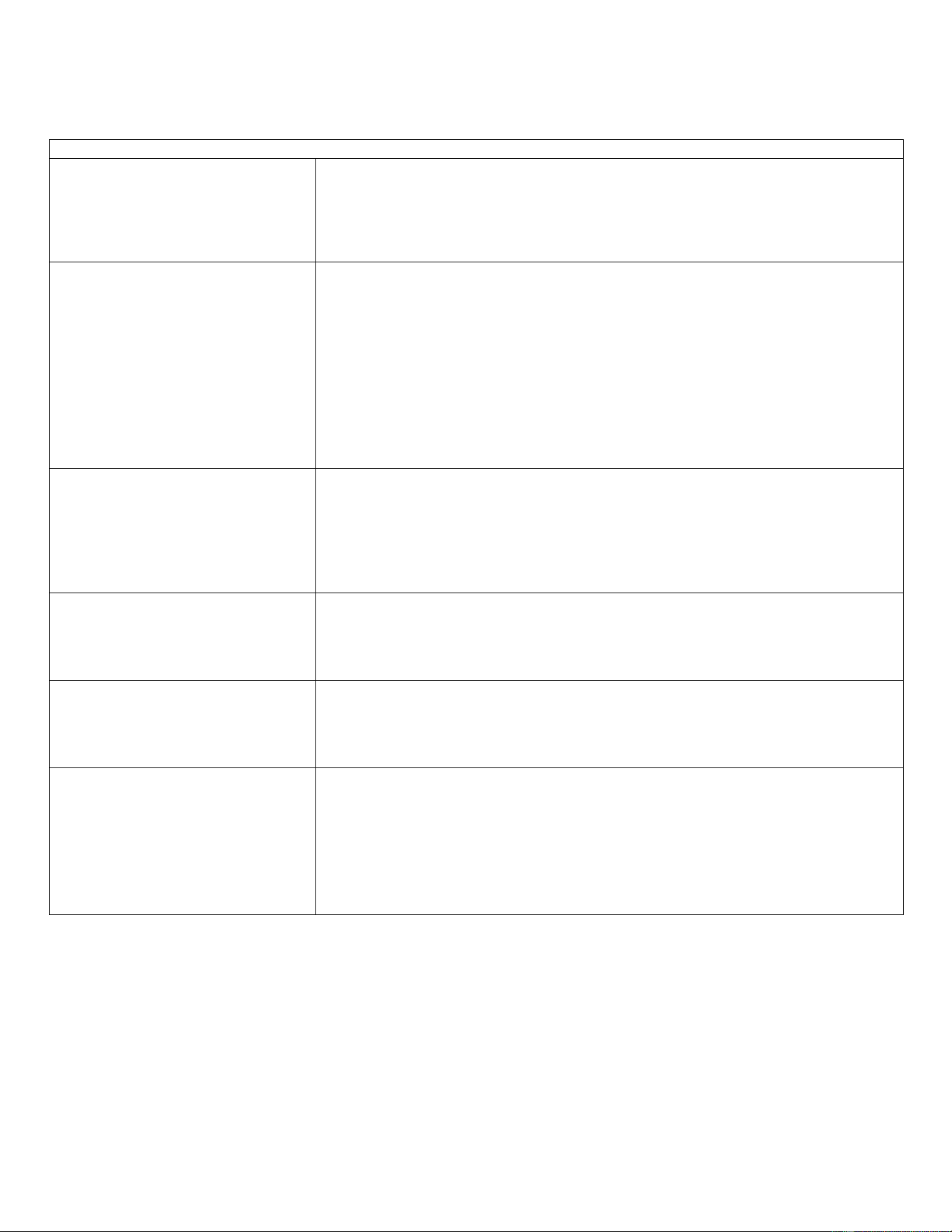
Maintenance Schedule
※
The following maintenance schedule is a guideline.
※
Maintenance and repair should be done more frequently according to water quality, equipment usage
environment and local hygiene regulations.
Inspection
Schedule
Area
Contents
Daily
Chute
1. Clean the ice scoops with a neutral detergent.
2. Rinse thoroughly after cleaning.
Weekly
Air Filters (air-cooled)
1. Inspect for dust and wash dirt with warm water and neutral detergent.
Monthly
External water filter
1. Make sure that the pressure is adequate and make changes if needed.
Outside of the icemaker
1. Wipe it with a clean, soft cloth, and use a cloth dampened with a neutral
detergent to wipe away any accumulated dust or grease.
2. Clean the chlorine dye (green spots) with non-abrasive detergent.
The bottom of the ice
maker
1. Wipe clean with clean cloth and warm water.
Every six
months
Dispenser and reservoir
1. Clean and disinfect according to the disinfection instructions given in the
instruction manual.
Evaporator condensate
drain pan and Geared
motor drain pan
1. Wipe clean with clean cloths and warm water, and slowly pour a cup of
disinfectant solution (prepared as described in the instructions for disinfection
in the manual) into the evaporator condensate drain pan.
2. Take care not to overflow the drain pan.
3. This disinfectant solution will flow out through the geared motor drain pan and
drain passage.
4. Rinse repeatedly with a glass of clean water.
Ice maker and reservoir
1. Always check that it is kept clean.
Ice exit fixing
seal bolt
1. Check for leaks around the seal bolt. Tighten if necessary and replace O-rings.
2. Always replace the O-ring when loosening the seal bolt and tighten it again. If
there is no O-ring, apply Loctite 243 or equivalent fixing agent so that it does not
leak.
Every year
Water supply valve and
Drain valve
1. Close the shutoff valve to shut off the water supply line and drain the water.
2. Clean the inlet of the water supply valve and check the water supply valve and
drain valve for leakage and operation.
Water hose
1. Check the water hose and clean it if necessary.
Condenser (air-cooled)
1. Inspect for cleaning. If necessary, clean with a brush or vacuum cleaner
2. If the dust adhesion is severe, spray the pin cleaning agent, clean the dust,
spray it with clean water, rinse and dry with air gun.
Ice maker
1. Inspect for oil marks, loose components, tightening parts and wires.
Upper bearing
(Ice exit head)
1. Check that 0.5mm (0.02mm for AIWD160 model) round bar or pin gauge (or
clearance gauge) is inserted into auger and bearing clearance, and replace all upper
and lower bearings (ice exit head and lower housing) (Paid service)
Mechanical seal
1. Check for leaks in the bottom housing, and if there is a leak, disassemble the
auger to replace the mechanical seal. (Paid service) (Water with a lot of calcium
will shorten the life of replacement parts.)
Every three
years
Upper and lower
bearings,
Housing O-ring,
Mechanical seals,
Evaporator cylinder,
Auger
1. Please check if the auger and bearing clearance exceeds the factory
recommended value (0.5mm or less (0.02mm or less for AIWD160 model)), and
replace both the upper and lower bearings.
If the contact surface of the mechanical seal is worn, cracked, or scratched,
replace it.
21
Caution when cleaning exterior panel (stainless steel)
How to clean the rust state
Stain type initial rust
Since the initial rusted stainless steel surface itself is only slightly affected by the
stain, it can be returned to almost the original surface by selecting the neutral
detergent or a commercially available cleaning solution. If it is regularly cleaned at
a proper frequency, the state of the rust can stop at this stage and you can remove
the rust easily and cheaply.
Red Rust
If the initial rust is let for a long time, it will result in a thick brown rust that can
damage the stainless steel surface. In this condition, it is not east to remove the
rust, and the surface cannot be restored. Therefore, it is important to remove the
rust in the early stage of rusting.
If the rust is not removed by a commercial cleaning agent, it can be easily removed
by using a cleaning agent after removing some rust in advance with sandpaper or
a stainless steel brush. In this case, it is necessary to fix the surface by cleaning
and regrinding the surface.
Rust by iron powder
Rust by iron powder can occur due to welding spatter at the time of construction,
rust water flowing down from steel in the upper part of stainless steel, and rust
generated in contact with stainless steel and ordinary iron products during storage.
It should be removed with neutral detergent at the first sign of rusting. If the rusting
state is further developed, it should be removed with 15% nitric acid solution or
commercially available stainless steel cleaner.
Rust due to exhaust gas or acid
rain
Exhaust gas or acid rain, sometimes found in high traffic cities, may affect this unit.
Relatively light rusts can be cleaned with a neutral detergent or soapy water, but if
they get worse, they should be removed with 15% nitric acid solution or a
commercially available stainless steel cleaner.
Rust due to salt deposition
When exposed to sea breezes like a window frame or verandah railway pipe that
faces the ocean, the icemaker may experience red rust in a short time. To avoid red
ruse, ensure regular cleaning according to this manual.
Rust by disinfection and cleaning
agent
Chlorine-based disinfectants are used to disinfect water in places such as swimming
pools and bathrooms. In the case of chlorine-based cleaning agents such as ROX
used for cleaning toilets, etc., many chlorine compounds are attached to the surface
of stainless steel and can result in rusting. When chlorine- based disinfectants are
used, it is important to thoroughly wash them with water to ensure that no residue
remains. They must be removed with 15% nitric acid
solution or stainless steel cleaner.
22
How to Clean and Disinfect
The dispenser should be cleaned and disinfected at least twice a year. More frequent cleaning and
disinfection may be required.
Washing
solution
Use a scale remover that is not harmful to the human body by diluting with water, and add
more if necessary.
It is important to use the diluted cleaning solution immediately for safety and maximum
effect.
Washing
procedure
1) Shut off the water supply by locking the valve of the waterline of the ice maker.
2) Switch the ICE MAKING-OFF-WASH switch to the "WASH" position.
3) The water in the water tank is drained through the evaporator cylinder and washing is
done by this (max. 5 minutes).
4) Turn the ICE MAKING-OFF-WASH switch to "OFF" position.
5) Remove all ice from the ice maker and reservoir.
6) Pour the wash solution into the wash solution inlet until the evaporator assembly and the
water tank are full. (Until the wash solution overflows to the drain box)
7) Leave the ice maker for 10 minutes before starting the operation. If the water supply
hose is clogged, remove it before operation.
8) As described below, please disassemble and clean the water level sensor (high and low) if
it is in bad water condition.
If not, proceed to step 9.
□
Remove the water level sensor from the water tank cover.
□
Clean the level sensor with washing solution.
□
Wash the water level sensor thoroughly with clean water.
□
Fix the level sensor to the correct position.
9) Switch the ICE MAKING-OFF-WASH switch to the " ICE MAKING" position to start the
ice maker. Keep it running until ice making stops.(※ Water supply valve should be
locked so that water is not supplied.)
10) Switch the front ICE MAKING-OFF-WASH switch to the "WASH" position, and drain the
remaining water in the water tank and evaporator cylinders for 5 minutes.
11) Switch the ICE MAKING-OFF-WASH switch to the "OFF" position.
12) Open the water supply valve of the ice maker, and switch the ICE MAKING-OFF- WASH
switch to the " ICE MAKING" position so that water can be supplied to the water tank.
13) When the geared motor is activated, switch the ICE MAKING-OFF-WASH switch to the
"WASH" position and drain the water (drain is possible for 5 minutes).
14) Turn OFF the power switch and disconnect the power cord from the outlet.
Please observe the following points.
•
Do not use ammonia-type detergents to prevent personal injury or damage to the ice maker.
•
Disinfection and cleaning should be handled according to the instructions provided.
•
Always wear protective eyewear and waterproof gloves to prevent skin or eye contact with water and
disinfectant.
•
After cleaning and disinfection, do not use ice made from cleaning agent and disinfectant. Be careful that no
disinfectant remains in the dispenser and any parts in the reservoir.

23
Disinfection
wash
Dilute 10 L of warm water and 400 mL of 5.25% sodium hypochlorite solution (bleach).
(
※
Dilution ratio may vary depending on the solution manufacturer, please refer to the
solution manual).
If this is the minimum amount to be used, use more washing solution.
※
To ensure safety and maximum effect, please use the washing solution immediately
after
dilution.
Disinfection
procedure -
initial
1) Shut off the water supply by closing the valve of the water supply line and make sure
that the power switch is turned to “OFF” position and the power plug is disconnected from
the outlet, and then remove the front panel and the upper panel.
2) Pour the disinfectant solution over the water inlet until the evaporator assembly and the
water tank are full. (Until the disinfecting solution overflows to the drain box)
3) Open the top cover and disassemble the ice reservoir lid.
4) Disassemble packing, bush, etc. inside the lid.
5) Turn the Agitator to the left to disassemble it.
6) Remove the Ice Base Plate.
7) Disinfect the inside of the reservoir and the removed parts for 10 minutes and wipe
them.
8) Remove Spout, clean for 10 minutes and wipe.
9)
Please thoroughly rinse all parts with clean water. (
※
If there is residual
washing solution, it will cause corrosion.)
10) Assemble all parts in the correct position.
11) Connect the power plug to the outlet, turn the power switch to “ON”, turn the ICE
MAKING-OFF-WASH switch to “ICE MAKING” and keep the operation until the
disinfectant solution is exhausted and the ice production stops.
12) Switch the ICE MAKING-OFF-WASH switch to the "WASH" position and let the
remaining water drain out for 5 minutes.
13) Turn the power switch to “OFF” and disconnect the power plug from the outlet.
Disinfection
procedure -
final
1) Mix the disinfection solution in a new bowl.
2) Check that the water valve is closed, the power switch is turned off and the power plug
is disconnected from the outlet, and then remove the front panel and the upper panel.
3) Pour the disinfectant solution over the water inlet until the evaporator assembly and the
water tank are full.
(Until the disinfecting solution overflows to the drain box)
4) Leave the ice maker for 10 minutes before operating the ice maker.
5) Connect the power plug to the outlet, turn on the power switch, and turn the ICE
MAKING-OFF-WASH switch to 'ICE MAKING' until the disinfectant solution is exhausted
and the ice stops generating.
6) Switch the ICE MAKING-OFF-WASH switch to 'WASH' and drain the remaining water
for 5 minutes.
7) Switch the ICE MAKING-OFF-WASH switch to "ICE MAKING" and open the valve of
the ice-maker water supply line so that water can be supplied to the water tank.
8) When the geared motor starts to operate, switch the ICE MAKING-OFF-WASH switch
to the 'OFF' position.
9) Switch the ICE MAKING-OFF-WASH switch to 'WASH' and discharge the remaining
water for 5 minutes.
10) Turn the ICE MAKING-OFF-WASH switch to 'ICE MAKING' position to generate ice for
30 minutes, then turn off the power switch.
11) Pour warm water into the ice reservoir to dissolve the ice and drain it. Use a neutral
detergent to wash the reservoir. After washing, rinse thoroughly with clean water.
• When cleaning the hopper water, use a cleaning valve.
• Disassemble the hopper lid and use the cleaning valve to clean the inside.
24
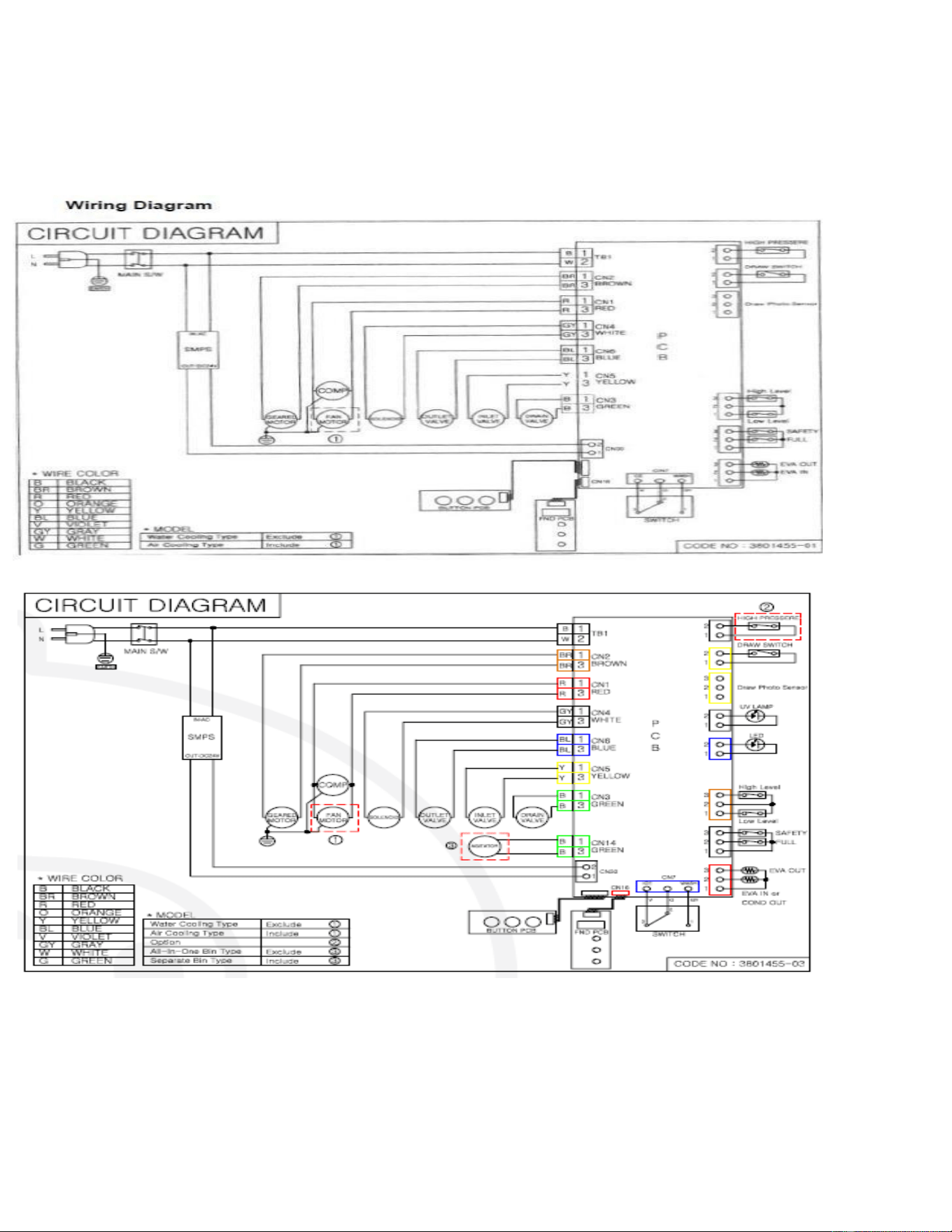
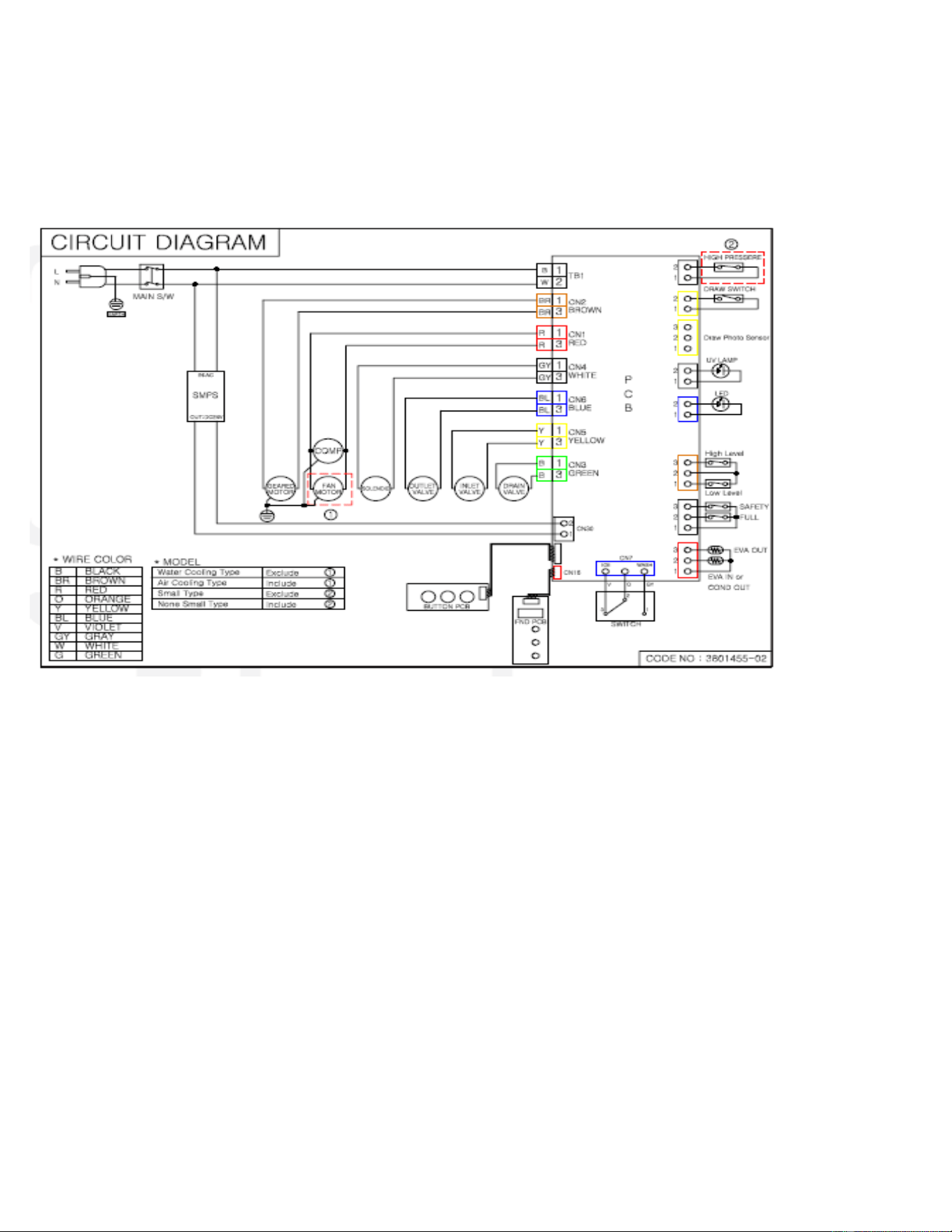
Circuit Diagrams
AIWD282 SCIWD282
AIWD450
25
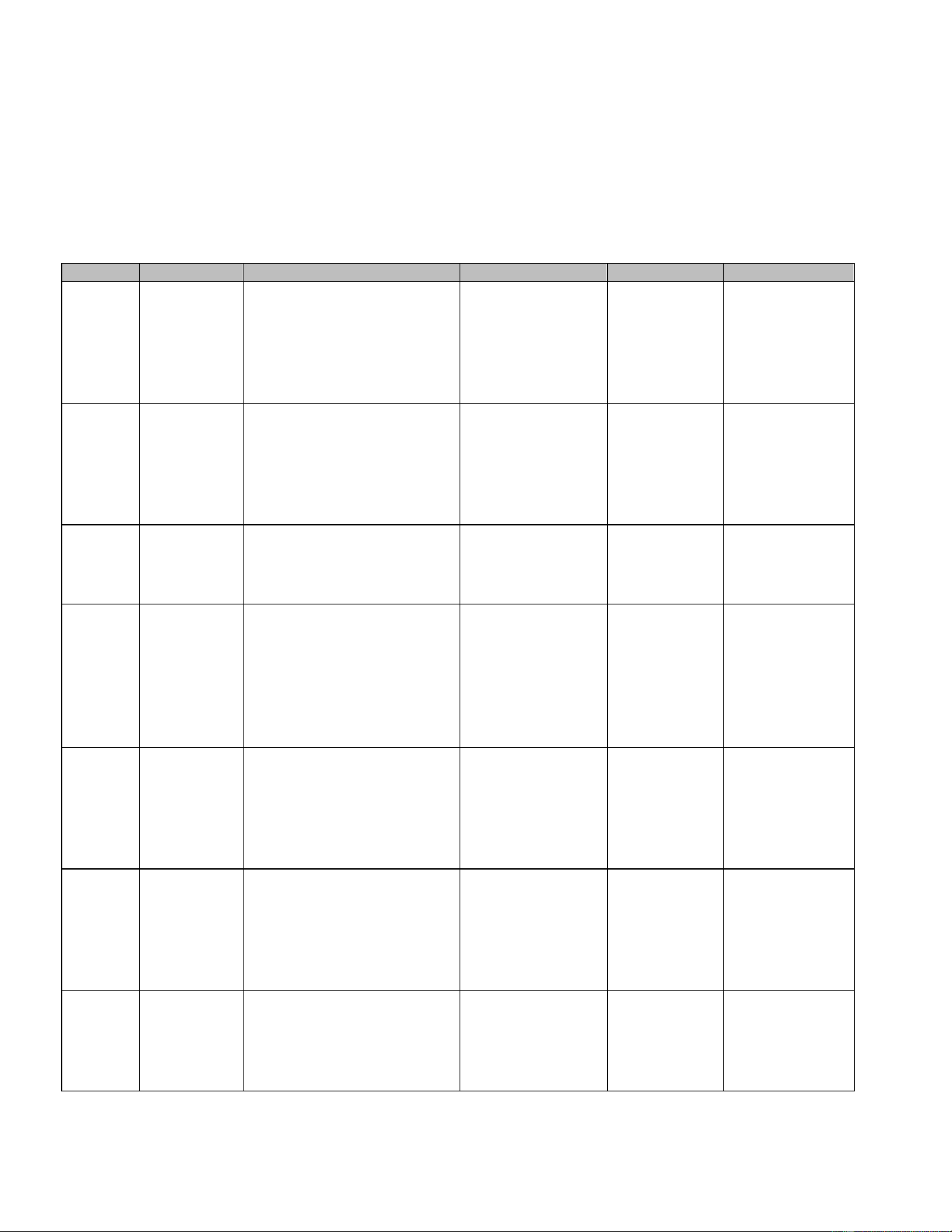
Circuit Diagrams
AIWD160
26
Troubleshooting
① When Error occurs, the front use button (ICE-WATER-ICE & WATER) of the door lights alternately to
the left and right. Restart after action.
② When the button is lit alternately to the left and right, open the door and press the bottom setting
button of the control buttons, Error display will appear.
Display
Error type
Causes
Action
Release
Operation
Er01
Evaporator
temperature
error
When the Evaporator
temperature is 0 ° C or
more after 30 minutes
passed during the ice
making
Check refrigerant
leakage
Check sensor and
attachment
abnormality
Resupply
power
after
resolving
cooling
problem
Stop ice making
Er03
Evaporator
temperature
error
When the Evaporator
temperature is over -5 °
C after 30 minutes
passed
Check refrigerant
leakage
Check sensor and
attachment
abnormality
Resupply
power
after
resolving
cooling
problem
Keep on
ice making
Er06
Temperature
sensor error
Displayed when
temperature sensor is open
or shorted.
Check sensor and
attachment
abnormality
Start operation
after
sensor
part repair
Stop ice making
Er07
Temperature
Sensor Error
Occurs when the
temperature sensor of COND
OUT
(F11) is broken
(All operations will be stopped
and
the "water" dispensing mode
will be activated)
Check sensor
and
attachment
abnormality
Start
operation
after sensor
part
repair
Stop ice
making
Er13
High
pressure
switch error
Condenser dust, fan
motor failure, cold cycle
abnormality, etc.
Remove dust,
Check Fan motor
Check for
abnormal cold
cycle
Automatic
return after
action
Stop
compressor.
Stop motor
after operating
10
seconds.
Er14
High
pressure
switch error
Occurs when High
pressure switch is OPEN 3
times or more
Contact service
representative
Start
operation
after action
Stop
compressor.
Stop motor
after operating
10
seconds.
Er15
Water
supply error
When water level is not
detected by the water
level sensor due to no
water
supply for 120 seconds.
Water supply
pressure check
Water level
sensor check
Start
operation
after action
Stop ice making
27
Er16
Water level
sensor
defect
At the start of ice making,
when the upper and lower
limits are not detected by
the water level sensor for 60
seconds
Replacement of
Water Level
Sensor
Start
operation
after action
Stop ice making
Er20
Cover error
When the outlet cover is
open
Cover closed
Operation
after
action
Stop
dispensing
Er25
Motor
restraint
Occurs when Evaporator inlet
/outlet temperature is -18 ℃
or less for 10 minutes.
Poor water supply,
Agitator restraint,
Ice jams due to scale
Unlock ice jams
Check water
supply line
Check motor
restraint fault
Start
operation
after action.
Machine
stops after 3
repetitions
Stop ice making

28
NOTES
29
Before Requesting Service
If the operating condition of the machine is not good, please refer to the table below to identify the issue. If
you still require assistance, contact your dealer or service center. For expedited service, it is best to have the
following information on hand: model name, serial number, name of dealer, and date of purchase.
Operating
status
Things to check
Action
1. Machine does
not work
1. Is power supplied?
Please plug in the power cord.
2. Is the circuit breaker switch
disconnected?
After removing the cause, please raise (turn on) the
earth leakage breaker located on the back of the
unit.
3. Is power supplied to 220V ±
10%?
Please check the power and use a dedicated outlet.
4. Is the front power switch on?
Set the front power switch on the front display to the
on ('ICE') position
2. No water
supply.
1. Is the water valve locked?
Please open the water supply valve.
2. Is the water supply hose
properly installed?
Check and take action.
3. Has the water supply stopped?
Wait until water supply is confirmed.
4. Is the water supply valve
operating?
After confirming, contact A / S center.
3. Ice freezes too
late
1. Machine is too dirty (lots of dust)
(Air-cooled)
After removing the front cover, remove the dust net
to the side and remove the dust using the vacuum
cleaner. If a lot of dust accumulates, the
performance of the machine may deteriorate and a
lot of electricity bill may be charged.
2. Is the ambient temperature too
high or too low?
The operating temperature of the product is within
10 ℃ ~ 38 ℃. Control the ambient temperature
according to the operating temperature.
3. Is there accumulation of debris
inside the water supply valve?
Disassemble the water supply valve, and then
remove any foreign matter from the sieve. Be sure
to lock the faucet at this time.
4. The noise is
too big and
abnormal
1. Is the installation floor unstable
or weak?
Fit the floor flat
2. Is the front and rear of the
dispenser not touching the wall?
Please keep more than 50cm on the front and back.
3. Is the water supply temperature
too low?
Use water with a supply water temperature of 10 ° C
to 32 ° C.
4. Does the ice generator produce
loud noise?
Turn the power switch to 'OFF' to completely
dissolve the ice, then switch back to 'ICE'.
Please contact A / S center
30
www.accucold.com
Printed in Korea
LIMITED WARRANTY
ONE-YEAR LIMITED WARRANTY
Within the 48 contiguous United States, for one year from the date of purchase, when this appliance is operated and
maintained according to instructions attached to or furnished with the product, warrantor will pay for factory- specified
parts and repair labor to correct defects in materials or workmanship. Service must be provided by a designated
service company. Outside the 48 states, all parts are warranted for one year from manufacturing defects. Plastic
parts, shelves and cabinets are warranted to be manufactured to commercially acceptable standards, and are not
covered from damage during handling or breakage.
5-YEARS COMPRESSOR WARRANTY
1.
The compressor is covered for 5 years.
2.
Replacement does not include labor.
ITEMS WARRANTOR WILL NOT PAY FOR:
1.
Service calls to correct the installation of your appliance, to instruct you how to use your appliance, to replace
or repair fuses or to correct wiring or plumbing.
2.
Service calls to repair or replace appliance light bulbs or broken shelves. Consumable parts (such as filters)
are excluded from warranty coverage.
3.
Damage resulting from accident, alteration, misuse, abuse, fire, flood, acts of God, improper installation,
installation not in accordance with electrical or plumbing codes, or use of products not approved by warrantor.
4.
Replacement parts or repair labor costs for units operated outside the United States.
5.
Repairs to parts or systems resulting from unauthorized modifications made to the appliance.
6.
The removal and reinstallation of your appliance if it is installed in an inaccessible location or is not installed in
accordance with published installation instructions.
DISCLAIMER OF IMPLIED WARRANTIES; LIMITATION OF REMEDIES
CUSTOMER'S SOLE AND EXCLUSIVE REMEDY UNDER THIS LIMITED WARRANTY SHALL BE
PRODUCT REPAIRAS PROVIDED HEREIN. IMPLIED WARRANTIES, INCLUDING WARRANTIES OF
MERCHANTABILITY OR FITNESS FOR A PARTICULAR PURPOSE, ARE LIMITED TO ONE YEAR.
WARRANTOR SHALL NOT BE LIABLE FOR INCIDENTAL OR CONSEQUENTIAL DAMAGES. SOME
STATES DO NOT ALLOW THE EXCLUSION OR LIMITATION OF INCIDENTAL OR CONSEQUENTIAL
DAMAGES, OR LIMITATIONS ON THE DURATION OF IMPLIED WARRANTIES OF MERCHANTABILITY
OR FITNESS, SO THESE EXCLUSIONS OR LIMITATIONS MAY NOT APPLY TO YOU. THIS WARRANTY
GIVES YOU SPECIFIC LEGAL RIGHTS AND YOU MAY ALSO HAVE OTHER RIGHTS, WHICH VARY
FROM STATE TO STATE.
WARNING: This product can expose you to chemicals including Nickel (Metallic) which
is known to the State of California to cause cancer. For more information go to
www.P65Warnings.ca.gov
Note: Nickel is a component in all stainless steel and some other metal components.
FELIX STORCH, INC.
770 Garrison Avenue
Bronx, NY10474
Phone: (718) 893-3900
Fax: (844) 478-8799
For parts and accessory ordering,
troubleshooting and helpful hints,
visit:www.summitappliance.com/support