
COOK
LIKE
A
GOD
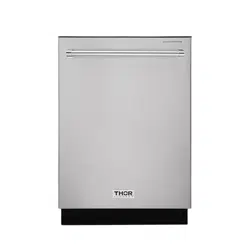
HDW2401SS

24 INCH BUILT-IN
DISHWASHE R
USE AND CARE MANUAL
HDW2401SS

Important Safety Instructions.............................................................................................2
Dishwasher Features......................................................................................................3-4
Operating Instructions....................................................................................................5-8
Preparing and loading dishes.......................................................................................9-13
Care & cleaning...........................................................................................................14-16
Troubleshooting...........................................................................................................17-18
TABLE OF CONTENTS

WARNING
For your safety, the information in this manual must be followed to minimize the risk of
fire or explosion, electric shock, and to prevent property damage, personal injury.
IMPORTANT SAFETY INSTRUCTIONS
Proper installation
Please install your dishwasher properly follow the installation guide.
Water supply temperature should be 120 F or 149 F.
Dispose of the discarded appliance and packing material properly.
The dishwasher must be grounded, or it can result in a risk of electric shock.
If there is any damage to the dishwasher, please contact your dealer, do not attempt to
repair or replace any part yourself.
Basic precaution before use
Read all instructions before using the
dishwasher.
The manual does not cover every possible
condition and situation that may occur .
Use the dishwasher only for intended function
as described in this manual.
When loading items to be washed:
-Load sharp items and knives so that they are
not likely to damage the door seal and tub.
-Load sharp items and knives with the handles
up to reduce the risk of cut-type injury.
Do not wash plastic items unless marked
dishwasher safe or the equivalent, if
not marked,check with manufacture for
recommendation, items that are not dishwasher
safe may melt and create a potential fire hazard.
If the dishwasher drains into a food disposer,
make sure disposer is completely empty before
running dishwasher.
Do not tamper with control.
Do not operate your dishwasher unless all
enclosure panels are in the properly place.
Do not touch the heating element during or
immediately after use,especially if the sanitize
option has been selected.
Do not let children abuse,sit or stand on door or
racks of a dishwasher.
Under certain conditions,hydrogen gas may be
produced in a hot water system that has not
been used for two weeks or more.Hydrogen gas
is explosive.If the hot water system has not been
used for such a period,before using on all
hot water faucets and let water flow from
each for several minutes. This will release any
accumulated hydrogen gas. Hydrogen gas is
flammable. Do not smoke or use an open flame
during this time.
Do not store or use combustible materials,
gasoline or other flammable vapors and liquids
in the vicinity of this or any other appliance.
Use only detergents or rinse agents
recommended for use in a dishwasher and keep
them out of the reach of children.
Keep young children and infants away from
dishwasher when it is operating.
Do not use the dishwasher if it has a damaged
power line or plug, and do not plug the
dishwasher into a damaged outlet, failure
to observe these instructions may result in
electrical shock.
Remove the door to the washing compartment
when removing an old dishwasher from service
or discarding it.
2
DISHWASHER FEATURES
Capacity
Dimension
Power Supply
Water Feed Pressure
Weight
Rated Power Usage
14 place settings
606 x 650 x 857 mm (WxDxH)
120v, 60Hz
20-120 psi (138 - 828kPa)
unpacked 94lb (42.5 kg)
Wash motor 50W Heater 840W
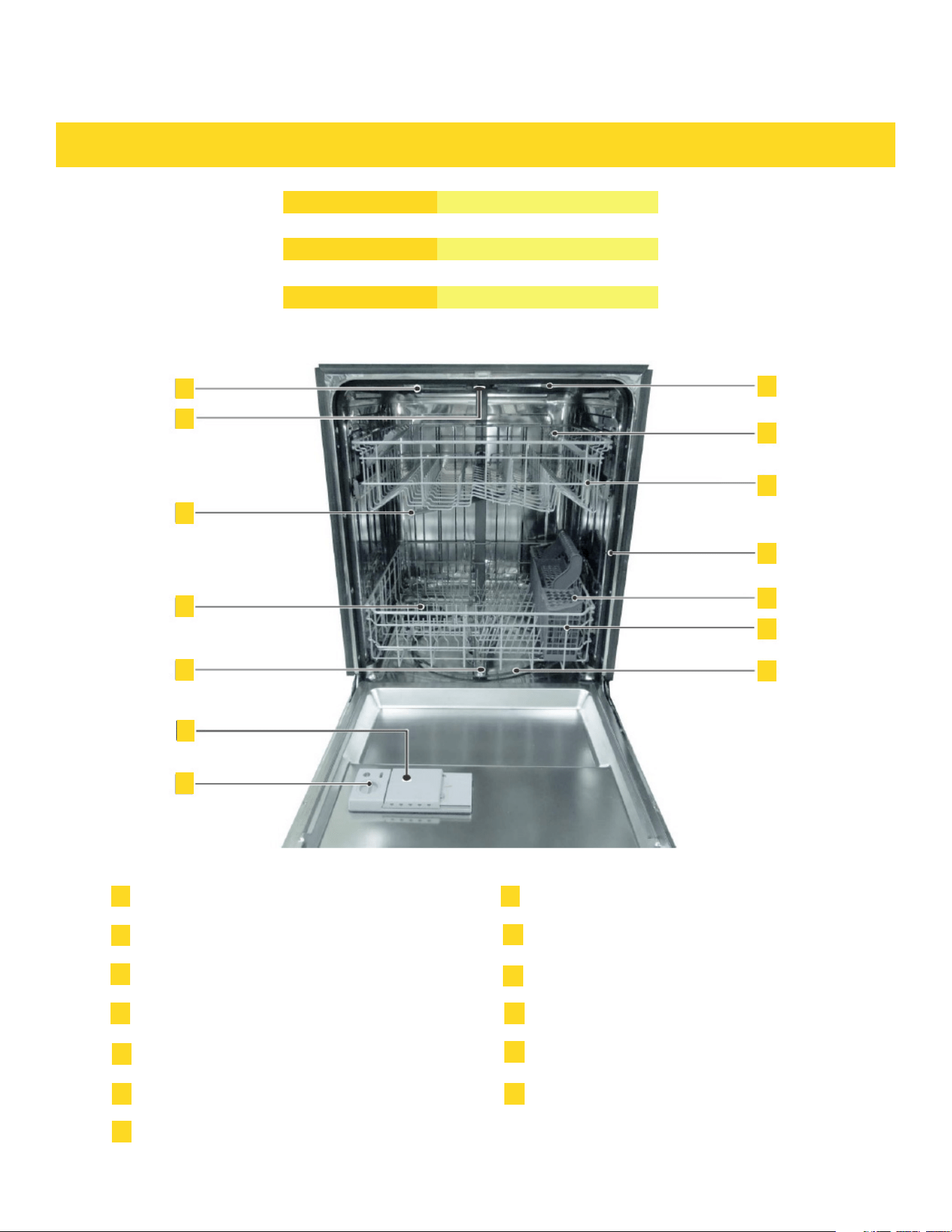
Top Light
Cup Shelf
Adjustable Upper Rack
Tub Gasket
Silverware Basket
Bottom Rack
Heating Element
Upper Spray Arm
Middle Spray Arm
Vortex wash arm (Located on the left side of tub)
Low Spray Arm
Rinse Aid Dispencer
Detergent Dispencer
1
8
9
10
11
12
13
2
3
4
5
6
7
1
1
8
9
10
11
12
13
2
3
4
5
6
7
3
DISHWASHER FEATURES
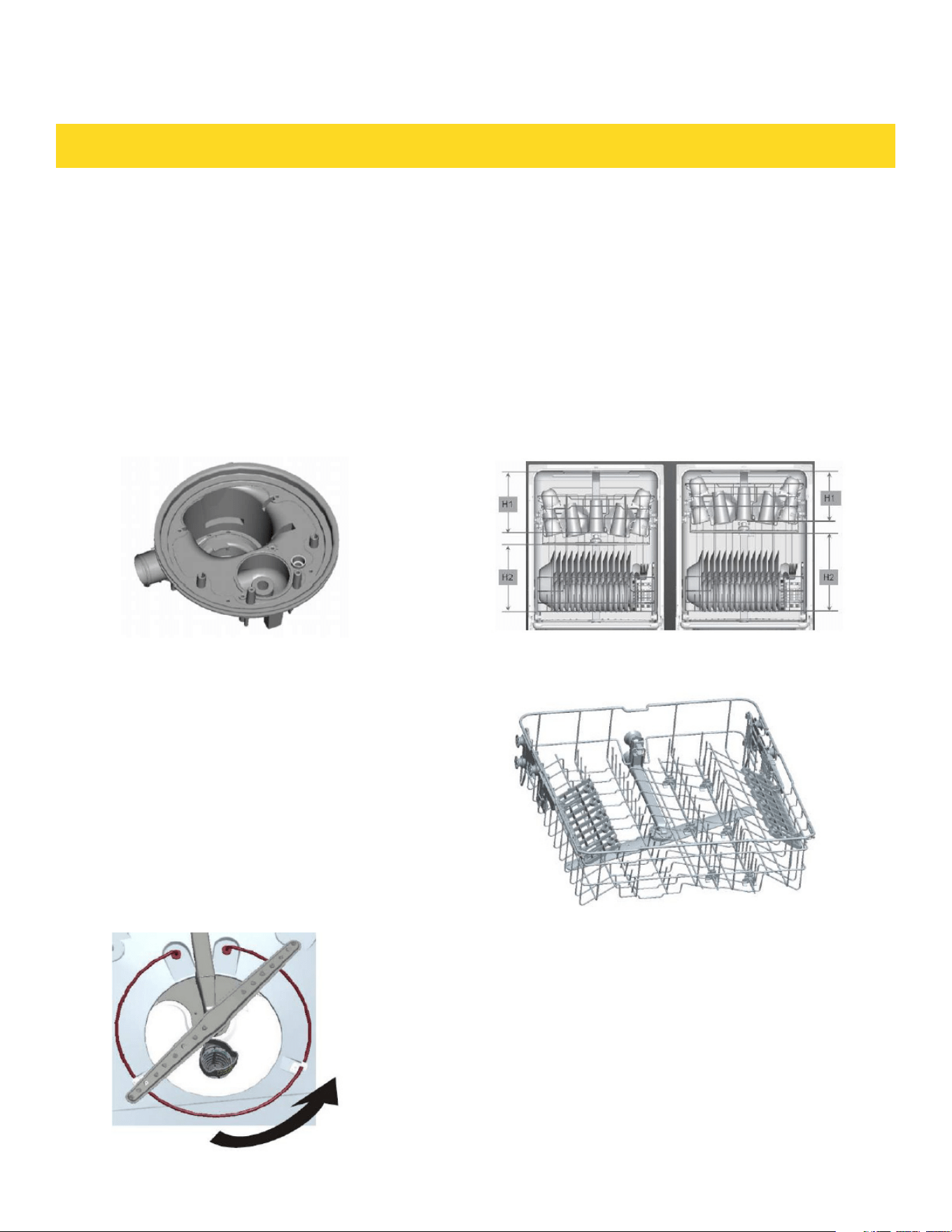
Filter System
Your dishwasher has a multiple Filter
System. In the System there are four
filter-meshes .I tcan separate soiled water
and clean water in different chambers.
The multiple filter system helps your
dishwasher to get better performance with
less water and less energy .
FEATURES
Smart Wash System
Your dishwasher has Smart. When Wash
System. a partial load of lightly soiled
dishes is placed in the unit, a wash cycle
similar to a short wash will automatically
be performed. When a full load of
heavily soiled dishes is placed in the unit,
a heavy wash cycle will automatically be
performed. can determine the type of cycle
required to clean the dishes and will clean
more efficiently every time.
Adjustable Upper Rack
The Upper Rack can be raised or lowered
to accommodate loading taller dishes in
either rack. The Upper Rack clearance
height H1 goes from 8" to 10". The Bottom
Rack clearance height H2 is 11" to 13".
4
DISHWASHER FEATURES
HOW YOUR DISHWASHER CLEANS GETTING STARTED
Your dishwasher cleans by spraying a
mixture of hot water and detergent through
the spray arms against soiled surfaces .
The dishwasher dills with water covering
the filter area. Water is then pumped
through the multiple filter and spray arms.
Seperated soil particles go down the drain
as the water is pumped out and replaced
with clean water.
The number of water fills will vary with the
cycle being used
1. Load dishwasher (See preparing and
loading dishes).
2. Add detergent (See Fill detergent to
the dispenser).
3. Add rinse aid, if needed (See Fill
rinse to dispenser).
4. Close door to latch.
5. Select desired CYCLE (See Cycle
Chart). The indicator light above the pad
will glow when selected.
6. Select desired OPTIONS (See Energy
Options). The indicator light above the
pad will glow when selected.
7. Run hot water faucet nearest
dishwasher until water is hot .Turn
water off.
8. To start, press Start/Cancel pad
Your dishwasher has the front control panel
Your selections will only be activated when the
door is firmly closed.
NOTE
Wash Cycle Selections
Cycle times are approximate and will
vary with options selected. Hot water is
necessary to activate dishwasher detergent
and melt fatty food soils. An automatic
sensor will check the incoming water
temperature and if it is not hot enough, the
timer will be delayed for automatic water
heating in the main wash of all cycles. This
happens even when HI-TEMP WASH is
selected an even higher temperature will be
guaranteed to handle heavier soil loads.
5
DISHWASHER FEATURES
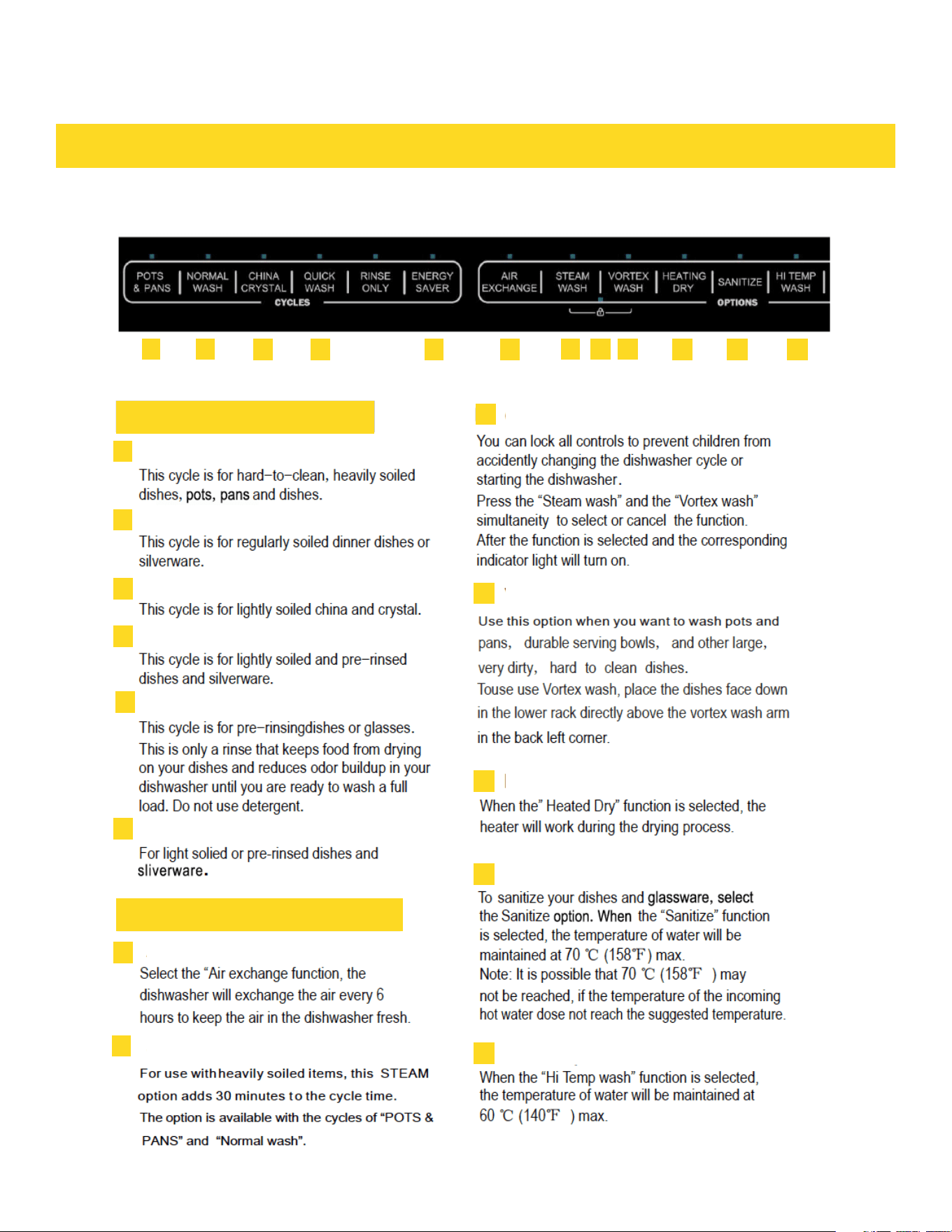
Control Panel
1
1
2
2
3
3
4
4
5
6
6
7
7
8
8
9
9
10
10
11
11
12
12
13
13
Wash Cycle Selections
Functions
Pots and Pans
Child Lock
Votex Wash
Heated Dry
Sanitize
Hi Temp Wash
Normal Wash
Chinese Crystal
Quick Wash
Rinse Only
ENERGY SAVER
Air Exchange
Steam Wash
6
OPERATING DISHWASHER
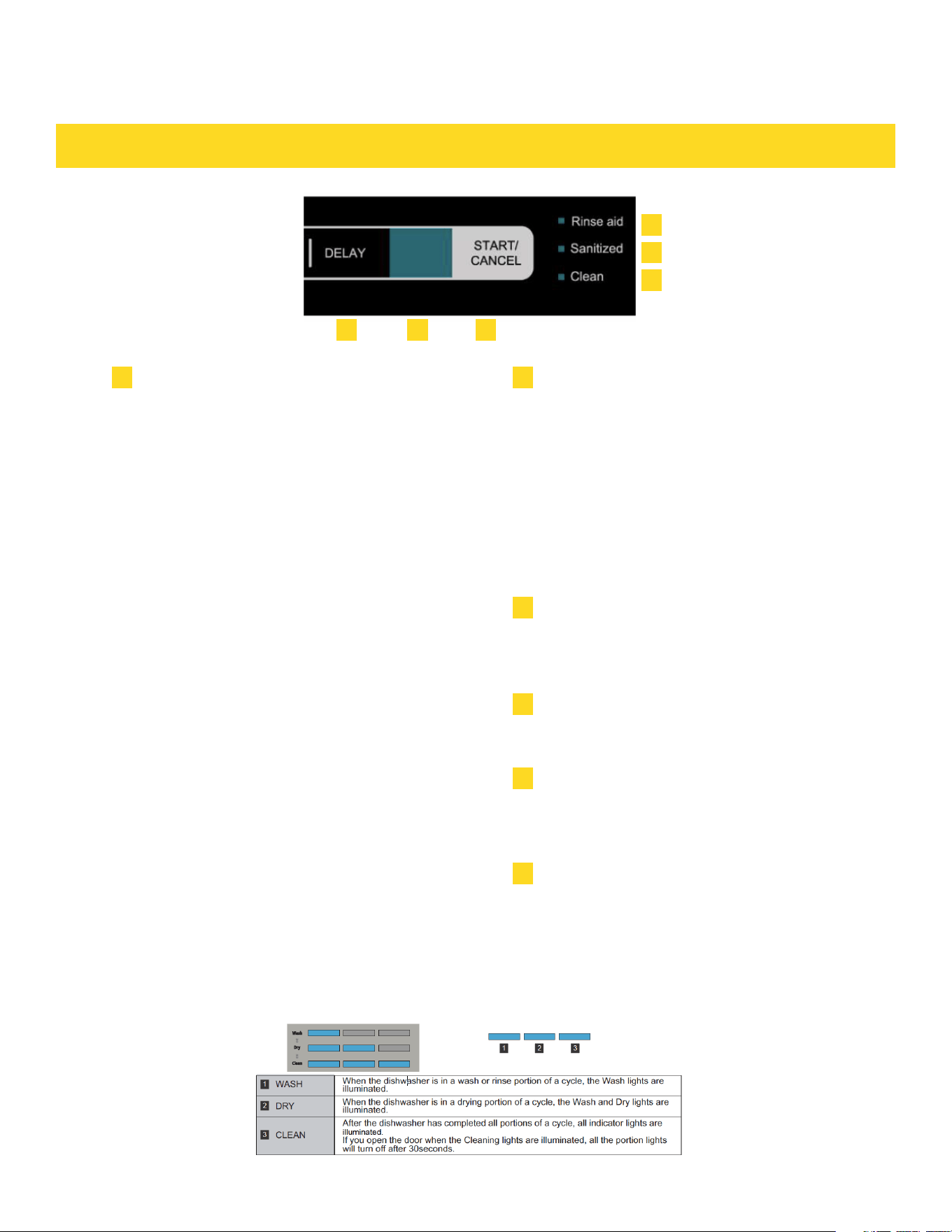
Start/Cancel
CYCLE PROGRESS INDICATOR
16
Delay
14
Display Window
15
Rinse Aid Indicator Light
17
17
Sanitized indicator light
18
18
Clean Indicator Light
19
19
This information covers several different models.
Your dishwasher may not have all the cycles and
options described.
This built-in dishwasher’s function control and
cycle selections will be void when dishwasher
door is firmly closed. When setting up the
dishwasher, please keep the dishwasher door
open and select the wash cycle and options
desired. The indicator light above the pad will
turn on. To start, press the Start/Cancel key
once and close the door firmly within 4 seconds
after you select start. The indicator light will
flickering and the wash cycle will begin after the
door is closed. To cancel wash cycle once the
dishwasher is running, carefully open the door
slowly to access the controls and avoid water
spill. Long press Start/Cancel for 8 second, the
dishwasher will start a 60 second draining
process to prevent water and moister trap inside
the dishwasher. The dishwasher will be power
off automatically when draining process is
completed. You may then open the unit and/or
start a new cycle.
When opening the door, use caution as there is
a possibility of injury from hot steam coming out
from the unit. If the door is opened while the
dishwasher is running, a safety switch will stop
the cycle. You may add more dishes before the main
wash starts.
To delay the start of a selected cycle, press
Delay
Start pad until the desired delay time shows in
the
LED display s creen, it allows you to
automatically
start your dishwasher for 1 to 24 hours dela y.
To cancel the Delay Start option and begin the
cycle, before the delay period is over press the
Start/Cancel pad.
To display the remained hours and minutes of
the running cycle, delay hours and error codes
etc.
Turns on when the dishwasher needs to add
Rinse aid.
If a cycle with the sanitize function is finished,
the sanitized indicator light turns on. If you open
the door, it will turn off after 30 seconds.
Turns on after a cycle finished. If you open the
door, it will turn off after 30 seconds.
14
15
16
Located on ride side of the front of the dishwasher, these lights indicate how far along is the current
wash cycle while the dishwasher is running.
7
01-24
If the Delay Start option is selected, the number of
delay start hours shows in the Status Window. If the
dishwasher is working and the wash cycle time is
more than a hour, number of hours and minutes left
shows alternately in the Status Window.
CL
Flashes once the program has been entered and
the Start/Cancel key is pressed. it also flashes if
the door is opened during a wash cycle. Close the
dishwasher door to begin or continue a wash cycle.
Minutes
Number of minutes left in a cycle (0-59 or 1H-2H). It
shows hours and minutes alternately.
STATUS WINDOW
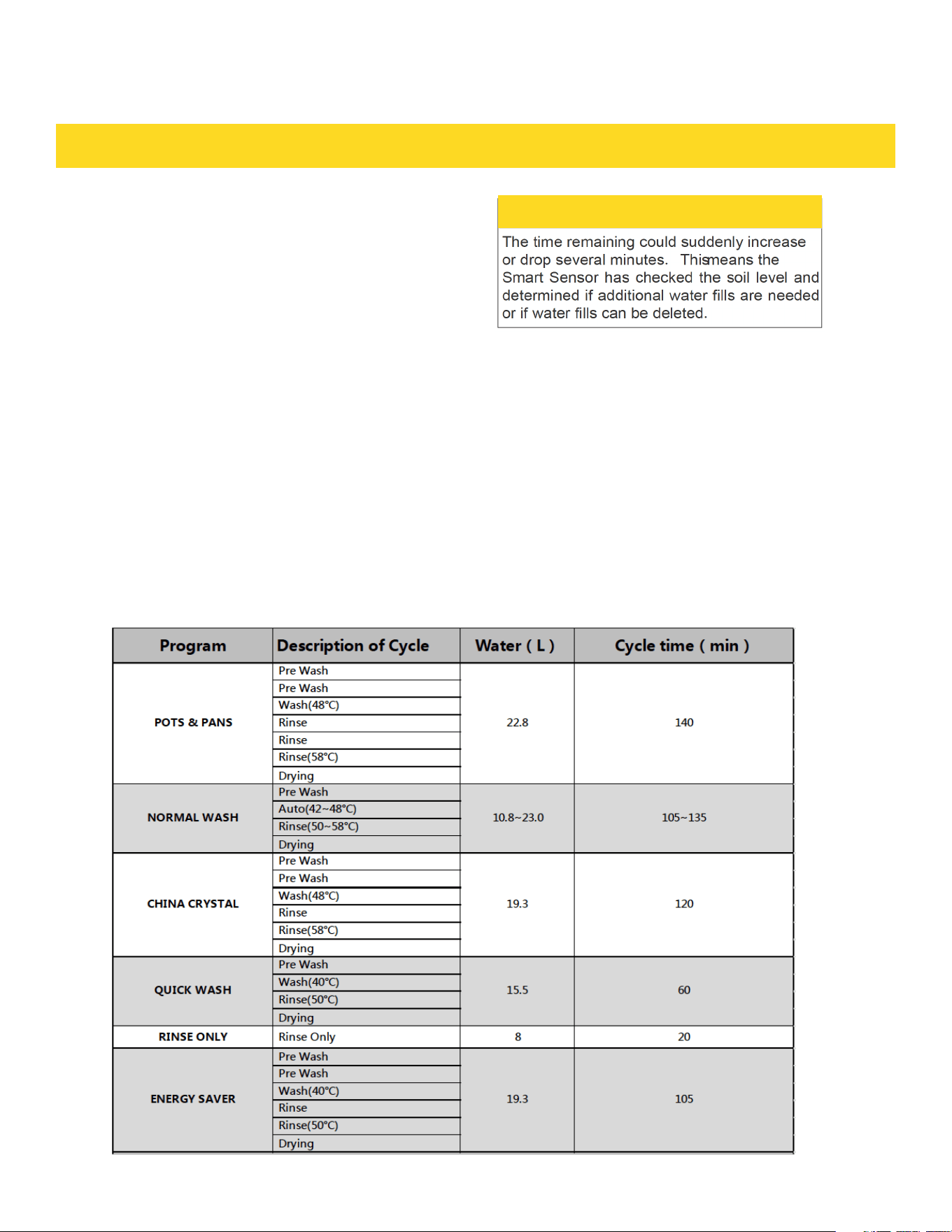
CYCLE CHART
OPERATING DISHWASHER
NOTE
Error Indication
In certain situations which are critical to the
machines function and safe operation, the
control shall shut down and indicate an error
code Er (See Error Codes on page 18).
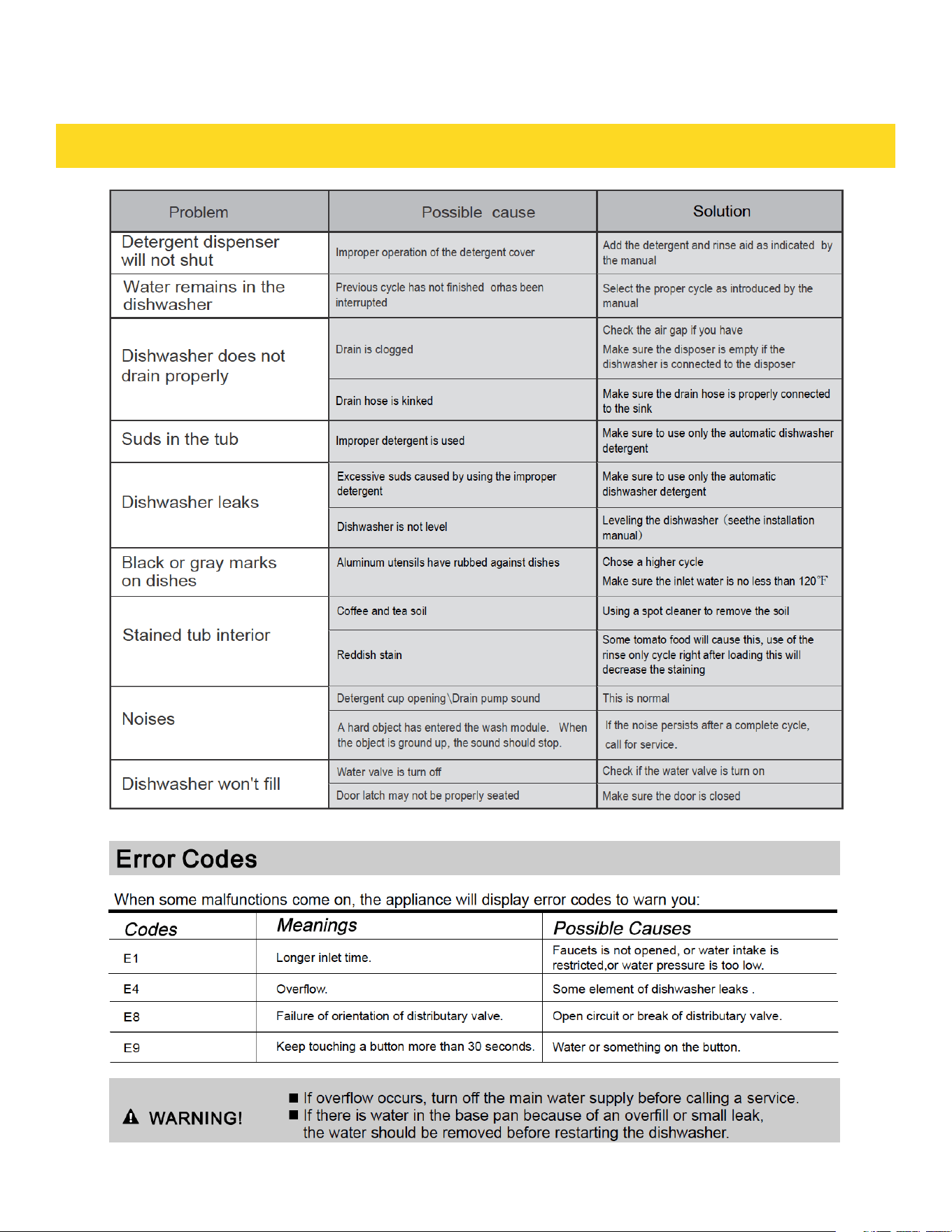
If Er codes are displayed, contact the dealer or
servicer. They will be able to provide assistance
in trouble shooting the problem and or locate an
authorized service technician if needed.
8
OPERATING DISHWASHER
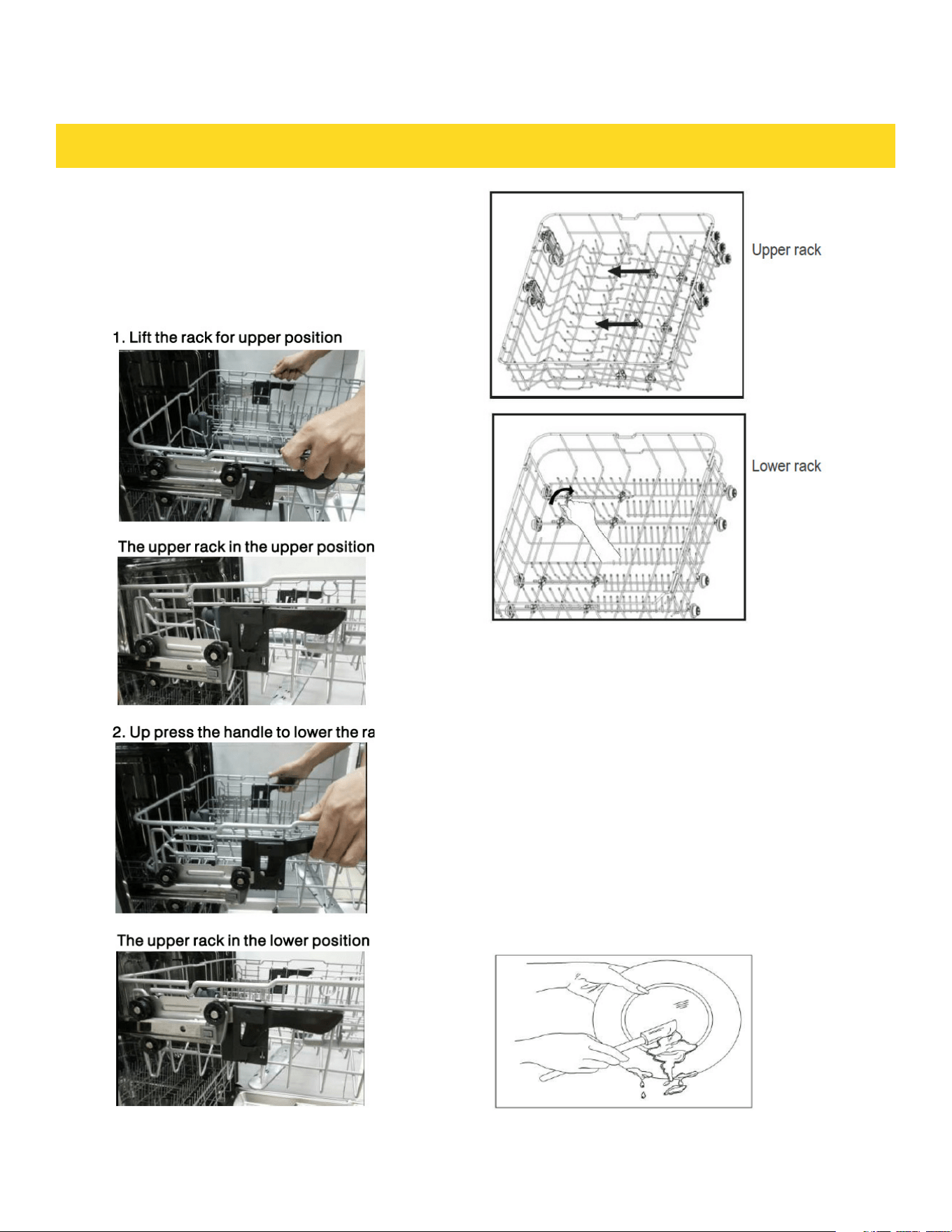
Adjustable Upper Rack
Dish Preparation
The upper rack height can be easily adjusted to
accommodate loading taller dishes in either rack.
To accommodate taller dishes in the bottom rack,
there are 2 positions available:
Scrape away large pieces of food, bones, p its,
toothpicks,etc.The continuous filtered wash
system will remove the remaining food particles.
Burned-o n foods should be loosened before
loading.Empty liquids from glasses and cups.
Foods such as mustard, mayonnaise, vinegar,
lemon juice and tomato based products may
cause discoloration of stainless steel and plastics
if allowed to sit for a long period of time.Unless
the dishwasher is to be opertated at once i tis best
to rinse off these food soils. If the dishwasher
drains into a food disposer,be sure disposer is
completely empty before starting dishwasher.
9
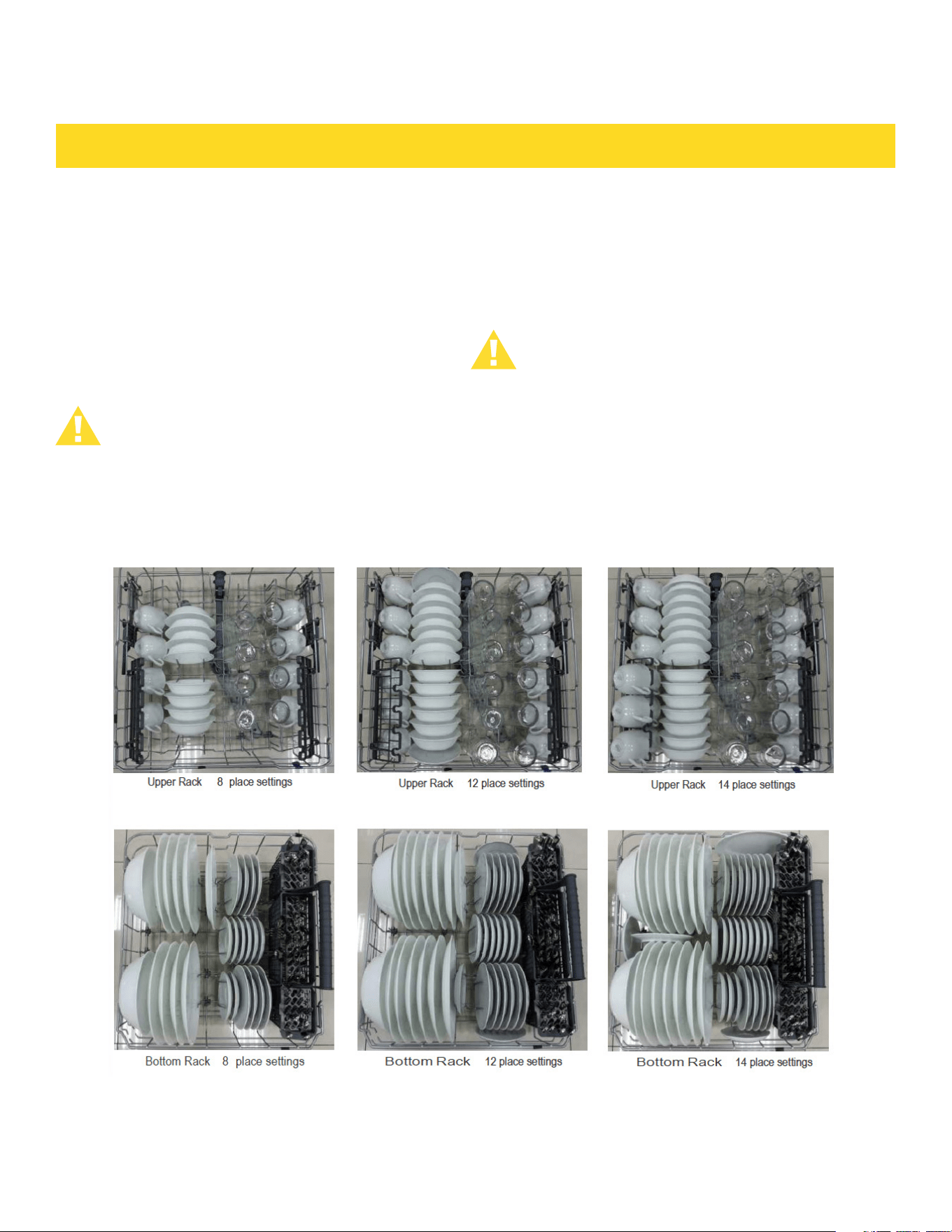
The upper rack is designed for cups,
glasses, small plates, bowls and plastic
items marked safe etc.
For best results, place the bowls, cups,
glasses, sauce pans with soiled surface
facing down or toward the center. Tilt
slightly for better drainage.
The bottom rack is designed to load plates,
soup bow ls, plates,saucers and cookware.
The adjustable rack space wil lallow you to
load maximum 13 inch items.
Loading the Upper Rack Loading the Bottom Rack
Make sure the loaded dishes do not interfere
with the rotation of the middle spray arm,
which is located at the bottom of the upper
rack. (Check this by rotating the middle
spray arm by hand.)
Large items should be placed along the
edge so they do not interfere with the
middle spray arm rotation, and make sure
they not prevent the detergen tdispenser
from opening. Large items should be turned
so that the inside faces downward, and
make sure these items do not interfere with
the lower spray arm rotation
OPERATING DISHWASHER
10
PREPARING AND LOADING DISHES
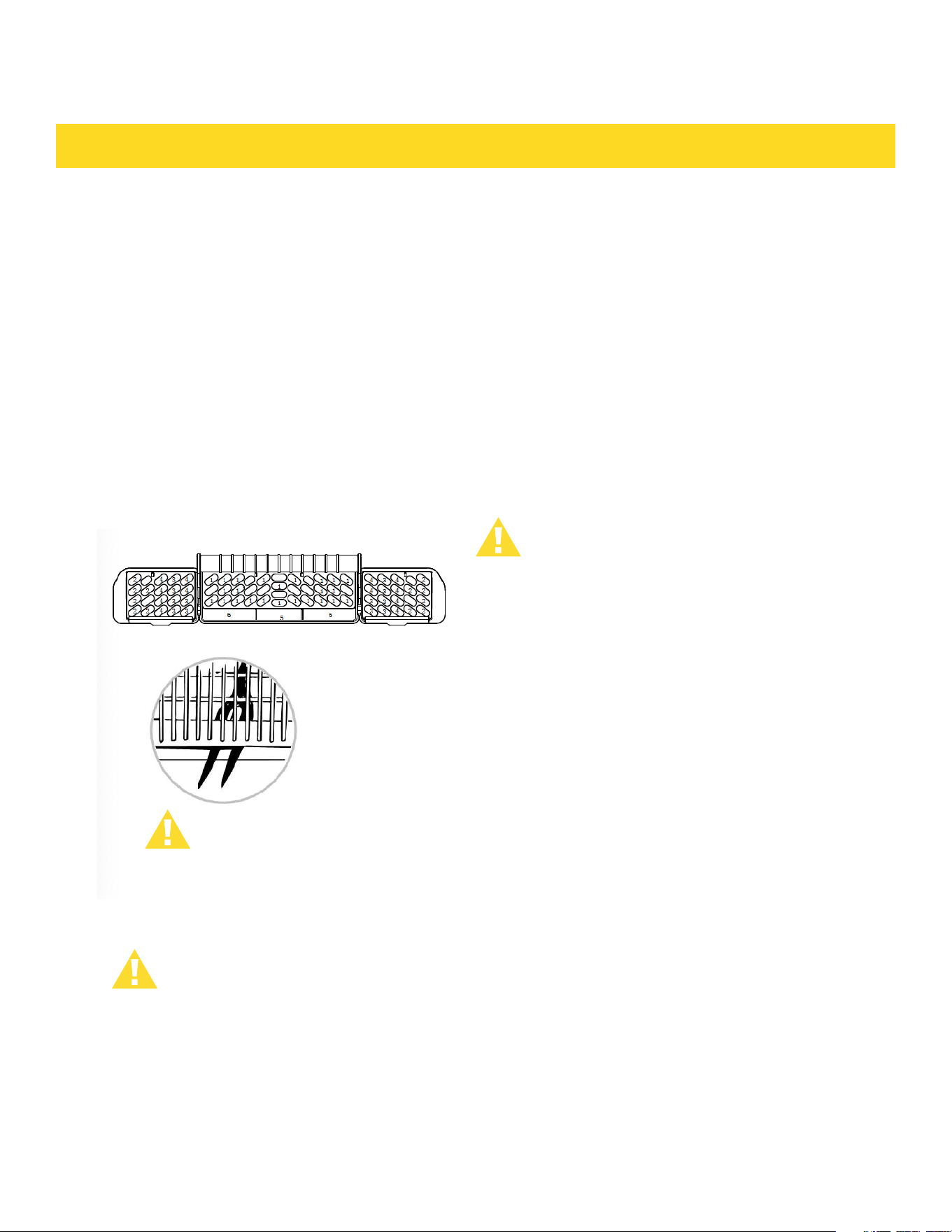
The silverware basket could be divided
into three separate modules that can be
used in both upper and lower racks
1. Spoons
2. Knives
3. Salad forks
4. Forks
5. Large spoons
6. Large forks
Be sure nothing protrudes though bottom
of the basket or rack to block the lower
spray arm.
Do not let any item extend through bottom.
WARNING!
LOADING THE SILVERWARE BASKET ADDING A DISH
FILLING RINSE AID DISPENSER
To add or remove items after wash cycle
starts:
1. Open door slightly and wait a few
seconds until wash action stops before
completely opening.
2. Add the item.
3. Close door firmly to latch and cycle
will automatically resume.
CAUTION
TO AVOID BURN INJURY: Slightly
open door and wait until spray
arms and wash action stop. Hot
water may splash out of
dishwasher. Failure to do so may
result in injury.
Rinse aid greatly improves drying and
reduces water spots and filming.Without
rinse aid your dishes and dishwasher
interior will have excessive moisture.
The Heated Dry option will not perform
as well without rinse aid.The rinse aid
dispenser,located next to the Detergent
cup,automatically releases a measured
amount of rinse aid during the last rinse.
If spotting and poor drying is a problem,
increase the amount of rinse aid
dispensed by rotating the dial to a higher
number.The dial is located under the
dispenser cap. If the rinse aid is low,
the Rinse Aid light is illuminated a t the
beginning and end of the cycle indicating
that it is time to refill.
11
FILLING RINSE AID DISPENSER
FILLING THE DETERGENT DISPENSER
PREPARING AND LOADING DISHES
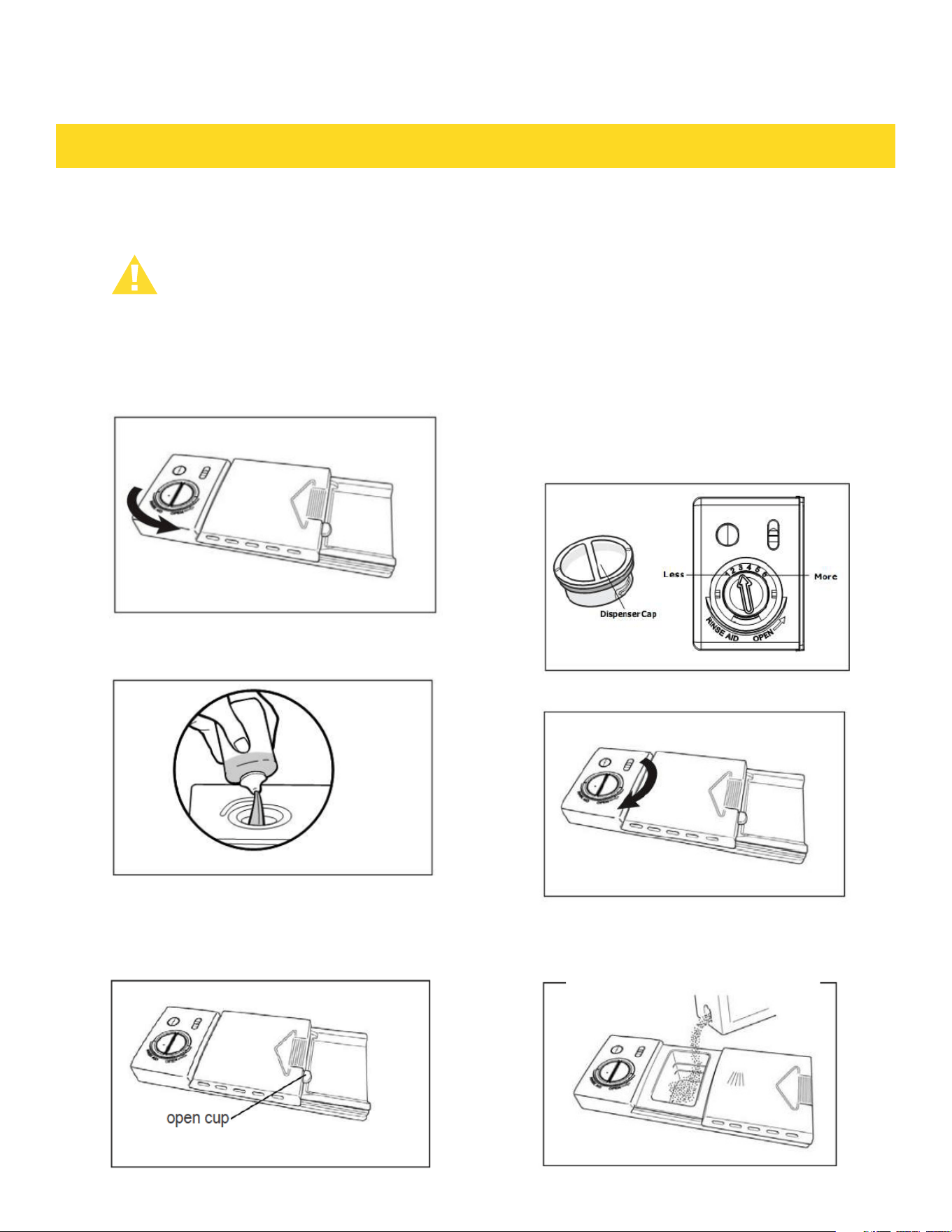
Your dishwasher is designed to use a liquid rinse aid. The use of rinse greatly
improves drying performance after the final rinse. Do not use a solid or bar-
type rinse aid. Under normal conditions, the rinse aid will last approximately
one month, try to keep it full, but do not over fill.
1. Open the door, turn the
dispenser cap to left and lift it out.
2.Add rinse agent until the
indicator point to max
3. You can adjust the amount of the
rinse aid released during the rinse
operation, the greater number
indicates the larger amount of
rinse aid released.
4.Replace the dispenser cap
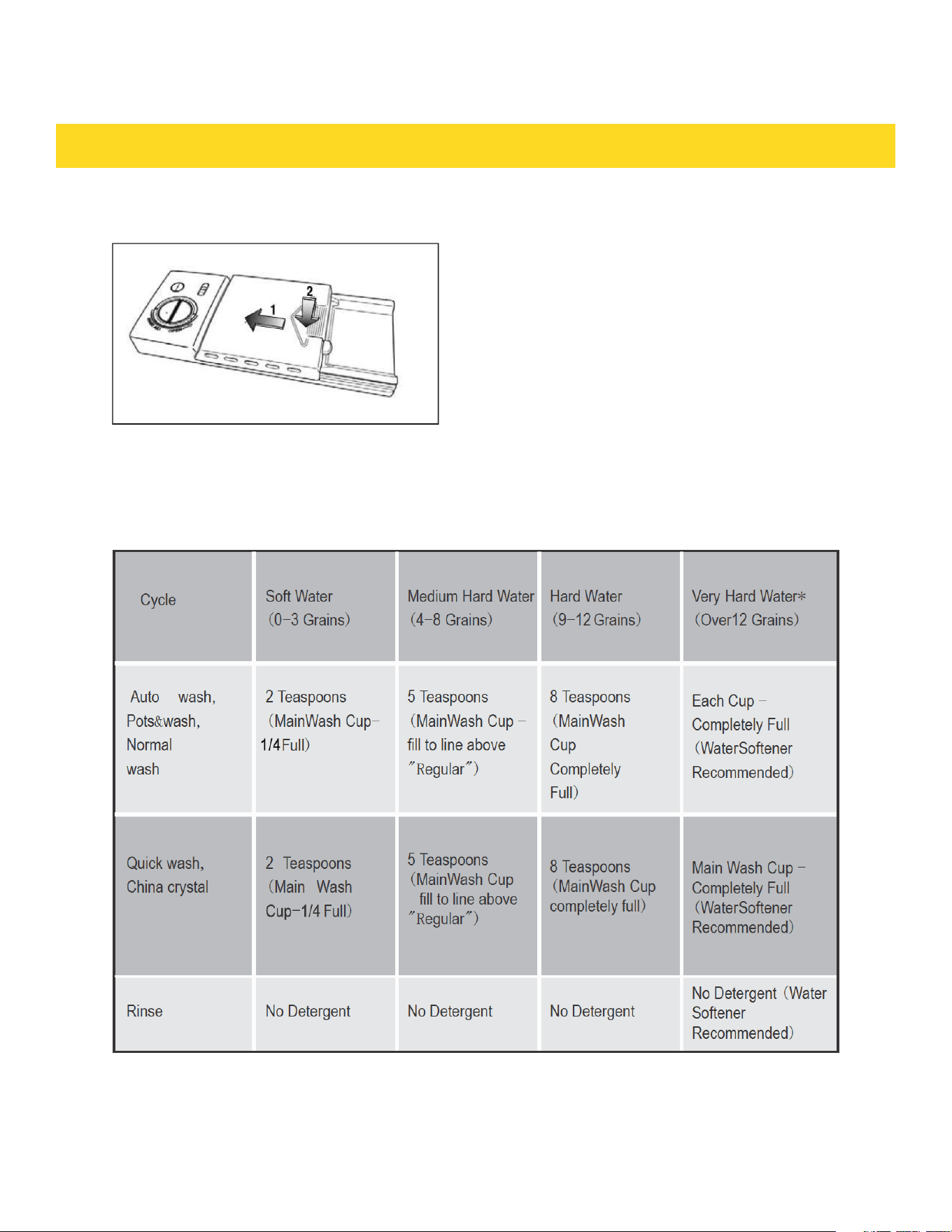
1. Push the dispenser cover latch
downwards and open it
2. Add the detergent to the main
wash compartment
12
PREPARING AND LOADING DISHES
3. Close the dispenser cover
The amount of the detergent needed depends on the cycle and soil level of dishes, refer
to the table below and adjust the recommended amount as necessary for your load.
13
PREPARING AND LOADING DISHES
Cleaning the exterior door and panel
Cleaning the Inner Steel Door and Tub
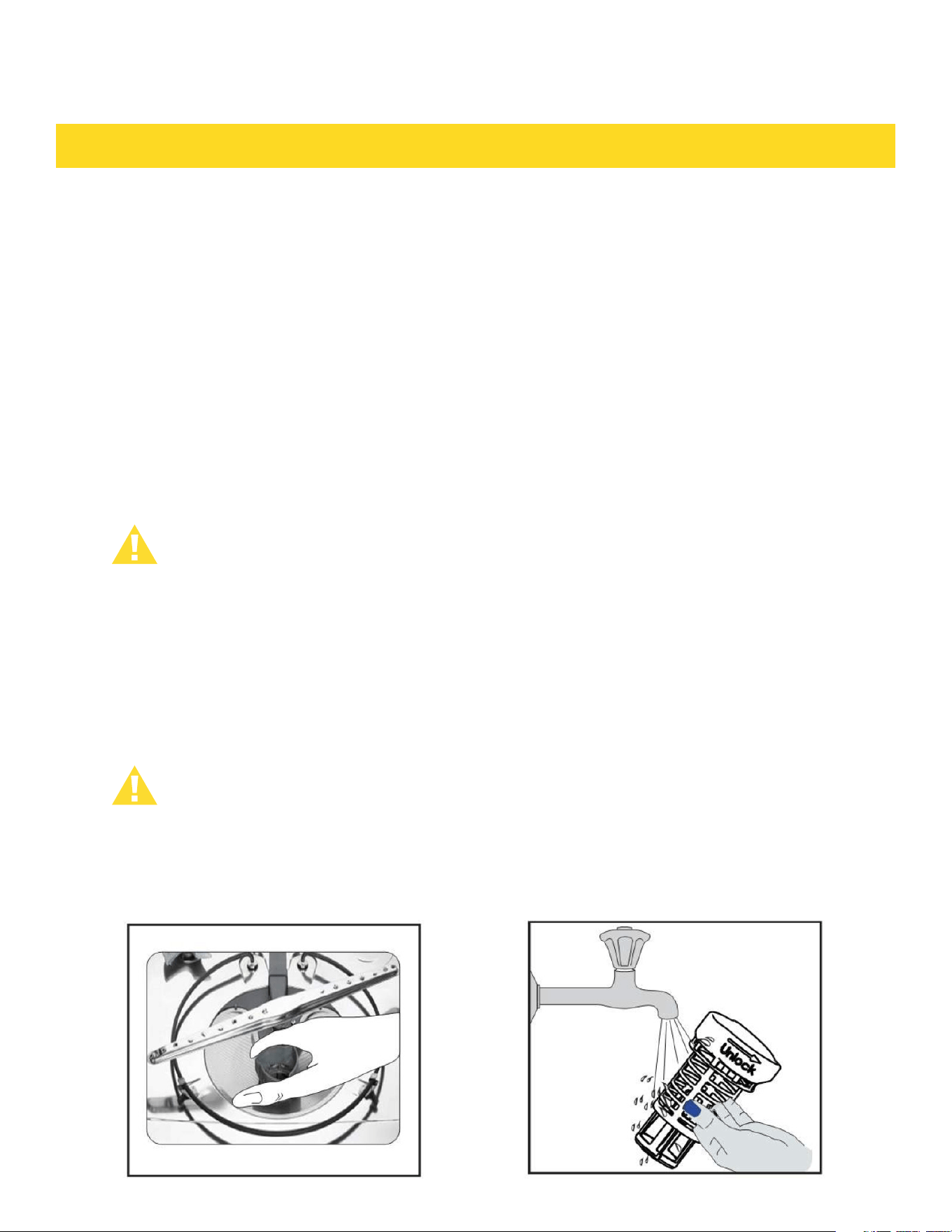
Clean the Cyinder Filter
1. Stainless steel panel
Clean the stainless steel door and handle regularly to remove the debris with cleaning soft cloth.
Do not use appliance wax, polish, bleach or products containing chlorine to clean the stainless steel door.
2. Contro lpanel
Clean the control panel with a light ly dampen ed cloth, clean it g en tly.
The tub is made of Stainless Steel,it will not rust or corrode if the dishwasher should be scratched or
dented.
Clean the spots on the steel inner door and tub with a damp nonabrasive cloth.
The Cylinder Filter is designed to collect some big items such as broken glass, bones and pits. The
Cylinder Filter needs to be cleaned to maximize wash performance.
Remove the bottom rack, rotate the cylinder filter as shown, lift it out, empty and clean it by holding it
under running water and replace.
Burn Hazard
Allow heating element to cool before cleaning the interior. Failure to do so can result in
burns.
WARNING
14
PREPARING AND LOADING DISHES
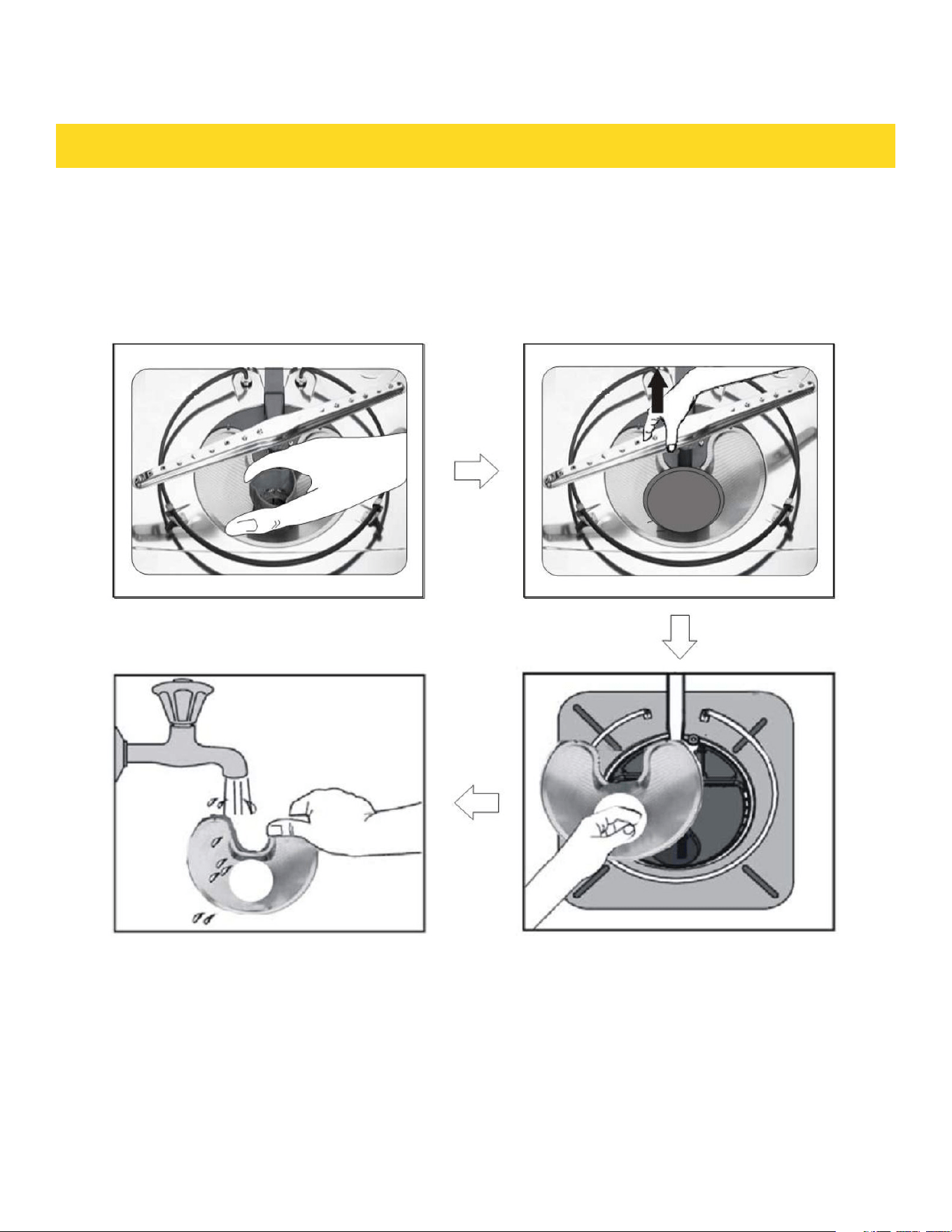
Clean the Fine Filter
Take out the Cylinder Filter and remove the Fine Filter from the dishwasher tub
bottom. To remove the Fine Filter you must first remove the bottom spray arm as
shown below. Flush the Fine Filter by holding it under running water and replace.
15
PREPARING AND LOADING DISHES
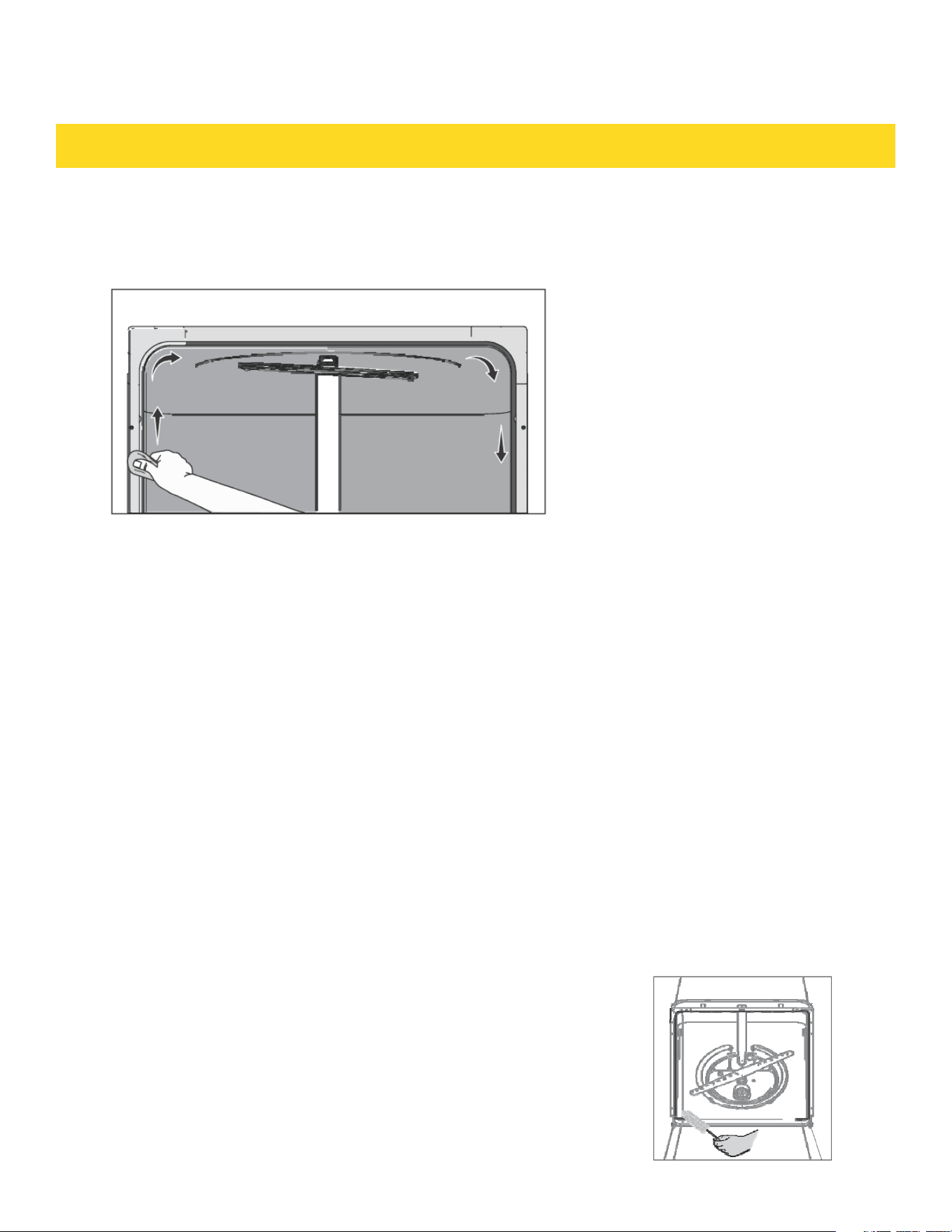
Clean the door gasket
Air Gap
Protect Against Freezing
Inside
Clean the door gasket with a damp cloth to remove food particles regularly.
If there is an air gap installed with your dishwasher, make sure it is clean so the dishwasher will drain
properly. Air gap is not part of your dishwasher. Before you clean the air gap,turn off the dishwasher
firstly and lift off the cover Remove the plastic cap and clean with a toothpick.
Your dishwasher should be protected from freezing properly if it was left in an unheated place Have a
qualified person do the following:
To Disconnect Service:
1. Turn off electrical power to the dishwasher at the supply source by moving fuses or tripping circuit breaker.
2. Turn off the water supply.
3. Place a pan under the inlet valve.Disconnect water line from inlet valve and drain into pan.
4. Disconnect drain line from pump and drain water into pan.
To Restore Service:
1. Reconnect the water,drain and electrical power supply.
2. Turn on water and electrical power supply.
3. Fill both detergent cups and run dishwasher through a Heated-Wash cycle.
4. Check connections to make sure they do not leak.
The inside of the dishwasher is self-cleaning with
normal use. If needed, clean the tub gasket with a
damp cloth and use a brush similar to the ones shown
below to clean the opening in the end of the gasket.
16
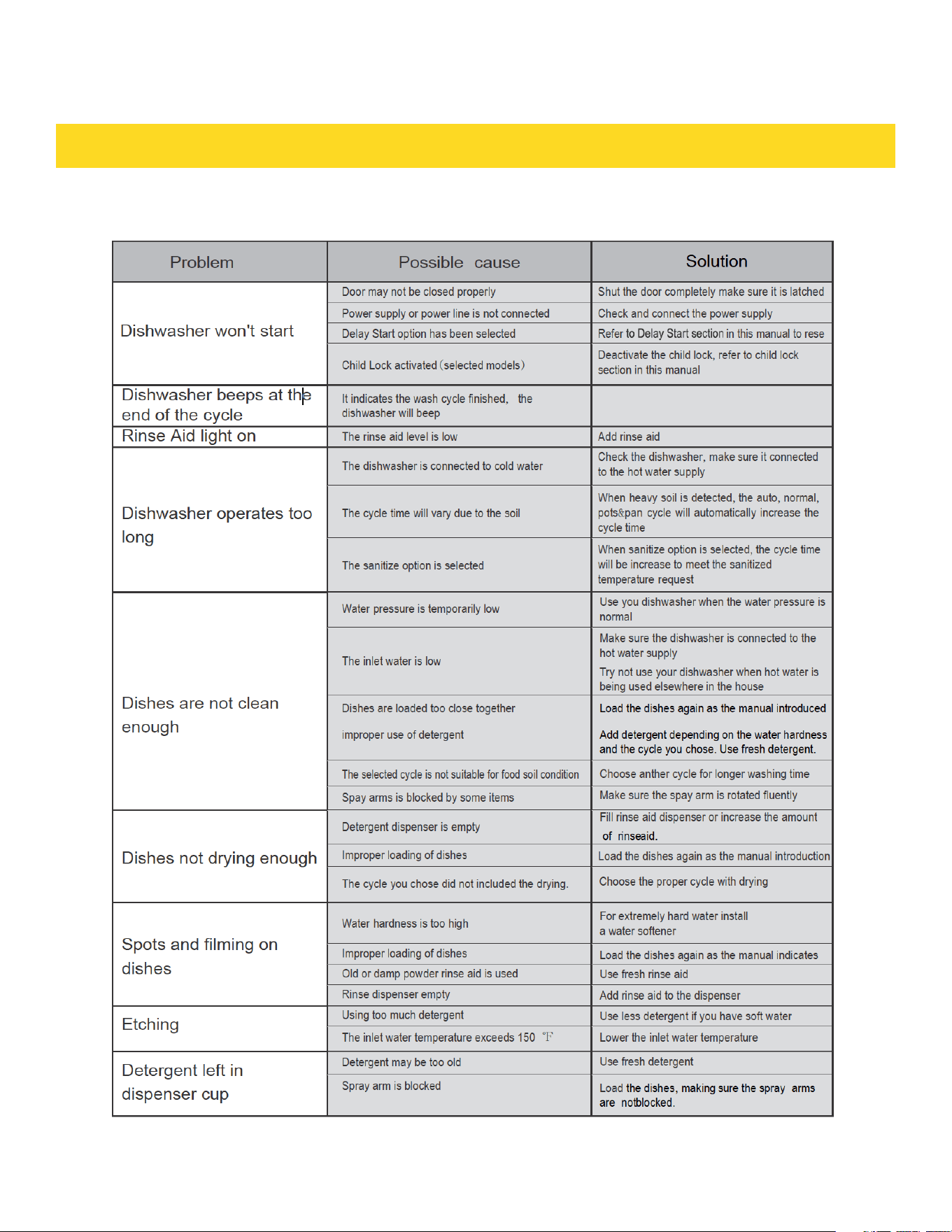
TROUBLESHOOTING
Before Calling For Service
17
TROUBLESHOOTING
18

Warranty
This product has been manufactured by Thor Group, 13831 Oaks Ave, Chino, California
91710.
Thor Group disclaims all express warranties except for the following:
This warranty applies to products purchased and located in the United States. Products
purchased or located outside this area are excluded.
The warranty does not apply to damage resulting from abuse, accident, natural
disaster, loss of
WARRANTY REGISTRATION
Scan theQR code or visit
thorkitchen.com/warranty
Input your product info
and select register
You’re done.
Let’s get cookin’.
You chose THOR Kitchen to enhance your culinary journey and
we’re stoked to have you in the club. Think of it as a secret
society of really savvy people, such as yourself, choosing
professional power and performance at an affordable price.
Register your product by following the steps below.
WELCOME
TO THE CLUB
WARRANTY NEED PARTS?