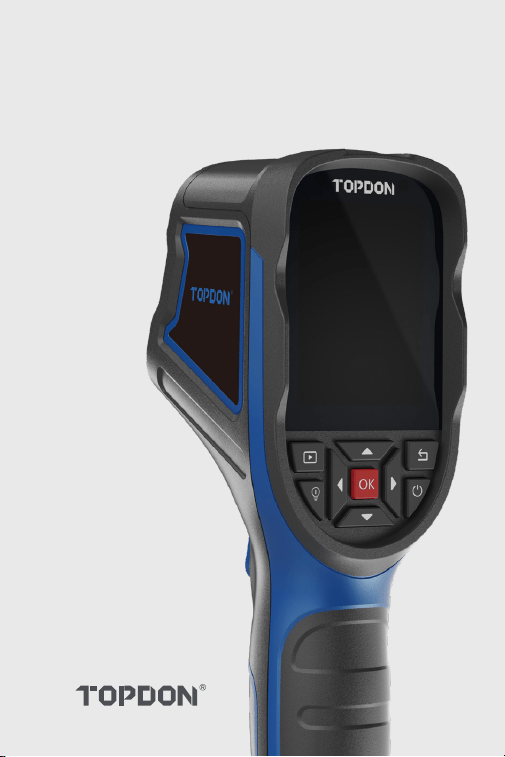
TC004 SE
Handheld Thermal Imaging Camera | User Manual


Cautions
Section 3 Using
TC004 SE in
Standalone Mode
Section 1
What's in the Box?
Section 5
Specications
Section 6 FAQ
Section 7 Warranty
DE
18
17
17
22
24
27
19
22
25
EN
6
5
5
10
12
14
7
11
12
FR
30
29
29
34
36
39
31
34
37
ES
42
41
41
46
48
51
43
46
49
IT PT JP
54
53
53
58
60
63
55
58
61
78 90
77 89
77 89
82 94
84 96
87 98
79 91
82 94
85 97
66
65
65
70
72
75
67
70
73
RU
About TC004 SE
Section 4 Using
TC004 SE in USB
Mode
Section 2
Product Overview
Contents

EN I 4
English

EN I 5
Cautions
About TC004 SE
Read all instructions before use.
Do not point the thermal imaging camera at the sun or other strong
energy sources for long periods of time, otherwise there might be
damage to the detector in the thermal imaging camera.
Keep the thermal imaging camera away from water to avoid
electricity leakage or short circuits.
Do not touch the lens with your hands. Do not knock, pry, puncture,
or scratch the lens.
Do not disassemble the thermal imaging camera.
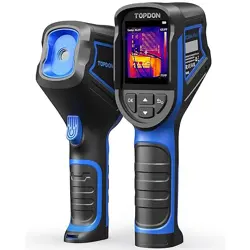
TOPDON's TC004 SE is a 256*192 handheld thermal imaging camera
used for equipment inspection and maintenance.
You can apply the camera in home heating, water leak detection, and
agricultural protection. It can be used either on its own in standalone
mode or in USB mode to work with a Windows-based computer.
EN I 6
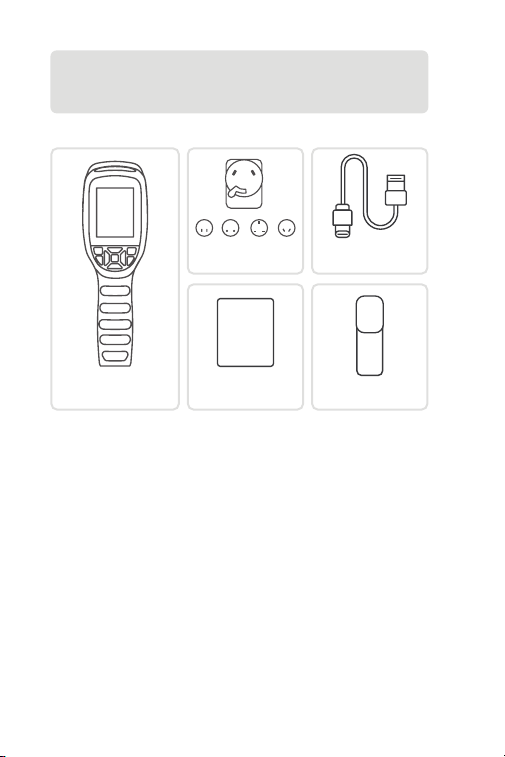
Section 1
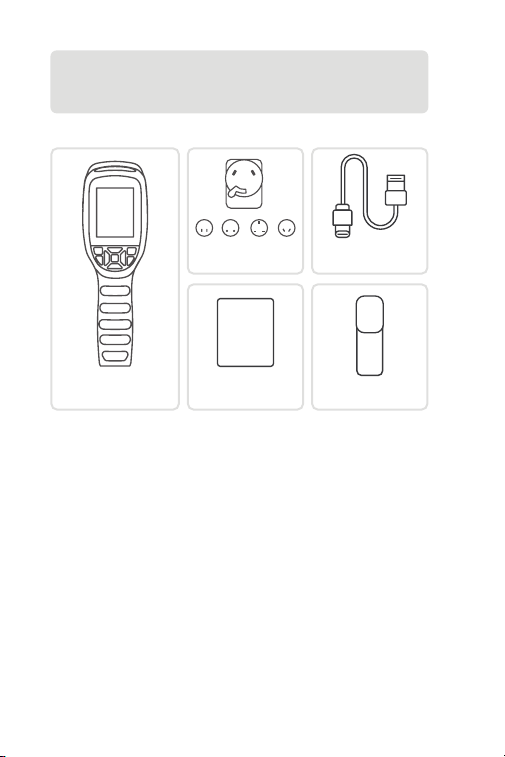
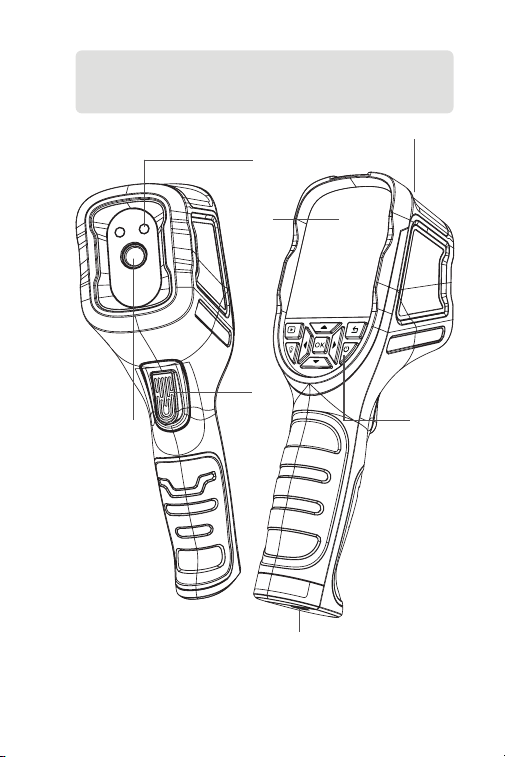
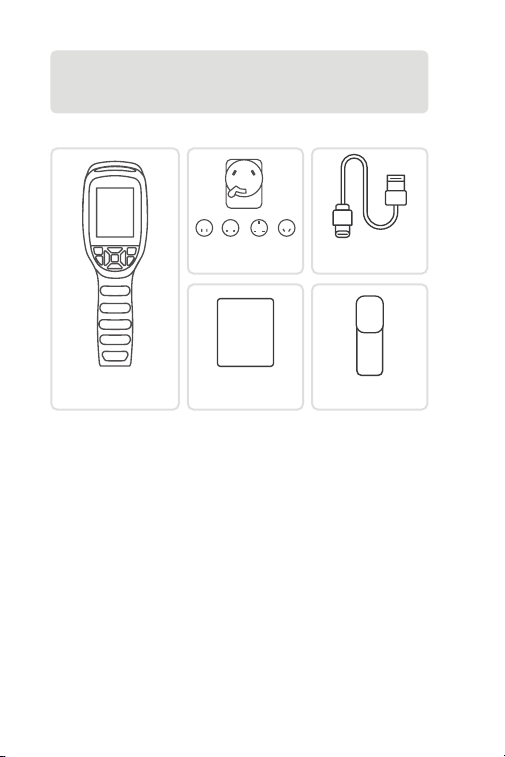
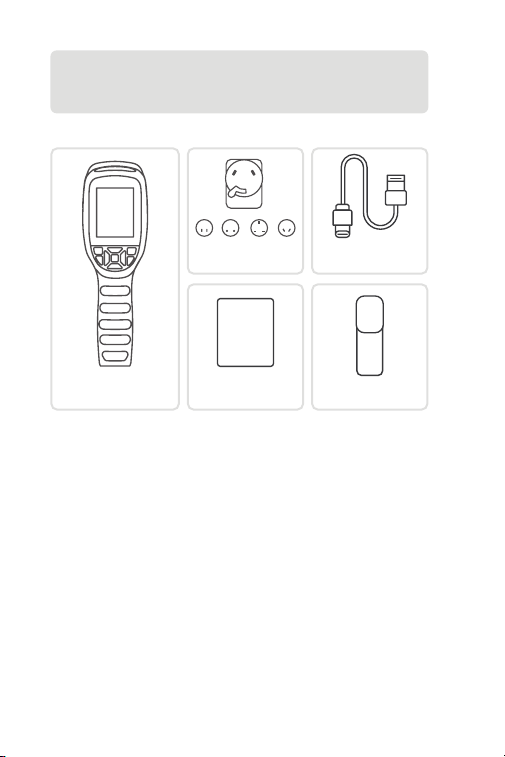
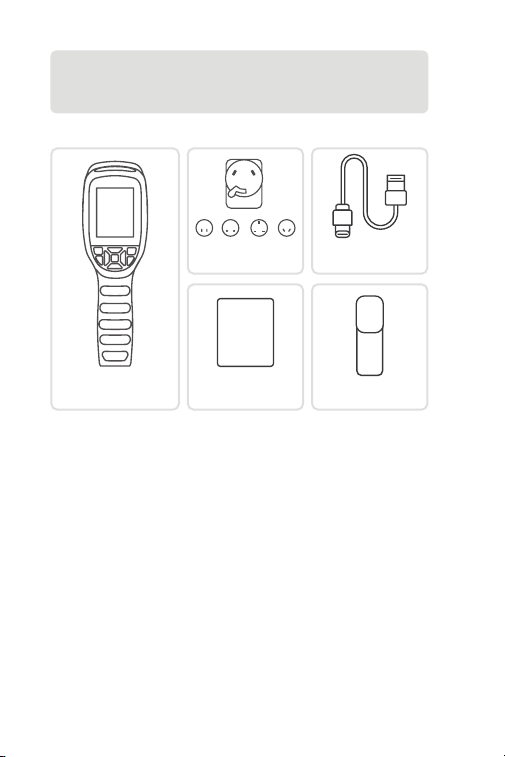
What's in the Box?
TC004 SE Thermal
Imaging Camera
User Manual
USER
MANUAL
Power Adapter
Storage Bag
USB Cable
(Type-A to Type-C)
EN I 7
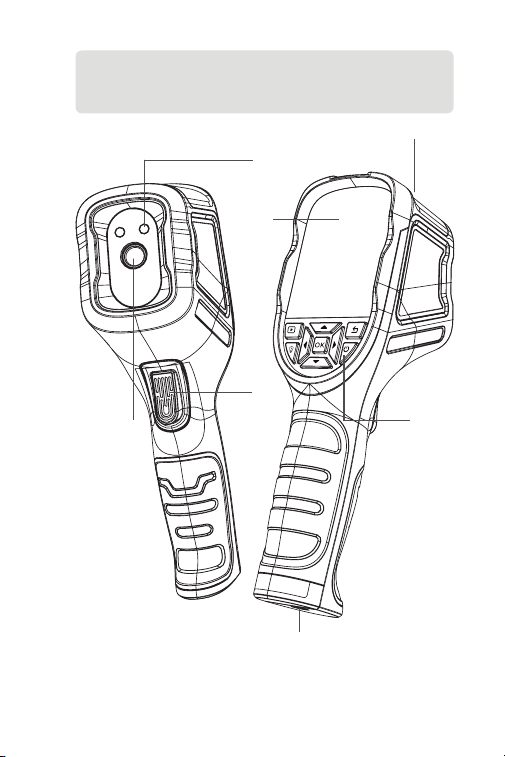
Section 2
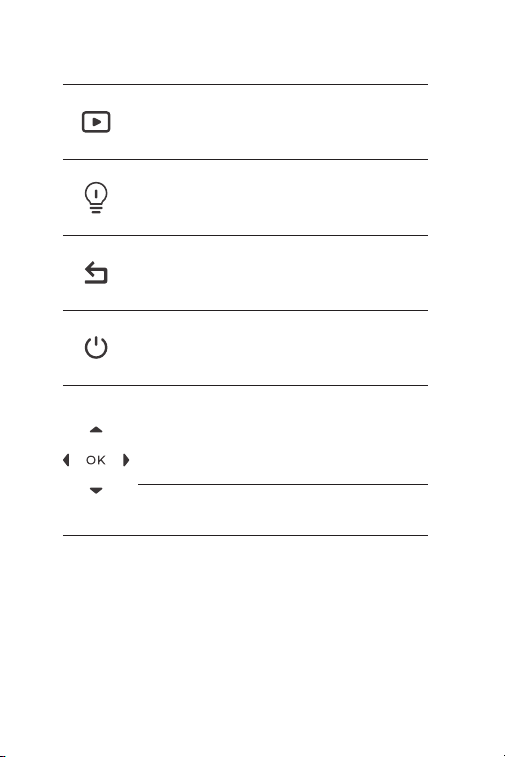
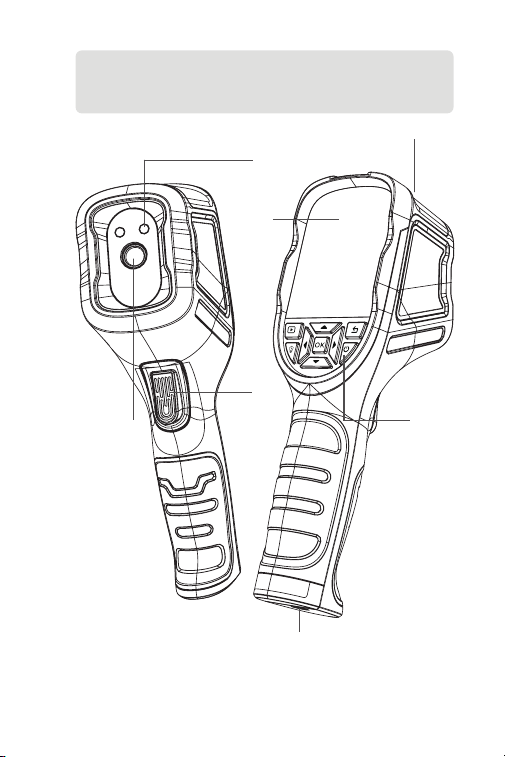
Product Overview
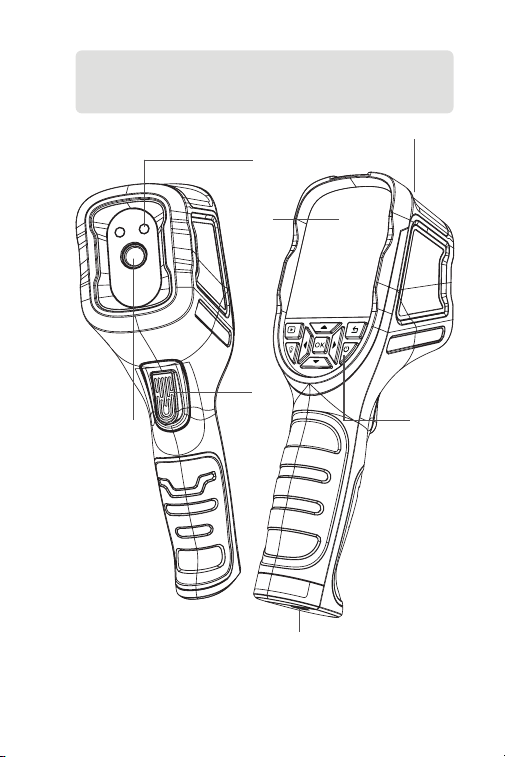
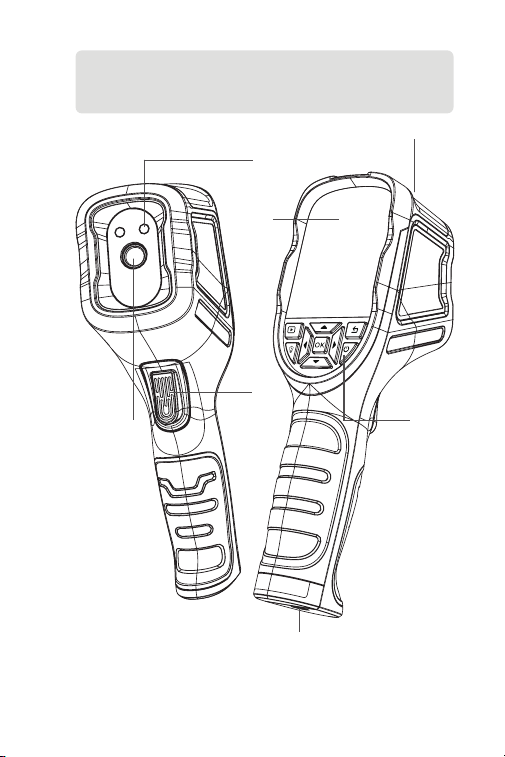
3
1
7
2
6
4
5
Figure 2.1.1
EN I 8
1. Keyboard
2. 2.8-Inch Screen
3. USB Type-C Port
Type-C port is used for charging, screen projecting to PC, and le
transfer
4. Camera Button
Short press to take a photo, then short press the OK Button to
save the photo; long press to start recording a video, short press to
stop recording, then short press the OK Button to save the video.
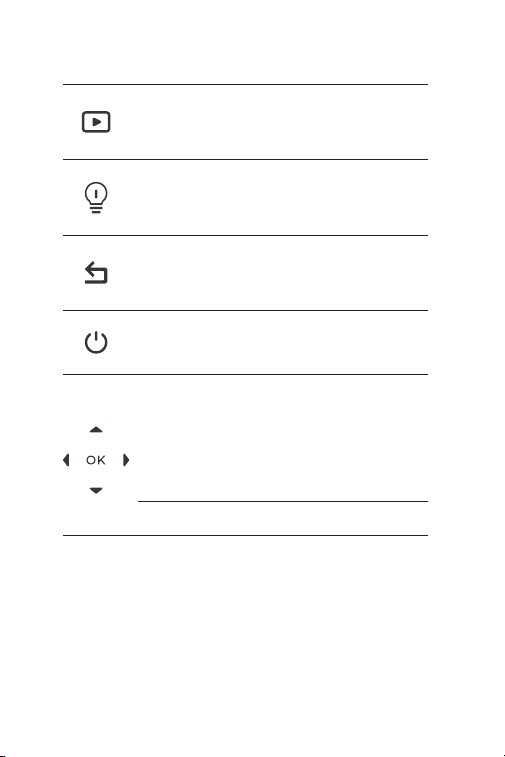
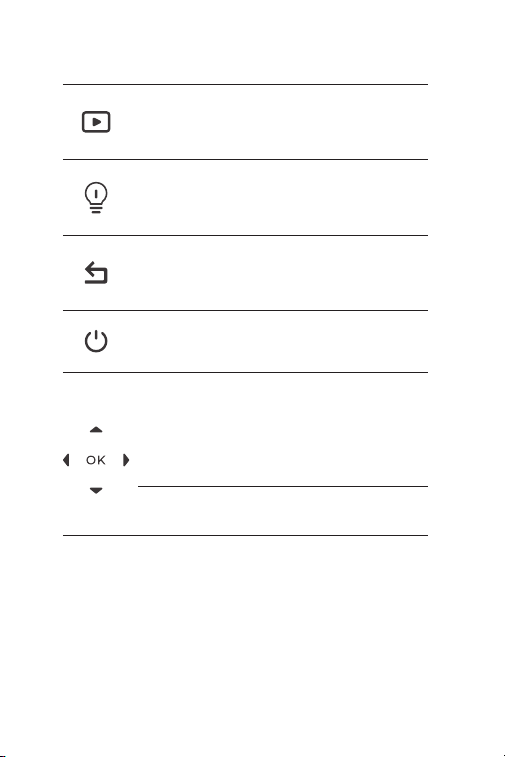
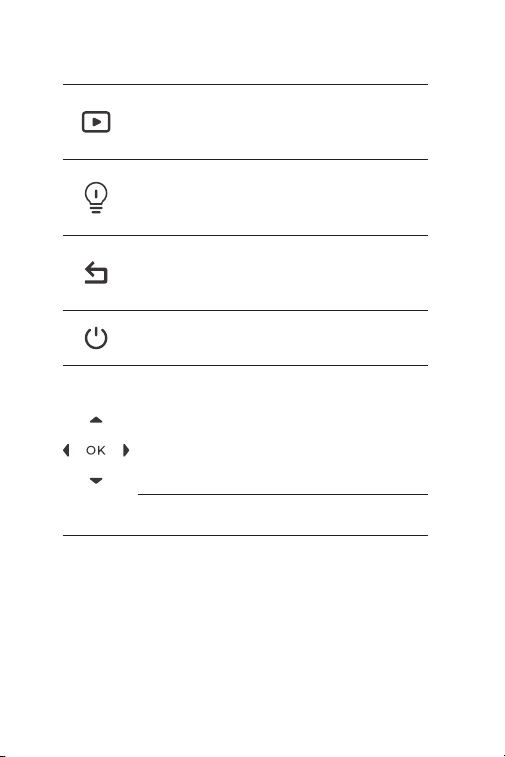
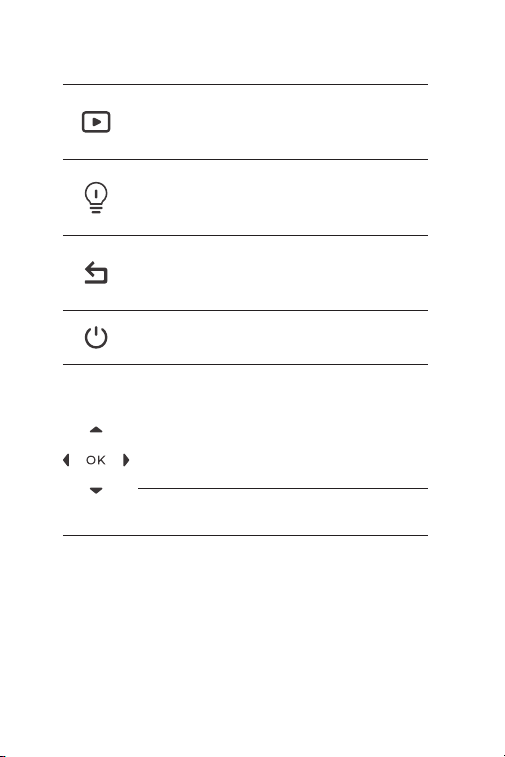
Expert Mode
Return Button
LED Button
Power Button
Move Up / Down
/ Left / Right
Buttons
OK Button
Short press to enter the Album
and Vehicle Detection function.
Short press to return to the
previous page.
Short press to turn on/off the
LED.
Short press to enter the Standby
mode; long press to power ON/
OFF.
Short press the four buttons to
move to the desired direction;
press Up to hit the shutter; press
Down to change pseudo-color
palettes; press Left/Right to set
the Zoom level.
Short press to conrm an action
or message.

EN I 9
5. Infrared Camera
6. Two LED Flashlights
7. Screw Hole (1 / 4-20 unc)
Mounts the TC004 SE onto a tripod

EN I 10
Section 3
Using TC004 SE in Standalone
Mode
While in standalone mode, the TC004 SE thermal imaging camera
can work independently on its own. To learn more about the
operation of each button and port on the TC004 SE device, you can
refer to Section 2 Product Overview.
EN I 11
Section 4
Using TC004 SE in USB Mode
Apart from standalone use, your TC004 SE can also work with a
Windows-based computer. This section illustrates how to congure
your TC004 SE to work with a Windows-based computer for screen
projecting and imagery analysis.
Download and install the software
Go to https://www.topdon.com/products/TC004-SE, click
“Download” to enter the download page. Then download and
install the software to your computer.
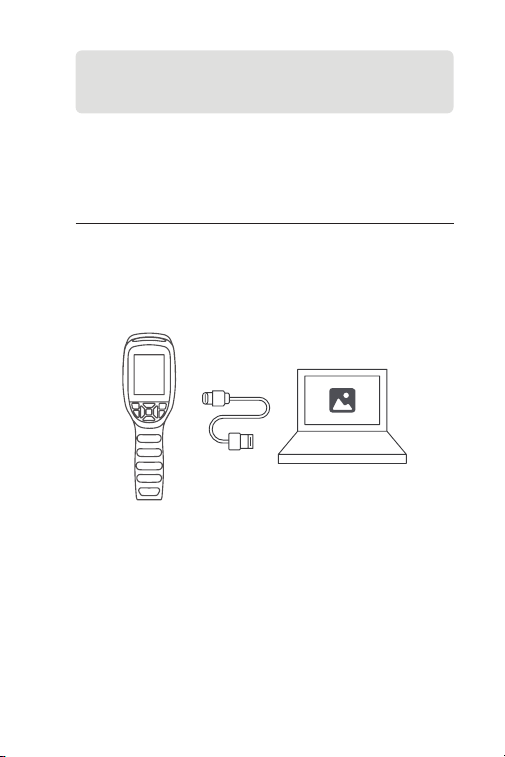
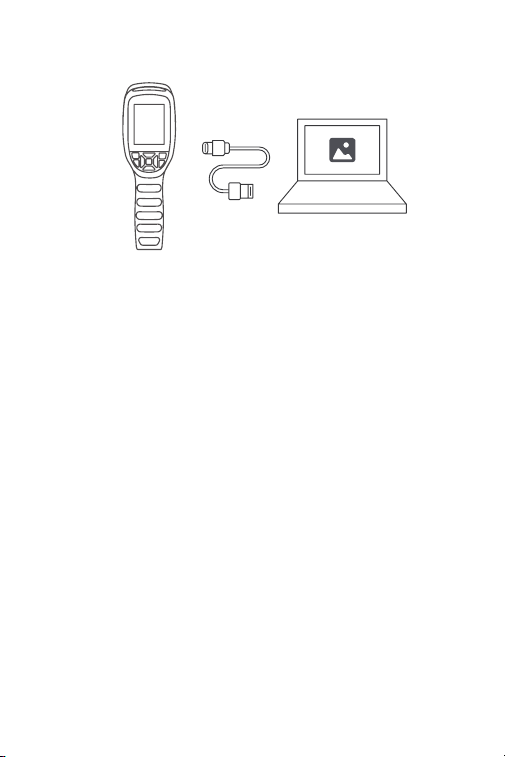
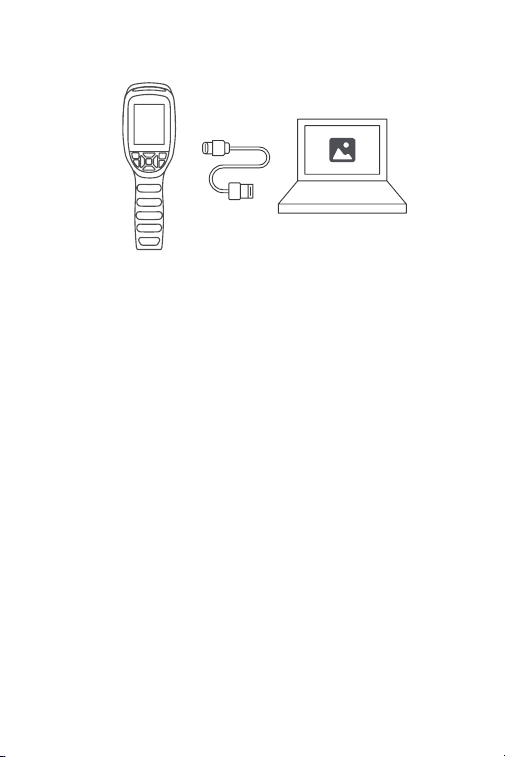
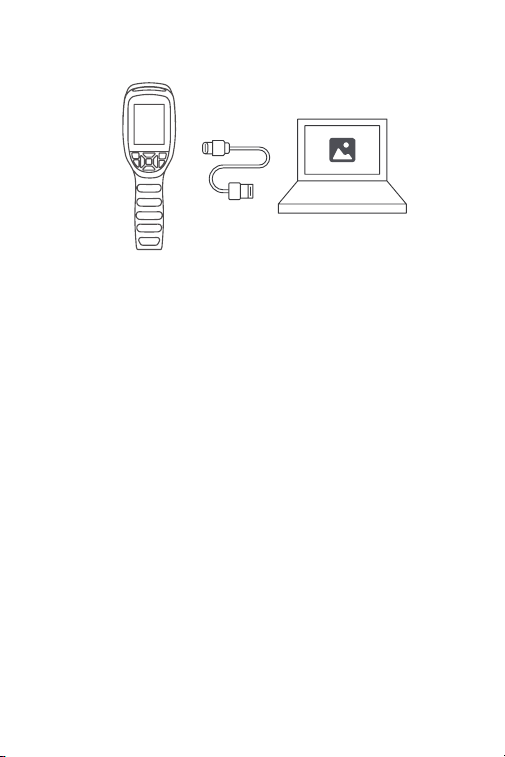
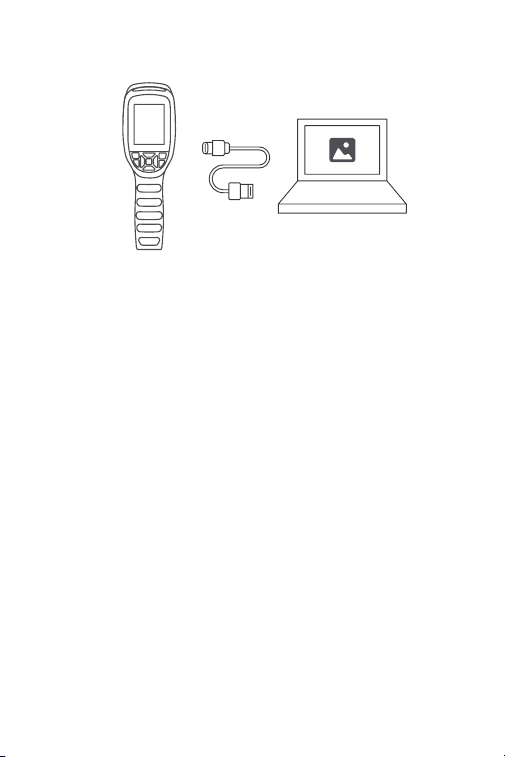
Connect TC004 SE to your computer with the supplied USB
cable (see Figure 4.1.1).
Open the software and you can screen project your TC004 SE
thermal imaging camera to PC.
Figure 4.1.1
Getting Started
1.
2.
3.

EN I 12
Section 5
Specications
Resolution of infrared camera
Spectral range
Pixel size
NETD
FOV
IFOV
Measurement range
Measurement accuracy
Measurement resolution
Storage capacity
Battery capacity
256*192
8 to 14 μm
12 μm
< 40 mK
56° x 42°
3.75 mrad
-4° to 1022°F (-20° to 550°C)
0.1°C
32 GB internal storage
5,300 mAh
±2ºC or ±2% of reading, the larger
value shall prevail
Section 6
FAQ
Why dose the device often make a "clicking" sound while the
screen freezes?
This is a normal occurrence caused by the infrared camera
automatically hitting the shutter. During the imaging process,
the absorbed scattered infrared light forms an abnormal heat
source, causing the image to slowly become blurred. In such
cases, refreshing the shutter can make the picture clear, but will
produce a "clicking" sound.
A
Q

EN I 13
a) Emissivity of the object surface.
b) Ambient temperature: The object will reect the infrared
rays emitted by surrounding objects, which affects the
temperature measurement of the object itself.
c) Atmospheric temperature: The atmosphere itself also emits
infrared rays.
d) Atmospheric transmittance: the infrared rays emitted by the
object are attenuated in the atmosphere.
e) Distance: the longer the distance, the greater the attenuation
of the infrared rays emitted by the object in the atmosphere.
A
A
A
A
Q
Q
Q
Q
The shutter is set to refresh automatically every 30 seconds by
default. If you mind the clicks, you can turn off the automatic
shutter in the Shutter Setting.
Can the TC004 SE detect objects underwater, through glass
or a wall?
No. Infrared detectors mainly detects 8 to 14 μm long-wave
infrared areas, and can only be used to measure surface
temperature.
Why is there a lower temperature reading when the device
gets far from the object and a higher reading when the
device gets closer to the object?
Infrared radiation attenuates when passing through the
atmosphere. The longer the distance, the greater the
attenuation. Thus, the accuracy of temperature measurement at
a distance will decrease.
To ensure accuracy of measurement, go to Setting >
Measurement Parameters > Distance, and input the actual
distance (max: 5 meters) to get the corrected temperature.
Why is the measured temperature not very precise?
The tempeature resolution of this device is ±2%, with a normal
temperature range of -4°F to 302°F (-20°C to 150°C), and a high
temperature range of 302°F to 1022°F (150°C to 550°C).Please
select the corresponding range in the Settings before measuring.
What external factors will affect the infrared temperature
measurement?
The following factors will have an impact on the measurement
results:

EN I 14
TOPDON's One Year Limited Warranty
TOPDON warrants to its original purchaser that the company's
products will be free from defects in material and workmanship for
12 months from the date of purchase (Warranty Period).
For the defects reported during the Warranty Period, TOPDON will
either repair or replace the defective part or product according to its
technical support analysis and conrmation.
TOPDON shall not be liable for any incidental or consequential
damages arising from the device's use, misuse, or mounting.
If there is any conict between the TOPDON warranty policy and
local laws, the local laws shall prevail.
This limited warranty is void under the following conditions:
• Misused, disassembled, altered or repaired by unauthorized stores
or technicians.
• Careless handling and / or improper operation.
Section 7
Warranty
Notice: All information in this manual is based on the latest
information available at the time of publication and no
warranty can be made for its accuracy or completeness.
TOPDON reserves the right to make changes at any time
without notice.

EN I 15
Section 8
FCC
This device complies with Part 15 of the FCC Rules. Operation is
subject to the following two conditions:
(1) this device may not cause harmful interference, and
(2) this device must accept any interference received, including
interference that may cause undesired operation.

DE I 16
Deutsch

DE I 17
Achtung
Über TC004 SE
LESEN SIE ALLE ANWEISUNGEN VOR DEM
GEBRAUCH.
Richten Sie die Infrarotkamera nicht für längere Zeit auf die Sonne
oder andere starke Energiequellen. Dies kann der Detektor in der
Kamera beschädigt werden.
Bitte halten Sie das Gerät von Wasser fern, um Lecks oder
Kurzschlüsse zu vermeiden.
Berühren Sie die Linse nicht mit Ihren Händen.Klopfen, hebeln,
durchstechen oder zerkratzen Sie das Objektiv nicht.
Zerlegen Sie das Gerät nicht.
TOPDON's TC004 SE ist eine 256*192 große, tragbare
Wärmebildkamera, die für die Inspektion und Wartung von Anlagen
verwendet wird.
Dieses Gerät kann in der Hausheizung, bei der Erkennung des
Wasserlecks und zum Landwirtschaft-Schutz verwendet werden. Sie
können die Kamera sowohl eigenständig im Standalone-Modus oder
im USB-Modus mit einem Windows-basierten Computer benutzen.
DE I 18
Abschnitt 1
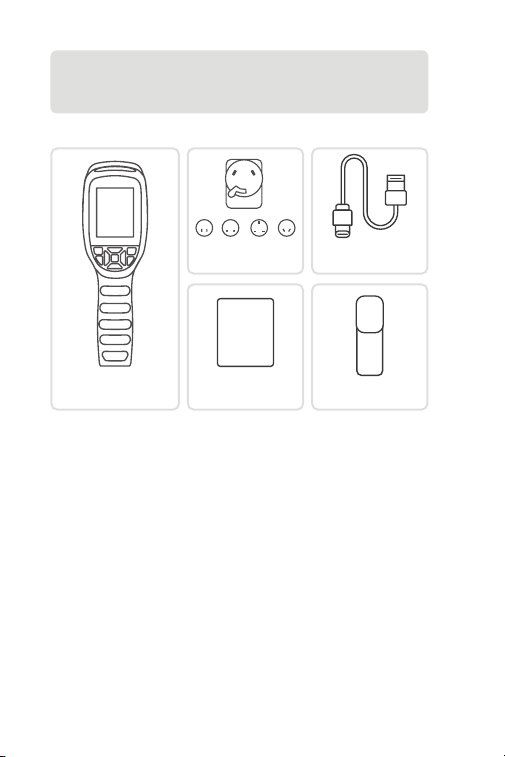
Was ist in der Box?
TC004 SE
Wärmebildkamera
Bedienungsa-
nleitung
USER
MANUAL
Netzadapter
Aufbewahrung-
stasche
USB-Kabel
(Typ-A auf Typ-C)
DE I 19
Abschnitt 2
Produktübersicht
Abbildung 2.1.1
3
1
7
2
6
4
5
DE I 20
1. Tastatur
2. 2,8-Zoll-Bildschirm
3. USB Typ-C Anschluss
Der Typ-C-Anschluss wird zum Auaden, Projizieren des
Bildschirms auf den PC und zur Dateiübertragung verwendet
4. Kamera-Taste
Drücken Sie kurz zur Aufnahme eines Foto und drücken Sie dann
kurz die OK-Taste , um das Foto zu speichern; drücken Sie lange,
um die Aufnahme eines Videos zu starten, drücken Sie kurz zum
Beenden der Aufnahme und drücken Sie dann kurz die OK-Taste,
Experten-Modus
Zurück-Taste
LED-Taste
Stromtaste
Aufwärts / Abwärts
/ Links / Rechts-
Tasten
OK-Taste
Kurze Betätigung,
um in die Album- und
Fahrzeugerkennung-Funktion
zu gelangen.
Kurz drücken, um zur vorherigen
Seite zurückzukehren.
Kurzes Drücken schaltet die LED
ein/aus.
Kurz drücken, um in den
Standby-Modus zu wechseln;
lang drücken, um das Gerät ein-
und auszuschalten.
Drücken Sie kurz auf die vier
Tasten, um sich in die gewünschte
Richtung zu bewegen; drücken
Sie auf die Aufwärtstaste, um
den Auslöser zu betätigen;
drücken Sie auf die Abwärtstaste,
um die Pseudo-Farbpaletten
zu wechseln; drücken Sie auf
die Links/Rechts-Taste, um die
Zoomstufe einzustellen.
Kurz drücken, um eine Aktion
oder Nachricht zu bestätigen.

DE I 21
5. Infrarotkamera
6. Zwei LED-Blitzlichter
7. Schraubenloch (1 / 4-20 unc)
Montieren Sie das TC004 SE auf einem Stativ
um das Video zu speichern.

DE I 22
Abschnitt 3
Verwendung von TC004 SE im
Standalone-Modus
Abschnitt 4
Verwendung von TC004 SE im
USB-Modus
Wenn sich das Gerät im Standalone-Modus bendet, kann die
Wärmebildkamera TC004 SE unabhängig und eigenständig
arbeiten. Um weitere Informationen über die Funktion der einzelnen
Tasten und Anschlüsse des TC004 SE-Geräts zu erfahren, beziehen
Sie sich in Abschnitt 2 Produktübersicht.
Ihr TC004 SE kann außer der eigenständigen Nutzung auch mit
einem Windows-basierten Computer zusammenarbeiten. Dieser
Abschnitt zeigt, wie Sie Ihr TC004 SE für die Arbeit mit einem
Windows-basierten Computer zur Bildschirmprojektion und
Bildanalyse kongurieren.
Downloaden und installieren Sie die Software
Gehen Sie auf https://www.topdon.com/products/TC004-SE und
klicken Sie auf "Download", um die Download-Seite zu öffnen.
Laden Sie dann die Software herunter und installieren Sie sie auf
Ihrem Computer.
Erste Schritte
1.
DE I 23
Öffnen Sie die Software und Sie können Ihre TC004 SE
Wärmebildkamera auf den PC projizieren.
3.
Verbinden Sie TC004 SE mit dem mitgelieferten USB-Kabel an
Ihren Computer (siehe Abbildung 4.1.1).
Abbildung 4.1.1
2.

DE I 24
Abschnitt 5
Spezikation
Auösung der Infrarotkamera
Spektralbereich
Pixelgröße
NETD
FOV
IFOV
Messbereich
Messgenauigkeit
Auösung der Messung
Speicherkapazität
Batteriekapazität
256*192
8 to 14 μm
12 μm
< 40 mK
56° x 42°
3,75 mrad
-4 bis 1022ºF (-20 bis 550ºC)
0,1°C
32 GB interner Speicher
5.300 mAh
±2 ºC oder ±2 % des Messwerts,
der größere Wert hat Vorrang

DE I 25
Abschnitt 6
FAQ
Warum macht das Gerät oft beim Bildschirm-Freeze einen
"Klicken" Geräusch?
Dies ist ein normales Phänomen, das durch den automatischen
Auslöser des Infrarotkameras verursacht wird. Während
des Abbildungsprozesses bildet das absorbierte gestreute
Infrarotlicht eine abnormale Wärmequelle, die dazu führt, dass
das Bild langsam unschärf wird. In solchen Fällen kann das
Aktualisieren des Verschlusses das Bild klar machen, erzeugt
jedoch ein "Klicken" Geräusch.
Der Verschluss ist standardmäßig so eingestellt, dass er alle 30
Sekunden automatisch aktualisiert wird. Wenn Sie das Klicken
stören nden, können Sie den automatischen Verschluss in den
Einstellungen ausschalten.
Kann der TC004 SE Objekte unter Wasser, durch Glas oder
eine Wand erkennen?
Nein. Infrarotdetektoren erfassen hauptsächlich den
langwelligen Infrarotbereich von 8~14 μm und können nur zur
Messung der Oberächentemperatur benutzt werden.
Warum zeigt das Gerät eine niedrigere Temperatur, wenn es
weit vom Objekt entfernt ist, und eine höhere Temperatur,
wenn es näher am Objekt ist?
Infrarotstrahlung dämpft beim Durchqueren der
Atmosphäre. Je größer die Entfernung ist, desto größer ist
die Dämpfung. Deswegen verringert sich die Genauigkeit der
Temperaturmessung in der Ferne.
Zum Gewährleisten der Messung-Genauigkeit gehen Sie zu
Einstellung > Messung > Entfernung, und geben Sie den
tatsächlichen Abstand (max: 5 Meter), um die korrigierte
Temperatur zu bekommen.
Warum ist die gemessene Temperatur nicht genau?
Die Temperaturauösung dieses Geräts beträgt ±2%, mit
einem normalen Temperaturbereich von -4°F bis 302°F (-20°C
bis 150°C) und einem hohen Temperaturbereich von 302°F bis
1022°F (150°C bis 550°C). Bitte wählen sie vor der messung den
entsprechenden messwert in der einstellungen.
A
A
A
A
F
F
F
F

DE I 26
a) Emissionsgrad der Zielobjektoberäche.
b) Umgebungstemperatur: Das Objekt reektiert die von
umgebenden Objekten emittierten Infrarotstrahlen, was die
Temperaturmessung des Objekts selbst beeinusst.
c) Atmosphärentemperatur: Die Atmosphäre sendet auch
Infrarotstrahlen aus.
d) Atmosphärische Transmission: Die vom Objekt ausgesandten
Infrarotstrahlen werden in der Atmosphäre gedämpft.
e) Entfernung: Je größer die Entfernung, desto größer ist die
Dämpfung der vom Objekt in der Atmosphäre emittierten
Infrarotstrahlen.
A
F
Welche externen Faktoren beeinussen die Infrarot-
Temperaturmessung?
Die Faktoren sind wie folgt:

DE I 27
TOPDONs Einjährige Eingeschränkte Garantie
TOPDON garantiert seinem ursprünglichen Käufer, dass die
Produkte des Unternehmens für 12 Monate ab Kaufdatum frei von
Material- und Verarbeitungsfehlern sind (Garantiezeitraum).
Für die während der Garantiezeit gemeldeten Mängel wird TOPDON
das defekte Teil oder Gerät gemäß seiner Analyse und Bestätigung
des technischen Supports entweder reparieren oder ersetzen.
TOPDON haftet nicht für Neben- oder Folgeschäden, die durch den
Gebrauch, den Missbrauch oder die Montage des Geräts entstehen.
Bei Widersprüchen zwischen der TOPDON-Gewährleistungsrichtlinie
und den örtlichen Regelungen haben die örtlichen Regelungen
bevorzugte Stellung.
Diese eingeschränkte Garantie erlischt unter den folgenden
Bedingungen:
• Missbrauch, Demontage, Änderung oder Reparatur durch nicht
autorisierte Geschäfte oder Techniker.
• Unachtsame Handhabung und Verletzung des Betriebs.
Abschnitt 7
Garantie
Notiz: Alle Informationen in dieser Anleitung basieren
auf den neuesten Informationen, die zum Zeitpunkt der
Veröffentlichung verfügbar waren, und es kann keine Garantie
für ihre Genauigkeit oder Vollständigkeit übernommen
werden. TOPDON behält sich das Recht vor, jederzeit ohne
Vorankündigung Änderungen vorzunehmen.

FR I 28
Français

FR I 29
Attention
À propos de TC004 SE
LISEZ TOUTES LES INSTRUCTIONS AVANT
UTILISATION.
Ne dirigez pas la caméra infrarouge vers le soleil ou toute autre
source d'énergie puissante pendant de longues périodes. Cela
pourrait endommager le détecteur de la caméra.
Veuillez garder l'appareil à l'écart de l'eau pour éviter les fuites ou les
courtscircuits.
Ne touchez pas la lentille avec vos mains. Veuillez ne pas frapper,
forcer, percer ou rayer la lentille.
Ne démontez pas l'appareil.
La TC004 SE de TOPDON est une caméra thermique portable 256*192
utilisée pour l'inspection et la maintenance des équipements.
La caméra peut être utilisée pour le chauffage domestique, la
détection des fuites d'eau et la protection agricole. Elle peut être
utilisée soit seul en mode autonome, soit en mode USB pour
fonctionner avec un ordinateur sous Windows.
FR I 30
Section 1
Que contient la Boîte ?
Caméra à Image
Thermique TC004 SE
Manuel d'Utilisation
USER
MANUAL
Adaptateur Secteur
Sac de Rangement
Câble USB
(Type-A à Type-C)
FR I 31
Section 2
Aperçu du Produit
Figure 2.1.1
3
1
7
2
6
4
5
FR I 32
1. Clavier
2. Écran de 2,8 pouces
3. Port USB Type-C
Le port Type-C est utilisé pour la recharge, la projection de l'écran
sur un PC et le transfert de chiers.
4. Bouton de Caméra
Appuyez brièvement pour prendre une photo, puis appuyez
brièvement sur le Bouton OK pour enregistrer la photo ; appuyez
longuement pour démarrer l'enregistrement d'une vidéo,
appuyez brièvement pour arrêter l'enregistrement, puis appuyez
Mode Expert
Bouton de Retour
Bouton LED
Bouton
d'Alimentation
Boutons de
Déplacement
vers le Haut / Bas /
Gauche / Droite
Bouton OK
Appuyez brièvement sur
cette touche pour accéder à
la fonction de détection des
albums et des véhicules.
Appuyez brièvement pour
revenir à la page précédente.
Appuyez brièvement pour
allumer/éteindre la LED.
Appuyez brièvement pour
passer en mode veille; appuyez
longuement pour allumer/
éteindre.
Appuyez brièvement sur les
quatre boutons pour vous
déplacer dans la direction
souhaitée ; appuyez sur le haut
pour déclencher l'obturateur;
appuyez sur le bas pour changer
de palette de pseudo-couleurs;
appuyez sur la gauche/droite
pour régler le niveau de zoom.
Appuyez brièvement sur cette
touche pour conrmer une
action ou un message.

FR I 33
5. Caméra infrarouge
6. Deux lampes de poche LED
7. Trou de Vis (1/4-20 unc)
Montage du TC004 SE sur un trépied
brièvement sur le Bouton OK pour enregistrer la vidéo.

FR I 34
Section 3
Utilisation du TC004 SE en Mode
Autonome
Section 4
Utilisation du TC004 SE en mode
USB
En mode autonome, la caméra thermique TC004 SE peut
fonctionner de manière indépendante. Pour en savoir plus sur le
fonctionnement de chaque bouton et port du dispositif TC004 SE,
veuillez reporter à la Section 2 Aperçu du Produit.
En dehors d'une utilisation autonome, votre TC004 SE peut
également fonctionner avec un ordinateur sous Windows. Cette
section illustre comment congurer votre TC004 SE pour qu'il
fonctionne avec un ordinateur sous Windows pour la projection
d'écran et l'analyse d'images.
Téléchargez et installez le logiciel
Allez sur https://www.topdon.com/products/TC004-SE, cliquez
sur « Télécharger » pour accéder à la page de téléchargement.
Ensuite, téléchargez et installez le logiciel sur votre ordinateur.
Pour Commencer
1.
FR I 35
Ouvrez le logiciel et vous pouvez projeter votre caméra
thermique TC004 SE sur un PC.
3.
Connectez le TC004 SE à votre ordinateur avec le câble USB
fourni (voir Figure 4.1.1).
Figure 4.1.1
2.

FR I 36
Section 5
Spécications
Résolution de la caméra infrarouge
Gamme spectrale
Taille du pixel
NETD
FOV
IFOV
Plage de mesure
Précision de la mesure
Résolution de la mesure
Capacité de stockage
Capacité de la batterie
256*192
8 à 14 μm
12 μm
< 40 mK
56° x 42°
3,75 mrad
-4 à 1022°F (-20 à 550°C)
0,1°C
32 GB de stockage interne
5.300 mAh
±2ºC ou ±2% de la lecture, la plus
grande valeur prévaudra

FR I 37
Section 6
FAQ
Pourquoi l'appareil fait-il souvent un bruit de "cliquetis"
lorsque l'écran se ge ?
Cela est dû à la caméra infrarouge qui déclenche
automatiquement l'obturateur. Pendant le processus d'imagerie,
la lumière infrarouge dispersée absorbée forme une source de
chaleur anormale, ce qui rend l'image progressivement oue.
Dans ce cas, rafraîchir l'obturateur peut rendre l'image nette,
mais cela produit un bruit de "cliquetis".
L'obturateur est réglé par défaut pour se rafraîchir
automatiquement toutes les 30 secondes. Si vous n'aimez pas les
cliquetis, vous pouvez désactiver l'obturateur automatique dans
les Paramètres.
Le TC004 SE peut-il détecter des objets sous l'eau, à travers
une vitre ou un mur ?
Non. Les détecteurs infrarouges détectent principalement la
région infrarouge à ondes longues de 8~14μm, et ne peuvent
être utilisés que pour mesurer la température de surface.
Pourquoi la température relevée est-elle plus basse lorsque
l'appareil s'éloigne de l'objet et plus élevée lorsqu'il s'en
rapproche ?
Le rayonnement infrarouge s'atténue lorsqu'il traverse
l'atmosphère. Plus la distance est grande, plus l'atténuation est
importante. Ainsi, la précision de la mesure de la température à
distance diminuera.
Pour garantir la précision de la mesure, rendez-vous sur Réglage
> Mesure > Dist, et saisissez la distance réelle (max. : 5 mètres)
pour obtenir la température corrigée.
Pourquoi la température mesurée n'est-elle pas précise ?
La résolution de la température de cet appareil est de ±2%, avec
une plage de température normale de -4°F à 302°F (-20°C à
150°C), et une plage de température élevée de 302°F à 1022°F
(150°C à 550°C).
Veuillez sélectionner la plage correspondante dans les
paramètres avant de mesurer.
R
R
R
R
Q
Q
Q
Q

FR I 38
a) Emissivité de la surface de l'objet cible.
b) Température ambiante : l'objet reète les rayons infrarouges
émis par les objets environnants, ce qui affecte la mesure de la
température de l'objet lui-même.
c) Température atmosphérique : l'atmosphère émet également
des rayons infrarouges.
d) Transmittance atmosphérique : les rayons infrarouges émis
par l'objet sont atténués dans l'atmosphère.
e) Distance : plus la distance est grande, plus les rayons
infrarouges émis par l'objet sont atténués dans l'atmosphère.
R
Q
Quels sont les facteurs externes qui affectent la mesure de la
température infrarouge ?
Les facteurs sont les suivants :

FR I 39
Garantie limitée d'un an de TOPDON
TOPDON garantit à l'acheteur initial que les produits de la société
sont exempts de tout défaut matériel et de fabrication pendant 12
mois à compter de la date d'achat (période de garantie).
Pour les défauts signalés pendant la période de garantie, TOPDON
réparera ou remplacera la pièce ou le produit défectueux selon
l'analyse et la conrmation de son support technique.
TOPDON ne sera pas responsable des dommages accessoires ou
indirects résultant de l'utilisation, de la mauvaise utilisation ou du
montage de l'appareil.
S'il y a un conit entre la politique de garantie de TOPDON et les lois
locales, les lois locales prévaudront.
Cette garantie limitée est nulle dans les conditions suivantes :
• Mauvaise utilisation, démontage, modication ou réparation par
des magasins ou des techniciens non autorisés.
• Manipulation négligente et violation des règles de fonctionnement.
Section 7
Garantie
Avis : Toutes les informations contenues dans ce manuel sont
basées sur les dernières informations disponibles au moment
de la publication et aucune garantie ne peut être donnée
quant à leur exactitude ou leur exhaustivité. TOPDON se
réserve le droit d'apporter des modications à tout moment
sans préavis.

ES I 40
Español

ES I 41
Precaución
Sobre el TC004 SE
LEE LAS INSTRUCCIONES ANTES DE USAR.
No apuntes la cámara infrarroja hacia el sol u otras fuentes de
energía intensa durante largos períodos de tiempo. Esto puede
dañar el detector de la cámara.
Mantén la unidad alejada del agua para evitar fugas o cortocircuitos.
No toques la lente con las manos. No golpees, haz palanca, perfores
ni rayes la lente.
No desmontes la unidad.
El TOPDON TC004 SE es una cámara de imagen térmica portátil de
256*192 usada para inspección de equipos y mantenimiento.
Puede ser aplicada en calefacción doméstica, detección de fugas
de agua, y protección agrícola. Puede ser usada tanto por si sola en
modo autónomo o en modo USB para trabajar con una computadora
Windows.
ES I 42
Sección 1
¿Qué hay en la caja?
Cámara de Imagen
Térmica TC004 SE
Manual de Usuario
USER
MANUAL
Adaptador de Fuerza
Bolsa de
Almacenamiento
Cable USB (Tipo A o
Tipo C)
ES I 43
Sección 2
Visión General del Producto
Figura 2.1.1
3
1
7
2
6
4
5
ES I 44
1. Teclado
2. Pantalla de 2.8 Pulgadas
3. Puerto USB Tipo C
El puerto Tipo C es usado para recargar, proyectar pantalla en la
computadora, y transferencia de archivos
4. Botón de Cámara
Presione una vez para tomar una foto, luego presione una vez
el Botón OK para guardar la foto; manténgalo presionado para
comenzar a grabar un video, presione una vez para detener la
grabación, luego presione una vez el Botón OK para guardar el
Modo Experto
Botón Volver
Botón LED
Botón de Prender
Botones Arriba /
Abajo / Izquierda /
Derecha
Botón OK
Presione brevemente para entrar
en la función de Detección de
Álbum y Vehículo.
Presiona brevemente para volver
a la página anterior.
Presiona brevemente para
encender/apagar la LED.
Pulsación corta para entrar en
modo de espera; pulsación larga
para encender/apagar.
Presiona brevemente los cuatro
botones para moverse en la
dirección deseada; presiona
Arriba para disparar la cámara;
presiona Abajo para cambiar
las paletas de colores falsos;
presiona Izquierda/Derecha para
ajustar el nivel de zoom.
Pulsación corta para conrmar
una acción o mensaje.

ES I 45
5. Cámara Infrarroja
6. Dos Linternas LED
7. Oricio para Tornillo (1 / 4-20 unc)
Monta el TC004 SE en un trípode
video.

ES I 46
Sección 3
Usando el TC004 SE en Modo
Autónomo
Sección 4
Usando el TC004 SE en Modo USB
Cuando está en el modo autónomo, la cámara de imagen térmica
TC004 SE puede trabajar independientemente por su cuenta. Para
aprender más sobre la operación de cada botón y puerto en el
dispositivo TC004 SE, puede referirse a la Sección 2 Visión General
del Producto.
Además del modo autónomo, su TC004 SE también puede trabajar
con una computadora Windows. Esta sección ilustra como congurar
su TC004 SE para trabajar con una computadora Windows para
proyección de pantalla e análisis de imagen.
Descargue e instale el software
Vaya a https://www.topdon.com/products/TC004-SE, haga clic
en “Download” para ingresar a la página de descargas. Luego
descargue e instale el software en su computadora.
Empezando
1.
ES I 47
Abra el software y podrá proyectar la pantalla de su cámara de
imagen térmica TC004 SE a la Computadora.
3.
Conecte el TC004 SE a su computadora con el cable USB
suministrado (ver Figura 4.1.1).
Figura 4.1.1
2.

ES I 48
Sección 5
Especicación
Resolución de la cámara infrarroja
Rango espectral
Tamaño de pixel
NETD
FOV
IFOV
Rango de medición
Precisión de medición
Resolución de medición
Capacidad de almacenamiento
Capacidad de batería
256*192
8 to 14 μm
12 μm
< 40 mK
56° x 42°
3.75 mrad
-4 a 1022ºF (-20 a 550ºC)
0.1°C
5,300 mAh
±2ºC o ±2% de la lectura,
prevalecerá el valor mayor
32 GB almacenamiento
interno

ES I 49
Sección 6
FAQ
¿Por qué el dispositivo hace a menudo un "clic" mientras la
pantalla se congela?
Se trata de un fenómeno normal causado por el disparo
automático de la cámara de infrarrojos. Durante el proceso de
formación de imágenes, la luz infrarroja dispersa absorbida
forma una fuente de calor anormal, haciendo que la imagen se
vuelva borrosa lentamente. En tales casos, refrescar el obturador
puede hacer que la imagen sea clara, pero producirá un sonido
de "clic".
Por defecto, el obturador se actualiza automáticamente cada
30 segundos. Si le molestan los chasquidos, puede desactivar el
obturador automático en los Ajustes.
¿Puede el TC004 SE detectar objetos bajo el agua, a través de
un vidrio o una pared?
No. Los detectores infrarrojos detectan principalmente la región
infrarroja de onda larga de 8~14 μm y solo se pueden usar para
medir la temperatura de la supercie.
¿Por qué hay una lectura de temperatura más baja cuando el
dispositivo está lejos del objeto y una lectura más alta cuando
el dispositivo está más cerca al objeto?
La radiación infrarroja disminuye al atravesar la atmosfera.
Lo más larga la distancia, lo mayor será la disminución. Por lo
tanto, la precisión de la medición de temperatura disminuye a la
distancia.
Para asegurar precisión de medición, vaya a Denir >
Parámetros > Distân, e ingrese la distancia real (max: 5 metros)
para obtener la temperatura corregida.
P: ¿Por qué la temperatura medida no es precisa?
La resolución de temperatura de este dispositivo es de ±2%,
con un rango de temperatura normal de -4°F a 302°F (-20°C a
150°C), y un rango de temperatura alto de 302°F a 1022°F (150°C
a 550°C). Antes de realizar la medición, seleccione el rango
correspondiente en la conguración.
¿Qué factores externos afectarán la medición de temperatura
infrarroja?
R
R
R
R
P
P
P
P
P

ES I 50
a) Emisividad de la supercie del objeto objetivo.
b) Temperatura ambiente: el objeto reejará los rayos infrarrojos
emitidos por los objetos circundantes, lo que afecta la
medición de la temperatura del propio objeto.
c) Temperatura atmosférica: la atmósfera también emite rayos
infrarrojos.
d) Transmitancia atmosférica: los rayos infrarrojos emitidos por el
objeto son atenuados en la atmósfera.
e) Distancia: a mayor distancia, mayor atenuación de los rayos
infrarrojos emitidos por el objeto en la atmósfera.
R
Los factores son los siguientes:

ES I 51
Garantía limitada de un a ño para TOPDON
TOPDON asegura a sus compradores originales que los productos
de la empresa estarán libres de defectos de materiales y mano de
obra durante un período de 12 meses a partir de la fecha de compra
(Período de Garantía).
Para los defectos reportados durante el período de garantía,
TOPDON analizará y conrmará, reparará o reemplazará las piezas o
productos defectuosos de acuerdo con su soporte técnico.
TOPDON no será responsable de ningún daño accidental o
consecuente causado por el uso, mal uso o instalación del dispositivo.
Si hay conictos entre la política de garantía de TOPDON y las leyes
locales, prevalecerán las leyes locales.
Esta garantía limitada no es válida en los siguientes casos:
• Uso indebido, desmontaje, modicación o reparación de tiendas o
técnicos no autorizados.
• Manejo de errores e irregularidades operativas.
Sección 7
Garantía
Nota: Toda la información contenida en este manual se basa
en la información más reciente disponible en el momento de
su publicación y no garantiza su exactitud o exhaustividad.
TOPDON se reserva el derecho de cambiarla en cualquier
momento sin previo aviso.

IT I 52
Italiano

IT I 53
Attenzione
Riguardo a TC004 SE
LEGGERE TUTTE LE ISTRUZIONI PRIMA DELL'USO.
Non puntare la telecamera a infrarossi verso il sole o altre forti fonti
di energia per lunghi periodi di tempo. Ciò potrebbe causare danni al
rilevatore nella telecamera.
Tenere l'unità lontana dall'acqua per evitare perdite o cortocircuiti.
Non toccare l'obiettivo con le mani. Non battere, fare leva, forare o
grafare l'obiettivo.
Non smontare l'unità.
La TC004 SE di TOPDON è una termocamera portatile 256*192
utilizzata per l'ispezione e la manutenzione delle apparecchiature.
È possibile utilizzare la fotocamera per il riscaldamento domestico,
il rilevamento di perdite d'acqua e la protezione agricola. Può anche
essere utilizzato da solo in modalità standalone o in modalità USB
per funzionare con il computer.
IT I 54
Sezione 1
Cosa c'è nella confezione?
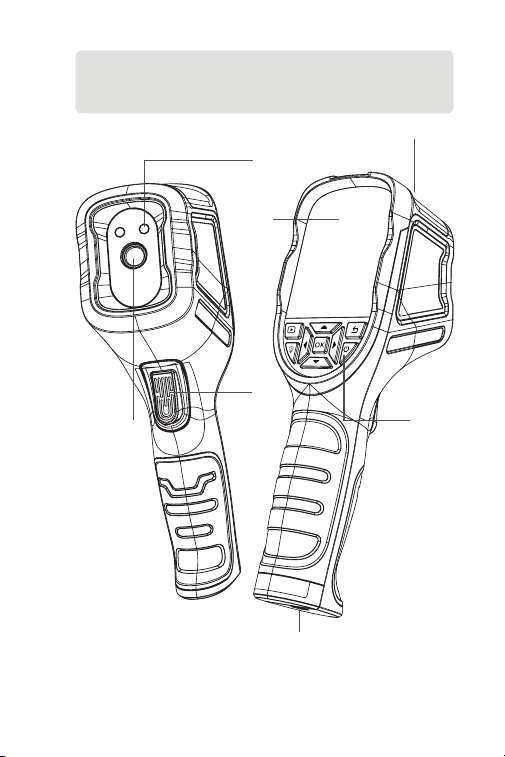
Termocamera TC004 SE Manuale d'istruzioni
USER
MANUAL
Adattatore di
alimentazione
Borsa Portaoggetti
Cavo USB (da tipo A a
tipo C)
IT I 55
Sezione 2
Panoramica del prodotto
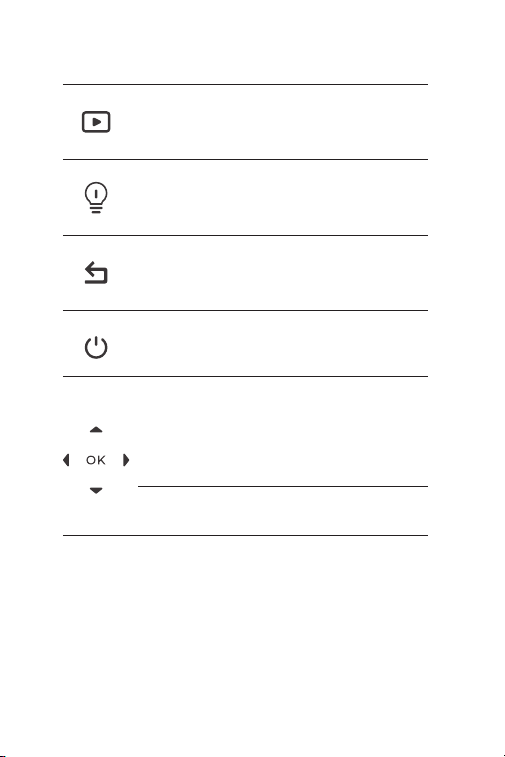
Figura 2.1.1
3
1
7
2
6
4
5
IT I 56
1. Tastiera del computer
2. Schermo da 2,8 pollici
3. Porta USB di tipo C
La porta di tipo C viene utilizzata per la ricarica, la proiezione dello
schermo su PC e il trasferimento di le
4. Pulsante fotocamera
Premere brevemente per scattare una foto, quindi premere
brevemente il Pulsante OK per salvare la foto; premere a lungo
per avviare la registrazione di un video, premere brevemente
per interrompere la registrazione, quindi premere brevemente il
Modalità Esperto
Pulsante di
Ritorno
Pulsante LED
Pulsante di
accensione
Sposta i pulsanti
su / giù / sinistra /
destra
Pulsante OK
Premere brevemente per
accedere alla funzione di
rilevamento album e veicolo.
Premere brevemente per tornare
alla pagina precedente.
Premere brevemente per
accendere/spegnere il LED.
Premere brevemente per
accedere alla modalità Standby;
premere a lungo per accendere/
spegnere il dispositivo.
Premere brevemente i quattro
pulsanti per spostarsi nella
direzione desiderata; premere
Su per premere l'otturatore;
premere Giù per cambiare le
palette di pseudo-colori; premere
Sinistra/Destra per impostare il
livello di zoom.
Premere brevemente per
confermare un'azione o un
messaggio.

IT I 57
5. Fotocamera a infrarossi
6. Due torce a LED
7. Foro per vite (1 / 4-20 unc)
Monta il TC004 SE su un treppiede
Pulsante OK per salvare il video.

IT I 58
Sezione 3
Utilizzo del TC004 SE in modalità
standalone
Sezione 4
Utilizzo del TC004 SE in modalità
USB
In modalità standalone, la termocamera TC004 SE può funzionare
in modo indipendente da sola. Per ulteriori informazioni sul
funzionamento di ciascun pulsante e porta sul dispositivo TC004 SE,
è possibile fare riferimento alla Sezione 2 Panoramica del Prodotto.
Oltre all'uso autonomo, il TC004 SE può funzionare anche con
un computer basato su Windows. Questa sezione illustra come
congurare il TC004 SE in modo che funzioni con un computer
basato su Windows per la proiezione dello schermo e l'analisi delle
immagini.
Scarica e installa ile software
Andare su https://www.topdon.com/products/TC004-SE, fare clic
su "Download" per accedere alla pagina di download. Quindi
scarica e installa il software sul tuo computer.
Iniziare
1.
IT I 59
Apri il software e puoi proiettare la tua termocamera TC004 SE
su PC.
3.
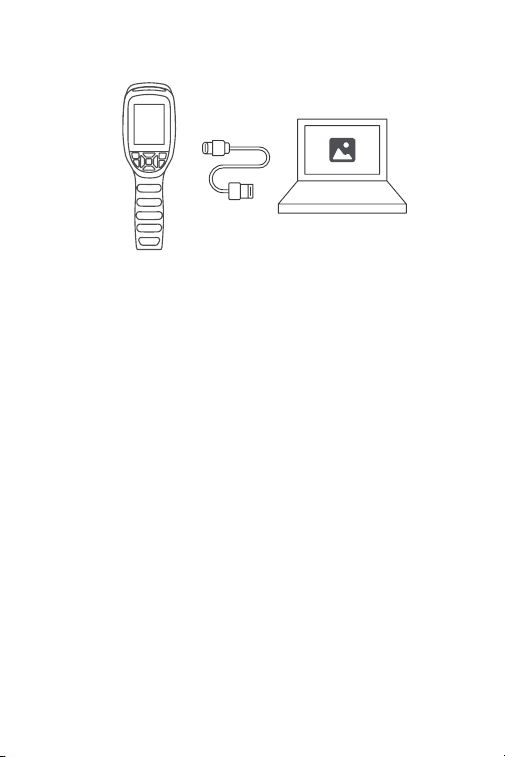
Collega il TC004 SE al tuo computer con il cavo USB in dotazione
(vedi Figura 4.1.1).
Figura 4.1.1
2.

IT I 60
Sezione 5
Speciche
Gamma spettrale
Dimensione pixel
NETD
FOV
IFOV
Campo di misurazione
Accuratezza di misurazione
Risoluzione di misura
Capacità di memoria
Capacità della batteria
Risoluzione della telecamera a
infrarossi
256*192
Da 8 a 14 μm
12 μm
< 40 mK
56° x 42°
3,75 mrad
Da -4 a 1022ºF (da -20 a 550ºC)
0,1°C
32 GB di memoria interna
5.300 mAh
±2ºC o ±2% della lettura, prevale il
valore maggiore

IT I 61
Sezione 6
FAQ
Perché il dispositivo emette spesso un "clic" mentre lo
schermo si blocca?
Si tratta di un fenomeno normale, causato dall'attivazione
automatica dell'otturatore da parte della termocamera a
infrarossi. Durante il processo di imaging, la luce infrarossa
dispersa assorbita forma una fonte di calore anomala,
causando una lenta sfocatura dell'immagine. In questi casi,
l'aggiornamento dell'otturatore può rendere l'immagine nitida,
ma produce un suono di "scatto".
Per impostazione predenita, l'otturatore viene aggiornato
automaticamente ogni 30 secondi. Se non si desidera che
l'otturatore scatti, è possibile disattivare l'otturatore automatico
nelle Impostazioni.
Il TC004 SE può rilevare oggetti sott'acqua, attraverso il vetro
o un muro
No. I rilevatori a infrarossi rilevano principalmente la regione
dell'infrarosso a onde lunghe di 8~14μm e possono essere
utilizzati solo per misurare la temperatura superciale."
Perché c'è una lettura della temperatura più bassa quando
il dispositivo si allontana dall'oggetto e una lettura più alta
quando il dispositivo si avvicina all'oggetto?
La radiazione infrarossa si attenua quando passa attraverso
l'atmosfera. Maggiore è la distanza, maggiore è l'attenuazione.
Quindi, l'accuratezza della misurazione a distanza diminuirà.
Per garantire la precisione della misurazione, vai a
Impostazione > Misurazione > Distanza dal Punto Spot e
inserisci la distanza effettiva (max: 5 metri) per ottenere la
temperatura corretta.
Perché la temperatura misurata non è precisa?
La risoluzione della temperatura di questo dispositivo è di ±2%,
con un range termico normale compreso tra -4°F e 302°F (-20°C
e 150°C), e un range termico elevato che va da 302°F a 1022°F
(150°C a 550°C). Seleziona l’ intervallo corrispondente nelle
impostazioni prima di misurare.
R
R
R
R
D
D
D
D

IT I 62
a) Emissività della supercie dell'oggetto bersaglio.
b) Temperatura ambiente: l'oggetto rietterà i raggi infrarossi
emessi dagli oggetti circostanti, che inuiscono sulla
misurazione della temperatura dell'oggetto stesso.
c) Temperatura atmosferica: l'atmosfera emette anche raggi
infrarossi.
d) Trasmittanza atmosferica: i raggi infrarossi emessi dall'oggetto
sono attenuati nell'atmosfera.
e) Distanza: maggiore è la distanza, maggiore è l'attenuazione
dei raggi infrarossi emessi dall'oggetto nell'atmosfera.
Quali fattori esterni inuenzeranno la misurazione della
temperatura a infrarossi?
I fattori sono i seguenti:
R
D

IT I 63
Garanzia limitata di un anno di TOPDON
TOPDON garantisce al suo acquirente originale che i prodotti
dell'azienda saranno esenti da difetti di materiale e lavorazione per 12
mesi dalla data di acquisto (Periodo di garanzia).
Per i difetti segnalati durante il periodo di garanzia, TOPDON riparerà
o sostituirà la parte o il prodotto difettoso in base all'analisi e alla
conferma del supporto tecnico.
TOPDON non sarà responsabile per eventuali danni incidentali o
consequenziali derivanti dall'uso, uso improprio o montaggio del
dispositivo.
In caso di conitto tra la politica di garanzia TOPDON e le leggi locali,
prevarranno le leggi locali.
Questa garanzia limitata è nulla nelle seguenti condizioni:
• Usato in modo improprio, smontato, alterato o riparato da negozi o
tecnici non autorizzati.
• Manipolazione negligente e violazione dell'operazione.
Sezione 7
Garanzia
Avviso: tutte le informazioni contenute in questo manuale si
basano sulle ultime informazioni disponibili al momento della
pubblicazione e non può essere fornita alcuna garanzia per la
sua accuratezza o completezza. TOPDON si riserva il diritto di
apportare modiche in qualsiasi momento senza preavviso.

RU I 64
Русский

RU I 65
Внимание
О TC004 SE
ПРОЧИТАЙТЕ ВСЕ ИНСТРУКЦИИ ПЕРЕД
ИСПОЛЬЗОВАНИЕМ.
Не направляйте инфракрасную камеру на солнце или другие
сильные источники энергии в течение длительного времени. Это
может привести к повреждению детектора в камере.
Держите устройство подальше от воды во избежание утечки или
короткого замыкания.
Не прикасайтесь к объективу руками. Не стучите, не протыкайте,
не прокалывайте и не царапайте объектив.
Не разбирайте устройство.
TOPDON TC004 SE — это переносная тепловизионная
камера 256*192, используемая для осмотра и обслуживания
оборудования.
Вы можете применять камеру для домашнего отопления,
обнаружения утечек воды и защиты сельского хозяйства. Ее
можно использовать как самостоятельно в автономном режиме,
так и в режиме USB на компьютере Windows.
RU I 66
Раздел 1
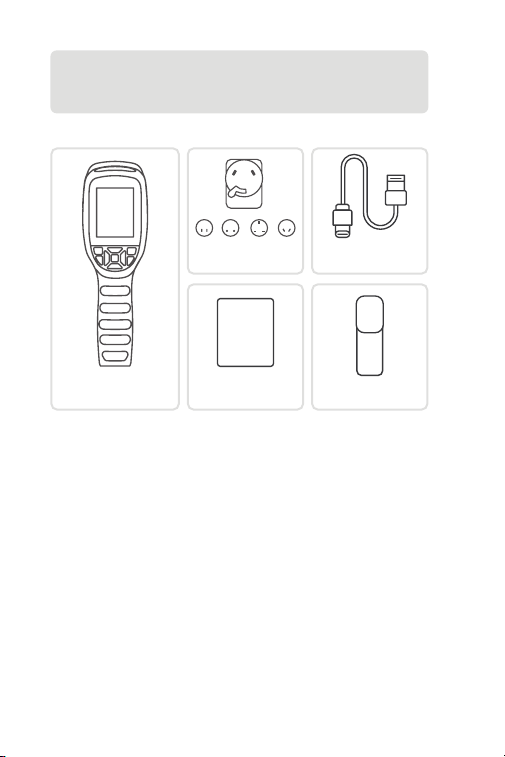
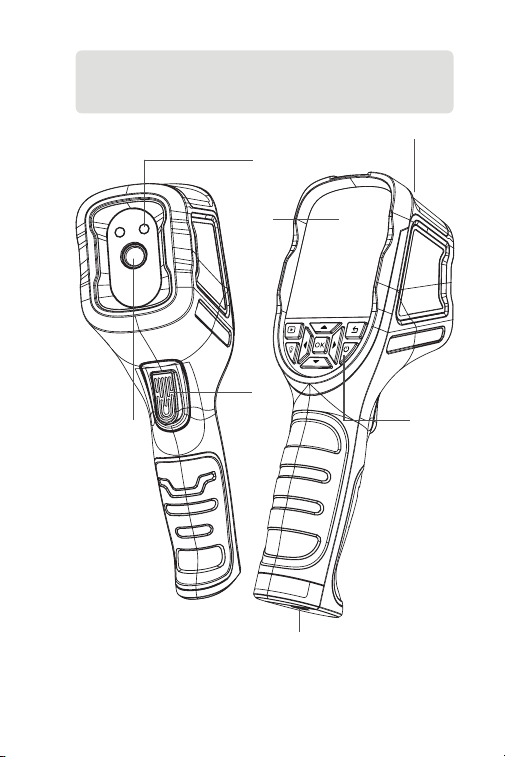
Что в коробке?
Тепловизионная
камера TC004 SE
Руководство
пользователя
USER
MANUAL
Адаптер питания
Мешок для
хранения
USB Кабель (Type-A к
Type-C)
RU I 67
Раздел 2
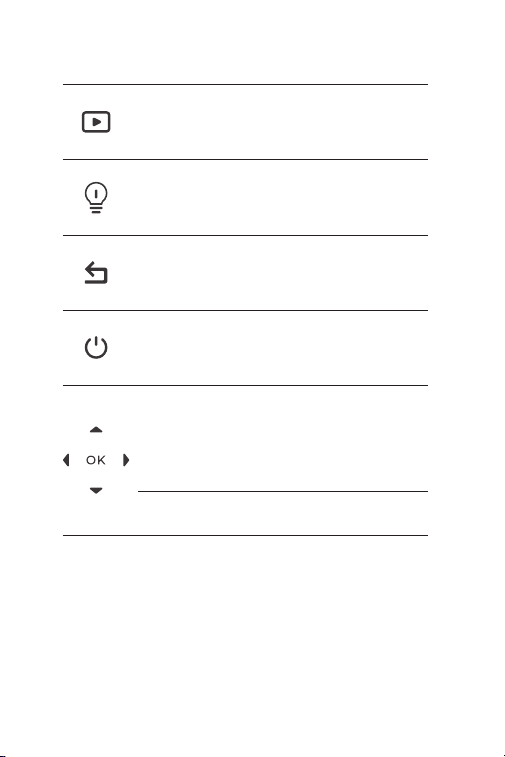
Обзор продукта
Рисунок 2.1.1
3
1
7
2
6
4
5
RU I 68
1. Клавиатура
2. 2,8-дюймовый экран
3. USB Type-C Порт
Порт Type-C используется для зарядки, проецирования экрана
на ПК и передачи файлов
4. Кнопка Камеры
Быстро нажмите, чтобы сделать снимок, затем нажмите
кнопку OK , чтобы сохранить снимок; нажмите и удерживайте,
чтобы начать запись видео, нажмите и удерживайте, чтобы
остановить запись, затем нажмите и удерживайте кнопку OK,
Режим эксперта
Кнопка возврата
Кнопка LED
Кнопка питания
Кнопки
перемещения
вверх / вниз /
влево / вправо
Кнопка ОК
Короткое нажатие для
входа в альбом и функцию
обнаружения транспортных
средств.
Короткое нажатие для
возврата на предыдущую
страницу.
Кратковременное нажатие для
включения или выключения
LED.
Кратковременное нажатие
для входа в режим ожидания;
длительное нажатие для
включения/выключения
питания.
Короткое нажатие
четырех кнопок позволяет
перемещаться в нужном
направлении; нажатие кнопки
Вверх - спуск затвора; нажатие
кнопки Вниз - изменение
палитры псевдоцветов;
нажатие кнопок Влево/Вправо
- установка уровня зума.
Короткое нажатие для
подтверждения действия или
сообщения.

RU I 69
5. Инфракрасная камера
6. Два LED фонарика
7. Резьбовое отверстие (1 / 4-20 unc)
Устанавливает TC004 SE на штатив
чтобы сохранить видео.

RU I 70
Раздел 3
Использование TC004 SE в
автономном режиме
Раздел 4
Использование TC004 SE в
режиме USB
В автономном режиме тепловизионная камера TC004 SE может
работать самостоятельно. Чтобы узнать больше о работе каждой
кнопки и порта на устройстве TC004 SE, вы можете обратиться к
разделу 2 Обзор продукта.
Помимо автономного использования, ваш TC004 SE также может
работать с компьютером Windows. В этом разделе показано, как
настроить TC004 SE для работы с компьютером Windows для
проецирования экрана и анализа изображений.
Загрузите и установите программное обеспечение
Перейдите на https://www.topdon.com/products/TC004-SE,
нажмите «Загрузить», чтобы перейти на страницу загрузки.
Затем загрузите и установите программное обеспечение на
свой компьютер.
Начать
1.
RU I 71
Откройте программное обеспечение, и вы сможете
проецировать изображение с тепловизионной камеры
TC004 SE на ПК.
3.
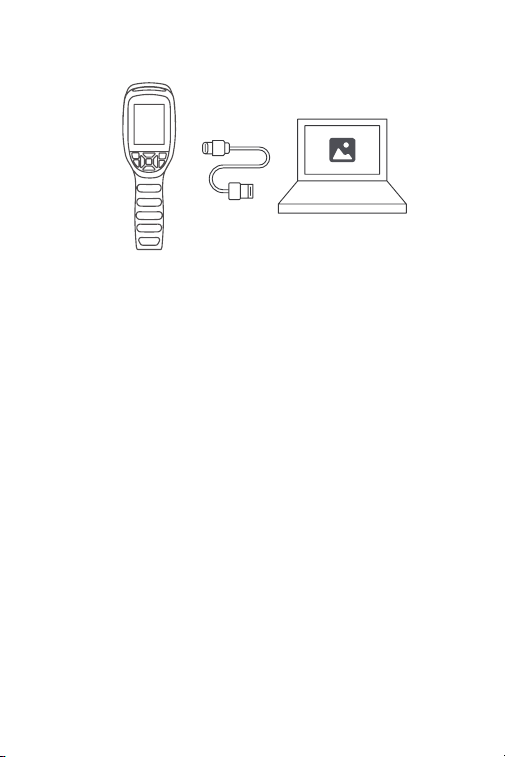
Подключите TC004 SE к компьютеру с помощью
прилагаемого USB-кабеля (см. рис. 4.1.1).
Рисунок 4.1.1
2.

RU I 72
Раздел 5
Спецификация
Спектральный диапазон
Размер пикселя
NETD
FOV
IFOV
Диапазон измерений
Точность измерения
Разрешение измерения
Объем памяти
Объем батареи
Разрешение инфракрасной
камеры
256*192
от 8 до 14 μm
12 μm
< 40 мК
56° x 42°
3.75 мрад
от -4 до 1022°F (от -20 до 550°C)
0.1°C
32 GN встроенной памяти
5,300 mAh
±2ºC или ±2% от показаний,
преобладает большее значение

RU I 73
Раздел 6
FAQ
Почему устройство часто издает звук "щелчка", а экран
замирает?
Это нормальное явление, вызванное автоматическим
срабатыванием затвора инфракрасной камеры. Во время
процесса формирования изображения поглощенный
рассеянный инфракрасный свет образует аномальный
источник тепла, в результате чего изображение постепенно
становится размытым. В таких случаях обновление затвора
может сделать изображение четким, но при этом возникает
звук "щелчка".
По умолчанию затвор обновляется автоматически каждые
30 секунд. Если вас беспокоят щелчки, вы можете отключить
автоматический затвор в Настройках.
Может ли TC004 SE обнаруживать объекты под водой,
через стекло или стену?
Нет. Инфракрасные детекторы в основном обнаруживают
длинноволновую инфракрасную область 8~14 мкм, и
могут использоваться только для измерения температуры
поверхности.
Почему показания температуры ниже, когда устройство
находится далеко от объекта, и выше, когда устройство
приближается к объекту?
Инфракрасное излучение затухает при прохождении через
атмосферу. Чем больше расстояние, тем больше затухание.
Таким образом, точность измерения температуры на
расстоянии снизится.
Чтобы обеспечить точность измерений, перейдите в
раздел Настройки > измерение > Рассt и введите
фактическое расстояние (макс: 5метров), чтобы получить
скорректированную температуру.
Почему измеряемая температура не точна?
Температурное разрешение этого устройства составляет
±2%, с нормальным диапазоном температур от -4°F до 302°F
(-20°C до 150°C) и широким диапазоном высоких температур
от 302°F до 1022°F (150°C до 550°C). Пожалуйста, выберите
соответствующий диапазон в настройках перед измерением.
O
O
O
O
B
B
B
B

RU I 74
a) Излучательная способность поверхности целевого
объекта.
b) Температура окружающей среды: объект будет отражать
инфракрасные лучи, испускаемые окружающими
объектами, что влияет на измерение температуры самого
объекта.
c) Температура атмосферы: атмосфера также испускает
инфракрасные лучи.
d) Пропускание атмосферы: инфракрасные лучи,
испускаемые объектом, ослабляются в атмосфере.
д) Расстояние: чем больше расстояние, тем больше
ослабление инфракрасных лучей, испускаемых объектом в
атмосфере.
O
B
Какие внешние факторы будут влиять на инфракрасное
измерение температуры?
Следующие факторы:

RU I 75
Гарантия TOPDON на один год
TOPDON гарантирует покупателю, что не будет никаких дефектов
материалов и изготовления продукции TOPDON в течение 12
месяцев (гарантийный срок) с даты покупки. При обнаружении
дефектов в течение гарантийного периода TOPDON проведёт
ремонт или замену дефектных деталей или продуктов после
анализа и подтверждения проблемы своей технической
поддержкой.
TOPDON не несет ответственности за любые случайные или
косвенные убытки, вызванные использованием, неправильным
использованием или установкой прибора.
В случае возникновения противоречий между гарантийной
политикой TOPDON и местным законодательством
преимущественную силу имеют местные законы.
Данная гарантия недействительна в следующих случаях:
Неправильное использование, разборка, модификация или
ремонт специалистами по техническому обслуживанию, не
уполномоченными Topdon.
Небрежное обращение и неправильная эксплуатация.
Раздел 7
гарантия
Примечание. Вся информация в этом руководстве,
показанная на момент публикации, имеет
преимущественную силу, компания не отвечает за ее
точность и полноту.
Topdon оставляет за собой право вносить изменения в
данное руководство в любое время без предварительного
уведомления.

PT I 76
Português

PT I 77
Atenção
Sobre o TC004 SE
LEIA TODAS AS INSTRUÇÕES ANTES DE USAR.
Não aponte a câmera infravermelha para o sol ou outras fontes de
energia forte por longos períodos de tempo. Isto pode causar danos
ao detector na câmera.
Por favor, mantenha a unidade longe da água para evitar
vazamentos ou curto-circuito.
Não toque a lente com suas mãos. Não bater, bisbilhotar, perfurar ou
arranhar a lente.
Não desmonte a unidade
O TOPDON TC004 SE é uma câmera de imagem térmica portátil de
256*192 usada para inspeção de equipamentos e manutenção.
A câmera pode ser usada para aquecimento caseiro, detecção de
vazamentos de água, e proteção agrícola. Pode ser usada por si
só no modo autônomo ou em modo USB para uso junto com um
computador Windows.
PT I 78
Seção 1
O que tem na Caixa?
TC004 SE Câmera de
Imagem Térmica
Manual do Usuário
USER
MANUAL
Adaptador de
Energia
Bolsa de
Armazenamento
Cabo USB (Tipo A ou
Tipo C)
PT I 79
Seção 2
Visão Geral do Produto
Figura 2.1.1
3
1
7
2
6
4
5
PT I 80
1. Teclado
2. Tela de 2.8-Polegadas
3. Entrada USB Tipo C
Entrada Tipo C é usada para recarga, projeção de tela ao
Computador, e transferência de arquivos
4. Botão Câmera
Pressione para tirar uma foto, então pressione o Botão OK para
salvar a foto; mantenha pressionado para gravar um vídeo,
pressione para parar de gravar, então pressione o Botão OK para
salvar o vídeo.
Modo Especialista
Botão Voltar
Botão do LED
Botão Iniciar
Botões Cima /
Baixo / Esquerda /
Direita
Botão OK
Pressione brevemente para
entrar na função de Detecção de
Álbum e Veículo.
Pressão breve para voltar à
página anterior.
Pressione rapidamente para
ligar/desligar o LED.
Pressão breve para entrar no
modo de espera; pressão longa
para ligar/desligar.
Pressione rapidamente os
quatro botões para ir para a
direção desejada; pressione Para
cima para acionar o obturador;
pressione Para baixo para alterar
as paletas de pseudocores;
pressione Esquerda/Direita para
denir o nível de zoom.
Pressione brevemente para
conrmar uma ação ou
mensagem.

PT I 81
5. Câmera Infravermelho
6. Duas Lanternas LED
7. Buraco de Parafuso (1 / 4-20 unc)
Monta o TC004 SE em um tripé

PT I 82
Seção 3
Usando o TC004 SE em Modo
Autônomo
Seção 4
Usando o TC004 SE em Modo USB
Enquanto estiver no modo autônomo, a câmera de imagem
térmica TC004 SE pode trabalhar independentemente por si só.
Para aprender mais sobre a operação de cada botão e entrada do
dispositivo TC004 SE, você pode consultar a Seção 2 Visão Geral do
Produto.
Além do modo autônomo, seu TC004 SE pode trabalhar também
com um computador Windows. Esta seção ilustra como congurar
seu TC004 SE para trabalhar com um computador Windows para
projeção de tela e análise de imagem.
Baixe e instale o software
Vá para https://www.topdon.com/products/TC004-SE, clique em
“Download” para entrar na página de download. Então baixe e
instale o software em seu computador.
Começando
1.
PT I 83
Abra o software e você poderá projetar a tela da câmera de
imagem térmica de seu TC004 SE no Computador.
3.
Conecte o TC004 SE a seu computador com o cabo USB
fornecido (veja a Figura 4.1.1).
Figura 4.1.1
2.

PT I 84
Seção 5
Especicación
Resolução da câmera infravermelha
Faixa espectral
Tamanho do pixel
NETD
FOV
IFOV
Alcance de medição
Precisão da medição
Resolução da medição
Capacidade de armazenamento
Capacidade de bateria
256*192
8 a 14 μm
12 μm
< 40 mK
56° x 42°
3.75 mrad
-4 a 1022ºF (-20 a 550ºC)
0.1°C
32 GB espaço interno
5,300 mAh
±2ºC ou ±2% da leitura, deve
prevalecer o valor maior

PT I 85
Seção 6
FAQ
Por que o dispositivo frequentemente faz um som de "clicar"
enquanto a tela congela?
Isso é uma ocorrência normal causada pela câmera
infravermelha acionando automaticamente o obturador.
Durante o processo de captura de imagem, a luz infravermelha
dispersa absorvida pode formar uma fonte de calor anormal,
o que pode fazer com que a imagem se torne gradualmente
borrada. Nesses casos, atualizar o obturador pode tornar a
imagem nítida novamente, mas isso gerará um som de "clicar".
O obturador está congurado para ser atualizado
automaticamente a cada 30 segundos por padrão. Se o som de
clique incomodar, você pode desativar o obturador automático
nas Congurações.
O TC004 SE pode detectar objetos debaixo d'água, através de
vidro, ou através de uma parede?
Não. Os detectores infravermelhos detectam principalmente a
região infravermelha de onda longa de 8~14μm, e só podem ser
usados para medir a temperatura da superfície.
Por que há uma leitura de temperatura mais baixa quando o
dispositivo se afasta do objeto e uma leitura mais alta quando
o dispositivo se aproxima do objeto?
A radiação infravermelha se enfraquece quando atravessa a
atmosfera. Quanto maior a distância, maior é o enfraquecimento.
Portanto, a precisão da medição de temperatura é menor à
distância.
Para garantir precisão na medição, vá para Denir > Medição
> Distân, e digite a distância real (max: 5 metros)para obter a
temperatura correta.
Por que a temperatura medida não é precisa?
A resolução de temperatura desse dispositivo é de ±2%, com
uma faixa de temperatura normal de -4°F a 302°F (-20°C a 150°C)
e uma faixa de temperatura alta de 302°F a 1022°F (150°C a
550°C). Selecione o intervalo correspondente nas congurações
antes de medir.
R
R
R
R
P
P
P
P

PT I 86
a) Emissividade da superfície do objeto alvo.
b) Temperatura ambiente: o objeto reetirá os raios
infravermelhos emitidos pelos objetos vizinhos, o que afetará
a medição da temperatura do próprio objeto.
c) Temperatura atmosférica: a atmosfera também emite raios
infravermelhos.
d) Transmitância atmosférica: os raios infravermelhos emitidos
pelo objeto são atenuados na atmosfera.
e) Distância: quanto maior a distância, maior é a atenuação dos
raios infravermelhos emitidos pelo objeto na atmosfera.
R
P
Que fatores externos afetarão a medição da temperatura
infravermelha?
Os fatores são os seguintes:

PT I 87
Garantia Limitada de Um Ano TOPDON
A TOPDON garante a seu comprador original que os produtos da
empresa serão livres de defeitos materiais e de confecção por 12
meses a partir da data de compra (Período de Garantia).
Para defeitos reportados durante o Período de Garantia, a TOPDON
irá ou consertar ou substituir o componente ou produto defeituoso
de acordo com a análise e conrmação de seu suporte técnico.
A TOPDON não se responsabiliza por quaisquer danos incidentais ou
consequentes decorrentes do uso, uso indevido ou montagem do
dispositivo.
Se houver qualquer conito entre a política de garantia TOPDON e as
leis locais, as leis locais devem prevalecer.
Esta garantia limitada é anulada sob as seguintes condições:
• Uso indevido, desmontagem, alteração ou consertos por lojas ou
técnicos não autorizados.
• Manejo descuidado e / ou operação indevida.
Seção 7
Garantia
Aviso: Todas as informações neste manual são baseadas nas
informações disponíveis mais recentes durante o momento
de sua publicação e nenhuma garantia pode ser feita sobre
sua exatidão ou integridade. A TOPDON se reserva o direito de
fazer alterações a qualquer momento sem aviso.

JP I 88
日本語

JP I 89
注意
TC004 SE について
使用する前に、すべての指示をお読んでおいてください。
赤外線カメラを太陽や他の強力なエネルギー源に長時間向けないでくださ
い。 そうすれば、カメラの検出器が損傷する可能性があります。
漏電や短絡を防ぐため、水から遠ざけてください。
手でレンズに触れないでください。 レンズをノックしたり、こじたり、突き
破ったり、ひっかき傷をしないでください。
組立部品を分解しないでください
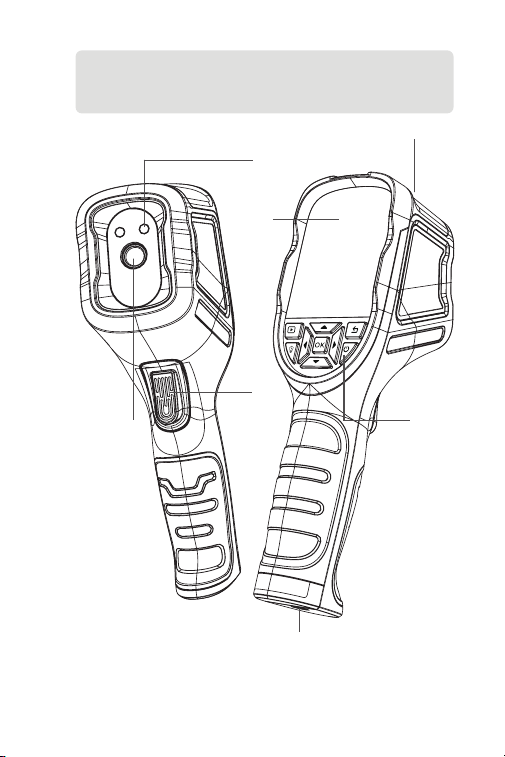
TOPDON の TC004 SE は、機器の点検と修理に使う 256*192 手持ち型サー
モグラフィカメラです。
カメラで家庭暖房、漏水検知、農業保護をします独立モードで単独で使用す
ることも、USB モードで Windows のコンピュータと一緒に使用することも
できます。
JP I 90
セクション 1
箱には何がありますか。
TC004 SE サーモイメージ
ングカメラ
ユーザーマニュアル
USER
MANUAL
電源アダプタ
収納袋
USB ケーブル
(A 型~ C 型)
JP I 91
セクション 2
製品概要
図 2.1.1
3
1
7
2
6
4
5
JP I 92
1. キーボード
2. 2.8- インチ画面
3.USB Type-C ポート
Type-C ポートは、充電、PC への画面投影、ファイル転送に使います
4. カメラボタン
写真を短く押して撮影して、OK ボタン を短く押して写真を保存し、長押
ししてビデオの録画を開始し、短く押して録画を停止し、次に OK ボタン
を短く押してを保存します。
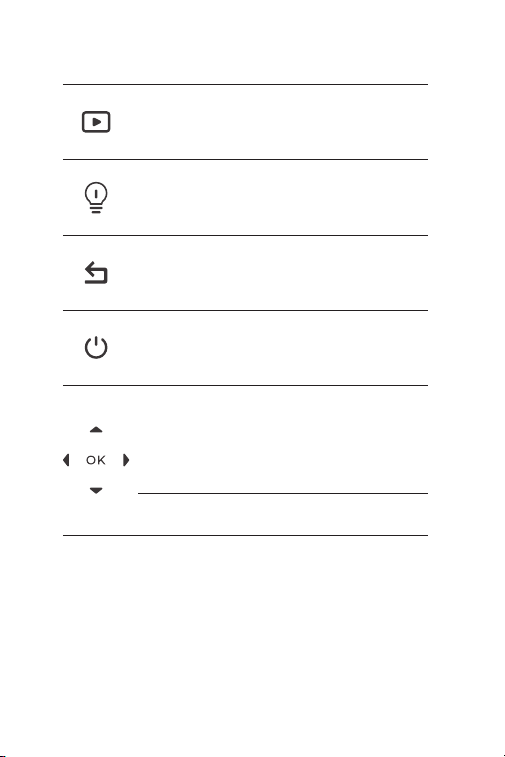
エキスパートモード
戻るボタン
LED ボタン
電源ボタン
ボタンを上 / 下 / 左 /
右に移動します
「OK」ボタン
短い押しでアルバムと車両検出機能
に入ります。
短く押すと前のページに戻ります。
短押しで LED を点灯 / 消灯します。
短押しでスタンバイモードに入る、
長押しで電源をオン / オフします。
4 つのボタンを短く押すと希望する
方向に移動します。上を押すとシャ
ッターを切ります。下を押すと擬似
カラーパレットを変更します。左 /
右を押すとズームレベルを設定しま
す。
短く押して動作またはメッセージを
確認します。

JP I 93
5. 赤外線カメラ
6.LED 懐中電灯は 2 個です
7. ネジ穴(1 / 4-20 unc)
TC004 SE を三脚に取り付けます

JP I 94
セクション 3
独立モードで TC004 SE を使用する
セクション 4
USB モードで TC004 SE を使用する
独立モードでは、TC004 SE サーモグラフィカメラは自分で動作することが
できます。デバイスの TC004 SE の各ボタンとポートの操作を詳しく了解し
たい場合、セクション 2 の製品概要を参照してください。
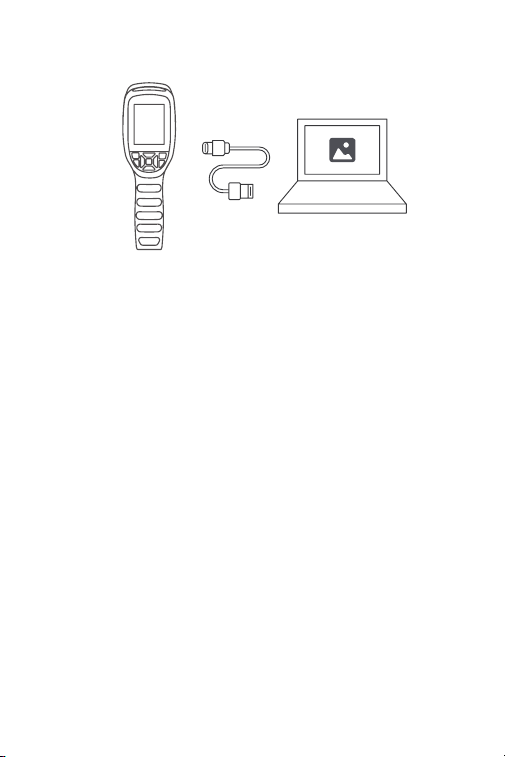
TC004 SE は、独立して使用できるほかに、Windows のコンピュータと一緒
に使用することもできます。この部分では、画面投影と画像解析のために、
TC004 SE を割り当てて Windows のコンピュータと動作できるという方法を
探すと説明します。
ソフトウェアをダウンロードしてインストールします
https://www.topdon.com/products/TC004-SE にアクセスしてくださ
い。「ダウンロード」をクリックしてダウンロードページに入ります。
その後、ソフトウェアをダウンロードして、コンピュータにインストー
ルします。
初めに
1.
JP I 95
ソフトウェアを開くと、PC に TC004 SE サーモイメージングカメラの画
面を投影できます。
3.
提供した USB ケーブルで TC004 SE をコンピュータに接続します(図
4.1.1 を参照)。
図 4.1.1
2.

JP I 96
セクション 5
仕様
赤外線カメラの解像度
スペクトル範囲
ピクセルサイズ
NETD
FOV
IFOV
測定範囲
測定精度
測定の解像度
ストレージ容量
バッテリ容量
256*192
8 to 14 μm
12 μm
< 40 mK
56° x 42°
3.75 ミリラッド
-4 ~ 1022ºF (-20 ~ 550ºC)
0.1° C
32 GB 内部ストレージ
5300 ミリアンペアアワー
読み取り値の ±2ºC または ±2%、より
大きな値を取る

JP I 97
セクション 6
FAQ
デバイスの画面がフリーズする時になぜしばしば「クリッキング」音が
するのですか?
これは、インフラレッドカメラが自動的にシャッターを作動させるため
に生じる正常な現象です。画像生成プロセスで吸収された散乱したイン
フラレッド光は、異常に熱源を形成して画像が徐々にぼやける原因にな
ります。そのような場合、シャッターの更新は画像をクリアにすること
ができ、しかし「クリッキング」音を発生させます。
シャッターはデフォルトで 30 秒ごとに自動的に更新されるように設定
されています。クリッキング音が気になられる場合は、設定から自動シ
ャッターをオフにすることができます。
TC004 SE は、水中、ガラス越し、または壁を通して物体を検出できま
すか?
いいえ。赤外線検出器は主に 8 ~ 14μm の長波赤外線領域を検出し、表
面温度の測定しかに使用できません。
なぜデバイスが物体から離れると温度の読み取りが低くなり、デバイス
が物体に近づくと読み取りが高くなりますか。
赤外線放射は大気圏を通過すると減衰します。距離が長いほど減衰がひ
どくなります。これで、長距離温度測定の精度が低下になっています。
測定精度を確保するために、 設定 > パラメータ > 距離に来て、実際の距
離(最大値)を入力する:(5 メートル)補正温度を得ます
測定された温度が正しくないのはなぜですか?
この装置の温度分解能は ±2%で、常温範囲は -4° F ~ 302° F
(-20° C ~ 150° C)、高温範囲は 302° F ~ 1022° F(150° C ~ 550° C)
である。測定する前に設定で適切な範囲を選択してください。
赤外線温度測定に影響を与える外部要因は何ですか?
要因は以下です。
a)ターゲット物体表面の放射率。
b)周囲温度:物体は周囲の物体から放射される赤外線を反射し、物体
自体の温度測定に影響を与えます。
c)気温:大気も赤外線を放射します。
d)大気透過率:物体から放出される赤外線は大気中で減衰します。
e)距離:距離が長いほど、大気中の物体から放出される赤外線の減衰
が大きくなります。
A
A
A
A
A
Q
Q
Q
Q
Q

JP I 98
TOPDON の 1 年間の限定保証
TOPDON は、購入日から 12 ヶ月以内(保証期間)に材料とプロセスが欠陥
がないことを元の購入者に保証します。
保証期間内に報告された欠陥について、TOPDON は技術サポートに基づいて
欠陥部品や製品の修理または交換を分析および確認します。
TOPDON は、デバイスの使用、誤用、や取り付けによる付随的または結果的
な損害に対して責任を持っていません。
TOPDON 保証ポリシーと現地の法律は何かの競合がある場合は、現地の法
律に準拠してください。
次の場合は、この限定保証は無効です。
• 無許可店舗や技術者による誤用、取り外し、変更、修理
• 不注意な処理や不適切な操作
セクション 7
保証
知らせこのマニュアルのすべての情報は、出版時に利用可能な最新の
情報に基づいて、正確性や完全性は保証されていません。TOPDON は
予告ないで変更する権利を保持しています。


WWW.TOPDON.COM
@TOPDONOFFICIAL
@TOPDONOFFICIAL
EMAIL
TEL
WEBSITE
FACEBOOK
X
+86-755-21612590 +1-833-629-4832 (North America)
+34 930 038 094 (Europe)