Installation and Operation Instructions
LITHIUM STORAGE SYSTEM
BOS-A
Version:V1.4

1
CONTENT
1.Important information in the manual .........................................................................3
1.1 Scope................................................................................................................3
1.2 Description of BOS-A........................................................................................3
1.3 Meaning of Symbols........................................................................................ 4
1.4 General Safety Information..............................................................................6
1.5 Disclaimer ........................................................................................................ 6
1.6 Installation environment..................................................................................7
1.7 Quality Certificate............................................................................................8
1.8 Requirements for Installation Personnel......................................................... 8
2. Safety..........................................................................................................................9
2.1 Safety rules.......................................................................................................9
2.2 Safety information........................................................................................... 9
3. Transport to the end customers.............................................................................. 10
3.1 Provisions on Shipping of Battery Modules:..................................................10
3.2 Storage Position of the battery packaging module ........................................13
4. Description and installation of BOS-A battery.........................................................13
4.1 Installation Precautions................................................................................. 13
4.2 BOS-A Product Description............................................................................13
4.2.1 Product selection................................................................................15
4.3 Technical Data................................................................................................19
4.4 Preparation.................................................................................................... 21
4.4.1 Tools required..................................................................................... 21
4.4.2 Auxiliary Tools and Materials Required.............................................. 21

2
4.5 Description of Rack........................................................................................22
4.5.1 11-layer battery cluster rack Parts description...................................22
4.5.2 Installation of Rack..............................................................................23
4.6 Description of Battery Module...................................................................... 24
4.7 Description of High-Voltage Control Box.......................................................25
4.8 Description of Battery Module in Rack..........................................................26
4.9 Right wiring method...................................................................................... 29
4.10 Installation of the Battery Module to the Rack........................................... 31
4.10.1 Cable connection.............................................................................. 33
4.10.2 Battery installation cable Description...............................................34
4.11 Battery cluster connected to inverter..........................................................36
4.12 System startup and shutdown.....................................................................41
4.13 External 12V Power Supply of High-Voltage Control Box............................ 42
4.14 How to use local mode with BOS-A (Battery)?............................................42
5. BOS-A’ fault description...........................................................................................45
6.BOS-A screen displays the logic................................................................................ 49
7. Maintenance and upgrade.......................................................................................53
7.1 Maintenance of BOS-A ...................................................................................53
7.2 USB’s Upgrade Step........................................................................................54
8. Battery Module Storage...........................................................................................54
9. Disposal ....................................................................................................................55
10. Legal notice ............................................................................................................56
11.EU Declaration of Conformity.................................................................................56

3
1.Important information in the manual
1.1 Scope
The installation and operation manual applies to the modular battery energy storage system.
Please carefully read this installation and operation manual to ensure the safe installation,
preliminary debugging, and maintenance of BOS-A. Installation, preliminary debugging, and
maintenance must be carried out by qualified and authorized personnel. Please keep this
installation and operation manual and other applicable documents near the battery energy
storage system, so that all personnel involved in installation or maintenance can access this
installation and operation manual at any time.
This installation and operation manual only applies to countries meeting the certification
requirements. Please observe the applicable local laws, regulations, and standards. Standards
and legal provisions of other countries may be inconsistent with the provisions and specifications
in this manual. In this case, please contact our after-sales service personnel, hotline: +86 0574
1.2 Description of BOS-A
Model System
energy
(kWh)
Rated
DC
power
(kW)
Discharge
depth
Composition
BOS-A50 53.76 43.01 90% BOS-A-PACK7.68*7+BOS-A-PDU-2 *1
BOS-A60 61.44 49.15 90% BOS-A-PACK7.68*8+BOS-A-PDU-2 *1
BOS-A65 69.12 55.30 90% BOS-A-PACK7.68*9+BOS-A-PDU-2 *1
BOS-A75 76.8 61.44 90% BOS-A-PACK7.68*10+BOS-A-PDU-2 *1
BOS-A80 84.48 67.59 90% BOS-A-PACK7.68*11+BOS-A-PDU-2 *1
BOS-A90 92.16 73.73 90% BOS-A-PACK7.68*12+BOS-A-PDU-2 *1
BOS-A95 99.84 79.87 90% BOS-A-PACK7.68*13+BOS-A-PDU-2 *1
BOS-A100 107.52 86.02 90% BOS-A-PACK7.68*14+BOS-A-PDU-2 *1
BOS-A115 115.2 92.16 90% BOS-A-PACK7.68*15+BOS-A-PDU-2 *1
BOS-A120 122.88 98.30 90% BOS-A-PACK7.68*16+BOS-A-PDU-2 *1
BOS-A130 130.56 104.45 90% BOS-A-PACK7.68*17+BOS-A-PDU-2 *1
BOS-A135 138.24 110.59 90% BOS-A-PACK7.68*18+BOS-A-PDU-2 *1
BOS-A145 145.92 116.74 90% BOS-A-PACK7.68*19+BOS-A-PDU-2 *1
BOS-A150 153.6 122.88 90% BOS-A-PACK7.68*20+BOS-A-PDU-2 *1
BOS-A160 161.28 129.02 90% BOS-A-PACK7.68*21+BOS-A-PDU-2 *1
4
1.3 Meaning of Symbols
This manual contains the following types of warnings:
Danger! It may cause an electric shock.
Even when the equipment is disconnected from the power grid, the voltage-free
state will have a time lag.
Danger! If the instructions are not observed, death or severe injury may
occur.
Warning! If the instructions are not observed, a loss may occur.
Attention! This symbol represents information on the device use.
Symbols on equipment:
The following types of warning, prohibition, and mandatory symbols are also used on
the equipment.
Attention! The risk of chemical burns
If the battery is damaged or fails, it may lead to electrolyte leakage, which in turn causes the
formation of a small amount of hydrofluoric acid, among other effects. Contact with these liquids
can cause chemical burns.
• Do not subject the battery module to severe impact.
• Do not open, disassemble or mechanically change the battery module.
• In case of contact with an electrolyte, wash the affected area with clean water immediately and
seek medical advice promptly.
Attention! The risk of explosion
Incorrect operation or fire may cause the lithium-ion battery unit to ignite or explode, leading to
serious injury.
• Do not install or operate the battery module in explosive or high-humidity areas.
5
• Store the battery module in a dry place within the temperature range specified in the data
sheet.
• Do not open, drill through or drop the battery cell or module.
• Do not expose the battery cell or module to high temperatures.
• Do not throw the battery cell or module into the fire.
• When the lithium battery catches fire after being plugged in with AC power, unplug the power
supply first to prevent electric shock during fire fighting.
• If there is an open flame, use carbon dioxide or ABC dry powder fire extinguisher to put out the
fire, and then cool down by using the nearby fire hydrant or pouring water until no white smoke
appears and the battery is completely cooled down. After extinguishing the fire, continue to
monitor the battery for at least 1 hour to prevent re-ignition.
• If there is no open flame but a large amount of white smoke comes out of the battery, it is
recommended to use a 6L portable water-based fire extinguisher (if any), and then cool down by
using the nearby fire hydrant or pouring water until no white smoke appears and the battery is
completely cooled down. After extinguishing the fire, continue to monitor the battery for at least
1 hour to prevent re-ignition.
• Do not use defective or damaged battery modules.
Caution! Hot surface
• If a malfunction occurs, the parts will become very hot, and touching them may cause serious
injury.
• If the energy storage system is defective, please shut it down immediately.
• If the fault or defect becomes obvious, special care should be taken when handling the
equipment.
No open fire! It is prohibited to handle open flames and ignition sources near the
energy storage system.
Do not insert any objects into the opening in the housing of the energy storage system!

6
No objects, such as screwdrivers, may be inserted through openings in the casing of the storage
system.
Wear safety goggles! Wear safety goggles when working on the equipment.
Follow the manual! When working and operating the equipment, the installation
and operation manual provisions must be observed.
1.4 General Safety Information
Danger! Failure to comply with the safety information can lead to
life-threatening situations.
1. Improper use can cause death. Operators of BOS-A must read this manual and observe all
safety information.
2. Operators of BOS-A must comply with the specifications in this manual.
3. This manual cannot describe all conceivable situations. For this reason, applicable standards
and relevant occupational health and safety regulations are always given priority.
4. In addition, the installation may involve residual hazards in the following circumstances:
• Incorrect installation.
• The installation is carried out by personnel who did not receive relevant training or guidance.
• Failure to observe the warnings and safety information in this manual.
If there are any questions, please contact Deye after service.
1.5 Disclaimer
DEYE ESS TECHNOLOGY CO., LTD shall not be liable for personal injury, property loss, product
damage and subsequent losses under the following circumstances.
• Failure to comply with the provisions of this manual.

7
• Incorrect use of this product.
• Unauthorized or unqualified personnel repair the product, disassembly the rack and perform
other operations.
• Use of unapproved spare parts.
• Unauthorized modifications or technical changes to the product.
1.6 Installation environment
• The battery energy storage system can only be installed and operated in an enclosed space. The
working environment temperature range of BOS-A is -20℃~ 55℃, and the maximum humidity is
85%. The battery module shall not be exposed to the sun or placed directly beside the heat
source.
• The battery module shall not be exposed to a corrosive environment.
• When installing the battery energy storage system, ensure that it stands on a sufficiently dry
and flat surface with sufficient bearing capacity. Without the manufacturer’s written approval,
the installation site’s altitude shall not be higher than 3,000 meters. The output power of the
battery decreases with the altitude.
• In areas where flooding may occur, care must be taken to ensure that the battery module is
installed at a suitable height and to prevent its contact with water.
• The battery energy storage system must be installed in a fireproof room. This room must have
no fire source and must be equipped with an independent fire alarm device, which complies with
local applicable regulations and standards. According to local applicable regulations and
standards, the room must be separated by the T60 fire door. Similar fire-proof requirements
apply to other openings in the room (such as windows).
Compliance with the specifications in this manual is also part of proper use.
The use of the BOS-A system is prohibited in the following circumstances:
8
• Mobile use on land or in the air (use on water only with the manufacturer's consent and with
the manufacturer's written consent).
• Used in medical devices.
• Used as a UPS system.
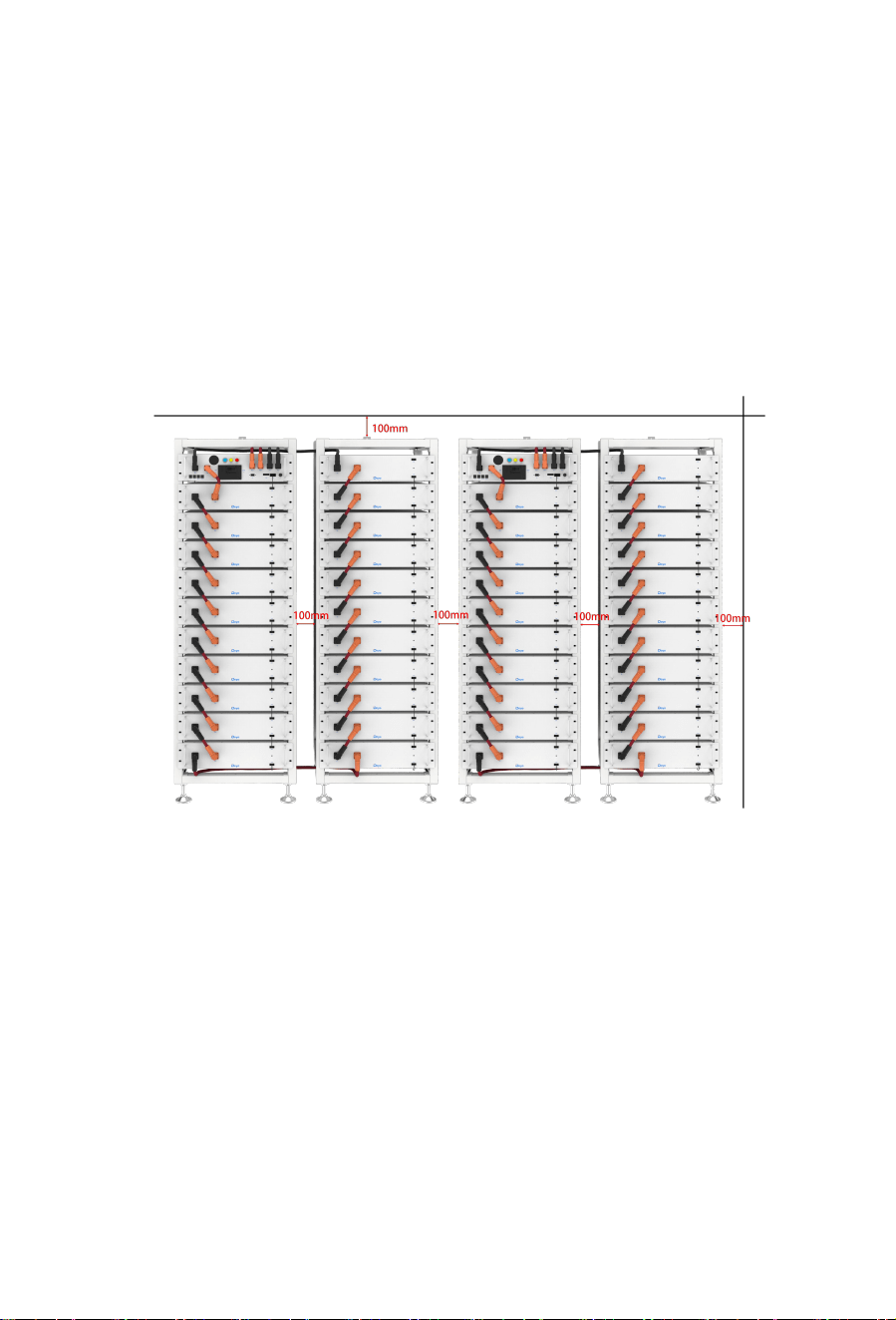
Minimum product installation distance
The minimum distance to the surrounding building when the battery is installed is
100mm, and the minimum distance between the two products is 100mm.
1.7 Quality Certificate
The quality certificate can be downloaded from www.deyeess.com.
1.8 Requirements for Installation Personnel
All work shall comply with local applicable regulations and standards.
The installation of BOS-A can only be completed by electricians with the following qualifications:
• Trained in dealing with hazards and risks associated with the installation and operation of
electrical equipment, systems, and batteries.

9
• Trained on installation and debugging of electrical equipment.
• Understanding and complying with the technical connection conditions, standards, guidelines,
regulations, and laws applicable.
• Knowledge of handling lithium-ion batteries (transportation, storage, disposal, hazard source).
• Understanding and complying with this document and other applicable documents.
2. Safety
2.1 Safety rules
To avoid property damage and personal injury, the following rules shall be followed when
working on the hazardous live parts of the battery energy storage system:
• It is available for use.
• Ensure that it will not restart.
• Make sure there is no voltage.
• Grounding protection and short circuit protection
• Cover or shield adjacent live parts.
2.2 Safety information
Part damage or short circuit may cause electric shock and death. A short circuit can be caused by
connecting battery terminals, resulting in current flow. This type of short circuit shall be avoided
under any circumstances. For this reason, follow these instructions:
• Use insulated tools and gloves.
• Do not put any tools or metal parts on the battery module or high-voltage control box.
• When operating the battery, be sure to remove watches, rings, and other metal objects.
• Do not install or operate this system in explosive or high-humidity areas.
• When working on the energy storage system, first turn off the charging controller, then the
battery, and ensure that they are not turned on again.
10
Improper use of the battery energy storage system can lead to death. The use of the battery
energy storage system beyond its intended use is not allowed, because it may cause great danger.
Improper handling of the battery energy storage system can cause life-threatening risks, serious
injury or even death.
Warning! Improper use can cause damage to the battery cell.
• Do not expose the battery module to rain or soak it in liquid.
• Do not expose the battery module to a corrosive environment (such as ammonia and salt).
• The battery energy storage system shall be debugged no later than six months after delivery.
3. Transport to the end customers
3.1 Provisions on Shipping of Battery Modules:
It is necessary to comply with the relevant regulations and provisions on roads for shipping
lithium-ion products in the corresponding countries.
It is prohibited to smoke in the vehicle during transportation or in the vicinity during
loading and unloading.
The dangerous goods transport vehicles shall meet relevant regulations concerning road
transportation and shall be equipped with two tested CO2 fire extinguishers.
It is forbidden for the freight forwarder to open the outer package of the battery module.
Use only approved lifting equipment to move the battery cabinet system. Use only the hanging
lug on the top of the battery cabinet as the connection point. When lifting, the angle of the sling
must be at least 60°.
11
Improper vehicle transportation can cause injury. Improper transportation or improper
transportation locks may cause the load to slip or overturn, resulting in injury. The cabinet shall
be placed vertically to prevent it from sliding in the vehicle, and a fixing belt shall be used.
A tilting of the battery rack may cause injury. The maximum weight of a single battery
rack of BOS-A can reach 985 kg. When tilted, they may overturn, causing injury and damage.
Ensure that the battery cabinet is on a stable surface and that it does not tilt due to load or force.
The battery energy storage system can be damaged, if not properly transported. The
battery module can only be transported vertically. Note that these parts may be top-heavy.
Failure to follow this instruction may result in damage to the part.
During transportation, the battery storage rack may be damaged when it is installed with
the battery module. The battery storage rack is not designed to be transported with the installed
battery modules. Always transport the battery module and the battery rack separately. Once the
battery module is installed, do not move the battery rack, and do not lift it by a lifting device.
If possible, do not remove the transport packaging before arrival at the installation site.
Before removing the transport protector, check if the transport packaging is damaged, and check
the impact indicator on the outer packaging of the battery converter. If the impact indicator is
triggered, the possibility of transport damage cannot be ruled out.
Improper transportation of battery modules may cause injury. The single battery module
weighs 70 kg. If it falls or slips, it may cause injury. Only use suitable transport and lifting
equipment to ensure safe transport.
Wear safety shoes to avoid the danger of injury. When transporting the battery rack and
battery module, their parts may be crushed due to their heavy weight. Therefore, all persons
involved in transportation must wear safety shoes with toe caps. Please observe the safety
regulations for transportation at the end customer's site, especially during loading and unloading.
During transportation and installation of unpacked battery storage cabinets, the risk of
injury increases, especially on sharp metal panels. Therefore, all personnel involved in
transportation and installation must wear protective gloves.

12
The maximum weight of a single rack of BOS-A can reach 985 kg. We suggest that at least
2-3 people work together to install the battery rack. The lifting device is helpful for heavy parts,
and the pulley or cart for light parts. Be careful not to damage the case. The number of battery
modules stacked shall not be more than 8.
Check whether the delivery is complete.
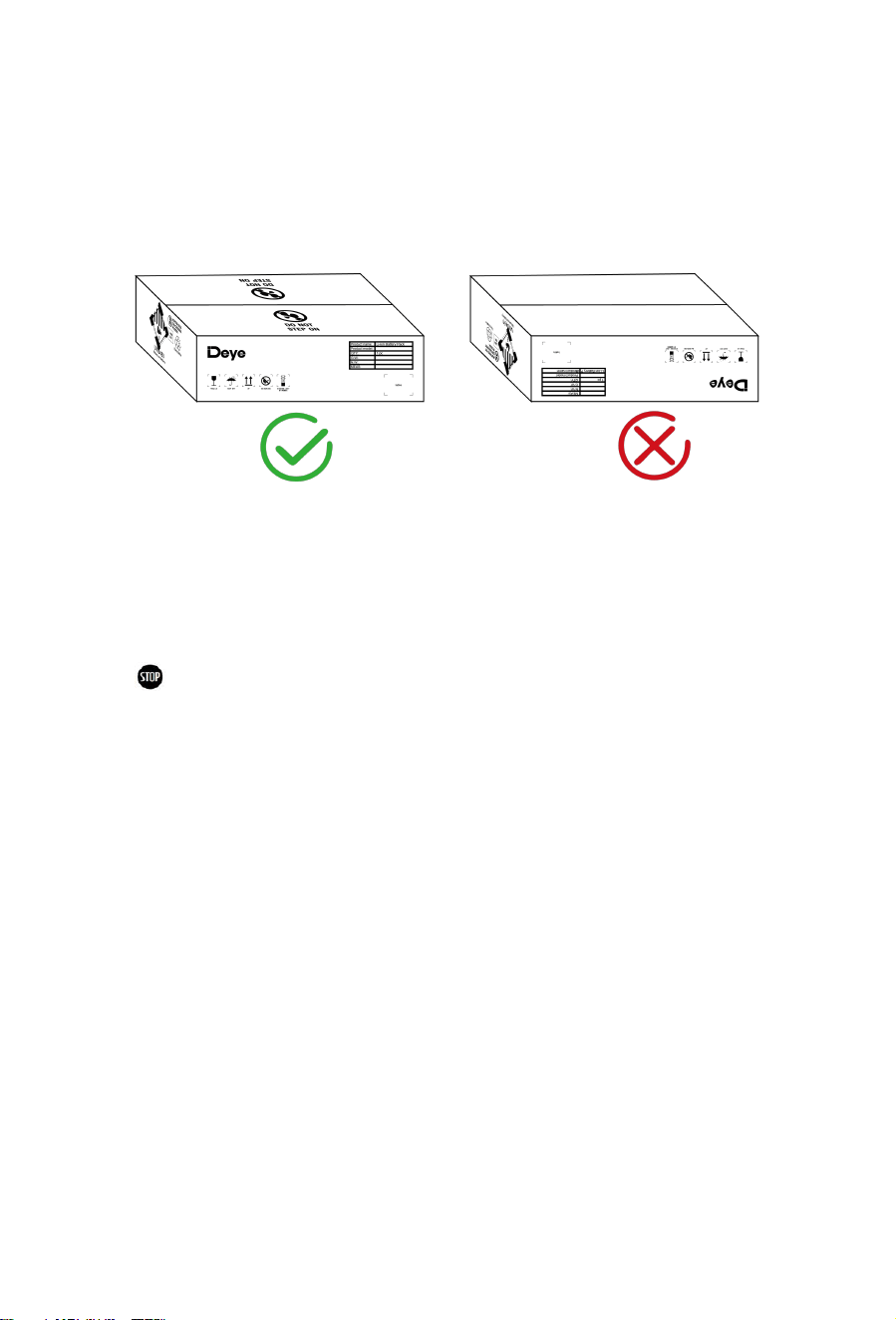
13
3.2 Storage Position of the battery packaging module
The battery module can only be transported in an upright position. Please note that the battery
rack may be very top-heavy.
4. Description and installation of BOS-A battery
4.1 Installation Precautions
WARNING! Possible damage to the building due to static overload
1. The total weight of the battery storage system is 1586kg. Ensure that the installation site has
sufficient bearing capacity.
2. When selecting the installation site, consider the transportation route and necessary site
cleanup.
4.2 BOS-A Product Description
BOS-A is a high-voltage lithium-ion battery system. It provides a reliable backup power supply for
supermarkets, banks, schools, farms and small factories to smooth the load curve and achieve
peak load transfer. It can also improve the stability of renewable systems and promote the
application of renewable energy.
It is characterized by high integration, good reliability, long service life, wide working temperature
range, etc. The battery energy storage system is modular. Each battery module has a capacity of
14
7.68 kWh. It can support up to 21 battery modules in series. Its total energy can be expanded
from 53.76(7×7.68) kWh to 161.28(21×7.68) kWh.
15
4.2.1 Product selection
We offer our customers three options:
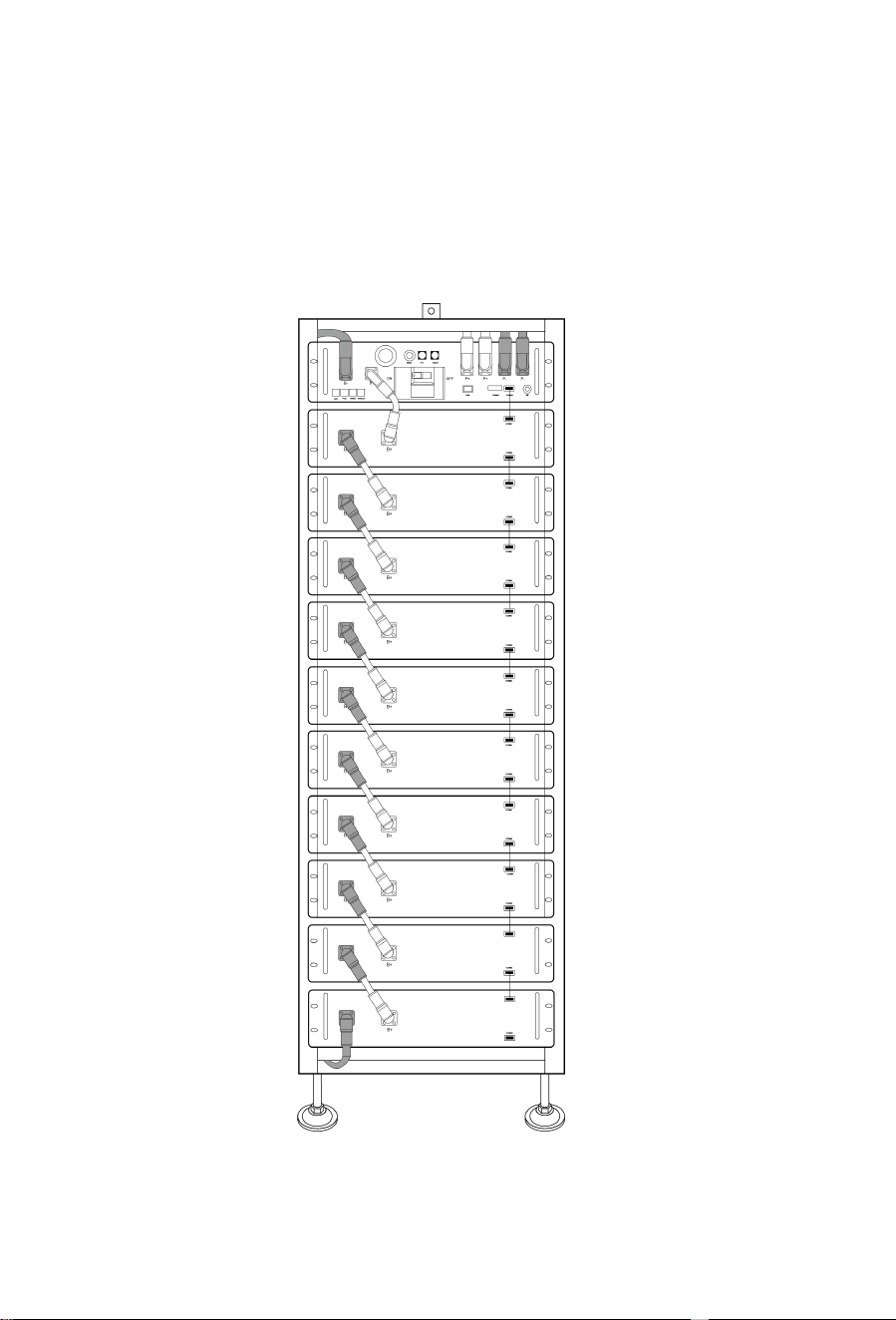
The first option: requires 7 to 10 battery modules can choose a 11-layer product
solution. The product appearance is shown in the following figure:
16
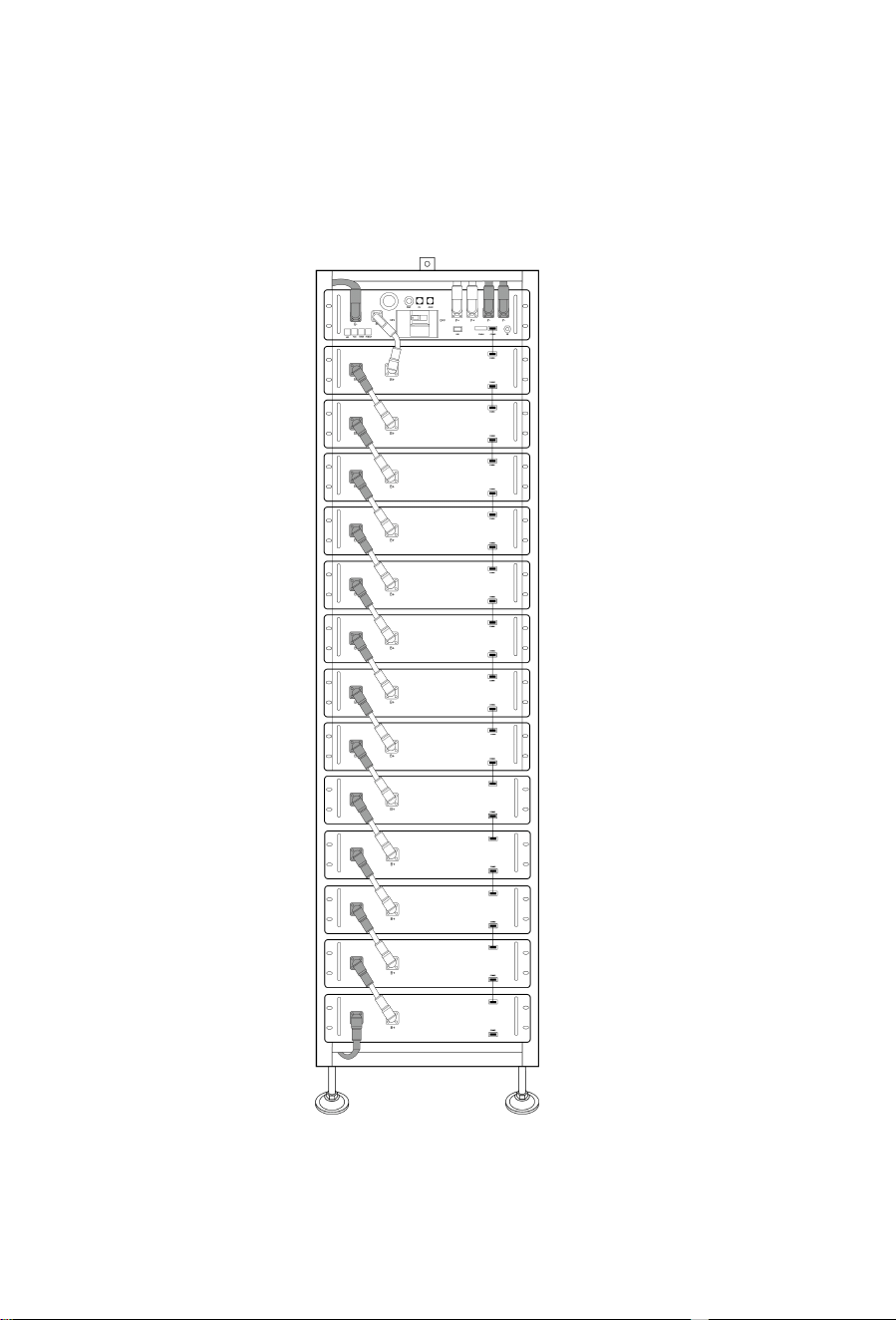
The second option: need 11~13 battery modules can choose 14-layer product
solution. The product appearance is shown in the following figure:
17
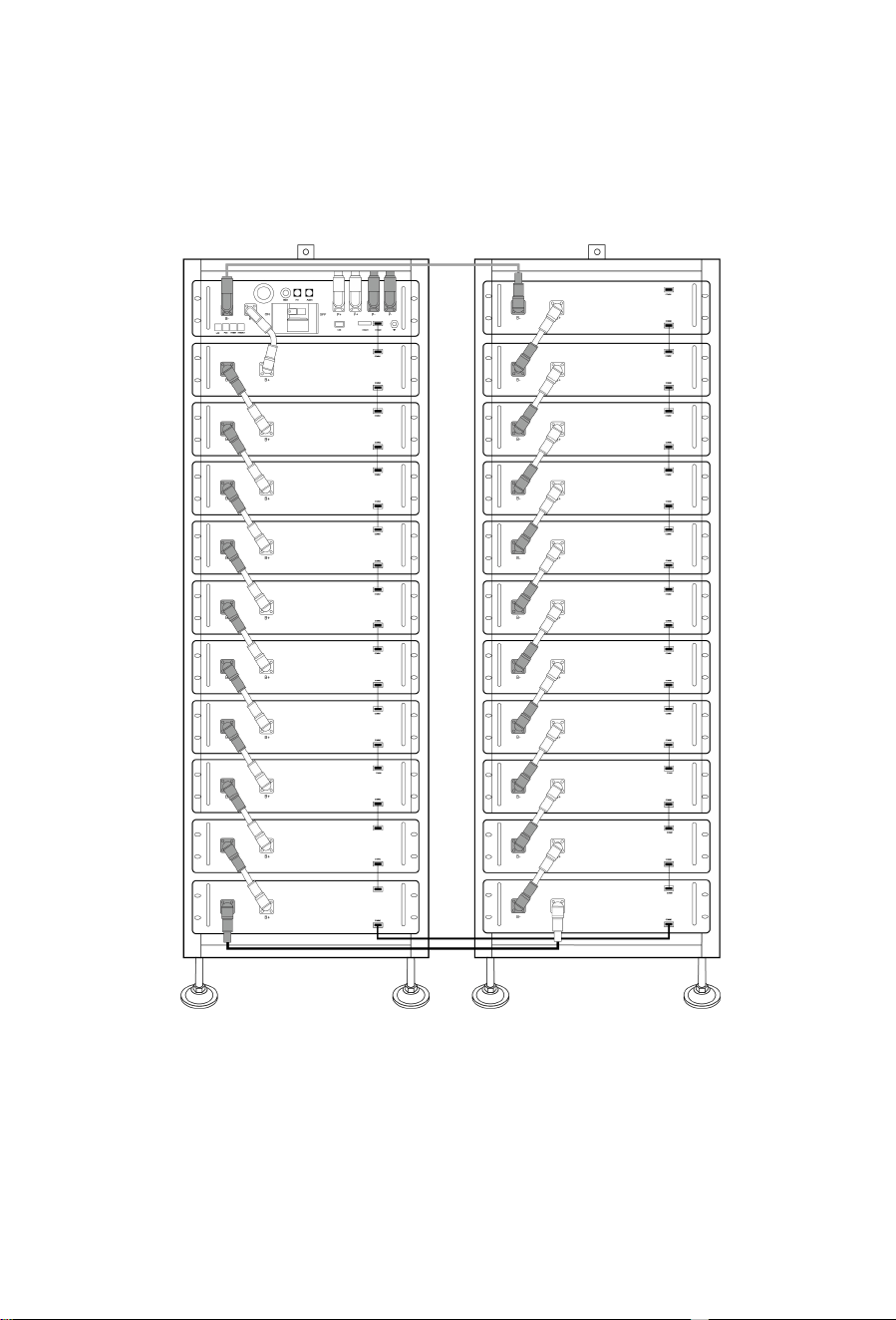
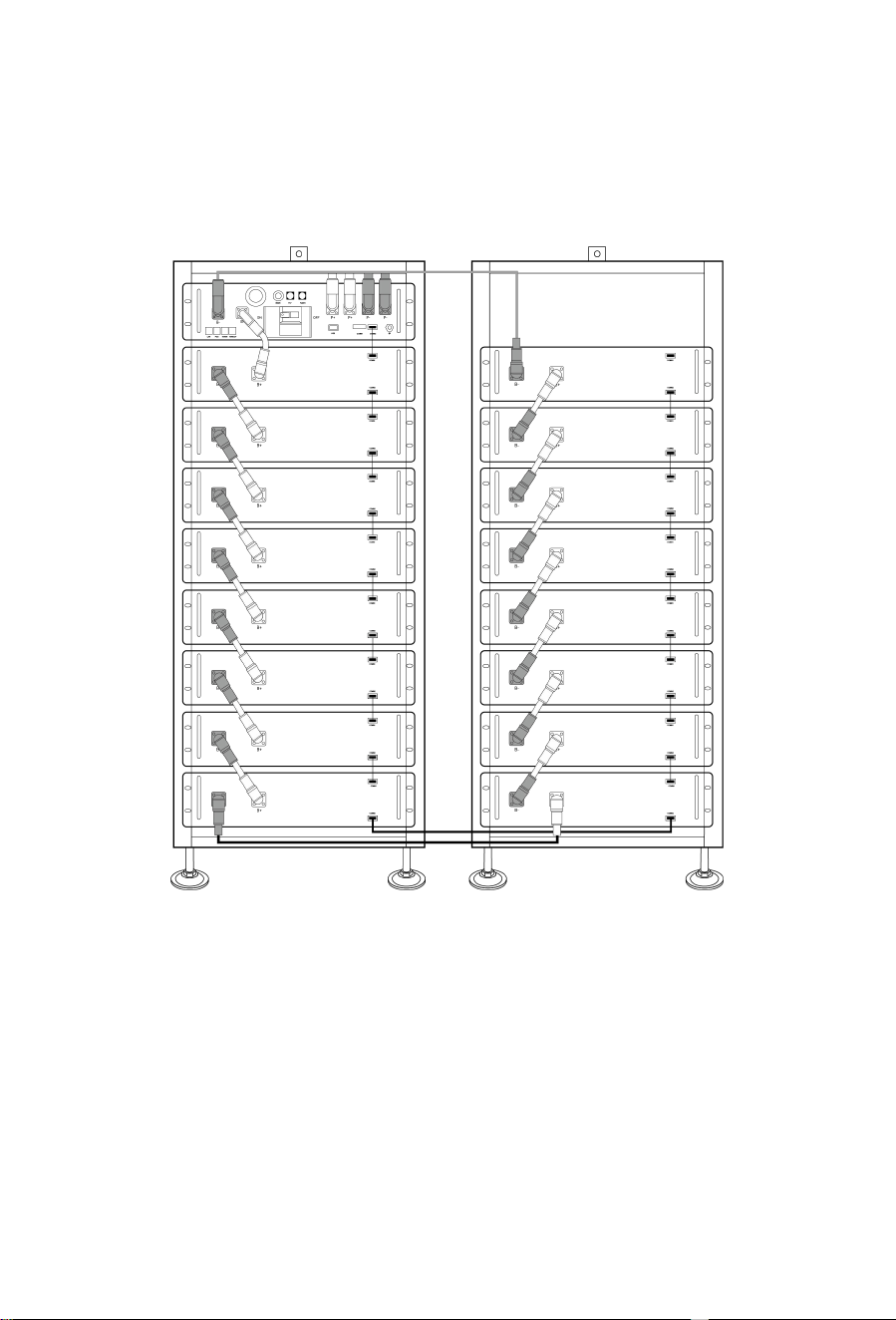
The third option: need 14~17 battery modules can choose two 9-layer product
solution. The product appearance is shown in the following figure:
18
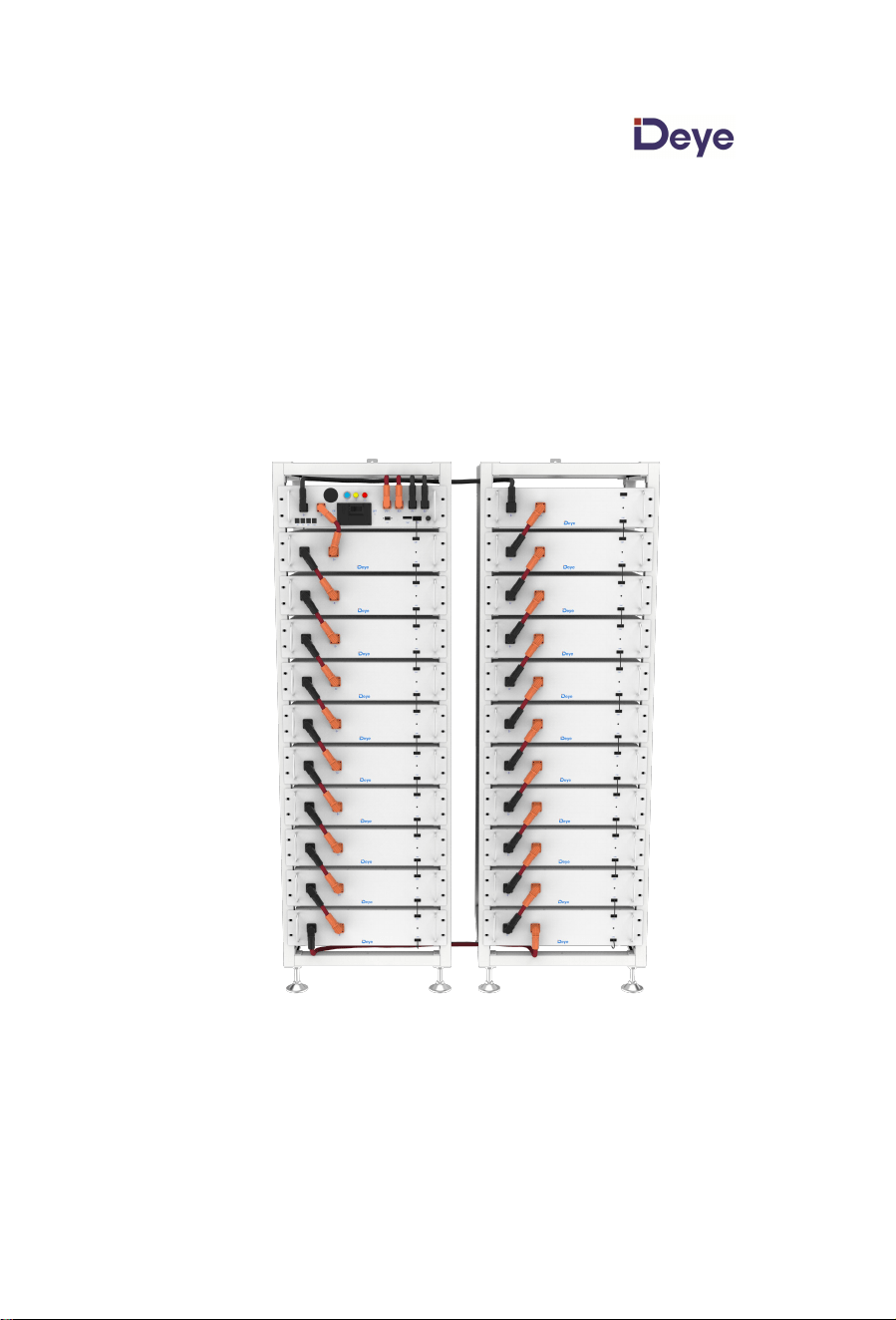
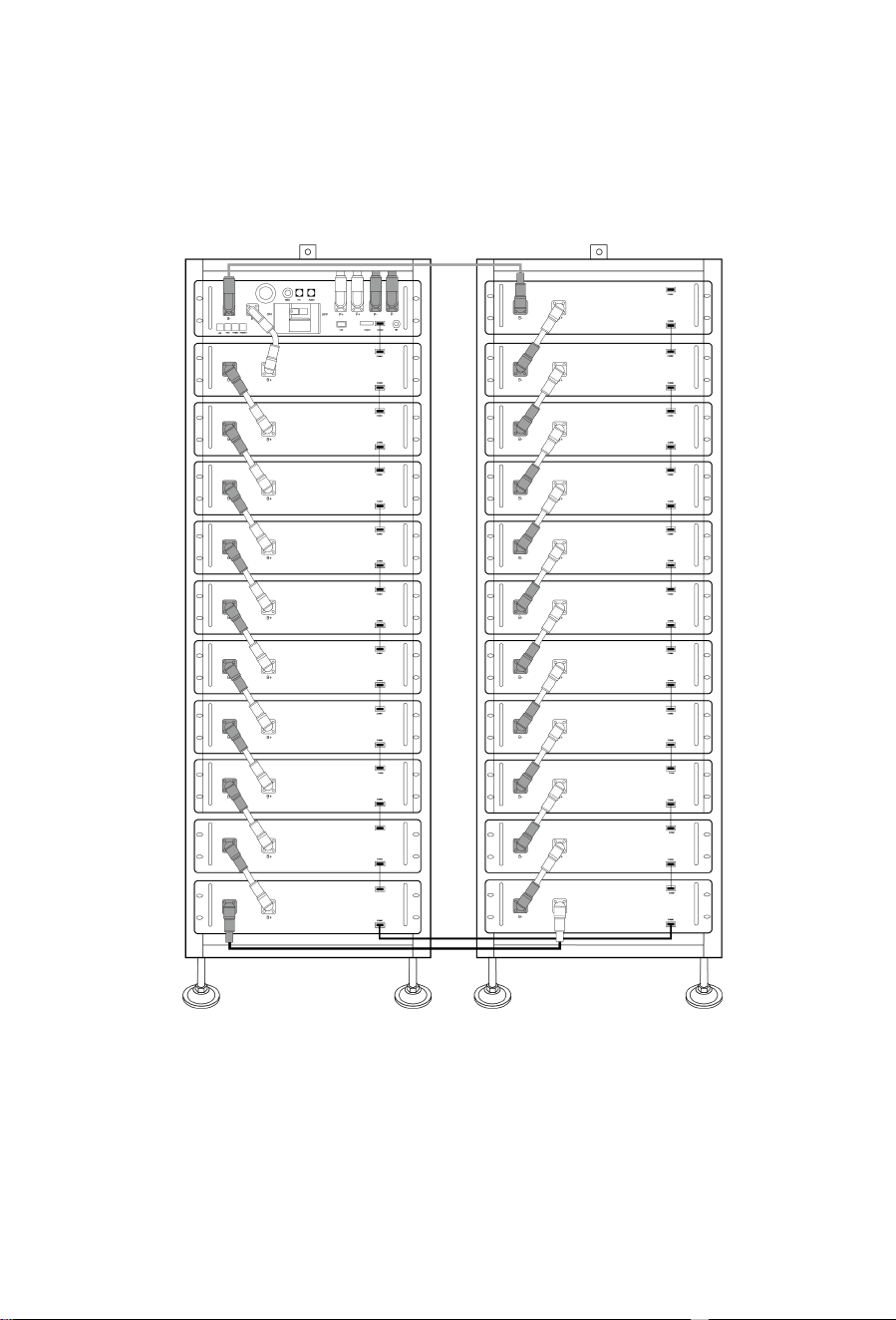
The fourth option: need 18~21 battery modules can choose two 11-layer product
solution. The product appearance is shown in the following figure:

19
4.3 Technical Data
The energy of the battery system
(7~21 battery modules)
7 battery modules 53.76 kWh
8 battery modules 61.44 kWh
9 battery modules 69.12 kWh
10 battery modules 76.8 kWh
11 battery modules 84.48 kWh
12 battery modules 92.16 kWh
13 battery modules 99.84 kWh
14 battery modules 107.52 kWh
15 battery modules 115.2 kWh
16 battery modules 122.88 kWh
17 battery modules 130.56 kWh
18 battery modules 138.24 kWh
19 battery modules 145.92 kWh
20 battery modules 153.6 kWh
21 battery modules 161.28 kWh
Charge-discharge rate (Max) 0.8C
Battery cell chemistry LiFePO
4
Maximum charging/discharging current 160A
Module capacity 200Ah
Working voltage
7 battery modules 218.4~306.6V
13 battery modules 405.6~569.4V
16 battery modules 499.2~700.8V
21 battery modules 655.2~919.8V
Working temperature
Charge: 0~55℃/Discharge:-20~55℃
Humidity 5% - 85% (RH)
The altitude of the installation site ≤ 3000 m
Dimensions (H x W x D)
11-layer: 1900×610×610mm
14-layer: 2350×610×610mm
Two 9-layer: 1600×1320×610mm
Two 11-layer: 1900×1320×610mm

20
Warranty period 10 years
The total weight (10 battery modules, 1 rack) 728 kg
The total weight (13 battery modules, 1 rack) 934 kg
The total weight (16 battery modules, 2 rack) 1161 kg
The total weight (21 battery modules, 2 rack) 1501 kg
Weight of each battery module/11 battery rack
/14 battery rack/9 battery rack
66kg/47kg/55kg/42kg
Case protection grade IP20
Certification CE/IEC62619/IEC 62040/ UN38.3 /VDE-2510

21
4.4 Preparation
4.4.1 Tools required
TOOL USE
PHILIP2# hex wrench
•Refer to installation instructions for 11-layer
battery cluster rack
10mm hexagon socket • Fix the expansion screw
24mm wrench • Adjust the height of the base and tighten the nut.
4.4.2 Auxiliary Tools and Materials Required
AID/MATERIAL
Auxiliary tools/materials
USE
Fastening materials (M4*12 M6*12 screws,
M6*100 expansion screws, M6 nuts)
1. Assemble the battery racks and fix them
on the wall or connect the two racks.
2. Assemble the battery modules and
high-voltage control boxes, and fix them to
the racks.
22
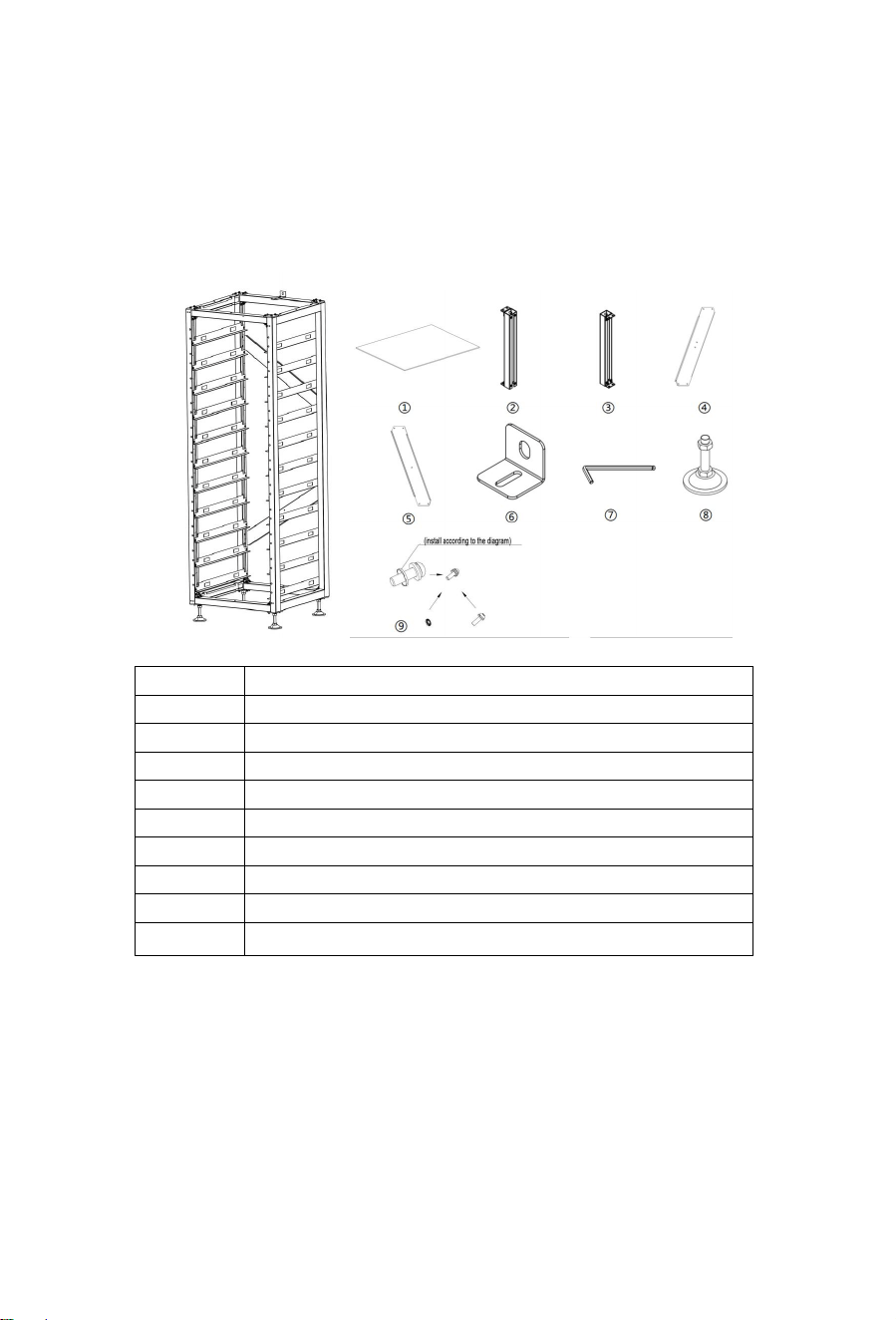
4.5 Description of Rack
4.5.1 11-layer battery cluster rack Parts description
No. Description
① Heat insulation foam
② Bottom beam
③ Top beam
④ Upper diagonal brace
⑤ Lower diagonal brace
⑥ Rack fastener
⑦ Hexagonal wrench
⑧ Adjusting block
⑨ Fixing screw unit

23
4.5.2 Installation of Rack
1. Take out two side beams and upper and lower crossbeams to form a rectangular frame,
connect with side beams and crossbeams using big tripods and small tripods, and then fix
big and small triangular supports with side beams and crossbeams using M6*12 outer
hexagon cross combination screws and a PHILIP2 # screwdriver.
2. Use a PHILIP2 # screwdriver and M6*12 outer hexagon cross combination screws to fix the
L-bracket assembly horizontally on the side beam.
3. Fix the diagonal brace on two side beams using M6*12 outer hexagon cross combination
screws and a screwdriver.
4. Fix the four bottom plates on four corners of the lower rack using the M6*12 outer hexagon
cross combination screws and a PHILIP2# screwdriver.
5. Screw the base into the bottom plate and fix it with a PHILIP2# screwdriver or by hand.
6. To fix the rack on the wall, use a PHILIP2# screwdriver to install the rack fastener at the M6
screw hole above the rack and fix it with M6*12 outer hexagon cross combination screws.
Fix the other side of the rack with the wall using M6*100 expansion screws. To fix two racks
together, install the rack fastener at the M6 screw hole above the rack, and fix them
together with M6*12 outer hexagon cross combination screws and M6 nuts.
Note: Please read the manual for reference.
24
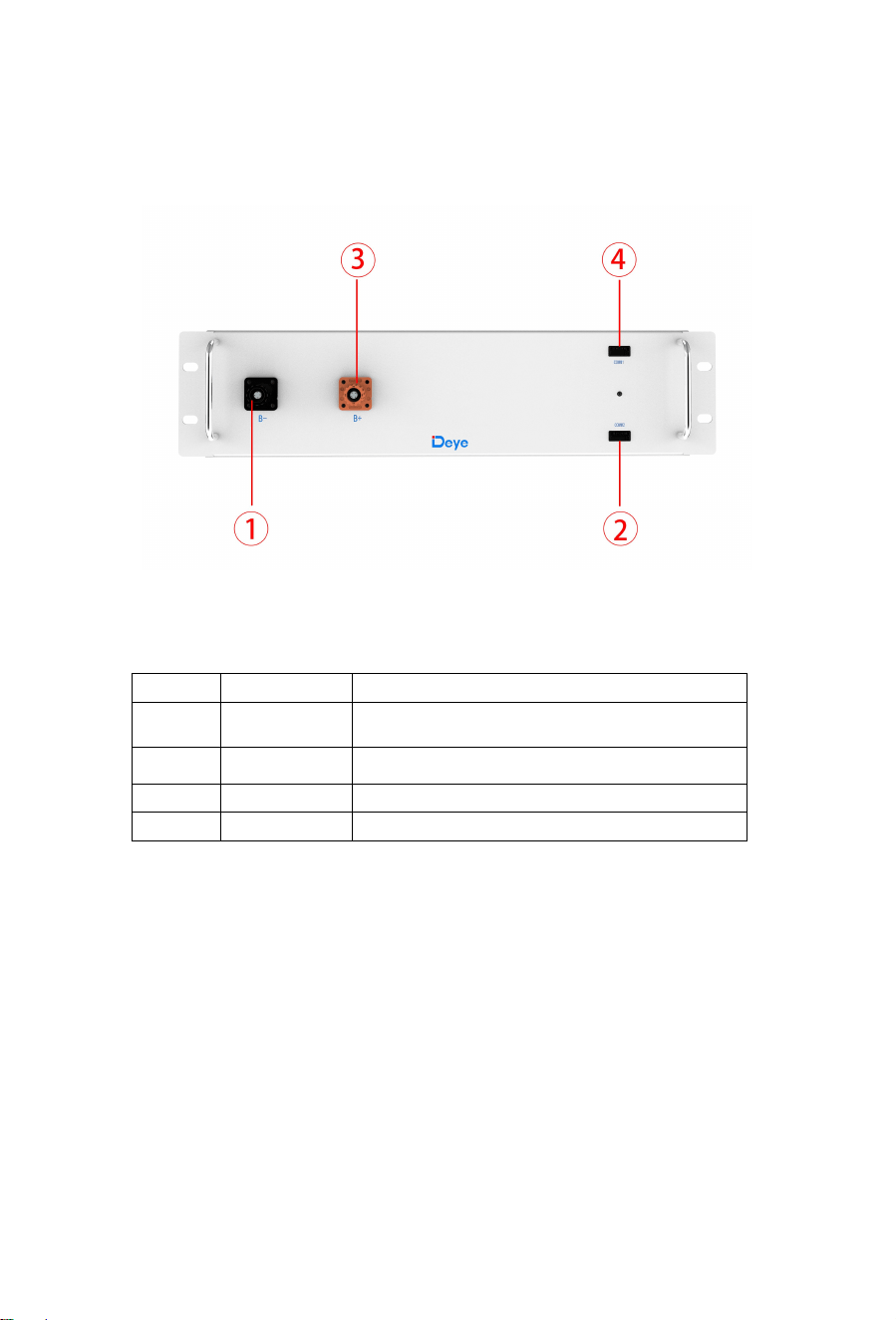
4.6 Description of Battery Module
No. Name Description
① B- Battery module negative pole (black)
② COMM2 Used for communication and providing power
③ B+ Battery module positive pole (orange)
④ COMM1 Used for communication and providing power
25
4.7 Description of High-Voltage Control Box
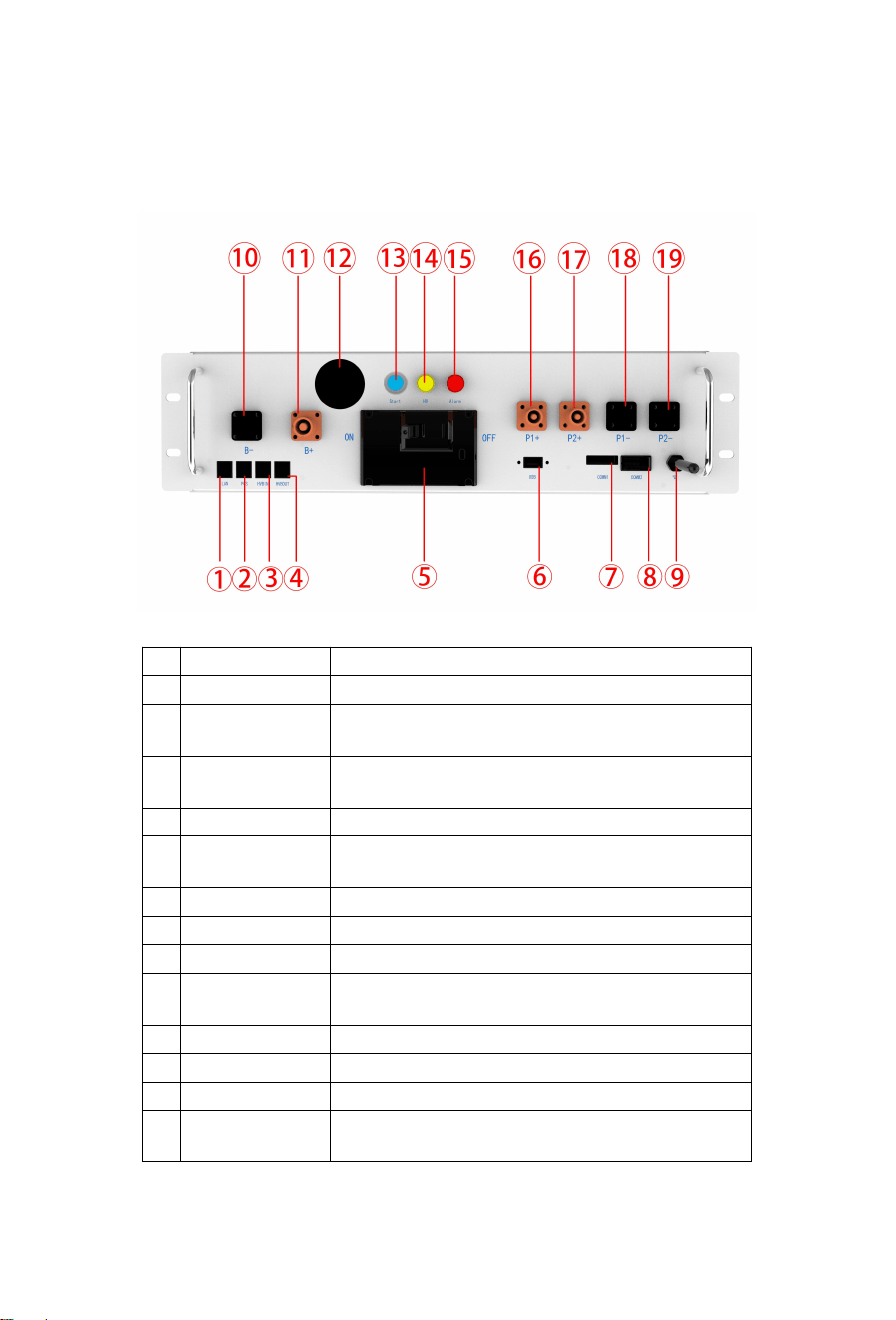
No. Name Description
① Ethernet Features not yet developed
② PCS COM
PCS COM battery communication terminal: used to output
battery information to the inverter.
③ IN COM
Connection position with previous BOS-A-PDU-2
communication input
④ OUT COM Connection position with next BOS-A communication output
⑤ Air switch
It is used to manually control the connection between the
battery rack and external devices
⑥ USB BMS upgrade port and storage expansion port
⑦ COMM1 Connection position of external 12VDC power supply
⑧ COMM2 Used for communication and providing power
⑨ Bluetooth
The mobile APP connects to the data acquisition rod of the
energy storage system
⑩ B- Battery common negative connection position (black)
⑪ B+ Battery common positive connection position (red)
⑫ Display screen Display SOC and fault codes
⑬ START
A start switch of 12VDC power inside the high-voltage control
box
26
⑭ HV light indicator High-voltage hazard indicator (yellow)
⑮ ALRM light indicator Battery system fault alarm indicator (red)Y
⑯ PCS1+ First PCS positive connection position (orange)
⑰ PCS2+ Second PCS positive terminal connection position (orange)
⑱ PCS1- First PCS negative connection position (black)
⑲ PCS2- Second PCS negative connection position (black)
4.8 Description of Battery Module in Rack

27
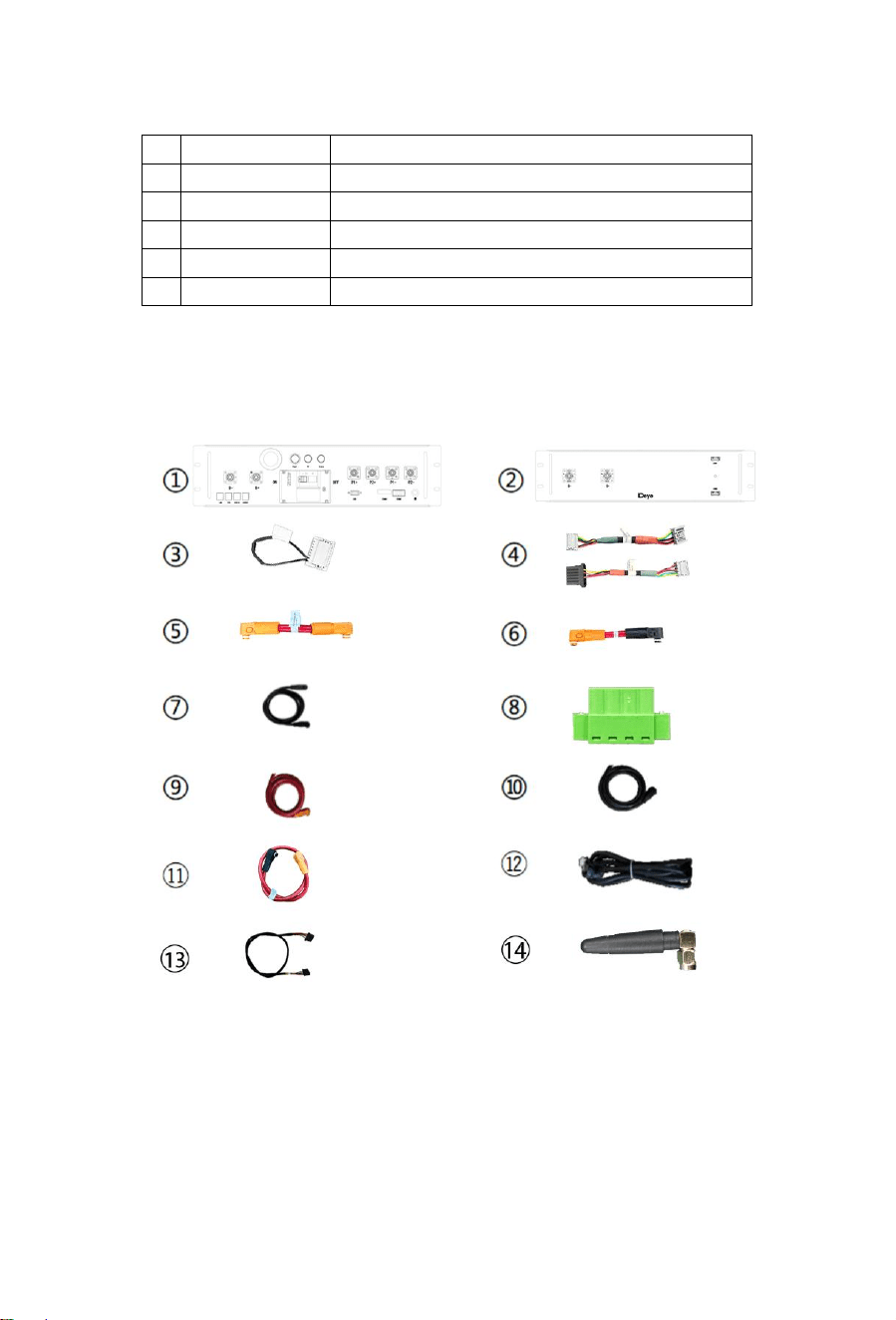
No. Description quantity
①
High-voltage control box 1000V/160A
Standard 1
② 7.68kWh battery module (general) Standard 1
③ 120ohm terminal resistor Standard 1
④
Communication cable (110 mm for battery module,
200 mm for high-voltage control box) CAT5E FTP
24AWG black
Standard 22
⑤
180 mm positive power cord of high-voltage control
box UL 10269 1AWG red
Standard 1
⑥
180 mm power cord of battery module UL 10269
1AWG red
Standard 15
⑦
The negative power cord of the high-voltage control
box
Standard 1
⑧
12V auxiliary power terminal and emergency
power-off interface
Standard 1
⑨
Connected to external PCS positive power cord
(EPCable5.0) UL 10269 4AWG red
Standard 2
⑩
Connected to external PCS negative power cord
(ENCable5.0) UL 10269 4AWG black
Standard 2
⑪ 1000mm power cable between the two battery racks Standard 1
⑫
Connected to external inverter communication
cable (ECOM Cable2.0)
Standard 1
⑬
900mm communication cable between the two
battery racks
Standard 1
⑭ Light baton Standard 1
28
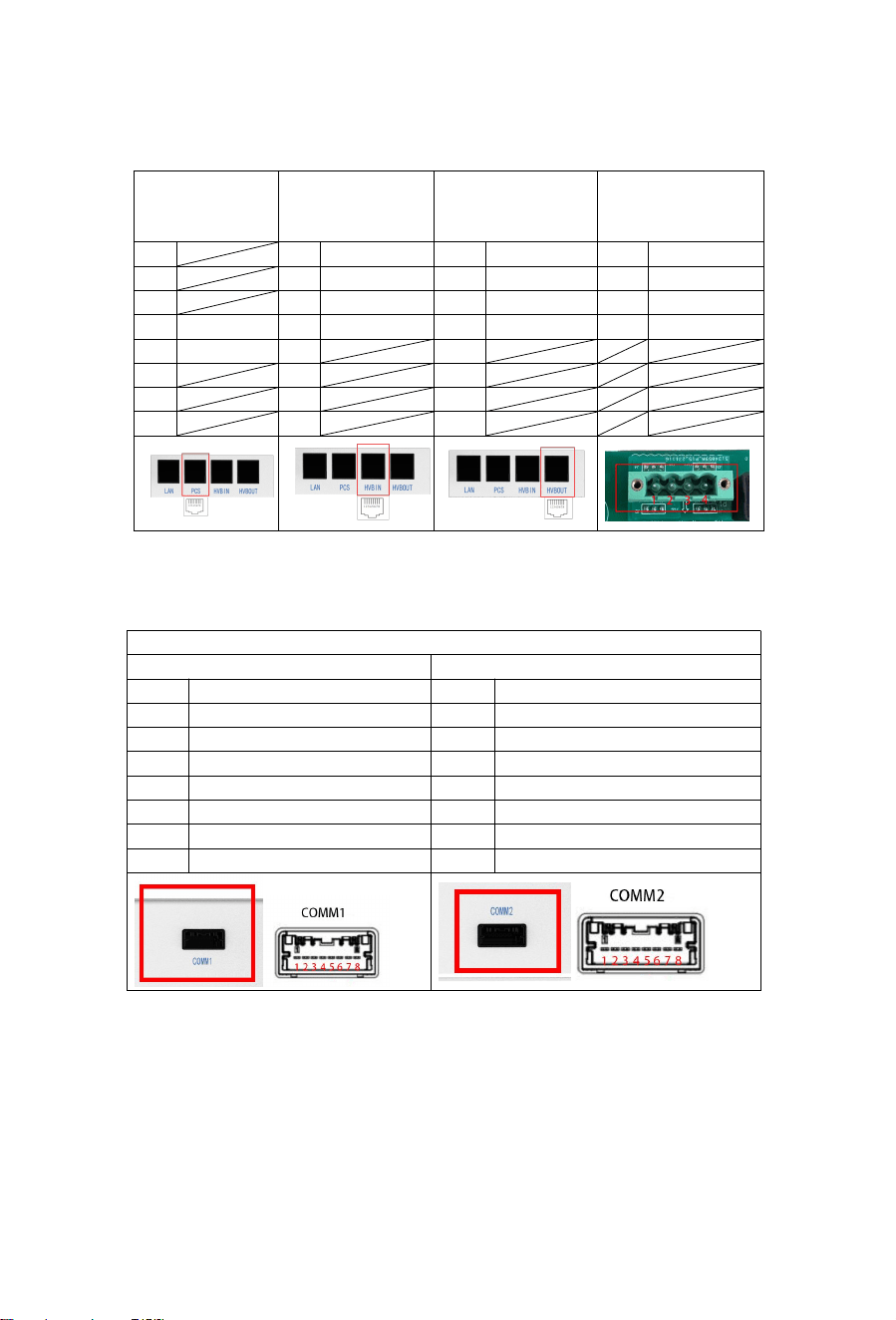
Definition of external interfaces on the front panel of the high voltage box
Defines the external interface of a battery pack
Definition of PCS
communication
interface
Racks in parallel IN Racks in parallel OUT Definition of power
1 1 BMS_CANL 1 BMS_CANL 1 12V
2 2 BMS_CANH 2 BMS_CANH 2 GND
3 3 DI+ 3 DO+ 3 YL_ZLA
4 PCANH 4 DI- 4 DO- 4 YL_ZLB
5 PCANL 5 5
6 6 6
7 7 7
8 8 8
Definition of the battery module interface
Comm1 Comm2
1 INT_CANH 1 INT_CANH
2 INT_CANL 2 INT_CANL
3 DI- 3 DI-
4 DI+ 4 DI+
5 PGND 5 PGND
6 DO+ 6 DO+
7 PGND 7 PGND
8 BMU_L+ 8 BMU_L+
29
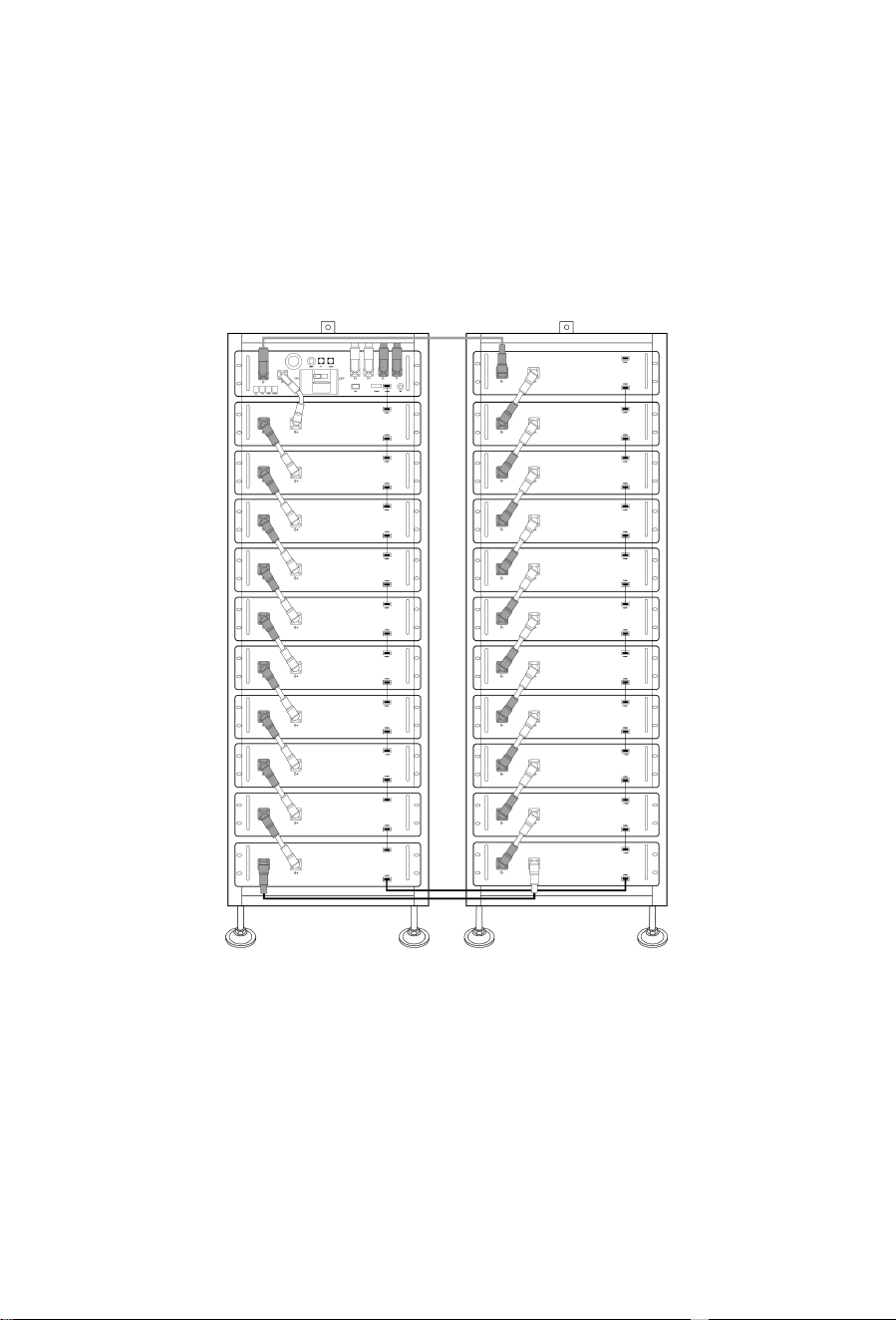
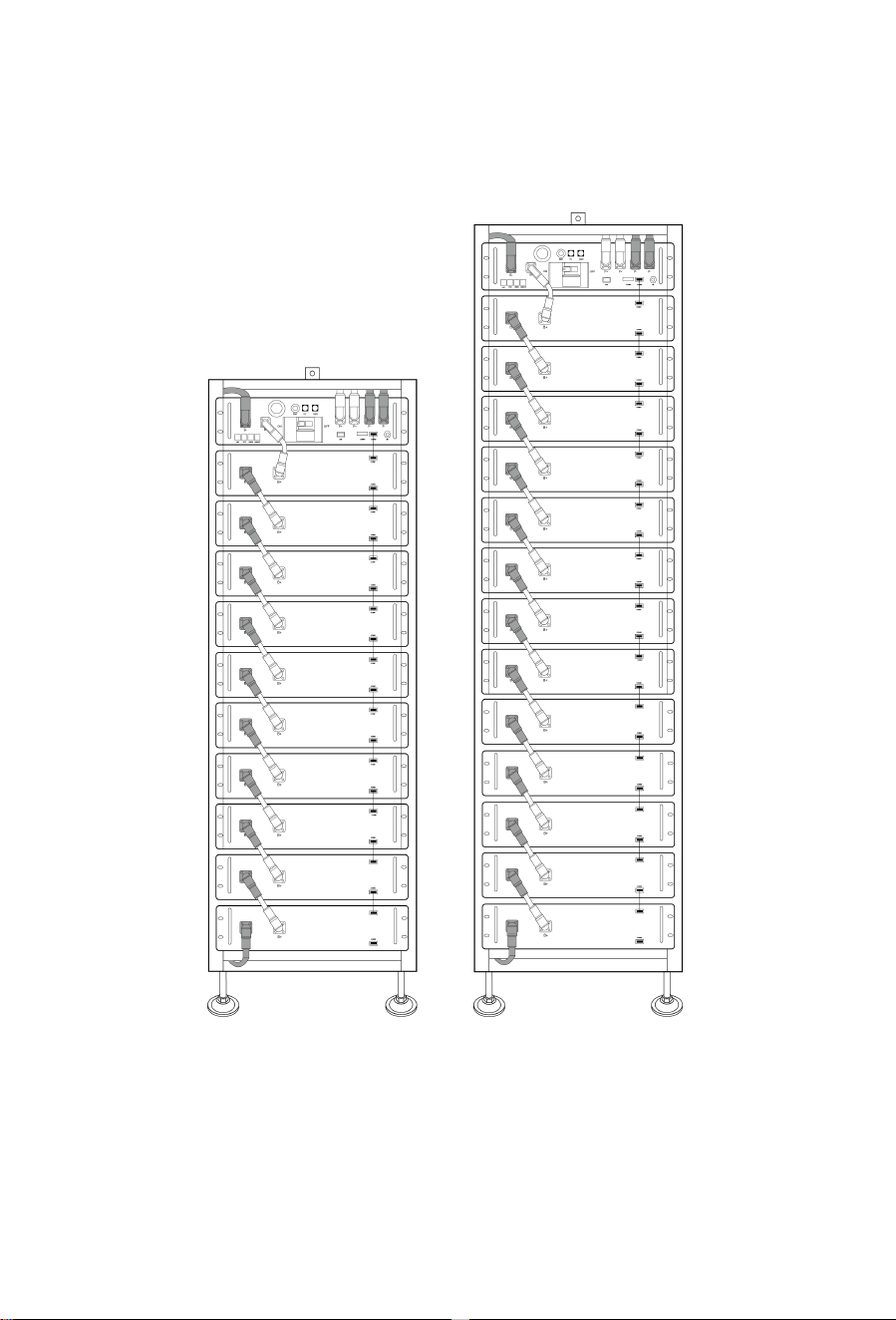
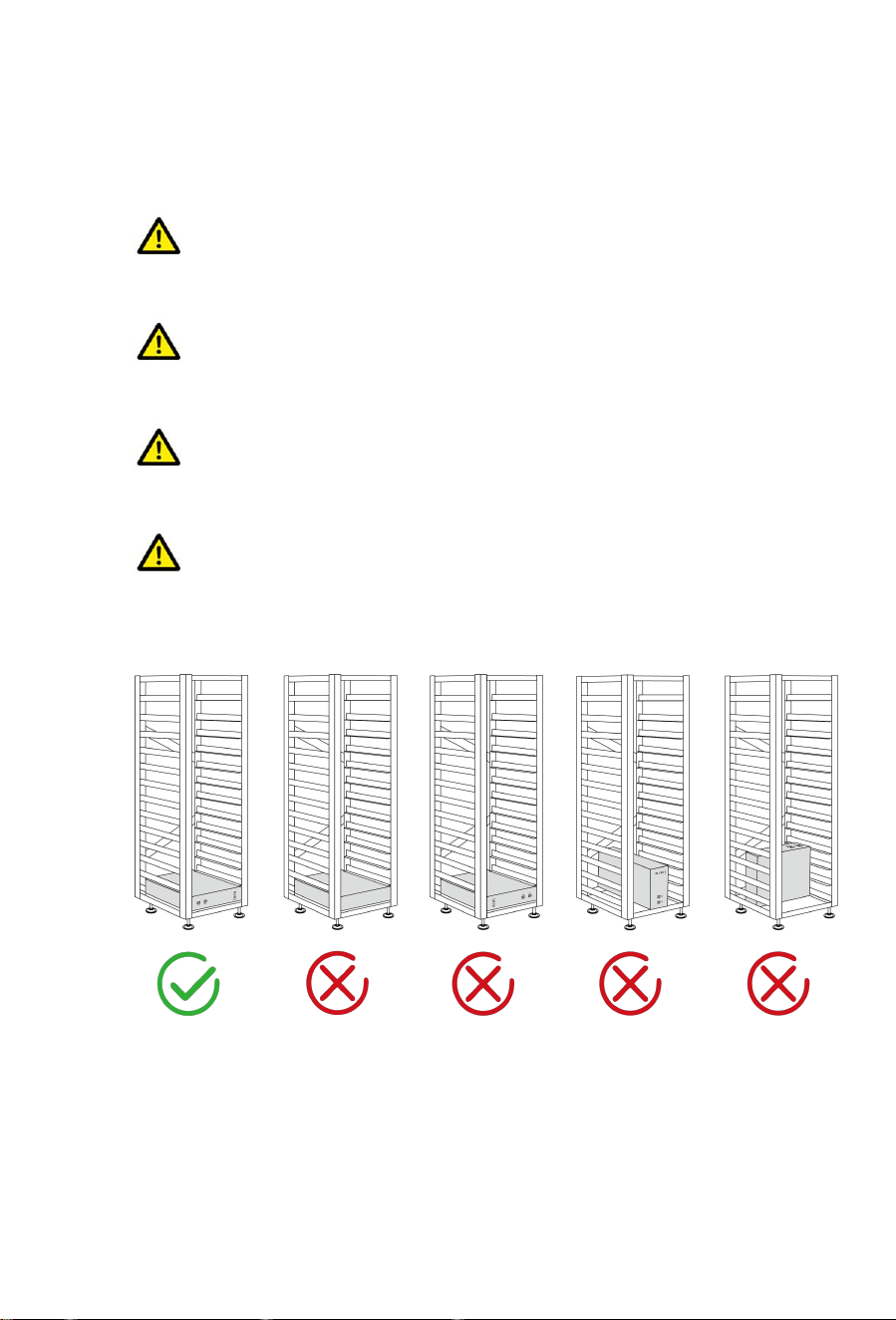
4.9 Right wiring method
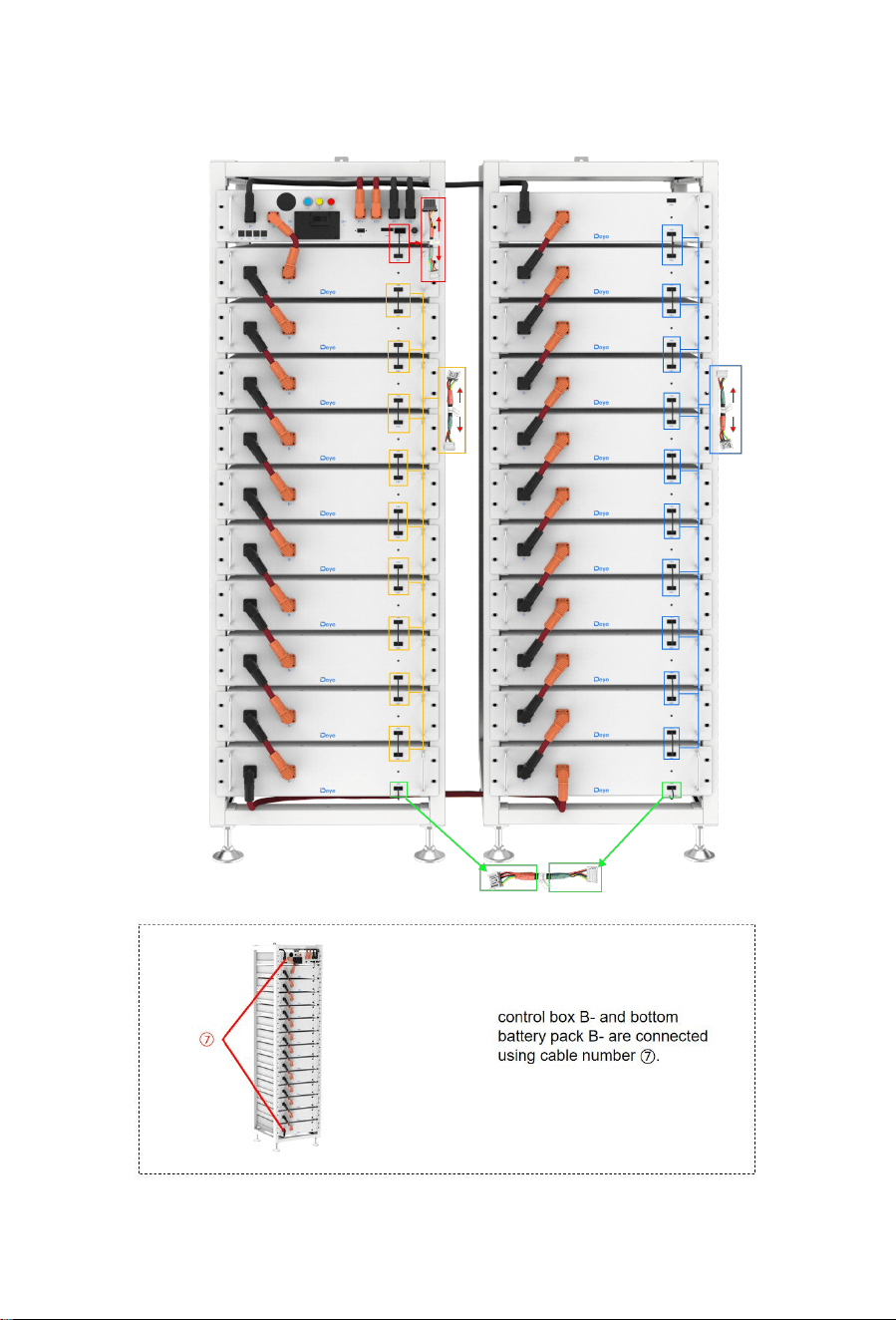
Connect cables correctly according to the figure.
Two 11-layer: This way that battery packs are stacked is the same as that of two
9-layer.
30
11-layer and 14-layer:
31
4.10 Installation of the Battery Module to the Rack
Insufficient or no grounding may cause an electric shock. Device malfunctions, and
insufficient or no grounding may cause device damage and life-threatening electric shocks.
Note: Before installing the battery, please turn the manual switch of the high-voltage
control box to the off position.
Note: Before installing the battery, the minimum distance to the surrounding buildings
or other objects is 5mm.
CAUTION
Remember that this battery is heavy! Please be careful when lilting out from the package.
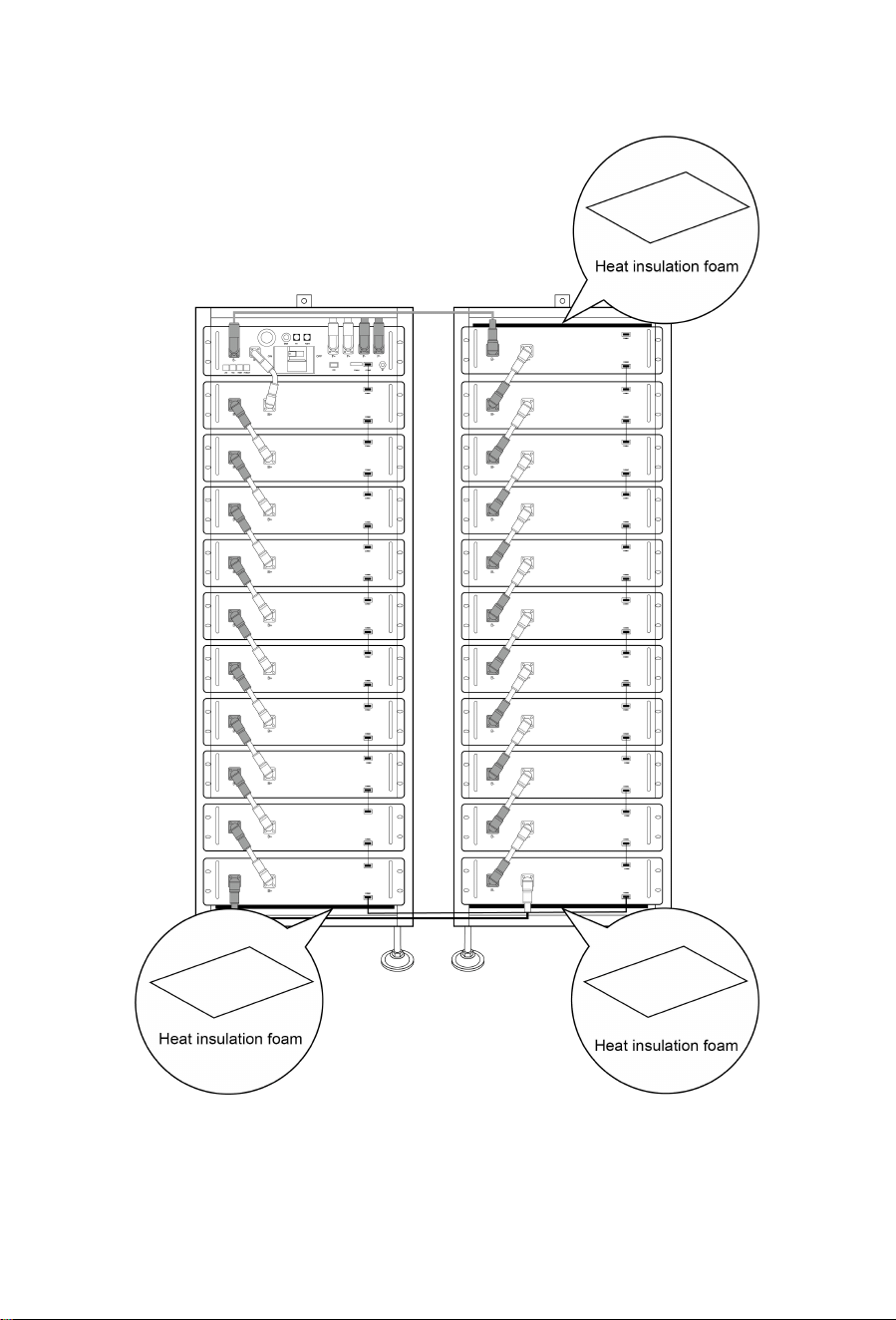
Note the allowable installation modes:
32
33
1. For the correct installation method shown in the first picture, stack battery packs from
bottom to top, and place the high-voltage box on the top of the cluster rack. Insert the slide
of the cabinet at the top of the rack into the high-voltage control box.
2. After the battery module and control box is inserted into the rack, use M6*20 hex socket
combination screws to fix all the lugs of the battery module and control box on the side
beam in turn.
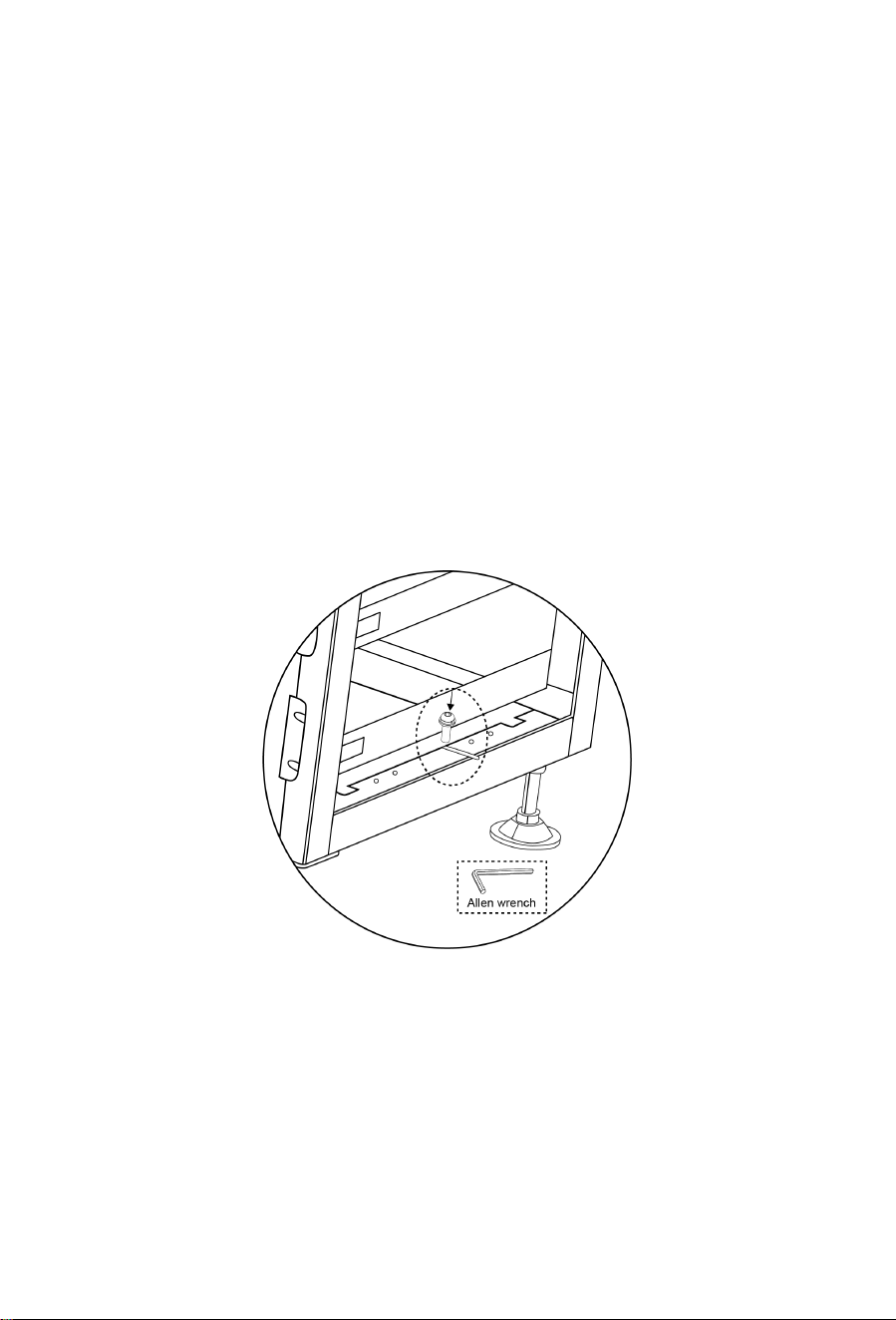
3. After installing battery packs, remember to mount heat insulation foams onto the top
battery and under the bottom battery to protect them from heat.
4.10.1 Cable connection
1. Grounding description
Connect one end of the ground cable to the cluster rack and the other end to the
ground bar at the installation site.
34
4.10.2 Battery installation cable Description
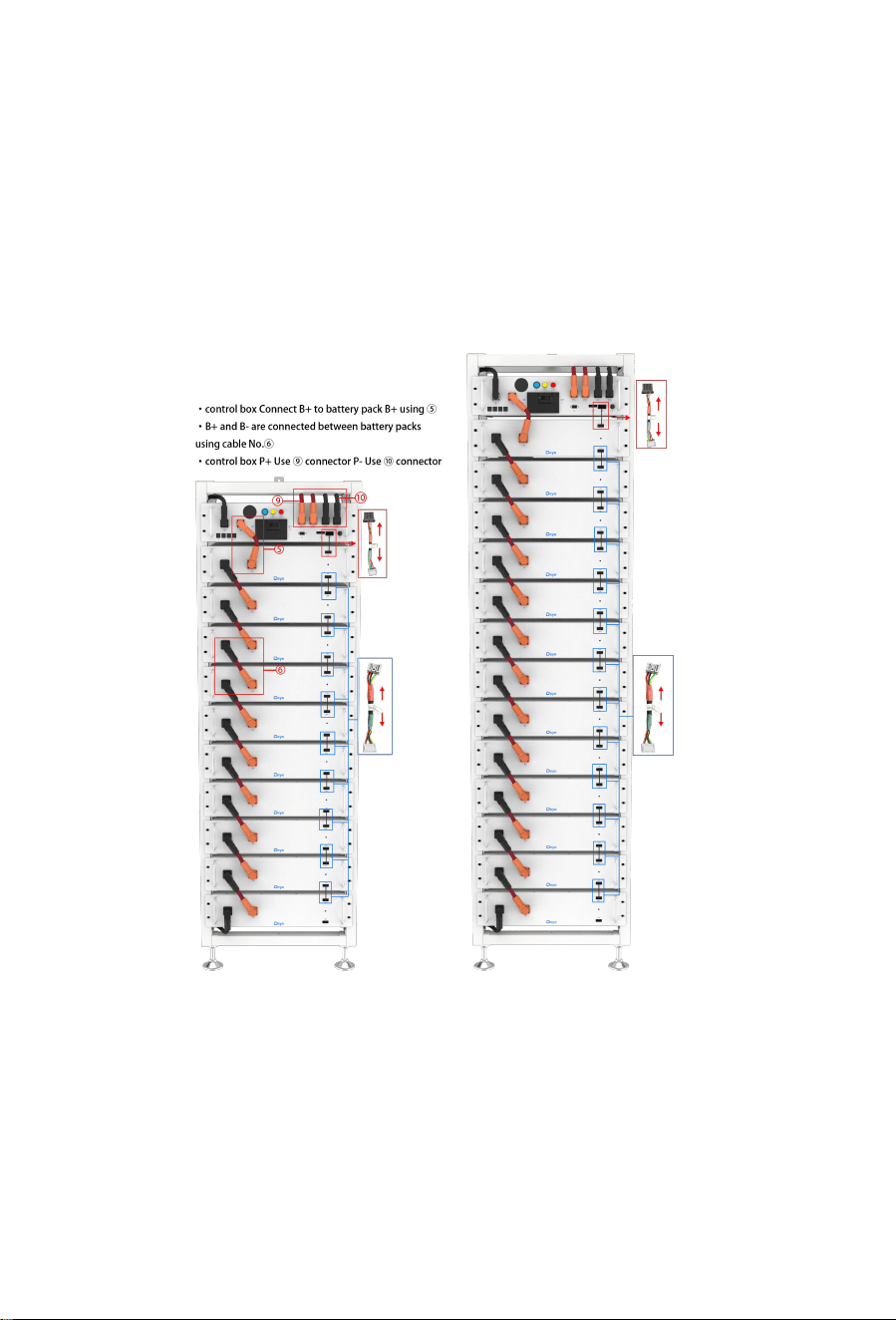
For details on how to connect all cables, see Section 4.8.
When connecting cables, observe the installation diagram and pay attention to the
direction of the communication cables. Otherwise, the products may not work
properly due to incorrect cable installation.
35

36
4. After the battery module is placed in the control box, take out a 200 mm communication
cable to connect the communication port of the battery module and the high-voltage
control box, and 11x160mm communication cables to connect the battery module
communication port (IN-OUT) from top to bottom.
The OUT communication port of the last battery module does not need to be connected to
communication cable. Instead, this port is sealed with a 120ohm terminal resistor.
5. Take out a 180 mm positive power cord and connect the positive pole of the battery module
at the top to the positive pole of the high-voltage control box. Take out 22x110mm battery
module power cords and connect the power ports (B- to B+) in a top to bottom order to
form a series circuit. For aesthetics, connect the negative power pole of the first battery
module to the negative power pole of the high-voltage control box from the bottom of the
battery module to the back of the rack. On the back of the rack, a plane-head-shaped tie is
used to secure the cable harness.
6. Take out the external positive power cord EPCable2.0 and external negative power cord
ENCable2.0, and plug them into PCS interfaces, respectively.
7. Take out the ground wire A and connect one end of it to the M4 rivet nut of the high-voltage
control box panel, and the other end to any M6 screw hole of the cross beam above the rack.
Take out the ground wire B (user need to prepare in advance) and connect one end of it to
any M6 screw hole of the cross beam under the rack, and the other end to the customer's
grounding point. (The length of the ground wire B is determined based on the customer's
condition.)
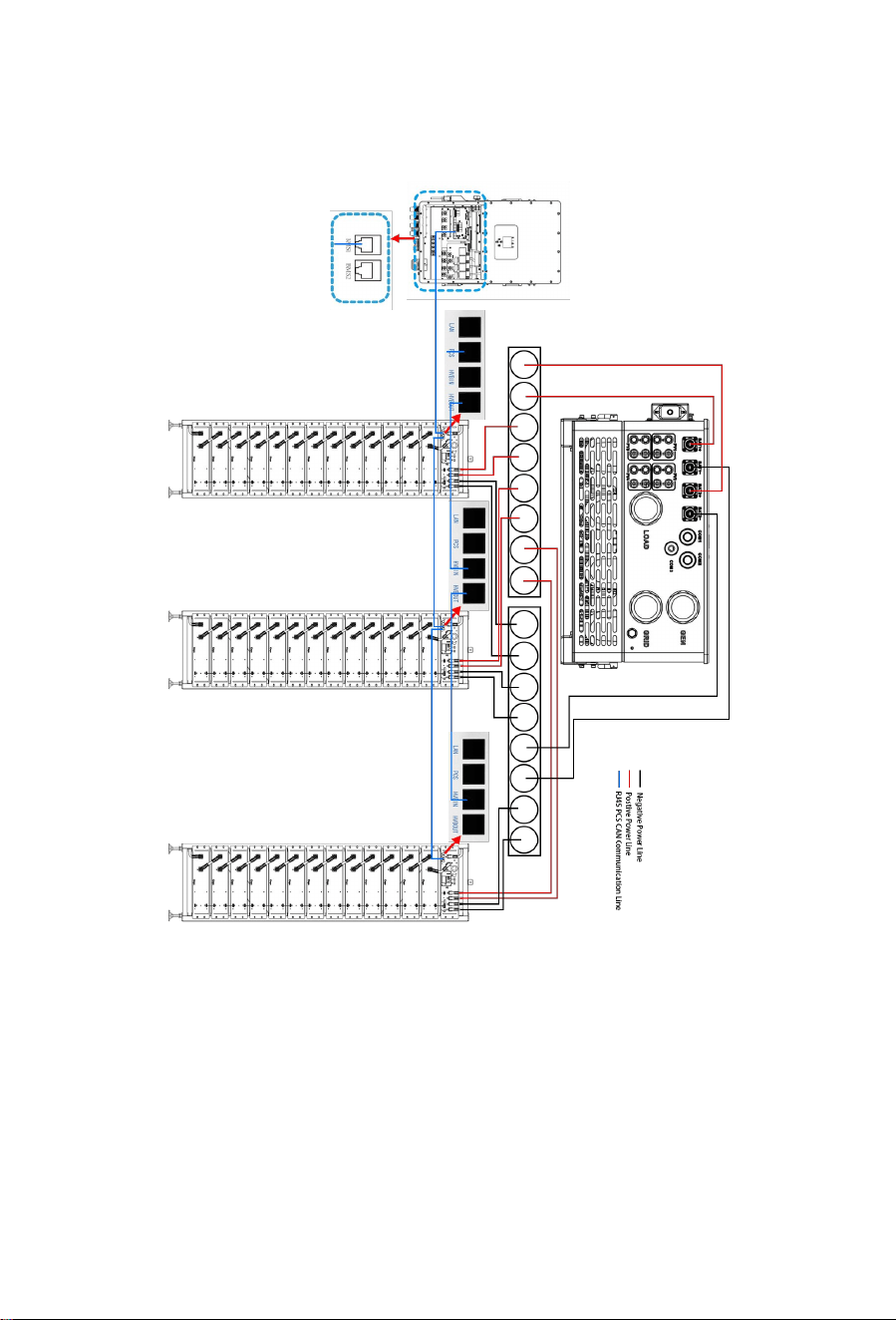
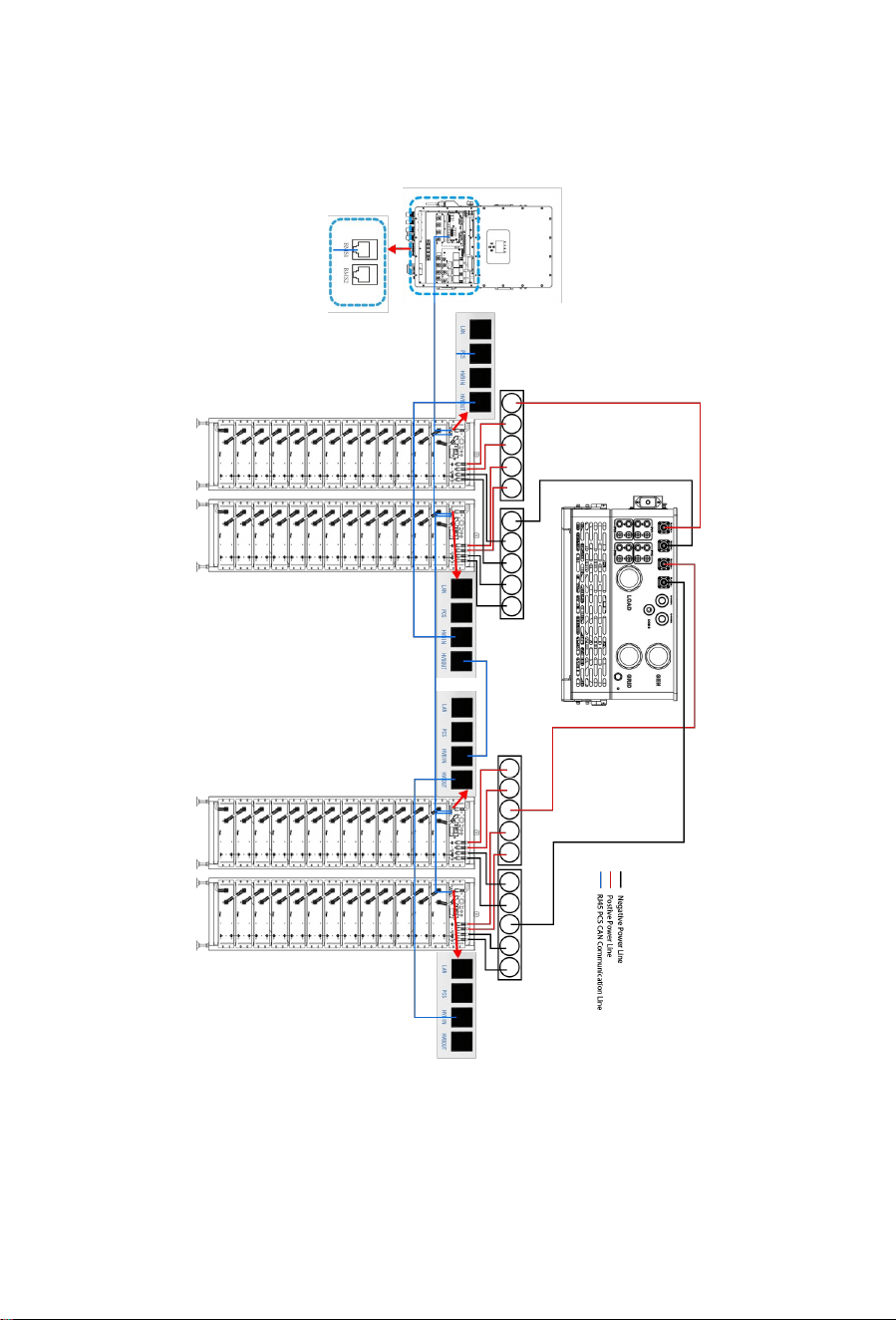
4.11 Battery cluster connected to inverter
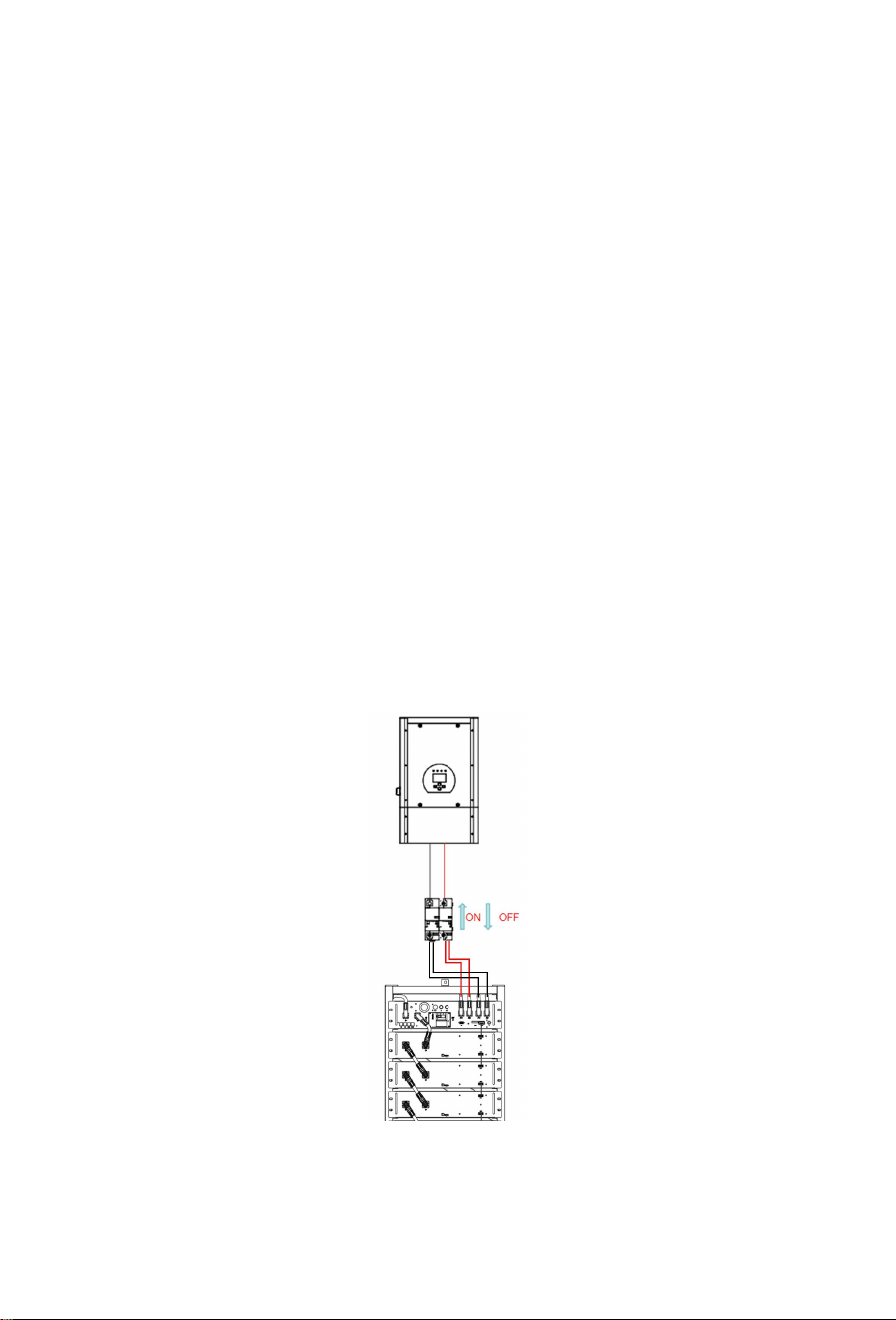
For the Australian Market, an over-current protection and isolation device that isolates both
positive and negative conductors simultaneously is required between the battery system and
inverter
Battery cluster connected to inverter
Notice: The length of the communication line between the inverter and the battery should not
exceed 30m.
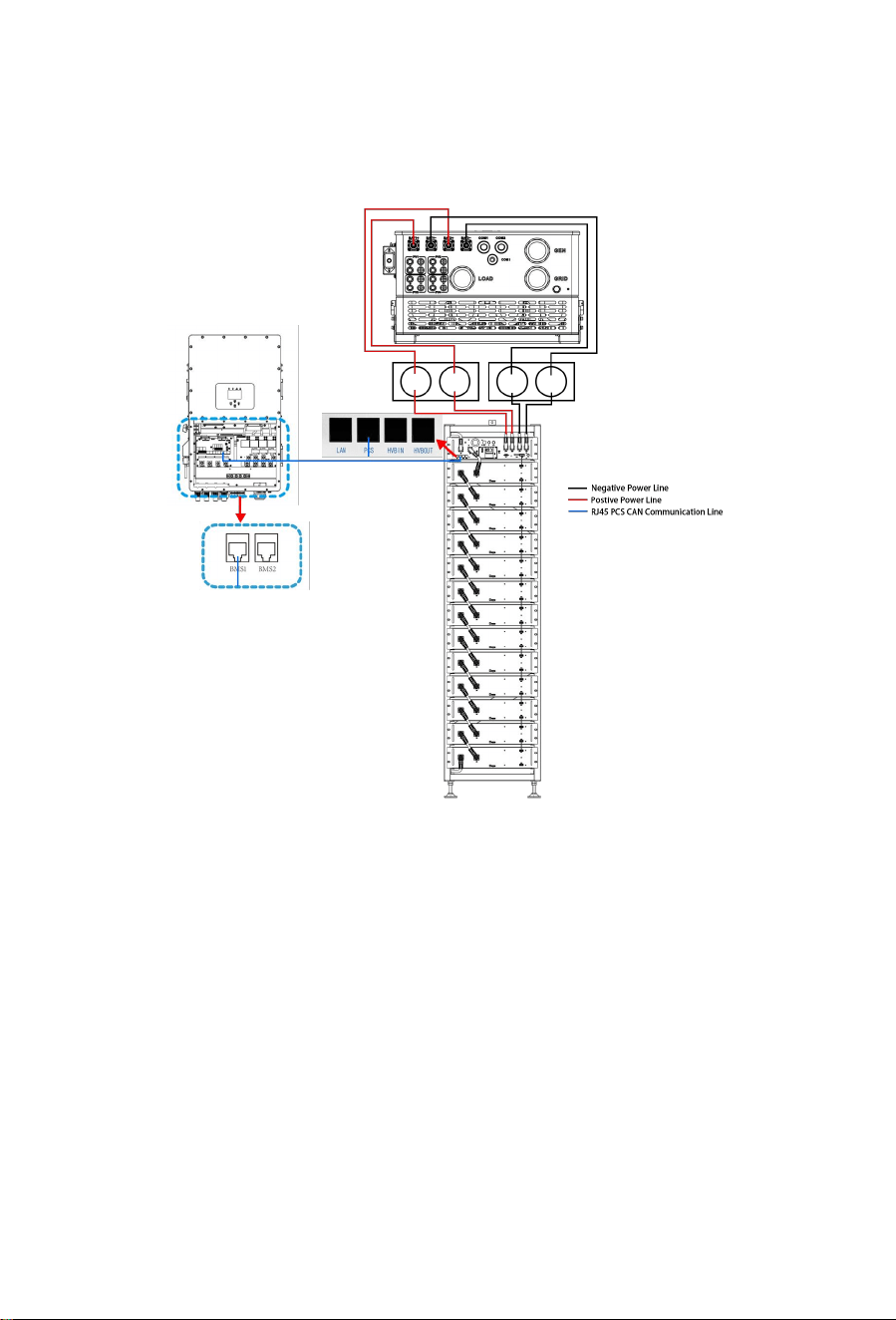
37
Single battery cluster connected to inverter
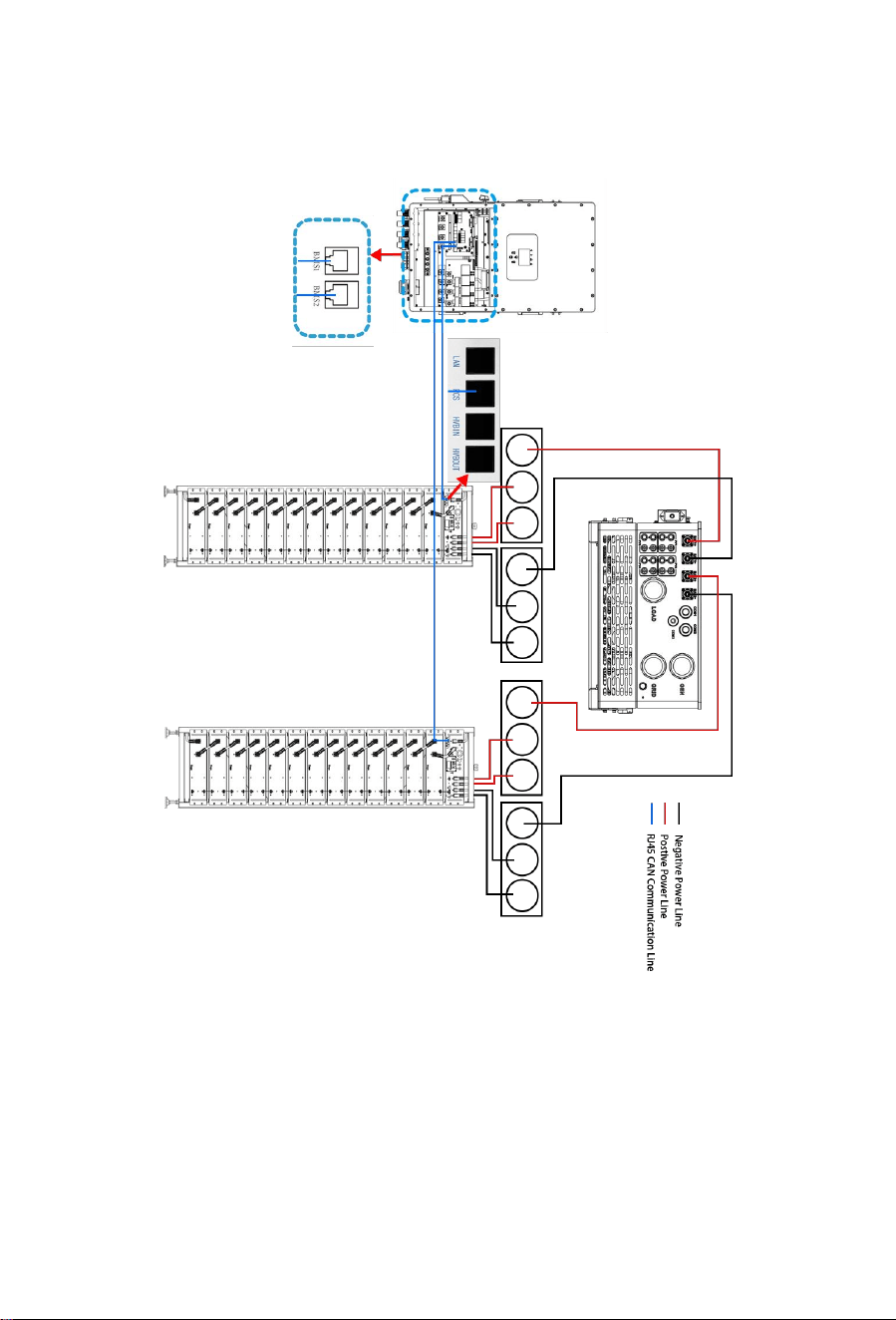
38
Two battery clusters connected to the inverter
39
Three battery clusters connected to the inverter
40
Multiple battery packs are connected to the inverter
The number of battery packs in each cluster must be the same in each group, and the
number of battery packs in group A and Group B can be different. When the power
current of a single cluster battery exceeds 100A, two P+ and P- channels must be
connected.
41
4.12 System startup and shutdown
Startup procedure
1) After connecting the battery cables, press the air switch button on the high-voltage control
box to turn OFF to ON.
2) Press the start button and wait for the screen to light up.
3) Complete boot
Shutdown procedure
1) Press the start button again and wait for the screen to go off.
2) Press the air switch button ON the high voltage control box and set the "ON" to the "OFF"
position.
3) Complete shutdown
Description of external circuit breakers between inverter and battery system
Turn on the circuit breaker and then start the battery pack.
Turn off the circuit breaker after the battery pack is closed.

42
4.13 External 12V Power Supply of High-Voltage Control Box
To operate the high-voltage control box with an external 12V power supply, please contact our
service personnel. Hotline: +86 0574 8612 0560, Email: service-ess@deye.com.cn .
In the factory configuration, the high-voltage control box is supplied with working voltage from
an internal power supply unit. If your plan requires an external 12V power supply, an adaptive
version and a high-voltage control box can be provided as requested. Please contact our
after-sales service personnel for details.
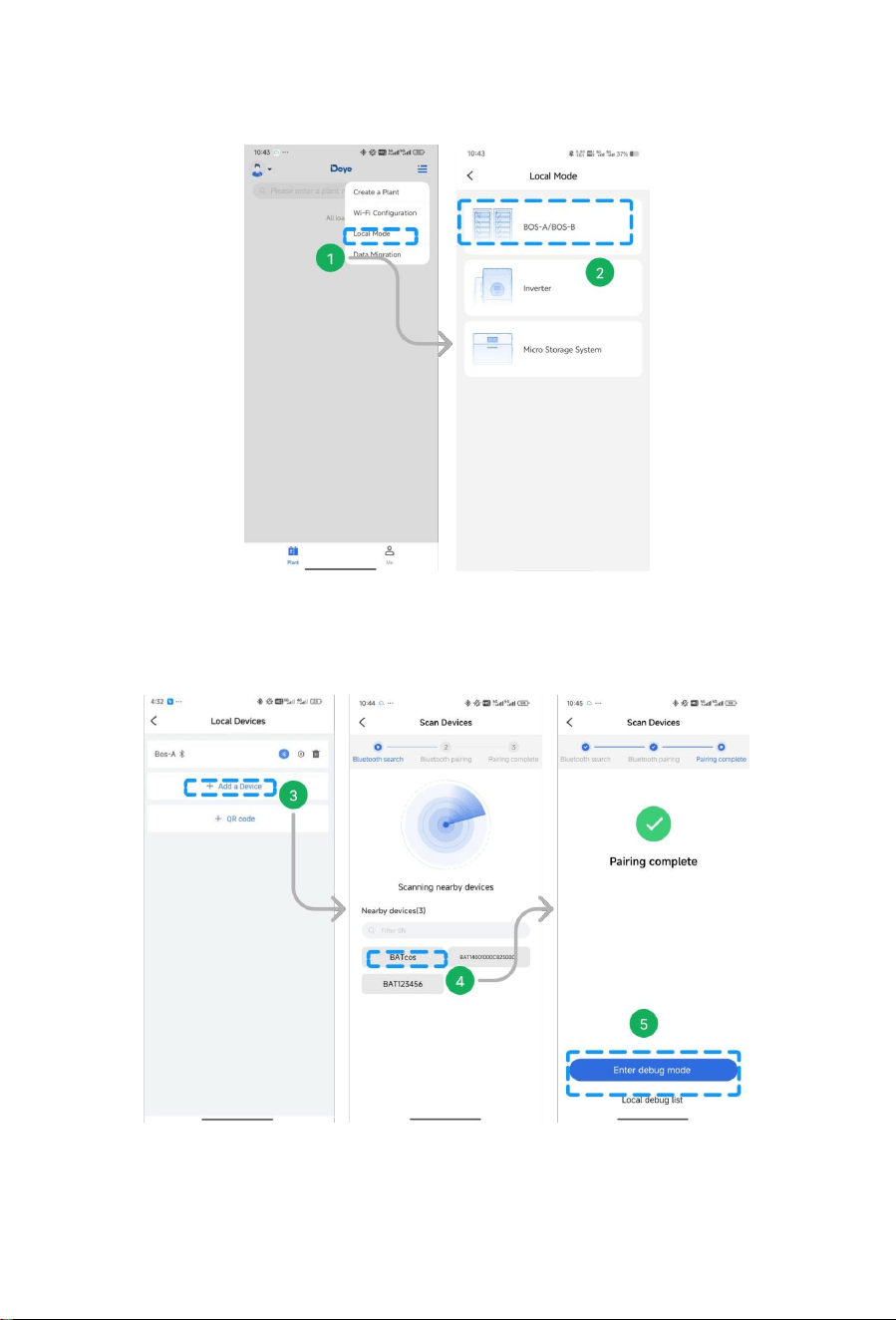
4.14 How to use local mode with BOS-A (Battery)?
Scan QR code and download the Bluetooth APP. After downloading the APP, please follow the
steps below to complete the operation.
Step 1: Log into the APP and select “Local Mode”.
Step 2: Select the device type ——Battery.
43
Step 3:Tap on “Add a Device”.
Step 4: Searching for nearby device via Bluetooth, tap on the device for Local Mode.
Step 5: Paring complete, tap on “Enter debug mode”to view its’ data.
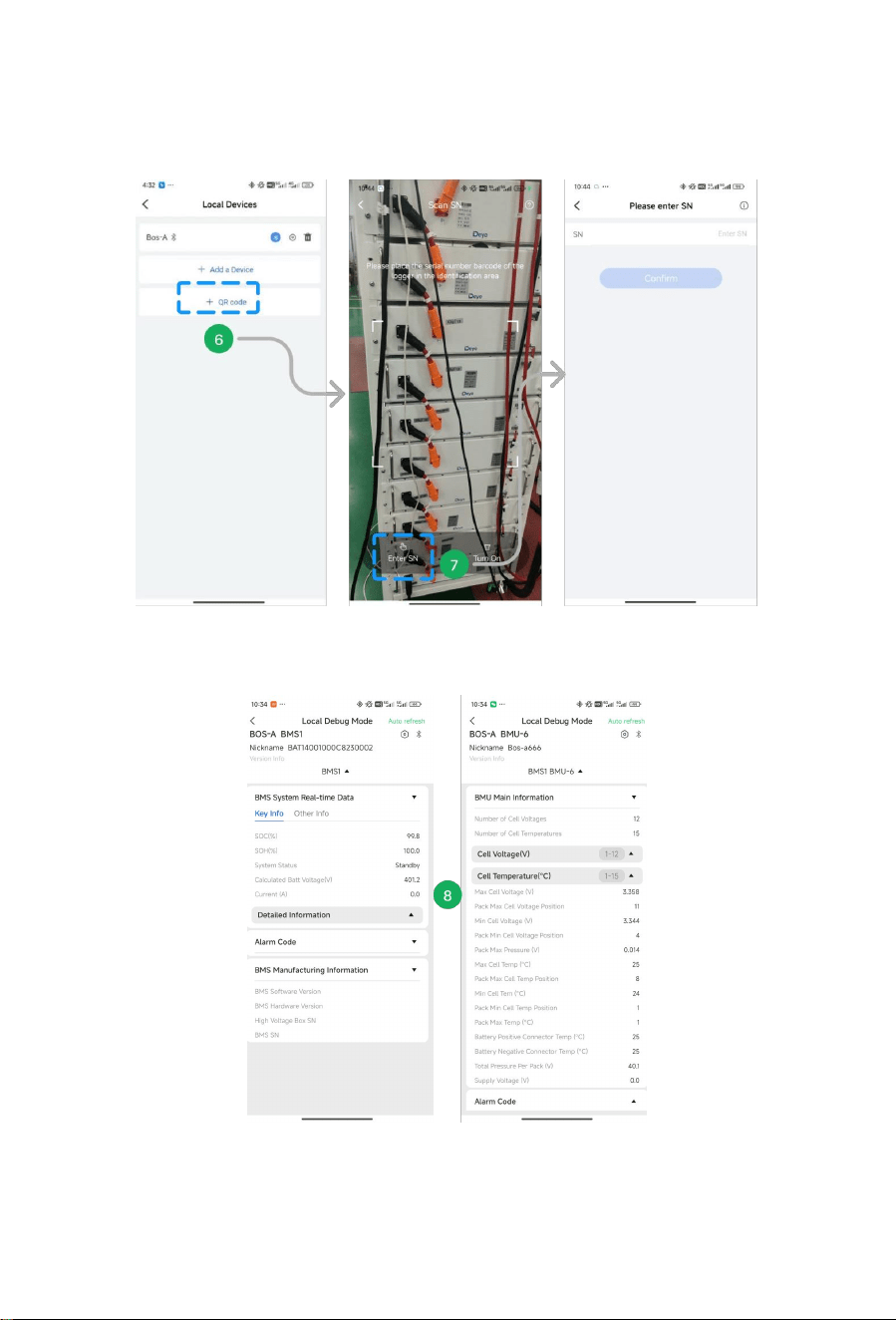
Step 6: Except the Bluetooth Mode, Adding SN support Scan QR code.
44
Step 7: User could also tap on “Eenter SN”to add SN.
Step 8: Detailed information of the battery could be viewed in the Local Mode, such as BMS,
Alarm and BMU etc.
45
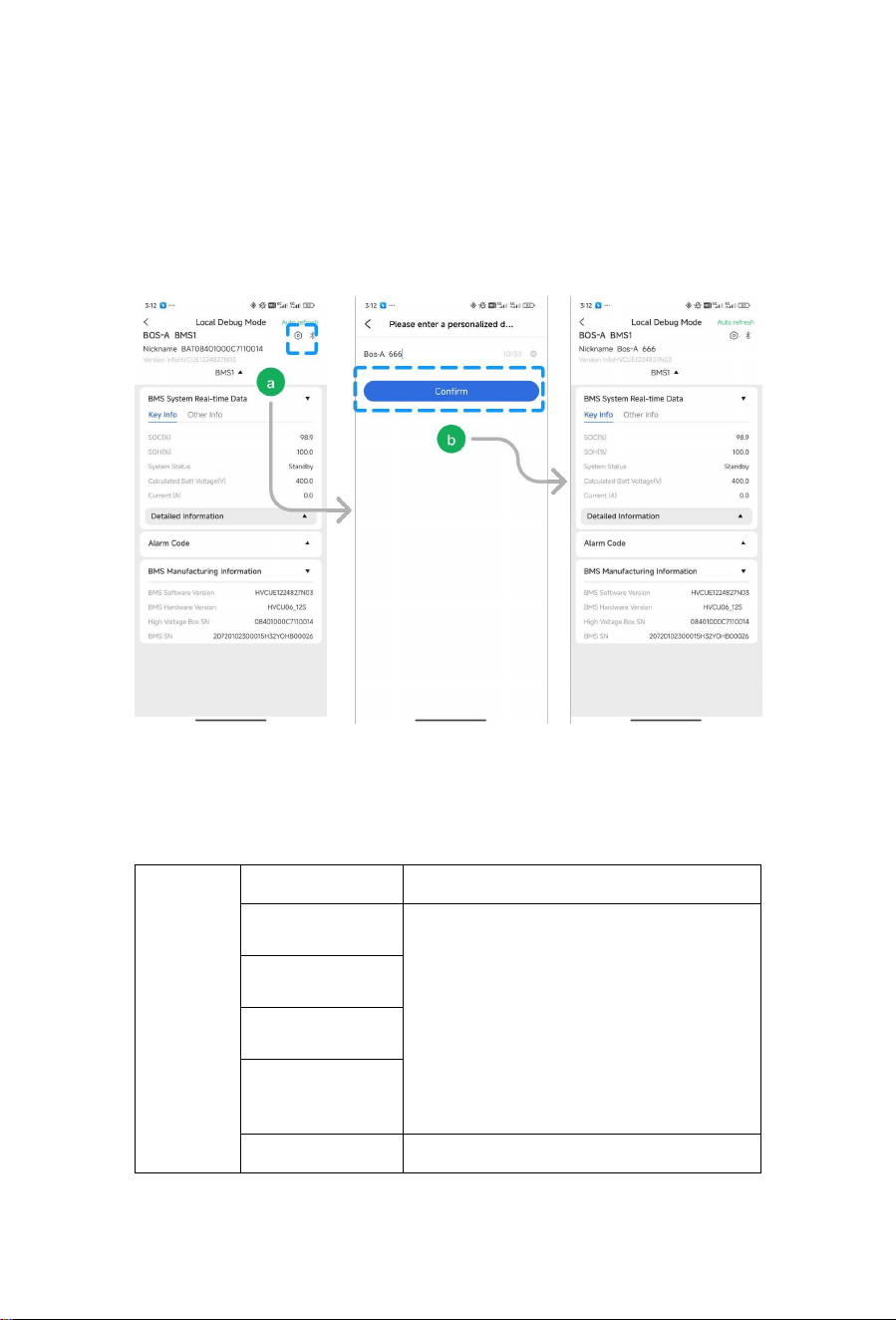
How to personalize the BOS-A name?
Step a: Tap on the upper right corner can edit Nickname.
Step b: Enter the new name and tap on “Confirm”. The interface will display the
changed name
5. BOS-A’ fault description
Different types of faults are below:
System faults
Fault types Trigger conditions
Charge over-current
alarm
Exceeding the parameter set value and set time
(More than 168A, 2min; more than 200A, 5s; more
than 224A, 2s)
Charge over-current
protection
Discharge
over-current alarm
Discharge
over-current
protection
Charge Exceeding the parameter set value and set time

46
overtemperature
alarm
(>50℃, 2s)
Charge
overtemperature
protection
Exceeding the parameter set value and set time
(>60
℃
, 2s)
Discharge
overtemperature
alarm
Exceeding the parameter set value and set time
(>50℃, 2s)
Discharge
overtemperature
protection
Exceeding the parameter set value and set time
(>60
℃
, 2s)
Charge under
temperature alarm
Exceeding the parameter set value and set time
(<5℃, 2s)
Charge under
temperature
protection
Exceeding the parameter set value and set time
(<0
℃
, 2s)
Discharge under
temperature alarm
Exceeding the parameter set value and set time
(<-10℃, 2s)
Discharge under
temperature
protection
Exceeding the parameter set value and set time
(<-20
℃
, 2s)
Excessive differential
voltage alarm
Exceeding the parameter set value and set time
(>500mv, 2s)
Excessive differential
voltage protection
Exceeding the parameter set value and set time
(>800mv, 2s)
Excessive differential
temperature alarm
Exceeding the parameter set value and set time
(>10℃, 2s)
Excessive differential
temperature
protection
Exceeding the parameter set value and set time
(>15
℃
, 2s)
Cell overvoltage alarm
To maintain consistency, cut off the charging
immediately when the full charge calibration rated
voltage of 3.6V is reached. When the voltage drops
to 3.35V, restart it with the turned-off red light
indicator. All protective red light indicators are always
on!
Cell overvoltage
protection
Cell undervoltage
alarm
Cell undervoltage
protection
Pre-charge resistor
overtemperature
alarm
Exceeding the parameter set value and set time
(>55
℃
, 2s)

47
Pre-charge resistor
overtemperature
protection
Exceeding the parameter set value and set time
(>85℃, 2s)
Insulation level 1 Exceeding the parameter set value and set time
Insulation level 2 Exceeding the parameter set value and set time
BMS connector
overtemperature
alarm
Exceeding the parameter set value and set time
BMS connector
overtemperature
protection
Exceeding the parameter set value and set time
BMU connector
overtemperature
alarm
Exceeding the parameter set value and set time
BMU connector
overtemperature
protection
Exceeding the parameter set value and set time
Power loop
overtemperature
alarm
Exceeding the parameter set value and set time
Power loop
overtemperature
protection
Exceeding the parameter set value and set time
SOC too low Exceeding the parameter set value and set time
Total voltage too high
alarm
Exceeding the parameter set value and set time
Total voltage too high
protection
Exceeding the parameter set value and set time
Total voltage too low
alarm
Exceeding the parameter set value and set time
Total voltage too low
protection
Exceeding the parameter set value and set time
Discharge relay
adhesion
Relay feedback information state adhesion
Charge relay adhesion Relay feedback information state adhesion
Heating relay
adhesion
High voltage is detected after disconnecting the
heating relay
Limit protection Exceeding the parameter set value and set time
Abnormal power
supply voltage
Exceeding the parameter set value and set time

48
Master positive relay
adhesion
Relay feedback information state adhesion
Fuse Blown
No high voltage is detected after the loop relay is
closed
Repeated BMU
address fault
BMU with the same number
INTER-CAN BUS
communication failure
Loss of communication between BMS
PCS-CAN BUS
communication failure
The heartbeat message of the inverter is not
received for a long time
RS485 communication
failure
Inverter RS485 access is not received for a long time
Abnormal RS485
communication
C
External total voltage
acquisition fault
/
Internal total voltage
acquisition fault
The difference between the acquired internal total
voltage and the accumulated internal total voltage
exceeding the set value
SCHG total voltage
acquisition fault
/
Cell voltage
acquisition fault
The cell voltage acquired is 0
Temperature
acquisition failure
The temperature acquired is -40
℃
Current acquisition
fault
/
Current module fault Abnormal Hall current/reference voltage
EEPROM storage
failure
EEPROM write failure during self-test
RTC clock fault
The external RTC failed to enable the charging
function
Pre-charge failure Pre-charge timeout
Charging voltage too
low
The minimum cell voltage is lower than the set value
BMU lost BMU message not received for a long time
Abnormal number of
BMU
The number of BMU addresses is different from the
number of set parameters

49
6.BOS-A screen displays the logic
1. After startup, the screen is on for 20 seconds and then off. Each time the touch
screen is lit behind the scenes for 20 seconds, and then turned off until the next
touch.
2. The first 2s of boot, the screen shows all.
3. The fault code starts from F001 in ascending order.
4. Each fault is displayed for 5s, and then switch to the next fault.
5. If all faults are rectified, keep the previous fault on the screen for 5 seconds and
clear the screen.
Note: For more information, please contact us. Email:

50
F001
ALARM_ID_SUM_OVER_VOLT_L
EV_2
Excessive total pressure
F002
ALARM_ID_SUM_LOW_VOLT_LE
V_2
The total pressure is too low
F003
ALARM_ID_CHG_OVER_TEMP_L
EV_2
Charging temperature is too high
F004
ALARM_ID_DSG_OVER_TEMP_L
EV_2
High discharge temperature
F005
ALARM_ID_CHG_LOW_TEMP_LE
V_2
The charging temperature is too low
F006
ALARM_ID_DSG_LOW_TEMP_LE
V_2
The discharge temperature is too low. Procedure
F007
ALARM_ID_OVER_DIFF_VOLT_LE
V_2
Excessive differential pressure
F008
ALARM_ID_OVER_DIFF_TEMP_L
EV_2
excessive temperature differentials
F009
ALARM_ID_CELL_OVER_VOLT_L
EV_2
Cell overvoltage
F010
ALARM_ID_CELL_LOW_VOLT_LE
V_2
Cell undervoltage
F011
ALARM_ID_PRE_CHG_RES_OVE
R_TEMP_LEV_2
The temperature of the precharge resistance is too
high
F012
ALARM_ID_NORTH_CONNECTO
R_OVER_TEMP_LEV_2
The temperature of the BMS connector is too high
F013
ALARM_ID_SOUTH_CONNECTO
R_OVER_TEMP_LEV_2
The BMU connector temperature is too high.
F014
ALARM_ID_CHG_OVER_CUR_LE
V_2
Charging current fault
F015
ALARM_ID_DSG_OVER_CUR_LE
V_2
Discharge current fault
F016 ALARM_ID_SOC_OVER_LEV_2 High SOC fault
F017
ALARM_ID_INSULATION_FAILUR
E_TWO
Insulation fault
F018
ALARM_ID_HEAT_OVER_TEMP_
LEV_2
The heating film is too high
F019 ALARM_ID_SOC_LOW_LEV_2 The SOC is too low
F020
ALARM_ID_DSG_RELAY_ADHESI
ON
The total voltage is too low
F021
ALARM_ID_POS_RELAY_ADHESI
ON
Total positive relay bonding
F022
ALARM_ID_CHG_RELAY_ADHESI
ON
The charging relay is glued
F023
ALARM_ID_HEAT_RELAY_ADHES
ION
The heating relay is glued
F024
ALARM_ID_ULTIMATE_PROTECTI
ON
Ultimate protection
F025 ALARM_ID_POWER_SUPPLY_FA Abnormal supply voltage

51
ULT
F026 ALARM_ID_FUSE_BLOWN Blown fuse
F027 ALARM_ID_BMU_ADDR_REPEAT The BMU repeatedly fails
F028 ALARM_ID_BMS_ADDR_REPEAT The BMS is faulty repeatedly
F029
ALARM_ID_INTERNAL_COMM_E
RROR
The internal CAN communication fails
F030
ALARM_ID_PCS_CAN_COMM_F
AIL
The PCS CAN communication fails
F031
MBMS_SAM_SIG_ID_PCS_ERRO
R_STATE
The PCS RS485 communication fails
F032
ALARM_ID_PCS_RS485_COMM_
ERROR
The PCS RS485 communication is abnormal
F033
ALARM_ID_FUSE_VOLT_SAMP_E
RROR
The FUSE total pressure collection is abnormal
F034
ALARM_ID_BAT_VOLT_SAMP_E
RROR
Abnormal internal total pressure collection
F035
ALARM_ID_MOT_VOLT_SAMP_E
RROR
The Mot total pressure collection is abnormal
F036
ALARM_ID_HTP_VOLT_SAMP_E
RROR
The heating total pressure collection is abnormal
F037
ALARM_ID_CELL_VOLT_SAMPLE
_ERROR
Voltage collection fault
F038
ALARM_ID_TEMP_SAMPLE_ERR
OR
Temperature acquisition fault
F039
ALARM_ID_CURRENT_SAMPLE_
ERROR
Current acquisition fault
F040
ALARM_ID_CURRENT_MODULE
_FAULT
Current module fault
F041
ALARM_ID_POS_RELAY_DRIVE_F
AULT
Total positive relay drive failure
F042
ALARM_ID_CHG_RELAY_DRIVE_
FAULT
Charging relay drive failure
F043
ALARM_ID_DSG_RELAY_DRIVE_
FAULT
Discharge relay drive failure
F044
ALARM_ID_HEAT_RELAY_DRIVE
_FAULT
Heating relay drive failure
F045 ALARM_ID_EEPROM_ERROR The EEPROM storage is faulty
F046 ALARM_ID_PRECHAGE_ERROR The precharge failed
F047 ALARM_ID_CHG_VOLT_LOW The charging voltage is too low
F048
ALARM_ID_BMU_COMM_ERRO
R
The BMU communication is faulty
F049
ALARM_ID_BMU_NUMBER_ERR
OR
The number of BMUs is abnormal

52
F050
ALARM_ID_MBMS_NTC_BREAKL
INE_ERROR
Temperature collection of the BMS connector is
abnormal
F051
ALARM_ID_BMU_NTC_BREAKLI
NE_ERROR
The temperature collection of the BMU connector
is abnormal
F052
ALARM_ID_PACK_THERMAL_RU
NAWAY
PACK thermal runaway fault
F053 ALARM_ID_PACK_FIRE_FAULT PACK fire failure
F054 ALARM_ID_TCP_CONNECT_FAIL TCP connection failure
F055
ALARM_ID_W5500_SPI_COMM
_FAIL
The W5500SPI communication fails
F056 ALARM_ID_LC_COMM_LOST LC communication loss
F057
ALARM_ID_PACK_AFE_COMM_E
RROR,
BMU AFE communication fails
F058 ALARM_ID_BLE_INIT_FAULT Description Bluetooth initialization failed
F059
ALARM_ID_CELL_TYPE_MISMAT
CH_ERROR
The battery type does not match

53
7. Maintenance and upgrade
Warning! Improper decommissioning may cause damage to the equipment and/or
battery inverter.
Before maintenance, ensure that BOS-A is decommissioned according to relevant provisions.
Note: All maintenance work shall comply with local applicable regulations and standards.
The USB disk port of BOS-A has the functions of upgrading firmware and recording battery
data, which can be used as an auxiliary tool.
7.1 Maintenance of BOS-A
To ensure safe operation, all plug connections must be checked. If necessary, relevant operators
shall press them back into place at least once a year.
The following inspection or maintenance must be carried out once a year:
• General visual inspection
• Check all tightened electrical connections. Check the tightening torque according to the values
in the following table. Loose connections must be retightened to the specified torque.
Connection mode Tightening torque
High-voltage control box grounding 4.5Nm
Fixing the lug of the high-voltage control box 1.2Nm
Fixing the lug of the battery module 1.2Nm
• Using the monitoring software, check whether the SoC, SoH, battery voltage and temperature
of the battery module are abnormal.
• Shut down and restart BOS-A once a year.
Note: If the system is installed in a polluted environment, maintenance and cleaning must be
carried out at short intervals.
Note: Clean the battery rack with a dry-cleaning cloth. Ensure that no moisture comes into
contact with the battery connections. Do not use solvents.
54
7.2 USB’s Upgrade Step
1. USB type: USB2.0, FAT32.
2. Create the upgrade folder according to the directory.
3. Place the upgrade file provided by the supplier in the upgrade folder.
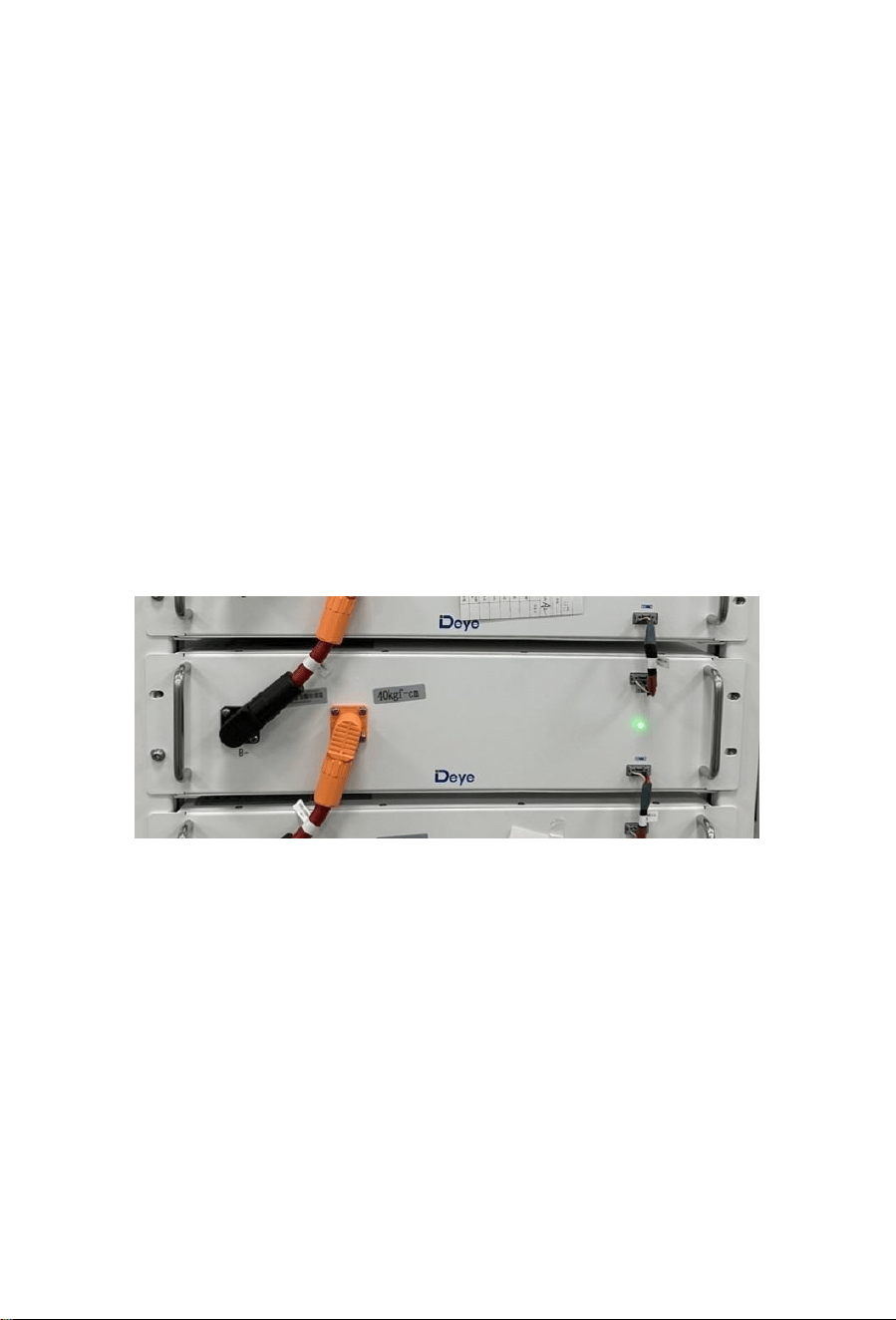
4. Turn on the battery, and insert the USB flash disk after the blue indicator is on.
5. After the blue light indicator flashes and turns off, pull out the USB flash disk to complete
the upgrade. Do not turn off the battery during the process.
6. After the blue light indicator of the battery lights up again, check the version number
through the screen or app and verify the upgrade result.
8. Battery Module Storage
A. To ensure the battery service life, the storage temperature shall be kept between 0°C~35°C.
B. The battery shall be cycled at least once every 6 months.
C. To minimize self-discharge in a long storage period, disconnect the battery connection (1/2)
of the high-voltage control box of the DC connecting cable. This will interrupt the use of the
12 V power supply installed in the high-voltage control box and prevent the battery from
self-discharging.
55
9. Disposal
For details related to the disposal of battery modules, please contact us. Service Hotline: +86
http://deyeess.com.
Observe applicable regulations on waste battery disposal. Immediately stop the use of damaged
batteries. Please contact your installer or sales partner before disposal. Ensure that the battery is
not exposed to moisture or direct sunlight.
Attention:
1. Do not dispose of batteries and rechargeable batteries as domestic waste!
You are legally obliged to return used batteries and rechargeable batteries.
2. Waste batteries may contain pollutants that can damage the environment or your health if
improperly stored or handled.
3. Batteries also contain iron, lithium and other important raw materials, which can be recycled.
For more information, please visit http://www.deyeess.com. Do not dispose of batteries as
household waste!
56
10. Legal notice
Installation and Operation Manual for BOS-A
Last revision: 09/2022
Subject to technical changes.
Deye ESS Technology Co., Ltd
China
Legal Statement
The information contained in the document is the property of Deye ESS Technology Co., Ltd. D
All information shall not be published in whole or in part without the written permission of Deye
ESS Technology Co., Lt.
11.EU Declaration of Conformity
Within the scope of the EU directives
Restriction of the use certain hazardous substances 2011 / 65 / EU (ROHS) Radio
Equipment Directive 2014/53/EU (RED)
NINGBO DEYE ESS TECHNOLOGY CO. , LTD. confirms herewith that the
products described in this document are in compliance with the fundamental
requirements and other relevant provisions of the above mentioned directives .