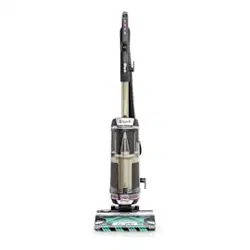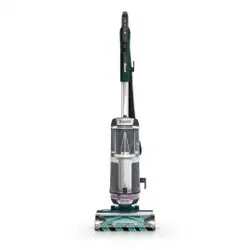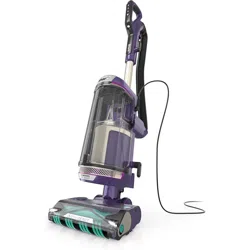

POWERDETECT
™
Upright Vacuum with Detect
Technology, DuoClean
®
Detect,
Powered Lift-Away
®
, Self-Cleaning
Brushroll, and Odor Neutralizer
Technology
AZ4000 Series
OWNER’S GUIDE

sharkclean.comsharkclean.com
READ ALL INSTRUCTIONS BEFORE
USING THIS VACUUM
1. Inspect power cord and plug for any
damage before use. DO NOT use
vacuum cleaner with a damaged cord
or plug. Turn off all controls before
plugging in or unplugging the vacuum
cleaner. Store your vacuum cleaner
with the power cord secured around
the two cord hooks. To minimize
the risk of power cord damage, do
not allow the motorized brush roll
to ingest the cord. If this occurs,
immediately shut off power to the
vacuum and remove the cord.
2. This appliance has a polarized plug.
If the plug does not fit fully into the
outlet, reverse the plug (one blade is
wider than the other). If it still does
not fit, contact a qualified electrician.
DO NOT force into outlet or try to
modify to fit.
3. Your vacuum cleaner may consist of
a motorized nozzle, wand, hose, and/
or vacuum pod. This device contains
electrical connections, electrical
wiring, and moving parts that
potentially present risk to the user.
The hose contains electrical wires.
Do not use when damaged, cut, or
punctured.
4. Use only identical replacement parts.
5. Carefully observe and follow the
instructions provided below to avoid
improper use of the appliance.
DO NOT use the vacuum for any
purpose other than those described in
this manual.
6. Before use, carefully inspect all parts
for any damage. DO NOT use if any
parts are damaged.
7. The use of an extension cord is
NOT recommended.
8. This vacuum cleaner contains
no serviceable parts.
9. This appliance can be used by
persons with reduced physical,
sensory, or mental capabilities or
lack of experience and knowledge
if they have been given supervision
or instruction concerning use of
the appliance in a safe way and
understand the hazards involved.
Cleaning and user maintenance shall
not be made by children. Keep the
appliance and its cord out of reach of
children. DO NOT allow the appliance
to be used by children. DO NOT allow
to be used as a toy. Close supervision
is necessary when used near children.
10. Always turn off the vacuum cleaner
before connecting or disconnecting
any motorized nozzles, hose, or other
accessories.
11. DO NOT handle plug or vacuum
cleaner with wet hands.
12. DO NOT use without filters in place.
13. Only use Shark® branded filters
and accessories.
14. DO NOT damage the power cord:
a) DO NOT pull or carry vacuum
cleaner by the cord or use the cord
as a handle.
b) DO NOT unplug by pulling on cord.
Grasp the plug, not the cord.
c) DO NOT run the vacuum cleaner
over the power cord, close a door
on the cord, pull the cord around
sharp corners, or leave the cord
near heated surfaces.
15. DO NOT put any objects into nozzle
or accessory openings. DO NOT use
with any opening blocked; keep free
of dust, lint, hair, and anything that
may reduce airflow.
16. DO NOT use if nozzle or accessory
airflow is restricted. If the air paths or
the motorized floor nozzle become
blocked, turn the vacuum cleaner
off and unplug from electrical outlet.
Remove all obstructions before you
plug in and turn on the unit again.
17. Keep nozzle and all vacuum openings
away from hair, face, fingers,
uncovered feet, or loose clothing.
18. DO NOT use if vacuum cleaner is
not working as it should, or has been
dropped, damaged, left outdoors, or
dropped into water.
19. Use extra care when cleaning on stairs.
20. DO NOT leave the vacuum cleaner
unattended while plugged in.
21. When powered on, keep the vacuum
cleaner moving over the carpet
surface at all times to avoid damaging
the carpet fibers.
22. DO NOT place vacuum cleaner on
unstable surfaces such as chairs
or tables.
23. Your Shark® vacuum may not
be designed to stand up on its own.
When taking a break from cleaning,
you may need to lean it against
furniture or a wall, or lay it flat
on the floor. Using the vacuum
for an application where the unit lacks
stability may result in personal injury.
24. DO NOT use to pick up:
a) Liquids.
b) Large objects.
c) Hard or sharp objects
(glass, nails, screws, or coins).
d) Large quantities of dust (drywall
dust, fireplace ash, or embers).
DO NOT use as an attachment to
power tools for dust collection.
e) Smoking or burning objects
(hot coals, cigarette butts,
or matches).
f) Flammable or combustible
materials (lighter fluid, gasoline, or
kerosene).
g) Toxic materials (chlorine bleach,
ammonia, or drain cleaner).
25. DO NOT use in the following areas:
a) Poorly lit areas.
b) Wet or damp surfaces.
c) Outdoor areas.
d) Spaces that are enclosed and may
contain explosive or toxic fumes
or vapors (lighter fluid, gasoline,
kerosene, paint, paint thinners,
mothproofing substances, or
flammable dust).
26. Turn off all controls before plugging in
or unplugging the vacuum.
27. Observe the following when
interacting with the Odor Neutralizer
Technology cartridge:
a) DO NOT attempt to disassemble
Odor Neutralizer Technology
cartridge.
b) Avoid direct contact with the
fragrance pod in the cartridge.
c) DO NOT directly inhale from the
Odor Neutralizer Technology
cartridge.
d) Keep away from children and pets.
e) Keep away from heat, sparks, and
open flame.
f) DO NOT place in direct sunlight.
FRAGRANCE CARTRIDGE FIRST AID
a) Avoid contact with fabrics and
finished surfaces.
b) Eye contact: Remove contact lenses
if present. Rinse continuously with
water for several minutes.
c) Skin contact: Wash hands
thoroughly after handling. If
irritation or rash develops, seek
medical advice/attention.
d) Inhalation: Move person to fresh air
if they are experiencing any
respiratory symptoms. If symptoms
persist, seek medical advice/
attention.
e) Ingestion: DO NOT induce
vomiting. Seek medical advice/
attention.
28. Unplug from electrical outlet when not
in use and before any maintenance or
cleaning.
29. Hand wash with water only.
Washing with cleaning chemicals
could damage the unit.
30. During cleaning or routine
maintenance, DO NOT cut anything
other than hair, fibers, or string
wrapped around the brushroll.
31. Allow all filters to air-dry completely
before replacing in the vacuum to
prevent liquid from being drawn into
electric parts.
32. Make sure the dust cup and all filters
are in place after routine maintenance.
33. If provided, secure the power
cord around the two cord hooks
during storage.
WARNING
To reduce the risk of fire, electric shock, injury, or property damage, when using
an electrical appliance, basic precautions should always be followed, including
the following:
IMPORTANT SAFETY INSTRUCTIONS
FOR HOUSEHOLD USE ONLY
SAVE THESE INSTRUCTIONS

sharkclean.comsharkclean.com
ASSEMBLY
1. Place motorized Nozzle on floor and insert Wand, pressing it in until it clicks
securely into place.
2. Place Pod onto wand and slide down to connect.
3. Insert Handle into wand, pressing it in until it clicks securely into place.
4. Connect Hose to back of pod, pressing it in until it clicks securely into place.
5. Store included accessories on the Accessory Posts on the pod.
6. Remove Odor Neutralizer Technology Dial from bag. Flip up the dial handle, align the teal
arrows, then insert the dial into the nozzle.
7. To lock and engage the dial, rotate it counterclockwise until it clicks into the desired
odor intensity setting.
See Odor Neutralizer Technology Settings and Odor Cartridge Replacement sections for
more information and instructions.
IMPORTANT: For proper operation, ensure all connections are securely clicked into place.
ASSEMBLY
(Click)
1
(Click)
2
(Click)
3
(Click)
4
5
(Turn to
Click)
7
6

sharkclean.comsharkclean.com
ODOR NEUTRALIZER TECHNOLOGY
ODOR CARTRIDGE REPLACEMENT
ODOR NEUTRALIZER TECHNOLOGY SETTINGS
ODOR NEUTRALIZER TECHNOLOGY TIPS
Flip up the dial handle and rotate the odor dial
to adjust Odor Neutralizer Technology intensity
or to unlock the dial for cartridge access.
Flip up the handle and rotate the dial clockwise
until the two teal arrows are aligned. Pull the
handle to remove the dial from the nozzle.
Rotate the cartridge counterclockwise in the dial
housing and pull out the cartridge to remove it.
Align the yellow arrow on the side of the cartridge
with the yellow arrow on the side of the dial
cover, then insert the cartridge into the dial.
Rotate the cartridge clockwise to lock it in place.
Dispose of the old cartridge by dropping it
into the trash.
Remove the new odor cartridge from the
sealed packaging. To maintain the life of
the cartridge, keep it in the sealed
packaging until you are ready to install it.
Align the teal arrow on the dial cover with
the teal arrow on the nozzle, then reinsert
the dial into the nozzle. Rotate the dial
counterclockwise until it clicks into an
intensity setting to engage. Rotate further to
change the intensity setting.
ODOR DIAL
1. REMOVE ODOR DIAL
FROM NOZZLE
2. REMOVE OLD ODOR
CARTRIDGE
3.REMOVE NEW CARTRIDGE
FROM BAG
5. INSTALL DIAL IN NOZZLE
4. INSTALL NEW CARTRIDGE
IN DIAL
6. USED CARTRIDGE
DISPOSAL
NOTE: Odor cartridges should be replaced every
6 months for optimal Odor Neutralizer Technology
performance.
NOTES: • The odor dial needs to be installed for the vacuum to function properly, with or without the odor cartridge.
• Odor Neutralizer Technology eectively deodorizes while interacting with odors from inanimate sources.
Insertion/Removal: Rotate the odor dial to align the teal arrows. Remove the dial to access
the odor cartridge for removal or replacement.
Low: Rotate the dial toward the Low position to decrease the intensity to the lowest level
when the vacuum is in use.
High: Rotate the dial toward the High position for the highest intensity level when the
vacuum is in use. This position is the recommended setting for optimal performance.
Odor Dial Must be Installed for Vacuum to Function Properly
• Remove odor cartridge from dial if you don’t want the benefits of Odor Neutralizer Technology.
Maintenance Required
• Clean all filters as recommended under Cleaning Filters.
• Empty the dust cup before storing your vacuum.
• Replace the cartridge as recommended under odor cartridge replacement.
• Visit qr.sharkclean.com/odortech to learn more and purchase replacements.
• If wet pet messes are cleaned up, thoroughly clean the vacuum.
Fragrance Strength Over Time
• The intensity of the Odor Neutralizer Technology’s fragrance may diminish over time. It may
also have no noticeable fragrance at all. This is natural and does not indicate the technology
isn’t working. Follow replacement instructions to ensure continued performance.
TURN UNTIL
CLICK TO LOCK

sharkclean.comsharkclean.com
Press power button to turn on vacuum.
Please note the brushrolls will not spin
unless the wand is reclined.
Solid White Lights: The brushrolls are spinning and the unit is working as intended.
Solid Red Lights: There is a jam in the brushroll area. Turn o the vacuum and unplug it,
then remove any blockages in the nozzle.
Flashing Red Lights: The motorized floor nozzle is overheating. Turn o the vacuum,
unplug it, and remove any blockages. Let the vacuum cool down for at least 60 minutes
before restarting.
Flashing White Lights: The vacuum is operating in an environment that is either
too hot or too cold.
White: Cleaning.
Purple: Cleaning Boost. Surface is dirty,
suction will increase to pull in hidden debris.
Red: Sensors require cleaning. Reference
maintenance section.
When an edge is detected, the arrow
indicator closest to edge will turn on, and the
headlights closest to the edge will brighten
to illuminate hidden debris.
Blinking White Arrows: When the EdgeDetect
sensors are obstructed, the arrow indicator
lights will blink. Move the unit away from
the edge, turn o power, and restart. If the
arrows continue to blink, clean the sensors.
To select the cleaning mode, tap one of the
icons on the touchscreen on the handle:
Detect Mode: Select Detect mode
to activate Smart Detect technology.
In this mode, the vacuum will
automatically detect hidden dirt,
dierent types of floor surfaces,
and edges and corners, and will
adjust suction to maximize cleaning
performance.
Manual Surface Modes: Tap one of the
surface modes to clean specific surfaces
without Smart Detect Technology.
Hard Floor: Suction and brushroll
speed optimized for cleaning hard floor
surfaces and above-floor areas.
Carpet/Low Pile: Suction and brushroll
speed optimized for deep cleaning low-
pile carpets.
Thick Carpet/Area Rug: Suction and
brushroll speed optimized for cleaning
thick carpets and area rugs.
FloorDetect™: Senses dierent surface types
and automatically adjusts brushroll speed
and suction power for optimized cleaning on
each surface.
DirtDetect: Senses hidden debris you can’t
see and automatically boosts suction power.
The LED indicator light will turn purple,
and suction will increase for more cleaning
power. Continue cleaning until the light turns
white, indicating the surface is clean.
EdgeDetect: Focuses and maximizes suction
along corners and edges to target stubborn
dirt. When an edge is detected, the arrow
indicator on the top of the nozzle will turn on.
POWER BUTTONTOUCHSCREEN SELECTOR
DIRTDETECT INDICATOR EDGEDETECT INDICATORS
WHOLE-HOME CLEANING WHOLE-HOME CLEANING
SETTINGS
SMART DETECT TECHNOLOGY
HEADLIGHT INDICATOR LIGHTS
DETECT INDICATORS
NOTE: For deep cleaning per ASTMF608 (embedded dirt in carpets), please set to Carpet/Low Pile mode.
NOTE: For maximum suction for above-floor cleaning per ASTM F558, set to Hard Floor mode.
HEADLIGHTS
The headlights will flash or turn red to
indicate issues that need attention.
DIRTDETECT INDICATOR
EDGEDETECT INDICATORS
NOTE: Detect Indicators will be o in manual
surface modes.
sharkclean.comsharkclean.com
NOTE: All accessories are compatible with both the wand and the handle.
WHOLE-HOME CLEANING
CLEANING MODES
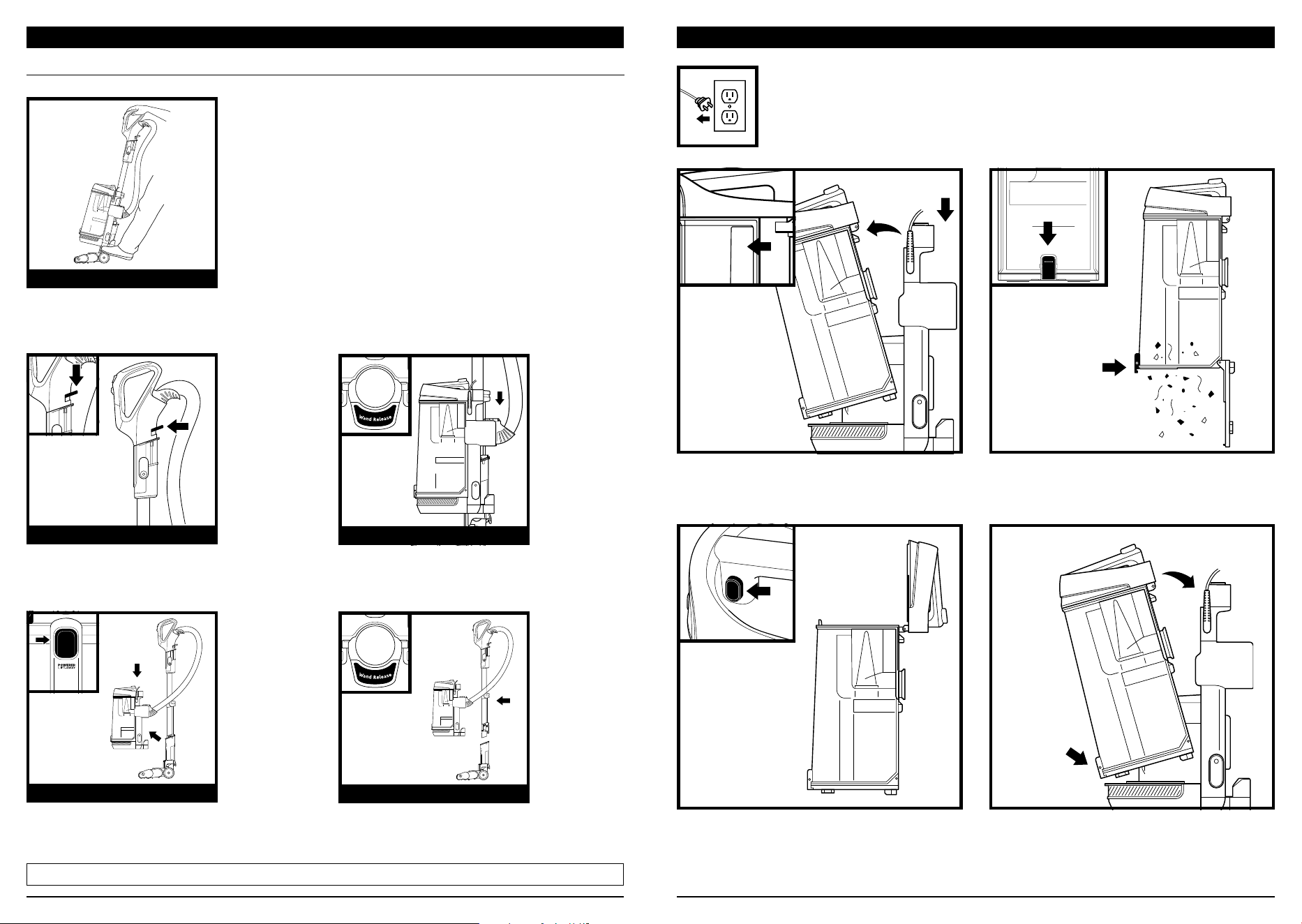
To engage brushrolls, step on
floor nozzle and tilt handle back.
Press the Wand Release button to
detach the wand from the pod.
With the pod removed, press the
Wand Release button to detach
the wand from the floor nozzle.
Press the Handle Release button to
detach the handle from the wand.
Press the Lift-Away button to detach
the pod from the floor nozzle.
UPRIGHT
ABOVE-FLOOR—HANDLE
POWERED LIFT-AWAY®
ABOVE-FLOOR—WAND
LIFT-AWAY®
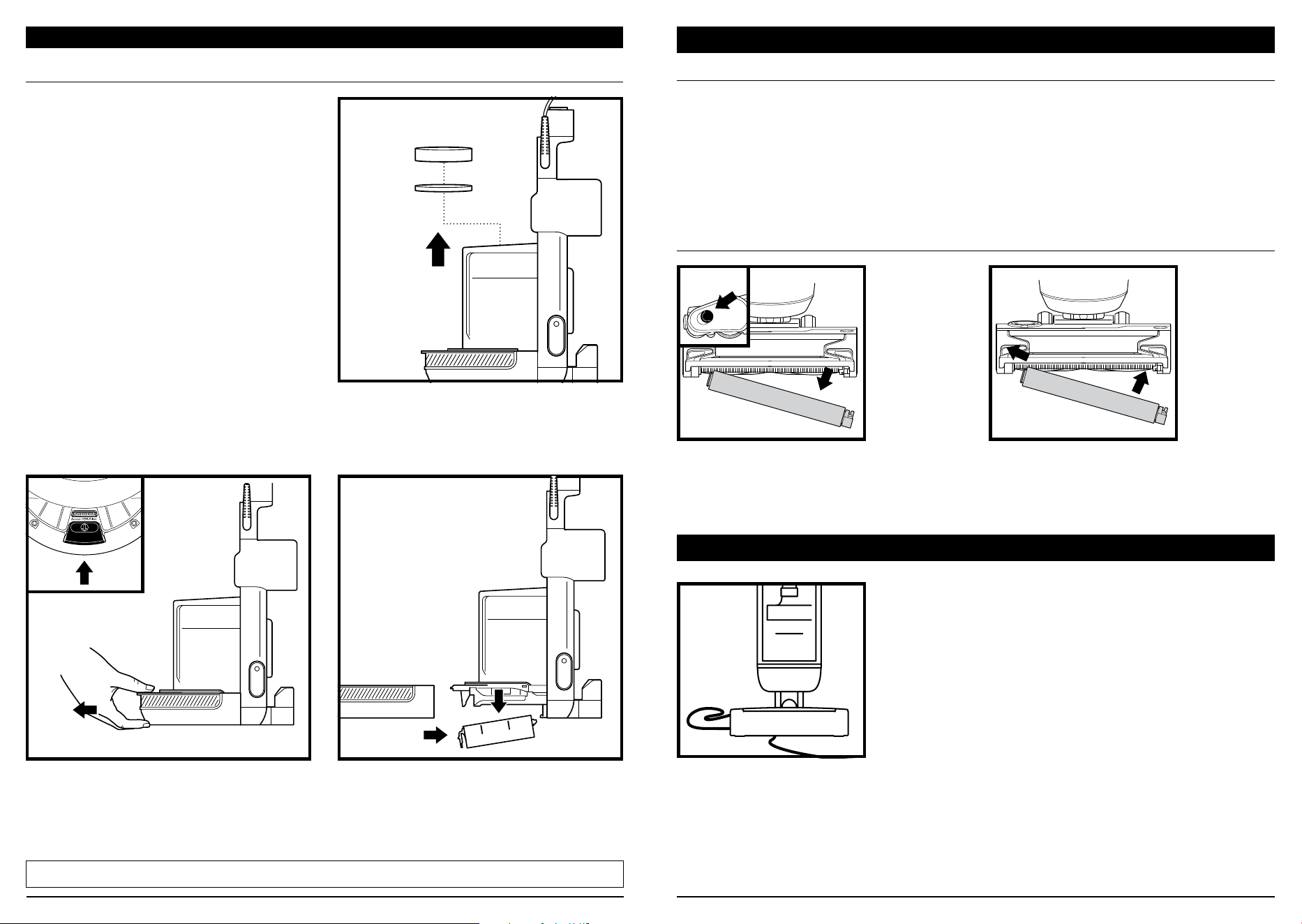
Dust Cup
Release
Dust Cup
Release
EMPTYING THE DUST CUP
To remove Dust Cup, press release button
on top of the pod. Tilt dust cup away from
wand, then lift to remove.
To reinstall, place bottom of dust cup into
pod and then tilt until it clicks into place.
To empty debris into trash, press lower release
button and bottom of dust cup will drop open.
To remove collected debris from Lint Screen,
press top release button and lift handle to
access screen.
IMPORTANT: Unplug the power cord before performing any maintenance.
sharkclean.comsharkclean.com
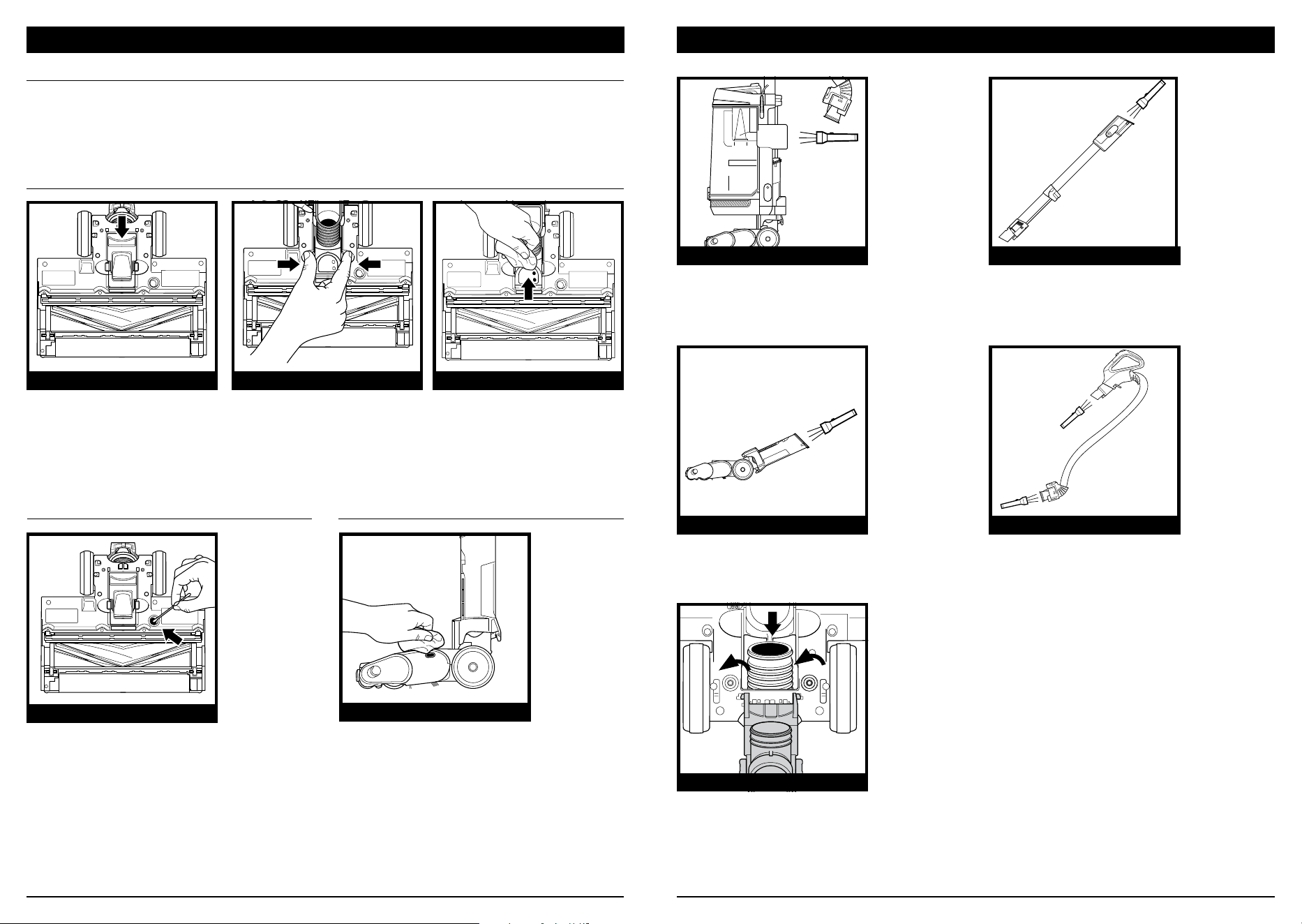
Slide the Soft Roller access button forward
to release the Soft Roller.
To minimize the risk of power cord damage,
DO NOT run the vacuum over the power
cord. If this occurs, immediately shut o
power to the vacuum and remove the cord
from the brushroll or nozzle.
Hand wash the Soft Roller as needed.
Use only water, and allow it to air-dry
completely for at least 24 hours. Reinsert
the Soft Roller in the front of the nozzle
until it clicks into place.
1. DO NOT pull or carry vacuum cleaner by
the cord or use cord as a handle.
2. DO NOT unplug by pulling on the cord.
Grasp the plug, not the cord.
3. DO NOT close the door on the cord.
4. DO NOT pull the cord around sharp
corners.
5. DO NOT leave the cord near heated
surfaces.
CLEANING THE SOFT ROLLER
MAINTENANCE
CORD MAINTENANCE
SELF-CLEANING BRUSHROLL
If any hair is wrapped around the brushroll, continue vacuuming, using Carpet/Low Pile mode
on a bare floor surface, a low-pile carpet, or a small area rug. This will allow the self-cleaning
brushroll to remove the hair wrap and send it to the dust cup.
If you run over a hard or sharp object or notice a noise change while vacuuming, check for
blockages or objects caught in the brushroll.
If some fibers remain wrapped around the brushroll after continued use, clear them from the brushroll.
NOZZLE MAINTENANCE
CLEAN HEPA FILTER EVERY YEAR
With the dust cup removed, press the release button on the Filter Door. Pull the door forward,
slide it out, then remove the HEPA filter.
To reinstall the filter, insert it into the unit and replace the filter door.
CLEAN PRE-MOTOR FILTERS
EVERY MONTH
Remove Dust Cup, then lift out Filters.
Regularly rinse and replace the filters to
maintain your vacuum’s suction power.
To prevent damage from cleaning chemicals,
rinse filters with cold water only. Allow all
filters to air-dry for at least 24 hours before
reinstalling them to prevent liquid from being
drawn into electric parts.
CLEANING AND REPLACING THE FILTERS
CLEANING FILTERS
IMPORTANT: DO NOT use soap when
cleaning the filters.
Filter
Door
Release
NOTE: The pre-motor filters should be replaced every 2.5 years. The post-motor filter should be replaced every 3 years.
Filter
Filter Door
sharkclean.comsharkclean.com
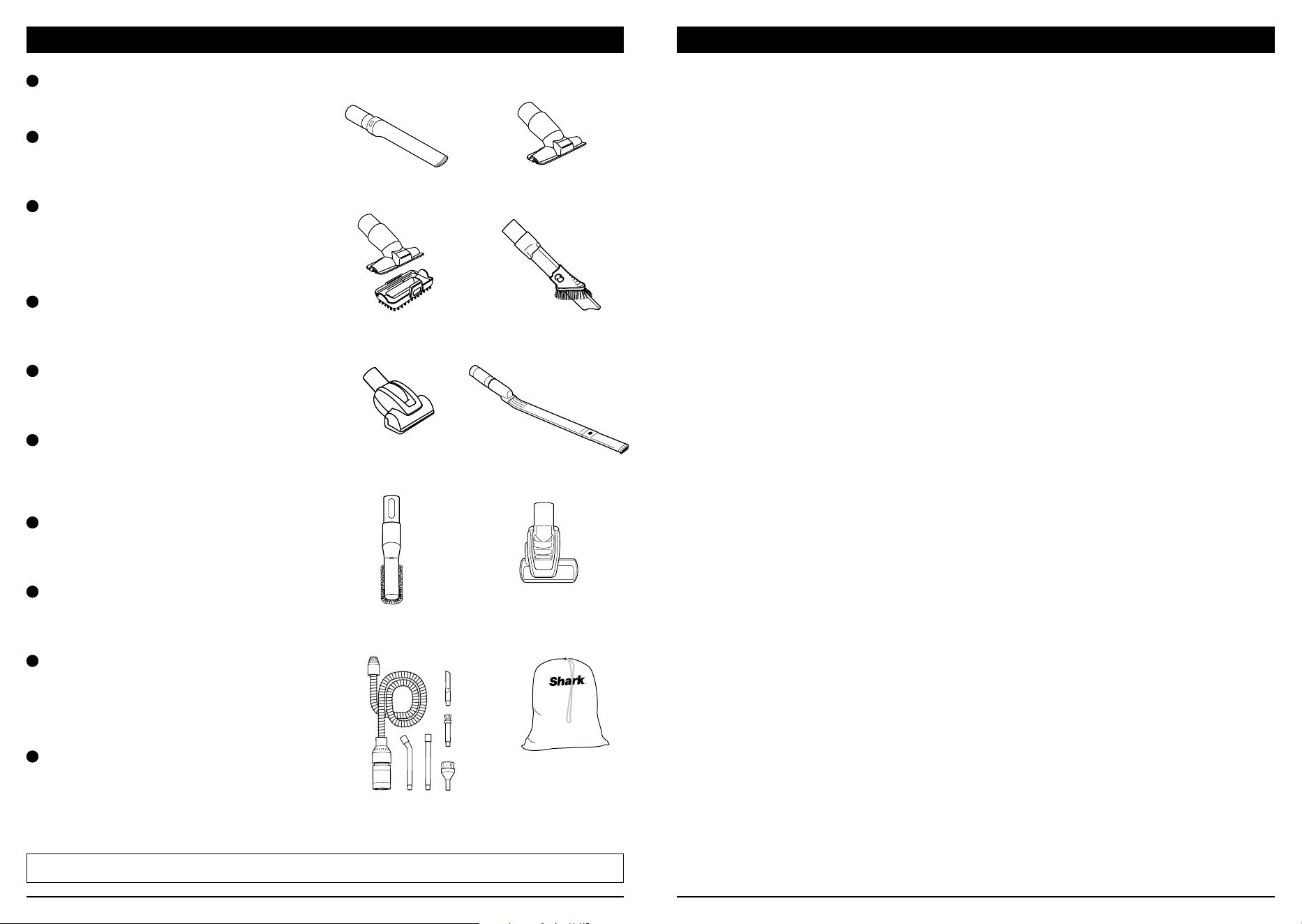
CHECKING FOR BLOCKAGES
Detach hose from vacuum pod, and
check hose and opening on back of
pod for blockages.
Detach wand from floor nozzle and handle,
and check both ends for blockages.
Detach wand from floor nozzle, tilt
nozzle neck back, and check opening
for blockages.
To access the nozzle hose, pinch the release
touchpoints on the bottom of the nozzle,
then lift the cover and clear any blockages.
Detach handle from wand and hose
from the vacuum pod, and check
openings for blockages.
HOSE BLOCKAGE
BOTTOM OF NOZZLE
EDGEDETECT SENSORS
WIPE OFF SENSORS
WAND BLOCKAGE
NOZZLE BLOCKAGE
HANDLE/HOSE BLOCKAGE
NOZZLE HOSE BLOCKAGE
MAINTENANCE
Make sure to clean the Detect sensors regularly, or when the DirtDetect Indicator is red, as hair
and other debris may build up and obstruct the sensors. If the sensors are partially obstructed,
Detect mode will not function as expected. To easily access the nozzle for sensor cleaning,
press the Powered Lift-Away button to detach the pod, then press the wand release button to
detach the wand from the nozzle.
DETECT SENSOR MAINTENANCE
1. Locate EdgeDetect sensors on the sides
of the nozzle (small clear ovals on the
top, rear edge).
2. Check the sensors, and remove any dirt
or debris that may be blocking them.
3. Gently wipe the sensors with a microfiber
cloth, using a circular motion.
1. Turn the nozzle upside
down and locate the nozzle
inlet access point between
the brushrolls and rear
wheels.
2. Pinch the nozzle hose inlet
and pull open the door.
Arrows indicate the two
small DirtDetect sensors.
3. Gently wipe the sensors
with a microfiber cloth and
remove all hair and debris.
1. Locate the FloorDetect sensor on
the bottom of the nozzle.
2. Use a cotton swab to wipe away
dirt and debris from the sensor
and surrounding area.
CLEANING THE DIRTDETECT SENSORS
CLEANING THE FLOORDETECT™ SENSOR CLEANING THE EDGEDETECT SENSORS
NOZZLE INLET ACCESS
FLOORDETECT SENSOR
sharkclean.comsharkclean.com
TROUBLESHOOTING
Power cord caught in brushroll or floor nozzle.
• To minimize the risk of power cord damage, DO NOT run the vacuum over the power cord.
If this occurs, immediately shut o power to the vacuum and remove the cord from the
brushroll or nozzle.
• Inspect power cord and plug for any damage before use. DO NOT use vacuum cleaner with
a damaged cord or plug. Turn o all controls before plugging in or unplugging the vacuum
cleaner. Store your vacuum cleaner with the power cord secured around the two cord hooks.
Vacuum is not picking up debris. No suction or light suction.
• Check filters to see if they need cleaning. Follow instructions for rinsing and air-drying the
filters before reinstalling them.
• Dust cup may be full; empty dust cup.
• Check hose, hose connections, nozzle, wand, pod, and accessories for blockages. Clear any
blockages found. See Checking for Blockages section for more information.
• If any hair, string, or carpet fibers are wrapped around the brushroll, extend cleaning time
to allow the self-cleaning brushroll to remove them. If some hair or fibers remain wrapped
around brushroll after continued use, carefully remove them. See Cleaning the Brushroll
section for more information.
• If low/no suction persists, contact Customer Service 1-800-798-7398.
Vacuum lifts area rugs.
• Make sure the touchscreen selector on the handle switch is set to the Thick Carpet/Area
Rug setting.
• Suction is powerful. Take care when vacuuming area rugs or rugs with delicately sewn edges.
DirtDetect Indicator light not responding.
• Make sure the touchscreen selector on the handle switch is set to Detect Mode. The
DirtDetect Indicator will be o in manual surface modes.
• Check sensors located in nozzle inlet to see if there are any blockages (See Detect Sensor
Maintenance section for more information.).
• Remove any blockages and clean sensors.
Brushrolls do not spin.
• If the headlight indicator lights turn red, immediately turn o and unplug the vacuum.
Remove pod and wand from floor nozzle and clear any blockages. Reconnect nozzle, plug in
vacuum, and turn on power.
• With the power on, recline the handle, which will automatically turn on the brushrolls.
Vacuum turns o on its own or headlight indicator light flashes red.
If your vacuum overheats, the thermostat will automatically turn o the motor. Perform the
following steps to restart:
1. Turn vacuum o and unplug it.
2. Empty dust cup and clean filters. See Emptying the Dust Cup and Cleaning and Replacing
the Filters sections for more information.
3. Check for blockages in hose, wand, floor nozzle, accessories, and inlet openings.
4. Allow unit to cool for a minimum of 60 minutes.
5. Plug in vacuum and turn it on.
Vacuum is emitting air that smells bad.
• Dust cup may be full; empty dust cup. Empty dust cup after each use for optimal Odor
Neutralizer Technology performance.
• Check filters to see if they need cleaning. Follow instructions for rinsing and air-drying the
filters before reinstalling them.
• Check to make sure odor cartridge is installed in the dial and the dial is installed in the nozzle.
• Check the Odor Neutralizer Technology dial on the nozzle to see what setting is enabled.
• If Odor Neutralizer Technology dial is at any setting from Low to High and the cartridge has
been installed for 6 months or longer, consider replacing it.
• If the odor cartridge is still emitting a scent but you dislike it, consider turning the intensity
down, or reinstall the dial in the nozzle without the cartridge.
• If the Odor Neutralizer Technology cartridge is not emitting a scent, consider replacing it.
For all other issues, please go to support.sharkclean.com/ or call Customer Service 1-800-798-7398.
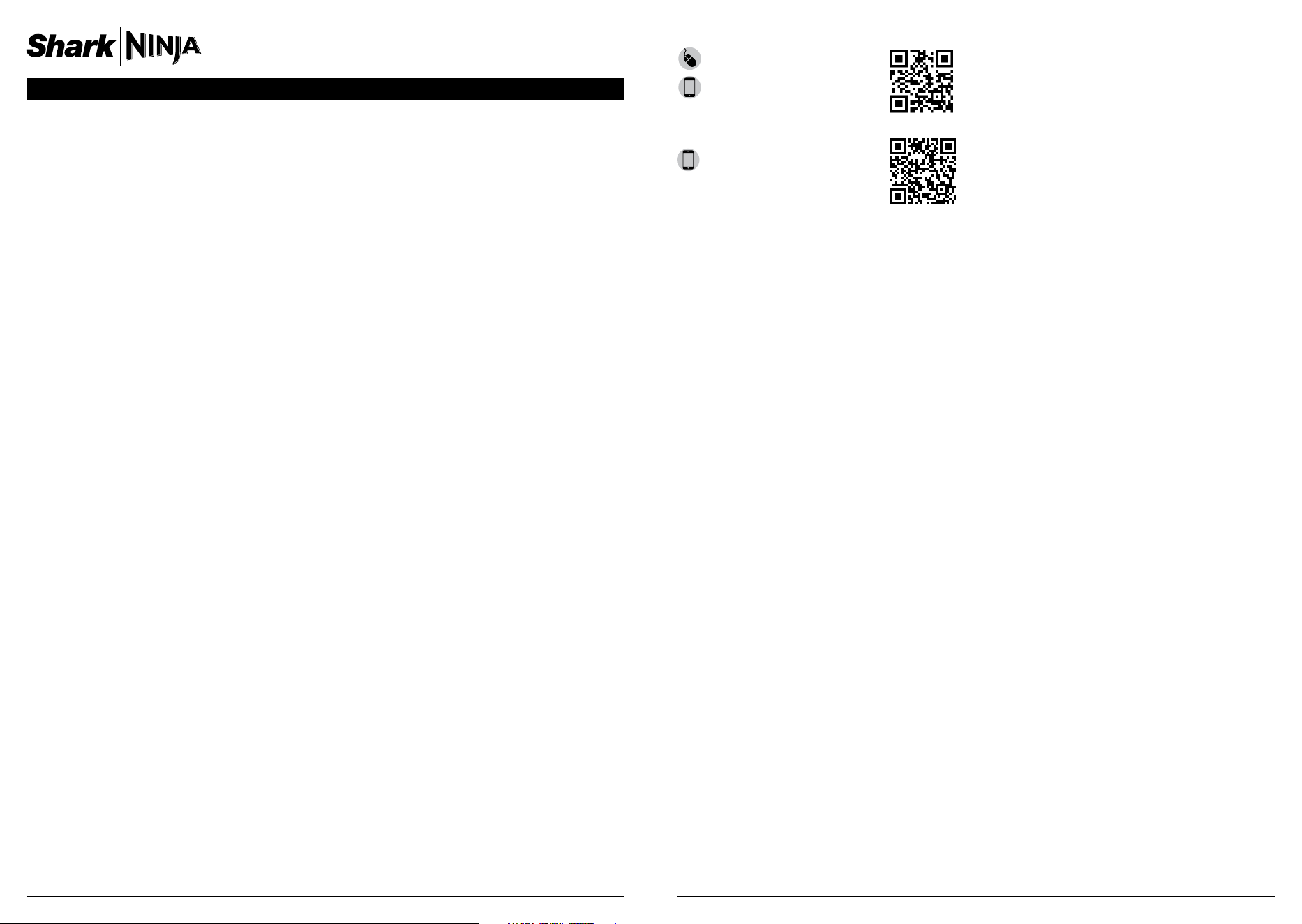
AVAILABLE ACCESSORIES
D
F
G
I
E
C
B
A
Crevice Tool
This slender tool oers extended reach to
access corners, baseboards, tight spaces,
and ceilings.
B
Upholstery Tool
Picks up hair, dust, and large debris
from mattresses, couches, curtains,
lampshades, and other delicate
upholstered fabrics.
C
Pet Multi-Tool
A single convertible tool for cleaning
tough pet messes two ways: use the sti
bristle brush to clean stuck-on debris, or
take o the bristles to reveal an upholstery
tool perfect for removing stubborn pet
hair and large piles of debris.
D
Duster Crevice Tool
Two cleaning tools in one. The crevice tool
gives you extended reach to clean in tight
spaces, while the soft brush is ideal for
dusting delicate surfaces.
E
Pet Power Brush
The turbine brush loosens and removes
pet hair and debris from carpets, and
powerfully deep-cleans dander out of
upholstery and other surfaces.
F
Under-Appliance Wand
Clean under and behind hard-to-move
appliances and furniture with this
adjustable 36” tool. Flip the extension
piece over to clean the underside of
appliances.
G
Anti-Allergen Dust Brush
This brush features nylon fiber bristles
specifically designed for removing fine
dust and allergen particles from the most
delicate surfaces.
H
HairPro® Self-Cleaning Pet Power Brush
Tackles pet hair and ground-in dirt from
above-floor areas like carpeted stairs and
upholstery, while actively removing hair
wrap as it cleans.
I
Home & Car Detail Kit
Deep-clean your car like a professional
detailer, or clean hard-to-reach areas
in your home. Micro-sized tools let you
clean around delicate objects and access
the tightest spaces like car vents and
computer keyboards.
J
Accessory Bag
This convenient accessory storage bag
measures 32 cm x 70 cm and fits the
Under-Appliance Wand. Smaller size
available at sharkaccessories.com.
A
J
H
NOTE: Not all accessories come with all units. For a list of the accessories included with this model, see the top inside flap
of the box. To order additional accessories, visit sharkaccessories.com.
sharkclean.comsharkclean.com
TIP: You can find the model and serial
numbers on the QR code label on the
bottom of the back of the vacuum pod.
Benefits of registering your product and
creating an account:
• Get easier, faster product support and
access to warranty information
• Access troubleshooting and product care
instructions
• Be among the first to know about
exclusive product promotions
RECORD THIS INFORMATION
Model Number:
����������������������������������������������������������������������������������������������������
Serial Number:
������������������������������������������������������������������������������������������������������
Date of Purchase:
��������������������������������������������������������������������������������������������
(Keep receipt)
Store of Purchase:
������������������������������������������������������������������������������������������
REGISTER YOUR PURCHASE
registeryourshark.com
Scan QR code using
mobile device
Scan here or visit
qr.sharkclean.com/odortech
for more information
TECHNICAL SPECIFICATIONS
Voltage: 120V~, 60Hz
Watts: 1416W
ODOR NEUTRALIZER TECHNOLOGY SPECIFICATIONS
1. Product Name: Odor Neutralizer Technology Cartridge
2. Manufacturer: Shark Ninja 89 A Street Needham, MA 02494
3. Weight: 17.6g / 0.62oz
4. Ingredients: Solid SM composite polymer C17 + fragrance SE 272235
FIVE (5) YEAR LIMITED WARRANTY
The Five (5) Year Limited Warranty applies to purchases made from authorized retailers of SharkNinja
Operating LLC. Warranty coverage applies to the original owner and to the original product only and is
not transferable.
SharkNinja warrants that the unit shall be free from defects in material and workmanship for a period
of five (5) years from the date of purchase when it is used under normal household conditions and
maintained according to the requirements outlined in the Owner’s Guide, subject to the following
conditions and exclusions:
What is covered by this warranty?
1. The original unit and/or non-wearable parts deemed defective, in SharkNinja’s sole discretion, will be
repaired or replaced up to five (5) years from the original purchase date.
2. In the event a replacement unit is issued, the warranty coverage ends six (6) months following the
receipt date of the replacement unit or the remainder of the existing warranty, whichever is later.
SharkNinja reserves the right to replace the unit with one of equal or greater value.
What is not covered by this warranty?
1. Normal wear and tear of wearable parts (such as foam filters, HEPA filters, pads, etc.), which require
regular maintenance and/or replacement to ensure the proper functioning of your unit, are not covered
by this warranty. Replacement parts are available for purchase at sharkaccessories.com.
2. Any unit that has been tampered with or used for commercial purposes.
3. Damage caused by misuse (e.g., vacuuming up water or other liquids), abuse, negligent handling, failure
to perform required maintenance (e.g., not cleaning the filters, not removing debris from the brushroll),
or damage due to mishandling in transit.
4. Consequential and incidental damages.
5. Defects caused by repair persons not authorized by SharkNinja. These defects include damages caused
in the process of shipping, altering, or repairing the SharkNinja product (or any of its parts) when the
repair is performed by a repair person not authorized by SharkNinja.
6. Products purchased, used, or operated outside North America.
How to get service
If your appliance fails to operate properly while in use under normal household conditions within the warranty
period, visit sharkclean.com/support for product care and maintenance self-help. Our Customer Service
Specialists are also available at 1-800-798-7398 to assist with product support and warranty service options,
including the possibility of upgrading to our VIP warranty service options for select product categories. So we
may better assist you, please register your product online at registeryourshark.com and have the product on
hand when you call.
SharkNinja will cover the cost for the customer to send in the unit to us for repair or replacement. A fee of
$25.95 (subject to change) will be charged when SharkNinja ships the repaired or replacement unit.
How to initiate a warranty claim
You must call 1-800-798-7398 to initiate a warranty claim. You will need the receipt as proof of purchase.
We also ask that you register your product online at registeryourshark.com and have the product on hand
when you call, so we may better assist you. A Customer Service Specialist will provide you with return and
packing instruction information.
How state law applies
This warranty gives you specific legal rights, and you also may have other rights that vary from state to state.
Some states do not permit the exclusion or limitation of incidental or consequential damages, so the above
may not apply to you.

© 2024 SharkNinja Operating LLC. DUOCLEAN, HAIRPRO, LIFT-AWAY, POWERED LIFT-AWAY, and
SHARK are registered trademarks of SharkNinja Operating LLC. FLOORDETECT and POWERDETECT are
trademarks of SharkNinja Operating LLC.
AZ4000Series�IB�E�MP�Mv12
PLEASE READ CAREFULLY AND KEEP FOR FUTURE REFERENCE.
This Owner’s Guide is designed to help you get a complete understanding of your new
Shark®
POWERDETECT™ Upright Vacuum with Detect Technology, DuoClean® Detect, Powered
Lift-Away®, Self-Cleaning Brushroll, and Odor Neutralizer Technology.
SharkNinja Operating LLC
US: Needham, MA 02494
CAN: Ville St-Laurent, QC H4S 1A7
1-800-798-7398
sharkclean.com
Illustrations may dier from actual product. We are constantly striving to improve our products;
therefore the specifications contained herein are subject to change without notice.
This product may be covered by one or more U.S. patents. See sharkninja.com/patents for more
information.