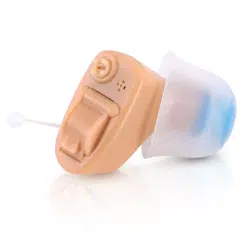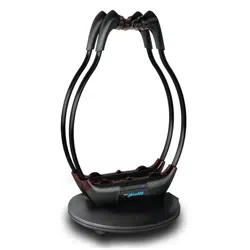

Digital Voice Amplifier
Rechargeable Invisible Earstud
Voice Sound Amplifier
PHLHA57
www.PyleUSA.com
2
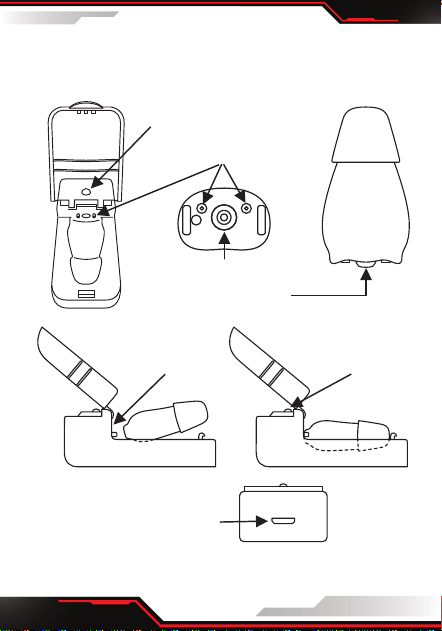
KNOW YOUR DEVICE
charging
light indicator
Micro USB slot
charging unit
fig.5fig.4
fig.6
fig.1 fig.2
charging light indicator
charging connections
volume
adjustment button
fig.3
ear
tip

www.PyleUSA.com
3
CHARGING INSTRUCTIONS
Charge your Digital Voice Amplier
1. Ensure that the Digital Voice Amplier is OFF.
The Digital Voice Amplier will not charge if the
device is ON.
2. Slide the Digital Voice Amplier into the charging
unit as shown in g.4 and g.5, with the charging
connections, g.2, facing the charging light indi-
cator, g.5. The small arrow at the base of the
Digital Voice Amplier should point towards the
charging light indicator.
3. Push lightly on the Digital Voice Amplier until it
clicks into place.
4. Insert charging cable to the slot, g.6, and the other
end into the USB socket of your AC Adaptor. Switch
ON at the mains and the charging light indicator
will light up. The cable can be used with most
standard USB AC adaptors.
5. If the charging light indicator does not light up
check that the USB cable has been inserted
correctly and the mains power is switched ON.
6. The charging light indicator is red when charging.
If the charging light indicator shows red and green
together the Digital Voice Amplier has been
inserted incorrectly, remove and re-insert the
Digital Voice Amplier. Once charged the
charging light indicator will turn green.
7. A full charge takes a minimum of 2 hours, and will

www.PyleUSA.com
4
allow for up to 12-20 hours of usage, depending on
sound output.
Please note that the rechargeable battery inside the
PHLHA57 should not be removed and/or replaced.
Attempting to self-service will void the warranty.
• The rechargeable battery is designed to last for at-
least 400 recharge cycles. With proper care, the
battery can last more than 800 charge cycles.
• To extend the life of the battery, keep the PHLHA57
in the charging unit and on charge when not in use.
OPERATING INSTRUCTIONS
Before using your PHLHA57, ensure that it is fully
charged.
• TURNING ON AND OFF
To turn ON or OFF press the volume adjustment
button, g.2
1. Gently place the Digital Voice Amplier into the
ear, once in place increase the volume by pressing
the volume adjustment button.
2. Using your nger, keep pressing the volume
adjustment button until you reach a comfortable
level. There are six levels of volume, you will hear a
beep after each level and a double beep when you
have reached maximum volume.
www.PyleUSA.com
5
3. Once you have set the volume level the Digital
Voice Amplier will remember this setting on your
next usage.
4. Always turn OFF before inserting into the charging
unit. Always keep the Digital Voice Amplier in
the charging unit and ON charge when not in use.
CARE & CLEANING
• Before and after each use remove all debris from the
ear cap.
• Ensure the ear cap hole is free of any debris. Use the
cleaning brush to clean any earwax adhered to the
Digital Voice Amplier
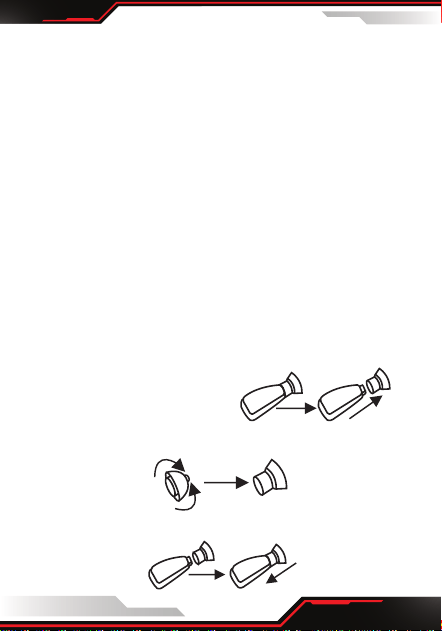
• EAR CAP REPLACEMENT
If the Ear Cap can no longer be properly cleaned, or
if they have any tears or damage, then it is time to
replace the Ear Cap.
1. Remove the old Ear Cap
2. Turn up the rim of the new Ear Cap
3. Insert new Ear Cap on Digital Voice Amplier

www.PyleUSA.com
6
4. Turn the rim of the new Ear Cap down
• Troubleshooting
THE DIGITAL VOICE AMPLIFIER WILL NOT CHARGE:
1. Is the Digital Voice Amplier seated into the
charging unit correctly.
2. Is the Digital Voice Amplier turned OFF? Ensure
that it has been turned OFF as it will not charge if
left ON.
3. Is the USB cable inserted correctly at both ends in
both the charging unit and the AC Adaptor, and is
the mains power turned ON?
CAN'T HEAR ANYTHING:
1. Has the Digital Voice Amplier been turned ON?
Check that the volume has been turned up by
pressing the volume adjustment button.
2. Is the ear tip blocked with wax or debris?
Clean the ear tip using the cleaning brush.
Do not wash the ear tip in water or use any cleaning
solutions.
3. Is the Digital Voice Amplier fully recharged?
Place and ensure the Digital Voice Amplier in the
charging case for 1-2 hours.

www.PyleUSA.com
7
WARNING:
This product is not intended for use by anyone under
the age of 18. It is designed to rectify mild to
moderate hearing impairment. You may incur
interference when using a mobile phone or radio
near the device. Remove your Digital Voice
Amplier when showering, washing your face, using
hair spray, etc. Remove prior to vigorous exercise and
when sleeping.
PLEASE NOTE:
Medical studies show that your brain requires up to
21 days to adjust to a new hearing device. Your brain
will need to re-learn how to process sounds by
prioritizing foreground over background sounds, this
will subside after few weeks. We recommend wearing
PHLHA57 for 30 to 60 min- utes a day at first and
gradually extend the time that you wear it.
Medical studies have shown that you will get far
greater satisfaction and the BEST results by wearing
two devices.
What’s in the Box:
• Voice Amplier
• (4) Ear Tip
• Charging Base
• Manual

www.PyleUSA.com
8
PHLHA57
DIGITAL VOICE AMPLIFIER
Features:
• Digital Voice Amplier
• Universal Fit Earstud
• Built-in Rechargeable Lithium Battery
• Interchangeable Ear Tip to Seal Out the Noise
• Selectable Listening Modes: Normal, Noisy
Background
• Unique Ergonomic Design to Prevent Occlusion
Eect
• Circular Volume Adjustment Knob
• Active Noise Reduction
• Over Discharge/Charge Feature
• Wider Dynamic Range Compression
Technical Specs:
• Construction Material: ABS
• Input Noise: ≤30dB
• Sensitivity: ≥30dB
• THD: 4%
• Max Sound Output: 120±5dB
• Frequency Range:200-5000Hz
• Power Supply: D.C.3.7-5V
• Working Voltage: D.C.1.5V
• Working Current: ≤4mA
• Built-in Rechargeable Battery: Lithium-ion
• Dimensions (L x W x H): 0.94’’ x 0.55’’ x 0.35’’ -inches
• Sold as: 1