ALPHA
®
LTE DOG COLLAR DEVICE
Owner’s Manual

© 2023 Garmin Ltd. or its subsidiaries
All rights reserved. Under the copyright laws, this manual may not be copied, in whole or in part, without the written consent of Garmin. Garmin reserves the right to change
or improve its products and to make changes in the content of this manual without obligation to notify any person or organization of such changes or improvements. Go to
www.garmin.com for current updates and supplemental information concerning the use of this product.
Garmin
®
, the Garmin logo, and Alpha
®
are trademarks of Garmin Ltd. or its subsidiaries, registered in the USA and other countries. Garmin Alpha
™
and Garmin Express
™
are
trademarks of Garmin Ltd. or its subsidiaries. These trademarks may not be used without the express permission of Garmin.
The BLUETOOTH
®
word mark and logos are owned by the Bluetooth SIG, Inc. and any use of such marks by Garmin is under license. Other trademarks and trade names are those of
their respective owners.
M/N A04674

Table of Contents
Getting Started................................. 1
Dog Collar Device.................................... 1
Charging the Dog Collar Device..............2
Garmin Alpha App................................... 2
Fitting the Collar on Your Dog................ 3
Dog Tracking.................................... 3
Viewing the Alpha LTE Dog Collar Device
on Your Alpha Navigator......................... 3
Pairing the Alpha LTE Dog Collar Device
to Your Compatible Garmin VHF Dog
Collar Device............................................ 4
Rescue Mode........................................... 4
Sleep Mode.............................................. 4
Device Information........................... 4
Product Updates..................................... 4
Alpha LTE Dog Collar Device
Specifications.......................................... 5
Purchasing Accessories......................... 5
Table of Contents i

Getting Started
WARNING
See the Important Safety and Product Information guide in the product box for product warnings and other
important information.
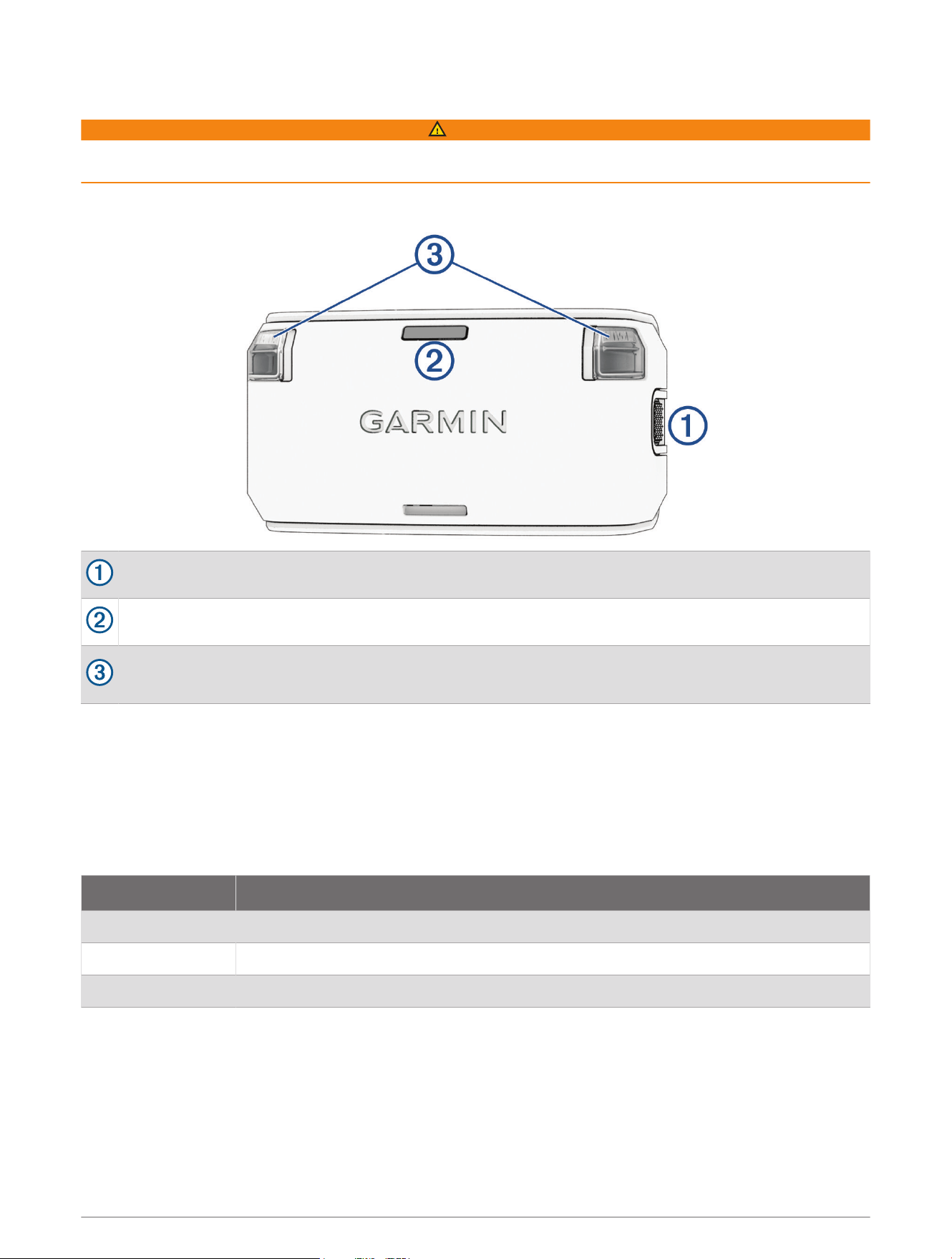
Dog Collar Device
Power button
Status LED
Beacon LEDs
NOTE: The beacon LED settings can be adjusted in the Garmin Alpha
™
app (Garmin Alpha App, page2).
Turning On the Dog Collar Device
Hold the power button until the status LED turns solid green and the dog collar device beeps.
Turning Off the Dog Collar Device
Hold the power button until the status LED turns solid red.
Alpha LTE Status LED
LED Activity Status
Flashing red No LTE connection
Flashing green LTE connected
Flashing blue LTE connected and paired to a compatible VHF dog collar device
Getting Started 1
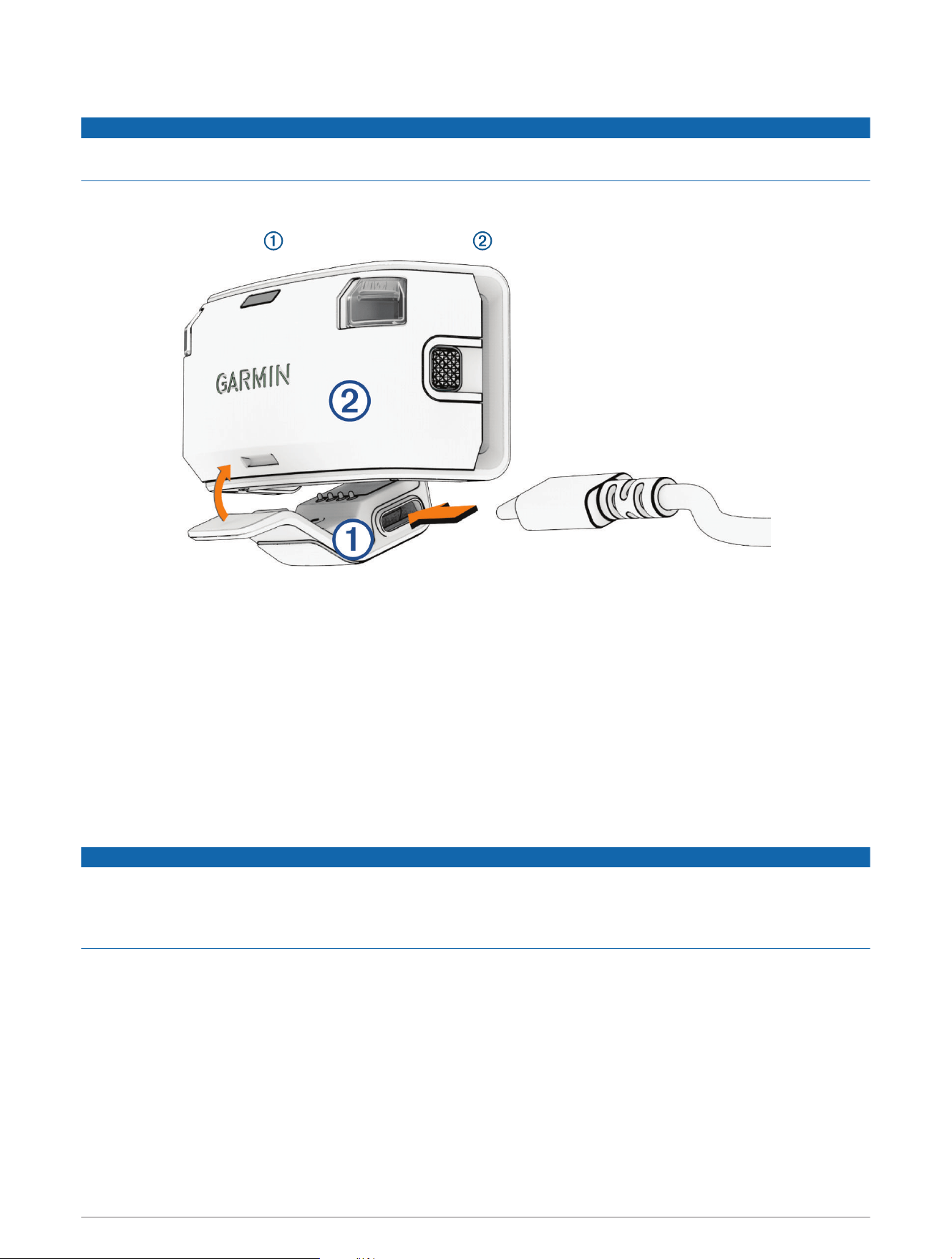
Charging the Dog Collar Device
NOTICE
To prevent corrosion, thoroughly dry the contacts on the dog collar device and the surrounding area before
connecting the charging clip.
You should fully charge the battery before you use the dog collar device for the first time. Charging a fully
depleted battery takes about five hours.
1 Snap the charging clip onto the dog collar device .
2 Plug the small end of the power cable into the USB port on the charging clip.
3 Plug the power cable into a power source.
The status LED is solid red when the collar is charging.
4 After the status LED turns solid green, remove the charging clip from the collar.
Garmin Alpha App
The Garmin Alpha app allows you to activate your LTE subscription, track your dog, adjust dog collar device
settings, review dog tracks and activities, create courses and waypoints, and use cloud storage.
You can download the Garmin Alpha app from the app store on your phone, or you can go to garmin.com
/alphaapp.
Connected Features
NOTICE
To use certain features of the Alpha LTE dog collar device, an active LTE Subscription is required and the dog
collar device must be within an LTE network coverage area. The LTE Subscription can be set up using the
Garmin Alpha app (Garmin Alpha App, page2). Purchase of an LTE Subscription does not guarantee that LTE
coverage will be available where the device is used.
LTE Subscription: Allows you to activate or manage an existing LTE Subscription using the Garmin Alpha app.
Dog Collar Device Settings: Allows you to adjust the settings for your Alpha LTE dog collar device, such as the
update rate and beacon LED settings, using the Garmin Alpha app.
Tracking: Allows you to record and review dog tracks and activities using the Garmin Alpha app.
Software Updates: Allows you to receive updates for your device software using the Garmin Alpha app.
2 Getting Started
Pairing Your Phone and Activating the Alpha LTE Dog Collar Device
NOTICE
To use certain features of the Alpha LTE dog collar device, an active LTE Subscription is required and the dog
collar device must be within an LTE network coverage area (Connected Features, page2). The LTE Subscription
can be set up using the Garmin Alpha app (Garmin Alpha App, page2). Purchase of an LTE Subscription does
not guarantee that LTE coverage will be available where the device is used.
1 Turn on the Alpha LTE dog collar device.
2 Bring your compatible phone within 10m (33ft.) of the device.
3 From the app store on your phone, download and open the Garmin Alpha app.
4 On the Alpha LTE dog collar device, press the power button until the status LED turns blue.
The device enters pairing mode.
5 Follow the on-screen instructions in the app to complete the pairing process.
6 Follow the on-screen instructions in the app to activate LTE service.
After the phone and device are paired, they connect automatically when they are turned on and within Bluetooth
®
range.
Fitting the Collar on Your Dog
CAUTION
Do not spray the device or collar with harsh chemicals including but not limited to flea or tick spray. Always
ensure that any flea or tick spray that is applied to the dog is completely dry before placing the collar on the dog.
Small amounts of harsh chemicals can damage the plastic components and collar strap.
Dog collar straps are sold separately. You can use your own dog collar strap, or purchase one from Garmin
®
(Purchasing Accessories, page5).
1 Position the collar with the dog collar device on the dog's neck with the LEDs facing forward.
2 Place the collar around the middle of the dog's neck.
3 Tighten the collar so it is snug around the dog's neck, and fasten the collar.
NOTE: The collar should fit tightly and should not be able to rotate or slide on the dog's neck. The dog must
be able to swallow food and water normally. You should observe your dog's behavior to verify the collar is
not too tight.
Dog Tracking
The Garmin Alpha app and compatible Alpha navigator (optional) allow you to track your dog or multiple dogs.
The map displays your location and your dog's location and tracks. The compass pointer indicates the direction
of the dog's current location.
Viewing the Alpha LTE Dog Collar Device on Your Alpha Navigator
When the Alpha LTE dog collar device and your compatible Alpha navigator are both paired to the Garmin Alpha
app, a compass pointer appears on the Alpha navigator map page, indicating the location of the Alpha LTE dog
collar device. The Alpha LTE dog collar device does not appear on the Alpha navigator Dog List page.
Dog Tracking 3

Pairing the Alpha LTE Dog Collar Device to Your Compatible Garmin VHF Dog
Collar Device
If you are using both the Alpha LTE dog collar device and a compatible Garmin VHF dog collar device on your
dog, you can pair the dog collar devices so they are tracked together as one asset on the Alpha navigator Dog
List page. The Alpha LTE dog collar device is displayed as a tab on the VHF dog collar page.
When paired with a compatible Garmin VHF dog collar device, the Alpha LTE dog collar device disables GPS to
preserve battery life and uses the VHF dog collar device location.
1 Bring the compatible Garmin VHF dog collar device within 10m (33ft.) of the Alpha LTE dog collar device.
2 On the compatible VHF dog collar device, press the power button until the device enters pairing mode.
TIP: For more information, see the owner's manual for the compatible VHF dog collar device.
3 On the Alpha LTE dog collar device, press the power button until the status LED flashes blue.
The dog device enters pairing mode and automatically pair within a few seconds.
NOTE: When successfully paired, the status LED on the Alpha LTE dog collar device blinks blue instead of
green (Alpha LTE Status LED, page1).
Rescue Mode
Rescue mode extends the battery life of the dog collar device to allow for more time to locate the dog, for
example at the end of a long hunt or if the dog gets out of communication range. Rescue mode changes the
update rate to 2 minutes when the dog collar device reaches 25% battery life. You can enable rescue mode in
the dog collar device settings in the Garmin Alpha app.
Sleep Mode
Sleep mode can be used to conserve the battery when you are not actively tracking your dog. You can enable or
disable sleep mode in the dog collar device settings in the Garmin Alpha app.
Device Information
Product Updates
On your computer, install Garmin Express
™
(www.garmin.com/express). On your smartphone, install the Garmin
Alpha app.
This provides easy access to these services for Garmin devices:
• Software updates
• Data uploads to Garmin Alpha
• Product registration
Setting Up Garmin Express
1 Connect the device to your computer using a USBcable.
2 Go to garmin.com/express.
3 Follow the on-screen instructions.
Connecting the Dog Collar Device to a Computer
NOTICE
To prevent corrosion, you should dry the contacts on the dog collar device and the surrounding area before
connecting the charging clip.
1 Snap the charging clip onto the dog collar device.
2 Plug the small end of the USB cable into the USB port on the charging clip.
3 Plug the other end of the USB cable into a USB port on the computer.
4 Device Information

Alpha LTE Dog Collar Device Specifications
Battery type Rechargeable, built-in lithium-ion battery
Battery life
1
When using only the Alpha LTE dog collar device:
• 10 sec. update rate: 11 hours
• Dynamic update rate: 18 hours
• 2 min. update rate: 45 hours
When paired to a compatible VHF dog collar device:
• 10 sec. update rate: 12 hours
• Dynamic update rate: 40 hours
• 2 min. update rate: 75 hours
Operating temperature
range
From -20° to 60°C (from -4° to 140°F)
Charging temperature
range
From 0° to 45°C (from 32° to 113°F )
Wireless frequencies/
protocols
2.4 GHz @ 5.0 dBm max.; 1710-1785 MHz @ 25.55 dBm max.; 832-862 MHz @ 13.1
dBm max.
EU SAR 1.99 W/kg maximum limb; 1.99 W/kg maximum torso
Water rating 1ATM
2
Maximizing the Battery Life
You can adjust certain device settings in the Garmin Alpha app to help extend the life of the battery in the dog
collar device.
• Set the update rate to 2 Minutes for the best battery life, or Dynamic for extended battery life.
• Turn off the beacon lights.
• Enable rescue mode (Rescue Mode, page4).
• When you are not actively tracking your dog, enable sleep mode (Sleep Mode, page4).
Purchasing Accessories
• Optional accessories are available at garmin.com or from your Garmin dealer.
1
Update rate can be customized in the Garmin Alpha app.
2
The device withstands pressure equivalent to a depth of 10m. For more information, go to www.garmin.com/waterrating.
Device Information 5

support.garmin.com
GUID-15D7F576-09F1-44C0-AC5E-29A402C2BBAE v2June 2024