

AboutthisDocument
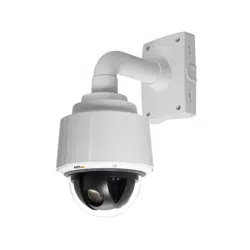
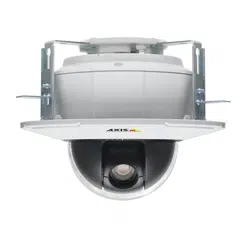
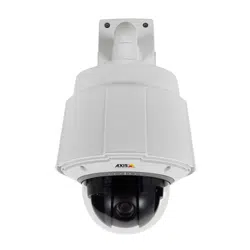
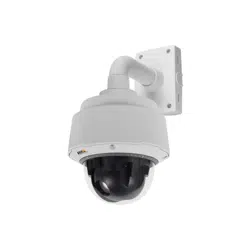
ThismanualisintendedforadministratorsandusersofAXISQ6042
PTZDomeNetworkCamera,andisapplicabletormware5.55and
later.Itincludesinstructionsforusingandmanagingtheproducton
yournetwork.Previousexperienceofnetworkingwillbeofusewhen
usingthisproduct.SomeknowledgeofUNIXorLinux-basedsystems
mayalsobebenecial,fordevelopingshellscriptsandapplications.
LaterversionsofthisdocumentwillbepostedtotheAxiswebsite,
asrequired.Seealsotheproduct’sonlinehelp,availableviathe
web-basedinterface.
LegalConsiderations
Videoandaudiosurveillancecanberegulatedbylawsthatvaryfrom
countrytocountry.Checkthelawsinyourlocalregionbeforeusing
thisproductforsurveillancepurposes.
Thisproductincludesone(1)H.264decoderlicenseandone(1)AAC
decoderlicense.Topurchasefurtherlicenses,contactyourreseller.
Liability
Everycarehasbeentakeninthepreparationofthisdocument.Please
informyourlocalAxisofceofanyinaccuraciesoromissions.Axis
CommunicationsABcannotbeheldresponsibleforanytechnicalor
typographicalerrorsandreservestherighttomakechangestothe
productandmanualswithoutpriornotice.AxisCommunicationsAB
makesnowarrantyofanykindwithregardtothematerialcontained
withinthisdocument,including,butnotlimitedto,theimplied
warrantiesofmerchantabilityandtnessforaparticularpurpose.Axis
CommunicationsABshallnotbeliablenorresponsibleforincidentalor
consequentialdamagesinconnectionwiththefurnishing,performance
oruseofthismaterial.Thisproductisonlytobeusedforitsintended
purpose.
IntellectualPropertyRights
AxisABhasintellectualpropertyrightsrelatingtotechnologyembodied
intheproductdescribedinthisdocument.Inparticular,andwithout
limitation,theseintellectualpropertyrightsmayincludeoneormore
ofthepatentslistedathttp://www.axis.com/patent.htmandoneor
moreadditionalpatentsorpendingpatentapplicationsintheUSand
othercountries.
Thisproductcontainslicensedthird-partysoftware.Seethemenuitem
“About”intheproduct’suserinterfaceformoreinformation.
ThisproductcontainssourcecodecopyrightAppleComputer,
Inc.,underthetermsofApplePublicSourceLicense2.0(see
http://www.opensource.apple.com/apsl).Thesourcecodeisavailable
fromhttp://developer.apple.com/darwin/projects/bonjour/
EquipmentModications
Thisequipmentmustbeinstalledandusedinstrictaccordancewiththe
instructionsgivenintheuserdocumentation.Thisequipmentcontains
nouser-serviceablecomponents.Unauthorizedequipmentchangesor
modicationswillinvalidateallapplicableregulatorycertications
andapprovals.
TrademarkAcknowledgments
AXISCOMMUNICATIONS,AXIS,ETRAX,ARTPECandVAPIXare
registeredtrademarksortrademarkapplicationsofAxisABinvarious
jurisdictions.Allothercompanynamesandproductsaretrademarksor
registeredtrademarksoftheirrespectivecompanies.
Apple,Boa,Apache,Bonjour,Ethernet,InternetExplorer,Linux,
Microsoft,Mozilla,Real,SMPTE,QuickTime,UNIX,Windows,Windows
VistaandWWWareregisteredtrademarksoftherespectiveholders.
JavaandallJava-basedtrademarksandlogosaretrademarksor
registeredtrademarksofOracleand/oritsafliates.UPnP
TM
isa
certicationmarkoftheUPnP
TM
ImplementersCorporation.
SD,SDHCandSDXCaretrademarksorregisteredtrademarksofSD-3C,
LLCintheUnitedStates,othercountriesorboth.Also,miniSD,microSD,
miniSDHC,microSDHC,microSDXCarealltrademarksorregistered
trademarksofSD-3C,LLCintheUnitedStates,othercountriesorboth.
RegulatoryInformation
Europe
ThisproductcomplieswiththeapplicableCEmarkingdirectives
andharmonizedstandards:
•ElectromagneticCompatibility(EMC)Directive2004/108/EC.See
ElectromagneticCompatibility(EMC),onpage2.
•LowVoltage(LVD)Directive2006/95/EC.SeeSafety,onpage2.
•RestrictionsofHazardousSubstances(RoHS)Directive2011/65/EU.
SeeDisposalandRecycling,onpage2.
Acopyoftheoriginaldeclarationofconformitymaybeobtainedfrom
AxisCommunicationsAB.SeeContactInformation,onpage3.
ElectromagneticCompatibility(EMC)
Thisequipmenthasbeendesignedandtestedtofulllapplicable
standardsfor:
•Radiofrequencyemissionwheninstalledaccordingtothe
instructionsandusedinitsintendedenvironment.
•Immunitytoelectricalandelectromagneticphenomenawhen
installedaccordingtotheinstructionsandusedinitsintended
environment.
USA
Thisequipmenthasbeentestedusingashieldednetworkcable(STP)
andfoundtocomplywiththelimitsforaClassAdigitaldevice,
pursuanttopart15oftheFCCRules.Theselimitsaredesignedto
providereasonableprotectionagainstharmfulinterferencewhenthe
equipmentisoperatedinacommercialenvironment.Thisequipment
generates,uses,andcanradiateradiofrequencyenergyand,ifnot
installedandusedinaccordancewiththeinstructionmanual,may
causeharmfulinterferencetoradiocommunications.Operationofthis
equipmentinaresidentialareaislikelytocauseharmfulinterference
inwhichcasetheuserwillberequiredtocorrecttheinterferenceat
hisownexpense.
Canada
ThisClassAdigitalapparatuscomplieswithCanadianICES-003.
Europe
ThisdigitalequipmentfulllstherequirementsforRFemission
accordingtotheClassAlimitofEN55022.Notice!ThisisaClassA
product.InadomesticenvironmentthisproductmaycauseRF
interference,inwhichcasetheusermayberequiredtotakeadequate
measures.
Thisproductfulllstherequirementsforimmunityaccording
toEN61000-6-1residential,commercialandlight-industrial
environments.
Thisproductfulllstherequirementsforimmunityaccordingto
EN61000-6-2industrialenvironments.
Thisproductfulllstherequirementsforimmunityaccordingto
EN55024ofceandcommercialenvironments
Australia/NewZealand
ThisdigitalequipmentfulllstherequirementsforRFemission
accordingtotheClassAlimitofAS/NZSCISPR22.Notice!Thisisa
ClassAproduct.InadomesticenvironmentthisproductmaycauseRF
interference,inwhichcasetheusermayberequiredtotakeadequate
measures.
Japan
この装置は、クラスA情報技術装置です。この装置を家庭環
境で使用すると電波妨害を引き起こすことがあります。こ
の場合には使用者が適切な対策を講ずるよう要求されるこ
とがあります。
Korea
이기기는업무용(A급)전자파적합기기로서판매자또는사
용자는이점을주의하시기바라며,가정외의지역에서사용
하는것을목적으로합니다.
Safety
ThisproductcomplieswithIEC/EN/UL60950-1,SafetyofInformation
TechnologyEquipment.
Thepowersupplyusedwiththisproductshallfullltherequirements
forSafetyExtraLowVoltage(SELV)andLimitedPowerSource(LPS)
accordingtoIEC/EN/UL60950-1.
DisposalandRecycling
Whenthisproducthasreachedtheendofitsusefullife,disposeof
itaccordingtolocalrawsandregulations.Forinformationabout
yournearestdesignatedcollectionpoint,contactyourlocalauthority
responsibleforwastedisposal.Inaccordancewithlocallegislation,
penaltiesmaybeapplicableforincorrectdisposalofthiswaste.

Europe
Thissymbolmeansthattheproductshallnotbedisposedof
togetherwithhouseholdorcommercialwaste.Directive2012/19/EU
onwasteelectricalandelectronicequipment(WEEE)isapplicablein
theEuropeanUnionmemberstates.Topreventpotentialharmto
humanhealthandtheenvironment,theproductmustbedisposed
ofinanapprovedandenvironmentallysaferecyclingprocess.For
informationaboutyournearestdesignatedcollectionpoint,contact
yourlocalauthorityresponsibleforwastedisposal.Businessesshould
contacttheproductsupplierforinformationabouthowtodispose
ofthisproductcorrectly.
ThisproductcomplieswiththerequirementsofDirective2011/65/EU
ontherestrictionoftheuseofcertainhazardoussubstancesin
electricalandelectronicequipment(RoHS).
China
Thisproductcomplieswiththerequirementsofthelegislative
actAdministrationontheControlofPollutionCausedbyElectronic
InformationProducts(ACPEIP).
ContactInformation
AxisCommunicationsAB
Emdalavägen14
22369Lund
Sweden
Tel:+46462721800
Fax:+4646136130
www.axis.com
Support
Shouldyourequireanytechnicalassistance,pleasecontactyourAxis
reseller.Ifyourquestionscannotbeansweredimmediately,your
resellerwillforwardyourqueriesthroughtheappropriatechannelsto
ensurearapidresponse.IfyouareconnectedtotheInternet,youcan:
•downloaduserdocumentationandsoftwareupdates
•ndanswerstoresolvedproblemsintheFAQdatabase.Search
byproduct,category,orphrase
•reportproblemstoAxissupportstaffbyloggingintoyourprivate
supportarea
•chatwithAxissupportstaff(selectedcountriesonly)
•visitAxisSupportatwww.axis.com/techsup/
LearnMore!
VisitAxislearningcenterwww.axis.com/academy/forusefultrainings,
webinars,tutorialsandguides.

AXISQ6042PTZDomeNetworkCamera
TableofContents
HardwareOverview..........................................6
ConnectorsandButtons..........................................6
LEDIndicators..................................................7
MidspanLEDIndicators..........................................8
AccessingtheProduct.......................................9
AccessfromaBrowser...........................................9
AccessfromtheInternet..........................................10
SettheRootPassword...........................................10
TheLiveViewPage..............................................11
MediaStreams.............................................14
HowtoStreamH.264............................................14
MJPEG........................................................14
AXISMediaControl(AMC)........................................14
AlternativeMethodsofAccessingtheVideoStream....................15
AccessingAudioStreams.........................................16
SettingUptheProduct......................................17
BasicSetup....................................................17
VideoandAudio............................................18
VideoStream...................................................18
StreamProles.................................................19
CameraSettings................................................20
Overlay........................................................21
PrivacyMask...................................................22
AudioSettings..................................................23
AudioClips....................................................24
LiveViewCong............................................25
PTZ(PanTiltZoom).........................................28
PresetPositions.................................................28
Gatekeeper....................................................29
Autotracking...................................................29
GuardTour.....................................................30
OSDIZones....................................................31
Advanced......................................................31
ControlQueue..................................................32
Detectors..................................................33
ShockDetection................................................33
MotionDetection...............................................33
AudioDetection................................................34
Applications...............................................36
ApplicationLicenses.............................................36
InstallApplication...............................................36
ApplicationConsiderations........................................36
Events....................................................38
SettingUpanActionRule........................................39
Recipients.....................................................40
Schedules......................................................41
Recurrences....................................................42
Recordings.................................................43
RecordingList..................................................43
ContinuousRecording............................................43
Languages.................................................44
SystemOptions.............................................45
Security.......................................................45
Date&Time....................................................47
Network.......................................................48
Storage.......................................................53
Ports&Devices.................................................54
Maintenance...................................................54
Support.......................................................55
Advanced......................................................55
ResettoFactoryDefaultSettings...................................56
4

AXISQ6042PTZDomeNetworkCamera
TableofContents
Multi-ConnectorCable(soldseparately)........................57
Troubleshooting............................................59
CheckingtheFirmware...........................................59
UpgradingtheFirmware..........................................59
Symptoms,PossibleCausesandRemedialActions.....................60
TechnicalSpecications......................................64
PerformanceConsiderations.......................................66
5
AXISQ6042PTZDomeNetworkCamera
HardwareOverview
HardwareOverview
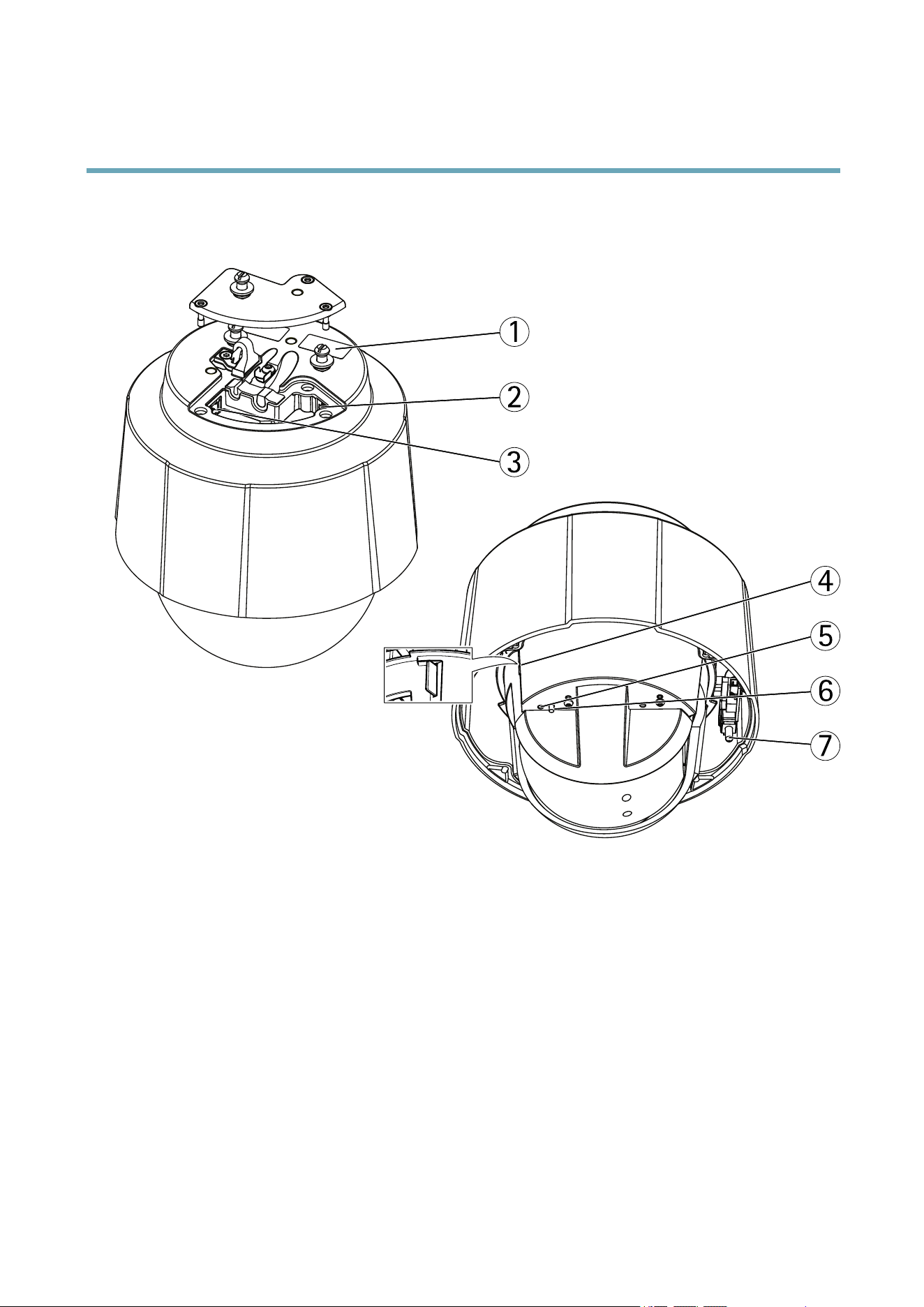
1
2
3
4
5
6
7
1
Partnumber(P/N)&Serialnumber(S/N)
2
Networkconnector(PoE+)
3
Multi-connector
4
SDcardslot
5
StatusLEDindicator
6
Controlbutton
7
Powerbutton
ConnectorsandButtons
Fortechnicalspecications,seepage64.
NetworkConnector
RJ45Ethernetconnector.SupportsPoweroverEthernetPlus(PoE+).Usethesuppliedmidspan.
6

AXISQ6042PTZDomeNetworkCamera
HardwareOverview
NOTICE NOTICE
NOTICE
Theproductshallbeconnectedusingashieldednetworkcable(STP).Allcablesconnectingtheproducttothemidspanshall
beshielded(STP)andintendedfortheirspecicuse.Makesurethatthemidspanisproperlygrounded.Forinformationabout
regulatoryrequirements,seeRegulatoryInformation,onpage2.
Multi-connector
Terminalconnectorforconnectingexternalequipment:
•Audioequipment
•Input/Output(I/O)devices
•AC/DCpowersupply
Whenconnectingexternalequipment,amulti-connectorcable(availablefromAxis)isrequiredinordertomaintaintheproduct’sIP
rating.Formoreinformation,seeMulti-ConnectorCable(soldseparately),onpage57.
SDCardSlot
AnSDcard(notincluded)canbeusedforlocalrecordingwithremovablestorage.Formoreinformation,seeTechnicalSpecications.
NOTICE NOTICE
NOTICE
Topreventcorruptionofrecordings,theSDcardshouldbeunmountedbeforeremoval.Tounmount,gotoSetup>System
Options>Storage>SDCardandclickUnmount.
ControlButton
Thecontrolbuttonisusedfor:
•Resettingtheproducttofactorydefaultsettings.Seepage56.
•ConnectingtoanAXISVideoHostingSystemservice.Seepage49.Toconnect,pressandholdthebuttonforabout1
seconduntiltheStatusLEDashesgreen.
•ConnectingtoAXISInternetDynamicDNSService.Seepage49.Toconnect,pressandholdthebuttonforabout3seconds.
PowerButton
Pressandholdthepowerbuttontotemporarilypowertheproductwhenthedomecoverisremoved.Thepowerbuttonisalsoused
withthecontrolbuttontoresetthecameratofactorydefaultsettings.Seepage56.
LEDIndicators
LED
Color
Indication
Unlit
Connectionandnormaloperation
Amber
Steadyduringstartup.Flashesduringrmwareupgrade.
Amber/redFlashesamber/redifnetworkconnectionisunavailableorlost.
RedFlashesredforrmwareupgradefailure.
Status
GreenShowssteadygreenfor10secondsfornormaloperationafterrestart.
7

AXISQ6042PTZDomeNetworkCamera
HardwareOverview
MidspanLEDIndicators
LED
Color
Indication
UnlitNocameraconnected.
GreenSteadywhencameraconnected,normaloperation.
Green,ashingSlowashwhenovercurrentorshortcircuitconditionontheport.
Port
Green,ashing
Fastashwheninputvoltageisoutofrangeorotherinternalerror.
ACGreenSteadywhenACpowerinputconnected.
8

AXISQ6042PTZDomeNetworkCamera
AccessingtheProduct
AccessingtheProduct
ToinstalltheAxisproduct,refertotheInstallationGuidesuppliedwiththeproduct.
Theproductcanbeusedwithmostoperatingsystemsandbrowsers.TherecommendedbrowsersareInternetExplorerwithWindows,
SafariwithMacintoshandFirefoxwithotheroperatingsystems.SeeTechnicalSpecications,onpage64.
ToviewstreamingvideoinInternetExplorer,allowinstallationofAXISMediaControl(AMC)whenprompted.
Note
•QuickTime
TM
isalsosupportedforviewingH.264streamsandforaudio.
•Ifyourcomputerrestrictstheuseofadditionalsoftwarecomponents,theproductcanbeconguredtouseaJavaapplet
forviewingMotionJPEG.
AccessfromaBrowser
1.Startabrowser(InternetExplorer,Firefox,Safari).
2.EntertheIPaddressorhostnameoftheAxisproductinthebrowser’sLocation/Addresseld.Toaccesstheproductfroma
Macintoshcomputer(MacOSX),clickontheBonjourtabandselecttheproductfromthedrop-downlist.
IfyoudonotknowtheIPaddress,useAXISIPUtilitytolocatetheproductonthenetwork.Forinformationabouthowto
discoverandassignanIPaddress,seetheInstallationandManagementSoftwareCDorthedocumentAssignanIPAddress
andAccesstheVideoStreamonAxisSupportwebatwww.axis.com/techsup
3.Enteryourusernameandpassword.Ifthisisthersttimetheproductisaccessed,therootpasswordmustrstbe
congured.Forinstructions,seeSettheRootPassword,onpage10.
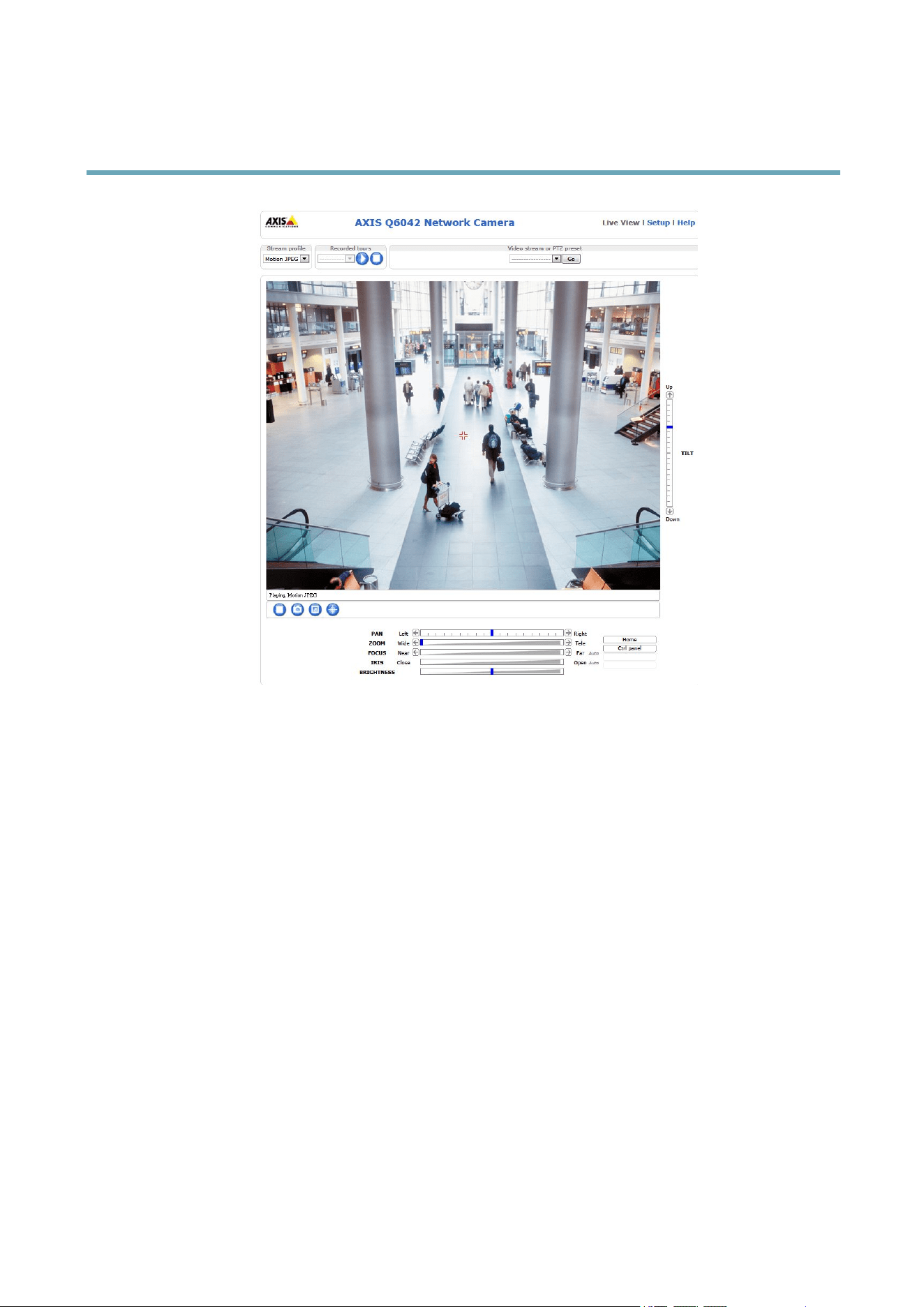
4.Theproduct’sLiveViewpageappearsinyourbrowser.
Note
ThecontrolsandlayoutoftheLiveViewpagemayhavebeencustomizedtomeetspecicinstallationrequirementsand
userpreferences.Consequently,someoftheexamplesandfunctionsfeaturedheremaydifferfromthosedisplayedin
yourownLiveViewpage.
9
AXISQ6042PTZDomeNetworkCamera
AccessingtheProduct
AccessfromtheInternet
Onceconnected,theAxisproductisaccessibleonyourlocalnetwork(LAN).ToaccesstheproductfromtheInternetyoumust
congureyournetworkroutertoallowincomingdatatrafctotheproduct.Todothis,enabletheNAT-traversalfeature,which
willattempttoautomaticallyconguretheroutertoallowaccesstotheproduct.ThisisenabledfromSetup>SystemOptions>
Network>TCP/IPAdvanced.
Formoreinformation,seeNATtraversal(portmapping)forIPv4,onpage50.SeealsoAXISInternetDynamicDNSService
atwww.axiscam.net
ForTechnicalnotesonthisandothertopics,visittheAxisSupportwebatwww.axis.com/techsup
SettheRootPassword
ToaccesstheAxisproduct,youmustsetthepasswordforthedefaultadministratoruserroot.ThisisdoneintheCongureRoot
Passworddialog,whichappearswhentheproductisaccessedforthersttime.
Topreventnetworkeavesdropping,therootpasswordcanbesetviaanencryptedHTTPSconnection,whichrequiresanHTTPS
certicate.HTTPS(HypertextTransferProtocoloverSSL)isaprotocolusedtoencrypttrafcbetweenwebbrowsersandservers.The
HTTPScerticateensuresencryptedexchangeofinformation.SeeHTTPS,onpage45.
Thedefaultadministratorusernamerootispermanentandcannotbedeleted.Ifthepasswordforrootislost,theproductmustbe
resettothefactorydefaultsettings.SeeResettoFactoryDefaultSettings,onpage56.
TosetthepasswordviaastandardHTTPconnection,enteritdirectlyinthedialog.
TosetthepasswordviaanencryptedHTTPSconnection,followthesesteps:
1.ClickUseHTTPS.
10
AXISQ6042PTZDomeNetworkCamera
AccessingtheProduct
Atemporarycerticate(validforoneyear)iscreated,enablingencryptionofalltrafctoandfromtheproduct,andthe
passwordcannowbesetsecurely.
2.Enterapasswordandthenre-enterittoconrmthespelling.
3.ClickOK.Thepasswordhasnowbeencongured.
TheLiveViewPage
ThecontrolsandlayoutoftheLiveViewpagemayhavebeencustomizedtomeetspecicinstallationrequirementsanduser
preferences.Consequently,someoftheexamplesandfunctionsfeaturedheremaydifferfromthosedisplayedinyourownLiveView
page.Thefollowingprovidesanoverviewofeachavailablecontrol.
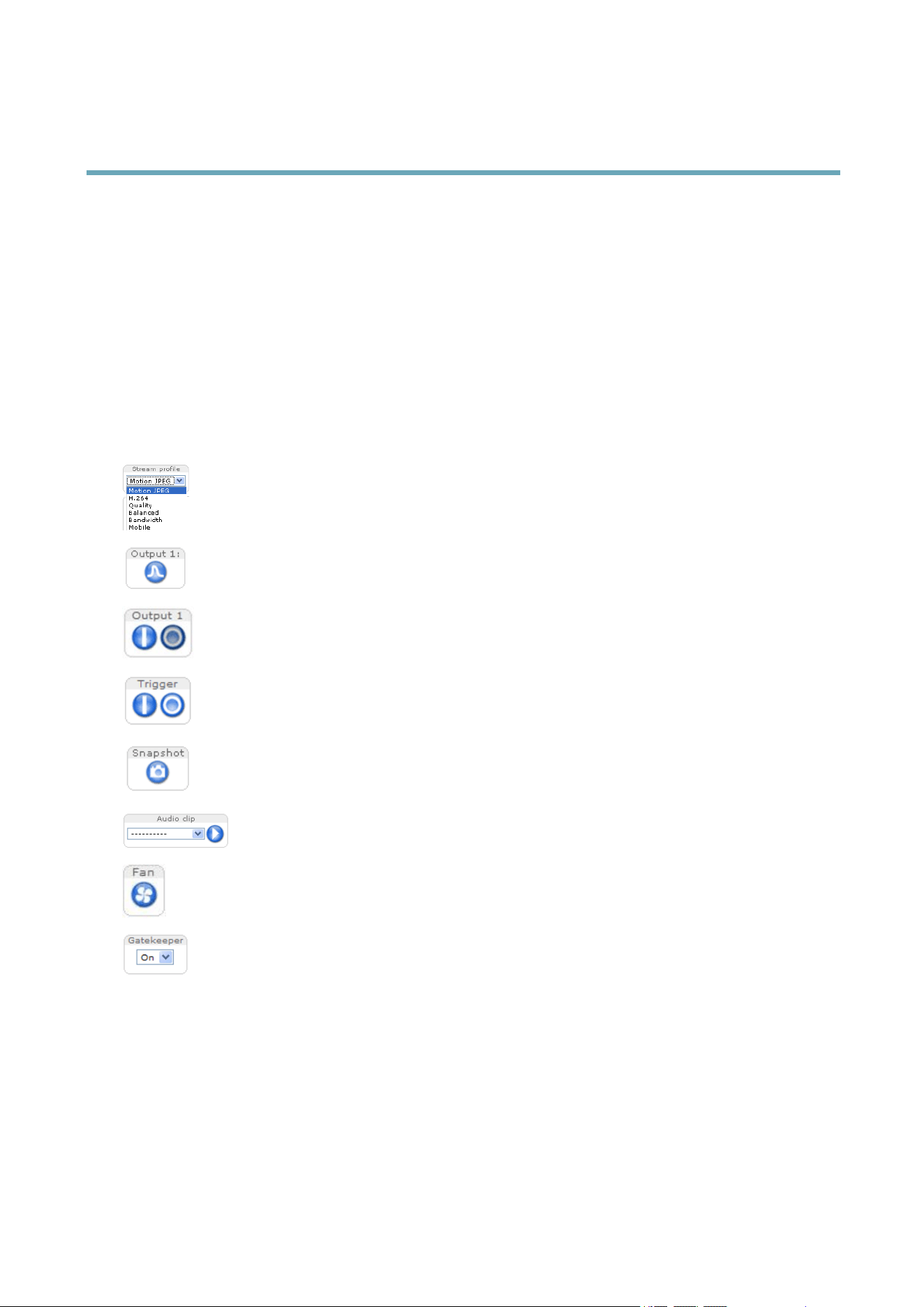
ControlsontheLiveViewPage
SelectastreamprolefortheLiveViewpagefromtheStreamProledrop-downlist.Forinformationabouthow
tocongurestreamproles,seepage19.
ClickPulsetoactivatetheproduct’soutputportforadenedperiodoftime.Forinformationabouthowtoenable
andcongureoutputbuttons,seepage26.
ClicktheActive/Inactivebuttonstomanuallyactivateandinactivetheproduct’soutputport.Forinformation
abouthowtoenableandcongureoutputbuttons,seepage26.
TheManualTriggerbuttonisusedtotriggeranactionrulefromtheLiveViewpage.Forinformationabouthowto
congureandenablethebutton,seeManualTrigger,onpage11.
ClickSnapshottosaveasnapshotofthevideoimage.Right-clickthevideoimagetosaveitinJPEGformatonyour
computer.ThisbuttonisprimarilyintendedforusewhentheAXISMediaControlviewertoolbarisnotavailable.
EnablethisbuttonfromLiveViewCong>ActionButtons.
TheAudioclipdrop-downlistallowsyoutoplayanaudioclipfromtheLiveViewpage.Selecttheaudio
clipandclickthePlaybutton.
Thefansareactivatedautomatically.Pressthisbuttontomanuallyactivatetheproduct’sfans.Toenablethefan
button,gotoLiveViewCong>ActionButtons.andselectShowfanbutton.
EnableordisabletheGatekeeperbyselectingOnorOfffromthedrop-downlist.ReadmoreabouttheGatekeeper
onpage29.
ManualTrigger
TheManualTriggerisusedtotriggeranactionrulefromtheLiveViewpage.Themanualtriggercanforexamplebeusedto
validateactionsduringproductinstallationandconguration.
Tocongurethemanualtrigger:
1.GotoSetup>Events.
2.ClickAddtoaddanewactionrule.
11

AXISQ6042PTZDomeNetworkCamera
AccessingtheProduct
3.FromtheTriggerdrop-downlist,selectInputSignal.
4.Fromtheseconddrop-downlist,selectManualTrigger.
5.Selectthedesiredactionandconguretheothersettingsasrequired.
Formoreinformationaboutactionrules,see.
ToshowthemanualtriggerbuttonsintheLiveViewpage:
1.GotoSetup>LiveViewLayout.
2.UnderActionButtons,selectShowmanualtriggerbutton.
AXISMediaControlviewertoolbar
TheAXISMediaControlviewertoolbarisavailableinInternetExploreronly.SeeAXISMediaControl(AMC),onpage14formore
information.Thetoolbardisplaysthefollowingbuttons:
ThePlaybuttonconnectstotheAxisproductandstartsplayingamediastream.
TheStopbuttonstopsthemediastream.
TheSnapshotbuttontakesasnapshotofthevideoimage.Thelocationwheretheimageissavedcanbespecied
intheAMCControlPanel.
ClicktheViewFullScreenbuttonandthevideoimagewilllltheentirescreen.PressESC(Escape)onthecomputer
keyboardtocancelfullscreenview.
TheRecordbuttonisusedtorecordthecurrentvideostream.Thelocationwheretherecordingissavedcanbespeciedin
theAMCControlPanel.EnablethisbuttonfromLiveViewCong>ViewerSettings.
AMCAudioControls
AMCaudiobuttonscontrolthespeakersandmicrophoneconnectedtotheclientcomputer.Thebuttonsareonlyvisiblewhen
audioisenabled.
Speakerbutton—Clicktoturnthespeakersonoroff.
Microphonebutton–Clicktomuteorunmutethemicrophone.InSimplex-speakeronlymode,theMicrophoneandTalk
buttonsmustbothbeactivetosendaudiototheAxisproduct.Clickeitherbuttontostopaudiotransmission.
Usetheslidertocontrolthevolumeofthespeakersandthemicrophone.
Half-duplexmode
TheTalk/Listenbuttonisusedtoswitchbetweensendingandreceivingaudio.Thebuttoncanbecongured
fromtheAudiotabintheAMCControlpanel:
•Push-To-Talkmode:Clickandholdthebuttontotalk/send.Releasethebuttontolisten.
•Togglemode:Clickoncetoswitchbetweentalkingandlistening.
Simplex–speakeronlymode
Tosendaudio,theTalkandMicrophonebuttonsmustbothbeactive.Clickeitherbuttontostopaudio
transmission.
12
AXISQ6042PTZDomeNetworkCamera
AccessingtheProduct
PTZControls
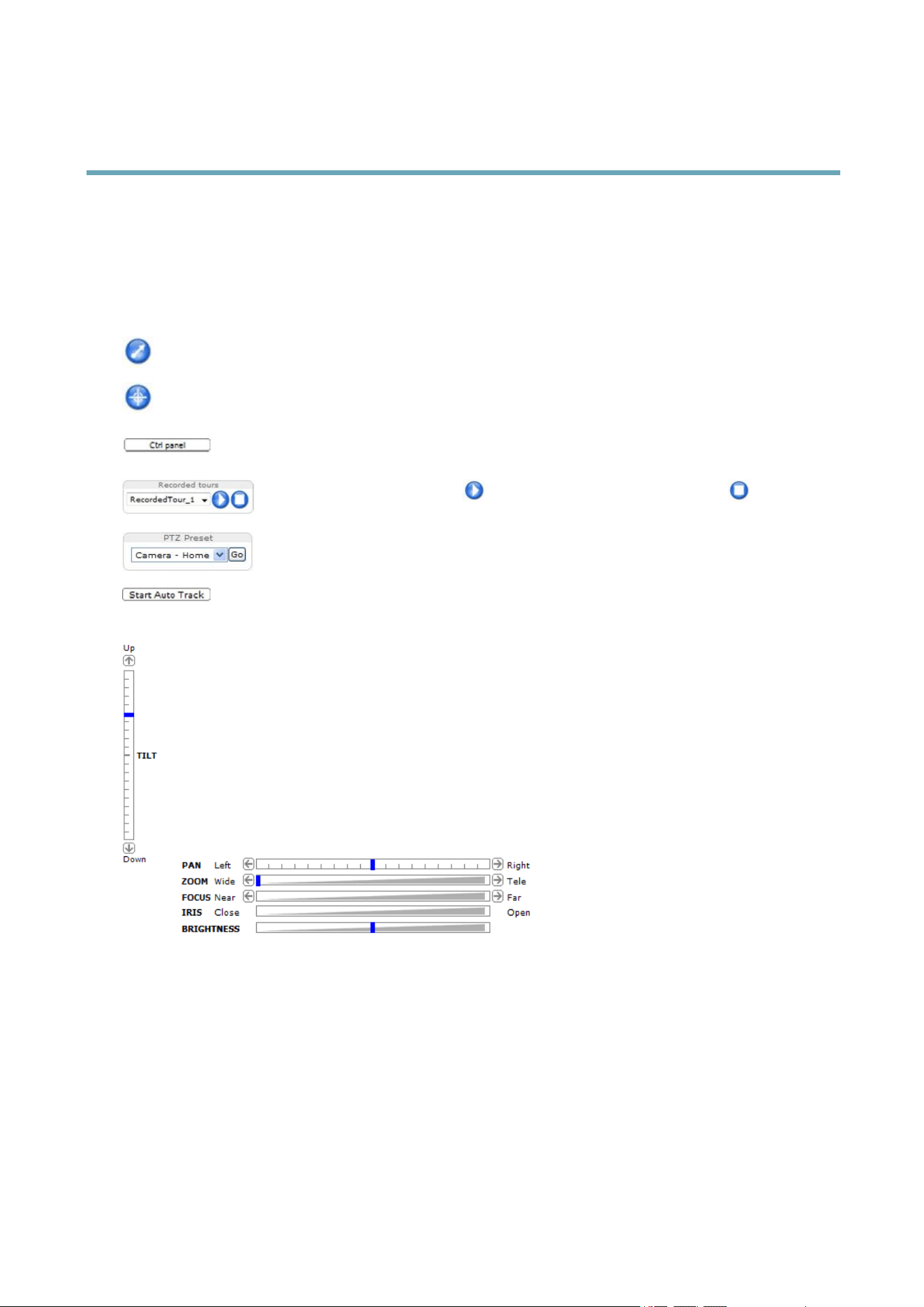
TheLiveViewpagealsodisplaysPan/Tilt/Zoom(PTZ)controls.Theadministratorcanenable/disablecontrolsforspeciedusersunder
SystemOptions>Security>Users.
WiththePTZControlQueueenabledthetimeeachuserisincontrolofthePTZsettingsislimited.Clickthebuttonstorequestor
releasecontrolofthePTZcontrols.ThePTZControlQueueissetupunderPTZ>ControlQueue.
ClicktheEmulatejoystickmodebuttonandclickintheimagetomovethecameraviewinthedirectionofthe
mousepointer.
ClicktheCentermodebuttonandclickintheimagetocenterthecameraviewonthatposition.Thecentermode
buttoncouldalsobeusedtozoominonaspecicarea.Clickintheimageanddragtodrawarectanglesurrounding
theareatobemagnied.Tozoomout,rotatethemousewheel.
ClicktheCtrlpanelbuttontoopenthePTZcontrolpanelwhichprovidesadditionalPTZcontrols.
User-denedbuttonscanalsoappearintheControlpanel.SeeControls,onpage32.
Selectarecordedtourandclick toplayapreviouslyrecordedtourandclick tostop.See
TourRecording,onpage30.
SelectaPTZpresetpositiontosteerthecameraviewtothesavedposition.SeePresetPositions,
onpage28.
ClicktheStartAutoTrackbuttontostartautotrackingdirectlyfromtheLiveViewpage.See
Autotracking,onpage29.
PanandTiltbars–Usethearrowstopanandtiltthecameraview,orclickonapositiononthebartosteerthe
cameraviewtothatposition.
Zoombar–Usethearrowstozoominandout,orclickonapositiononthebartozoomtothatposition.
Focusbar–Usethearrowstofocusthecamera,orclickonapositiononthebartosetthefocusposition.Usingthe
focusbarwilldisabletheproduct’sautofocus.Tore-enable,usethePTZcontrolpanelwhichisopenedbyclicking
theCtrlpanelbutton(seeabove).
Irisbar–Clickonapositionontheirisbartochangethedegreetowhichtheirisisopened.Thiswilldisablethe
product’sautoiris.Tore-enable,usethePTZcontrolpanelwhichisopenedbyclickingtheCtrlpanelbutton(seeabove).
Brightnessbar–Clickonapositiononthebrightnessbartoadjusttheimagebrightness.Thissettingwillnotbesaved.
Tomakeasavedchange,gotoSetup>Video>CameraSettings>Brightnessandadjustthebrightness.
ThePTZcontrolscanbedisabledunderPTZ>Advanced>Controls,seeControls,onpage32.
13

AXISQ6042PTZDomeNetworkCamera
MediaStreams
MediaStreams
TheAxisproductprovidesseveralaudioandvideostreamformats.Yourrequirementsandthepropertiesofyournetworkwill
determinethetypeyouuse.
TheLiveViewpageintheproductprovidesaccesstoH.264andMotionJPEGvideostreams,audiostreamsandtothelistofavailable
streamproles.Otherapplicationsandclientscanaccessvideoandaudiostreamsdirectly,withoutgoingviatheLiveViewpage.
HowtoStreamH.264
ThevideocompressionstandardH.264makesgooduseofbandwidth,andcanprovidehighqualityvideostreamsatlessthan1Mbit/s.
Decidingwhichcombinationofprotocolsandmethodstousedependsonyourviewingrequirements,andonthepropertiesof
yournetwork.TheavailableoptionsinAXISMediaControlare:
UnicastRTP
Thisunicastmethod(RTPoverUDP)isused
forliveunicastvideo,especiallywhenitis
importanttoalwayshaveanup-to-datevideo
stream,evenifsomeimagesaredropped.
RTPoverRTSP
Thisunicastmethod(RTPtunneledoverRTSP)
isusefulasitisrelativelysimpletocongure
rewallstoallowRTSPtrafc.
RTPoverRTSPoverHTTP
Thisunicastmethodcanbeusedtotraverse
rewalls.Firewallsarecommonlyconguredto
allowtheHTTPprotocol,thusallowingRTPto
betunneled.
Unicastingisusedforvideo-on-demand
transmissionsothatthereisnovideotrafc
onthenetworkuntilaclientconnectsand
requeststhestream.
Notethatthereareamaximumof20
simultaneousunicastconnections.
MulticastRTP
Thismethod(RTPoverUDP)shouldbeusedforlivemulticastvideo.Thevideostreamisalways
up-to-date,evenifsomeimagesaredropped.
Multicastingprovidesthemostefcientusageofbandwidthwhentherearelargenumbersof
clientsviewingsimultaneously.Amulticastcannothowever,passanetworkrouterunlessthe
routerisconguredtoallowthis.ItisnotpossibletomulticastovertheInternet,forexample.
Notealsothatallmulticastviewerscountasoneunicastviewerinthemaximumtotalof20
simultaneousconnections.
AXISMediaControlnegotiateswiththeAxisproducttodeterminethetransportprotocoltouse.Theorderofpriority,listedinthe
AMCControlPanel,canbechangedandtheoptionsdisabled,tosuitspecicrequirements.
Note
H.264islicensedtechnology.TheAxisproductincludesoneH.264viewingclientlicense.Installingadditionalunlicensed
copiesoftheclientisprohibited.Topurchaseadditionallicenses,contactyourAxisreseller.
MJPEG
ThisformatusesstandardJPEGstillimagesforthevideostream.Theseimagesarethendisplayedandupdatedataratesufcient
tocreateastreamthatshowsconstantlyupdatedmotion.
TheMotionJPEGstreamusesconsiderableamountsofbandwidth,butprovidesexcellentimagequalityandaccesstoeveryimage
containedinthestream.TherecommendedmethodofaccessingMotionJPEGlivevideofromtheAxisproductistousetheAXIS
MediaControlinInternetExplorerinWindows.
AXISMediaControl(AMC)
AXISMediaControl(AMC)inInternetExplorerinWindowsistherecommendedmethodofaccessinglivevideofromtheAxisproduct.
14
AXISQ6042PTZDomeNetworkCamera
MediaStreams
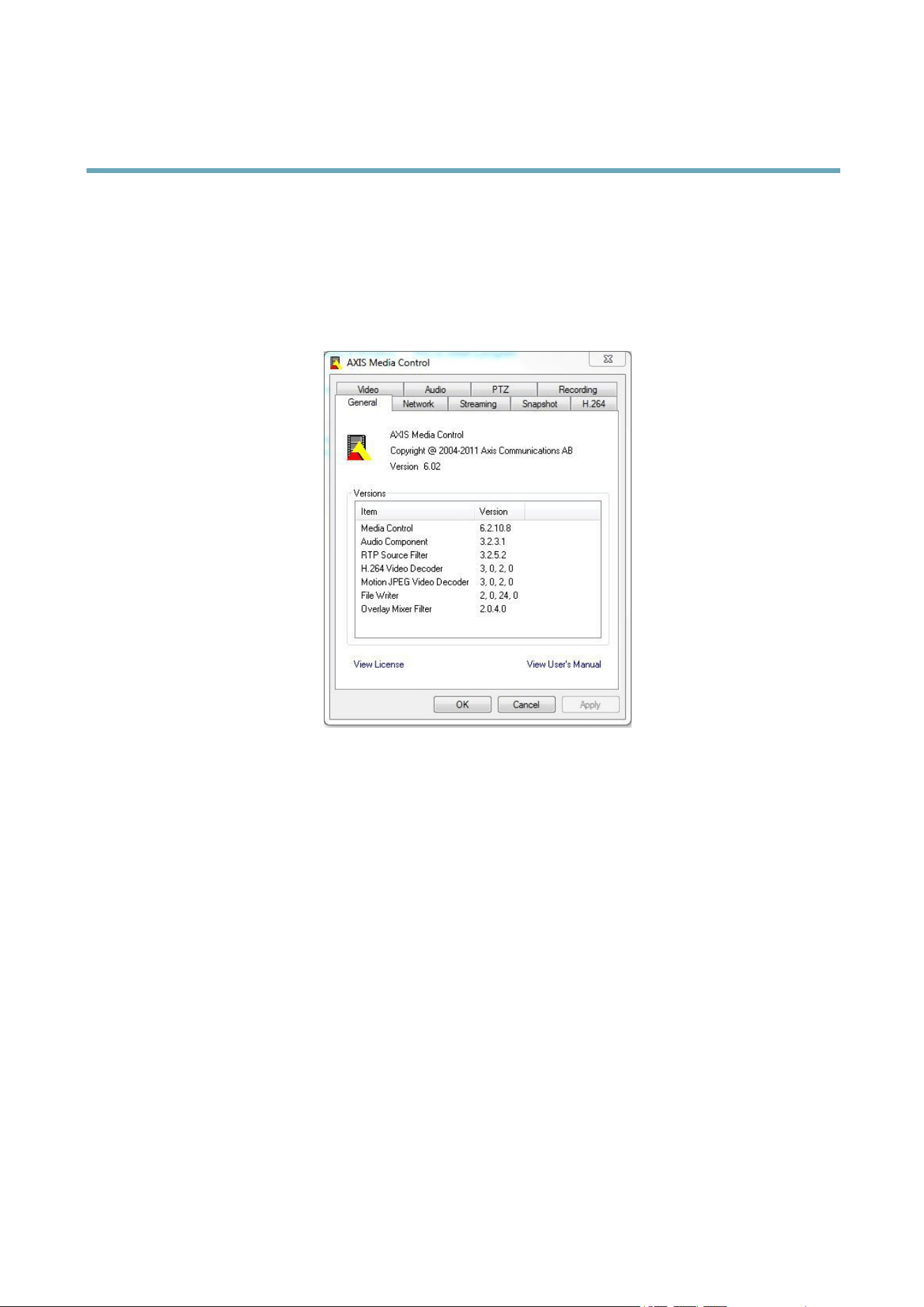
TheAMCControlPanelcanbeusedtocongurevariousvideoandaudiosettings.PleaseseetheAXISMediaControlUser’s
Manualformoreinformation.
TheAMCControlPanelisautomaticallyinstalledonrstuse,afterwhichitcanbecongured.OpentheAMCControlPanelfrom:
•WindowsControlPanel(fromtheStartmenu)
•Alternatively,right-clickthevideoimageinInternetExplorerandclickSettings.
AlternativeMethodsofAccessingtheVideoStream
YoucanalsoaccessvideoandimagesfromtheAxisproductinthefollowingways:
•MotionJPEGserverpush(ifsupportedbytheclient,Firefox,forexample).ThisoptionmaintainsanopenHTTPconnection
tothebrowserandsendsdataasandwhenrequired,foraslongasrequired.
•StillJPEGimagesinabrowser.Enterthepathhttp://<ip>/axis-cgi/jpg/image.cgi
•WindowsMediaPlayer.ThisrequiresAXISMediaControlandtheH.264decodertobeinstalled.Thefollowingpaths
canbeused:
-UnicastviaRTP:axrtpu://<ip>/axis-media/media.amp
-UnicastviaRTSP:axrtsp://<ip>/axis-media/media.amp
-UnicastviaRTSP,tunneledviaHTTP:axrtsphttp://<ip>/axis-media/media.amp
-Multicast:axrtpm://<ip>/axis-media/media.amp
•QuickTime
TM
.Thefollowingpathscanbeused:
-rtsp://<ip>/axis-media/media.amp
-rtsp://<ip>/axis-media/media.3gp
15

AXISQ6042PTZDomeNetworkCamera
MediaStreams
Note
•<ip>=IPaddess
•TheAxisproductsupportsQuickTime6.5.1andlater.
•QuickTimeaddslatencytothevideostream.
•ItmaybepossibletouseotherplayerstoviewtheH.264streamusingthepathsabove,althoughAxisdoesnotguarantee
this.
AccessingAudioStreams
TheLiveViewpageprovidesaccesstoaudiothroughAXISMediaControl;inadditionaudiocanbeaccessedinthefollowingways:
•VAPIX®ApplicationProgrammingInterface(API)Formoreinformation,visitwww.axis.com/developer
•WindowsMediaPlayersupportssimplexaudio.Thefollowingpathscanbeused:
-UnicastviaRTP:axrtpu://<ip>/axis-media/media.amp
-UnicastviaRTSP:axrtsp://<ip>/axis-media/media.amp
-UnicastviaRTSP,tunneledviaHTTP:axrtsphttp://<ip>/axis-media/media.amp
-Multicast:axrtpm://<ip>/axis-media/media.amp
•QuickTime
TM
supportsG.711andAACaudioencoding.Thefollowingpathscanbeused:
-rtsp://<ip>/axis-media/media.amp
-rtsp://<ip>/axis-media/media.3gp
•TheJavaappletsupportssimplexaudiowithG.711encoding.
16

AXISQ6042PTZDomeNetworkCamera
SettingUptheProduct
SettingUptheProduct
TheAxisproductcanbeconguredbyuserswithadministratororoperatorrights.Toopentheproduct’sSetuppages,clickSetupin
thetopright-handcorneroftheLiveViewpage.
•Administratorshaveunrestrictedaccesstoallsettings.
•OperatorshaveaccesstoallsettingsexceptSystemOptions
Seealsotheonlinehelp
.
BasicSetup
BasicSetupprovidesshortcutstothesettingsthatshouldbemadebeforeusingtheAxisproduct:
1.Users.Seepage45.
2.TCP/IP.Seepage48.
3.Date&Time.Seepage47.
4.VideoStream.Seepage18.
5.AudioSettings.Seepage23.
TheBasicSetupmenucanbedisabledfromSystemOptions>Security>Users.
17
AXISQ6042PTZDomeNetworkCamera
VideoandAudio
VideoandAudio
Thevideoandaudiosettingscanbeusedtooptimizevideoandaudioquality.Youcancongurethefollowing:
•Videostreamsettings.Seepage18.
•Streamproles.Seepage19.
•Camerasettings.Seepage20.
•Overlayimage.Seepage21.
•Privacymask.Seepage22.
•Audiosettings.Seepage23.
•Audioclips.Seepage24.
VideoStream
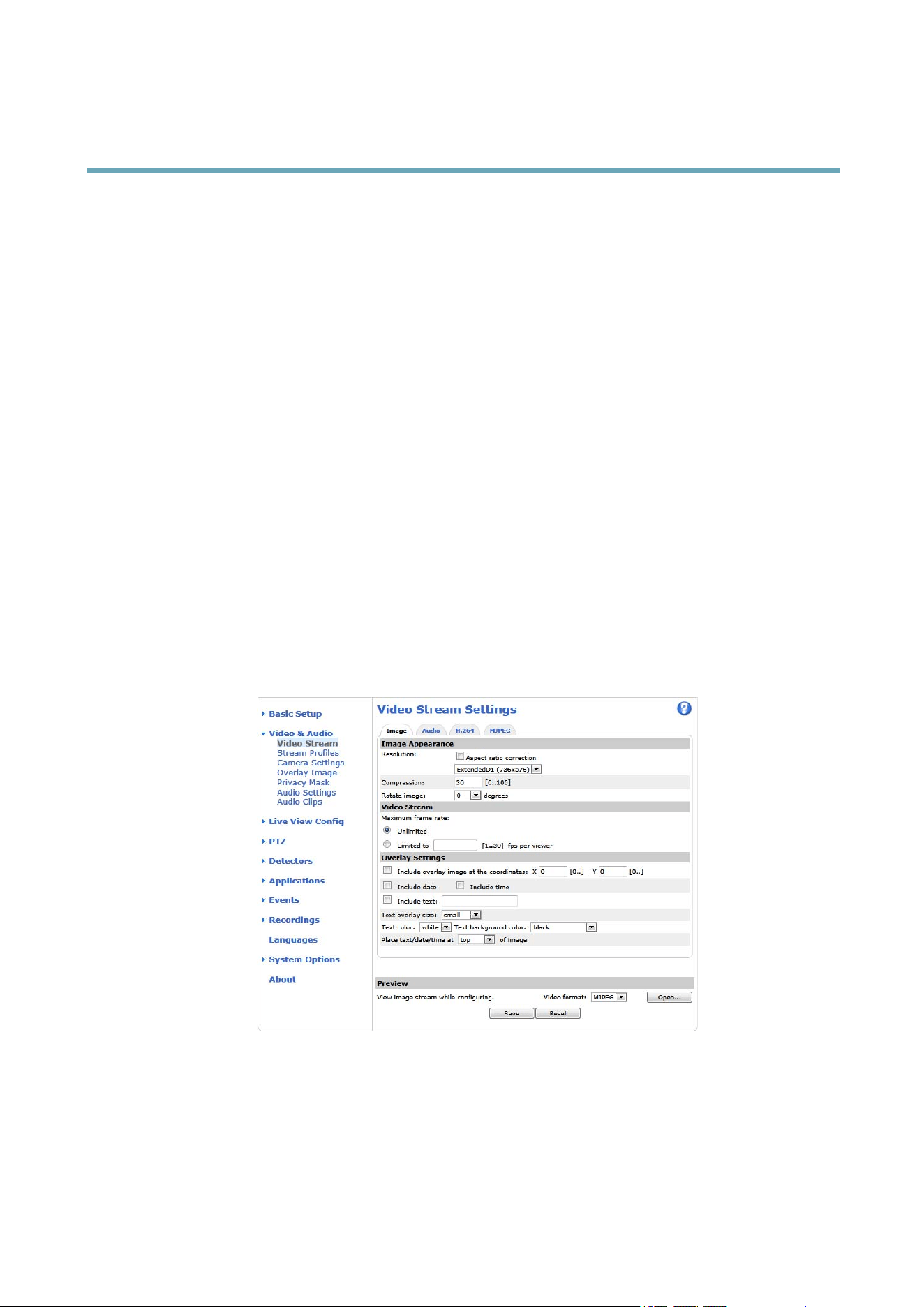
YoucandenethefollowingvideostreamsettingsfromVideo&Audio>VideoStream:
•Image.Seepage19.
•Audio.Seepage23.
•H.264.Seepage19.
•MJPEG.Seepage19.
PixelCounter
Thepixelcountershowsthenumberofpixelsinanareaoftheimage.Thepixelcounterisusefulinsituationswherethereisa
requirementthattheimageisacertainsize,forexampleinfacerecognition.
Thepixelcountercanbeaccessedfrom:
18

AXISQ6042PTZDomeNetworkCamera
VideoandAudio
•Video&Audio>VideoStream.UnderPreview,clickOpenandselecttheShowpixelcounteroptiontoenablethe
rectangleintheimage.Usethemousetomoveandresizetherectangle,orenterthenumberofpixelsintheWidth
andHeighteldsandclickApply.
•TheLiveViewpageinInternetExplorerinWindows.Right-clickintheimageandselectPixelcounter.Usethemouse
tomoveandresizetherectangle.
Image
ThedefaultimagesettingscanbeconguredunderVideo&Audio>VideoStream.SelecttheImagetab.
Thefollowingsettingsareavailable:
•Resolution.Selectthedefaultresolution.
•Compression.Thecompressionlevelaffectstheimagequality,bandwidthandlesizeofsavedimages;thelowerthe
compression,thehighertheimagequalitywithhigherbandwidthrequirementsandlargerlesizes.
•Rotateimage.Ifrequired,theimagecanberotated.
•Maximumframerate.Toavoidbandwidthproblems,theframerateallowedtoeachviewercanbeLimitedtoaxed
amount.Alternatively,theframeratecanbesetasUnlimited,whichmeanstheAxisproductalwaysdeliversthehighest
frameratepossibleunderthecurrentconditions.
•Overlaysettings.SeeOverlay,onpage21.
ClickSavetoapplythenewsettings.
H.264
H.264,alsoknownasMPEG-4Part10/AVC,isavideocompressionstandardthatprovideshighqualityvideostreamsatlowbitrates.
AnH.264videostreamconsistsofdifferenttypesofframessuchasI-framesandP-frames.AnI-frameisacompleteimagewhereas
P-framesonlycontainthedifferencesfrompreviousframes.
TheGOVlengthisthenumberofframesbetweentwoconsecutiveI-frames.IncreasingtheGOVlengthmaysaveconsiderablyon
bandwidthrequirementsinsomecases,butmayalsohaveanadverseaffectonimagequality.
TheAxisproductsupportstwoH.264proles.TheMainproleprovideshighercompressionthantheBaselineprolewiththesame
videoquality,butrequiresmoreprocessingpowertodecode.
ThebitratecanbesetasVariableBitRate(VBR)orConstantBitRate(CBR).VBRadjuststhebitrateaccordingtotheimage
complexity,usingupmorebandwidthforincreasedactivityintheimage,andlessforlowerimageactivity.CBRallowsyoutoseta
xedTargetbitratethatconsumesapredictableamountofbandwidth.Asthebitratewouldusuallyneedtoincreaseforincreased
imageactivity,butinthiscasecannot,framerateandimagequalityareaffectednegatively.Topartlycompensateforthis,itis
possibletoprioritizeeitherframerateorimagequality.Notsettingaprioritymeansthatframerateandimagequalityareequally
affected.Youmustsaveyoursettingsbeforetheycantakeeffect.
Thecurrentbitratecanbesettoappearastextoverlay.Todothis,selecttheIncludetextcheckboxoptionunderOverlay
Settingsandenterthemodier#bintheeld.
MJPEG
Sometimestheimagesizeislargeduetolowlightorcomplexscenery.Adjustingthemaximumframesizehelpstocontrolthe
bandwidthandstorageusedbytheMotionJPEGvideostreaminthesesituations.SettingtheframesizetotheDefaultsetting
providesconsistentlygoodimagequalityattheexpenseofincreasedbandwidthandstorageusageinlowlight.Limitingtheframe
sizeoptimizesbandwidthandstorageusage,butmaygivepoorimagequality.Topreventincreasedbandwidthandstorageusage,
themaximumframesizeshouldbesettoanoptimalvalue.
StreamProles
Astreamproleisasetofpredenedstreamsettingsincludingresolution,compression,framerateandoverlaysettings.Stream
prolescanbeused:
19

AXISQ6042PTZDomeNetworkCamera
VideoandAudio
•Whensettinguprecordingusingactionrules.See.
•Whensettingupcontinuousrecording.SeeContinuousRecording,onpage43.
•IntheLiveViewpage–selectthestreamprolefromtheStreamproledrop-downlist.
Forquicksetup,useoneofthepredenedstreamproles.Eachpredenedprolehasadescriptivename,indicatingitspurpose.If
required,thepredenedstreamprolescanbemodiedandnewcustomizedstreamprolescanbecreated.
Tocreateanewproleormodifyanexistingprole,gotoSetup>Video&Audio>StreamProles.
ToselectadefaultstreamprolefortheLiveViewpage,gotoSetup>LiveViewCong.
CameraSettings
TheVideo&Audio>CameraSettingspageprovidesaccesstoadvancedimagesettingsfortheAxisproduct.
ImageAppearance
IncreasingtheColorlevelincreasesthecolorsaturation.Thevalue100givesmaximumcolorsaturation.Thevalue0givesa
blackandwhiteimage.
TheimageBrightnesscanbeadjustedintherange0–100,whereahighervalueproducesabrighterimage.
IncreasingtheSharpnesscanincreasebandwidthusage.Asharperimagemightincreaseimagenoiseespeciallyinlowlight
conditions.Alowersettingreducesimagenoise,butthewholeimagewillappearlesssharp.
WhiteBalance
Whitebalanceisusedtomakecolorsintheimageappearthesameregardlessofthecolortemperatureofthelightsource.TheAxis
productcanbesettoautomaticallyidentifythelightsourceandcompensateforitscolor.Alternatively,selectthetypeoflight
sourcefromthedrop-downlist.Foradescriptionofeachavailablesetting,seetheonlinehelp
.
WideDynamicRange
Widedynamicrangecanimprovetheexposurewhenthereisaconsiderablecontrastbetweenlightanddarkareasintheimage.
EnableWDRinintensebacklightconditions.ThedifferentWDRsettingsadjustforvariousamountsofcontrastintheimage.Usea
higherWDRnumberforahighercontrast.DisableWDRinlowlightconditionsforoptimalexposure.
ExposureSettings
Exposurecontrol-Thesesettingsisusedtoadapttotheamountoflightused.Automaticisthedefaultsettinganditcanbe
usedinmostsituations.Theshutterspeedisautomaticallysettoproduceoptimumimagequality.UseManualifyouhavespecial
requirementsfortheexposuresettingandwishtolockit.Selectthedesiredexposuretimefromthedrop-downlist.
Maxexposuretime-Selectthemaximumexposuretimefromthedrop-downlist.Increasingtheexposuretimewillimprove
imagequality,butdecreasetheframerate.Theremayalsobeanincreaseinmotionblur.CheckingAllowslowshutterdecreases
theshutterspeedinlowlighttoimproveimagebrightness.
EnableBacklightcompensation-SelectEnableBacklightcompensationifabrightspotoflight,forexamplealightbulb,causes
otherareasintheimagetoappeartoodark.
Maxgain-Measuredindecibels(dB),gaindescribestheamountofamplicationappliedtoasignal,inthiscasethevisual
informationintheimage.Ahighlevelofamplicationmayprovideabetterimageinverylowlightsituations.Ahighgainwillalso
increasetheamountofimagenoise.
Exposurezones-Thissettingsdetermineswhichpartoftheimageisusedtocalculatetheexposure.Formostsituations,theAuto
settingcanbeused.Forparticularrequirement,selectapredenedarea.
IRcutlter-TheIRcutlterpreventsinfrared(IR)lightfromreachingtheimagesensor.Inpoorlightingconditions,forexampleat
night,orwhenusinganexternalIRlamp,settheIRcutltertoOff.Thisincreaseslightsensitivityandallowstheproductto“see”
20

AXISQ6042PTZDomeNetworkCamera
VideoandAudio
infraredlight.TheimageisshowninblackandwhitewhentheIRcutlterisoff.SettheIRcutltertoAutotoautomatically
switchbetweenOnandOffaccordingtothelightingconditions.
Day/Nightshiftpriority-UsetheDay/Nightshiftprioritybartodeterminewhenthecamerashiftsintoeitherdaymodeornight
mode.Bydefault,thecamerawillautomaticallychangefromdaytonightmodeatapre-denedlevelwhichcorrespondstolight
conditions.Bydraggingthebarhandletowardsthesun,thecamerawillchangetodaymodeearlierandchangetonightmodelate.
ImageSettings
Autofocusenabled-Automaticfocusingisenabledbydefault.Ifthefocuspositionischangedmanuallyusingthefocusbar,
autofocuswillbedisabledevenifenabledhere.Inthiscase,usethePTZcontrolpaneltoenableautofocus,seePTZControls,onpage
13.Ifrequired,thefocuscontrolcanbedisabledunderPTZ>Advanced>Controls.
Noisereduction-SettoOntoenablenoisereduction.Noisereductionmayincreasetheamountofmotionblur.
Stabilizer-Whenmonitoringenvironmentsthataresubjecttovibrations(e.g.trafccontrol),imagesmayappeartobeunsteady.
Selectthefrequency,HighorLow,thatgivesthebestimprovementinimagequality.Enablingthestabilizerwilllimitthedigital
zoom.Seetheonlinehelp
formoreinformation.
ImagefreezeonPTZ-SelectAllmovementstofreezetheimagewhilethecameraismovingduringapan,tiltorzoomoperation.
Oncethecamerareachesitsnewposition,theviewfromthatpositionisshown.Presetsfreezestheimageonlywhenthecamera
movesbetweenpresetpositions.
Overlay
Overlaysareusedtoprovideextrainformation,forexampleforforensicvideoanalysisorduringproductinstallationand
conguration.Overlaysaresuperimposedoverthevideostream.
Anoverlaytextcandisplaythecurrentdateandtime,oratextstring.Whenusingatextstring,modierscanbeusedtodisplay
informationsuchasthecurrentbitrateorthecurrentframerate.Forinformationaboutavailablemodiers,seeFileNaming&
Date/TimeFormatsintheonlinehelp
.
Itisalsopossibletodisplaytextwhenanactionruleistriggered,seeUsingOverlayTextinanActionRule.
Toenableoverlays:
1.GotoVideo&Audio>VideoStreamandselecttheImagetab.
2.Toincludeanoverlayimage,selectIncludeoverlayimageatthecoordinates.Theoverlayimagemustrstbeuploadedto
theAxisproduct,seeOverlayImage.
3.Toincludedateandtime,selectIncludedateandIncludetime.
4.Toincludeatextstring,selectIncludetextandenterthetextintheeld.Modierscanbeused,seeFileNaming&
Date/TimeFormatsintheonlinehelp
.
5.Denetextoverlaycharacteristicsintherelevantelds.
6.ClickSave.
Tomodifythedateandtimeformat,gotoSystemOptions>Date&Time.SeeDate&Time,onpage47.
OverlayImage
Anoverlayimageisastaticimagesuperimposedoverthevideostream.Theimage,forexamplecompanylogo,isusedtoprovide
extrainformationortomaskapartoftheimage.
Sinceitisstatic,thepositionandsizeofanoverlayimagewillremainthesameregardlessofresolutionandPan/Tilt/Zoom
movements.Tosetupadynamicmask,whichwillalwaysmaskthespeciedpartofmonitoredarea,seePrivacyMask.
Touseanoverlayimage,theimagemustrstbeuploadedtotheAxisproduct:
21

AXISQ6042PTZDomeNetworkCamera
VideoandAudio
1.GotoVideo&Audio>OverlayImage.
2.ClickBrowseandbrowsetothele.
3.ClickUpload.
4.SelecttheimagetousefromtheUseoverlayimagelist.
5.ClickSave.
Todisplaytheoverlayimage:
1.GotoVideo&Audio>VideoStreamandselecttheImagetab.
2.UnderOverlaySettings,selectIncludeoverlayimageatthecoordinatesandentertheXandYcoordinates.
3.ClickSave.
Forinformationaboutsupportedimageformats,seetheonlinehelp
.
UsingOverlayTextinanActionRule
Actionrules,see,candisplayanoverlaytextwhentheruleistriggered.Thetextcanbeusedtoprovideinformationforforensic
videoanalysis,notifysurveillanceoperatorsorvalidatetriggersandactionsduringproductinstallationandconguration.
Todisplayoverlaytextwhenanactionruleistriggered,themodier#Dshouldbeusedasdescribedbelow.Whentheruleis
triggered,#Dwillbereplacedbythetextspeciedintheactionrule.
Startbyenablingoverlaytextinthevideostream:
1.GotoVideo&Audio>VideoStreamandselecttheImagetab.
2.UnderOverlaySettings,selectIncludetext.
3.Enterthemodier#Dand,optionally,additionaltextwhichwillbedisplayedalsowhentheactionruleisnotactive.
Createtheactionrule:
1.GotoEvents>ActionRules
2.ClickAddtocreateanewrule.
3.SelectaTriggerand,optionally,aScheduleandAdditionalconditions.Seetheonlinehelpfordetails.
4.FromtheActionslist,selectOverlayText
5.EnterthetexttodisplayintheTexteld.Thisisthetextthat#Dwillbereplacedby.
6.SpecifytheDuration.Thetextcanbedisplayedwhiletheruleisactiveorforaxednumberofseconds.
Example
Todisplaythetext“Motiondetected”whenmotionisdetected,enter#DintheIncludetexteldandenter“Motiondetected”in
theTexteldwhensettinguptheactionrule.
PrivacyMask
Aprivacymaskisanareaofsolidcolorthatprohibitsusersfromviewingpartsofthemonitoredarea.Privacymaskscannotbe
bypassedviatheVAPIX®ApplicationProgrammingInterface(API).
ThePrivacyMaskList,Video&Audio>PrivacyMask,showsallthemasksthatarecurrentlyconguredintheAxisproductand
indicatesiftheyareenabled.
22

AXISQ6042PTZDomeNetworkCamera
VideoandAudio
SincethePan/Tilt/Zoomcoordinatesdeneitssizeandposition,aprivacymaskisdynamicinrelationtothemonitoredarea.This
meansthatregardlessoftheangleandzoomofthelens,thesameplaceorobjectwillbehidden.Todeneatwhatmagnicationthe
maskshouldbedisplayed,zoomtothedesiredlevelandclickSetlevel.
Youcanaddanewmask,re-sizethemaskwiththemouse,chooseacolorforthemask,andgivethemaskaname.
Formoreinformation,seetheonlinehelp
.
Important
Addingmanyprivacymasksmayaffecttheproduct’sperformance.
AudioSettings
TheaudiofunctionalityforeachvideostreamisenabledunderVideo&Audio>VideoStream>Audio.
Note
Amulti-connectorcable(availablefromAxis;Multi-ConnectorCable(soldseparately))isrequiredwhenconnectingexternal
audioequipmenttotheAxisproduct.
AudioModes
TheAxisproductsupportsthefollowingaudiomodes:
Fullduplex-Simultaneoustwo-wayaudioallowingtheAxisproducttotransmitandreceiveaudioatthesametime.Thereisno
echocancellation;iffeedbackloopsappear,trymovingthemicrophoneorthespeaker.
Half-duplex-AudiocanbetransmittedtoandfromtheAxisproductbutonlyinonedirectionatatime.Totransmitaudiousingthe
LiveViewpage,usetheTalkandListenbuttons,seeAMCAudioControls,onpage12.
Simplex—speakeronly-AudioistransmittedfromaclienttotheAxisproductandcanbeplayedbyaspeakerconnected
totheproduct.TotransmitaudiousingtheLiveViewpage,theTalkandMicrophonebuttonsmustbothbeactive,seeAMC
AudioControls,onpage12.
Simplex—microphoneonly-AudiocapturedbytheproductmicrophoneistransmittedfromtheAxisproducttooneormoreclients.
Tosettheaudiomode,gotoVideo&Audio>AudioSettingsandselectthedesiredmodefromtheAudiomodedrop-downlist.
AudioInput
AnexternalmicrophoneoralinesourcecanbeconnectedtotheAudio-inconnector.ConguretheaudioinputsettingsunderVideo
&Audio>AudioSettings.
Note
Amulti-connectorcable(availablefromAxis)isrequiredwhenconnectingexternalaudioequipmenttotheAxisproduct.
SeeMulti-ConnectorCable(soldseparately).
UsetheInputgaintocontrolthevolume(dBFullScale)oftheaudioinput.Ifthesoundistoolow,chooseahigherdB,toamplify
thesound.Ifthesoundistoohigh,choosealowerdB.TheLevelbargivesavisualrepresentationoftheaudiosignallevelindB
relativetothefull-scaleinputlevel.
•Green—thesignalisatagoodlevel.
•Yellow—thesignalisbecomingdistorted.
•Red—thesignalisdistorted.
UsetheEncodingoptiontoselectdigitalaudioencodingformat.
23

AXISQ6042PTZDomeNetworkCamera
VideoandAudio
•AACrequiresalicenseforbothencodinganddecoding.AACistheleastcomplicatedandmostwidelyusedcodec.If
achievingthebestpossibleaudioqualityisapriority,AACistherecommendedcodectouse.AnAAClicenseisincluded
intheAxisproduct.
•G711isanunlicensedstandardcodecthatisusefulwhenintegratingaudiointoaVoIPsystem
•G726isanunlicensedspeechcodecthatismostcommonlyusedwithinthesecurityindustry.
TheSampleratedenesthenumberoftimespersecondthesoundissampled.Ahighersampleratewillprovidebetteraudio
quality,butalsorequiresagreaterbandwidth.
SettherequiredBitratedependingontheselectedencoding.Ahigherbitratewillgivebetteraudioquality.Alowerbitrate
mayhavelatencyordelay,butwillrequirelessbandwidth.
Formoreinformationaboutthesesettings,pleaseseetheonlinehelp
.
AudioOutput
AnexternalspeakercanbeconnectedtotheAudio-outconnector(abuilt-inamplierisrequiredforthis).Theoutputcanbe
connectedtoanotheramplierwithspeakers.Astereoconnectormustbeusedfortheaudioout.
ConguretheaudiooutputsettingsunderVideo&Audio>AudioSettings.
Note
Amulti-connectorcable(availablefromAxis;Multi-ConnectorCable(soldseparately))isrequiredwhenconnectingexternal
audioequipmenttotheAxisproduct.
Outputgain-Controlthevolume(dBFullScale)ofthelineaudiooutput.Ifthesoundistoolow,chooseahigherdB.Ifthe
soundistoohigh,choosealowerdB.
AudioClips
AnaudioclipisasoundlethatcanbeplayedwheneventsoccurordirectlyfromtheLiveViewpage.Theaudioclipmustrstbe
uploadedtotheAxisproductorrecordedbyamicrophoneconnectedtotheproduct.
Toadd,download,modifyorremoveaudioclips,gotoVideo&Audio>AudioClips.Formoreinformationseetheonlinehelp
.
ToconguretheAxisproducttoplayaudioclipswhenaneventoccurs,anactionrulemustbesetup.Formoreinformation,see.
Note
Audioclipscannotbeusediftheproduct’saudiofunctionalityisenabled.TheaudiofunctionalityisenabledontheAudio
tabunderVideo&Audio>VideoStream.
24
AXISQ6042PTZDomeNetworkCamera
LiveViewCong
LiveViewCong
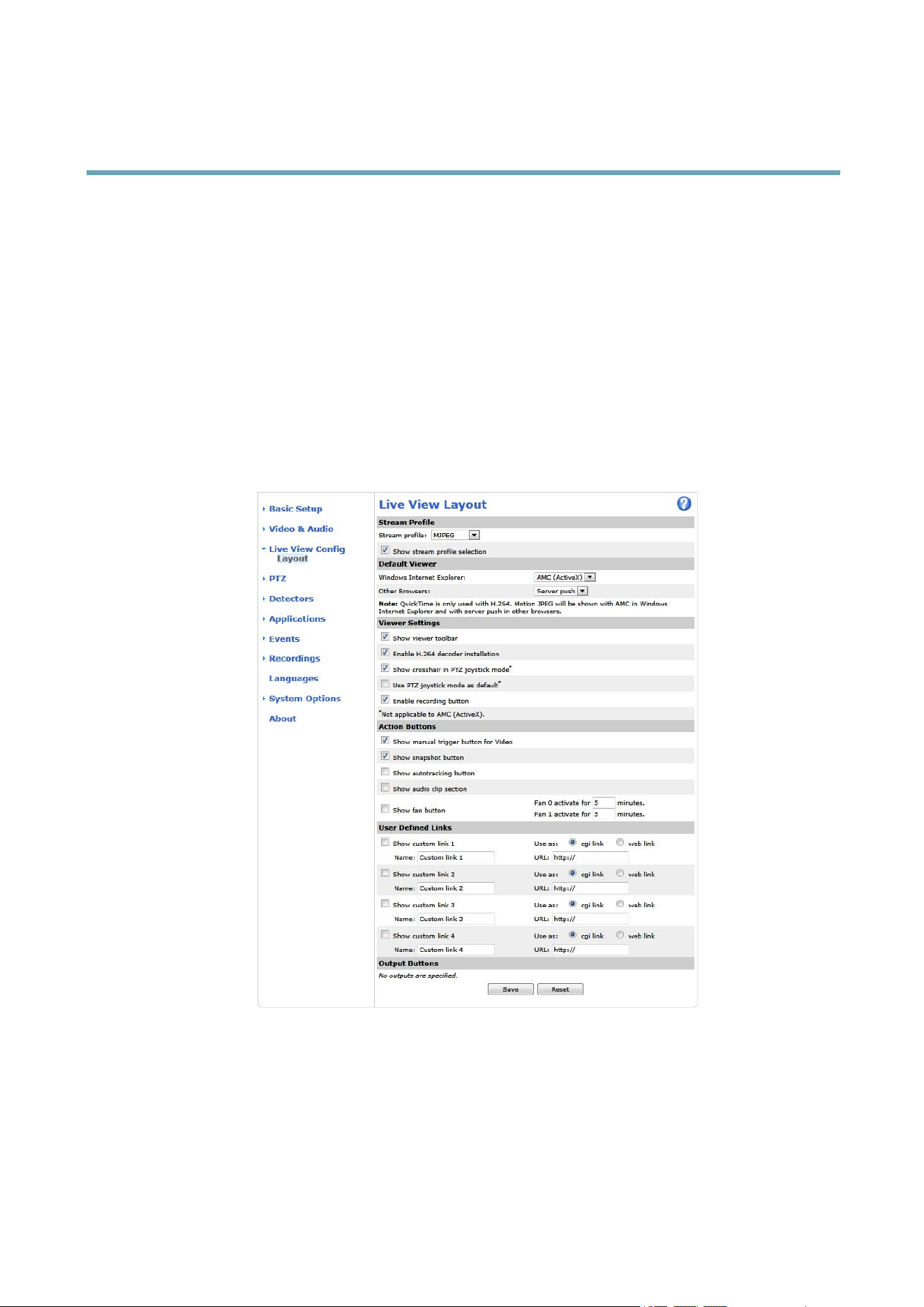
YoucancustomizetheLiveViewpageandalterittosuityourrequirements.Itispossibletodenethefollowingfeaturesof
theLiveViewpage.
•StreamProle.Seepage19.
•DefaultViewerforBrowser.Seepage25.
•ViewerSettings.Seepage26.
•ActionButtons.ThesearethebuttonsdescribedinControlsontheLiveViewPage,onpage11.
•UserDenedLinks.Seepage26.
•OutputButtons.Seepage26.
DefaultViewerforBrowsers
FromLiveViewCong>DefaultViewerselectthedefaultmethodforviewingvideoimagesinyourbrowser.Theproductattempts
toshowthevideoimagesintheselectedvideoformatandviewer.Ifthisisnotpossible,theproductoverridesthesettingsand
selectsthebestavailablecombination.
25

AXISQ6042PTZDomeNetworkCamera
LiveViewCong
BrowserViewerDescription
AMC
RecommendedviewerinInternetExplorer(H.264/MotionJPEG).
QuickTime
H.264.
Javaapplet
AslowerimagingalternativetoAMC(MotionJPEG).Requiresoneofthe
followinginstalledontheclient:
•JVM(J2SE)1.4.2orhigher.
•JRE(J2SE)5.0orhigher.
WindowsInternetExplorer
StillimageDisplaysstillimagesonly.ClicktheRefreshbuttoninyourbrowsertoviewa
newimage.
ServerPush
Recommendedviewerforotherbrowsers(MotionJPEG).
QuickTime
H.264.
Javaapplet
AslowerimagingalternativetoServerPush(MotionJPEGonly).
Otherbrowsers
StillimageDisplaysstillimagesonly.ClicktheRefreshbuttoninyourbrowsertoviewa
newimage.
Formoreinformation,pleaseseetheonlinehelp .
ViewerSettings
Tocongureoptionsfortheviewer,gotoLiveViewCong>ViewerSettings.
•SelectShowviewertoolbartodisplaytheAXISMediaControl(AMC)ortheQuickTimeviewertoolbarunderthevideo
imageinyourbrowser.
•H.264decoderinstallation.TheadministratorcandisableinstallationoftheH.264decoderincludedwithAXISMedia
Control.Thisisusedtopreventinstallationofunlicensedcopies.Furtherdecoderlicensescanbepurchasedfromyour
Axisreseller.
•SelectShowcrosshairinPTZjoystickmodetoenableacrossthatwillindicatethecenteroftheimageinPTZjoystick
mode.
•SelectUsePTZjoystickmodeasdefaulttoenablejoystickmode.Themodecanbechangedtemporarilyfromthe
PTZcontrolpanel.
•SelectEnablerecordingbuttontoenablerecordingfromtheLiveViewpage.Thisbuttonisavailablewhenusingthe
AMCviewer.TherecordingsaresavedtothelocationspeciedintheAMCControlPanel.SeeAXISMediaControl
(AMC),onpage14.
UserDenedLinks
Todisplayuser-denedlinksintheLiveViewpage,selecttheShowcustomlinkoption,givethelinkanameandthenentertheURL
tolinkto.Whendeningaweblinkdonotremovethe'http://'fromtheURLaddress.Customlinkscanbeusedtorunscriptsor
activateexternaldevicesconnectedtotheproduct,ortheycanlinktoawebpage.Customlinksdenedascgilinkswillrunthe
scriptinthebackground,inahiddenframe.Deningthelinkasaweblinkwillopenthelinkinanewwindow.
OutputButtons
ExternalI/OdevicesconnectedtotheAxisproduct’soutputportscanbecontrolleddirectlyfromtheLiveViewpage.
Note
ToenablethissettingatleastoneI/Oportmustbeconguredasanoutputport.SeeI/OPorts,onpage54.
TodisplayoutputbuttonsintheLiveViewpage:
1.GotoSetup>LiveViewCong.
26

AXISQ6042PTZDomeNetworkCamera
LiveViewCong
2.UnderOutputButtons,selectthetypeofcontroltouse:
-Pulseactivatestheoutputforadenedperiodoftime.Thepulsetimecanbesetfrom1/100secondto60
seconds.
-Active/Inactivedisplaystwobuttons,oneoreachaction.
Toconguretheactiveandinactivestates,gotoSystemOptions>Ports&Devices>I/OPortsandsettheport’sNormalstate.
FormoreinformationaboutI/Oports,seeI/OPorts,onpage54.
Note
Amulti-connectorcable(availablefromAxis)isrequiredwhenconnectingexternalI/OdevicestotheAxisproduct.See
Multi-ConnectorCable(soldseparately),onpage57
27
AXISQ6042PTZDomeNetworkCamera
PTZ(PanTiltZoom)
PTZ(PanTiltZoom)
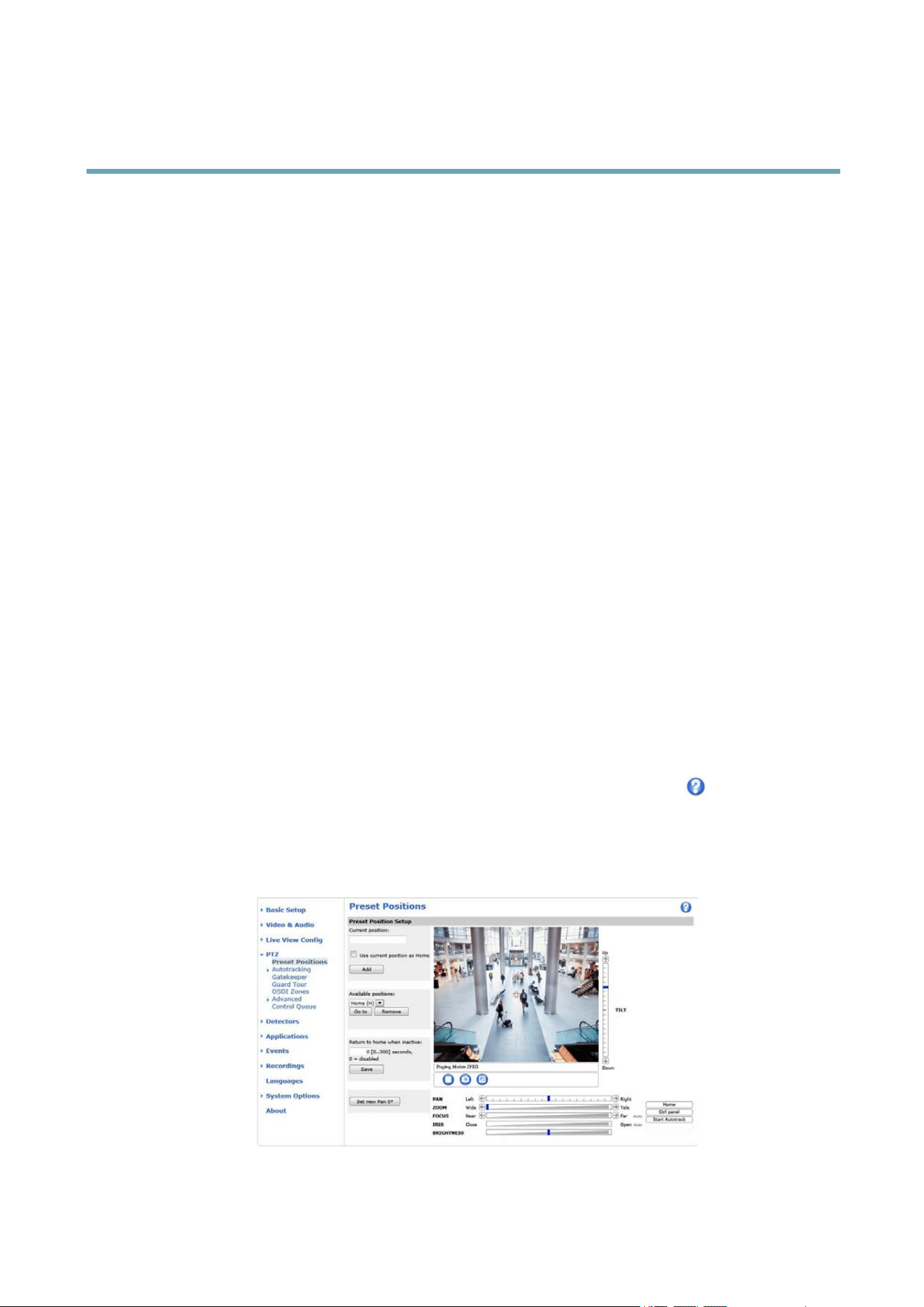
PresetPositions
Apresetpositionisapredenedviewthatcanbeusedtoquicklysteerthecameratoaspeciclocation.Presetpositionscan
beaccessedinseveralways:
•ByselectingthepresetfromthePresetpositionsdrop-downlistintheLiveViewPage.
•Whensettingupactionrules.See.
•WhensettingupGuardTour.Seepage30.
•WhensettinguptheGatekeeper.Seepage29
Toaddapresetposition:
1.GotoPTZ>PresetPositions.
2.Usethepan,tiltandzoomcontrolstosteerthecameraviewtothedesiredposition.
3.EnteradescriptivenameintheCurrentpositioneld.
4.Ifrequired,selectUsecurrentpositionasHome.
5.ClickAdd.Thecamera’sposition,irisandfocussettingsaresavedasapresetposition.
TheHomepositionisreadilyaccessiblebyclickingtheHomebuttonontheLiveViewpageandinthePresetPositionssetupwindow.
Tosetacustomizedhomeposition,selectUsecurrentpositionasHomewhenaddingapresetposition.Theuser-denedhome
positionwillhave(H)added,forexample,Entrance(H).ThedefaultHomeposition,called“Home”,willstillbeavailable.
TheproductcanbeconguredtoreturntotheHomepositionwhenthePTZfunctionalityhasbeeninactiveforaspeciedlength
oftime.EnterthelengthoftimeintheReturntohomewheninactiveeldandclickSave.Setthetimetozerotopreventthe
productfromautomaticallyreturningtotheHomeposition.
Toincludethepresetpositionnameintheoverlaytext,gotoVideo&Audio,selectIncludeoverlaytextandenterthemodier#Pin
theeld.Formoreinformationaboutmodiers,seeFileNaming&Date/TimeFormatsintheonlinehelp
.
Theproductcanbemountedinthreedifferenthorizontaldirections.ThismaycausetheviewfromPan0°tobechangedfromthe
originalview.ClickSetnewPan0°tosetthepancoordinatesystemtozerointhecurrentdirection.SetnewPan0°canbe
usefulforinstancewhenre-installingtheproductaftermaintenance.Notethat,settingPan0°willaffectallpreviouslydened
presets,guardtours,masksetc.
28

AXISQ6042PTZDomeNetworkCamera
PTZ(PanTiltZoom)
Gatekeeper
TheActiveGatekeepermonitorsanareasuchasanentrancegate.Whenmotionisdetectedinthemonitoredarea,theGatekeeper
will,dependingonconguration,steerthecameratoaselectedpresetpositionorstartautotrackingfromaselectedpresetposition.
Usingazoomed-inpresetpositioncanmakeitpossibleto,forexample,readalicenseplateoridentifyaperson.Whenmotion
isnolongerdetected,thecamerareturnstoitsHomepositionafteradenedtime.
ToenabletheGatekeeper,gotoPTZ>Gatekeeperandfollowtheonlineinstructions.
Itisalsopossibleto,forexample,recordvideoorsaveimages(takeasnapshot)whiletheGatekeeperisactive.GotoEventsandset
upanactionrulewithPTZPresetReachedorAutotrackingastrigger.
Autotracking
TheAxisproductcandetectmovementintheeldofview,forexampleamovingvehicleorperson.Ifautotrackingisenabled,the
Axisproductwillautomaticallypanandtilttofollowthemovingobject.Incasethereismuchsimultaneousmovement,theareawith
themostmovementwillbefollowed.Autotrackingcontinuesuntilthemovingobjectstopsordisappearsfromthemonitoredarea.
Movementinareasblockedbyprivacymasksandinexcludeareasdoesnottriggerautotracking.
ItisstronglyrecommendedtoenablethePTZControlQueueifautotrackingandguardtourareenabledsimultaneously.InthePTZ
ControlQueue,guardtourhaslowerprioritythanautotracking,soautotrackingwillnotbeabandonedtostartaguardtour.
Conguration
Start/StopAutotracking-ClickStarttoenableautotracking.Todisableautotracking,clickStop.
Settings-TheMovementtriggersensitivitylevelcanbesettoLow,MediumorHigh.Mediumisusuallyagoodchoice,dependingon
thesizeofthemovingobjectsandtheimagecontrast,aloworhighsensitivitymightbemoresuitable.
ExcludeAreas
Excludeareasareareaswheremovementistobeignored.
Note
Movementinanareablockedbyaprivacymaskisalwaysignored.
1.ClickAddareatocreateanexcludearea
2.Resizeandmovethearea(thebluerectangle)tothedesiredposition.
3.EnteradescriptivenameandclickSave.
Toremoveanarea,clickthenameoftheareaandclickRemove.Toenableordisableanarea,clickthenameoftheareaand
clickEnable/Disable.
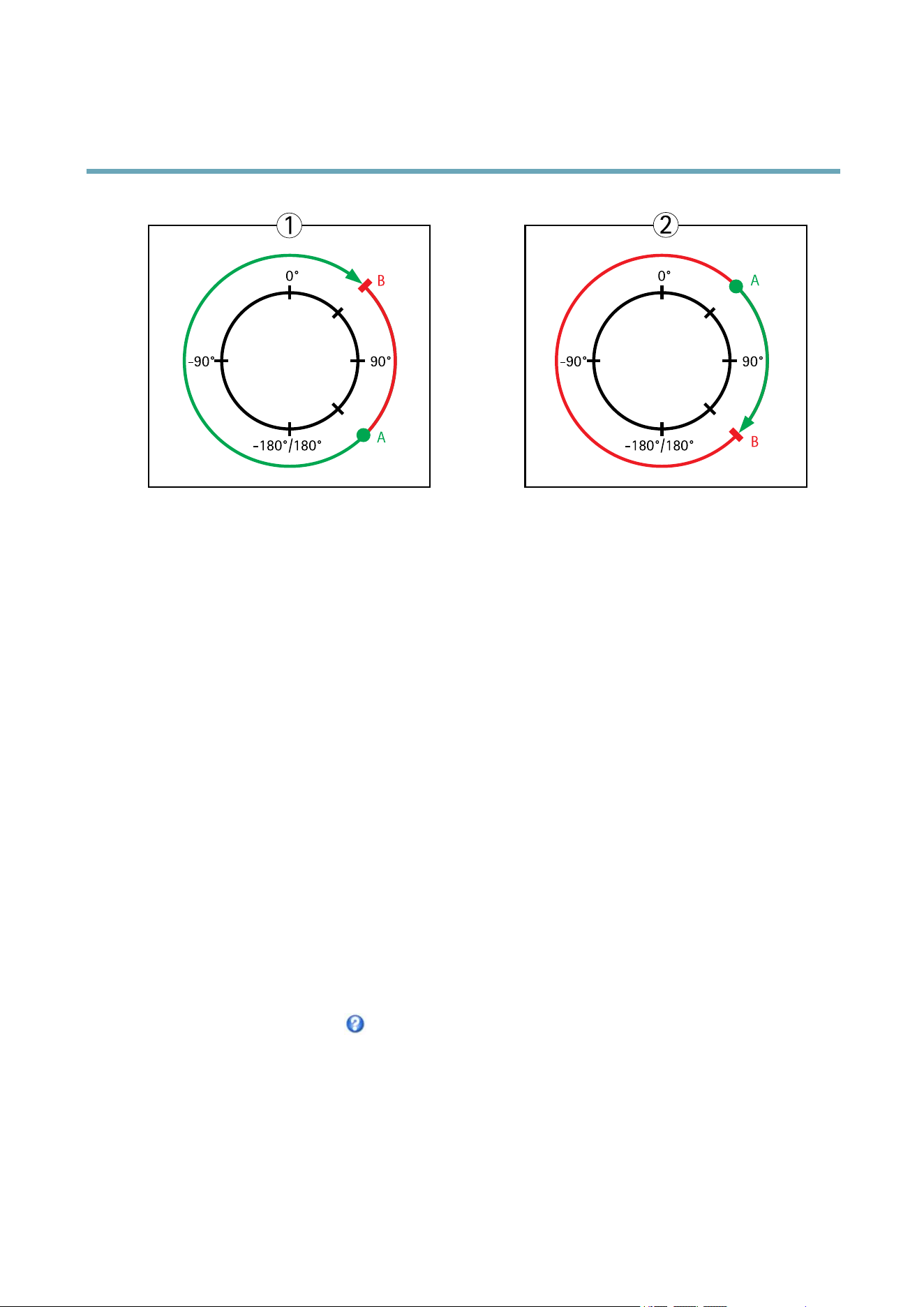
MaxLimits
Thepanandtiltlimitsrestricttheareawhereautotrackingisallowed.Theareabeyondthesetlimitswillbeignored.Thismayprove
useful,forexample,toavoidtrackingbirdsinthesky.Betweenthepanstartandendlimits,autotrackingisallowedgoingclockwise.
Theillustrationsshowthedifferencebetweensettingarangefrom135°to45°(1)andarangefrom45°to135°(2).
1.SelectEnabletiltlimitandEnablepanlimitrespectivelytoenablethetiltandpanlimits.
2.EntertheTiltangleandPanlimitvalues,orclickthelinksandmovethebluehorizontalandverticalbarsinthepreview
windowuntilsatised.
3.ClickSave.
29
AXISQ6042PTZDomeNetworkCamera
PTZ(PanTiltZoom)
90°-90°
-180°/180°
0°
90°-90°
-180°/180°
0°
A
B
B
A
1
2
Topview
APanlimitstart
BPanlimitend
GuardTour
Aguardtourdisplaysthevideostreamfromdifferentpresetpositions,one-by-one,inapredeterminedorderoratrandomandfor
congurabletimeperiods.Theenabledguardtourwillkeeprunningaftertheuserhasloggedofforclosedthebrowser.
TheguardtourcapabilityinthisAxisproductalsoincludestourrecording.TourrecordingisdescribedinTourRecording,onpage30.
Toaddaguardtour:
1.GotoPTZ>GuardTourandclickAdd.
2.SelectCreateapresettourandclickOK.
3.Enteradescriptivename.
4.Specifythepauselengthbetweenruns.
5.SelectanavailablepresetpositionandclickApply.
6.SpecifytheMoveSpeed.
7.SpecifytheViewTimeinsecondsorminutes.
8.SpecifytheViewOrderorselecttheRandomvieworderoption.
9.ClickSave.
Tomodifyorremoveguardtours,gotoPTZ>GuardTour,selecttheguardtourintheGuardTourListandclickModify/Remove.
Formoreinformationseetheonlinehelp
.
TourRecording
Theguardtourfunctioninthisproductincludestourrecording,whichallowsrecordingofacustomtourusinganinputdevicesuch
asajoystick,mouse,keyboardorthroughtheVAPIX®ApplicationProgrammingInterface(API).Arecordedtourdisplaysthevideo
streamoftherecordedsequenceofPan/Tilt/Zoommovements,includingtheirvariablespeedsandlengths.
Toaddarecordedtour:
30

AXISQ6042PTZDomeNetworkCamera
PTZ(PanTiltZoom)
1.GotoPTZ>GuardTourandclickAdd.
2.SelectCreatearecordtourandclickOK.
3.Enteradescriptivename.
4.Specifythepauselengthbetweenruns.
5.Click
tostartrecordingthePan/Tilt/Zoommovements.
6.Whensatised,click
.
7.ClickOK.
Note
Onlythenameoftherecordedtourandpausebetweenrunscanbemodied.Startinganewrecordingwilloverwritethe
existingguardtour.
TherecordedtourcanbeactivatedfromtheLiveViewandGuardTourpagesorthroughevents.Formoreinformationsee
theonlinehelp
.
OSDIZones
On-ScreenDirectionIndicator(OSDI)zonescanbeincludedintheoverlaytext(seeOverlay,onpage21)toaidtheusertonavigate
theAxisproduct.EachOSDIzoneissetupwithcoordinatesandadescriptivename.
OSDIzonesaresetupunderPTZ>OSDIZones.TheAxisproductusesthecoordinatesofthecenteroftheviewtosetthelower
leftandupperrightzoneareas.FirstnavigatetowhereyouwouldlikethelowermostleftpointoftheOSDIzonetobelocated.
ClickGettosetthecoordinates.ProceedtowheretheupperrightpointofzoneshouldbelocatedandclickGet.Givethezonea
descriptivenameandclickOK.
ToincludethenameoftheOSDIzoneintheoverlaytext,gotoVideo&Audio<VideoStream<OverlaySettings.Checkthe
Includetextboxandenterthemodier#Lintheeld.Formoreinformationaboutmodiers,seeFileNaming&Date/Time
Formatsintheonlinehelp
.
Advanced
Limits
Denethepan,tilt,zoomandfocuslimitsfortheAxisproduct.Movementstotheleftandright,upanddown,canberestrictedto
narrowtheareaundersurveillance.
Congurethenearfocuslimittoavoidfocusingonobjectstooclosetothecameralens.
WhenEnableE-ipisselected,asittiltsdownandcontinuestopanbackwards,theAxisproductwillautomaticallycorrecttheview
andipit180degrees.Theleftlimitmustbesetto–180degreesandtherightlimitto180degreesfore-iptowork.
Movespeedsetsthespeedofthecamera’spanandtiltmovements.Thedefaultsettingismaximumspeed.
Whenusingajoystick(oremulatingonewiththemouse)theEnableproportionalspeedsettingcanbeusedtoreducethemaximum
pan/tiltmovementspeed,i.e.thespeedthecameraviewmovesatwhenthejoystickispushedallthewayoutinanydirection.Thisis
usefulthentheviewiszoomedinonanobject.
Seetheonlinehelp
formoreinformation.
31

AXISQ6042PTZDomeNetworkCamera
PTZ(PanTiltZoom)
Controls
PanelShortcutCommandButtonscanbeconguredtoprovidedirectaccesstocommandsissuedviatheVAPIX®Application
ProgrammingInterface.ThebuttonswillbedisplayedinthePTZcontrolpanel,whichisavailableintheLiveViewpagethrough
theCtrlpanelbutton,seepage13.
DeselecttheoptionsunderEnable/Disablecontrolstodisablethepan,tilt,zoom,focusandiriscontrols.
Note
DisablingPTZcontrolswillnotaffectpresetpositions.Forexample,ifthetiltcontrolisdisabled,theproductcanstillmoveto
presetpositionsthatrequireatiltmovement.
ControlQueue
TheadministratorcansetupaqueueforPTZcontrollersfromPTZ>ControlQueue.Oncesetup,thePTZControlQueuebuttons
appearintheLiveViewpageofferingoneviewerexclusivecontrolforalimitedperiodoftime.Otheruserswillbeplacedinqueue.
Auserwhobelongstoagroup(seeUsers,onpage45)withahigherPTZprioritycangobeforeotherusersinthequeueand
takecontroloftheproduct.Theorderofpriorityisasfollows:
1.Administrator—AnadministratortakesoverPTZcontrolregardlessofwhoisrstinqueue.Theadministratorwillbe
removedfromthequeue60secondsafterthelastPTZcontrolcommand.
2.Event—TheAxisproductcanbeconguredtogotoapresetpositionwhentriggeredbyanalarm(see).Theeventwill
immediatelybeplacedrstinthequeueexceptwhenanadministratorisincontrol.
3.Operator—Sameasadministratorbutwithlowerpriority
4.GuardTour—Aguardtour(seepage30)hasPTZcontrolforanindeniteperiodoftime.Itmaybeoverriddenbyan
operator,eventoradministrator.Theguardtourwillresumewhenhigherprioritygroupsleavethequeue.
5.Viewer—Multipleviewersmustwaitfortheirturn.Theviewerhas60secondsPTZcontrolbeforecontrolispassed
ontothenextviewerinqueue.
Note
•TheadministratorcanenableanddisablePTZcontrolsforselectedusers.
•Toidentifydifferentusersintheviewergroup,cookiesmustbeenabledontheclient.
32
AXISQ6042PTZDomeNetworkCamera
Detectors
Detectors
ShockDetection
EnableShockDetectionfromtheDetectorsmenu.Shockdetectionisused,forexample,togenerateanalarmiftheproductishit
byanobject.
UsetheShocksensitivityslidertoadjustthesensitivitylevelatwhichtheproductshouldsendanalarmuponbeinghit.Low
sensitivityvalueimpliesthattheproductwillgenerateanalarmonlyifthehitispowerful.
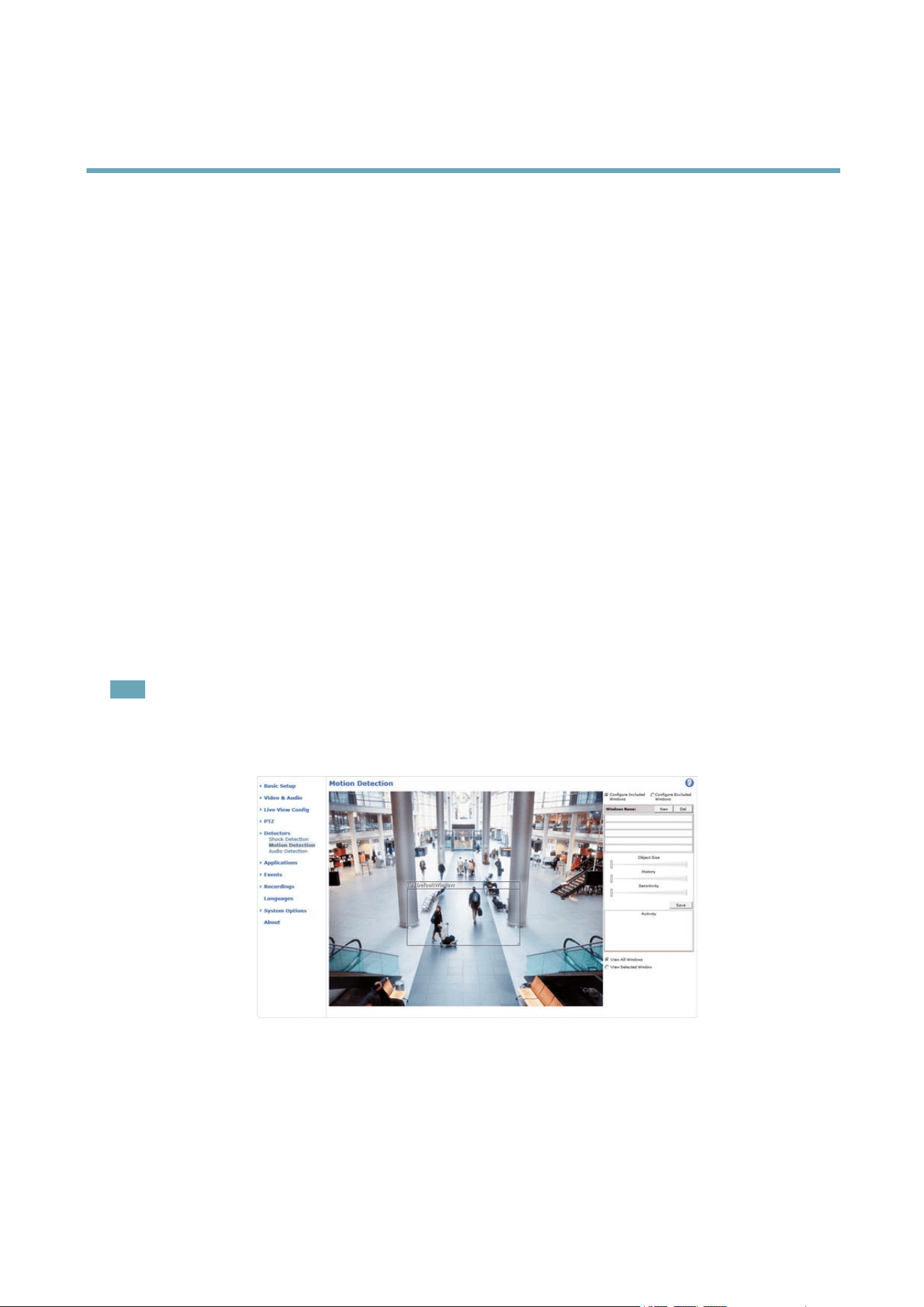
MotionDetection
Motiondetectionisusedtogenerateanalarmwhenevermovementstartsorstopsinthecameraview.
Motiondetectionisconguredbydeningupto10IncludeandExcludewindows:
•Includewindows—deneareaswheremotionshouldbedetected
•Excludewindows—deneareaswithinanIncludewindowthatshouldbeignored(areasoutsideIncludewindows
areautomaticallyignored).
Forinstructions,seeSetUpMotionDetectionWindows,onpage33.
Tocontrolthenumberofmotiondetectionalarms,theparametersObjectSize,HistoryandSensitivitycanbeadjusted.See
MotionDetectionParameters,onpage34.
Oncemotiondetectionwindowsarecongured,theAxisproductcanbeconguredtoperformactionswhenmotionisdetected.
Possibleactionsincludeuploadingimagesandstartrecording.Formoreinformation,seeSettingUpanActionRule,onpage39.
Note
•Usingthemotiondetectionfeaturemaydecreasetheproduct’soverallperformance.
•ThepositionoftheMotionDetectionWindowisrelativetotheorientationoftheCamera.Changingtheorientationofthe
camerawillalsochangethepositionoftheMotionDetectionWindow.
SetUpMotionDetectionWindows
TosetupamotiondetectionIncludeWindow,followtheseinstructions:
1.GotoDetectors>MotionDetection.
2.SelecttheCongureIncludedWindowsoptionandclickNew.Selectthenewwindowinthelistofwindowsand
enteradescriptivename.
33

AXISQ6042PTZDomeNetworkCamera
Detectors
3.Adjustthesize(dragthebottomright-handcorner)andtheposition(clickonthetextatthetopanddragtothedesired
position)ofthewindow.
4.AdjusttheObjectSize,HistoryandSensitivityprolesliders(seeMotionDetectionParametersfordetails).Anydetected
motionwithinanactivewindowisindicatedbyredpeaksintheActivitywindow.
5.ClickSave.
Toexcludepartsoftheincludewindow,selecttheCongureExcludedWindowsandpositiontheexcludewindowwithinthe
includewindow.
Todeleteanincludeorexcludewindow,selectthewindowinthelistofwindowsandclickDel.
MotionDetectionParameters
Theparameterscontrollingmotiondetectionaredescribedinthetablebelow:
Parameter
ObjectSize
History
Sensitivity
Description
Objectsizerelativetowindow
size.
Objectmemorylength.
Differenceinluminance
betweenbackgroundand
object.
Highlevel(100%)
Onlyverylargeobjectstrigger
motiondetection.
Anobjectthatappearsin
thewindowtriggersmotion
detectionforalongtime
beforeitisconsideredas
non-moving.
Ordinarycoloredobjectson
ordinarybackgroundstrigger
motiondetection.
Mediumlevel(50%)
Alargedifferenceinluminance
isrequiredtotriggermotion
detection.
Lowlevel(0%)
Evenverysmallobjectstrigger
motiondetection.
Anobjectthatappearsin
thewindowtriggersmotion
detectiononlyforaveryshort
timebeforeitisconsideredas
non-moving.
Onlyverybrightobjectson
adarkbackgroundtrigger
motiondetection.
Recommendedvalues
5–15%60–90%75–95%
Defaultvalues
15%90%90%
Note
•Totriggeronsmallobjectsormovements,useseveralsmallmotiondetectionwindowsratherthanonelargewindow
andselectalowobjectsize.
•Toavoidtriggeringonsmallobjects,selectahighobjectsize.
•Whilemonitoringanareawheremovingobjectsarenotexpected,selectahighhistorylevel.Thiswillcausemotion
detectiontotriggeraslongastheobjectispresentinthewindow.
•Toonlydetectashinglight,selectalowsensitivity.Inothercaseshighsensitivityisrecommended.
AudioDetection
TheAxisproductcanbeconguredtogenerateanalarmwhenaudiorisesaboveorfallsbelowthethresholdvalue.Thethreshold
valuecanbesetintherange0–100where0isthemostsensitiveand100theleastsensitive.
1.GotoDetectors>AudioDetection.
2.SettheaudioalarmlevelandclickSave.
3.GotoEvents>ActionRulesandsetupanactionrule,seeSettingUpanActionRule,onpage39.
34

AXISQ6042PTZDomeNetworkCamera
Detectors
Note
Amulti-connectorcable(availablefromAxis)isrequiredwhenconnectingexternalaudioequipmenttotheAxisproduct.
SeeMulti-ConnectorCable(soldseparately),onpage57.
DetectedaudioisindicatedbycoloredpeaksintheActivityindicator.Aneventistriggeredwhendetectedaudiorisesaboveorfalls
belowthethresholdvalue,whichisrepresentedbythebar.
35

AXISQ6042PTZDomeNetworkCamera
Applications
Applications
ThirdpartyapplicationscanbeuploadedtoandinstalledontheAxisproduct.Applicationsaddfunctionalitytotheproduct,for
examplevideoanalyticsandintelligentvideocapabilitiessuchasrecognition,tracking,detectionandcounting.Forinformation
aboutavailableapplications,downloads,trialsandlicenses,gotowww.axis.com/applications
Note
•Itisrecommendedtorunoneapplicationatatime.
•Avoidrunningapplicationswhenthebuilt-inmotiondetectionisactive.
ApplicationLicenses
Someapplicationsneedalicensetorun.Licensescanbeinstalledintwoways:
•Automaticinstallation—requiresaccesstotheInternet
•Manualinstallation—obtainthelicensekeyfromtheapplicationvendoranduploadthekeytotheAxisproduct
Torequestalicense,theAxisproductserialnumber(S/N)isrequired.Theserialnumbercanbefoundontheproductlabelandunder
SystemOptions>Support>SystemOverview.
InstallApplication
Toinstallandstartanapplication:
1.GotoSetup>Applications.
2.UnderUploadApplication,clickBrowse.LocatetheapplicationleandclickUploadPackage.
3.Installthelicense(ifapplicable).Forinstructions,seethedocumentationprovidedbytheapplicationvendor.
4.Starttheapplication.GotopageApplications,selecttheapplicationinthelistofinstalledapplicationsandclickStart.
5.Conguretheapplication.Forinstructions,seethedocumentationprovidedbytheapplicationvendor.
Note
•Applicationscanbeuploadedbyproductadministrators.
•ApplicationsandlicensescanbeinstalledonmultipleproductsatthesametimeusingAXISCameraManagement,version
3.10andlater.
Togeneratealoglefortheapplication,gotoApplications.SelecttheapplicationandclickLog.
ApplicationConsiderations
Ifanapplicationisupgraded,applicationsettings,includingthelicense,willberemoved.Thelicensemustbereinstalledand
theapplicationrecongured.
IftheAxisproduct’srmwareisupgraded,installedapplicationsandtheirsettingswillremainunchanged,althoughthisisnot
guaranteedbyAxisCommunicationsAB.Notethattheapplicationmustbesupportedbythenewrmware.Forinformationabout
rmwareupgrades,seeUpgradingtheFirmware.
IftheAxisproductisrestarted,runningapplicationswillrestartautomatically.
IftheAxisproductisrestored,installedapplicationsremainunchangedbutmustberestarted.Tostarttheapplication,goto
Setup>Applications.SelecttheapplicationinthelistofinstalledapplicationsandclickStart.Forinformationaboutrestoring
theAxisproduct,seeMaintenance.
36


AXISQ6042PTZDomeNetworkCamera
Events
Events
TheAxisproductcanbeconguredtoperformactionswhendifferenteventsoccur,forexample,startarecordingwhenmotionis
detected.ThesetofconditionsthatdeneshowandwhentheactionistriggerediscalledanActionRule.
AvailableActionRuletriggersandconditionsinclude:
•Applications—useinstalledapplicationstotriggertherule,seeApplications,onpage36.
•Detectors
-AudioDetection—triggertherulewhenaudioisdetected,seeAudioDetection,onpage34.
-LiveStreamAccessed—triggertherulewhenanystreamisaccessedandduringedgestorageplayback.
Thiscanforexamplebeusedtosendnotications.
-MotionDetection—triggertherulewhenmotionisdetected,seeMotionDetection,onpage33.
•Hardware
-Fan—triggertheruleifthefanismalfunctioning.Thiscanforexamplebeusedtosendmaintenance
notications.
-Network—triggertheruleifnetworkconnectionislostorrestored.Thiscanforexamplebeusedtostart
recordingtotheSDcard.
-Temperature—triggertheruleifthetemperaturefallsoutsideorinsidetheoperatingrangeoftheproduct.This
canforexamplebeusedtosendmaintenancenotications.
•InputSignal
-DigitalInputPort—triggertherulewhenanI/Oportreceivesasignalfromaconnecteddevice,seeI/O
Ports,onpage54.
-ManualTrigger—triggertheruleusingtheManualTriggerbuttonintheLiveViewpage,seeControlson
theLiveViewPage,onpage11.Thiscanforexamplebeusedtovalidateactionsduringproductinstallation
andconguration.
-VirtualInputs—canbeusedbyaVMS(VideoManagementSystem)totriggeractions.Virtualinputscan,for
example,beconnectedtobuttonsintheVMSuserinterface.
•PTZ
-Autotracking—triggertherulewhenautotrackingstartsorstops,seeAutotracking,onpage29.
-Error—triggertheruleifthePTZfunctionalityisnotworkingcorrectly.Thiscanforexamplebeusedto
sendmaintenancenotications.
-Moving—triggertherulewhenthecameraviewmovesduetoaPTZoperation.Thiscanforexamplebeused
asanadditionalconditiontopreventanactionruletriggeredbymotiondetectiontorecordvideowhilethe
cameraviewmovesduetoaPTZoperation.
-PresetReached—triggertherulewhenthecamerastopsatapresetposition.Thiscanbeforexamplebeused
withtheSendImagesactiontouploadimagesfromthepresetposition.
-Ready—triggertherulewhenthePTZfunctionalityisreadytobeused.Thiscanforexamplebeusedtosteer
thecameratoaspecicpresetpositionwhentheproductisstarted.
•Storage
-Disruption—triggertheruleifstorageproblemsaredetected,forexampleifthestoragedeviceisunavailable,
removed,full,lockedorifotherreadorwriteproblemsoccur.Thiscanforexamplebeusedtosendmaintenance
notications.
38

AXISQ6042PTZDomeNetworkCamera
Events
-Recording—triggerstherulewhentheAxisproductrecordstothestoragedevice.Therecordingstatustrigger
canbeusedtonotifytheoperator,forexamplebyashingLEDlights,iftheproducthasstartedorstoppedto
recordtothestoragedevice.Notethat,thistriggercanbeusedonlyforedgestoragerecordingstatus.
•System
-ShockDetected—TriggertherulewhentheAxisproductdetectsithasbeentiltedorhit.SeeShockDetection,
onpage33.
-SystemReady—triggertherulewhentheproducthasbeenstartedandallservicesarerunning.Thiscanfor
examplebeusedtosendanoticationwhentheproductrestarts.
•Time
-Recurrence—triggertheruleperiodically,seeRecurrences,onpage42.Thiscanforexamplebeusedtoupload
animageevery5minutes.
-UseSchedule—triggertheruleaccordingtotheselectedschedule,seeSchedules,onpage41.
Availableactionsinclude:
•Day/NightVisionMode—setdaymode(IRcutlteron)ornightmode(IRcutlteroff).
•OutputPort—activateanI/Oporttocontrolanexternaldevice.
•OverlayText—displayanoverlaytext,seeUsingOverlayTextinanActionRule,onpage22.
•PlayAudioClip—seeAudioClips,onpage24.
•PTZControl
-Autotracking—startautotracking,seeAutotracking,onpage29.
-PresetPosition—gotoapresetposition.
-GuardTour—startaguardtour,seeGuardTour,onpage30.
•RecordVideo—recordvideotoaselectedstorage.
•SendImages—sendimagestoarecipient.
•SendNotications—sendanoticationmessagetoarecipient.
•SendVideoClip—sendavideocliptoarecipient.
SettingUpanActionRule
Anactionruledenestheconditionsthatmustbemetfortheproducttoperformanaction,forexamplerecordvideoorsendan
emailnotication.Ifmultipleconditionsaredened,allofthemmustbemettotriggertheaction.
Thefollowingexampledescribeshowtosetupanactionruletorecordvideotoanetworkshareifthereismovementinthe
camera’seldofview.
Setupmotiondetectionandaddanetworkshare:
1.GotoDetectors>MotionDetectionandcongureamotiondetectionwindow,seepage33
2.GotoSystemOptions>Storageandsetupthenetworkshare,seepage53.
Setuptheactionrule:
1.GotoEvents>ActionRulesandclickAdd.
2.SelectEnableruleandenteradescriptivenamefortherule.
39

AXISQ6042PTZDomeNetworkCamera
Events
3.SelectDetectorsfromtheTriggerdrop-downlist.
4.SelectMotionDetectionfromthedrop-downlist.Selectthemotiondetectionwindowtouse.
5.Optionally,selectaScheduleandAdditionalconditions,seebelow.
6.UnderActions,selectRecordVideofromtheTypedrop-downlist.
7.SelectaStreamproleandconguretheDurationsettingsasdescribedbelow.
8.SelectNetworkSharefromtheStoragedrop-downlist.
Toaddadditionalcriteria,selecttheAdditionalconditionsoptionandaddadditionaltriggers.Topreventanactionfrombeing
triggeredrepeatedly,aWaitatleasttimecanbeset.Enterthetimeinhours,minutesandseconds,duringwhichthetrigger
shouldbeignoredbeforetheactionrulecanbeactivatedagain.
TherecordingDurationofsomeactionscanbesettoincludetimeimmediatelybeforeandaftertheevent.SelectPre-triggertime
and/orPost-triggertimeandenterthenumberofseconds.WhenWhiletheruleisactiveisenabledandtheactionistriggered
againduringthepost-triggertime,therecordingtimewillbeextendedwithanotherpost-triggertimeperiod.
Formoreinformation,seetheonlinehelp
.
FallbackAction
Afallbackactionisstartediftheprimaryactioncannotbestarted,forexampleifconnectiontoarecipientcannotbeestablished.
Fallbackactionsaretypicallyusedtosendemailnoticationsonfailedactionsortouploadimagestoasecondaryrecipient.
Recipients
Recipientsreceivemedialesandnoticationmessages.Thefollowingrecipientsareavailable:
RecipientUsewithaction
Email
1
SendImages
SendNotication
SendVideoClip
FTP
SendImages
SendVideoClip
HTTP
SendImages
SendNotication
SendVideoClip
HTTPSSendImages
SendNotication
SendVideoClip
NetworkShare
2
SendImages
SendVideoClip
TCPSendNotication
1.Someemailprovidershavesecurityltersthatpreventusersfromreceivingorviewinglargeamountofattachments,fromreceivingscheduled
emailsandsimilar.Checktheemailprovider’ssecuritypolicytoavoiddeliveryproblemsandlockedemailaccounts.
40

AXISQ6042PTZDomeNetworkCamera
Events
2.Anetworksharecanalsobeusedasastoragedeviceforrecordedvideo.GoSystemOptions>Storagetocongureanetworksharebefore
settingupacontinuousrecordingoranactionruletorecordvideo.SeeStorage,onpage53formoreinformationaboutstoragedevices.
Toaddarecipient:
1.GotoEvents>RecipientsandclickAdd.
2.Enteradescriptivename.
3.SelectarecipientType.
4.Entertheinformationneededfortherecipienttype.
5.ClickTesttotesttheconnectiontotherecipient.
6.ClickOK.
SettingUpanEmailRecipient
Emailrecipientscanbeconguredbyselectingoneofthelistedemailproviders,orbyspecifyingtheSMTPserver,portand
authenticationusedby,forexample,acorporateemailserver.
Note
Someemailprovidershavesecurityltersthatpreventusersfromreceivingorviewinglargeamountofattachments,from
receivingscheduledemailsandsimilar.Checktheemailprovider’ssecuritypolicytoavoiddeliveryproblemsandlocked
emailaccounts.
Tosetupanemailrecipientusingoneofthelistedproviders:
1.GotoEvents>RecipientsandclickAdd.
2.EnteraNameandselectEmailfromtheTypelist.
3.EntertheemailaddressestosendemailstointheToeld.Usecommastoseparatemultipleaddresses.
4.SelecttheemailproviderfromtheProviderlist.
5.EntertheuserIDandpasswordfortheemailaccount.
6.ClickTesttosendatestemail.
Tosetupanemailrecipientusingforexampleacorporateemailserver,followtheinstructionsabovebutselectUserdenedas
Provider.EntertheemailaddresstoappearassenderintheFromeld.SelectAdvancedsettingsandspecifytheSMTPserver
address,portandauthenticationmethod.Optionally,selectUseencryptiontosendemailsoveranencryptedconnection.Theserver
certicatecanbevalidatedusingthecerticatesavailableintheAxisproduct.Forinformationonhowtouploadcerticates,
seeCerticates,onpage46.
Schedules
Schedulescanbeusedasactionruletriggersorasadditionalconditions,forexampletorecordvideoifmotionisdetectedoutside
ofcehours.Useoneofthepredenedschedulesorcreateanewscheduleasdescribedbelow.
Tocreateanewschedule:
1.GotoEvents>SchedulesandclickAdd.
2.Enteradescriptivenameandtheinformationneededforadaily,weekly,monthlyoryearlyschedule.
3.ClickOK.
TousethescheduleinanActionRule,selecttheschedulefromtheScheduledrop-downlistintheActionRuleSetuppage.
41

AXISQ6042PTZDomeNetworkCamera
Events
Recurrences
RecurrencesareusedtotriggerActionRulesrepeatedly,forexampleevery5minutesoreveryhour.
Tosetuparecurrence:
1.GotoEvents>RecurrencesandclickAdd.
2.Enteradescriptivenameandrecurrencepattern.
3.ClickOK.
TousetherecurrenceinanActionRule,rstselectTimefromtheTriggerdrop-downlistintheActionRuleSetuppageand
thenselecttherecurrencefromtheseconddrop-downlist.
Tomodifyorremoverecurrences,selecttherecurrenceintheRecurrencesListandclickModifyorRemove.
42

AXISQ6042PTZDomeNetworkCamera
Recordings
Recordings
TheAxisproductcanbeconguredtorecordvideocontinuouslyoraccordingtoanactionrule:
•Tostartacontinuousrecording,seepage43.
•Tosetupactionrules,seepage39.
•Toaccessrecordings,seeRecordingList,onpage43.
•Tocongurecameracontrolledstorage,seeStorage,onpage53.
RecordingList
RecordedvideosarelistedontheRecordings>Listpage.Thelistshowseachrecording’sstartdateandtime,durationandthe
eventthattriggeredtherecording.
Toplayordownloadarecording,followthesesteps:
1.GotoRecordings>List.
2.Usetheltertonarrowthelistofrecordings.EnterthedesiredltercriteriaandclickFilter.Someltersmaytake
alongtimetocomplete.
3.Selecttherecording.
4.ClickPlaytoplaytherecording,orclickDownloadtodownloadtherecording.
Multiplerecordingscanbedownloadedatthesametime.SelecttherecordingsandclickDownload.Thedownloadedleisaziple
containingaminimumofthreeles,ofwhichtheMatroska(mkv)lesaretheactualrecordings.Therecordingsaretime-stamped
withthedateandtimetheyweredownloaded(thatis,notthedatetherecordingsweremade).
Note
ToplayrecordingsinWindowsMediaPlayer,AXISMatroskaFileSplittermustbeinstalled.AXISMatroskaFileSplitter
canbedownloadedfromwww.axis.com/techsup/software
Fordetailedrecordingandvideoinformation,selectarecordingandclickProperties.
Toremovearecording,selecttherecordingandclickRemove.
ContinuousRecording
TheAxisproductcanbeconguredtocontinuouslysavevideotoastoragedevice.SeeStorage,onpage53formoreinformation
aboutstoragedevices.Topreventthediskfrombecomingfull,itisrecommendedtocongurethedisktoautomaticallyremoveold
recordings.Ifanewstreamproleisselectedwhilearecordingisongoing,therecordingwillbestoppedandsavedintherecording
listandanewrecordingwiththenewstreamprolewillstart.Allpreviouscontinuousrecordingswillremainintherecordinglist
untiltheyareremovedmanuallyorthroughautomaticremovalofoldrecordings.
Tostartacontinuousrecording,followthesesteps:
1.GotoRecordings>Continuous.
2.SelectEnabled.
3.SelecttypeofstoragedevicefromtheDisklist.
4.SelectaStreamproletouseforcontinuousrecordings.
5.ClickSavetosaveandstarttherecording.
43

AXISQ6042PTZDomeNetworkCamera
Languages
Languages
MultiplelanguagescanbeinstalledintheAxisproduct.Allwebpagesincludingtheonlinehelpwillbedisplayedintheselected
language.Toswitchlanguages,gotoSetup>Languagesandrstuploadthenewlanguagele.Browseandlocatetheleandclick
theUploadLanguagebutton.SelectthenewlanguagefromthelistandclickSave.
Note
•Resettingtheproducttofactorydefaultsettingswilleraseanyuploadedlanguageleandresettheproductlanguageto
English.
•ClickingtheRestorebuttonontheMaintenancepagewillnotaffectthelanguage.
•Armwareupgradewillnotaffectthelanguageused.Howeverifyouhaveuploadedanewlanguagetotheproductand
laterupgradethermware,itmayhappenthatthetranslationnolongermatchestheproduct'swebpages.Inthiscase,
uploadanupdatedlanguagele.
•Alanguagealreadyinstalledintheproductwillbereplacedwhenacurrentoralaterversionofthelanguageleisuploaded.
44

AXISQ6042PTZDomeNetworkCamera
SystemOptions
SystemOptions
Security
Users
UseraccesscontrolisenabledbydefaultandcanbeconguredunderSystemOptions>Security>Users.Anadministratorcan
setupotherusersbygivingthemusernamesandpasswords.Itisalsopossibletoallowanonymousviewerlogin,whichmeans
thatanybodymayaccesstheLiveViewpage.
Theuserlistdisplaysauthorizedusersandusergroups(accesslevels):
Viewer-AccesstotheLiveViewpage
Operator-AccesstotheLiveViewpageandtoallsettingsexceptSystemOptions
Administrator-Unrestrictedaccesstoallsettings;canadd,modifyandremoveotherusers.
UnderHTTP/RTSPPasswordSettings,selectthetypeofpasswordtoallow.Youmayneedtoallowunencryptedpasswordsifthere
areviewingclientsthatdonotsupportencryption,orifyouupgradedthermwareandexistingclientssupportencryptionbutneed
tologinagainandbeconguredtousethisfunctionality.
UnderUserSettings,selecttheEnableanonymousviewerloginoptiontoallowanonymoususersaccesstotheLiveViewpage.
SelecttheEnableanonymousPTZcontrollogintoallowanonymoususersaccesstothePTZcontrols.
DeselecttheEnableBasicSetupoptiontohidetheBasicSetupmenu.BasicSetupprovidesquickaccesstosettingsthatshouldbe
madebeforeusingtheAxisproduct.
ONVIF
ONVIF(OpenNetworkVideoInterfaceForum)isaglobalinterfacestandardthatmakesiteasierforendusers,integrators,consultants,
andmanufacturerstotakeadvantageofthepossibilitiesofferedbynetworkvideotechnology.ONVIFenablesinteroperablitybetween
differentvendorproducts,increasedexibility,reducedcostandfuture-proofsystems.
BycreatingauseryouautomaticallyenableONVIFcommunication.UsetheusernameandpasswordwithallONVIFcommunication
withtheproduct.Formoreinformationseewww.onvif.org
IPAddressFilter
IPaddresslteringisenabledontheSystemOptions>Security>IPAddressFilterpage.Onceenabled,thelistedIPaddressare
allowedordeniedaccesstotheAxisproduct.SelectAlloworDenyfromthelistandclickApplytoenableIPaddressltering.
Theadministratorcanaddupto256IPaddressentriestothelist(asingleentrycancontainmultipleIPaddresses).
HTTPS
HTTPS(HyperTextTransferProtocoloverSecureSocketLayer,orHTTPoverSSL)isawebprotocolprovidingencryptedbrowsing.
HTTPScanalsobeusedbyusersandclientstoverifythatthecorrectdeviceisbeingaccessed.Thesecuritylevelprovidedby
HTTPSisconsideredadequateformostcommercialexchanges.
TheAxisproductcanbeconguredtorequireHTTPSwhenusersfromdifferentusergroups(administrator,operator,viewer)connect.
TouseHTTPS,anHTTPScerticatemustrstbeinstalled.GotoSystemOptions>Security>Certicatestoinstallandmanage
certicates.SeeCerticates,onpage46.
ToenableHTTPSontheAxisproduct:
1.GotoSystemOptions>Security>HTTPS
45

AXISQ6042PTZDomeNetworkCamera
SystemOptions
2.SelectanHTTPScerticatefromthelistofinstalledcerticates.
3.Optionally,clickCiphersandselecttheencryptionalgorithmstouseforSSL.
4.SettheHTTPSConnectionPolicyforthedifferentusergroups.
5.ClickSavetoenablethesettings.
ToaccesstheAxisproductviathedesiredprotocol,enterhttps://orhttp://intheaddresseldinabrowser.
TheHTTPSportcanbechangedontheSystemOptions>Network>TCP/IP>Advancedpage.
IEEE802.1X
IEEE802.1Xisastandardforport-basedNetworkAdmissionControlprovidingsecureauthenticationofwiredandwirelessnetwork
devices.IEEE802.1XisbasedonEAP(ExtensibleAuthenticationProtocol).
ToaccessanetworkprotectedbyIEEE802.1X,devicesmustbeauthenticated.Theauthenticationisperformedbyanauthentication
server,typicallyaRADIUSserver,examplesofwhichareFreeRADIUSandMicrosoftInternetAuthenticationService.
InAxisimplementation,theAxisproductandtheauthenticationserveridentifythemselveswithdigitalcerticatesusingEAP-TLS
(ExtensibleAuthenticationProtocol-TransportLayerSecurity).ThecerticatesareprovidedbyaCerticationAuthority(CA).
Youneed:
•aCAcerticatetoauthenticatetheauthenticationserver
•aCA-signedclientcerticatetoauthenticatetheAxisproduct.
Tocreateandinstallcerticates,gotoSystemOptions>Security>Certicates.SeeCerticates,onpage46.ManyCAcerticates
arepreinstalled.
ToallowtheproducttoaccessanetworkprotectedbyIEEE802.1X:
1.GotoSystemOptions>Security>IEEE802.1X.
2.SelectaCACerticateandaClientCerticatefromthelistsofinstalledcerticates.
3.UnderSettings,selecttheEAPOLversionandprovidetheEAPidentityassociatedwiththeclientcerticate.
4.ChecktheboxtoenableIEEE802.1XandclickSave.
Note
Forauthenticationtoworkproperly,thedateandtimesettingsintheAxisproductshouldbesynchronizedwithanNTP
server.SeeDate&Time,onpage47.
Certicates
Certicatesareusedtoauthenticatedevicesonanetwork.Typicalapplicationsincludeencryptedwebbrowsing(HTTPS),network
protectionviaIEEE802.1Xandsecureuploadofimagesandnoticationmessagesforexampleviaemail.Twotypesofcerticates
canbeusedwiththeAxisproduct:
Server/Clientcerticates-toauthenticatetheAxisproduct
CAcerticates-toauthenticatepeercerticates,forexamplethecerticateofanauthenticationserverincasetheAxisproductis
connectedtoanIEEE802.1Xprotectednetwork.
Note
Installedcerticates,exceptpreinstalledCAcerticates,willbedeletediftheproductisresettofactorydefault.Preinstalled
CAcerticatesthathavebeendeletedwillbereinstalled.
AServer/Clientcerticatecanbeself-signedorissuedbyaCerticateAuthority(CA).Aself-signedcerticateofferslimited
protectionandcanbeusedbeforeaCA-issuedcerticatehasbeenobtained.
46

AXISQ6042PTZDomeNetworkCamera
SystemOptions
Toinstallaself-signedcerticate:
1.GotoSystemOptions>Security>Certicates.
2.ClickCreateself-signedcerticateandprovidetherequestedinformation.
TocreateandinstallaCA-signedcerticate:
1.Createaself-signedcerticateasdescribedabove.
2.GotoSystemOptions>Security>Certicates.
3.ClickCreatecerticatesigningrequestandprovidetherequestedinformation.
4.CopythePEM-formattedrequestandsendtotheCAofyourchoice.
5.Whenthesignedcerticateisreturned,clickInstallcerticateanduploadthecerticate.
Server/ClientcerticatescanbeinstalledasCerticatefromsigningrequestorasCerticateandprivatekey.SelectCerticate
andprivatekeyiftheprivatekeyistobeuploadasaseparateleorifthecerticateisinPKCS#12format.
TheAxisproductisshippedwithseveralpreinstalledCAcerticates.Ifrequired,additionalCAcerticatescanbeinstalled:
1.GotoSystemOptions>Security>Certicates
2.ClickInstallcerticateanduploadthecerticate.
AudioSupport
SelectEnableaudiosupporttoallowclientstoretrieveaudiostreamsfromtheAxisproduct.Forinformationonhowtocongure
audiosettings,seeAudioSettings,onpage23.
Note
DeselectingthisoptionwilldisableaudiogloballyintheAxisproduct,forconguredeventsandproleswithaudioaswell.
Date&Time
TheAxisproduct’sdateandtimesettingsareconguredunderSystemOptions>Date&Time.
CurrentServerTimedisplaysthecurrentdateandtime(24hclock).Thetimecanbedisplayedin12hclockinthetextoverlay(see
below).
Tochangethedateandtimesettings,selectthepreferredTimemodeunderNewServerTime:
•Synchronizewithcomputertimesetsdateandtimeaccordingtothecomputer’sclock.Withthisoption,dateand
timearesetonceandwillnotbeupdatedautomatically.
•SynchronizewithNTPServerobtainsdateandtimefromanNTPserver.Withthisoption,dateandtimesettingsare
updatedcontinuously.ForinformationonNTPsettings,seeNTPConguration,onpage50.
IfusingahostnamefortheNTPserver,aDNSservermustbecongured.SeeDNSConguration,onpage49.
•Setmanuallyallowsyoutomanuallysetdateandtime.
IfusinganNTPserver,selectyourTimezonefromthedrop-downlist.Ifrequired,checkAutomaticallyadjustfordaylightsaving
timechanges.
TheDate&TimeFormatUsedinImagesisthedateandtimeformatdisplayedasatextoverlayinthevideostream.Usethe
predenedformatsorseeFileNaming&Date/TimeFormatsintheonlinehelp
forinformationonhowtocreatecustomdateand
timeformats.Toincludedateandtimeintheoverlaytext,gotoVideo&AudioandselectIncludedateandIncludetime.
47

AXISQ6042PTZDomeNetworkCamera
SystemOptions
Network
BasicTCP/IPSettings
TheAxisproductsupportsIPversion4andIPversion6.Bothversionscanbeenabledsimultaneously,andatleastoneversion
mustalwaysbeenabled.
IPv4AddressConguration
Bydefault,theAxisproductissettouseIPv4(IPversion4)andtoobtaintheIPaddressautomaticallyviaDHCP.TheIPv4settingsare
conguredunderSystemOptions>Network>TCP/IP>Basic.
DHCP(DynamicHostCongurationProtocol)allowsnetworkadministratorstocentrallymanageandautomatetheassignmentof
IPaddresses.DHCPshouldonlybeenabledifusingdynamicIPaddressnotication,oriftheDHCPcanupdateaDNSserver.Itis
thenpossibletoaccesstheAxisproductbyname(hostname).
IfDHCPisenabledandtheproductcannotbeaccessed,runAXISIPUtilitytosearchthenetworkforconnectedAxisproducts,orreset
theproducttothefactorydefaultsettings(seepage56)andthenperformtheinstallationagain.
TouseastaticIPaddress,checkUsethefollowingIPaddressandspecifytheIPaddress,subnetmaskanddefaultrouter.
IPv6AddressConguration
IfIPv6(IPversion6)isenabled,theAxisproductwillreceiveanIPaddressaccordingtothecongurationinthenetworkrouter.
ToenableIPv6,gotoSystemOptions>Network>TCP/IP>Basic.OthersettingsforIPv6shouldbeconguredinthenetworkrouter.
ARP/Ping
Theproduct’sIPaddresscanbeassignedusingARPandPing.Forinstructions,seeAssignIPAddressUsingARP/Ping,onpage48.
TheARP/Pingserviceisenabledbydefaultbutisautomaticallydisabledtwominutesaftertheproductisstarted,orassoonasanIP
addressisassigned.Tore-assignIPaddressusingARP/Ping,theproductmustberestartedtoenableARP/Pingforanadditional
twominutes.
Todisabletheservice,gotoSystemOptions>Network>TCP/IP>BasicandcleartheoptionEnableARP/PingsettingofIPaddress.
Pingingtheproductisstillpossiblewhentheserviceisdisabled.
AssignIPAddressUsingARP/Ping
Theproduct'sIPaddresscanbeassignedusingARP/Ping.Thecommandmustbeissuedwithin2minutesofconnectingpower.
1.AcquireafreestaticIPaddressonthesamenetworksegmentasthecomputer.
2.Locatetheserialnumber(S/N)ontheproductlabel.
3.Openacommandpromptandenterthefollowingcommands:
Linux/Unixsyntax
arp-s<IPaddress><serialnumber>temp
ping-l408<IPaddress>
Linux/Unixexample
arp-s192.168.0.12500:40:8c:18:10:00temp
ping-l408192.168.0.125
Windowssyntax(thismayrequirethatyourunthecommandpromptasanadministrator)
arp-s<IPaddress><serialnumber>
48

AXISQ6042PTZDomeNetworkCamera
SystemOptions
ping-l408-t<IPaddress>
Windowsexample(thismayrequirethatyourunthecommandpromptasanadministrator)
arp-s192.168.0.12500-40-8c-18-10-00
ping-l408-t192.168.0.125
4.Checkthatthenetworkcableisconnectedandthenrestarttheproductbydisconnectingandreconnectingpower.
5.ClosethecommandpromptwhentheproductrespondswithReplyfrom192.168.0.125:...orsimilar.
6.Openabrowserandtypehttp://<IPaddress>intheLocation/Addresseld.
ForothermethodsofassigningtheIPaddress,seetheInstallationandManagementSoftwareCDorthedocumentAssignanIP
AddressandAccesstheVideoStreamonAxisSupportwebatwww.axis.com/techsup
Note
•ToopenacommandpromptinWindows,opentheStartmenuandtypecmdintheRun/Searcheld.
•TousetheARPcommandinWindows7/WindowsVista,right-clickthecommandprompticonandselectRunas
administrator.
•ToopenacommandpromptinMacOSX,opentheTerminalutilityfromApplication>Utilities.
AXISVideoHostingSystem(AVHS)
AVHSusedinconjunctionwithanAVHSservice,provideseasyandsecureInternetaccesstoliveandrecordedvideoaccessiblefrom
anylocation.FormoreinformationandhelptondalocalAVHSServiceProvidergotowww.axis.com/hosting
TheAVHSsettingsareconguredunderSystemOptions>Network>TCPIP>Basic.ThepossibilitytoconnecttoanAVHSservice
isenabledbydefault.Todisable,cleartheEnableAVHSbox.
One-clickenabled-Presstheproduct’scontrolbutton(seeHardwareOverview,onpage6)toconnecttoanAVHSserviceoverthe
Internet.Onceregistered,AlwayswillbeenabledandtheAxisproductstaysconnectedtotheAVHSservice.Iftheproductisnot
registeredwithin24hoursfromwhenthebuttonispressed,theproductwilldisconnectfromtheAVHSservice.
Always-TheAxisproductwillconstantlyattempttoconnecttotheAVHSserviceovertheInternet.Onceregisteredtheproductwill
stayconnectedtotheservice.Thisoptioncanbeusedwhentheproductisalreadyinstalledanditisnotconvenienttousethe
one-clickinstallation.
AXISInternetDynamicDNSService
AXISInternetDynamicDNSServiceassignsahostnameforeasyaccesstotheproduct.Formoreinformation,seewww.axiscam.net
ToregistertheAxisproductwithAXISInternetDynamicDNSService,gotoSystemOptions>Network>TCP/IP>Basic.Under
Services,clicktheAXISInternetDynamicDNSServiceSettingsbutton(requiresaccesstotheInternet).Thedomainnamecurrently
registeredatAXISInternetDynamicDNSservicefortheproductcanatanytimeberemoved.
AdvancedTCP/IPSettings
DNSConguration
DNS(DomainNameService)providesthetranslationofhostnamestoIPaddresses.TheDNSsettingsareconguredunderSystem
Options>Network>TCP/IP>Advanced.
SelectObtainDNSserveraddressviaDHCPtousetheDNSsettingsprovidedbytheDHCPserver.
Tomakemanualsettings,selectUsethefollowingDNSserveraddressandspecifythefollowing:
Domainname-Enterthedomain(s)tosearchforthehostnameusedbytheAxisproduct.Multipledomainscanbeseparatedby
semicolons.Thehostnameisalwaystherstpartofafullyqualieddomainname,forexample,myserveristhehostnameinthe
fullyqualieddomainnamemyserver.mycompany.comwheremycompany.comisthedomainname.
49

AXISQ6042PTZDomeNetworkCamera
SystemOptions
Primary/SecondaryDNSserver-EntertheIPaddressesoftheprimaryandsecondaryDNSservers.ThesecondaryDNSserveris
optionalandwillbeusediftheprimaryisunavailable.
NTPConguration
NTP(NetworkTimeProtocol)isusedtosynchronizetheclocktimesofdevicesinanetwork.TheNTPsettingsareconguredunder
SystemOptions>Network>TCP/IP>Advanced.
SelectObtainNTPserveraddressviaDHCPtousetheNTPsettingsprovidedbytheDHCPserver.
Tomakemanualsettings,selectUsethefollowingNTPserveraddressandenterthehostnameorIPaddressoftheNTPserver.
HostNameConguration
TheAxisproductcanbeaccessedusingahostnameinsteadofanIPaddress.ThehostnameisusuallythesameastheassignedDNS
name.ThehostnameisconguredunderSystemOptions>Network>TCP/IP>Advanced.
SelectObtainhostnameviaIPv4DHCPtousehostnameprovidedbytheDHCPserverrunningonIPv4.
SelectUsethehostnametosetthehostnamemanually.
SelectEnabledynamicDNSupdatestodynamicallyupdatelocalDNSserverswhenevertheAxisproduct’sIPaddresschanges.
Formoreinformation,seetheonlinehelp
.
Link-LocalIPv4Address
Link-LocalAddressisenabledbydefaultandassignstheAxisproductanadditionalIPaddresswhichcanbeusedtoaccess
theproductfromotherhostsonthesamesegmentonthelocalnetwork.TheproductcanhaveaLink-LocalIPandastatic
orDHCP-suppliedIPaddressatthesametime.
ThisfunctioncanbedisabledunderSystemOptions>Network>TCP/IP>Advanced.
HTTP
TheHTTPportusedbytheAxisproductcanbechangedunderSystemOptions>Network>TCP/IP>Advanced.Inadditiontothe
defaultsetting,whichis80,anyportintherange1024–65535canbeused.
HTTPS
TheHTTPSportusedbytheAxisproductcanbechangedunderSystemOptions>Network>TCP/IP>Advanced.Inadditionto
thedefaultsetting,whichis443,anyportintherange1024–65535canbeused.
ToenableHTTPS,gotoSystemOptions>Security>HTTPS.Formoreinformation,seeHTTPS,onpage45.
NATtraversal(portmapping)forIPv4
Anetworkrouterallowsdevicesonaprivatenetwork(LAN)toshareasingleconnectiontotheInternet.Thisisdonebyforwarding
networktrafcfromtheprivatenetworktothe“outside”,thatis,theInternet.Securityontheprivatenetwork(LAN)isincreased
sincemostroutersarepre-conguredtostopattemptstoaccesstheprivatenetwork(LAN)fromthepublicnetwork(Internet).
UseNATtraversalwhentheAxisproductislocatedonanintranet(LAN)andyouwishtomakeitavailablefromtheother
(WAN)sideofaNATrouter.WithNATtraversalproperlycongured,allHTTPtrafctoanexternalHTTPportintheNATrouter
isforwardedtotheproduct.
NATtraversalisconguredunderSystemOptions>Network>TCP/IP>Advanced.
Note
•ForNATtraversaltowork,thismustbesupportedbytherouter.TheroutermustalsosupportUPnP
TM
.
•Therouterhasmanydifferentnames:“NATrouter”,“Networkrouter”,“InternetGateway”,”Broadbandrouter”,“Broadband
sharingdevice”or“Homerewall”buttheessentialpurposeofthedeviceisthesame.
50

AXISQ6042PTZDomeNetworkCamera
SystemOptions
Enable/Disable-Whenenabled,theAxisproductattemptstocongureportmappinginaNATrouteronyournetwork,usingUPnP
TM
.
NotethatUPnP
TM
mustbeenabledintheproduct(seeSystemOptions>Network>UPnP).
UsemanuallyselectedNATrouter-SelectthisoptiontomanuallyselectaNATrouterandentertheIPaddressfortherouterin
theeld.Ifnorouterisspecied,theproductautomaticallysearchesforNATroutersonyournetwork.Ifmorethanonerouteris
found,thedefaultrouterisselected.
AlternativeHTTPport-SelectthisoptiontomanuallydeneanexternalHTTPport.Entertheportnumberintheeld.Ifnoportis
enteredhere,aportnumberisautomaticallyselectedwhenNATtraversalisenabled.
Note
•AnalternativeHTTPportcanbeusedorbeactiveevenifNATtraversalisdisabled.ThisisusefulifyourNATrouterdoesnot
supportUPnPandyouneedtomanuallycongureportforwardingintheNATrouter.
•Ifyouattempttomanuallyenteraportthatisalreadyinuse,anotheravailableportisautomaticallyselected.
•Whentheportisselectedautomaticallyitisdisplayedinthiseld.Tochangethis,enteranewportnumberandclickSave.
FTP
TheFTPserverrunningintheAxisproductenablesuploadofnewrmware,userapplications,etc.TheFTPservercanbedisabled
underSystemOptions>Network>TCP/IP>Advanced.
Note
ThisFTPserverhasnothingtodowiththeproduct’sabilitytotransferimagesviaFTPtootherlocationsandservers.
RTSP
TheRTSPserverrunningintheAxisproductallowsaconnectingclienttostartanH.264stream.TheRTSPportnumbercanbe
changedunderSystemOptions>Network>TCP/IP>Advanced.Thedefaultportis554.
Note
H.264videostreamswillnotbeavailableiftheRTSPserverisdisabled.
SOCKS
SOCKSisanetworkingproxyprotocol.TheAxisproductcanbeconguredtouseaSOCKSservertoreachnetworksontheother
sideofarewallorproxyserver.ThisfunctionalityisusefuliftheAxisproductislocatedonalocalnetworkbehindarewall,and
notications,uploads,alarms,etcneedtobesenttoadestinationoutsidethelocalnetwork(forexampletheInternet).
SOCKSisconguredunderSystemOptions>Network>SOCKS.Formoreinformation,seetheonlinehelp
.
QoS(QualityofService)
QoS(QualityofService)guaranteesacertainlevelofaspeciedresourcetoselectedtrafconanetwork.AQoS-awarenetwork
prioritizesnetworktrafcandprovidesagreaternetworkreliabilitybycontrollingtheamountofbandwidthanapplicationmayuse.
TheQoSsettingsareconguredunderSystemOptions>Network>QoS.UsingDSCP(DifferentiatedServicesCodepoint)values,the
Axisproductcanmarkthefollowingtypesoftrafc:livevideo,liveaudio,event/alarmtrafcandmanagementtrafc.
Note
LiveaudioDSCPwillbeequaltolivevideoDSCPifH.264overRTSPisused.
SMTP(email)
TosendemailmessagesfromtheAxisproductviaSMTP(SimpleMailTransferProtocol),anSMTPmailservermustbesetup.This
isdoneunderSystemOptions>Network>SMTP(email).
51

AXISQ6042PTZDomeNetworkCamera
SystemOptions
EnterthehostnamesorIPaddressesandportnumbersfortheprimaryandsecondarymailserversintheeldsprovided.AFrom
emailaddressisalsorequired.Ifthemailserverrequiresauthentication,checkUseauthenticationtologintothisserverandenter
thenecessaryinformation.
SNMP
TheSimpleNetworkManagementProtocol(SNMP)allowsremotemanagementofnetworkdevices.AnSNMPcommunityisthe
groupofdevicesandmanagementstationrunningSNMP.Communitynamesareusedtoidentifygroups.
TheAxisproductcanbeconguredtosupportSNMPontheSystemOptions>Network>SNMPpage.
Dependingonthelevelofsecurityrequired,selecttheversiononSNMPtouse.
SNMPv1/v2providesthelowestlevelofsecurity.Thecommunitynamecanbespeciedasapasswordforreadorread/write
accesstoallsupportedSNMPdevices.ThedefaultpasswordfortheReadcommunityispublicandthedefaultpasswordforthe
Writecommunityiswrite.
Note
IfHTTPSisenabled,SNMPv1andSNMPv2cshouldbedisabled.
TrapsforSNMPv1/v2areusedbytheAxisproducttosendmessagestoamanagementsystemonimportanteventsandstatus
changes.CheckEnabletrapsandentertheIPaddresswherethetrapmessageshouldbesentandtheTrapcommunitythat
shouldreceivethemessage.
Thefollowingtrapsareavailable:
•Coldstart
•Warmstart
•Linkup
•Authenticationfailed
SNMPv3providesencryptionandsecurepasswords.TousetrapswithSNMPv3,anSNMPv3managementapplicationisrequired.
TouseSNMPv3,HTTPSmustbeenabled,seeHTTPS,onpage45.ToenableSNMPv3,checktheboxandprovidetheinitialuser
password.
Note
Theinitialpasswordcanonlybesetonce.Ifthepasswordislost,theAxisproductmustberesettofactorydefault,see
ResettoFactoryDefaultSettings,onpage56.
UPnP
TM
TheAxisproductincludessupportforUPnP
TM
.UPnP
TM
isenabledbydefaultandtheproductisautomaticallydetectedbyoperating
systemsandclientsthatsupportthisprotocol.
UPnP
TM
canbedisabledunderSystemOptions>Network>UPnP
TM
.
RTP/H.264
TheRTPportrangeandmulticastsettingsareconguredunderSystemOptions>Network>RTP.
TheRTPportrangedenestherangeofportsfromwhichthevideo/audioportsareautomaticallyselected.Formulticaststreams,
onlycertainIPaddressesandportnumbersshouldbeused.
SelectAlwaysMulticastVideoand/orAlwaysMulticastAudiotostartmulticaststreamingwithoutopeninganRTSPsession.
52

AXISQ6042PTZDomeNetworkCamera
SystemOptions
Bonjour
TheAxisproductincludessupportforBonjour.Bonjourisenabledbydefaultandtheproductisautomaticallydetectedbyoperating
systemsandclientsthatsupportthisprotocol.
BonjourcanbedisabledunderSystemOptions>Network>Bonjour.
Storage
SDCard
NOTICE NOTICE
NOTICE
Topreventcorruptionofrecordings,theSDcardshouldalwaysbeunmountedbeforeitisejected.
TheAxisproductsupportsSDcardswiththefollowinglesystems:
•ext4—recommendedduetoitsresilienceagainstdatalossifthecardisejectedorifthereisabruptpowerloss.Toaccess
datastoredonthecardfromtheWindowsoperatingsystem,athird-partyext4driverorapplicationisrequired.
•vFAT—mostSDcardsarepre-formattedwithvFATwhenpurchased.
Ifrequired,theSDcardcanbemanuallyformattedtothedesiredlesystem.ToformattheSDcard:
1.InserttheSDcardintheSDcardslot.
2.GotoSystemOptions>StorageandclickSDCard.
3.ClickFormatandselectthedesiredlesystem.
Note
Duringformattinganypreviousdatastoredonthediskwillbelost.
Mountingisdoneautomaticallywhenthecardisinsertedorwhentheproductisstarted.Amanualmountisonlyrequiredifthe
cardhasbeenunmountedandnotejectedandre-inserted.
TounmounttheSDcard:
1.GotoSystemOptions>StorageandclickSDCard.
2.ClickUnmount.
3.Thecardcannowberemoved.
TheSDcardismanagedontheSystemOptions>Storagepage.ClickSDCardtoopenStorageManagement.
Ifthecard’sstatusshowsasfailed,clickCheckdisktoseeiftheproblemcanbefoundandthentryRepair.Thisoptionisonly
availableforSDcardswithext4.ForSDcardswithvFAT,useacardreaderorcomputertotroubleshootthecard.
Toavoidllingthecard,itisrecommendedtoremoverecordingscontinuously.UnderRecordingSettings,selectRemoverecordings
olderthanandselectthenumberofdaysorweeks.
Tostopwritingtothecardandprotectrecordingsfrombeingremoved,selectLockunderRecordingSettings.
NetworkShare
NetworkshareallowsyoutoaddnetworkstoragesuchasaNAS(NetworkAttachedStorage)oranyserverthatusesCIFS(Common
InternetFileSystem)andusethemforstorageofrecordings.
Toaddanetworkshare:
1.GotoSystemOptions>Storage.
53

AXISQ6042PTZDomeNetworkCamera
SystemOptions
2.ClickNetworkShare.
3.EntertheIPaddress,DNSorBonjournametothehostserverintheHosteld.
4.EnterthenameoftheshareintheShareeld.Subfolderscannotbeused.
5.Ifrequired,selectThesharerequiresloginandentertheusernameandpassword.
6.ClickConnect.
ToclearallrecordingsanddatafromtheAxisproduct’sfolderonthedesignatedshare,clickClearunderStorageTools.
Toavoidllingtheshare,itisrecommendedtoremoverecordingscontinuously.UnderRecordingSettings,selectRemoverecordings
olderthanandselectthenumberofdaysorweeks.
Tostopwritingtotheshareandprotectrecordingsfrombeingremoved,selectLockunderRecordingSettings.
Ports&Devices
I/OPorts
TheAxisproductprovidesfourcongurableinputandoutputportsforconnectionofexternaldevices.Amulti-connectorcable
(availablefromAxis)isrequiredwhenconnectingexternaldevices,seeMulti-ConnectorCable(soldseparately),onpage57.
TheI/OportsareconguredunderSystemOptions>Ports&Devices>I/OPorts.Selecttheportdirection(InputorOutput).The
portscanbegivendescriptivenamesandtheirNormalstatescanbeconguredasOpencircuitorGroundedcircuit.
PortStatus
ThelistontheSystemOptions>Ports&Devices>PortStatuspageshowsthestatusoftheproduct’sinputandoutputports.
Note
Amulti-connectorcable(availablefromAxis)isrequiredwhenconnectingI/OdevicestotheAxisproduct.See
Multi-ConnectorCable(soldseparately),onpage57.
Maintenance
TheAxisproductprovidesseveralmaintenancefunctions.TheseareavailableunderSystemOptions>Maintenance.
ClickRestarttoperformacorrectrestartiftheAxisproductisnotbehavingasexpected.Thiswillnotaffectanyofthecurrent
settings.
ClickRestoretoresetmostsettingstothefactorydefaultvalues.Thefollowingsettingsarenotaffected:
•thebootprotocol(DHCPorstatic)
•thestaticIPaddress
•thedefaultrouter
•thesubnetmask
•thesystemtime
•theIEEE802.1Xsettings
•uploadedapplicationsarekeptbutmustberestarted
ClickDefaulttoresetallsettings,includingtheIPaddress,tothefactorydefaultvalues.Thisbuttonshouldbeusedwithcaution.The
Axisproductcanalsoberesettofactorydefaultusingthecontrolbutton,seeResettoFactoryDefaultSettings,onpage56.
Totesttheproduct’sPTZmechanics,clickTestunderPTZStatus.
54

AXISQ6042PTZDomeNetworkCamera
SystemOptions
Forinformationaboutrmwareupgrade,seeUpgradingtheFirmware,onpage59.
Support
SupportOverview
TheSystemOptions>Support>SupportOverviewpageprovidesinformationontroubleshootingandcontactinformation,
shouldyourequiretechnicalassistance.
SeealsoTroubleshooting,onpage59.
SystemOverview
TogetanoverviewoftheAxisproduct’sstatusandsettings,gotoSystemOptions>Support>SystemOverview.Informationthat
canbefoundhereincludesrmwareversion,IPaddress,networkandsecuritysettings,eventsettings,imagesettingsandrecentlog
items.ManyofthecaptionsarelinkstotheproperSetuppage.
Logs&Reports
TheSystemOptions>Support>Logs&Reportspagegenerateslogsandreportsusefulforsystemanalysisandtroubleshooting.If
contactingAxisSupport,pleaseprovideavalidServerReportwithyourquery.
SystemLog-Providesinformationaboutsystemevents.
AccessLog-Listsallfailedattemptstoaccesstheproduct.TheAccessLogcanalsobeconguredtolistallconnectionstothe
product(seebelow).
ServerReport-Providesinformationabouttheproductstatusinapop-upwindow.TheAccessLogisautomaticallyincluded
intheServerReport.
ParameterList-Showstheproduct'sparametersandtheircurrentsettings.Thismayproveusefulwhentroubleshootingor
whencontactingAxisSupport.
ConnectionList-Listsallclientsthatarecurrentlyaccessingmediastreams.
CrashReport-Generatesanarchivewithdebugginginformation.Thereporttakesseveralminutestogenerate.
TheloglevelsfortheSystemLogandtheAccessLogaresetunderSystemOptions>Support>Logs&Reports>Conguration.
TheAccessLogcanbeconguredtolistallconnectionstotheproduct(selectCritical,Warnings&Info).
Advanced
Scripting
Scriptingallowsexperienceduserstocustomizeandusetheirownscripts.
NOTICE NOTICE
NOTICE
ImproperusemaycauseunexpectedbehaviorandlossofcontactwiththeAxisproduct.
Axisstronglyrecommendsthatyoudonotusethisfunctionunlessyouunderstandtheconsequences.AxisSupportdoesnotprovide
assistanceforproblemswithcustomizedscripts.
ToopentheScriptEditor,gotoSystemOptions>Advanced>Scripting.Ifascriptcausesproblems,resettheproducttoits
factorydefaultsettings,seepage56.
Formoreinformation,seewww.axis.com/developer
55

AXISQ6042PTZDomeNetworkCamera
SystemOptions
FileUpload
Files,forexamplewebpagesandimages,canbeuploadedtotheAxisproductandusedascustomsettings.Touploadale,go
toSystemOptions>Advanced>FileUpload.
Uploadedlesareaccessedthroughhttp://<ipaddress>/local/<user>/<filename>where<user>isthe
selectedusergroup(viewer,operatororadministrator)fortheuploadedle.
PlainCong
PlainCongisforadvanceduserswithexperienceofAxisproductconguration.Mostparameterscanbesetandmodiedfromthis
page.Helpisavailablefromthestandardhelppages.
ToopenPlainCong,gotoSystemOptions>Advanced>PlainCong.AxisSupportdoesnotprovideassistance.
ResettoFactoryDefaultSettings
Important
Resettofactorydefaultshouldbeusedwithcaution.Aresettofactorydefaultwillresetallsettings,includingtheIP
address,tothefactorydefaultvalues.
Note
TheinstallationandmanagementsoftwaretoolsareavailableontheCDsuppliedwiththeproductandfromthesupport
pagesonwww.axis.com/techsup
Toresettheproducttothefactorydefaultsettings:
1.Pressandholdthecontrolbuttonandthepowerbuttonforabout15–30secondsuntilthestatusLEDindicatorashes
amber.SeeHardwareOverview,onpage6.
2.ReleasethecontrolbuttonbutcontinuetoholddownthepowerbuttonuntilthestatusLEDindicatorturnsgreen.
3.Releasethepowerbuttonandassembletheproduct.
4.Theprocessisnowcomplete.Theproducthasbeenresettothefactorydefaultsettings.IfnoDHCPserverisavailableon
thenetwork,thedefaultIPaddressis192.168.0.90
5.Usingtheinstallationandmanagementsoftwaretools,assignanIPaddress,setthepasswordandaccessthevideostream.
Itisalsopossibletoresetparameterstofactorydefaultviathewebinterface.GotoSetup>SystemOptions>Maintenance.
56

AXISQ6042PTZDomeNetworkCamera
Multi-ConnectorCable(soldseparately)
Multi-ConnectorCable(soldseparately)
WhenconnectingexternalequipmenttotheAxisproduct,amulti-connectorcable(availablefromAxis)isrequiredinorderto
maintaintheproduct’sIPrating.Themulti-connectorcablecanbepurchasedfromyourAxisreseller.
Connectthemulti-connectorcabletotheproduct’smulti-connector.Tolocatethemulti-connector,seeHardwareOverview,onpage
6.Thecableprovidesthefollowingconnectors:
Note
Seepage64fortechnicalspecications.
Powerconnector-3-pinterminalblockusedforpowerinput.Seeimagebelow.Usealimitedpowersource(LPS)witheitherarated
outputpowerlimitedto≤100Woraratedoutputcurrentlimitedto≤5A.
Audioin(pink)-3.5mminputforamonomicrophone,oraline-inmonosignal(leftchannelisusedfromastereosignal).
Audioout(green)-3.5mmoutputforaudio(linelevel)thatcanbeconnectedtoapublicaddress(PA)systemoranactivespeaker
withabuilt-inamplier.Astereoconnectormustbeusedfortheaudioout.
I/Oterminalconnector-Usewithexternaldevicesincombinationwith,forexample,tamperingalarms,motiondetection,event
triggering,timelapserecordingandalarmnotications.Inadditiontogroundandauxiliarypower,theI/Oterminalconnector
providestheinterfaceto:
•Digitaloutput—ForconnectingexternaldevicessuchasrelaysandLEDs.Connecteddevicescanbeactivatedbythe
VAPIX®ApplicationProgrammingInterface,outputbuttonsontheLiveViewpageorbyanActionRule.Theoutput
willshowasactive(shownunderSystemOptions>Port&Devices>PortStatus)ifthealarmdeviceisactivated.
•Digitalinput—Analarminputforconnectingdevicesthatcantogglebetweenanopenandclosedcircuit,for
example:PIRs,door/windowcontacts,glassbreakdetectors,etc.Whenasignalisreceivedthestatechangesand
theinputbecomesactive(shownunderSystemOptions>Port&Devices>PortStatus).
FunctionPinNotes
Specications
GND
1
Ground
3.3VDCPower
2
Canbeusedtopowerauxiliaryequipment.
Note:Thispincanonlybeusedaspowerout.
Maxload:
250mA
Digitalinput—ConnecttoGNDtoactivate,orleave
oating(unconnected)todeactivate.
0to+40VDC
Maxload:
100mA
Congurable(Input
orOutput)
3–6
Digitaloutput—Internalconnectiontogroundwhen
activated,oating(unconnected)whendeactivated.If
usedwithanexternalrelay,adiodemustbeconnected
inparallelwiththeload,forprotectionagainstvoltage
transients.
Maxvoltage:
+40VDC
57
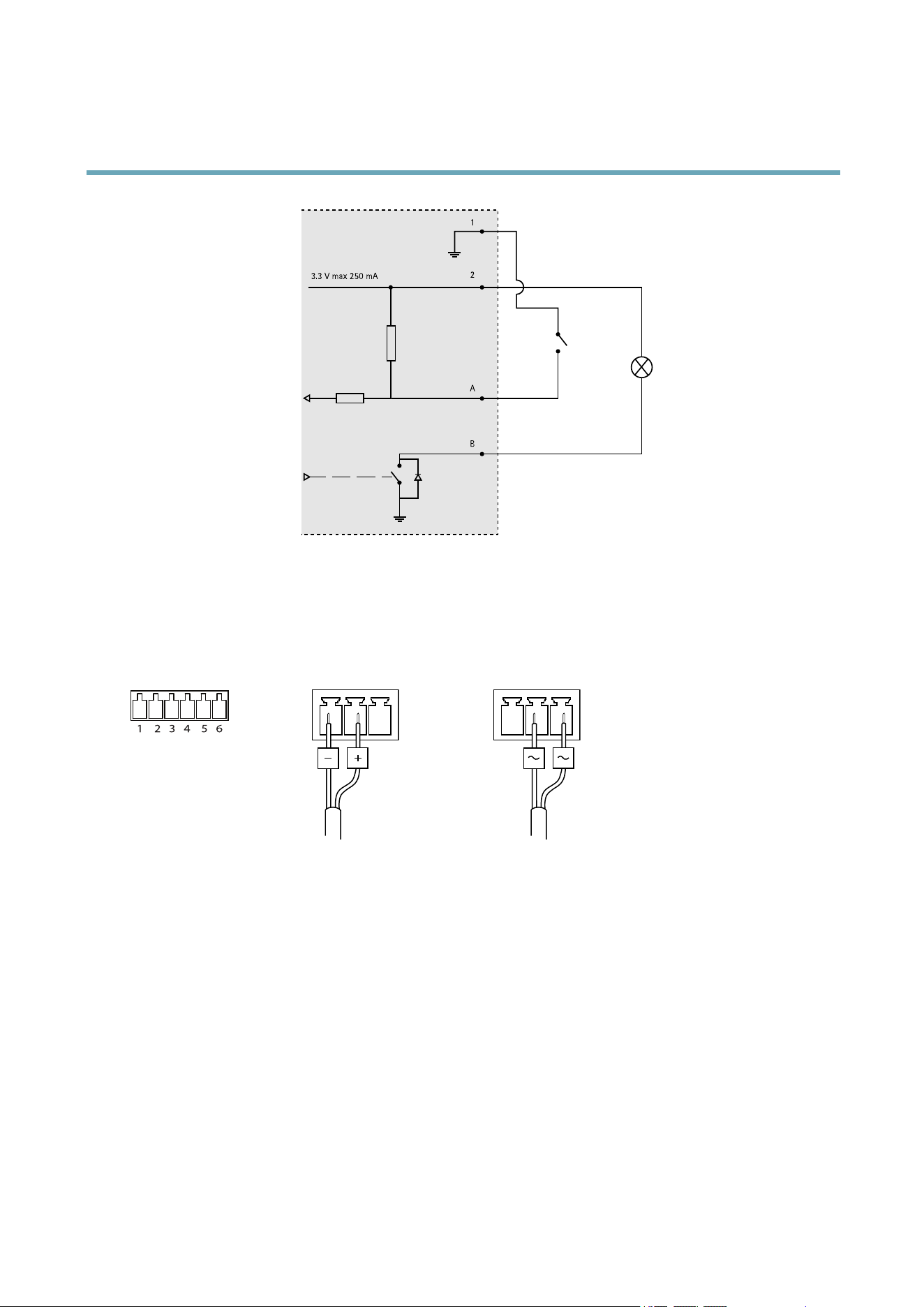
AXISQ6042PTZDomeNetworkCamera
Multi-ConnectorCable(soldseparately)
3.3 V max 250 mA
1
2
A
B
Connectiondiagram
A
I/Oconguredasinput
B
I/Oconguredasoutput
I/Oconnector
1 2 3 4 5 6
DCpowerinput ACpowerinput
58
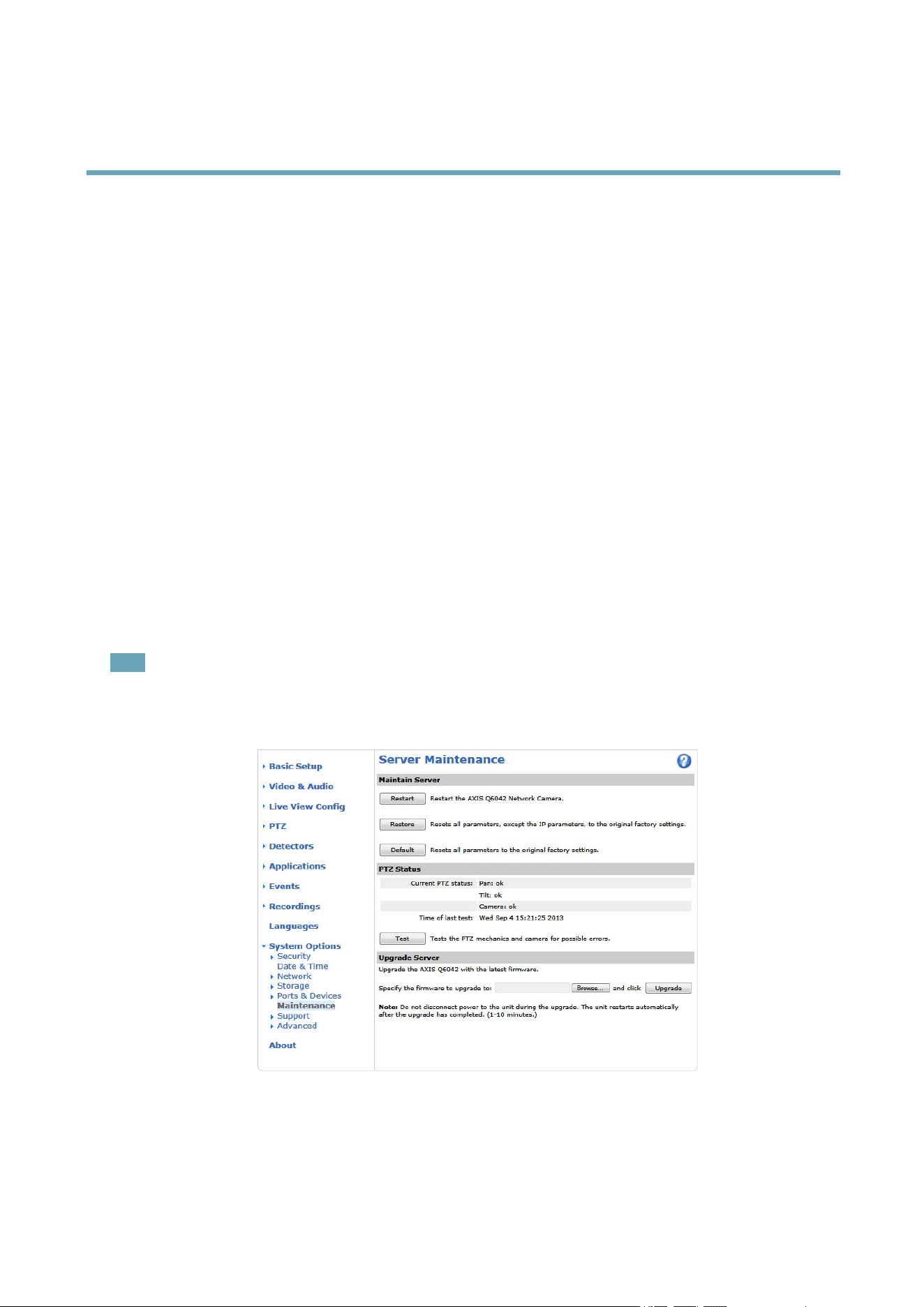
AXISQ6042PTZDomeNetworkCamera
Troubleshooting
Troubleshooting
CheckingtheFirmware
Firmwareissoftwarethatdeterminesthefunctionalityofnetworkdevices.Oneofyourrstactionswhentroubleshootingaproblem
shouldbetocheckthecurrentrmwareversion.Thelatestversionmaycontainacorrectionthatxesyourparticularproblem.The
currentrmwareversionintheAxisproductisdisplayedinthepageSetup>BasicSetupandinSetup>About.
UpgradingtheFirmware
WhenyouupgradetheproductwiththelatestrmwarefromAxiswebsite,theproductreceivesthelatestfunctionalityavailable.
Alwaysreadtheupgradeinstructionsandreleasenotesavailablewitheachnewrelease,beforeupgradingthermware.
Toupgrade,followtheseinstructions:
1.Savethermwareletoyourcomputer.ThelatestversionofthermwareisavailablefreeofchargefromAxiswebsite
atwww.axis.com/techsup
2.GotoSetup>SystemOptions>Maintenanceintheproductswebpages.
3.UnderUpgradeServer,clickBrowseandlocatetheleonyourcomputer.ClickUpgrade.
Afterstartingtheupgradeprocess,alwayswaitatleast5–10minutesbeforerestartingtheproduct,evenifyoususpectthe
upgradehasfailed.
AXISCameraManagementcanbeusedformultipleupgrades.Seewww.axis.comformoreinformation.
Note
•Yourdealerreservestherighttochargeforanyrepairattributabletofaultyupgradebytheuser.
•Preconguredandcustomizedsettingsaresavedwhenthermwareisupgraded(providingthefeaturesareavailableinthe
newrmware)althoughthisisnotguaranteedbyAxisCommunicationsAB.
EmergencyRecoveryProcedure
Ifpowerornetworkconnectionislostduringtheupgrade,theprocessfailsandtheproductbecomesunresponsive.FlashingredStatus
indicatorindicatesafailedupgrade.Torecovertheproduct,followthestepsbelow.Theserialnumberisfoundontheproduct’slabel.
59

AXISQ6042PTZDomeNetworkCamera
Troubleshooting
1.InUNIX/Linux,typethefollowingfromthecommandline:
arp-s<IPaddress><serialnumber>temp
ping-l408<IPaddress>
InWindows,typethefollowingfromacommand/DOSprompt(thismayrequirethatyourunthecommandpromptas
anadministrator):
arp-s<IPaddress><serialnumber>
ping-l408-t<IPaddress>
2.Iftheproductdoesnotreplyin30seconds,restartitandwaitforareply.PressCTRL+CtostopPing.
3.Openabrowserandtypeintheproduct’sIPaddress.Inthepagethatappears,usetheBrowsebuttontoselecttheupgrade
letouse.ThenclickLoadtorestarttheupgradeprocess.
4.Aftertheupgradeiscomplete(1–10minutes),theproductautomaticallyrestartsandshowsasteadygreenonthe
Statusindicator.
5.Reinstalltheproduct,referringtotheInstallationGuide.
Iftheemergencyrecoveryproceduredoesnotgettheproductupandrunningagain,contactAxissupportatwww.axis.com/techsup/
Symptoms,PossibleCausesandRemedialActions
ProblemssettingtheIPaddress
WhenusingARP/Ping
Trytheinstallationagain.TheIPaddressmustbesetwithintwominutesafterpowerhasbeen
appliedtotheproduct.EnsurethePinglengthissetto408.Forinstructions,seeAssignIPAddress
UsingARP/Ping,onpage48.
Theproductislocatedona
differentsubnet
IftheIPaddressintendedfortheproductandtheIPaddressofthecomputerusedtoaccessthe
productarelocatedondifferentsubnets,youwillnotbeabletosettheIPaddress.Contactyour
networkadministratortoobtainanIPaddress.
TheIPaddressisbeingused
byanotherdevice
DisconnecttheAxisproductfromthenetwork.RunthePingcommand(inaCommand/DOS
window,typepingandtheIPaddressoftheproduct:
•Ifyoureceive:Replyfrom<IPaddress>:bytes=32;time=10...
thismeansthattheIPaddressmayalreadybeinusebyanotherdeviceonthenetwork.
ObtainanewIPaddressfromthenetworkadministratorandreinstalltheproduct.
•Ifyoureceive:Requesttimedout,thismeansthattheIPaddressisavailable
forusewiththeAxisproduct.Checkallcablingandreinstalltheproduct.
PossibleIPaddressconict
withanotherdeviceonthe
samesubnet.
ThestaticIPaddressintheAxisproductisusedbeforetheDHCPserversetsadynamicaddress.
ThismeansthatifthesamedefaultstaticIPaddressisalsousedbyanotherdevice,theremay
beproblemsaccessingtheproduct.
Theproductcannotbeaccessedfromabrowser
Cannotlogin
WhenHTTPSisenabled,ensurethatthecorrectprotocol(HTTPorHTTPS)isusedwhenattempting
tologin.Youmayneedtomanuallytypehttporhttpsinthebrowser’saddresseld.
Ifthepasswordfortheuserrootislost,theproductmustberesettothefactorydefaultsettings.
SeeResettoFactoryDefaultSettings,onpage56.
60

AXISQ6042PTZDomeNetworkCamera
Troubleshooting
TheIPaddresshasbeen
changedbyDHCP
IPaddressesobtainedfromaDHCPserveraredynamicandmaychange.IftheIPaddresshas
beenchanged,useAXISIPUtilityorAXISCameraManagementtolocatetheproductonthe
network.Identifytheproductusingitsmodelorserialnumber,orbytheDNSname(ifthename
hasbeencongured).
Ifrequired,astaticIPaddresscanbeassignedmanually.Forinstructions,seetheInstallationand
ManagementSoftwareCDorthedocumentAssignanIPAddressandAccesstheVideoStreamon
AxisSupportwebatwww.axis.com/techsup.
Certicateerrorwhenusing
IEEE802.1X
Forauthenticationtoworkproperly,thedateandtimesettingsintheAxisproductshouldbe
synchronizedwithanNTPserver.SeeDate&Time,onpage47.
Theproductisaccessiblelocallybutnotexternally
RoutercongurationTocongureyourroutertoallowincomingdatatrafctotheAxisproduct,enabletheNAT-traversal
featurewhichwillattempttoautomaticallyconguretheroutertoallowaccesstotheAxis
product,seeNATtraversal(portmapping)forIPv4,onpage50.TheroutermustsupportUPnP
TM
.
Firewallprotection
ChecktheInternetrewallwithyournetworkadministrator.
Defaultroutersrequired
CheckifyouneedtoconguretheroutersettingsfromSystemOptions>Network>TCP/IP>
Basic.
ProblemswithstreamingH.264
ProblemswithAXISMedia
Control(InternetExplorer
only)
ToenabletheupdatingofvideoimagesinInternetExplorer,setthebrowsertoallowActiveX
controls.Also,makesurethatAXISMediaControlisinstalledonyourcomputer.
NoH.264displayedinthe
client
CheckthattherelevantH.264connectionmethodsandcorrectinterfaceareenabledintheAMC
ControlPanel(streamingtab).SeeAXISMediaControl(AMC),onpage14.
IntheAMCControlPanel,selecttheH.264tabandclickSettodefaultH.264decoder.
CheckthatRTSPisenabledunderSystemOptions>Network>TCP/IP>Advanced.
MulticastH.264only
accessiblebylocalclients
Checkifyourroutersupportsmulticasting,oriftheroutersettingsbetweentheclientandthe
productneedtobecongured.TheTTL(TimeToLive)valuemayneedtobeincreased.
NomulticastH.264
displayedintheclient
CheckwithyournetworkadministratorthatthemulticastaddressesusedbytheAxisproduct
arevalidforyournetwork.
Checkwithyournetworkadministratortoseeifthereisarewallpreventingviewing.
Installationofadditional
ActiveXcomponent
restrictedorprohibited
ConguretheAxisproducttouseaJavaappletforupdatingvideoimagesinyourbrowser.Goto
Setup>LiveViewCongandselectJavaappletunderDefaultviewer.
PoorrenderingofH.264
images
Ensurethatyourgraphicscardisusingthelatestdriver.Thelatestdriverscanusuallybe
downloadedfromthemanufacturer’swebsite.
Colorsaturationisdifferent
inH.264andMotionJPEG
Modifythesettingsforyourgraphicsadapter.Refertotheadapter’sdocumentationformore
information.
61

AXISQ6042PTZDomeNetworkCamera
Troubleshooting
Lowerframeratethan
expected
SeePerformanceConsiderations,onpage66.
Reducethenumberofapplicationsrunningontheclientcomputer.
Limitthenumberofsimultaneousviewers.
Checkwiththenetworkadministratorthatthereisenoughbandwidthavailable.
CheckintheAMCControlPanel(H.264tag)thatvideoprocessingisNOTsettoDecodeonly
keyframes.
Lowertheimageresolution.
Themaximumframespersecondisdependentontheutilityfrequency(60/50Hz)oftheAxis
product.SeeTechnicalSpecications,onpage64.
Videoandimageproblems,general
Imageunsatisfactory
CheckthevideostreamandcamerasettingsunderSetup>Video&Audio>VideoStreamand
Setup>Video&Audio>CameraSettings.
MotionDetectiontriggersunexpectedly
Changesinluminance
Motiondetectionisbasedonchangesinluminanceintheimage.Thismeansthatifthereare
suddenchangesinthelighting,motiondetectionmaytriggermistakenly.Lowerthesensitivity
settingtoavoidproblemswithluminance.
Noaudio
Incorrectsetup
Checkthesoundcardinthecomputer.Ensurethatmuteisnotselectedandthatthevolume
settingsarecorrect.
CheckthatEnableaudiosupportisselectedunderSetup>SystemOptions>Security>Audio
Support.
CheckthatthecorrectAudioInputsourceisselectedunderSetup>Video&Audio>Audio
Settings.
Pooraudioquality
Stuttering
Reducethenumberoflistenersandviewers.Decreaseimageresolutionandcompression.
Unsynchronizedaudioand
videousingH.264
Synchronizetheproduct’sdateandtimesettingswithanNTPserver.GotoSetup>System
Options>Date&Time.
Distortedaudio
CheckthatthecorrectAudioInputsourceisselectedunderSetup>Video&Audio>Audio
Settings.
FeedbackloopsFeedbackloopsmightappearinfull-duplexmode.Trymovingthemicrophoneorthespeaker,or
usehalf-duplexmodeinstead.
Storageanddiskmanagementproblems
Storagedisruption
Astoragedisruptionalarmissentifastoragedeviceisunavailable,removed,full,lockedorifother
readorwriteproblemsoccur.Toidentifythesourceoftheproblem,checktheSystemLogunder
SystemOptions>Support>Logs&Reports.Dependingontheproblem,itmightbenecessaryto
re-mountthestoragedevice.
Forinformationonhowtosetupastoragedisruptionalarm,see.
Videocannotberecorded
CheckthattheSDcardisnotwriteprotected(thatis,readonly).
SDcardcannotbemountedReformattheSDcardandthenclickMount.
62

AXISQ6042PTZDomeNetworkCamera
Troubleshooting
Condensationindome
BlurredimageActivatefanandheatertoremovepossiblemoisturefromdome
63

AXISQ6042PTZDomeNetworkCamera
TechnicalSpecications
TechnicalSpecications
Function/group
Item
Specications
Models
AXISQ604260Hz
AXISQ604250Hz
Imagesensor
¼”ExViewHADprogressivescanCCD
Lensf3.3–119mm
F1.4–4.2
Autofocus
Automaticday/night
Horizontalangleofview:57.2˚–1.7˚
Minimum
illumination
Color:0.5luxat30IREF1.4
B/W:0.008luxat30IREF1.4
Shuttertime
1/30000sto0.5s(60Hz)
1/30000sto1.5s(50Hz)
Pan/Tilt/Zoom
E-ip
256presetpositions
Pan360°endless,0.05°–450°/s
Tilt:180°,0.05°–450°/s
36xopticalzoomand12xdigitalzoom,total432xzoom
Camera
Pan/Tilt/Zoom
functionalities
Tourrecording,guardtour,controlqueue
On-screendirectionalindicator,Setnewpan0°
Video
compression
H.264(MPEG-4Part10/AVC)
MotionJPEG
Resolutions
ExtendedD1752x480to176x120(60Hz)
ExtendedD1736x576to176x144(50Hz)
FramerateH.264
Upto30/25fps(60/50Hz)
Framerate
MotionJPEG
Upto30/25fps(60/50Hz)
Videostreaming
Multiple,individuallycongurablestreamsinH.264andMotionJPEG
Controllableframerateandbandwidth
VBR/CBRH.264
Video
Imagesettings
WideDynamicRange(WDR),manualshuttertime,compression,color,brightness,
sharpness,whitebalance,exposurecontrol,exposurezones,backlightcompensation,ne
tuningofbehavioratlowlight
Rotation:0°,180°
Textandimageoverlay
32individual3Dprivacymasks
ImagefreezeonPTZ
AudiostreamingTwo-way:Fullduplex,Halfduplex
Simplex
Audio
compression
AAC-LC8/16kHz
G.711PCM8kHz
G.726ADPCM8kHz
Congurablebitrate
Audio
Audio
input/output
Requiresmulti-connectorcable(soldseparately)forexternalmicrophoneorlineinput,
andlineoutput
64

AXISQ6042PTZDomeNetworkCamera
TechnicalSpecications
Function/group
Item
Specications
SecurityPasswordprotection,IPaddressltering,HTTPSencryption*,IEEE802.1Xnetworkaccess
control*,digestauthentication,useraccesslog
*ThisproductincludessoftwaredevelopedbytheOpenSSLProjectforuseintheOpen
SSLToolkit(www.openssl.org)
Network
Supported
protocols
IPv4/v6,HTTP,HTTPS*,SSL/TLS*,QoSLayer3DiffServ,FTP,CIFS/SMB,SMTP,Bonjour,
UPnP
TM
,SNMPv1/v2c/v3(MIB-II),DNS,DynDNS,NTP,RTSP,RTP,TCP,UDP,IGMP,RTCP,
ICMP,DHCP,ARP,SOCKS,etc
*ThisproductincludessoftwaredevelopedbytheOpenSSLProjectforuseintheOpen
SSLToolkit(www.openssl.org)
Application
Programming
Interface
OpenAPIforsoftwareintegration,includingVAPIX®andAXISCameraApplication
PlatformfromAxisCommunications;specicationsavailableatwww.axis.com
ONVIF,specicationsavailableatwww.onvif.org
AXISVideoHostingSystem(AVHS)withOne-ClickCameraConnection
Intelligentvideo
Videomotiondetection,audiodetection,autotracking,ActiveGatekeeper
SupportforAXISCameraApplicationPlatformenablinginstallationofadditional
applications
Eventtriggers
Detectors:AudioDetection,LiveStreamAccessed,MotionDetection
Hardware:Fan,Network,Temperature
InputSignal:DigitalInputPort,ManualTrigger,VirtualInputs
PTZ:Autotracking,Error,Moving,PresetReached,Ready
Storage:Disruption,Recording
System:SystemReady,ShockDetected
Time:Recurrence,UseSchedule
EventactionsFileupload:FTP,HTTP,networkshareandemail
Notication:email,HTTPandTCP
Externaloutput,PTZpreset,guardtour,playaudioclip,videorecordingtoedgestorage,
autotracking,day/nightmode
Pre-andpost-alarmvideobuffering
InstallationaidPixelcounter
Videoaccessfrom
webbrowser
Cameraliveview
Videorecordingtole(ASF)
CustomizableHTMLpages
Windows7,WindowsVista,WindowsXP,WindowsServer2008,WindowsServer2003
DirectX9corhigher
Forotheroperatingsystemsandbrowsers,seewww.axis.com/techsup
System
Integration
Managementand
maintenance
AXISCameraManagementtoolonCDandweb-basedconguration
Congurationofbackupandrestore
FirmwareupgradesoverHTTPorFTP,rmwareavailableonwww.axis.com
Casing
IP52-ratedmetalcasing(aluminum),acrylic(PMMA)cleardome
Memory512MBRAM,128MBFlash
Batterybacked-upreal-timeclock
Power
PoweroverEthernetPlus(PoE+)IEEE802.3atmax30W
AXIST8123HighPoEMidspan1-portincluded:100–240VAC,max37W
24–34VDCmax19W;20–24VAC,max30VA
Connectors
RJ-45for10BASE-T/100BASE-TXPoE
Multi-connector(cablesoldseparately)forAC/DCpower,4congurablealarm
inputs/outputs,micin,linemonoinput,linemonooutputtoactivespeaker
Edgestorage
SupportsSDcardswithupto64GBofstorage.Forbestrecordingperformance,usean
SDHCorSDXCcardwithspeedclass10.(cardnotincluded)
Supportforrecordingtonetworkshare(NetworkAttachedStorageorleserver)
General
65

AXISQ6042PTZDomeNetworkCamera
TechnicalSpecications
Function/group
Item
Specications
Operating
conditions
0°Cto50°C(32°Fto122°F)
Humidity10–85%RH(non-condensing)
Approvals
EN55022ClassA
EN61000-3-2
EN61000-3-3
EN61000-6-1
EN61000-6-2
EN55024
FCCPart15SubpartBClassA
ICES-003ClassA
VCCIClassA
C-tickAS/NZSCISPR22ClassA
KCCKN22ClassA,KN24
IEC/EN/UL60950-1
IEC/EN60529IP52
IEC60721-4-3Class3K3,3M3
IEC60068-2
IEC/EN62262IK10
Midspan:EN60950-1,GS,UL,cUL,CE,VCCI,CB,KCC,UL-AR
Weight
Camera:2.6kg(5.7lb.)
Camerawithdrop-ceilingmount:3.2kg(7.1lb.)
Included
accessories
AXIST8123HighPoEMidspan1-port,mountingkitforhardanddropceilings,smoked
domecover,InstallationGuide,InstallationandManagementSoftwareCD,Windows
decoder1-userlicense
Video
management
software
AXISCameraCompanion(softwareincludedonCD)—Basicsurveillanceforsmall
businesses,wherevideoisrecordedtoedgestorage
AXISCameraStation(soldseparately)—Fullyfeaturedsurveillanceformedium-sized
installations,wherevideoisrecordedonasystemserver
Formoreinformationandsoftwareapplicationsfrompartners,see
www.axis.com/products/video/software/
Optional
accessories
Multi-connectorcable
AXIST91AMountingAccessories
AXIST8310VideoSurveillanceControlBoard
AXIST90AIlluminators
InstallationDisplay
Multi-userdecoderlicensepack
T81B22DC30WMidspan
PerformanceConsiderations
Whensettingsupyoursystem,itisimportanttoconsiderhowvarioussettingsandsituationswillaffectperformance.Somefactors
affecttheamountofbandwidth(thebitrate)required,otherscanaffecttheframerate,andsomeaffectboth.Iftheloadonthe
CPUreachesitsmaximum,thiswillalsoaffecttheframerate.
Thefollowingfactorsareamongthemostimportanttoconsider:
•Highimageresolutionand/orlowercompressionlevelsresultinimagescontainingmoredata.Bandwidthaffected.
•AccessbylargenumbersofMotionJPEGand/orunicastH.264clients.Bandwidthaffected.
•Simultaneousviewingofdifferentstreams(resolution,compression)bydifferentclients.Effectonframerateand
bandwidth.
•AccessingMotionJPEGandH.264videostreamssimultaneously.Framerateandbandwidthaffected.
•Heavyusageofeventsettingsaffecttheproduct’sCPUload.Framerateaffected.
66

AXISQ6042PTZDomeNetworkCamera
TechnicalSpecications
•Heavynetworkutilizationduetopoorinfrastructure.Bandwidthaffected.
•Viewingonpoorlyperformingclientcomputerslowersperceivedperformance.Framerateaffected.
67

UserManualVer.M1.9
AXISQ6042PTZDomeNetworkCameraDate:October2013
©AxisCommunicationsAB,2013
PartNo.53494