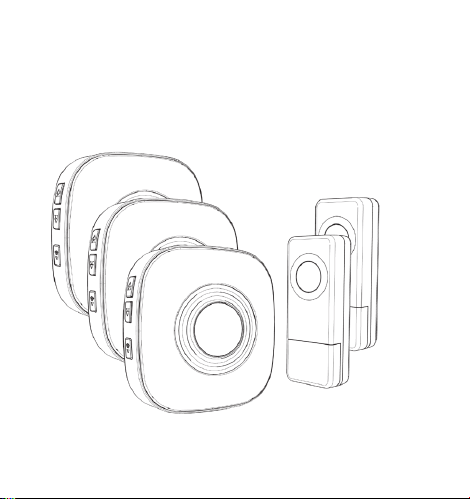
1.POWERING THE INDOOR CHIME RECEIVE
Plug the receiver into the outlet. The receiver will
perform better if kept away from other electrical
equipment (eg: TV, microwave.)
2.POWERING THE TRANSMITTER
Peel off the insulating sheet, push the button to ensure
the transmitter is working fine
(the button is flashing blue light).
3.SOUND VOLUME CONTROL
Press the volume control button on the receiver to cycle
through 5 volume levels, including MUTE mode.
7.OPERATION VIDEO
Please scan the QR code.
Operating Instructions
There is 18 months warranty for our product. If you have
any product using question, please do not hesitate to
contact usthrough [email protected], our 24-hour
email standby.
01 Ding-dong,Ding-dong 30 Electric piano
02 Ding-dong,Ding-dong 31 Starry night
03 Ding-dong,Ding-dong 32 Marimba
04 Ding-dong,Ding-dong 33 Alerting Ringtone
05 Corsica Doorbell 34 Electric Ringtone
06 Ding-dong 35 Alerting Ringtone
07 Ding-dong 36 Piano rhythm
08 Ding-dong 37 Butterfly Dream
09 Ding-dong Chime 38 Dance beat
10 Ding-dong 39 Twilight Sms Tone
11 Ding-dong 40 Classical organ
12 Ding-dong Chime 41 Joy to the world
13 Alarm Sound Effect 42 Super Ringtone
14 Barking 43 Let It Snow
15 Hello Welcome 44 Fast Car
16 Horn sound 45 Dingdong merrily on high
17 Brake sound 46 Jingle bells
18 Westminster Chimes 47 Waltz of the flowers
19 Westminster Chimes 48 For Alice
20 Westminster Chimes 49 The William tell overture
21 Westminster Chimes 50 The cuckoo waltzes
22 Big ben electronic doorbell 51 Going home
23 Marimba 52 Victory
24 Alerting Ringtone 53 Happy birthday
25 Smooth alert ringtone 54 Fantaisie Impromptu
26 Marimba Ringtone 55 Yesterday Once More
27 Flute sound doorbell 56 Eva's Polka
28 Harp Ringtone 57 Russe Dance
29 Guitar rhythm 58 Souvenirs Denfance
WARRANTY AND AFTER-SALE SERVICE
Chimes List
Troubleshooting
Transmitter battery installation
The battery is pre-installed in the transmitter. Insert the
key into the allotted slot. Twist the key clockwise to
open. Peel off the insulating film on the button
cell then close the cover.
Installation
Transmitter installation
1.Adhesive tape: apply the double-sided adhesive tape on
the back of the transmitter. Remove the outer side of the
tape and attach the transmitter in the desired location on
the wall and press hard for 30 seconds.
2.Screws and anchors: there are screw locator knockouts
on the back of the transmitter; punch these out to allow
the screws to pass through and fix the transmitter with
the anchors in the desired location on the wall.
3.58 optional melodies; easy to choose between Forward
Button and Back Button; built-in 40 mm stereo speaker
delivers rich and crisp sound.
4.5 level adjustable volume(0 dB to 110 dB) to meet your
needs for different occasions.
5.Uses a power chip from American Power Integrations,
offering a reliable maximum of 250 mA current.
6.Provides a massive 300-400m wireless distance range
(depending on the operating environment).
7.Custom encoded software communication method
ensures better privacy and no interference from other
devices.
8.The transmitter is IP55 dust-proof and water-resistant,
fit for various outdoor environments.
Introduction
Our new wireless doorbell use advanced technology to
make sure detection signals more accurate. We
dedicates to improve your living quality and simplify your
lifestyle as development direction, We have been
committed to researching and developing more high
quality and competitive products.
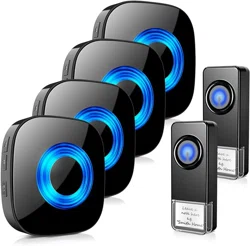
This wireless transmitter and plug-in receiver has a
300-400 m range. It is great for multiple places, including
home, apartment, office, classroom, hospital, ect.
Our wireless doorbell receiver is expandable, which
allows you to pair with various transmitters in different
locations in your home or office. One receiver can pair
with up to 58 various transmitters and each transmitter
can be set to different ringtone(58 ringtones to choose).
So you can know where the signal is coming from in
different locations.
Thank you for purchasing our product!
9.Memory function adds convenience. Every time you
turn on the device after a power outage, it will still
maintain your last set melody and volume level.
1.Extreme low power consumption and a three years
super long battery life (10-15 times uses a day).
2.Easy to set up; adhere the transmitter to the wall via
double-sided tape or screws-in.
Features
Technical Specification
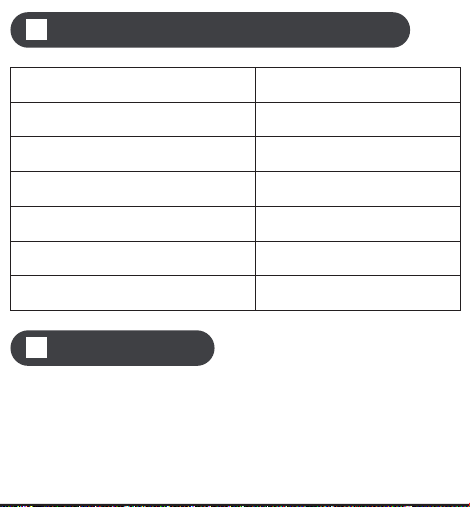
Receiver working voltage AC100V-240V
Sound pressure level < 110dB
Receiver AC power consumption < 0.25 W (standby mode)
Working frequency 433.92 MHz
Transmitter battery type A23 12V Alkaline Battery
Operating temperature -20 °C-60 °C
Battery lifetime 1-3 years
Problem
The indicator on the
transmitter does not
light up
The receiver does not
respond to the transmitter
Unsuccessful pairing
Pair the transmitter
and receiver again
Push the Volume Button
to make a sound
Mute mode is ON
The receiver only lights
but NO sound
Cause
The battery insulating
film has not been
peeled off
Peel off the insulating film
The battery is not
properly installed
The battery power is low Replace with new battery
Take out the battery and
install it again. Make sure
the contacts are good.
Solution
4.SETTING RINGTONE AND PAIRING
THE DOORBELL
There are 58 melodies to choose from:
(1)Press the Forward Button or Back Button to choose
your favorite ringtone.
(3)Trigger the transmitter buttons to send a signal to
the receiver. The ringtone will be set for the most
recently synced transmitter.
(2)Short Press the Volume Button and the Back Button
together, and you will hearing the receiver make
a sound.
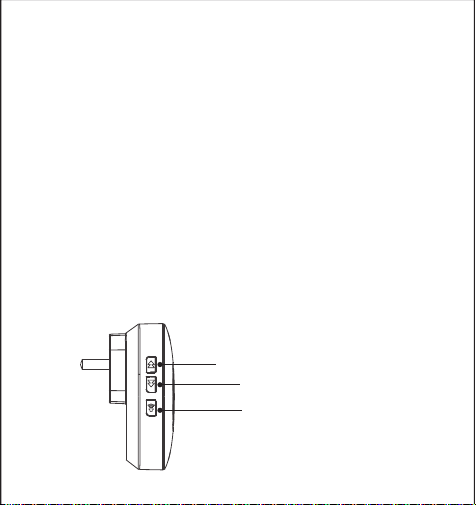
Forward Button
Back Button
Volume Button
Note: please notice the polarity of the button cell
when replacing the battery.
Note: Please clear the surface of the wall before install.
6
7 8 9 10 11
Please Note:
(1)Pairing mode will last for 5 seconds only before
timing out. Ensure you activate the transmitter during
this time or the process will have to start again.
(2)Pairing mode will quit automatically after paring is
completed.
5.TWO OR MORE TRANSMITTERS PAIRING
If you would like to pair with more transmitters, please
repeat the Step 4.
6.RESET
Press Back Button for 5 seconds to reset receivers to
default. When receiver sounds 'Ding Dong' with LED
flashing that means the reset was successful. Then you
can follow the STEP 4 to pair again.
2
3
4
5
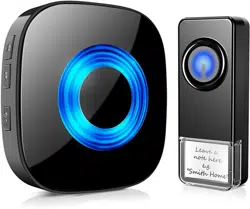
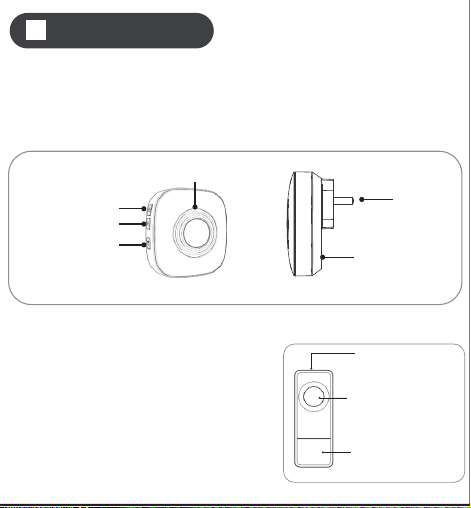
1.Plug-in Receiver
The receiver has an LED Indicator on the front, 3 buttons
on the side, Forward Button, Back Button and Volume
Button. The AC plug and Speaker are on the back.
2.Transmitter/ Push Button
The transmitter/push button has
a rubber button on the surface
that illuminates an LED when
you press it. Below is a
message area, you can
design relevant text yourself.
Overview
●Plug-in Receiver
Forward Button
LED indicator
Speaker
AC plug
Back Button
Volume Button
●Transmitter
Button &LED lndicator
Leave message here
Open from here
Method 1 Method 2
Wall
30 Electric piano
31 Starry night
32 Marimba
33 Alerting Ringtone
34 Electric Ringtone
35 Alerting Ringtone
36 Piano rhythm
37 Butterfly Dream
38 Dance beat
39 Twilight Sms Tone
40 Classical organ
41 Joy to the world
42 Super Ringtone
43 Let It Snow
44 Fast Car
45 Dingdong merrily on high
46 Jingle bells
47 Waltz of the flowers
48 For Alice
49 The William tell overture
50 The cuckoo waltzes
51 Going home
52 Victory
53 Happy birthday
54 Fantaisie Impromptu
55 Yesterday Once More
56 Eva's Polka
57 Russe Dance
58 Souvenirs Denfance
Wireless Doorbell
CW User Manual
Please read this user manual before using and installation.
80mm
75mm

1.POWERING THE INDOOR CHIME RECEIVE
Plug the receiver into the outlet. The receiver will
perform better if kept away from other electrical
equipment (eg: TV, microwave.)
2.POWERING THE TRANSMITTER
Peel off the insulating sheet, push the button to ensure
the transmitter is working fine
(the button is flashing blue light).
3.SOUND VOLUME CONTROL
Press the volume control button on the receiver to cycle
through 5 volume levels, including MUTE mode.
7.OPERATION VIDEO
Please scan the QR code.
Operating Instructions
There is 18 months warranty for our product. If you have
any product using question, please do not hesitate to
contact usthrough [email protected], our 24-hour
email standby.
01 Ding-dong,Ding-dong 30 Electric piano
02 Ding-dong,Ding-dong 31 Starry night
03 Ding-dong,Ding-dong 32 Marimba
04 Ding-dong,Ding-dong 33 Alerting Ringtone
05 Corsica Doorbell 34 Electric Ringtone
06 Ding-dong 35 Alerting Ringtone
07 Ding-dong 36 Piano rhythm
08 Ding-dong 37 Butterfly Dream
09 Ding-dong Chime 38 Dance beat
10 Ding-dong 39 Twilight Sms Tone
11 Ding-dong 40 Classical organ
12 Ding-dong Chime 41 Joy to the world
13 Alarm Sound Effect 42 Super Ringtone
14 Barking 43 Let It Snow
15 Hello Welcome 44 Fast Car
16 Horn sound 45 Dingdong merrily on high
17 Brake sound 46 Jingle bells
18 Westminster Chimes 47 Waltz of the flowers
19 Westminster Chimes 48 For Alice
20 Westminster Chimes 49 The William tell overture
21 Westminster Chimes 50 The cuckoo waltzes
22 Big ben electronic doorbell 51 Going home
23 Marimba 52 Victory
24 Alerting Ringtone 53 Happy birthday
25 Smooth alert ringtone 54 Fantaisie Impromptu
26 Marimba Ringtone 55 Yesterday Once More
27 Flute sound doorbell 56 Eva's Polka
28 Harp Ringtone 57 Russe Dance
29 Guitar rhythm 58 Souvenirs Denfance
WARRANTY AND AFTER-SALE SERVICE
Chimes List
Troubleshooting
Transmitter battery installation
The battery is pre-installed in the transmitter. Insert the
key into the allotted slot. Twist the key clockwise to
open. Peel off the insulating film on the button
cell then close the cover.
Installation
Transmitter installation
1.Adhesive tape: apply the double-sided adhesive tape on
the back of the transmitter. Remove the outer side of the
tape and attach the transmitter in the desired location on
the wall and press hard for 30 seconds.
2.Screws and anchors: there are screw locator knockouts
on the back of the transmitter; punch these out to allow
the screws to pass through and fix the transmitter with
the anchors in the desired location on the wall.
3.58 optional melodies; easy to choose between Forward
Button and Back Button; built-in 40 mm stereo speaker
delivers rich and crisp sound.
4.5 level adjustable volume(0 dB to 110 dB) to meet your
needs for different occasions.
5.Uses a power chip from American Power Integrations,
offering a reliable maximum of 250 mA current.
6.Provides a massive 300-400m wireless distance range
(depending on the operating environment).
7.Custom encoded software communication method
ensures better privacy and no interference from other
devices.
8.The transmitter is IP55 dust-proof and water-resistant,
fit for various outdoor environments.
Introduction
Our new wireless doorbell use advanced technology to
make sure detection signals more accurate. We
dedicates to improve your living quality and simplify your
lifestyle as development direction, We have been
committed to researching and developing more high
quality and competitive products.
This wireless transmitter and plug-in receiver has a
300-400 m range. It is great for multiple places, including
home, apartment, office, classroom, hospital, ect.
Our wireless doorbell receiver is expandable, which
allows you to pair with various transmitters in different
locations in your home or office. One receiver can pair
with up to 58 various transmitters and each transmitter
can be set to different ringtone(58 ringtones to choose).
So you can know where the signal is coming from in
different locations.
Thank you for purchasing our product!
9.Memory function adds convenience. Every time you
turn on the device after a power outage, it will still
maintain your last set melody and volume level.
1.Extreme low power consumption and a three years
super long battery life (10-15 times uses a day).
2.Easy to set up; adhere the transmitter to the wall via
double-sided tape or screws-in.
Features
Technical Specification
Receiver working voltage AC100V-240V
Sound pressure level < 110dB
Receiver AC power consumption < 0.25 W (standby mode)
Working frequency 433.92 MHz
Transmitter battery type A23 12V Alkaline Battery
Operating temperature -20 °C-60 °C
Battery lifetime 1-3 years
Problem
The indicator on the
transmitter does not
light up
The receiver does not
respond to the transmitter
Unsuccessful pairing
Pair the transmitter
and receiver again
Push the Volume Button
to make a sound
Mute mode is ON
The receiver only lights
but NO sound
Cause
The battery insulating
film has not been
peeled off
Peel off the insulating film
The battery is not
properly installed
The battery power is low Replace with new battery
Take out the battery and
install it again. Make sure
the contacts are good.
Solution
4.SETTING RINGTONE AND PAIRING
THE DOORBELL
There are 58 melodies to choose from:
(1)Press the Forward Button or Back Button to choose
your favorite ringtone.
(3)Trigger the transmitter buttons to send a signal to
the receiver. The ringtone will be set for the most
recently synced transmitter.
(2)Short Press the Volume Button and the Back Button
together, and you will hearing the receiver make
a sound.
Forward Button
Back Button
Volume Button
Note: please notice the polarity of the button cell
when replacing the battery.
Note: Please clear the surface of the wall before install.
6
7 8 9 10 11
Please Note:
(1)Pairing mode will last for 5 seconds only before
timing out. Ensure you activate the transmitter during
this time or the process will have to start again.
(2)Pairing mode will quit automatically after paring is
completed.
5.TWO OR MORE TRANSMITTERS PAIRING
If you would like to pair with more transmitters, please
repeat the Step 4.
6.RESET
Press Back Button for 5 seconds to reset receivers to
default. When receiver sounds 'Ding Dong' with LED
flashing that means the reset was successful. Then you
can follow the STEP 4 to pair again.
2
3
4
5
1.Plug-in Receiver
The receiver has an LED Indicator on the front, 3 buttons
on the side, Forward Button, Back Button and Volume
Button. The AC plug and Speaker are on the back.
2.Transmitter/ Push Button
The transmitter/push button has
a rubber button on the surface
that illuminates an LED when
you press it. Below is a
message area, you can
design relevant text yourself.
Overview
●Plug-in Receiver
Forward Button
LED indicator
Speaker
AC plug
Back Button
Volume Button
●Transmitter
Button &LED lndicator
Leave message here
Open from here
Method 1 Method 2
Wall
30 Electric piano
31 Starry night
32 Marimba
33 Alerting Ringtone
34 Electric Ringtone
35 Alerting Ringtone
36 Piano rhythm
37 Butterfly Dream
38 Dance beat
39 Twilight Sms Tone
40 Classical organ
41 Joy to the world
42 Super Ringtone
43 Let It Snow
44 Fast Car
45 Dingdong merrily on high
46 Jingle bells
47 Waltz of the flowers
48 For Alice
49 The William tell overture
50 The cuckoo waltzes
51 Going home
52 Victory
53 Happy birthday
54 Fantaisie Impromptu
55 Yesterday Once More
56 Eva's Polka
57 Russe Dance
58 Souvenirs Denfance
Wireless Doorbell
CW User Manual
Please read this user manual before using and installation.
80mm
75mm
1.POWERING THE INDOOR CHIME RECEIVE
Plug the receiver into the outlet. The receiver will
perform better if kept away from other electrical
equipment (eg: TV, microwave.)
2.POWERING THE TRANSMITTER
Peel off the insulating sheet, push the button to ensure
the transmitter is working fine
(the button is flashing blue light).
3.SOUND VOLUME CONTROL
Press the volume control button on the receiver to cycle
through 5 volume levels, including MUTE mode.
7.OPERATION VIDEO
Please scan the QR code.
Operating Instructions
There is 18 months warranty for our product. If you have
any product using question, please do not hesitate to
contact usthrough [email protected], our 24-hour
email standby.
01 Ding-dong,Ding-dong 30 Electric piano
02 Ding-dong,Ding-dong 31 Starry night
03 Ding-dong,Ding-dong 32 Marimba
04 Ding-dong,Ding-dong 33 Alerting Ringtone
05 Corsica Doorbell 34 Electric Ringtone
06 Ding-dong 35 Alerting Ringtone
07 Ding-dong 36 Piano rhythm
08 Ding-dong 37 Butterfly Dream
09 Ding-dong Chime 38 Dance beat
10 Ding-dong 39 Twilight Sms Tone
11 Ding-dong 40 Classical organ
12 Ding-dong Chime 41 Joy to the world
13 Alarm Sound Effect 42 Super Ringtone
14 Barking 43 Let It Snow
15 Hello Welcome 44 Fast Car
16 Horn sound 45 Dingdong merrily on high
17 Brake sound 46 Jingle bells
18 Westminster Chimes 47 Waltz of the flowers
19 Westminster Chimes 48 For Alice
20 Westminster Chimes 49 The William tell overture
21 Westminster Chimes 50 The cuckoo waltzes
22 Big ben electronic doorbell 51 Going home
23 Marimba 52 Victory
24 Alerting Ringtone 53 Happy birthday
25 Smooth alert ringtone 54 Fantaisie Impromptu
26 Marimba Ringtone 55 Yesterday Once More
27 Flute sound doorbell 56 Eva's Polka
28 Harp Ringtone 57 Russe Dance
29 Guitar rhythm 58 Souvenirs Denfance
WARRANTY AND AFTER-SALE SERVICE
Chimes List
Troubleshooting
Transmitter battery installation
The battery is pre-installed in the transmitter. Insert the
key into the allotted slot. Twist the key clockwise to
open. Peel off the insulating film on the button
cell then close the cover.
Installation
Transmitter installation
1.Adhesive tape: apply the double-sided adhesive tape on
the back of the transmitter. Remove the outer side of the
tape and attach the transmitter in the desired location on
the wall and press hard for 30 seconds.
2.Screws and anchors: there are screw locator knockouts
on the back of the transmitter; punch these out to allow
the screws to pass through and fix the transmitter with
the anchors in the desired location on the wall.
3.58 optional melodies; easy to choose between Forward
Button and Back Button; built-in 40 mm stereo speaker
delivers rich and crisp sound.
4.5 level adjustable volume(0 dB to 110 dB) to meet your
needs for different occasions.
5.Uses a power chip from American Power Integrations,
offering a reliable maximum of 250 mA current.
6.Provides a massive 300-400m wireless distance range
(depending on the operating environment).
7.Custom encoded software communication method
ensures better privacy and no interference from other
devices.
8.The transmitter is IP55 dust-proof and water-resistant,
fit for various outdoor environments.
Introduction
Our new wireless doorbell use advanced technology to
make sure detection signals more accurate. We
dedicates to improve your living quality and simplify your
lifestyle as development direction, We have been
committed to researching and developing more high
quality and competitive products.
This wireless transmitter and plug-in receiver has a
300-400 m range. It is great for multiple places, including
home, apartment, office, classroom, hospital, ect.
Our wireless doorbell receiver is expandable, which
allows you to pair with various transmitters in different
locations in your home or office. One receiver can pair
with up to 58 various transmitters and each transmitter
can be set to different ringtone(58 ringtones to choose).
So you can know where the signal is coming from in
different locations.
Thank you for purchasing our product!
9.Memory function adds convenience. Every time you
turn on the device after a power outage, it will still
maintain your last set melody and volume level.
1.Extreme low power consumption and a three years
super long battery life (10-15 times uses a day).
2.Easy to set up; adhere the transmitter to the wall via
double-sided tape or screws-in.
Features
Technical Specification
Receiver working voltage AC100V-240V
Sound pressure level < 110dB
Receiver AC power consumption < 0.25 W (standby mode)
Working frequency 433.92 MHz
Transmitter battery type A23 12V Alkaline Battery
Operating temperature -20 °C-60 °C
Battery lifetime 1-3 years
Problem
The indicator on the
transmitter does not
light up
The receiver does not
respond to the transmitter
Unsuccessful pairing
Pair the transmitter
and receiver again
Push the Volume Button
to make a sound
Mute mode is ON
The receiver only lights
but NO sound
Cause
The battery insulating
film has not been
peeled off
Peel off the insulating film
The battery is not
properly installed
The battery power is low Replace with new battery
Take out the battery and
install it again. Make sure
the contacts are good.
Solution
4.SETTING RINGTONE AND PAIRING
THE DOORBELL
There are 58 melodies to choose from:
(1)Press the Forward Button or Back Button to choose
your favorite ringtone.
(3)Trigger the transmitter buttons to send a signal to
the receiver. The ringtone will be set for the most
recently synced transmitter.
(2)Short Press the Volume Button and the Back Button
together, and you will hearing the receiver make
a sound.
Forward Button
Back Button
Volume Button
Note: please notice the polarity of the button cell
when replacing the battery.
Note: Please clear the surface of the wall before install.
6
7 8 9 10 11
Please Note:
(1)Pairing mode will last for 5 seconds only before
timing out. Ensure you activate the transmitter during
this time or the process will have to start again.
(2)Pairing mode will quit automatically after paring is
completed.
5.TWO OR MORE TRANSMITTERS PAIRING
If you would like to pair with more transmitters, please
repeat the Step 4.
6.RESET
Press Back Button for 5 seconds to reset receivers to
default. When receiver sounds 'Ding Dong' with LED
flashing that means the reset was successful. Then you
can follow the STEP 4 to pair again.
2
3
4
5
1.Plug-in Receiver
The receiver has an LED Indicator on the front, 3 buttons
on the side, Forward Button, Back Button and Volume
Button. The AC plug and Speaker are on the back.
2.Transmitter/ Push Button
The transmitter/push button has
a rubber button on the surface
that illuminates an LED when
you press it. Below is a
message area, you can
design relevant text yourself.
Overview
●Plug-in Receiver
Forward Button
LED indicator
Speaker
AC plug
Back Button
Volume Button
●Transmitter
Button &LED lndicator
Leave message here
Open from here
Method 1 Method 2
Wall
30 Electric piano
31 Starry night
32 Marimba
33 Alerting Ringtone
34 Electric Ringtone
35 Alerting Ringtone
36 Piano rhythm
37 Butterfly Dream
38 Dance beat
39 Twilight Sms Tone
40 Classical organ
41 Joy to the world
42 Super Ringtone
43 Let It Snow
44 Fast Car
45 Dingdong merrily on high
46 Jingle bells
47 Waltz of the flowers
48 For Alice
49 The William tell overture
50 The cuckoo waltzes
51 Going home
52 Victory
53 Happy birthday
54 Fantaisie Impromptu
55 Yesterday Once More
56 Eva's Polka
57 Russe Dance
58 Souvenirs Denfance
Wireless Doorbell
CW User Manual
Please read this user manual before using and installation.
80mm
75mm
1.POWERING THE INDOOR CHIME RECEIVE
Plug the receiver into the outlet. The receiver will
perform better if kept away from other electrical
equipment (eg: TV, microwave.)
2.POWERING THE TRANSMITTER
Peel off the insulating sheet, push the button to ensure
the transmitter is working fine
(the button is flashing blue light).
3.SOUND VOLUME CONTROL
Press the volume control button on the receiver to cycle
through 5 volume levels, including MUTE mode.
7.OPERATION VIDEO
Please scan the QR code.
Operating Instructions
There is 18 months warranty for our product. If you have
any product using question, please do not hesitate to
contact usthrough [email protected], our 24-hour
email standby.
01 Ding-dong,Ding-dong 30 Electric piano
02 Ding-dong,Ding-dong 31 Starry night
03 Ding-dong,Ding-dong 32 Marimba
04 Ding-dong,Ding-dong 33 Alerting Ringtone
05 Corsica Doorbell 34 Electric Ringtone
06 Ding-dong 35 Alerting Ringtone
07 Ding-dong 36 Piano rhythm
08 Ding-dong 37 Butterfly Dream
09 Ding-dong Chime 38 Dance beat
10 Ding-dong 39 Twilight Sms Tone
11 Ding-dong 40 Classical organ
12 Ding-dong Chime 41 Joy to the world
13 Alarm Sound Effect 42 Super Ringtone
14 Barking 43 Let It Snow
15 Hello Welcome 44 Fast Car
16 Horn sound 45 Dingdong merrily on high
17 Brake sound 46 Jingle bells
18 Westminster Chimes 47 Waltz of the flowers
19 Westminster Chimes 48 For Alice
20 Westminster Chimes 49 The William tell overture
21 Westminster Chimes 50 The cuckoo waltzes
22 Big ben electronic doorbell 51 Going home
23 Marimba 52 Victory
24 Alerting Ringtone 53 Happy birthday
25 Smooth alert ringtone 54 Fantaisie Impromptu
26 Marimba Ringtone 55 Yesterday Once More
27 Flute sound doorbell 56 Eva's Polka
28 Harp Ringtone 57 Russe Dance
29 Guitar rhythm 58 Souvenirs Denfance
WARRANTY AND AFTER-SALE SERVICE
Chimes List
Troubleshooting
Transmitter battery installation
The battery is pre-installed in the transmitter. Insert the
key into the allotted slot. Twist the key clockwise to
open. Peel off the insulating film on the button
cell then close the cover.
Installation
Transmitter installation
1.Adhesive tape: apply the double-sided adhesive tape on
the back of the transmitter. Remove the outer side of the
tape and attach the transmitter in the desired location on
the wall and press hard for 30 seconds.
2.Screws and anchors: there are screw locator knockouts
on the back of the transmitter; punch these out to allow
the screws to pass through and fix the transmitter with
the anchors in the desired location on the wall.
3.58 optional melodies; easy to choose between Forward
Button and Back Button; built-in 40 mm stereo speaker
delivers rich and crisp sound.
4.5 level adjustable volume(0 dB to 110 dB) to meet your
needs for different occasions.
5.Uses a power chip from American Power Integrations,
offering a reliable maximum of 250 mA current.
6.Provides a massive 300-400m wireless distance range
(depending on the operating environment).
7.Custom encoded software communication method
ensures better privacy and no interference from other
devices.
8.The transmitter is IP55 dust-proof and water-resistant,
fit for various outdoor environments.
Introduction
Our new wireless doorbell use advanced technology to
make sure detection signals more accurate. We
dedicates to improve your living quality and simplify your
lifestyle as development direction, We have been
committed to researching and developing more high
quality and competitive products.
This wireless transmitter and plug-in receiver has a
300-400 m range. It is great for multiple places, including
home, apartment, office, classroom, hospital, ect.
Our wireless doorbell receiver is expandable, which
allows you to pair with various transmitters in different
locations in your home or office. One receiver can pair
with up to 58 various transmitters and each transmitter
can be set to different ringtone(58 ringtones to choose).
So you can know where the signal is coming from in
different locations.
Thank you for purchasing our product!
9.Memory function adds convenience. Every time you
turn on the device after a power outage, it will still
maintain your last set melody and volume level.
1.Extreme low power consumption and a three years
super long battery life (10-15 times uses a day).
2.Easy to set up; adhere the transmitter to the wall via
double-sided tape or screws-in.
Features
Technical Specification
Receiver working voltage AC100V-240V
Sound pressure level < 110dB
Receiver AC power consumption < 0.25 W (standby mode)
Working frequency 433.92 MHz
Transmitter battery type A23 12V Alkaline Battery
Operating temperature -20 °C-60 °C
Battery lifetime 1-3 years
Problem
The indicator on the
transmitter does not
light up
The receiver does not
respond to the transmitter
Unsuccessful pairing
Pair the transmitter
and receiver again
Push the Volume Button
to make a sound
Mute mode is ON
The receiver only lights
but NO sound
Cause
The battery insulating
film has not been
peeled off
Peel off the insulating film
The battery is not
properly installed
The battery power is low Replace with new battery
Take out the battery and
install it again. Make sure
the contacts are good.
Solution
4.SETTING RINGTONE AND PAIRING
THE DOORBELL
There are 58 melodies to choose from:
(1)Press the Forward Button or Back Button to choose
your favorite ringtone.
(3)Trigger the transmitter buttons to send a signal to
the receiver. The ringtone will be set for the most
recently synced transmitter.
(2)Short Press the Volume Button and the Back Button
together, and you will hearing the receiver make
a sound.
Forward Button
Back Button
Volume Button
Note: please notice the polarity of the button cell
when replacing the battery.
Note: Please clear the surface of the wall before install.
6
7 8 9 10 11
Please Note:
(1)Pairing mode will last for 5 seconds only before
timing out. Ensure you activate the transmitter during
this time or the process will have to start again.
(2)Pairing mode will quit automatically after paring is
completed.
5.TWO OR MORE TRANSMITTERS PAIRING
If you would like to pair with more transmitters, please
repeat the Step 4.
6.RESET
Press Back Button for 5 seconds to reset receivers to
default. When receiver sounds 'Ding Dong' with LED
flashing that means the reset was successful. Then you
can follow the STEP 4 to pair again.
2
3
4
5
1.Plug-in Receiver
The receiver has an LED Indicator on the front, 3 buttons
on the side, Forward Button, Back Button and Volume
Button. The AC plug and Speaker are on the back.
2.Transmitter/ Push Button
The transmitter/push button has
a rubber button on the surface
that illuminates an LED when
you press it. Below is a
message area, you can
design relevant text yourself.
Overview
●Plug-in Receiver
Forward Button
LED indicator
Speaker
AC plug
Back Button
Volume Button
●Transmitter
Button &LED lndicator
Leave message here
Open from here
Method 1 Method 2
Wall
30 Electric piano
31 Starry night
32 Marimba
33 Alerting Ringtone
34 Electric Ringtone
35 Alerting Ringtone
36 Piano rhythm
37 Butterfly Dream
38 Dance beat
39 Twilight Sms Tone
40 Classical organ
41 Joy to the world
42 Super Ringtone
43 Let It Snow
44 Fast Car
45 Dingdong merrily on high
46 Jingle bells
47 Waltz of the flowers
48 For Alice
49 The William tell overture
50 The cuckoo waltzes
51 Going home
52 Victory
53 Happy birthday
54 Fantaisie Impromptu
55 Yesterday Once More
56 Eva's Polka
57 Russe Dance
58 Souvenirs Denfance
Wireless Doorbell
CW User Manual
Please read this user manual before using and installation.
80mm
75mm

1.POWERING THE INDOOR CHIME RECEIVE
Plug the receiver into the outlet. The receiver will
perform better if kept away from other electrical
equipment (eg: TV, microwave.)
2.POWERING THE TRANSMITTER
Peel off the insulating sheet, push the button to ensure
the transmitter is working fine
(the button is flashing blue light).
3.SOUND VOLUME CONTROL
Press the volume control button on the receiver to cycle
through 5 volume levels, including MUTE mode.
7.OPERATION VIDEO
Please scan the QR code.
Operating Instructions
There is 18 months warranty for our product. If you have
any product using question, please do not hesitate to
contact usthrough [email protected], our 24-hour
email standby.
01 Ding-dong,Ding-dong 30 Electric piano
02 Ding-dong,Ding-dong 31 Starry night
03 Ding-dong,Ding-dong 32 Marimba
04 Ding-dong,Ding-dong 33 Alerting Ringtone
05 Corsica Doorbell 34 Electric Ringtone
06 Ding-dong 35 Alerting Ringtone
07 Ding-dong 36 Piano rhythm
08 Ding-dong 37 Butterfly Dream
09 Ding-dong Chime 38 Dance beat
10 Ding-dong 39 Twilight Sms Tone
11 Ding-dong 40 Classical organ
12 Ding-dong Chime 41 Joy to the world
13 Alarm Sound Effect 42 Super Ringtone
14 Barking 43 Let It Snow
15 Hello Welcome 44 Fast Car
16 Horn sound 45 Dingdong merrily on high
17 Brake sound 46 Jingle bells
18 Westminster Chimes 47 Waltz of the flowers
19 Westminster Chimes 48 For Alice
20 Westminster Chimes 49 The William tell overture
21 Westminster Chimes 50 The cuckoo waltzes
22 Big ben electronic doorbell 51 Going home
23 Marimba 52 Victory
24 Alerting Ringtone 53 Happy birthday
25 Smooth alert ringtone 54 Fantaisie Impromptu
26 Marimba Ringtone 55 Yesterday Once More
27 Flute sound doorbell 56 Eva's Polka
28 Harp Ringtone 57 Russe Dance
29 Guitar rhythm 58 Souvenirs Denfance
WARRANTY AND AFTER-SALE SERVICE
Chimes List
Troubleshooting
Transmitter battery installation
The battery is pre-installed in the transmitter. Insert the
key into the allotted slot. Twist the key clockwise to
open. Peel off the insulating film on the button
cell then close the cover.
Installation
Transmitter installation
1.Adhesive tape: apply the double-sided adhesive tape on
the back of the transmitter. Remove the outer side of the
tape and attach the transmitter in the desired location on
the wall and press hard for 30 seconds.
2.Screws and anchors: there are screw locator knockouts
on the back of the transmitter; punch these out to allow
the screws to pass through and fix the transmitter with
the anchors in the desired location on the wall.
3.58 optional melodies; easy to choose between Forward
Button and Back Button; built-in 40 mm stereo speaker
delivers rich and crisp sound.
4.5 level adjustable volume(0 dB to 110 dB) to meet your
needs for different occasions.
5.Uses a power chip from American Power Integrations,
offering a reliable maximum of 250 mA current.
6.Provides a massive 300-400m wireless distance range
(depending on the operating environment).
7.Custom encoded software communication method
ensures better privacy and no interference from other
devices.
8.The transmitter is IP55 dust-proof and water-resistant,
fit for various outdoor environments.
Introduction
Our new wireless doorbell use advanced technology to
make sure detection signals more accurate. We
dedicates to improve your living quality and simplify your
lifestyle as development direction, We have been
committed to researching and developing more high
quality and competitive products.
This wireless transmitter and plug-in receiver has a
300-400 m range. It is great for multiple places, including
home, apartment, office, classroom, hospital, ect.
Our wireless doorbell receiver is expandable, which
allows you to pair with various transmitters in different
locations in your home or office. One receiver can pair
with up to 58 various transmitters and each transmitter
can be set to different ringtone(58 ringtones to choose).
So you can know where the signal is coming from in
different locations.
Thank you for purchasing our product!
9.Memory function adds convenience. Every time you
turn on the device after a power outage, it will still
maintain your last set melody and volume level.
1.Extreme low power consumption and a three years
super long battery life (10-15 times uses a day).
2.Easy to set up; adhere the transmitter to the wall via
double-sided tape or screws-in.
Features
Technical Specification
Receiver working voltage AC100V-240V
Sound pressure level < 110dB
Receiver AC power consumption < 0.25 W (standby mode)
Working frequency 433.92 MHz
Transmitter battery type A23 12V Alkaline Battery
Operating temperature -20 °C-60 °C
Battery lifetime 1-3 years
Problem
The indicator on the
transmitter does not
light up
The receiver does not
respond to the transmitter
Unsuccessful pairing
Pair the transmitter
and receiver again
Push the Volume Button
to make a sound
Mute mode is ON
The receiver only lights
but NO sound
Cause
The battery insulating
film has not been
peeled off
Peel off the insulating film
The battery is not
properly installed
The battery power is low Replace with new battery
Take out the battery and
install it again. Make sure
the contacts are good.
Solution
4.SETTING RINGTONE AND PAIRING
THE DOORBELL
There are 58 melodies to choose from:
(1)Press the Forward Button or Back Button to choose
your favorite ringtone.
(3)Trigger the transmitter buttons to send a signal to
the receiver. The ringtone will be set for the most
recently synced transmitter.
(2)Short Press the Volume Button and the Back Button
together, and you will hearing the receiver make
a sound.
Forward Button
Back Button
Volume Button
Note: please notice the polarity of the button cell
when replacing the battery.
Note: Please clear the surface of the wall before install.
6
7 8 9 10 11
Please Note:
(1)Pairing mode will last for 5 seconds only before
timing out. Ensure you activate the transmitter during
this time or the process will have to start again.
(2)Pairing mode will quit automatically after paring is
completed.
5.TWO OR MORE TRANSMITTERS PAIRING
If you would like to pair with more transmitters, please
repeat the Step 4.
6.RESET
Press Back Button for 5 seconds to reset receivers to
default. When receiver sounds 'Ding Dong' with LED
flashing that means the reset was successful. Then you
can follow the STEP 4 to pair again.
2
3
4
5
1.Plug-in Receiver
The receiver has an LED Indicator on the front, 3 buttons
on the side, Forward Button, Back Button and Volume
Button. The AC plug and Speaker are on the back.
2.Transmitter/ Push Button
The transmitter/push button has
a rubber button on the surface
that illuminates an LED when
you press it. Below is a
message area, you can
design relevant text yourself.
Overview
●Plug-in Receiver
Forward Button
LED indicator
Speaker
AC plug
Back Button
Volume Button
●Transmitter
Button &LED lndicator
Leave message here
Open from here
Method 1 Method 2
Wall
30 Electric piano
31 Starry night
32 Marimba
33 Alerting Ringtone
34 Electric Ringtone
35 Alerting Ringtone
36 Piano rhythm
37 Butterfly Dream
38 Dance beat
39 Twilight Sms Tone
40 Classical organ
41 Joy to the world
42 Super Ringtone
43 Let It Snow
44 Fast Car
45 Dingdong merrily on high
46 Jingle bells
47 Waltz of the flowers
48 For Alice
49 The William tell overture
50 The cuckoo waltzes
51 Going home
52 Victory
53 Happy birthday
54 Fantaisie Impromptu
55 Yesterday Once More
56 Eva's Polka
57 Russe Dance
58 Souvenirs Denfance
Wireless Doorbell
CW User Manual
Please read this user manual before using and installation.
80mm
75mm

1.POWERING THE INDOOR CHIME RECEIVE
Plug the receiver into the outlet. The receiver will
perform better if kept away from other electrical
equipment (eg: TV, microwave.)
2.POWERING THE TRANSMITTER
Peel off the insulating sheet, push the button to ensure
the transmitter is working fine
(the button is flashing blue light).
3.SOUND VOLUME CONTROL
Press the volume control button on the receiver to cycle
through 5 volume levels, including MUTE mode.
7.OPERATION VIDEO
Please scan the QR code.
Operating Instructions
There is 18 months warranty for our product. If you have
any product using question, please do not hesitate to
contact usthrough [email protected], our 24-hour
email standby.
01 Ding-dong,Ding-dong 30 Electric piano
02 Ding-dong,Ding-dong 31 Starry night
03 Ding-dong,Ding-dong 32 Marimba
04 Ding-dong,Ding-dong 33 Alerting Ringtone
05 Corsica Doorbell 34 Electric Ringtone
06 Ding-dong 35 Alerting Ringtone
07 Ding-dong 36 Piano rhythm
08 Ding-dong 37 Butterfly Dream
09 Ding-dong Chime 38 Dance beat
10 Ding-dong 39 Twilight Sms Tone
11 Ding-dong 40 Classical organ
12 Ding-dong Chime 41 Joy to the world
13 Alarm Sound Effect 42 Super Ringtone
14 Barking 43 Let It Snow
15 Hello Welcome 44 Fast Car
16 Horn sound 45 Dingdong merrily on high
17 Brake sound 46 Jingle bells
18 Westminster Chimes 47 Waltz of the flowers
19 Westminster Chimes 48 For Alice
20 Westminster Chimes 49 The William tell overture
21 Westminster Chimes 50 The cuckoo waltzes
22 Big ben electronic doorbell 51 Going home
23 Marimba 52 Victory
24 Alerting Ringtone 53 Happy birthday
25 Smooth alert ringtone 54 Fantaisie Impromptu
26 Marimba Ringtone 55 Yesterday Once More
27 Flute sound doorbell 56 Eva's Polka
28 Harp Ringtone 57 Russe Dance
29 Guitar rhythm 58 Souvenirs Denfance
WARRANTY AND AFTER-SALE SERVICE
Chimes List
Troubleshooting
Transmitter battery installation
The battery is pre-installed in the transmitter. Insert the
key into the allotted slot. Twist the key clockwise to
open. Peel off the insulating film on the button
cell then close the cover.
Installation
Transmitter installation
1.Adhesive tape: apply the double-sided adhesive tape on
the back of the transmitter. Remove the outer side of the
tape and attach the transmitter in the desired location on
the wall and press hard for 30 seconds.
2.Screws and anchors: there are screw locator knockouts
on the back of the transmitter; punch these out to allow
the screws to pass through and fix the transmitter with
the anchors in the desired location on the wall.
3.58 optional melodies; easy to choose between Forward
Button and Back Button; built-in 40 mm stereo speaker
delivers rich and crisp sound.
4.5 level adjustable volume(0 dB to 110 dB) to meet your
needs for different occasions.
5.Uses a power chip from American Power Integrations,
offering a reliable maximum of 250 mA current.
6.Provides a massive 300-400m wireless distance range
(depending on the operating environment).
7.Custom encoded software communication method
ensures better privacy and no interference from other
devices.
8.The transmitter is IP55 dust-proof and water-resistant,
fit for various outdoor environments.
Introduction
Our new wireless doorbell use advanced technology to
make sure detection signals more accurate. We
dedicates to improve your living quality and simplify your
lifestyle as development direction, We have been
committed to researching and developing more high
quality and competitive products.
This wireless transmitter and plug-in receiver has a
300-400 m range. It is great for multiple places, including
home, apartment, office, classroom, hospital, ect.
Our wireless doorbell receiver is expandable, which
allows you to pair with various transmitters in different
locations in your home or office. One receiver can pair
with up to 58 various transmitters and each transmitter
can be set to different ringtone(58 ringtones to choose).
So you can know where the signal is coming from in
different locations.
Thank you for purchasing our product!
9.Memory function adds convenience. Every time you
turn on the device after a power outage, it will still
maintain your last set melody and volume level.
1.Extreme low power consumption and a three years
super long battery life (10-15 times uses a day).
2.Easy to set up; adhere the transmitter to the wall via
double-sided tape or screws-in.
Features
Technical Specification
Receiver working voltage AC100V-240V
Sound pressure level < 110dB
Receiver AC power consumption < 0.25 W (standby mode)
Working frequency 433.92 MHz
Transmitter battery type A23 12V Alkaline Battery
Operating temperature -20 °C-60 °C
Battery lifetime 1-3 years
Problem
The indicator on the
transmitter does not
light up
The receiver does not
respond to the transmitter
Unsuccessful pairing
Pair the transmitter
and receiver again
Push the Volume Button
to make a sound
Mute mode is ON
The receiver only lights
but NO sound
Cause
The battery insulating
film has not been
peeled off
Peel off the insulating film
The battery is not
properly installed
The battery power is low Replace with new battery
Take out the battery and
install it again. Make sure
the contacts are good.
Solution
4.SETTING RINGTONE AND PAIRING
THE DOORBELL
There are 58 melodies to choose from:
(1)Press the Forward Button or Back Button to choose
your favorite ringtone.
(3)Trigger the transmitter buttons to send a signal to
the receiver. The ringtone will be set for the most
recently synced transmitter.
(2)Short Press the Volume Button and the Back Button
together, and you will hearing the receiver make
a sound.
Forward Button
Back Button
Volume Button
Note: please notice the polarity of the button cell
when replacing the battery.
Note: Please clear the surface of the wall before install.
6
7 8 9 10 11
Please Note:
(1)Pairing mode will last for 5 seconds only before
timing out. Ensure you activate the transmitter during
this time or the process will have to start again.
(2)Pairing mode will quit automatically after paring is
completed.
5.TWO OR MORE TRANSMITTERS PAIRING
If you would like to pair with more transmitters, please
repeat the Step 4.
6.RESET
Press Back Button for 5 seconds to reset receivers to
default. When receiver sounds 'Ding Dong' with LED
flashing that means the reset was successful. Then you
can follow the STEP 4 to pair again.
2
3
4
5
1.Plug-in Receiver
The receiver has an LED Indicator on the front, 3 buttons
on the side, Forward Button, Back Button and Volume
Button. The AC plug and Speaker are on the back.
2.Transmitter/ Push Button
The transmitter/push button has
a rubber button on the surface
that illuminates an LED when
you press it. Below is a
message area, you can
design relevant text yourself.
Overview
●Plug-in Receiver
Forward Button
LED indicator
Speaker
AC plug
Back Button
Volume Button
●Transmitter
Button &LED lndicator
Leave message here
Open from here
Method 1 Method 2
Wall
30 Electric piano
31 Starry night
32 Marimba
33 Alerting Ringtone
34 Electric Ringtone
35 Alerting Ringtone
36 Piano rhythm
37 Butterfly Dream
38 Dance beat
39 Twilight Sms Tone
40 Classical organ
41 Joy to the world
42 Super Ringtone
43 Let It Snow
44 Fast Car
45 Dingdong merrily on high
46 Jingle bells
47 Waltz of the flowers
48 For Alice
49 The William tell overture
50 The cuckoo waltzes
51 Going home
52 Victory
53 Happy birthday
54 Fantaisie Impromptu
55 Yesterday Once More
56 Eva's Polka
57 Russe Dance
58 Souvenirs Denfance
Wireless Doorbell
CW User Manual
Please read this user manual before using and installation.
80mm
75mm
1.POWERING THE INDOOR CHIME RECEIVE
Plug the receiver into the outlet. The receiver will
perform better if kept away from other electrical
equipment (eg: TV, microwave.)
2.POWERING THE TRANSMITTER
Peel off the insulating sheet, push the button to ensure
the transmitter is working fine
(the button is flashing blue light).
3.SOUND VOLUME CONTROL
Press the volume control button on the receiver to cycle
through 5 volume levels, including MUTE mode.
7.OPERATION VIDEO
Please scan the QR code.
Operating Instructions
There is 18 months warranty for our product. If you have
any product using question, please do not hesitate to
contact usthrough [email protected], our 24-hour
email standby.
01 Ding-dong,Ding-dong 30 Electric piano
02 Ding-dong,Ding-dong 31 Starry night
03 Ding-dong,Ding-dong 32 Marimba
04 Ding-dong,Ding-dong 33 Alerting Ringtone
05 Corsica Doorbell 34 Electric Ringtone
06 Ding-dong 35 Alerting Ringtone
07 Ding-dong 36 Piano rhythm
08 Ding-dong 37 Butterfly Dream
09 Ding-dong Chime 38 Dance beat
10 Ding-dong 39 Twilight Sms Tone
11 Ding-dong 40 Classical organ
12 Ding-dong Chime 41 Joy to the world
13 Alarm Sound Effect 42 Super Ringtone
14 Barking 43 Let It Snow
15 Hello Welcome 44 Fast Car
16 Horn sound 45 Dingdong merrily on high
17 Brake sound 46 Jingle bells
18 Westminster Chimes 47 Waltz of the flowers
19 Westminster Chimes 48 For Alice
20 Westminster Chimes 49 The William tell overture
21 Westminster Chimes 50 The cuckoo waltzes
22 Big ben electronic doorbell 51 Going home
23 Marimba 52 Victory
24 Alerting Ringtone 53 Happy birthday
25 Smooth alert ringtone 54 Fantaisie Impromptu
26 Marimba Ringtone 55 Yesterday Once More
27 Flute sound doorbell 56 Eva's Polka
28 Harp Ringtone 57 Russe Dance
29 Guitar rhythm 58 Souvenirs Denfance
WARRANTY AND AFTER-SALE SERVICE
Chimes List
Troubleshooting
Transmitter battery installation
The battery is pre-installed in the transmitter. Insert the
key into the allotted slot. Twist the key clockwise to
open. Peel off the insulating film on the button
cell then close the cover.
Installation
Transmitter installation
1.Adhesive tape: apply the double-sided adhesive tape on
the back of the transmitter. Remove the outer side of the
tape and attach the transmitter in the desired location on
the wall and press hard for 30 seconds.
2.Screws and anchors: there are screw locator knockouts
on the back of the transmitter; punch these out to allow
the screws to pass through and fix the transmitter with
the anchors in the desired location on the wall.
3.58 optional melodies; easy to choose between Forward
Button and Back Button; built-in 40 mm stereo speaker
delivers rich and crisp sound.
4.5 level adjustable volume(0 dB to 110 dB) to meet your
needs for different occasions.
5.Uses a power chip from American Power Integrations,
offering a reliable maximum of 250 mA current.
6.Provides a massive 300-400m wireless distance range
(depending on the operating environment).
7.Custom encoded software communication method
ensures better privacy and no interference from other
devices.
8.The transmitter is IP55 dust-proof and water-resistant,
fit for various outdoor environments.
Introduction
Our new wireless doorbell use advanced technology to
make sure detection signals more accurate. We
dedicates to improve your living quality and simplify your
lifestyle as development direction, We have been
committed to researching and developing more high
quality and competitive products.
This wireless transmitter and plug-in receiver has a
300-400 m range. It is great for multiple places, including
home, apartment, office, classroom, hospital, ect.
Our wireless doorbell receiver is expandable, which
allows you to pair with various transmitters in different
locations in your home or office. One receiver can pair
with up to 58 various transmitters and each transmitter
can be set to different ringtone(58 ringtones to choose).
So you can know where the signal is coming from in
different locations.
Thank you for purchasing our product!
9.Memory function adds convenience. Every time you
turn on the device after a power outage, it will still
maintain your last set melody and volume level.
1.Extreme low power consumption and a three years
super long battery life (10-15 times uses a day).
2.Easy to set up; adhere the transmitter to the wall via
double-sided tape or screws-in.
Features
Technical Specification
Receiver working voltage AC100V-240V
Sound pressure level < 110dB
Receiver AC power consumption < 0.25 W (standby mode)
Working frequency 433.92 MHz
Transmitter battery type A23 12V Alkaline Battery
Operating temperature -20 °C-60 °C
Battery lifetime 1-3 years
Problem
The indicator on the
transmitter does not
light up
The receiver does not
respond to the transmitter
Unsuccessful pairing
Pair the transmitter
and receiver again
Push the Volume Button
to make a sound
Mute mode is ON
The receiver only lights
but NO sound
Cause
The battery insulating
film has not been
peeled off
Peel off the insulating film
The battery is not
properly installed
The battery power is low Replace with new battery
Take out the battery and
install it again. Make sure
the contacts are good.
Solution
4.SETTING RINGTONE AND PAIRING
THE DOORBELL
There are 58 melodies to choose from:
(1)Press the Forward Button or Back Button to choose
your favorite ringtone.
(3)Trigger the transmitter buttons to send a signal to
the receiver. The ringtone will be set for the most
recently synced transmitter.
(2)Short Press the Volume Button and the Back Button
together, and you will hearing the receiver make
a sound.
Forward Button
Back Button
Volume Button
Note: please notice the polarity of the button cell
when replacing the battery.
Note: Please clear the surface of the wall before install.
6
7 8 9 10 11
Please Note:
(1)Pairing mode will last for 5 seconds only before
timing out. Ensure you activate the transmitter during
this time or the process will have to start again.
(2)Pairing mode will quit automatically after paring is
completed.
5.TWO OR MORE TRANSMITTERS PAIRING
If you would like to pair with more transmitters, please
repeat the Step 4.
6.RESET
Press Back Button for 5 seconds to reset receivers to
default. When receiver sounds 'Ding Dong' with LED
flashing that means the reset was successful. Then you
can follow the STEP 4 to pair again.
2
3
4
5
1.Plug-in Receiver
The receiver has an LED Indicator on the front, 3 buttons
on the side, Forward Button, Back Button and Volume
Button. The AC plug and Speaker are on the back.
2.Transmitter/ Push Button
The transmitter/push button has
a rubber button on the surface
that illuminates an LED when
you press it. Below is a
message area, you can
design relevant text yourself.
Overview
●Plug-in Receiver
Forward Button
LED indicator
Speaker
AC plug
Back Button
Volume Button
●Transmitter
Button &LED lndicator
Leave message here
Open from here
Method 1 Method 2
Wall
30 Electric piano
31 Starry night
32 Marimba
33 Alerting Ringtone
34 Electric Ringtone
35 Alerting Ringtone
36 Piano rhythm
37 Butterfly Dream
38 Dance beat
39 Twilight Sms Tone
40 Classical organ
41 Joy to the world
42 Super Ringtone
43 Let It Snow
44 Fast Car
45 Dingdong merrily on high
46 Jingle bells
47 Waltz of the flowers
48 For Alice
49 The William tell overture
50 The cuckoo waltzes
51 Going home
52 Victory
53 Happy birthday
54 Fantaisie Impromptu
55 Yesterday Once More
56 Eva's Polka
57 Russe Dance
58 Souvenirs Denfance
Wireless Doorbell
CW User Manual
Please read this user manual before using and installation.
80mm
75mm

1.POWERING THE INDOOR CHIME RECEIVE
Plug the receiver into the outlet. The receiver will
perform better if kept away from other electrical
equipment (eg: TV, microwave.)
2.POWERING THE TRANSMITTER
Peel off the insulating sheet, push the button to ensure
the transmitter is working fine
(the button is flashing blue light).
3.SOUND VOLUME CONTROL
Press the volume control button on the receiver to cycle
through 5 volume levels, including MUTE mode.
7.OPERATION VIDEO
Please scan the QR code.
Operating Instructions
There is 18 months warranty for our product. If you have
any product using question, please do not hesitate to
contact usthrough [email protected], our 24-hour
email standby.
01 Ding-dong,Ding-dong 30 Electric piano
02 Ding-dong,Ding-dong 31 Starry night
03 Ding-dong,Ding-dong 32 Marimba
04 Ding-dong,Ding-dong 33 Alerting Ringtone
05 Corsica Doorbell 34 Electric Ringtone
06 Ding-dong 35 Alerting Ringtone
07 Ding-dong 36 Piano rhythm
08 Ding-dong 37 Butterfly Dream
09 Ding-dong Chime 38 Dance beat
10 Ding-dong 39 Twilight Sms Tone
11 Ding-dong 40 Classical organ
12 Ding-dong Chime 41 Joy to the world
13 Alarm Sound Effect 42 Super Ringtone
14 Barking 43 Let It Snow
15 Hello Welcome 44 Fast Car
16 Horn sound 45 Dingdong merrily on high
17 Brake sound 46 Jingle bells
18 Westminster Chimes 47 Waltz of the flowers
19 Westminster Chimes 48 For Alice
20 Westminster Chimes 49 The William tell overture
21 Westminster Chimes 50 The cuckoo waltzes
22 Big ben electronic doorbell 51 Going home
23 Marimba 52 Victory
24 Alerting Ringtone 53 Happy birthday
25 Smooth alert ringtone 54 Fantaisie Impromptu
26 Marimba Ringtone 55 Yesterday Once More
27 Flute sound doorbell 56 Eva's Polka
28 Harp Ringtone 57 Russe Dance
29 Guitar rhythm 58 Souvenirs Denfance
WARRANTY AND AFTER-SALE SERVICE
Chimes List
Troubleshooting
Transmitter battery installation
The battery is pre-installed in the transmitter. Insert the
key into the allotted slot. Twist the key clockwise to
open. Peel off the insulating film on the button
cell then close the cover.
Installation
Transmitter installation
1.Adhesive tape: apply the double-sided adhesive tape on
the back of the transmitter. Remove the outer side of the
tape and attach the transmitter in the desired location on
the wall and press hard for 30 seconds.
2.Screws and anchors: there are screw locator knockouts
on the back of the transmitter; punch these out to allow
the screws to pass through and fix the transmitter with
the anchors in the desired location on the wall.
3.58 optional melodies; easy to choose between Forward
Button and Back Button; built-in 40 mm stereo speaker
delivers rich and crisp sound.
4.5 level adjustable volume(0 dB to 110 dB) to meet your
needs for different occasions.
5.Uses a power chip from American Power Integrations,
offering a reliable maximum of 250 mA current.
6.Provides a massive 300-400m wireless distance range
(depending on the operating environment).
7.Custom encoded software communication method
ensures better privacy and no interference from other
devices.
8.The transmitter is IP55 dust-proof and water-resistant,
fit for various outdoor environments.
Introduction
Our new wireless doorbell use advanced technology to
make sure detection signals more accurate. We
dedicates to improve your living quality and simplify your
lifestyle as development direction, We have been
committed to researching and developing more high
quality and competitive products.
This wireless transmitter and plug-in receiver has a
300-400 m range. It is great for multiple places, including
home, apartment, office, classroom, hospital, ect.
Our wireless doorbell receiver is expandable, which
allows you to pair with various transmitters in different
locations in your home or office. One receiver can pair
with up to 58 various transmitters and each transmitter
can be set to different ringtone(58 ringtones to choose).
So you can know where the signal is coming from in
different locations.
Thank you for purchasing our product!
9.Memory function adds convenience. Every time you
turn on the device after a power outage, it will still
maintain your last set melody and volume level.
1.Extreme low power consumption and a three years
super long battery life (10-15 times uses a day).
2.Easy to set up; adhere the transmitter to the wall via
double-sided tape or screws-in.
Features
Technical Specification
Receiver working voltage AC100V-240V
Sound pressure level < 110dB
Receiver AC power consumption < 0.25 W (standby mode)
Working frequency 433.92 MHz
Transmitter battery type A23 12V Alkaline Battery
Operating temperature -20 °C-60 °C
Battery lifetime 1-3 years
Problem
The indicator on the
transmitter does not
light up
The receiver does not
respond to the transmitter
Unsuccessful pairing
Pair the transmitter
and receiver again
Push the Volume Button
to make a sound
Mute mode is ON
The receiver only lights
but NO sound
Cause
The battery insulating
film has not been
peeled off
Peel off the insulating film
The battery is not
properly installed
The battery power is low Replace with new battery
Take out the battery and
install it again. Make sure
the contacts are good.
Solution
4.SETTING RINGTONE AND PAIRING
THE DOORBELL
There are 58 melodies to choose from:
(1)Press the Forward Button or Back Button to choose
your favorite ringtone.
(3)Trigger the transmitter buttons to send a signal to
the receiver. The ringtone will be set for the most
recently synced transmitter.
(2)Short Press the Volume Button and the Back Button
together, and you will hearing the receiver make
a sound.
Forward Button
Back Button
Volume Button
Note: please notice the polarity of the button cell
when replacing the battery.
Note: Please clear the surface of the wall before install.
6
7 8 9 10 11
Please Note:
(1)Pairing mode will last for 5 seconds only before
timing out. Ensure you activate the transmitter during
this time or the process will have to start again.
(2)Pairing mode will quit automatically after paring is
completed.
5.TWO OR MORE TRANSMITTERS PAIRING
If you would like to pair with more transmitters, please
repeat the Step 4.
6.RESET
Press Back Button for 5 seconds to reset receivers to
default. When receiver sounds 'Ding Dong' with LED
flashing that means the reset was successful. Then you
can follow the STEP 4 to pair again.
2
3
4
5
1.Plug-in Receiver
The receiver has an LED Indicator on the front, 3 buttons
on the side, Forward Button, Back Button and Volume
Button. The AC plug and Speaker are on the back.
2.Transmitter/ Push Button
The transmitter/push button has
a rubber button on the surface
that illuminates an LED when
you press it. Below is a
message area, you can
design relevant text yourself.
Overview
●Plug-in Receiver
Forward Button
LED indicator
Speaker
AC plug
Back Button
Volume Button
●Transmitter
Button &LED lndicator
Leave message here
Open from here
Method 1 Method 2
Wall
30 Electric piano
31 Starry night
32 Marimba
33 Alerting Ringtone
34 Electric Ringtone
35 Alerting Ringtone
36 Piano rhythm
37 Butterfly Dream
38 Dance beat
39 Twilight Sms Tone
40 Classical organ
41 Joy to the world
42 Super Ringtone
43 Let It Snow
44 Fast Car
45 Dingdong merrily on high
46 Jingle bells
47 Waltz of the flowers
48 For Alice
49 The William tell overture
50 The cuckoo waltzes
51 Going home
52 Victory
53 Happy birthday
54 Fantaisie Impromptu
55 Yesterday Once More
56 Eva's Polka
57 Russe Dance
58 Souvenirs Denfance
Wireless Doorbell
CW User Manual
Please read this user manual before using and installation.
80mm
75mm

1.POWERING THE INDOOR CHIME RECEIVE
Plug the receiver into the outlet. The receiver will
perform better if kept away from other electrical
equipment (eg: TV, microwave.)
2.POWERING THE TRANSMITTER
Peel off the insulating sheet, push the button to ensure
the transmitter is working fine
(the button is flashing blue light).
3.SOUND VOLUME CONTROL
Press the volume control button on the receiver to cycle
through 5 volume levels, including MUTE mode.
7.OPERATION VIDEO
Please scan the QR code.
Operating Instructions
There is 18 months warranty for our product. If you have
any product using question, please do not hesitate to
contact usthrough [email protected], our 24-hour
email standby.
01 Ding-dong,Ding-dong 30 Electric piano
02 Ding-dong,Ding-dong 31 Starry night
03 Ding-dong,Ding-dong 32 Marimba
04 Ding-dong,Ding-dong 33 Alerting Ringtone
05 Corsica Doorbell 34 Electric Ringtone
06 Ding-dong 35 Alerting Ringtone
07 Ding-dong 36 Piano rhythm
08 Ding-dong 37 Butterfly Dream
09 Ding-dong Chime 38 Dance beat
10 Ding-dong 39 Twilight Sms Tone
11 Ding-dong 40 Classical organ
12 Ding-dong Chime 41 Joy to the world
13 Alarm Sound Effect 42 Super Ringtone
14 Barking 43 Let It Snow
15 Hello Welcome 44 Fast Car
16 Horn sound 45 Dingdong merrily on high
17 Brake sound 46 Jingle bells
18 Westminster Chimes 47 Waltz of the flowers
19 Westminster Chimes 48 For Alice
20 Westminster Chimes 49 The William tell overture
21 Westminster Chimes 50 The cuckoo waltzes
22 Big ben electronic doorbell 51 Going home
23 Marimba 52 Victory
24 Alerting Ringtone 53 Happy birthday
25 Smooth alert ringtone 54 Fantaisie Impromptu
26 Marimba Ringtone 55 Yesterday Once More
27 Flute sound doorbell 56 Eva's Polka
28 Harp Ringtone 57 Russe Dance
29 Guitar rhythm 58 Souvenirs Denfance
WARRANTY AND AFTER-SALE SERVICE
Chimes List
Troubleshooting
Transmitter battery installation
The battery is pre-installed in the transmitter. Insert the
key into the allotted slot. Twist the key clockwise to
open. Peel off the insulating film on the button
cell then close the cover.
Installation
Transmitter installation
1.Adhesive tape: apply the double-sided adhesive tape on
the back of the transmitter. Remove the outer side of the
tape and attach the transmitter in the desired location on
the wall and press hard for 30 seconds.
2.Screws and anchors: there are screw locator knockouts
on the back of the transmitter; punch these out to allow
the screws to pass through and fix the transmitter with
the anchors in the desired location on the wall.
3.58 optional melodies; easy to choose between Forward
Button and Back Button; built-in 40 mm stereo speaker
delivers rich and crisp sound.
4.5 level adjustable volume(0 dB to 110 dB) to meet your
needs for different occasions.
5.Uses a power chip from American Power Integrations,
offering a reliable maximum of 250 mA current.
6.Provides a massive 300-400m wireless distance range
(depending on the operating environment).
7.Custom encoded software communication method
ensures better privacy and no interference from other
devices.
8.The transmitter is IP55 dust-proof and water-resistant,
fit for various outdoor environments.
Introduction
Our new wireless doorbell use advanced technology to
make sure detection signals more accurate. We
dedicates to improve your living quality and simplify your
lifestyle as development direction, We have been
committed to researching and developing more high
quality and competitive products.
This wireless transmitter and plug-in receiver has a
300-400 m range. It is great for multiple places, including
home, apartment, office, classroom, hospital, ect.
Our wireless doorbell receiver is expandable, which
allows you to pair with various transmitters in different
locations in your home or office. One receiver can pair
with up to 58 various transmitters and each transmitter
can be set to different ringtone(58 ringtones to choose).
So you can know where the signal is coming from in
different locations.
Thank you for purchasing our product!
9.Memory function adds convenience. Every time you
turn on the device after a power outage, it will still
maintain your last set melody and volume level.
1.Extreme low power consumption and a three years
super long battery life (10-15 times uses a day).
2.Easy to set up; adhere the transmitter to the wall via
double-sided tape or screws-in.
Features
Technical Specification
Receiver working voltage AC100V-240V
Sound pressure level < 110dB
Receiver AC power consumption < 0.25 W (standby mode)
Working frequency 433.92 MHz
Transmitter battery type A23 12V Alkaline Battery
Operating temperature -20 °C-60 °C
Battery lifetime 1-3 years
Problem
The indicator on the
transmitter does not
light up
The receiver does not
respond to the transmitter
Unsuccessful pairing
Pair the transmitter
and receiver again
Push the Volume Button
to make a sound
Mute mode is ON
The receiver only lights
but NO sound
Cause
The battery insulating
film has not been
peeled off
Peel off the insulating film
The battery is not
properly installed
The battery power is low Replace with new battery
Take out the battery and
install it again. Make sure
the contacts are good.
Solution
4.SETTING RINGTONE AND PAIRING
THE DOORBELL
There are 58 melodies to choose from:
(1)Press the Forward Button or Back Button to choose
your favorite ringtone.
(3)Trigger the transmitter buttons to send a signal to
the receiver. The ringtone will be set for the most
recently synced transmitter.
(2)Short Press the Volume Button and the Back Button
together, and you will hearing the receiver make
a sound.
Forward Button
Back Button
Volume Button
Note: please notice the polarity of the button cell
when replacing the battery.
Note: Please clear the surface of the wall before install.
6
7 8 9 10 11
Please Note:
(1)Pairing mode will last for 5 seconds only before
timing out. Ensure you activate the transmitter during
this time or the process will have to start again.
(2)Pairing mode will quit automatically after paring is
completed.
5.TWO OR MORE TRANSMITTERS PAIRING
If you would like to pair with more transmitters, please
repeat the Step 4.
6.RESET
Press Back Button for 5 seconds to reset receivers to
default. When receiver sounds 'Ding Dong' with LED
flashing that means the reset was successful. Then you
can follow the STEP 4 to pair again.
2
3
4
5
1.Plug-in Receiver
The receiver has an LED Indicator on the front, 3 buttons
on the side, Forward Button, Back Button and Volume
Button. The AC plug and Speaker are on the back.
2.Transmitter/ Push Button
The transmitter/push button has
a rubber button on the surface
that illuminates an LED when
you press it. Below is a
message area, you can
design relevant text yourself.
Overview
●Plug-in Receiver
Forward Button
LED indicator
Speaker
AC plug
Back Button
Volume Button
●Transmitter
Button &LED lndicator
Leave message here
Open from here
Method 1 Method 2
Wall
30 Electric piano
31 Starry night
32 Marimba
33 Alerting Ringtone
34 Electric Ringtone
35 Alerting Ringtone
36 Piano rhythm
37 Butterfly Dream
38 Dance beat
39 Twilight Sms Tone
40 Classical organ
41 Joy to the world
42 Super Ringtone
43 Let It Snow
44 Fast Car
45 Dingdong merrily on high
46 Jingle bells
47 Waltz of the flowers
48 For Alice
49 The William tell overture
50 The cuckoo waltzes
51 Going home
52 Victory
53 Happy birthday
54 Fantaisie Impromptu
55 Yesterday Once More
56 Eva's Polka
57 Russe Dance
58 Souvenirs Denfance
Wireless Doorbell
CW User Manual
Please read this user manual before using and installation.
80mm
75mm
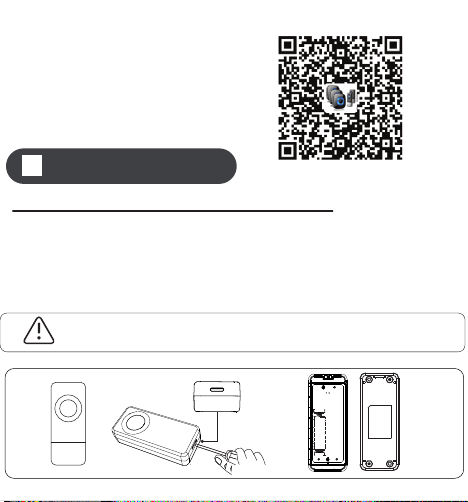
1.POWERING THE INDOOR CHIME RECEIVE
Plug the receiver into the outlet. The receiver will
perform better if kept away from other electrical
equipment (eg: TV, microwave.)
2.POWERING THE TRANSMITTER
Peel off the insulating sheet, push the button to ensure
the transmitter is working fine
(the button is flashing blue light).
3.SOUND VOLUME CONTROL
Press the volume control button on the receiver to cycle
through 5 volume levels, including MUTE mode.
7.OPERATION VIDEO
Please scan the QR code.
Operating Instructions
There is 18 months warranty for our product. If you have
any product using question, please do not hesitate to
contact usthrough [email protected], our 24-hour
email standby.
01 Ding-dong,Ding-dong 30 Electric piano
02 Ding-dong,Ding-dong 31 Starry night
03 Ding-dong,Ding-dong 32 Marimba
04 Ding-dong,Ding-dong 33 Alerting Ringtone
05 Corsica Doorbell 34 Electric Ringtone
06 Ding-dong 35 Alerting Ringtone
07 Ding-dong 36 Piano rhythm
08 Ding-dong 37 Butterfly Dream
09 Ding-dong Chime 38 Dance beat
10 Ding-dong 39 Twilight Sms Tone
11 Ding-dong 40 Classical organ
12 Ding-dong Chime 41 Joy to the world
13 Alarm Sound Effect 42 Super Ringtone
14 Barking 43 Let It Snow
15 Hello Welcome 44 Fast Car
16 Horn sound 45 Dingdong merrily on high
17 Brake sound 46 Jingle bells
18 Westminster Chimes 47 Waltz of the flowers
19 Westminster Chimes 48 For Alice
20 Westminster Chimes 49 The William tell overture
21 Westminster Chimes 50 The cuckoo waltzes
22 Big ben electronic doorbell 51 Going home
23 Marimba 52 Victory
24 Alerting Ringtone 53 Happy birthday
25 Smooth alert ringtone 54 Fantaisie Impromptu
26 Marimba Ringtone 55 Yesterday Once More
27 Flute sound doorbell 56 Eva's Polka
28 Harp Ringtone 57 Russe Dance
29 Guitar rhythm 58 Souvenirs Denfance
WARRANTY AND AFTER-SALE SERVICE
Chimes List
Troubleshooting
Transmitter battery installation
The battery is pre-installed in the transmitter. Insert the
key into the allotted slot. Twist the key clockwise to
open. Peel off the insulating film on the button
cell then close the cover.
Installation
Transmitter installation
1.Adhesive tape: apply the double-sided adhesive tape on
the back of the transmitter. Remove the outer side of the
tape and attach the transmitter in the desired location on
the wall and press hard for 30 seconds.
2.Screws and anchors: there are screw locator knockouts
on the back of the transmitter; punch these out to allow
the screws to pass through and fix the transmitter with
the anchors in the desired location on the wall.
3.58 optional melodies; easy to choose between Forward
Button and Back Button; built-in 40 mm stereo speaker
delivers rich and crisp sound.
4.5 level adjustable volume(0 dB to 110 dB) to meet your
needs for different occasions.
5.Uses a power chip from American Power Integrations,
offering a reliable maximum of 250 mA current.
6.Provides a massive 300-400m wireless distance range
(depending on the operating environment).
7.Custom encoded software communication method
ensures better privacy and no interference from other
devices.
8.The transmitter is IP55 dust-proof and water-resistant,
fit for various outdoor environments.
Introduction
Our new wireless doorbell use advanced technology to
make sure detection signals more accurate. We
dedicates to improve your living quality and simplify your
lifestyle as development direction, We have been
committed to researching and developing more high
quality and competitive products.
This wireless transmitter and plug-in receiver has a
300-400 m range. It is great for multiple places, including
home, apartment, office, classroom, hospital, ect.
Our wireless doorbell receiver is expandable, which
allows you to pair with various transmitters in different
locations in your home or office. One receiver can pair
with up to 58 various transmitters and each transmitter
can be set to different ringtone(58 ringtones to choose).
So you can know where the signal is coming from in
different locations.
Thank you for purchasing our product!
9.Memory function adds convenience. Every time you
turn on the device after a power outage, it will still
maintain your last set melody and volume level.
1.Extreme low power consumption and a three years
super long battery life (10-15 times uses a day).
2.Easy to set up; adhere the transmitter to the wall via
double-sided tape or screws-in.
Features
Technical Specification
Receiver working voltage AC100V-240V
Sound pressure level < 110dB
Receiver AC power consumption < 0.25 W (standby mode)
Working frequency 433.92 MHz
Transmitter battery type A23 12V Alkaline Battery
Operating temperature -20 °C-60 °C
Battery lifetime 1-3 years
Problem
The indicator on the
transmitter does not
light up
The receiver does not
respond to the transmitter
Unsuccessful pairing
Pair the transmitter
and receiver again
Push the Volume Button
to make a sound
Mute mode is ON
The receiver only lights
but NO sound
Cause
The battery insulating
film has not been
peeled off
Peel off the insulating film
The battery is not
properly installed
The battery power is low Replace with new battery
Take out the battery and
install it again. Make sure
the contacts are good.
Solution
4.SETTING RINGTONE AND PAIRING
THE DOORBELL
There are 58 melodies to choose from:
(1)Press the Forward Button or Back Button to choose
your favorite ringtone.
(3)Trigger the transmitter buttons to send a signal to
the receiver. The ringtone will be set for the most
recently synced transmitter.
(2)Short Press the Volume Button and the Back Button
together, and you will hearing the receiver make
a sound.
Forward Button
Back Button
Volume Button
Note: please notice the polarity of the button cell
when replacing the battery.
Note: Please clear the surface of the wall before install.
6
7 8 9 10 11
Please Note:
(1)Pairing mode will last for 5 seconds only before
timing out. Ensure you activate the transmitter during
this time or the process will have to start again.
(2)Pairing mode will quit automatically after paring is
completed.
5.TWO OR MORE TRANSMITTERS PAIRING
If you would like to pair with more transmitters, please
repeat the Step 4.
6.RESET
Press Back Button for 5 seconds to reset receivers to
default. When receiver sounds 'Ding Dong' with LED
flashing that means the reset was successful. Then you
can follow the STEP 4 to pair again.
2
3
4
5
1.Plug-in Receiver
The receiver has an LED Indicator on the front, 3 buttons
on the side, Forward Button, Back Button and Volume
Button. The AC plug and Speaker are on the back.
2.Transmitter/ Push Button
The transmitter/push button has
a rubber button on the surface
that illuminates an LED when
you press it. Below is a
message area, you can
design relevant text yourself.
Overview
●Plug-in Receiver
Forward Button
LED indicator
Speaker
AC plug
Back Button
Volume Button
●Transmitter
Button &LED lndicator
Leave message here
Open from here
Method 1 Method 2
Wall
30 Electric piano
31 Starry night
32 Marimba
33 Alerting Ringtone
34 Electric Ringtone
35 Alerting Ringtone
36 Piano rhythm
37 Butterfly Dream
38 Dance beat
39 Twilight Sms Tone
40 Classical organ
41 Joy to the world
42 Super Ringtone
43 Let It Snow
44 Fast Car
45 Dingdong merrily on high
46 Jingle bells
47 Waltz of the flowers
48 For Alice
49 The William tell overture
50 The cuckoo waltzes
51 Going home
52 Victory
53 Happy birthday
54 Fantaisie Impromptu
55 Yesterday Once More
56 Eva's Polka
57 Russe Dance
58 Souvenirs Denfance
Wireless Doorbell
CW User Manual
Please read this user manual before using and installation.
80mm
75mm
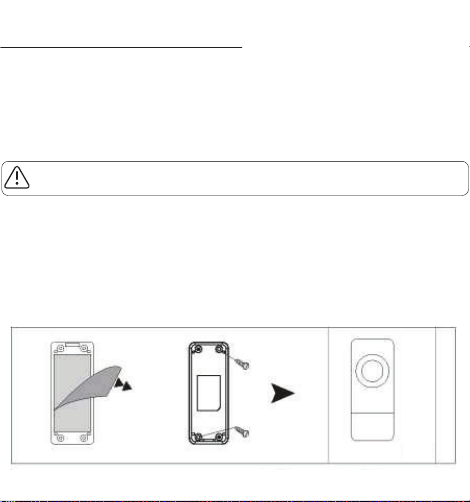
1.POWERING THE INDOOR CHIME RECEIVE
Plug the receiver into the outlet. The receiver will
perform better if kept away from other electrical
equipment (eg: TV, microwave.)
2.POWERING THE TRANSMITTER
Peel off the insulating sheet, push the button to ensure
the transmitter is working fine
(the button is flashing blue light).
3.SOUND VOLUME CONTROL
Press the volume control button on the receiver to cycle
through 5 volume levels, including MUTE mode.
7.OPERATION VIDEO
Please scan the QR code.
Operating Instructions
There is 18 months warranty for our product. If you have
any product using question, please do not hesitate to
contact usthrough [email protected], our 24-hour
email standby.
01 Ding-dong,Ding-dong 30 Electric piano
02 Ding-dong,Ding-dong 31 Starry night
03 Ding-dong,Ding-dong 32 Marimba
04 Ding-dong,Ding-dong 33 Alerting Ringtone
05 Corsica Doorbell 34 Electric Ringtone
06 Ding-dong 35 Alerting Ringtone
07 Ding-dong 36 Piano rhythm
08 Ding-dong 37 Butterfly Dream
09 Ding-dong Chime 38 Dance beat
10 Ding-dong 39 Twilight Sms Tone
11 Ding-dong 40 Classical organ
12 Ding-dong Chime 41 Joy to the world
13 Alarm Sound Effect 42 Super Ringtone
14 Barking 43 Let It Snow
15 Hello Welcome 44 Fast Car
16 Horn sound 45 Dingdong merrily on high
17 Brake sound 46 Jingle bells
18 Westminster Chimes 47 Waltz of the flowers
19 Westminster Chimes 48 For Alice
20 Westminster Chimes 49 The William tell overture
21 Westminster Chimes 50 The cuckoo waltzes
22 Big ben electronic doorbell 51 Going home
23 Marimba 52 Victory
24 Alerting Ringtone 53 Happy birthday
25 Smooth alert ringtone 54 Fantaisie Impromptu
26 Marimba Ringtone 55 Yesterday Once More
27 Flute sound doorbell 56 Eva's Polka
28 Harp Ringtone 57 Russe Dance
29 Guitar rhythm 58 Souvenirs Denfance
WARRANTY AND AFTER-SALE SERVICE
Chimes List
Troubleshooting
Transmitter battery installation
The battery is pre-installed in the transmitter. Insert the
key into the allotted slot. Twist the key clockwise to
open. Peel off the insulating film on the button
cell then close the cover.
Installation
Transmitter installation
1.Adhesive tape: apply the double-sided adhesive tape on
the back of the transmitter. Remove the outer side of the
tape and attach the transmitter in the desired location on
the wall and press hard for 30 seconds.
2.Screws and anchors: there are screw locator knockouts
on the back of the transmitter; punch these out to allow
the screws to pass through and fix the transmitter with
the anchors in the desired location on the wall.
3.58 optional melodies; easy to choose between Forward
Button and Back Button; built-in 40 mm stereo speaker
delivers rich and crisp sound.
4.5 level adjustable volume(0 dB to 110 dB) to meet your
needs for different occasions.
5.Uses a power chip from American Power Integrations,
offering a reliable maximum of 250 mA current.
6.Provides a massive 300-400m wireless distance range
(depending on the operating environment).
7.Custom encoded software communication method
ensures better privacy and no interference from other
devices.
8.The transmitter is IP55 dust-proof and water-resistant,
fit for various outdoor environments.
Introduction
Our new wireless doorbell use advanced technology to
make sure detection signals more accurate. We
dedicates to improve your living quality and simplify your
lifestyle as development direction, We have been
committed to researching and developing more high
quality and competitive products.
This wireless transmitter and plug-in receiver has a
300-400 m range. It is great for multiple places, including
home, apartment, office, classroom, hospital, ect.
Our wireless doorbell receiver is expandable, which
allows you to pair with various transmitters in different
locations in your home or office. One receiver can pair
with up to 58 various transmitters and each transmitter
can be set to different ringtone(58 ringtones to choose).
So you can know where the signal is coming from in
different locations.
Thank you for purchasing our product!
9.Memory function adds convenience. Every time you
turn on the device after a power outage, it will still
maintain your last set melody and volume level.
1.Extreme low power consumption and a three years
super long battery life (10-15 times uses a day).
2.Easy to set up; adhere the transmitter to the wall via
double-sided tape or screws-in.
Features
Technical Specification
Receiver working voltage AC100V-240V
Sound pressure level < 110dB
Receiver AC power consumption < 0.25 W (standby mode)
Working frequency 433.92 MHz
Transmitter battery type A23 12V Alkaline Battery
Operating temperature -20 °C-60 °C
Battery lifetime 1-3 years
Problem
The indicator on the
transmitter does not
light up
The receiver does not
respond to the transmitter
Unsuccessful pairing
Pair the transmitter
and receiver again
Push the Volume Button
to make a sound
Mute mode is ON
The receiver only lights
but NO sound
Cause
The battery insulating
film has not been
peeled off
Peel off the insulating film
The battery is not
properly installed
The battery power is low Replace with new battery
Take out the battery and
install it again. Make sure
the contacts are good.
Solution
4.SETTING RINGTONE AND PAIRING
THE DOORBELL
There are 58 melodies to choose from:
(1)Press the Forward Button or Back Button to choose
your favorite ringtone.
(3)Trigger the transmitter buttons to send a signal to
the receiver. The ringtone will be set for the most
recently synced transmitter.
(2)Short Press the Volume Button and the Back Button
together, and you will hearing the receiver make
a sound.
Forward Button
Back Button
Volume Button
Note: please notice the polarity of the button cell
when replacing the battery.
Note: Please clear the surface of the wall before install.
6
7 8 9 10 11
Please Note:
(1)Pairing mode will last for 5 seconds only before
timing out. Ensure you activate the transmitter during
this time or the process will have to start again.
(2)Pairing mode will quit automatically after paring is
completed.
5.TWO OR MORE TRANSMITTERS PAIRING
If you would like to pair with more transmitters, please
repeat the Step 4.
6.RESET
Press Back Button for 5 seconds to reset receivers to
default. When receiver sounds 'Ding Dong' with LED
flashing that means the reset was successful. Then you
can follow the STEP 4 to pair again.
2
3
4
5
1.Plug-in Receiver
The receiver has an LED Indicator on the front, 3 buttons
on the side, Forward Button, Back Button and Volume
Button. The AC plug and Speaker are on the back.
2.Transmitter/ Push Button
The transmitter/push button has
a rubber button on the surface
that illuminates an LED when
you press it. Below is a
message area, you can
design relevant text yourself.
Overview
●Plug-in Receiver
Forward Button
LED indicator
Speaker
AC plug
Back Button
Volume Button
●Transmitter
Button &LED lndicator
Leave message here
Open from here
Method 1 Method 2
Wall
30 Electric piano
31 Starry night
32 Marimba
33 Alerting Ringtone
34 Electric Ringtone
35 Alerting Ringtone
36 Piano rhythm
37 Butterfly Dream
38 Dance beat
39 Twilight Sms Tone
40 Classical organ
41 Joy to the world
42 Super Ringtone
43 Let It Snow
44 Fast Car
45 Dingdong merrily on high
46 Jingle bells
47 Waltz of the flowers
48 For Alice
49 The William tell overture
50 The cuckoo waltzes
51 Going home
52 Victory
53 Happy birthday
54 Fantaisie Impromptu
55 Yesterday Once More
56 Eva's Polka
57 Russe Dance
58 Souvenirs Denfance
Wireless Doorbell
CW User Manual
Please read this user manual before using and installation.
80mm
75mm
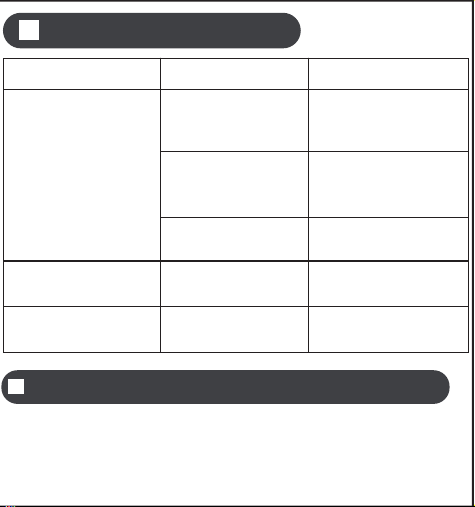
1.POWERING THE INDOOR CHIME RECEIVE
Plug the receiver into the outlet. The receiver will
perform better if kept away from other electrical
equipment (eg: TV, microwave.)
2.POWERING THE TRANSMITTER
Peel off the insulating sheet, push the button to ensure
the transmitter is working fine
(the button is flashing blue light).
3.SOUND VOLUME CONTROL
Press the volume control button on the receiver to cycle
through 5 volume levels, including MUTE mode.
7.OPERATION VIDEO
Please scan the QR code.
Operating Instructions
There is 18 months warranty for our product. If you have
any product using question, please do not hesitate to
contact usthrough [email protected], our 24-hour
email standby.
01 Ding-dong,Ding-dong 30 Electric piano
02 Ding-dong,Ding-dong 31 Starry night
03 Ding-dong,Ding-dong 32 Marimba
04 Ding-dong,Ding-dong 33 Alerting Ringtone
05 Corsica Doorbell 34 Electric Ringtone
06 Ding-dong 35 Alerting Ringtone
07 Ding-dong 36 Piano rhythm
08 Ding-dong 37 Butterfly Dream
09 Ding-dong Chime 38 Dance beat
10 Ding-dong 39 Twilight Sms Tone
11 Ding-dong 40 Classical organ
12 Ding-dong Chime 41 Joy to the world
13 Alarm Sound Effect 42 Super Ringtone
14 Barking 43 Let It Snow
15 Hello Welcome 44 Fast Car
16 Horn sound 45 Dingdong merrily on high
17 Brake sound 46 Jingle bells
18 Westminster Chimes 47 Waltz of the flowers
19 Westminster Chimes 48 For Alice
20 Westminster Chimes 49 The William tell overture
21 Westminster Chimes 50 The cuckoo waltzes
22 Big ben electronic doorbell 51 Going home
23 Marimba 52 Victory
24 Alerting Ringtone 53 Happy birthday
25 Smooth alert ringtone 54 Fantaisie Impromptu
26 Marimba Ringtone 55 Yesterday Once More
27 Flute sound doorbell 56 Eva's Polka
28 Harp Ringtone 57 Russe Dance
29 Guitar rhythm 58 Souvenirs Denfance
WARRANTY AND AFTER-SALE SERVICE
Chimes List
Troubleshooting
Transmitter battery installation
The battery is pre-installed in the transmitter. Insert the
key into the allotted slot. Twist the key clockwise to
open. Peel off the insulating film on the button
cell then close the cover.
Installation
Transmitter installation
1.Adhesive tape: apply the double-sided adhesive tape on
the back of the transmitter. Remove the outer side of the
tape and attach the transmitter in the desired location on
the wall and press hard for 30 seconds.
2.Screws and anchors: there are screw locator knockouts
on the back of the transmitter; punch these out to allow
the screws to pass through and fix the transmitter with
the anchors in the desired location on the wall.
3.58 optional melodies; easy to choose between Forward
Button and Back Button; built-in 40 mm stereo speaker
delivers rich and crisp sound.
4.5 level adjustable volume(0 dB to 110 dB) to meet your
needs for different occasions.
5.Uses a power chip from American Power Integrations,
offering a reliable maximum of 250 mA current.
6.Provides a massive 300-400m wireless distance range
(depending on the operating environment).
7.Custom encoded software communication method
ensures better privacy and no interference from other
devices.
8.The transmitter is IP55 dust-proof and water-resistant,
fit for various outdoor environments.
Introduction
Our new wireless doorbell use advanced technology to
make sure detection signals more accurate. We
dedicates to improve your living quality and simplify your
lifestyle as development direction, We have been
committed to researching and developing more high
quality and competitive products.
This wireless transmitter and plug-in receiver has a
300-400 m range. It is great for multiple places, including
home, apartment, office, classroom, hospital, ect.
Our wireless doorbell receiver is expandable, which
allows you to pair with various transmitters in different
locations in your home or office. One receiver can pair
with up to 58 various transmitters and each transmitter
can be set to different ringtone(58 ringtones to choose).
So you can know where the signal is coming from in
different locations.
Thank you for purchasing our product!
9.Memory function adds convenience. Every time you
turn on the device after a power outage, it will still
maintain your last set melody and volume level.
1.Extreme low power consumption and a three years
super long battery life (10-15 times uses a day).
2.Easy to set up; adhere the transmitter to the wall via
double-sided tape or screws-in.
Features
Technical Specification
Receiver working voltage AC100V-240V
Sound pressure level < 110dB
Receiver AC power consumption < 0.25 W (standby mode)
Working frequency 433.92 MHz
Transmitter battery type A23 12V Alkaline Battery
Operating temperature -20 °C-60 °C
Battery lifetime 1-3 years
Problem
The indicator on the
transmitter does not
light up
The receiver does not
respond to the transmitter
Unsuccessful pairing
Pair the transmitter
and receiver again
Push the Volume Button
to make a sound
Mute mode is ON
The receiver only lights
but NO sound
Cause
The battery insulating
film has not been
peeled off
Peel off the insulating film
The battery is not
properly installed
The battery power is low Replace with new battery
Take out the battery and
install it again. Make sure
the contacts are good.
Solution
4.SETTING RINGTONE AND PAIRING
THE DOORBELL
There are 58 melodies to choose from:
(1)Press the Forward Button or Back Button to choose
your favorite ringtone.
(3)Trigger the transmitter buttons to send a signal to
the receiver. The ringtone will be set for the most
recently synced transmitter.
(2)Short Press the Volume Button and the Back Button
together, and you will hearing the receiver make
a sound.
Forward Button
Back Button
Volume Button
Note: please notice the polarity of the button cell
when replacing the battery.
Note: Please clear the surface of the wall before install.
6
7 8 9 10 11
Please Note:
(1)Pairing mode will last for 5 seconds only before
timing out. Ensure you activate the transmitter during
this time or the process will have to start again.
(2)Pairing mode will quit automatically after paring is
completed.
5.TWO OR MORE TRANSMITTERS PAIRING
If you would like to pair with more transmitters, please
repeat the Step 4.
6.RESET
Press Back Button for 5 seconds to reset receivers to
default. When receiver sounds 'Ding Dong' with LED
flashing that means the reset was successful. Then you
can follow the STEP 4 to pair again.
2
3
4
5
1.Plug-in Receiver
The receiver has an LED Indicator on the front, 3 buttons
on the side, Forward Button, Back Button and Volume
Button. The AC plug and Speaker are on the back.
2.Transmitter/ Push Button
The transmitter/push button has
a rubber button on the surface
that illuminates an LED when
you press it. Below is a
message area, you can
design relevant text yourself.
Overview
●Plug-in Receiver
Forward Button
LED indicator
Speaker
AC plug
Back Button
Volume Button
●Transmitter
Button &LED lndicator
Leave message here
Open from here
Method 1 Method 2
Wall
30 Electric piano
31 Starry night
32 Marimba
33 Alerting Ringtone
34 Electric Ringtone
35 Alerting Ringtone
36 Piano rhythm
37 Butterfly Dream
38 Dance beat
39 Twilight Sms Tone
40 Classical organ
41 Joy to the world
42 Super Ringtone
43 Let It Snow
44 Fast Car
45 Dingdong merrily on high
46 Jingle bells
47 Waltz of the flowers
48 For Alice
49 The William tell overture
50 The cuckoo waltzes
51 Going home
52 Victory
53 Happy birthday
54 Fantaisie Impromptu
55 Yesterday Once More
56 Eva's Polka
57 Russe Dance
58 Souvenirs Denfance
Wireless Doorbell
CW User Manual
Please read this user manual before using and installation.
80mm
75mm

1.POWERING THE INDOOR CHIME RECEIVE
Plug the receiver into the outlet. The receiver will
perform better if kept away from other electrical
equipment (eg: TV, microwave.)
2.POWERING THE TRANSMITTER
Peel off the insulating sheet, push the button to ensure
the transmitter is working fine
(the button is flashing blue light).
3.SOUND VOLUME CONTROL
Press the volume control button on the receiver to cycle
through 5 volume levels, including MUTE mode.
7.OPERATION VIDEO
Please scan the QR code.
Operating Instructions
There is 18 months warranty for our product. If you have
any product using question, please do not hesitate to
contact usthrough [email protected], our 24-hour
email standby.
01 Ding-dong,Ding-dong 30 Electric piano
02 Ding-dong,Ding-dong 31 Starry night
03 Ding-dong,Ding-dong 32 Marimba
04 Ding-dong,Ding-dong 33 Alerting Ringtone
05 Corsica Doorbell 34 Electric Ringtone
06 Ding-dong 35 Alerting Ringtone
07 Ding-dong 36 Piano rhythm
08 Ding-dong 37 Butterfly Dream
09 Ding-dong Chime 38 Dance beat
10 Ding-dong 39 Twilight Sms Tone
11 Ding-dong 40 Classical organ
12 Ding-dong Chime 41 Joy to the world
13 Alarm Sound Effect 42 Super Ringtone
14 Barking 43 Let It Snow
15 Hello Welcome 44 Fast Car
16 Horn sound 45 Dingdong merrily on high
17 Brake sound 46 Jingle bells
18 Westminster Chimes 47 Waltz of the flowers
19 Westminster Chimes 48 For Alice
20 Westminster Chimes 49 The William tell overture
21 Westminster Chimes 50 The cuckoo waltzes
22 Big ben electronic doorbell 51 Going home
23 Marimba 52 Victory
24 Alerting Ringtone 53 Happy birthday
25 Smooth alert ringtone 54 Fantaisie Impromptu
26 Marimba Ringtone 55 Yesterday Once More
27 Flute sound doorbell 56 Eva's Polka
28 Harp Ringtone 57 Russe Dance
29 Guitar rhythm 58 Souvenirs Denfance
WARRANTY AND AFTER-SALE SERVICE
Chimes List
Troubleshooting
Transmitter battery installation
The battery is pre-installed in the transmitter. Insert the
key into the allotted slot. Twist the key clockwise to
open. Peel off the insulating film on the button
cell then close the cover.
Installation
Transmitter installation
1.Adhesive tape: apply the double-sided adhesive tape on
the back of the transmitter. Remove the outer side of the
tape and attach the transmitter in the desired location on
the wall and press hard for 30 seconds.
2.Screws and anchors: there are screw locator knockouts
on the back of the transmitter; punch these out to allow
the screws to pass through and fix the transmitter with
the anchors in the desired location on the wall.
3.58 optional melodies; easy to choose between Forward
Button and Back Button; built-in 40 mm stereo speaker
delivers rich and crisp sound.
4.5 level adjustable volume(0 dB to 110 dB) to meet your
needs for different occasions.
5.Uses a power chip from American Power Integrations,
offering a reliable maximum of 250 mA current.
6.Provides a massive 300-400m wireless distance range
(depending on the operating environment).
7.Custom encoded software communication method
ensures better privacy and no interference from other
devices.
8.The transmitter is IP55 dust-proof and water-resistant,
fit for various outdoor environments.
Introduction
Our new wireless doorbell use advanced technology to
make sure detection signals more accurate. We
dedicates to improve your living quality and simplify your
lifestyle as development direction, We have been
committed to researching and developing more high
quality and competitive products.
This wireless transmitter and plug-in receiver has a
300-400 m range. It is great for multiple places, including
home, apartment, office, classroom, hospital, ect.
Our wireless doorbell receiver is expandable, which
allows you to pair with various transmitters in different
locations in your home or office. One receiver can pair
with up to 58 various transmitters and each transmitter
can be set to different ringtone(58 ringtones to choose).
So you can know where the signal is coming from in
different locations.
Thank you for purchasing our product!
9.Memory function adds convenience. Every time you
turn on the device after a power outage, it will still
maintain your last set melody and volume level.
1.Extreme low power consumption and a three years
super long battery life (10-15 times uses a day).
2.Easy to set up; adhere the transmitter to the wall via
double-sided tape or screws-in.
Features
Technical Specification
Receiver working voltage AC100V-240V
Sound pressure level < 110dB
Receiver AC power consumption < 0.25 W (standby mode)
Working frequency 433.92 MHz
Transmitter battery type A23 12V Alkaline Battery
Operating temperature -20 °C-60 °C
Battery lifetime 1-3 years
Problem
The indicator on the
transmitter does not
light up
The receiver does not
respond to the transmitter
Unsuccessful pairing
Pair the transmitter
and receiver again
Push the Volume Button
to make a sound
Mute mode is ON
The receiver only lights
but NO sound
Cause
The battery insulating
film has not been
peeled off
Peel off the insulating film
The battery is not
properly installed
The battery power is low Replace with new battery
Take out the battery and
install it again. Make sure
the contacts are good.
Solution
4.SETTING RINGTONE AND PAIRING
THE DOORBELL
There are 58 melodies to choose from:
(1)Press the Forward Button or Back Button to choose
your favorite ringtone.
(3)Trigger the transmitter buttons to send a signal to
the receiver. The ringtone will be set for the most
recently synced transmitter.
(2)Short Press the Volume Button and the Back Button
together, and you will hearing the receiver make
a sound.
Forward Button
Back Button
Volume Button
Note: please notice the polarity of the button cell
when replacing the battery.
Note: Please clear the surface of the wall before install.
6
7 8 9 10 11
Please Note:
(1)Pairing mode will last for 5 seconds only before
timing out. Ensure you activate the transmitter during
this time or the process will have to start again.
(2)Pairing mode will quit automatically after paring is
completed.
5.TWO OR MORE TRANSMITTERS PAIRING
If you would like to pair with more transmitters, please
repeat the Step 4.
6.RESET
Press Back Button for 5 seconds to reset receivers to
default. When receiver sounds 'Ding Dong' with LED
flashing that means the reset was successful. Then you
can follow the STEP 4 to pair again.
2
3
4
5
1.Plug-in Receiver
The receiver has an LED Indicator on the front, 3 buttons
on the side, Forward Button, Back Button and Volume
Button. The AC plug and Speaker are on the back.
2.Transmitter/ Push Button
The transmitter/push button has
a rubber button on the surface
that illuminates an LED when
you press it. Below is a
message area, you can
design relevant text yourself.
Overview
●Plug-in Receiver
Forward Button
LED indicator
Speaker
AC plug
Back Button
Volume Button
●Transmitter
Button &LED lndicator
Leave message here
Open from here
Method 1 Method 2
Wall
30 Electric piano
31 Starry night
32 Marimba
33 Alerting Ringtone
34 Electric Ringtone
35 Alerting Ringtone
36 Piano rhythm
37 Butterfly Dream
38 Dance beat
39 Twilight Sms Tone
40 Classical organ
41 Joy to the world
42 Super Ringtone
43 Let It Snow
44 Fast Car
45 Dingdong merrily on high
46 Jingle bells
47 Waltz of the flowers
48 For Alice
49 The William tell overture
50 The cuckoo waltzes
51 Going home
52 Victory
53 Happy birthday
54 Fantaisie Impromptu
55 Yesterday Once More
56 Eva's Polka
57 Russe Dance
58 Souvenirs Denfance
Wireless Doorbell
CW User Manual
Please read this user manual before using and installation.
80mm
75mm