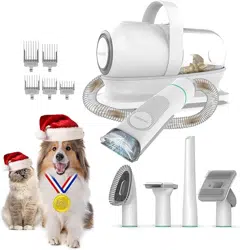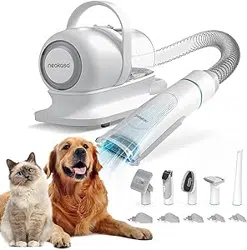
S1 Pro
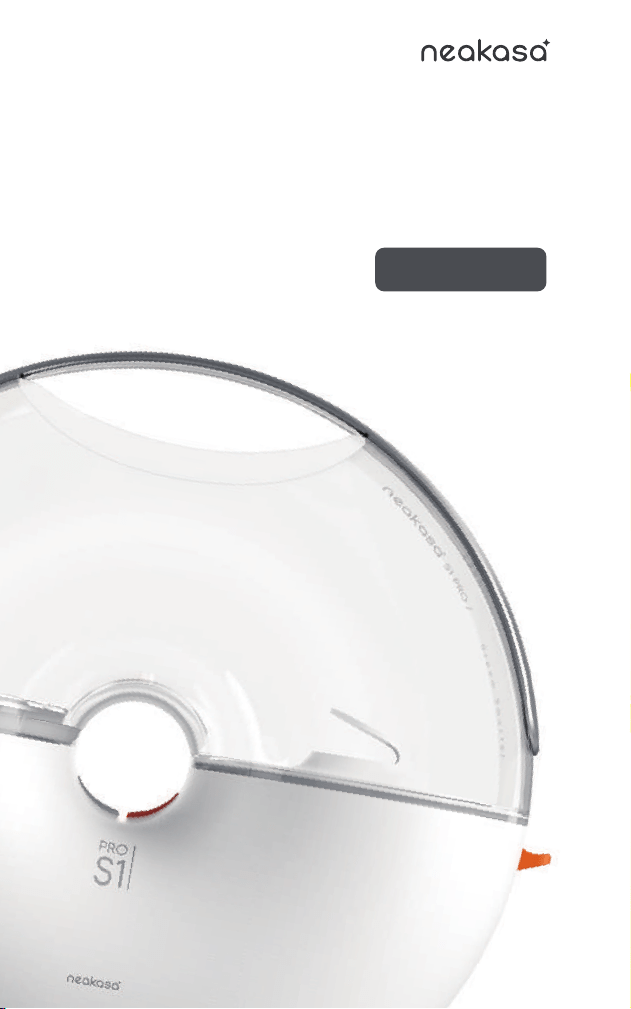
User Manual
Multifunctional
Pet Grooming System

Scan to learn more about
grooming solutions
A SMARTER WAY TO CLEAN

Contents
001
002-003
004-005
006
007
008-020
021-024
025
026
Desensitization Instructions
Safety Cautions
Packing List
Inner box transformation
Know Your Machine
Start to Use
Daily Maintenance
Specifications
Warranty and After-sales
EN
The Neakasa S1 Pro Pet Grooming System has been upgraded in
every aspect. Our exclusive Smart Electric Control Design and 55 dB
wind noise at the lowest speed reduce the impact on your pets to a
minimum during grooming.
For pets that are extremely sensitive to noise, please refer to the
following desensitization tips to help your beloved pets adapt to the
grooming kit:
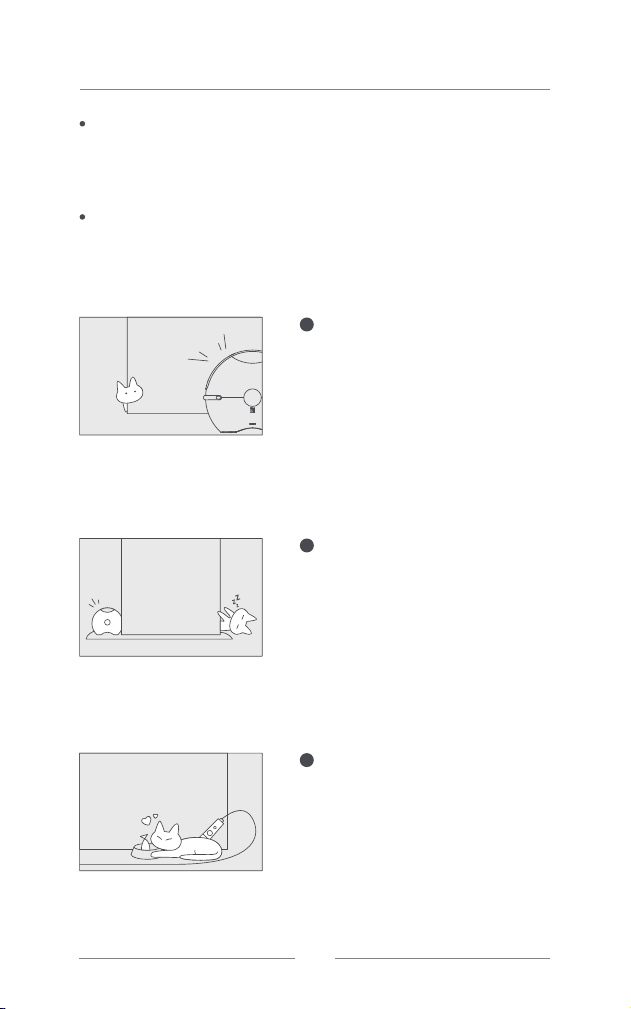
Desensitization Instructions
Connect the hose to the main unit and
the nozzle (or the hair remover roller).
Power on the product and set it to the
lowest speed. Keep the fan running at
the lowest speed for a while, and your
pets approach out of curiosity and
gradually become accustomed to the
noise.
1
Stretch the suction hose to its
maximum length to create a distance
between the main unit and your pets,
thus minimizing the impact from the
noise while grooming your pets.
2
Offer your pets some of their favorite
snacks as a distraction before and after
combing or grooming. By repeating this
process patiently several times, your
pets will become accustomed to and
fall in love with their home spa.
3
LOW
?
EN
001
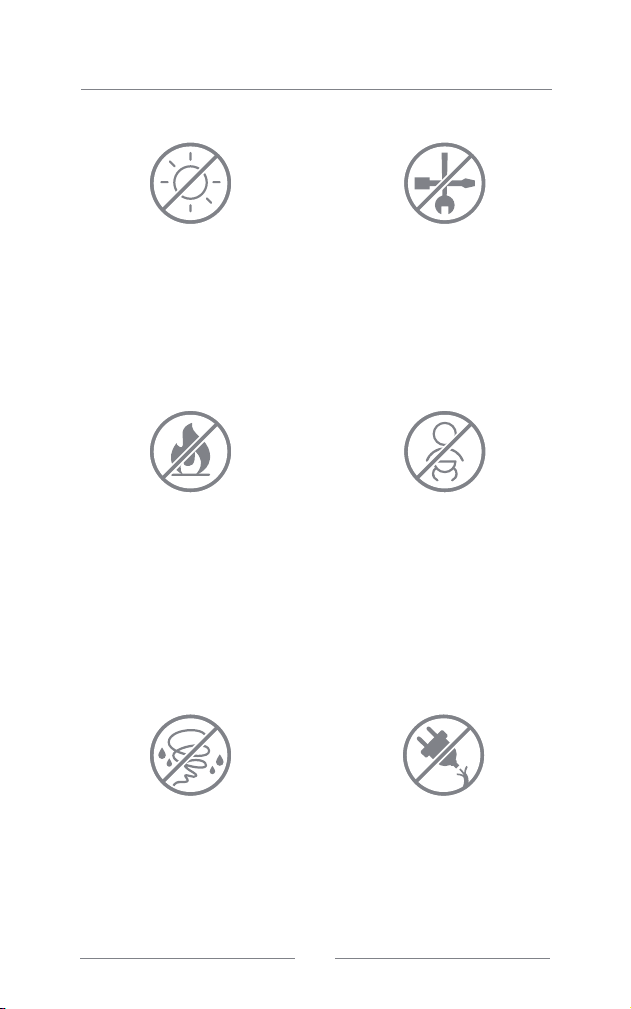
This product is intended for household
use only. It is not designed for
commercial or industrial purposes, nor
for use or storage in hot outdoor
environments exposed to direct
sunlight, or damp environments such
as bathrooms.
To prevent fires or explosions, refrain
from using the product in areas with
flammable or combustible materials.
Never allow the product to suction
burning, smoking, or hot flammable or
combustible liquids (e.g., cigarette
butts, matches, tobacco ash, gasoline,
etc.). Avoid using the product to suction
substances with aromatic properties, as
these chemicals could lead to a fire.
Only use the product when your pets'
hair is dry. Never let the product
suction wet hair or liquids. To avoid
electrical faults and shocks, never
operate or unplug the product with wet
hands.
Please ensure that you use the product
in a safe environment and under the
guidance and supervision of someone
knowledgeable about the safe operation
and potential hazards of the product. Do
not allow children or individuals with
reduced physical or mental capacities to
use the product. Do not allow children
and pets play with the Product.
Should you find the product is
malfunctioning, damaged, or has come
into contact with liquids, please contact
our after-sales department. Do not
attempt to dismantle the product
yourself. Incorrect assembly methods
might result in electric shocks or fires.
Please contact our after-sales
department should you need a repair
service.
Do not use the product if the power
cord or plug of the product is damaged.
Do not pull the power cord. Do not tuck
the wires between any parts of the main
body.
Safety Cautions
EN
002
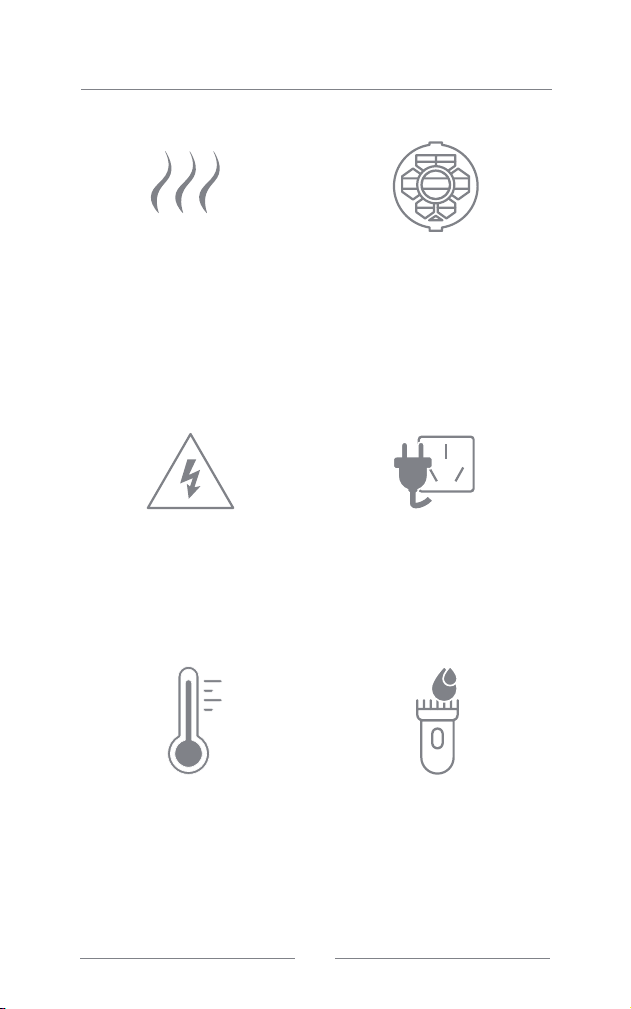
Prior to any maintenance, please always
ensure the device is disconnected from
the power source. Attempting
maintenance while the power is on could
lead to electric shocks or injuries.
Please always ensure proper
installation of the HEPA filter prior to
using the grooming vacuum, otherwise
the product will be damaged.
The HEPA filter should be regularly
cleaned and replaced. After cleaning
the HEPA filter, please wait for it to dry
completely before reinserting it,
otherwise it could result in electrical
shocks and faults.
The electric clipper's body should
never be cleaned with water. However,
it is okay for the blades and nail
grinder. Please always completely dry
the attachments with a cloth or air-dry
before reattaching them to the clipper,
as failing to do so could damage or
impair the motor.
Please always use the product with the
specified voltage, as indicated on the
bottom of the machine.
Check that the inlet is not clogged
prior to each use. Please stop using
the product if you observe an
abnormal increase in its temperature.
In such cases, remove the dust cup,
ensure the suction inlet is unblocked and
the HEPA filter is clean, then wait for 60
minutes before restarting.
An odor might be noticeable upon initial
use. This odor poses no health hazards
and will naturally dissipate over time.
However, if the burnt odor persists,
please discontinue use immediately and
contact our after-sales department.
Safety Caution
EN
003
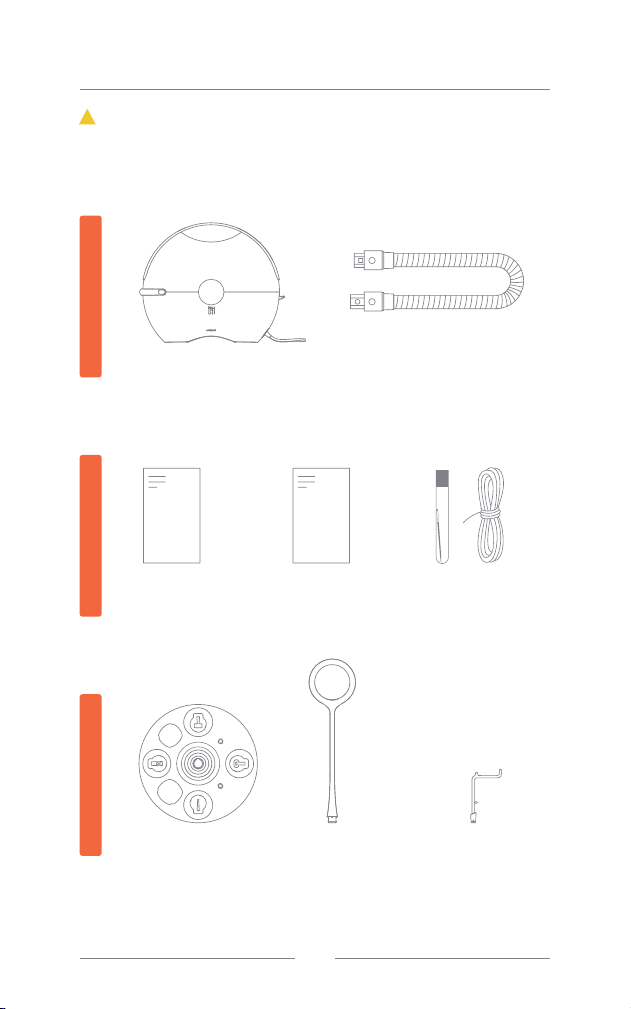
Main unit vacuum cleaner
(w/ power cord)*1
Removable hose *1
Packing List(S1 Pro)
User Manual*1 Quick Start and
hair care card
package*1
Accessories
Tray*1
Tray Handle
* 1
Brush Head
Holder * 2
If you find anything missing from the package, please first contact customer
service provided by the purchase channel for assistance. Otherwise, you
can email us at [email protected]. For the United States region, you
can also call our customer service at +1 (855) 933-0901.
!
Attention:
Main unitEnclosedStorage
EN
Cardboard Pet
House Sewing Kit*1
004
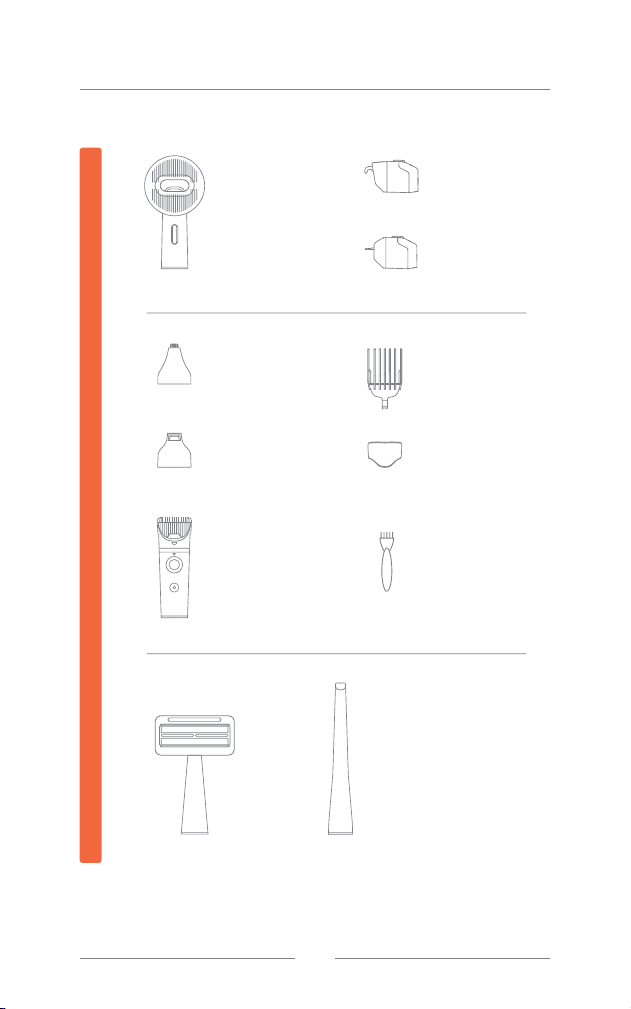
Handle of
replaceable
brush*1
Deshedding
tool*1
Undercoat
rake*1
Slicker brush*1
Hair remover
roller*1
Crevice
tool*1
Handle of
replaceable
electric clipper*1
Standard-width
cutter*1
Fine & narrow
cutter*1
Nail file*1
Clipping comb*6
Transparent
wind shield*1
Packing List(S1 Pro)
Small brush*1
Attachments
EN
005
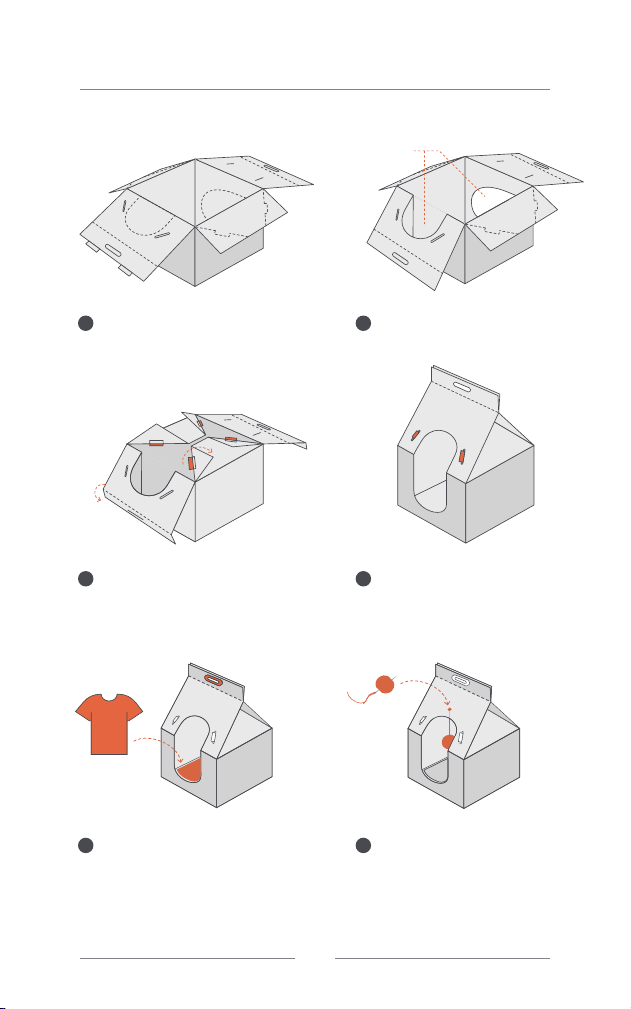
Inner box transformation
1 2
3 4
5
After taking out the machine, unfold all
four sides of the packaging top
Fold the four corners upward as
illustrated to expose the four tongue
locks, and then fold the handle part
downward along the fold line.
Attach and secure the handle ring on
both sides of the handles, and place an
old T-shirt with the owner's scent as a
cushion to make your furry baby more
comfortable!
Insert the four locks into the four
securing mounts.
6
Use the provided needle to punch
holes in the cardboard box. Gather
the clumps of fur into a ball, then
thread the needle and thread
through to secure them. Hang it
through the hole inside your pet's
bed. Mission accomplished!
Cut out the entrance/exit for pets
along the trim marks.
Entrance/Exit
for pets
EN
006
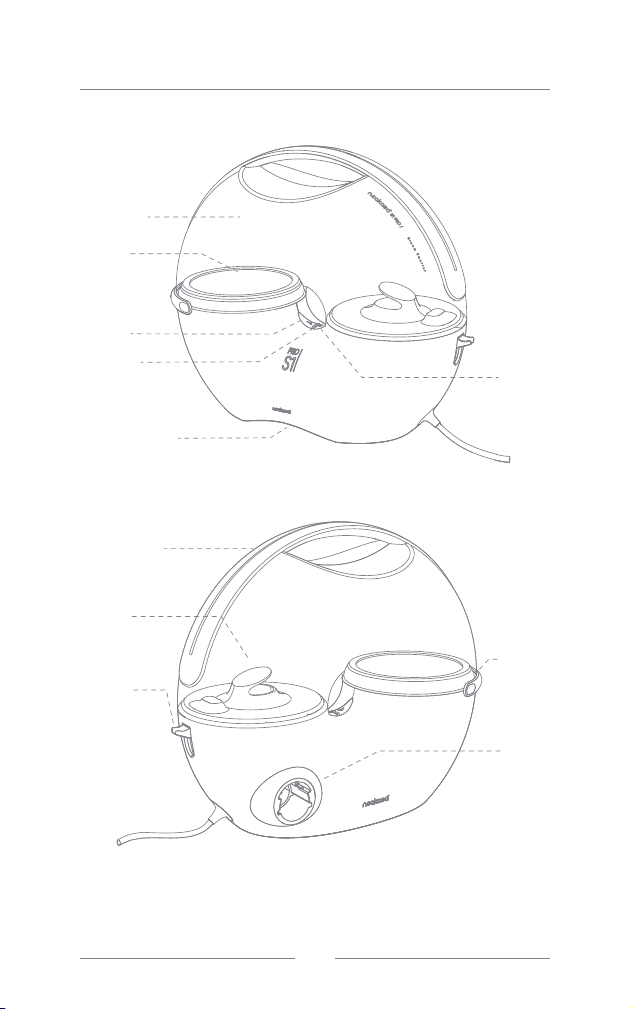
Power
button
Mode
buttons
Indicator
light
Dustbin
Steel
filter
Dustbin
release
button
Decoration
ring
Hose
socket
Know Your Machine
Bottom air inlet
Lifting handle
Air inlet
EN
007
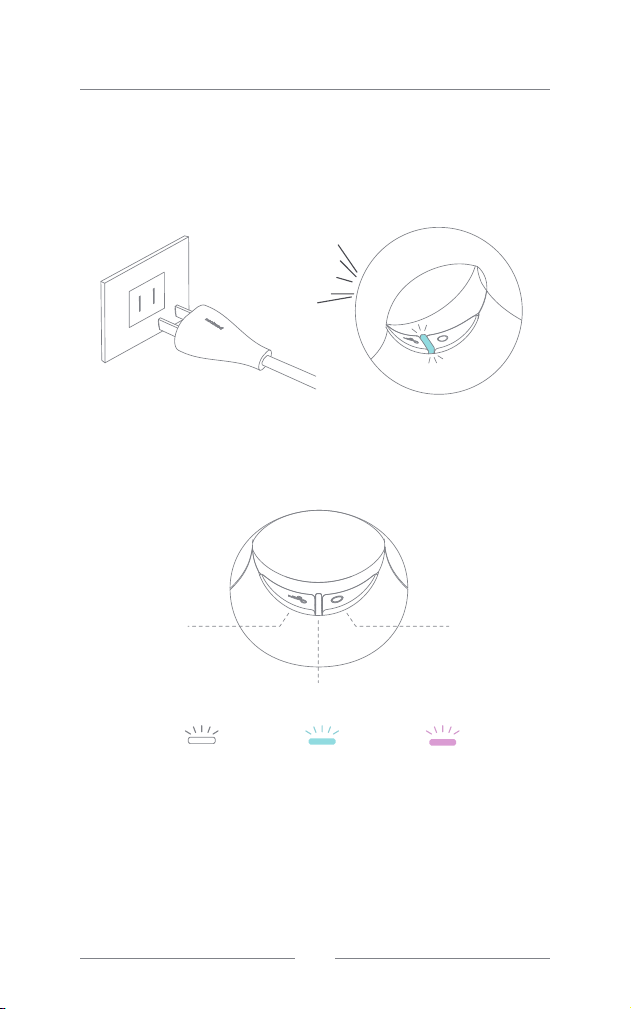
Power button
Mode buttons
Indicator light
Start to Use
1. Power on
Insert the power plug into a socket for power supply to the machine.
Upon power-on, the indicator light will flash for 3 times and go off, and the
machine will give a long “Beep”.
2. Main unit start-up and mode regulation
Press the On/Off switch to start the machine, and select the appropriate mode
for use
•A single press of the On/Off switch will turn on the indicator light, displaying the
color corresponding to the mode that was memorized before the last shutdown
•Upon power-on, the main unit in standby mode, the indicator light will
illuminate (slowly changing between bright and dark). In work mode, the
vacuum will run and the indicator light will remain constantly bright.
•A single press of the switch or the mode button will result in the machine
emitting a short 'Beep.'
•The machine will shut down automatically, with the indicator light turning off, if
no operation is performed within 8 minutes. Should you need to use it again,
please press the Start button for a reboot.
Low Medium High
Di
EN
008
Start to Use
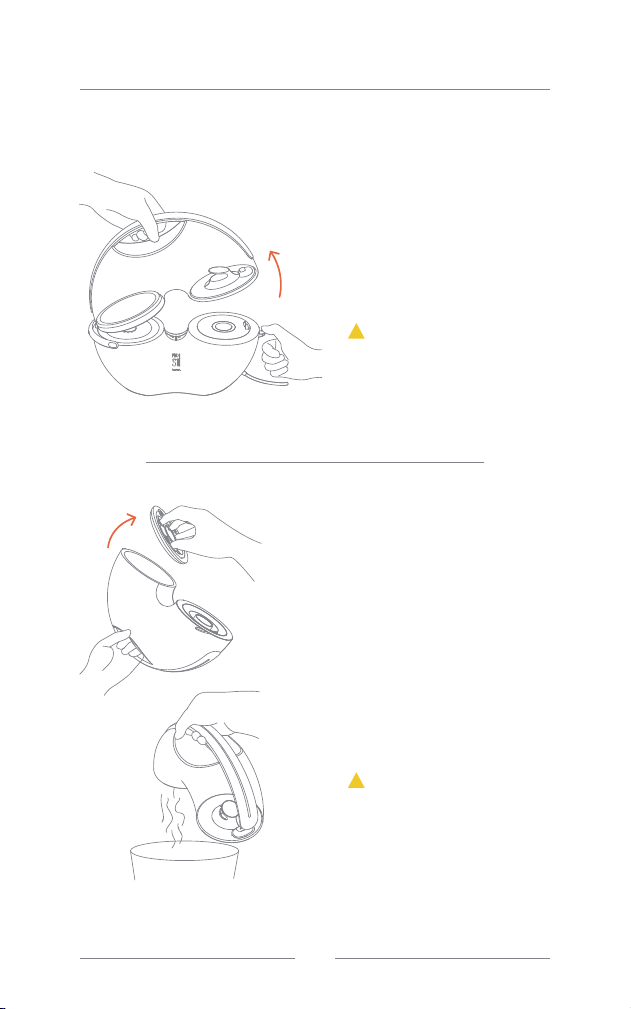
3. Removal and fitting of dust cup
Removal
Opening and fitting
back bottom cover of
dustbin
Press the PUSH button on the side
of the machine while turning the
dustbin upwards from the side of
the button, and lift and remove it.
Turn the dustbin upside down, with
the handle pointing down. Grab the
circle-like handle and pull the
bottom cover of the cup upwards,
then you can dump the waste
inside. Reverse the steps above to
place the bottom cover back to it's
place. Push it inwards to make sure
it’s fully fitted.
Do not exert excessive force while
turning upwards and lifting the cup,
or the dentation on the side of the
cup might be broken.
If you wash the cup after pouring
out the waste, please wait for it to
dry before putting it back to the
main unit, or the motor might get
invaded by water, causing electric
shocks or machine damage.
!
Attention:
!
Attention:
EN
009
Start to Use
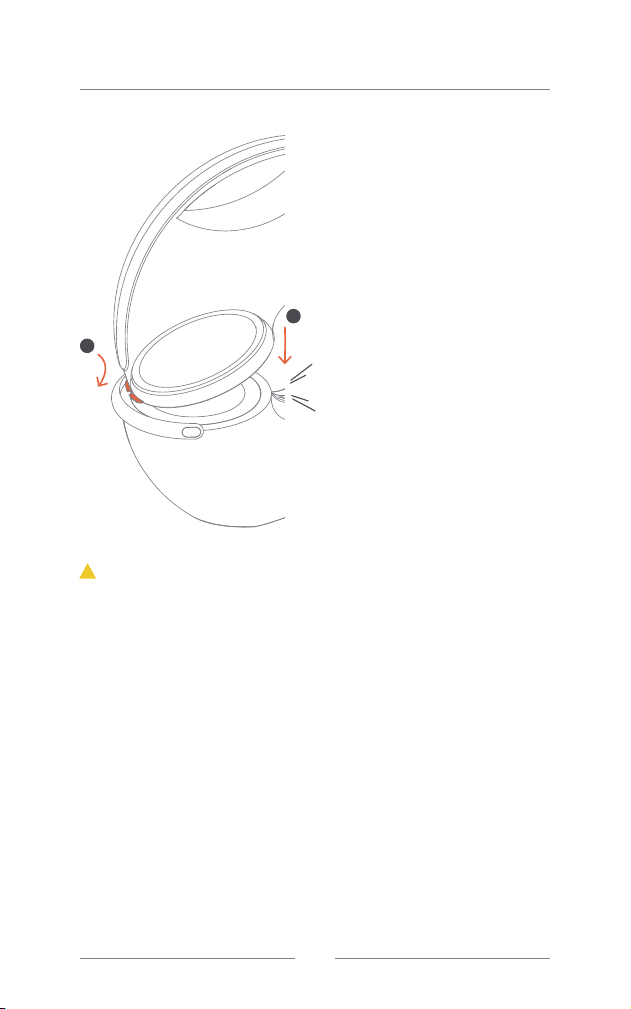
Fitting
Insert the dustbin with the
side with dentation into the
decoration ring slot of the
main unit. Push it down to
secure it in place. Once you
hear a "click," the cup is
properly positioned.
•Handle the dustbin with care.
•If you remove the cup while the fan is running, the vacuum will stop and
go into standby mode, and the indicator light will flash quickly in the
color corresponding to the mode. When you put the dustbin back, the
machine will shut down automatically. You will need to press the power
button to restart it.
•If you remove the cup upon start-up and the vacuum is in standby mode,
or if the dustbin is not fitted into place, and the indicator light will flash
quickly in the color corresponding to the mode. Upon putting back the
cup, both the indicator light display and the machine will return to normal.
!
Attention:
KA
1
2
EN
010
Start to Use
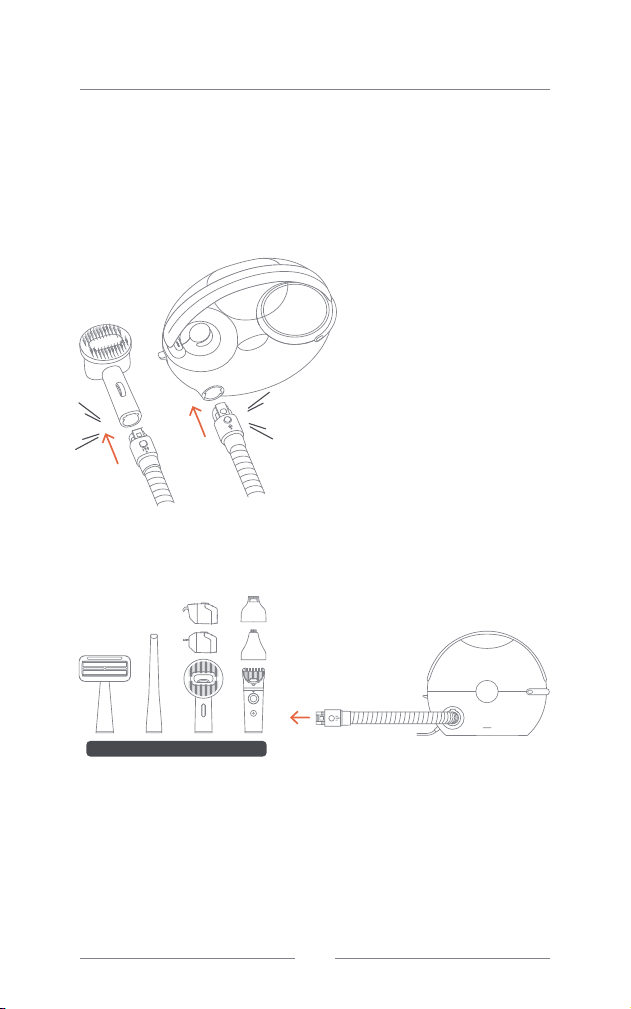
4. Types and use of accessories
Connecting hose
Upon powering on and starting up the main unit, if no attachment is
connected through the hose, the fan will remain on standby, and the
indicator light will illuminate in the color corresponding to the mode.
Insert the correct hose ends
into the main unit and the
desired accessory as indicated
on the hose ends. A “click”
sound indicates correct
installation.
Removing hose
Press and hold down the round
button on the hose ends to
disconnect the hose to the main
unit or the accessory.
Pro
KA
KA
EN
011
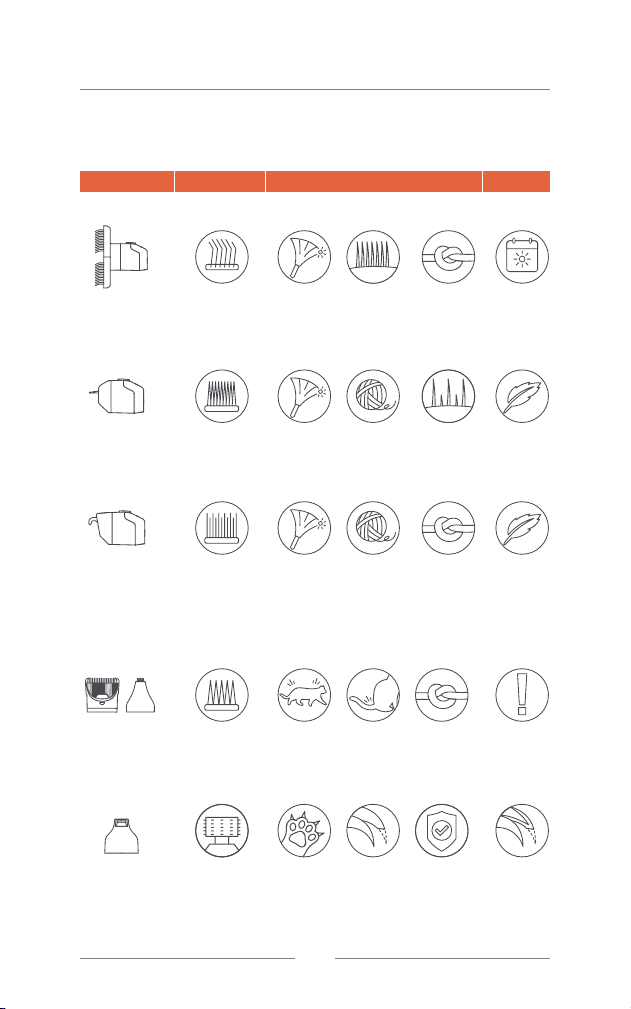
Name Type of brush Function Notes
Try not to cut
too quickly
Use with
caution
Use it
gently
Use it
gently
Usable for
daily
purpose
Hair
stretching
Clears
loose
under coat
Clears
loose
under hair
Spot hair
trimming
Avoid
reversed/
curved
claws
Detangles
Detangles
Eliminate
knots
Thinning,
applicable
when the
season
changes.
Avoid
scissor
cracks/
wounds
Clears loose
hair, old hair
and dust
Clears loose
hair, old hair
and dust
Clears loose
hair, old hair
and dust
General hair
trimming
claw tip
removal
Fine, dense,
hard, bent
metal filaments
Dense
notched
blade
The part
between
teeth are
edged to
detangle
knots without
pulling hairs
Standard-width
cutter
Fine & narrow
cutter
Low-speed
grinding stone
or wheel
Pin Brush
All hair types
Deshedding
Tool
Most hair types
Dematting Tool
Long hairs
/double coats
Clipper
Most hair types
Nail Grinder
All pets
Start to Use
Understand the matching function
EN
012
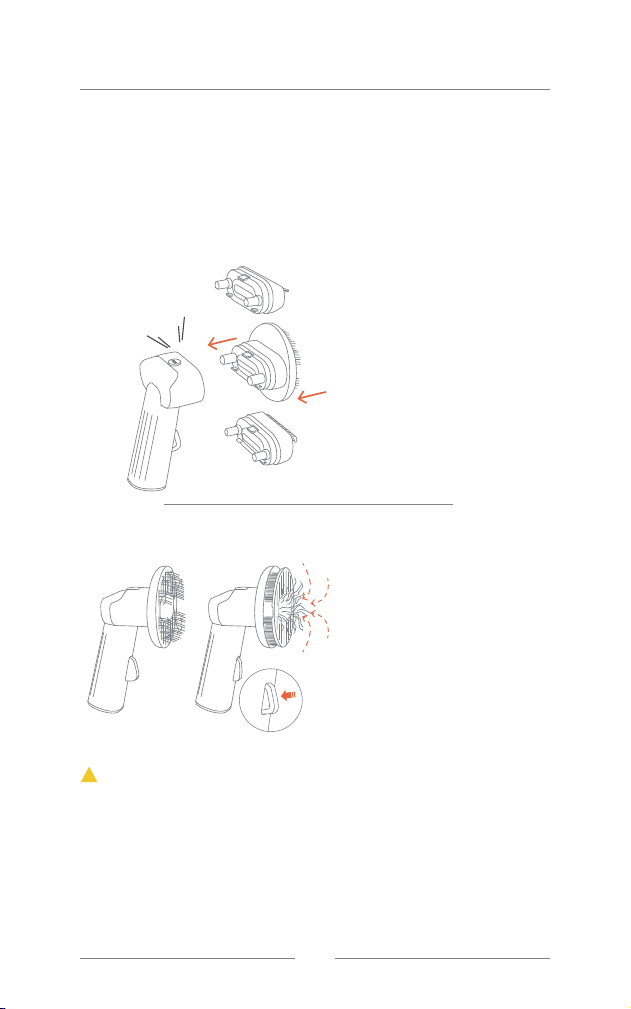
• Please avoid sensitive areas of your pets, and pay extra attention to delicate
parts, where excessive force or prolonged contact with the comb should be
avoided. DO NOT comb against the natural direction of fur growth, as this
may scratch the skin.
• If knotting is severe, avoid pulling forcefully. It is recommended to trim the fur
with scissors before combing.
• Ensure both the comb and your pets' fur are dry before using. Water can
compromise the protective qualities of the sebum on your pets' fur, potentially
affecting their immunity and promoting microorganism growth.
Regularly combing your pets helps minimize the hair accumulation in the
household environment, reducing allergies in your family and preventing hairballs
in cats that arise from excessive hair licking. Additionally, it helps in keeping your
pets' fur clean, healthy, and smooth. We offer three different types of combs
designed for styling cats and dogs with varying hair types. Feel free to switch
them as needed.
Start to Use
Interchangeable brush
Fitting combs
Press the comb into the hole with
proper alignment until you hear a
"click" sound, indicating a secure
fit.
To minimize noise-related irritation
for your pets, the main unit is
designed to remain on standby
without activating the vacuum
when powered on and connected
to the comb through the hose.
Please comb your pets several
times. Once a sufficient amount of
hair accumulates on the comb,
press the button on the handle to
eject the hair. Simultaneously, the
main unit will activate the vacuum
to suck the hair into the dustbin.
Removing combs
Press the PUSH button located on
the top of the comb to release the
attachment.
PRESS
!
Note:
KA
EN
013
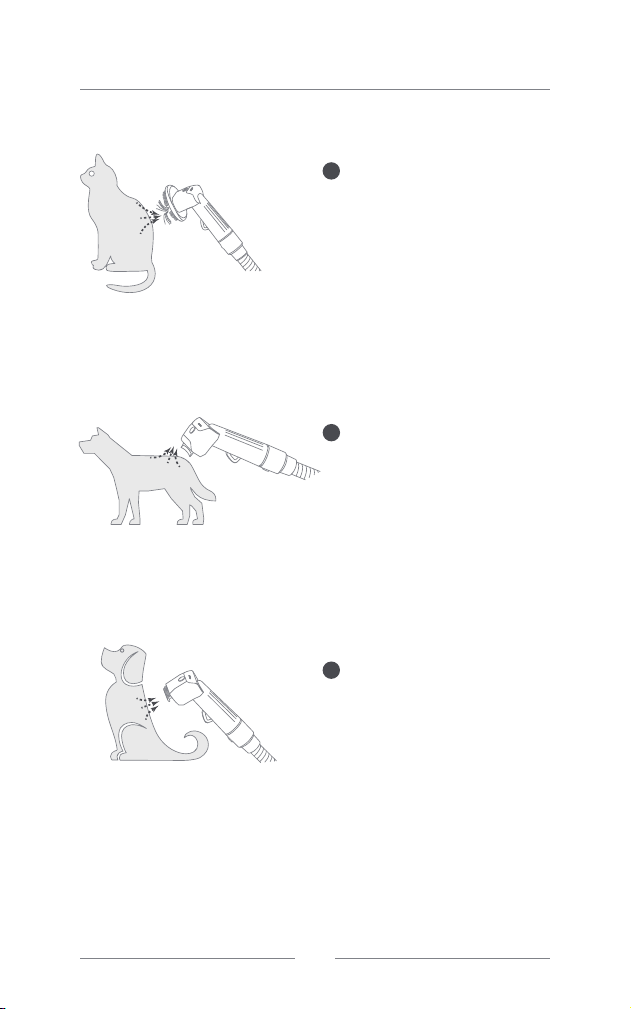
Start to Use
Used to remove loose and old
hair together with dust and dirt
hidden among the fur. This
brush also does a certain
degree of unknotting and
massage while pulling the hair
to make it fluffier.
This comb is capable of
removing loose brittle hair and
under coat close to the skin,
thinning hair while combing it.
It’s especially fitting during the
season changes.
The parts between teeth are
edged to loosen hair knots so
that brittle hair can be
removed, allowing healthy hair
to grow.
Pin brush
Deshedding comb
Dematting comb
1
2
3
EN
014
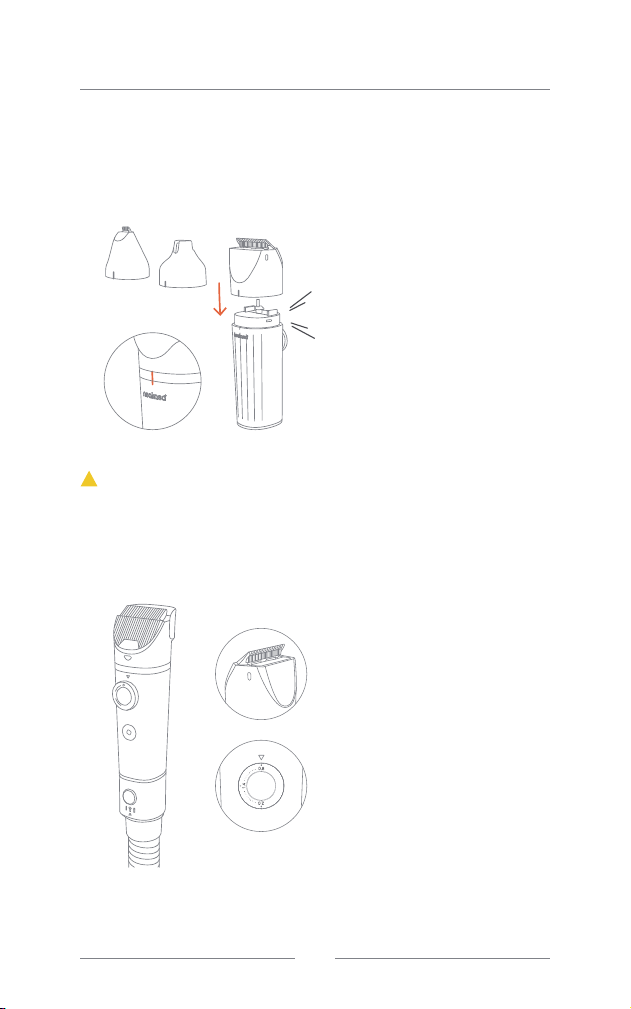
Align the side of the cutter
with marked line to the same
side of the handle, and press it
inwards until you hear a “click”
sound, indicating a proper fit.
For a standard clipper, the
length of the cutter is
adjustable between
0.8-1.4-2mm through rotation,
while for the small clipper or
nail grinder, adjustment is not
possible.
With the power source and the
electric clipper connected
through the hose, the main unit
will remain on standby. Simply
press the On/Off switch of the
electric clipper once, and both
the clipper and the main unit
vacuum will start running,
cutting hair and sucking it into
the grooming kit. Press the
clipper switch again, and both
the clipper and the fan will shut
down, returning the main unit to
standby mode.
Used for regular trimming of pets’ hair to mitigate hair shedding, heat
dissipation, and knotting problems. The hair cut will be sucked away
instead of flying around the surrounding area.
Removing cutters
Fitting cutters
Grab the attachment and
pull it upward to release it.
Interchangeable clipper
Start to Use
Always remember the positions of clipper and sharp edges and do not exert excessive
force, or your skin might get cut.
!
Attention:
KA
EN
015
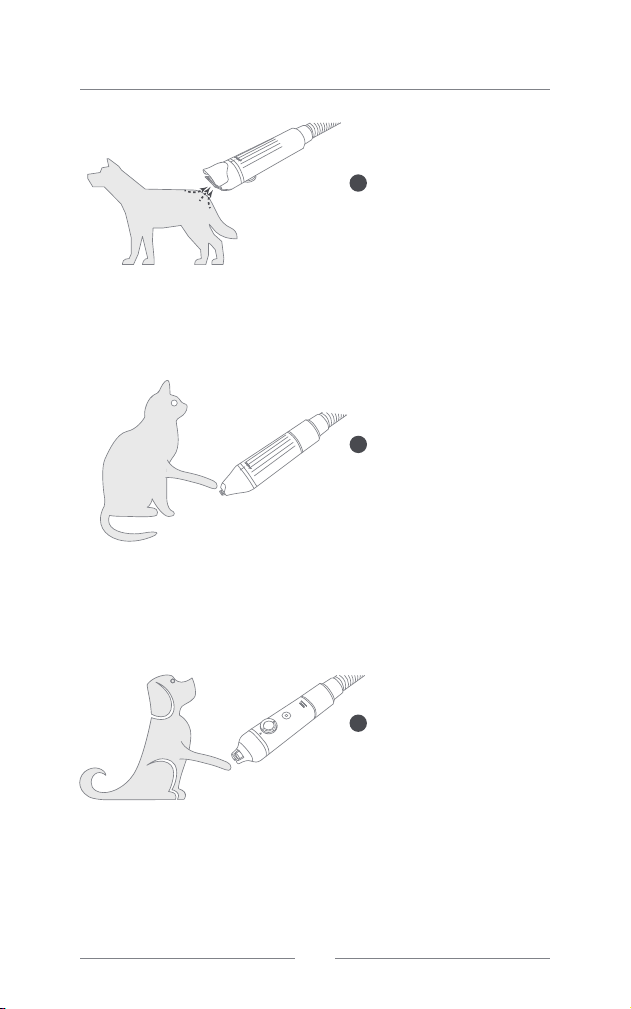
Start to Use
A clipper of standard width,
best efficient, massive
trimming of pets’ hair.
The narrow clipper is
designed to trim hair
around paws, ears, eyes,
and private anal area.
Used to grind your pets’
nails for smoothness and
flatness without cutting
them too quickly or
cracking the nails.
Nail Grinder
Standard Clipper
Small Clipper
1
2
3
EN
016
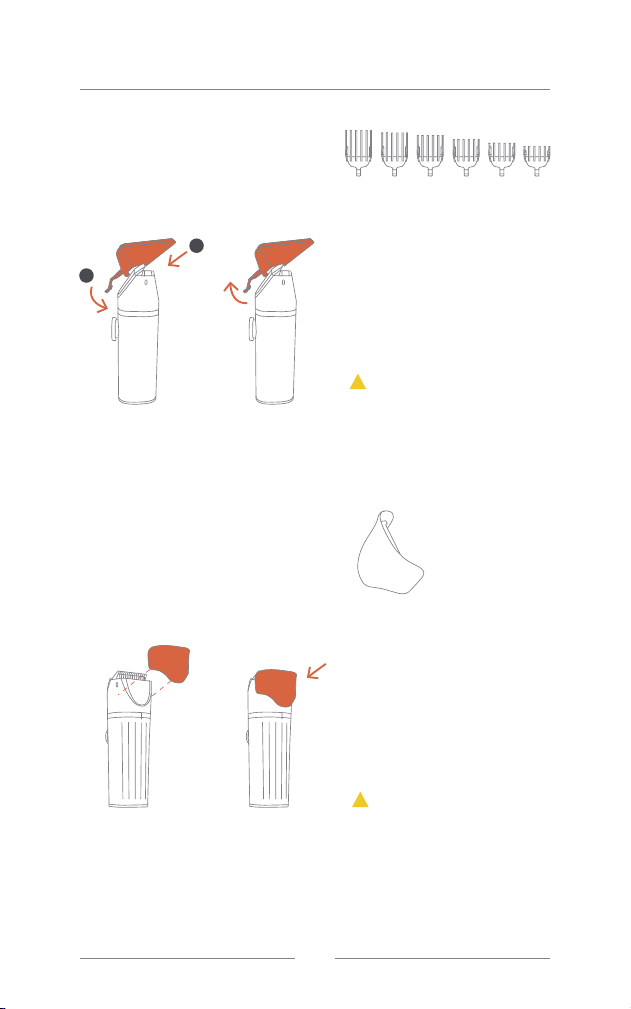
Guide combs
Transparent clipper
wind shield
Guide combs are small and
scattered, so please store them
carefully to prevent them from
going missing when they are not in
use.
The transparent clipper wind
shield is small, so please store
them carefully to prevent it from
going missing when it's not in use.
Start to Use
Used to determine the length of
hair reserved. You can change the
comb as needed for different
styling (used optionally).
Used to boost suction force at the
inlet during trimming and serves as
a guide for suction path (used
optionally).
Guide combs come with six sizes:
3/6/9/12/15/18mm.
!
Attention:
3
mm
6
mm
9
mm
12
mm
15
mm
18
mm
Install Demolish
!
Attention:
1
2
EN
017
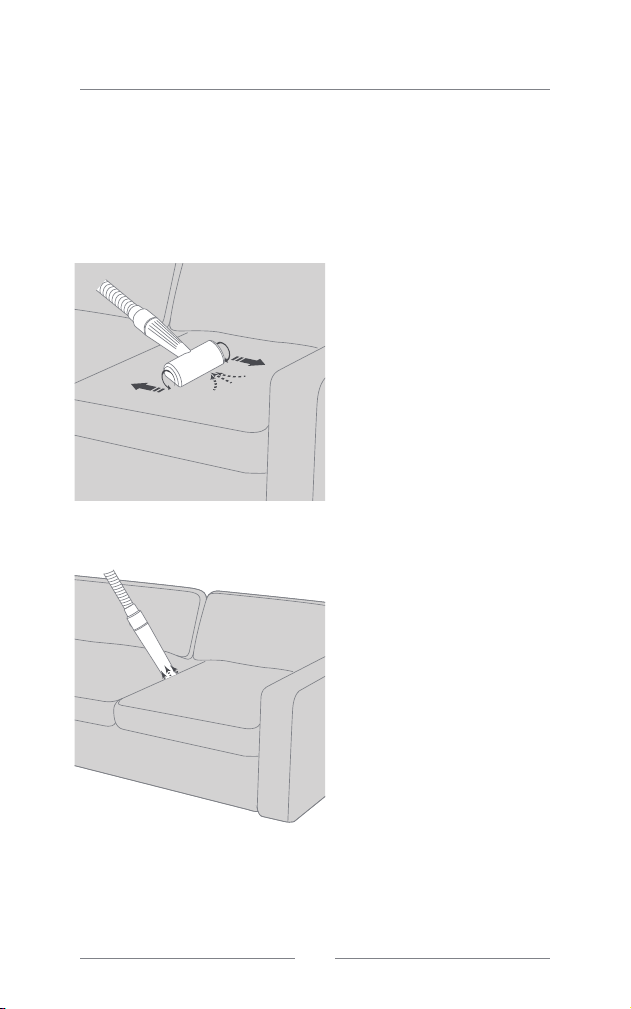
Used to clean pets’ hair that sticks to furniture, carpets, clothes,
etc.
Start to Use
Cleaning accessories
Hair remover roller
Crevice tool
Roll the brush back and forth to
rapidly remove hair that sticks to
couches, beds, clothes, and other
fabrics.
Used to clean dust and hair
accumulated in confined spaces
such as gaps in a couch.
EN
018
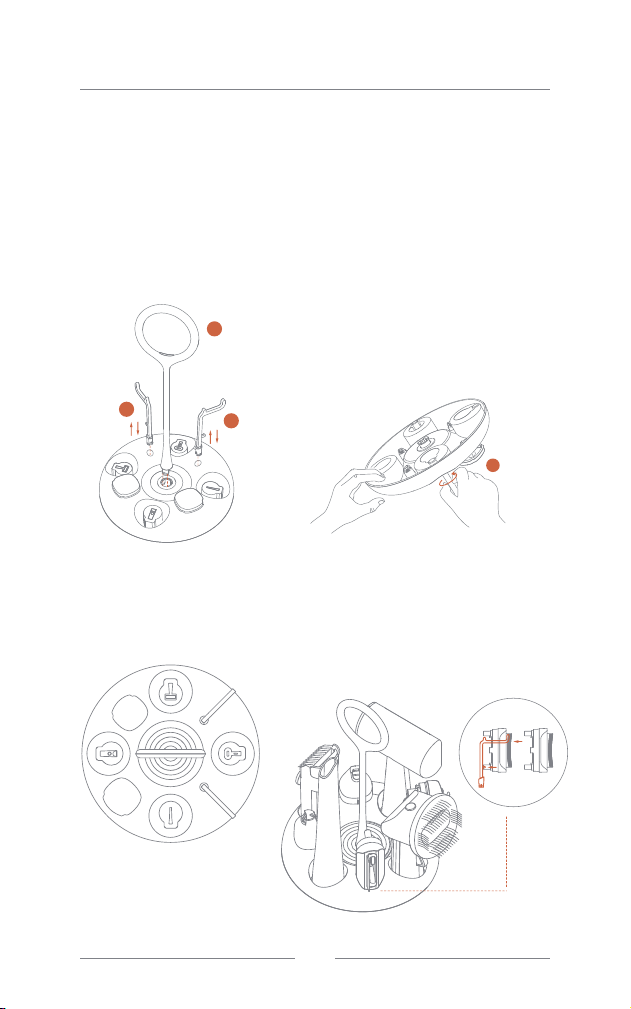
Start to Use
Accessories tray
Installation:
Keep accessories in the tray:
Please place accessories on the tray as illustrated, and hang deshedding and
dematting combs as shown below.
EN
3
1
2
1
3: Flip the base over, hold the bottom
of the handle, and rotate it
counterclockwise 90 degrees to
secure it, as shown in the diagram.
To disassemble, rotate it in the
opposite direction, clockwise 90
degrees, and pull it out.
1: Align the two rods with the
corresponding holes, insert
them downward directly. To
remove them, grasp the rods
and pull them upward.
2: Rotate the handle to the correct
angle and insert it into the hole in
the middle of the base.
019
Start to Use
5. Overheating and Overcurrent Protection
The S1 grooming kit is equipped with integrated
overheating and overcurrent protection features.
Overheating Warning
•When the main unit fan is running, if you hear "beep beep beep"
warning signals while the indicator light flashes in red slowly, it
indicates that the temperature inside the main unit is high. In this
case, you may continue to use the machine normally, although it
is recommended to press the shutdown button and clean the
dustbin before further use.
•When the internal temperature decreases, a long single "beep" will
sound, and the indicator light will return to the normal color for the
corresponding mode, which you may then use the machine as
usual.
Overheating Protection
•If the dustbin is not cleared, and the machine continues to operate
after the overheating warning, the main unit may innitiate
overheating protection after a while. In this event, "beep beep
beep" warning signals will sound, the indicator light will rapidly flash
in red, the vacuum will automatically shut down, and all buttons will
stop working. Please unplug the main unit, clear the dustbin, and
allow the machine to stand for at least 30 minutes.
•Afterward, re-plug the machine and power it on. If the indicator
light returns to its normal color, you may resume using the machine.
If the indicator light still rapidly flashes in red, please unplug the
machine and continue to wait.
Overcurrent Protection for Clipper
•When using the electric clipper, if both the clipper motor and the
main unit vacuum stop, and the indicator light on the main unit
remains constantly red, accompanied by six beeps from the
buzzer, it indicates that the clipper is experiencing overcurrent.
•In this case, the buttons on the main unit will stop working. Please
immediately unplug the machine, detach the clipper, and inspect
the cutter and the air duct for any blockages. If you find any
blockages, please unclog them.
•After clearing the blockage, reconnect the clipper to the main unit
through the hose, plug in the machine, and press the On/Off button
once. The machine will then resume normal operation. If the issue
persists, please contact our after-sales service immediately for a
replacement or repair of the clipper.
EN
020
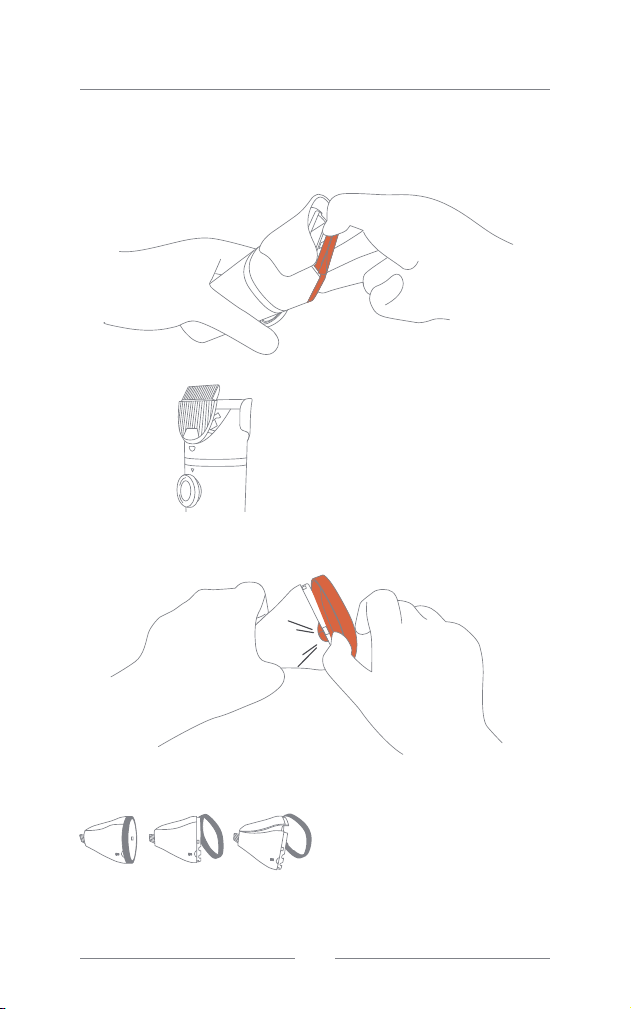
Daily Maintenance
Cleaning and Maintenance of Electric Clippers
Please clear the hair that accumulates on the clipper to reduce the risk of jamming
and ensure the clipper continues working properly.
Removing a Standard
Clipper Blade:
Hold the clipper handle with one
hand and remove the standard
clipper blade with the other hand,
following the illustrated position and
direction.
Disassembling the Small
Clipper Accessory:
First, remove the decorative ring.
Then remove the front and back
shells as shown in the figures. When
cleaning is complete, reverse the
steps above to reassemble them.
KA
EN
021
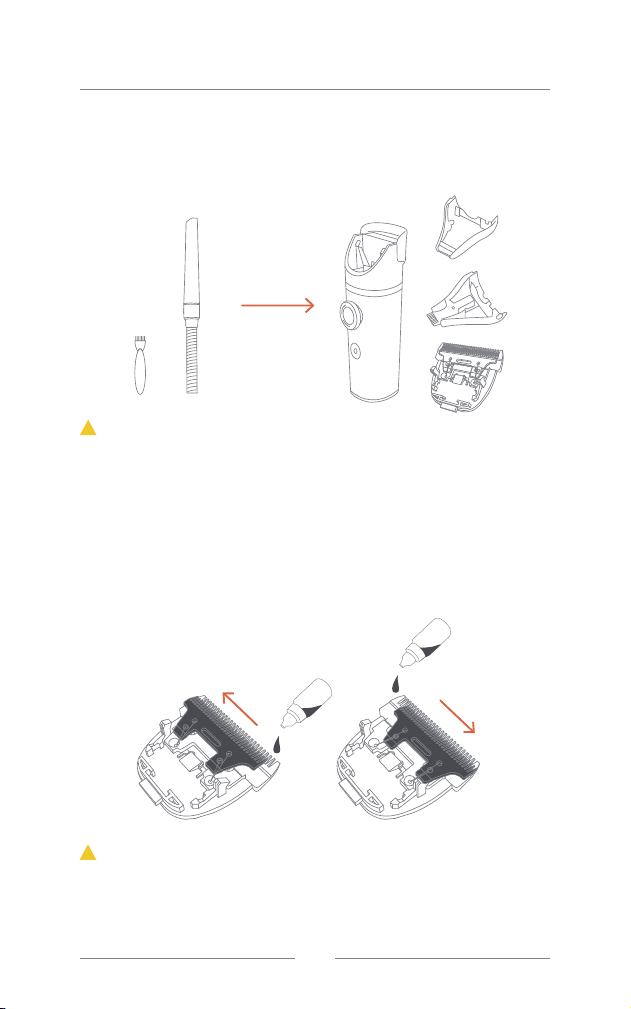
Daily Maintenance
The body of the electric clipper can't be cleaned with water. However, it's
perfectly fine to clean the clipper and the nail grinder with water. Always
ensure that you thoroughly dry the attachments with a cloth or let them air dry
before reattaching them to the clipper handle to prevent potential damage or
malfunction to the motor.
Lubricant application is not recommended for the small clipper, as it may lead
to hair adhesion and clog the air duct.
Use the complimentary brush and the crevice tool to clean the standard clipper
components and the inner parts of both the standard and small clippers.
Flip the movable blades of the standard clipper to one side, and lubricate the
exposed stationary blade. Then, flip the movable blades to the other side and
lubricate the other side of the stationary blade.
(Lubricant to be purchased separately for overseas versions)
Clearing Hair Residues at the Head of
the Electric Clipper
Lubricating the Standard Clipper
!
Attention:
!
Attention:
clean
EN
022
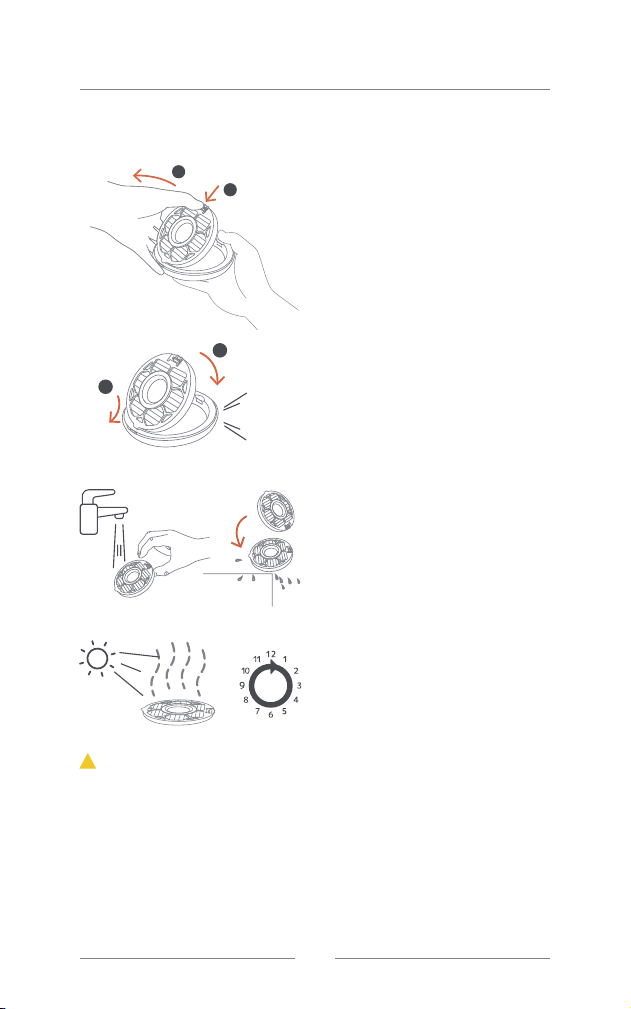
Removal of the HEPA
Component
When removing the dustbin from
the main unit and pulling out the
bottom cover, hold the component
with one hand, and pull it upwards
with the other hand while grabbing
the annular handle.
Fitting Back the HEPA
Component
After cleaning and drying, align the
trapezoid projection at the edges
of the HEPA component with
corresponding slots at the bottom
cover. Then turn and put down the
other side until you hear a “click”
sound, indicating that it's properly
fitted.
Cleaning the HEPA
Component
When removing the HEPA
component, rinse it thoroughly
with tap water, and then allow it to
drain in standing position.
Drying the HEPA
Component
Please leave the HEPA
component in a well-ventilated
place to dry for at least 24 hours.
•The HEPA component requires regular rinsing with cold water.
•Depending on the frequency and conditions of use, the maintenance period for
the HEPA component may vary. Please purchase new ones and replace the old
ones regularly.
•Always ensure the HEPA component is completely dry before fitting it back, as
using a HEPA component that is not completely dry may lead to electric shocks
and faults.
•Always properly install the HEPA component before using the grooming kit to
avoid damaging the product.
Daily Maintenance
Cleaning and maintenance of HEPA
above
24H
KA
!
Attention:
1
2
1
2
EN
023

EN
1.Machine powers on but does not operate:
Please check the status of the indicator lights and take appropriate
action based on the following situations:
Please use the following methods to troubleshoot the causes of
insufficient suction one by one:
• Indicator light flashing in
corresponding mode color (White
/ Cyan / Purple): This indicates
that the dust cup is not properly
placed. Please refer to the
instruction manual and insert the
toothed side of the dust cup into
the decorative ring, then rotate the
other side downwards until it locks
into place.
• Indicator light pulsing in
corresponding mode color (White
/ Cyan / Purple): This indicates
that the machine is operating
normally but there is no passage.
Please check if the hose is inserted
and the accessories are properly
connected: If using the hairbrush,
press the button to push out the
hair and start the fan; if using the
electric clipper, press the power
switch button on the clipper to
start the fan and blade.
• Indicator light flashing red: This
indicates that the machine has
encountered software overheating
protection. Please unplug the main
unit, clean the dust cup, and let the
machine rest for at least one hour.
• Indicator light solid red: This
indicates the electric clipper
overload. Please unplug the main
unit, remove the electric clipper,
inspect the clipper heads and
airflow path, and use the provided
small brush for cleaning.
2.Machine is running but suction is weak:
• Dust cup is full: Please promptly
empty the accumulated hair from
the dust cup.
• HEPA filter is contaminated: The
dust and hair on the HEPA filter
should be regularly cleaned with
cold water, and replacement
should be done periodically
according to usage.
• Dust cup is leaking: Follow the
instructions in the manual and
insert the toothed side of the dust
cup into the decorative ring, then
rotate the other side downwards
until it locks into place.
• Airflow path is blocked: Check for
any blocked hair in the dust cup
inlet, hose, and accessory heads,
and clean them.
Daily Maintenance
Troubleshooting
024

Specification
Size of main unit
Net weight
Rated power
Suction power
Noise Level
Water Resistance
Dustbin Capacity
Hose Length
Power Cord Length
333mmX138mmX278mm
2kg
300W
≥85W
≤70dB
IPX4
(When connecting the hose)
3L
1.6m
2.5m
Product Model PN0200W (S1 Pro)
EN
025

Warranty and After-sales
EN
1. The Warranty Period is 12 months starting from the signing of receipt. The
warranty is limited to free repair of the purchased products and does not cover
consumables and accessories.
2. If the product breaks down or fails during normal use, it can be repaired free of
charge within the Warranty Period. If it’s not repairable, we will provide a
replacement service.
3. In case of the following, a repair fee will be charged even if the warranty is still
valid:
• Product fault or damage arising from incorrect use or act of man;
• Product damage caused by the transport company, or other damage arising from
transportation;
• Product damage caused by a pet (such as scratches and bites);
• Product fault or damage arising from acts of God such as a fire or an earthquake;
• Product fault or damage arising from use beyond general household applications
(e.g. in the open air or other unintended places of use).
4. In case of the following, a repair request will always be rejected despite the
validity of the warranty:
• The product was purchased from a channel other than one of the company’s
(such as personal selling, auction, etc.);
• The customer disassembled the product or attempted to alter it;
• The consumables and attachments supplied with the product.
5. If your product is under a valid warranty, the freight charges will be borne by
Neakasa. However, the fees for packaging materials are not covered.
6. If your warranty has expired, both freight and repair fees will be charged when
you send it back for repair.
7. In case of replacement, the new product will inherit the Warranty Period of the
old one (i.e., calculated from the original date of purchase).
8. Repair or replacement is valid in certain countries/regions only.
9. If you need repairs, or have other questions and comments about the product,
please contact the customer service provided by the purchase channel for
assistance. Otherwise, please contact us at [email protected] or on our
Facebook account @neakasa.tech.
10. Neakasa reserves the right to interpret all the aforesaid warranty provisions and
to update the coverage of the warranty. All repairs and requests shall be subject
to the latest warranty provisions.
026