MS290/MS140, MSS290/MSS140 operating and
installation instructions
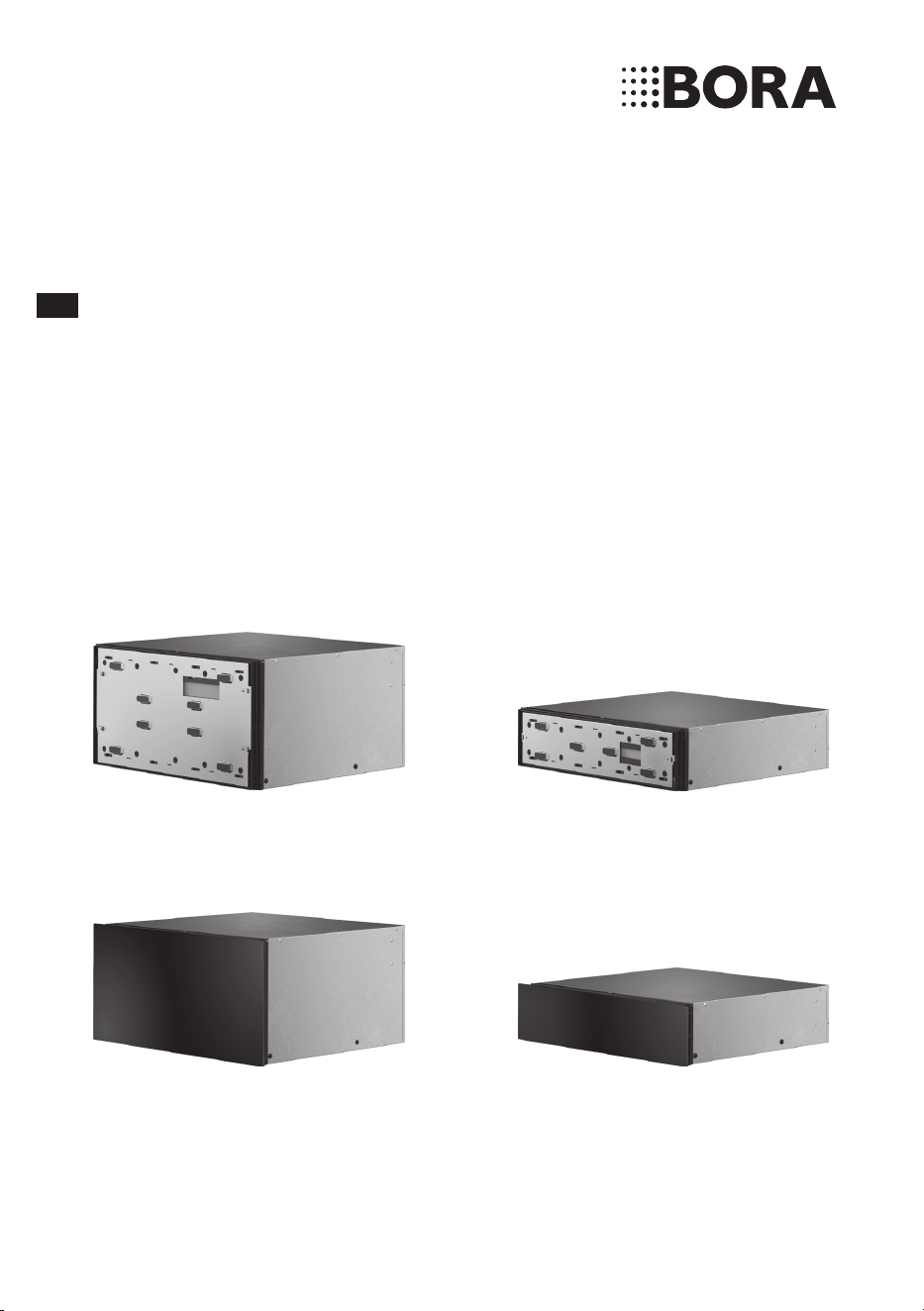
Multi-drawer 290mm/140mm
Multi-drawer set 290mm/140mm including glass front
003290-10001-02
bora.com
EN

48
www.bora.com
EN
8 Troubleshooting 73
9 Installation 74
9.1 Scope of delivery ......................................... 74
9.2 Tools and aids .............................................. 74
9.3 Assembly instructions ................................. 75
9.3.1 Possible appliance combinations ..................75
9.3.2 Fitted unit (single installation) .......................75
9.3.3 Multi-drawer fitted unit +
X BO steam oven ...........................................76
9.4 Installing the appliance ............................... 76
9.5 Fitting the front ............................................ 78
9.5.1 Fitting the unit front ......................................78
9.5.2 Fitting the glass front (MSF290/MSF140) ...80
9.5.3 Completing installation..................................81
9.6 Function test ................................................ 82
9.7 Handover to user ......................................... 82
10 Decommissioning, disassembly and
disposal 83
10.1 Decommissioning ........................................ 83
10.2 Disassembly ................................................. 83
10.3 Environmentally-friendly disposal .............. 83
11 Warranty, technical service, spare
parts, accessories 84
11.1 BORA manufacturer’s warranty .................. 84
11.2 Service .......................................................... 85
11.3 Spare parts................................................... 85
11.4 Accessories .................................................. 85
Table of Contents
1 General information 49
1.1 Liability ......................................................... 49
1.2 Validity of the operating and installation
instructions .................................................. 49
1.3 Product conformity...................................... 49
1.4 Presentation of information ........................ 49
2 Safety 51
2.1 Use as intended ........................................... 51
2.2 People with limited abilities........................ 51
2.3 General safety instructions......................... 52
2.4 Safety instructions for installation ............. 54
2.5 Safety instructions – operation .................. 55
2.6 Safety instructions – cleaning and
maintenance ................................................ 56
2.7 Safety instructions – repairs, servicing
and spare parts............................................ 57
2.8 Safety instructions – disassembly and
disposal ........................................................ 57
3 Technical data 59
4 Appliance description 62
4.1 Model description ........................................ 62
4.2 Structure ...................................................... 62
4.3 How it works ............................................... 63
4.4 Touch operating panel ................................. 63
4.5 LED oven chamber lighting ......................... 64
4.6 Shelf rack ..................................................... 64
5 Functions and operation 65
5.1 Opening and closing the drawer ................ 65
5.2 Touch control ............................................... 65
5.3 Initial operation ............................................ 66
5.4 Load capacity ............................................... 66
5.5 Switching on and off ................................... 66
5.6 Manual operation......................................... 66
5.7 Using preset programmes .......................... 67
5.7.1 Preset programmes .......................................67
5.7.2 Using preset programmes .............................68
5.8 Delayed start ................................................ 68
5.9 Standby mode .............................................. 68
5.10 BORA Connectivity ...................................... 69
5.11 Demo mode .................................................. 69
5.12 Factory settings ........................................... 69
6 Applications 70
7 Cleaning and maintenance 72
7.1 Cleaning agents ........................................... 72
7.2 Cleaning the exterior ................................... 72
7.3 Cleaning the cooking chamber ................... 72

49
General information
www.bora.com
EN
1 General information
1.3 Product conformity
Directives
The appliances meet the following EU/EC directives:
2014/30/EU EMC Directive
2014/35/EU Low Voltage Directive
2009/125/EC Ecodesign Directive
2011/65/EU RoHS Directive
1.4 Presentation of
information
We use standard formatting, numbering, symbols,
safety instructions, terms and abbreviations so that
you can work quickly and safely when using this
manual.
The term “appliance” is used to refer to cooktops,
cooktop extractors or cooktops with integrated
cooktop extractor.
Instructions are indicated with an arrow.
X Always follow all instructions in the prescribed
order.
Enumerations are indicated with a bullet point at
the start of the line:
O
Enumeration 1
O
Enumeration 2
i
Information notes point to special features
that must be taken into account.
These instructions contain important information to
protect you from injury and prevent damage to the
appliance.
Please read these instructions carefully before
installing or using the appliance for the first time.
Other documents apply alongside these instructions.
Please by all means adhere to all documents that
form part of the scope of delivery.
Assembly, installation and commissioning must
always occur in line with national laws, regulations
and standards. The work must be performed by
qualified specialists who are familiar with and
comply with the supplementary regulations of the
local utility companies.
All safety and warning information as well as
the handling instructions in the accompanying
documents must be observed.
1.1 Liability
BORA Holding GmbH, BORA Vertriebs GmbH & Co
KG, BORA APAC Pty Ltd and BORA Lüftungstechnik
GmbH – hereinafter referred to as BORA – does
not assume any liability for damage arising from
disregard for or non-adherence to the documents
included in the scope of delivery!
Furthermore, BORA shall not be held liable for
damage caused by improper installation or failure to
observe the safety and warning instructions!
1.2 Validity of the operating
and installation
instructions
These instructions apply to several appliance
versions. It is therefore possible that some of the
features described do not apply to your appliance.
The details of the figures contained herein may
differ from some appliance versions and are to be
understood as schematic diagrams.
EN
50
General information
www.bora.com
Safety and warning instructions
The safety and warning instructions in this manual
are emphasised with symbols and signal words.
Safety and warning instructions are structured as
follows:
WARNING SYMBOL AND
SIGNAL WORD!
Type and source of danger
Results of non-compliance
X
Measures to minimise risk
Please note:
O
warning symbols draw attention to a high risk of
injury.
O
The signal word indicates the severity of that risk.
Warning symbol Signal word Risk
ü
Danger Indicates an
immediate, hazardous
situation which
causes death or
serious injury if not
respected.
ü
Warning Indicates a potentially
hazardous situation
which can cause
death or serious
injury if not
respected.
Caution Indicates a potentially
hazardous situation
which can cause
minor injury or
damage to property
if not respected.
Tab. 1.1 Meaning of the warning symbols and signal
words
Figures
All measurements are provided in millimetres.

51
Safety
www.bora.com
EN
The appliance complies with the stipulated safety requirements. The user is
responsible for the safe use of the appliance, cleaning and maintenance. Improper use
can lead to personal injury and damage to property.
2.1 Use as intended
The appliance can be used to warm crockery and prepare food in private households.
Under no circumstances should the heat drawer be used for flambéeing or heated up
with large amounts of oil or fat inside.
This appliance is not intended for:
O
drying animals, textiles or paper
O
outdoor use
O
heating rooms
O
cooling, ventilating or dehumidifying rooms
O
use in mobile installation sites such as motor vehicles, ships or aeroplanes
O
use at altitudes of over 2,000m (metres above sea level)
O
use when not fully installed
Any other use or any use that goes beyond that which is described here is classed as
unintended.
i
BORA does not assume any liability for damages caused by incorrect
installation, improper use or incorrect operation.
All misuse is prohibited!
2.2 People with limited abilities
Children
The appliance can be used by children aged 8 and over if they are supervised or have
been instructed how to use the appliance safely and understand the resultant risks.
Children must not play with the appliance.
X
Supervise children in the vicinity of the appliance.
i
Any work involving cleaning and maintenance must not be carried out by
children unless they are supervised at all times while doing so.
2 Safety
EN
52
Safety
www.bora.com
People with reduced physical, sensory or mental capacities
The appliance can be used by people with reduced physical, sensory or mental
capacities or a lack of experience and/or knowledge if they are supervised or have
been instructed how to use the appliance safely and understand the resultant risks.
2.3 General safety instructions
DANGER!
Packaging components are a choking hazard
Packaging components (e.g. lm, polystyrene) can be life-threatening for children.
X
Store all packaging components out of reach of children.
X
Dispose of the packaging properly and immediately.
DANGER!
Risk of electric shock or injury from damaged surfaces
The underlying electronics can be exposed or damaged due to ssures, fractures
or cracks in appliance surfaces (e.g. damaged glass), particularly in the vicinity
of the operating unit. This can cause an electric shock. Furthermore, a damaged
surface can cause injuries.
X
Do not touch the damaged surface.
X
If there are any cracks, fissures or fractures, switch the appliance off
immediately.
X
Safely disconnect the appliance from the mains using the LS switch, fuses,
automatic circuit breakers or contactor.
X
Contact BORA Service.
WARNING!
Risk of injury or damage due to incorrect components or unauthorised
modifications
Incorrect components can lead to personal injury or damage to the appliance.
Modications, additions or alterations to the appliance can lead to safety risks.
X
Only use original components.
X
Do not make any modifications, additions or alterations to the appliance.
53
Safety
www.bora.com
EN
WARNING!
Risk of injury due to mechanical damage on the appliance
Mechanical damage (e.g. cracks, deformation, separation of adhesive seals, etc.) to
the appliance, as well as to cables and accessories can cause injuries.
X
Do not operate the appliance.
X
Try not to repair or replace damaged components yourself.
X
Contact BORA Service.
CAUTION!
Appliance components can cause injury if dropped
Appliance components can cause injury if dropped.
X
Place any appliance components that have been removed in a safe place near
the appliances.
X
Ensure that no components removed from the appliances can fall on the floor.
CAUTION!
Risk of injury from heavy lifting
If not handled correctly, carrying and installing appliances can cause injury to the
limbs or torso.
X
If necessary, carry and install the appliance with another person.
X
Use appropriate aids to prevent damage or injury.
CAUTION!
Damage from improper use
The appliance surfaces must not be used as work surfaces. This can damage the
appliances (particularly in the case of hard and sharp objects).
Cutting with knives or cutting wheels in the drawer causes visible damage.
X
Do not use the appliance as a worktop.
X
Keep hard or sharp objects away from the appliance surfaces.
X
Do not sit or lean on the drawer.
Faults and errors
X
In the case of faults and errorsin the “Troubleshooting” chapter.
X
In the event of any faults or errors that are not mentioned, switch the appliance
off and contact BORA Service.
Pets
X
Keep pets away from the appliance.
EN
54
Safety
www.bora.com
2.4 Safety instructions for installation
i
The appliance must only be installed and assembled by trained specialists
who are familiar with and comply with the standard national regulations and
supplementary regulations of the local utility companies.
i
Work on electrical components must only be conducted by trained electrical
personnel.
The electrical safety of the appliance is only guaranteed if it is connected to a
protective conductor system that has been installed in line with regulations. Ensure
that this basic safety precaution is met.
The appliance must be suitable for the regional voltage and frequency.
X
Check the information on the identification plate and in the event of deviations,
do not connect the appliance.
X
Only use the connection cables supplied. Where necessary these are included in
the scope of delivery.
X
Do not use the appliance until installation is complete. This is the only way to
ensure safe operation.
X
Conduct all work extremely attentively and conscientiously and in accordance
with these instructions.
X
Before handing the appliance or system over to the end user, ensure that it has
been correctly installed.
DANGER!
Risk of electric shock from damaged appliance
A damaged appliance can cause an electric shock.
X
Check the appliance for visible damage prior to installation.
X
Do not install or connect any damaged appliances.
X
Do not operate any damaged appliances.
DANGER!
Risk of electric shock from damaged power supply cable
If the power supply cable is damaged (e.g. during installation or by coming into
contact with hot cooking surfaces), this can cause an (lethal) electric shock.
X
Make sure that the power supply cable does not become trapped or damaged.
X
Make sure that the power supply cable does not come into contact with hot
cooking surfaces.
55
Safety
www.bora.com
EN
2.5 Safety instructions – operation
X
Do not use the appliance until installation is complete. This is the only way to
ensure safe operation.
X
Do not use the appliance as a storage surface.
X
Switch off the appliance after use.
WARNING!
Risk of burns from hot surfaces.
The appliance and exposed parts (oven chamber, door, heating elements,
accessories) become hot during use. Touching hot surfaces can cause serious
burns.
X
Do not touch hot surfaces.
X
Please use suitable accessories when needed (pot holders,
oven gloves).
X
Keep children under 8 years of age away from the appliance or ensure they are
supervised at all times.
WARNING!
Risk of burns due to power cut
During or after a power cut a cooktop that was previously in operation may still be
hot.
X
Do not touch the appliance while it is still hot.
X
Keep children away from the hot appliance.
DANGER!
Risk of fire from overheated oil or fat
Oil or fat in the pot can quickly heat up and ignite.
X
Never extinguish oil and fat fires with water.
X
Switch off the appliance.
X
Extinguish the fire using a pan lid or a fire blanket, for example.
DANGER!
Risk of fire from overdrying
When food is overdried there is a risk of re.
X
Do not leave the appliance unattended if you are dessicating or drying herbs,
bread, mushrooms, etc.
X
If you see smoke, keep the appliance closed and switch off the electricity
supply.
EN
56
Safety
www.bora.com
WARNING!
Risk of burning and fire from hot objects
The appliance and its exposed parts are hot during operation and the cooling
phase. Objects in contact with hot appliance components heat up very quickly and
can cause severe burns (this particularly applies to metal objects such as knives,
forks, spoons, lids or appliance components) or catch re.
X
Please use suitable accessories (pot holders, oven gloves).
DANGER!
Risk of burns or explosion caused by flammable liquids
Flammable liquids can be ignited by hot food or explode and cause serious injuries.
X
Do not pour flammable liquids (e.g. spirits) over hot food.
WARNING!
Risk of injury from moving appliance parts
There is a risk of injury when opening and closing the door/drawer.
X
Ensure that nobody reaches into the appliance when the door/drawer is being
opened or closed (children in particular).
WARNING!
Risk of injury from open door/drawer
When the door/drawer is open there is a risk of tripping or crushing.
X
Close the door/drawer after use.
CAUTION!
Damage caused by opening the drawer brusquely
If the drawer is not opened carefully, this can cause damage.
X
Do not open the drawer brusquely.
X
Only open the drawer as described in the “Operation” chapter.

57
Safety
www.bora.com
EN
2.6 Safety instructions – cleaning and maintenance
The appliance must be cleaned at regular intervals. Dirt can lead to damage,
restriction of functions, or bothersome odours. In the worst case scenario, this can
become a hazard.
X
Remove dirt immediately.
X
When cleaning, only use non-abrasive detergents to prevent scratching and
abrasion on the surface.
X
When cleaning, ensure that no water penetrates the appliance. Use only a slightly
damp cloth. Never spray the device with water. Water penetration can cause
damage!
X
Do not use a steam cleaner for cleaning. Steam can cause a short circuit on live
parts and thus lead to property damage.
X
Please follow all instructions in the “Cleaning and Maintenance” chapter.
CAUTION!
Risk of corrosion
Moisture may form during operation.
X
Leave the drawer slightly open after use (during the cooling phase).
X
Do not use any objects in the multi-drawer that may rust.
2.7 Safety instructions – repairs, servicing and spare parts
i
The appliance must only be repaired and serviced by trained specialists
who are familiar with and comply with the standard national regulations and
supplementary regulations of the local utility companies.
i
Work on electrical components must only be conducted by trained electrical
personnel.
X
Before any repair work, safely disconnect the appliance from the mains supply.
WARNING!
Risk of injury or damage from improper repairs
Incorrect components can lead to personal injury or damage to the appliance.
Modications, additions or alterations to the appliance can lead to safety risks.
X
Only use original spare parts for repairs.
X
Do not make any modifications, additions or alterations to the appliance.
i
A damaged power supply cable must be replaced by a suitable power supply
cable. This may only be done by an authorised member of the After Sales
Service team.

EN
58
Safety
www.bora.com
2.8 Safety instructions – disassembly and disposal
i
The appliance must only be disassembled by trained specialists who
are familiar with and comply with the standard national regulations and
supplementary regulations of the local utility companies.
i
Work on electrical components must only be conducted by trained electrical
personnel.
X
Before disassembly, safely disconnect the appliance from the mains supply.
59
Technical data
www.bora.com
EN
3 Technical data
MS140/MSS140
Parameter Value
Supply voltage
220 – 240 V
Frequency 50 – 60 Hz
Maximum power consumption 810 W
Fuse protection 1 x 16 A
Dimensions
(width x depth x height)
MS140
glass front (included with MSS140)
559 x 537 x 140 mm
595 x 4 x 138 mm
Recess dimensions
(width x depth x height)
560 x 560 x 140 mm
Cooking chamber dimensions
(width x depth x height)
525 x 410 x 97 mm
Cooking chamber volume 20 l
Maximum load 25 kg
Weight
(incl. accessories/packaging)
MS140
MSS140
19.2 kg
21.3 kg
Weight
MS140
MSS290
16.4 kg
18.2 kg
Time levels
1 – 6
Temperature levels 1 – 6
Temperature control range 30 – 100°C
Mains supply cable length 180 cm
Mains supply cable plug type C13/E+F
Tab. 3.2 MS140/MSS140 technical data
MS290/MSS290
Parameter Value
Supply voltage
220 – 240 V
Frequency 50 – 60 Hz
Maximum power consumption 810 W
Fuse protection 1 x 16 A
Dimensions
(width x depth x height)
MS290
glass front (included with MSS290)
559 x 537 x 290 mm
595 x 4 x 288 mm
Recess dimensions
(width x depth x height)
560 x 560 x 290 mm
Cooking chamber dimensions
(width x depth x height)
525 x 410 x 247 mm
Cooking chamber volume 50 l
Maximum load 25 kg
Weight
(incl. accessories/packaging)
MS290
MSS290
24 kg
27.6 kg
Weight
MS290
MSS290
20.7 kg
23.9 kg
Time levels
1 – 6
Temperature levels 1 – 6
Temperature control range 30 – 100°C
Mains supply cable length 180 cm
Mains supply cable plug type C13/E+F
Tab. 3.1 MS290/MSS290 technical data
EN
60
Technical data
www.bora.com
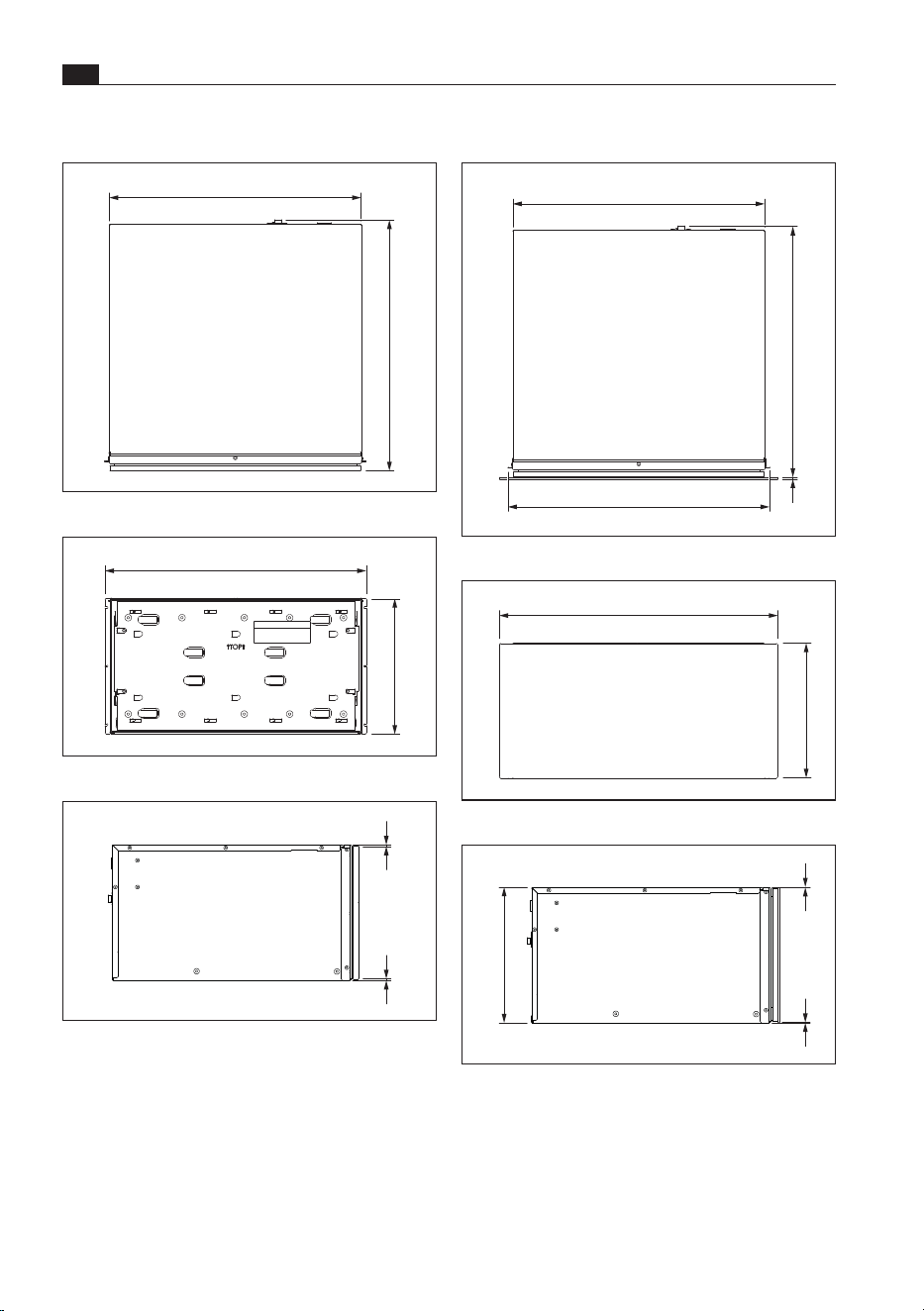
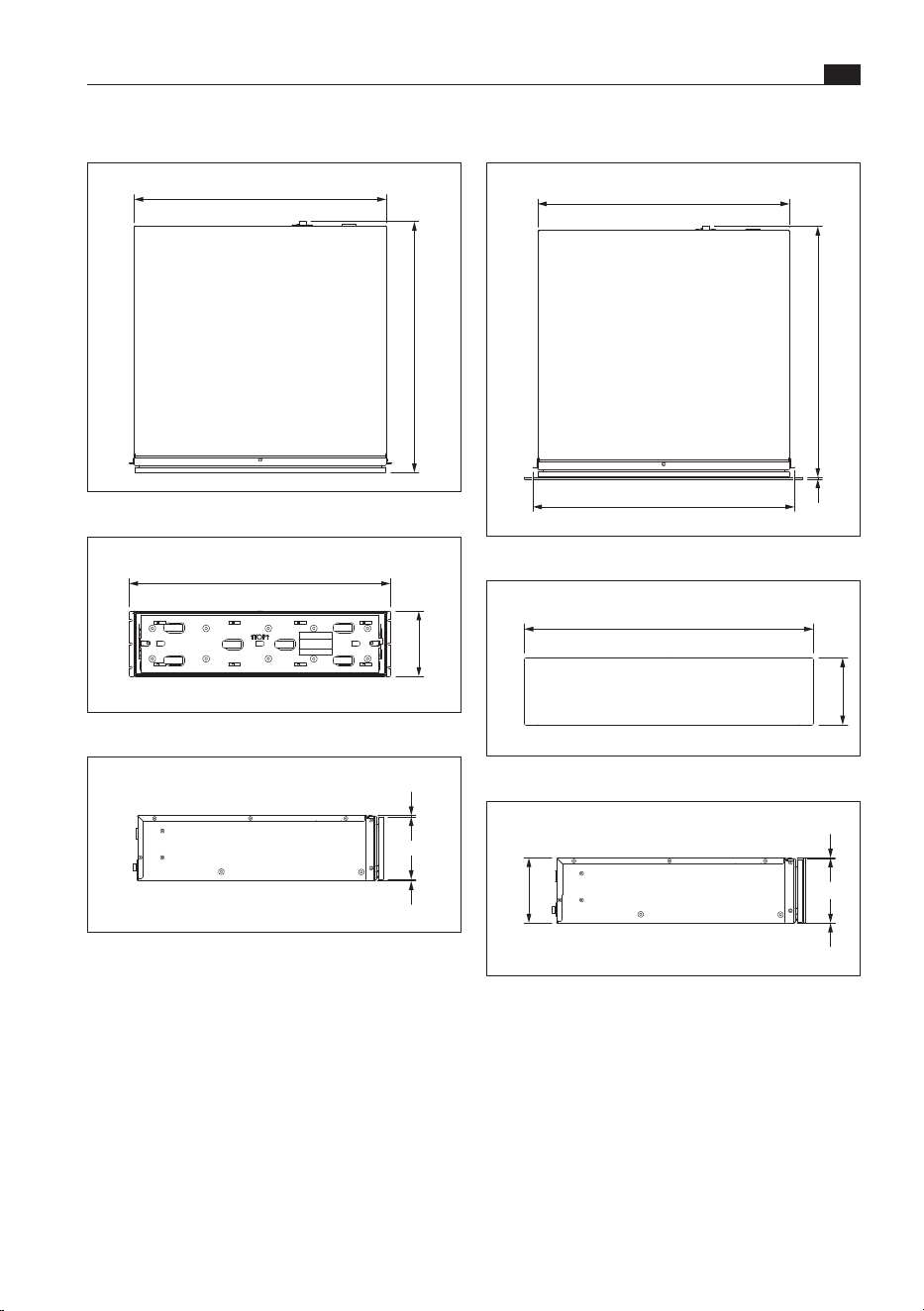
MSS290 appliance dimensions
537
542
4
559
Fig. 3.4 MSS290 appliance dimensions top view
595
288
Fig. 3.5 MSS290 appliance dimensions front view
1
1
290
Fig. 3.6 MSS290 appliance dimensions side view
MS290 appliance dimensions
537
542
Fig. 3.1 MS290 appliance dimensions top view
559
290
Fig. 3.2 MS290 appliance dimensions front view
2,4 2,4
Fig. 3.3 MS290 appliance dimensions side view
61
Technical data
www.bora.com
EN
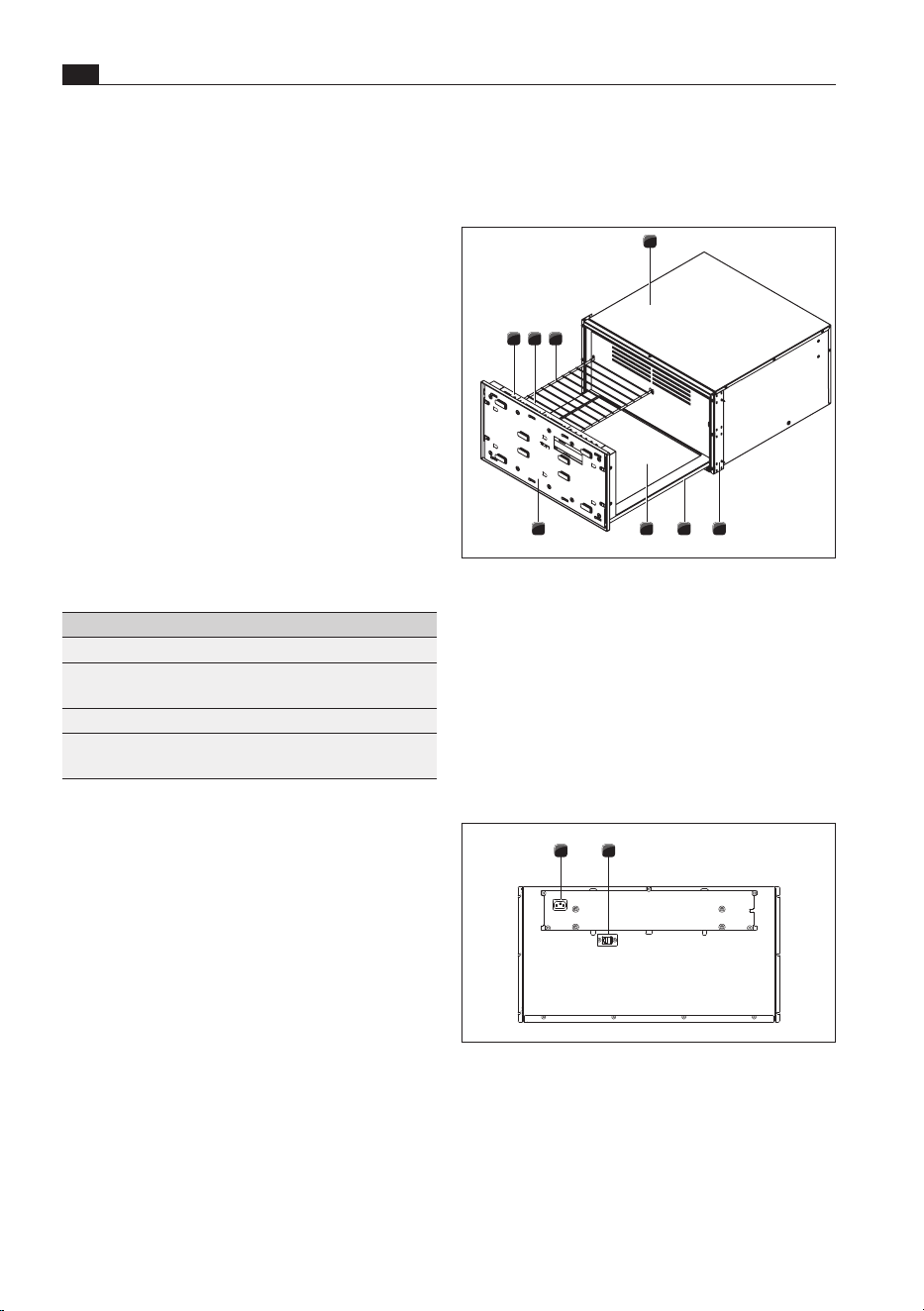
MSS140 appliance dimensions
4
537
542
559
Fig. 3.10 MSS140 appliance dimensions top view
595
138
Fig. 3.11 MSS140 appliance dimensions front view
1
1
140
Fig. 3.12 MSS140 appliance dimensions side view
MS140 appliance dimensions
537
542
Fig. 3.7 MS140 appliance dimensions top view
559
140
Fig. 3.8 MS140 appliance dimensions front view
2,4 2,4
Fig. 3.9 MS140 appliance dimensions side view
EN
62
Appliance description
www.bora.com
4 Appliance description
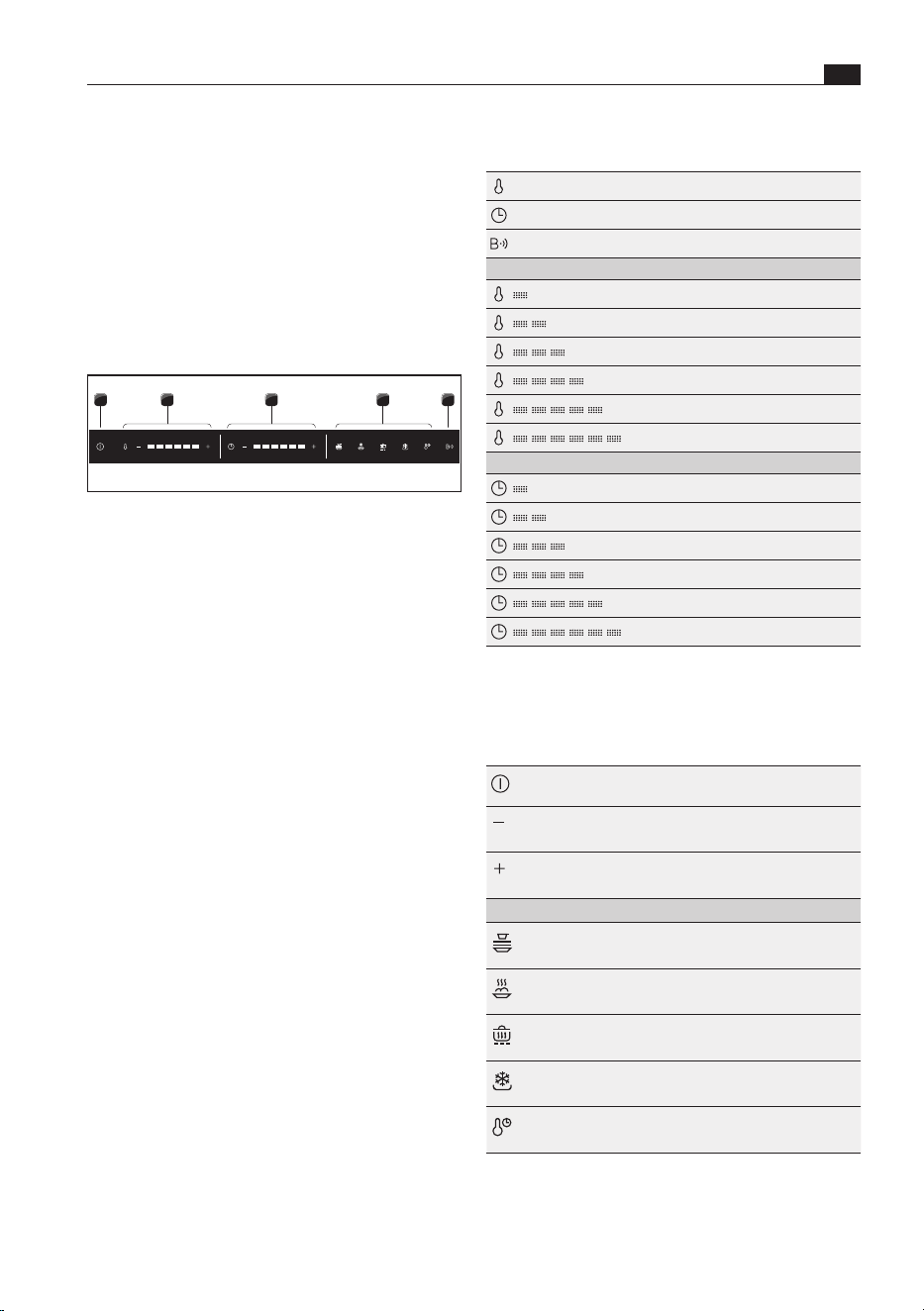
4.2 Structure
6 8
1
2
4 3
5
7
Fig. 4.1 Multi-drawer structure
[1] Housing
[2] Mounting angle with decorative trim (left and
right)
[3] Drawer
[4] Heated glass base
[5] Front support
[6] Touch operating panel
[7] LED oven chamber lighting
[8] Shelf rack (in MS290, MSS290)
21
Fig. 4.2 Back of multi-drawer
[1] Mains supply cable socket
[2] Communication cable socket
Appliance features
O
Individual control options – operation possible via
manual temperature and time control or preset
programmes.
O
Push2Open – easy opening by lightly pressing the
front of the drawer.
O
BORA Connectivity – expanded operating options
and range of functions thanks to networking with
X BO steam oven.
O
LED oven chamber lighting – the contents of the
drawer are illuminated even when the drawer is
fully extended.
O
Changeable drawer front – can be fitted with a
unit front or glass front (MSF140, MSF290).
4.1 Model description
Model Long description
MS290 Multi-drawer 290 mm
MSS290 Multi-drawer set 290 mm incl.
glass front (1x MS290, 1x MSF290)
MS140 Multi-drawer 290 mm
MSS140 Multi-drawer set 140mm incl.
glass front (1x MS140, 1x MSF140)
Tab. 4.1 Model description
63
Appliance description
www.bora.com
EN
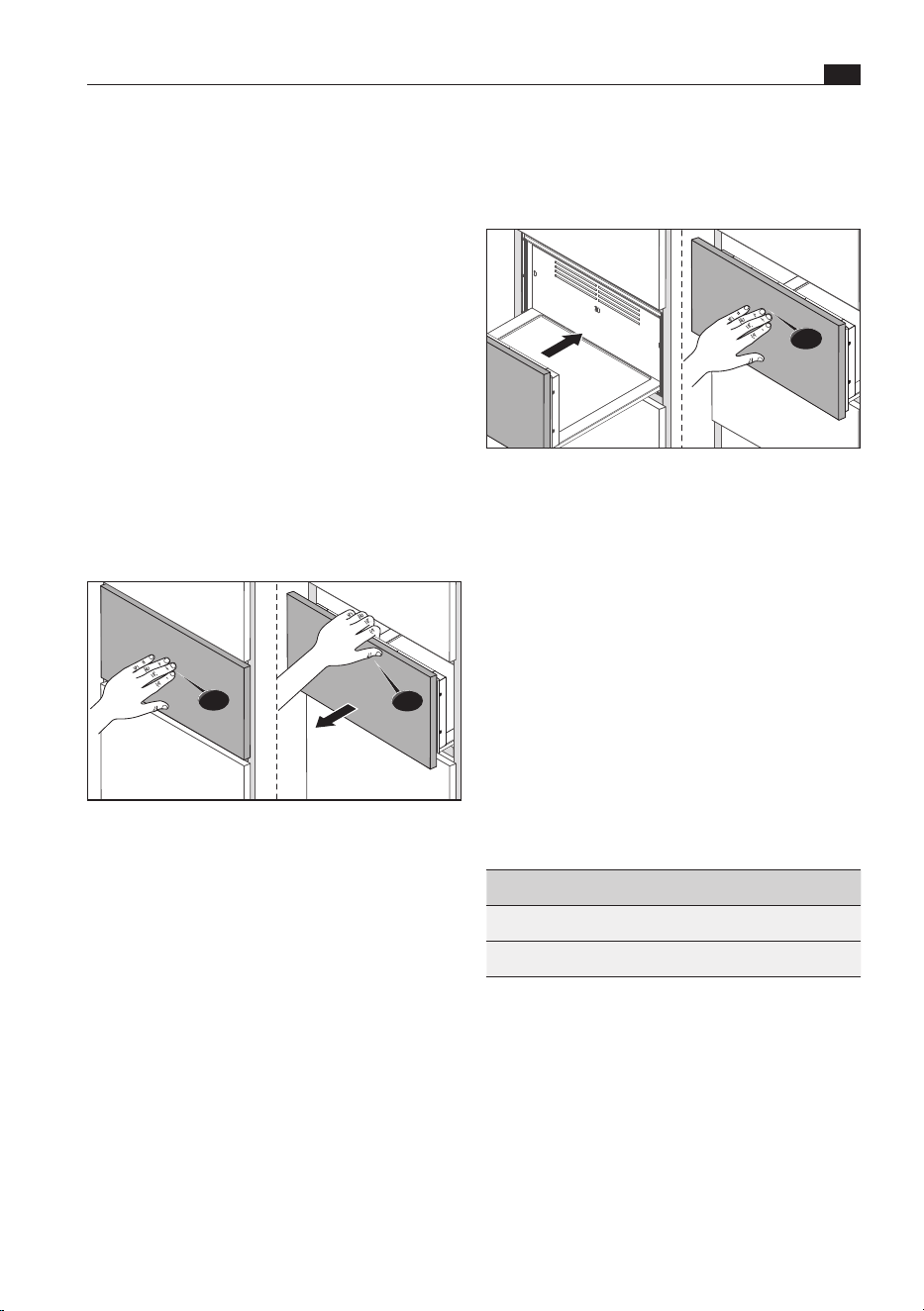
Indicator symbols
Temperature display
Time display
BORA Connectivity active
Temperature levels
30 °C
40 °C
60 °C
70 °C
80 °C
100 °C
Time levels
30 min.
1 hr
2 hrs
3 hrs
4 hrs
6 hrs
Tab. 4.2 Indicators
Control symbols
Power button Switch on/off
Minus button Reduce the temperature
or time
Plus button Increase the
temperature or time
Presets (programmes)
Warm crockery Temperature 60 °C
Time 1 hr
Reheat food Temperature 100 °C
Time 1 hr
Keep food warm Temperature 70 °C
Time 3 hrs
Defrost food Temperature 30 °C
Time 4 hrs
Cook at low-
temperature
Temperature 80 °C
Time 6 hrs
Tab. 4.3 Controls
4.3 How it works
The appliance has two heating systems:
O
drawer with heated glass base
O
recirculation heating
i
The appliance does not heat up until the
drawer is completely closed.
4.4 Touch operating panel
1 542 3
Fig. 4.3 Touch operating panel
[1] Power button
[2] Temperature settings
[3] Time settings
[4] Preset programmes
[5] BORA Connectivity
(active connection to X BO)
The multi-drawer is operated via a central operating
panel. The operating panel is equipped with
indicators and controls (electronic sensor buttons).
The sensor buttons respond to finger contact.

EN
64
Appliance description
www.bora.com
i
The temperatures refer to the surface of
the heated glass base when the appliance
is empty. Measurements by the user can be
inaccurate and are not suitable for checking
the exact temperature.
i
On certain temperature settings, the
appliance automatically overheats to start
with. This enables target temperatures to be
reached faster.
4.5 LED oven chamber
lighting
The LED oven chamber lighting is activated when the
drawer is opened.
i
If the open drawer is not operated in standby
mode, the LED oven chamber lighting is
deactivated after 5 minutes.
The LED oven chamber lighting is automatically
deactivated when the drawer is closed.
4.6 Shelf rack
In the case of the multi-drawer MS290/MSS290,
the loading area can be extended using the shelf
rack provided.
i
The shelf rack is also suitable for dishes that
should be heated at a lower temperature than
those being kept warm on the multi-drawer’s
heated glass base. The shelf rack can also
be used to preheat crockery, whereas food
can be heated at a higher temperature on the
heated glass base.
Up to 2 shelf racks can be used in the drawer at the
same time.
The MSER shelf rack is available as an accessory.
65
Functions and operation
www.bora.com
EN
5 Functions and operation
Closing
push
Fig. 5.2 Closing the drawer
X Press the front of the drawer lightly in the centre
with one hand until the drawer is closed and
clicks into place.
i
If the drawer is not opened or closed
carefully, this can cause damage. Do not open
or close the drawer roughly. Never yank the
drawer open.
5.2 Touch control
Operate the appliance by tapping the corresponding
symbol (control) on the touch operating panel with
your finger (see „4.4 Touch operating panel“).
The controls react to different touch commands:
Command Contact Time
Tap brief touch <1s
Long press long touch 1–5 s
Tab. 5.1 Touch commands
i
The touch operating panel must be clean and
dry in order for it to work.
If touch commands do not work or are not working
properly, the following should be noted:
O
Tap the touch zones with only one finger.
O
Do not rest the heel of your hand on the touch
operating panel.
X Observe all safety and warning information during
operation (see „2 Safety“).
i
If the drawer is opened during operation, it
will stop working. The remaining time and set
temperature level will be displayed. As soon
as the drawer is closed again, operation will
be resumed on the previously active settings.
i
Risk of burns! The surfaces inside the
appliance may still be hot after use.
5.1 Opening and closing the
drawer
Opening
push
pull
Fig. 5.1 Opening the drawer
X Press the front of the drawer lightly in the centre
with one hand (Push2Open).
O
This unlocks and opens the drawer. It can then be
fully opened by hand.
O
The oven chamber lighting is activated.
EN
66
Functions and operation
www.bora.com
5.5 Switching on and off
Switching on
X Long press on the power button ( ).
O
The operating panel lights up and an acoustic
signal can be heard.
Switching off
X Long press on the power button ( ).
O
The display goes out and an acoustic signal can
be heard.
5.6 Manual operation
When operated manually, the temperature and time
can be set freely.
The following standard settings are displayed:
O
temperature level: 3 (factory setting)
O
time level: 3 (factory setting)
Setting the temperature and time
X Tap the corresponding plus or minus button
( / ).
X Tap until the required temperature level or time
has been selected.
Start the appliance
X Close the drawer.
O
The appliance is activated and starts working on
the settings applied.
The time has lapsed
O
An acoustic signal can be heard.
O
The appliance automatically switches to standby
mode.
X Open the drawer.
Permanently changing standard settings
The standard temperature and time settings can be
permanently changed:
X switch on the appliance.
X Long press (5 s) on the temperature setting plus
button ( ).
O
An acoustic signal can be heard.
O
The temperature and time symbols flash.
X Select the desired temperature and time.
X Long press (5 s) on the temperature setting plus
button ( ).
O
An acoustic signal can be heard.
O
The setting is confirmed and saved.
O
Keep the contact area as small as possible when
using the touch zones.
O
Ensure that your fingers are clean and dry.
5.3 Initial operation
X Clean the appliance, particularly the interior.
X Ensure that there are no objects inside the drawer.
X Heat up the appliance before using for the first
time (temperature level 6, time level 3).
i
When heated for the first time, odours may
form.
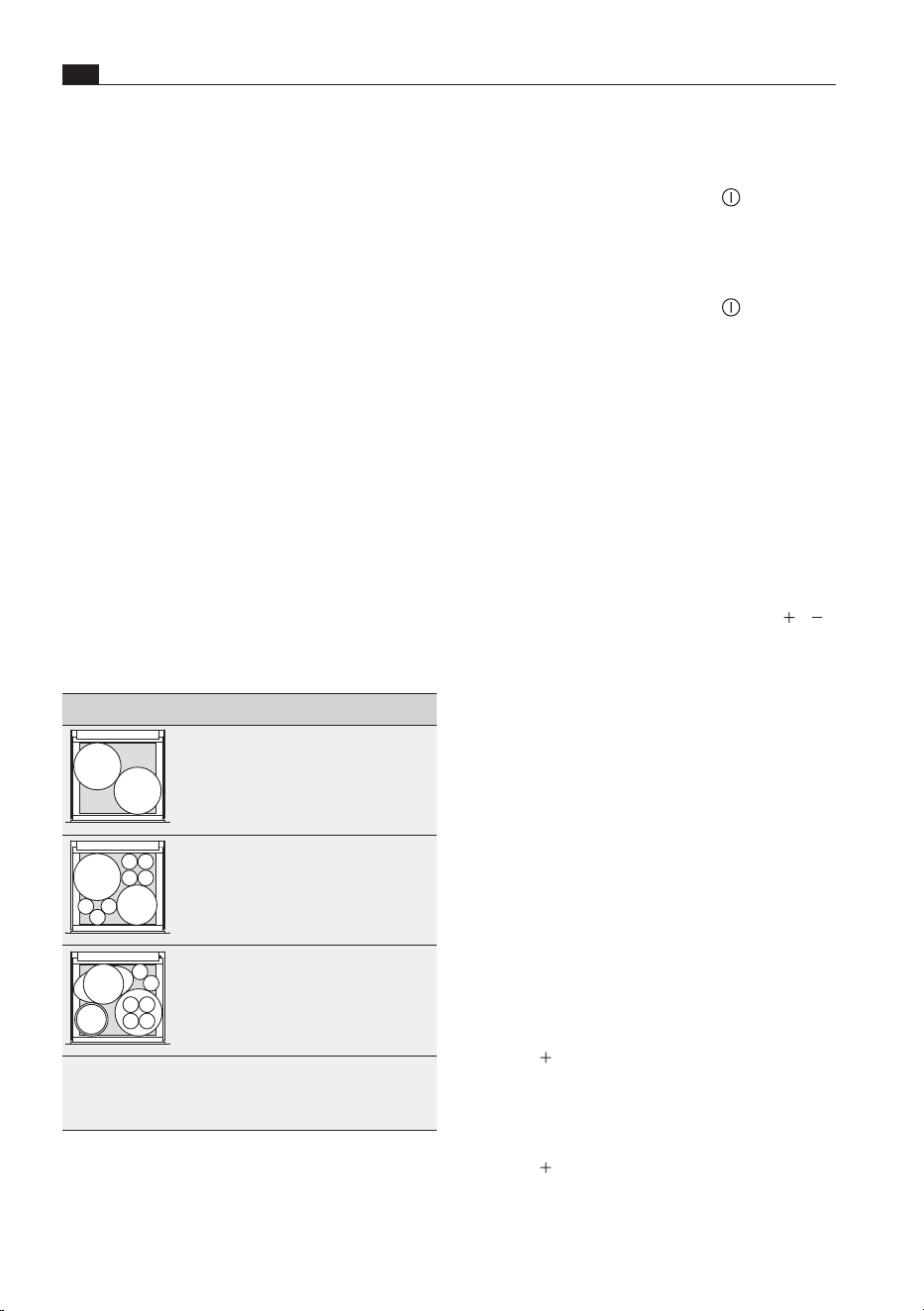
5.4 Load capacity
i
The multi-drawer can hold a maximum load
of 25 kg. If this weight is exceeded, it may
damage the appliance.
X Only use suitable, heat-resistant containers.
Examples of load capacity for crockery
Load capacity Crockery MS140 MS290
A
A
A 12 pcs. 40 pcs.
A
B
C
A/B/C 6 pcs. 20 pcs.
A
B
C
D
E
F
A/B/C
D/E
F
4 pcs.
1 pc.
1 pc.
12 pcs.
1 pc.
2 pcs.
A = plates (27 cm)
B = soup dishes (23 cm)
C = cups (9 cm)
D = bowls (17 cm)
E = bowls (19 cm)
F = trays (34 cm)
Tab. 5.2 Examples of load capacity
The maximum load capacity depends on the amount
of crockery and its weight.

67
Functions and operation
www.bora.com
EN
Keeping food warm
i
To prevent food from drying out, it should be
covered when kept warm. Exception: crusty
and crisp foods (such as fried foods) should
not be covered.
X Use suitably sized containers to keep food warm.
X If necessary, cover the food with a lid or heat-
resistant foil.
Defrosting food
i
The cooking process is started at
temperatures over 50°C (fish 40 °C).
X Choose suitable containers for defrosting,
preferably with drainage.
X Dispose of the water from defrosting.
Low-temperature cooking
i
For optimum results, food cooked at low
temperatures should be covered.
Low-temperature cooking is a gentle way of
preparing high-quality food and keeps it tender. Very
little is lost during the roasting process and food
stays nice and moist. The cooking time is longer
than conventional cooking processes.
Example of use: meat
Preparation
Use crockery made of suitable glass, porcelain or
ceramic, with a lid (e.g. a casserole dish with a lid).
X Preheat the crockery.
X Heat oil or fat in a frying pan.
X Sear the meat.
i
For the searing time see the „6 Applications
chapter
i
Alternatively, the meat can be seared after
low-temperature cooking (reverse searing).
5.7 Using preset programmes
The temperature and time are predefined and
tailored to specific uses.
5.7.1 Preset programmes
The appliance has 5 preset programmes:
Warming crockery
i
If the temperature is set too high there is a
risk of burns.
i
The crockery on the outside will become
hotter than the crockery in the middle. Always
remove crockery with oven gloves or pot
holders.
i
Heated crockery cools down quickly. Do not
remove it until shortly before serving.
X Distribute the crockery evenly in the drawer.
X Do not place any large trays upright in front of the
recirculation heating ventilation grilles.
X Do not heat crockery to over 60°C.
Reheating food
i
The multi-drawer is suitable for reheating
meat, vegetables and casseroles. Soups and
stews should preferably be reheated on the
stove.
i
To prevent food from drying out, it should
be covered when reheated. It is also
recommendable to place a suitable container
with a little water inside the oven chamber.
X To reheat meat, set the temperature to 60°C
max.
X Cover the food (e.g. with heat-resistant foil or a
suitable lid).

EN
68
Functions and operation
www.bora.com
End of programme
O
An acoustic signal can be heard.
O
The appliance automatically switches to standby
mode.
X Open the drawer.
5.8 Delayed start
The programme start can be delayed by up to 6
hours. Once the delayed start time is reached, the
appliance will start automatically.
Preparation
O
Place the crockery or food in the drawer.
O
Select the required programme.
O
Set the temperature and time.
Activating the delayed start
X Long press (3 s) on the time setting plus button
( ).
O
The time and time level display flashes.
X Tap the plus or minus button ( / ) until
the required delayed start time is set (see
„4 Appliance description“, “Time levels”).
O
The selected time indicator flashes.
X Close the drawer.
O
The delayed start function has been activated.
i
When the delayed start is active, it is no
longer possible to change the settings. In this
case, the drawer must be switched off and
on again.
i
If opened when the delayed start function
is active, the time symbol will flash and the
remaining time until the programme starts
will be displayed.
5.9 Standby mode
In standby mode the appliance functions are
temporarily deactivated. After opening the drawer,
the appliance can be reactivated at any time by
touching the power button.
Cooking
X Place the seared meat in the preheated crockery
in the drawer.
X Put a lid on the crockery.
X Start low-temperature cooking.
i
Cooking takes from 1 to 6 hours depending
on the amount of food to be cooked.
i
Use of a suitable thermometer is
recommended to check the core temperature
during cooking (see the „6 Applications“
chapter).
i
Dishes cooked at low temperatures are not
as hot as food cooked conventionally. Preheat
the plates and dishes before serving (approx.
45–60 min.).
i
You can keep food cooked at low
temperatures warm. To do this, the
temperature of the drawer must be
lowered after low-temperature cooking.
Small amounts can be kept warm for up to
45 minutes and large amounts for up to 2
hours.
5.7.2 Using preset programmes
Selecting a programme
X Tap the required programme symbol.
O
The set temperature and time light up.
Modifying programmes
i
If necessary, the temperature and duration
of the programme can be modified manually
once (see „Setting the temperature and
time“). The programme symbol will then flash.
i
A long press on the flashing programme
symbol will save the new settings in the
programme permanently during the one-off
change.
Starting the programme
X Close the drawer.
O
The appliance is activated and starts working on
the settings applied.

69
Functions and operation
www.bora.com
EN
5.10 BORA Connectivity
The multi-drawer can be networked with the X BO
steam oven and operated via the XBO display. This
also provides access to additional multi-drawer
functions. The appliances are connected using the
communication cable.
5.11 Demo mode
In demo mode, all functions are available on the
operating panel but the appliance heating function
is deactivated. Demo mode is used, for example, for
exhibitions.
i
The demo mode can only be activated and
deactivated in standby mode. Do not switch
on the appliance.
Activating/deactivating the demo mode
X Open the drawer.
X Long press (5 s) on the temperature setting minus
button ( ).
O
An acoustic signal can be heard.
X Long press (5 s) on the temperature setting plus
button ( ).
O
An acoustic signal can be heard and the
indicators flash in sequence.
O
When activated: the display lights up in sequence
from left to right.
O
When deactivated: the display goes off in
sequence from right to left.
O
The demo mode is activated/deactivated.
i
The demo mode also remains active when the
drawer is switched off and on again.
5.12 Factory settings
The appliance configuration can be reset to factory
settings at any time.
i
The appliance can only be reset to factory
settings in standby mode. Do not switch on
the appliance.
Resetting the appliance to factory settings
X Open the drawer.
X Long press (5 s) on the time setting minus button
( ).
O
An acoustic signal can be heard.
O
All indicators flash three times.
O
All values are reset to the factory settings.
EN
70
Applications
www.bora.com
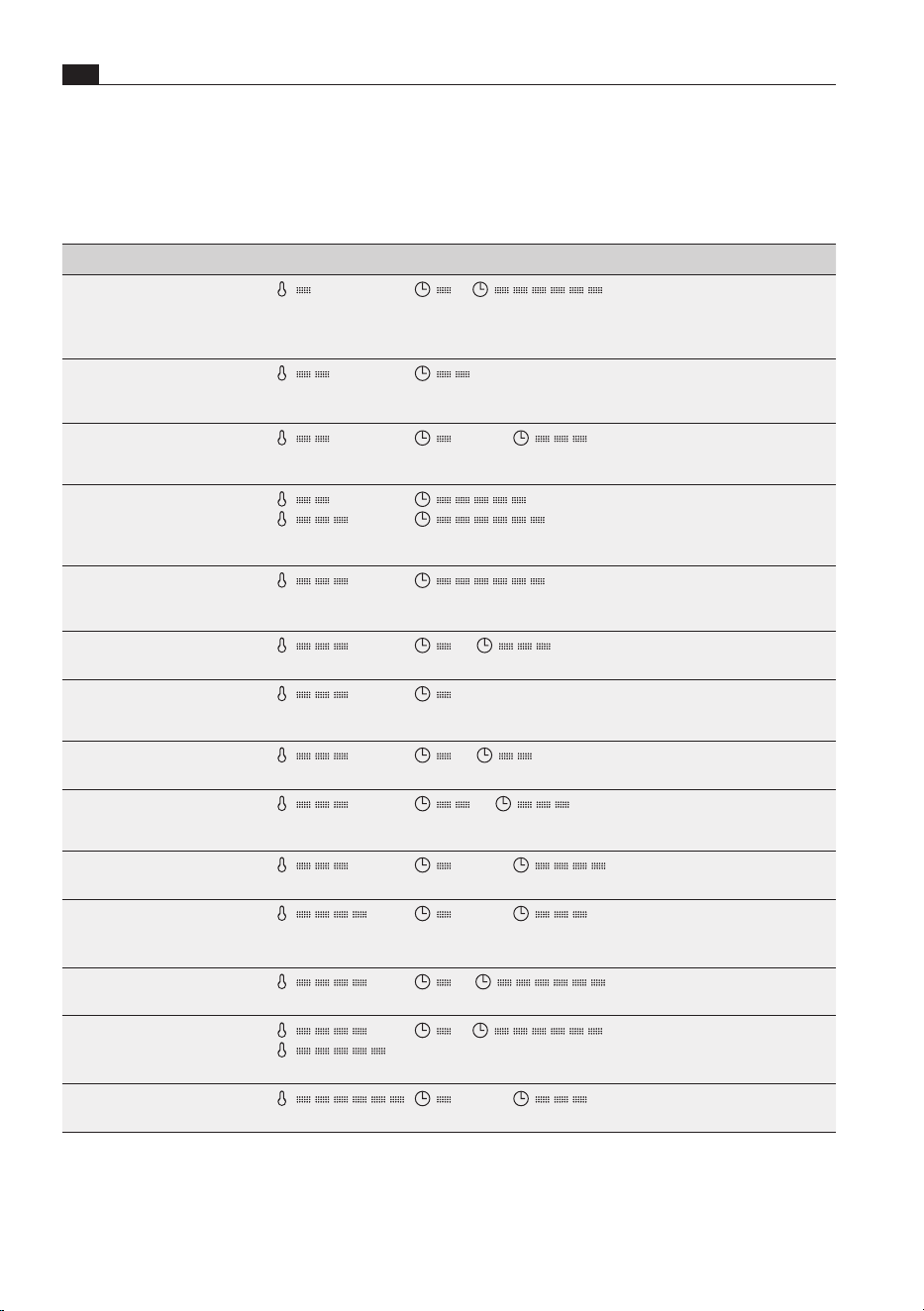
6 Applications
X Observe all safety and warning information (see „2 Safety“).
Activity Temperature level Time Note
Defrosting delicate frozen
foods
(30 °C)
to
(30 min. to 6 hrs)
Only vacuum-packed food
should be left in its packaging.
Otherwise, remove the
packaging.
Melting chocolate
(40 °C)
(1 hr)
Use suitable crockery (metal
bowls for optimum heat
transfer) and do not cover.
Proofing yeast dough
(40 °C)
to max.
(30 min. to max. 2 hrs)
Use suitable crockery and
cover with a damp cloth or
baste with oil.
Drying
to
(40 °C to 60 °C)
to max.
(4 hrs to max. 6 hrs)
Cut food into thin, even slices,
place on the shelf rack (only
in MS290) and turn over if
necessary.
Making yoghurt
(60 °C)
(6 hrs)
One large or several small
containers can be used. Cover
the container.
Keeping baked goods warm
(60 °C)
to
(30 min. to 2 hrs)
Place the food directly on the
heating plate and do not cover.
Heating dry cakes
(e.g. crumble cake, muffins)
(60 °C)
(30 min.)
If necessary, moisten cakes to
prevent them from drying out
and cover them.
Heating drinking vessels
(e.g. espresso cups)
(60 °C)
to
(30 min. to 1 hr)
Only use suitable crockery.
Preheating serving dishes
(e.g. soup dishes, dinner
plates, bowls)
(60 °C)
to
(1 hr to 2 hrs)
Distribute the crockery over
as large an area as possible so
that it heats up faster.
Keeping delicate foods
warm (e.g. fish)
(60 °C)
to max.
(30 min. to max. 3 hrs)
Preheat crockery and cover
the food.
Keeping food warm
(70 °C)
to max.
(30 min. to max. 2 hrs)
Preheat crockery and cover
moist dishes.
Confiting (cooking in oil) (e.g.
meat, fish, vegetables or fruit)
(70 °C)
to
(30 min. to 6 hrs)
Spices and condiments should
be added.
Low-temperature cooking
to
(70 °C to 80 °C)
to
(30 min. to 6 hrs)
Preheat crockery, baste the
meat with oil or butter and
cover.
Reheating food
(100 °C)
to max.
(30 min. to max. 2 hrs)
Preheat crockery and cover
moist dishes.
Tab. 6.1 Applications
71
Applications
www.bora.com
EN
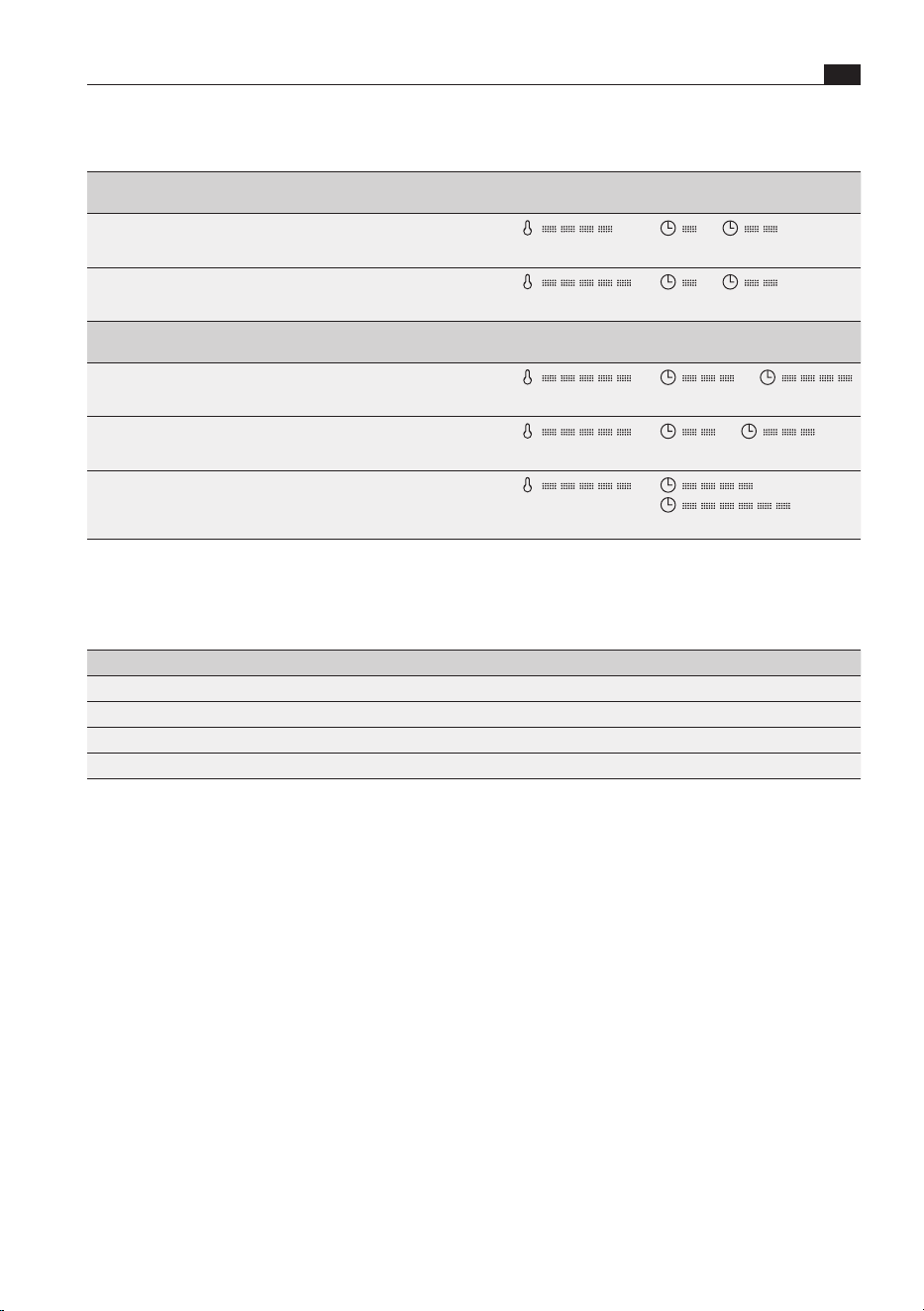
Low-temperature cooking
Small pieces of meat Sear on the
cooktop
Continue cooking in the multi-drawer
Small escalopes 1–2 min.
each side
(70 °C)
to
(30 min to 1 hr)
Steaks/medallions 1–2 min.
each side
(80 °C)
to
(30 min to 1 hr)
Medium-sized pieces of meat Sear on the
cooktop
Continue cooking in the multi-drawer
Pork fillet approx. 400–600 g 4–5 min.
in total
(80 °C)
to
(2 hrs to 3 hrs)
Lamb (fillet, sirloin) approx. 150–300 g 2–3 min.
each side
(80 °C)
to
(1 hr to 2 hrs)
Beef/veal (rump, sirloin, flank) up to 900 g
Pork (sirloin, flank) up to 900 g
10–15 min.
in total
(80 °C)
to
(3 hrs to 6 hrs)
Tab. 6.2 Low-temperature cooking
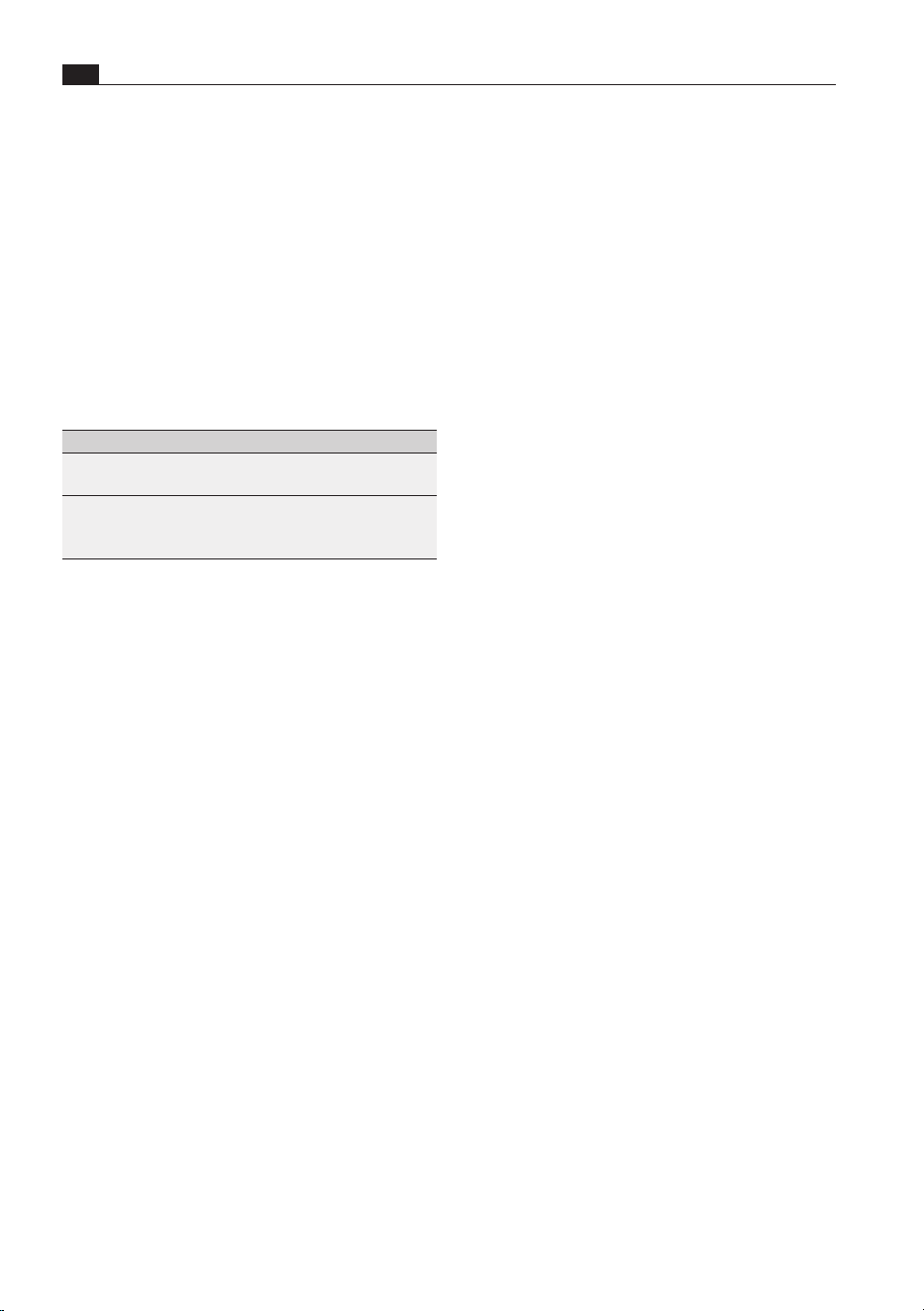
Recommended core temperatures for low-temperature cooking
Meat rare medium well done
Beef (fillet/sirloin) 45–49°C 50–64°C 65–75°C
Veal (fillet/sirloin) – 60°C from 65°C
Pork (fillet/sirloin) – 58 °C from 65°C
Lamb (fillet/sirloin) – 55–62°C from 65°C
Tab. 6.3 Core temperatures
EN
72
Cleaning and maintenance
www.bora.com
7 Cleaning and maintenance
7.3 Cleaning the cooking
chamber
X Clean the glass base, ventilation grilles and
operating panel with a soft cloth moistened with
washing-up water.
X Then dry the surfaces with a soft cloth.
i
The shelf rack (with MS290/MSS290) can be
cleaned in the dishwasher.
X Observe all safety and warning information (see
„2 Safety“).
X When conducting scheduled cleaning and
maintenance, ensure that the appliance is
switched off and cooled (see „5.5 Switching on
and off“).
X Do not use any high-pressure or steam cleaning
appliances.
X Adhere to the following cleaning and maintenance
cycles:
Component Cleaning cycle
Drawer front Remove any dirt or residual
cleaning agents immediately.
Cooking chamber Remove any dirt immediately
after use, if possible when the
drawer is still warm to the touch.
Tab. 7.1 Cleaning cycles
i
Regular cleaning and maintenance ensures a
long service life and optimum performance.
7.1 Cleaning agents
To clean the appliance, you need a soft cloth and
suitable cleaning agents (washing-up water).
X Never use steam cleaners, abrasive sponges,
scouring pads or chemically aggressive cleaning
agents (e.g. oven cleaner spray).
X Make sure that the cleaning agent does not
contain any sand, soda, acids, lyes or chlorides.
X Do not use any aggressive cleaning agents or
agents containing acids or lyes.
7.2 Cleaning the exterior
X Clean the surfaces with a soft cloth moistened with
washing-up water.
X Then dry the surfaces with a soft cloth.
73
Troubleshooting
www.bora.com
EN
8 Troubleshooting
Operating situation Cause Remedy
Crockery or food are still cold. Appliance is switched off. Switch on the appliance.
Interruption to the power supply. Check the power supply.
Drawer is not closed properly. Close the drawer.
Drawer is in demo mode. Deactivate demo mode.
The delayed start function is active. Switch the appliance off and on
again.
Crockery or food are not warm
enough.
The set heating time is too short. Increase the heating time.
The set temperature is too low. Choose a higher temperature setting.
Drawer is not closed properly. Close the drawer.
The time symbol flashes constantly
when the drawer is open.
The delayed start function is active. Close the drawer (the appliance will
work with a delayed start).
Stop the delayed start by touching
the power button.
The temperature indicator flashes
slowly when the drawer is open.
The temperature sensor is faulty. Contact the BORA After Sales
Service.
The drawer cannot be opened or
closed.
The opening mechanism is faulty. Contact the BORA After Sales
Service.
The distance between the front of the
drawer and the unit is too small.
Check the distance between the
front of the drawer and the unit; at
least 3mm required.
Tab. 8.1 Resolving a fault
X In all other instances, contact BORA After Sales Service (see „11 Warranty, technical service, spare parts,
accessories“).
EN
74
Installation
www.bora.com
9 Installation
MS140/MSS140
Name Quantity
Multi-drawer MS140 1
Power supply cable country-specific 1
Communication cable
(connection to XBO)
1
Installation jig 1
Mounting angles 2
M4 x 8, TX20 screws, black 6
4 x 16, TX20 screws, silver 14
Sealing lip 1
Decorative trim 5 pairs
Operating and installation instructions 1
Additional scope of delivery for MSS140
Multi-drawer glass front MSF140 1
M4 x 6, TX20 screws, silver 10
Tab. 9.2 MS140/MSS140 scope of delivery
X Make sure the delivery is complete and check it
for damage.
X If there are any missing or damaged parts, please
notify BORA After Sales Service immediately.
X Do not under any circumstances install parts
which are damaged.
X Dispose of transport packaging accordingly (see
“10.3 Environmentally-friendly disposal”).
9.2 Tools and aids
The following special tools are required to correctly
install the appliance:
O
screwdriver (Torx 20)
O
installation jig (included in the scope of delivery)
O
5mm Allen key
X Observe all safety and warning information
(see “2 Safety”).
X Follow the enclosed manufacturer’s information.
i
The appliance may only be installed with
the power disconnected. Do not, under any
circumstances, connect the appliance to the
mains prior to installation.
9.1 Scope of delivery
MS290/MSS290
Name Quantity
Multi-drawer MS290 1
Shelf rack 1
Power supply cable country-specific 1
Communication cable
(connection to XBO)
1
Installation jig 1
Mounting angles 2
M4 x 8, TX20 screws, black 6
4 x 16, TX20 screws, silver 14
Sealing lip 1
Decorative trim 5 pairs
Operating and installation instructions 1
Additional scope of delivery for MSS290
Multi-drawer glass front MSF290 1
M4 x 6, TX20 screws, silver 10
Tab. 9.1 MS290/MSS290 scope of delivery
75
Installation
www.bora.com
EN
9.3.2 Fitted unit (single installation)
MS290/MSS290
290+2
560+8
≥
560
Fig. 9.2 MS290/MSS290 installation dimensions
MS140/MSS140
140+2
560+8
≥
560
Fig. 9.3 MS140/MSS140 installation dimensions
9.3 Assembly instructions
i
The back panel of the kitchen unit must not be
fitted behind the appliance.
i
The construction base must be permanently
installed and designed to withstand the
appliances’ weight (for weights see
„3 Technical data“).
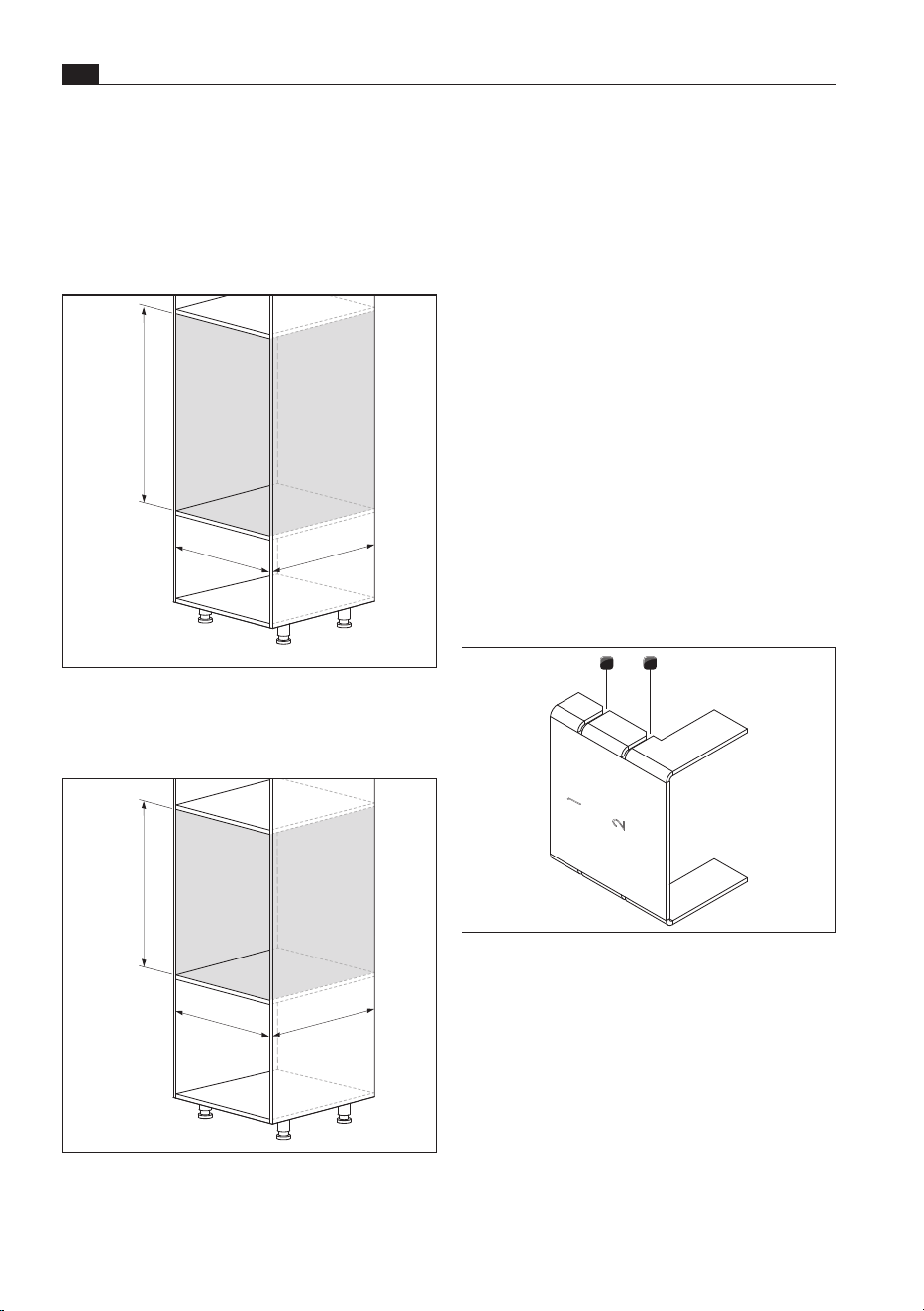
9.3.1 Possible appliance
combinations
i
Up to 3 multi-drawers can be installed on top
of each other without intermediate shelving.
The appliances can be directly stacked on top
of each other.
i
A X BO steam oven can be placed directly on
top of the multi-drawer without a false floor.
i
If intermediate shelving is installed, this
changes the clearance between the
appliances.
MS290/MSS290
MS140/MSS140
MS290/MSS290
MS140/MSS140
X BO
MS290/MSS290
MS140/MSS140
MS290/MSS290
MS140/MSS140
Fig. 9.1 Maximum appliance combinations
X Please observe the maximum permitted weight
load:
O
On the multi-drawer: 105 kg max.
EN
76
Installation
www.bora.com
X Prepare the fitted unit taking into account the
dimensions specified.
X Remove the back panel of the unit to the rear of
the installation recess.
9.4 Installing the appliance
i
To ensure that the Push2Open mechanism
works correctly, there must be at least 3 mm
of clearance between the unit and the panel.
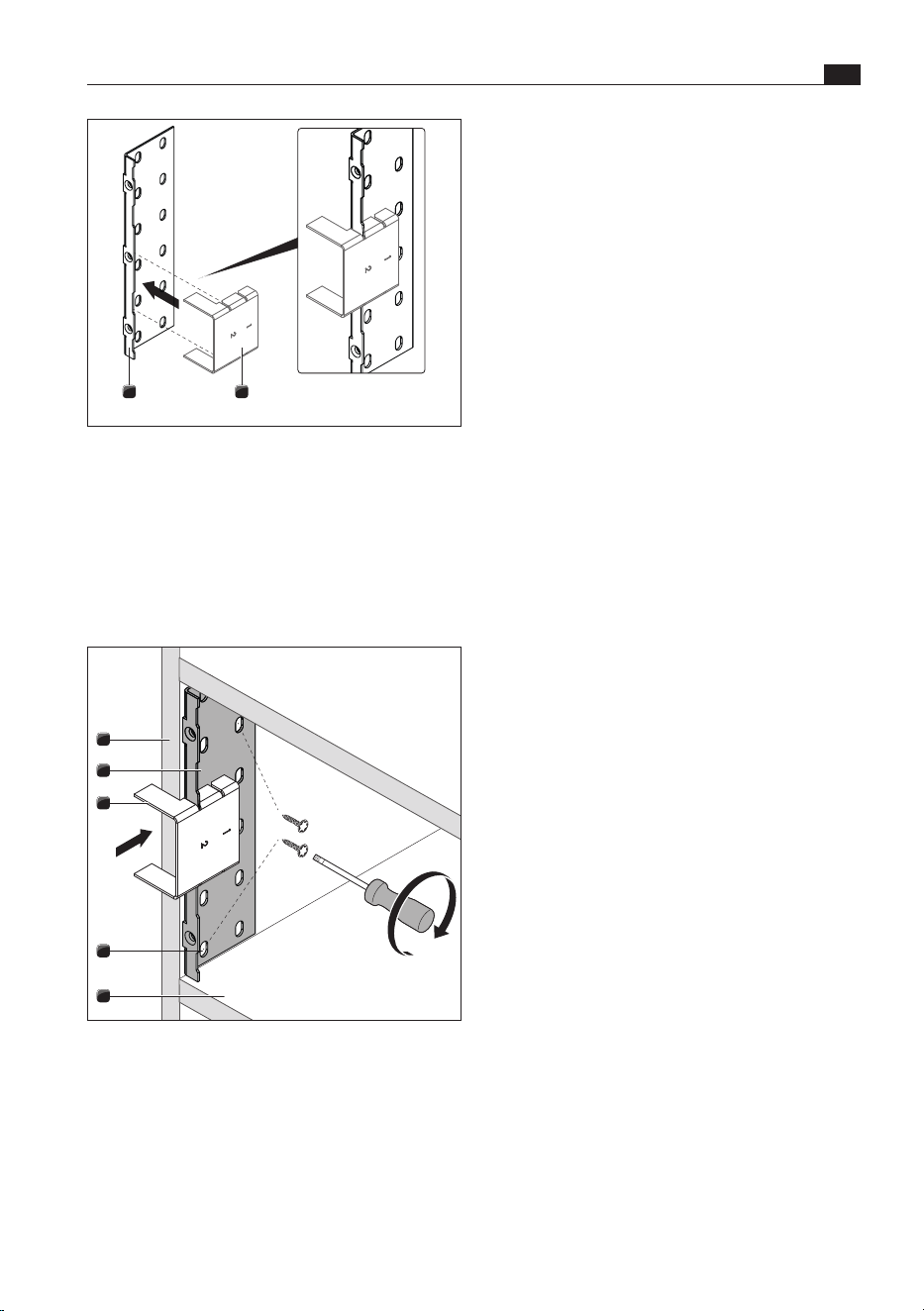
Working with the installation jig
The installation jig provided is used to position the
mounting angle in the unit, allowing for a clearance
of 3 mm between the unit and the panel for the
Push2Open mechanism. The installation jig enables
the mounting angle to be fitted in 2 different
positions:
O
Position 1: drawer with unit front
O
Position 2: drawer with multi-drawer glass front,
flush to the front in the case of an 18–20 mm
thick unit front
21
Fig. 9.6 Installation jig
[1] Installation position 1 for unit front
[2] Installation position 2 for glass front
9.3.3 Multi-drawer fitted unit +
X BO steam oven
i
The XBO assembly instructions must be
observed here.
MS290/MSS290 + X BO
882+8
560+8
≥
564
Fig. 9.4 MS290/MSS290 + X BO installation
dimensions
MS140/MSS140 + X BO
732+8
560+8
≥
564
Fig. 9.5 MS140/ MSS140 + X BO installation
dimensions
77
Installation
www.bora.com
EN
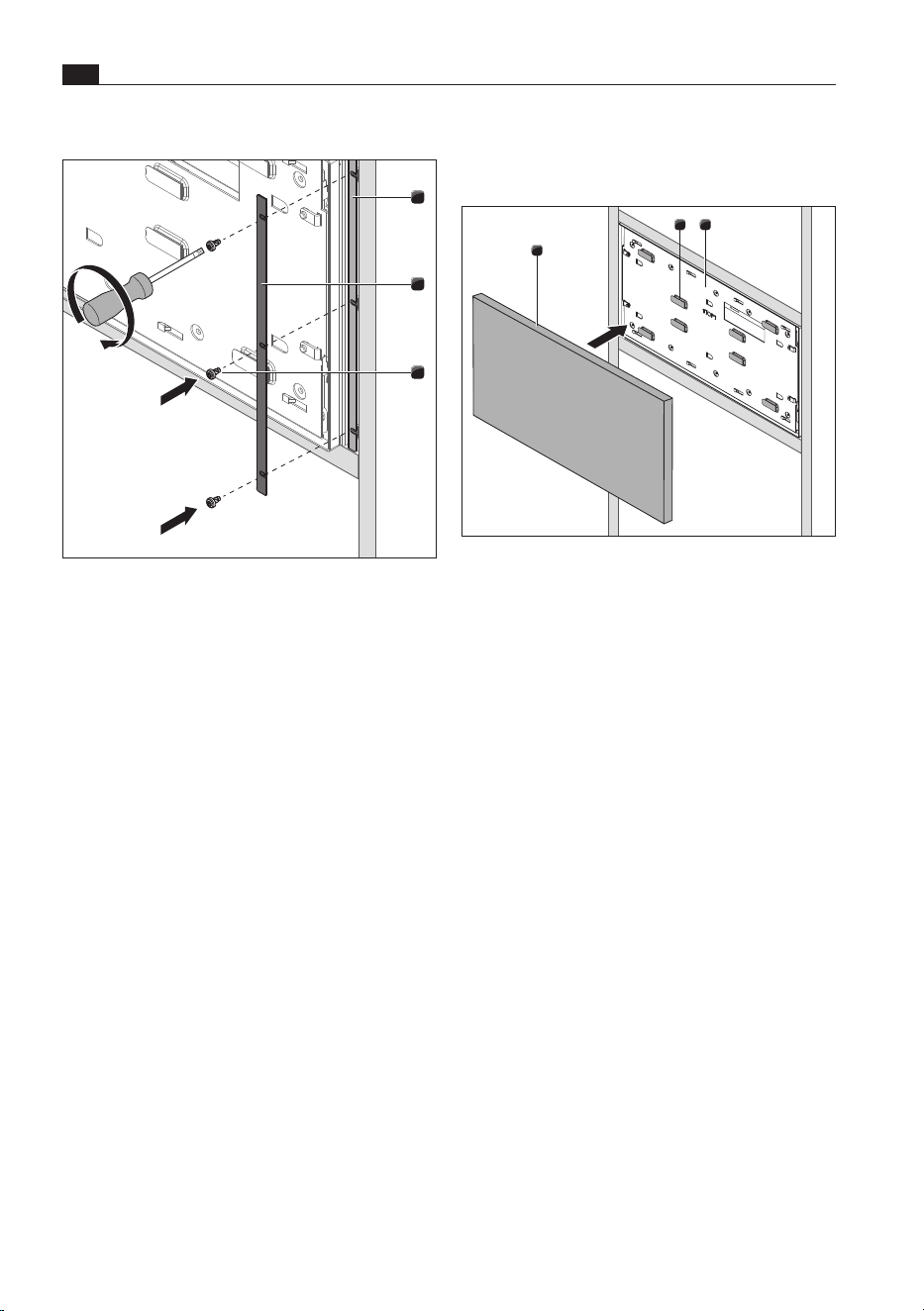
X Attach the installation jig [3] and mounting angle
[2] to the unit [1].
X Position the mounting angle [2] in the unit [1] with
the help of the installation jig [3].
O
The mounting angle [2] must be surface mounted
on the construction base [5]
X Select 2 suitable screw holes [4] on the mounting
angle [2].
X Screw the mounting angle [2] into place with two
silver 4 x 16, TX20 screws (included in the scope
of delivery).
X Repeat these steps on the other side with the
second mounting angle.
Connecting the connection cables to the
appliance
i
When installing the appliance, please note
that the connection cables will need to be
connected to the appliance before installation
as the back of the appliance will no longer be
accessible once installed (single installation).
i
However, the appliance must not be
connected to the mains before installation is
complete.
X Connect the mains supply cable to the back of
the appliance.
X Where applicable, connect the communication
cable to the back of the appliance (only if used
with the XBO steam oven).
X Do not connect the appliance to the mains.
12
Fig. 9.7 Using the installation jig
[1] Installation jig
[2] Mounting angle
X Select the appropriate installation position.
X Slot the installation jig onto the mounting angle.
Attaching the mounting angle
1
3
4
2
5
Fig. 9.8 Attaching the mounting angle
[1] Unit
[2] Mounting angle (1 x right, 1 x left)
[3] Installation jig
[4] Screw hole
[5] Construction base
EN
78
Installation
www.bora.com
9.5.1 Fitting the unit front
Positioning the unit front
2
1
3
Fig. 9.10 Adhesive pads on the front support
[1] Unit front
[2] Adhesive pads
[3] Front support
X Remove the protective strips from the adhesive
pads [2] on the front support [3].
X With the drawer installed and closed, position the
unit front [1] correctly on the front support.
X Please observe the clearance when doing so.
X Press lightly on the unit front [1].
O
The unit front will stick to the front support.
i
To correct the position, the unit front can be
removed by cutting the adhesive pads from
the sides.
i
This adhesive seal is only temporary and may
become unstuck in time. Therefore, the front
must be screwed into place.
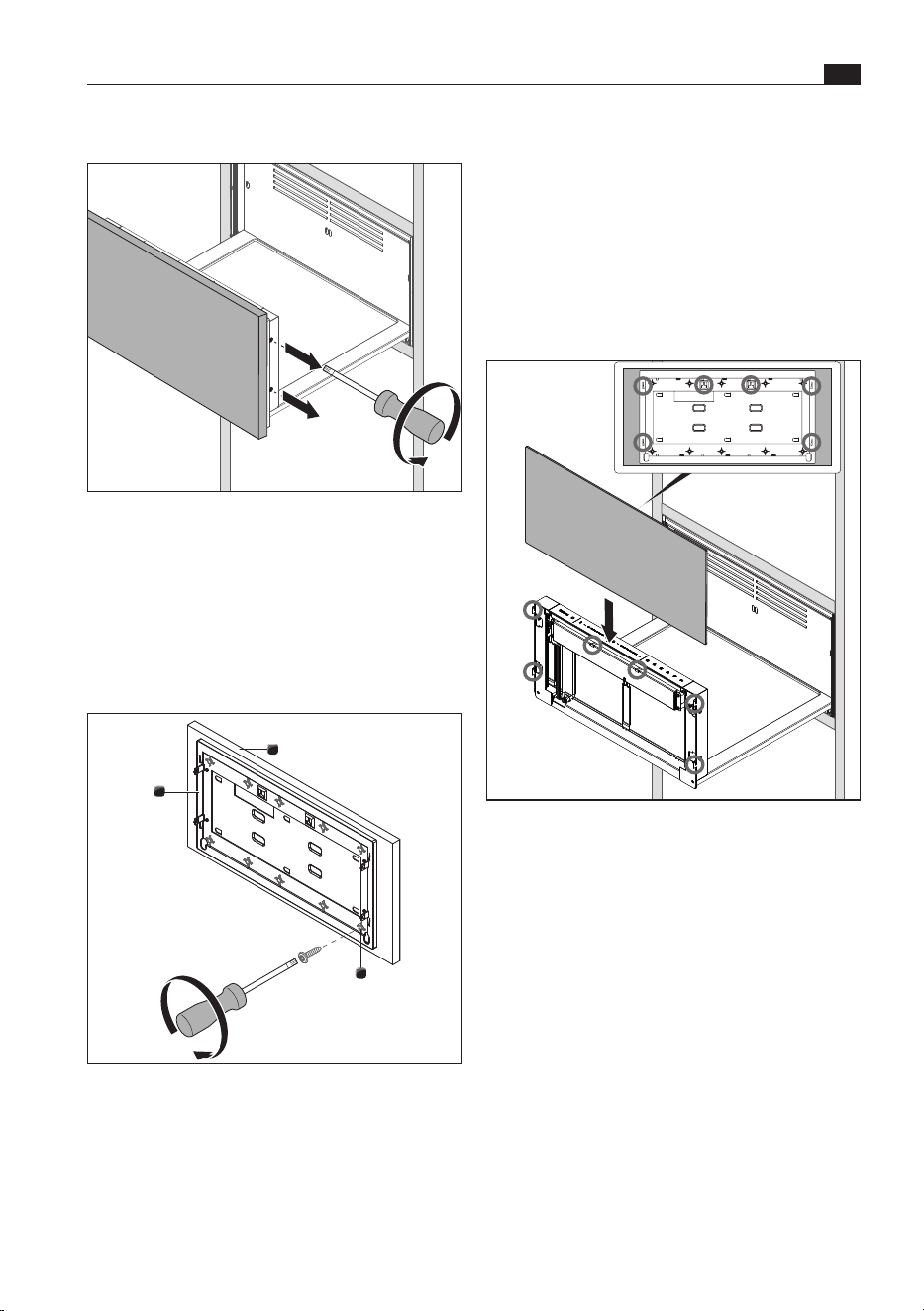
Installing the appliance
1
2
3
Fig. 9.9 Securing the appliance
[1] Mounting angle (1 x right, 1 x left)
[2] Decorative trim (1 x right, 1 x left)
[3] Black M4 x 8, TX20 screws (3 x right, 3 x left)
X Insert the appliance in the installation recess.
X Align the appliance in the centre of the
installation recess.
X Select decorative trim [2] of an appropriate width.
X Attach the appliance and decorative trim [2] to
the mounting angles [1] on each side with three
black M4 x 8, TX20 screws [3] (included in the
scope of delivery) (torque: 2.2 Nm ±10%).
9.5 Fitting the front
i
If the multi-drawer is installed with a XBO
steam oven, the XBO must be installed
before fitting the front.
When fitting the front, two different procedures
must be taken into account:
O
fitting the unit front
O
fitting the multi-drawer glass front
79
Installation
www.bora.com
EN
X Using ten silver 4 x 16, TX20 screws (included in
the scope of delivery), screw the unit front [1] to
the front support [3].
X To do this, use the 10 screw guides [2] on the
front support [3].
X Check the length of the screws before you start.
If necessary, replace them with shorter screws of
the same kind.
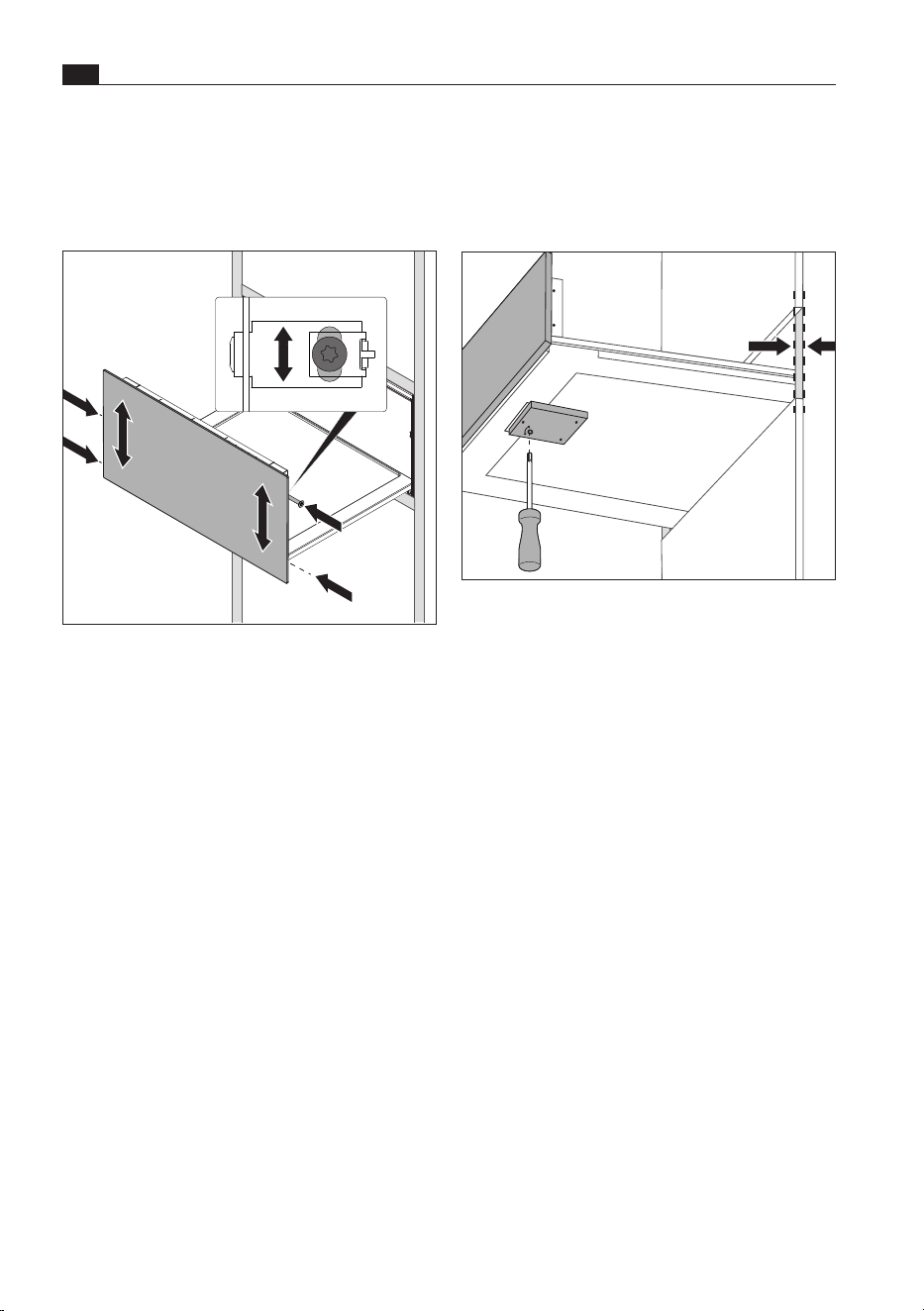
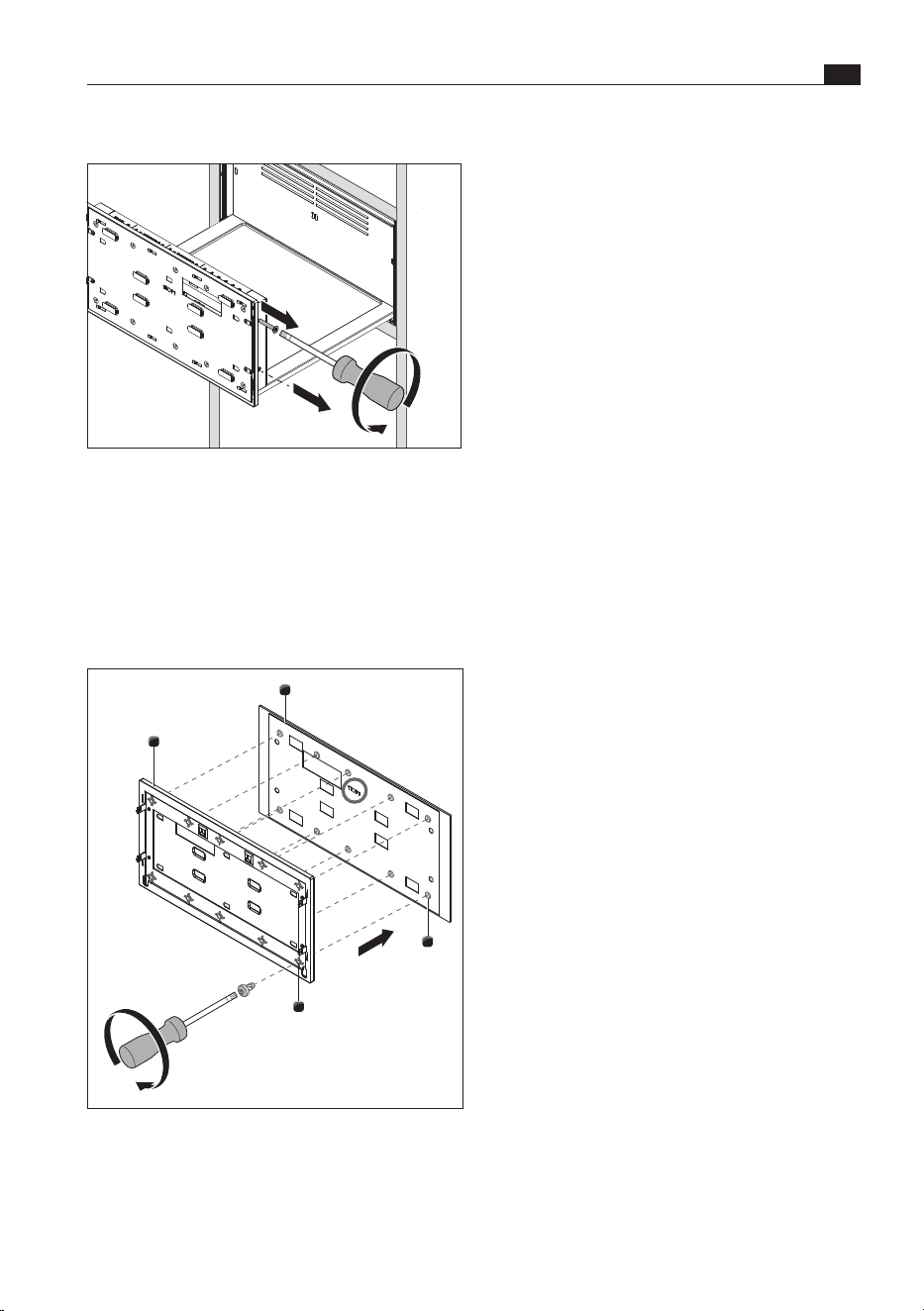
Fitting the front support
Fig. 9.13 Fitting the front support
X Slide the front support and front onto the lugs
from above.
Removing the front support
Fig. 9.11 Removing the front support
X Open the drawer.
X Remove the two screws on the left and right-hand
side of the front support.
X Push the front support and unit front up until it
can be removed from the retaining lugs.
Securing the unit front
2
1
3
10x
Fig. 9.12 Securing the unit front
[1] Unit front
[2] Screw guides (x 10)
[3] Front support
EN
80
Installation
www.bora.com
Adjusting the depth of the front
i
The opening mechanism can be used to
move the front forwards or backwards (up to
3 mm).
Fig. 9.15 Adjusting the depth of the front
X Adjust the depth of the front.
X To do this, turn the mechanism on the bottom of
the drawer using a 5 mm Allen key.
9.5.2 Fitting the glass front
(MSF290/MSF140)
i
If the multi-drawer is installed with a XBO
steam oven, the multi-drawer glass front can
only be fitted after installing the XBO.
i
To fit the glass front, do not under any
circumstances remove the protective strips
from the adhesive pads on the front support.
The glass front is only to be attached with
screws.
Horizontal adjustment of the front
i
The front fastenings enable the horizontal
clearance to be adjusted after fitting (top and
bottom).
Fig. 9.14 Adjusting the horizontal clearance
X Insert the two screws on the left and right-hand
side of the front support but do not tighten.
X Close the drawer.
X Even out any visual differences in the clearance.
X To do this, slide the front panel to the correct
position using your hands.
X Open the drawer and tighten the screws on the
sides (torque: 1.8 Nm ±10%).
i
If not screwed in correctly, the front can
become loose and fall off. Ensure that
all screws are used and are tightened
accordingly.
81
Installation
www.bora.com
EN
Removing the front support
Fig. 9.16 Removing the front support
X Open the drawer.
X Remove the two screws on the left and right-hand
side of the front support.
X Push the front support up until it can be taken out
of the retaining lugs.
Securing the glass front
2
1
2
3
10x
Fig. 9.17 Securing the glass front
[1] Back of the multi-drawer glass front
[2] Screw guides [x 10]
[3] Front support
X Lay the glass front face down on a soft surface.
X Be careful not to scratch the glass front in
doing so.
X Position the front support [3] on the back of the
multi-drawer glass front [1] so that the
10 screw guides [2] are aligned.
X Using a screwdriver, attach the glass front to the
10 screw guides [2] on the front support [3].
Do not use a battery-operated screwdriver to
do this or the screws could be overtightened
(torque: 1.8 Nm ±10%).
X Only use the screws (DIN 7500 C M4 x 6 mm)
provided with the multi-drawer glass front. The
use of other screws may cause the glass front to
break. This poses a risk of injury.
X Follow the installation steps under “Fitting the
front support” (see „9.5.1 Fitting the unit front“).
9.5.3 Completing installation
X Connect the appliance to the mains.
X If necessary, connect the communication cable to
the XBO steam oven.
X Place the shelf rack in the drawer (only with
MS290/MSS290).
X Remove the protective film from the operating
panel.
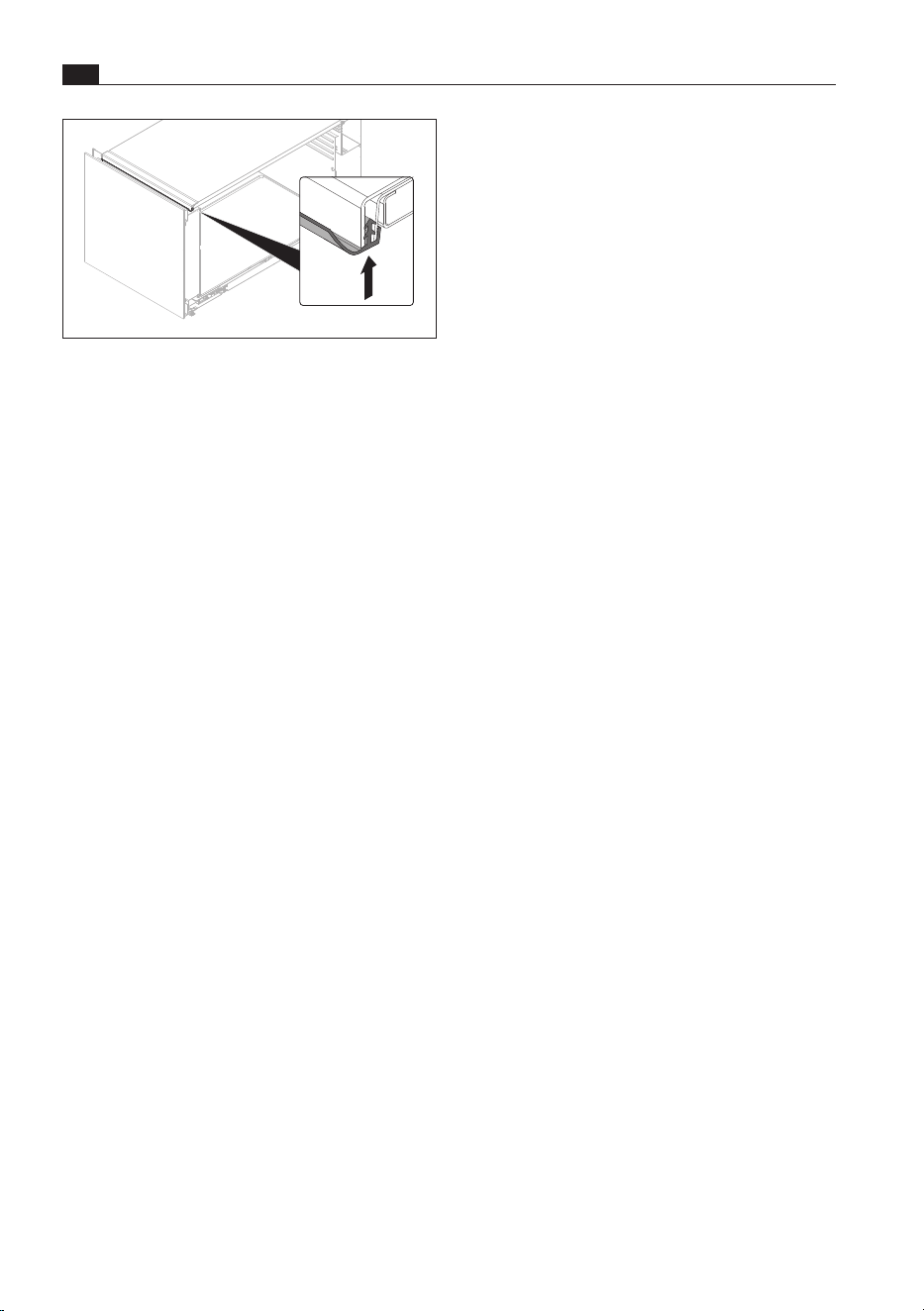
Fitting the sealing lip (optional)
i
Particularly where condensation forms, or
if a fragile unit front or sensitive appliance
is installed above the multi-drawer, we
recommend fitting the sealing lip included in
the scope of delivery.
i
The sealing lip must be fitted when the
drawer is installed together with the XBO
steam oven.
EN
82
Installation
www.bora.com
Fig. 9.18 Fitting the sealing lip
X Open the drawer.
X Clean the housing frame and the sealing lip.
X Guide the sealing lip into the gap at the front from
bottom to top and press the sealing lip evenly
along its length.
X Ensure that the sealing lip is not stretched during
installation.
X Check that it is positioned correctly.
9.6 Function test
X Carry out a thorough function test on the
appliance.
X In the event of error messages, see the
“Troubleshooting” chapter.
9.7 Handover to user
Once installation is complete:
X Explain the main functions to the user.
X Explain all safety-related aspects of operation and
handling to the user.
X Provide the user with the accessories and
operating and installation instructions to be kept
in a safe place.
83
Decommissioning, disassembly and disposal
www.bora.com
EN
10 Decommissioning, disassembly and disposal
10.3 Environmentally-friendly
disposal
Disposal of transport packaging
i
The packaging protects the device from
damage in transport. The packaging materials
have been selected from environmental and
disposal perspectives and are therefore
recyclable.
Returning the packaging to the materials cycle
saves resources and reduces waste volumes. Your
specialist supplier will take the packaging back.
X Give the packaging to your specialist supplier
or
X Dispose of the packaging properly in line with
local regulations.
Disposal of old appliance
Electrical devices marked with
this label may not be disposed of
in domestic waste at the end of
their service life. They must be
disposed of at a collection point
for the recycling of old electrical
or electronic devices. You can
find information from your city or
district council.
Many electrical and electronic devices still contain
valuable materials. But they also contain damaging
materials which were necessary for them to function
properly and safely. These can damage human
health or the environment if disposed of improperly
or incorrectly handled.
X Never put your old appliance in domestic waste.
X Take the old appliance to a regional collection
point for return and recycling electrical and
electronic components and other materials.
X Observe all safety and warning information
(see „2 Safety“).
X Follow the enclosed manufacturer’s information.
10.1 Decommissioning
Decommissioning is understood as final shutdown
and disassembly. Following decommissioning, the
device can either be installed into other units, sold
on privately or disposed of.
X To decommission, switch the device off
(see „5 Functions and operation“).
X Disconnect the device from the power supply.
10.2 Disassembly
For removal, the device must be accessible for
disassembly and disconnected from the power
supply.
X Disassemble the appliance.
X Remove any other accessories.
X Dispose of the old device and any contaminated
accessories as described under “ Environmentally-
friendly disposal”.

EN
84
Warranty, technical service, spare parts, accessories
www.bora.com
11 Warranty, technical service, spare parts,
accessories
BORA will correct defects in BORA products at its
own discretion by repairing or replacing the product.
All costs for the correction of defects under the
manufacturer’s warranty shall be assumed by BORA.
Expressly not covered by the BORA manufacturer’s
warranty are:
O
BORA products that were not sold by authorised
BORA retailers or salespersons trained by BORA
O
Damage caused by non-adherence to the
operating instructions (including product care and
cleaning). This represents improper use.
O
Damage caused by normal use,
O
Damage caused by external influences (such
as transport damage, improper removal and
installation, ingress of condensation, damage
caused by the elements such as a lightning strike)
O
Damage caused by repairs carried out by the
owner, repairs or attempts to repair carried out
by unauthorised BORA staff or companies not
authorised by BORA
O
Damage caused by water or dirt due to missing
covers or elements
O
Damage caused by water placed inside the oven
chamber
O
Damage caused by extending the water supply
and drainage hose without drinking water
certification or by extending non-specified pipes
with an adapter
O
Damage to
- plastic frames
- glass components
- metal components (coated and uncoated)
- touch display
- plastic and other wearable parts
O
Damage caused by electrical voltage fluctuations
O
Secondary damage or claims for damages beyond
the defect
Legal claims, particularly statutory claims for defects
or product liability are not limited by the warranty
and can be asserted free of charge.
If a defect is not covered by the manufacturer’s
warranty, a claim may be made against the BORA
Technical Service.
BORA shall not assume the resulting costs.
X Observe all safety and warning information
(see “2 Safety”).
11.1 BORA
manufacturer’s warranty
BORA provides its end customers with a 2-year
manufacturer’s warranty for its products. The end
customer is entitled to this warranty in addition to the
statutory claims for defects against the sellers of our
products.
The manufacturer’s warranty applies to the BORA
products listed here that are sold by authorised
BORA retailers or salespeople trained by BORA
and are installed in the European Union (excluding
overseas territories), Switzerland, Liechtenstein,
Ukraine, Russia, Norway, Serbia, Israel, the UK,
Iceland, India, Australia and New Zealand, with
the exception of products referred to by BORA as
universal products or accessories:
O
BORA X BO steam oven
O
BORA multi-drawers
The manufacturer’s warranty starts as soon as the
BORA product is handed over to the end customer
and is valid for 2 years. Registering on www.mybora.
com enables the manufacturer’s warranty to be
extended to 3 years.
The manufacturer’s warranty requires expert
installation of the BORA products by an authorised
BORA retailer (in accordance with the valid BORA
ventilation handbook and operating instructions
at the time of installation). During use, the end
customer is to adhere to the specifications and
instructions in the operating manual.
When filing a warranty claim, BORA must be
directly notified of the fault and the receipt must be
presented. Alternatively, proof of purchase can be
provided by registering on www.mybora.com.
BORA guarantees that all BORA products are free
from material and production defects. The defect
must exist prior to delivery of the product to the end
customer. Filing a warranty claim does not interrupt
the warranty period, nor shall the period start anew.
85
Warranty, technical service, spare parts, accessories
www.bora.com
EN
O
Multi-drawer mains supply cable type G (UK, IE)
MSNLG
O
Multi-drawer mains supply cable type I (AU)
MSNLI
Special accessory for MS290:
O
Multi-drawer shelf rack MSER
The laws of the Federal Republic of Germany apply
to these warranty conditions.
You can contact us at:
BORA Vertriebs GmbH & Co KG, Innstraße 1,
6342Niederndorf, Austria
O
Telephone: 00800 7890 0987
Monday to Thursday from 08:00–18:00 and
Friday from 08:00–17:00
O
Email: suppor[email protected]
11.2 Service
BORA Service:
see reverse side of the operating and assembly
instructions
00800 7890 0987
X In the case of faults you cannot fix yourself,
contact your BORA specialised retailer or the
BORA Service Team.
The BORA Service Team will require the type
designation and serial number of your appliance
(FD number).
You can find both details inside the drawer.
11.3 Spare parts
X Only use original spare parts for repairs.
X Repairs may only be carried out by the BORA
Service Team.
i
Spare parts can be obtained from your BORA
dealer, the BORA online service website at
www.bora.com/service or by calling the
service number provided.
11.4 Accessories
O
Multi-drawer glass front 140mm MSF140
O
Multi-drawer glass front 290mm MSF290
O
Multi-drawer mains supply cable type J (CH)
MSNLJ
00800 7890 0987
Operating and installation instructions: Original Translation
Manufacturer: BORA Vertriebs GmbH & Co KG
The distribution and duplication of this document, as well as the use and
disclosure of its contents are prohibited unless expressly authorised.
These operating and installation instructions have been drawn up with the greatest of care. But it cannot be
ruled out that subsequent technical modifications have not yet been incorporated or the relevant content has
not yet been adapted. Please accept our apologies in this eventuality. An updated version can be requested
from the BORA Service Team. Subject to printing errors and mistakes.
© BORA Vertriebs GmbH & Co KG All rights reserved.
AU
NZ
BORA APAC Pty Ltd
100 Victoria Road
Drummoyne NSW 2047
Australia
T +61 2 9719 2350
F +61 2 8076 3514
bora-australia.com.au
D
BORA Lüftungstechnik GmbH
Rosenheimer Str. 33
83064 Raubling
Germany
T +49 (0) 8035 / 9840-0
F +49 (0) 8035 / 9840-300
support@bora.com
bora.com
A
BORA Vertriebs GmbH & Co KG
Innstraße 1
6342 Niederndorf
Austria
T +43 (0) 5373 / 62250-0
F +43 (0) 5373 / 62250-90
support@bora.com
bora.com
INT
BORA Holding GmbH
Innstraße 1
6342 Niederndorf
Austria
T +43 (0) 5373 / 62250-0
F +43 (0) 5373 / 62250-90
support@bora.com
bora.com