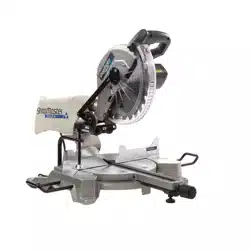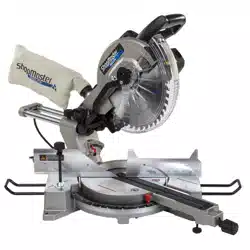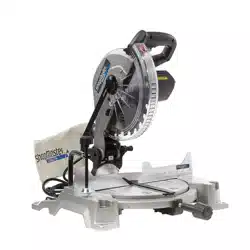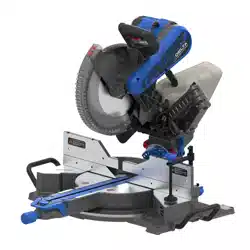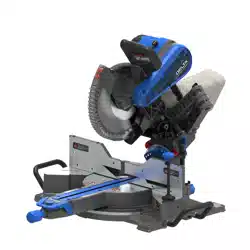
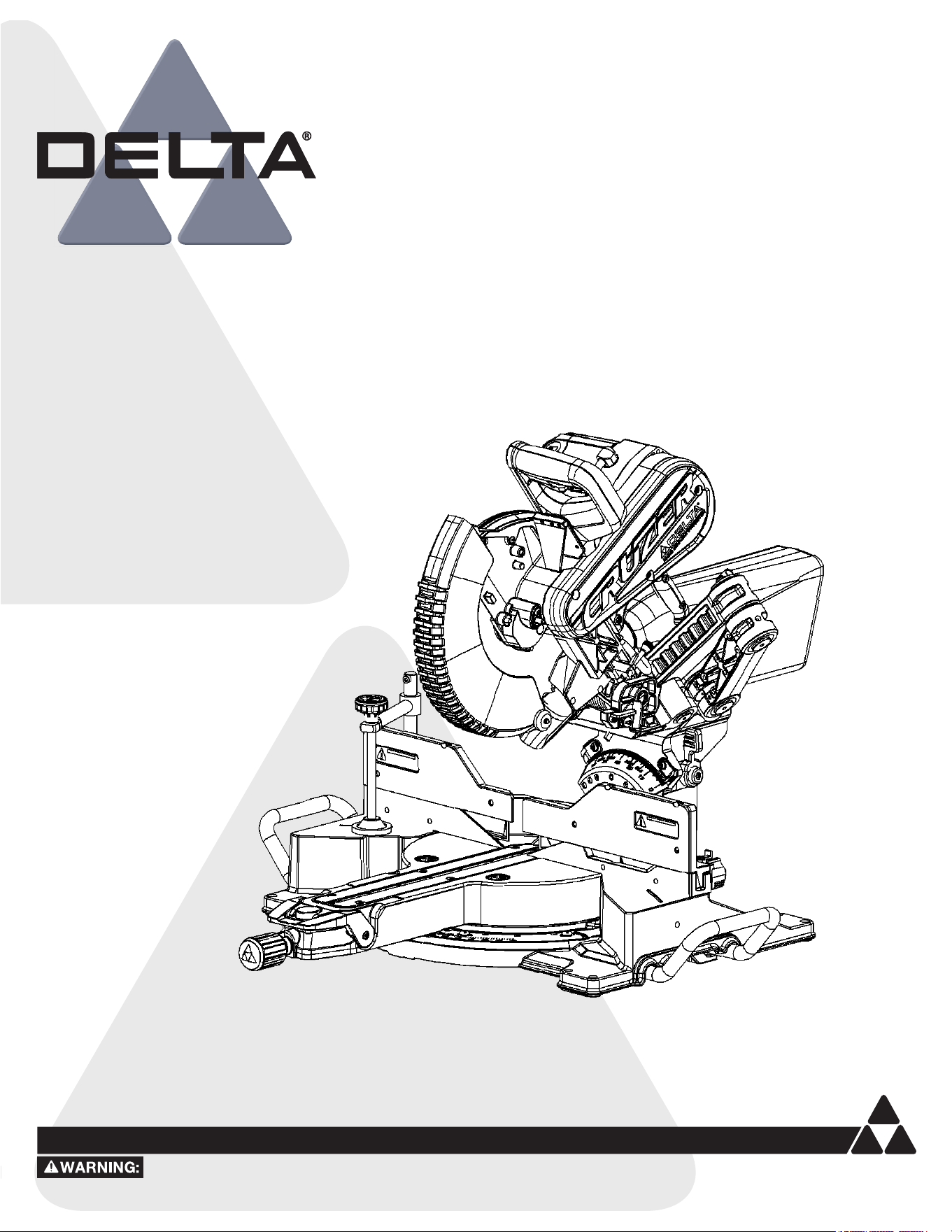
10-inch Sliding Compound Miter Saw
Scie à onglets composée coulissante 10 pouces
26-2310
Instruction Manual
Manual d’utilisation
Manual de instrucciones
To reduce the risk of serious injury, thoroughly read and comply with all warnings and instructions in this manual and on product
KEEP THIS MANUAL NEAR YOUR PRODUCT FOR EASY REFERENCE AND TO INSTRUCT OTHERS
Sierra de inglete compuesta deslizante de 10 pulgadas
www.DeltaMachinery.com
2
TABLE OF CONTENTS
NOTE: The manual cover illustrates the current production model. All other illustrations contained in the manual are representative
only and may not be exact depictions of the actual labeling or accessories included. They are intended for illustrative purposes only.
FEATURES
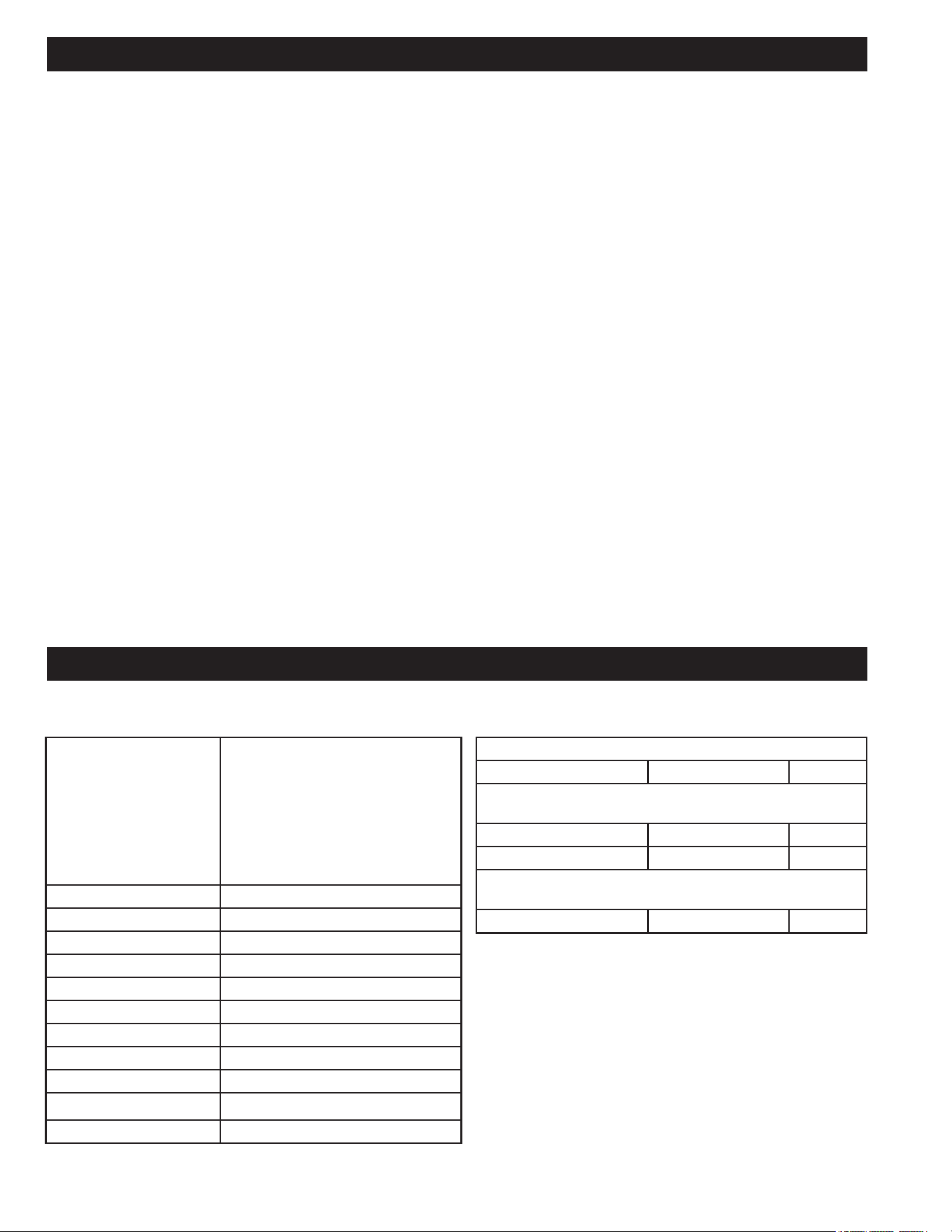
PRODUCT SPECIFICATIONS
NOTE: ONLY use blades that are marked for speeds of 4,000
r/min (RPM) or higher. A 10 inch Blade is the required blade
size for the Saw. Larger blades will come into contact with
the Blade Guards and smaller blades will not be adequately
guarded. Use crosscut blades ONLY. DO NOT use blades
designed for ripping, combination blades or blades with hook
angles in excess of 7°.
BLADE DESCRIPTIONS
APPLICATION DIAMETER TEETH
Construction Saw Blades
(thin kerf with anti-stick rim)
General Purpose 10 inch (254mm) 40
Fine Crosscuts 10 inch (254mm) 60
Woodworking Saw Blades
(provide smooth, clean cuts)
Fine Crosscuts 10 inch (254mm) 80
Cutting Capacity
(Maximum nominal
lumber sizes)
0° Miter/0° Bevel: 4 inch x 12 inch
(2 x 16 inch Extended Capacity)
45° Miter/ 0° Bevel: 4 inch x 8 inch
0° Miter/45° Bevel: 2 inch x 12 inch
(Right 45° Bevel: 1 inch x 12 inch)
45° Miter/45° Bevel: 2 inch x 8 inch
(Right 45° Bevel: 1 inch x 8 inch)
Baseboard (Vertical) 5.5 inch
Crown (Vertically Nested) 6.5 inch
Net Weight 55 lbs
Input 120 V~, 60hz, 15 Amps
Blade Arbor Hole 5/8 inch
Blade Diameter 10 inch
No Load Speed 4,000 r/min (RPM)
Blade Max Speed Rating 6,000 r/min (RPM)
Number of Teeth 40
Blade Thickness 0.07 inch (1.8mm)
Blade Kerf 0.1 inch (2.6mm)
FEATURES ...................................................................... 2
PRODUCT SPECIFICATIONS ........................................... 2
KNOW YOUR COMPOUND MITER SAW ........................... 5
IMPORTANT SAFETY INSTRUCTIONS ...................... 6
SAFETY LOGOS .............................................................. 6
GENERAL POWER TOOL SAFETY WARNINGS ......... 7
SAFETY INSTRUCTIONS FOR MITER SAWS............ 8
PROPOSITION 65 WARNING ..................................... 9
POWER CONNECTIONS ............................................. 10
DOUBLE INSULATION .................................................. 10
ELECTRICAL CONNECTION .......................................... 10
POLARIZED PLUGS ...................................................... 10
EXTENSION CORDS .................................................... 10
UNPACKING ................................................................. 11
REMOVING CONTENTS FROM PACKING ........................ 11
PACKAGED CONTENTS LIST ........................................ 11
ASSEMBLY .................................................................... 12
TOOLS NEEDED .......................................................... 12
WORK CLAMP ............................................................. 13
DUST BAG .................................................................. 13
DUST PORT ATTACHMENT ........................................... 13
INSTALL/REMOVE THE BLADE ..................................... 14
INSTALLING WORKPIECE SUPPORT EXTENSIONS ......... 15
ADJUSTMENTS ............................................................ 15
BEVEL ALIGNMENT ..................................................... 15
MITER ALIGNMENT ..................................................... 16
DEPTH STOP ADJUSTMENT ......................................... 17
FENCE EXTENSION ..................................................... 17
BEVEL LOCK TENSION ADJUSTMENT .......................... 17
SLIDE RESISTANCE ..................................................... 18
MITER LOCK ADJUSTMENT .......................................... 18
THROAT PLATE ........................................................... 19
MOUNTING AND TRANSPORTATION ..................... 20
PREPARATIONS FOR TRANSPORTATION ....................... 20
MOUNTING SAW TO STABLE SURFACE ......................... 21
OPERATION ................................................................. 22
CUTTING WARPED MATERIAL ...................................... 22
CLAMPING WIDE WORKPIECES ................................... 23
SUPPORTING LONG WORKPIECES ............................... 23
POWER SWITCH LOCK ................................................ 24
SHADOW LINE ............................................................ 24
NON-SLIDING CUTS .................................................... 25
MITER CUTS ............................................................... 25
BEVEL CUTS ............................................................... 26
COMPOUND MITER CUTS ............................................ 26
SLIDE CUTS ................................................................ 27
TIPS FOR CUTTING CROWN MOLDING ......................... 28
AUXILIARY FENCE ....................................................... 29
EXPAND WORKTABLE AREA ......................................... 30
MAINTENANCE ............................................................ 31
KEEP MACHINE CLEAN ................................................ 31
GENERAL MAINTENANCE............................................. 31
BRUSH REPLACEMENT ................................................ 31
LUBRICATION ............................................................. 31
TROUBLE SHOOTING ................................................. 32
FAILURE TO START ..................................................... 32
ACCESSORIES ............................................................. 32
PARTS, SERVICES OR WARRANTY ASSISTANCE
... 33
3
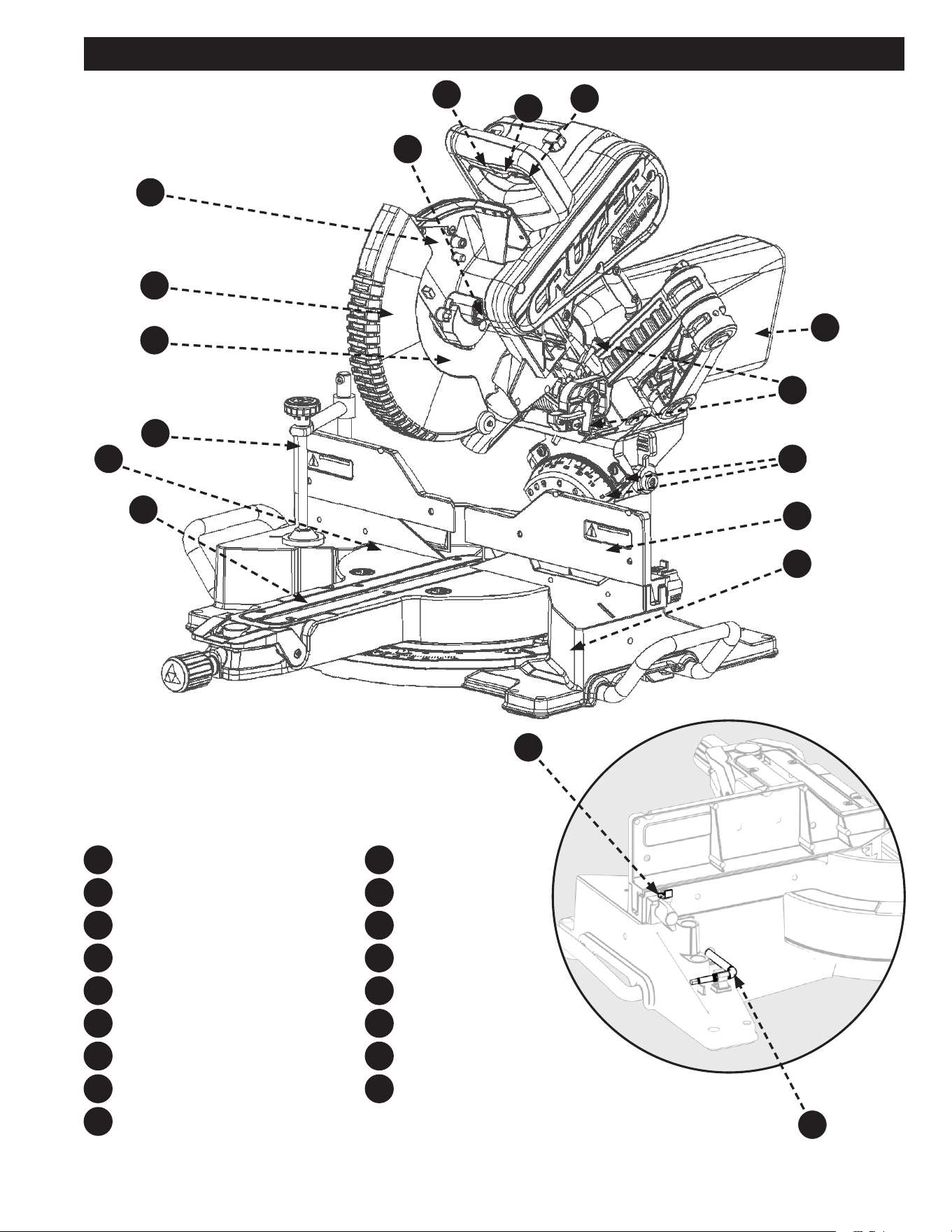
FEATURES
Figure 1
On/O Switch and Lockout Hole
Trigger Lock
Shadow Guide ON/OFF Switch
Dust Bag
Depth Stop Screw/Depth Stop Plate
Bevel Scale and Indicator
Sliding Fence
Base
Throat Plate
F9
F11
F10
F17
F12
F11
F13
F12
F14
F13
F15
F14
F16
F15
F5
F5
F6
F6
F7
F7
F8
F8
F1
F1
F2
F2
F3
F3
F4
F4
F10
F9
F17
F16
Work Table
Clamp
Blade
Lower Guard
Upper Guard
Spindle Lock
Back Fence Supports
T30 Torx/Blade Wrench
4
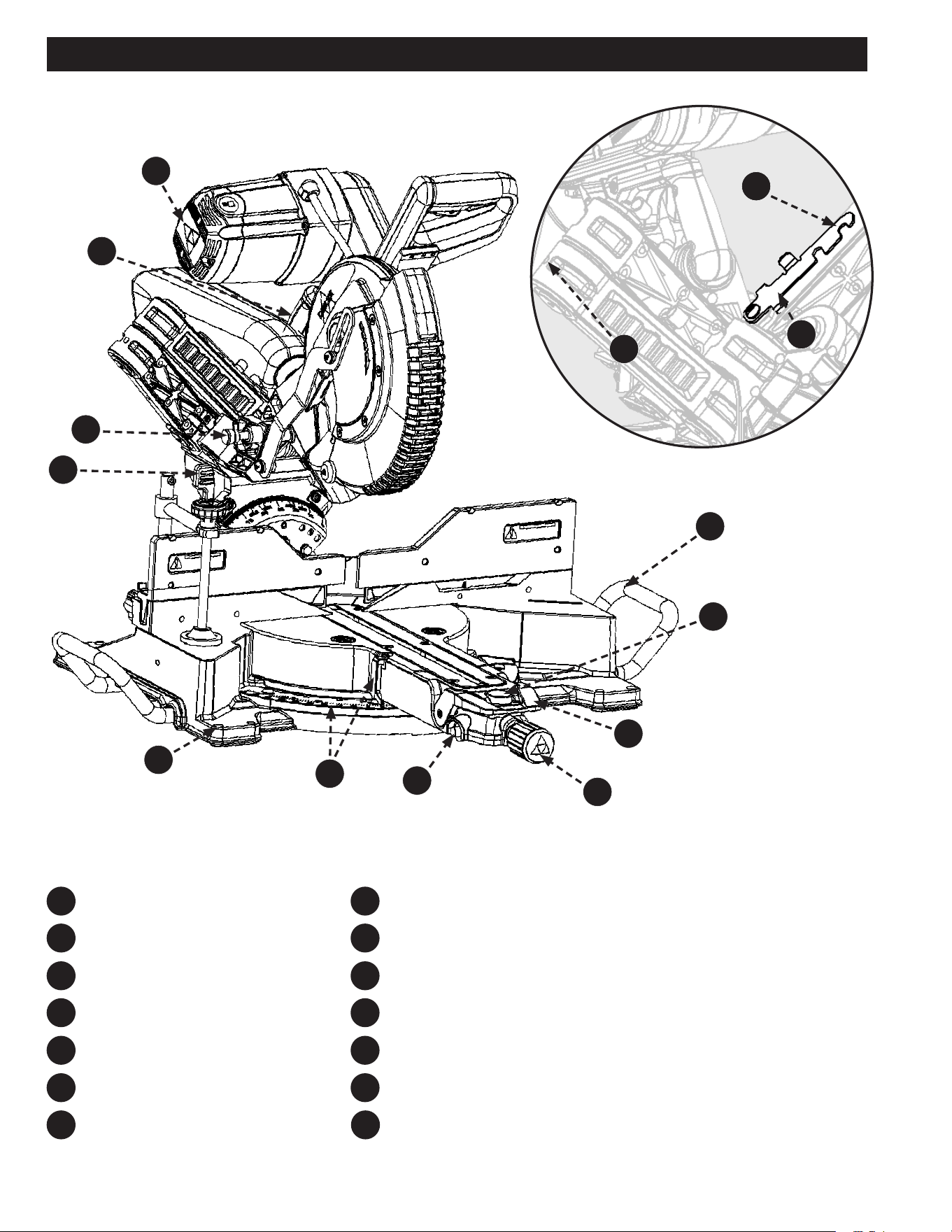
Motor End Cap
Carrying Handle
Saw Head Lock Pin
Bevel Detent Latch (2)
Mounting Holes (4)
Miter Scale and Indicator
Miter Detent Override Button
FEATURES
Figure 2
F25
F25
F19
F18
F26
F26
F20
F19
F27
F28
F21
F20
F21
F28
F27
F22
F22
F29
F23
F23
F30
F24
F24
F31
F18
Miter Lock Knob
Bevel Lock/Unlock Handle
Miter Detent Lock/Unlock Button
Support Extension (2)
Glide Adjustment
Baseboard Position Notch
Slide Lock Lever
F29
F30
F31

5
KNOW YOUR COMPOUND MITER SAW
1. On/Off Switch and Lockout Hole: This saw is
activated by an easy to use, hand operated, power
on/off switch. When not in use the saw should be
disconnected from the power supply and locked using a
padlock inserted through the lockout hole located on the
power on/o switch.
2. Trigger Lock: This switch helps prevent accidental
start, MUST be engaged along with power switch to
operate machine.
3. Shadow Guide ON/OFF Switch: This switch turns
on/o the shadow line guide feature.
4. Dust Bag: The dust bag collects and contains the saw
dust during the cutting operations.
5. Depth Stop Screw/Depth Stop Plate: The screw/
depth stop plate can be used to make a non-through
cut. The screw/depth stop screw allows the depth of cut
to be adjusted.
6. Bevel Scale and Indicator: These indicate the
current blade bevel position and are adjustable; This
allows for ne calibration of the blade alignment.
7. Sliding Fence: The fence supports the workpiece when
making all cuts. The sliding fences are adjustable.
8. Base: Supports the tool and features mounting holes.
9. Throat Plate (Kerf Plate): The throat plate supports
the workpiece from underneath, on both sides of the
blade, to minimize workpiece tear out.
10. Work Table: The die-cast aluminum work table
provides a level and sturdy work surface.
11. Clamp: The vertical work clamp helps to position and
secure the workpiece to the work table. This provides
for safer operation and more accurate cuts.
12. Blade: A 10 inch blade is included with the compound
miter saw.
13. Lower Guard: The lower blade guard is made of
shock-resistant, see-through plastic that provides
protection from the blade.
14. Upper Guard: Cast aluminum protects user from blade.
15. Spindle Lock: Engage the spindle lock when changing
the blade in order to hold the blade into position while
you loosen the blade bolt.
16. Back Fence Supports: These provide workpiece
support and additional cut capacity when the sliding
fences are removed.
17. T30 Torx/Blade Wrench: This wrench features a L
key Torx head with an Allen Wrench and should be used
when removing, installing, or changing the blade.
18. Motor End Cap: This provides access to your saw’s
motor’s Brush Caps/Carbon brushes, in the event they
need to be inspected or replaced.
19. Carrying Handle: Use this to transport your saw. Make
sure the Slide Lock Lever and Saw Head Lock Pin are
engaged before transporting.
20. Saw Head Lock Pin: This allows the saw head to be
locked into the full down position, for transportation.
21. Bevel Detent Latch (2): This latch engages/
disengages the bevel detent pin which allows the bevel
angle to be locked into one of the detent positions.
22. Mounting Holes (4): Enables you to securely mount
the tool to a stable surface.
23. Miter Scale and Indicator: These indicate the current
blade miter position and are adjustable; This allows for
ne calibration of the blade alignment.
24. Miter Detent Override Button: This button holds the
miter detent into the unlocked position which allows
free movement of the miter arm without holding the
miter detent lock/unlock button.
25. Miter Lock Knob: This knob locks the blade miter
angle securely into place. ALWAYS lock before making
any cuts.
26. Bevel Lock/Unlock Handle: This handle locks the
blade bevel angle securely into place. ALWAYS lock
before making any cuts.
27. Support Extension (2): These act as table extensions
to help support longer work pieces.
28. Miter Detent Lock/Unlock Button: This button
allows you to release the miter arm from the positive
stops and freely rotate the miter arm/work table.
29. Glide Adjustment: This adjust the friction for the front
to back saw head siding movement.
30. Baseboard Position Notch: This notch, when
engaged, allows this saw to operate like a chop saw.
This eliminates the sliding ability, but still allows a
precise, stable cut.
31. Slide Lock Lever: This allows the saw head to
be locked into the fully retracted position, for
transportation.
32. E-Brake (Not Shown): This brake will slow your blade
down quickly when the power switch is disengaged
(release hand from power switch).
FEATURES
6
IMPORTANT SAFETY INSTRUCTIONS
This manual contains information that is important for you to know and understand. This information relates to protecting YOUR
SAFETY and PREVENTING EQUIPMENT PROBLEMS. The symbols below are used to help you recognize this information. Please read
the manual and pay attention to these sections.
Additional information regarding the safe and proper operation of this tool is available from the following sources:
• Power Tool Institute, 1300 Sumner Avenue, Cleveland, OH 44115-2851 or on-line at www.powertoolinstitute.com
• National Safety Council, 1121 Spring Lake Drive, Itasca, IL 60143-3201
• American National Standards Institute, 25 West 43rd Street, 4 oor, New York, NY 10036 www.ansi.org - ANSI 01.1 Safety
Requirements for Woodworking Machines
• U.S. Department of Labor regulations www.osha.gov
Indicates an imminently hazardous situation which, if not avoided, will result in death or serious injury.
Indicates a potentially hazardous situation which, if not avoided, could result in death or serious injury.
Indicates a potentially hazardous situation which, if not avoided, may result in minor or moderate injury.
Used without the safety alert symbol indicates potentially hazardous situation which, if not avoided, may result in
property damage.
SAFETY LOGOS
CAREFULLY READ AND FOLLOW ALL WARNINGS AND INSTRUCTIONS ON YOUR PRODUCT
AND IN THIS MANUAL. SAVE THIS MANUAL. MAKE SURE ALL USERS ARE FAMILIAR WITH ITS WARNINGS
AND INSTRUCTIONS WHEN USING THE TOOL. Improper operation, maintenance or modication of tools or
equipment could result in serious injury and/or property damage.
Some of the following symbols may be used on the tool. Please study them and learn their meaning. Proper interpretation on these symbols
will allow you to operate the tool better and safer.
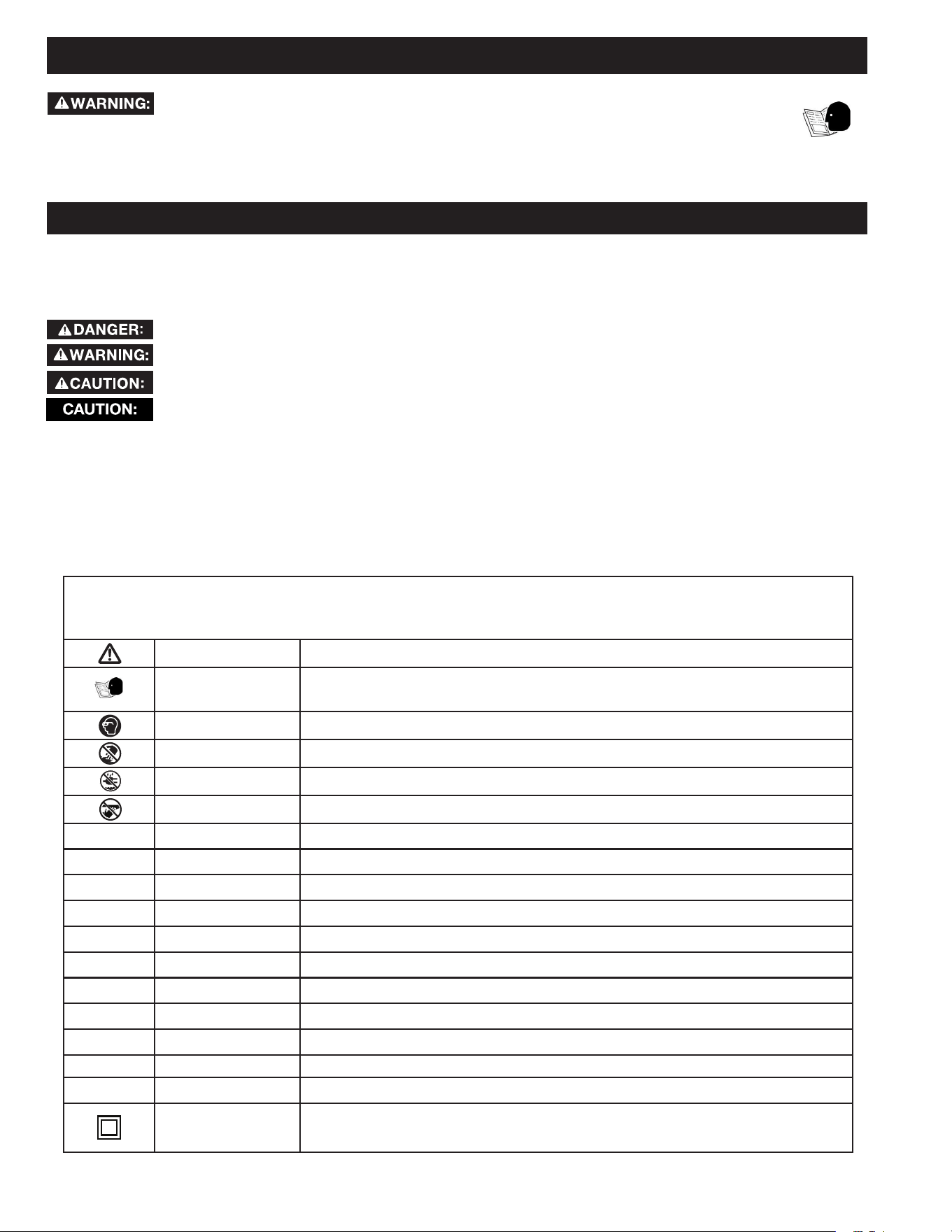
SYMBOL NAME DESIGNATION/EXPLANATION
Safety Alert Indicates a potential personal injury hazard.
Read Operator's Manual
To reduce the risk of injury, user must read and understand operator's manual before using this
product.
Eye Protection Always wear eye protection with side shields marked to comply with ANSI Z87.1.
No Hands Symbol Failure to keep your hands away from the blade will result in serious personal injury.
Wet Conditions Alert Do not expose to rain or use in damp locations.
Pinch Warning Always watch for movement paying extra attention to potential areas where pinching could occur.
V Volts Voltage
A Amperes Current
Hz Hertz Frequency (cycles per second)
min Minutes Time
~/AC Alternating Current Type of current
ⁿ
₀
No Load Speed Rotational speed, at no load
.../min Per Minute Revolutions, strokes, surface speed, orbits, etc., per minute
Lbs Pounds Unit of weight
Kg Kilograms Unit of weight
RPM Revolutions Per Minute Speed of rotation of machine
PH:1 Phase 1 This is a 1 phase motor
Double Insulation
Double insulation is a concept in safety in electric power tools, which eliminates the need for the usual three-
wire grounded power cord. All exposed metal parts are isolated from the internal metal motor components with
protecting insulation. Double insulated tools do not need to be grounded.

7
GENERAL POWER TOOL SAFETY WARNINGS
The term “power tool” in the warnings refers to your mains-operated (corded) power tool or BATTERY-operated (cordless) power tool.
1. Work area safety
a. Keep work area clean and well lit. Cluttered or dark areas invite accidents.
b. Do not operate power tools in explosive atmospheres, such as in the presence of ammable liquids,
gases or dust. Power tools create sparks which may ignite the dust or fumes.
c. Keep children and bystanders away while operating a power tool. Distractions can cause you to lose control.
2. Electrical safety
a. Power tool plugs must match the outlet. Never modify the plug in any way. Do not use any adapter with
earthed (grounded) power tools. Unmodied plugs and matching outlets will reduce risk of electric shock.
b. Avoid body contact with earthed or grounded surfaces, such as pipes, radiators, ranges and
refrigerators. There is an increased risk of electric shock if your body is earthed or grounded.
c. Do not expose power tools to rain or wet conditions. Water entering a power tool will increase the risk of
electric shock.
d. Do not abuse the cord. Never use the cord for carrying, pulling or unplugging the power tool. Keep cord
away from heat oil, sharp edges or moving parts. Damaged or entangled cords increase the risk of electric
shock.
e. When operating a power tool outdoors, use an extension cord suitable for outdoor use. Use of a cord
suitable for outdoor use reduces the risk of electric shock.
f. If operating a power tool in a damp location is unavoidable, use a ground fault circuit interrupter (GFCI)
protected supply. Use of an GFCI reduces the risk of electric shock.
3. Personal safety
a. Stay alert, watch what you are doing and use common sense when operating a power tool. Do not use
a power tool while you are tired or under the inuence of drugs, alcohol or medication. A moment of
inattention while operating power tools may result in serious personal injury.
b. Use personal protective equipment. Always wear eye protection. Protective equipment such as dust mask,
non-skid safety shoes, hard hat, or hearing protection used for appropriate conditions will reduce personal injuries.
c. Prevent unintentional starting. Ensure the switch is in the o-position before connection to power
source, picking up, or carrying the tool. Carrying power tools with your nger on the switch or energising power
tools that have the switch on invites accidents.
d. Remove any adjusting key or wrench before turning the power tool on. A wrench or a key left attached to a
rotating part of the power tool may result in personal injury.
e. Do not overreach. Keep proper footing and balance at all times. This enables better control of the power tool
in unexpected situations.
f. Dress properly. Do not wear loose clothing or jewelery. Keep your hair, clothing and gloves away from
moving parts. Loose clothes, jewelery or long hair can be caught in moving parts.
g. If devices are provided for the connection of dust extraction and collection facilities, ensure these are
connected and properly used. Use of dust collection can reduce dust-related hazards.
h. Do not let familiarity gained from frequent use of tools allow you to become complacent and ignore tool
safety principles. A careless action can cause severe injury within a fraction of a second.
4. Power tool use and care
a. Do not force the power tool. Use the correct power tool for you application. The correct power tool will do
the job better and safer at the rate for which it was designed.
b. Do not use the power tool if the switch does not turn it on and o. Any power tool that cannot be controlled
with the switch is dangerous and must be repaired.
c. Disconnect the plug from the power source before making any adjustments, changing accessories, or
storing power tools. Such preventive safety measures reduce the risk of starting the power tool accidentally.
d. Store idle power tools out of the reach of children and do not allow persons unfamiliar with the power
tool or these instructions to operate the power tool. Power tools are dangerous in the hands of untrained users.
Read all safety warnings, instructions, illustrations and specications provided with this power tool.
Failure to follow all instructions listed below may result in electric shock, re and/or serious injury.
Save all warnings and instructions for future reference.

8
SAFETY INSTRUCTIONS FOR MITER SAWS
e. Maintain power tools and accessories. Check for misalignment or binding of moving parts, breakage of
parts and any other condition that may aect the power tool’s operation. If damaged, have the power
tool repaired before use. Many accidents are caused by poorly maintained power tools.
f. Keep cutting tools sharp and clean. Properly maintained cutting tools with sharp cutting edges are less likely to
bind and are easier to control.
g. Use the power tool, accessories and tools bits etc. in accordance with these instructions, taking into
account the working conditions and the work to be performed. Use of the power tool for operations dierent
from those intended could result in a hazardous situation.
h. Keep Handles and grasping surfaces dry, clean and free from oil and grease. Slippery handles and grasping
surfaces do not allow for safe handling and control of the tool in unexpected situations.
5. Service
a. Have your power tool serviced by a qualied repair person using only identical replacement parts. This
will ensure that the safety of the power tool is maintained.
1.
a. Miter saws are intended to cut wood or wood-like products, they cannot be used with abrasive cut-o
wheels for cutting ferrous material such as bars, rods, studs, etc. Abrasive dust causes moving parts such as
the lower guard to jam. Sparks from abrasive cutting will burn the lower guard, the kerf insert and other plastic parts.
b. Use clamps to support the workpiece whenever possible. If supporting the workplace by hand, you must
always keep your hand at least 100mm from either side of the saw blade. Do not use this saw to cut
pieces that are too small to be securely clamped or held by hand. If your hand is placed too close to the saw
blade, there is an increased risk of injury from blade contact.
c. The workpiece must be stationary and clamped or held against both the fence and the table. Do not
feed the workpiece into the blade or cut “freehand” in any way. Unrestrained or moving workpieces could be
thrown at high speeds, causing injury.
d. Push the saw through the workpiece. Do not pull the saw through the workpiece. To make a cut, raise
the saw head and pull it out over the workpiece without cutting, start the motor, press the saw head
down and push the saw through the workpiece. Cutting on the pull stroke is likely to cause the saw blade to
climb on top of the workpiece and violently throw the blade assembly towards the operator.
e. Never cross your hand over the intended line of cutting either in front or behind the saw blade.
Supporting the workpiece “cross handed” i.e. holding the workpiece to the right of the saw blade with your left hand
or vice versa is very dangerous.
f. Do not reach behind the fence with either hand closer than
4 inches from either side of the saw blade, to
remove wood scraps, or for any other reason while the blade is spinning. The proximity of the spinning saw
blade to your hand may not be obvious and you may be seriously injured.
g. Inspect your workpiece before cutting. If the workpiece is bowed or warped, clamp it with the outside
bowed face toward the fence. Always make certain that there is no gap between the workpiece, fence
and table along the line of the cut. Bent or warped workpieces can twist or shift and may cause binding on the
spinning saw blade while cutting. There should be no nails or foreign objects in the workpiece.
h. Do not use the saw until the table is clear of all tools, wood scraps, etc., except for the workpiece. Small
debris or loose pieces of wood or other objects that contact the revolving blade can be thrown with high speed.
i. Cut only one workpiece at a time. Stacked multiple workpieces cannot be adequately clamped or braced and may
bind on the blade or shift during cutting.
j. Ensure the miter saw is mounted or placed on a level, rm work surface before use. A level and rm work
surface reduces the risk of the miter saw becoming unstable.
k. Plan your work. Every time you change the bevel or miter angle setting, make sure the adjustable fence
is set correctly to support the workpiece and will not interfere with the blade or the guarding system.
Without turning the tool “ON” and with no workpiece on the table, move the saw blade through a complete simulated
cut to assure there will be no interference or danger of cutting the fence.
l. Provide adequate support such as table extensions, saw horses, etc. for a workpiece that is wider or
longer than the table top. Workpieces longer or wider than the miter saw table can tilt if not securely supported. If
the cut-o piece or workpiece tips, it can lift the lower guard or be thrown by the spinning blade.
GENERAL POWER TOOL SAFETY WARNINGS

9
SAFETY INSTRUCTIONS FOR MITER SAWS
PROPOSITION 65 WARNING:
SAVE THESE INSTRUCTIONS.
Refer to them often and use them to instruct others.
If tool is loaned to someone, also loan them these instructions.
m. Do not use another person as a substitute for a table extension or as additional support. Unstable support
for the workpiece can cause the blade to bind or the workpiece to shift during the cutting operation pulling you and
the helper into the spinning blade.
n. The cut-o piece must not be jammed or pressed by any means against the spinning saw blade. If
conned, i.e. using length stops, the cut-o piece could get wedged in the blade and thrown violently.
o. Always use a clamp or a xture designed to properly support round material such as rods or tubing. Rods
have a tendency to roll while being cut, causing the blade to “bite” and pull the work with your hand into the blade.
p. Let the blade reach full speed before contacting the workpiece. This will reduce the risk of the workpiece
being thrown.
q. If the workpiece or blade becomes jammed, turn the miter saw o. Wait for all moving parts to stop
and disconnect the plug from the power source and/or remove the battery pack. Then work to free the
jammed material. Continued sawing with a jammed workpiece could cause loss of control or damage to the miter
saw.
r. After nishing the cut, release switch, hold the saw down and wait for the blade to stop before removing
the cut-o piece. Reaching with your hand near the coasting blade is dangerous.
s. Hold the handle, rmly, when making an incomplete cut or when releasing the switch before the saw
head is completely in the position. The braking action of the saw may cause the saw to be suddenly pulled
downward, causing a risk of injury.
t. Saw Head lock pin is for storage and transport only. This saw should never be locked in the down position while
making cuts.
u. Do not operate saw without guards in place.
Dust created by power sanding, sawing, grinding, drilling, and other construction activities may contain chemicals
known to the state of California to cause cancer, birth defects or other reproductive harm. Some examples are:
• Lead from lead-based paints
• Crystalline silica from bricks and cement and other masonry products
• Asbestos dust
• Arsenic and chromium from chemically-treated lumber
Your risk from these exposures varies depending on how often you do this type of work. To reduce your exposure to these chemicals:
work in a well-ventilated area and work with approved safety equipment, such as dust masks that are specically designed to lter
out microscopic particles.
Avoid prolonged contact with dust from power sanding, sawing, grinding, drilling, and other construction activities.
Wear protective clothing and wash exposed areas with soap and water.
10
POWER CONNECTIONS
This saw is equipped with a 15-amp motor for use with a 120-
volt, 60-HZ alternating current.
For voltage, the wiring in a shop is as important as the
motor’s rating. A line intended only for lights may not be
able to properly carry the current needed for a power tool
motor; wire that is heavy enough for a short distance may be
too light for a greater distance; and a line that can support
one power tool may not be able to support two or three. A
separate electrical circuit should be used for your machines.
This machine is double insulated. Double insulation is a concept in safety in electric power tools, which eliminates the need for
the usual three-wire grounded power cord. All exposed metal parts are isolated from the internal metal motor components with
protecting insulation. Double insulated tools do not need to be grounded.
NOTE: Servicing of a tool with double insulation requires extreme care and knowledge of the system and should be performed by a
qualified service technician. For service, we suggest you return the tool to the nearest authorized service center for repair. ALWAYS
use identical replacement parts when servicing.
Your machine is wired for 120 volts, 60 HZ alternating current. Before connecting the machine to the power source, make sure the
switch is in the “OFF” position.
DOUBLE INSULATION
DO NOT EXPOSE THE MACHINE TO RAIN OR OPERATE THE MACHINE IN DAMP LOCATIONS.
The double insulated system is designed to protect the user from shock resulting from a break in the tool’s internal
insulation. However, it is important to observe normal safety precautions to avoid electrical shock.
This tool has a precision-built electric motor. It should be connected to a POWER SUPPLY THAT IS 120 VOLTS, 60 HZ, AC ONLY
(NORMAL HOUSEHOLD CURRENT IN THE U.S. AND CANADA). DO NOT operate this tool on direct current (DC). A substantial
voltage drop will cause a loss of power and the motor will overheat. If the tool does not operate when plugged into an outlet,
double-check the power supply.
To reduce the risk of electric shock, this equipment has a polarized plug (one blade is wider than the other). This plug will fit in a
polarized outlet only one way. If the plug does not fully fit in the outlet reverse the plug. If it still does not fit, contact a qualified
electrician to install the proper outlet. DO NOT change the plug in any way.
When using a power tool at a considerable distance from a power source, be sure to use an extension cord that has the capacity to
handle the current the tool will draw. An undersized cord will cause a drop in line voltage, resulting in overheating and loss of power.
Use the chart to determine the minimum wire size required in an extension cord. ONLY round jacketed cords listed by Underwriter’s
Laboratories (UL) should be used.
NOTE: Before using any extension cord, inspect it for loose or
exposed wires and cut or worn insulation.
** Ampere rating (on total data label)
12A- 16A
Cord Length Wire Size
25' 14 AWG
50' 12 AWG
** Used on 12 gauge - 20 amp circuit
NOTE: AWG = American Wire Gauge
ELECTRICAL CONNECTION
POLARIZED PLUGS
EXTENSION CORDS
KEEP the extension cord clear of the work
area. Position the cord so that it will not get caught on lumber,
tools or other obstructions while you are working with a power
tool. Failure to do so can result in serious personal injury.
Check extension cords before each use. If damaged replace
immediately. NEVER use tool with a damaged cord, since
touching the damaged area could cause electrical shock
resulting in serious injury.
This circuit should not be a thinner gauge than #12 wire
and should be protected with a 20-amp time lag fuse and/or
circuit breaker. If an extension cord is used, use ONLY 3-wire
extension cords which have 3-prong grounding-type plugs
and matching receptacle which will accept the machine’s plug.
Before connecting the machine to the power line, make sure
the switch is in the “OFF” position and be sure that the electric
current is of the same characteristics as indicated on the
machine. A substantial voltage drop will cause a loss of power
and overheat the motor. It may also damage the machine.
11
UNPACKING
REMOVING CONTENTS FROM PACKAGING
Check shipping carton and machine for damage before unpacking. Carefully remove packaging materials, parts
and machine from shipping carton. ALWAYS check for and remove protective shipping materials around motor and moving parts.
Lay out all parts on a clean work surface.
• Compare package contents to Packaged Contents List prior to assembly to make sure all items are present. Carefully inspect
parts to make sure no damage occurred during shipping. If any parts are missing, damaged or pre-assembled, DO NOT
assemble. Instead, call DELTA
®
Customer Service at (toll free) 1-800-223-7278.
• If any parts are missing, DO NOT attempt to plug in the power cord and turn the power on. The saw should ONLY be
energized after all parts have been located and correctly assembled.
• This saw is packaged and shipped with saw head secured in the down position. Please see “PREPARATIONS FOR
TRANSPORTATION” section of this manual for instructions on how to use the saw head lock pin. Once the saw head is in the
upright position, remove Styrofoam packaging block and discard. Cut and remove the plastic tie-wrap securing the saw-head
from moving.
• Remove the plastic tie-wrap securing the sliding mechanism.
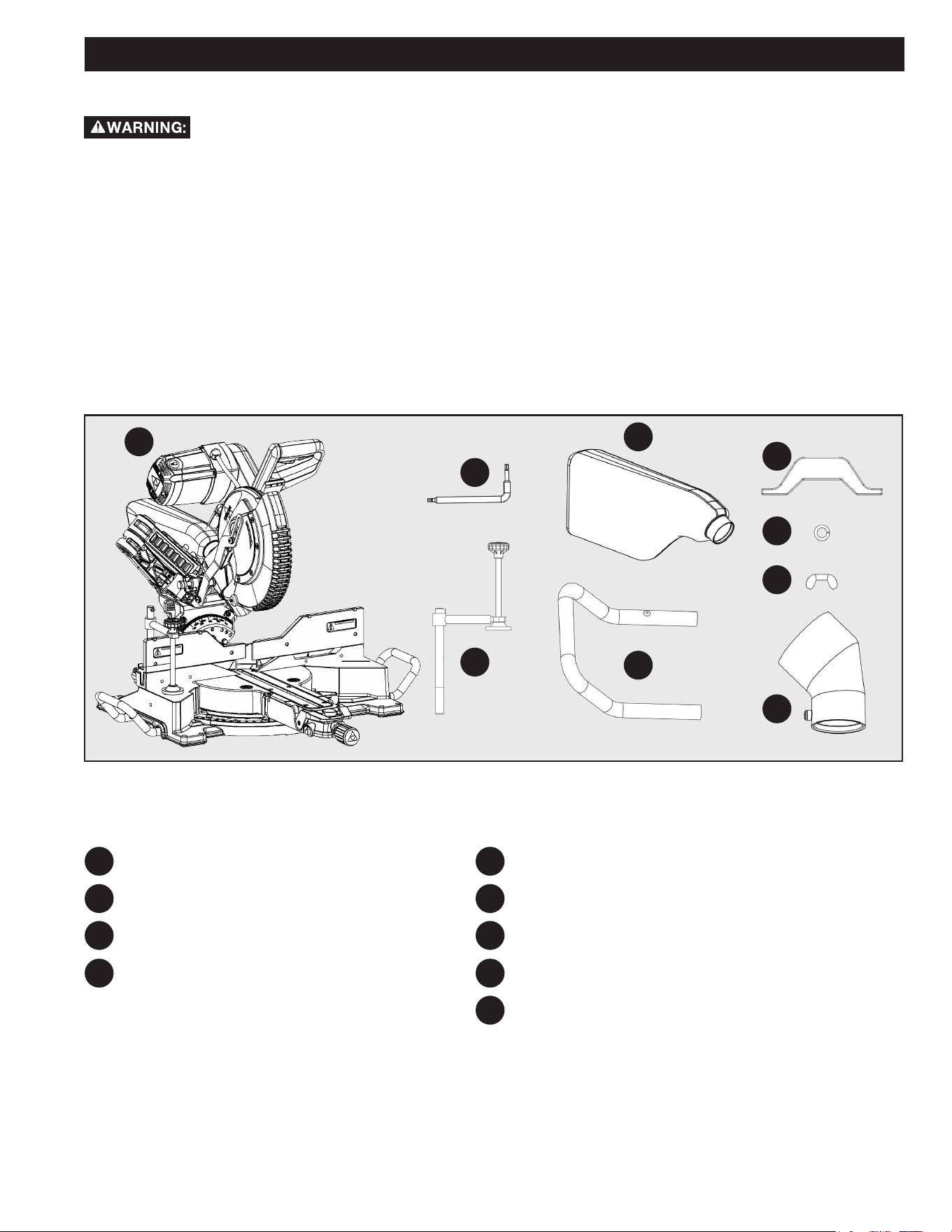
PACKAGE CONTENTS DESCRIPTION
DELTA
®
26-2310 miter saw
T30 Torx/Blade Wrench
(on machine) *see Figure 1 for storage location
Work Clamp
Dust Bag
Figure 3
PC1
PC2
PC3
PC4
PC5
PC6
PC7
PC8
PC9
Support Extension (2)
Extension Clamp (2)
Split Lock Washer (2)
Wing Nut (2)
2 1/2 inch Dust Port Adapter
PC1
PC2
PC3
PC4
PC5
PC6
PC7
PC8
PC9
12
Figure 4
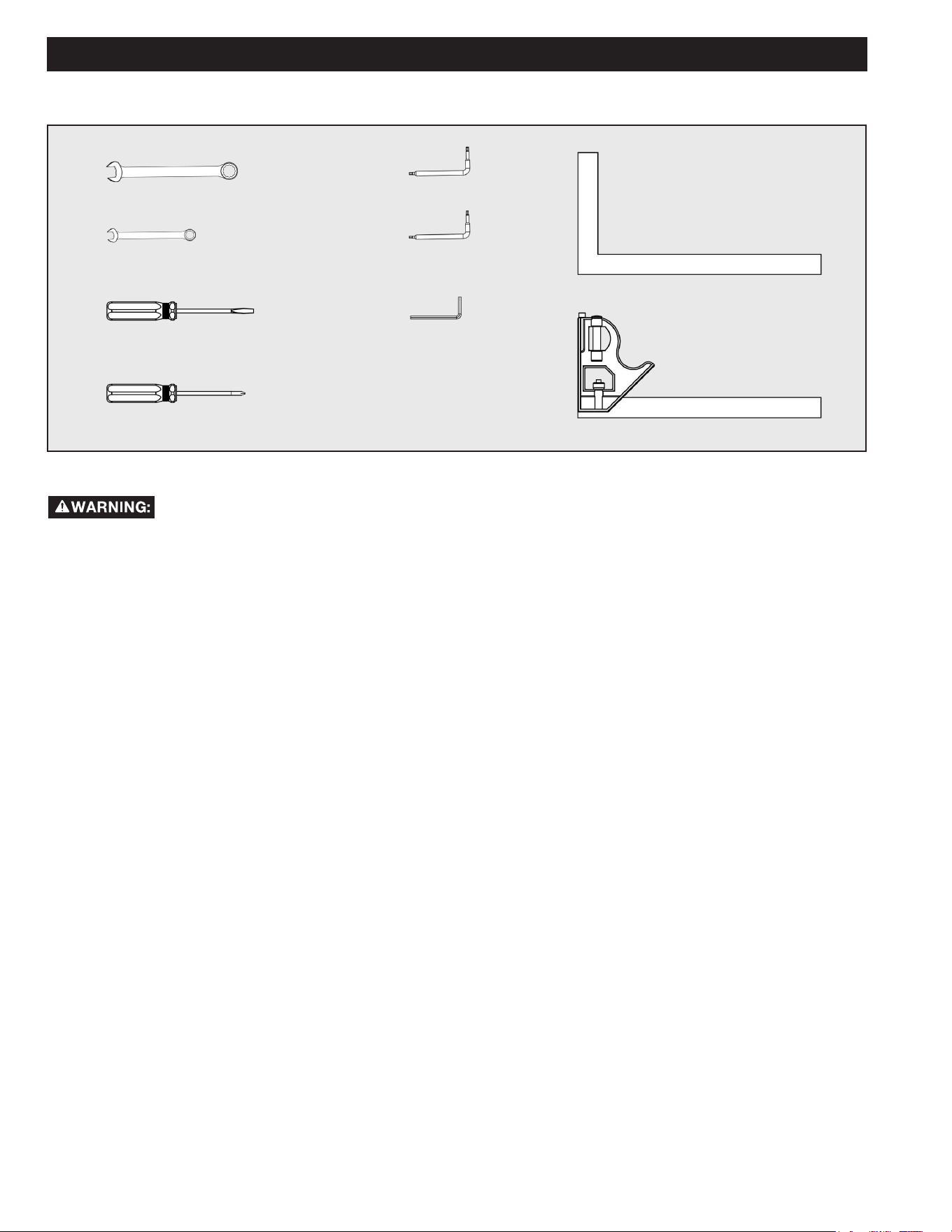
TOOLS NEEDED
ASSEMBLY
T20 Torx Wrench
T25 Torx Wrench
4mm Hex Wrench
Flat Head Screwdriver (for brush replacement)
Phillips Screwdriver (for the dust port adapter)
17mm Combination Wrench
10mm Combination Wrench (2)
Framing Square
Combination Square
• DO NOT attempt to modify this Tool or create accessories not recommended for use with this Tool. Any such alteration or
modication is misuse and could result in a hazardous condition.
• DO NOT connect to power supply until assembly is complete. Failure to comply could result in accidental starting.
• DO NOT start the Miter Saw without checking for interference between the Blade and the Miter Fence. Damage could result to
the Blade if it strikes the Miter Fence during operation of the Saw.
• ALWAYS recheck for interference when changing the miter angle.
• ALWAYS secure this Saw to a stable work surface before any use. The Saw can tip over if the Saw Head is released suddenly
and the Saw is not secured to a work surface.
• DO NOT operate this Tool if any parts are damaged or missing until the parts are replaced. Please call DELTA
®
Customer Service
at (toll free) 1-800-223-7278.
13
WORK CLAMP
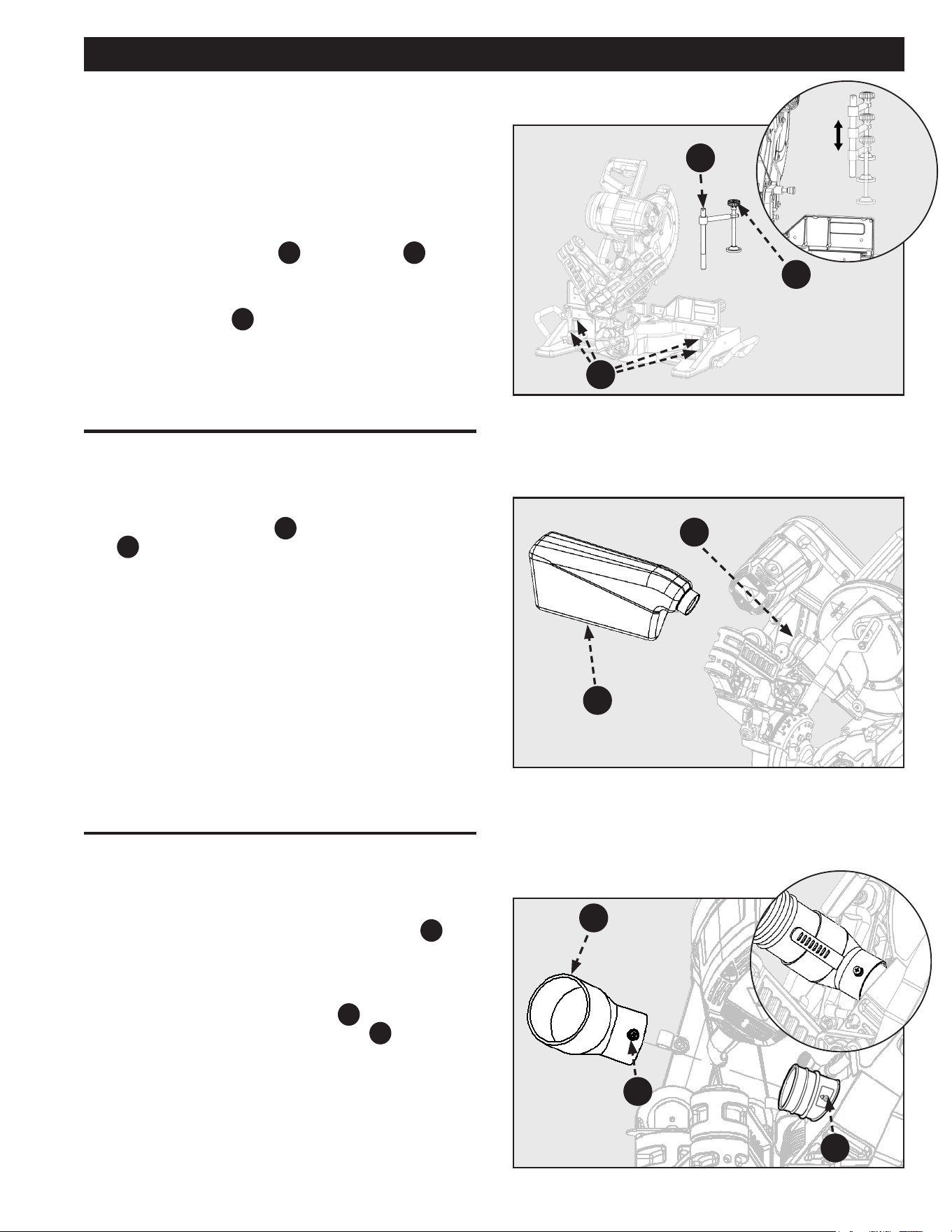
See Figure 5.
The Vertical Work Clamp secures the workpiece to the Table to
provide more stability and keeps the workpiece from creeping
toward the Saw Blade.
To install the Vertical Work Clamp do the following:
1. Place the Clamp Shaft
A
in either hole
B
on the
Miter Base.
2. Slide the Clamp Arm so the pad touches the workpiece.
3. Rotate the Knob
C
Clockwise to secure the workpiece.
To loosen, turn Counterclockwise.
ASSEMBLY
Figure 5
A
C
DUST BAG
See Figure 6.
The Tool includes a Dust Bag
PC4
that attaches over the Dust
Port
D
on the Upper Blade Guard. Slide the Plastic Collar
onto the Dust Port on the back of the Saw Head.
NOTE: To remove the Dust Bag for emptying, simply reverse
the above procedure.
Figure 6
D
PC4
DUST PORT ATTACHMENT
See Figure 7.
The Tool includes a 2 1/2 inch Dust Port Adapter
PC9
that
attaches over the rear Dust Port on the Upper Blade Guard. It
can be used to connect your miter saw to a standard 2 1/2
inch vacuum or dust collection hose.
1. The Dust Port Adapter Set-Screw
F
should be aligned
with the label located on the Dust Port
E
.
2. Tighten the Set-Screw when aligned to the arrow found
on the label.
NOTE: DO NOT over tighten.
Figure 7
B
E
PC9
F
14
C
ASSEMBLY
Figure 10
Figure 9
INSTALL/REMOVE THE BLADE
Figure 8
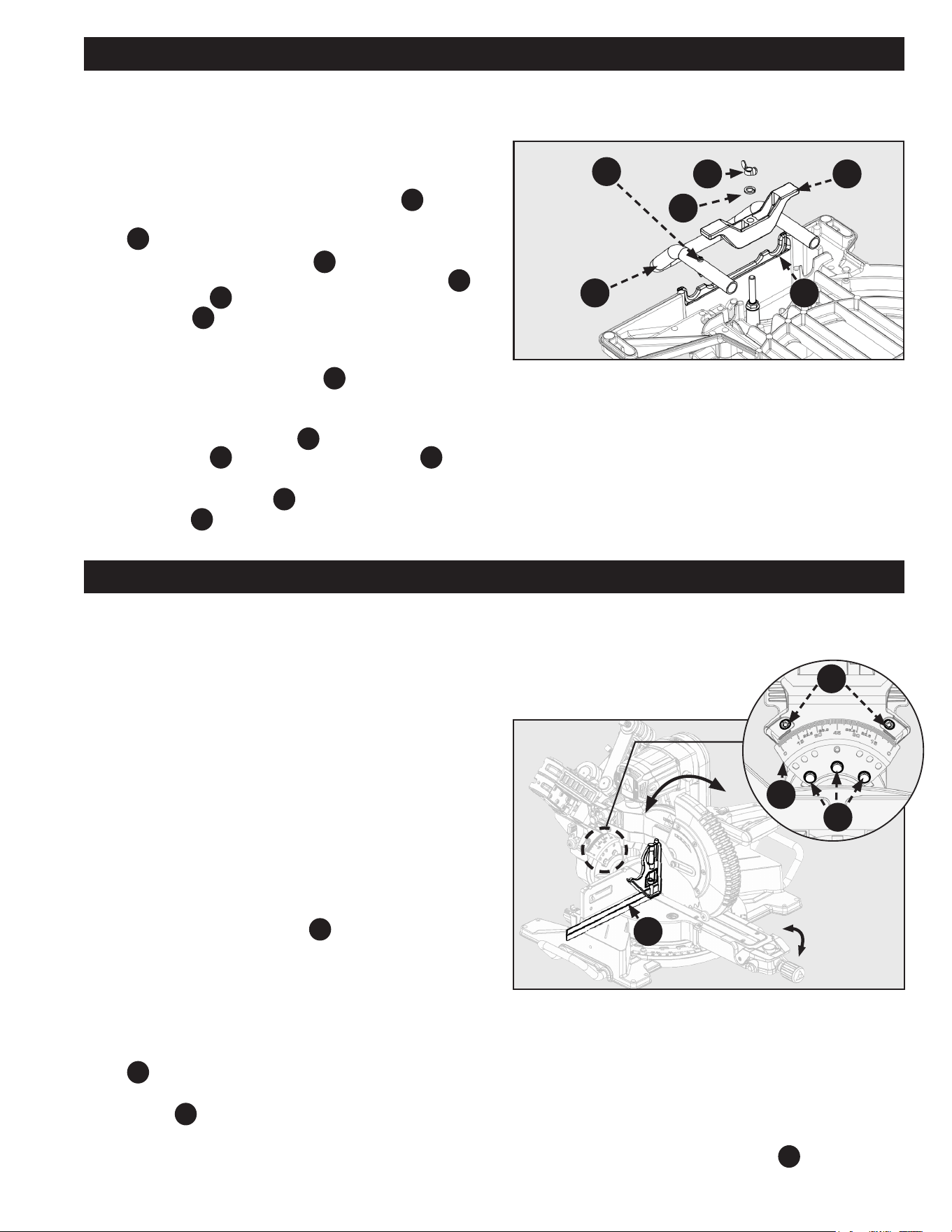
F13
F15
F12
A
A
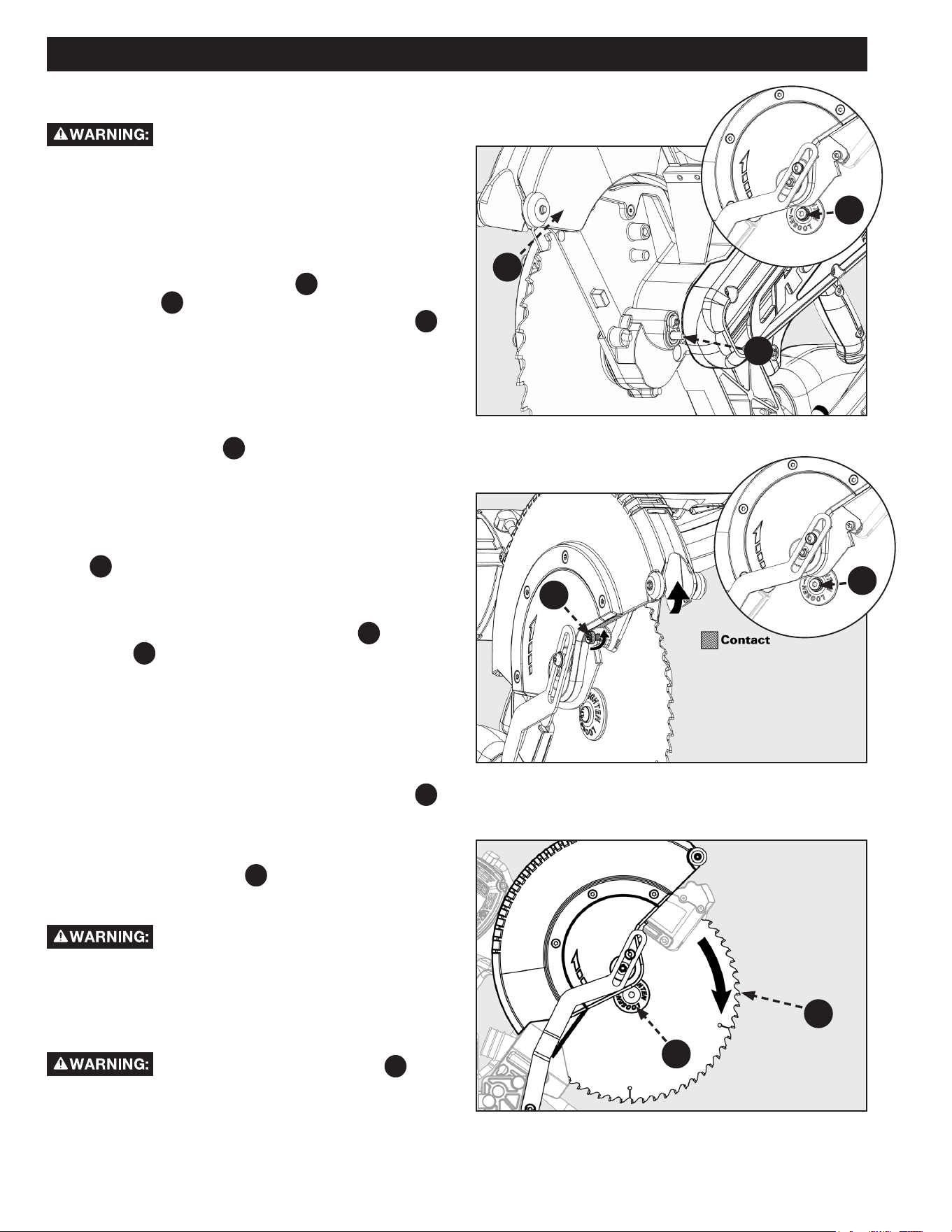
A 10 inch Blade is the required blade size for
the Saw. Larger blades will come into contact with the Blade
Guards and smaller blades will not be adequately guarded.
The 26-2310 Saw comes with the blade pre-installed. For Blade
removal or replacement:
1. Make sure the Saw is unplugged.
2. Raise the Saw Arm to the full upright position.
3. Rotate the Lower Blade Guard
F13
up to expose the
Blade Bolt
A
. Hold the Lower Blade Guard with the
Right thumb, and press the Spindle Lock Button
F15
with the Right index nger at the same time.
See Figure 8.
4. Carefully rotate the Blade until the Spindle locks in
place.
NOTE: To aid Blade change, raise the Lower Guard and loosen
the Blade Bolt Cover Screw
B a few turns to hold the Lower
Guard up.
See Figure 9.
NOTE: Securely tighten the screw back in place when completing
the Blade change.
5. Using the supplied Blade Wrench, remove the Blade Bolt
A
by turning it Clockwise.
NOTE: The Blade Bolt has left-hand threads (ex. Turn
clockwise to loosen, counterclockwise to tighten).
6. Remove ONLY the Outer Blade Washer
C
and the
Blade
F12
, leaving the Inner Blade Washer on the
Spindle. Proceed with carefully removing the blade. See
Figure 10.
For blade assembly:
7. Carefully t Saw Blade inside the Blade Guard and guide
it onto the Spindle, ensuring the Teeth of the Blade are
facing down at the front of the Saw.
8. Align the double “D” Flats on the Blade Washer
C
with the ats on the Spindle and t the Washer onto the
Spindle.
9. Lock the Spindle by depressing the Spindle Lock Button.
Screw in the Blade Bolt
A
, remembering to thread it
Counterclockwise. Tighten Blade Bolt securely using the
provided Blade Wrench.
ALWAYS install the Blade with the Blade
Teeth and the arrow on the side of the Blade pointing down at
the front of the Saw. The direction of the Blade rotation is also
stamped with an arrow on the Upper Blade Guard.
10. Raise and lower the Saw Arm to ensure that the Arm
and Blade Guard move freely.
Make sure the Spindle Lock Button
F15
, see
Figure 8, is not engaged before reconnecting Saw to power
source. NEVER engage Spindle Lock button when Blade is
rotating.
NOTE: Some illustrations in this manual indicate
ONLY portions of the Saw. This is done in order to more
clearly show key areas and components of the Saw.
B
NEVER operate the Saw without all Guards securely in place
and in good operating condition.
15
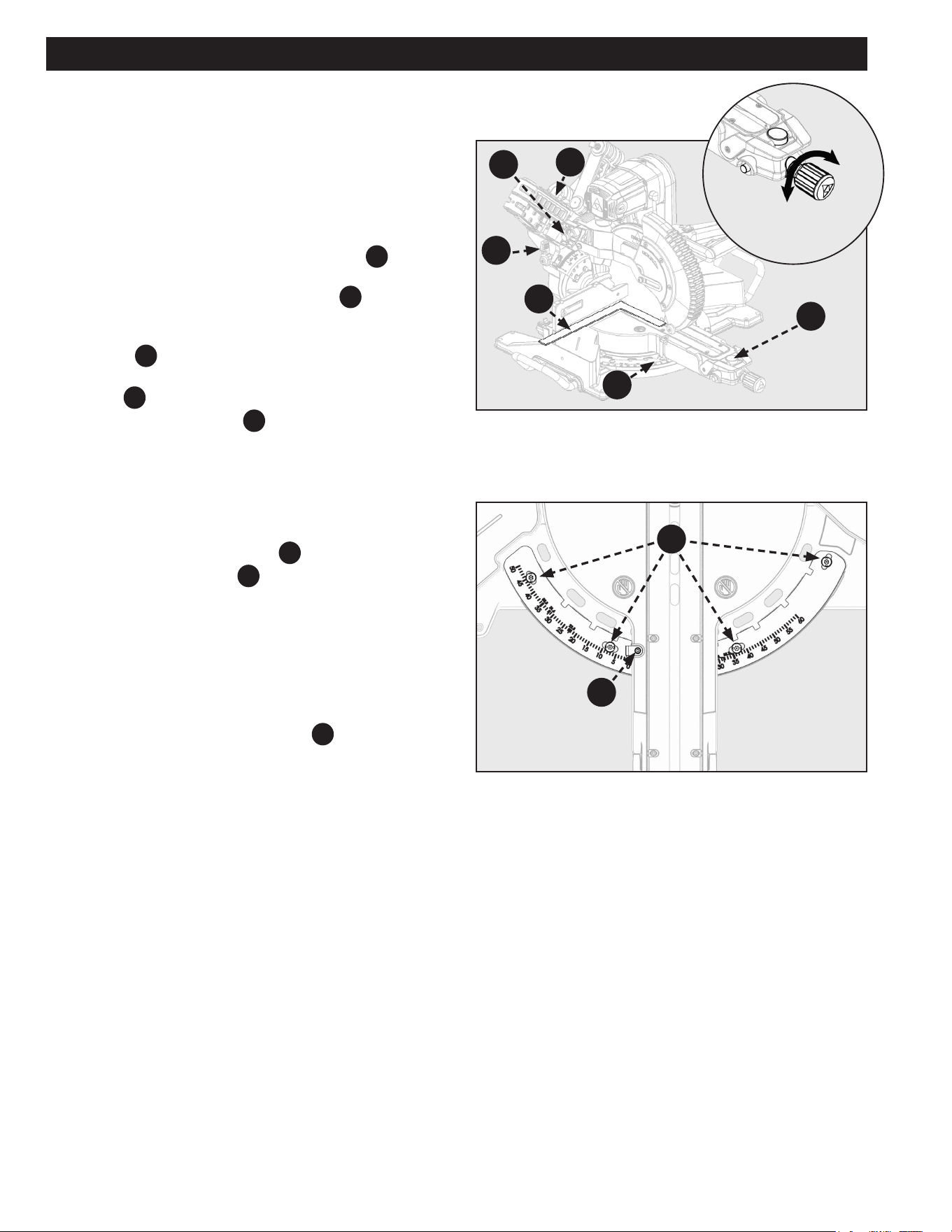
Figure 12
ASSEMBLY
ADJUSTMENTS
BEVEL ALIGNMENT
Your saw is calibrated at the factory to cut true. Over time the
saw’s calibration may drift and will need to be re-calibrated.
See Figure 12.
1. Unplug the saw.
2. Lower the saw head all the way down to the transport
position and engage the saw head lock pin to hold it
in place. Push the saw head into the fully retracted
position and engage the slide prevention lock to hold it
in place.
3. Set the miter position to 0° and engage the miter lock
knob so the table will not move.
4. Set the bevel position to 0°. Engage the bevel latch
lever, so the detent pin locks into the bevel scale.
5. Place a combination square
A
against the table and
the face of the saw blade.
NOTE: Make sure the square contacts the flat part of the
blade and not the teeth.
6. Rotate the blade by hand and check the blade-to-table
alignment at several points. If the blade face is not ush
with the square you will need to adjust the bevel scale
F6
.
7. Using a 10mm combination wrench loosen the three
screws
C
and adjust the bevel scale position. Set so
the table and blade are ush against the combination
square. Make sure the bevel lock/unlock handle is not
locked, so the scale may be adjusted.
LOCK
UNLOCK
A
F6
D
C
Figure 11
INSTALLING WORKPIECE
SUPPORT EXTENSIONS
See Figure 11.
To assemble the support extensions:
1. Insert one of the Support Extensions
PC5
to the
underside of the Base at the cast-in Handle cut-outs
B
.
2. Make sure Support Extension
PC5
is ush with the Base
and inserted into the rounded slots of the cut-outs
B
.
The Rivets
C
are used to prevent the Support
Extension
PC5
from sliding out of the Base during use.
These Rivets should be positioned on the inside of the
Base.
3. Place the Extension Clamp
PC6
onto the Support
Extension and the screw that is pre-attached to the
Base.
4. Once the Extension Clamp
PC6
is in place, put the Split
Lock Washer
PC7
rst and screw the Wing Nut
PC8
onto
the screw.
5. Tighten the Wing Nut
PC8
to fully secure the Support
Extension PC5 .
6. Repeat on the other side.
PC6
PC7
PC5
C
PC8
B
8. Re-tighten the three screws and re-check the blade-to-
table alignment.
NOTE: After squaring adjustments have been made, it may be
necessary to loosen the indicator screws
D
and reset them
to zero.
16
ADJUSTMENTS
MITER ALIGNMENT
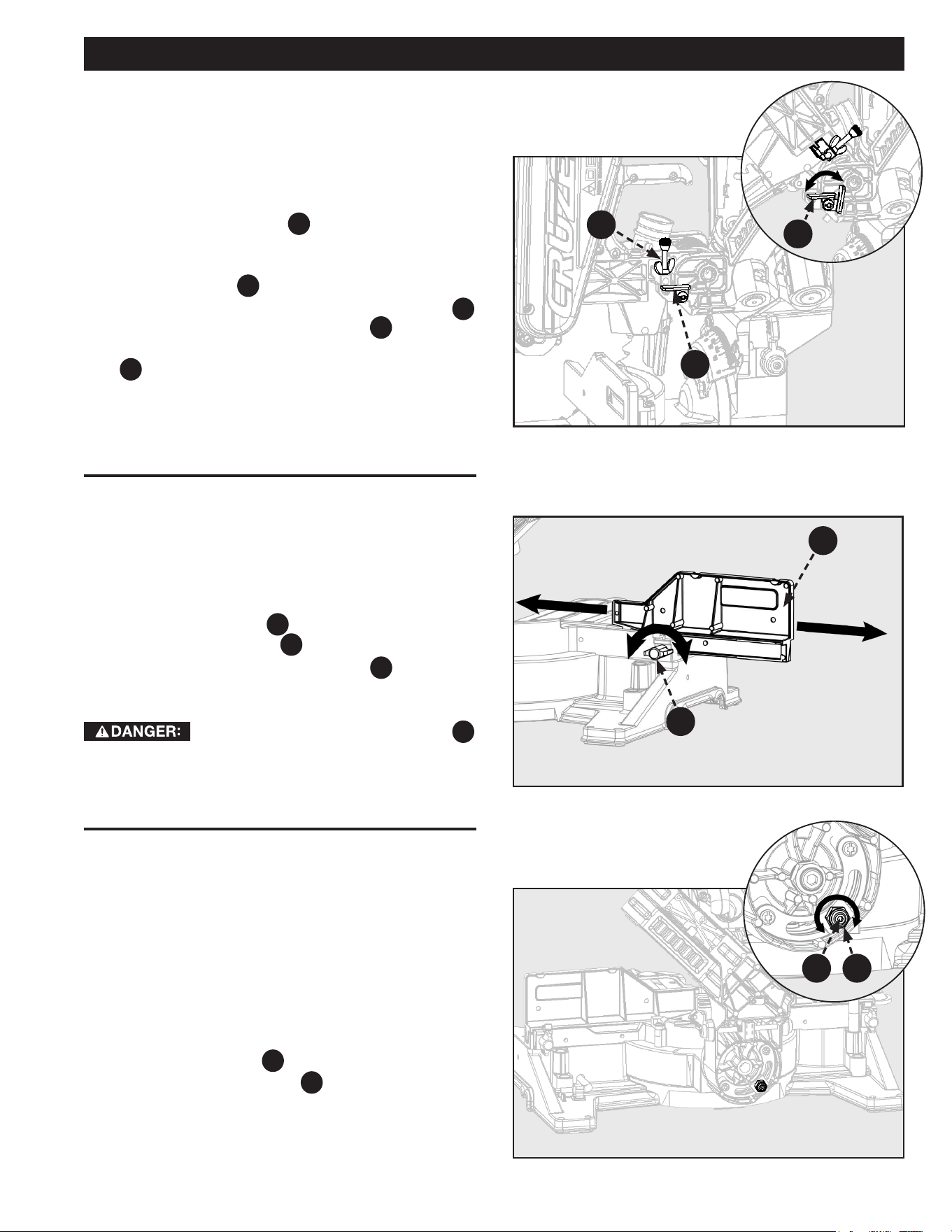
Your saw is calibrated at the factory to cut true. Over time the
saw’s calibration may drift and will need to be re-calibrated.
See Figure 13.
1. Unplug the Saw.
2. Lower the saw head all the way down to the transport
position and engage the saw head lock pin
F20
to hold
it in place. Push the saw head into the fully retracted
position and engage the slide lock lever F31 to hold it in
place.
3. Set the miter position to 0° and allow the miter detent
to lock
F28
into position.
4. Set the bevel position to 0°. Engage the bevel detent
latch
F21
to lock bevel angle.
5. Place a framing square
A
against the fence and the
face of the saw blade.
NOTE: Make sure the square contacts the flat part of the
blade and not the teeth.
See Figure 14.
6. If the blade face is not ush with the square you will
need to adjust the miter scale
B
.
7. Loosen the four screws
C
and move the miter table to
adjust the miter scale position. Set so the fence and
blade are ush against the framing square. Make sure
the miter lock knob is not locked, so the miter scale may
be adjusted.
8. Re-tighten the four screws and re-check the miter scale
alignment.
NOTE: After squaring adjustments have been made, it may be
necessary to loosen the indicator screws
D
and reset them
to zero.
Figure 14
Figure 13
LOCK
UNLOCK
C
D
A
B
F31
F28
F21
F20
17
ADJUSTMENTS
Figure 15
Figure 17
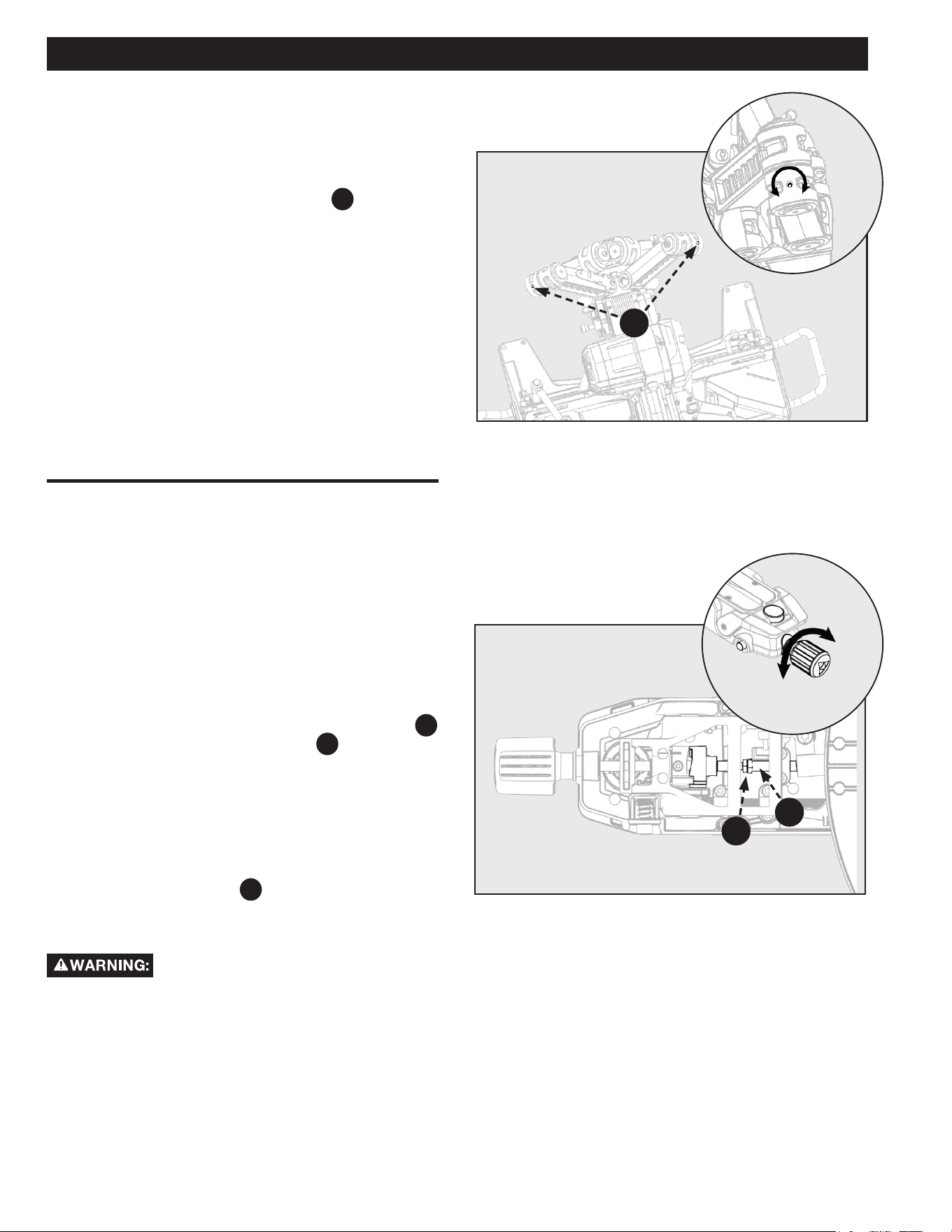
DEPTH STOP ADJUSTMENT
BEVEL LOCK TENSION
ADJUSTMENT
Figure 16
FENCE EXTENSION
This miter saw is equipped with an adjustable depth stop for
making non-through cuts.
See Figure 15 and follow these instructions in order to
set the depth stop at a specific cut depth:
1. Flip the depth stop plate
F5
counterclockwise into the
down position.
2. The cut depth can now be adjusted by turning the
depth stop screw
F5
.
3. Lock the adjustment screw by turning the wing-nut
A
until snug against the depth stop plate
F5
.
NOTE: When finished with non-through cut, flip depth stop
plate
F5
clockwise to return to through cut position.
See Figure 17.
1. With the miter saw head in an unindexed and locked
bevel angle, check that the head will hold it’s position
when pushed with moderate sideways pressure.
2. If head moves easily, then adjustment is required.
3. Release the bevel lock/unlock lever.
4. Hold the central post
C
using a T-25 Torx wrench and
tighten the 17mm Lock Nut
D until the head will resist
side pressure when locked in an unindexed bevel angle.
NOTE: Correct tension is when the cutting head will hold
position when not indexed and unlocked. This ONLY applies at
angles 0 - 20°.
See Figure 16.
This saw is equipped with an adjustable sliding fence. To
extend or retract the fence follow these instructions:
1. Loosen the lock knob
B
by rotating Counterclockwise
and then slide the fence
F7
into the desired position.
2. Make sure to re-tighten lock knob
B
by rotating
clockwise.
ALWAYS check to make sure lock knob
B
is tightened before making a cut. Failure to do so may result in
injury.
A
F5
TIGHTEN
LOOSEN
F7
B
F5
DC
18
ADJUSTMENTS
Figure 18
Figure 19
SLIDE RESISTANCE
MITER LOCK ADJUSTMENT
See Figure 18.
The slide resistance (friction) on your saw is adjustable. Use a
4mm Hex wrench.
1. Locate the glide adjustment screw
A
on the saw
arms. Turn clockwise to tighten the sliding friction.
2. Turn counterclockwise to loosen the sliding friction.
See Figure 19.
If your saw’s miter lock does not lock securely, you may be
required to tighten the miter lock adjustment. This adjustment
is located on the underside of the miter saw arm. To make
adjustments:
1. First unlock the miter lock knob. Use a 10mm open
ended wrench to loosen (counterclockwise) lock nut
B
while holding the adjustment rod
C
in place using
another 10mm open end wrench.
2. Turn the adjustment rod in order to tighten/loosen the
miter lock.
3. Lock/Unlock the miter lock knob to check the miter lock
adjustment.
4. Once you have set your miter lock adjustment
re-tighten the lock nut
B to prevent this adjustment
from loosening over time.
ALWAYS check to make sure the miter lock
is locked tightly into position before using your saw. Failure to
follow these instructions could result in serious personal injury
due to the miter lock slipping during use of the saw.
LOCK
UNLOCK
C
B
TIGHTEN
LOOSEN
A
19
ADJUSTMENTS
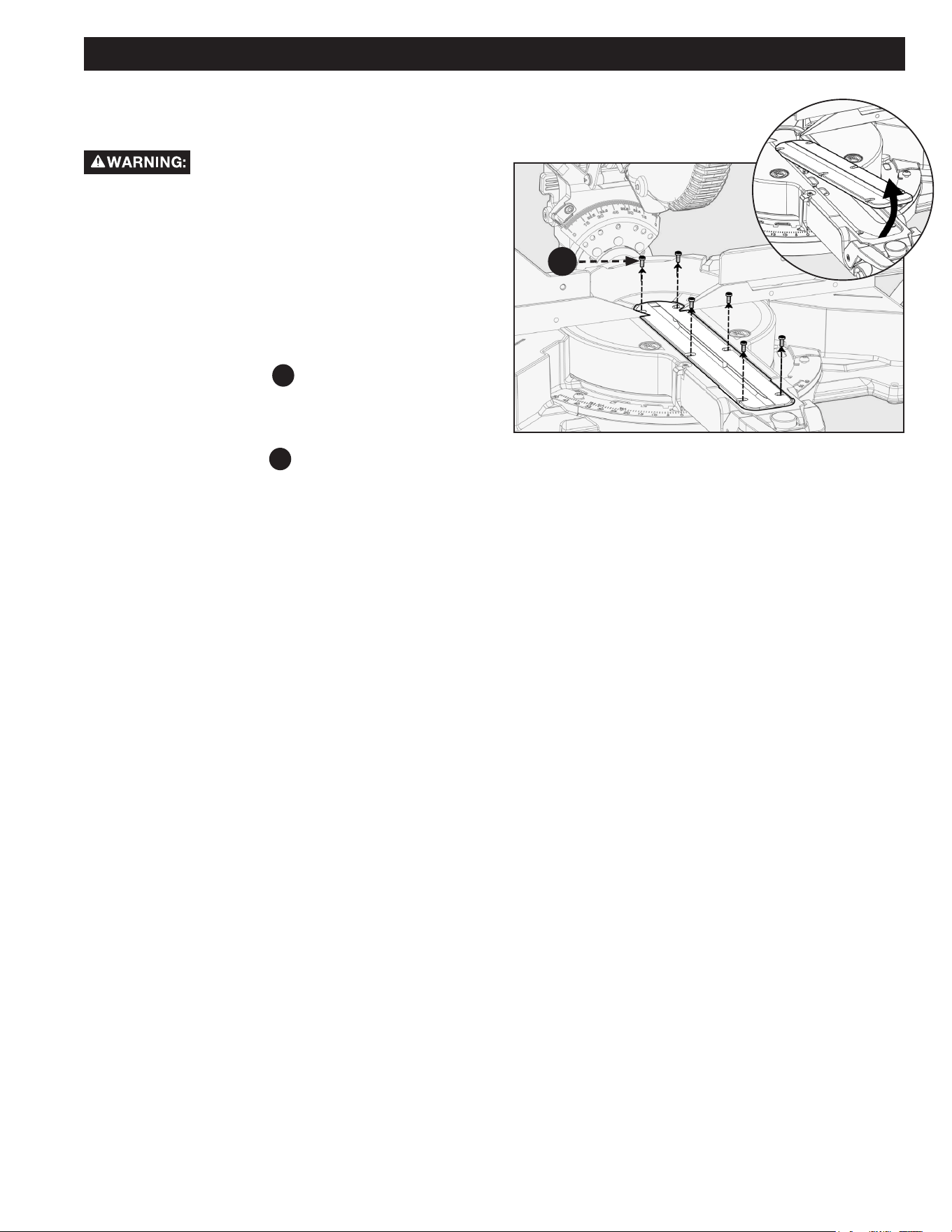
Figure 20
THROAT PLATE
See Figure 20.
ONLY use DELTA
®
authorized service parts.
Using non-authorized parts can results in damage to your
machine and serious personal injury.
In the event that your throat plate needs to be replaced for
any reason, follow these instructions.
1. Loosen the fence lock knobs and slide both fences away
from center.
2. Bevel the blade approximately 30° to the right for easier
access to the throat plate.
3. Using a T20 Torx driver or a flat head screwdriver,
remove the six screws
A
which hold the throat plate.
Lift the throat plate o the work table.
4. Replace the throat plate ONLY using a DELTA
®
authorized service part.
5. Tighten the six screws
A
which hold the throat plate.
A
20
Before moving/transporting your saw it is important to make sure all of the following steps have been followed to
ensure a safe condition for transportation. Failure to do so can result in serious personal injury.
MOUNTING AND TRANSPORTATION
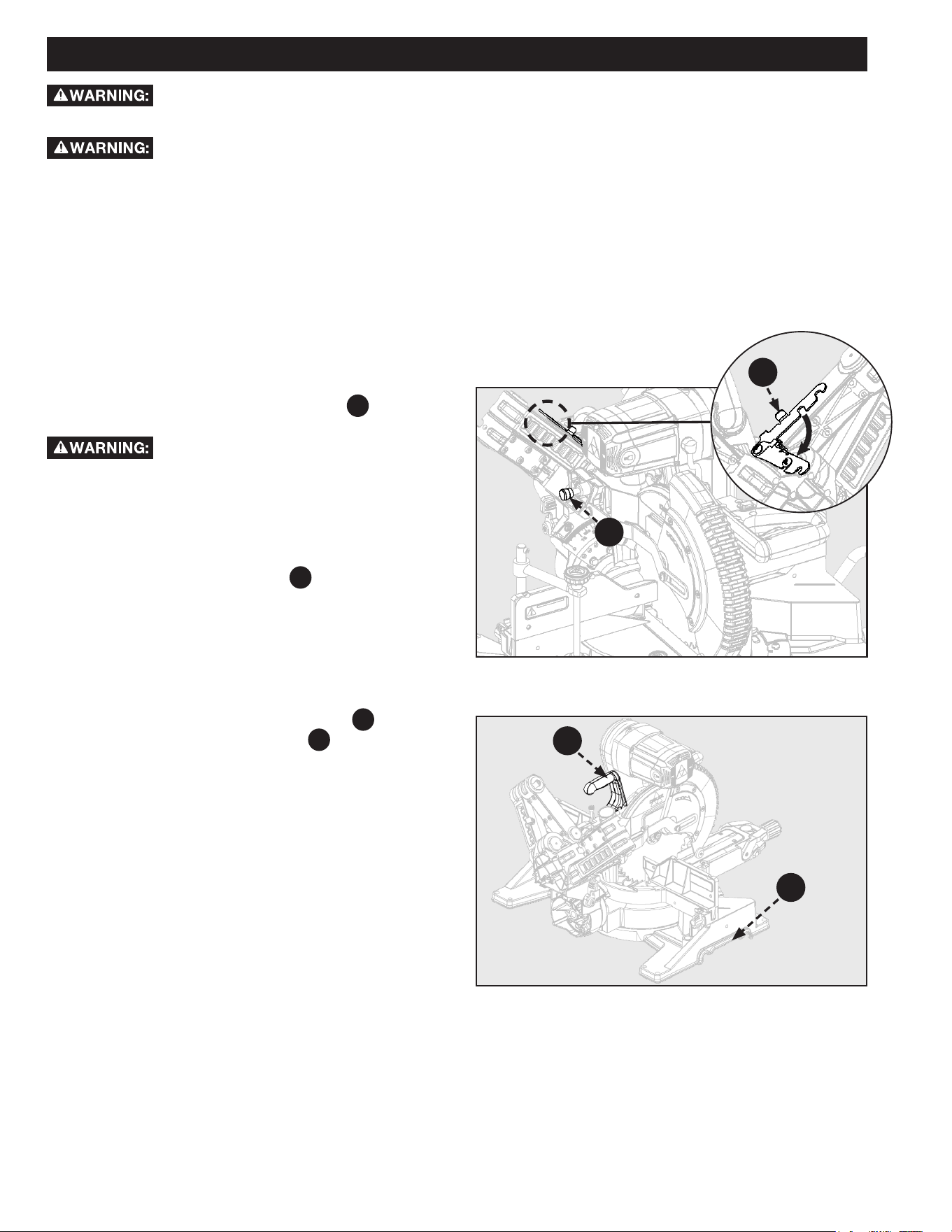
SAW HEAD LOCK PIN
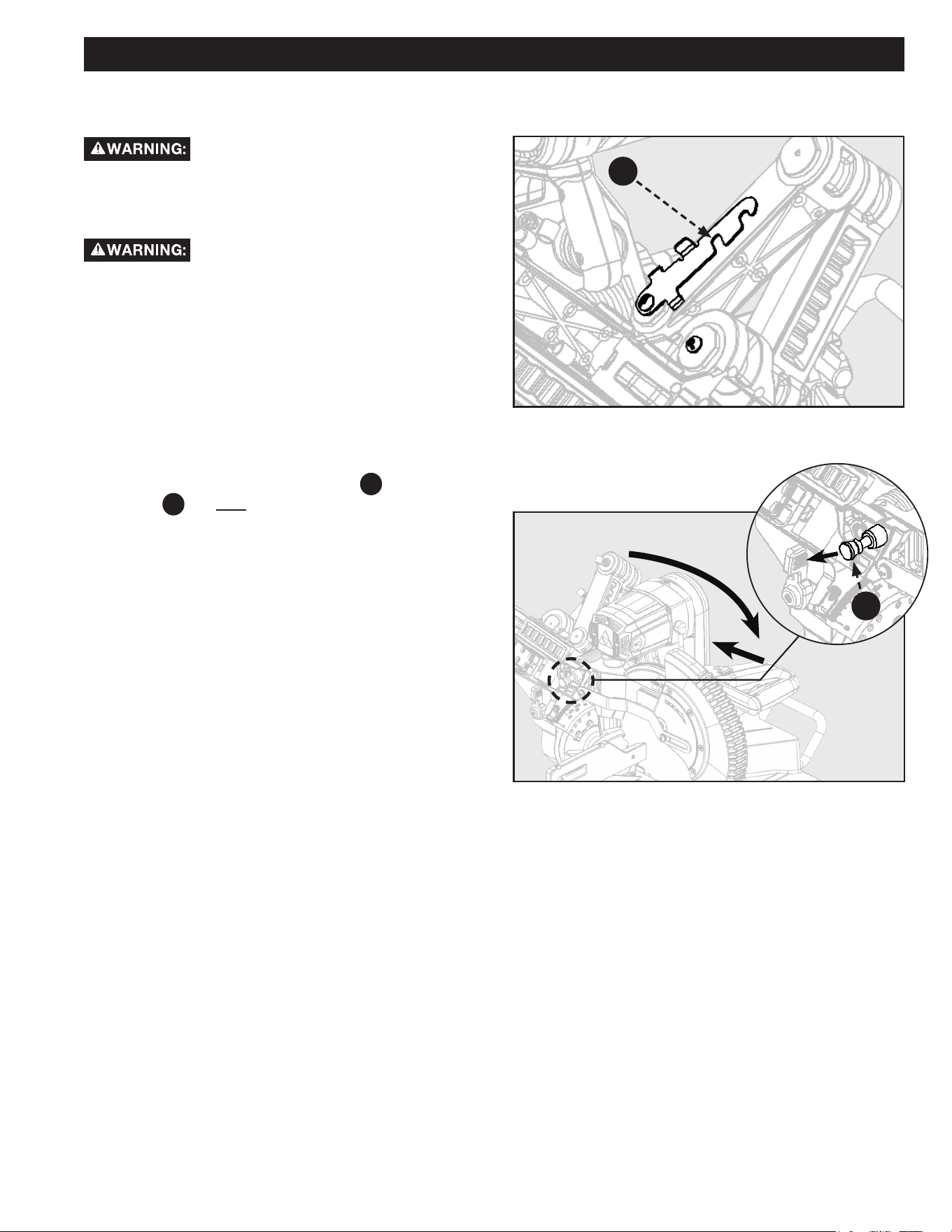
See Figure 21.
ALWAYS lock saw head in the down position before
transporting saw. To engage saw head lock pin
F20
: Push saw
head to the down position then push-in lock pin.
Saw Head lock pin is for storage and
transport ONLY. This saw should NEVER be locked in the
down position while making cuts.
SLIDE LOCK LEVER
See Figure 21.
ALWAYS engage the slide lock lever
F31
before transporting
this saw. To engage slide lock lever: Push saw head to the fully
retracted position then swing the slide lock lever down.
Figure 21
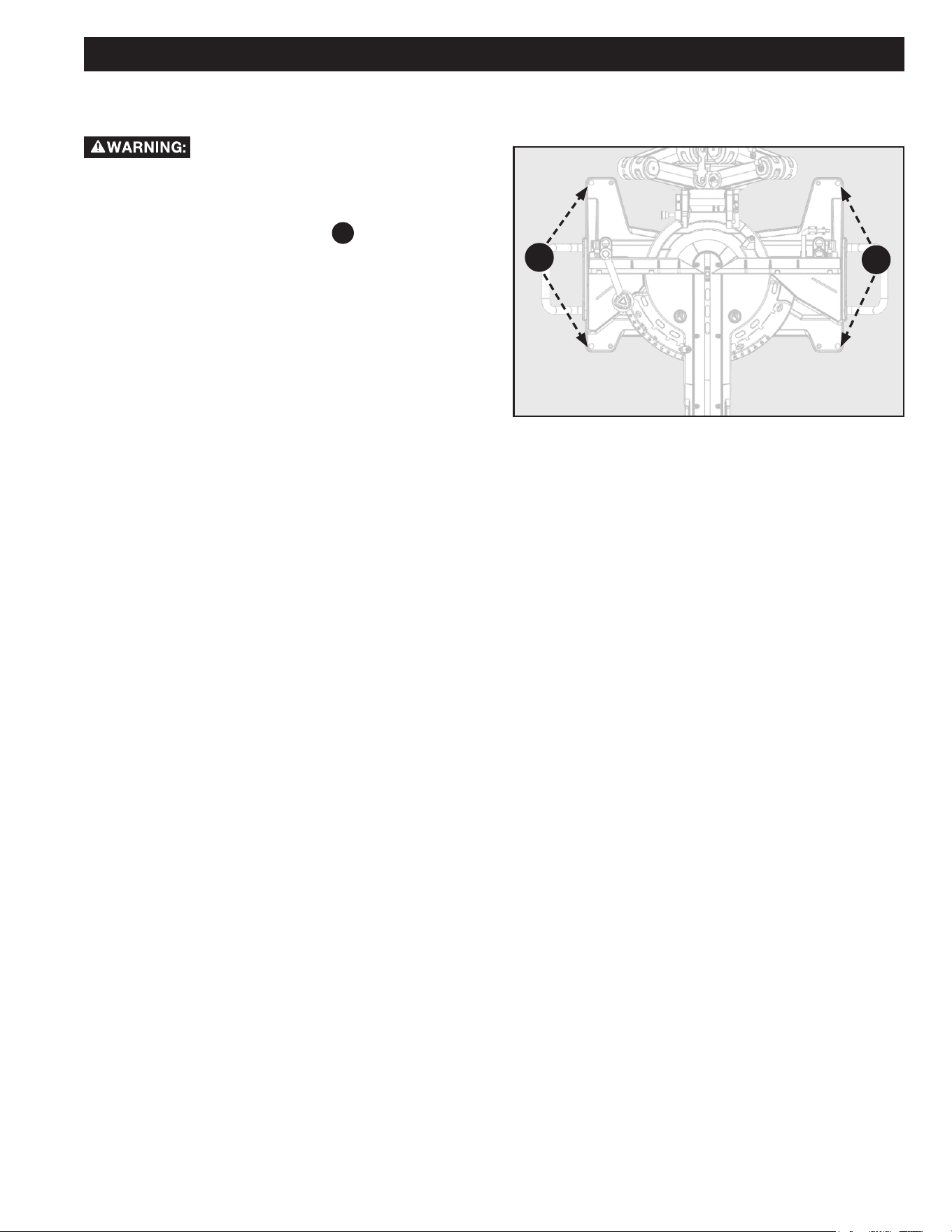
PREPARATIONS FOR TRANSPORTATION
CARRY HANDLE
See Figure 22.
For transportation use the included carry handle
F19
. You may
also lift using the cast-in handle cut-outs
A
on both sides of
the saw base. DO NOT lift or carry using the Support Extensions.
Figure 22
F20
F19
A
F31
• ALWAYS turn the power o and unplug saw before transporting.
• ALWAYS Secure power cord to avoid any snags or hang ups during transportation.
• ALWAYS lift using the strength of your legs to lift saw; never use your back muscles to lift saw.
• ALWAYS place the saw onto a stable and level surface with clearance for handling and maneuvering.
• DO NOT use power On/O switch handle or power cord to lift your saw.
21
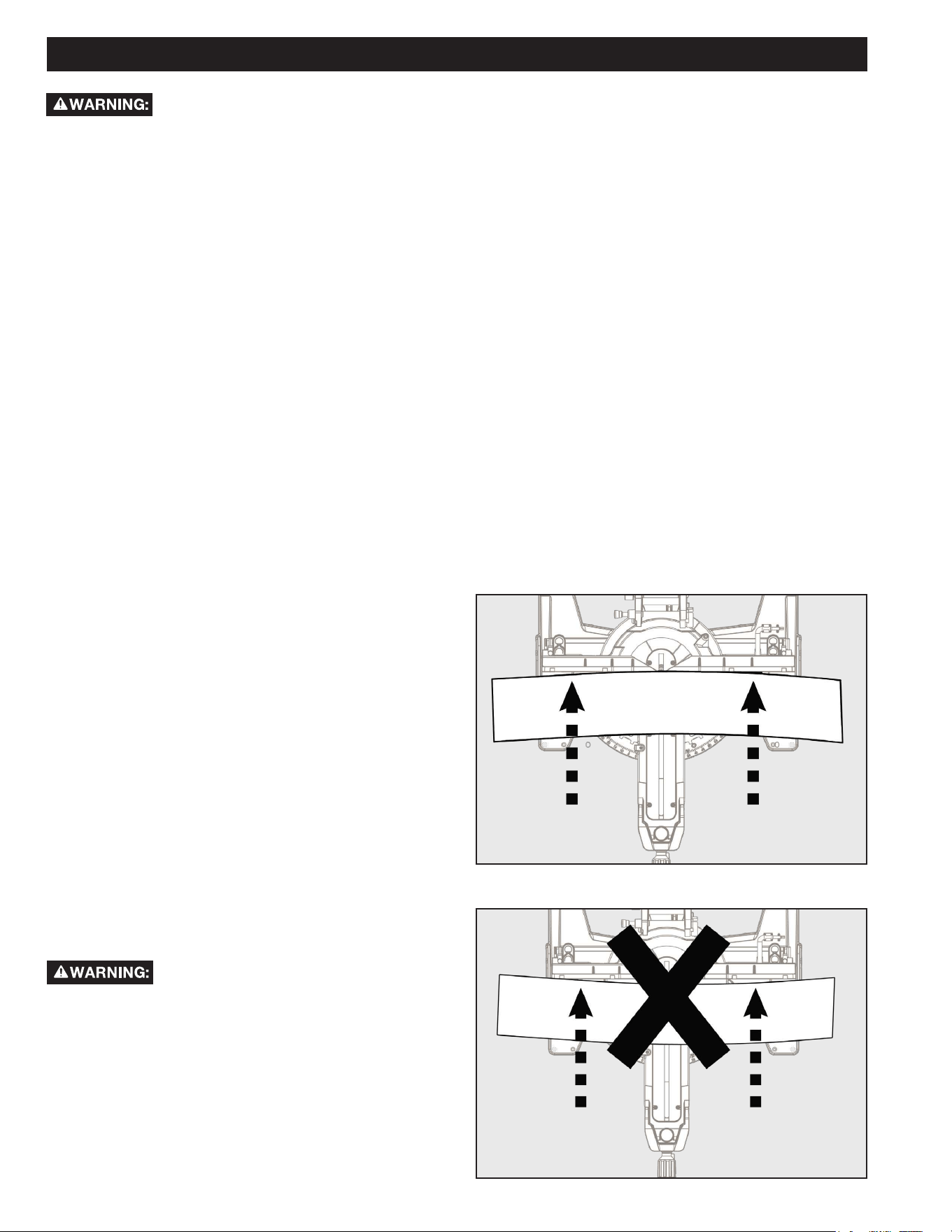
MOUNTING SAW TO STABLE SURFACE
See Figure 23.
To ensure safe and accurate operation, this
saw should be mounted to a stable and level surface such as a
sturdy workbench. To mount the tool to a stable surface, do
the following:
1. Locate the four mounting holes
F22
in the base of the
saw.
2. Secure the tool to the mounting surface using 3/8 inch
diameter machine bolts, lock washers, and hex nuts
(not included). Make sure the bolts are long enough to
accommodate the saw base, lock washers, hex nuts,
and the thickness of the workbench.
3. Tighten all four bolts securely.
4. Check to make sure that the saw is secure before
operation.
Figure 23
MOUNTING AND TRANSPORTATION
F22
F22
22
OPERATION
Figure 24
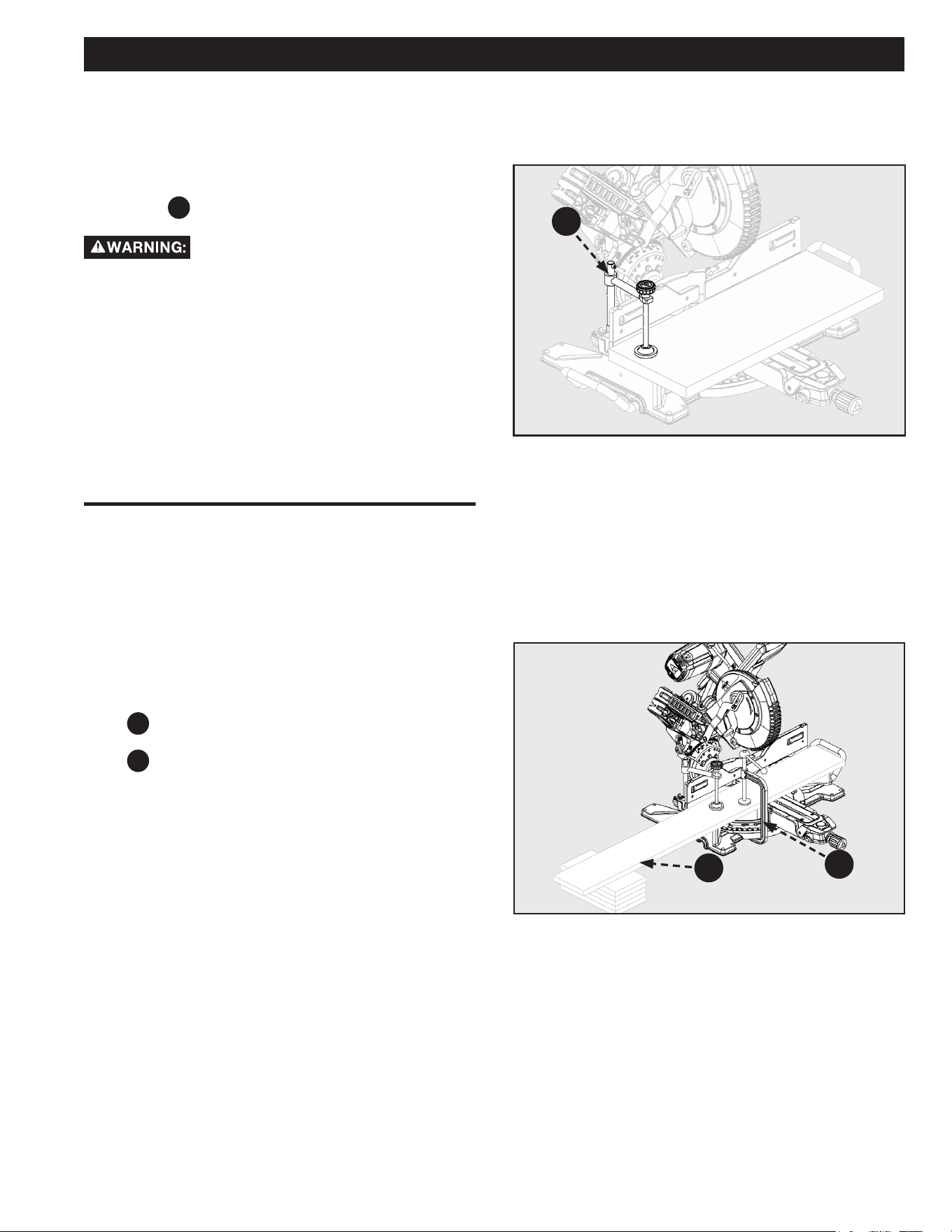
CUTTING WARPED MATERIAL
See Figure 24.
When attempting to cut warped material, the CONVEX face
should be against the fence.
See Figure 25.
NEVER position a piece of warped material with the CONCAVE
face or edge against the fence. It will pinch the blade near the
completion of the cut.
To avoid a kickback and to avoid serious
personal injury, NEVER position the CONCAVE edge of bowed
or warped material against the fence.
Figure 25
• DO NOT allow familiarity with tools to make you careless. Remember that a careless fraction of a second is sucient enough to
inict serious personal injury.
• ALWAYS wear eye protection with side shields and marked to comply with ANSI Z87
.1 Failure to do so could result in objects
being thrown into your eyes, resulting in possible serious personal injury.
• DO NOT use any attachments or accessories not recommended by the manufacturer of this tool
. The use of attachments or
accessories not recommended can result in serious personal injury.
• ALWAYS clamp or bolt the compound miter saw to a workbench before starting any cutting operation.
• NEVER operate the miter saw on the oor or in a crouched position
. Failure to heed this warning can result in serious personal
injury.
• ALWAYS tighten the miter lock knob and bevel lock handle securely before making a cut. Failure to do so could result in serious
injury due to movement of the control arm or miter table while making a cut
.
• KEEP hands outside the no hands zone, at least 4 inches from the blade in order to avoid serious personal injury.
• NEVER perform any cutting operation freehand (without holding workpiece securely against the fence)
. The blade could grab
the workpiece if it slips or twists.
• When using a work clamp or C-clamp to secure the workpiece, clamp workpiece on one side of the blade only
. The workpiece
MUST remain free on one side of the blade to prevent the blade from binding in workpiece. The workpiece binding the blade will
cause motor stalling and kickback. This situation could cause an accident resulting in serious personal injury.
• NEVER move the workpiece or make adjustment to any cutting angle while the saw is running and the blade is rotating
. Any slip
can result in contact with the blade causing serious personal injury.
• DO NOT force the blade against the workpiece when cutting. Forcing the blade will cause a drop in motor RPM and increase the
risk of overheating the saw blade tips
.
You may use this tool for the following purposes:
• Bevel cutting and compound cutting for crown moldings,
etc
.
• Cross cutting wood.
• Cross cutting for moldings, door casings, picture frames,
etc
.
NOTE: This saw is for cutting wood or wood-like products
. The
blade provided is not acceptable for cutting other materials.
23
Figure 27
CLAMPING WIDE WORKPIECES
SUPPORTING LONG WORKPIECES
OPERATION
Figure 26
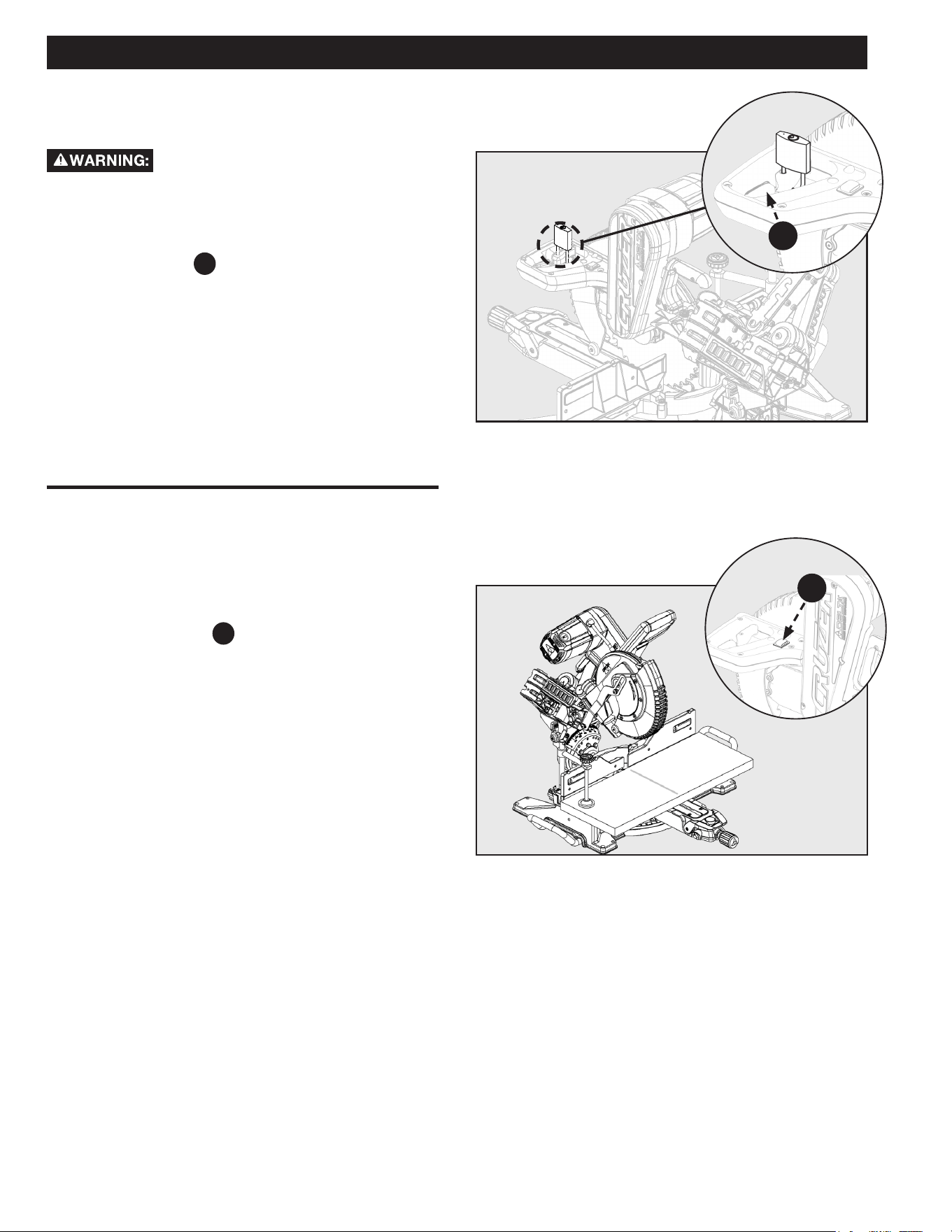
See Figure 26.
1. When cutting wide work pieces, such as 2 x 12 inch,
clamp the workpiece to the work table using a work
clamp
PC3
.
KEEP clamps away from the path of the
blade and blade guard assembly.
See Figure 27.
1. In most cases the included table extensions (workpiece
supports) will be sucient to support longer workpieces.
If these are not long enough, the workpiece should be
supported further out from the saw. Additional support
A may be used to make the workpiece lay at on the
saw table. Use the included work clamp or a C-clamp
B to secure the workpiece to the miter saw table.
B
A
PC3
24
OPERATION
Figure 28
POWER SWITCH LOCK
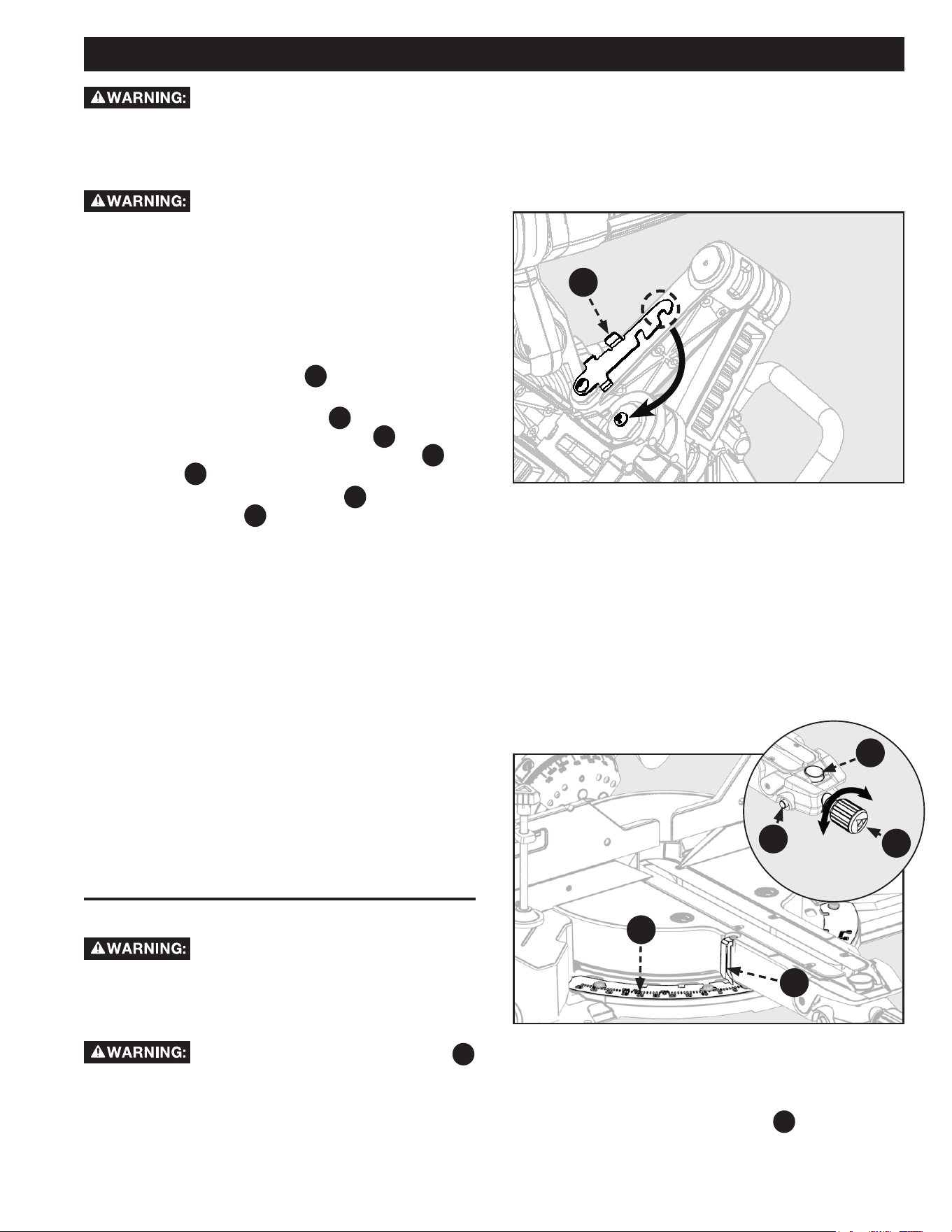
See Figure 28.
To prevent any unauthorized person from
operating this saw always store in a secure location or install, a
padlock (not included) into the lock hole located on the power
switch. Be sure padlock is fully closed and locked before
leaving this saw unattended.
NOTE: Trigger lock
F2
needs to be engaged prior to
operation of the machine.
ALWAYS disconnect the power supply before installing or
removing a lock onto the power switch. Failure to do so could
allow the power switch to engage by accident, resulting in
serious injury.
SHADOW LINE
See Figure 29.
1. To activate the shadow line feature, turn on the shadow
guide on/o switch
F3
located on top of the handle.
Figure 29
F2
F3
25
OPERATION
Figure 30
Figure 31
LOCK
UNLOCK
NON-SLIDING CUTS
Before turning the saw power ON, check to make sure saw head and blade will not make contact with the
provided work clamp or fence during the cutting operation. Position the work clamp and fence to avoid contact with the miter saw
head.
FOR CROSS CUTS
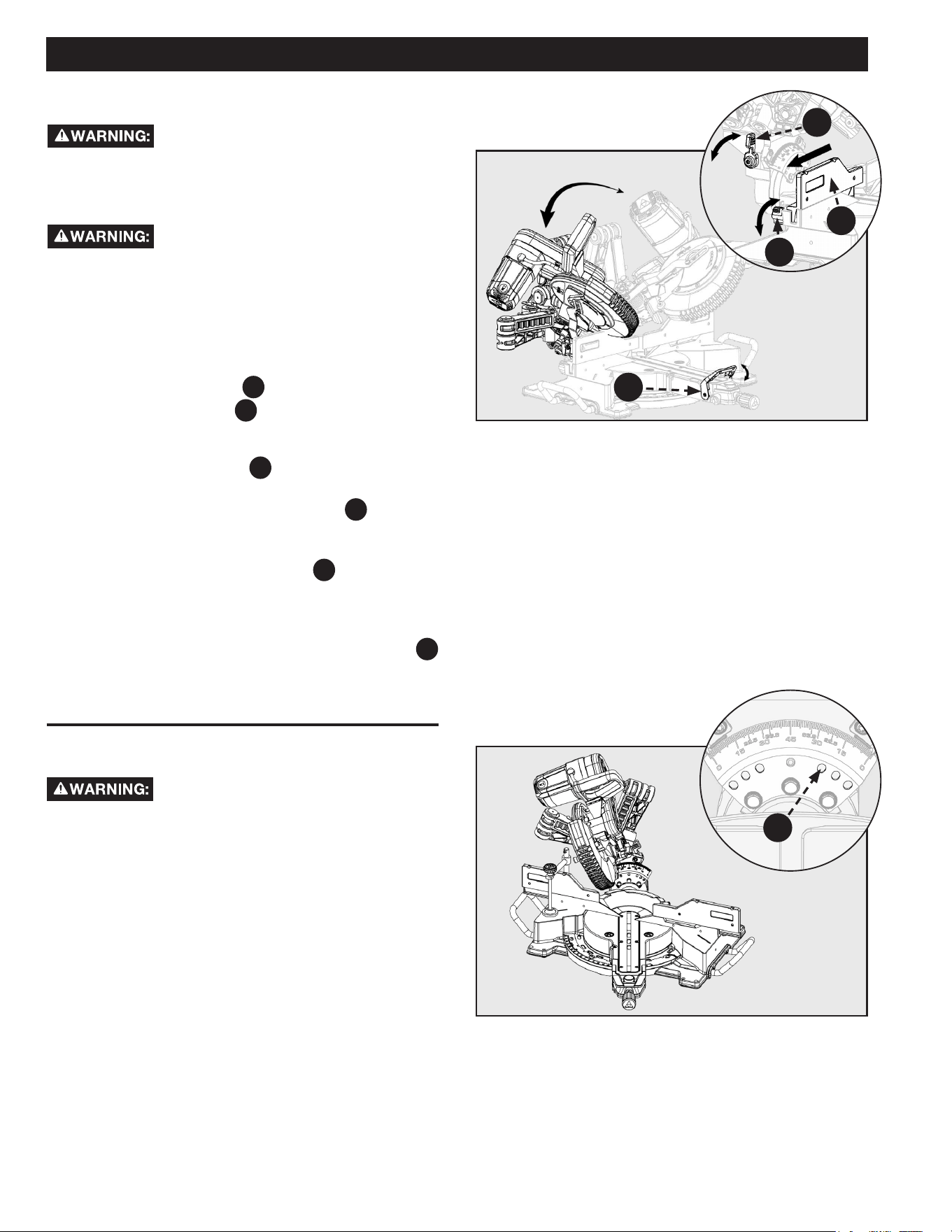
See Figure 30 and 31.
1. To use this saw as a traditional, non-sliding, miter saw:
slide the saw head into the fully retracted position and
engage the slide lock lever
F31
, baseboard notch. See
Figure 30.
2. Loosen the miter lock knob
F25
, use your thumb
to push in the miter detent lock button
F28
, and set the
miter arm angle to 0°. Use the miter scale
A
and
indicator
B
to locate the 0° miter position.
3. Release the miter detent button
F28
and tighten the
miter lock knob
F25
. Check that the worktable is
securely locked into position.
4. Raise the saw head to its UP position.
5. Position the workpiece so that it is securely supported
by the worktable and fence. If the board is warped,
read and follow the instructions under “Cutting Warped
Material” in the “Operation” section of this manual.
6. Secure the workpiece to the table and against the
fence, using the provided clamp.
7. Before turning the power switch ON, perform a
simulated cut to check your cut alignment. Also check to
make sure the blade will not come into contact with the
provided work clamp the fence or anything other than
the workpiece.
8. Engage the power ON switch. Allow the blade to reach
maximum speed.
9. Lower the saw blade through the workpiece.
10. Disengage the power switch and allow blade to come to
a complete stop before raising the saw head.
MITER CUTS
ALWAYS engage the slide prevention lock
before making any non-sliding cuts. Failure to engage this lock
could result in saw head movement during the cutting
operation.
To avoid personal injury, before turning the
saw power ON, check to make sure saw head and blade will
not make contact with the provided work clamp or fence
during the cutting operation. Position the work clamp and
fence to avoid contact with the miter saw head.
ALWAYS tighten the miter lock knob
F25
before any cutting operation. Failure to do so may result in
serious personal injury.
See Figure 31.
1. To make miter cuts on this saw, using it as traditional,
non-sliding miter saw, slide the saw head into the fully
retracted position and engage the slide lock lever.
F24
B
A
F28
F25
2. Rotate miter arm to one of the preset miter angles (0°,
15°, 22.5°, 31.6°, or 45°).
3. Use miter detent override button
F24
for your desired
angle position if it is not provided.
4. Follow steps 3-10 of the Instructions for cross cuts in
“NON-SLIDING CUTS” section.
F31
26
OPERATION
LOCK
LOCK
UNLOCK
UNLOCK
Figure 32
BEVEL CUTS
To avoid personal injury, before turning the
saw power ON, check to make sure saw head and blade will
not make contact with the provided work clamp or fence
during the cutting operation. Position the work clamp and
fence to avoid contact with the miter saw head.
ALWAYS lock the bevel lock handle before
any cutting operation. Failure to do so may result in serious
personal injury.
See Figure 32 and 33.
1. Follow Operation instructions “NON-SLIDING CUTS”
in previous section. Include the following adjustments
before cutting.
2. Loosen fence lock knob
A
, on left and right side, and
slide adjustable fence
F7
to allow proper spacing for
bevel cuts. Once proper spacing is set, tighten fence
lock knobs.
3. Lift the bevel lock handle
F26
.
4. While rmly supporting the saw head with one hand,
push back the bevel detent latch lever
F21
and swing
the saw head left or right to the required bevel angle.
5. If you are using one of the bevel detent positions, check
to make sure the bevel detent
B
locks into the
positive stop plate.
6. If you are using a bevel angle that is not one of the
common bevel detent positions. Rotate the saw to the
desired bevel angle and use the bevel lock handle
F26
to lock the head in place.
7. Push down the bevel lock handle to lock bevel position.
F21
F26
F7
A
Figure 33
COMPOUND MITER CUTS
To avoid personal injury, before turning the
saw power ON, check to make sure saw head and blade will
not make contact with the provided work clamp or fence
during the cutting operation. Position the work clamp and
fence to avoid contact with the miter saw head.
See Figure 33.
A compound miter cut uses a combination of a miter angle
adjustment and bevel angle adjustment. Use the instructions
from “MITER CUTS” and “BEVEL CUTS” sections to set your
bevel and miter angle before performing the “NON-SLIDING
CUTS” operation instructions above.
NOTE: The miter angle and bevel angle are dependent upon
each other. If you adjust one of these it will change the other.
ALWAYS check both angles after making any adjustments.
B
27
1
2
OPERATION
Figure 34
SLIDE CUTS
See Figures 34 and 35.
A slide cut should NEVER be performed by
pulling the saw toward you. Due to the blade rotation
direction, this can cause the saw blade to climb over the
workpiece and towards the operator. Failure to follow this
warning could result in serious personal injury.
Before turning the saw power ON, check to
make sure saw head and blade will not make contact with the
provided work clamp or fence during the cutting operation.
Position the work clamp and fence to avoid contact with the
miter saw head. Failure to follow this warning could result in
serious personal injury.
1. Check to make sure the slide lock lever
F31
and saw head
lock pin
F20
are NOT engaged. Raise the saw head to its
UP position.
2. Position the workpiece so that it is securely supported by
the saw table and fence. If the board is warped, read and
follow the instructions under “Cutting Warped Material” in
the “Operation” section of this manual.
3. Secure the workpiece to the table and against the fence,
using the provided clamp.
4. Before turning the power switch ON, perform a simulated
cut to check your cut alignment. Also check to make sure
the blade will not come into contact with the provided work
clamp fence or anything other than the workpiece.
5. Before turning the power switch ON, pull the saw arm
towards you until the blade is beyond the front edge
of your workpiece or until the saw arm is in the fully
EXTENDED position. The saw head should be in the full UP
position.
6. Engage the power ON switch. Allow the blade to reach
maximum speed.
7. Lower the saw blade through the workpiece and push the
saw head towards the fully RETRACTED position.
8. Disengage the power switch and allow blade to come to a
complete stop before raising the saw head.
To use this saw to make slide cuts follow the instructions
below. Slide cuts must ONLY be performed by pushing the
saw blade away from you and toward the back of the saw,
stopping at the fully RETRACTED position after each cut. See
warning above.
Figure 35
F31
F20

28
Bevel Angle Setting Type of Cut Steps
33.85° Left side, inside corner 1. Bottom edge of molding against fence
2. Miter table set right 31.62°
3. Save right end of cut
33.85° Right side, inside corner 1. Bottom edge of molding against fence
2. Miter table set left 31.62°
3. Save right end of cut
33.85° Left side, outside corner 1. Top edge of molding against fence
2. Miter table set left 31.62°
3. Save left end of cut
33.85° Right side, outside corner 1. Bottom edge of molding against fence
2. Miter table set right 31.62°
3. Save left end of cut
OPERATION
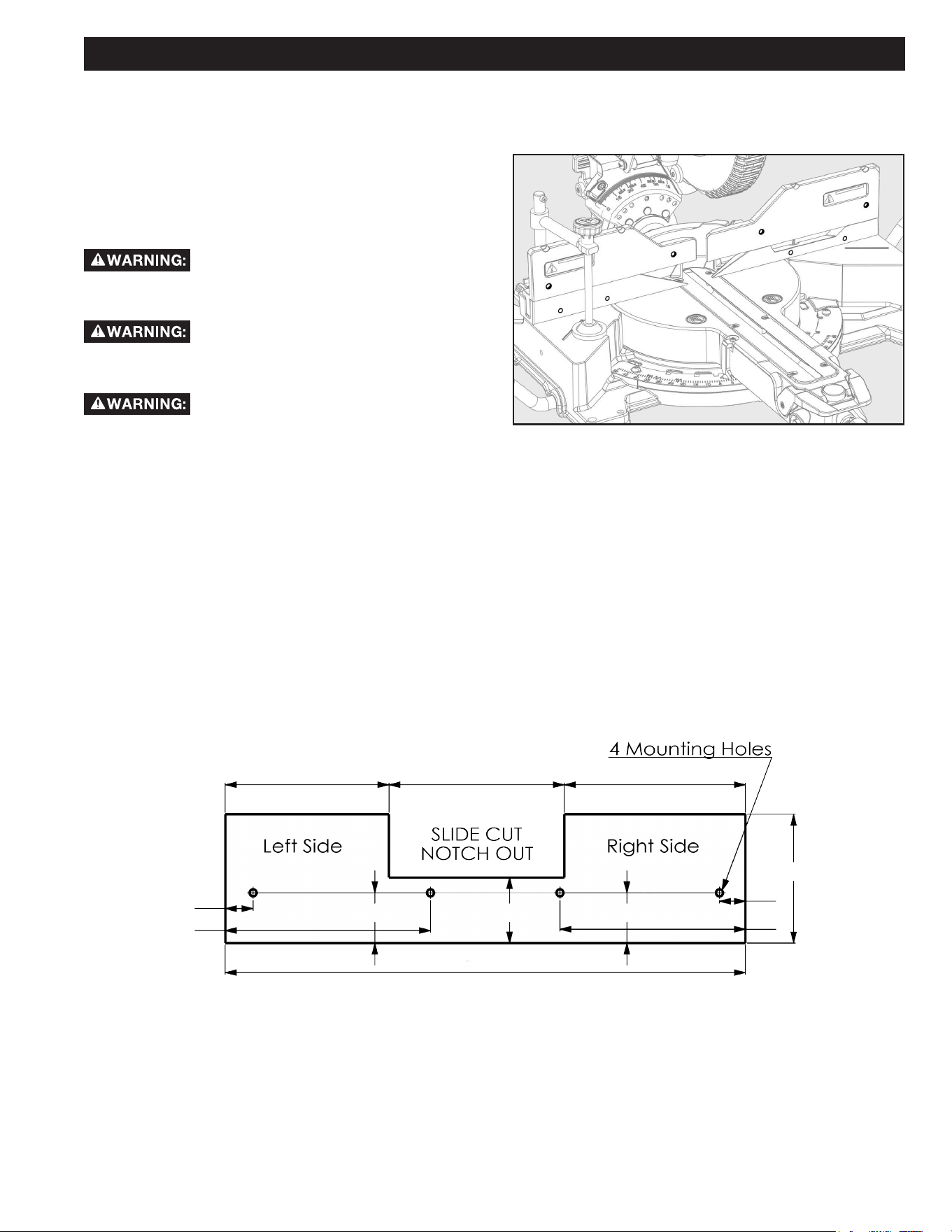
• The two edges of the molding that contact the ceiling and the wall are at angles that, when added together, equal exactly 90°.
Most crown molding has a top rear angle (the section that ts at against the ceiling) of 52° and a bottom rear angle (the
section that ts at against the wall) of 38°.
• To accurately cut crown molding for a 90° inside or outside corner, lay the molding with its broad back surface at on the miter
table and against the fence.
• The angles for crown moldings must be very precise. The bevel and miter angles are interdependent; changing one angle
changes the other angle as well.
• Since it is very easy for the work piece to shift, all settings should rst be tested on scrap molding. Also most wall corners do not
have angles of exactly 90°; therefore, you will need to ne-tune your settings.
• When cutting crown molding the bevel angle should be set at 33.85°.
• The miter angle should be set at 31.62° either right or left, depending on the desired cut for the application. See the chart on
next page for correct angle settings and correct positioning of crown molding on the work table.
• NOTE: Crown Molding Stops can be purchased to help aid with workpiece support while cutting crown molding.
TIPS FOR CUTTING CROWN MOLDING
29
OPERATION
Figure 36
Figure 37
AUXILIARY FENCE
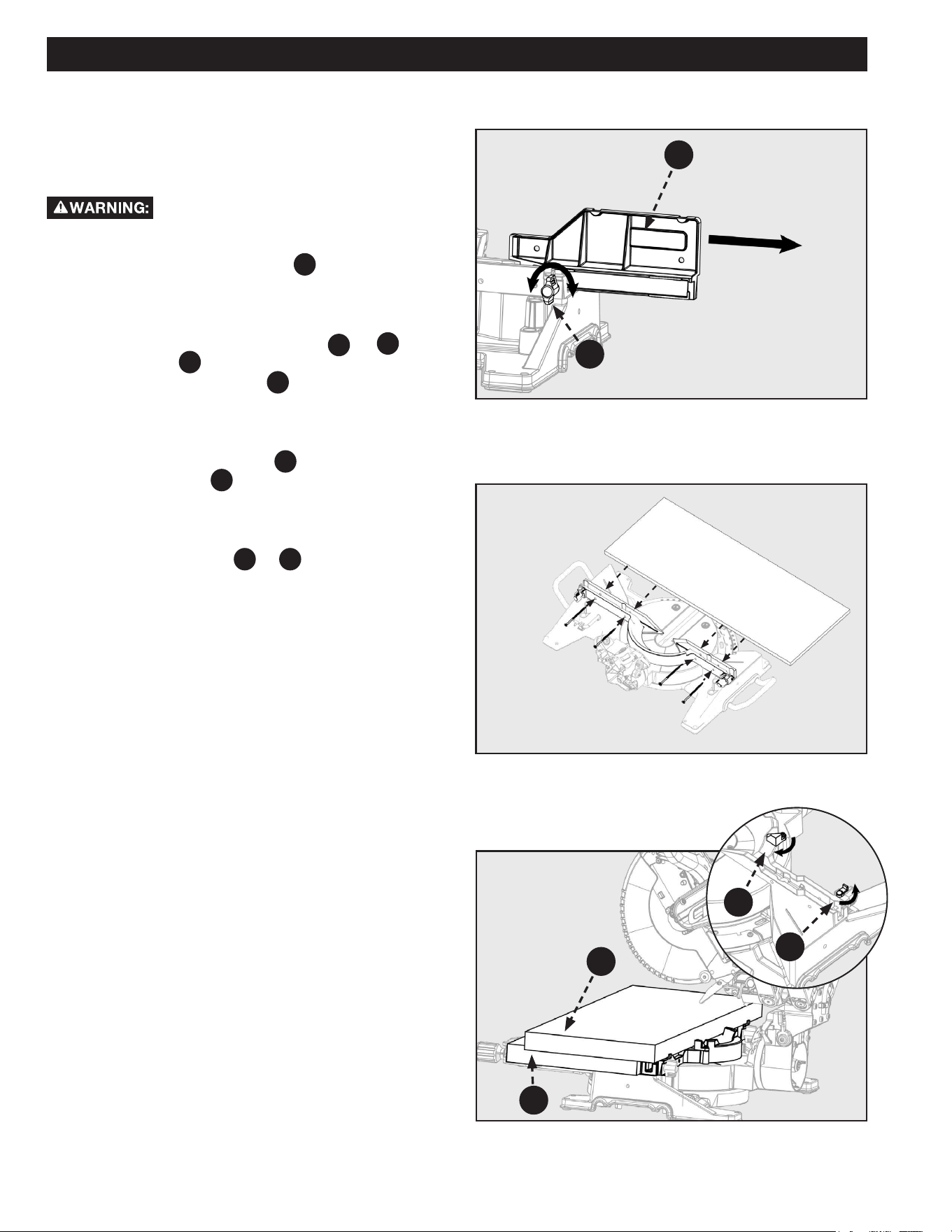
See Figure 36.
For cutting certain workpieces, you may require an auxiliary
fence with a larger fence surface area to accommodate the
workpiece. The auxiliary fence should be made using 3/4 inch
thick wood. Use the mounting holes (in bold) which are pre-
drilled in the fence to attach an auxiliary fence.
NEVER use auxiliary fence which interferes
or makes contact with saw head. ALWAYS check for clearance
between auxiliary fence and saw head before making cuts.
To make slide cuts using an auxiliary fence, a
notch MUST be cut out in the auxiliary fence prior to attaching
to saw fence.
The auxiliary fence can ONLY be used with
the 0° bevel angle. Remove the auxiliary fence before making
a bevel cut.
See Figure 37 for auxiliary fence dimensions.
1. Place auxiliary fence wood against miter saw fence. See Figure 36. The maximum height for this wood MUST NOT exceed
5.5 inch. Check to make sure auxiliary fence does make contact with saw head, check with saw head in the full DOWN and
fully RETRACTED position.
2. Mark the hole locations on the backside of the auxiliary fence board.
3. Drill the marked hole locations all the way through the auxiliary fence. Countersink the drilled holes on the front side of
your auxiliary fence board.
4. Fasten the auxiliary fence using countersunk screws. Make sure the screw heads are level with or below the surface of
the auxiliary fence. Secure from behind using at washers and nuts.
5. Make a full depth cut through the auxiliary fence, to create the blade slot.
6. The notch, see Figure 37, MUST be cut out in order to make slide cuts using the auxiliary fence.
6" 9 1/2" 6 1/4"
5 1/2"
7/8"
7 3/4"
2 1/8"2 3/4"2 1/8"
21 3/4"
1"
8 1/2"
30
Figure 38
Figure 40
EXPAND WORKTABLE AREA
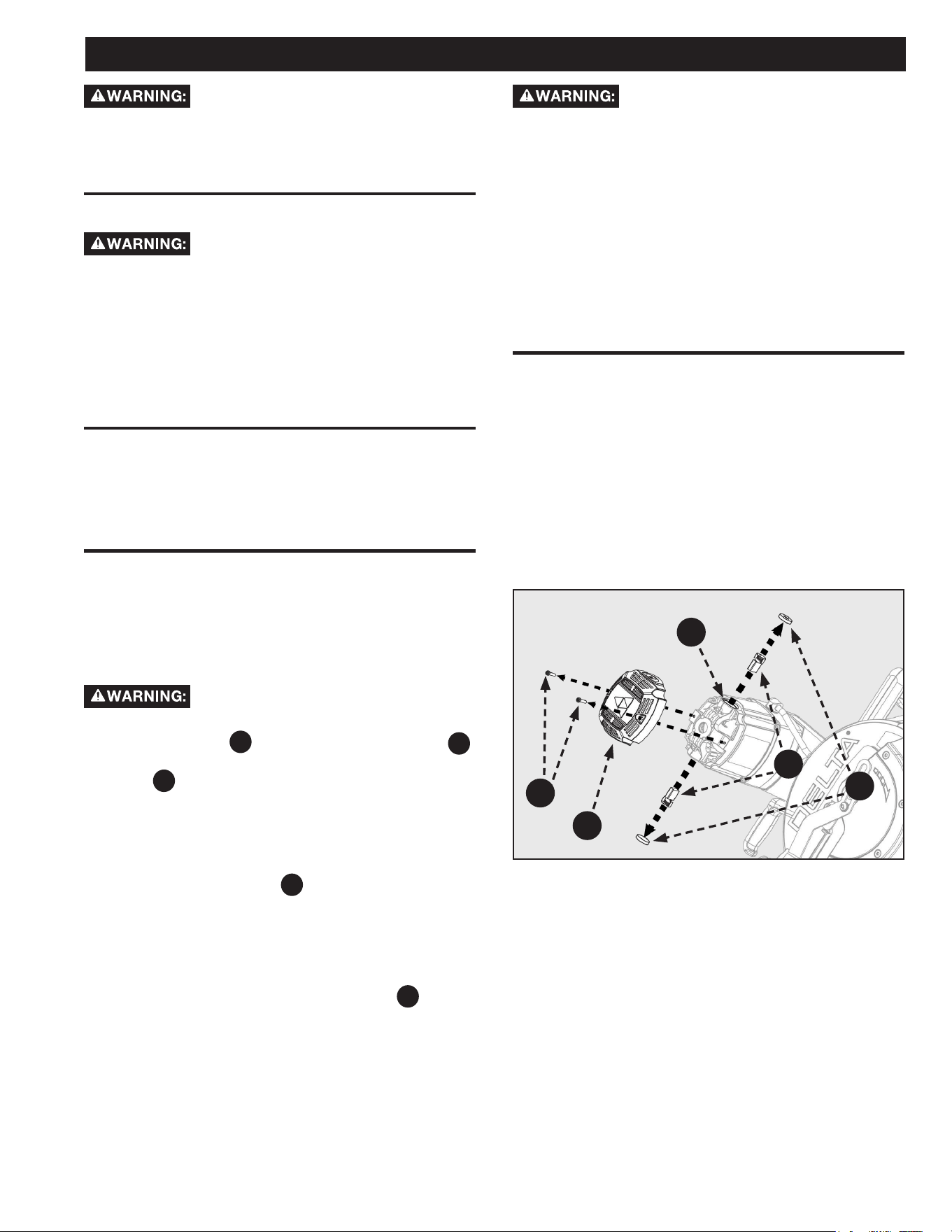
This saw is designed to allow for large capacity cuts up to
(2 x 16 inch). In order to make these cuts you will need to
configure your saw appropriately.
DO NOT use an auxiliary table board which
will not fully support the workpiece during cutting operation.
1. Loosen the fence lock knob
A
. Slide the upper
(adjustable) fence completely out of its track and set to
the side. See Figure 38. (Both upper fences need to be
removed).
2. Flip the back fence support tabs (
C
&
D
) into
position. Tabs
D
are on both the left and right sides of
the lower (xed) fence. Tab
C
only exists on the right
side of the lower (xed) fence. These will function as
your workpiece backstop. See Figure 40.
3. You will need to add a 2 x 12 inches (1 1/2 x 11 5/8
inches) auxiliary table board
E
to support your large
capacity workpiece
F
. See Figure 40.
NOTE: The Auxiliary Table Board should be as wide as the lower
(xed) fence and secured to the lower fence using wood screws,
see Figure 39.
4. Use the support tabs (
C
&
D
) to support the back
of your workpiece before making any cuts.
OPERATION
Figure 39
E
F
D
C
TIGHTEN
LOOSEN
B
A
31
MAINTENANCE
To reduce the risk of injury, turn unit off and
disconnect it from power source before cleaning or servicing,
before installing and removing accessories, before adjusting
when making repairs. An accidental start-up can cause serious
injury.
KEEP MACHINE CLEAN
Periodically blow out all air passages with
dry compressed air. All plastic parts should be cleaned with a
soft damp cloth. NEVER use solvents to clean plastic parts.
They could possibly dissolve or otherwise damage the material.
Wear certified safety equipment for eye, hearing and
respiratory protection while using compressed air.
Empty dust bag frequently.
When servicing, use only identical replacement parts. Use of
any other parts may create a hazard or cause product damage.
GENERAL MAINTENANCE
NEVER use solvents when cleaning plastic parts. Most plastics
are susceptible to damage from various types of commercial
solvents and may be damaged by their use. Use clean cloths to
remove dirt, dust, oil, grease, etc.
DO NOT at any time let brake fluids,
gasoline, petroleum-based products, penetrating oils, etc.,
come in contact with plastic parts. Chemicals can damage,
weaken or destroy plastic which may result in serious personal
injury.
Electric tools used on fiberglass material, wallboard,
spackling compounds, or plaster are subject to accelerated
wear and possible premature failure because the fiberglass
chips and grindings are highly abrasive to bearings, brushes,
commutator, etc. Consequently, we DO NOT recommend
using this tool for extended work on these types of materials.
However, if you do work with any of these materials, it is
extremely important to clean the tool using compressed air.
LUBRICATION
All of the bearings in this tool are lubricated with a sufficient
amount of high-grade lubricant for the life of the unit under
normal operating conditions. Therefore, no further lubrication
is required.
BRUSH REPLACEMENT
The motor on this saw features externally accessible brush
assemblies that should be periodically checked for wear. If the
brushes need to be replaced, see Figure 41 and proceed as
follows:
1. Unplug the saw.
Failure to unplug the saw could result in
accidental starting causing serious personal injury.
2. Loosen Screws
A
and remove motor end cap
F18
.
Using a athead screwdriver carefully remove the brush
cap
B
.
NOTE: Remove the cap slowly. The brush assembly is spring-
loaded and will pop out once the cap is removed. If machine
was recently operated, use caution when removing the carbon
brushed as they may be hot.
3. Remove brush assembly
C
.
4. Inspect both brushes. If either has less than 1/4 inch
length of carbon remaining, both brushes should be
replaced.
NOTE: DO NOT replace one side without replacing the other.
5. Insert both brushes into the brush tubes
D
, making
sure the curvature of the brushes matches curvature of
motor. Brush assembly should move freely within the
tube.
6. Carefully replace the brush cap, ensuring that the brush
cap is clean and properly aligned so the threads don’t
strip.
7. Tighten brush cap securely. DO NOT over-tighten.
Figure 41
D
C
B
F18
A
32
TROUBLESHOOTING
For assistance with your machine, visit our website at www.deltamachinery.com for a list of service centers or call DELTA
®
Customer
Service at (toll free) 1-800-223-7278.
FAILURE TO START
If your machine fails to start, check to make sure the prongs on the cord plug are making good contact in the receptacle, and check
reset button on GFCI - Ground Fault Circuit Interrupt (If applicable). Also, check for blown fuses or open circuit breakers in your power
line.
ACCESSORIES
A complete line of accessories is available from your DELTA
®
Supplier, DELTA
®
Factory Service Centers, and DELTA
®
Authorized Service
Centers. Please visit our Web Site www.deltamachinery.com for an on-line catalog or for the name or your nearest supplier.
Since accessories other than those oered by DELTA
®
have not been tested with this product, use of
such accessories could be hazardous
. For safest operation, only DELTA
®
recommended accessories should be used
with this product
.
Problem Possible Cause Solution
Saw will not start 1. Saw un-plugged.
2. Fuse blown or circuit breaker tripped.
3. Damaged power cord.
4. Worn out brushes.
1. Make sure the saw is plugged in.
2. Replace fuse or reset circuit breaker.
3. Contact local authorized Service Center to
have cord replaced.
4. Contact local authorized Service Center
to have brushes replaced if you cannot
replace them yourself. Refer to page 31.
Saw makes poor cuts 1. Dull saw blade.
2. Blade not mounted properly.
3. Residue on pitch or blade.
4. Incorrect type of blade installed.
1. Replace blade. Refer to page 14.
2. Correct blade tment. Refer to page 14.
3. Remove and clean the blade.
4. Change the blade. Refer to page 14.
Blade not getting up to speed 1. Extension cord too small gauge or too long.
2. Low current rating from the source.
1. Replace with correct extension cord size.
Refer to page 10.
2. Contact your electric company.
Machine has excessive vibration 1. Saw is not mounted securely to stand or
workbench.
2. Miter saw stand or workbench on uneven
oor.
3. Damaged saw blade.
1. Tighten all mounting hardware. Refer to
page 21.
2. Reposition on level surface. Refer to
page 21.
3. Replace blade. Refer to page 14.
Miter cuts are not accurate 1. Miter scale not reading correctly.
2. Blade is not square to fence.
3. Blade is not perpendicular to table.
4. Workpiece could be moving during
operation.
1. Check and adjust. Refer to page 16.
2. Check and adjust. Refer to page 16.
3. Check and adjust. Refer to page 15.
4. Clamp workpiece securely to fence.
Material binding in the blade 1. Material could be bowed or could be cutting
through knots.
1. Refer to page 22.

33
PARTS, SERVICE OR WARRANTY ASSISTANCE
All CRUZER Machines and accessories are manufactured to high quality standards and are serviced by a network of an Authorized
Service Centers. To obtain additional information regarding your product or to obtain parts, service, warranty assistance, or the
location of the nearest service center, please call 1-800-223-7278.
Five Year Limited Warranty
1. WHAT IS COVERED. Delta Power Equipment Corporation (“Company”) will, at its option, repair or replace this product, if purchased
at retail in the United States or Canada and the product, with normal use, has proven to be defective in workmanship or material, subject to
the conditions stated in this Limited Warranty. This Limited Warranty covers only materials and labor. All transportation costs are Customer’s
responsibility.
2. WARRANTY PERIOD. All warranty claims must be submitted within ve years from the date of retail purchase. For all service parts and
factory refurbished products, the warranty period is 180 days.
3. HOW TO OBTAIN SERVICE. To obtain warranty service, you must return the defective product, at your expense, to a service center
authorized by Company to perform warranty service (a “Company Authorized Service Center”) within the applicable warranty period, together
with acceptable proof of purchase, such as your original receipt bearing the date of purchase, or product registration number. Company reserves
the right to restrict warranty claim service to the country where the purchase was made and/or to charge for the cost to export service parts or
provide warranty service in a dierent country. For this purpose, on-line purchases are deemed made in the United States. For the location of
your nearest Company Authorized Service Center, call Company’s Customer Care Center at (800) 223-7278.
4. EXCLUSIONS.
● Company does not oer any warranty on products purchased in used or damaged condition.
● Company does not warrant any products purchased outside the United States or Canada
● Company will not be responsible for any damage that has resulted from normal wear, misuse, abuse or any repair or alteration made by
anyone other than a Company Authorized Service Center or a designated representative of Company’s Customer Care Center.
All IMPLIED WARRANTIES are expressly limited to the warranty period identied above.
Company will not be liable for INCIDENTAL OR CONSEQUENTIAL damages.
This limited warranty is Company’s sole warranty and sets forth the customer’s exclusive remedy with respect to defective products; all other
warranties, express or implied, whether of merchantability, tness for purpose, or otherwise, are expressly disclaimed by Company, except as
expressly stated in this warranty statement.
Some states do not allow the exclusion or limitation of incidental or consequential damages, or the limitation of implied warranties, so the above
limitations or exclusions may not apply to you. This warranty gives you specic legal rights and you may have other rights which vary in certain
states or provinces. For further details of warranty coverage and warranty repair information, call (800) 223-7278.
LATIN AMERICA: This warranty does not apply to products sold in Latin America. For products sold in Latin America, call the
local company or see website for warranty information.
REPLACEMENT PARTS
SERVICE AND REPAIRS
FREE WARNING LABEL REPLACEMENT
Use only identical replacement parts. For a parts list or to order parts, visit our website at www.DeltaMachinery.com/service. You can
also order parts from your nearest Authorized Warranty Service Center or by calling Technical Service Manager at 1-800-223-7278 to
receive personalized support from one of our highly-trained representatives.
All quality tools will eventually require servicing and/or replacement of parts. For information about Delta Power Equipment Corporation,
its factory-owned branches, or to locate an Authorized Warranty Service Center, visit our website at www.DeltaMachinery.com/service
or call Customer Care at 1-800-223-7278. All repairs made by our service centers are fully guaranteed against defective material and
workmanship. We cannot guarantee repairs made or attempted by others. By calling this number you can also nd answers to most
frequently asked questions 24 hours/day. You can also write to us for information at Delta Power Equipment Corporation, 2651 New
Cut Road, Spartanburg, SC 29303 - Attention: Technical Service Manager. Be sure to indicate all of the information shown on the
nameplate of your saw (model number, type, serial number, date code, etc.).
If your warning labels become illegible or are missing, call 1-800-223-7278 for a free replacement.

2651 New Cut Road
Spartanburg, SC 29303
(800) 223-7278
www.DeltaMachinery.com
©
2023 Delta Power Equipment Corporation
DPEC007299
Rev:1
01/12/2023