
ES-A
LED Backlight TV
Read the manual carefully and ensure you have fully understood
its contents before operating this device for the first time.
English
A
Important Safety Precautions
Disposal of Used Electrical & Electronic Equipment
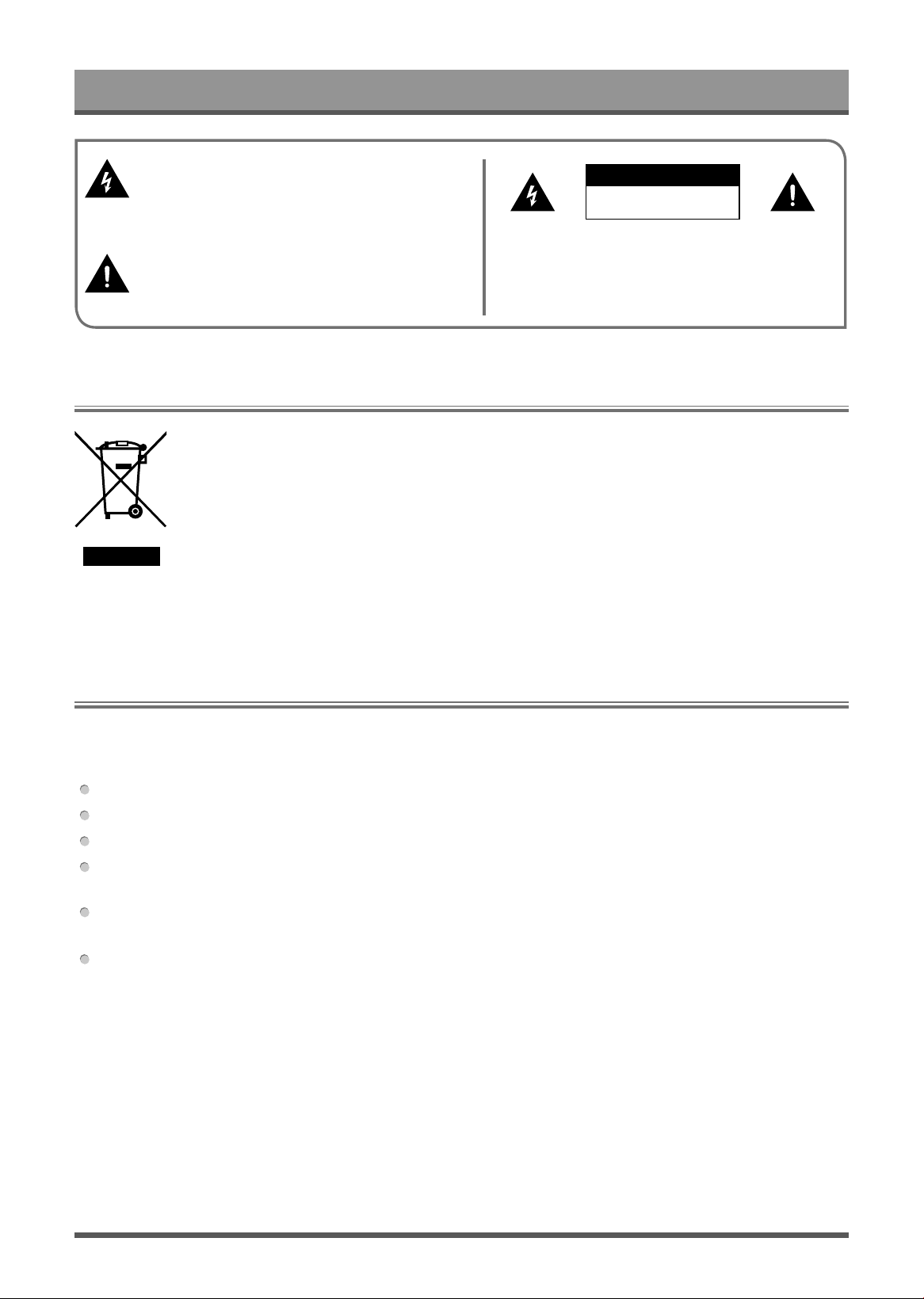
This symbol alerts user about the presence of a
dangerous voltage not isolated inside the product
which can be sufficiently powerful to constitute a
risk of electrocution.
Do not open the back cover.
In no case the user is allowed to operate inside the TV set.
Only a qualified technician is entitled to operate.
This symbol alerts user about the presence of
important operating instructions and maintenance
in the document enclosed in the package.
ATTENTION
RISK OF SHOCK
ELECTRIC
Packaging and electrical goods should be recycled appropriately, and not treated as household
waste. Please dispose of this equipment at your applicable collection point for the recycling of
electrical & electronic equipment waste. By ensuring the correct disposal of this product, you
will help prevent potentially hazardous to the environment and to human health, which could
otherwise be caused by unsuitable waste handling of this product. The recycling of materials
will help conserve natural resources. Please do not therefore dispose of your old electrical and
electronic equipment with your household waste. For more detailed information about recycling
of this product, please contact your local city office, your household waste disposal service or
the shop where you purchased the product.
Warning
Never place a television set in an unstable location. A television set may fall, causing serious personal injury
or death. Many injuries, particularly to children, can be avoided by taking simple precautions such as:
Using stands recommended by the manufacturer of the television set.
Only using furniture that can safely support the television set.
Ensuring the television set is not overhanging the edge of the supporting furniture.
Not placing the television set on tall furniture (for example, cupboards or bookcases) without anchoring
both the furniture and the television set to a suitable support.
Not placing the television set on cloth or other materials that may be located between the television set and
supporting furniture.
Educating children about the dangers of climbing on furniture to reach the television set or its controls.
If your existing television set is being retained and relocated, the same considerations as above should be
applied.

B
Important Safety Precautions
Please read the following safeguards for your TV and retain for future reference.
Always follow all warnings and instructions marked on the television.
1. A note about safety and operating instructions
Read and follow all safety and operating instructions, and retain them safely for future reference.
2. Heed Warnings
Adhere to all warnings on the appliance and in the operating instructions.
3. Cleaning
Unplug the TV from the wall outlet before cleaning. Do not use liquid, abrasive, or aerosol cleaners. Cleaners
can permanently damage the cabinet and screen. Use a lightly dampened cloth for cleaning.
4. Wall Bracket
Wall brackets are not supplied with this product. After market brackets may be available to purchase locally.
Please refer to the specification page for dimensions.
5. Water and Moisture
Avoid dripping or splashing of liquids onto the product. Objects filled with liquids, such as vases, should not be
placed on the product.
6. Setting
Do not place this TV on an unstable cart, stand or table. Placing the TV on an unstable base can cause the
TV to fall, resulting in serious personal injuries as well as damage to the TV. Use only a cart, stand, bracket or
table recommended by the manufacturer or salesperson.
7. Ventilation
Slots and openings in the cabinet are provided for ventilation, to ensure reliable operation of the TV and to
protect it from overheating. Do not cover the ventilation openings in the cabinet and never place the set in a
confined space such as built-in cabinet unless proper ventilation is provided. Leave a minimum 10cm gap all
around the unit.
8. Power Source
This TV should be operated only from the type of power source indicated on the marking label. If you are not
sure of the type of power supplied to your home, consult your appliance dealer or local power company.
9. Power-Cord Protection
Power- supply cords should be routed so that they are not likely to be walked on or pinched by items placed
upon or against them, paying particular attention to cords at plug, wall outlets, and the point where they exit
from the TV. MAIN plug is used as the disconnect device, the disconnect device shall remain readily operable.
10. Lightning
For added protection for this TV during a lightning storm, or when it is left unattended and unused for long
periods of time, unplug it from the wall outlet and disconnect the antenna or cable system. This will prevent
damage to the TV due to lightning or power-line surge.
Safeguards

C
Important Safety Precautions
11. Power Lines
An outside antenna system should not be located in the vicinity of overhead power lines or other electric light
or power circuits, or where it can fall into such power lines or circuits. Where installing an outside antenna
system, extreme care should be taken to keep from touching such power lines or circuits as contact with them
might be fatal.
12. Overloading
Do not overload wall outlets and extension cords as this can result in a risk of fire or electric shock.
13. Object and Liquid Entry
Never push objects of any kind into this TV through openings as they may touch dangerous voltage points or
short-out parts that could result in fire or electric shock. Never spill liquid of any kind on or into the TV.
14. Outdoor Antenna Grounding
If an outside antenna or cable system is connected to the TV, be sure the antenna or cable system is
grounded so as to provide some protection against voltage surges and built-up static charges.
15. Servicing
Do not attempt to service this TV yourself as opening or removing covers may expose you to dangerous
voltage or other hazards. Refer all servicing to qualified service personnel.
16. Damage Requiring Service
Unplug the TV from the wall outlet and refer servicing to qualified service personnel under the following
conditions:
(a) When the power - supply cord or plug is damaged.
(b) If liquid has been spilled, or objects have fallen into the TV.
(c) If the TV has been exposed to rain or water.
(d) If the TV does not operate normally by following the operating instructions. Adjust only those controls that
are covered by the operating instructions as an improper adjustment of other controls may result in damage
and will often require extensive work by a qualified technician to restore the TV to its normal operation.
(e) If the TV has been dropped or the cabinet has been damaged.
(f) When the TV exhibits a distinct change in performance - this indicates a need for service.
17. Replacement Parts
When replacement parts are required, be sure the service technician has used replacement parts specified by
the manufacturer or have the same characteristics as the original part. Unauthorized substitutions may result
in fire, electric shock or other hazards.
18. Safety Check
Upon completion of any service or repair to the TV, ask the service technician to perform safety checks to
determine that the TV is in safe operating condition.
19. Heat
The product should be situated away from heat sources such as radiators, heat registers, stoves, or other
products (including amplifiers) that produce heat.
20. Fire
The product should be situated away from naked flame sources such as lighted candle.
21. Off-gassing
The TV smells of plastic is normal and will dissipate over time.
/
/
>
Settings
>
Channel
>
Auto Scan
Auto Scan
A
u
t
o
m
a
t
i
c
a
l
l
y
s
c
a
n
f
o
r
c
h
a
n
n
e
l
s
t
o
v
i
e
w
p
r
o
g
r
a
m
m
e
s
f
r
o
m
y
o
u
r
T
V
s
o
u
r
c
e
.
Antenna
C
h
a
n
n
e
l
:
S
e
l
e
c
t
f
r
o
m
A
l
l
c
h
a
n
n
e
l
s
o
r
F
r
e
e
c
h
a
n
n
e
l
s
.
S
c
a
n
M
o
d
e
:
S
e
l
e
c
t
w
h
e
t
h
e
r
y
o
u
w
a
n
t
t
o
s
e
a
r
c
h
d
i
g
i
t
a
l
c
h
a
n
n
e
l
s
o
n
l
y
(
D
T
V
)
,
d
i
g
i
t
a
l
a
n
d
a
n
a
l
o
g
c
h
a
n
n
e
l
s
(
A
T
V
+
D
T
V
)
o
r
a
n
a
l
o
g
c
h
a
n
n
e
l
s
o
n
l
y
(
A
T
V
)
.
I
f
y
o
u
r
e
c
e
i
v
e
D
V
B
-
T
o
r
D
V
B
-
T
2
s
i
g
n
a
l
,
y
o
u
c
a
n
u
s
e
D
T
V
.
L
C
N
:
Y
o
u
c
a
n
s
w
i
t
c
h
o
n
L
C
N
(
L
o
g
i
c
a
l
C
h
a
n
n
e
l
N
u
m
b
e
r
)
i
f
y
o
u
w
a
n
t
t
o
u
s
e
t
h
e
c
h
a
n
n
e
l
l
i
s
t
.
P
l
e
a
s
e
n
o
t
e
t
h
a
t
s
o
m
e
o
p
e
r
a
t
o
r
s
a
r
e
r
e
s
t
r
i
c
t
e
d
t
o
m
a
n
u
a
l
l
y
c
h
a
n
g
e
t
h
e
c
h
a
n
n
e
l
o
r
d
e
r
.
I
f
y
o
u
s
w
i
t
c
h
o
f
f
L
C
N
,
t
h
e
n
t
h
e
c
h
a
n
n
e
l
l
i
s
t
c
a
n
b
e
e
d
i
t
e
d
a
f
t
e
r
c
h
a
n
n
e
l
s
c
a
n
.
(
T
h
i
s
f
u
n
c
t
i
o
n
i
s
o
n
l
y
a
p
p
l
i
c
a
b
l
e
i
n
s
o
m
e
c
o
u
n
t
r
i
e
s
.
)
Cable
C
h
a
n
n
e
l
:
S
e
l
e
c
t
f
r
o
m
A
l
l
C
h
a
n
n
e
l
s
o
r
F
r
e
e
C
h
a
n
n
e
l
s
.
S
c
a
n
M
o
d
e
:
S
e
l
e
c
t
w
h
e
t
h
e
r
y
o
u
w
a
n
t
t
o
s
e
a
r
c
h
d
i
g
i
t
a
l
c
h
a
n
n
e
l
s
o
n
l
y
(
D
T
V
)
,
d
i
g
i
t
a
l
a
n
d
a
n
a
l
o
g
c
h
a
n
n
e
l
s
(
A
T
V
+
D
T
V
)
o
r
a
n
a
l
o
g
c
h
a
n
n
e
l
s
o
n
l
y
(
A
T
V
)
.
L
C
N
:
Y
o
u
c
a
n
s
w
i
t
c
h
o
n
L
C
N
(
L
o
g
i
c
a
l
C
h
a
n
n
e
l
N
u
m
b
e
r
)
i
f
y
o
u
w
a
n
t
t
o
u
s
e
t
h
e
c
h
a
n
n
e
l
l
i
s
t
.
P
l
e
a
s
e
n
o
t
e
t
h
a
t
s
o
m
e
o
p
e
r
a
t
o
r
s
a
r
e
r
e
s
t
r
i
c
t
e
d
t
o
m
a
n
u
a
l
l
y
c
h
a
n
g
e
t
h
e
c
h
a
n
n
e
l
o
r
d
e
r
.
I
f
y
o
u
s
w
i
t
c
h
o
f
f
L
C
N
,
t
h
e
n
t
h
e
c
h
a
n
n
e
l
l
i
s
t
c
a
n
b
e
e
d
i
t
e
d
a
f
t
e
r
c
h
a
n
n
e
l
s
c
a
n
.
(
T
h
i
s
f
u
n
c
t
i
o
n
i
s
o
n
l
y
a
p
p
l
i
c
a
b
l
e
i
n
s
o
m
e
c
o
u
n
t
r
i
e
s
.
)
/
/
>
Settings
>
Channel
>
Advanced Settings
>
Manual Scan
DTV Manual Scan
M
a
n
u
a
l
s
c
a
n
T
V
p
r
o
g
r
a
m
i
n
d
i
g
i
t
a
l
s
i
g
n
a
l
s
.
W
h
e
n
t
h
e
D
T
V
M
a
n
u
a
l
S
c
a
n
s
c
r
e
e
n
a
p
p
e
a
r
s
,
p
r
e
s
s
/
b
u
t
t
o
n
t
o
s
e
l
e
c
t
A
n
t
e
n
n
a
o
r
C
a
b
l
e
a
n
d
t
h
e
n
p
r
e
s
s
Start
t
o
c
o
m
m
e
n
c
e
t
h
e
s
e
a
r
c
h
o
f
t
h
a
t
c
h
a
n
n
e
l
.
W
h
e
n
t
h
e
s
i
g
n
a
l
h
a
s
b
e
e
n
t
u
n
e
d
,
s
i
g
n
a
l
s
t
r
e
n
g
t
h
w
i
l
l
b
e
d
i
s
p
l
a
y
e
d
o
n
t
h
e
s
c
r
e
e
n
.
ATV Manual Scan
M
a
n
u
a
l
s
c
a
n
T
V
p
r
o
g
r
a
m
i
n
a
n
a
l
o
g
s
i
g
n
a
l
s
.
F
r
e
q
u
e
n
c
y
:
I
n
p
u
t
t
h
e
c
h
a
n
n
e
l
f
r
e
q
u
e
n
c
y
t
h
a
t
y
o
u
d
e
s
i
r
e
d
.
P
i
c
t
u
r
e
S
y
s
t
e
m
:
S
e
l
e
c
t
t
h
e
C
o
l
o
u
r
S
y
s
t
e
m
.
S
o
u
n
d
S
y
s
t
e
m
:
S
e
l
e
c
t
t
h
e
S
o
u
n
d
S
y
s
t
e
m
.
M
a
n
u
a
l
l
y
e
d
i
t
t
h
e
c
h
a
n
n
e
l
l
i
s
t
o
r
d
e
r
t
o
y
o
u
r
p
r
e
f
e
r
e
n
c
e
.
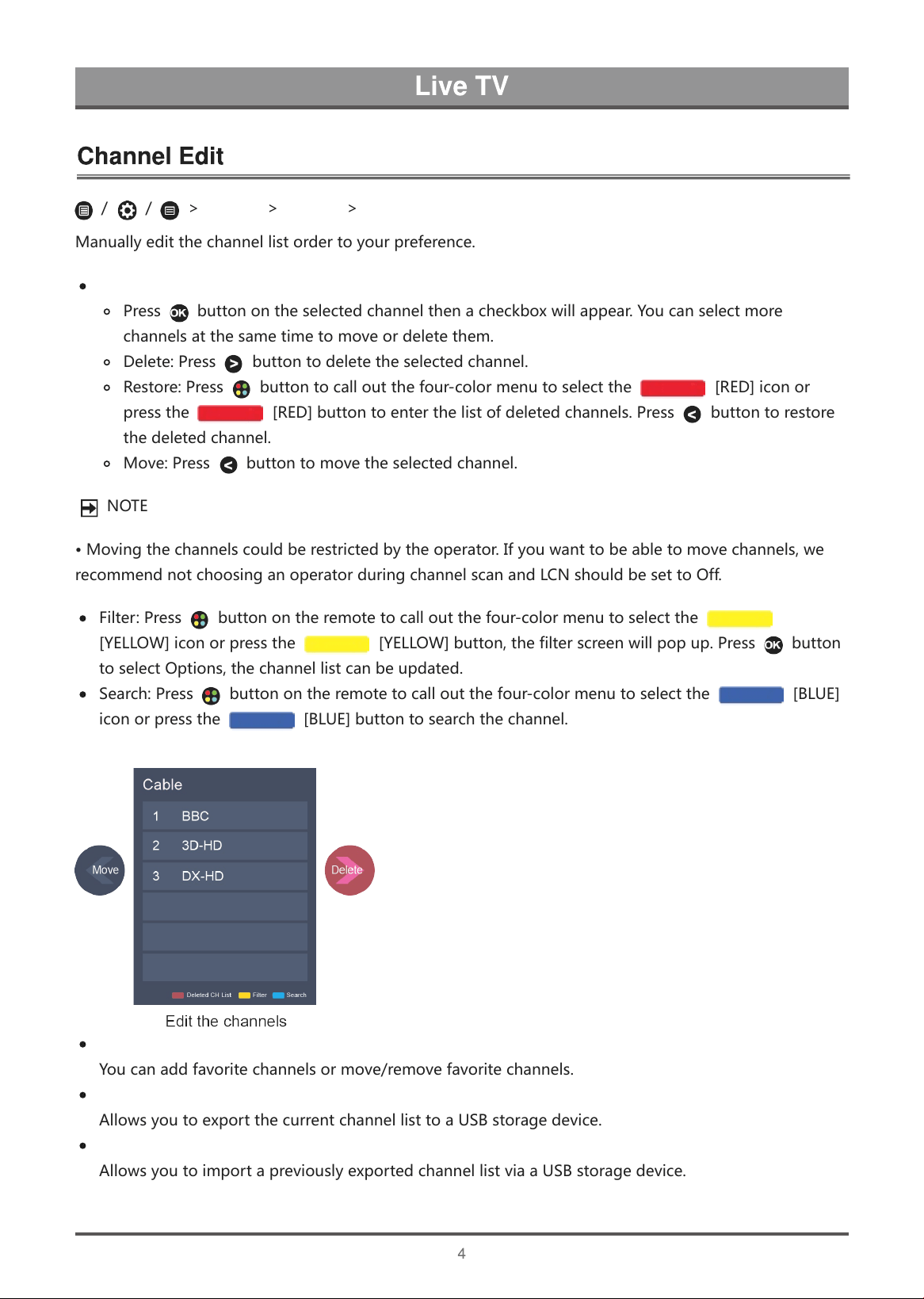
Edit the channels
P
r
e
s
s
b
u
t
t
o
n
o
n
t
h
e
s
e
l
e
c
t
e
d
c
h
a
n
n
e
l
t
h
e
n
a
c
h
e
c
k
b
o
x
w
i
l
l
a
p
p
e
a
r
.
Y
o
u
c
a
n
s
e
l
e
c
t
m
o
r
e
c
h
a
n
n
e
l
s
a
t
t
h
e
s
a
m
e
t
i
m
e
t
o
m
o
v
e
o
r
d
e
l
e
t
e
t
h
e
m
.
D
e
l
e
t
e
:
P
r
e
s
s
b
u
t
t
o
n
t
o
d
e
l
e
t
e
t
h
e
s
e
l
e
c
t
e
d
c
h
a
n
n
e
l
.
R
e
s
t
o
r
e
:
P
r
e
s
s
b
u
t
t
o
n
t
o
c
a
l
l
o
u
t
t
h
e
f
o
u
r
-
c
o
l
o
r
m
e
n
u
t
o
s
e
l
e
c
t
t
h
e
[
R
E
D
]
i
c
o
n
o
r
p
r
e
s
s
t
h
e
[
R
E
D
]
b
u
t
t
o
n
t
o
e
n
t
e
r
t
h
e
l
i
s
t
o
f
d
e
l
e
t
e
d
c
h
a
n
n
e
l
s
.
P
r
e
s
s
b
u
t
t
o
n
t
o
r
e
s
t
o
r
e
t
h
e
d
e
l
e
t
e
d
c
h
a
n
n
e
l
.
M
o
v
e
:
P
r
e
s
s
b
u
t
t
o
n
t
o
m
o
v
e
t
h
e
s
e
l
e
c
t
e
d
c
h
a
n
n
e
l
.
N
O
T
E
•
M
o
v
i
n
g
t
h
e
c
h
a
n
n
e
l
s
c
o
u
l
d
b
e
r
e
s
t
r
i
c
t
e
d
b
y
t
h
e
o
p
e
r
a
t
o
r
.
I
f
y
o
u
w
a
n
t
t
o
b
e
a
b
l
e
t
o
m
o
v
e
c
h
a
n
n
e
l
s
,
w
e
r
e
c
o
m
m
e
n
d
n
o
t
c
h
o
o
s
i
n
g
a
n
o
p
e
r
a
t
o
r
d
u
r
i
n
g
c
h
a
n
n
e
l
s
c
a
n
a
n
d
L
C
N
s
h
o
u
l
d
b
e
s
e
t
t
o
O
f
f
.
F
i
l
t
e
r
:
P
r
e
s
s
b
u
t
t
o
n
o
n
t
h
e
r
e
m
o
t
e
t
o
c
a
l
l
o
u
t
t
h
e
f
o
u
r
-
c
o
l
o
r
m
e
n
u
t
o
s
e
l
e
c
t
t
h
e
[
Y
E
L
L
O
W
]
i
c
o
n
o
r
p
r
e
s
s
t
h
e
[
Y
E
L
L
O
W
]
b
u
t
t
o
n
,
t
h
e
f
i
l
t
e
r
s
c
r
e
e
n
w
i
l
l
p
o
p
u
p
.
P
r
e
s
s
b
u
t
t
o
n
t
o
s
e
l
e
c
t
O
p
t
i
o
n
s
,
t
h
e
c
h
a
n
n
e
l
l
i
s
t
c
a
n
b
e
u
p
d
a
t
e
d
.
S
e
a
r
c
h
:
P
r
e
s
s
b
u
t
t
o
n
o
n
t
h
e
r
e
m
o
t
e
t
o
c
a
l
l
o
u
t
t
h
e
f
o
u
r
-
c
o
l
o
r
m
e
n
u
t
o
s
e
l
e
c
t
t
h
e
[
B
L
U
E
]
i
c
o
n
o
r
p
r
e
s
s
t
h
e
[
B
L
U
E
]
b
u
t
t
o
n
t
o
s
e
a
r
c
h
t
h
e
c
h
a
n
n
e
l
.
Edit the favorite channels
Y
o
u
c
a
n
a
d
d
f
a
v
o
r
i
t
e
c
h
a
n
n
e
l
s
o
r
m
o
v
e
/
r
e
m
o
v
e
f
a
v
o
r
i
t
e
c
h
a
n
n
e
l
s
.
Export to USB
A
l
l
o
w
s
y
o
u
t
o
e
x
p
o
r
t
t
h
e
c
u
r
r
e
n
t
c
h
a
n
n
e
l
l
i
s
t
t
o
a
U
S
B
s
t
o
r
a
g
e
d
e
v
i
c
e
.
Import from USB
A
l
l
o
w
s
y
o
u
t
o
i
m
p
o
r
t
a
p
r
e
v
i
o
u
s
l
y
e
x
p
o
r
t
e
d
c
h
a
n
n
e
l
l
i
s
t
v
i
a
a
U
S
B
s
t
o
r
a
g
e
d
e
v
i
c
e
.
/
/
>
Settings
>
Channel
>
Channel Edit
I
n
L
i
v
e
T
V
,
p
r
e
s
s
o
r
b
u
t
t
o
n
o
n
t
h
e
r
e
m
o
t
e
c
o
n
t
r
o
l
t
o
d
i
s
p
l
a
y
t
h
e
C
h
a
n
n
e
l
L
i
s
t
m
e
n
u
.
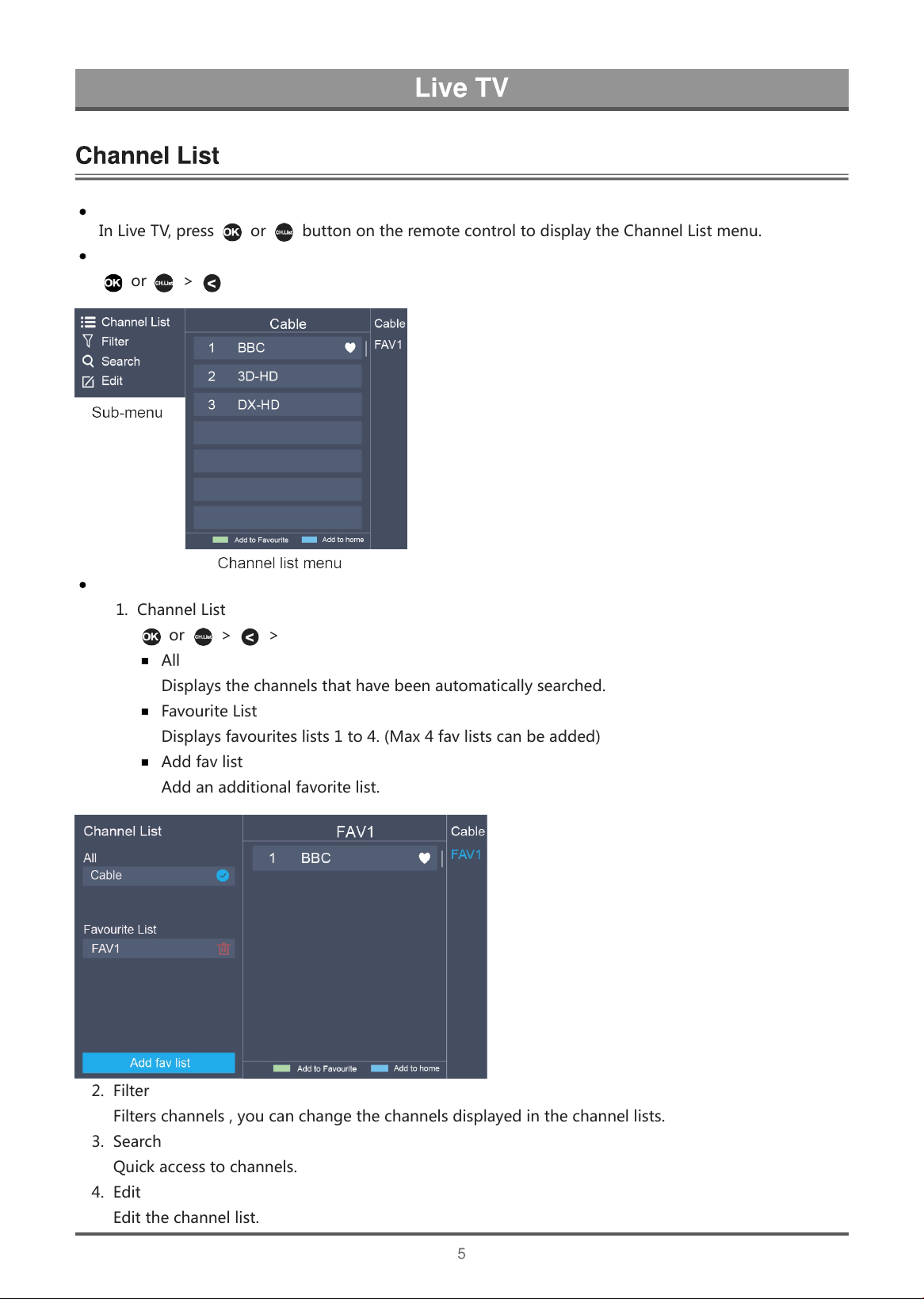
Enter the sub-menu of channel list
o
r
>
Introduction of the sub-menu
1
.
C
h
a
n
n
e
l
L
i
s
t
o
r
>
>
Channel List
A
l
l
D
i
s
p
l
a
y
s
t
h
e
c
h
a
n
n
e
l
s
t
h
a
t
h
a
v
e
b
e
e
n
a
u
t
o
m
a
t
i
c
a
l
l
y
s
e
a
r
c
h
e
d
.
F
a
v
o
u
r
i
t
e
L
i
s
t
D
i
s
p
l
a
y
s
f
a
v
o
u
r
i
t
e
s
l
i
s
t
s
1
t
o
4
.
(
M
a
x
4
f
a
v
l
i
s
t
s
c
a
n
b
e
a
d
d
e
d
)
A
d
d
f
a
v
l
i
s
t
A
d
d
a
n
a
d
d
i
t
i
o
n
a
l
f
a
v
o
r
i
t
e
l
i
s
t
.
2
.
F
i
l
t
e
r
F
i
l
t
e
r
s
c
h
a
n
n
e
l
s
,
y
o
u
c
a
n
c
h
a
n
g
e
t
h
e
c
h
a
n
n
e
l
s
d
i
s
p
l
a
y
e
d
i
n
t
h
e
c
h
a
n
n
e
l
l
i
s
t
s
.
3
.
S
e
a
r
c
h
Q
u
i
c
k
a
c
c
e
s
s
t
o
c
h
a
n
n
e
l
s
.
4
.
E
d
i
t
E
d
i
t
t
h
e
c
h
a
n
n
e
l
l
i
s
t
.
Display the channel list
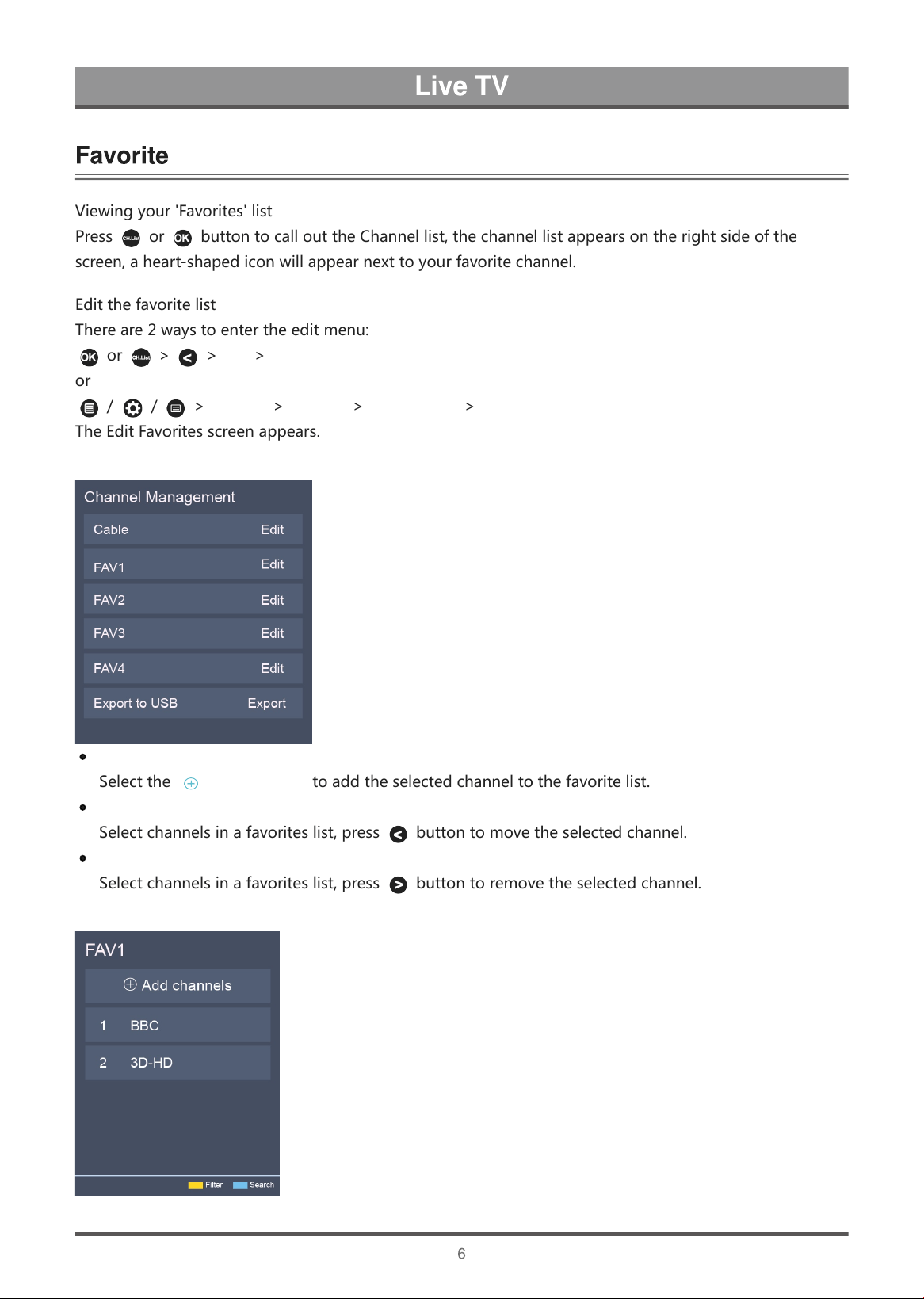
Viewingyour'Favorites'list
Press or buttontocallouttheChannellist,thechannellistappearsontherightsideofthe
screen,aheart-shapediconwillappearnexttoyourfavoritechannel.
Editthefavoritelist
Thereare2waystoentertheeditmenu:
or > >Edit>FAV1-FAV4
or
/ / >Settings>Channel>ChannelEdit>FAV1-FAV4
TheEditFavoritesscreenappears.
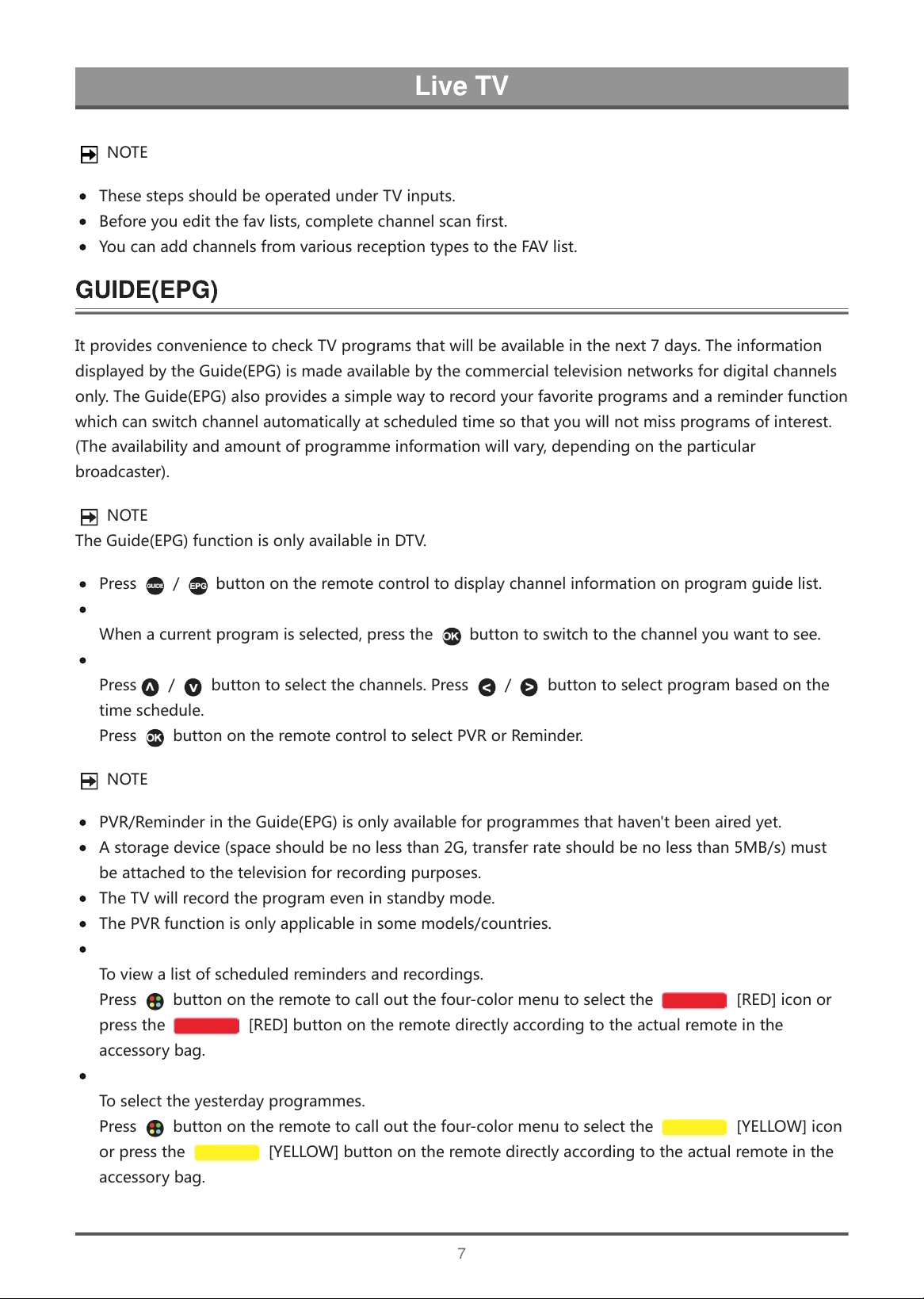
AddingchannelstoaFavoriteslist
Selectthe Addchannelstoaddtheselectedchanneltothefavoritelist.
Movingchannelsfromafavoriteslist
Selectchannelsinafavoriteslist,press buttontomovetheselectedchannel.
DeletingchannelsfromFavoriteslist
Selectchannelsinafavoriteslist,press buttontoremovetheselectedchannel.
NOTE
ThesestepsshouldbeoperatedunderTVinputs.
Beforeyoueditthefavlists,completechannelscanfirst.
YoucanaddchannelsfromvariousreceptiontypestotheFAVlist.
ItprovidesconveniencetocheckTVprogramsthatwillbeavailableinthenext7days.Theinformation
displayedbytheGuide(EPG)ismadeavailablebythecommercialtelevisionnetworksfordigitalchannels
only.TheGuide(EPG)alsoprovidesasimplewaytorecordyourfavoriteprogramsandareminderfunction
whichcanswitchchannelautomaticallyatscheduledtimesothatyouwillnotmissprogramsofinterest.
(Theavailabilityandamountofprogrammeinformationwillvary,dependingontheparticular
broadcaster).
NOTE
TheGuide(EPG)functionisonlyavailableinDTV.
Press / buttonontheremotecontroltodisplaychannelinformationonprogramguidelist.
Watch
Whenacurrentprogramisselected,pressthe buttontoswitchtothechannelyouwanttosee.
PVR/Reminder
Press / buttontoselectthechannels.Press / buttontoselectprogrambasedonthe
timeschedule.
Press buttonontheremotecontroltoselectPVRorReminder.
NOTE
PVR/ReminderintheGuide(EPG)isonlyavailableforprogrammesthathaven'tbeenairedyet.
Astoragedevice(spaceshouldbenolessthan2G,transferrateshouldbenolessthan5MB/s)must
beattachedtothetelevisionforrecordingpurposes.
TheTVwillrecordtheprogrameveninstandbymode.
ThePVRfunctionisonlyapplicableinsomemodels/countries.
Schedule
Toviewalistofscheduledremindersandrecordings.
Press buttonontheremotetocalloutthefour-colormenutoselectthe [RED]iconor
pressthe [RED]buttonontheremotedirectlyaccordingtotheactualremoteinthe
accessorybag.
24h−
Toselecttheyesterdayprogrammes.
Press buttonontheremotetocalloutthefour-colormenutoselectthe [YELLOW]icon
orpressthe [YELLOW]buttonontheremotedirectlyaccordingtotheactualremoteinthe
accessorybag.
24h+
T
o
s
e
l
e
c
t
t
h
e
n
e
x
t
d
a
y
p
r
o
g
r
a
m
m
e
s
.
P
r
e
s
s
b
u
t
t
o
n
o
n
t
h
e
r
e
m
o
t
e
t
o
c
a
l
l
o
u
t
t
h
e
f
o
u
r
-
c
o
l
o
r
m
e
n
u
t
o
s
e
l
e
c
t
t
h
e
[
B
L
U
E
]
i
c
o
n
o
r
p
r
e
s
s
t
h
e
[
B
L
U
E
]
b
u
t
t
o
n
o
n
t
h
e
r
e
m
o
t
e
d
i
r
e
c
t
l
y
a
c
c
o
r
d
i
n
g
t
o
t
h
e
a
c
t
u
a
l
r
e
m
o
t
e
i
n
t
h
e
a
c
c
e
s
s
o
r
y
b
a
g
.
T
h
e
P
V
R
f
u
n
c
t
i
o
n
a
l
l
o
w
s
y
o
u
t
o
e
a
s
i
l
y
r
e
c
o
r
d
d
i
g
i
t
a
l
t
e
l
e
v
i
s
i
o
n
c
o
n
t
e
n
t
f
o
r
l
a
t
e
r
v
i
e
w
i
n
g
.
T
h
e
f
u
n
c
t
i
o
n
i
s
o
n
l
y
a
v
a
i
l
a
b
l
e
i
n
D
T
V
s
o
u
r
c
e
.
T
o
u
s
e
P
V
R
,
y
o
u
m
u
s
t
c
o
n
n
e
c
t
a
U
S
B
d
e
v
i
c
e
f
o
r
r
e
c
o
r
d
i
n
g
.
T
h
e
f
o
r
m
a
t
o
f
t
h
e
s
t
o
r
a
g
e
d
i
s
k
s
h
o
u
l
d
b
e
N
T
F
S
,
F
A
T
3
2
.
T
h
e
P
V
R
w
i
l
l
n
o
t
f
u
n
c
t
i
o
n
i
f
a
d
a
t
a
s
t
o
r
a
g
e
d
e
v
i
c
e
h
a
s
n
o
t
b
e
e
n
c
o
n
n
e
c
t
e
d
.
Schedule Recording
P
r
e
s
s
/
b
u
t
t
o
n
,
s
e
l
e
c
t
t
h
e
p
r
o
g
r
a
m
t
o
b
e
p
l
a
y
e
d
,
p
r
e
s
s
b
u
t
t
o
n
t
o
s
e
t
t
h
e
a
p
p
o
i
n
t
m
e
n
t
t
i
m
e
a
n
d
p
e
r
i
o
d
,
t
h
e
r
e
s
e
r
v
a
t
i
o
n
i
s
s
u
c
c
e
s
s
f
u
l
.
P
r
e
s
s
b
u
t
t
o
n
o
n
t
h
e
r
e
m
o
t
e
t
o
c
a
l
l
o
u
t
t
h
e
f
o
u
r
-
c
o
l
o
r
m
e
n
u
t
o
s
e
l
e
c
t
t
h
e
[
R
E
D
]
i
c
o
n
o
r
p
r
e
s
s
t
h
e
[
R
E
D
]
b
u
t
t
o
n
o
n
t
h
e
r
e
m
o
t
e
t
o
v
i
e
w
t
h
e
s
c
h
e
d
u
l
e
d
r
e
c
o
r
d
i
n
g
.
I
n
s
c
h
e
d
u
l
e
r
e
c
o
r
d
i
n
g
l
i
s
t
,
y
o
u
c
a
n
r
e
a
d
j
u
s
t
t
h
e
r
e
s
e
r
v
a
t
i
o
n
i
n
f
o
r
m
a
t
i
o
n
t
h
a
t
h
a
s
b
e
e
n
s
e
t
.
Instant Recording
1
.
P
r
e
s
s
b
u
t
t
o
n
t
o
s
e
l
e
c
t
P
V
R
2
.
S
e
l
e
c
t
t
h
e
p
a
r
t
i
t
i
o
n
,
a
n
d
t
h
e
H
D
D
s
p
e
e
d
w
i
l
l
b
e
t
e
s
t
e
d
(
a
p
p
e
a
r
w
h
e
n
u
s
i
n
g
f
o
r
t
h
e
f
i
r
s
t
t
i
m
e
)
.
3
.
Y
o
u
c
a
n
c
h
o
o
s
e
t
o
m
a
n
u
a
l
l
y
s
t
o
p
o
r
a
u
t
o
m
a
t
i
c
a
l
l
y
m
a
t
c
h
t
h
e
p
r
o
g
r
a
m
t
i
m
e
.
Standby record
I
f
y
o
u
p
r
e
s
s
t
h
e
p
o
w
e
r
b
u
t
t
o
n
d
u
r
i
n
g
r
e
c
o
r
d
i
n
g
,
T
V
w
i
l
l
g
o
i
n
t
o
s
t
a
n
d
b
y
m
o
d
e
b
u
t
t
h
e
r
e
c
o
r
d
i
n
g
p
r
o
c
e
s
s
i
s
s
t
i
l
l
g
o
i
n
g
o
n
.
I
f
y
o
u
p
r
e
s
s
p
o
w
e
r
b
u
t
t
o
n
a
g
a
i
n
a
n
d
w
a
k
e
u
p
t
h
e
T
V
,
r
e
c
o
r
d
i
n
g
p
r
o
c
e
s
s
w
i
l
l
n
o
t
b
e
a
f
f
e
c
t
e
d
.
A
f
t
e
r
r
e
c
o
r
d
i
n
g
,
t
h
e
r
e
c
o
r
d
e
d
f
i
l
e
w
i
l
l
b
e
a
u
t
o
m
a
t
i
c
a
l
l
y
s
a
v
e
d
t
o
t
h
e
d
i
s
k
.
N
O
T
E
T
h
e
s
t
o
r
a
g
e
s
p
a
c
e
o
f
y
o
u
r
U
S
B
d
e
v
i
c
e
s
h
o
u
l
d
b
e
n
o
l
e
s
s
t
h
a
n
2
G
(
f
o
r
1
5
m
i
n
u
t
e
s
h
i
g
h
d
e
f
i
n
i
t
i
o
n
v
i
d
e
o
)
.
I
f
t
h
e
t
r
a
n
s
f
e
r
r
a
t
e
o
f
y
o
u
r
h
a
r
d
d
i
s
k
i
s
t
o
o
s
l
o
w
,
a
p
o
p
-
u
p
n
o
t
i
c
e
w
i
l
l
a
p
p
e
a
r
,
i
n
t
h
i
s
c
a
s
e
,
y
o
u
c
a
n
t
r
y
a
n
o
t
h
e
r
o
n
e
.
T
h
e
P
V
R
f
u
n
c
t
i
o
n
d
o
e
s
n
'
t
s
u
p
p
o
r
t
a
n
a
l
o
g
u
e
c
h
a
n
n
e
l
s
.
T
h
e
s
c
h
e
d
u
l
e
r
e
c
o
r
d
i
n
g
f
u
n
c
t
i
o
n
i
s
n
o
t
a
v
a
i
l
a
b
l
e
w
h
i
l
e
y
o
u
a
r
e
w
a
t
c
h
i
n
g
a
p
r
o
g
r
a
m
m
e
t
h
a
t
i
s
c
u
r
r
e
n
t
l
y
b
e
i
n
g
b
r
o
a
d
c
a
s
t
.
S
o
m
e
b
r
o
a
d
c
a
s
t
e
r
s
m
a
y
r
e
s
t
r
i
c
t
t
o
r
e
c
o
r
d
t
h
e
p
r
o
g
r
a
m
.
D
u
r
i
n
g
t
h
e
r
e
c
o
r
d
i
n
g
p
r
o
g
r
e
s
s
,
c
h
a
n
n
e
l
s
l
o
c
k
e
d
w
i
t
h
C
h
a
n
n
e
l
L
o
c
k
(
p
a
s
s
w
o
r
d
n
e
e
d
e
d
)
a
r
e
d
i
s
a
b
l
e
d
t
o
w
a
t
c
h
.
T
h
e
P
V
R
f
u
n
c
t
i
o
n
i
s
o
n
l
y
a
p
p
l
i
c
a
b
l
e
i
n
s
o
m
e
m
o
d
e
l
s
/
c
o
u
n
t
r
i
e
s
.
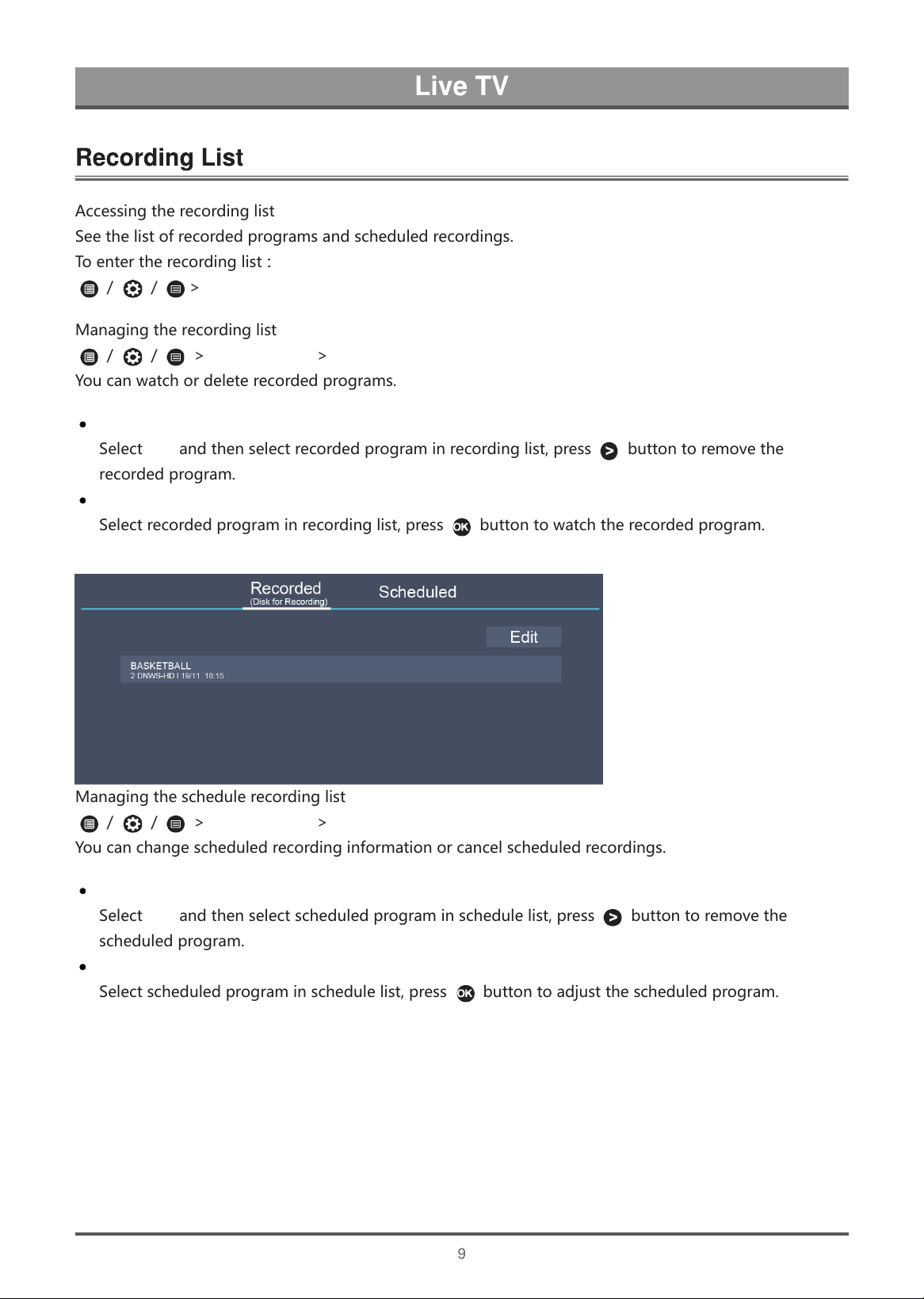
A
c
c
e
s
s
i
n
g
t
h
e
r
e
c
o
r
d
i
n
g
l
i
s
t
S
e
e
t
h
e
l
i
s
t
o
f
r
e
c
o
r
d
e
d
p
r
o
g
r
a
m
s
a
n
d
s
c
h
e
d
u
l
e
d
r
e
c
o
r
d
i
n
g
s
.
T
o
e
n
t
e
r
t
h
e
r
e
c
o
r
d
i
n
g
l
i
s
t
:
/
/
>
Recording List
M
a
n
a
g
i
n
g
t
h
e
r
e
c
o
r
d
i
n
g
l
i
s
t
/
/
>
Recording List
>
Recorded
Y
o
u
c
a
n
w
a
t
c
h
o
r
d
e
l
e
t
e
r
e
c
o
r
d
e
d
p
r
o
g
r
a
m
s
.
Delete the recorded program
S
e
l
e
c
t
Edit
a
n
d
t
h
e
n
s
e
l
e
c
t
r
e
c
o
r
d
e
d
p
r
o
g
r
a
m
i
n
r
e
c
o
r
d
i
n
g
l
i
s
t
,
p
r
e
s
s
b
u
t
t
o
n
t
o
r
e
m
o
v
e
t
h
e
r
e
c
o
r
d
e
d
p
r
o
g
r
a
m
.
Watch
S
e
l
e
c
t
r
e
c
o
r
d
e
d
p
r
o
g
r
a
m
i
n
r
e
c
o
r
d
i
n
g
l
i
s
t
,
p
r
e
s
s
b
u
t
t
o
n
t
o
w
a
t
c
h
t
h
e
r
e
c
o
r
d
e
d
p
r
o
g
r
a
m
.
M
a
n
a
g
i
n
g
t
h
e
s
c
h
e
d
u
l
e
r
e
c
o
r
d
i
n
g
l
i
s
t
/
/
>
Recording List
>
Scheduled
Y
o
u
c
a
n
c
h
a
n
g
e
s
c
h
e
d
u
l
e
d
r
e
c
o
r
d
i
n
g
i
n
f
o
r
m
a
t
i
o
n
o
r
c
a
n
c
e
l
s
c
h
e
d
u
l
e
d
r
e
c
o
r
d
i
n
g
s
.
Delete the scheduled program
S
e
l
e
c
t
Edit
a
n
d
t
h
e
n
s
e
l
e
c
t
s
c
h
e
d
u
l
e
d
p
r
o
g
r
a
m
i
n
s
c
h
e
d
u
l
e
l
i
s
t
,
p
r
e
s
s
b
u
t
t
o
n
t
o
r
e
m
o
v
e
t
h
e
s
c
h
e
d
u
l
e
d
p
r
o
g
r
a
m
.
Edit scheduled program
S
e
l
e
c
t
s
c
h
e
d
u
l
e
d
p
r
o
g
r
a
m
i
n
s
c
h
e
d
u
l
e
l
i
s
t
,
p
r
e
s
s
b
u
t
t
o
n
t
o
a
d
j
u
s
t
t
h
e
s
c
h
e
d
u
l
e
d
p
r
o
g
r
a
m
.
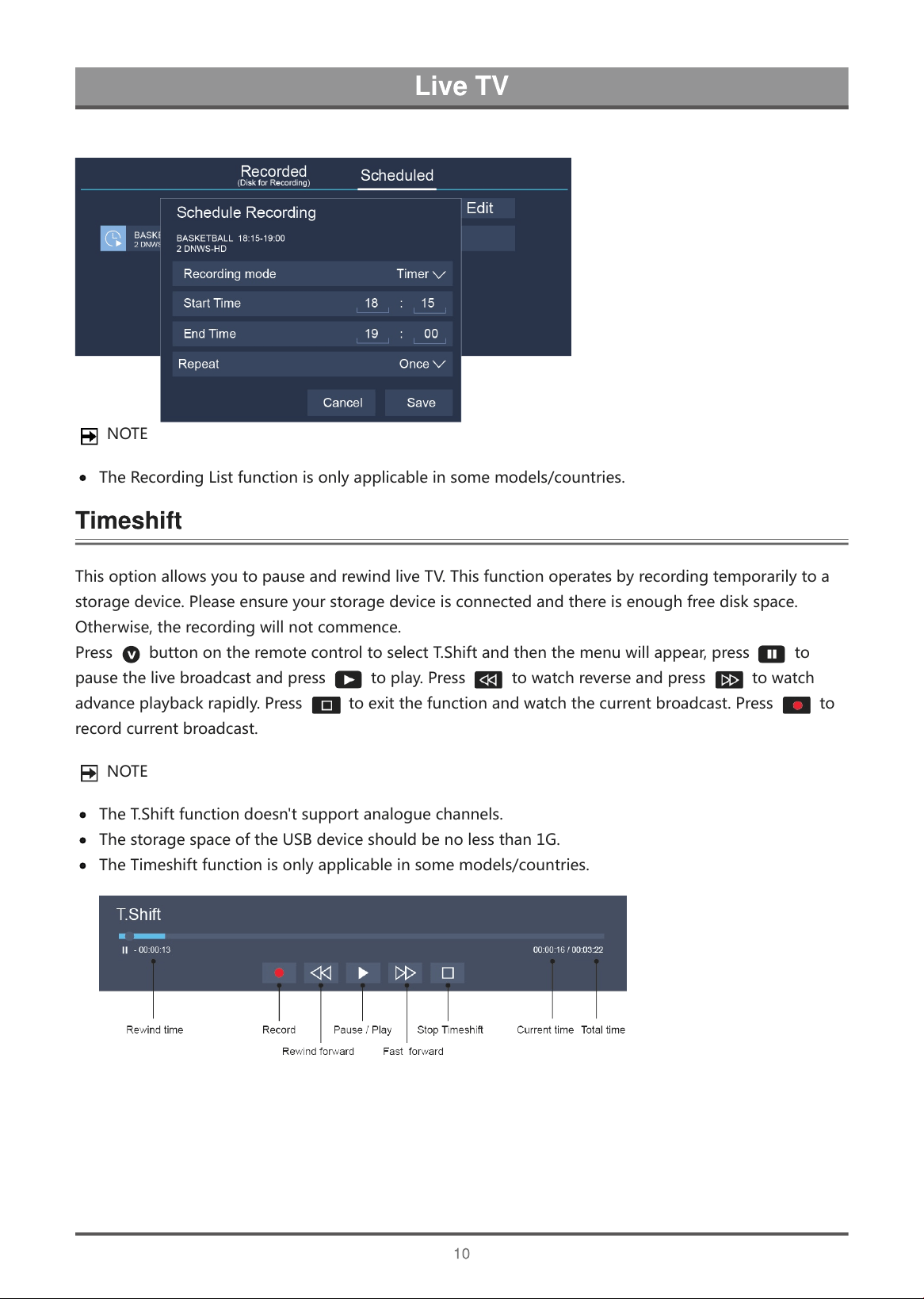
NOTE
TheRecordingListfunctionisonlyapplicableinsomemodels/countries.
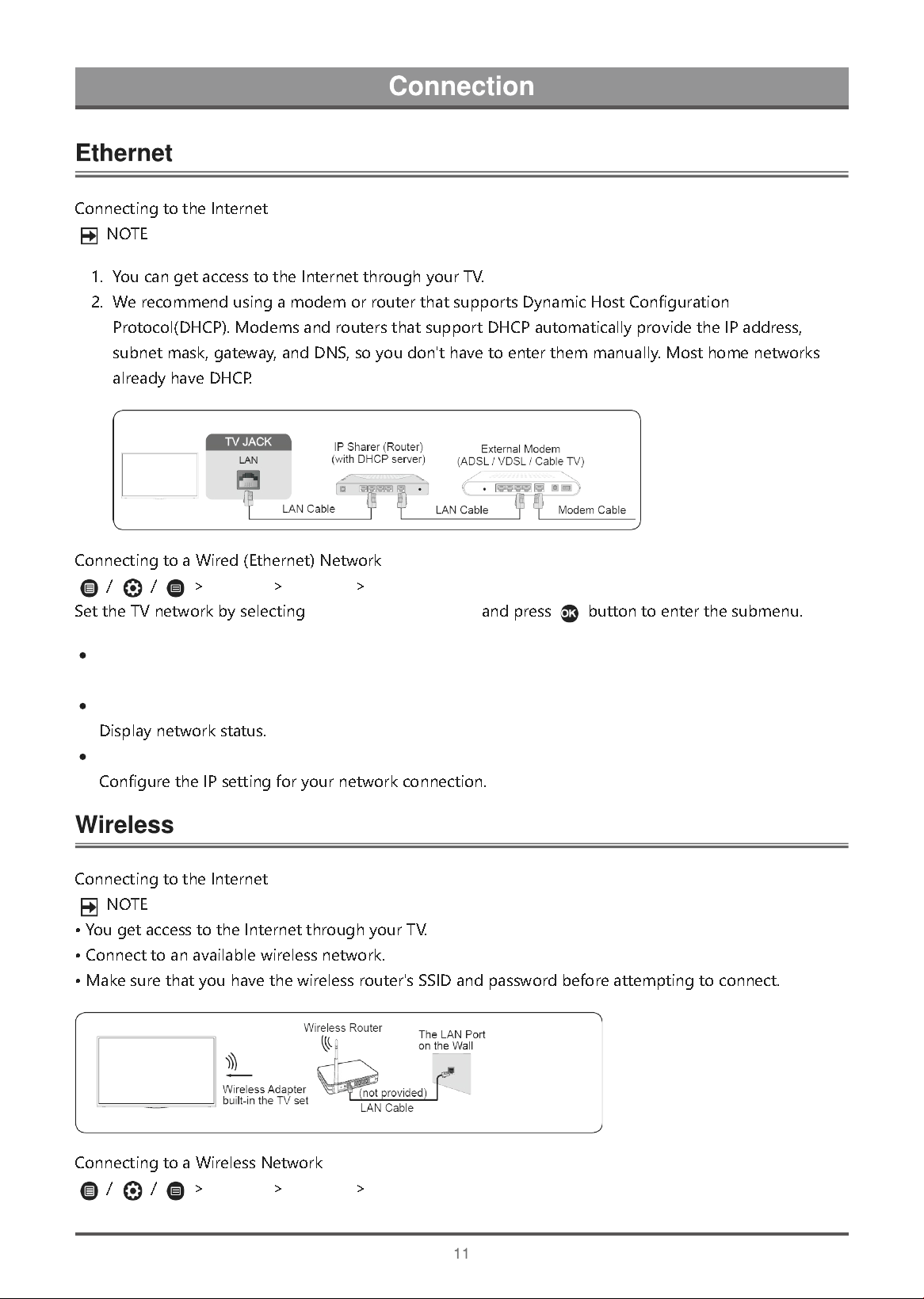
ThisoptionallowsyoutopauseandrewindliveTV.Thisfunctionoperatesbyrecordingtemporarilytoa
storagedevice.Pleaseensureyourstoragedeviceisconnectedandthereisenoughfreediskspace.
Otherwise,therecordingwillnotcommence.
Press buttonontheremotecontroltoselectT.Shiftandthenthemenuwillappear,press to
pausethelivebroadcastandpress toplay.Press towatchreverseandpress towatch
advanceplaybackrapidly.Press toexitthefunctionandwatchthecurrentbroadcast.Press to
recordcurrentbroadcast.
NOTE
TheT.Shiftfunctiondoesn'tsupportanaloguechannels.
ThestoragespaceoftheUSBdeviceshouldbenolessthan1G.
TheTimeshiftfunctionisonlyapplicableinsomemodels/countries.
C
o
n
n
e
c
t
i
n
g
t
o
t
h
e
I
n
t
e
r
n
e
t
N
O
T
E
1
.
Y
o
u
c
a
n
g
e
t
a
c
c
e
s
s
t
o
t
h
e
I
n
t
e
r
n
e
t
t
h
r
o
u
g
h
y
o
u
r
T
V
.
2
.
W
e
r
e
c
o
m
m
e
n
d
u
s
i
n
g
a
m
o
d
e
m
o
r
r
o
u
t
e
r
t
h
a
t
s
u
p
p
o
r
t
s
D
y
n
a
m
i
c
H
o
s
t
C
o
n
f
i
g
u
r
a
t
i
o
n
P
r
o
t
o
c
o
l
(
D
H
C
P
)
.
M
o
d
e
m
s
a
n
d
r
o
u
t
e
r
s
t
h
a
t
s
u
p
p
o
r
t
D
H
C
P
a
u
t
o
m
a
t
i
c
a
l
l
y
p
r
o
v
i
d
e
t
h
e
I
P
a
d
d
r
e
s
s
,
s
u
b
n
e
t
m
a
s
k
,
g
a
t
e
w
a
y
,
a
n
d
D
N
S
,
s
o
y
o
u
d
o
n
'
t
h
a
v
e
t
o
e
n
t
e
r
t
h
e
m
m
a
n
u
a
l
l
y
.
M
o
s
t
h
o
m
e
n
e
t
w
o
r
k
s
a
l
r
e
a
d
y
h
a
v
e
D
H
C
P
.
C
o
n
n
e
c
t
i
n
g
t
o
a
W
i
r
e
d
(
E
t
h
e
r
n
e
t
)
N
e
t
w
o
r
k
/
/
>
Settings
>
Network
>
Network Configuration
S
e
t
t
h
e
T
V
n
e
t
w
o
r
k
b
y
s
e
l
e
c
t
i
n
g
Network Configuration
a
n
d
p
r
e
s
s
b
u
t
t
o
n
t
o
e
n
t
e
r
t
h
e
s
u
b
m
e
n
u
.
Connection Type
Ethernet
D
i
s
p
l
a
y
n
e
t
w
o
r
k
s
t
a
t
u
s
.
IP Settings
C
o
n
f
i
g
u
r
e
t
h
e
I
P
s
e
t
t
i
n
g
f
o
r
y
o
u
r
n
e
t
w
o
r
k
c
o
n
n
e
c
t
i
o
n
.
C
o
n
n
e
c
t
i
n
g
t
o
t
h
e
I
n
t
e
r
n
e
t
N
O
T
E
•
Y
o
u
g
e
t
a
c
c
e
s
s
t
o
t
h
e
I
n
t
e
r
n
e
t
t
h
r
o
u
g
h
y
o
u
r
T
V
.
•
C
o
n
n
e
c
t
t
o
a
n
a
v
a
i
l
a
b
l
e
w
i
r
e
l
e
s
s
n
e
t
w
o
r
k
.
•
M
a
k
e
s
u
r
e
t
h
a
t
y
o
u
h
a
v
e
t
h
e
w
i
r
e
l
e
s
s
r
o
u
t
e
r
'
s
S
S
I
D
a
n
d
p
a
s
s
w
o
r
d
b
e
f
o
r
e
a
t
t
e
m
p
t
i
n
g
t
o
c
o
n
n
e
c
t
.
C
o
n
n
e
c
t
i
n
g
t
o
a
W
i
r
e
l
e
s
s
N
e
t
w
o
r
k
/
/
>
Settings
>
Network
>
Network Configuration
Connect your TV to an Ethernet connection.
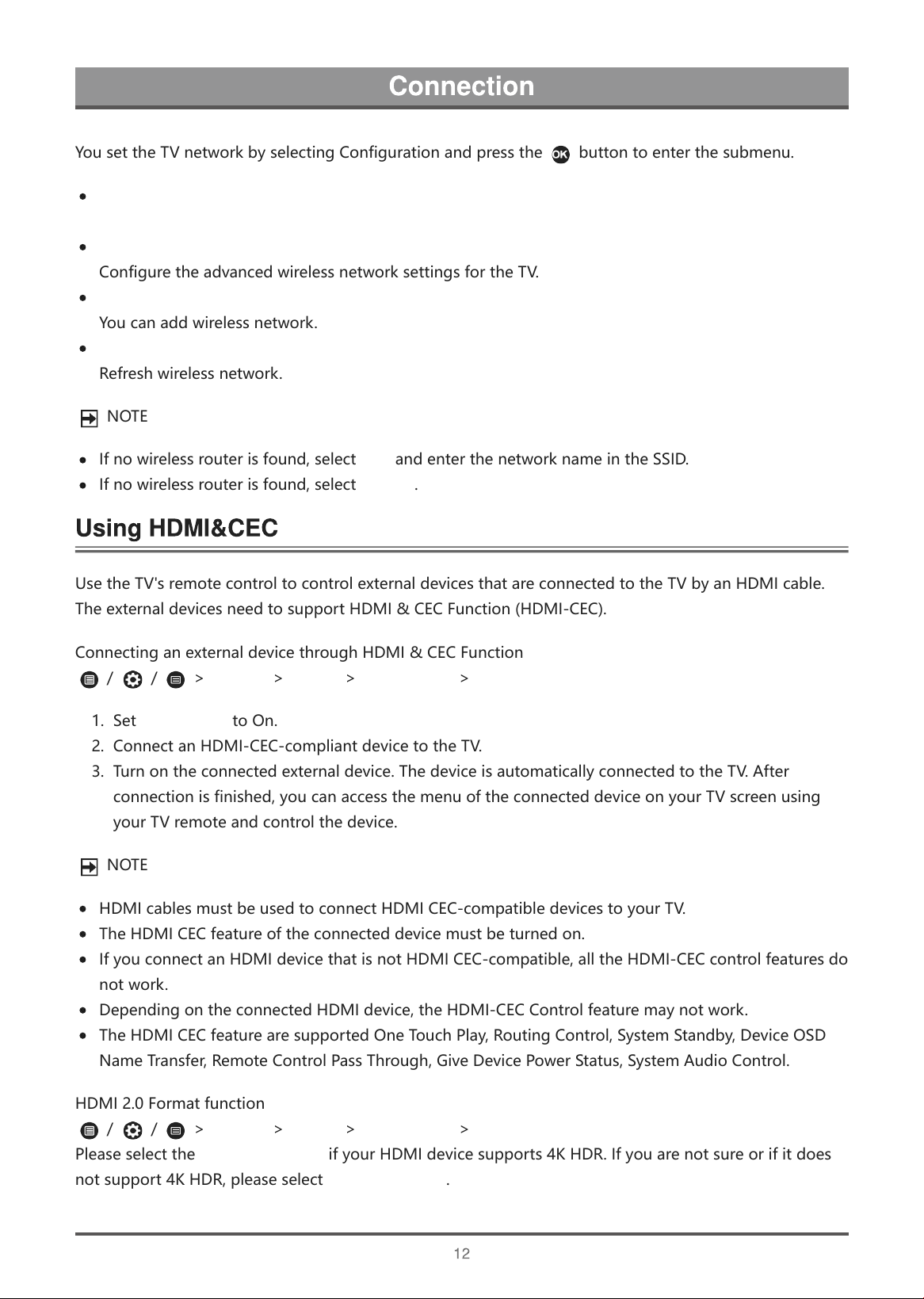
Y
o
u
s
e
t
t
h
e
T
V
n
e
t
w
o
r
k
b
y
s
e
l
e
c
t
i
n
g
C
o
n
f
i
g
u
r
a
t
i
o
n
a
n
d
p
r
e
s
s
t
h
e
b
u
t
t
o
n
t
o
e
n
t
e
r
t
h
e
s
u
b
m
e
n
u
.
Connection Type
Advanced Settings
C
o
n
f
i
g
u
r
e
t
h
e
a
d
v
a
n
c
e
d
w
i
r
e
l
e
s
s
n
e
t
w
o
r
k
s
e
t
t
i
n
g
s
f
o
r
t
h
e
T
V
.
Add
Y
o
u
c
a
n
a
d
d
w
i
r
e
l
e
s
s
n
e
t
w
o
r
k
.
Refresh
R
e
f
r
e
s
h
w
i
r
e
l
e
s
s
n
e
t
w
o
r
k
.
N
O
T
E
I
f
n
o
w
i
r
e
l
e
s
s
r
o
u
t
e
r
i
s
f
o
u
n
d
,
s
e
l
e
c
t
Add
a
n
d
e
n
t
e
r
t
h
e
n
e
t
w
o
r
k
n
a
m
e
i
n
t
h
e
S
S
I
D
.
I
f
n
o
w
i
r
e
l
e
s
s
r
o
u
t
e
r
i
s
f
o
u
n
d
,
s
e
l
e
c
t
Refresh
.
U
s
e
t
h
e
T
V
'
s
r
e
m
o
t
e
c
o
n
t
r
o
l
t
o
c
o
n
t
r
o
l
e
x
t
e
r
n
a
l
d
e
v
i
c
e
s
t
h
a
t
a
r
e
c
o
n
n
e
c
t
e
d
t
o
t
h
e
T
V
b
y
a
n
H
D
M
I
c
a
b
l
e
.
T
h
e
e
x
t
e
r
n
a
l
d
e
v
i
c
e
s
n
e
e
d
t
o
s
u
p
p
o
r
t
H
D
M
I
&
C
E
C
F
u
n
c
t
i
o
n
(
H
D
M
I
-
C
E
C
)
.
C
o
n
n
e
c
t
i
n
g
a
n
e
x
t
e
r
n
a
l
d
e
v
i
c
e
t
h
r
o
u
g
h
H
D
M
I
&
C
E
C
F
u
n
c
t
i
o
n
/
/
>
Settings
>
System
>
HDMI & CEC
>
CEC Control
1
.
S
e
t
CEC Control
t
o
O
n
.
2
.
C
o
n
n
e
c
t
a
n
H
D
M
I
-
C
E
C
-
c
o
m
p
l
i
a
n
t
d
e
v
i
c
e
t
o
t
h
e
T
V
.
3
.
T
u
r
n
o
n
t
h
e
c
o
n
n
e
c
t
e
d
e
x
t
e
r
n
a
l
d
e
v
i
c
e
.
T
h
e
d
e
v
i
c
e
i
s
a
u
t
o
m
a
t
i
c
a
l
l
y
c
o
n
n
e
c
t
e
d
t
o
t
h
e
T
V
.
A
f
t
e
r
c
o
n
n
e
c
t
i
o
n
i
s
f
i
n
i
s
h
e
d
,
y
o
u
c
a
n
a
c
c
e
s
s
t
h
e
m
e
n
u
o
f
t
h
e
c
o
n
n
e
c
t
e
d
d
e
v
i
c
e
o
n
y
o
u
r
T
V
s
c
r
e
e
n
u
s
i
n
g
y
o
u
r
T
V
r
e
m
o
t
e
a
n
d
c
o
n
t
r
o
l
t
h
e
d
e
v
i
c
e
.
N
O
T
E
H
D
M
I
c
a
b
l
e
s
m
u
s
t
b
e
u
s
e
d
t
o
c
o
n
n
e
c
t
H
D
M
I
C
E
C
-
c
o
m
p
a
t
i
b
l
e
d
e
v
i
c
e
s
t
o
y
o
u
r
T
V
.
T
h
e
H
D
M
I
C
E
C
f
e
a
t
u
r
e
o
f
t
h
e
c
o
n
n
e
c
t
e
d
d
e
v
i
c
e
m
u
s
t
b
e
t
u
r
n
e
d
o
n
.
I
f
y
o
u
c
o
n
n
e
c
t
a
n
H
D
M
I
d
e
v
i
c
e
t
h
a
t
i
s
n
o
t
H
D
M
I
C
E
C
-
c
o
m
p
a
t
i
b
l
e
,
a
l
l
t
h
e
H
D
M
I
-
C
E
C
c
o
n
t
r
o
l
f
e
a
t
u
r
e
s
d
o
n
o
t
w
o
r
k
.
D
e
p
e
n
d
i
n
g
o
n
t
h
e
c
o
n
n
e
c
t
e
d
H
D
M
I
d
e
v
i
c
e
,
t
h
e
H
D
M
I
-
C
E
C
C
o
n
t
r
o
l
f
e
a
t
u
r
e
m
a
y
n
o
t
w
o
r
k
.
T
h
e
H
D
M
I
C
E
C
f
e
a
t
u
r
e
a
r
e
s
u
p
p
o
r
t
e
d
O
n
e
T
o
u
c
h
P
l
a
y
,
R
o
u
t
i
n
g
C
o
n
t
r
o
l
,
S
y
s
t
e
m
S
t
a
n
d
b
y
,
D
e
v
i
c
e
O
S
D
N
a
m
e
T
r
a
n
s
f
e
r
,
R
e
m
o
t
e
C
o
n
t
r
o
l
P
a
s
s
T
h
r
o
u
g
h
,
G
i
v
e
D
e
v
i
c
e
P
o
w
e
r
S
t
a
t
u
s
,
S
y
s
t
e
m
A
u
d
i
o
C
o
n
t
r
o
l
.
H
D
M
I
2
.
0
F
o
r
m
a
t
f
u
n
c
t
i
o
n
/
/
>
Settings
>
System
>
HDMI & CEC
>
HDMI 2.0 Format
P
l
e
a
s
e
s
e
l
e
c
t
t
h
e
Enhanced format
i
f
y
o
u
r
H
D
M
I
d
e
v
i
c
e
s
u
p
p
o
r
t
s
4
K
H
D
R
.
I
f
y
o
u
a
r
e
n
o
t
s
u
r
e
o
r
i
f
i
t
d
o
e
s
n
o
t
s
u
p
p
o
r
t
4
K
H
D
R
,
p
l
e
a
s
e
s
e
l
e
c
t
Standard format
.
Connect your TV to a wireless Wi-Fi network connection.
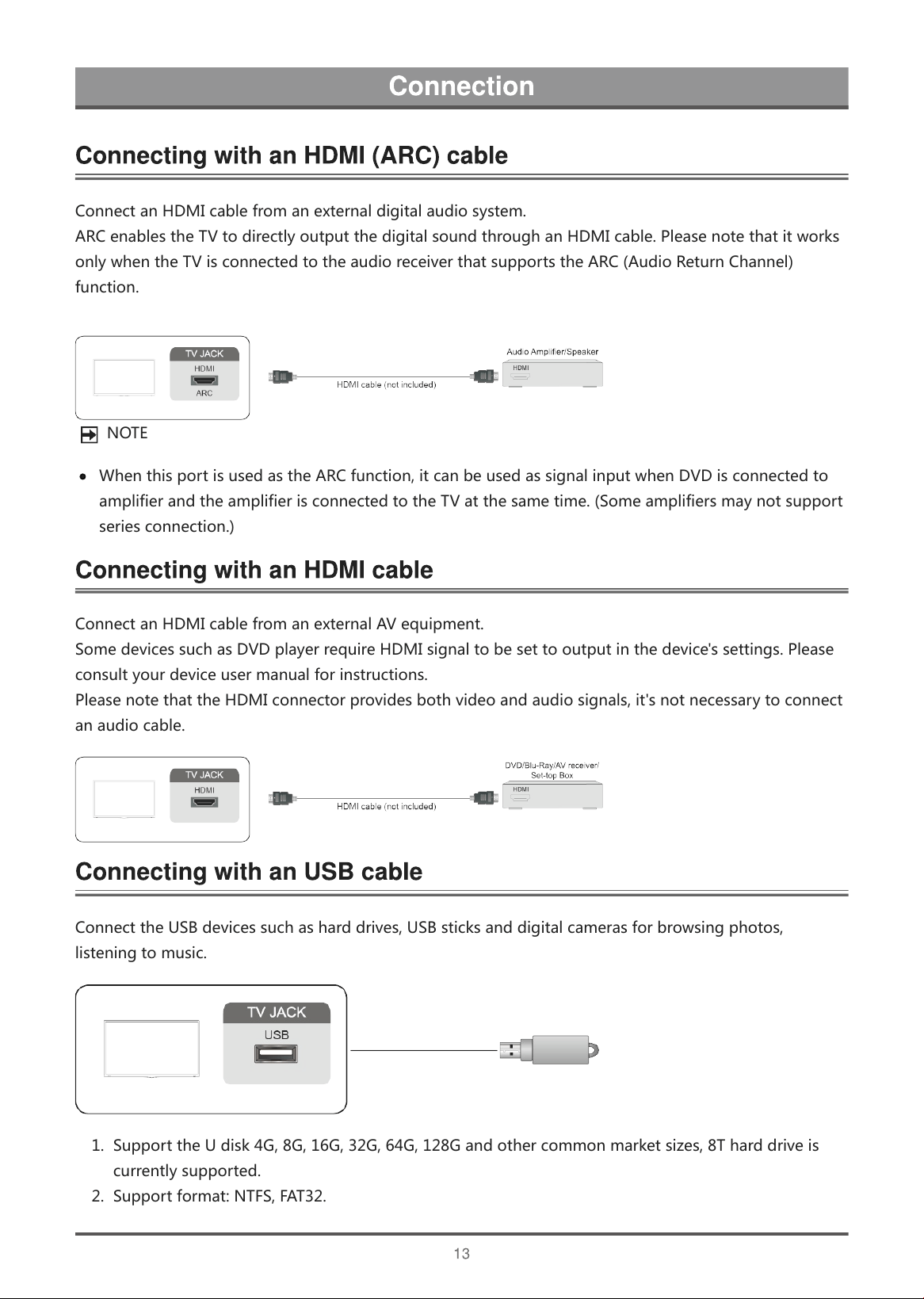
ConnectanHDMIcablefromanexternaldigitalaudiosystem.
ARCenablestheTVtodirectlyoutputthedigitalsoundthroughanHDMIcable.Pleasenotethatitworks
onlywhentheTVisconnectedtotheaudioreceiverthatsupportstheARC(AudioReturnChannel)
function.
NOTE
WhenthisportisusedastheARCfunction,itcanbeusedassignalinputwhenDVDisconnectedto
amplifierandtheamplifierisconnectedtotheTVatthesametime.(Someamplifiersmaynotsupport
seriesconnection.)
ConnectanHDMIcablefromanexternalAVequipment.
SomedevicessuchasDVDplayerrequireHDMIsignaltobesettooutputinthedevice'ssettings.Please
consultyourdeviceusermanualforinstructions.
PleasenotethattheHDMIconnectorprovidesbothvideoandaudiosignals,it'snotnecessarytoconnect
anaudiocable.
ConnecttheUSBdevicessuchasharddrives,USBsticksanddigitalcamerasforbrowsingphotos,
listeningtomusic.
1. SupporttheUdisk4G,8G,16G,32G,64G,128Gandothercommonmarketsizes,8Tharddriveis
currentlysupported.
2. Supportformat:NTFS,FAT32.
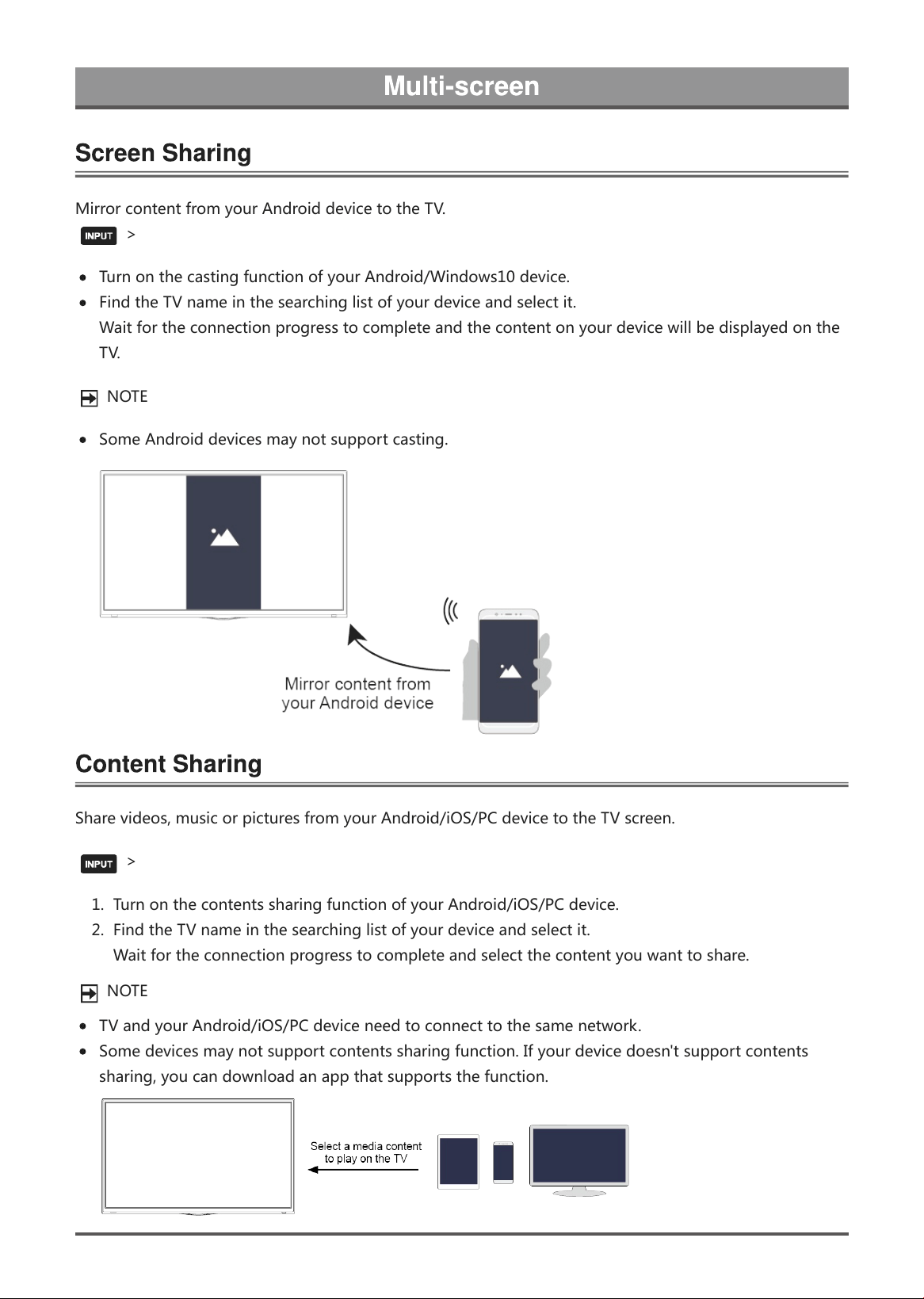
M
i
r
r
o
r
c
o
n
t
e
n
t
f
r
o
m
y
o
u
r
A
n
d
r
o
i
d
d
e
v
i
c
e
t
o
t
h
e
T
V
.
>
Screen Sharing
T
u
r
n
o
n
t
h
e
c
a
s
t
i
n
g
f
u
n
c
t
i
o
n
o
f
y
o
u
r
A
n
d
r
o
i
d
/
W
i
n
d
o
w
s
1
0
d
e
v
i
c
e
.
F
i
n
d
t
h
e
T
V
n
a
m
e
i
n
t
h
e
s
e
a
r
c
h
i
n
g
l
i
s
t
o
f
y
o
u
r
d
e
v
i
c
e
a
n
d
s
e
l
e
c
t
i
t
.
W
a
i
t
f
o
r
t
h
e
c
o
n
n
e
c
t
i
o
n
p
r
o
g
r
e
s
s
t
o
c
o
m
p
l
e
t
e
a
n
d
t
h
e
c
o
n
t
e
n
t
o
n
y
o
u
r
d
e
v
i
c
e
w
i
l
l
b
e
d
i
s
p
l
a
y
e
d
o
n
t
h
e
T
V
.
N
O
T
E
S
o
m
e
A
n
d
r
o
i
d
d
e
v
i
c
e
s
m
a
y
n
o
t
s
u
p
p
o
r
t
c
a
s
t
i
n
g
.
S
h
a
r
e
v
i
d
e
o
s
,
m
u
s
i
c
o
r
p
i
c
t
u
r
e
s
f
r
o
m
y
o
u
r
A
n
d
r
o
i
d
/
i
O
S
/
P
C
d
e
v
i
c
e
t
o
t
h
e
T
V
s
c
r
e
e
n
.
>
Content Sharing
1
.
T
u
r
n
o
n
t
h
e
c
o
n
t
e
n
t
s
s
h
a
r
i
n
g
f
u
n
c
t
i
o
n
o
f
y
o
u
r
A
n
d
r
o
i
d
/
i
O
S
/
P
C
d
e
v
i
c
e
.
2
.
F
i
n
d
t
h
e
T
V
n
a
m
e
i
n
t
h
e
s
e
a
r
c
h
i
n
g
l
i
s
t
o
f
y
o
u
r
d
e
v
i
c
e
a
n
d
s
e
l
e
c
t
i
t
.
W
a
i
t
f
o
r
t
h
e
c
o
n
n
e
c
t
i
o
n
p
r
o
g
r
e
s
s
t
o
c
o
m
p
l
e
t
e
a
n
d
s
e
l
e
c
t
t
h
e
c
o
n
t
e
n
t
y
o
u
w
a
n
t
t
o
s
h
a
r
e
.
N
O
T
E
T
V
a
n
d
y
o
u
r
A
n
d
r
o
i
d
/
i
O
S
/
P
C
d
e
v
i
c
e
n
e
e
d
t
o
c
o
n
n
e
c
t
t
o
t
h
e
s
a
m
e
n
e
t
w
o
r
k
.
S
o
m
e
d
e
v
i
c
e
s
m
a
y
n
o
t
s
u
p
p
o
r
t
c
o
n
t
e
n
t
s
s
h
a
r
i
n
g
f
u
n
c
t
i
o
n
.
I
f
y
o
u
r
d
e
v
i
c
e
d
o
e
s
n
'
t
s
u
p
p
o
r
t
c
o
n
t
e
n
t
s
s
h
a
r
i
n
g
,
y
o
u
c
a
n
d
o
w
n
l
o
a
d
a
n
a
p
p
t
h
a
t
s
u
p
p
o
r
t
s
t
h
e
f
u
n
c
t
i
o
n
.
14
G
e
t
t
i
n
g
f
a
m
i
l
i
a
r
w
i
t
h
t
h
e
H
o
m
e
s
c
r
e
e
n
R
u
n
t
h
e
T
V
m
o
r
e
c
o
n
v
e
n
i
e
n
t
l
y
b
y
s
e
l
e
c
t
i
n
g
t
h
e
c
o
r
r
e
s
p
o
n
d
i
n
g
s
e
c
t
i
o
n
s
.
P
r
e
s
s
/
b
u
t
t
o
n
.
Y
o
u
c
a
n
a
l
w
a
y
s
v
i
e
w
t
h
e
c
u
r
r
e
n
t
t
i
m
e
a
t
t
h
e
t
o
p
o
f
t
h
e
H
o
m
e
s
c
r
e
e
n
.
I
f
y
o
u
r
T
V
i
s
c
o
n
n
e
c
t
e
d
t
o
t
h
e
I
n
t
e
r
n
e
t
t
h
r
o
u
g
h
a
w
i
r
e
l
e
s
s
c
o
n
n
e
c
t
i
o
n
o
r
a
n
E
t
h
e
r
n
e
t
c
a
b
l
e
,
t
h
e
n
t
h
e
i
c
o
n
/
w
i
l
l
b
e
a
t
t
h
e
t
o
p
r
i
g
h
t
c
o
r
n
e
r
o
f
t
h
e
s
c
r
e
e
n
.
M
a
n
a
g
e
a
p
p
s
S
e
l
e
c
t
t
h
e
i
t
e
m
y
o
u
w
a
n
t
t
o
m
o
v
e
,
p
r
e
s
s
/
/
b
u
t
t
o
n
t
o
m
a
n
a
g
e
.
Search
S
e
a
r
c
h
t
h
e
a
p
p
y
o
u
w
a
n
t
.
Input
S
e
l
e
c
t
t
h
e
i
n
p
u
t
y
o
u
w
a
n
t
.
Settings
D
i
s
p
l
a
y
t
h
e
S
e
t
t
i
n
g
s
m
e
n
u
.
Notifications
A
l
l
o
w
p
o
p
-
u
p
n
o
t
i
f
i
c
a
t
i
o
n
s
t
o
a
p
p
e
a
r
f
o
r
u
s
e
f
u
l
i
n
f
o
r
m
a
t
i
o
n
a
n
d
e
v
e
n
t
s
t
h
a
t
o
c
c
u
r
w
i
t
h
y
o
u
r
T
V
.
S
e
l
e
c
t
Notifications
o
n
t
h
e
H
o
m
e
s
c
r
e
e
n
,
a
n
d
s
e
l
e
c
t
Settings
t
h
e
n
d
i
s
p
l
a
y
Advertising
,
New Arrivals
,
System message
,
Warnings And Legal Statements
o
n
l
y
w
h
e
n
s
t
a
r
t
i
n
g
t
h
e
T
V
f
o
r
t
h
e
f
i
r
s
t
t
i
m
e
.
C
h
o
o
s
e
w
h
i
c
h
t
y
p
e
s
o
f
n
o
t
i
f
i
c
a
t
i
o
n
s
y
o
u
w
o
u
l
d
l
i
k
e
t
o
r
e
c
e
i
v
e
.
VIDAA Account
S
i
g
n
i
n
y
o
u
r
V
I
D
A
A
a
c
c
o
u
n
t
.
A
V
I
D
A
A
a
c
c
o
u
n
t
g
i
v
e
s
y
o
u
a
l
l
t
h
e
b
e
s
t
f
e
a
t
u
r
e
o
f
y
o
u
r
s
m
a
r
t
T
V
a
n
d
a
l
w
a
y
s
k
e
e
p
s
i
t
u
p
t
o
d
a
t
e
.
Voice Service Setup
N
O
T
E
B
y
/
/
>
Settings
>
System
>
Advanced Settings
>
Notifications
,
y
o
u
c
a
n
a
l
s
o
c
h
o
o
s
e
w
h
i
c
h
t
y
p
e
s
o
f
n
o
t
i
f
i
c
a
t
i
o
n
s
y
o
u
w
o
u
l
d
l
i
k
e
t
o
r
e
c
e
i
v
e
.
S
e
t
u
p
t
h
e
V
o
i
c
e
S
e
r
v
i
c
e
f
o
l
l
o
w
i
n
g
t
h
e
i
n
s
t
r
u
c
t
i
o
n
h
e
r
e
a
n
d
e
n
j
o
y
c
o
n
t
r
o
l
l
i
n
g
a
n
d
i
n
t
e
r
a
c
t
i
n
g
w
i
t
h
y
o
u
r
s
m
a
r
t
T
V
b
y
p
r
e
s
s
i
n
g
a
n
d
h
o
l
d
i
n
g
t
h
e
/
b
u
t
t
o
n
o
n
y
o
u
r
V
o
i
c
e
R
e
m
o
t
e
C
o
n
t
r
o
l
o
r
o
u
r
R
e
m
o
t
e
C
o
n
t
r
o
l
a
p
p
,
a
n
d
j
u
s
t
a
s
k
i
n
g
A
l
e
x
a
.
Y
o
u
c
a
n
a
l
s
o
c
o
n
t
r
o
l
y
o
u
r
s
m
a
r
t
T
V
b
y
v
o
i
c
e
w
i
t
h
G
o
o
g
l
e
H
o
m
e
d
e
v
i
c
e
o
r
G
o
o
g
l
e
H
o
m
e
a
p
p
o
r
G
o
o
g
l
e
A
s
s
i
s
t
a
n
t
a
p
p
.
V
o
i
c
e
S
e
r
v
i
c
e
a
v
a
i
l
a
b
i
l
i
t
y
a
n
d
f
u
n
c
t
i
o
n
s
v
a
r
y
d
e
p
e
n
d
i
n
g
o
n
T
V
m
o
d
e
l
s
a
n
d
c
o
u
n
t
r
i
e
s
.
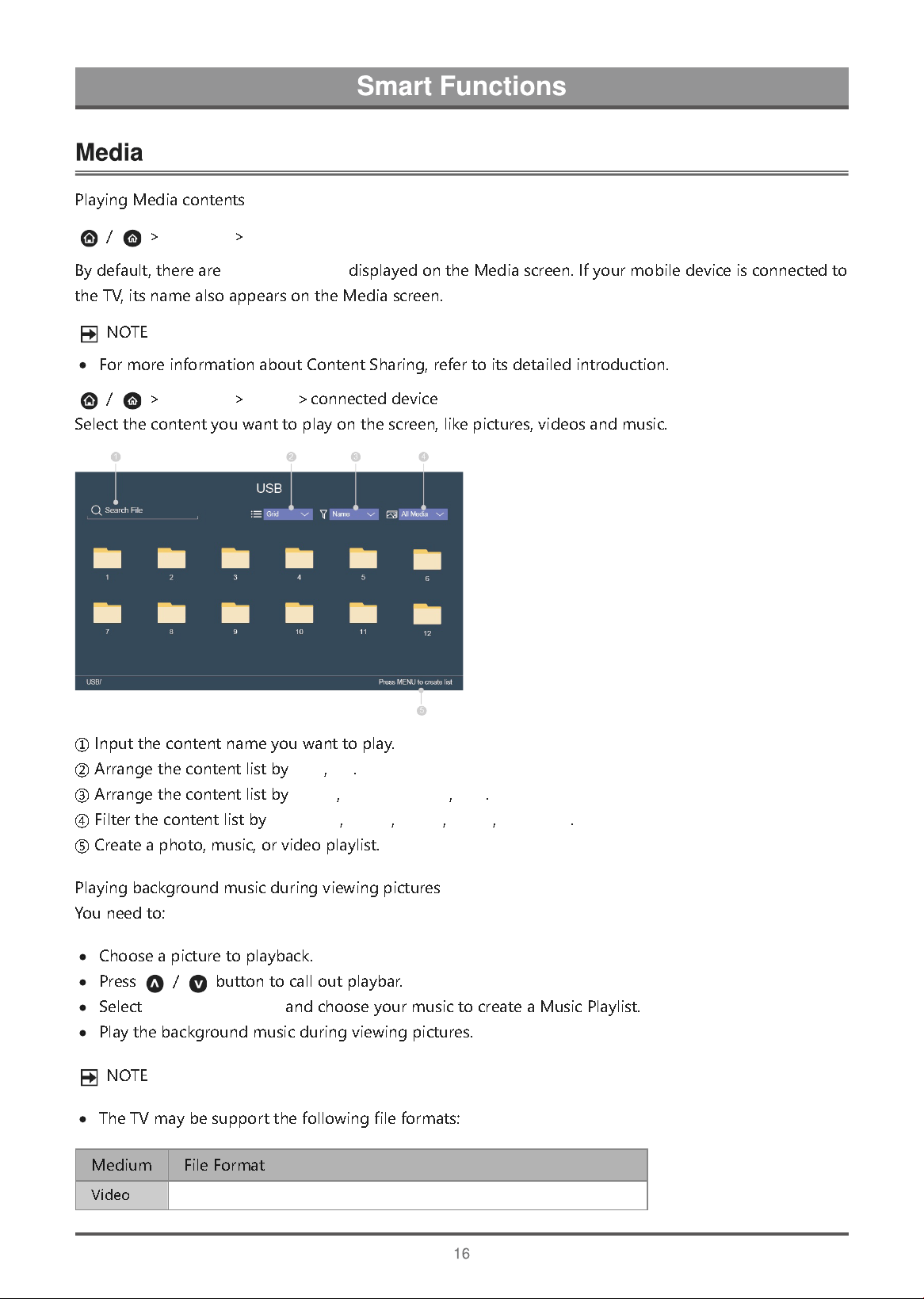
P
l
a
y
i
n
g
M
e
d
i
a
c
o
n
t
e
n
t
s
/
>
My Apps
>
Media
B
y
d
e
f
a
u
l
t
,
t
h
e
r
e
a
r
e
Content Sharing
d
i
s
p
l
a
y
e
d
o
n
t
h
e
M
e
d
i
a
s
c
r
e
e
n
.
I
f
y
o
u
r
m
o
b
i
l
e
d
e
v
i
c
e
i
s
c
o
n
n
e
c
t
e
d
t
o
t
h
e
T
V
,
i
t
s
n
a
m
e
a
l
s
o
a
p
p
e
a
r
s
o
n
t
h
e
M
e
d
i
a
s
c
r
e
e
n
.
N
O
T
E
F
o
r
m
o
r
e
i
n
f
o
r
m
a
t
i
o
n
a
b
o
u
t
C
o
n
t
e
n
t
S
h
a
r
i
n
g
,
r
e
f
e
r
t
o
i
t
s
d
e
t
a
i
l
e
d
i
n
t
r
o
d
u
c
t
i
o
n
.
/
>
My Apps
>
Media
>
c
o
n
n
e
c
t
e
d
d
e
v
i
c
e
S
e
l
e
c
t
t
h
e
c
o
n
t
e
n
t
y
o
u
w
a
n
t
t
o
p
l
a
y
o
n
t
h
e
s
c
r
e
e
n
,
l
i
k
e
p
i
c
t
u
r
e
s
,
v
i
d
e
o
s
a
n
d
m
u
s
i
c
.
①
I
n
p
u
t
t
h
e
c
o
n
t
e
n
t
n
a
m
e
y
o
u
w
a
n
t
t
o
p
l
a
y
.
②
A
r
r
a
n
g
e
t
h
e
c
o
n
t
e
n
t
l
i
s
t
b
y
Grid
,
list
.
③
A
r
r
a
n
g
e
t
h
e
c
o
n
t
e
n
t
l
i
s
t
b
y
Name
,
Date modified
,
Size
.
④
F
i
l
t
e
r
t
h
e
c
o
n
t
e
n
t
l
i
s
t
b
y
All Media
,
Photo
,
Music
,
Video
,
Recorded
.
⑤
C
r
e
a
t
e
a
p
h
o
t
o
,
m
u
s
i
c
,
o
r
v
i
d
e
o
p
l
a
y
l
i
s
t
.
P
l
a
y
i
n
g
b
a
c
k
g
r
o
u
n
d
m
u
s
i
c
d
u
r
i
n
g
v
i
e
w
i
n
g
p
i
c
t
u
r
e
s
Y
o
u
n
e
e
d
t
o
:
C
h
o
o
s
e
a
p
i
c
t
u
r
e
t
o
p
l
a
y
b
a
c
k
.
P
r
e
s
s
/
b
u
t
t
o
n
t
o
c
a
l
l
o
u
t
p
l
a
y
b
a
r
.
S
e
l
e
c
t
Background Music
a
n
d
c
h
o
o
s
e
y
o
u
r
m
u
s
i
c
t
o
c
r
e
a
t
e
a
M
u
s
i
c
P
l
a
y
l
i
s
t
.
P
l
a
y
t
h
e
b
a
c
k
g
r
o
u
n
d
m
u
s
i
c
d
u
r
i
n
g
v
i
e
w
i
n
g
p
i
c
t
u
r
e
s
.
N
O
T
E
T
h
e
T
V
m
a
y
b
e
s
u
p
p
o
r
t
t
h
e
f
o
l
l
o
w
i
n
g
f
i
l
e
f
o
r
m
a
t
s
:
M
e
d
i
u
m
F
i
l
e
F
o
r
m
a
t
V
i
d
e
o
.AVI, .WMV, .MP4, .3GP, .MKV, .MPG, .MPEG, .FLV, .OGM
P
i
c
t
u
r
e
.
j
p
e
g
,
.
b
m
p
,
.
P
N
G
,
.
G
I
F
,
M
u
s
i
c
.
m
p
3
,
.
a
a
c
,
.
w
m
a
,
.
w
a
v
F
o
r
m
o
r
e
i
n
f
o
r
m
a
t
i
o
n
a
b
o
u
t
c
o
n
n
e
c
t
i
o
n
t
o
P
C
/
m
o
b
i
l
e
d
e
v
i
c
e
,
r
e
f
e
r
t
o
t
h
e
d
e
t
a
i
l
e
d
i
n
t
r
o
d
u
c
t
i
o
n
o
f
e
a
c
h
p
a
r
t
.
/
>
My Apps
R
e
m
o
v
i
n
g
a
n
a
p
p
i
n
My Apps
1
.
I
n
My Apps
s
e
l
e
c
t
t
h
e
a
p
p
y
o
u
w
a
n
t
t
o
r
e
m
o
v
e
,
a
n
d
t
h
e
n
p
r
e
s
s
/
/
b
u
t
t
o
n
t
o
s
e
l
e
c
t
Uninstall
.
2
.
S
e
l
e
c
t
OK
.
T
h
e
s
e
l
e
c
t
e
d
a
p
p
i
s
d
e
l
e
t
e
d
.
A
d
d
i
n
g
a
n
a
p
p
i
n
VIDAA Store
t
o
t
h
e
H
o
m
e
s
c
r
e
e
n
1
.
I
n
VIDAA Store
s
e
l
e
c
t
t
h
e
a
p
p
y
o
u
w
a
n
t
t
o
a
d
d
a
n
d
t
h
e
n
s
e
l
e
c
t
INSTALL
.
2
.
T
h
e
s
e
l
e
c
t
e
d
a
p
p
h
a
s
b
e
e
n
a
d
d
e
d
t
o
t
h
e
My Apps
.
S
o
r
t
i
n
g
a
p
p
s
i
n
My Apps
1
.
I
n
My Apps
s
e
l
e
c
t
t
h
e
a
p
p
y
o
u
w
a
n
t
t
o
s
o
r
t
,
a
n
d
t
h
e
n
p
r
e
s
s
/
/
b
u
t
t
o
n
t
o
s
e
l
e
c
t
Sort
.
2
.
P
r
e
s
s
/
/
/
b
u
t
t
o
n
t
o
m
o
v
e
i
t
.
3
.
P
r
e
s
s
t
o
s
t
o
r
e
p
o
s
i
t
i
o
n
.
N
O
T
E
T
o
u
s
e
t
h
i
s
f
u
n
c
t
i
o
n
,
T
V
m
u
s
t
b
e
c
o
n
n
e
c
t
e
d
t
o
t
h
e
I
n
t
e
r
n
e
t
.
A
d
d
i
n
g
a
p
p
s
i
s
f
r
e
e
,
b
u
t
i
t
m
i
g
h
t
c
o
s
t
y
o
u
m
o
n
e
y
w
h
e
n
u
s
i
n
g
s
o
m
e
a
p
p
s
.
T
h
e
d
e
f
a
u
l
t
a
p
p
s
i
n
My Apps
c
a
n
n
o
t
b
e
r
e
m
o
v
e
d
.
VIDAA Store
is only applicable in some countries/regions.
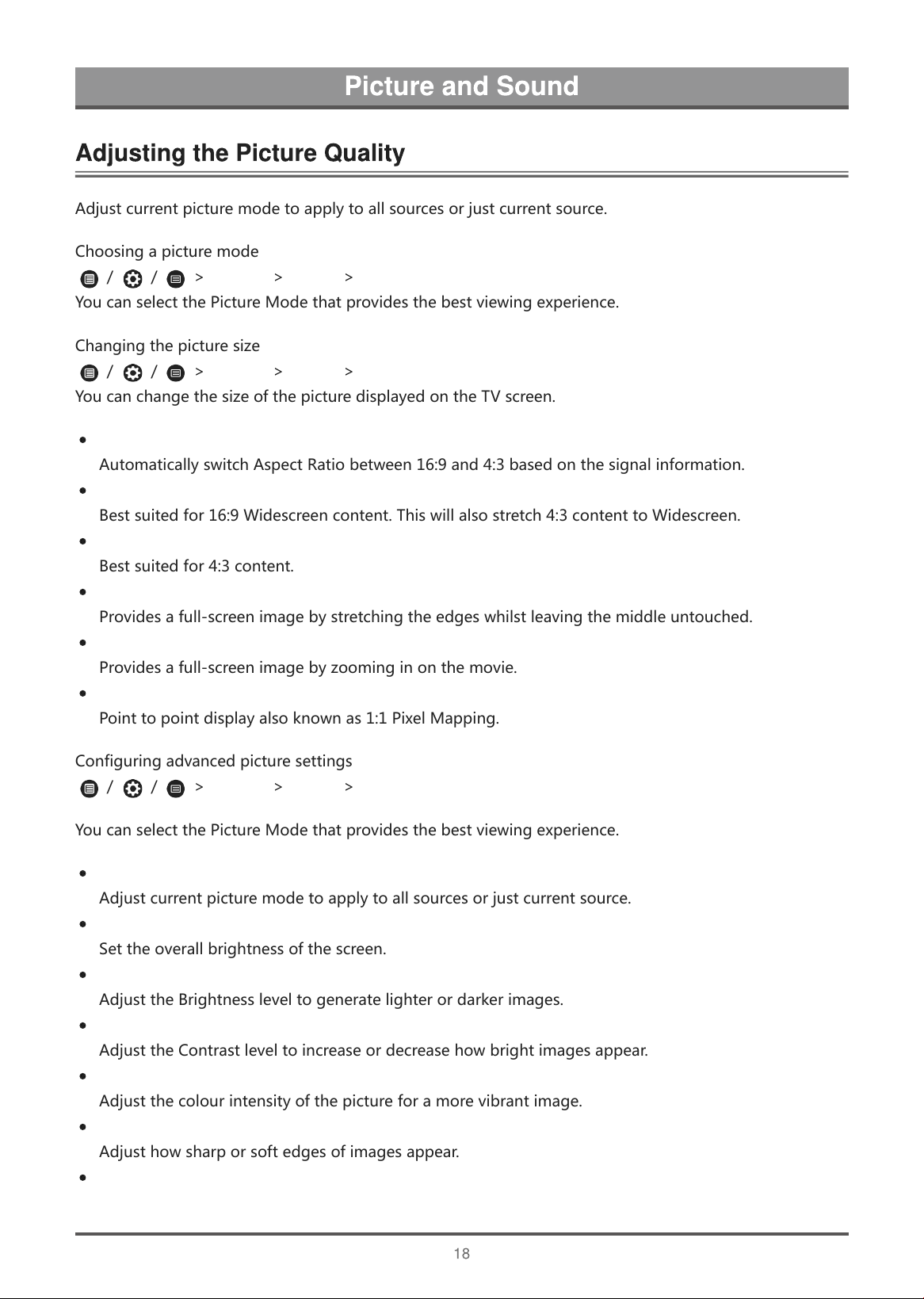
A
d
j
u
s
t
c
u
r
r
e
n
t
p
i
c
t
u
r
e
m
o
d
e
t
o
a
p
p
l
y
t
o
a
l
l
s
o
u
r
c
e
s
o
r
j
u
s
t
c
u
r
r
e
n
t
s
o
u
r
c
e
.
C
h
o
o
s
i
n
g
a
p
i
c
t
u
r
e
m
o
d
e
/
/
>
Settings
>
Picture
>
Picture Mode
Y
o
u
c
a
n
s
e
l
e
c
t
t
h
e
P
i
c
t
u
r
e
M
o
d
e
t
h
a
t
p
r
o
v
i
d
e
s
t
h
e
b
e
s
t
v
i
e
w
i
n
g
e
x
p
e
r
i
e
n
c
e
.
C
h
a
n
g
i
n
g
t
h
e
p
i
c
t
u
r
e
s
i
z
e
/
/
>
Settings
>
Picture
>
Aspect Ratio
Y
o
u
c
a
n
c
h
a
n
g
e
t
h
e
s
i
z
e
o
f
t
h
e
p
i
c
t
u
r
e
d
i
s
p
l
a
y
e
d
o
n
t
h
e
T
V
s
c
r
e
e
n
.
Automatic
A
u
t
o
m
a
t
i
c
a
l
l
y
s
w
i
t
c
h
A
s
p
e
c
t
R
a
t
i
o
b
e
t
w
e
e
n
1
6
:
9
a
n
d
4
:
3
b
a
s
e
d
o
n
t
h
e
s
i
g
n
a
l
i
n
f
o
r
m
a
t
i
o
n
.
16:9
B
e
s
t
s
u
i
t
e
d
f
o
r
1
6
:
9
W
i
d
e
s
c
r
e
e
n
c
o
n
t
e
n
t
.
T
h
i
s
w
i
l
l
a
l
s
o
s
t
r
e
t
c
h
4
:
3
c
o
n
t
e
n
t
t
o
W
i
d
e
s
c
r
e
e
n
.
4:3
B
e
s
t
s
u
i
t
e
d
f
o
r
4
:
3
c
o
n
t
e
n
t
.
Panoramic
P
r
o
v
i
d
e
s
a
f
u
l
l
-
s
c
r
e
e
n
i
m
a
g
e
b
y
s
t
r
e
t
c
h
i
n
g
t
h
e
e
d
g
e
s
w
h
i
l
s
t
l
e
a
v
i
n
g
t
h
e
m
i
d
d
l
e
u
n
t
o
u
c
h
e
d
.
Movie Zoom
P
r
o
v
i
d
e
s
a
f
u
l
l
-
s
c
r
e
e
n
i
m
a
g
e
b
y
z
o
o
m
i
n
g
i
n
o
n
t
h
e
m
o
v
i
e
.
Direct
P
o
i
n
t
t
o
p
o
i
n
t
d
i
s
p
l
a
y
a
l
s
o
k
n
o
w
n
a
s
1
:
1
P
i
x
e
l
M
a
p
p
i
n
g
.
C
o
n
f
i
g
u
r
i
n
g
a
d
v
a
n
c
e
d
p
i
c
t
u
r
e
s
e
t
t
i
n
g
s
/
/
>
Settings
>
Picture
>
Picture Mode Settings
Y
o
u
c
a
n
s
e
l
e
c
t
t
h
e
P
i
c
t
u
r
e
M
o
d
e
t
h
a
t
p
r
o
v
i
d
e
s
t
h
e
b
e
s
t
v
i
e
w
i
n
g
e
x
p
e
r
i
e
n
c
e
.
Apply Picture Settings
A
d
j
u
s
t
c
u
r
r
e
n
t
p
i
c
t
u
r
e
m
o
d
e
t
o
a
p
p
l
y
t
o
a
l
l
s
o
u
r
c
e
s
o
r
j
u
s
t
c
u
r
r
e
n
t
s
o
u
r
c
e
.
Backlight
S
e
t
t
h
e
o
v
e
r
a
l
l
b
r
i
g
h
t
n
e
s
s
o
f
t
h
e
s
c
r
e
e
n
.
Brightness
A
d
j
u
s
t
t
h
e
B
r
i
g
h
t
n
e
s
s
l
e
v
e
l
t
o
g
e
n
e
r
a
t
e
l
i
g
h
t
e
r
o
r
d
a
r
k
e
r
i
m
a
g
e
s
.
Contrast
A
d
j
u
s
t
t
h
e
C
o
n
t
r
a
s
t
l
e
v
e
l
t
o
i
n
c
r
e
a
s
e
o
r
d
e
c
r
e
a
s
e
h
o
w
b
r
i
g
h
t
i
m
a
g
e
s
a
p
p
e
a
r
.
Colour Saturation
A
d
j
u
s
t
t
h
e
c
o
l
o
u
r
i
n
t
e
n
s
i
t
y
o
f
t
h
e
p
i
c
t
u
r
e
f
o
r
a
m
o
r
e
v
i
b
r
a
n
t
i
m
a
g
e
.
Sharpness
A
d
j
u
s
t
h
o
w
s
h
a
r
p
o
r
s
o
f
t
e
d
g
e
s
o
f
i
m
a
g
e
s
a
p
p
e
a
r
.
Adaptive Contrast
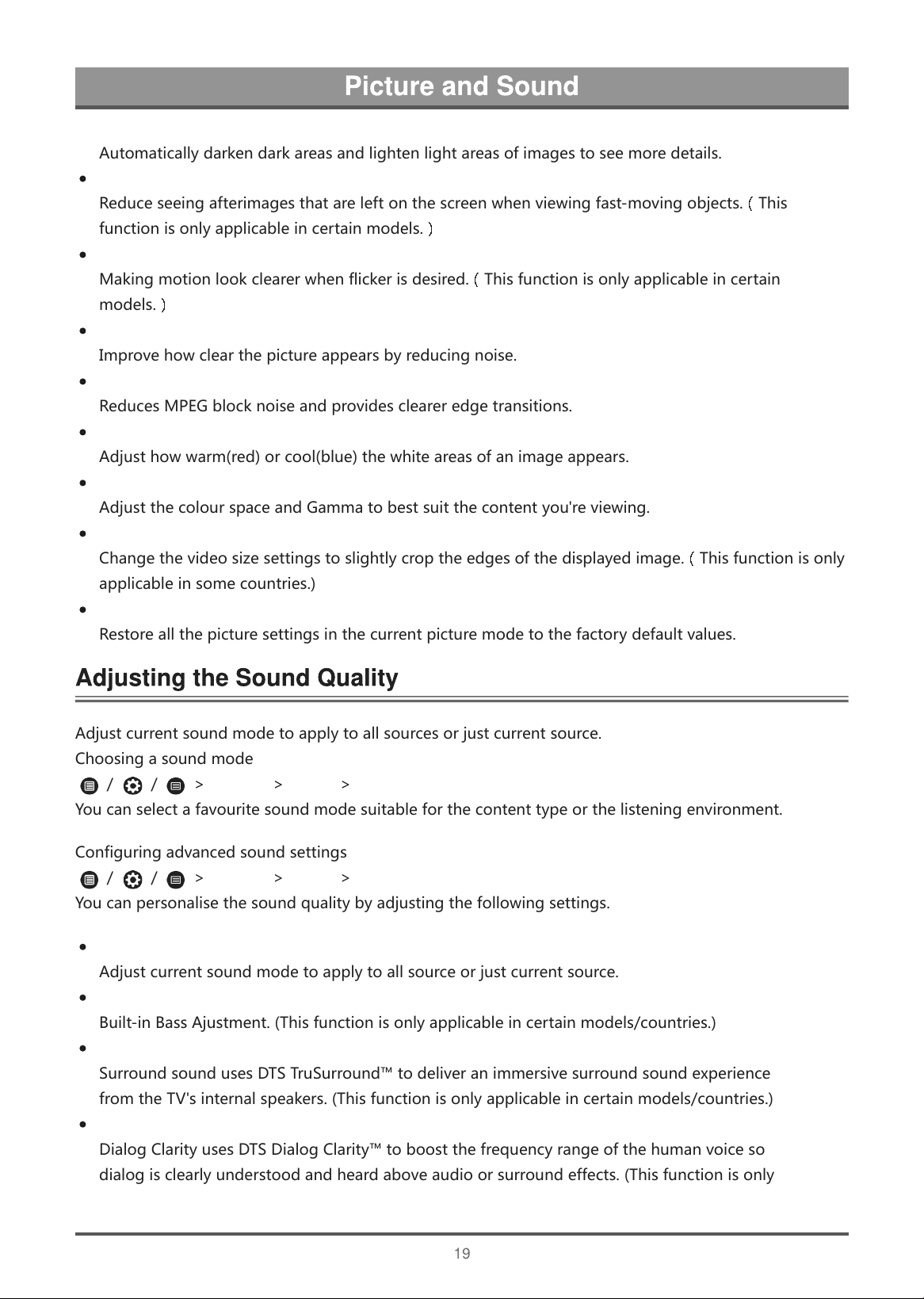
A
u
t
o
m
a
t
i
c
a
l
l
y
d
a
r
k
e
n
d
a
r
k
a
r
e
a
s
a
n
d
l
i
g
h
t
e
n
l
i
g
h
t
a
r
e
a
s
o
f
i
m
a
g
e
s
t
o
s
e
e
m
o
r
e
d
e
t
a
i
l
s
.
Ultra Smooth Motion
R
e
d
u
c
e
s
e
e
i
n
g
a
f
t
e
r
i
m
a
g
e
s
t
h
a
t
a
r
e
l
e
f
t
o
n
t
h
e
s
c
r
e
e
n
w
h
e
n
v
i
e
w
i
n
g
f
a
s
t
-
m
o
v
i
n
g
o
b
j
e
c
t
s
.
(
T
h
i
s
f
u
n
c
t
i
o
n
i
s
o
n
l
y
a
p
p
l
i
c
a
b
l
e
i
n
c
e
r
t
a
i
n
m
o
d
e
l
s
.
)
Clear Motion
M
a
k
i
n
g
m
o
t
i
o
n
l
o
o
k
c
l
e
a
r
e
r
w
h
e
n
f
l
i
c
k
e
r
i
s
d
e
s
i
r
e
d
.
(
T
h
i
s
f
u
n
c
t
i
o
n
i
s
o
n
l
y
a
p
p
l
i
c
a
b
l
e
i
n
c
e
r
t
a
i
n
m
o
d
e
l
s
.
)
Noise Reduction
I
m
p
r
o
v
e
h
o
w
c
l
e
a
r
t
h
e
p
i
c
t
u
r
e
a
p
p
e
a
r
s
b
y
r
e
d
u
c
i
n
g
n
o
i
s
e
.
MPEG Noise Reduction
R
e
d
u
c
e
s
M
P
E
G
b
l
o
c
k
n
o
i
s
e
a
n
d
p
r
o
v
i
d
e
s
c
l
e
a
r
e
r
e
d
g
e
t
r
a
n
s
i
t
i
o
n
s
.
Colour Temperature
A
d
j
u
s
t
h
o
w
w
a
r
m
(
r
e
d
)
o
r
c
o
o
l
(
b
l
u
e
)
t
h
e
w
h
i
t
e
a
r
e
a
s
o
f
a
n
i
m
a
g
e
a
p
p
e
a
r
s
.
Expert Setting
A
d
j
u
s
t
t
h
e
c
o
l
o
u
r
s
p
a
c
e
a
n
d
G
a
m
m
a
t
o
b
e
s
t
s
u
i
t
t
h
e
c
o
n
t
e
n
t
y
o
u
'
r
e
v
i
e
w
i
n
g
.
Overscan
C
h
a
n
g
e
t
h
e
v
i
d
e
o
s
i
z
e
s
e
t
t
i
n
g
s
t
o
s
l
i
g
h
t
l
y
c
r
o
p
t
h
e
e
d
g
e
s
o
f
t
h
e
d
i
s
p
l
a
y
e
d
i
m
a
g
e
.
(
T
h
i
s
f
u
n
c
t
i
o
n
i
s
o
n
l
y
a
p
p
l
i
c
a
b
l
e
i
n
s
o
m
e
c
o
u
n
t
r
i
e
s
.
)
Reset Current Mode
R
e
s
t
o
r
e
a
l
l
t
h
e
p
i
c
t
u
r
e
s
e
t
t
i
n
g
s
i
n
t
h
e
c
u
r
r
e
n
t
p
i
c
t
u
r
e
m
o
d
e
t
o
t
h
e
f
a
c
t
o
r
y
d
e
f
a
u
l
t
v
a
l
u
e
s
.
A
d
j
u
s
t
c
u
r
r
e
n
t
s
o
u
n
d
m
o
d
e
t
o
a
p
p
l
y
t
o
a
l
l
s
o
u
r
c
e
s
o
r
j
u
s
t
c
u
r
r
e
n
t
s
o
u
r
c
e
.
C
h
o
o
s
i
n
g
a
s
o
u
n
d
m
o
d
e
/
/
>
Settings
>
Sound
>
Sound Mode
Y
o
u
c
a
n
s
e
l
e
c
t
a
f
a
v
o
u
r
i
t
e
s
o
u
n
d
m
o
d
e
s
u
i
t
a
b
l
e
f
o
r
t
h
e
c
o
n
t
e
n
t
t
y
p
e
o
r
t
h
e
l
i
s
t
e
n
i
n
g
e
n
v
i
r
o
n
m
e
n
t
.
C
o
n
f
i
g
u
r
i
n
g
a
d
v
a
n
c
e
d
s
o
u
n
d
s
e
t
t
i
n
g
s
/
/
>
Settings
>
Sound
>
Sound Mode Settings
Y
o
u
c
a
n
p
e
r
s
o
n
a
l
i
s
e
t
h
e
s
o
u
n
d
q
u
a
l
i
t
y
b
y
a
d
j
u
s
t
i
n
g
t
h
e
f
o
l
l
o
w
i
n
g
s
e
t
t
i
n
g
s
.
Apply Audio Settings
A
d
j
u
s
t
c
u
r
r
e
n
t
s
o
u
n
d
m
o
d
e
t
o
a
p
p
l
y
t
o
a
l
l
s
o
u
r
c
e
o
r
j
u
s
t
c
u
r
r
e
n
t
s
o
u
r
c
e
.
Bass Boost
B
u
i
l
t
-
i
n
B
a
s
s
A
j
u
s
t
m
e
n
t
.
(
T
h
i
s
f
u
n
c
t
i
o
n
i
s
o
n
l
y
a
p
p
l
i
c
a
b
l
e
i
n
c
e
r
t
a
i
n
m
o
d
e
l
s
/
c
o
u
n
t
r
i
e
s
.
)
Surround Sound
S
u
r
r
o
u
n
d
s
o
u
n
d
u
s
e
s
D
T
S
T
r
u
S
u
r
r
o
u
n
d
™
t
o
d
e
l
i
v
e
r
a
n
i
m
m
e
r
s
i
v
e
s
u
r
r
o
u
n
d
s
o
u
n
d
e
x
p
e
r
i
e
n
c
e
f
r
o
m
t
h
e
T
V
'
s
i
n
t
e
r
n
a
l
s
p
e
a
k
e
r
s
.
(
T
h
i
s
f
u
n
c
t
i
o
n
i
s
o
n
l
y
a
p
p
l
i
c
a
b
l
e
i
n
c
e
r
t
a
i
n
m
o
d
e
l
s
/
c
o
u
n
t
r
i
e
s
.
)
Dialog Clarity
D
i
a
l
o
g
C
l
a
r
i
t
y
u
s
e
s
D
T
S
D
i
a
l
o
g
C
l
a
r
i
t
y
™
t
o
b
o
o
s
t
t
h
e
f
r
e
q
u
e
n
c
y
r
a
n
g
e
o
f
t
h
e
h
u
m
a
n
v
o
i
c
e
s
o
d
i
a
l
o
g
i
s
c
l
e
a
r
l
y
u
n
d
e
r
s
t
o
o
d
a
n
d
h
e
a
r
d
a
b
o
v
e
a
u
d
i
o
o
r
s
u
r
r
o
u
n
d
e
f
f
e
c
t
s
.
(
T
h
i
s
f
u
n
c
t
i
o
n
i
s
o
n
l
y
a
p
p
l
i
c
a
b
l
e
i
n
c
e
r
t
a
i
n
m
o
d
e
l
s
/
c
o
u
n
t
r
i
e
s
.
)
TruVolume
Y
o
u
c
a
n
t
u
r
n
o
n
/
o
f
f
.
(
T
h
i
s
f
u
n
c
t
i
o
n
i
s
o
n
l
y
a
p
p
l
i
c
a
b
l
e
i
n
c
e
r
t
a
i
n
m
o
d
e
l
s
/
c
o
u
n
t
r
i
e
s
.
)
Equalizer
B
o
o
s
t
t
h
e
v
o
l
u
m
e
a
t
d
i
f
f
e
r
e
n
t
f
r
e
q
u
e
n
c
i
e
s
.
Auto Volume Control
A
c
t
i
v
a
t
e
t
o
p
r
e
v
e
n
t
t
h
e
v
o
l
u
m
e
f
r
o
m
c
h
a
n
g
i
n
g
w
h
e
n
y
o
u
s
w
i
t
c
h
T
V
c
h
a
n
n
e
l
s
.
Reset Current Mode
R
e
s
t
o
r
e
a
l
l
o
f
t
h
e
a
u
d
i
o
s
e
t
t
i
n
g
s
i
n
t
h
e
c
u
r
r
e
n
t
a
u
d
i
o
m
o
d
e
t
o
t
h
e
f
a
c
t
o
r
y
d
e
f
a
u
l
t
v
a
l
u
e
s
.
Wall Mount Setup
A
u
t
o
m
a
t
i
c
a
l
l
y
o
p
t
i
m
i
z
e
t
h
e
s
o
u
n
d
b
a
s
e
d
o
n
t
h
e
p
o
s
i
t
i
o
n
o
f
t
h
e
T
V
.
(
T
h
i
s
f
u
n
c
t
i
o
n
i
s
o
n
l
y
a
p
p
l
i
c
a
b
l
e
i
n
c
e
r
t
a
i
n
m
o
d
e
l
s
/
c
o
u
n
t
r
i
e
s
.
)
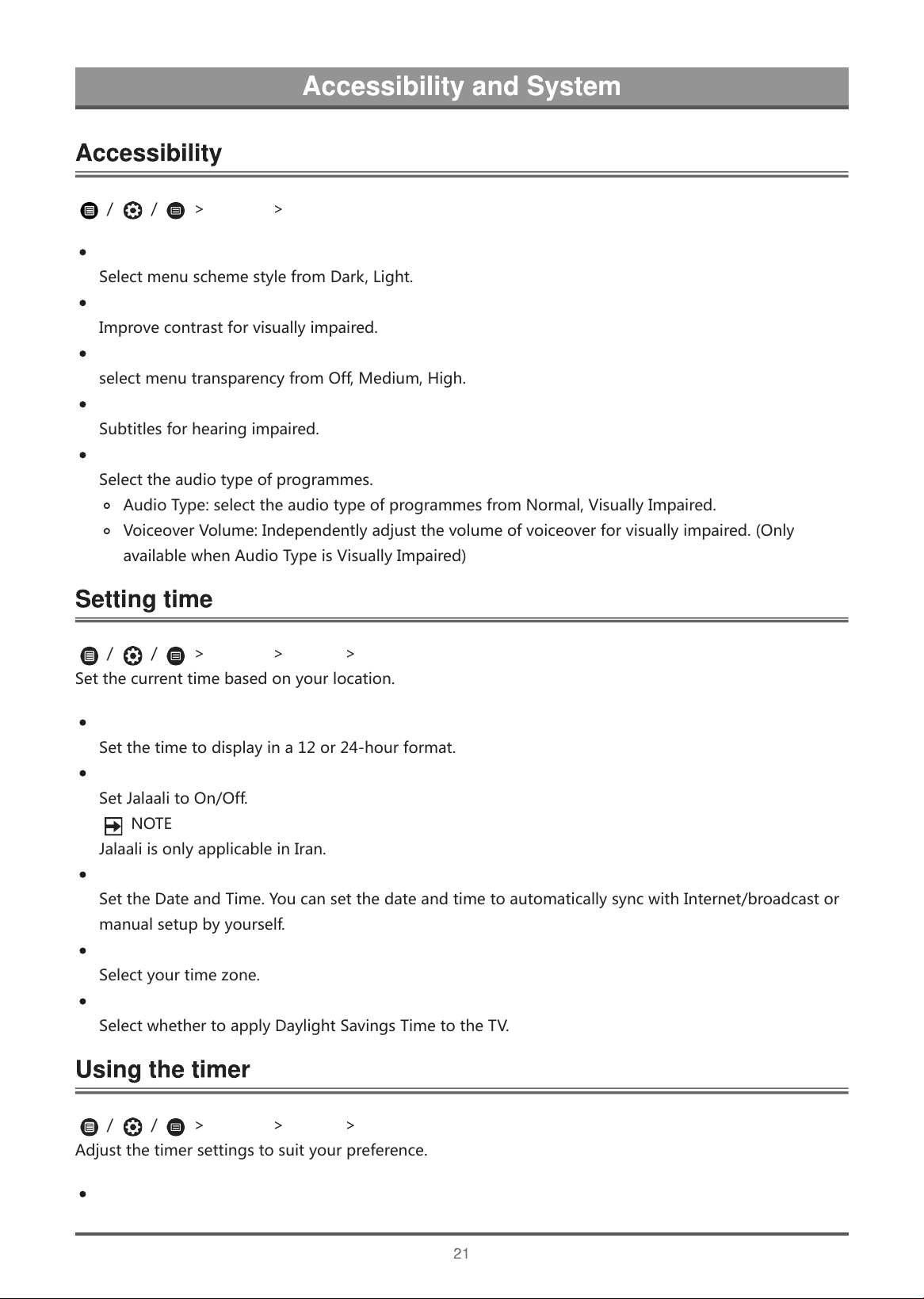
/
/
>
Settings
>
Accessibility
Menu Scheme
S
e
l
e
c
t
m
e
n
u
s
c
h
e
m
e
s
t
y
l
e
f
r
o
m
D
a
r
k
,
L
i
g
h
t
.
High Contrast Menu
I
m
p
r
o
v
e
c
o
n
t
r
a
s
t
f
o
r
v
i
s
u
a
l
l
y
i
m
p
a
i
r
e
d
.
Menu Transparency
s
e
l
e
c
t
m
e
n
u
t
r
a
n
s
p
a
r
e
n
c
y
f
r
o
m
O
f
f
,
M
e
d
i
u
m
,
H
i
g
h
.
Hard of Hearing Subtitles
S
u
b
t
i
t
l
e
s
f
o
r
h
e
a
r
i
n
g
i
m
p
a
i
r
e
d
.
Audio Type
S
e
l
e
c
t
t
h
e
a
u
d
i
o
t
y
p
e
o
f
p
r
o
g
r
a
m
m
e
s
.
A
u
d
i
o
T
y
p
e
:
s
e
l
e
c
t
t
h
e
a
u
d
i
o
t
y
p
e
o
f
p
r
o
g
r
a
m
m
e
s
f
r
o
m
N
o
r
m
a
l
,
V
i
s
u
a
l
l
y
I
m
p
a
i
r
e
d
.
V
o
i
c
e
o
v
e
r
V
o
l
u
m
e
:
I
n
d
e
p
e
n
d
e
n
t
l
y
a
d
j
u
s
t
t
h
e
v
o
l
u
m
e
o
f
v
o
i
c
e
o
v
e
r
f
o
r
v
i
s
u
a
l
l
y
i
m
p
a
i
r
e
d
.
(
O
n
l
y
a
v
a
i
l
a
b
l
e
w
h
e
n
A
u
d
i
o
T
y
p
e
i
s
V
i
s
u
a
l
l
y
I
m
p
a
i
r
e
d
)
/
/
>
Settings
>
System
>
Time
S
e
t
t
h
e
c
u
r
r
e
n
t
t
i
m
e
b
a
s
e
d
o
n
y
o
u
r
l
o
c
a
t
i
o
n
.
Time Format
S
e
t
t
h
e
t
i
m
e
t
o
d
i
s
p
l
a
y
i
n
a
1
2
o
r
2
4
-
h
o
u
r
f
o
r
m
a
t
.
Jalaali
S
e
t
J
a
l
a
a
l
i
t
o
O
n
/
O
f
f
.
N
O
T
E
J
a
l
a
a
l
i
i
s
o
n
l
y
a
p
p
l
i
c
a
b
l
e
i
n
I
r
a
n
.
Date/Time
S
e
t
t
h
e
D
a
t
e
a
n
d
T
i
m
e
.
Y
o
u
c
a
n
s
e
t
t
h
e
d
a
t
e
a
n
d
t
i
m
e
t
o
a
u
t
o
m
a
t
i
c
a
l
l
y
s
y
n
c
w
i
t
h
I
n
t
e
r
n
e
t
/
b
r
o
a
d
c
a
s
t
o
r
m
a
n
u
a
l
s
e
t
u
p
b
y
y
o
u
r
s
e
l
f
.
Time Zone
S
e
l
e
c
t
y
o
u
r
t
i
m
e
z
o
n
e
.
Daylight Savings
S
e
l
e
c
t
w
h
e
t
h
e
r
t
o
a
p
p
l
y
D
a
y
l
i
g
h
t
S
a
v
i
n
g
s
T
i
m
e
t
o
t
h
e
T
V
.
/
/
>
Settings
>
System
>
Timer Settings
A
d
j
u
s
t
t
h
e
t
i
m
e
r
s
e
t
t
i
n
g
s
t
o
s
u
i
t
y
o
u
r
p
r
e
f
e
r
e
n
c
e
.
Sleep Timer
S
e
t
t
h
e
s
l
e
e
p
t
i
m
e
r
t
o
a
u
t
o
m
a
t
i
c
a
l
l
y
t
u
r
n
t
h
e
T
V
O
f
f
w
i
t
h
i
n
a
s
p
e
c
i
f
i
e
d
t
i
m
e
:
O
f
f
,
1
5
M
i
n
u
t
e
s
,
3
0
M
i
n
u
t
e
s
,
6
0
M
i
n
u
t
e
s
,
9
0
M
i
n
u
t
e
s
,
1
2
0
M
i
n
u
t
e
s
o
r
U
s
e
r
D
e
f
i
n
e
d
.
Power On Timer
S
e
t
t
h
e
c
l
o
c
k
f
o
r
t
h
e
t
i
m
e
y
o
u
w
a
n
t
t
h
e
T
V
t
o
t
u
r
n
o
n
a
u
t
o
m
a
t
i
c
a
l
l
y
.
Y
o
u
c
a
n
s
e
t
t
h
e
t
i
m
e
o
n
l
y
o
n
c
e
o
r
s
e
t
t
h
e
t
i
m
e
i
n
s
p
e
c
i
f
i
e
d
d
a
t
e
b
y
w
e
e
k
l
y
.
Power Off Timer
S
e
t
t
h
e
c
l
o
c
k
f
o
r
t
h
e
t
i
m
e
y
o
u
w
a
n
t
t
h
e
T
V
t
o
t
u
r
n
o
f
f
a
u
t
o
m
a
t
i
c
a
l
l
y
.
Y
o
u
c
a
n
s
e
t
t
h
e
t
i
m
e
o
n
l
y
o
n
c
e
o
r
s
e
t
t
h
e
t
i
m
e
i
n
s
p
e
c
i
f
i
e
d
d
a
t
e
w
e
e
k
l
y
.
Menu Timeout
S
e
t
t
h
e
a
m
o
u
n
t
o
f
t
i
m
e
t
h
a
t
y
o
u
w
o
u
l
d
l
i
k
e
f
o
r
t
h
e
m
e
n
u
t
o
d
i
s
p
l
a
y
:
O
f
f
,
1
0
s
,
2
0
s
,
3
0
s
,
6
0
s
,
5
m
i
n
.
Auto Sleep
S
e
t
t
h
e
a
m
o
u
n
t
o
f
t
i
m
e
t
h
a
t
y
o
u
w
o
u
l
d
l
i
k
e
f
o
r
T
V
a
u
t
o
p
o
w
e
r
o
f
f
w
i
t
h
o
u
t
a
n
y
a
c
t
i
v
i
t
y
:
O
f
f
,
3
H
,
4
H
.
(
T
h
i
s
f
u
n
c
t
i
o
n
i
s
o
n
l
y
a
p
p
l
i
c
a
b
l
e
i
n
s
o
m
e
c
o
u
n
t
r
i
e
s
.
)
Auto Standby with No Signal
S
e
t
t
h
e
t
i
m
e
f
o
r
a
u
t
o
s
t
a
n
d
b
y
w
i
t
h
n
o
s
i
g
n
a
l
:
O
f
f
,
1
5
M
i
n
u
t
e
s
.
/
/
>
Settings
>
System
>
Advanced Settings
>
Notifications
A
l
l
o
w
p
o
p
-
u
p
n
o
t
i
f
i
c
a
t
i
o
n
s
t
o
a
p
p
e
a
r
f
o
r
u
s
e
f
u
l
i
n
f
o
r
m
a
t
i
o
n
a
n
d
e
v
e
n
t
s
t
h
a
t
o
c
c
u
r
w
i
t
h
y
o
u
r
T
V
,
i
n
c
l
u
d
i
n
g
:
A
d
v
e
r
t
i
s
i
n
g
,
N
e
w
A
r
r
i
v
a
l
s
,
W
a
r
n
i
n
g
s
A
n
d
L
e
g
a
l
S
t
a
t
e
m
e
n
t
s
a
n
d
S
y
s
t
e
m
m
e
s
s
a
g
e
.
Y
o
u
c
a
n
e
n
a
b
l
e
/
d
i
s
a
b
l
e
e
a
c
h
o
f
t
h
e
s
e
n
o
t
i
f
i
c
a
t
i
o
n
s
.
>
Notifications
Y
o
u
c
a
n
v
i
e
w
t
h
e
l
i
s
t
o
f
e
v
e
n
t
m
e
s
s
a
g
e
s
g
e
n
e
r
a
t
e
d
b
y
t
h
e
T
V
.
N
O
T
E
T
o
d
e
l
e
t
e
a
l
l
n
o
t
i
f
i
c
a
t
i
o
n
s
,
s
e
l
e
c
t
C
l
e
a
r
A
l
l
.
C
o
n
n
e
c
t
i
n
g
t
o
B
l
u
e
t
o
o
t
h
D
e
v
i
c
e
s
C
o
n
n
e
c
t
t
o
t
h
e
D
e
v
i
c
e
s
u
s
i
n
g
B
l
u
e
t
o
o
t
h
t
e
c
h
n
o
l
o
g
y
/
/
>
Settings
>
System
>
Bluetooth
Remote Pairing
1
.
S
e
t
Bluetooth
t
o
O
n
.
2
.
P
r
e
s
s
a
n
d
h
o
l
d
t
h
e
M
E
N
U
b
u
t
t
o
n
.
M
a
k
e
s
u
r
e
y
o
u
r
r
e
m
o
t
e
i
s
c
l
o
s
e
t
o
t
h
i
s
T
V
a
r
o
u
n
d
3
m
e
t
e
r
s
.
N
O
T
E
T
h
i
s
f
u
n
c
t
i
o
n
i
s
n
o
t
a
v
a
i
l
a
b
l
e
o
n
c
e
r
t
a
i
n
m
o
d
e
l
s
i
n
s
p
e
c
i
f
i
c
g
e
o
g
r
a
p
h
i
c
a
l
a
r
e
a
s
.
TV Bluetooth Speaker
P
l
a
y
y
o
u
r
m
o
b
i
l
e
p
h
o
n
e
'
s
m
u
s
i
c
b
y
T
V
.
Connecting to Bluetooth Devices
1
.
S
e
t
Bluetooth
t
o
O
n
.
2
.
B
e
f
o
r
e
p
a
i
r
i
n
g
y
o
u
r
B
l
u
e
t
o
o
t
h
d
e
v
i
c
e
s
,
m
a
k
e
s
u
r
e
t
h
e
y
'
r
e
i
n
p
a
i
r
i
n
g
m
o
d
e
.
3
.
F
i
n
d
t
h
e
B
l
u
e
t
o
o
t
h
d
e
v
i
c
e
s
n
a
m
e
i
n
t
h
e
Equipment management
a
n
d
s
e
l
e
c
t
i
t
.
T
h
e
d
e
v
i
c
e
i
s
a
u
t
o
m
a
t
i
c
a
l
l
y
c
o
n
n
e
c
t
e
d
t
o
t
h
e
T
V
.
N
O
T
E
O
n
l
y
o
n
e
B
l
u
e
t
o
o
t
h
s
p
e
a
k
e
r
a
n
d
B
l
u
e
t
o
o
t
h
h
e
a
d
p
h
o
n
e
c
a
n
c
o
n
n
e
c
t
t
o
T
V
,
i
f
a
n
e
w
B
l
u
e
t
o
o
t
h
s
p
e
a
k
e
r
o
r
h
e
a
d
p
h
o
n
e
c
o
n
n
e
c
t
e
d
t
o
T
V
,
t
h
e
o
l
d
o
n
e
s
h
o
u
l
d
d
i
s
c
o
n
n
e
c
t
t
o
T
V
a
u
t
o
m
a
t
i
c
a
l
l
y
.
C
o
m
p
a
t
i
b
i
l
i
t
y
i
s
s
u
e
s
m
a
y
o
c
c
u
r
,
d
e
p
e
n
d
i
n
g
o
n
t
h
e
B
l
u
e
t
o
o
t
h
d
e
v
i
c
e
.
T
h
e
T
V
a
n
d
B
l
u
e
t
o
o
t
h
d
e
v
i
c
e
m
a
y
d
i
s
c
o
n
n
e
c
t
,
d
e
p
e
n
d
i
n
g
o
n
t
h
e
d
i
s
t
a
n
c
e
b
e
t
w
e
e
n
t
h
e
m
.
T
h
e
T
V
s
u
p
p
o
r
t
s
B
l
u
e
t
o
o
t
h
k
e
y
b
o
a
r
d
,
B
l
u
e
t
o
o
t
h
m
o
u
s
e
,
B
l
u
e
t
o
o
t
h
h
e
a
d
s
e
t
,
B
l
u
e
t
o
o
t
h
s
p
e
a
k
e
r
s
a
n
d
s
o
o
n
.
H
o
w
t
o
s
e
t
u
p
A
m
a
z
o
n
A
l
e
x
a
S
e
r
v
i
c
e
o
n
T
V
S
e
t
u
p
V
I
D
A
A
A
c
c
o
u
n
t
1
.
N
a
v
i
g
a
t
e
t
o
N
e
t
w
o
r
k
T
a
b
t
o
c
o
n
n
e
c
t
y
o
u
r
T
V
t
o
W
i
F
i
.
(
I
f
y
o
u
h
a
v
e
n
'
t
d
o
n
e
y
e
t
)
2
.
/
>
3
.
R
e
g
i
s
t
e
r
y
o
u
r
d
e
v
i
c
e
t
o
y
o
u
r
V
I
D
A
A
A
c
c
o
u
n
t
.
S
e
t
u
p
A
m
a
z
o
n
A
l
e
x
a
S
e
r
v
i
c
e
1
.
/
/
>
Settings
>
System
>
Voice Service
>
Amazon Alexa Service
o
r
/
/
>
Settings
>
System
>
Amazon Alexa Service
N
O
T
E
:
S
e
t
t
i
n
g
p
a
t
h
v
a
r
i
e
s
d
e
p
e
n
d
i
n
g
o
n
T
V
m
o
d
e
l
s
a
n
d
r
e
g
i
o
n
s
.
2
.
T
u
r
n
o
n
Amazon Alexa Service
.
3
.
S
e
l
e
c
t
Amazon Alexa Service Setup
>
Set up now
.
4
.
V
i
s
i
t
t
h
e
w
e
b
p
a
g
e
a
p
p
e
a
r
e
d
o
n
y
o
u
r
T
V
a
n
d
s
i
g
n
i
n
t
o
y
o
u
r
A
m
a
z
o
n
a
c
c
o
u
n
t
.
I
f
y
o
u
d
o
n
'
t
h
a
v
e
a
n
a
c
c
o
u
n
t
,
c
r
e
a
t
e
a
n
e
w
o
n
e
.
Y
o
u
w
i
l
l
b
e
r
e
q
u
i
r
e
d
t
o
s
i
g
n
i
n
t
o
V
I
D
A
A
a
c
c
o
u
n
t
f
i
r
s
t
(
i
f
n
o
t
s
i
g
n
e
d
i
n
y
e
t
)
b
e
f
o
r
e
s
i
g
n
i
n
g
i
n
t
o
A
m
a
z
o
n
a
c
c
o
u
n
t
.
5
.
G
i
v
e
y
o
u
r
T
V
a
u
n
i
q
u
e
n
a
m
e
.
6
.
E
n
t
e
r
t
h
e
c
o
d
e
a
p
p
e
a
r
e
d
o
n
y
o
u
r
T
V
.
T
h
e
c
o
d
e
w
i
l
l
b
e
e
x
p
i
r
e
d
a
f
t
e
r
1
0
m
i
n
u
t
e
s
.
A
f
t
e
r
s
i
g
n
i
n
g
i
n
,
t
h
i
s
s
c
r
e
e
n
w
i
l
l
u
p
d
a
t
e
a
u
t
o
m
a
t
i
c
a
l
l
y
.
7
.
S
e
l
e
c
t
Authorize
.
8
.
C
h
o
o
s
e
A
l
e
x
a
l
a
n
g
u
a
g
e
t
h
a
t
y
o
u
w
a
n
t
t
o
u
s
e
o
n
T
V
.
T
h
i
s
f
e
a
t
u
r
e
r
e
q
u
i
r
e
s
A
l
e
x
a
B
u
i
l
t
-
i
n
S
e
r
v
i
c
e
,
w
h
i
c
h
v
a
r
i
e
s
d
e
p
e
n
d
i
n
g
o
n
T
V
m
o
d
e
l
s
a
n
d
r
e
g
i
o
n
s
.
9
.
A
m
a
z
o
n
A
l
e
x
a
S
e
r
v
i
c
e
i
s
s
e
t
u
p
a
n
d
r
e
a
d
y
.
E
n
j
o
y
i
n
t
e
r
a
c
t
i
n
g
w
i
t
h
A
l
e
x
a
u
s
i
n
g
y
o
u
r
v
o
i
c
e
b
y
j
u
s
t
p
r
e
s
s
i
n
g
a
n
d
h
o
l
d
t
h
e
M
i
c
b
u
t
t
o
n
o
n
y
o
u
r
R
e
m
o
t
e
C
o
n
t
r
o
l
.
N
O
T
E
T
h
i
s
f
e
a
t
u
r
e
r
e
q
u
i
r
e
s
A
l
e
x
a
B
u
i
l
t
-
i
n
s
e
r
v
i
c
e
o
t
h
e
r
w
i
s
e
u
s
e
e
x
t
e
r
n
a
l
A
l
e
x
a
-
e
n
a
b
l
e
d
d
e
v
i
c
e
s
(
e
.
g
.
A
l
e
x
a
A
p
p
,
E
c
h
o
)
t
o
c
o
n
t
r
o
l
y
o
u
r
s
m
a
r
t
T
V
b
y
u
s
i
n
g
j
u
s
t
y
o
u
r
v
o
i
c
e
.
S
h
i
p
p
m
e
n
t
w
i
t
h
V
o
i
c
e
R
e
m
o
t
e
C
o
n
t
r
o
l
v
a
r
i
e
s
d
e
p
e
n
d
i
n
g
o
n
T
V
m
o
d
e
l
s
a
n
d
r
e
g
i
o
n
s
.
D
o
w
n
l
o
a
d
a
n
d
i
n
s
t
a
l
l
R
e
m
o
t
e
C
o
n
t
r
o
l
a
p
p
(
R
e
m
o
t
e
N
o
w
)
o
n
y
o
u
r
m
o
b
i
l
e
d
e
v
i
c
e
.
P
r
e
s
s
t
h
e
M
i
c
b
u
t
t
o
n
t
o
i
n
t
e
r
a
c
t
w
i
t
h
A
l
e
x
a
o
n
y
o
u
r
T
V
.
T
h
e
A
m
a
z
o
n
A
l
e
x
a
S
e
r
v
i
c
e
f
u
n
c
t
i
o
n
i
s
o
n
l
y
a
p
p
l
i
c
a
b
l
e
i
n
c
e
r
t
a
i
n
m
o
d
e
l
s
/
c
o
u
n
t
r
i
e
s
.
H
o
w
t
o
s
e
t
u
p
G
o
o
g
l
e
S
m
a
r
t
H
o
m
e
S
e
r
v
i
c
e
o
n
T
V
S
e
t
u
p
V
I
D
A
A
A
c
c
o
u
n
t
1
.
N
a
v
i
g
a
t
e
t
o
N
e
t
w
o
r
k
T
a
b
t
o
c
o
n
n
e
c
t
y
o
u
r
T
V
t
o
W
i
F
i
.
(
I
f
y
o
u
h
a
v
e
n
'
t
d
o
n
e
y
e
t
)
2
.
/
>
3
.
R
e
g
i
s
t
e
r
y
o
u
r
d
e
v
i
c
e
t
o
y
o
u
r
V
I
D
A
A
A
c
c
o
u
n
t
.
S
e
t
u
p
G
o
o
g
l
e
S
m
a
r
t
H
o
m
e
S
e
r
v
i
c
e
.
1
.
/
/
>
Settings
>
System
>
Voice Service
>
Google Smart Home Service
o
r
/
/
>
Settings
>
System
>
Google Smart Home Service
N
O
T
E
:
S
e
t
t
i
n
g
p
a
t
h
v
a
r
i
e
s
d
e
p
e
n
d
i
n
g
o
n
T
V
m
o
d
e
l
s
a
n
d
r
e
g
i
o
n
s
.
2
.
T
u
r
n
o
n
Google Smart Home Service
.
3
.
F
o
l
l
o
w
t
h
e
i
n
s
t
r
u
c
t
i
o
n
o
n
T
V
t
o
e
n
a
b
l
e
G
o
o
g
l
e
S
m
a
r
t
H
o
m
e
S
e
r
v
i
c
e
.
Y
o
u
w
i
l
l
b
e
r
e
q
u
i
r
e
d
t
o
s
i
g
n
i
n
t
o
V
I
D
A
A
a
c
c
o
u
n
t
f
i
r
s
t
i
f
n
o
t
s
i
g
n
e
d
i
n
y
e
t
.
4
.
G
o
o
g
l
e
S
m
a
r
t
H
o
m
e
S
e
r
i
v
c
e
i
s
s
e
t
u
p
a
n
d
r
e
a
d
y
.
C
o
n
t
r
o
l
y
o
u
r
s
m
a
r
t
T
V
u
s
i
n
g
j
u
s
t
y
o
u
r
v
o
i
c
e
b
y
G
o
o
g
l
e
H
o
m
e
d
e
v
i
c
e
o
r
G
o
o
g
l
e
A
s
s
i
s
t
a
n
t
a
p
p
.
N
O
T
E
T
h
e
G
o
o
g
l
e
S
m
a
r
t
H
o
m
e
S
e
r
v
i
c
e
f
u
n
c
t
i
o
n
i
s
o
n
l
y
a
p
p
l
i
c
a
b
l
e
i
n
c
e
r
t
a
i
n
m
o
d
e
l
s
/
c
o
u
n
t
r
i
e
s
.
/
/
>
Settings
>
Support
>
System Update
S
e
t
y
o
u
r
T
V
t
o
r
e
c
e
i
v
e
t
h
e
l
a
t
e
s
t
f
i
r
m
w
a
r
e
.
Auto Firmware Upgrade
S
e
t
y
o
u
r
T
V
t
o
a
u
t
o
m
a
t
i
c
a
l
l
y
r
e
c
e
i
v
e
t
h
e
l
a
t
e
s
t
f
i
r
m
w
a
r
e
.
Check Firmware Upgrade
C
h
e
c
k
t
o
e
n
s
u
r
e
t
h
a
t
y
o
u
r
T
V
h
a
s
r
e
c
e
i
v
e
d
t
h
e
l
a
t
e
s
t
f
i
r
m
w
a
r
e
.
N
O
T
E
•
P
l
e
a
s
e
e
n
s
u
r
e
y
o
u
r
T
V
i
s
c
o
n
n
e
c
t
e
d
t
o
t
h
e
I
n
t
e
r
n
e
t
.
Check OAD Upgrade
C
h
e
c
k
t
o
e
n
s
u
r
e
t
h
a
t
y
o
u
r
T
V
h
a
s
r
e
c
e
i
v
e
d
t
h
e
l
a
t
e
s
t
f
i
r
m
w
a
r
e
v
i
a
t
h
e
t
u
n
e
r
.
N
O
T
E
•
P
l
e
a
s
e
e
n
s
u
r
e
y
o
u
r
T
V
i
s
c
o
n
n
e
c
t
e
d
t
o
t
h
e
I
n
t
e
r
n
e
t
.
•
T
h
i
s
f
u
n
c
t
i
o
n
i
s
o
n
l
y
a
p
p
l
i
c
a
b
l
e
w
h
e
n
T
h
a
i
l
a
n
d
a
n
d
M
a
l
a
y
s
i
a
a
r
e
s
e
l
e
c
t
e
d
i
n
L
o
c
a
t
i
o
n
.
System APP auto upgrade
S
e
t
y
o
u
r
s
y
s
t
e
m
a
p
p
l
i
c
a
t
i
o
n
s
t
o
a
u
t
o
m
a
t
i
c
a
l
l
y
u
p
g
r
a
d
e
t
o
t
h
e
l
a
t
e
s
t
v
e
r
s
i
o
n
.
Upgrade from USB
U
p
g
r
a
d
e
T
V
s
o
f
t
w
a
r
e
f
r
o
m
U
S
B
d
e
v
i
c
e
.
N
O
T
E
•
P
l
e
a
s
e
e
n
s
u
r
e
t
h
e
U
S
B
f
l
a
s
h
d
r
i
v
e
i
n
s
e
r
t
t
o
U
S
B
2
.
0
p
o
r
t
o
f
t
h
e
T
V
.
•
T
h
e
u
p
d
a
t
i
n
g
f
i
l
e
s
m
u
s
t
b
e
a
v
a
i
l
a
b
l
e
i
n
r
o
o
t
d
i
r
e
c
t
o
r
y
.
•
T
h
e
f
o
r
m
a
t
o
f
t
h
e
U
S
B
m
u
s
t
b
e
F
A
T
3
2
a
n
d
t
h
e
p
a
r
t
i
t
i
o
n
t
a
b
l
e
t
y
p
e
m
u
s
t
b
e
M
B
R
.
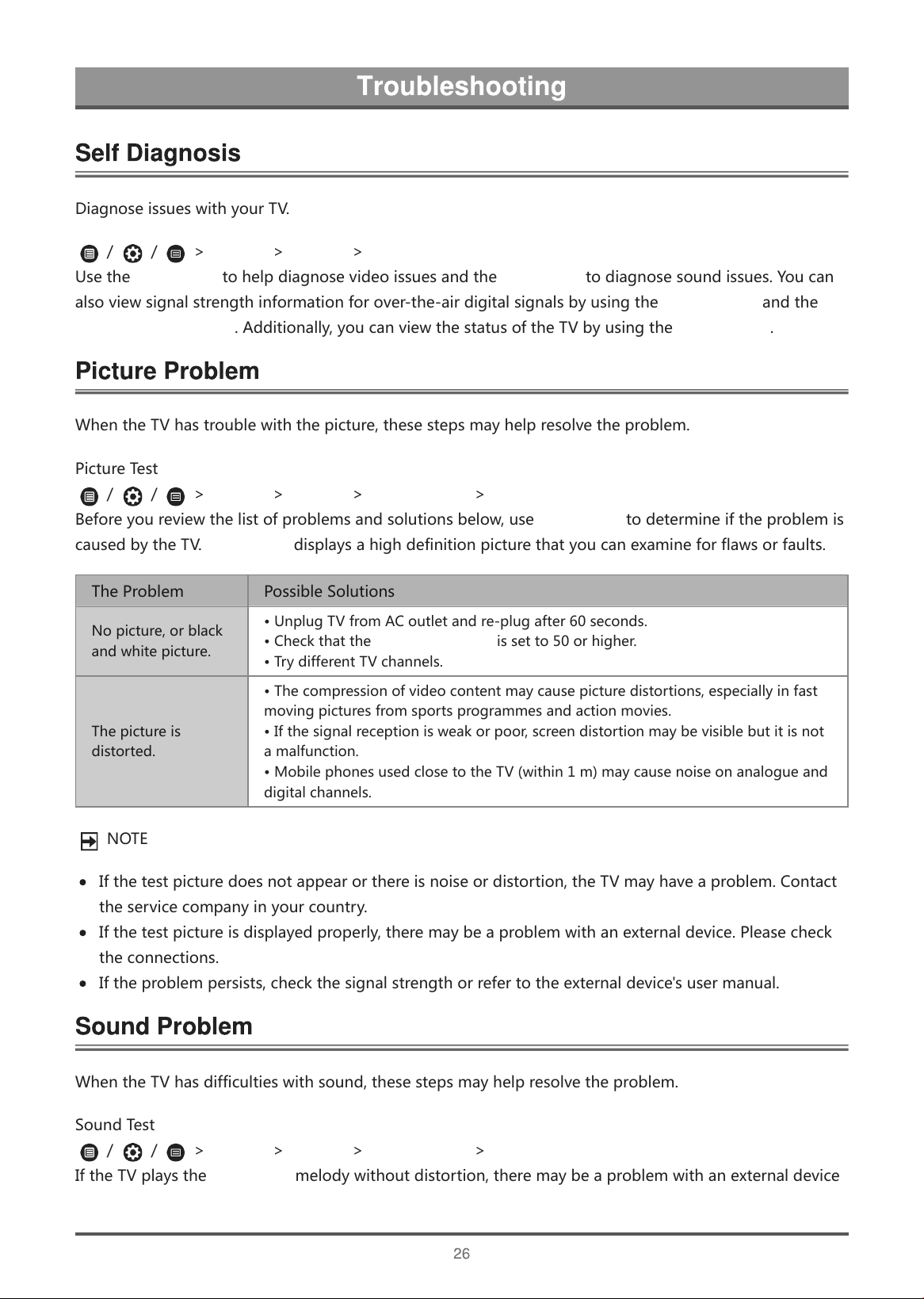
D
i
a
g
n
o
s
e
i
s
s
u
e
s
w
i
t
h
y
o
u
r
T
V
.
/
/
>
Settings
>
Support
>
Self Diagnosis
U
s
e
t
h
e
Picture Test
t
o
h
e
l
p
d
i
a
g
n
o
s
e
v
i
d
e
o
i
s
s
u
e
s
a
n
d
t
h
e
Sound Test
t
o
d
i
a
g
n
o
s
e
s
o
u
n
d
i
s
s
u
e
s
.
Y
o
u
c
a
n
a
l
s
o
v
i
e
w
s
i
g
n
a
l
s
t
r
e
n
g
t
h
i
n
f
o
r
m
a
t
i
o
n
f
o
r
o
v
e
r
-
t
h
e
-
a
i
r
d
i
g
i
t
a
l
s
i
g
n
a
l
s
b
y
u
s
i
n
g
t
h
e
Network Test
a
n
d
t
h
e
Input Connection Test
.
A
d
d
i
t
i
o
n
a
l
l
y
,
y
o
u
c
a
n
v
i
e
w
t
h
e
s
t
a
t
u
s
o
f
t
h
e
T
V
b
y
u
s
i
n
g
t
h
e
Status Check
.
W
h
e
n
t
h
e
T
V
h
a
s
t
r
o
u
b
l
e
w
i
t
h
t
h
e
p
i
c
t
u
r
e
,
t
h
e
s
e
s
t
e
p
s
m
a
y
h
e
l
p
r
e
s
o
l
v
e
t
h
e
p
r
o
b
l
e
m
.
P
i
c
t
u
r
e
T
e
s
t
/
/
>
Settings
>
Support
>
Self Diagnosis
>
Picture Test
B
e
f
o
r
e
y
o
u
r
e
v
i
e
w
t
h
e
l
i
s
t
o
f
p
r
o
b
l
e
m
s
a
n
d
s
o
l
u
t
i
o
n
s
b
e
l
o
w
,
u
s
e
Picture Test
t
o
d
e
t
e
r
m
i
n
e
i
f
t
h
e
p
r
o
b
l
e
m
i
s
c
a
u
s
e
d
b
y
t
h
e
T
V
.
Picture Test
d
i
s
p
l
a
y
s
a
h
i
g
h
d
e
f
i
n
i
t
i
o
n
p
i
c
t
u
r
e
t
h
a
t
y
o
u
c
a
n
e
x
a
m
i
n
e
f
o
r
f
l
a
w
s
o
r
f
a
u
l
t
s
.
T
h
e
P
r
o
b
l
e
m
P
o
s
s
i
b
l
e
S
o
l
u
t
i
o
n
s
N
o
p
i
c
t
u
r
e
,
o
r
b
l
a
c
k
a
n
d
w
h
i
t
e
p
i
c
t
u
r
e
.
•
U
n
p
l
u
g
T
V
f
r
o
m
A
C
o
u
t
l
e
t
a
n
d
r
e
-
p
l
u
g
a
f
t
e
r
6
0
s
e
c
o
n
d
s
.
•
C
h
e
c
k
t
h
a
t
t
h
e
Colour Saturation
i
s
s
e
t
t
o
5
0
o
r
h
i
g
h
e
r
.
•
T
r
y
d
i
f
f
e
r
e
n
t
T
V
c
h
a
n
n
e
l
s
.
T
h
e
p
i
c
t
u
r
e
i
s
d
i
s
t
o
r
t
e
d
.
•
T
h
e
c
o
m
p
r
e
s
s
i
o
n
o
f
v
i
d
e
o
c
o
n
t
e
n
t
m
a
y
c
a
u
s
e
p
i
c
t
u
r
e
d
i
s
t
o
r
t
i
o
n
s
,
e
s
p
e
c
i
a
l
l
y
i
n
f
a
s
t
m
o
v
i
n
g
p
i
c
t
u
r
e
s
f
r
o
m
s
p
o
r
t
s
p
r
o
g
r
a
m
m
e
s
a
n
d
a
c
t
i
o
n
m
o
v
i
e
s
.
•
I
f
t
h
e
s
i
g
n
a
l
r
e
c
e
p
t
i
o
n
i
s
w
e
a
k
o
r
p
o
o
r
,
s
c
r
e
e
n
d
i
s
t
o
r
t
i
o
n
m
a
y
b
e
v
i
s
i
b
l
e
b
u
t
i
t
i
s
n
o
t
a
m
a
l
f
u
n
c
t
i
o
n
.
•
M
o
b
i
l
e
p
h
o
n
e
s
u
s
e
d
c
l
o
s
e
t
o
t
h
e
T
V
(
w
i
t
h
i
n
1
m
)
m
a
y
c
a
u
s
e
n
o
i
s
e
o
n
a
n
a
l
o
g
u
e
a
n
d
d
i
g
i
t
a
l
c
h
a
n
n
e
l
s
.
N
O
T
E
I
f
t
h
e
t
e
s
t
p
i
c
t
u
r
e
d
o
e
s
n
o
t
a
p
p
e
a
r
o
r
t
h
e
r
e
i
s
n
o
i
s
e
o
r
d
i
s
t
o
r
t
i
o
n
,
t
h
e
T
V
m
a
y
h
a
v
e
a
p
r
o
b
l
e
m
.
C
o
n
t
a
c
t
t
h
e
s
e
r
v
i
c
e
c
o
m
p
a
n
y
i
n
y
o
u
r
c
o
u
n
t
r
y
.
I
f
t
h
e
t
e
s
t
p
i
c
t
u
r
e
i
s
d
i
s
p
l
a
y
e
d
p
r
o
p
e
r
l
y
,
t
h
e
r
e
m
a
y
b
e
a
p
r
o
b
l
e
m
w
i
t
h
a
n
e
x
t
e
r
n
a
l
d
e
v
i
c
e
.
P
l
e
a
s
e
c
h
e
c
k
t
h
e
c
o
n
n
e
c
t
i
o
n
s
.
I
f
t
h
e
p
r
o
b
l
e
m
p
e
r
s
i
s
t
s
,
c
h
e
c
k
t
h
e
s
i
g
n
a
l
s
t
r
e
n
g
t
h
o
r
r
e
f
e
r
t
o
t
h
e
e
x
t
e
r
n
a
l
d
e
v
i
c
e
'
s
u
s
e
r
m
a
n
u
a
l
.
W
h
e
n
t
h
e
T
V
h
a
s
d
i
f
f
i
c
u
l
t
i
e
s
w
i
t
h
s
o
u
n
d
,
t
h
e
s
e
s
t
e
p
s
m
a
y
h
e
l
p
r
e
s
o
l
v
e
t
h
e
p
r
o
b
l
e
m
.
S
o
u
n
d
T
e
s
t
/
/
>
Settings
>
Support
>
Self Diagnosis
>
Sound Test
I
f
t
h
e
T
V
p
l
a
y
s
t
h
e
Sound Test
m
e
l
o
d
y
w
i
t
h
o
u
t
d
i
s
t
o
r
t
i
o
n
,
t
h
e
r
e
m
a
y
b
e
a
p
r
o
b
l
e
m
w
i
t
h
a
n
e
x
t
e
r
n
a
l
d
e
v
i
c
e
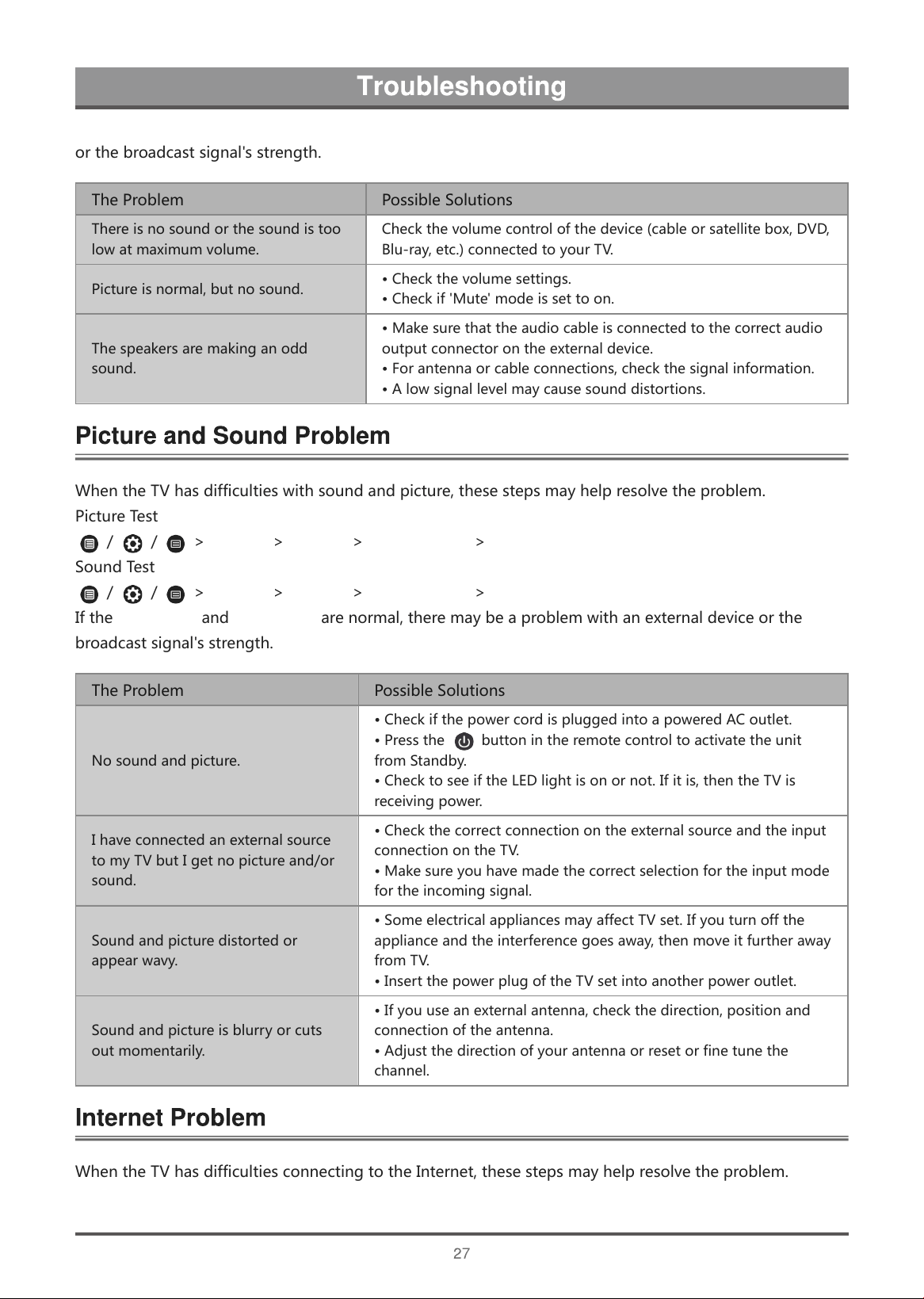
o
r
t
h
e
b
r
o
a
d
c
a
s
t
s
i
g
n
a
l
'
s
s
t
r
e
n
g
t
h
.
T
h
e
P
r
o
b
l
e
m
P
o
s
s
i
b
l
e
S
o
l
u
t
i
o
n
s
T
h
e
r
e
i
s
n
o
s
o
u
n
d
o
r
t
h
e
s
o
u
n
d
i
s
t
o
o
l
o
w
a
t
m
a
x
i
m
u
m
v
o
l
u
m
e
.
C
h
e
c
k
t
h
e
v
o
l
u
m
e
c
o
n
t
r
o
l
o
f
t
h
e
d
e
v
i
c
e
(
c
a
b
l
e
o
r
s
a
t
e
l
l
i
t
e
b
o
x
,
D
V
D
,
B
l
u
-
r
a
y
,
e
t
c
.
)
c
o
n
n
e
c
t
e
d
t
o
y
o
u
r
T
V
.
P
i
c
t
u
r
e
i
s
n
o
r
m
a
l
,
b
u
t
n
o
s
o
u
n
d
.
•
C
h
e
c
k
t
h
e
v
o
l
u
m
e
s
e
t
t
i
n
g
s
.
•
C
h
e
c
k
i
f
'
M
u
t
e
'
m
o
d
e
i
s
s
e
t
t
o
o
n
.
T
h
e
s
p
e
a
k
e
r
s
a
r
e
m
a
k
i
n
g
a
n
o
d
d
s
o
u
n
d
.
•
M
a
k
e
s
u
r
e
t
h
a
t
t
h
e
a
u
d
i
o
c
a
b
l
e
i
s
c
o
n
n
e
c
t
e
d
t
o
t
h
e
c
o
r
r
e
c
t
a
u
d
i
o
o
u
t
p
u
t
c
o
n
n
e
c
t
o
r
o
n
t
h
e
e
x
t
e
r
n
a
l
d
e
v
i
c
e
.
•
F
o
r
a
n
t
e
n
n
a
o
r
c
a
b
l
e
c
o
n
n
e
c
t
i
o
n
s
,
c
h
e
c
k
t
h
e
s
i
g
n
a
l
i
n
f
o
r
m
a
t
i
o
n
.
•
A
l
o
w
s
i
g
n
a
l
l
e
v
e
l
m
a
y
c
a
u
s
e
s
o
u
n
d
d
i
s
t
o
r
t
i
o
n
s
.
W
h
e
n
t
h
e
T
V
h
a
s
d
i
f
f
i
c
u
l
t
i
e
s
w
i
t
h
s
o
u
n
d
a
n
d
p
i
c
t
u
r
e
,
t
h
e
s
e
s
t
e
p
s
m
a
y
h
e
l
p
r
e
s
o
l
v
e
t
h
e
p
r
o
b
l
e
m
.
P
i
c
t
u
r
e
T
e
s
t
/
/
>
Settings
>
Support
>
Self Diagnosis
>
Picture Test
S
o
u
n
d
T
e
s
t
/
/
>
Settings
>
Support
>
Self Diagnosis
>
Sound Test
I
f
t
h
e
Sound Test
a
n
d
Picture Test
a
r
e
n
o
r
m
a
l
,
t
h
e
r
e
m
a
y
b
e
a
p
r
o
b
l
e
m
w
i
t
h
a
n
e
x
t
e
r
n
a
l
d
e
v
i
c
e
o
r
t
h
e
b
r
o
a
d
c
a
s
t
s
i
g
n
a
l
'
s
s
t
r
e
n
g
t
h
.
T
h
e
P
r
o
b
l
e
m
P
o
s
s
i
b
l
e
S
o
l
u
t
i
o
n
s
N
o
s
o
u
n
d
a
n
d
p
i
c
t
u
r
e
.
•
C
h
e
c
k
i
f
t
h
e
p
o
w
e
r
c
o
r
d
i
s
p
l
u
g
g
e
d
i
n
t
o
a
p
o
w
e
r
e
d
A
C
o
u
t
l
e
t
.
•
P
r
e
s
s
t
h
e
b
u
t
t
o
n
i
n
t
h
e
r
e
m
o
t
e
c
o
n
t
r
o
l
t
o
a
c
t
i
v
a
t
e
t
h
e
u
n
i
t
f
r
o
m
S
t
a
n
d
b
y
.
•
C
h
e
c
k
t
o
s
e
e
i
f
t
h
e
L
E
D
l
i
g
h
t
i
s
o
n
o
r
n
o
t
.
I
f
i
t
i
s
,
t
h
e
n
t
h
e
T
V
i
s
r
e
c
e
i
v
i
n
g
p
o
w
e
r
.
I
h
a
v
e
c
o
n
n
e
c
t
e
d
a
n
e
x
t
e
r
n
a
l
s
o
u
r
c
e
t
o
m
y
T
V
b
u
t
I
g
e
t
n
o
p
i
c
t
u
r
e
a
n
d
/
o
r
s
o
u
n
d
.
•
C
h
e
c
k
t
h
e
c
o
r
r
e
c
t
c
o
n
n
e
c
t
i
o
n
o
n
t
h
e
e
x
t
e
r
n
a
l
s
o
u
r
c
e
a
n
d
t
h
e
i
n
p
u
t
c
o
n
n
e
c
t
i
o
n
o
n
t
h
e
T
V
.
•
M
a
k
e
s
u
r
e
y
o
u
h
a
v
e
m
a
d
e
t
h
e
c
o
r
r
e
c
t
s
e
l
e
c
t
i
o
n
f
o
r
t
h
e
i
n
p
u
t
m
o
d
e
f
o
r
t
h
e
i
n
c
o
m
i
n
g
s
i
g
n
a
l
.
S
o
u
n
d
a
n
d
p
i
c
t
u
r
e
d
i
s
t
o
r
t
e
d
o
r
a
p
p
e
a
r
w
a
v
y
.
•
S
o
m
e
e
l
e
c
t
r
i
c
a
l
a
p
p
l
i
a
n
c
e
s
m
a
y
a
f
f
e
c
t
T
V
s
e
t
.
I
f
y
o
u
t
u
r
n
o
f
f
t
h
e
a
p
p
l
i
a
n
c
e
a
n
d
t
h
e
i
n
t
e
r
f
e
r
e
n
c
e
g
o
e
s
a
w
a
y
,
t
h
e
n
m
o
v
e
i
t
f
u
r
t
h
e
r
a
w
a
y
f
r
o
m
T
V
.
•
I
n
s
e
r
t
t
h
e
p
o
w
e
r
p
l
u
g
o
f
t
h
e
T
V
s
e
t
i
n
t
o
a
n
o
t
h
e
r
p
o
w
e
r
o
u
t
l
e
t
.
S
o
u
n
d
a
n
d
p
i
c
t
u
r
e
i
s
b
l
u
r
r
y
o
r
c
u
t
s
o
u
t
m
o
m
e
n
t
a
r
i
l
y
.
•
I
f
y
o
u
u
s
e
a
n
e
x
t
e
r
n
a
l
a
n
t
e
n
n
a
,
c
h
e
c
k
t
h
e
d
i
r
e
c
t
i
o
n
,
p
o
s
i
t
i
o
n
a
n
d
c
o
n
n
e
c
t
i
o
n
o
f
t
h
e
a
n
t
e
n
n
a
.
•
A
d
j
u
s
t
t
h
e
d
i
r
e
c
t
i
o
n
o
f
y
o
u
r
a
n
t
e
n
n
a
o
r
r
e
s
e
t
o
r
f
i
n
e
t
u
n
e
t
h
e
c
h
a
n
n
e
l
.
W
h
e
n
t
h
e
T
V
h
a
s
d
i
f
f
i
c
u
l
t
i
e
s
c
o
n
n
e
c
t
i
n
g
t
o
t
h
e
I
n
t
e
r
n
e
t
,
t
h
e
s
e
s
t
e
p
s
m
a
y
h
e
l
p
r
e
s
o
l
v
e
t
h
e
p
r
o
b
l
e
m
.
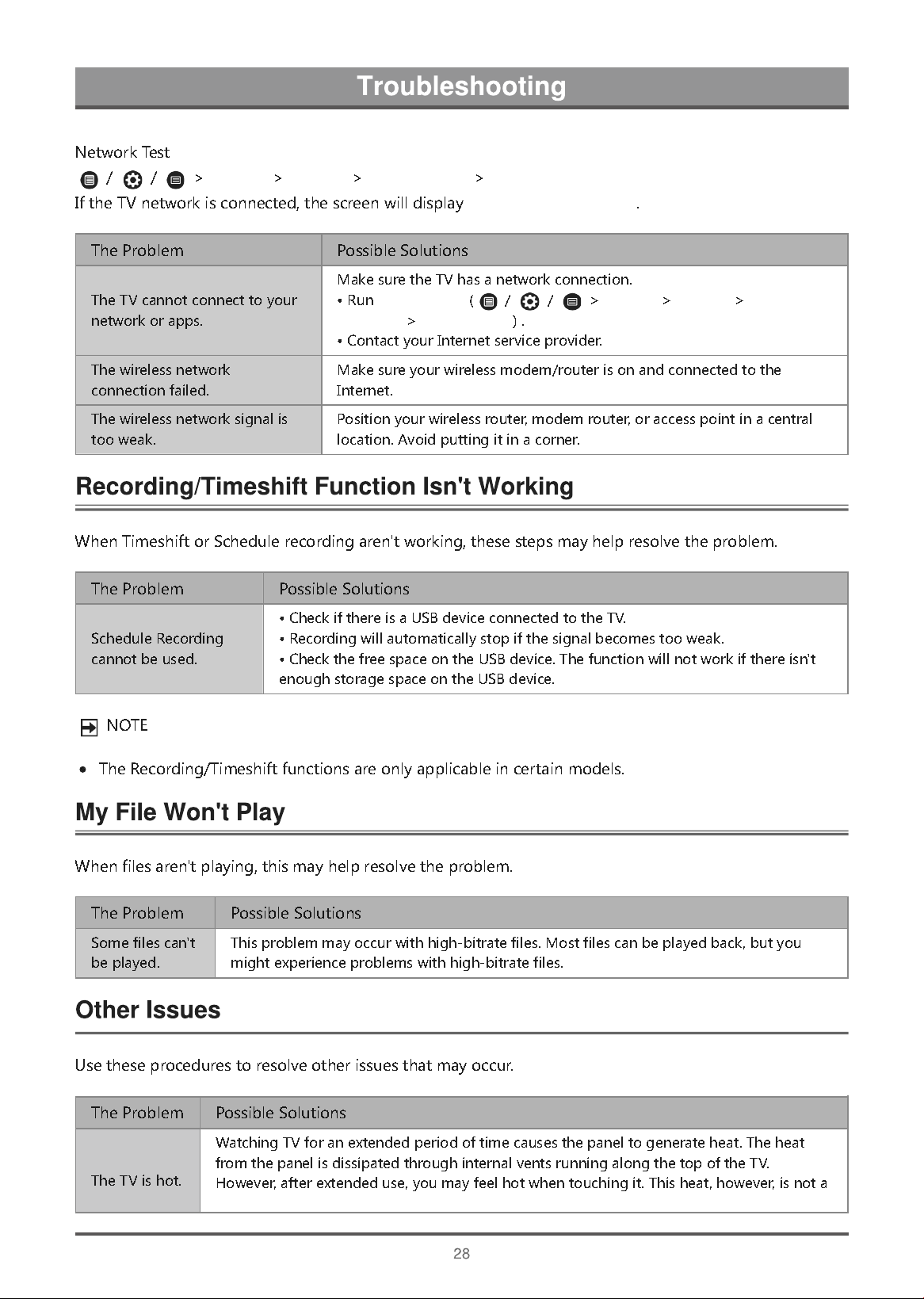
N
e
t
w
o
r
k
T
e
s
t
/
/
>
Settings
>
Support
>
Self Diagnosis
>
Network Test
I
f
t
h
e
T
V
n
e
t
w
o
r
k
i
s
c
o
n
n
e
c
t
e
d
,
t
h
e
s
c
r
e
e
n
w
i
l
l
d
i
s
p
l
a
y
Connected successfully
.
T
h
e
P
r
o
b
l
e
m
P
o
s
s
i
b
l
e
S
o
l
u
t
i
o
n
s
T
h
e
T
V
c
a
n
n
o
t
c
o
n
n
e
c
t
t
o
y
o
u
r
n
e
t
w
o
r
k
o
r
a
p
p
s
.
M
a
k
e
s
u
r
e
t
h
e
T
V
h
a
s
a
n
e
t
w
o
r
k
c
o
n
n
e
c
t
i
o
n
.
•
R
u
n
Network Test
(
/
/
>
Settings
>
Support
>
Self
Diagnosis
>
Network Test
)
.
•
C
o
n
t
a
c
t
y
o
u
r
I
n
t
e
r
n
e
t
s
e
r
v
i
c
e
p
r
o
v
i
d
e
r
.
T
h
e
w
i
r
e
l
e
s
s
n
e
t
w
o
r
k
c
o
n
n
e
c
t
i
o
n
f
a
i
l
e
d
.
M
a
k
e
s
u
r
e
y
o
u
r
w
i
r
e
l
e
s
s
m
o
d
e
m
/
r
o
u
t
e
r
i
s
o
n
a
n
d
c
o
n
n
e
c
t
e
d
t
o
t
h
e
I
n
t
e
r
n
e
t
.
T
h
e
w
i
r
e
l
e
s
s
n
e
t
w
o
r
k
s
i
g
n
a
l
i
s
t
o
o
w
e
a
k
.
P
o
s
i
t
i
o
n
y
o
u
r
w
i
r
e
l
e
s
s
r
o
u
t
e
r
,
m
o
d
e
m
r
o
u
t
e
r
,
o
r
a
c
c
e
s
s
p
o
i
n
t
i
n
a
c
e
n
t
r
a
l
l
o
c
a
t
i
o
n
.
A
v
o
i
d
p
u
t
t
i
n
g
i
t
i
n
a
c
o
r
n
e
r
.
W
h
e
n
T
i
m
e
s
h
i
f
t
o
r
S
c
h
e
d
u
l
e
r
e
c
o
r
d
i
n
g
a
r
e
n
'
t
w
o
r
k
i
n
g
,
t
h
e
s
e
s
t
e
p
s
m
a
y
h
e
l
p
r
e
s
o
l
v
e
t
h
e
p
r
o
b
l
e
m
.
T
h
e
P
r
o
b
l
e
m
P
o
s
s
i
b
l
e
S
o
l
u
t
i
o
n
s
S
c
h
e
d
u
l
e
R
e
c
o
r
d
i
n
g
c
a
n
n
o
t
b
e
u
s
e
d
.
•
C
h
e
c
k
i
f
t
h
e
r
e
i
s
a
U
S
B
d
e
v
i
c
e
c
o
n
n
e
c
t
e
d
t
o
t
h
e
T
V
.
•
R
e
c
o
r
d
i
n
g
w
i
l
l
a
u
t
o
m
a
t
i
c
a
l
l
y
s
t
o
p
i
f
t
h
e
s
i
g
n
a
l
b
e
c
o
m
e
s
t
o
o
w
e
a
k
.
•
C
h
e
c
k
t
h
e
f
r
e
e
s
p
a
c
e
o
n
t
h
e
U
S
B
d
e
v
i
c
e
.
T
h
e
f
u
n
c
t
i
o
n
w
i
l
l
n
o
t
w
o
r
k
i
f
t
h
e
r
e
i
s
n
'
t
e
n
o
u
g
h
s
t
o
r
a
g
e
s
p
a
c
e
o
n
t
h
e
U
S
B
d
e
v
i
c
e
.
N
O
T
E
T
h
e
R
e
c
o
r
d
i
n
g
/
T
i
m
e
s
h
i
f
t
f
u
n
c
t
i
o
n
s
a
r
e
o
n
l
y
a
p
p
l
i
c
a
b
l
e
i
n
c
e
r
t
a
i
n
m
o
d
e
l
s
.
W
h
e
n
f
i
l
e
s
a
r
e
n
'
t
p
l
a
y
i
n
g
,
t
h
i
s
m
a
y
h
e
l
p
r
e
s
o
l
v
e
t
h
e
p
r
o
b
l
e
m
.
T
h
e
P
r
o
b
l
e
m
P
o
s
s
i
b
l
e
S
o
l
u
t
i
o
n
s
S
o
m
e
f
i
l
e
s
c
a
n
'
t
b
e
p
l
a
y
e
d
.
T
h
i
s
p
r
o
b
l
e
m
m
a
y
o
c
c
u
r
w
i
t
h
h
i
g
h
-
b
i
t
r
a
t
e
f
i
l
e
s
.
M
o
s
t
f
i
l
e
s
c
a
n
b
e
p
l
a
y
e
d
b
a
c
k
,
b
u
t
y
o
u
m
i
g
h
t
e
x
p
e
r
i
e
n
c
e
p
r
o
b
l
e
m
s
w
i
t
h
h
i
g
h
-
b
i
t
r
a
t
e
f
i
l
e
s
.
U
s
e
t
h
e
s
e
p
r
o
c
e
d
u
r
e
s
t
o
r
e
s
o
l
v
e
o
t
h
e
r
i
s
s
u
e
s
t
h
a
t
m
a
y
o
c
c
u
r
.
T
h
e
P
r
o
b
l
e
m
P
o
s
s
i
b
l
e
S
o
l
u
t
i
o
n
s
T
h
e
T
V
i
s
h
o
t
.
W
a
t
c
h
i
n
g
T
V
f
o
r
a
n
e
x
t
e
n
d
e
d
p
e
r
i
o
d
o
f
t
i
m
e
c
a
u
s
e
s
t
h
e
p
a
n
e
l
t
o
g
e
n
e
r
a
t
e
h
e
a
t
.
T
h
e
h
e
a
t
f
r
o
m
t
h
e
p
a
n
e
l
i
s
d
i
s
s
i
p
a
t
e
d
t
h
r
o
u
g
h
i
n
t
e
r
n
a
l
v
e
n
t
s
r
u
n
n
i
n
g
a
l
o
n
g
t
h
e
t
o
p
o
f
t
h
e
T
V
.
H
o
w
e
v
e
r
,
a
f
t
e
r
e
x
t
e
n
d
e
d
u
s
e
,
y
o
u
m
a
y
f
e
e
l
h
o
t
w
h
e
n
t
o
u
c
h
i
n
g
i
t
.
T
h
i
s
h
e
a
t
,
h
o
w
e
v
e
r
,
i
s
n
o
t
a
defect and does not affect the TV's functionality.
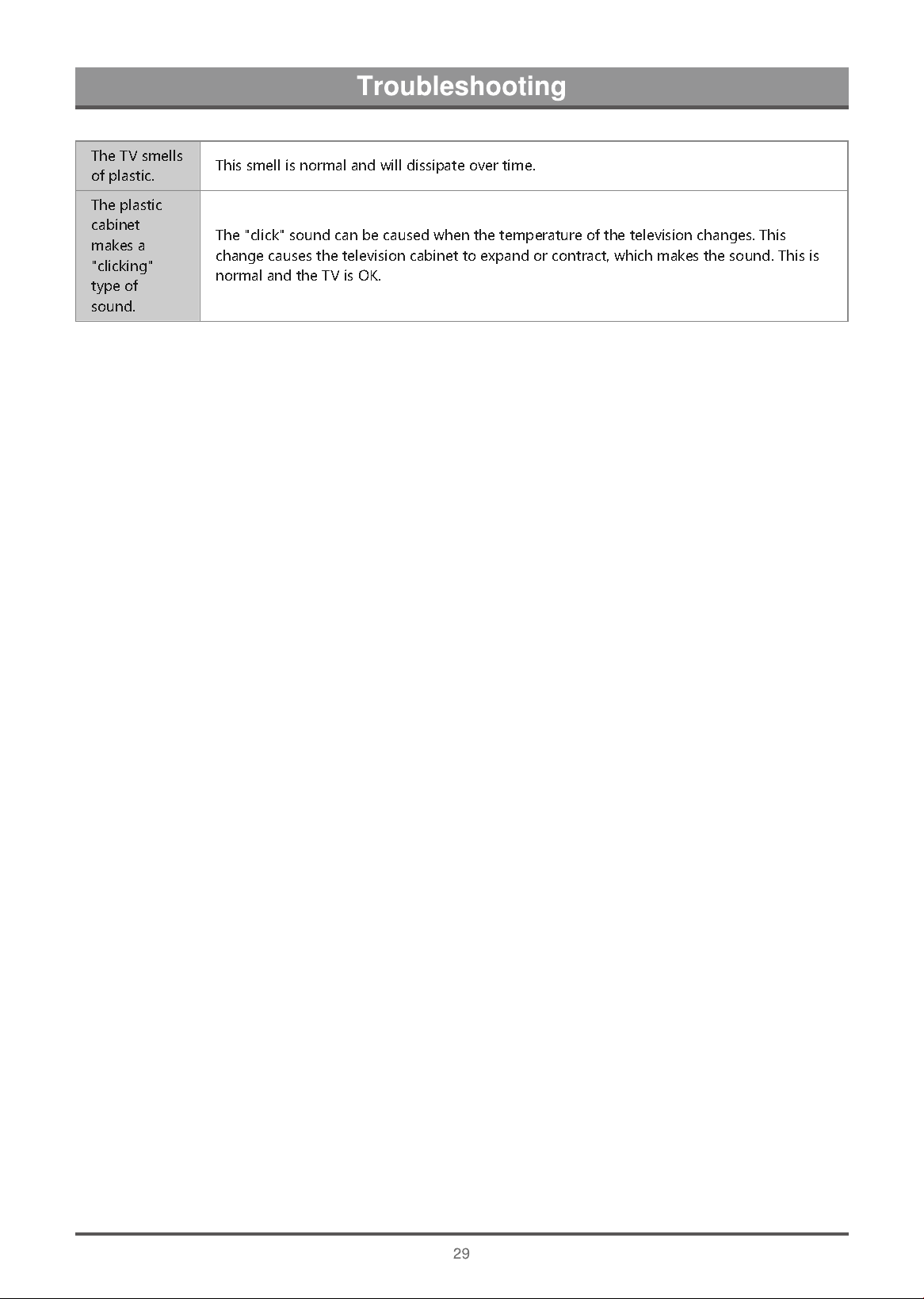
T
h
e
T
V
s
m
e
l
l
s
o
f
p
l
a
s
t
i
c
.
T
h
i
s
s
m
e
l
l
i
s
n
o
r
m
a
l
a
n
d
w
i
l
l
d
i
s
s
i
p
a
t
e
o
v
e
r
t
i
m
e
.
T
h
e
p
l
a
s
t
i
c
c
a
b
i
n
e
t
m
a
k
e
s
a
"
c
l
i
c
k
i
n
g
"
t
y
p
e
o
f
s
o
u
n
d
.
T
h
e
"
c
l
i
c
k
"
s
o
u
n
d
c
a
n
b
e
c
a
u
s
e
d
w
h
e
n
t
h
e
t
e
m
p
e
r
a
t
u
r
e
o
f
t
h
e
t
e
l
e
v
i
s
i
o
n
c
h
a
n
g
e
s
.
T
h
i
s
c
h
a
n
g
e
c
a
u
s
e
s
t
h
e
t
e
l
e
v
i
s
i
o
n
c
a
b
i
n
e
t
t
o
e
x
p
a
n
d
o
r
c
o
n
t
r
a
c
t
,
w
h
i
c
h
m
a
k
e
s
t
h
e
s
o
u
n
d
.
T
h
i
s
i
s
n
o
r
m
a
l
a
n
d
t
h
e
T
V
i
s
O
K
.