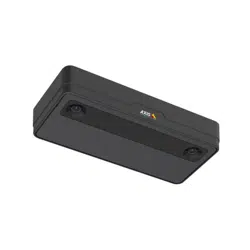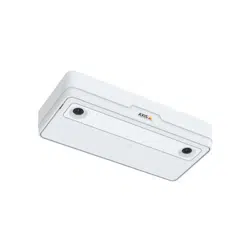


AXISP8815-23DPeopleCounter
Solutionoverview
Solutionoverview
Anoverviewofthedifferentdevices,applications,andtoolsneededforacompleteAxissolution.
AXISP8815-23DPeopleCounter
AXISP8815-23DPeopleCounterprovidessoftwareanddedicatedhardwareinonedevice.The3Dpeoplecountingapplicationis
embeddedinthedevice.Thismeansthatyoudon’tneedadedicatedcomputertoruntheapplication.AXISP8815-23DPeople
Counterisintendedforindoorusein,forexample,retailenvironmentslikestoresorshoppingmalls,orotherlocationswhereyou
wanttocountpeopleorkeeptrackofhowmanypeopleareinsidethepremises.
2

AXISP8815-23DPeopleCounter
Solutionoverview
AnexampleofastorewithAXISP8815-23DPeopleCounterateachentrance.
What’sthedifferencebetweenAXISPeopleCounterandAXISP8815-23DPeople
Counter?
Theapplicationshavetwodifferentalgorithmsforcountingpeoplewhichmakesthemsuitablefordifferentenvironments:
•AXISPeopleCounterrecognizesobjectsthatmoveintheeldofviewandidentiesthemaspeoplebasedontheiroverall
sizeandmovement.AXISPeopleCounterissuitableformostscenarios,coveringsingleaswellasdoubledoorentrances.
3

AXISP8815-23DPeopleCounter
Solutionoverview
•AXISP8815-23DPeopleCountercalculatesthedepthwithinthecountingareainordertomeasuretheheightandthe
sizeoftheobject.AXISP8815-23DPeopleCounterissuitableforcrowdedscenariosandsceneswithchallenging
lightconditionslikestrongsunlight,glaresandshadows.
4

AXISP8815-23DPeopleCounter
Getstarted
Getstarted
TogetstartedwithAXISP8815-23DPeopleCounter:
1.Connect,nd,andaccessthedevice:Connectthedevicetothenetworkonpage5,Findthedeviceonthenetworkonpage
6,Accessthedeviceonpage6
2.Upgradethermwareonpage7
3.Installthedeviceonpage7
4.Congurethecounteronpage11
Connectthedevicetothenetwork
Youcanconnectthedevicetothenetworkwithoutremovingitfromthebox:
1.Openthebox.
2.Removethefrontplate.
3.Openthelid.
4.Insertthenetworkcable.
5

AXISP8815-23DPeopleCounter
Getstarted
Findthedeviceonthenetwork
TondAxisdevicesonthenetworkandassignthemIPaddressesinWindows®,useAXISIPUtilityorAXISDeviceManager.Both
applicationsarefreeandcanbedownloadedfromaxis.com/support.
FormoreinformationabouthowtondandassignIPaddresses,gotoHowtoassignanIPaddressandaccessyourdevice.
Browsersupport
Youcanusethedevicewiththefollowingbrowsers:
Chrome
TM
Firefox
®
Edge
®
Windows
®
recommended
xx
macOS
®
recommended
Otheroperatingsystems
xx
Accessthedevice
1.OpenabrowserandentertheIPaddressorhostnameoftheAxisdevice.
IfyoudonotknowtheIPaddress,useAXISIPUtilityorAXISDeviceManagertondthedeviceonthenetwork.
2.Entertheusernameandpassword.Ifyouaccessthedeviceforthersttime,youmustsettherootpassword.SeeSeta
newpasswordfortherootaccountonpage6.
3.Theliveviewpageopensinyourbrowser.
Verifythatnoonehastamperedwiththermware
TomakesurethatthedevicehasitsoriginalAxisrmware,ortotakefullcontrolofthedeviceafterasecurityattack:
1.Resettofactorydefaultsettings.SeeResettofactorydefaultsettingsonpage23.
Afterthereset,securebootguaranteesthestateofthedevice.
2.Congureandinstallthedevice.
Setanewpasswordfortherootaccount
Important
Thedefaultadministratorusernameisroot.Ifthepasswordforrootislost,resetthedevicetofactorydefaultsettings.See
Resettofactorydefaultsettingsonpage23
Towatchthisvideo,gotothewebversionofthisdocument.
www.axis.com/products/online-manual/50535#t10098905
Supporttip:Passwordsecurityconrmationcheck
6

AXISP8815-23DPeopleCounter
Getstarted
1.Typeapassword.Followtheinstructionsaboutsecurepasswords.SeeSecurepasswordsonpage7.
2.Retypethepasswordtoconrmthespelling.
3.ClickCreatelogin.Thepasswordhasnowbeencongured.
Securepasswords
Important
Axisdevicessendtheinitiallysetpasswordincleartextoverthenetwork.Toprotectyourdeviceaftertherstlogin,set
upasecureandencryptedHTTPSconnectionandthenchangethepassword.
Thedevicepasswordistheprimaryprotectionforyourdataandservices.Axisdevicesdonotimposeapasswordpolicyasthey
maybeusedinvarioustypesofinstallations.
Toprotectyourdatawestronglyrecommendthatyou:
•Useapasswordwithatleast8characters,preferablycreatedbyapasswordgenerator.
•Don’texposethepassword.
•Changethepasswordatarecurringinterval,atleastonceayear.
Upgradethermware
Beforeyoustartusingtheapplication,werecommendyoutoupgradethermware.
Note
Whenyouupgradetheproductwiththelatestrmwareintheactivetrack,theproductreceivesthelatestfunctionality
available.Alwaysreadtheupgradeinstructionsandreleasenotesavailablewitheachnewreleasebeforeupgradingthe
rmware.Tondthelatestrmwareandthereleasenotes,gotoaxis.com/support/rmware.
1.Downloadthermwareletoyourcomputer,availablefreeofchargeataxis.com/support/rmware.
2.Logintotheproductasanadministrator.
3.GotoDevicesettings>Deviceview>System>Maintenance.FollowtheinstructionsunderFirmwareupgrade.When
theupgradehasnished,theproductrestartsautomatically.
YoucanuseAXISDeviceManagerformultipleupgrades.Findoutmoreataxis.com/products/axis-device-manager.
Installthedevice
Forinstructionsonhowtoinstallthedevice,seetheinstallationguideandtheinstallationvideo.
Installationguide
7

AXISP8815-23DPeopleCounter
Getstarted
Towatchthisvideo,gotothewebversionofthisdocument.
www.axis.com/products/online-manual/50535#t10098481
Installationvideo
Inadditiontotheinstructionsintheinstallationguide,therearesomeimportantstepstofollowfortheapplicationtobehave
intheexpectedway:
•Thedevicemustbemountedstraightabovethepointwherepeoplepass.
•Makesurethedeviceisfacingstraightdown,inlinewiththeceiling.It’simportantthatboththeceilingandtheoor
arelevel.
•Makesurethereissufcientwhitelightonsite.
8

AXISP8815-23DPeopleCounter
Getstarted
•Makesuretherearenoobjectsinterferinginthedevice’sview.Forexample,donotinstallthedevicetooclosetoa
doororalargesignhangingfromtheceiling.
•Loiteringpeopleorlargeobjectsthatswayslightlycouldinterferewiththecounting.
Mountingheightandcoverage
Thetableshowsthemaximumwidthanddepththatcanbecoveredbyasingledeviceatagivenmountingheight.Themounting
heightisthedistancefromtheoortothebackofthedevice.Ifyourareaofinterestiswiderthanthemaximumcounting
areawidth,youcanmountmorethanonedevicetocoverthefullwidth.Tocalculatehowmanydevicesyouneed,usethe
designtoolforAXISP8815-23DPeopleCounter.
9

AXISP8815-23DPeopleCounter
Getstarted
Mountingheight
cm(in)
Maximumcountingareawidth
cm(in)
Maximumcountingareadepth
cm(in)
250(98)199(78)46(18)
300(118)306(120)100(39)
350(138)400(157)154(61)
400(157)400(157)208(82)
450(177)400(157)225(89)
500(197)400(157)225(89)
550(217)400(157)225(89)
600(236)400(157)225(89)
10

AXISP8815-23DPeopleCounter
Configurethecounter
Configurethecounter
Iftheareaofinterestcanbecoveredbyasingledevice,followtheinstructionsinCongureasingledeviceonpage1 1
Iftheareaofinterestistoowidetobecoveredbyasingledevice,youcanconnectmultipledevicestoincreasethewidthofthe
countingarea.Foramultipledevicesetup,followtheinstructionsinConguremultipledevicesonpage12
Countingarea
Thecountingareaistheareawherepeoplewhopassthrougharecounted.Youdrawthecountingareaatoorlevel.Entrancelines
aregreenandmarkedwithanarrow,andexitlinesareblue.Tobecountedasgoingin,apersonhastocrossrstanentranceand
thenanexitline.Tobecountedasgoingout,apersonhastocrossrstanexitlineandthenanentranceline.
Important
Ifthesceneisacorridor,makesurethecountingareadoesn’tincludepartsofthewallsasthiscancauseproblemswith
shadowsbeingcounted.
Congureasingledevice
Towatchthisvideo,gotothewebversionofthisdocument.
www.axis.com/products/online-manual/50535#t10156684
1.Measurethedevice’smountingheight.
Themountingheightisthedistancefromtheoortothebackofthedevice.
2.Inthedevice’swebpage,gotoSetup>CounterandmakesureSingledeviceishighlighted.
3.Fillinthedevice’snameandmountingheightintheDevicesection.
4.Createthecountingarea:
4.1Click
.
4.2Clicktheliveimageonceforeverycornerofthecountingarea.
Thecountingareamustconsistofatleast4corners.
5.Setentranceandexitsegmentsofthecountingarea:
5.1Click
.
5.2Clickeachentrancesegmentofthecountingarea.
5.3Click
11
AXISP8815-23DPeopleCounter
Configurethecounter
5.4Clickeachexitsegmentofthecountingarea.
Entrancesegmentsaregreen,andexitsegmentsareblue.
6.ClickSave.
7.GotoAdvanced>TroubleshootingandturnoffApplicationintestmode.
Conguremultipledevices
Towatchthisvideo,gotothewebversionofthisdocument.
www.axis.com/products/online-manual/50535#t10156683
Important
Forreportingofstatisticstowork,thedateandtimemustbesynchronizedbetweenthedevices.Werecommendyou
touseanNTPservertokeepthedevicessynchronized.
1.Measurethedevice’smountingheight.
Themountingheightisthedistancefromtheoortothebackofthedevice.
Important
Alldevicesmustbemountedatthesameheight.
2.Opentheprimaryandsecondarydevices’webpagesinseparatetabsinawebbrowser.
3.Inthewebpageoftheprimarydevice,gotoSetup>CounterandselectMultipledevice.
4.UnderWideareacoverage,makesurePrimaryishighlighted.
5.InPreferredURL,enteranameoraddressthatthesecondarydevicecanalwaysusetoconnecttotheprimarydevice.You
needtoenteravalueif,forexample,youconnecttothedevicesthroughaproxy,orifthedevicesgettheirIPaddresses
assigneddynamically.Ifthevalueisalreadycorrect,youdon’tneedtochangeanything.
6.ClickGeneratekeytogenerateakeyfortheprimarydevice.
7.Copytheprimarykey.
8.Fillinthedevice’snameandmountingheightintheDevicesection.
9.Inthewebpageofthesecondarydevice,gotoSetup>CounterandselectMultipledevice.
10.UnderWideareacoverage,selectSecondary.
11.PastetheprimarykeyintothePrimarykeyeldandclickTestconnection.
12.Fillinthedevice’snameandmountingheightintheDevicesection.
13.ClickSave.
12
AXISP8815-23DPeopleCounter
Configurethecounter
14.Inthewebpageoftheprimarydevice,entertheURLofthesecondarydeviceinSecondaryURL.
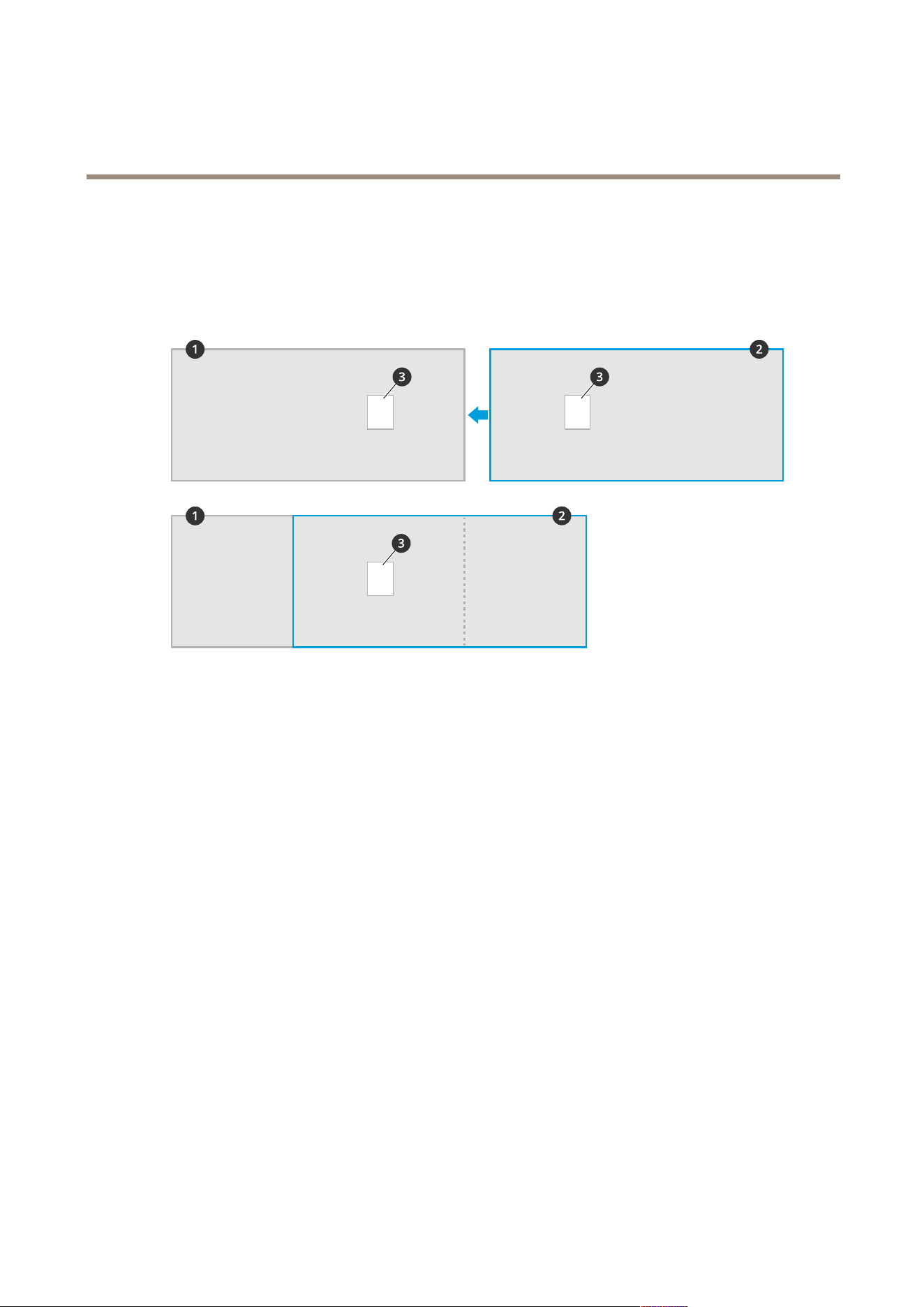
15.Placeanobject,forexampleasheetofpaper,attheexactmid-pointbetweenthetwodevices.It’sveryimportantthat
youplacetheobjectexactlyinthemiddleofthetwodevicessincetheobjectisusedasareferencepointtocalibrate
thedevices.
16.Usethesliderstoalignthedevices’views.Trytoavoidverticaloffset.
1
Primarydevice’sview
2
Secondarydevice’sview
3
Referenceobject
17.Tochangewhichsideofthecountingareaistheentranceandexit,clickReversein/outdirectionunderCountingarea.
18.ClickSave.
19.GotoAdvanced>TroubleshootingandturnoffApplicationintestmode.
13

AXISP8815-23DPeopleCounter
Additionalsettings
Additionalsettings
Createauseraccount
Youcancreateuseraccountswithdifferentprivileges,sothatunauthorizedstaffcanviewstatisticsbutnotchangeanysettings
ofthecounter.
Tocreateauseraccount:
1.GotoDevicesettings>Users.
2.Click+.
UserswiththeViewerrolecanonlyaccesstheStatisticstab.Formoreinformationaboutdifferentuserroles,seethebuilt-inhelp.
Anonymizepeople
Note
Thissettingisonlyavailableifyouhaveloggedinasanadministrator.
Ifyouwanttopreventpeoplefrombeingidentiedinthelivevieworrecordings,youcanturnonprivacymode.Privacymodeblocks
allvideostreamsandimagesandturnstheliveviewintoablackimage.
Toturnonprivacymode:
1.GotoSetup>Counter>Privacy.
2.TurnonPrivacymode.
Notifyusereverytimeadenednumberofpeoplehaveenteredaroom
Withthepassthroughthresholdfunctionality,youcangetnotiedeverytimeacertainnumberofpeoplehavepassedthecounter.
Youcanuseit,forexample,toknowwhenit'stimetocleanaroom.Thefeatureonlycountspeoplegoingin.Whenthedened
numberhasbeenreached,thepassthroughcounterstartsoverfrom0.
Thisexampleexplainshowtosetuparuletosendanemaileverytime100peoplehaveenteredaroomthathasacounteroutside
theentrance.
Setthepassthroughthreshold
1.Inthedevice’swebpage,gotoSetup>Counter>Passthroughthreshold.
2.TurnonAllowpassthroughthresholdevents.
3.InNumberofINpassagesbetweenevents,enter100.
4.ClickSave.
Createarule
1.GotoDeviceview>Events>Rulesandaddarule.
2.Typeanamefortherule.
3.Inthelistofconditions,underApplication,selectA3DPCPassthroughThresholdEvent.
4.Inthelistofactions,underNotications,selectSendnoticationtoemailandthenselectarecipientfromthelist.
Tocreateanewrecipient,gotoRecipients.
14

AXISP8815-23DPeopleCounter
Additionalsettings
5.Typeasubjectandamessagefortheemail.
6.ClickSave.
Occupancyestimation
Theoccupancyestimationfunctionalityestimateshowmanypeopleareinsidethepremisesatthesametime.Itworkswhenthere
isjustoneentranceaswellaswhenthereareseveralentrances.Forareaswithmorethanoneentrance,youneedtoinstall
AXISP8815-23DPeopleCounterdevicesateachone.Youconnectthedevicestoeachother,andassigntheprimaryoccupancy
roletooneofthemandthesecondaryoccupancyroletotheotherones.Theprimaryoccupancydevicecontinuouslyreceivesdata
fromthesecondaryoccupancydevicesandpresentsthedataintheStatisticstab.
Note
Theprimaryandsecondaryoccupancyrolesaredifferentfromtheprimaryandsecondaryrolesthatareusedtoconnect
devicestoincreasethecountingareawidthtocoverwideentrances.ReadmoreinMountingheightandcoverageonpage9.
Congureoccupancyestimationforasingleentrancearea
Ifthereisonlyonewayinandoutofthearea,yousimplyneedtoturnontheoccupancyfunctionality.Iftheentranceiscoveredby
multipledevices,turnonthefunctionalityintheprimarydevice.
1.GotoSetup>OccupancyandturnonEstimateoccupancy.
Congureoccupancyestimationforamultipleentrancearea
Ifthereismorethanonewayinandoutofthearea,youneedtoconnectthedevicesfromallentrancesandexitsandgiveoneof
themtheprimaryoccupancyrole.Theotherdevicestakethesecondaryoccupancyrole.Ifanentranceiswideandthereforecovered
bymultipledevices,youonlyneedtoconnectthewideareacoverageprimarydevice.
Theprimaryoccupancydevicereceivesdatafromalldevicesconnectedtoit.
Towatchthisvideo,gotothewebversionofthisdocument.
www.axis.com/products/online-manual/50535#t10162937
1.Selectonedevicetobetheprimaryoccupancydevice.Itdoesn'tmatterwhichdeviceyouchoose.
2.Opentheprimaryandsecondaryoccupancydevices'webpagesinseparatetabsinawebbrowser.
3.Inthewebpageoftheprimaryoccupancydevice,gotoSetup>OccupancyandturnonEstimateoccupancy.
4.UnderOccupancyrole,selectPrimary.
5.IfthepreferredURLiswrong,changeit.
6.Generatekeysforallsecondaryoccupancydevices.
7.Copyoneofthekeys.
8.Inthewebpageofoneofthesecondaryoccupancydevices,gotoSetup>OccupancyandturnonEstimateoccupancy.
15

AXISP8815-23DPeopleCounter
Additionalsettings
9.UnderOccupancyrole,selectSecondary.
10.PastethekeyandclickTestconnection.
11.Repeatsteps7-10foreachofthesecondaryoccupancydevices.Useuniquekeysforeachdevice.
Youcangeneratenewkeyswheneveryouneedto.
Changetimeforoccupancyreset
Note
Werecommendyoutoresettheoccupancyvaluewhenthepremisesarenormallyempty,forexampleduringclosinghours
justbeforeopeningtime.
Bydefault,theoccupancyvalueresetsonceperdayat00:00.Tochangethetimeoftheresetto06:30:
1.GotoSetup>Occupancy.
2.MovetheOccupancyresetsliderto6:30:00AM.
Sendanemailwhentheoccupancylevelexceedsthelimit
Thisexampleexplainshowtosetuparuletosendanemailwhenthenumberofpeopleinsidethepremisesexceedsalimit.In
theexample,thelimitis200.
Setthemaximumoccupancylimit
1.Inthedevice’swebpage,gotoSetup>Occupancy.
2.UnderAllowevents,enter200inHigherthreshold.
Createarule
1.GotoDeviceview>Events>Rulesandaddarule.
2.Typeanamefortherule.
3.Inthelistofconditions,underApplication,selectA3DPCOccupancyEvent-High.
4.Inthelistofactions,underNotications,selectSendnoticationtoemailandthenselectarecipientfromthelist.
Tocreateanewrecipient,gotoRecipients.
5.Typeasubjectandamessagefortheemail.
6.ClickSave.
Sendanoticationwhentheoccupancylimitisexceeded
ThisexampleexplainshowtosetuparuleinAXISCameraStationtosendmobilenoticationswhenthenumberofpeopleinside
thepremisesexceedthemaximumlimit.Intheexample,themaximumlimitis50.
Beforeyoustart
Youneed:
•occupancyturnedonandconguredinthedevice
•acomputerwithAXISCameraStation5.36orlaterinstalled
•AXISCameraStationMobileapp
Setthemaximumoccupancylimit
16

AXISP8815-23DPeopleCounter
Additionalsettings
1.Inthedevice’swebpage,gotoSetup>Occupancy.
2.UnderAllowevents,enter50inHigherthreshold.
Createadeviceeventtrigger
1.InAXISCameraStation,click
andgotoConguration>Recordingandevents>ActionrulesandclickNew.
2.ClickAddtoaddatrigger.
3.SelectDeviceeventfromthelistoftriggersandclickOk.
4.IntheConguredeviceeventtriggersection:
-InDevice,selectthedevice.
-InEvent,selectA3DPCOccupancyEvent-High.
-InTriggerperiod,setanintervaltimebetweentwosuccessivetriggers.Usethisfunctiontoreducethenumber
ofsuccessiverecordings.Ifanadditionaltriggeroccurswithinthisinterval,theeventwillcontinueandthe
triggerperiodstartsoverfromthatpointintime.
5.InFilters,setactivetoYes.
6.ClickOk.
Createactionstosendnoticationstothemobileapp
1.ClickNext.
2.ClickAddtoaddanaction.
3.SelectSendmobileappnoticationfromthelistofactionsandclickOk.
Note
Themessageiswhatthereceiverseeswhenanalarmistriggered.
4.InMessage,enterthemessagetosendwhentheoccupancylimitisexceeded.
5.SelectDefault.ThisopensthemainpageoftheAXISCameraStationMobileappwhenthereceiverclicksthenotication.
6.ClickOk.
Specifywhenthealarmisactive
1.ClickNext.
2.Ifyouonlywantthealarmtobeactiveduringcertainhours,selectCustomschedule.
3.Selectaschedulefromthelist.
4.ClickNext.
5.Enteranamefortherule.
6.ClickFinish.
Occupancystatuspages
Ifyouwanttovisualizethecurrentoccupancyleveltoanoperatorordirectlytocustomers,youcanusetheoccupancystatuspages.
•http://<servername>/a3dpc/index.html#/occupancy-operator-view:Thepageshowshowmanypeoplearecurrently
inthepremises,andwhetherthatnumberislow,medium,orhighoccupancy.GotoSetup>Occupancy>Events
todenethethresholds.
17

AXISP8815-23DPeopleCounter
Additionalsettings
•http://<servername>/a3dpc/index.html#/occupancy-stop-go:Thepageshowsvisitorsiftheycanenterthepremisesor
not.Iftheestimatedoccupancyislowormedium,visitorsarewelcometoenter.GotoSetup>Occupancy>Events
todenethethresholds.
Youcanembedthesepagesintoothersystems,forexampleAXISCameraStationorMilestone'sXProtectSmartClient.For
instructionsonhowtoembedapageintoAXISCameraStation,seetheusermanualforAXISCameraStation.
18

AXISP8815-23DPeopleCounter
Integration
Integration
1.ThedevicesendsdataautomaticallytoaremoteHTTPSdestinationthroughthedatapushfunctionality.
2.Athird-partydatabaseorservicestoresandprocessesthedata.
3.Alternatively,thedevicesendsdatatoalocalinstanceofAXISStoreDataManager,whichstoresandprocessesthedata.
4.AXISStoreReporter,orathird-partyreportingplatform,visualizesthecollecteddata.
5.Alternatively,third-partyapplicationsrequestdatadirectlyfromthedevicethroughabuilt-inAPI.
Statistics
Thereareseveralwaystousethestatisticsfromthecounter:
•Intheapplication’swebpage,viewreal-timecountingdatainthebuilt-ingraphs.
•Viewbuilt-ingraphsinday,week,andmonthviewsinthestatisticspage.Thedataisupdatedinrealtime.
Dataisavailableonthedeviceforupto90daysandupdatedeveryminute.Thedataisstoredinone-minutebins
representingtheinandoutcountsforthatminute.
•DownloaddatathroughanopenAPI.SeeAPIdocumentation
•SenddataautomaticallytoaremoteHTTPSdestinationthroughthedatapushfunctionality.SeeReportdatatoaremote
destinationonpage20.
•UseAXISStoreDataManager,asoftwarepackagethatactsasacentralpointtostoreandmanagedatacollectedfromall
devices.SeeConnectthedevicetoafolderinAXISStoreDataManageronpage20.
•UseAXISStoreReporter,astatisticalweb-basedsolution,formanagingandmonitoringhistoricaldata.
•Downloadstatisticstoyourcomputer,seeDownloadstatisticsonpage21.
19

AXISP8815-23DPeopleCounter
Integration
ConnectthedevicetoafolderinAXISStoreDataManager
1.InAXISStoreDataManager,gotoSourcesandgettheFolderconnectionidentierandtheFolderconnectionpassword
forthefolderyouwanttoconnectto.
2.Intheapplication’swebpage,gotoSetup>Counter.
3.UnderDevice,enteranameforthedevice,soyouknowwhichdevicethereportcomesfrom.
4.GotoSetup>Reporting.
5.ToallowsendingreportstoAXISStoreDataManager,turnonReporttoASDM.
6.IntheURLeld,entertheaddresstotheserver.
7.EnterthefolderconnectionidentierandpasswordforAXISStoreDataManagerintheFolderidentierelds.
8.ClickTestconnection.
Iftheconnectionissuccessful,it’sindicatedbyawhitecheckmark.
9.ClickSave.
Reportdatatoaremotedestination
Tomakethedevicepushdataregularlytoaremotedestination:
1.GotoSetup>Counterandcheckthatthedevicehasaname.
Thenamehelpsyouidentifywhichdevicethereportcomesfrom.
2.GotoSetup>ReportingandturnonReporttoserver.
3.IntheURLeld,entertheaddressoftheserver,forexamplehttps://example.com/server.
4.IntheSendintervaleld,sethowoftenyouwantthedevicetosenddatatotheserver.
5.Optionally,enteratokentoletthedeviceauthenticateitselftotheserverintheAPItokeneld.
6.ClickTestconnection.
Iftheconnectionissuccessful,it’sindicatedbyawhitecheckmark.
7.ClickSave.
YoucanlearnmoreaboutthedatapushfunctionalityintheAPIdocumentation.
Congureproxysettings
Ifthedeviceandthereportdestinationareseparatedbyaproxyserver,youneedtoenterinformationabouttheproxyserverin
thedevice’swebpagetobeabletosendreports.
1.GotoSetup>ReportingandturnonUseproxy.
2.IntheURLeld,entertheaddressoftheproxyserverfollowedbyaportnumberifapplicable.Forexample:
https://example.com/proxy:3128.
3.IntheUsernameandPasswordelds,entertheusernameandpasswordoftheproxyserver.
4.ClickSave.
20

AXISP8815-23DPeopleCounter
Integration
Downloadstatistics
1.GotoStatistics.
2.ClickExportdata.
Acomma-delimited(.csv)lewithallstatisticsdatafromthedeviceissavedlocally.
21

AXISP8815-23DPeopleCounter
Troubleshooting
Troubleshooting
IssueAction
Thesoftwaredoesn’tcount.Makesuretheinstructionsforhowtoinstallthedevicehas
beenfollowed,seeInstallthedeviceonpage7.
Istillcan’tgetthesoftwaretocount.Ifyouhavefollowedtheadviceaboveandstillcan’tgetthe
softwaretowork,contactyourAxisreseller.
Thesoftwarecountsshadowsonthewalls.1.Makesurethecountingareaonlydoesn’tincludepartsof
thewalls.
2.GotoAdvanced>TroubleshootingandturnonEliminate
shadows.
Ihaveawideareacoveredbymultipledevices,andthesoftware
doesn’tsendreports.
Makesurethedateandtimeofthedevicesaresynchronized.
ThesoftwarewarnsmethattheFPSislow.
1.Makesurenootherapplicationsrunonthedeviceatthe
sametime.
2.Makesurethereisonlyonevideostreamfromthedevice
runningatatime.
Technicalissues,clues,andsolutions
Problemsupgradingthermware
FirmwareupgradefailureIfthermwareupgradefails,thedevicereloadsthepreviousrmware.Themostcommonreason
isthatthewrongrmwarelehasbeenuploaded.Checkthatthenameofthermwarele
correspondstoyourdeviceandtryagain.
ProblemssettingtheIPaddress
Thedeviceislocatedona
differentsubnet
IftheIPaddressintendedforthedeviceandtheIPaddressofthecomputerusedtoaccessthe
devicearelocatedondifferentsubnets,youcannotsettheIPaddress.Contactyournetwork
administratortoobtainanIPaddress.
TheIPaddressisbeingused
byanotherdevice
DisconnecttheAxisdevicefromthenetwork.Runthepingcommand(inaCommand/DOSwindow,
typepingandtheIPaddressofthedevice):
•Ifyoureceive:Replyfrom<IPaddress>:bytes=32;time=10...
thismeansthattheIPaddressmayalreadybeinusebyanotherdeviceonthenetwork.
ObtainanewIPaddressfromthenetworkadministratorandreinstallthedevice.
•Ifyoureceive:Requesttimedout,thismeansthattheIPaddressisavailable
forusewiththeAxisdevice.Checkallcablingandreinstallthedevice.
PossibleIPaddressconict
withanotherdeviceonthe
samesubnet
ThestaticIPaddressintheAxisdeviceisusedbeforetheDHCPserversetsadynamicaddress.
ThismeansthatifthesamedefaultstaticIPaddressisalsousedbyanotherdevice,theremay
beproblemsaccessingthedevice.
22

AXISP8815-23DPeopleCounter
Troubleshooting
Thedevicecannotbeaccessedfromabrowser
Cannotlogin
WhenHTTPSisenabled,ensurethatthecorrectprotocol(HTTPorHTTPS)isusedwhenattempting
tologin.Youmayneedtomanuallytypehttporhttpsinthebrowser’saddresseld.
Ifthepasswordfortheuserrootislost,thedevicemustberesettothefactorydefaultsettings.
SeeResettofactorydefaultsettingsonpage23.
TheIPaddresshasbeen
changedbyDHCP
IPaddressesobtainedfromaDHCPserveraredynamicandmaychange.IftheIPaddresshasbeen
changed,useAXISIPUtilityorAXISDeviceManagertolocatethedeviceonthenetwork.Identify
thedeviceusingitsmodelorserialnumber,orbytheDNSname(ifthenamehasbeencongured).
Ifrequired,astaticIPaddresscanbeassignedmanually.Forinstructions,gotoaxis.com/support.
Problemswithstreaming
MulticastH.264only
accessiblebylocalclients
Checkifyourroutersupportsmulticasting,oriftheroutersettingsbetweentheclientandthe
deviceneedtobecongured.TheTTL(TimeToLive)valuemayneedtobeincreased.
NomulticastH.264
displayedintheclient
CheckwithyournetworkadministratorthatthemulticastaddressesusedbytheAxisdevice
arevalidforyournetwork.
Checkwithyournetworkadministratortoseeifthereisarewallpreventingviewing.
PoorrenderingofH.264
images
Ensurethatyourgraphicscardisusingthelatestdriver.Thelatestdriverscanusuallybe
downloadedfromthemanufacturer’swebsite.
Colorsaturationisdifferent
inH.264andMotionJPEG
Modifythesettingsforyourgraphicsadapter.Gototheadapter’sdocumentationformore
information.
Lowerframeratethan
expected
•SeePerformanceconsiderationsonpage24.
•Reducethenumberofapplicationsrunningontheclientcomputer.
•Limitthenumberofsimultaneousviewers.
•Checkwiththenetworkadministratorthatthereisenoughbandwidthavailable.
•Lowertheimageresolution.
•Themaximumframespersecondisdependentontheutilityfrequency(60/50Hz)
oftheAxisdevice.
Restarttheapplication
Ifthecountingisinaccurateorthewebinterfaceunusuallyslow,youcantryrestartingtherunningservicesorrestartthedevice.
Torestartthedevice,gotoDeviceSettings>Deviceview>System>MaintenanceandclickRestart.
Generatealogreport
Ifyouhaveanytroublewithyourdeviceyoucangeneratealogreport.
1.GotoDevicesettings>Deviceview>System>Maintenance>Logs
2.ClickViewthesystemlog.
3.Thelogreportopensinanewtabinthebrowser.
Resettofactorydefaultsettings
Important
Resettofactorydefaultshouldbeusedwithcaution.Aresettofactorydefaultresetsallsettings,includingtheIPaddress,
tothefactorydefaultvalues.Italsodeletesallcountingdatafromthedevice.
23

AXISP8815-23DPeopleCounter
Troubleshooting
1.Disconnectpowerfromtheproduct.
2.Pressandholdthecontrolbuttonwhilereconnectingpower.SeeProductoverviewonpage26.
3.Keepthecontrolbuttonpressedfor15–30secondsuntilthestatusLEDindicatorashesamber.
4.Releasethecontrolbutton.TheprocessiscompletewhenthestatusLEDindicatorturnsgreen.Theproducthasbeenreset
tothefactorydefaultsettings.IfnoDHCPserverisavailableonthenetwork,thedefaultIPaddressis192.168.0.90.
5.UsetheinstallationandmanagementsoftwaretoolstoassignanIPaddress,setthepassword,andaccessthevideostream.
Theinstallationandmanagementsoftwaretoolsareavailablefromthesupportpagesonaxis.com/support.
Itisalsopossibletoresetparameterstofactorydefaultthroughthewebinterface.GotoDevicesettings>Deviceview>System>
Maintenance.
Firmwareoptions
Axisoffersproductrmwaremanagementaccordingtoeithertheactivetrackorthelong-termsupport(LTS)tracks.Beingonthe
activetrackmeanscontinuouslygettingaccesstoallthelatestproductfeatures,whiletheLTStracksprovideaxedplatformwith
periodicreleasesfocusedmainlyonbugxesandsecurityupdates.
Usingrmwarefromtheactivetrackisrecommendedifyouwanttoaccessthenewestfeatures,orifyouuseAxisend-to-endsystem
offerings.TheLTStracksarerecommendedifyouusethird-partyintegrations,whicharenotcontinuouslyvalidatedagainstthelatest
activetrack.WithLTS,theproductscanmaintaincybersecuritywithoutintroducinganysignicantfunctionalchangesoraffecting
anyexistingintegrations.FormoredetailedinformationaboutAxisproductrmwarestrategy,gotoaxis.com/support/rmware.
Checkthecurrentrmware
Firmwareisthesoftwarethatdeterminesthefunctionalityofnetworkdevices.Oneofyourrstactionswhentroubleshootinga
problemshouldbetocheckthecurrentrmwareversion.Thelatestversionmaycontainacorrectionthatxesyourparticular
problem.
Tocheckthecurrentrmware,gotoAdvanced>About.
Performanceconsiderations
Whensettingupyoursystem,itisimportanttoconsiderhowvarioussettingsandsituationsaffecttheperformance.Somefactors
affecttheamountofbandwidth(thebitrate)required,otherscanaffecttheframerate,andsomeaffectboth.Iftheloadonthe
CPUreachesitsmaximum,thisalsoaffectstheframerate.
Thefollowingfactorsarethemostimportanttoconsider:
•Highimageresolutionorlowercompressionlevelsresultinimagescontainingmoredatawhichinturnaffectsthe
bandwidth.
•RotatingtheimageintheGUIwillincreasetheproduct'sCPUload.
•AccessbylargenumbersofMotionJPEGorunicastH.264clientsaffectsthebandwidth.
•Simultaneousviewingofdifferentstreams(resolution,compression)bydifferentclientsaffectsbothframerateand
bandwidth.
Useidenticalstreamswhereverpossibletomaintainahighframerate.Streamprolescanbeusedtoensurethat
streamsareidentical.
•AccessingMotionJPEGandH.264videostreamssimultaneouslyaffectsbothframerateandbandwidth.
•Heavyusageofeventsettingsaffectstheproduct’sCPUloadwhichinturnaffectstheframerate.
•UsingHTTPSmayreduceframerate,inparticularifstreamingMotionJPEG.
24

AXISP8815-23DPeopleCounter
Troubleshooting
•Heavynetworkutilizationduetopoorinfrastructureaffectsthebandwidth.
•Viewingonpoorlyperformingclientcomputerslowersperceivedperformanceandaffectsframerate.
•RunningmultipleAXISCameraApplicationPlatform(ACAP)applicationssimultaneouslymayaffecttheframerateand
thegeneralperformance.
Needmorehelp?
Usefullinks
•HowtoassignanIPaddressandaccessyourdevice
Contactsupport
Contactsupportataxis.com/support.
25

AXISP8815-23DPeopleCounter
Specifications
Specifications
Productoverview
1
Controlbutton
2
StatusLED
3
Fasteningpointforsafetywire,M4
4
Fasteningpointforcamerastand,1/4”–20UNC
5
Networkconnector
LEDindicators
StatusLED
Indication
Unlit
Connectionandnormaloperation.
GreenShowssteadygreenfor10secondsfornormaloperationafterstartupcompleted.
Amber
Steadyduringstartup.Flashesduringrmwareupgradeorresettofactorydefault.
Amber/RedFlashesamber/redifnetworkconnectionisunavailableorlost.
RedFirmwareupgradefailure.
Buttons
Controlbutton
Thecontrolbuttonisusedfor:
•Resettingtheproducttofactorydefaultsettings.SeeResettofactorydefaultsettingsonpage23.
26

AXISP8815-23DPeopleCounter
Specifications
Connectors
Networkconnector
RJ45EthernetconnectorwithPoweroverEthernet(PoE).
27

UserManualVer.M14.2
AXISP8815-23DPeopleCounterDate:October2021
©AxisCommunicationsAB,2019-2021
PartNo.T10145094