E
lectric Ranges with
Induction Surface
Read and Save These Instructions
IMPORTANT – Save for local electrical inspector’s use.
HOW TO OBTAIN SERVICE AND/OR PARTS
When your range does not operate in accordance with the instructions in the
manual, you should contact the dealer in the immediate vicinity for service. Or,
the purchaser may contact the service organization noted on the warranty.
Certain ranges come equipped with special features. Determine from a study of
your range which of the instructions given in this booklet pertain to your range.
This booklet gives valuable instructions covering the installation, adjustment and
use of your range.
This manual contains information for:
• Important Safeguards
• Installation
• Use and Care
Electric
Range
Range
Record in the space provided below the Model No. and Serial No. of this appliance. These
numbers are found on the serial plate located below the lift-up cooktop.
Model No._________________________ Type Number _____________________
Serial No. ________________________ Purchase Date_____________________
Record these numbers for future use.
IMPORTANT: Keep a copy of your bill of sale. The date on the bill establishes the
warranty period should service be required. If service is performed, it is in your best
interest to obtain and keep all receipts.
PLEASE DO THIS NOW!
The PRODUCT REGISTRATION CARD should be filled in completely, signed and
returned. This information will register your product and help us to serve you quickly in
the future if necessary.
Contents
Important Safeguards ........................
............................................................................. 1-5
Energy Saving Ideas .......................................................................................................... 5
Installation Instructions .....................................................................................................6
Backgu
ard Installation Instructions ................................................................................... 7
Cord Connected Appliances...........................................................................................8-10
Cabinet Preparation ......................................................................................................... 11
Control Panel ............................................................................................................... 12-13
Operating your Cooktop..............................................................................................14-24
Care & Maintenance.....................................................................................................
25-28
Alignments and Adjustments .......................................................................................... 29
Removable Oven Door.....................................................................................................
30
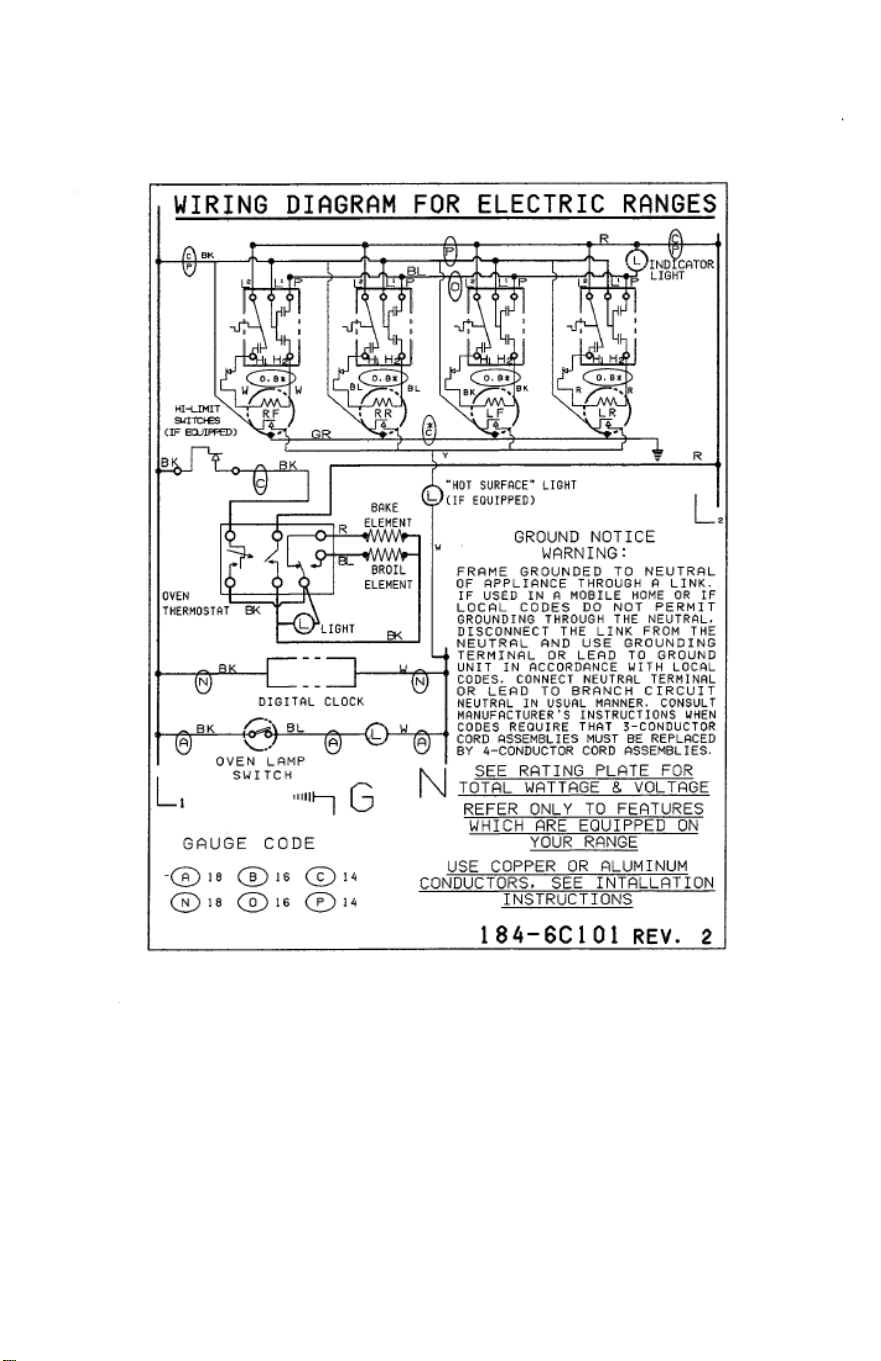
Wiring Diagrams
-Electrical ....................................................................................... .....31
Troubleshooting............................................................................................................... 32
NOTE: For warranty and service information, please see attachments packaged with range.
California Proposition 65B
Electric cooking appliances could produce or may contain some products
which are on a list of substances known by the State of California to cause
cancer or reproductive harm. California law requires businesses to warn
customers of potential exposure of such substances. To minimize exposure
to these substances, always install, operate, and maintain this product
according to the “use and care” manual.
READ THE IMPORTANT SAFEGUARDS AND ALL
INSTRUCTIONS BEFORE USING
THE APPLIANCE.
Remove all tape and packaging wrap before using the oven. If any glue remains, touch
the residue with the sticky side of the tape already removed. Or, use a cloth soaked with
rubbing alcohol. Use caution because rubbing alcohol is flammable. Rinse with warm
water and wipe dry.
Destroy or recycle the carton and plastic bags after the range is unpacked. Children
should not use packaging material for play. Cartons covered with rugs, bedspreads, or
plastic sheets can become air-tight chambers. Remove all staples from the carton. Staples
can cause severe cuts and destroy finishes if they come in contact with other appliances
or furniture.
Be safety conscious. The preparation of food in an oven requires temperatures that could cause
severe burns. Before using this new appliance, carefully read and follow all instructions.
The California Safe Drinking Water and Toxic Enforcement Act of
1986 (Proposition 65) requires the Governor of California to publish a list
of substances known to the State of California to cause cancer or
reproductive harm. In addition, businesses must warn customers of
potential exposure to such substances.
Users of this appliance are hereby warned there may be some low level exposure to some
of the listed substances including acrylamide and carbon monoxide. This happens when
the oven, if equipped with a self-clean feature, is engaged in a self-clean cycle. Exposure to
these substances can be minimized by properly venting the oven, especially during the self-
cleaning cycle, by opening a window or using a ventilating hood or fan.
Notice: Never keep pet birds in the kitchen. Birds have a very sensitive respiratory system.
Fumes released during the self-cleaning cycle, overheated cooking oil, fat, margarine or
overheated non-stick cookware may be harmful or fatal to birds.
PROPER INSTALLATION: Be sure your appliance is properly installed and grounded
by a qualified technician in accordance with the National Electrical Code ANSI/NFPA
NO. 70-latest edition and local electrical code requirements. Install only per installation
instructions provided in the literature package for this range. Be sure leveling legs are in place
at the bottom corners of the range. If necessary, raise or lower the leveling legs at the base of
the range by turning clockwise or counterclockwise to insure a level range.
Ask your dealer to recommend a qualified technician and an authorized repair service.
Have the technician label the proper switch or fuse at the electrical disconnect box and
show you how to disconnect the power to the range at the circuit breaker or fuse box in
case of an emergency.
The following situations may cause serious bodily harm, death or
property damage.
•
TO REDUCE THE RISK OF TIPPING OF THE RANGE, THE RANGE MUST BE SECURED
BY A PROPERLY INSTALLED ANTI-TIP BRACKET PROVIDED WITH THE RANGE. TO
CHECK IF THE DEVICE IS INSTALLED AND ENGAGED PROPERLY, CAREFULLY TIP
THE RANGE FORWARD. THE ANTI-TIP DEVICE SHOULD ENGAGE AND PREVENT
THE RANGE FROM TIPPING OVER. REFER TO THE INSTALLATION INSTRUCTIONS
PACKAGED WITH THE ANTI-TIP BRACKET FOR PROPER ANTI-TIP BRACKET
INSTALLATION. A child or adult can tip the range. Verify the anti-tip device has been
properly installed and engaged. Do not operate the range without the anti-tip device.
Failure to do so can result in death or serious burns.
• Never leave children alone or unattended in the area where an appliance is in use.
They should never be allowed to sit or stand on any part of the appliance. Never leave
the oven door open when the range is unattended.
1

IMPORTANT SAFEGUARDS, Continued
• Do not store items of interest to children in the cabinets above a range or on the
backguard of a range. Children climbing on the range to reach the items could be
seriously injured.
• Do not allow children to climb or play around the range. The weight of a child on an
open oven door may cause the range to tip, resulting in serious burns or other injury.
• USER SERVICING: Do not repair or replace any part of the appliance unless it is
specifically recommended in this owner’s guide. To prevent personal injury and
damage to the range, servicing should be done only by a qualified technician.
• Storage in or on appliance: Flammable materials should not be stored in an oven, near
surface elements or in the storage drawer (some models). This includes paper, plastic
and cloth items, such as cookbooks, plastic ware and towels, as well as flammable
liquids. Do not use the oven for storage. Do not store explosives, such as aerosol cans,
on or near the range.
• Remove the oven door from any unused range if it is to be stored or discarded.
• Stepping, leaning or sitting on the doors or drawers of this range can result in
serious injuries and cause damage to the range.
The following situations could cause bodily injury or property
damage.
• DO NOT TOUCH SURFACE UNITS, AREAS NEAR THESE UNITS, OVEN
HEATING ELEMENTS OR INTERIOR SURFACES OF THE OVEN UNTIL
THEY HAVE COOLED. Both surface elements and oven heating elements may be hot
even though they are dark in color. Areas near surface units and interior surfaces of the
appliance may become hot enough to cause burns–these areas include the cooktop,
surfaces facing the cooktop and the oven vent openings, and surface near these
openings, oven doors and windows.
• Make sure the reflector pans are always in place under the surface elements. This
avoids possible damage to wiring or components underneath and improves cooking
efficiency.
• It’s good practice for each household to have an appropriate fire extinguisher for
use in the event of a house fire.
•
NEVER use this appliance as a space heater to heat or warm the
room. Operating surface elements at the HIGH setting without pots or
pans on the elements, could damage the range and result in fire.
• Wear proper apparel when operating the range. Loose fitting or hanging garments
should never be worn while using the appliance. Do not let clothing or other flammable
materials contact surface elements or interior surfaces of the oven until they have had
sufficient time to cool.
2

IMPORTANT SAFEGUARDS, Continued
• Never modify or alter the construction of the range such as removal of leveling legs,
panels, wire covers, anti-tip brackets or any other permanent part of the product.
• Stand to the side of the oven when opening the oven door. Slowly open the door to
allow hot air or steam to escape before removing or replacing food.
• Keep children from touching the oven door (or glass window, if equipped) when the
range is operating as the door (or window) could get hot enough to cause serious burns.
• When heating fat or grease, watch it closely. Fat or grease may catch fire if allowed
to become too hot.
• Do not use water or flour on grease fires. Smother the fire with a pan lid, baking soda
or use a dry chemical or foam-type extinguisher.
• Use only dry potholders. Wet or damp potholders on hot surfaces could result in burns
from steam. Do not let the potholder touch hot heating areas. Do not use a towel or other
bulky cloth instead of a potholder.
• Turn utensil handles inward, but not extending over other surface elements. This
will minimize the possibility of burns, ignition of flammable materials, and spillage due
to accidental contact with the utensil.
• Never immerse or soak the removable surface elements in water. Surface elements
clean themselves during normal operations or can be wiped with a damp, sudsy cloth
when the elements are off and cool. Be sure the elements are off and cool before
touching them. Even when the elements appear dark in color, they may be hot.
• Never leave the range unattended while the surface elements are on. Boil overs may
cause smoking, greasy spill overs may catch fire or a pan which has boiled dry may melt.
• Do not use aluminum foil to line the surface element reflector pans
and never cover an entire oven rack with aluminum foil. Improper use
of aluminum foil may result in shock or fire hazard. Refer to the Cleaning
section of this manual for more information on the use of aluminum foil.
• Do not use glass, earthenware or other ceramic-type cooking utensils for range top
cooking unless recommended by the utensil manufacturer. Utensils of this type may
break with sudden heat changes; most are designed to be used only in the oven.
• Do not use plastic salt and pepper shakers, spoon holders or plastic wrappings on
top of the range when it is in use. These items could melt or ignite. Potholders, towels
or wooden spoons could catch fire if placed too close to the element.
• Do not place hands between the spring tension hinge and the oven door frame when
you are removing the oven door. You could pinch your fingers.
3

IMPORTANT SAFEGUARDS, Continued
• Do not heat unopened food containers. Build-up of pressure may cause the container
to burst and result in injury.
The following situations could cause bodily injury or property
damage.
• Disconnect the range from electrical supply before attempting to service or
move it.
• Do not use a wok on the cooking surface if it is equipped with a round metal ring
that extends beyond the bottom element. Because this ring acts as a heat trap, it may
damage the heating element, the surface cooking finish and the chrome pans under the
element.
• Do not touch a hot oven light bulb with a damp cloth. Doing so could cause the bulb
to break and may cause steam burns. Disconnect the electrical service cord or shut off
the power to the oven before removing and replacing the bulb.
• Allow parts to cool to room temperature before touching or removing them from
the range. When a surface element is first turned off, the element is still hot enough to
cause burns.
• Know which knob controls each element. Place a pan of food on the element before
turning it on, and turn the element off before removing the pan.
• Do not use the broiler pan without its insert. Do not cover the insert with foil.
Exposed fat or grease could ignite. The broiler pan and its insert allow dripping fat to
drain and be kept away from the high heat of the broiler.
• Do not allow dry, empty pans to cook on the heating element as this could ruin both
the pan and the heating element.
• Clean the range regularly to keep all parts free of grease which could catch fire. Pay
particular attention to the area underneath each surface element. Exhaust fan ventilating
hoods and grease filters should be clean. Do not allow grease to accumulate. Greasy
deposits in the fan could catch fire. Refer to the hood manufacturer’s instructions for
cleaning.
• Always place an oven rack in the desired location while the oven is cool. If a rack
must be moved when the oven is hot, use potholders and grasp the rack with both hands
to reposition. Do not let potholders contact the hot heating element in the oven.
Continuous Cleaning Ovens Only:
• Do not use oven cleaners. No commercial oven cleaner or oven liner protective coating
of any kind should be used in or around any part of the continuous cleaning oven.
• This product is only to be used for the purpose of cooking food. Do not use this
cooking product in any way other than it is intended. It is not to be used to process
laundry, ignite fireworks or pyrotechnic displays, or produce illegal substances banned
by law, or perform any other non-cooking related function that may be deemed reckless
in nature.
4

IMPORTANT SAFEGUARDS, Continued
• Use care when touching glass top. The glass cooking surface will retain heat after the
controls have been turned off. Make sure all surfaces have cooled before touching or
cleaning.
• Do not cook on a broken glass top. If the top glass surface should break, cleaning
solutions and spillovers may penetrate the broken glass and create a risk of electric
shock. Contact a qualified service technician immediately.
• Avoid scratching the glass top. Avoid using knives and sharp instruments around the
cook top. Do not drag or slide cookware across the glass surface.
NOTE: The instructions appearing in this owner’s guide are not meant to cover every
possible condition and situation that may occur. Common sense and caution must be
practiced when operating and maintaining any appliance.
VENTILATING HOODS
Clean Ventilating Hoods Frequently
Grease should not be allowed to accumulate on hood or filter. When flaming foods
under hood, turn hood fans on.
ENERGY-SAVING IDEAS
Surface Cooking
Turn surface elements off before cooking is completed. The units will stay hot long
enough to finish the cooking process.
Use lids when surface cooking. A lid traps steam and uses it to speed up the
cooking process. If you have a pressure cooker or vegetable steamer, use it. You’ll
waste fewer vitamins, save time and cut energy costs.
Use medium-weight, flat bottomed pans that match the sizes of the elements. Pick pans
made of a metal that conducts heat well.
When cooking on a surface element, use as little water as possible to reduce cooking time.
Never use the range to heat the kitchen. Using your range without utensils or pans
to absorb the element’s heat risks damaging the surface and the controls.
Oven Cooking
Preheat the oven only when a recipe tells you. Put roasts and casseroles into a cold oven
and then turn the oven on.
Opening the oven door often to check on foods wastes electricity.
Use the oven to prepare complete meals. For instance, start a roast, add vegetables when
the meat is half-cooked, and then warm rolls or dessert after the main dishes are
cooked. Thaw frozen foods before cooking. Thawed food requires less cooking energy
than frozen food.
Make it a habit to turn the oven off before you remove the cooked food from it.
5
INSTALLATION INSTRUCTIONS
Be sure appliance is properly installed and grounded by a qualified technician.
It is the responsibility of the technician to make certain that your range is properly
installed. Situations caused by improper installation are not covered under the warranty.
Any expenses incurred due to such situations will not be paid by the manufacturer of the
appliance.
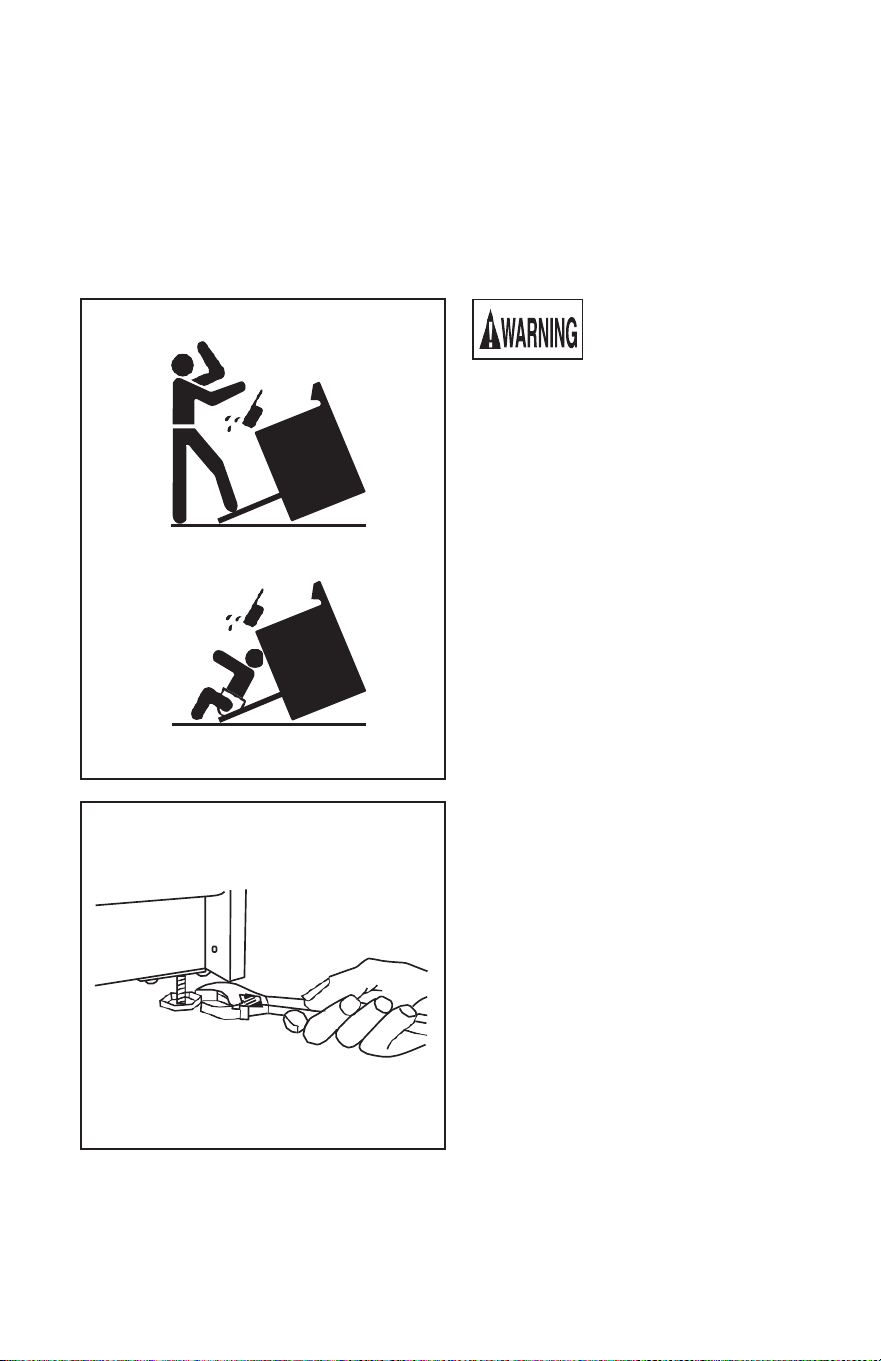
To reduce the risk of
tipping the appliance by
abnormal usage or
improper door loading, the appliance
must be secured by properly installing
the anti-tip device packed with the
appliance. To check if the device is
installed and engaged properly, carefully
tip the range forward. The Anti-Tip
device should engage and prevent the
range from tipping over.
See instructions packaged with the anti-
tip device. These are packaged within
the oven during shipment of the range.
If this range is removed for any reason,
service or cleaning, etc., it must be
replaced as outlined in the installation
instructions before placing the range
back in operation.
Leveling a Free-Standing Range
All free-standing ranges must be level to
obtain proper cooking results. The
leveling legs should be screwed into the
corner brackets. Place a pan or a
measuring cup partially filled with water
or spirit level on oven rack. Adjust
leveling legs until the range is level. The
top of the side panels should be level
with countertop or work surface.
IMPORTANT: Be sure to keep the leg
levelers. Leveling of the range is very
important.
6
BACKGUARD INSTALLATION INSTRUCTIONS
Electric Ranges
(This feature may not be available on all appliances.)
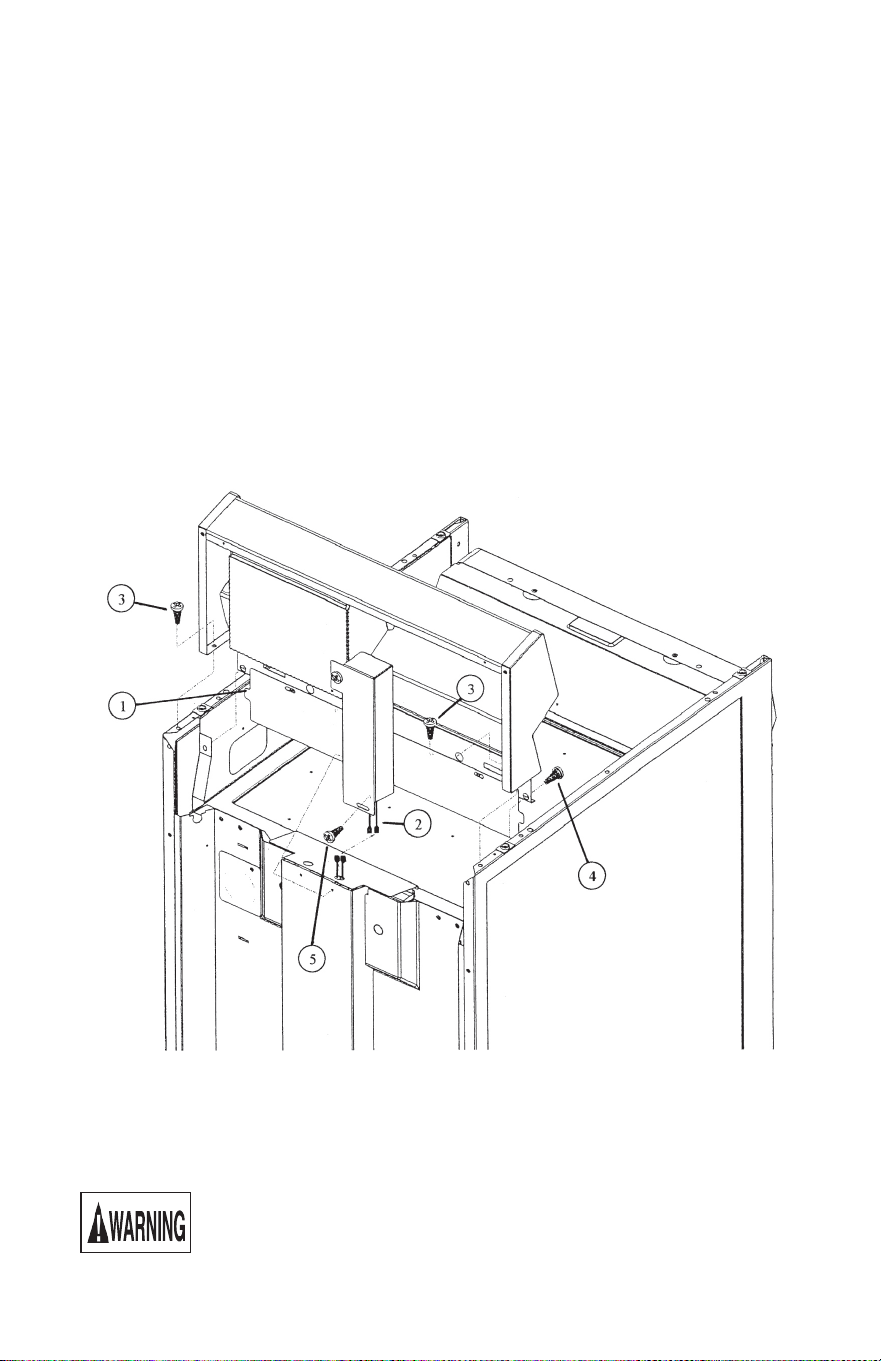
1. Move the main top forward. (Lift up and pull forward slightly.) For glass top models,
rear holding brackets will have to be briefly unscrewed then reattached when backguard
installation is complete.
2. Place the backguard on top of end panels at the rear of range. Make certain the tabs of
the burner box cover rest on the outside of the burner box flanges. (See No. 1.)
3. If backguard is equipped with electrical features, connect the corresponding black and
white wires then tuck them into the connection channel. (See No. 2.)
4. Insert machine screws through lower inside flange of end caps and end panels. Secure
with hex nuts provided. (See No. 3.)
5. Insert machine screws through elongated holes at bottom of backguard and side flanges
of burner box. Secure with hex nuts provided. (See No. 4.)
6. Attach wire connection channel to the main back wire cover. Use the sheet metal screw
provided. (See No. 5.)
Power Connections to Appliances
Have the range installed by a qualified service technician or an authorized servicer.
Installation must conform with the National Electric Code ANSI/NFPA NO. 70-
latest edition and local electrical code requirements.
Be sure electric power is OFF at the fuse (breaker) box until the unit is
installed and ready to operate. See appliance rating plate for maximum
K.W. and amperage rating.
7
Rating Plate
ADAPTO
R
CORD CONNECTED APPLIANCES
We recommend that you have the electrical hookup of your range done by a qualified
electrician. Have the electrician show you where your range disconnect is located. If you
fail to wire your range in accordance with governing codes, you may create a hazardous
condition.
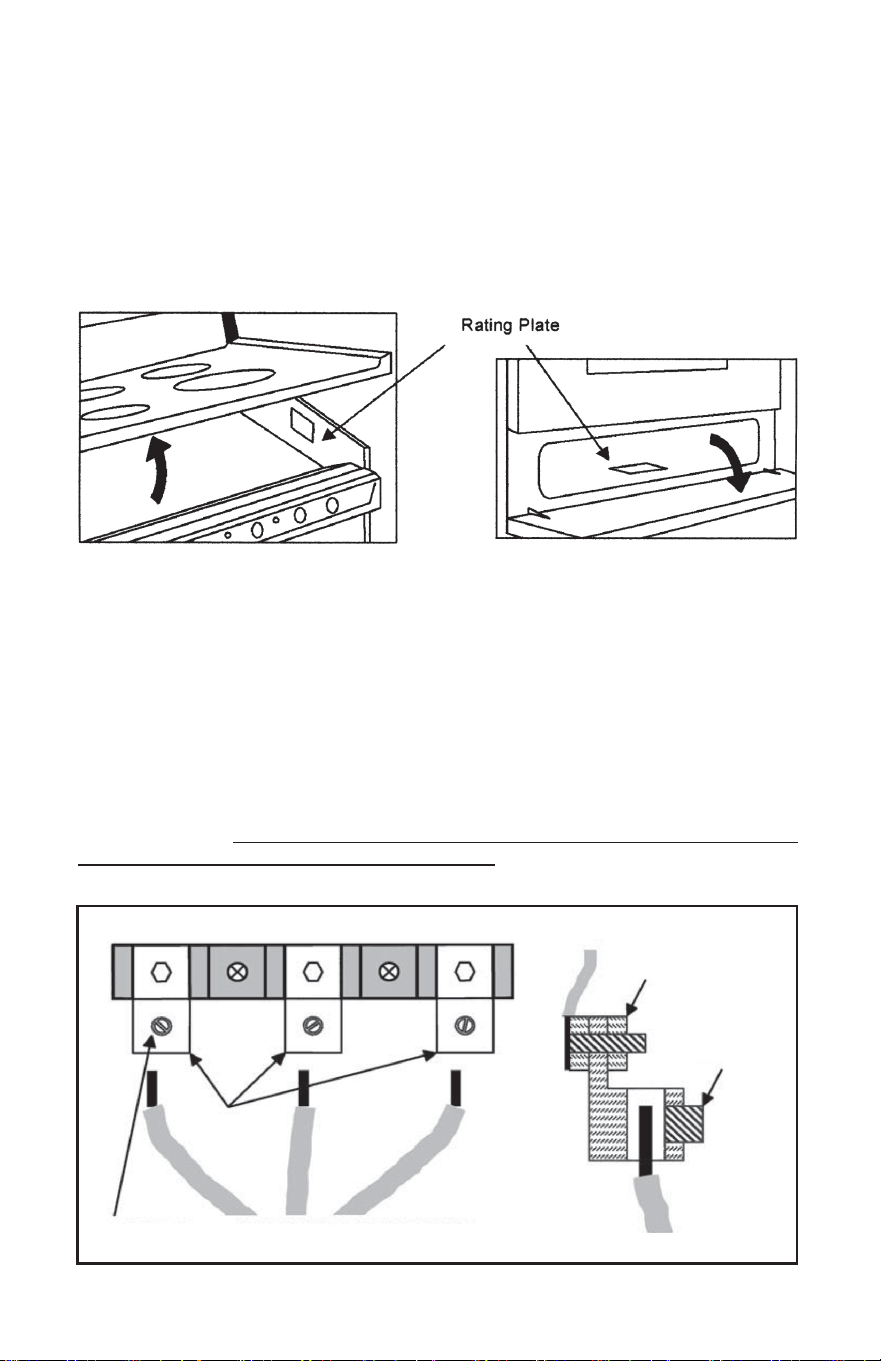
Refer to the rating plate for electrical requirements. The rating plate is located in the
burner box area on freestanding ranges and cook tops. Lift up the front edge of the main
top to find the rating plate. On built-in wall ovens and glass top ranges, the plate can be
found in the storage compartment. Open the storage door panel to find the rating plate.
You must use a three-wire, single-phase AC 208/240 Volt, 60 Hertz electrical system to
operate your range. Use #8 wire and 40 Amp fuse or circuit breaker for 240 Volt and 208
Volt systems.
For ranges equipped with a terminal block, use only a 3-conductor or 4-conductor UL
listed 40 Amp 125/250 minimum volt electric range power cord. The cord must have open
end spade lugs with upturned ends or closed loop terminals. An appropriate strain relief
bracket must be provided on the power cord. Power cord strain relief must be used.
It is strongly suggested that your electric range be connected by means of a cord utilizing
copper conductors. Copper has always proven itself to be the most dependable
conductor. However, many homes may be wired to connect to a range by means of
aluminum wiring. This is not an ideal situation, and we urge you to have a qualified
electrician change to a copper cord connection. If this is not possible, bare wire
connections can be made with the terminal adaptor kit packed in with the range.
SECTION VIEW
INSERT WIRE INTO BLOCKS.
TIGHTEN THE SET SCREWS.
SET SCREW
ADAPTOR CONNECTION Use for bare wire connection through electrical conduit.
20 in-lb Torque
25 in-lb
Torque @
#8 Wire
ADAPTOR
BLOCKS
8
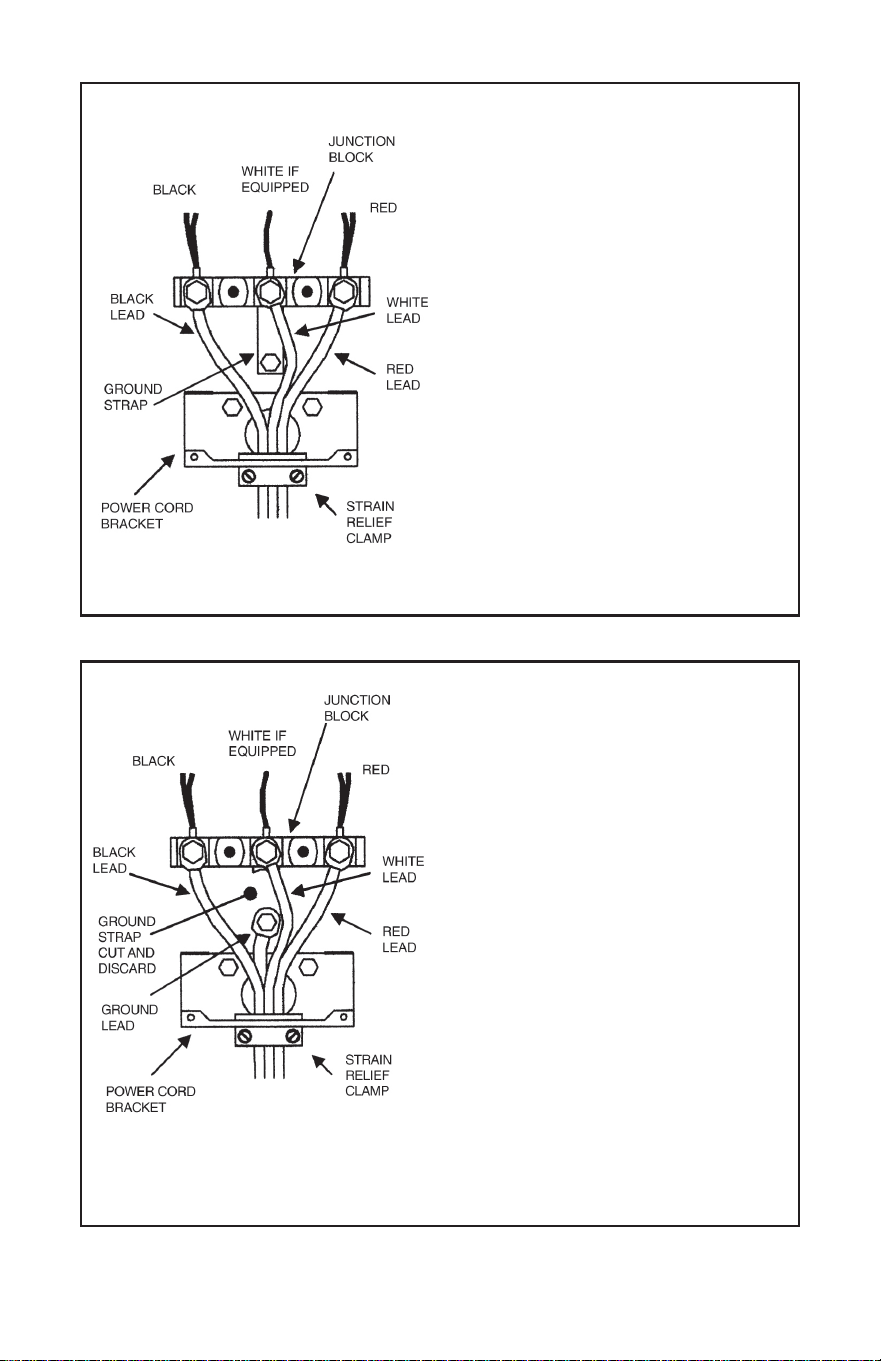
120/240 VAC
FOUR-WIRE CORD CONNECTION
1. Remove the top nuts on the junction
block studs.
2. Tighten the back nuts.
3. Remove the green ground screw and cut
off the ground strap as close to the
junction block as possible.
4. Remove the ground strap.
5. Install the four-wire cord and strain relief
provided on the cord set through the hole
in the power cord bracket.
6. Connect the red and black leads to the
outer terminals and the white lead to the
center terminal. Use the top nuts
removed earlier in step 1.
7. Connect the ground lead below the
junction block with the ground screw
that was removed earlier in step 3.
5. Push the cord upward (to relieve strain)
while tightening the strain relief clamp.
Effective January 1, 1996 the National Electrical
Code requires that new construction (not
existing) utilize a 4-conductor connection to an
electric range.
NOTE: A 4-conductor cord is to be used
when the appliance is installed in a mobile
home or when local codes do not permit
grounding through the neutral.
THREE-WIRE CORD CONNECTION
1. Remove the top nuts on the junction
block studs.
2. Tighten the back nuts.
3. Install the three-wire cord and strain
relief provided on the cord set through
the hole in the power cord bracket.
4. Connect the red and black leads to the
outer terminals and the white lead to the
center terminal. Use the topnuts removed
earlier in step 1.
5. Push the cord upward (to relieve strain)
while tightening the strain relief clamp.
If local codes do not allow grounding
through the neutral, refer to the
illustration below of FOUR-WIRE
CORD CONNECTION.
120/240 or 240 VAC
9
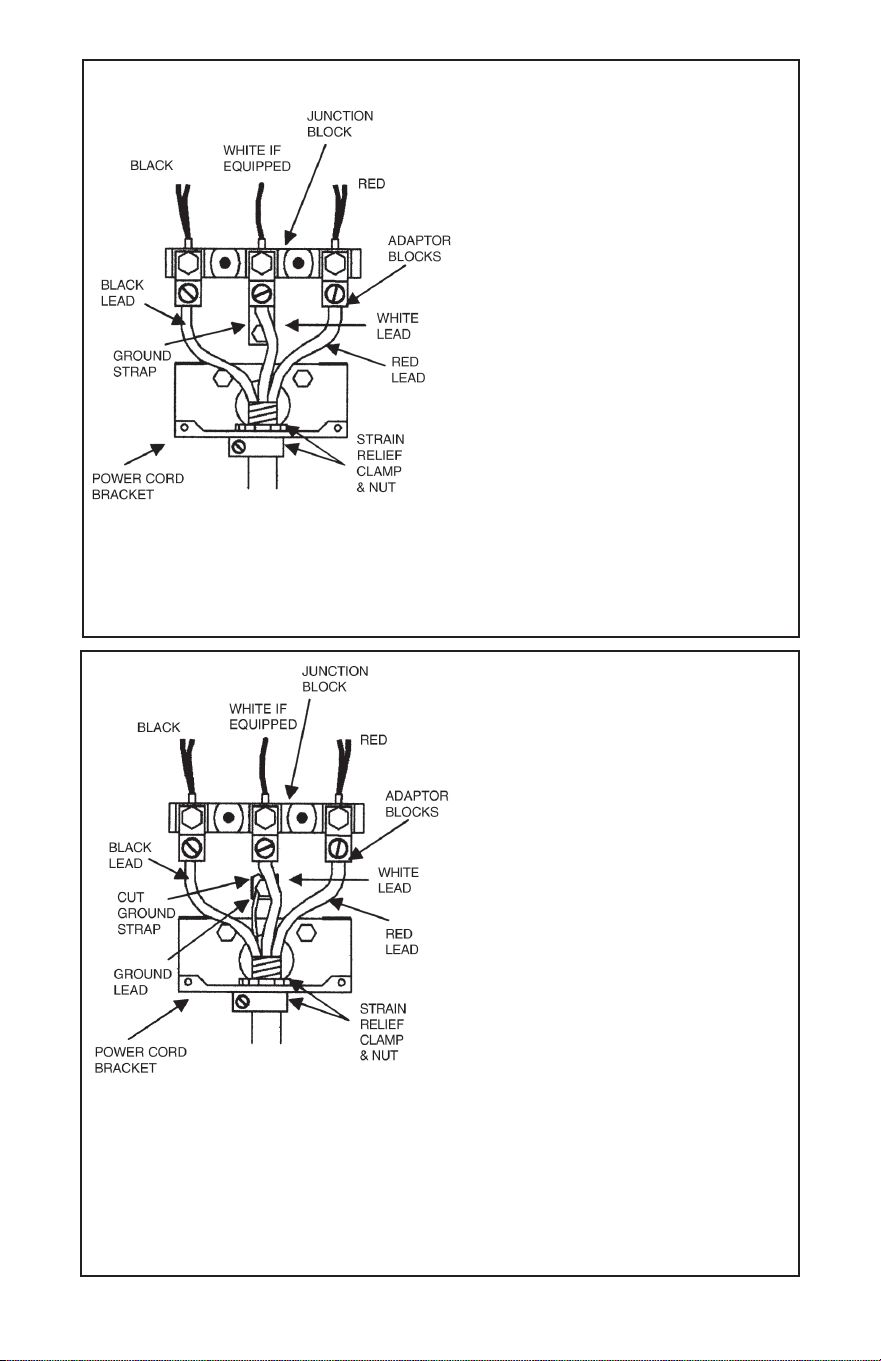
THREE-WIRE CONDUIT CONNECTION
NOTE: The power cord bracket will have
to be reversed for conduit installations.
Detach the bracket and flip its orientation.
Reattach the bracket to the range so the
conduit will pass through the smaller hole.
120/240 or 240 VAC
If local codes do not allow grounding
through the neutral, refer to the
illustration below of FOUR-WIRE
CONDUIT CONNECTION.
1. Remove th
e top nuts on the junction
block studs.
2. Tighten the back nuts.
3. Install the terminal adaptor blocks for
bar wire connection. Use the top nuts
removed in step 1.
4. Install the three-wire conduit and an
appropriate strain relief clamp through
the hole in the power cord bracket.
5. Insert the red and black leads into
the outer blocks and the white lead into
the center block. Tighten the set screws.
6. Secure the strain relief clamp around the
conduit and tighten the nut against the
power cord bracket.
120/240 VAC
FOUR-WIRE CONDUIT CONNECTION
NOTE: The power cord bracket will have
to be reversed for conduit installations.
Detach the bracket and flip its orientation.
Reattach the bracket to the range so the
conduit will pass through the smaller hole.
1. Remove the top nuts on the junction
block studs. Then, tighten the back nuts.
2. Cut the ground strap as close to the
junction block as possible and at
the lower section with upturned sides.
3. Install the four-wire conduit and an
appropriate strain relief clamp through
the hole in the power cord bracket.
4. Use the section of ground strap with
upturned sides and the ground screw to
connect the ground lead below the
junction block.
5. Install the terminal adaptor blocks for
Effective January 1, 1996 the National Electrical
Code requires that new construction (not
existing) utilize a 4-conductor connection to an
electric range.
NOTE: A 4-conductor connection is to be
used when the appliance is installed in a
mobile home or when local codes do not permit
grounding through the neutral.
bar wire connection. Use the top nuts
removed earlier in step 1.
6. Insert the red and black leads into
the outer blocks and the white lead into
the center block. Tighten the set screws.
7. Secure the strain relief clamp around the
conduit and tighten the nut against the
power cord bracket.
10
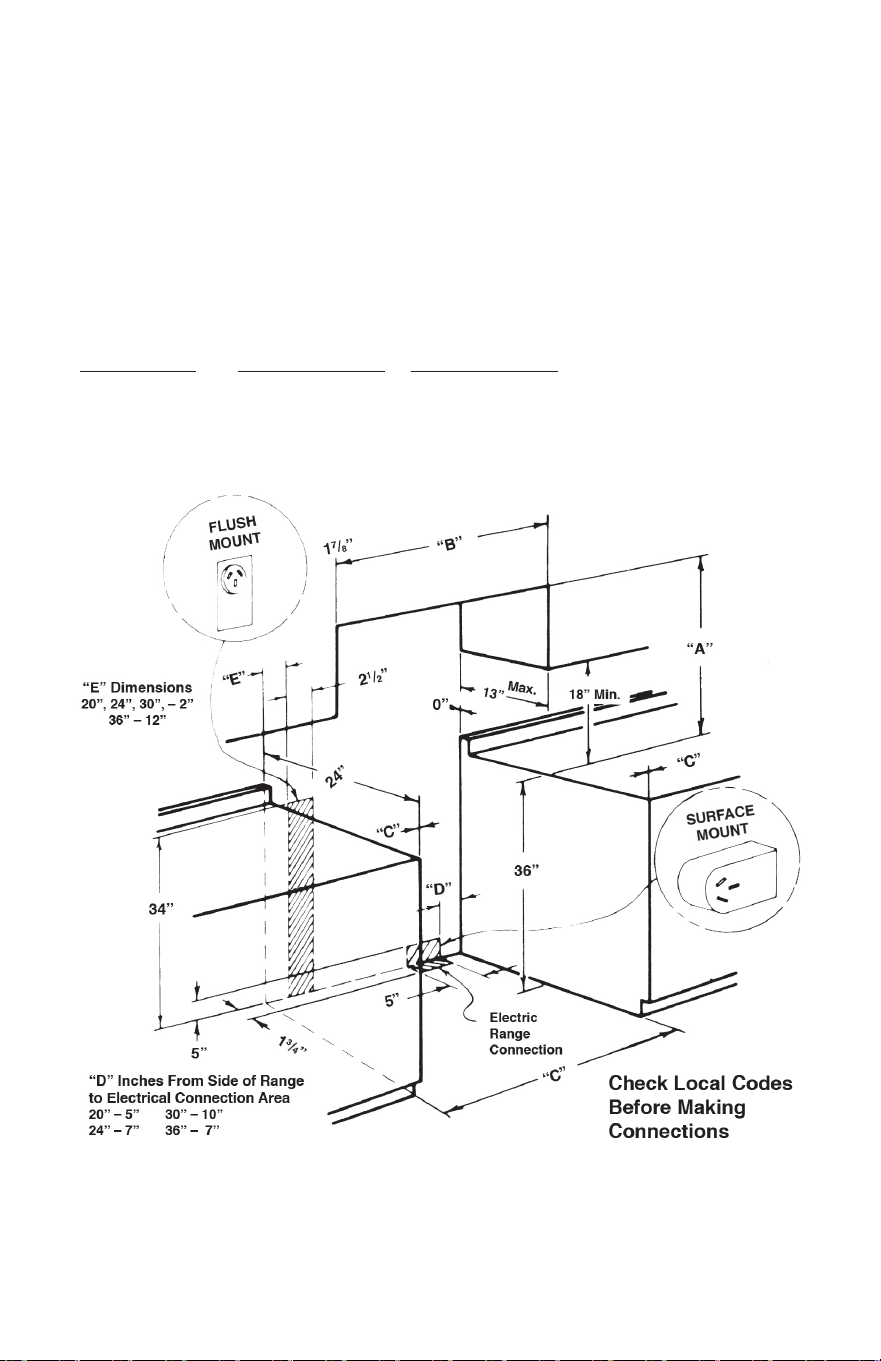
CABINET PREPARATIONS
Free-Standing Ranges
“A” - 30 inches minimum clearance between the top of the cooking surface and the
bottom of an unprotected wood or metal cabinet; or
“A” - 24 inches minimum when bottom of wood or metal cabinet is protected by not less
than 1/4 inch “Flame Retardant” millboard covered with not less than No. 28
MSG sheet steel, 0.015 inch stainless steel, 0.024 inch aluminum or 0.020 inch
copper.
“B” - Make opening between cabinet as shown in drawings. Level range so the main top
is level with the cabinet top. Make electrical connection and slide range into
opening.
RANGE SIZE “B” DIMENSION “C
” DIMENSION
20’’ 20 3/8’’ 2’’
24’’ 24 3/8’’ 0’’
30’’ 30 3/8’’ 0’’
36’’ 36 3/8’’ 0’’
“C” = Inches
from
combustible
vertical walls
above cooking
surface.
To eliminate the hazard of reaching over the heated surface units, cabinet storage space
located above the surface units should be avoided. If cabinet storage is to be provided, the
hazard can be reduced by installing a range hood that projects horizontally a minimum of
5 inches beyond the bottom of the cabinets.
11

12
OVEN OPERATION
OPERATIONAL CHECK
Check all connections to see that they are tight and have not become loosened
during transit. The oven bake element should heat up within a minute when the
temperature control is set in the bake area of the dial. The broil element can be
checked with dial in broil mode. With dial at 400ºF, temperature should be reached
within 10-12 minutes. The elements are covered with a protective coating of oil.
When heated up for the first time, open the oven door and allow the thermostat to
operate at 400ºF for about 10 minutes. This should evaporate the oil, and dissipate
odors and possible smoke caused by the burning off of this protective coating.
Opening Oven Door
Let hot air or steam escape before removing or replacing food.
Arranging Oven Racks
Always arrange the oven racks while the oven is cool. To remove the rack, pull forward
until it stops. Lift up the front and slide out. To replace, fit the rack onto the guides on the
oven walls. Tilt the front of the rack upward and slide back into place. Place the racks so
the food is “centered” in the oven.
When more than one utensil is used, be sure to stagger them allowing space between
each one. Don’t allow the utensils to touch any part of the oven, especially the glass
window. It is best to use both racks equipped with the oven, and place food so one
utensil is not directly over another.
Baking
By using the latest development in an electric oven heat control, a fast bake temperature
is obtained. However, preheating the oven for 10-12 minutes is recommended so the oven
can cycle properly before baking. Turn oven control clockwise to the temperature setting
of your choice. An indicator light will glow when there is electric power to the bake
element. When the oven temperature setting is reached, the indicator light will go off. It
lights up again when the power comes back on the bake element.
Broiling
Broiling may be slightly different from any previous broiling you may be acquainted with,
so be sure to read this section completely.
To broil, turn the temperature control knob clockwise to the “BROIL” position.
This action makes a switch in the oven thermostat engage the broiling element.
Turning the temperature knob away from this position will switch the thermostat back
into bake mode.
Always broil with the oven door closed. The oven temperature control will maintain the
oven temperature while your food is broiled. For most instances, the top oven rack
position can be used for broiling. If broiling with lower heat is needed, the
second rack position from the top can be used. Lower rack positions can be used
for even lower broiling intensity.
SELECT THE OVEN RACK POSITION BEFORE YOU BEGIN BROILING.
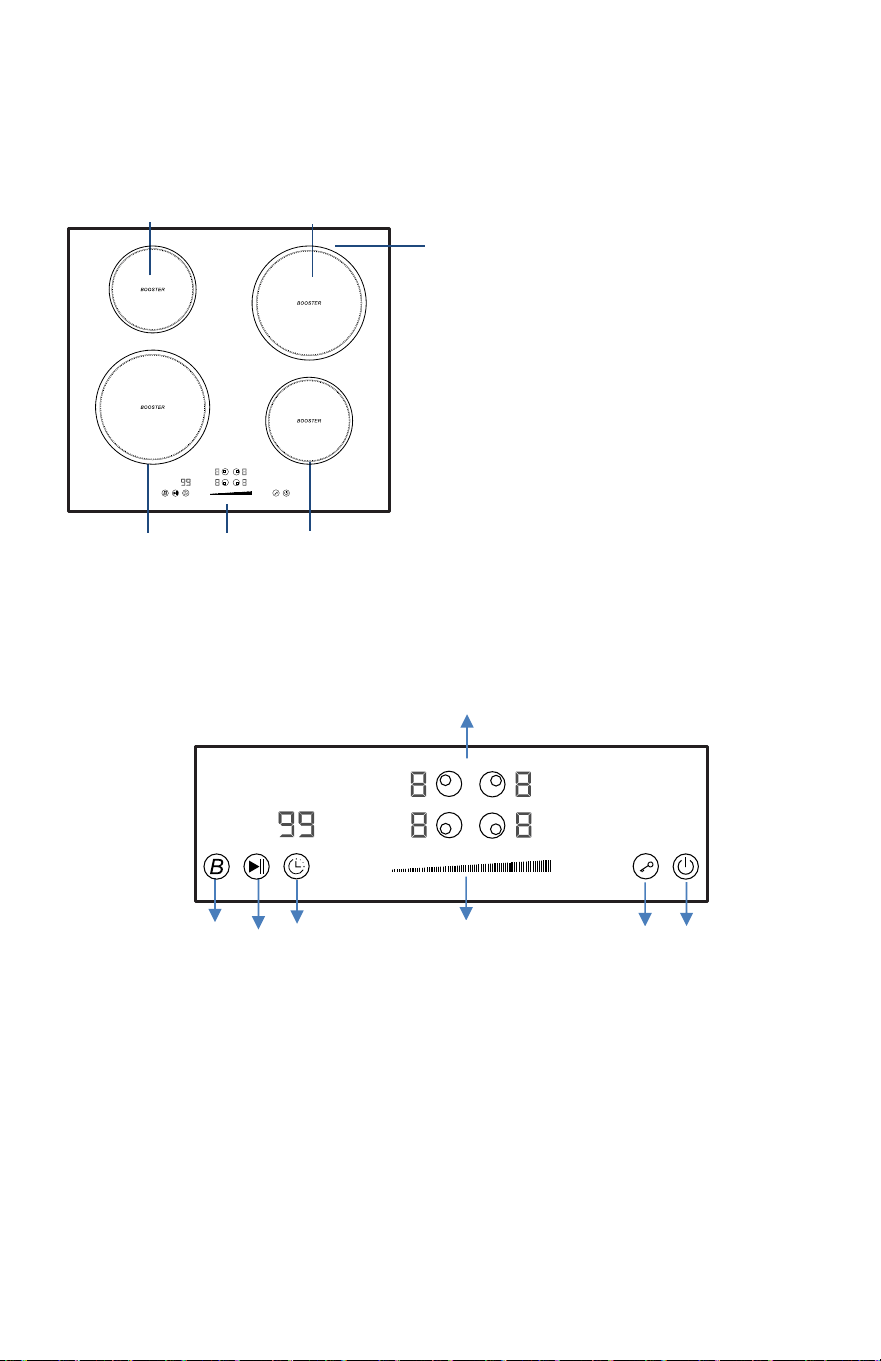
For Models with Black Cooktops
1. 1500W Boost 2000W Cooking Zone
2. 2000W Boost 3000W Cooking Zone
3. 2000W
Boost 3000W Cooking Zone
4. 1500W Boost 2000W Cooking Zone
5. Glass plate
6. Control panel
Control Panel
1. Cooking Zone selection button
2. Booster f
unction control button
3. Stop & Go control button
4. Timer control
button
5. Heating level/Timer Slider control
6. Child Lock control button
7. ON/OFF button
1
5
6
2
3
4
1
2
3
4
5
6 7
13
OPERATING YOUR COOKTOP
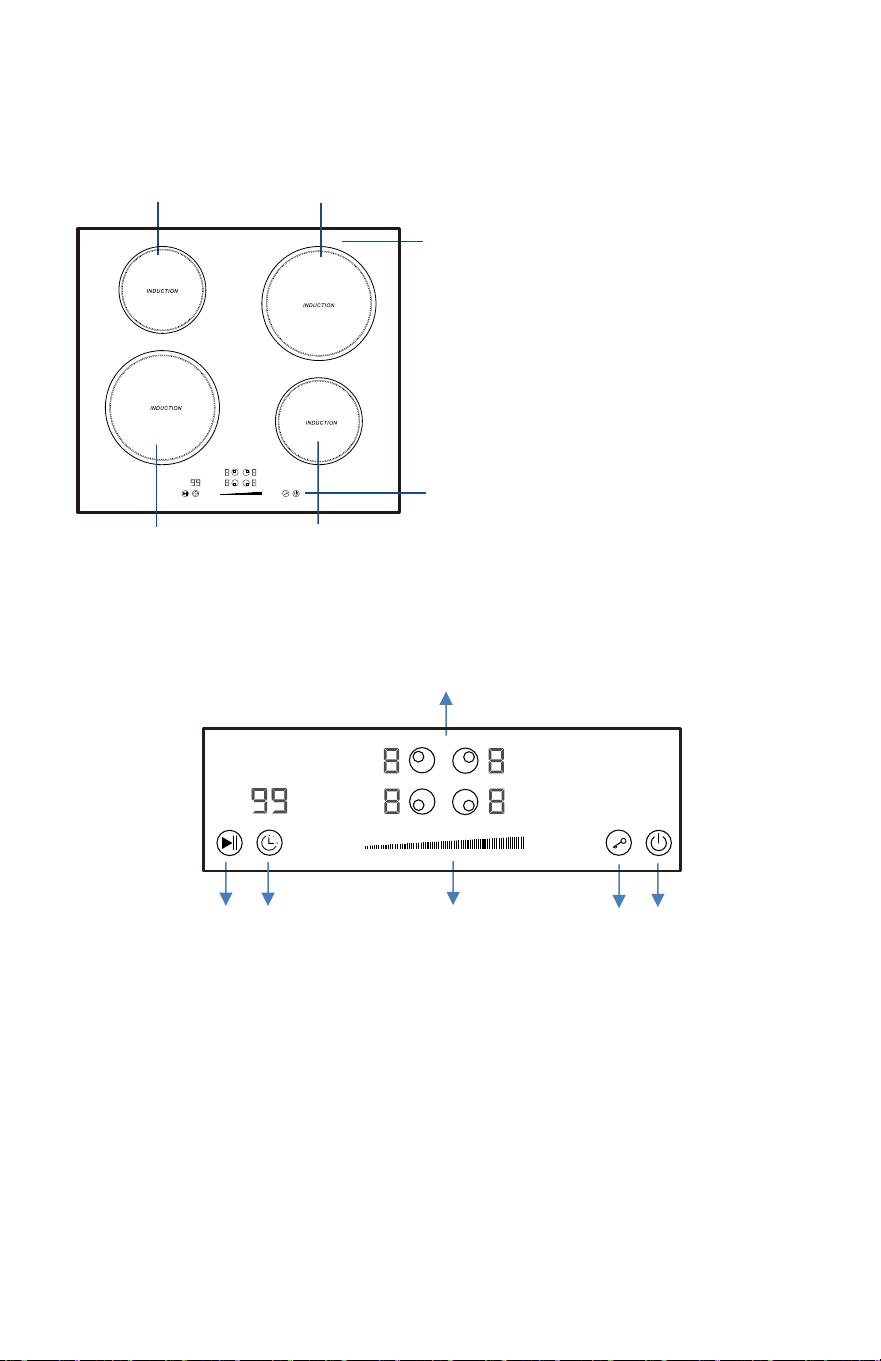
For Models with White Cooktops
1. 1500W Cooking
Zone
2.
2000W
Cooking
Zone
3.
2000W Cooking Zone
4. 1500W Cooking Zone
5. Glass plate
6. Control panel
2
1. Cooking
Zone
selection
button
2. Stop & Go
control
button
3. Timer control button
4. Heating level/Timer Slider
control
5. Child Lock control button
6. ON/OFF button
1
3
4
1
2
4
5
6
5
6
3
14
Control Panel
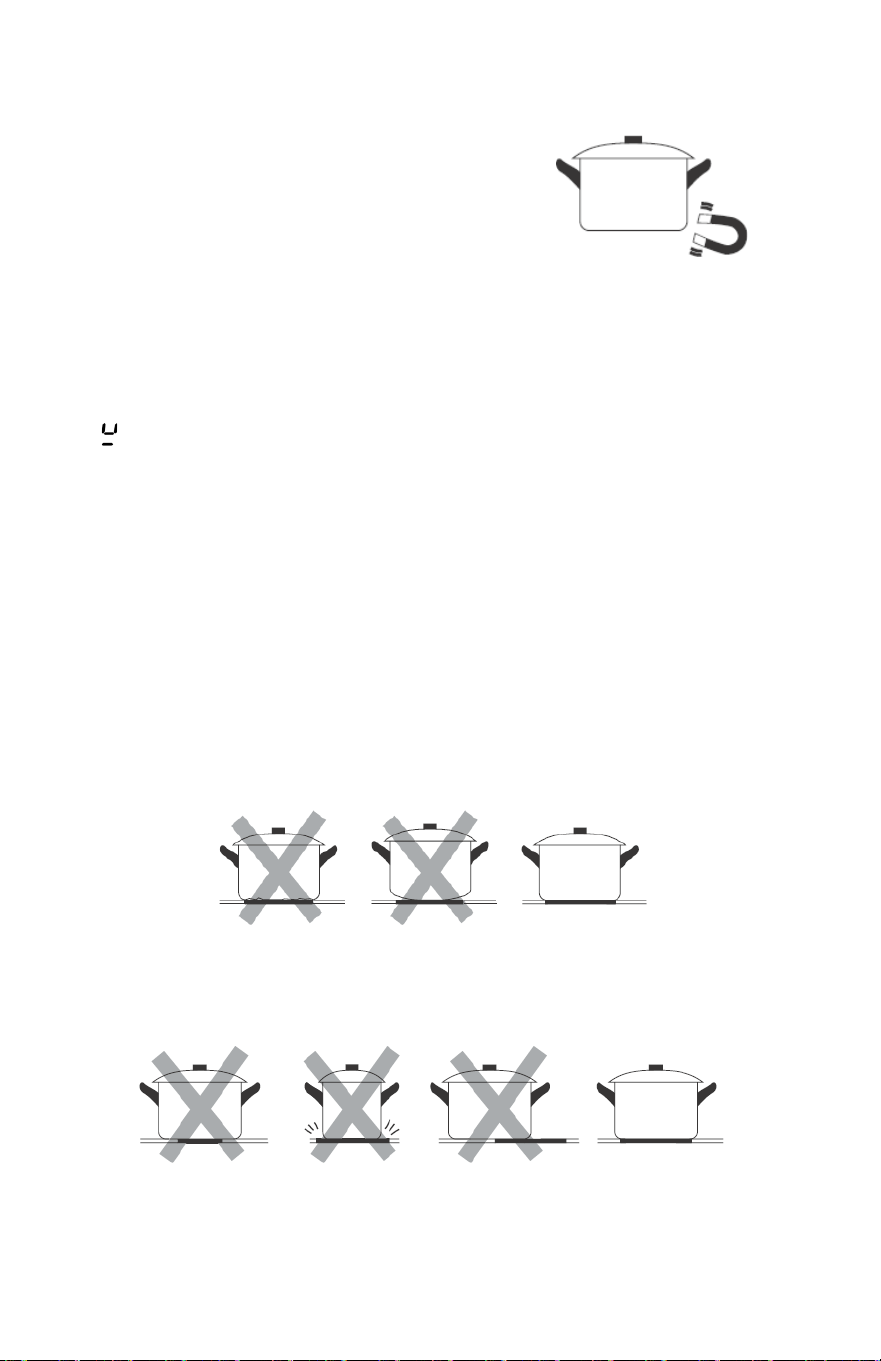
Choose the Right Cookware (Induction Models)
• Only use cookware with a base suitable for induction
cooking. Look for the induction symbol on the
packaging or on the bottom of the pan.
• You can check whether your cookware is suitable by
carrying out a magnet test. Move a magnet towards the base of the pan. If it is attracted,
the pan is suitable for induction hob.
• If you do not have a magnet:
1. Put some water in the pan
you want to check.
2. If
does not flash in the display and water is heating, the pan is suitable.
• Cookware made from the
following materials is not suitable for an induction cooktop: pure
stainless steel, aluminum or copper without a magnetic base, glass, wood, porcelain, ceramic,
and earthenware.
• Induction cooktops are made from smooth, ceramic glass, the heat comes from a magnetic
induction coil which heats the cookware but not the cooking surface. The heat from the
cookware is transferred to the food.
• It’s important that you use only metal pans specifically designed and/or approved for use on
induction hobs. Never allow melamine or plastic containers to come in contact with the heat
zones.
• A pan which diameter less than 5½" (140mm) may not be detected by the induction hob.
Do not use cookware with jagged
edges or a curved base.
Make sure that the base of your pan is smooth, sits flat against the glass, and is the same size as the
cooking zone. If
you use smaller pot efficiency could be less than expected. Always center your
pan on the cooking zone.
15
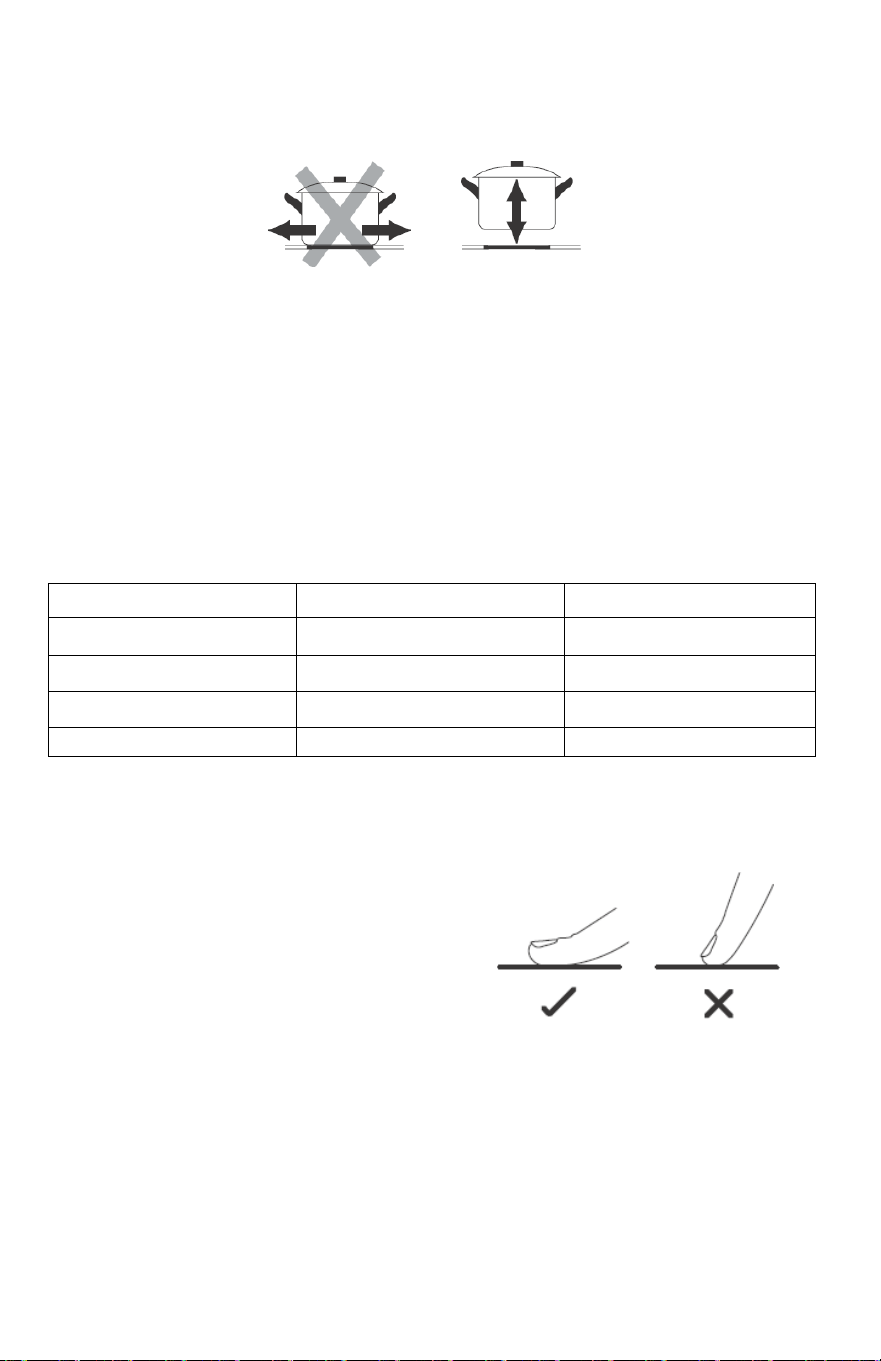
Always lift p
ans off the hob – do not slide, or they may scratch the glass.
Suggested Pan dimensions for induction hob
The cooking zones are, up
to a limit, automatically adapted to the diameter of the pan. However,
the bottom of this pan is suggested to have a minimum of diameter according to the
corresponding cooking zone. To obtain the best efficiency of your hob, please place the pan in
the center of the cooking zone.
Base diameter of the pots:
Cooking zone
(in.)
Minimum (in.) Maximum (in.)
6.3 5.5 6.3
7.1 5.5 7.1
8.3 6.3 8.3
11.0 9.1 11.0
Using the Touch Controls
• The controls respond to touch, so you don’t
need to apply an
y pressure. Use the ball of
your f
inger, not its tip.
• You will hear
a beep each time a touch is
registered.
• Make sure the controls are always clean, dry, and that there is no object (e.g., a utensil or a
cloth) covering them. Even a thin film of water may make the controls difficult to operate.
16
For Touch/Slider Control Models
To Start Cooking
After the cooktop is connected to a power source, the cooktop will beep once, all the indicator lights
will illuminate for one second, then go out. To then start cooking, follow these steps:
1. Press and hold the ON/OFF
control button for
about
3 seconds
till
you hear a “beep” to turn the cooktop on. Now the cooktop enters Standby mode.
All of the heat setting indicators and the timer setting indicator shows “-”.
2. Place a suitable pan on the cooking zone you wish to use. Make sure
the bottom of the pan and
the surface of the cooking zone are clean and dry.
3. Set heating level of cooking zone:
a. Before adjusting the heating level, touch the heating zone selection control button to select
and activate the cooking zone you wish to use.
b. The
heat setting indicator of the selected zone will flash when it is active.
c.
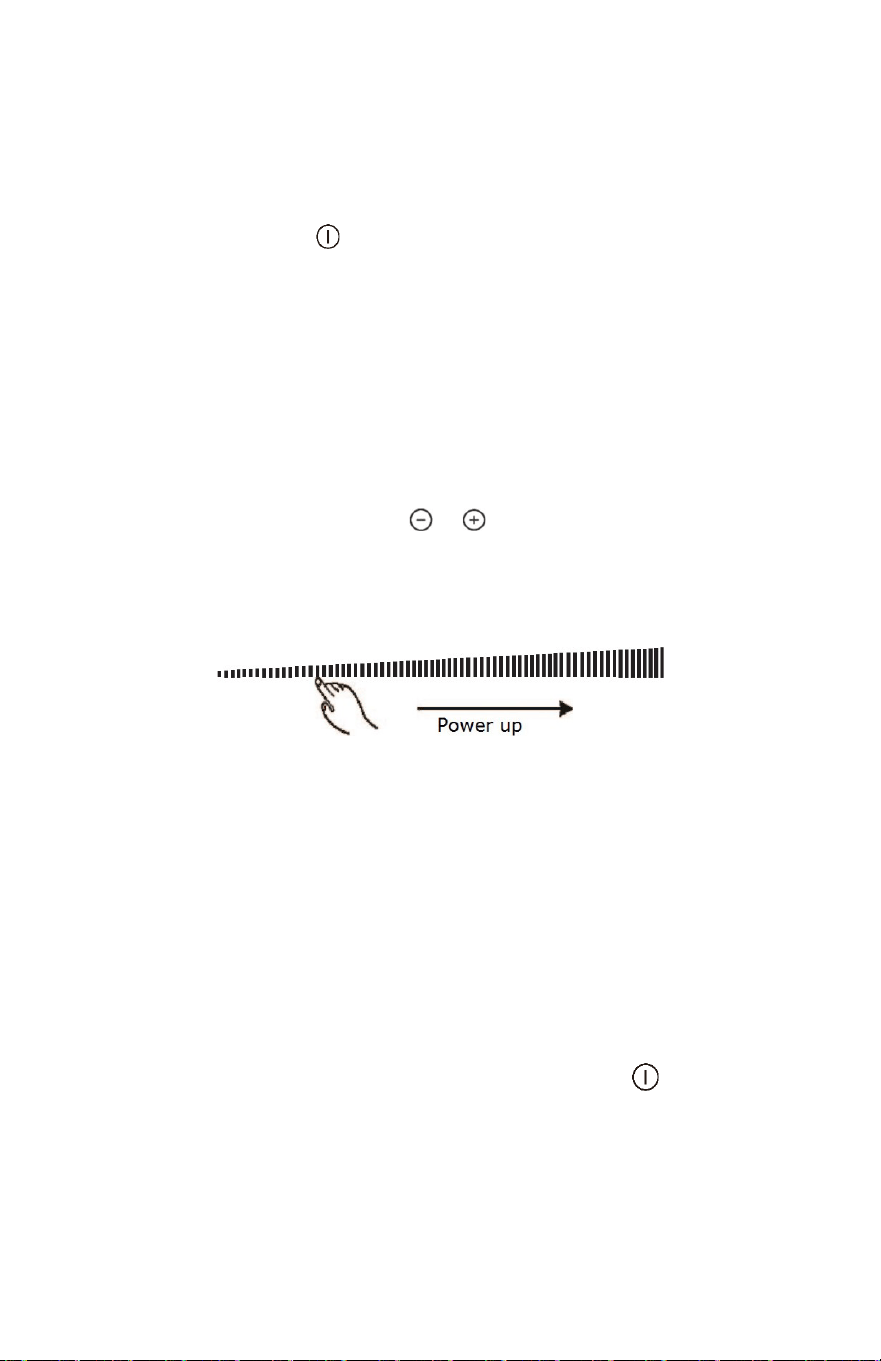
Adjust its heat level by touching the or button to decrease or increase the heat,
respectively. The heat level will cycle from 0 to 9.
d. If you have a slider control
model, use the slider control in
increase/decrease as shown below:
NOTES:
1. When the cooktop is in Standby mode, and no button is pressed
for one minute, t
he cooktop
will beep once, then automatically turn off.
2. The default power level setting is level 5.
3. The heat setting indicator of the selected zone will flash when the level is being adjusted or set.
4. After adjusting, the heat setting number will flash for 5 seconds then stop flashing. At this time,
the setting will be confirmed.
To Turn Off the Cooktop
1. You can turn the cooking zone off by adjusting heat
setting to level 0;
the indicator shows “- “
2. You can also turn the whole cooktop off by touching the ON/OFF control button.
NOTES:
• If the power shuts off during cooking,
all temperature settings will be cancelled.
• The cooling fan
of the induction cooktop will remain on for about 1 minute after the cooktop is
turned off.
17
NOTE:
1. When using booster function, if the other cooking zone in
vertical direction is also
activated
at a power level higher than
2, programmer will automatically turn power of the
other zone down to 2.
2. After booster function ceases, the other active cooking zone will return to the original power
setting.
Stopping the Booster Function
• Follow above practice of active Booster function one
more time when Booster is working,
could cancel the Booster function.
• You can also cancel Booster function by adjust power level setting.
Child Lock Safety Control
NOTE: The Child lock function is for touch/slider control models only.
• You can lock the controls to prevent unintended use (for example children accidentally turning
the cooking zones on) by activating the 'Child Lock' function.
• When the controls are locked, except the ON/OFF control button and 'Child Lock' control
button, all other touch control buttons are disabled.
To Lock the Controls
Touch the 'Child Lock' control button once. The timer indicator will show “Lo“ and the
'Child Lock' function will be active.
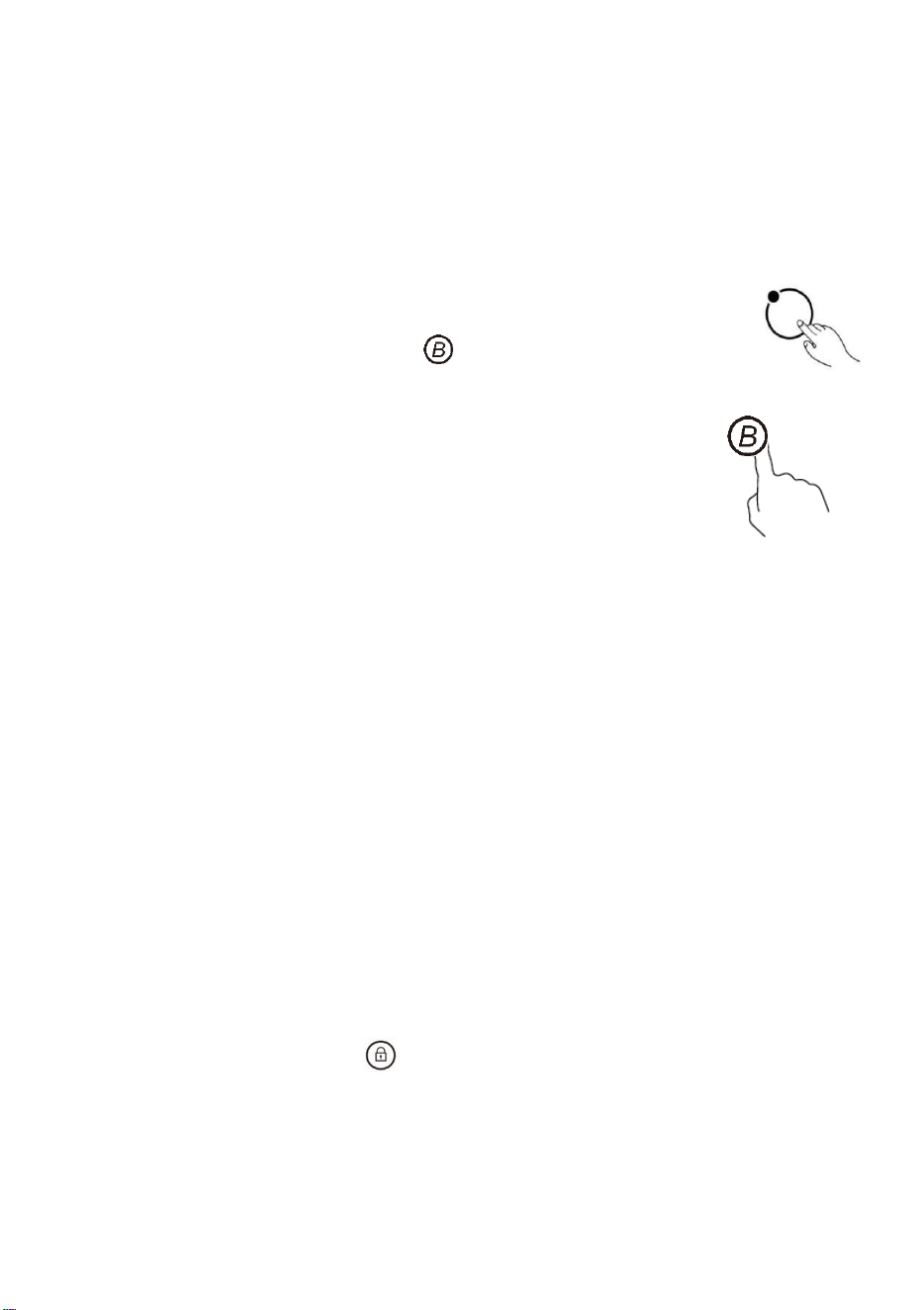
Using Booster Function (Induction Cooktop)
Some of the induction cooktop models have one or several cooking zones which has 'Booster'
function. You can use the 'Booster' function to boost power of the relevant cooking zone for a
maximum power rating for 5 minutes.
Using the Booster Function when a Cooking Zone is Working
1) Active the cooking zone you want to use booster
function.
Touch the heating zone selection control button to select the cooking zone you
want to use boost function.
2) Touch the Booster function control button , and the heating zone
indicator will show “b” and flash for 5 seconds. The booster function is now active.
18
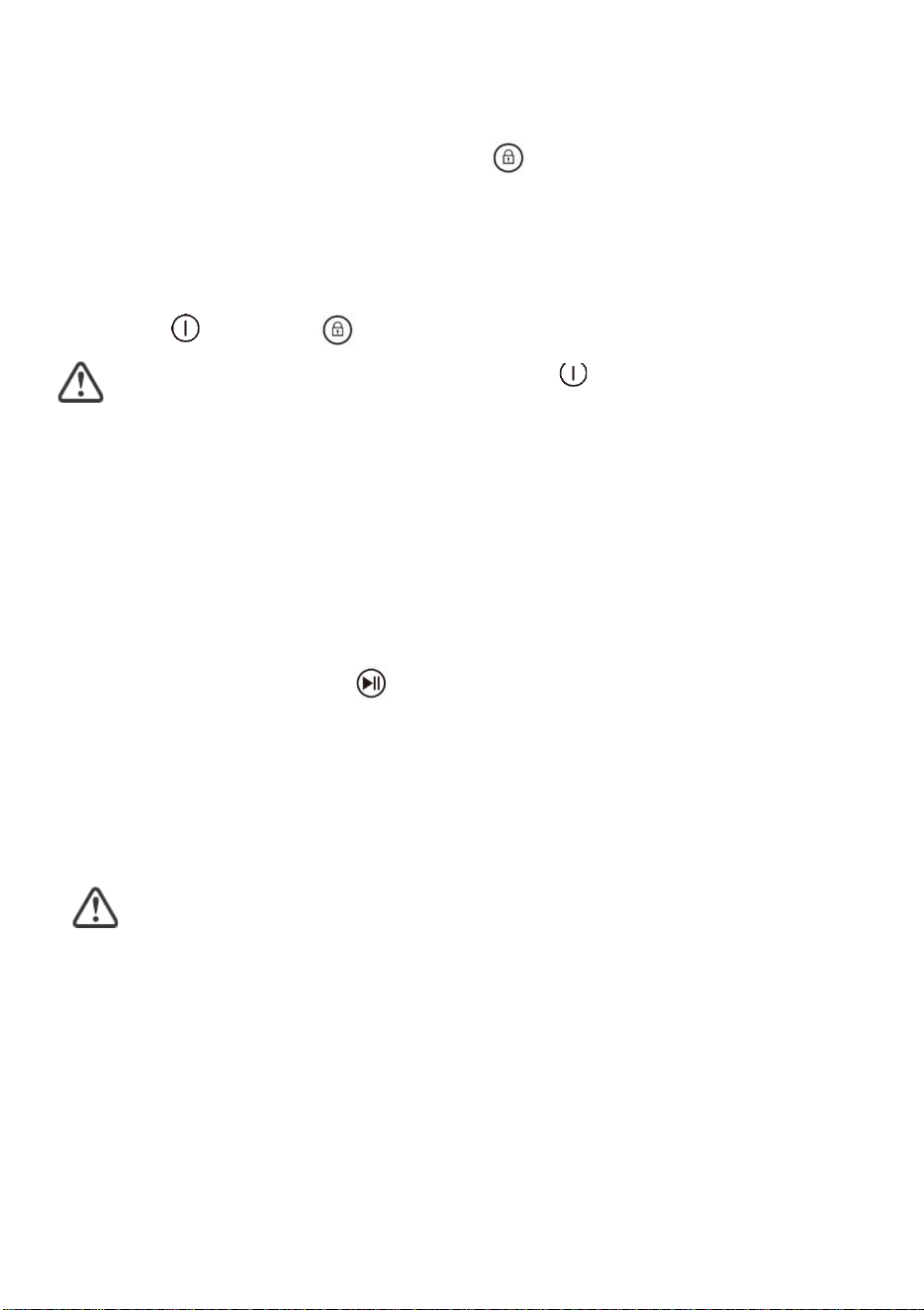
To Unlock the Controls
1.
2.
Make sure the electric c
ooktop is turned on.
Touch and hold the 'Child Lock' control button
for 3 s
econds, the buzzer will
beep once and
“Lo”
indicator on the timer will disappears. The 'Child Lock' is now inactive.
You can now start using your electric cooktop.
Under the child lock mode, all controls buttons be disable except for the ON/OFF
button and child lock button.
You can always turn the cooktop off with the ON/OFF control in an emergency, but
the cooktop will be unlocked the next time it is used.
NOTE: If th
e cooktop is turned off without deactivating the 'Child Lock' function, the 'Child Lock'
w
i
l
l
remain active when the cooktop is turned on again later.
Stop & Go Function
NOTE: The Stop & Go function is for touch/slider models only.
The Stop & Go function can turn off all zones. When you return to the cooktop, simply touch the
button to restart cooking at the zones’ heat settings.
Activate the Stop & Go Function
Press the Stop & Go function button
once. All temperature program
settings be put on hold and the cooktop stop heating. All heat setting indicators will show “P”.
Cancel the Stop & Go Function
After returning to the cooktop, press the Stop & Go function button again. All temperature program
settings will return to their previously set temperatures. The Stop & Go indicator “P” disappear
from all indicators.
When the Stop & Go function
is a
c
t
i
ve, all
of the control buttons will be disabled, except
the ON/OFF and Stop & Go button.
NOTE: The cooktop will automatically turn off, if
the Stop & Go function lasts for more than 10
minutes.
1919
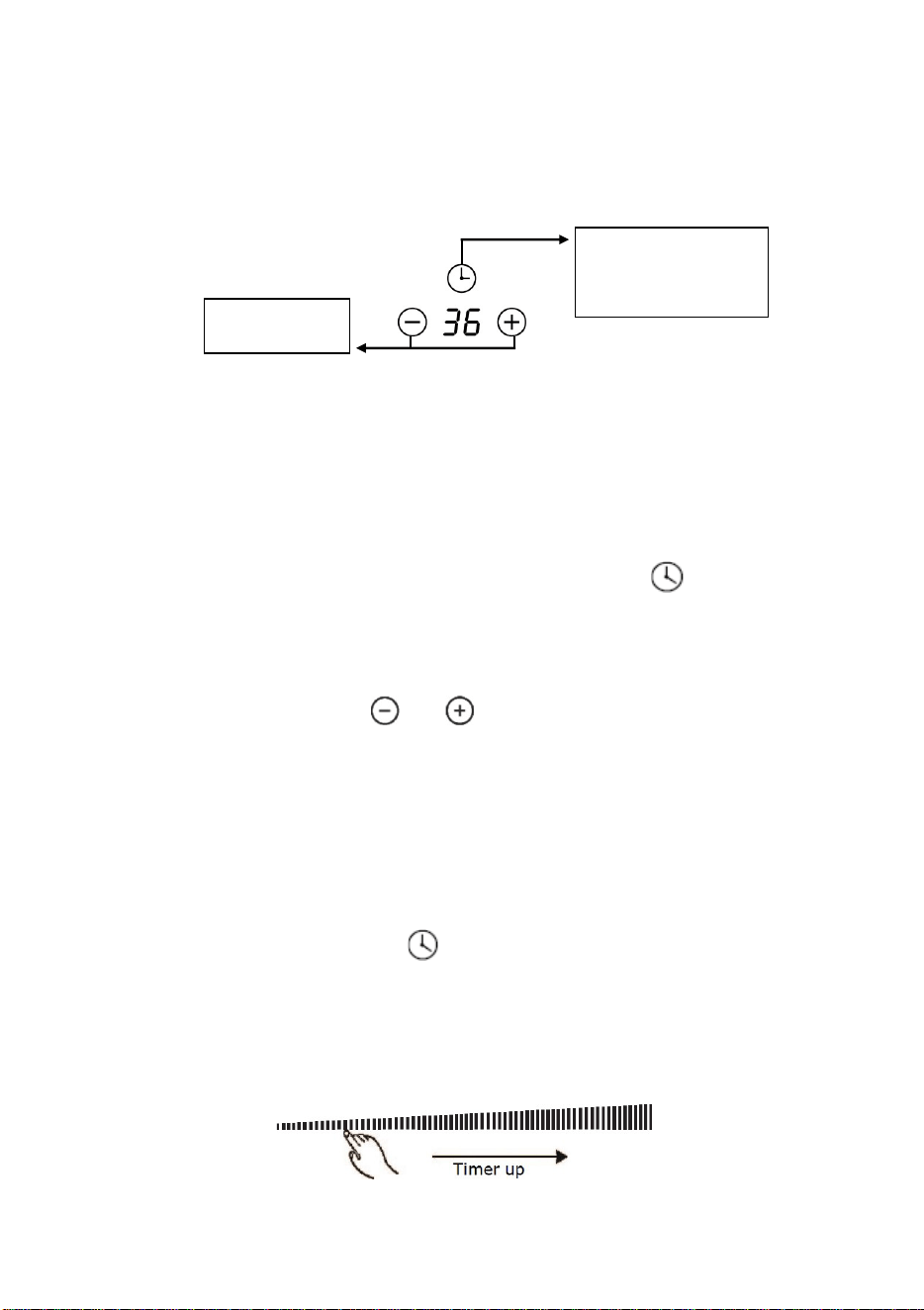
Minute display
shows the number
of
minutes
Using the Timer
Note: Timer function is for touch/slider control models only.
• You can use it as a “minute minder” alert, which can be set for up to 99 minutes. In this case, the
timer will not turn any cooking zone off when the set time is up.
• You can set it to turn one or more cooking zones off.
. The number
Using the Timer as a Reminder:
If you have not selected any cooking zones, touch the timer control button
in timer indicator will start flashing.
To adjust the
Minute Minder settings follows the instructions below:
1) Touch control models:
a. Set the time by touching the
or
button.
b. If you press and hold either of the two buttons, the value will adjust
down or up rapidly in a circle.
NOTE: When the timer indicator is flashing, touching the timer control button
once more can quickly confirm the timer setting.
2) Slider Touch control models:
a. Touch the timer control button once, and the number in the ones place of the timer
indicator will start flashing. Then, adjust the single digit of minute minder by sliding
the slider control.
b. Press the timer control button again, the number in the tens digit of the timer indicator
will start flashing. Then, adjust tens digit of the minute minder by sliding the
slider control.
Timer control
When the cooktop is turned on, you can use the timer in two different ways:
20

1) Touch the heating zone selection control button to select the cooking
zone you wish to set timer for.
2) Touch the timer control button
, and the number in the timer indicator
display will start flashing. Then adjust timer setting.
1) Touch control models:
a. Set the time by touching the
or
button.
b. If you press and hold either of the two buttons, the value will adjust down or
up rapidly in circle.
NOTE: When the timer indicator is flashing, touching the timer control button
once more can quickly confirm the timer setting.
2) Slider Touch control models:
a. Touch the timer control button once, and the number in the ones place
of the timer indicator will start flashing. Then, adjust the single digit of
minute
minder by sliding the slider control.
b. Press the timer control button again, the number in the tens digit of the
timer indicator will start flashing. Then, adjust tens digit of the minute
minder by sliding the slider control.
NOTE: By continuously touching the timer control button, the slider works in this
sequence: “Single Digit-Tens Digit -Confirm Setting-Single Digit-…”
When the minute minder is set, it will begin to count down immediately and show the
remaining time in the display.
The buzzer will beep for 30 seconds, and the timer indicator display shows “- -“ when the
set time is finished. Press any button to stop the buzzer from beeping.
Setting the Timer to Turn off a Cooking Zone
21

NOTES:
• The red dot next to the power level indicator will illuminate for
those zones set with a timer.
• After adjusting, the setting in timer indicator will flashing for 5
seconds and then stop flashing, then the setting be confirmed.
• The default setting of minute reminder and timer is 30 minutes.
• If more than one heating zone has a timer set, the timer indicator will show the lowest time
remaining. The red dot next to power level indicator will flash.
• The minute reminder and timer can be used at same time. The timer indicator shows the
lowest time setting. If the lowest setting is the minute reminder, the red dot next to timer
indicator will flash. If the lowest setting is the timer setting, the red dot of corresponding
cooking zone power level indicator will flash.
• If indicator shows the timer setting of a cooking zone and you want to
check minute reminder setting, press the timer control button the
, and
indicator will show
minute reminder setting.
Residual Heat Warning
Beware of hot surfaces
• When the cooktop has been
operating for some time, there will
be some residual
heat. The letter “H” appears in power setting
indicator to warn you to keep away from it.
22

Overheat Protection
A temperature sensor inside the cooktop monitors its internal temperature. When an excessive
temperature is detected, the cooktop will automatically turn off.
Overflow Protection
For your safety, the touch/slider control will automatically shut off the power if boiling liquid or wet
cloth touches the control panel. All control buttons became inactive except ON/OFF and Child Lock
button, until you wipe the touch control area dry.
Cooking Guidelines
Take care when frying, as the oil and fat heat up quickly, particularly if you are using Booster
function. At extremely high temperatures oil and fat can ignite spontaneously, and this presents
a risk of fire.
• When food comes to the
boil, reduce the power setting.
• Using a lid will reduce cooking times and save energy by retaining the heat.
• Minimize the amount of liquid or fat to reduce cooking times.
• Start cooking on a high setting and reduce the setting when the food has heated through.
Power level
1 2 3 4 5 6 7 8 9
Default working timer (hour) 8 8 8 4 4 4 2 2 2
23
Auto Shutdown
Another safety feature for touch/slider control cooktop is auto shutdown. This occurs
whenever you forget to switch off a cooking zone. The default shutdown times as below
table:
Simmering
• Simmering occurs below the boiling point, at around 185˚F (85˚C), when bubbles are rising
occasionally
to the surface of the cooking liquid. It is the key to delicious soups and tender
stews because flavors develop without overcooking the food. You should also cook egg-based
and flour thickened sauces below the boiling point.
• Some tasks, including cooking rice by the absorption method, may require a setting higher than
the lowest setting to ensure the food is cooked properly in the time recommended.
Searing Steak
1. Stand the meat at r
oom temperature for about 20 minutes before cooking.
2. Heat up a heavy-bottomed frying pan.
3. Brush both sides of the steak with oil. Drizzle a small amount of oil into the hot pan and then
lower the meat onto the hot pan.
4. Turn the steak only once during cooking. The exact cooking time will depend on the thickness of
the steak and how cooked you want it. Times may vary from about 2 – 8 minutes per side. Press
the steak to gauge how cooked it is – the firmer it feels the more ‘well done’ it will be.
5. Leave the steak to rest on a warm plate for a few minutes to allow it to relax and become tender
before serving.
23
For Stir-Frying
1. Choose
a ceramic compatible flat-based
wok or a large frying pan.
2. Have all the ingredients and equipment ready. Stir-frying should be quick. If cooking large
quantities, cook the food in several smaller batches.
3. Preheat the pan briefly and add two tablespoons of oil.
4. Cook any meat first, put it aside and keep warm.
5. Stir-fry the vegetables. When they are hot but still crisp, turn the cooking zone to a lower
setting, return the meat to the pan and add your sauce.
6. Stir the ingredients gently to make sure they are heated through.
7. Serve immediately.
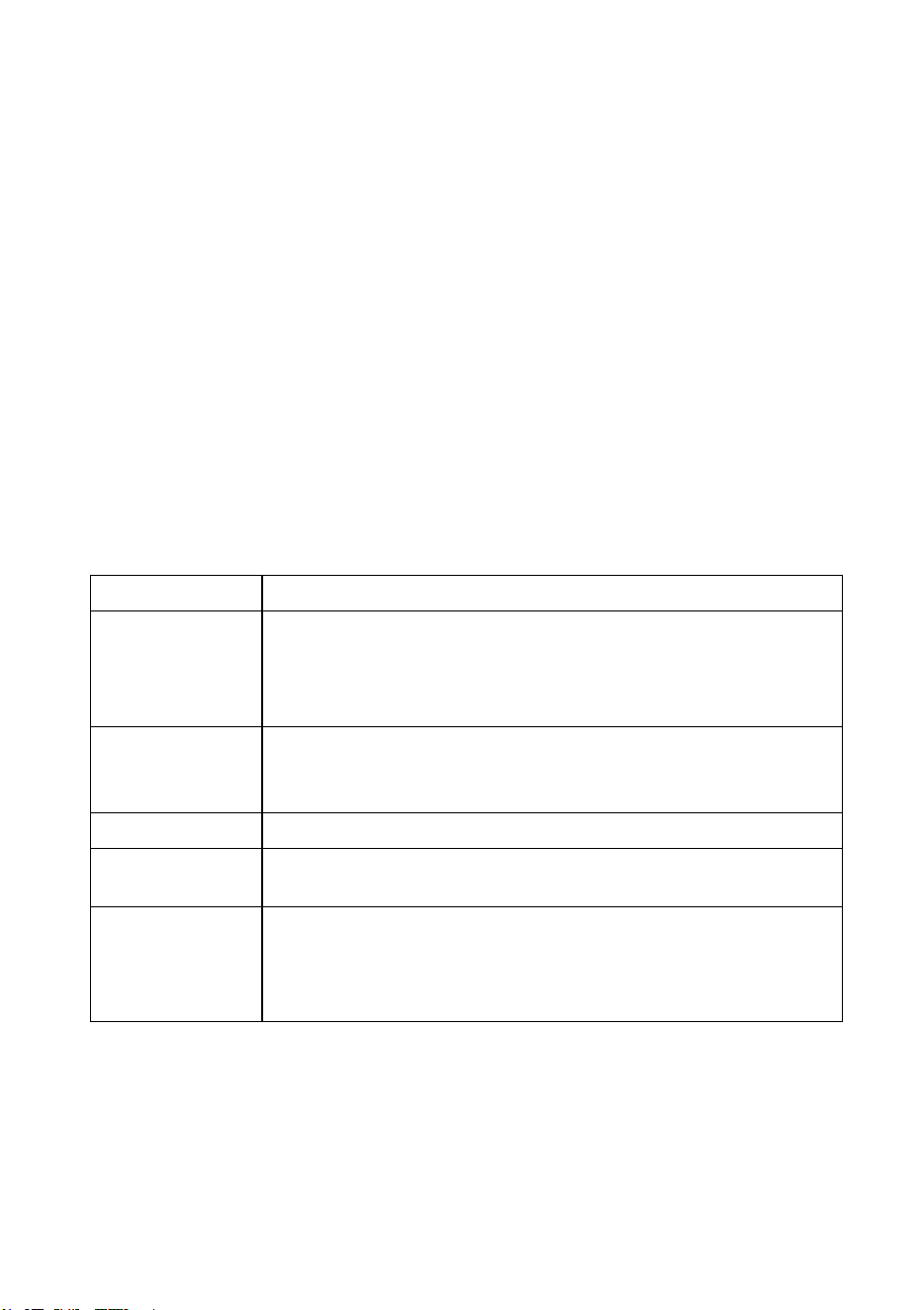
Heat Settings
The settings below are guidelines only. The exact setting will depend on factors including your
cookware and the amount you are cooking. Experiment with the cooktop to find the settings that
best suit you.
Heat setting Suitability
1 - 2
• Delicate warming for small amounts of
food
• Melting chocolate, butter, and foods that burn quickly
• Gentle simmering
• Slow warming
3 - 4
• Reheating
• Rapid simmering
• Cooking rice
5 - 6
• Pancakes
7 - 8
• Sautéing
• Cooking pasta
9
• Stir-frying
• Searing
• Bringing soup to the
boil
• Boiling water
24

CLEANING AND MAINTENANCE
CAUTION: Before any maintenance or cleaning work is carried out,
DISCONNECT the appliance from ELECTRICITY supply and ensure the
app
liances is completely cool.
Cleaning the Cooktop Surface
• Clean spillages from the cooktop
surface as soon as possible after use. Always ensure the surface
is cool enough before cleaning.
• Use a soft cloth or kitchen paper to clean the surface. If the spillage has dried on the surface, you
may
need to use a specialist vitro-ceramic glass cleaner, which is available for most of
supermarkets.
• Do not use
other abrasive cleaner
s and/or wire wool etc., as it may scratch the ceramic glass
surface of your cooktop.
Damage from Sugary Spills and Melted Plastic
• Special care should be taken when removing hot
substances to avoid permanent damage of the
glass surface.
• Sugary spillovers (such as jellies, fudge, candy, syrups) or melted plastics can cause pitting of
the surface of your cooktop (not covered by the warranty) unless the spill is removed while still
hot. Special care should be taken when removing hot substances.
Tips to Keep your Cooktop Clean
Everyday soiling on glass (fingerprints, general stains left by food or non-sugary spillovers)
1. Switch off the p
ower supply.
2. Apply a vitro-ceramic glass cleaner while the glass is still warm (but not hot!)
3. Rinse and wipe dry with a clean cloth or paper towel.
4. Switch on the power supply to the cooktop.
Notes:
• When turning off the power supply of cooktop, there will be no ‘hot surface’ indication, but the
cooking zone may still be hot! Take extreme care.
• Heavy-duty scourers, some nylon scourers, and harsh/abrasive cleaning agents may scratch the
glass. Always read the label to check if your cleaner or scourer is suitable.
• Never leave cleaning residue on the cooktop glass surface: the glass may become stained
25

Boil over melts and hot/sugary spills on the glass
Remove these immediately with a fish slice, palette knife, or razor blade scraper suitable for ceramic
glass of cooktop, but beware of hot cooking zone surfaces:
1. Switch off the power supply.
2. Hold the blade or utensil at a 30° angle and scrape the soiling or spill to a cool area of the
cooktop.
3. Clean the soiling or spill up with a dish cloth or paper towel.
4. Follow steps 2 to 4 for ‘Everyday soiling on glass’ above.
NOTE:
• Remove stains
left by melts and sugary food or spillovers as soon as possible. If left to
cool on the glass, they may be difficult to remove or even permanently damage the glass surface.
• Cut hazard: when the safety cover is retracted, the blade in a scraper is razor-sharp. Use
with extreme care and always store safely and out of reach of children.
Spillovers on the touch controls
1. Switch off the
power supply.
2. Soak up the spill
3. Wipe the touch control area with a clean damp sponge or cloth.
4. Wipe the area completely dry with a paper towel.
5. Switch on the power supply to the cooktop.
NOTE:
The cooktop may beep and turn itself off, and the touch controls may not f
unction while there is
liquid on them. Make sure you wipe the touch control area dry before turning the cooktop back on.
26

CLEANING THE RANGE
Always keep cleaning materials and chemicals in a safe place and away from children.
Know what you are using. Make sure all parts of the range are COOL before cleaning. Be
sure to replace the parts correctly.
Using Commercial Oven Cleaners
Commercial oven cleaners may be used on porcelain lined ovens; however, many cleaners
are very strong, and it’s essential to follow instructions carefully.
Oven cleaners can coat or damage the thermostat sensing device (the long tube in the
oven) so that is will not respond to temperature accurately. If you use an oven cleaner, do
not let it contact the sensing bulb, or any chrome, aluminum, or plastic part of the range.
Do not apply or allow the cleaner to come in contact with any parts or surfaces other
than the oven interior.
Do not use harsh cleaners or degreasers on or around functional parts. This will damage
or drastically reduce the life of the part.
After using such cleaners, thoroughly rinse the oven with a solution of 1 tablespoon
vinegar to 1 cup of water.
Use only a mild solution of soap and water on backguards, aluminum control panels
and painted surfaces. Never use harsh abrasives or cleaning powders that may scratch or
mar the surface. Make sure the cleaners and cleaning materials are suitable for use on the
area to be cleaned. Always keep cleaning materials in a safe place.
Knob
Pull the knob forward to remove. Wash in a water solution with a mild detergent mix. Do
not use an abrasive cleaner or any abrasive action. Abrasive action will scratch away the
knob markings.
If the knobs become loose on the stem, spread the spring slightly with a small screwdriver.
Tops
The porcelain finish top can be cleaned with detergent and warm water. A mild glass wax
can be used to shine the top.
Range tops finished in brushed chrome should be wiped clean after each use. Clean with
a paper towel or a damp cloth. For heavy spatters, use a mild detergent and water. Then,
wipe dry with a soft cloth.
A thin coating of vegetable oil should be applied periodically to the chrome top surface
and underside. This will help prevent moisture from penetrating the chrome surface.
27

USER SERVICING
• Do not repair or replace any part of the appliance unless specifically recommended in
this manual. All other servicing should be referred to a qualified technician.
• Disconnect the range from electrical supply before attempting to service or move it.
• If you pull the range out from the wall for any reason, make sure the rear leg is returned
to its position in the anti-tip bracket when you push the range back.
REPAIR PARTS
When repair parts are needed, contact the dealer from whom the range was purchased. In
case your range was purchased from some source other than an appliance dealer you may
p
refer to contact the manufacturer of the range at the address shown in this manual.
MOISTURE
During initial heat-up of your range, the heat mixing with the cooler air in the oven cavity
may produce fogging of the door glass or a collection of water on the door. To prevent
this, open the oven door for the first few seconds of initial oven heat-up. This will allow
moist air within the oven to escape without the forming of visible moisture on the range.
The amount of moisture will depend upon the humidity of the air and water content of the
food being cooked. Fogging and even dripping water will usually occur in geographic
locations of high humidity.
OVEN VENT
The oven vent tube has been eliminated. By omitting the vent tube, a greater amount of
moisture is retained; therefore, baked foods with greater appeal are created. The food itself
retains more of its natural juices and has less tendency to dry out. The flavor is better.
28
ALIGNMENTS AND ADJUSTMENTS
Oven Door Spring Adjustments
The oven door springs are properly adjusted before leaving the factory. The springs should
be adjusted to allow the door to remain open when pulled 90 degrees forward and yet pull
the door tight against the oven front frame when closed. If adjustments should become
necessary, remove the storage drawer and grasp spring with fingers, and pull downward.
To give more tension, push toward rear of range and attach in first slot. To make spring
adjustment on ranges without storage drawer, remove false panel and follow the same
procedure.
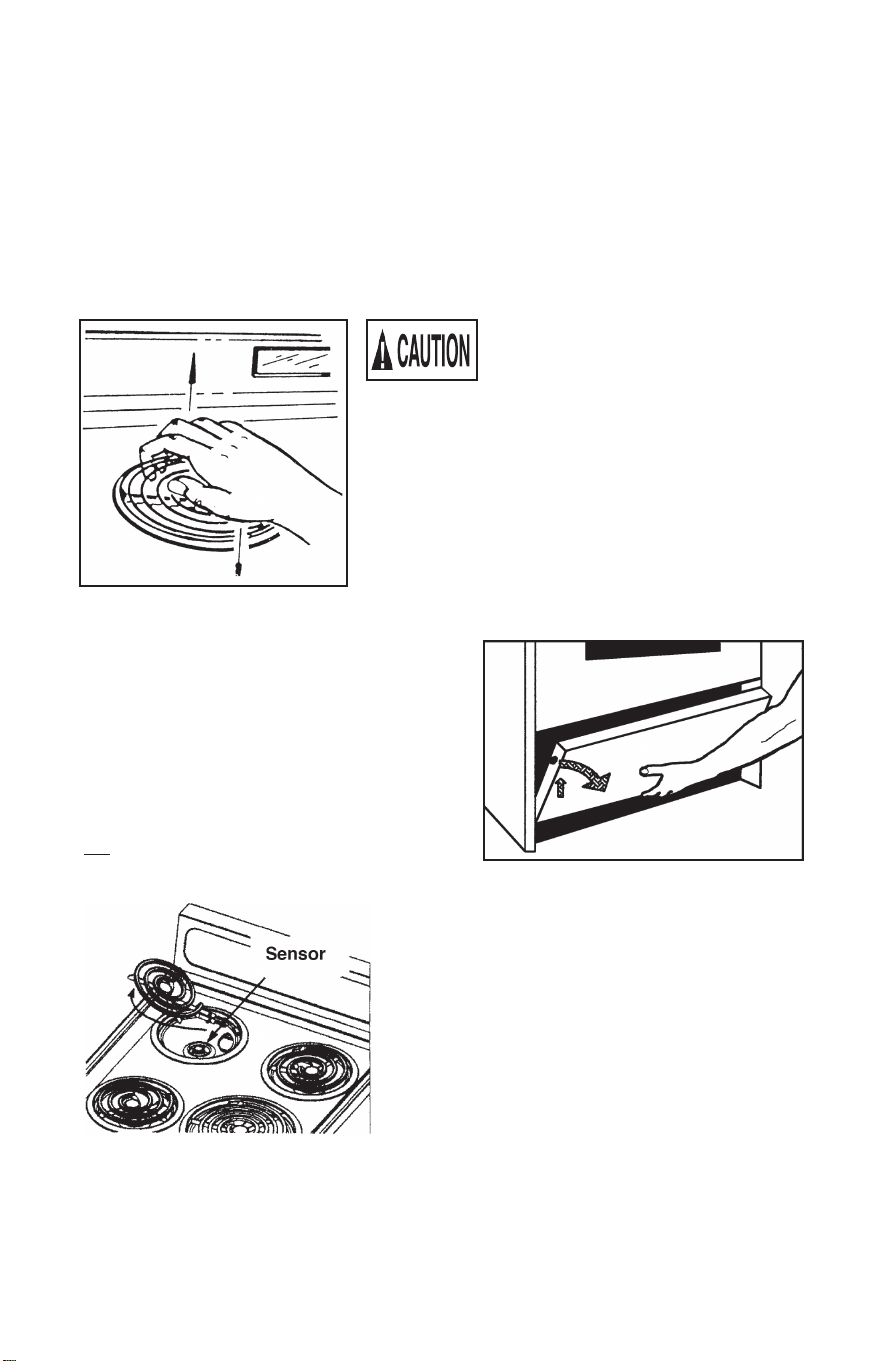
Make certain all surface elements are
cool and all switches are in the OFF
position prior to seating elements.
Seating Top Elements
The top element may need initial
seating after installation of the stove
or after they have been unplugged and
re-installed. Palm the element as
shown. Pick up on the rear section
with your fingers, while at the same
time, push down on the front of the
element with the palm of your hand.
Storage
Your electric range is equipped with a
storage area located beneath the oven cavity.
To access this compartment, gently lift on
the front edge of the “drop-down” panel and
let it fall forward as shown. ONLY LIFT ON
THE FRONT EDGE OF THE PANEL SO
AS TO NOT PINCH YOUR FINGERS. Do
not use this panel as a step or shelf.
Brown HeatSence™
Some models may be equipped as a Brown
HeatSense™ range with our exclusive Coil Logic
safety system. It is designed to prevent
overheating by utilizing an automatic cut-off
sensor to power off the coil element if higher
than necessary temperatures are detected. Once
cooled, these sensors will disengage, allowing
power to return to the coil element. The Coil
Logic safety sensors are visible from the top of
the burner bowl (refer to figure). When the coil
elements are off and cool, the drip pans and Coil
Logic sensors can be cleaned with mild soap and warm water. Dry thoroughly
before resuming use. Always keep all surfaces and subtop areas clean for optimal
operation. Do not use aluminum foil to line the drip pans. Improper use of
aluminum foils may result in shock or fire hazard.
29
REMOVABLE OVEN DOOR
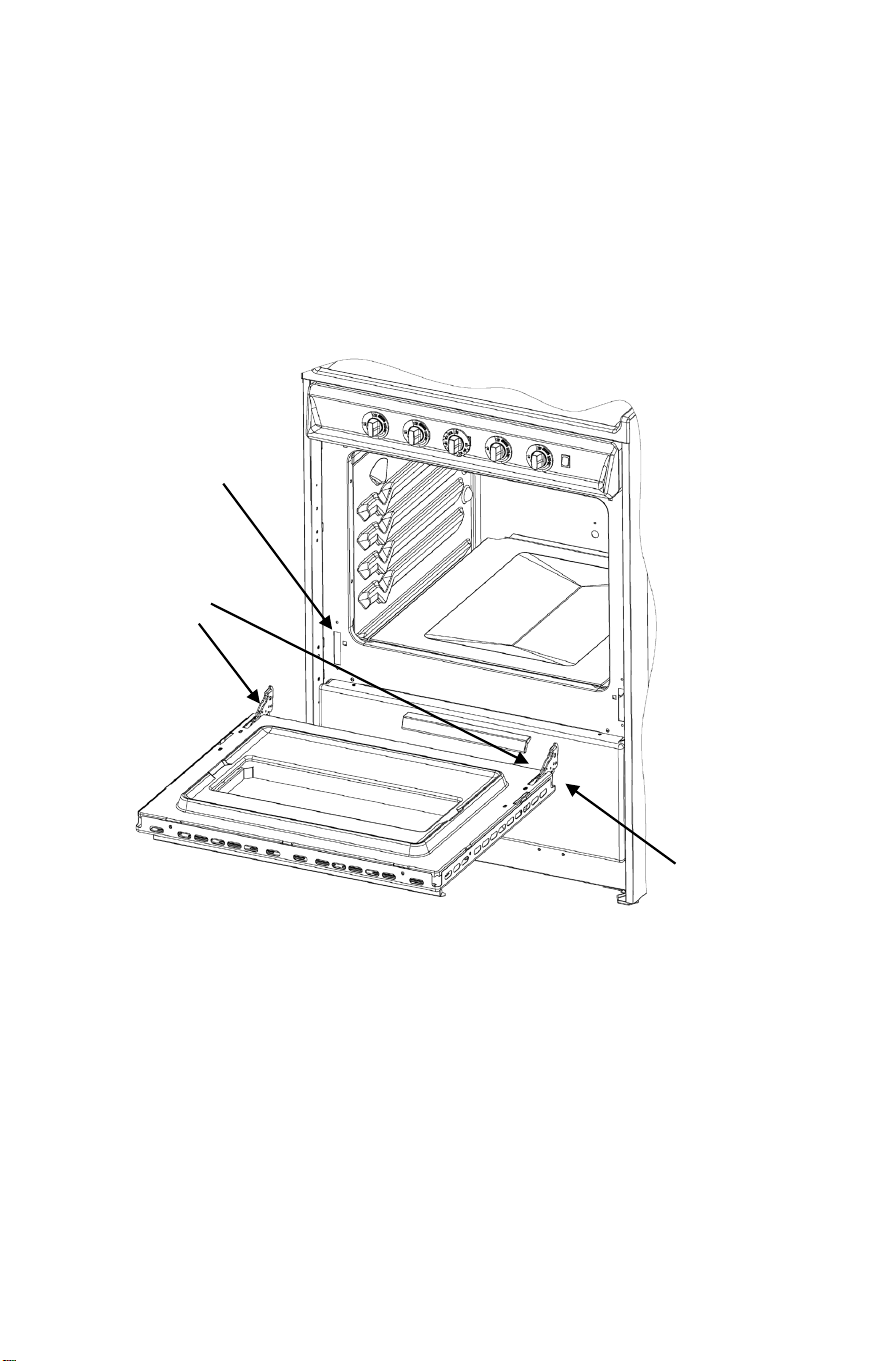
On some models, the oven door is equipped with detachable hinges to make cleaning the oven
interior easier. Perform the following steps to remove the door.
1. Locate two hinge locking pins to use for door removal. You may use items such as
nails or rivet pins approximately 0.080 - 0.105 inches diameter for this purpose.
2. Open the oven door to its full open position.
3. Insert a hinge locking pin through the hole in each hinge bracket. This should disable
the hinge arm from retracting and locks the hinge in the open position.
4. Gently lift up to remove the door assembly from the hinge receivers in the front frame.
When cleaning and/or service
of the unit is complete, perform the following to seat
the door
back onto the unit.
1. Gently
lower the door back into the hinge receivers so the notch on the
underside of the hinge catches on the hinge receiver.
2. Place a slight amount of pressure to open the door in order to relieve tension on the
hinge locking pins.
3. Remove the hinge locking pins so the door may close freely.
4. Save the hinge locking pins for the next time you need to remove the door.
Inserted Hinge
Locking Pins
Hinge
Receiver
Underside
Notch of Hinge
30
31

TROUBLESHOOTING
If you encounter any issues with your cooktop, consult the table below
for a quick
resolution before contacting our service team:
If you have checked the information above and you still need help with your appliance, call our
Customer Service facility at 800-932-4267 (Ext. 513) between 9:00 AM and 5:00 PM ET or visit
our website summitappliance.com/support at any time. We will do our best to answer your
questions.
ISSUE:
There is no power
to the appliance
CAUSE/RESOLUTION:
Check whether there is a power outage.
Check whether the appliance is properly connected to the
electricity.
Has the timer setting elapsed or reached the longest
cooking time setting and auto shut off?
Is there liquid boiling over the control panel, and has that
prompted the auto shutoff?
The touch control
panel buttons
can’t be activated
Check if child lock is on
Check to see if liquid/wet cloth over touch control panel has
activated overflow protection
After cooking, “H”
shows on display
This is normal. The cooktop is displaying the Residual Heat
Warning. It will remain on until the surface is cool enough
for touch.
After turning off
the cooktop, the
fan remains on.
This is normal, this is to help appliance completely cool
down
Some pans make
crackling or
clicking noises
This is the normal sound of induction coils
The glass is being
scratched
Check whether you used unsuitable or rough-edged
cookware
Check whether abrasive cleaning products have been used.
The heating
element of
ceramic cooktop
turns on and off
alternately when
working.
This is a normal feature for ceramic hobs, as internal
temperature sensors will prevent the cooktop from
reaching dangerous cooking temperatures.
32