
职业级电竞无线耳机说明书
保养与维护
在使用时,请阅读以下建议有助于您遵守保修条款,并延长产品的使用寿命。
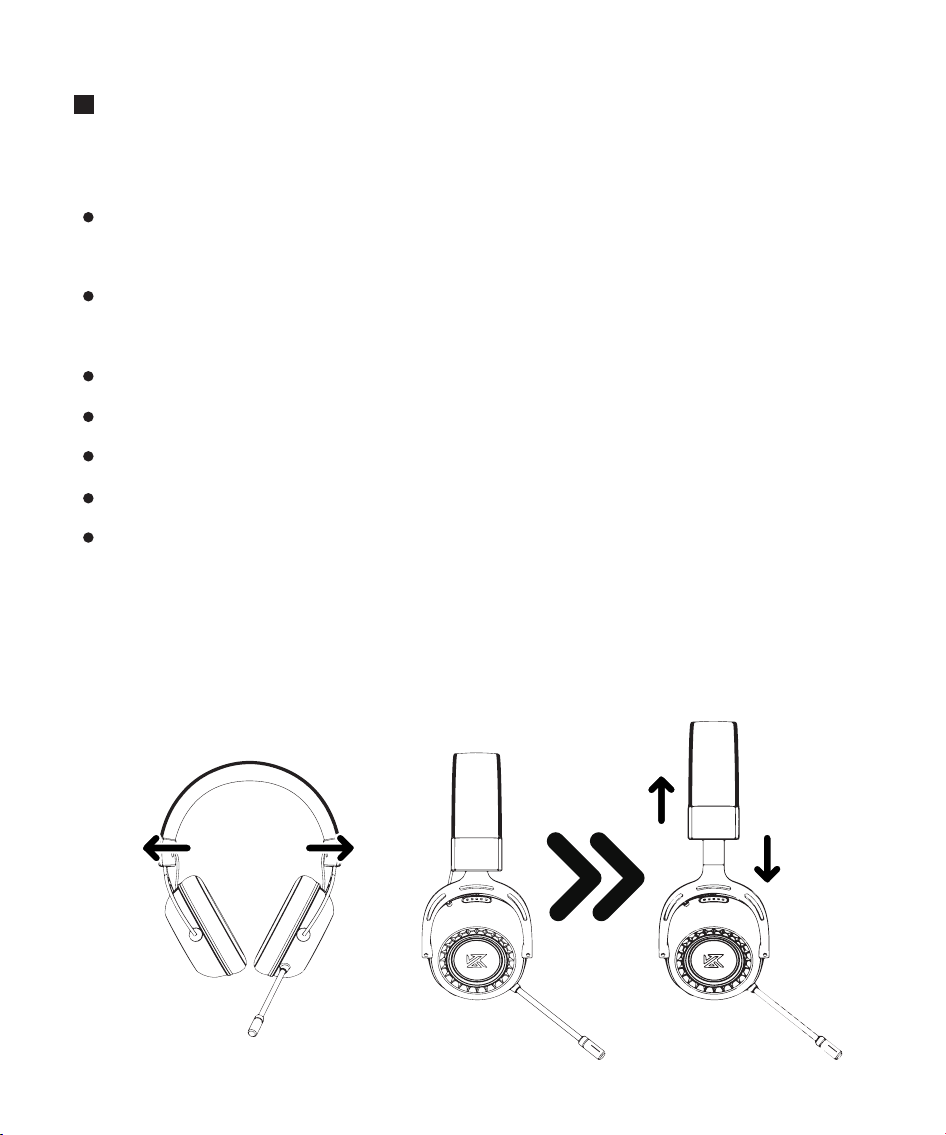
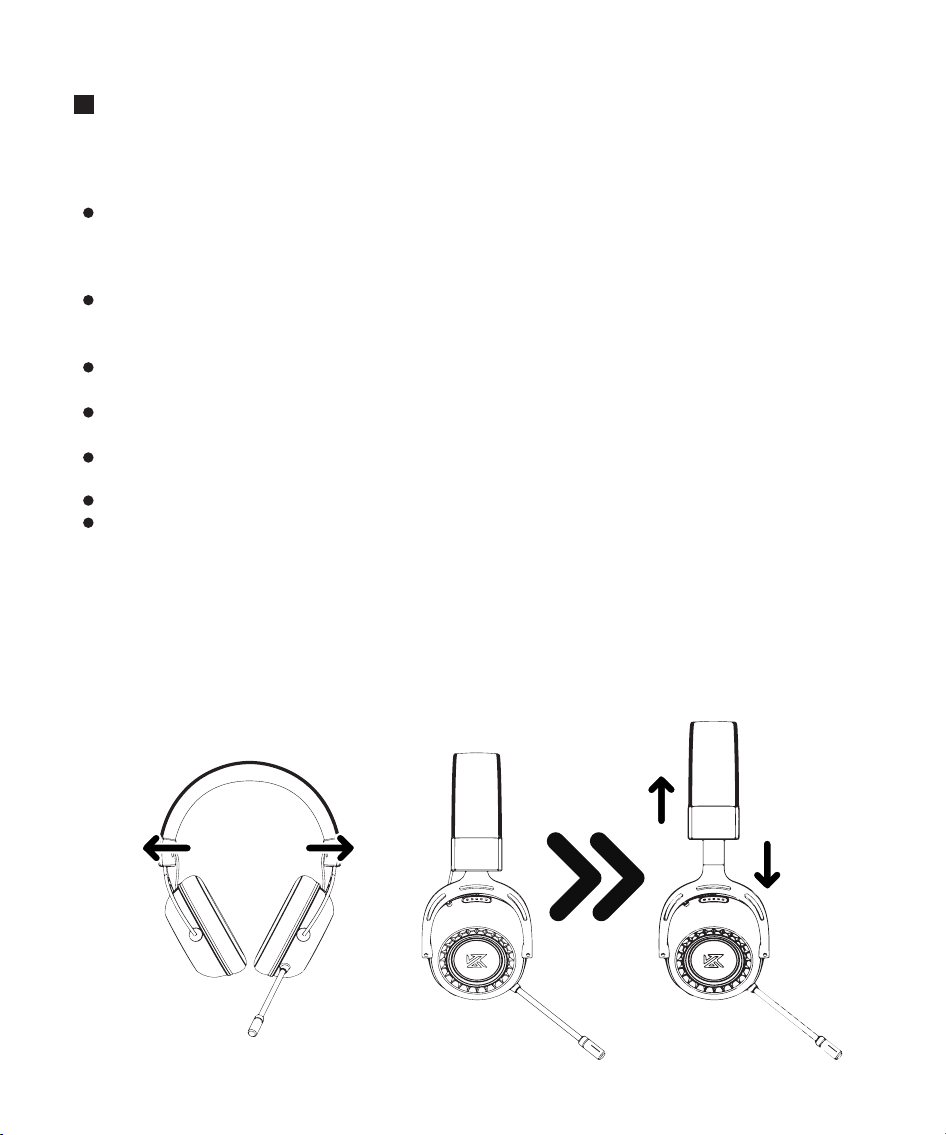
我们建议佩戴在头上之前,轻轻拉开耳麦,以尽量减少头梁的压力。不过,不要过度拉
伸耳麦,以免超过其技术限制。
保持产品干燥,勿放在潮湿的地方,以免影响产品内部电路。需避免在激烈运动或
出汗较多时使用本产品,防止汗水渗透到产品内损坏本产品。
勿将产品放置在太阳晒射或者温度高的地方。高温会缩短电子部件的使用寿命、
损坏电池、使某些塑料部件变形。
勿将产品放在过冷的地方,以免损坏内部电路板。
勿试图拆开产品。如果非专业人员,可能会损坏产品。
不要跌落、强烈振动、用硬体撞击产品,以免会损坏内部电路。
勿使用烈性化学制品、清洁剂清洁耳机。
不要用尖体在产品表面上乱划,以免损坏外壳和影响外观。如果产品不能正常工
作,请将其送至您的合格维修机构,工作人员会热心帮您解决问题。
内含物品
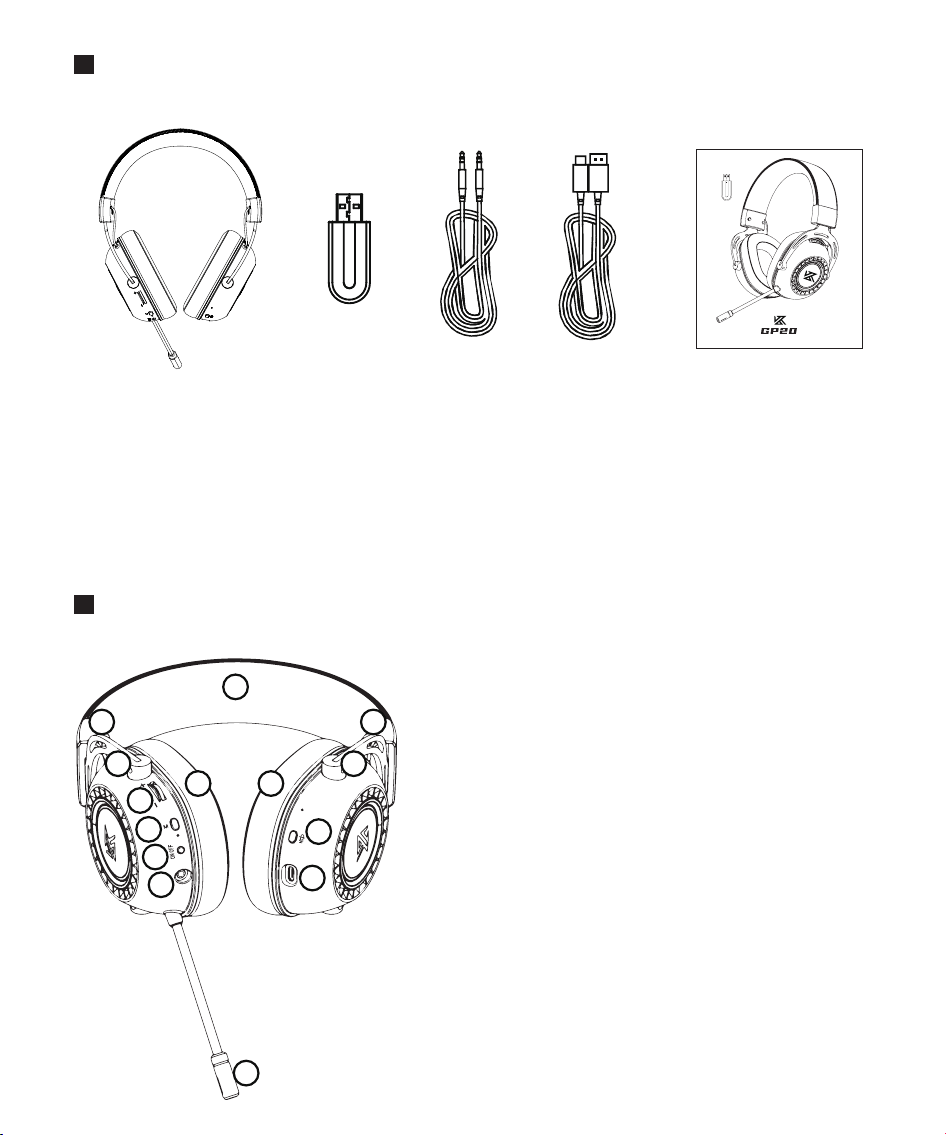
部件名称
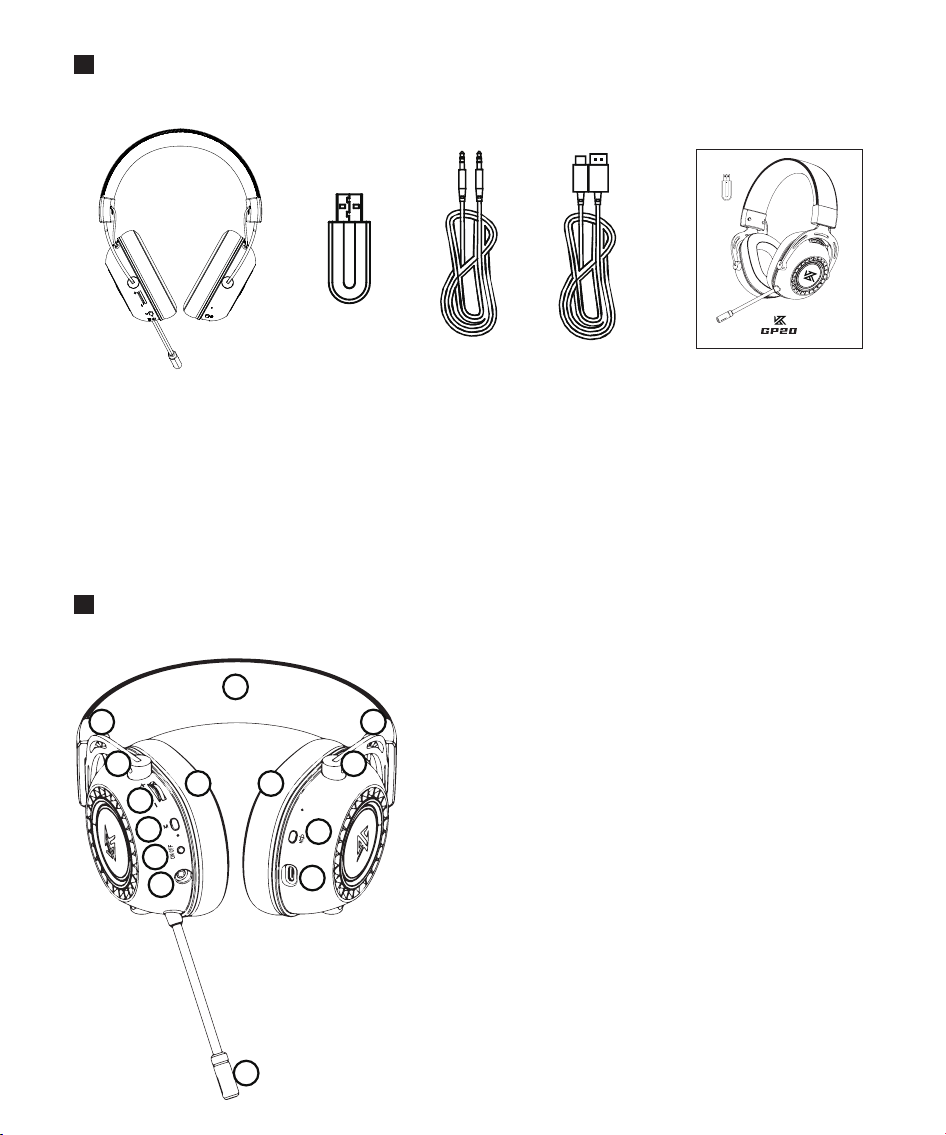
1. GP20职业级电竞无线耳机*1
3. 3.5MM音频转换线*1
5. GP20电竞无线耳机说明书*1
2. GP20无线发射器*1
4. Type-C充电线*1
A
B
C
D
E
F
G
H
I
J
K
. 舒适皮质垫头梁
. 可调节伸缩梁
. 可旋转转轴设计
. 舒适皮革耳垫
. 音量控制滚轮
. M多功能键
. ON/OFF 开关键
. 麦克风静音键
. 3.5MM耳机插孔
. TYPE-C充电插口
. 降噪麦克风
A
B
C
D
E
F
H
G
I
J
K
D
C
B
职业级电竞无线耳机说明书
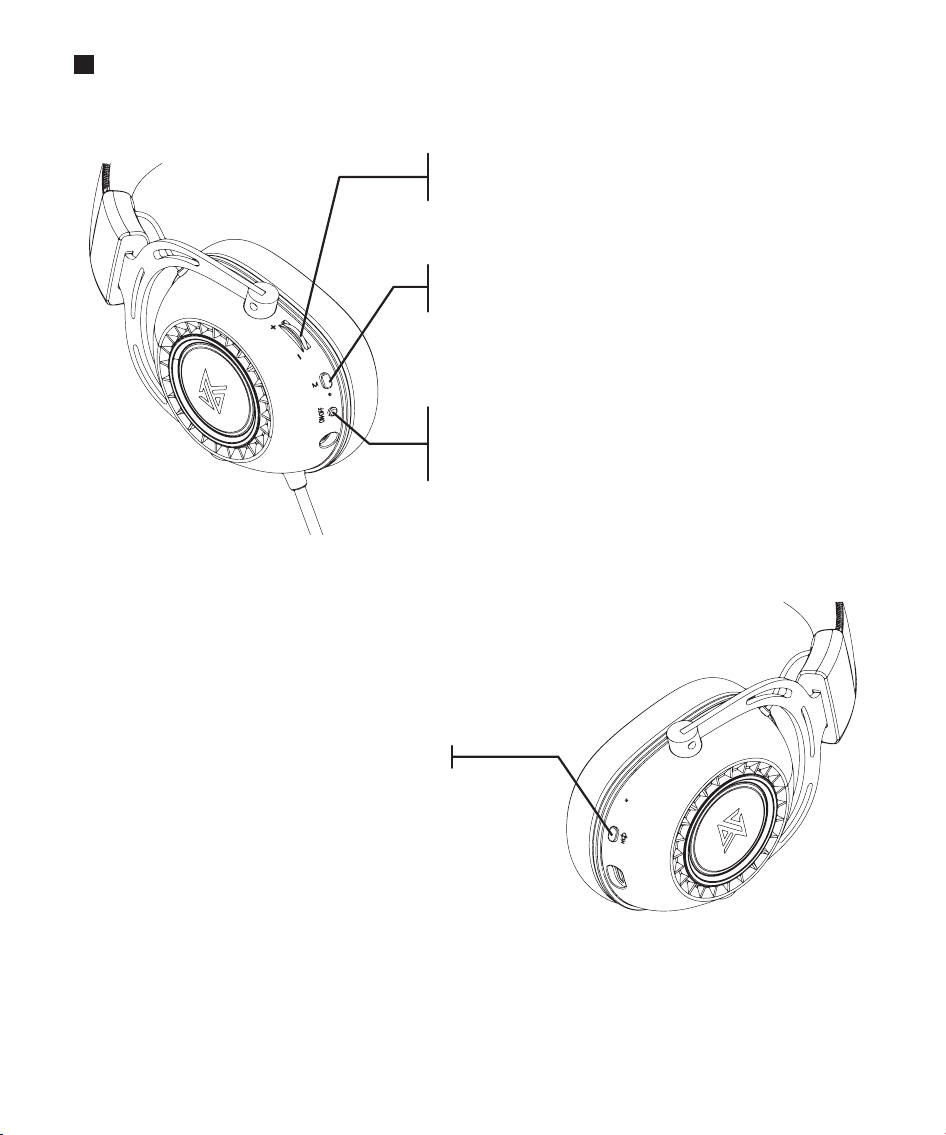
入门指南
向上拨动滚轮
向下拨动滚轮
提升音量
降低音量
连击3次
短按1次
切换2.4G/蓝牙模式
开启/关闭RGB光效
长按2秒
短按1次
短按1次
开机/关机
暂停/播放音乐
接听/挂断通话
开启/关闭麦克风短按1次
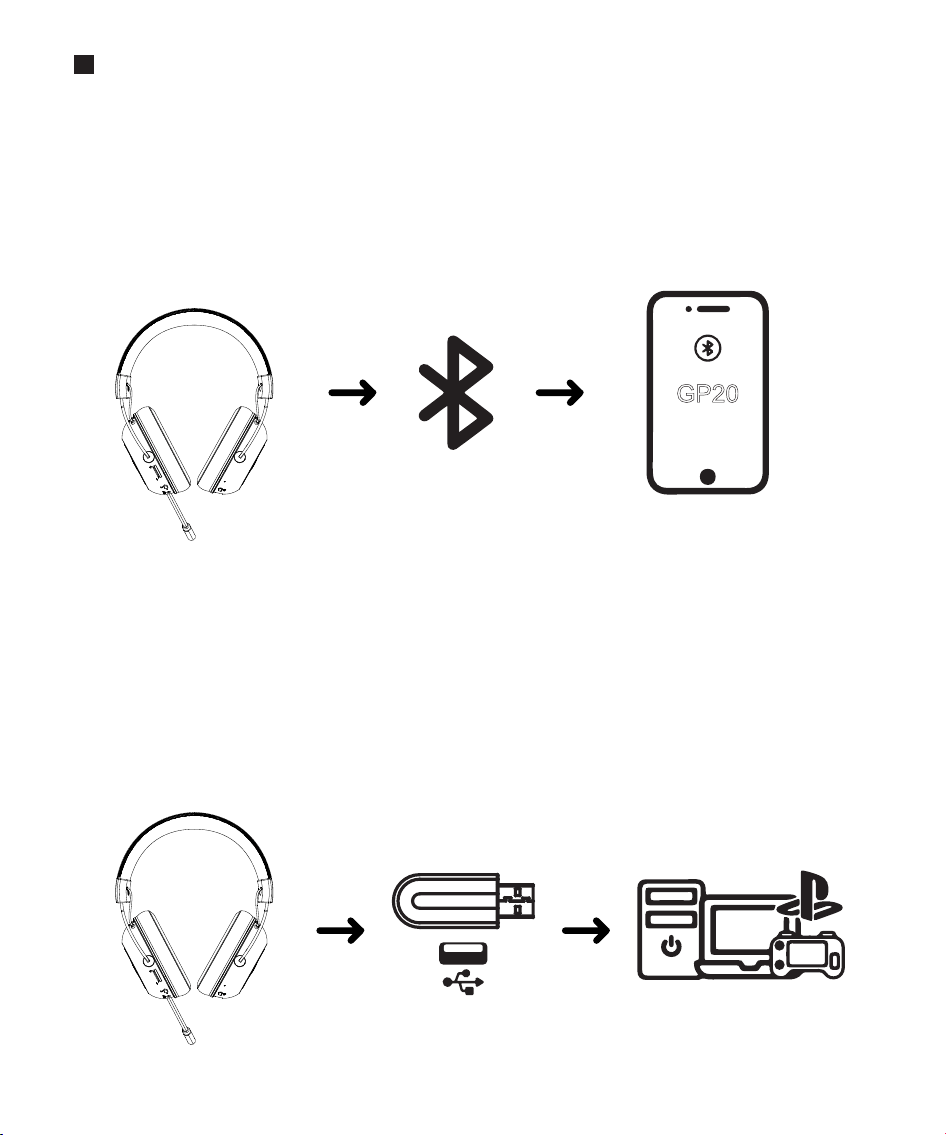
连接GP20
通过蓝牙连接GP20
耳机开机状态下,三击M键切换蓝牙/2.4G模式,当听到提示音“Bluetooth mode”,
即表示进入蓝牙模式。
开启需要连接的蓝牙设备,保持连接距离内,搜索并连接GP20。
提示音connected,蓝灯每10秒亮1秒时,即连接成功。
①
②
③
配对成功
GP20
通过2.4G发射器连接GP20
耳机开机状态下,三击M键切换蓝牙/2.4G模式,当听到提示音“USB mode”,
即表示进入2.4G模式
将GP20无线发射器插入可连接的USB设备内,连接距离内,自动搜索并连接GP20。
提示音connected,蓝灯每10秒亮1秒时,即连接成功。
支持PC/PS4/PS5/MAC/SWITCH。
①
②
③
④
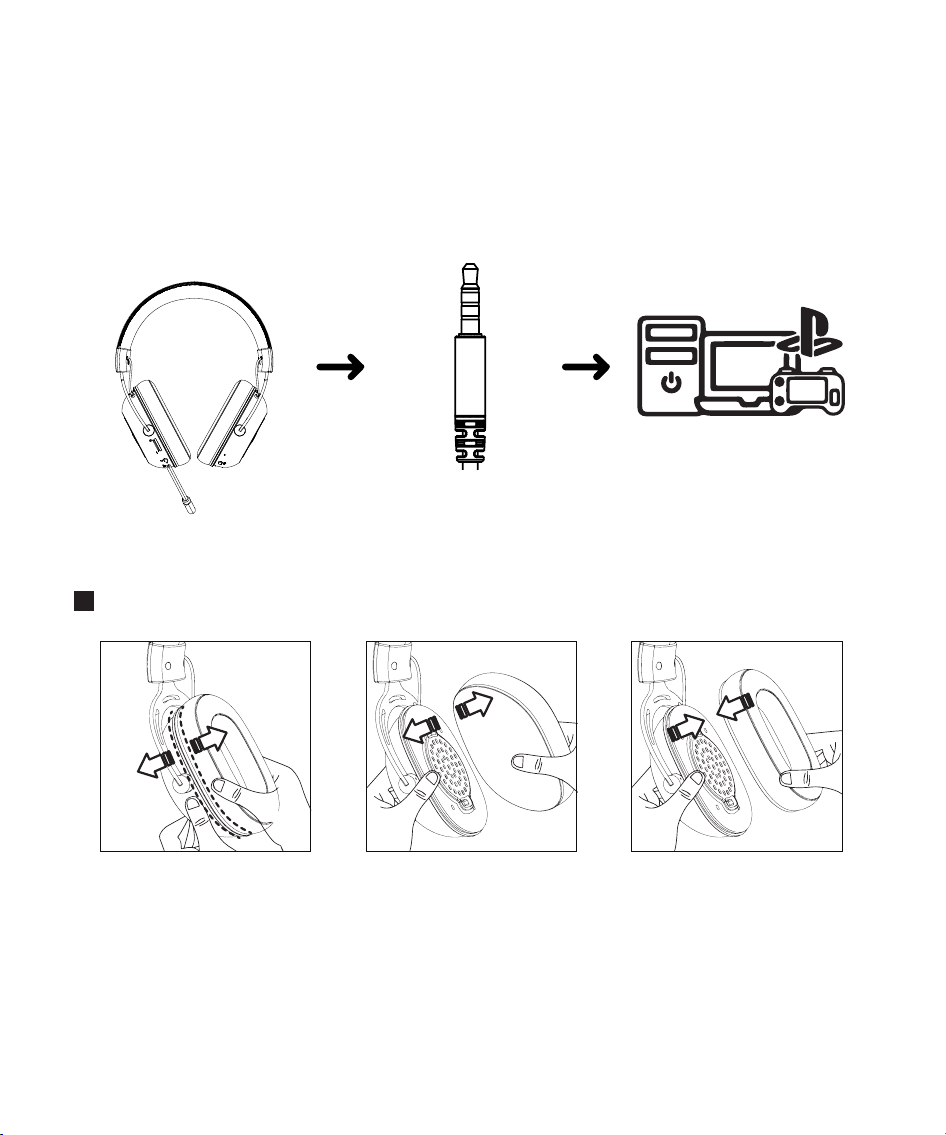
开机状态下,可用附带的3.5MM音频线直接连接与适配设备。
耳帽拆卸与安装
通过3.5MM音频线连接GP20
①
1. 将双手大拇指对准耳
机与耳帽分界处。
2.稍用力将耳机与耳帽
往反方向拉开,即可分
开耳帽。
3.稍用力将耳机与耳帽
卡扣紧密相对,即可复
原耳机。
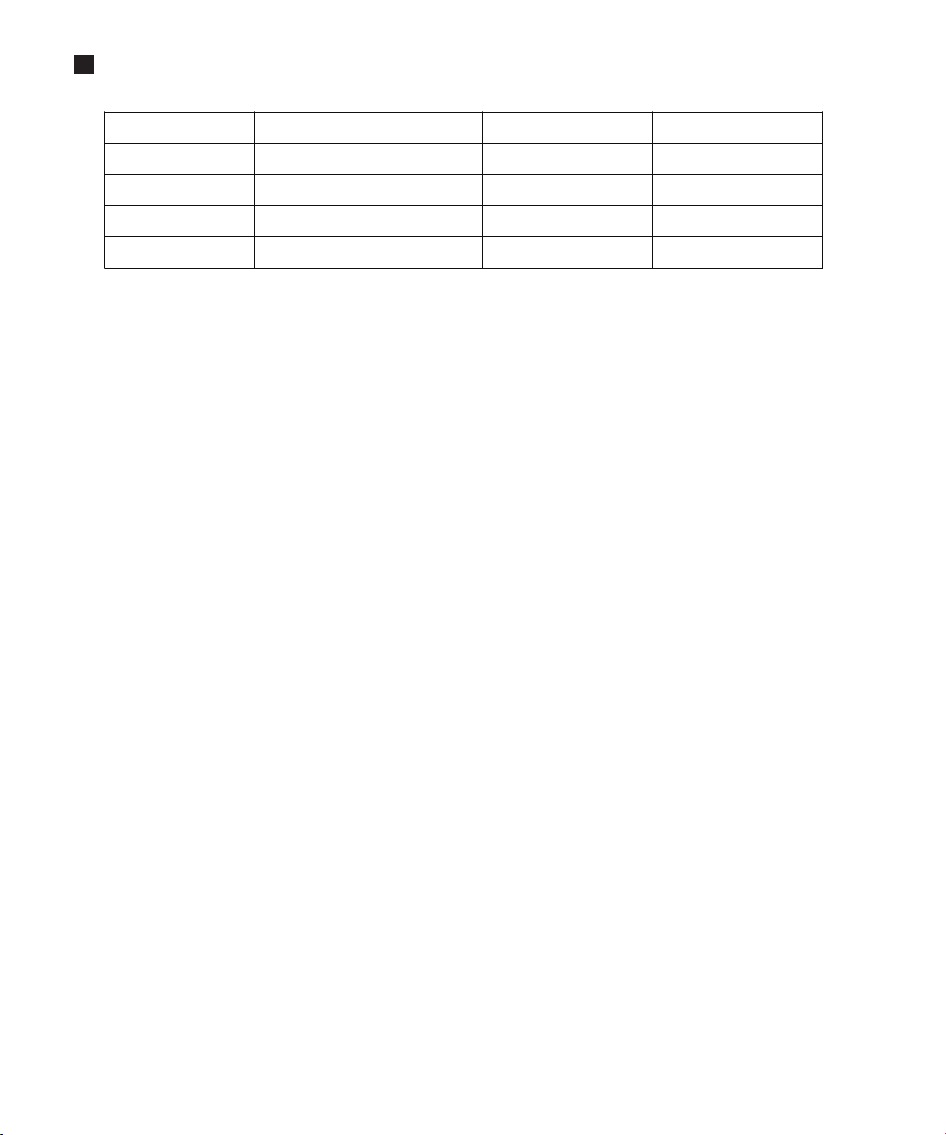
技术规格
产品型号:
产品重量:
频响范围:
阻抗:
灵敏度:
KZ-GP20
355±10g
20HZ-20KHZ
32Ω
95DB±3DB
续航时间:
电池容量:
无线连接:
充电接口:
传输距离:
约68小时
1200MAH
2.4G/蓝牙5.0
Type-c
≥10米
产品保修卡
用户信息
保修条例
一、购买本产品,请仔细阅读以下保修条款,以确保产品得到有效保修。
保修时需同时提供本保修卡;
产品保修期为一年,保修期内如产品发生故障,原器件品质不良或制作问题,经查验属实,本公
司提供免费维修及更换。
保修卡不得涂改、伪造等。
1.
2.
3.
二、下列原因造成产品损坏不能正常使用,不在保修范围内。
未按说明书使用造成的产品损坏;
一切人为或意外及自然灾害造成的产品损坏;
未经本公司认可的维修、改装、拆卸等造成的产品损坏;
产品表面外壳的老化、刮伤、划痕等。
1.
2.
3.
4.
三、保修期满后,用户仍可得到本公司的维修服务,但需支付相应费用。
四、本公司保留对此保修卡上内容的修改权和解释权。
客户姓名
下单ID
产品型号
购买日期
联系电话
联系地址
经销商
如产品有任何问题,请及时与我司联系。祝您生活愉快!
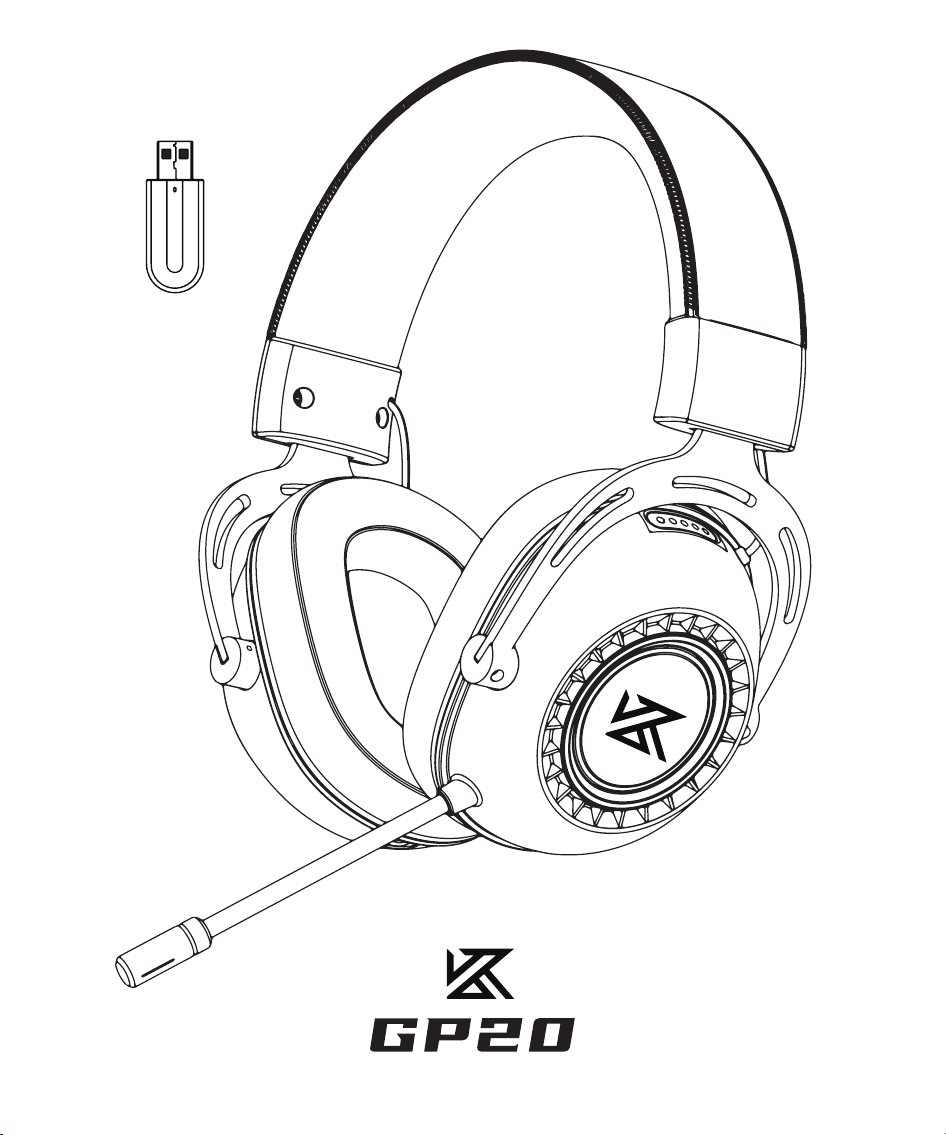
Professional gaming wireless headset manual
Product maintenance
Before using the product, please read the following suggestions to help you
understand the warranty terms and extend the life of the product.
We recommend gently pulling away the headset before wearing it on the head to
minimize the pressure from the head beam. However, do not overstretch the
headset to avoid exceeding its stretchable range.
Keep the product dry and do not place it in a humid place to avoid short-
circuiting the internal circuit of the product. Avoid using this product during
intense exercise to prevent sweat from penetrating into the product and causing
damage.
Do not place the product in a place exposed to sunlight or high temperature.
High temperatures can shorten the life of electronic components, damage
batteries,and deform plastic parts.
Do not place the product in a place that is too cold to avoid damage to the
internal circuit board.
Do not attempt to disassemble the product. Unprofessionals may damage the
product.
Do not drop, strongly vibrate or impact the product, so as not to damage the
internal circuit.
Do not use strong chemicals or detergents to clean the headset.
Do not scratch the product surface with sharp objects to avoid damaging the
shell and appearance. If the product cannot work normally, please send it to a
qualified maintenance organization, and the staff will be eager to help you
solve the problem.
Contents
Parts
1. GP20 professional E-sports wireless headset * 1
2. 3.5mm audio cable * 1
3. Headset manual * 1
4. USB transmitter*1
5. Type-C charging cable*1
A
B
C
D
E
F
G
H
I
J
K
. Comfortable leather headrest
. Adjustable telescopic beam
. Rotatable shaft
. Comfortable leather ear pads .
. Volume control wheel
. M multifunction button
. ON/OFF button
. Microphone mute button
. 3.5MM headphone jack
. TYPE-C charging port
. Noise Cancelling Microphone
A
B
C
D
E
F
H
G
I
J
K
D
C
B
职业级电竞无线耳机说明书
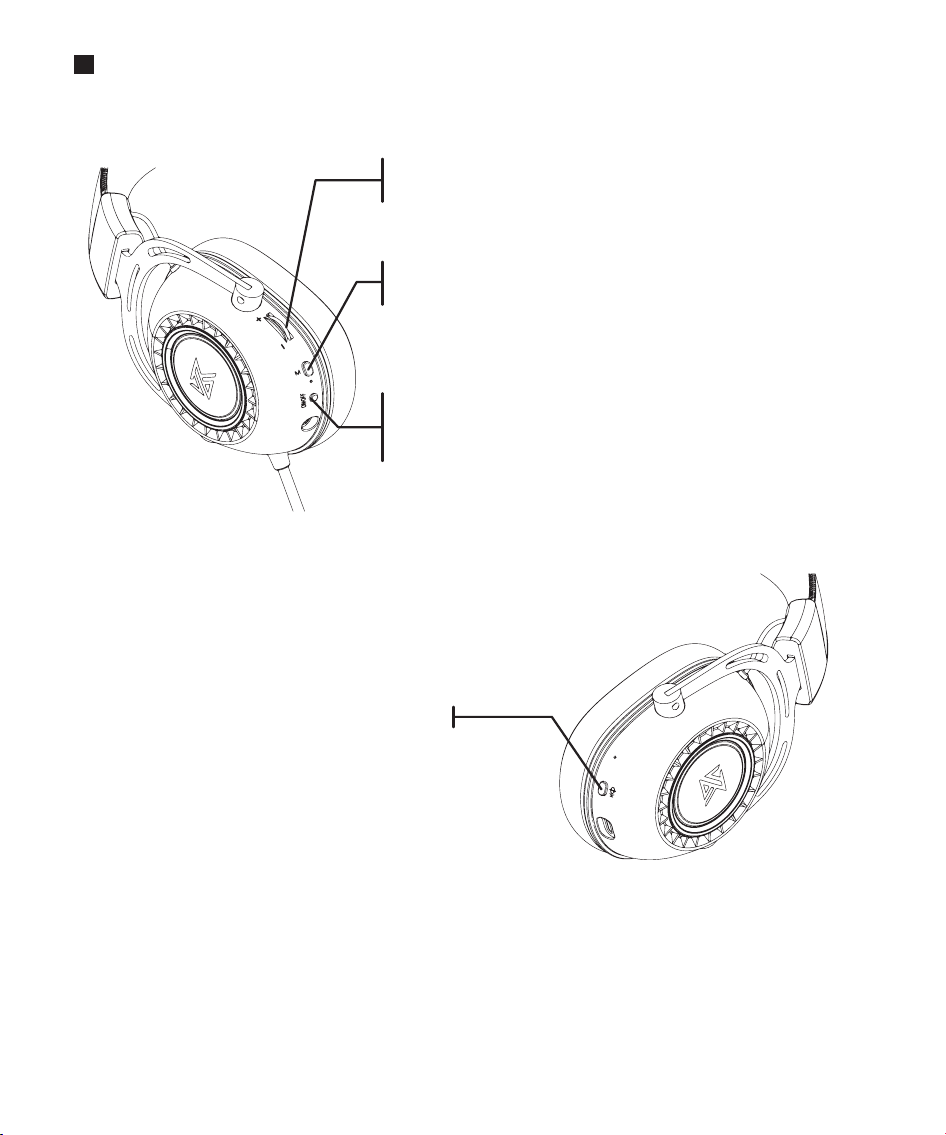
Operation guide
scroll wheel up
scroll down
Raise the volume
Lower the volume
Press the button 3 times to switch 2.4G/Bluetooth mode
Short press the button once to turn on/off RGB Mode
Long press for 2 seconds to turn on/off
Short press once to play/pause
Short press once to answer/end call
Short press once to turn microphone on/off
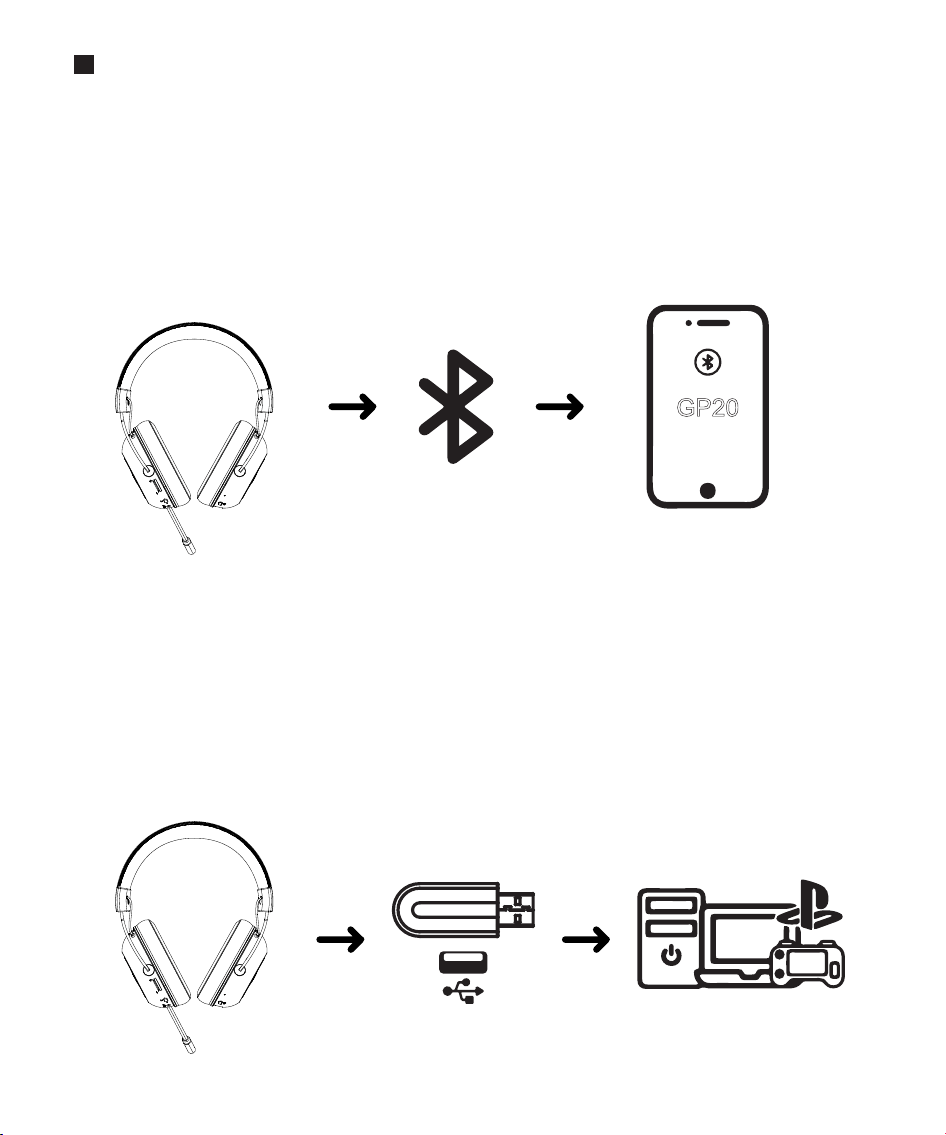
How to connect GP20
Connect to GP20 in Bluetooth mode
When the headset is turned on, triple-click the M button to switch the Bluetooth
/2.4G mode. When you hear the prompt sound "Bluetooth mode",it means that
the headset enters the Bluetooth mode.
Open the device to be connected, search and connect the GP20 within the signal
range.
When you hear the prompt sound "connected" and the blue light flashes every 10
seconds, it means the connection is successful.
①
②
③
Paring
successful
GP20
Connect to GP20 in 2.4G mode
When the headset is turned on, triple-click the M button to switch the Bluetooth
/2.4G mode. When you hear the prompt sound "USB mode", it means that the
headset enters the 2.4G mode.
Plug the USB transmitter into the device, within the connection distance, the
transmitter will automatically search and connect to the GP20.
When you hear the prompt sound "connected" and the blue light flashes every
10 seconds, it means the connection is successful.
Support PC/PS4/PS5/MAC/SWITCH in 2.4G mode.
①
②
③
④
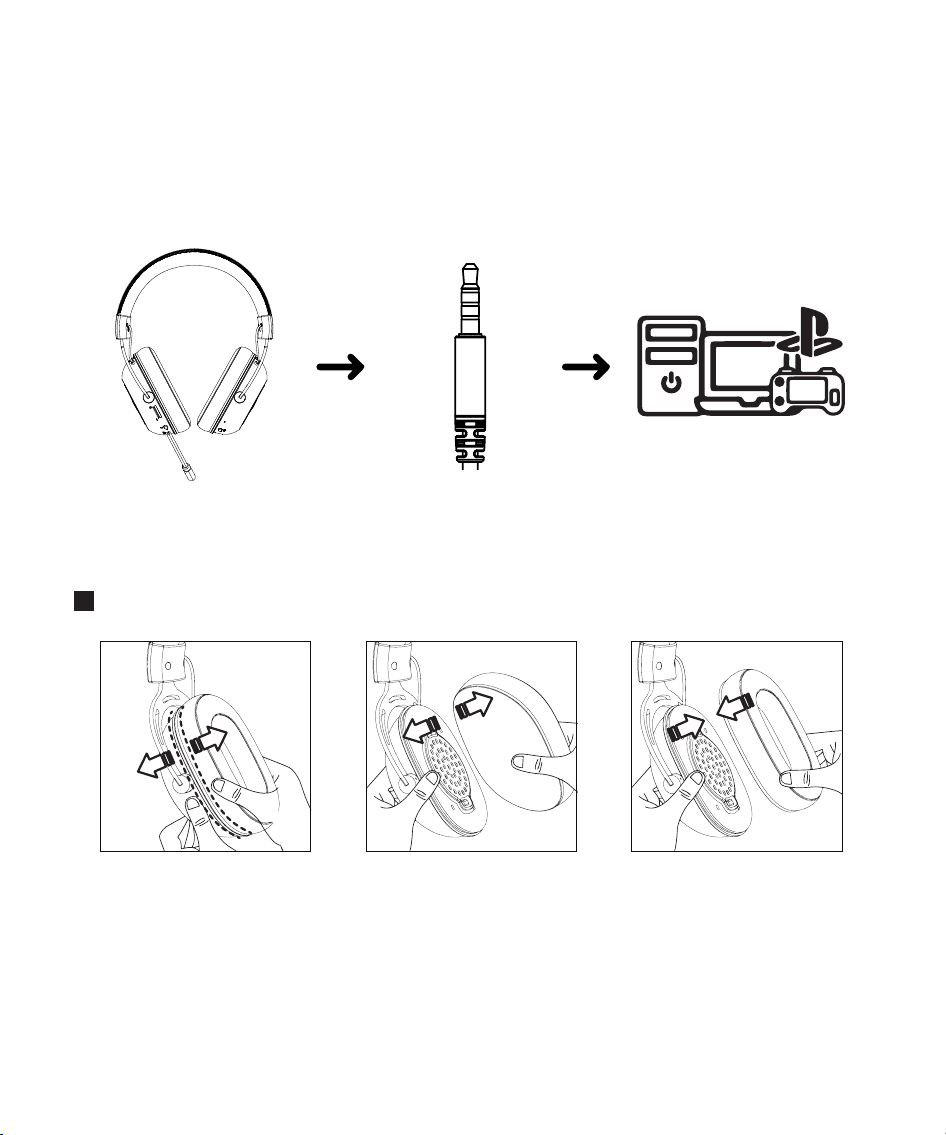
Connect GP20 directly to the device with the 3.5MM audio cable included in the box.
How to install ear pads.
Connect to GP20 in wired mode
①
1.Use your thumb and
index finger to pinchthe
ear pads and earphone
cavity respectively.
2.Slightly pull the headset
and ear pads in the
opposite direction to
remove the ear pads.
3.Place the headset and
ear pads closely and
press it slightly harder
to restore it.
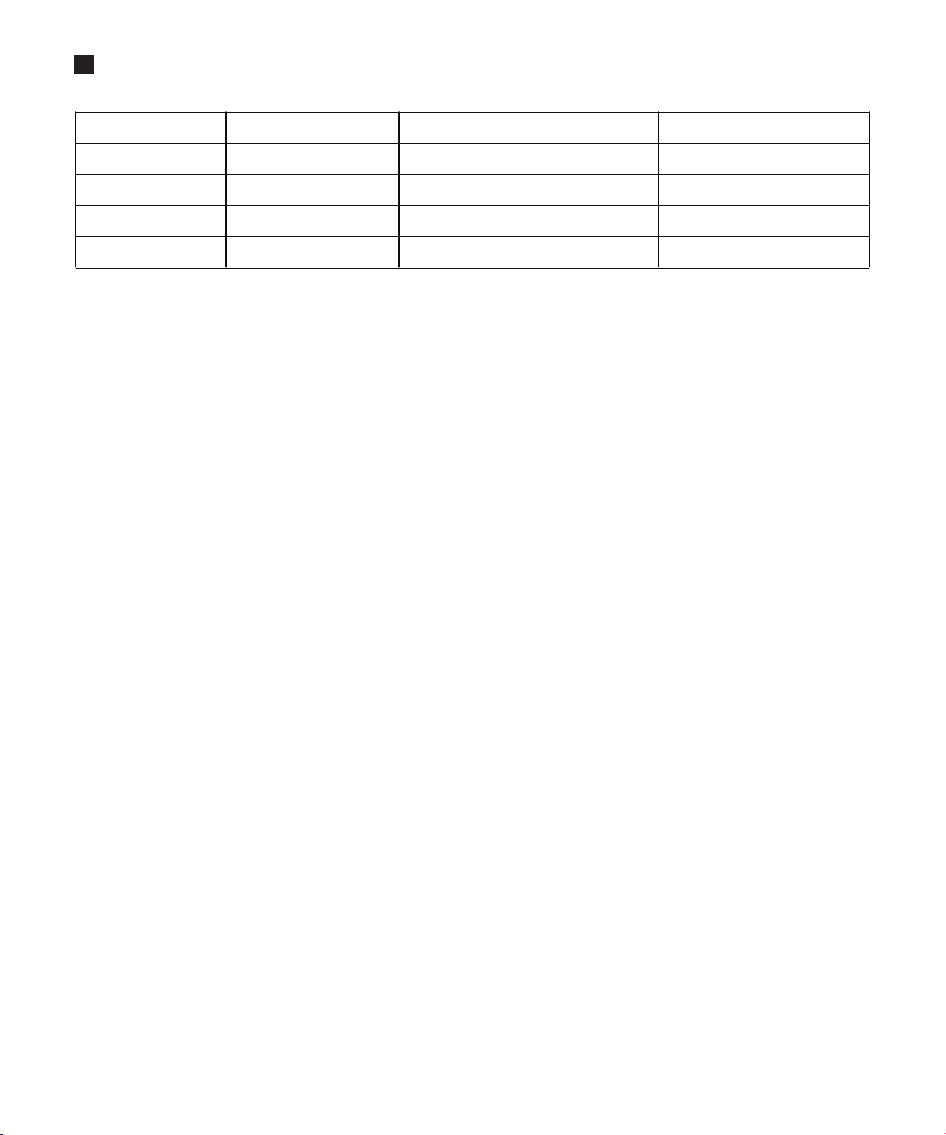
Specifications
Model:
Weight:
Frequency:
Impedance:
Sensitivity:
KZ-GP20
355±10g
20HZ-20KHZ
32Ω
95DB±3DB
Battery life:
Battery capacity:
Charging port:
Wireless connections:
Bluetooth distance:
About 68 hours
1200MAH
2.4G/Bluetooth 5.0
Type-c
≥10 meters
Product warranty card
User info
Warranty Regulations
For any problems with the product, please contact our company promptly.
Thanks for buying our product, wish you a happy life!
1.When purchasing this product, please read the following warranty terms carefully
to ensure that the product has a valid warranty.
a. This warranty card is required for the warranty of headphones.
b. The product warranty period is one year, during the warranty period, if the product has non-human
quality problems, the company will provide free repair and replacement after verification.
c. The warranty card is not allowed to be altered or forged.
2.If the product is damaged and cannot be used normally due to the following
reasons, it will be beyond the warranty scope.
3.After the warranty period expires, users can still get the maintenance service of our
company and only need to pay the corresponding maintenance fee.
4.Our company reserves the right to modify and interpret the contents of the warranty
card.
a.Product damaged caused by not following the instructions.
b.All damage caused by man-made, accidental and natural disasters.
c.Product damage caused by maintenance, modification, disassembly and other reasons not approved
by our company.
d.The headphone shell appears aging, damage, scratches and other
phenomena.
User name
ID
Product model
Purchase date
Phone number
Contact address
Agency