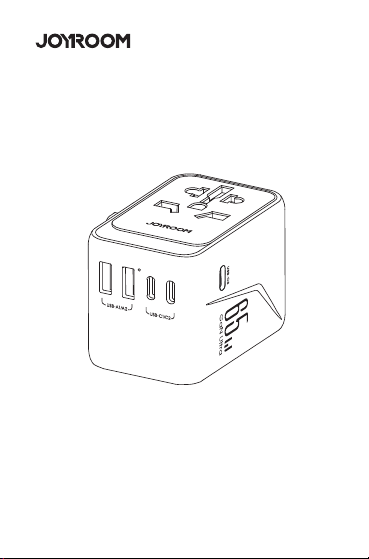
User Manual
Product parameters Packing list
User Manual * 1 ,
Warranty Card * 1,
Universal Travel Adapter * 1
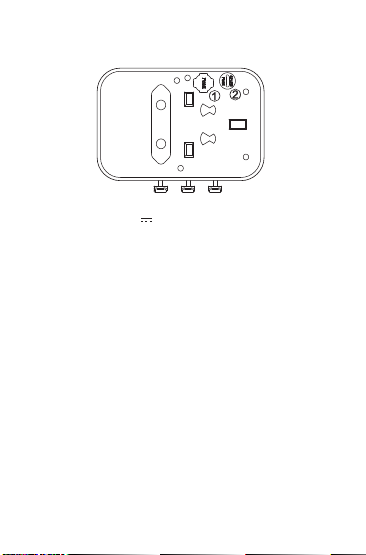
Fuse Replacement Instruction
Fuse Parameter : 250V 10A
Fuse Dimension 3.6 x 10mm
●
Take out the old fuse from ➀
●
Take out the new fuse from ➁ and place into ➀
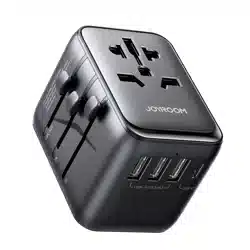
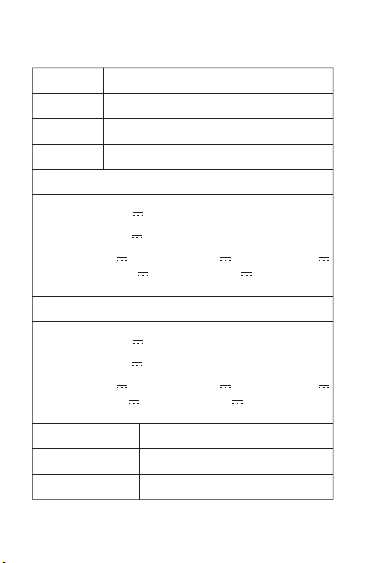
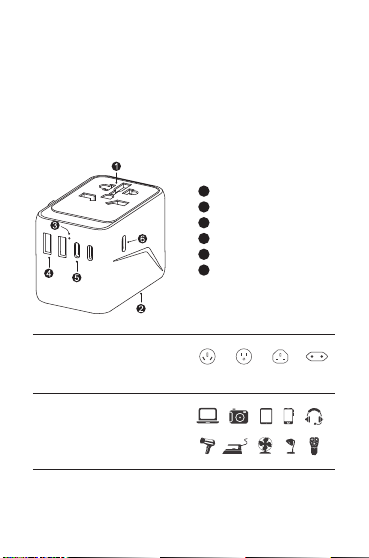
Panel
Plugs
Power indicator
USB-A1/A2 charging port
USB-C1/C2 charging port
USB-C3 charging port
Suitable for most devices or
appliances. Read the devices
parameter information before use.
Product introduction
Model
Material
Rating
Input
JR-TCW02
PC fireproof material
100-250V~ 10A Max, 2500W Max
100-250V~, 50-60Hz. 1.6A
Single port Output mode
Combined Output mode
Total DC Output
Size
Net Weight
65.0W
77*50*53.7mm
183g
JR-TCW02 65W 2A3CUniversal Travel Adapter
USB-C1/C2: 5.0V 3.0A 15.0W
USB-A1/A2: 5.0V 2.4A 12.0W
USB-C3: 5.0V 2.4A 12.0W, 9.0V 3.0A 27W, 12.0V
3.0A 36.0W, 15.0V 3.0A 45W, 20.0V 3.25A 65.0W
USB-C1/C2: 5.0V 3.0A 15.0W
USB-A1/A2: 5.0V 2.4A 12.0W
USB-C3: 5.0V 2.4A 12.0W, 9.0V 3.0A 27W, 12.0V
3.0A 36W, 15.0V 3.0A 45W, 20.0V 2.25A 45.0W
1
2
3
4
5
6
AUS/CN USA UK EU
Compatibility
Support devices
Instruction
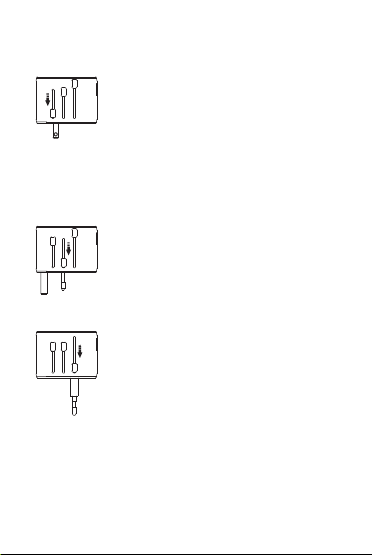
USA/ AUS Plug
Press down and push the key marked with
"USA/AUS" to the bottom until the USA/AUS
plug is completely out. Use the plug in “II”
shape as an AUS plug, or turn it into a "\ /" or
"/ \" shape to use it as an AUS plug. Make sure
the key is pushed down to the bottom before
you release, so that the plug can be locked in
place.
UK Plug
Press down and push the key marked with
"UK" to the bottom until the UK plug is
completely out. Make sure the key is pushed
down to the bottom before you release, so
that the plug can be locked in place.
EU Plug
Press down and push the key marked with
"EU" to the bottom until the EU plug is
completely out. Make sure the key is pushed
down to the bottom before you release, so
that the plug can be locked in place.
Note: The product is built-in with different plugs for use in
different countries. For safety reasons, only one plug can be
pushed out at a time for use in a specific country.
Precautions for replacing the fuse:
●
Before replacing the fuse, please make sure whether the
fuse has been burnt due to overload and remove all load
devices from the product first.
●
Check if there is water flowing into the product, thus causing
short circuit and burning the fuse.
●
Check if the fuse is burnt due to moisture if the product has
not been used for a long time.
Precautions
Do not disassemble or refit the product.
Do not store it in a wet environment.
Please keep the product away from heat and do not use it near a
heat source.
Please prevent water or other liquid from entering the product
interface. Otherwise the product may be damaged.
Please keep it away from direct sunlight.
Please use it in a well-ventilated place.
Stop using it immediately in case of overheat.
The product does not convert voltage. Before use, please make
sure the voltage of the connected device matches the local
power grid voltage.
Please confirm the plug standard of your country before use.
Do not use the product if its shell is broken.
Please dispose of the product according to the local regulations
on disposing of electronic products.
1.
2.
3.
4.
5.
6.
7.
8.
9.
10.
11.
Tips:
Improper use may damage the product or endanger personal
and property safety.
We hope you never have the need, but if you do, our service is
friendly and hassle-free.
1. Activate the lifetime warranty for you!
2. If you need help, our solutions will hyper drive to you within 12
hours.
Waste electrical products should not be disposed of
with household waste. Please recycle where
facilities exist.
Check with your Local Authority for recycling advice.
3.1101.620683.0000000
原材料 机乐堂 JR-TCW02 65W 2A3C万能旅行充电器 说明书V1.0
尺寸:60x90mm
材质:128g铜版纸+正反单色印刷+风琴折
User Manual
Product parameters Packing list
User Manual * 1 ,
Warranty Card * 1,
Universal Travel Adapter * 1
Fuse Replacement Instruction
Fuse Parameter : 250V 10A
Fuse Dimension 3.6 x 10mm
●
Take out the old fuse from ➀
●
Take out the new fuse from ➁ and place into ➀
Panel
Plugs
Power indicator
USB-A1/A2 charging port
USB-C1/C2 charging port
USB-C3 charging port
Suitable for most devices or
appliances. Read the devices
parameter information before use.
Product introduction
Model
Material
Rating
Input
JR-TCW02
PC fireproof material
100-250V~ 10A Max, 2500W Max
100-250V~, 50-60Hz. 1.6A
Single port Output mode
Combined Output mode
Total DC Output
Size
Net Weight
65.0W
77*50*53.7mm
183g
JR-TCW02 65W 2A3CUniversal Travel Adapter
USB-C1/C2: 5.0V 3.0A 15.0W
USB-A1/A2: 5.0V 2.4A 12.0W
USB-C3: 5.0V 2.4A 12.0W, 9.0V 3.0A 27W, 12.0V
3.0A 36.0W, 15.0V 3.0A 45W, 20.0V 3.25A 65.0W
USB-C1/C2: 5.0V 3.0A 15.0W
USB-A1/A2: 5.0V 2.4A 12.0W
USB-C3: 5.0V 2.4A 12.0W, 9.0V 3.0A 27W, 12.0V
3.0A 36W, 15.0V 3.0A 45W, 20.0V 2.25A 45.0W
1
2
3
4
5
6
AUS/CN USA UK EU
Compatibility
Support devices
Instruction
USA/ AUS Plug
Press down and push the key marked with
"USA/AUS" to the bottom until the USA/AUS
plug is completely out. Use the plug in “II”
shape as an AUS plug, or turn it into a "\ /" or
"/ \" shape to use it as an AUS plug. Make sure
the key is pushed down to the bottom before
you release, so that the plug can be locked in
place.
UK Plug
Press down and push the key marked with
"UK" to the bottom until the UK plug is
completely out. Make sure the key is pushed
down to the bottom before you release, so
that the plug can be locked in place.
EU Plug
Press down and push the key marked with
"EU" to the bottom until the EU plug is
completely out. Make sure the key is pushed
down to the bottom before you release, so
that the plug can be locked in place.
Note: The product is built-in with different plugs for use in
different countries. For safety reasons, only one plug can be
pushed out at a time for use in a specific country.
Precautions for replacing the fuse:
●
Before replacing the fuse, please make sure whether the
fuse has been burnt due to overload and remove all load
devices from the product first.
●
Check if there is water flowing into the product, thus causing
short circuit and burning the fuse.
●
Check if the fuse is burnt due to moisture if the product has
not been used for a long time.
Precautions
Do not disassemble or refit the product.
Do not store it in a wet environment.
Please keep the product away from heat and do not use it near a
heat source.
Please prevent water or other liquid from entering the product
interface. Otherwise the product may be damaged.
Please keep it away from direct sunlight.
Please use it in a well-ventilated place.
Stop using it immediately in case of overheat.
The product does not convert voltage. Before use, please make
sure the voltage of the connected device matches the local
power grid voltage.
Please confirm the plug standard of your country before use.
Do not use the product if its shell is broken.
Please dispose of the product according to the local regulations
on disposing of electronic products.
1.
2.
3.
4.
5.
6.
7.
8.
9.
10.
11.
Tips:
Improper use may damage the product or endanger personal
and property safety.
We hope you never have the need, but if you do, our service is
friendly and hassle-free.
1. Activate the lifetime warranty for you!
2. If you need help, our solutions will hyper drive to you within 12
hours.
Waste electrical products should not be disposed of
with household waste. Please recycle where
facilities exist.
Check with your Local Authority for recycling advice.
3.1101.620683.0000000
原材料 机乐堂 JR-TCW02 65W 2A3C万能旅行充电器 说明书V1.0
尺寸:60x90mm
材质:128g铜版纸+正反单色印刷+风琴折
User Manual
Product parameters Packing list
User Manual * 1 ,
Warranty Card * 1,
Universal Travel Adapter * 1
Fuse Replacement Instruction
Fuse Parameter : 250V 10A
Fuse Dimension 3.6 x 10mm
●
Take out the old fuse from ➀
●
Take out the new fuse from ➁ and place into ➀
Panel
Plugs
Power indicator
USB-A1/A2 charging port
USB-C1/C2 charging port
USB-C3 charging port
Suitable for most devices or
appliances. Read the devices
parameter information before use.
Product introduction
Model
Material
Rating
Input
JR-TCW02
PC fireproof material
100-250V~ 10A Max, 2500W Max
100-250V~, 50-60Hz. 1.6A
Single port Output mode
Combined Output mode
Total DC Output
Size
Net Weight
65.0W
77*50*53.7mm
183g
JR-TCW02 65W 2A3CUniversal Travel Adapter
USB-C1/C2: 5.0V 3.0A 15.0W
USB-A1/A2: 5.0V 2.4A 12.0W
USB-C3: 5.0V 2.4A 12.0W, 9.0V 3.0A 27W, 12.0V
3.0A 36.0W, 15.0V 3.0A 45W, 20.0V 3.25A 65.0W
USB-C1/C2: 5.0V 3.0A 15.0W
USB-A1/A2: 5.0V 2.4A 12.0W
USB-C3: 5.0V 2.4A 12.0W, 9.0V 3.0A 27W, 12.0V
3.0A 36W, 15.0V 3.0A 45W, 20.0V 2.25A 45.0W
1
2
3
4
5
6
AUS/CN USA UK EU
Compatibility
Support devices
Instruction
USA/ AUS Plug
Press down and push the key marked with
"USA/AUS" to the bottom until the USA/AUS
plug is completely out. Use the plug in “II”
shape as an AUS plug, or turn it into a "\ /" or
"/ \" shape to use it as an AUS plug. Make sure
the key is pushed down to the bottom before
you release, so that the plug can be locked in
place.
UK Plug
Press down and push the key marked with
"UK" to the bottom until the UK plug is
completely out. Make sure the key is pushed
down to the bottom before you release, so
that the plug can be locked in place.
EU Plug
Press down and push the key marked with
"EU" to the bottom until the EU plug is
completely out. Make sure the key is pushed
down to the bottom before you release, so
that the plug can be locked in place.
Note: The product is built-in with different plugs for use in
different countries. For safety reasons, only one plug can be
pushed out at a time for use in a specific country.
Precautions for replacing the fuse:
●
Before replacing the fuse, please make sure whether the
fuse has been burnt due to overload and remove all load
devices from the product first.
●
Check if there is water flowing into the product, thus causing
short circuit and burning the fuse.
●
Check if the fuse is burnt due to moisture if the product has
not been used for a long time.
Precautions
Do not disassemble or refit the product.
Do not store it in a wet environment.
Please keep the product away from heat and do not use it near a
heat source.
Please prevent water or other liquid from entering the product
interface. Otherwise the product may be damaged.
Please keep it away from direct sunlight.
Please use it in a well-ventilated place.
Stop using it immediately in case of overheat.
The product does not convert voltage. Before use, please make
sure the voltage of the connected device matches the local
power grid voltage.
Please confirm the plug standard of your country before use.
Do not use the product if its shell is broken.
Please dispose of the product according to the local regulations
on disposing of electronic products.
1.
2.
3.
4.
5.
6.
7.
8.
9.
10.
11.
Tips:
Improper use may damage the product or endanger personal
and property safety.
We hope you never have the need, but if you do, our service is
friendly and hassle-free.
1. Activate the lifetime warranty for you!
2. If you need help, our solutions will hyper drive to you within 12
hours.
Waste electrical products should not be disposed of
with household waste. Please recycle where
facilities exist.
Check with your Local Authority for recycling advice.
3.1101.620683.0000000
原材料 机乐堂 JR-TCW02 65W 2A3C万能旅行充电器 说明书V1.0
尺寸:60x90mm
材质:128g铜版纸+正反单色印刷+风琴折
User Manual
Product parameters Packing list
User Manual * 1 ,
Warranty Card * 1,
Universal Travel Adapter * 1
Fuse Replacement Instruction
Fuse Parameter : 250V 10A
Fuse Dimension 3.6 x 10mm
●
Take out the old fuse from ➀
●
Take out the new fuse from ➁ and place into ➀
Panel
Plugs
Power indicator
USB-A1/A2 charging port
USB-C1/C2 charging port
USB-C3 charging port
Suitable for most devices or
appliances. Read the devices
parameter information before use.
Product introduction
Model
Material
Rating
Input
JR-TCW02
PC fireproof material
100-250V~ 10A Max, 2500W Max
100-250V~, 50-60Hz. 1.6A
Single port Output mode
Combined Output mode
Total DC Output
Size
Net Weight
65.0W
77*50*53.7mm
183g
JR-TCW02 65W 2A3CUniversal Travel Adapter
USB-C1/C2: 5.0V 3.0A 15.0W
USB-A1/A2: 5.0V 2.4A 12.0W
USB-C3: 5.0V 2.4A 12.0W, 9.0V 3.0A 27W, 12.0V
3.0A 36.0W, 15.0V 3.0A 45W, 20.0V 3.25A 65.0W
USB-C1/C2: 5.0V 3.0A 15.0W
USB-A1/A2: 5.0V 2.4A 12.0W
USB-C3: 5.0V 2.4A 12.0W, 9.0V 3.0A 27W, 12.0V
3.0A 36W, 15.0V 3.0A 45W, 20.0V 2.25A 45.0W
1
2
3
4
5
6
AUS/CN USA UK EU
Compatibility
Support devices
Instruction
USA/ AUS Plug
Press down and push the key marked with
"USA/AUS" to the bottom until the USA/AUS
plug is completely out. Use the plug in “II”
shape as an AUS plug, or turn it into a "\ /" or
"/ \" shape to use it as an AUS plug. Make sure
the key is pushed down to the bottom before
you release, so that the plug can be locked in
place.
UK Plug
Press down and push the key marked with
"UK" to the bottom until the UK plug is
completely out. Make sure the key is pushed
down to the bottom before you release, so
that the plug can be locked in place.
EU Plug
Press down and push the key marked with
"EU" to the bottom until the EU plug is
completely out. Make sure the key is pushed
down to the bottom before you release, so
that the plug can be locked in place.
Note: The product is built-in with different plugs for use in
different countries. For safety reasons, only one plug can be
pushed out at a time for use in a specific country.
Precautions for replacing the fuse:
●
Before replacing the fuse, please make sure whether the
fuse has been burnt due to overload and remove all load
devices from the product first.
●
Check if there is water flowing into the product, thus causing
short circuit and burning the fuse.
●
Check if the fuse is burnt due to moisture if the product has
not been used for a long time.
Precautions
Do not disassemble or refit the product.
Do not store it in a wet environment.
Please keep the product away from heat and do not use it near a
heat source.
Please prevent water or other liquid from entering the product
interface. Otherwise the product may be damaged.
Please keep it away from direct sunlight.
Please use it in a well-ventilated place.
Stop using it immediately in case of overheat.
The product does not convert voltage. Before use, please make
sure the voltage of the connected device matches the local
power grid voltage.
Please confirm the plug standard of your country before use.
Do not use the product if its shell is broken.
Please dispose of the product according to the local regulations
on disposing of electronic products.
1.
2.
3.
4.
5.
6.
7.
8.
9.
10.
11.
Tips:
Improper use may damage the product or endanger personal
and property safety.
We hope you never have the need, but if you do, our service is
friendly and hassle-free.
1. Activate the lifetime warranty for you!
2. If you need help, our solutions will hyper drive to you within 12
hours.
Waste electrical products should not be disposed of
with household waste. Please recycle where
facilities exist.
Check with your Local Authority for recycling advice.
3.1101.620683.0000000
原材料 机乐堂 JR-TCW02 65W 2A3C万能旅行充电器 说明书V1.0
尺寸:60x90mm
材质:128g铜版纸+正反单色印刷+风琴折
User Manual
Product parameters Packing list
User Manual * 1 ,
Warranty Card * 1,
Universal Travel Adapter * 1
Fuse Replacement Instruction
Fuse Parameter : 250V 10A
Fuse Dimension 3.6 x 10mm
●
Take out the old fuse from ➀
●
Take out the new fuse from ➁ and place into ➀
Panel
Plugs
Power indicator
USB-A1/A2 charging port
USB-C1/C2 charging port
USB-C3 charging port
Suitable for most devices or
appliances. Read the devices
parameter information before use.
Product introduction
Model
Material
Rating
Input
JR-TCW02
PC fireproof material
100-250V~ 10A Max, 2500W Max
100-250V~, 50-60Hz. 1.6A
Single port Output mode
Combined Output mode
Total DC Output
Size
Net Weight
65.0W
77*50*53.7mm
183g
JR-TCW02 65W 2A3CUniversal Travel Adapter
USB-C1/C2: 5.0V 3.0A 15.0W
USB-A1/A2: 5.0V 2.4A 12.0W
USB-C3: 5.0V 2.4A 12.0W, 9.0V 3.0A 27W, 12.0V
3.0A 36.0W, 15.0V 3.0A 45W, 20.0V 3.25A 65.0W
USB-C1/C2: 5.0V 3.0A 15.0W
USB-A1/A2: 5.0V 2.4A 12.0W
USB-C3: 5.0V 2.4A 12.0W, 9.0V 3.0A 27W, 12.0V
3.0A 36W, 15.0V 3.0A 45W, 20.0V 2.25A 45.0W
1
2
3
4
5
6
AUS/CN USA UK EU
Compatibility
Support devices
Instruction
USA/ AUS Plug
Press down and push the key marked with
"USA/AUS" to the bottom until the USA/AUS
plug is completely out. Use the plug in “II”
shape as an AUS plug, or turn it into a "\ /" or
"/ \" shape to use it as an AUS plug. Make sure
the key is pushed down to the bottom before
you release, so that the plug can be locked in
place.
UK Plug
Press down and push the key marked with
"UK" to the bottom until the UK plug is
completely out. Make sure the key is pushed
down to the bottom before you release, so
that the plug can be locked in place.
EU Plug
Press down and push the key marked with
"EU" to the bottom until the EU plug is
completely out. Make sure the key is pushed
down to the bottom before you release, so
that the plug can be locked in place.
Note: The product is built-in with different plugs for use in
different countries. For safety reasons, only one plug can be
pushed out at a time for use in a specific country.
Precautions for replacing the fuse:
●
Before replacing the fuse, please make sure whether the
fuse has been burnt due to overload and remove all load
devices from the product first.
●
Check if there is water flowing into the product, thus causing
short circuit and burning the fuse.
●
Check if the fuse is burnt due to moisture if the product has
not been used for a long time.
Precautions
Do not disassemble or refit the product.
Do not store it in a wet environment.
Please keep the product away from heat and do not use it near a
heat source.
Please prevent water or other liquid from entering the product
interface. Otherwise the product may be damaged.
Please keep it away from direct sunlight.
Please use it in a well-ventilated place.
Stop using it immediately in case of overheat.
The product does not convert voltage. Before use, please make
sure the voltage of the connected device matches the local
power grid voltage.
Please confirm the plug standard of your country before use.
Do not use the product if its shell is broken.
Please dispose of the product according to the local regulations
on disposing of electronic products.
1.
2.
3.
4.
5.
6.
7.
8.
9.
10.
11.
Tips:
Improper use may damage the product or endanger personal
and property safety.
We hope you never have the need, but if you do, our service is
friendly and hassle-free.
1. Activate the lifetime warranty for you!
2. If you need help, our solutions will hyper drive to you within 12
hours.
Waste electrical products should not be disposed of
with household waste. Please recycle where
facilities exist.
Check with your Local Authority for recycling advice.
3.1101.620683.0000000
原材料 机乐堂 JR-TCW02 65W 2A3C万能旅行充电器 说明书V1.0
尺寸:60x90mm
材质:128g铜版纸+正反单色印刷+风琴折

User Manual
Product parameters Packing list
User Manual * 1 ,
Warranty Card * 1,
Universal Travel Adapter * 1
Fuse Replacement Instruction
Fuse Parameter : 250V 10A
Fuse Dimension 3.6 x 10mm
●
Take out the old fuse from ➀
●
Take out the new fuse from ➁ and place into ➀
Panel
Plugs
Power indicator
USB-A1/A2 charging port
USB-C1/C2 charging port
USB-C3 charging port
Suitable for most devices or
appliances. Read the devices
parameter information before use.
Product introduction
Model
Material
Rating
Input
JR-TCW02
PC fireproof material
100-250V~ 10A Max, 2500W Max
100-250V~, 50-60Hz. 1.6A
Single port Output mode
Combined Output mode
Total DC Output
Size
Net Weight
65.0W
77*50*53.7mm
183g
JR-TCW02 65W 2A3CUniversal Travel Adapter
USB-C1/C2: 5.0V 3.0A 15.0W
USB-A1/A2: 5.0V 2.4A 12.0W
USB-C3: 5.0V 2.4A 12.0W, 9.0V 3.0A 27W, 12.0V
3.0A 36.0W, 15.0V 3.0A 45W, 20.0V 3.25A 65.0W
USB-C1/C2: 5.0V 3.0A 15.0W
USB-A1/A2: 5.0V 2.4A 12.0W
USB-C3: 5.0V 2.4A 12.0W, 9.0V 3.0A 27W, 12.0V
3.0A 36W, 15.0V 3.0A 45W, 20.0V 2.25A 45.0W
1
2
3
4
5
6
AUS/CN USA UK EU
Compatibility
Support devices
Instruction
USA/ AUS Plug
Press down and push the key marked with
"USA/AUS" to the bottom until the USA/AUS
plug is completely out. Use the plug in “II”
shape as an AUS plug, or turn it into a "\ /" or
"/ \" shape to use it as an AUS plug. Make sure
the key is pushed down to the bottom before
you release, so that the plug can be locked in
place.
UK Plug
Press down and push the key marked with
"UK" to the bottom until the UK plug is
completely out. Make sure the key is pushed
down to the bottom before you release, so
that the plug can be locked in place.
EU Plug
Press down and push the key marked with
"EU" to the bottom until the EU plug is
completely out. Make sure the key is pushed
down to the bottom before you release, so
that the plug can be locked in place.
Note: The product is built-in with different plugs for use in
different countries. For safety reasons, only one plug can be
pushed out at a time for use in a specific country.
Precautions for replacing the fuse:
●
Before replacing the fuse, please make sure whether the
fuse has been burnt due to overload and remove all load
devices from the product first.
●
Check if there is water flowing into the product, thus causing
short circuit and burning the fuse.
●
Check if the fuse is burnt due to moisture if the product has
not been used for a long time.
Precautions
Do not disassemble or refit the product.
Do not store it in a wet environment.
Please keep the product away from heat and do not use it near a
heat source.
Please prevent water or other liquid from entering the product
interface. Otherwise the product may be damaged.
Please keep it away from direct sunlight.
Please use it in a well-ventilated place.
Stop using it immediately in case of overheat.
The product does not convert voltage. Before use, please make
sure the voltage of the connected device matches the local
power grid voltage.
Please confirm the plug standard of your country before use.
Do not use the product if its shell is broken.
Please dispose of the product according to the local regulations
on disposing of electronic products.
1.
2.
3.
4.
5.
6.
7.
8.
9.
10.
11.
Tips:
Improper use may damage the product or endanger personal
and property safety.
We hope you never have the need, but if you do, our service is
friendly and hassle-free.
1. Activate the lifetime warranty for you!
2. If you need help, our solutions will hyper drive to you within 12
hours.
Waste electrical products should not be disposed of
with household waste. Please recycle where
facilities exist.
Check with your Local Authority for recycling advice.
3.1101.620683.0000000
原材料 机乐堂 JR-TCW02 65W 2A3C万能旅行充电器 说明书V1.0
尺寸:60x90mm
材质:128g铜版纸+正反单色印刷+风琴折