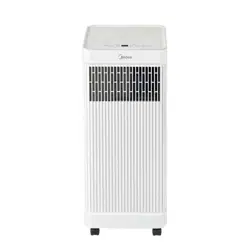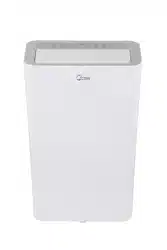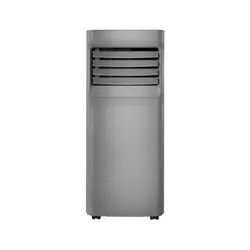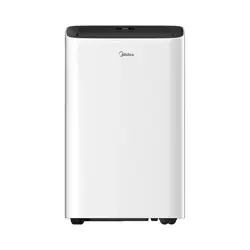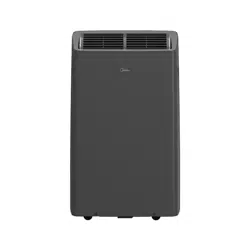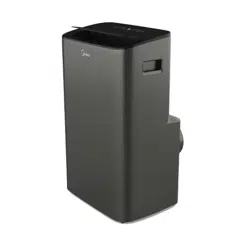
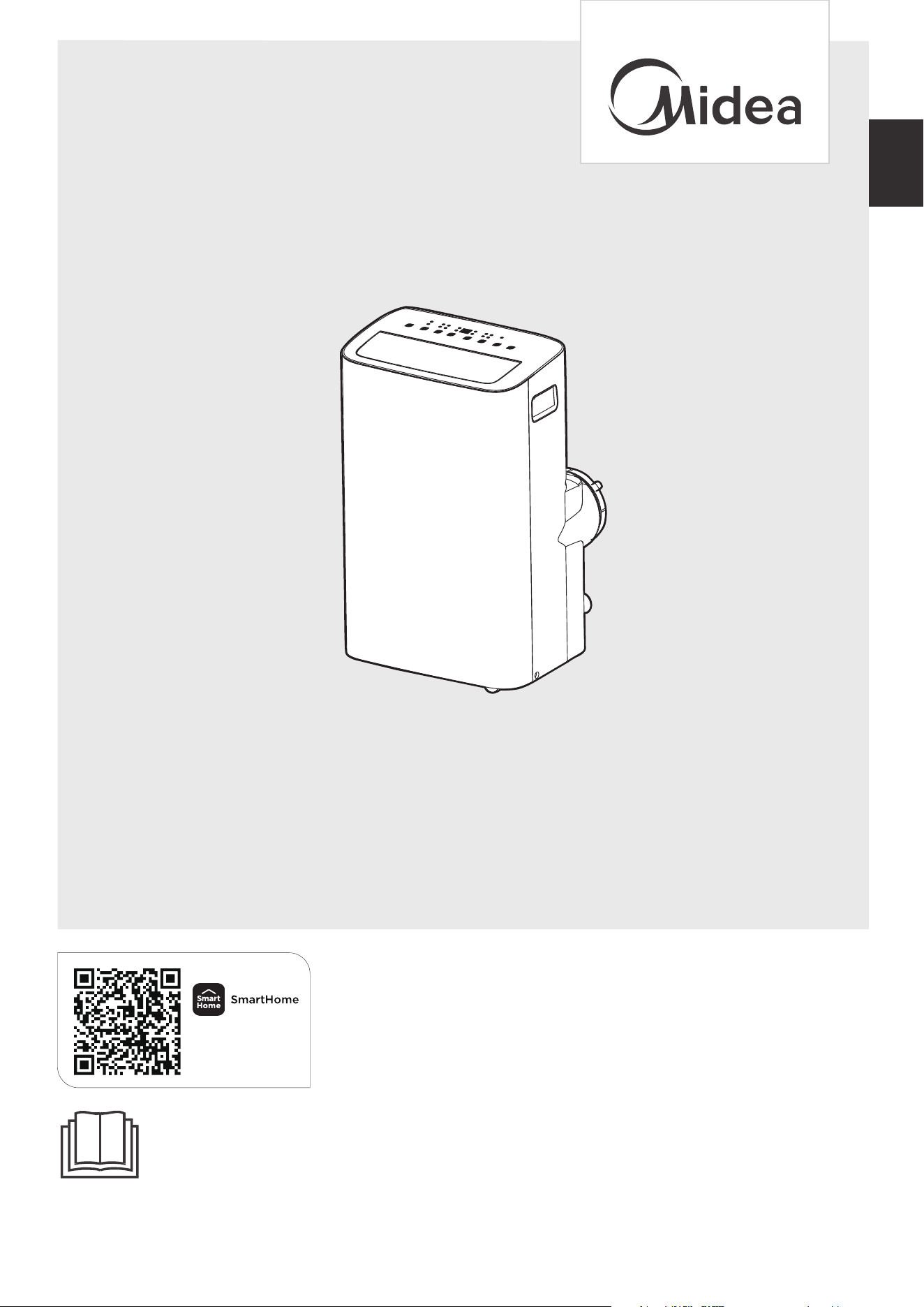
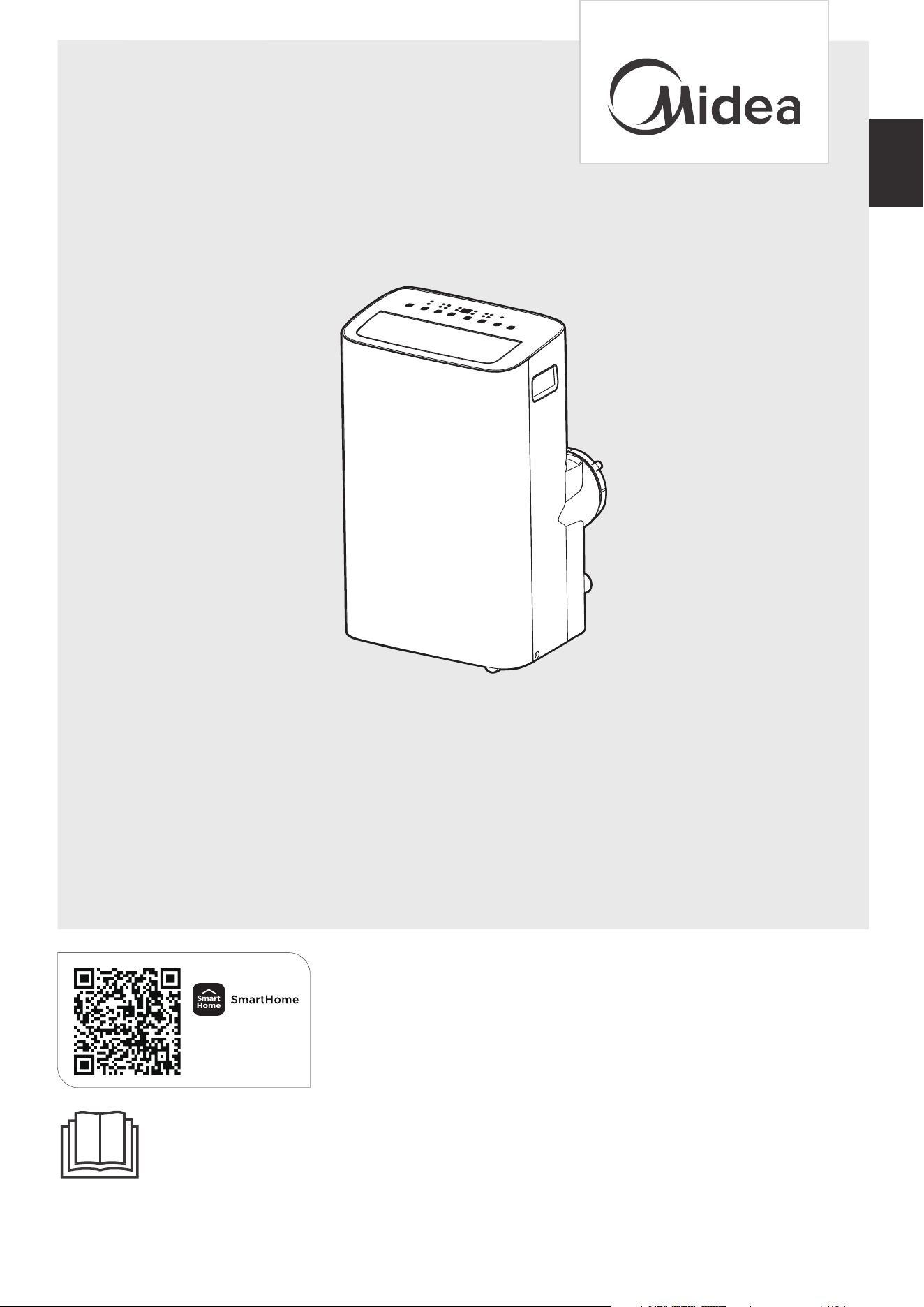
MAP10S1XWBL
MAP10HS1XWGR
MODEL NUMBER
USER MANUAL
Before using this product, please read this manual carefully and keep it for future reference.
The design and specifications are subject to change without prior notice for product improvement. Consult
with your dealer or the manufacturer for details.
PORTABLE AIR CONDITIONER
en
Download the app
& activate product
02
Read This Manual
Inside you’ll find many helpful hints on how to use and maintain your air conditioner
properly. Just a little preventive care on your part can save you a great deal of time
and money over the life of your air conditioner. You’ll find many answers to common
problems in the troubleshooting tips - you should be able to fix most of them quickly
before calling service. These instructions may not cover every possible condition of
use, so common sense and attention to safety is required when installing, operating
and maintaining this product.
CAUTION
THANK YOU LETTER
Thank you for choosing Midea! Before using your new Midea product, please
read this manual thoroughly to ensure that you know how to operate the
• For support, please call the Service Center at 1-866-646-4332.
• This appliance is not intended for use by persons (including children) with reduced
physical, sensory or mental capabilities or lack of experience and knowledge, unless
they have been given supervision or instruction concerning use of the appliance by
a person responsible for their safety.
• Children should be supervised to ensure that they do not play with the air conditioner.
• The appliance shall be installed in accordance with national wiring regulations.
• Do not operate your air conditioner in a humid room such as a bathroom or laundry room.
OWNER’S MANUAL
Get to know your AC
Drainage guide
Store the unit when not in use
03
1 0
21
23
25
Cleaning & maintenance
24
Troubleshooting
26
Before you get start
Safety Precautions
Product overview
1 3
1 4
Installation overview
1 5
Installation guide
27
37
38
Warranty
Remote control and App instructions
Return Policy
03
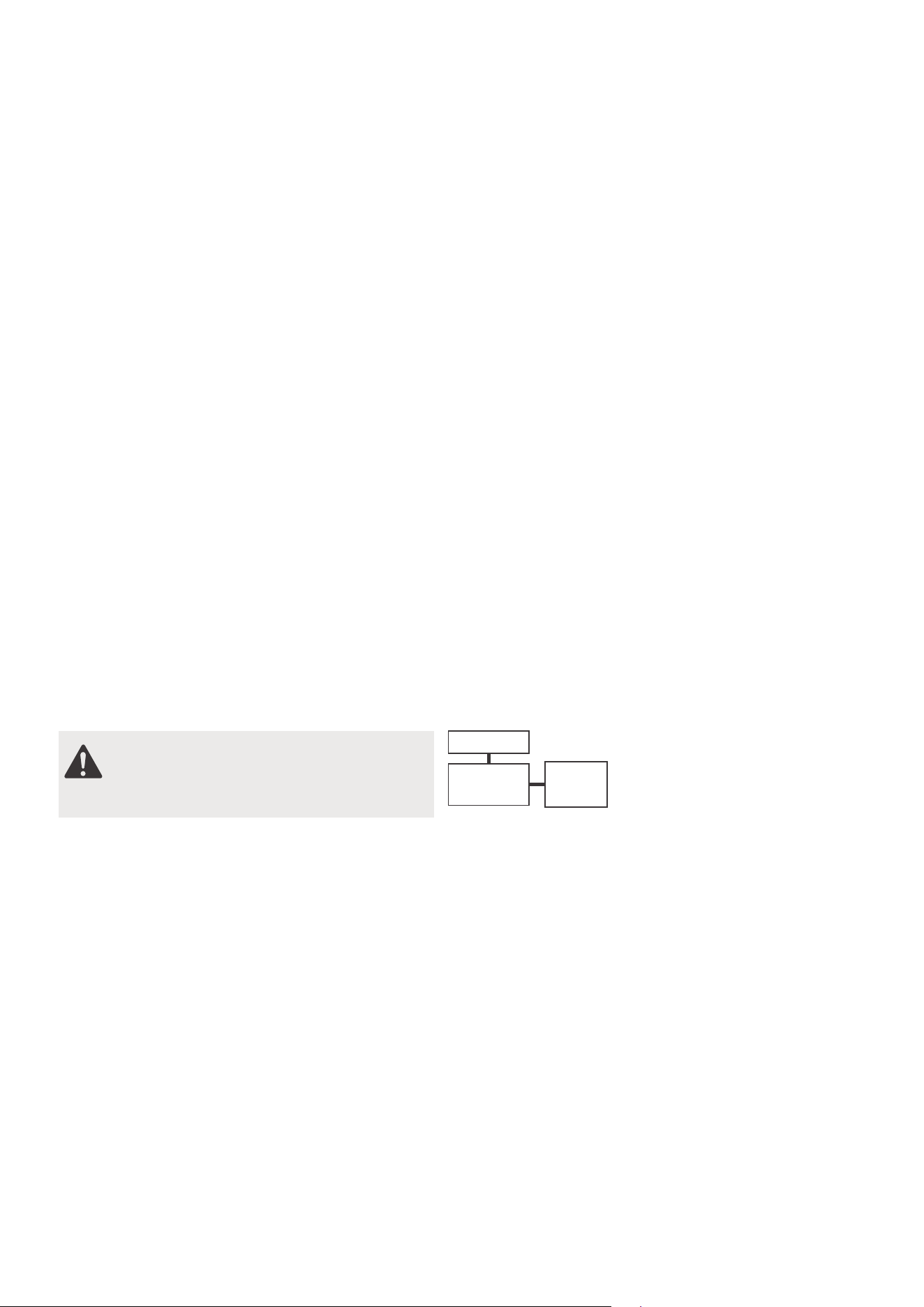
Explanation of Symbols
Must read the warning message.
Read Safety Precautions Before Operation and Installation
To prevent death or injury to the user or other people and property damage, the
following instructions must be followed.
Incorrect operation due to ignoring of instructions may cause death, harm or damage.
WARNING
CAUTION
This symbol indicates the possibility of property damage or serious
consequences.
This symbol indicates the possibility of personnel injury or loss of life.
Safety Precautions
04
NOTICE
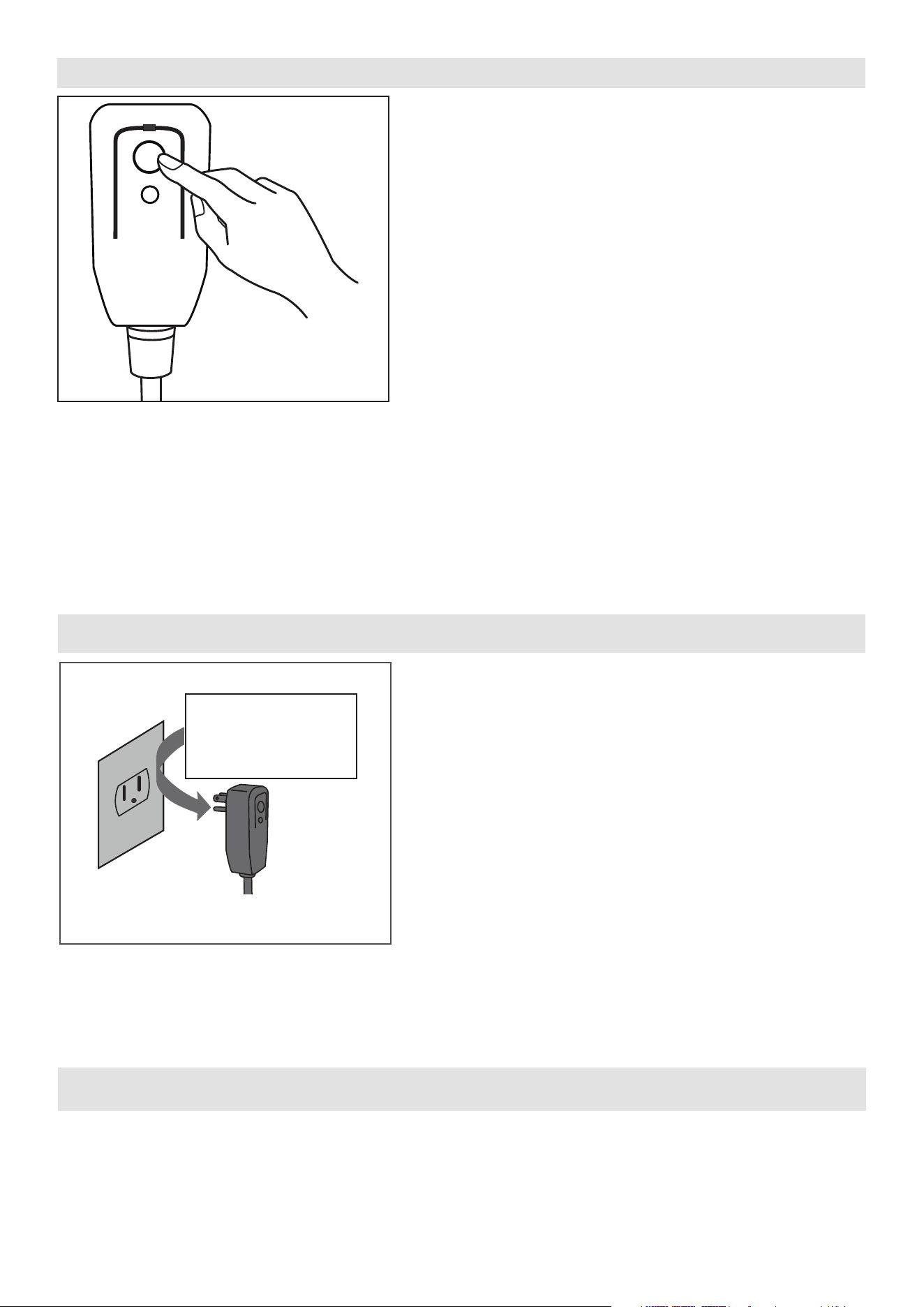
The power supply cord with this air conditioner contains a current detection device designed
to reduce the risk of fire.
In the event that the power supply cord is damaged, it can not be repaired. It must be replaced
with a cord from the manufacturer.
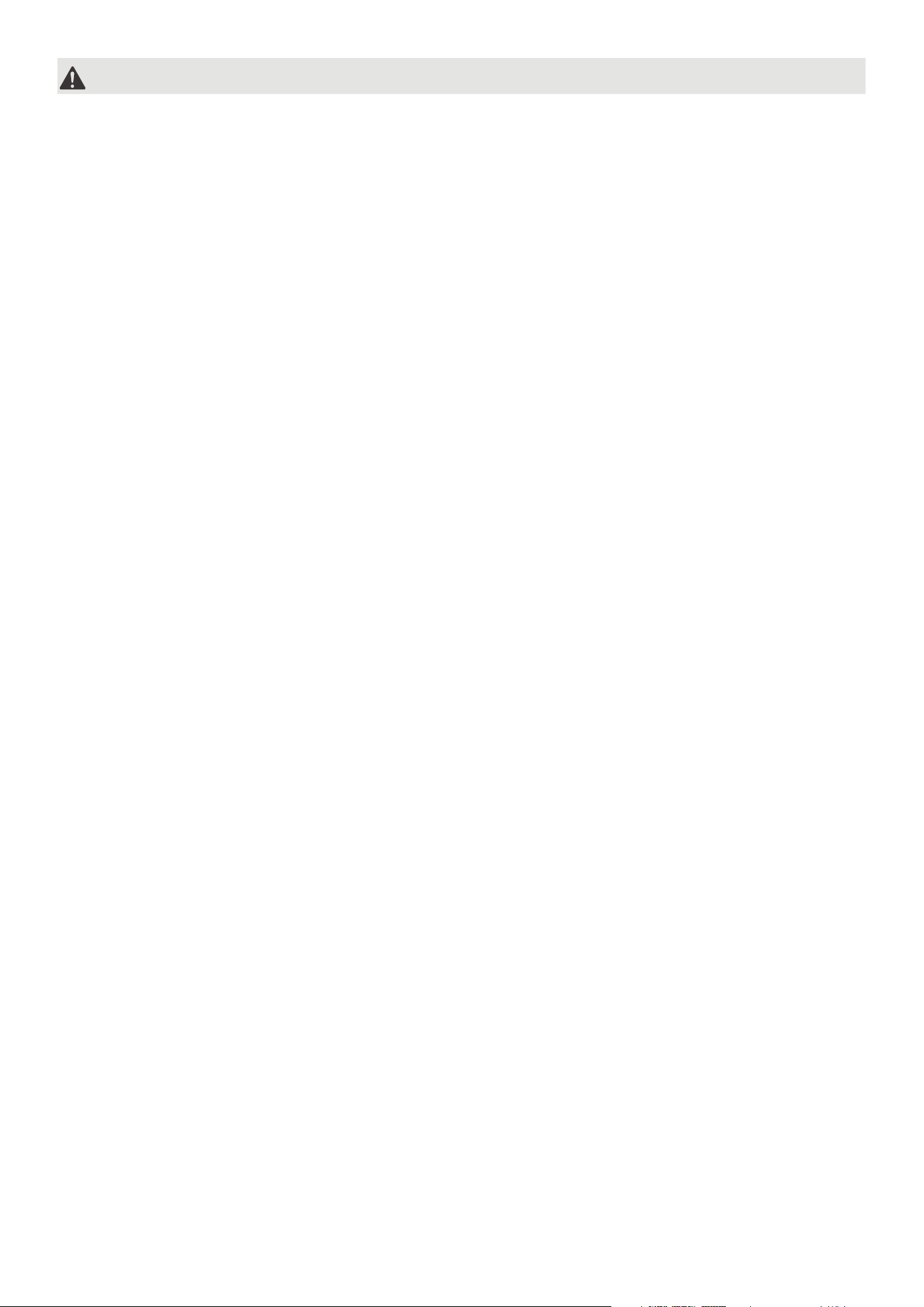
Grounding type wall receptacle
Do not, under any
circumstances, cut,
remove or bypass
the grounding prong.
Power supply cord with 3-prong grounding
plug and current detection device.
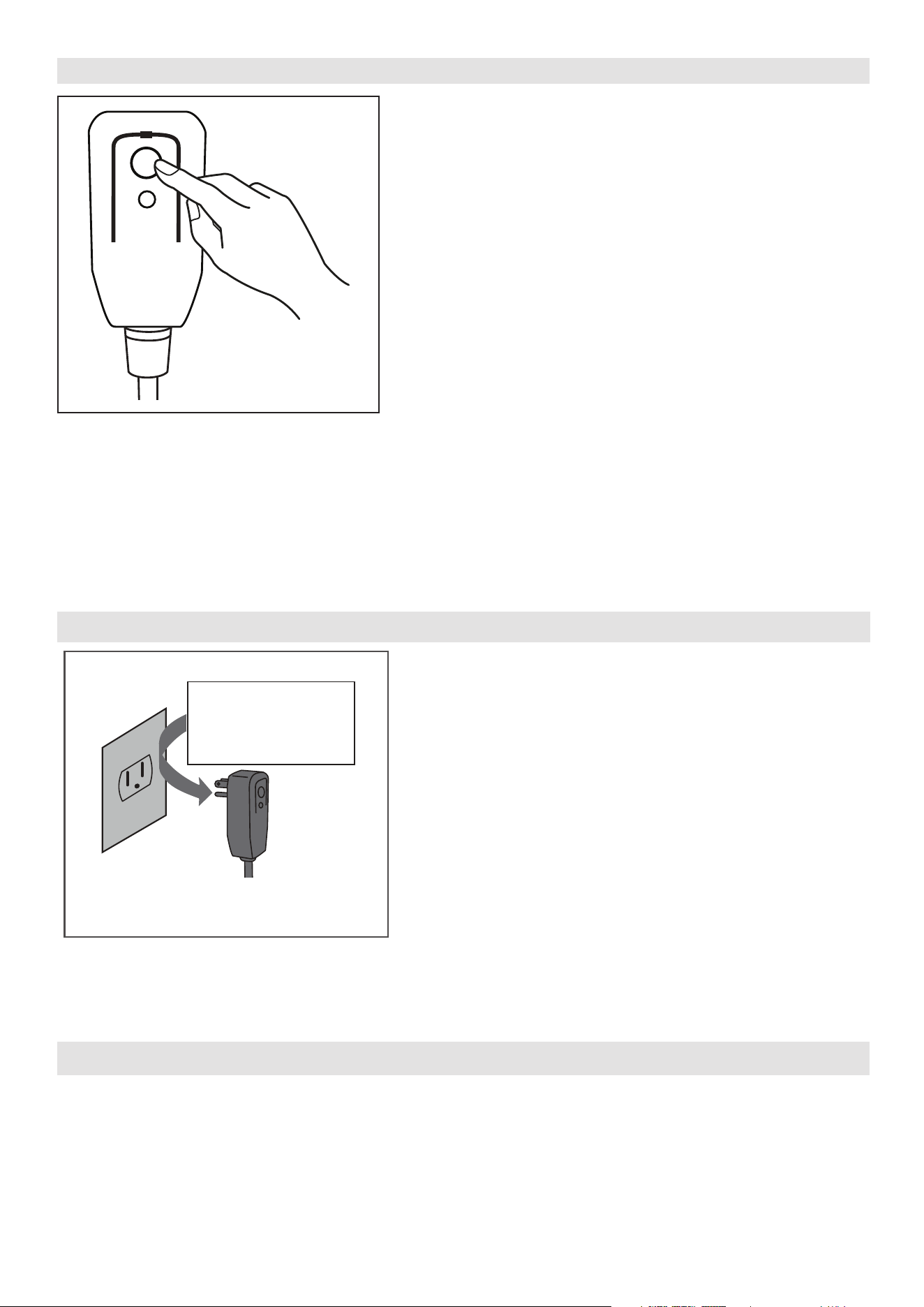
The power supply cord contains a measurement current device that senses damage to the power cord.
Test your power supply cord as follows:
1. Plug in the air conditioner.
2. The power supply cord will have TWO buttons on the plug head. Press the TEST button. You will
notice a click as the RESET button pops out.
3. Press the RESET Button. You will notice a click as the button engages.
4. The power supply cord is now supplying electricity to the unit. (On some products this is also
indicated by a light on the plug head.)
RESET
TEST
Plug in &
press RESET
Operation of Current Device
NOTICE
• Do not use this device to turn the unit on or off.
• Always make sure the RESET button is pushed in for correct operation.
• The power supply must be replaced if it fails to reset when either the TEST button
is pushed, or it can not be reset. Please contact Customer Service.
05
WARNING
Installation must be performed according to the installation instructions. Improper
installation can cause water leakage, electrical shock, or fire.
Use only the included accessories and parts, and specified tools for the installation.
Using nonstandard parts can cause water leakage, electrical shock, fire, and injury
or property damage.
Make sure that the outlet you are using is grounded and has the appropriate
voltage. The power cord is equipped with a three-prong grounding plug to protect
against shock. Voltage information can be found on the nameplate of the unit.
Your unit must be used in a properly grounded wall receptacle. If the wall
receptacle you intend to use is not adequately grounded or protected by a time
delay fuse or circuit breaker(the fuse or circuit breaker needed is determined by
the maximum current of the unit. The maximum current is indicated on the
nameplate located on unit), have a qualifiedelectrician install the proper receptacle.
Do not touch the unit with wet or damp hands or when barefoot.
If the air conditioner is knocked over during use, turn off the unit and unplug it
from the main power supply immediately. Visually inspect the unit to ensure there
is no damage. If you suspect the unit has been damaged, contact a technician or
customer service for assistance.
In a thunderstorm, the power must be cut off to avoid damage to the machine due
to lightning.
Your air conditioner should be used in such a way that it is protected from moisture.
e.g. condensation, splashed water, etc. Do not place or store your air conditioner
where it can fall or be pulled into water or any other liquid. Unplug immediately if
it occurs.
Install the unit on a flat, sturdy surface. Failure to do so could result in damage or
excessive noise and vibration.
The unit must be kept free from obstruction to ensure proper function and to
mitigate safety hazards.
Do not modify the length of the power cord or use an extension cord to power the
unit.
Do not share a single outlet with other electrical appliances. Improper power
supply can cause fire or electrical shock.
Do not install your air conditioner in a wet room such as a bathroom or laundry room.
Too much exposure to water can cause electrical components to short circuit.
Do not install the unit in a location that may be exposed to combustible gas, as this
could cause fire.
06
CAUTION
The unit has wheels to facilitate moving. Make sure not to use the wheels on thick
carpet or to roll over objects, as these could cause tipping.
Do not operate a unit that it has been dropped or damaged.
The appliance with electric heater shall have at least 1 meter space to the
combustible materials.
All wiring must be performed strictly in accordance with the wiring diagram located
inside of the unit.
The unit's circuit board(PCB) is designed with a fuse to provide overcurrent
protection. The specifications of the fuse are printed on the circuit board, such as:
T 3.15A/250V, etc.
When the water drainage function is not in use, keep the upper and the lower drain
plug firmly to the unit to get rid of choking. When the drain plug is not in use, keep
it carefully to prevent children from choking.
This appliance is not intended for use by persons (including children) with reduced
physical, sensory or mental capabilities or lack of experience and knowledge, unless
they have been given supervision or instruction concerning use of the appliance by
a person responsible for their safety. Children should be supervised to ensure that
they do not play with the appliance. Children must be supervised around the unit at
all times.
If the supply cord is damaged, it must be replaced by the manufacturer,its service
agent or similarly qualified persons in order to avoid a hazard .
Do not use this product for functions other than those described in this instruction
manual.
Before cleaning, turn off the power and unplug the unit.
Disconnect the power if strange sounds, smell, or smoke comes from it.
Do not press the buttons on the control panel with anything other than your fingers.
Do not remove any fixed covers. Never use this appliance if it is not working
properly, or if it has been dropped or damaged.
Do not operate or stop the unit by inserting or pulling out the power cord plug.
Do not use hazardous chemicals to clean or come into contact with the unit. Do not
use the unit in the presence of inflammable substances or vapour such as alcohol,
insecticides, petrol,etc.
Prior to cleaning or other maintenance, the appliance must be disconnected from
the supply mains.
07
Do not remove any fixed covers. Never use this appliance if it is not working properly,
or if it has been dropped or damaged .
Do not run cord under carpeting. Do not cover cord with throw rugs, runners, or
similar coverings. Do not route cord under furniture or appliances. Arrange cord away
from traffic area and where it will not be tripped over.
Do not operate unit with a damaged cord, plug, power fuse or circuit breaker. Discard
unit or return to an authorized service facility for examination and/or repair.
To reduce the risk of fire or electric shock, do not use this fan with any solid-state
speed control device.
The appliance shall be installed in accordance with national wiring regulations.
Contact the authorized service technician for repair or maintenance of this unit.
Do not cover or obstruct the inlet or outlet grilles.
Always transport your air conditioner in a vertical position and stand on a stable, level
surface during use.
Always contact a qualified person to carry out repairs. If the damaged power supply
cord must be replaced with a new power supply cord obtained from the product
manufacturer and not repaired.
Hold the plug by the head of the power plug when taking it out.
Turn off the product when not in use.
08
Servicing shall only be performed as recommended by the equipment manufactur-
er. Maintenance and repair requiring the assistance of other skilled personnel shall
be carried out under the supervision of the person competent in the use of flamma-
ble refrigerants.
DO NOT modify the length of the power cord or use an extension cord to power
the unit.
DO NOT share a single outlet with other electrical appliances. Improper power
supply can cause fire or electrical shock.
Please follow the instruction carefully to handle, install, clear, service the appliance
to avoid any damage or hazard.
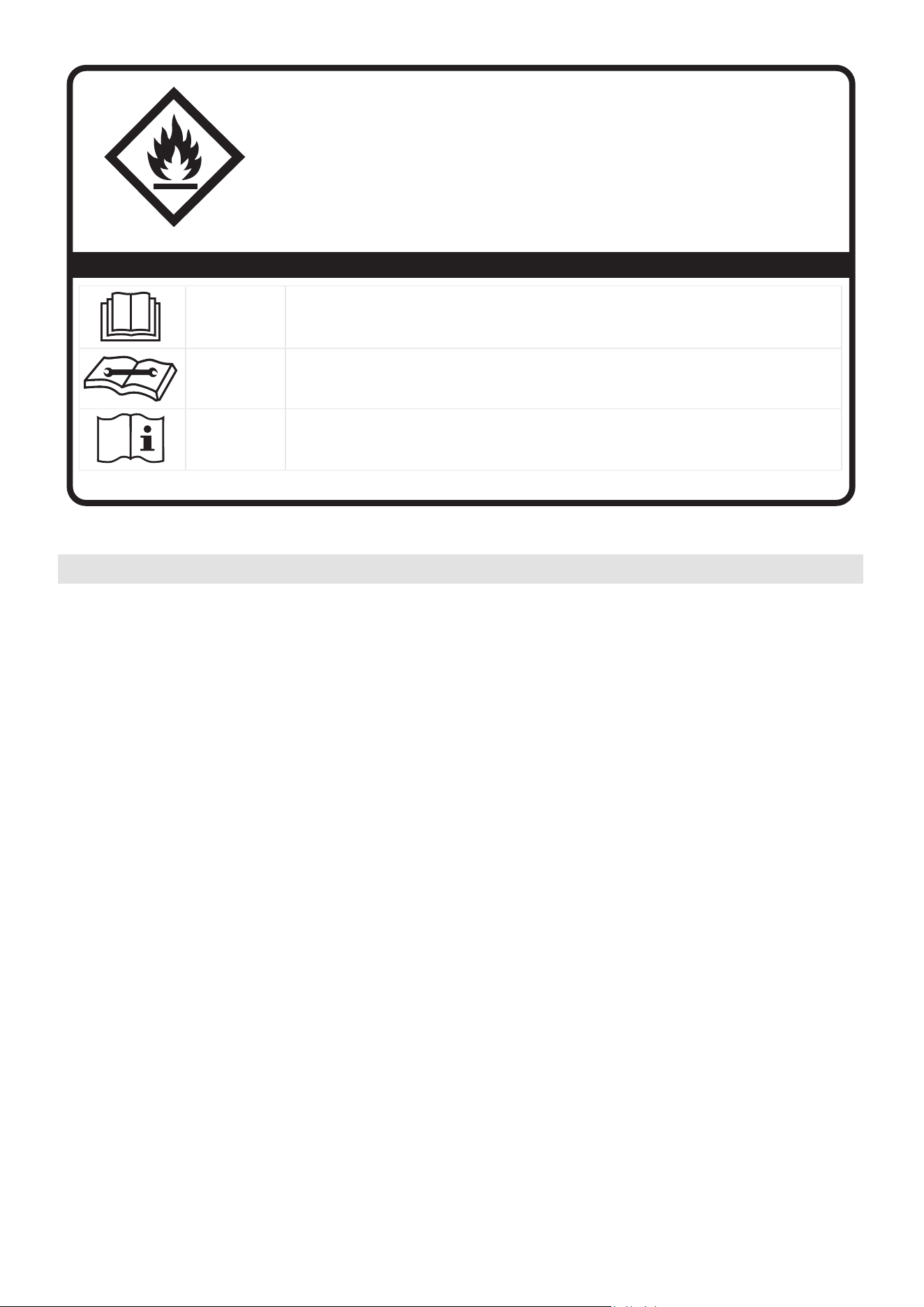
CAUTION:
Risk of fire
flammable materials
IMPORTANT NOTE:Read this manual
carefully before installing or operating
WARNING:
your new appliance unit. Make sure
to save this manual for future reference.
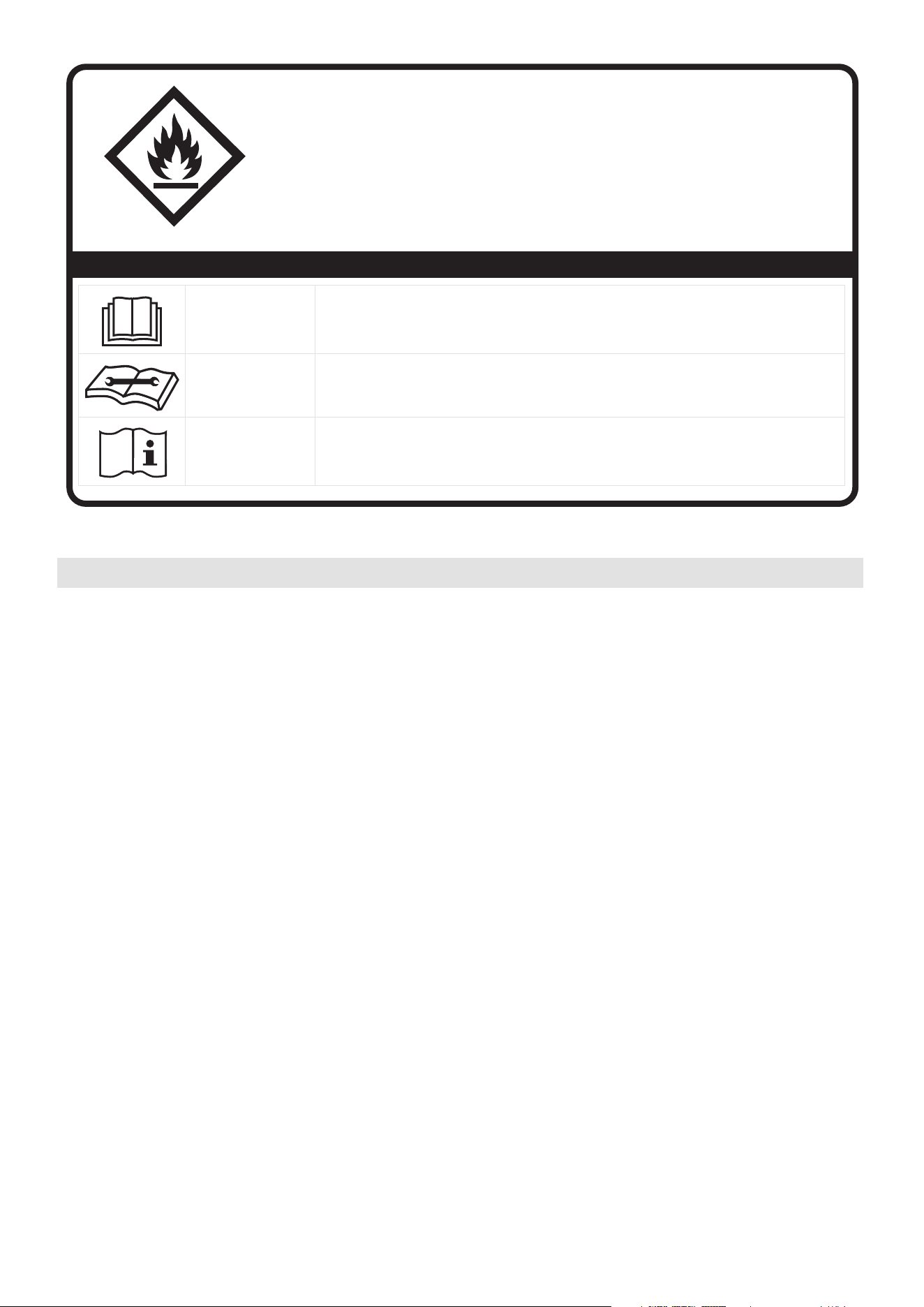
Explanation of symbols displayed on the unit
CAUTION
This symbol shows that the operation manual should be read carefully.
CAUTION
This symbol shows that a service personnel should be handling this equipment with
reference to the installation manual.
CAUTION
This symbol shows that information is available such as the operating manual or
installation manual.
A2L
•
•
•

09
Flammable
Refrigerant R32 is used within appliance.
• When maintaining or disposing the appliance, the refrigerant (R32) shall be
recovered properly, shall not discharge to air directly.
• Compliance with national gas regulations shall be observed.
• Keep ventilation openings clear of obstruction.
• The appliance shall be stored so as to prevent mechanical damage from occurring.
• A warning that the appliance shall be stored in a well-ventilated area where the
room size corresponds to the room area as specified for operation.
• Any person who is involved with working on or breaking into a refrigerant circuit
should hold a current valid certificate from an industry-accredited assessment
authority, which authorises their competence to handle refrigerants safely in
accordance with an industry recognised assessment specification.
Examples for such working procedures are:
• breaking into the refrigerating circuit;
• opening of sealed components;
• opening of ventilated enclosures.
• No any open fire or device like switch which may generate spark/arcing shall be
around appliance to avoid causing ignition of the flammable refrigerant used.
Please follow the instruction carefully to store or maintain the appliance to
prevent mechanical damage from occurring.
• Do not use means to accelerate the defrosting process or to clean, other than
those recommended by the manufacturer.
• The appliance shall be stored in a room without continuously operating ignition
sources (for example: open flames, an operating gas appliance) and ignition
sources or (for example: an operating electric heater) close to the appliance.
The appliance shall be stored in a room without continuously operating ignition
sources (for example: open flames, an operating gas appliance or an operating
electric heater).
• Do not pierce or burn.
• Be aware that the refrigerants may not contain an odour.
Installing your AC
should take about
30 minutes.
The installation must be
carried out in strict
accordance with the
instructions in this manual.
Manual
We recommend
doing this with
a helper.
We’re here if you need us,
please contact your local
distributor for assistance.
Know your Portable Air Conditioner
AMBIENT TEMPERATURE RANGE FOR UNIT OPERATING
MODE Temperature Range MODE Temperature Range
Cool 16-35°C (60-95°F)
Dry
Heat(pump heat mode)
Heat(electrical heat mode) 13-35°C (55-95°F)
5-30°C (41-86°F)
30°C (86°F)
≥
Energy Rating Information
The energy rating and noise information for this unit is based on the standard installation using an
un-extended exhaust duct without window slider adaptor (as shown in the Installation section of this
manual). At the same time, the unit must be operate on the COOL MODE and HIGH FAN SPEED by
remote controller.
The unit with 3 meters extended exhaust duct is running by using 2 exhaust ducts(Diameter:150mm,
Length:1.5m + Diameter: 130mm,Length: 1.5m) .The Energy rating and noise information for unit with 3
meters extended exhaust duct is not assessed. (For some models)
NOTE:
We recommend that operating the unit at room temperature below 35°C . Since there is a risk that the
unit with 3 meters extended exhaust duct would not work at room temperature above 35°C under some
extreme conditions, such as the lower air intake be blocked for 50%.
How to Stay Cool with a New Portable Air Conditioner (For the models comply with
the requirements of Department Of Energy in US).
Because of a new federal test procedure for Portable Air Conditioners, you may notice that the cooling
capacity claims on portable air conditioner packaging are significantly lower than that of models
produced prior to 2017. This is due to changes in the test procedure, not to the portable air conditioners
themselves.
Preparations before installation
10
Before you get start
11
Why newer products have lower cooling capacity than older models.
How to purchasing a portable air conditioner.
will not remove enough humidity, leaving the air feeling damp. To find the
by multiplying the
Federal regulations require manufacturers to calculate cooling capacity based on a specific test
procedure, which was changed just this year.
or years’models. So, while the
What is SACC ?
SACC is the representative value of Seasonally Adjusted Cooling Capacity, in Btu/h, as determined in
accordance with the DOE test procedure at title 10 Code of Federal Regulations (CFR) 430, subpart B,
appendix CC and applicable sampling plans.
proper air conditioner, determine the square footage of the room you want to cool
room length by its width. You also need to know the air conditioner's BTU (British Thermal Unit) rating,
which indicates the amount of heat it can remove from a room. A higher number means more cooling
power for a larger room. (Be sure you are comparing only newer models to each other older models may
appear to have a higher capacity, but are actually the same). Be sure to “size up” if your portable air
conditioner will be placed in a very sunny room, in a kitchen, or in a room with high ceilings. After you’ve
found the right cooling capacity or your room, you can look at other features.
BTUs may be lower, the actual cooling capacity of the air conditioners has not changed.
Electronic Work
WARNING:
BEFORE PERFORMING ANY ELECTRICAL
OR WIRING WORK, TURN OFF THE MAIN
POWER TO THE SYSTEM.
DISPLAY
MAIN
CONTROL
POWER
SUPPLY
CORD
NOTE: The cographs are for
explanation purpose only.
Your machine may be slightly
The actual shape shall prevail.
different.
12
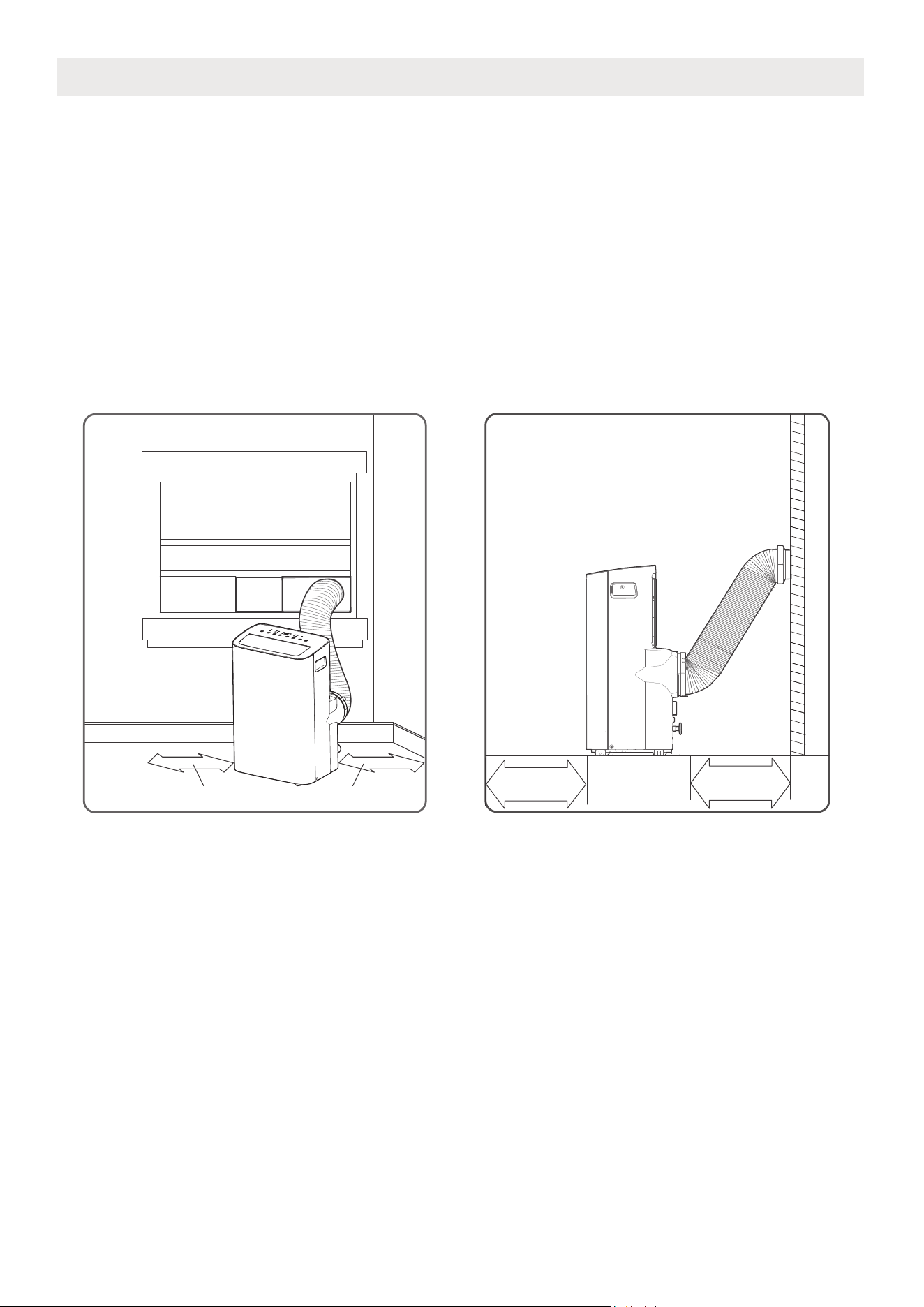
Unit Installation Location Restricted Space Requirements
PRODUCT INSTALLATION LOCATION
Your installation location should meet the following requirements:
• Make sure that you install your unit on an even surface to minimize noise and vibration.
• The unit must be installed near a grounded plug, and the Collection Tray Drain (found on the back of
the unit) must be accessible.
• The unit should be located at least 30cm (12”) from the nearest wall to ensure proper air conditioning.
The air outlet of the unit should be at least 50cm(19.7”) away from obstacles.
• DO NOT cover the Intakes, Outlets or Remote Signal Receptor of the unit, as this could cause damage
to the unit.
≥30cm(12”)≥30cm(12”)
≥50cm
19.7”
≥50cm
19.7
”
13
The unit can be controlled by the unit control panel alone
NOTE ON ILLUSTRATIONS
Product overview
Design Notice
In order to ensure the optimal performance of our products, the design
specifications of the unit and remote control are subject to change without
prior notice.
or with the remote controller.
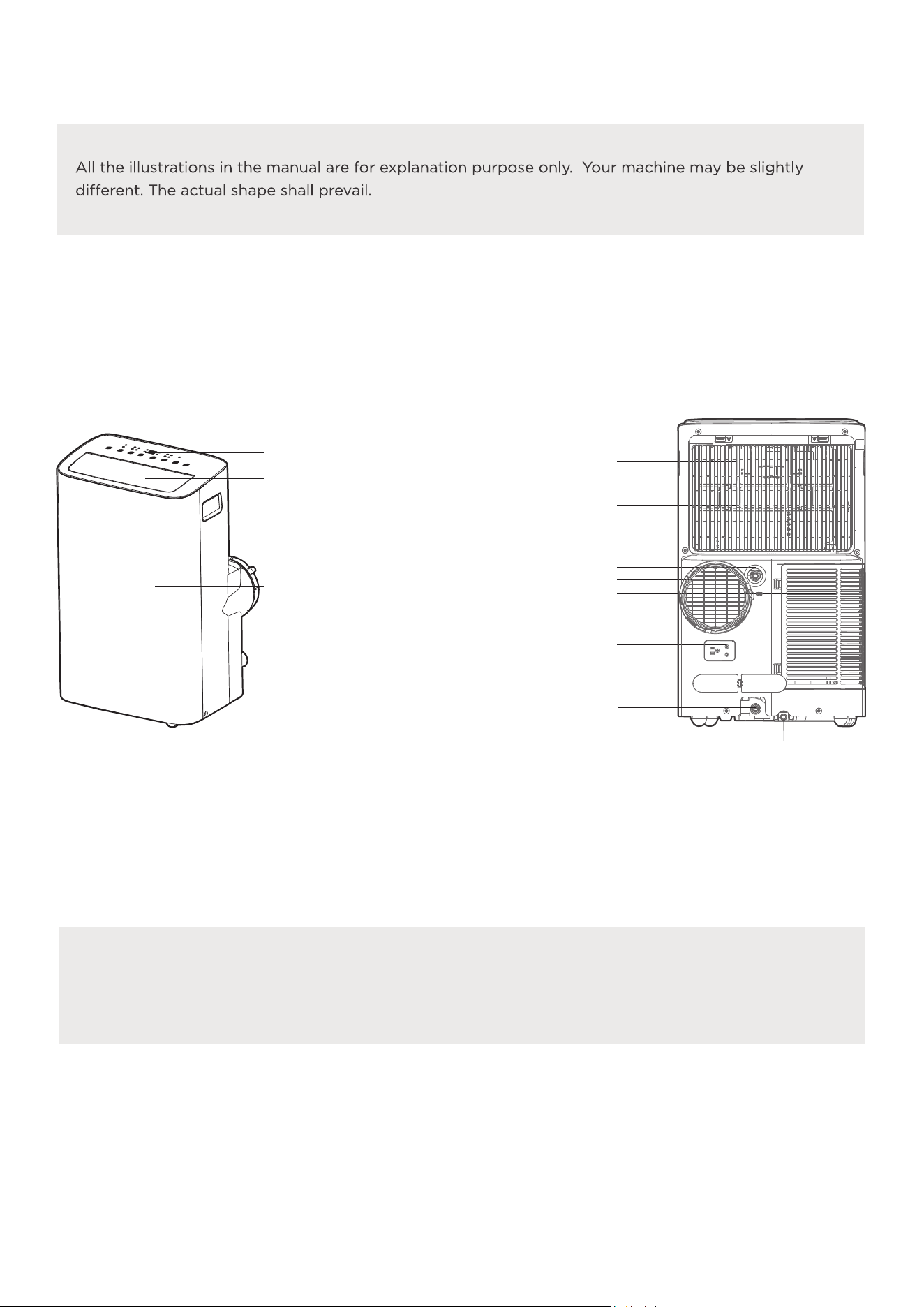
Front View
Caster
horizontal louver blade
(swing automatically)
Control panel
Front panel
Rear View
Drain outlet
Power plug socket
Power cord buckle
Bottom tray drain outlet
Upper air filter
(behind the grille)
Upper air intake
Air outlet
Lower air filter
Lower air intake
Drain outlet
( heat pump model only)
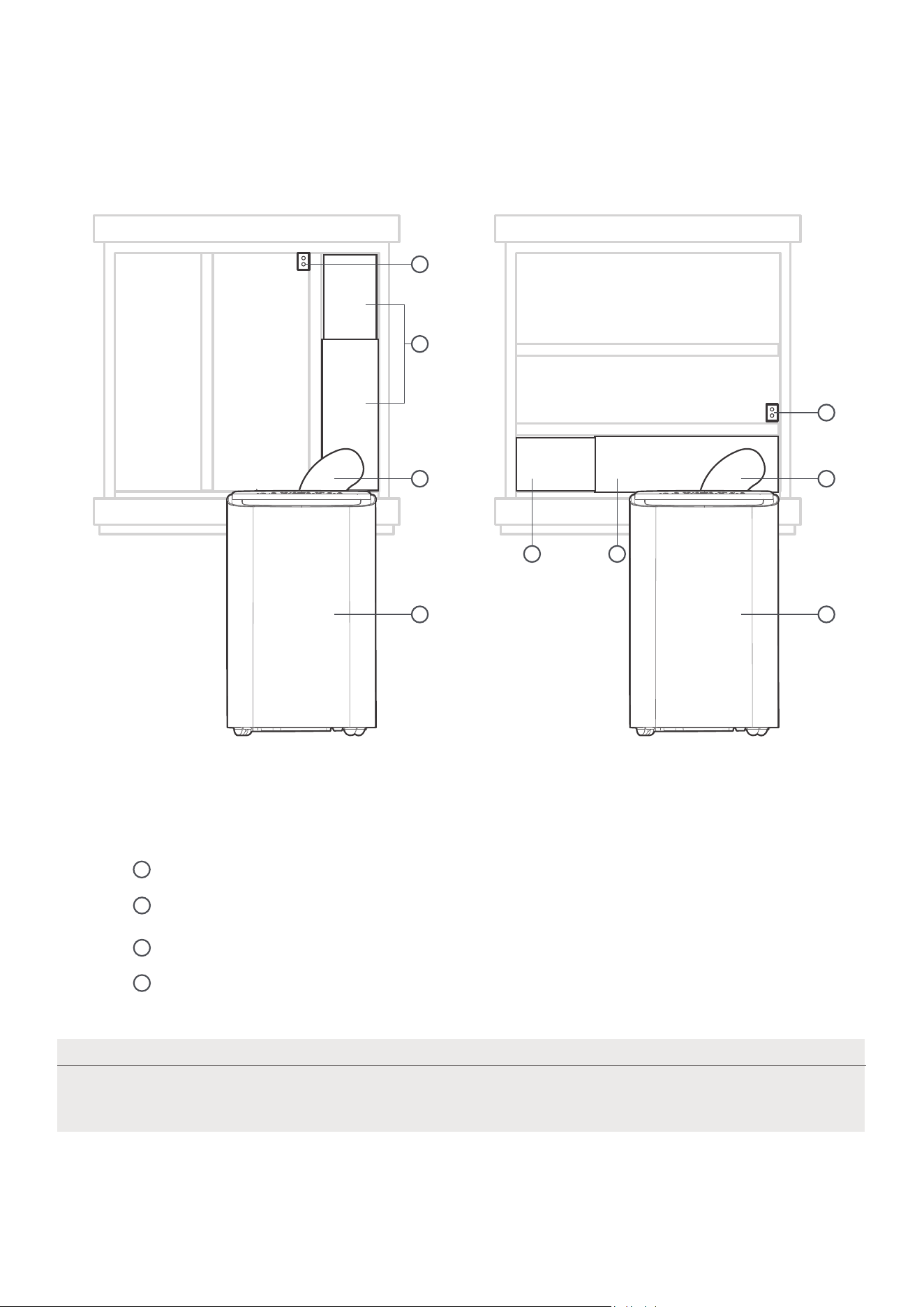
Security Bracket and 2 Screws
Extended Exhaust Hose
Installation overview
Installation Completion Display
Illustrations in this manual are for explanatory purposes. The actual shape of
your indoor unit may be slightly different. The actual shape shall prevail.
NOTE
Local Air Conditioner
1
2
3
4
14
Sliding Window Installation Hung Window Installation
1
4
2 2
1 1
4
3
3
window slider assembly
NOTE
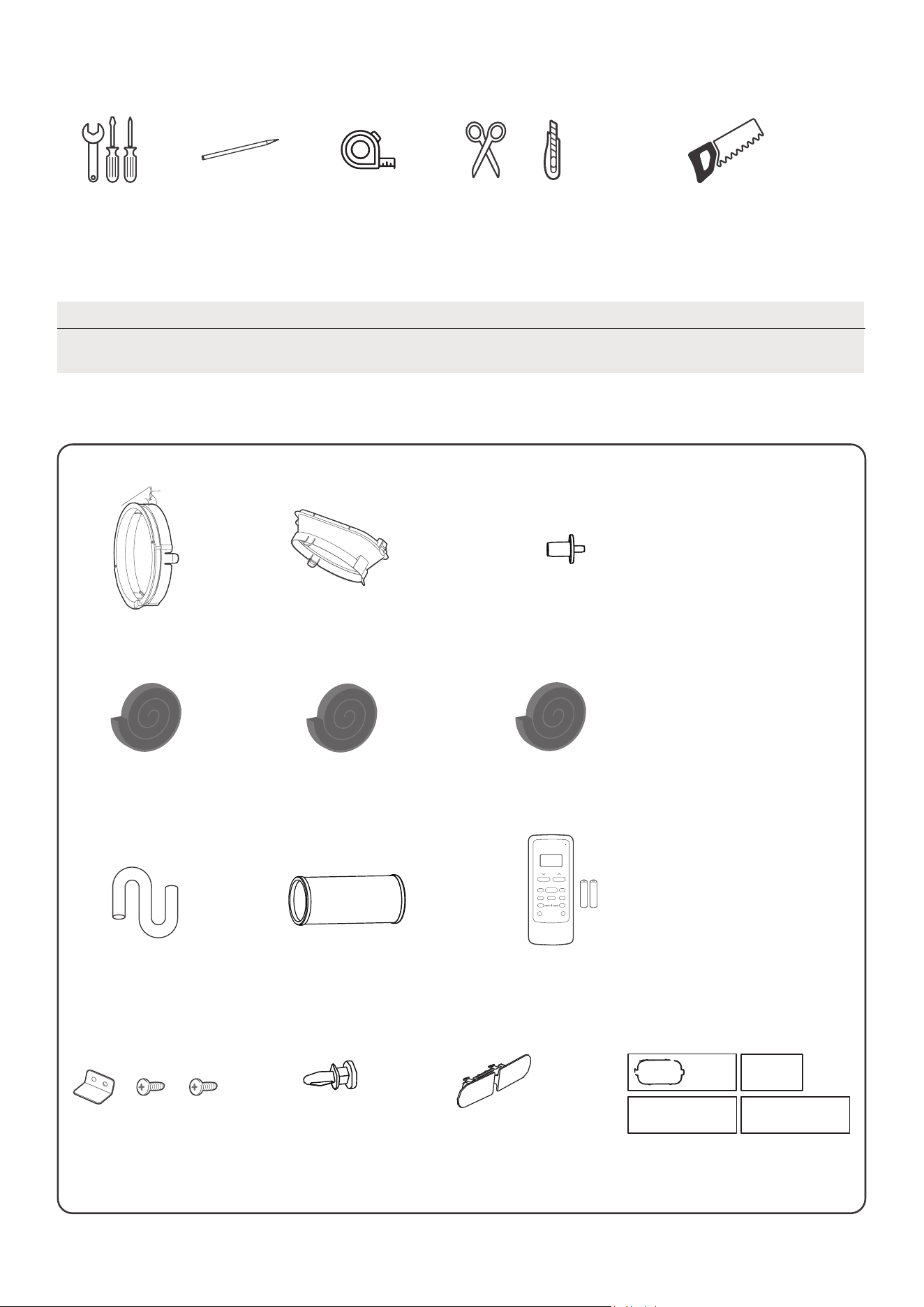
List of installation tools (not included)
Installation accessories
Items with (*) are on some models. Slight variations in design may occur.
Screwdriver
& wrench
A tape measure
Scissors or Knife
Pencil
Saw (On some models, to shorten
window adaptor for narrow windows)
15
Bolt 3 pc(*)
Unit Adaptor
Security Bracket and
2 Screws 1 set
Exhaust Hose (1 pc)
(1 pc)
Drain Hose
2 pc(*)
4 pc(*)
Foam Seal A (Adhesive)
2 pc
Foam Seal B (Adhesive)
Foam Seal C (Non-adhesive)
Power Cord Buckle ( 1 pc)
Air exhaust passage (1 pc*)
Remote Controller
and Battery (only
for remote control
models)(1set*)
1 set(*)Window Sliders
drain hose adaptor
(for heat pump model only)
Your Window Installation Kit fits windows 19.4”-62.2”(49.3-158.1cm) and can be
shortened for smaller windows.
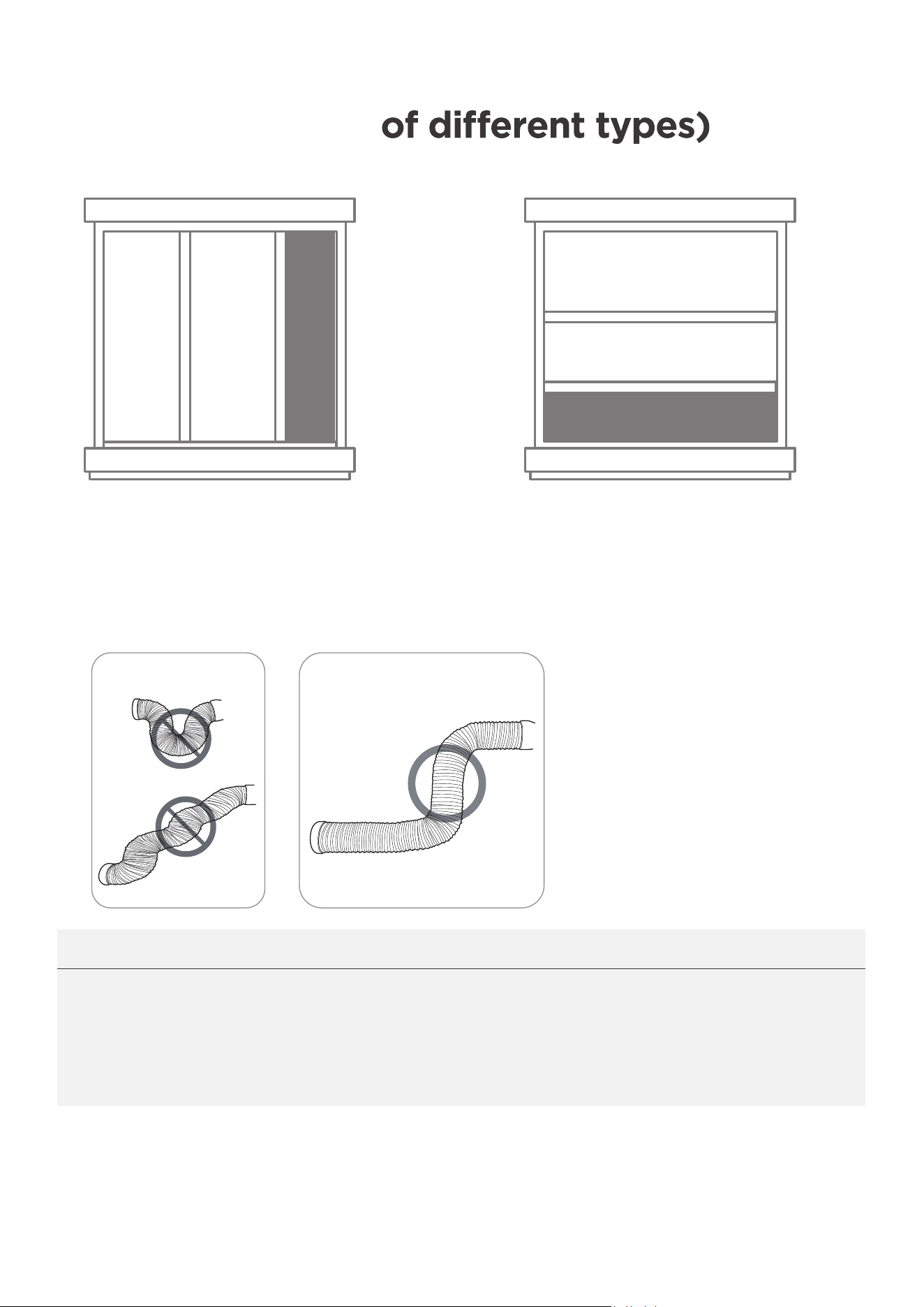
Confirm your window type (window type
and opening size
Sliding Window Installation Hung Window Installation
NOTICE:
INCORRECT
CORRECT
For optimal performance in operation
To ensure proper function, DO NOT overextend or bend the hose. Make sure
that there is no obstacle around the air outlet of the exhaust hose (in the range
of 500mm) in order to the exhaust system works properly. All the illustrations
in this manual are for explanation purpose only. Your air conditioner may be
slightly different. The actual shape shall prevail.
16
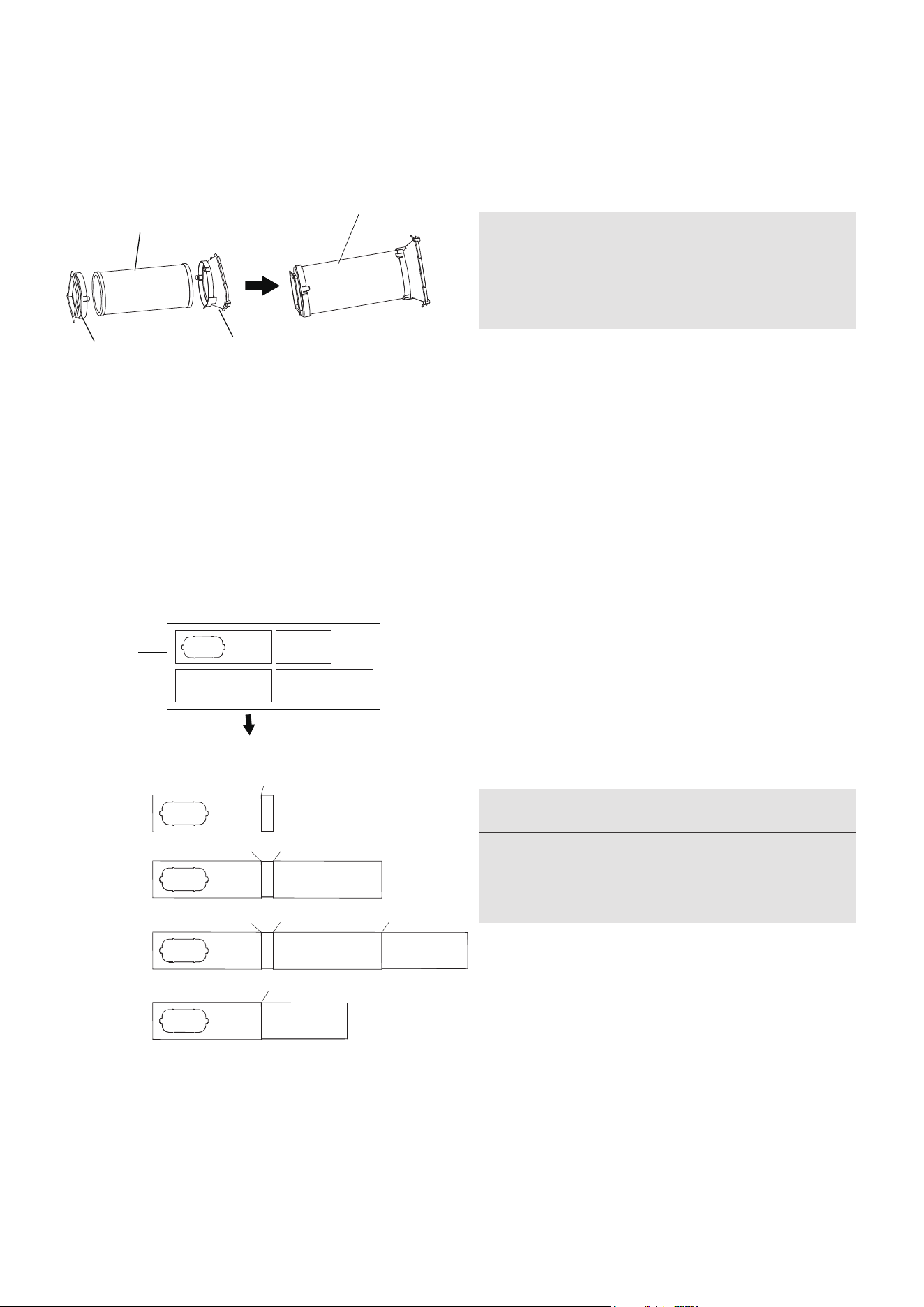
2. Preparing the Adjustable Window Slider
1+2:
Bolt
1+2+3:
Bolt
Bolt
1+2+3+4:
Bolt
BoltBolt
1+4:
Bolt
Window
Sliders
After assembly
Before assembly
1.Exhaust hose and adaptors installation
Exhaust hose
assembly
Exhaust hose
Unit adaptor
Air exhaust
passage
17
Choose the window sliders according to the
size of your window. Sometimes, it needs to be
cut short to meet the window size, please take
extra care to cut it properly.
Use bolts to fasten the window sliders once
they are adjusted to the proper length.
NOTICE
Please base your window slider installation
on the accessories in your kit and the size
NOTICE
Please install the exhaust hose assembly
according to the fittings in your kit.
of your window.
Press the exhaust hose (or extended exhaust
hose) into the window slider adaptor and unit
adaptor, clamp automatically by elastic buckles
of the adaptors.
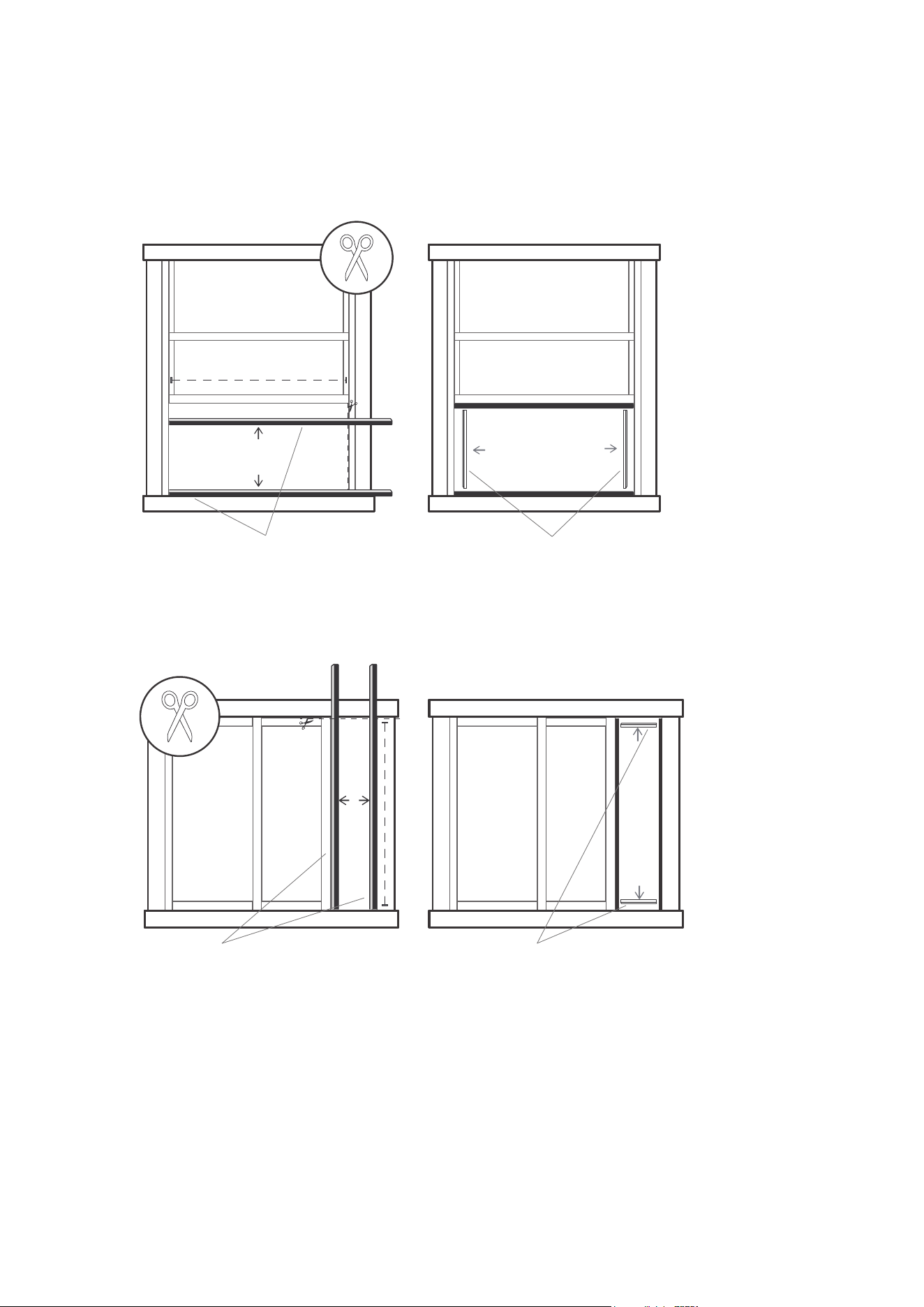
Foam seal B
(Adhesive type-shorter)
Foam seal A
(Adhesive type)
Foam seal B
(Adhesive type-shorter)
Foam seal A
(Adhesive type)
Hung Window Installation
Sliding Window Installation
3. Complete sealing of window
Cut the adhesive foam seal A and B strips to the proper lengths, and attach them to the window sash
and frame as shown.
18
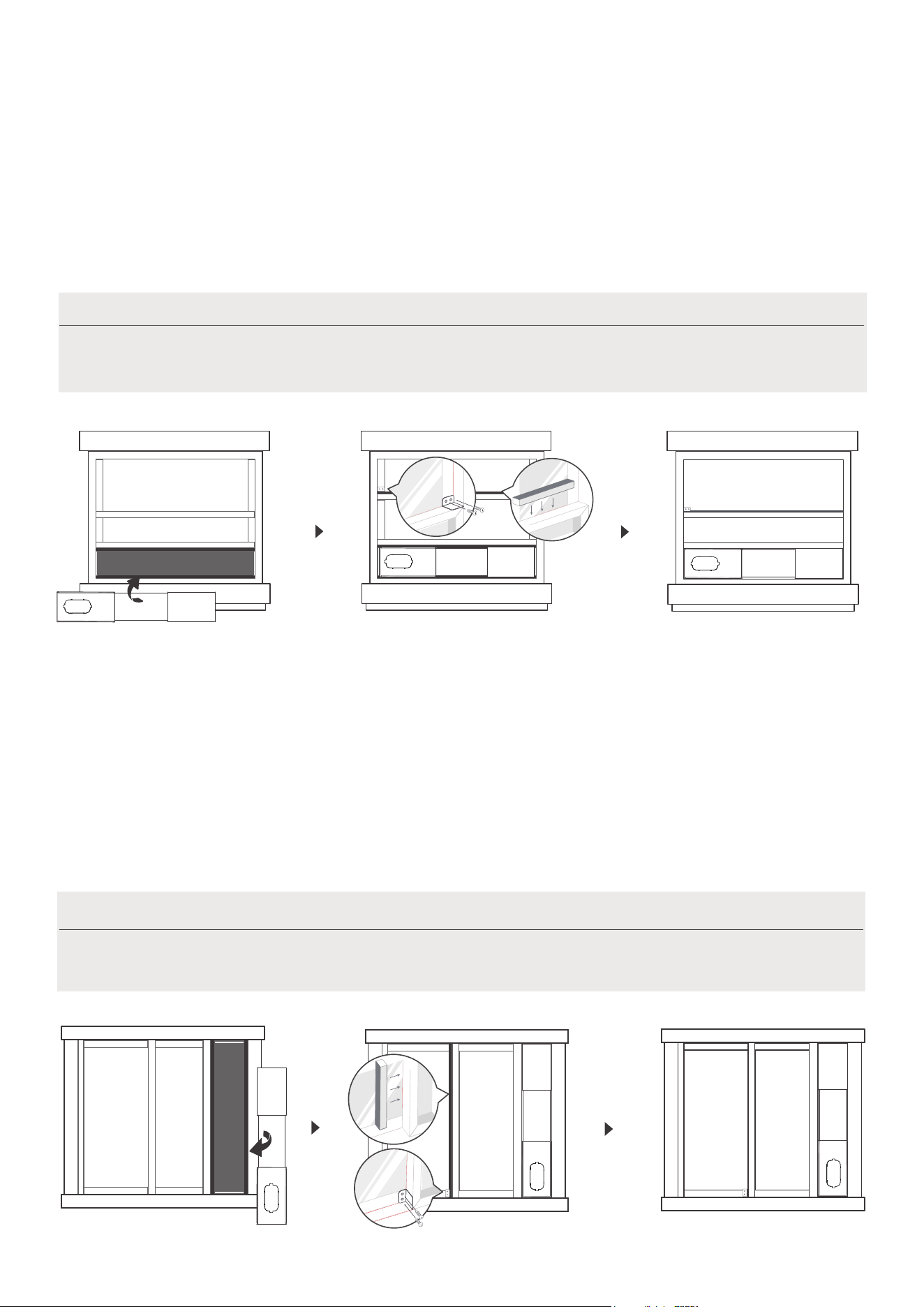
5. Sliding Window Installation
Insert the window slider assembly into the window opening.
Step 1:
Cut the non-adhesive foam seal C strip to match the height of the window. Insert the seal between the
glass and the window frame to prevent air and insects from getting into the room.
Step 2:
If desired, install the security bracket with 2 screws as shown.
Step 3:
Once the Exhaust Hose assembly and Adjustable Window Slider are prepared,
choose from one of the following two installation methods.
Once the Exhaust Hose assembly and Adjustable Window Slider are prepared,
choose from one of the following two installation methods.
4. Hung Window Installation
Insert the window slider assembly into the window opening.
If desired, install the security bracket with 2 screws as shown.
Cut the non-adhesive foam seal C strip to match the width of the window. Insert the seal between the glass
and the window frame to prevent air and insects from getting into the room.
Step 1:
Step 2:
Step 3:
19
NOTICE:
NOTICE:
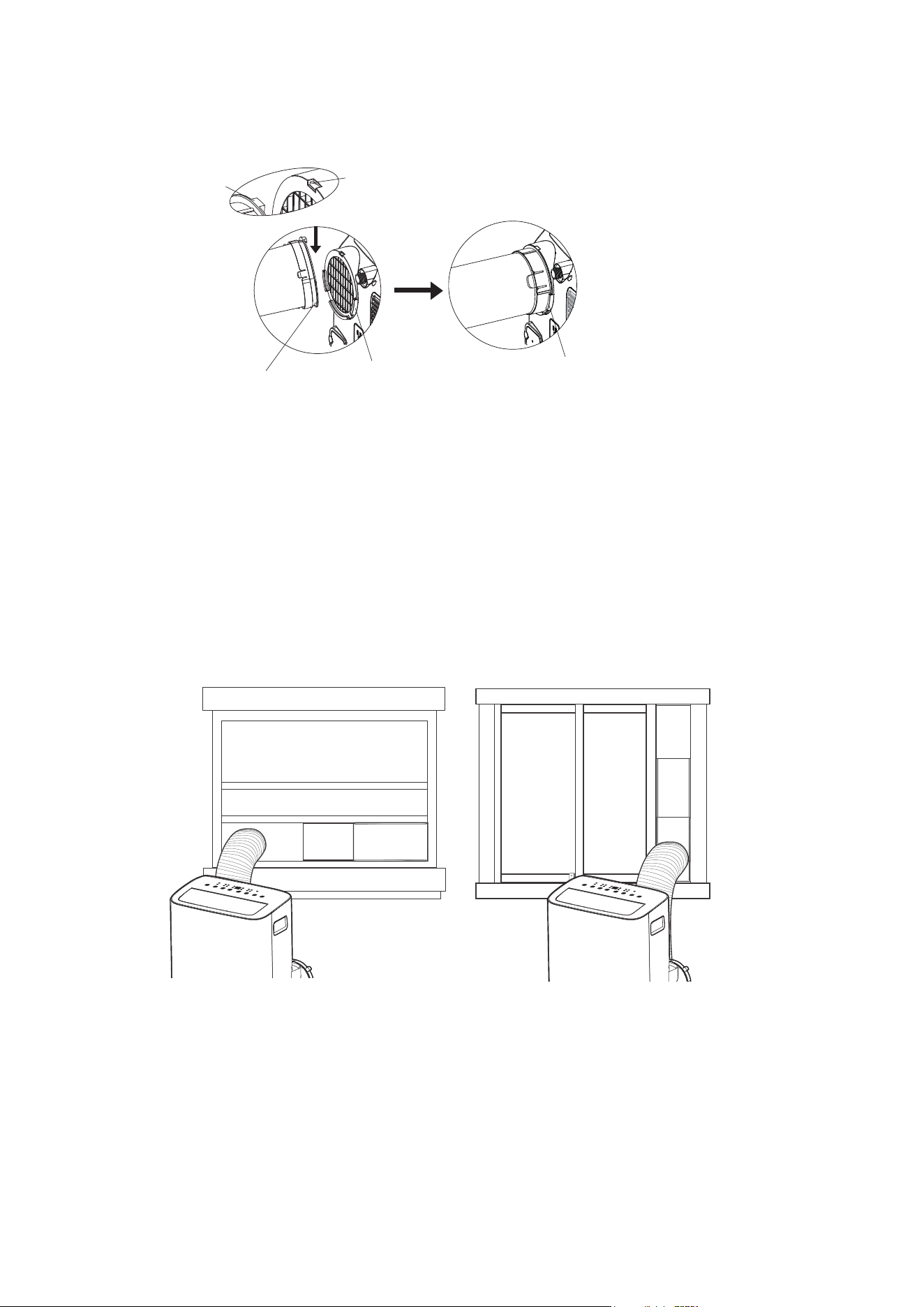
6. Install the Exhaust hose assembly to the unit
Push the Exhaust hose into the airoutlet opening of the unit along the arrow direction.
7. Connect the adaptor to the unit and the window
Insert the window slider adaptor into the hole of the window slider.
Hook
Hook Seat
Lower groove
adaptor
Make sure the adaptor
is inserted into the lower
groove of the air outlet.
20
Hung Window Installation Sliding Window Installation
Press the "MODE" button until the "Dry" indicator
light comes on. In this mode, the fan speed or the
temperature cannot be adjusted. The fan motor
operates at auto speed.
The air conditioner will control room temperature
automatically round the temperature point set by
you. Under AUTO mode, you can not select the
fan speed.
COOL operation
Press the "MODE" button until the "COOL" indicator
light comes on.
Press the ADJUST buttons "+" or "-" to select your
desired room temperature. The temperature can be
set within a range of 16°C~30°C/60°F~86°F.
Press the "FAN SPEED" button to choose the fan
speed.
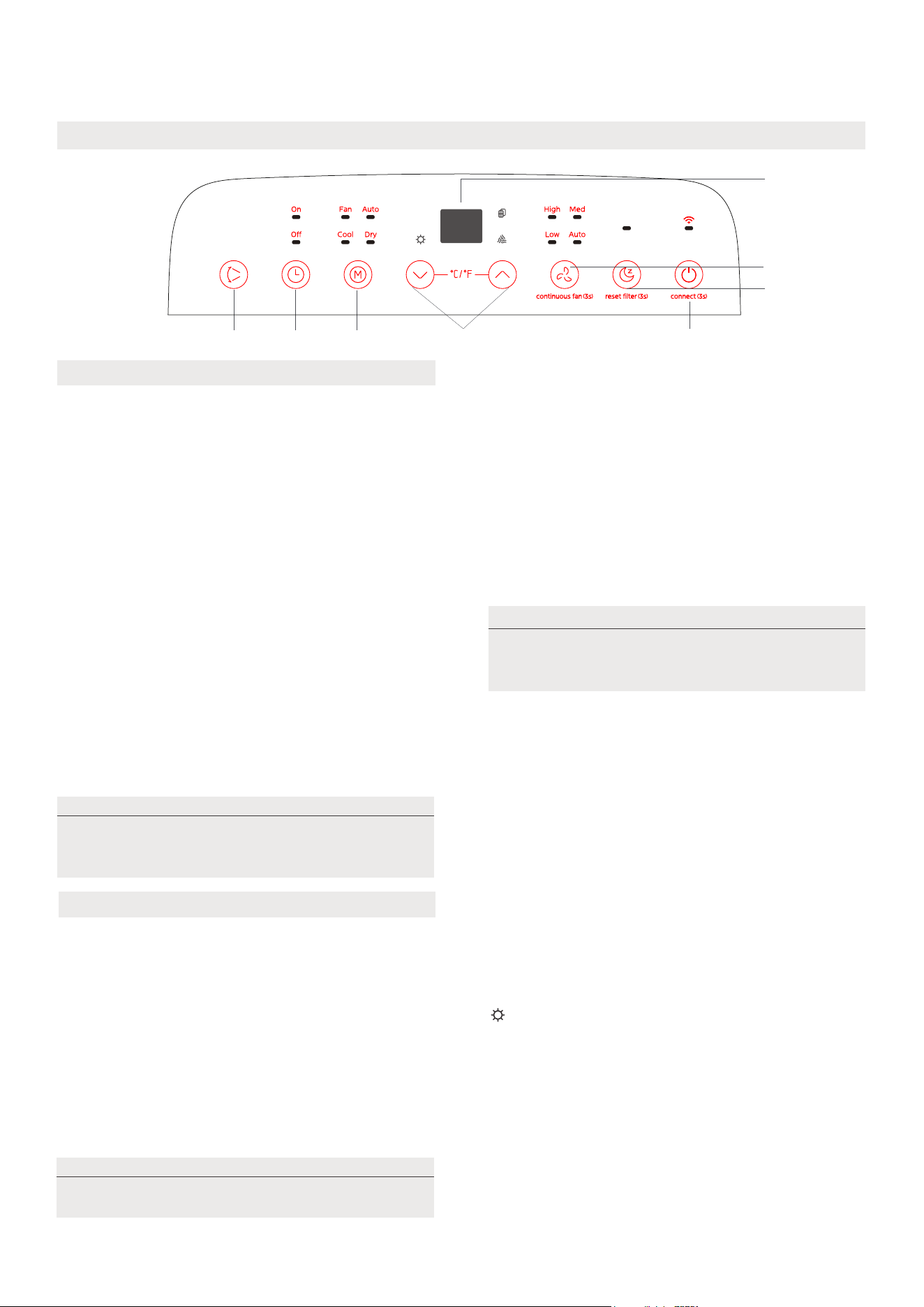
Get to know your AC
Electronic control operating instructions
1
7
8
2
56
4
3
1. POWER Button
2. MODE Function
Selects the appropriate operating mode. Each
time you press the button, a mode is selected in
a sequence that goes from AUTO, COOL, DRY,
FAN and HEAT (heat pump model only).
The mode indicator light illuminates under the
different mode settings.
Used to initiate the Wireless function. For the
first time to use Wireless function, press and
hold the power button for 3 seconds to initiate
the Wireless connection mode. The LED DISPLAY
shows 'AP' to indicate you can set Wireless
connection. If connection(router) is successful
within 8 minutes, the unit will exit Wireless
connection mode automatically and the Wireless
indicator illuminates.
If connection is failure within 8 minutes, the unit
exits Wireless connection mode automatically.
After Wireless connection is successful, you can
press and hold SWING and DOWN (-) buttons at
the same time for 3 seconds to turn off Wireless
function and the LED DISPLAY shows 'OF' for 3
seconds, press POWER and UP(+) buttons at the
same time to turn on Wireless function and the
LED DISPLAY shows 'On' for 3 seconds.
Power switch on/off.
21
DRY mode
AUTO mode
COOL mode
When you set the air conditioner to AUTO
mode, it will automatically select cooling,
heating (cooling only models without) or fan
only operation depending on what
temperature you have selected and the
room temperature.
FAN mode
• When in FAN mode, press the FAN button to
choose the fan speed. The temperature can not
be adjusted.
HEAT operation(heat pump model only)
• Press the "MODE" button until the "HEAT"
indicator light comes on.
• Press the ADJUST buttons UP and DOWN
to select
your desired room temperature. The temperature
can be set within a range of 16°C-30°C/60°F-86°F.
• Press the FAN button to choose the fan speed.
Note: For the fan speed can not be adjusted under
Keep windows and doors closed for the
best dehumidifying effect.
Under AUTO mode, both the AUTO
mode and the actual operation mode indicator
lights illuminate for some models.
When you restart the Wireless function, it may
take a period of time to connect to the network
automatically.
NOTE
NOTE
NOTE
HEAT mode.
COMFORT SENSE feature
This feature can be activated from the remote control ONLY. There is no indicator light on the control
panel. The remote control serves as a remote thermostat allowing for the precise temperature control
at its location.
To activate the
Comfort Sense
feature, point the remote control towards the unit and press the
Comfort
button. The remote control will send this signal to the AC until press the Comfort Sense
Comfort Sense
button
If the unit does not receive the
Comfort Sense
signal during
any 7 minutes interval, the unit will
exit the mode.
NOTE: This feature is unavailabe under FAN or DRY mode.
9. Other features
8. SLEEP mode
Press this button, the selected temperature will increase(cooling) or decrease(heating) by 1°C/2°F(or 1°F) 30
minutes. The temperature will then increase (cooling) or decrease (heating) by another 1°C/2°F(or 1°F) after
an additional 30 minutes. This new temperature will be maintained for 7 hours before it returns to the
originally selected temperature. This ends the Sleep/Eco mode and the unit will continue to operate as
originally programmed.
7. Continuous Fan function
In Cool or Dry mode, press and hold the constant Fan button for 3 seconds to turn the constant fan
function on or off. When the function is turned on, the constant fan light will illuminate. When the
function is turned on,the constant fan light will turn off
NOTE: This feature is unavailabe under FAN or DRY mode.
5.Timer button
3. UP and DOWN buttons
Used to adjust (increasing/decreasing) temperature settings in 1°C/2°F (or 1°F) increments in a range
of 16°C/60°F to 30°C/86°F.
TIMER setting in a range of 0~24hrs.
4. Display
Used to initiate the AUTO ON start time and AUTO OFF stop time program, in conjuction with the + & -
buttons. The timer on/off indicator light illuminates under the timer on/off settings.
6. SWING mode
Used to initiate the Auto swing feature. When the operation is ON, press the SWING button can stop the
louver at the desired angle.
When one of the above malfunctions occurs, turn off the unit, and check for any obstructions.
Restart the unit, if the malfunction is still present, turn off the unit and unplug the power cord. Contact
the manufacturer, its service agents or a similar qualified person for service.
Shows the set temperature in °C or °F and the Auto-timer settings. While on DRY and FAN modes, it
shows the room temperature.
Shows Error codes and protection code:
22
EH60-Room temperature sensor error.
EH61-Evaporator temperature sensor error.
EC52-Condenser temperature sensor error (on some models).
EH0b-Display panel communication error.
ELOC-Refrigerant leakage detection malfunction (on some models).
P1-Bottom tray is full. Connect the drain hose and drain the collected water. If the P1 code does not erase, call for
service.
NOTE
NOTE
The control is capable of displaying temperature in degrees Fahrenheit or degrees Celsius. To convert
from one to the other, press and hold the Up and Down buttons at the same time for 3 seconds.
Sense
again.
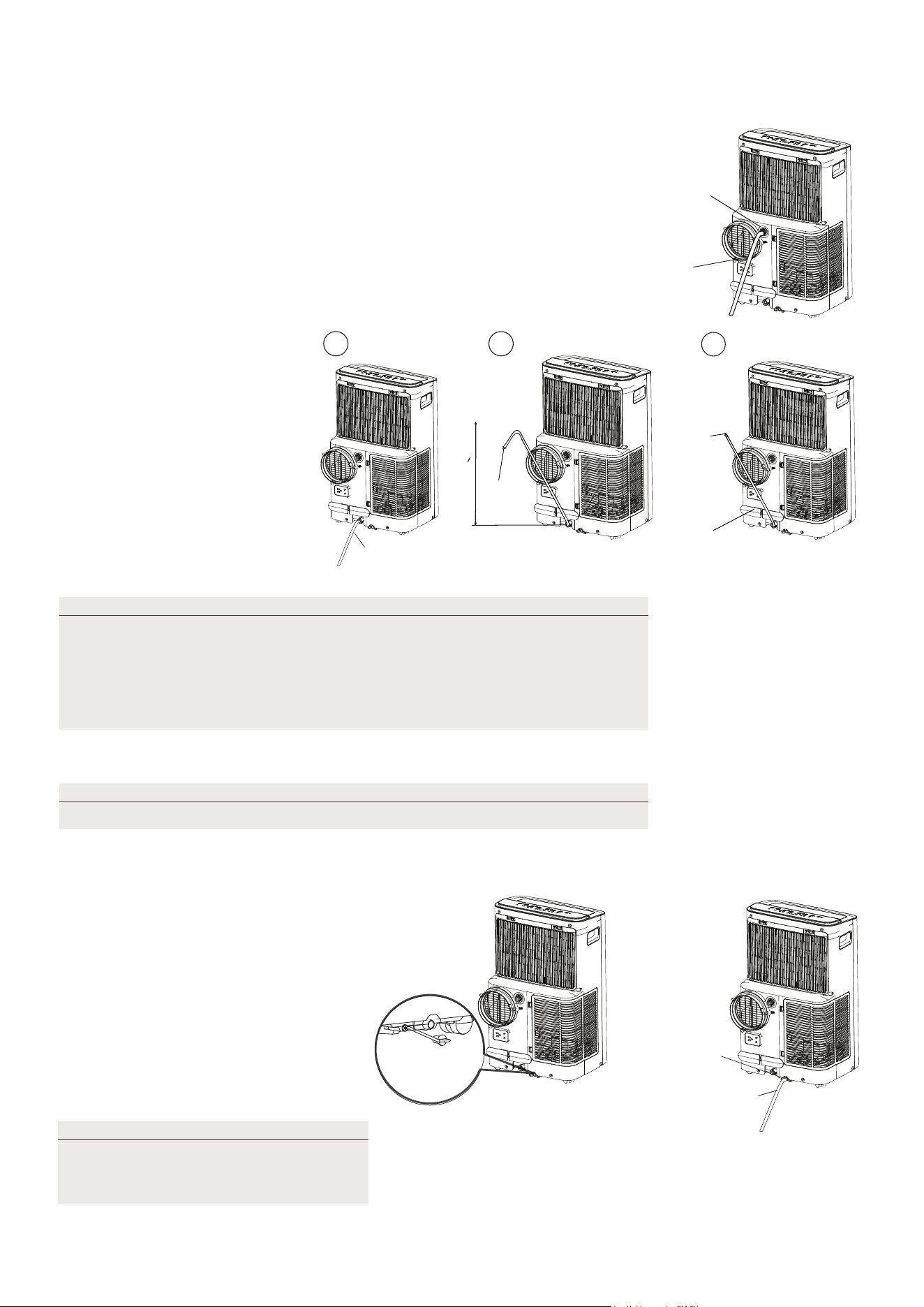
Drainage guide
During dehumidifying modes, remove the upper drain plug from the back
of the unit, install the drain connector(5/8" universal female mender) with
3/4" hose(locally purchased). For the models without drain connector,
just attach the drain hose to the hole. Place the open end of the hose
directly over the drain area in your basement floor.
During heating pump mode, carefully move the unit to a drain location,and let
the water drain away.
When the water level of the bottom tray
reaches a predetermined level, the unit
beeps 8 times, the digital display area
shows "P1" . At this time the air
conditioning/dehumidification process
will immediately stop. However, the fan
motor will continue to operate
(this is normal). Carefully move the unit
to a drain location, remove the bottom
drain plug and let the water drain away.
Reinstall the bottom drain plug and
restart the machine until the "P1" symbol
disappears. If the error repeats, call for
service.
During heating pump mode,
remove the lower drain plug
from the back of the unit,
install the drain connector
(5/8" universal female mender)
with 3/4" hose(locally purchased).
For the models without drain
connector, just attach the drain
hose to the hole.
Place the open end of the Hose
adaptor directly over the drain
area in your basement floor.
Continuous
drain hose
Remove the
upper drain
plug
23
Continuous
drain hose
drain hose
adaptor
√√
delivery lift <1.8m
X
drain hose
adaptor
Press the power
cord buckle into
the rear cover.
Continuous
drain hose
Remove the
lower drain
plug
NOTE
NOTE
Make sure the hose is secure so there are no leaks. Direct the hose toward
the drain, making sure that there are no kinks that will stop the warter
flowing. Place the end of the hose into the drain and make sure the end of
the hose is down to let the water flow smoothly. Do never let the end of the
hose up. When the continuous drain hose is not used, ensure that the
corresponding drain plug and knob are installed firmly to prevent leakage.
Be sure to reinstall the bottom drain
plug firmly to prevent leakage before
usingthe unit.
NOTE
Make sure the drain hose is lower than the bottom tray drain outlet.
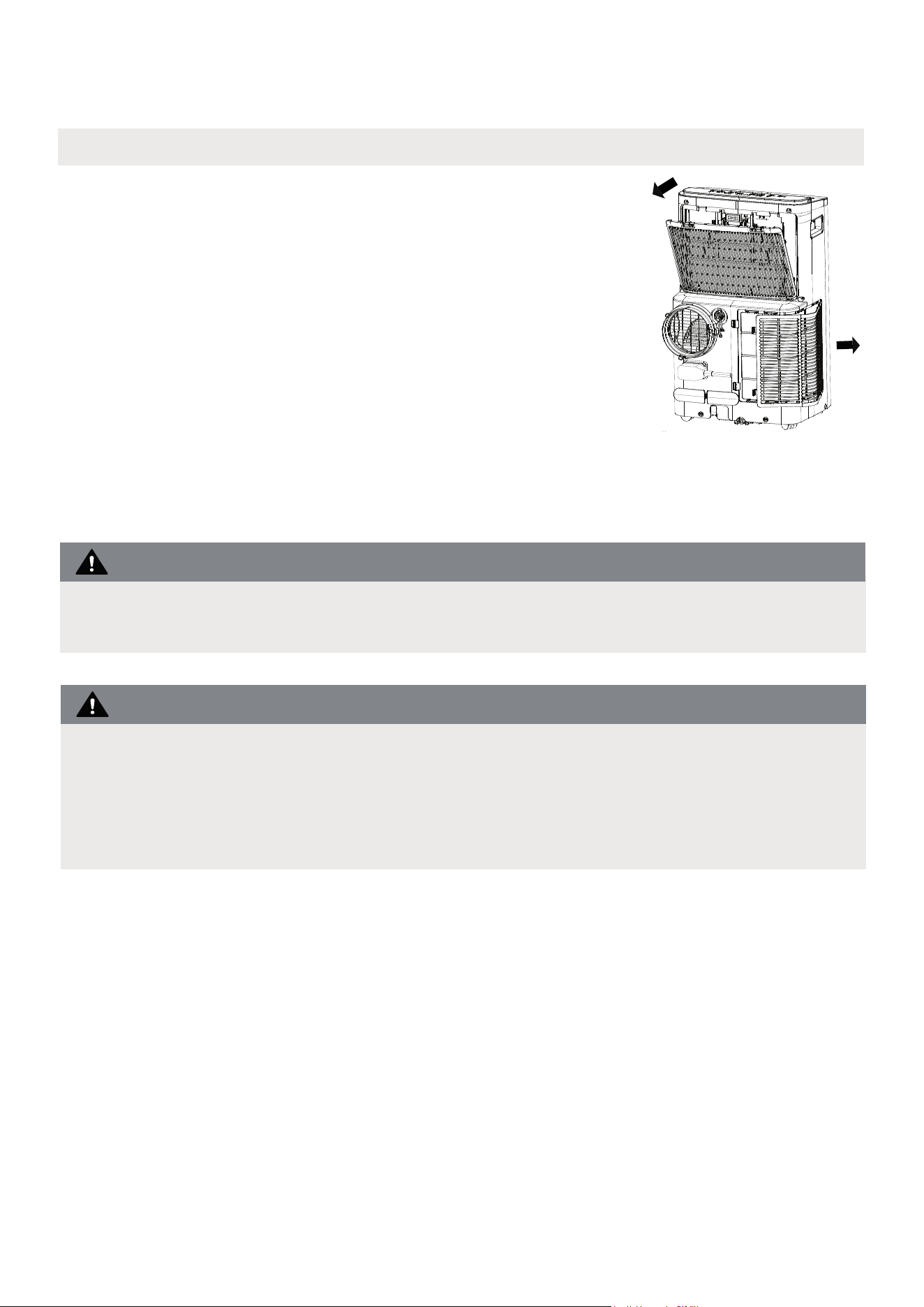
How to clean & maintenance your AC.
Cleaning & maintenance
Air Filter & Cabinet Cleaning
· Always unplug the unit before cleaning or servicing.
· DO NOT use flammable liquids or chemicals to clean the unit.
· DO NOT wash the unit under running water. Doing so causes electrical danger.
· DO NOT operate the machine if the power supply was damaged during cleaning.
A damaged power cord must be replaced with a new cord from the manufacturer.
DO NOT operate the unit without filter because dirt and lint will clog it and reduce
performance.
Remove the air filter
24
CAUTION
CAUTION
Clean the unit using a damp, lint-free cloth and mild detergent.
Dry the unit with a dry, lint-free cloth.
• Take the filter out along the arrow direction.
• Wash the air filter by immersing it gently in warm water
(about 40°C/104°F) with a neutral detergent.
• Rinse the filter and dry it in a shady place.
• Install the air filter after cleaning.
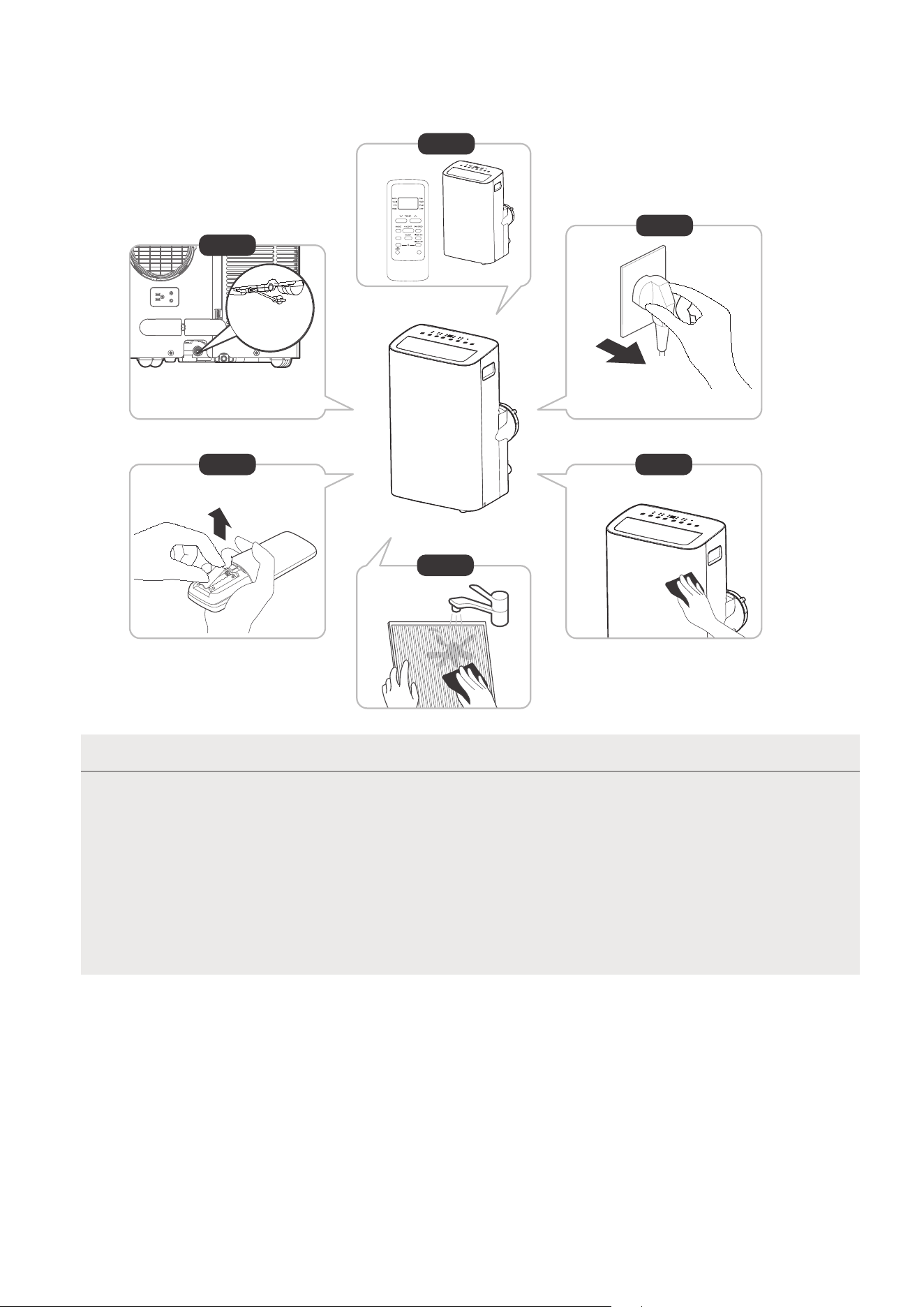
Store the unit when not in use
NOTE
12hours
Step6
Step 3
Step4
Step 1
Step 2
Step 5
*Please refer to the actual
plug, and the legend is for
reference only.
*Drain the unit‘s water collection
tray then reinstall the bottom
drain plug back in.
25
• Be sure to store the unit in a cool, dark place. Exposure to direct sunshine or
extreme heat can
shorten the lifespan of the unit.
• The cabinet and front may be dusted with an oil-free cloth or washed with a
cloth dampened
in a solution of warm water and mild liquid dishwashing
wipe dry. Never use harsh cleansers, wax or
excess water from the cloth
controls
detergent. Rinse thoroughly and
polish on the cabinet front. Be sure to wring
before wiping around the controls. Excess water in or around the
may cause damage to the unit.
Step 1: Drain the unit’s water collection tray according to the instructions in the following section.
Step 2: Run the appliance on FAN mode for 12 hours in a warm room to dry it and prevent mold.
Step 4: Clean the machine.
Step 6: Remove the batteries from the remote control.
Step 3: Turn off the appliance and unplug it.
Step 5: Clean the air filter according to the instructions in the previous section. Reinstall the clean,
dry filter before storing.
SWING
C-SENSE
°C/°F
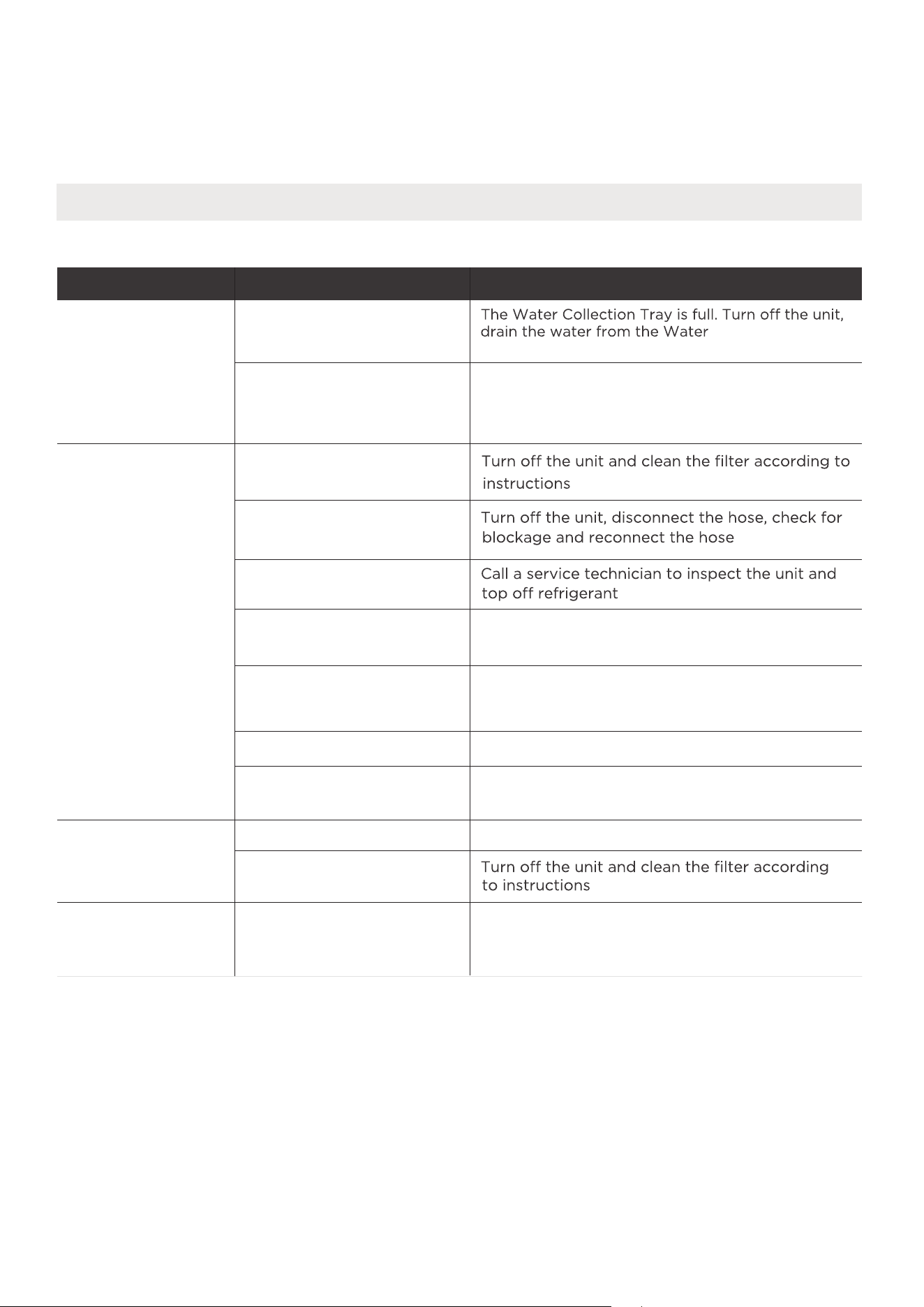
Problem Solving
TROUBLESHOOTING
Common Issues
The following problems are not a malfunction and in most situations will not require repairs.
Problem Possible Causes Solution
Unit does not turn
on when pressing
ON/OFF button
P1 Protection Code
In COOL mode: room
temperature is lower than
the set temperature
Reset the temperature
Collection Tray and
The air filter is blocked with
dust or animal hair
The unit is low on
refrigerant
Temperature setting is too
high
The windows and doors in
the room are open
The room area is too large
Unit does
not cool well
Exhaust hose is not
connected or is blocked
There are heat sources
inside the room
Decrease the set temperature
Make sure all windows and doors are closed
Double-check the cooling area
Remove the heat sources if possible
The unit is noisy
and vibrates too
much
The unit makes a
gurgling sound
The ground is not level Place the unit on a flat, level surface
The air filter is blocked with
dust or animal hair
This sound is caused by the
flow of refrigerant inside
the unit
This is normal
restart the unit.
26
27
REMOTE CONTROL AND APP
INSTRUCTIONS
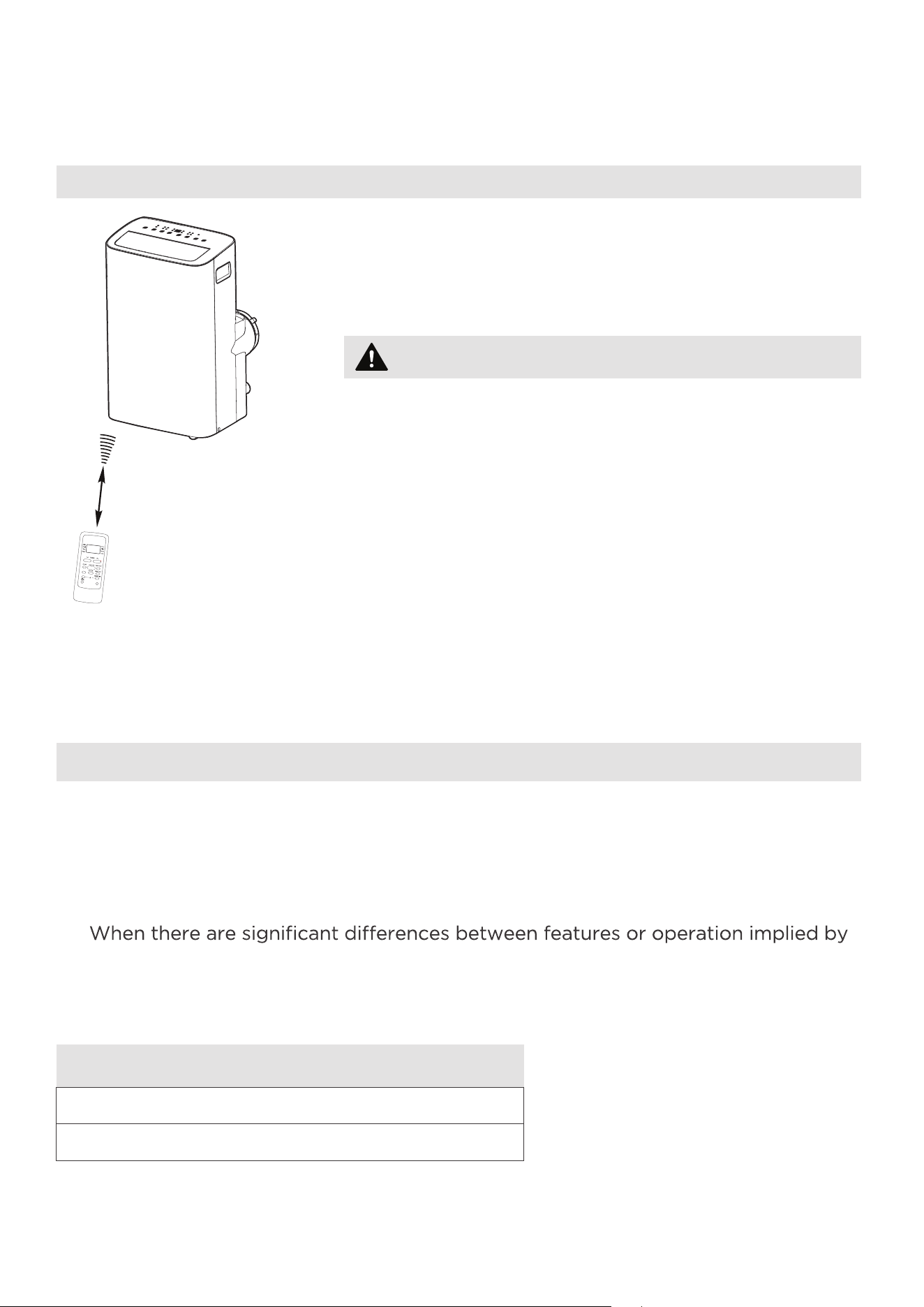
Location of the remote control
Use the remote controller within a distance of 26.2 ft
(8 meters) from the air conditioner, pointing it towards
the receiver. Reception is confirmed by a beep.
Handling the Remote Control
•
The air conditioner will not operate if curtains,
doors or other materials block the signals from the
remote control to the unit.
•
Prevent any liquid from spilling onto the remote
control. Do not expose the remote control to
direct sunlight or heat.
•
If the infrared signal receiver on the indoor unit is
exposed to direct sunlight, the air conditioner may
not function properly. Use curtains to prevent the
sunlight from falling on the receiver.
•
If other electrical appliances react to the remote
control, either move these appliances or consult
your local dealer.
CAUTION
26.2 ft (8 meters)
NOTICE
Remote Controller Specifications
•
Button design is based on typical model and may vary slightly from the actual
one you purchased.
•
All the functions described are accomplished by the unit. If the unit is without a
feature, the unit will not respond if the corresponding button on the remote is
pressed.
•
the remote control illustration and the actual functions described in the USER’S
MANUAL, the descriptions in the USER’S MANUAL shall prevail.
Rated Voltage: 3.0V (Dry batteries R03/LR03x2)
Environment: 23°F ~140°F (-5°~60°)
SWING
C-SENSE
°C/°F
28
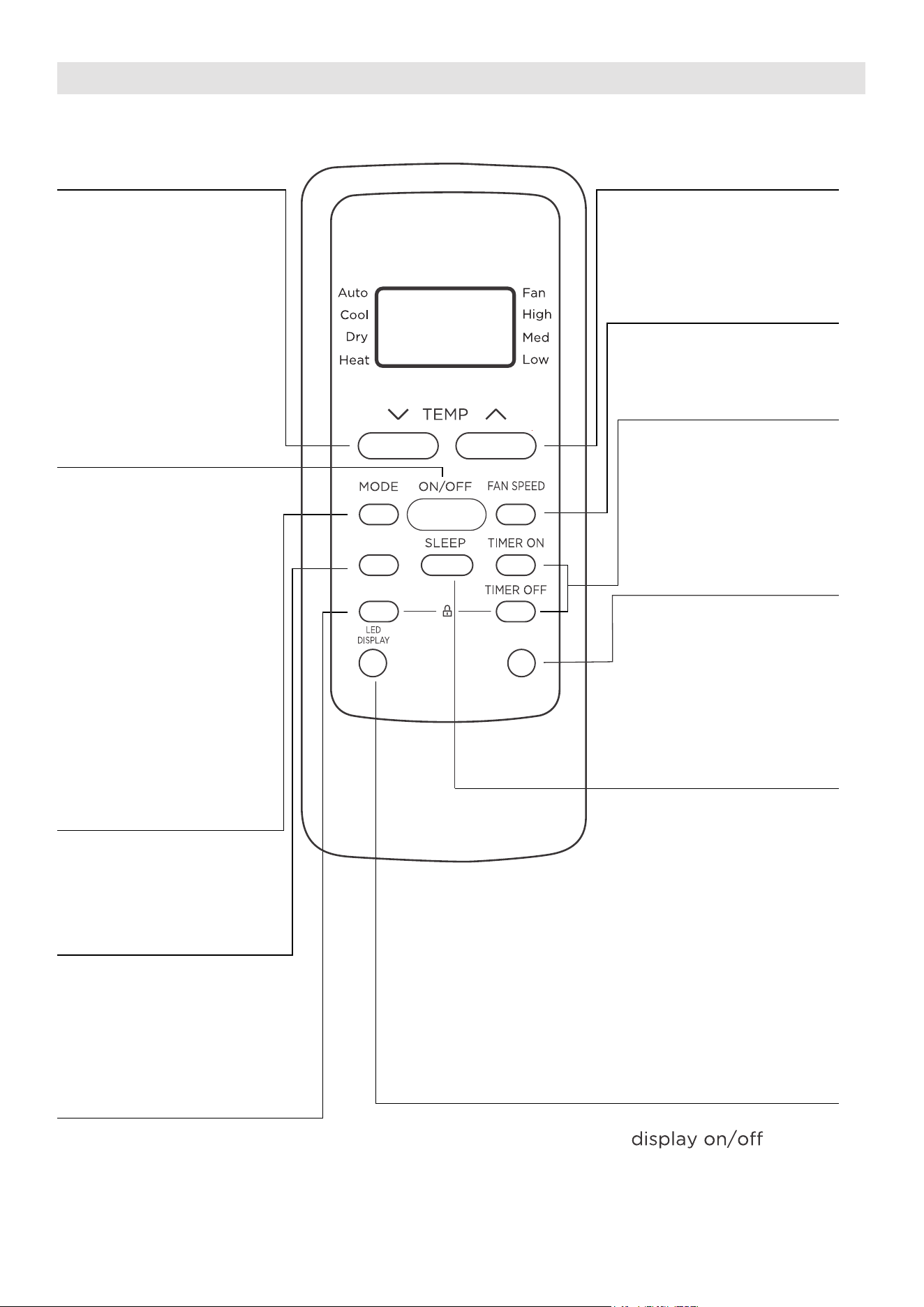
Function Buttons
MODE Button
Press this button to
select the desired
operation mode.
TEMP UP Button
Press this button to
increase the indoor
temperature setting.
SPEED Button
Used to select the
desired fan speed.
SLEEP Button
Press this button to
LED DISPLAY Button
Turns the unit’s LED
activate the Sleep
mode. This function
is available on COOL
or AUTO mode only
and will maintain the
most comfortable
temperature for you
while saving energy.
For more details, see
“sleep operation” in
Page 22
°C/°F Button
Press this button to
change the temperature
display between Celsius
and Fahrenheit
TEMP DOWN Button
Press this button to
decrease the indoor
temperature setting.
TIMER Button
Press this button to
activate the “Auto
Start” or “Auto Stop”
program.
ON/OFF Button
Operation starts when
this button is pressed
and stops when the
button is pressed again.
Press this button to start and
stop the horizontal louver
movement. Hold down for
2 seconds to initiate vertical
louver auto swing feature
(some units) .
COMFORTSENSE Button
Press this button to active the
ComfortSense mode, to optimize
the temperature around you and
ensure maximum comfort.
SWING
C-SENSE
°C/°F
SWING Button
NOTE: If the unit
has ENERGY SAVER
function, it will initiate
automatically the
Energy Saver function
under Cool, Dry, and
Auto (only Auto-
Cooling and Auto-Fan)
modes.
29
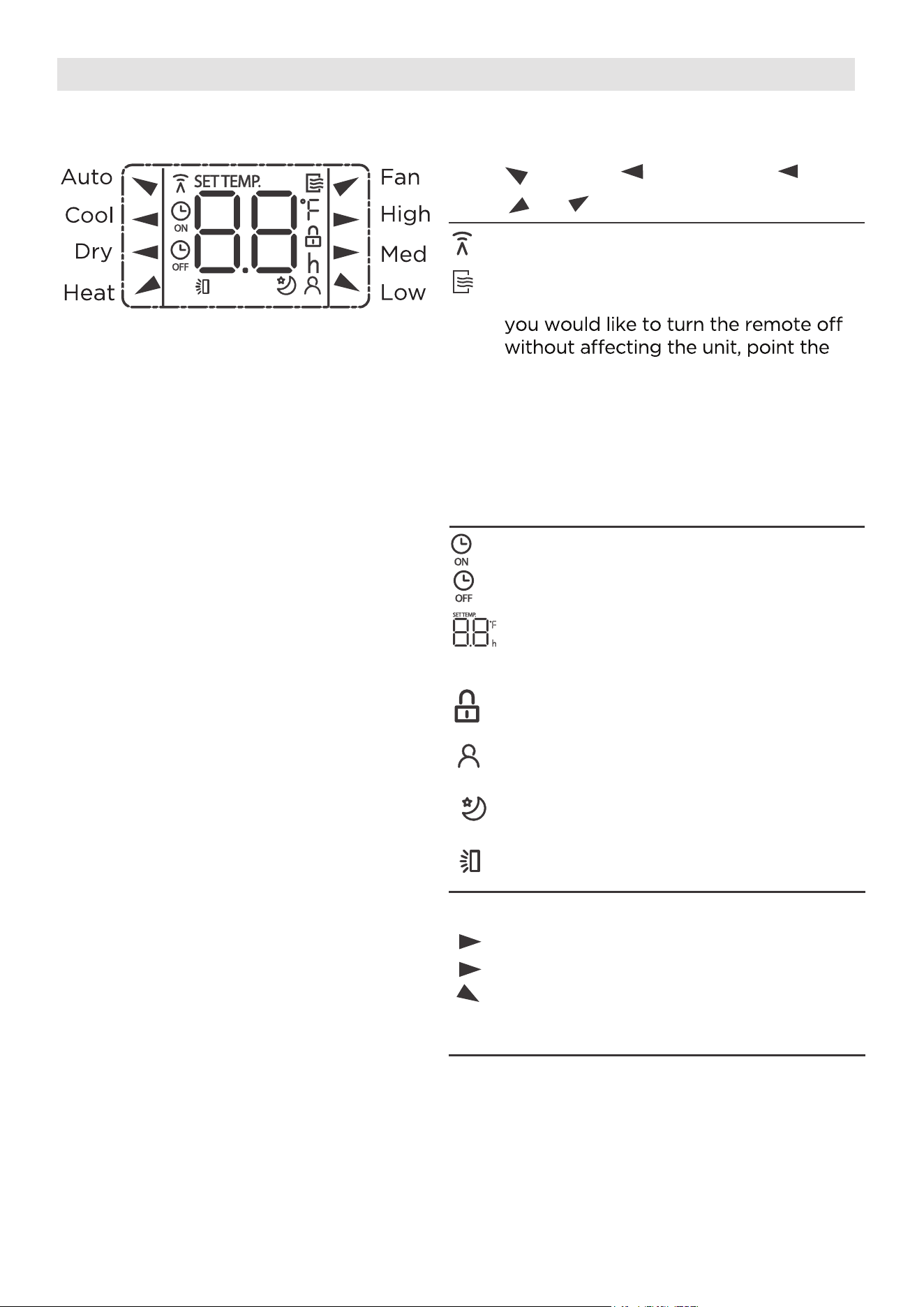
Information are displayed when the remote controller is power up.
All indicators shown in the figure are for the purpose of clear presentation.
But during the actaul operation, only the relative function signs are shown
on the display window.
Remote Screen Indicators
Displayed when data transmitted.
Appears when the remote is enabled
and can send a signal to the unit. If
remote away from the unit and press
the ON/OFF button.
To turn the remote on, point the
remote away from the unit and press
the ON/OFF button. The unit will not
receive commands from the remote
if this indicator is not illuminated.
Auto
Heat
Cool
Fan
Dry
Mode display
Low speed
NO display
Medium speed
High speed
Auto fan speed
Displayed when TIMER ON time is set
Displayed when TIMER OFF time is set
Indicated all the current settings are
locked
Shows set temperature or room
temperature, or time under TIMER
setting
HIGH
MED
LOW
Fan speed indication
Displayed when ComfortSense feature
is activated
Displayed when SLEEP feature is
activated
Note:
Horizontal louver swing display
30
SWING
C-SENSE
°C/°F
How to Use the Buttons
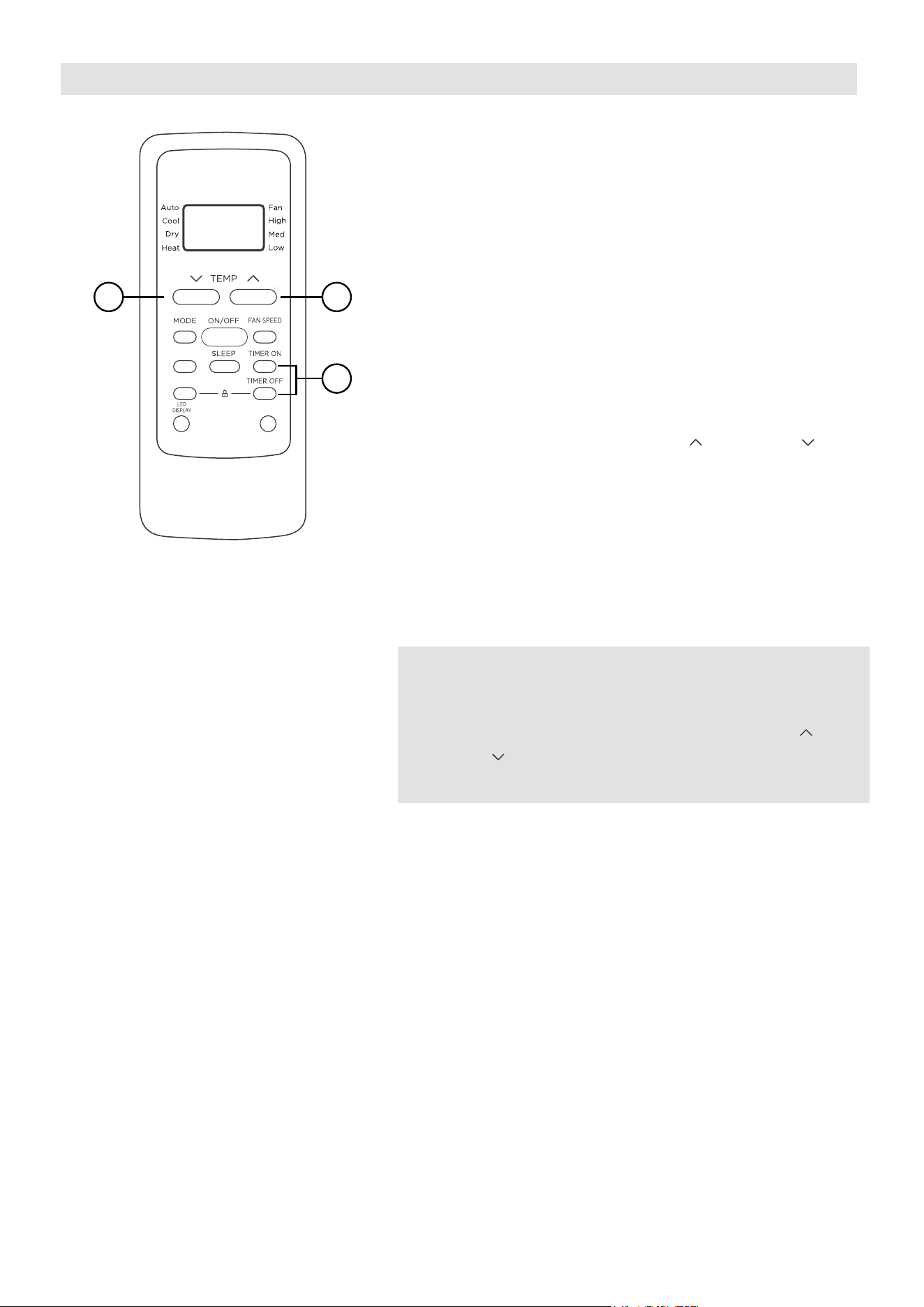
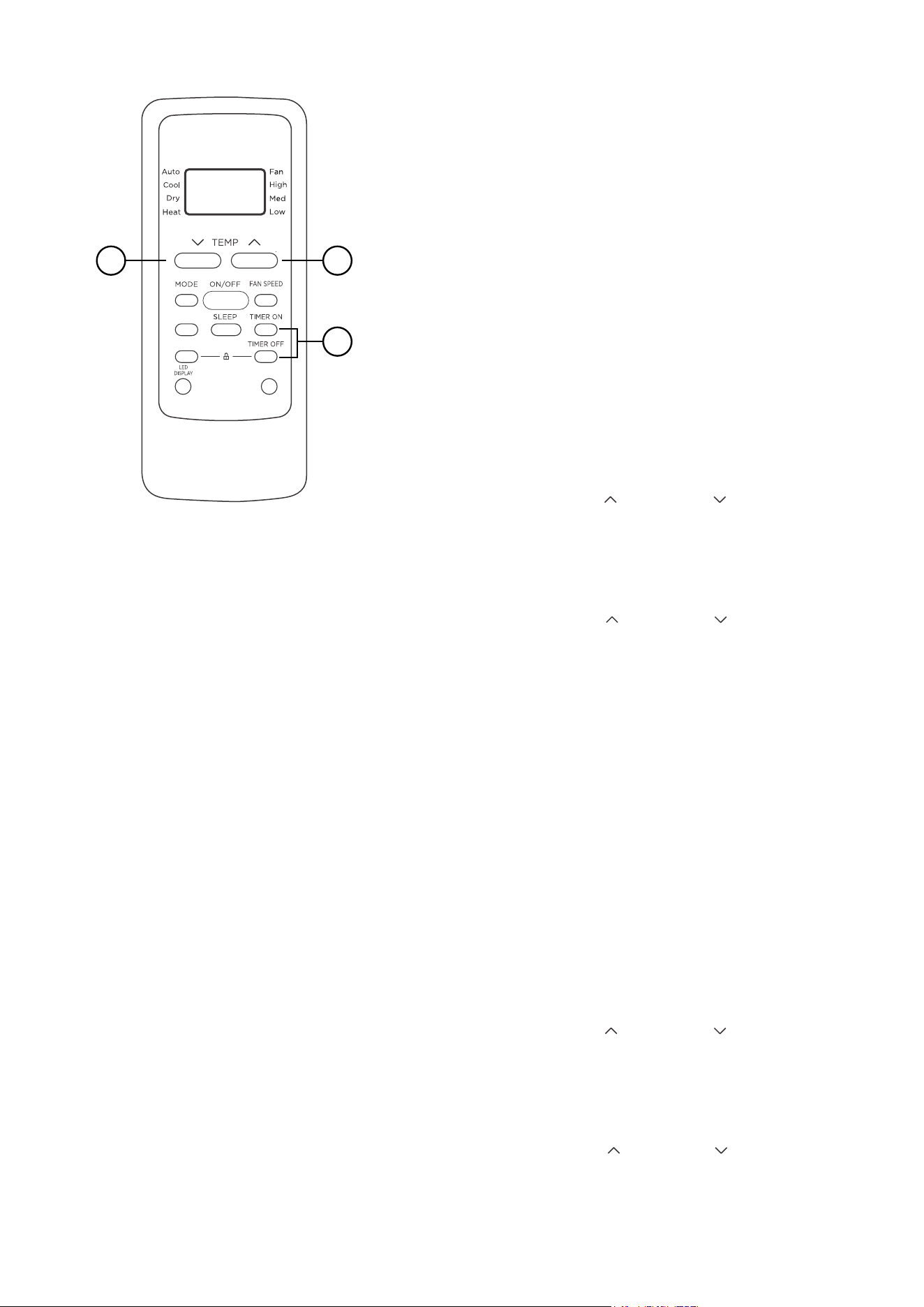
TIMER OPERATION
Press the TIMER button to initiate the Auto-start
and Auto-stop setting program of the unit.
To set the Auto-start/stop time.
1. Press the TIMER button, when the TIMER ON
indicator is displayed on the LED window of
the air conditioner, it indicates the Auto Start
setting program is initiated. When the TIMER
OFF indicator is displayed on the LED window
of the air conditioner, it indicates the Auto
Stop setting program is initiated.
2. Press or hold the TEMP UP ( )/DOWN ( ) to
change the Auto time. The control will count
down the time remaining until start/stop.
3. The selected time will register in 5 seconds and
the air conditioner will automatically revert back
to display the previous temperature
setting.
4. Turning the unit ON or OFF at any time will
cancel the Auto Start/stop function.
NOTES
To cancel the TIMER setting, push the TIMER
button and press or hold the TEMP UP ( )/
DOWN ( ) until 0 hour is displayed on the LCD
window of the air conditioner.
1
22
31
COMBINED TIMER
(Setting both ON and OFF timers simultaneously)
AUTO STOP >AUTO START
(On > Stop > Start operation)
This feature is useful when you want to stop the
air conditioner after you go to bed, and start it
again in the morning when you wake up or when
you return home.
Example:
To stop the air conditioner 2 hours after setting
and start it again 10 hours after setting.
AUTO START > AUTO STOP
(Off > Start > Stop operation)
This feature is useful when you want to start the
air conditioner before you wake up and stop it
after you leave the house.
Example:
To start the air conditioner 5 hours after setting,
and stop it 8 hours after setting.
SWING
C-SENSE
°C/°F
1
22
1. Press the TIMER button until the TIMER OFF
indicator is displayed on the LED display of
the air conditioner.
2. Use the TEMP UP ( )/DOWN ( ) button to
display “2.0” on the LED display of the air
conditioner.
3. Press the TIMER button again to display the
TIMER OFF on the LED display of the unit.
4. Use the TEMP UP ( )/DOWN ( ) button to
display “10” on the LED display of the unit.
5. Wait for 5 seconds until the previous display
appears in LED window.
1. Press the TIMER button until the TIMER ON
indicator is displayed on the LED display of
the air conditioner.
2. Use the TEMP UP ( )/DOWN ( ) button to
display “5.0” on the LED display of the air
conditioner.
3. Press the TIMER button again to display the
TIMER OFF on the LED display of the unit.
4. Use the TEMP UP ( )/DO
WN ( ) button to
display “8.0” on the LED display of the unit.
5. Wait for 5 seconds until the previous display
appears in LED window.
32
NOTES
• Button design is based on a typical model and may slightly vary from the actual
one you purchased.
• This device complies with part 15 of the FCC Rules. Operation is subject to the
following two conditions: (1) This device may not cause harmful interference,
and (2) this device must accept any interference received, including interference
that may cause undesired operation.
•
This equipment has been tested and found to comply with the limits for a Class
B digital device, pursuant to part 15 of the FCC Rules. These limits are designed
to provide reasonable protection against harmful interference in a residential
installation. This equipment generates, uses and can radiate radio frequency
energy and, if not installed and used in accordance with the instructions, may cause
harmful interference to radio communications. However, there is no guarantee that
interference will not occur in a particular installation. If this equipment does cause
harmful interference to radio or television reception, which can be determined by
interference by one or more of the following measures:
- Reorient or relocate the receiving antenna.
- Increase the separation between the equipment and receiver.
receiver is connected.
- Consult the dealer or an experienced radio/TV technician for help.
- Changes or modifications not approved by the party responsible for compliance
could void users authority to operate the equipment.
Battery Warning:
Do not mix old and new batteries and Do not mix alkaline, standard (carbon-zinc)
or rechargeable (ni-cad, ni-mh, etc.) batteries
Unique Identifier: Midea brand, RG51F2(2)/CEFU1, RG51F2(2)/EFU1
Responsible Party U.S. Contact Information
Midea America Corporation
300 Kimball Dr
Parsippany NJ
07054
This device complies with Part 15 of the FCC Rules. Operation is subject to the
following two conditions: (1) This device may not cause harmful interference, and
(2) this dev
ice must accept any interference received, including interference that
may cause undesired operation.
Telephone number or internet contact information: Midea.com/us
FCC Compliance Statement ( products subject to Part 15)
Supplier's Declaration of Conformity
47 CFR § 2.1077 Compliance Information
33
We hereby declare that this AC is in compliance with the essential requirements and
other relevant provisions of Directive 1999/5/EC.
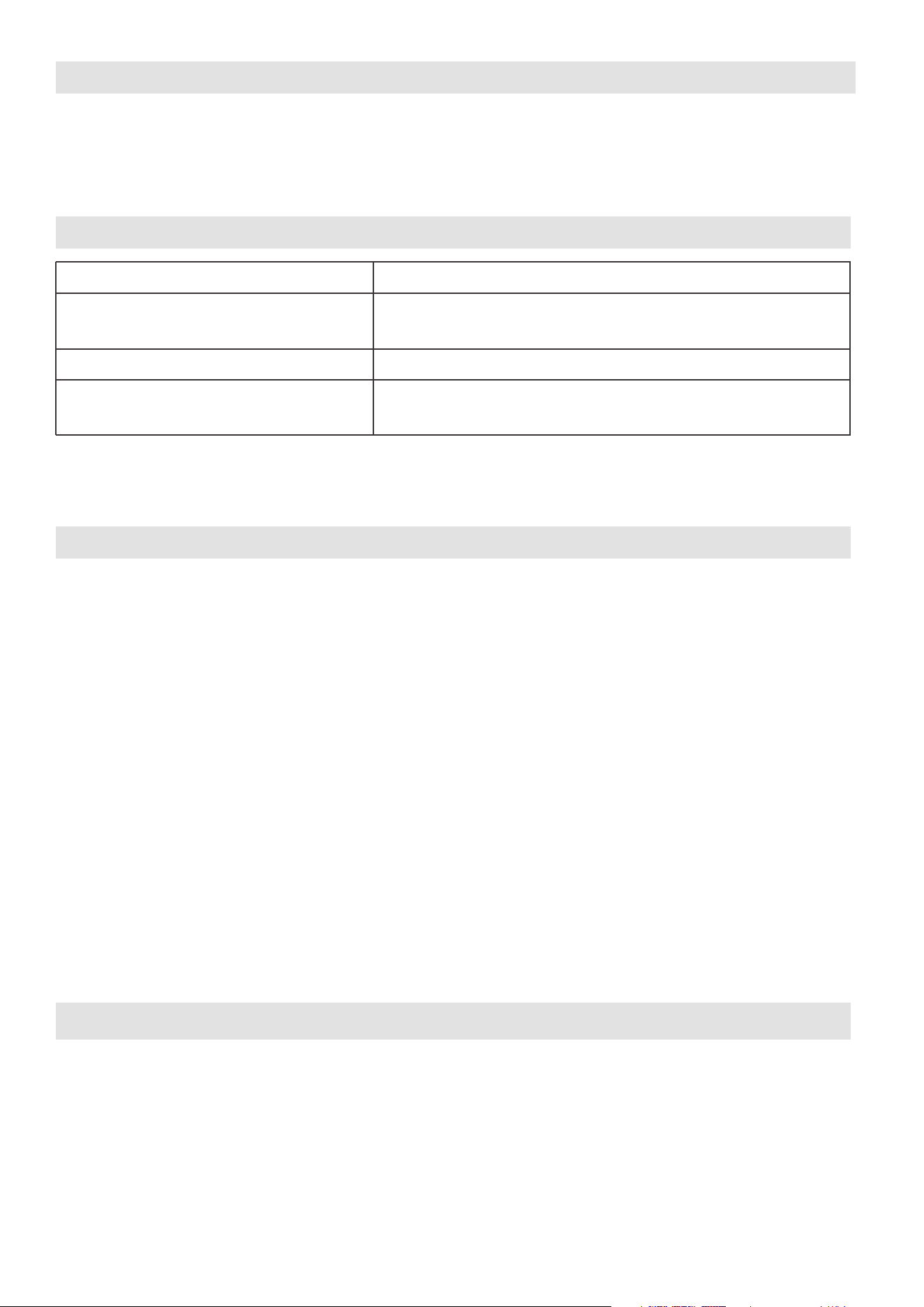
1. Supports operating systems: iOS 10+ or Android 5+.
2.
In the event of a OS update, there may be a delay between the update of the OS
and a related software update during which your OS may or may not be supported
until a new version is released. Your specific mobile phone or problems in your
network may prevent the system from working and Midea will not be responsible
for any problems that could be caused by incompatibility or network issues.
3.
This Smart AC only supports WPA-PSK/WPA2-PSK (recommended) encryption.
4.
To ensure proper scanning of the QR code, your smart phone must have at least a
5-megapixel camera.
5.
Due to unstable network connectivity, requests may time out. If this happens, rerun
the network configuration.
6.
Due to unstable network connectivity, commands may time out. If this happens,
the smartphone app and the actual product may display conflicting information.
The information displayed on the actual product is always the most accurate
available. Refresh the app to re-sync.
Model: US-SK109 Dimensions: 41 x 24 x 5 (mm)
Operation Temperature: 0°C ~ 45°C / 32°F ~ 113°F.
Antenna Type: Printed PCB
Antenna
Operation Humidity: 10% ~ 85%
Frequency: 2400-2483.5MHz
Power Input: DC 5V/500 mA
MaximumTransmittedPower:
<20dBm
Midea will not be responsible for any problems that could be caused by
incompatibility or network issues, your wireless router and mobile phone.
NOTICE
DECLARATION OF CONFORMITY
SPECIFICATION OF WIRELESS MODULE
PRECAUTIONS
34
Devices required to use the Smart AC:
DOWNLOAD AND INSTALL THE APP
SYSTEM OVERVIEW
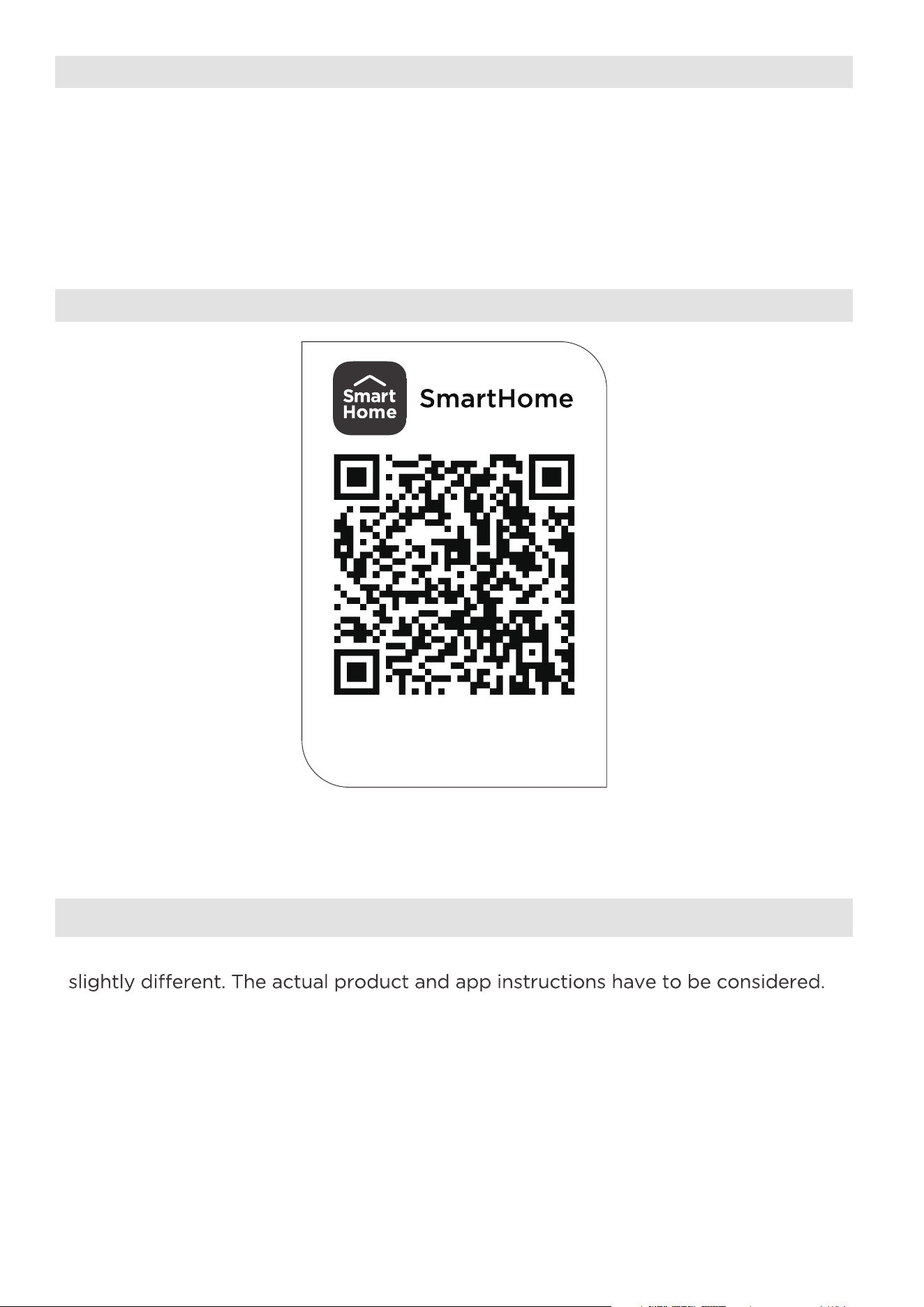
Scan to download app.
• You can also go to the Google Play or App Store and search for SmartHome.
NOTICE
All the images in this manual are for reference only, your product and app may look
1. Smart Phone with compatible iOS or Android system.
2. Wireless Router
3. Smart Air Conditioner
Download the app
& activate product
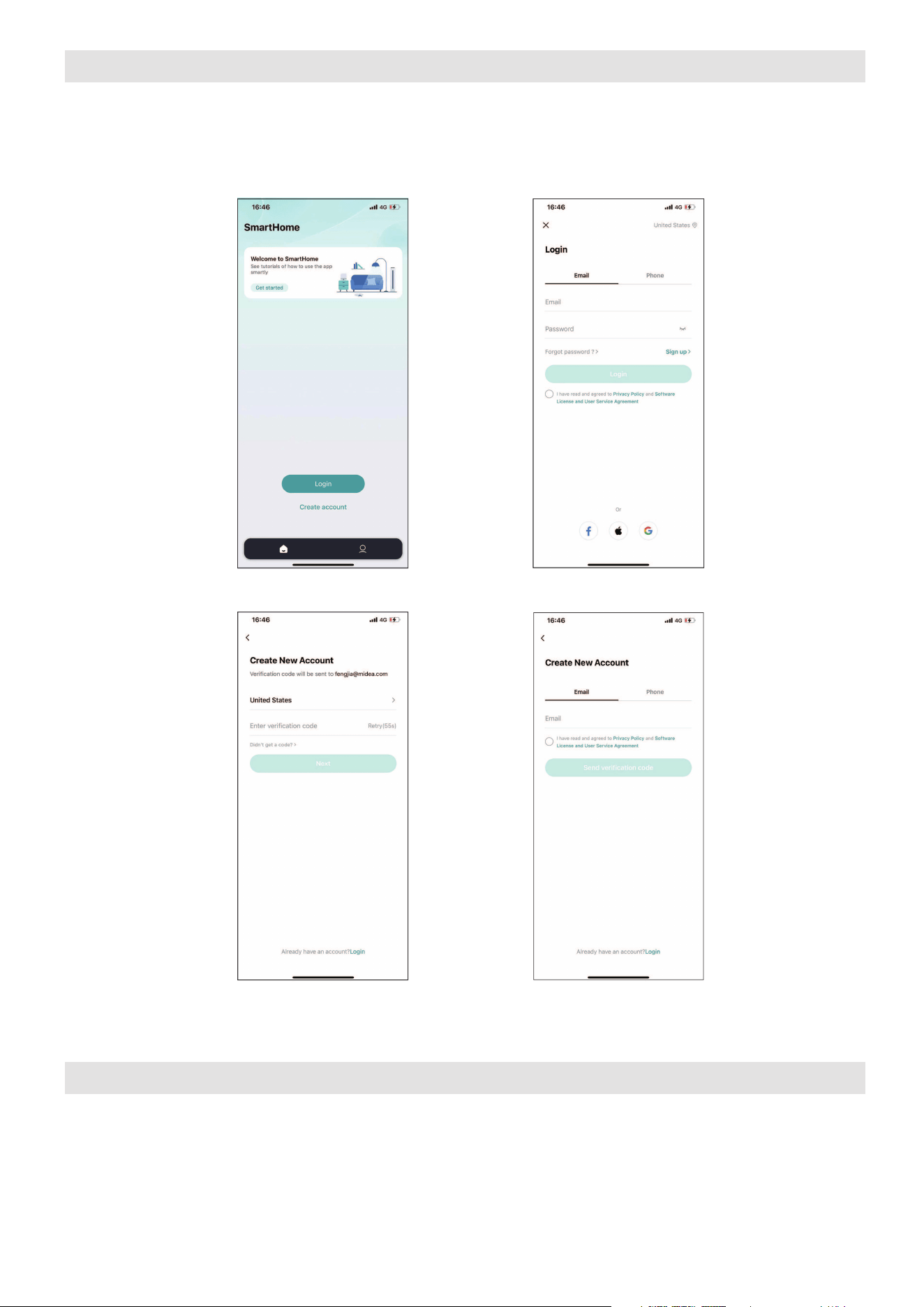
35
NOTICE
• Make sure your smartphone is able to connect to the wireless network which
will be used.
• Make sure also that the device is not connecting to other networks in range.
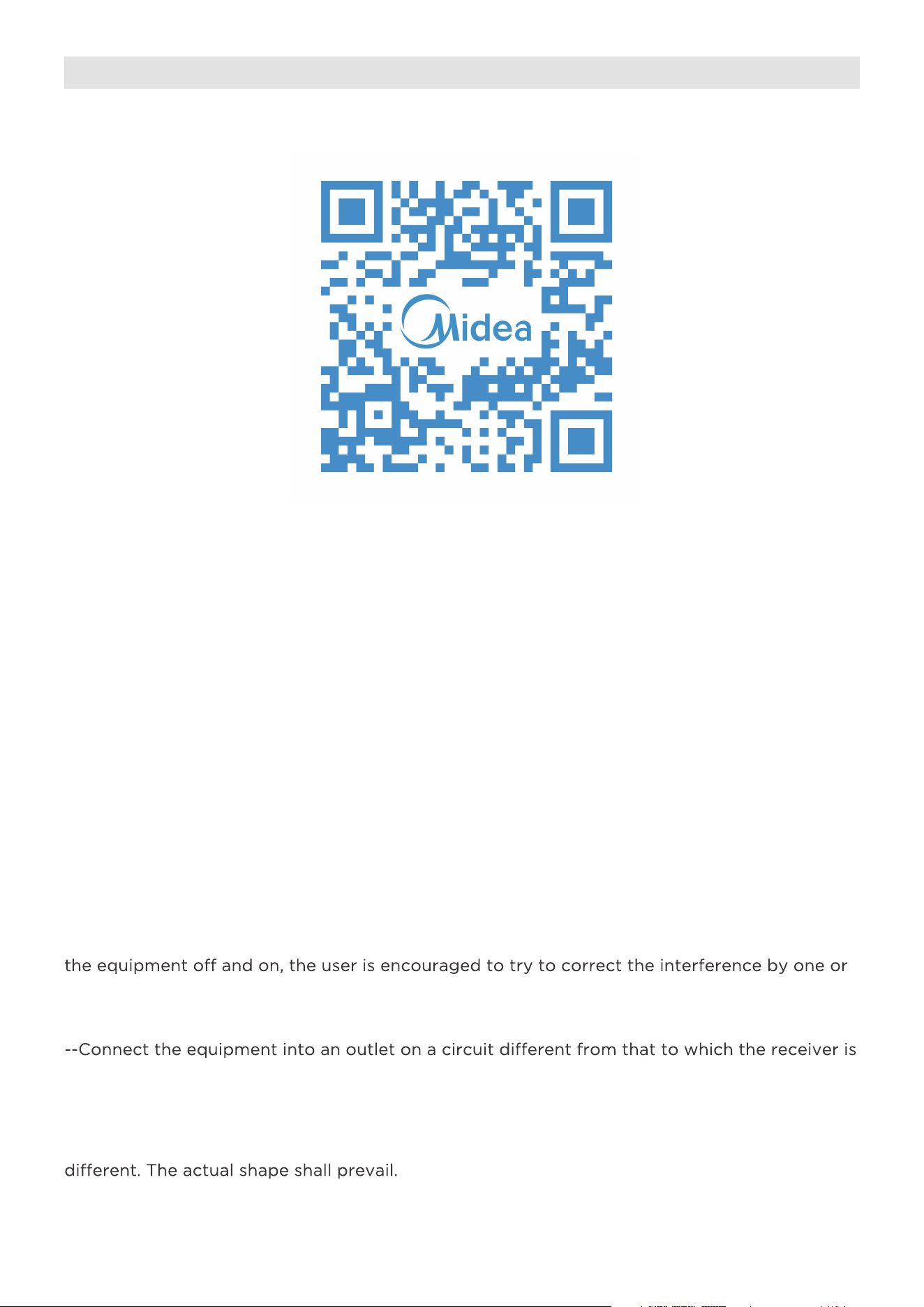
CREATE YOUR ACCOUNT
2. Select Sign Up.1. Press Login.
3. Enter your email
address.
4. Enter the verification code that
was sent to your email address.
• Make sure your smartphone is connected to your wireless router and your
wireless router has a working 2.4 GHz internet connection.
• It is recommended to activate your account immediately to be able to recover
your password by email.
36
ADDITIONAL APP AND SMART HOME FUNCTIONS
Declaration of conformity
CONTAINS FCC ID: 2ADQOMDNA23
CONTAINS IC : 12575A-MDNA23
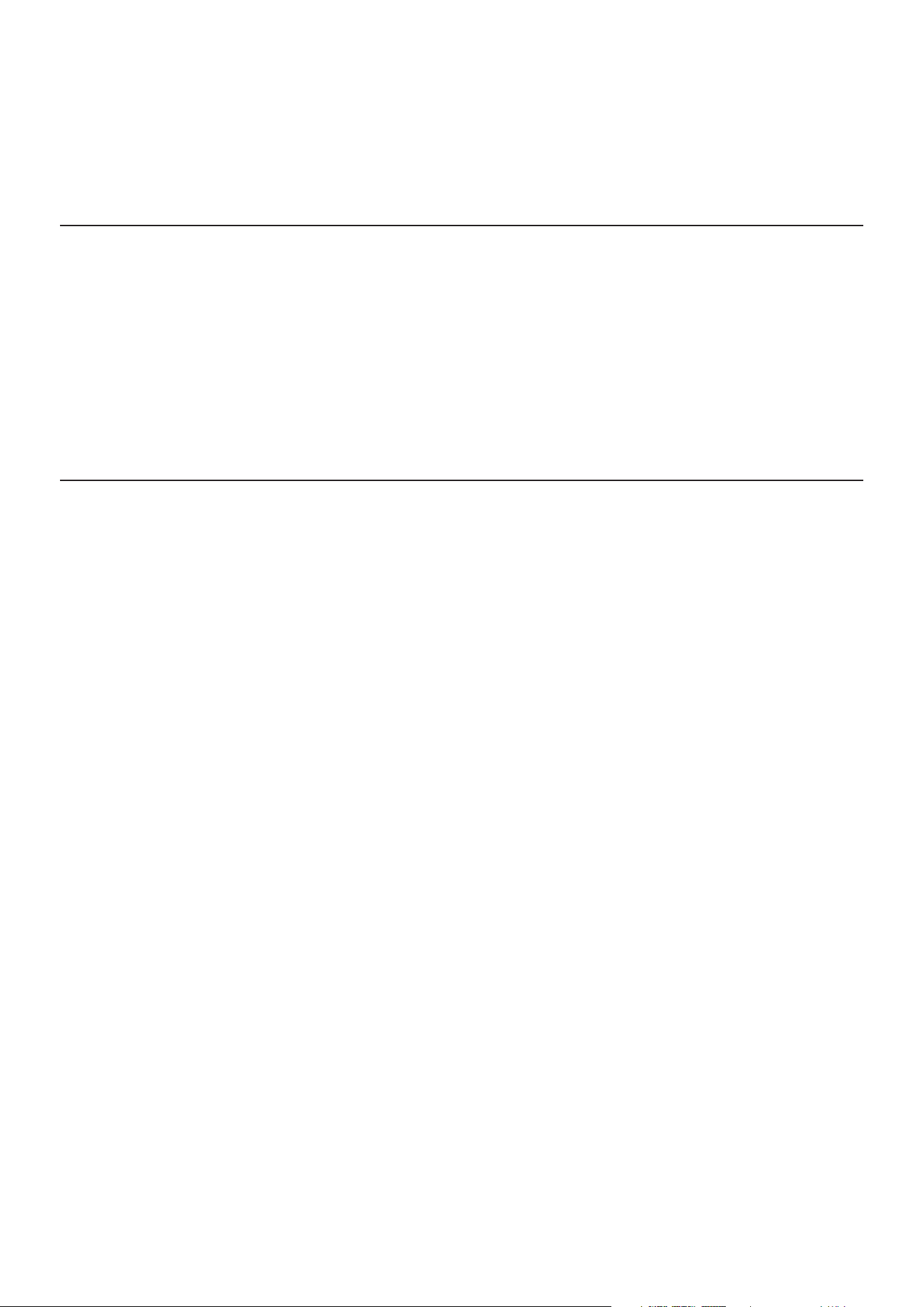
For additional instructions regarding the features of the app and Smart Home skill
capabilities, scan the QR code below.
This device complies with Part 15 of the FCC Rules and Industry Canada’s license exempt RSSs.
Operation is subject to the following two conditions:
(1) This device may not cause interference;and
(2) This device must acceptany interference,including interference that may cause undesired
operation of the device.
Only operate the device in accordance with the instructions supplied. Changes or modifications
to this unit not expressly approved by the party responsible for compliance could void the
user's authority to operate the equipment.This device complies with FCC radiation exposure
limits set forth for an uncontrolled environment. In order to avoid the possibility of exceeding
the FCC radio frequency exposure limits, human proximity to the antenna shall not be less than
20cm (8 inches) during normal operation.
NOTE: This equipment has been tested and found to comply with the limits for a Class B digital
device, pursuant to part 15 of the FCC Rules. These limits are designed to provide reasonable
protection against harmful interference in a residential installation. This equipment generates,
uses and can radiate radio frequency energy and, if not installed and used in accordance with
the instructions, may cause harmful interference to radio communications. However, there is
no guarantee that interference will not occur in a particular installation. If this equipment does
cause harmful interference to radio or television reception, which can be determined by turning
more of the following measures:
--Reorient or relocate the receiving antenna.
--Increase the separation between the equipment and receiver.
connected.
--Consult the dealer or an experienced radio/TV technician for help.
NOTE:
All the illustrations in the manual are for explanation purpose only. Your unit may be slightly
37
WARRANTY
Air Conditioner Limited Warranty
Your product is protected by this Limited Warranty:
Warranty service must be obtained from Midea Consumer Services or an authorized Midea servicer.
Warranty
• One year full warranty from original purchase date.
Midea, through its authorized services will:
• Pay all costs for repairing or replacing parts of this appliance which prove to be defective in materials or
workmanship.
Consumer will be responsible for:
• Diagnostics, removal, transportation and reinstallation cost required because of service.
• Costs of service calls that are a result of items listed under NORMAL RESPONSIBILITIES OF THE CONSUMER**
Midea replacement parts shall be used and will be warranted only for the original warranty.
NORMAL RESPONSIBILITIES OF THE CONSUMER**
This warranty applies only to products in ordinary household use, and the consumer is responsible for the items
listed below:
1. Proper use of the appliance in acordance with instructions provided with the product.
2. Routine maintenance and cleaning necessary to keep the good working condition.
3. Proper installation by an authorized service professional in accordance with instructions provided with the
appliance and in accordance with all local plumbing, electrical and/or gas codes.
4. Proper connection to a grounded power supply of sufficient voltage, replacement of blown fuses, repair of loose
connections or defects in house wiring.
5. Expenses for making the appliance accessible for servicing.
6. Damages to finish after installation.
EXCLUSIONS
This warranty does not cover the following:
1) Failure caused by damage to the unit while in your possession (other than damage caused by defect or
malfunction), by its improper installation, or by unreasonable use of the unit, including without limitation, failure to
provide reasonable and necessary maintenance or to follow the written installation and Operating Instructions.
2) Damages caused by services performed by persons other than authorized Midea costumer service; or external
causes such as abuse, misuse, inadequate power supply or acts of God.
3) If the unit is put to commercial, business, rental, or other use or application other than for consumer use, we make
no warranties, express or implied, including but not limited to, any implied warranty of merchantability or fitness
for use or purpose.
4) Products without original serial numbers or products that have serial numbers which have been altered or cannot
be readily determined.
NOTE: Some states do not allow the exclusions or limitation of incidental or consequential damages. So this
limitation or exclusion may not apply to you.
IF YOU NEED SERVICE
Keep your bill of sale, delivery slip, or some other appropriate payment Record.
The date on the bill establishes the warranty period, should service be required.
If service is performed, its your best interest to obtain and keep all receipts.
This written warranty gives you specific legal rights. You may also have other rights that vary from state to state.
Service under this warranty must be obtained by following these steps, in order:
1) Contact Midea Consumer Services or an authorized Midea services at 1 866 646 4332.
2) If there is a question as to where to obtain service, contact our consumer relations Department.
38
RETURN POLICY
Questions about installing or operating your
Midea product?
If you still need assistance, please call Customer
Service at 1-866-646-4332.
Have your sales receipt, serial number and product model
mumber available when you call.
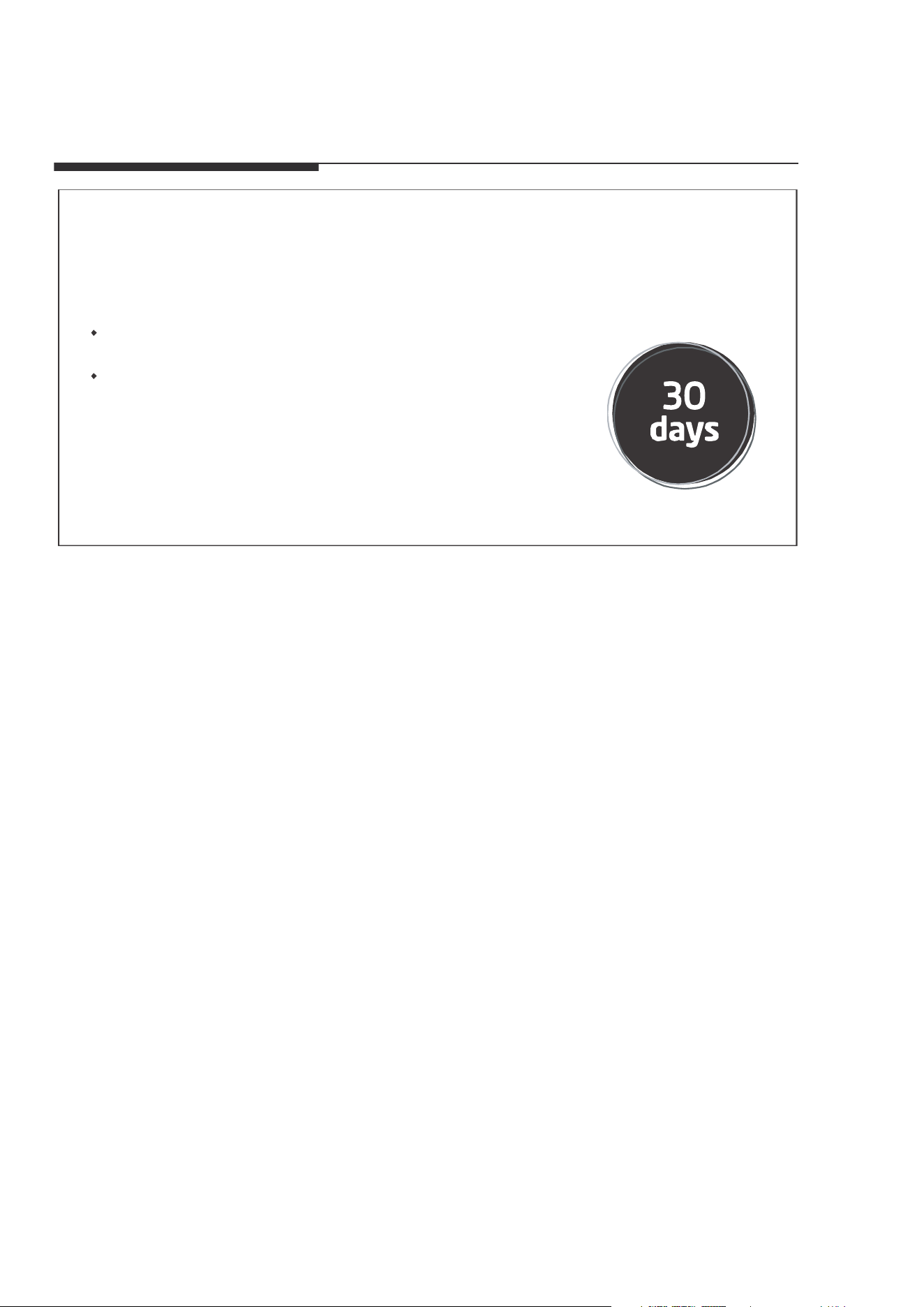
The product may be returned within 30 days of purchase
with receipt, After 30 days, the product is covered under
limited warranty. Please refer to the warranty section
in the User Manual for details.
Return policy
save your
receipt
2023
MAPXWMT

MAP10S1XWBL
MAP10HS1XWGR
AIRE ACONDICIONADO PORTÁTIL
es
Download the app
& activate product
NÚMERO DE MODELO
MANUAL DEL USUARIO
Avisos de advertencia: antes de usar este producto, lea atentamente este manual y consérvelo para futuras
referencias.
El diseño y las especificaciones están sujetos a cambios sin previo aviso para la mejora del producto.
Consulte con su distribuidor o fabricante para obtener más detalles.
02
PRECAUCIÓN:
CARTA DE AGRADECIMIENTO
¡Gracias por elegir Midea! Antes de usar su nuevo producto Midea, lea este manual
detenidamente para asegurarse de que conoce cómo operar las características y
funciones que su nuevo electrodoméstico ofrece de manera segura.
03
1 0
21
23
25
24
26
1 3
1 4
1 5
27
37
38
Precauciones de seguridad
Antes de empezar
Descripción del producto
Vista general de la instalación
Guía de instalación
Conozca su aire acondicionado
Guía de drenaje
Limpieza y mantenimiento
Guarde la unidad cuando no la utilice
Resolución de problemas
MANUAL DEL PROPIETARIO
Instrucciones del control remoto y aplicación
Garantía
Politica de Devolucion
Lea este manual
Dentro de este manual podría encontrar muchos consejos ayudables diciendo cómo
usar y mantener su aire acondicionado correctamente. Le cuesta un poco cuidado
antes, le ahorrará mucho tiempo y dinero en su aire acondicionado. Puede encontrar
muchas respuestas a los problemas communes en el cuadro de las soluciones de
problemas. Si lea nuestro cuadro de soluciones de problemas primero, quizá no será
necesario llamar por servicio.
• Para obtener asistencia, llame el Central de Servicio Técnico al 1-866-646-4332.
• Este aparato no está indicado a ser utilizado por personas (incluidos niños) con
capacidades físicas, sensoriales o mentales reducidas o falta de experiencia y
conocimientos, a menos que hayan recibido supervisión o instrucción sobre el
uso del aparato por parte de una persona responsable de su seguridad.
• Los niños deben supervisarse para asegurar que ellos no jueguen con el
acondicionador de aire.
• El aparato deberá ser instalado de acuerdo con la norma nacional de instalación
eléctrica.
• No utilizar su acondicionador de aire en una habitación húmeda, como un baño o
una lavandería..
03
Precauciones de seguridad
Lea el mensaje de advertencia.
Lea las precauciones de seguridad antes del funcionamiento y la instalación de la
unidad
Para evitar la muerte o lesiones al usuario o a otras personas, así como daños
materiales, deben seguirse las siguientes instrucciones.
El funcionamiento incorrecto debido a ignorar las instrucciones puede causar la
muerte, lesiones o daños.
Explicación de los símbolos
ADVERTENCIA
Este símbolo indica la posibilidad de lesiones personales o pérdida de la
vida.
PRECAUCIÓN
Este símbolo indica la posibilidad de daños materiales o consecuencias
graves.
04
AVISO
• No utilice este dispositivo para encender o apagar la unidad.
• Asegúrese siempre de que el botón RESET esté pulsado para un funcionamiento correcto.
•
El cable de alimentación debe ser reemplazado si lo falla al reiniciar mismo cuando el botón TEST
o no se puede reiniciarse. Póngase en contacto con el servicio de atención al cliente.
AVISO
El cable de alimentación que
acompaña este acondicionador de aire contiene un dispositivo de
detección de corriente diseñado para reducir el riesgo de incendio.
En el caso del cable de alimentación esté dañado reparar. Debe sustituirlo por un cable
El cable de alimentación contiene un
dispositivo de medición que detecta daños en el proprio cable.
Pruebelo de la siguiente manera:
1. Enchufe el acondicionador de aire.
2.
El cable de alimentación t
endrá DOS
botones en el cabezal del enchufe.
Pulse el botón TEST. Notará un clic a medida que aparezca el .
3. Pulse el botón RESET. Notará un clic a
medida que el botón se activa.
4.
El cable de alimentación ahora está energizando la unidad. (En algunos productos esto también se indica
mediante una luz en el cabezal del enchufe.)
RESET
TEST
Enchufe y pulse
el botón RESET
Funcionamiento del Dispositivo Actual
Tomacorriente de pared conectado a tierra
Do not, under any
circumstances, cut,
remove or bypass
the grounding prong.
Power supply cord with 3-prong grounding
plug and current detection device.
No corte, retire ni
desvíe, bajo ninguna
circunstancia, la punta
de conexión a tierra.
Cable de alimentación con enchufe de
conexión a tierra de 3 clavijas y dispositivo
de detección de corriente.
es té pulsado
botón RESET
, no se puede
abricante.del f
05
ADVERTENCIA
• La instalación debe realizarse de acuerdo con las instrucciones de instalación. Una
instalación incorrecta puede causar fugas de agua, descargas eléctricas o incendios.
• Utilice sólo los accesorios y piezas incluidos y las herramientas especificadas para la
instalación. El uso de piezas no estándar puede provocar fugas de agua, descargas
eléctricas, incendios y lesiones o daños materiales.
• Asegúrese de que la toma de corriente que utiliza está conectada a tierra y tiene el
voltaje adecuado. El cable de alimentación está equipado con un enchufe de tres
clavijas con toma de tierra para proteger contra descargas eléctricas. La información
sobre el voltaje se encuentra en la placa de características de la unidad.
• C
onecte la unidad a una toma de corriente debidamente conectada a tierra. Si el
receptáculo de pared que pretende utilizar no está adecuadamente conectado a tierra
o protegido por un fusible de retardo o disyuntor (el fusible o disyuntor necesario
está determinado por la corriente máxima de la unidad. que está especificada en la
placa de características situada en la unidad), haga que un electricista debidamente
capacitado instale el tomacorriente apropiado.
• No toque la unidad con las manos mojadas o húmedas ni cuando esté descalzo.
• Si el aire acondicionado sufre un golpe durante su uso, apáguelo y desconéctelo
inmediatamente de la red eléctrica. Revise la unidad y compruebe que no haya sufrido
ni
ngún daño. Si sospecha que la unidad ha sufrido algún daño, póngase en contacto
con un técnico o con el servicio de atención al cliente para obtener ayuda.
• En caso de tormenta eléctrica, desconecte el cable de alimentación para evitar que los
efectos de un rayo dañen la unidad.
• El aire acondicionado debe protegerse de la humedad. Por ejemplo: de la
condensación, salpicaduras de agua, etc. No coloque ni guarde el aire acondicionado
donde pueda caerse o donde pueda entrarle agua o cualquier otro líquido.
Desenchúfelo inmediatamente si ocurre.
• Instale la unidad sobre una superficie plana y resistente. De lo contrario, podrían
producirse daños oruidos y vibraciones excesivos.
• La unidad debe mantenerse libre de obstrucciones para garantizar su corr
ecto
funcionamiento y mitigar los riesgos de seguridad.
• No modifique la longitud del cable de alimentación ni utilice un alargador para
alimentar la unidad.
• No comparta una misma toma de corriente con otros aparatos eléctricos. Una
alimentación inadecuada puede provocar un incendio o una descarga eléctrica.
• No instale el aire acondicionado en una habitación húmeda, como un cuarto de baño
o un lavadero. Una exposición excesiva al agua puede provocar un cortocircuito en los
componentes eléctricos.
• No instale la unidad en un lugar que pueda estar expuesto a gas combustible, ya que
podría provocar un incendio.

06
• La unidad tiene ruedas para facilitar su desplazamiento. Asegúrese de no utilizar las
ruedas sobre moqueta gruesa o para rodar sobre objetos, ya que podrían provocar
vuelcos.
• No utilice una unidad que se haya caído o dañado.
• El aparato con calentador eléctrico debe tener un espacio de al menos 1 metro
respecto a los materiales combustibles.
• Todo el cableado debe realizarse estrictamente de acuerdo con el diagrama de
cableado situado en el interior de la unidad.
• La placa de circuito impreso (PCB) de la unidad está diseñada con un fusible para
proporcionar protección contra sobrecorriente. Las especificaciones del fusible están
impresas en la placa de circuito, las cuales pueden ser: T 3.15 A/250 V, etc.
• Cuando la función de drenaje de agua no esté en uso, mantenga los tapones de drenaje
superior e inferior firmemente ajustados para evitar obstrucciones. Cuando el tapón de
vaciado no esté en uso, guárdelocon cuidado para evitar que los niños se atraganten.
PRECAUCIÓN
• Este aparato puede ser utilizado por personas (incluyendo niños) con capacidades
físicas, sensoriales o mentales reducidas, o falta de experiencia y conocimientos,
siempre y cuando sean supervisados o hayan recibido instrucciones sobre el uso del
aparato por parte de una persona responsable de su seguridad. Los niños deben
supervisarse para asegurarse de que no jueguen con el aparato. Los niños deben ser
supervisados alrededor de la unidad en todo momento.
• Si el cable de alimentación está dañado, solo el fabricante, su agente de servicio
o un técnico calificado debe reemplazarlo para evitar riesgos de seguridad.
• No utilice este producto para funciones distintas de las descritas en este manual
de instrucciones.
• Antes de limpiar la unidad, apague el interruptor de encendido y desconecte el
cable de alimentación.
• Si observa ruidos raros, olores extraños o humo, desconecte el cable de
alimentación inmediatamente.
• No pulse los botones del panel de control con nada que no sean los dedos.
• No retire ninguna cubierta fija. No utilice nunca este aparato si no funciona
correctamente o si se ha caído o dañado.
• No haga funcionar ni de
tenga el aparato introduciendo o extrayendo el enchufe
del cable de alimentación.
• No utilice productos químicos peligrosos para limpiar o entrar en contacto con
la unidad. No utilice la unidad en presencia de sustancias o vapores inflamables
como alcohol, insecticidas, gasolina, etc.

07
• Antes de llevar a cabo las tareas de limpieza o mantenimiento, desconecte la
unidad del suministro eléctrico.
• No retire ninguna cubierta fija. No utilice nunca este aparato si no funciona
correctamente o si se ha caído o dañado.
• No pase el cable de alimentación por debajo de alfombras. No cubra el cable de
alimentación con alfombrillas, tapetes o cubiertas similares. No pase el cable por
debajo de muebles o electrodomésticos. Coloque el cable de alimentación lejos
de áreas transitadas para evitar tropiezos.
• No utilice la unidad si el cable, el enchufe, el fusible o el disyuntor están dañados.
Deseche la unidad o llévela a un centro de servicio técnico autorizado para que la
inspeccionen o reparen.
• Para reducir el riesgo de incendio o descarga eléctrica, no utilice este ventilador
con ningún dispositivo de control de velocidad de estado sólido.
• Este aparato debe instalarse de acuerdo con la normativa nacional sobre cableado.
• Póngase en contacto con el servicio técnico autorizado para la reparación o el
mantenimiento de esta unidad.
• No cubra ni obstruya las rejillas de entrada o salida.
• Transporte siempre el aire acondicionado en posición vertical y colóquelo sobre
una superficie estable y nivelada durante su uso.
• Póngase siempre en contacto con una persona cualificada para realizar
reparaciones. Si el cable de alimentación dañado debe ser sustituido por un
nuevo cable de alimentación obtenido del fabricante del producto y no reparado.
• Sujete el enchufe por la cabeza al sacarlo.
• Apague la unidad cuando no esté en uso.
08
A2L
PRECAUCIÓN:
Riesgo de incendio
materiales
inflamables
NOTA IMPORTANTE: Lea atentamente
este manualantes de instalar o poner
en funcionamiento su nuevo aparato.
Asegúrese de guardar este manual para
referencia futura.
Explicación de los símbolos que aparecen en la unidad
PRECAUCIÓN
Este símbolo indica que debe leerse atentamente el manual de
instrucciones.
PRECAUCIÓN
Este símbolo indica que el personal de servicio debe manipular este
equipo consultando el manual de instalación.
PRECAUCIÓN
Este símbolo indica que hay información disponible, como el manual
de instrucciones o el manual de instalación.
ADVERTENCIA:
• El mantenimiento sólo debe realizarse según las recomendaciones del fabricante
del equipo. El mantenimiento y la reparación que requieran la asistencia de otros
técnicos especializados se llevarán a cabo bajo la supervisión de la persona
competente en el uso de refrigerantes inflamables.
• NO modifique la longitud del cable de alimentación ni utilice un alargador para
alimentar la unidad.
• NO comparta una misma toma de corriente con otros aparatos eléctricos. Una
alimentación inadecuada puede provocar un incendio o una descarga eléctrica.
Siga atentamente las instrucciones de manipulación, instalación, limpieza y
mantenimiento del aparato para evitar cualquier daño o peligro.

09
Inflamable
El aparato utiliza refrigerante R32.
• Cuando realice el mantenimiento o deseche el aparato, el refrigerante (R32)
deberá recuperarse adecuadamente y no deberá verterse directamente al aire.
• Deberá respetarse la normativa nacional sobre gases.
• Mantenga las aberturas de ventilación libres de obstrucciones.
• El aparato deberá almacenarse de manera que no se produzcan daños mecánicos.
• Advertencia de que el aparato debe almacenarse en una zona bien ventilada
donde el tamaño de la sala corresponda a la superficie de la sala especificada
para el funcionamiento.
• Toda persona que trabaje o intervenga en un circuito de refrigerante debe estar
en posesión de un certificado válido de una autoridad de evaluación acreditada
por la industria, que autorice su competencia para manipular refrigerantes de
forma segura de acuerdo con una especificación de evaluación reconocida por la
industria.
Ejemplos de tales procedimientos de trabajo son:
• irrupción en el circuito frigorífico
• apertura de componentes sellados
• apertura de recintos ventilados
• Para evitar la ignición del refrigerante inflamable utilizado, no debe haber cerca
del aparato ningún fuego abierto ni ningún dispositivo como interruptores que
puedan generar chispas/arcos. Siga cuidadosamente las instrucciones para
almacenar o mantener el aparato para evitar que se produzcan daños mecánicos.
• No utilice medios para acelerar la operación de descongelación o para limpiar que
no sean los recomendados por el fabricante.
• El aparato debe almacenarse en una habitación sin fuentes de ignición de
funcionamiento continuo (por ejemplo: llamas abiertas, un aparato de gas en
funcionamiento) y fuentes de ignición o (por ejemplo: un calentador eléctrico en
funcionamiento) cerca del aparato. El aparato debe almacenarse en un local sin
fuent
es de ignición en funcionamiento continuo (por ejemplo: llamas abiertas, un
aparato de gas en funcionamiento o un calentador eléctrico en funcionamiento).
• No lo perfore ni lo queme.
• Tenga en cuenta que los refrigerantes pueden no contener olor.
10
Antes de empezar
Preparativos para la instalación
Manual
La instalación debe
realizarse siguiendo
estrictamente las
instrucciones de este
manual.
La instalación de su aire
acondicionado debería
durar unos 30 minutos.
Recomendamos hacerlo con
un ayudante.
Estamos aquí si nos
necesita. Póngase
en contacto con su
distribuidor local para
obtener ayuda.
RANGO DE TEMPERATURA AMBIENTE PARA EL FUNCIONAMIENTO
DE LA UNIDAD
MODO
Rango de
temperatura
MODO
Rango de
temperatura
Fresco 16-35°C (60-95°F) Calor (modo bomba de calor) 5-30°C (41-86°F)
Seco 13-35°C (55-95°F) Calor (modo de calor eléctrico) ≤ 30 °C (86 °F)
Conozca su tipo de móvil Aire acondicionado
Información sobre la clasificación energética
La clasificación energética y la información sobre el ruido de esta unidad se basan en la instalación
estándar utilizando un conducto de escape sin prolongar y sin adaptador deslizante de ventana (como se
muestra en la sección Instalación de este manual). Al mismo tiempo, la unidad debe funcionar en MODO
FRÍO y ALTA VELOCIDAD DEL VENTILADOR mediante el mando a distancia.
La unidad con 3 metros de conducto de escape extendido se hace mediante el uso de 2 conductos
de escape (diámetro: 150 mm, longitud: 1.5 m + diámetro: 130 mm, longitud: 1.5 m). La clasificación
energética y la información de ruido para la unidad con conducto de escape extendido de 3 metros no se
evalúan. (Para algunos modelos)
NOTA:
Se recomienda utilizar la unidad a una temperatura ambiente inferior a 35 °C. Dado que existe el riesgo
de que la unidad con un conducto de escape extendido de 3 metros no funcione a una temperatura
ambiente superior a 35 °C en algunas condiciones extremas, como en el caso de que la entrada de aire
inferior se bloquee en un 50 %.
Cómo mantenerse fresco con este nuevo aire acondicionado portátil (Para los
modelos que cumplen con los requisitos del Departamento de Energía de EE. UU.)
Debido a un nuevo procedimiento de prueba federal para Acondicionadores de Aire Portátiles, puede
notar que las afirmaciones de capacidad de enfriamiento en el embalaje del acondicionador de aire
portátil son significativamente más bajas que las de los modelos producidos antes de 2017. Esto se debe
a los cambios en el procedimiento de prueba, no a los acondicionadores de aire portátiles en sí.
11
Trabajo electrónico
Aviso:
Apague la fuente de alimentación principal
del sistema antes de realizar cualquier
trabajo eléctrico o de cableado.
Pantalla
Controlador
principal
Línea de
alimentación
Anotaciones:
Estas ilustraciones son solo
para explicación.
Su máquina puede ser
ligeramente diferente
Prevalecerá la forma real.
Cómo comprar un aire acondicionado de tipo portátil.
El aire acondicionado adecuado ayuda a enfriar una habitación de forma eficiente. Una unidad de
tamaño insuficiente no enfriará adecuadamente, mientras que una demasiado grande no eliminará
suficiente humedad, dejando el aire húmedo. Para encontrar el aire acondicionado adecuado, determine
los metros cuadrados de la habitación que desea enfriar multiplicando la longitud de la habitación
por su anchura. También debe conocer el valor nominal en BTU (unidades térmicas británicas) del aire
acondicionado, que indica la cantidad de calor que puede eliminar de una habitación. Una cifra más
alta significa más potencia de refrigeración para una habitación más grande. (Asegúrese de comparar
sólo los modelos más nuevos entre sí; los modelos más antiguos pueden parecer de mayor capacidad,
pero en realidad son iguales). Asegúrese de "dimensionar" si su aire acondicionado portátil se va a
colocar en una habitación muy soleada, en una cocina o en una habitación con techos altos. Una vez
que haya encontrado la capacidad de refrigeración adecuada para su habitación, puede fijarse en otras
características.
Por qué los productos más nuevos tienen menor capacidad de refrigeración que los
modelos más antiguos.
La normativa federal obliga a los fabricantes a calcular la capacidad de refrigeración basándose en un
procedimiento de ensayo específico, que se ha modificado este mismo año. Los modelos fabricados
antes de 2017 se sometieron a pruebas con un procedimiento diferente y la capacidad de refrigeración se
mide de forma distinta a la de los modelos de años anteriores. Por tanto, aunque los valores en BTU sean
inferiores, la capacidad real de refrigeración de los aparatos de aire acondicionado no ha cambiado.
¿Qué es la SACC?
SACC es el valor representativo de la capacidad de refrigeración ajustada estacionalmente, en Btu/h,
determinado de acuerdo con el procedimiento de prueba del DOE en el título 10 del Código de
Reglamentos Federales (CFR) 430, subparte B, apéndice CC y los planes de muestreo aplicables.
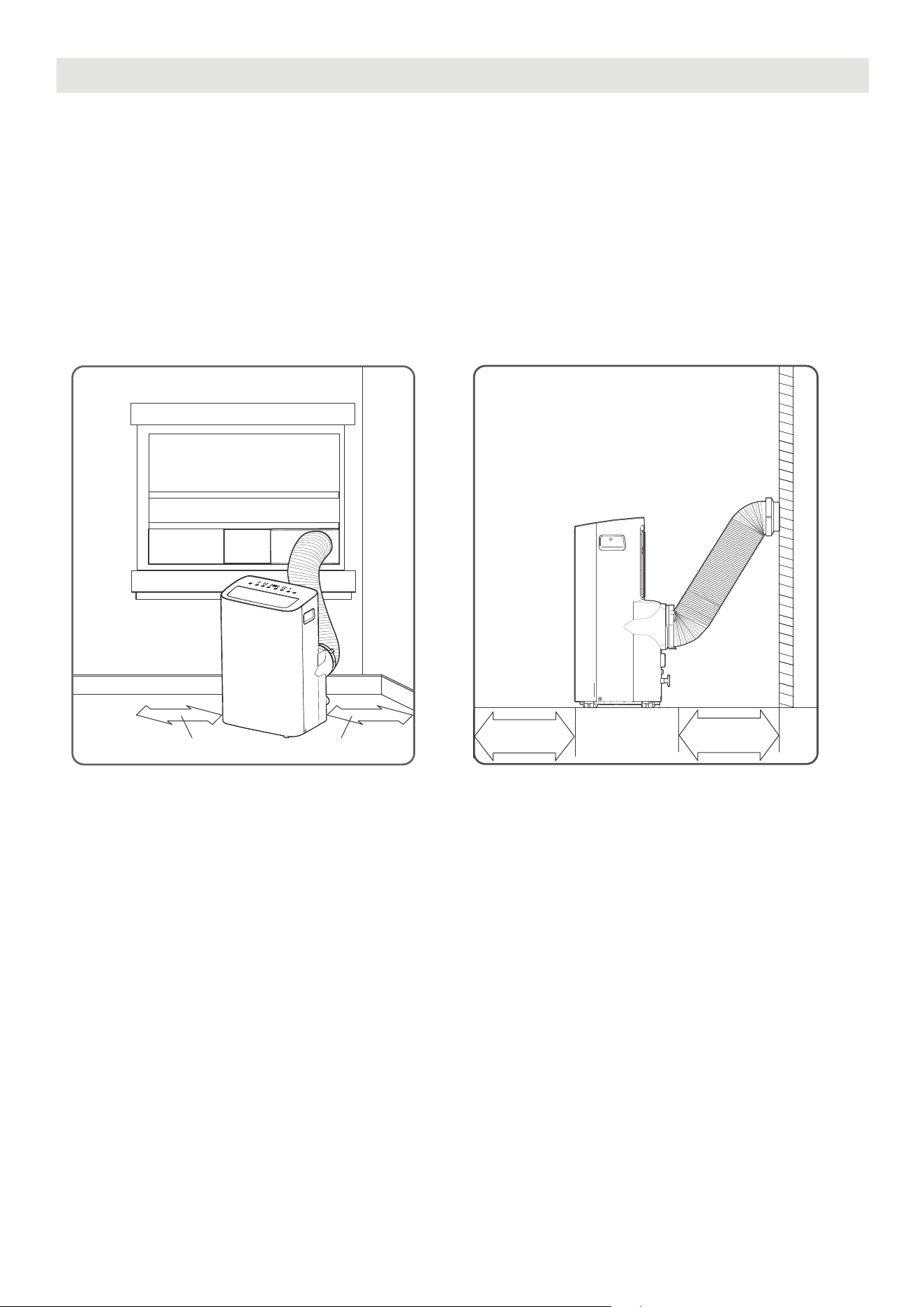
12
LUGAR DE INSTALACIÓN DEL PRODUCTO
El lugar de instalación debe cumplir los siguientes requisitos:
- Asegúrese de instalar la unidad sobre una superficie plana para minimizar el ruido y las vibraciones.
- La unidad debe instalarse cerca de un enchufe con toma de tierra, y el desagüe de la bandeja de
recogida (que se encuentra en la parte posterior de la unidad) debe ser accesible.
- La unidad debe estar situada al menos a 30 cm (12") de la pared más cercana para garantizar una
correcta climatización. La salida de aire de la unidad debe estar al menos a 50cm (19,7") de obstáculos.
- NO cubra las Entradas, Salidas o el Receptor de Señal Remota de la unidad, ya que esto podría causar
daños a la unidad.
Ubicación de instalación de la unidad Requisitos de espacio restringido
≥30cm(12”)≥30cm(12”)
≥50cm
19.7”
≥50cm
19.7
”
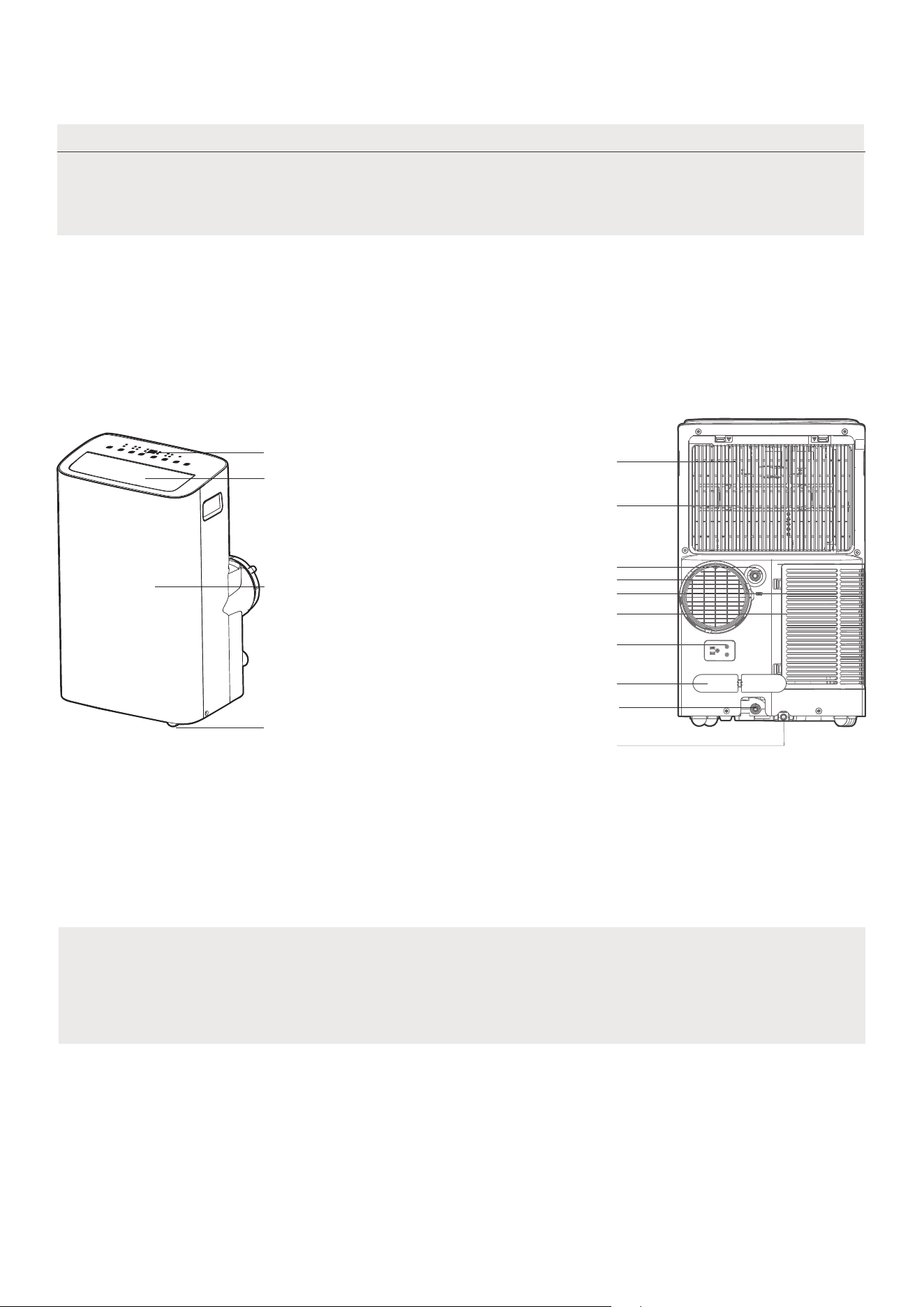
13
Todas las ilustraciones del manual son solo para fines explicativos. El aparato puede ser ligeramente
diferente. La apariencia real prevalecerá.
El funcionamiento de la unidad se puede controlar a través del panel de control o del control remoto.
NOTA SOBRE LAS ILUSTRACIONES:
Descripción del producto
Aviso sobre el diseño
Con el fin de garantizar el rendimiento óptimo de nuestros productos, las
especificaciones de diseño de la unidad y el mando a distancia están sujetas
a cambios sin previo aviso.
Vista frontal
Tobillera
Hoja de persiana horizontal
(Balanceo automático)
Panel de control
Panel frontal
Vista posterior
Salida de drenaje
Enchufe de alimentación
Hebilla de cable de alimentación
Salida de drenaje de la
bandeja inferior
Filtro de aire superior
(Detrás de la rejilla)
Entrada de aire superior
Salida de aire
Filtro de aire inferior
Entrada de aire inferior
Desagüe de salida
(sólo para modelos de bomba de calor)
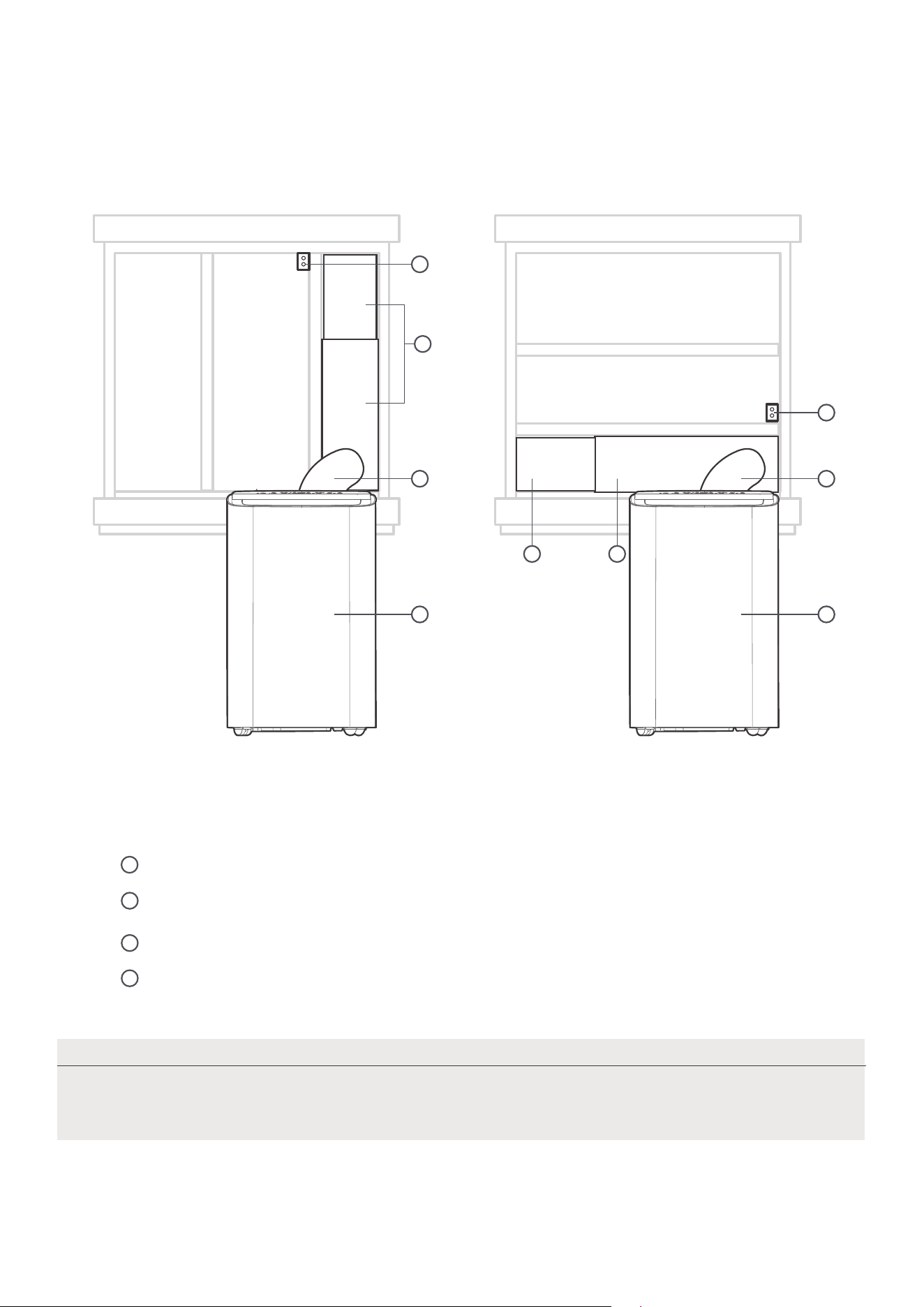
Vista general de la instalación
Installation Completion Display
Las ilustraciones de este manual tienen fines explicativos. La apariencia real de su
unidad interior puede ser ligeramente diferente. La apariencia real prevalecerá.
NOTA
14
1
4
2 2
1 1
4
3
3
Instalación de ventanas correderas Instalación de Ventanas Colgadas
Conjunto de deslizadores de ventanas
Manguera de escape extendida
Unidad de aire acondicionado
Soporte de seguridad y 2 tornillos
1
2
3
4
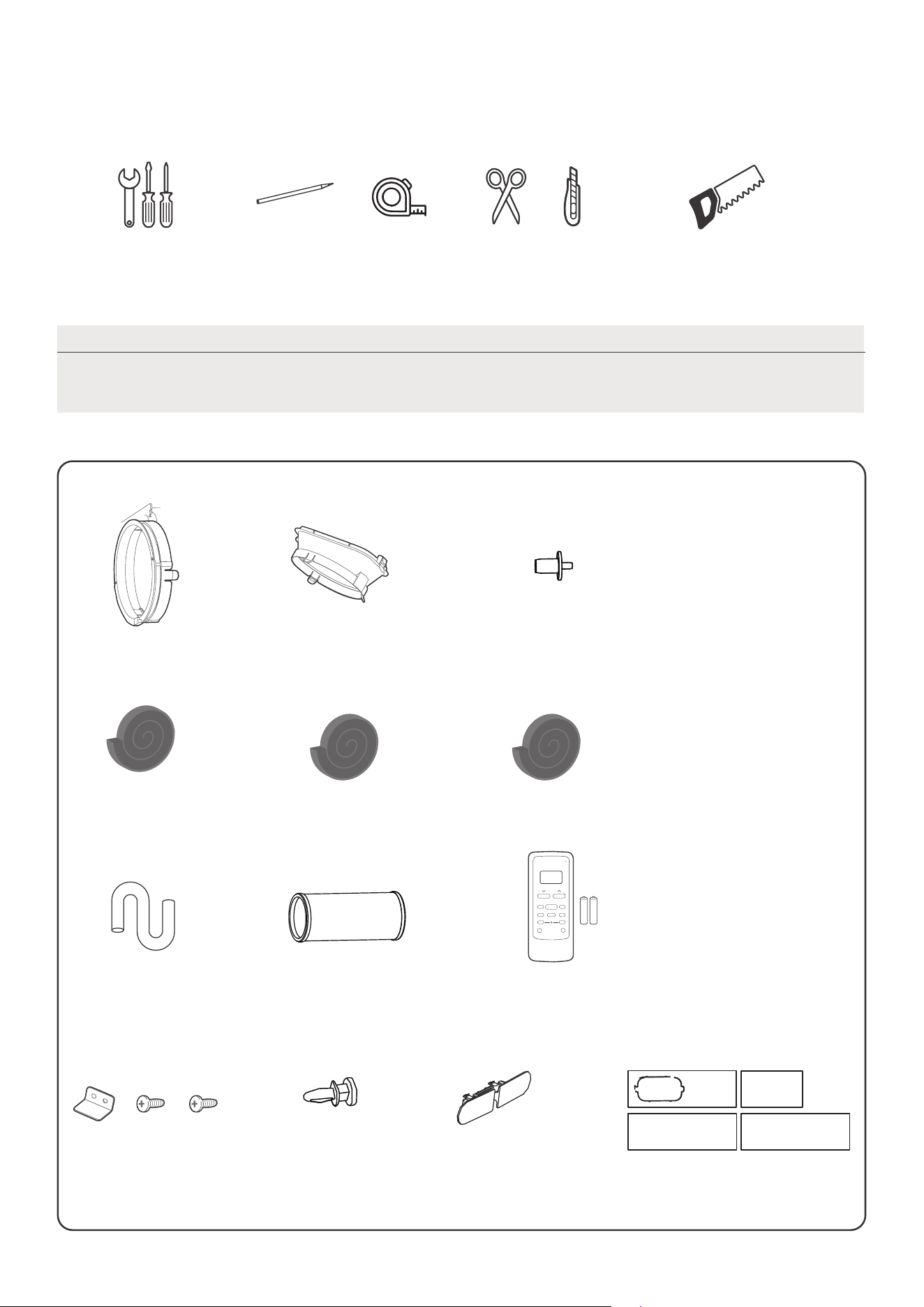
NOTA
Los elementos con (*) se encuentran en algunos modelos. Pueden producirse
ligeras variaciones en el diseño.
15
Adaptador de unidad
Manguera de escape (1 pc)
Cerradura de cable de
alimentación ( 1 pc)
Conducto de escape de
aire (1 ud.*)
1 set(*)Deslizador de ventana
Lista de herramientas de instalación
(no incluidas)
Destornillador y llave inglesa
Tijeras o cuchillo
Lápiz
Una cinta métrica
Sierra (En algunos modelos, para acortar
el adaptador para ventanas estrechas)
Accesorios de instalación
Junta de espuma B
(adhesiva) 2 uds.
Junta de espuma C (no
adhesiva) 2 uds. (*)
Junta de espuma A
(adhesiva) 4 uds. (*)
Manguera de drenaje
(1 ud.)
Control remoto y pila
(solo para modelos
con control remoto)
(1 juego*)
Soporte de seguridad y
2 tornillos (1 juego*)
Tornillo (3 ud.*)
drain hose adaptor
(for heat pump model only)
El kit de instalación de ventanas es adaptable a ventanas de 19,4"-62,2"(49,3-158,1 cm).
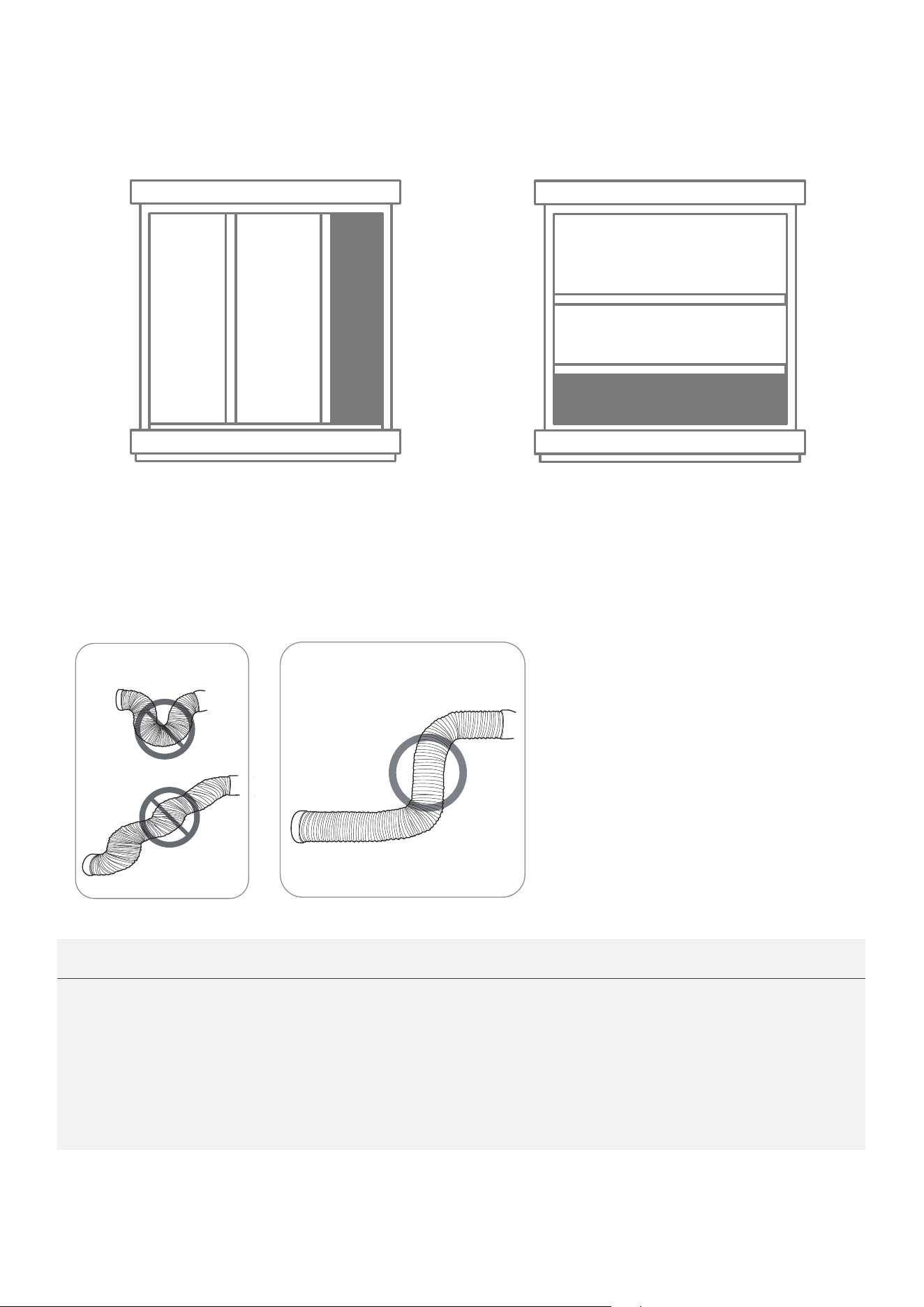
16
Confirme su tipo de ventana (tipo de
ventana y tamaño de apertura)
Instalación de ventanas correderas Instalación de Ventanas Colgadas
Para un funcionamiento óptimo
INCORRECTO
CORRECTO
NOTA:
Para garantizar un funcionamiento correcto, NO extienda ni doble excesivamente la
hay ningún obstáculo alrededor de la salida de aire
manguera de escape (en el rango de 500 mm) para que el sistema de escape
ilustraciones del manual son solo para fines
Su aire acondicionado puede ser ligeramente diferente. La apariencia
manguera. Asegúrese de que no
de la
funcione correctamente. Todas las
explicativos.
real prevalecerá.
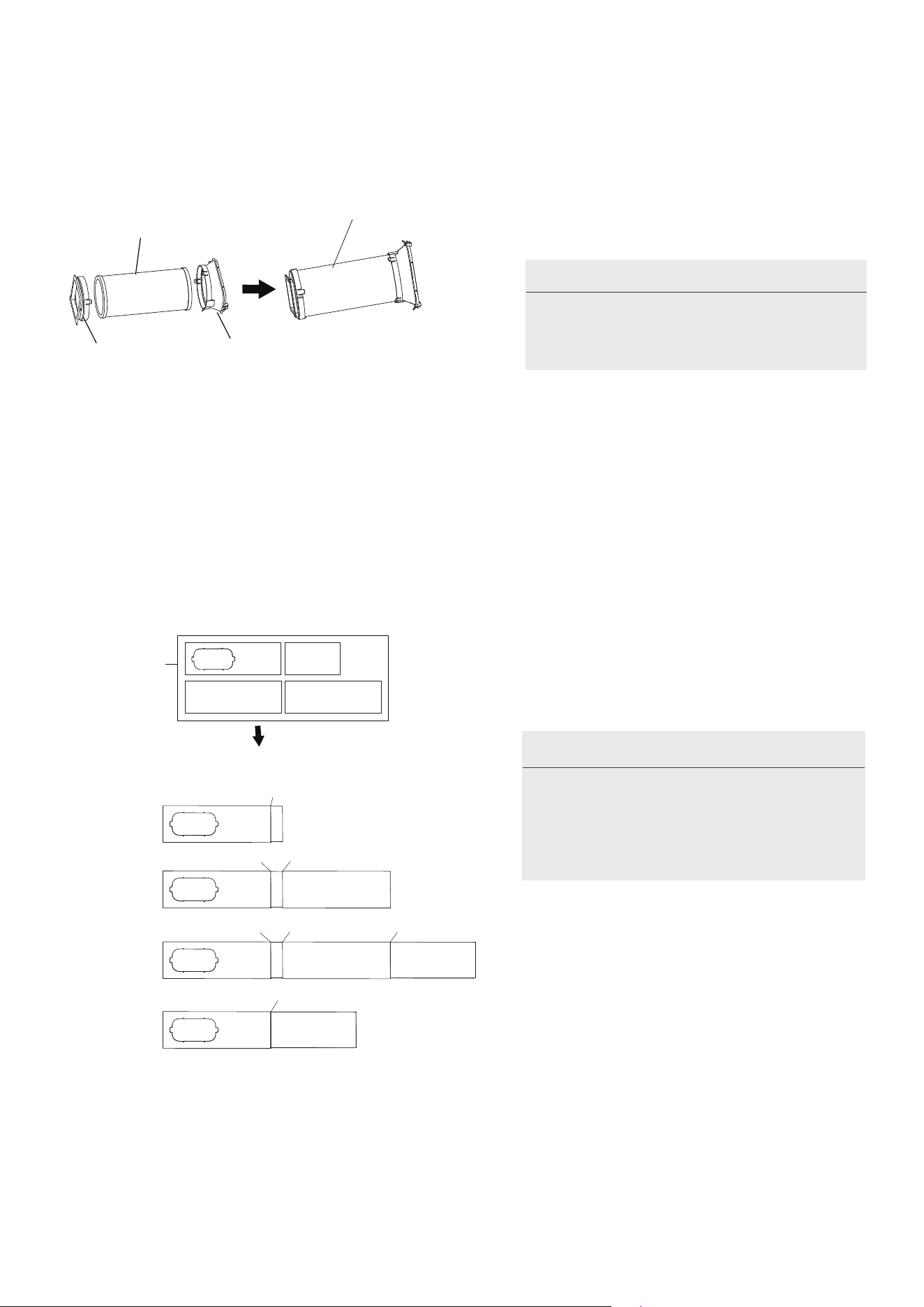
17
1.Instalación de la manguera de escape y adaptadores
Adaptador de
la unidad
Conducto de
escape de aire
Manguera de escape
Conjunto de manguera
de escape
NOTA:
su kit.
Presione la manguera de escape (o la
manguera de escape extendida) en
el adaptador deslizante de la ventana
y el adaptador de la unidad, sujete
automáticamente por las hebillas
elásticas de los adaptadores.
Instale el conjunto de la manguera
de escape de acuerdo con los
accesorios de
Preparación de la corredera ajustable de la ventana
Elija los deslizadores de ventana de acuerdo
con el tamaño de su ventana. A veces, es
necesario acortarlo para que se ajuste al
Utilice pernos para fijar los deslizadores de
ventana una vez que estén ajustados a la
longitud adecuada.
Por favor, base la instalación de su
deslizador de ventana en los
accesorios de su kit y en el ancho
de su ventana.
2.
NOTA:
1+2:
1+2+3:
1+2+3+4:
1+4:
Antes del montaje
Después del montaje
Adaptadores
deslizantes
Perno
Perno
Perno
Perno
Perno
Perno
Perno
tamaño de la ventana.
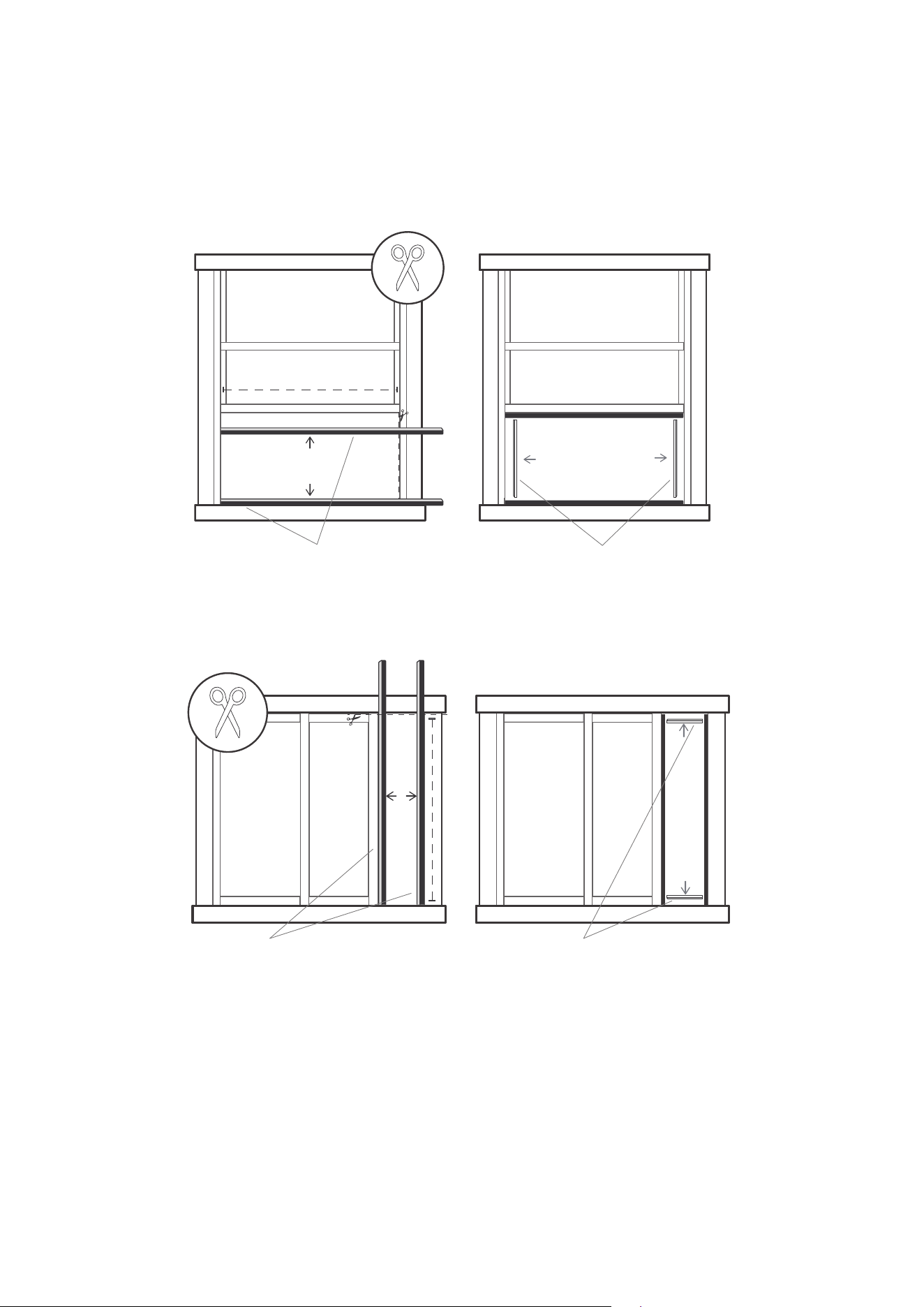
18
Junta de espuma A
(adhesiva)
Junta de espuma B
(adhesiva, más corta)
Instalación de Ventanas Colgadas
Junta de espuma A
(adhesiva)
Junta de espuma B
(adhesiva, más corta)
Instalación de ventanas correderas
3. Sellado completo de la ventana
Corte las tiras de junta de espuma adhesiva A y B a las longitudes adecuadas, y fíjelas a la hoja y al
marco de la ventana como se muestra.
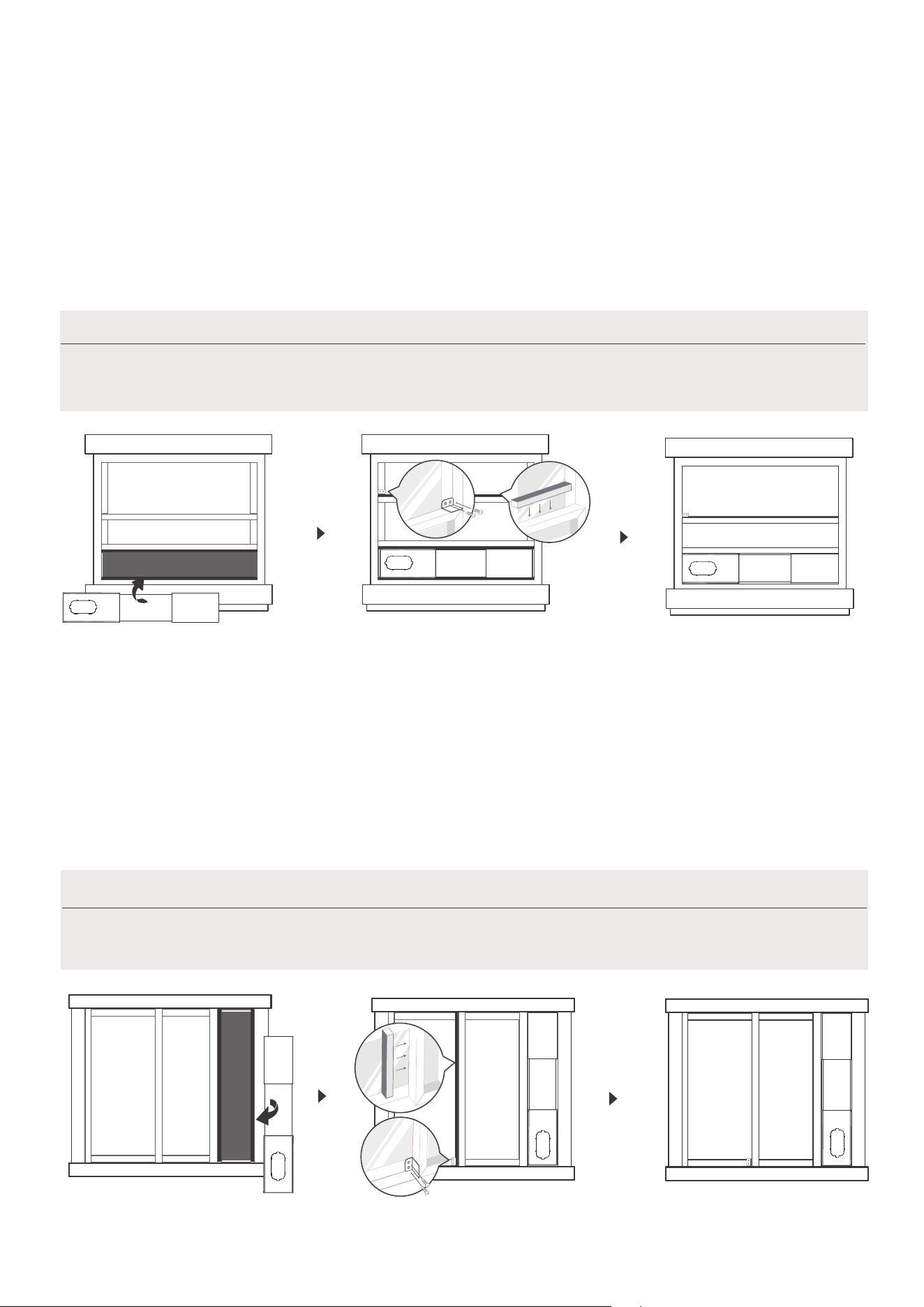
19
Paso 1:
Inserte el conjunto de la
corredera de la ventana en el
hueco de la ventana.
Paso 3:
Si lo desea, instale el soporte de
seguridad con 2 tornillos, tal como
se muestra.
Paso 2:
Corte la tira de espuma de sellado no adhesiva C para que coincida
con la anchura de la ventana. Introduzca la junta entre el cristal y el
marco de la ventana para evitar la entrada de aire e insectos en la
habitación.
Una vez preparados el conjunto de la manguera de escape y la corredera ajustable
de la ventana, elija uno de los dos métodos de instalación siguientes.
4. Instalación de Ventanas Colgadas
NOTA:
Paso 1:
Inserte el conjunto de la
corredera de la ventana en el
hueco de la ventana.
Paso 3:
Si lo desea, instale el soporte
de seguridad con 2 tornillos, tal
como se muestra.
Paso 2:
Corte la tira C de junta de espuma no adhesiva para que coincida con la
altura de la ventana. Introduzca la junta entre el cristal y el marco de la
ventana para evitar la entrada de aire e insectos en la habitación.
5. Instalación de ventanas correderas
Una vez preparados el conjunto de la manguera de escape y la corredera
ajustable de la ventana, elija uno de los dos métodos de instalación siguientes.
NOTA:

6. Instale el conjunto de la manguera de escape en la unidad
Introduzca la manguera de escape en la abertura de salida de aire de la unidad siguiendo la dirección de
7. Conecte el adaptador a la unidad y a la ventana
Inserte el adaptador de la ventana corredera en el orificio de la ventana corredera.
Gancho
Asiento en forma de gancho
Ranura inferior
adaptador
Asegúrese de que el SIM se
ha insertado en la ranura
inferior de la salida de aire.
20
la flecha.
Instalación de Ventanas Colgadas Instalación de ventanas correderas
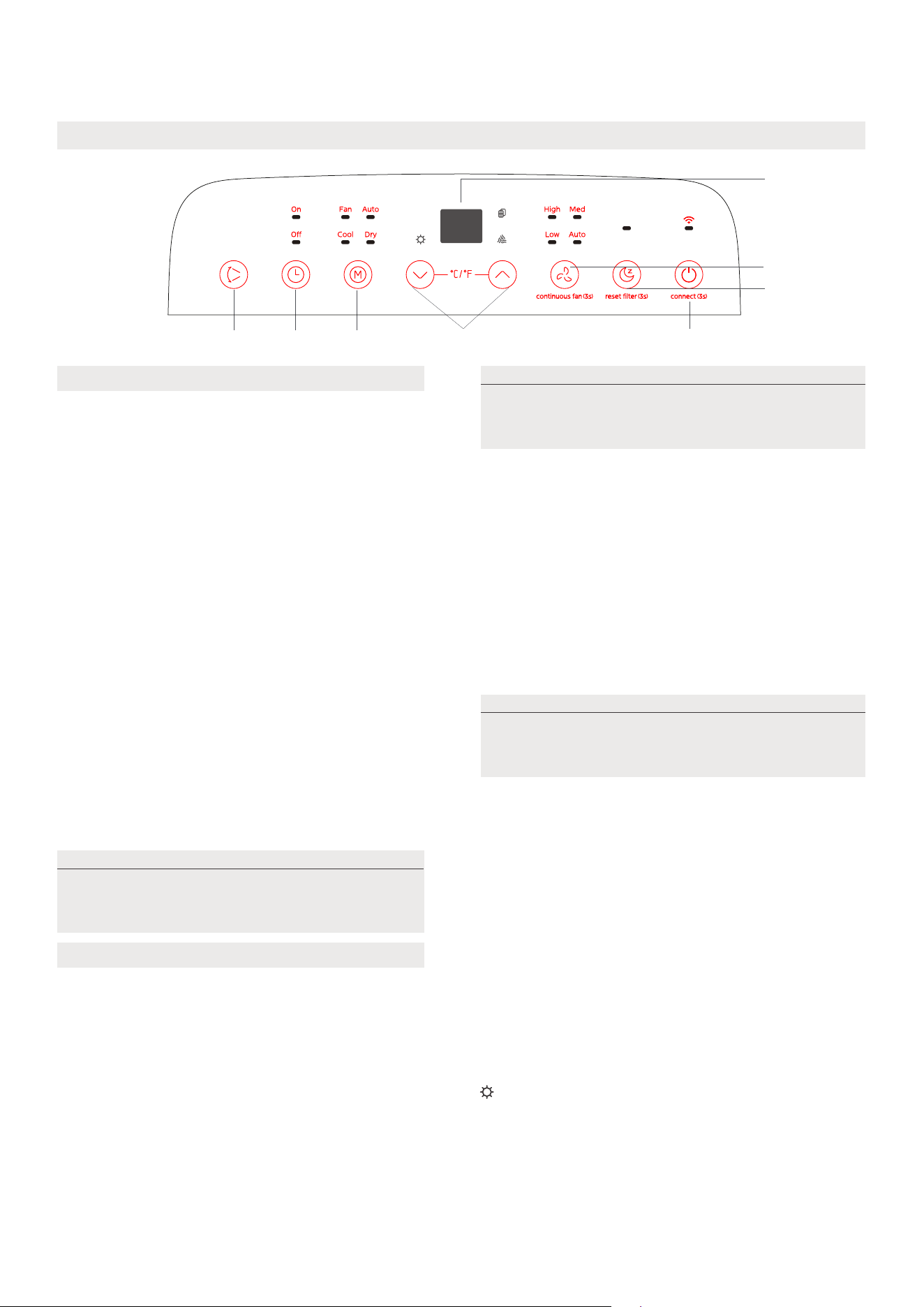
Conozca su aire acondicionado
Instrucciones de funcionamiento del control electrónico
1
7
8
2
56
4
3
21
Pulse el botón "MODE" hasta que se encienda
la luz indicadora "Dry". En este modo no es
posible ajustar la velocidad del ventilador ni la
temperatura. El motor del ventilador funciona a
velocidad automática.
El aire acondicionado controlará automáticamente
la temperatura ambiente para que se acerque al
punto de temperatura que ha establecido. En
modo automático, no puede seleccionar la
velocidad del ventilador.
COOL operation
Pulse el botón "MODE" hasta que se encienda la
luz indicadora "Cool".
Pulse los botones ADJUST "+" o "-"
elija la temperatura ambiente que desea The
temperature can be set within the range of
16 ° C to 30 ° C/60 ° F to 86 ° F.
The temperature can be set within the range of
16 ° C to 30 ° C/60 ° F to 86 ° F.
1. Botón POWER
2. Función MODE
Seleccione el modo de funcionamiento adecuado.
Cada vez que se presiona el botón, se selecciona
el modo en la secuencia AUTO (AUTOMÁTICO),
DRY (DESHUMIDIFICADOR), COOL (FRÍO), FAN
(VENTILADOR) y HEAT (sólo para modelos de
bomba de calor). La luz indicadora de modo se
ilumina bajo los diferentes indicadores de modo.
Interruptor de encendido y apagado.
Modo DRY
Modo AUTO
Modo COOL
Cuando establece el aire acondicionado en modo
automático,Seleccionará automáticamente la
refrigeración, la calefacción (solo se limita al modelo
frío, no al modelo de refrigeración) o solo el
funcionamiento del ventilador en función de la
temperatura y la temperatura ambiente que elija.
Modo FAN
• When in FAN mode, press the FAN button to
choose the fan speed. The temperature can
not be adjusted.
• No coloque el conducto de aire en la ventana.
Operación Heat(sólo para modelos de bomba
de calor)
• Presione el botón "modo" hasta que se encienda el
indicador "heat".
• Presione los botones Adjust (ajuste hacia arriba) y down
(ajuste hacia abajo) para seleccionar la temperatura
ambiente deseada. La temperatura se puede establecer
en un rango de 16 ° C - 30 ° C / 60 ° F - 86 ° F.
Mantenga las ventanas y puertas cerradas
para obtener el mejor efecto deshumidificador.
No coloque el conducto en la ventana.
Se utiliza para activar la función inalámbrica. La
primera vez que se utiliza la función inalámbrica,
Presione el botón POWER durante 3 segundos
para activar el modo de conexión inalámbrica.
La pantalla LED muestra "ap", lo que significa que
puede configurar una conexión inalámbrica. Si la
conexión (enrutador) tiene éxito en 8 minutos, el
dispositivo saldrá automáticamente del modo de
conexión inalámbrica y se encenderá el indicador
inalámbrico.
Si la conexión falla en 8 minutos, el dispositivo
saldrá automáticamente del modo de conexión
inalámbrica.
Después de que la conexión inalámbrica sea
exitosa, puede presionar los botones Swing y
down (-) durante 3 segundos al mismo tiempo
para activar la función inalámbrica, y la pantalla
LED muestra "de" durante 3 segundos.
Presione los botones POWER y up (+) al mismo
tiempo para activar la función inalámbrica, LED
Display muestra "on" (on) durante 3 segundos
NOTA
al reiniciar la función inalámbrica, puede
tardar un tiempo en conectarse
automáticamente a la red
NOTA
NOTA
en modo automático, se encienden los
indicadores de modo automático y modo de
operación real en algunos modelos.

22
3. Botones hacia arriba y hacia abajo
Para ajustar (aumentar / disminuir) la temperatura en incrementos de 1 ° C / 2 ° F (o 1 ° F) en un rango
de 16 ° C / 60 ° F a 30 ° C / 86 ° F.
El rango de configuración del tiempo es de 0 a 24 horas.
4. Pantalla
Muestra la temperatura ajustada mientras está en modo Frío, o Auto. Muestra la temperatura ambiente
en los modos DRY (DESHUMIDIFICADOR) y FAN (VENTILADOR).
Muestra los códigos de error:
• Presione el botón fan (ventilador) para seleccionar la velocidad del ventilador.
EH60-Error del sensor de temperatura ambiente
EH61-Error del sensor de temperatura del evaporador
EC52-Error del sensor de temperatura del condensador (en algunos modelos).
EH0b-Error de comunicación del panel de visualización.
ELOC-Mal funcionamiento de la detección de fugas de refrigerante (en algunos modelos).
P1-Bandeja inferior llena--Conecte la manguera de drenaje y drene el agua recogida.
Si la protección se repite, llame al servicio técnico
COMFORT SENSE
9. Otras características
8. SLEEP mode
Al presionar este botón, la temperatura seleccionada aumentará (enfriará) o bajará (calentará)
1 ° C / 2 ° F (o 1 ° F) durante 30 minutos. En otros 30 minutos, la temperatura volverá a subir (enfriarse) o bajar
(calentar) 1 ° C / 2 ° F (o 1 ° F). Esta nueva temperatura se mantendrá durante 7 horas y luego volverá a la
temperatura inicialmente seleccionada. Esto pondrá fin al modo de sueño / ahorro de energía y el dispositivo
seguirá funcionando como estaba programado inicialmente.
7. Función de ventilador continuo
En modo COOL (FRÍO) o DRY (DESHUMIDIFICADOR), pulse el botón Fan (Ventilador) durante
3 segundos para activar o desactivar la función de ventilador continuo. Cuando la función está
encendida, la luz del ventilador Cont. (Continuo) se iluminará, indicando que el ventilador funcionará de
forma continua. Cuando la función está desactivada, la luz del ventilador Cont. (Continuo) se apagará,
indicando que el ventilador se detendrá cuando el compresor se pare.
Nota: esta función no está disponible en modo fan (fan) o Dry (seco).
5.Botón del cronómetro
Junto con el botón + / - se utiliza para iniciar el programa Auto on START time y auto off Stop time. Bajo
la configuración de encendido / apagado del cronómetro, el cronómetro del indicador se enciende / enciende.
6. Modo Swing
Botón Swing / Wireless
Se utiliza para activar la función de rotación automática. Al abrir la operación, Presione el botón Swing
para detener las persianas en el ángulo deseado.
Cuando se produzca una de las fallas anteriores, apague la unidad y verifique que no haya
obstrucciones. Si la falla persiste, apague la unidad y desenchufe el cable de alimentación. Póngase en
contacto con el fabricante o con el centro de servicio técnico o una persona calificada similar.
Esta función solamente puede activarse desde el control remoto. No hay indicador luminoso en el panel
de control. El control remoto hace las veces de termostato remoto, lo que permite controlar con precisión
la temperatura en su ubicación. Para activar la función Comfort Sense, apunte con el mando a distancia
hacia la unidad y pulse el botón Comfort Sense. El mando a distancia enviará esta señal al aparato hasta
que vuelva a pulsar el botón Comfort Sense. Si la unidad no recibe la señal de seguimiento de temperatura
durante un intervalo de 7 minutos, la unidad saldrá del modo de seguimiento de temperatura.
NOTA: Esta función no está disponible en los modos FAN (VENTILADOR) o DRY (DESHUMIDIFICADOR).
NOTA
NOTA
NOTA
Sólo para modelos de bomba de calor, la velocidad del ventilador no se puede ajustar en modo heat.
el control puede mostrar la temperatura en grados Fahrenheit o centígrados. Para pasar de uno a otro,
presione y mantenga los botones hacia arriba y hacia abajo durante 3 segundos al mismo tiempo.
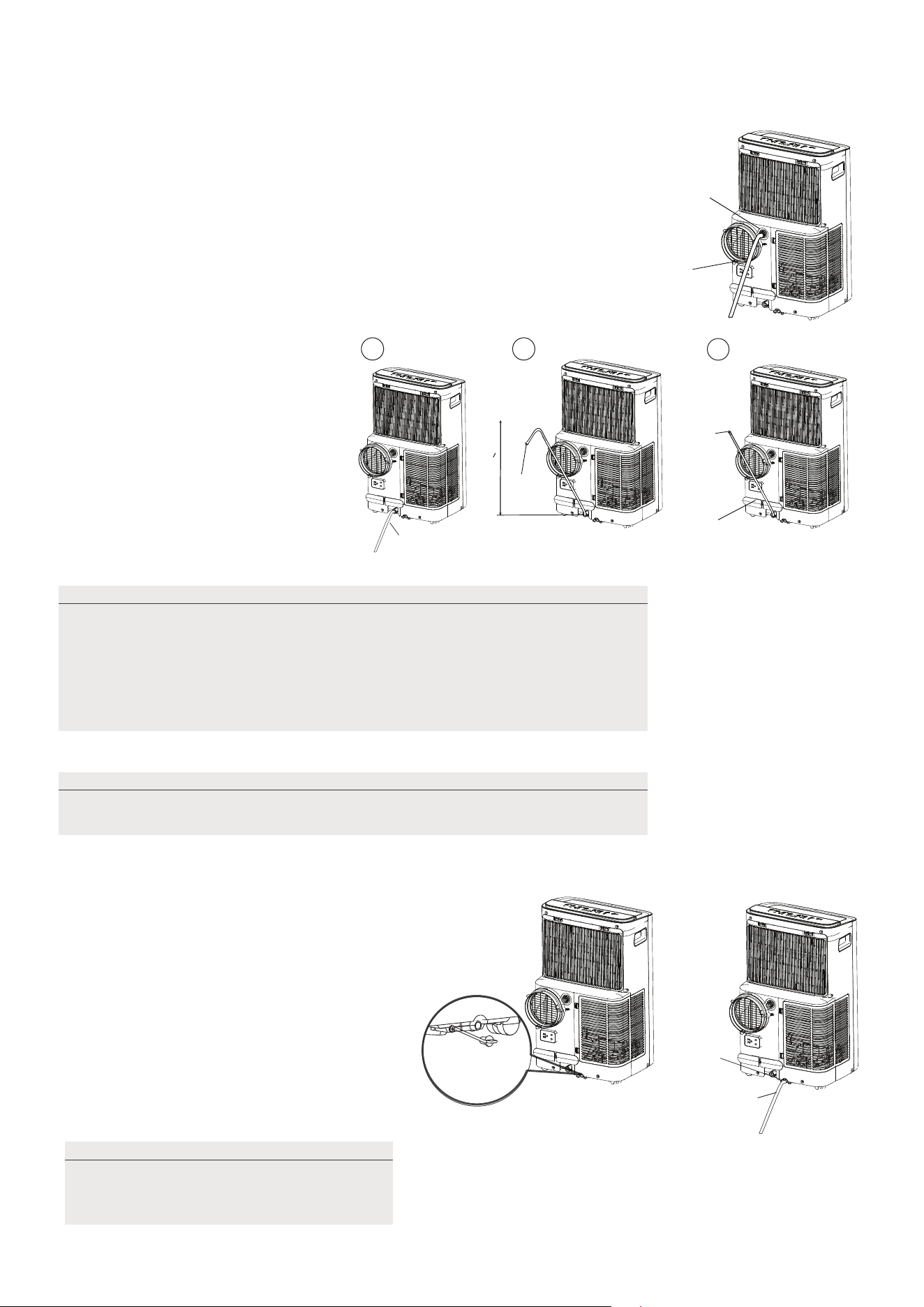
23
Guía de drenaje
Durante los modos de deshumidificación, retire el tapón de drenaje de la
parte posterior de la unidad, instale el conector de drenaje (5/8" hembra
universal) con una manguera de 3/4" (adquirida localmente). Para los
modelos sin conector de drenaje, simplemente conecte la manguera
de drenaje al orificio. Coloque el extremo abierto de la manguera
directamente sobre la zona de desagüe del suelo del sótano.
Mueva cuidadosamente el dispositivo a la posición de drenaje para que el
agua se descargue.
Cuando el nivel de agua de la bandeja
inferior alcanza un nivel predeterminado,
la unidad emite 8 pitidos, el área de
visualización digital muestra "P1". En este
momento, el proceso de aire acondicionado/
deshumidificación se detendrá inmediatamente.
Sin embargo, el motor del ventilador
continuará funcionando (esto es normal).
Mueva con cuidado la unidad a un lugar
de drenaje, retire el tapón de drenaje
inferior y deje que el agua se drene.
Vuelva a colocar el tapón de drenaje
inferior y reinicie la máquina hasta que
desaparezca el símbolo "P1". Si el error
persiste, póngase en contacto con el
servicio técnico.
Durante los modos de Bomba
de calefacción, retire el Reducir
de drenaje de la parte posterior
de la unidad, instale el conector
de drenaje (5/8" hembra universal)
con una manguera de 3/4" (adquirida
localmente). Para los modelos sin
conector de drenaje, simplemente
conecte la manguera de drenaje
al orificio. Coloque el extremo
abierto de la manguera directamente
sobre la zona de desagüe del suelo
del sótano
Mangueras
de drenaje
continuo
Mangueras
de drenaje
continuo
Retire el
tapón de
drenaje
Retire el
tapón de
drenaje
Mangueras de
drenaje continuo
Conector
de mangueras
de drenaje
√√
delivery lift <1.8m
X
Conector de
mangueras
de drenaje
Presione la cerradura
del cable de alimentación
en la tapa trasera.
NOTA:
Nota:
Asegúrese de que la manguera esté segura para que no haya
fugas. Dirija la manguera hacia el desagüe, asegurándose de que no
haya dobleces que detengan el flujo de agua. Coloque el extremo de la
manguera en el desagüe y asegúrese de que el extremo de la manguera
esté hacia abajo para que el agua fluya suavemente. Cuando no se
utilice la manguera de drenaje continuo, asegúrese de que el tapón y el
pomo de drenaje están instalados firmemente para evitar fugas.
Asegúrese de volver a instalar firmemente
el tapón de drenaje inferior para evitar
fugas antes de utilizar la unidad.
NOTA:
asegúrese de que la manguera de drenaje esté por debajo del drenaje de la
bandeja inferior.
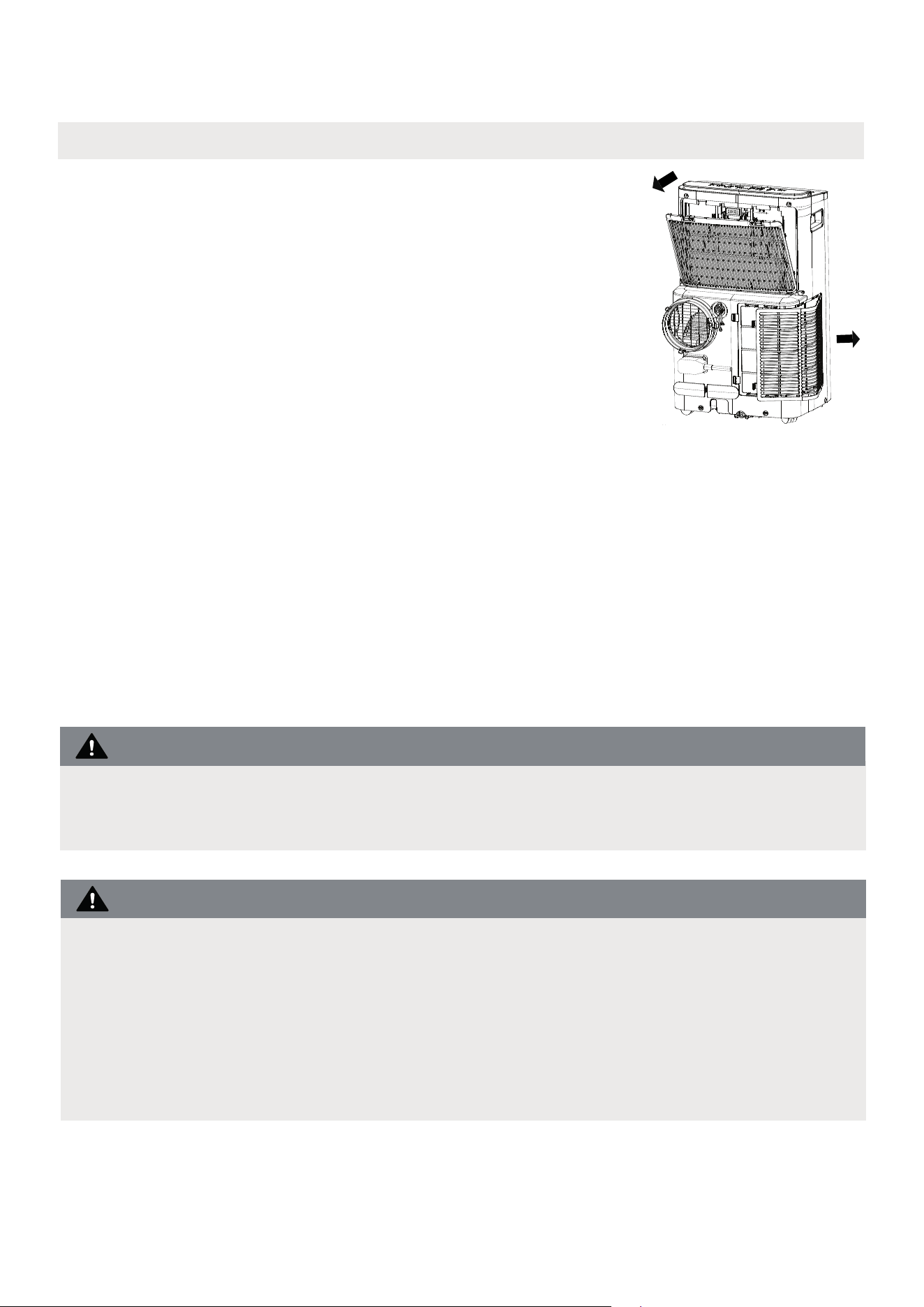
24
Cómo limpiar y mantener su aire acondicionado.
Limpieza y mantenimiento
Limpieza del filtro de aire y de la carcasa
· Desenchufe siempre la unidad antes de limpiarla o repararla.
· NO utilice líquidos inflamables o productos químicos para limpiar la unidad.
· NO lave la unidad con agua corriente. De lo contrario, podría producirse un
cortocircuito.
· NO utilice la máquina si la fuente de alimentación se ha dañado durante la limpieza.
Un cable de alimentación dañado debe reemplazarse por un cable nuevo del
fabricante.
NO haga funcionar la unidad sin filtro porque la suciedad y la pelusa lo obstruirán
y reducirán su rendimiento.
Retire el filtro de aire
PRECAUCIÓN:
PRECAUCIÓN:
Limpie la unidad con un paño húmedo sin pelusas y
detergente suave. Seque la unidad con un paño seco
sin pelusas.
• Retire el filtro en la dirección de la flecha.
• Sumerja suavemente el filtro de aire en agua tibia
(unos 40 ° C / 104 ° f) con un detergente neutro
para limpiar.
• Instale el filtro de aire después de limpiar.
Asegúrese de limpiar el filtro de aire cada 2 semanas para un rendimiento óptimo.
· La bandeja de recogida de agua debe vaciarse inmediatamente después de
que se produzca el error P1 y antes de guardarla para evitar la formación de
moho.
· En los hogares con animales, tendrá que limpiar periódicamente la rejilla
para evitar el bloqueo del flujo de aire debido al pelo de los animales.
• Enjuague el filtro y seque a la sombra.
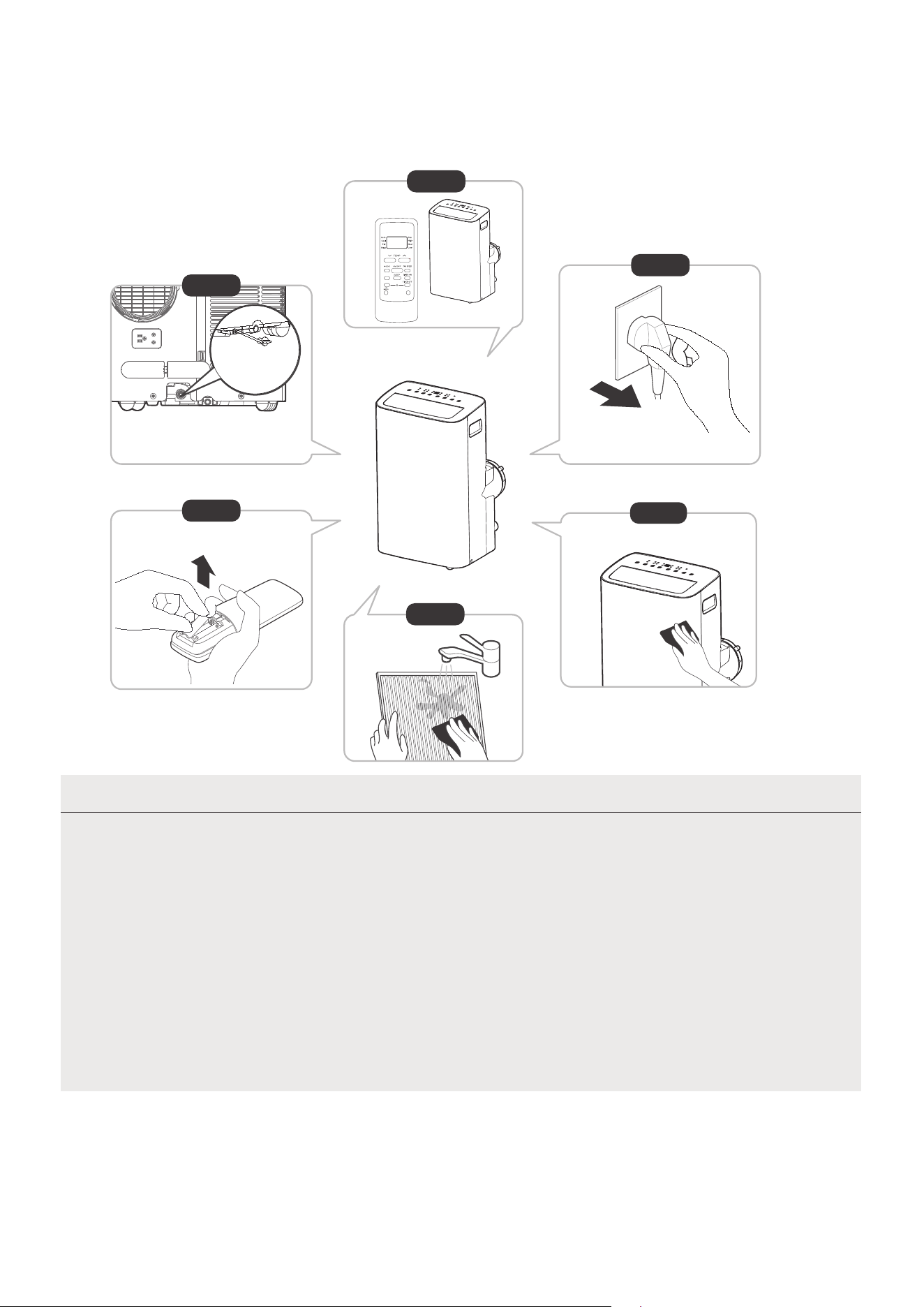
25
NOTA
12horas
Paso 6
Paso 3
Paso 1
Paso 2
Paso 5
Guarde la unidad cuando no la utilice
*Por favor, consulte el
enchufe real, y la leyenda es
sólo para referencia.
*Vacíe la bandeja de recogida de
agua de la unidad y vuelva a colocar
el tapón de vaciado inferior.
· Asegúrese de guardar la unidad en un lugar fresco y oscuro. La exposición
directa al sol o al calor extremo puede acortar la vida útil de la unidad.
· El gabinete y el frente pueden limpiarse con un paño libre de aceite o lavarse
con un paño humedecido en una solución de agua tibia y detergente para
platos suave. Enjuagar bien y secar con un paño.
No utilice nunca limpiadores abrasivos, cera ni abrillantadores en la parte
frontal del gabinete.
Asegúrese de escurrir el exceso de agua del paño antes de limpiar alrededor
de los controles.
El exceso de agua en los controles o alrededor de ellos puede causar daños a
la unidad.
· Vacíe la bandeja de recolección de agua de la unidad de acuerdo con las instrucciones de la siguiente sección.
· Haga funcionar el aparato en modo FAN (VENTILADOR) durante 12 horas en una habitación cálida
para secarlo y evitar la formación de moho.
· Apague el aparato y desenchúfelo.
· Limpie el filtro de aire según las instrucciones de la sección anterior. Vuelva a instalar el filtro limpio y
seco antes de guardarlo.
· Retire las pilas del mando a distancia.
Paso 4
SWING
C-SENSE
°C/°F
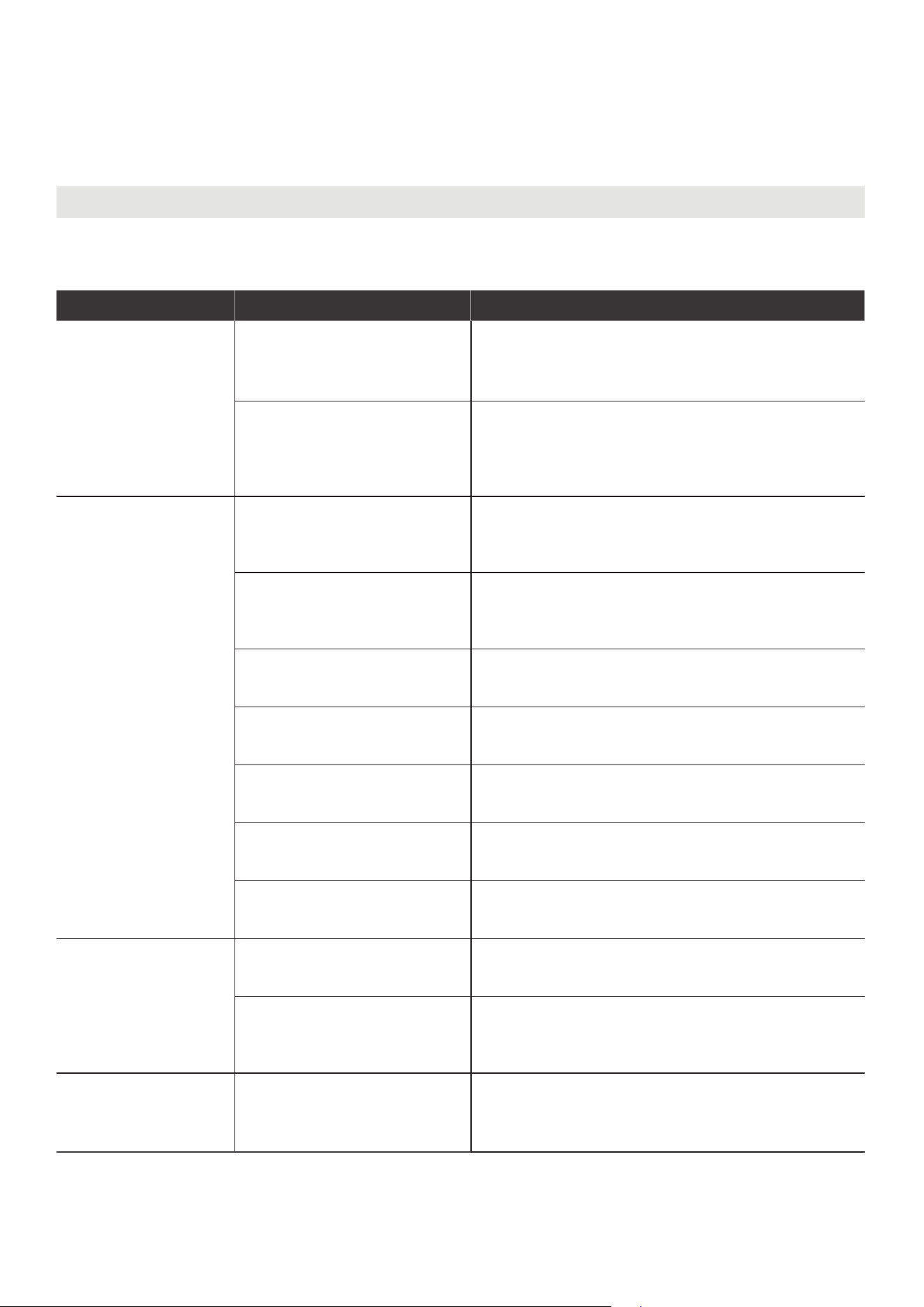
26
RESOLUCIÓN DE PROBLEMAS
Resolución de problemas
Problemas comunes
Los siguientes problemas no significan un mal funcionamiento y en la mayoría de los casos no
requieren reparación.
Problema Posible Causas Solución
La unidad no
se enciende
al presionar el
botón ON/OFF
(ENCENDIDO/
APAGADO)
P1 Código de protección
La bandeja de recolección de agua está llena.
Apague la unidad, drene el agua de la bandeja
de recolección de agua y reinicie la unidad.
En modo COOL (FRÍO): la
temperatura ambiente es
inferior a la temperatura
programada.
Reinicie la temperatura
La unidad no enfría
bien
El filtro de aire está
obstruido con polvo o con
pelos de animales
Apague el aparato y limpie el filtro siguiendo las
instrucciones
La manguera de escape
no está conectada o está
obstruida
Apague la unidad, desconecte la manguera,
compruebe si hay obstrucciones y vuelva a
conectar la manguera
La unidad tiene poco
refrigerante
Llame al servicio técnico para que examine la
unidad y añada refrigerante
La temperatura es
demasiado alta
Baje la temperatura programada
Las ventanas y puertas de la
habitación están abiertas
Asegúrese de que todas las ventanas y puertas
estén cerradas
La habitación es demasiado
grande
Controle el área de refrigeración
Hay fuentes de calor dentro
de la habitación
Si es posible, retire las fuentes de calor
La unidad es
ruidosa y vibra
demasiado
El suelo no está nivelado
Coloque la unidad sobre una superficie plana y
nivelada
El filtro de aire está
obstruido con polvo o con
pelos de animales
Apague el aparato y limpie el filtro siguiendo las
instrucciones
La unidad emite un
sonido de gorgoteo
Este sonido es causado
por el flujo de refrigerante
dentro de la unidad
Esto es normal
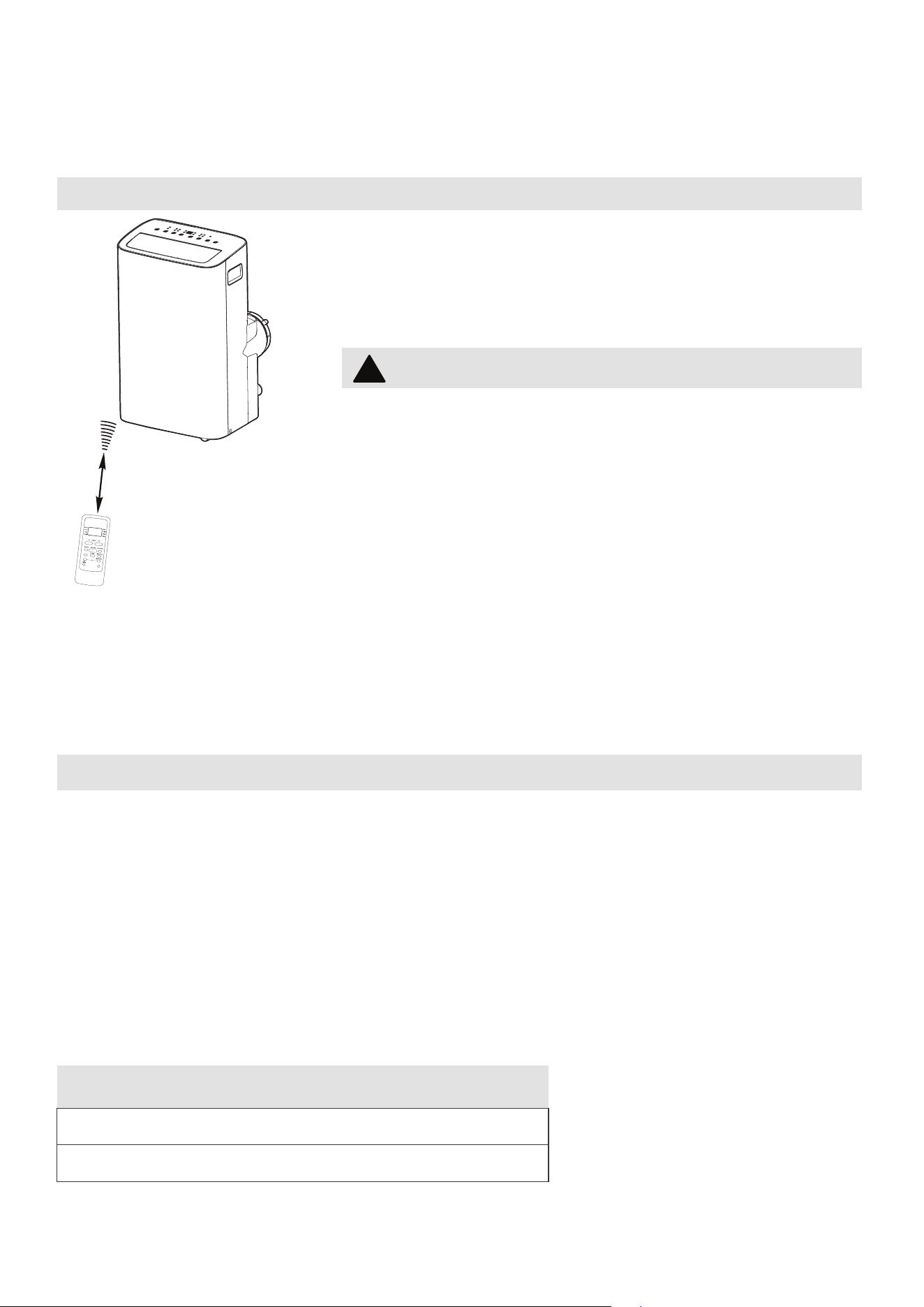
27
INSTRUCCIONES DEL CONTROL
REMOTO Y APLICACIÓN
Especificaciones del control remoto
Voltaje nominal: 3.0V (baterías secas R03/LR03x2)
Ambiente: 23°F ~140°F (-5°~60°)
Ubicacióndelcontrolremoto
Utilice el control remoto a distancia a una distancia de
26.2 ft (8 metros) del acondicionador de aire, apuntando
hacia el receptor. La recepción se confirma con un pitido.
Manejo del Control Remoto
PRECAUCIÓN
26.2 ft (8 metros)
AVISO
•
El diseño del botón se basa en el modelo típico y puede variar ligeramente del
real que compró.
•
Todas las funciones descritas son realizadas por la unidad. Si la unidad no tiene
una función, la unidad no responderá si se presiona el botón correspondiente en
el control remoto.
•
Cuando existan diferencias significativas entre las características u operaciones
implícitas en la ilustración del control remoto y las funciones reales descritas
en el MANUAL DEL USUARIO, prevalecerán las descripciones en el MANUAL
DEL USUARIO.
• El acondicionador de aire no funcionará si las
cortinas, puertas u otros materiales bloquean las
señales del control remoto a la unidad.
• Evite que cualquier líquido se derrame sobre el
mando a distancia. No exponga el mando a distancia
a la luz solar directa ni al calor.
• Si el receptor de señal infrarroja de la unidad interior
está expuesto a la luz solar directa, es posible que el
a
condicionador de aire no funcione correctamente.
Utilice cortinas para evitar que la luz del sol caiga
sobre el receptor.
• Si otros aparatos eléctricos reaccionan al control
remoto, mueva estos aparatos o consulte a su
distribuidor local.
SWING
C-SENSE
°C/°F
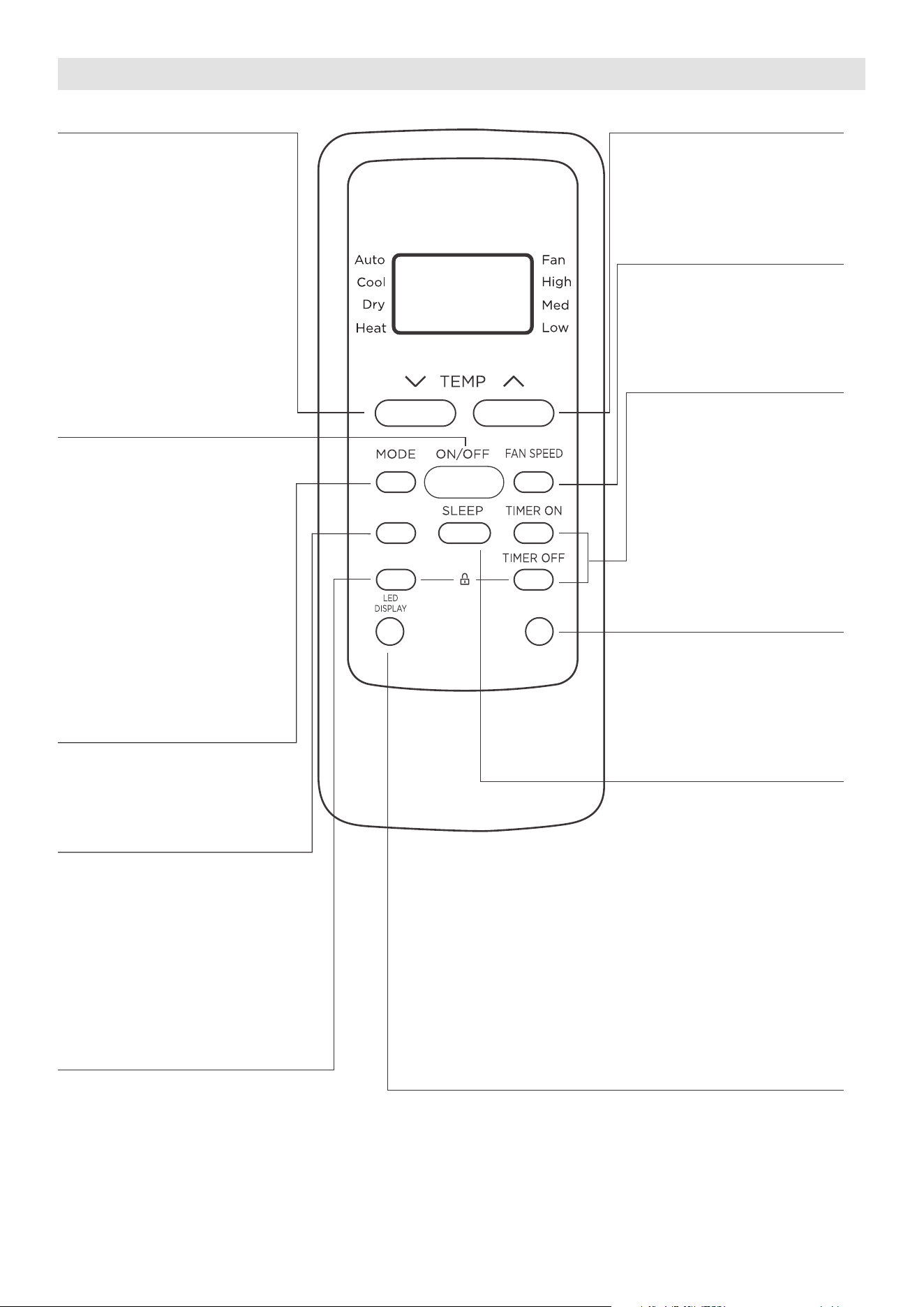
28
SWING
C-SENSE
°C/°F
Función de los Botones
Botón TEMP DOWN
Pulse este botón para
reducir la configuración
de la temperatura interior.
Botón TEMP UP
Pulse este botón para
aumentar la configuración
de la temperatura interior.
Botón FAN SPEED
Pulse este botón para
seleccionar la velocidad
deseada del ventilador.
Botón TIMER
Pulse este botón para
activar el programa
“Inicio Automático”
(Auto Start) o “Parada
Automática” (Auto Stop).
Botón SLEEP
Pulse este botón para
activar el modo de
Suspensión. Esta función
solo está disponible en
modo COOL o AUTO y
mantendrá la temperatura
más cómoda p
ara usted
mientras ahorra energía.
Para obtener más
información, consulte la
función “Sueño” (sleep)
en la página 22.
Botón °C/°F
Pulse este botón para
cambiar la visualización
de temperatura entre
Celsius y Fahrenheit.
Botón °C/°F.
Botón ON/OFF
La unidad se enciende
cuando se pulsa este
botón y se apaga cuando
pulsarlo nuevamente.
Botón MODE
Pulse este botón para
seleccionar el modo de
operación deseado.
Botón SWING
Presione este botón para
iniciar y detener el movimiento
de la rejilla horizontal.
Mantenga presionado dur
ante
2 segundos para iniciar la
función de oscilación
automática de la rejilla vertical
(algunas unidades).
Botón COMFORTSENSE
Pulse este botón para activar
el modo Comfort Sense, para
optimizar la temperatura a
su alrededor y garantizar la
máxima comodidad.
Botón LED DISPLAY
Enciende apaga la
pantalla LED de la unidad.
NOTA: Si la unidad tiene la
función ENERGY SAVER,
iniciará automáticamente
la función de ahorro de
energía en los modos
Cool, Dry y Auto (solo
Auto-Cooling y Auto-Fan).
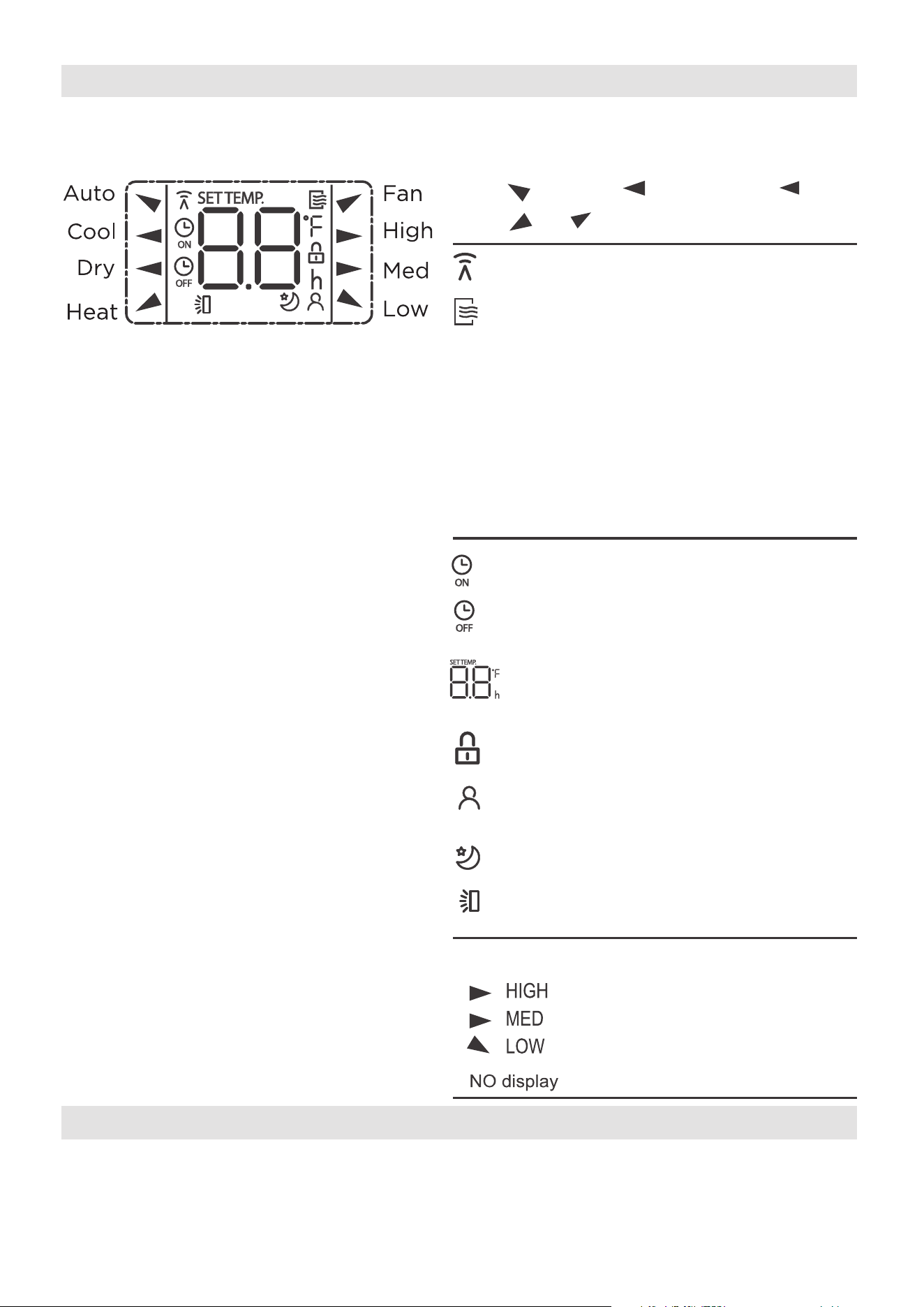
29
Indicatores del Visor del Control Remoto
La información se muestra cuando se enciende el control remoto.
Se muestra cuando se transmiten los datos.
Se muestra cuando el control remoto está
habilitado y puede enviar una señal a la
unidad. Si desea apagar el control remoto
sin afectar la unidad, apunte el control
remoto lejos de la unidad y presione el
botón ON/OFF. Para encender el control
remoto, apunte el control remoto lejos de
la u
nidad y presione el botón ON/OFF.
La unidad no recibirá comandos del control
remoto si este indicador no está iluminado.
Se muestra cuando el TIMER ON es
ajustado.
Se muestra cuando el TIMER OFF es
ajustado.
Muestra la temperatura establecida o la
temperatura ambiente, o el tiempo en la
configuración del TIMER.
Indica que todos los ajustes actuales
están bloqueados.
Aparece cuando la función Comfort Sense
está activada
Se muestr
a cuando la función SLEEP es
activada.
Auto
Cool
Fan
Dry
Mode display
Alta Velocidad
Media Velocidad
Baja Velocidad
Velocidad Automática
Todos los indicadores que se muestran en la figura tienen el propósito de una
presentación
clara. Pero durante la operación, solo los ícones de función se muestran en el visor.
AVISO
Indicación de la Velocidad del Ventilador
Pantalla oscilante de lamas horizontales
Heat
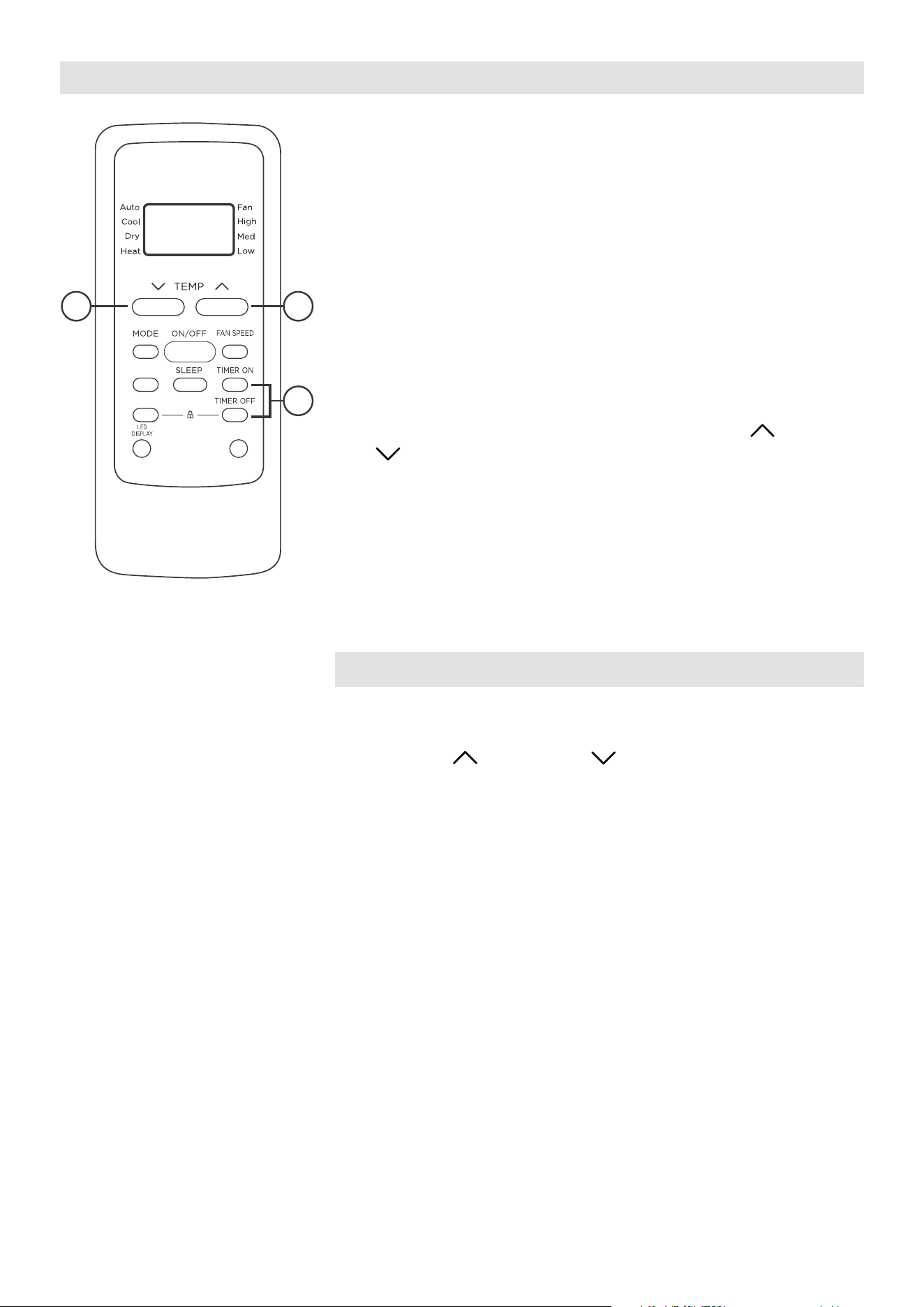
30
Cómo Usar los Botones
FUNCIÓN DEL TEMPORIZADOR (TIMER)
Pulse el botón TIMER para iniciar el programa de ajuste
de inicio automático y de parada automática de la unidad.
To set the Auto-start/stop time.
1. Pulse el botón TIMER. Cuando el indicador TIMER
ON aparecer en el visor LED del acondicionador de
aire, indica que se ha iniciado el programa de ajuste
de inicio automático. Cuando el indicador TIMER
OFF aparecer en el visor LED del acondicionador de
aire, indica que se ha iniciado el programa de aju
ste
de parada automática.
2.
Mantenga pulsado los botones TEMP UP ( )/DOWN
( ) para cambiar la hora automática. El control
contará el tiempo restante hasta el inicio/parada.
3. El tiempo seleccionado se registrará en 5 segundos y
el acondicionador de aire volverá automáticamente a
mostrar el ajuste de temperatura anterior.
4. Encender o apagar la unidad en cualquier momento,
cancelará la función de inicio/parada automática.
NOTICE
Para cancelar el ajuste TIMER, pulse el botón TIMER y,
a continuación, pulse o mantenga pulsado los botones
TEMP UP ( ) / DOWN ( ) hasta que aparezca 0
horas en el visor LED del acondicionador de aire.
SWING
C-SENSE
°C/°F
2 2
1
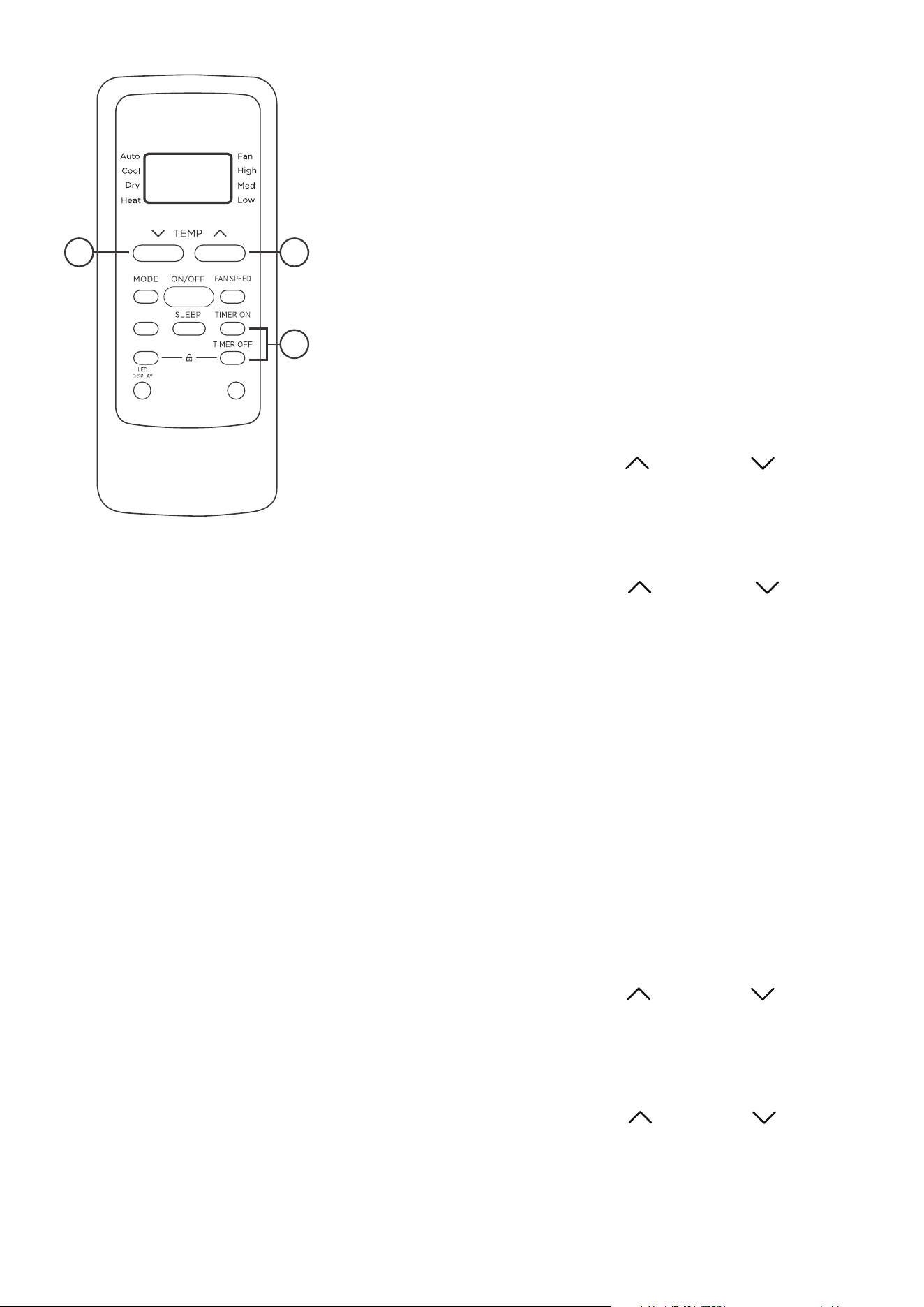
31
TEMPORIZADOR (TIMER) COMBINADO
(Ajuste simultáneo de los temporizadores ON y OFF)
PARADA AUTOMÁTICA > INICIO AUTOMÁTICO (AUTO
STOP >AUTO START)
(Activado > Detener > Iniciar operación)
Esta función es útil cuando desea detener el
acondicionador de aire después de acostarse, y volver
a encenderlo por la mañana cuando se despierta o
cuando regresa a casa.
Ejemplo:
Para detener el acondicionador de aire 2 horas después de
la configuración y volver a encenderlo 10 horas después de
la configuración.
1. Pulse el botón TIMER hasta que muestre TIMER OFF
en el indicador LED del acondicionador de aire.
2. Utilice los botones TEMP UP ( )/DOWN ( ) hasta
mostrar “2.0” en el indicador LED del acondicionador
de aire.
3. Presione el botón TIMER nuevamente para mostrar el
TIMER OFF en el LED de la unidad.
4. Utilice los botones TEMP UP ( )/DOWN ( ) hasta
mostrar “10” en el indicador LED del acondicionador de
aire.
5. Espere 5 segundos hasta que aparezca la visualización
anterior en el LED.
INICIO AUTOMÁTICO > PARADA AUTOMÁTICA (AUTO
START > AUTO STOP)
(Desactivado > Iniciar > Detener operación)
Esta función es útil cuando se desea encender el
acondicionador de aire antes de despertar y detenerlo
después de que se sale de la casa.
Ejemplo:
Para iniciar el acondicionador de aire 5 horas después
de la configuración, y detenerlo 8 horas después de la
configuración.
1. Pulse el botón TIMER hasta que muestre TIMER ON en
el indicador LED del acondicionador de aire.
2. Utilice los botones TEMP UP ( )/DOWN ( ) hasta
mostrar “5.0” en el indicador LED del acondicionador
de aire.
3. Presione el botón TIMER nuevamente para mostrar el
TIMER OFF en el LED de la unidad.
4. Utilice los botones TEMP UP ( )/DOWN ( ) hasta
mostrar “8.0” en el indicador LED del acondicionador
de aire.
5. Espere 5 segundos hasta que aparezca la visualización
anterior en el LED.
2 2
1
SWING
C-SENSE
°C/°F

32
NOTES
• El diseño del botón se basa en un modelo típico y puede variar ligeramente del real
que compró.
• Este dispositivo cumple con laparte 15 de las Reglas de la FCC. El funcionamiento
está sujeto a las dos condiciones siguientes: (1) Este dispositivo no puede causar
interferencias perjudiciales, y (2) este dispositivo debe aceptar cualquier
interferencia recibida, incluidas las interferencias que puedan causar un
funcionamiento no deseado.
• Este equipo ha sido probado y se encontró que cumple con los límites para un
dispositivo digital de Clase B, de acuerdo con la parte 15 de las Reglas de la FCC.
Estos límites están diseñados para proporcionar una protección razonable contra
interferencias dañinas en una instalación residencial. Este equipo genera, usa y
puede irradiar energía de radiofrecuencia y, si no se instala y usa de acuerdo con
las instrucciones, puede causar interferencia dañina a las comunicaciones de radio.
Sin embargo, no hay garantía de que la
interferencia no ocurra en una instalación
en particular. Si este equipo causa interferencias perjudiciales para la recepción de
radio o televisión, lo cual puede determinarse encendiendo y apagando el equipo,
se recomienda al usuario que intente corregir la interferencia mediante una o más
de las siguientes medidas:
- Reorientar o reubicar la antena receptora.
- Aumente la separación entre el equipo y el receptor.
- Conecte el equipo a una toma de corriente en un circuito diferente al que está
conectado el receptor.
- Consulte con el distribuidor o un técnico experimentado en radio / TV para
obtener ayuda.
- Los cambios o modificaciones no aprobados por la parte responsable del
cumplimiento pueden anular la autoridad de los usuarios para operar el equipo.
Advertencia de batería:
No mezcle pilas nuevas y viejas y no mezcle pilas alcalinas, estándar
(carbono-zinc) o recargables (ni-cad, ni-mh, etc.)
Declaración de conformidad del proveedor
47 CFR § 2.1077 Información sobre el cumplimiento
Identificador único:Midea brand,RG51F2(2)/CEFU1
, RG51F2(2)/EFU1
Parte responsable Información de contacto de los Estados Unidos
Midea America Corporation
300 Kimball Dr
Parsippany NJ
07054
Este dispositivo cumple con la Parte 15 de las Normas de la FCC. La operación
está sujeta a las siguientes dos condiciones: (1)Este dispositivo no puede
causar interferencias perjudiciales,y (2)este dispositivo debe aceptar
cualquier interferencia recibida, incluida la interferencia que pueda provocar
un funcionamiento no deseado.
Número de teléfono o información de contacto en Internet
:Midea.com/us
Declaración de cumplimiento de la FCC(productos sujetos a la Parte 15)
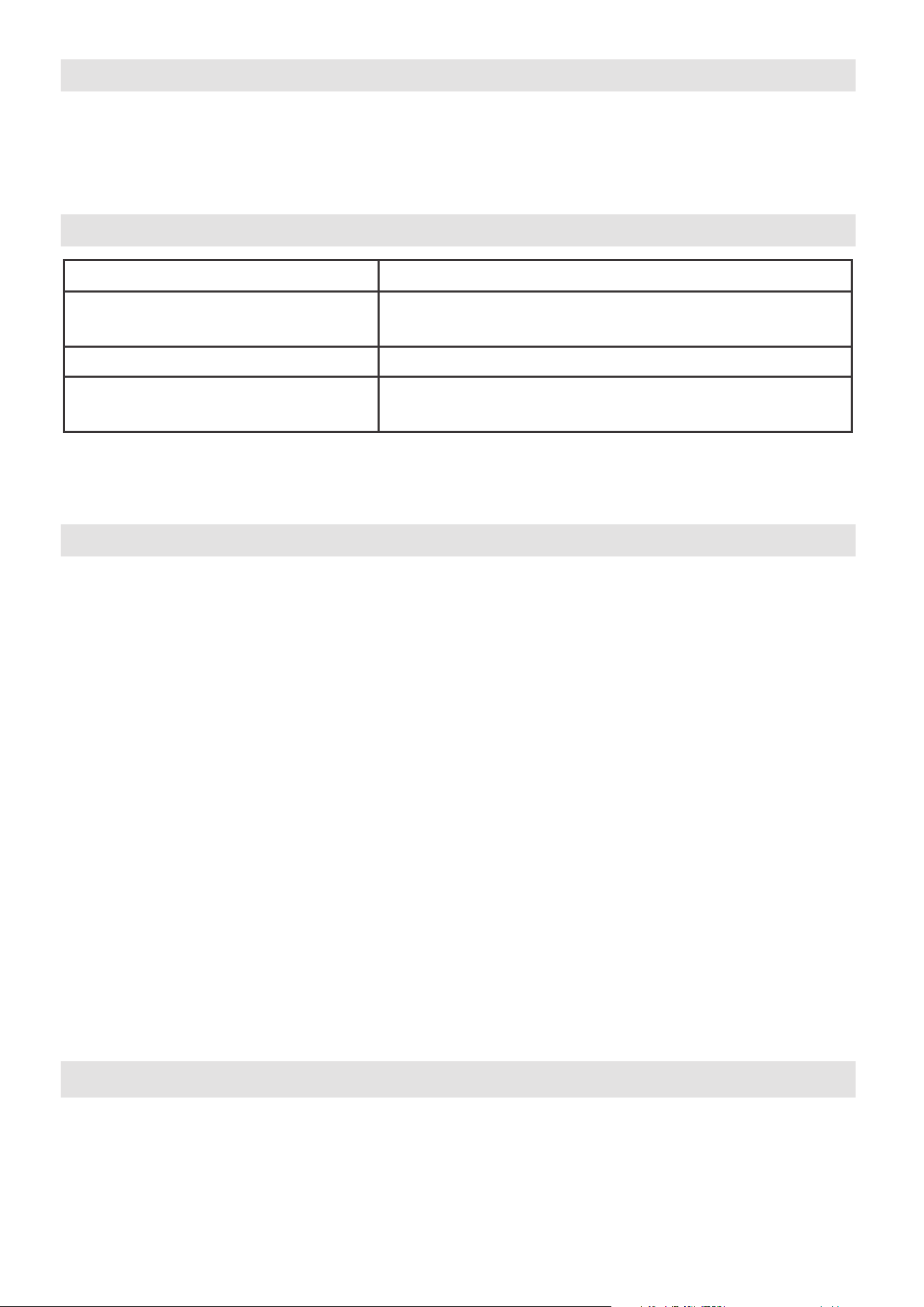
33
Declaramos que este Acondicionador de Aire cumple los requisitos esenciales y otras
disposiciones pertinentes de la Directiva 1999/5/CE.
1. Soporte para los sistemas operativos: iOS 10+ or Android 5+.
2. En el caso de una actualización del sistema operativo, puede haber un retraso entre
la actualización del sistema operativo y una actualización de software durante la cual
su sistema operativo puede o no ser compatible hasta que una nueva versión sea
lanzada. Su teléfono móvil específico o proble
mas en su red pueden impedir que el
sistema funcione y Midea no será responsable de ningún problema que pueda ser
causado por incompatibilidad o problemas de red.
3. Este acondicionador de aire inteligente solo permite el cifrado WPA-PSK/WPA2-PSK
(recomendado).
4
. Para garantizar el escaneo adecuado del código QR, su smart phone debe tener al
menos una cámara de 5 megapíxeles.
5. Debido a la conectividad de red inestable, las soli
citudes pueden agotar el tiempo de
espera. Si esto sucede, vuelva a ejecutar la configuración de red.
6. Debido a la conectividad de red inestable, los comandos pueden agotar el tiempo
de espera. Si esto sucede, la aplicación del Smartphone y el producto actual
pueden presentar información conflictiva. La información presentada en el producto
actual es siempre la más precisa disponible. Actualice la aplicación para volver a
sinc
ronizarla.
Midea no será responsable de ningún problema que pueda ser causado por
incompatibilidad o problemas de red, su router inalámbrico y teléfono móvil.
AVISO
DECLARACIÓN DE CONFORMIDAD
ESPECIFICACIÓN DEL MÓDULO INALÁMBRICO
PRECAUCIONES
Modelo: US-SK109 Dimensiones: 41 x 24 x 5 (mm)
Temp. de funcionamiento: 0°C ~ 45°C / 32°F ~ 113°F.
Tipo de Antena: Printed PCB
Antenna
Humedad de funcionamiento: 10% ~ 85%
Frecuencia:
2400-2483.5MHz
Entrada de potencia: DC 5V/500 mA
Potencia máxima transmitida:
<20dBm
34
Download the app
& activate product
Dispositivos necesarios para utilizar el Acondicionadordeaireinteligente:
1. Smartphone con sistema iOS o Android compatible.
2. Router inalámbrico
3. Acondicionador de aire Inteligente
Escanear para descargar la aplicación.
• También puede ir a Google Play o App Store y buscar SmartHome.
DESCARGAR E INSTALAR LA APLICACIÓN
VISIÓN GENERAL DEL SISTEMA
AVISO
Todas las imágenes de este manual son solo para referencia, su producto y
aplicación pueden tener un aspecto ligeramente diferente. Las instrucciones
reales del producto y de la aplicación deben ser consideradas.
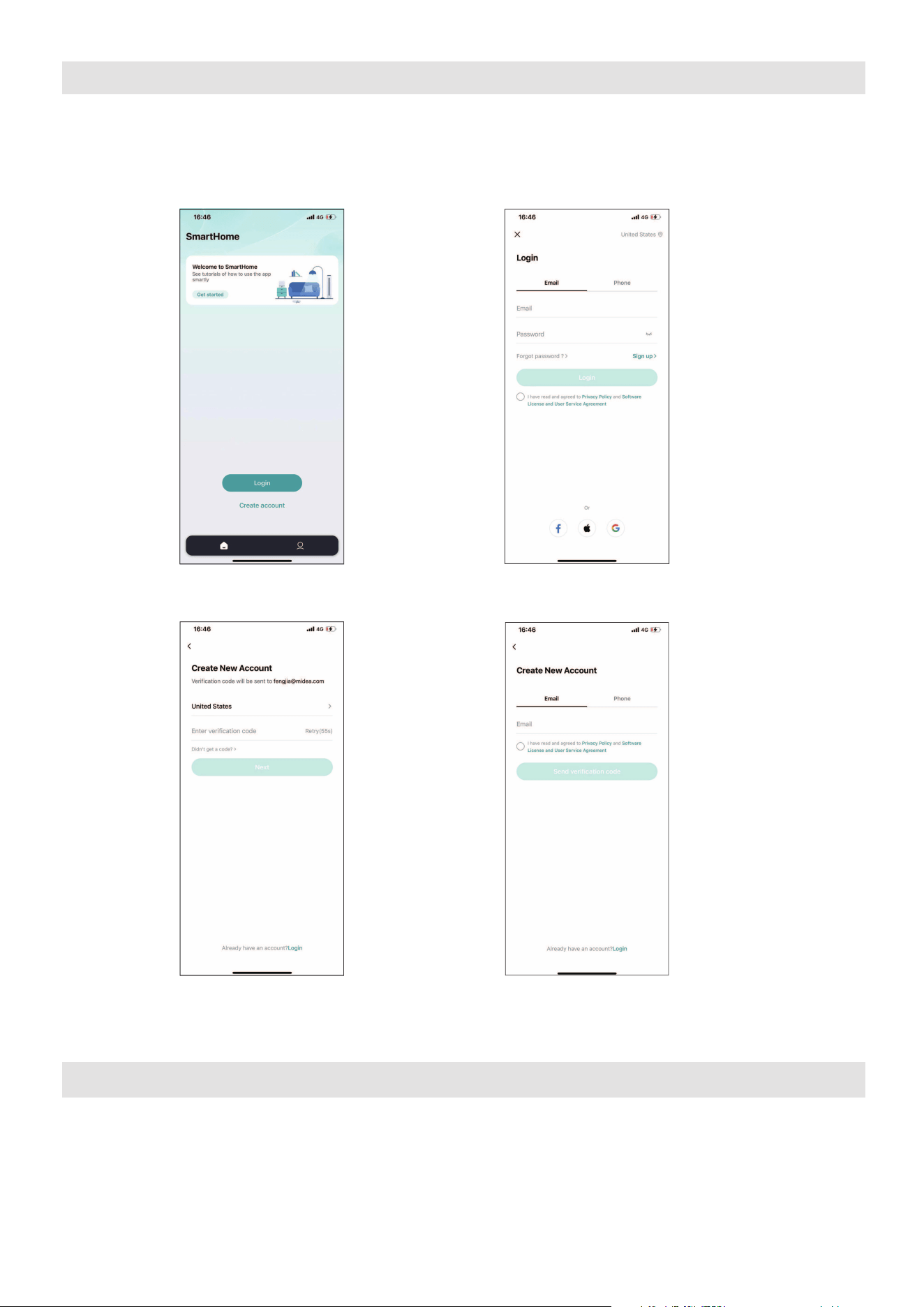
35
• Asegúrese de que su Smartphone esté conectado a su router inalámbrico y que su
router inalámbrico tenga una conexión a Internet de 2,4 GHz.
• Se recomienda activar su cuenta inmediatamente para poder recuperar su
contraseña por correo electrónico.
AVISO
• Asegúrese de que su Smartphone es capaz de conectarse a la red inalámbrica
que se utilizará.
• Asegúrese también de que el dispositivo no se está conectando a otras redes
al alcance.
CREA TU CUENTA
6.1 Pulse Iniciar sesión 6.2 Seleccione Registrarse.
6.3 Introduzca su dirección
de correo electrónico.
6.4 Ingrese el código de verificación
que se envió a su dirección de
correo electrónico.
36
APLICACIÓN ADICIONAL Y FUNCIONES DE HOGAR INTELIGENTE
Escanee el siguiente código QR para obtener instrucciones adicionales sobre las
características de la aplicación y las capacidades de la función de Hogar Inteligente.
Declaración de conformidad
CONTIENE FCC ID: 2ADQOMDNA23
CONTIENE IC: 12575A-MDNA23
El funcionamiento está sujeto a las dos condiciones siguientes:
(1) Este dispositivo podría no causar interferencia; y
(2) Este dispositivo debe aceptar cualquier interferencia, incluida la interferencia que pueda
causar un funcionamiento no deseado del dispositivo.
Utilice el dispositivo únicamente de acuerdo con las instrucciones suministradas.
Los cambios o modi caciones a esta unidad no aprobados expresamente por el responsable del
cumplimiento podrían anular la autoridad del usuario para operar el equipo. Este dispositivo
cumple con los límites de exposición a la radiación FCC establecidos para un entorno no
controlado. Para evitar la posibilidad de superar los límites de exposición a radiofrecuencia
FCC, la proximidad humana a la antena no deberá ser inferior a 20 cm (8 pulgadas) durante
el funcionamiento normal.
NOTA: Este equipo ha sido probado y se ha comprobado que cumple con los límites para
un dispositivo digital de clase B, de conformidad con la parte 15 de las Reglas de FCC. Estos
límites están diseñados para proporcionar una protección razonable contra interferencias
dañinas en una instalación residencial. Este equipo genera, utiliza y puede irradiar energía
de radiofrecuencia y, si no se instala y utiliza de acuerdo con las instrucciones, puede causar
interferencias dañinas a las comunicaciones radioeléctricas. Sin embargo, no hay garantía de
que no se produzcan interferencias en una instalación particular. Si este equipo causa
interferencias perjudiciales en la recepción de radio o televisión, que se pueden determinar
apagando y encendiendo el equipo, se recomienda al usuario que intente corregir la
interferencia mediante una o más de las siguientes medidas:
-- Reoriente o reubique la antena receptora.
-- Aumente la separación entre el equipo y el receptor.
-- Conecte el equipo a un enchufe en un circuito diferente al que está conectado el receptor.
-- Consulte al distribuidor o a un técnico de radio/TV con experiencia para obtener ayuda.
NOTA:
All the illustrations in the manual are for explanation purpose only. Your unit may be slightly
different. The actual shape shall prevail.
Este dispositivo cumple con la Parte 15 de las Reglas de la FCC y los RSS exentos de licencia
de Industry Canada.
37
GARANTÍA
Garantía limitada del aire acondicionado
Su producto está protegido por esta Garantía Limitada:
El servicio de garantía debe ser obtenido de Servicios al Consumidor de Midea o prestador de servicio autorizado Midea.
Garantía
• Garantía limitada de un año desde la fecha de compra original. Garantía limitada del sistema sellado de cinco años
(incluye componentes que contienen refrigerante) desde la fecha de compra original. Garantía limitada de tres
años para el compresor desde la fecha de compra original.
El consumidor será responsable de:
• Costos de diagnóstico, remoción, transporte y reinstalación requeridos por el servicio.
• Los costos de las llamadas de servicio que son el resultado de ítems indicados en el RESPONSABILIDADES
NORMALES DEL CONSUMIDOR **
Las piezas de reemplazo Midea se utilizarán y garantizarán sólo por el período restante de la garantía original.
RESPONSABILIDADES NORMALES DEL CONSUMIDOR **
Esta garantía sólo se aplica a los productos de uso doméstico normal, y el consumidor es responsable de los ítems
listados siguientes:
1. Uso correcto del aparato de acuerdo con las instrucciones proporcionadas con el producto.
2. Mantenimiento rutinario y limpieza necesaria para mantener el buen estado de funcionamiento.
3. Instalación correcta por un profesional de servicio autorizado de acuerdo con las instrucciones proporcionadas
con el aparato y de acuerdo con todos los códigos locales de plomería, electricidad y/o gas.
4. Conexión adecuada a una fuente de alimentación conectada a tierra de suficiente voltaje, reemplazo de fusibles
quemados, reparación de conexiones aflojadas o defectos en el cableado doméstico.
5. Gastos para facilitar el acceso al aparato para el servicio.
6. Daños después de la instalación.
EXCLUSIONES
Esta garantía no cubre lo siguiente:
1) Fallo causado por daño a la unidad mientras en su posesión (diferente de los d
años causados por defecto o mal
funcionamiento), mediante su instalación inadecuada, o por uso irracional de la unidad, incluyendo, pero no limitado
a, la falta de mantenimiento razonable y necesario o de seguir las instalaciones escritas y el manual de instrucciones.
2) Daños causados por servicios realizados por personas que no sean prestadores de servicio autorizados Midea,
por uso de piezas que no sean piezas de repuesto Midea, obtenidos desde personas que no sean de servicios al
Consumidor Midea, o por causas externas como abuso, mal uso, suministro eléctrico inadecuado o casos fortuitos.
3) Si la unidad se pone a usos comerciales, de negocios, de alquiler u otro uso o aplicación que no sea para uso del
consumidor, no hacemos ninguna garantía, expresa o implícita, incluyendo, pero sin limitado a, cualquier garantía
implícita de comerciabilidad o idoneidad para un uso o propósito particular.
4) Productos sin números de serie originales o productos que tengan números de serie que se han alterado o no se
puede determinar fácilmente.
Nota: Algunos estados no permiten la exclusión o limitación de daños incidentales o consecuentes. Así que esta
limitación o exclusión no se aplique a usted.
SI USTED NECESITA SERVICIO
Conserve la factura de compra, la boleta de entrega o cualquier otro registro de pago apropiado.
La fecha en la factura estableció el período de garantía si requerir servicio.
Si el servicio se lleva a cabo, es su mejor interés para obtener y conservar todos los recibos.
Esta garantía escrita le otorga derechos legales específicos. Usted también puede tener otros derechos que varían de
estado a estado.
El servicio bajo esta garantía debe ser obtenido mediante los siguientes pasos, en orden:
1
) Póngase en contacto con Servicios al Consumidor Midea o un prestador de servicio autorizado Midea a 1 866 646 4332.
2) Si hay una pregunta sobre dónde obtener servicio, póngase en contacto con nuestro departamento de relaciones
de consumidor.
38
POLITICA DE DEVOLUCION
Preguntas sobre la instalación o el funcionamiento
producto Midea?
Sitodavía necesita asistencia, por favor llame al Atención
al Cliente en 1-866-646-4332.
Tenga disponible su recibo de compra número de serie
y el múmero de modelo del producto cuando llame.
El producto podrá devolverse dentro de lo 30 días de
la compra con el recibo. Luego de los 30 días, el producto
está cubierto por la garantía limitada. Consulte la sección
de garantía en el manual de usuario para información.
Política de devolución
guarde su
comprobante

2023
MAPXWMT
16120600A27358