1
Owner’s Manual
Español 9
Français 18
Deutsch 27
Italiano 36
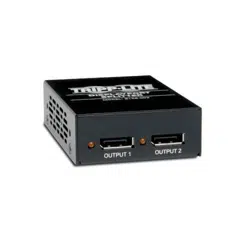
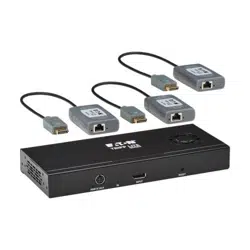
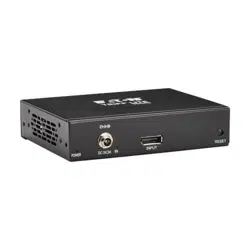
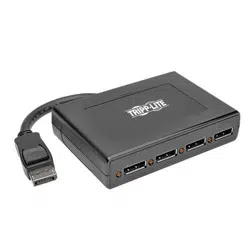
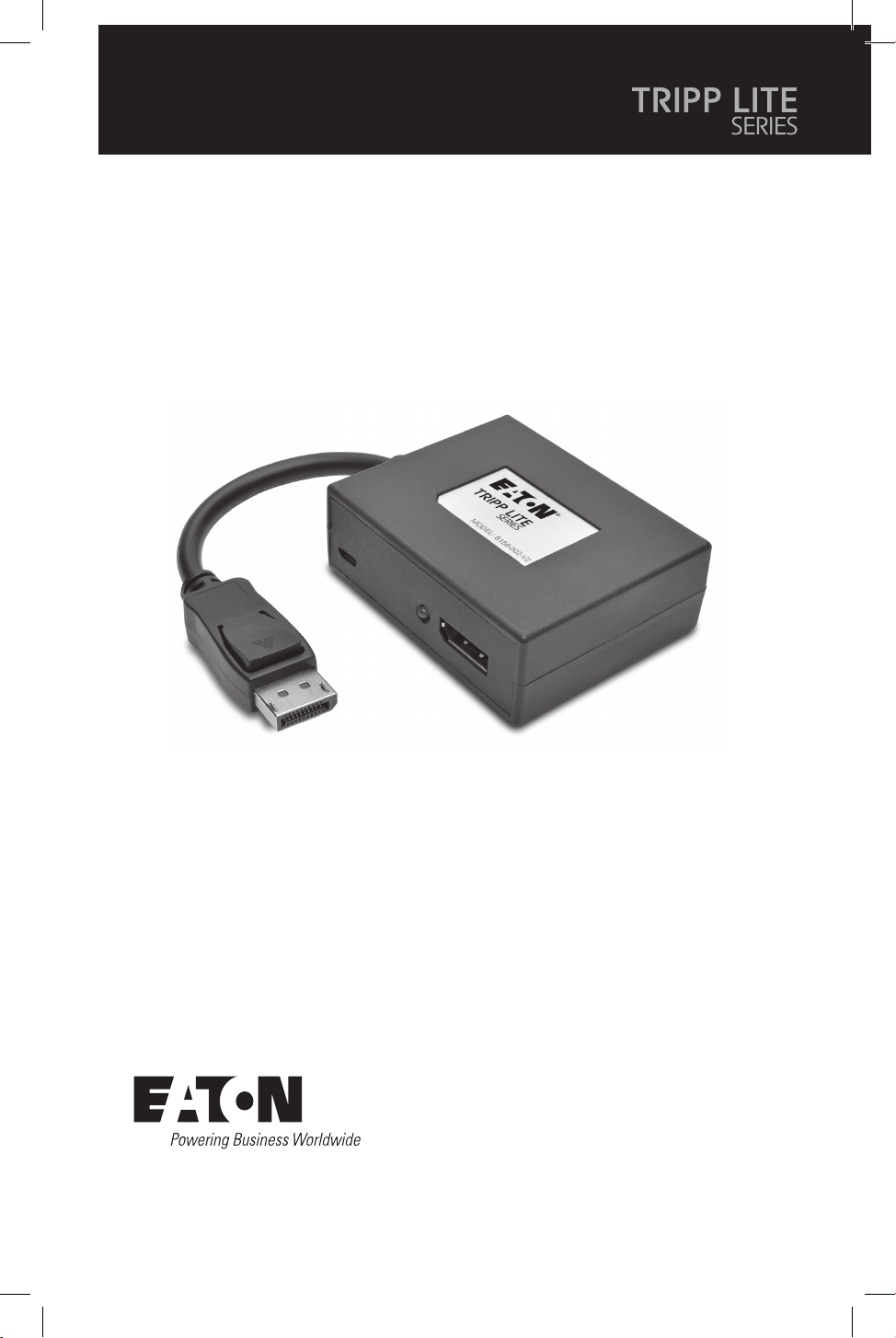
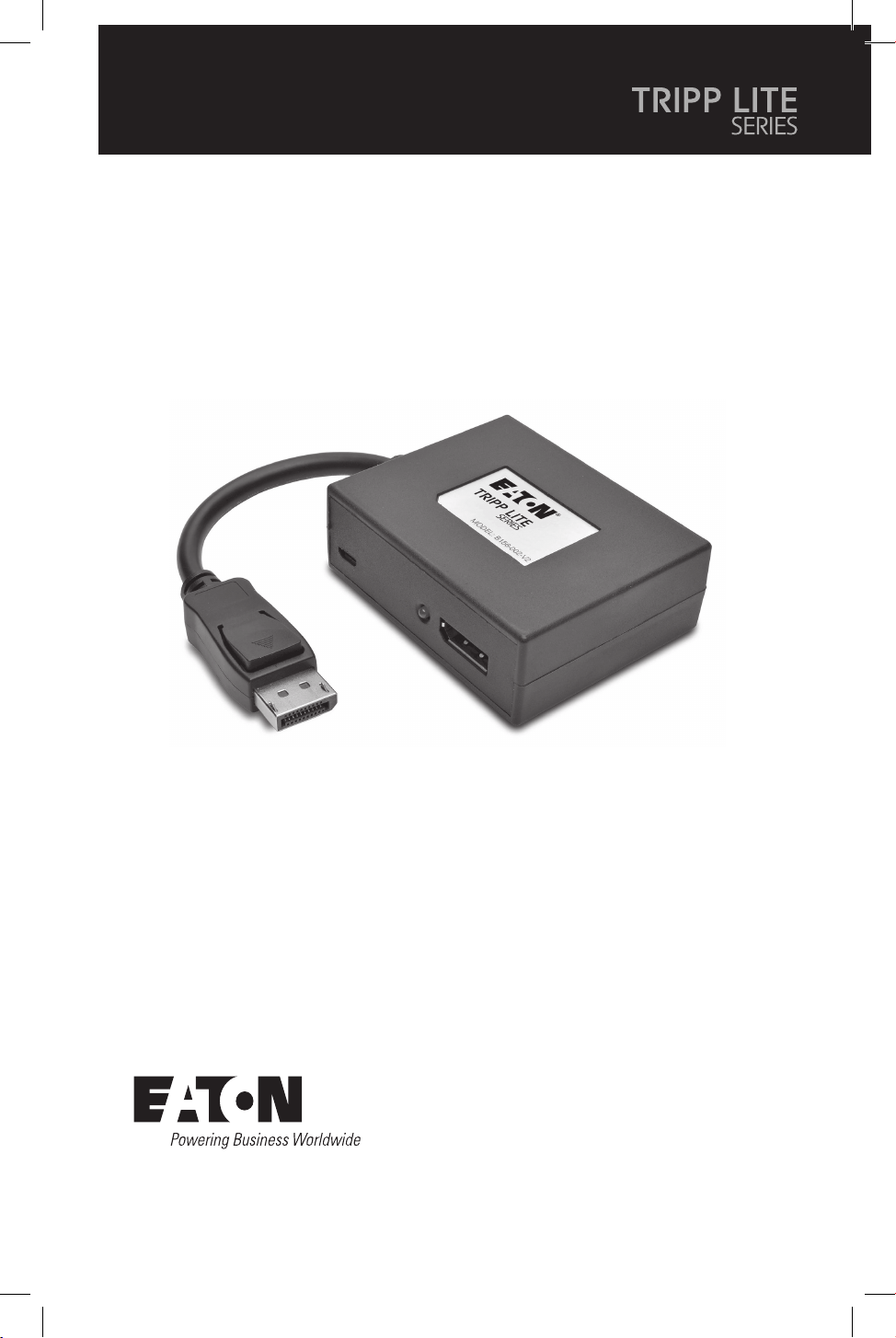
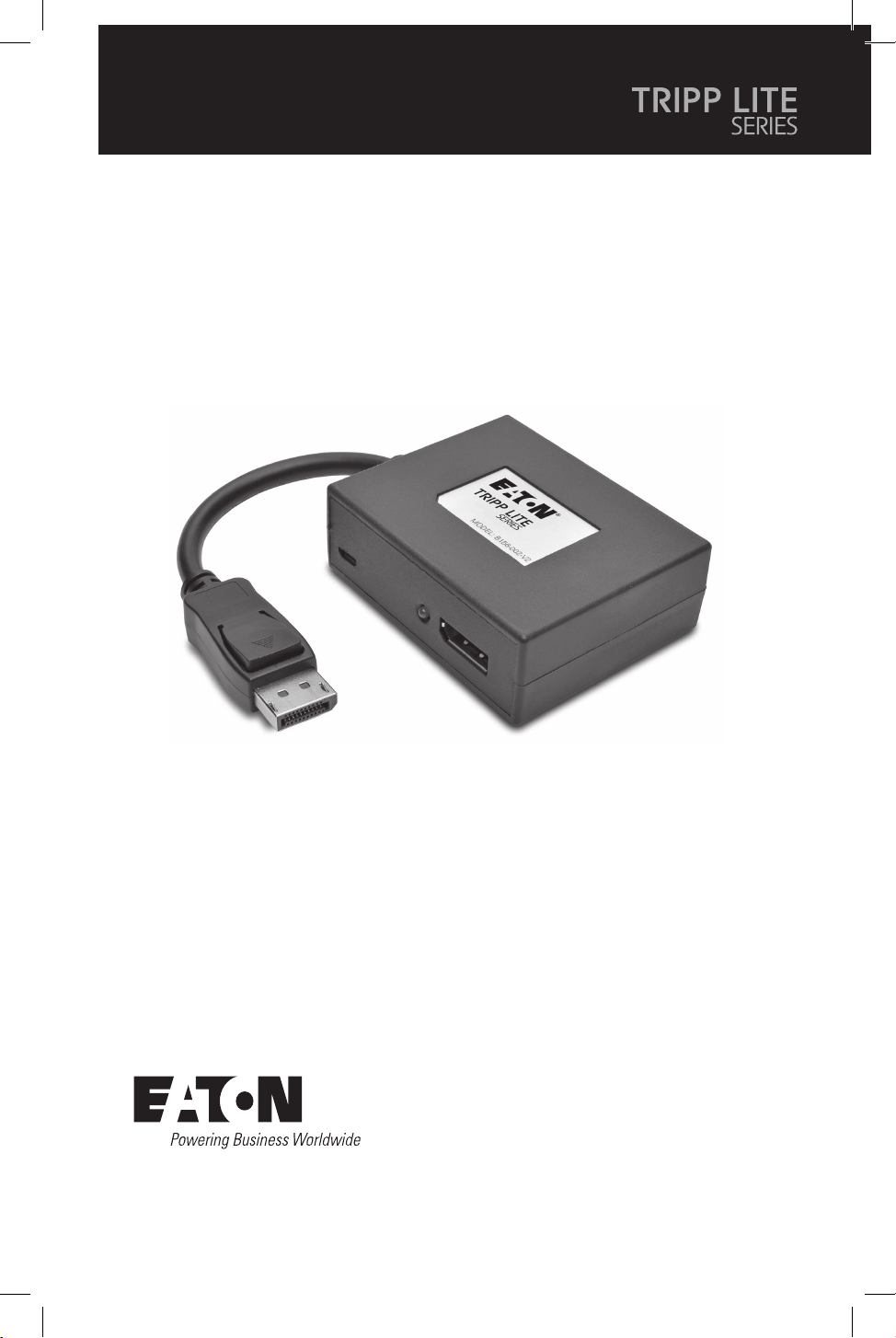
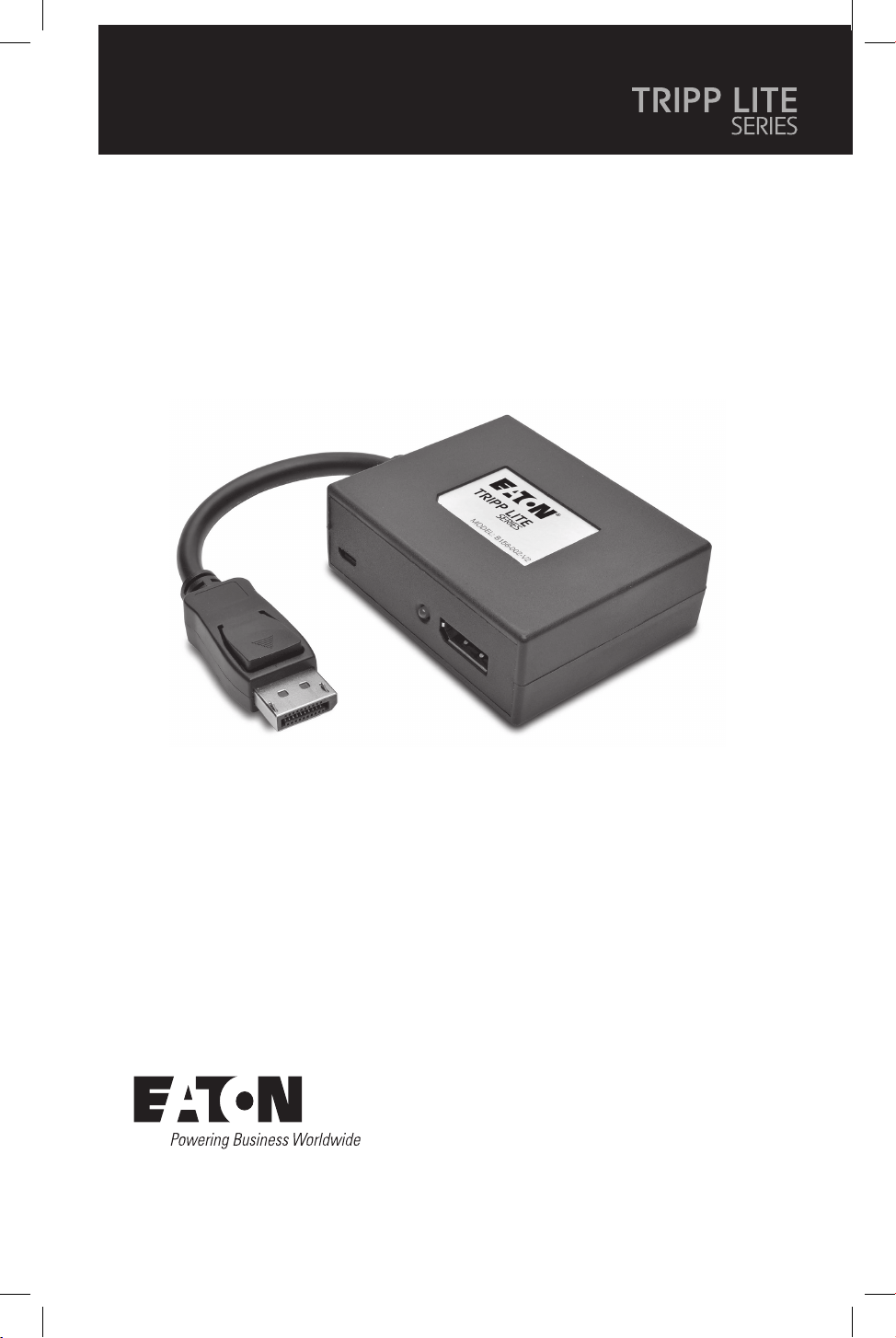
Purchased product
may differ from image.
Models:
(DisplayPort Out)
B156-002-8K
B156-003-8K
(HDMI Out)
B156-002-H8K
B156-003-H8K
DisplayPort v1.4 Multi-Stream
Transport Hubs
2
Product Features
System Requirements
• Connect multiple monitors via the DisplayPort output on your computer to display the same
image on each monitor, extend the desktop across monitors, or combine as one enlarged
monitor in video wall mode.
• DisplayPort v1.4 and Multi-Stream Transfer (MST) compliant.
• DisplayPort and HDMI output models support UHD 4K resolutions up to 3840 x 2160
(60 Hz). See System Requirements for more information.
• Supports up to 36-bit Deep Color (12 bits per channel).
• Supports DTS-HD, Dolby True HD and 7.1-channel surround sound audio.
• Supports HDCP, EDID and DDC.
• Compliant with the Federal Trade Agreements Act (TAA) for GSA Schedule purchases.
• A computer with a DisplayPort v1.4 compatible graphics card (e.g., AMD Radeon with AMD
Eyefinity Technology). Backward compatible with most DisplayPort 1.1a equipment running
current graphics drivers. The feature set is limited to that of the attached equipment (e.g.,
you may be limited to displaying in Clone/Mirror mode only). Compatibility with older
graphics cards is not guaranteed.
• macOS X does not support MST for NVIDIA and Intel Graphics Processor Units, limiting
video display on the connected monitors to mirror mode.
• DisplayPort 1.4 bandwidth is 32.4 Gbps. Higher-resolution monitors take up more
bandwidth.
• Although DisplayPort and HDMI monitors support video resolutions up to 3840 x 2160 on
individual monitors, the number of 4K monitors connected at the same time is limited. For
example, when connecting 4 monitors simultaneously, you will be limited to connecting
1080p monitors. Higher resolutions are possible when displaying in video wall mode (e.g.,
3840 x 6480 in a 1x3 video wall, 11520 x 2160 in a 3x1 video wall, etc.)
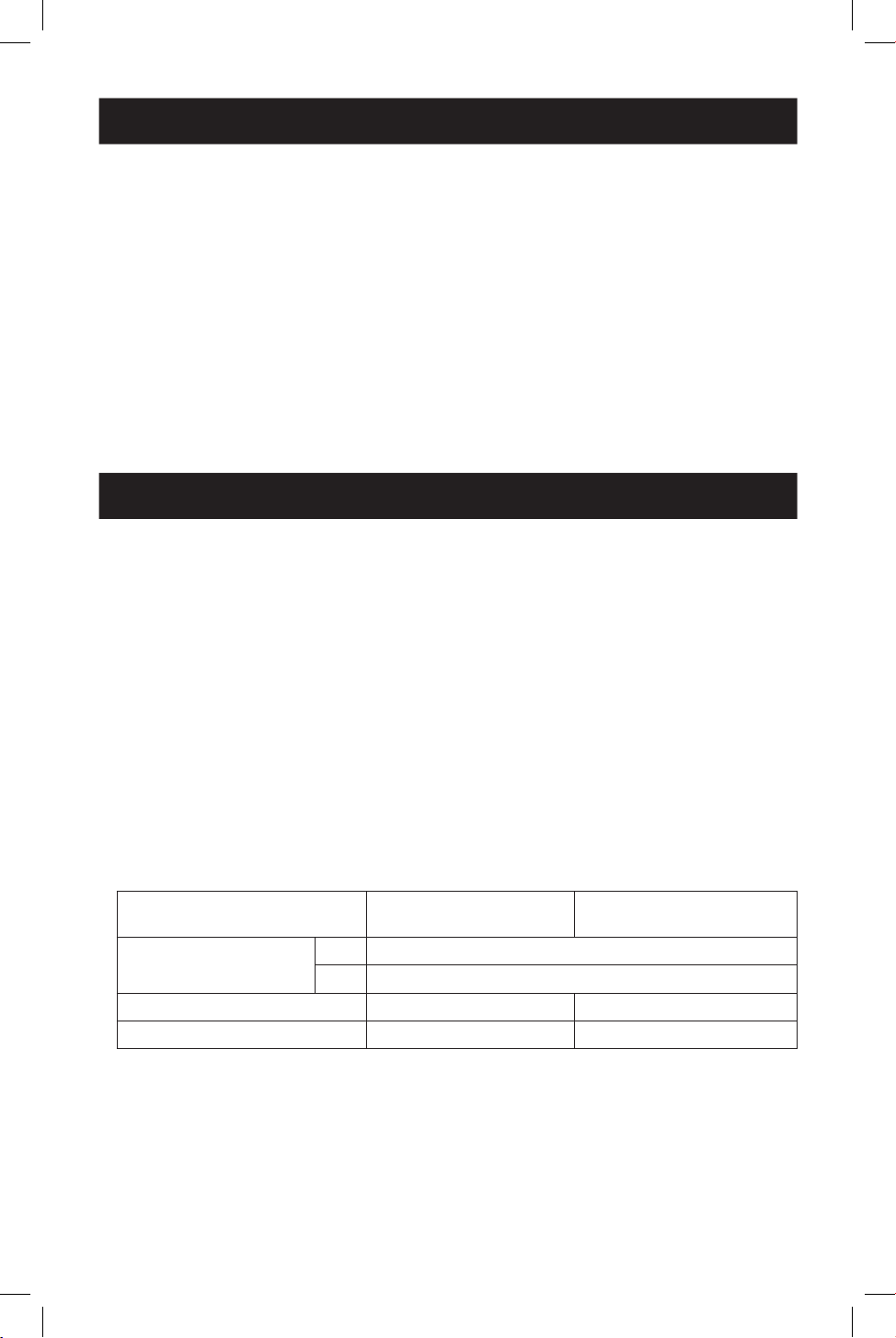
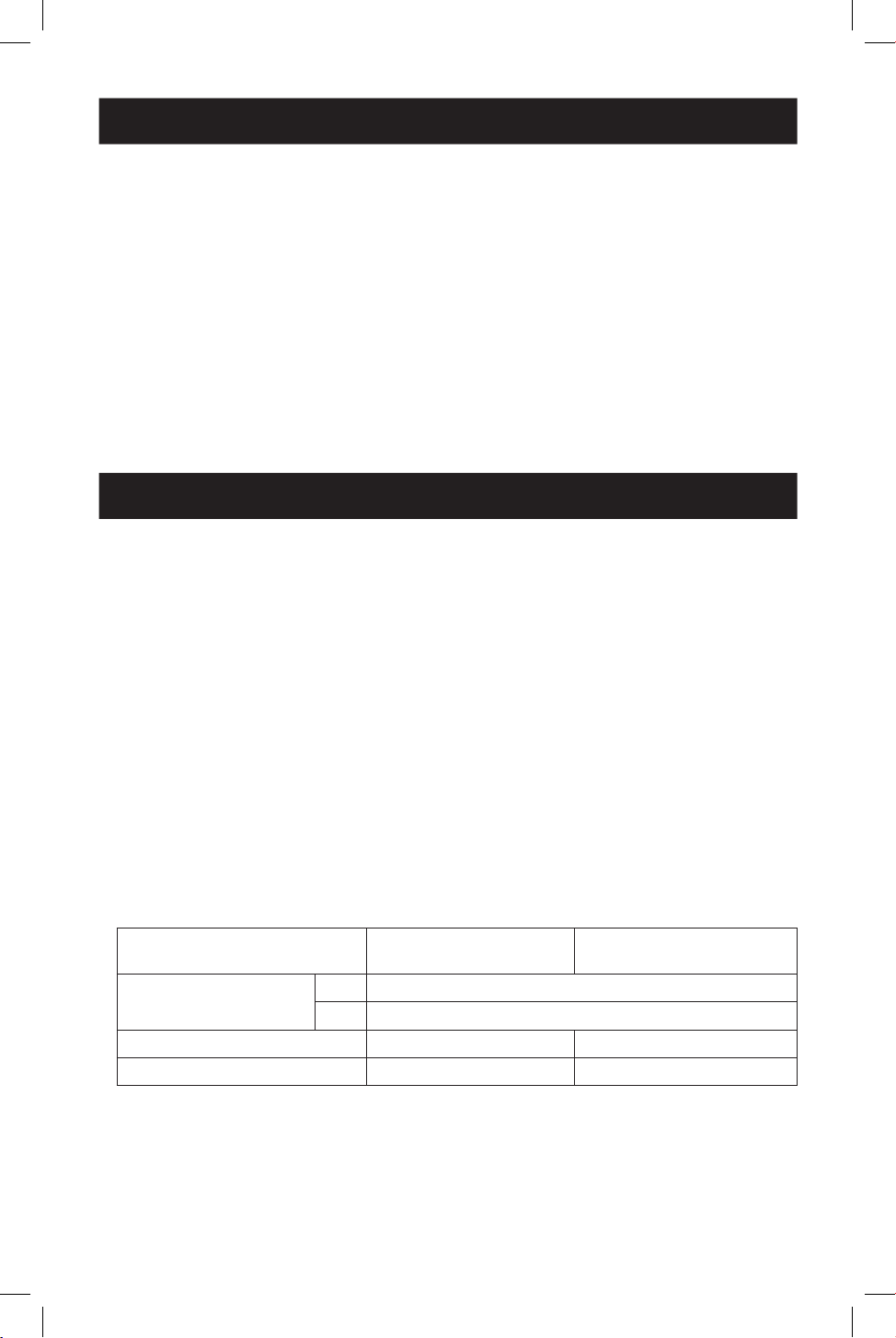
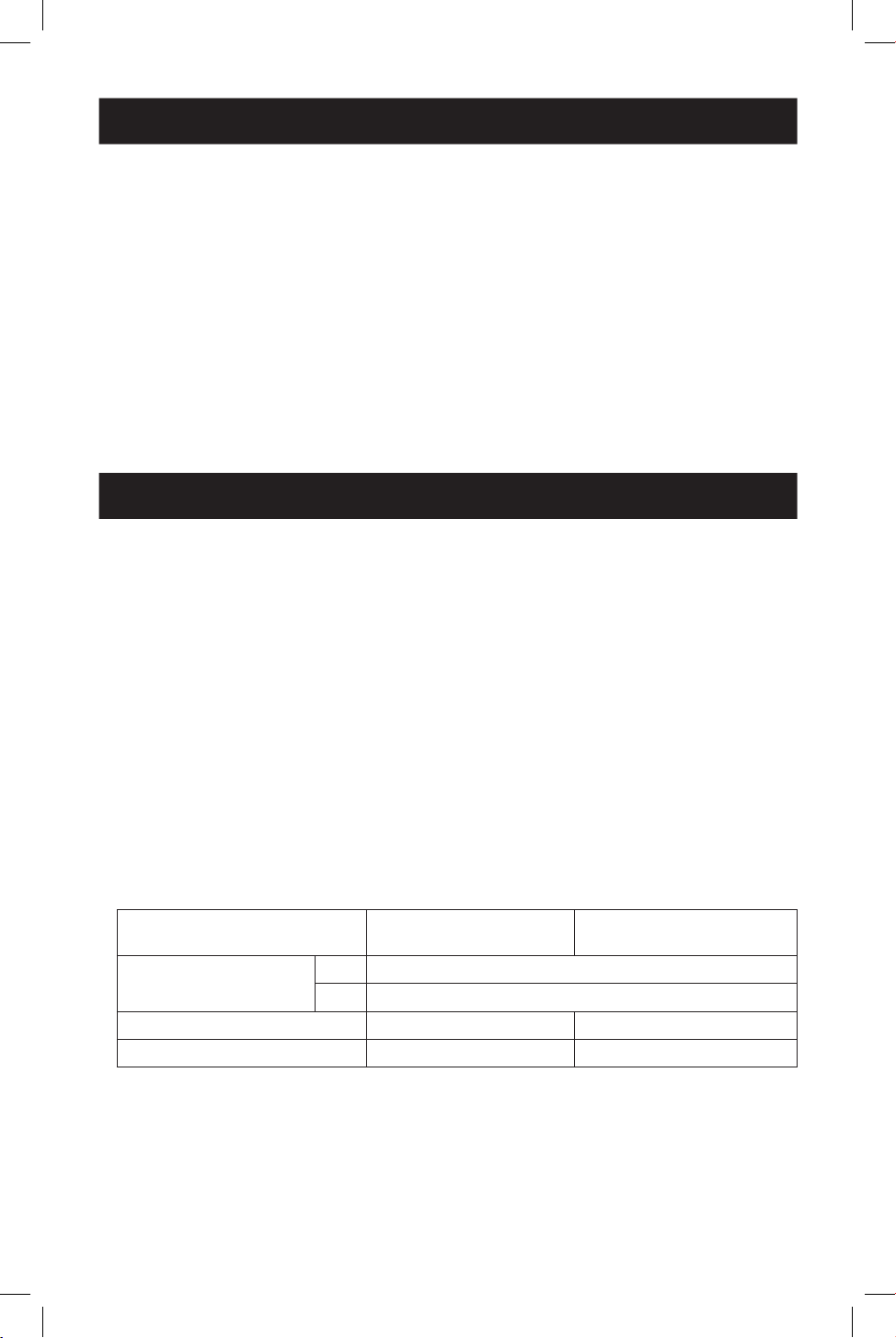
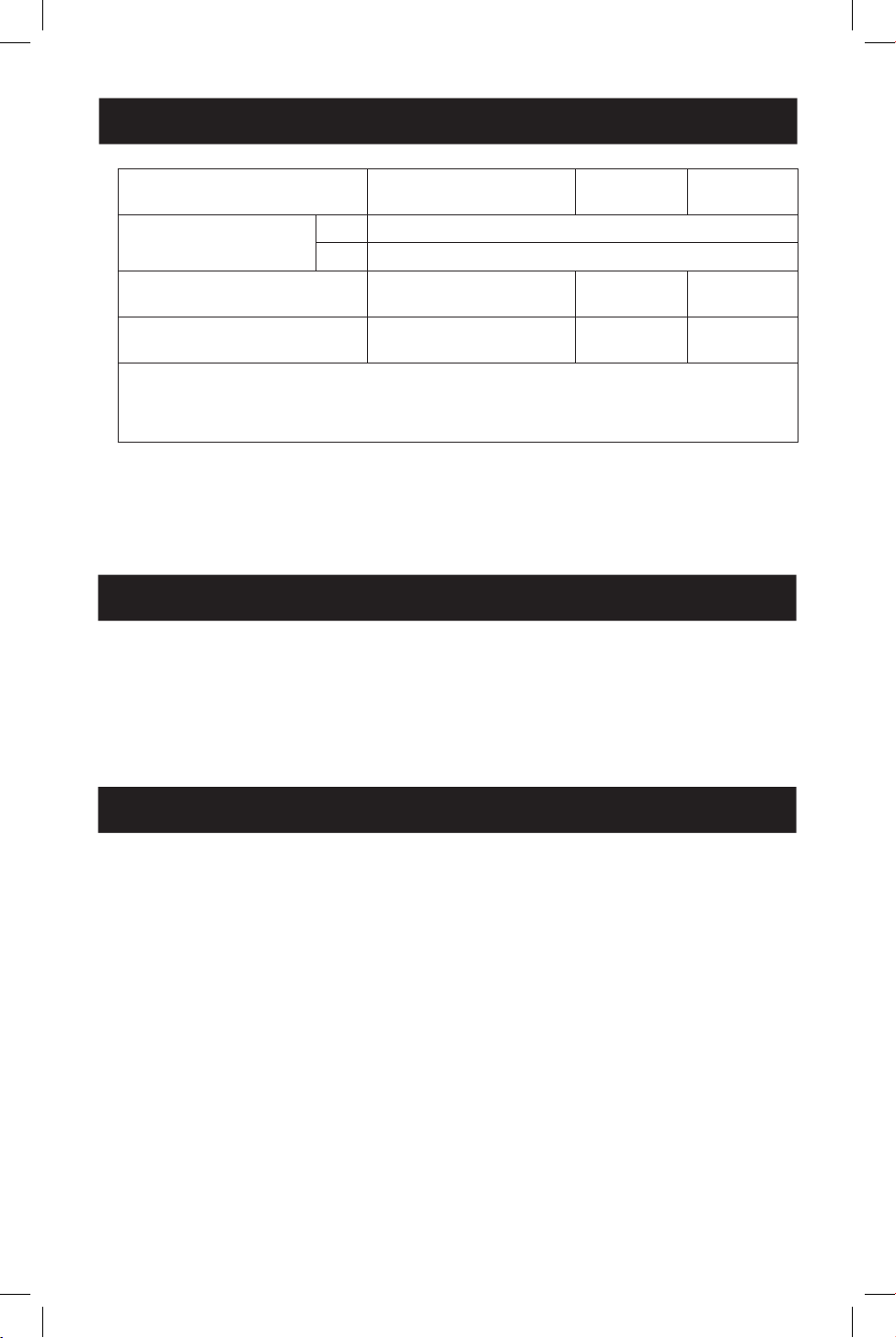
• Maximum Resolution: The following chart explains the maximum resolution of both models.
Source equipment (PC) requires a DisplayPort 1.4 compatible video card.
Mode (output for
DisplayPort or HDMI) Display 1 Display 2
Video Wall Mode 1x2 3840 x 4320@ 60 Hz
2x1 7680 x 2160@ 60 Hz
Extended Desktop Mode 3840 x 2160 @ 60 Hz 3840x2160 @ 60 Hz
Mirror Mode 3840 x 2160 @ 60 Hz 3840x2160 @ 60 Hz
3
System Requirements
Package Contents
• DisplayPort v1.4 Multi-Stream Transport Hub
• External Power Supply (Input: 100–240V, 50/60 Hz, 0.6A; Output: 5V 3A)
• Quick Start Guide
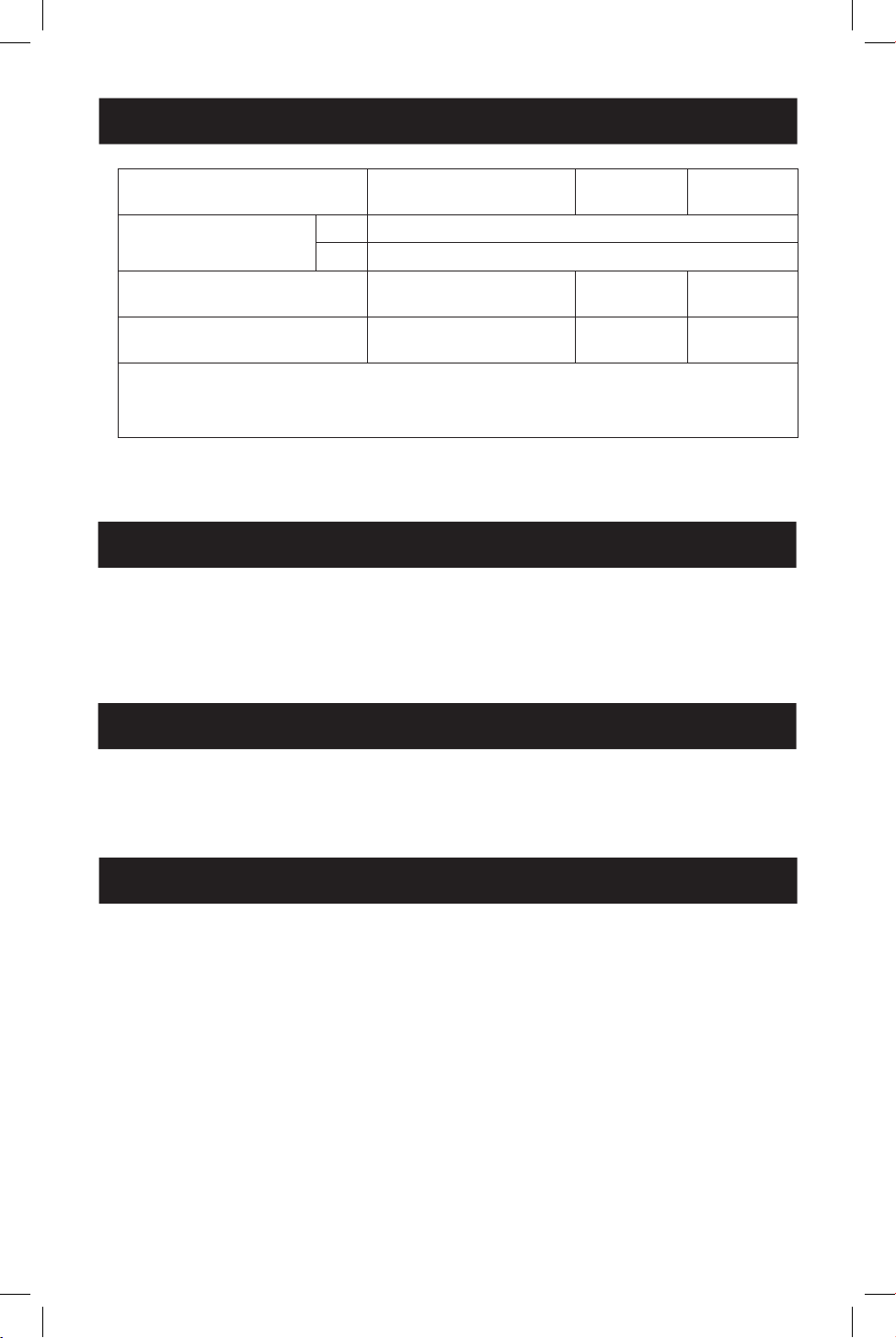
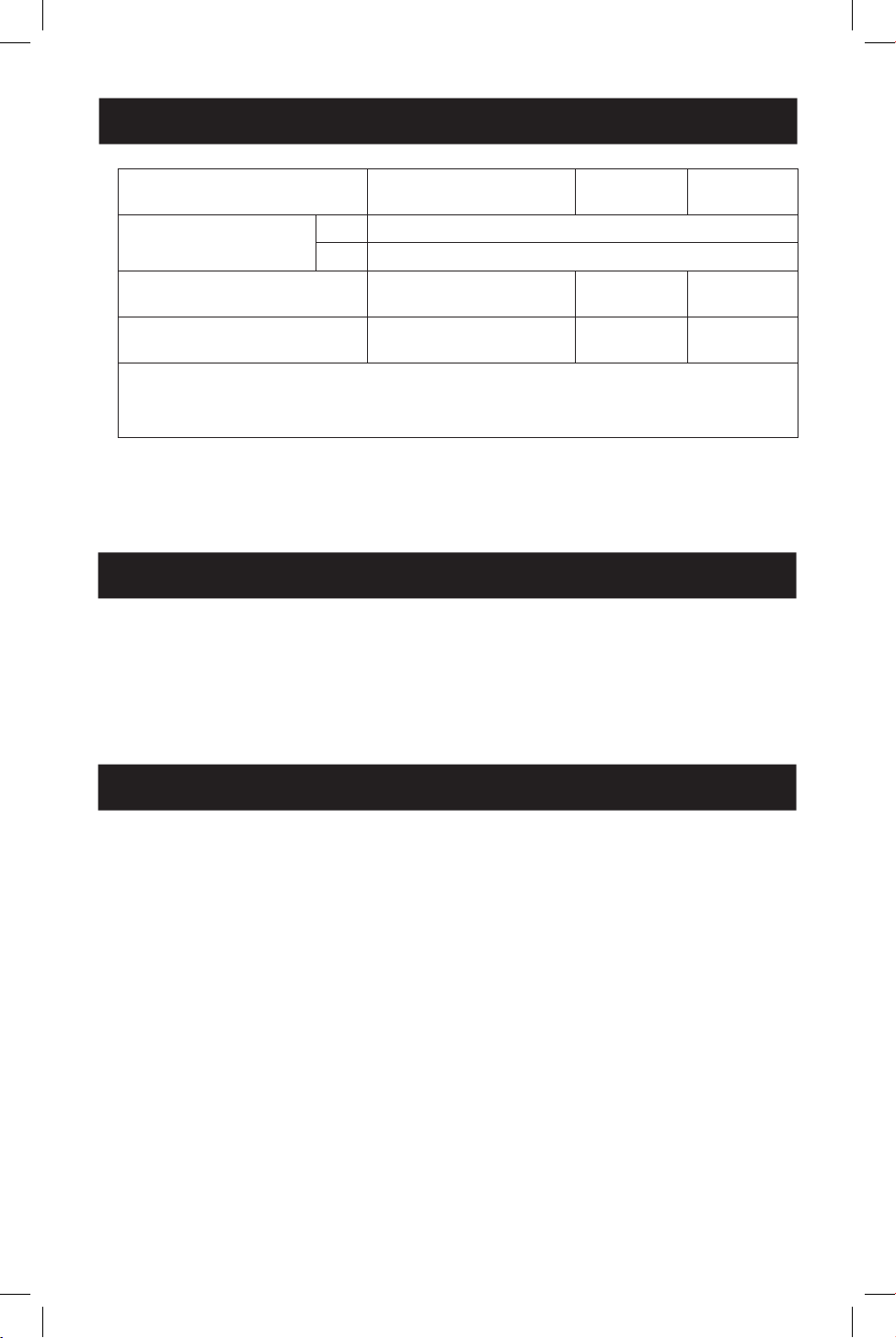
Mode (output for
DisplayPort or HDMI) Display 1 Display 2 Display 3
Video Wall Mode 1x3 3840 x 6480@ 60 Hz
3x1 11520 x 2160@ 60 Hz
Extended Desktop Mode 3840 x 2160 @ 60 Hz 3840x2160
@ 60 Hz
3840x2160
@ 60 Hz
Mirror Mode 3840x2160 @ 60 Hz 3840x2160
@ 60 Hz
3840x2160
@ 60 Hz
Notes:
• When in Mirror Mode, the same content may only display on 2 screens.
• Under the circumstance of removing the graphics card driver software, it is possible to achieve the re-
quirement of mirroring 3 screens.
• When utilizing an 8K source with 8K display(s) connected to the output ports, there may
be bandwidth issues that limit the capability of individual output ports.
Optional Accessories
• P568-Series 4K @ 60 Hz HDMI Cables
• P580-Series DisplayPort 1.4 Cables
Installation
Notes:
• Before installation, be sure your graphics driver is up-to-date by installing the latest driver available. The MST
hub is backward compatible with most DisplayPort 1.1a equipment running current graphics drivers. Feature
set is limited to the attached equipment’s capabilities (e.g., you may be limited to displaying in Clone/Mirror
mode only). Compatibility with older graphics cards is not guaranteed.
• Be sure the power to all connected devices is turned off prior to installation.
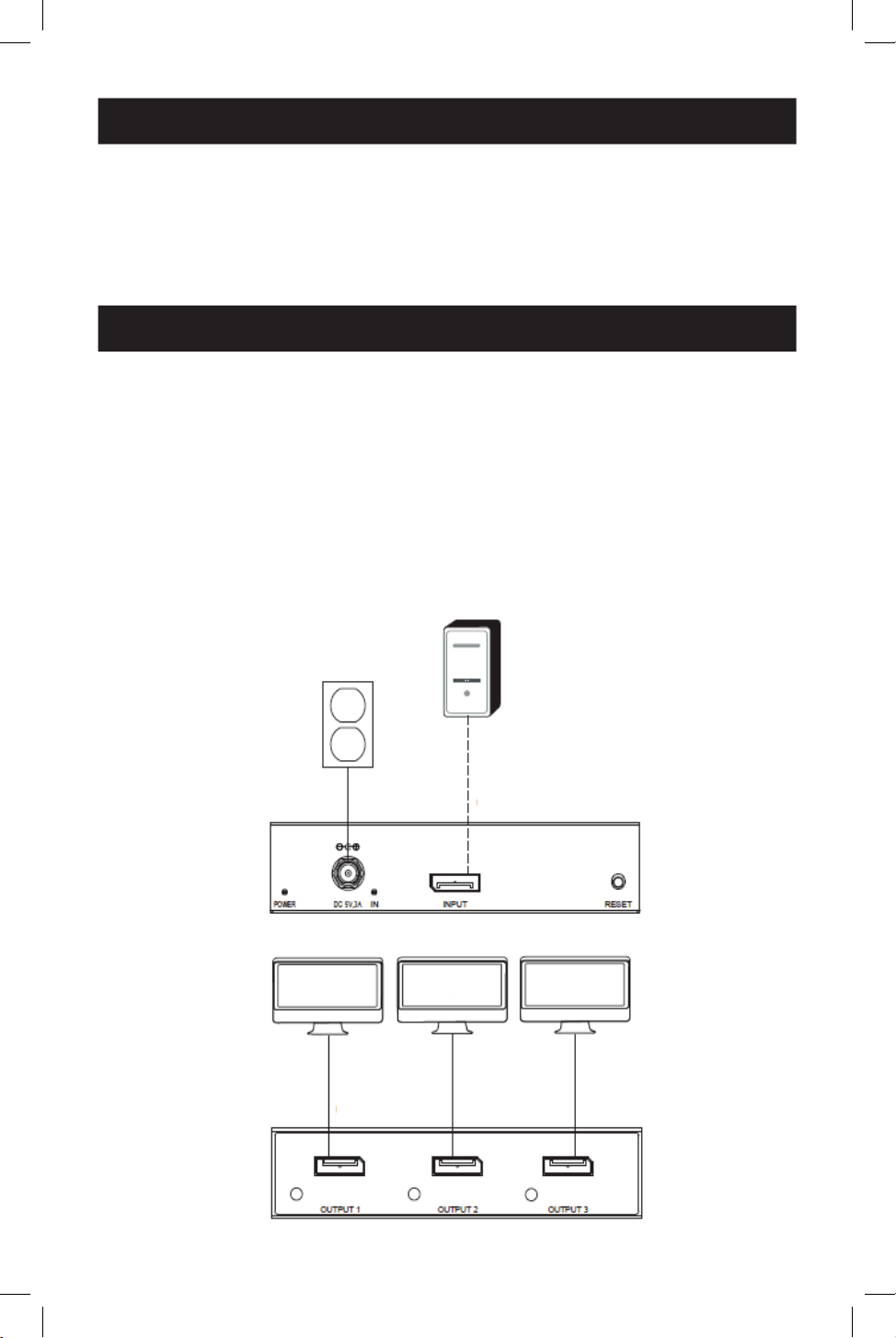
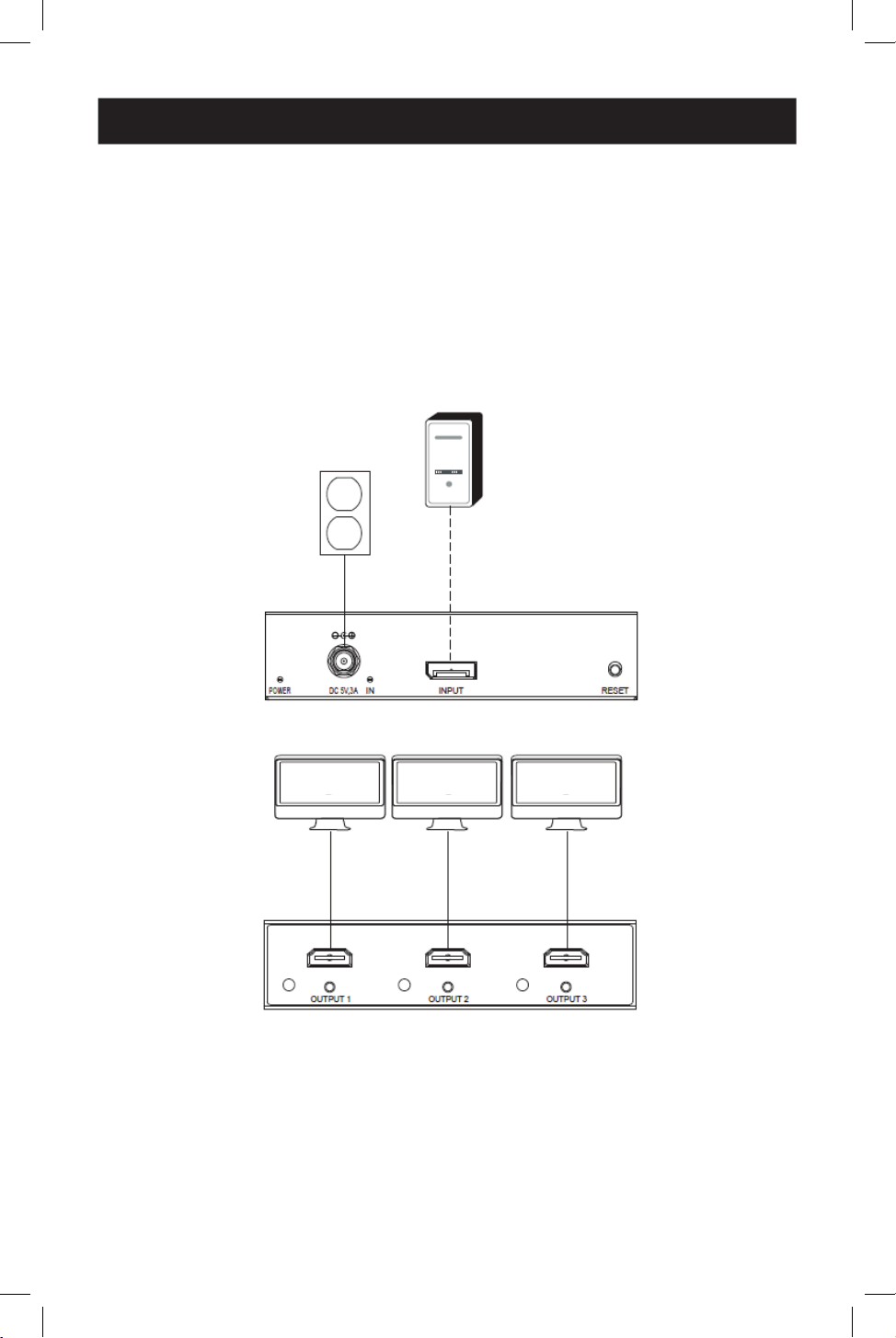
1. Connect the hub’s built-in cable to the computer’s DisplayPort output.
2. Connect the included external power supply to the hub, and plug it into a surge protector,
uninterruptible power supply (UPS) or power distribution unit (PDU). The green Power LED
will illuminate.
3. Connect a monitor to an available output port on the hub.
Note: The maximum distance between the hub and the connected monitor must not exceed 15 ft. (4.6 m).
4. Repeat step 3 for each additional monitor you are connecting.
4
Installation Diagrams
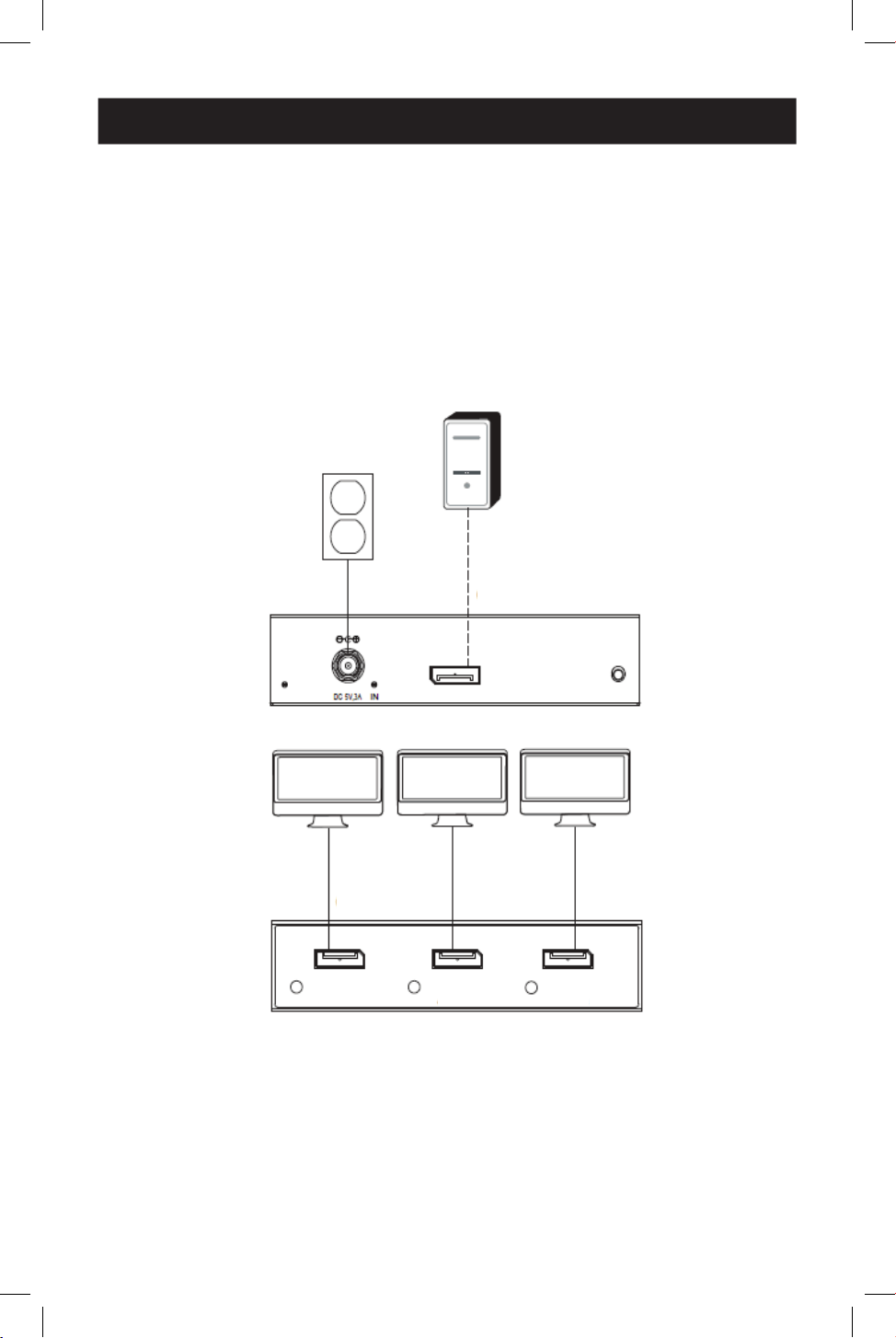
B156-003-8K
Note: B156-002-8K is identical to B156-003-8K except it has only two outputs.
Cable connections
1
Up to 15 ft. (4.5 m) DisplayPort cable at 4K / 60 Hz
Connected components
2
DisplayPort source
3
Monitor
1
1
2
2
3
3
3
3
3
3
1
1
1
1
1
1
Installation
5. Turn on the power to the connected monitors, then power on the source. The orange port
LEDs will illuminate to indicate a signal is being received and video will appear on the
connected monitors.
6. Use your video card’s display settings screen to adjust how video is displayed on the
connected monitors.
5
Installation Diagrams
B156-003-H8K
Note: B156-002-H8K is identical to B156-003-H8K except it has only two outputs.
Cable connections
1
Up to 15 ft. (4.5 m) DisplayPort cable at 4K / 60 Hz
2
Up to 15 ft. (4.5 m) HDMI 2.0 cable at 4K / 60 Hz
Connected components
3
DisplayPort source
4
Monitor
1
1
3
3
4
4
4
4
4
4
2
2
2
2
2
2

6
Troubleshooting
If you are unable to get an acceptable image after following the installation instructions, try the
troubleshooting tips below.
1. Is your equipment running the latest graphics driver? If not, download the latest
graphics drivers for your equipment. The MST hub is backward compatible with most
DisplayPort 1.1a equipment running current graphics drivers. The feature set is limited to
the attached equipment’s capabilities (e.g., you may be limited to displaying in Clone/Mirror
mode only). Compatibility with older graphics cards is not guaranteed.
2. Press the hub’s reset button to reset the signal being sent to the connected
displays.
3. Is the included external power supply connected and plugged into a working
power source? For the product to function properly, it must be connected to and
receiving power from the included external power supply.
4. Was the power to the DisplayPort source and connected monitors turned off
prior to installation? If not, restart your computer.
5. What resolution are you trying to attain on each monitor? DisplayPort 1.4 has a
bandwidth of 32.4 Gbps with higher-resolution monitors taking up more bandwidth.
Although DisplayPort and HDMI monitors support video resolutions up to 3840 x 2160 on
individual monitors, the number of 4K monitors connected at the same time is limited. For
example, when connecting 4 monitors simultaneously, you will be limited to connecting
1080p monitors with higher resolutions possible when displaying in video wall mode (e.g.,
3840 x 6480 in 1s3 video wall, 11520 x 2160 in a 3x1 video wall, etc.).
6. What cable lengths are you using? The maximum cable length between the hub and
the connected monitors should not exceed 15 ft. (4.6 m).
7. What type of cabling are you using? Inferior cabling can result in poor performance. It
is important to use cables that support the video resolution you are trying to attain. It is
recommended you use the cables listed in the Optional Accessories section, as they
have been tested to work with these MST Hubs.
8. Test your cables to ensure they are working properly. For example, connect your
DisplayPort cables between a source and monitor setup you know works to determine if
the cable is functioning properly.
7
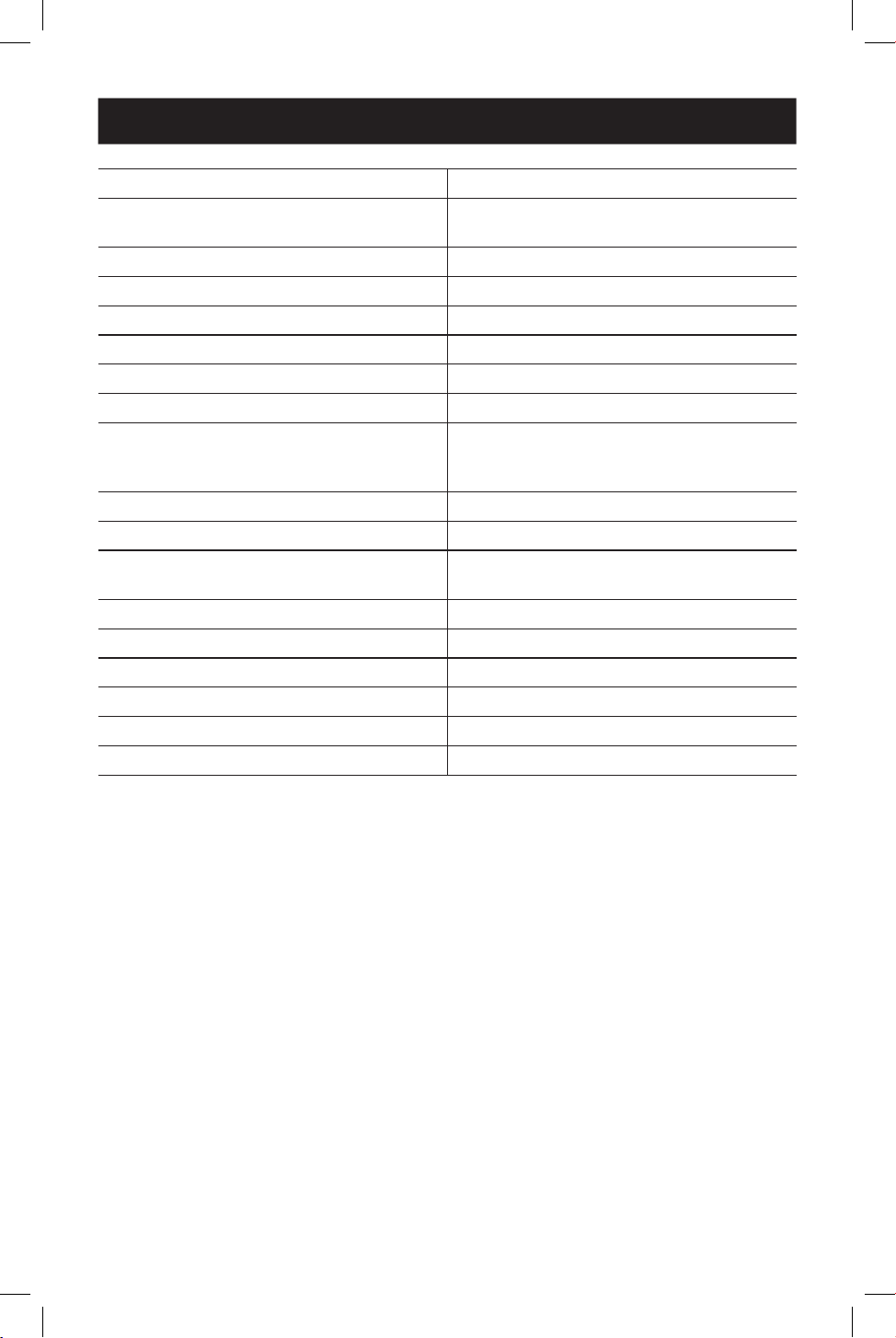
Specifications
Maximum Distance to Display 15 ft. (4.8 m)
Maximum Supported Color Depth 12-bit Deep Color
HDR Support Yes
HDMI Specication 2.0
DisplayPort Specication 1.4
Chroma Subsampling RGB, YCC444, YCC422, YCC420
HDCP 1.4 and 2.3
3D Video Support Yes
Audio 2-channel LPCM, AC3, DTS, Bit depth up to
24 bits, Sample rate up to 192 KHz
Chipset Yes
IR or RS-232 Extension Support No
Consumer Electronic Control (CEC) Support No
Drivers Required None
Operating Temperature Range 32° to 104°F / 0° to 40° C
Storage Temperature Range 5° to 122°F / -15° to 50°C
Relative Humidity 0% to 85% Non-Condensing
Construction Material ABS Plastic
Connector/Contact Plating Nickel/Gold
8
Warranty
1-YEAR LIMITED WARRANTY
We warrant our products to be free from defects in materials and workmanship for a period
of one (1) year from the date of initial purchase. Our obligation under this warranty is limited
to repairing or replacing (at its sole option) any such defective products. Visit Tripplite.Eaton.
com/support/product-returns before sending any equipment back for repair. This warranty
does not apply to equipment which has been damaged by accident, negligence or
misapplication or has been altered or modified in any way.
EXCEPT AS PROVIDED HEREIN, WE MAKE NO WARRANTIES, EXPRESS OR IMPLIED, INCLUDING
WARRANTIES OF MERCHANTABILITY AND FITNESS FOR A PARTICULAR PURPOSE. Some states
do not permit limitation or exclusion of implied warranties; therefore, the aforesaid
limitation(s) or exclusion(s) may not apply to the purchaser.
EXCEPT AS PROVIDED ABOVE, IN NO EVENT WILL WE BE LIABLE FOR DIRECT, INDIRECT,
SPECIAL, INCIDENTAL OR CONSEQUENTIAL DAMAGES ARISING OUT OF THE USE OF THIS
PRODUCT, EVEN IF ADVISED OF THE POSSIBILITY OF SUCH DAMAGE. Specifically, we are not
liable for any costs, such as lost profits or revenue, loss of equipment, loss of use of
equipment, loss of software, loss of data, costs of substitutes, claims by third parties, or
otherwise.
FCC Notice, Class B
This device complies with part 15 of the FCC Rules. Operation is subject to the following two
conditions: (1) This device may not cause harmful interference, and (2) this device must accept
any interference received, including interference that may cause undesired operation.
Note: This equipment has been tested and found to comply with the limits for a Class B digital
device, pursuant to part 15 of the FCC Rules. These limits are designed to provide reasonable
protection against harmful interference in a residential installation. This equipment generates,
uses and can radiate radio frequency energy and, if not installed and used in accordance with
the instructions, may cause harmful interference to radio communications. However, there is
no guarantee that interference will not occur in a particular installation. If this equipment does
cause harmful interference to radio or television reception, which can be determined by
turning the equipment off and on, the user is encouraged to try to correct the interference by
one or more of the following measures:
• Reorient or relocate the receiving antenna.
• Increase the separation between the equipment and receiver.
• Connect the equipment into an outlet on a circuit different from that to which the receiver
is connected.
• Consult the dealer or an experienced radio/TV technician for help.
Any changes or modifications to this equipment not expressly approved by Eaton could void
the user’s authority to operate this equipment.
Eaton has a policy of continuous improvement. Specifications are subject to change without
notice.
Eaton
1000 Eaton Boulevard
Cleveland, OH 44122
United States
Eaton.com
© 2024 Eaton
All Rights Reserved
Publication No. 24-06-148 / 93-4A21_RevA
May 2024
Eaton is a registered trademark.
All trademarks are property
of their respective owners.
9
Manual del Propietario
English 1
Français 18
Deutsch 27
Italiano 36
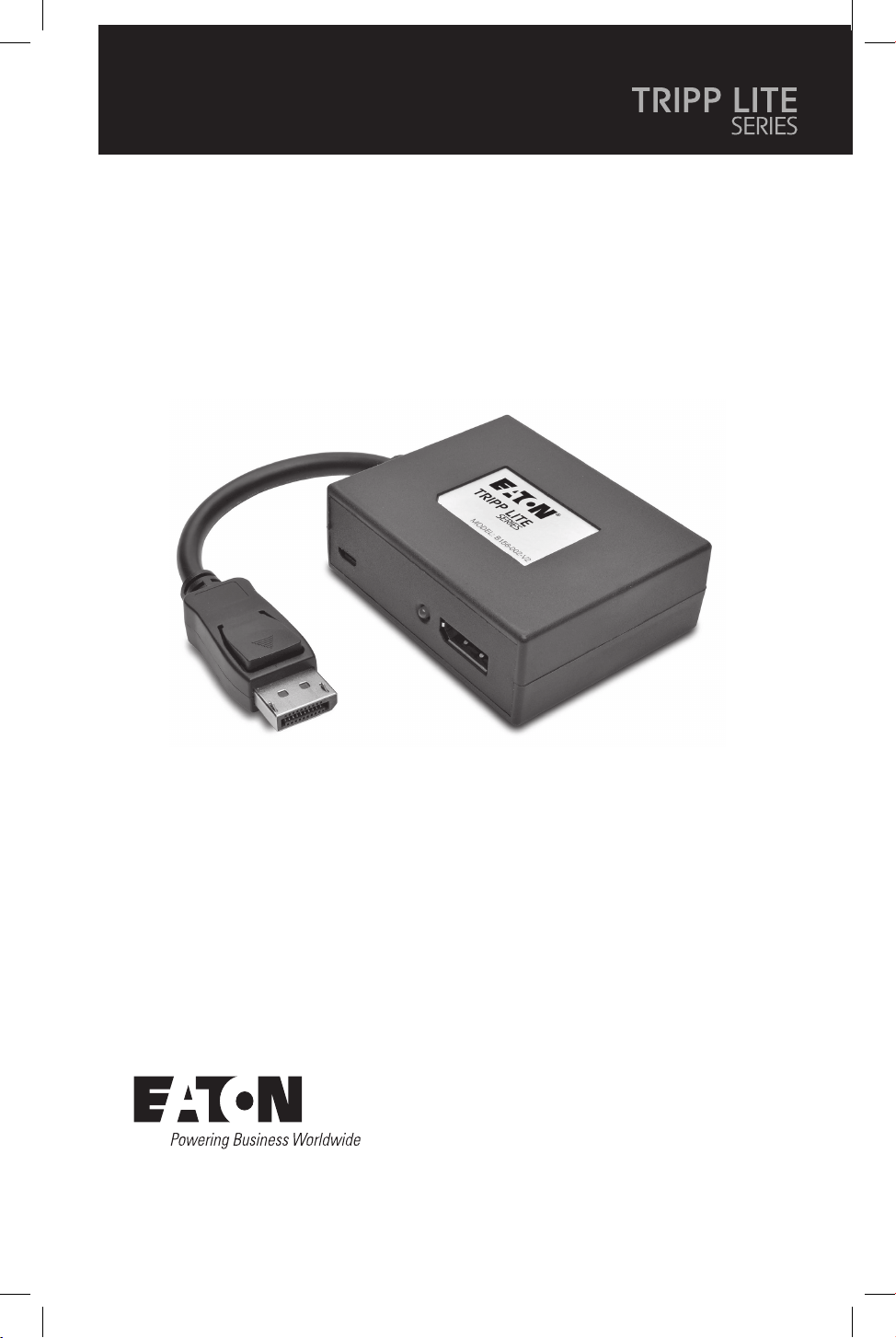
El producto comprado
puede ser diferente al de la imagen.
Modelos:
(Salida DisplayPort)
B156-002-8K
B156-003-8K
(Salida HDMI)
B156-002-H8K
B156-003-H8K
Hubs Multi-Stream Transport
DisplayPort v1.4
10
Características del Producto
Requisitos del Sistema
• Conecte varios monitores a través de la salida DisplayPort de su computadora para mostrar
la misma imagen en cada monitor, extender el escritorio a través de los monitores o
combinarlo como un monitor ampliado en modo muro de video.
• Cumple con DisplayPort v1.4 y Multi-Stream Transfer (MST).
• Los modelos con salida DisplayPort y HDMI admiten resoluciones UHD 4K de hasta
3840x2160 (60 Hz). Consulte los Requisitos del sistema para obtener más información.
• Admite color verdadero de hasta 36 bits (12 bits por canal)
• Compatible con sonido envolvente de 7.1 canales, audio de DTS-HD y Dolby True HD
• Admite HDCP [High Definition Copy Protocol], EDID y DDC.
• Cumple con la Ley Federal de Acuerdos Comerciales (TAA [Trade Agreement Act]) para las
compras del Programa GSA.
• Una computadora con una tarjeta gráfica compatible con DisplayPort v1.4 (por ejemplo,
AMD Radeon con tecnología AMD Eyefinity). Compatible con versiones anteriores en la
mayoría de los equipos con DisplayPort 1.1a funcionando con los controladores gráficos
actuales. El conjunto de funciones está limitado al del equipo conectado (por ejemplo,
puede estar limitado a mostrarse únicamente en modo de Clon o Espejo). No está
garantizada la compatibilidad con tarjetas gráficas anteriores.
• macOS X no es compatible con MST para las unidades de procesamiento gráfico NVIDIA e
Intel, lo que limita la visualización de videos en los monitores conectados al modo espejo.
• El ancho de banda DisplayPort 1.4 es 32.4 Gbps. Los monitores de mayor resolución
ocupan más ancho de banda.
• Aunque los monitores DisplayPort y HDMI admiten resoluciones de video de hasta
3840x2160 en monitores individuales, el número de monitores 4K conectados al mismo
tiempo es limitado. Por ejemplo, cuando conecte 4 monitores simultáneamente, estará
limitado a conectar monitores 1080p. Son posibles resoluciones más altas cuando se
visualiza en modo muro de video (por ejemplo, 3840 x 6480 en un muro de video 1x3,
11520 x 2160 en un muro de video 3x1, etc.)
• Resolución máxima: La siguiente tabla explica la resolución máxima de ambos modelos. El
equipo fuente (PC) requiere una tarjeta de video compatible con DisplayPort 1.4.
Modo (salida para
DisplayPort o HDMI) Pantalla 1 Pantalla 2
Modo Muro de video 1x2 3840 x 4320 a 60 Hz
2x1 7680 x 2160 a 60 Hz
Modo Escritorio extendido 3840 x 2160 a 60 Hz 3840 x 2160 a 60 Hz
Modo Espejo 3840 x 2160 a 60 Hz 3840 x 2160 a 60 Hz
11
Requisitos del Sistema
Contenido del Empaque
• Hub DisplayPort v1.4 Multi-Stream Transport
• Fuente de alimentación externa (Entrada: 100-240 V, 50/60 Hz, 0,6 A; Salida: 5 V 3 A)
• Guía de Inicio Rápido
Modo (salida para
DisplayPort o HDMI) Pantalla 1 Pantalla 2 Pantalla 3
Modo Muro de video 1x3 3840 x 6480 a 60 Hz
3x1 11520 x 2160 a 60 Hz
Modo Escritorio extendido 3840 x 2160 a 60 Hz 3840 x 2160
a 60 Hz
3840 x 2160
a 60 Hz
Modo Espejo 3840 x 2160 a 60 Hz 3840 x 2160
a 60 Hz
3840 x 2160
a 60 Hz
Notas:
• Cuando esté en modo espejo, es posible que el mismo contenido solo se muestre en 2 pantallas.
•Encasodeeliminarelsoftwaredelcontroladordelatarjetagráca,esposiblelograrelrequisitode
reejar3pantallas.
• Cuando utilice una fuente 8K con pantalla(s) 8K conectadas a los puertos de salida,
puede haber problemas de ancho de banda que limiten la capacidad de los puertos de
salida individuales.
Accesorios Opcionales
• Cables HDMI serie P568 4K a 60 Hz
• Cables serie P580 DisplayPort 1.4

12
Instalación
Notas:
• Antes de la instalación, asegúrese de que su controlador gráfico esté actualizado instalando el último
controlador disponible. El hub MST es compatible con versiones anteriores de equipos DisplayPort 1.1a
funcionando con controladores gráficos actuales. El conjunto de funciones está limitado a las capacidades
del equipo conectado (por ejemplo, puede estar limitado a mostrarse únicamente en modo de Clon/Espejo).
No está garantizada la compatibilidad con tarjetas gráficas anteriores.
• Asegúrese de que la energía de todos los dispositivos conectados esté apagada antes de la instalación.
1. Conecte el cable del hub incorporado a la salida DisplayPort de la computadora.
2. Conecte la fuente de alimentación externa incluida al hub, y enchúfela a un protector de
sobretensión, a un sistema de alimentación ininterrumpida (UPS) o a una unidad de
distribución de energía (PDU). Se iluminará el LED verde de Encendido.
3. Conecte un monitor a un puerto de salida disponible en el hub.
Nota: La distancia máxima entre el hub y el monitor conectado no debe superar los 4.6 m [15 pies].
4. Repita el paso 3 para cada monitor adicional que esté conectando.
5. Encienda todos los monitores conectados, después encienda la fuente. Los LED naranja
de los puertos se iluminarán para indicar que se está recibiendo una señal y el video
aparecerá en los monitores conectados.
6. Utilice la pantalla de configuración de su tarjeta de video para ajustar cómo se muestra el
video en los monitores conectados.
13
Diagramas de Instalación
B156-003-8K
Nota: B156-002-8K esidénticoaB156-003-8Kexceptoquesolotienedossalidas.
Conexiones de cables
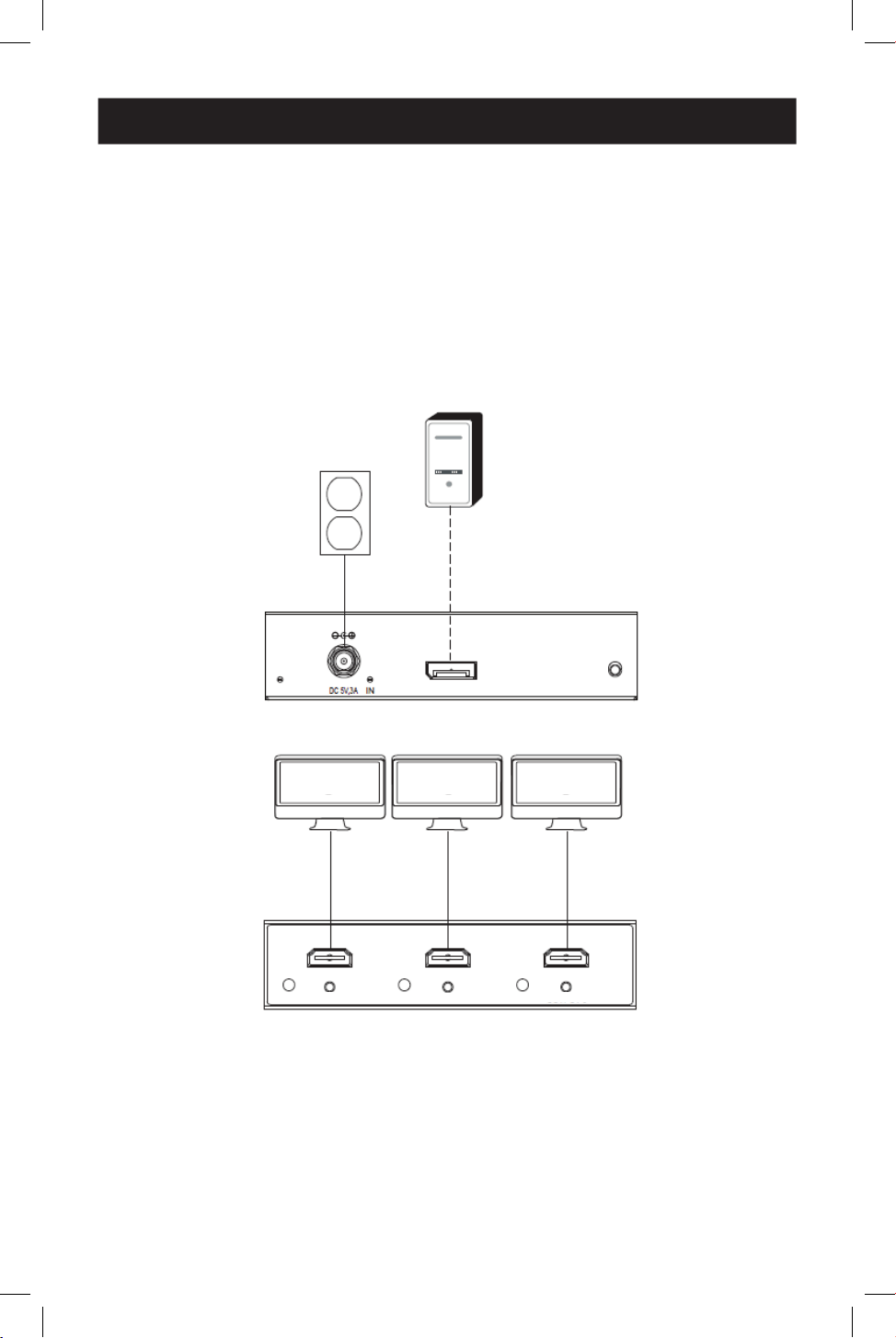
1
Cable DisplayPort de hasta 4.5 [15 pies] a 4K/ 60 Hz
Componentes conectados
2
Fuente DisplayPort
3
Monitor
1
1
2
2
3
3
3
3
3
3
1
1
1
1
1
1
ENCENDIDO ENTRADA RESTAURAR
SALIDA 1 SALIDA 2 SALIDA 3
14
Diagramas de Instalación
B156-003-H8K
Nota: B156-002-H8KesidénticoaB156-003-H8Kexceptoquesolotienedossalidas.
Conexiones de cables
1
Cable DisplayPort de hasta 15 pies (4.5 m) a 4K/ 60 Hz
2
Cable HDMI 2.0 de hasta 15 pies (4.5 m) a 4K/ 60 Hz
Componentes conectados
3
Fuente DisplayPort
4
Monitor
1
1
3
3
4
4
4
4
4
4
2
2
2
2
2
2
ENCENDIDO ENTRADA RESTAURAR
SALIDA 1
SALIDA 2
SALIDA 3

15
Resolución de problemas
Si no consigue una imagen aceptable después de seguir las instrucciones de instalación,
pruebe los consejos de resolución de problemas que aparecen a continuación.
1. ¿Su equipo está ejecutando el controlador gráfico más reciente? Si no es así,
descargue los controladores gráficos más recientes para su equipo. El hub MST es
compatible con versiones anteriores de equipos DisplayPort 1.1a funcionando con
controladores gráficos actuales. El conjunto de funciones está limitado a las capacidades
del equipo conectado (por ejemplo, puede estar limitado a mostrarse únicamente en
modo de Clon/Espejo). No está garantizada la compatibilidad con tarjetas gráficas
anteriores.
2. Presione el botón de restauración del hub para restablecer la señal enviada a las
pantallas conectadas.
3. ¿La fuente de alimentación externa incluida está conectada y enchufada a una
fuente de alimentación que funciona? Para que el producto funcione correctamente,
debe estar conectado y recibir alimentación de la fuente de alimentación externa incluida.
4. ¿Se apagó la alimentación a la fuente DisplayPort y los monitores conectados
antes de la instalación? Si no es así, reinicie la computadora.
5. ¿Qué resolución está tratando de obtener en cada monitor? El DisplayPort 1.4 tiene
un ancho de banda de 32.4 Gbps, los monitores de mayor resolución ocupan más ancho
de banda. Aunque los monitores DisplayPort y HDMI admiten resoluciones de video de
hasta 3840 x 2160 en monitores individuales, el número de monitores 4K conectados al
mismo tiempo es limitado. Por ejemplo, al conectar simultáneamente 4 monitores, estará
limitado a conectar monitores 1080p con las resoluciones más altas posibles al visualizar
en modo de muro de video (por ejemplo, 3840 x 6480 en un muro de video 1s3,
11520x2160 en un muro de video 3x1, etc.).
6. ¿Qué longitudes de cables está usando? La longitud máxima del cable entre el hub y
los monitores conectados no debe exceder de 4.57 m [15 pies].
7. ¿Qué tipo de cableado está usando? Cableado inferior puede resultar en un
rendimiento deficiente. Es importante utilizar cables que admitan la resolución de video
que está intentando obtener. Se recomienda utilizar los cables que figuran en la sección
Accesorios opcionales, ya que se ha comprobado que funcionan con estos hubs MST.
8. Pruebe sus cables para asegurarse de que funcionen correctamente. Por ejemplo,
conecte sus cables DisplayPort entre una fuente y la configuración de monitor que usted
sepa que funciona para determinar si el cable está funcionando correctamente.
16
Especificaciones
Distancia máxima para visualización 4.8 m [15 pies]
Profundidad de color máxima admitida Color verdadero de 12 bits
Compatibilidad con HDR Sí
Especicación HDMI 2.0
Especicación DisplayPort 1.4
Submuestreo Cromático RGB, YCC444, YCC422, YCC420
HDCP [High Denition Copy Protocol] 1.4 y 2.3
Compatibilidad con video 3D Sí
Audio LPCM de 2 canales, AC3, DTS, profundi-
dad de bits de hasta 24 bits, frecuencia de
muestreo de hasta 192 KHz
Conjunto de chips Sí
Soporte de extensión de IR o RS-232 No.
Soporte de Control de Productos Electróni-
cos de Consumo (CEC)
No.
Controladores requeridos Ninguno
Rango de Temperatura de Operación 0 ° a 40 ° C / 32 ° a 104 °F
Rango de Temperatura de Almacenamiento -15 ° a 50 °C / 5 ° a 122 °F
Humedad Relativa De 0 % a 85 %, Sin Condensación
Material de la estructura Plástico ABS
Recubrimiento de conectores/contactos Níquel/Oro
17
Garantía
GARANTÍA LIMITADA POR 1 AÑO
Garantizamos por un (1) año a partir de la fecha de compra inicial que nuestros productos no
presentan defectos de materiales ni de mano de obra. Nuestra obligación bajo esta garantía
está limitada a la reparación o reemplazo (a nuestra entera discreción) de cualquier producto
defectuoso. Antes de devolver cualquier equipo para reparación, visite Tripplite.Eaton.com/
support/product-returns. Esta garantía no se aplica a equipos que hayan sido dañados por
accidente, negligencia o mal uso, o hayan sido alterados o modificados de alguna manera.
SALVO POR LO QUE SE INDICÓ AQUÍ, NO OTORGAMOS GARANTÍAS EXPRESAS O IMPLÍCITAS,
INCLUIDAS GARANTÍAS DE COMERCIABILIDAD Y ADECUACIÓN PARA UN PROPÓSITO
PARTICULAR. Algunos estados no permiten la limitación o exclusión de garantías implícitas;
por lo tanto, las limitaciones o exclusiones antes mencionadas pueden no aplicarse al
comprador.
SALVO POR LO QUE SE INDICÓ ANTERIORMENTE, EN NINGÚN CASO SEREMOS
RESPONSABLES POR DAÑOS DIRECTOS, INDIRECTOS, ESPECIALES, INCIDENTALES O
CONSECUENTES QUE SURJAN DEL USO DE ESTE PRODUCTO, INCLUSO SI SE ADVIERTE SOBRE
LA POSIBILIDAD DE TAL DAÑO. Específicamente, no somos responsables por ningún costo,
como pérdidas de ganancias o ingresos, pérdidas de equipos, pérdidas en el uso de equipos,
pérdidas de software, pérdidas de datos, costos de sustituciones, reclamos de terceros o
cualquier otro.
Eaton tiene una política de mejora continua. Las especificaciones están sujetas a cambio sin
previo aviso.
Eaton
1000 Eaton Boulevard
Cleveland, OH 44122
Estados Unidos
Eaton.com
© 2024 Eaton
Todos los derechos reservados
Publicación Nº 24-06-148 / 93-4A21_RevA
Mayo de 2024
Eaton es una marca registrada.
Todas las marcas registradas
pertenecen a sus respectivos
propietarios.
18
Manuel d'utilisation
English 1
Español 9
Deutsch 27
Italiano 36
Le produit acheté
peut différer de l'image.
Modèles:
(Sortie DisplayPort)
B156-002-8K
B156-003-8K
(Sortie HDMI)
B156-002-H8K
B156-003-H8K
Hub de transport multi-flux
DisplayPort v1.4
19
Manuel d'utilisation
Caractéristiques du produit
Configuration système requise
• Connectez plusieurs moniteurs via la sortie DisplayPort de votre ordinateur pour afficher la
même image sur chaque moniteur, étendre le bureau sur les moniteurs ou les combiner en
un seul moniteur agrandi en mode mur vidéo
• Compatible avec DisplayPort v1.4 et MST (transport multi-flux).
• Les modèles de sortie DisplayPort et HDMI prennent en charge les résolutions UHD 4K
jusqu'à 3840 x 2160 (60 Hz). Pour plus d'informations, reportez-vous à la section
Configuration requise.
• Prend en charge jusqu'à 36 bits de couleur profonde (12 bits par canal).
• Prend en charge les formats audio DTS-HD, Dolby True HD et le son surround 7.1 canaux.
• Prend en charge HDCP, EDID et DDC.
• Conforme au Federal Trade Agreements Act (TAA) pour des achats selon le programme GSA
• Ordinateur équipé d'une carte graphique compatible DisplayPort v1.4 (par exemple, AMD
Radeon avec la technologie AMD Eyefinity). Rétrocompatible avec la plupart des
équipements DisplayPort 1.1a utilisant les pilotes graphiques actuels. Le jeu de
caractéristiques est limité à celui de l'équipement connecté (par exemple, vous pouvez être
limité à l'affichage en mode Clone/Miroir uniquement). La compatibilité avec les cartes
graphiques plus anciennes n'est pas garantie.
• macOS X ne prend pas en charge MST pour les processeurs graphiques NVIDIA et Intel, ce
qui limite l'affichage vidéo sur les moniteurs connectés au mode miroir.
• La bande passante de DisplayPort 1.4 est de 32,4 Gbit/s. Les moniteurs à haute résolution
consomment plus de bande passante.
• Bien que les moniteurs DisplayPort et HDMI prennent en charge des résolutions vidéo
allant jusqu'à 3840 x 2160 sur les moniteurs individuels, le nombre de moniteurs 4 K
connectés en même temps est limité. Par exemple, lorsque vous connectez simultanément
4 moniteurs, vous ne pouvez connecter que des moniteurs de 1080p. Des résolutions plus
élevées sont possibles en mode mur d'images (par exemple, 3840 x 6480 dans un mur
d'images de 1x3, 11520 x 2160 dans un mur d'images de 3x1, etc.)
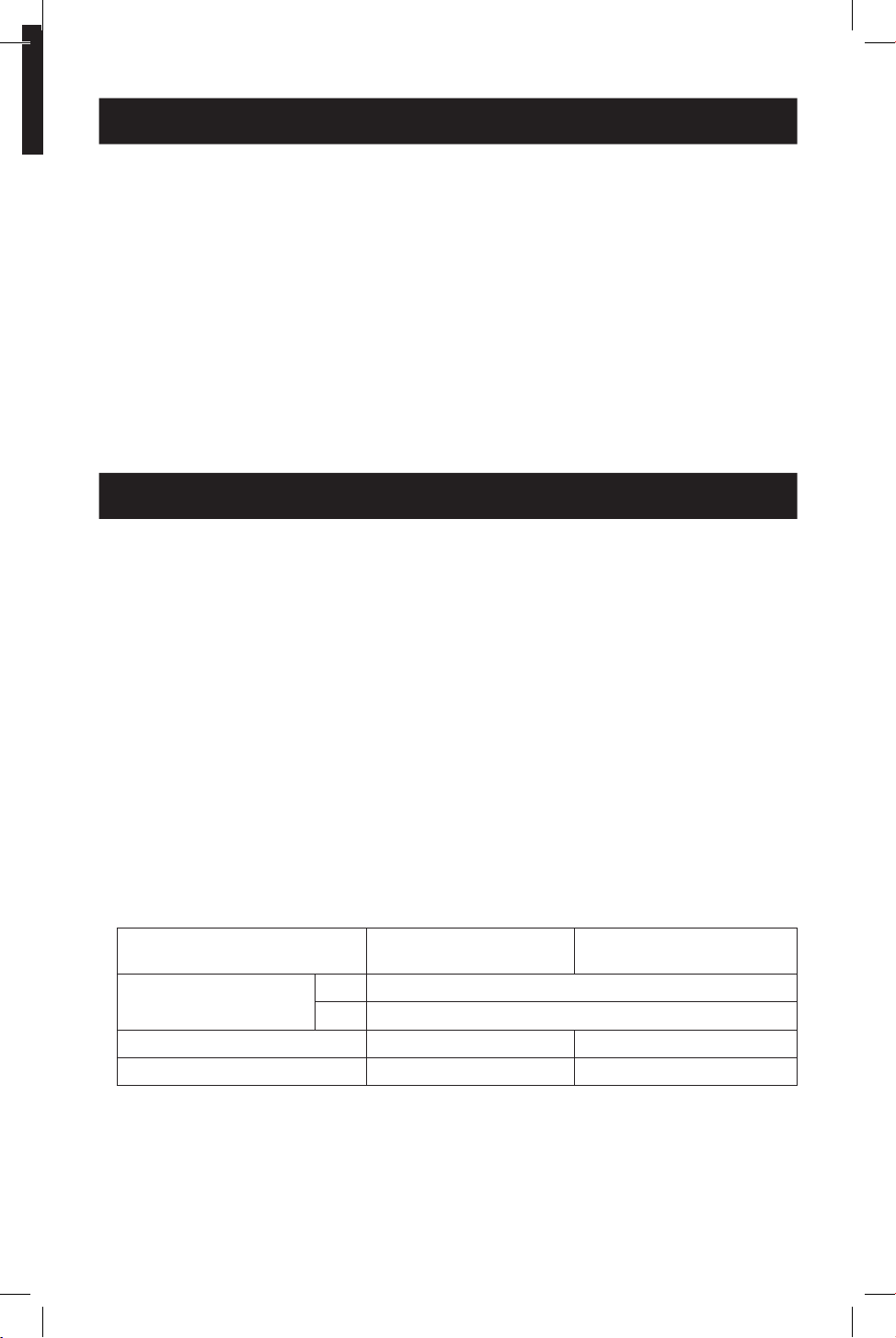
• Résolutionmaximale:Letableausuivantexpliquelarésolutionmaximaledesdeux
modèles. L'équipement source (PC) nécessite une carte vidéo compatible DisplayPort 1.4.
Mode (sortie pour
DisplayPort ou HDMI) Achage 1 Achage 2
Mode mur d'images 1x2 3840 x 4320@ 60 Hz
2x1 7680 x 2160@ 60 Hz
Mode bureau étendu 3840 x 2160 @ 60 Hz 3840x2160 @ 60 Hz
Mode miroir 3840 x 2160 @ 60 Hz 3840x2160 @ 60 Hz
20
Configuration système requise
Contenu de l'emballage
• Hub de transport multi-flux DisplayPort v1.4
• Alimentationexterne(Entrée:100-240V,50/60Hz,0,6A;Sortie:5V3A)
• Guide de démarrage rapide
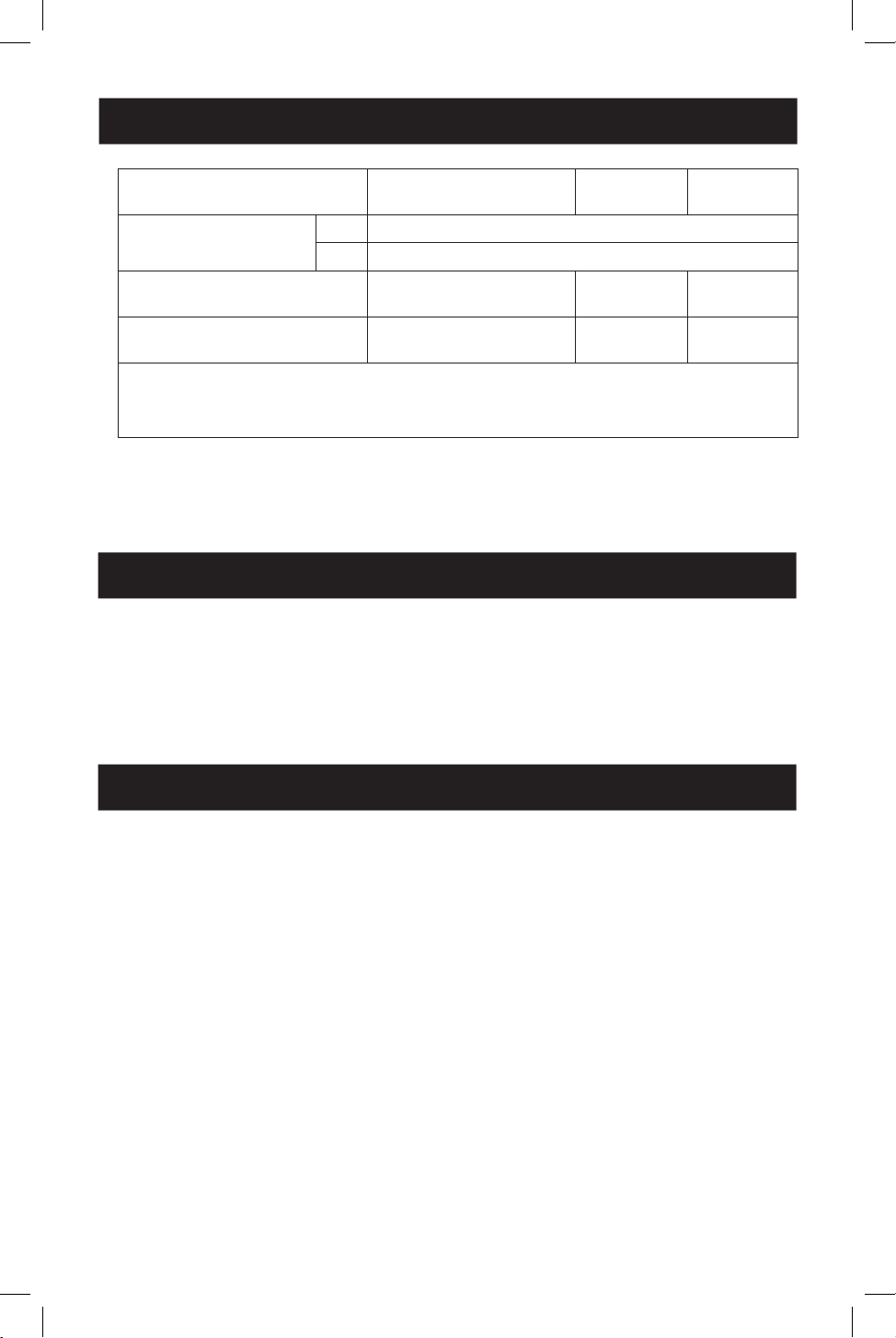
Mode (sortie pour
DisplayPort ou HDMI) Achage 1 Achage 2 Achage 3
Mode mur d'images 1x3 3840 x 6480@ 60 Hz
3x1 11520 x 2160@ 60 Hz
Mode bureau étendu 3840 x 2160 @ 60 Hz 3840x2160
@ 60 Hz
3840x2160
@ 60 Hz
Mode miroir 3840x2160 @ 60 Hz 3840x2160
@ 60 Hz
3840x2160
@ 60 Hz
Remarques:
•Enmodemiroir,lemêmecontenupeuts'acheruniquementsur2écrans.
•Ensupprimantlelogicielpilotedelacartegraphique,ilestpossiblederépondreàl'exigencede3d'écrans
miroirs.
• Lorsque vous utilisez une source 8 K avec un ou des écrans 8 K connectés aux ports de
sortie, il peut y avoir des problèmes de bande passante qui limitent la capacité des ports de
sortie individuels.
Accessoires disponibles en option
• Câbles HDMI série P568 4 K @ 60 Hz
• Câbles DisplayPort 1.4 Série P580

21
Installation
Remarques:
• Avantl'installation,assurez-vousquevotrepilotegraphiqueestàjoureninstallantledernierpilote
disponible.LehubMSTestrétrocompatibleaveclaplupartdeséquipementsDisplayPort1.1autilisantles
pilotesgraphiquesactuels.L'ensembleestlimitéauxcapacitésdel'équipementconnecté(parexemple,vous
pouvezêtrelimitéàl'affichageenmodeClone/Miroiruniquement).Lacompatibilitéaveclescartes
graphiquesplusanciennesn'estpasgarantie.
• Assurez-vousquetouslesappareilsconnectéssonthorstensionavantdeprocéderàl'installation.
1. Connectez le câble intégré du hub à la sortie DisplayPort de l'ordinateur.
2. Connectez l'alimentation externe fournie au hub et branchez le à un protecteur de
surtension, à une alimentation sans interruption (onduleur) ou à une unité de distribution
d'énergie (PDU). Le voyant vert d'alimentation s'allume.
3. Connectez un moniteur à un port de sortie disponible sur le hub.
Remarque:ladistancemaximaleentrelehubetlemoniteurconnecténedoitpasdépasser4,5m(15pi.).
4. Répétez l'étape 3 pour chaque moniteur supplémentaire que vous connectez.
5. Mettez sous tension les moniteurs connectés, puis mettez la source sous tension. Les DEL
oranges du port s'allument pour indiquer qu'un signal est reçu et la vidéo apparaît sur les
moniteurs connectés.
6. Utilisez l'écran des paramètres d'affichage de votre carte vidéo pour régler l'affichage de la
vidéo sur les moniteurs connectés.
22
Diagrammes d'installation
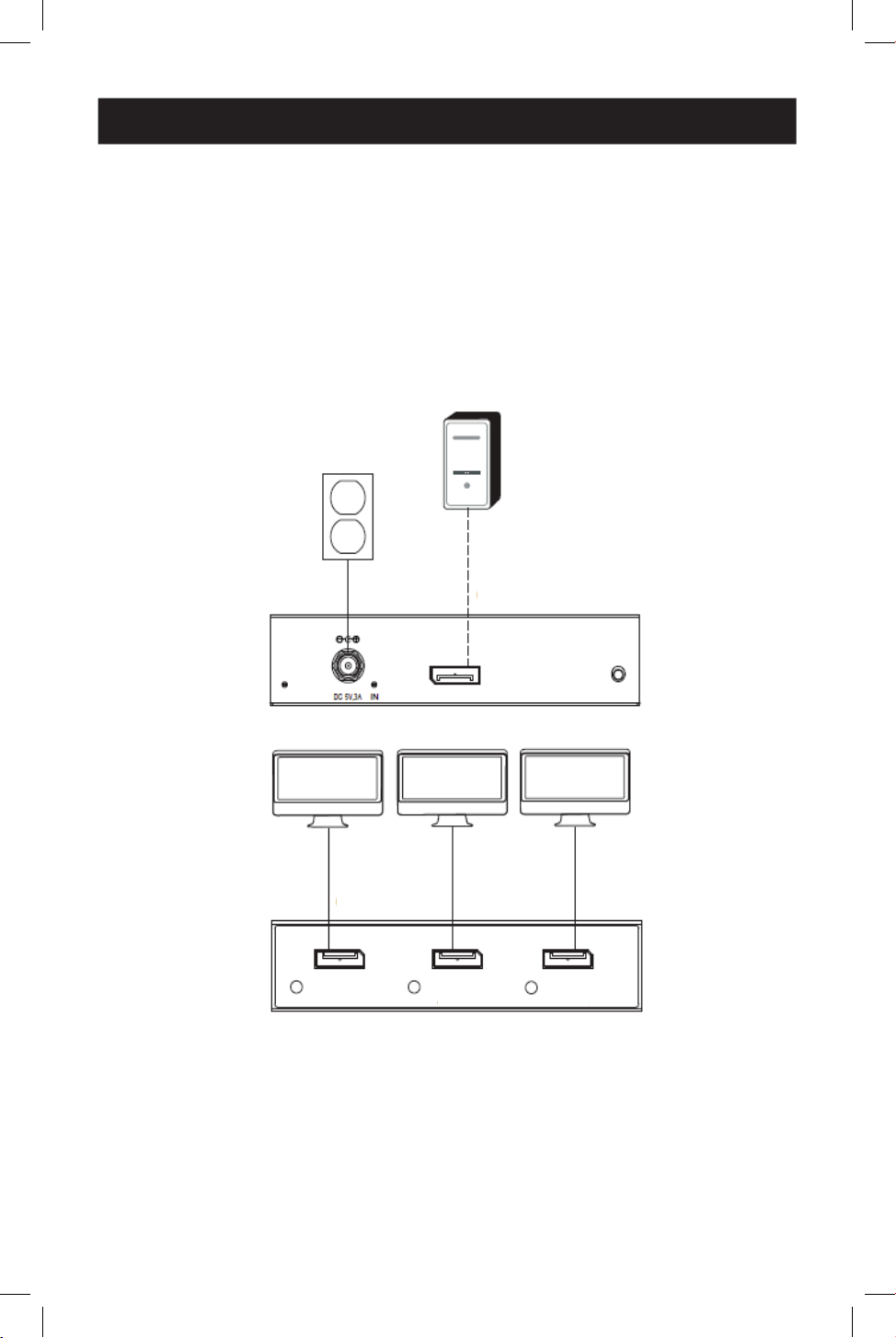
B156-003-8K
Note:B156-002-8KestidentiqueàB156-003-8Ksicen'estqu'iln'aquedeuxsorties.
Connexions des câbles
1
Jusqu'à 4,5 m (15 pi.) de câble DisplayPort à 4K / 60 Hz
Composants connectés
2
source DisplayPort
3
Moniteur
1
1
2
2
3
3
3
3
3
3
1
1
1
1
1
1
ALIMENTATION
ENTRÉE RÉINITIALISATION
SORTIE 1 SORTIE 2 SORTIE 3
23
Diagrammes d'installation
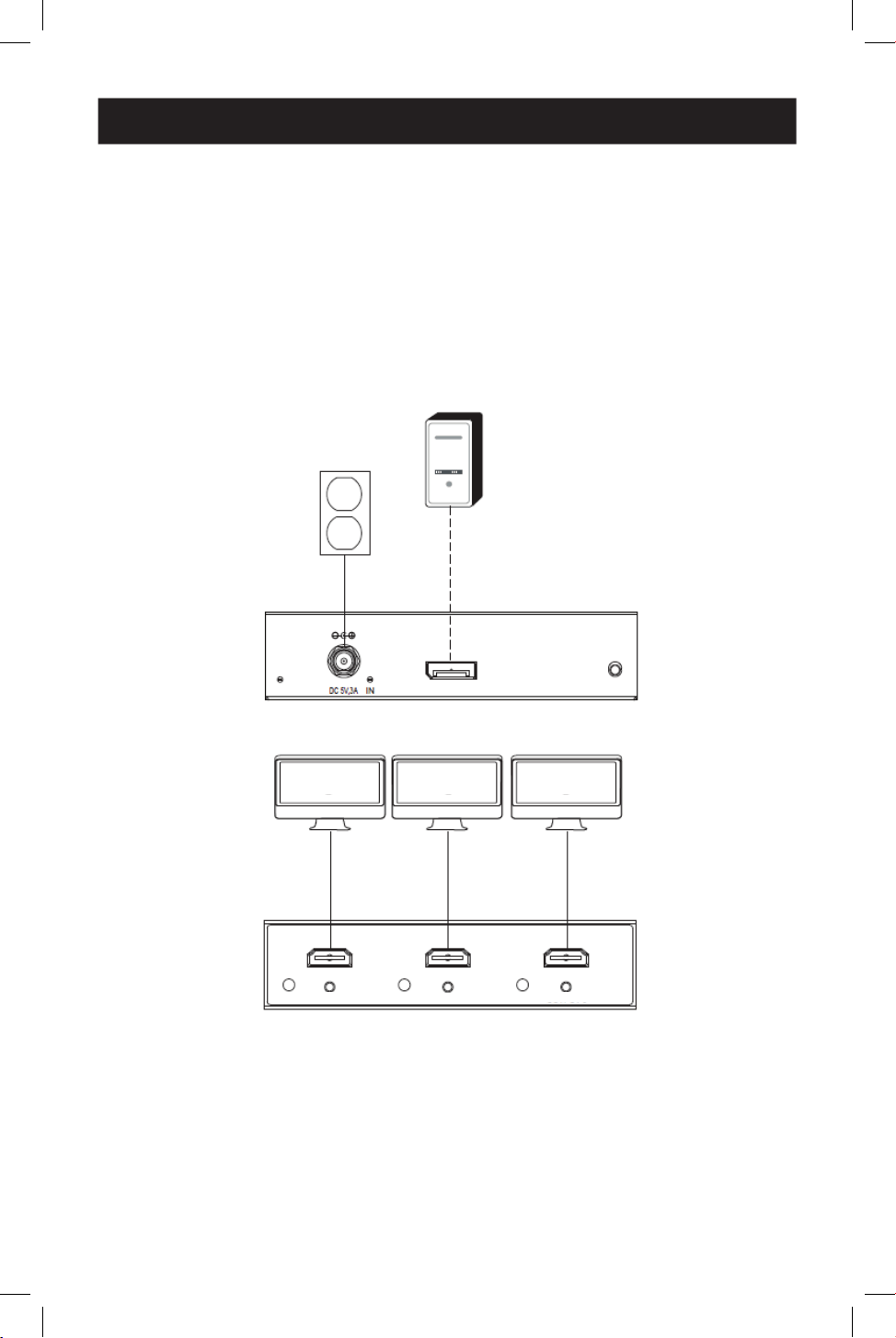
B156-003-H8K
Note:B156-002-H8KestidentiqueàB156-003-H8Ksicen'estqu'iln'aquedeuxsorties.
Connexions des câbles
1
Jusqu'à 4,5 m (15 pi.) de câble DisplayPort à 4K / 60 Hz
2
Jusqu'à 4,5 m (15 pi.) de câble HDMI 2.0 à 4K/60 Hz
Composants connectés
3
Source DisplayPort
4
Moniteur
1
1
3
3
4
4
4
4
4
4
2
2
2
2
2
2
ALIMENTATION
ENTRÉE
RÉINITIALISATION
SORTIE 1
SORTIE 2
SORTIE 3

24
Dépannage
Si vous ne parvenez pas à obtenir une image acceptable après avoir suivi les instructions
d'installation, essayez les conseils de dépannage ci-dessous.
1. Votre équipement utilise-t-il le dernier pilote graphique? Si ce n'est pas le cas,
téléchargez les derniers pilotes graphiques pour votre équipement. Le hub MST est
rétrocompatible avec la plupart des équipements DisplayPort 1.1a utilisant les pilotes
graphiques actuels. L'ensemble des caractéristiques est limité aux capacités de
l'équipement connecté (par exemple, vous pouvez être limité à l'affichage en mode Clone/
Miroir). La compatibilité avec les cartes graphiques plus anciennes n'est pas garantie.
2. Appuyez sur le bouton Réinitialiser du hub pour réinitialiser le signal envoyé aux
écrans connectés.
3. Le bloc d'alimentation externe fourni est-il connecté et branché sur une source
d'alimentation en état de marche? Pour que le produit fonctionne correctement, il
doit être connecté à l'alimentation externe fournie et recevoir une alimentation de cette
dernière.
4. La source DisplayPort et les moniteurs connectés ont-ils été mis hors tension
avant l'installation? Si ce n'est pas le cas, redémarrez votre ordinateur.
5. Quelle résolution essayez-vous d'atteindre sur chaque moniteur? DisplayPort 1.4
dispose d'une bande passante de 32,4 Gbit/s, les moniteurs à haute résolution
consommant davantage de bande passante. Bien que les moniteurs DisplayPort et HDMI
prennent en charge des résolutions vidéo allant jusqu'à 3840 x 2160 sur des moniteurs
individuels, le nombre de moniteurs 4K connectés en même temps est limité. Par exemple,
lorsque vous connectez simultanément 4 moniteurs, vous serez limité à la connexion de
moniteurs 1080p avec des résolutions plus élevées possibles lors de l'affichage en mode
mur vidéo (par exemple, 3840 x 6480 dans un mur vidéo 1 s3, 11520 x 2160 dans un mur
vidéo 3x1, etc.)
6. Quelles sont les longueurs de câble utilisées? La longueur maximale du câble entre
le hub et les moniteurs connectés ne doit pas dépasser 4,5 m (15 pi.).
7. Quel type de câblage utilisez-vous? Un câblage de qualité inférieure peut entraîner
des performances médiocres. Il est important d'utiliser des câbles qui prennent en charge
la résolution vidéo que vous essayez d'atteindre. Il est recommandé d'utiliser les câbles
énumérés dans la section Accessoires optionnels, car ils ont été testés pour fonctionner
avec ces concentrateurs MST.
8. Testez vos câbles pour vous assurer qu'ils fonctionnent correctement. Par
exemple, connectez vos câbles DisplayPort entre une source et un moniteur dont vous
savez qu'ils fonctionnent pour déterminer si le câble fonctionne correctement.
25
Caractéristiques
Distance maximale de l'écran 4,5 m (15 pi.)
Profondeur de couleur maximale prise en
charge
Couleur profonde 12 bits
Prise en charge HDR Oui
Caractéristiques HDMI 2.0
Caractéristiques Displayport 1.4
Sous-échantillonnage chromatique RGB, YCC444, YCC422, YCC420
HDCP 1.4 et 2.3
Prise en charge de la vidéo 3D Oui
Audio LPCM à 2 canaux, AC3, DTS, profond-
eur de bits jusqu'à 24 bits, fréquence
d'échantillonnage jusqu'à 192 KHz
Chipset Oui
Support d'extension IR ou RS-232 Non
Soutien au contrôle électronique des con-
sommateurs (CEC)
Non
Pilotes requis Aucun
Plage de température de fonctionnement 0 ° à 40 ° C /32 ° à 104 °F
Plage de température de stockage -15 ° à 50 °C / 5 ° à 122 °F
Humidité relative 0%jusqu'à85%sanscondensation
Matériaux de construction Plastique ABS
Placage des connecteurs/contacts Nickel/Or
26
Garantie
GARANTIE LIMITÉE D'UN AN
Nous garantissons que nos produits sont exempts de défauts de matériaux et de fabrication
pendant une période d'un (1) an à compter de la date de l'achat initial. Notre obligation au titre
de cette garantie est limitée à la réparation ou au remplacement (à notre seule discrétion) de
tout produit défectueux. Veuillez consulter le site Tripplite.Eaton.com/support/product-returns
avant d'envoyer un produit pour le faire réparer. Cette garantie ne s'applique pas aux
équipements qui ont été endommagés par accident, négligence ou par une mauvaise
utilisation, ni à ceux qui ont été altérés ou modifiés d'une façon quelconque.
SAUF MENTION CONTRAIRE DANS LE PRÉSENT DOCUMENT, NOUS NE FOURNISSONS AUCUNE
GARANTIE, EXPLICITE OU IMPLICITE, Y COMPRIS LES GARANTIES DE QUALITÉ MARCHANDE ET
DE VOCATION À UN BUT PARTICULIER. Certains états ne permettent ni la limitation ni
l'exclusiondegarantiesimplicites;ainsi,la/leslimitation(s)ouexclusion(s)mentionnée(s)
ci-dessus peut/peuvent ne pas s'appliquer à l'acquéreur.
SAUF DANS LES CAS PRÉVUS CI-DESSUS, NOUS NE SERONS EN AUCUN CAS RESPONSABLES
DES DOMMAGES DIRECTS, INDIRECTS, SPÉCIAUX, ACCESSOIRES OU CONSÉCUTIFS RÉSULTANT
DE L'UTILISATION DE CE PRODUIT, MÊME SI NOUS AVONS ÉTÉ INFORMÉS DE LA POSSIBILITÉ
DE TELS DOMMAGES. En particulier, nous ne sommes pas responsables des coûts tels que les
pertes de profits ou de revenus, les pertes d'équipement, les pertes d'utilisation de
l'équipement, les pertes de logiciels, les pertes de données, les coûts des produits de
remplacement, les réclamations de tiers ou autres.
Eaton mène une politique d'amélioration continue. Les caractéristiques peuvent être modifiées sans
préavis.
Eaton
1000 Eaton Boulevard
Cleveland, OH 44122
États-Unis
Eaton.com
© 2024 Eaton
Tous droits réservés.
Publication No. 24-06-148 / 93-4A21_RevA
mai 2024
Eaton est une marque déposée.
Toutes les marques commerciales
appartiennent à leurs
propriétaires respectifs.
27
Betriebsanleitung
English 1
Español9
Français 18
Italiano 36
Das gekaufte Produkt
kann von der Abbildung abweichen.
Modelle:
(DisplayPort-Ausgang)
B156-002-8Kl
B156-003-8Kl
(HDMI-Ausgang)
B156-002-H8Kl
B156-003-H8Kl
DisplayPort v1.4 Multi-Stream
Transport Hubs
28
Produktmerkmale
Systemanforderungen
• Schließen Sie mehrere Monitore über den DisplayPort-Ausgang Ihres Computer an, um das
gleiche Bild auf jedem Monitor anzuzeigen, den Desktop über mehrere Monitore zu
erweitern oder als einen vergrößerten Monitor im Videowandmodus zu kombinieren.
• DisplayPort v1.4 und Multi-Stream Transfer (MST) konform.
• DisplayPort- und HDMI-Ausgangsmodelle unterstützen UHD 4 K Auflösungen bis zu 3840 x
2160 (60 Hz). Siehe Systemanforderungen für weitere Informationen.
• Unterstützt bis zu 36 Bit Dunkle Farbe (12 Bits pro Kanal).
• Unterstützt DTS-HD, Dolby True HD und 7.1-Kanal-Surround-Sound
• Unterstützt HDCP, EDID und DDC
• Entspricht dem Federal Trade Agreements Act (TAA) für Käufe nach der GSA-Liste
• Ein Computer mit einer DisplayPort v1.4 kompatiblen Grafikkarte (z.B. AMD Radeon mit AMD
Eyefinity Technologie). Abwärtskompatibel mit den meisten DisplayPort 1.1a-Geräten mit
aktuellen Grafiktreibern. Das Feature-Set ist auf das des angeschlossenen Geräts
beschränkt (z.B. sie können nur im Klon-/Spiegelmodus angezeigt werden). Die
Kompatibilität mit älteren Grafikkarten ist nicht gewährleistet.
• macOS X unterstützt kein MST für NVIDIA- und Intel-Grafikprozessoreinheiten und
beschränkt die Videoanzeige auf den angeschlossenen Monitoren auf den Spiegelmodus.
• DisplayPort 1,4 Bandbreite ist 32,4 Gbps. Monitore mit höherer Auflösung beanspruchen
mehr Bandbreite.
• Obwohl DisplayPort- und HDMI-Monitore Videoauflösungen von bis zu 3840 x 2160 auf
einzelnen Monitoren unterstützen, ist die Anzahl der gleichzeitig angeschlossenen 4 K
Monitore begrenzt. Wenn Sie zum Beispiel 4 Monitore gleichzeitig anschließen, können Sie
nur 1080p-Monitore anschließen. Bei der Anzeige im Videowandmodus sind höhere
Auflösungen möglich (z.B. 3840 x 6480 in einer 1x3-Videowand, 11520 x 2160 in einer
3x1-Videowand, usw.)
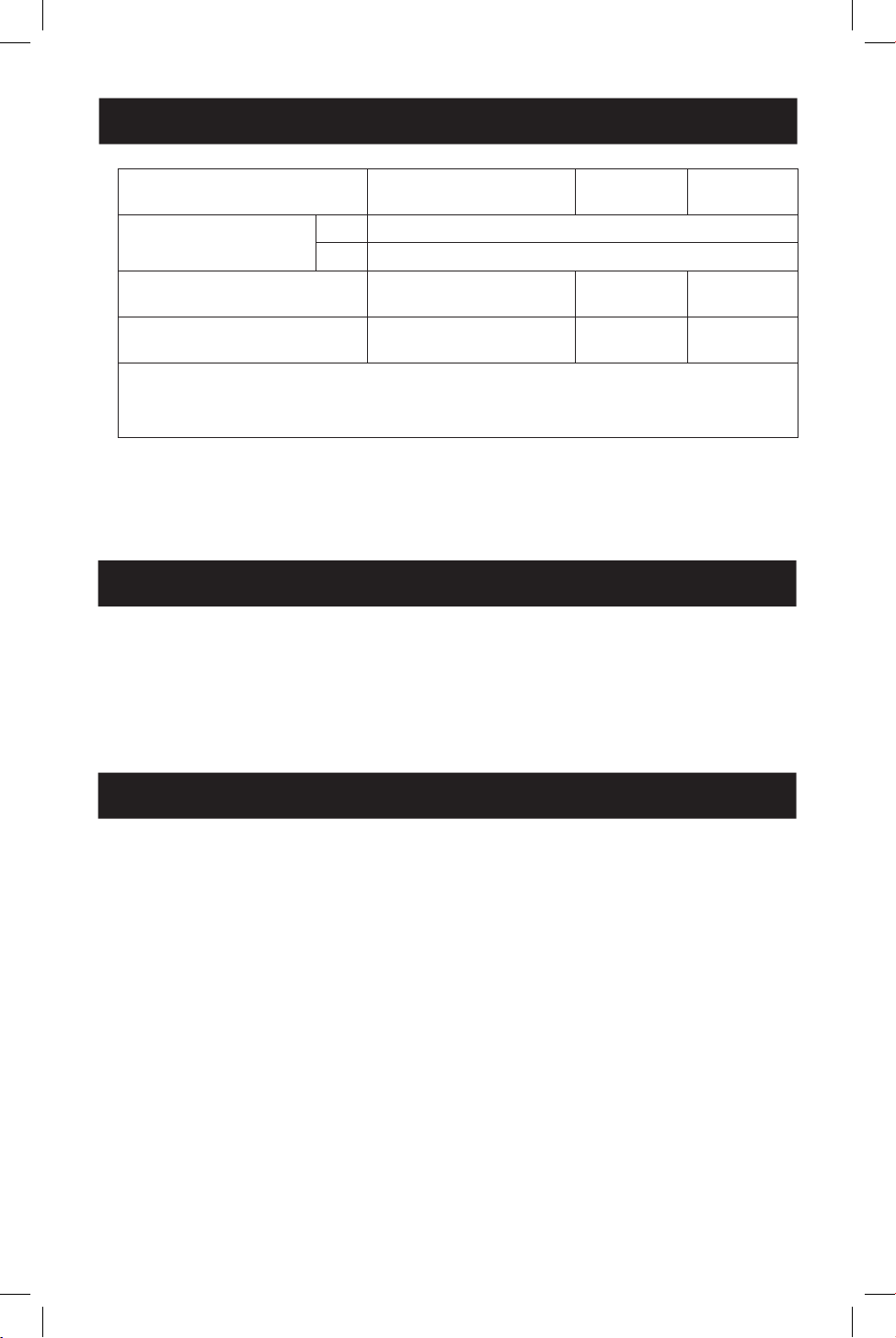
• Maximale Auflösung: Die folgende Tabelle erläutert die maximale Auflösung der beiden
Modelle. Das Quellengerät (PC) erfordert eine DisplayPort 1.4 kompatible Grafikkarte.
Modus (Ausgang für
DisplayPort oder HDMI) Anzeige 1 Anzeige 2
Videowandmodus 1x2 3840 x 4320 bei 60 Hz
2x1 7680 x 2160 bei 60 Hz
Erweiterter Desktop-Modus 3840x2160 bei 60 Hz 3840x2160 bei 60 Hz
Spiegelmodus 3840x2160 bei 60 Hz 3840x2160 bei 60 Hz
29
Systemanforderungen
Lieferumfang
• DisplayPort v1.4 Multi-Stream Transport Hub
• Externes Netzteil (Eingang: 100-240V, 50/60 Hz, 0,6A; Ausgang: 5V 3A)
• Schnellstart-Anleitung
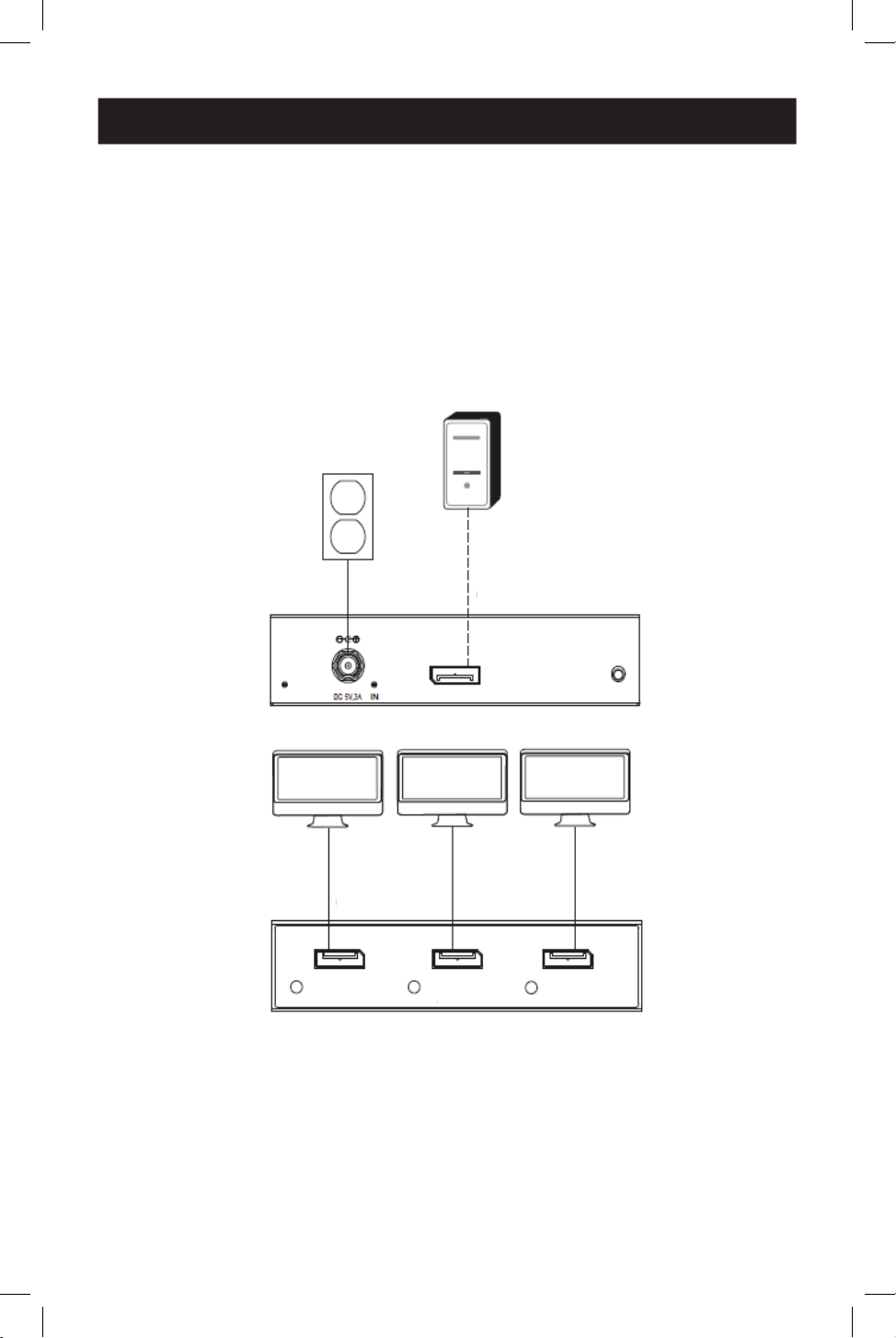
Modus (Ausgang für
DisplayPort oder HDMI) Anzeige 1 Display 2 Anzeige 3
Videowandmodus 1x3 3840 x 6480 bei 60 Hz
3x1 11520 x 2160 bei 60 Hz
Erweiterter Desktop-Modus 3840x2160 bei 60 Hz 3840x2160
bei 60 Hz
3840x2160
bei 60 Hz
Spiegelmodus 3840x2160 bei 60 Hz 3840x2160
bei 60 Hz
3840x2160
bei 60 Hz
Anmerkungen:
- Im Spiegelungsmodus kann derselbe Inhalt nur auf 2 Bildschirmen angezeigt werden.
- Wenn Sie die Treibersoftware für die Grakkarte entfernen, können Sie die Anforderung der Spiegelung
von 3 Bildschirmen erfüllen.
• Bei Verwendung einer 8K-Quelle mit 8K-Display(s), die an die Ausgangsports
angeschlossen sind, kann es zu Bandbreitenproblemen kommen, die die Leistungsfähigkeit
einzelner Ausgangsports einschränken.
Optionales Zubehör
• P568-Series 4 K bei 60 Hz HDMI-Kabel
• P580-Series DisplayPort 1.4 Kabel

30
Installation
Anmerkungen:
• Vergewissern Sie sich vor der Installation, dass Ihr Grafiktreiber auf dem neuesten Stand ist, indem Sie den
neuesten verfügbaren Treiber installieren. Der MST-Hub ist mit den meisten DisplayPort 1.1a-Geräten mit
aktuellen Grafiktreibern abwärtskompatibel. Der Funktionsumfang ist auf die Fähigkeiten des
angeschlossenen Geräts beschränkt (z. B. kann die Anzeige nur im Klon-/Spiegelmodus erfolgen). Die
Kompatibilität mit älteren Grafikkarten ist nicht gewährleistet.
• Stellen Sie sicher, dass alle angeschlossenen Geräte vor der Installation ausgeschaltet sind.
1. Verbinden Sie das integrierte Kabel des Hubs mit dem DisplayPort-Ausgang des
Computers.
2. Schließen Sie das mitgelieferte externe Netzteil an den Hub-Anschluss an und verbinden
Sie es mit einem Überspannungsschutz, einer unterbrechungsfreien Stromversorgung
(USV) oder einer Stromverteilungseinheit (PDU). Das grüne Power-LED leuchtet auf.
3. Schließen Sie einen Monitor an einen verfügbaren Ausgangsanschluss des Hubs an.
Hinweis: Die maximale Entfernung zwischen dem Hub und dem angeschlossenen Monitor darf 4,6 m
(15ft.) nicht überschreiten.
4. Wiederholen Sie Schritt 3 für jeden weiteren Monitor, den Sie anschließen möchten.
5. Schalten Sie die angeschlossenen Monitore und dann die Quelle ein. Die orangefarbenen
Anschluss-LEDs leuchten auf, um anzuzeigen, dass ein Signal empfangen wird, und auf den
angeschlossenen Monitoren wird ein Video angezeigt.
6. Verwenden Sie den Bildschirm mit den Anzeigeeinstellungen Ihrer Grafikkarte, um
einzustellen, wie das Video auf den angeschlossenen Monitoren angezeigt wird.
31
Installationsdiagramme
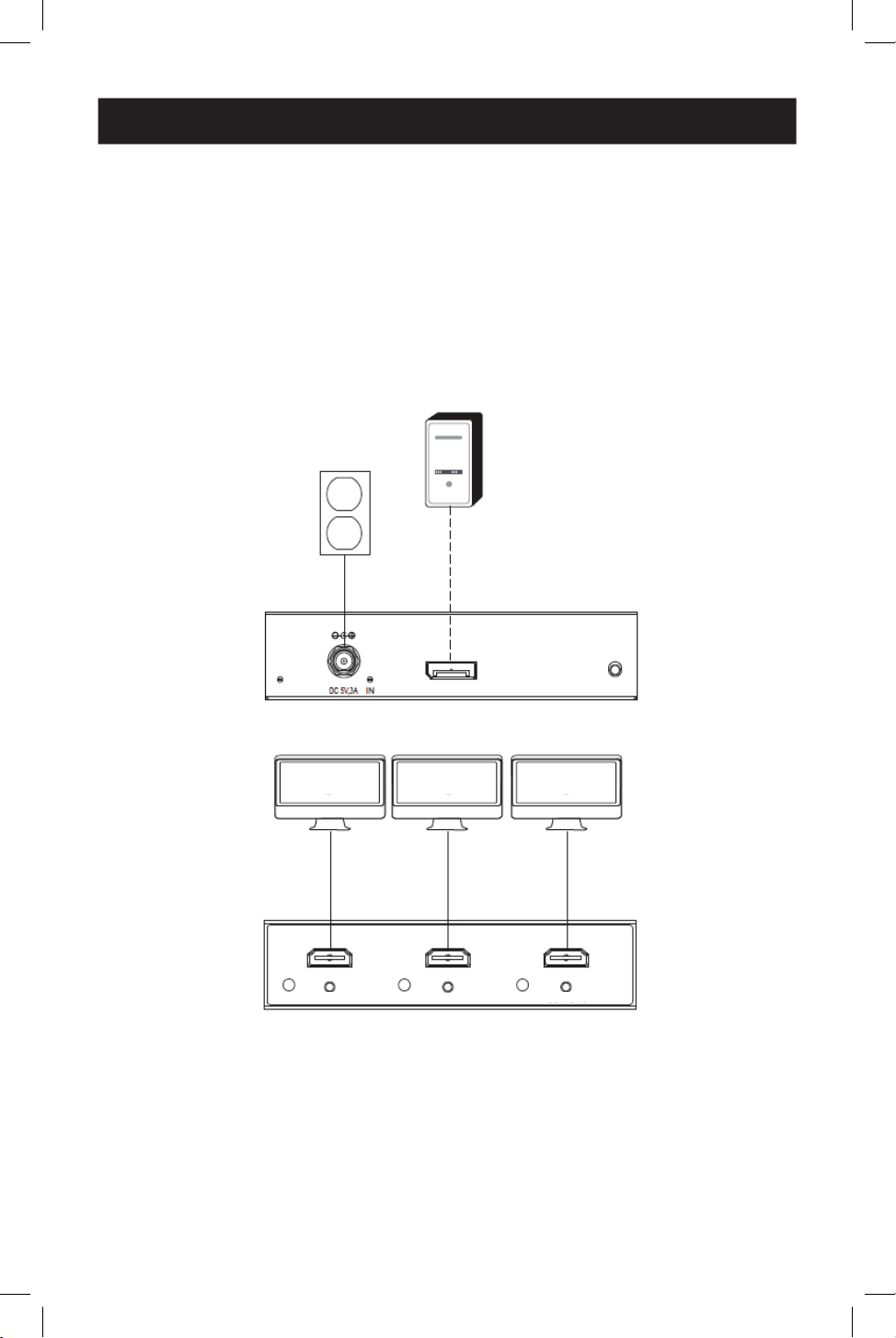
B156-003-8Kl
Hinweis: B156-002-8K ist identisch mit B156-003-8K, hat aber nur zwei Ausgänge.
Kabelverbindungen
1
Bis zu 4,5 m (15 ft.) DisplayPort-Kabel bei 4K / 60 Hz
Verbundene Komponenten
2
DisplayPort-Quelle
3
Monitor
1
1
2
2
3
3
3
3
3
3
1
1
1
1
1
1
LEISTUNG EINGANG ZURÜCKSETZEN
AUSGANG 1 AUSGANG 2 AUSGANG 3
32
Installationsdiagramme
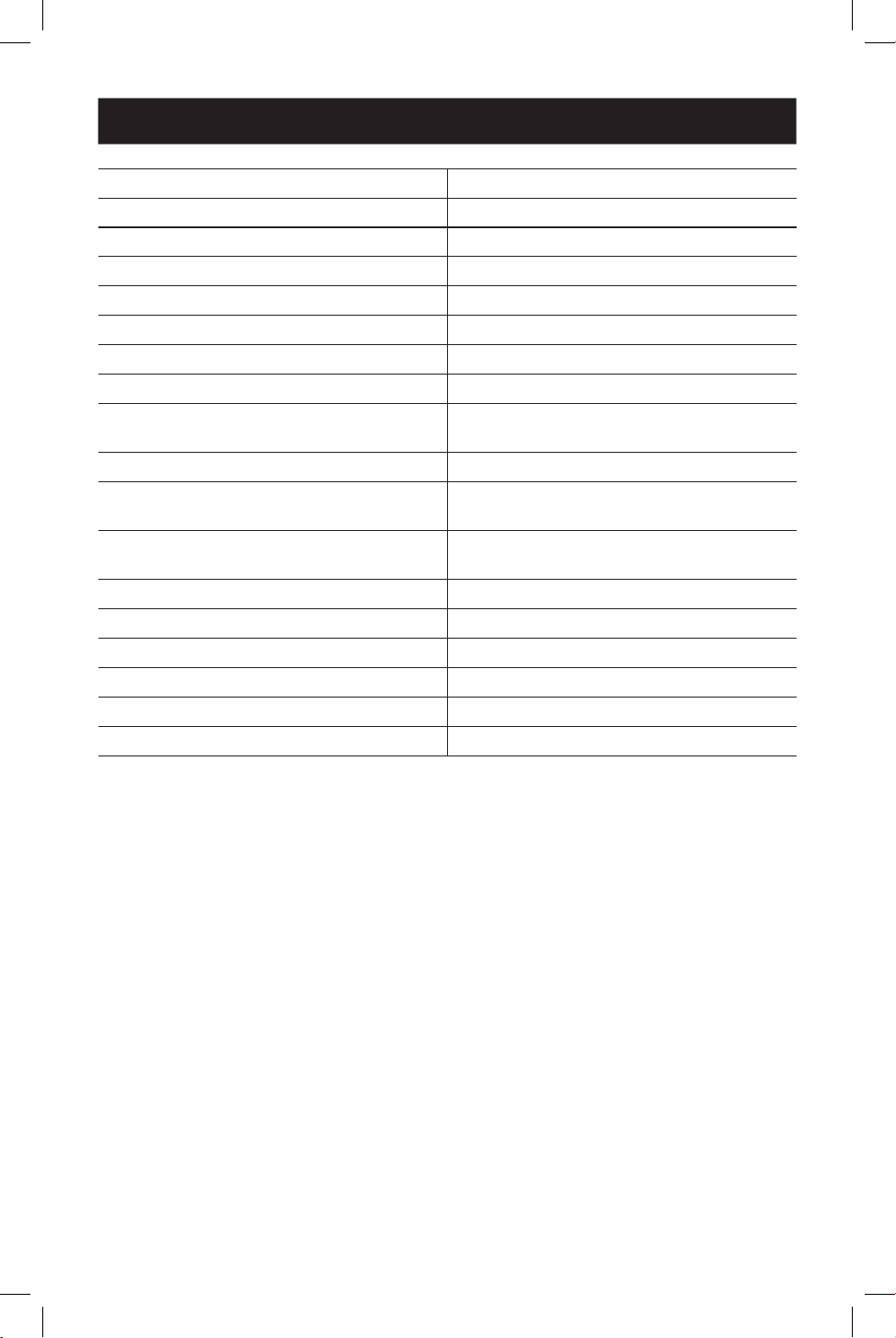
B156-003-H8Kl
Hinweis: B156-002-H8K ist identisch mit B156-003-H8K, hat aber nur zwei Ausgänge.
Kabelverbindungen
1
Bis zu 4,5 m (15 ft.) DisplayPort-Kabel bei 4K / 60 Hz
2
Bis zu 4,5 m (15 ft.) HDMI 2.0 Kabel bei 4K / 60 Hz
Verbundene Komponenten
3
DisplayPort-Quelle
4
Monitor
1
1
3
3
4
4
4
4
4
4
2
2
2
2
2
2
LEISTUNG EINGANG Zurücksetzen
OUTPUT 1
OUTPUT 2
OUTPUT 3

33
Fehlerbehebung
Wenn Sie nach Befolgung der Installationsanweisungen kein akzeptables Bild erhalten,
versuchen Sie die folgenden Tipps zur Fehlerbehebung.
1. Ist Ihr Gerät mit dem neuesten Grafiktreiber ausgestattet? Falls nicht, laden Sie die
neuesten Grafiktreiber für Ihr Gerät herunter. Der MST-Hub ist mit den meisten
DisplayPort 1.1a-Geräten mit aktuellen Grafiktreibern abwärtskompatibel. Die Set
Eigenschaft ist auf die Fähigkeiten des angeschlossenen Geräts beschränkt (z. B. können
Sie nur im Klon-/Spiegelmodus anzeigen). Die Kompatibilität mit älteren Grafikkarten ist
nicht gewährleistet.
2. Drücken Sie die Reset-Taste des Hubs, um das an die angeschlossenen Displays
gesendete Signal zurückzusetzen.
3. Ist das mitgelieferte externe Netzteil angeschlossen und mit einer
funktionierenden Stromversorgung verbunden? Damit das Produkt ordnungsgemäß
funktioniert, muss es an das mitgelieferte externe Netzteil angeschlossen sein und von
diesem mit Strom versorgt werden.
4. Wurden die DisplayPort-Quelle und die angeschlossenen Monitore vor der
Installation ausgeschaltet? Falls nicht, starten Sie Ihren Computer neu.
5. Welche Auflösung wollen Sie auf den einzelnen Monitoren erreichen? Der
DisplayPort 1.4 hat eine Bandbreite von 32,4 Gbit/s, wobei Monitore mit höherer
Auflösung eine größere Bandbreite benötigen. Obwohl DisplayPort- und HDMI-Monitore
Videoauflösungen von bis zu 3840 x 2160 auf einzelnen Monitoren unterstützen, ist die
Anzahl der gleichzeitig angeschlossenen 4 K Monitore begrenzt. Wenn Sie beispielsweise 4
Monitore gleichzeitig anschließen, können Sie nur 1080p-Monitore mit höheren
Auflösungen anschließen, die im Videowandmodus möglich sind (z.B. 3840 x 6480 in einer
1 s3 Videowand, 11520 x 2160 in einer 3x1 Videowand, usw.).
6. Welche Kabellängen verwenden Sie? Die maximale Kabellänge zwischen dem Hub und
den angeschlossenen Monitoren sollte 15 ft. (4,6 m) nicht überschreiten.
7. Welche Art von Verkabelung verwenden Sie? Eine mangelhafte Verkabelung kann zu
einer schlechten Performance führen. Es ist wichtig, dass Sie Kabel verwenden, die die von
Ihnen angestrebte Videoauflösung unterstützen. Es wird empfohlen, die im Abschnitt
Optionales Zubehör aufgeführten Kabel zu verwenden, da dieses für die Verwendung
mit diesen MST-Hubs getestet wurde.
8. Testen Sie Ihre Kabel, um sicherzustellen, dass sie einwandfrei funktionieren.
Schließen Sie zum Beispiel Ihre DisplayPort-Kabel an eine Quelle und einen Monitor an,
von denen Sie wissen, dass sie funktionieren, um sicherzustellen, ob das Kabel
ordnungsgemäß funktioniert.
34
Technische Daten
Maximale Entfernung zum Display 15 ft. (4,8 m)
Maximal unterstützte Farbtiefe 12-bit Deep Color
HDR-Unterstützung JA.
HDMI-Spezikation 2,0.
DisplayPort-Spezikation 1,4.
Chroma-Subsampling RGB, YCC444, YCC422, YCC420
HDCP 1,4 und 2,3
3D-Video-Unterstützung JA.
Audio 2-Kanal LPCM, AC3, DTS, Bittiefe bis zu 24 Bit,
Abtastrate bis zu 192 KHz
Chipsatz JA.
Unterstützung von IR- oder RS-232-
Erweiterungen
Nein.
Unterstützung von Consumer Electronic
Control (CEC)
Kein
Treiber erforderlich Keine
Betriebstemperaturbereich 32° bis 104°F / 0° bis 40° C
Lagertemperaturbereich 5° bis 122°F / -15° bis 50°C
Relative Feuchtigkeit 0% bis 85% nicht-kondensierend
Baumaterial ABS-Kunststo
Stecker/Kontaktbeschichtung Nickel/Gold
35
Garantie
1 JAHR EINGESCHRÄNKTE GARANTIE
Wir garantieren, dass unsere Produkte für einen Zeitraum von einem (1)Jahr ab dem Datum
des Erstkaufs frei von Material- und Verarbeitungsfehlern sind. Unsere Verpflichtung im
Rahmen dieser Garantie beschränkt sich auf die Reparatur oder den Ersatz (nach eigenem
Ermessen) der fehlerhaften Produkte. Besuchen Sie Tripplite.Eaton.com/support/product-
returns, bevor Sie Geräte zur Reparatur zurücksenden. Diese Garantie gilt nicht für Geräte, die
durch Unfall, Fahrlässigkeit oder falsche Anwendung beschädigt wurden oder in irgendeiner
Weise geändert oder modifiziert wurden.
MIT AUSNAHME DER HIERIN ENTHALTENEN BESTIMMUNGEN GEBEN WIR KEINE GARANTIEN,
WEDER AUSDRÜCKLICH NOCH STILLSCHWEIGEND, EINSCHLIESSLICH GARANTIEN DER
MARKTGÄNGIGKEIT UND EIGNUNG FÜR EINEN BESTIMMTEN ZWECK. Einige Staaten gestatten
keine Beschränkung oder keinen Ausschluss stillschweigender Gewährleistungen; daher kann
es sein, dass die oben genannten Beschränkungen oder Ausschlüsse auf den Käufer nicht
zutreffen.
MIT AUSNAHME DER OBIGEN BESTIMMUNGEN SIND WIRUNTER KEINEN UMSTÄNDEN
HAFTBAR FÜR DIREKTE, INDIREKTE, SPEZIELLE, ZUFÄLLIGE ODER FOLGESCHÄDEN, DIE SICH
AUS DER VERWENDUNG DIESES PRODUKTES ERGEBEN, SELBST WENN AUF DIE MÖGLICHKEIT
SOLCHER SCHÄDEN HINGEWIESEN WURDE. Insbesondere haften wir nicht für Kosten, wie
entgangene Gewinne oder Einnahmen, Verlust von Geräten, Verlust der Nutzung von Geräten,
Verlust von Software, Datenverlust, Kosten für Ersatzprodukte, Ansprüche Dritter oder anderes.
Eaton verfolgt eine Politik der kontinuierlichen Verbesserung. Spezifikationen können ohne
Ankündigung geändert werden.
Eaton
1000Eaton Boulevard
Cleveland, OH44122
Vereinigte Staaten
Eaton.com
© 2024 Eaton
Alle Rechte vorbehalten.
Veröffentlichung Nr. 24-06-148 / 93-4A21_RevA
Mai 2024
Eaton ist eine eingetragene
Handelsmarke.
Alle Marken sind Eigentum
der jeweiligen Inhaber.
36
Manuale d'uso
English 1
Español 9
Français 18
Deutsch 27
Il prodotto acquistato
potrebbe differire dall’immagine.
Modelli:
(Uscita DisplayPort)
B156-002-8K
B156-003-8K
(Uscita HDMI)
B156-002-H8K
B156-003-H8K
Hub di trasporto multistrato
DisplayPort v1.4
37
Manuale d'uso
Caratteristiche del prodotto
Requisiti di sistema
• Collegare i monitor multipli tramite l'uscita DisplayPort del computer per visualizzare la
stessa immagine su ciascun monitor, estendere il desktop tra i monitor o combinarli in un
unico monitor ingrandito in modalità videowall.
• Conforme a DisplayPort v1.4 e Multi-Stream Transfer (MST).
• I modelli con uscita DisplayPort e HDMI supportano risoluzioni UHD 4K fino a 3840 x 2160
(60 Hz). Per ulteriori informazioni, consultare i Requisiti di sistema.
• Supporta deep color fino a 36 bit (12 bit per canale).
• Supporta l'audio surround DTS-HD, Dolby True HD e 7.1 canali.
• Supporta HDCP, EDID e DDC.
• Conforme alla legge federale sugli accordi commerciali (TAA) per gli acquisti GSA Schedule.
• Un computer con una scheda grafica compatibile con DisplayPort v1.4 (ad esempio AMD
Radeon con tecnologia AMD Eyefinity). Retrocompatibile con la maggior parte delle
apparecchiature DisplayPort 1.1a con i driver grafici attuali. Il set di caratteristiche è limitato
a quello dell'apparecchiatura collegata (ad esempio, potrebbe essere limitato alla sola
visualizzazione in modalità Clona/Duplica). Non è garantita la compatibilità con schede
grafiche più vecchie.
• macOS X non supporta MST per le unità di processore grafico NVIDIA e Intel, limitando la
visualizzazione video sui monitor collegati alla modalità Duplica.
• La larghezza di banda DisplayPort 1.4 è 32,4 Gbps. I monitor ad alta risoluzione occupano
una maggiore larghezza di banda.
• Sebbene i monitor DisplayPort e HDMI supportino risoluzioni video fino a 3840 x 2160 su
singoli monitor, il numero di monitor da 4K collegati contemporaneamente è limitato. Ad
esempio, quando si collegano simultaneamente i 4 monitor, si sarà limitati a collegare
monitor da 1080p. Sono possibili risoluzioni più elevate quando si visualizza in modalità
videowall (ad esempio, 3840 x 6480 in un videowall 1x3, 11520 x 2160 in un videowall 3x1,
ecc).
• Risoluzione massima: il seguente grafico spiega la risoluzione massima di entrambi i modelli.
La fonte (PC) richiede una scheda video compatibile con DisplayPort 1.4.
Modalità (uscita per
DisplayPort o HDMI) Display 1 Display 2
Modalità videowall 1x2 3840 x 4320@ 60 Hz
2x1 7680 x 2160@ 60 Hz
Modalità Desktop esteso 3840 x 2160 @ 60 Hz 3840x2160 @ 60 Hz
Modalità Duplica 3840 x 2160 @ 60 Hz 3840x2160 @ 60 Hz
38
Requisiti di sistema
Contenuto della confezione
• Hub di trasporto multistream DisplayPort v1.4
• Alimentazione esterna (ingresso: 100-240 V, 50/60 Hz, 0,6 A; uscita: 5 V 3 A)
• Guida rapida
Modalità (uscita per
DisplayPort o HDMI) Display 1 Display 2 Display 3
Modalità videowall 1x3 3840 x 6480 a 60 Hz
3x1 11520 x 2160 a 60 Hz
Modalità Desktop esteso 3840 x 2160 a 60 Hz 3840x2160
a 60 Hz
3840x2160
a 60 Hz
Modalità Duplica 3840x2160 a 60 Hz 3840x2160
a 60 Hz
3840x2160
a 60 Hz
Note:
• In modalità Duplica, lo stesso contenuto può essere visualizzato solo su 2 schermi.
• In caso di rimozione del software del driver dalla scheda graca, è possibile ottenere il requisito di mirror-
ing su 3 schermi.
• Quando si utilizza una fonte 8K con display 8K collegato/i alle porte di uscita, possono
verificarsi problemi di larghezza di banda che limitano la capacità delle singole porte di
uscita.
Accessori opzionali
• Cavi HDMI 4K a 60 Hz serie P568s
• Cavi DisplayPort 1.4 serie P580

39
Installazione
Note:
• Prima dell'installazione, assicurarsi che il driver grafico sia aggiornato installando l'ultimo driver disponibile.
L'hub MST è retrocompatibile con la maggior parte delle apparecchiature DisplayPort 1.1a con gli attuali
driver grafici. La funzionalità è limitata alle capacità dell'apparecchiatura collegata (ad esempio potrebbe
essere limitata alla visualizzazione solo in modalità Clona/Duplica). Non è garantita la compatibilità con
schede grafiche più vecchie.
• Accertarsi che l'alimentazione di tutti i dispositivi collegati sia spenta prima dell'installazione.
1. Collegare il cavo incorporato dell'hub all'uscita DisplayPort del computer.
2. Collegare l'alimentatore esterno in dotazione all'hub, e collegarlo a una protezione da
sovratensione, a un gruppo di continuità (UPS) o a un'unità di distribuzione di energia
(PDU). Il LED verde di alimentazione si accende.
3. Collegare un monitor a una porta di uscita disponibile sull'hub.
Nota: la distanza massima tra l'hub e il monitor collegato non deve superare i 4,6 m (15 piedi).
4. Ripetere il passo 3 per ogni monitor aggiuntivo da collegare.
5. Accendere i monitor collegati, quindi accendere la fonte. I LED arancioni della porta si
illumineranno per indicare la ricezione di un segnale e il video apparirà sui monitor
collegati.
6. Utilizzare la schermata delle impostazioni di visualizzazione della scheda video per regolare
la visualizzazione del video sui monitor collegati.
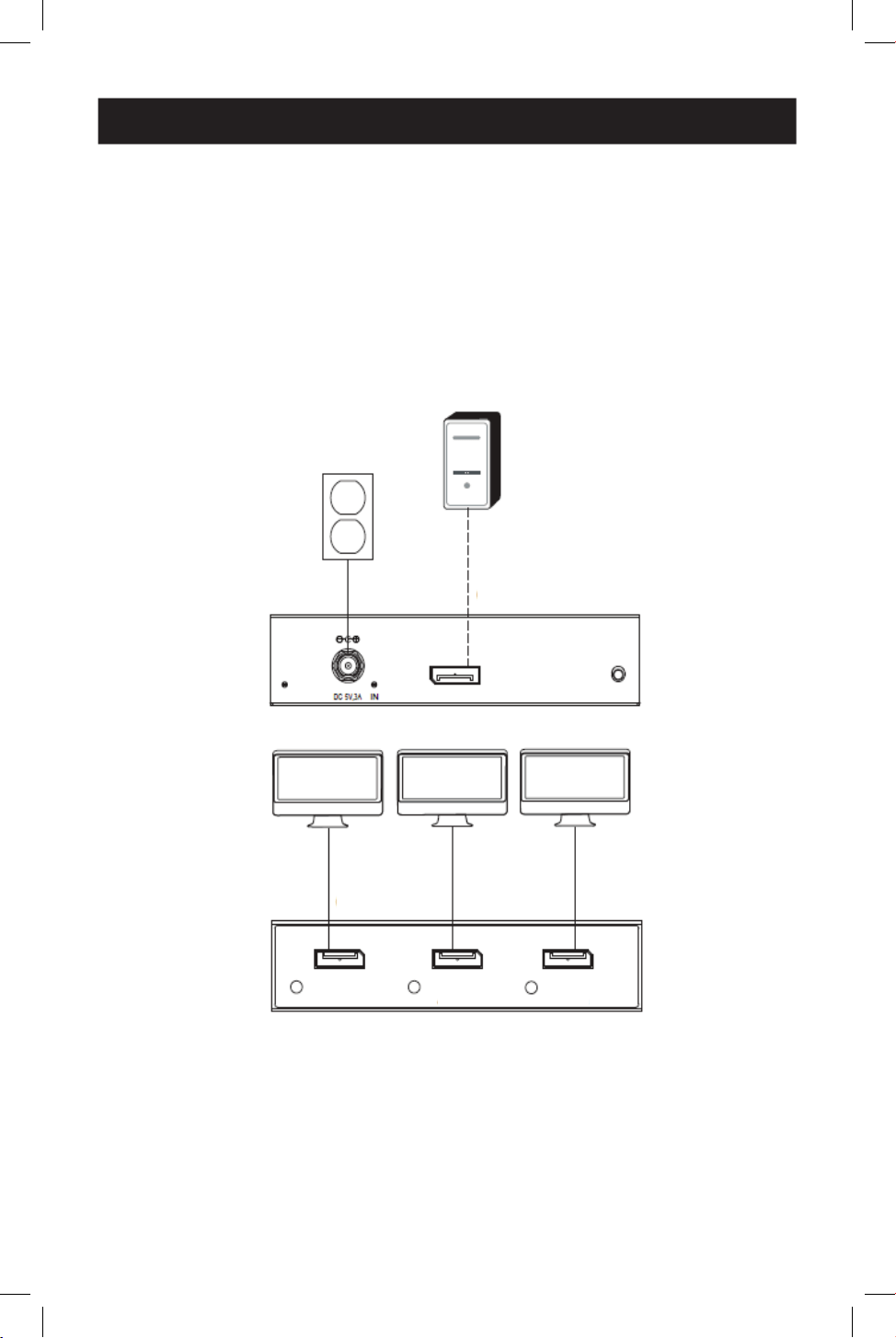
40
Schemi di installazione
B156-003-8K
Nota: il B156-002-8K è identico al B156-003-8K, ma ha solo due uscite.
Collegamenti dei cavi
1
Cavo DisplayPort 4K/60 Hz fino a 4,5 m (15 piedi)
Componenti collegati
2
Fonte DisplayPort
3
Monitor
1
1
2
2
3
3
3
3
3
3
1
1
1
1
1
1
ACCENSIONE INGRESSO RESET
Uscita 1 Uscita 2 Uscita 3
41
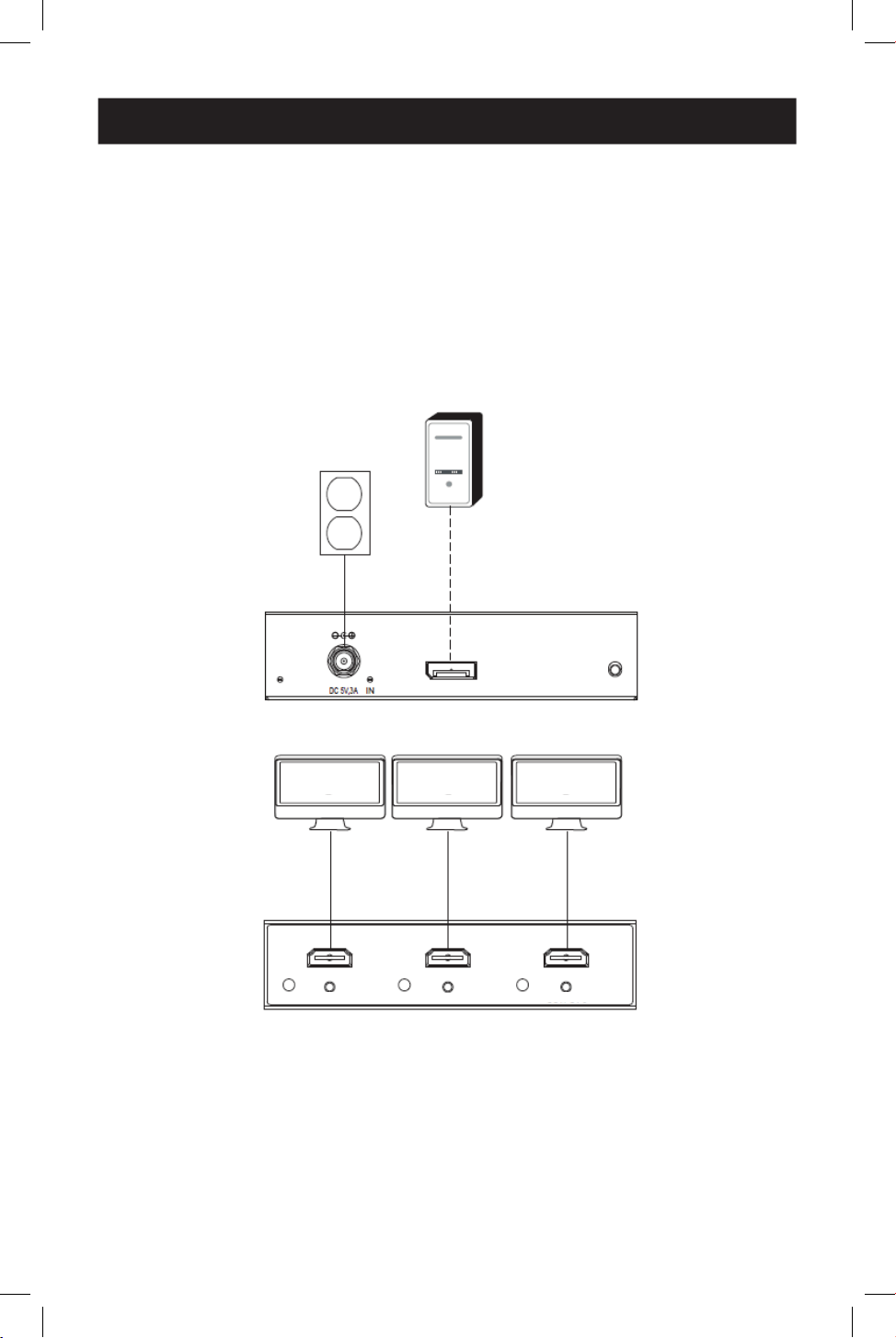
Schemi di installazione
B156-003-H8K
Nota: il B156-002-H8K è identico al B156-003-H8K, ma ha solo due uscite.
Collegamenti dei cavi
1
Cavo DisplayPort 4K/60 Hz fino a 4,5 m (15 piedi)
2
Cavo HDMI 4K/60 Hz fino a 4,5 m (15 piedi)
Componenti collegati
3
Fonte DisplayPort
4
Monitor
1
1
3
3
4
4
4
4
4
4
2
2
2
2
2
2
ACCENSIONE INGRESSO RESET
USCITA 1
USCITA 2
USCITA 3

42
Risoluzione dei problemi
Se non si riesce a ottenere un'immagine accettabile dopo aver seguito le istruzioni di
installazione, provare a seguire i suggerimenti per la risoluzione dei problemi.
1. L'apparecchiatura utilizza il driver grafico più recente? In caso contrario, scaricare i
driver grafici più recenti per l'apparecchiatura. L'hub MST è retrocompatibile con la
maggior parte delle apparecchiature DisplayPort 1.1a con gli attuali driver grafici. Il set di
caratteristiche è limitato alle capacità dell'apparecchiatura collegata (ad esempio potrebbe
essere limitato alla sola visualizzazione in modalità Clona/Duplica). Non è garantita la
compatibilità con schede grafiche più vecchie.
2. Premere il pulsante di reset dell'hub per resettare il segnale inviato ai display
collegati.
3. L'alimentatore esterno in dotazione è collegato e inserito in una fonte di
alimentazione funzionante? Affinché il prodotto funzioni correttamente, deve essere
collegato e ricevere alimentazione dall'alimentatore esterno in dotazione.
4. L'alimentazione della fonte del DisplayPort e dei monitor collegati è stata spenta
prima dell'installazione? In caso contrario, riavviare il computer.
5. Quale risoluzione si sta cercando di ottenere su ciascun monitor? DisplayPort 1.4
presenta una larghezza di banda di 32,4 Gbps con monitor dalla risoluzione più elevata
che occupano una larghezza di banda maggiore. Sebbene i monitor DisplayPort e HDMI
supportino risoluzioni video fino a 3840 x 2160 sui singoli monitor, il numero di monitor
4K collegati contemporaneamente è limitato. Ad esempio, quando si collegano
simultaneamente 4 monitor, si sarà limitati a collegare i monitor 1080p con le risoluzioni
più elevate possibili in visualizzazione in modalità videowall (ad esempio 3840 x 6480 in
videowall 1s3, 11520 x 2160 in videowall 3x1, ecc.)
6. Quanto è lungo il cavo che si sta utilizzando? La lunghezza massima del cavo tra l'hub
e i monitor collegati non deve superare i 4,6 m (15 piedi).
7. Che tipo di cavi si stanno utilizzando? Un cablaggio di qualità inferiore può causare
prestazioni scadenti. È importante utilizzare cavi che supportino la risoluzione video che si
sta cercando di ottenere. Si raccomanda di utilizzare i cavi elencati nella sezione Accessori
opzionali, in quanto sono stati testati per funzionare con questi hub MST.
8. Testare i cavi per assicurarsi che funzionino correttamente. Ad esempio, collegare i
cavi DisplayPort tra una configurazione di fonte e un monitor di cui si conosce il corretto
funzionamento per determinare se il cavo funziona correttamente.
43
Specifiche
Distanza massima dal display 4,8 m (15 piedi)
Profondità di colore massima supportata Deep color a 12 bit
Supporto HDR Sì
Speciche HDMI 2,0
Speciche DisplayPort 1,4
Sottocampionamento del croma RGB, YCC444, YCC422, YCC420
HDCP 1.4 e 2.3
Supporto video 3D Sì
Audio LPCM a 2 canali, AC3, DTS, profondità
di bit no a 24 bit, frequenza di
campionamento no a 192 KHz
Chipset Sì
Supporto per estensione IR o RS-232 No
Supporto per Consumer Electronic Control (CEC) No
Driver necessari Nessuno
Intervallo operativo di temperatura Da 0 a 40 °C/da 32 a 104 °F
Intervallo di temperatura di stoccaggio Da -15 a 50 °C/da 5 a 122 °F
Umidità relativa Dallo 0% all'85% non condensante
Materiale di costruzione Plastica ABS
Placcatura del connettore/contatto Nichel/Oro
44
Garanzia
GARANZIA LIMITATA DI 1 ANNO
Garantiamo che i nostri prodotti sono privi di difetti nei materiali e di fabbricazione per un
periodo di un anno (1) dalla data di acquisto iniziale. I nostri obblighi ai sensi della presente
garanzia sono limitati alla riparazione o sostituzione (a nostra esclusiva discrezione) di
eventuali prodotti che presentino tali difetti. Visitare Tripplite.Eaton.com/support/product-
returns prima di rispedire qualsiasi apparecchiatura per la riparazione. La presente garanzia
non si applica alle apparecchiature che sono state danneggiate da incidenti, negligenza o
applicazione errata o che sono state alterate o modificate in qualsiasi modo.
AD ECCEZIONE DI QUANTO PREVISTO NEL PRESENTE DOCUMENTO, NON FORNIAMO
ALCUNA GARANZIA, ESPRESSA O IMPLICITA, INCLUSE LE GARANZIE DI COMMERCIABILITÀ E DI
IDONEITÀ PER UNO SCOPO PARTICOLARE. Alcuni stati non consentono la limitazione o
l'esclusione delle garanzie implicite; pertanto, le suddette limitazioni o esclusioni potrebbero
non essere applicabili all'acquirente.
AD ECCEZIONE DI QUANTO PREVISTO SOPRA, IN NESSUN CASO SAREMO RESPONSABILI PER
DANNI DIRETTI, INDIRETTI, SPECIALI, INCIDENTALI O CONSEQUENZIALI DERIVANTI DALL'USO
DI QUESTO PRODOTTO, ANCHE SE AVVISATI DELLA POSSIBILITÀ DI TALI DANNI. In particolare,
non siamo responsabili di alcun costo, come la perdita di profitti o ricavi, la perdita di
attrezzature, la perdita di utilizzo di attrezzature, la perdita di software, la perdita di dati, i costi
dei sostituti, i reclami di terzi o altro.
Eaton persegue una politica di miglioramento continuo. Le specifiche sono soggette a
modifiche senza preavviso.
Eaton
1000 Eaton Boulevard
Cleveland, OH 44122
Stati Uniti
Eaton.com
© 2024 Eaton
Tutti i diritti riservati
Pubblicazione n. 24-06-148 / 93-4A21_RevA
Maggio 2024
Eaton è un marchio commerciale
registrato.
Tutti i marchi sono di proprietà
dei rispettivi titolari.