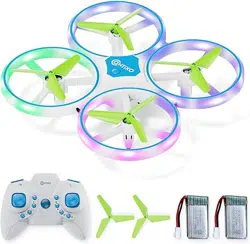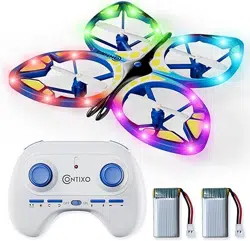
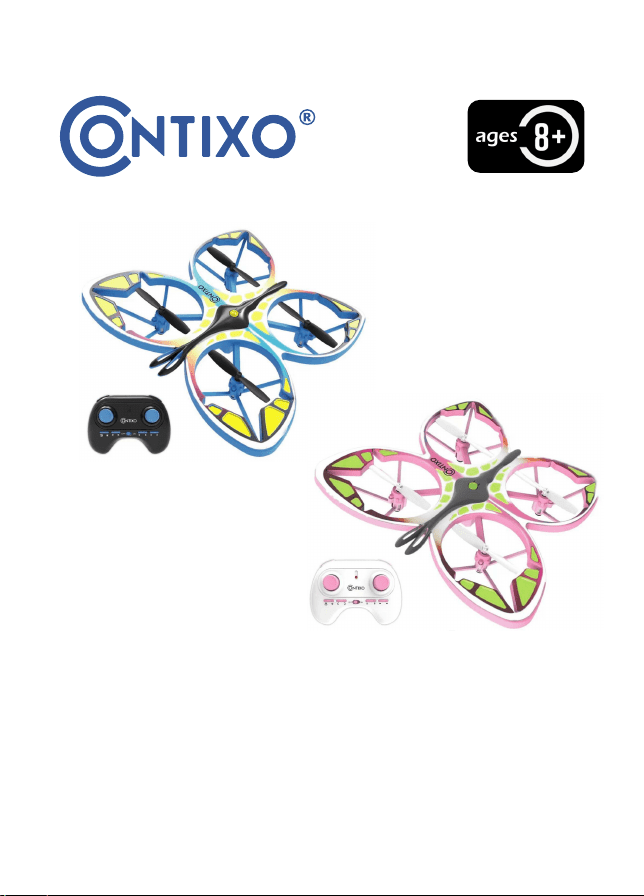
TD2 DRONE INSTRUCTION MANUAL

IMPORTANT
------------------------------------------------------------
1
Safety Precau�ons
--------------------------------------------------------
1
WARNING
--------------------------------------------------------
4
EXEMPTION
-------------------------------------
-------------------------------------
4
FLIGHT SAFETY
--------------------------------------------------
5
9
17
--------------------------------------------------
REMOTE CONTROL BATTERY INSTALLION
--------------------------------------------------
9
REMOTE CONTROL FUNCTIONS
TROUBLE SHOOTING
14
PACKING DETAILS
--------------------------------------------------
--------------------------------------------------
19
CHARGE THE BATTERY
15
--------------------------------------------------
FLIGHT
18
--------------------------------------------------
SPECIFICATION

IMPORTANT:
Thank you for purchasing the Con�xo TD2 drone. Please read all instruc�ons and
warnings carefully before opera�ng, and keep this instruc�on manual for future
reference and maintenance.
Never fly in or near controlled airspace and do not exceed a height of 20�. To
ensure you’re opera�ng within the law and following FAA regula�ons within the
United States. Do not fly along airline routes, and do not fly in areas with strong
radio, electromagne�c or electrosta�c emissions. Do not operate the drone in any
way that is prohibited by related authorites of our country. NEVER use for any
illegal purpose or use beyond the scope of which your local laws and regula�ons
have s�pulated.
The TD2 drone should only be operated by individuals age 8 and up, and is best
supervised by experienced UAV pilots. This is a precisely-made device, from
electronics, mechanical components, and high-frequency transmission technology,
according to its aerodynamic design. Using this device requires proper calibra�on
and poten�al assembly or debugging to avoid complica�ons or accidents. The user
should always operate and control this product in a safe manner. Inappropriate use
can lead to serious injury, cause property damage, or can lead to the drone being
lost during opera�on.
In the event that the product is faulty. Please reach out to our technical support
team. All of our products have a 1-year limited warranty:
h�ps://con�xo.com/pages/warranty. Likewise, should the product malfunc�on,
or become damaged and need maintenance, reach out to our customer service
team at: Support@con�xo.com.
- 1 -
SAFETY PRECAUTIONS:
This remote-control aircra� can be dangerous when in use. Please make sure you
keep a safe distance from people, animals, and hazardous objects, and do not fly
in controlled airspace. Incorrect installa�ons, poor weather condi�ons, or users
unfamiliar with opera�on may cause damage to the aircra�, or other property or
may cause injury. Pay close a�en�on when in use and recognize unsafe or
accident-prone condi�ons to avoid any accidents due to negligence.

- 2 -
1. Keep it far away from any structures or crowds: This remote-control aircra�
may vary slightly in speed or sensi�vity while flying and can cause poten�al
danger. Therefore, please keep it far away from crowds, buildings, trees,
structures, high-voltage wires, etc... Please also avoid flying in adverse
weather condi�ons such as rain, snow, electrical storms, and high winds to
ensure safety of the user, any spectators, and surrounding property.
2. Keep it away from any moist environments: The inside of the aircra� is
composed of many precise electronic and mechanical parts. Therefore, please
try to avoid any moisture or water content from entering the main body of the
aircra� as it may cause a breakdown of the mechanical and electronic parts
and thus cause an accident.
3. Only operate with included parts for intended use: Please use the original
parts made by Con�xo for any re-equipping or maintenance to ensure flying
safety. Please operate and use only under the scope of the product func�ons
permi�ed. Using unapproved parts will void the warranty.
4. Novice users should seek assistance: New users may face obstacles while
learning to operate this aircra�, in this case, please try to avoid opera�ng the
aircra� alone. When available, operate this aircra� under the guidance of a
more experienced user.
5. DO NOT operate under the influence of drugs or alcohol: Please operate
this remote-control aircra� in accordance with state law and within your
abili�es. Do not operate in a state of fa�gue, or a bad mental state. Incorrect
opera�on may increase the probability of accidents.
6. Please keep a safe range from aircra� when using top speed: When the
operator is flying at high speed, please keep the aircra� far away from the
pilot and any surrounding people or objects so as not to cause damage or
endanger others.
7. Store it in a cool, dry place: The remote-control aircra� is composed of
various materials including: metal, fiber, plas�c, electronics, etc. Therefore,
please keep it away from sources of heat and avoid prolonged exposure to
direct sunlight. Excessive heat exposure can cause distor�on and damage.

- 3 -
• This equipment has been tested and found to comply with the limits for a
Class B digital device, pursuant to part 15 of the FCC Rules. These limits are
designed to provide reasonable protec�on against harmful interference in a
residen�al installa�on. This equipment generates, uses and can radiate radio
frequency energy and, if not installed and used in accordance with the
instruc�ons, may cause harmful interference to radio communica�ons.
• However, there is no guarantee that interference will not occur in a
par�cular installa�on. If this equipment does cause harmful interference to
radio or television recep�on, which can be determined by turning the
equipment off and on, the user is encouraged to try to correct the interfer-
ence by one or more of the following measures.
• Please note that changes or modifica�ons not expressly approved by the
party responsible for compliance could void the users authority to operate
the equipment.
• Reorient or relocate the receiving antenna.
• Increase the separa�on between the equipment and receiver.
• Connect the equipment into an outlet on a circuit different from
that to which the receiver is connected.
• Consult the dealer or an experienced radio / TV technician for help.
WARNING
1. There is important informa�on contained in this package and instruc�on
manual, please keep it for future reference.
2. You have the responsibility to make sure that this model of aircra� won’t
cause injury to yourself, or others, and won’t cause any property damage.
3. Please operate strictly as shown in the instruc�on manual when debugging
or assembling this aircra�. During the process of flying or landing, please
maintain a distance of 1-2 meters between the user and the aircra� to avoid
collisions to the head, face, or body, which may cause injury.
4. Our company and distributors won’t be responsible for any incorrect
opera�on, which may cause loss, damage or bodily injury.

- 4 -
5. Children ages 8-14 should use this product under the guidance of an adult.
This product is NOT to be used by children under 8 years old.
6. Please correctly assemble and use this product as shown in the instruc�on
manual or packaging instruc�ons. Some parts should be assembled by an adult.
7. Small parts are included with this product. Please place it beyond the reach
of the children to avoid a CHOKING HAZARD or parts being mistakenly
swallowed.
8. Stay clear of roads or high-traffic areas flying in these areas is extremely
hazardous and may be illegal.
9. Please promptly dispose of the packing materials, so as not to cause injury to
children.
10. Please DO NOT disassemble or modify the aircra� as it may cause a
breakdown of the aircra� during flight.
11. Ba�eries in the ba�ery compartment of the charger should be inserted into
the designated power source which has the same logo as the product.
12. Only use charging cables provided by the manufacturer.
13. When charging the ba�ery, please ensure an adult is present. Keep the
ba�ery far away from any combus�ble objects or materials while charging.
14. DO NOT short-circuit or squeeze the ba�ery to avoid damaging the
component, and to avoid poten�al explosion.
15. DO NOT mix or replace the Li-ion ba�ery with a different type of ba�ery.
16. Intelligent lithium ba�ery is loaded in the drone.
17. Please DO NOT cause the ba�ery to short-circuit or decompose, keep the
ba�ery far away from fire and sources of excessive heat.

- 5 -
18. The aircra� should be kept far away from any other electrical equipment
that may cause interference.
19. Please keep a safe distance from the high-speed rota�ng rotor to avoid
injury of being wounded or being cut.
20. Components may get hot during use. Please DO NOT touch motors to avoid
being burned or injured.
21. 5V wall charger recommended for charging. DO NOT use any charger
stronger than 5V.
22. Keep your UAS within sight.
23. Never fly over groups of people.
24. Never fly over stadiums or sports events.
25. Understand airspace restric�ons and requirements.
WARNING: Product should only be used by adults and children 8 years and
older. Adult supervision required for children ages 8-14 years old.
WARNING: CHARGING OF THE AIRCRAFT BATTERY MUST BE SUPERVISED AT
ALL TIMES BY AN ADULT. UNPLUG THE BATTERY WHEN FULLY CHARGED. DO
NOT OVER-CHARGE THE BATTERY.

- 6 -
EXEMPTION
When using this product, Con�xo Inc. shall not be responsible for direct or
indirect damages caused by the following:
1. Any damages caused by the user experiencing: fa�gue, nausea, poor physical
/ mental health condi�ons, or under the influence of alcohol, or drugs.
2. Personal injury, property loss and legal liability caused by the user's
subjec�ve inten�on or wrong judgment.
3. Damage caused by users flying in flight areas prohibited by law and
regula�ons, such as nature reserves.
4. Other damage caused by poor opera�on or modifica�on of equipment.
Training or replacement of accessories or parts not produced by Con�xo Inc.
5. The quadrotor sends a low-pressure alarm and it s�ll does not land, resul�ng
in the Quadrotor falling down.
6. Damage caused by forced flight knowing that the quadrotor is in an
abnormal state, knowing the assembly is not completed, or knowing the
components have obvious faults, defects, or missing parts.
7. Flying in an area with radio, electrosta�c, or magne�c interference, such as
near: high-voltage power lines, large power equipment, radio and television
transmission towers, mobile phone base sta�ons, etc. Avoid areas restric�ng
flight specified by the government. Ensure the user's vision is not impaired, or
blocked by obstacles. Users with impaired vision should wear any prescribed
eyewear. Avoid any condi�ons unsuitable for controlling the device.
8. Flight in bad weather condi�ons, such as rain, winds above force 4, snow,
hail or other bad weather.
9. The quadrotor encounters a collision, overturns, combusts, gets struck by
lightning, and is damaged in a storm, tornado, rainstorm, flood, tsunami,
ground subsidence, ice subsidence, cliff collapse, avalanche, hail, debris flow,
landslide, earthquake, or natural disaster, etc.

- 7 -
10. Damage caused by infringement of any data, audio or video data obtained
from the user using the quadrotor.
11. Damage to the ba�ery, such as damage caused by improper matching of
the protec�on circuit, ba�ery pack and charger.
12. Any indirect losses or legal liabili�es caused by problems of equipment or
accessories (including memory cards), for example, images or videos that
cannot be saved.
13. Losses or legal liabili�es caused by reckless or unsafe flight without
comple�ng sufficient flight training.
14. The user promises to use the product only for legi�mate purposes and
agrees to abide by these terms and any relevant policies or guidelines that
may be formulated by Con�xo Inc. Some details of this document may change
with the upgrade of the product so�ware version and its terms of use. Please
read the upgrade details carefully before upgrading the so�ware version. The
instruc�on manual will be updated with or without prior no�ce.
Note: The flight �me is about 8 minutes, the flight distance is up to 30
meters (100 feet), and the charging �me is about 60-90 minutes.
FLIGHT SAFETY
Please choose an empty room or outdoor environment with no rain or snow,
wind less than level 2. Please stay away from people, trees, power lines, tall
buildings, airports and signal towers.
- 8 -
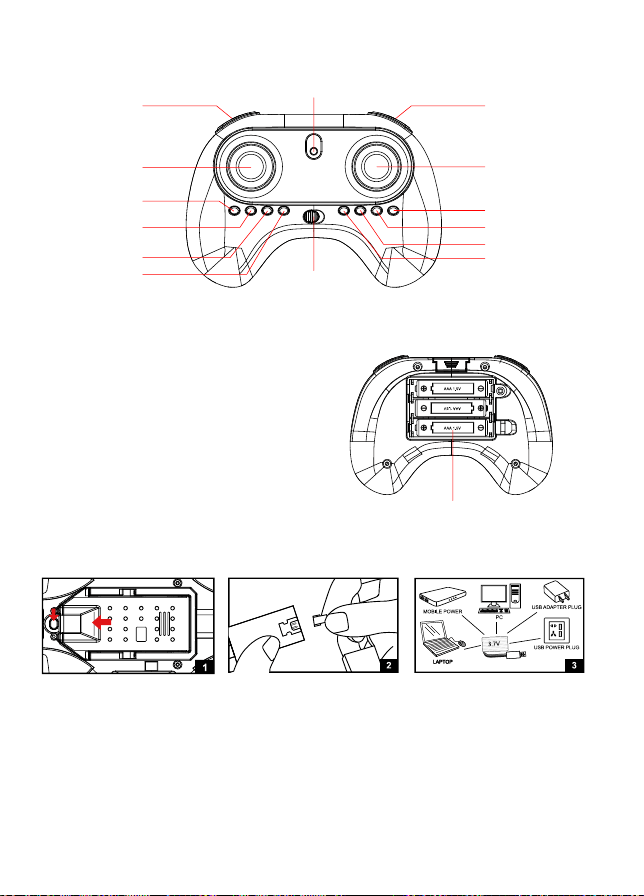
CHARGE THE BATTERY
(5V/1A-2A)
(5V/1A-2A)
1. Press and hold the ba�ery bay, then pull out the cover. Then take out the
ba�ery.
2. Take out the USB charging cable and insert into the ba�ery power port.
(Make sure the ports are connected correctly.)
3.Connect the USB charging cable to the corresponding socket. The light turns
on when charging and turns off when it is fully charged. Charging �me is
about 60-90 minutes.
REMOTE CONTROL FUNCTIONS
REMOTE CONTROL BATTERY INSTALLATION
3 x AAA Ba�eries (Not Included)
1. Remove the ba�ery cover from
the back of controller.
2. Install 3 x AAA ba�eries into the
controller, make sure to install
ba�eries to their correct polarity.
Do not mix old and new ba�eries or
ba�ery types.
3. Replace the ba�ery cover.
Ligh�ng mode switch
Speed switch (Short press)
Headless mode (Hold 3 seconds)
LED indicator
3D Roll (Short press)
One key return (Hold 3 seconds)
Thro�le s�ck
(ascend / descend/
turn le� / turn right)
Direc�on s�ck
(forward / backward /
le� and right side flying)
One key
take-off / landing
Right fly fine-tuning
Le� fly fine-tuning
Backward fine-tuning
Forward fine-tuning
Turn le� fine-tuning
Turn right fine-tuning
Power on / off

- 9 -
1. Use only the original factory cable. Do not use damaged or cable of other
brands.
2. Do not leave the ba�ery aside when charging.
3. Do not overcharge the ba�ery. When the ba�ery is fully charged, unplug the
device.
4. Do not charge the ba�ery immediately a�er it has become hot.
5. Do not leave the ba�ery in the fire in considera�on of safety.
6. Do not short circuit the ba�ery. Do not leave the ba�ery together with �ny
medal parts in considera�on of safety.
7. The drone needs to take out the ba�ery when not in use and store it at 80%
to extend ba�ery life. Keep the ba�ery in a cool place to avoid exposure.
A�en�on:
Low-ba�ery warning: When the ba�ery power is low, the light of drone will
flash slowly. It needs to fly back immediately.
Note: Please fully charge the ba�ery before flying.
FLIGHT
1. Remote Control Connec�on
1). Install the aircra� ba�ery and remote control ba�ery, turn on the power
switch of the aircra�, and keep the aircra� on a horizontal plane a�er flashing.
2). Turn on the remote control power switch and push the le� joys�ck up then
down to pair with the drone.
Note: Steps need to be followed to prevent poor handling problems.
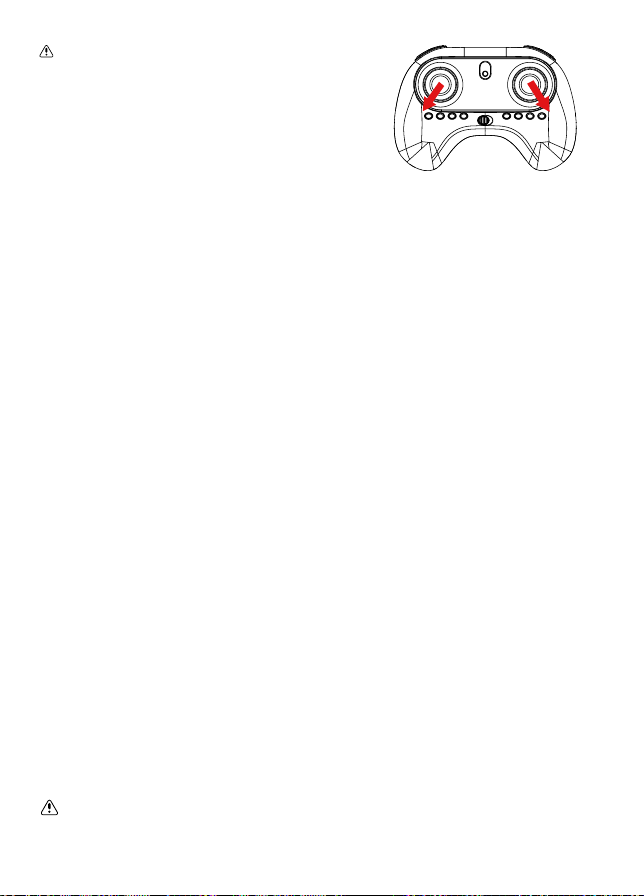
2. Calibra�on Gyroscope
A�er the drone and the remote control are connected successfully, push the
le� joys�ck to the lower le� corner and push the right joys�ck to the lower
right corner. At this �me, the indicator light will flashes rapidly and change
to a steady light. The calibra�on is completed.
- 10 -
Note: If the drones flight is unstable
a�er takeoff, it can also be corrected
by calibra�ng the gyroscope. The
calibra�on should be done at the
horizontal level.
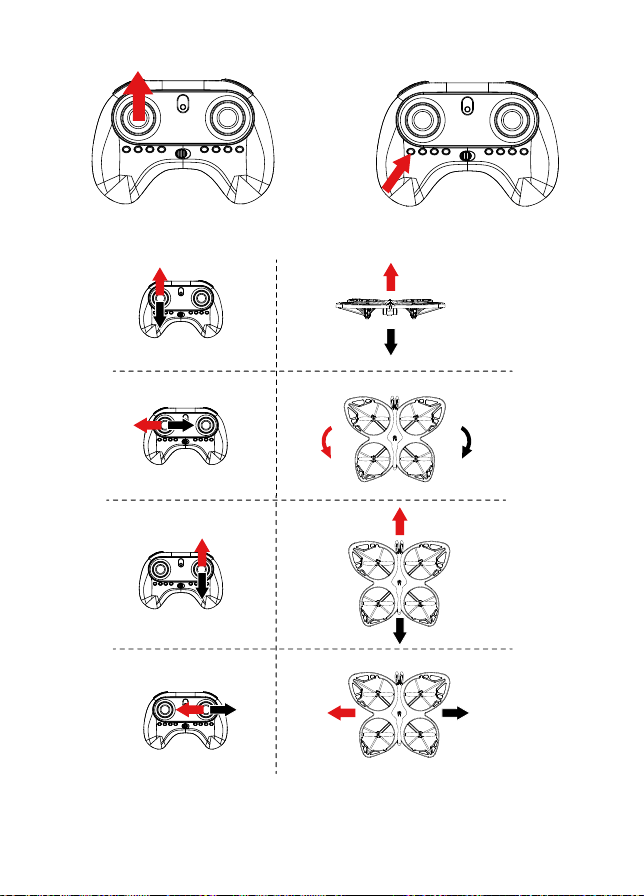
3. Take-off / Landing
Drone needs to unlock before flying, push the le� joys�ck up then release it.
At this �me, the propellers starts to spin. Push the le� joys�ck up again or
press the one key take-off / landing bu�on, the drone will rise to a height of
about 1 meter and hover.
Pull the le� joys�ck down or press the one key take-off / landing bu�on again
and the drone will land.
Note: One bu�on landing must land on a level surface, if not it will cause
the drone to fly off course.
Warning:
1.The toy shall be used with cau�on since skill is required in order to control
the flight and avoid collisions with the user, objects or third par�es.
2. Do not touch the rota�ng rotor, avoid loose clothing or hair that could be
caught in the rotor, do not fly near the face.
3.Item must play or used under adult supervision.Adult must teach children
how to safely fly and control the toy.
4. Please use the product outside; Use in open areas free of obstacles and
people; Maximum opera�ng distance is 150 feet; Keep the product within
your visual range.
5. It is recommended to keep the instruc�on manual.
6. The rechargeable ba�eries should be removed from the toy before being
charged.
7. The rechargeable ba�eries should be charged under adult supervision.
8. Different types of ba�eries or new and used ba�eries are not to be
mixed.
9. Ba�eries are to be inserted with the correct polarity (+ and -).
10. Exhausted ba�eries are to be removed from the toy.
11. The supply terminals are not to be short-circuited.
- 11 -
4. Opera�ng Method
- 12 -
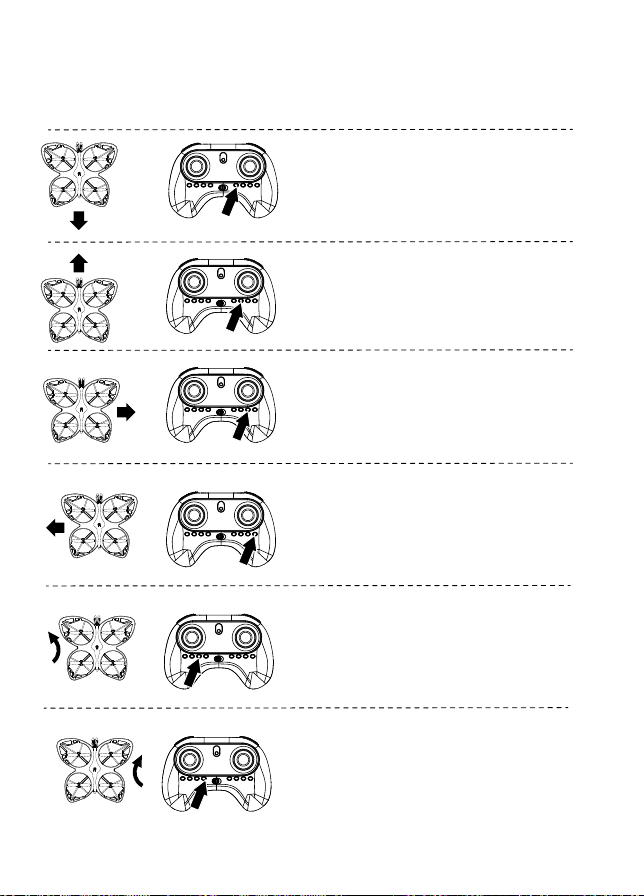
5. Trimming Func�on
When the drone spins in the air or �lts in different direc�ons, you can use the
trimming func�on to correct the ac�on.
If the drone moves backward while hovering,
press the forward trimming bu�on, un�l the
drone stops moving backward.
If the drone moves forward while hovering,
press the backward trimming bu�on, un�l
the drone stops moving forward.
If the drone dri�s to the le� while hovering,
pressthe right sideward trimming bu�on, un�l
the drone stops dri�ing to the le�.
If the drone dri�s to the right while hovering,
press the le� sideward trimming bu�on, un�l
the drone stops dri�ing to the right.
If the nose of the drone is deflected to the
le� while hovering, press the turn le�
fine-tuning bu�on, un�l the drone stops
deflec�ng to the le�.
If the nose of the drone is deflected to the
right while hovering, press the turn right
fine-tuning bu�on, un�l the drone stops
deflec�ng to the le�.

- 13 -
Front
Back
Le� Right
Front
Back
Le�
Right
6. Switch Speed
7. Headless Mode
Press the speed switch bu�on to switch the
speed, different speed gears have different
beeps : “Di~” is the low speed mode, “Di~Di~”
is the medium speed mode, and “Di~Di~Di”
is the high speed mode.
8. Light Mode Switch
Press the light mode switch bu�on, the
lights of drone will automa�cally switch
to another mode. This drone has 6 ligh�ng
modes totally.
The drone defaults to Normal Mode when the drone and remote control are
matched successfully. Click and hold the headless mode bu�on for 3 seconds
to enter into Headless mode. Click and hold for 3 seconds again to exit
Headless mode.
Normal Mode: The front of the drone indicates the forward direc�on.
Headless Mode: Before takeoff, the front of the drone indicates the forward
direc�on. When the drone rotates in flight, the flight direc�on is not changed.
As shown in the above figure, when the drone rotates in flight, the flight
direc�on is not changed in the headless mode state.

- 14 -
9. 3D Roll
10. One Key Return
Quick-press 3D roll bu�on and push the direc�on joys�ck forward, backward,
le� or right. The drone will roll in the air in the corresponding direc�on.
In order to perform the 3D roll func�on be�er, please ensure that the drone is
fully charged and maintains a height of about 1.5 meters from the ground.
When the ba�ery is low, the drone cannot perform the 3D roll func�on or the
height a�er rolling may be reduced. Please charge before using this func�on.
During the flight, the drone can be recalled
using the return func�on.
Hold the one key return bu�on for 3 seconds to
start the return. A�er star�ng the return flight,
the drone will return at the direc�on of the tail
when it is powered on and paired.
During the process, move the direc�on joys�ck or
hold the return bu�on for 3 seconds to cancel the
return.
- 15 -
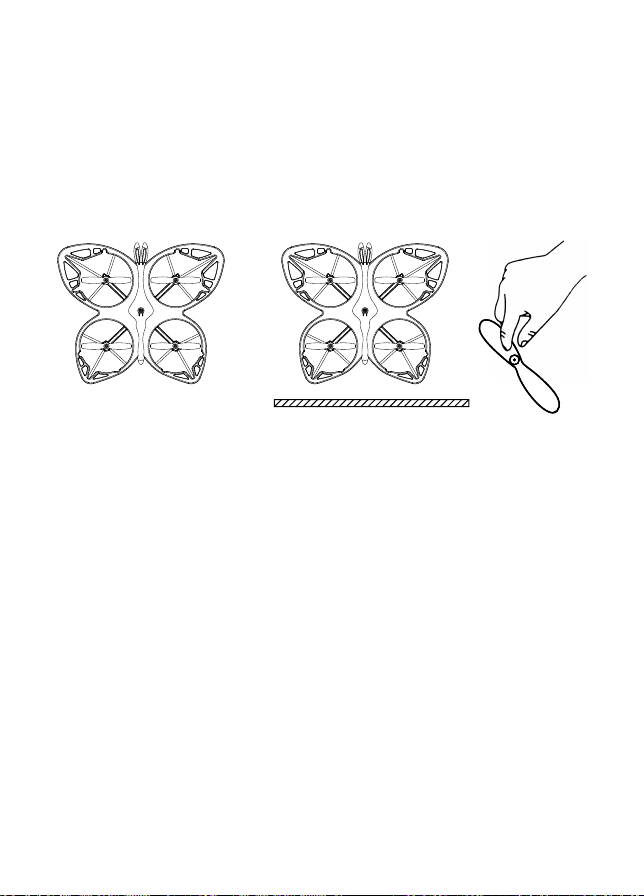
The drone comes with replacement propellers. If the originals are broken
or badly damaged, it is extremely important to use the correct propeller
(1 or 2) for replacement. The marking can be found on the propellers. Using
the incorrect propeller will make it impossible to control the drone.
Clip the small cap of the propeller, and then aim at the sha� of the motor and
press it. It may require a li�le force. Please be careful not to break it.
11. Install the Propellers
2
21
1
SPECIFICATION
Model: TD2
Control Frequency: 2.4GHz
Remote Control Ba�ery: 3*AAA
Drone Ba�ery: 3.7V 550mAh
Flight Range: Up to 100 Ft.
Flight Time: Up to 8 Minutes
Charging Time: 90 Minutes
Size: 7.9 x 6.7 x 1.3 Inch
Flight Weight: 68 g / 2.4 Oz

- 16 -
BATTERY
Drone x 1Remote Control x 1
PACKING DETAILS
Charging cable x 1
Propellers x 4 Batteries x 2
User Manual x 1
Note: The product has the func�on of air pressure fixing height, but does
not have the effect of fixed point. The drone will move slightly at the same
height when hovering in the air.
TROUBLE SHOOTING
Drone does not respond
to user controls.
The blades spin, but the
drone cannot take off.
The drone shakes
heavily.
Drone does not stabilize
during flight with fine tuning.
1. The blades distorted.
2. Defective motor.
The blades distorted. Replace the blades.
1. Replace the blades.
2. Replace the motor.
1. Remote is not synced to
the drone.
2. Insufficient battery power.
1. Refer to page 1-2 (Flight).
2. Recharge the battery.
1. Recharge the battery.
2. Replace the blades.
Problem Cause Solu�on
1. Insufficient battery power.
2. The blades distorted.
3. The blades Side A and Side
B are reversed.
Drone cannot takeoff after
accident.
Four-axis acceleration sensor
loses balance.
Recalibrate compass.

- 17 -
CONTACT INFORMATION
E-Mail: support@con�xo.com
Website: www.con�xo.com
©2023 Con�xo Inc. All rights reserved. Con�xo®, the Con�xo logo and a
ssociated characters, trademarks and design elements are owned and licensed
by Con�xo Company.

- 18 -

- 19 -

- 20 -

- 21 -

- 22 -

- 23 -




- 24 -

- 25 -

- 26 -

- 27 -

- 28 -

- 29 -

- 30 -

- 31 -

- 32 -

- 33 -

- 34 -

- 35 -

- 36 -

- 37 -

- 38 -

- 39 -

- 40 -

- 41 -

- 42 -

- 43 -

- 44 -

- 45 -

- 46 -