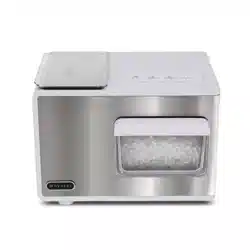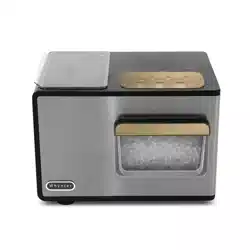
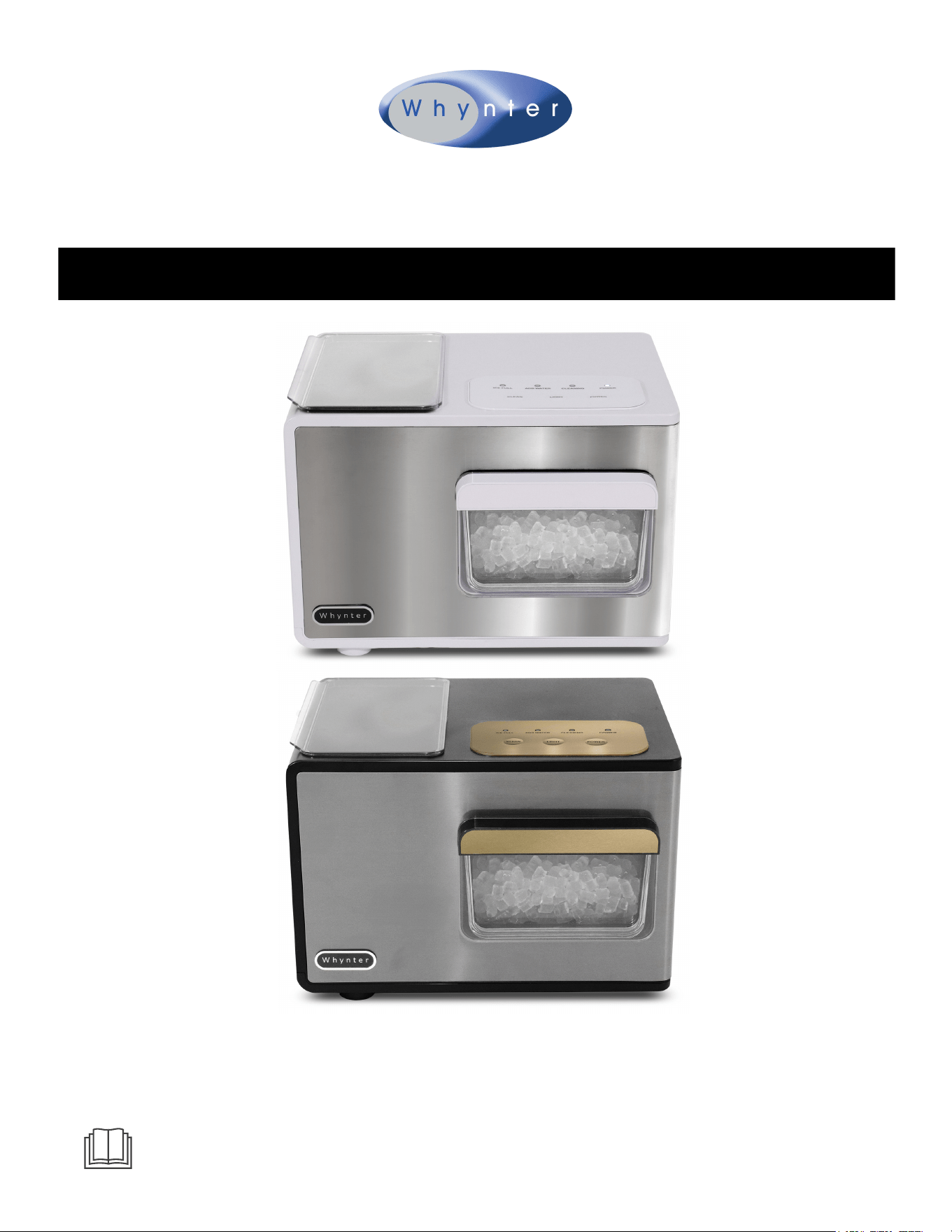
Whynter SonicSnö Countertop Nugget Ice Maker
40lbs/24hrs with Removable Ice Drawer, Chewable Pebble/Sonic-type Ice
Congratulations on your new Whynter product. To ensure proper operation, please read this Instruction
Manual carefully before using this product. Keep this manual in a safe place for future reference.
MODELS: IBX-388WS (Silver and White Stainless Steel Finish)
IBX-388BG (Black and Gold Stainless Steel Finish)
IMPORTANT NOTE:
Before using your ice maker, please read
this manual carefully and keep it for future reference.
Page 2
Please keep this user manual in a safe place for future reference.
Thank you for choosing Whynter. Please follow the instructions provided in this user manual to obtain the very
best performance from your portable ice maker. We trust that your Whynter portable ice maker will provide
the performance and reliability that we stand for.
This symbol on the product or its packaging indicates that this appliance cannot be treated as normal domestic
trash, but must be handed in at a collection point for recycling electric and electronic appliances. Your
contribution to the correct disposal of this product protects the environment.
Further information about the recycling of this product can be obtained from your local municipal authority.
DISPOSAL INFORMATION
SAFETY PRECAUTIONS
SPECIFICATIONS
PARTS
CONTROL PANEL | INDICATOR LIGHTS AND BUTTONS
ICARE AND MAINTENANCE
TROUBLESHOOTING
WARRANTY
3
4
5
6 - 7
8
9
10
TABLE OF CONTENTS

To prevent death or injury to the user or other people and property damage, the following instructions must be
followed. Incorrect operation due to ignoring of instructions may cause death, harm or damage.
Read all instructions before using the appliance
Never clean appliance parts with flammable fluids. The fumes can create a fire hazard. Do not use an exces sively
wet cloth, industrial solvents, and oil-based products to clean this appliance
Do not store or use gasoline or any other flammable vapors and liquids in the vicinity of this or any other appli ance.
The fumes can create a fire hazard
Do not abuse, sit on, or stand on the appliance
This appliance is not intended for use by persons (including children with reduced physical, sensory or mental
capabilities, or lack of experience and knowledge, unless they have been given supervision or instruction con
cerning use of the appliance by a person responsible for their safety
Children should be supervised to ensure that they do not play with the appliance
If the power cord is damaged, it must be replaced by the manufacturer or its service agent or a similarly quali fied
person in order to avoid a hazard
Use the portable ice maker only for its intended function. This appliance is designed for household, non commercial
use only. Any other use will void the warranty
To avoid the risk of shock, the product should never be used in bathrooms, shower rooms, or in any other steamy or
wet areas
During installation, the power supply must not be excessively or dangerously bent or flattened
Do not tamper with controls
Make sure the power plug is placed fully and firm into the wall socket. If the wall receptacle you intend to use is not
adequately grounded or protected by a time delay fuse or circuit breaker, have a qualified electrician install an
outlet that is appropriate to local electrical codes and requirements
Do not use multiple socket or of an extension cord as it may overheat and become a risk of fire
Make sure the power plug is clean before usage
Do not turn this appliance on and off by plugging and unplugging. Always use the ON/OFF switch
After turning the appliance off, please take the power plug out of the socket
Make sure hands are dry when connecting the power plug. The appliance is equipped with a three-prong grounded
power plug on the power cord for your protection. Never modify, remove or attempt to repair the power plug
yourself
Do not repair, disassemble and/or modify the appliance by yourself
Transport the appliance in an upright position only, or leave it in an upright position for at least 4 hours before first
use
When positioning or moving the appliance ensure that it is not turned upside down or greater than 45° or more off
level.
This appliance must be installed in an area protected from the elements, such as wind, rain, water spray, or drips
When using this appliance in confined spaces, such as a pantry be sure to allow proper ventilation to prevent
overheating and fire. Allow at least 5" of air space on all sides of the appliance for good air circulation.
Always place the appliance on a hard, level and even surface that can support the unit when it is full.
Ensure objects are not obstructing the air vent
Never insert your fingers or other objects into the air outlets
This appliance must be earthed
The wires in the mains lead are colored in accordance with the following code:
Green or Green with a yellow strip: Grounding
White: Neutral
Black: Live
SAFETY PRECAUTIONS
CAUTION – Risk Of Fire Or Explosion
Flammable Refrigerant Used. Consult Repair Manual/Owner’s Guide Before Attempting To Install or Service This
Product. All Safety Precautions Must be Followed.
Dispose Of Property In Accordance With Federal Or Local Regulations. Flammable Refrigerant Used .
Due To Puncture Of Refrigerant Tubing; Follow Handling Instructions Carefully. Flammable Refrigerant Used.
The ice maker should be installed in accordance with the safety standard for Refrigeration Systems, ASHRAE15. The ice
maker shall not be installed in corridors or hallways of public buildings.
If the unit is with problem need to be maintained, that replacing with like components and that servicing shall be done
by factory authorized service personnel, so as to minimize the risk of possible ignition due to incorrect parts or
improper service.
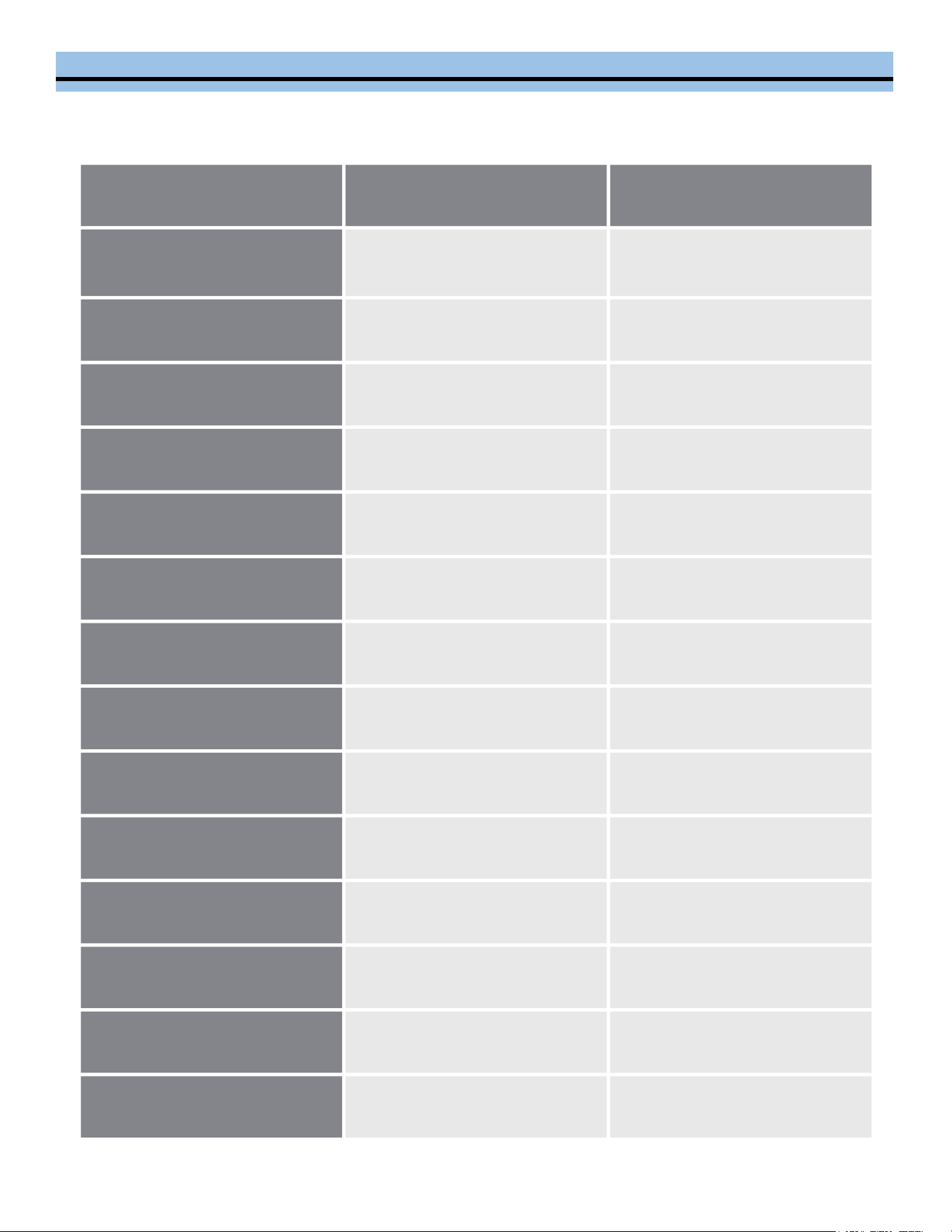
Model
IBX-388WS
IBX-388BG
Color
Silver and White Stainless
Steel Finish
Black and Gold Stainless
Steel Finish
Ice Storage Capacity
3 lbs
3 lbs
Water Reservoir
2.1 L
2.1 L
Ice Formation
40 lbs / 24 hours
40 lbs / 24 hours
Auto Restart / Shut Off
Yes
Yes
Accessories
Ice Shovel
Ice Shovel
Compressor
CHC-free
CHC-free
Refrigerant
R600a
R600a
Power Consumption (Watts)
145W
145W
Amps
2.3A
2.3A
Power Supply
115V/60Hz
115V/60Hz
Net Weight
25.3 lbs
25.3 lbs
Unit Dimensions
15" W x 12" D x 10.25" H
15" W x 12" D x 10.25" H
UPC
850014459710
850014459703
SPECIFICATIONS
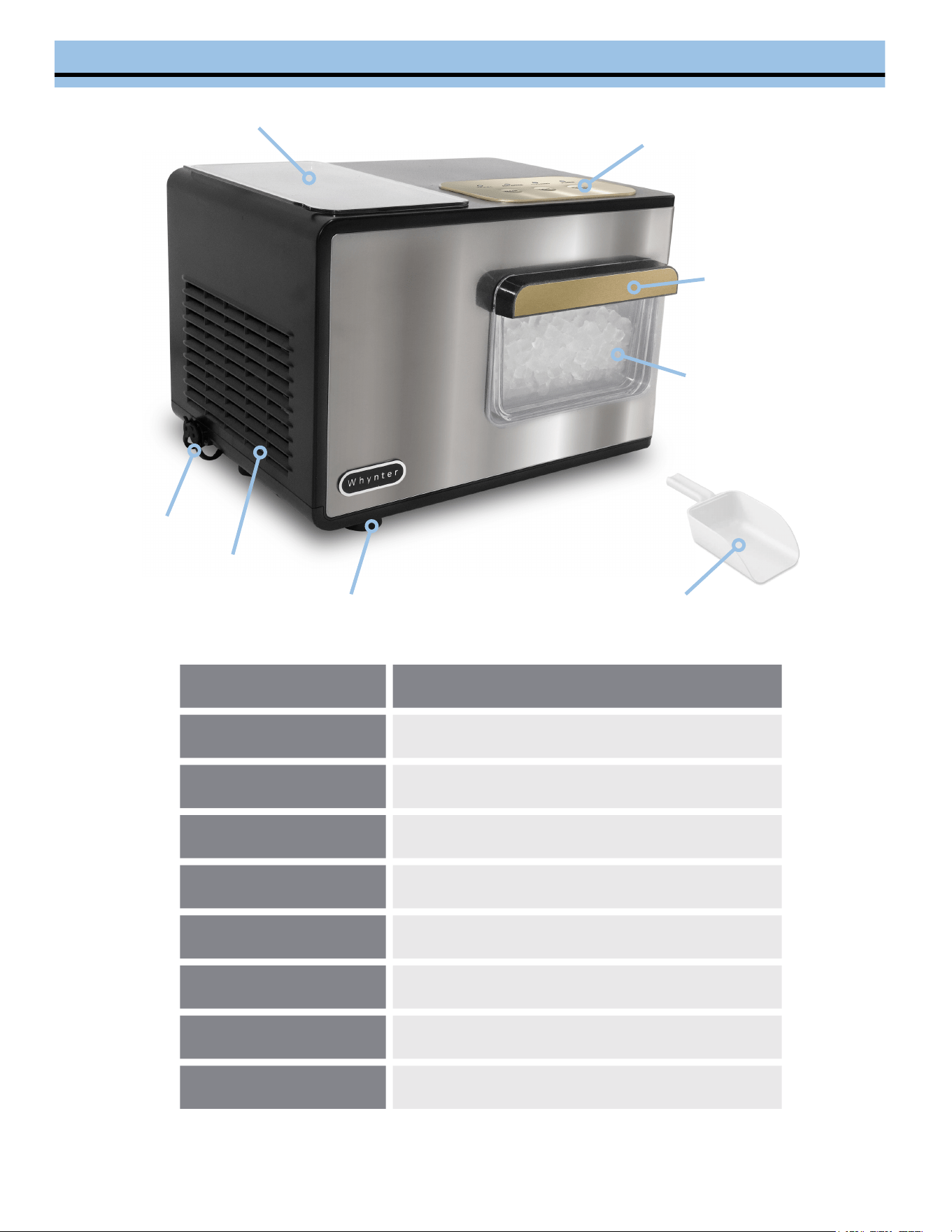
Part
Description
1
Water Reservoir and Lid
2
Control Panel
3
Removable Ice Drawer Handle
4
Removable Ice Drawer
5
Water Drain Plug
6
Air Vent
7
Ice Maker Leg
8
Ice Shovel
IDENTIFICATION OF PARTS
1
2
5
6
7
3
4
8
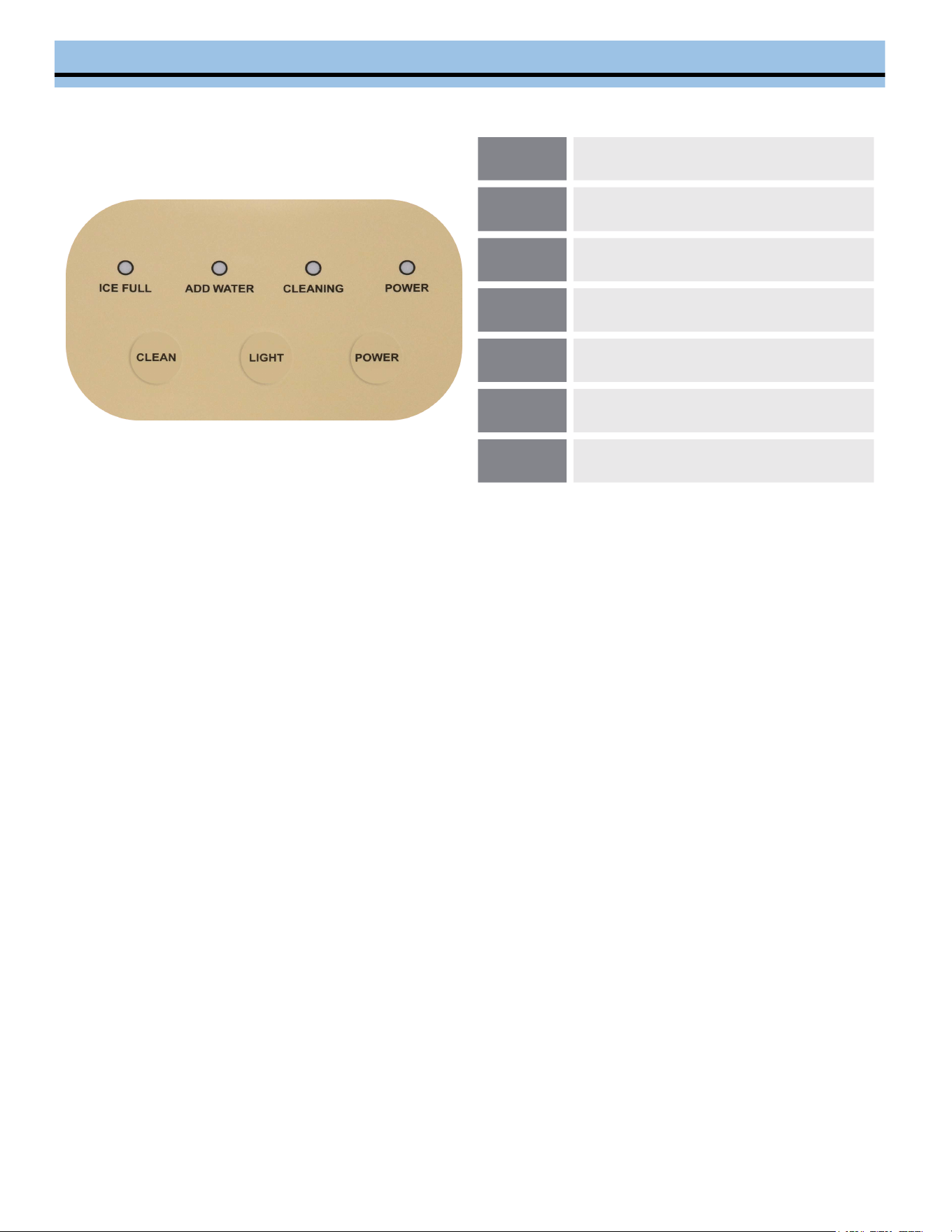
CONTROL PANEL | INDICATOR LIGHTS AND BUTTONS
A
Ice Full Indicator
B
Water Shortage Indicator Light
C
Cleaning Operation Indicator
D
Power Indicator
E
Clean Button
F
Internal Light Ice Drawer Switch
G
Power Button
A B C D
E F G
ICE FULL INDICATOR - When the ice drawer is full, the ICE FULL indicator with illuminate. The indicator will remain
lit until the ice in the drawer with melts away slowly or has been removed. The unit will stay in Standby mode until
the ice has been removed or melted at which time the unit will automatically start operation as normal.
ADD WATER INDICATOR - The ice maker automatically checks the water level in the water reservoir. If the water
level is too low, the ADD WATER indicator will illuminate and the ice make will stop working automatically. Once
water is added to the reservoir, the indicator will turn off and the ice maker will resume normal operation.
CLEANING INDICATOR - Press the Clean Button to initiate Cleaning Mode. In Cleaning Mode, water flows from
the upper water tank to the evaporator and back to the lower water tank (water circulation). After the water pump
runs for 7 minutes, the cleaning mode is completed, and the system enters standby mode. See Page 8 for further
instructions.
NOTE: Ensure that the water level in the reservoir is at the maximum level. If the water level is insufficient, the ADD
WATER indicator will illuminate, indicating the need for more water to initiate the Cleaning Mode. Once water has
been added, restart the cleaning process by pressing the Clean Button.
INTERNAL LIGHT BUTTON - Press the Light Button to toggle the internal light of the ice drawer on or off. The light
automatically turns off after 10 minutes.
POWER INDICATOR - Press the Power Button to turn the unit on. While the ice maker is operation, the Power
Indicator remains illuminated. To turn off the ice maker or put it in Standby Mode, press the Power Button. The ice
maker enters Standby Mode when the Power Indicator flashes.
ICE JAM AND FREEZE WARNING- If the ADD WATER light, ICE FULL indicator light, CLEANING indicator light,
and POWER indicator light flash simultaneously, it indicates a freezing alarm or an ice jam in the ice-making system.
In this situation, disconnect the power and wait for 4 hours until the ice inside the evaporator melts. After this
period, either manually run the cleaning function six times (for a total of 40 minutes) or wait for the ice particles in
the evaporator to completely melt at room temperature. Once the ice has melted, press the POWER Button to
restart the machine and enter normal operation.
NOTE: For further assistance with this warning, please contact Whynter Customer Support at [email protected]

INSTALLATION AND OPERATING INSTRUCTIONS
INSTALLATION OF YOUR ICE MAKER
Locate the ice maker away from direct sunlight and sources of heat (stove, heater, radiator, etc.). Direct sunlight
may affect the acrylic coating and heat sources may increase electrical consumption. Extreme cold ambient
temperatures may also cause the ice maker not to perform properly.
Plug the ice maker into an exclusive properly installed-grounded wall outlet. Do not under any circumstances
cut or remove the third (ground) prong from the power cord.
Do not install the Ice maker near an oven, radiator, or other heat source.
SPACE REQUIREMENTS
During transportation, the incline angle of the cabinet should not be over 45°.
Do not turn the Ice Maker upside down. Problems could occur in the compressor and sealed system.
The Ice maker should be placed horizontally on a properly leveled surface.
To ensure proper ventilation for your Ice maker allow 6” of space at the back and on each side.
Before using the Ice maker for the first time, please wait 4 hours after positioning it.
Clean the ice shovel, ice basket, water reservoir, and ice shovel frequently.
OPERATING INSTRUCTIONS
While the unit is on Standby Mode, open the water reservoir lid.1.
Remove any dust or objects that may be in the water reservoir.2.
Fill the water tank up to the line marked “MAX”. Fill with potable or drinking water only.3.
Press the Power Button to turn on the ice maker.4.
Water start to be pumped from the water reservoir inside the ice maker. Once the freezing process is
completed, the ice nuggets will drop down into the ice drawer.
5.
When the unit is used for the first time, discard the first couple batches of ice. 6.
The ice maker will automatically check the water level in the reservoir periodically; it will detect any shortage of
water and will stop the ice making cycle, prompting the ADD WATER indicator light to flash. Add more water if
necessary to resume ice making operation. Press the Power Button again to restart the ice-making cycle
7.
When the ice nuggets reach the ice full sensor, the ice maker will stop operating and the ICE FULL indicator
light will illuminate.
8.
Change water in the water reservoir every 24 hours to ensure a reasonable hygiene level. If unit is not in use,
drain all water left in the tank.
9.
NOTE: The ice drawer does not keep the ice nuggets frozen. The ice in the drawer will slowly melt and the water
will recycled to the water reservoir and reused.
POWER FAILURE
Most power failures are corrected within a few hours and should not affect the temperature of your ice maker if you
minimize the number of times the ice maker cover is opened. If the power is going to be OFF for a longer period of
time, you need to take the proper steps to disconnect your appliance. Failure to unplug the ice maker could result
in electrical shock or personal injury.
NORMAL SOUNDS
Your new ice maker may make sounds that are not familiar to you. Hard surfaces like the floor, walls can make the
sounds seem louder than they actually are. The following describes the kinds of sounds that might be new to you
and what may be making them.
Ratting noises may come from the flow of the refrigerant or the water line, items stored on top of the ice maker
can also make noises.
The high efficiency compressor may make a pulsating or high-pitched sound.
Water running from the evaporator to the water reservoir may make a splashing sound.
As each cycle ends, you may hear a gurgling sound due to the refrigerant flowing in your ice maker.
You may hear air being forced over the condenser by the condenser fan.
During the harvest cycle, you may hear the sound of ice cubes falling into the ice basket
CARE AND MAINTENANCE
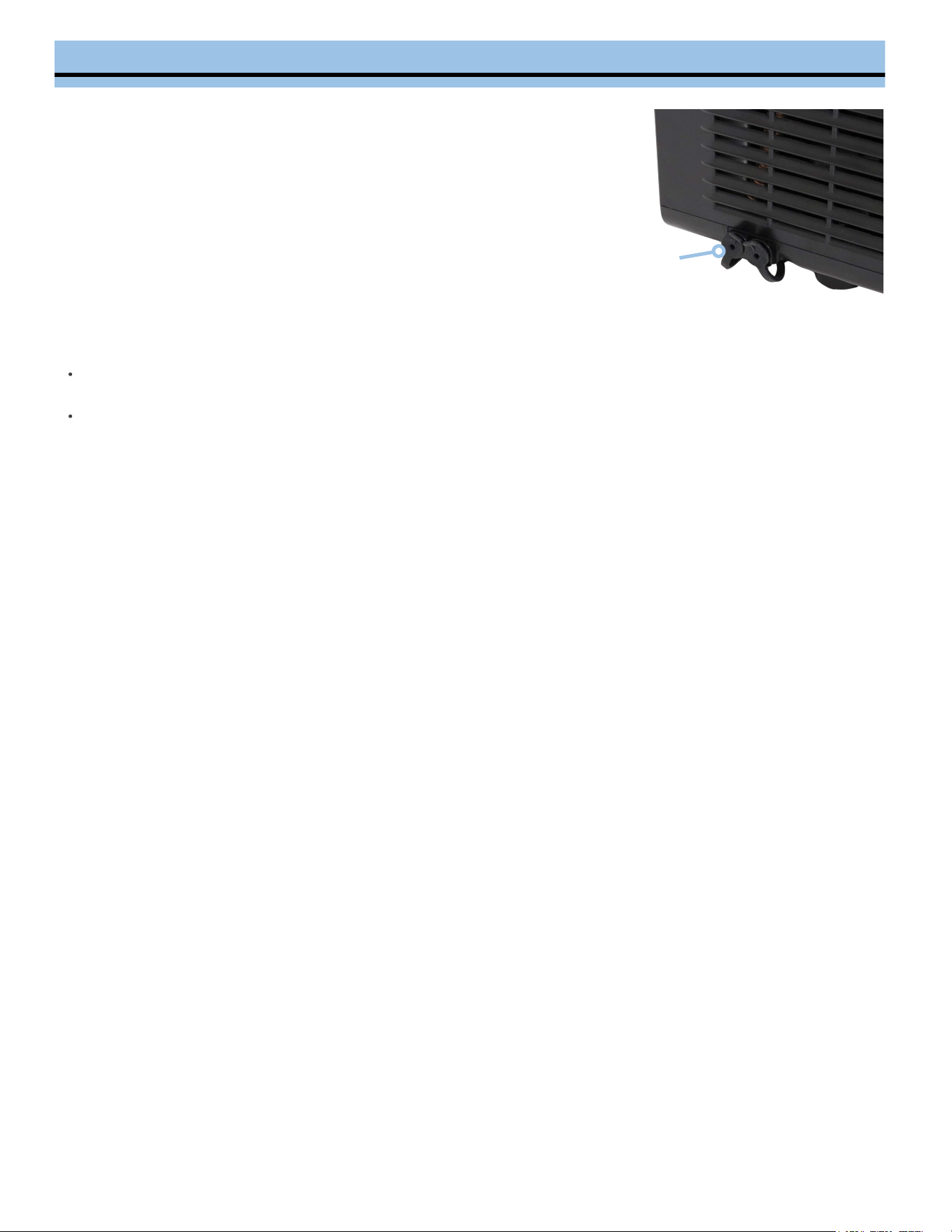
DRAINING YOUR ICE MAKER
Carefully move the ice maker towards a sink or other suitable location for
draining.
1.
Remove the water drain plug located at the side of the ice maker to drain
all the water.
2.
Let the water drain from the drain plug.3.
Firmly install the rubber drain plug into the drain port.4.
WARNING: Do not tip the unit over while there is water in the reservoir.
Water
Drain Plug
CLEANING YOUR ICE MAKER
EXTERIOR - The outside of the ice maker should be cleaned regularly with a mild detergent solution, warm water,
and use the soft cloth to wipe. Do not use hard cloth to avoid scratching or damaging the surface of the unit.
INTERIOR - This ice maker is equipped with a cleaning mode that ensures your ice is clean and fresh. This
program works the same as the ice making process, only without the freezing.
Unplug the ice maker.1.
Create a solution of one part vinegar to ten parts water and pour it into the water reservoir.2.
Plug in the unit. Once it enters Standby Mode, press the Clean Button. The unit will automatically enter Cleaning
Mode, which lasts approximately 7 minutes. During this process, the CLEANING indicator light will be illuminated
as the inside parts are rinsed several times.
3.
After the Cleaning Mode is completed, turn off the unit and unplug it.4.
Drain out the water by removing the water drain plug cap located on the side. Once the water reservoir is empty,
install the water drain plug.
5.
Add fresh water to the water reservoir up to the MAX water level.6.
Plug in the unit and initiate the Cleaning Mode again. Once the program completes, drain out the water.7.
Dry the interior and exterior of the unit with a soft, clean cloth.8.
Install the water drain plug and tighten it securely.9.
NOTE: When using the unit for the first time or have not used for a long time, we suggest the above program to be
performed first.
Many common portable ice maker problems are easily resolved. Try the troubleshooting suggestions below to see if the
problems can be resolved before having to contact the service department.
TROUBLESHOOTING
PROBLEM
POSSIBLE CAUSES
SOLUTIONS
The compressor works
abnormally with a buzzing noise.
The voltage is lower than
recommended.
Stop the ice maker and do not
restart until the voltage is normal.
ADD WATER indicator light is on.
There is not enough water in the
reservoir
Press the POWER Button to shut
off, fill with water, wait for 3
minutes and press the POWER
Button again to restart
Indicator lights on control panel
are not on.
The control panel cable is not
plugged well, or the control panel
is damaged.
Contact Whynter Customer
Support
The ice making process was
correct, but no ice came out.
The compressor has no
refrigerant
Compressor damaged
Fan motor damaged
Contact Whynter Customer
Support
All indicator lights flash at the
same time.
Freeze alarm or an ice jam in
the ice-making system
The motor flat wire terminal is
loose.
The motor is stuck, or the
motor falls off, or the motor is
damaged
Micro switch damaged
Follow the instructions on
page 6
Contact Whynter Customer
Support
When the ice drawer is full, the
maker does not display the ice
full icon.
Ice full sensor damaged
Solar light interference.
Operate the ice maker
indoors
Contact Whynter Customer
Support
If the power cord is damaged, please contact Whynter Customer Support.
Fill with potable water only.
It is normal for the compressor and condenser surface to reach temperatures between 158°F and 194°F during
operation, and surrounding areas may be very hot.
Due to fast freezing, ice nuggets may appear opaque. This is due to air trapped in the water and will not
affect the quality or taste of the ice.
This ice maker is not intended for use by individuals (including children) with reduced physical, sensory, or
mental capabilities or lack of experience and knowledge, unless they have been given supervision or
instruction concerning the use of the ice maker by a person responsible for their safety.
Children should be supervised to ensure that they do not play with the ice maker.
Do not immerse the ice maker in water.

To obtain service or information, contact
Whynter LLC via email at support@whynter.com
or call 866-WHYNTER.
Product contents and specifications may change without notice.
Copyright © 2024
WWW.WHYNTER.COM
ONE YEAR LIMITED WARRANTY
This WHYNTER product is warranted to the original owner, purchased from an authorized Whynter dealer
within the 48 U.S. continental states, for one year from the original purchase date against defects in material
and workmanship under normal residential usage. Should your WHYNTER product prove defective within one
year from the date of purchase, contact Whynter’s Customer Support Team with the serial number and proof
of purchase to make a warranty claim. A Return Authorization Number must be issued before returning any
parts or products. Parts or products received without a Whynter issued Return Authorization Number will be
refused. Under this warranty, Whynter will repair or replace any parts found defective with new or
remanufactured parts or exchange the defective product with a new, refurbished, or remanufactured product
at our discretion. All defective products and parts covered by this warranty will be repaired or replaced on a
mail-in basis to Whynter’s Service Center. This warranty is not transferable. After the expiration of the
warranty, the cost of labor and parts will be the responsibility of the original owner. Return freight is prepaid
by Whynter within two months of purchase. After two months to one year, the customer will be responsible
for the return freight cost to Whynter’s Service Center. Please package the product carefully in its original
packaging to avoid damage in transit. Whynter is not responsible for damage resulting from shipper
mishandling or improper packaging. Please retain the original box and packaging materials.
THIS WARRANTY DOES NOT COVER:
Acts of God, such as fire, flood, hurricanes, earthquakes and tornadoes.
Improper power supply such as power surge, low voltage, defective household wiring or inadequate fuses.
Use in commercial or industrial applications.
Damage, accidental or otherwise, to the product while in the possession of a consumer not caused by a
defect in material or workmanship.
Damage caused by consumer misuse, tampering, lack of maintenance or failure to follow the care and
special handling provisions in the instructions.
Damage to the finish of the case, or other appearance parts caused by wear.
Damage caused by repairs or alterations to the product by anyone other than authorized by the
manufacturer.
Removal, Replacement Packaging, Freight and Insurance cost for the warranty service.
Products sold AS IS or from an unauthorized reseller.
Products that have had their serial numbers removed or defaced.
DISCLAIMER OF IMPLIED WARRANTIES; LIMITATION OF REMEDIES CUSTOMER'S SOLE AND EXCLUSIVE
REMEDY UNDER THIS LIMITED WARRANTY SHALL BE PRODUCT REPAIR OR REPLACEMENT AS PROVIDED
HEREIN. CLAIMS BASED ON IMPLIED WARRANTIES, INCLUDING WARRANTIES OF MERCHANTABILITY OR
FITNESS FOR A PARTICULAR PURPOSE, ARE LIMITED TO ONE YEAR OR THE SHORTEST PERIOD ALLOWED
BY LAW, BUT NOT LESS THAN ONE YEAR. WHYNTER SHALL NOT BE LIABLE FOR CONSEQUENTIAL OR
INCIDENTAL DAMAGES SUCH AS PROPERTY DAMAGE AND INCIDENTAL EXPENSES RESULTING FROM
ANY BREACH OF THIS WRITTEN LIMITED WARRANTY OR ANY IMPLIED WARRANTY. SOME STATES AND
PROVINCES DO NOT ALLOW THE EXCLUSION OR LIMITATION OF INCIDENTAL OR CONSEQUENTIAL
DAMAGES, OR LIMITATIONS ON THE DURATION OF IMPLIED WARRANTIES, SO THESE LIMITATIONS OR
EXCLUSIONS MAY NOT APPLY TO YOU. THIS WRITTEN WARRANTY GIVES YOU SPECIFIC LEGAL RIGHTS.
YOU MAY ALSO HAVE OTHER RIGHTS THAT VARY FROM STATE TO STATE.