User Manual
DO NOT RETURN THIS PRODUCT TO THE STORE.
If you have questions or need assistance, please call customer service.
Contact details can be found on the last page of user manual.
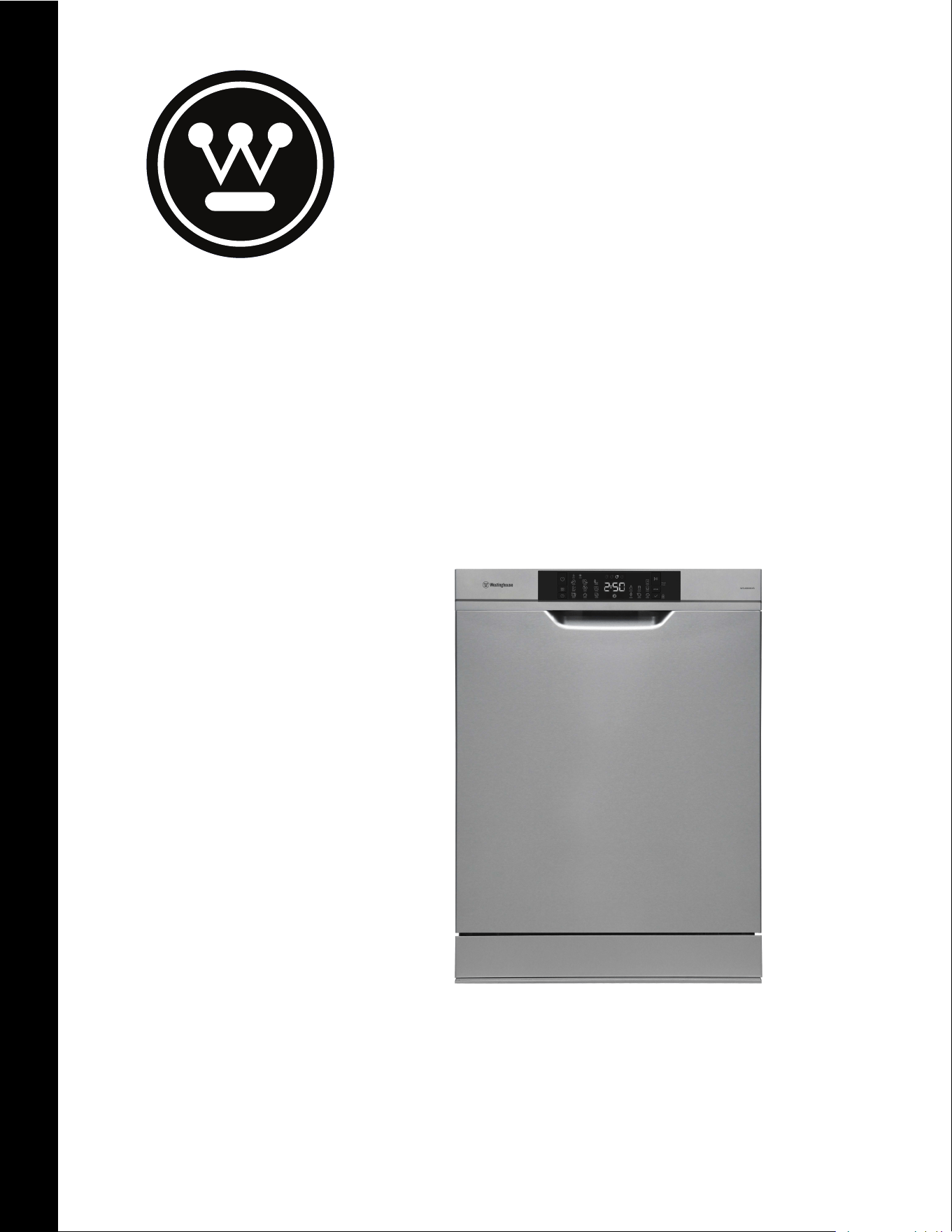
WSU6608XB
2
Important safety instructions . . . . . . . . . . . . . . . . . . . . . . . . . . 3
Recycling . . . . . . . . . . . . . . . . . . . . . . . . . . . . . . . . . . . 3
Safety information . . . . . . . . . . . . . . . . . . . . . . . . . . . . .3
Recommendations . . . . . . . . . . . . . . . . . . . . . . . . . . . . .4
Items not suitable for dishwashing . . . . . . . . . . . . . . . . . .4
Description of your appliance
. . . . . . . . . . . . . . . . . . . . . . . . . . 5
Technical specications
. . . . . . . . . . . . . . . . . . . . . . . . . . . . . . 5
The Control Panel
. . . . . . . . . . . . . . . . . . . . . . . . . . . . . . . . . . . 6
Installig The Machine . . . . . . . . . . . . . . . . . . . . . . . . . . . . . 8
Positioning the machine . . . . . . . . . . . . . . . . . . . . . . . . . .8
Water connection . . . . . . . . . . . . . . . . . . . . . . . . . . . . . .8
Water inlet hose . . . . . . . . . . . . . . . . . . . . . . . . . . . . . . .8
Water drain hose . . . . . . . . . . . . . . . . . . . . . . . . . . . . . . 8
Water drain hose
. . . . . . . . . . . . . . . . . . . . . . . . . . . . . . 9
Electrical Connection
. . . . . . . . . . . . . . . . . . . . . . . . . . . .9
Filling with rinse aid and setting . . . . . . . . . . . . . . . . . . . 10
Preparing The Machine For Use
. . . . . . . . . . . . . . . . . . . . . . . . .13
Prior to using the machine for the rst time
. . . . . . . . . . . . . . . 13
Detergent usage
. . . . . . . . . . . . . . . . . . . . . . . . . . . . . . . . . 13
Filling the detergent compartment
. . . . . . . . . . . . . . . . . . . . . 13
Combined detergent
. . . . . . . . . . . . . . . . . . . . . . . . . . . . . . 13
When you STOP using combined detergents
. . . . . . . . . . . . . . 14
Filling with rinse aid and setting
. . . . . . . . . . . . . . . . . . . . . . . 14
Loading your dishwasher
. . . . . . . . . . . . . . . . . . . . . . . . . . . . .15
Upper Basket . . . . . . . . . . . . . . . . . . . . . . . . . . . . . . . . 15
Alternative modular basket position . . . . . . . . . . . . . . . . . 17
Program descriptions
. . . . . . . . . . . . . . . . . . . . . . . . . . . . . . . .18
Program items . . . . . . . . . . . . . . . . . . . . . . . . . . . . . . . 18
Maintenance and Cleaning
. . . . . . . . . . . . . . . . . . . . . . . . . . . .19
Filters . . . . . . . . . . . . . . . . . . . . . . . . . . . . . . . . . . . . . 19
Spray arms . . . . . . . . . . . . . . . . . . . . . . . . . . . . . . . . . 19
Drain Pump . . . . . . . . . . . . . . . . . . . . . . . . . . . . . . . . . 19
Failure codes and what to do in case of failure
. . . . . . . . . . . . . 20
Troubleshooting
. . . . . . . . . . . . . . . . . . . . . . . . . . . . . . . . . . . .21
Warranty
. . . . . . . . . . . . . . . . . . . . . . . . . . . . . . . . . . . . . . . . 22
ENVIRONMENTAL TIPS
ENVIRONMENTAL TIPS
Information on disposal for users
• Most of the packaging materials are recyclable. Please dispose of
those materials through your local recycling depot or by placing
them in appropriate collection containers.
• If you wish to discard this product, please contact
your local authorities and ask for the correct method of disposal.
Congratulations and thank you for choosing our product. We are sure
you will find your new appliance a pleasure to use and a great asset to
your cooking. Before you use the appliance, we recommend you
read through the whole user manual which provides
a description of the product and its functions.
To make the best use of your new appliance, it is important that
the appliance is installed correctly and that you read the safety
instructions carefully to avoid misuse and hazards. We recommend
that you keep this instruction booklet for future reference and
pass it on to any future owners. This appliance complies with the
requirements of Australian Standard AS/NZ 60335.2.5.
Conditions of use
This appliance is intended to be used in household
and similar applications such as:
• Staff kitchen areas in shops, offices and other
working environments
• Farm houses
• By clients in hotels, motels and other residential
type environments
• Bed and breakfast type environments.
Record model and serial number here:
Model:
..............................................................................
Serial number: ................................................................
TIPS & INFORMATION
TIPS AND INFORMATION
Important: Check for any damage or marks.
If you find the dishwasher is damaged or marked, you must report
it within 7 days if you wish to claim for damage/marks under the
manufacturer’s warranty.
This does not affect your statutory rights.
CONTENTSCONGRATULATIONS
IMPORTANT INFORMATION THAT MAY
IMPACT YOUR MANUFACTURER’S WARRANTY
Adherence to the directions for use in this manual is extremely
important for health and safety. Failure to strictly adhere to
the requirements in this manual may result in personal injury,
property damage and affect your ability to make a claim under
the Westinghouse manufacturer’s warranty provided with
your product. Products must be used, installed and operated in
accordance with this manual. You may not be able to claim on
the Westinghouse manufacturer’s warranty in the event that
your product fault is due to failure to adhere this manual.
SAFETY INFORMATION AND RECOMMENDATIONS
WARNING
WARNING
Do not leave your dishwasher’s door open, this may lead to accidents
and injury.
WARNING
RISK OF INJURY OR
PERMANENT DISABILITY
Place knives and other sharp ended objects in the cutlery basket in
the point down position.
• This appliance is not intended for use by persons (including
children) with reduced physical, sensory or mental capabilities,
or lack of experience and knowledge, unless they have been given
supervision or instruction concerning use of the appliance by a
person responsible for their safety.
For your children’s safety
• After removing the machine’s packaging, make
sure that the packaging material is out of reach
of children.
• Do not allow children to play with or start the machine.
• Keep your children away from detergents and
rinse aids.
• Keep children away from the machine while it
is open because there may still be residues of
cleaning substances inside the machine.
• Be sure that your old machine does not pose any threat to
children. Remove the dishwasher door
lock and power supply cord.
In case of malfunctioning
• Any malfunction in the machine should be repaired by qualified
persons. Any repair work performed by anyone other than the
authorised service personnel will cause your machine to be left
outside the scope of warranty.
• Prior to any repair work on the machine, be sure to unplug the
dishwasher from the power supply. Do not pull by the cable when
unplugging. Make sure to turn off the water tap.
Recommendations
• For energy and water saving, remove coarse residues on your
dishes before placing the dishes into the machine. Start your
machine after having fully loaded it.
• Use the pre-wash program only whenever necessary.
• Place items such as bowls, glasses and pots into
the machine face down.
Items not suitable for dishwashing:
• Cigarette ashes, candle leftovers, polish, paint, chemical
substances, iron-alloy materials;
• Forks, spoons and knives with wooden or bone, ivory or nacre-
coated handles; glued items, items soiled with abrasive, acidic or
base chemicals;
• Plastic items that are not heat-resistant, copper
or tin coated containers;
• Aluminium and silver objects (they may discolour, become dull);
• Certain delicate glass types, porcelains with ornamental printed
patterns (may fade even after the first wash); certain crystal
items (may lose their transparency over time), laminated cutlery
that is not heat-resistant, lead crystal glasses, cutting boards,
items manufactured with synthetic fibre;
• Absorbent items such as sponges or kitchen rags are not suitable
for dishwashing.
WARNING
WARNING
Some dishwasher detergents are strongly alkaline. They can be
extremely dangerous if swallowed. Avoid contact with the skin
and eyes and keep children away from the dishwasher when the
door is open. Check that the detergent compartment is empty after
completion of wash cycle.
4
SAFETY INFORMATION AND REOMMENDATIONS
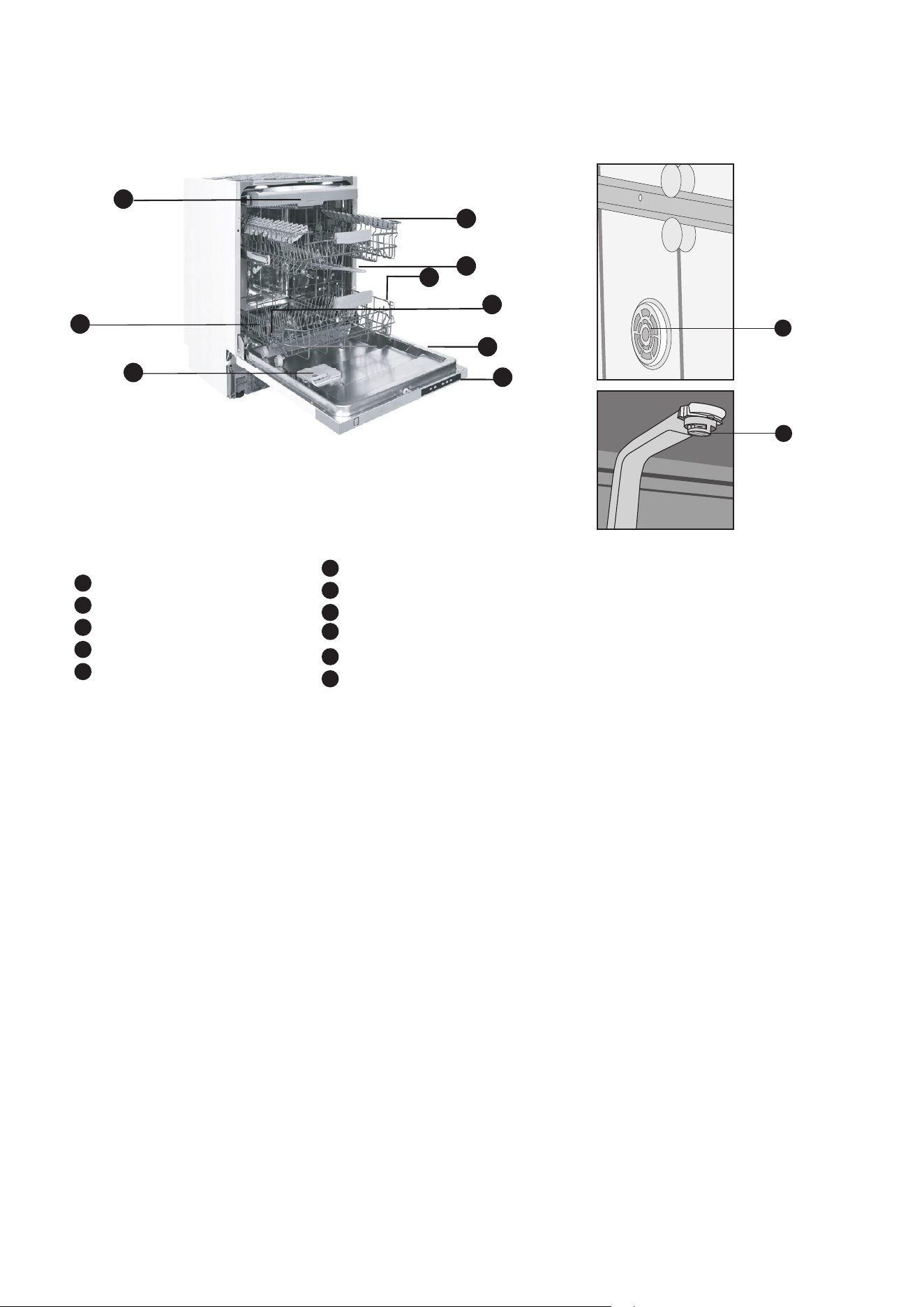
DESCRIPTION OF YOUR APPLIANCE
TECHNICAL SPECIFICATIONS
Capacity ............................................................................ 15 place settings
Height
..................................................................................... 820-870 mm
Width.................................................................................................598 mm
Depth
.................................................................................................570 mm
Net weight ..........................................................................................47.5 kg
Electricity input
...............................................................220-240 V, 50 Hz
Total power
....................................................................................... 1900 W
Heating power
.................................................................................. 1800 W
Pump power
.......................................................................................... 100W
Drain pump power
................................................................................30 W
Water supply pressure
........................
0.03 MPa (0,3 bar) - 1 MPa (10 bar)
Current
.....................................................................................................10 A
• Electrolux reserves the right to amend design and
technical specifications.
• Do not use this appliance with power and
temperature specifications different to those
indicated.
• Do not change the specification of this appliance.
with counterweight and insulation removed
10
11
1
Upper basket with racks
2
Upper spray arm
3
Lower basket
4
Filters
5
Rating plate
6
7
8
9
Control panel
Detergent and rinse-aid dispenser
Lower spray arm
Sliding c
utlery tray
10
Turbo Drying unit
11
Ceiling spray rose
1
2
3
4
6
7
8
11
1
4
3
2
5
6
7
10
9
8
8
DESCRIPTION OF YOUR APPLIANCE
5
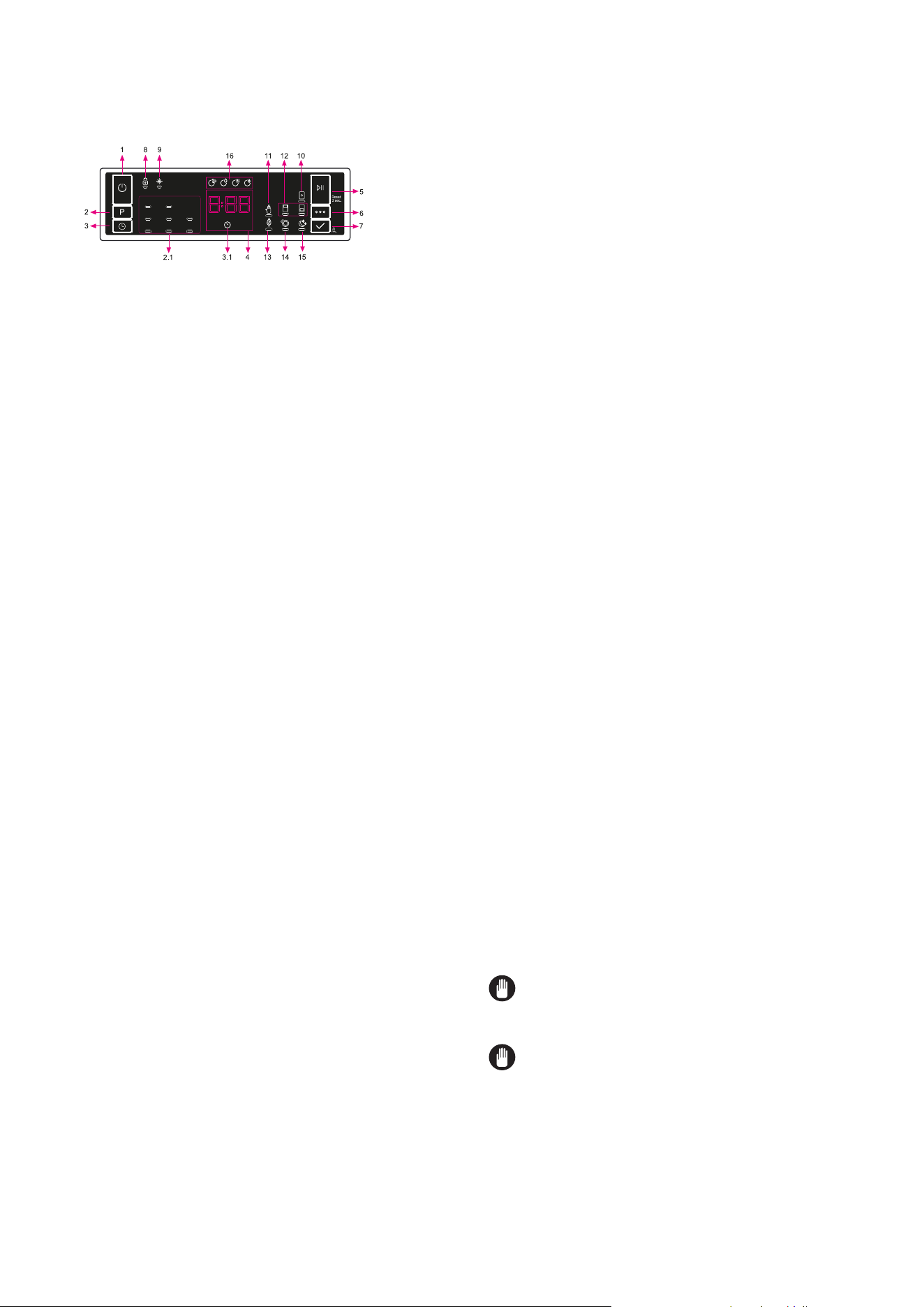
1. On/Off Button
2. Program Selection Button
2.1. Program Indicators
3. Delay Button
3.1. Delay Indicator
4. Remaining Time Indicator
5. Start/Pause Button
6. Options Button
7. Select
Button
8. Child Lock Indicator
9. Rinse Aid Indicator
10. Tablet Indicator
11. Extra Hygiene Indicator
12. Half Load Indicators
13. Energy Save Indicator
14. Extra Fast Indicator
15. Extra Silent Indicator
16. Washing Step Indicators
a- Washing Step Indicator
b- Rinse Step Indicator
c- Drying Step Indicator
d- End Step Indicator
1.On/Off Button
Turn the machine on by pressing the
On/Off button.
2. Program Selection Button
Select a suitable program by pressing the Program button. The
selected program indicator (2.1) will be on. For the details of the
programs refer to section Program Table.
3.Delay Button
You can delay the start time of the program for 1-2...24 hours by
pressing the delay button (3) before the program starts. The delay
indicator (3.1) will be on. If you want to change the delay time,first
press the Start/Pause button and then the delay button to select a
new delay time. To activate the new delay time, press the Start/Pause
button. To cancel the delay, you need to switch to 0 hour by using the
delay when the machine is paused.
4.Remaining Time Indicator
Program flow can be monitored via the Wash,Rinse, Dry, End
indicators and Remaining Time Indicator.
5.Start/Pause Button
Press the Start/Pause button to start the program. The wash lamp
turns on and the Remaining Time Indicator shows the program
duration. It also indicates the remaining time during the program flow.
If you open the door of your machine when the program is running the
duration of the program pauses,and related washing step indicator
blinks.
6. Options Button
Options can be selected by pressing the Options button repeatedly.
The chosen option will be indicated by a blinking LED.
7.Select Button
Select the option by pressing the Select button. The LED for the
chosen option will then remain lit.
THE CONTROL PANEL
DESCRIPTION OF YOUR APPLIANCE
* Wash
* Rinse
* Dry
* End
NOTE: If you switch the machine to off position after selecting
the delay time and the program has started, the delayed time is
cancelled.
NOTE: To save any program as favourite program, press
program selection (2) and delay (3) buttons at the same time. To
select favourite program, press program selection button (2) for 3
seconds.
6
CONTROL DESCRIPTIONS
8. Child Lock Indicator:
Child lock is activated/deactivated by pressing select button (7)
for about 3 seconds. When it is activated, all leds blink and “CL”
is shown on Remaning Time Indicator (4) once. When it is deactivated, all
lamps and “CL” blink twice. Child Lock indicator illuminates while the Child
Lock is active.
9. Rinse Aid Indicator
When the rinse aid level is low, the rinse aid lack warning indicator
turns on and you should fill the rinse aid chamber.
10. Tablet Indicator
Select the Tablet Detergent function when using a combined
detergent that contains salt, rinse aid or other extras. The Tablet
Detergent Indicator will remain on for as long as it is selected.
11. Extra Hygiene Indicator
Select the Extra Hygiene function to increase the wash temperature,
for a maximum hygiene washing operation. The Extra Hygiene
Indicator will illuminate.
12. Half Load Indicator
Select the Half Load function to choose which area of the dishwasher
contains dishes to be washed. You can select both baskets, the
upper basket only, or the lower basket only. Press the button until the
indicator corresponding to the basket containing the dishes to be
washed illuminates. The Half Load Indicator will illuminate while this
function is in operation. Dishes placed in other areas will not be
washed.
13. Energy Save Indicator (Autodoor)
Select the Energy Save option to enable Autodoor opening at the end
of the program, to increase drying efficiency. This function also saves
energy by operating at a lower temperature
14. Extra Fast Indicator
Select the Extra Fast function to decrease the duration of a program,
providing more economical water usage. The Extra Fast Indicator will
illuminate.
15. Extra Silent Indicator
Select the Extra Silent function for a more sensitive and silent
washing operation. The Extra Silent Indicator will illuminate. This
option reduces the sound pressure level of the washing.
16. Washing Step Indicators
The display will show the indicator corres-ponding to the status of the
program in operation. While the Drying indicator is on, the machine
will remain silent with respect to the program you have selected for
15 to 100 minutes.
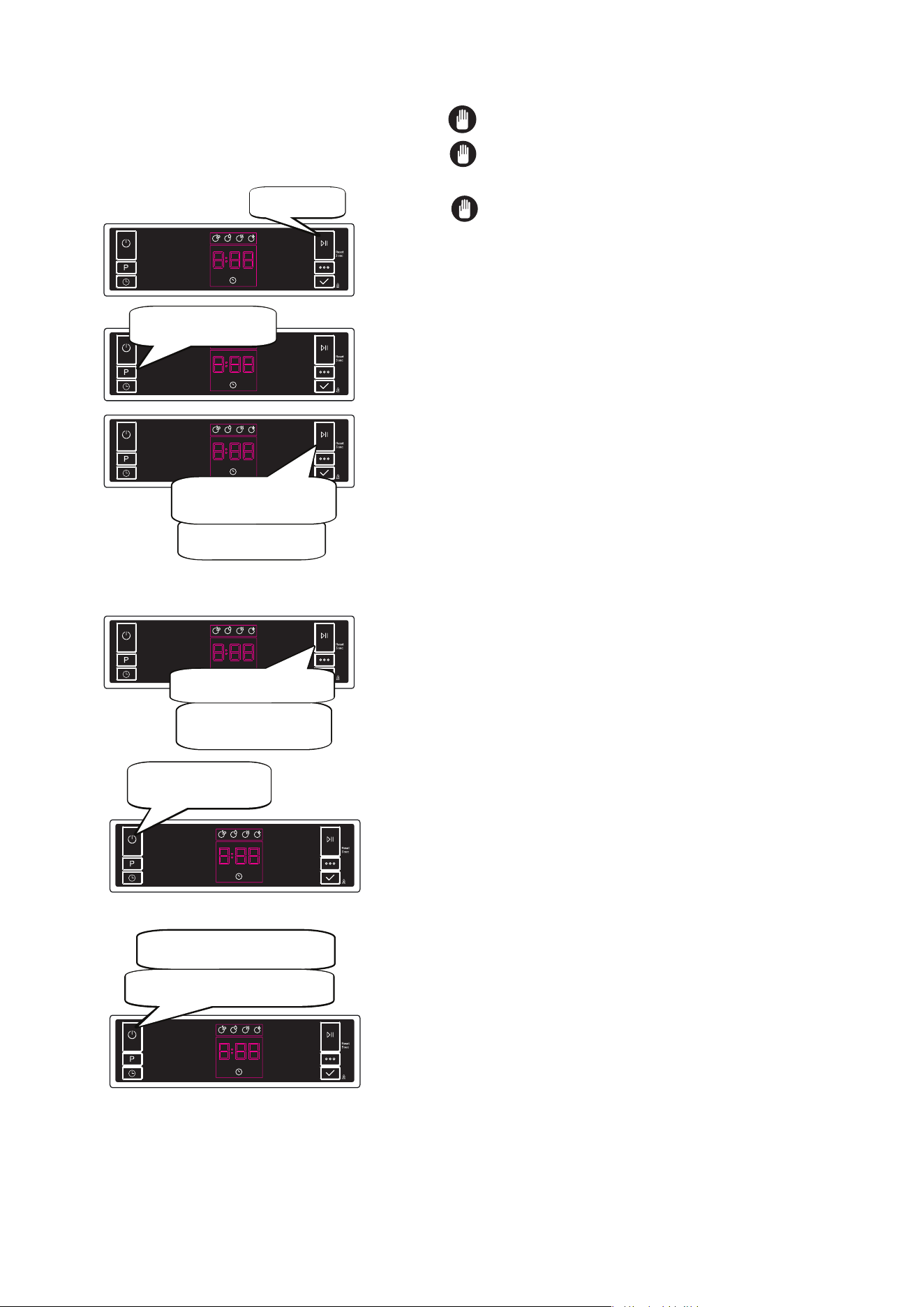
THE CONTROL PANEL
Changing a program
If you would like to change the program when the
machine is already running.
Cancelling a program
If you would like to cancel a program when it is running.
Switching the Machine Off
Press the Start/
Pause button.
The new program will
resume the course of the old
program.
After the program stops, select
your desired program via the
program selection button.
Start newly selected
program by pressing the
Start/Pause button.
Pres
s the Start/Pause button for
3 seconds.
During cancellation, the End light
blinks. The machine discharges
the water inside it in about 30
seconds.
When the End light turns on,
switch your machine off by
pressing the On/Off button.
Switch your machine off with On/Off button
after the program has ended and the End
light turns on.
Pull the plug
out of the outlet. Turn of the
water tap.
1. Open the door and press Option (6) and Select (7) buttons at the
same time for 3 seconds.
2. When sound setting is recognized, buzzer gives a long sound and
machine will display last set level, from “S0” to “S3”.
3. To decrease sound level press Select button (7). To increase sound
level, press Options button (6).
4. To save the selected sound level, turn off the machine.
’’S0’’ level means all voices are off. Factory setting is “S3”.
Save Power Mode
To activate or deactivate save power mode, follow the below steps:
1. Open the door and press Program (2) and Option (6) buttons at the
same time for 3 seconds.
2. After 3 seconds, the machine will display last Setting, “IL1” or “IL0”.
3. When Save Power Mode is activated, “IL1” will be displayed. On
this mode, interior lights (if avaliable) will turn off 2 minutes after the
door is opened, and the machine will turn off 15 minutes after any
intervention in order to save energy.
4.When Save Power Mode is deactivated “IL0” will be displayed. If
Save Power Mode is deactive, interior lights will be on as long as the
door is open, and the machine will always be on unless it is turned off
by user.
5. To save the selected setting, turn off the machine. In factory
setting, Save Power Mode is active.
NOTE: Do not open the door before the program ends.
NOTE: At the end of washing program, you can leave
the door of your machine ajar to hasten the drying.
NOTE: If the door of machine is opened or power is cut
off during washing the program will continue when the door
is closed or the power is restored.
Buzzer Sound Control
To change the buzzer sound level, follow the below steps:
7
CONTROL DESCRIPTIONS
Positioning the machine
• When considering the location for the dishwasher, ensure that
there is adequate space to enable loading and unloading of the
dishes.
• Do not put your machine in any location where
the ambient temperature can fall below 5°C.
• Before positioning, take the machine out of its packaging by
following the warnings located on the package.
• Position the machine close to a water tap and drain. You need to
postion your machine, taking into consideration that its
connections will not be altered once they are made.
• Do not grip the machine by its door or panel in
order to move it.
• Take care to leave a certain clearance from all sides of the
machine so that you can comfortably move it back and forth
during cleaning.
• Make sure that the water inlet and outlet hoses do not get
squeezed while positioning the machine. Also, make sure that
the machine does not stand on the electrical cable. Adjust the
machine’s feet so that it is level and stable. Proper positioning of
the machine ensures problem-free opening and closing of its
door.
• If the door of your machine does not close properly, check if the
machine is stable on the floor; if not, adjust the feet and ensure it
is level and stable.
Water connection
Ensure that the indoor plumbing is suitable for installing
a dishwasher and complies with AS/NZS 3500.1.
Also, we recommend that you fit a filter at the entrance of your place
or apartment so as to avoid any damage to your machine because of
any contamination (sand, clay, rust etc) that might be occasionally
carried in through the main’s water supply or the indoor plumbing,
and to avoid problems of staining and formation of deposits after
washing.
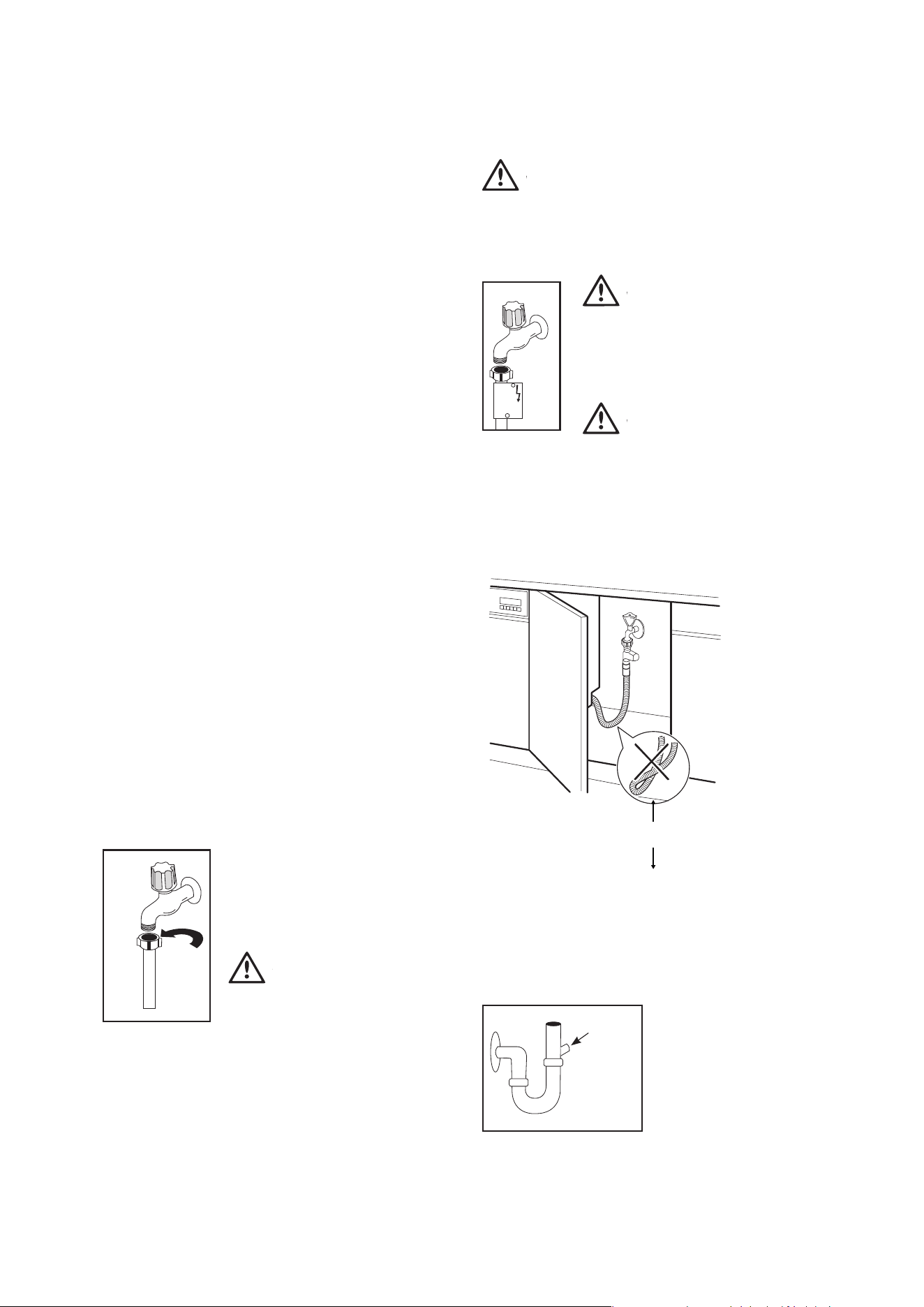
Water inlet hose
Do not use the water inlet hose of your old machine, you must use the
new water inlet hose supplied with your machine. Before connecting
the water inlet hose to the water tap, ensure clean water is flowing
from the tap before making the connection. Connect the water inlet
hose directly to the water inlet tap. The
pressure supplied by the tap should be at a
minimum of 0.03 MPa and at a maximum of
1 MPa. If the water pressure is above 1 MPa, a
pressure-relief valve should be installed.
WARNING
WARNING
Only turn the locking nut to secure hose - do
not turn the hose.
• The first time you use the appliance, make sure that there is no
leakage.
• The water inlet hose has a safety valve and a sheath with an
inner mains cable.
After the connections are made, the tap should be turned on fully and
checked for water tightness. For the safety of your machine, make
sure to always turn off the water inlet tap after each wash program is
finished.
WARNING
WARNING
NOTE: Aquastop inlet hose has components using 240V. Do not
cut Aquastop inlet hose. Do not let it get folded, twisted, kinked or
crushed.
WARNING
WARNING
NOTE: A water tempering valve is required if the
water temperature is
over 60°C.
WARNING
CAUTION
Always use new hoses when you connect the
appliance to the water mains. Old hoses must
not be used. The water inlet hose must be examined at an interval of
twelve months for deterioration and replaced if necessary.
In order to pass the safety valve through the kitchen cabinets, an
opening of at least 45mm x 90mm is needed.
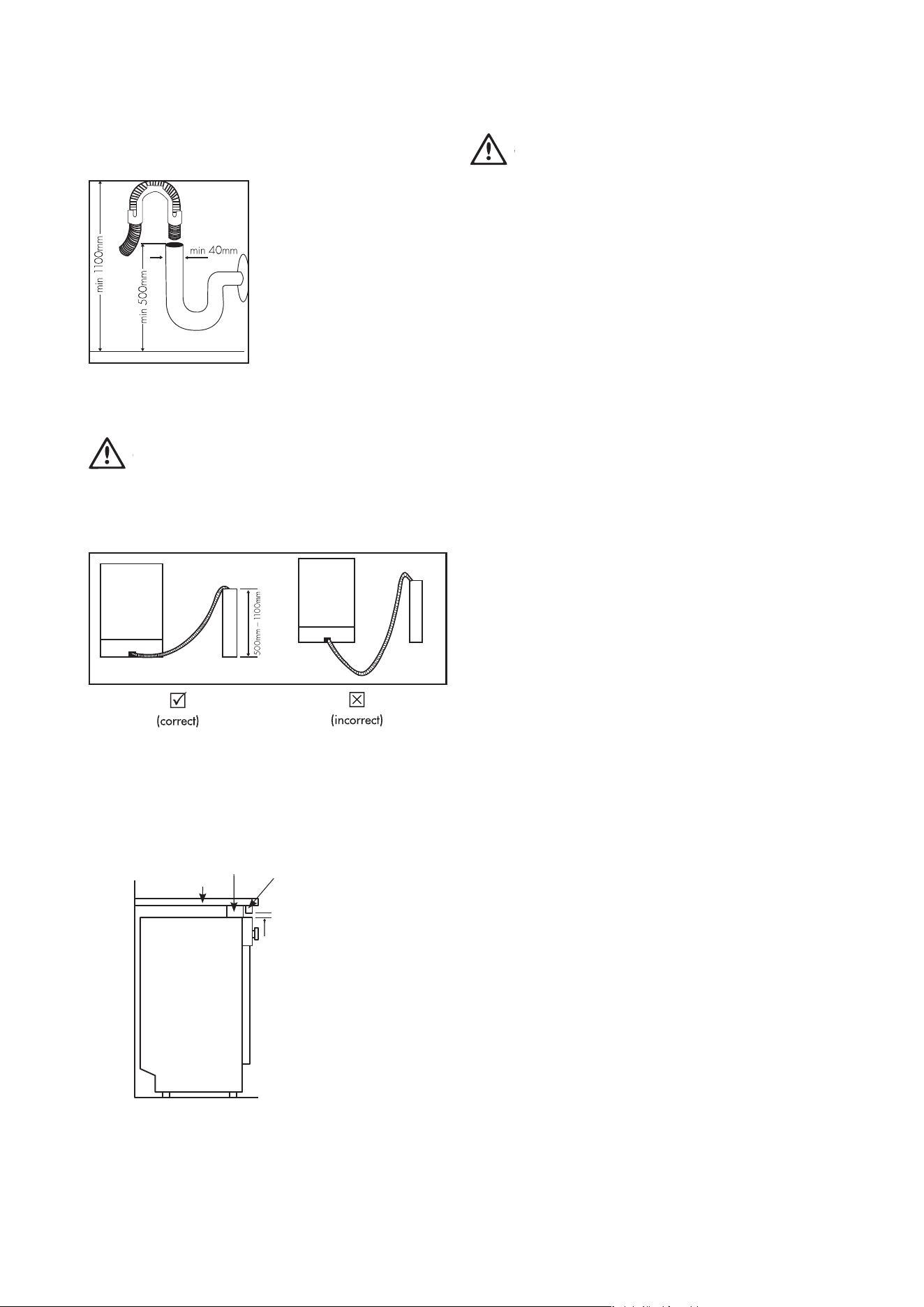
Water drain hose
If you connect the water drain hose to a trap spigot under the sink,
remove the plastic membrane. If you do not remove the entire
membrane, remaining food can cause a blockage in the drain hose
spigot. Ensure a hose clamp is used to secure the hose to the spigot.
INSTALLING THE MACHINE
30cm
min.
8
INSTALLING THE MACHINE
Remove
entire
internal
membrane
Water drain hose
The water drain hose can be
connected either directly to the
water drain hole or to the sink
outlet spigot. Using a hose hook (if
available), the water can be drained
directly into the sink by positioning
the hose hook over the edge of the
sink.
T
his connection should be at
a minimum of 50 cm and at a
maximum of 110 cm above the base
of the dishwasher.
WARNING
WARNING
Maximum drain hose length is 4m. Longer hose length will prevent
correct draining, and result in poor wash performance.
INSTALLING THE MACHINE
WARNING
WARNING
Electrical Connection
The plug of your machine should be connected to an earthed outlet that
supplies suitable v
oltage and current. If there is no earthing installation,
have a competent electrician carry out an earthing installation. In case of
usage without earthing installed, our company will not be responsible for
any loss of usage that might occur.
The indoor fuse current value should be 10-16 A.
Your machine is designed for 220-240 V. The machine
should not be plugged in during installation.
Always use the molded plug supplied with your machine.
Running in low voltage will cause a decline in
washing quality.
The machine’s electrical cable should be replaced by an authorised service
or an authorised electrician only. Failure to do so may lead to accidents.
For safety purposes, always make sure to disconnect the plug when a
wash program is finished.
In order not to cause an electric shock, do not unplug when your hands are
wet.
When disconnecting your machine from the mains supply, always pull
from the plug. Never pull the cord itself.
Timber
wedging
piece
Bench top
3mm gap
Filler piece cut to
suit installation
Floor level
9
INSTALLING THE MACHINE
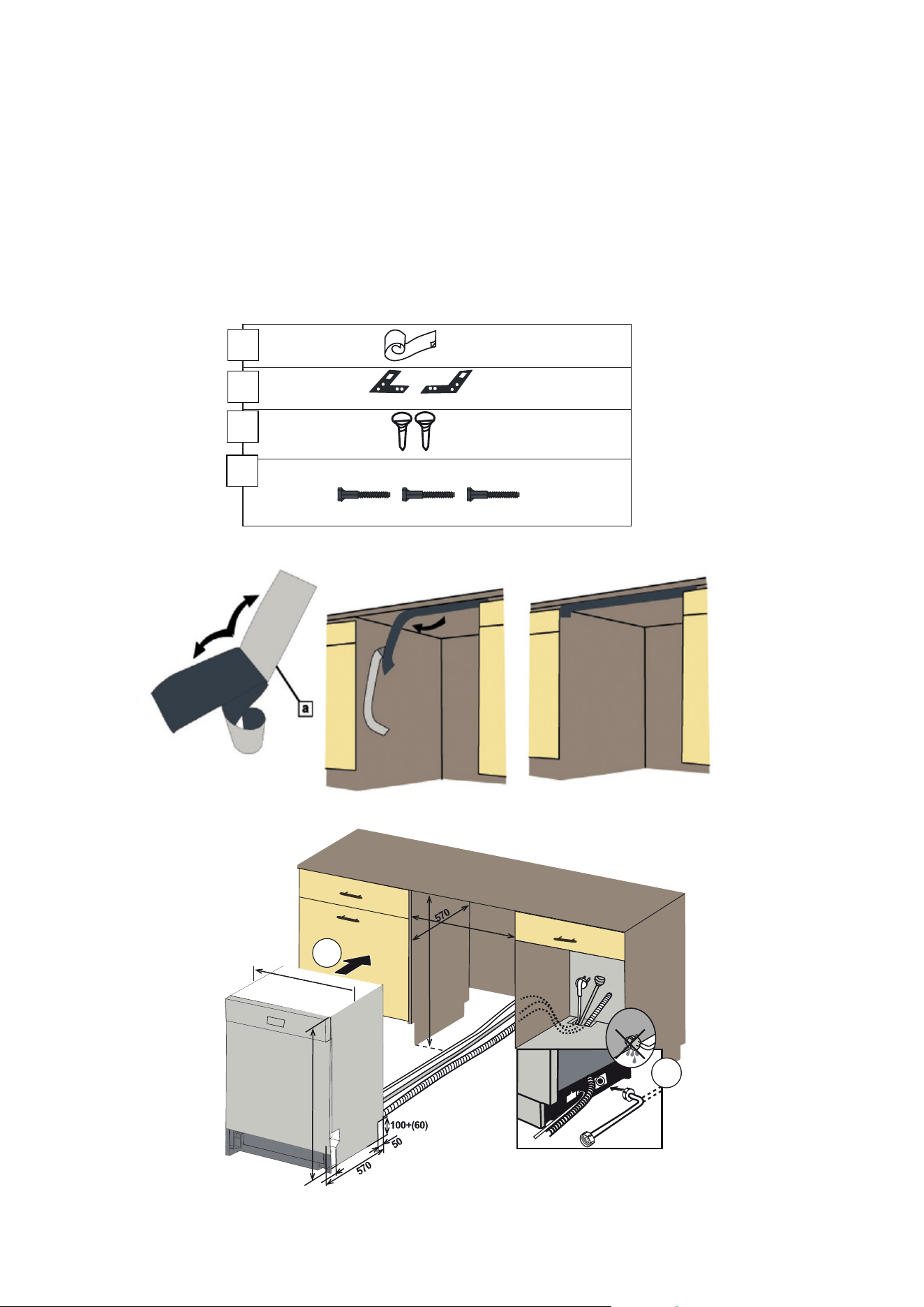
INSTALLING THE MACHINE
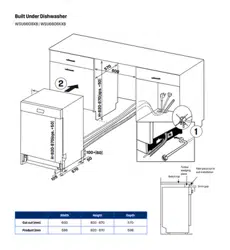
1 Adjust the machine feet according to the slope
of the floor.
2 Fit your machine by pushing it undercounter without letting the
hoses get crushed or bent.
ARNING
10
INSTALLING THE MACHINE
Fitting the machine undercounter
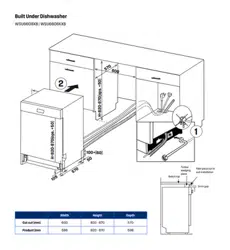
OPS.(+50)H=870-920 mm
700X75
a
c
1
H=820-870(ops. +50)
H=820-870(ops. +50)
2
1
600
598
105
2
b
d
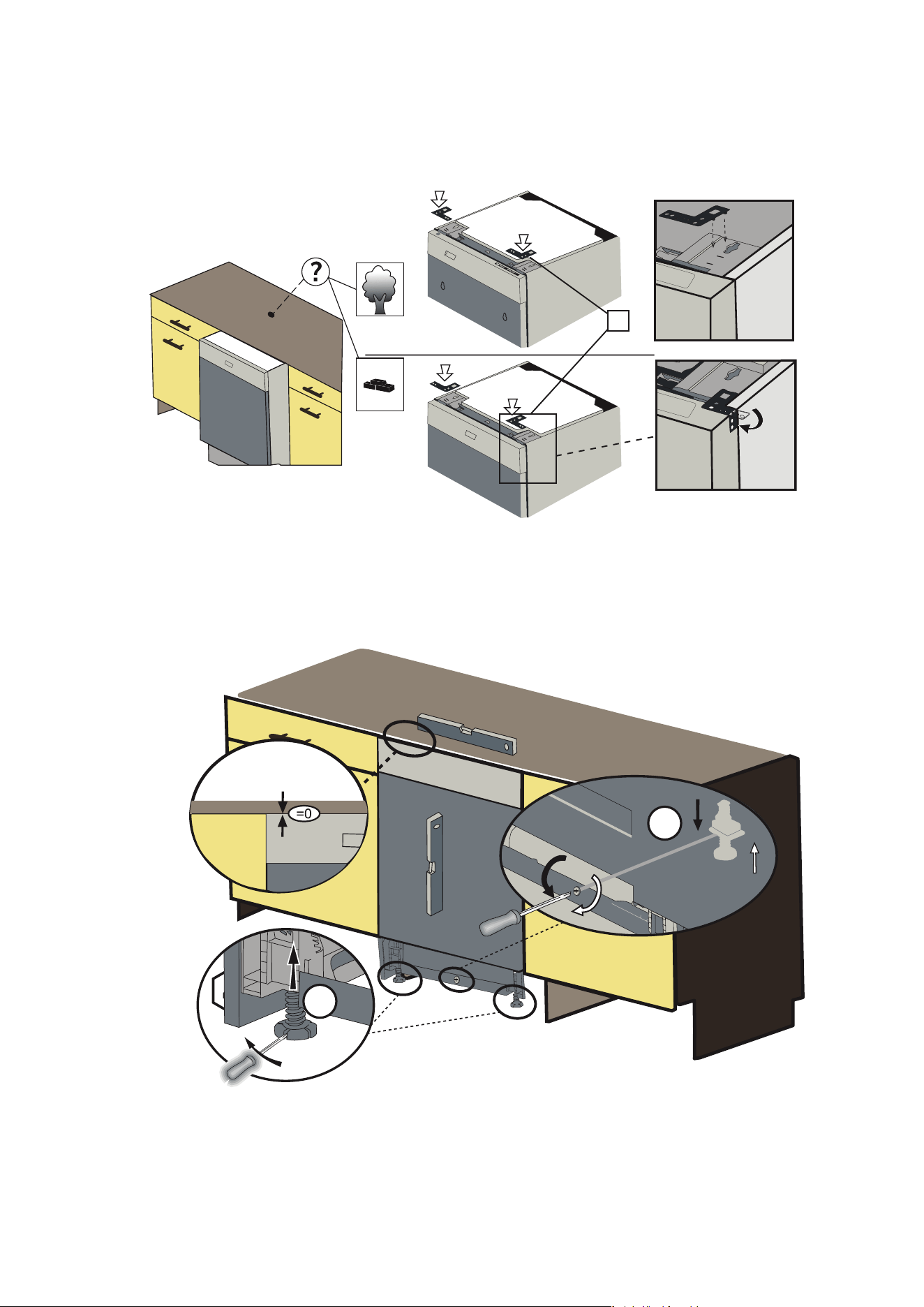
b
3
8
7
4-a
11 INSTALLING THE MACHINE
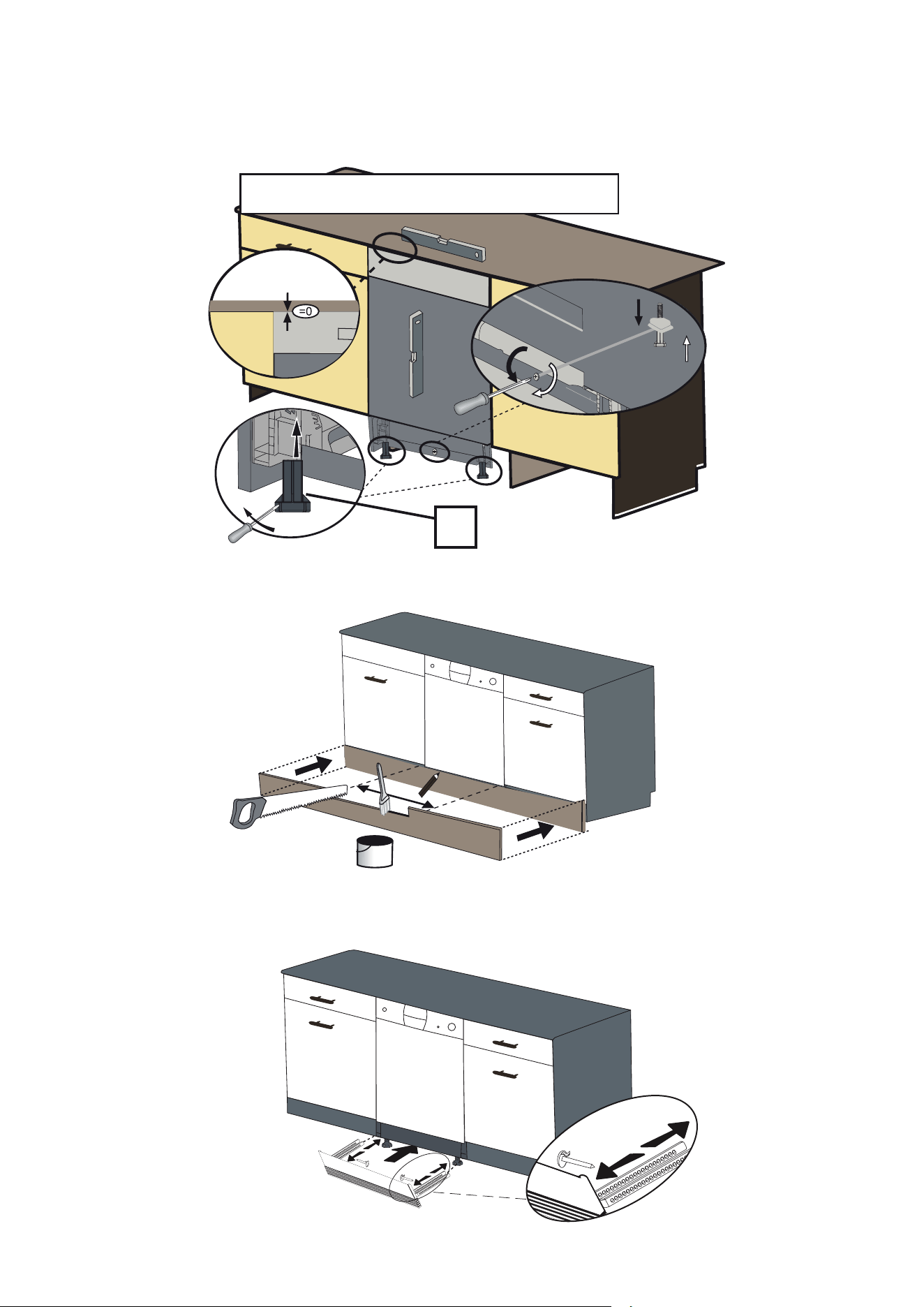
ops.(+50) H= 870-920 mm
The following options are available. Follow the supplied instructions.
The following options are available.
4-b
d
600
5
Option 1: Attach the furniture kickplate.
Option 2: Attach the adjustable plinth group. Follow the instructions
supplied with the adjustable plint group.
6
12 INSTALLING THE MACHINE
PREPARING THE MACHINE FOR USE
Combined detergent
Detergent manufacturers also produce combined detergents called
“2 in 1”, “3 in 1” or “5 in 1” etc.
“2 in 1” detergents contain detergent or rinse aid.
When using “2 in 1” detergent make sure to check
the specifications of the tablet.
Other tablet detergents contain detergent + rinse aid
+ various extra functions/additives.
Generally, combined detergents produce acceptable results under
certain usage conditions only. These detergents contain rinse aid in
preset amounts.
Points to consider when using these type of products:
• Always make sure to check the specifications of
the product you will use or whether or not it is a combined
product.
• These products should be used according to the manufacturer’s
instructions.
•
Never put combined detergents into the interior section or the
cutlery basket.
• Combined detergents contain not
only the detergent but also rinse-aid replacement substances
and additional components depending on the combination.
• We recommend you do not use combined detergents in short
programs. Please use powder detergents instead.
• If you encounter problems when using combined detergents,
please contact the detergent manufacturer.
• When you stop using combined detergents, make sure that rinse
aid setting is set to the correct level.
Recommended usage: If you want to obtain better
results while using combined detergents, add rinse aid
into your machine and adjust the rinse aid setting to the lowest
position.
Solubility of the tablet detergents produced by different companies
can vary depending on the temperature and time. Therefore, it is not
recommended to use these detergents in short programs. It is more
suitable to use powder detergents and rinse aid in short programs.
WARNING
WARNING
Should any problem occur which you have not encountered before,
with the use of these types of detergents, contact the detergent
manufacturers directly.
Prior to using the machine for the first time
• Check whether the electricity and water supply specifications
match the values indicated by the installation instructions for the
machine.
• Remove all packaging materials inside the machine.
• Fill the rinse aid compartment.
Detergent usage
Use a detergent specifically designed for use in domestic
dishwashers. You can find powder, gel, and tablet detergents in
the market that have been designed for household dishwashers.
Detergent should be put into the compartment prior to starting the
machine. Keep your detergents in cool, dry places out of reach of
your children. Do not fill detergent into the detergent compartment
more than required; otherwise it may etch your glasses as well as
leaving undissolved detergent in the dishwasher. Should you need
more information concerning the detergent to use, contact detergent
manufacturers directly.
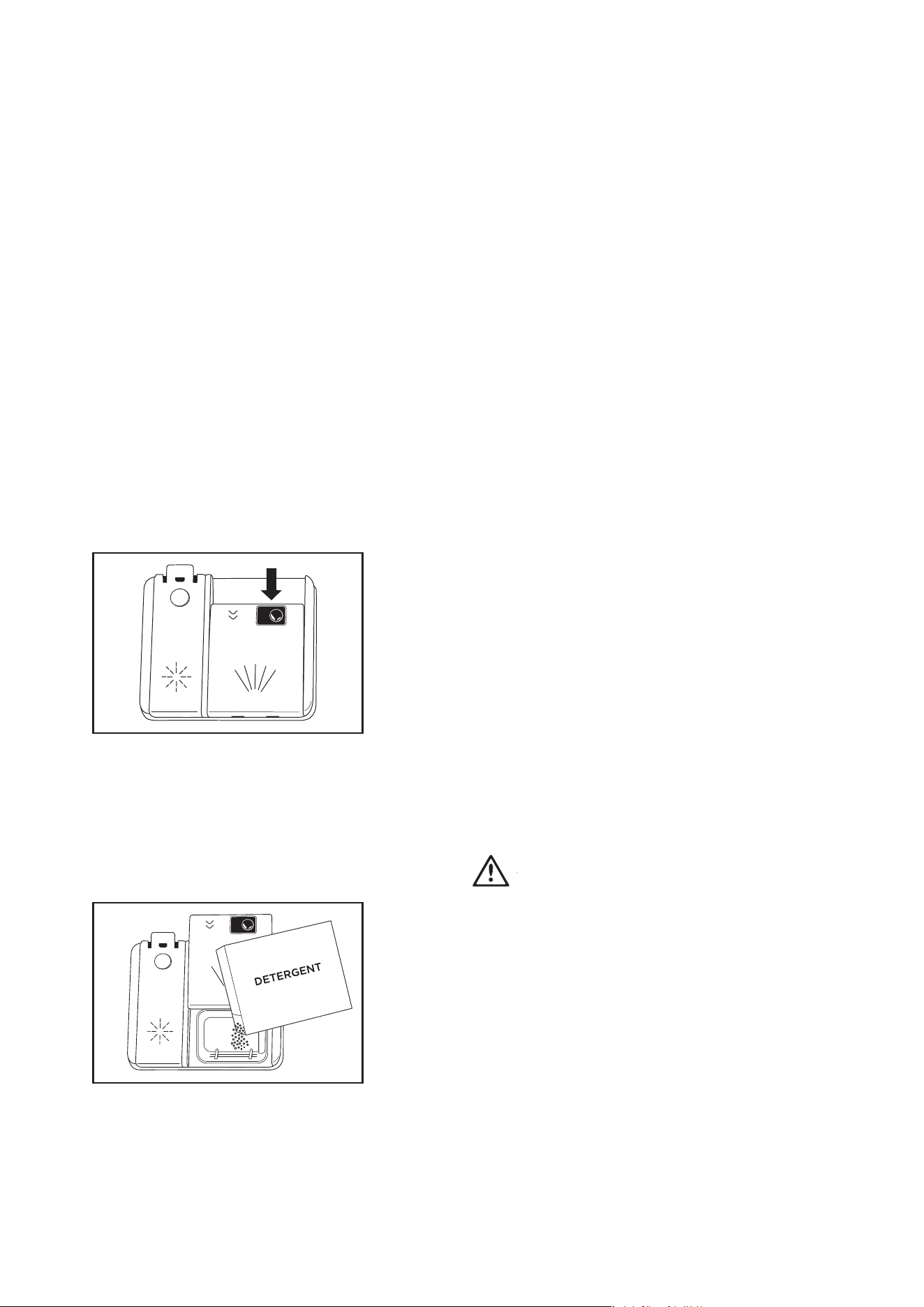
Filling the detergent compartment
Push the latch to open the detergent container as shown in the image.
The Detergent pod has level lines inside. It is possible to measure the
right detergent amount using these lines.
The detergent pod can take a maximum of 40cm
3
detergent.
Open the dishwasher detergent pod and pour 25cm
3
if your dishes
are heavily soiled or 15cm
3
if they are less soiled.
You may have to add more detergent into your machine, depending on
the degree of soil and the water hardness in your area.
If your dishes are from the previous day and there is dried food
waste on them, or if you have fully loaded the dishwasher, pour 5cm
3
detergent onto the base of the door and start your machine.
13
PREPARING THE MACHINE FOR USE
PREPARING THE MACHINE FOR USE
When you STOP using combined detergents
• Fill the rinse aid compartments.
• Select a suitable rinse aid setting.
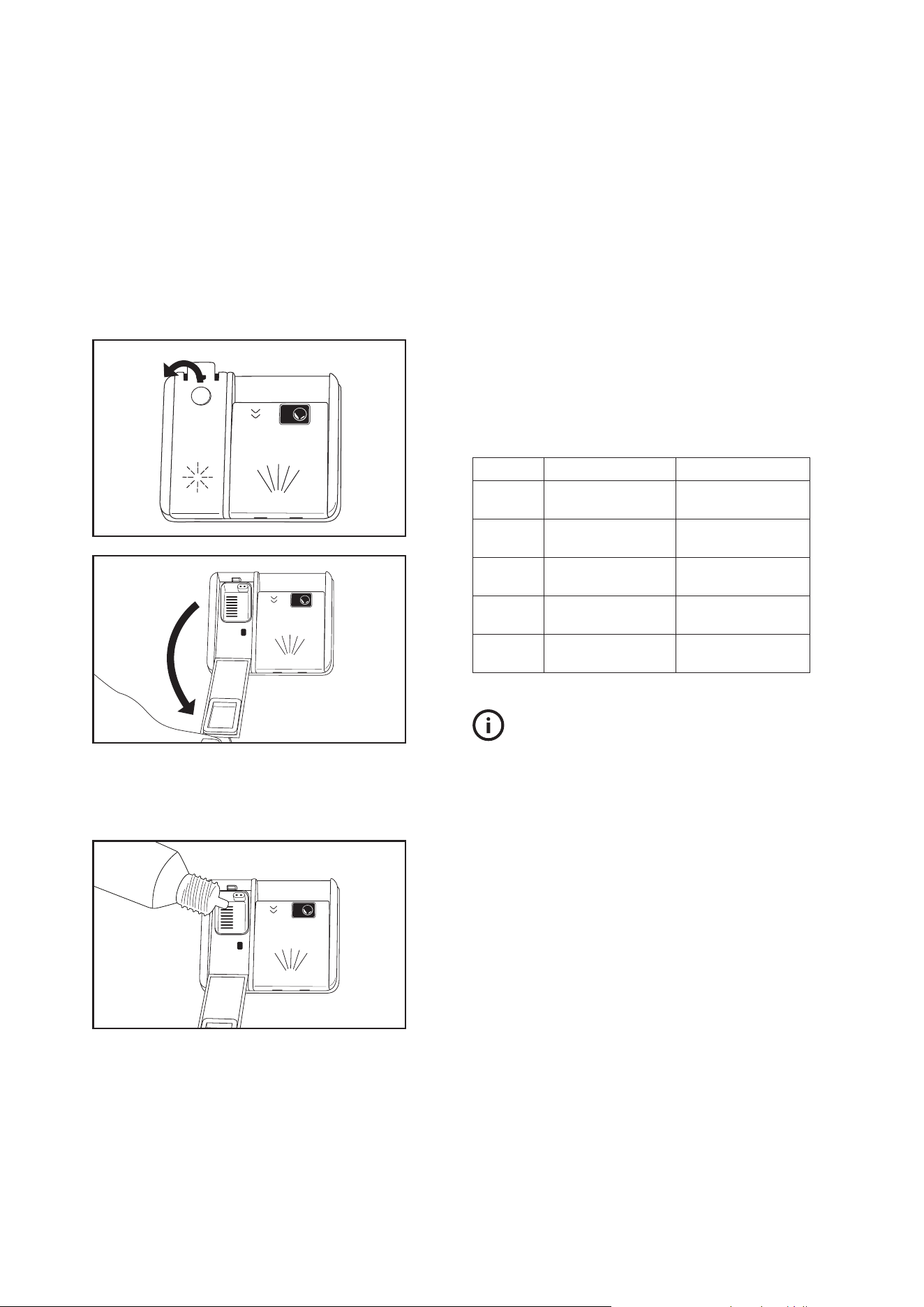
Filling with rinse aid and setting
To fill the rinse aid compartment, open the rinse-aid compartment
cap.
Fill the compartment with rinse aid until MAX level
and then close the cap.
Be careful not to overfill the rinse aid compartment
and wipe up any spills.
RINSE-AID
Level Brightener Dose Indicator
1 Rinse-aid not
dispensed
r1 is shown on the
display.
2 1 dose is
dispensed
r2 is shown on the
display.
3 2 doses are
dispensed
r3 is shown on the
display.
4 3 doses are
dispensed
r4 is shown on the
display.
5 4 doses are
dispensed
r5 is shown on the
display.
TIPS & INFORMATION
TIPS AND INFORMATION
Only use rinse aid suitable for automatic dishwashers.
As rinse aid residues left as a result of overflowing will create
extremely high amounts of foam and reduce the washing
performance, remove the excess amount of rinse aid by wiping it with
a cloth. Remove all excess rinse aid if spilt while filling.
14
PREPARING THE MACHINE FOR USE
In order to set rinse aid level, follow below steps:
• Turn on the machine by pressing the On/Off button.
• Press the program button for at least 3 seconds immediately
after the machine is turned on.
• Release the program button when “rA” is shown. Next, the last
setting level is displayed.
• Set the level by pushing the program button.
• Switch off the machine to save the setting.
The factory setting is “4”.
If the dishes are not drying properly or are spotted, increase the rinse-
aid level. If blue stains form on your dishes, decrease the rinse-aid
level.
LOADING YOUR DISHWASHER
For best results, follow these loading guidelines.
Loading the household dishwasher up to the capacity indicated by the
manufacturer will contribute to energy and water savings. Manual
pre-rinsing of tableware items leads to increased water and energy
consumption and is not recommended You can place cups, glasses,
stemware, small plates, bowls, etc. in upper basket. Do not lean long
glasses against one another or they cannot remain steady and may
receive damage.
When placing long stem glasses and goblets, lean them against the
basket edge or rack and not against other items.
Place all containers such as cups, glasses and pots into the
dishwasher with the opening facing downwards otherwise water can
collect on items.
If there is cutlery basket in machine, you are recommended to use
the cutlery grid in order to obtain the best result. Place all large (pots,
pans, lids, plates, bowls etc.) and very dirty items in the lower rack.
Dishes and cutlery should not be placed above each other.
WARNING: Take care not to obstruct the rotation of spray arms.
WARNING: Make sure after loading the dishes do not prevent
opening the detergent dispenser.
Recommendations
Remove any coarse residue on dishes before placing the dishes in the
machine. Start the machine with full load.
Do not overload the drawers or place dishes in the wrong
basket.
WARNING: To avoid any possible injuries, place long-handle
and sharp-pointed knives with their sharp points facing down or
horizontally on the baskets.
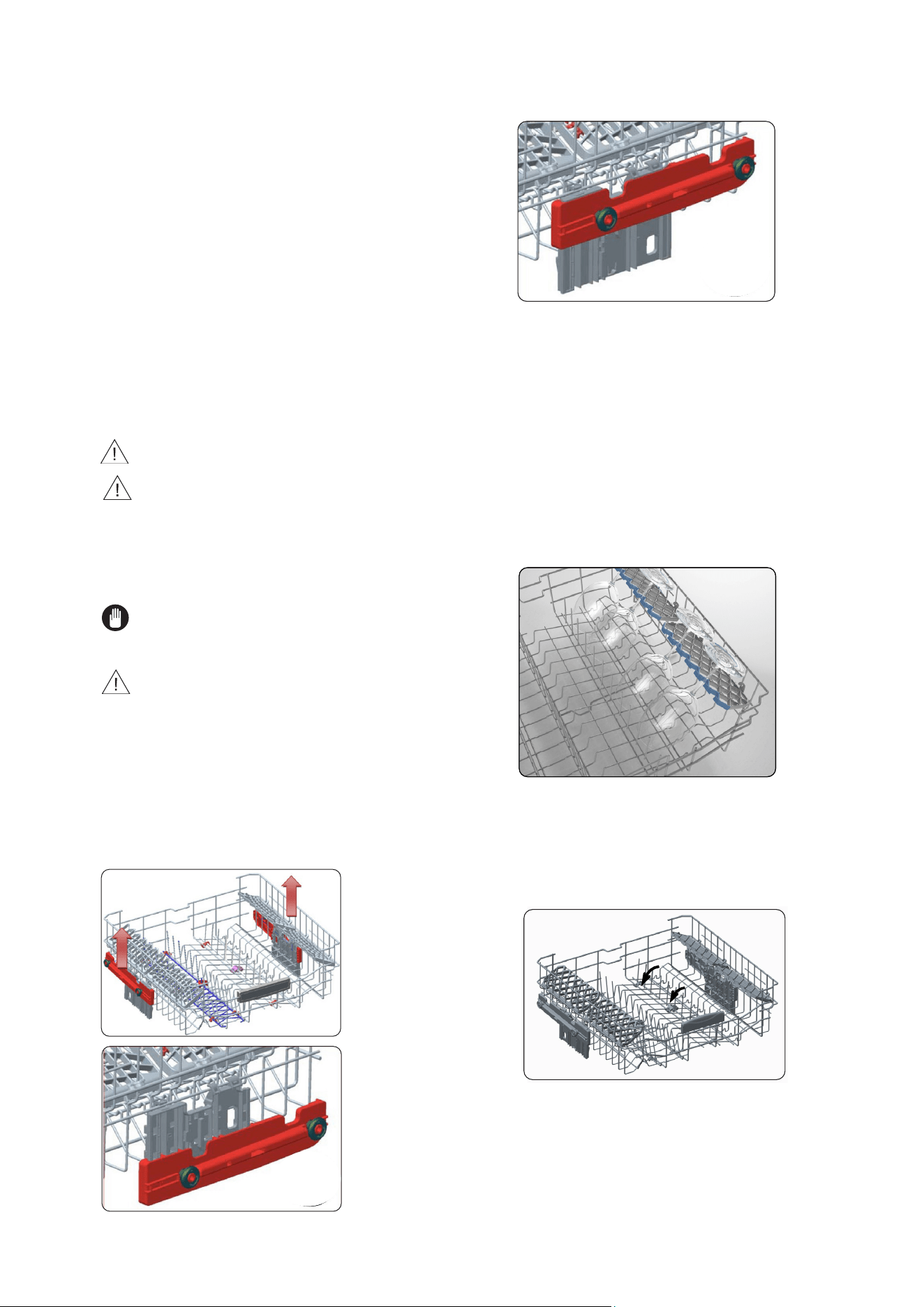
Height adjustment
The upper basket includes a mechanism which enables the height
of the basket to be adjusted up (1) or down (2) without having to
remove the basket. Hold the basket on both sides and pull it up or
push it down, ensuring both sides of the upper basket are in the same
position.
1
2
SOFT TOUCH
Top basket
Height Adjustable Rack
These racks are designed to increase the capacity of the top basket.
You can place your glasses and cups on the racks. You can adjust
the height of these racks. Thanks to this feature, you can place
different sizes of glasses under these racks.
Thanks to height adjustment plastics mounted on the basket, yo
u
can use your racks in 2 different heights. In addition, you can place
long forks, knives and spoons on these racks laterally, so that they
do not block the revolution of propeller.
The soft touch feature on the racks serves to place the fine
stemmed glass.
The wineglass is placed in the area shown at the picture.
15 LOADING YOUR DISHWASHER
Foldable racks
Foldable racks on the upper basket are designed in order to let you
place big items easier such as pots, pans, etc. If requested, each
part can be folded separately, or all of them can be folded and larger
spaces can be obtained. You can use foldable racks by raising them
upwards,or by folding down.
LOADING YOUR DISHWASHER
16
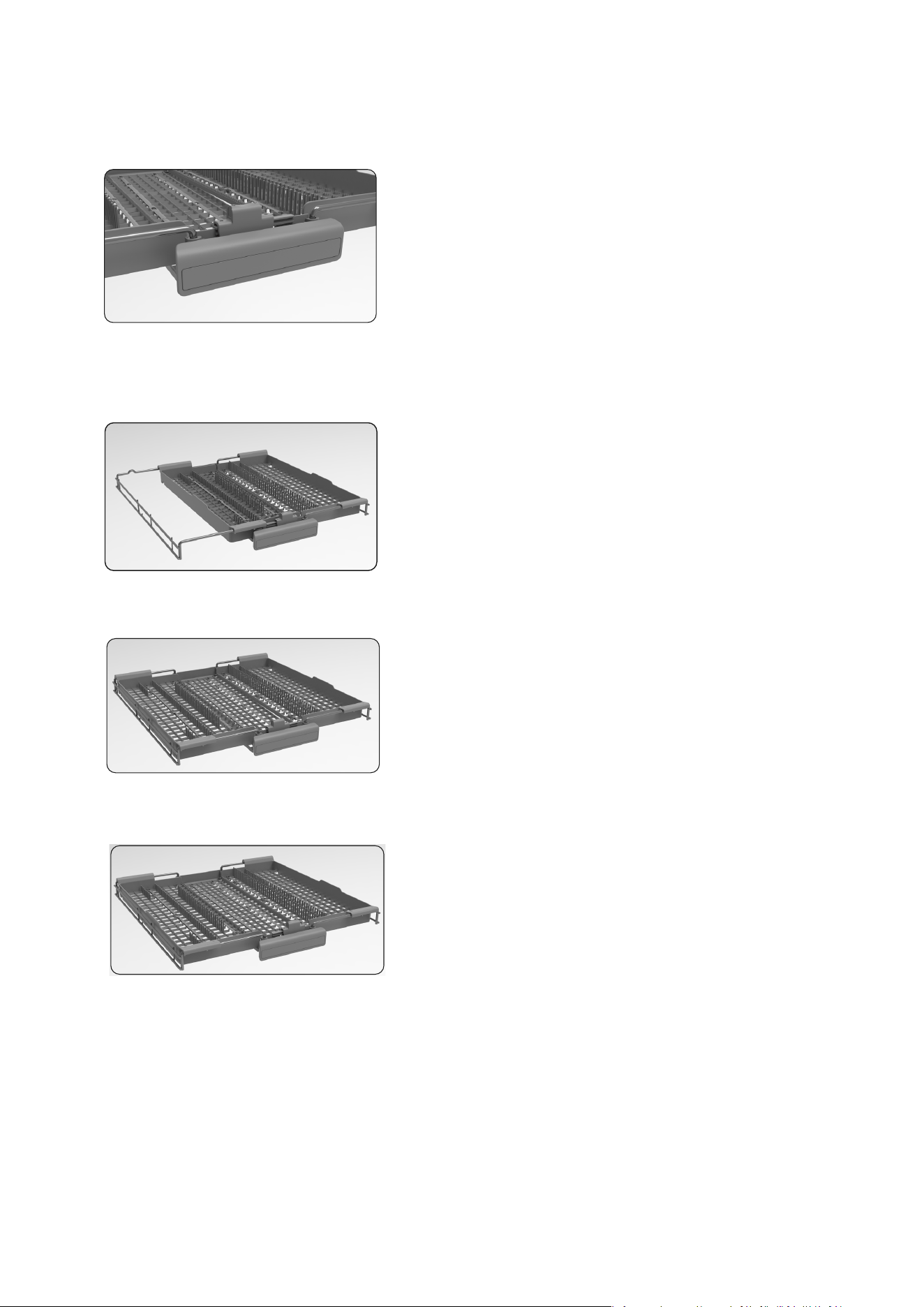
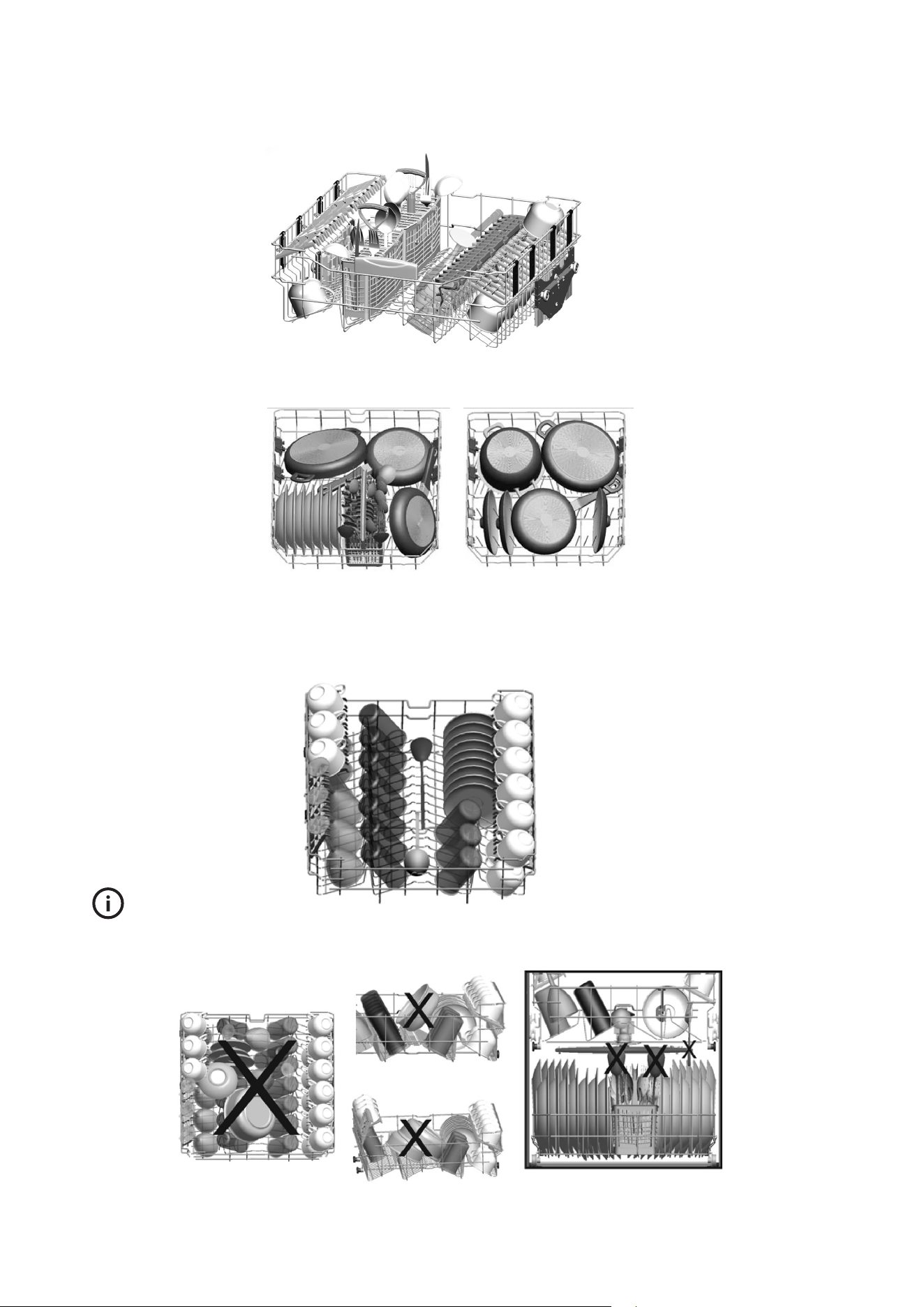
Upper Cutlery Basket
The upper cutlery basket is designed for you to
place forks, spoons and knives, long dippers
and
small items.
The Upper Cutlery Basket is composed of three
pieces; if you need to space for the dishes in the
upper basket, you can slide the left or right part of
the upper cutlery basket in order to obtain more
space.
The middle part of the upper basket can be movable
down and up to obtain more space.
WARNING: Knives and other sharp objects must be placed
horizontally in the cutlery basket.
LOADING YOUR DISHWASHER
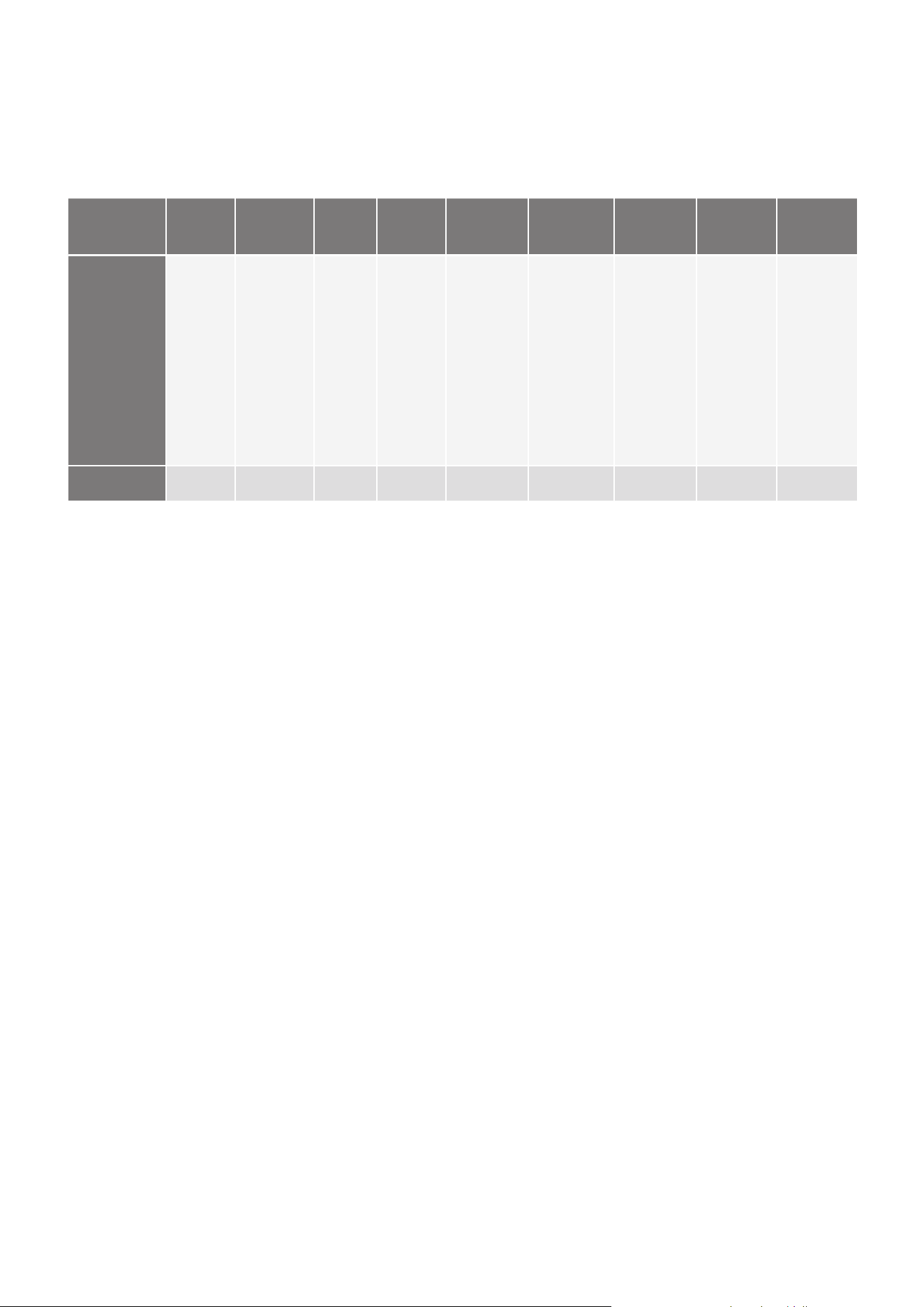
Alternative basket loads
Lower Basket
Alternative modular basket position
TIPS & INFORMATION
TIPS AND INFORMATION
Examples of incorrect loading
LOADING YOUR DISHWASHER
Top Basket
1
7
LOADING YOUR DISHWASHER
PROGRAM DESCRIPTIONS
Program items
MAINTENANCE AND CLEANING
18
PROGRAM DESCRIPTIONS
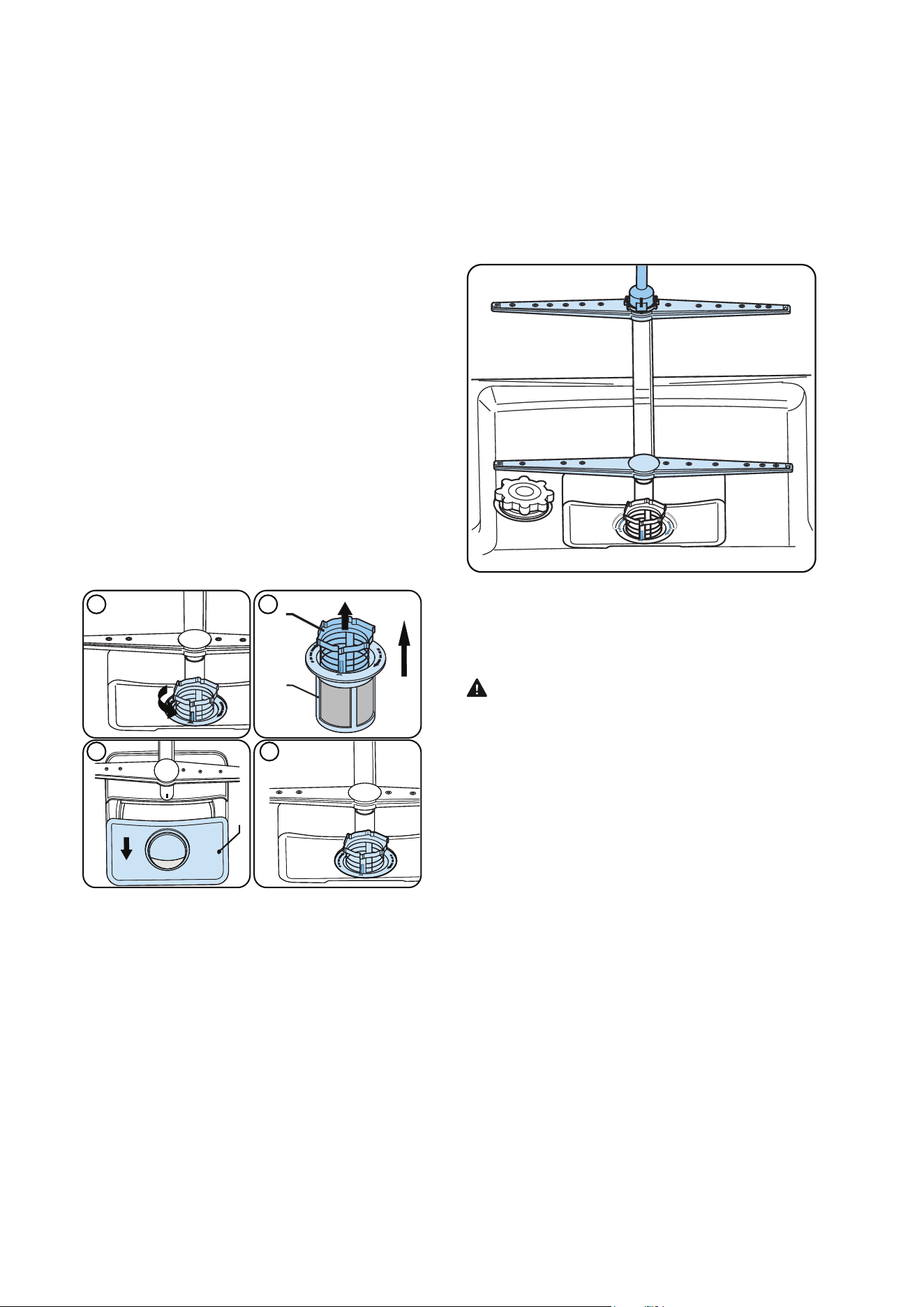
NAME OF PROGRAM FAST 30’ DELICATE 40°C ECO* DUAL WASH TIMESAVE 50’
SENSORWASH-
DELICATE
SENSORWASH-
DAILY
SENSORWASH-
HEAVY
STEAM
TYPE OF FOOD
SOILS
Suitable
for lightly
soiled
dishes
and quick
wash.
Suitable for
lightly soiled
delicate
dishes.
Standard
program
for
normally
soiled
daily
using
dishes
with
reduced
energy
and
water
Suitable
for both
lightly soiled
delicate
glassware
on upper
rack and
heavily
soiled
crockery on
lower rack.
Suitable for
normally soiled
daily dishes
with faster
program.
Auto program
for lightly soiled
delicate dishes.
Auto program
for normally
soiled dishes.
Auto program
for heavily
soiled dishes.
Suitable for
heavily soiled
dishes with
effective
cleaning by
steam.
PROGRAM
TIME (MINS)
30 74 216 113 50 84 - 96 199-219 196 - 234 161
NOTE: PROGRAM DURATION MAY CHANGE ACCORDING TO THE AMOUNT OF DISHES, TAP WATER, AMBIENT TEMPERATURE AND
SELECTED ADDITIONAL FUNCTIONS.
• Only use
powder detergent in short programs.
• Short
programs do not include a drying step.
• To as
sist drying, we recommend partially opening the door after the program has finished.
Information for test laboratories
For all the necessary information for performance testing, send an email to dishwasher@standardtest info
In your mail please provide the model number and PNC number that is on the rating plate on the appliance door.
MA
INTENANCE AND CLEANING
Cleaning your dishwasher is important to maintain the machine’s
service life
Oil and limescale may build up in your Dishwasher over time. If
this occurs:
Fill the detergent compartment
but do not load any dishes. Select a program which runs at high
temperature and run the Dishwasher empty. If this does not
clean your Dishwasher sufficiently, use a cleaning agent
designed for use with dishwashers.
To extend the life of your dishwasher, clean the appliance
regularly on each month.
Wipe the door seals regularly with a damp cloth to remove any
accumulated residue or foreign objects.
Filters
Clean the filters and spray arms at least once a week. If any food
waste remains or foreign objects on the coarse and fine filters,
remove them and clean them thoroughly with water.
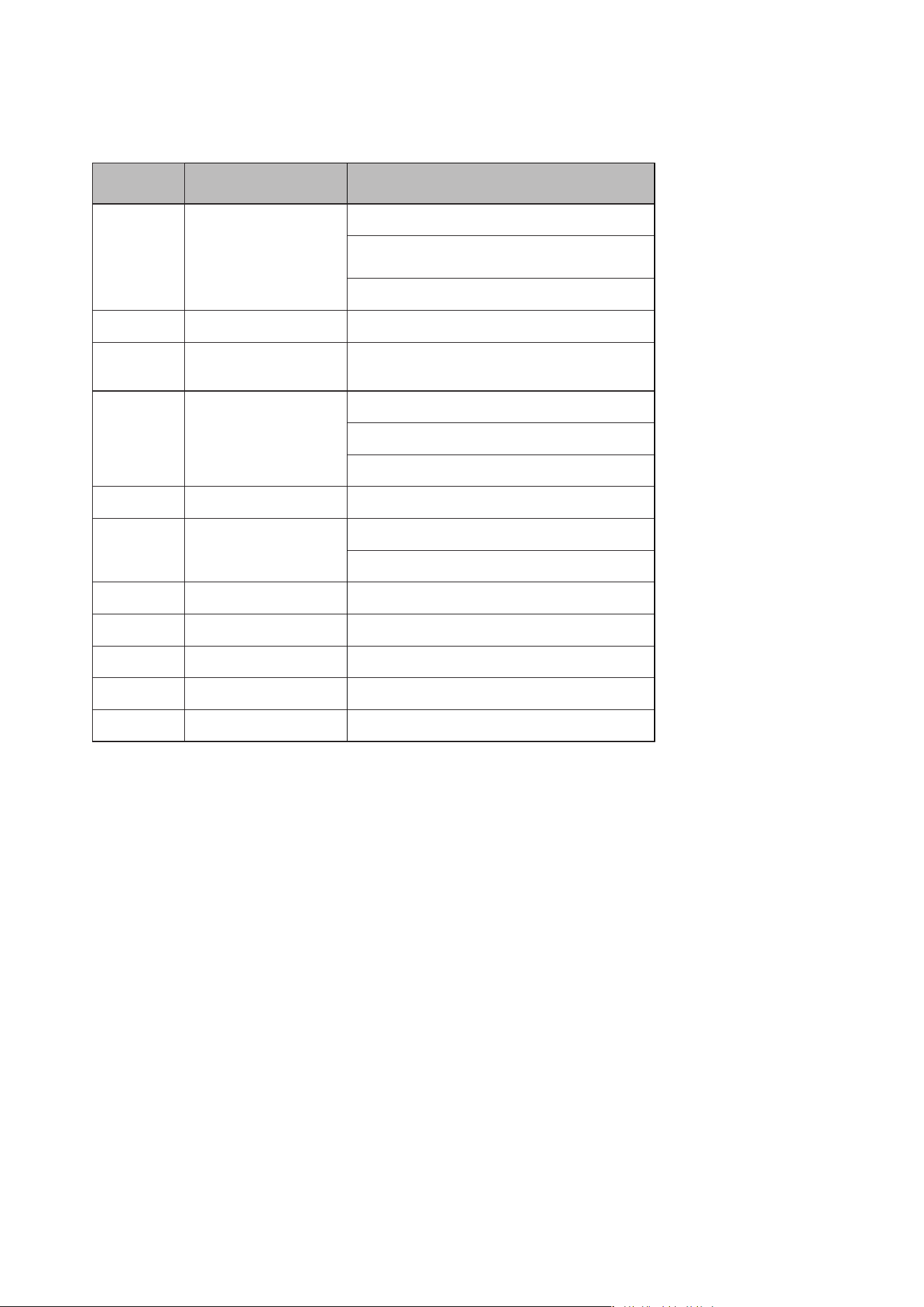
a) Micro Filter b) Coarse Filter
c) Metal Filter
To remove and clean the filter combination, turn it counter
clockwise and remove it by lifting it upwards (1).Pull the coarse
filter out of the micro filter (2).Then pull and remove the metal
filter (3).Rinse the filter with lots of water until it is free of
residue. Reassemble the filters. Replace the filter insert, and
rotate it clockwise (4).
• Never use your dishwasher without a filter.
• Incorrect fitting of the filter will reduce the washing
effectiveness.
• Clean filters are necessary for proper running of the
machine.
3 4
1 2
a
c
b
Spray arms
Make sure that the spray holes are not clogged and that no
food waste or foreign object is stuck to the spray arms. If there
is any clogging,remove the spray arms and clean them under
water. To remove the upper spray arm undo the nut holding it in
position by turning it clockwise and pulling it downwards. Make
sure that the nut is properly tightened when refitting the upper
spray arm.
Drain Pump
Large food residues or foreign objects which were not captured
by the filters may block the waste water pump. The rinsing water
will then be above the filter.
Warning Risk of cuts!
When cleaning the waste water pump, ensure that you do not
injure yourself on pieces of broken glass or pointed implements.
In this case:
1. irst always disconnect the appliance from the power supply.
2. Take out baskets.
3. Remove the filters.
4. Scoop out water, use a sponge if required.
5. Check the area and remove any foreign objects.
6. Install filters.
7. Re-insert baskets.
19
MAINTENANCE AND CLEANING
FAILURE CODES AND WHAT TO DO IN CASE OF FAILURE
TROUBLE CODE POSSIBLE FAULT WHAT TO DO
FF
Water inlet system failure
Make sure the water inlet tap is open and water is flowing.
Separate the inlet hose from the tap and clean the filter of
the hose.
Contact for service if the error continues.
F5
Pressure system failure
Contact for service.
F3
Continuous water input
Close the tap and contact for service.
F2
Inability to discharge water
Water discharge hose and filters may be clogged.
Cancel the program.
If the error continues, contact for service.
F8
Heater error
Contact for service.
F1 Overflow
Unplug the machine and close the tap.
Contact for service.
F7 Overheating Contact for service.
F9 Diverter position error Contact for service.v
F6 Faulty heater sensor Contact for service.
HI High voltage failure Contact for service.
LO Low voltage failure Contact for service.
The installation and repairing procedures should always carried out by the Authorised Service Agent in order to avoid possible risks.
The manufacturer shall not be held liable for damages that may arise from procedures carried out by unauthorised persons. Repairs
may be carried out by technicians only. If a component has to be replaced, ensure that only original spare parts are used.
Improper repairs or use of non-original spare parts may cause considerable damage and put the user at considerable risk.
Contact information for your customer service can be found on the back of this document.
Function-relevant genuine spare parts according to the corresponding Ecodesign order can be obtained from Customer Service for
a period of at least 10 years from the date on which your appliance was placed on the market within the European Economic Area.
20
FAILURE CODES AND WHAT TO DO IN CASE OF FAILURE

TROUBLESHOOTING
Call an authorised service centre if the problem still persists after the
controls or in case of any malfunction not described above.
PROBLEM SOLUTION
If one of program monitor lights is on and
start/pause light is flashing
• Your machine’s door is open, shut the door.
If the program won’t start
• Check if the plug is connected.
• Check your indoor fuses.
• Be sure that the water inlet tap is turned on.
• Be sure that you have closed the machine door.
• Be sure that you switched off the machine by pressing the Power On/Off button.
• Be sure that the water inlet filter and the machine filters are not clogged.
• First time use: Check if the drain spigot’s membrane has been removed or
spigot blocked.
• Check if the delay start has been selected – reset.
If detergent residues are left in the detergent
compartment
• Detergent has been added when the detergent compartment was wet.
• A large dish in the lower basket has blocked the dispenser door.
If water is left inside the machine at the end
of the program
• The water drain hose is clogged or twisted.
• The filters are clogged.
• The program is not finished yet.
If the machine stops during a wash operation
• Power failure.
• Water inlet failure.
• Program can be on standby mode.
If shaking and hitting noises are heard during
a wash operation
• Dishes placed incorrectly.
• Spray arm hitting the dishes.
If there are partial food wastes left on the
dishes
• Dishes placed incorrectly into the machine, sprayed water did not reach related places.
• Basket over loaded.
• Dishes leaning against one another.
• Very small amount of detergent added.
• An unsuitable, rather weak wash program selected.
• Spray arm clogged with food wastes.
• Filters clogged.
• Filters incorrectly fitted.
• Water drain pump clogged.
If there are whitish stains on the dishes
• A very small amount of detergent is being used.
• Rinse aid dosage setting at a very low level.
If the dishes won’t dry up
• A program without a dry operation selected.
• Rinse aid dosage set too low.
• Dishes unloaded too fast.
If there are rust stains on the dishes
• Stainless-steel quality of the dishes washed is insufficient.
• Unhealthy mains grounding.
21
TROUBLESHOOTING
This document sets out the terms and conditions of the product
warranties for Westinghouse Appliances. It is an important
document. Please keep it with your proof of purchase documents
in a safe place for future reference should there be a manufacturing
defect in your Appliance. This warranty is in addition to other rights
you may have under the Australian Consumer Law.
1. In this warranty:
(a) ‘ACL’ or ‘Australian Consumer Law’ means Schedule 2 to the
Competition and Consumer Act 2010;
(b) ‘Appliance’ means any Electrolux product purchased by you and
accompanied by this document;
(c) ‘ASC’ means Electrolux’s authorised serviced centres;
(d) ‘Westinghouse’ is the brand controlled by Electrolux Home Products
Pty Ltd of 163 O’Riordan Street, Mascot NSW 2020, ABN 51 004
762 341 in respect of Appliances purchased in Australia and Electrolux
(NZ) Limited (collectively “Electrolux”) of 3-5 Niall Burgess Road, Mount
Wellington, in respect of Appliances purchased in New Zealand;
(e) ‘WarrantyPeriod’meanstheperiodspeciedinclause3ofthis
warranty;
(f) ‘you’ means the purchaser of the Appliance not having purchased
the Appliance for re-sale, and ‘your’ has a corresponding meaning.
2. Application: This warranty only applies to new Appliances, purchased
and used in Australia or New Zealand and is in addition to (and does not
exclude, restrict, or modify in any way) other rights and remedies under
a law to which the Appliances or services relate, including any non-
excludable statutory guarantees in Australia and New Zealand.
3. Warranty Period: Subject to these terms and conditions, this warranty
continues for in Australia for a period of 24 months and in New Zealand
for a period of 24 months, following the date of original purchase of the
Appliance.
4. Repair or replace warranty: During the Warranty Period, Electrolux
or its ASC will, at no extra charge if your Appliance is readily accessible
for service, without special equipment and subject to these terms and
conditions, repair or replace any parts which it considers to be defective.
Electrolux may, in its absolute discretion, choose whether the remedy
oeredforavalidwarrantyclaimisrepairorreplacement.Electroluxorits
ASC may use refurbished parts to repair your Appliance. You agree that
any replaced Appliances or parts become the property of Electrolux.
5. Travel and transportation costs: Subject to clause 7, Electrolux will
bear the reasonable cost of transportation, travel and delivery of the
Appliance to and from Electrolux or its ASC. Travel and transportation will
be arranged by Electrolux as part of any valid warranty claim.
6. Proof of purchase is required before you can make a claim under this
warranty.
7. Exclusions: You may not make a claim under this warranty unless the
defect claimed is due to faulty or defective parts or workmanship. This
warranty does not cover:
(a) lightglobes,batteries,ltersorsimilarperishableparts;
(b) parts and Appliances not supplied by Electrolux;
(c) cosmeticdamagewhichdoesnotaecttheoperationofthe
Appliance;
(d) damage to the Appliance caused by:
(i) negligence or accident;
(ii) misuse or abuse, including failure to properly maintain or service;
(iii) improper, negligent or faulty servicing or repair works done by
anyone other than an Electrolux authorised repairer or ASC;
(iv) normal wear and tear;
(v) power surges, electrical storm damage or incorrect power supply;
(vi) incomplete or improper installation;
(vii) incorrect, improper or inappropriate operation;
(viii) insect or vermin infestation;
(ix) failure to comply with any additional instructions supplied with
the Appliance;
In addition, Electrolux is not liable under this warranty if:
(a) the Appliance has been, or Electrolux reasonably believes that the
Appliance has been, used for purposes other than those for which
the Appliance was intended, including where the Appliance has
been used for any non-domestic purpose;
(b) theApplianceismodiedwithoutauthorityfromElectroluxinwriting;
(c) the Appliance’s serial number or warranty seal has been removed
or defaced
8. How to claim under this warranty: To enquire about claiming under
this warranty, please follow these steps:
(a) carefully check the operating instructions, user manual and the terms
of this warranty;
(b) have the model and serial number of the Appliance available;
(c) have the proof of purchase (e.g. an invoice) available;
(d) telephone the numbers shown below.
9. Australia: For Appliances and services provided by Electrolux in
Australia: Electrolux goods come with guarantees that cannot be
excluded under the Australian Consumer Law. You are entitled to a
replacement or refund for a major failure and for compensation for any
other reasonably foreseeable loss or damage. You are also entitled to
have the Appliance repaired or replaced if the Appliance fails to be of
acceptable quality and the failure does not amount to a major failure.
‘Acceptable quality’ and ‘major failure’ have the same meaning as
referred to in the ACL.
10. New Zealand: For Appliances and services provided by Electrolux
in New Zealand, the Appliances come with a guarantee by Electrolux
pursuant to the provisions of the Consumer Guarantees Act, the Sale
of Goods Act and the Fair Trading Act. Where the Appliance was
purchased in New Zealand for commercial purposes the Consumer
Guarantee Act does not apply.
11.Condentiality: You accept that if you make a warranty claim, Electrolux
and its agents including ASC may exchange information in relation to you
to enable Electrolux to meet its obligations under this warranty.
Warranty
FOR SALES IN AUSTRALIA AND NEW ZEALAND
APPLIANCE: WESTINGHOUSE DISHWASHERS
WDish_Warr_Jul19
Important Notice
Before calling for service, please ensure that the steps listed in clause 8 above have been followed.
AUSTRALIA
FOR SERVICE
ortondtheaddressofyournearest
authorised service centre in Australia
PLEASE CALL 13 13 49
For the cost of a local call
FOR SPARE PARTS
ortondtheaddressofyournearest
spare parts centre in Australia
PLEASE CALL 13 13 50
For the cost of a local call
NEW ZEALAND
FOR SERVICE
ortondtheaddressofyournearest
authorised service centre in New Zealand
PLEASE CALL 0800 10 66 10
FOR SPARE PARTS
ortondtheaddressofyournearest
spare parts centre in New Zealand
PLEASE CALL 0800 10 66 20
22

Westinghouse are trademarks of Westinghouse Electric Corporation.
Used under license. All Rights Reserved.
© 2017 Electrolux Home Products Pty Ltd.
ABN 51 004 762 341
For more information on all Westinghouse appliances, or for dimension and
installation information, call into your retailer, phone or email our customer
care team or visit our website:
AUSTRALIA
service:
spare parts:
13 13 49
13 13 50
email:
web:
NEW ZEALAND
Customer Care:
Spare Parts:
Emai:
Web:
westinghouse.com.au
0800 436 245
0800 106 620
westinghouse.co.nz