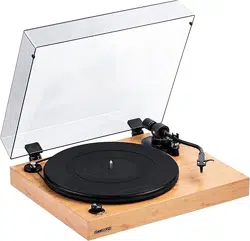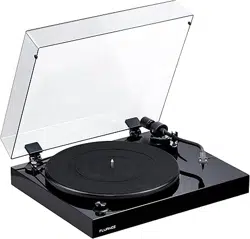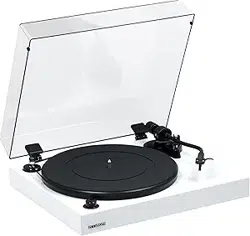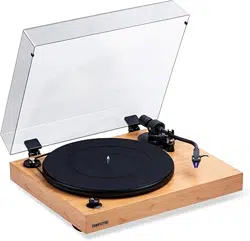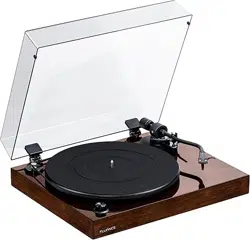
RT82, RT83, RT84, RT85
Reference High Fidelity Vinyl Turntable
User Manual v2.4
Serious Performance
™
Fluance.com
Fluance RT82, RT83, RT84, RT85 User Manual
2
Introduction
Fluance believes everyone should experience audio in its truest form, recreating the performance
the way the artist intended. Utilizing only superior components and expert audio engineering,
their products are a testament to the performance that can be achieved when a passion for music
takes center stage. The perfect complement to any audiophile’s lifestyle, you’ll be enjoying live
performances in your home for years to come.
Fluance.com/resources Fluance.com/contactFluance.com/support
Don’t forget to register your product with us!
Fluance.com/registration
Thank you for your purchase of this Fluance
®
product.
We hope you enjoy your experience.
Questions?
Give us a chance to help, we’re just a click away.
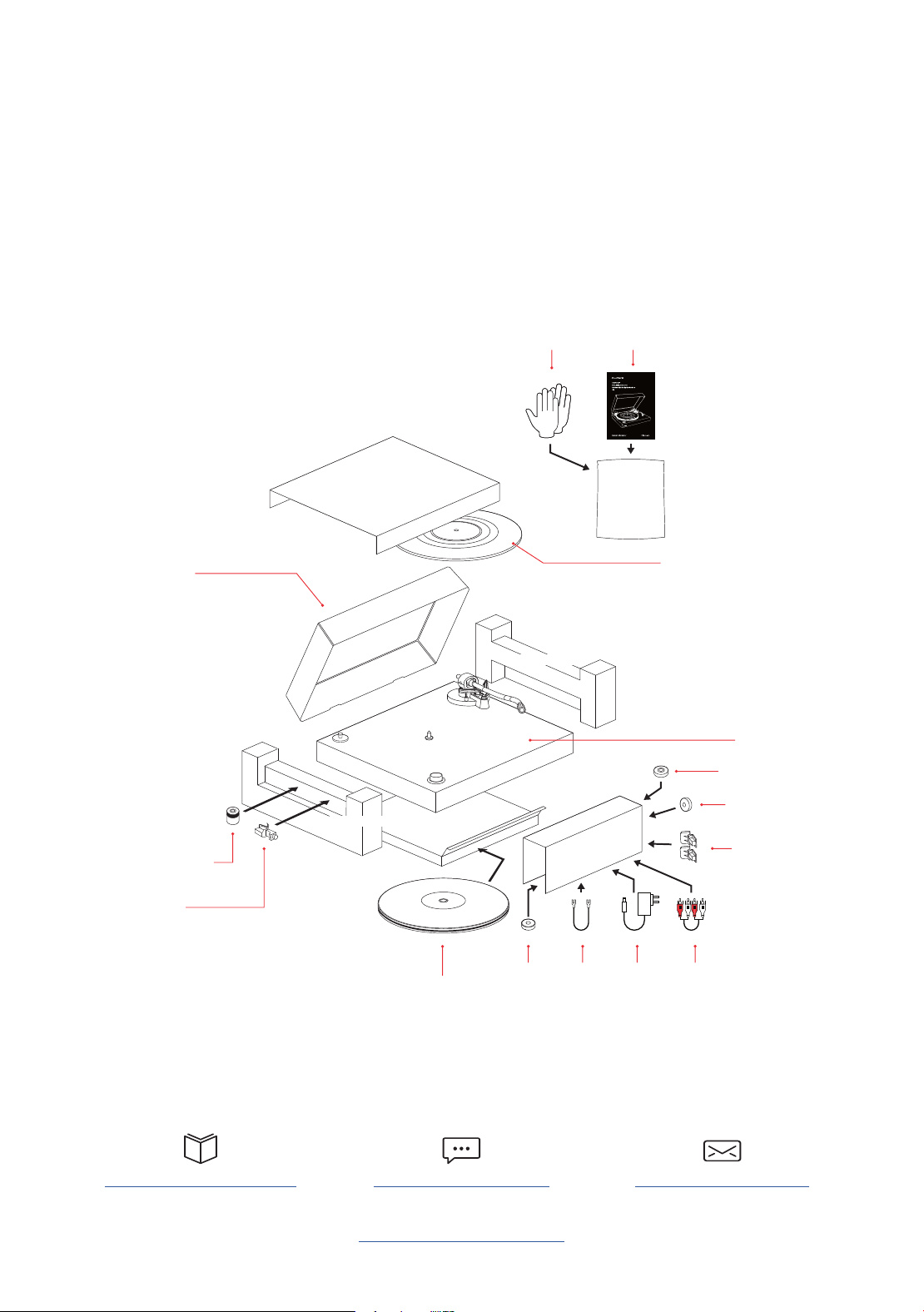
Bag
Bubble Level
45 Adapter
Rubber Turntable Mat
(RT82/RT83/RT84 Only)
Dust Cover
Turntable
Headshell
with Stylus
Counterweight
Cardboard
Insert
Cardboard
Insert
Foam End Cap
Foam End Cap
Dust Cover
Hinges
Cotton
Gloves
Instruction
Manual
Motor
Pulley
Cap
Platter with
Rubber Belt
Box
Ground
Cable
Power
Adapter
RCA
Audio
Cable

Fluance RT82, RT83, RT84, RT85 User Manual
Table Of Contents
Introduction 2
What’s Included 4
Components and Connections 5
First Time Setup 6
Step One: Installing the Platter 6
Step Two: Installing the Counterweight 7
Step Three: Installing the Headshell 7
Step Four: Installing the Dust Cover 8
Step Five: Leveling the Turntable 9
Step Six: Balancing the Tonearm 10
Step Seven: Connecting the RCA and Ground Cables 12
Step Eight: Connecting the Power Adapter 12
Step Nine: Playing a Record 13
Auto Stop Function 13
Maintenance 14
Replacing the Stylus 14
Upgrading the Cartridge 14
Replacing the Rubber Belt 14
Parts and Accessories 15
Turntable Care 15
Record Care 15
Stylus Care 15
Troubleshooting 16
Specications 18
Warranty Information 20
Important Safety Instructions 21
FCC & IC Information 22
Cartridge Alignment Protractor 23
Fluance RT82, RT83, RT84, RT85 User Manual
4
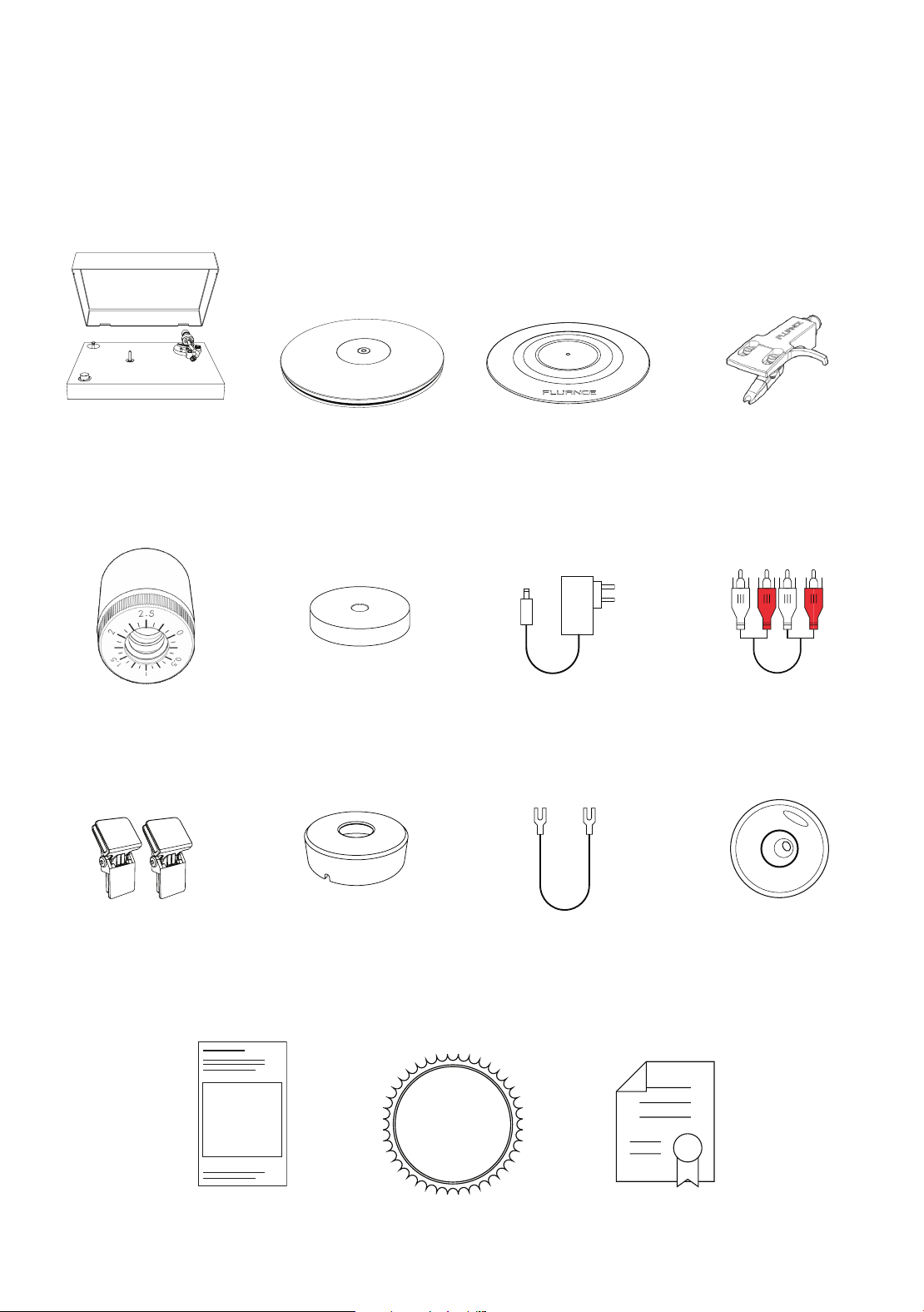
What’s Included
LIFETIME
Customer Support
Turntable with
Dust Cover
Motor Pulley
Cap
Manual
Dust Cover
Hinges
RCA Audio
Cable
Power
Adapter
45 Adapter
Ground Cable
Lifetime Customer
Support
Bubble Level
2 Year
Warranty
Headshell with
Stylus
RT82 - OM 10
RT83 - 2M Red
RT84/RT85 - 2M Blue
RT85N – MP-110
Platter with
Rubber Belt
RT82/RT83/RT84 - Metal
RT85 - Acrylic
Rubber
Turntable Mat
RT82/RT83/RT84 Only
RT85 - Mat Not Included
Counterweight
Fluance RT82, RT83, RT84, RT85 User Manual
5
Components and Connections
1
2
4
3
5
6
7
8
14
21
20
18 19
15
16 17
13
12
11
10
9
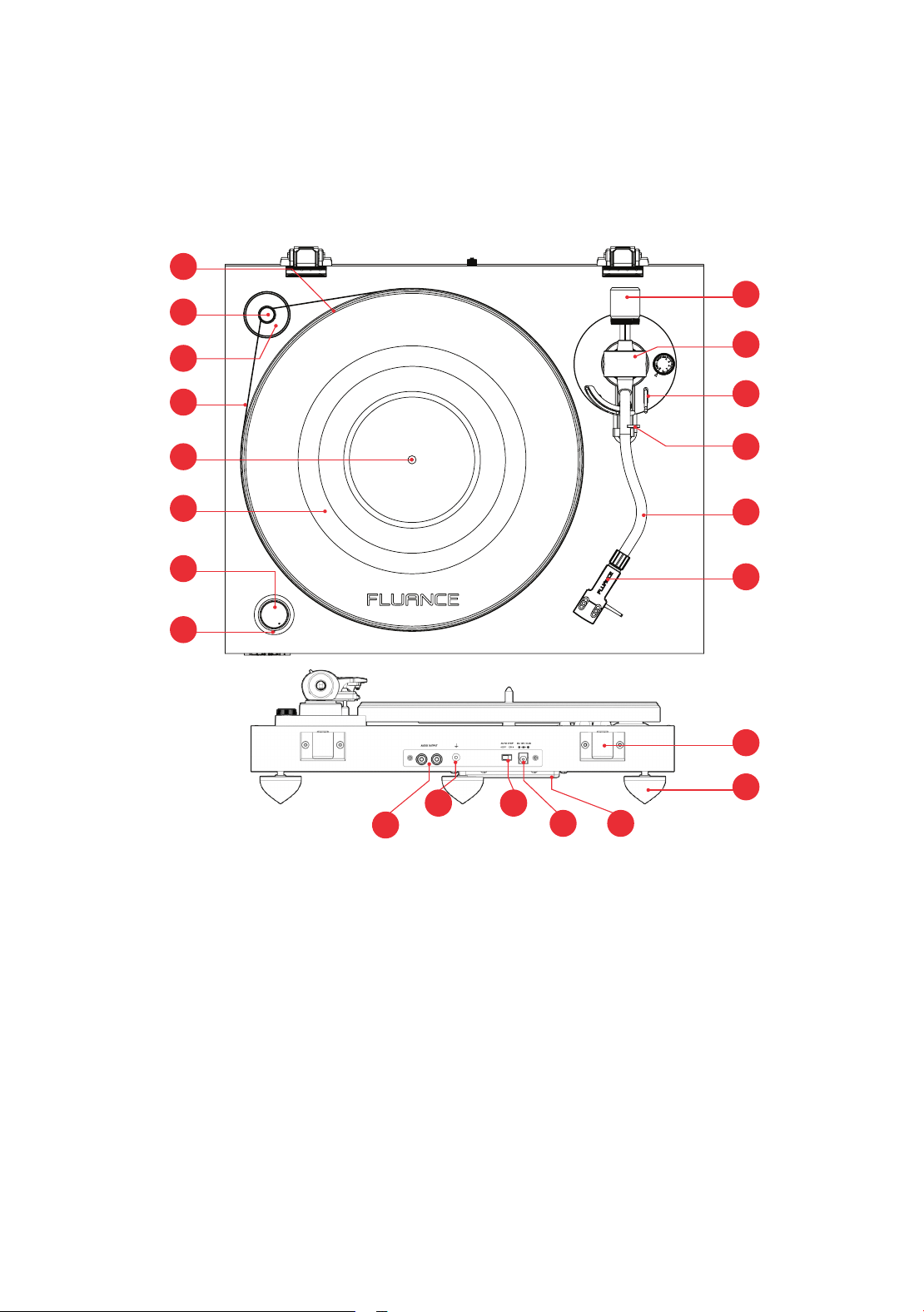
1. Platter
2. Motor Pulley
3. Motor Pulley Cap
4. Rubber Belt
5. Spindle
6. Rubber Turntable Mat
(RT82/RT83/RT84 Only)
7. Speed Selection
8. Power LED
9. Counterweight
10. Anti-Skating Control
11. Cueing Lever
12. Tonearm Lock
13. Tonearm
14. Headshell & Stylus
15. RCA Audio Outputs
16. Ground Terminal
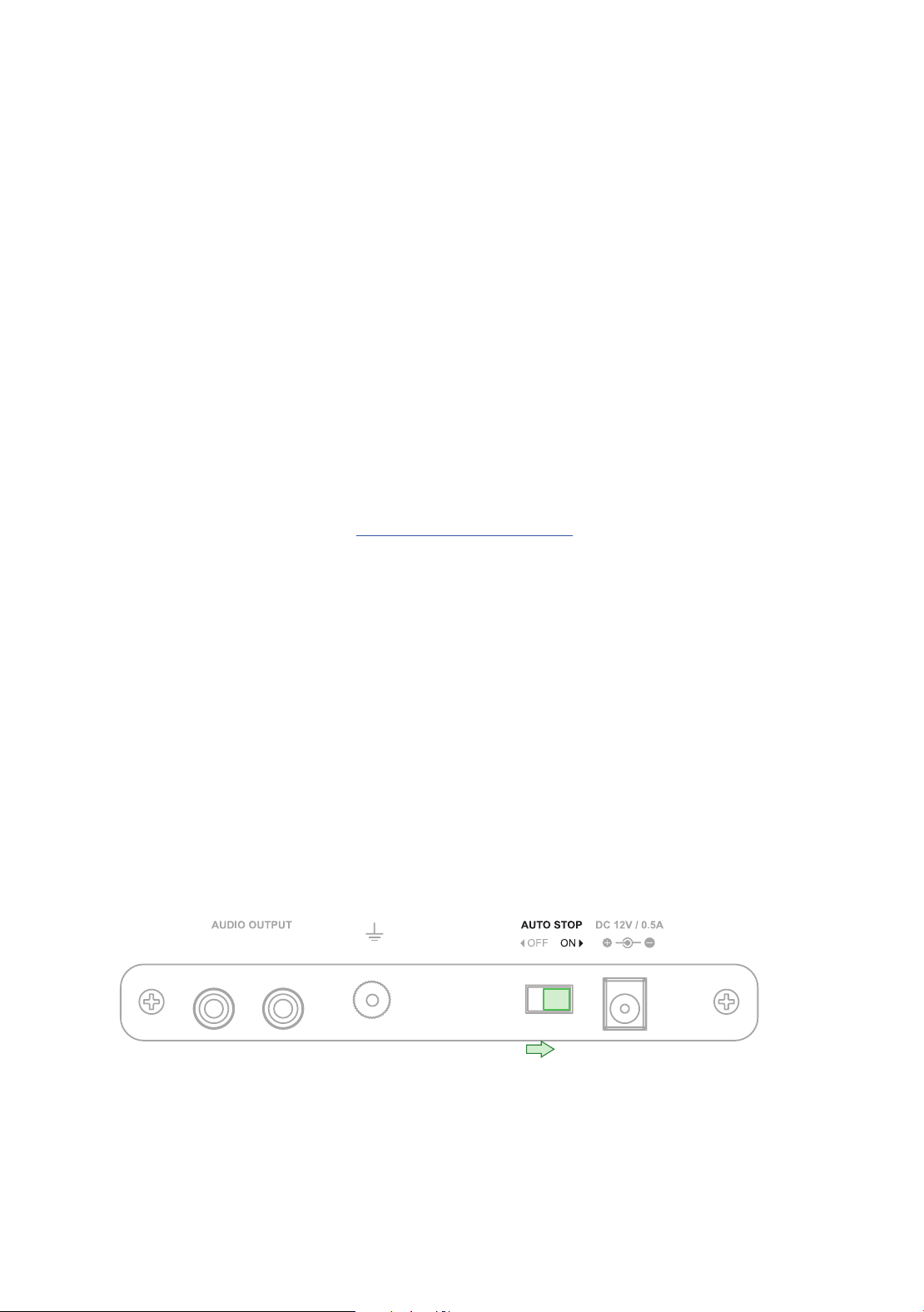
17. Auto Stop Switch
18. Power Input
19. Motor Servo
20. Isolation Feet
21. Hinge
Fluance RT82, RT83, RT84, RT85 User Manual
6
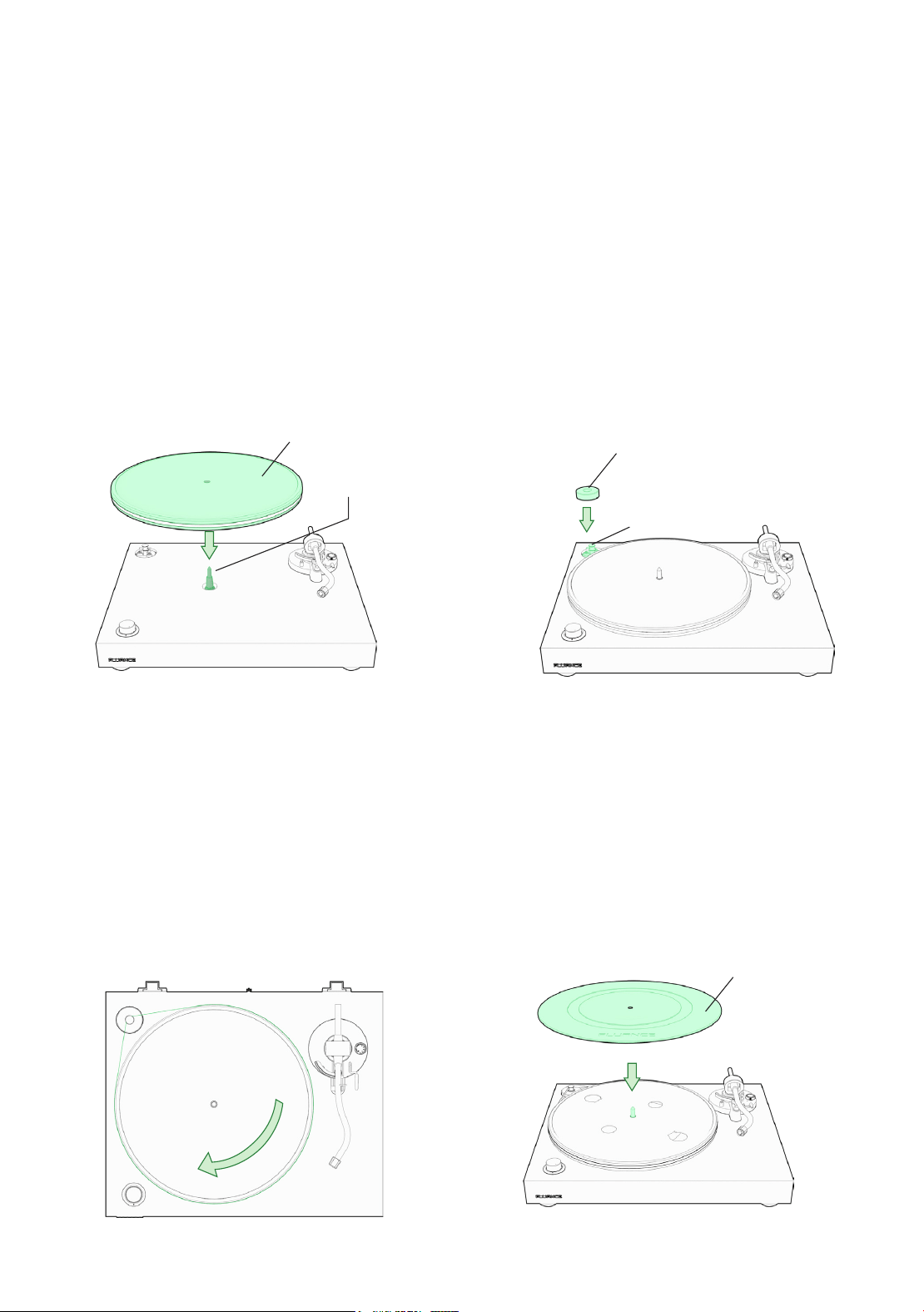
1. Remove the protective packaging and
ensure the turntable is placed on a
sturdy and level surface. Place the
platter onto the spindle located in the
middle of the turntable.
2. Place the motor pulley cap over the
motor pulley. Ensure the arrows are
aligned so that the motor pulley cap
is installed properly.
Tip: The arrows help to align the notch on the
motor cap with the post on the motor.
3. Lift the rubber belt and place it around
the motor pulley. Rotate the platter
several times to ensure the rubber belt
is secure and not twisted.
4. RT82/83/84: Place the turntable mat
on top of the platter. Make sure the
logo side is facing up
Note: RT85-Turntable mat is not included. When
using an acrylic platter a turntable mat is not required.
Turntable Mat
Platter
Motor Pulley Cap
Spindle
Motor Pulley
First Time Setup
Step One: Installing the Platter
Fluance RT82, RT83, RT84, RT85 User Manual
7
Step Two: Installing the Counterweight
Step Three: Installing the Headshell
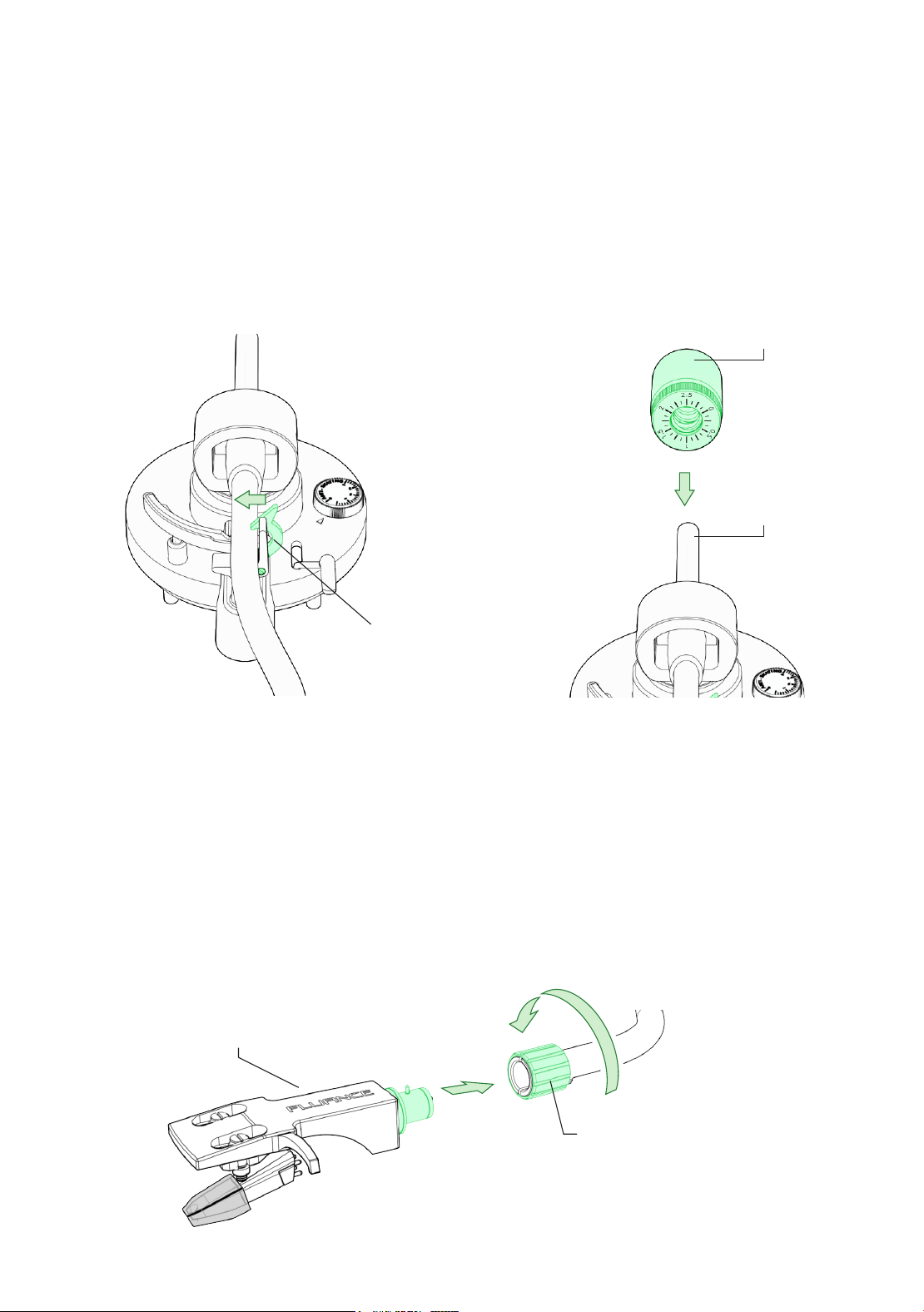
1. Secure the tonearm using the
tonearm lock.
1. Remove the headshell from the
protective packaging and insert
into the end of the tonearm.
2. Slide the counterweight onto the end
of the tonearm with numbers facing
forward until it clicks and is fully
installed on the tonearm.
2. Tighten the locking nut until the
headshell is secure.
Tonearm Lock
Counterweight
Locking Nut
Headshell
Tonearm
Fluance RT82, RT83, RT84, RT85 User Manual
8
Step Four: Installing the Dust Cover
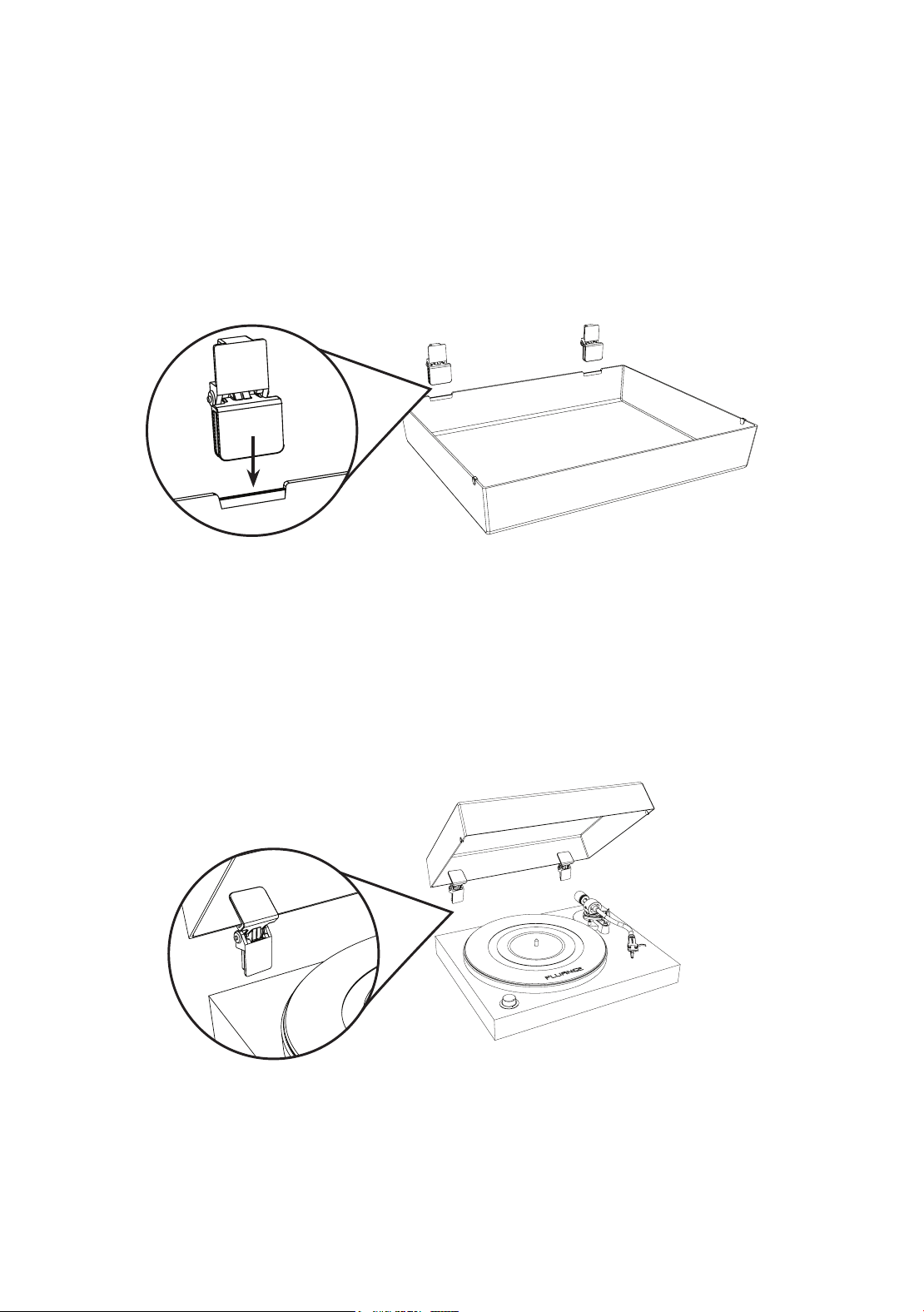
1. Important: Place dust cover on a soft surface to avoid scratching it. Install the hinges on
the provided grooves located on the back of the dust cover.
CAUTION: The hinges are spring loaded and can close with strong force. Use caution when
installing.
2. Carefully open the hinges on the dust cover and insert into the hinge mounts pre-
installed on the back of the turntable.
Fluance RT82, RT83, RT84, RT85 User Manual
9
Step Five: Leveling the Turntable
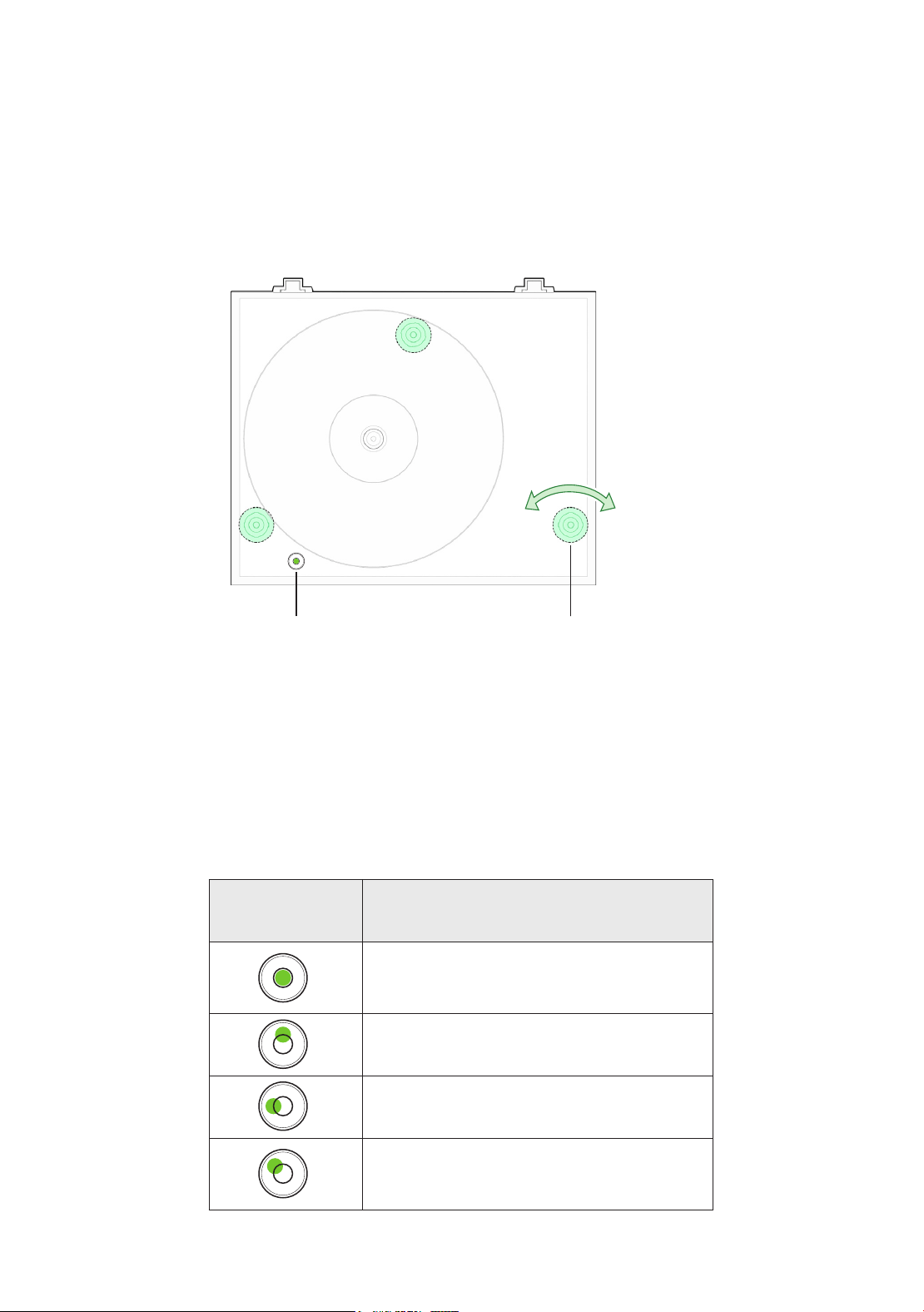
This turntable features 3 adjustable feet to ensure the turntable is level regardless of the surface
the turntable is resting upon.
Adjustable FeetBubble Level
Lower
Turntable
Raise
Turntable
Bubble Position Turntable Adjustment
Turntable is level when the bubble
is within the circle
Lower Back or Raise Front
Lower Left or Raise Right
Lower Back or Raise Front and
Lower Left or Raise Right
Use the table below with the included bubble level to adjust the feet and level the turntable.
Note: The turntable comes in the fully lowered position.
Fluance RT82, RT83, RT84, RT85 User Manual
10
Step Six: Balancing the Tonearm
Important!
Complete all steps for balancing the tonearm. Incorrect tonearm balancing can cause damage to the stylus and to your
records. For additional assistance go to www.uance.com/support to watch a tutorial video for this process.
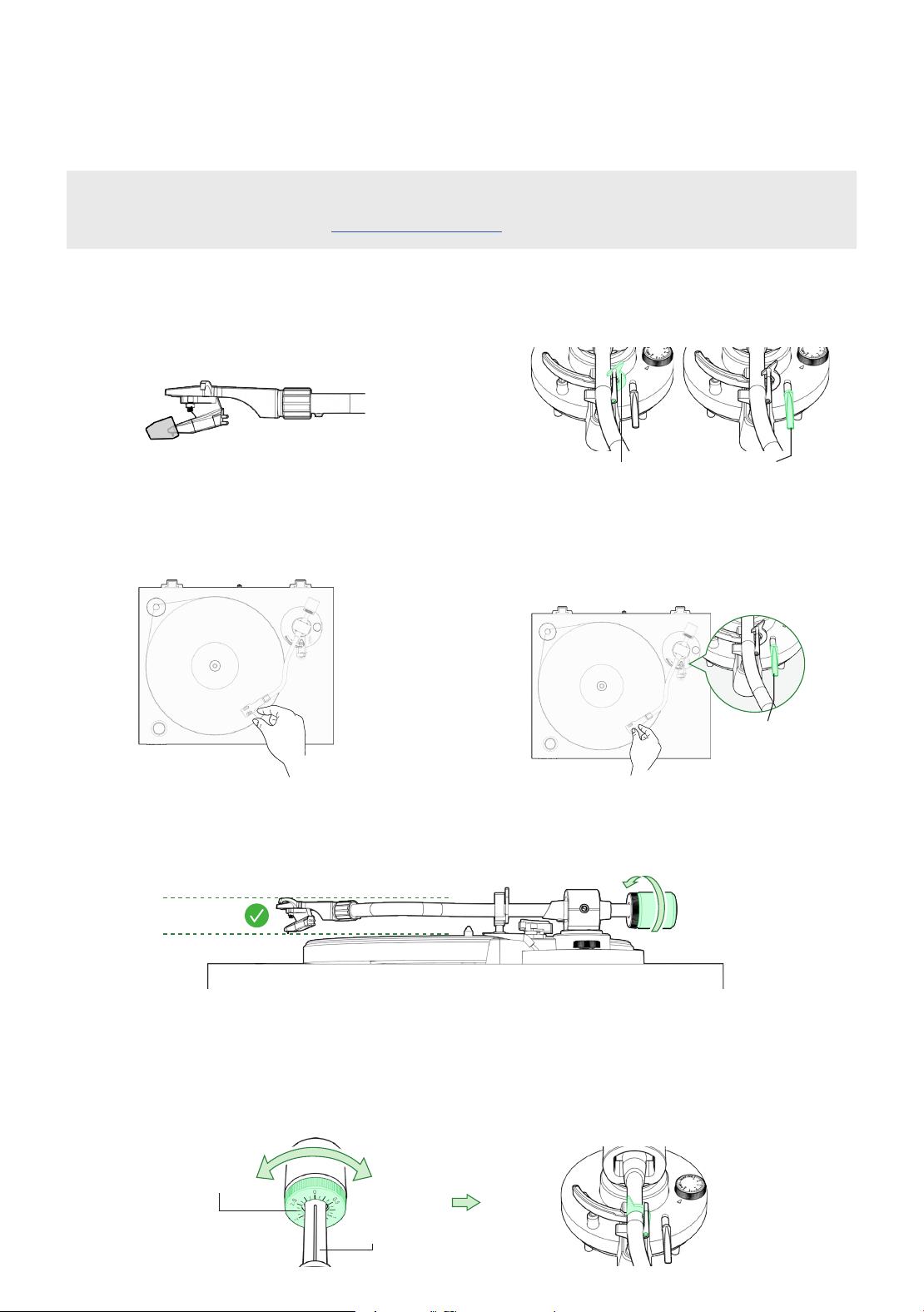
1. Remove the stylus protector.
3. Position the tonearm over the
platter.
5. With the cueing lever now lowered, turn the entire counterweight until the tonearm is
balanced and floating horizontally when headshell is released. Do not allow the stylus to
touch the platter.
6. Set only the counterweight indicator ring to “0” on the center line while keeping the
tonearm balanced then lock the tonearm on the tonearm rest.
2. Unlock the tonearm and lift the
cueing lever.
4. Hold the headshell and lower the
cueing lever completely. Protect the
stylus from touching the platter.
Lock Cueing Lever
Tip: When balancing the tonearm make sure the cueing lever is down and the anti-skating control is set to 0.
Counterweight
Indicator Ring
Center Line
Cueing Lever
Fluance RT82, RT83, RT84, RT85 User Manual
11
Step Six (Continued): Balancing the Tonearm
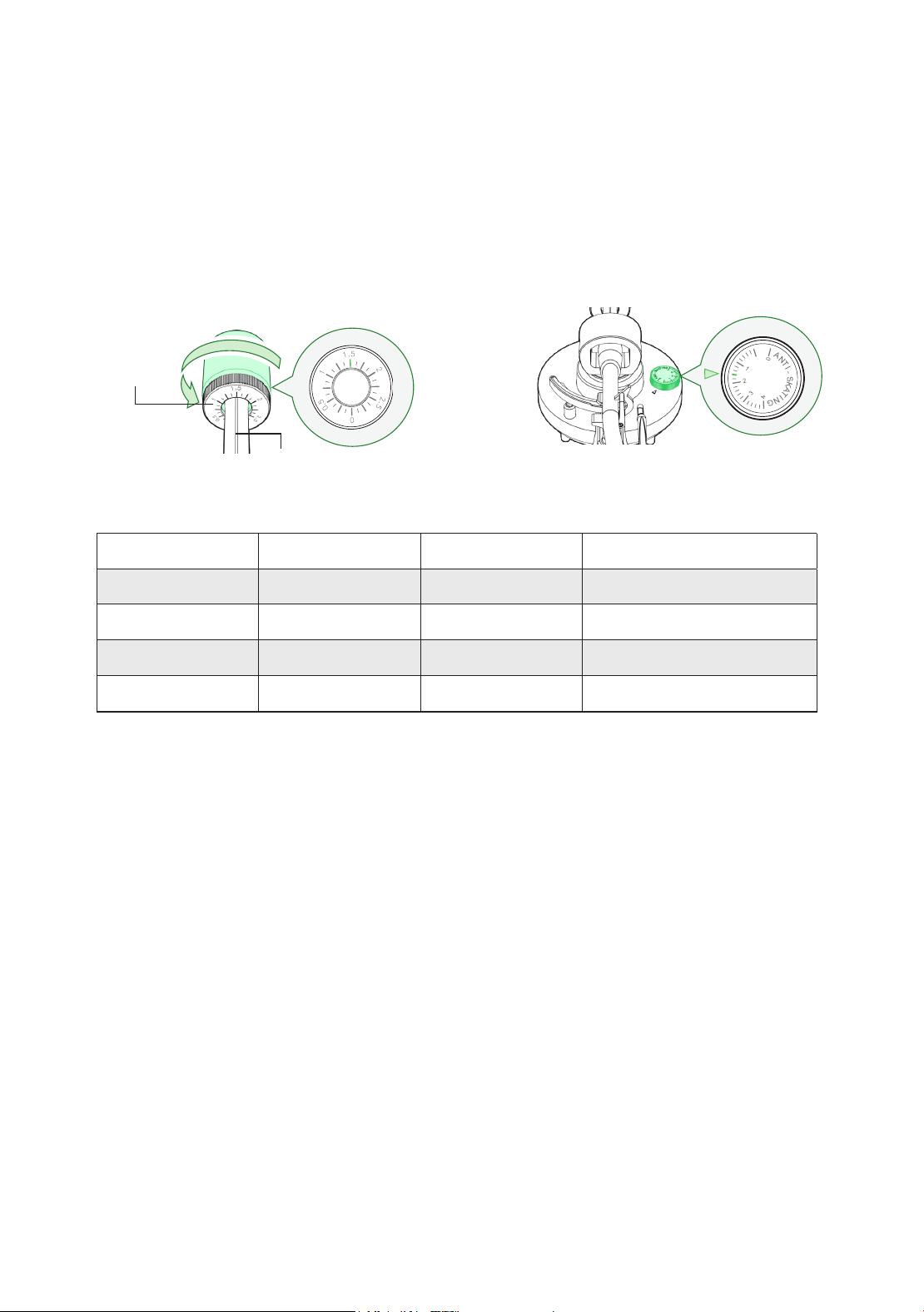
7. Use the chart below to determine the recommended tracking force for your cartridge.
Rotate the entire counterweight counterclockwise until the indicator ring is set to the
correct value on the center line. (fig.1)
8. Set the anti-skating control value to match the recommended tracking force. (fig.2)
Tip: When setting the counterweight make sure you are turning the entire weight and not just the counterweight indicator ring.
Counterweight
Indicator Ring
Center Line
Model Cartridge Tracking Force Anti-Skating Value
RT82 OM 10 1.5g 1.5
RT83 2M Red 1.8g 1.8
RT84 / RT85 2M Blue 1.8g 1.8
RT85N MP-110 1.8g 1.8
(g.2)(g.1)
Fluance RT82, RT83, RT84, RT85 User Manual
12
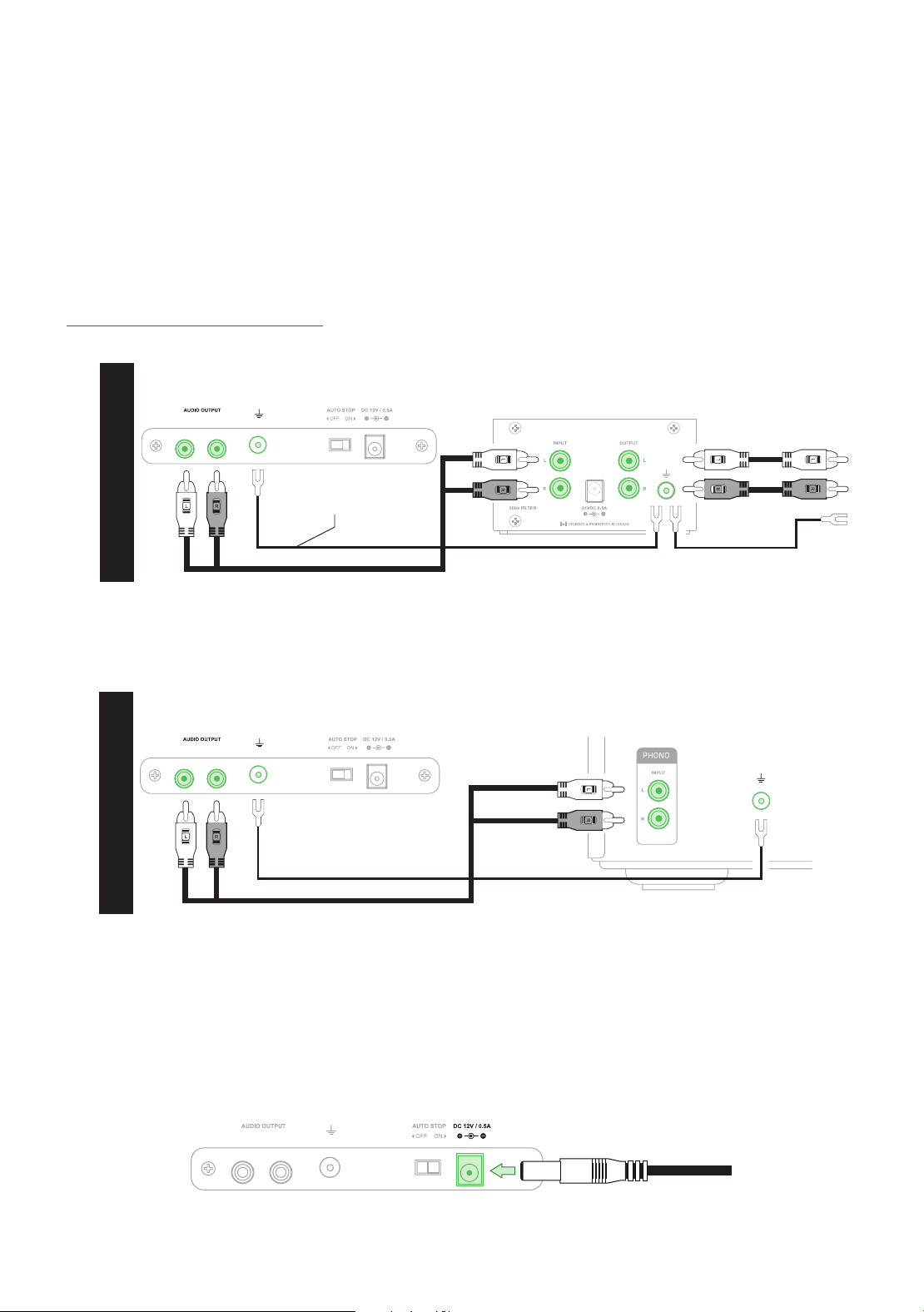
Turntable Preamp
*Fluance PA10 shown here
OPTION 1
To Amplifier or
Powered Speakers
Ground Cable
Second Ground Cable
(Not included)
Step Seven: Connecting the RCA and Ground Cables
This turntable does not have an internal preamp so an external preamp or an amplifier with a
PHONO input must be used. Connect the RCA and ground cable to the back of the turntable
and then connect the other end to your external preamp or the PHONO input and ground
terminal on your amplifier. Ensure the cable colors are matched to the RCA connector colors.
Note: The included RCA cable is a high quality cable with a <90pF capacitance rating. For best performance it is
recommended that any other RCA connections use a similarly rated cable. The Fluance RCA cable is available at
www.uance.com/turntable-accessories
Step Eight: Connecting the Power Adapter
Ensure the power adapter is securely connected to a power outlet. Insert the power cable into
the power input on the back of the turntable. It is recommended to reconfirm with the bubble
level that the turntable is still level after setup is complete.
Important: When using an external preamp one ground cable should be connected between the turntable and the
preamp. A second ground cable (Not Included) should be connected between the preamp and the amplier/powered
speakers. Failure to connect both ground cables can result in unwanted noise/hum.
Important: The ground cable must be connected to both turntable and amplier. Failure to connect to both can result in
unwanted noise/humming.
Turntable Amplifier
OPTION 2
Important: Only use the ofcial power adapter included with your turntable.
Fluance RT82, RT83, RT84, RT85 User Manual
13
Step Nine: Playing a Record
Tip: For best audio performance the dust cover should be removed during playback.
Note: When the turntable is not in use the speed selection knob should be set to OFF to turn the turntable completely off.
The turntable setup is now complete! Enjoy your Fluance turntable. Should you require any
further assistance please visit us at www.uance.com/support for how-to videos and guides.
Break In Period
To experience the peak performance of your turntable, it is recommended to allow the cartridge
to break in. The break in period for cartridges included with Fluance turntables is 20 hours of
normal playback.
1. Lift the dust cover
2. Place a record on the spindle (use the
45 Adapter if necessary)
3. Turn the speed selection knob to the
correct RPM typically listed on your
record (Normal LP playback speed is 33
RPM)
4. Unlock the tonearm lock
5. Lift the cueing lever
6. Move the tonearm to the desired
starting point
7. Lower the cueing lever
Note: The auto stop function will take approximately 30 seconds at the end of the record before the turntable stops spinning.
Due to variances in vinyl record production some records may not work correctly with the auto stop function.
Auto Stop Function
The auto stop function is designed to extend the life of your stylus. At the end of a record,
the platter will automatically stop spinning if auto stop is enabled. This feature will also require
that the tonearm is moved over the record before the platter will start spinning at the selected
speed.
If the auto stop switch is set to the OFF position the platter will begin spinning as soon as
the speed selection knob is set to 33 or 45. To stop the record from spinning set the speed
selection knob to the OFF position.
Fluance RT82, RT83, RT84, RT85 User Manual
14
Maintenance
Replacing the Stylus
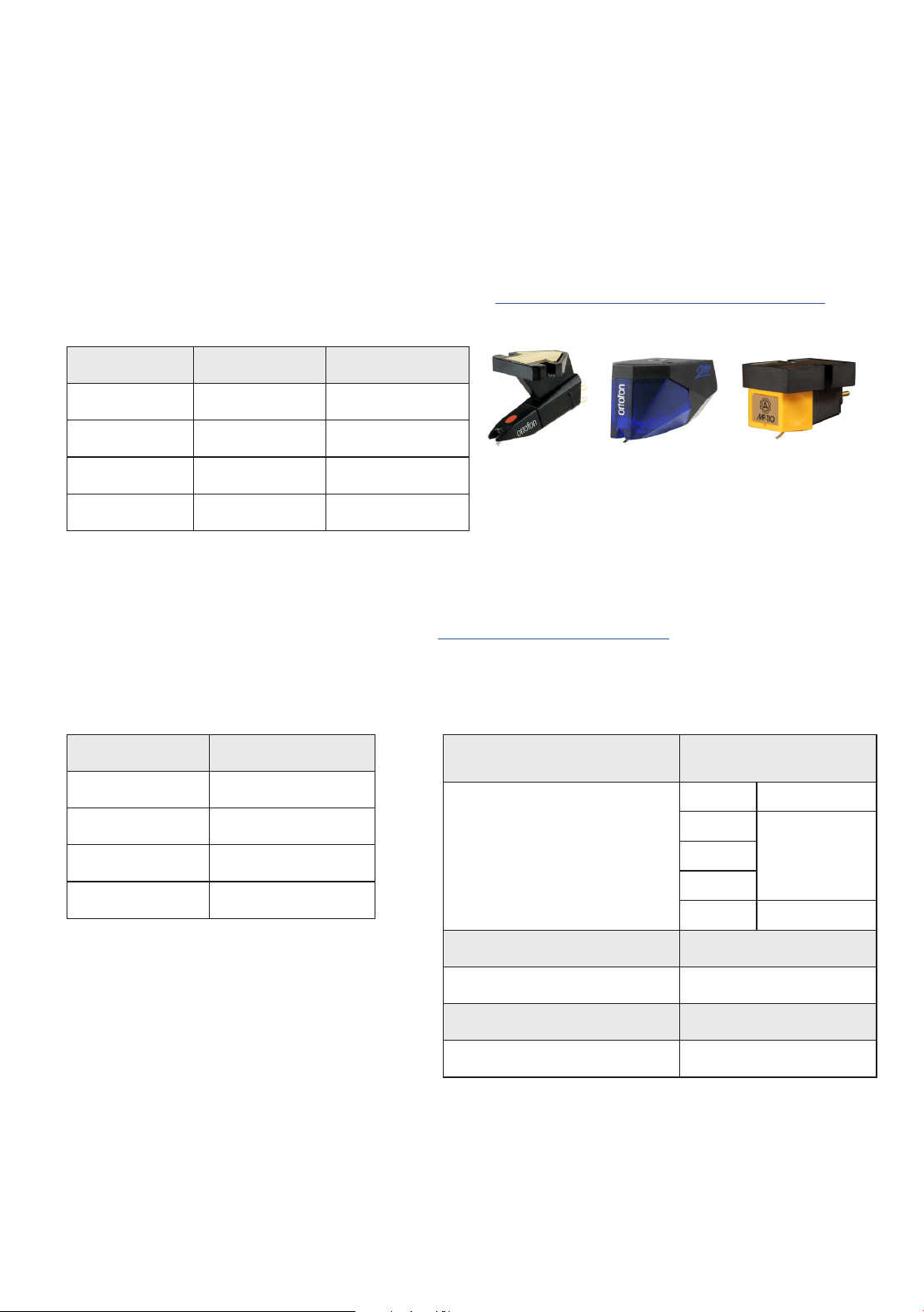
Use the chart below to ensure you replace your stylus with the correct model.
Replacement stylus and instructions are available at www.uance.com/turntable-accessories
Cartridge Connections Turntable Cartridge Specifications
Model Cartridge Stylus
RT82 OM 10 Stylus 10 E
RT83 2M Red Stylus 2M Red
RT84 / RT85 2M Blue Stylus 2M Blue
RT85N MP-110 JN-P110
Wire Channel
White Left (+)
Blue Left (-)
Red Right (+)
Green Right (-)
Supported Cartridge
Weight
5.0 to 7.5 grams
Effective Tonearm Mass
RT82 21.78 grams
RT83
27.5 grams
RT84
RT85
RT85N 21.1 grams
Overhang 19.2 mm
Effective Tonearm Length 224 mm
Headshell Cartridge Mount Half-inch Mount
Fluance Headshell Weight 9 grams
Replacing the Rubber Belt
1. With the platter installed remove the defective rubber belt from the motor pulley and platter.
2. Wrap the new rubber belt around the platter being careful to not overstretch the belt.
Ensure it is not twisted.
3. Lift the rubber belt and place it over the motor pulley.
4. Rotate the turntable several times to ensure the rubber belt is secure and not twisted.
Upgrading the Cartridge
The turntable supports the option of upgrading the cartridge. A complete cartridge
replacement guide and video are available at www.uance.com/resources
There is also a Cartridge Alignment Protractor at the end of the manual for your convenience.
OM 10 2M RED/
2M BLUE
MP-110
Fluance RT82, RT83, RT84, RT85 User Manual
15
Record Care
1. Records should be stored vertically in a dry environment away from sources of heat.
2. An anti-static brush can be used to remove dirt from the record’s grooved surface. Use
a record cleaning solution to further clean your records to ensure crystal clear playback.
3. It is important to use the cueing lever when lifting or lowering the tonearm to prevent
accidental slipping and scratching.
Turntable Care
1. Use a soft dry microfiber cloth to wipe dust from the turntable surface.
2. Keep the dust cover closed to ensure the turntable components remain dust free.
3. When cleaning the acrylic platter only use microfiber cloth to avoid scratching the surface.
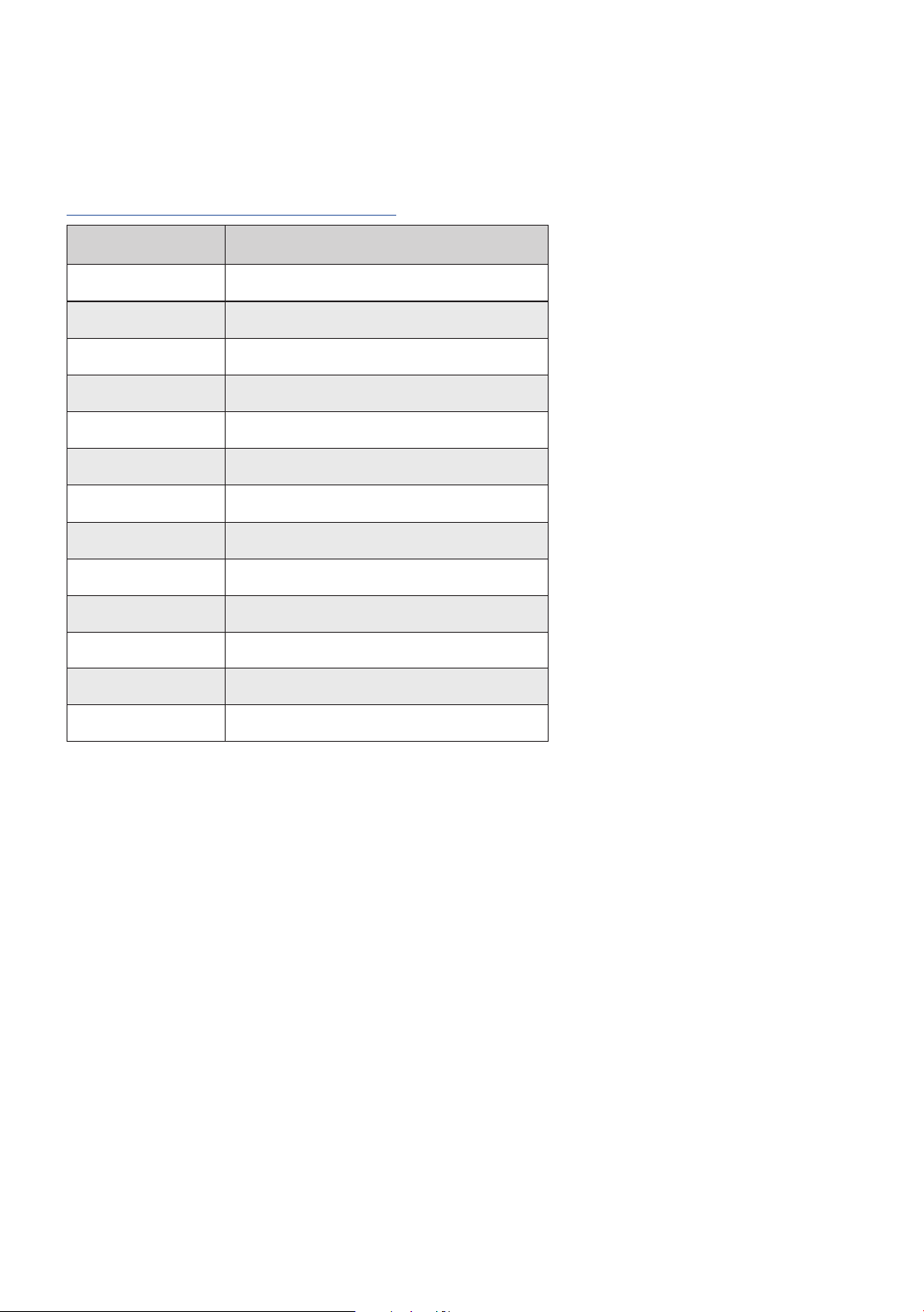
Parts and Accessories
Replacement parts and turntable accessories are available at
www.uance.com/turntable-accessories
Stylus Care
1. When the turntable is not in use always keep the provided stylus protector installed to
prevent accidental damage.
2. A stylus cleaning brush can be used to remove dust and debris from the stylus.
3. Enabling the auto stop function will reduce wear and tear on the stylus by stopping the
turntable after playback is completed.
Part Number Description
PA10 High Fidelity Phono Preamp
VB52 Vinyl Record & Stylus Cleaning Kit
AP03 Frosted Acrylic Platter
BL21 Bubble Level
CA03 90pF RCA Cable
CW02 102g Counterweight
CW12 112g Counterweight
GW03 Ground Wire
HS82 RT82-RT85 Headshell with wires
PFHTDU Dust Cover
PFHTRP Rubber Turntable Mat
RB35 RT82-RT85 Rubber Belt
TA21 Cork Turntable Mat

Fluance RT82, RT83, RT84, RT85 User Manual
16
Troubleshooting
Turntable Not Spinning
• Turn the speed selection knob to 33 or 45 (power LED should light up). Lift the tonearm
over the platter and it should start spinning.
• The turntable should be connected to a known good power outlet and the power cable
should be securely inserted into the unit.
• Ensure the rubber belt is intact and hooked around the platter and the motor pulley.
No Power
• The turntable should be connected to a known good power outlet and the power
cable should be securely inserted into the unit.
• The power LED should light up when the speed selection knob is set to 33 or 45.
Wrong Speed
• Check the record label for the correct playback speed and that the speed selection knob is
set to match it. Normal LP playback speed is 33 1/3 RPM, but some play at 45 RPM.
Skipping
• Ensure the record surface is clear of dirt and debris. Also check that the record is not
warped or deformed.
• Inspect the stylus tip for built up dirt or debris. Use a stylus cleaning brush to clean if
necessary.
• Ensure the turntable is on a sturdy and level surface and properly leveled using the
adjustable feet.
• Use the instructions in step four of the first time setup instructions to confirm the tonearm
was balanced correctly and set to the correct tracking force for the included cartridge.
• Check that the anti-skating control is set to match the tracking force.
Audio Feedback
• If audio feedback occurs ensure the speakers are positioned away from the turntable.
The turntable should not be placed in front of the speakers or on the same surface as
the speakers.
• For best audio performance the dust cover should be removed during playback.
• Playback at excessive volume can cause feedback. If feedback is occurring decrease
volume or lower bass levels.
• If using an external preamp with a rumble filter, turn it on to reduce resonance feedback.

Fluance RT82, RT83, RT84, RT85 User Manual
17
Cueing Lever Not Lowering Tonearm
• Use instructions in step four of the first time setup instructions to confirm the tonearm was
balanced and set to the correct tracking force.
• Lock the tonearm and lower the cueing lever. Gently press down on the tonearm bridge until
fully lowered to reset the tonearm lowering mechanism.
Low Volume
• Check the RCA connections are correct and fully inserted. (See Step Seven)
• If the turntable is directly connected to an amplifier it must have a PHONO input.
• The turntable does not include an internal preamp so an external preamp or amplifier with
PHONO input must be used with the turntable. The Fluance High Fidelity Phono Preamp
(PA10) is designed for the Reference Series turntables and is available on www.uance.com.
Humming Sound
• Connect the ground wire to your external preamp or amplifier. If using an external
preamp ensure the second ground wire is connected from the preamp to the amplifier
/powered speakers.
• Ensure the headshell is fully tightened and secured.
• The turntable and other devices should be directly connected to a power outlet. It is
recommended to avoid power bars or extension cables.
• Ensure the speakers are positioned away from the turntable. The turntable should not
be placed in front of the speakers or on the same surface as the speakers.
Audio From Only One Channel
• Test the speakers with another device such as a CD Player or Smartphone.
• Confirm the tonearm is balanced and using the correct tracking force.
• Disconnect and reconnect the RCA cables ensuring they are fully inserted.
• Try a different set of RCA cables.
• Remove the headshell from the tonearm and use rubbing alcohol on a cotton swab to clean
the contacts on the back of the headshell. Reinstall the headshell ensuring the locking nut is
tightened completely.
Need Additional Help?
• Do not return this product to the store.
• Please contact Fluance Customer Experience first, regarding any additional information on
product features, specifications or assistance with setup.
• Online web chat or Support: www.uance.com/contact
• Online support videos and guides: www.uance.com/resources
Fluance RT82, RT83, RT84, RT85 User Manual
18
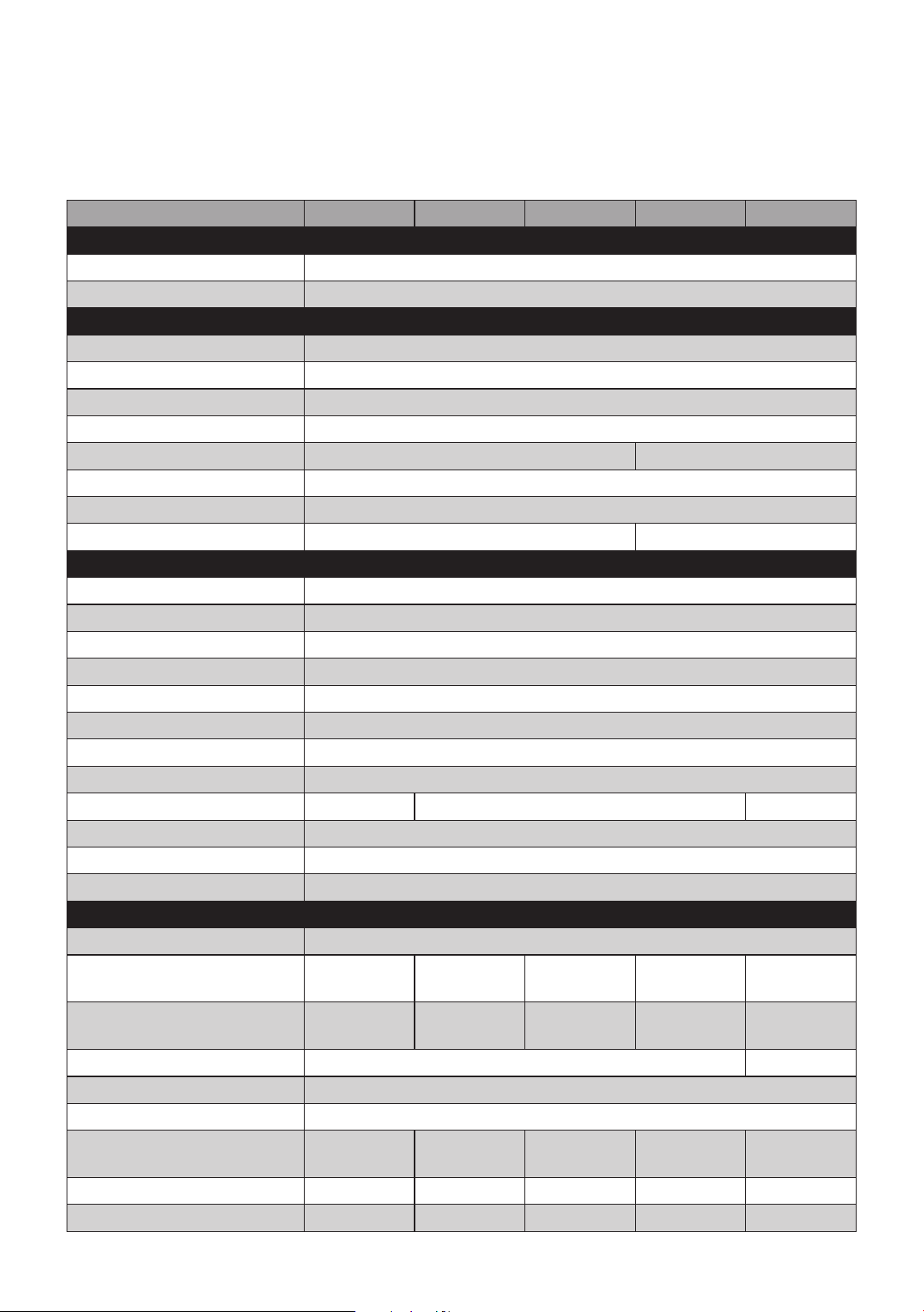
Specifications
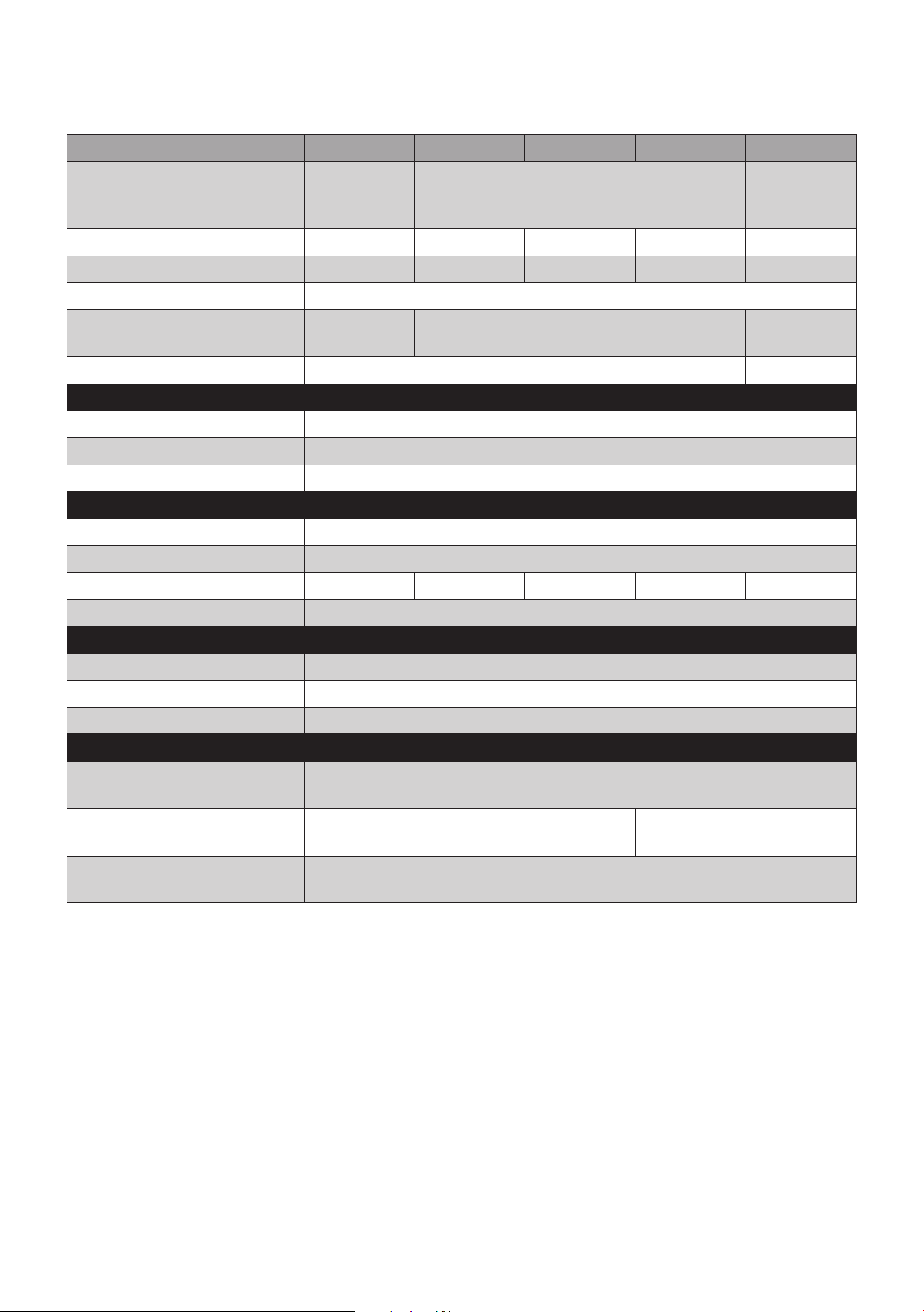
Specications RT82 RT83 RT84 RT85 RT85N
CabinetSpecications
Material MDF
Dust Cover Yes - Tinted
TurntableSpecications
Drive System Belt Drive
Motor DC Motor with Servo Controller
Motor Isolation Seven-Point Rubber Isolation with Decoupling Isolation Ring
Speed 33 1/3 RPM, 45 RPM
Platter Aluminum Acrylic
Diameter of Platter 12” (30 cm)
Auto-Stop Yes
Turntable Mat Rubber None
TonearmSpecications
Type Static Balanced, S-Type
Supported Cartridge Weight
5.0 to 7.5 grams
Counterweight Yes
Anti-skating Adjustment Yes
Pivot Bearing Yes
Cueing Lever Yes
Material Aluminum
Tonearm Wire 36 AWG Litz Cable / 7 Strand
Effective Tonearm Mass 21.78 grams 27.5 grams 21.1 grams
Overhang 19.2 mm
Effective Tonearm Length 224 mm
Headshell Mount H-4 Bayonet Mount
CartridgeSpecications
Type Moving Magnet (MM)
Cartridge Model
Ortofon
OM10
Ortofon
2M Red
Ortofon
2M Blue
Ortofon
2M Blue
Nagaoka
MP-110
Replacement Stylus Stylus 10
Stylus
2M Red
Stylus
2M Blue
Stylus
2M Blue
JN-P110
Stylus 0.3 x 0.7 mil
0.4 x 0.7 mil
Cantilever Aluminum
Mount Half-inch
Frequency Range
20-22,000
Hz
20-22,000
Hz
20-25,000
Hz
20-25,000
Hz
20-20,000
Hz
Channel Separation
22 dB at 1 kHz
22 dB 25 dB 25 dB 23 dB
Channel Balance < 1.5 dB 1.5 dB 1.5 dB 1.5 dB > 1.5 dB
Fluance RT82, RT83, RT84, RT85 User Manual
19
Specications RT82 RT83 RT84 RT85 RT85N
Load Impedance/
Capacitance
47k
Ohms/200
- 500 pF
47k Ohms/150-300 pF
47k
Ohms/100
pF
Output Voltage 4.0 mV 5.5 mV 5.5 mV 5.5 mV 5.0 mV
Cartridge Weight 5 grams 7.2 grams 7.2 grams 7.2 grams 6.5 grams
Headshell Weight 9 grams
Recommended Tracking
Force
1.5 grams 1.6 - 2.0 grams
1.5 - 2.0
grams
Vertical Tracking Angle 20° 31°
RubberBeltSpecications
Thickness 0.6 mm
Width 4.5 mm
Length 915 mm
OutputSpecications
Connector RCA (Gold-plated)
Preamp No - Separate Phono Preamp Required
Phono Output 4 mV 5.5 mV 5.5 mV 5.5 mV 5.0 mV
Ground Terminal Yes
PowerSpecications
Input 100 - 240 V AC (50/60 Hz)
Output 12 V / 500 mA
Consumption 1.5 W
GeneralSpecications
Unit Dimensions ( W x H
x D )
16.5 x 5.5 x 13.75 inches (419.1 x 139.7 x 349.25 mm)
Unit Weight 6.8 kg (14.99 lbs)
7.6 kg
(16.76 lbs)
Optimal Operating
Temperature
5°C to 35°C

Fluance RT82, RT83, RT84, RT85 User Manual
20
Warranty Information
Thank you for choosing Fluance! We guarantee your investment in our products is a solid one. High
performance components combined with quality craftsmanship allow us to maintain the highest possible
production standards.All items are guaranteed against defects in materials and craftsmanship. Fluance has
outstanding quality control; if something should go wrong with any of our products, we will repair it free
of charge within the warranty period. If the product cannot be repaired, we will replace the product. If the
product has been discontinued, we will replace the product with either the newest version of said product or
current equivalent. In the event that Fluance replaces a product under warranty, the replacement would only
carry the original warranty from the original date of purchase.
Warranty Period
The Fluance products below are warrantied for parts and labor for the stated period from date of original
purchase, and are subject to the terms and conditions of the warranty. Any refurbished products that are
discontinued hold a 90 day warranty from the date of original purchase. Fluance warranties are valid for the
original owner and are non-transferable.
• Home Audio Passive Speakers: Lifetime Warranty
• Active or Powered Speakers: Two Year Warranty
• HiFi Turntables: Two Year Warranty
• Batteries (For Powered Speakers): One Year Warranty
Warranty Exclusions:
• Products purchased from a dealer not authorized by Fluance.
• Products with the serial number defaced, altered, or missing.
• Defects resulting from disaster, accident, abuse, misuse, lightning, power surges, neglect, unauthorized
modification or water damage.
• Defect or damage as a result of repairs performed by a person or party not authorized by Fluance.
• Defects of damage occurring during shipping (claims should be made with the shipping company).
• Defect or damage as a result of connecting a product to an outlet with the incorrect voltage. Voltage
converters must be used where applicable.
• Consumable parts including, but not limited to, batteries, styli, and rubber belts.
To Obtain Warranty Service
Should your product require warranty service, please contact us at www.fluance.com/contact or call us at
1-888-617-6863 to set up a Return Authorization. Products returned without a valid Return Authorization
number will be refused.
Fluance products must be returned in their original packaging. Our products are packaged specially to
protect them from any damage during shipping, and without this packaging the return shipment could get
damaged.
This warranty does not cover the shipping cost, insurance, or any other incidental charges. Products shipped
for warranty service must be pre-paid by the customer, and Fluance will cover the cost to ship the repaired or
replaced product back to the customer.
Fluance RT82, RT83, RT84, RT85 User Manual
21
Important Safety Instructions
1. Read these instructions.
2. Keep these instructions.
3. Heed all warnings.
4. Follow all instructions.
5. Do not use this apparatus near water.
6. Clean only with dry cloth.
7. Do not block any ventilation openings. Install in
accordance with the manufacturer’s instructions.
8. Do not install near any heat sources such as
radiators, heat registers, stoves, or other apparatus
(including amplifiers) that produce heat.
9. Do not defeat the safety purpose of the polarized
or grounding type plug. A polarized plug has two
blades with one wider than the other. A grounding
type plug has two blades and a third grounding
prong. The wide blade or the third prong is
provided for your safety. If the provided plug does
not fit into you outlet, consult an electrician for
replacement of the obsolete outlet.
10. Protect the power cord from being walked on
or pinched particularly at plugs, convenience
receptacles, and point where they exit from the
apparatus.
11. Only use attachments / accessories specified by
the manufacturer.
12. Unplug this apparatus during lightning storms or
when unused for long periods of time.
13. Refer all servicing to qualified service personnel.
Servicing is required when the apparatus has been
damaged in any way, such as power-supply cord or
plug is damaged, liquid has been spilled or objects
have fallen into the apparatus, the apparatus has
been exposed to rain or moisture, does not operate
normally, or has been dropped.
14. Water and Moisture – This product should be
kept away from direct contact with liquids. The
apparatus shall not be exposed to dripping or
splashing and that no objects filled with liquids,
such as vases, shall be placed on the apparatus.
15. Do not overload wall outlet. Use only power source
as indicated.
Topreventreorshockhazard,donotusethisplugwithanextensioncord,receptacleorotheroutlet
unlessthebladescanbefullyinsertedtopreventbladeexposure.Topreventreorshockhazard,donot
expose this appliance to rain or moisture.
Thelightningashwitharrowheadsymbolwithinan
equilateral triangle is intended to alert the user to the
presence of uninsulated dangerous voltage within the
product’senclosurethatmaybeofsufcientmagnitude
to constitute a risk of electric shock to persons.
The exclamation point within an equilateral triangle is
intended to alert the user to the presence of important
operating and maintenance (servicing) instructions in
the literature accompanying the appliance.
16. Use replacement parts as specified by the manufacturer.
17. The product may be mounted to a wall only if
recommended by the manufacturer.
18. Upon completion of any service or repairs to this product,
ask the service technician to perform safety checks.
19. Avoid installing this unit in places exposed to direct
sunlight or close to heat radiating appliances such as
electric heaters, on top of other stereo equipment that
radiates too much heat, places lacking ventilation or dusty
areas, places subject to constant vibration and/or humid or
moist areas.
20. Do not attempt to clean this unit with chemical solvents as
this might damage the finish. Use a clean dry cloth.
21. Operate controls and switches as described in the manual.
Before turning on the power, make certain that power cord
is properly installed.
22. This symbol means the equipment is a Class II or double-
insulated electrical appliance. It has been designed in
such a way that it does not require a safety connection to
electrical earth.
23. Do not install this equipment in a confined or “boxed-in”
space such as a bookcase or similar unit, and maintain
good ventilation conditions. The ventilation should not be
impeded by covering the ventilation openings with items
such as newspaper, tablecloths, curtains, etc.
24. Power Sources - This product should be connected to a
power supply only of the type described in these operating
instructions, or as marked on the unit.
25. When moving or not using the appliance, secure the
power cord (e.g., wrap it with a cable tie). Be careful not
to damage the power cord. Before using it again, make
sure the power cord has not been damaged. If the power
cord has been damaged at all, bring the unit and cord to
a qualified service technician for repair or replacement as
specified by the manufacturer.
26. Unplug this apparatus during lightning storms or when
unused for long periods of time power cord has not been
damaged. If the power cord has been damaged at all, bring
the unit and cord to a qualified service technician for repair
or replacement as specified by the manufacturer. Use
caution when wearing loose clothing or articles near the
spinning turntable.
RISK OF ELECTRIC SHOCK
DO NOT OPEN
WARNING
WARNING:
TO REDUCE THE RISK OF FIRE OR ELECTRIC SHOCK, DO NOT
EXPOSE THIS APPARATUS TO RAIN OR MOISTURE
CAUTION:
TO REDUCE THE RISK OF ELECTRIC SHOCK, DO NOT REMOVE
COVER (OR BACK). NO USER SERVICEABLE PARTS INSIDE.
REFER SERVICING TO QUALIFIED SERVICE PERSONNEL.

Fluance RT82, RT83, RT84, RT85 User Manual
22
FCC & IC Information
WARNING:Toreducetheriskofreorelectricalshock,donotexposethisappliancetorain
or moisture. Electrical equipment should NEVER be kept or stored in damp environments.
This equipment has been tested and found to comply with the limits for a Class B digital device, pursuant to
Part 15 of the FCC Rules. This digital apparatus does not exceed the Class B limits for radio noise emissions
from digital apparatus as set out in the Radio Interference Regulations of Industry Canada.
These limits are designed to provide reasonable protection against harmful interference in a residential
installation. This equipment generates, uses and can radiate radio frequency energy and, if not installed and
used in accordance with the instructions, may cause harmful interference to radio communications. However,
there is no guarantee that interference will not occur in a particular installation. If this equipment does cause
harmful interference to radio or television reception, which can be determined by turning the equipment off
and on, the user is encouraged to try to correct the interference by one or more of the following measures:
• Re-orient or relocate the receiving antenna.
• Increase the separation between the equipment and receiver.
• Connect the equipment into an outlet on a circuit different from that to which the receiver is
connected.
• Consult the dealer or an experienced radio/TV technician for help.
This device complies with Part 15 of the FCC Rules. Operation is subject to the following two conditions:
1. This device may not cause harmful interference, and
2. This device must accept any interference received, including interference that may cause undesired
operation.
NOTICE CONCERNING FCC REGULATIONS:
You are cautioned that changes or modifications not expressly approved by the part responsible for
compliance could void the user’s authority to operate the equipment.
This unit does not exceed the Class B limits for radio noise emission from digital apparatus set out in the
radio interference regulations of the Canadian Department of Communications.
This symbol means the equipment is a Class II or double-insulated electrical appliance. It has been designed
in such a way that it does not require a safety connection to electrical earth.
DOUBLE INSULATED - When servicing use only identical replacement parts.
Correct Disposal of this product: This marking indicates that this product should not be disposed with
other household wastes through the EU. To prevent possible harm to the environment or human health from
uncontrolled waste disposal, recycle it responsibly to promote the sustainable reuse of material resources.
To return your used device, please use the return and collection systems or contact the retailer where the
product was purchased. They can take this product for environmentally safe recycling.
CAUTION: This product was intended to use for professional person, does not provide power management
function. Once don’t use/operate the equipment, please power off to save the energy.
IMPORTANT!: Since digital circuitry may cause interference to other radio or television tuners nearby, switch
this unit off when not in use or move it away from the affected radio/television tuner.
Fluance RT82, RT83, RT84, RT85 User Manual
23
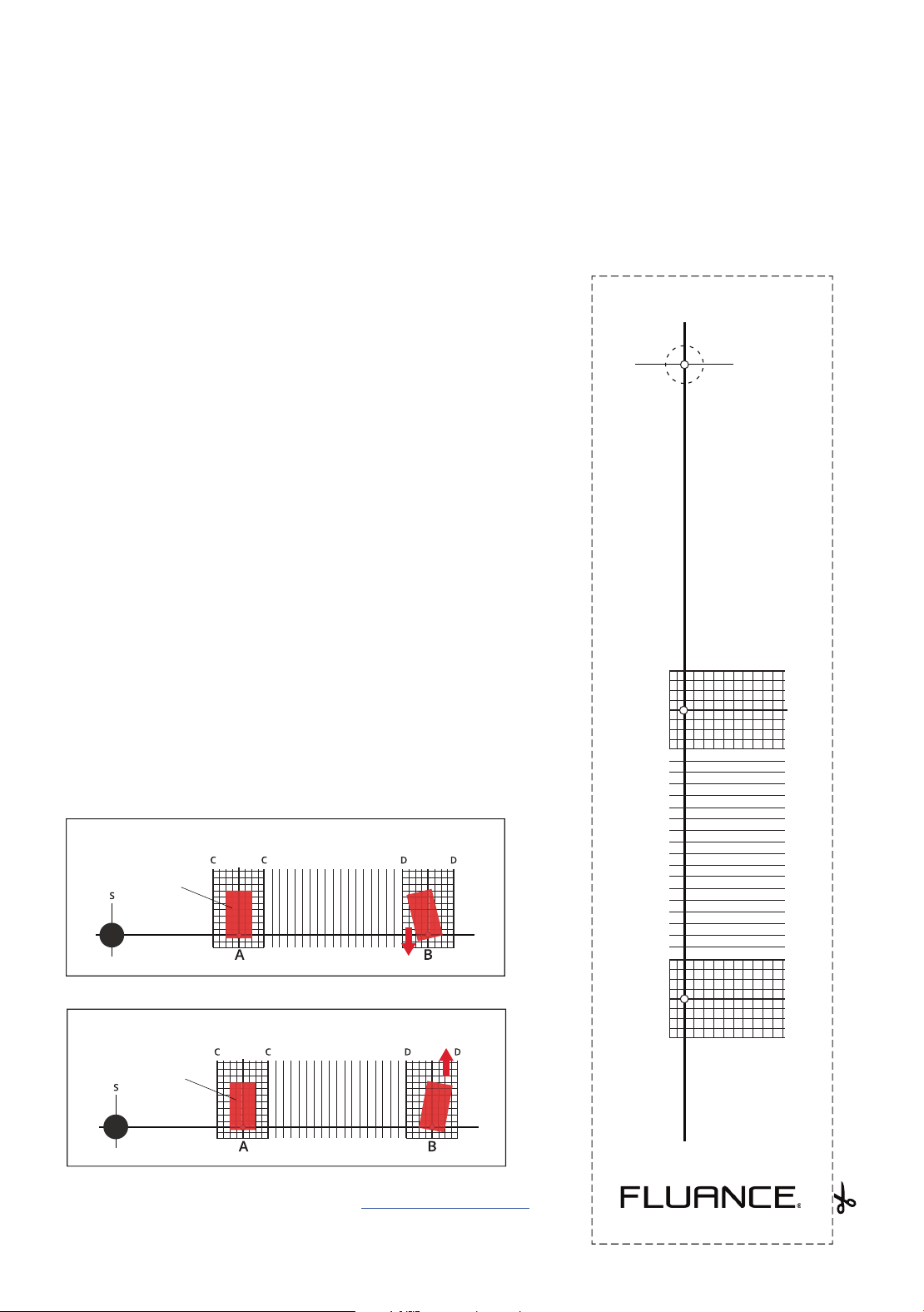
Correct cartridge alignment ensures the stylus is
positioned properly relative to the grooves on the record.
Incorrect alignment can cause distortion and can also
cause unwanted wear and tear on your stylus. Follow
the instructions below to ensure your cartridge is
mounted correctly.
A video of the cartridge installation and alignment process
is available at
1. Cut out the Cartridge Alignment Protractor* and
carefully cut out the spindle hole (S). *See beside for
cutout.
2. Place the protractor on the spindle.
3. With the stylus protector removed, gently place the
stylus on point A.
4. Rotate the cartridge so that the sides of the cartridge
are parallel with the grid lines (C).
5. Place the stylus on point B and confirm the sides are
parallel with the grid lines (D).
6. If the cartridge sides are not parallel at point B move
the cartridge forward (fig.1) or backward (fig.2) and
repeat steps 4-6 until the sides are parallel at both
points.
(fig.1)
cartridge
cartridge
(fig.2)
For more information and support please visit www.uance.com/support
Cartridge Alignment
Protractor Cutout
S
A
66mm (2.6”)
B
120.89mm (4.76”)
CC DD

Fluance.com