
PRECAUTIONS - 3191477B103/A
e
PRECAUTIONS 31
General safety instructions 31
Installation 35
Appliance purpose 36
This user manual 36
Manufacturer’s liability 36
Identification plate 37
Disposal 37
Leitlinien für europäische Kontrollstellen 37
Hauptofen 37
Die für die Festlegung der Energieeffizienzklasse
verwendete Funktion Heißluft entspricht den
Bestimmungen der europäischen Norm DIN EN
60350-1. 37
Energy efficiency technical data 37
To save energy 37
Light sources 37
How to read the user manual 38
DESCRIPTION 38
General description 38
Hob 39
Control panel 40
Other parts 40
Accessories 41
USE 41
Preliminary operations 41
Using the accessories 42
Using the hob 42
Basic functions 43
Additional functions 43
Error notifications 44
Using the storage compartment (where present) 45
Using the oven 45
Digital programmer 45
Cooking advice 47
Cooking information table (multifunction oven) 48
Cooking information table (auxiliary oven) 49
Cooking information table (vertical oven) 49
CLEANING AND MAINTENANCE 50
Cleaning the appliance 50
Cleaning the glass ceramic hob 50
Knobs 50
Cleaning the door 50
Cleaning the oven cavity 52
Cleaning the roof of the oven (only for some
models/cavities) 53
Extraordinary maintenance 53
INSTALLATION 54
Positioning 54
Electrical connection 55
Instructions for the installer 56
We advise you to read this manual carefully, which contains all the instructions for maintaining the
appliance’s aesthetic and functional qualities. For further information on the product: www.smeg.com
PRECAUTIONS
General safety instructions
Risk of personal injury
• During use the appliance and
its accessible parts become
very hot. Keep children well
away from the appliance.
• The appliance becomes very
hot during use. Make sure that
you never touch the heating
elements inside the oven.
• Protect your hands by wearing
oven gloves when moving food
inside the oven.
• Never try to put out a fire or
flames with water: Turn off the
appliance and smother the
flames with a fire blanket or
other appropriate cover.
• This appliance may only be
used by children aged 8 years
and over, and by people of
reduced physical, sensory or
mental capacity, or lacking in
experience in the use of
electrical appliances, provided
that they are supervised or

32 - PRECAUTIONS 91477B103/A
have been given instructions on
the safe use of the appliance
and of the hazards associated
with it.
• Children must not play with the
appliance.
• Keep children under the age of
eight at a safe distance unless
they are constantly supervised.
• Keep children under the age of
8 away from the appliance
when it is in use.
• Cleaning and maintenance
must not be carried out by
unsupervised children.
• Be aware of how rapidly the
cooking zones heat up. Do not
place empty pans on the heat.
Danger of overheating.
• After use the cooking zones
remain hot for a certain period
of time after they have been
turned off. Do not touch the hob
surfaces.
• The cooking process must
always kept under control. A
short cooking process must be
continuously monitored.
• WARNING: Leaving food that
contains fat and/ oil
unattended when cooking can
be dangerous and can cause a
fire. DO NOT attempt to
extinguish a fire with water. Turn
off the appliance and smother
the flames, for example with a
lid or a blanket.
• Do not use the Booster and/or
the Double Booster functions (if
present) to heat fats or oils. Fire
hazard.
• Do not place metal objects,
such as dishes or cutlery, on the
surface of the hob during
cooking as they may overheat.
• Do not cook foods in closed
tins or containers or plastic
containers.
• Do not insert pointed metal
objects (cutlery or utensils) into
the slots in the appliance.
• Do not use or store flammable
materials near the appliance.
• Do not pour water directly onto
very hot trays.
• Keep the oven door closed
during cooking.
• If you need to move food or at
the end of cooking, open the
door 5 cm for a few seconds,
let the steam come out, then
open it fully.
• Do not open the storage
compartment (where available)
when the oven is on and still
hot.
• The items inside the storage
compartment (where available)
could be very hot after the oven
has been used.
• Switch off the appliance
immediately after use.
• Do not pull the cable to unplug
the appliance (if present).
• DO NOT USE OR STORE
FLAMMABLE MATERIALS IN
THE STORAGE
COMPARTMENT (IF

PRECAUTIONS - 3391477B103/A
e
AVAILABLE) OR NEAR THE
APPLIANCE.
•DO NOT USE AEROSOLS IN
THE VICINITY OF THIS
APPLIANCE WHILST IT IS IN
USE.
• DO NOT MODIFY THIS
APPLIANCE.
• Always wear personal
protective equipment (PPE)
before carrying out any work
on the appliance (installation,
maintenance, positioning or
moving).
• Do not clean the appliance if it
is still hot or in operation.
• Before performing any work on
the appliance, switch off the
power supply.
• WARNING: Make sure that
the appliance has been
switched off and disconnected
from the mains power supply or
that the mains power has been
switched off before replacing
the interior lighting bulbs.
• The bulbs used in this
appliance are specific for
household appliances; do not
use them for home lighting.
• Do not try to repair the
appliance yourself or without
the assistance of a qualified
technician.
• If the power cable becomes
damaged, contact technical
support immediately to arrange
for it to be replaced in order to
avoid possible hazards.
• If cracks or fissures form, or if
the glass ceramic cooking
surface breaks, turn off the
appliance immediately.
Disconnect the power supply
and call Technical Support.
• Do not touch or clean the hob
surface during operation or
when the residual heat
indicator lights are still on.
• Activate the controls lock when
you have children or pets that
could reach the hob.
• After use, switch off the plates.
Never rely solely on the
cookware detector.
• Supervise children carefully as
they cannot readily see the
residual heat indication. After
use the cooking zones remain
hot for a certain period of time
even if they have been turned
off. Keep children away from
the cooking zones.
• People who have pacemakers
or other similar devices fitted
must make sure that the
operation of these devices is
not affected by the induction
field, the frequency range of
which is between 20 and 50
kHz.
• In conformity with the provisions
regarding electromagnetic
compatibility, the
electromagnetic induction
cooking hob comes under
group 2 and class B (EN
55011).
34 - PRECAUTIONS 91477B103/A
Risk of damaging the appliance
• Do not use harsh or abrasive
detergents or sharp metal
scrapers to clean the glass
door of the oven since they
may scratch the surface and
cause the glass to shatter.
• Use wooden or plastic utensils.
• Do not use steam jets to clean
the appliance.
• Do not use the appliance as a
support surface.
• Do not obstruct ventilation
openings and heat dispersal
slots.
• Do not sit on the appliance.
• Do not rest any weight or sit on
the open door of the
appliance.
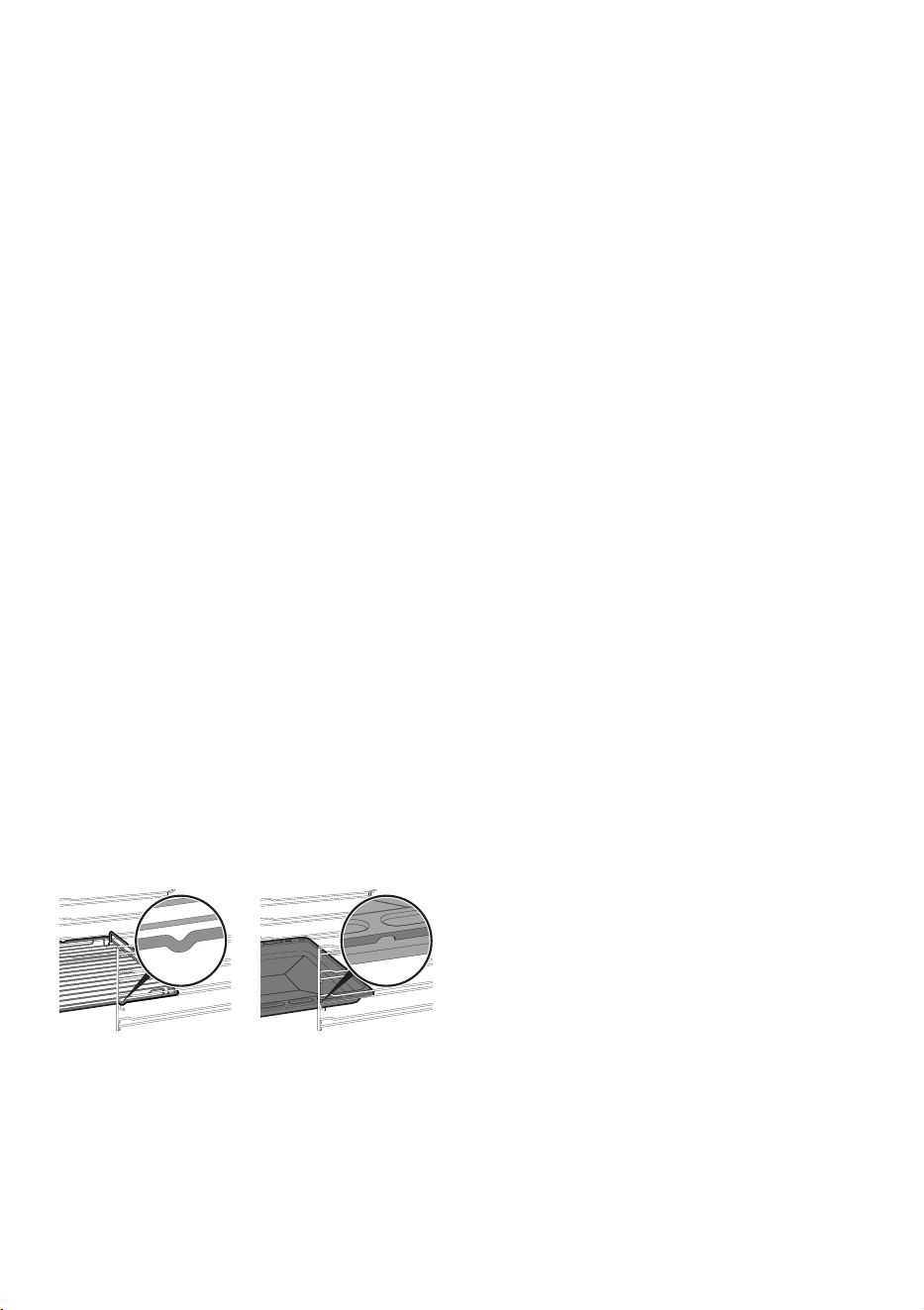
• Racks and trays should be
inserted as far as they will go
into the side guides. The
mechanical safety locks that
prevent them from being
removed must face downwards
and towards the back of the
oven.
• Never leave the appliance
unattended during cooking
operations that could lead to
oils and fats overheating and
catching fire. Be very careful
• Risk of fire: Do not store objects
on the cooking surfaces.
• Do not spray any spray
products near the oven.
• DO NOT FOR ANY REASON
USE THE APPLIANCE AS A
SPACE HEATER.
• Do not use plastic kitchenware
or containers for cooking.
• Do not put sealed tins or
containers in the oven.
• Remove all trays and racks
which are not required during
cooking.
• Do not cover the bottom of the
oven cavity with aluminium or
tin foil sheets.
• Do not place pans or trays
directly on the bottom of the
oven cavity.
• If necessary, you can use the
tray rack (supplied or sold
separately, depending on the
model) by placing it on the
bottom as a support for
cooking.
• If you wish to use greaseproof
paper, place it so that it will not
interfere with the hot air
circulation inside the oven.
• Do not use the open door to
rest pans or trays on the internal
glass pane.
• Cooking vessels or griddle
plates should be placed inside
the perimeter of the hob.
• All pans must have smooth, flat
bottoms.
• If any liquid does boil over or
spill, remove the excess from

PRECAUTIONS - 3591477B103/A
e
the hob.
• Take care not to spill acid
substances such as lemon juice
or vinegar on the hob.
• Do not spill sugar or sweet
mixtures on the hob during
cooking.
• Do not place materials or
substances that could melt or
catch fire (paper, plastic or
aluminium foil) on the
appliance while it is in use.
• Do not use steam jets to clean
the appliance.
• Place the cookware directly on
the glass ceramic surface.
• Do not put empty pans or frying
pans on switched on cooking
zones.
• Do not use rough or abrasive
materials or sharp metal
scrapers.
• Do not use cleaning products
containing chlorine, ammonia
or bleach on parts made of
steel or that have metallic
surface finishes (e.g. anodizing,
nickel- or chromium-plating).
• Do not use abrasive or
corrosive detergents (e.g.
scouring powders, stain
removers and metallic
sponges) on glass parts.
• The glass ceramic surface is
highly resistant to impacts.
However, avoid hard, solid
objects falling on the cooking
surface as they may cause it to
break.
• Never use the oven door to
lever the appliance into place
when fitting.
• Avoid exerting too much
pressure on the door when
open.
• Take care that no objects are
stuck in the doors.
• Do not use the handle to lift or
move this appliance.
• This appliance is not intended
to be operated by means of
external timer or separate
remote control system.
Installation
• THIS APPLIANCE MUST NOT
BE INSTALLED IN BOATS OR
CARAVANS.
• This appliance must not be
installed on a pedestal.
• Always use any necessary/
required personal protective
equipment (PPE) before
performing any work on the
appliance (installation,
maintenance, positioning or
movement).
• Position the appliance into the
cabinet cut-out with the help of
a second person.
• Check that the carcase has the
required openings.
• Check that the carcase material
is heat resistant.
• To avoid potential overheating,
the appliance must not be
installed behind a decorative
door or a panel.
• Installation and servicing should

36 - PRECAUTIONS 91477B103/A
be carried out by qualified
personnel in accordance with
current standards.
• Have the electrical connection
performed by authorised
technical personnel.
• The appliance must be
connected to earth in
compliance with electrical
system safety standards.
• Use cables that can withstand
temperatures of at least 90°C.
• The tightening torque of the
screws of the terminal supply
wires must be 1.5 - 2 Nm.
• Be careful when connecting
additional electrical
appliances. Connection cables
must not come into contact with
hot cooking zones.
• The power cable must only be
installed or replaced by a
qualified technician.
• If the power cable becomes
damaged, contact technical
support immediately to arrange
for it to be replaced in order to
avoid possible hazards.
• Allow the appliance to be
disconnected after installation,
via an accessible plug or a
switch in the case of a fixed
connection.
• Fit the power line with an all-
pole circuit breaker with a
contact separation distance
sufficient to provide complete
disconnection in category III
overvoltage conditions,
pursuant to installation
regulations.
• This appliance can be used up
to a maximum altitude of 2,000
metres above sea level.
For this appliance
• The swing doors are not held in
place when open and may
tend to close again. During use,
pay attention not to come into
contact with the internal glass
pane to prevent burns.
Appliance purpose
This appliance is intended for
cooking food in the home
environment. Every other use is
considered inappropriate. It
cannot be used:
• in employee kitchens, shops,
offices and other working
environments.
• in farms/farmhouses.
• by guests in hotels, motels and
residential environments.
• In bed and breakfast
accommodation.
This user manual
• This user manual is an integral part of the
appliance and must therefore be kept in its
entirety and within the user's reach for the
whole working life of the appliance.
• Read this user manual carefully before using
the appliance.
Manufacturer’s liability
The manufacturer declines all liability for
damage to persons or property caused by:
• use of the appliance other than that
specified;
• failure to comply with the instructions in the
user manual;
• tampering with any part of the appliance;
PRECAUTIONS - 3791477B103/A
e
• use of non-original spare parts.
Identification plate
The identification plate bears the technical data,
serial number and brand name of the
appliance. Do not remove the identification
plate for any reason.
Disposal
This appliance conforms to the WEEE
European directive (2012/19/EU) and
must be disposed of separately from
other waste at the end of its service life.
The appliance does not contain substances in
quantities sufficient to be considered hazardous
to health and the environment, in accordance
with current European directives.
To dispose of the appliance:
• Cut the power cable and remove it.
• Deliver the appliance to the appropriate
recycling centre for electrical and electronic
equipment waste, or return it to the retailer
when purchasing an equivalent product, on
a one for one basis.
Our appliances are packaged in non-polluting
and recyclable materials.
• Deliver the packing materials to the
appropriate recycling centre.
Leitlinien für europäische
Kontrollstellen
Hauptofen
Erzwungener Gebläsebetrieb
Die für die Festlegung der
Energieeffizienzklasse verwendete Funktion
Heißluft entspricht den Bestimmungen der
europäischen Norm DIN EN 60350-1.
Nebenofen
Erzwungener Gebläsebetrieb
Die für die Festlegung der
Energieeffizienzklasse verwendete Funktion
Heißluft entspricht den Bestimmungen der
europäischen Norm DIN EN 60350-1.
Energy efficiency technical data
Information in accordance with the European
energy labelling and ecodesign regulations is
contained in a separate document
accompanying the product instructions.
These data are present in the "Product
information sheet" that can be downloaded
from the website at the page dedicated to the
product in question.
To save energy
• Only preheat the appliance if the recipe
requires you to do so.
• Unless otherwise indicated on the package,
defrost frozen foods before placing them in
the oven.
• When cooking several types of food it is
recommended to cook the foods one after
the other to make the best use of the already
hot oven.
• Use dark metal moulds: They help to absorb
the heat better.
• Remove all trays and racks which are not
required during cooking.
• Stop cooking a few minutes before the time
normally used. Cooking will continue for the
remaining minutes with the heat which has
accumulated inside the oven.
• Reduce any opening of the door to a
minimum to avoid heat dispersal.
• Keep the inside of the oven clean at all
times.
Light sources
• This appliance contains user-replaceable
light sources.
• The light sources contained in the appliance
are declared suitable for operation at
ambient temperature ≥300°C and intended
Power voltage
Danger of electrocution
• Disconnect the mains power supply.
• Unplug the appliance.
Plastic packaging
Danger of suffocation
• Do not leave the packaging or any part of it
unattended.
• Do not let children play with the plastic
bags.
38 - DESCRIPTION 91477B103/A
for use in high temperature applications such
as ovens.
• This appliance contains light sources of
efficiency class "G".
How to read the user manual
This user manual uses the following reading
conventions:
DESCRIPTION
General description
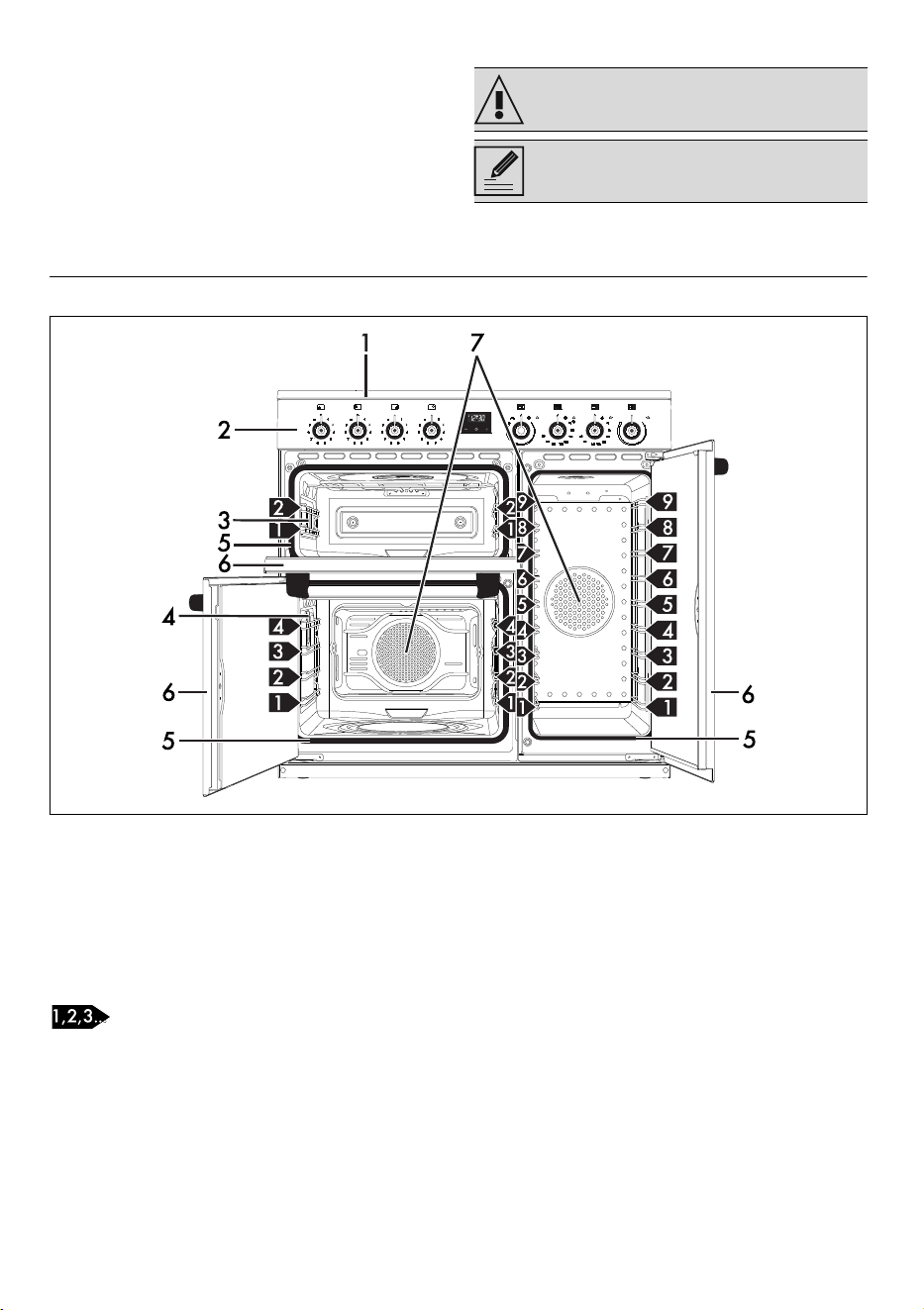
1 Hob
2 Control panel
3 Auxiliary oven light
4 Multifunction oven light
5 Oven seal
6 Oven door
7 Fan
Frame shelf
Warning/Caution
Information/Advice
DESCRIPTION - 3991477B103/A
e
Hob
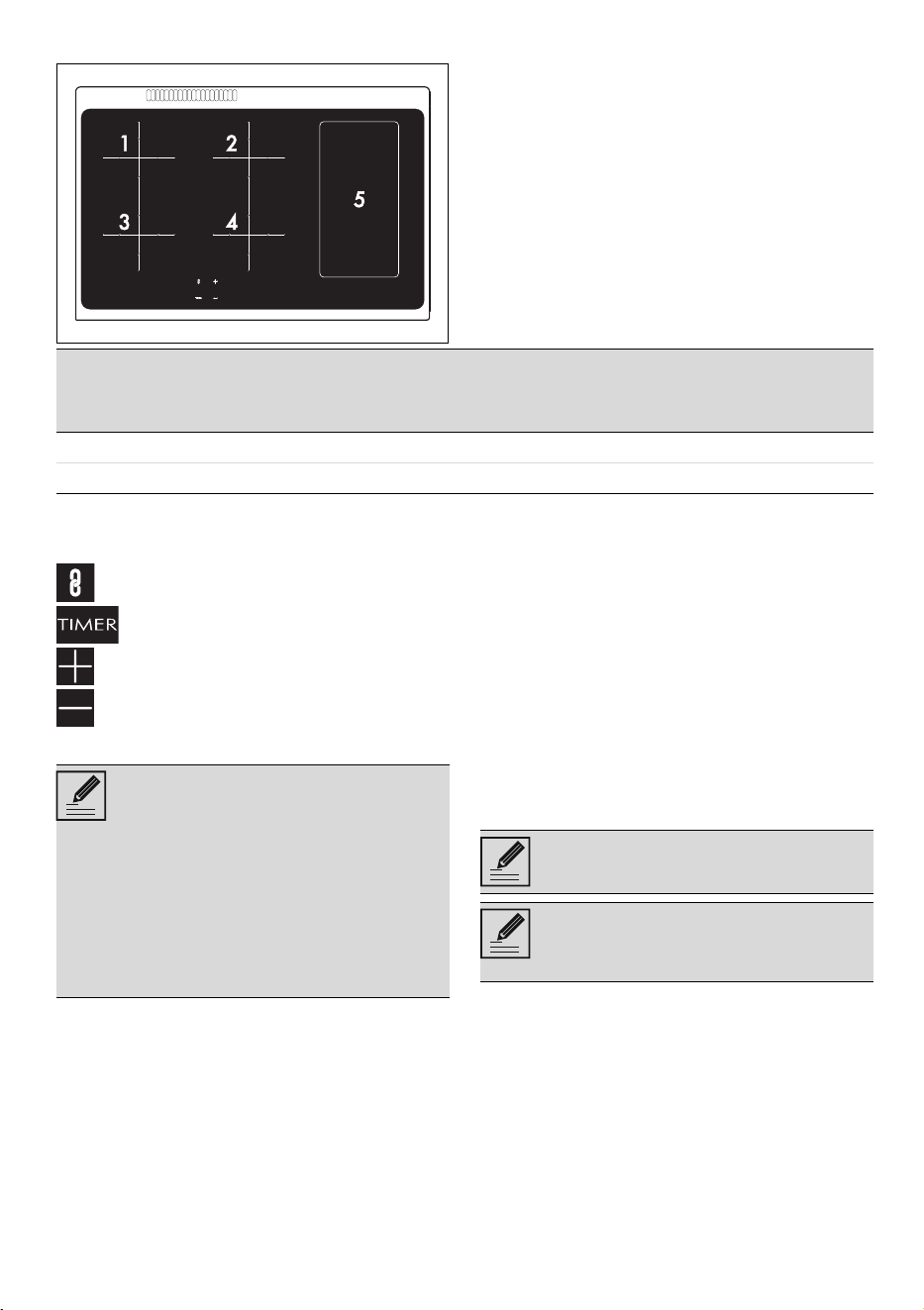
* power levels are indicative and can vary according to the pan used or the settings made.
Symbols
Bridge button
Timer button
Increase button
Decrease button
Advantages of induction cooking
• Energy saving thanks to the direct
transmission of energy to the pan (suitable
magnetisable cookware is required)
compared to traditional electric cooking.
• Improved safety as the energy is only
transmitted to the pan placed on the hob.
• High level of energy transmitted from the
induction cooking zone to the base of the
pan.
• Rapid heating speed.
• Reduced danger of burns as the cooking
surface is only heated under the base of the
pan; foods which overflow do not stick.
Power control
The hob is fitted with a power control module
that optimises/limits consumption. If the overall
set power level exceeds the maximum limit
permitted, the electronic circuit board will
automatically manage the power supplied by
the hot plates. The module tries to maintain the
maximum deliverable power levels. Levels set by
the automatic control will appear on the display.
Zone
Dimensions H x L
(mm)
Pan minimum Ø
(mm)
Pan Ø
shelf
(mm)
Max. power draw
(W)*
Power draw in
Booster function
(W)*
1-2-3-4 180 x 180 110 180 1500 2000
5 395 x 180 - - 500 -
The appliance is equipped with an
induction generator for each cooking
zone. Each generator located under the
glass ceramic cooking surface creates
an electromagnetic field which induces
a thermal current in the base of the pan.
This means the heat is no longer
transmitted from the hob to the pan but
created directly inside the pan by the
inductive current.
Priority is given to the first zone that is set
in chronological order.
The power control module does not
affect the total power consumption of
the appliance.
40 - DESCRIPTION 91477B103/A
Control panel
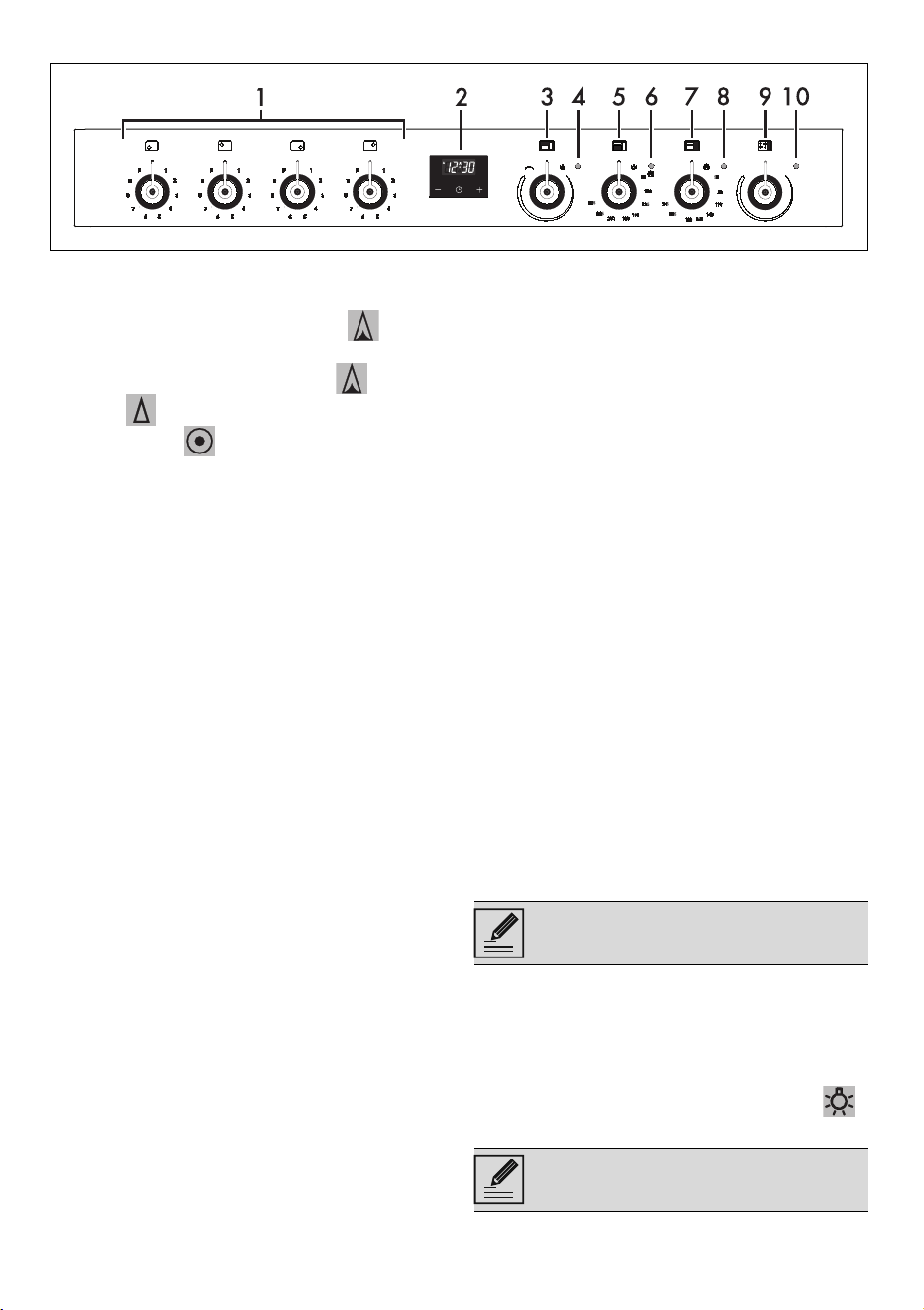
1 Hob cooking zone knobs
For lighting and adjusting the hob burners. Press
and turn the knobs anti-clockwise to in
order to light the relative burners. Turn the knobs
to the zone between the maximum and
minimum setting to adjust the flame. Return
the knobs to the position to turn off the
burners.
2 Digital programmer
For displaying the current time, setting
programmed cooking operations and the
minute minder timer.
3 Auxiliary oven variable grill knob
It turns on the light inside the oven or starts the
grill heating element to a temperature ranging
from a minimum of 50°C to a maximum of
245°C.
4 Auxiliary oven variable grill indicator light
The indicator light comes on to indicate that the
auxiliary oven is heating up. It turns off as soon
as it reaches the set temperature. It flashes
regularly to indicate that the temperature set
inside the oven is kept constant.
5 Main oven temperature knob
It turns on the light inside the oven cavity or starts
the circulaire heating elements to a temperature
ranging from a minimum of 50°C to a maximum
of 245°C.
6 Main oven indicator light
The indicator light comes on to indicate that the
oven is heating up. It turns off as soon as it
reaches the set temperature. It flashes regularly
to indicate that the temperature set inside the
oven is kept constant.
7 Vertical oven temperature knob
It turns on the light inside the oven cavity or starts
the circulaire heating elements to a temperature
ranging from a minimum of 50°C to a maximum
of 245°C.
8 Vertical oven indicator light
The indicator light comes on to indicate that the
oven is heating up. It turns off as soon as it
reaches the set temperature. It flashes regularly
to indicate that the temperature set inside the
oven is kept constant.
9 Heating area knob
Activates the heating area resistance. Useful for
keeping food warm.
10 Heating area indicator light
It comes on to indicate that the area is heating
up.
Other parts
Shelves
The appliance features shelves to position trays
and racks at different heights. The insertion
heights are indicated from the bottom upwards
(see General description).
Cooling fan
The fan cools the oven and comes into
operation during cooking. The fan causes a
steady outflow of air that exits from the rear of
the appliance and which may continue for a
brief period of time even after the appliance has
been turned off.
Interior lighting
The appliance’s interior lighting comes on:
• When the door is opened.
• When any function is selected.
• when the function knob is turned to the
symbol.
Do not obstruct ventilation openings
and heat dispersal slots.
When the door is open, it is not possible
to turn off the interior lighting.
USE - 4191477B103/A
e
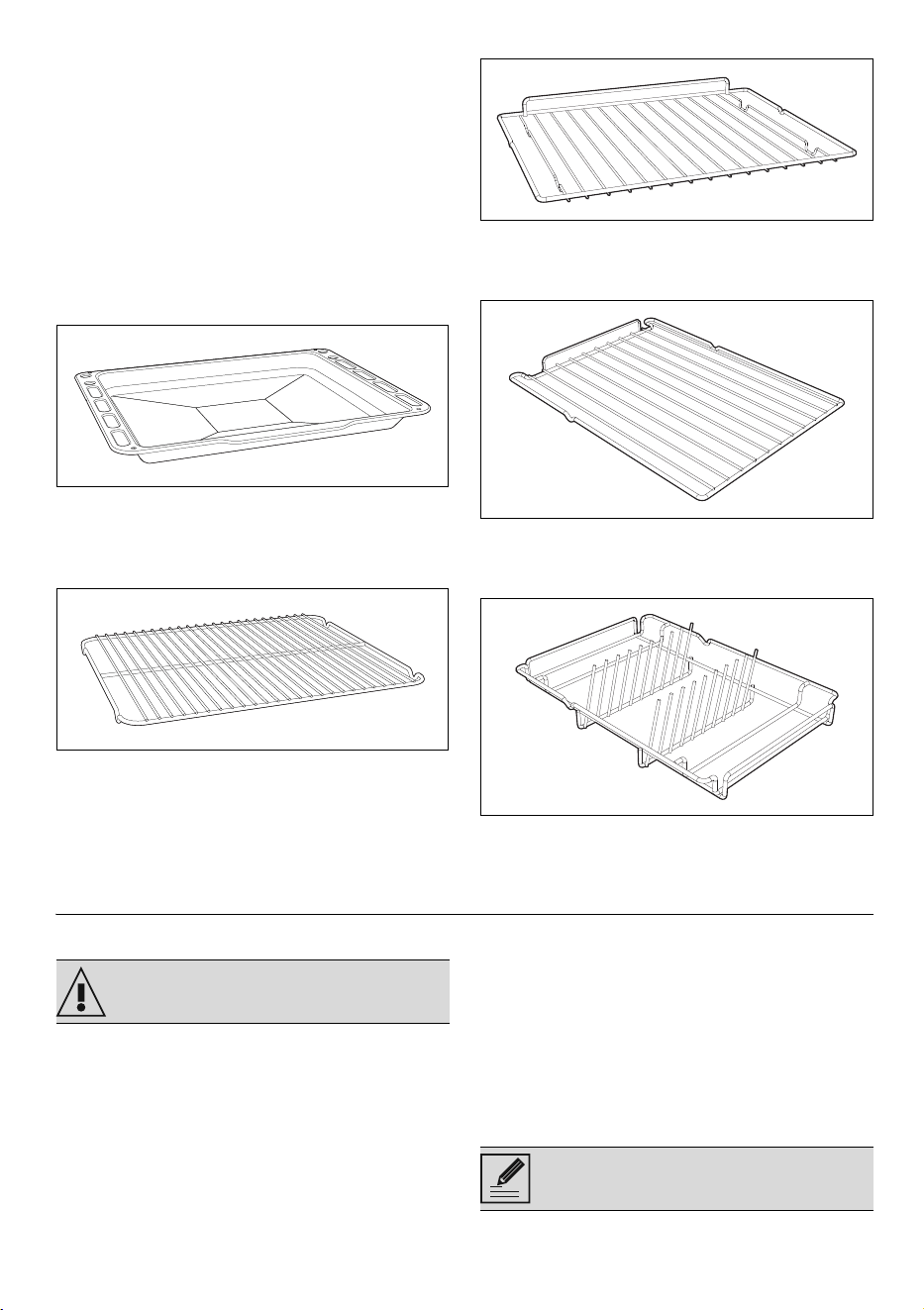
Accessories
• Not all accessories are available on some
models.
• The accessories intended to come into
contact with food are made of materials that
comply with the provisions of current
legislation.
• Original supplied and optional accessories
can be requested to Authorised Assistance
Centres. Use only original accessories
supplied by the manufacturer.
Deep tray
Useful for collecting fat from foods placed on
the rack above and for cooking pies, pizzas,
baked desserts, biscuits, etc.
Tray rack
To be placed over the top of the tray; for
cooking foods which may drip.
Rack
Useful for supporting containers with food
during cooking.
Vertical oven rack
Useful for supporting containers with food
during cooking.
Plate rack
Used for warming plates.
USE
Preliminary operations
• Remove any protective film from the outside
or inside of the appliance, including
accessories.
• Remove any labels (apart from the technical
data plate) from the accessories and
shelves.
• Remove and wash all the appliance
accessories (see chapter "CLEANING
AND MAINTENANCE").
First heating
1. Set a cooking time of at least one hour (see
paragraph "Using the oven").
2. Heat the empty oven compartment at the
maximum temperature to burn off any
residues left by the manufacturing process.
When heating the appliance
•air the room;
•don't stay.
See General safety instructions.
Carry out a first pre-heating cycle for
each of the cavities in the appliance.
42 - USE 91477B103/A
Using the accessories
Racks and trays
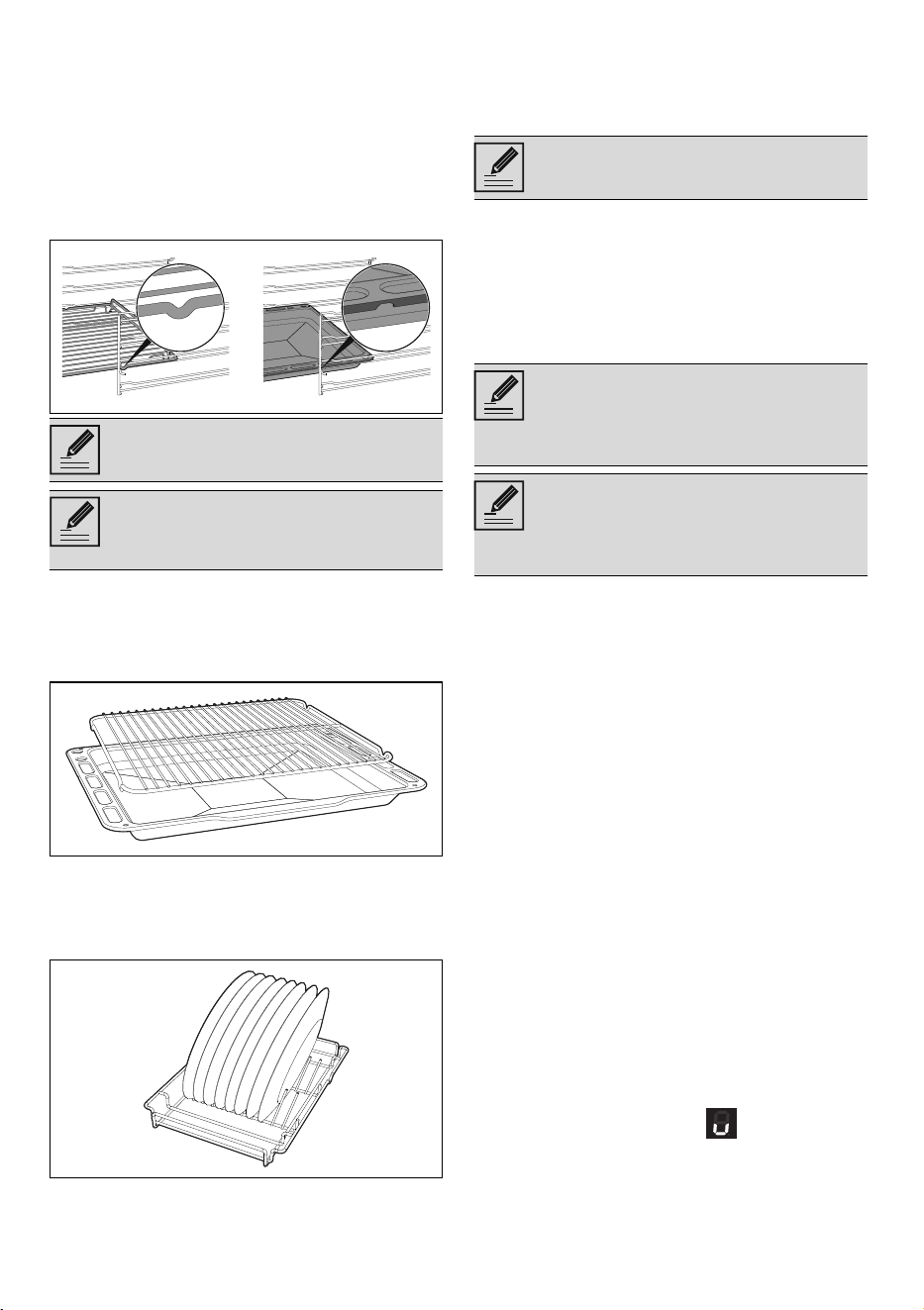
Racks and trays have to be inserted into the side
guides until they come to a complete stop.
• The mechanical safety locks that prevent the
rack from being removed accidentally must
face downwards and towards the back of
the oven cavity.
Tray rack
The tray rack has to be inserted into the tray. In
this way fat can be collected separately from
the food which is being cooked.
Plate rack
1. Insert the plate rack without plates in the first
shelf of the side oven.
2. Position the plates as shown in the figure.
3. Heat the oven to a temperature no greater
than 50°C for no more than 15 minutes.
4. After heating, partially remove the support,
leaving it resting on the guides.
5. Ensure that the support is stable and
balanced, then remove the plates.
Using the hob
All the appliance’s control and monitoring
devices are located together on the front panel.
The relevant cooking zone is indicated next to
each knob. Just turn the knob clockwise to the
required power setting.
Cookware suitable for use in induction
cooking
Cookware used on the induction cooking
surface must be made of metal, with magnetic
properties and a sufficiently large base.
Suitable cookware:
• Enamelled steel cookware with thick bases.
• Cast iron cookware with an enamelled
base.
• Cookware in multilayer stainless steel, ferritic
stainless steel and aluminium with a special
base.
Unsuitable cookware:
• Copper, stainless steel, aluminium, fireproof
glass, wood, ceramic and terracotta
cookware.
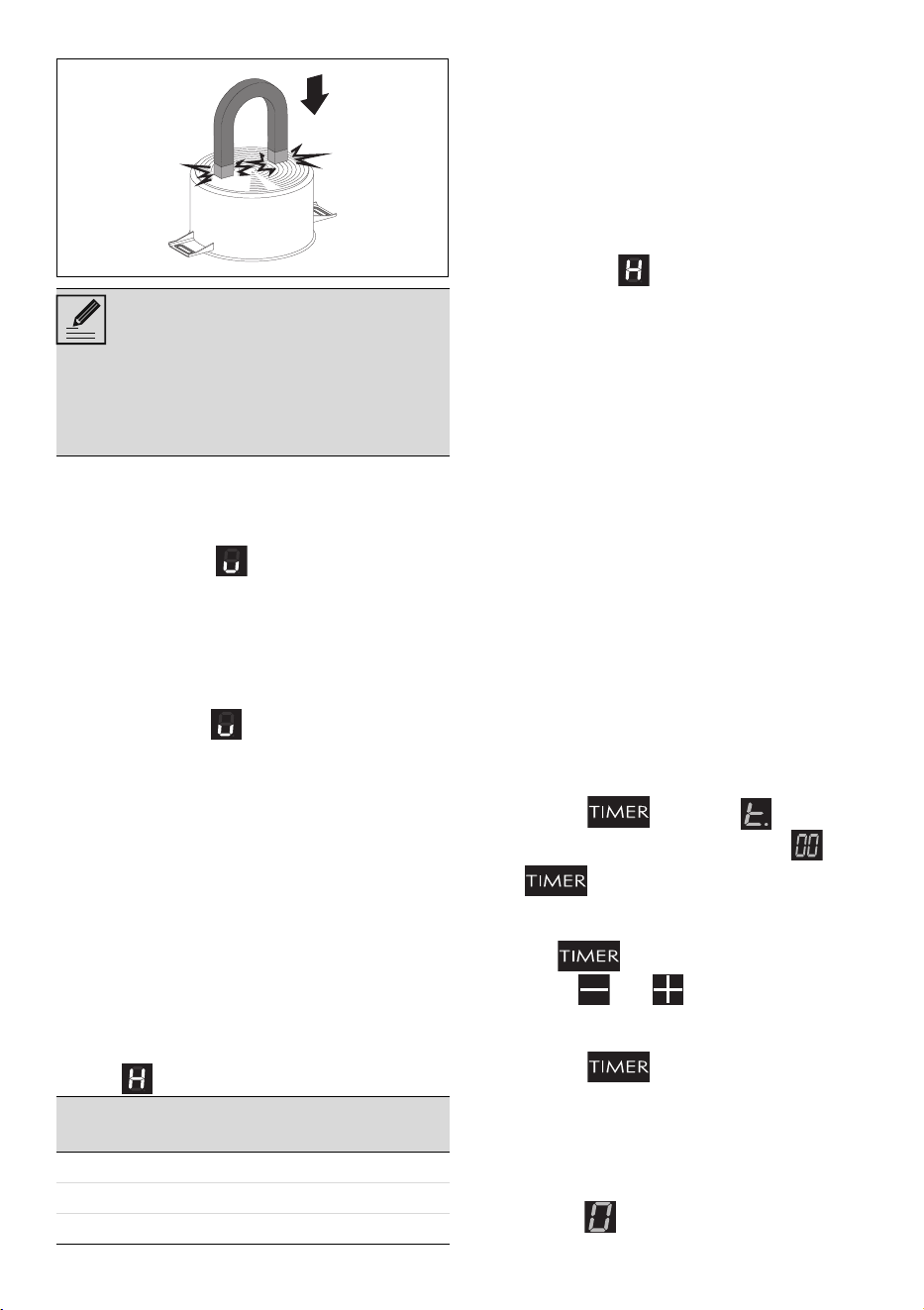
To see whether the pan is suitable, bring a
magnet close to the bottom: if it is attracted, the
pan is suitable for induction cooking. If you do
not have a magnet, you can put a small amount
of water in the pan, place it on a cooking zone
and start the hot plate. If the symbol
appears on the display, it means the pan is not
Gently insert racks and trays into the
oven until they come to a stop.
Clean the trays before using them for
the first time to remove any residues left
by the manufacturing process.
Use oven gloves when handling dishes.
On first connection to the electrical
mains, an automatic check will be
carried out that will switch on all
indicator lights for a few seconds.
After use, turn off the hot plates that
were used by moving the relative knob
back to position 0. Never rely solely on
the cookware detector.
USE - 4391477B103/A
e
suitable.
Cookware recognition
When there is no pan on a cooking zone or if
the pan is too small, no energy will be
transmitted and the symbol will appear on
the display alternating with the selected power
value. If there is a suitable saucepan on the
cooking zone, the recognition system detects it
and switches on the hob to the power level set
using the knob. Energy transmission is also
interrupted when the pan is removed from the
cooking zone (the symbol will appear on
the display alternating with the selected power
value). If the cookware recognition function is
activated in spite of the saucepan or frying pan
on the cooking zone being smaller than the
zone itself, only the necessary energy will be
transmitted.
Limiting the cooking duration
The hob has an automatic device which limits
the duration of use. If the cooking zone settings
are not changed, the maximum duration of
operation for each zone depends on the power
level selected. When the device for limiting the
duration of use is activated, the cooking zone
turns off, a short alert sounds and, if the zone is
hot, the symbol appears on the display.
Protection from overheating
If the hob is used on full power for a long
period, the electronics will have trouble cooling
down if the room temperature is high. To avoid
excessively high temperatures forming in the
electronics, the power to the cooking zone is
reduced automatically.
Residual heat
If the cooking zone is still hot after being
switched off, the symbol will be displayed
on the display. The symbol clears once the
temperature drops below 60°C.
Basic functions
First power connection
When connected to the power supply for the
first time, or after power has been switched
back on after a power failure, an automatic
check is carried out that control turns on the
indicator lights and the displays for a few
seconds. Afterwards, the appliance can be
used normally.
Additional functions
Timed cooking
This function is used to program the automatic
switch-off of each cooking zone at the end of a
period of time set by the user (from 1 to 99
minutes).
To set a timed cooking:
1. Place a pan on a cooking zone and select
the power level for the zone selected.
2. Press the button, the symbol
appears for the relative zone and .
If the button is pressed without a zone
having been selected, the system automatically
selects an active zone. To change the selection,
press the button repeatedly.
3. Use the and buttons to select the
required time; press and hold to advance
more quickly.
4. Press the button or wait 5 seconds
to start the timer.
The display of the timed zone now shows the
previously set power level with a dot at the
lower right.
At the end of timed cooking, the cooking zone
switches off, flashes on the display and
Use only cookware with a perfectly flat
bottom which is suitable for induction
hot plates. Using cookware with an
irregular bottom could jeopardise the
efficiency of the heating system and
prevent cookware from being detected
on the hot plate.
Set power level
Maximum cooking duration in
hours
1-2-3-4-5-6-7-8 10
93
Booster 10 min
44 - USE 91477B103/A
beeps are emitted. Press any button or turn the
knob to 0 to deactivate the buzzer.
Modifying or deactivating timed cooking
1. Press the button repeatedly until the
symbol appears on the relative zone.
2. Use the and buttons to modify or
reset the countdown. Resetting the
countdown disables the timed cooking.
Controls lock
This is useful when cleaning the appliance and
to prevent functions being modified by mistake.
To enable the Controls lock only when the hob
is switched off:
1. Press the and buttons at the same
time for at least one second.
2. The symbol lights up on each display to
indicate that the function has been activated.
To disable the Controls lock, press the and
buttons for at least one second.
Bridge function
This function allows you to operate two cooking
zones (front and rear) at the same time when
using pans such as fish kettles or long pans.
To activate the Bridge function:
1. Touch the button; the and
symbols appear on the display.
2. Select a power level from 1 to 9 using the
knobs of the front cooking zones, according
to the zones on which you wish to activate
the bridge function.
3. To deactivate the function, place the knob to
the 0 position.
Booster function
The booster function allows the cooking zone to
be activated at maximum power for as long as
10 minutes. It can be used to bring a large
quantity of water to a boil rapidly or to broil
meat.
• To activate the Booster function, turn the
knob clockwise to position P.
• After 10 minutes of continuous operation,
the Booster function will be disabled
automatically and cooking will continue at
power level 9.
• Select any other power level to deactivate
the Booster function.
Keep warm
To activate the Keep Warm function turn the
knob of the required zone to an intermediate
position between 0 (off) and power level 1, until
the symbol appears on the corresponding
display.
Error notifications
If the appliance malfunctions or operates
incorrectly, the code associated with the error
appears on the displays of the cooking zones.
Errors associated with overheating of the
appliance or one of its parts can only be solved
by allowing it to cool down and are coded as
“C”, “c” and “Fc”.
If these errors persist or different errors appear,
note down the code and contact Technical
Support.
This feature is designed to lock all the
hob zones.
Once activated, the knobs are disabled
and it is not possible to change the
power level of the cooking zones.
This function automatically divides the
power equally between both zones that
are in use.
Set this function before selecting a
power level
It is not possible to activate the Booster
function for the cooking zones on which
the Bridge function is active.
If a power level is not set within 5
seconds, the function will deactivate
automatically.
The Keep warm function allows you to
keep cooked food warm.
Residual heat indicators are not to be
considered as error codes.
USE - 4591477B103/A
e
Using the storage compartment
(where present)
The storage compartment is in the bottom of the
cooker. To open it, pull it towards you. It can be
used to store cookware or metallic objects
necessary when using the appliance.
Using the oven
Opening and closing the door of the
multifunction oven
Multifunction ovens are equipped with a swing
door. To open, pull the door handle towards
you. To close, push the doors until you hear a
mechanical “click”.
Switching on the oven
To switch on the oven:
1. Select the cooking function using the
function knob.
2. Select the temperature using the
temperature knob.
List of traditional cooking functions
GRILL
CIRCULAIRE
Digital programmer
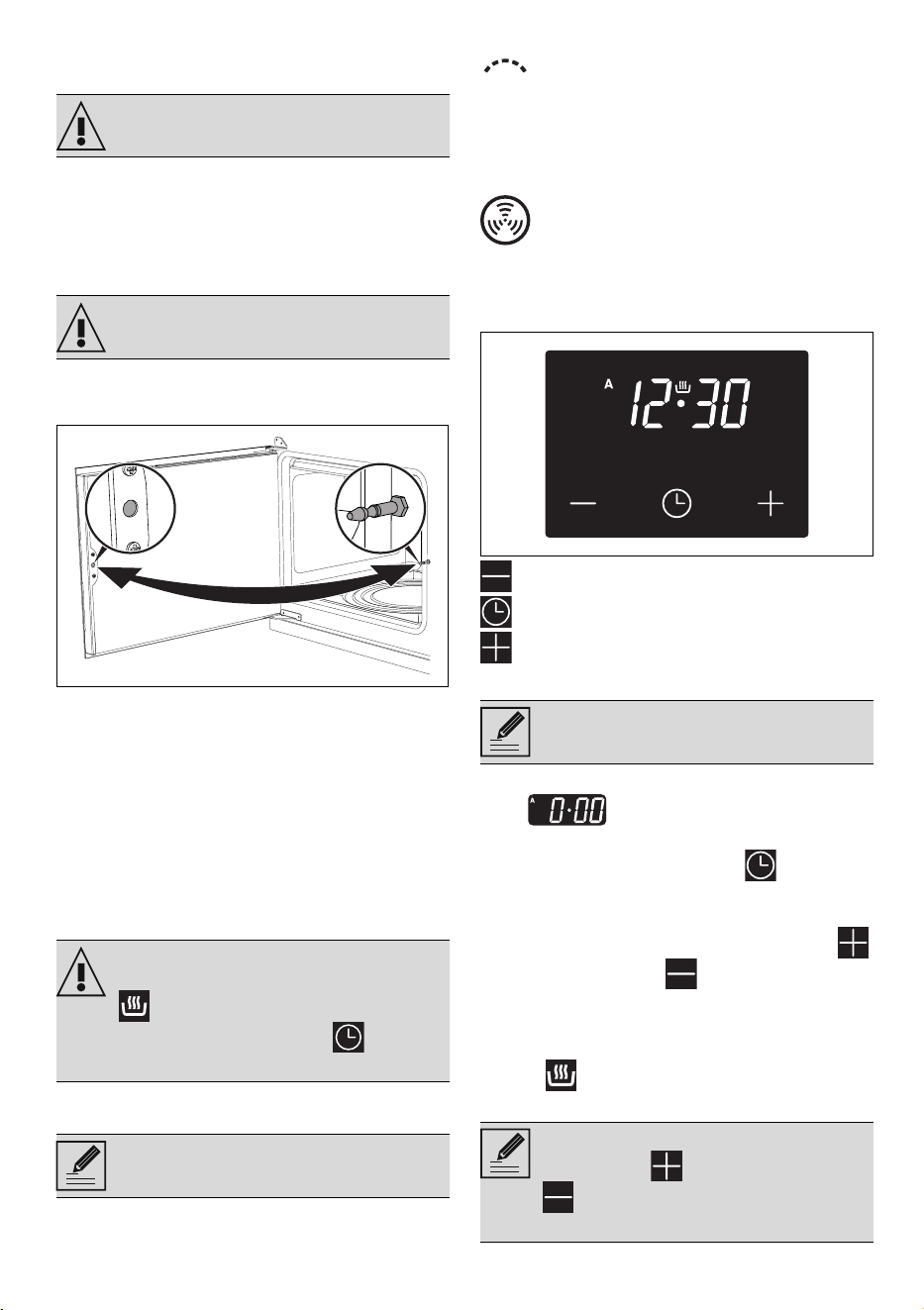
Decrease key
Clock key
Increase key
Setting the time
On the first use, or after a power failure, the
digits will be flashing on the
appliance’s display.
1. Hold down the clock button for two
seconds. The dot between the hours and the
minutes flashes.
2. The time can be set via the increase key
and decrease key . Keep the button
pressed to increase or decrease rapidly.
3. Wait 7 seconds. The dot between the hours
and the minutes stops flashing.
4. The symbol on the display indicates that
the appliance is ready to start cooking.
See General safety instructions.
See General safety instructions.
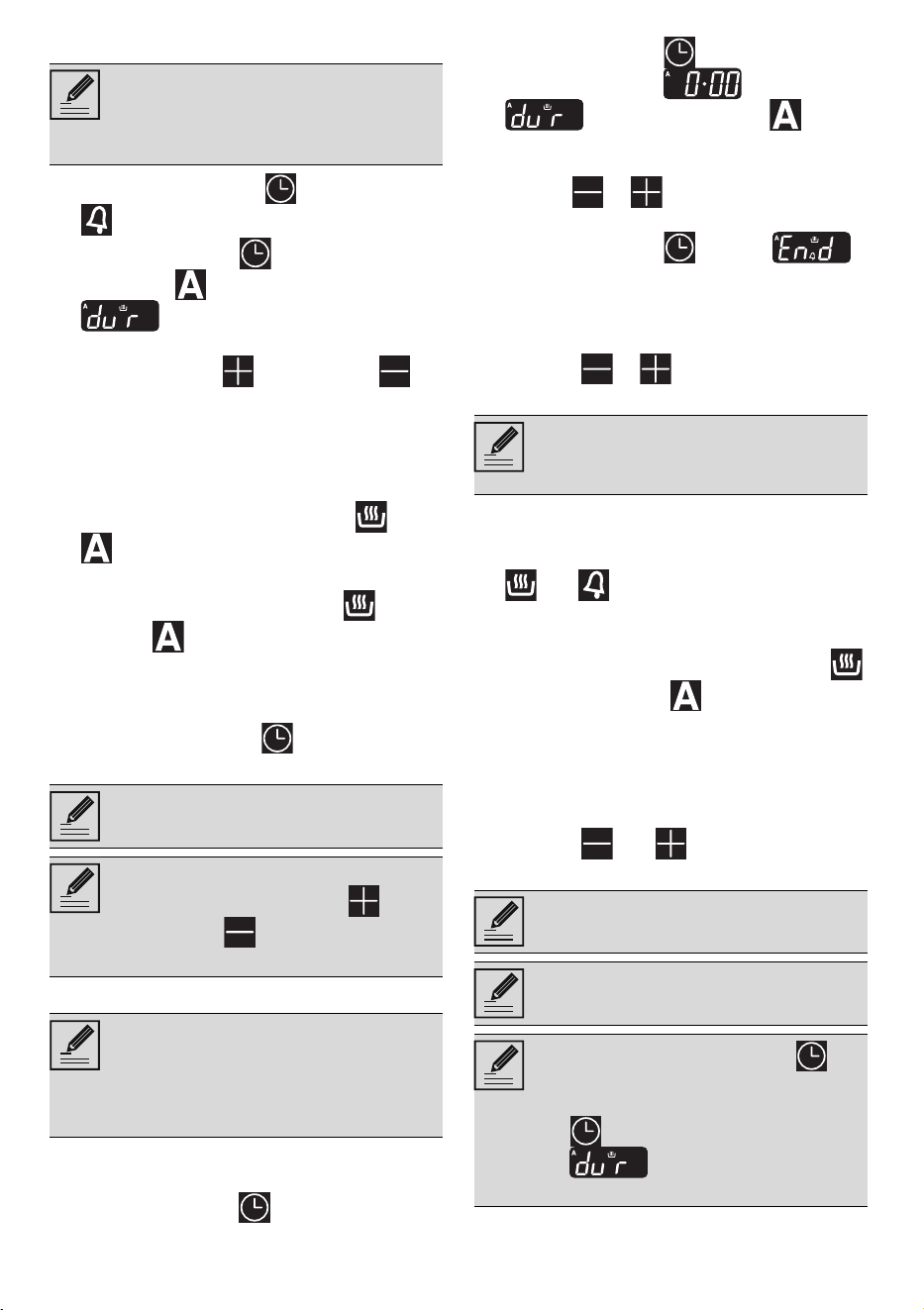
Make sure that the digital programmer
shows the cooking duration symbol
, otherwise it will not be possible to
turn on the oven. Press the button to
reset the programmer clock.
Not all functions are available on some
models.
Produces excellent grilling and
gratinating results. When used at the
end of cooking, gives a uniform
browning to dishes.
The heat is distributed quickly and
uniformly. Suitable for all dishes, ideal
for cooking on multiple levels without
mixing smells or flavours.
If the time is not set, the oven will not
switch on.
To change the time, hold down the
increase key and decrease key
at the same time for two seconds,
then set the time.
46 - USE 91477B103/A
Timed cooking
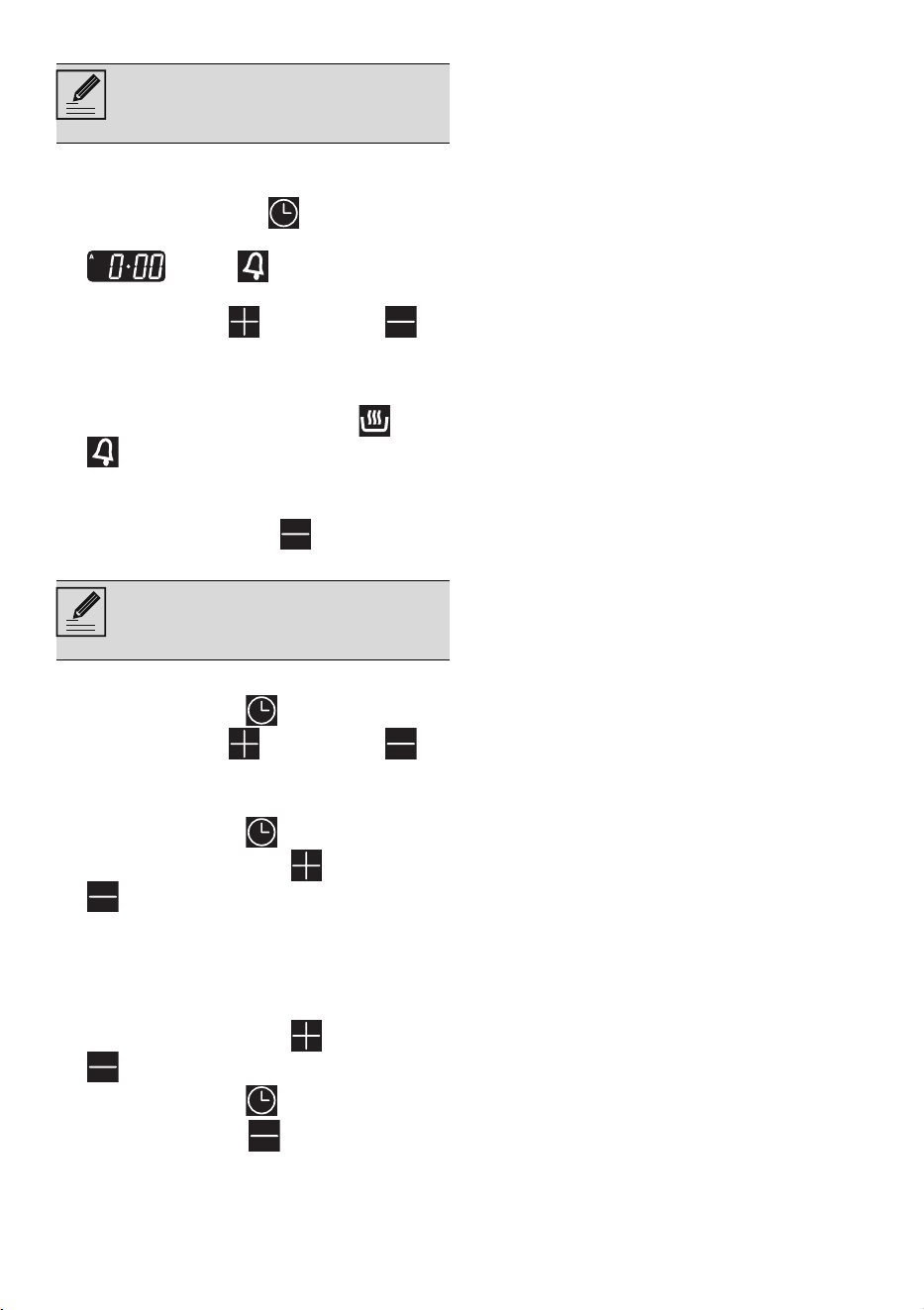
1. Keep the clock button pressed until the
symbol appears.
2. Press the clock key again. On the
display the symbol and the text
appear, alternating with the
current time.
3. Use the increase and decrease
keys to set the required minutes of cooking.
4. Select a function and a cooking
temperature.
5. Wait approx. 5 seconds without pressing
any button in order for the function to
activate. The current time and the and
symbols will appear on the display.
At the end of cooking the heating elements will
be deactivated. On the display, the symbol
turns off, the symbol flashes and the buzzer
sounds.
6. To turn the buzzer off, simply press one of
the programmer clock buttons.
7. Press the clock button to reset the
programmer clock.
Programmed cooking
1. Set the cooking time as described in the
previous point Timed cooking.
2. Hold the clock key down for 2 seconds.
3. Press the clock key again. The display
will show the digits and the text
in sequence, while the symbol
flashes (for example, the current time is
17:30).
4. Use the or key to set the required
minutes. (for example 1 hour).
5. Press the clock key . The text
will appear on the display in sequence with
the pre-set cooking duration added to the
current time (for example, the cooking end
time shown is 18:30).
6. Press the or key to set the cooking
end time. (for example, 19:30).
7. Wait approx. 7 seconds without pressing
any button in order for the function to
activate. The current time appears and the
and symbols light up on the display.
8. Select a cooking temperature and function.
9. At the end of cooking the heating elements
will be deactivated. On the display, the
symbol turns off, the symbol flashes and
the buzzer sounds.
10. Return the function and temperature knobs to
0.
11.To turn off the buzzer just press any button of
the programmer clock.
12.Press the and buttons at the same
time to reset the set program.
Timed cooking is the function which
allows a cooking operation to be
started and then ended after a specific
length of time set by the user.
It is not possible to set a cooking time of
more than 10 hours.
To cancel the set programming press
and hold down the increase and
the decrease keys at the same time
and then turn the oven off manually.
Programmed cooking is the function
which allows a cooking operation to be
started at a set time and then ended
after a specific length of time set by the
user.
Bear in mind that a few minutes for oven
preheating must be added to the
cooking time.
It is not possible to set a cooking time of
more than 10 hours.
It is not possible to set a programmed
cooking time of more than 24 hours.
After setting, hold the clock key
down for 2 seconds to display the
cooking time remaining. Press the clock
key again. The display shows the
text and the remaining
cooking time in sequence.
USE - 4791477B103/A
e
Minute minder timer
The minute minder timer can be activated at any
time.
1. Keep the clock button pressed for a few
seconds. The display shows the figures
and the symbol flashing
between the hours and minutes.
2. Use the increase and decrease
keys to set the required minutes.
3. Wait approx. 5 seconds without pressing
any key to finish setting the minute minder.
The current time and the symbols and
appear on the display.
A buzzer will sound when the set time is
reached.
4. Press the decrease key to turn the
buzzer off.
Modifying the set data
1. Press the clock key .
2. Use the increase and decrease
keys to set the required minutes.
Deleting the set data
1. Press the clock key .
2. Hold down the increase and decrease
keys at the same time.
3. Then switch off the oven manually if cooking
is in progress.
Selecting the buzzer
The buzzer can have 3 tones.
1. Hold down the increase and decrease
keys at the same time.
2. Press the clock key .
Press the decrease key to select a different
buzzer tone.
Cooking advice
General advice
• Use a fan assisted function to achieve
consistent cooking at several levels.
• It is not possible to shorten cooking times by
increasing the temperature (the food could
be overcooked on the outside and
undercooked on the inside).
Advice for cooking meat
• Cooking times vary according to the
thickness and quality of the food and to
consumer taste.
• Turn the food to brown on both sides.
• Use a meat thermometer when roasting
meat, or simply press on the roast with a
spoon. If it is hard, it is ready; if not, it needs
to be cooked for a few more minutes.
Advice for cooking with the Grill
• Meat can be grilled even when it is put into
the cold oven or into the preheated oven if
you wish to change the effect of the
cooking.
• With the Fan with grill function (if present),
we recommend that you preheat the oven
before grilling.
• We recommend placing the food at the
centre of the rack.
• With the Grill function, we recommend that
you set the temperature to the maximum
value to optimise cooking.
Advice for cooking desserts/pastries and
biscuits
• Use dark metal moulds: They help to absorb
the heat better.
• The temperature and the cooking time
depend on the quality and consistency of
the dough.
• To check whether the dessert is cooked right
through: At the end of the cooking time, put
a toothpick into the highest point of the
dessert. If the dough does not stick to the
toothpick, the dessert is cooked.
• If the dessert collapses when it comes out of
the oven, on the next occasion reduce the
set temperature by about 10°C, selecting a
longer cooking time if necessary.
Advice for cooking on two shelves:
• We recommend using two racks (they can
be obtained from Authorised Assistance
Centres).
• To facilitate the flow of air, place the
The minute minder timer does not stop
the cooking operation but rather informs
the user when the set time has run out.
The minute minder timer can be set from
1 minute to a maximum of 23 hours and
59 minutes.

48 - USE 91477B103/A
moulds/ovenware at the centre of the racks
and make sure that their width/diameter
does not exceed 30 cm.
• Position the racks keeping an empty shelf
between them.
• Depending on the type of food and the
increased quantity in the oven, cooking on
two levels may take slightly longer
compared to cooking on a single shelf.
• We suggest using the following functions
when cooking on two shelves: CIRCULAIRE
and CIRCULAIRE+BOTTOM.
Advice for defrosting and proving
• Place frozen foods without their packaging
in a lidless container on the first shelf of the
oven.
• Avoid overlapping the food.
• To defrost meat, use the rack placed on the
second level and a tray on the first level. In
this way, the liquid from the defrosting food
drains away from the food.
• The most delicate parts can be covered with
aluminium foil.
• For successful proving, a container of water
should be placed in the bottom of the oven.
Cooking information table (multifunction oven)
Food
Weight
(Kg)
Function Shelf
Temp.
(°C)
Time
(minutes)
Lasagne 3 - 4 STATIC 1 220 - 230 45 - 50
Pasta bake 3 - 4 STATIC 1 220 - 230 45 - 50
Veal roast 2 CIRCULAIRE 2 180 - 190 90 - 100
Pork loin 2 CIRCULAIRE 2 180 - 190 70 - 80
Sausages 1.5 FAN WITH GRILL 3 260 15
Roast beef 1 CIRCULAIRE 2 200 40 - 45
Roast rabbit 1.5 CIRCULAIRE 2 180 - 190 70 - 80
Turkey breast 3 CIRCULAIRE 2 180 - 190 110 - 120
Roast pork neck 2 - 3 CIRCULAIRE 2 180 - 190 170 - 180
Roast chicken 1.2 CIRCULAIRE 2 180 - 190 65 - 70
1
st
surface 2
nd
surface
Pork chops 1.5 FAN WITH GRILL 3 260 15 5
Spare ribs 1.5 FAN WITH GRILL 3 260 10 10
Bacon 0.7 GRILL 4 260 7 8
Pork fillet 1.5 FAN WITH GRILL 3 260 10 5
Beef fillet 1 GRILL 4 260 10 7
Salmon trout 1.2 CIRCULAIRE 2 160 - 170 35 - 40
Monkfish 1.5 CIRCULAIRE 2 160-170 60 - 65
Turbot 1.5 CIRCULAIRE 2 160-170 45 - 50
Pizza 1 FAN ASSISTED 2 260 8 - 9
Bread 1 CIRCULAIRE 2 190 - 200 25 - 30
Focaccia 1 CIRCULAIRE 2 180 - 190 20 - 25
The times indicated in the table do not include preheating times and are provided only as a guide.
USE - 4991477B103/A
e
Cooking information table (auxiliary oven)
Cooking information table (vertical oven)
Bundt cake 1 CIRCULAIRE 2 160 55 - 60
Tart 1 STATIC 2 170 30 - 40
Ricotta cake 1 CIRCULAIRE 2 160 - 170 55 - 60
Jam tarts 1 CIRCULAIRE 2 160 20 - 25
Paradise cake 1.2 CIRCULAIRE 2 160 55 - 60
Profiteroles 1.2 CIRCULAIRE 2 180 80 - 90
Sponge cake 1 CIRCULAIRE 2 150 - 160 55 - 60
Rice pudding 1 CIRCULAIRE 2 160 55 - 60
Brioches 0.6 CIRCULAIRE 2 160 30 - 35
Food
Weight
(Kg)
Function Shelf
Temp.
(°C)
Time
(minutes)
Sausages 1.5 GRILL 2 MAX 13 - 15
1
st
surface 2
nd
surface
Pork chops 1.5 GRILL 2 MAX 15 5
Spare ribs 1.5 GRILL 2 MAX 10 10
Bacon 0.7 GRILL 2 MAX 7 8
Pork fillet 1.5 GRILL 2 MAX 10 5
Beef fillet 1 GRILL 2 MAX 10 7
The times indicated in the table do not include preheating times and are provided only as a guide.
Food
Weight
(Kg)
Function Shelf
Temp.
(°C)
Time
(minutes)
Roast chicken 1.1 x 4 CIRCULAIRE 2-4-6-8 190 80
Frozen pizza 0.3 x 4 CIRCULAIRE 2-4-6-8 230 10
Focaccia 0.6 x 4 CIRCULAIRE 2-4-6-8 180-190 30 - 45
Slices of toast 0.2 x 4 CIRCULAIRE 2-4-6-8 180 3 - 5
Brioches 0.4 x 4 CIRCULAIRE 2-4-6-8 160 25
Biscuits 0.4 x 4 CIRCULAIRE 2-4-6-8 160 23
Paradise cake 1 x 4 CIRCULAIRE 2-4-6-8 160 60
The times indicated in the table do not include preheating times and are provided only as a guide.
Food
Weight
(Kg)
Function Shelf
Temp.
(°C)
Time
(minutes)
The times indicated in the table do not include preheating times and are provided only as a guide.
50 - CLEANING AND MAINTENANCE 91477B103/A
CLEANING AND MAINTENANCE
Cleaning the appliance
Cleaning the surfaces
To keep the surfaces in good condition, they
should be cleaned regularly after use. Let them
cool first.
Ordinary daily cleaning
Always and only use specific products that do
not contain abrasives or chlorine-based acids.
Pour the product onto a damp cloth and wipe
the surface, rinse thoroughly and dry with a soft
cloth or a microfibre cloth.
Food stains or residues
Do not use steel sponges and sharp scrapers as
they will damage the surface.
Use normal, non-abrasive products and a
wooden or plastic tool, if necessary. Rinse
thoroughly and dry with a soft cloth or a
microfibre cloth.
Do not allow residues of sugary foods (such as
jam) to set inside the oven. If left to set for too
long, they might damage the enamel lining of
the oven.
Cleaning the glass ceramic hob
Clean and maintain the hob using an ordinary
glass ceramic cleaning product. Always follow
the manufacturer’s instructions. The silicon in
these products creates a protective, water-
repellent membrane which also resists dirt. All
marks stay on the membrane and can therefore
be removed easily. After cleaning, dry the
surface with a clean cloth. Make sure that there
is no detergent left on the cooking surface as it
might undergo an aggressive reaction when
heated up and could modify the structure of the
cooking surface.
Food stains or residues
Light coloured marks from pans with aluminium
bases can be easily cleaned off with a cloth
moistened in vinegar. Remove any burnt-on
residues after cooking; then rinse with water and
dry thoroughly with a clean cloth. Dirt, which
may have fallen on the hob while cleaning
lettuce or potatoes, can scratch the hob when
moving pans. Consequently, remove any dirt
from the cooking surface immediately. Changes
in colour do not affect the operation and
stability of the glass. These are not alterations to
the material of the hob but just residues which
have not been removed and have then
carbonised. Shiny surfaces can form due to the
bases of pans, especially aluminium ones,
rubbing on the surface, and due to the use of
unsuitable detergents. They are difficult to
remove using conventional cleaning products. It
may be necessary to repeat the cleaning
process several times. Use of corrosive
detergents or rubbing of pan bases can wear
away the decoration on the hob over time and
contribute to the formation of stains.
Knobs
The knobs should be cleaned with a soft cloth
dampened with lukewarm water, then dried
carefully. They can be removed by pulling them
out from their housings.
Cleaning the door
Cleaning the door glazing
The glass in the door should always be kept
thoroughly clean. Use absorbent kitchen roll. In
case of stubborn dirt, wash with a damp sponge
and an ordinary detergent.
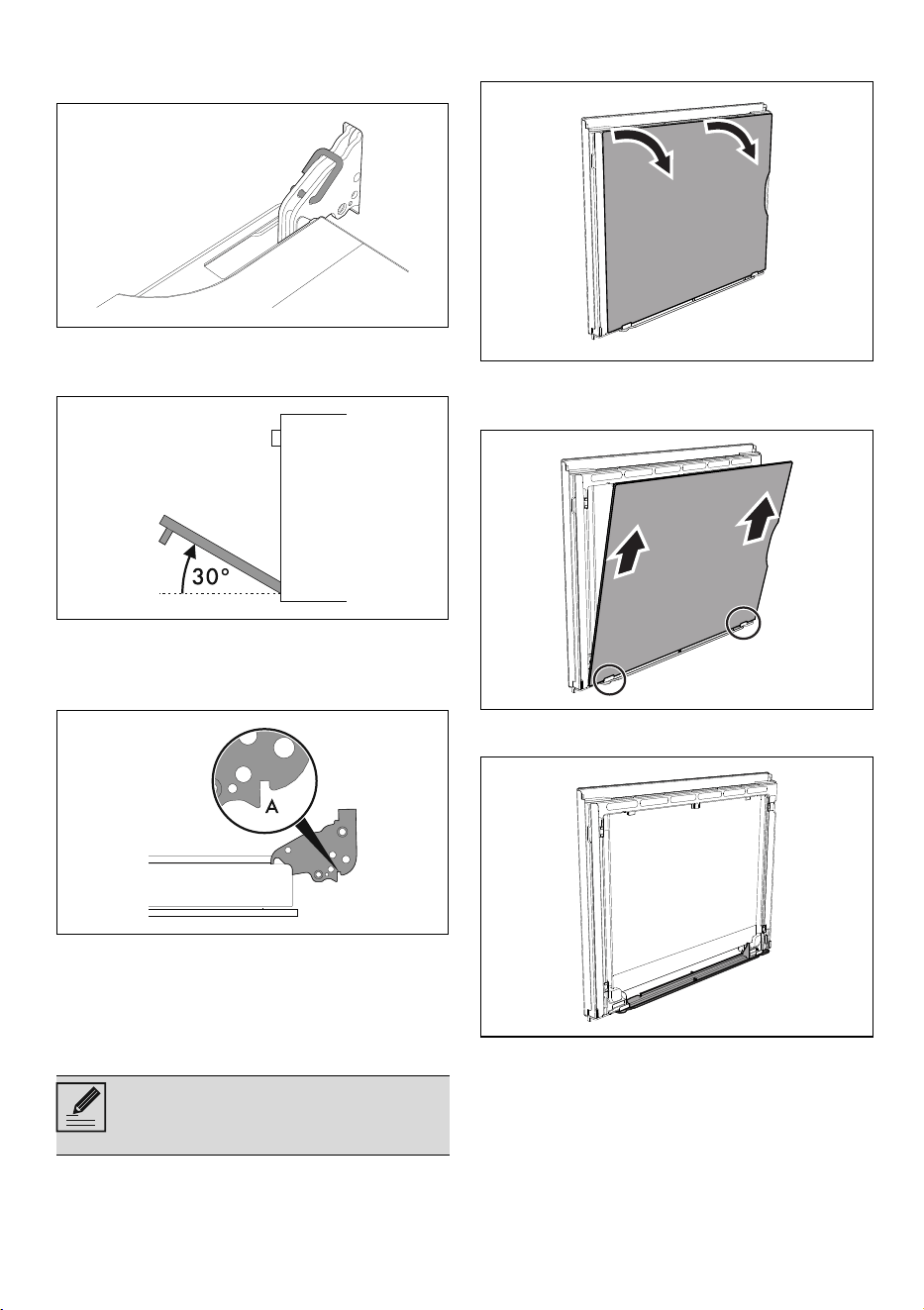
Removing the door (auxiliary oven only)
For easier cleaning it is recommended to
remove the door and place it on a tea towel.
To remove the door proceed as follows:
See General safety instructions.
See General safety instructions.
We recommend the use of cleaning
products distributed by the
manufacturer.
After cleaning, dry the appliance
thoroughly to prevent any water or
detergent from interfering with its
operation or creating unsightly marks.
Do not use aggressive products
containing alcohol or products for
cleaning steel and glass when cleaning
the knobs, as these products could
cause permanent damage.
CLEANING AND MAINTENANCE - 5191477B103/A
e
1. Open the door completely and insert two
pins into the holes on the hinges indicated in
the figure.
2. Grasp the door on both sides with both
hands, lift it so that it forms an angle of
around 30° and remove it.
3. To reassemble the door, put the hinges in
the relevant slots in the oven, making sure
that grooved sections A are resting
completely in the slots.
4. Lower the door and once it is in place
remove the pins from the holes in the hinges.
Removing the internal glass panes
For easier cleaning the internal glass panes of
the door can be removed.
Multifunction oven door
1. Remove the internal glass pane by gently
pulling the top part, following the movement
indicated by the arrows in order to release
the 4 pins from their housings on the door.
2. Then, pull the glass panel upwards, paying
attention to the brackets at the bottom of the
door.
3. After removing the inner glass, it is possible
to access the drip catcher strip.
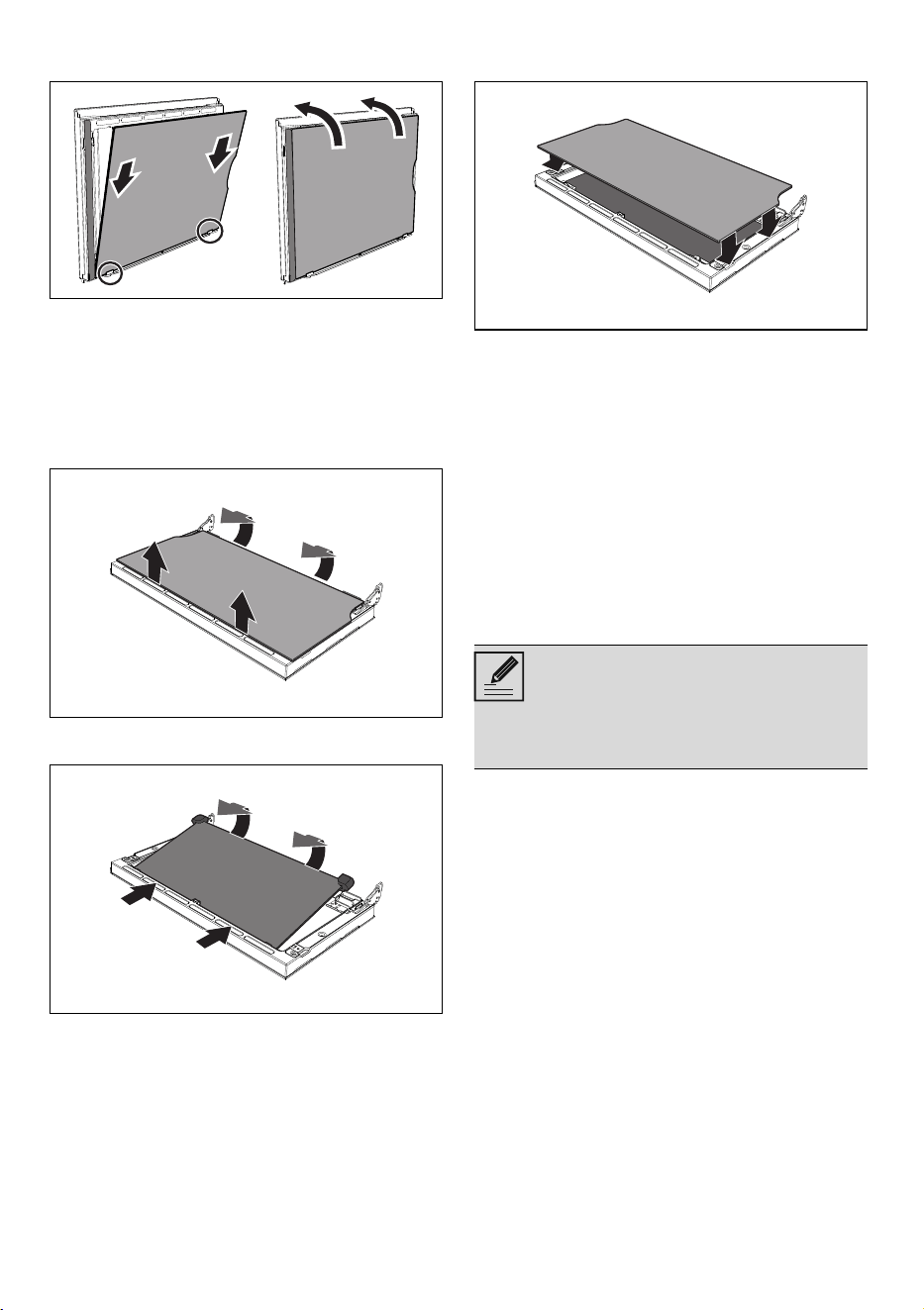
4. Place the internal glass panel back onto the
brackets after cleaning. Make sure that you
centre and then insert the 4 pins firmly into
their housings on the door with the help of
Use kitchen paper to clean. In case of
stubborn dirt, wash with a damp
sponge and neutral detergent.
52 - CLEANING AND MAINTENANCE 91477B103/A
the strips at the right and left in order to
achieve a perfect fit.
Auxiliary oven door
1. Remove the internal glass panel by pulling
the rear part gently upwards, following the
movement indicated by the arrows (1).
2. Then, pull the front part upwards (2). This
way, the 4 pins attached to the glass detach
from their housings in the oven door.
3. Remove the intermediate glass pane by
lifting it upwards.
4. Replace the intermediate glass panels after
cleaning.
5. Reposition the internal glass panel, taking
care to centre, then insert and secure the 4
pins into their slots in the oven door by
applying slight pressure.
Cleaning the oven cavity
In order to keep your oven in the best possible
condition, clean it regularly after letting it cool
down.
Avoid letting food residue dry inside the oven
cavity, as this could damage the enamel.
Take out all removable parts before cleaning.
For easier cleaning, it is recommended to
remove:
•the door;
• The rack/tray support frames.
Drying
Cooking food generates moisture inside the
appliance. This is a normal phenomenon and
does not affect the appliance’s operation in any
way.
Each time you finish cooking:
1. Let the appliance cool down.
2. Remove any dirt from inside the appliance.
3. Dry the interior of the appliance with a soft
cloth.
4. Leave the door open until the inside of the
appliance has dried completely.
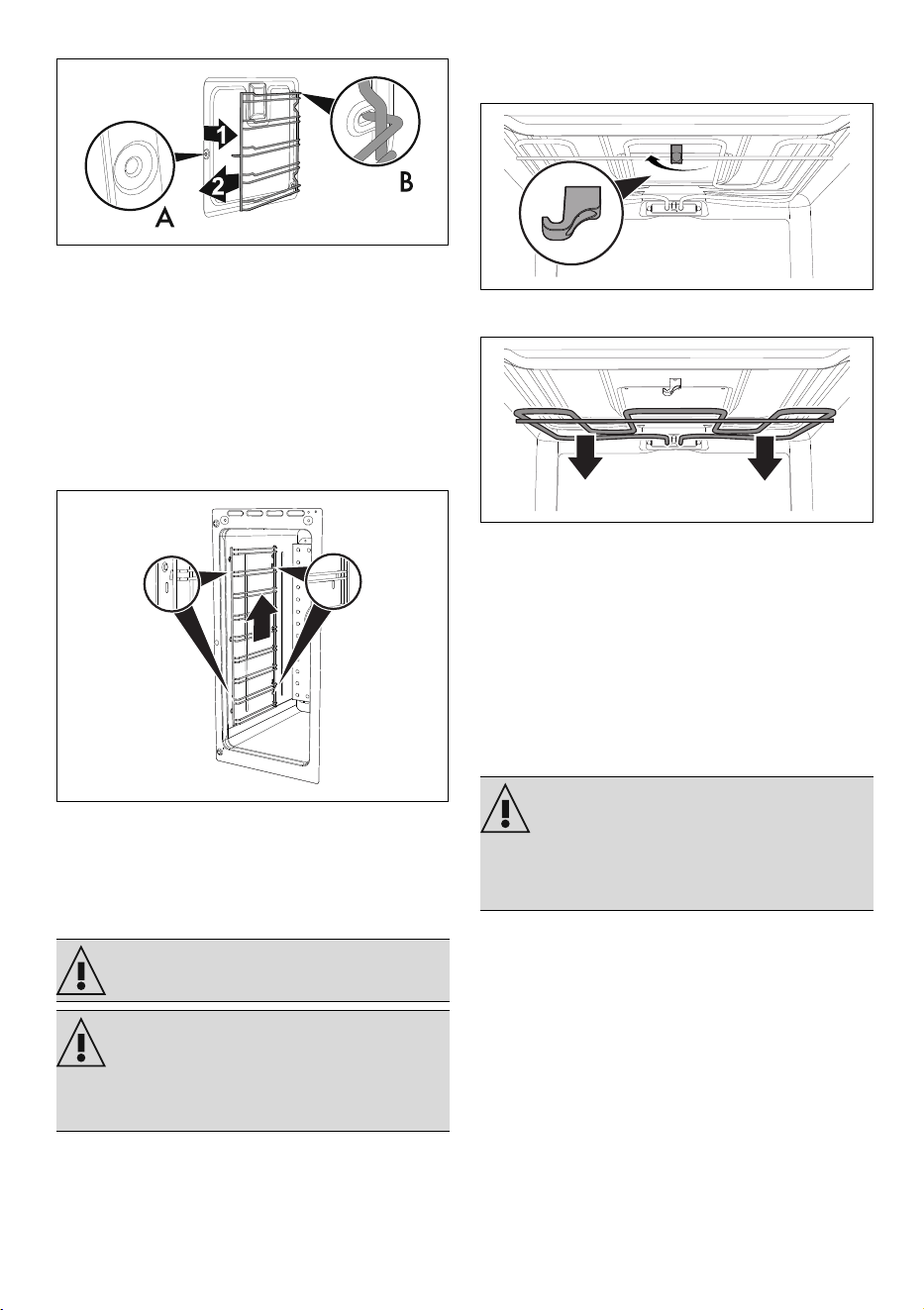
Removing racks/trays support frames
Removing the rack/tray support frames enables
the sides to be cleaned more easily.
To remove the rack/tray support frames:
• Pull the frame towards the inside of the oven
cavity to unhook it from its groove A, then
22
22
11
11
22
22
11
11
In the event you are using specific
cleaning products, we recommend
running the oven at maximum
temperature for 15-20 minutes in order
to eliminate any residue.
CLEANING AND MAINTENANCE - 5391477B103/A
e
slide it out of the seats B at the back.
• When cleaning is complete, repeat the
above procedures to put the rack/tray
support frames back in.
Removing the vertical oven rack/tray
support frames
Removing the rack/tray support frames enables
the sides to be cleaned more easily.
To remove the rack/tray support frames:
• Pull the frame upwards to remove it from its
side housings.
• When cleaning is complete, repeat the
above procedures to put the rack/tray
support frames back in.
Cleaning the roof of the oven (only
for some models/cavities)
The appliance is equipped with a tilting grill
element that allows for easy cleaning of the roof
of the oven cavity.
1. Free the upper heating element by gently
lifting it and rotating its retaining latch by 90
degrees.
2. Gently lower the heating element until it
stops.
3. When you have finished cleaning, place the
heating element back in position and turn
the retaining latch to lock it in place.
Extraordinary maintenance
Seal maintenance tips
The seal should be soft and elastic.
• To keep the seal clean, use a non-abrasive
sponge and wash with lukewarm water.
Replacing the internal light bulb
1. Completely remove all accessories from
inside the oven.
2. Remove the rack/tray support frames.
See General safety instructions.
Improper use
Risk of damage to the appliance
• Do not excessively flex the element during
cleaning.
Power voltage
Danger of electrocution
• Unplug the appliance.
• Wear protective gloves.
54 - INSTALLATION 91477B103/A
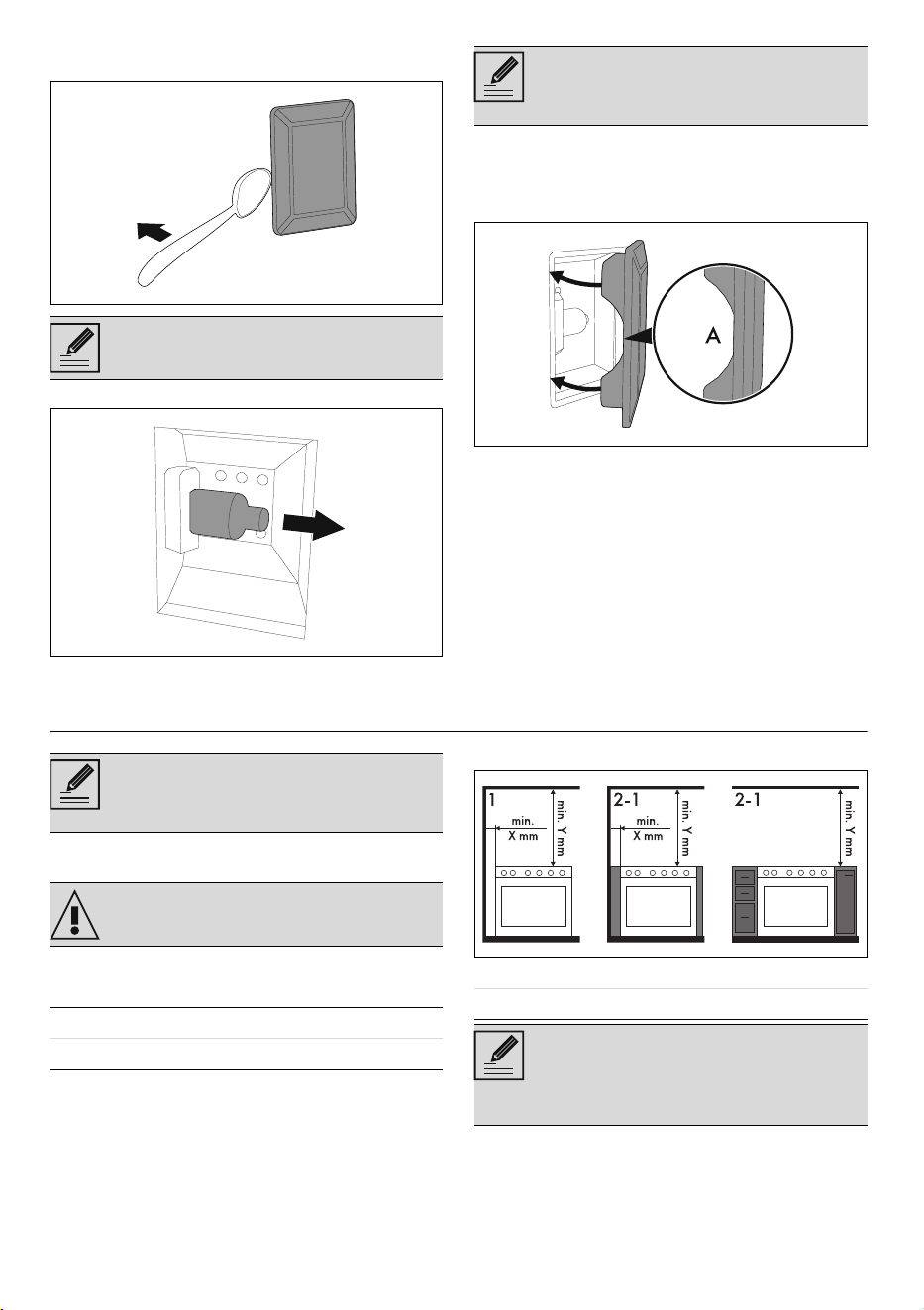
3. Use a tool (e.g. a spoon) to remove the bulb
cover.
4. Slide out and remove the light bulb.
5. Replace the light bulb with one of the same
type (40 W).
6. Refit the cover. Ensure the moulded part of
the glass (A) is facing the door.
7. Press the cover completely down so that it
attaches perfectly to the bulb support.
INSTALLATION
Positioning
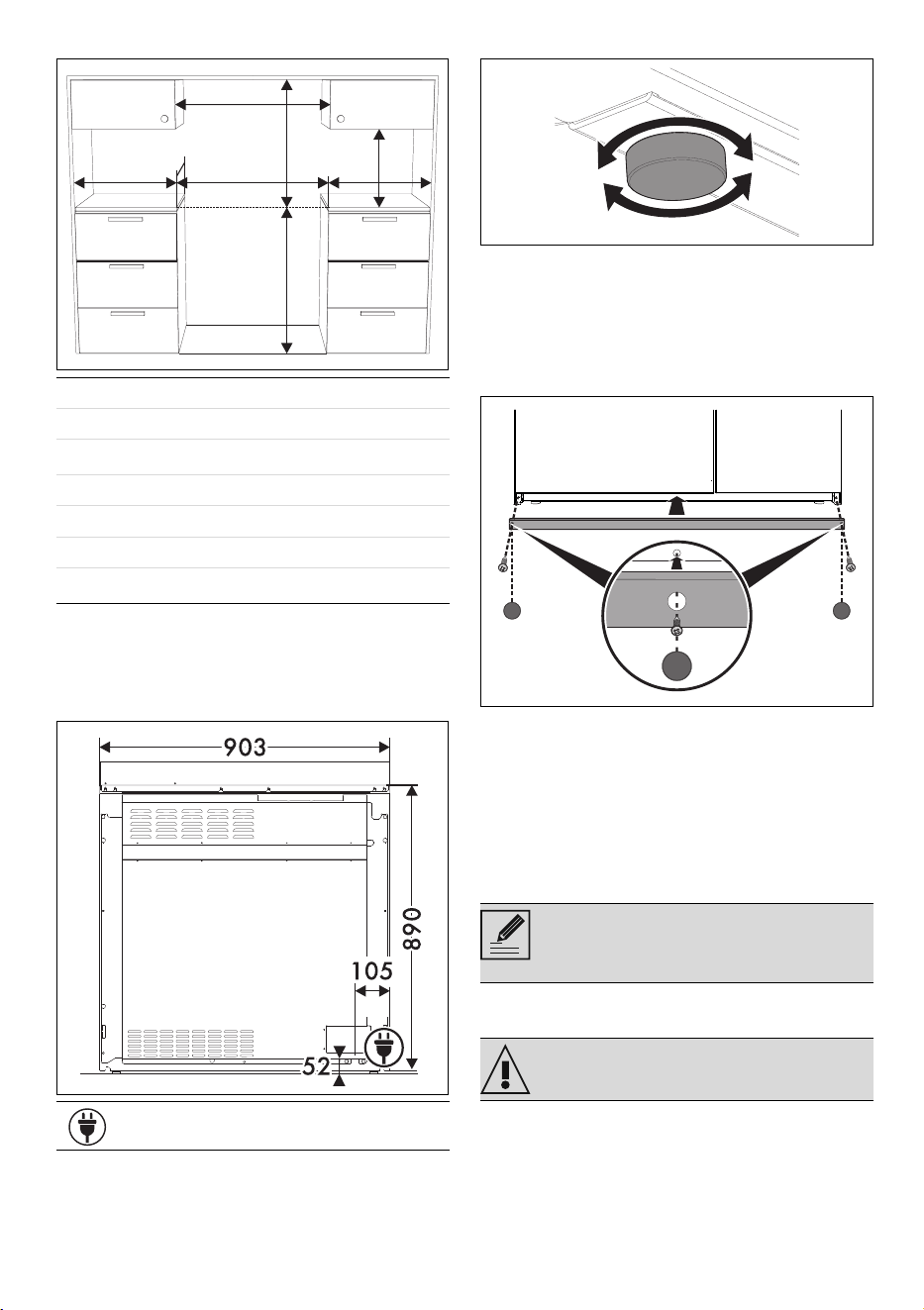
Depending on the type of installation, this
appliance belongs to classes:
The appliance can be placed against walls that
are higher than the work surface, at a minimum
distance of X mm from the side of the appliance.
Any wall units installed above the appliance’s
worktop must be positioned at least Y mm from
it.
Take care not to scratch the enamel of
the oven cavity wall.
Do not touch the halogen light bulb
directly with your fingers, use an
insulating material.
The appliance must be installed by a
qualified technician and according to
the regulations in force.
See General safety instructions.
Class 1 Free-standing
Class 2 - subclass 1 Built-in
X 150 mm
Y 750 mm
If a hood is installed above the
appliance, refer to the hood instructions
manual to make sure the correct
clearance is left.
INSTALLATION - 5591477B103/A
e
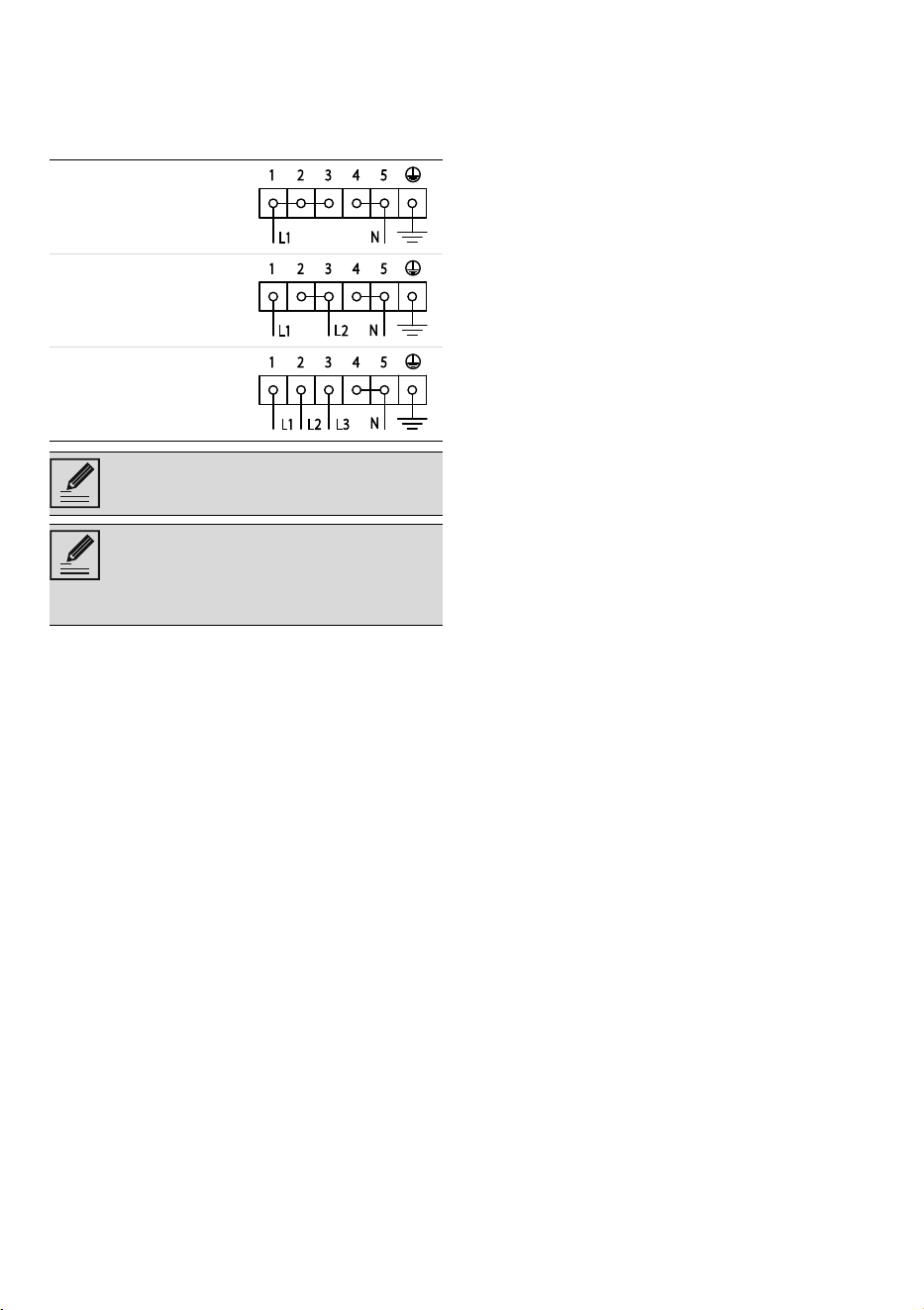
Appliance overall dimensions
1
Minimum distance from side walls or other
flammable material.
2
Minimum cabinet width (=A)
Appliance dimensions
Levelling the appliance
The appliance must be level on the floor in order
to ensure greater stability:
• Screw or unscrew the feet at the bottom until
the appliance is stable and level on the
floor.
Mounting the plinth
The plinth must always be positioned and
secured correctly on the appliance.
1. Place the plinth in the front bottom part of the
appliance.
2. Screw the two side screws to fasten the
plinth to the appliance.
3. Cover the holes of the plinth with the plugs
provided.
Electrical connection
General information
Check the mains characteristics against the data
indicated on the plate.
The identification plate bearing the technical
data, serial number and brand name is visibly
positioned on the appliance.
A 903 mm
B 600 mm
C
1
min. 150 mm
D 898 - 920 mm
H 750 mm
I 450 mm
L
2
903 mm
Position of electrical connection
LL
HH
II
CC CC
AA
BB
DD
The plinth provided is an integral part of
the product; it must be fastened to the
appliance prior to installation.
See General safety instructions.
56 - INSTALLATION 91477B103/A
Do not remove this plate for any reason.
The appliance must be connected to ground
using a wire that is at least 20 mm longer than
the other wires.
The appliance can work in the following modes:
Fixed connection
Fit the power line with an all-pole circuit breaker
with a contact separation distance sufficient to
provide complete disconnection in category III
overvoltage conditions, pursuant to installation
regulations.
For the Australian/New Zealand market:
The circuit breaker incorporated in the fixed
connection must comply with AS/NZS 3000.
Instructions for the installer
• If you use a plug (if present) to connect to
the power supply, the plug must be
accessible after installation.
• Do not bend or trap the power cable.
• The appliance must be installed according
to the installation diagrams.
• If the appliance does not work correctly
after having carried out all the checks,
contact your local Authorised Service
Centre.
• Once the appliance has been installed,
please explain to the user how to use it
correctly.
220-240 V 1N~
3 x 10 mm ²
three-core cable
380-415 V 2N~
4 x 6 mm ²
four-core cable
380-415 V 3N~
5 x 4 mm ²
five-core cable
The values indicated refer to the cross-
section of the internal conductor.
The aforementioned power cables are
sized taking into account the
coincidence factor (in compliance with
standard EN 60335-2-6).