

AXISQ1659NetworkCamera
TableofContents
Systemoverview............................................3
Productoverview...........................................4
Howtochooselens..............................................4
Aboutnetworkredundancy.......................................5
Aboutpowerredundancy.........................................5
Setup.....................................................6
Howtoaccesstheproduct........................................6
Abouttheproduct'sbuilt-inhelp...................................7
Aboutcapturemodes............................................7
Howtochoosevideocompressionformat............................8
Howtofocus...................................................8
Howtoreducenoiseinlow-lightconditions..........................8
Howtoselectexposuremode......................................9
Howtomaximizethedetailsintheimage...........................9
Troubleshooting............................................10
Howtocheckthecurrentrmware.................................10
Howtoupgradethermware.....................................10
Howtoresettofactorydefaultsettings.............................10
Technicalissues,cluesandsolutions................................11
Performanceconsiderations.......................................12
Technicalspecications......................................13
LEDindicators..................................................13
SDcardslot....................................................13
Buttons.......................................................13
Connectors....................................................13
2
AXISQ1659NetworkCamera
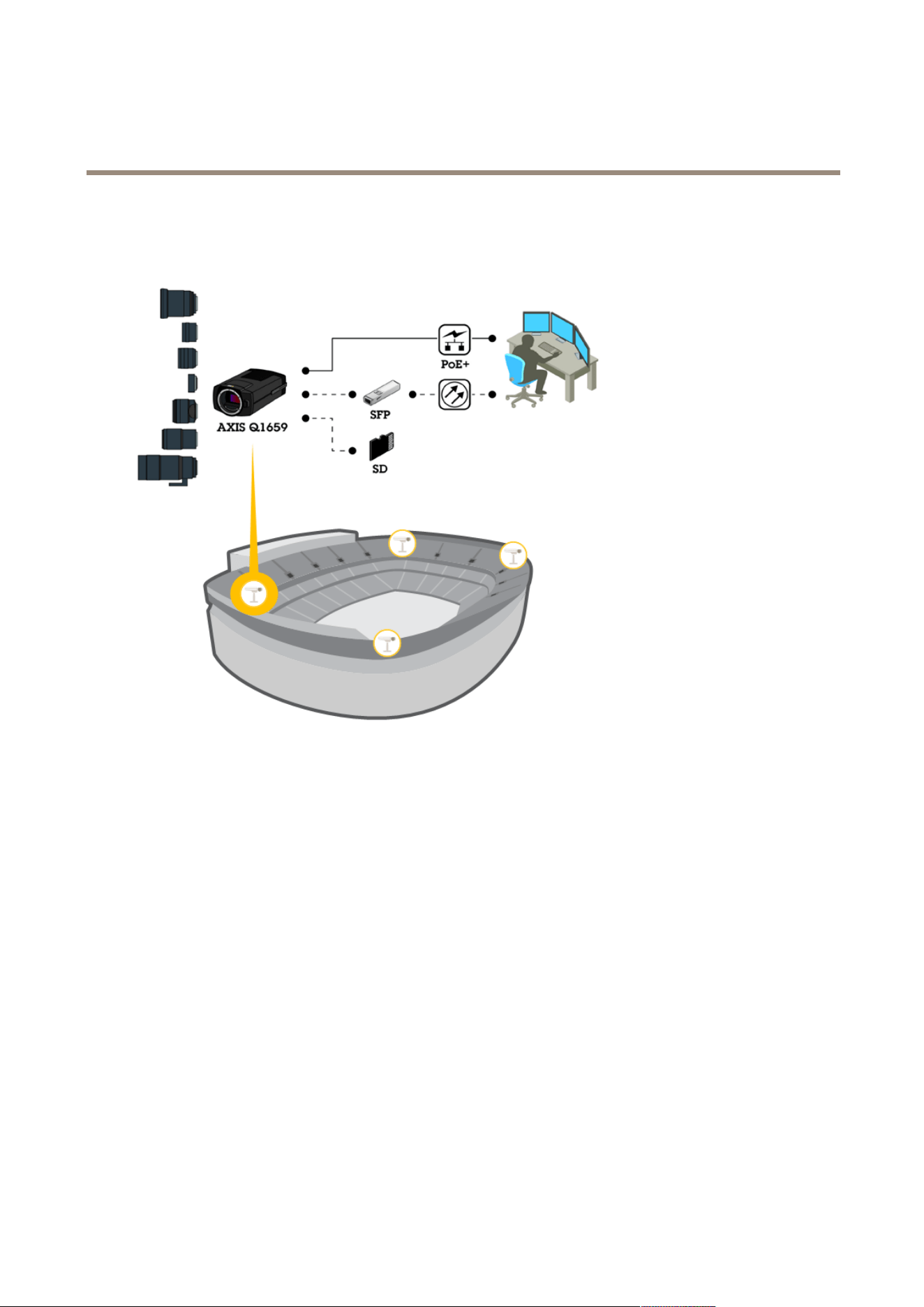
Systemoverview
Systemoverview
3
AXISQ1659NetworkCamera
Productoverview
Productoverview
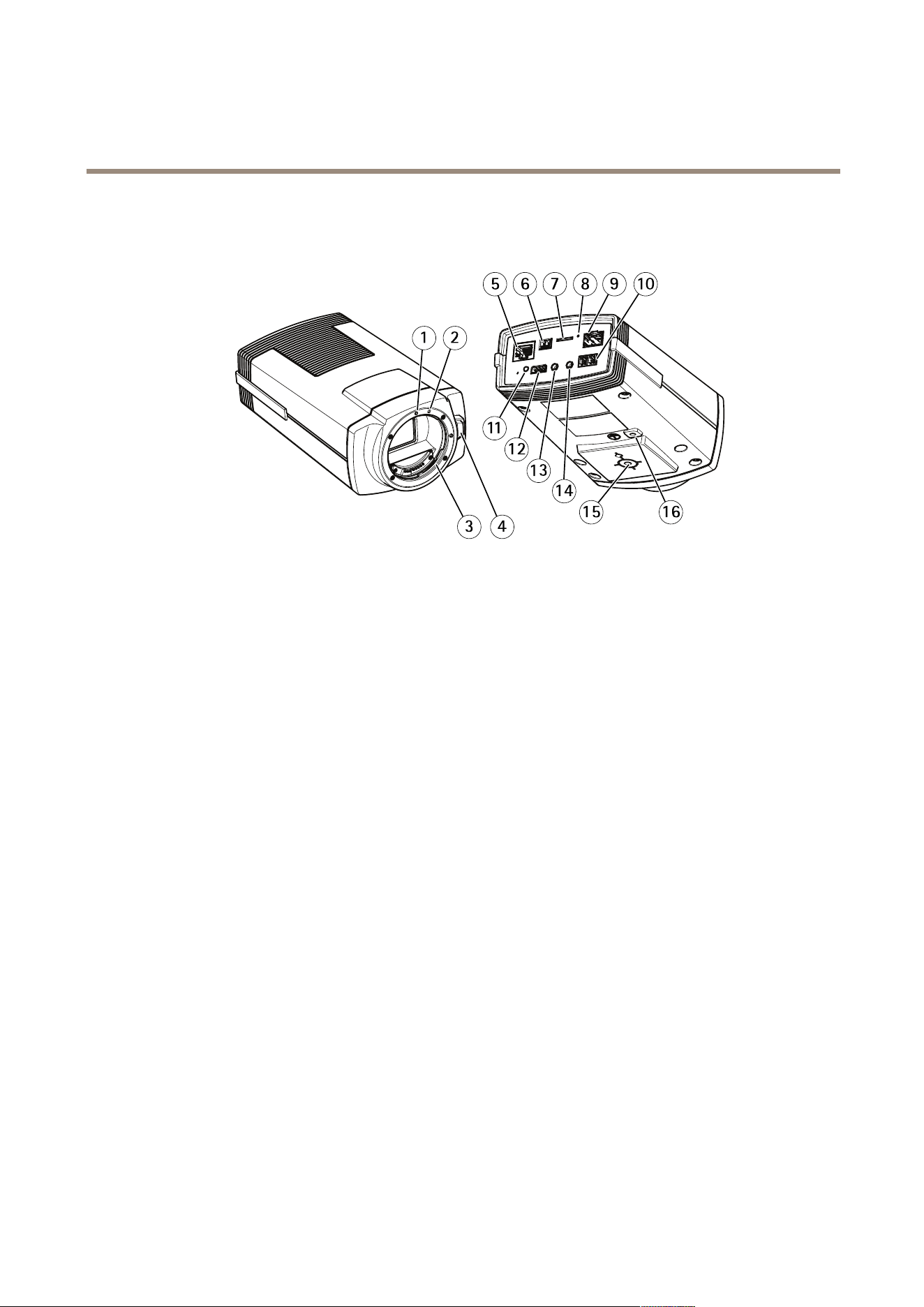
1
EFlensmountindex
2
EF-Slensmountindex
3
EFmount
4
Unlockbutton
5
Networkconnector(PoE)
6
Powerconnector(DCinput)
7
microSDcardslot
8
StatusLED
9
Networkconnector(SFP)
10
RS485/RS422connector
11
Controlbutton
12
I/Oconnector
13
Audioin
14
Audioout
15
Cameramount
16
Groundingscrew
Howtochooselens
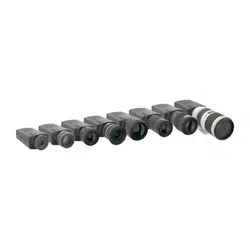
Thereareseverallensoptionsforthiscamera.Whichlenstochoosedependsonthesurveillancerequirements.Thelenseshave
differentcapabilitieswhenitcomestolightsensitivityandeldofview.Seetheproduct’sdatasheetforlensalternatives.
Aboutdepthofeldandsensorsize
Thedepthofelddependsonthelensaperture,thesizeoftheimagesensorandthedistancetothescene.Thelowerthef-number
andlargerthesensor,theshallowerdepthofeld.Duetothelargesensor,thedepthofeldismoreshallowinthisparticular
4

AXISQ1659NetworkCamera
Productoverview
productthanintraditionalsurveillancecameras.Depthofeldbecomesshallowerindarkconditions,duetothefactthattheiris
opensuptoprovideenoughlighttothesensor.
Tolearnmore,gotowww.axis.com/learning/web-articles/lenses-for-network-video-cameras
Aboutfocusandlightsensitivity
Thefocuspointisaffectedbytheaperture(f-stop)ofthelens.Thelowerthef-stopvalue,themorelightreachestheimagesensor.
Thesmallertheaperture,thedeeperdepthofeldwhichmayleadtoanunwantedabsolutefocuspoint.Duringlowlightconditions,
whentheapertureisaslargeaspossible,thedepthofelddecreasesandtheimagemaythereforeappearunfocused.
Examplesofaperturesfordifferentf-numbers.
Tocalculatethedistancebetweenthecameraandtheobjectofinterestinrelationtoscenedimensions,resolution,andfocallength,
usethelenscalculatortool,seewww.axis.com/tools/lens-calculator
Aboutlenslters
Youcanuseanylterforstandardopticstoprotectthelensfromdamagesortomodifytheimage.Thiscanbeusefulindifcultlight
conditions,toltercertainwavelengthsortoreducereections.
Aboutnetworkredundancy
Thesoftwarecontrolsthenetworkredundancyandrequiresthatbothnetworkconnectors(RJ45andSFP)areconnected.TheSFP
modulehashigherprioritythantheRJ45connector.IftheconnectionbetweentheSFPmoduleandtheswitchislosttheproduct
switchestotheRJ45connectortoestablishacontinuedconnection.
Aboutpowerredundancy
Thesoftwarecontrolsthepowerredundancy.If,forexample,theDCconnectionfails,thecameraautomaticallyswitchestoPoE.
Dependingonthesetup,thecameramayrestartforthechangetotakeeffect.
5

AXISQ1659NetworkCamera
Setup
Setup
Howtoaccesstheproduct
Theproductcanbeusedwiththefollowingbrowsers:
•Chrome
TM
(recommended),Firefox
®
,Edge
®
,orOpera
®
withWindows
®
•Chrome
TM
(recommended)orSafari
®
withOSX
®
•Chrome
TM
orFirefox
®
withotheroperatingsystems.
Howtoaccesstheproductfromabrowser
1.Startawebbrowser.
2.EntertheIPaddressorhostnameoftheAxisproductinthebrowser’saddresseld.
ToaccesstheproductfromaMaccomputer(OSX),gotoSafari,clickonBonjourandselecttheproductfromthe
drop-downlist.
IfyoudonotknowtheIPaddress,useAXISIPUtilitytolocatetheproductonthenetwork.Forinformationabout
howtodiscoverandassignanIPaddress,seethedocumentAssignanIPAddressandAccesstheVideoStreamonAxis
Supportwebatwww.axis.com/support
Note
ToshowBonjourasabrowserbookmark,gotoSafari>Preferences.
3.Enteryourusernameandpassword.Ifthisisthersttimetheproductisaccessed,therootpasswordmustrstbe
congured.
4.Theproduct’sliveviewpageopensinyourbrowser.
Note
Thecontrolsandlayoutoftheliveviewpagemayhavebeencustomizedtomeetspecicinstallationrequirementsand
userpreferences.Consequently,someoftheexamplesandfunctionsfeaturedheremaydifferfromthosedisplayedin
yourownliveviewpage.
Aboutsecurepasswords
Important
Whensettingtheinitialpassword,thepasswordissentincleartextoverthenetwork.Ifthereisariskofnetworksnifng,
rstsetupasecureanencryptedHTTPSconnectionbeforeresettingthepasswords.
Thedevicepasswordistheprimaryprotectionforthedataandservices.Axis’productsdonotimposeapasswordpolicyasproducts
maybeusedinvarioustypesofinstallations,buttoprotectyourdatadothefollowing:
•Don’tusethedefaultpasswordthatcomeswiththeproducts.
•Useapasswordwithatleast8characters,preferablyusingapasswordgenerator.
•Don’texposethepassword.
•Changepasswordatarecurringinterval,atleastonceayear.
6
AXISQ1659NetworkCamera
Setup
Setapasswordfortherootaccount
Important
Thedefaultadministratorusernamerootispermanentandcannotbedeleted.Ifthepasswordforrootislost,theproduct
mustberesettothefactorydefaultsettings.
Thedefaultrootaccounthasfullprivilegesandshouldbereservedforadministrativetasks.Alwayscreateauseraccountwithlimited
privilegesfordailyuse.Thisreducestheexposureoftheadministrativeaccount.
1.Makesuretofollowtheinstructionsaboutsecurepasswords,seeAboutsecurepasswordsonpage6.
2.Typeapasswordandthenretypeittoconrmthespelling.
3.ClickCreatelogin.Thepasswordhasnowbeencongured.
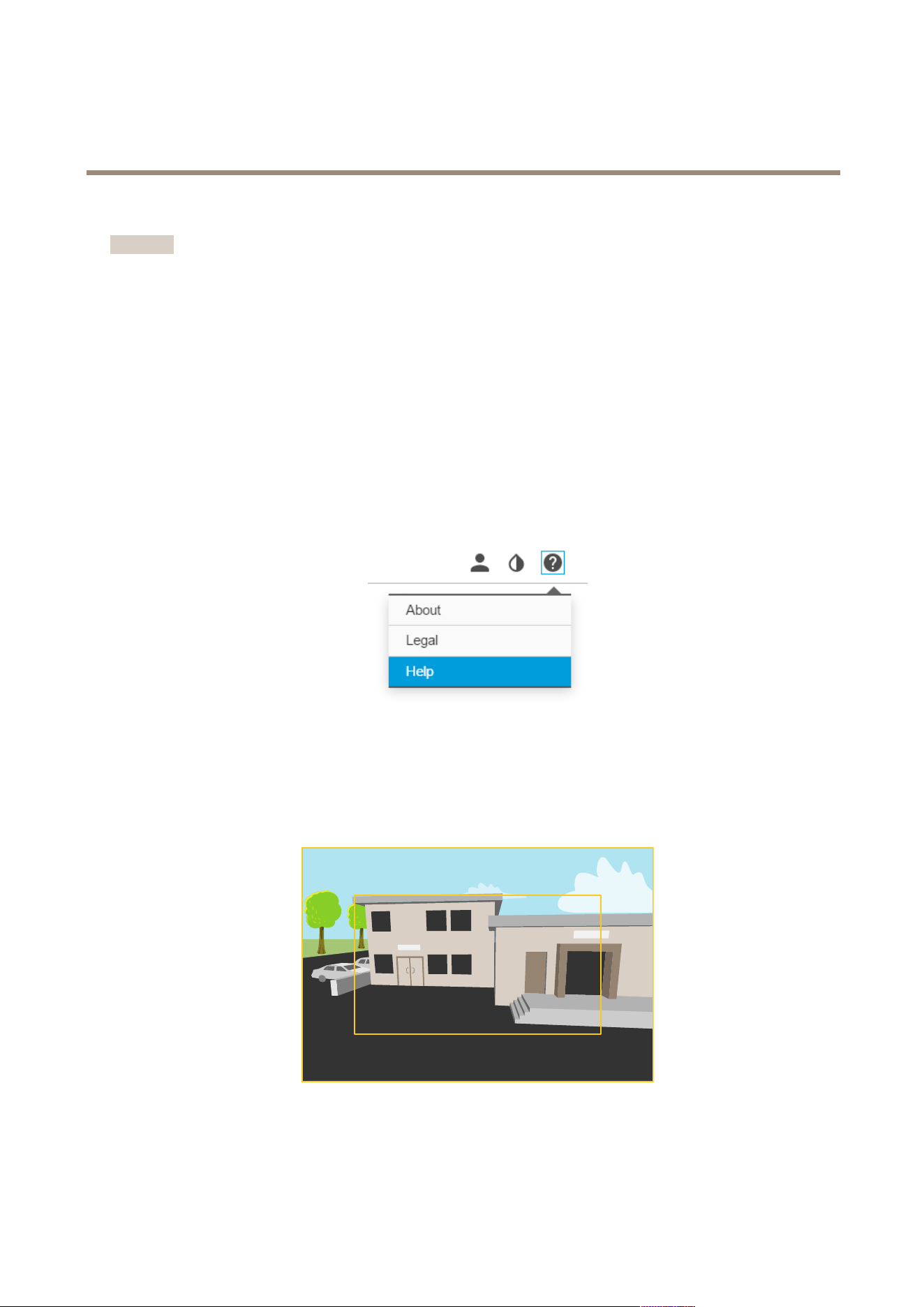
Abouttheproduct'sbuilt-inhelp
Tosetuptheproduct,youneedtoaccesstheproduct’swebpage.Inthewebpageyoucanalsonddetailedinstructionsinthe
product’sbuilt-inhelp.
Aboutcapturemodes
Acapturemodeconsistsofaresolutionandthecorrespondingframerateavailableintheproduct.Thecapturemodesetting
affectsthecamera’seldofviewandaspectratio.
Thelowerresolutioncapturemodeiscroppedoutfromthehighestresolution.
Theimageshowshowtheeldofviewandaspectratiocanchangebetweentwodifferentcapturemodes.
7

AXISQ1659NetworkCamera
Setup
Howtoselectcapturemode
Whatcapturemodetochoosedependsontherequirementsofframerateandresolutionforthespecicsurveillancesetup.See
thedatasheetforspecicationsaboutavailablecapturemodes.Tondthelatestversionofthedatasheet,gotowww.axis.com>
product>Support&Documentation.
Howtochoosevideocompressionformat
Decidingwhichcompressionmethodtochoosedependsonyourviewingrequirements,andonthepropertiesofyournetwork.The
availableoptionsare:
MotionJPEG
MotionJPEGorMJPEGisadigitalvideosequencethatismadeupofaseriesofindividualJPEGimages.Theseimagesarethen
displayedandupdatedataratesufcienttocreateastreamthatshowsconstantlyupdatedmotion.Fortheviewertoperceivemotion
videotheratemustbeatleast16imageframespersecond.Fullmotionvideoisperceivedat30(NTSC)or25(PAL)framespersecond.
TheMotionJPEGstreamusesconsiderableamountsofbandwidth,butprovidesexcellentimagequalityandaccesstoeveryimage
containedinthestream.
H.264orMPEG-4Part10/AVC
Note
H.264isalicensedtechnology.TheAxisproductincludesoneH.264viewingclientlicense.Installingadditionalunlicensed
copiesoftheclientisprohibited.Topurchaseadditionallicenses,contactyourAxisreseller.
H.264can,withoutcompromisingimagequality,reducethesizeofadigitalvideolebymorethan80%comparedtotheMotion
JPEGformatandbyasmuchas50%comparedtotheMPEG-4standard.Thismeansthatlessnetworkbandwidthandstoragespace
arerequiredforavideole.Orseenanotherway,highervideoqualitycanbeachievedforagivenbitrate.
Formoreinformation,seewww.axis.com/learning/web-articles/technical-guide-to-network-video/compression-formats
Howtofocus
1.GototheImagetabintheproduct’swebpage.
2.ClickAutofocus.
Focusaid
Iftheautofocusfunctionisnotsufcient,ortopreventfocusfrombeinglostwhenthelightingconditionschangesfromdayto
night,werecommendthatyouusethefocusaid.Followtheinstructionsinthefocusaidwindowtosettheapertureaslargeas
possiblebeforeturningonautofocus.Thismakesthecamerakeepfocuswhenthelightingconditionschanges.
Howtoreducenoiseinlow-lightconditions
Toreducenoiseinlow-lightconditions,youcanadjustoneormoreofthefollowingsettings:
•Makesurethattheexposuremodeisautomatic.
Note
Increasingthemaxshuttervaluecanresultinmotionblur.
•Theshutterspeedshouldbeasslowaspossible,whichmeansyoushouldsetmaxshuttertothehighestpossiblevalue.
•Reducesharpnessintheimage.
•Tryloweringthemaxgainvalue.
Iftheabovesettingsdonotimprovetheimagesufciently,changetoalenswithalowerf-value.
8

AXISQ1659NetworkCamera
Setup
Fordetailedinstructions,gototheproduct’sbuilt-inhelp.
Howtoselectexposuremode
Thereareseveralexposuremodeoptionsinthecamerathatadjustsaperture,shutterspeed,andgaintoimproveimagequalityfor
specicsurveillancescenes.IntheImagetab,selectbetweenthefollowingoptions:
•Formostusecases,selectAutomaticexposure.
•Forfastmovingobjectsthatrequireafastorxedshutter,selectAutomaticaperture.
•Tomaintainalongerdepthofeldorfocusrange,selectAutomaticshutter.
•Forenvironmentswithcertainarticiallighting,forexampleuorescentlighting,selectFlicker-free.
•Forenvironmentswithcertainarticiallightandbrightlight,forexampleoutdoorswithuorescentlightingatnightand
sunduringdaytime,selectFlicker-reduced.
•Ifyouneedfullcontrolofallparameters,mostlyusefulforsceneswithlittlechangeinlighting,selectManual.
Formoredetailedinstructions,gototheproduct’sbuilt-inhelp.
Howtomaximizethedetailsintheimage
Important
Ifyoumaximizethedetailsintheimagethebitratebecomeshigherwhichinturnmightresultinreducedframerate.
•Makesuretoselectthecapturemodewiththehighestresolution.
•Setthecompressionassmallaspossible.
•SelectMJPEGstreaming.
•TurnofftheZipstreamfunctionality.
9

AXISQ1659NetworkCamera
Troubleshooting
Troubleshooting
Howtocheckthecurrentrmware
Firmwareisthesoftwarethatdeterminesthefunctionalityofnetworkdevices.Oneofyourrstactionswhentroubleshootinga
problemshouldbetocheckthecurrentrmwareversion.Thelatestversionmaycontainacorrectionthatxesyourparticular
problem.
Tocheckthecurrentrmware:
1.Gototheproduct’swebpage.
2.Clickonthehelpmenu.
3.ClickAbout.
Howtoupgradethermware
Important
Preconguredandcustomizedsettingsaresavedwhenthermwareisupgraded(providedthatthefeaturesareavailablein
thenewrmware)althoughthisisnotguaranteedbyAxisCommunicationsAB.
Note
Whenyouupgradetheproductwiththelatestrmware,theproductreceivesthelatestfunctionalityavailable.Alwaysread
theupgradeinstructionsandreleasenotesavailablewitheachnewreleasebeforeupgradingthermware.Tondthelatest
rmwareandthereleasenotes,gotowww.axis.com>product>Support&Documentation.
1.Downloadthelatestrmwareletoyourcomputer,availablefreeofchargeatwww.axis.com/support/rmware
2.Logintotheproductasanadministrator.
3.GotoSettings>System>Maintenanceintheproduct’swebpageandfollowtheinstructions.
4.Theupgradetakesawhile,don'tbreakthepowertotheproduct.Whentheupgradeisnished,theproductrestarts
automatically.
AXISCameraManagementcanbeusedformultipleupgrades,seewww.axis.com/products/axis-camera-managementformore
information.
Howtoresettofactorydefaultsettings
Important
Resettofactorydefaultshouldbeusedwithcaution.Aresettofactorydefaultresetsallsettings,includingtheIPaddress,to
thefactorydefaultvalues.
Toresettheproducttothefactorydefaultsettings:
1.Disconnectpowerfromtheproduct.
2.Pressandholdthecontrolbuttonwhilereconnectingpower.SeeProductoverview.
3.Keepthecontrolbuttonpressedfor15–30secondsuntilthestatusLEDindicatorashesamber.
4.Releasethecontrolbutton.TheprocessiscompletewhenthestatusLEDindicatorturnsgreen.Theproducthasbeenreset
tothefactorydefaultsettings.IfnoDHCPserverisavailableonthenetwork,thedefaultIPaddressis192.168.0.90
5.UsetheinstallationandmanagementsoftwaretoolstoassignanIPaddress,setthepassword,andaccessthevideostream.
10

AXISQ1659NetworkCamera
Troubleshooting
Theinstallationandmanagementsoftwaretoolsareavailablefromthesupportpagesonwww.axis.com/support
Technicalissues,cluesandsolutions
Ifyoucan’tndwhatyou’relookingforhere,trythetroubleshootingsectionatwww.axis.com/support
Problemsupgradingthermware
FirmwareupgradefailureIfthermwareupgradefails,theproductreloadsthepreviousrmware.Themostcommonreason
isthatthewrongrmwarelehasbeenuploaded.Checkthatthenameofthermwarele
correspondstoyourproductandtryagain.
ProblemssettingtheIPaddress
WhenusingARP/Ping
Trytheinstallationagain.TheIPaddressmustbesetwithintwominutesafterpowerhasbeen
appliedtotheproduct.Ensurethatthepinglengthissetto408.
Theproductislocatedona
differentsubnet
IftheIPaddressintendedfortheproductandtheIPaddressofthecomputerusedtoaccessthe
productarelocatedondifferentsubnets,youcannotsettheIPaddress.Contactyournetwork
administratortoobtainanIPaddress.
TheIPaddressisbeingused
byanotherdevice
DisconnecttheAxisproductfromthenetwork.Runthepingcommand(inaCommand/DOS
window,typepingandtheIPaddressoftheproduct):
•Ifyoureceive:Replyfrom<IPaddress>:bytes=32;time=10...
thismeansthattheIPaddressmayalreadybeinusebyanotherdeviceonthenetwork.
ObtainanewIPaddressfromthenetworkadministratorandreinstalltheproduct.
•Ifyoureceive:Requesttimedout,thismeansthattheIPaddressisavailable
forusewiththeAxisproduct.Checkallcablingandreinstalltheproduct.
PossibleIPaddressconict
withanotherdeviceonthe
samesubnet
ThestaticIPaddressintheAxisproductisusedbeforetheDHCPserversetsadynamicaddress.
ThismeansthatifthesamedefaultstaticIPaddressisalsousedbyanotherdevice,theremay
beproblemsaccessingtheproduct.
Theproductcannotbeaccessedfromabrowser
Cannotlogin
WhenHTTPSisenabled,ensurethatthecorrectprotocol(HTTPorHTTPS)isusedwhenattempting
tologin.Youmayneedtomanuallytypehttporhttpsinthebrowser’saddresseld.
Ifthepasswordfortheuserrootislost,theproductmustberesettothefactorydefaultsettings.
SeeHowtoresettofactorydefaultsettings.
TheIPaddresshasbeen
changedbyDHCP
IPaddressesobtainedfromaDHCPserveraredynamicandmaychange.IftheIPaddresshas
beenchanged,useAXISIPUtilityorAXISCameraManagementtolocatetheproductonthe
network.Identifytheproductusingitsmodelorserialnumber,orbytheDNSname(ifthename
hasbeencongured).
Ifrequired,astaticIPaddresscanbeassignedmanually.Forinstructions,goto
www.axis.com/support.
Theproductisaccessiblelocallybutnotexternally
Routerconguration
CheckthatyourrouterallowsincomingdatatrafctotheAxisproduct.Theroutermustsupport
UPnP
TM
.
Firewallprotection
ChecktheInternetrewallwithyournetworkadministrator.
ProblemswithstreamingH.264
MulticastH.264only
accessiblebylocalclients
Checkifyourroutersupportsmulticasting,oriftheroutersettingsbetweentheclientandthe
productneedtobecongured.TheTTL(TimeToLive)valuemayneedtobeincreased.
11

AXISQ1659NetworkCamera
Troubleshooting
NomulticastH.264
displayedintheclient
CheckwithyournetworkadministratorthatthemulticastaddressesusedbytheAxisproduct
arevalidforyournetwork.
Checkwithyournetworkadministratortoseeifthereisarewallpreventingviewing.
PoorrenderingofH.264
images
Ensurethatyourgraphicscardisusingthelatestdriver.Thelatestdriverscanusuallybe
downloadedfromthemanufacturer’swebsite.
Colorsaturationisdifferent
inH.264andMotionJPEG
Modifythesettingsforyourgraphicsadapter.Gototheadapter’sdocumentationformore
information.
Lowerframeratethan
expected
•SeePerformanceconsiderationsonpage12.
•Reducethenumberofapplicationsrunningontheclientcomputer.
•Limitthenumberofsimultaneousviewers.
•Checkwiththenetworkadministratorthatthereisenoughbandwidthavailable.
•Lowertheimageresolution.
•Intheproduct’swebpage,setacapturemodethatprioritizesframerate.Changingthe
capturemodetoprioritizeframeratemightlowerthemaximumresolutiondepending
ontheproductusedandcapturemodesavailable.
Performanceconsiderations
Whensettingupyoursystem,itisimportanttoconsiderhowvarioussettingsandsituationsaffecttheperformance.Somefactors
affecttheamountofbandwidth(thebitrate)required,otherscanaffecttheframerate,andsomeaffectboth.Iftheloadonthe
CPUreachesitsmaximum,thisalsoaffectstheframerate.
Thefollowingfactorsarethemostimportanttoconsider:
•Highimageresolutionorlowercompressionlevelsresultinimagescontainingmoredatawhichinturnaffectsthe
bandwidth.
•AccessbylargenumbersofMotionJPEGorunicastH.264clientsaffectsthebandwidth.
•Simultaneousviewingofdifferentstreams(resolution,compression)bydifferentclientsaffectsbothframerateand
bandwidth.
Useidenticalstreamswhereverpossibletomaintainahighframerate.Streamprolescanbeusedtoensurethat
streamsareidentical.
•AccessingMotionJPEGandH.264videostreamssimultaneouslyaffectsbothframerateandbandwidth.
•Heavyusageofeventsettingsaffectstheproduct’sCPUloadwhichinturnaffectstheframerate.
•UsingHTTPSmayreduceframerate,inparticularifstreamingMotionJPEG.
•Heavynetworkutilizationduetopoorinfrastructureaffectsthebandwidth.
•Viewingonpoorlyperformingclientcomputerslowersperceivedperformanceandaffectsframerate.
•RunningmultipleAXISCameraApplicationPlatform(ACAP)applicationssimultaneouslymayaffecttheframerateand
thegeneralperformance.
12

AXISQ1659NetworkCamera
Technicalspecifications
Technicalspecifications
Tondthelatestversionofthedatasheet,gotowww.axis.com>product>Support&Documentation.
Forlocationofthecomponents,seeProductoverviewonpage4.
LEDindicators
StatusLED
Indication
GreenConnectionandnormaloperation.
Amber
Steadyduringstartup.Flashesduringrmwareupgradeorresettofactorydefault.
SDcardslot
NO NO
NO
TICE TICE
TICE
•RiskofdamagetoSDcard.Donotusesharptools,metalobjects,orexcessiveforcewheninsertingorremovingthe
SDcard.Useyourngerstoinsertandremovethecard.
•Riskofdatalossandcorruptedrecordings.DonotremovetheSDcardwhiletheproductisrunning.Disconnectpoweror
unmounttheSDcardfromtheproduct’swebpagebeforeremoval.
ThisproductsupportsmicroSD/microSDHC/microSDXCcards(notincluded).
ForSDcardrecommendations,seewww.axis.com
Buttons
Controlbutton
Thecontrolbuttonisusedfor:
•Resettingtheproducttofactorydefaultsettings.SeeHowtoresettofactorydefaultsettingsonpage10.
•ConnectingtoanAXISVideoHostingSystemservice.Toconnect,pressandholdthebuttonforabout3secondsuntilthe
statusLEDashesgreen.
Connectors
Networkconnector
RJ45EthernetconnectorwithPoweroverEthernet(PoE).
SFPconnector.
NO NO
NO
TICE TICE
TICE
Theproductshallbeconnectedusingashieldednetworkcable(STP)oranopticalbercable.Allcablesconnectingthe
producttothenetworkshallbeintendedfortheirspecicuse.Makesurethatthenetworkdevicesareinstalledin
accordancewiththemanufacturer’sinstructions.Forinformationaboutregulatoryrequirements,seetheInstallation
Guideavailableatwww.axis.com
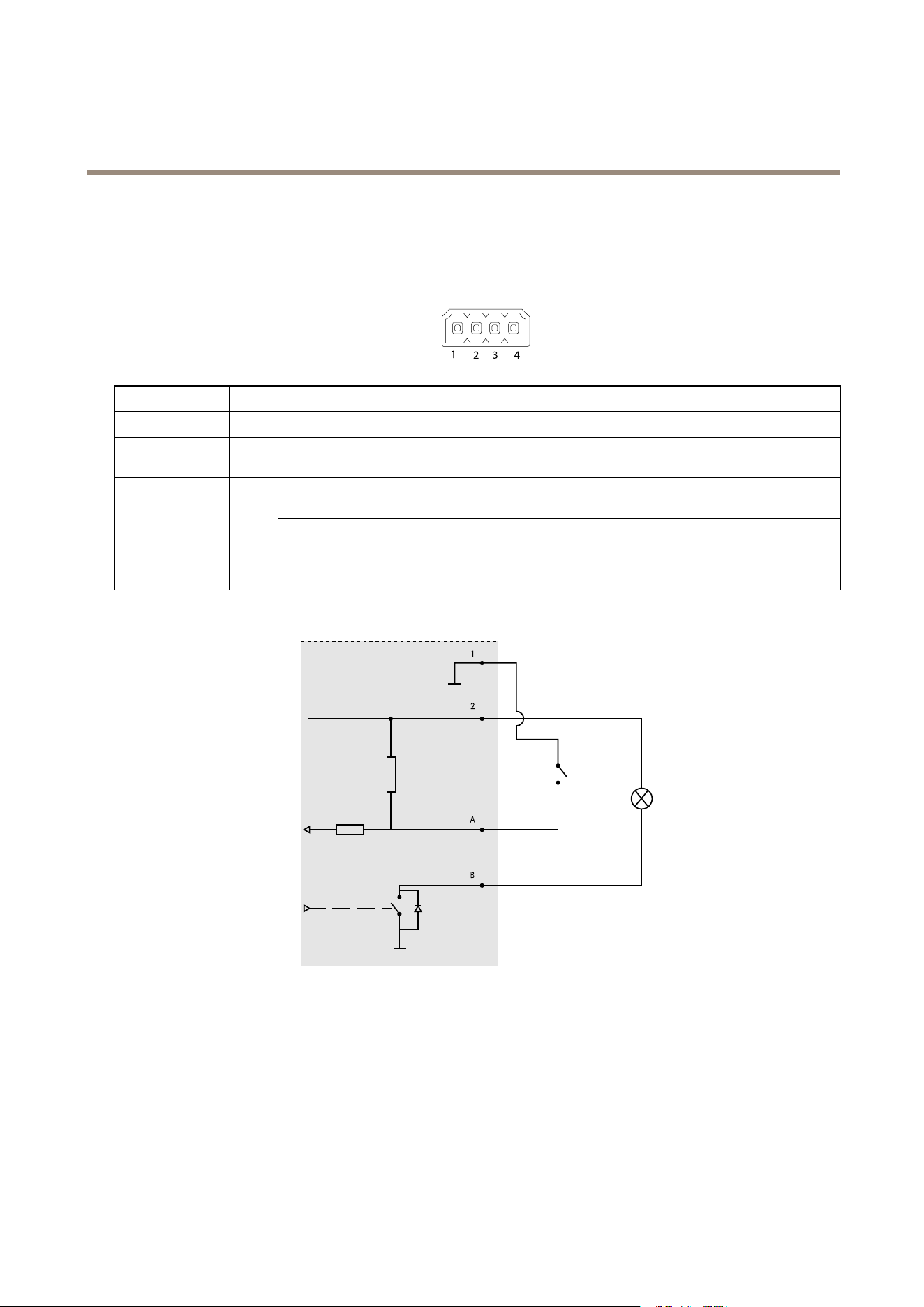
AboutI/Oconnectors
UsetheI/Oconnectorwithexternaldevicesincombinationwith,forexample,tamperingalarms,motiondetection,eventtriggering,
andalarmnotications.Inadditiontothe0VDCreferencepointandpower(DCoutput),theI/Oconnectorprovidestheinterfaceto:
13
AXISQ1659NetworkCamera
Technicalspecifications
Digitaloutput-ForconnectingexternaldevicessuchasrelaysandLEDs.ConnecteddevicescanbeactivatedbytheVAPIX®
ApplicationProgrammingInterfaceorintheproduct’swebpage.
Digitalinput-Forconnectingdevicesthatcantogglebetweenanopenandclosedcircuit,forexamplePIRsensors,door/window
contacts,andglassbreakdetectors.
4-pinterminalblock
FunctionPinNotes
Specications
0VDC(-)
1
DCground0VDC
DCoutput
2
Canbeusedtopowerauxiliaryequipment.
Note:Thispincanonlybeusedaspowerout.
12VDC
Maxload=50mA
Digitalinput–Connecttopin1toactivate,orleaveoating
(unconnected)todeactivate.
0tomax30VDC Congurable
(InputorOutput)
3–4
Digitaloutput–Connectedtopin1whenactivated,oating
(unconnected)whendeactivated.Ifusedwithaninductiveload,e.g.
arelay,adiodemustbeconnectedinparallelwiththeload,for
protectionagainstvoltagetransients.
0tomax30VDC,opendrain,
100mA
1
0VDC(-)
2
DCoutput12V,max50mA
A
I/Oconguredasinput
B
I/Oconguredasoutput
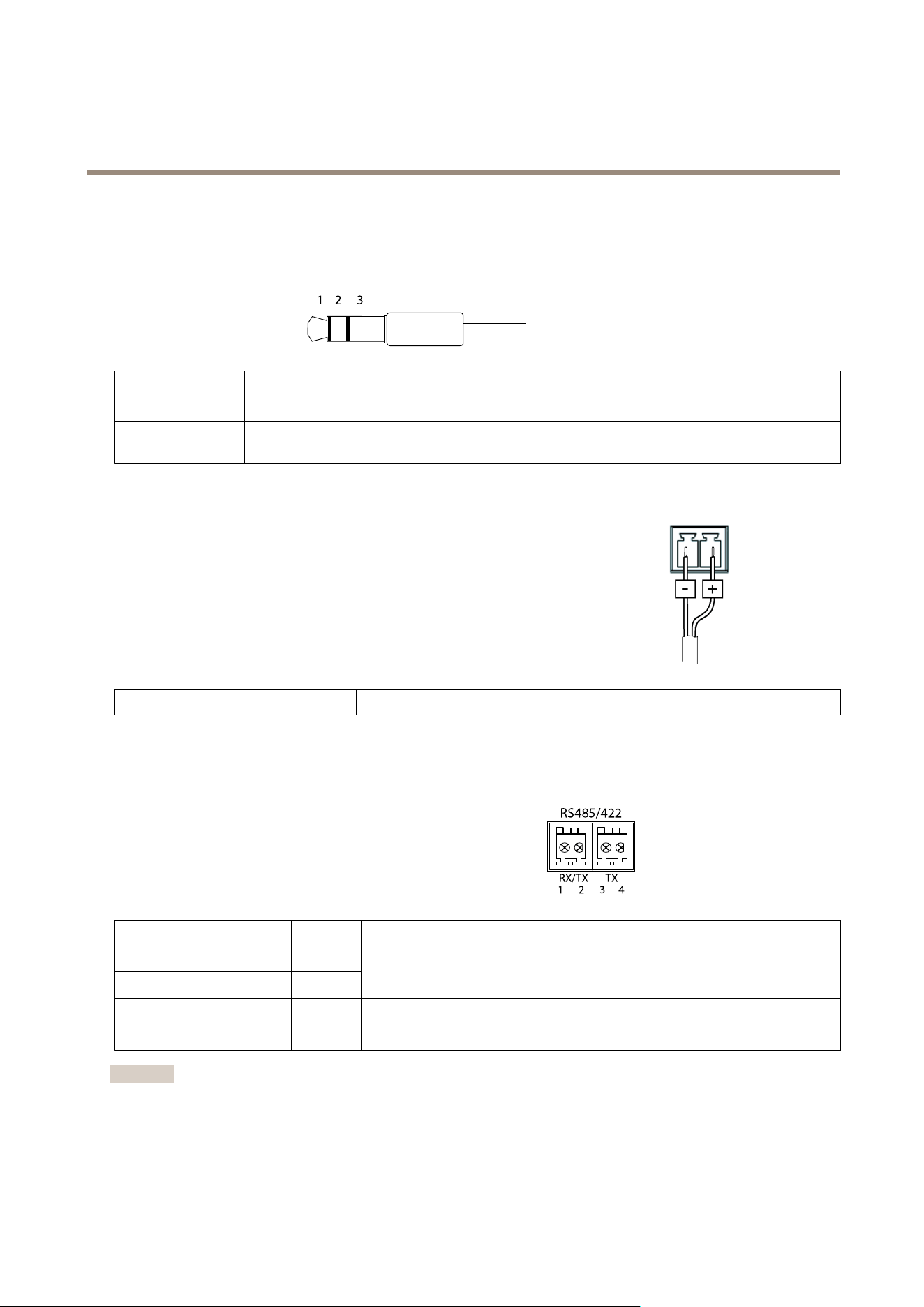
Audioconnector
TheAxisproducthasthefollowingaudioconnectors:
•Audioin(pink)–3.5mminputforamonomicrophone,oraline-inmonosignal.
14
AXISQ1659NetworkCamera
Technicalspecifications
•Audioout(green)–3.5mmoutputforaudio(linelevel)thatcanbeconnectedtoapublicaddress(PA)systemoran
activespeakerwithabuilt-inamplier.Astereoconnectormustbeusedforaudioout.
Foraudioin,theleftchannelisusedfromastereosignal.
3.5mmaudioconnectors
(stereo)
1Tip2Ring
3Sleeve
AudioInput
Microphone/Linein
Ground
AudioOutput
Lineout,mono(stereoconnector
compatible)
Lineout,mono(stereoconnector
compatible)
Ground
Powerconnector
2-pinterminalblockforDCpowerinput.UseaSafetyExtraLowVoltage(SELV)compliant
limitedpowersource(LPS)witheitheraratedoutputpowerlimitedto≤100Woraratedoutput
currentlimitedto≤5A.
Powersupply
20–28VDC,max15.8W
RS485/RS422connector
Two2-pinterminalblocksforRS485/RS422serialinterfaceusedtocontrolauxiliaryequipmentsuchaspan-tiltdevices.
Theserialportcanbeconguredtosupport:
•Two-wireRS485halfduplex
•Four-wireRS485fullduplex
•Two-wireRS422simplex
•Four-wireRS422fullduplexpointtopointcommunication
FunctionPinNotes
RS485BaltRS485/422RX(B)
1
RS485AaltRS485/422RX(A)
2
RXpairforallmodes(combinedRX/TXfor2-wireRS485)
RS485/RS422TX(B)
3
RS485/RS422TX(A)
4
TXpairforRS422and4-wireRS485
Important
Therecommendedmaximumcablelengthis30m(98ft).
15

UserManualVer.M1.26
AXISQ1659NetworkCamera
Date:March2017
©AxisCommunicationsAB,2016-2017
PartNo.1666390