©COPYRIGHT AVPRO GLOBAL HOLDINGS 2024 - 22410 70TH AVENUE WEST, MOUNTLAKE TERRACE, WA 98043
1
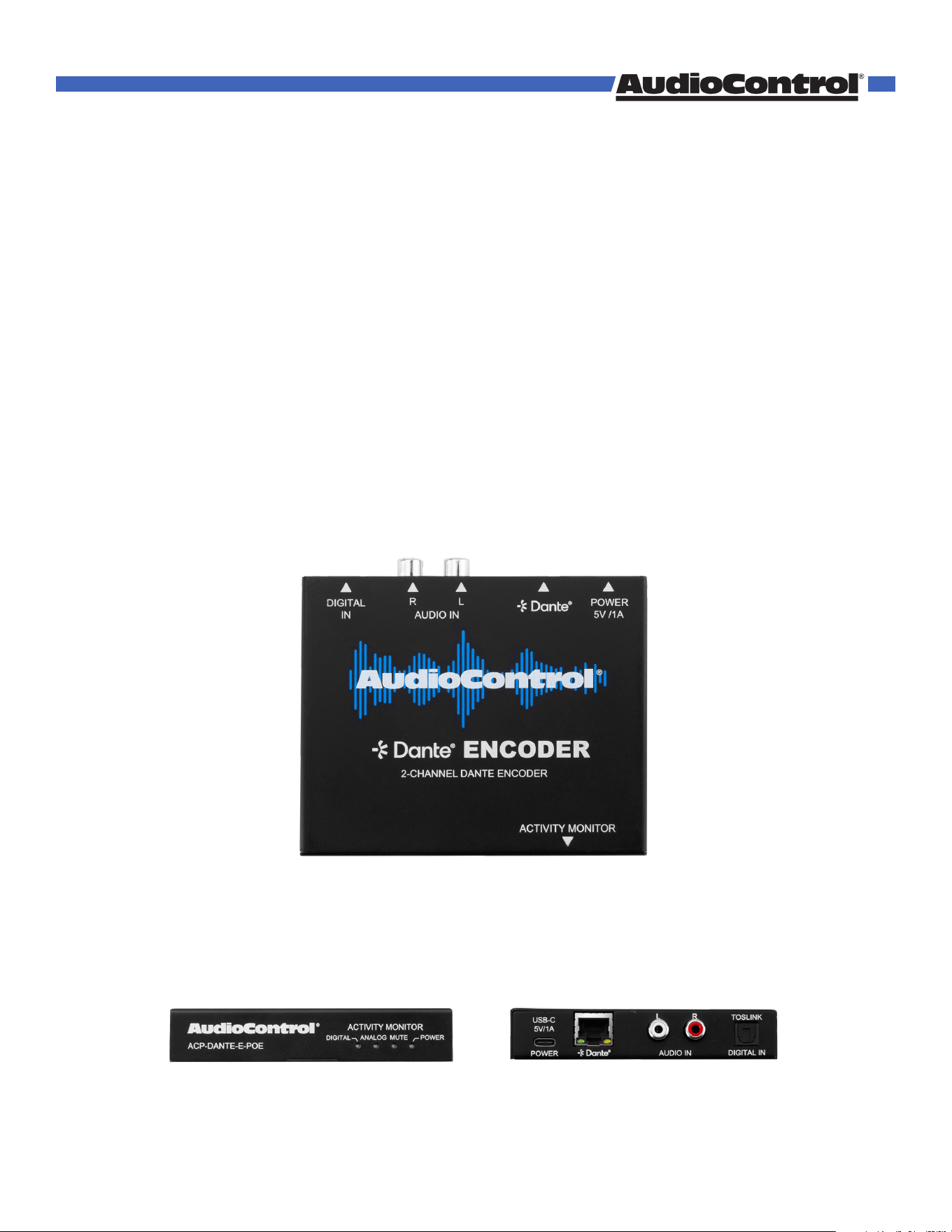
ACP-DANTE-E-POE
2-Channel Analog Audio Output DANTE™ Encoder
User Manual
1. Read these instructions.
2. Keep these instructions.
3. Reading the instructions should take less time than a Peter Jackson Trilogy.
4. Do not use this apparatus near water.
5. Clean only with a dry cloth.
6. Do not block any ventilation openings.
7. The devices and their accessories should never be exposed to open flames
or excessive heat.
8. Only use attachments and accessories specified by the manufacturer.
9. To reduce the risk of electrical shock or damage to the devices and their
operators, never handle or touch the devices and power cord with damp or
wet hands.
10. Refer all servicing to qualified service personnel. Servicing is required
when the apparatus has been damaged in any way, such as power-supply
cord or plug is damaged, liquid has been spilled or objects have fallen into
the apparatus, the apparatus has been exposed to rain or moisture, does
not operate normally, or has been dropped.
CAUTION: Changes or modifications to this device not expressly approved by
AudioControl Inc. could void the user’s authority to operate the equipment
under FCC rules.
Recycling notice: If the time comes and this apparatus has fulfilled
its destiny, do not throw it out into the trash. It has to be carefully
recycled for the good of mankind, by a facility specially equipped
for the safe recycling of electronic apparatii. Please contact your local or state
recycling leaders for assistance in locating a suitable nearby recycling facility.
Or, contact us and we might be able to repair it for you.
Important Safety Instructions
©COPYRIGHT AVPRO GLOBAL HOLDINGS 2024 - 22410 70TH AVENUE WEST, MOUNTLAKE TERRACE, WA 98043
2

Important Safety Instructions ......................................................................................................... 2
Table of Contents ..............................................................................................................................3
Introduction ........................................................................................................................................4
Features ........................................................................................................................................4
Key Benefits ..................................................................................................................................4
Product Overview .............................................................................................................................5
Box Contents ................................................................................................................................5
Technical Specifications ............................................................................................................5
Front and Rear Panels ...............................................................................................................6
Installation ..........................................................................................................................................7
Connecting the Devices .............................................................................................................7
Dante Port Wiring .......................................................................................................................8
Audio Loop Out ...........................................................................................................................8
Device Configuration .......................................................................................................................9
Basic Navigation and Dante Flow Subscription ...................................................................9
Creating multicast Dante Flows ..............................................................................................10
Changing Device Name and Encoding Configuration ....................................................... 10
Network Configuration ..............................................................................................................11
AES67 Audio Stream Configuration ........................................................................................ 11
Service .................................................................................................................................................12
Support ................................................................................................................................................ 12
Warranty .............................................................................................................................................13
Installation Notes ...............................................................................................................................15
Dante Boogie .....................................................................................................................................16
Thank you ...........................................................................................................................................17
Table of Contents
©COPYRIGHT AVPRO GLOBAL HOLDINGS 2024 - 22410 70TH AVENUE WEST, MOUNTLAKE TERRACE, WA 98043
3
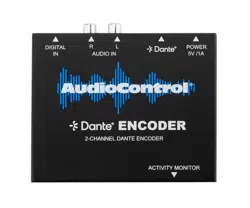
The AudioControl ACP-DANTE-E-POE is a compact, 2-channel, analog stereo-to-Dante™
platform encoder. Analog audio signals from sources with RCA-type stereo output
connectors are digitally encoded by the ACP-DANTE-E-POE for distribution to other
devices on a Dante™ network. Installation applications for house-of-worship, education,
hotel/conference, and restaurant/retail with support equipment such as mixers, SD/USB
recorders, and computer-related audio may use Dante™ devices for high quality, near-
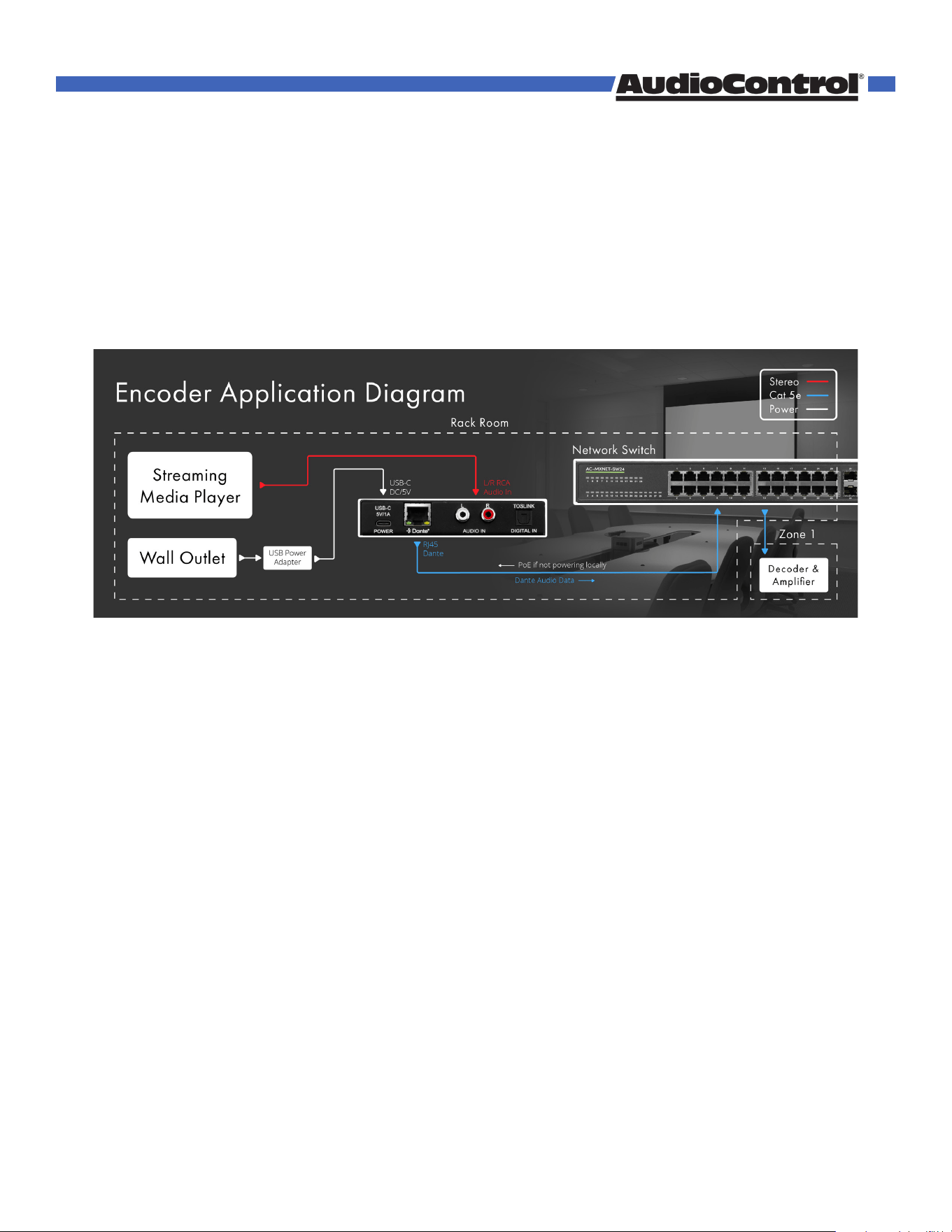
zero latency distribution of voice and music signaling. The diagram below shows the basic
application of the ACP-DANTE-E-POE encoder and network switch.
Need Diagram
Featues
• Complete Dante™ system compatibility
• Audio Loop-out provides analog signal pass-through
• Plug and play support
• Sample rates up to 96kHz
• 16-, 24-, and 32-bit audio support
• Dante™ port LEDs indicate link status and activity
• Unit ships with power supply and USB Type A to Type C cable
• PoE Power
Key Benefits
• Easily interface analog audio sources with a Dante™ system
• Audio Loop-out for signal system continuity
• Low profile, compact design for placement options
• Auto device-discovery on a Dante™ network
• Activity LEDs provide power and Dante™ mute status
Intruduction
©COPYRIGHT AVPRO GLOBAL HOLDINGS 2024 - 22410 70TH AVENUE WEST, MOUNTLAKE TERRACE, WA 98043
4
Product Overview
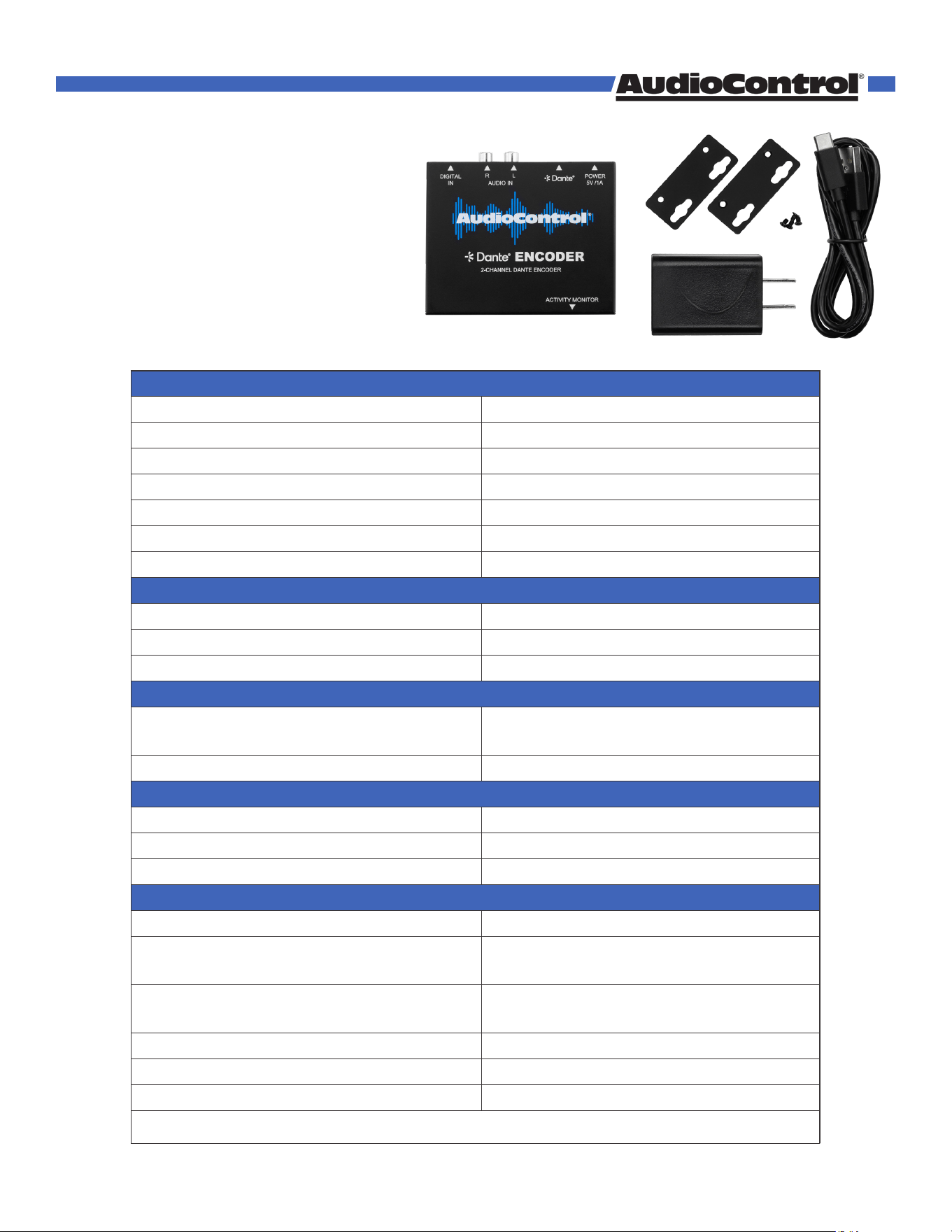
Box Contents:
• (1x) ACP-DANTE-E-POE (Unit)
• (1x) 5V 1A USB Power Adapter
• (1x) European Adapter (not shown)
• (1x) USB-A to USB-C Cable
• (2x) Mounting Brackets
• (4x) Mounting Screws
AUDIO
Frequency Response 20-20kHz
Analog Input Voltage Unbalanced 1VRMS (2.828VP-P)
Loopback Output Voltage Unbalanced 1VRMS (2.828VP-P)
Format LPCM
Supported Sample Rates 44.1kHz, 48kHz, 88.2kHz, 96kHz
Supported Bit Depths 16, 24, 32
Latency Configurable 1, 2, 5ms
AUDIO CONNECTIONS
Analog Input 1x Stereo RCA
Analog Output 1x Stereo RCA
Dante Network Audio 1x RJ-45
POWER
USB Type-C Power Adapter Input: 100-240VAC, 50/60Hz, 0.5A
Output: 5VDC, 1A
PoE via RJ45 Power over Ethernet
ENVIRONMENTAL
Operating Temperature 23°F (-5°C) to 125°F (51°C)
Storage Temperature -4°F (-20°C) to 140°F (60°C)
Humidity Range 5% to 90% RH (no condensation)
DIMENSIONS
Mounting Furniture Mount Support
Height x Width x Depth (Single Unit) Millimeters: 110 x 96 x 25
Inches: 4.33 x 3.78 x 1
Height x Width x Depth (Packaged Unit) Millimeters: 193 x 136 x 41
Inches: 7.6 x 5.35 x 1.62
Weight (Single Unit) 0.5 lbs (0.23 kg)
Weight (Packaged Unit) 0.85 lbs (0.38 kg)
Product Warranty 5 Years
*Specifications are subject to change without notice. Mass and dimensions are approximate.
Technical Specications
©COPYRIGHT AVPRO GLOBAL HOLDINGS 2024 - 22410 70TH AVENUE WEST, MOUNTLAKE TERRACE, WA 98043
5
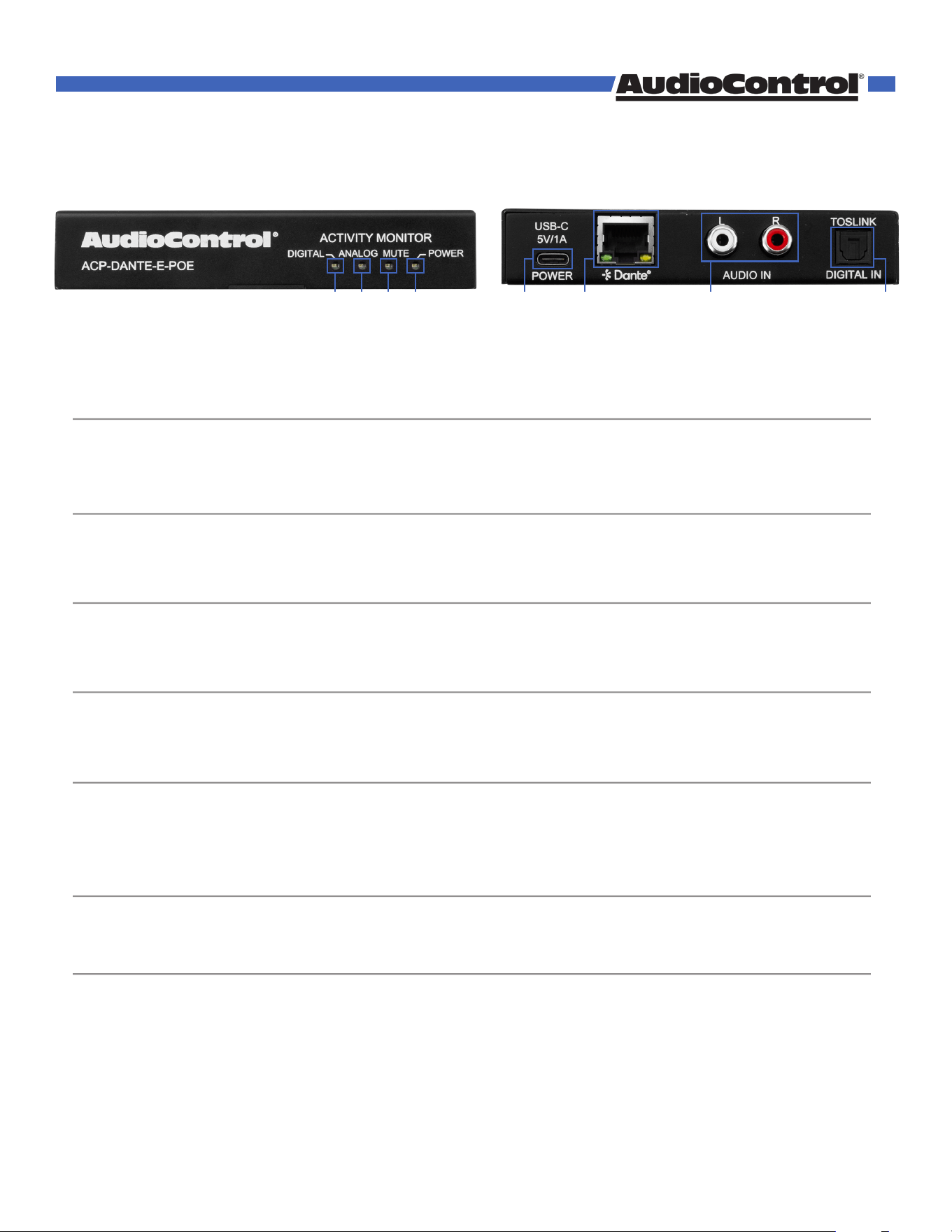
Front and Rear Panels
1 2 5 6 7 84 3
1 MUTE
2 POWER
3 ANALOG
4 DIGITAL
5 DC/5V
6 DANTE
7 AUDIO IN
8 TOSLINK
• Red LED status indicator light
• Illuminates solid red when Dante™ audio stream is muted
• Blue LED status indicator light
• Illuminates solid blue when power is present on the ACP-DANTE-E-POE
• Blue LED status indicator light
• When no audio present LED light is o
• When audio present Blue LED light is on
• Blue LED status indicator light
• When no audio present LED light is o
• When audio present Blue LED light is on
• USB Type C female connector port
• Connects to DC 5V 1A power supply with USB-A to USB-C cable
• 8-pin RJ-45 female connector port
• Encoded Dante™ digital audio output port
• Connects to the network switch with CAT5e (or better) cable
• If connecting to PoE switch device receives power
• Stereo RCA analog audio input
• Connects to the audio source device
• Digital toslink audio input
©COPYRIGHT AVPRO GLOBAL HOLDINGS 2024 - 22410 70TH AVENUE WEST, MOUNTLAKE TERRACE, WA 98043
6
Installation
NOTE:
©COPYRIGHT AVPRO GLOBAL HOLDINGS 2024 - 22410 70TH AVENUE WEST, MOUNTLAKE TERRACE, WA 98043
7
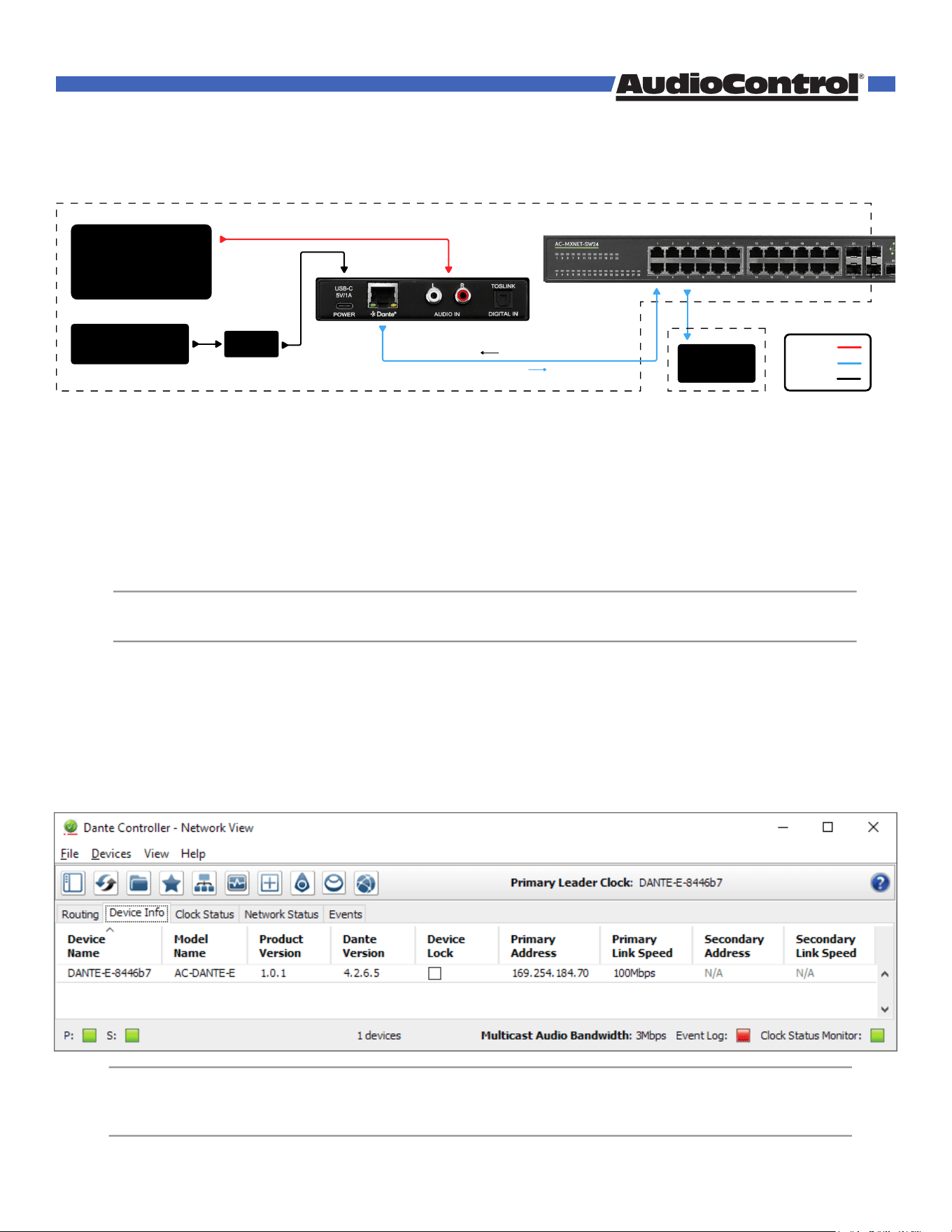
Once the ACP-DANTE-E-POE is powered on and connected to the AVPro Edge network switch, it
will automatically be discovered on the network using the Dante™ Controller software.
Connecting the Devices
1. Connect the provided USB-A to USB-C cable between the 5V 1A power supply and the ACP-
DANTE-E-POE encoder’s DC/5V port. Then plug the power supply into a suitable power
outlet. Additionally you can use PoE to power this device via network switch.
Both the POWER and MUTE LEDs on the front panel will illuminate solid for 6 seconds, after
which the MUTE LED will shut o and the POWER LED will stay on, indicating the ACP-
DANTE-E-POE is powered on.
2. Connect the audio source device to the AUDIO IN port with a stereo RCA cable. Ensure the
audio source device is powered on.
3. Connect a CAT5e (or better) cable between a computer running the Dante™ Controller
software and the network switch.
4. Connect a CAT5e (or better) cable between the DANTE port on the ACP-DANTE-E-POE and
the network switch. The ACP-DANTE-E-POE will be automatically discovered and routed
using the Dante™ Controller software.
The ACP-DANTE-E-POE does support PoE, but also can be powered
locally using the provided 5V 1A power supply and USB-A to USB-C cable.
NOTE:
The computer running Dante™ Controller and the ACP-DANTE-E-POE
must both have a physical connection to the Dante™ network in order for
the ACP-DANTE-E-POE to be discovered by Dante™ Controller.
Stereo
Cat 5e
Power
Streaming
Media Player
Decoder &
Amplifier
Network Switch
USB-C
DC/5V
Rack Room
Zone 1
L/R RCA
Audio In
RJ45
Dante
Dante Audio Data
PoE
USB Power
Adapter
Wall Outlet
(if not using PoE)
Dante Port Wiring
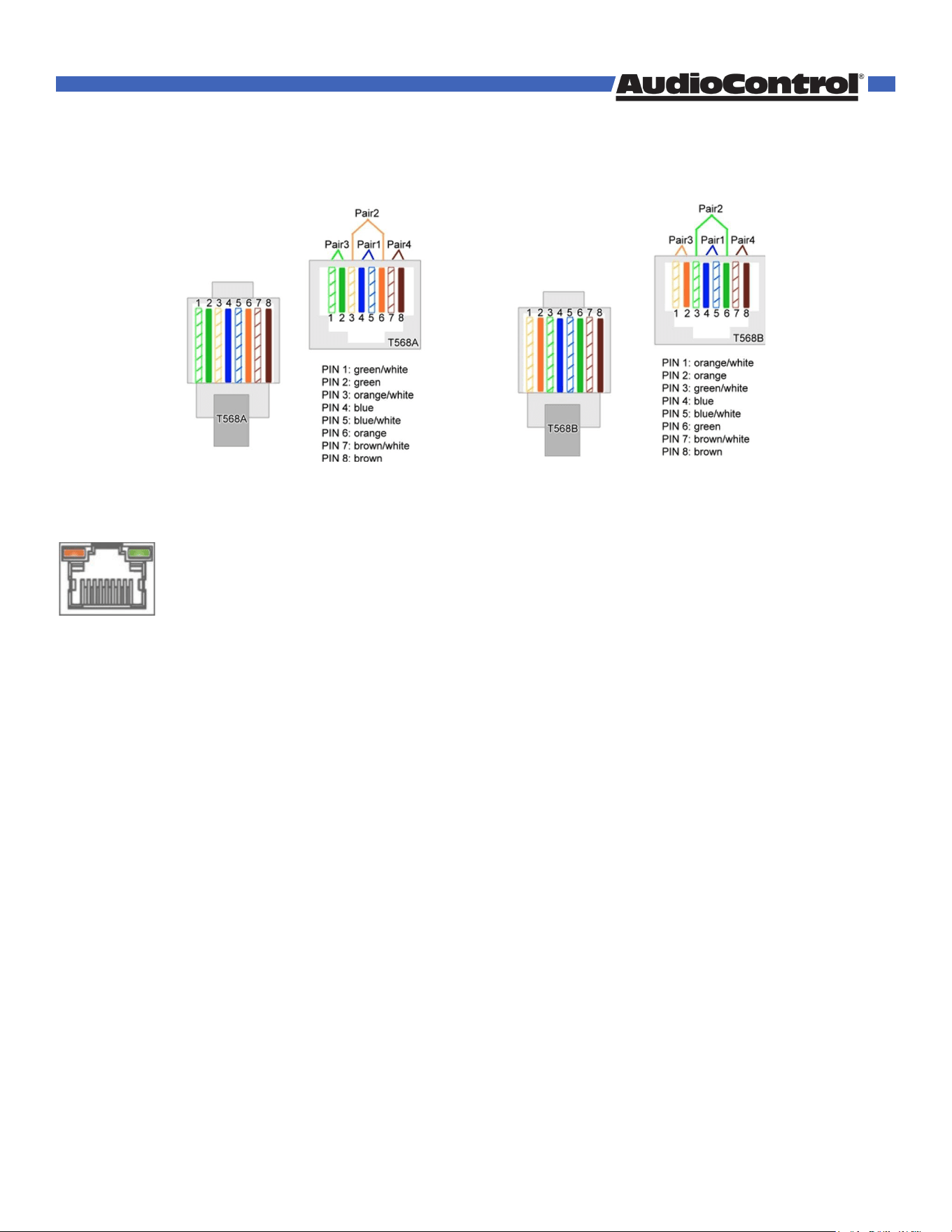
The DANTE audio output port on the encoder utilizes the standard RJ-45 connection. For maximum
performance, the recommended cabling is CAT5e (or better) based on TIA/EIA T568A or T568B
standards for the wiring of the twisted pair cables.
The DANTE audio output port features two status indicator LEDs to show active connections while
troubleshooting.
Right LED (Amber) – Link Status
Indicates there is data present between the ACP-DANTE-E-POE and the receiving end (typically a
network switch). Steady blinking amber indicates normal operations.
Left LED (Green) – Link/Activity
Indicates there is an active link between the ACP-DANTE-E-POE and the receiving end. Solid
green indicates the ACP-DANTE-E-POE and the receiving end device have been identified and are
communicating with one another.
If either LED is not illuminating, check the following:
• Ensure the ACP-DANTE-E-POE is powered on from the DC/5V port.
• Verify cable length is within the maximum distance of 100 meters (328 feet).
• Connect the ACP-DANTE-E-POE directly to the network switch, bypassing all patch panels
and punch-down blocks.
• Re-terminate connector ends. Use standard RJ-45 connectors and avoid using push-through
or “EZ” type ends as these have exposed copper wiring at the tips that can cause signal
interference.
• Contact AudioControl Technical Support if these suggestions do not work.
T568A T568B
©COPYRIGHT AVPRO GLOBAL HOLDINGS 2024 - 22410 70TH AVENUE WEST, MOUNTLAKE TERRACE, WA 98043
8
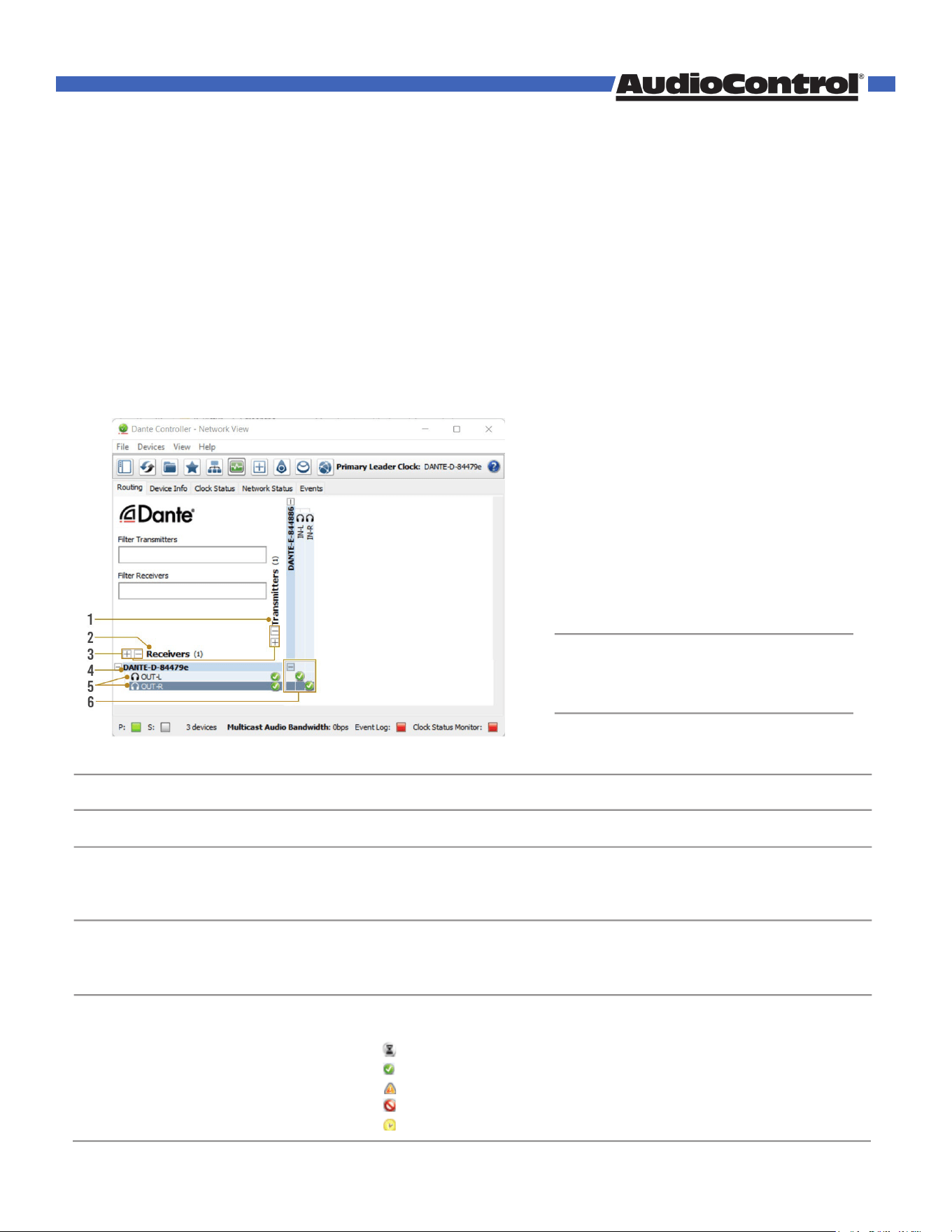
• Discovered Dante encoders
• Discovered Dante decoders
• Select the (+) to expand or (-) to collapse view
• Displays the name assigned to the Dante device
• Device name is customizable in Device View
• Double-click to open Device View
• Displays the name of the Dante audio channel
• Channel name customizable in Device View
• Double click associated Device Name to open Device View
• 8-pin RJ-45 female connector port
• Click the box to create a unicast subscription between the overlapping
Subscription in process
Subscription successful
Subscription error
Subscription warning
Device part way through setting up a subscription
Device Configuration
Configuring the ACP-DANTE-E-POE requires installing Audinate’s Dante Controller software on
a computer sharing the same network as Dante devices, such as the ACP-DANTE-E-POE. Dante
Controller is a powerful tool used to configure network settings, signal latency, audio encoding
parameters, Dante flow subscriptions, and AES67 audio support. The latest version of Dante
Controller can be found here along with additional supplementary instructions that can be
obtained via the online help support tool located under the Help tab in the Dante Controller.
Basic Navigation and Dante Flow Subscription
Dante Controller will open to the routing tab by default where discovered Dante devices are
organized according to transmitter or receiver status. Signal routing from Dante encoders
(transmitters) to Dante decoders (receivers) can be achieved by clicking the box located at the
intersection of the desired transmit and receive channels. Successful subscription is denoted by a
green check mark icon.
1 TRANSMITTERS
2 RECEIVERS
3 +/-
4 DEVICE NAME
5 CHANNEL NAME
6 SUBSCRIPTION WINDOW
Hovering the mouse over the
subscription indicator symbol will provide
further details about the subscription
and can be useful in troubleshooting
TIP
©COPYRIGHT AVPRO GLOBAL HOLDINGS 2024 - 22410 70TH AVENUE WEST, MOUNTLAKE TERRACE, WA 98043
9
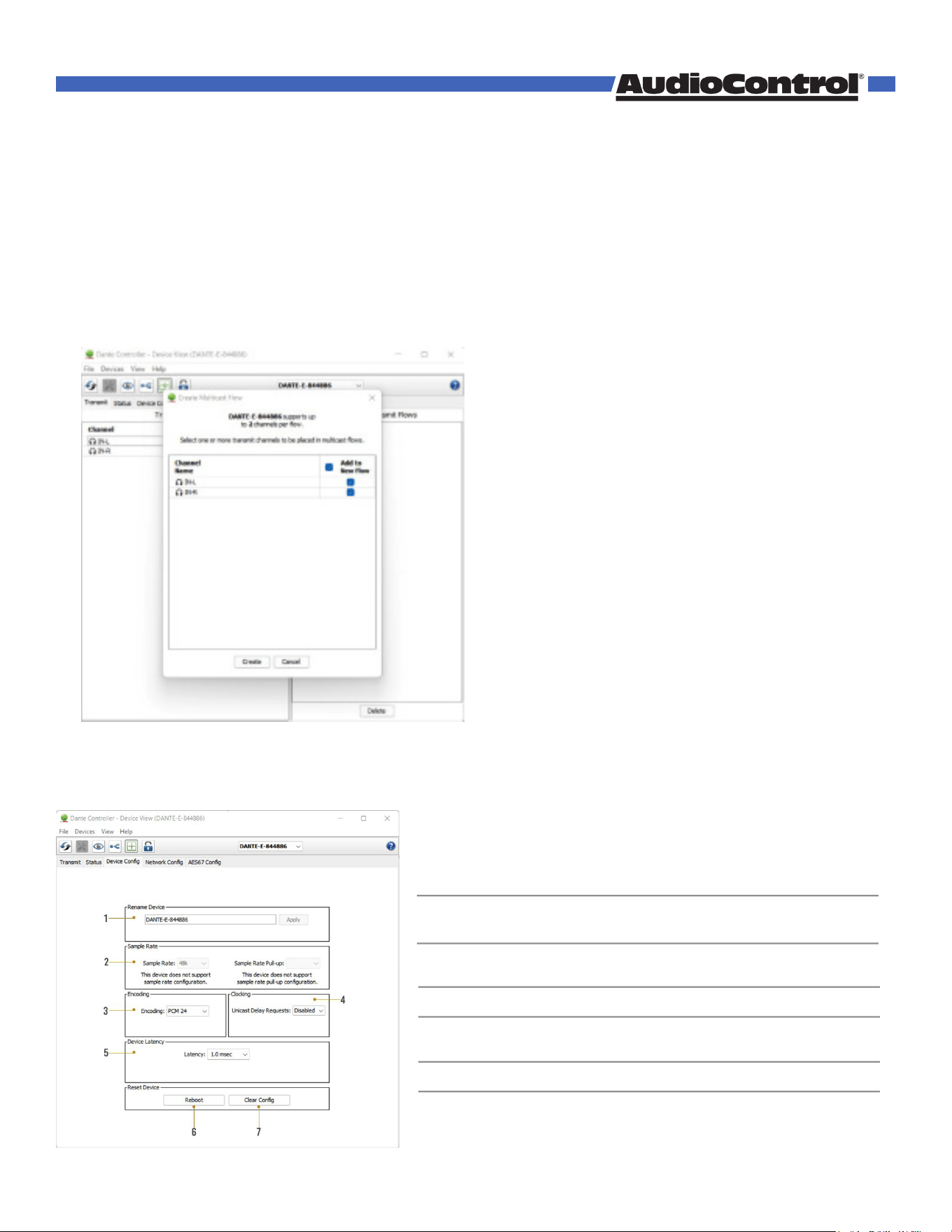
Creating multicast Dante Flows
Due to Dante flow limitations, it may be necessary to create multicast flows in order to route
audio from the ACP-DANTE-E-POE to a higher receive channel count. The ACP-DANTE-E-POE
can transmit each output channel to 2 receive channels with unicast while both channels can be
assigned to 8 devices with multicast.
To configure multicast flows, double-click on the ACP-DANTE-E-POE device name to open Device
View and click on the flow icon located at the top of the Device View window. A secondary window
will pop up where you can select the ACP-DANTE-E-POE channels to assign to a multicast flow.
Click create to create the multicast flow. Subscriptions of the selected channels will now be
assigned to the multicast flow instead of unicast.
Changing Device Name and Encoding Conguration
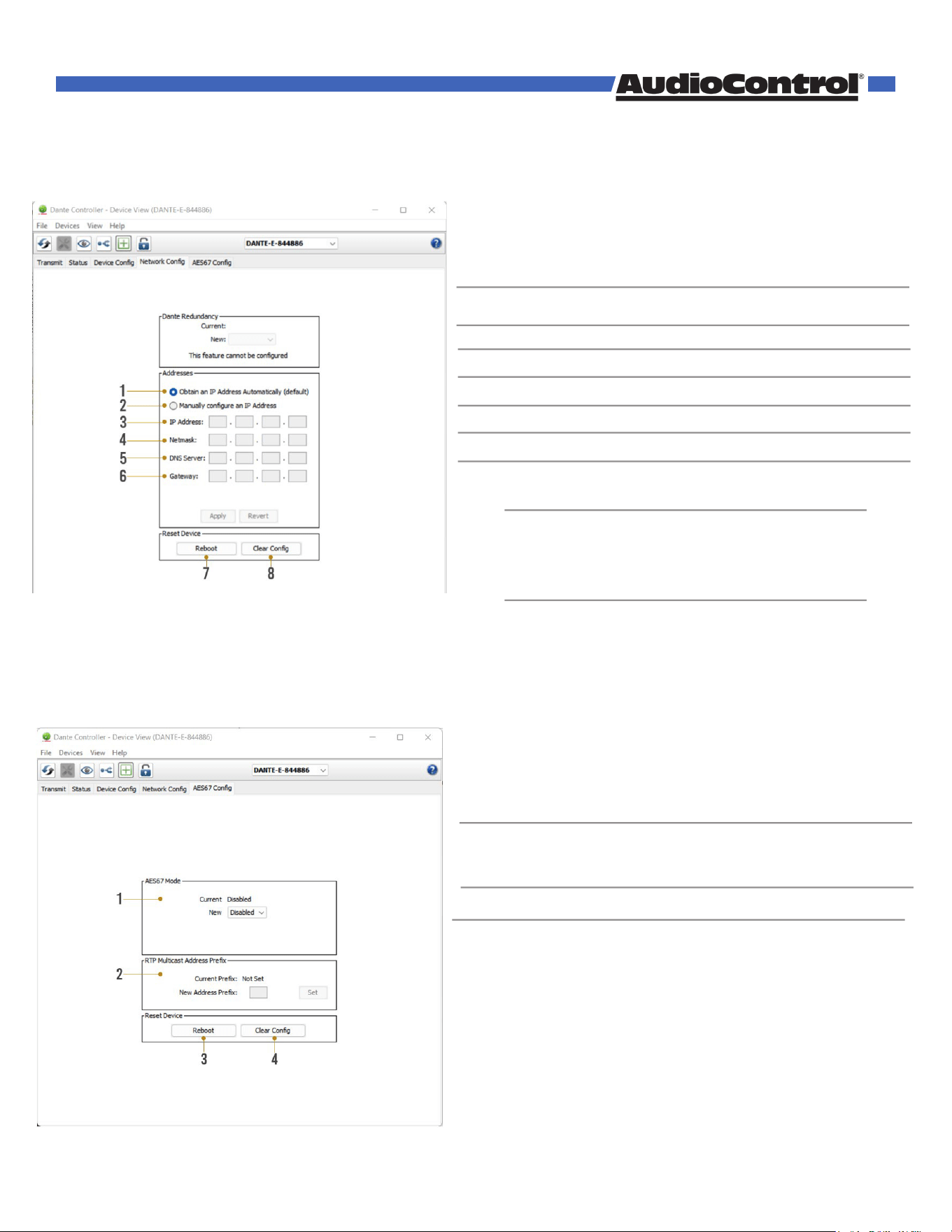
To configure the ACP-DANTE-E-POE audio stream, open the Device View by double clicking the
Device Name for the ACP-DANTE-E-POE and navigate to the Device Config Tab.
• Device Name for the ACP-DANTE-E-POE
• Device Name can be changed by typinga new
name and clicking apply
• Set ACP-DANTE-E-POE input sample rate
• 44.1, 48, 88.2, 96 kHz sample ratessupported
• Set the bit depth of the sampled audioinput signal
• 16, 24, 32 bit sampling supported
• Enable/Disable unicast delay requests
• Set latency for subscribed Dante flows
• 1, 2, 5 millisecond latencies supported
• Reboot the ACP-DANTE-E-POE
• Factory Reset Settings
1 DEVICE NAME
2 SAMPLE RATE
3 ENCODING
4 CLOCKING
5 DEVICE LATENCY
6 REBOOT DEVICE
7 CLEAR CONFIG
©COPYRIGHT AVPRO GLOBAL HOLDINGS 2024 - 22410 70TH AVENUE WEST, MOUNTLAKE TERRACE, WA 98043
10
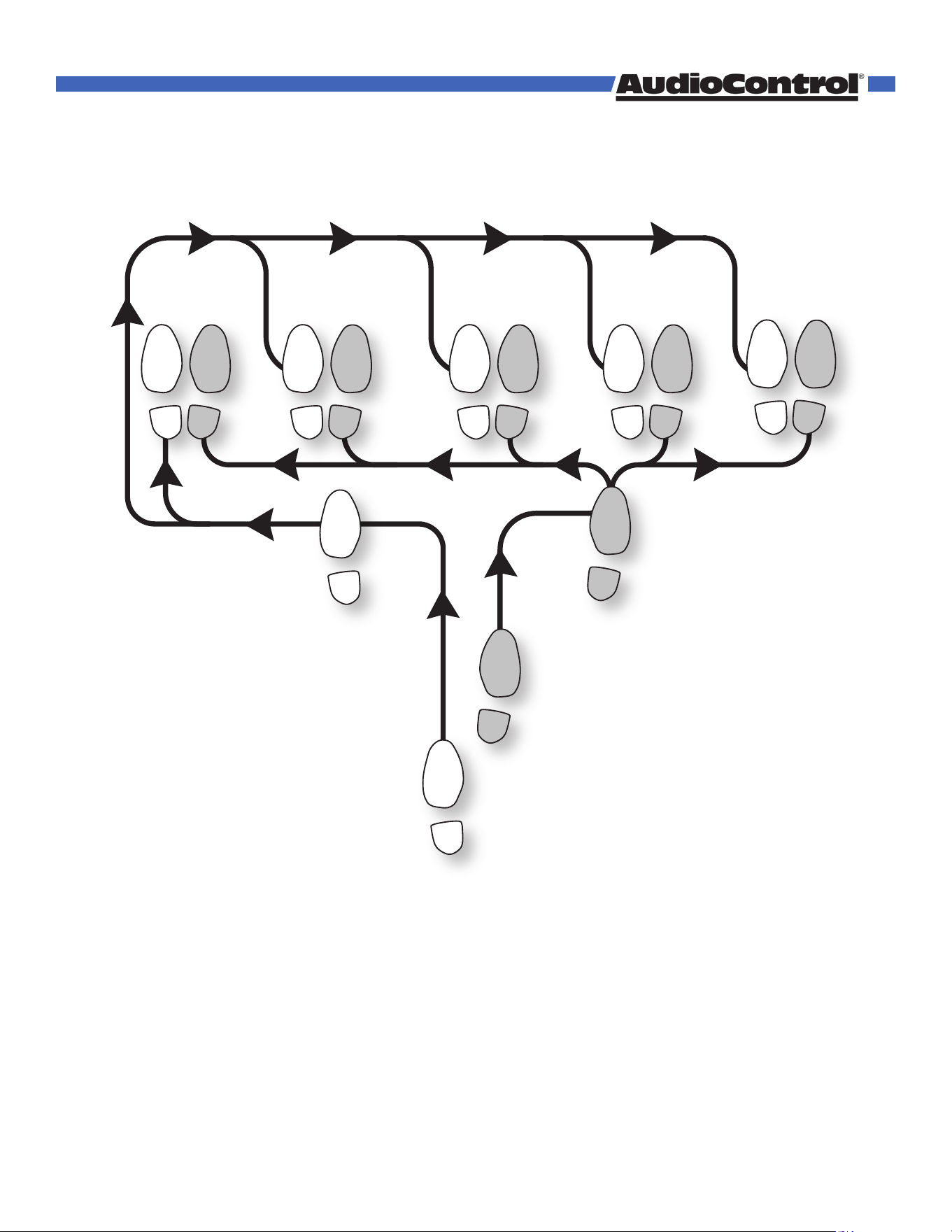
Network Configuration
DHCP for the ACP-DANTE-E-POE is enabled by default and will automatically be assigned an IP
address when connected to the Dante network. Additionally, a static IP address can be assigned by
opening the Device View for the ACP-DANTE-E-POE and navigating to the Network Config tab.
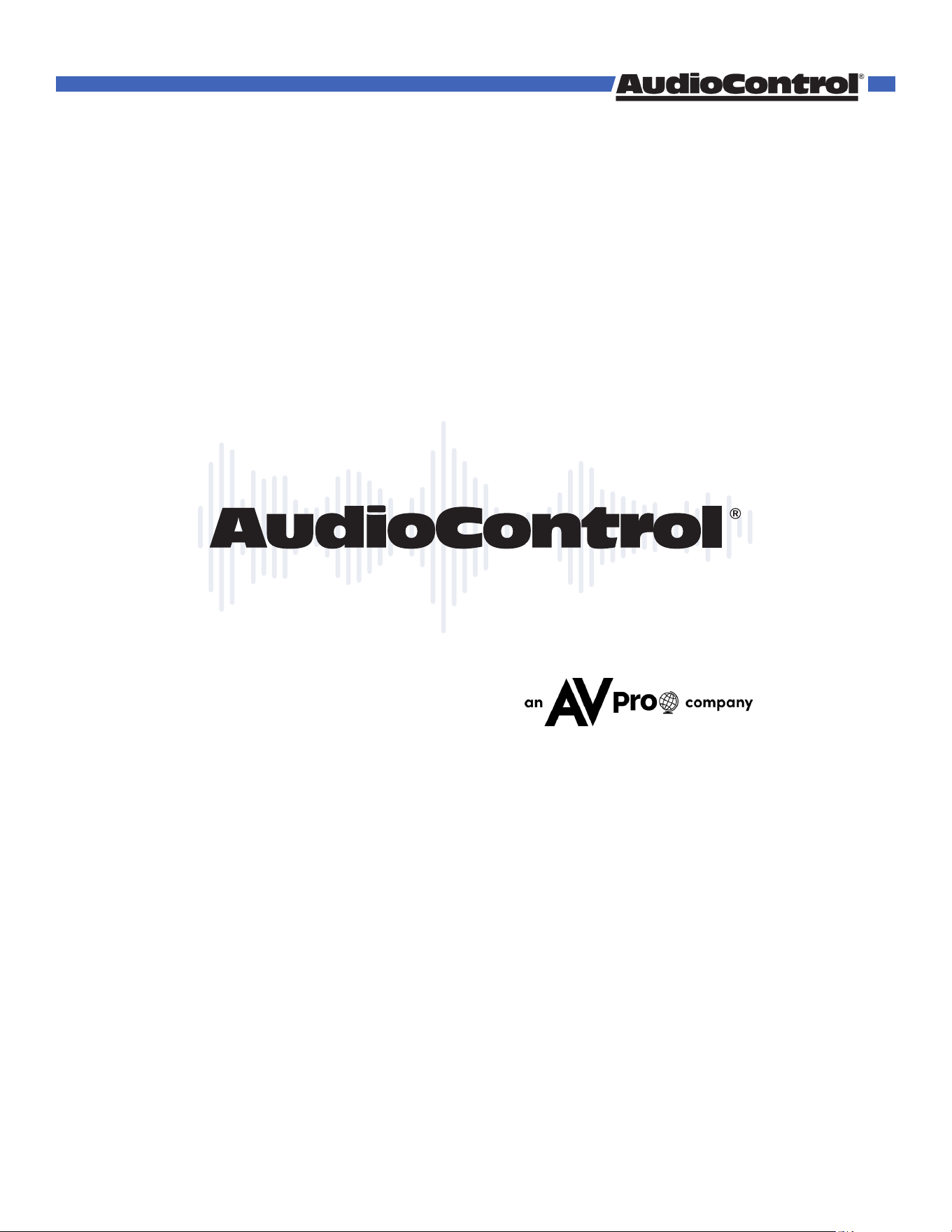
AES67 Audio Stream Configuration
The ACP-DANTE-E-POE supports multicast transmission of AES67 encoded audio to compatible
non-Dante devices. AES67 multicast transmission can be configured by opening the Device View by
double-clicking the ACP-DANTE-E-POE Device Name and navigating to the AES67 Config tab.
• Check this button to enable DHCP for automatic
IP address assignment
• Check this button to enable manual(static) IP
addressing
• Enter the desired IP address
• Enter the desired subnet mask
• Enter the domain name server
• Enter the default gateway
• Reboot the ACP-DANTE-E-POE
• Factory reset the ACP-DANTE-E-POE
1
2
3
4
5
6
7
8
AUTOMATIC IP
ASSIGNMENT
MANUAL IP
ASSIGNMENT
IP ADDRESS
SUBNET MASK
DNS SERVER
DEFAULT GATEWAY
REBOOT DEVICE
CLEAR CONFIG
Manually setting the ACP-DANTE-E-POE
IP address to a dierent subnet from the
Dante Controller computer will result in loss
of communication between Dante Controller
and the ACP-DANTE-E-POE.
WARNING:
• Enable/Disable AES67 multicast flows for
compatible non-Dante devices
• Displays current RTP multicast prefix
• Type in a new RTP multicast prefixand click Set
to apply
• Reboot the ACP-DANTE-E-POE
• Factory Reset the ACP-DANTE-E-POE
1
2
3
4
AES67 MODE
RTP MULTICAST
ADDRESS PREFIX
REBOOT
CLEAR CONFIG
©COPYRIGHT AVPRO GLOBAL HOLDINGS 2024 - 22410 70TH AVENUE WEST, MOUNTLAKE TERRACE, WA 98043
11

What to do if you need service
If the unit needs service, then please contact AudioControl, either by e-mail or phone. We will verify
if there is anything wrong in the system that you can correct yourself, or if it needs to be sent back
to our factory.
Please include the following items when returning the unit:
1. A copy of your proof of purchase. No originals please. We cannot guarantee returning them
to you.
2. A brief explanation of the trouble you are having with the unit. (You’d be surprised how
many people forget this.) If you can supply a really detailed description of the problem, this
would be so much better, and our service technicians may add you to their Christmas Card
list. Please include any notes about the system and other components you are using. Is it an
intermittent problem that only occurs on the first full moon of Spring?
3. A return street address. (No PO Boxes, please).
4. A daytime phone number in case our technicians have a question about the problem you are
having, or if they are just feeling lonely.
5. Package the unit in the original packaging if you still have it. Use great care and plenty of
good packing materials to protect the unit and prevent it from moving about inside the box.
Do not use loose materials like packing peanuts or real peanuts.
You are responsible for the freight charges to us, but we’ll pay the return freight back as long as
the unit is under warranty. We match whatever shipping method you use to send it to us, so if you
return the unit overnight freight, we send it back overnight. We recommend United Parcel Service
(UPS) for most shipments.
Please do not return the unit to AudioControl if you have not received an RMA number from our
masterful customer support team.
Phone 425-775-8461
techsupport@audiocontrolpro.com
support.audiocontrolpro.com
www.audiocontrolpro.com/contact-us
Service
©COPYRIGHT AVPRO GLOBAL HOLDINGS 2024 - 22410 70TH AVENUE WEST, MOUNTLAKE TERRACE, WA 98043
12

Warranty
In just the same way as being covered in honey and thrown into a dark pit full of hungry
woodchucks, people are scared of warranties. Lots of fine print. Months of waiting around. Well,
fear no more. This warranty is designed to make you rave about AudioControl. It’s a warranty that
looks out for you and your client, plus helps you resist the temptation to have your friend Sparky,
who’s “good with electronics,” try to repair your AudioControl product. So go ahead, grab a cup of
tea, and carefully read through this warranty.
Our warranty has conditional conditions! “Conditional” doesn’t mean anything ominous. The
Federal Trade Commission tells all manufacturers to use the term to indicate that certain conditions
have to be met before they’ll honor the warranty. If you meet all of these conditions, AudioControl
will, at its discretion, perform warranty service on any AudioControl products that exhibit defects in
materials and/or workmanship during the warranty on your product for five (5) years from the date
you bought it, and we will fix or replace it, at our option, during that time.
Here are the conditional conditions:
1. You need to hold on to your sales receipt! All warranty service requires original sales receipt
documentation. The warranty only applies to the original purchaser from an authorized
AudioControl dealer. Note: Products purchased from unauthorized dealers are not covered
under warranty.
2. If an authorized AudioControl dealer installs your AudioControl product, the warranty is five
years, otherwise the warranty is limited to one year.
3. Our warranty covers AudioControl products that have been installed according to the
instructions in the installation manual.
4. You cannot let anybody who isn’t: (A) the AudioControl factory; or (B) somebody authorized
in writing by AudioControl service your AudioControl product. If anyone other than (A), or (B)
messes with your AudioControl product, the warranty is void.
5. The warranty is void if the serial number is altered, defaced or removed, or if your product
has been used improperly. Now that may sound like a big loophole, but here is what we
mean by this: Unwarranted abuse is: (A) physical damage (don’t use your product to level
your dining room table); (B) improper connections (120 volts into the RCA jacks can fry
the poor thing); (C) sadistic things! This is the best product we know how to build, but for
example if you mount it to the front bumper of your car, drop it over the Niagara Falls or use
it for Clay Pigeon shooting practice, something will go wrong.
Assuming you conform to 1 through 5, and it really isn’t all that hard to do, we will have you send
your product to us for warranty service.
©COPYRIGHT AVPRO GLOBAL HOLDINGS 2024 - 22410 70TH AVENUE WEST, MOUNTLAKE TERRACE, WA 98043
13

Legalese Section
This is the only warranty issued by AudioControl. This warranty gives you specific legal rights, and
you may also have rights that vary from state to state. Promises of how well your AudioControl
product will work are not implied by this warranty. Other than what we’ve said we’ll do in this
warranty, we have no obligation, express or implied. We make no warranty of merchantability or
fitness for any particular purpose. Also neither we nor anyone else who has been involved in the
development or manufacture of the unit will have any liability of any incidental, consequential,
special or punitive damages, including but not limited to any lost profits or damage to other
parts of your system by hooking up to the unit (whether the claim is one for breach of warranty,
negligence of other tort, or any other kind of claim). Some states do not allow limitations of
consequential damages.
Warranty
©COPYRIGHT AVPRO GLOBAL HOLDINGS 2024 - 22410 70TH AVENUE WEST, MOUNTLAKE TERRACE, WA 98043
14

Installation Notes
©COPYRIGHT AVPRO GLOBAL HOLDINGS 2024 - 22410 70TH AVENUE WEST, MOUNTLAKE TERRACE, WA 98043
15
Hurrah, You are done!
The Dante Boogie
2
1
5 6
3
START
FINISH
4
5 65 6
5 6
5 6
FINISHFINISHFINISHFINISH
Other common names for this dance:
• Dante Boogie Nights
• Dante 2 Electric Boogaloo
• Dante Inferno
©COPYRIGHT AVPRO GLOBAL HOLDINGS 2024 - 22410 70TH AVENUE WEST, MOUNTLAKE TERRACE, WA 98043
16
Thank you for choosing AudioControl!
Please contact us with any questions, we are
happily at your service!
22410 70th Avenue West ~ Mountlake Terrace, WA 98043
support: 425-775-8461
techsupport@audiocontrolpro.com
Thank you
©COPYRIGHT AVPRO GLOBAL HOLDINGS 2024 - 22410 70TH AVENUE WEST, MOUNTLAKE TERRACE, WA 98043
17