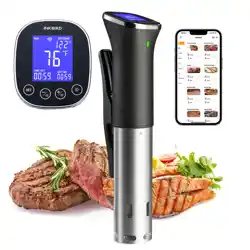
ISV-200W
Sous Vide
SMART HOME
SMART LIFE

Introduction
Contents
01 --------------------01
Basic Operation02 ----------------03
Settings03 -----------------------04
Wi-Fi Connection04 --------------06
Important Safeguards05 ----------09
Warranty06 -----------------------11
Introduction01
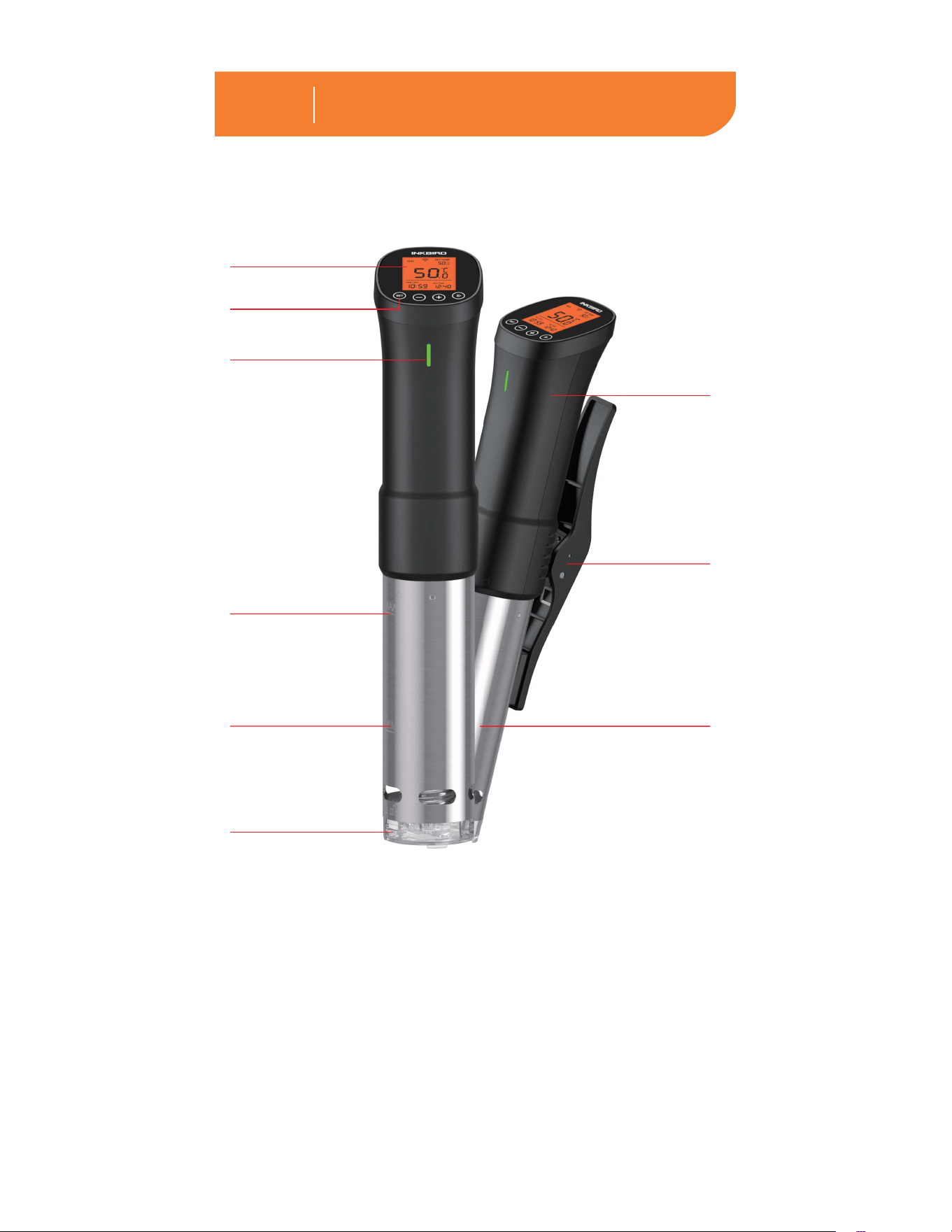
Control Panel
LCD Screen
Clamp
Handle
IndicatorLight
Max Fill Line
Min Fill Line
Water Pump
Cap
Detachable
Stainless Steel
Column
1
Note: Please do not try to remove the water
pump cap by yourself at any time, it may
lead to machine failure.
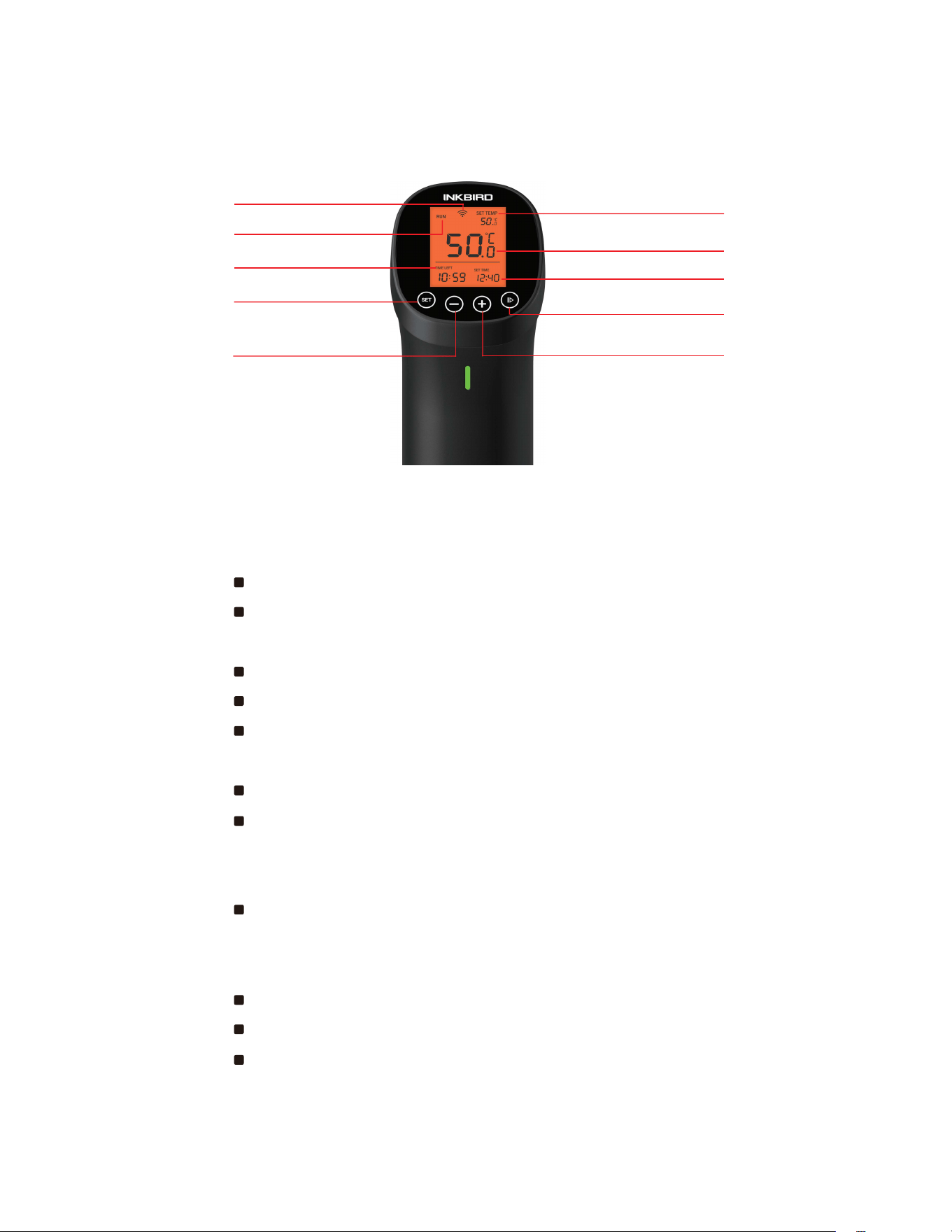
Run/Stop Button
Set Time
Current Temperature
Set Temperature
+/Wi-Fi Reset Button
1.1 Icons in this Manual
1.2 Specifications
WorkingState
Set Button
Remaining Time
-/Parameter Setting
Wi-Fi Connection
Status
2
Length of the Cable: 47.2"/1.2m
Temperature Control Range:
32℉~194℉(0℃~90℃)
TemperatureControlAccuracy:1℉/0.1℃
TemperatureDisplayAccuracy:1℉/0.1℃
TimeSettingRange:Max99hoursand59
minutes
Time Setting Minimum Interval: 1 minute
Reminder:Therewillbehinttonewhenthe
watertemperaturereachestheset
temperatureorthecountdownends.
WaterShortageProtection:Ifthewaterlevel
isbelowtheminimumscaleline,thedevice
willautomaticallystopworkingandalarm.
WaterproofLevel:Nonwaterproof
HeatingPower:1000W
Inputvoltage:(US)AC120v60Hz,(EU,UK,
AU)AC220~240v50Hz

Basic Operation02
3
1.3 Item List
1.SousVide*1
2.Manual*1
3.WarrantyCard*1
1.PuttheSousVideintoacontainer.
2.ClamptheSousVidetothepottofixit.
3.Fillthecontainerwithwater.
4.PlugintheInkbirdSousVide.
5.Setthetemperatureandtimeforyourfood.
6.Placeyourfoodinasealedbagand
squeezetheairout,thenlowerthebaginto
thewaterwhenitisattherighttemperature.
ThewaterlevelshouldbewithintheMaxFill
LineandtheMinFillLineafteryouputthe
bag in.
7.InkbirdSousVidewillalarmwhenthe
cookingisdone.
Note:Pleasemakesurethatthefoodis
completelyunderwater.

4
3.1 Temperature setting and timer
setting
1.Pressthe“”buttontoentermain
interfacesettingmode.
2.Whenthesettemperatureiconisflashing,
youcanadjustthetemperaturebypressing
the“”buttonorthe“”button.
3.Pressthe“”buttonagaintosetthe
hoursofthecountdown,anotherpresson
the“”buttontosettheminutesofthe
countdown.
Note:Longpressonthe“”buttonor
the“”buttonwillincreaseordecrease
thetemperaturevaluequickly.
3.2 Temperature Unit Switch &
Calibration
3.2.1TemperatureUnitSwitch
1.Holdthe“”buttonforsecondstoenter
the temperature unit setting page.
2.Pressthe“”buttonorthe“”button
toswitchbetween℉and℃.
3.Holdthe“”buttontoconfirmthe
selectionandbacktomaininterface.
3.2.2 Calibration
1.Holdthe“”buttonforsecondstoenter
Settings03

5
the temperature unit setting page.
2.Shortpressthe“”buttontoenter
calibration setting page.
3.Pressthe“”buttonorthe“”buttonto
calibrate.
4.Holdthe“”buttontoconfirmthe
calibrationvalueandbacktomaininterface.
3.3 Start/Stop Cooking
Pressthe“”buttontostartorstopcooking.
Youcanchecktheworkingstateattheupper
left corner of the screen.

6
4.2 Connect the Sous Vide to your
phone
4.2.1 Fast Flash Mode
1. Please register an account before using
theInkBirdProapp.SelectyourCountry/
Region,enteryoure-mail,thenaverification
codewillbesenttoyourmailbox,enteritto
confirmyouridentityandtheregistrationis
done.
2.Opentheappandclick“+”tostartthe
connection.
4.1 Download the InkBird Pro app for free
GettheInkBirdProappfromGooglePlayor
AppStore,oryoucanscantheQRcodebelow
todownloadtheappdirectly.
Wi-Fi Connection04
iOS Android
ScanQRcodetodownload
InkBird Pro APP

7
3.PlugintheInkbirdSousVide,makesure
theWi-Fiiconisblinkingrapidlyandchoose
FastFlashmodeonyourphone,selecta
preferredWi-Finetworkandenterthe
passwordtoconnect.
4.Connectionsucceed.
Note:Ifyouhaveregisteredanaccount
before,justlogindirectly.
4.2.2 AP Mode
TheWi-Fiiconflashesrapidlybydefault.
Pressandholdthe“”buttonfor5
secondstoswitchtoAPmode,theWi-Fiicon
flashesslowlyinthemode.
1.Opentheappandclick“+”tostartthe
connection.
2.PlugintheInkbirdSousVide,andchoose
itfromthedevicelist,confirmtheWi-Fiicon
oftheSousVideisblinkingslowlyand
chooseSlowFlashmode.
3.ChooseapreferredWi-Finetworkand
enterthepassword,thenclick“Confirm”to
go to the next step.
4.Enterintoyourphone’sWLANinterface
andconnecttothe“SmartLifeXXXX”Wi-Fi
networkwithouttypinginthepassword.
Returntotheappandconfirmthatthe
networkhasbeensuccessfullyconnected.
5.Connectionsucceed.
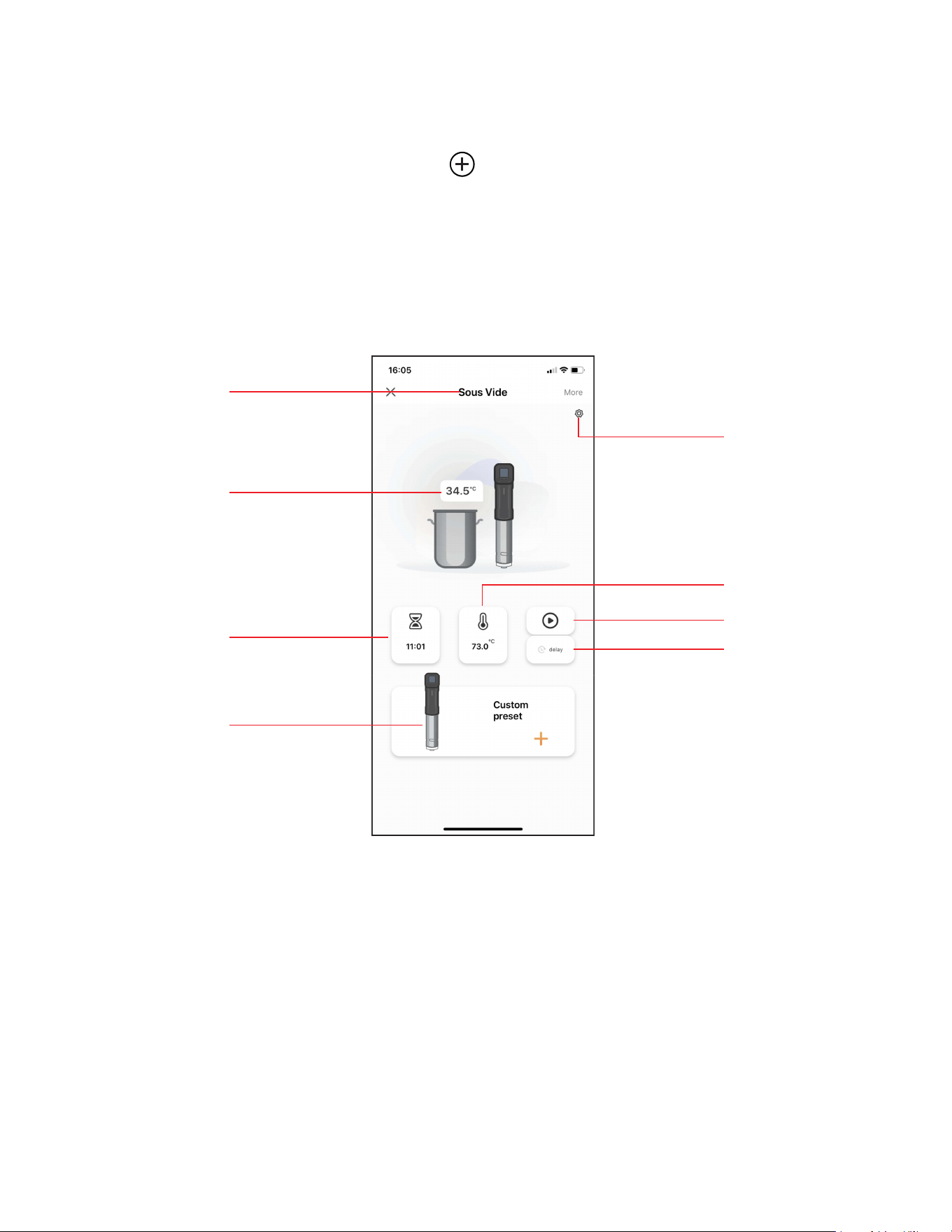
4.4 Main Interface of the InkBird Pro
8
YoucouldcontroltheSousVidewithInkbird
Proapponyourphoneatanytimeanywhere.
All functions are available on the app.
4.5 Inkbird sous vide supports
multiple users on a single device
Pleasefollowthestepsbelowforasuccessful
operation:
4.3 Wi-Fi Reset
Pressandholdthe“”buttonfor5seconds
toresettheWi-Fi,thenrepeatthestepsabove
toconnecttheSousVidetoyourphone.The
deviceonlysupports2.4GHzWi-Firouter.
Device Name
Current
Temperature
Timer Setting
Preset Recipe
&
Custom Recipe
Calibration
&
Temperature
Units
Run/Stop
Delay Start
Temperature
Setting

Important Safeguards05
9
1.Readallinstructions.
2.Checkthatflexibleleadsandtheappliance
areingoodcondition.
3.Checkyourplugsocketsarenotoverloaded
withtoomanyelectricalappliancesasthiscan
leadtooverheating.
4.Donotuseapplianceforotherthanintended
use.
5.Donottouchhotsurfaces.Usehandlesor
knobs.
6.Donotcutthecord,orputitonhotsurfaces.
7. Do not place on or near a hot gas or electric
burner,orinaheatedoven.
8.PlacetheSousVideorrelatedcontainerson
1. Tap Me to enter the setting interface.
2.TapHomeManagementandselectthe
familycontainingyourSousVide.
3.ClickAddmembers,entertheaccount
numberofyourfriendorfamilymemberand
settheuserasanadministrator.
4.Theadministratorscouldcheckandcontrol
theSousVideontheirownphones.
5.TheInkBirdProappsupportmax100
administratorsatonce.
Note:NewusersneedtodownloadtheInkBird
Proappandregistertousethisfeature.

10
aheat-safesurfaceortrivet,awayfrom
counteredges.
9.Thewaterlevelshouldnotexceedthe
“MAX”scalelineofthestainlesssteelpart.
10.Extremecautionmustbeusedwhen
moving an appliance containing hot oil or
otherhotliquids.
11.NeverusedeionizedwaterwithInkbird
SousVideasitmaydamagetheSousVide.
12.Don’ttrytocleanorrepairtheappliance
whenitisstillpluggedin.
13.Don’twrapflexiblecablesaroundthe
appliancewhenitisstillwarm.
14.Alwaysattachplugtoappliancefirst,
thenplugcordintothewalloutlet.To
disconnect,turnanycontrolto“off”,then
removeplugfromwalloutlet.
15.Switchoffthedevicewhennotinuse.
16.Pleasedisconnectthepowerassoonas
possibleiftheSousVidefallsintothewater,
donotputyourhandsintowaterwhen
pluggedin.TheWarrantydoesnotinclude
waterdamage.
17.Thisapplianceisnotintendedforuseby
persons(includingchildren)withreduced
physical,sensoryormentalcapabilities,or
lackofexperienceandknowledge,unless
they have been given supervision or
instruction concerning use of the appliance
by a person responsible for their safety.
Childrenshouldbesupervisedtoensurethat
theydonotplaywiththeappliance.Close
supervisionisnecessarywhenanyappliance
isusedbyornearchildren.

11
Warranty06
This Limited Warranty applies only to
Inkbird Sous Vide.
What is Covered and for How Long
Inkbirdwarrantsthatallnewproductsare
freefromdefectsinmanufacturing,
materialsandworkmanshipforaperiodof
oneyearfromdateofretailpurchase.
What this Warranty Does not Cover
Thewarrantydoesnotcoverdefectsor
malfunctioncausedbymisuse,abuseor
impropermaintenance,failuretofollow
operatinginstructions,orusewith
equipmentwithwhichitisnotintendedto
beused.
Also,thewarrantywillnotapplytodamage
causedbyunauthorizedalteration,
modificationorrepairoftheproduct.Inkbird
doesnotwarrantorprovideserviceor
supportforanythirdpartyproducts,
including,butnotlimitedtoiPhonesand
AndroidPhones.
How to Obtain Warranty Service
Toobtainwarrantyserviceforproducts
purchasedfromathird-party,retailor
directlyfromInkbirdyoumustreturnthe
productwithproofofpurchaseusingthe

12
followingprocedures:
1.ContactInkbirdCustomerSupportfor
specificreturnandshippinginstructionsby
email.
EmailAddress:suppor[email protected]m
Youmaybeaskedtocompleteawarranty
servicerequestform.Andtohelpensure
warrantyclaimsareforInkbirdproducts,our
technicalsupportdepartmentmayalso
require you to email a copy of your purchase
receipt to us.
2.Labelandshiptheproduct,freight
prepaid,totheaddressprovidedbyInkbird.
Exclusions and Limitations
THISWARRANTYISYOUREXCLUSIVE
WARRANTYANDREPLACESALLOTHER
WARRANTIESORCONDITIONS,EXPRESS
ORIMPLIED,INCLUDING,BUTNOTLIMITED
TO,ANYIMPLIEDWARRANTIESOR
CONDITIONSOFMERCHANTABILITYOR
FITNESSFORAPARTICULARPURPOSE.
ASSOMESTATESORJURISDICTIONSDO
NOTALLOWTHEEXCLUSIONOFEXPRESS
ORIMPLIEDWARRANTIES,THEABOVE
EXCLUSIONMAYNOTAPPLYTOYOU.
INTHATEVENT,SUCHWARRANTIESAPPLY
ONLYTOTHEEXTENTANDFORSUCH
DURATIONASREQUIREDBYLAWANDARE
LIMITEDINDURATIONTOTHEWARRANTY
PERIOD.