1
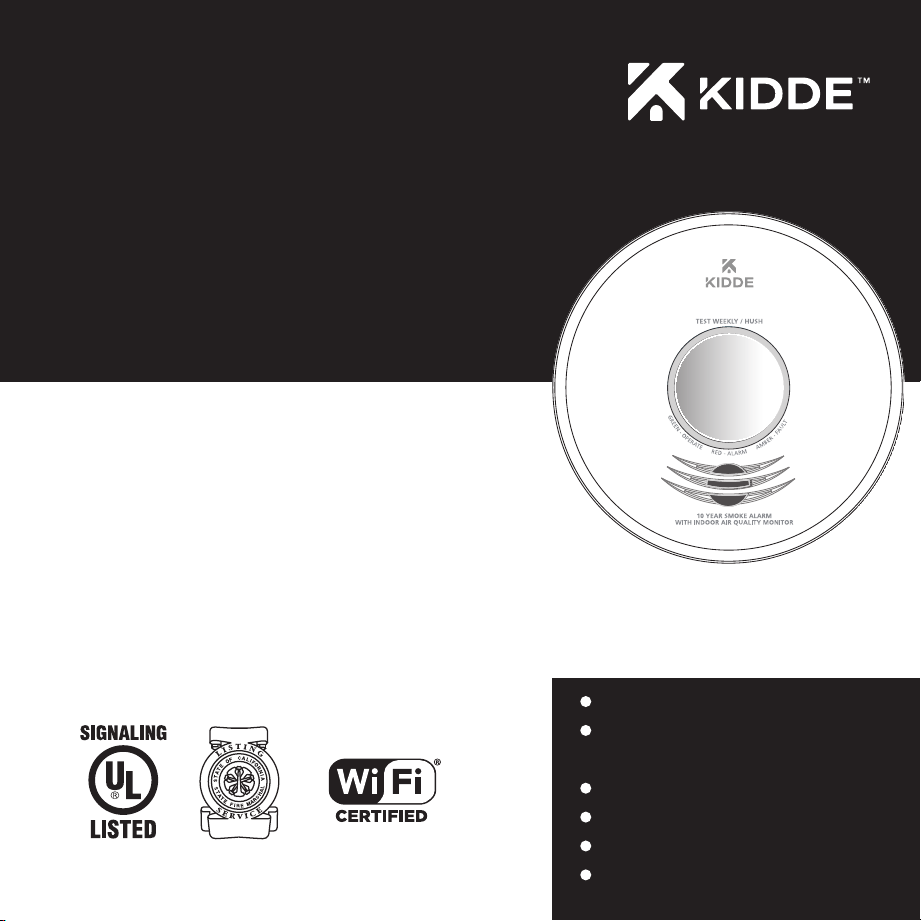
Kidde Smoke Alarm with Indoor
Air Quality Monitor
User Guide
Photoelectric Smoke Alarm
with Voice, Hardwire Interconnect,
Indoor Air Quality Monitoring (IAQ),
and Wi-Fi Compatibility
Model P4010ACSAQ-WF
120V HArdwIre
10-YeAr BATTerY BACKUP
(AC Power reQUIred)
HArdwIre InTerConneCT
wi-Fi CoMPATIBle
VoICe AlArM
Indoor AIr QUAlITY
KIdde wi-Fi AlArM
P/N: 1381-7201-00 Rev A
wi-Fi CoMPATIBIlITY:
This model requires a home Wi-Fi router
and internet to connect to a mobile device.
( Requires 802.11b/g/n (2.4GHz) Wi-Fi )
noTe: wi-Fi features do not function without AC power.

2
Thank You for Purchasing this Wi-Fi Alarm
Hardwired for 120VAC, this model features a non-replaceable, sealed-in battery backup. It also contains a voice
message system and Hush
TM
Control to temporarily silence nuisance alarms. It is capable of hardwire intercon-
nect, and is Wi-Fi compatible with mobile devices.
For best Wi-Fi enrollment results, follow these steps:
1. Scan QR code shown in STEP 1 on the front of the Quick Start Guide. Install the Kidde app.
2.
Open the Kidde app. Create and login to your account. Tap “Add a device.” Select “Smoke Alarm with Indoor Air Quality
Monitor.” Follow in-app steps
.
3. Scan your unique QR code, shown in STEP 3 of the Quick Start Guide, or on back of your alarm. Setup and
connect alarm to the app. This will include the wiring and installation steps shown in sections 9, 10, and 11.
4. Complete setup by following in-app steps.
noTe: wi-Fi features do not function without AC power.
Teach children how to respond to the alarm and that they should never play with the unit. This alarm is a multi-criteria device
designed to detect smoke from any source of combustion in a residential environment. It also monitors the indoor air quality in
the residence. It is not designed for use in a recreational vehicle (RV) or boat.
noTe: Please thoroughly read this user guide and save the document for future reference and to pass on to
any subsequent owner. Images in this user guide are representative only. Actual product may vary slightly.
The National Fire Protection Association (NFPA) and the manufacturer recommend replacing this alarm ten years from the
date code on back of alarm.
wArnInG: Mobile alert services are ancillary to the product and for informational purposes only. They are not
intended or suitable for life safety or critical purposes nor do these services take the place of third-party life safety
monitoring services. This product’s smartphone and tablet notifications require a stable Wi-Fi connection, and are only as
reliable as your home Wi-Fi network.
Date Code (on back): ___________________
Date of Purchase: ___________________
Where Purchased: ___________________
Date to Replace: ___________________
Product Support: 1-877-542-5471
Please write down the below information
and have this at hand when you call.

3
Contents
1. Smoke Alarm: What To Do When The Alarm Sounds . . . . . . . . 4
2. Carbon Monoxide Alarm: What To Do When The Alarm Sounds . . . . 5
3. Other Alarm Visual And Audible Indicators . . . . . . . . . . . 6
4. Troubleshooting Guide . . . . . . . . . . . . . . . . . 7
5. Introduction, Product Features & Specifications . . . . . . . . . 8
6. Limitations Of Smoke Alarms . . . . . . . . . . . . . . . 9
7. Recommended Locations for Smoke Alarms. . . . . . . . . . . 10
8. Locations To Avoid . . . . . . . . . . . . . . . . . . 13
9. Wiring Instructions and Mounting Bracket Installation . . . . . . . 14
10 Kidde App Instructions . . . . . . . . . . . . . . . . . 18
11. Installation, Activation, and Wi-Fi Enrollment . . . . . . . . . . 19
11.1 Setting Up Wi-Fi Enrollment . . . . . . . . . . . . . . 19
11.2 Adding Another Device to an Existing Wi-Fi Alarm Network . . . . 20
11.3 Resetting a Device’s Wireless Settings . . . . . . . . . . . 21
11.4 Amazon Alexa and Google Home . . . . . . . . . . . . 21
12. Operation And Testing . . . . . . . . . . . . . . . . . 22
13. Recognizing Nuisance Alarms . . . . . . . . . . . . . . 23
14. Battery Back Up . . . . . . . . . . . . . . . . . . . 24
15. Permanently Disable Alarm / Discharge Battery . . . . . . . . . 25
16. Cleaning Your Alarm . . . . . . . . . . . . . . . . . 26
17. Good Safety Habits . . . . . . . . . . . . . . . . . . 27
18. Service And Warranty . . . . . . . . . . . . . . . . . 30

4
1. Smoke Alarm: What To Do When the Alarm Sounds
The smoke alarm pattern is three long beeps with voice “Fire!,” a 1.5 second pause, and three long beeps repeating.
The red LED blinks in time with the alarm pattern.
• Alert small children in the home as well as anyone else that might have difficulty recognizing the importance of the
alarm sounding or that might have difficulty leaving the area without help.
• Plan two ways out! Leave immediately by your escape plan. Don’t waste time getting dressed or picking up
valuables.
• While leaving, don’t open any inside door without first feeling its surface. If hot, or if you see smoke seeping
through cracks, don’t open that door! Instead, use your alternate exit. If the inside of the door is cool, place your
shoulder against it, open it slightly and be ready to slam it shut if heat and smoke rush in.
• If the escape route requires you to go through smoke, stay close to the floor where the air is cleaner. Crawl if neces-
sary, and breathe shallowly through a cloth, wet if possible.
• Once outside, go to your selected meeting place and make sure everyone is there.
• Call the fire department from your cell phone outside, or from your neighbor’s home-not from yours!
• Don’t return to your home until the fire officials say that it is all right to do so.
noTe: See Section RECOGNIZING NUISANCE ALARMS, for nuisance alarm situations.

5
2. Carbon Monoxide Alarm: What To Do When the Alarm Sounds
NOTE: This is not a carbon monoxide (CO) alarm, but will receive and transmit a CO
alarm signal (with voice message) from an interconnected CO or combination smoke /
CO alarm.
The carbon monoxide (CO) alarm pattern is four quick beeps with voice “Warning! CarbonMonoxide”
repeating every 5 seconds. The red LED blinks in time with the alarm pattern.
Warning: CarbOn MOnOxiDE aLarM aCTivaTiOn inDiCaTEs ThE prEsEnCE Of CarbOn
MOnOxiDE (CO) aT high COnCEnTraTiOns WhiCh Can kiLL yOu.
1) Operate the Test/hush button. nOTE: pressing the button on the initiating alarm unit (green LED
flashing every second) will silence the alarm notification, including all interconnected units. if the
unit goes into alarm mode again within six minutes, it is sensing high levels of CO which can quickly
become a dangerous situation.
2) Call your emergency services (fire Department or 911). EMErgEnCy phOnE #:___________
3) immediately move to fresh air — outdoors or by an open door / window. Do a head count to check
that all persons are accounted for. alert small children in the home as well as anyone else that might
have difficulty recognizing the importance of the alarm sounding or that might have difficulty leaving
the area without help. Do not reenter the premises or move away from the open door/window until the
emergency services responders have arrived, the premises have been aired out, and your alarm remains
in its normal condition.
4) after following steps 1-3, if the alarm reactivates within a 24 hour period, repeat steps 1-3 and call a
qualified appliance technician to investigate sources of CO from fuel burning equipment and applianc-
es, and to inspect for proper operation of equipment.
if problems are identified during this inspection, have the equipment serviced immediately. note any
combustion equipment not inspected by the technician and consult the manufacturer’s instructions,
or contact the manufacturer directly for more information about CO safety and the equipment. Make
sure that motor vehicles are not, or have not been, operating in a garage attached or adjacent to the
residence. never restart the source of a CO problem until it has been corrected. never ignore the sound
of the alarm!
NOTE: see section rECOgniZing nuisanCE aLarMs, for nuisance alarm situations.

6
3. Other Alarm Visual and Audible Indicators
Operational Mode Visual Indications Audible Indications Action/Note:
Normal (standby)
AC power: Green LED on continuously during
light conditions, or blink every 60 sec during dark
conditions.
DC power: Green LED blink approx every 60 sec.
Test (button press when no
alarm condition is present, or
alarm is not in out of box or
enrollment mode)
• 4 patterns of Red/Amber/Green.
• Test: Red LED blinks in time with alarm
pattern.
• Green LED fade on/off at test complete
• Button press sound
• Voice: "Testing, this is very loud.
Press now to cancel test. 5, 4, 3, 2, 1."
• 3 long beeps, Voice "Fire!",
3 long beeps. Voice "Test Complete,"
Power on/reset sound.
• Voice "Test Canceled" if button
pushed before test sequence begins.
Perform button press once a week
to verify proper alarm operation
* Push/release button before the
countdown ends to cancel test.
Smoke Alarm Memory (unit
has experienced a smoke alarm
event within the last hour)
Red and Amber LED alternate on 1 sec,
every 10 sec.
After button push, voice "Smoke
previously detected only on the
initiating alarm unit.
Push button to clear Alarm
Memory. NOTE: standard test
sequence will follow. (Push/release
button again to cancel test).
Smoke Alarm Hush
TM
Mode Red LED blinks every 2 sec. After button push, voice "Hush Mode
Activated." Smoke alarm pattern
stops.
(If there is too much smoke to allow
Hush
TM
: Voice "Too Much Smoke,
Alarm cannot be Hushed" Smoke alarm
pattern continues.)
This feature is to be used only
when a known alarm condition,
such as smoke from cooking,
activates the alarm.
Smoke Alarm Hush
TM
Mode
Canceled
None Voice "Hush Mode Canceled." When smoke levels drop below the
alarm threshold, the voice message
will occur .
Initiating Alarm,
(Multiple alarms in an
interconnected system)
Green LED blinks once per sec indicating
that this is the unit initiating the alarm in an
interconnected, multiple alarm, system.
Unit in Smoke alarm mode. During alarm, the initiating alarm
red blink will be interrupted by a
green blink.
Weather & Intruder Alert
(1)
Red LED flashes every sec. One long beep, 5 sec pause, Voice:
“Weather emergency in vicinity” OR
one long beep every other sec, voice
every 10 sec “Intruder detected.”
Take appropriate precautions.
(1) Requires additional devices and/or permissions in app to enable these features.
NOTE: Indoor Air Quality (IAQ) notifications are sent only to your mobile device. The alarm does not give indications for IAQ.

7
4. Troubleshooting Guide
If you are experiencing a problem with your alarm, or a fault, and are unsure of the next action, please contact product
support at 1-877-542-5471 before discharging the battery. You may also write us at: Kidde, 1016 Corporate Park Drive,
Mebane, NC 27302, or visit our internet address at www.kidde.com.
Trouble Condition
Visual Indications
Audible Indications Action:
False Low Battery
(AC power connected
before backup battery
activated)
Amber
LED
blinks
every
5
seconds
Chirp every 60 sec with voice
"Activate Battery."
* Rotate unit fully onto mounting bracket to activate
battery.
Low Battery Chirp every 60 sec, voice every
30 sec: “Replace alarm.”
Voice stops after 5 mins.
* Remove, discharge, dispose unit, and replace as soon as
possible.
Fault Mode Chirp every 30 sec.
Voice every 30 sec: “Error, see
trouble shooting guide”
After 5 mins: no voice message
* See Cleaning Your Alarm section.
*
Push button once to attempt to reset the unit.
* Red LED will blink out an error code (number of blinks)
when button is pushed. Report the number of blinks to
customer service if needed.
* If error persists, or if customer service directs, remove,
discharge, dispose unit, and replace as soon as possible.
End of Unit Life
Amber LED blinks twice
every 5 seconds.
Double chirp every 30 sec. First
5 mins: Voice every 30 sec:
“Replace alarm, press button to
temporarily silence.” Voice stops
after 5 mins. Voice “Temporarily
Silenced” after button push (first
7 days only). After 7 days, chirps
continue, with voice “Replace
Alarm” every 30 sec for 5 mins.
*
Push button once to silence for 24 hrs. (Push button again
to clear Hush
TM
and perform a test.)
Note: 7 days after End of Unit Life begins, the notifications
cannot be silenced.
* Remove, discharge, dispose unit, and replace as soon as
possible.
Network Error
Amber LED blinks every
5 seconds.
Chime every 30 secs. Voice every
30 sec: “Connection lost, press
button to temporarily silence.”
After 5 min: no voice messages.
Voice “Temporarily Silenced”
after button push.
* Push button to temporarily silence for 24 hrs. (Push
button again to clear
Hush
TM
and perform a test.)
* Call customer service.
* If error continues, remove, discharge, dispose unit, and
replace as soon as possible.
Loss of Wi-Fi
Connection (NOTE:
Wi-Fi features do not
function without AC
power.)
None
None. *
The unit will attempt to re-connect on its own. After 10
consecutive mins of lost connection, you will receive a
notification of “Contact Lost” in your mobile App.
* Contact customer service. If error persists, or if customer
service directs, remove, discharge, dispose unit, and
replace as soon as possible.
Stuck Button None Chirp every 4 sec. * Push button to dislodge it from being stuck. If button
cannot be unstuck, remove alarm, discharge, dispose
unit, and replace as soon
as possible.
NOTE: Indoor Air Quality (IAQ) notifications are sent only to your mobile device. The alarm does not give indications for IAQ.
Please refer to Support section in Kidde App or Help.Kidde.com.

8
5. Introduction, Product Features and Specifications
Introduction
This alarm detects products of combustion using photoelectric technology. The device also monitors the indoor air
quality of the residence. Ten (10) years after the unit was activated, this unit will automatically alert you that it is time to
replace the unit. This is called “End of Unit Life” mode. See Troubleshooting Guide. To help identify the date to replace
the unit, a label has been affixed to the side of the alarm. Write the “Install date” in the space provided, and then write
in the “Replace by” date (10 years from initial power up) in permanent marker on the label prior to installing the unit.
noTe: AC power must be connected to obtain the full 10 year battery and unit life.
Product Features and Specifications:
• Temperature: Operating Range: 40°F (4.4°C) to 100°F (37.8°C)
• Humidity: Operating range: up to 95% RH non-condensing
• Audible Alarm: 85+ dB at 10’ 3.0 to 3.5 KHz pulsing alarm, with voice message
“Fire!”
• Smoke Sensor: Photoelectric
• Indoor Air Quality Monitoring
NOTE: The indoor air quality sensors and features are not designed for life safety, and are not OSHA or UL certified.
These features offer additional notifications to the consumer, and will not affect life safety performance (smoke and
CO detection) of your Wi-Fi alarm.
• Voice message system
• Smoke Alarm Hush
TM
Control
• Ambient Light Sensing
• Powered by 120VAC (60 Hz, 53 mA max) wire-in connector with sealed lithium battery backup
• Hardwire Interconnect
• Wi-Fi Compatible to Mobile Device ( Requires 802.11b/g/n (2.4GHz) Wi-Fi ). noTe: wi-Fi features do not
function without AC power.
• One large, user-friendly button

9
6. Limitations of Smoke Alarms
wArnInG: PleASe reAd CAreFUllY And THoroUGHlY
• Life safety from fire in residential occupancies is based primarily on early notification to occupants of the need to
escape, followed by the appropriate egress actions by those occupants.
• Fire warning systems for dwelling units are capable of protecting about half of the occupants in potentially fatal
fires. A smoke alarm may not be effective in some situations, such as during incendiary fires where the fire grows so
rapidly that an occupant’s egress is blocked even with properly located smoke alarms, or when victims are intimate
with the fire (for example, when a person’s clothes catch fire while cooking), too old or young, or physically or
mentally impaired such that they cannot escape even when warned early enough that escape should be possible. For
these people, additional strategies such as protection-in-place or assisted escape or rescue are necessary. *
• Leading authorities recommend that both ionization and photoelectric smoke alarms be installed to help insure max-
imum detection of the various types of fires that can occur within the home. Ionization sensing alarms may detect
invisible fire particles (associated with fast flaming fires) sooner than photoelectric alarms. Photoelectric sensing
alarms may detect visible fire particles (associated with slow smoldering fires) sooner than ionization alarms.
• A battery powered alarm must have a battery of the specified type, in good condition and installed properly (this
model has a sealed backup battery).
• Smoke alarms must be tested regularly to make sure the battery and the alarm circuits are in good operating condition.
• Smoke alarms cannot provide an alarm if smoke does not reach the alarm. Therefore, smoke alarms may not sense
fires starting in chimneys, within walls, on roofs, on the other side of a closed door or on a different floor.
• If the alarm is located outside the bedroom or on a different floor, it may not wake up a sound sleeper.
• The use of alcohol or drugs may also impair one’s ability to hear the smoke alarm. For optimal detection, a smoke
alarm should be installed in each sleeping area on every level of a home.
• There are situations where a smoke alarm may not be effective to protect against fire as stated in the NFPA Standard 72.
For instance:
a) smoking in bed
b) leaving children home alone
c) cleaning with flammable liquids, such as gasoline
This alarm is not intended to alert hearing impaired individuals.
* Reference National Fire Protection Association (NFPA) standard 72
10
7.
Recommended Locations For Smoke Alarms
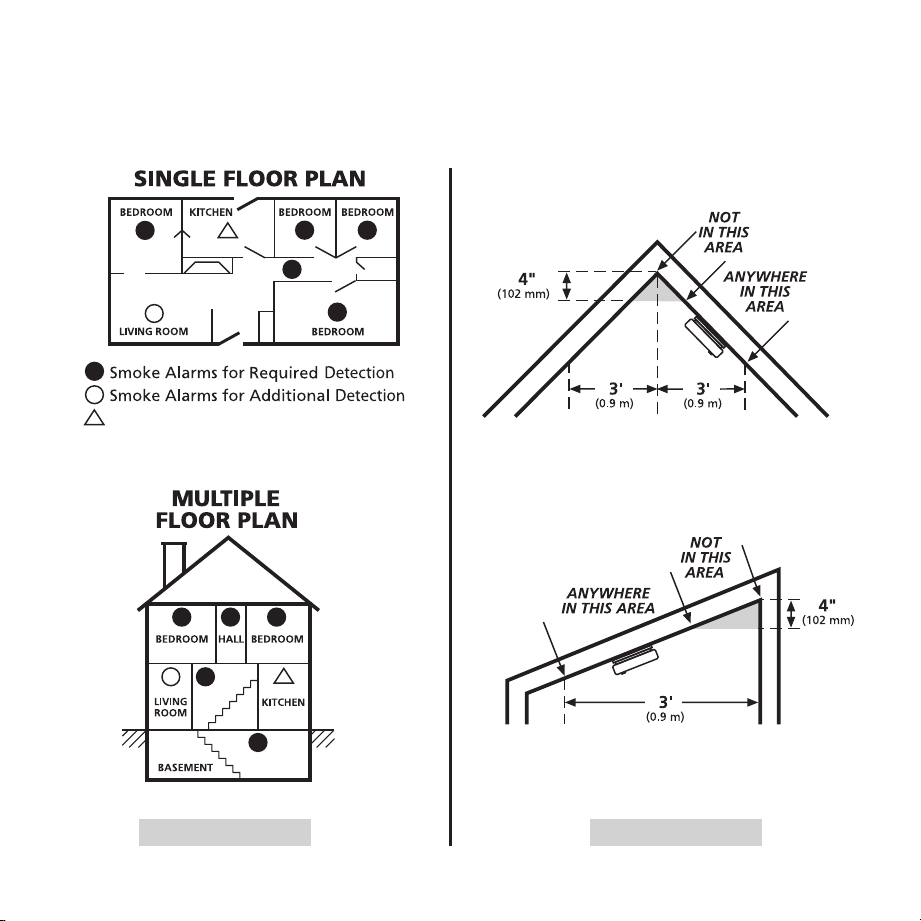
• Locate smoke alarms in all sleeping areas. Try to monitor the exit path as the bedrooms are usually farthest from the
exit. If more than one sleeping area exists, locate additional alarms in each sleeping area.
• Locate additional alarms in stairways, because stairways act like chimneys for smoke and heat.
• Locate at least one alarm on every floor level.
• Locate an alarm in every bedroom.
• Locate an alarm in every room where electrical appliances are operated (i.e. portable heaters or humidifiers).
• Locate an alarm in every room where someone sleeps with the door closed. The closed door may prevent an alarm
not located in that room from waking the sleeper.
• Smoke, heat, and combustion products rise to the ceiling and spread horizontally. Mounting the smoke alarm on the
ceiling in the center of the room places it closest to all points in the room. Ceiling mounting is preferred in ordinary
residential construction.
ACCEPTABLE
TOP OF ALARM
ACCEPTABLE HERE
Note: measurements shown
are to the closest edge
of the alarm.
ANYWHERE ALONG
THIS BOLD SURFACE
Locations permitted for smoke
alarms and smoke detectors
on tray-shaped ceilings.
Not within 6 feet of appliances
Figure 7-A
ANYWHERE ALONG
THIS BOLD SURFACE
Locations permitted for smoke
alarms and smoke detectors
on tray-shaped ceilings.
11
ACCEPTABLE
TOP OF ALARM
ACCEPTABLE HERE
Note: measurements shown
are to the closest edge
of the alarm.
ANYWHERE ALONG
THIS BOLD SURFACE
Locations permitted for smoke
alarms and smoke detectors
on tray-shaped ceilings.
Not within 6 feet of appliances
ACCEPTABLE
TOP OF ALARM
ACCEPTABLE HERE
Note: measurements shown
are to the closest edge
of the alarm.
ANYWHERE ALONG
THIS BOLD SURFACE
Locations permitted for smoke
alarms and smoke detectors
on tray-shaped ceilings.
Not within 6 feet of appliances
ACCEPTABLE
TOP OF ALARM
ACCEPTABLE HERE
Note: measurements shown
are to the closest edge
of the alarm.
ANYWHERE ALONG
THIS BOLD SURFACE
Locations permitted for smoke
alarms and smoke detectors
on tray-shaped ceilings.
Not within 6 feet of appliances
ACCEPTABLE
TOP OF ALARM
ACCEPTABLE HERE
Note: measurements shown
are to the closest edge
of the alarm.
ANYWHERE ALONG
THIS BOLD SURFACE
Locations permitted for smoke
alarms and smoke detectors
on tray-shaped ceilings.
Not within 6 feet of appliances
NFPA 72 states: “Smoke alarms in rooms with ceiling slopes greater than 1 ft in 8 ft (0.3m in 2.4 m)
horizontally shall be located on the high side of the room.” NFPA 72 states: “A row of detectors shall be
spaced and located within 3 ft (0.9m) of the peak of the ceiling measured horizontally.”
Figure 7-B Figure 7-C

12
• For mobile home installation, select locations carefully to avoid thermal barriers that may form at the ceiling. For
more details, see MOBILE HOME INSTALLATION section.
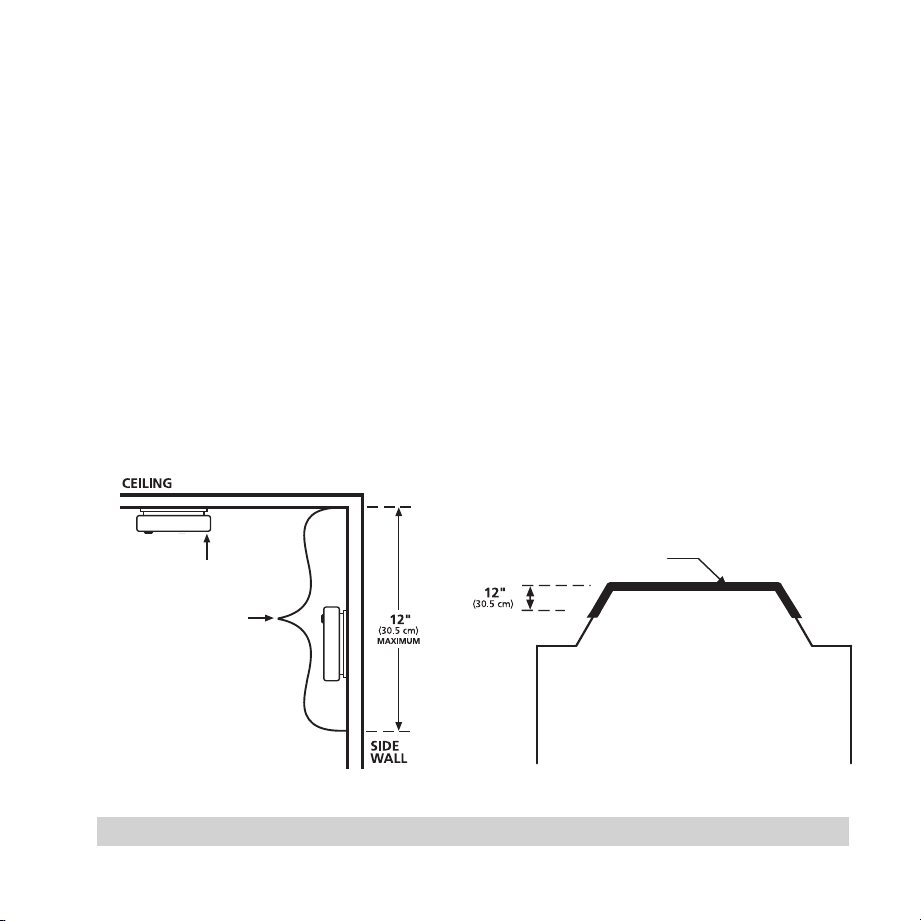
• When mounting the alarm on the wall, use an inside wall with the top edge of the alarm at a maximum of 12” (30.5
cm) below the ceiling.
• Put smoke alarms at both ends of a bedroom hallway or large room if the hallway or room is more than 30 feet (9.1
m) long.
• Install Smoke Alarms on sloped, peaked or cathedral ceilings at or within 3ft (0.9m) of the highest point (measured
horizontally).
This equipment should be installed in accordance with the National Fire Protection Association’s 72 (National
Fire Protection Association, Batterymarch Park, Quincy, MA 02269).
Mobile Home Installation
Modern mobile homes have been designed and built to be energy efficient. Install smoke alarms as recommended
above. In older mobile homes that are not well insulated compared to present standards, extreme heat or cold can be
transferred from the outside to the inside through poorly insulated walls and roof. This may create a thermal barrier
which can prevent the smoke from reaching an alarm mounted on the ceiling. In such units, install the smoke alarm on
an inside wall with the top edge of the alarm a maximum of 12” (30.5 cm) below the ceiling.
If you are not sure about the insulation in your mobile home, or if you notice that the outer walls and ceiling are either
hot or cold compared to the room air temperature, install the alarm on an inside wall. NFPA 72 (National Fire Protection
Association) requires smoke alarms be installed in each sleeping area.
wArnInG: TeST YoUr AlArM oPerATIon AFTer MoBIle HoMe HAS Been In STorAGe or
UnoCCUPIed, And AT leAST onCe A weeK dUrInG USe.

13
8. Locations to Avoid
(See Figures 7-A, 7-B, & 7-C for recommended locations)
• In the garage. Products of combustion are present when you start your automobile.
• Normal cooking may cause nuisance alarms. If a kitchen alarm is desired, it should have an alarm silence feature or
be a photoelectric type.
• Do not install within 6 ft. of heating or cooking appliances.
• Less than 4” (10cm) from the peak of an “A” frame type ceiling.
• In an area where the temperature may fall below 40ºF or rise above 100ºF, such as garages and unfinished attics.
• In dusty areas. Dust particles may cause nuisance alarms or a failure to alarm.
• In very humid areas (above 95% RH, non-condensing), as moisture or steam can cause nuisance alarms.
• In insect-infested areas.
• Smoke alarms should not be installed within 3 ft (0.9m) of the door to a bathroom containing a tub or shower,
forced air supply ducts used for heating or cooling, ceiling or whole house ventilating fans, or other high air flow
areas.
• Near lights. Electronic “noise” generated by the electronics may cause nuisance alarms.
• Do not install near vents, flues or chimneys.
• Do not install near fans, doors, windows or areas directly exposed to the weather.
• Avoid installing where the unit will be exposed to direct sunlight.
Learn more about the Smart Smoke Alarm with
Indoor Air Quality Monitor, and check out other
resources by scanning this QR code.

14
9. Wiring Instructions and Mounting Bracket Installation
For best Wi-Fi enrollment results, follow these steps:
1. Scan QR code shown in STEP 1 on the front of the Quick Start Guide. Install the Kidde app.
2. Open the Kidde app. Create and login to your account. Tap “Add a device.” Select “ Smoke Alarm with Indoor Air
Quality Monitor.” Follow in-app steps.
3. Scan your unique QR code, shown in STEP 3 of the Quick Start Guide, or on back of your alarm. Setup and
connect alarm to the app. This will include the wiring and installation steps shown in sections 9, 10, and 11.
4. Complete setup by following in-app steps.
noTe: wi-Fi features do not function without AC power.
wiring requirements
• This alarm should be installed on a UL Listed or recognized junction box. All connections should be made by a
qualified electrician and all wiring used shall be in accordance with articles 210 and 300.3(B) of the U.S. National
Electrical Code ANSI/NFPA 70, NFPA 72 and/or any other codes having jurisdiction in your area. The multiple station
interconnect wiring to the alarms must be run in the same raceway or cable as the AC power wiring. In addition, the
resistance of the interconnect wiring shall be a maximum of 10 ohms.
• The appropriate power source is 120 Volt AC Single Phase, supplied from a non-switchable circuit.
• Smoke alarms are not to be used with detector guards unless the combination (alarm and detector guard) has been
evaluated and found suitable for that purpose.
• Kidde alarms are not designed, agency tested or certified for recessed mounting and should not be installed in
this manner. Recessed mounting impedes smoke entry into the smoke chamber, which may prevent the alarm
from sounding in a timely manner. This could endanger the lives of occupants in the residence. Kidde alarms are
designed, tested and certified for wall (if applicable) and ceiling surface mount only.
wArnInG: THe AlArM CAnnoT Be oPerATed FroM Power derIVed FroM A SQUAre wAVe,
ModIFIed SQUAre wAVe or ModIFIed SIne wAVe, InVerTer. THeSe TYPeS oF InVerTerS Are SoMe-
TIMeS USed To SUPPlY Power To THe STrUCTUre In oFF GrId InSTAllATIonS, SUCH AS SolAr or
wInd derIVed Power SoUrCeS. THeSe Power SoUrCeS ProdUCe HIGH PeAK VolTAGeS THAT wIll
dAMAGe THe AlArM.
wiring Instructions for AC Quick Connect Harness
CAUTIon: Turn off the main power to the circuit before wiring the AC Quick Connect Harness.
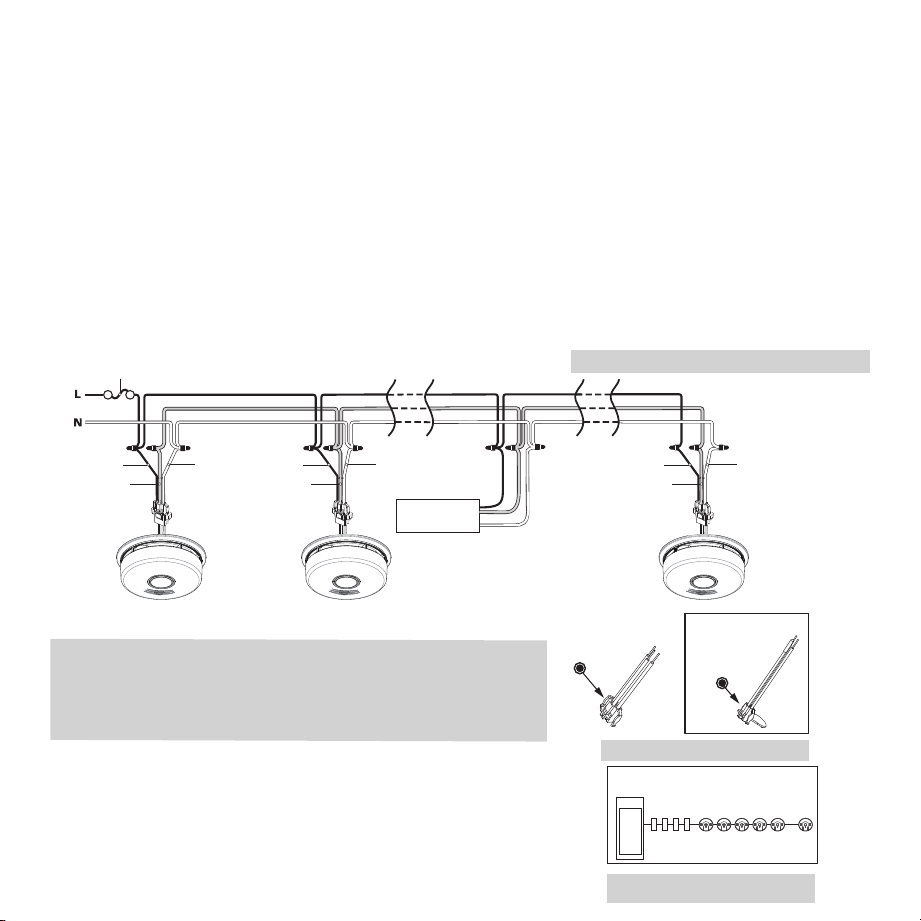
• For alarms that are used as single station, DO NOT CONNECT THE RED WIRE TO ANYTHING. Leave the red wire
insulating cap in place to make certain that the red wire cannot contact any metal parts or the electrical box.
noTe: Single station alarms (including this Wi-Fi model, if used as a single station alarm) CANNOT send or receive smoke
or CO alarm signals to other hardwire interconnect alarms in your home. If this model is used as a single station alarm, it
will send notifications ONLY to your mobile device (after the wi-Fi alarm is registered with the Kidde app).
15
• When alarms are hardwire interconnected, all interconnected units must be powered from a single circuit.
• A maximum of 24 Kidde Safety devices may be interconnected in a multiple station arrangement. The intercon-
nect system should not exceed the NFPA interconnect limit of 12 smoke alarms and/or 18 alarms total (smoke, CO,
Smoke/ CO Combination, heat, etc.). With 18 alarms interconnected, it is still possible to interconnect up to a total of
6 remote signaling devices and / or relay modules.
• The maximum wire run distance between the first and last unit in an interconnected system is 1000 feet.
• Figure 9-A illustrates interconnection wiring. Improper connection will result in damage to the alarm, failure to
operate, or a shock hazard.
• Make certain alarms are wired to a continuous (non-switched) power line.
noTe: Use standard UL Listed household wire (as required by local codes) available at all electrical supply
stores and most hardware stores.
• For best results to minimize nuisance alarms, interconnected alarms should be on a dedicated line. If not on a dedi-
cated line, it is suggested that the smoke alarms share a lighting load circuit that does not have a dimmer associated
with it. If receptacles must be placed on the same line it is suggested that they be placed ahead of the smoke alarms
(see Figure 9-C). This will prevent large voltage drops from occurring between the first and last alarm in the circuit.
Figure 9-A, Interconnect Wiring Diagram
Existing Kidde
AC Connector
(either connector
can be used for
this model)
AC connector
shipped with
product
Wires on alarm harness: Connected to:
Black: Hot side of AC line
White: Neutral side of AC line
Red: Interconnect lines (red wires) of other
units in the multiple station set-up
Figure 9-C
Figure 9-B
Service
Panel
Receptacles Interconnected alarms
Wiring practice that has had good results
in preventing nuisance alarms
Additional
Alarm
WHITEWHITE BLACK
RED
Additional
Alarm
WHITE
BLACK
RED
FUSE OR CIRCUIT BREAKER
RED
BLACK
Kidde Relay Module
SM120X, CO120X
or both
Optional
Accessory
First
Alarm
16
noTe: AC power should be turned off at this stage.
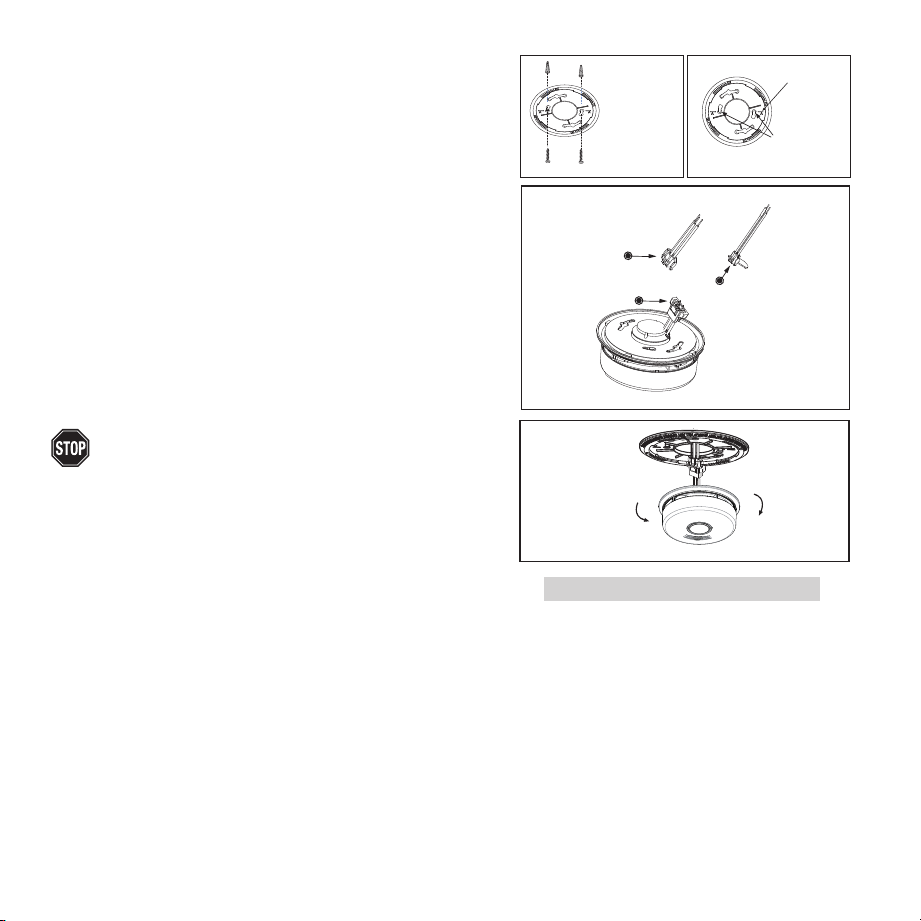
• After selecting the proper location for your Alarm, and wiring
the AC QUICK CONNECT harness as described in the WIRING
INSTRUCTIONS, attach the mounting bracket to the electrical
box. To ensure aesthetic alignment of the alarm with the hall-
way, or wall, the “A” line on the mounting bracket should be
parallel with the hallway when ceiling mounted, or horizontal
when wall mounted (See Figure 9-D).
• Pull the AC QUICK CONNECTOR through the center hole in
the mounting bracket and secure the bracket, making sure
that the mounting screws are positioned in the small ends of
the keyholes before tightening the screws.
• Proceed to Section 10 for Kidde App Instructions.
If you are installing for Wi-Fi functionality, and have not yet
downloaded the Kidde App, do not connect your Wi-Fi unit
to the AC quick connect harness or mounting bracket yet. See
Section 10 for instructions on downloading the Kidde App. If you
are not using the Wi-Fi function, then proceed with the following
three steps.
• Plug the AC QUICK CONNECTOR into the wiring harness
attached to the unit, making sure that the locks on the connector
snap into place. Then push the excess wire back into the electrical
box through the hole in the center of the mounting bracket.
• Install the alarm fully on the mounting bracket by rotating the alarm in a clockwise direction. noTe: The alarm will
mount to the bracket in 4 positions (every 90 degrees). noTe: Installing the alarm on the mounting bracket will
automatically activate the battery backup.
• Turn on the AC power. The green AC Power On Indicator should be lit when the alarm is operating from AC power.
noTe: Wi-Fi units will emit a series of LED blinks, tones, and voices as the unit(s) search for a Wi-Fi alarm
network. If you are intending to use Wi-Fi units without the Wi-Fi function, ignore these notifications, and
the Wi-Fi function will turn off in about 15 minutes, or you can push/hold the button until you hear two
beeps (about four seconds), to exit Wi-Fi enrollment mode. You can turn the Wi-Fi function on again at a later
date if desired. See Section 11.3 .
When mounting
in a hallway,
the "A" line should
be parallel with the
hallway. When wall
mounting, the "A"
line should be
horizontal.
Alignment Marks
(”A” Line) on
Mounting
Bracket
Mark and drill
two 3/16" (5mm)
holes for wall
anchors
A
Remove
Install
Existing Kidde
AC Connector
(either connector
can be used for
this model)
AC connector
shipped with
product
AC connector
Figure 9-D

17
noTe: Attaching AC power first, without rotating the alarm onto the mounting bracket, will result in a false
low battery trouble condition chirp (see Troubleshooting Guide). You need to activate the battery to elimi-
nate the low battery trouble condition chirps. Attach unit to mounting bracket very soon after applying AC
power to avoid false low battery notification.
noTe: The battery activation is a one-time feature. After activation, the battery cannot be turned off, and
can only be discharged at the end of unit life. If the alarm is removed from the mounting bracket, the backup
battery will remain active. See Permanently Disable Alarm / Discharge Battery section.
The alarm is now activated! After installation / activation, test your alarm as described in Operation and Testing
section.
wArnInG: FAIlUre To ProPerlY InSTAll And ACTIVATe THIS AlArM wIll PreVenT ProPer
oPerATIon oF THIS AlArM And wIll PreVenT ITS reSPonSe To FIre HAzArdS.
Interconnect Capability
This model has AC hardwire interconnect capability. When one hardwire interconnect unit sounds an alarm, all other
compatible hardwire interconnected units will also alarm. NOTE: AC wiring must be completed properly and the AC
quick connector must be attached to the unit for the hardwire interconnect function to work.
AC Hardwire Interconnect Model Compatibility
• The following models can be interconnected using the standard AC wiring interconnect: i12020,
i12020A, i12040, i12040A, i12060, i12060A, i12080, i12080A, i4618, i4618A, i4618AC, KN-SMFM-I,
RF-SM-ACDC, PE120, P12040, Pi2000, Pi2010, KN-COSM-I, KN-COSM-IB, KN-COSM-IBA, KN-COPE-I,
KN-COPE-IC, KN-COB-IC, KN-COP-IC, SL177i, SLED177i, HD135F, SM120X, CO120X, i12010S,
i12010SCO, P4010ACSCO, P4010ACSCO-W, P4010LACS-W, P4010ACS, P4010ACS-W, P4010ACLEDS,
P4010ACLEDS-2, P4010ACLEDSCO, P4010ACLEDSCO-2, 3050-VAS10-A, 3050-VASC10-A,
P4010ACSCO-WF, P4010ACSCOAQ-WF, P4010ACS-WF, P4010ACSAQ-WF.
noTe: Although this Wi-Fi model will hardwire interconnect with the models listed above, the Wi-Fi alarm will
ONLY transmit smoke and CO alarm signals from these alarms to your mobile device (after the wi-Fi alarm is
registered with the Kidde app). Other status notifications from non Wi-Fi alarms, such as low battery, end of
unit life, or a fault condition, will NOT be transmitted to your mobile device through the Wi-Fi alarm.

18
10. Kidde App Features and Instructions
For best Wi-Fi enrollment results, follow these steps:
1. Scan QR code shown in STEP 1 on the front of the Quick Start Guide. Install the Kidde app.
2. Open the Kidde app. Create and login to your account. Tap “Add a device.” Select “Smoke Alarm with Indoor Air
Quality Monitor.” Follow in-app steps.
3. Scan your unique QR code, shown in STEP 3 of the Quick Start Guide, or on back of your alarm. Setup and
connect alarm to the app. This will include the wiring and installation steps shown in sections 9, 10, and 11.
4. Complete setup by following in-app steps.
noTe: wi-Fi features do not function without AC power.
Your Kidde app is user friendly and allows helpful features such as:
• Receive notification when the device needs to be replaced.
• Receive notifications if smoke or indoor air quality issues are detected.
• Simplify setup - Just scan the QR code on the back of the product. No additional hub is needed.
• Test the alarm when you are home (on the same Wi-Fi network). *
• Notify friends and family of potential danger.
• Smart Hush
TM
false alarms when you are home (on the same Wi-Fi network).*
noTe: The app receives real-time updates. The paper or online copy of your user guide will most likely lag behind the
app’s real-time updates. Visit Kidde.com to find and download or print the latest user guide.
* This feature only applies to Kidde Wi-Fi alarms/devices.

19
11. Installation, Activation, and Wi-Fi Enrollment
For best Wi-Fi enrollment results, follow these steps:
1. Scan QR code shown in STEP 1 on the front of the Quick Start Guide. Install the Kidde app.
2. Open the Kidde app. Create and login to your account. Tap “Add a device.” Select “Smoke Alarm with Indoor Air
Quality Monitor.” Follow in-app steps.
3. Scan your unique QR code, shown in STEP 3 of the Quick Start Guide, or on back of your alarm. Setup and
connect alarm to the app. This will include the wiring and installation steps shown in sections 9, 10, and 11.
4. Complete setup by following in-app steps.
noTe: wi-Fi features do not function without AC power.
wI-FI CoMPATIBIlITY:
This model requires a home Wi-Fi router and internet to connect to a mobile device.( Requires 802.11b/g/n (2.4GHz) Wi-Fi )
IMPorTAnT: These alarms are hardwire interconnected, but do not communicate between alarms using
Wi-Fi. Wi-Fi functionality is only between alarms and a mobile device.
noTe : At any time during Wi-Fi enrollment, if you have a problem, you can push and hold the button on any
problem unit until you hear three (3) beeps (approx 8 sec), and then release the button. The unit will reset the
unit’s wireless settings (described in Section 11.3). Once wireless settings are reset, the unit will prompt the
user to follow Quickstart instructions and start over.
NOTE: The IAQ product takes a minimum of 5 minutes to warm up before air quality information is available.
However, the device can take up to 4 days to achieve full accuracy and will undergo a device calibration at
device startup and setup.
11.1 Setting Up Wi-Fi Enrollment
A. Activate the backup battery, apply AC power, install alarm. noTe: wi-Fi features do not
function without AC power.
• Locate the red wheel on the back of the device. Turn the red wheel to the “ON” position
on the device using a standard screwdriver. (Figure 11.1-A)
• Once the battery is activated, the device will emit a power on sound and blink green
once every two minutes.
• Connect the AC Quick Connector Harness. When AC power is connected, the alarm will
announce “Ready to connect, follow quick start instructions”.
• When AC power is connected, the light rings will glow fading red.
• Install the alarm fully on the mounting bracket by rotating the alarm in a clockwise direction.
noTe: The alarm will mount to the bracket in 4 positions (every 90 degrees).
noTe: Installing the alarm on the mounting bracket will automatically activate the battery backup if it hasn’t
already been activated.
ON
PERMANENTLY
DISABLE and
DISCHARGE
alarm
Break
tab
SMOKE ALARM: 3 long beeps, repeating
CO ALARM: 4 quick beeps, repeating
STANDBY: Green LED blink every 60s
FAULT: Amber LED blink with chirp every 30s
LOW BATTERY: Amber LED blink every 5s, chirp every 60s
END OF UNIT LIFE: Amber LED blink every 5s, chirp twice every 30s
Push button to test weekly.
See user guide for more information
Figure 11.1- A

20
B. Open the Kidde App and follow instructions on the App to finish Wi-Fi enrollment.
noTe: If no further steps are taken within 15 minutes of initial power up, a voice prompt, “Not Connect-
ed” will be heard once, and the Wi-Fi function will turn off. The unit will then perform as a standard
hardwired alarm. See Section 11.3 for reactivating Wi-Fi features.
C. After the Wi-Fi enrollment is completed, the alarm will announce “Success, now connected.”
D. Repeat steps A through C with each alarm to be enrolled with Wi-Fi.
11.2 Adding Another Device to an Existing Wi-Fi Alarm Network
For various reasons, you might want to add additional units to your existing Wi-Fi alarm network. Modifying your
existing Wi-Fi alarm network is easy and user-friendly.
A. Follow wiring instructions and install the mounting bracket to prepare for alarm installation (Section 9).
B. Activate the backup battery, apply AC power, install alarm.
noTe: wi-Fi features do not function without AC power.
• Locate the red wheel on the back of the device. Turn the red wheel to the
“ON” position on the device using a standard screwdriver. (Figure 11.2-B)
• Once the battery is activated, the device will emit a power on sound and
blink green
once every two minutes.
• Connect the AC Quick Connector Harness. When AC power is connected,
the alarm will announce “Readyto connect, follow quick start instructions.”
• Install the alarm fully on the mounting bracket by rotating the alarm in a clockwise direction.
noTe: The alarm will mount to the bracket in 4 positions (every 90 degrees).
noTe: Installing the alarm on the mounting bracket will automatically activate the battery backup if it
hasn’t already been activated.
C. Open the Kidde App and follow instructions on the App to finish Wi-Fi enrollment.
noTe: If no further steps are taken within 15 minutes of initial power up, a voice prompt, ““Not Connected” will
be heard once, and the Wi-Fi function will turn off. The unit will then perform as a standard hardwired alarm. See
Section 11.3 for reactivating Wi-Fi features.
D. After the Wi-Fi enrollment is completed, the alarm will announce “Success, now connected.”
E. Repeat steps A through D with each alarm to be enrolled with Wi-Fi.
ON
PERMANENTLY
DISABLE and
DISCHARGE
alarm
Break
tab
SMOKE ALARM: 3 long beeps, repeating
CO ALARM: 4 quick beeps, repeating
STANDBY: Green LED blink every 60s
FAULT: Amber LED blink with chirp every 30s
LOW BATTERY: Amber LED blink every 5s, chirp every 60s
END OF UNIT LIFE: Amber LED blink every 5s, chirp twice every 30s
Push button to test weekly.
See user guide for more information
Figure 11. 2- B

21
11.3 Resetting a Device’s Wireless Settings
If you encounter an issue at any point during the Wi-Fi enrollment process, you may reset the device by following the
directions below. noTe: wi-Fi features do not function without AC power.
A. Begin reset
• Press and hold the button on the device for 8-9 seconds until you hear 3
beeps. Release button. You will hear the words “Resetting wireless settings.”
B. Conclude reset
Light ring will flash green once and then it will pulse red. You will hear the
words, “Ready to connect, follow quick start instructions.”
• Device has been reset.
• See Section 11.1 to begin Wi-Fi enrollment, or Section 11.2 for adding this
device to an existing Wi-Fi alarm network.
noTe: If no further steps are taken within 15 minutes of resetting the unit’s wireless settings, a voice
prompt “Not Connected” will be heard once, and the Wi-Fi function will turn off. The unit will then
perform as a standard hardwired alarm. See Section 11.2 for adding this device to an existing alarm
network.
11.4 Amazon Alexa and Google Home
TM
Your WiFi alarm is compatible with Amazon Alexa and Google Home. Follow instructions in the Kidde app
help section to link your WiFi alarm to Amazon Alexa and/or Google Home.*
* AMAZON and ALEXA are trademarks of Amazon Technologies, Inc. or its affiliates.
Google and Google Home are trademarks of Google LLC.
Hold for
8-9 seconds
“Resetting
wireless
settings.”
“Ready to
connect, follow
Quick Start
instructions.”
Figure 11.3-A
Figure 11.3-B

22
12. Operation and Testing
operation
The alarm is operating once it is activated and testing is complete. When products of combustion (smoke) are sensed,
the unit sounds a loud alarm with voice messages. (See Sections 1 and 2 for alarm signal descriptions).
Indoor Air Quality
This device is designed to monitor levels of temperature, relative humidity and total volatile organic compounds
(TVOC) – chemicals in the air that can impact your health. Visit www.epa.org for more information on VOCs. Relative
Humidity % (RH) refers to the percentage of water vapor in the air at a given temperature. Ideal RH for living con-
ditions is usually recommended at 30% - 60%. The parameters listed below are based on a typical average, climate
controlled residence. When conditions in the residence move outside of the limits shown in the table, an alert is sent
to your mobile device. You can also check the status of your indoor air quality using the Kidde app, after your alarm is
registered with the app.
Indoor Air Quality Parameters
noTe: The indoor air quality monitor may not react to some particles and its readings may be different from that of
other air quality measuring products and instruments.
It’s helpful to understand the difference between temporary high readings and persistent high readings. A one-
time event might create a temporarily high reading but is not a cause for concern in the long term. However, if you
consistently get high levels of poor indoor air quality in a room, then you should take steps to improve ventilation or
air circulation in the area of the device. Please refer to the threshold ranges in the app to know what readings are
considered high.
It is important when comparing readings between different devices that the comparison is truly under the same con-
ditions. TVOC concentrations can vary throughout the home, so the placement of the devices in the house can have
an impact on their readings. If the devices are not right beside each other, or one of the devices is closer to a vent or
fan, this could impact the difference.
Air Quality Relative Humidity (%) Approx. VOC conc. (PPB) Temperature (F)
Good 30-49 <500 <=77 & >=64
Moderate 25-29 or 50-59 <1500 >77 & <=82 or <64 & >=57
Bad 20-24 or 60-69 <2500 >82 & <=92 or <57 & >=48
Very Bad 0-19 or 70-100 >2500 >92 or <48

23
PoSSIBle CHIrPInG reASonS
End of Unit Life: will be suppressed at night
Network Error: will be suppressed at night
Low battery: will be suppressed at night
Testing
IMPorTAnT: Retail canned smoke products vary by manufacturer and produce inconsistent results. If the unit does
not alarm when canned smoke is applied conduct a push-to-test to verify proper operation. Over-application of canned
smoke can permanently damage the alarm.
Test your alarm weekly by pressing and releasing the button quickly. A
quick beep will confirm the button has been pushed followed by voice
prompts that will inform you of the upcoming test sequence. See Other
Alarm Visual and Audible Indicators table. The alarm and voice (and any
interconnected units) will sound if the electronic circuitry, horn, speaker,
and battery are working. If the alarm or voice does not sound, or gives erratic or low volume sound, the unit must be
replaced. See Permanently Disable Alarm / Discharge Battery section to determine how to prepare the unit for shipment
or disposal.
noTe: If you push the test button on your alarm, the app will send you a text message. However, if you conduct a
remote test using the app, you will not receive a text message.
wArnInG: dUe To THe loUdneSS oF THe AlArM, AlwAYS STAnd ABoUT 2.5 FeeT AwAY FroM
THe UnIT or USe eAr ProTeCTIon wHen TeSTInG.
wArnInG: do noT USe An oPen FlAMe To TeST YoUr AlArM, YoU CoUld dAMAGe THe AlArM
or IGnITe CoMBUSTIBle MATerIAlS And STArT A STrUCTUre FIre.
Ambient light Sensing
In low light ambient conditions, the green LED ring fades to off, and then blinks approx every 60 seconds.
This unit samples the ambient light conditions of the alarm’s location and, if possible, determines a Night / Day cycle. A
valid Night / Day cycle will delay unit chirps during the night until the next Day cycle begins.
Chirping
When chirping begins during the next Day cycle, you can temporarily silence End of Unit Life or Network Error chirps by
pressing the button. Low Battery chirps cannot be silenced.
If a valid Night / Day cycle has not been established because the unit is located in either a constantly dark or lighted
location, the chirps mentioned above will not be delayed at night. Moving the unit to a different location might allow the
unit to determine a valid Night / Day cycle.
wArnInG: rePlACe UnIT AS Soon AS PoSSIBle wHen In end oF UnIT lIFe or low BATTerY Mode.

24
13. Recognizing Nuisance Alarms
Smoke nuisance
HUSH
TM
: If you know why the alarm is sounding, and you can verify that it is not a life threatening situation, you can
push the button on the initiating unit (green LED flashing every second) to silence the alarm for 8-10 minutes. If the
smoke is not too dense, that unit, and all interconnected units will silence. After the Hush
TM
period, the smoke alarm will
automatically reset and sound the alarm if particles of combustion are still present. You can use Hush
TM
repeatedly until
the air has been cleared of the condition causing the alarm.
noTe: Dense smoke will override Hush
TM
and sound a continuous alarm. If no fire is present, check to see
if one of the reasons listed in “Locations to avoid” may have caused the alarm. If a fire is discovered, get
out and call the fire department or 911.
This alarm is designed to minimize nuisance alarms. Cigarette smoke will not normally cause the unit to alarm, unless
the smoke is blown directly into the alarm. Combustion particles from cooking may set off the alarm if it is located too
close to a cooking appliance. Large quantities of combustible particles are generated from spills or when broiling. Using
the fan on a range hood which vents to the outside (non-recirculating type) will also help prevent nuisance alarms from
occurring by removing these combustible products from the kitchen.
14. Battery Backup
This alarm is powered with AC power, but also contains a sealed lithium battery backup system. No battery installation
or replacement is necessary for the life of the alarm.
NOTE: AC power must be connected to obtain the full 10 year battery and unit life. Constant exposure to high
or low humidity or temperatures may reduce battery life.
NOTE: If AC power is lost, Wi-Fi features (including Indoor Air Quality) will not function, but the backup bat-
tery will still provide smoke detection.
wArnInG: no SerVICeABle PArTS InClUded. do noT ATTeMPT To oPen THe AlArM For AnY
reASon! do noT TrY To rePAIr THe AlArM YoUrSelF.
low BATTerY
This alarm is equipped with a low battery monitor circuit. If the battery capacity is nearing the point where it can no
longer provide adequate power for all alarm functions, the low battery condition will occur. See Troubleshooting Guide.
The unit must be replaced within 7 days of the first occurrence of the “Low Battery Warning” to provide continuous
alarm detection.
CAUTIon: THe BATTerY USed In THIS deVICe MAY PreSenT A FIre or CHeMICAl BUrn HAzArd IF
MISTreATed. do noT reCHArGe, dISASSeMBle, HeAT ABoVe 100°C (212°F) or dISPoSe oF In FIre.

25
15. Permanently Disable Alarm / Discharge Battery
wArnInG: FAIlUre To dISCHArGe AlArM BATTerY AS InSTrUCTed PrIor To
dISPoSAl MAY CreATe PoTenTIAl For lITHIUM BATTerY relATed FIre or HAzArd.
wArnInG: dISCHArGInG THe AlArM BATTerY IS PerMAnenT.
• Once the alarm battery has been discharged, it cannot be reactivated!
• Once discharged, the alarm will NO LONGER DETECT SMOKE OR INDOOR AIR QUALITY.
• Once the alarm battery is discharged, the battery is depleted and the alarm will no longer function.
• Once the alarm battery has been discharged, the alarm cannot be mounted onto the mounting bracket or reactivated.
To Permanently disable Alarm / discharge Battery:
• Rotate the alarm counterclockwise to remove it from the mount-
ing bracket.
• Disconnect AC wiring harness.
• Push in the dashed area with a screwdriver to break tab.
• After the tab is broken, use the screwdriver to turn the red slot-
ted arrow to the "Permanently Disable Alarm / Discharge Battery"
location. This will disable the alarm, stop the low battery or end
of unit life “chirps” and render the alarm safe for disposal by
draining the battery.
Figures 15-A (top) and 15-B(bottom)

26
16. Cleaning Your Alarm
Your Alarm Should be Cleaned at least once a Year
You can clean the interior of your alarm (sensing chamber) by using compressed air or a vacuum cleaner hose and blow-
ing or vacuuming through the openings around the perimeter of the alarm. The outside of the alarm can be wiped with
a damp cloth. Use only water to dampen the cloth, use of detergents or cleaners could damage the alarm.
If the alarm is in Fault mode and the Red LED is blinking a fault code of 10 or 14 flashes (after a button push), the alarm
may be in need of cleaning. After cleaning, press the button. If the fault does not clear, the alarm needs to be replaced.
• Never use detergent or other solvents to clean the unit.
• Avoid spraying air freshener, hair spray, or other aerosols near the alarm.
• Do not use a hair dryer to clean the alarm, as it may damage the alarm and impact performance.
• Do not paint the unit. Paint will seal the vents and interfere with the sensor’s ability to detect smoke, and Indoor Air
Quality.
• Never attempt to disassemble the unit to clean inside. This action will void your warranty.
wArnInG: reInSTAll THe AlArM AS Soon AS PoSSIBle To enSUre ConTInUoUS deTeCTIon.

27
17. Good Safety Habits
develop and Practice a Plan of escape
Prepare and practice a home escape plan twice a year, including drills at night. Know two ways out of every room (door
& window) and identify a meeting place outside the home where everyone will gather once they have exited the resi-
dence. When two people have reached the meeting place, one should leave to call 911 while the second person stays to
account for additional family members. Establish a rule that once you’re out, you never re-enter under any circumstance!
• Make a floor plan indicating all doors and windows and at least two (2) escape routes from each room. Second story
windows may need a rope or chain ladder.
• Have a family meeting and discuss your escape plan, showing everyone what to do in case of fire and where to meet
after they leave the house.
• Ensure that small children hear the alarm and wake when it sounds. They must wake up in order to execute the
escape plan. Practice allows all occupants to test your plan before an emergency. You may not be able to reach your
children. It is important they know what to do.
• Familiarize everyone with the sounds of the smoke alarm and train them to leave your home when they hear it.
• Current studies have shown smoke alarms may not awaken all sleeping individuals, and that it is the responsibility
of individuals in the household that are capable of assisting others to provide assistance to those who may not be
awakened by the alarm sound, or to those who may be incapable of safely evacuating the area unassisted.
• Install and maintain fire extinguishers on every level of the home and in the kitchen, basement and garage. Know
how to use a fire extinguisher prior to an emergency.
Fire Prevention
Never smoke in bed, or leave cooking food unattended. Teach children never to play with matches or lighters! Train ev-
eryone in the home to recognize the smoke alarm pattern and to leave the home using their escape plan when it’s heard.
Know how to do “Stop, Drop and Roll” if clothes catch on fire, and how to crawl low under smoke. Install and maintain
fire extinguishers on every level of the home and in the kitchen, basement and garage.
nFPA (national Fire Protection Association)
Fire Safety in the Home: NFPA 72 is intended to provide reasonable safety for persons in family living units. Reason-
able fire safety can be produced through the following three-point program: (1) Minimizing fire hazards (2) Providing
fire-warning equipment (3) Having and practicing an escape plan.

28
Smoke detection – Are More Alarms desirable?
The required number of smoke alarms might not
provide reliable early warning protection for those
areas separated by a door from the areas protected by
the required smoke alarms. For this reason, it is recom-
mended that the resident consider the use of additional
smoke alarms for those areas for increased protection.
The additional areas include the basement, bedrooms,
dining room, furnace room, utility room, and hallways not
protected by the required smoke alarms. The installation of
smoke alarms in attics (finished or unfinished), garages, or
within 6’ of a heating or cooking appliance is not normally
recommended, as these locations occasionally experience
conditions that can result in improper operation. *
California State Fire Marshal
Early warning fire detection is best achieved by the installation of fire detection equipment in all rooms and areas of the
household as follows: A smoke alarm installed in each separate sleeping area (in the vicinity, but outside the bedrooms),
heat or smoke detectors in the living rooms, dining rooms, bedrooms, kitchens, hallways, attics, furnace rooms, closets,
utility and storage rooms, basements and attached garages.
* Reference National Fire Protection Association (NFPA) standard 72
For your information, the National Fire Protection
Association’s Standard 72 reads: Where required
by other governing laws, codes, or standards for
a specific type of occupancy, approved single and
multiple-station smoke alarms shall be installed as
follows:
1. In all sleeping rooms and guest rooms
2. Outside of each separate dwelling unit sleeping
area, within 21 ft (6.4 m) of any door to a sleep-
ing room, with the distance measured along a
path of travel
3. On every level of a dwelling unit, including
basements
4. On every level of a residential board and care oc-
cupancy (small facility), including basements and
excluding crawl spaces and unfinished attics
5. In the living area(s) of a guest suite
6. In the living area(s) of a residential board and care
occupancy (small facility)

29
FCC (Contains FCC Id: 2AC7z-eSPwrooM32Ue)
This equipment has been tested and found to comply with the limits for a Class B digital device, pursuant to part 15 of
the FCC Rules. These limits are designed to provide reasonable protection against harmful interference in a residential
installation. This equipment generates, uses and can radiate radio frequency energy and, if not installed and used in
accordance with the instructions, may cause harmful interference to radio communications. However, there is no
guarantee that interference will not occur in a particular installation. If this equipment does cause harmful interference
to radio or television reception, the user is encouraged to try to correct the interference by one or more of the following
measures:
• Reorient or relocate the receiving antenna.
• Increase the separation between the equipment and receiver.
• Connect the equipment into an outlet on a circuit different from that to which the receiver is connected.
• Consult the dealer or an experienced radio/TV technician for help.
wArnInG! AnY CHAnGeS or ModIFICATIon MAde To THe ProdUCT wITHoUT THe PerMISSIon
oF THe MAnUFACTUrer CoUld VoId THe USer’S AUTHorITY To USe THIS ProdUCT.
This device complies with part 15 of the FCC Rules. Operation is subject to the following two conditions: (1) This device
may not cause harmful interference, and (2) this device must accept any interference received, including interference that
may cause undesired operation.

30
18. Service and Warranty
Ten-Year limited warranty
Kidde warrants that the enclosed alarm will be free from defects in material and workmanship or design under normal
use and service for a period of ten years from the date of purchase. The obligation of Kidde under this warranty is
limited to repairing or replacing the alarm or any part which we find to be defective in material, workmanship or design
(part replacement only, no installation), free of charge, upon receiving the alarm with proof of date of purchase, postage
and return postage prepaid, to Warranty Service Department, Kidde, 1016 Corporate Park Drive, Mebane, NC 27302.
Before shipping the product, follow the steps in the Permanently Disable Alarm / Discharge Battery section.
This warranty shall not apply to the alarm if it has been damaged, modified, abused or altered after the date of purchase
or if it fails to operate due to improper maintenance or inadequate power. Any implied warranties arising out of this sale,
including but not limited to the implied warranties of description, merchantability and fitness for a particular purpose,
are limited in duration to the above warranty period. In no event shall the Manufacturer be liable for loss of use of this
product or for any indirect, special, incidental or consequential damages, or costs, or expenses incurred by the consumer
or any other user of this product, whether due to a breach of contract, negligence, strict liability in tort or otherwise.
The Manufacturer shall have no liability for any personal injury, property damage or any special, incidental, contingent
or consequential damage of any kind resulting from gas leakage, smoke, fire or explosion. Since some states do not
allow limitations of the duration of an implied warranty or do not allow the exclusion or limitation of incidental or
consequential damages, the above limitations or exclusions may not apply to you. While this warranty gives you specific
legal rights, you may also have other rights which vary from state to state.
The above warranty may not be altered except in writing signed by both parties hereto. Your Kidde Alarm is not a
substitute for property, fire, disability, life or other insurance of any kind. Appropriate insurance coverage is your
responsibility. Consult your insurance agent. Opening the unit will void the warranty.

31
QUeSTIonS or For More InForMATIon
Call Kidde Product Support line at 1-877-542-5471
or contact us at www.kidde.com
Kidde
1016 Corporate Park Drive, Mebane, NC 27302
Kidde’s General Privacy Notice can be found at:
https://www.corporate.carrier.com/legal/privacy-notice/
A Carrier Company
©2022 Carrier. All Rights Reserved.