
®
PN 2683880
November 2006 Rev.1, 12/07
© 2006-2007 Fluke Corporation, All rights reserved. Printed in Taiwan. Product specifications are subject to
change without notice. All product names are trademarks of their respective companies.
922
Airflow Meter
Users Manual
1.888.610.7664 sales@GlobalTestSupply.com
Fluke-Direct.com

LIMITED WARRANTY AND LIMITATION OF LIABILITY
This Fluke product will be free from defects in material and workmanship for two years
from the date of purchase. This warranty does not cover fuses, disposable batteries, or
damage from accident, neglect, misuse, alteration, contamination, or abnormal condi-
tions of operation or handling. Resellers are not authorized to extend any other war-
ranty on Fluke’s behalf. To obtain service during the warranty period, contact your
nearest Fluke authorized service center to obtain return authorization information, then
send the product to that Service Center with a description of the problem.
THIS WARRANTY IS YOUR ONLY REMEDY. NO OTHER WARRANTIES, SUCH AS
FITNESS FOR A PARTICULAR PURPOSE, ARE EXPRESSED OR IMPLIED. FLUKE
IS NOT LIABLE FOR ANY SPECIAL, INDIRECT, INCIDENTAL OR CONSEQUEN-
TIAL DAMAGES OR LOSSES, ARISING FROM ANY CAUSE OR THEORY. Since
some states or countries do not allow the exclusion or limitation of an implied warranty
or of incidental or consequential damages, this limitation of liability may not apply to
you.
1.888.610.7664 sales@GlobalTestSupply.com
Fluke-Direct.com

i
Table of Contents
Title Page
Introduction..................................................................................................1
Safety Information and Symbols..................................................................2
Contacting Fluke .........................................................................................4
Pushbutton Functions..................................................................................5
Display ........................................................................................................7
Using the Meter ...........................................................................................9
Power ......................................................................................................9
Measurement Units..................................................................................9
Backlight ..................................................................................................9
Automatic Power Off................................................................................9
Temperature ............................................................................................10
Secondary Menu Modes..........................................................................10
Zero .........................................................................................................10
Min Max Avg ............................................................................................10
Hold .........................................................................................................11
Saving Samples ..........................................................................................11
1.888.610.7664 sales@GlobalTestSupply.com
Fluke-Direct.com

922
Users Manual
ii
Measuring Differential Pressure ................................................................. 12
Measuring Velocity ..................................................................................... 14
Velocity Measurement ............................................................................ 14
Measuring Flow .......................................................................................... 16
The Setup Menu ......................................................................................... 17
Clearing Sample Data ................................................................................ 18
Recall ......................................................................................................... 19
Maintenance............................................................................................... 19
Cleaning.................................................................................................. 20
Replacing the Batteries........................................................................... 20
Specifications ............................................................................................. 22
Agency Approvals ................................................................................... 24
Replacement Parts ..................................................................................... 24
Accessories and Optional Items ................................................................. 25
1.888.610.7664 sales@GlobalTestSupply.com
Fluke-Direct.com

iii
List of Tables
Table Title Page
1. International Symbols........................................................................... 3
2. Pushbu ttons ......................................................................................... 6
3. Display Description .............................................................................. 8
1.888.610.7664 sales@GlobalTestSupply.com
Fluke-Direct.com

v
List of Figures
Figure Title Page
1. 922 Airflow Meter ................................................................................. 5
2. Display ................................................................................................. 7
3. Differential Pressure Measurement ...................................................... 13
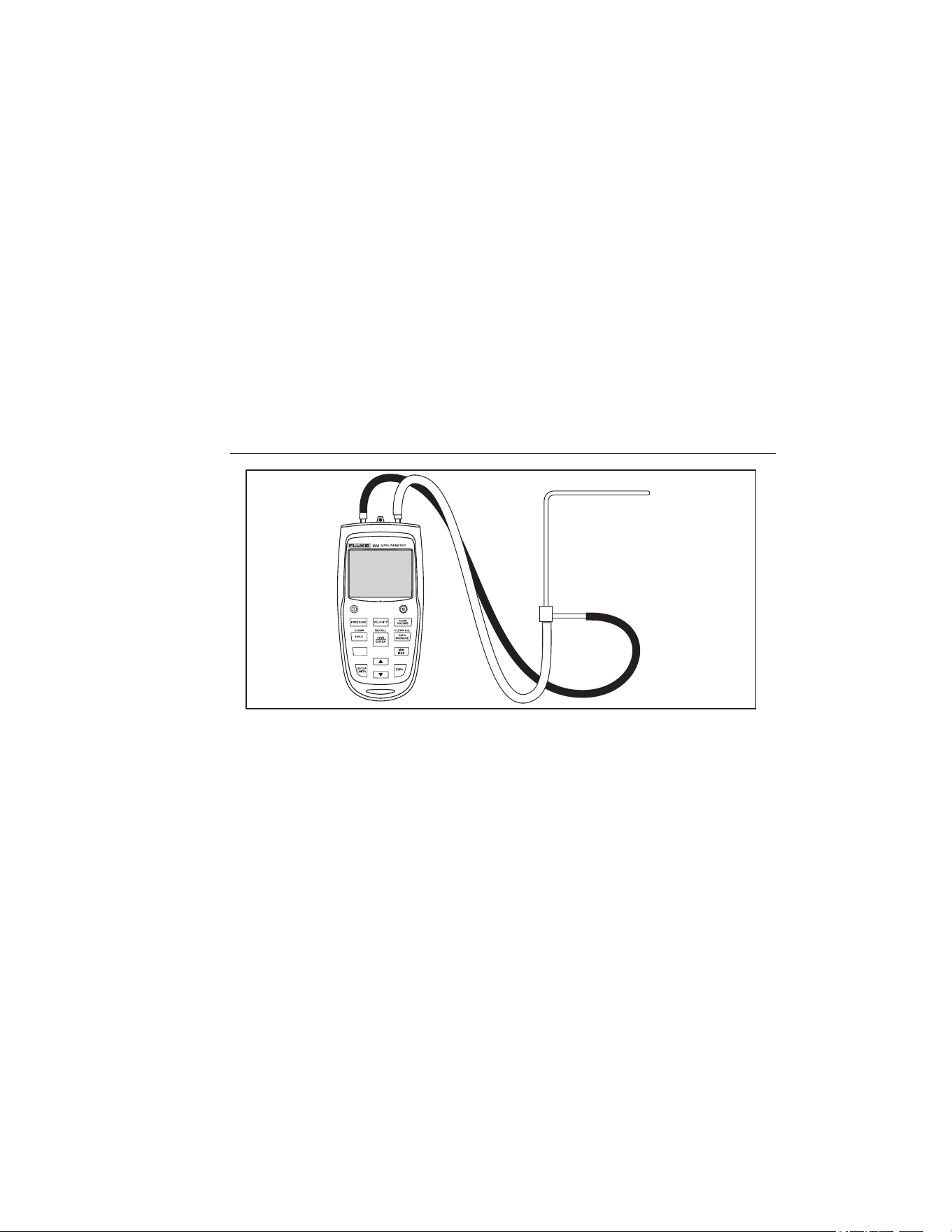
4. Pitot Tube Connection.......................................................................... 15
5. Replacing the Batteries. ....................................................................... 21
1.888.610.7664 sales@GlobalTestSupply.com
Fluke-Direct.com

1
922
Introduction
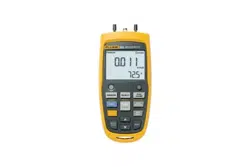
The Fluke 922 Airflow Meter (“the Meter”) is a handheld instrument that measures
differential pressure and calculates air velocity and air flow.
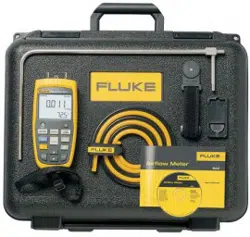
The Meter ships with the following items:
• Holster
• Carrying case
• Tubing and tubing strap
• Four AA Batteries (installed)
• Users Manual
• Wrist Strap
1.888.610.7664 sales@GlobalTestSupply.com
Fluke-Direct.com

922
Users Manual
2
Safety Information and Symbols
A WCaution identifies conditions and actions that may damage the Meter. A WWarning
identifies conditions and actions that pose hazard(s) to the user.
XWWarning
To avoid injury, or damage to the Meter, follow these safety guidelines:
• Read the entire Users Manual before using the Meter.
• Use the Meter only as described in the Users Manual or the protection
provided by the meter may be impaired.
• Inspect the Meter before use. Do not use it if it appears damaged.
• The Meter contains no user-serviceable parts. Do not open the Meter.
For service, the Meter must be sent to Fluke. See “Contacting Fluke”.
• Have the Meter serviced only by qualified service personnel.
• Adhere to local and national safety codes. Individual protective
equipment must be used to prevent injury.
WCaution
To avoid possible damage to the Meter, avoid using the Meter in an
excessively dirty or dusty atmosphere. Excessive particle intake can
damage the Meter.
1.888.610.7664 sales@GlobalTestSupply.com
Fluke-Direct.com
Airflow Meter
Safety Information and Symbols
3
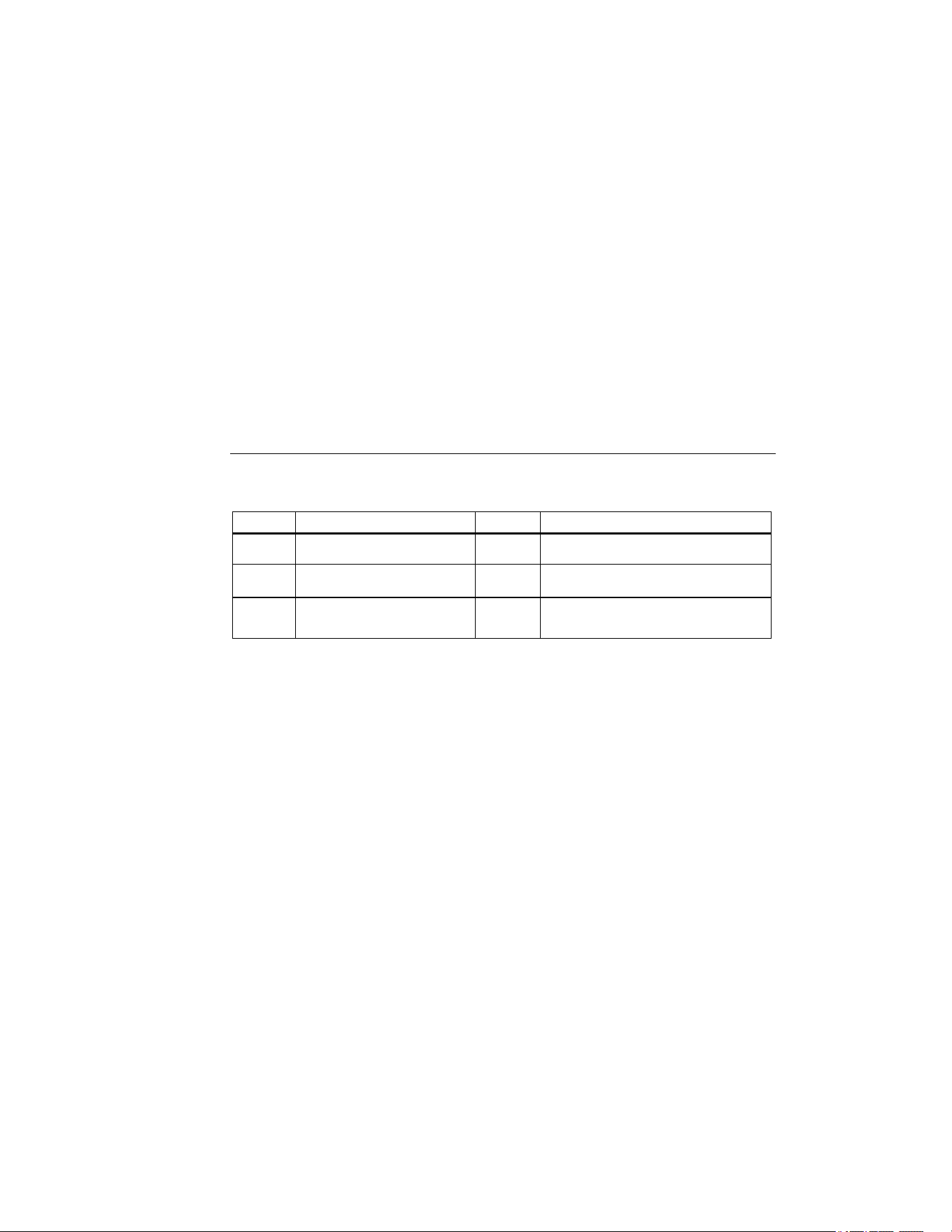
International symbols used on the Meter and in the manual are explained in Table 1.
Table 1. International Symbols
Symbol Description Symbol Description
W
Risk of danger. Important
information. Refer to manual.
v=
Recycling information
M
Battery
;
Conforms to Australian standards
P
Conforms to EU directives
~
Do not dispose of this product as unsorted
municipal waste. Contact Fluke or a
qualified recycler for disposal.
1.888.610.7664 sales@GlobalTestSupply.com
Fluke-Direct.com
Airflow Meter
Pushb utton Functions
5
Pushbutton Functions
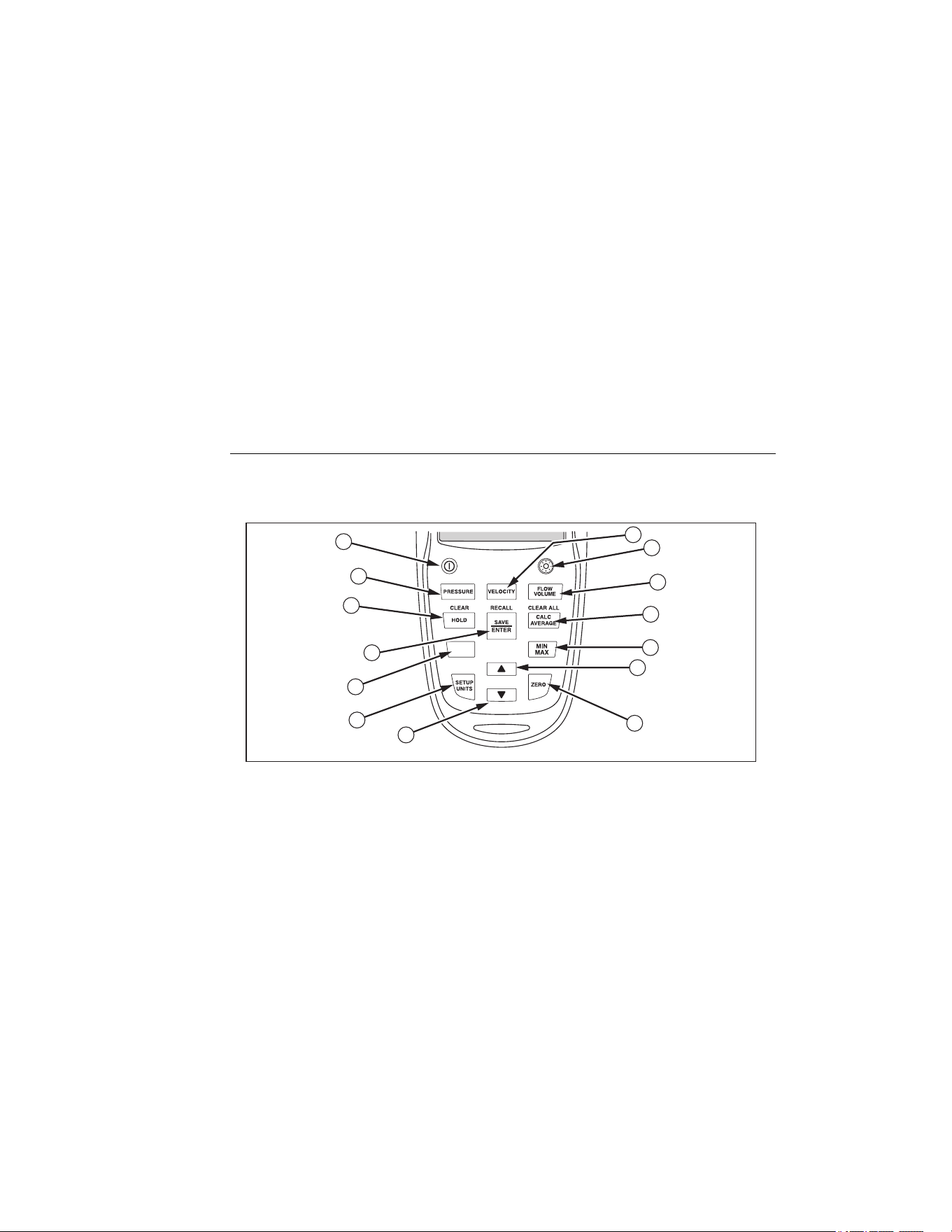
Figure 1 and Table 2 explain the Meter’s pushbuttons.
1
14
13
12
11
10
9
2
3
4
5
6
7
8
eog02.eps
Figure 1. 922 Airflow Meter
1.888.610.7664 sales@GlobalTestSupply.com
Fluke-Direct.com

922
Users Manual
6
Table 2. Pushbuttons
Pushbutton Function
A
Power button. Press to turn the Meter on or off. Hold for 5 seconds to display Meter’s
firmware version.
B
Activates velocity mode. See “Measuring Velocity”.
C
Turns the backlight on and off.
D
Activates flow mode. See “Measuring Flow”.
E
Calculates average of stored values.
F
Activates live Min Max Avg functions. See “Min Max Avg”.
G
Used to increase manual inputs, scroll through memory, and to navigate the Setup menu.
H
Press and hold 2 seconds to zero out the display before taking readings.
I
Used to decrease manual inputs, scroll through memory, and to navigate the Setup menu.
J
Press to enter the Setup menu. See “The Setup Menu”.
K
Used to access secondary features listed in yellow on the Meter.
L
Used to store data and accept changes to the setup menu and flow parameters.
M
Holds the present reading.
N
Activates pressure mode. See “Measuring Differential Pressure”.
1.888.610.7664 sales@GlobalTestSupply.com
Fluke-Direct.com
Airflow Meter
Display
7
Display
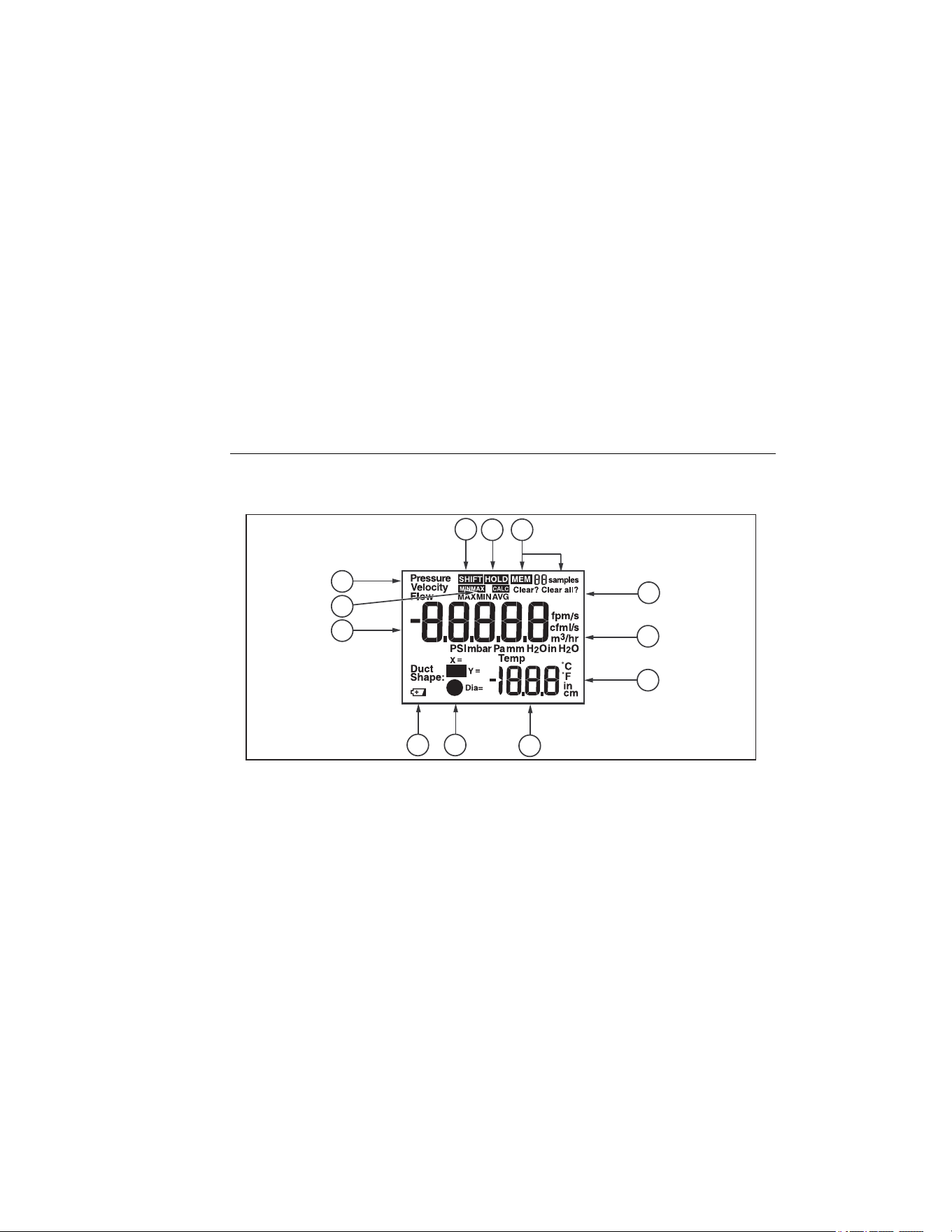
Figure 2 and Table 3 describe the display.
12 3
5
6
7
10
12
8
4
9
11
eog01a.eps
Figure 2. Display
1.888.610.7664 sales@GlobalTestSupply.com
Fluke-Direct.com

922
Users Manual
8
Table 3. Display Description
A
Shift key is in use and secondary menu functionality is engaged
B
Hold is engaged
C
Annunciators showing that sample memory is being accessed and the number of samples
D
Indicates that a stored sample (or all samples) is about to be deleted from memory
E
Units of pressure, velocity, and flow
F
Units of length and temperature
G
Digits for temperature and setup parameters
H
Duct shape choices
I
Low battery indicator. Replace the battery as soon as the low battery indicator appears.
J
Digits for main measurements of pressure, velocity, and flow
K
Min Max and Hold indicators
L
Pressure, Velocity, or Flow modes are active
1.888.610.7664 sales@GlobalTestSupply.com
Fluke-Direct.com

Airflow Meter
Using the Meter
9
Using the Meter
Power
To turn Meter power on or off, press O Meter power is provided by four AA batteries. To
replace the batteries, see “Maintenance”.
Measurement Units
The Meter supports both Metric and US measurement units. Select the desired
measurement type using the Setup menu. See “The Setup Menu”.
Note
If any measured value of any parameter is above the specified range, the Meter shows
“OL”.
Backlight
Press C to turn on the backlight. The backlight automatically turns off after 2 minutes.
Automatic Power Off
To conserve battery power, the Meter changes to sleep mode after 20 minutes of inactivity.
To turn the Meter back on, press O. To disable automatic power off, turn the meter on
while simultaneously holding O and C until the display shows APO OFF. Repeat this
procedure to re-enable this feature. The display shows APO ON.
1.888.610.7664 sales@GlobalTestSupply.com
Fluke-Direct.com

922
Users Manual
10
Temperature
Ambient temperature is displayed on the Meter as a reference. The temperature can be
displayed in either °C or °F. See "The Setup Menu".
Secondary Menu Modes
Use A with other select pushbuttons to shift to secondary menu modes and functions:
• Press A and then H to access the Clear functions. See “Clearing Sample Data”.
• Press A and then I to access the Recall menu. See “Recall”.
• Press A and then Gto access the Clear All function. See “Clearing Sample
Data”.
Zero
To zero differential pressure, velocity or flow, have both pressure ports open to ambient
conditions, then, press and hold Zfor 2 seconds. Upon zeroing, the meter beeps.
Min Max Avg
The Min Max mode stores live minimum (MIN) and maximum (MAX) input values. When the
input drops below the stored minimum value or above the stored maximum value, the Meter
beeps and stores the new value. Min Max mode also calculates an average (AVG) of all
readings taken since the mode was activated. This mode can be used to capture
1.888.610.7664 sales@GlobalTestSupply.com
Fluke-Direct.com

Airflow Meter
Saving Samples
11
intermittent readings, record maximum and minimum readings while you are away or when
you cannot watch the Meter.
To use Min Max mode, press M. The maximum reading appears first. Each subsequent
press of
M steps through the minimum, average, and live readings, and back to the
maximum reading.
To exit Min Max mode, press Mfor approximately two seconds. When in Min Max mode,
the Auto-off feature is automatically disabled.
Hold
Pressing H captures the current reading and holds it on the display. If H is pressed
while in Min Max mode, the reading is held on the display and Min Max mode continues to
store minimum and maximum values.
Saving Samples
The Meter saves various samples in its three major modes. To save a sample, do the
following:
1. When taking a sample, press I to store the sample. The Meter can save up to 99
samples in each of its three modes.
2. Once the samples are taken, press G to view the average of all the samples.
1.888.610.7664 sales@GlobalTestSupply.com
Fluke-Direct.com

922
Users Manual
12
3. Press G, P, V or F to exit calculate mode. If the memory is full (99
samples have been stored), more samples cannot be stored. If the user attempts to
store another sample, the Meter flashes "Full" and does not save new readings.
Measuring Differential Pressure
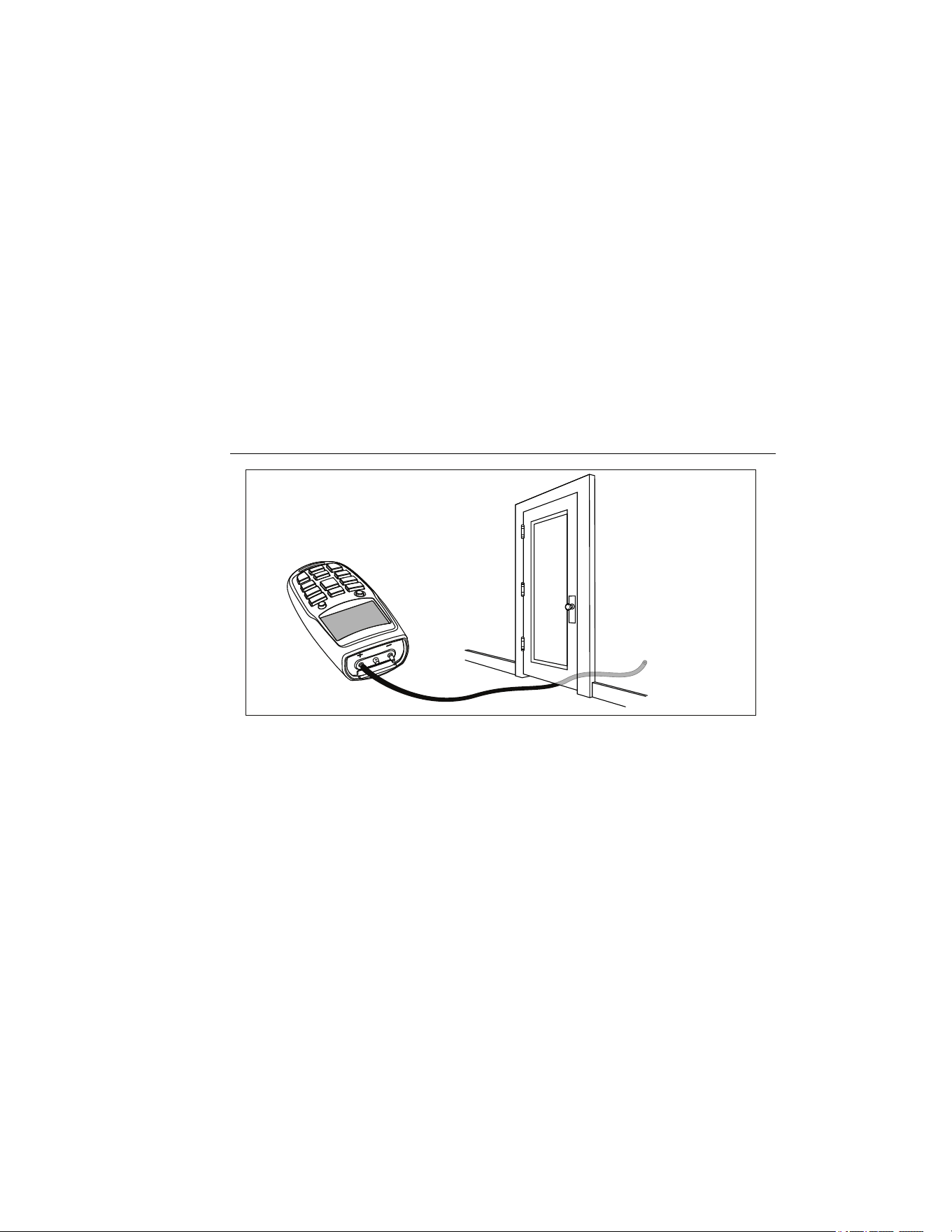
To measure differential pressure, do the following, see Figure 3:
1. Press P to enter the pressure mode.
2. Connect a single hose to the "Input (+)" port, leaving the "Ref (-)" port unconnected.
3. With the tubing open to ambient conditions press and hold Z for 2 seconds.
4. Place the input hose in a different zone than the Meter.
5. The Meter displays the differential pressure of the input zone with respect to the
reference zone. For instance, a positive reading means that the input zone is positively
pressured with respect to the Meter location or its reference zone.
1.888.610.7664 sales@GlobalTestSupply.com
Fluke-Direct.com
Airflow Meter
Measuring Differential Pressure
13
eog05.eps
Figure 3. Differential Pressure Measurement
1.888.610.7664 sales@GlobalTestSupply.com
Fluke-Direct.com

922
Users Manual
14
Measuring Velocity
The Meter uses standard ambient conditions (temperature =21.1 °C/70 °F, barometric
pressure = 14.7 psia / 1013 mbar), to approximate actual velocity and flow.
Velocity Measurement
To measure velocity, do the following:
1. Press V to enter Velocity mode.
2. Connect the hoses to the pitot tube and to the Meter. The “Input (+)” pressure port on
the Meter connects to the yellow hose from the total pressure connection of the pitot
tube. The “Ref (-)” pressure port on the Meter connects to the black hose from the
static pressure connection of the pitot tube. See Figure 4.
Note
If Measure Velocity measures negative on the display, check to make sure that the
hoses are attached to the correct ports on the Meter and the pitot tube.
3. With the pitot tube open to ambient conditions press and hold Z for 2 seconds.
1.888.610.7664 sales@GlobalTestSupply.com
Fluke-Direct.com
Airflow Meter
Measuring Velocity
15
eog03.eps
Figure 4. Pitot Tube Connection
1.888.610.7664 sales@GlobalTestSupply.com
Fluke-Direct.com

922
Users Manual
16
Measuring Flow
1. Press F.
2. The Meter requests the duct shape and size. The Meter stores the last duct shape and
size that is entered. If the duct is different than the stored version, press D or E
to find the proper duct type for the measurement (rectangular or round).
3. Press I to select the duct type.
4. If the duct is rectangular, use D and E to select the X dimension and press I
to store it. Use D and Eto select the Y dimension. Hold D or Eto
increase the rate of change. Press I to store it.
5. If the duct is round, use D and E to select the duct diameter and press I to
store it.
6. To measure flow, refer to Steps 2 - 3 in "Measuring Velocity".
Note
If Measure Velocity measures negative on the display, check to make sure that the
hoses are attached to the correct ports on the Meter and the pitot tube.
1.888.610.7664 sales@GlobalTestSupply.com
Fluke-Direct.com

Airflow Meter
The Setup Menu
17
Notes
HOLD, SAVE, CALCULATE, SHIFT, MIN MAX, ZERO, and SETUP UNITS can be
used when measuring pressure, velocity and flow.
If Por V is pressed before pressing I for the final time, the Meter will escape
the flow setup process and will not save any of the selections made or values entered.
The Setup Menu
Use the Setup menu to change the following Meter parameters:
• Pressure units
• Velocity units
• Flow (Volume) units
• Temperature units
• Duct dimension units
To modify the Meter setup parameters:
1. From any screen, press S to enter Setup menu editing mode.
2. Use D and E to change the measurement units. Hold down D or E to
increase the rate of change.
1.888.610.7664 sales@GlobalTestSupply.com
Fluke-Direct.com

922
Users Manual
18
3. Press I to store the change. The Meter beeps to signal that the change has been
stored. With each press of I, the menu moves to the next parameter. To exit the
Setup menu without changing subsequent parameters, press P, V, or F.
Clearing Sample Data
The Meter stores data that periodically will need to be cleared. Individual samples or the
entire data memory can be cleared. When the memory is full (99 samples), it shows “Full”
on the display when I is pressed and the Meter emits short beeps and will not save any
value unless some samples are cleared.
To clear individual sample data, do the following:
1. Press either P, V, or F to clear samples for that mode.
2. Press A.
3. Press H(CLEAR).
4. Use D and E to select the desired sample number. The last measurement
saved appears first.
5. Press I to clear the sample. Note that the number of samples displayed is reduced.
To clear all sample data, do the following:
1. Press A.
2. Press G(CLEAR ALL).
1.888.610.7664 sales@GlobalTestSupply.com
Fluke-Direct.com

Airflow Meter
Recall
19
3. Press I to clear all samples. The Meter beeps and the display shows 0 samples.
4. To exit (CLEAR) or (CLEAR ALL) without deleting samples, press P, V, or
F before pressing I
Recall
1. Press either P, V, or F to recall samples for that mode.
2. Press A.
3. Press I (RECALL) to recall samples. Use D and E to locate the desired
sample. Hold E or D to increase the rate of change.
4. Press P, V, or F to exit the Recall menu.
Maintenance
This section provides basic maintenance information, including battery replacement
instructions.
WCaution
Do not attempt to repair or service the Meter unless qualified to do so and
have the relevant calibration, performance test, and service information.
1.888.610.7664 sales@GlobalTestSupply.com
Fluke-Direct.com

922
Users Manual
20
Cleaning
Clean only with soap and water. Remove any residue afterwards.
Periodically wipe the case with a damp cloth and mild detergent.
Do not use abrasives or solvents.
Replacing the Batteries
When the low battery symbol appears (B) the meter will not save samples and “bAtt”
appears on the display when I is pressed.
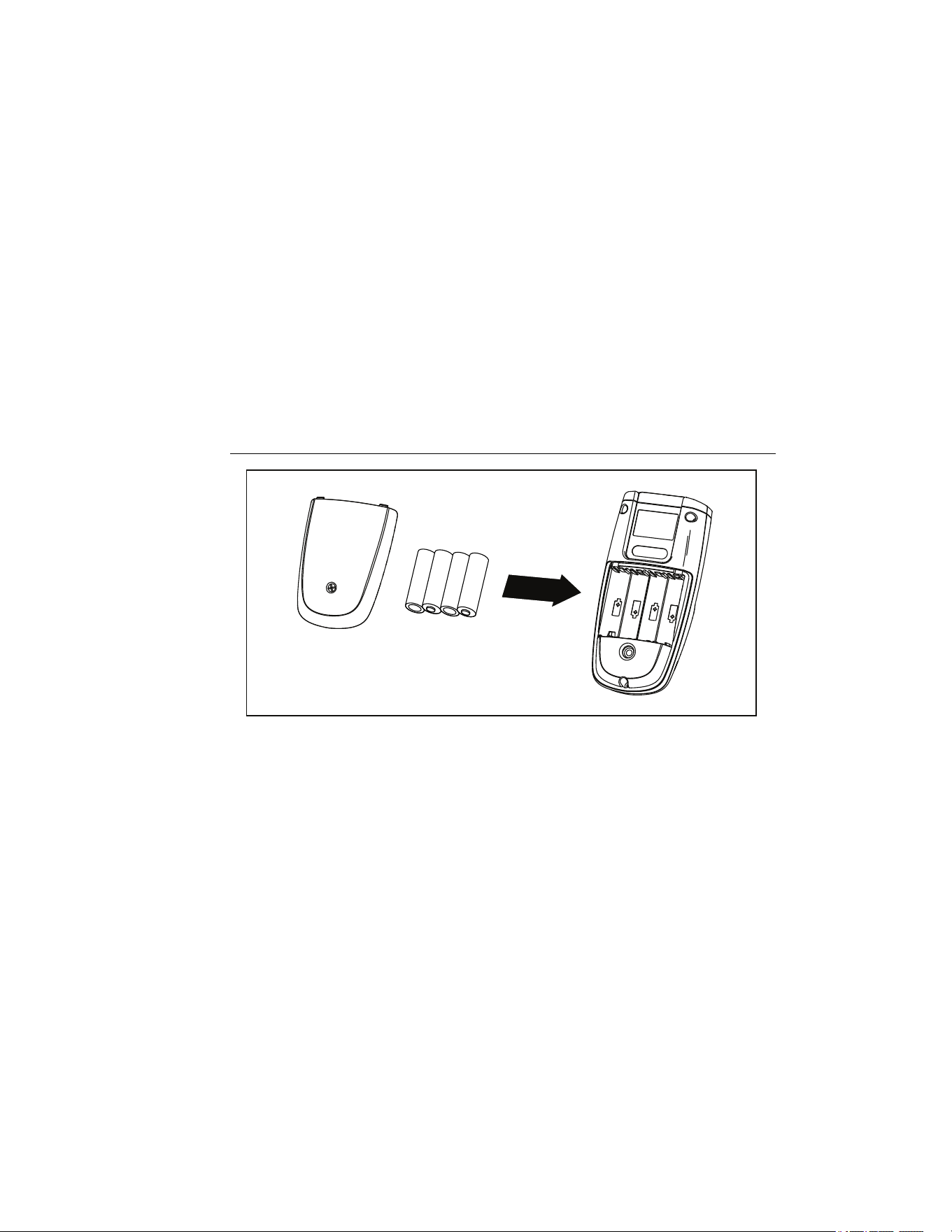
The Meter uses four AA batteries (supplied). To replace the batteries, do the following (see
Figure 5):
1. Turn off the Meter.
2. Remove the holster.
3. Place the Meter face down on a nonabrasive surface and loosen the battery door
screw with a Phillips screwdriver.
4. Lift the battery access door away from the Meter.
5. Replace the batteries as shown in Figure 5. Observe the battery polarity shown in the
battery compartment.
6. Secure the battery access door back in position with the screw.
7. Reinstall the Holster.
1.888.610.7664 sales@GlobalTestSupply.com
Fluke-Direct.com
Airflow Meter
Maintenance
21
eog04.eps
Figure 5. Replacing the Batteries
1.888.610.7664 sales@GlobalTestSupply.com
Fluke-Direct.com
922
Users Manual
22
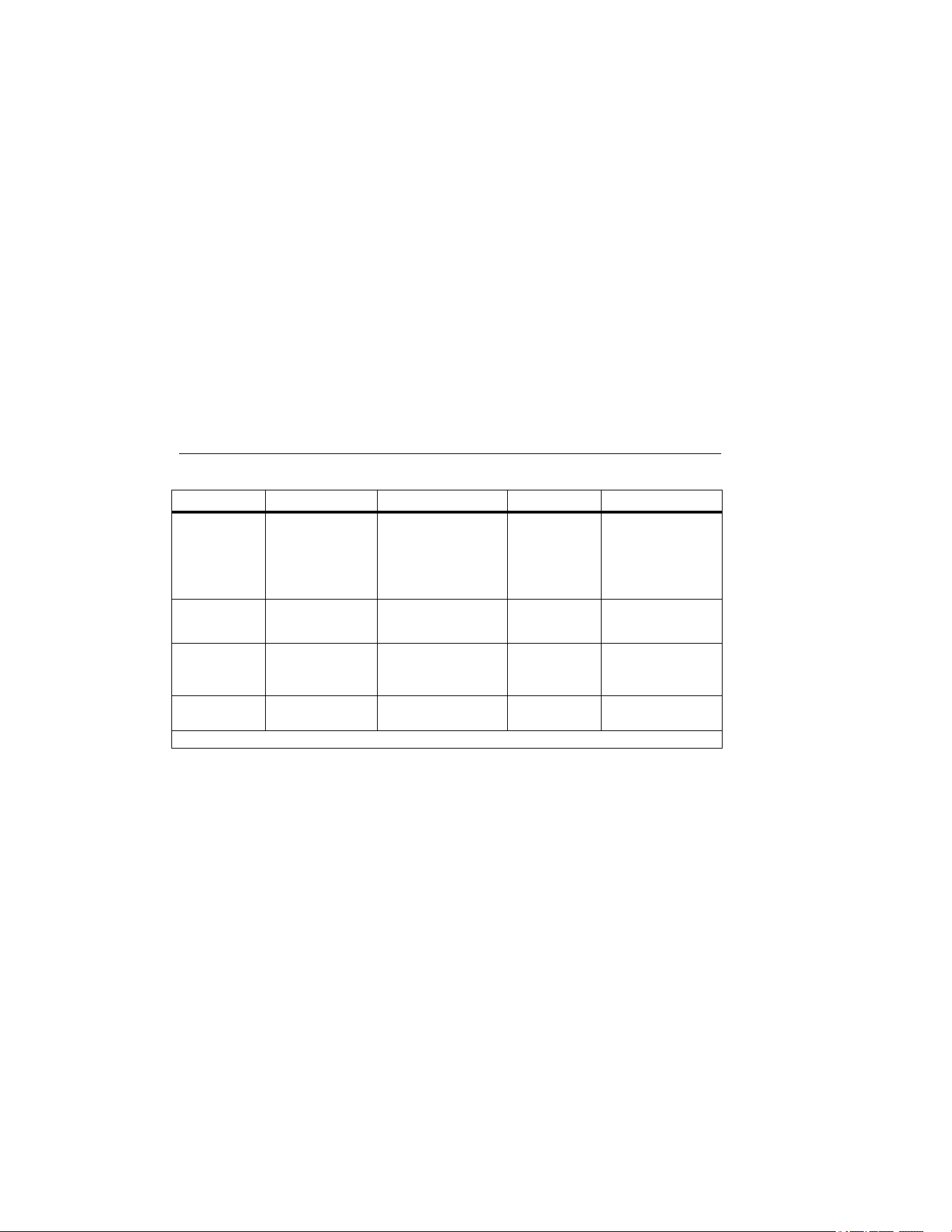
Specifications
Parameter Range Accuracy Resolution Units Displayed
Air Pressure ± 4000 Pascal
± 16 in H
2
O
± 400 mm H
2
O
± 40 mbar
± 0.6 PSI
±1% + 1 Pascal
±1% + 0.01 in H
2
O
±1% + 0.1 mm H
2
O
±1% + 0.01 mbar
±1% + 0.0001 PSI
1 Pascal
0.001 in H
2
O
0.1 mm H
2
O
0.01 mbar
0.0001 PSI
Pa
in H
2
O
mm H
2
O
mb
PSI
Air Velocity 250-16,000 fpm
1-80 m/s
±2.5% of reading at
2000 fpm
(10.00 m/s)
1 fpm
0.001 m/s
fpm
m/s
Air Flow
(Volume)
0-99,999 cfm
0-99,999 m
3
/hr
0-99,999 l/s
accuracy is function of
velocity and duct size
1 cfm
1 m
3
/hr
1 l/s
cfm
m
3
/hr
l/s
Temperature 0 to 50 °C
32 to 122 °F
±1 % + 2 °C
±1 % + 4 °F
0.1 °C
0.1 °F
°C
°F
Use of Zero function is required to achieve these specifications.
1.888.610.7664 sales@GlobalTestSupply.com
Fluke-Direct.com
Airflow Meter
Specifications
23
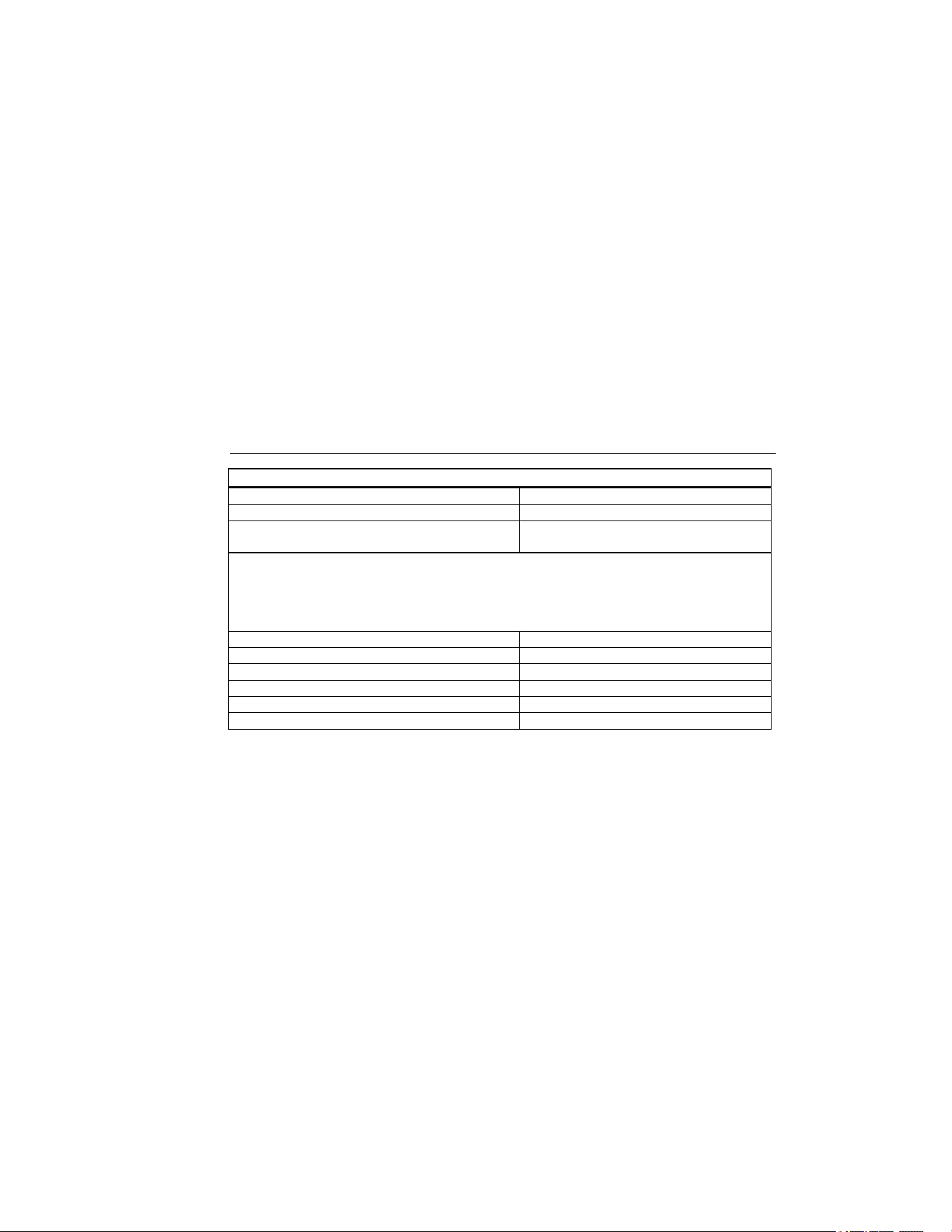
Environmental
Operating Temperature 0 °C to +50 °C
Storage Temperature -40 °C to +60 °C
Temperature Coefficient
0.025 X (specified accuracy) / °C
(< 18 °C or > 28 °C)
Relative Humidity:
Non condensing (< 10 °C)
90 % RH (10 °C to 30 °C)
75 % RH (30 °C to 40 °C)
45 % RH (40 °C to 50 °C)(Without Condensation)
IP Rating IP40
Operating Altitude 2000 m
Storage Altitude 12000 m
EMI, RFI, EMC Meets requirements for EN61326-1
Vibration MIL-PREF-28800F, Class 3
Maximum Pressure at each Port 10 PSI
1.888.610.7664 sales@GlobalTestSupply.com
Fluke-Direct.com

922
Users Manual
24
Agency Approvals
P Conforms to EU directives
; Conforms to Australian standards
Replacement Parts
Replacement Part Part Number
Battery 1.5 V Alkaline Size AA (4) NEDA 15A, IECLR6 650181
Holster 2729807
Wrist Strap 2729793
Hoses, 1 black and 1 yellow w/test lead strap 2766087
Battery Door 2729818
Battery Door Screw 2729829
Hard Carrying Case
2774694
Users Manual 2683880
Users Manual on CD 2766430
1.888.610.7664 sales@GlobalTestSupply.com
Fluke-Direct.com

Airflow Meter
Accessories and Optional Items
25
Accessories and Optional Items
Description Item or Part Number
Toolpak Meter Hanging Kit
Includes: Magnetic Strip, 2 Straps (9 inch and 12 inch), 2 Latch Tabs
TPak
Fluke 922 Kit
Includes: Fluke 922 Airflow Meter,
12 inch pitot tube, TPak Magnetic Strip,
TPak Strap, 9 inches, TPak Latch Tab, Four AA Batteries 1.5 V Alkaline,
Users Manual, Large Carrying Case
Fluke 922-Kit
1.888.610.7664 sales@GlobalTestSupply.com
Fluke-Direct.com