
July 2014
© 2014 Fluke Corporation. All rights reserved. Specifications are subject to change without notice.
All product names are trademarks of their respective companies.
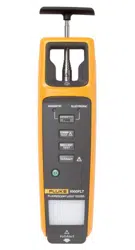
1000FLT
Fluorescent Light Tester
Users Manual
1.888.610.7664 sales@GlobalTestSupply.com
Fluke-Direct.com

i
Table of Contents
Title Page
Introduction .................................................................................................................... 1
How to Contact Fluke .................................................................................................... 1
Safety Information .......................................................................................................... 1
Before You Start ............................................................................................................ 3
Power On and Off .......................................................................................................... 3
Battery ...................................................................................................................... 3
Beeper On and Off .................................................................................................... 4
Rod Extender ................................................................................................................. 4
Controls ......................................................................................................................... 5
Lamp Test ................................................................................................................. 6
Ballast Test ............................................................................................................... 7
Non-Contact Voltage Test (VoltAlert™) .................................................................... 8
Pin Test ..................................................................................................................... 10
Ballast Type Test ...................................................................................................... 11
Product Care ................................................................................................................. 13
How to Clean ............................................................................................................ 13
Battery Replacement ................................................................................................ 14
Rod Extender Replacement ...................................................................................... 15
Specifications ................................................................................................................ 16
1.888.610.7664 sales@GlobalTestSupply.com
Fluke-Direct.com

1000FLT
Users Manual
ii
1.888.610.7664 sales@GlobalTestSupply.com
Fluke-Direct.com

iii
List of Tables
Table Title Page
1. Symbols ................................................................................................................................ 3
2. 1000FLT Features and Controls ........................................................................................... 5
3. Lamp Test ............................................................................................................................. 6
4. Ballast Test ........................................................................................................................... 7
5. Non-Contact Voltage Test ..................................................................................................... 9
6. Pin Test ................................................................................................................................. 10
7. Ballast Type Test .................................................................................................................. 12
8. Replaceable Parts ................................................................................................................ 13
1.888.610.7664 sales@GlobalTestSupply.com
Fluke-Direct.com

1000FLT
Users Manual
iv
1.888.610.7664 sales@GlobalTestSupply.com
Fluke-Direct.com

v
List of Figures
Figure Title Page
1. Rod Extender ........................................................................................................................ 4
2. Optical Sensor for Ballast Type Test .................................................................................... 11
3. Battery Replacement ............................................................................................................ 14
4. Rod Extender Replacement .................................................................................................. 15
1.888.610.7664 sales@GlobalTestSupply.com
Fluke-Direct.com

1000FLT
Users Manual
vi
1.888.610.7664 sales@GlobalTestSupply.com
Fluke-Direct.com

1000FLT
Users Manual
2
• When using VoltAlert, if the test indicator
does not glow or the beeper does not sound,
hazardous voltage could still be present.
VoltAlert indicates active voltage in the
presence of electric fields of sufficient
strength generated by the source (MAINS)
voltage. If the field strength is low, the
Product may not provide indication of
hazardous voltages. Lack of an indication
may occur if the Product is unable to sense
the presence of voltage which may be
influenced by several factors including, but
not limited to:
- Shielded wire/cables
- Adjacent grounded conductors
- Thickness and type of insulation
- Distance from the voltage source
- Fully-isolated users that prevent an
effective ground
- Receptacles in recessed sockets and/or
differences in socket design
- Condition of the Product and batteries
• Use the Product only as specified, or the
protection supplied by the Product can be
compromised.
• Do not use the Product around explosive gas,
vapor, or in damp or wet environments.
• Do not use the Product if it operates
incorrectly.
• Disable the Product if it is damaged.
• Keep fingers behind the finger guards on the
Product.
• Do not connect directly to mains.
• Close and lock the battery door before you
operate the Product.
• Do not allow the rod extender to contact live
voltage source.
• Do not touch the rod extender while
performing the LAMP TEST. While the LAMP
TEST source voltage is not considered
hazardous for electric shock or electric burn,
the source can cause mild pain or surprise.
• For use by competent personnel only.
1.888.610.7664 sales@GlobalTestSupply.com
Fluke-Direct.com
Fluorescent Light Tester
Before You Start
3
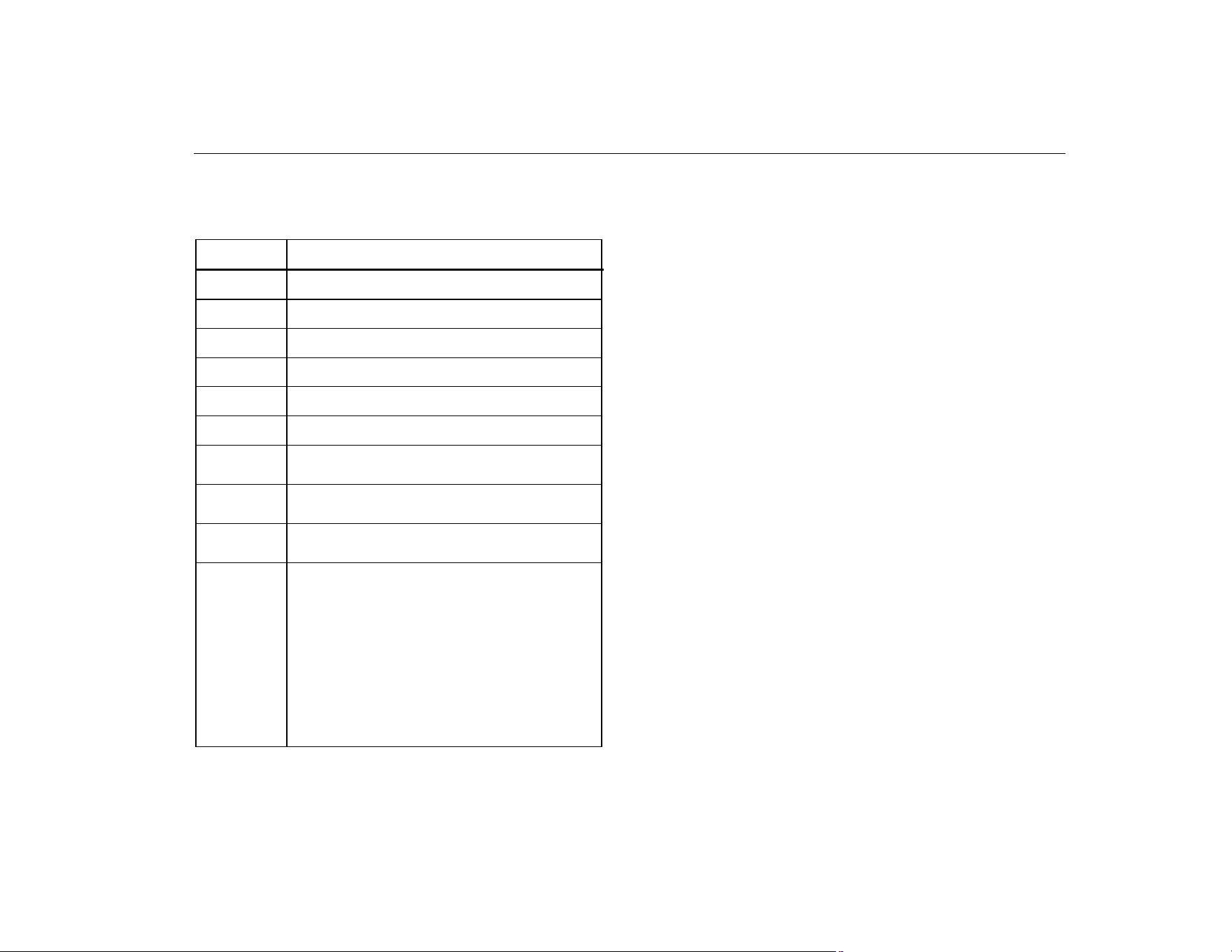
Table 1 is a list of symbols used on the Product and in this
manual.
Table 1. Symbols
Symbol Description
Important information. See manual.
Hazardous voltage
Power ON/OFF
Beeper
Battery
Conforms to relevant Australian standards.
Conforms to requirements of European Union
and European Free Trade Association.
Conforms to relevant South Korean EMC
standards.
Conforms to relevant North American Safety
Standards.
This product complies with the WEEE Directive
(2002/96/EC) marking requirements. The
affixed label indicates that you must not discard
this electrical/electronic product in domestic
household waste. Product Category: With
reference to the equipment types in the WEEE
Directive Annex I, this product is classed as
category 9 “Monitoring and Control
Instrumentation” product. Do not dispose of this
product as unsorted municipal waste. Go to
Fluke's website for recycling information.
Before You Start
The purchase of your Product includes:
• Fluke 1000FLT
• 4 AA Batteries
• Soft Carry Case/Holster
• Quick Reference Guide
• Safety Information
Make sure that the Product shipment is complete. If not,
contact Fluke (see page 1). Install the batteries before you
operate the Product. See Battery Replacement for more
information about how to install.
Power On and Off
Push <1 second to turn on and turn off the Product. The
power button has a green light around the perimeter when
on. The Pin Test is the default mode when you turn on the
Product.
The Product automatically turns off after 20 minutes of
non-use.
Battery
The Product operates on four AA Alkaline IEC LR6
batteries. changes from green to blinking green as a
warning when the battery power is low (typically, 85 % of
capacity). The Product continues to function normally.
1.888.610.7664 sales@GlobalTestSupply.com
Fluke-Direct.com
1000FLT
Users Manual
4
When battery power is depleted, will blink green for 5
seconds and the Product turns off. At this battery level, the
Product will not work until the batteries are replaced.
Beeper On and Off
When the product is off, push + >3 seconds to turn
on or turn off the beeper. One beep is on, two beeps is off.
The beeper remains as set when you turn on and turn off
the power.
Rod Extender
Warning
To prevent possible electrical shock or
personal injury:
• Do not touch the rod extender while
performing any test.
• Do not allow the rod extender to contact
live voltage.
• Completely collapse the rod extender
during the VoltAlert test.
• Keep fingers behind the tactile barrier.
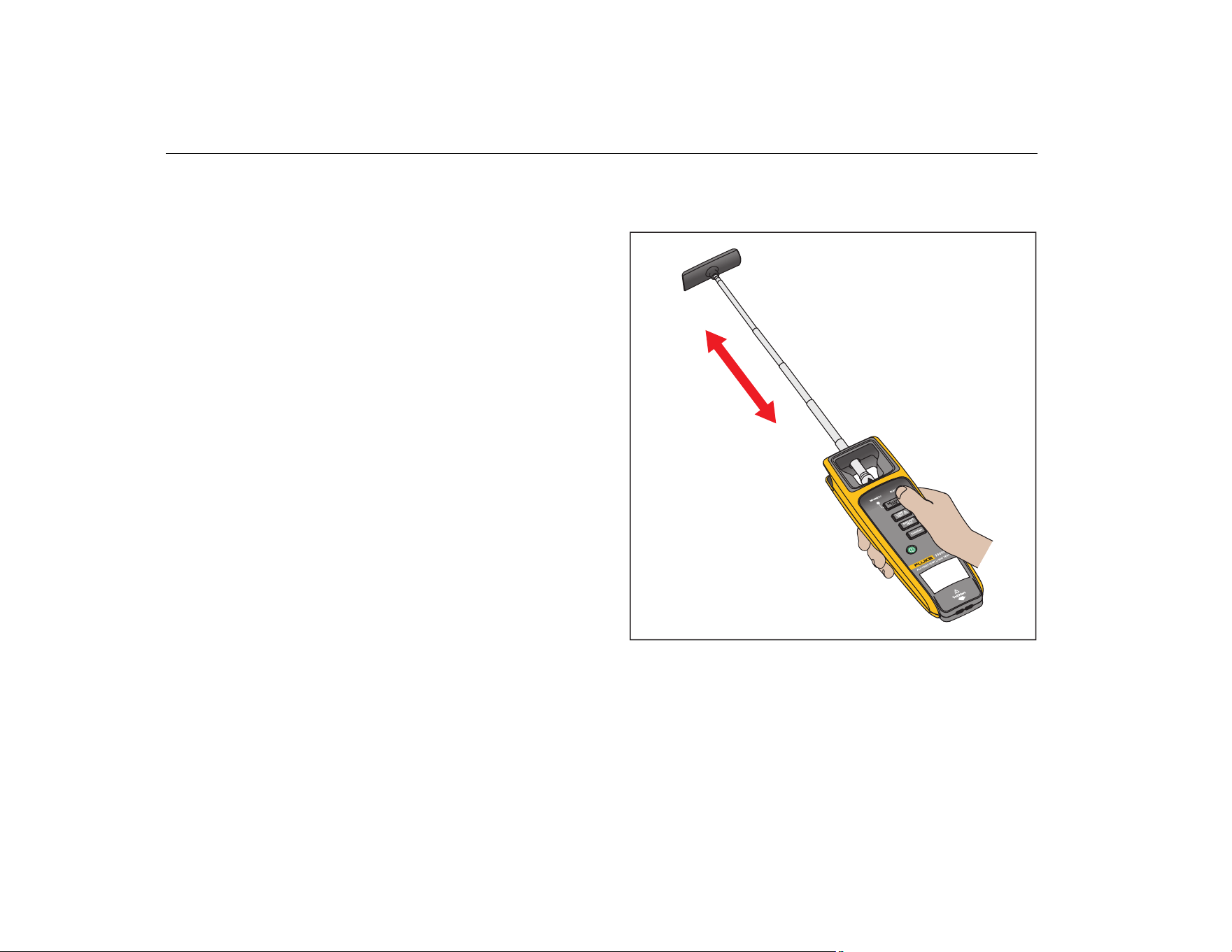
The rod extender allows you to reach up to 1 meter (3 feet)
for easier access to high fixtures.
To use:
1. Pull the rod extender out. Do not bend. See Figure 1.
Do not touch the rod extender while you push the
Lamp Test button.
2. See Controls section for instructions on how to use the
Product.
huz03.eps
Figure 1. Rod Extender
1.888.610.7664 sales@GlobalTestSupply.com
Fluke-Direct.com
Fluorescent Light Tester
Controls
5
Controls
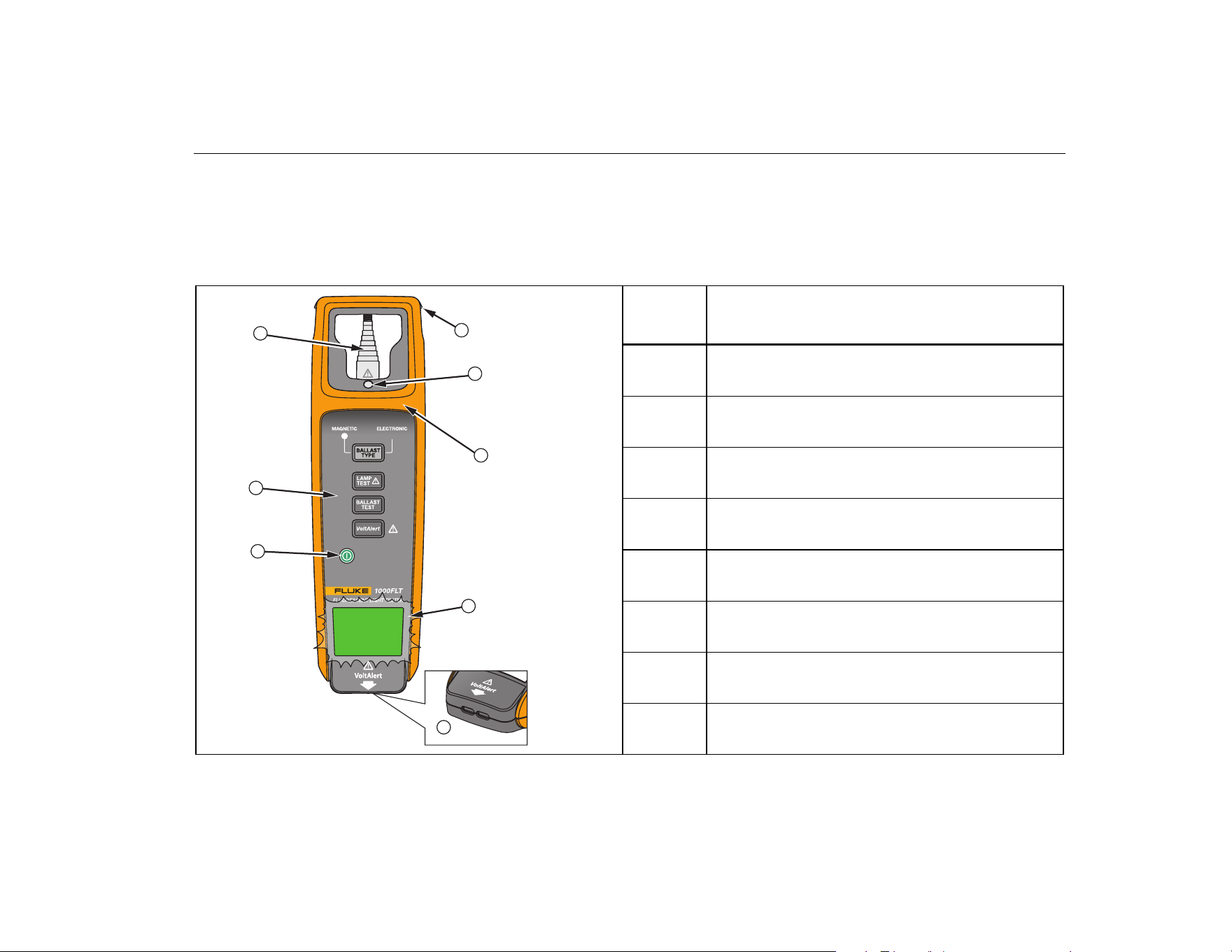
The Product has a control button for each type of test
and a large LED indicator for test results. Table 2 shows
the location and describes each function.
Table 2. 1000FLT Features and Controls
huz01.eps
Item Description
Power On/Off
Test Function Buttons
Rod Extender
Saddle
Optical Sensor
Finger Guard
LED Test Indicator
Blinks green or red for test result
Pin Tester/Non-Contact Voltage Detector
(VoltAlert)
2
1
3
5
7
8
6
4
1.888.610.7664 sales@GlobalTestSupply.com
Fluke-Direct.com
1000FLT
Users Manual
6
Lamp Test
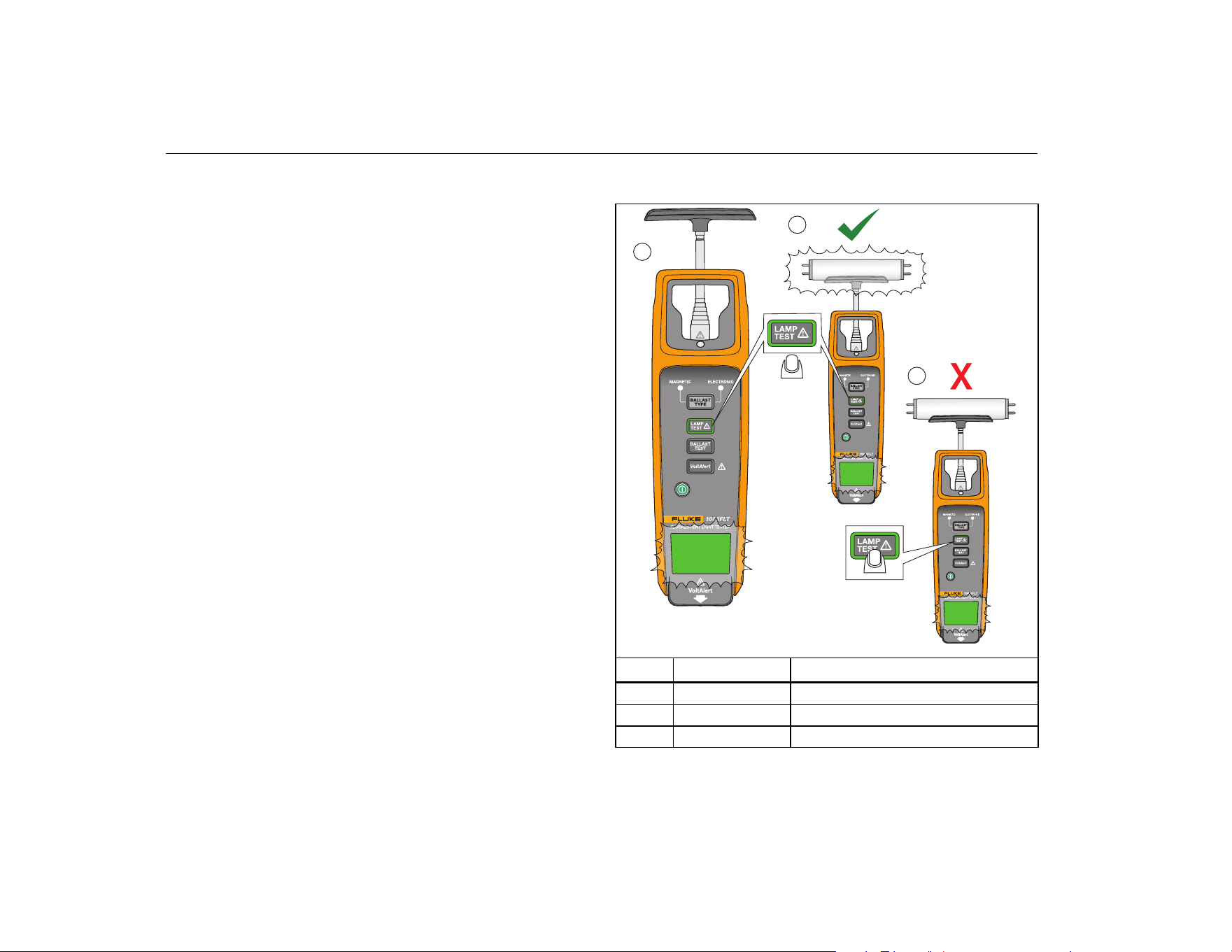
The Lamp Test verifies that the lamp is gas-filled. This test
is done with or without the lamp in the fixture. You can test
with the rod extender pulled out or collapsed.
Warning
To prevent possible electrical shock or
personal injury, do not touch the rod extender
while performing the Lamp Test.
To test (see Table 3):
1. Turn on the Product.
2. Push for <1 second. The green light around the
button perimeter turns on and the LED test indicator
blinks green . Product is ready to test.
3. Continue to push and hold for the entire test
duration.
4. Place the saddle end of the Product on the lamp and
continue to hold .
If the fluorescent lamp is good (gas-filled), the
fluorescent lamp starts to blink .
If the fluorescent lamp is bad (no gas), the fluorescent
lamp does not blink .
5. Release to end the test.
Note
The Product goes to the default Pin Test mode
after 30 seconds of non-use.
Table 3. Lamp Test
huz09.eps
Item LED Description
blinking green Test in progress
blinking green Good fluorescent lamp blinks
blinking green Bad fluorescent lamp does not blink
1
2
3
1.888.610.7664 sales@GlobalTestSupply.com
Fluke-Direct.com
Fluorescent Light Tester
Controls
7
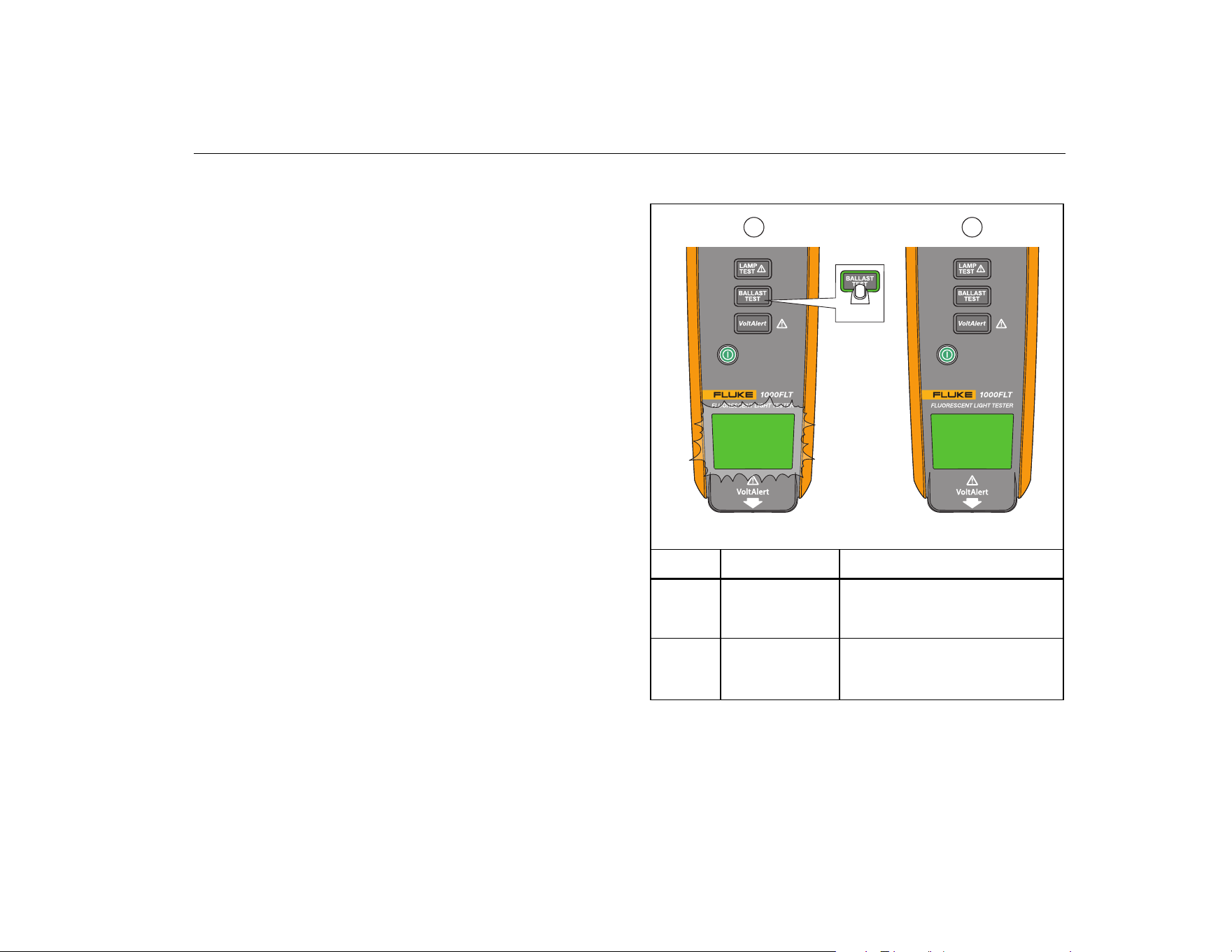
Ballast Test
When you hear a buzzing sound from the fixture or the
lamps flicker or do not light up, check the ballast to see if it
needs to be replaced. The Ballast Test verifies that the
ballast is providing an ac voltage to the fluorescent lamp
and senses the presence of the voltage at the filament
ends of the lamp.
The fixture must be turned on for this test.
To test (see Table 4):
1. Turn on the Product.
2. Push for <1 second. The green light around the
button perimeter turns on and the LED test indicator
blinks green .
3. Pull out the rod extender and scan ≤10 cm (4 in) at
both ends of the fluorescent bulb.
A solid green LED indicates that a good ballast has
been found .
If a good ballast is not found, the LED continues to
blink and times out (turns off) after 1 minute .
Note
The Product goes to the default Pin Test mode
after 30 seconds of non-use.
Table 4. Ballast Test
huz07.eps
Item LED Description
blinking green
- Test in progress
- Continues to blink green if no
voltage is detected
solid green
- Test complete
- Electronic ballast is good
- Times out after 15 seconds
1 2
>1 sec
1.888.610.7664 sales@GlobalTestSupply.com
Fluke-Direct.com

1000FLT
Users Manual
8
Non-Contact Voltage Test (VoltAlert™)
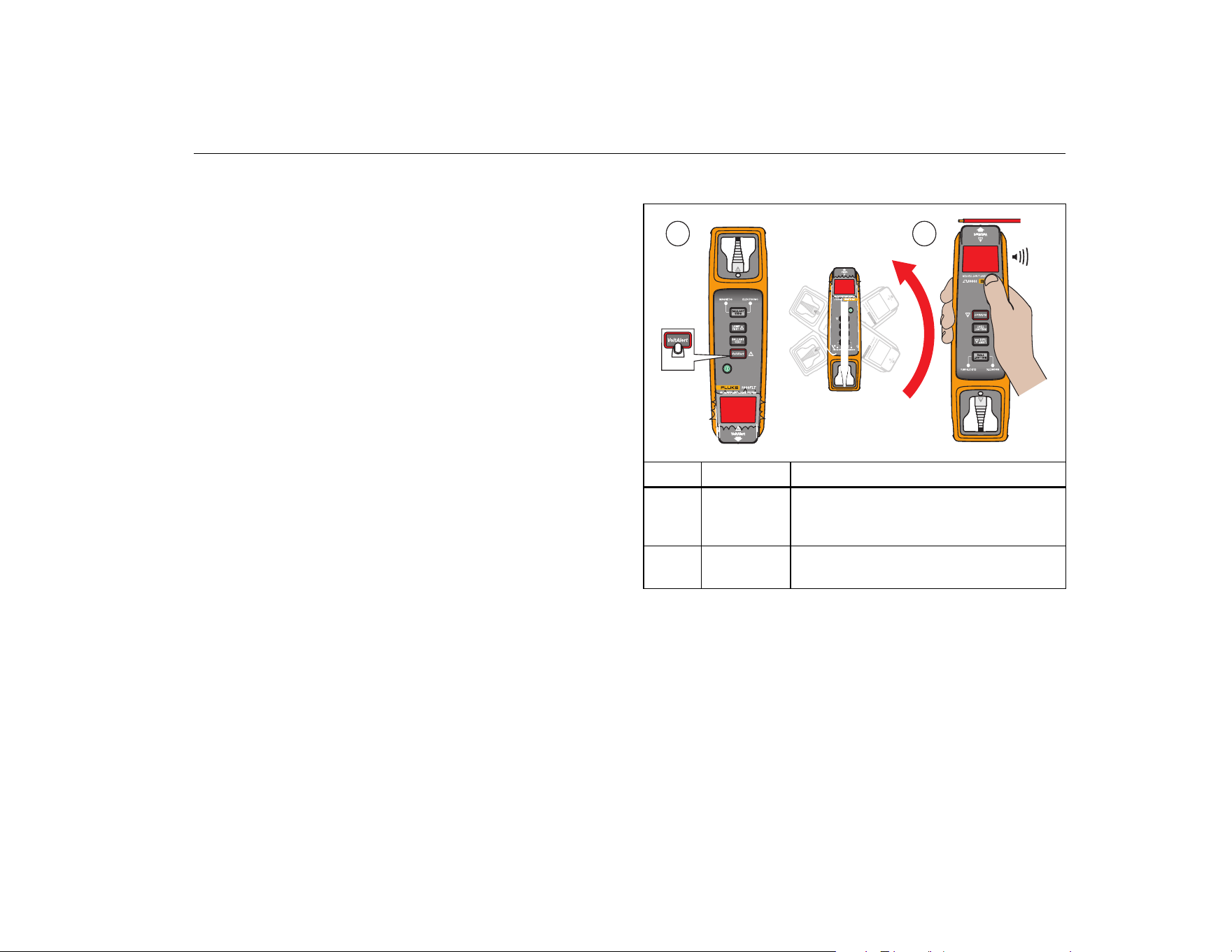
VoltAlert is a non-contact voltage (NCV) test of the
incoming voltage to the ballast of a fluorescent light fixture.
The fluorescent light fixture must be turned on for this test.
The blinking red LED is a self-test feature for visual
confirmation of battery and power on. It provides a double
flash every 2 seconds.
Warning
To prevent possible electrical shock, fire, or
personal injury:
• Do not use VoltAlert if the LED test indicator
does not blink when you enable the function.
• Test VoltAlert on a known voltage source
before and after use to make sure the
Product functions properly.
• Completely collapse the rod extender
during the VoltAlert test.
• Do not allow the rod extender to contact
live voltage.
• When using VoltAlert, if the test indicator
does not glow or the beeper does not sound,
hazardous voltage could still be present.
VoltAlert indicates active voltage in the
presence of electric fields of sufficient
strength generated by the source (MAINS)
voltage. If the field strength is low, the
Product may not provide indication of
hazardous voltages. Lack of an indication
may occur if the Product is unable to sense
the presence of voltage which may be
influenced by several factors including, but
not limited to:
- Shielded wire/cables
- Adjacent grounded conductors
- Thickness and type of insulation
- Distance from the voltage source
- Fully-isolated users that prevent an
effective ground
- Receptacles in recessed sockets
and/or differences in socket design
- Condition of the Product and batteries
1.888.610.7664 sales@GlobalTestSupply.com
Fluke-Direct.com
Fluorescent Light Tester
Controls
9
To test (see Table 5):
1. Turn on the Product.
2. Push for <1 second. The red light around the
button perimeter turns on and the LED test indicator
blinks red .
3. Rotate the Product with the VoltAlert end towards the
test object.
4. Move the VoltAlert to ≤10 cm (4 in) of the test object.
A solid red LED and a continuous beep (if beeper is
on) indicates that line voltage has been found .
The indicator continues to blink red if no line voltage is
found .
Note
The Product goes to the default Pin Test mode
after 30 seconds of non-use.
Table 5. Non-Contact Voltage Test
huz10.eps
Item LED Description
blinking red
- Test in progress/no voltage found
- Rotate VoltAlert end towards test
object
solid red
- Voltage found
- Continuous beep if the beeper is on
>1 sec
180˚
1 2
1.888.610.7664 sales@GlobalTestSupply.com
Fluke-Direct.com
1000FLT
Users Manual
10
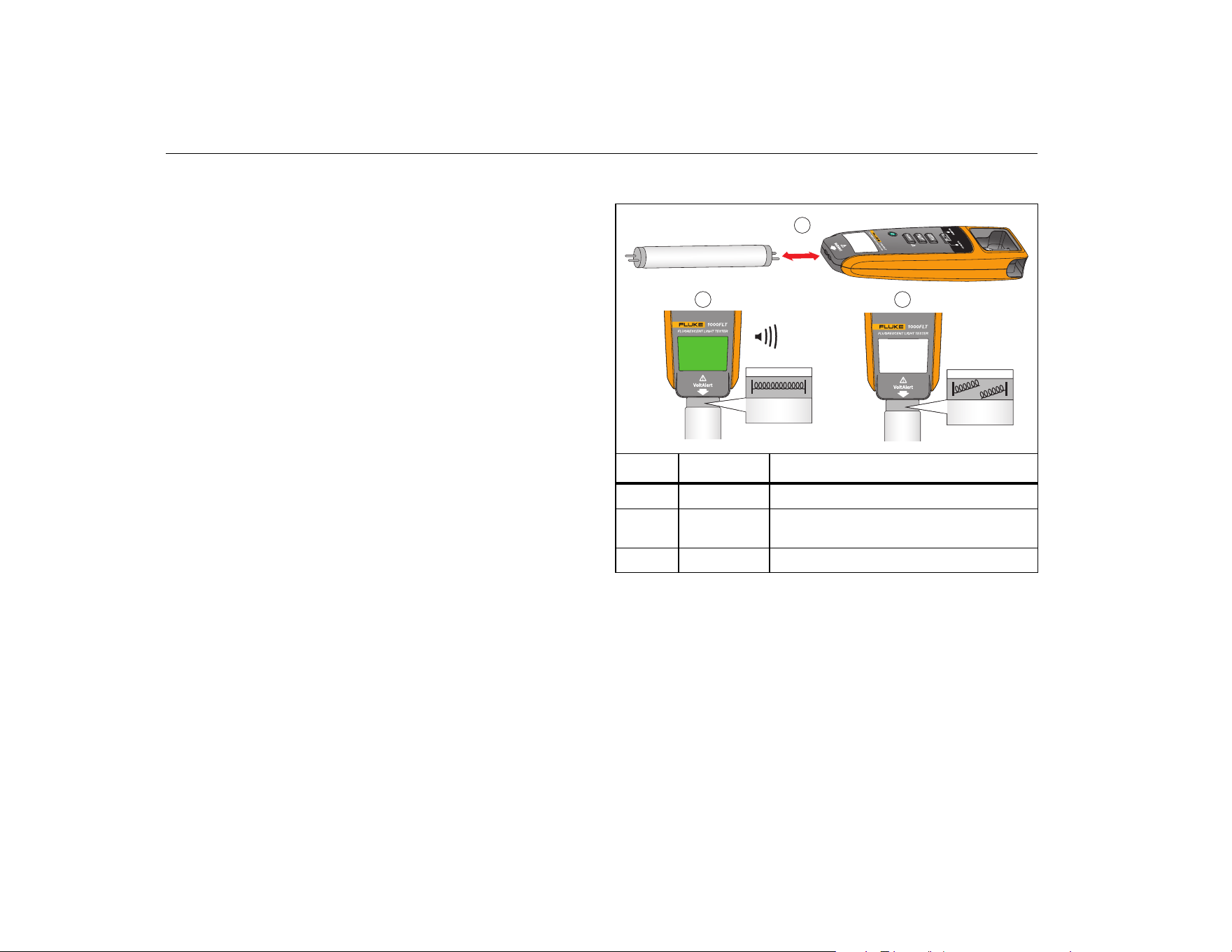
Pin Test
The Pin Test feature checks the continuity of the filament
between the pins. This is the default function when the
Product is turned on.
Make sure all other functions are off before you do a Pin
Test. should be the only button that is lit.
To test (see Table 6):
1. Turn on the Product.
2. Insert the lamp pins into the slots on the Product .
The green LED test indicator shows the filament is
good . You will hear a continuous beep if it is on.
No color on the LED test indicator shows that the
filament is broken .
Table 6. Pin Test
huz06.eps
Item LED Description
no LED Ready for Pin Test, default mode
solid green
Filament is good, continuous beep if the
beeper is on
no LED Filament is broken
2 3
1
1.888.610.7664 sales@GlobalTestSupply.com
Fluke-Direct.com
Fluorescent Light Tester
Controls
11
Ballast Type Test
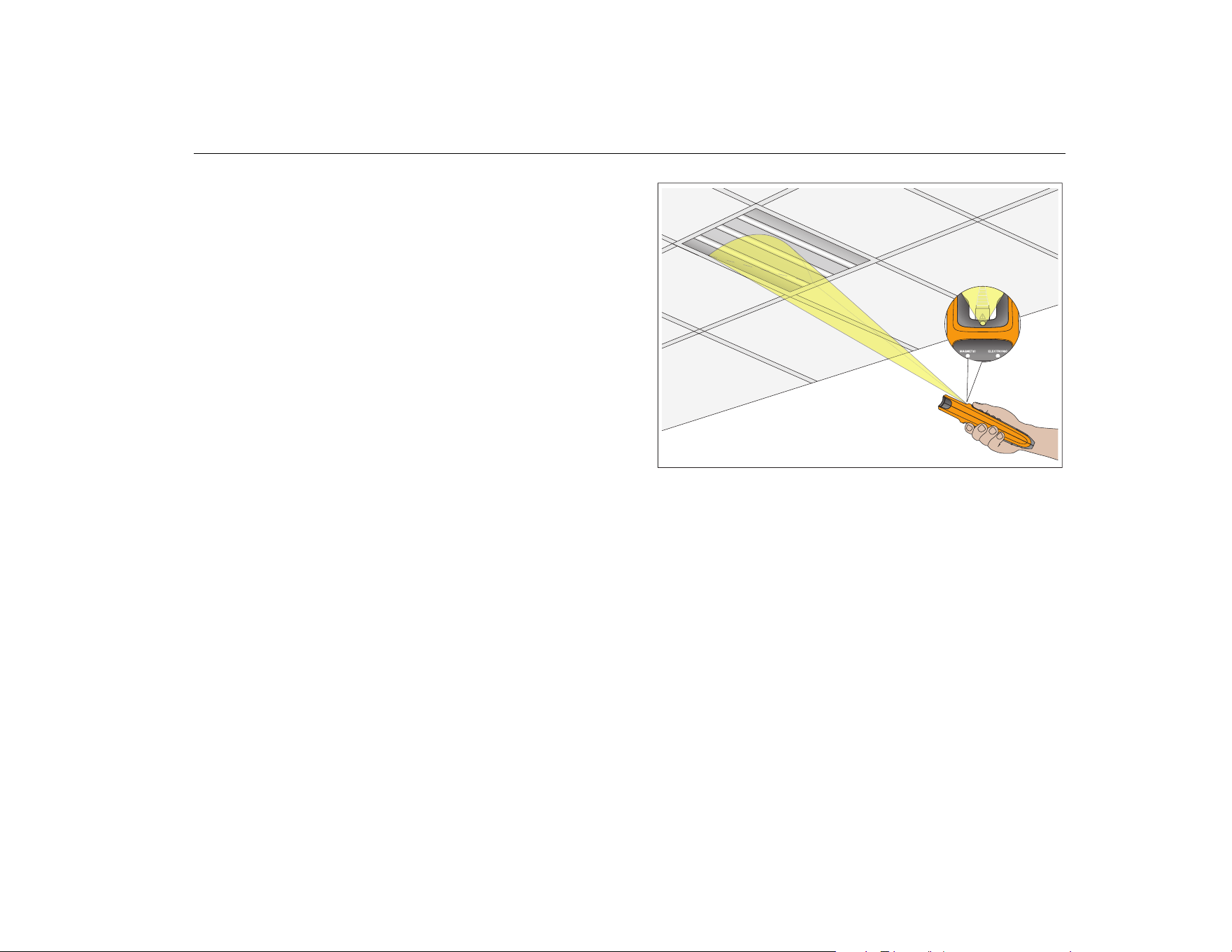
The Product has an optical sensor that detects whether
the ballast is magnetic or electronic (see Table 2 for the
sensor location). Make sure that the entire sensor is in-line
with the fluorescent light fixture as you test. See Figure 2.
The fluorescent light fixture must be turned on for this test.
Note
The Product goes to the default Pin Test mode after 30
seconds of non-use.
huz12.eps
Figure 2. Optical Sensor for Ballast Type Test
1.888.610.7664 sales@GlobalTestSupply.com
Fluke-Direct.com
1000FLT
Users Manual
12
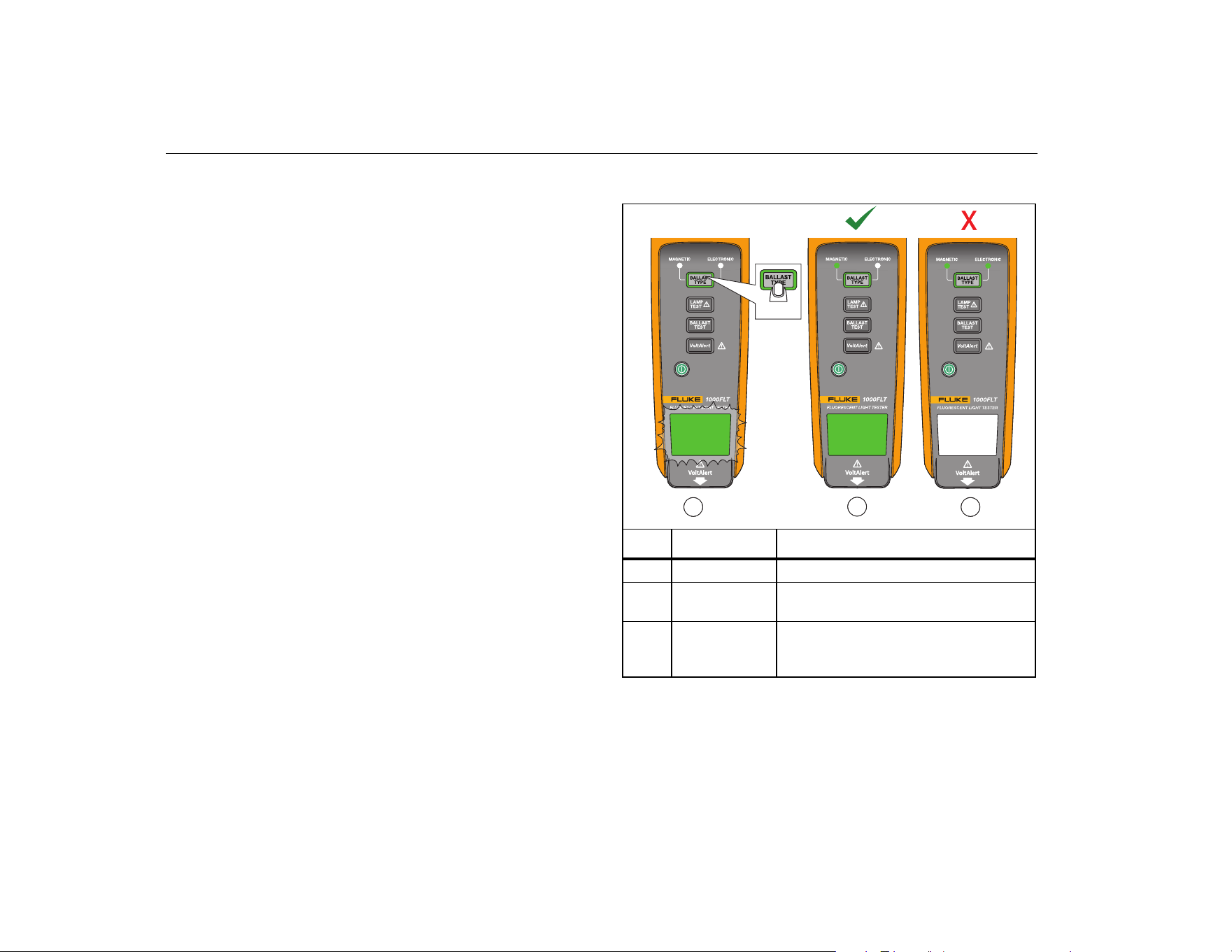
To test (see Table 7):
1. Turn on the Product.
2. Push for <1 second.
The green light around the button perimeter turns on.
The blinking green LED test indicator shows the test is
in progress .
3. Hold the end of the Product within 3 m (10 ft) of any
part of the lit fluorescent lamp.
The green LED test indicator shows the test is
complete . See indicator for ballast type.
No color on the LED test indicator shows a test
error .
Table 7. Ballast Type Test
huz08.eps
Item LED Description
blinking green Test in progress
solid green
Test complete, see ballast type
indicator
no LED
Error/both type indicators blink on/off
alternately. Check that the Product is
within 3 m of the light fixture.
1
2
3
>1 sec
1.888.610.7664 sales@GlobalTestSupply.com
Fluke-Direct.com
Fluorescent Light Tester
Product Care
13
Product Care
Minimum maintenance is necessary for the Product.
Warning
To prevent possible electrical shock, fire, or
personal injury:
• Batteries contain hazardous chemicals that
can cause burns or explode. If exposure to
chemicals occurs, clean with water and get
medical aid.
• Do not keep cells or batteries in a
container where the terminals can be
shorted.
• Use only specified replacement parts.
• Have an approved technician repair the
Product
Table 8 is a list of replaceable parts available from Fluke.
Table 8. Replaceable Parts
Description Fluke Part Number
Holster 4532652
Rod Extender/Saddle 4550018
Quick Reference Guide 4477116
Safety Information 4472585
How to Clean
For the best results, clean the optical sensor window with
a moist cloth before you take measurements. Clean the
external case of the Product at regular intervals with a
moist cloth and a weak detergent solution.
Caution
To prevent damage or performance loss, keep
the Product dry. Do not put the Product into
any liquid. The Product is not waterproof.
1.888.610.7664 sales@GlobalTestSupply.com
Fluke-Direct.com
1000FLT
Users Manual
14
Battery Replacement
Warning
For safe operation and maintenance of the
Product, repair the Product before use if the
battery leaks.
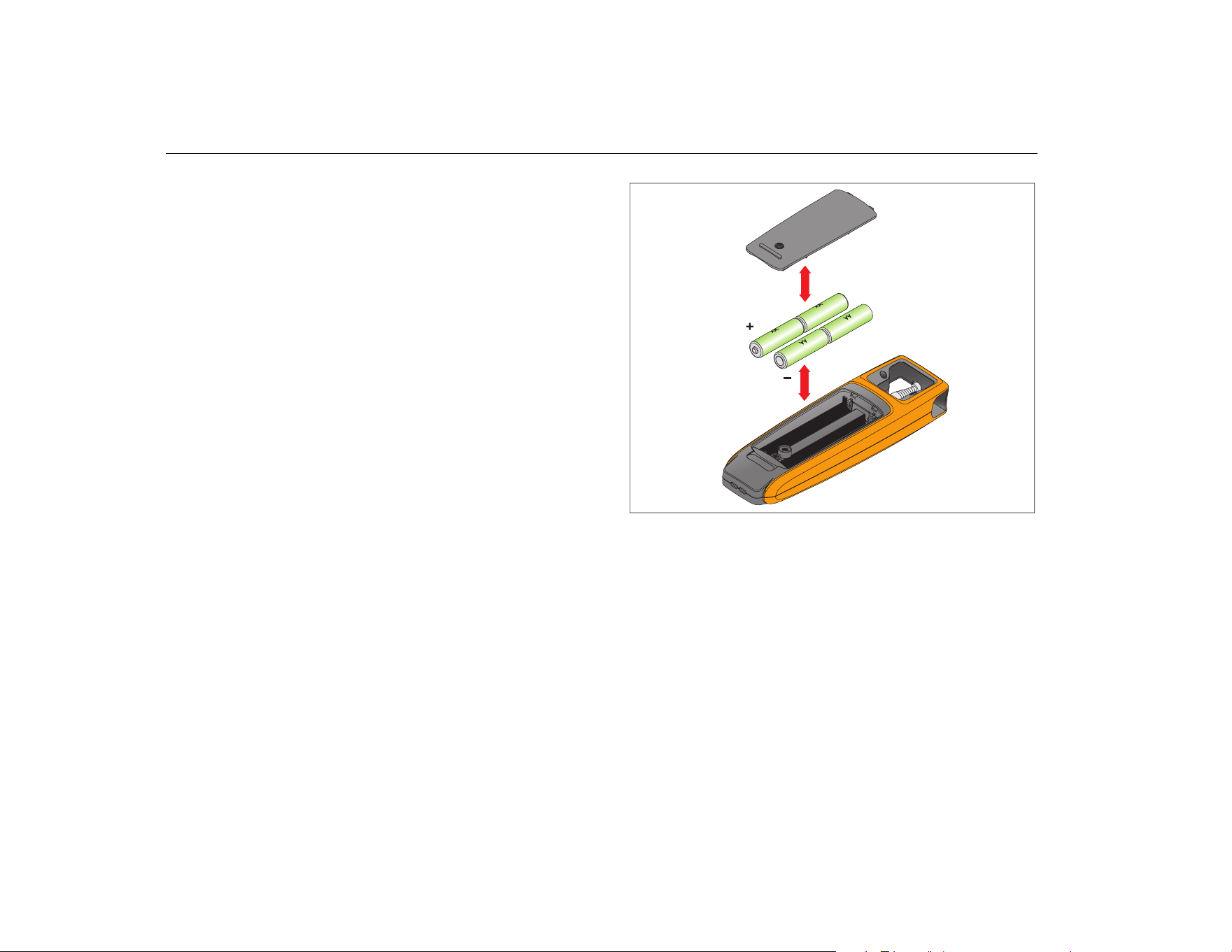
Replace the batteries when the light is blinking green
and the Product automatically turns off.
To replace (see Figure 3):
1. Loosen the capture screw on the battery door and
remove.
2. Remove the spent batteries and dispose of properly.
3. Insert new AA batteries. Make sure the battery polarity
is correct.
4. Replace the battery door and tighten the screw.
huz04.eps
Figure 3. Battery Replacement
1.888.610.7664 sales@GlobalTestSupply.com
Fluke-Direct.com
Fluorescent Light Tester
Product Care
15
Rod Extender Replacement
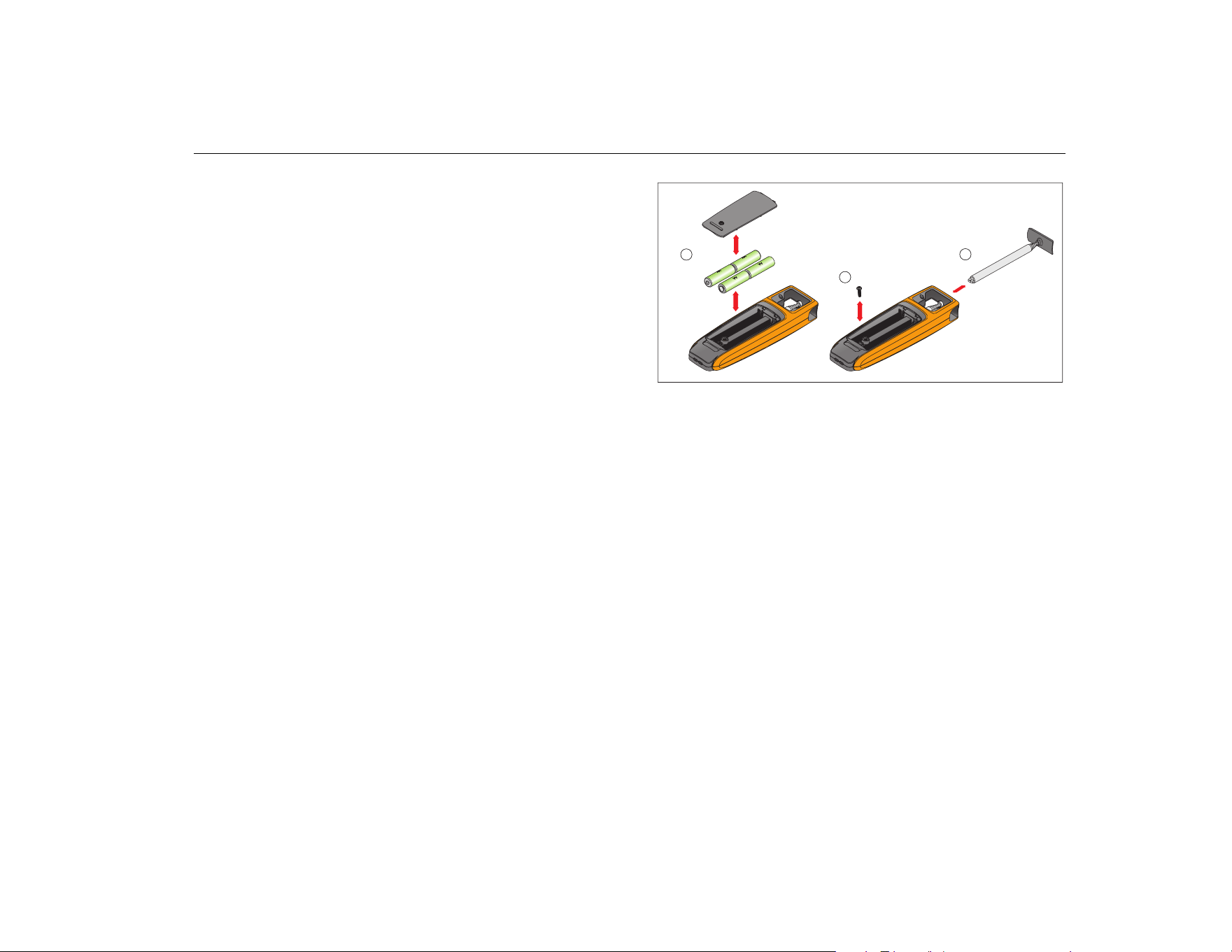
The rod extender is user replaceable. See Figure 4.
To replace:
1. Loosen the capture screw on the battery door.
2. Remove the batteries.
3. Remove the screw from the base of the rod extender.
4. Pull out the faulty rod extender from the body of the
Product.
5. Slide the replacement rod extender into place.
6. Replace the screw at the base of the rod extender.
7. Replace the batteries.
8. Replace the battery door and tighten the screw.
huz11.eps
Figure 4. Rod Extender Replacement
1
2
3
1.888.610.7664 sales@GlobalTestSupply.com
Fluke-Direct.com

1000FLT
Users Manual
16
Specifications
Temperature
Operating .......................... -10 °C to +50 °C (+14 °F to +122 °F)
Storage ............................. -40 °C to +60 °C (-40 °F to +140 °F)
Relative Humidity ................ 85 %
Operating Altitude .............. <2000 m
Battery
Type .................................. 4 x AA Alkaline IEC LR6
Life .................................... 40 hr
NCV (VoltAlert) ................. 85 V ac to 400 V ac
45 Hz to 67 Hz
≤10 cm (4 in) distance
Pin Continuity Test ............. <1 kΩ
Ballast Test .......................... 20 kHz
Ballast Type
Electronic .......................... 20 kHz
Magnetic ........................... 50 Hz to 60 Hz
≤3 m (10 ft) distance
Drop ..................................... 2 meter
Size (H x W x L) ................... 21.5 cm x 3.0 cm x 6.5 cm
(8.5 in x 1.2 in x 2.6 in)
Weight .................................. 0.37 kg (0.80 lb)
Warranty
Main Body ......................... 3 years
Rod Extender .................... 1 year
Safety ................................... IEC 61010-1, Pollution Degree 2
Electromagnetic Compatibility (EMC)
EU ..................................... IEC 61326-1 (Portable) CISPR 11, Group 2,
Class A.
Group 2 equipment contains all ISM RF
equipment in which radio-frequency energy
in the frequency range 9 kHz to 400 GHz is
intentionally generated and used or only
used, in the form of electromagnetic
radiation, inductive and/or capacitive
coupling, for the treatment of material or
inspection/analysis purposes.
Class A equipment is suitable for use in all
establishments other than domestic and
those directly connected to a low voltage
power supply network which supplies
buildings used for domestic purposes.
Caution, there may be potential difficulties in
ensuring electromagnetic compatibility in
other environments, due to conducted and
radiated disturbances.
US (FCC) .......................... 47 CFR 15 subpart B, this product is
considered an exempt device per clause
15.103
Applies to use in
Korea only (KCC) .............. Class A Equipment (Industrial Broadcasting
& Communication Equipment).
This product meets requirements for
industrial (Class A) electromagnetic wave
equipment and the seller or user should
take notice of it. This equipment is intended
for use in business environments and not to
be used in homes.
1.888.610.7664 sales@GlobalTestSupply.com
Fluke-Direct.com
