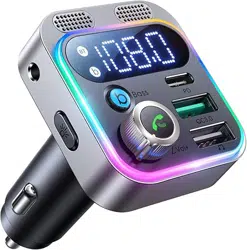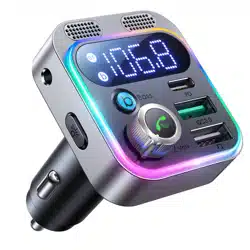
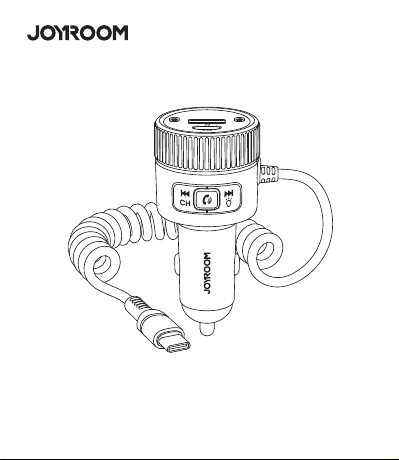
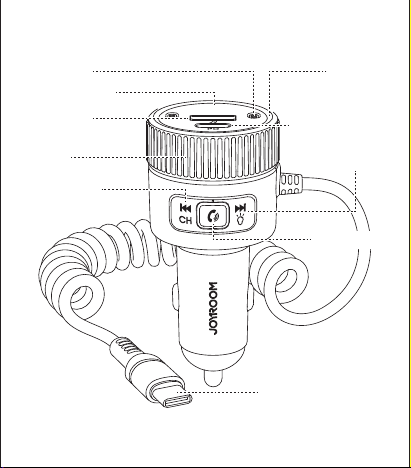
Product introduction
Frequency adjustment:
User Manual
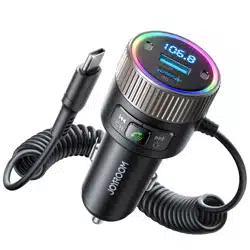
JR-CCB02 60W Car Wireless Transmitter
Parameters Parameters
Model: JR-CCB02
Name: Car Wireless Transmitter
Material: ABS+PC
BT Version: V5.4
Input: DC 12-24V 6.0A Max
PD Output: 5V 3A,9V 3A,12V 2.5A
Type-C Cable Output: 5V 3A,9V 3A,12V 2.5A,15V 2A,20V 1.5A
Total output: 60W
Size: 36.8*36.8*75.5mm
Net Weight: 73g
Packing list
Transmitter * 1, User Manual * 1, Warranty Card * 1
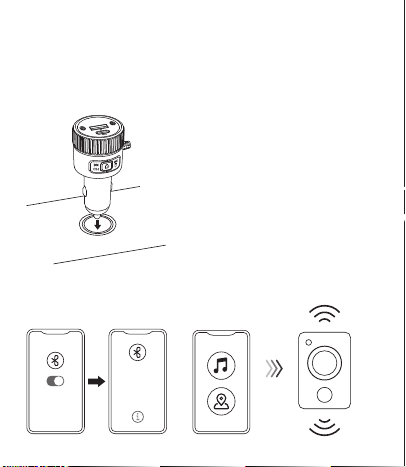
1. Wireless connection
cigarette lighter socket.
Q&AQ:
Q: How to resolve static issue?
A: ① Please make sure there is no power line close by your CCB02.
Some of the power lines without a shielding layer would cause
electromagnetic radiation to interfere and reduce the signal of
transmission, causing background buzz.
② Please note that the signal of might reduce if you are in a mountain
region and massing of buildings or inside a tunnel. We suggest you
re-adjust the car radio to an unused station, and then reconnect to use.
Q: How to achieve a better voice quality during calls?
A: Please ensure that your car radio successfully connects to an unused
station before making a phone call. If there is still noise at the ends, you
can close the car windows when you are on a call.
Q: How to do if the sound is too low when playing music or on a call, or
there is no sound when answering a call?
A: ① Please adjust the volume of your phone and CCB02 to full volume.
② Please press the multi-function button.Some mobile phones directly
use the answer button of the mobile phone to answer the call, which
will cause the call sound to be transmitted from the phone handset.
Precautions
1.
2.
3.
4.
5.
6.
Please keep it away from children.
Improper use may damage the product or endanger personal and
property safety.
Non-professionals are strictly prohibited to disassemble this
product.
Electrical appliances or loads that exceed the output current of this
product are prohibited (automatic protection will be activated and
no output will be given).
Avoid fierce physical actions, including knocking, throwing,
trampling, squeezing, etc.
Please charge your device after the car engine starts.
Long press the prev. track/channel button , the digital display will
start to flash in 2s. Rotate the knob leftward/rightward to select
frequency.
Volume adjustment:
If you feel the music volume is too low, please volume up your phone or
CCB02 first, and finally volume up the car audio to 1/3 or 1/2, but not
exceed 2/3.
Answer/reject/end calls:
Answer a call: short press the button
End a call: short press the button during the call
Reject a call: press and hold the button for 2s
BT/USB flash drive switch:
Long press for 2s to switch between BT and
USB flash drive mode freely
Light adjustment:
Long press to turn off light, long press again to turn light on again.
Playing music:
Press button to skip to previous song
Press button to skip to next song
Press multifunctional button to pause
Press again to resume playing
C. After pairing successfully,
you can play music/start
B. Turn on your phone’s BT
function and find the name
“CCB02”, pair with it.
phone navigation.
JR-CCB02
Connected
JR-CCB02
U
U
A. Plug JR-CCB02 into the car
Digital display
Dual mics
PD output port
Colorful
light ring
Prev. track/
channel button
Next track/
light button
Knob
Type-C output cable
USB flash
drive port
Call button
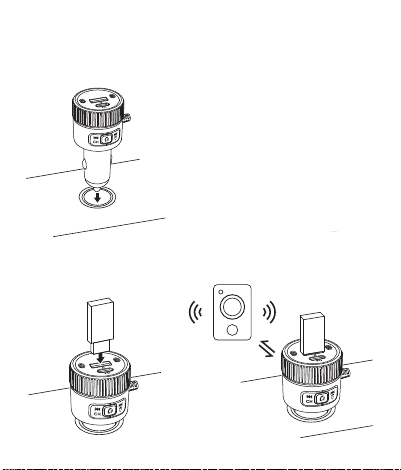
2. USB flash drive connection
cigarette lighter socket.
C. After connecting successfully,
B. Insert the USB flash drive
into the USB flash drive port
of JR-CCB02.
you can start to play music.
Q: Why CCB02 failed to be connected wirelessly while it can be found
on the phone?
A: ① Please check whether the phone's BT function is turned on and
works normally.
② Please ensure CCB02 is not connected by others,and you need to
disconnect other devices to connect.If the problem still cannot be
solved, please delete all the BT names from your phone and reconnect.
Q: Can CCB02 remember the connection with the mobile phone?
A: CCB02 has a memory connection function, but some mobile phones
have turned off the Bluetooth automatic connection for the purpose of
saving battery power, and you need to manually connect.
7.
8.
9.
10.
Do not charge high-power devices to prevent device damage
caused by excessive power.
Do not use it in wet environment or thunderstorm weather.
Do not clean the device with strong chemicals, cleaning agents, etc.
Do not drop or throw it violently and please keep it from collision
considering this product is an electronic product.
We hope you never have the need, but if you do, our service is
friendly and hassle-free.
1. Activate the lifetime warranty for you!
2. If you need help, our solutions will hyper drive to you within 12 hours.
support@joyroom.com
WARRANTY
CODE
237451
For FAQs and more
information, please scan
封面
A. Plug JR-CCB02 into the car
Car
3.1101.621583.0000000
原材料 机乐堂(A-US)JR-CCB02 带弹簧C线车载蓝牙发射器 说明书 V1.0
尺寸:65x75mm
材质:128g铜版纸+正反单色印刷+风琴折

Product introduction
Frequency adjustment:
User Manual
JR-CCB02 60W Car Wireless Transmitter
Parameters Parameters
Model: JR-CCB02
Name: Car Wireless Transmitter
Material: ABS+PC
BT Version: V5.4
Input: DC 12-24V 6.0A Max
PD Output: 5V 3A,9V 3A,12V 2.5A
Type-C Cable Output: 5V 3A,9V 3A,12V 2.5A,15V 2A,20V 1.5A
Total output: 60W
Size: 36.8*36.8*75.5mm
Net Weight: 73g
Packing list
Transmitter * 1, User Manual * 1, Warranty Card * 1
1. Wireless connection
cigarette lighter socket.
Q&AQ:
Q: How to resolve static issue?
A: ① Please make sure there is no power line close by your CCB02.
Some of the power lines without a shielding layer would cause
electromagnetic radiation to interfere and reduce the signal of
transmission, causing background buzz.
② Please note that the signal of might reduce if you are in a mountain
region and massing of buildings or inside a tunnel. We suggest you
re-adjust the car radio to an unused station, and then reconnect to use.
Q: How to achieve a better voice quality during calls?
A: Please ensure that your car radio successfully connects to an unused
station before making a phone call. If there is still noise at the ends, you
can close the car windows when you are on a call.
Q: How to do if the sound is too low when playing music or on a call, or
there is no sound when answering a call?
A: ① Please adjust the volume of your phone and CCB02 to full volume.
② Please press the multi-function button.Some mobile phones directly
use the answer button of the mobile phone to answer the call, which
will cause the call sound to be transmitted from the phone handset.
Precautions
1.
2.
3.
4.
5.
6.
Please keep it away from children.
Improper use may damage the product or endanger personal and
property safety.
Non-professionals are strictly prohibited to disassemble this
product.
Electrical appliances or loads that exceed the output current of this
product are prohibited (automatic protection will be activated and
no output will be given).
Avoid fierce physical actions, including knocking, throwing,
trampling, squeezing, etc.
Please charge your device after the car engine starts.
Long press the prev. track/channel button , the digital display will
start to flash in 2s. Rotate the knob leftward/rightward to select
frequency.
Volume adjustment:
If you feel the music volume is too low, please volume up your phone or
CCB02 first, and finally volume up the car audio to 1/3 or 1/2, but not
exceed 2/3.
Answer/reject/end calls:
Answer a call: short press the button
End a call: short press the button during the call
Reject a call: press and hold the button for 2s
BT/USB flash drive switch:
Long press for 2s to switch between BT and
USB flash drive mode freely
Light adjustment:
Long press to turn off light, long press again to turn light on again.
Playing music:
Press button to skip to previous song
Press button to skip to next song
Press multifunctional button to pause
Press again to resume playing
C. After pairing successfully,
you can play music/start
B. Turn on your phone’s BT
function and find the name
“CCB02”, pair with it.
phone navigation.
JR-CCB02
Connected
JR-CCB02
U
U
A. Plug JR-CCB02 into the car
Digital display
Dual mics
PD output port
Colorful
light ring
Prev. track/
channel button
Next track/
light button
Knob
Type-C output cable
USB flash
drive port
Call button
2. USB flash drive connection
cigarette lighter socket.
C. After connecting successfully,
B. Insert the USB flash drive
into the USB flash drive port
of JR-CCB02.
you can start to play music.
Q: Why CCB02 failed to be connected wirelessly while it can be found
on the phone?
A: ① Please check whether the phone's BT function is turned on and
works normally.
② Please ensure CCB02 is not connected by others,and you need to
disconnect other devices to connect.If the problem still cannot be
solved, please delete all the BT names from your phone and reconnect.
Q: Can CCB02 remember the connection with the mobile phone?
A: CCB02 has a memory connection function, but some mobile phones
have turned off the Bluetooth automatic connection for the purpose of
saving battery power, and you need to manually connect.
7.
8.
9.
10.
Do not charge high-power devices to prevent device damage
caused by excessive power.
Do not use it in wet environment or thunderstorm weather.
Do not clean the device with strong chemicals, cleaning agents, etc.
Do not drop or throw it violently and please keep it from collision
considering this product is an electronic product.
We hope you never have the need, but if you do, our service is
friendly and hassle-free.
1. Activate the lifetime warranty for you!
2. If you need help, our solutions will hyper drive to you within 12 hours.
support@joyroom.com
WARRANTY
CODE
237451
For FAQs and more
information, please scan
封面
A. Plug JR-CCB02 into the car
Car
3.1101.621583.0000000
原材料 机乐堂(A-US)JR-CCB02 带弹簧C线车载蓝牙发射器 说明书 V1.0
尺寸:65x75mm
材质:128g铜版纸+正反单色印刷+风琴折
Product introduction
Frequency adjustment:
User Manual
JR-CCB02 60W Car Wireless Transmitter
Parameters Parameters
Model: JR-CCB02
Name: Car Wireless Transmitter
Material: ABS+PC
BT Version: V5.4
Input: DC 12-24V 6.0A Max
PD Output: 5V 3A,9V 3A,12V 2.5A
Type-C Cable Output: 5V 3A,9V 3A,12V 2.5A,15V 2A,20V 1.5A
Total output: 60W
Size: 36.8*36.8*75.5mm
Net Weight: 73g
Packing list
Transmitter * 1, User Manual * 1, Warranty Card * 1
1. Wireless connection
cigarette lighter socket.
Q&AQ:
Q: How to resolve static issue?
A: ① Please make sure there is no power line close by your CCB02.
Some of the power lines without a shielding layer would cause
electromagnetic radiation to interfere and reduce the signal of
transmission, causing background buzz.
② Please note that the signal of might reduce if you are in a mountain
region and massing of buildings or inside a tunnel. We suggest you
re-adjust the car radio to an unused station, and then reconnect to use.
Q: How to achieve a better voice quality during calls?
A: Please ensure that your car radio successfully connects to an unused
station before making a phone call. If there is still noise at the ends, you
can close the car windows when you are on a call.
Q: How to do if the sound is too low when playing music or on a call, or
there is no sound when answering a call?
A: ① Please adjust the volume of your phone and CCB02 to full volume.
② Please press the multi-function button.Some mobile phones directly
use the answer button of the mobile phone to answer the call, which
will cause the call sound to be transmitted from the phone handset.
Precautions
1.
2.
3.
4.
5.
6.
Please keep it away from children.
Improper use may damage the product or endanger personal and
property safety.
Non-professionals are strictly prohibited to disassemble this
product.
Electrical appliances or loads that exceed the output current of this
product are prohibited (automatic protection will be activated and
no output will be given).
Avoid fierce physical actions, including knocking, throwing,
trampling, squeezing, etc.
Please charge your device after the car engine starts.
Long press the prev. track/channel button , the digital display will
start to flash in 2s. Rotate the knob leftward/rightward to select
frequency.
Volume adjustment:
If you feel the music volume is too low, please volume up your phone or
CCB02 first, and finally volume up the car audio to 1/3 or 1/2, but not
exceed 2/3.
Answer/reject/end calls:
Answer a call: short press the button
End a call: short press the button during the call
Reject a call: press and hold the button for 2s
BT/USB flash drive switch:
Long press for 2s to switch between BT and
USB flash drive mode freely
Light adjustment:
Long press to turn off light, long press again to turn light on again.
Playing music:
Press button to skip to previous song
Press button to skip to next song
Press multifunctional button to pause
Press again to resume playing
C. After pairing successfully,
you can play music/start
B. Turn on your phone’s BT
function and find the name
“CCB02”, pair with it.
phone navigation.
JR-CCB02
Connected
JR-CCB02
U
U
A. Plug JR-CCB02 into the car
Digital display
Dual mics
PD output port
Colorful
light ring
Prev. track/
channel button
Next track/
light button
Knob
Type-C output cable
USB flash
drive port
Call button
2. USB flash drive connection
cigarette lighter socket.
C. After connecting successfully,
B. Insert the USB flash drive
into the USB flash drive port
of JR-CCB02.
you can start to play music.
Q: Why CCB02 failed to be connected wirelessly while it can be found
on the phone?
A: ① Please check whether the phone's BT function is turned on and
works normally.
② Please ensure CCB02 is not connected by others,and you need to
disconnect other devices to connect.If the problem still cannot be
solved, please delete all the BT names from your phone and reconnect.
Q: Can CCB02 remember the connection with the mobile phone?
A: CCB02 has a memory connection function, but some mobile phones
have turned off the Bluetooth automatic connection for the purpose of
saving battery power, and you need to manually connect.
7.
8.
9.
10.
Do not charge high-power devices to prevent device damage
caused by excessive power.
Do not use it in wet environment or thunderstorm weather.
Do not clean the device with strong chemicals, cleaning agents, etc.
Do not drop or throw it violently and please keep it from collision
considering this product is an electronic product.
We hope you never have the need, but if you do, our service is
friendly and hassle-free.
1. Activate the lifetime warranty for you!
2. If you need help, our solutions will hyper drive to you within 12 hours.
support@joyroom.com
WARRANTY
CODE
237451
For FAQs and more
information, please scan
封面
A. Plug JR-CCB02 into the car
Car
3.1101.621583.0000000
原材料 机乐堂(A-US)JR-CCB02 带弹簧C线车载蓝牙发射器 说明书 V1.0
尺寸:65x75mm
材质:128g铜版纸+正反单色印刷+风琴折
Product introduction
Frequency adjustment:
User Manual
JR-CCB02 60W Car Wireless Transmitter
Parameters Parameters
Model: JR-CCB02
Name: Car Wireless Transmitter
Material: ABS+PC
BT Version: V5.4
Input: DC 12-24V 6.0A Max
PD Output: 5V 3A,9V 3A,12V 2.5A
Type-C Cable Output: 5V 3A,9V 3A,12V 2.5A,15V 2A,20V 1.5A
Total output: 60W
Size: 36.8*36.8*75.5mm
Net Weight: 73g
Packing list
Transmitter * 1, User Manual * 1, Warranty Card * 1
1. Wireless connection
cigarette lighter socket.
Q&AQ:
Q: How to resolve static issue?
A: ① Please make sure there is no power line close by your CCB02.
Some of the power lines without a shielding layer would cause
electromagnetic radiation to interfere and reduce the signal of
transmission, causing background buzz.
② Please note that the signal of might reduce if you are in a mountain
region and massing of buildings or inside a tunnel. We suggest you
re-adjust the car radio to an unused station, and then reconnect to use.
Q: How to achieve a better voice quality during calls?
A: Please ensure that your car radio successfully connects to an unused
station before making a phone call. If there is still noise at the ends, you
can close the car windows when you are on a call.
Q: How to do if the sound is too low when playing music or on a call, or
there is no sound when answering a call?
A: ① Please adjust the volume of your phone and CCB02 to full volume.
② Please press the multi-function button.Some mobile phones directly
use the answer button of the mobile phone to answer the call, which
will cause the call sound to be transmitted from the phone handset.
Precautions
1.
2.
3.
4.
5.
6.
Please keep it away from children.
Improper use may damage the product or endanger personal and
property safety.
Non-professionals are strictly prohibited to disassemble this
product.
Electrical appliances or loads that exceed the output current of this
product are prohibited (automatic protection will be activated and
no output will be given).
Avoid fierce physical actions, including knocking, throwing,
trampling, squeezing, etc.
Please charge your device after the car engine starts.
Long press the prev. track/channel button , the digital display will
start to flash in 2s. Rotate the knob leftward/rightward to select
frequency.
Volume adjustment:
If you feel the music volume is too low, please volume up your phone or
CCB02 first, and finally volume up the car audio to 1/3 or 1/2, but not
exceed 2/3.
Answer/reject/end calls:
Answer a call: short press the button
End a call: short press the button during the call
Reject a call: press and hold the button for 2s
BT/USB flash drive switch:
Long press for 2s to switch between BT and
USB flash drive mode freely
Light adjustment:
Long press to turn off light, long press again to turn light on again.
Playing music:
Press button to skip to previous song
Press button to skip to next song
Press multifunctional button to pause
Press again to resume playing
C. After pairing successfully,
you can play music/start
B. Turn on your phone’s BT
function and find the name
“CCB02”, pair with it.
phone navigation.
JR-CCB02
Connected
JR-CCB02
U
U
A. Plug JR-CCB02 into the car
Digital display
Dual mics
PD output port
Colorful
light ring
Prev. track/
channel button
Next track/
light button
Knob
Type-C output cable
USB flash
drive port
Call button
2. USB flash drive connection
cigarette lighter socket.
C. After connecting successfully,
B. Insert the USB flash drive
into the USB flash drive port
of JR-CCB02.
you can start to play music.
Q: Why CCB02 failed to be connected wirelessly while it can be found
on the phone?
A: ① Please check whether the phone's BT function is turned on and
works normally.
② Please ensure CCB02 is not connected by others,and you need to
disconnect other devices to connect.If the problem still cannot be
solved, please delete all the BT names from your phone and reconnect.
Q: Can CCB02 remember the connection with the mobile phone?
A: CCB02 has a memory connection function, but some mobile phones
have turned off the Bluetooth automatic connection for the purpose of
saving battery power, and you need to manually connect.
7.
8.
9.
10.
Do not charge high-power devices to prevent device damage
caused by excessive power.
Do not use it in wet environment or thunderstorm weather.
Do not clean the device with strong chemicals, cleaning agents, etc.
Do not drop or throw it violently and please keep it from collision
considering this product is an electronic product.
We hope you never have the need, but if you do, our service is
friendly and hassle-free.
1. Activate the lifetime warranty for you!
2. If you need help, our solutions will hyper drive to you within 12 hours.
support@joyroom.com
WARRANTY
CODE
237451
For FAQs and more
information, please scan
封面
A. Plug JR-CCB02 into the car
Car
3.1101.621583.0000000
原材料 机乐堂(A-US)JR-CCB02 带弹簧C线车载蓝牙发射器 说明书 V1.0
尺寸:65x75mm
材质:128g铜版纸+正反单色印刷+风琴折
Product introduction
Frequency adjustment:
User Manual
JR-CCB02 60W Car Wireless Transmitter
Parameters Parameters
Model: JR-CCB02
Name: Car Wireless Transmitter
Material: ABS+PC
BT Version: V5.4
Input: DC 12-24V 6.0A Max
PD Output: 5V 3A,9V 3A,12V 2.5A
Type-C Cable Output: 5V 3A,9V 3A,12V 2.5A,15V 2A,20V 1.5A
Total output: 60W
Size: 36.8*36.8*75.5mm
Net Weight: 73g
Packing list
Transmitter * 1, User Manual * 1, Warranty Card * 1
1. Wireless connection
cigarette lighter socket.
Q&AQ:
Q: How to resolve static issue?
A: ① Please make sure there is no power line close by your CCB02.
Some of the power lines without a shielding layer would cause
electromagnetic radiation to interfere and reduce the signal of
transmission, causing background buzz.
② Please note that the signal of might reduce if you are in a mountain
region and massing of buildings or inside a tunnel. We suggest you
re-adjust the car radio to an unused station, and then reconnect to use.
Q: How to achieve a better voice quality during calls?
A: Please ensure that your car radio successfully connects to an unused
station before making a phone call. If there is still noise at the ends, you
can close the car windows when you are on a call.
Q: How to do if the sound is too low when playing music or on a call, or
there is no sound when answering a call?
A: ① Please adjust the volume of your phone and CCB02 to full volume.
② Please press the multi-function button.Some mobile phones directly
use the answer button of the mobile phone to answer the call, which
will cause the call sound to be transmitted from the phone handset.
Precautions
1.
2.
3.
4.
5.
6.
Please keep it away from children.
Improper use may damage the product or endanger personal and
property safety.
Non-professionals are strictly prohibited to disassemble this
product.
Electrical appliances or loads that exceed the output current of this
product are prohibited (automatic protection will be activated and
no output will be given).
Avoid fierce physical actions, including knocking, throwing,
trampling, squeezing, etc.
Please charge your device after the car engine starts.
Long press the prev. track/channel button , the digital display will
start to flash in 2s. Rotate the knob leftward/rightward to select
frequency.
Volume adjustment:
If you feel the music volume is too low, please volume up your phone or
CCB02 first, and finally volume up the car audio to 1/3 or 1/2, but not
exceed 2/3.
Answer/reject/end calls:
Answer a call: short press the button
End a call: short press the button during the call
Reject a call: press and hold the button for 2s
BT/USB flash drive switch:
Long press for 2s to switch between BT and
USB flash drive mode freely
Light adjustment:
Long press to turn off light, long press again to turn light on again.
Playing music:
Press button to skip to previous song
Press button to skip to next song
Press multifunctional button to pause
Press again to resume playing
C. After pairing successfully,
you can play music/start
B. Turn on your phone’s BT
function and find the name
“CCB02”, pair with it.
phone navigation.
JR-CCB02
Connected
JR-CCB02
U
U
A. Plug JR-CCB02 into the car
Digital display
Dual mics
PD output port
Colorful
light ring
Prev. track/
channel button
Next track/
light button
Knob
Type-C output cable
USB flash
drive port
Call button
2. USB flash drive connection
cigarette lighter socket.
C. After connecting successfully,
B. Insert the USB flash drive
into the USB flash drive port
of JR-CCB02.
you can start to play music.
Q: Why CCB02 failed to be connected wirelessly while it can be found
on the phone?
A: ① Please check whether the phone's BT function is turned on and
works normally.
② Please ensure CCB02 is not connected by others,and you need to
disconnect other devices to connect.If the problem still cannot be
solved, please delete all the BT names from your phone and reconnect.
Q: Can CCB02 remember the connection with the mobile phone?
A: CCB02 has a memory connection function, but some mobile phones
have turned off the Bluetooth automatic connection for the purpose of
saving battery power, and you need to manually connect.
7.
8.
9.
10.
Do not charge high-power devices to prevent device damage
caused by excessive power.
Do not use it in wet environment or thunderstorm weather.
Do not clean the device with strong chemicals, cleaning agents, etc.
Do not drop or throw it violently and please keep it from collision
considering this product is an electronic product.
We hope you never have the need, but if you do, our service is
friendly and hassle-free.
1. Activate the lifetime warranty for you!
2. If you need help, our solutions will hyper drive to you within 12 hours.
support@joyroom.com
WARRANTY
CODE
237451
For FAQs and more
information, please scan
封面
A. Plug JR-CCB02 into the car
Car
3.1101.621583.0000000
原材料 机乐堂(A-US)JR-CCB02 带弹簧C线车载蓝牙发射器 说明书 V1.0
尺寸:65x75mm
材质:128g铜版纸+正反单色印刷+风琴折
Product introduction
Frequency adjustment:
User Manual
JR-CCB02 60W Car Wireless Transmitter
Parameters Parameters
Model: JR-CCB02
Name: Car Wireless Transmitter
Material: ABS+PC
BT Version: V5.4
Input: DC 12-24V 6.0A Max
PD Output: 5V 3A,9V 3A,12V 2.5A
Type-C Cable Output: 5V 3A,9V 3A,12V 2.5A,15V 2A,20V 1.5A
Total output: 60W
Size: 36.8*36.8*75.5mm
Net Weight: 73g
Packing list
Transmitter * 1, User Manual * 1, Warranty Card * 1
1. Wireless connection
cigarette lighter socket.
Q&AQ:
Q: How to resolve static issue?
A: ① Please make sure there is no power line close by your CCB02.
Some of the power lines without a shielding layer would cause
electromagnetic radiation to interfere and reduce the signal of
transmission, causing background buzz.
② Please note that the signal of might reduce if you are in a mountain
region and massing of buildings or inside a tunnel. We suggest you
re-adjust the car radio to an unused station, and then reconnect to use.
Q: How to achieve a better voice quality during calls?
A: Please ensure that your car radio successfully connects to an unused
station before making a phone call. If there is still noise at the ends, you
can close the car windows when you are on a call.
Q: How to do if the sound is too low when playing music or on a call, or
there is no sound when answering a call?
A: ① Please adjust the volume of your phone and CCB02 to full volume.
② Please press the multi-function button.Some mobile phones directly
use the answer button of the mobile phone to answer the call, which
will cause the call sound to be transmitted from the phone handset.
Precautions
1.
2.
3.
4.
5.
6.
Please keep it away from children.
Improper use may damage the product or endanger personal and
property safety.
Non-professionals are strictly prohibited to disassemble this
product.
Electrical appliances or loads that exceed the output current of this
product are prohibited (automatic protection will be activated and
no output will be given).
Avoid fierce physical actions, including knocking, throwing,
trampling, squeezing, etc.
Please charge your device after the car engine starts.
Long press the prev. track/channel button , the digital display will
start to flash in 2s. Rotate the knob leftward/rightward to select
frequency.
Volume adjustment:
If you feel the music volume is too low, please volume up your phone or
CCB02 first, and finally volume up the car audio to 1/3 or 1/2, but not
exceed 2/3.
Answer/reject/end calls:
Answer a call: short press the button
End a call: short press the button during the call
Reject a call: press and hold the button for 2s
BT/USB flash drive switch:
Long press for 2s to switch between BT and
USB flash drive mode freely
Light adjustment:
Long press to turn off light, long press again to turn light on again.
Playing music:
Press button to skip to previous song
Press button to skip to next song
Press multifunctional button to pause
Press again to resume playing
C. After pairing successfully,
you can play music/start
B. Turn on your phone’s BT
function and find the name
“CCB02”, pair with it.
phone navigation.
JR-CCB02
Connected
JR-CCB02
U
U
A. Plug JR-CCB02 into the car
Digital display
Dual mics
PD output port
Colorful
light ring
Prev. track/
channel button
Next track/
light button
Knob
Type-C output cable
USB flash
drive port
Call button
2. USB flash drive connection
cigarette lighter socket.
C. After connecting successfully,
B. Insert the USB flash drive
into the USB flash drive port
of JR-CCB02.
you can start to play music.
Q: Why CCB02 failed to be connected wirelessly while it can be found
on the phone?
A: ① Please check whether the phone's BT function is turned on and
works normally.
② Please ensure CCB02 is not connected by others,and you need to
disconnect other devices to connect.If the problem still cannot be
solved, please delete all the BT names from your phone and reconnect.
Q: Can CCB02 remember the connection with the mobile phone?
A: CCB02 has a memory connection function, but some mobile phones
have turned off the Bluetooth automatic connection for the purpose of
saving battery power, and you need to manually connect.
7.
8.
9.
10.
Do not charge high-power devices to prevent device damage
caused by excessive power.
Do not use it in wet environment or thunderstorm weather.
Do not clean the device with strong chemicals, cleaning agents, etc.
Do not drop or throw it violently and please keep it from collision
considering this product is an electronic product.
We hope you never have the need, but if you do, our service is
friendly and hassle-free.
1. Activate the lifetime warranty for you!
2. If you need help, our solutions will hyper drive to you within 12 hours.
support@joyroom.com
WARRANTY
CODE
237451
For FAQs and more
information, please scan
封面
A. Plug JR-CCB02 into the car
Car
3.1101.621583.0000000
原材料 机乐堂(A-US)JR-CCB02 带弹簧C线车载蓝牙发射器 说明书 V1.0
尺寸:65x75mm
材质:128g铜版纸+正反单色印刷+风琴折
Product introduction
Frequency adjustment:
User Manual
JR-CCB02 60W Car Wireless Transmitter
Parameters Parameters
Model: JR-CCB02
Name: Car Wireless Transmitter
Material: ABS+PC
BT Version: V5.4
Input: DC 12-24V 6.0A Max
PD Output: 5V 3A,9V 3A,12V 2.5A
Type-C Cable Output: 5V 3A,9V 3A,12V 2.5A,15V 2A,20V 1.5A
Total output: 60W
Size: 36.8*36.8*75.5mm
Net Weight: 73g
Packing list
Transmitter * 1, User Manual * 1, Warranty Card * 1
1. Wireless connection
cigarette lighter socket.
Q&AQ:
Q: How to resolve static issue?
A: ① Please make sure there is no power line close by your CCB02.
Some of the power lines without a shielding layer would cause
electromagnetic radiation to interfere and reduce the signal of
transmission, causing background buzz.
② Please note that the signal of might reduce if you are in a mountain
region and massing of buildings or inside a tunnel. We suggest you
re-adjust the car radio to an unused station, and then reconnect to use.
Q: How to achieve a better voice quality during calls?
A: Please ensure that your car radio successfully connects to an unused
station before making a phone call. If there is still noise at the ends, you
can close the car windows when you are on a call.
Q: How to do if the sound is too low when playing music or on a call, or
there is no sound when answering a call?
A: ① Please adjust the volume of your phone and CCB02 to full volume.
② Please press the multi-function button.Some mobile phones directly
use the answer button of the mobile phone to answer the call, which
will cause the call sound to be transmitted from the phone handset.
Precautions
1.
2.
3.
4.
5.
6.
Please keep it away from children.
Improper use may damage the product or endanger personal and
property safety.
Non-professionals are strictly prohibited to disassemble this
product.
Electrical appliances or loads that exceed the output current of this
product are prohibited (automatic protection will be activated and
no output will be given).
Avoid fierce physical actions, including knocking, throwing,
trampling, squeezing, etc.
Please charge your device after the car engine starts.
Long press the prev. track/channel button , the digital display will
start to flash in 2s. Rotate the knob leftward/rightward to select
frequency.
Volume adjustment:
If you feel the music volume is too low, please volume up your phone or
CCB02 first, and finally volume up the car audio to 1/3 or 1/2, but not
exceed 2/3.
Answer/reject/end calls:
Answer a call: short press the button
End a call: short press the button during the call
Reject a call: press and hold the button for 2s
BT/USB flash drive switch:
Long press for 2s to switch between BT and
USB flash drive mode freely
Light adjustment:
Long press to turn off light, long press again to turn light on again.
Playing music:
Press button to skip to previous song
Press button to skip to next song
Press multifunctional button to pause
Press again to resume playing
C. After pairing successfully,
you can play music/start
B. Turn on your phone’s BT
function and find the name
“CCB02”, pair with it.
phone navigation.
JR-CCB02
Connected
JR-CCB02
U
U
A. Plug JR-CCB02 into the car
Digital display
Dual mics
PD output port
Colorful
light ring
Prev. track/
channel button
Next track/
light button
Knob
Type-C output cable
USB flash
drive port
Call button
2. USB flash drive connection
cigarette lighter socket.
C. After connecting successfully,
B. Insert the USB flash drive
into the USB flash drive port
of JR-CCB02.
you can start to play music.
Q: Why CCB02 failed to be connected wirelessly while it can be found
on the phone?
A: ① Please check whether the phone's BT function is turned on and
works normally.
② Please ensure CCB02 is not connected by others,and you need to
disconnect other devices to connect.If the problem still cannot be
solved, please delete all the BT names from your phone and reconnect.
Q: Can CCB02 remember the connection with the mobile phone?
A: CCB02 has a memory connection function, but some mobile phones
have turned off the Bluetooth automatic connection for the purpose of
saving battery power, and you need to manually connect.
7.
8.
9.
10.
Do not charge high-power devices to prevent device damage
caused by excessive power.
Do not use it in wet environment or thunderstorm weather.
Do not clean the device with strong chemicals, cleaning agents, etc.
Do not drop or throw it violently and please keep it from collision
considering this product is an electronic product.
We hope you never have the need, but if you do, our service is
friendly and hassle-free.
1. Activate the lifetime warranty for you!
2. If you need help, our solutions will hyper drive to you within 12 hours.
support@joyroom.com
WARRANTY
CODE
237451
For FAQs and more
information, please scan
封面
A. Plug JR-CCB02 into the car
Car
3.1101.621583.0000000
原材料 机乐堂(A-US)JR-CCB02 带弹簧C线车载蓝牙发射器 说明书 V1.0
尺寸:65x75mm
材质:128g铜版纸+正反单色印刷+风琴折

Product introduction
Frequency adjustment:
User Manual
JR-CCB02 60W Car Wireless Transmitter
Parameters Parameters
Model: JR-CCB02
Name: Car Wireless Transmitter
Material: ABS+PC
BT Version: V5.4
Input: DC 12-24V 6.0A Max
PD Output: 5V 3A,9V 3A,12V 2.5A
Type-C Cable Output: 5V 3A,9V 3A,12V 2.5A,15V 2A,20V 1.5A
Total output: 60W
Size: 36.8*36.8*75.5mm
Net Weight: 73g
Packing list
Transmitter * 1, User Manual * 1, Warranty Card * 1
1. Wireless connection
cigarette lighter socket.
Q&AQ:
Q: How to resolve static issue?
A: ① Please make sure there is no power line close by your CCB02.
Some of the power lines without a shielding layer would cause
electromagnetic radiation to interfere and reduce the signal of
transmission, causing background buzz.
② Please note that the signal of might reduce if you are in a mountain
region and massing of buildings or inside a tunnel. We suggest you
re-adjust the car radio to an unused station, and then reconnect to use.
Q: How to achieve a better voice quality during calls?
A: Please ensure that your car radio successfully connects to an unused
station before making a phone call. If there is still noise at the ends, you
can close the car windows when you are on a call.
Q: How to do if the sound is too low when playing music or on a call, or
there is no sound when answering a call?
A: ① Please adjust the volume of your phone and CCB02 to full volume.
② Please press the multi-function button.Some mobile phones directly
use the answer button of the mobile phone to answer the call, which
will cause the call sound to be transmitted from the phone handset.
Precautions
1.
2.
3.
4.
5.
6.
Please keep it away from children.
Improper use may damage the product or endanger personal and
property safety.
Non-professionals are strictly prohibited to disassemble this
product.
Electrical appliances or loads that exceed the output current of this
product are prohibited (automatic protection will be activated and
no output will be given).
Avoid fierce physical actions, including knocking, throwing,
trampling, squeezing, etc.
Please charge your device after the car engine starts.
Long press the prev. track/channel button , the digital display will
start to flash in 2s. Rotate the knob leftward/rightward to select
frequency.
Volume adjustment:
If you feel the music volume is too low, please volume up your phone or
CCB02 first, and finally volume up the car audio to 1/3 or 1/2, but not
exceed 2/3.
Answer/reject/end calls:
Answer a call: short press the button
End a call: short press the button during the call
Reject a call: press and hold the button for 2s
BT/USB flash drive switch:
Long press for 2s to switch between BT and
USB flash drive mode freely
Light adjustment:
Long press to turn off light, long press again to turn light on again.
Playing music:
Press button to skip to previous song
Press button to skip to next song
Press multifunctional button to pause
Press again to resume playing
C. After pairing successfully,
you can play music/start
B. Turn on your phone’s BT
function and find the name
“CCB02”, pair with it.
phone navigation.
JR-CCB02
Connected
JR-CCB02
U
U
A. Plug JR-CCB02 into the car
Digital display
Dual mics
PD output port
Colorful
light ring
Prev. track/
channel button
Next track/
light button
Knob
Type-C output cable
USB flash
drive port
Call button
2. USB flash drive connection
cigarette lighter socket.
C. After connecting successfully,
B. Insert the USB flash drive
into the USB flash drive port
of JR-CCB02.
you can start to play music.
Q: Why CCB02 failed to be connected wirelessly while it can be found
on the phone?
A: ① Please check whether the phone's BT function is turned on and
works normally.
② Please ensure CCB02 is not connected by others,and you need to
disconnect other devices to connect.If the problem still cannot be
solved, please delete all the BT names from your phone and reconnect.
Q: Can CCB02 remember the connection with the mobile phone?
A: CCB02 has a memory connection function, but some mobile phones
have turned off the Bluetooth automatic connection for the purpose of
saving battery power, and you need to manually connect.
7.
8.
9.
10.
Do not charge high-power devices to prevent device damage
caused by excessive power.
Do not use it in wet environment or thunderstorm weather.
Do not clean the device with strong chemicals, cleaning agents, etc.
Do not drop or throw it violently and please keep it from collision
considering this product is an electronic product.
We hope you never have the need, but if you do, our service is
friendly and hassle-free.
1. Activate the lifetime warranty for you!
2. If you need help, our solutions will hyper drive to you within 12 hours.
support@joyroom.com
WARRANTY
CODE
237451
For FAQs and more
information, please scan
封面
A. Plug JR-CCB02 into the car
Car
3.1101.621583.0000000
原材料 机乐堂(A-US)JR-CCB02 带弹簧C线车载蓝牙发射器 说明书 V1.0
尺寸:65x75mm
材质:128g铜版纸+正反单色印刷+风琴折

Product introduction
Frequency adjustment:
User Manual
JR-CCB02 60W Car Wireless Transmitter
Parameters Parameters
Model: JR-CCB02
Name: Car Wireless Transmitter
Material: ABS+PC
BT Version: V5.4
Input: DC 12-24V 6.0A Max
PD Output: 5V 3A,9V 3A,12V 2.5A
Type-C Cable Output: 5V 3A,9V 3A,12V 2.5A,15V 2A,20V 1.5A
Total output: 60W
Size: 36.8*36.8*75.5mm
Net Weight: 73g
Packing list
Transmitter * 1, User Manual * 1, Warranty Card * 1
1. Wireless connection
cigarette lighter socket.
Q&AQ:
Q: How to resolve static issue?
A: ① Please make sure there is no power line close by your CCB02.
Some of the power lines without a shielding layer would cause
electromagnetic radiation to interfere and reduce the signal of
transmission, causing background buzz.
② Please note that the signal of might reduce if you are in a mountain
region and massing of buildings or inside a tunnel. We suggest you
re-adjust the car radio to an unused station, and then reconnect to use.
Q: How to achieve a better voice quality during calls?
A: Please ensure that your car radio successfully connects to an unused
station before making a phone call. If there is still noise at the ends, you
can close the car windows when you are on a call.
Q: How to do if the sound is too low when playing music or on a call, or
there is no sound when answering a call?
A: ① Please adjust the volume of your phone and CCB02 to full volume.
② Please press the multi-function button.Some mobile phones directly
use the answer button of the mobile phone to answer the call, which
will cause the call sound to be transmitted from the phone handset.
Precautions
1.
2.
3.
4.
5.
6.
Please keep it away from children.
Improper use may damage the product or endanger personal and
property safety.
Non-professionals are strictly prohibited to disassemble this
product.
Electrical appliances or loads that exceed the output current of this
product are prohibited (automatic protection will be activated and
no output will be given).
Avoid fierce physical actions, including knocking, throwing,
trampling, squeezing, etc.
Please charge your device after the car engine starts.
Long press the prev. track/channel button , the digital display will
start to flash in 2s. Rotate the knob leftward/rightward to select
frequency.
Volume adjustment:
If you feel the music volume is too low, please volume up your phone or
CCB02 first, and finally volume up the car audio to 1/3 or 1/2, but not
exceed 2/3.
Answer/reject/end calls:
Answer a call: short press the button
End a call: short press the button during the call
Reject a call: press and hold the button for 2s
BT/USB flash drive switch:
Long press for 2s to switch between BT and
USB flash drive mode freely
Light adjustment:
Long press to turn off light, long press again to turn light on again.
Playing music:
Press button to skip to previous song
Press button to skip to next song
Press multifunctional button to pause
Press again to resume playing
C. After pairing successfully,
you can play music/start
B. Turn on your phone’s BT
function and find the name
“CCB02”, pair with it.
phone navigation.
JR-CCB02
Connected
JR-CCB02
U
U
A. Plug JR-CCB02 into the car
Digital display
Dual mics
PD output port
Colorful
light ring
Prev. track/
channel button
Next track/
light button
Knob
Type-C output cable
USB flash
drive port
Call button
2. USB flash drive connection
cigarette lighter socket.
C. After connecting successfully,
B. Insert the USB flash drive
into the USB flash drive port
of JR-CCB02.
you can start to play music.
Q: Why CCB02 failed to be connected wirelessly while it can be found
on the phone?
A: ① Please check whether the phone's BT function is turned on and
works normally.
② Please ensure CCB02 is not connected by others,and you need to
disconnect other devices to connect.If the problem still cannot be
solved, please delete all the BT names from your phone and reconnect.
Q: Can CCB02 remember the connection with the mobile phone?
A: CCB02 has a memory connection function, but some mobile phones
have turned off the Bluetooth automatic connection for the purpose of
saving battery power, and you need to manually connect.
7.
8.
9.
10.
Do not charge high-power devices to prevent device damage
caused by excessive power.
Do not use it in wet environment or thunderstorm weather.
Do not clean the device with strong chemicals, cleaning agents, etc.
Do not drop or throw it violently and please keep it from collision
considering this product is an electronic product.
We hope you never have the need, but if you do, our service is
friendly and hassle-free.
1. Activate the lifetime warranty for you!
2. If you need help, our solutions will hyper drive to you within 12 hours.
support@joyroom.com
WARRANTY
CODE
237451
For FAQs and more
information, please scan
封面
A. Plug JR-CCB02 into the car
Car
3.1101.621583.0000000
原材料 机乐堂(A-US)JR-CCB02 带弹簧C线车载蓝牙发射器 说明书 V1.0
尺寸:65x75mm
材质:128g铜版纸+正反单色印刷+风琴折
Product introduction
Frequency adjustment:
User Manual
JR-CCB02 60W Car Wireless Transmitter
Parameters Parameters
Model: JR-CCB02
Name: Car Wireless Transmitter
Material: ABS+PC
BT Version: V5.4
Input: DC 12-24V 6.0A Max
PD Output: 5V 3A,9V 3A,12V 2.5A
Type-C Cable Output: 5V 3A,9V 3A,12V 2.5A,15V 2A,20V 1.5A
Total output: 60W
Size: 36.8*36.8*75.5mm
Net Weight: 73g
Packing list
Transmitter * 1, User Manual * 1, Warranty Card * 1
1. Wireless connection
cigarette lighter socket.
Q&AQ:
Q: How to resolve static issue?
A: ① Please make sure there is no power line close by your CCB02.
Some of the power lines without a shielding layer would cause
electromagnetic radiation to interfere and reduce the signal of
transmission, causing background buzz.
② Please note that the signal of might reduce if you are in a mountain
region and massing of buildings or inside a tunnel. We suggest you
re-adjust the car radio to an unused station, and then reconnect to use.
Q: How to achieve a better voice quality during calls?
A: Please ensure that your car radio successfully connects to an unused
station before making a phone call. If there is still noise at the ends, you
can close the car windows when you are on a call.
Q: How to do if the sound is too low when playing music or on a call, or
there is no sound when answering a call?
A: ① Please adjust the volume of your phone and CCB02 to full volume.
② Please press the multi-function button.Some mobile phones directly
use the answer button of the mobile phone to answer the call, which
will cause the call sound to be transmitted from the phone handset.
Precautions
1.
2.
3.
4.
5.
6.
Please keep it away from children.
Improper use may damage the product or endanger personal and
property safety.
Non-professionals are strictly prohibited to disassemble this
product.
Electrical appliances or loads that exceed the output current of this
product are prohibited (automatic protection will be activated and
no output will be given).
Avoid fierce physical actions, including knocking, throwing,
trampling, squeezing, etc.
Please charge your device after the car engine starts.
Long press the prev. track/channel button , the digital display will
start to flash in 2s. Rotate the knob leftward/rightward to select
frequency.
Volume adjustment:
If you feel the music volume is too low, please volume up your phone or
CCB02 first, and finally volume up the car audio to 1/3 or 1/2, but not
exceed 2/3.
Answer/reject/end calls:
Answer a call: short press the button
End a call: short press the button during the call
Reject a call: press and hold the button for 2s
BT/USB flash drive switch:
Long press for 2s to switch between BT and
USB flash drive mode freely
Light adjustment:
Long press to turn off light, long press again to turn light on again.
Playing music:
Press button to skip to previous song
Press button to skip to next song
Press multifunctional button to pause
Press again to resume playing
C. After pairing successfully,
you can play music/start
B. Turn on your phone’s BT
function and find the name
“CCB02”, pair with it.
phone navigation.
JR-CCB02
Connected
JR-CCB02
U
U
A. Plug JR-CCB02 into the car
Digital display
Dual mics
PD output port
Colorful
light ring
Prev. track/
channel button
Next track/
light button
Knob
Type-C output cable
USB flash
drive port
Call button
2. USB flash drive connection
cigarette lighter socket.
C. After connecting successfully,
B. Insert the USB flash drive
into the USB flash drive port
of JR-CCB02.
you can start to play music.
Q: Why CCB02 failed to be connected wirelessly while it can be found
on the phone?
A: ① Please check whether the phone's BT function is turned on and
works normally.
② Please ensure CCB02 is not connected by others,and you need to
disconnect other devices to connect.If the problem still cannot be
solved, please delete all the BT names from your phone and reconnect.
Q: Can CCB02 remember the connection with the mobile phone?
A: CCB02 has a memory connection function, but some mobile phones
have turned off the Bluetooth automatic connection for the purpose of
saving battery power, and you need to manually connect.
7.
8.
9.
10.
Do not charge high-power devices to prevent device damage
caused by excessive power.
Do not use it in wet environment or thunderstorm weather.
Do not clean the device with strong chemicals, cleaning agents, etc.
Do not drop or throw it violently and please keep it from collision
considering this product is an electronic product.
We hope you never have the need, but if you do, our service is
friendly and hassle-free.
1. Activate the lifetime warranty for you!
2. If you need help, our solutions will hyper drive to you within 12 hours.
support@joyroom.com
WARRANTY
CODE
237451
For FAQs and more
information, please scan
封面
A. Plug JR-CCB02 into the car
Car
3.1101.621583.0000000
原材料 机乐堂(A-US)JR-CCB02 带弹簧C线车载蓝牙发射器 说明书 V1.0
尺寸:65x75mm
材质:128g铜版纸+正反单色印刷+风琴折