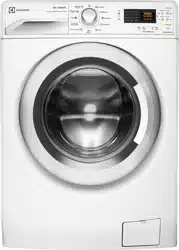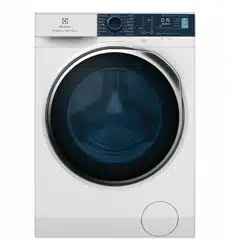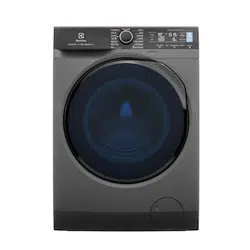

EN Washing Machine
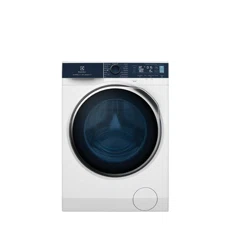
EWF9042R7SB
EWF1042Q7WB
User Manual 2
WI-FI Connectivity Setup 40
2 www.electrolux.com
CONTENTS
1.1 Conditions Of Use
1.2 Child Safety
1.3 General Safety
1.4 Installation
1.5 Use
1. SAFETY INFORMATION
........................................................................................................ 4
.................................................................................................................. 5
............................................................................................................. 5
.................................................................................................................... 6
.............................................................................................................................. 6
2.1 Parts
2.2 Accessories
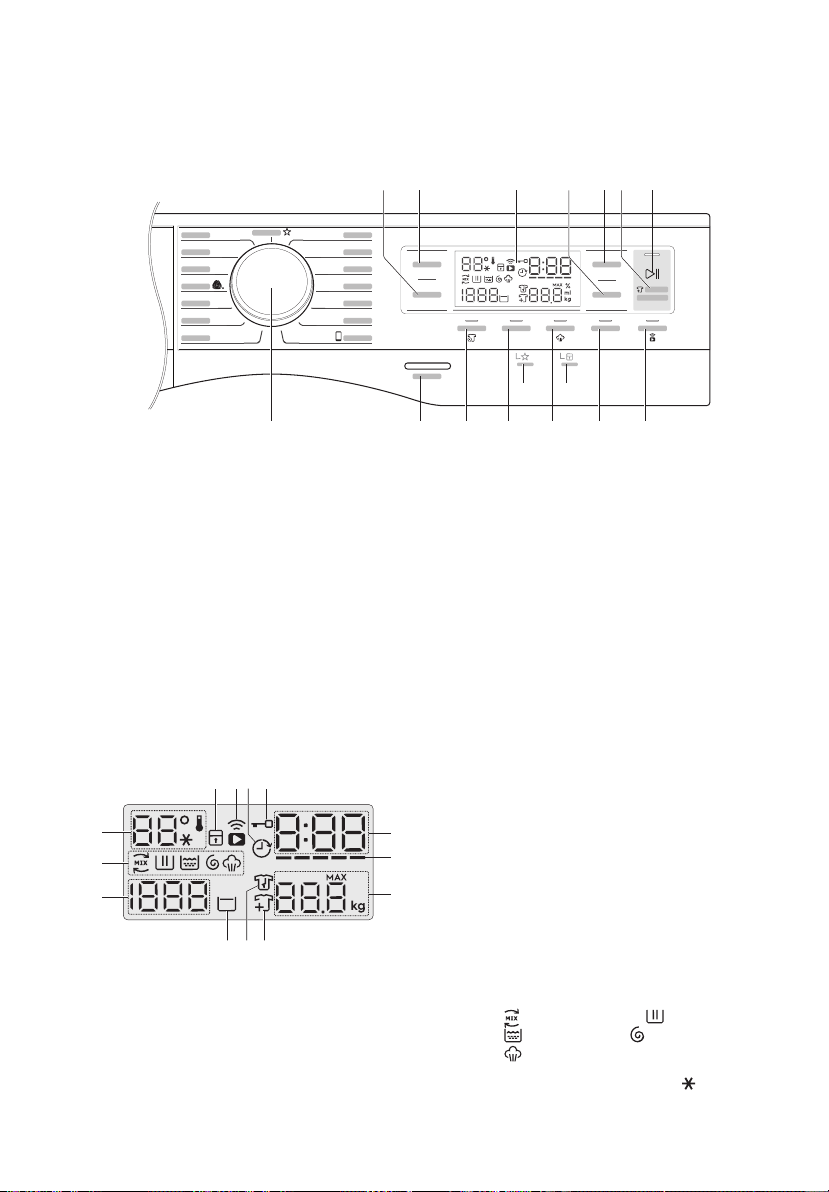
2.3 Load Sensor
2.
PRODUCT DESCRIPTION
............................................................................................................................ 7
................................................................................................................. 8
................................................................................................................ 9
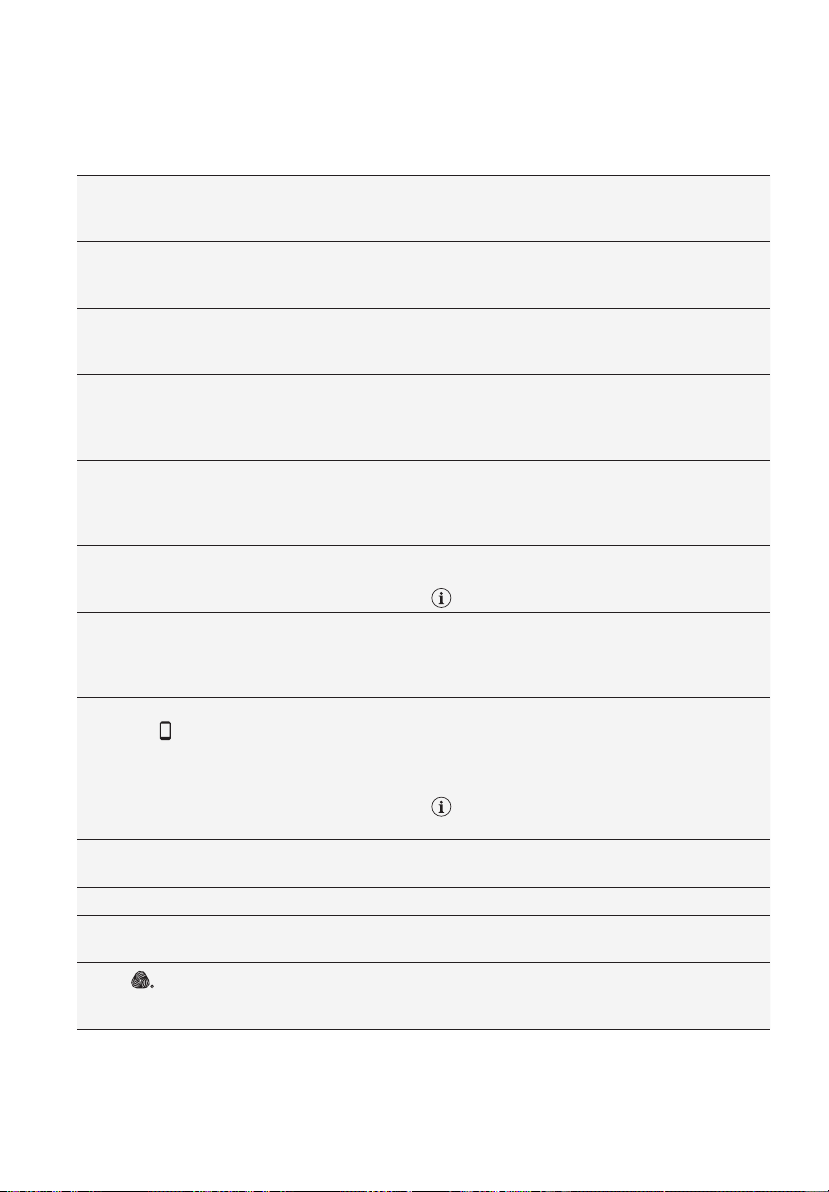
3.1 Control Panel Description
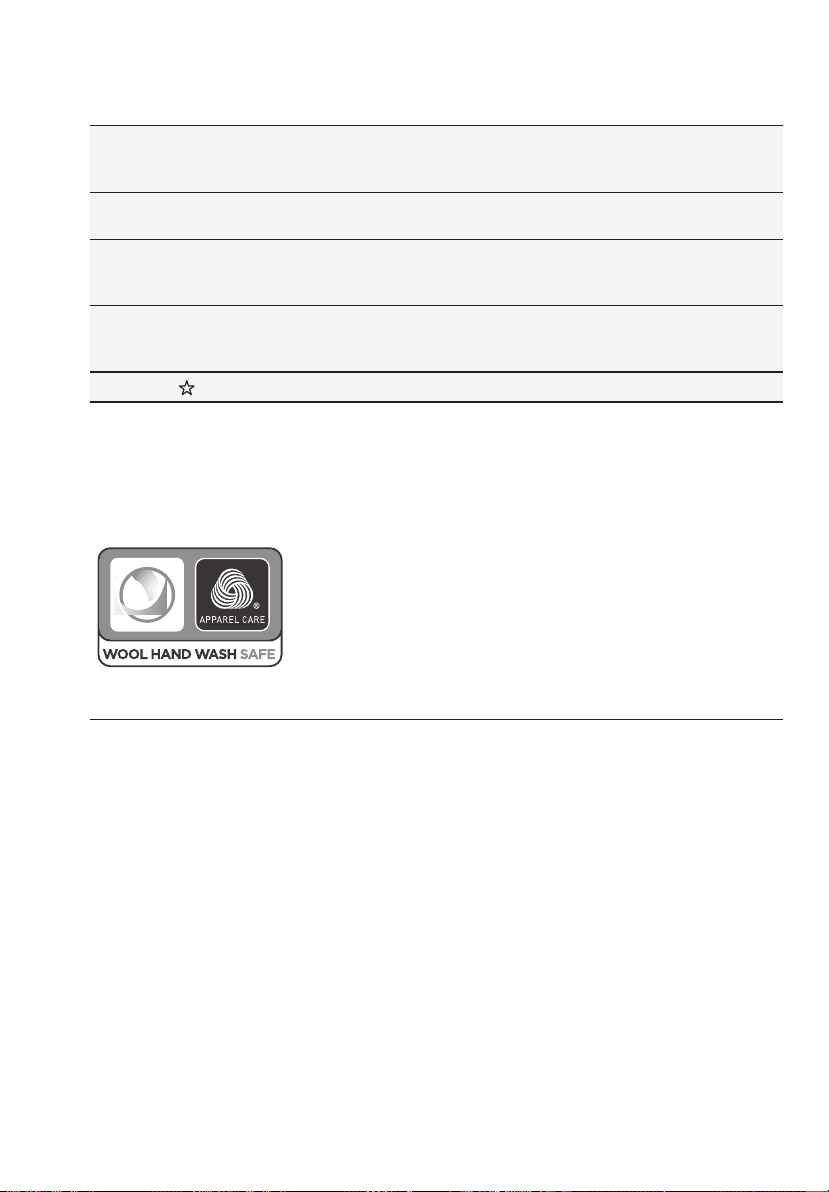
3.2 Program Chart
3.3 Program Options Compatibility
3.4 Options
3.5 Settings
3.6 Start/Pause ( ) and Add Clothes ( ) Touchpad
3.
CONTROL PANEL
........................................................................................... 10
............................................................................................................. 11
..................................................................................... 13
........................................................................................................................ 13
........................................................................................................................ 16
.................................................... 17
Adherence to the directions for use in this manual is extremely important for health and
safety. Failure to strictly adhere to the requirements in this manual may result in personal
injury, property damage and affect your ability to make a claim under the Electrolux
manufacturer’s warranty provided with your product. Products must be used, installed and
operated in accordance with this manual. You may not be able to claim on the Electrolux
manufacturer’s warranty in the event that your product fault is due to failure to adhere to
this manual.
IMPORTANT INFORMATION THAT MAY IMPACT YOUR
MANUFACTURER’S WARRANTY
Thank you for purchasing an Electrolux appliance. You’ve chosen a product that brings
with it decades of professional experience and innovation. Ingenious and stylish, it
has been designed with you in mind. So whenever you use it, you can be safe in the
knowledge that you’ll get great results every time. Welcome to Electrolux.
We recommend the use of original spare parts.When contacting Service, ensure that
you have the following data available. The information can be found on the rating plate.
Model, PNC, Serial Number.
Subject to change without notice.
Warning / Caution-Safety information.
General information and tips.
Environmental information.
Get usage advice, brochures, trouble shooting, service information, buy
accessories & spare parts, online product registration :
www.electrolux.com
WE’RE THINKING OF YOU
CUSTOMER CARE AND SERVICE
Visit our website to:
5.1 Loading The Laundry
5.2 Using Detergent And Additives
5.3 Options Setting
5.4 Starting A Cycle ( )
5.5 Interruption Of A Program
5.6 Changing A Program
5.7 Changing The Options
5.8 Opening The Door
5.9 At The End Of The Program
5.10 When The Washing Program Is Completed, But There Is Water In The Drum
5.11 AUTO Off Mode
5.
DAILY USE
.................................................................................................... 18
.................................................................................... 18
............................................................................................................ 19
.................................................................................................. 20
............................................................................................ 20
................................................................................................... 20
................................................................................................ 20
........................................................................................................ 20
........................................................................................ 21
......... 21
......................................................................................................... 21
6.1 Sorting The Laundry
6.2 Temperatures
6.3 Before Loading The Laundry
6.4 Maximum Loads
6.5 Removing Stains
6.6 Detergents Type And Quantity Of Detergent
6.
WASHING HINTS
.................................................................................................... 22
............................................................................................................... 22
........................................................................................ 22
........................................................................................................... 22
.......................................................................................................... 22
............................................................... 23
8.1 External Cleaning
8.2 Descaling
8.3 After Each Wash
8.4 Maintenance Wash
8.5 Cleaning The Dispenser Drawer
8.6 Cleaning The Drawer Recess
8.7 Cleaning The Pump
8.8 Cleaning The Water Inlet Filter
8.9 Frost Precautions
8.
CARE AND CLEANING
........................................................................................................ 25
..................................................................................................................... 25
.......................................................................................................... 25
...................................................................................................... 25
.................................................................................. 25
...................................................................................... 26
...................................................................................................... 26
.................................................................................... 28
......................................................................................................... 29
9.1 Possible Failures
9.2 Emergency Door Opening
9.
TROUBLESHOOTING
........................................................................................................ 30
........................................................................................... 33
4.
BEFORE FIRST USE
....................................................................................................... 17
7.
INTERNATIONAL WASH CODE SYMBOLS
................................................................ 24
10.
TECHNICAL DATA
.......................................................................................................... 34
11.1 Unpacking
11.2 Positioning
11.3 Water Inlet
11.4 Water Drainage
11.5 Electrical Connection
................................................................................................................... 34
.................................................................................................................. 36
.................................................................................................................. 37
......................................................................................................... 37
................................................................................................. 39
11.
INSTALLATION
12.1 Packaging Materials
12.2 Old Machine
12.3 Ecological Hints
.................................................................................................. 39
............................................................................................................... 39
......................................................................................................... 39
12.
ENVIRONMENT CONCERNS
13.1 Download and installing and configuring “Electrolux Life” App*.
13.2 Remote Start
................................. 40
......................................................................................................... 41
13.
WI-FI CONNECTIVITY SETUP

ENGLISH 3
CONTENTS
1.1 Conditions Of Use
1.2 Child Safety
1.3 General Safety
1.4 Installation
1.5 Use
1. SAFETY INFORMATION
........................................................................................................ 4
.................................................................................................................. 5
............................................................................................................. 5
.................................................................................................................... 6
.............................................................................................................................. 6
2.1 Parts
2.2 Accessories
2.3 Load Sensor
2.
PRODUCT DESCRIPTION
............................................................................................................................ 7
................................................................................................................. 8
................................................................................................................ 9
3.1 Control Panel Description
3.2 Program Chart
3.3 Program Options Compatibility
3.4 Options
3.5 Settings
3.6 Start/Pause ( ) and Add Clothes ( ) Touchpad
3.
CONTROL PANEL
........................................................................................... 10
............................................................................................................. 11
..................................................................................... 13
........................................................................................................................ 13
........................................................................................................................ 16
.................................................... 17
Adherence to the directions for use in this manual is extremely important for health and
safety. Failure to strictly adhere to the requirements in this manual may result in personal
injury, property damage and affect your ability to make a claim under the Electrolux
manufacturer’s warranty provided with your product. Products must be used, installed and
operated in accordance with this manual. You may not be able to claim on the Electrolux
manufacturer’s warranty in the event that your product fault is due to failure to adhere to
this manual.
IMPORTANT INFORMATION THAT MAY IMPACT YOUR
MANUFACTURER’S WARRANTY
5.1 Loading The Laundry
5.2 Using Detergent And Additives
5.3 Options Setting
5.4 Starting A Cycle ( )
5.5 Interruption Of A Program
5.6 Changing A Program
5.7 Changing The Options
5.8 Opening The Door
5.9 At The End Of The Program
5.10 When The Washing Program Is Completed, But There Is Water In The Drum
5.11 AUTO Off Mode
5.
DAILY USE
.................................................................................................... 18
.................................................................................... 18
............................................................................................................ 19
.................................................................................................. 20
............................................................................................ 20
................................................................................................... 20
................................................................................................ 20
........................................................................................................ 20
........................................................................................ 21
......... 21
......................................................................................................... 21
6.1 Sorting The Laundry
6.2 Temperatures
6.3 Before Loading The Laundry
6.4 Maximum Loads
6.5 Removing Stains
6.6 Detergents Type And Quantity Of Detergent
6.
WASHING HINTS
.................................................................................................... 22
............................................................................................................... 22
........................................................................................ 22
........................................................................................................... 22
.......................................................................................................... 22
............................................................... 23
8.1 External Cleaning
8.2 Descaling
8.3 After Each Wash
8.4 Maintenance Wash
8.5 Cleaning The Dispenser Drawer
8.6 Cleaning The Drawer Recess
8.7 Cleaning The Pump
8.8 Cleaning The Water Inlet Filter
8.9 Frost Precautions
8.
CARE AND CLEANING
........................................................................................................ 25
..................................................................................................................... 25
.......................................................................................................... 25
...................................................................................................... 25
.................................................................................. 25
...................................................................................... 26
...................................................................................................... 26
.................................................................................... 28
......................................................................................................... 29
9.1 Possible Failures
9.2 Emergency Door Opening
9.
TROUBLESHOOTING
........................................................................................................ 30
........................................................................................... 33
4.
BEFORE FIRST USE
....................................................................................................... 17
7.
INTERNATIONAL WASH CODE SYMBOLS
................................................................ 24
10.
TECHNICAL DATA
.......................................................................................................... 34
11.1 Unpacking
11.2 Positioning
11.3 Water Inlet
11.4 Water Drainage
11.5 Electrical Connection
................................................................................................................... 34
.................................................................................................................. 36
.................................................................................................................. 37
......................................................................................................... 37
................................................................................................. 39
11.
INSTALLATION
12.1 Packaging Materials
12.2 Old Machine
12.3 Ecological Hints
.................................................................................................. 39
............................................................................................................... 39
......................................................................................................... 39
12.
ENVIRONMENT CONCERNS
13.1 Download and installing and configuring “Electrolux Life” App*.
13.2 Remote Start
................................. 40
......................................................................................................... 41
13.
WI-FI CONNECTIVITY SETUP

4 www.electrolux.com
SAFETY INFORMATION
In the interest of your safety and to ensure the correct
use, before installing and first using the appliance, read
this user manual carefully, including its hints and
warnings.
This appliance is intended to be used in household and
similar applications such as:
farm houses;
by clients in hotels, motels, and other residential type
environments;
1.1 Conditions Of Use
To avoid unnecessary mistakes and accidents, it is
important to ensure that all people using the appliance
are thoroughly familiar with its operation and safety
features.
Save these instructions and make sure that they remain
with the appliance if it is moved or sold, so that everyone
using it through its life will be properly informed on
appliance use and safety.
1.
●
bed and breakfast type environtments;
●
areas for communal use in blocks of flats or in
launderettes.
●
staff kitchen areas in shops, offices and other working
environtment;
●
●
WARNING! The appliance must not be supplied
through an external switching device, such as timer,
or connected to a circuit that is regularly switched on
and off by utility.
●
●
●
●
This washing machine is not intended for use by
young children or infirm persons without supervision.
Young children should be supervised to ensure that
they do not play with the appliance.
The packaging components (e.g. plastic film,
polystyrene) can be dangerous to children - danger of
suffocation! Keep them out of children’s reach.
Keep all detergents in a safe place out of children’s
reach.
1.2 Child Safety
1.3 General Safety
It is dangerous to alter the specifica-
tions or attempt to modify this product
in any way.
During high temperature wash
program the door glass may get hot.
Do not touch it!
Make sure that small pets do not
climb into the drum. To avoid this,
please check inside the drum before
using the appliance.
Any objects such as coins, safety
pins, nails, screws, stones or any
other hard, sharp material can cause
extensive damage and must not be
placed into the machine.
Only use manufacturer’s
recommended quantities of fabric
softener and detergent. Damage to
the fabric or appliance can occur if
you exceed the recommended
amount.
Wash small items such as socks,
laces, washable belts etc in a
washing bag or pillow case as it is
possible for such items to slip down
between the tub and the inner drum.
Do not use your washing machine to
wash articles with whalebones,
material without hems or torn
material.
Make sure that children or pets do not climb into the
drum.
This machine is provided with child safety lock option
( ) to prevent children playing with the control panel.
(see page 16)
●
●
●
●
●
●
●
●
●
This appliance is not intended for use
by persons (including children) with
reduced physical, sensory or mental
capabilities, or lack of experience and
knowledge, unless they have been
given supervision or instruction
concerning use of the appliance by a
person responsible for their safety.
Always unplug the appliance and turn
off the water supply after use, clean
and maintenance.
●
●

ENGLISH 5
SAFETY INFORMATION
In the interest of your safety and to ensure the correct
use, before installing and first using the appliance, read
this user manual carefully, including its hints and
warnings.
This appliance is intended to be used in household and
similar applications such as:
farm houses;
by clients in hotels, motels, and other residential type
environments;
1.1 Conditions Of Use
To avoid unnecessary mistakes and accidents, it is
important to ensure that all people using the appliance
are thoroughly familiar with its operation and safety
features.
Save these instructions and make sure that they remain
with the appliance if it is moved or sold, so that everyone
using it through its life will be properly informed on
appliance use and safety.
1.
●
bed and breakfast type environtments;
●
areas for communal use in blocks of flats or in
launderettes.
●
staff kitchen areas in shops, offices and other working
environtment;
●
●
WARNING! The appliance must not be supplied
through an external switching device, such as timer,
or connected to a circuit that is regularly switched on
and off by utility.
●
●
●
●
This washing machine is not intended for use by
young children or infirm persons without supervision.
Young children should be supervised to ensure that
they do not play with the appliance.
The packaging components (e.g. plastic film,
polystyrene) can be dangerous to children - danger of
suffocation! Keep them out of children’s reach.
Keep all detergents in a safe place out of children’s
reach.
1.2 Child Safety
1.3 General Safety
It is dangerous to alter the specifica-
tions or attempt to modify this product
in any way.
During high temperature wash
program the door glass may get hot.
Do not touch it!
Make sure that small pets do not
climb into the drum. To avoid this,
please check inside the drum before
using the appliance.
Any objects such as coins, safety
pins, nails, screws, stones or any
other hard, sharp material can cause
extensive damage and must not be
placed into the machine.
Only use manufacturer’s
recommended quantities of fabric
softener and detergent. Damage to
the fabric or appliance can occur if
you exceed the recommended
amount.
Wash small items such as socks,
laces, washable belts etc in a
washing bag or pillow case as it is
possible for such items to slip down
between the tub and the inner drum.
Do not use your washing machine to
wash articles with whalebones,
material without hems or torn
material.
Make sure that children or pets do not climb into the
drum.
This machine is provided with child safety lock option
( ) to prevent children playing with the control panel.
(see page 16)
●
●
●
●
●
●
●
●
●
This appliance is not intended for use
by persons (including children) with
reduced physical, sensory or mental
capabilities, or lack of experience and
knowledge, unless they have been
given supervision or instruction
concerning use of the appliance by a
person responsible for their safety.
Always unplug the appliance and turn
off the water supply after use, clean
and maintenance.
●
●
6 www.electrolux.com
Never use the washing machine if
the power supply cable, the control
panel, the working surface or the
base are damaged so that the inside
of the washing machine is accessi-
ble.
This appliance is heavy. Care should
be taken when moving it.
When unpacking the appliance, check
that it is not damaged. If in doubt, do
not use it and contact the Service
Centre.
All packing and transit bolts must be
removed before use. Serious damage
can occur to the product and to
property if this is not adhered to. See
relevant section in the user manual.
Under no circumstances should you
attempt to repair the machine
yourself. Repairs carried out by
inexperienced persons may cause
injury or serious malfunctioning.
Contact your local Service Centre.
Always insist on genuine spare parts.
1.4 Installation
After having installed the appliance,
check that it is not standing on the
inlet and drain hose and the worktop
is not pressing the electrical supply
cable.
If the appliance is installed on a
carpeted floor, please adjust the feet
in order to allow air to circulate freely.
Always be sure, that there is no water
leakage from hoses and their
connections after the installation.
Any plumbing work required to install
this appliance should be carried out
by a qualified plumber.
Any electrical work required to install
this appliance should be carried out
by a qualified electrician.
Only wash fabrics which are
designed to be machine washed.
Follow the instructions on each
garment label.
Do not overload the appliance. See
the relevant section in the user
manual.
Before washing, ensure that all
pockets are empty and buttons and
zips are fastened. Avoid washing
frayed or torn articles and treat stains
such as paint, ink, rust, and grass
before washing.
Garments which have been in
contact with volatile petroleum
products should not be machine
washed. If volatile cleaning fluids are
used, care should be taken to ensure
that the fluid is removed from the
garment before placing in the
machine.
Never pull the power supply cable to
remove the plug from the socket;
always take hold of the plug itself.
1.5 Use
●
●
●
●
●
●
●
●
●
●
●
●
●
●
●
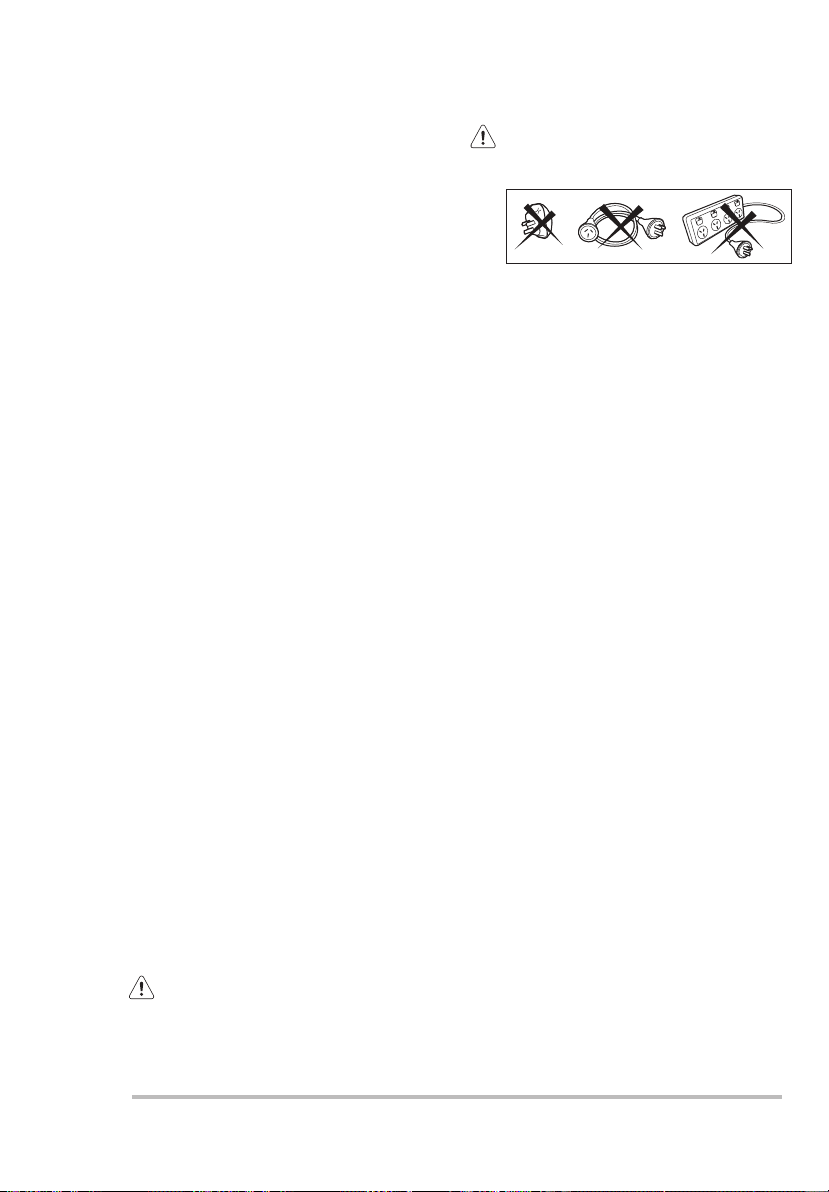
May cause electric shock! if the
machine is not connected to an
earthed/ground system. DO NOT
touch the wet clothes and metal
parts.
For safety reasons do not use
double adaptors, extension
cords and multi-plug adapters.
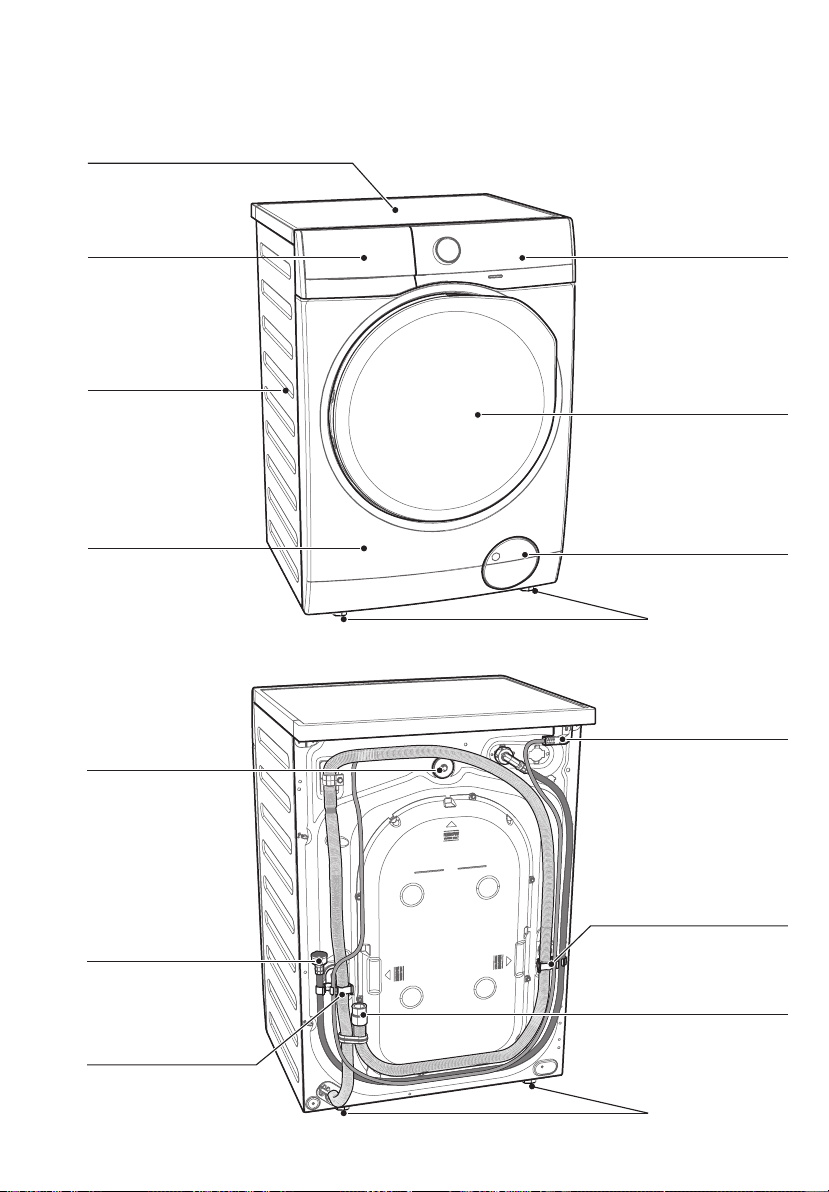
PRODUCT DESCRIPTION2.
Detergent/Softener
Dispenser
(see page 18)
Cabinet
Front Panel
Door
Drain Pump Filter
(see page 26)
Level Adjustment
Feet (Front)
Level Adjustment
Feet (Back)
Water Inlet Hose
(see page 37)
Transit Bolts &
Hose Support
Transit Bolts &
Hose Support
Mains Cable
Water Drain Hose
(see page 37)
2.1 Parts
Worktop
Control Panel
(see page 10)
Transit Bolts
ENGLISH 7
Never use the washing machine if
the power supply cable, the control
panel, the working surface or the
base are damaged so that the inside
of the washing machine is accessi-
ble.
This appliance is heavy. Care should
be taken when moving it.
When unpacking the appliance, check
that it is not damaged. If in doubt, do
not use it and contact the Service
Centre.
All packing and transit bolts must be
removed before use. Serious damage
can occur to the product and to
property if this is not adhered to. See
relevant section in the user manual.
Under no circumstances should you
attempt to repair the machine
yourself. Repairs carried out by
inexperienced persons may cause
injury or serious malfunctioning.
Contact your local Service Centre.
Always insist on genuine spare parts.
1.4 Installation
After having installed the appliance,
check that it is not standing on the
inlet and drain hose and the worktop
is not pressing the electrical supply
cable.
If the appliance is installed on a
carpeted floor, please adjust the feet
in order to allow air to circulate freely.
Always be sure, that there is no water
leakage from hoses and their
connections after the installation.
Any plumbing work required to install
this appliance should be carried out
by a qualified plumber.
Any electrical work required to install
this appliance should be carried out
by a qualified electrician.
Only wash fabrics which are
designed to be machine washed.
Follow the instructions on each
garment label.
Do not overload the appliance. See
the relevant section in the user
manual.
Before washing, ensure that all
pockets are empty and buttons and
zips are fastened. Avoid washing
frayed or torn articles and treat stains
such as paint, ink, rust, and grass
before washing.
Garments which have been in
contact with volatile petroleum
products should not be machine
washed. If volatile cleaning fluids are
used, care should be taken to ensure
that the fluid is removed from the
garment before placing in the
machine.
Never pull the power supply cable to
remove the plug from the socket;
always take hold of the plug itself.
1.5 Use
●
●
●
●
●
●
●
●
●
●
●
●
●
●
●
May cause electric shock! if the
machine is not connected to an
earthed/ground system. DO NOT
touch the wet clothes and metal
parts.
For safety reasons do not use
double adaptors, extension
cords and multi-plug adapters.
PRODUCT DESCRIPTION2.
Detergent/Softener
Dispenser
(see page 18)
Cabinet
Front Panel
Door
Drain Pump Filter
(see page 26)
Level Adjustment
Feet (Front)
Level Adjustment
Feet (Back)
Water Inlet Hose
(see page 37)
Transit Bolts &
Hose Support
Transit Bolts &
Hose Support
Mains Cable
Water Drain Hose
(see page 37)
2.1 Parts
Worktop
Control Panel
(see page 10)
Transit Bolts
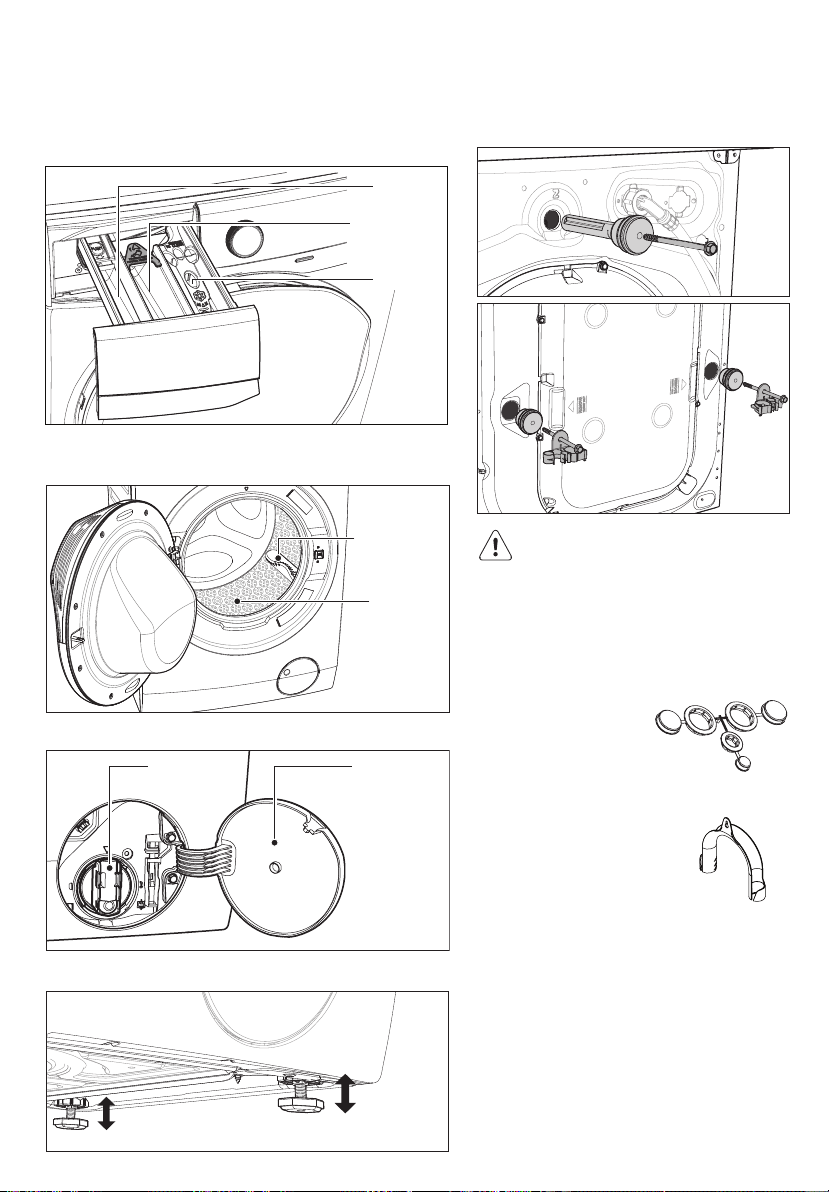
Drain Pump
Filter Door
2.2 Accessories
To connect the drain hose
on the edge of a sink.
To close the holes on
the rear side of the
cabinet after the
removal of the transit
bolts.
Plastic Caps
Plastic Hose Guide
Drain Pump
Filter
Detergent/Softener Dispenser
(For more informations, see page 18, 25)
Transit Bolt (when remove)
Transit bolts must be removed
before using the appliance.
Drain Pump Filter (when open)
Level Adjustment Feet
Drum Lifter
Stainless
Steel
Washing
Drum
Door (when open)
(for more informations, see page 18)
Softener
Prewash
Main Wash
8 www.electrolux.com
ENGLISH 9
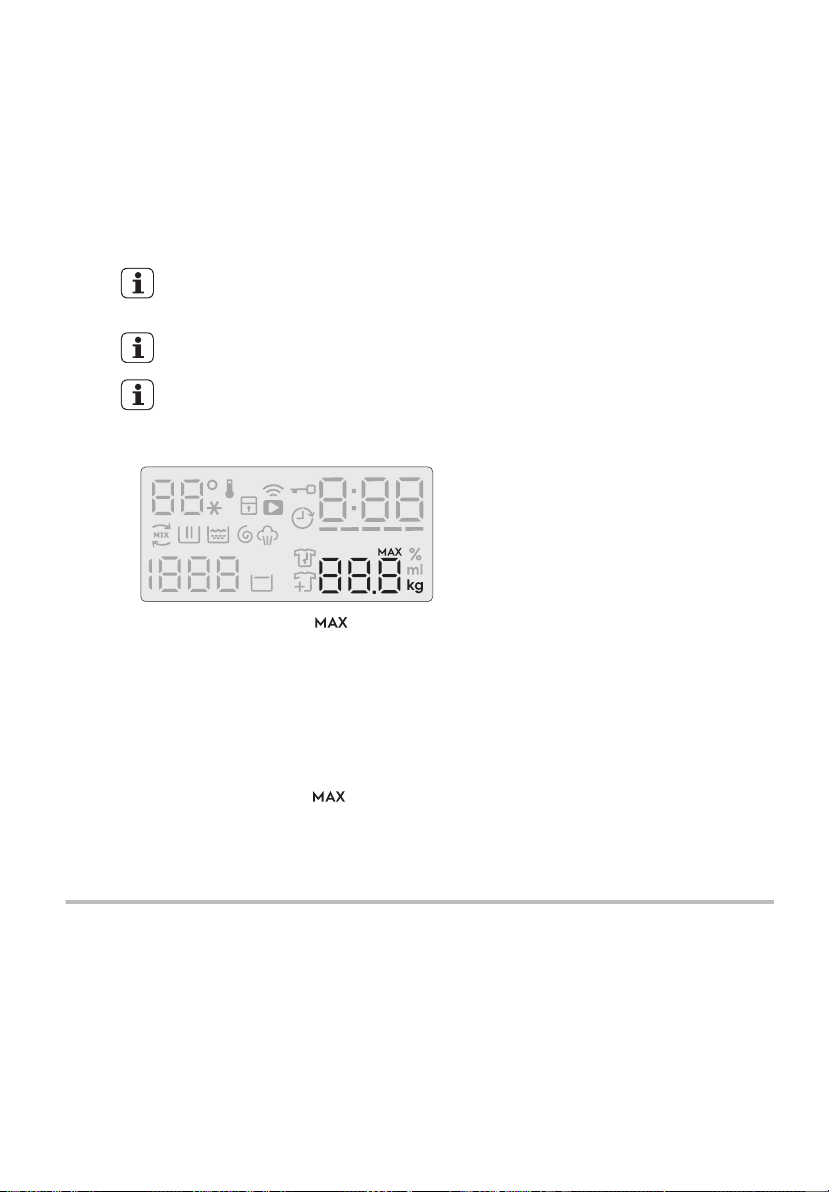
2.3 Load Sensor
This machine has “Load Sensing Device”
which shows how much load you put in
the machine and maximum load
recommended for selected wash
program.
The display will show “ ” when
max limit is reached for selected
program.
On the display, the weight of the
laundry updates by 0.5 kg steps.
The weight is a general indication that
changes with the type of the laundry.
The weight shown on display is
an approximate weight only.
For correct operation of the load
sensor, activate the appliance
and set a wash program BEFORE
loading the laundry in the drum.
The display shows these
indicators when the door is
open.
-
-
-
If you exceed the max weight limit of a
program, the symbol “ ” will start
flashing as long as the load in the
drum is more than recommended load,
even after the door is closed.
-
10 www.electrolux.com
3. CONTROL PANEL
3.1 Control Panel Description
Control Panel
2s 2s
ABCD
OP
EFG
HI JKLM N
A
Program knob I
Temp touchpad
B
On/Off button J
Display
C
SensorWash touchapd
K
Delay End touchpad
D
Stain touchpad
L
Time Manager touchpad
E
Hygienic Care touchpad
M
Pause to add Clothes option
F
Prewash touchpad
N
Start/Pause touchpad
G
Remote touchpad
O
Favourite program save option
H
Spin touchpad
P
Child safety lock option
Display
M
L
K
JIH
A
A
B
B
C
C
D
D
G
E
F
ABCD
F Time Manager Level
G Maximum Load Capacity Of
Selected Program
H Add Clothes Icon
I Anticrease Phase Icon (* only
washer-dryer models)
J Rinse Hold Icon
K Spin Speed
L Program Phase Indication Icon:
Ultramix phase, Wash phase,
Rinse phase, Spin phase,
Vapour phase
M Temperature (Symbol “
”
represents Cold water)
A Child Lock Icon
B Remote Icon
C Delay End Icon
D Door Lock Icon
E Program Duration / Delay End Time /
Alarm Code
ENGLISH 11
3.2 Program Chart
Display
M
L
K
JIH
A
A
B
B
C
C
D
D
G
E
F
ABCD
F Time Manager Level
G Maximum Load Capacity Of
Selected Program
H Add Clothes Icon
I Anticrease Phase Icon (* only
washer-dryer models)
J Rinse Hold Icon
K Spin Speed
L Program Phase Indication Icon:
Ultramix phase, Wash phase,
Rinse phase, Spin phase,
Vapour phase
M Temperature (Symbol “ ”
represents Cold water)
A Child Lock Icon
B Remote Icon
C Delay End Icon
D Door Lock Icon
E Program Duration / Delay End Time /
Alarm Code
Program;
Temperature
range
Max. Spin
Speed
Max. Load
1)
(Dry Clothes)
Type of load and soil level
Cottons
Cold to 90°C
1400 rpm Max. White and coloured cotton. (Adjust wash
time according to soil level. See Time
Manager table on page 14)
Mixed
Cold to 60°C
1200 rpm 4 kg Synthetic or mixed fabric items. (Adjust
wash time according to soil level. See Time
Manager table on page 14)
Delicates
Cold to 40°C
1200 rpm 4 kg Delicate fabrics such as acrylics, viscose,
polyester items. (Adjust wash time
according to soil level. See Time Manager
table on page 14)
Bedding
Cold to 60°C
800 rpm 3 kg Special program for one synthetic blanket,
duvet, bedspread and so on. (Adjust wash
time according to soil level. See Time
Manager table on page 14)
Vapour
Refresh
- 1.5 kg This cycle removes odours and helps to
dewrinkle the laundry.
Do not add detergent.
Energy
Saver
2)
40°C, 60°C
1400 rpm Max. White and colourfast cotton. Set this
program to have a good washing results
and decrease the energy consumption. The
time of the washing program is extended.
App
Program
- - You can send any additional program from
Mobile Application to store at this program
position and can recall to using it everytime
when you rotate program knob to this
position. This can be done through the App.
Program “Outdoor” is the default stored
program from factory.
Spin 1400 rpm Max. To spin the laundry and drain the water in
the drum.
Rinse + Spin 1400 rpm Max. To rinse and spin the laundry.
Baby Care
Cold to 40°C
1200 rpm 4 kg Baby cotton clothes and delicate knitting
items with normal soil.
Wool
Cold to 40°C
1200 rpm 2 kg Specially tested program for woollen
garments bearing the “Pure new woollen,
non-shrink, machine washable” label.
12 www.electrolux.com
Program;
Temperature
range
Max. Spin
Speed
Max. Load
1)
(Dry Clothes)
Type of load and soil level
Quick 15
Cold to 30°C
1200 rpm 1.5 kg Lightly soiled synthetics or mixed fabrics.
Daily 39
30°C to 40°C
1200 rpm 5.5 kg Daily wear coloured cotton clothes such as
shirts, blouses, towels and undergarments.
Ideal for low level of soil.
Full Wash 60
30°C to 60°C
1400 rpm Max. Daily wear coloured cotton clothes such as
shirts, blouses, towels and undergarments.
Ideal for normal level of soil.
Favourite
- - Recall your favourite program.
1) Maximum capacity depended on the model of the Washing Machine (see dened on
the control panel)
2) Energy Saver Program with 60degC option selected is recommended for a full load of
normally soiled cotton and is the Energy and Water rating label program.
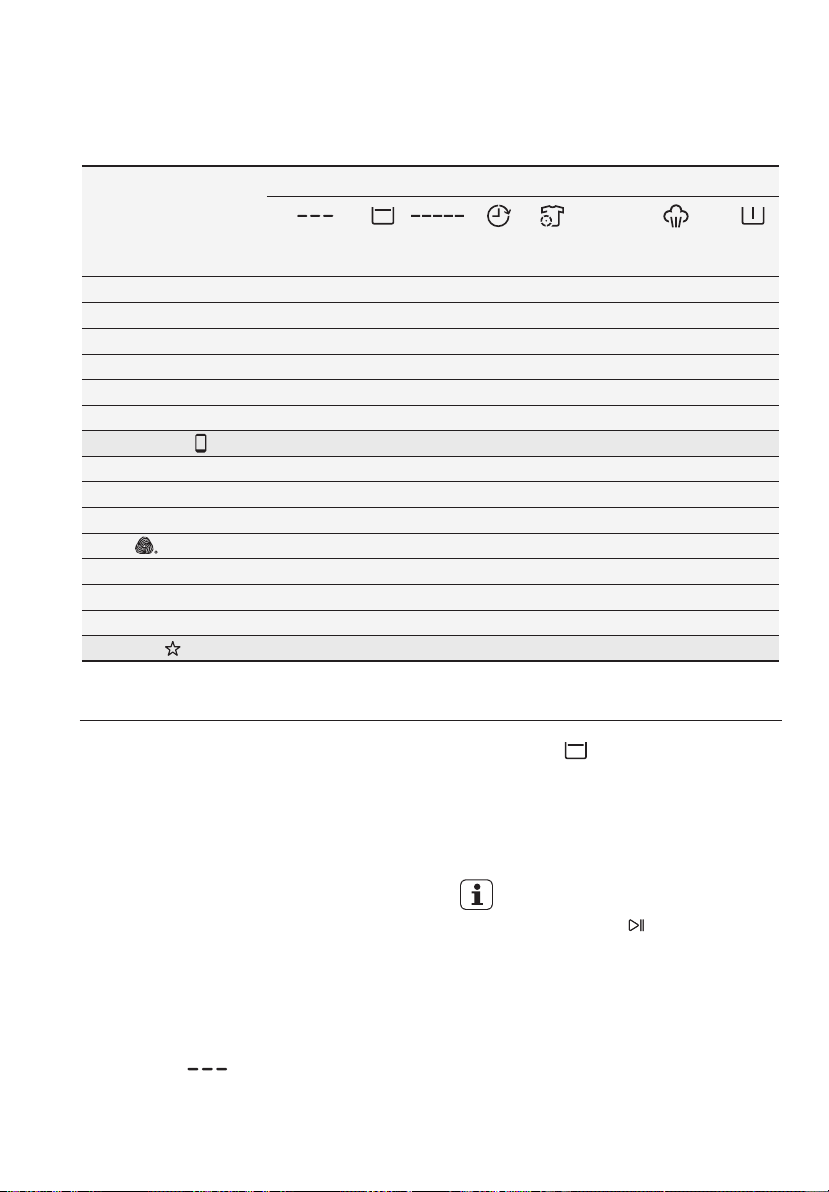
Woolmark Apparel Care - Blue
The wool wash cycle of this machine has been approved by
The Woolmark Company for the washing of wool garments
labelled as “hand wash” provided that the garments are
washed according
to the instructions issued by the manufacturer of this
washing machine. Follow the garment care label for drying
and other laundry instructions. M1361
The Woolmark symbol is a Certication mark in many
countries.
ENGLISH 13
The door stays locked with the water
in the drum. To continue the cycle,
you must press (Start/Pause).
Temperature Touchpad
Press this touchpad repeatedly to increase
or decrease the wash temperature if you
want your laundry to be washed at a
temperature different from the one
proposed by the washing machine.
Spin Selection Touchpad
●
●
Press this touchpad repeatedly to increase
or decrease the spin speed or select Rinse
Hold, if you want your laundry to be spun
at a speed different from the one proposed
by the washing machine.
No spin option eliminates all the spin
phases and increase the number of
rinses.
No Spin ( )
By selecting this option the water of the last
rinse is not emptied out and the drum turns
regularly to prevent the laundry creases.
The door is still locked to indicate that the
water must be emptied out.
Rinse Hold ( )
3.4 Options
Program
Option
Cottons
Mixed
Bedding
Energy Saver
Vapour Refresh
Spin
Rinse + Spin
Baby Care
Quick 15
Daily 39
Wool
Delicates
Favourite
Full Wash 60
■
■
■
■
■
■
■
■
■
■
■
■
■
■
■
■
■
■
■
■
■
■
■
■
■
■
■
■
■
■
■
■
■
■
■
■
■
■
■
■
■
■
■
■
■
■
■
■
■
■
■
■
■
■
■
■
App Program
■
■
2)
1)
Time
Manager
PrewashStainDelay
End
Hygienic
Care
Sensor
Wash
No
Spin
Rinse
Hold
■■ ■
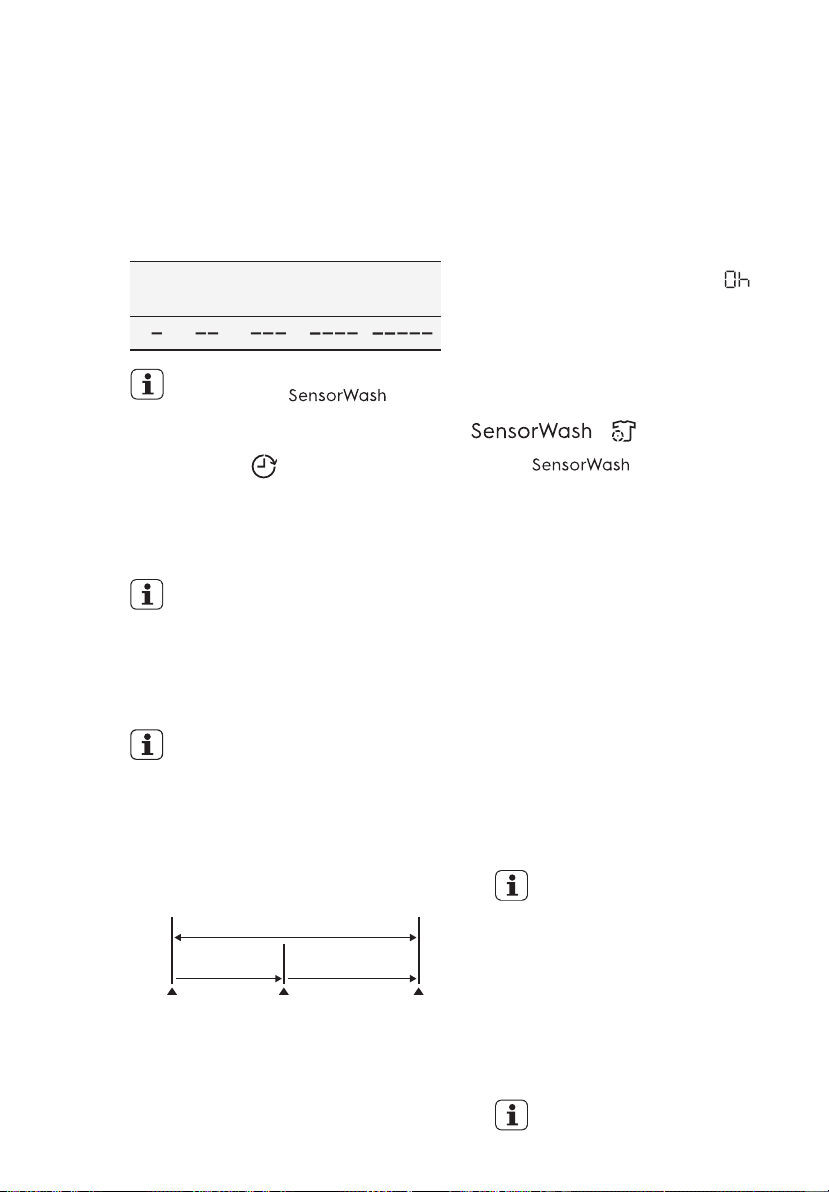
3.3 Program Options Compatibility
1) “Hygienic Care” option can be combined with temperature 40 to 90 °C only.
2) “Stain” option can be combined with temperature 40 to 90 °C only.
14 www.electrolux.com
Delay End ( ) Touchpad
Time Manager
This option allows you to adjust the wash
time. Press this touchpad repeatedly to
decrease or increase the wash time
according to the soil level of your wash.
Use the table below as a guide.
Before you start the program, this option
makes it possible to define the end of the
washing program from minimum of 1 hour
to maximum of 20 hours.
If program duration is longer than
3 hours, minimum Delay End
option starts from 4 hours.
Time Manager function is not
available when is on.
After selecting Delay End time, press
Start/Pause touchpad to start the
program. Machine will then countdown
and update time on the display every
hours until it reaches the starting point of
the wash cycle.
Press the Delay End touchpad to choose
the end time as you wish. The display
shows the number of hours and the
indicator beside the touchpad is on.
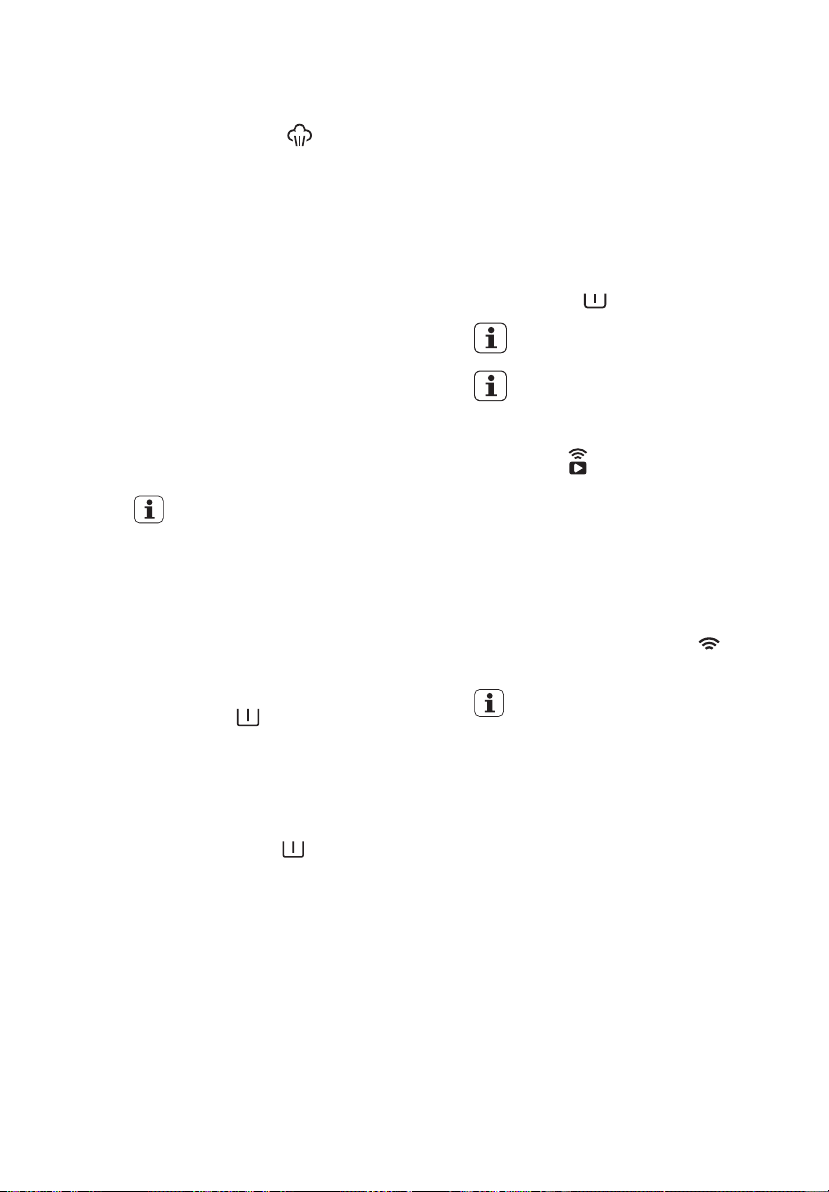
For example, if the program duration of
your selected program is 3.20 hours and
you define the “Delay End” time to 6
hours. This means your wash program
will finish in 6 hours. (See diagram)
3.20 hrs.2.40 hrs.
Working Cycle
“Delay End” Time : 6 hrs.
Pressed
Start/Pause
End of
Cycle
Start the
Program
Countdown
This option must be selected after
choosing the wash program, and
before pressing the “Start/Pause”
touchpad.
If you wish to modify or cancel Delay End
option after starting the program, follow
the steps below:
set the washing machine to PAUSE by
pressing “Start/Pause” touchpad;
–
press the “Start/Pause” to start the
program.
–
deselect this option by pressing
“Delay End” touchpad repeatedly till
the display shows delay time “ ”;
–
Soil Level
>>LightMedium>>Heavy
( ) Touchpad
Select “ ” option to turn ON
the sensors for the dirt and detergent
residue.
The initial time displayed on the
control panel indicates the time
needed for the maximum dirt
level.
When using this option, the washing
machine will automatically check the dirt
level and detergent residue* on your
laundry. The machine will automatically
adjust the washing time and numbers of
rinses according to the load to make sure
that your clothes are really clean.
The SensorWash technology consist of 2
different sensors for detection:
1) The 1
st
Turbidity sensor detects the
dirt level at the start of cycle and
automatically calculates the actual
time needed to remove the level of dirt
in the wash; from low dirt levels all the
way to the maximum dirt level.
Please see details of detergent
usage at “Detergents Type and
Quantity of Detergent”
2) The 2
nd
Conductivity sensor will check
the amount of detergent residue after
the first rinse and the machine will
calculate the optimum number of
rinses (Maximum addition of 2 rinses)
needed to make sure that the
detergent residue is properly removed.
* Only for liquid detergent
ENGLISH 15
Prewash ( ) Touchpad
Select this option if you wish your laundry
to be pre-washed before the main wash.
Use this option for heavy soil. The
indicator of this option will be on.
Stain Touchpad
Press this touchpad to add the stain
phase to a program. The indicator of this
option comes on.
Use this function for laundry with hard
stains to remove.
When you set this function, put the stain
remover into “ ” compartment.
Select this option to add approximately
30 minutes of tumbling in vapour after
the rinse cycle. The indicator of this
option will be on.
Hygienic Care ( ) Touchpad
Vapour may not necessarily be visible
inside the drum during a vapour cycle.
Vapour is created below the drum and
allowed to naturally rise into the
clothes.
At the end of the Vapour cycle, the
clothes will be warmer, softer and
detached from the drum.
If Vapour option is selected, rinse
temperatures will be elevated.
During a vapour cycle, you may notice
vapour exiting from the drain hose of the
washing machine, this is normal and
there is no cause for alarm.
Vapour may not be present during the
entire vapour cycle.
Vapour function is more effective with
half load.
NOTE
When you set this function, put the
detergent into the “ ” compartment.
This function increases the program
duration.
●
●
●
●
This function increases the program
duration.
Stain option can be combined with
temperature 40 to 90 °C only.
Remote ( ) Touchpad
This option allows you to connect
washing machine to Wi-Fi network and
to link it to your smart phone.
By this functionality you can receive
notifications, control and monitor your
washing machine from your mobile
devices.
Please refer to Chapter “13. WI-FI
CONNECTIVITY SETUP”.
When the door is open, remote
functions are disabled.
16 www.electrolux.com
Save Favourite ( ) Program
3.5 Settings
Child Safety Lock ( ) Option
Your appliance is provided with CHILD
SAFETY LOCK which permits you to
leave the appliance unsupervised with
the door closed without having to worry
that children might be injured by or cause
damage to the appliance.
Set this option after pressing the
Start/Pause touchpad.
To activate the function, press and
hold “Hygienic Care” touchpad about
2 seconds until the display shows the
icon “ ”.
To set “Child Lock” option:
This setting permits you to either enable
or disable the buzzer at the end of the
program. As an example, you might wish
to disable this buzzer when you start a
wash when going to bed, so that when the
wash finished approximately 1 hour later,
it will not disturb you through the night.
Error warning beeps such as critical
faults are not disabled.
Enabling/Disabling End-Of-Wash
Buzzer
To deactivate the function, press and
hold “Hygienic Care” touchpad about
2 seconds until the icon “ ” goes off.
This function remains enabled
even after the appliance is
switched off.
The touchpads are locked
(except for the On/Off button).
●
●
To disable the buzzer sound, press
“SensorWash ( ) and Stain”
touchpads at the same time about
3 seconds, the icon “ ” will show
on display along with buzzer sound.
To return to default configuration press
these 2 touchpads at the same time
about 3 seconds, the icon “ ” will
show on display along with buzzer
sound.
●
●
Program settings that are frequently used
can be saved (e.g. Cotton, 60°C, 1200
rpm, with Prewash and Hygienic Care).
To program/re-program Favourite with
your own selections and save them,
proceed as follows:
If you press any touchpad while
Child Lock is activated, the icon
“ ” will flash on display 3 times
along with buzzer sound.
App Program cycle cannot be
saved as a Favourite on the
appliance.
To recall the favourite wash program,
turn selector knob to “Favourite ”
program. You will get acknowledgement
on the screen when the Favourite
program is loaded.
1. Put machine in Stand-By mode.
2. Select your desired wash settings.
3. To save favourite program, press and
hold “Stain” touchpad about
2 seconds and you will hear “Bip, Bip”
sound and “Favourite” LED is flashing.
3.6 Start/Pause ( ) and
Add Clothes ( ) Touchpad
This touchpad has 2 functions:
Start/Pause ( )1.
To interrupt a program which is
running, press this touchpad to pause
the machine, the Start/Pause pilot light
flashes.
After you have selected the desired
program and options, press this
touchpad to start the machine. The
Start/Pause pilot light will stop flashing
and remain lit until the water level is
above the bottom edge of the door
then pilot light goes OFF. If you have
selected a “Delay End” option, the
countdown will begin and will be
shown on the display.
BEFORE FIRST USE4.
Ensure that the electrical and water
connections comply with the
installation instructions.
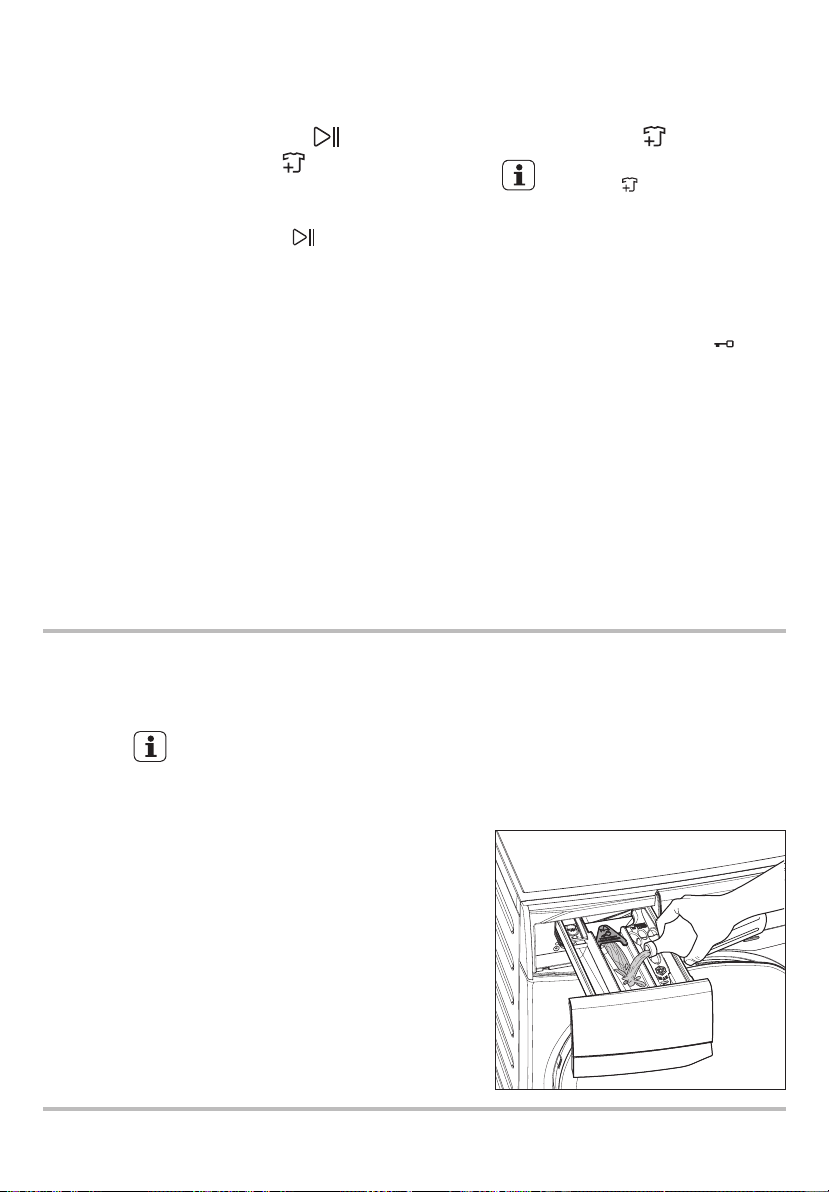
Put 2 litres of water in the detergent
compartment for washing phase. This
activates the drain system.
1.
2.
3.
Select a Cottons cycle at 90 °C,
without any laundry in the machine, to
remove any manufacturing residue
from the drum and tub then start the
machine.
To restart the program from the point
at which it was interrupted, press this
touchpad again, the Start/Pause pilot
light will stop flashing.
Add Clothes ( )2.
To add clothes:
Pressing the “Start/Pause”
touchpad to pause the program.
You can only add clothes when
the icon “ ” shown on the
display.
1.
2.
Resume the program by pressing
“Start/Pause” touchpad again.
4.
Add clothing and close the door.
3.
During installation or before first use
you may observe some water in the
machine. This is a residual water left in
the machine after a full functional test
in the factory to ensure the machine is
delivered to customers in perfect
working order and is no cause for
concern.
NOTE
Wait for the machine to come to a
complete stop before opening the
door (wait for door lock “ ” icon
to turn off).
ENGLISH 17
Save Favourite ( ) Program
3.5 Settings
Child Safety Lock ( ) Option
Your appliance is provided with CHILD
SAFETY LOCK which permits you to
leave the appliance unsupervised with
the door closed without having to worry
that children might be injured by or cause
damage to the appliance.
Set this option after pressing the
Start/Pause touchpad.
To activate the function, press and
hold “Hygienic Care” touchpad about
2 seconds until the display shows the
icon “ ”.
To set “Child Lock” option:
This setting permits you to either enable
or disable the buzzer at the end of the
program. As an example, you might wish
to disable this buzzer when you start a
wash when going to bed, so that when the
wash finished approximately 1 hour later,
it will not disturb you through the night.
Error warning beeps such as critical
faults are not disabled.
Enabling/Disabling End-Of-Wash
Buzzer
To deactivate the function, press and
hold “Hygienic Care” touchpad about
2 seconds until the icon “ ” goes off.
This function remains enabled
even after the appliance is
switched off.
The touchpads are locked
(except for the On/Off button).
●
●
To disable the buzzer sound, press
“SensorWash ( ) and Stain”
touchpads at the same time about
3 seconds, the icon “ ” will show
on display along with buzzer sound.
To return to default configuration press
these 2 touchpads at the same time
about 3 seconds, the icon “ ” will
show on display along with buzzer
sound.
●
●
Program settings that are frequently used
can be saved (e.g. Cotton, 60°C, 1200
rpm, with Prewash and Hygienic Care).
To program/re-program Favourite with
your own selections and save them,
proceed as follows:
If you press any touchpad while
Child Lock is activated, the icon
“ ” will flash on display 3 times
along with buzzer sound.
App Program cycle cannot be
saved as a Favourite on the
appliance.
To recall the favourite wash program,
turn selector knob to “Favourite ”
program. You will get acknowledgement
on the screen when the Favourite
program is loaded.
1. Put machine in Stand-By mode.
2. Select your desired wash settings.
3. To save favourite program, press and
hold “Stain” touchpad about
2 seconds and you will hear “Bip, Bip”
sound and “Favourite” LED is flashing.
3.6 Start/Pause ( ) and
Add Clothes ( ) Touchpad
This touchpad has 2 functions:
Start/Pause ( )1.
To interrupt a program which is
running, press this touchpad to pause
the machine, the Start/Pause pilot light
flashes.
After you have selected the desired
program and options, press this
touchpad to start the machine. The
Start/Pause pilot light will stop flashing
and remain lit until the water level is
above the bottom edge of the door
then pilot light goes OFF. If you have
selected a “Delay End” option, the
countdown will begin and will be
shown on the display.
BEFORE FIRST USE4.
Ensure that the electrical and water
connections comply with the
installation instructions.
Put 2 litres of water in the detergent
compartment for washing phase. This
activates the drain system.
1.
2.
3.
Select a Cottons cycle at 90 °C,
without any laundry in the machine, to
remove any manufacturing residue
from the drum and tub then start the
machine.
To restart the program from the point
at which it was interrupted, press this
touchpad again, the Start/Pause pilot
light will stop flashing.
Add Clothes ( )2.
To add clothes:
Pressing the “Start/Pause”
touchpad to pause the program.
You can only add clothes when
the icon “ ” shown on the
display.
1.
2.
Resume the program by pressing
“Start/Pause” touchpad again.
4.
Add clothing and close the door.
3.
During installation or before first use
you may observe some water in the
machine. This is a residual water left in
the machine after a full functional test
in the factory to ensure the machine is
delivered to customers in perfect
working order and is no cause for
concern.
NOTE
Wait for the machine to come to a
complete stop before opening the
door (wait for door lock “ ” icon
to turn off).
18 www.electrolux.com
DAILY USE5.
Press the On/Off button to turn on the
washing machine. Turn the knob to
set a program. The washing machine
will propose a temperature and
automatically select the spin value
provided for the program you have
chosen.
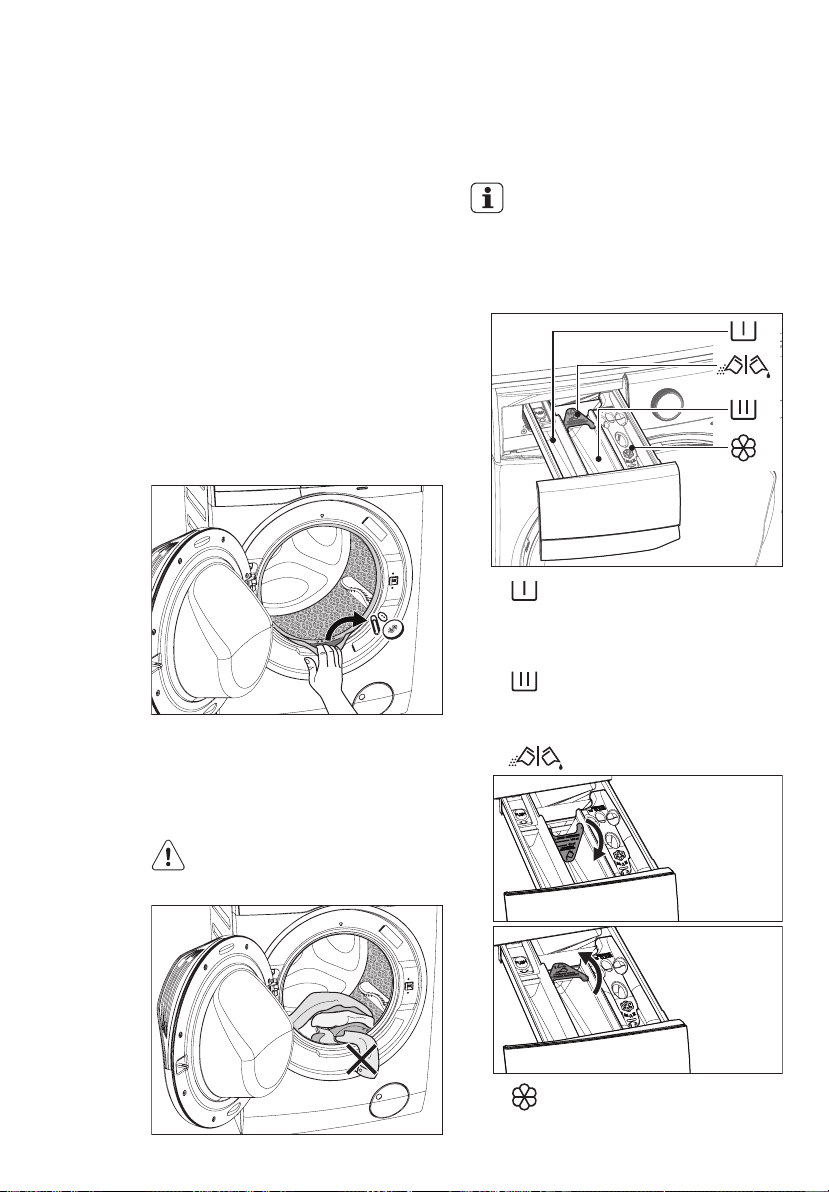
Check and remove objects (if there
are any) that could be trapped in the
fold.
1.
2.
5.1 Loading The Laundry
Connect the main plug to the main
socket.
Turn the water tap on.
3.
Place the laundry in the drum, one
item at a time, shaking them out as
much as possible. (Refer to page 22
“WASHING HINTS”)
5.
Close the door.
6.
4.
Make sure that no laundry
remains between the seal and
the door.
IMPORTANT: Please read
“Detergents Type and Quantity of
Detergent”on page 23 before use.
5.2 Using Detergent And
Additives
The selector knob can be turned either
clockwise or counter-clockwise.
●
●
●
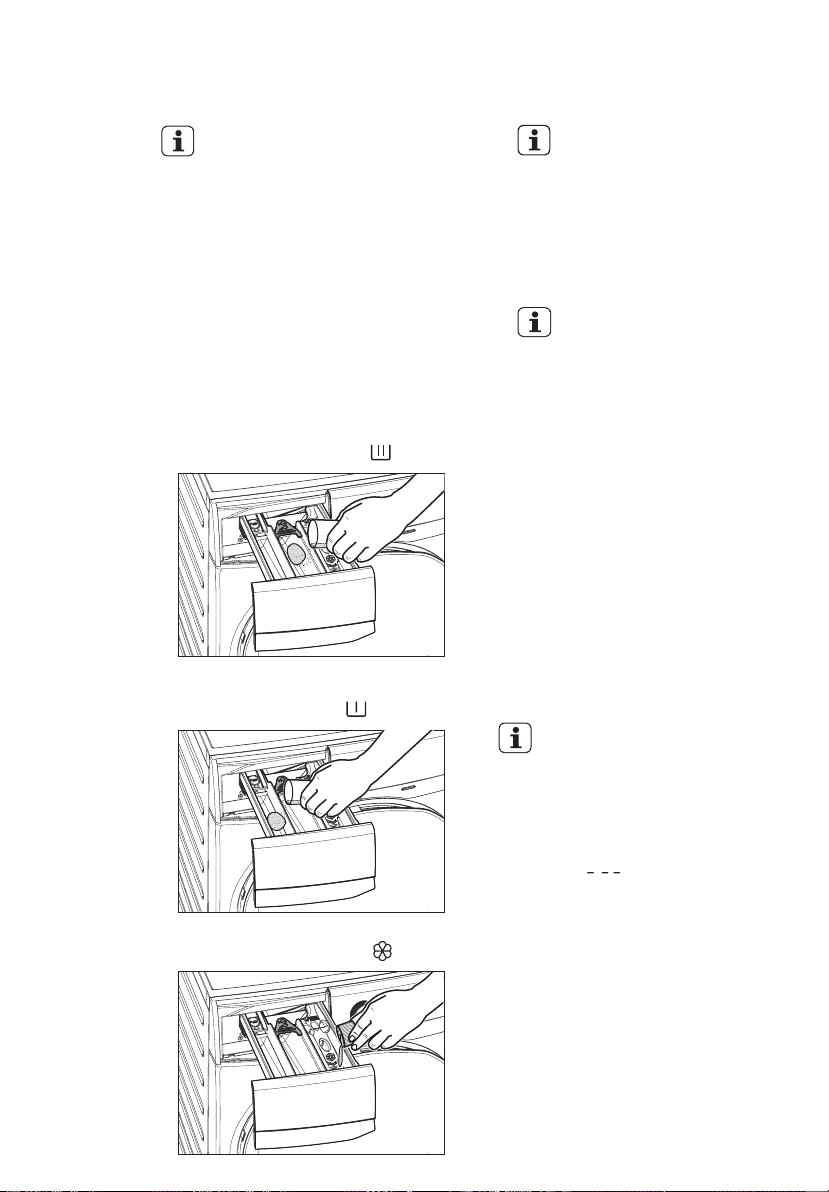
Detergent Dispenser Drawer
1.
The detergent dispenser is divided
into three compartments.
Compartment “SOFTENER”
Compartment “PREWASH”
This compartment is used for fabric
conditioner and starching agent.
This compartment is only used for
detergent when a “Prewash” option
is selected.
Compartment “MAIN WASH”
This compartment is used for
detergent on all programs.
Detergent flap
Position down:
for liquid
detergent.
Position up:
for powder
detergent.
Do not use gelatinous or thick
liquid detergents.
Do not put more liquid than the
maximum level.
Do not set the “Delay End”.
Do not set the “Prewash” phase.
NOTE: When you use the
liquid detergent
Pull out the dispenser drawer until
it stops.
-
-
-
-
-
-
Measure out the detergent and the
fabric softener;
2.
Close the drawer gently.
−
Residues of detergent, softener
and water may remain in the
dispenser. It is recommended to
clean the dispenser regularly to
remove any residue.
The softener amount used must
not exceed the “MAX” mark in the
drawer.
If you use thick softeners it is
recommended to dilute with water.
If you want your laundry to be spun or
use temperature different from the one
proposed by the washing machine,
press “Spin” and “Temp” touchpads
repeatedly to change the spin speed
and temperature.
Press the option touchpads, if you
want your laundry to be washed with
special functions.
Different functions can be
combined which is dependent on
the program selected.
If an option is not compatible with
the wash program selected, the
symbol “ ” will flash on display
along with buzzer sound.
If you want to adjust washing time,
press the “Time Manager” touchpad
repeatedly to increase or decrease
washing time. (See Time Manager
guide on page 14)
If you want to define the end of the
washing program, press the “Delay
End” touchpad repeatedly to choose
your washing machine working time.
5.3 Options Setting
−
−
1.
2.
NOTE
NOTE
NOTE
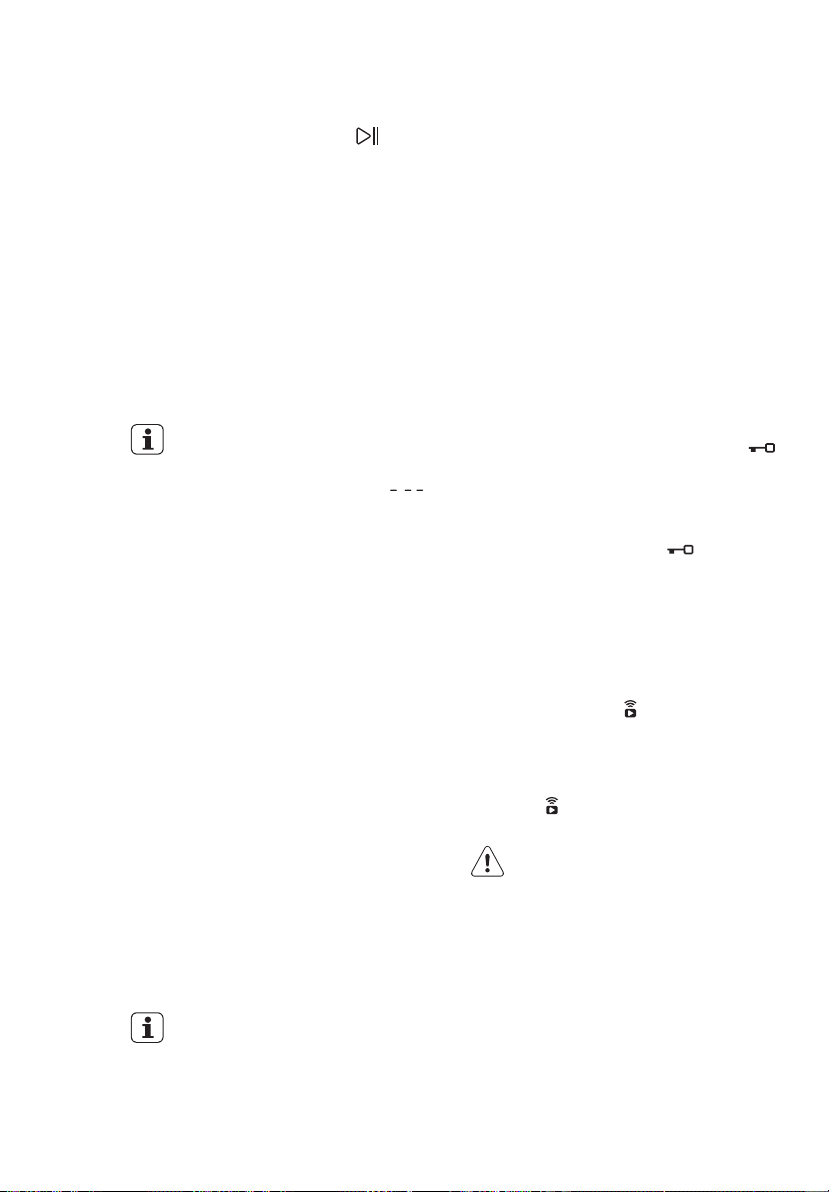
Measure out the amount of
detergent required, pour it into the
main wash compartment .
If you wish to carry out the
“Prewash” phase, pour it into the
compartment marked .
If required, pour fabric softener into
the compartment marked .
-
-
ENGLISH 19
DAILY USE5.
Press the On/Off button to turn on the
washing machine. Turn the knob to
set a program. The washing machine
will propose a temperature and
automatically select the spin value
provided for the program you have
chosen.
Check and remove objects (if there
are any) that could be trapped in the
fold.
1.
2.
5.1 Loading The Laundry
Connect the main plug to the main
socket.
Turn the water tap on.
3.
Place the laundry in the drum, one
item at a time, shaking them out as
much as possible. (Refer to page 22
“WASHING HINTS”)
5.
Close the door.
6.
4.
Make sure that no laundry
remains between the seal and
the door.
IMPORTANT: Please read
“Detergents Type and Quantity of
Detergent”on page 23 before use.
5.2 Using Detergent And
Additives
The selector knob can be turned either
clockwise or counter-clockwise.
●
●
●
Detergent Dispenser Drawer
1.
The detergent dispenser is divided
into three compartments.
Compartment “SOFTENER”
Compartment “PREWASH”
This compartment is used for fabric
conditioner and starching agent.
This compartment is only used for
detergent when a “Prewash” option
is selected.
Compartment “MAIN WASH”
This compartment is used for
detergent on all programs.
Detergent flap
Position down:
for liquid
detergent.
Position up:
for powder
detergent.
Do not use gelatinous or thick
liquid detergents.
Do not put more liquid than the
maximum level.
Do not set the “Delay End”.
Do not set the “Prewash” phase.
NOTE: When you use the
liquid detergent
Pull out the dispenser drawer until
it stops.
-
-
-
-
-
-
Measure out the detergent and the
fabric softener;
2.
Close the drawer gently.
−
Residues of detergent, softener
and water may remain in the
dispenser. It is recommended to
clean the dispenser regularly to
remove any residue.
The softener amount used must
not exceed the “MAX” mark in the
drawer.
If you use thick softeners it is
recommended to dilute with water.
If you want your laundry to be spun or
use temperature different from the one
proposed by the washing machine,
press “Spin” and “Temp” touchpads
repeatedly to change the spin speed
and temperature.
Press the option touchpads, if you
want your laundry to be washed with
special functions.
Different functions can be
combined which is dependent on
the program selected.
If an option is not compatible with
the wash program selected, the
symbol “ ” will flash on display
along with buzzer sound.
If you want to adjust washing time,
press the “Time Manager” touchpad
repeatedly to increase or decrease
washing time. (See Time Manager
guide on page 14)
If you want to define the end of the
washing program, press the “Delay
End” touchpad repeatedly to choose
your washing machine working time.
5.3 Options Setting
−
−
1.
2.
NOTE
NOTE
NOTE
Measure out the amount of
detergent required, pour it into the
main wash compartment .
If you wish to carry out the
“Prewash” phase, pour it into the
compartment marked .
If required, pour fabric softener into
the compartment marked .
-
-
20 www.electrolux.com
The appliance will automatically adjust
the selected program duration
according to the type and size of the
load.
−
The display will show adjusted
program duration.
−
To start a program, press the Start/Pause
touchpad. The corresponding pilot light
will stop flashing and a default program
duration will be displayed on the screen.
5.4 Starting A Cycle ( )
After approx. 15 minutes from the start of
a program:
If you press any touchpad while a
program is operating, the symbol “ ”
will flash on display along with buzzer
sound. (except Start/Pause touchpad
and On/Off button)
To pause, press Start/ Pause.
The indicator will start flashing.
−
Press the Start/Pause again.
The program will continue.
−
Changing a running program is possible
only by switching off the appliance.
Press the “On/Off” button to cancel
the program and to turn off the
appliance.
−
5.5 Interruption Of A Program
5.6 Changing A Program
It may be possible to change some of the
options after a wash program has started.
Press the “On/Off” button again to
start the appliance.
−
5.7 Changing The Options
Press the touchpad Start/Pause. The
indicator will start flashing.
1.
If available change the options that
you wish.
2.
Press Start/Pause again. The program
will continue.
3.
While a program or the Delay End is
operating, the appliance door is locked
and the display shows the indicator “ ”.
First, set the machine to PAUSE by
pressing the “Start/Pause” touchpad. Wait
until the door lock indicator goes off, then
the door can be opened.
If the door lock indicator “ ” does not
disappear, this means that the machine
is already heating and the water level is
above the bottom edge of the door or the
drum is turning. In this case the door
CAN NOT be opened. If you need to
open it, you must drain the water to open
the door.
In case of Remote ( ) function is
activated, when program cycle end and
anticrease phase is complete. The door
will remain locked for 5 minutes, if you
want to open the door at that time, press
Remote ( ) touchpad once to turned off
function then the door is unlocked.
In case of emergency please
refer to “Emergency door
opening” on page 33.
5.8 Opening The Door
NOTE
NOTE
Now you can set a new wash program
and change any available options. Press
Start/Pause to start the new program.
The appliance will not drain the water
(except programs; Vapour Refresh, Spin,
Rinse + Spin, TubClean).
When the program is completed and
the door lock indicator “ ” goes off,
you can open the door.
5.10 When The Washing
Program Is Completed, But
There Is Water In The Drum
The drum turns regularly to prevent
the creases in the laundry.
You must drain the water to
open the door.
The indicator “Start/Pause” flashes to
remind you to drain the water.
−
−
−
At the end of the program, the time
remaining can suddenly decrease from
7 minutes or less to 0 due to the
overestimated total program time during
the load sensing phase. In some cases
(with perfectly balanced load) the
program time can be shorter than the
time estimated after the load sensing
phase is completed. This is a normal
behavior of the machine and not a cause
for concern as it does not compromise its
performance.
5.9 At The End Of The
Program
5.11 AUTO Off Mode
The AUTO Off mode automatically
deactivates the appliance to decrease
the energy consumption when:
You do not press any buttons for 5
minutes before you press “Start/Pause”.
Press the “On/Off” button to activate
the appliance again.
After 5 minutes from the end of the
washing program.
Press the “On/Off” button to
reactivate the appliance. Display will
show the end of the last wash.
−
−
Press any touchpad again to show
the last wash program.
−
NOTE
The door lock indicator “ ” is on.
The door stays locked.
1.
To drain the water:
Press the “Start/Pause ” touchpad.
The appliance drains the water and
spins with the maximum spin speed
for selected program.
Alternatively, before pressing the
“Start/Pause” touchpad, you can press
the “Spin ” touchpad to change the
spin speed. You can select “No Spin
( )”, if you want the machine to
only drain the water.
2.
Press the “On/Off” button to deactivate
the appliance.
3.
After approximately 18 hours, if you do
not press Start/Pause touchpad, the
appliance will drain and spin automatically
(except for “Wool” program) .
NOTE
The appliance stops automatically.
The acoustic signal will operate.
The display will show “ ”.
The indicator of the touchpad
Start/Pause goes off.
−
−
−
−
−
−
−
−
The door lock indicator “ ” goes off.
Remove the laundry from the
appliance. Make sure that the drum is
empty.
Keep the door partly open, to prevent
the mildew and odours.
Turn off the water tap.
(Option “Rinse Hold ” is used)
ENGLISH 21
The appliance will automatically adjust
the selected program duration
according to the type and size of the
load.
−
The display will show adjusted
program duration.
−
To start a program, press the Start/Pause
touchpad. The corresponding pilot light
will stop flashing and a default program
duration will be displayed on the screen.
5.4 Starting A Cycle ( )
After approx. 15 minutes from the start of
a program:
If you press any touchpad while a
program is operating, the symbol “ ”
will flash on display along with buzzer
sound. (except Start/Pause touchpad
and On/Off button)
To pause, press Start/ Pause.
The indicator will start flashing.
−
Press the Start/Pause again.
The program will continue.
−
Changing a running program is possible
only by switching off the appliance.
Press the “On/Off” button to cancel
the program and to turn off the
appliance.
−
5.5 Interruption Of A Program
5.6 Changing A Program
It may be possible to change some of the
options after a wash program has started.
Press the “On/Off” button again to
start the appliance.
−
5.7 Changing The Options
Press the touchpad Start/Pause. The
indicator will start flashing.
1.
If available change the options that
you wish.
2.
Press Start/Pause again. The program
will continue.
3.
While a program or the Delay End is
operating, the appliance door is locked
and the display shows the indicator “ ”.
First, set the machine to PAUSE by
pressing the “Start/Pause” touchpad. Wait
until the door lock indicator goes off, then
the door can be opened.
If the door lock indicator “ ” does not
disappear, this means that the machine
is already heating and the water level is
above the bottom edge of the door or the
drum is turning. In this case the door
CAN NOT be opened. If you need to
open it, you must drain the water to open
the door.
In case of Remote ( ) function is
activated, when program cycle end and
anticrease phase is complete. The door
will remain locked for 5 minutes, if you
want to open the door at that time, press
Remote ( ) touchpad once to turned off
function then the door is unlocked.
In case of emergency please
refer to “Emergency door
opening” on page 33.
5.8 Opening The Door
NOTE
NOTE
Now you can set a new wash program
and change any available options. Press
Start/Pause to start the new program.
The appliance will not drain the water
(except programs; Vapour Refresh, Spin,
Rinse + Spin, TubClean).
When the program is completed and
the door lock indicator “ ” goes off,
you can open the door.
5.10 When The Washing
Program Is Completed, But
There Is Water In The Drum
The drum turns regularly to prevent
the creases in the laundry.
You must drain the water to
open the door.
The indicator “Start/Pause” flashes to
remind you to drain the water.
−
−
−
At the end of the program, the time
remaining can suddenly decrease from
7 minutes or less to 0 due to the
overestimated total program time during
the load sensing phase. In some cases
(with perfectly balanced load) the
program time can be shorter than the
time estimated after the load sensing
phase is completed. This is a normal
behavior of the machine and not a cause
for concern as it does not compromise its
performance.
5.9 At The End Of The
Program
5.11 AUTO Off Mode
The AUTO Off mode automatically
deactivates the appliance to decrease
the energy consumption when:
You do not press any buttons for 5
minutes before you press “Start/Pause”.
Press the “On/Off” button to activate
the appliance again.
After 5 minutes from the end of the
washing program.
Press the “On/Off” button to
reactivate the appliance. Display will
show the end of the last wash.
−
−
Press any touchpad again to show
the last wash program.
−
NOTE
The door lock indicator “ ” is on.
The door stays locked.
1.
To drain the water:
Press the “Start/Pause ” touchpad.
The appliance drains the water and
spins with the maximum spin speed
for selected program.
Alternatively, before pressing the
“Start/Pause” touchpad, you can press
the “Spin ” touchpad to change the
spin speed. You can select “No Spin
( )”, if you want the machine to
only drain the water.
2.
Press the “On/Off” button to deactivate
the appliance.
3.
After approximately 18 hours, if you do
not press Start/Pause touchpad, the
appliance will drain and spin automatically
(except for “Wool” program) .
NOTE
The appliance stops automatically.
The acoustic signal will operate.
The display will show “ ”.
The indicator of the touchpad
Start/Pause goes off.
−
−
−
−
−
−
−
−
The door lock indicator “ ” goes off.
Remove the laundry from the
appliance. Make sure that the drum is
empty.
Keep the door partly open, to prevent
the mildew and odours.
Turn off the water tap.
(Option “Rinse Hold ” is used)
22 www.electrolux.com
WASHING HINTS6.
Follow the wash code symbols on each
garment label and the manufacturer’s
washing instructions. Sort the laundry as
follows: whites, coloureds, synthetics,
delicates, woollens.
6.1 Sorting The Laundry
6.2 Temperatures
90°C
Temp Soil level
60°C
50°C
40°C
30°C
Cold
For normally soiled, colourfast
garments (e.g. shirts, night
dresses, pajamas....) in linen,
cotton or synthetic fibres and
for lightly soiled white cotton
(e.g.underwear).
For delicate items (e.g. net
curtains), mixed laundry
including synthetic fibres and
woollens bearing the label pure
new wool, machine washable,
non-shrink.
For normally soiled white
cottons and linen (e.g. teacloths,
towels, tablecloths, sheets...).
Never wash whites and coloured
fabrics together. Whites may lose their
“whiteness” in the wash.
New coloured items may run in the first
wash; they should therefore be
washed separately the first time.
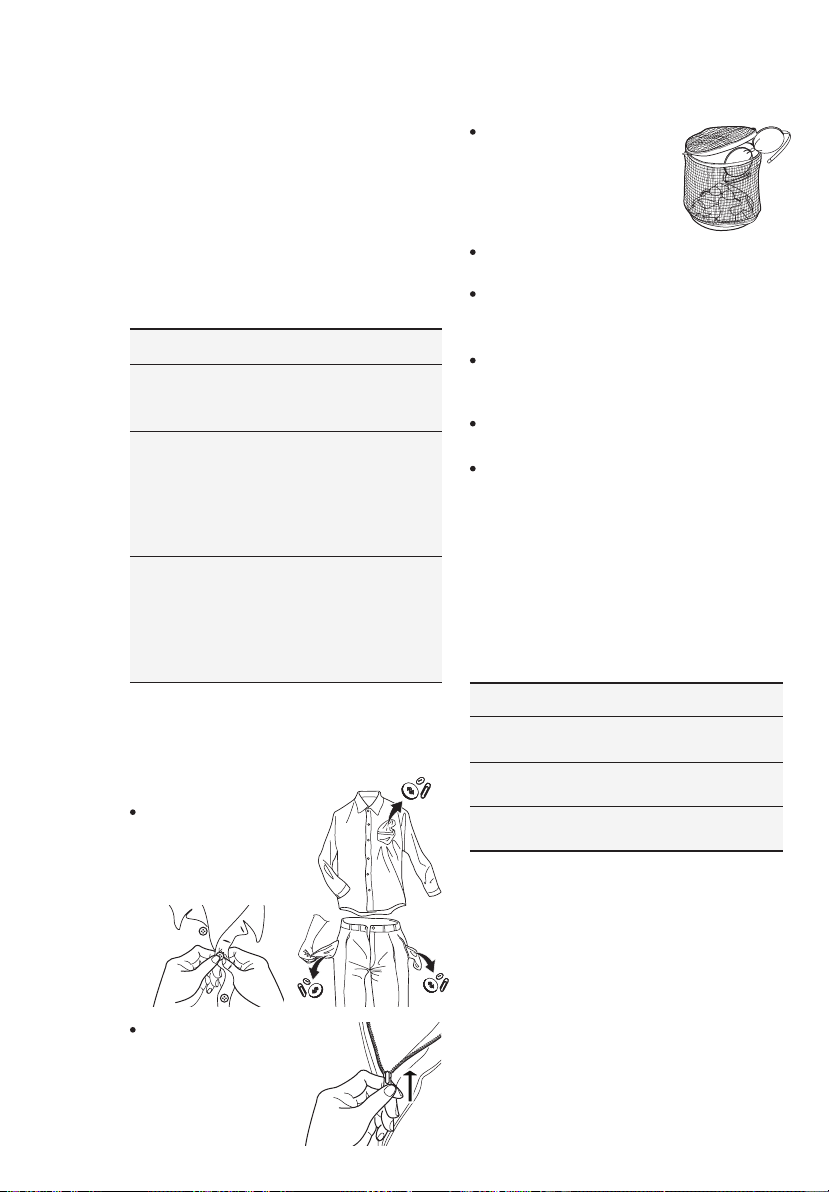
Button up pillowcases,
close zip fasteners,
hooks and poppers.
Tie any belts or long
tapes.
Remove persistent stains before
washing.
Rub particularly soiled areas with a
special detergent or detergent paste.
Treat curtains with special care.
Remove hooks or tie them up in a bag
or a net.
Make sure that no
metal objects are
left in the laundry
(e.g. coin, hair clips,
safety pins, pins).
6.3 Before Loading The
Laundry
Recommended loads are indicated in the
program charts on page 11.
Washing a maximum load makes the
most efficient use of water and energy.
For heavily soiled laundry, reduce the
load size.
Cotton, linen
drum full but not too
tightly packed;
Clothes LoadQuantity
Synthetics
drum no more than
half full;
Delicate fabrics
and woollens
drum no more than
one third full.
6.4 Maximum Loads
Blood: treat fresh stains with cold water.
For dried stains, soak overnight in water
with a special detergent then rub in the
soap and water.
Stubborn stains may not be removed by
just water and detergent. It is therefore
advisable to treat them prior to washing.
6.5 Removing Stains
Wash bras, pantyhose
and other delicates in a
mesh laundry bag,
which you can purchase
from your supermarket.
Make sure that you wash lint collectors
separately from lint producers.
General rules:
Oil based paint: moisten with benzine
stain remover, lay the garment on a soft
cloth and dab the stain; treat several
times.
Dried grease stains: moisten with
turpentine, lay the garment on a soft
surface and dab the stain with the
fingertips and a cotton cloth.
Rust: oxalic acid dissolved in hot water or
a rust removing product used in cold
water. Be careful with rust stains which
are not recent since the cellulose
structure will already have been damaged
and the fabric tends to hole.
Mould stains: treat with bleach, rinse
well (whites and fast coloureds only).
Grass: soap lightly and treat with bleach
(whites and fast coloureds only).
Ball point pen and glue: moisten with
acetone (*), lay the garment on a soft
cloth and dab the stain.
Lipstick: moisten with acetone (*) as
above, then treat stains with methylated
spirits. Remove any residual marks from
white fabrics with bleach.
Red wine: soak in water and detergent,
rinse and treat with acetic or citric acid,
then rinse. Treat any residual marks with
bleach.
Ink: depending on the type of ink,
moisten the fabric first with acetone (*),
then with acetic acid; treat any residual
marks on white fabrics with bleach and
then rinse thoroughly.
Tar stains: first treat with stain remover,
methylated spirits or benzine, then rub
with detergent paste.
(*) do not use acetone on artificial silk.
Low sudsing detergent is required for this
washing machine to prevent oversudsing
problems, unsatisfactory washing result
and harm to the machine.
6.6 Detergents Type And
Quantity Of Detergent
Do not use wrong types of detergent,
such as Top Loading, Handwash
detergent or Soap-Based products in
your frontload washing machine. This
can result in excessive suds, longer
cycle time, low spin speeds, poor
rinsing and overloading of the motor.
The choice and quantity of detergent will
depend on ;
type of fabric (delicates, woollens,
cottons, etc.) ;
degree of soil ;
size of the load ;
wash temperature ; and
hardness of the water used.
the colour of clothes ;
Information on hardness of the water in
your area can be obtained from the
relevant water supply company, or from
your local authority.
You may have to try using the detergent
quantity as per manufacturers’
instructions then compare the wash
result to the list below and adjust the
amount of detergent for your future
washes accordingly.
Water hardness is classified by so-called
“degrees” of hardness.
The choice of detergent and use of
correct quantities not only affects your
wash performance, but also helps to
avoid waste and protect the environment.
Although biodegradable detergents
contain substances which in large
quantities can upset the delicate balance
of nature.
Low sudsing detergents designed for
front load washing machines are labelled
“Front Loading”, “high efficiency”, “HE”,
such as Cold Power for Front Loaders or
“Matic”.
Quantity of detergent to be
used

ENGLISH 23
WASHING HINTS6.
Follow the wash code symbols on each
garment label and the manufacturer’s
washing instructions. Sort the laundry as
follows: whites, coloureds, synthetics,
delicates, woollens.
6.1 Sorting The Laundry
6.2 Temperatures
90°C
Temp Soil level
60°C
50°C
40°C
30°C
Cold
For normally soiled, colourfast
garments (e.g. shirts, night
dresses, pajamas....) in linen,
cotton or synthetic fibres and
for lightly soiled white cotton
(e.g.underwear).
For delicate items (e.g. net
curtains), mixed laundry
including synthetic fibres and
woollens bearing the label pure
new wool, machine washable,
non-shrink.
For normally soiled white
cottons and linen (e.g. teacloths,
towels, tablecloths, sheets...).
Never wash whites and coloured
fabrics together. Whites may lose their
“whiteness” in the wash.
New coloured items may run in the first
wash; they should therefore be
washed separately the first time.
Button up pillowcases,
close zip fasteners,
hooks and poppers.
Tie any belts or long
tapes.
Remove persistent stains before
washing.
Rub particularly soiled areas with a
special detergent or detergent paste.
Treat curtains with special care.
Remove hooks or tie them up in a bag
or a net.
Make sure that no
metal objects are
left in the laundry
(e.g. coin, hair clips,
safety pins, pins).
6.3 Before Loading The
Laundry
Recommended loads are indicated in the
program charts on page 11.
Washing a maximum load makes the
most efficient use of water and energy.
For heavily soiled laundry, reduce the
load size.
Cotton, linen
drum full but not too
tightly packed;
Clothes LoadQuantity
Synthetics
drum no more than
half full;
Delicate fabrics
and woollens
drum no more than
one third full.
6.4 Maximum Loads
Blood: treat fresh stains with cold water.
For dried stains, soak overnight in water
with a special detergent then rub in the
soap and water.
Stubborn stains may not be removed by
just water and detergent. It is therefore
advisable to treat them prior to washing.
6.5 Removing Stains
Wash bras, pantyhose
and other delicates in a
mesh laundry bag,
which you can purchase
from your supermarket.
Make sure that you wash lint collectors
separately from lint producers.
General rules:
Oil based paint: moisten with benzine
stain remover, lay the garment on a soft
cloth and dab the stain; treat several
times.
Dried grease stains: moisten with
turpentine, lay the garment on a soft
surface and dab the stain with the
fingertips and a cotton cloth.
Rust: oxalic acid dissolved in hot water or
a rust removing product used in cold
water. Be careful with rust stains which
are not recent since the cellulose
structure will already have been damaged
and the fabric tends to hole.
Mould stains: treat with bleach, rinse
well (whites and fast coloureds only).
Grass: soap lightly and treat with bleach
(whites and fast coloureds only).
Ball point pen and glue: moisten with
acetone (*), lay the garment on a soft
cloth and dab the stain.
Lipstick: moisten with acetone (*) as
above, then treat stains with methylated
spirits. Remove any residual marks from
white fabrics with bleach.
Red wine: soak in water and detergent,
rinse and treat with acetic or citric acid,
then rinse. Treat any residual marks with
bleach.
Ink: depending on the type of ink,
moisten the fabric first with acetone (*),
then with acetic acid; treat any residual
marks on white fabrics with bleach and
then rinse thoroughly.
Tar stains: first treat with stain remover,
methylated spirits or benzine, then rub
with detergent paste.
(*) do not use acetone on artificial silk.
Low sudsing detergent is required for this
washing machine to prevent oversudsing
problems, unsatisfactory washing result
and harm to the machine.
6.6 Detergents Type And
Quantity Of Detergent
Do not use wrong types of detergent,
such as Top Loading, Handwash
detergent or Soap-Based products in
your frontload washing machine. This
can result in excessive suds, longer
cycle time, low spin speeds, poor
rinsing and overloading of the motor.
The choice and quantity of detergent will
depend on ;
type of fabric (delicates, woollens,
cottons, etc.) ;
degree of soil ;
size of the load ;
wash temperature ; and
hardness of the water used.
the colour of clothes ;
Information on hardness of the water in
your area can be obtained from the
relevant water supply company, or from
your local authority.
You may have to try using the detergent
quantity as per manufacturers’
instructions then compare the wash
result to the list below and adjust the
amount of detergent for your future
washes accordingly.
Water hardness is classified by so-called
“degrees” of hardness.
The choice of detergent and use of
correct quantities not only affects your
wash performance, but also helps to
avoid waste and protect the environment.
Although biodegradable detergents
contain substances which in large
quantities can upset the delicate balance
of nature.
Low sudsing detergents designed for
front load washing machines are labelled
“Front Loading”, “high efficiency”, “HE”,
such as Cold Power for Front Loaders or
“Matic”.
Quantity of detergent to be
used
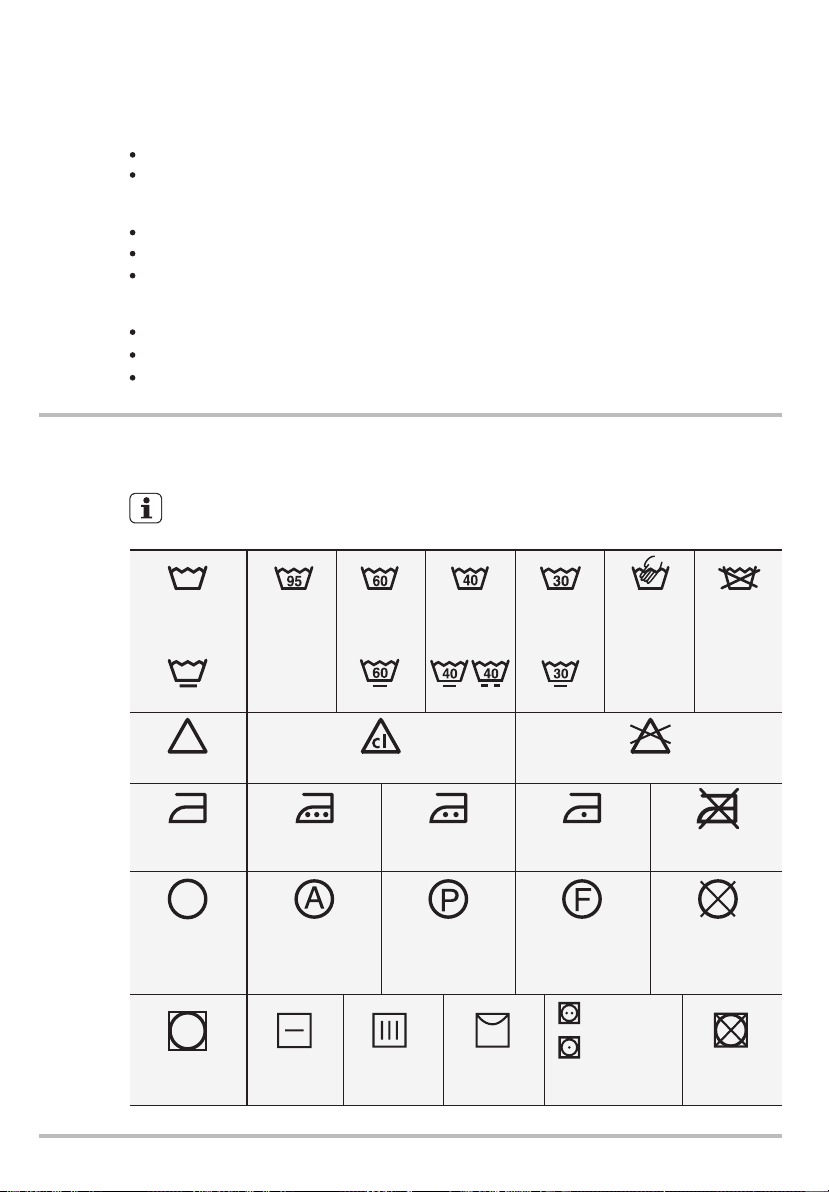
24 www.electrolux.com
the washload to turn grey,
greasy clothes.
inadequate rinsing.
reduced washing effect,
you are washing a small load,
large amounts of foam during washing.
the laundry is lightly soiled,
Use less detergent if:
INTERNATIONAL WASH CODE SYMBOLS7.
These symbols appear on fabric labels, in order to help you choose the best
way to treat your laundry.
Bleach in cold water DO NOT bleach
Bleaching
Hand wash
Max. wash
temperature
95 °C
Hot iron
max. 200 °C
Dry cleaning in
all solvents
Dry cleaning in
perchlorethylene,
petrol, pure alcohol,
R 111 & R 113
Dry cleaning in
petrol, pure alcohol
and R 113
DO NOT
dry clean
Warm iron
max. 150 °C
Lukewarm iron
max. 110 °C
DO NOT iron
Max. wash
temperature
60 °C
Max. wash
temperature
40 °C
Max. wash
temperature
30 °C
DO NOT
wash at all
Ironing
Dry cleaning
Drying
Flat Tumble dry DO NOT
tumble dry
High
temperature
Low
temperature
On clothes
hanger
On the line
Energetic
wash
Delicate wash
oversudsing,
Not enough detergent causes:
Too much detergent causes:
CARE AND CLEANING8.
You must DISCONNECT the appliance
from the electricity supply, before you can
carry out any cleaning or maintenance
work.
The water we use normally contains lime.
It is a good idea to periodically use a
water softening powder in the machine.
Clean the appliance only with soap and
warm water. Fully dry all the surfaces.
Do not use alcohol, solvents or
chemical products.
Do this separately from any laundry
washing, and according to the softening
powder manufacturer's instructions.
This will help to prevent the formation of
lime deposits.
8.2 Descaling
8.1 External Cleaning
Leave the door open for a while. This
helps to prevent mould and stagnant
smells forming inside the appliance.
Keeping the door open after a wash will
also help to preserve the door seal.
8.3 After Each Wash
The washing powder and additive
dispenser drawer should be cleaned
regularly.
Remove the drawer by pressing the
catch downwards and by pulling it out.
8.5 Cleaning The Dispenser
Drawer
8.4 Maintenance Wash
With the use of low temperature washes
it is possible to get a build up of residues
inside the drum.
We recommend that a maintenance
wash be performed on a regular basis.
The drum should be empty of laundry.
Press Start/Pause to start the program.
Select the hottest cotton wash
program.
To run a maintenance wash:
WARNING!
CAUTION!
To aid cleaning, the top part of the
additive compartment should be
removed.
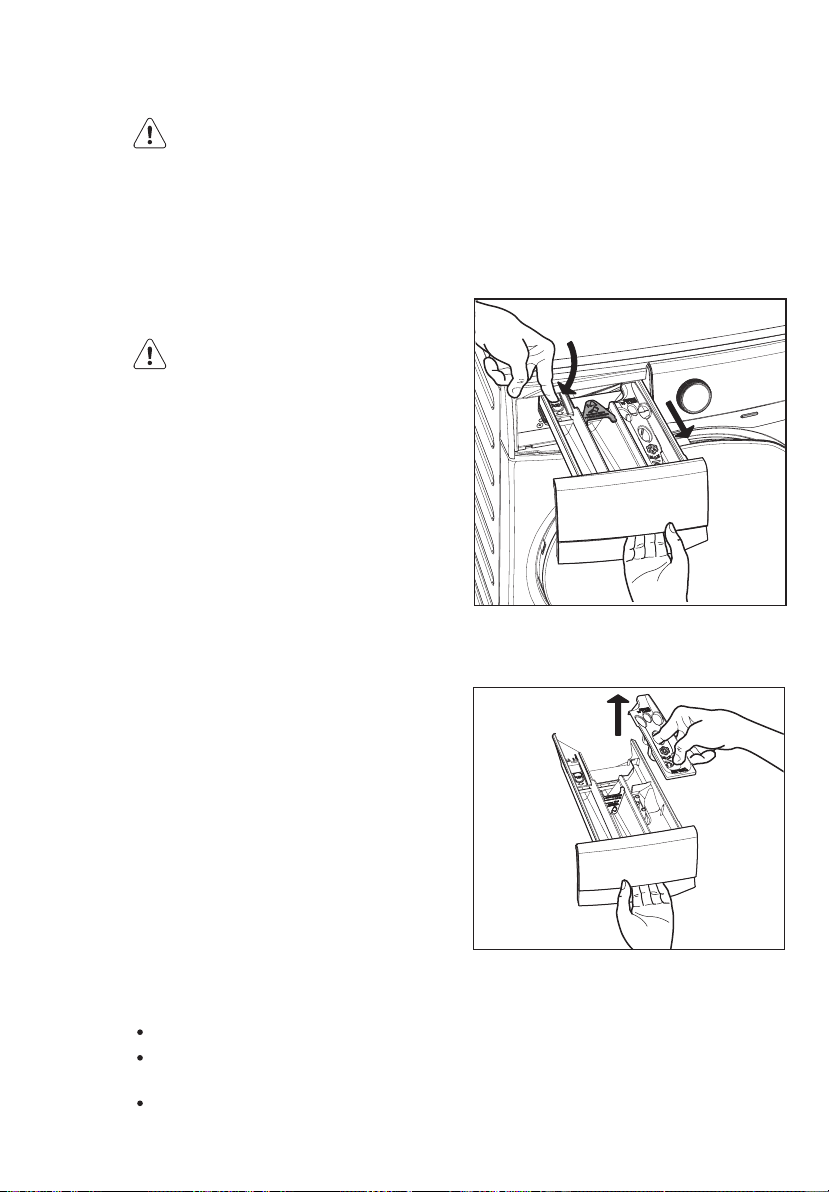
ENGLISH 25
the washload to turn grey,
greasy clothes.
inadequate rinsing.
reduced washing effect,
you are washing a small load,
large amounts of foam during washing.
the laundry is lightly soiled,
Use less detergent if:
INTERNATIONAL WASH CODE SYMBOLS7.
These symbols appear on fabric labels, in order to help you choose the best
way to treat your laundry.
Bleach in cold water DO NOT bleach
Bleaching
Hand wash
Max. wash
temperature
95 °C
Hot iron
max. 200 °C
Dry cleaning in
all solvents
Dry cleaning in
perchlorethylene,
petrol, pure alcohol,
R 111 & R 113
Dry cleaning in
petrol, pure alcohol
and R 113
DO NOT
dry clean
Warm iron
max. 150 °C
Lukewarm iron
max. 110 °C
DO NOT iron
Max. wash
temperature
60 °C
Max. wash
temperature
40 °C
Max. wash
temperature
30 °C
DO NOT
wash at all
Ironing
Dry cleaning
Drying
Flat Tumble dry DO NOT
tumble dry
High
temperature
Low
temperature
On clothes
hanger
On the line
Energetic
wash
Delicate wash
oversudsing,
Not enough detergent causes:
Too much detergent causes:
CARE AND CLEANING8.
You must DISCONNECT the appliance
from the electricity supply, before you can
carry out any cleaning or maintenance
work.
The water we use normally contains lime.
It is a good idea to periodically use a
water softening powder in the machine.
Clean the appliance only with soap and
warm water. Fully dry all the surfaces.
Do not use alcohol, solvents or
chemical products.
Do this separately from any laundry
washing, and according to the softening
powder manufacturer's instructions.
This will help to prevent the formation of
lime deposits.
8.2 Descaling
8.1 External Cleaning
Leave the door open for a while. This
helps to prevent mould and stagnant
smells forming inside the appliance.
Keeping the door open after a wash will
also help to preserve the door seal.
8.3 After Each Wash
The washing powder and additive
dispenser drawer should be cleaned
regularly.
Remove the drawer by pressing the
catch downwards and by pulling it out.
8.5 Cleaning The Dispenser
Drawer
8.4 Maintenance Wash
With the use of low temperature washes
it is possible to get a build up of residues
inside the drum.
We recommend that a maintenance
wash be performed on a regular basis.
The drum should be empty of laundry.
Press Start/Pause to start the program.
Select the hottest cotton wash
program.
To run a maintenance wash:
WARNING!
CAUTION!
To aid cleaning, the top part of the
additive compartment should be
removed.
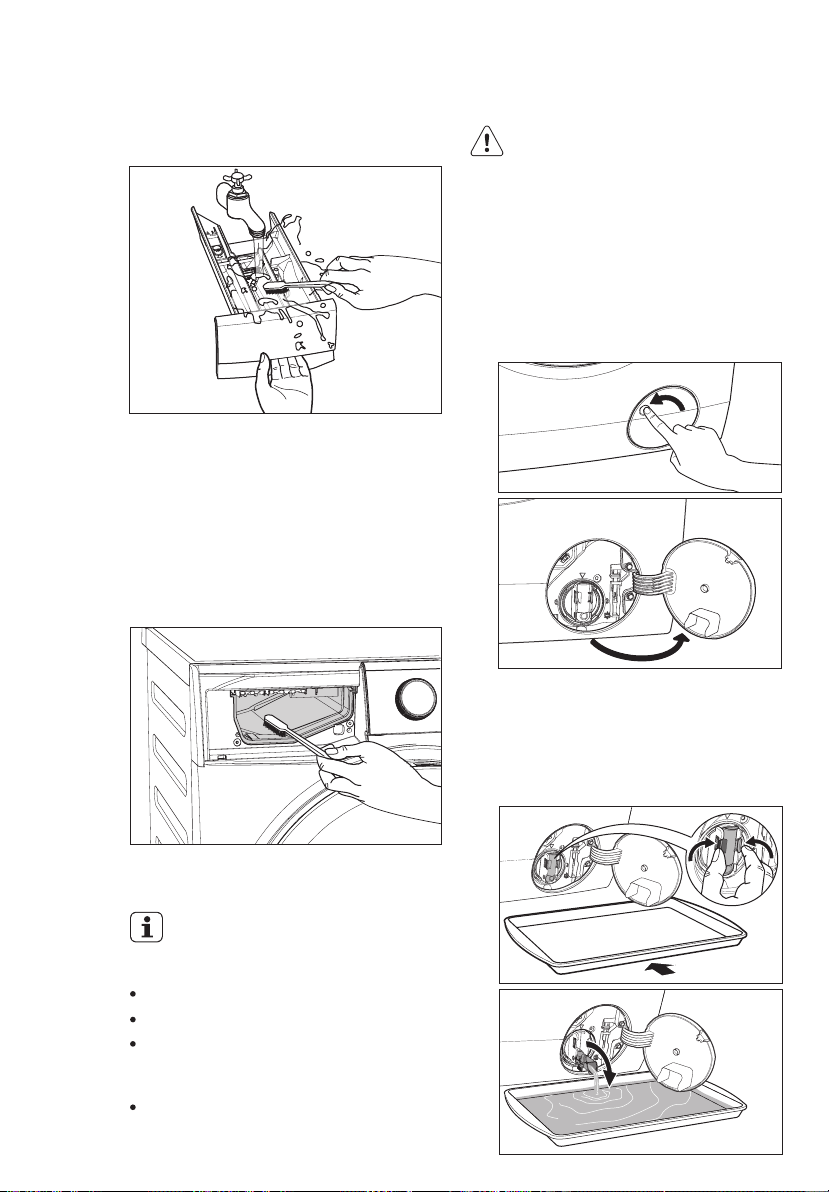
26 www.electrolux.com
Flush it out under a tap to remove any
traces of accumulated powder.
Having removed the drawer, use a small
brush to clean the recess, ensuring that
all washing powder residue is removed
from the upper and lower part of the
recess. Replace the drawer and run the
rinse program without any clothes in the
drum.
8.6 Cleaning The Drawer
Recess
8.7 Cleaning The Pump
The appliance does not drain the water.
The drum cannot turn.
The appliance makes an unusual noise
because of the blockage of the drain
pump.
The display shows an alarm code
because of the problem with water
drain.
Regularly examine the drain pump
and make sure that it is clean.
Clean the pump if:
1. Disconnect the mains plug from the
mains socket.
WARNING!
2.
Do not remove the filter while the
appliance is operating. Do not clean
the drain pump if the water in the
appliance is hot. The water must be
cold before you clean the drain pump.
To clean the drain pump:
1. Open the drain pump door.
2. Place a suitable water container
below the recess of the drain pump
to collect the water that flows out.
Press the two levers and pull forward
the drainage duct to let the water flow
out.
3. When the container is full of water,
put the drainage duct back again and
empty the container. Do step 2, 3
again and again until no more water
flows out from the drain pump.
5. Remove fluff and objects from the
pump (if there are any).
6. Make sure that the impeller of the
pump can turn. If this does not occur,
contact the service centre.
7. Clean the filter under the water tap.
4. Push back the drainage duct and
turn the filter counter-clockwise to
remove it.
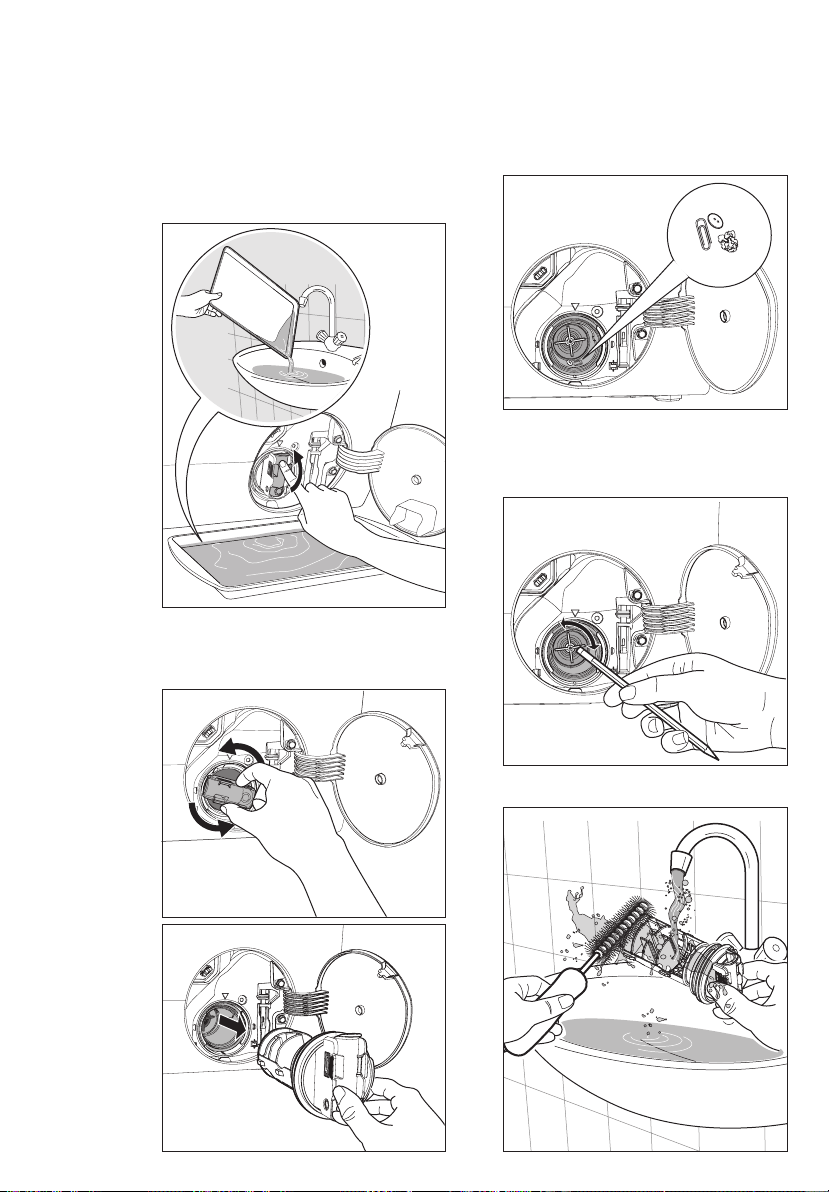
ENGLISH 27
Flush it out under a tap to remove any
traces of accumulated powder.
Having removed the drawer, use a small
brush to clean the recess, ensuring that
all washing powder residue is removed
from the upper and lower part of the
recess. Replace the drawer and run the
rinse program without any clothes in the
drum.
8.6 Cleaning The Drawer
Recess
8.7 Cleaning The Pump
The appliance does not drain the water.
The drum cannot turn.
The appliance makes an unusual noise
because of the blockage of the drain
pump.
The display shows an alarm code
because of the problem with water
drain.
Regularly examine the drain pump
and make sure that it is clean.
Clean the pump if:
1. Disconnect the mains plug from the
mains socket.
WARNING!
2.
Do not remove the filter while the
appliance is operating. Do not clean
the drain pump if the water in the
appliance is hot. The water must be
cold before you clean the drain pump.
To clean the drain pump:
1. Open the drain pump door.
2. Place a suitable water container
below the recess of the drain pump
to collect the water that flows out.
Press the two levers and pull forward
the drainage duct to let the water flow
out.
3. When the container is full of water,
put the drainage duct back again and
empty the container. Do step 2, 3
again and again until no more water
flows out from the drain pump.
5. Remove fluff and objects from the
pump (if there are any).
6. Make sure that the impeller of the
pump can turn. If this does not occur,
contact the service centre.
7. Clean the filter under the water tap.
4. Push back the drainage duct and
turn the filter counter-clockwise to
remove it.
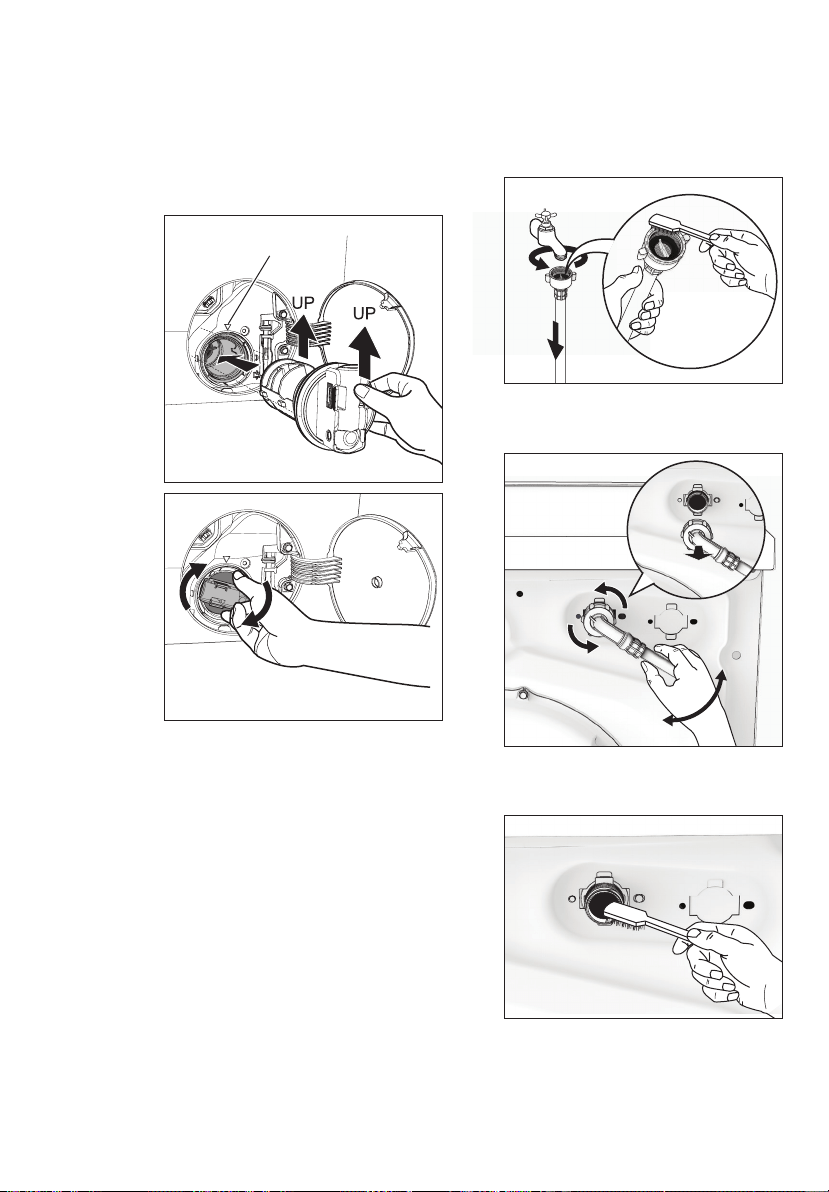
28 www.electrolux.com
8. Put the filter back into the housing
with exposed section facing up.
Make sure that you correctly tighten
the filter to prevent leakages.
9. Close the drain pump door.
Remove the water inlet hose from
the water tap.
Clean the filter in the inlet hose with
a stiff brush.
If your water is very hard or contains
traces of lime deposit, the water inlet
filter may become clogged. It is therefore
a good idea to clean it from time to time.
8.8 Cleaning The Water Inlet
Filter
To clean the water inlet filters:
1.
Close the water tap.
2.
3.
4.
5.
6.
7. Open the water tap.
Remove the inlet hose behind the
appliance.
Clean the filter in the valve with a
stiff brush or a towel.
Install the inlet hose again. Make
sure that the couplings are tight to
prevent leakages.
Guide
If the appliance is installed in an area
where the temperature can be less
than 0 °C, remove the remaining water
from the inlet hose and the
drain pump.
Emergency Drain
8.9 Frost Precautions
Disconnect the main plug from the
main socket. Turn off the water tap.
1.
2. Remove the water inlet hose.
3. Remove the drain hose from the rear
support and unhook it from sink or
spigot.
Put the end of the drain and inlet hose
in a container. Let the water flow out
of the hoses.
4.
5. When no more water flows, install the
inlet hose and the drain hose again.
Make sure that the temperature is
more than 0 °C before you use the
appliance again.
NOTE
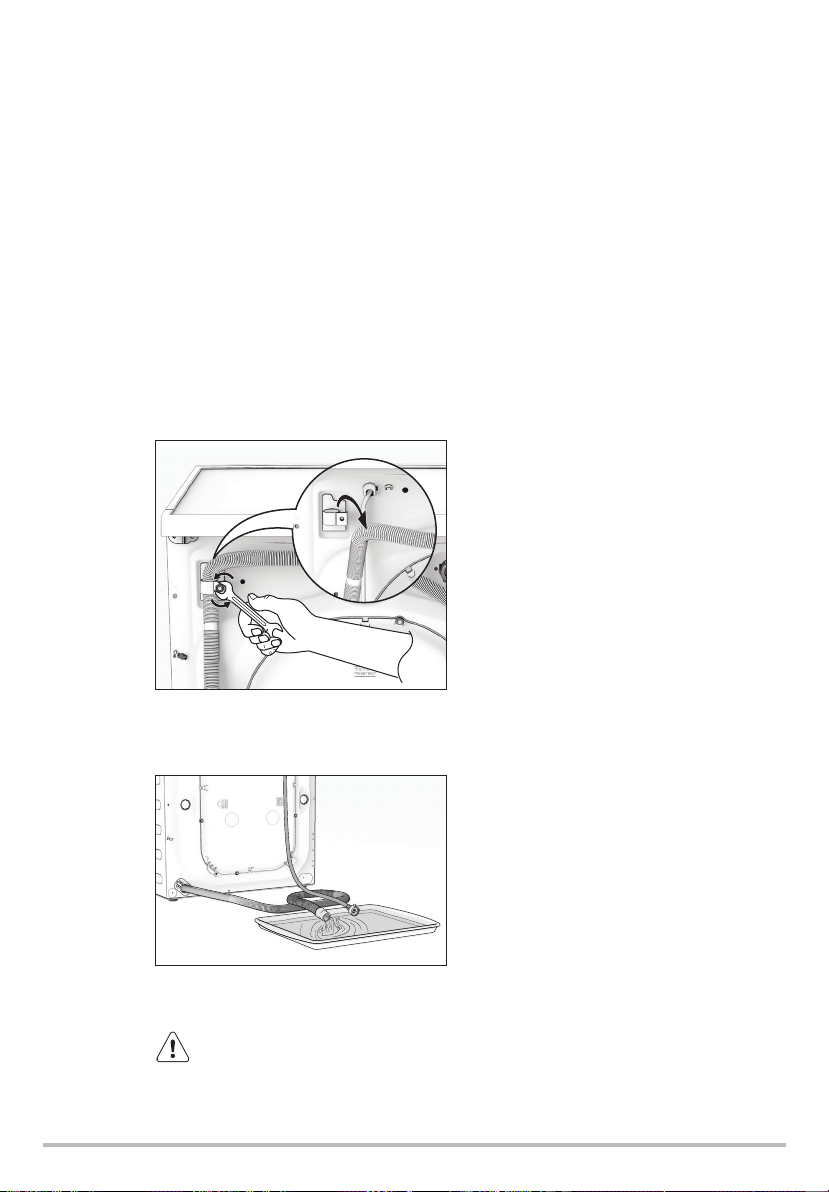
ENGLISH 29
8. Put the filter back into the housing
with exposed section facing up.
Make sure that you correctly tighten
the filter to prevent leakages.
9. Close the drain pump door.
Remove the water inlet hose from
the water tap.
Clean the filter in the inlet hose with
a stiff brush.
If your water is very hard or contains
traces of lime deposit, the water inlet
filter may become clogged. It is therefore
a good idea to clean it from time to time.
8.8 Cleaning The Water Inlet
Filter
To clean the water inlet filters:
1.
Close the water tap.
2.
3.
4.
5.
6.
7. Open the water tap.
Remove the inlet hose behind the
appliance.
Clean the filter in the valve with a
stiff brush or a towel.
Install the inlet hose again. Make
sure that the couplings are tight to
prevent leakages.
Guide
If the appliance is installed in an area
where the temperature can be less
than 0 °C, remove the remaining water
from the inlet hose and the
drain pump.
Emergency Drain
8.9 Frost Precautions
Disconnect the main plug from the
main socket. Turn off the water tap.
1.
2. Remove the water inlet hose.
3. Remove the drain hose from the rear
support and unhook it from sink or
spigot.
Put the end of the drain and inlet hose
in a container. Let the water flow out
of the hoses.
4.
5. When no more water flows, install the
inlet hose and the drain hose again.
Make sure that the temperature is
more than 0 °C before you use the
appliance again.
NOTE
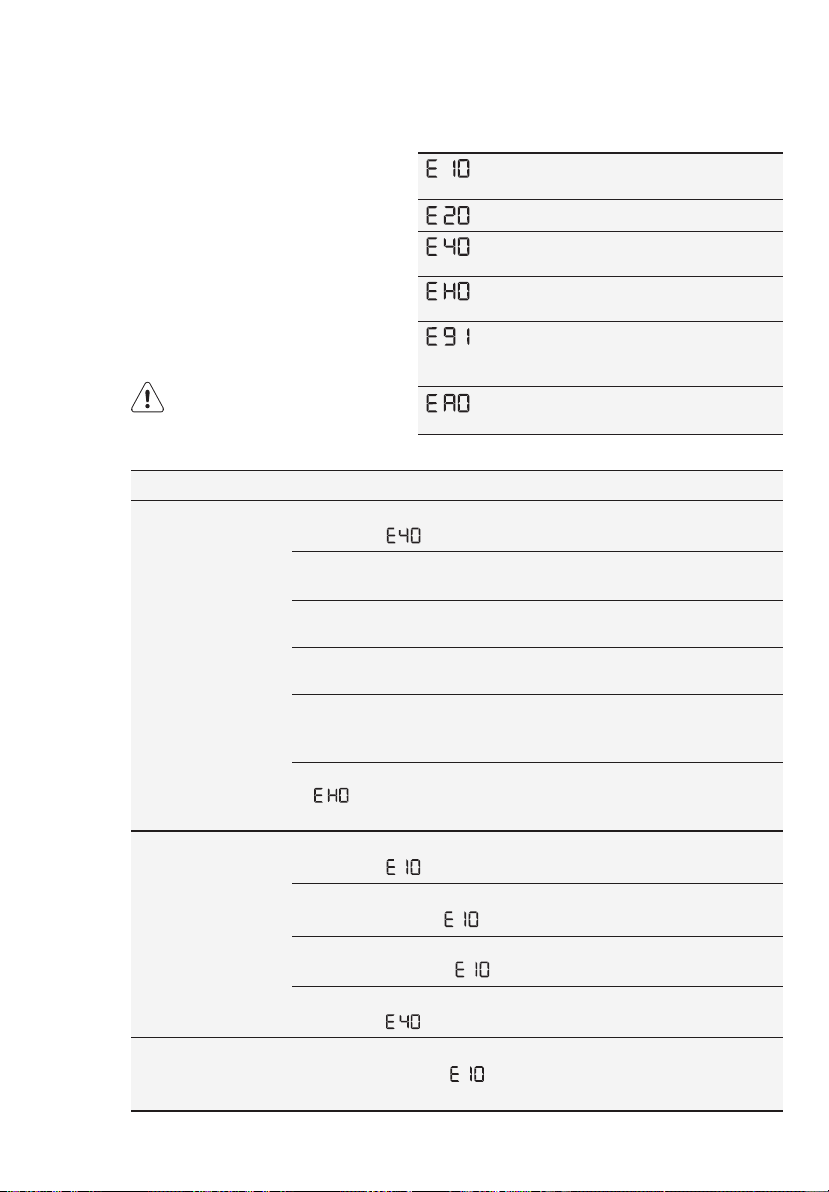
30 www.electrolux.com
TROUBLESHOOTING9.
The door has not been closed.
(Error code: )
Close the door firmly.
The plug is not properly
inserted into the power socket.
Insert the plug into the power
socket.
There is no power at the
socket.
Please check your domestic
electrical installation.
The Start/Pause touchpad has
not been pressed.
Press the Start/Pause
touchpad.
The “Delay End” has been
selected.
If the laundry are to be
washed immediately, cancel
the “Delay End”.
The Main supply is unstable.
(If appears on the
display.)
Wait until the main supply is
stable. Appliance will start
automatically.
The inlet hose is squashed or
kinked. (Error code: )
Check the inlet hose
connection.
The end of the drain hose is
too low. (Error code: )
Refer to relevant paragraph in
“water drainage” section.
The filter in the inlet hose is
blocked. (Error code: )
Clean the water inlet hose
filter.
The door is not properly closed.
(Error code: )
Close the door firmly.
The water tap is closed.
(Error code: )
Open the water tap.
Machine does
not start:
Machine does
not fill the
water:
Machine fills
then empties
immediately:
Malfunction Possible cause Solution
9.1 Possible Failures
Certain problems are due to lack of
simple maintenance or oversights,
which can be solved easily without
calling out an engineer. Before
contacting your local Service Centre,
please check troubleshooting.
Once the problem has been
eliminated, press the Start/Pause
button to restart the program. If after
all checks, the problem persists,
contact your local Service Centre.
The appliance does not fill with water
properly.
The appliance door is open or not
closed correctly. Please check the door!
The appliance does not drain the water.
The main supply is unstable. Wait until
the main supply is stable.
No communication between electronic
elements of the appliance. Switch off
and switch on again.
No Registration Data found in machine
or Server.
WARNING! Deactivate the
appliance before you do the
checks.
Alarm Code:
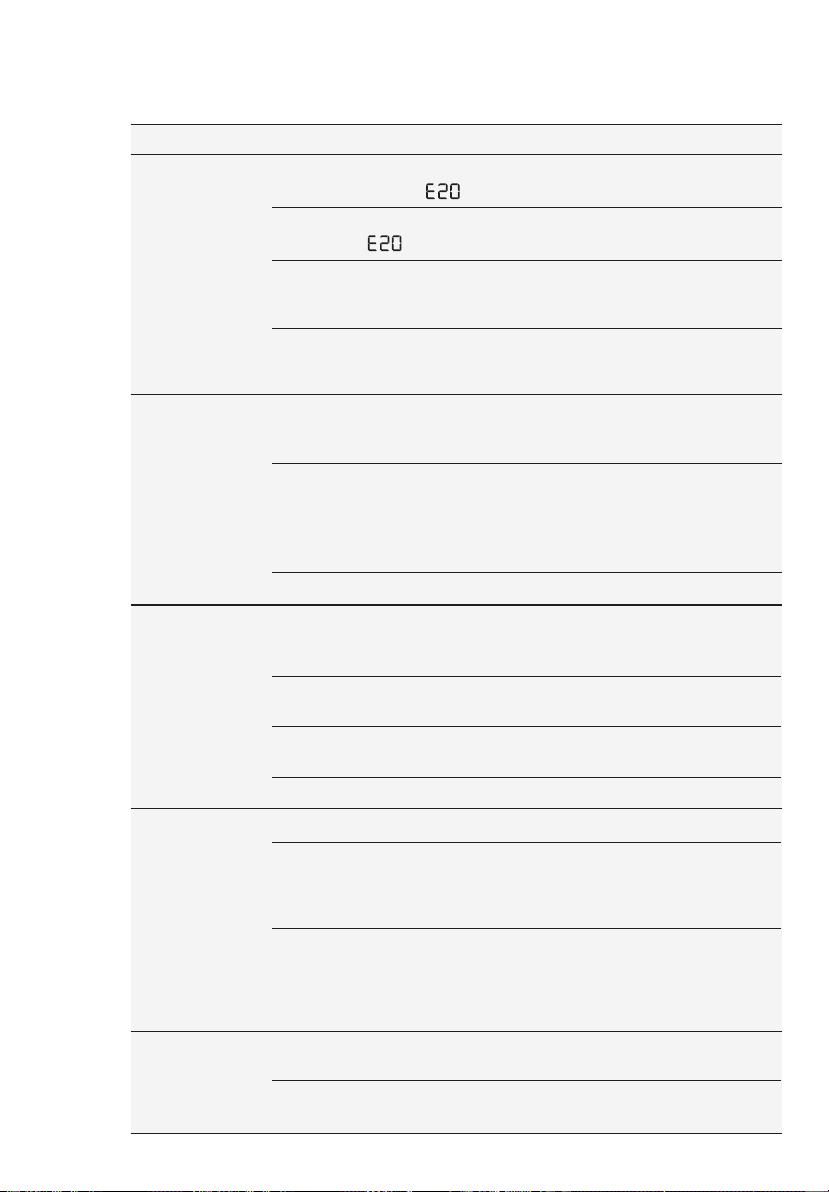
ENGLISH 31
Malfunction Possible cause Solution
Too much detergent or unsuitable
detergent (creates too much
foam) has been used.
Reduce detergent quantity
and use correct type of
detergent (refer page 23).
Check whether there are any leaks
from one of the inlet hose fittings. It
is not always easy to see this as
the water runs down the hose;
check to see if it is damp.
Check the water inlet hose
connection.
Too little detergent or unsuitable
detergent has been used.
Increase detergent
quantity or use different
detergent (refer page 23).
The program is still running. Wait until the end of cycle.
There is water in the drum.You must drain the water
to open the door (refer
“Opening The Door” on
page 20.
This problem may be caused by
a failure of the appliance.
Contact Service. If you
need to open the door,
please read carefully
“Emergency door opening”
on page 33.
Stubborn stains have not been
treated prior to washing.
Use commercial products
to treat the stubborn stains.
The correct temperature was not
selected.
Check if you have selected
the correct temperature.
Excessive laundry load. Reduce load.
The drain hose is damaged. Call Service.
There is water
on the floor:
Unsatisfac-
tory
washing
results:
The door will
not open:
The drain hose is squashed or
kinked. (Error code: )
Check the drain hose
connection.
The drain pump is clogged.
(Error code: )
Clean the drain filter.
Machine
does not
empty and/or
does not
spin:
The option “Rinse Hold” has been
selected.
Press Start/Pause
touchpad to drain the water
or select spin program.
The laundry is not evenly
distributed in the drum.
Pause the machine and
redistribute laundry
manually.
The transit bolts and packing
have not been removed.
Check the correct installa-
tion of the appliance.
The support feet have not been
adjusted.
Check the correct levelling
of the appliance.
Machine
vibrates or
is noisy:
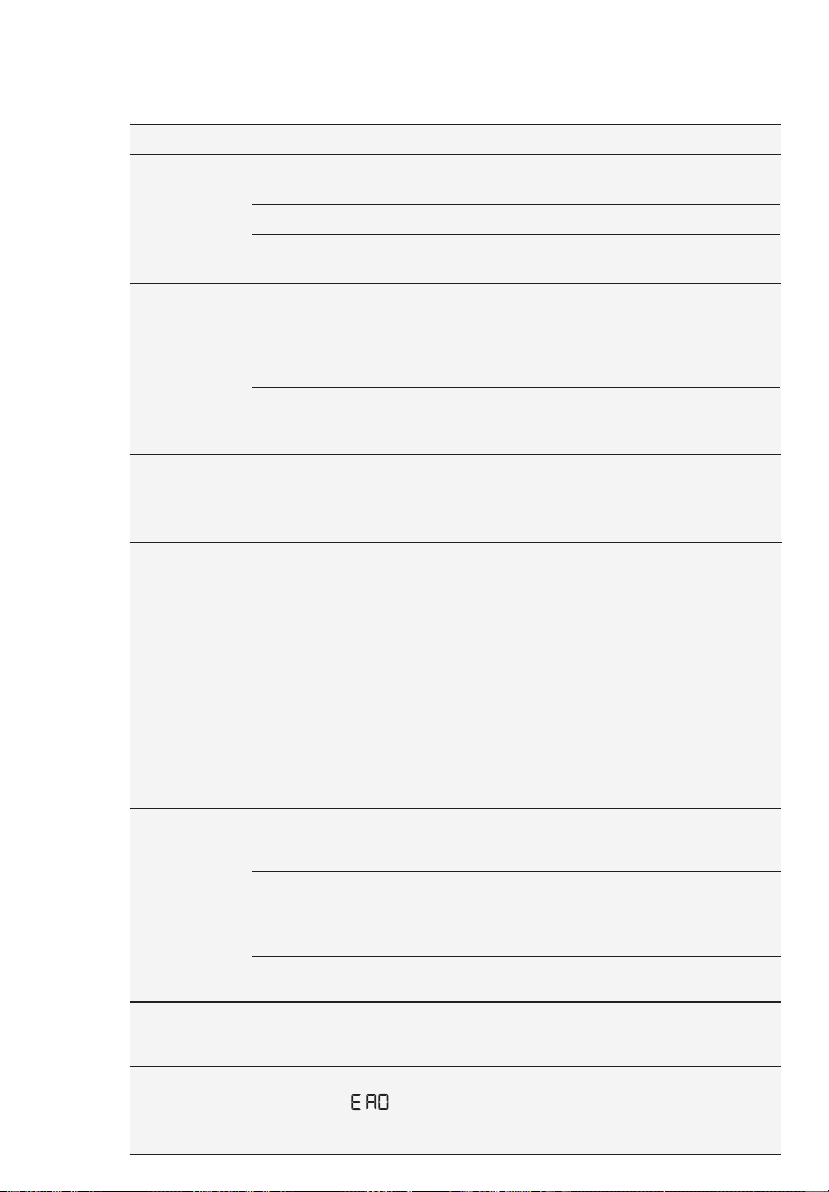
32 www.electrolux.com
Malfunction Possible cause Solution
Detergent over dose. Reduce the detergent
quantity or use another one.
(Refer page 23 “Detergents
Type And Quantity Of
Detergent”).
Machine unbalance. Redistribute laundry
manually in the drum and
start the spin phase again.
The laundry is not evenly distributed in
the drum.
Pause the machine and
redistribute laundry manually.
There is very little laundry in the drum. Load more laundry.
Unstable floors eg. wooden floors. Refer to relevant paragraph
in “Positioning” section.
Machine
vibrates or
is noisy:
Cycle time
longer than
displayed:
The electronic unbalance detection
device has cut in because the laundry
is not evenly distributed in the drum.
The laundry is redistributed by
reverse rotation of the drum.
This may happen several times
before the unbalance disappears and
normal spinning can resume. If, after
10 minutes, the laundry is still not
evenly distributed in the drum, the
machine will not spin. In this case,
redistribute the load manually and
select the spin program.
Pause the machine and
redistribute laundry
manually.
Machine not installed properly.Make sure the levelling of
the appliance is correct.
Refer to “Installation”.
Transit bolts or packaging not
removed.
Make sure that the
packaging and/or the transit
bolts are removed. Refer to
“Unpacking”.
The load may be too small. Add more laundry in the
drum.
Machines based on modern technology operate very economically
using very little water without affecting performance.
Spinning
starts late
or machine
does not
spin:
Machine
makes an
unusual
noise:
Registration Data lost or damaged.
(Error Code: )
Restart machine by turn Off
and turn On again. If problem
not solved, please contact
Service Centre.
Remote
function
does not
work:
No water is
visible in
the drum:
The appliance calculated a new time according to the laundry
load.
The cycle is
shorter than
the time
displayed.
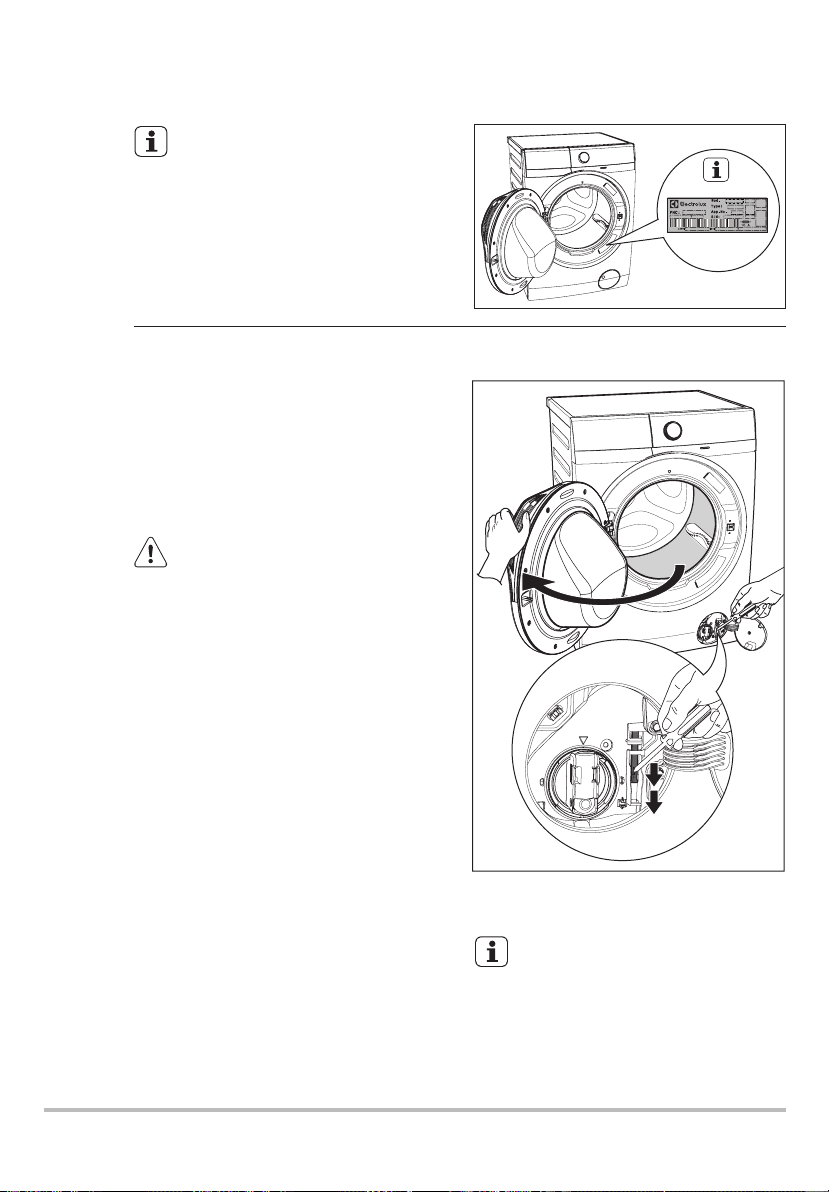
ENGLISH 33
In case of power failure or appliance
failure, the appliance door remains
locked. The wash program continues
when power is restored. If the door
remains locked in case of failure, it is
possible to open it using the emergency
unlock feature.
Before opening the door:
9.2 Emergency Door Opening
Make sure that the water temperature
and the laundry are not hot. Wait until
they cool down if necessary.
WARNING!
Make sure that the drum is not
rotating. Wait until the drum stops
rotating if necessary.
Make sure that the water level inside
the drum is not too high. If necessary,
perform an Emergency Drain
(see page 29).
To open the door proceed as follows:
If you are unable to identify or
solve the problem, contact our
service centre.
Before calling service centre, make
a note of the model, serial number
and purchase date of your
machine: the Service Centre will
require this information.
If you are unable to identify or
solve the problem, contact our
service centre.
Before calling service centre, make
a note of the model, serial number
and purchase date of your
machine: the Service Centre will
require this information.
1. Press the On/Off button to switch the
appliance off.
2. Disconnect the mains plug from the
mains socket.
3. Open the filter cover.
4. Without touching the door. Insert a
small flathead screw driver into the
slot on emergency unlock strap(red
strap) and pull down twice then pull
the door open. Repeat if unsuccessful.
Note: Do not pull down emergency
strap too hard.
5. Take out the laundry.
6. Close the filter flap.
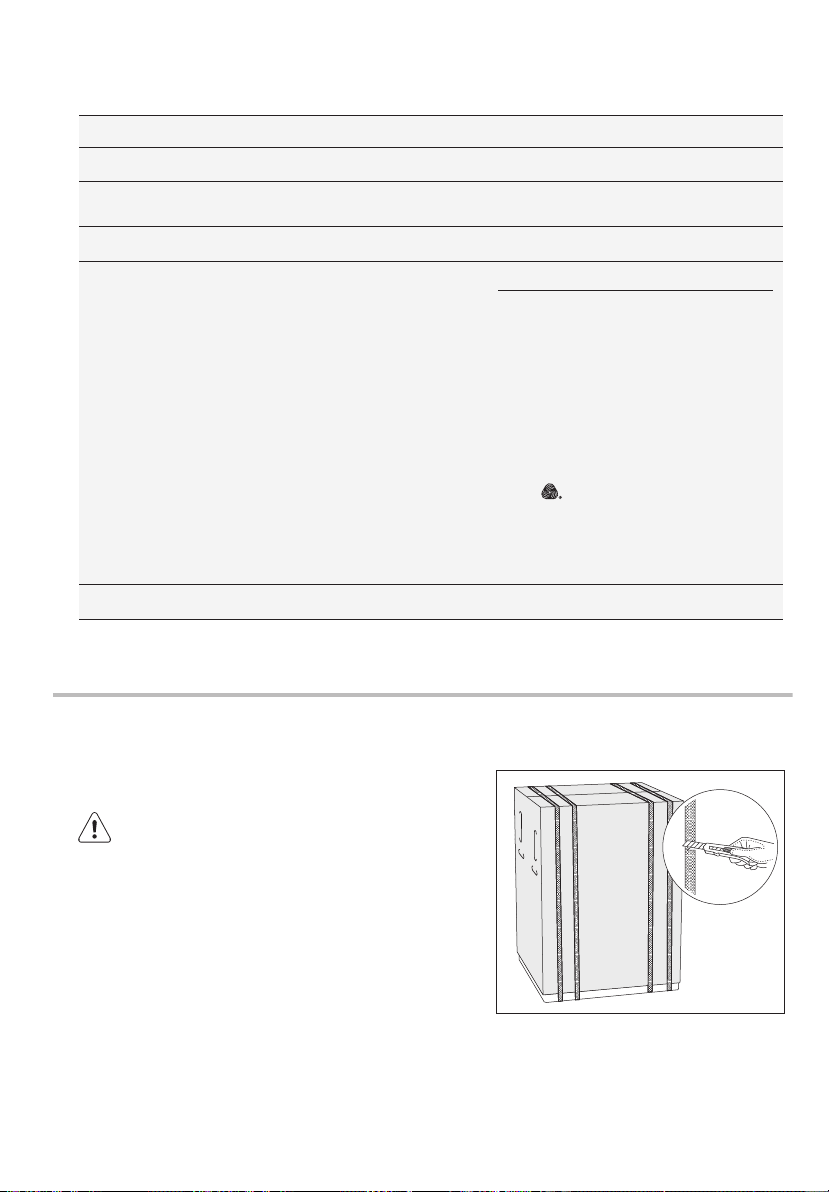
34 www.electrolux.com
INSTALLATION11.
11.1 Unpacking
Use gloves. Cut and remove four cut out
straps as shown.
1.
You are advised to keep all transit devices so that
they can be refitted if the machine ever has to be
transported again.
All transit bolts and packing must be removed
before using the appliance.
CAUTION!
Dimensions (Height / Width / Depth)
Maximum dry
clothes capacity
Spin speed (Maximum / Minimum) 1400 rpm / 400 rpm
Program Max. Capacity
Power supply (Voltage / Frequency)
Total power absorbed
Water supply pressure (Maximum / Minimum)
0.8 MPa / 0.05 MPa
1)
Maximum capacity depended on the model of the Washing Machine (see defined on the
control panel).
4.
5.
Remove the polystyrene base.
6.
Put one of the polystyrene packaging
elements on the floor behind the
appliance. Carefully put down the
appliance with the rear side on it.
Make sure not to damage the hoses.
Pull up the appliance in vertical
position.
Remove the carton box. Remove the
polystyrene packaging materials.
Remove the plastic bag which cover
the machine.
2.
Open the door. Remove the
polystyrene piece from the door seal
and all the items from the drum.
3.
7.
Remove the power supply cable and
the drain and inlet hoses from the
hose holders (A) on the rear of the
appliance.
10. TECHNICAL DATA
230 V~ / 60 Hz
85 X 60 X 65.9 cm
2000 W
Max.
1)
4 kg
4 kg
3 kg
1.5 kg
Max.
-
Max.
Max.
4 kg
2 kg
1.5 kg
5.5 kg
Max.
-
Cottons
Mixed
Delicates
Bedding
Vapour Refresh
Energy Saver
App Program
Spin
Rinse + Spin
Baby Care
Wool
Quick 15
Daily 39
Full Wash 60
Favourite
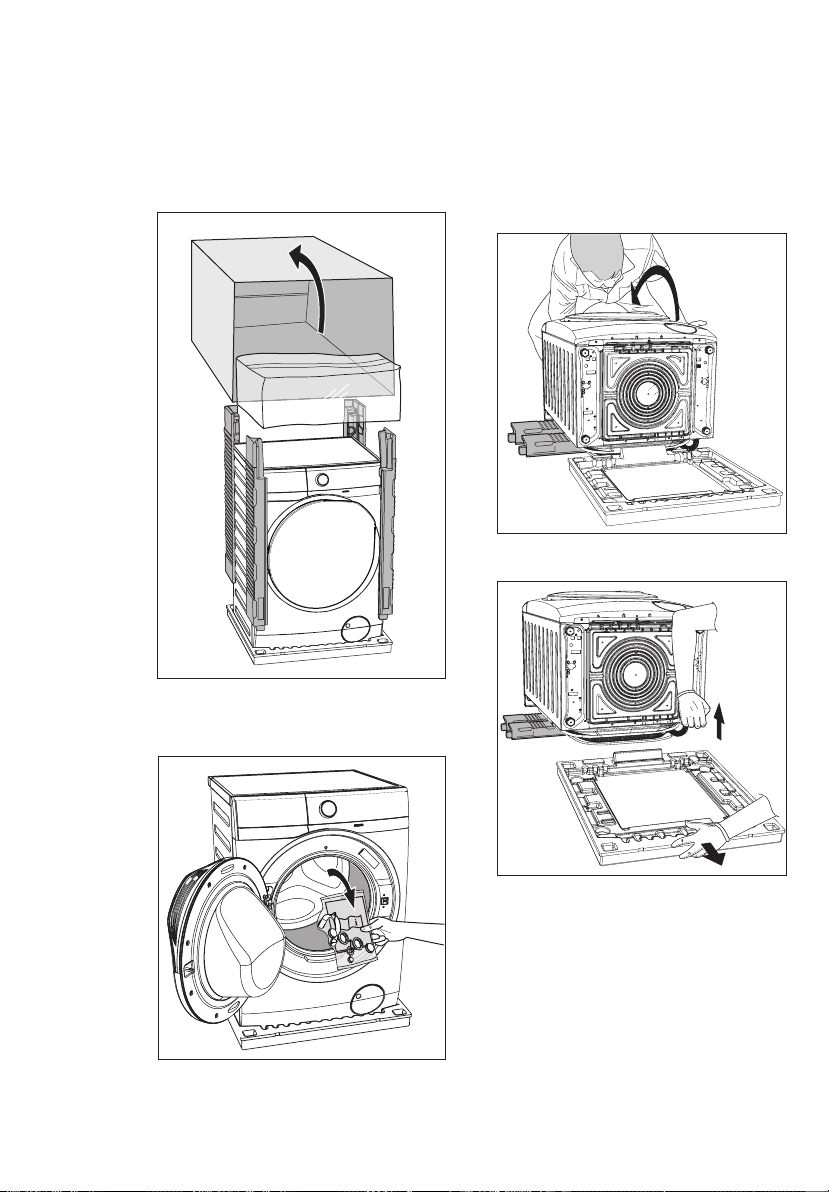
ENGLISH 35
4.
5.
Remove the polystyrene base.
6.
Put one of the polystyrene packaging
elements on the floor behind the
appliance. Carefully put down the
appliance with the rear side on it.
Make sure not to damage the hoses.
Pull up the appliance in vertical
position.
Remove the carton box. Remove the
polystyrene packaging materials.
Remove the plastic bag which cover
the machine.
2.
Open the door. Remove the
polystyrene piece from the door seal
and all the items from the drum.
3.
7.
Remove the power supply cable and
the drain and inlet hoses from the
hose holders (A) on the rear of the
appliance.
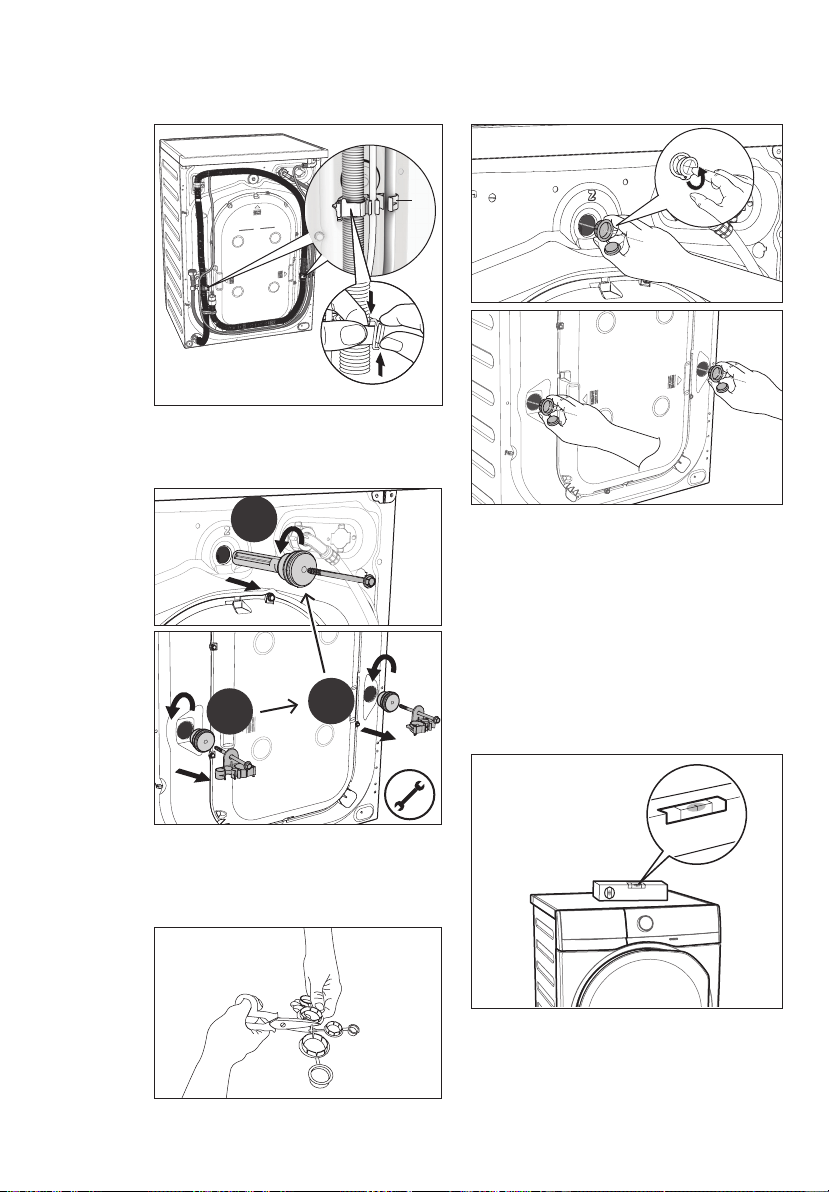
36 www.electrolux.com
11.2 Positioning
Use a spirit level on the top and side of
the washing machine to check the levels.
If you do not have a spirit level, as a
guide use the edge of a door frame,
cupboard or bench to check that the
washing machine is leveled.
It is important that your washing machine
stands firm and leveled on the floor to
ensure correct operation. The appliance
must not be installed behind a lockable
door, a sliding door or a door with a
hinge on the opposite side to avoid
restricting the washing machine door.
8.
9.
Pull out the plastic spacers.
10.
Put the plastic caps in the holes (X3).
You can find these caps in the user
manual bag.
Remove the three transit bolts.
A
1st
2nd
3rd
Loosen or tighten the feet to adjust the
level. A correct adjustment of the
appliance level prevents vibration, noise
and the movement of the appliance when
in operation.
Never place cardboard, wood or similar
materials under the machine to
compensate for any unevenness in the
floor. Install the machine on a flat hard
floor. Make sure that air circulation
around the machine is not impeded by
carpets, rugs etc.
When the washing machine is levelled,
try to rock it from corner to corner. If it
does rock, adjust the legs again until it is
levelled and does not rock.
Check that the machine does not touch
the wall or cupboard units.
Connect the water inlet hose to a tap
with 3/4” BSP thread.
Use the hose supplied with the washing
machine. DO NOT USE OLD HOSES.
11.3 Water Inlet
The inlet hose must not be lengthened.
If it is too short and you do not wish to
move the tap, you will have to purchase
a new, longer hose specially designed
for this type of use.
Loosen the ring nut to angle the hose to
the left or right depending on the position
of your water tap. Do not place the inlet
hose downwards. After positioning the
inlet hose, be sure to tighten the ring nut
again to prevent leaks.
The end of the drain hose can be
positioned in three ways:
Hooked over the edge of a sink,
using the plastic hose guide supplied
with the machine.
11.4 Water Drainage
check
45°
35°
clockwise “DOWN”
counter clockwise “UP”
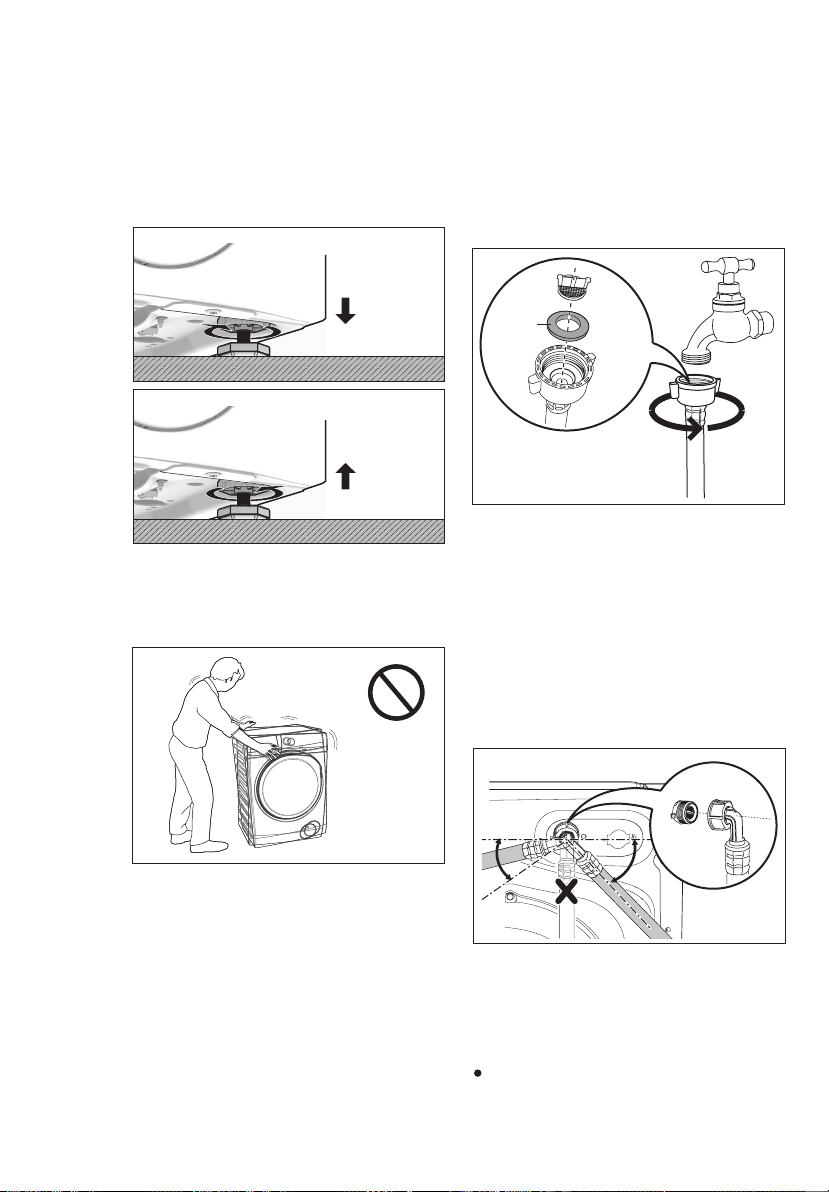
ENGLISH 37
11.2 Positioning
Use a spirit level on the top and side of
the washing machine to check the levels.
If you do not have a spirit level, as a
guide use the edge of a door frame,
cupboard or bench to check that the
washing machine is leveled.
It is important that your washing machine
stands firm and leveled on the floor to
ensure correct operation. The appliance
must not be installed behind a lockable
door, a sliding door or a door with a
hinge on the opposite side to avoid
restricting the washing machine door.
8.
9.
Pull out the plastic spacers.
10.
Put the plastic caps in the holes (X3).
You can find these caps in the user
manual bag.
Remove the three transit bolts.
A
1st
2nd
3rd
Loosen or tighten the feet to adjust the
level. A correct adjustment of the
appliance level prevents vibration, noise
and the movement of the appliance when
in operation.
Never place cardboard, wood or similar
materials under the machine to
compensate for any unevenness in the
floor. Install the machine on a flat hard
floor. Make sure that air circulation
around the machine is not impeded by
carpets, rugs etc.
When the washing machine is levelled,
try to rock it from corner to corner. If it
does rock, adjust the legs again until it is
levelled and does not rock.
Check that the machine does not touch
the wall or cupboard units.
Connect the water inlet hose to a tap
with 3/4” BSP thread.
Use the hose supplied with the washing
machine. DO NOT USE OLD HOSES.
11.3 Water Inlet
The inlet hose must not be lengthened.
If it is too short and you do not wish to
move the tap, you will have to purchase
a new, longer hose specially designed
for this type of use.
Loosen the ring nut to angle the hose to
the left or right depending on the position
of your water tap. Do not place the inlet
hose downwards. After positioning the
inlet hose, be sure to tighten the ring nut
again to prevent leaks.
The end of the drain hose can be
positioned in three ways:
Hooked over the edge of a sink,
using the plastic hose guide supplied
with the machine.
11.4 Water Drainage
check
45°
35°
clockwise “DOWN”
counter clockwise “UP”
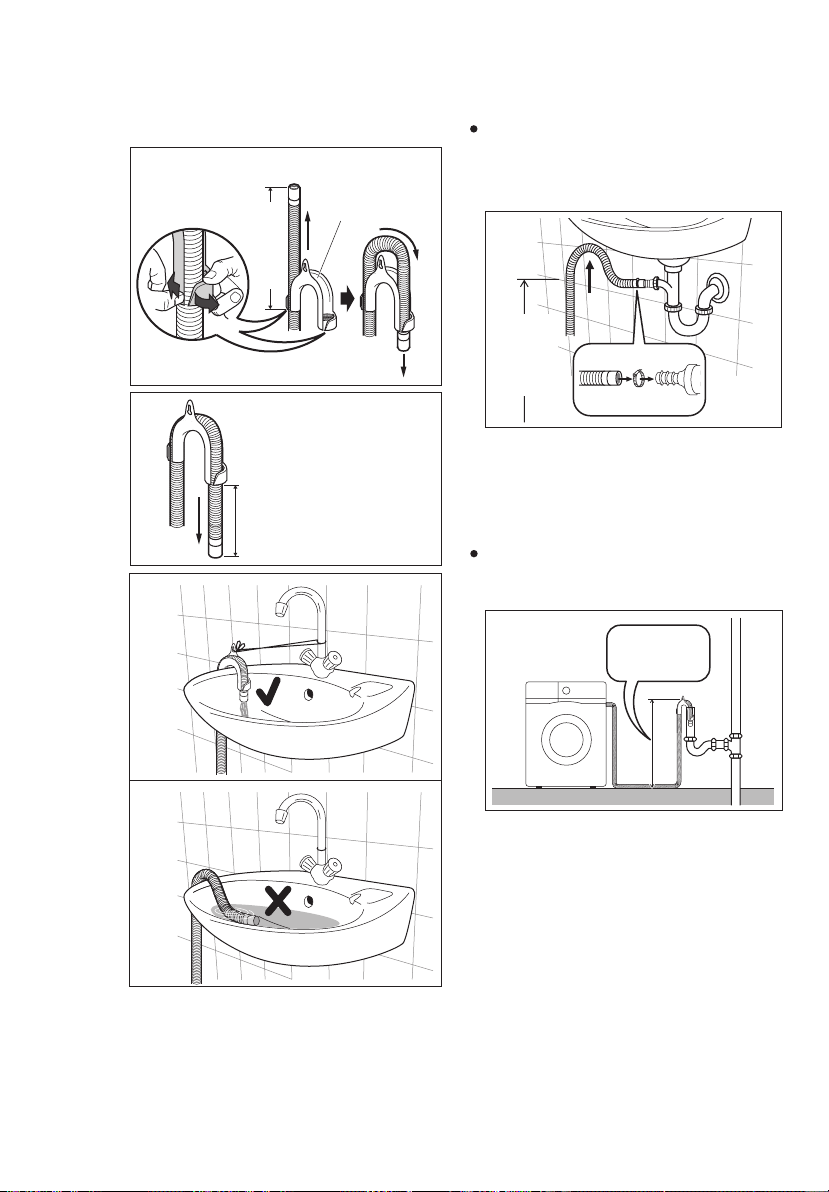
38 www.electrolux.com
Fitting Hose Guide
bend
hose
2.
Adjust length to suit
trough.
Pull apart to
insert hose.
pull hose
1.
450 approx.
Hose
Guide
Push the drain hose onto the spigot
and secure with a clamp, ensure a
loop is formed in the drain hose to
prevent waste from the sink entering
the appliance.
In a sink, drain pipe branch.
Directly into a drain pipe, at a height
of not less than 60 cm and not more
than 90 cm.
The end of the drain hose must always
be ventilated, i.e. the inside diameter
of the drain pipe must be larger than
the outside diameter of the drain hose.
The drain hose must not be twisted or
curled. Run it along the floor; only the
part near the drainage point must be
raised.
In this case, make sure the end cannot
come unhooked when the machine will
be emptied. This could be done by tying
it to the tap with a piece of string or
attaching it to the wall.
For the correct functioning of the
machine, the drain hose must remain
hooked on the proper support piece
situated on the top part of back side of
the appliance.
This branch must be above the trap so
that the bend is at least 60 cm above
the ground.
Max.
90 cm
Min.
60 cm
Max. 90 cm
Min. 60 cm
The materials marked with the
symbol are recyclable.
>PE<=polyethylene
>PS<=polystyrene
>PP<=polypropylene
This means that they can be recycled by
disposing them properly in appropriate
collection containers.
To save water, energy and to help
protect the environment, we recommend
that you follow these tips:
Use authorized disposal sites for your old
appliance. Help to keep your country tidy!
The symbol on the product or on its
packaging indicates that this product may
not be treated as household waste.
Instead it shall be handed over to the
applicable collection point for the recycling
of electrical and electronic equipment. By
ensuring this product is disposed of
correctly, you will help prevent potential
negative consequences for the environ-
ment and human health, which could
otherwise be caused by inappropriate
waste handling of this product.
For more detailed information about
recycling of this product, please contact
your local city office, your household
waste disposal service or the shop where
you purchased the product.
12.1 Packaging Materials
12.3 Ecological Hints
12.2 Old Machine
ENVIRONMENT CONCERNS12.
Normally soiled laundry may be
washed without prewashing in order to
save detergent, water and time (the
environment is protected too!).
The machine works more economically
if it is fully loaded.
With adequate pre-treatment, stains
and limited soiling can be removed; the
laundry can then be washed at a lower
temperature.
Measure out detergent according to
the water hardness, the degree of
soiling and the quantity of laundry
being washed.
11.5 Electrical Connection
The manufacturer declines any
responsibility for damage or
injury through failure to comply
with the above safety precaution.
Should the appliance power
supply cable need to be
replaced, this shall be carried
out by our Service Centre.
Connect the machine to an
earthed socket outlet.
CAUTION!
When the appliance is installed, the
power supply cable must be easily
accessible.
ENGLISH 39
Fitting Hose Guide
bend
hose
2.
Adjust length to suit
trough.
Pull apart to
insert hose.
pull hose
1.
450 approx.
Hose
Guide
Push the drain hose onto the spigot
and secure with a clamp, ensure a
loop is formed in the drain hose to
prevent waste from the sink entering
the appliance.
In a sink, drain pipe branch.
Directly into a drain pipe, at a height
of not less than 60 cm and not more
than 90 cm.
The end of the drain hose must always
be ventilated, i.e. the inside diameter
of the drain pipe must be larger than
the outside diameter of the drain hose.
The drain hose must not be twisted or
curled. Run it along the floor; only the
part near the drainage point must be
raised.
In this case, make sure the end cannot
come unhooked when the machine will
be emptied. This could be done by tying
it to the tap with a piece of string or
attaching it to the wall.
For the correct functioning of the
machine, the drain hose must remain
hooked on the proper support piece
situated on the top part of back side of
the appliance.
This branch must be above the trap so
that the bend is at least 60 cm above
the ground.
Max.
90 cm
Min.
60 cm
Max. 90 cm
Min. 60 cm
The materials marked with the
symbol are recyclable.
>PE<=polyethylene
>PS<=polystyrene
>PP<=polypropylene
This means that they can be recycled by
disposing them properly in appropriate
collection containers.
To save water, energy and to help
protect the environment, we recommend
that you follow these tips:
Use authorized disposal sites for your old
appliance. Help to keep your country tidy!
The symbol on the product or on its
packaging indicates that this product may
not be treated as household waste.
Instead it shall be handed over to the
applicable collection point for the recycling
of electrical and electronic equipment. By
ensuring this product is disposed of
correctly, you will help prevent potential
negative consequences for the environ-
ment and human health, which could
otherwise be caused by inappropriate
waste handling of this product.
For more detailed information about
recycling of this product, please contact
your local city office, your household
waste disposal service or the shop where
you purchased the product.
12.1 Packaging Materials
12.3 Ecological Hints
12.2 Old Machine
ENVIRONMENT CONCERNS12.
Normally soiled laundry may be
washed without prewashing in order to
save detergent, water and time (the
environment is protected too!).
The machine works more economically
if it is fully loaded.
With adequate pre-treatment, stains
and limited soiling can be removed; the
laundry can then be washed at a lower
temperature.
Measure out detergent according to
the water hardness, the degree of
soiling and the quantity of laundry
being washed.
11.5 Electrical Connection
The manufacturer declines any
responsibility for damage or
injury through failure to comply
with the above safety precaution.
Should the appliance power
supply cable need to be
replaced, this shall be carried
out by our Service Centre.
Connect the machine to an
earthed socket outlet.
CAUTION!
When the appliance is installed, the
power supply cable must be easily
accessible.
This machine is designed to operate on
a 230 V, single-phase, 60 Hz supply.
“An incorrect power supply may void
your warranty.”
Check that your domestic electrical
installation can take the maximum
load required (2.0 kW), also taking into
account any other appliances in use.
40 www.electrolux.com
13. WI-FI CONNECTIVITY SETUP
13.1 Download and installing
and configuring “Electrolux
Life” App*.
This chapter describes how to connect the
smart appliance to the Wi-Fi network and to
link it to a mobile devices.
By this functionality you can monitor and
control your laundry appliance from your
mobile devices.
To connect the appliance to enjoy the full
range of features and services you need:
* Minimum requirements: iPhone6/iOS 9.3/
Android 5.1 and above. You will need to install
the Electrolux Life App, create an Electrolux
account and accept the Terms and Conditions
and Electrolux’s Privacy Policy in the App to use
the connected features of the laundry appliance.
Internet and Wi-Fi connections are required to
use the full features of the App and the laundry
appliance. Minimum requirements, Apps and
services are subject to change without notice.
* Setup will take several minutes
depending on your network speed.
1. Go to the App Store/Play Store on your
smart device.
2. Download and install App
“Electrolux Life”.
• Wireless network at home with internet
connection enabled.
• Mobile device connected to wireless
network.
3. Create an Electrolux account. You
can only create one Electrolux
account per product. This account
can be shared across multiple
devices.
4. Setting up your Washing Machine.
Make sure your machine is plugged
in and operating normally, stand near
it with your smart device.
Tap on “Appliances” at the bottom of
the home screen.
Tap on “Add Appliance” and follow
the prompts on screen.
5. Turning on your Washing Machine
Wi-Fi. Initially your machine creates
its own Wi-Fi network to assist in
setting up. After setup this network
disappears and your machine will
connect to your home Wi-Fi network.
Press and hold
Remote touch
button for 3 seconds.
The text
pop up for about 5
seconds and the icon starts
flashing and wireless module begins
starting up. It may takes about 45
seconds before it is ready. When the
wireless module is ready, the text
(Access Point) is on to inform you,
that the access point will be open for
about 3 minute.
6. Connect your Washing Machine:
iOS
Tap the home button to exit the app.
Go to “Settings” on your phone and
select “Wi-Fi”.
Select your Washing Machine’s Wi-Fi
“The software in this product contains
components that are based on free and
open source software. Electrolux gratefully
acknowledges the contributions of the open
software and robotics communities to the
development project. To access the source
code of these free and open source software
components whose license conditions
require publishing, and to see their full
copyright information and applicable license
terms, please visit:
http://electrolux.opensoftwarerepository.com
(folder NIU5)”
Frequency/
Protocol
Wi-Fi: 2.4 GHz / 802.11 bgn
Wi-Fi: 5 GHz / 802.11an
(for indoor use only)
Bluetooth Low Energy
5.0: 2.4 GHz / DSSS
Max Power
Wi-Fi 2.4 GHz: <20 dBm
Wi-Fi 5 GHz: <23 dBm
Bluetooth Low Energy
5.0: <20 dBm
Encryption WPA, WPA2
ENGLISH 41
13.2 Remote Start
If you switch the machine off and
on again, the wireless connection is
automatically off.
When the App is installed and the wireless
connection is complete, you can start
and stop a program remotely by activate
remote start.
Press the
Remote touch button. The
icon is off and the remote start is
deactivated.
1. Press the
Remote button and the
indicator appears on the display.
2. Press the Start/Pause button to
activate the Remote Start.
Now it is possible to start the program
remotely.
Activate Remote Start
Deactivate Remote Start
The Remote Control activates
automatically when you press the Start/
Pause button to start the program, but it is
also possible to start a program.
If the door is unlock, the Remote Start
is deactivated.
network. It is the one that begins with “AJ-”
– (it may take a few moments to appear).
Tap the home button to exit your phone
settings and then return to the Electrolux Life
App.
Wait for confirmation of connection which
may take up to a minute before proceeding
to the next step.
For iOS devices, you will then be
prompted go to “SETTINGS” on your phone
and select your Home Wi-Fi, then return to
the Electrolux Life App.
Android
For Android devices, select your Washing
Machine’s Wi-Fi network from the drop-down
box.
7. Connect your Washing Machine to your
home Wi-Fi.
You’ll need to select your Wi-Fi network
name and input your password.
If the connectivity is configured,
(Access
Point) symbol is off and the icon
will stop
blinking and lit steadily to confirm that the
configuration was successful
Connection success!
Every time you switch the Washing
Machine on, the machine takes 45 seconds
to connect to the network automatically.
When the indicator stops blinking the
connection is ready.
Please proceed to the next screen to register
the Washing Machine.
8. Product registration; Simply add your
Washing Machine’s name and the purchase
date.
Congratulations!
Now you’re all set up. You can start exploring
the Electrolux Life App.
To switch the wireless connection off,
Press and hold
Remote touch button for 3
seconds until the first acoustic signal:
appears on the display.
To remove the wireless credentials,
Press and hold
Remote touch button for
10 seconds until the second acoustic signal:
appears on the display.
G0032369-002-A20692011
www.electrolux.com