1
2
3
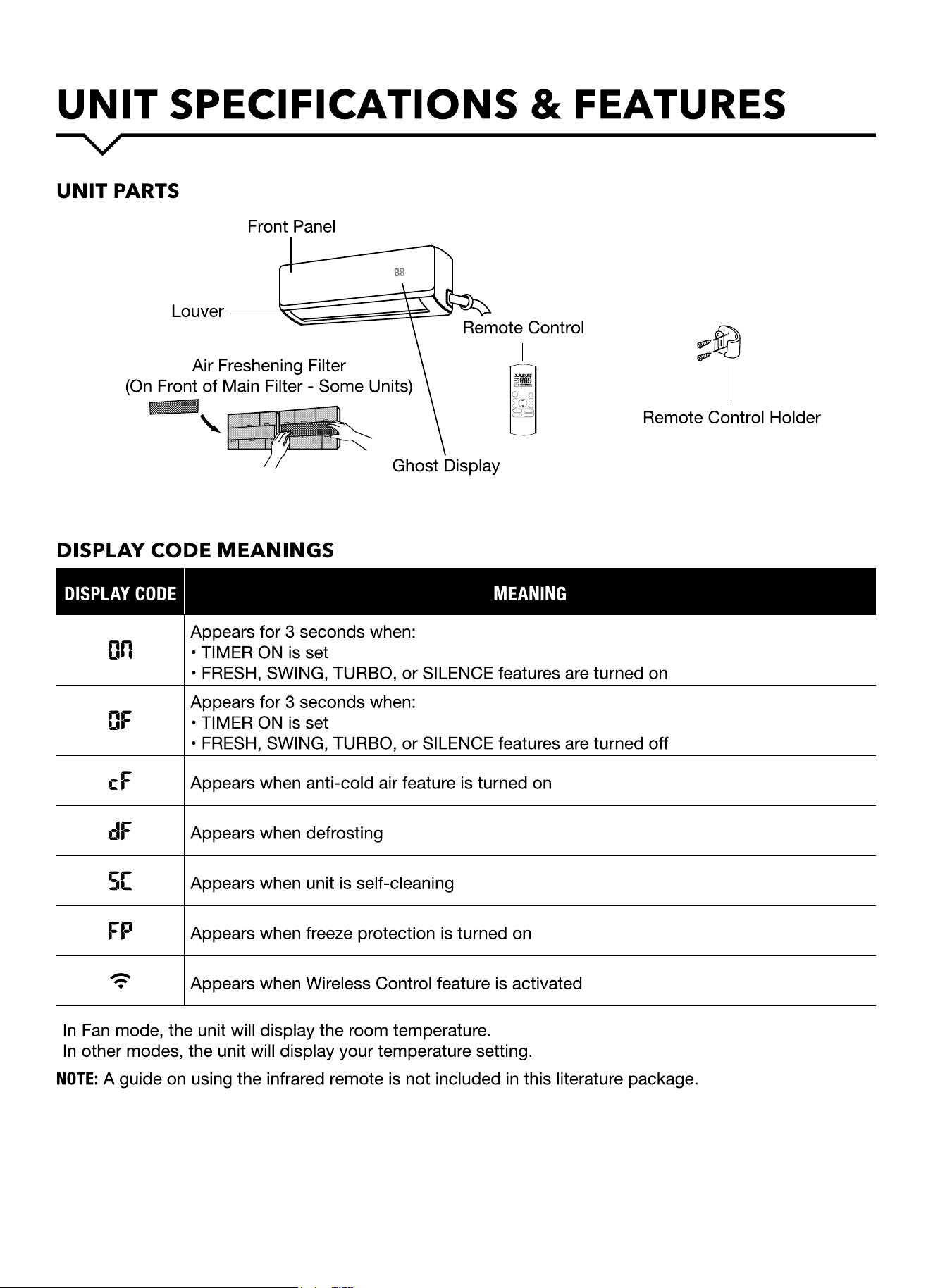
DISPLAY CODE MEANINGS
DISPLAY CODE MEANING
Appears for 3 seconds when:
• TIMER ON is set
• FRESH, SWING, TURBO, or SILENCE features are turned on
Appears for 3 seconds when:
• TIMER ON is set
• FRESH, SWING, TURBO, or SILENCE features are turned o
Appears when anti-cold air feature is turned on
Appears when defrosting
Appears when unit is self-cleaning
Appears when freeze protection is turned on
Appears when Wireless Control feature is activated
In Fan mode, the unit will display the room temperature.
In other modes, the unit will display your temperature setting.
NOTE: A guide on using the infrared remote is not included in this literature package.
MODE
FAN
TEMP
SLEEP
SWING DIR ECT
LED FOLLOW
ME
TURBO SELF
CLEAN
ON/OFF
SILEN CE
FP
TIMER
ON
TIMER
OFF
4
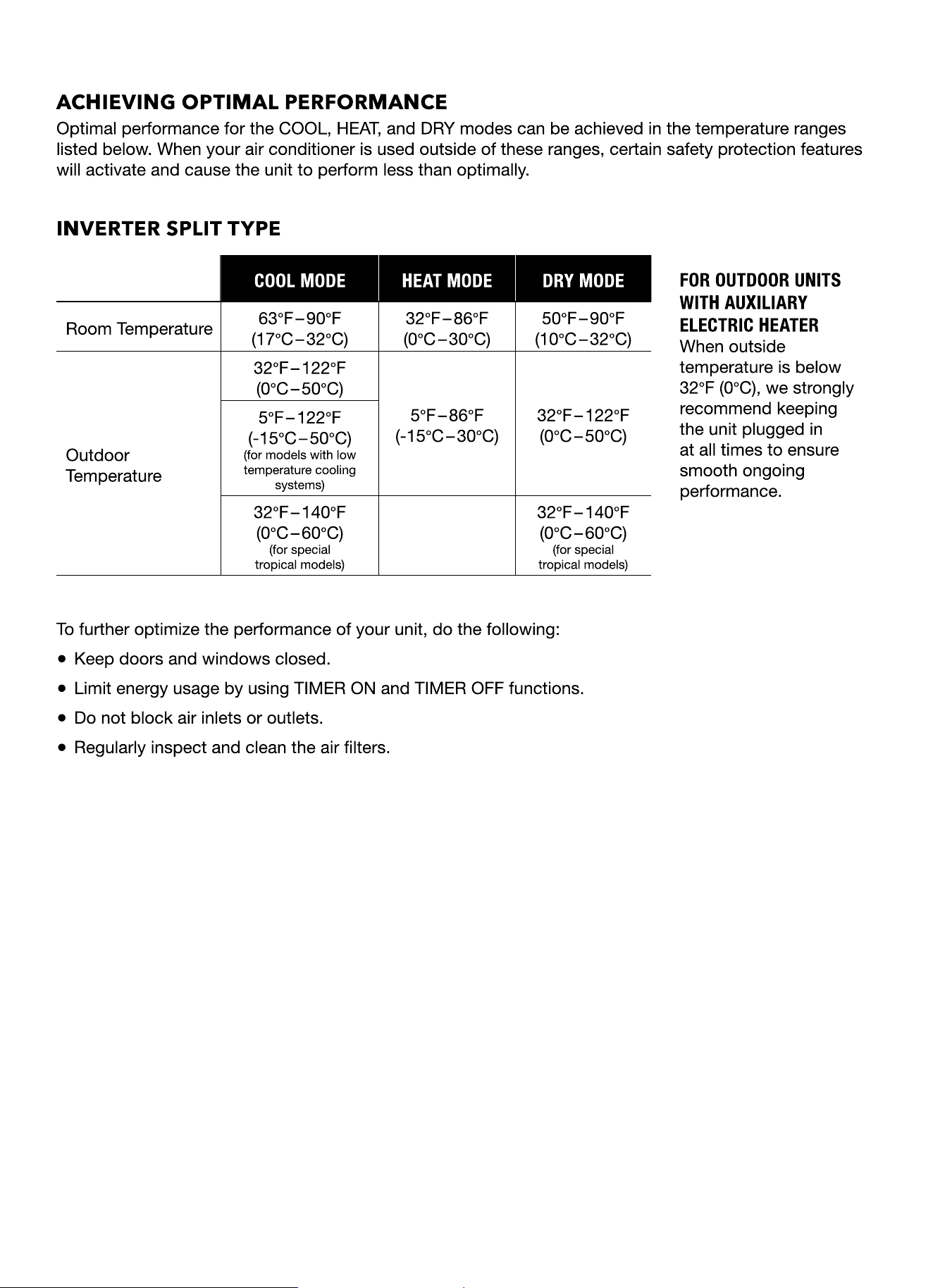
ACHIEVING OPTIMAL PERFORMANCE
Optimal performance for the COOL, HEAT, and DRY modes can be achieved in the temperature ranges
listed below. When your air conditioner is used outside of these ranges, certain safety protection features
will activate and cause the unit to perform less than optimally.
INVERTER SPLIT TYPE
COOL MODE HEAT MODE DRY MODE
FOR OUTDOOR UNITS
WITH AUXILIARY
ELECTRIC HEATER
When outside
temperature is below
32°F (0°C), we strongly
recommend keeping
the unit plugged in
at all times to ensure
smooth ongoing
performance.
Room Temperature
63°F – 9 0 °F
(17°C – 32°C)
32°F – 86°F
(0°C – 30°C)
50°F – 9 0 °F
(10°C – 32°C)
Outdoor
Temperature
32°F – 122°F
(0°C – 50°C)
5°F – 86°F
(-15°C – 30°C)
32°F – 122°F
(0°C – 50°C)
5°F – 122°F
(-15°C – 50°C)
(for models with low
temperature cooling
systems)
32°F – 140°F
(0°C – 60°C)
(for special
tropical models)
32°F – 140°F
(0°C – 60°C)
(for special
tropical models)
To further optimize the performance of your unit, do the following:
● Keep doors and windows closed.
● Limit energy usage by using TIMER ON and TIMER OFF functions.
● Do not block air inlets or outlets.
● Regularly inspect and clean the air lters.
5
6
7
8
9
10
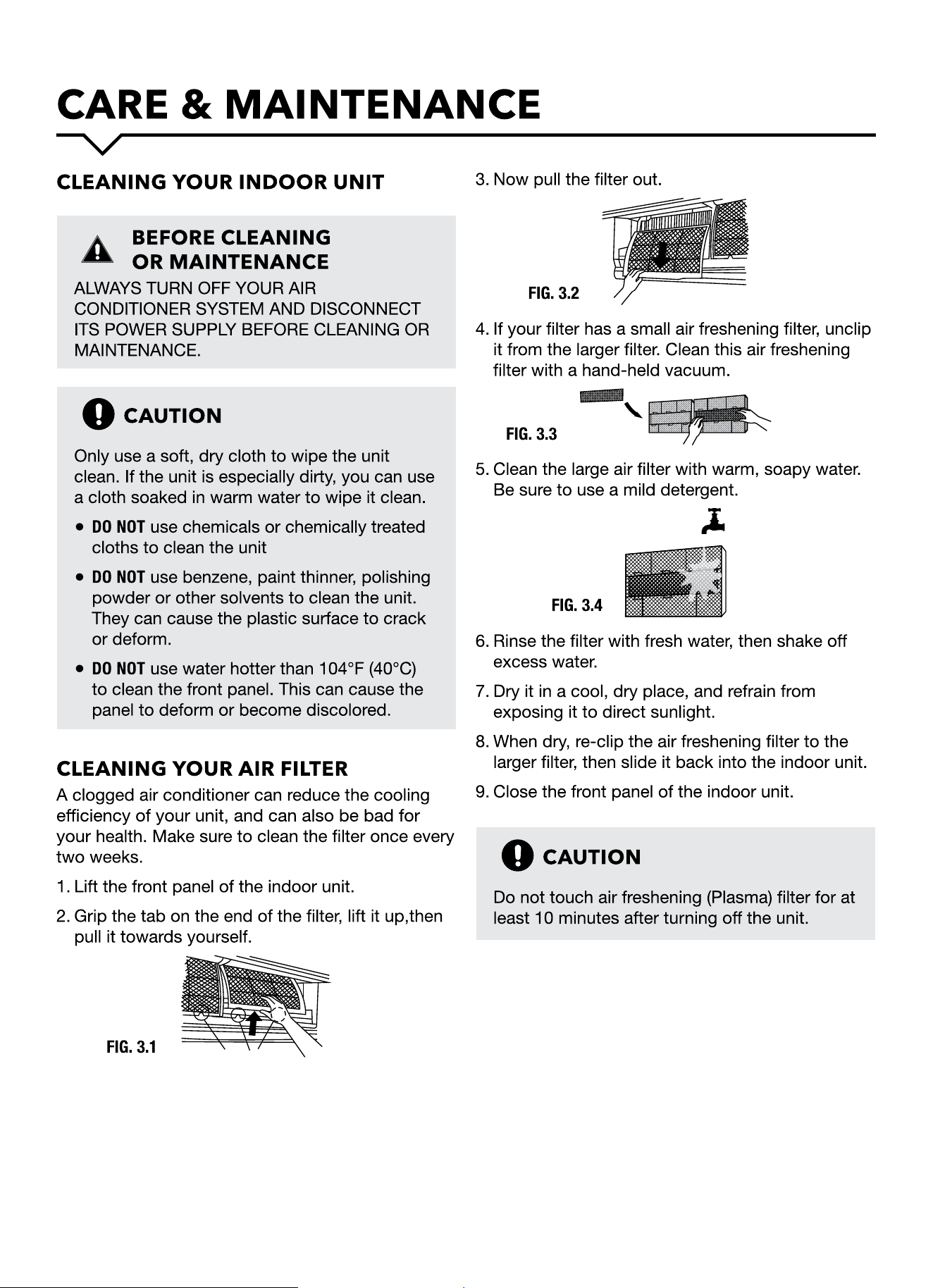
Clean all filters. Turn on FAN function until
unit dries out completely.
Turn off the unit and
disconnect the power.
Remove batteries from
remote control.
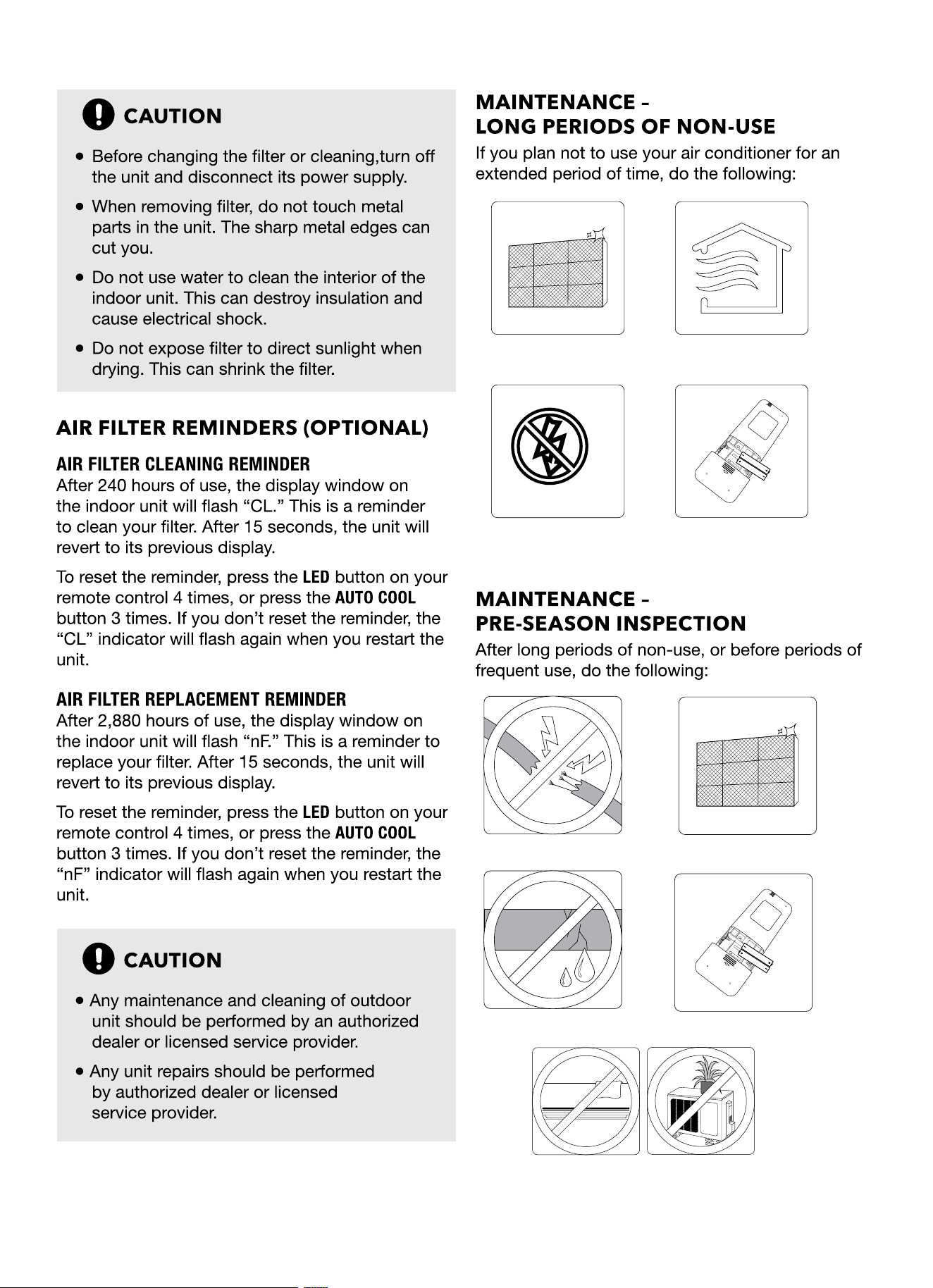
Check for damaged wires. Clean all filters.
Check for leaks. Replace batteries.
Make sure nothing is blocking all air inlets and outlets.
11
SAFETY PRECAUTIONS
If ANY of the following conditions occur, turn o your unit immediately!
• The power cord is damaged or abnormally warm
• You smell a burning odor
• The unit emits loud or abnormal sounds
• A power fuse blows or the circuit breaker frequently trips
• Water or other objects fall into or out of the unit
DO NOT ATTEMPT TO FIX THESE YOURSELF! CONTACT AUTHORIZED SERVICE PROVIDER IMMEDIATELY!
COMMON ISSUES
The following problems are not a malfunction and in most situations will not require repairs.
ISSUE POSSIBLE CAUSES
Unit does not turn on
when pressing ON/OFF
button
The Unit has a 3-minute protection feature that prevents the unit from
overloading. The unit cannot be restarted within three minutes of being
turned o.
The unit changes from
COOL/HEAT mode to
FAN mode
The unit may change its setting to prevent frost from forming on the unit.
Once the temperature increases, the unit will start operating in the previously
selected mode again.
The set temperature has been reached, at which point the unit turns o the
compressor. The unit will continue operating when the temperature uctuates
again.
The indoor unit emits
white mist
In humid regions, a large temperature dierence between the room’s air and
the conditioned air can cause white mist.
Both the indoor and
outdoor units emit white
mist
When the unit restarts in HEAT mode after defrosting, white mist may be
emitted due to moisture generated from the defrosting process.
12
ISSUE POSSIBLE CAUSES
The indoor unit makes
noises
A rushing air sound may occur when the louver resets its position.
A squeaking sound may occur after running the unit in HEAT mode due to
expansion and contraction of the unit’s plastic parts.
Both the indoor unit
and outdoor unit make
noises
Low hissing sound during operation: This is normal and is caused by
refrigerant gas owing through both indoor and outdoor units.
Low hissing sound when the system starts, has just stopped running, or is
defrosting: This noise is normal and is caused by the refrigerant gas stopping
or changing direction.
Squeaking sound: Normal expansion and contraction of plastic and metal
parts caused by temperature changes during operation can cause
squeaking noises
The outdoor unit makes
noises
The unit will make dierent sounds based on its current operating mode.
Dust is emitted from
either the indoor or
outdoor unit
The unit may accumulate dust during extended periods of non-use, which will
be emitted when the unit is turned on. This can be mitigated by covering the
unit during long periods of inactivity.
The unit emits a
bad odor
The unit may absorb odors from the environment (such as furniture, cooking,
cigarettes, etc.) which will be emitted during operations.
The unit’s lters have become moldy and should be cleaned.
The fan of the outdoor
unit does not operate
During operation, the fan speed is controlled to optimize product operation.
Operation is erratic,
unpredictable, or unit is
unresponsive
Interference from cell phone towers and remote boosters may cause the unit
to malfunction. In this case, try the following:
• Disconnect the power, then reconnect.
• Press ON/OFF button on remote control to restart operation.
13
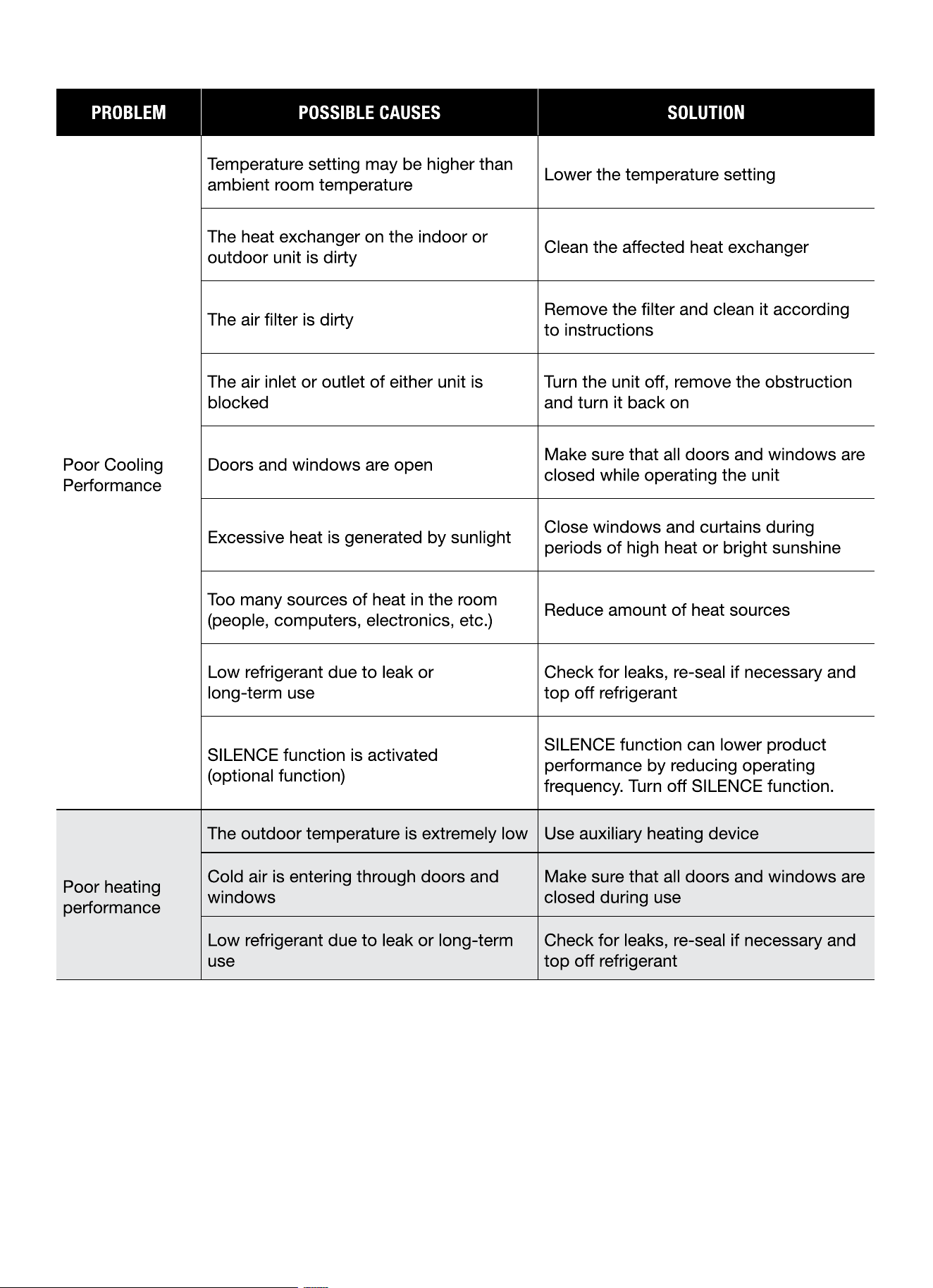
PROBLEM POSSIBLE CAUSES SOLUTION
Poor Cooling
Performance
Temperature setting may be higher than
ambient room temperature
Lower the temperature setting
The heat exchanger on the indoor or
outdoor unit is dirty
Clean the aected heat exchanger
The air lter is dirty
Remove the lter and clean it according
to instructions
The air inlet or outlet of either unit is
blocked
Turn the unit o, remove the obstruction
and turn it back on
Doors and windows are open
Make sure that all doors and windows are
closed while operating the unit
Excessive heat is generated by sunlight
Close windows and curtains during
periods of high heat or bright sunshine
Too many sources of heat in the room
(people, computers, electronics, etc.)
Reduce amount of heat sources
Low refrigerant due to leak or
long-term use
Check for leaks, re-seal if necessary and
top o refrigerant
SILENCE function is activated
(optional function)
SILENCE function can lower product
performance by reducing operating
frequency. Turn o SILENCE function.
Poor heating
performance
The outdoor temperature is extremely low Use auxiliary heating device
Cold air is entering through doors and
windows
Make sure that all doors and windows are
closed during use
Low refrigerant due to leak or long-term
use
Check for leaks, re-seal if necessary and
top o refrigerant
14
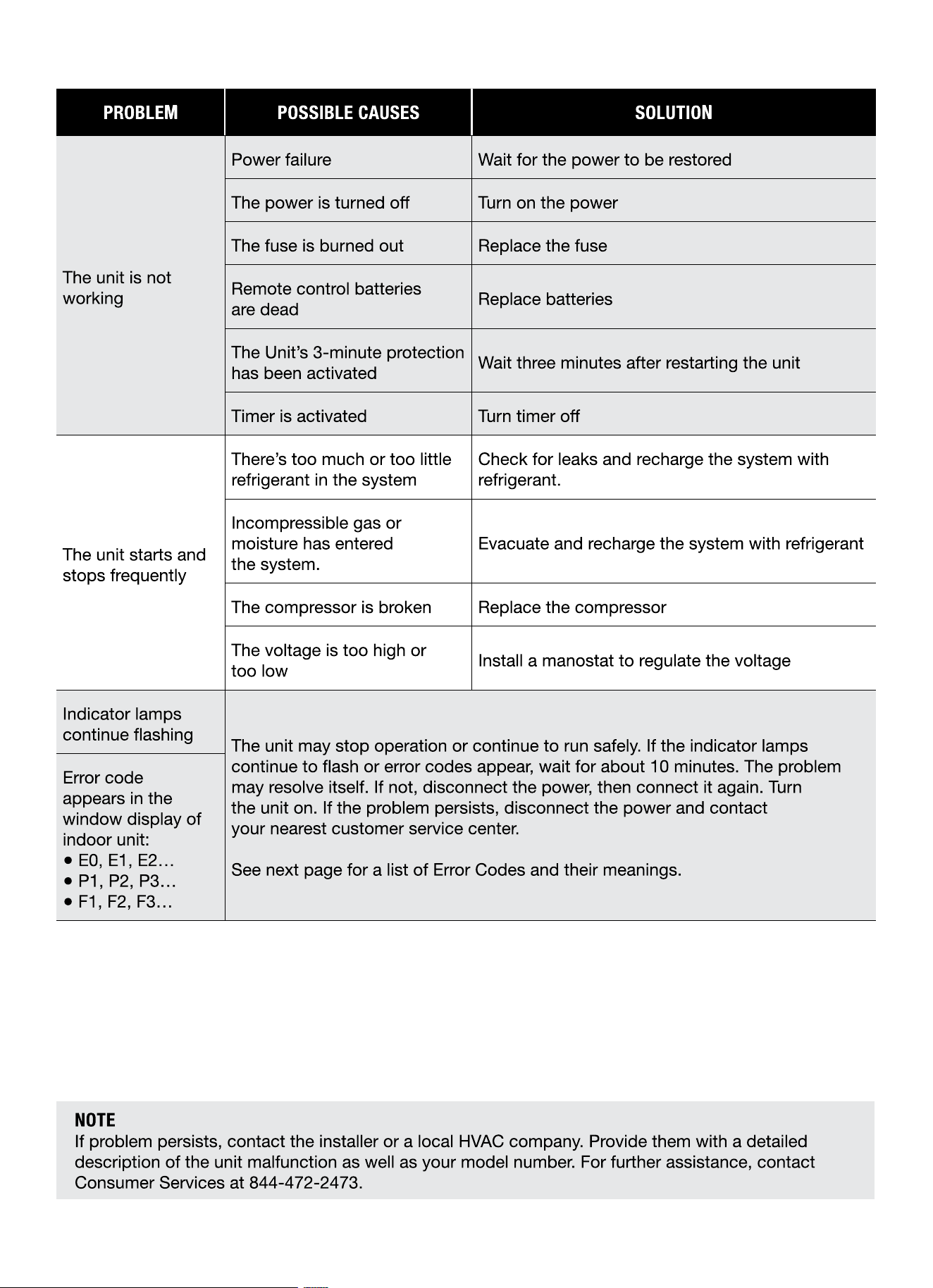
PROBLEM POSSIBLE CAUSES SOLUTION
The unit is not
working
Power failure Wait for the power to be restored
The power is turned o Turn on the power
The fuse is burned out Replace the fuse
Remote control batteries
are dead
Replace batteries
The Unit’s 3-minute protection
has been activated
Wait three minutes after restarting the unit
Timer is activated Turn timer o
The unit starts and
stops frequently
There’s too much or too little
refrigerant in the system
Check for leaks and recharge the system with
refrigerant.
Incompressible gas or
moisture has entered
the system.
Evacuate and recharge the system with refrigerant
The compressor is broken Replace the compressor
The voltage is too high or
too low
Install a manostat to regulate the voltage
Indicator lamps
continue ashing
The unit may stop operation or continue to run safely. If the indicator lamps
continue to ash or error codes appear, wait for about 10 minutes. The problem
may resolve itself. If not, disconnect the power, then connect it again. Turn
the unit on. If the problem persists, disconnect the power and contact
your nearest customer service center.
See next page for a list of Error Codes and their meanings.
Error code
appears in the
window display of
indoor unit:
● E0, E1, E2…
● P1, P2, P3…
● F1, F2, F3…
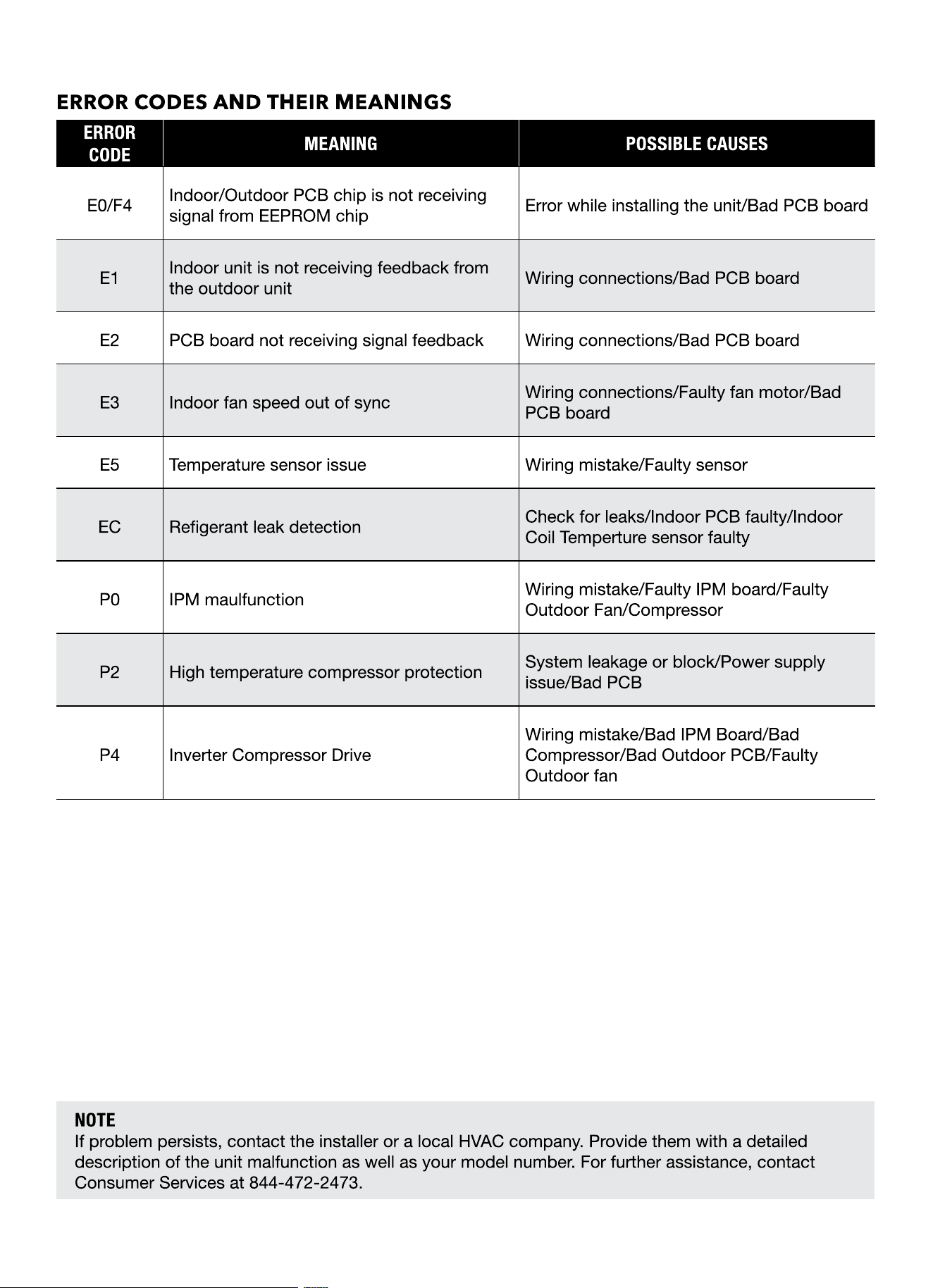
ERROR CODES AND THEIR MEANINGS
ERROR
CODE
MEANING POSSIBLE CAUSES
E0/F4
Indoor/Outdoor PCB chip is not receiving
signal from EEPROM chip
Error while installing the unit/Bad PCB board
E1
Indoor unit is not receiving feedback from
the outdoor unit
Wiring connections/Bad PCB board
E2 PCB board not receiving signal feedback Wiring connections/Bad PCB board
E3 Indoor fan speed out of sync
Wiring connections/Faulty fan motor/Bad
PCB board
E5 Temperature sensor issue Wiring mistake/Faulty sensor
EC Regerant leak detection
Check for leaks/Indoor PCB faulty/Indoor
Coil Temperture sensor faulty
P0 IPM maulfunction
Wiring mistake/Faulty IPM board/Faulty
Outdoor Fan/Compressor
P2 High temperature compressor protection
System leakage or block/Power supply
issue/Bad PCB
P4 Inverter Compressor Drive
Wiring mistake/Bad IPM Board/Bad
Compressor/Bad Outdoor PCB/Faulty
Outdoor fan