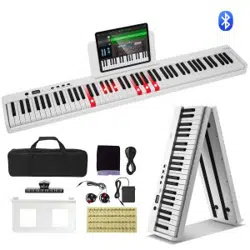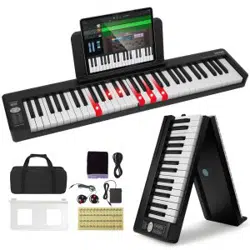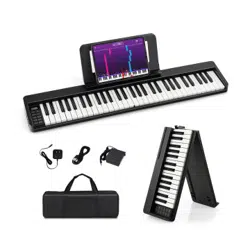

MU10095
61-Key Folding Piano Keyboard
THIS INSTRUCTION BOOKLET CONTAINS IMPORTANT SAFETY INFORMATION. PLEASE READ AND KEEP FOR FUTURE REFERENCE.
USA office: Fontana GBR office: Ipswich AUS office: Truganina
If you're having difficulty, our friendly
customer team is always here to help.
AUS:cs.au@costway.com
GBR:cs.uk@costway.com
Before You Start
WARNING:
CHOKING HAZARD
-Small parts.
Not for children under 3 years.
0-3
Please read all instructions carefully and keep it for future reference.
The product must be installed and used under the supervision of an adult.
Read through each step carefully and follow the proper order.
Remove all packaging, separate and count all parts and hardware.
Please ensure that all parts are correctly installed, incorrect installation can lead to a
danger.
We recommend that, where possible, all items are assembled near the area in which
they will be placed in use, to avoid moving the product unnecessarily once assembled.
Ensure a secure surface during installation, and place the product always on a flat,
steady and stable surface.
General Warnings
Attention: Children should use this product under the parental supervision.
Danger: Keep all small parts and packaging materials for this product away from babies
and children, otherwise they may pose a choking hazard.
Warning
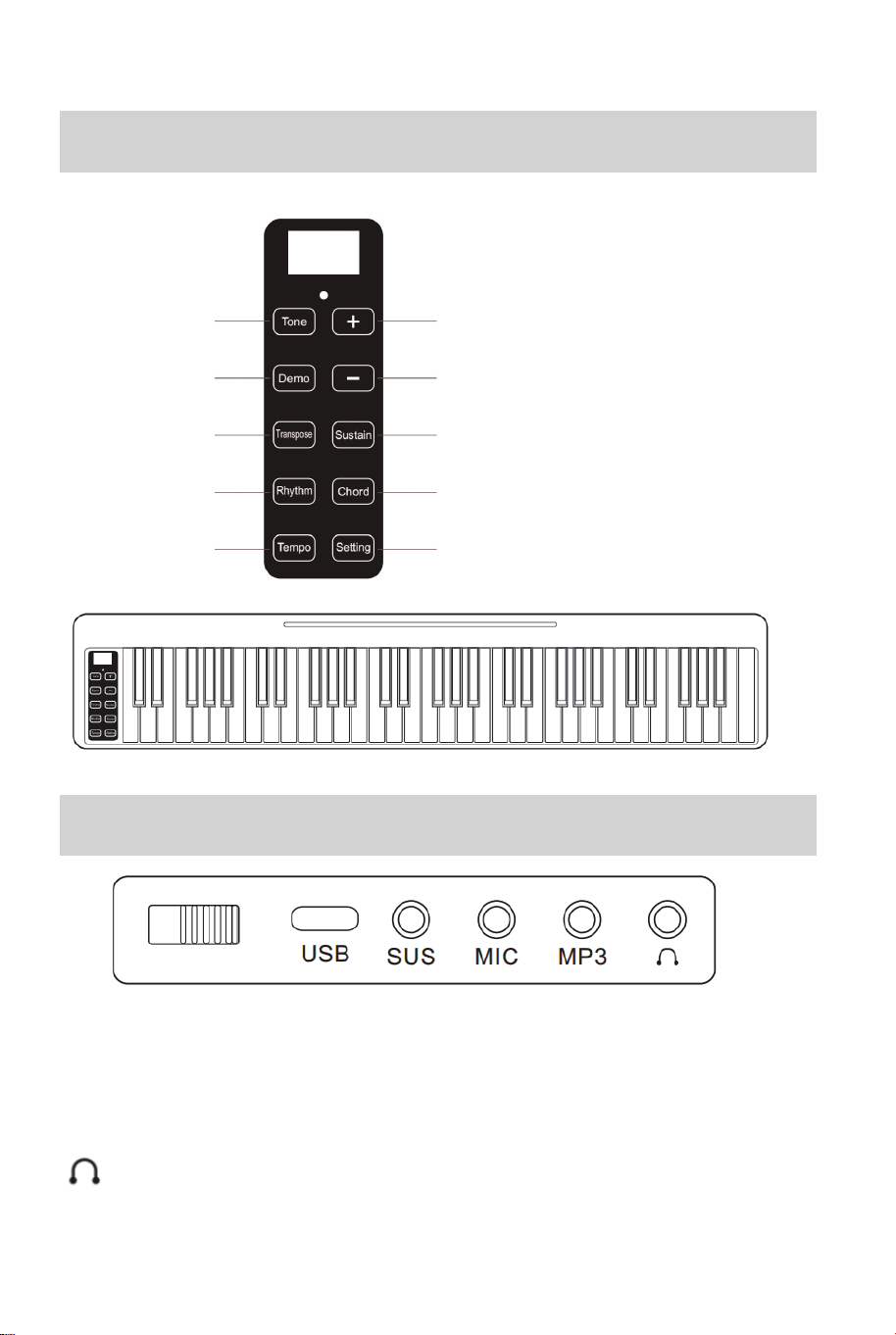
USB: Charging Interface (Power adapter is DC 5V, The charging indicator is
red and turns green when it is full)
SUS: Sustain pedal
MIC: Microphone
MP3: Audio input interface
(AUDIO): Audio input interface (headphone)
Panel Function Diagram
Interface
Tone
Demo
Transpose
Rhythm
Tempo
Volume+ / Compound Function Key
Volume- / Compound Function Key
Sustain
Chord
Setting
02 03
Before You Start
WARNING:
CHOKING HAZARD
-Small parts.
Not for children under 3 years.
0-3
Please read all instructions carefully and keep it for future reference.
The product must be installed and used under the supervision of an adult.
Read through each step carefully and follow the proper order.
Remove all packaging, separate and count all parts and hardware.
Please ensure that all parts are correctly installed, incorrect installation can lead to a
danger.
We recommend that, where possible, all items are assembled near the area in which
they will be placed in use, to avoid moving the product unnecessarily once assembled.
Ensure a secure surface during installation, and place the product always on a flat,
steady and stable surface.
General Warnings
Attention: Children should use this product under the parental supervision.
Danger: Keep all small parts and packaging materials for this product away from babies
and children, otherwise they may pose a choking hazard.
Warning
USB: Charging Interface (Power adapter is DC 5V, The charging indicator is
red and turns green when it is full)
SUS: Sustain pedal
MIC: Microphone
MP3: Audio input interface
(AUDIO): Audio input interface (headphone)
Panel Function Diagram
Interface
Tone
Demo
Transpose
Rhythm
Tempo
Volume+ / Compound Function Key
Volume- / Compound Function Key
Sustain
Chord
Setting
02 03

Long press the "Setting" key, you can hear two beeps, and the left part of the
keyboard keys become function keys, as shown in the following table:
(If you do not play the piano for 6 minutes, the system will automatically enter
the sleep mode, Press the function key or the piano key to wake up the
working mode directly)
• Volume
1. By default, press "+" and "-" to adjust the volume (from 00-16)
2. The default volume is "9".
3. When press other function keys, "+" and "-" keys become compound
function keys.
• Demo
1. Press the Demo button to play the demo songs, select the demo song from
"00-14", and the digital tube displays the serial number of the demo songs
("d00-d14").
2. Press the Demo button, then press the +/- button to switch the demo song.
Press Demo button again to turn off this function.
3. Press the number key "0-9" of compound function keys to enter the
sequence number (00-14) directly, and the number beyond the range is
ignored.
• Rhythm
1. Press"Rhythm" key to play the rhythm and select the rhythm from "000" to
"127". The serial number will be displayed on the screen.
2. Press + and - to switch the rhythm, press "Rhythm" key again to turn off this
function.
3. Press the number key "0-9" of compound function keys to enter the
sequence number (00-127) directly, and the number beyond the range is
ignored.
• Tone
1. Press "Tone" key to select the Tone from "000" to "127". The serial number
will be displayed on the screen.
2. Press + and - to switch the tone, press "Tone" button again to turn off this
function.
Function
Composite Function Keys
3. Press the number key "0-9" of compound function keys to enter the
sequence number (00-127) directly, and the number beyond the range is
ignored.
• Transpose
Press "Transpose" keys, then press "+" and "-" to adjust the transpose from -6
to 6. The default boot level is 0. The digital tube will display the level number of
transpose.
• Tempo
Press "Tempo" button, then press "+" and "-" to adjust the tempo from level 30
to 300. The default boot level is "120".
• Sustain
1. Press Sustain button to open the sustain function, then press off.
2. Turn on the sustain function, and make the tone produce the effect of
continuance in performance.
• Chord
During the playing of rhythm, the system enters the chord mode.
Chord function: Press the key in the area C3-F4# to play the chords that
matching the rhythm, and the tone of the chords changes with the pitch of the
key.
G2 G2# A2 A2# B2 C1 C1# D1 D1# E1 F1 F1# G1 G1# A1 A1# B1
Split
Record
Play
Metronome
Drum Kit
- + 0 1 2 3 4 5 6 7 8 9
04 05

Long press the "Setting" key, you can hear two beeps, and the left part of the
keyboard keys become function keys, as shown in the following table:
(If you do not play the piano for 6 minutes, the system will automatically enter
the sleep mode, Press the function key or the piano key to wake up the
working mode directly)
• Volume
1. By default, press "+" and "-" to adjust the volume (from 00-16)
2. The default volume is "9".
3. When press other function keys, "+" and "-" keys become compound
function keys.
• Demo
1. Press the Demo button to play the demo songs, select the demo song from
"00-14", and the digital tube displays the serial number of the demo songs
("d00-d14").
2. Press the Demo button, then press the +/- button to switch the demo song.
Press Demo button again to turn off this function.
3. Press the number key "0-9" of compound function keys to enter the
sequence number (00-14) directly, and the number beyond the range is
ignored.
• Rhythm
1. Press"Rhythm" key to play the rhythm and select the rhythm from "000" to
"127". The serial number will be displayed on the screen.
2. Press + and - to switch the rhythm, press "Rhythm" key again to turn off this
function.
3. Press the number key "0-9" of compound function keys to enter the
sequence number (00-127) directly, and the number beyond the range is
ignored.
• Tone
1. Press "Tone" key to select the Tone from "000" to "127". The serial number
will be displayed on the screen.
2. Press + and - to switch the tone, press "Tone" button again to turn off this
function.
Function
Composite Function Keys
3. Press the number key "0-9" of compound function keys to enter the
sequence number (00-127) directly, and the number beyond the range is
ignored.
• Transpose
Press "Transpose" keys, then press "+" and "-" to adjust the transpose from -6
to 6. The default boot level is 0. The digital tube will display the level number of
transpose.
• Tempo
Press "Tempo" button, then press "+" and "-" to adjust the tempo from level 30
to 300. The default boot level is "120".
• Sustain
1. Press Sustain button to open the sustain function, then press off.
2. Turn on the sustain function, and make the tone produce the effect of
continuance in performance.
• Chord
During the playing of rhythm, the system enters the chord mode.
Chord function: Press the key in the area C3-F4# to play the chords that
matching the rhythm, and the tone of the chords changes with the pitch of the
key.
G2 G2# A2 A2# B2 C1 C1# D1 D1# E1 F1 F1# G1 G1# A1 A1# B1
Split
Record
Play
Metronome
Drum Kit
- + 0 1 2 3 4 5 6 7 8 9
04 05

• Split
Press the Split key (G2) to turn on the split function, and then press it again to
turn off this function.
• Record
1. Press the record key (G2#), beep once, then press the key on the keyboard
to record the MIDI signal.
2. Turn off by default.
• Play
Press the Play key (A2) to start playback the last recorded MIDI signal.
• Metronome
Press the metronome key (A2#) to cycle through: 1/4 2/4 3/4 4/4 beats.
• Drum Kit
1. Press the keyboard drum key (B2) to turn on the keyboard drum function,
and press it again to turn off this function.
2. When the keyboard drums are turned on, all keys will be turned on to
become percussion tone, and when the keyboard drums are turned off, the
percussion tone will be turned off.
• -/+ and Number Keys
1. Adjust the volume by default (from "00-16").
2. After pressing the "Tone" key, the -,+ and number keys switch tones; the
same is true when pressing the demo song, rhythm, etc.
POPiano connection:
1. Search and download POPiano APP from App store of the iPhone.
2. Open the POPiano App after turning on the Bluetooth of the iPhone, select
any song, and choose to start playing after entering.
3. Click on the upper right of the iPhone screen , and then you can
choose: connect to the piano through: Bluetooth - Confirmed, next - Confirm to
connect to the piano.
4. After confirming Bluetooth connection, the icon is displayed as blue check
mark .
1. Open GarageBand App.
2. Turn on Bluetooth on your phone.
3. Open GarageBand App and click the Settings icon in the upper right corner
of the screen.
4. Connect the piano's Bluetooth through the: Song Settings - Advanced -
Bluetooth MIDI Devices.
1. Open the "Settings" of the mobile phone, turn on the Bluetooth switch, and
click "Scan" or "Search for new devices";
2. Click "vittopianos.cn" to pair;
3. If the pairing is successful, "Audio connected for media" appears under
"vittopianos.cn", and you can enter the audio play function normally;
APP Bluetooth
iPhone connection:
GarageBand connection:
1. Download the Perfect Piano App and PianoBar.
2. Turn on Bluetooth on your phone.
3. First connect the GarageBand App. When it is connected successfully, then
the Perfect Piano App and PianoBar can be used directly.
Perfect Piano and PianoBar connection:
Bluetooth Audio Function
06 07
• Split
Press the Split key (G2) to turn on the split function, and then press it again to
turn off this function.
• Record
1. Press the record key (G2#), beep once, then press the key on the keyboard
to record the MIDI signal.
2. Turn off by default.
• Play
Press the Play key (A2) to start playback the last recorded MIDI signal.
• Metronome
Press the metronome key (A2#) to cycle through: 1/4 2/4 3/4 4/4 beats.
• Drum Kit
1. Press the keyboard drum key (B2) to turn on the keyboard drum function,
and press it again to turn off this function.
2. When the keyboard drums are turned on, all keys will be turned on to
become percussion tone, and when the keyboard drums are turned off, the
percussion tone will be turned off.
• -/+ and Number Keys
1. Adjust the volume by default (from "00-16").
2. After pressing the "Tone" key, the -,+ and number keys switch tones; the
same is true when pressing the demo song, rhythm, etc.
POPiano connection:
1. Search and download POPiano APP from App store of the iPhone.
2. Open the POPiano App after turning on the Bluetooth of the iPhone, select
any song, and choose to start playing after entering.
3. Click on the upper right of the iPhone screen , and then you can
choose: connect to the piano through: Bluetooth - Confirmed, next - Confirm to
connect to the piano.
4. After confirming Bluetooth connection, the icon is displayed as blue check
mark .
1. Open GarageBand App.
2. Turn on Bluetooth on your phone.
3. Open GarageBand App and click the Settings icon in the upper right corner
of the screen.
4. Connect the piano's Bluetooth through the: Song Settings - Advanced -
Bluetooth MIDI Devices.
1. Open the "Settings" of the mobile phone, turn on the Bluetooth switch, and
click "Scan" or "Search for new devices";
2. Click "vittopianos.cn" to pair;
3. If the pairing is successful, "Audio connected for media" appears under
"vittopianos.cn", and you can enter the audio play function normally;
APP Bluetooth
iPhone connection:
GarageBand connection:
1. Download the Perfect Piano App and PianoBar.
2. Turn on Bluetooth on your phone.
3. First connect the GarageBand App. When it is connected successfully, then
the Perfect Piano App and PianoBar can be used directly.
Perfect Piano and PianoBar connection:
Bluetooth Audio Function
06 07
POPiano connection:
1. Search and download POPiano APP from App store of the mobile phone.
2. Turn on the Bluetooth function, some phones need to turn on the phone
location function.
3. Open the POPiano App to select any song, and choose to start playing after
entering.
4. Click on the upper right of the mobile phone screen , and then you
can choose: connect to the piano through: Bluetooth - Confirmed, next -
Confirm to connect to the piano.
5. After confirming Bluetooth connection, the icon is displayed as blue check
mark .
Android phone connection:
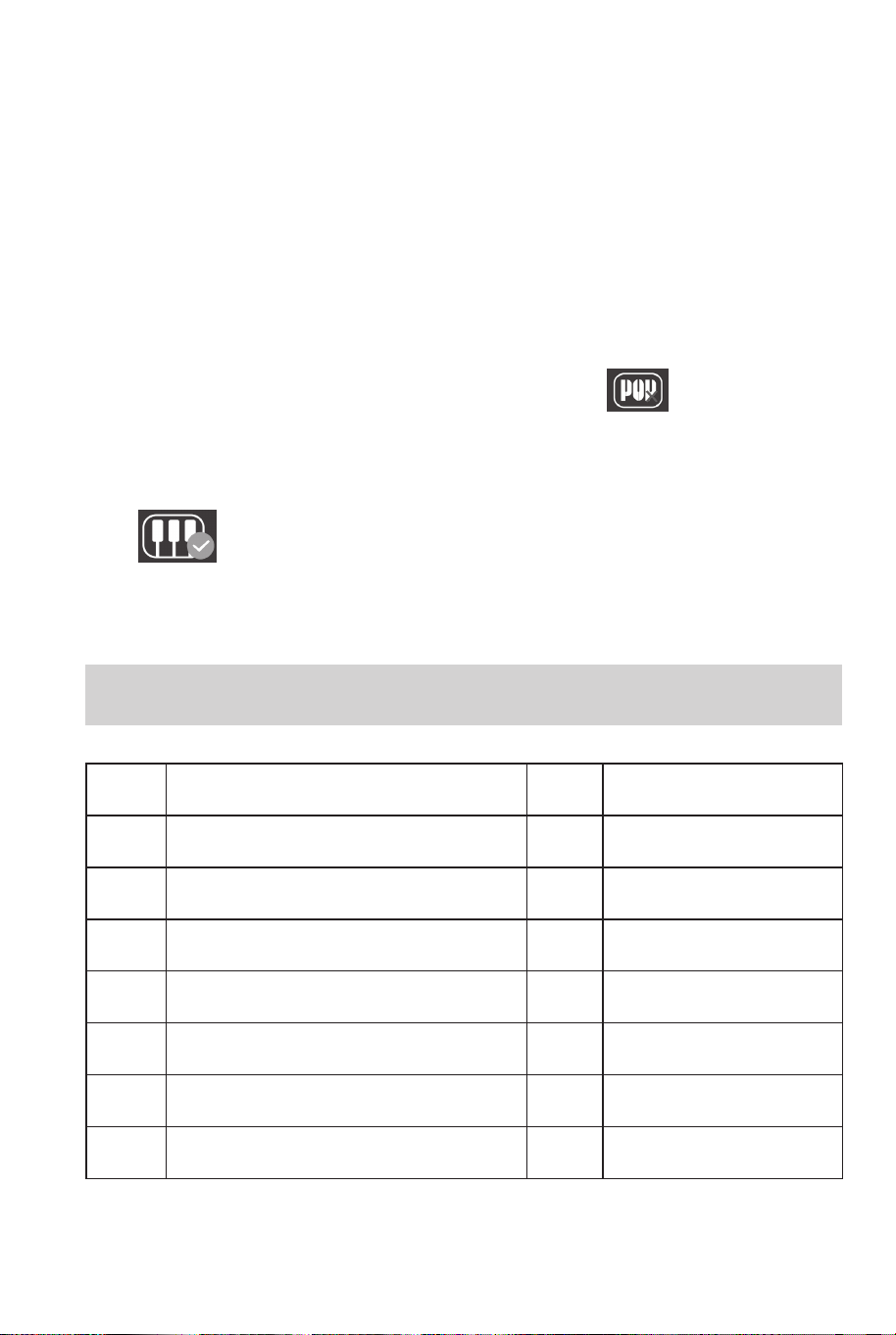
DEMO
List of Tone
S001
S002
S003
S004
S005
S006
S007
S008
T000
T001
T002
T003
T004
T005
T006
T007
T008
T009
T010
T011
T012
T013
T014
T015
T016
T017
T018
T019
T020
T021
T022
T023
Acoustic Grand Piano
Bright Acoustic Piano
Electric Grand Piano
Honky-tonk Piano
Rhodes Piano
Chorused Piano
Harpsichord
Clavichord
Celesta
Glockenspiel
Music box
Vibraphone
Marimba
Xylophone
Tubular Bell
Dulcimer
Drawbar Organ
Percussive Organ
Rock Organ
Church Organ
Reed Organ
Accordion
Harmonica
Tango Accordion
T024
T025
T026
T027
T028
T029
T030
T031
T032
T033
T034
T035
T036
T037
T038
T039
T040
T041
T042
T043
T044
T045
T046
T047
Acoustic Guitar (nylon)
Acoustic Guitar (steel)
Electric Guitar (jazz)
Electric Guitar (clean)
Electric Guitar (muted)
Overdriven Guitar
Distortion Guitar
Guitar Harmonics
Acoustic Bass
Electric Bass (finger)
Electric Bass (pick)
Fretless Bass
Slap Bass 1
Slap Bass 2
Synth Bass 1
Synth Bass 2
Violin
Viola
Cello
Contrabass
Tremolo Strings
Pizzicato Strings
Orchestral Harp
Timpani
S009
S010
S011
S012
S013
S014
S015
For Alice
Happy Birthday
Little Star
We Wish You A Merry Christmas
Carmen
Song of Joy
Schubert Serenade
Beethoven Sonata Class
Swan Lake
Moonlight Sonata
Canon
Two Tigers
Lullaby
Happy New Year
Donkey
08 09
POPiano connection:
1. Search and download POPiano APP from App store of the mobile phone.
2. Turn on the Bluetooth function, some phones need to turn on the phone
location function.
3. Open the POPiano App to select any song, and choose to start playing after
entering.
4. Click on the upper right of the mobile phone screen , and then you
can choose: connect to the piano through: Bluetooth - Confirmed, next -
Confirm to connect to the piano.
5. After confirming Bluetooth connection, the icon is displayed as blue check
mark .
Android phone connection:
DEMO
List of Tone
S001
S002
S003
S004
S005
S006
S007
S008
T000
T001
T002
T003
T004
T005
T006
T007
T008
T009
T010
T011
T012
T013
T014
T015
T016
T017
T018
T019
T020
T021
T022
T023
Acoustic Grand Piano
Bright Acoustic Piano
Electric Grand Piano
Honky-tonk Piano
Rhodes Piano
Chorused Piano
Harpsichord
Clavichord
Celesta
Glockenspiel
Music box
Vibraphone
Marimba
Xylophone
Tubular Bell
Dulcimer
Drawbar Organ
Percussive Organ
Rock Organ
Church Organ
Reed Organ
Accordion
Harmonica
Tango Accordion
T024
T025
T026
T027
T028
T029
T030
T031
T032
T033
T034
T035
T036
T037
T038
T039
T040
T041
T042
T043
T044
T045
T046
T047
Acoustic Guitar (nylon)
Acoustic Guitar (steel)
Electric Guitar (jazz)
Electric Guitar (clean)
Electric Guitar (muted)
Overdriven Guitar
Distortion Guitar
Guitar Harmonics
Acoustic Bass
Electric Bass (finger)
Electric Bass (pick)
Fretless Bass
Slap Bass 1
Slap Bass 2
Synth Bass 1
Synth Bass 2
Violin
Viola
Cello
Contrabass
Tremolo Strings
Pizzicato Strings
Orchestral Harp
Timpani
S009
S010
S011
S012
S013
S014
S015
For Alice
Happy Birthday
Little Star
We Wish You A Merry Christmas
Carmen
Song of Joy
Schubert Serenade
Beethoven Sonata Class
Swan Lake
Moonlight Sonata
Canon
Two Tigers
Lullaby
Happy New Year
Donkey
08 09
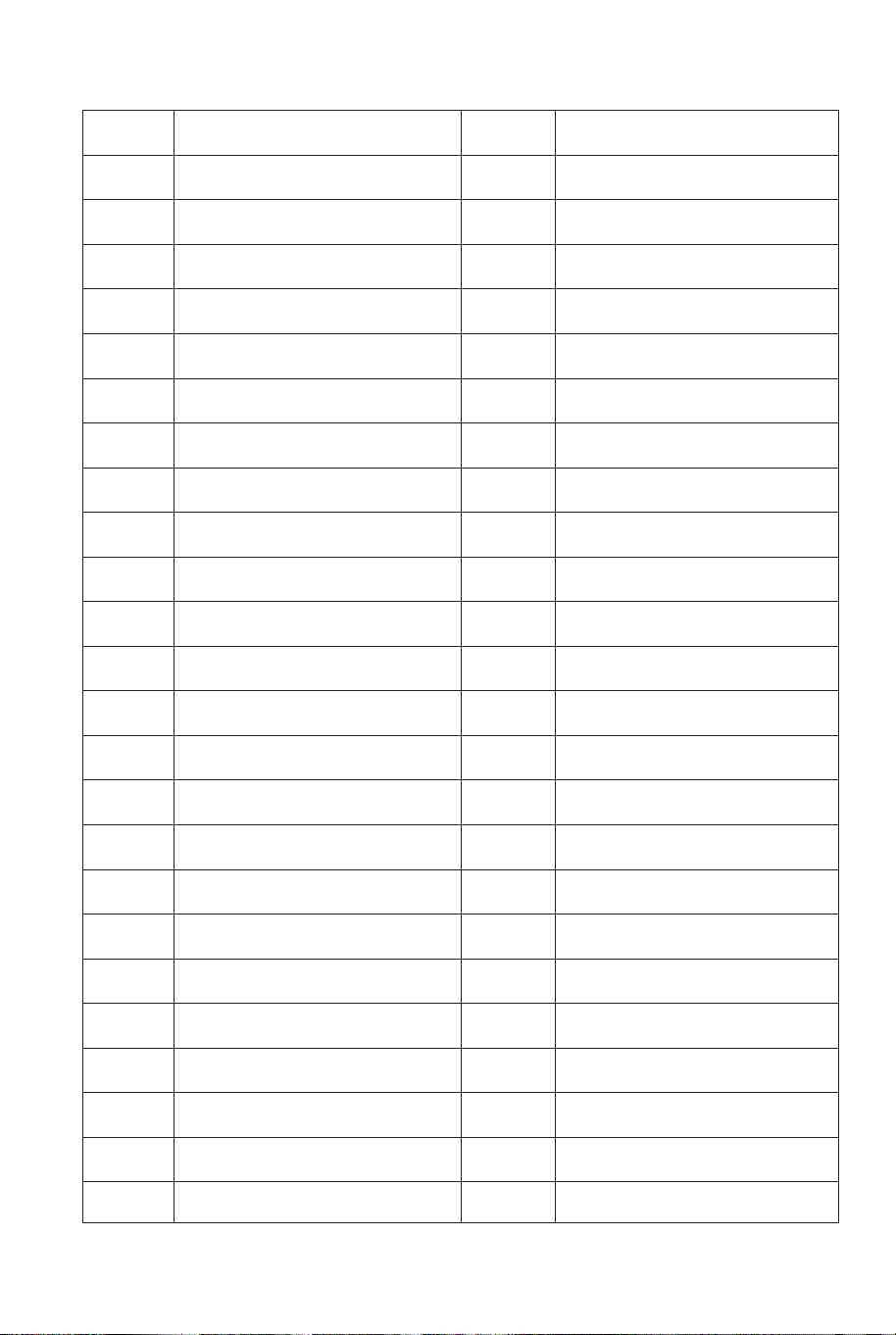
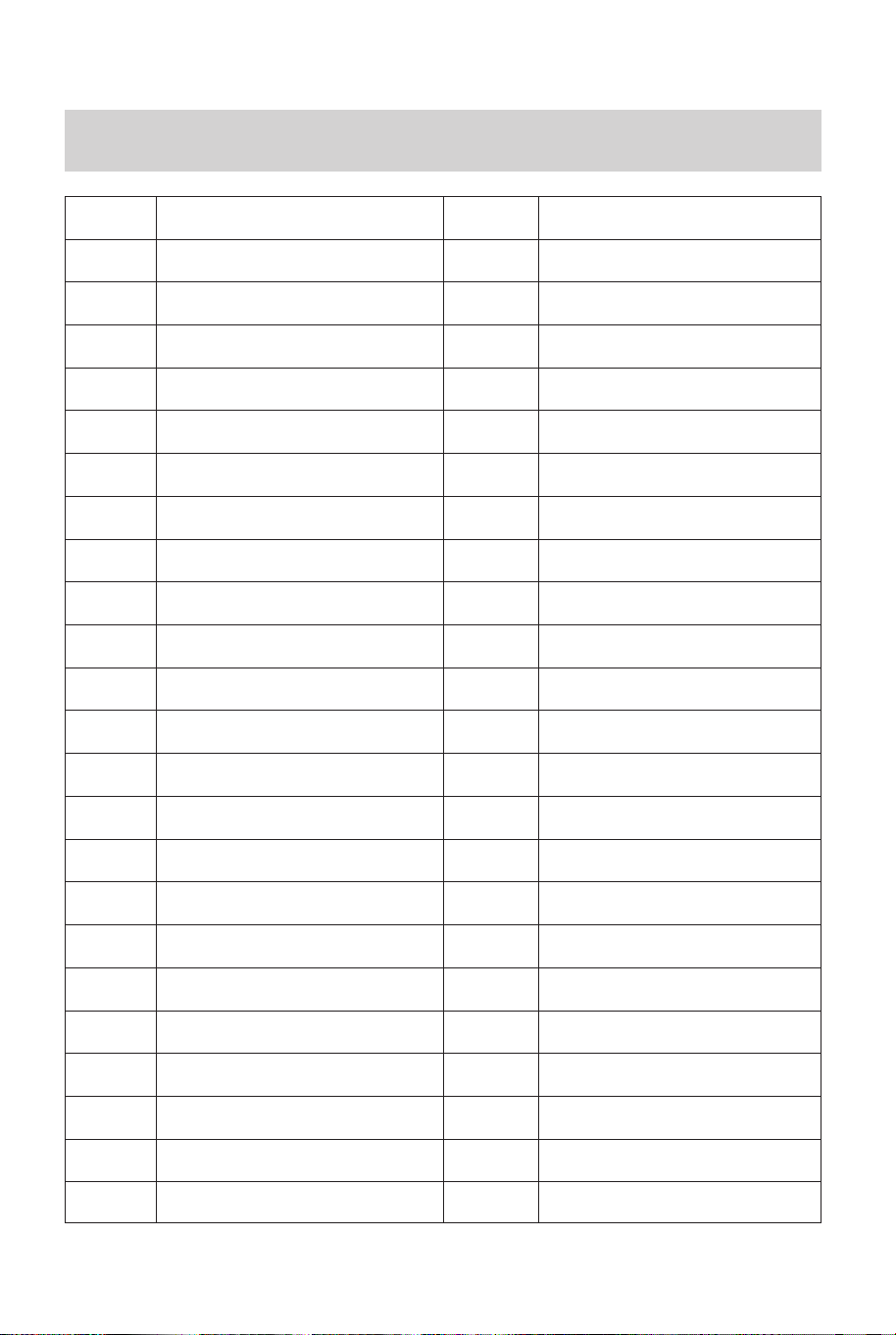
List of Rhythm
T048
T049
T050
T051
T052
T053
T054
T055
T056
T057
T058
T059
T060
T061
T062
T063
T064
T065
T066
T067
T068
T069
T070
T071
T072
tring Ensemble 1
tring Ensemble 2
ynth Strings 1
ynth Strings 2
Choir Aahs
Voice Oohs
Synth Voice
Orchestra Hit
Trumpet
Trombone
Tuba
Muted Trumpet
French Hom
Brass Section
Synth Brass 1
Synth Brass 2
Soprano Sax
Alto Sax
Tenor Sax
Baritone Sax
Oboe
English Horn
Bassoon
Clarinet
Piccolo
T073
T074
T075
T076
T077
T078
T079
T080
T081
T082
T083
T084
T085
T086
T087
T088
T089
T090
T091
T092
T093
T094
T095
T096
T097
Flute
Recorder
Pan Flute
Bottle Blow
Shakuhachi
Whistle
Ocarina
Lead 1 (square)
Lead 2 (sawtooth)
3 (calliope lead)
4 (chiff lead)
5 (charang)
Lead 6 (voice)
Lead 7 (fifths)
Lead 8 (bass+lead)
Pad 1 (new age)
Pad 2 (warm)
Pad 3 (polysynth)
Pad 4 (choir)
Pad 5 (bowed)
Pad 6 (metallic)
Pad 7 (halo)
Pad 8 (sweep)
FX 1 (rain)
FX 2 (soundtrack)
T098
T099
T100
T101
T102
T103
T104
T105
T106
T107
T108
T109
T110
T111
T112
FX 3 (crystal)
FX 4 (atmosphere)
FX 5 (brightness)
FX 6 (goblins)
FX 7 (echoes)
FX 8 (sci-fi)
Sitar
Banjo
Shamisen
Koto
Kalimba
Bagpipe
Fiddle
Shanai
Tinkle Bell
T113
T114
T115
T116
T117
T118
T119
T120
T121
T122
T123
T124
T125
T126
T127
Agogo
Steel Drums
Woodblock
Taiko Drum
Melodic Tom
Synth Drum
Reverse Cymbal
Guitar Fret Noise
Breath Noise
Seashore
Bird Tweet
Telephone Ring
Helicopter
Applause
Gunshot
R000
R001
R002
R003
R004
R005
R006
60's Rock N
Standard Rock
Brit Rock Pop
60's Vintage Rock
Chart Rock Shfl
60's Pop Rock
Rock Billy
R007
R008
R009
R010
R011
R012
R013
Rock Boogie
Rock Cha Cha
Rock Classical
Rock Shuffle
Rock Pop
Rock'n Roll 1
Rock'n Roll 2
10 11
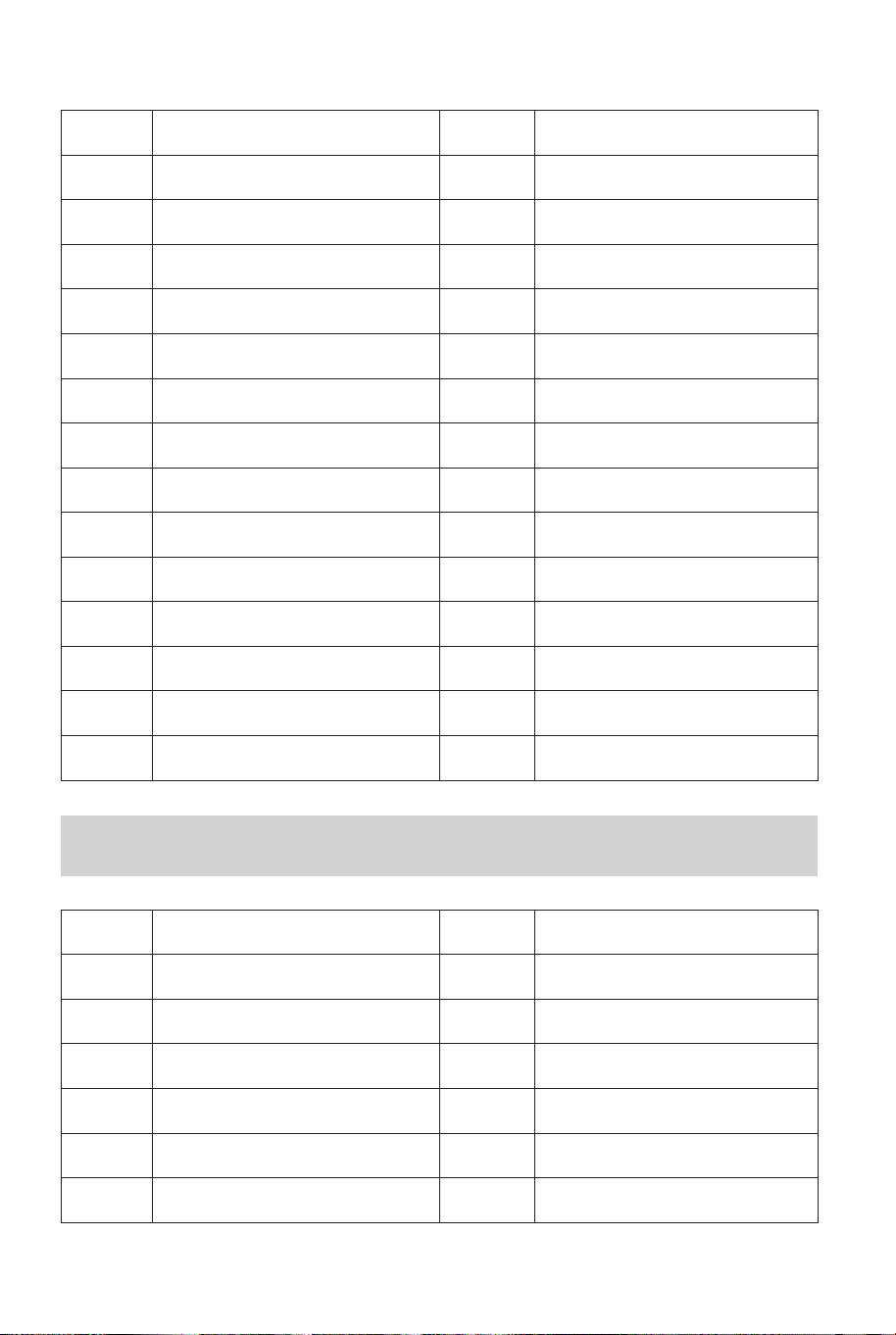
List of Rhythm
T048
T049
T050
T051
T052
T053
T054
T055
T056
T057
T058
T059
T060
T061
T062
T063
T064
T065
T066
T067
T068
T069
T070
T071
T072
tring Ensemble 1
tring Ensemble 2
ynth Strings 1
ynth Strings 2
Choir Aahs
Voice Oohs
Synth Voice
Orchestra Hit
Trumpet
Trombone
Tuba
Muted Trumpet
French Hom
Brass Section
Synth Brass 1
Synth Brass 2
Soprano Sax
Alto Sax
Tenor Sax
Baritone Sax
Oboe
English Horn
Bassoon
Clarinet
Piccolo
T073
T074
T075
T076
T077
T078
T079
T080
T081
T082
T083
T084
T085
T086
T087
T088
T089
T090
T091
T092
T093
T094
T095
T096
T097
Flute
Recorder
Pan Flute
Bottle Blow
Shakuhachi
Whistle
Ocarina
Lead 1 (square)
Lead 2 (sawtooth)
3 (calliope lead)
4 (chiff lead)
5 (charang)
Lead 6 (voice)
Lead 7 (fifths)
Lead 8 (bass+lead)
Pad 1 (new age)
Pad 2 (warm)
Pad 3 (polysynth)
Pad 4 (choir)
Pad 5 (bowed)
Pad 6 (metallic)
Pad 7 (halo)
Pad 8 (sweep)
FX 1 (rain)
FX 2 (soundtrack)
T098
T099
T100
T101
T102
T103
T104
T105
T106
T107
T108
T109
T110
T111
T112
FX 3 (crystal)
FX 4 (atmosphere)
FX 5 (brightness)
FX 6 (goblins)
FX 7 (echoes)
FX 8 (sci-fi)
Sitar
Banjo
Shamisen
Koto
Kalimba
Bagpipe
Fiddle
Shanai
Tinkle Bell
T113
T114
T115
T116
T117
T118
T119
T120
T121
T122
T123
T124
T125
T126
T127
Agogo
Steel Drums
Woodblock
Taiko Drum
Melodic Tom
Synth Drum
Reverse Cymbal
Guitar Fret Noise
Breath Noise
Seashore
Bird Tweet
Telephone Ring
Helicopter
Applause
Gunshot
R000
R001
R002
R003
R004
R005
R006
60's Rock N
Standard Rock
Brit Rock Pop
60's Vintage Rock
Chart Rock Shfl
60's Pop Rock
Rock Billy
R007
R008
R009
R010
R011
R012
R013
Rock Boogie
Rock Cha Cha
Rock Classical
Rock Shuffle
Rock Pop
Rock'n Roll 1
Rock'n Roll 2
10 11
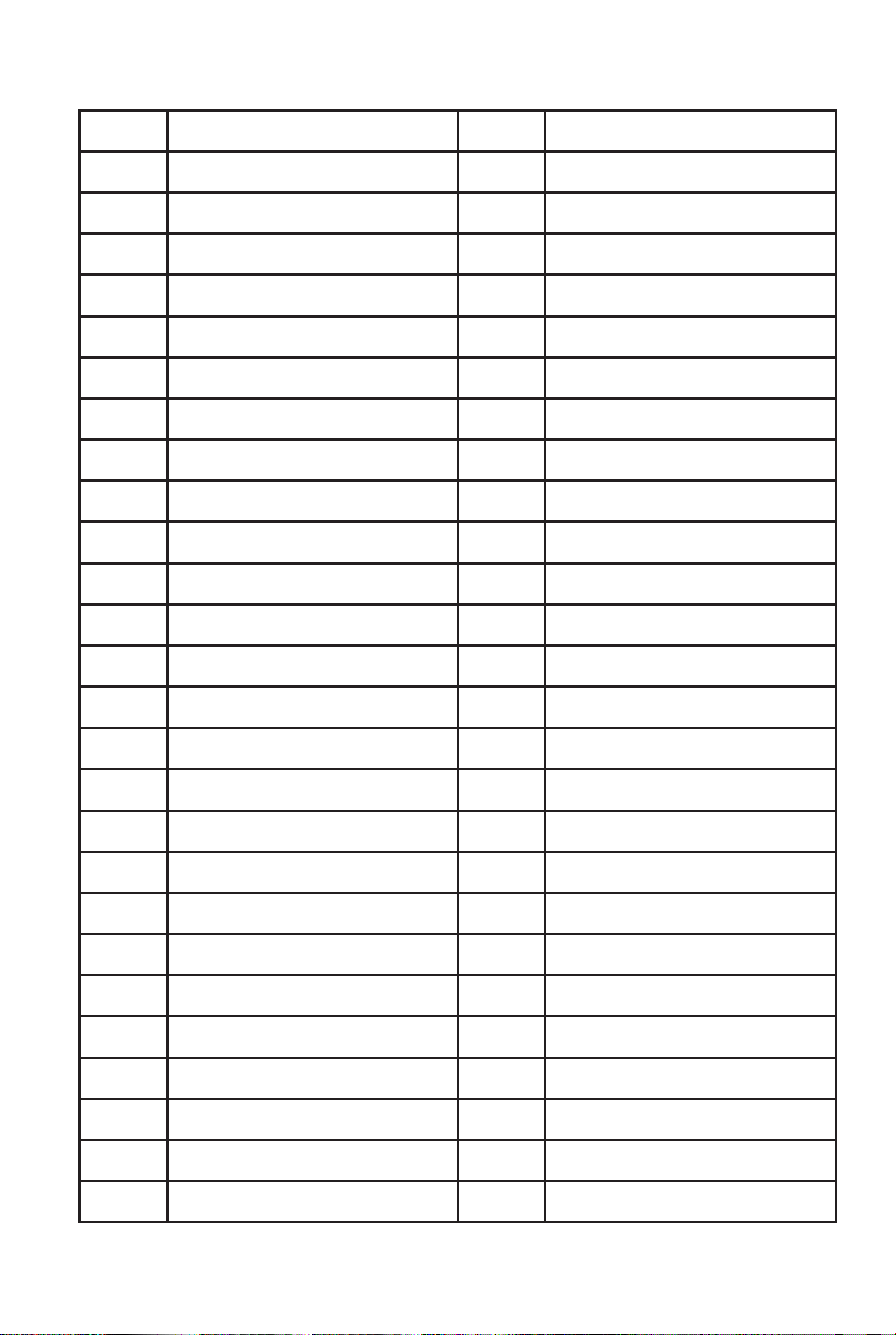
R014
R015
R016
R017
R018
R019
R020
R021
R022
R023
R024
R025
R026
R027
R028
R029
R030
R031
R032
R033
R034
R035
R036
R037
R038
R039
R040
Straight Rock
Jazz Rock
Fast Gospel
Folk Rock
Skiffle
Funk Pop Rock
Contemp Rock
Acoustic Rock
50's Pop
Cool Pop
Groovy Pop
60's Vintage Pop
80's Pop
Rap Pop
Pop Rock
60's Soul
70's Soul
Funk
16 Beat Shuffle
Twist
British Pop 1
British Pop 2
Hard Rock 1
Hard Rock 2
Fusion 1
Fusion 2
Funk Shuffl 1
R041
R042
R043
R044
R045
R046
R047
R048
R049
R050
R051
R052
R053
R054
R055
R056
R057
R058
R059
R060
R061
R062
R063
R064
R065
R066
R067
Funk Shuffl 2
Fusion Shuffl 1
Fusion Shuffl 2
Club Pop 1
Club Pop 2
16 Beat Pop 1
16 Beat Pop 2
8 Beat Pop 1
8 Beat Pop 2
8 Beat Soul 1
8 Beat Soul 2
8 Beat Rock 1
8 Beat Rock 2
Classic 8 Beat
Vintage Gtr Pop
Schlager Italia
Waltz
Cha Cha
Rumba
Jive
Pasodoble
Samba 1
Samba 2
Schlager Rock 1
Schlager Rock 2
Fox Trot
Viennese Waltz
R068
R069
R070
R071
R072
R073
R074
R075
R076
R077
R078
R079
R080
R081
R082
R083
R084
R085
R086
R087
R088
R089
R090
R091
R092
R093
R094
R095
R096
R097
Tango 1
Tango 2
German Waltz
Carnival
Organ Samba
Reel
Gay Gordons
Scand Waltz
70's Chart Ballad
Romantic Ballad
90's Cool Ballad
1 Alp Ballad 1
2 Alp Ballad 2
E_Ballad
Unplugged
Pop Ballad
Pop New Age
8 Beat Modern
Country Ballad
Love Song
Modern Country Pop
Electro Pop
Acoustic Ballad
Piano Ballad
R&B Ballad
Rock Ballad
Slow & Easy
Analog Ballad
Slow Rock 1
Slow Rock 2
R098
R099
R100
R101
R102
R103
R104
R105
R106
R107
R108
R109
R110
R111
R112
R113
R114
R115
R116
R117
R118
R119
R120
R121
R122
R123
R124
R125
R126
R127
Slow Rock 3
low Soul
8 Beat Adria
Classic Piano
80's EP Ballad
80's Boy Band
Country Ballad
Country Two Step
Country 1
Country 2
Finger Pickin
Country Brothers
New Country
Easy Country
70's Chart Cntry
Hoedown
Country Shuffle
70's Disco 1
70's Disco 2
Funky Disco
Saturday Night
Club Latin
Disco Chocolate
Disco Fox
Disco Funk
Disco Hands
Disco Party
Disco Samba
UK Pop
Club Dance
12 13
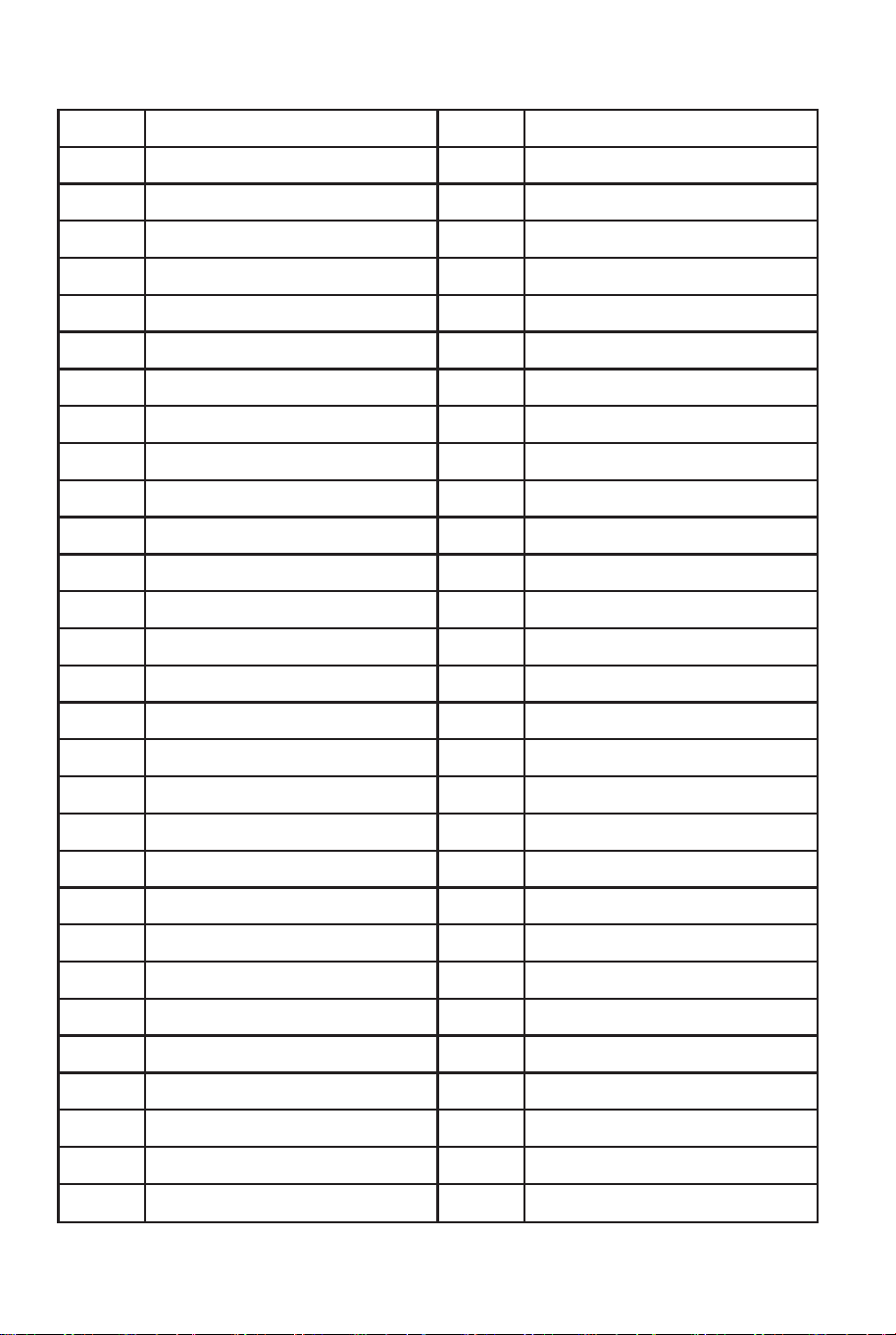
R014
R015
R016
R017
R018
R019
R020
R021
R022
R023
R024
R025
R026
R027
R028
R029
R030
R031
R032
R033
R034
R035
R036
R037
R038
R039
R040
Straight Rock
Jazz Rock
Fast Gospel
Folk Rock
Skiffle
Funk Pop Rock
Contemp Rock
Acoustic Rock
50's Pop
Cool Pop
Groovy Pop
60's Vintage Pop
80's Pop
Rap Pop
Pop Rock
60's Soul
70's Soul
Funk
16 Beat Shuffle
Twist
British Pop 1
British Pop 2
Hard Rock 1
Hard Rock 2
Fusion 1
Fusion 2
Funk Shuffl 1
R041
R042
R043
R044
R045
R046
R047
R048
R049
R050
R051
R052
R053
R054
R055
R056
R057
R058
R059
R060
R061
R062
R063
R064
R065
R066
R067
Funk Shuffl 2
Fusion Shuffl 1
Fusion Shuffl 2
Club Pop 1
Club Pop 2
16 Beat Pop 1
16 Beat Pop 2
8 Beat Pop 1
8 Beat Pop 2
8 Beat Soul 1
8 Beat Soul 2
8 Beat Rock 1
8 Beat Rock 2
Classic 8 Beat
Vintage Gtr Pop
Schlager Italia
Waltz
Cha Cha
Rumba
Jive
Pasodoble
Samba 1
Samba 2
Schlager Rock 1
Schlager Rock 2
Fox Trot
Viennese Waltz
R068
R069
R070
R071
R072
R073
R074
R075
R076
R077
R078
R079
R080
R081
R082
R083
R084
R085
R086
R087
R088
R089
R090
R091
R092
R093
R094
R095
R096
R097
Tango 1
Tango 2
German Waltz
Carnival
Organ Samba
Reel
Gay Gordons
Scand Waltz
70's Chart Ballad
Romantic Ballad
90's Cool Ballad
1 Alp Ballad 1
2 Alp Ballad 2
E_Ballad
Unplugged
Pop Ballad
Pop New Age
8 Beat Modern
Country Ballad
Love Song
Modern Country Pop
Electro Pop
Acoustic Ballad
Piano Ballad
R&B Ballad
Rock Ballad
Slow & Easy
Analog Ballad
Slow Rock 1
Slow Rock 2
R098
R099
R100
R101
R102
R103
R104
R105
R106
R107
R108
R109
R110
R111
R112
R113
R114
R115
R116
R117
R118
R119
R120
R121
R122
R123
R124
R125
R126
R127
Slow Rock 3
low Soul
8 Beat Adria
Classic Piano
80's EP Ballad
80's Boy Band
Country Ballad
Country Two Step
Country 1
Country 2
Finger Pickin
Country Brothers
New Country
Easy Country
70's Chart Cntry
Hoedown
Country Shuffle
70's Disco 1
70's Disco 2
Funky Disco
Saturday Night
Club Latin
Disco Chocolate
Disco Fox
Disco Funk
Disco Hands
Disco Party
Disco Samba
UK Pop
Club Dance
12 13
In case a return is required, the item must be returned in original
box. Without this your return will not be accepted.
DO NOT discard the box / original packaging.
Take a photo of the box markings.
Take a photo of the damaged part (if applicable).
Send us an email with the images requested.
A photo of the markings (text) on the side of the box is required in
case a part is needed for replacement. This helps our staff identify
your product number to ensure you receive the correct parts.
A photo of the damage is always required to file a claim and get
your replacement or refund processed quickly. Please make sure
you have the box even if it is damaged.
Email us directly from marketplace where your item was purchased
with the attached images and a description of your claim.
Return / Damage Claim Instructions
14 15

In case a return is required, the item must be returned in original
box. Without this your return will not be accepted.
DO NOT discard the box / original packaging.
Take a photo of the box markings.
Take a photo of the damaged part (if applicable).
Send us an email with the images requested.
A photo of the markings (text) on the side of the box is required in
case a part is needed for replacement. This helps our staff identify
your product number to ensure you receive the correct parts.
A photo of the damage is always required to file a claim and get
your replacement or refund processed quickly. Please make sure
you have the box even if it is damaged.
Email us directly from marketplace where your item was purchased
with the attached images and a description of your claim.
Return / Damage Claim Instructions
14 15

MU10095
61-Key Folding Piano Keyboard
THIS INSTRUCTION BOOKLET CONTAINS IMPORTANT SAFETY INFORMATION. PLEASE READ AND KEEP FOR FUTURE REFERENCE.
USA office: Fontana GBR office: Ipswich AUS office: Truganina
If you're having difficulty, our friendly
customer team is always here to help.
AUS:cs.au@costway.com
GBR:cs.uk@costway.com