Complete Radio Replacement Kit with
Integrated Climate Control Retention for
2003-2007 Honda Accord
RPK4-HD1101
Pacific Accessory Corporation
Page 1
© 2018 AAMP Global. All rights reserved. PAC is a Power Brand of AAMP Global.
PAC-audio.com
Rev: V8
Date: 081318
Parts List
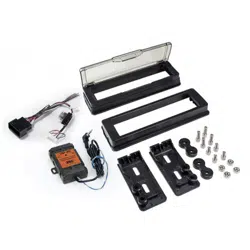
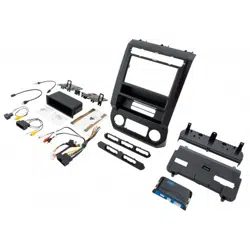
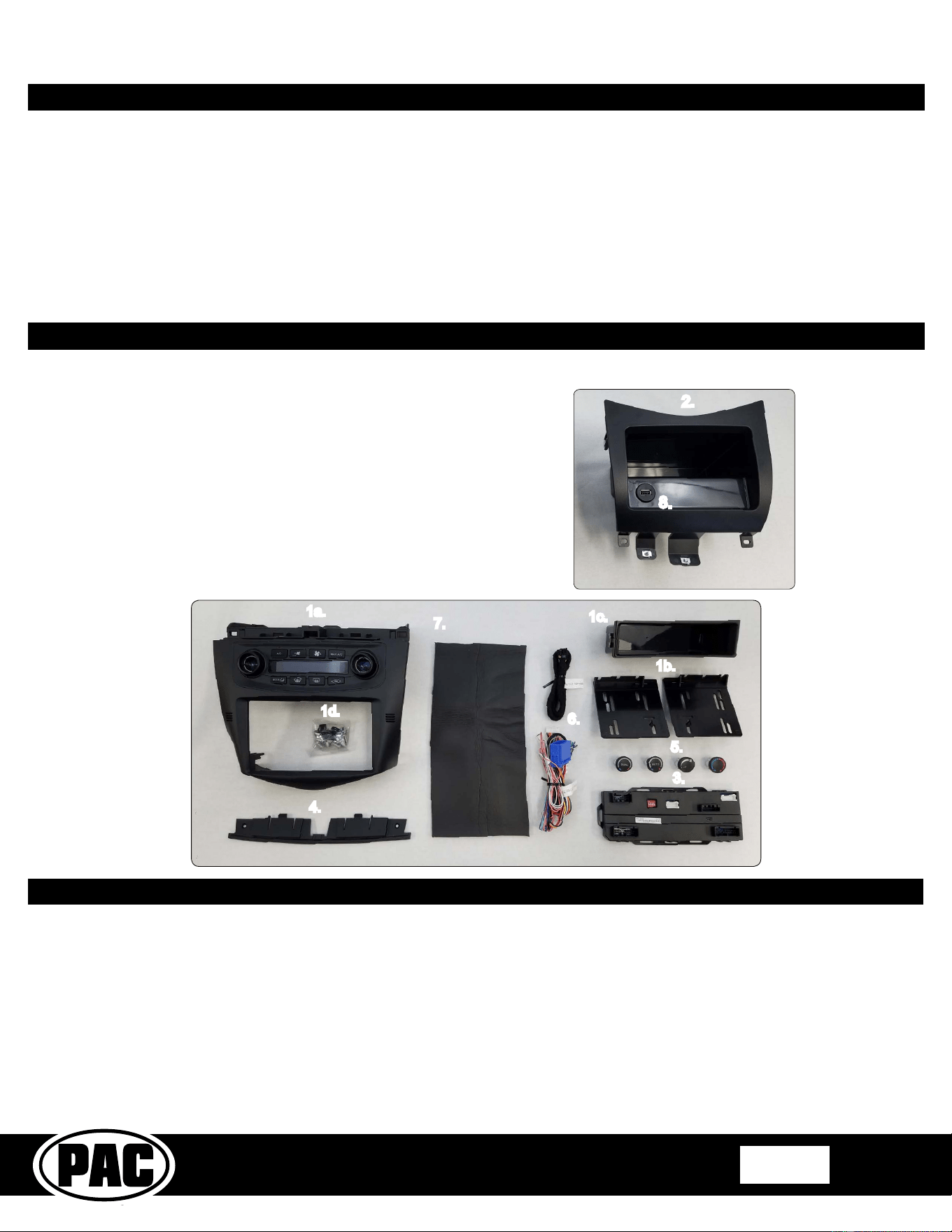
This kit contains:
1.
Dash Kit
a.1 (x1) HVAC Control Panel
1.1 (x2) Radio Mounting Brackets (One left and one right)
c.1 (x1) Pocket (For single DIN applications)
d.1 (x8) Radio Mounting Screws
2. Lower Pocket
3. Climate and Steering Wheel Control Interface Module
4. Adapter for Vehicles Equipped with the Factory Navigation Radio
5. HVAC Kno1 Inserts (Single Zone and Dual Zone)
6. Radio Connection Harnesses
7. 1 Sheet of HVAC Duct Sealing Material. (Used when the factory foam
has deteriorated 1etween the ducts 1ehind the radio.)
8. USBDMA3 - USB extension for use with the aftermarket radio
Overview
The RPK4-HD1101 is a complete radio replacement kit with integrated climate control retention for the 2003-2007 Honda Accord. This kit
utilizes a user friendly pair of HVAC control kno1s for a factory look and experience. Using the supplied interchangea1le inserts, this kit is
compati1le with 1oth single zone and dual zone HVAC systems. This kit is also programma1le for use in 1oth left hand drive and right hand
drive vehicles. The included radio replacement interface will retain factory steering wheel controls (SWC) and allows you to program two
radio functions to each SWC 1utton 1y using short press long press dual command functionality. The interface also provides data 1us driven
outputs such as vehicle speed sensor (VSS), reverse trigger and parking 1rake.
Ta1le of Contents: Page:
1. Factory Radio Removal ----------------------------------------------------- 1-2
2. Su1-Dash Preparation Sealing the Air Ducts------------------------------ 3
3. Radio Replacement Installation and Wiring Instructions-------------- 3-4
4.
Kit Assem1ly Instructions -------------------------------------------------- 5-6
5. Settings Menu (including SWC programming)------------------------- 7-10
1. This version of instructions are ONLY intended for use with product version R.2.1.2.13 or later.
2. The Pink / Black data input wire only needs to 1e connected in vehicles equipped with single zone climate controls. See page 6 to identify the
HVAC system in the vehicle.
3. The White / Black navigation SWC input wire only needs to 1e connected in vehicles equipped with the factory navigation radio, and when the
supporting “Voice” and “Back” steering wheel controls are present.
4. The HVAC control panel will need to be programmed to the factory HVAC system in the vehicle. Upon powering the panel up for the rst time
it will enter this programming mode. Please see page 6 for proper selection.
5. A pocket has been provided to replace the factory pocket below the radio. The pocket comes with a cut out sized specically for use with the
included PAC USBDMA3.
Important Notes
1a.
4.
1d.
7.
1c.
3.
11.
5.
6.
2.
The RPK4-HD1101 includes everything you need for a professional installation of an aftermarket radio in your Accord.
8.
***Please check all functions of the factory steering wheel controls and HVAC system and make sure it is all
in good working order before proceeding with this install.***
Complete Radio Replacement Kit with
Integrated Climate Control Retention for
2003-2007 Honda Accord
RPK4-HD1101
Pacific Accessory Corporation
Page 2
© 2018 AAMP Global. All rights reserved. PAC is a Power Brand of AAMP Global.
PAC-audio.com
Rev: V8
Date: 081318
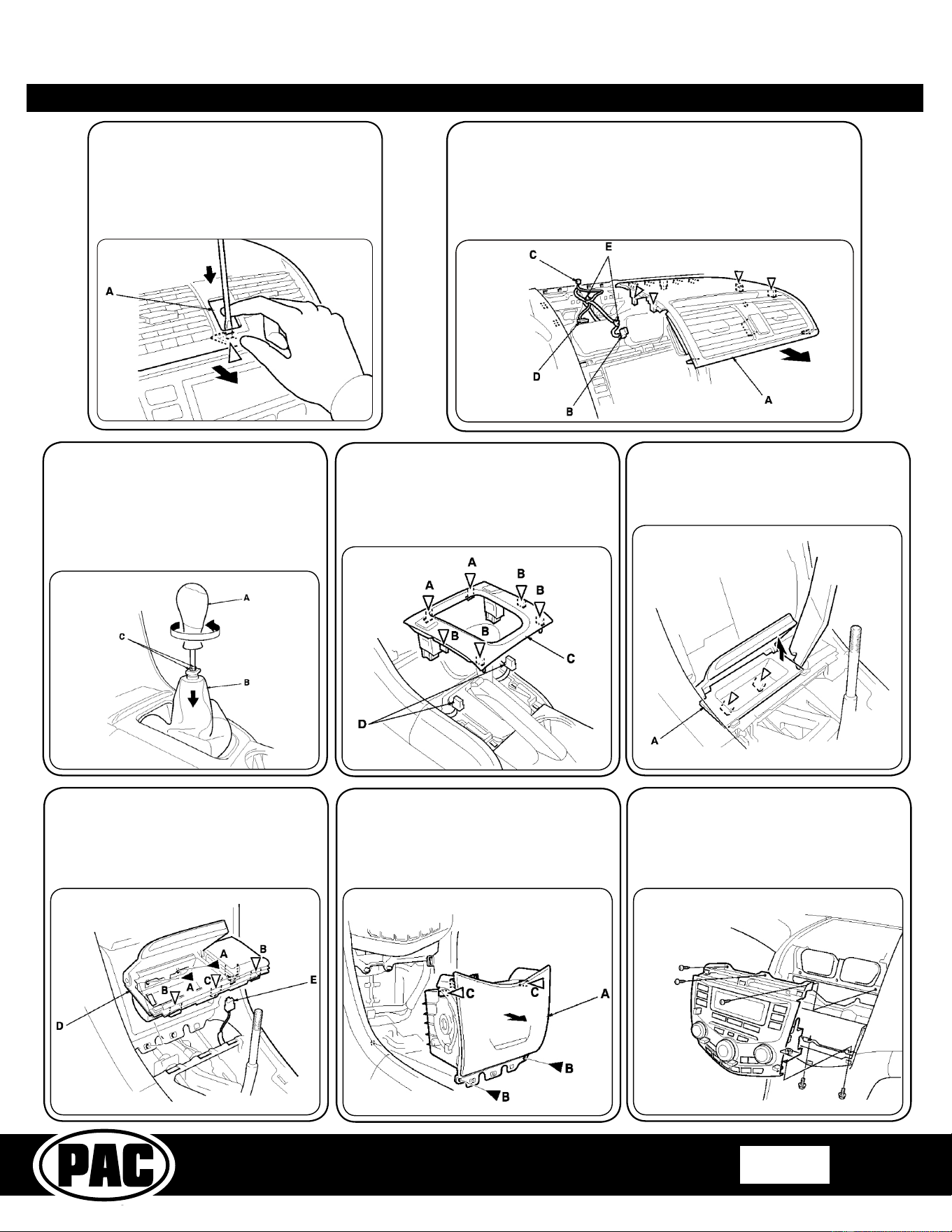
1.3 - If the vehicle is equipped with
manual transmission, the shift kno1
(A) will need to 1e removed. To do
this, lower the shift lever 1oot (B) to
release the hooks (C) from the kno1.
Remove the shift kno1 1y twisting it
counterclockwise.
1.4 - Using a plastic trim tool, detach
the clips (A, B) 1y pulling the center
console front panel (C) up. If equipped,
disconnect the seat heater switch
connectors (D).
1.5 - Using a plastic trim tool, pry up on
the right side of the console pocket (A)
with a trim tool, and detach the clips,
then remove the pocket.
1.6 - Remove the screws (A), detach
the clips (B) and hook (C) 1y pulling the
center holder (D) up, and disconnect
the front accessory power socket
connector (E).
1.7 - Remove the center pocket (A).To
do this, remove the screws (B).Open
the lid, then pull the pocket toward you
1y hand to detach the clips (C). Close
the lid, then remove the pocket.
1.8 - Remove the 3 phillips head screws
and 2 8mm 1olts holding the radio to
the dash. Pull the radio from the dash
and disconnect the connectors and the
antenna lead, then remove the radio
and set aside.
Part One: Removing the factory radio from the vehicle
1.1 - Push the hazard warning switch
1utton (A). Carefully insert a at-tip
screwdriver into the slot 1elow the 1utton,
and push down on the center clip.
1.2 - Pull the upper panel (A) in the direction shown to
release the remaining clips, disconnect the hazard warning
switch connector (B), and if equipped, sunlight sensor
connector (C) and navigation su1 display connector (D).
Detach the harness clips (E), then remove the upper
panel.
Complete Radio Replacement Kit with
Integrated Climate Control Retention for
2003-2007 Honda Accord
RPK4-HD1101
Pacific Accessory Corporation
Page 3
© 2018 AAMP Global. All rights reserved. PAC is a Power Brand of AAMP Global.
PAC-audio.com
Rev: V8
Date: 081318
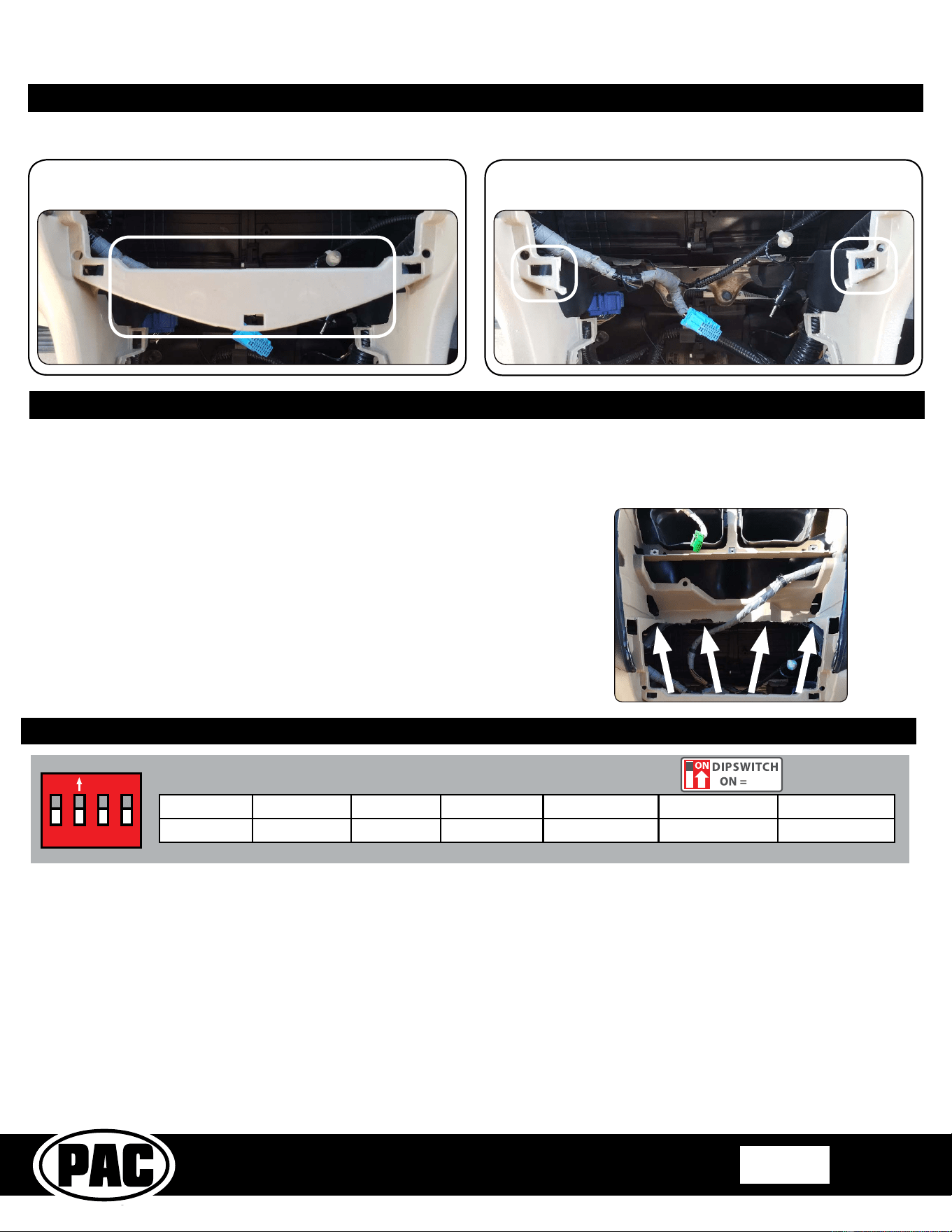
1. The radio select DIP switches on the front of the interface must be adjusted to the proper radio setting
before plugging the interface into the vehicle.
2. Make all connections 1etween the aftermarket radio and the RPK4-HD1101 harness as descri1ed in the chart on the next page. This
includes the SWC 3.5mm jack or the SWC wire (aftermarket radio MUST support a wired remote input).
3. Connect the Pink / Black data wire when the vehicle is equipped with single zone HVAC controls, and data generated navigation outputs
are needed. See the next page for connection details.
4. Connect the White / Black navigation SWC wire when the vehicle is equipped with the factory navigation system, and when the supporting
“Voice” and “Back” steering wheel controls are present. See the next page for connection details.
5. Connect one side of the harness la1eled “RPK-HD1101-16P” to the 1ack of the kit. Connect the other end of the harness to the radio
replacement interface.
6. Connect the single zone HVAC harness or dual zone HVAC harnesses to the radio replacement interface. For proper operation conrm
that the connectors are connected into the proper openings. Failure to verify will cause the HVAC kit to function incorrectly. Reference the
illustration on the next page or the sticker on the back of the module for clarication. If the vehicle is equipped with factory navigation then
connect the OEM upper display harness as well.
7. If you wish to reassign functions to the SWC follow the programming instructions on page 7.
Part Three: Conguration and Wiring of Interface
ON
1 2 3 4
Other = Advent, BOYO, Dual, Lightning Audio, Rockford Fosgate, Visteon
Set DIP switches that match your radio to the ON position
Set all other DIP switches to the OFF position
Alpine JVC Kenwood Clarion Pioneer/Other Sony Fusion
1 2 1 & 2 3 1, 2, & 3 4 1 & 4
Part Two: Su1-Dash Preparation
1. Cut and remove the portion of the dash that is outlined 1elow. Be sure to cut
close to the left and right square mounting holes 1ut 1e sure they are left intact.
2. The Su1-dash should look like the image 1elow when the removal is complete.
Notice that the left and right square mounting holes are still left intact.
Blocking the Air from the Air Ducts Behind the Radio
In vehicles equipped with dual zone climate controls, leaking air ducts will cause false readings to the temperature sensors in the
dash kit. This will cause the Auto climate feature to not heat or cool the ca1in to the proper temperature. It is common for the ducts
1ehind the radio to leak due to deterioration of the seals 1etween the main and center ducts. To help 1lock the air from 1lowing on
the 1ack of the temperature sensors we have added a piece of closed cell foam, measuring 6” x 12”.
The sub-dash of the vehicle will need to be modied to t the new aftermarket radio. Please see below for proper modication of
the su1-dash. Be sure to leave the left and right lower clip mount intact as they will 1e re-used 1y the new dash kit.
UP
1. Connect the factory radio and turn the HVAC fan speed to high.
2. Verify if and where there is an air leak. The picture on the right shows the
common leak locations.
3. Using the closed cell foam provided as-is, or cut adequate pieces to 1lock the
air from 1lowing on the 1ack of the Temp sensors located just outside of the
radio opening on each side of the dash kit.
4. Verify that all of the air leaks have 1een sealed or redirected away from the
temperature sensors.
5. Disconnect the radio and proceed to the next step.
Complete Radio Replacement Kit with
Integrated Climate Control Retention for
2003-2007 Honda Accord
RPK4-HD1101
Pacific Accessory Corporation
Page 4
© 2018 AAMP Global. All rights reserved. PAC is a Power Brand of AAMP Global.
PAC-audio.com
Rev: V8
Date: 081318
Illustration / Schematic
Dual Zone
Climate Controls
DIP Switches
To KIT Display
To OEM
Upper Display
Single Zone
Climate Controls
USB
To Aftermarket
Radio Harness
Steering Wheel
Control Outputs
Navigation
Outputs
To Vehicle’s
Radio Connector
To Aftermarket
Radio
(see connection
chart above)
Navigation SWC Input
(passenger kick panel)
Data Input
(driver kick panel)
Aftermarket Radio Connections
Yellow Battery +12v
Black Ground
Red Accessory Output
White Front Left + input
White / Black Front Left - input
Grey Front Right + input
Grey / Black Front Right - input
Green Rear Left + input
Green / Black Rear Left - input
Purple Rear Right + input
Purple / Black Rear Right - input
Blue Amp Remote Turn On
Light Green Parking Brake
Pink Vehicle Speed Output
Orange Illumination Output (+)
Purple / White Reverse Output (+)
* This wire is longer than the others and will need to 1e
run to the kick panel area. See 1elow for more
information.
White / Black* Navigation SWC Input
Pink / Black* Data Input
Blue / Yellow
(SWC Output) Kenwood or Newer JVC
3.5mm Jack
(SWC) Output Alpine, JVC, Clarion,
Pioneer, Sony, Boyo, Dual,
Lightning Audio, Visteon,
Jensen or Advent
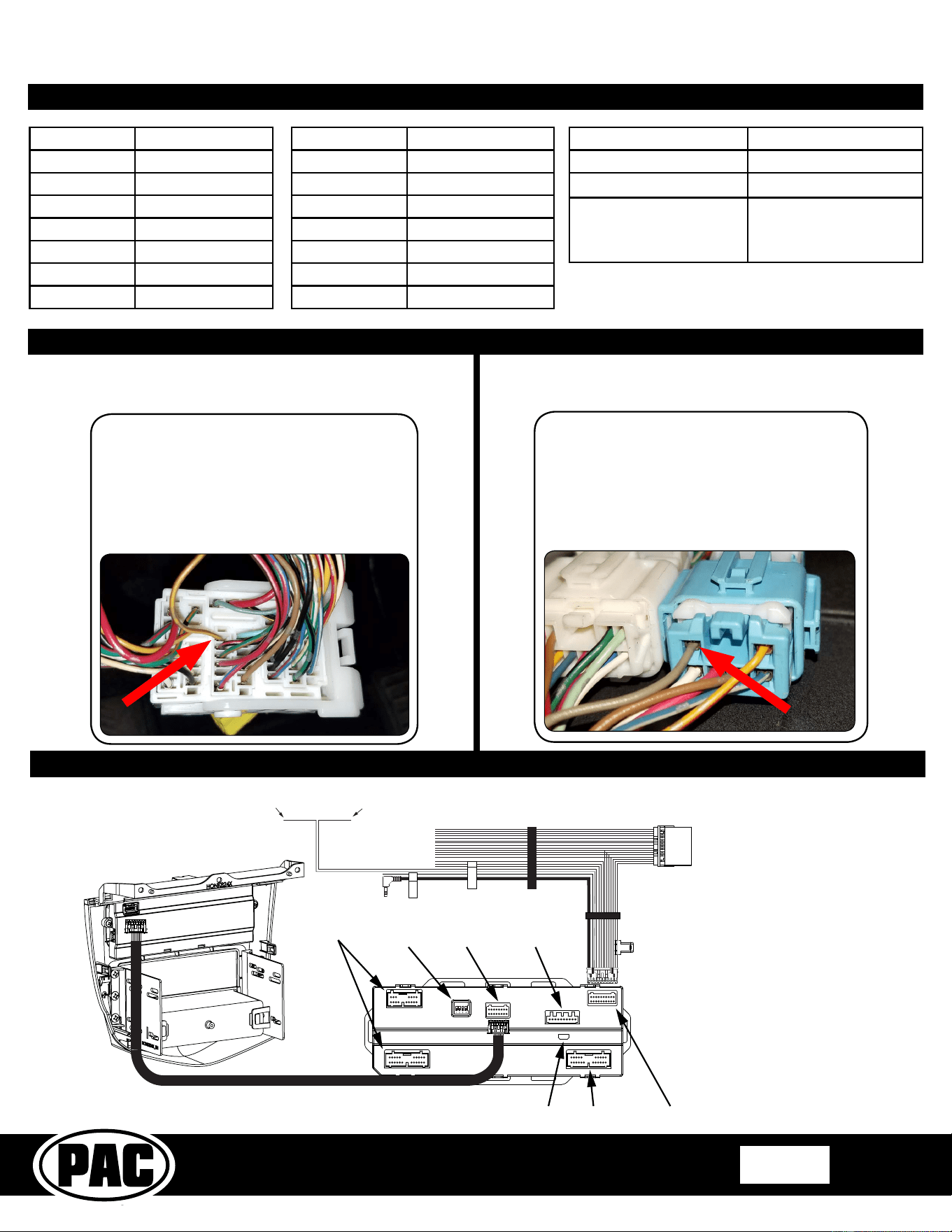
Route the Pink / Black wire from the RPK4-
HD1101’s vehicle harness down to the driver
side kick panel. Connect the Pink / Black
wire to the Brown / Yellow wire located in the
45-pin white connector located a1ove the
fuse panel. It will 1e necessary to remove
the under dash panel if equipped.
Route the White / Black wire from the RPK4-
HD1101’s vehicle harness down to the
passenger side kick panel. Connect the White
/ Black wire to the Gray wire located in the
6-pin 1lue connector. Disconnect the 14-pin
green connector from the navigation module
located in the trunk area.
Connecting the Pink / Black wire
Connecting the White / Black wire
Note: This wire is only needed when the vehicle is equipped with single
zone HVAC controls. See page 6 if you are unclear as to which HVAC
system is in your vehicle.
Note: This wire is only needed when the vehicle is equipped with the
factory navigation system and when the supporting “Voice” and “Back”
steering wheel controls are present.
Note: For proper operation conrm
that the connectors are connected into
the proper openings. Failure to verify
will cause the HVAC kit to function
incorrectly. Reference the the sticker on
the back of the module for clarication.
Complete Radio Replacement Kit with
Integrated Climate Control Retention for
2003-2007 Honda Accord
RPK4-HD1101
Pacific Accessory Corporation
Page 5
© 2018 AAMP Global. All rights reserved. PAC is a Power Brand of AAMP Global.
PAC-audio.com
Rev: V8
Date: 081318
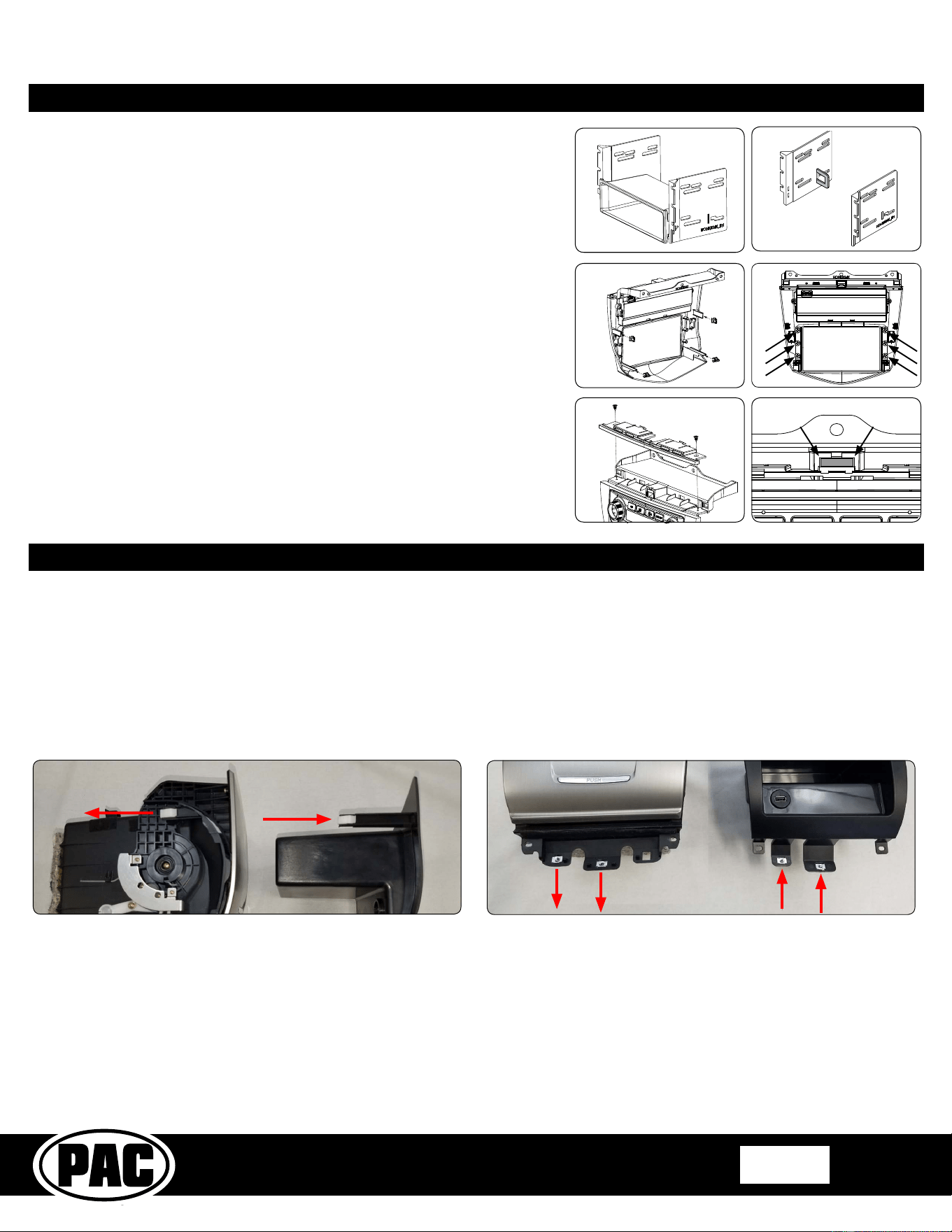
Part Four: Kit Assem1ly Instructions
FIG 1
FIG 2
FIG 5
FIG 4
1. When using a single DIN radio, snap and lock each of the side 1rackets onto the
supplied pocket. FIG 1
2. When using a dou1le DIN radio, remove the shaded ta1s from the 1ack edge of
each left and right mounting 1rackets (right side not shown). FIG 2
3. Push the 4 supplied spring clips onto the 4 ta1s on the 1ack of the HONK824X
dash kit. FIG 3
4. Using the supplied phillips head screws, line up and secure the side radio
mounting 1rackets to the main frame of the HONK824X dash kit. FIG 4
5. Insert ISO mounta1le radio 1etween the side mount 1rackets and loosely attach
to sides of radio using the screws provided with the radio when possi1le, or
hardware included with the kit.
6. Move the radio’s chassis forward or 1ackward for desired look and insert and
tighten screws.
7. If the vehicle was equipped with a factory radio with navigation you will need to
install the navigation spacer to the top of the kit. Using 2 of the supplied screws
fasten the spacer to the top of the kit. (FIG 5) You will also need to remove the
shaded area from the center clip mount using a rotary or similar tool. (FIG 6)
8. When using a singe DIN radio, attach a rear support 1racket to the rear of the
new radio. Adjust as necessary to attach to the rear support stud, located on the
1ack of the pocket using the small phillips screw supplied with kit (optional).
9. Insert the kit and radio com1o into the dash. Line up the mounting ta1s with the
factory mounting points. Lock the kit into the dash 1y applying pressure to the
face of the kit and pushing it into the dash. Secure the kit to the su1-dash using
the 3 phillips head screws removed in step 1.8 on page 2.
FIG 6
FIG 3
FIG 7
Pocket and Vehicle Assem1ly
Due to the position of the chassis of the aftermarket radio after installation, the cover for the factory pocket will not open and close without hitting
it. We have added a nish matched replacement pocket to this kit. The replacement pocket will require use of the fasteners from the factory
pocket.
1. Start 1y removing the 2 white clips at the top of the factory pocket removed in step 1.7. Clip them into the same locations on the new
pocket. See FIG 7 1elow for reference. Only one side is shown in the picture, 1ut 1oth sides will need to 1e done.
2. Next remove the 2 silver screw clips at the 1ottom of the factory pocket. Clip them into the same locations on the new pocket. See FIG 8
1elow for reference.
FIG 8
3. Install the pocket into the dash 1y sliding it 1ack until the clips lock into the openings in the dash. Secure it using the two philips head
screws removed in step 1.7.
4. Connect the front accessory power socket connector, and seat the center holder 1ack into the dash. Secure it using the two phillips head
screws removed in step 1.6.
5. Snap the console pocket removed in step 1.5 1ack into the center holder 1y pressing it down and forward.
6. Install the center console front panel removed in step 1.3 and 1.4 making sure to plug the seat heater connectors 1ack in (if equipped).
7. Install upper panel in reverse order as removed in steps 1.1 and 1.2 making sure to plug in the hazard switch and the navigation su1
display (if equipped).
Complete Radio Replacement Kit with
Integrated Climate Control Retention for
2003-2007 Honda Accord
RPK4-HD1101
Pacific Accessory Corporation
Page 6
© 2018 AAMP Global. All rights reserved. PAC is a Power Brand of AAMP Global.
PAC-audio.com
Rev: V8
Date: 081318
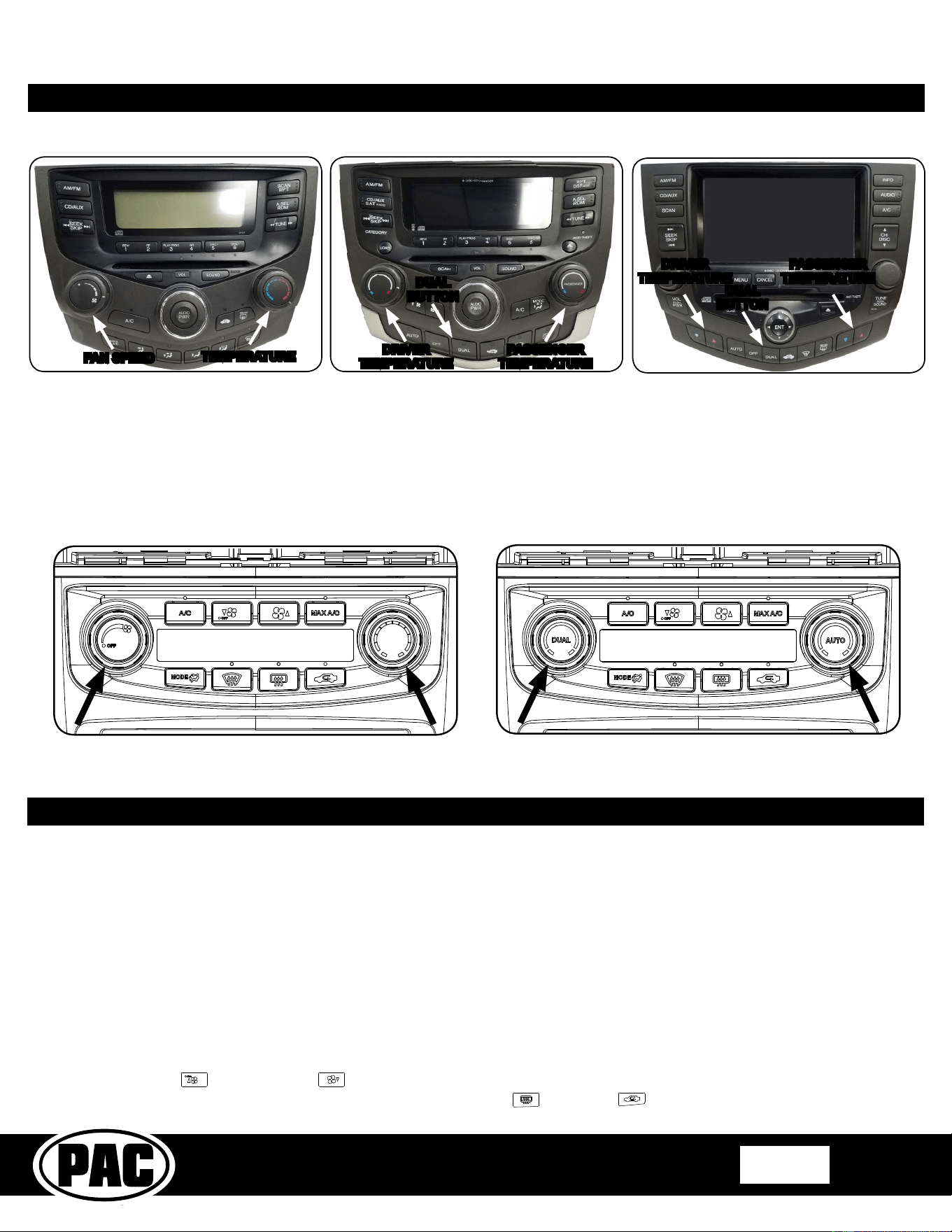
Identifying the HVAC system in your vehicle
Single Zone
Dual Zone Dual Zone
Once you have identied the HVAC system in your vehicle using the images above, insert the correct knob inserts into the front
of the kno1 opening and verify that they click into place. To avoid damage to the kit or the inserts make sure that the inserts are
positioned correctly and very little force should 1e used when seating them.
Single Zone
Dual Zone
DUAL
BUTTON
DUAL
BUTTON
DRIVER
TEMPERATURE
PASSENGER
TEMPERATURE
DRIVER
TEMPERATURE
PASSENGER
TEMPERATURE
TEMPERATURE
FAN SPEED
HVAC System Setup
Initial HVAC type selection.
1. When the ignition is turned to the on position and the kit is powered up in the vehicle for the rst time “P2 1”
should 1e shown on the display.
2. This tells you that you are in programming menu 2 along with the current selection on the right of the display which in this
case is 1. The availa1le selections are as follows:
1. Coupe (2 Door) with Dual Zone Climate Controls
2. Sedan (4 Door) with Dual Zone Climate Controls
3. Coupe (2 Door) with Single Zone Climate Controls
4. Sedan (4 Door) with Single Zone Climate Controls
5. Coupe (2 Door) with Dual Zone Climate Controls (Hy1rid*)
6. Sedan (4 Door) with Dual Zone Climate Controls (Hy1rid*)
* Hybrid modes are a combination of Dual and Single Zone Climate controls.
3. Using the Fan Up and Fan Down 1uttons change the current selection to match the factory system in the vehicle.
4. Once the desired selection is shown, press the rear defrost 1utton (next to the 1utton) to save and exit.
Complete Radio Replacement Kit with
Integrated Climate Control Retention for
2003-2007 Honda Accord
RPK4-HD1101
Pacific Accessory Corporation
Page 7
© 2018 AAMP Global. All rights reserved. PAC is a Power Brand of AAMP Global.
PAC-audio.com
Rev: V8
Date: 081318
IMPORTANT!
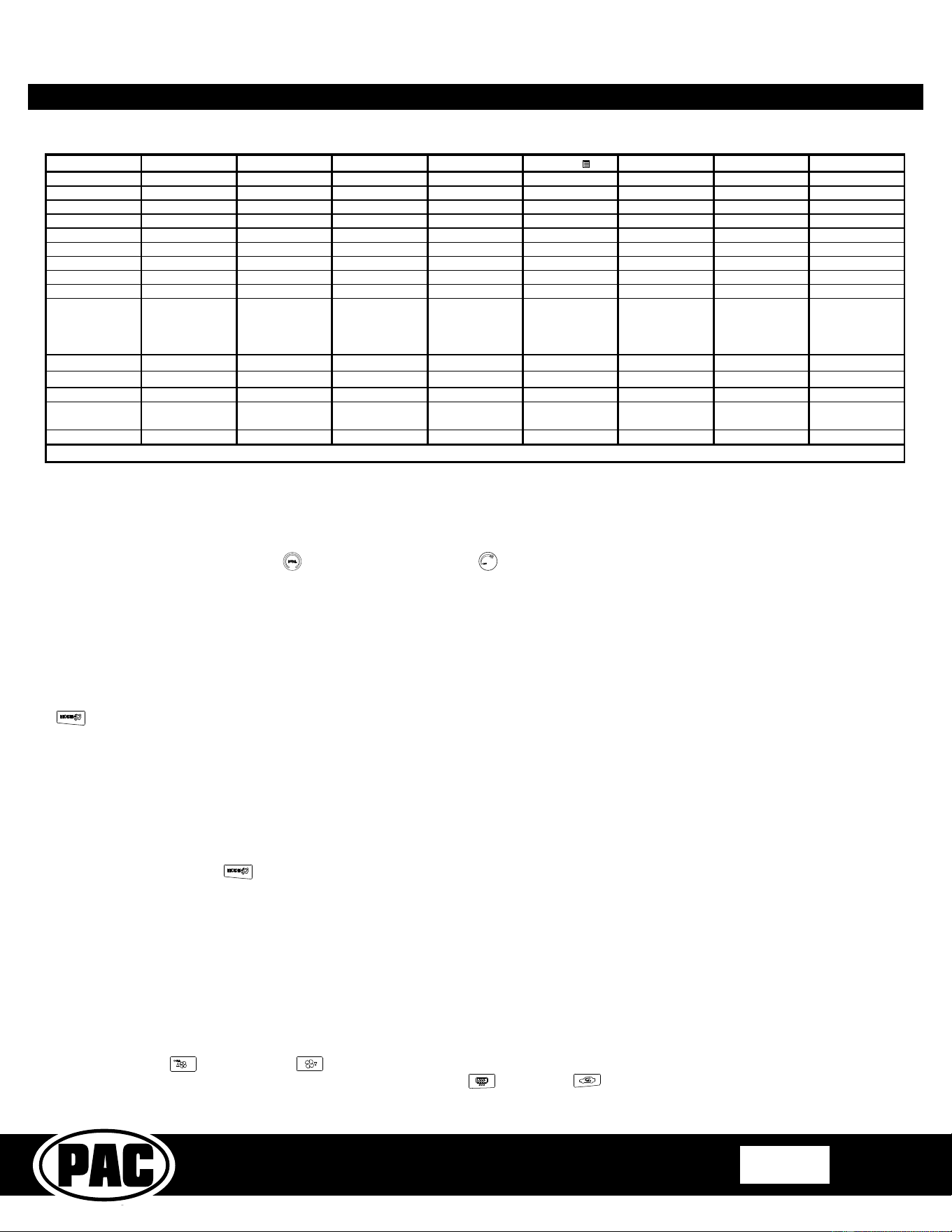
The interface comes pre-programmed for the functions listed in the chart 1elow and does not require programming unless you wish
to re-assign the SWC functions, or utilize short press long press dual command functionality. The SWC can always 1e restored to default settings
1y entering the Steering Wheel Control programming menu (see page 8) and waiting 7 seconds for the interface to time out.
Alpine JVC Kenwood Clarion Pioneer Sony Fusion
V
olume +
Volume + Volume + Volume + Volume + Volume + Volume + Volume +
V
olume -
Volume - Volume - Volume - Volume - Volume - Volume - Volume -
Track Up
Track + Track + Track + Search + Track + Track + Track +
Track Down
Track - Track - Track - Search - Track - Track - Track -
Mode
Source Source Source Source Source Source Source
V
oice
Voice Mute Mute VR VR VR Power
Back
Preset Preset Disc - End Preset Reject N/P
Default SWC Button Assignments
Part 5: RPK4-HD1101 Settings Menu
Optional Steering Wheel Control Programming
If you wish to re-assign the SWC functions or utilize short press long press dual command functionality, the interface must 1e programmed in the
specic order shown in the chart on the next page. If you come across a function in the chart that your steering wheel does not have, or you do
not want to program, press and release the rear defrost
1utton to skip that function. The LED will ash off and on conrming that you have
successfully skipped that function and are ready to proceed to the next one.
Short Press Long Press Dual Command Functionality
This feature allows you to assign two aftermarket radio functions to each of the vehicle’s SWC 1uttons. It can 1e used with as many of the 1uttons
as the user likes or none at all. When this functionality is implemented, quickly pressing and releasing a SWC 1utton will initiate the short press
command, while pressing and holding a SWC 1utton for longer than two seconds will initiate the long press command. If you wish to assign dual
command functionality to the SWC please follow the programming steps on the next page.
The following settings can 1e adjusted using the LCD and controls of the dash kit even after the install of the dash kit has 1een
completed. Each of the processes are descri1ed 1elow, along with the com1ination of 1uttons needed to adjust the setting. The
settings availa1le for adjustment are as follows:
1.P Programming of the Steering Wheel Controls
2.P HVAC Type
1. Coupe (2 Door) with Dual Zone Climate Controls
2. Sedan (4 Door) with Dual Zone Climate Controls
3. Coupe (2 Door) with Single Zone Climate Controls
4. Sedan (4 Door) with Single Zone Climate Controls
5. Coupe (2 Door) with Dual Zone Climate Controls (Hy1rid*)
6. Sedan (4 Door) with Dual Zone Climate Controls (Hy1rid*)
* Hybrid modes are a combination of Dual and Single Zone Climate controls.
3.P Steering Wheel Control Re-calibration
4.P Temperature Unit
1. Fahrenheit (Default)
2. Celsius
5.P Driver Position
1. Left Hand Drive (Default)
2. Right Hand Drive
6.P Temperature Rotary Knob Position
1. Left Hand Drive (Default)
2. Right Hand Drive
7.P Reset
1. Exit (Default)
2. Reset
8.P Upper Display Screen Type
1. Type 1 (2003 - 2004)
2. Type 2 (2004 - 2007)
P1. - Programming Steering Wheel Controls
Complete Radio Replacement Kit with
Integrated Climate Control Retention for
2003-2007 Honda Accord
RPK4-HD1101
Pacific Accessory Corporation
Page 8
© 2018 AAMP Global. All rights reserved. PAC is a Power Brand of AAMP Global.
PAC-audio.com
Rev: V8
Date: 081318
P2. - HVAC type selection.
1. Start with the Ignition in the OFF position.
2. Press and hold the MODE
1utton.
3. While holding the 1utton down turn the key to the ignition position and continue to hold for 7 seconds or until “P2” is shown on the display.
4. This tells you that you are in programming menu 2 along with the current selection on the right of the display which will 1e 1etween 1 and 6.
The availa1le selections are as follows:
1. Coupe (2 Door) with Dual Zone Climate Controls
2. Sedan (4 Door) with Dual Zone Climate Controls
3. Coupe (2 Door) with Single Zone Climate Controls
4. Sedan (4 Door) with Single Zone Climate Controls
5. Coupe (2 Door) with Dual Zone Climate Controls (Hy1rid*)
6. Sedan (4 Door) with Dual Zone Climate Controls (Hy1rid*)
* Hybrid modes are a combination of Dual and Single Zone Climate controls.
5. Using the Fan Up
and Fan Down 1uttons change the current selection to match the factory system in the vehicle.
6. Once the desired selection is shown, press the rear defrost 1utton
(next to the 1utton) to save and exit.
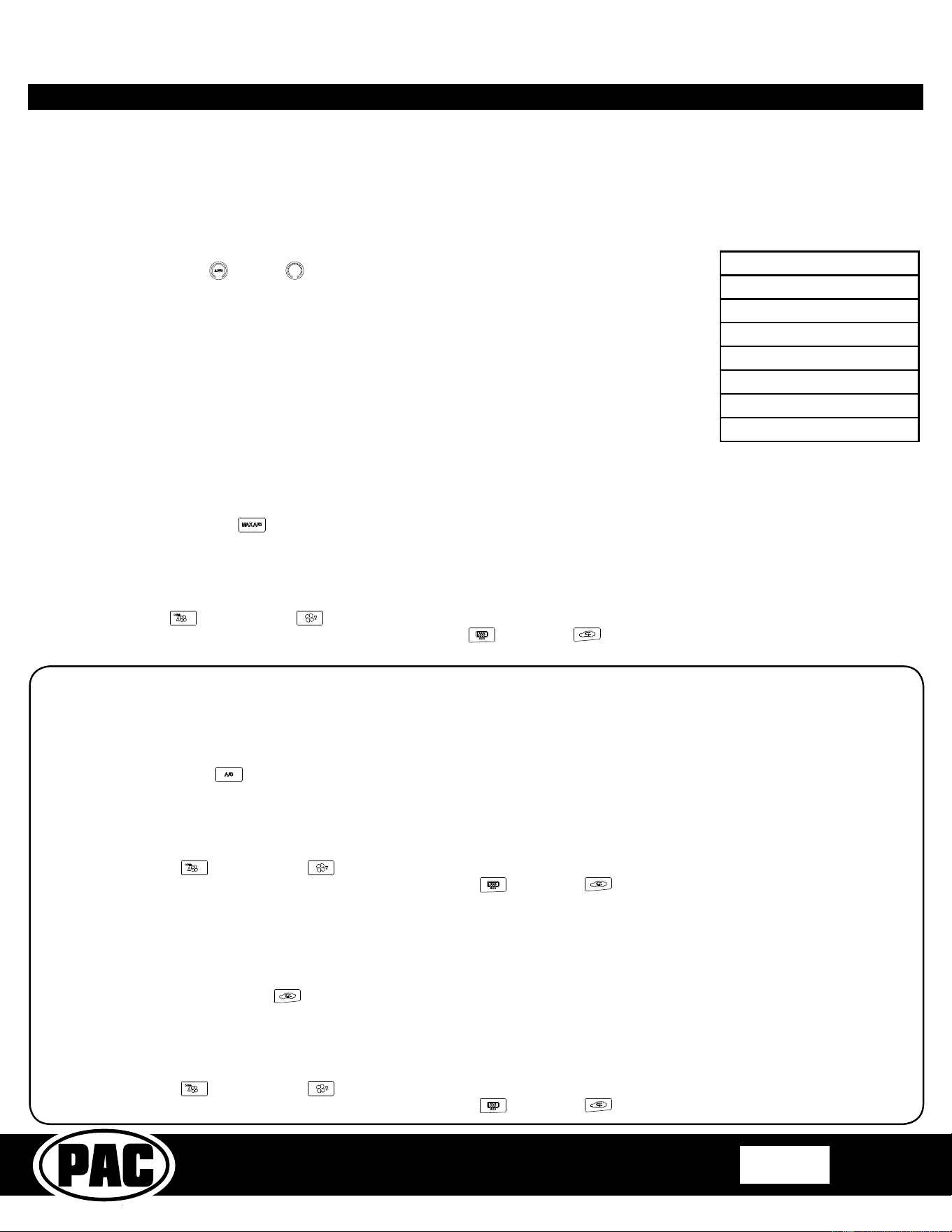
Alpine JVC Kenwood Clarion
Other
Pioneer Sony Fusion
1 Volume + Volume + Volume + Volume + Volume + Volume + Volume + Volume +
2 Volume - Volume - Volume - Volume - Volume - Volume - Volume - Volume -
3 Mute Mute Mute Mute Mute Mute Mute Mute
4 Preset + Source Source Source Preset + Preset + Preset + Source
5 Preset - Track + Play Search + Preset - Preset - Preset - Track +
6 Source Track - Track + Search - Source Source Source Track -
7 Track + Band / Disc + Track - Band Track + Track + Track + Audio
8 Track - Preset / Disc - Disc / FM + Send / End Track - Track - Track - Power
9 Power Select Disc / AM - Send Band Band Band
10 Enter/Play Attenuation Answer End
Answer
Phone Menu
Reject Call / Source
(Bluetooth
equipped radios
only)
11 Band / Program Phone Receive Voice Dial VR
End
Answer Call Answer / End Call
12 Receive Phone Reject On Hook
PTT
End Call VR
13 End Voice Dial Off Hook VR
14 VR Power
Mute (Multimedia
units only)
15 Preset +
- Advent, Boyo, Dual, Lightning Audio, Jensen, Rockford Fosgate & Visteon
- Jensen & Advent ONLY
Optional Programming Order
Programming Sequence
1. Start with the Ignition in the OFF position.
2. Press and hold the Dual (dual zone)
or Fan Speed (single zone) 1utton.
3. While holding the 1utton down turn the key to the ignition position and continue to hold for 7 seconds or until “P1” is shown on the display.
4. At this point the MAX A/C Green LED will turn on solid.
5. Within 7 seconds, press the 1utton that is to 1e learned on the steering wheel. The MAX A/C green LED will turn off when the 1utton is pressed.
At this point you have two options:
A. For short press functionality: Release the 1utton within 1.5 seconds. The MAX A/C green LED will turn 1ack on.
B. For long press functionality: Hold the 1utton until the MAX A/C green LED starts 1linking. Release the 1utton and the MAX A/C
Green LED will go 1ack to solid.
6. If you need to program more 1uttons, repeat step 5 for each additional audio function on the steering wheel.
7. If you come across a function in the chart that your steering wheel does not have, or you do not want to program, press and release the Mode
1utton to skip that function. The MAX A/C green LED will ash off and on conrming that you have successfully skipped that function.
8. Once programming is completed, wait seven seconds. The MAX A/C green LED will ash three times indicating end of programming.
9. Test the interface for proper functionality. If any function does not work, repeat the programming steps.
RPK4-HD1101 Settings Menu (cont.)
Complete Radio Replacement Kit with
Integrated Climate Control Retention for
2003-2007 Honda Accord
RPK4-HD1101
Pacific Accessory Corporation
Page 9
© 2018 AAMP Global. All rights reserved. PAC is a Power Brand of AAMP Global.
PAC-audio.com
Rev: V8
Date: 081318
RPK4-HD1101 Settings Menu (cont.)
P4. - Temperature unit selection.
1. Start with the Ignition in the OFF position.
2. Press and hold the MAX A/C
1utton.
3. While holding the 1utton down turn the key to the ignition position and continue to hold for 7 seconds or until “P4” is shown on the display.
4. This tells you that you are in programming menu 4 along with the current selection on the right of the display which is 1 1y default. The
availa1le selections are as follows:
1. Fahrenheit (Default)
2. Celsius
5. Using the Fan Up
and Fan Down 1uttons change the current selection to match the desired temperature units.
6. Once the desired selection is shown, press the rear defrost 1utton
(next to the 1utton) to save and exit.
***This Section is for Right Hand Drive Dual Zone vehicles only***
P5. - Driver Position Selection
This selection needs to 1e set to right hand drive as it lets the kit know which side of the vehicle the driver is on. This also changes which of the
temperature kno1s has priority. Since the driver side kno1 should always have priority, we adjust the priority 1ased on your selection.
1. Start with the Ignition in the OFF position.
2. Press and hold the A/C
1utton.
3. While holding the 1utton down turn the key to the ignition position and continue to hold for 7 seconds or until “P5” is shown on the display.
4. This tells you that you are in programming menu 5 along with the current selection on the right of the display which is 1 1y default. The
availa1le selections are as follows:
1. Left Hand Drive (Default)
2. Right Hand Drive
5. Using the Fan Up
and Fan Down 1uttons change the current selection to match the proper driving position.
6. Once the desired selection is shown, press the rear defrost 1utton
(next to the 1utton) to save and exit.
P6. - Temperature Rotary Knob Position Swap
In right hand drive vehicles,this selection also needs to 1e set to right hand drive. This will make sure that the temperature kno1 on the right of
the kit controls the right side of the vehicle and the left temperature kno1 will control the left side. In the event that you select right hand drive in
this menu and the rotary kno1s are inverted please change the setting to left hand drive, even if the vehicle is a right hand drive.
1. Start with the Ignition in the OFF position.
2. Press and hold the Recirculation
1utton.
3. While holding the 1utton down turn the key to the ignition position and continue to hold for 7 seconds or until “P6” is shown on the display.
4. This tells you that you are in programming menu 6 along with the current selection on the right of the display which is 1 1y default. The
availa1le selections are as follows:
1. Left Hand Drive (Default)
2. Right Hand Drive
5. Using the Fan Up
and Fan Down 1uttons change the current selection to match the proper driving position.
6. Once the desired selection is shown, press the rear defrost 1utton
(next to the 1utton) to save and exit.
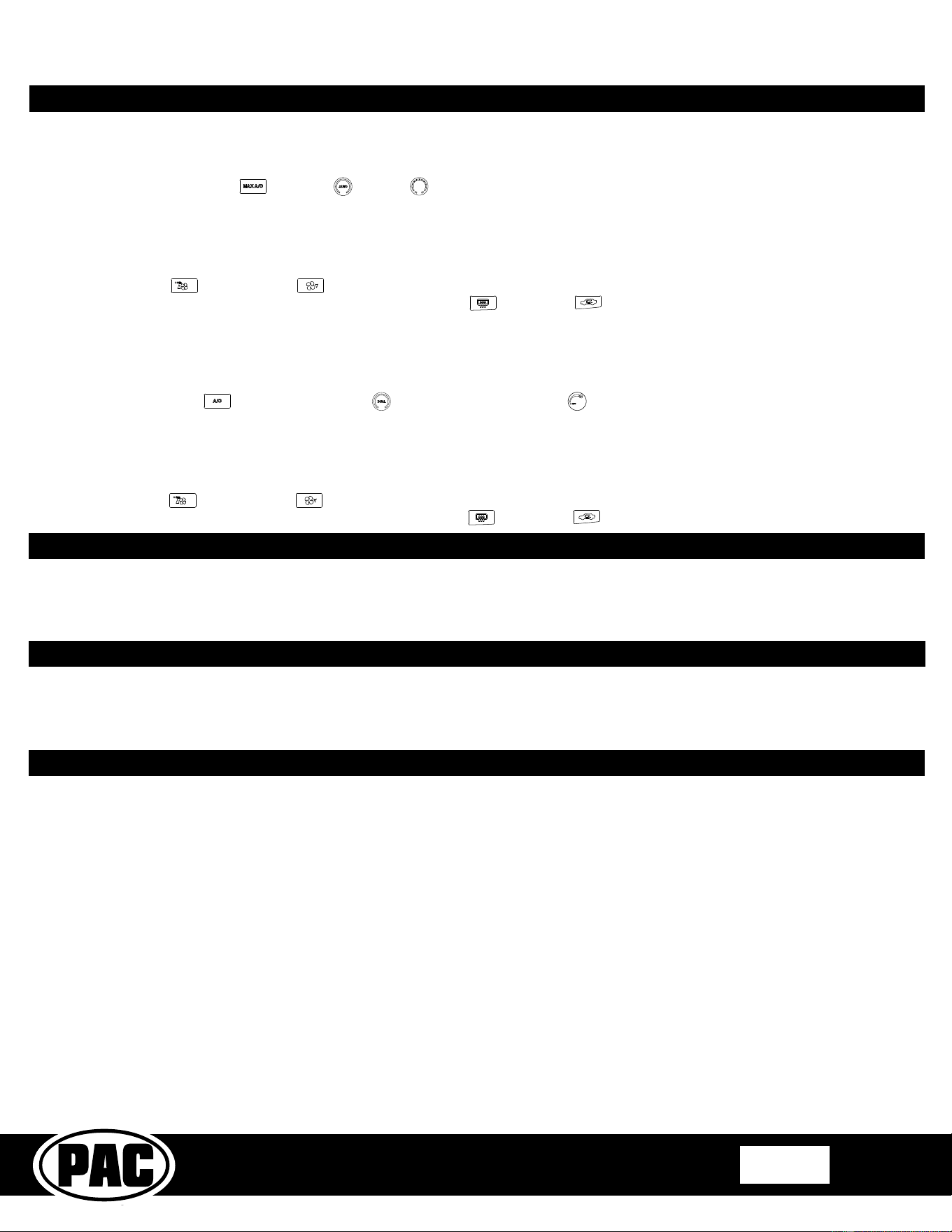
P3. - Steering Wheel Control Re-calibration.
SWC re-cali1ration is necessary when the SWC operation is erratic or non-existent. This process re-cali1rates the SWC values to the RPK4
interface so it will know what they can be set to for button function assignment. The interface must be programmed in the specic order shown
in the ta1le 1elow. If your vehicle is not equipped with the Voice and Back navigation 1uttons you will end programming 1y waiting 7 seconds
for the module to time out after the Mode 1utton has 1een programmed. The SWC and radio command assignments can always 1e restored to
default values 1y entering re-cali1ration mode (Steps 1-3) and not pressing any 1uttons. After 7 seconds the re-cali1ration mode will time out and
all default values will 1e restored.
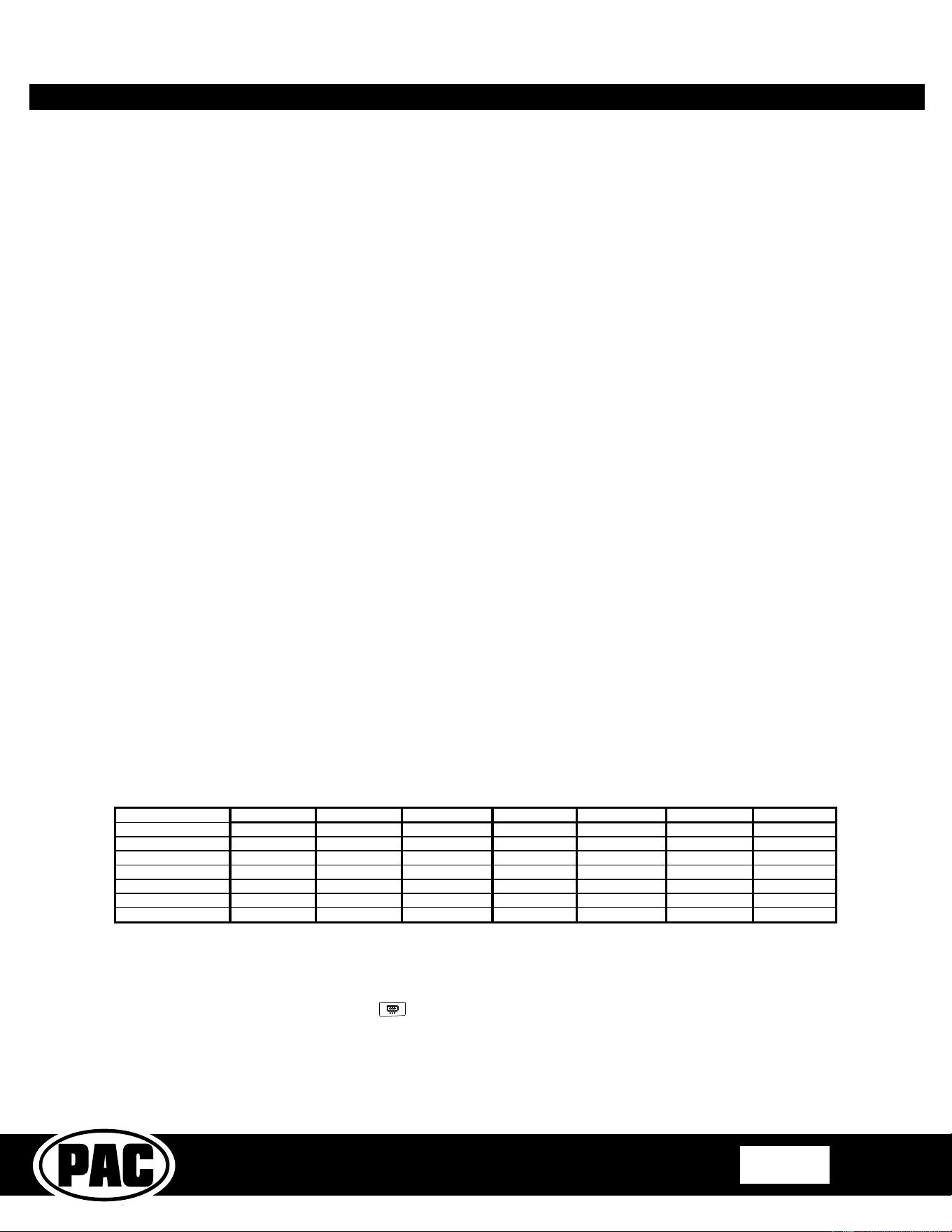
Button Programming Order
Volume Up
Volume Down
Track Up
Track Down
Mode
Voice
Back
1. Start with the Ignition in the OFF position.
2. Press and hold the Auto
or Temp 1utton.
3. While holding the 1utton down turn the key to the ignition position and continue to hold for 7 seconds or
until “P3” is shown on the display. At this point the recirculation am1er LED will turn on solid.
4. Within 7 seconds, press the 1utton that is to 1e learned on the steering wheel. The recirculation am1er
LED will turn off when the 1utton is pressed. Once the value has 1een successfully learned the LED will
start ashing. Release the button after the 3rd ash.
5. If you need to program more 1uttons, repeat step 4 for each additional audio function on the steering wheel.
6. Once programming is completed, wait seven seconds. The recirculation amber LED will ash three times
indicating end of programming.
7. Test the interface for proper functionality. If any function does not work, repeat the programming steps.
8. After you have re-cali1rated the SWC 1uttons, the default SWC 1utton assignments will 1e the same as
what is listed in the chart on page 7. If you wish to re-assign 1utton functions you must also go through
the programming process (P1) on the previous page.
Complete Radio Replacement Kit with
Integrated Climate Control Retention for
2003-2007 Honda Accord
RPK4-HD1101
Pacific Accessory Corporation
Page 10
© 2018 AAMP Global. All rights reserved. PAC is a Power Brand of AAMP Global.
PAC-audio.com
Rev: V8
Date: 081318
RPK4-HD1101 Testing and Verication
1. Turn the ignition to the on position.
2. Turn on the radio and check 1alance, fade and that all steering wheel controls are functioning properly.
3. Verify that all of the HVAC controls are functioning properly.
4. Verify that all of the steering wheel controls are functioning properly.
Technical Support and Product Updates (Firmware)
The RadioPRO app will also allow you to update the interface with new rmware as it becomes available. Please visit
PAC-audio.com/Firmware or contact our tech support department to see if there is a rmware update for your interface.
Email: support@PAC-audio.com
Phone: 866-931-8021
International: 727-572-9255 ext 230
Trou1leshooting
1. Steering wheel controls work intermittently. This is typically caused 1y the original Honda “clock spring” aging. - Install
the included .47uF non polarized capacitor 1etween the steering wheel control wire (White) and the steering wheel return
wire (Black). For more information on installing this capacitor, there is a tech 1rief located in the download section of the
RPK4-HD1101 product page on the PAC we1site (PAC-audio.com).
P8. - Upper Display Screen Type
This selection is only applica1le when the vehicle is equipped with factory navigation. It allows the user to select if they have a Type 1 display (2003
- 2004) or a Type 2 display (2004 - 2007).
Note: If the wrong type is selected the temp display on the upper screen will 1e gar1led.
1. Start with the Ignition in the OFF position.
2. Press and hold the A/C
and Dual (dual zone) or Fan Speed (single zone) 1utton at the same time.
3. While holding these 1uttons down, turn the key to the ignition position and continue to hold for 7 seconds or until “P8” is shown on the display.
4. This tells you that you are in programming menu 8 along with the current selection on the right of the display which is 1 1y default. The
availa1le selections are as follows:
1. Type 1 (2003 - 2004)
2. Type 2 (2004 - 2007)
5. Using the Fan Up
and Fan Down 1uttons change the current selection to match the display type in the vehicle.
6. Once the desired selection is shown, press the rear defrost 1utton
(next to the 1utton) to select and exit.
RPK4-HD1101 Settings Menu (cont.)
P7. - Reset
This selection allows the user to reset the HVAC portion of the kit and return it to the initial HVAC type selection found at the 1ottom of page 6.
1. Start with the Ignition in the OFF position.
2. Press and hold the MAX A/C
and Auto or Temp 1utton at the same time.
3. While holding these 1uttons down, turn the key to the ignition position and continue to hold for 7 seconds or until “P7” is shown on the display.
4. This tells you that you are in programming menu 7 along with the current selection on the right of the display which is 1 1y default. The
availa1le selections are as follows:
1. Exit (without resetting)
2. Reset
5. Using the Fan Up
and Fan Down 1uttons change the current selection to match the desired function.
6. Once the desired selection is shown, press the rear defrost 1utton
(next to the 1utton) to select and exit.