ninjakitchen.com
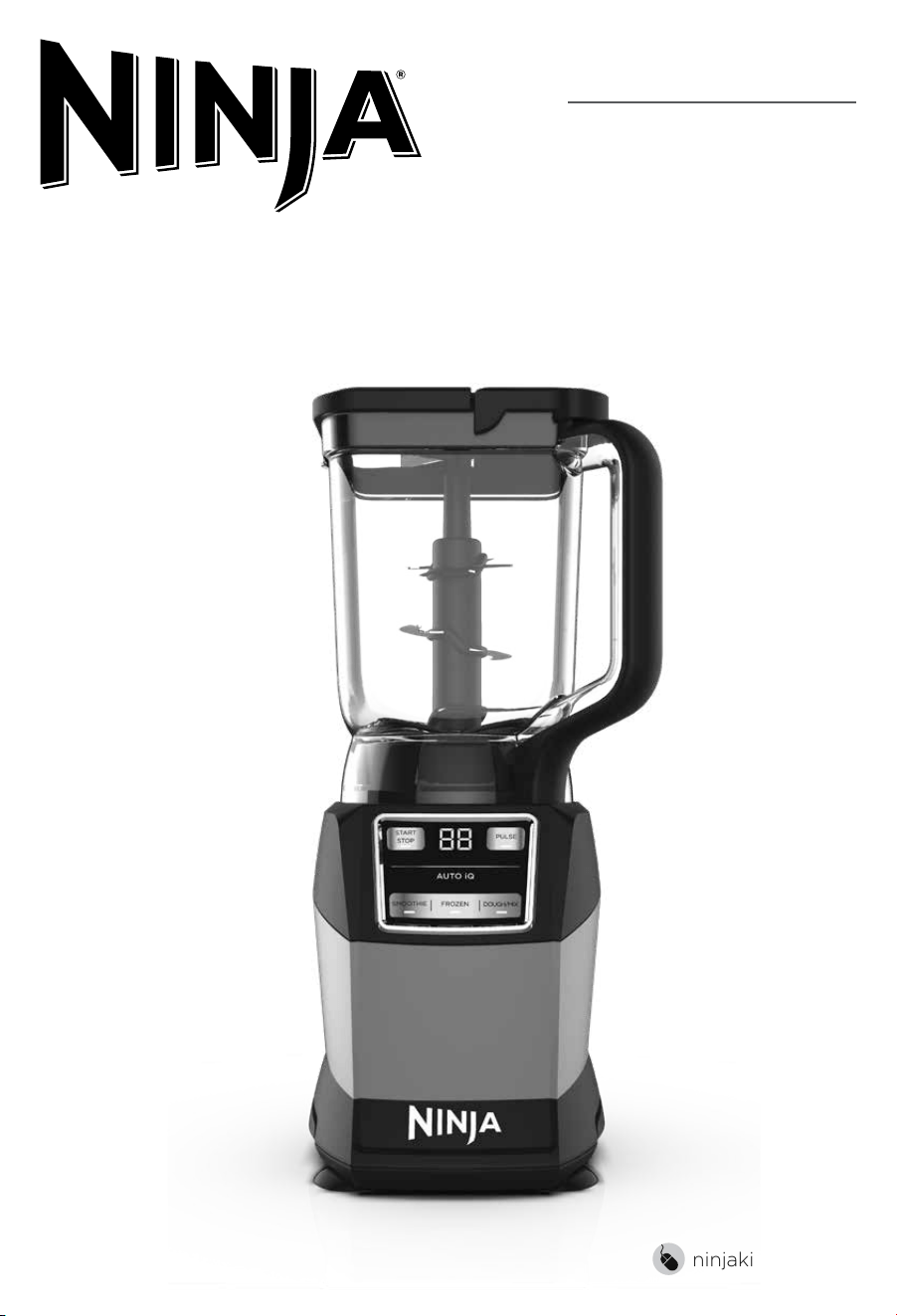
COMPACT KITCHEN SYSTEM
WITH AUTO-IQ®
AMZ493BRN
OWNER’S GUIDE
3ninjakitchen.com
2 ninjakitchen.com
CONTENTS
THANK YOU
for purchasing the Ninja® Compact Kitchen System with Auto-iQ®
Important Safety Instructions � � � � � � � � � � � � � � � � � � � � � � � � � � � � � � � � � � 4
Parts � � � � � � � � � � � � � � � � � � � � � � � � � � � � � � � � � � � � � � � � � � � � � � � � � � � � � � � � 8
Before First Use � � � � � � � � � � � � � � � � � � � � � � � � � � � � � � � � � � � � � � � � � � � � � 9
Features � � � � � � � � � � � � � � � � � � � � � � � � � � � � � � � � � � � � � � � � � � � � � � � � � � � � 10
Auto-iQ® Programs ..............................................10
Manual Programs ...............................................11
Using the Total Crushing® Pitcher � � � � � � � � � � � � � � � � � � � � � � � � � � � � � � 12
Using the Single-Serve Cup � � � � � � � � � � � � � � � � � � � � � � � � � � � � � � � � � � � 14
Using the Precision Processor® Bowl ��������������������������� 16
Care & Maintenance � � � � � � � � � � � � � � � � � � � � � � � � � � � � � � � � � � � � � � � � � � 18
Cleaning . . . . . . . . . . . . . . . . . . . . . . . . . . . . . . . . . . . . . . . . . . . . . . . . . . . . . . . 18
Storing . . . . . . . . . . . . . . . . . . . . . . . . . . . . . . . . . . . . . . . . . . . . . . . . . . . . . . . . . 18
Resetting the Motor . . . . . . . . . . . . . . . . . . . . . . . . . . . . . . . . . . . . . . . . . . . . . 18
Ordering Replacement Parts . . . . . . . . . . . . . . . . . . . . . . . . . . . . . . . . . . . . . 18
Troubleshooting Guide � � � � � � � � � � � � � � � � � � � � � � � � � � � � � � � � � � � � � � � 19
Warranty � � � � � � � � � � � � � � � � � � � � � � � � � � � � � � � � � � � � � � � � � � � � � � � � � � � 20
PLEASE READ CAREFULLY AND
KEEP FOR FUTURE REFERENCE�
TECHNICAL SPECIFICATIONS
Voltage: 120V~, 60Hz
Power: 1200 Watts
Pitcher Capacity: 72 oz. (9 cups, 2.1 L)
Max Liquid Capacity: 64 oz. (8 cups, 1.9 L)
Bowl Capacity: 40 oz. (5 cups, 1.1 L)
Single-Serve Cup Capacity: 18 oz.
(2.25 cups, 530 mL)
TIP: You can find the model and serial
numbers on the QR code label on the
back of the unit by the power cord.
RECORD THIS INFORMATION
Model Number: ��������������������
Serial Number: ���������������������
Date of Purchase: �������������������
(Keep receipt)
Store of Purchase: ������������������
REGISTER YOUR PURCHASE
registeryourninja.com
Scan QR code using mobile device

3ninjakitchen.com
2 ninjakitchen.com
CONTENTS
THANK YOU
for purchasing the Ninja® Compact Kitchen System with Auto-iQ®
Important Safety Instructions � � � � � � � � � � � � � � � � � � � � � � � � � � � � � � � � � � 4
Parts � � � � � � � � � � � � � � � � � � � � � � � � � � � � � � � � � � � � � � � � � � � � � � � � � � � � � � � � 8
Before First Use � � � � � � � � � � � � � � � � � � � � � � � � � � � � � � � � � � � � � � � � � � � � � 9
Features � � � � � � � � � � � � � � � � � � � � � � � � � � � � � � � � � � � � � � � � � � � � � � � � � � � � 10
Auto-iQ® Programs ..............................................10
Manual Programs ...............................................11
Using the Total Crushing® Pitcher � � � � � � � � � � � � � � � � � � � � � � � � � � � � � � 12
Using the Single-Serve Cup � � � � � � � � � � � � � � � � � � � � � � � � � � � � � � � � � � � 14
Using the Precision Processor® Bowl ��������������������������� 16
Care & Maintenance � � � � � � � � � � � � � � � � � � � � � � � � � � � � � � � � � � � � � � � � � � 18
Cleaning . . . . . . . . . . . . . . . . . . . . . . . . . . . . . . . . . . . . . . . . . . . . . . . . . . . . . . . 18
Storing . . . . . . . . . . . . . . . . . . . . . . . . . . . . . . . . . . . . . . . . . . . . . . . . . . . . . . . . . 18
Resetting the Motor . . . . . . . . . . . . . . . . . . . . . . . . . . . . . . . . . . . . . . . . . . . . . 18
Ordering Replacement Parts . . . . . . . . . . . . . . . . . . . . . . . . . . . . . . . . . . . . . 18
Troubleshooting Guide � � � � � � � � � � � � � � � � � � � � � � � � � � � � � � � � � � � � � � � 19
Warranty � � � � � � � � � � � � � � � � � � � � � � � � � � � � � � � � � � � � � � � � � � � � � � � � � � � 20
PLEASE READ CAREFULLY AND
KEEP FOR FUTURE REFERENCE�
TECHNICAL SPECIFICATIONS
Voltage: 120V~, 60Hz
Power: 1200 Watts
Pitcher Capacity: 72 oz. (9 cups, 2.1 L)
Max Liquid Capacity: 64 oz. (8 cups, 1.9 L)
Bowl Capacity: 40 oz. (5 cups, 1.1 L)
Single-Serve Cup Capacity: 18 oz.
(2.25 cups, 530 mL)
TIP: You can find the model and serial
numbers on the QR code label on the
back of the unit by the power cord.
RECORD THIS INFORMATION
Model Number: ��������������������
Serial Number: ���������������������
Date of Purchase: �������������������
(Keep receipt)
Store of Purchase: ������������������
REGISTER YOUR PURCHASE
registeryourninja.com
Scan QR code using mobile device
5ninjakitchen.com
4 ninjakitchen.com
SAVE THESE INSTRUCTIONS
IMPORTANT SAFETY INSTRUCTIONS
PLEASE READ CAREFULLY BEFORE USE • FOR HOUSEHOLD USE ONLY
1 Read all instructions prior to using the
appliance and its accessories.
2 Carefully observe and follow all warnings
and instructions. This unit contains
electrical connections and moving parts
that potentially present risk to the user.
3 Take your time and exercise care during
unpacking and appliance setup. This
appliance contains sharp, loose blades
that can cause injury if mishandled.
4 Upon completion of processing, ensure
that the blade assembly is removed
BEFORE emptying container’s
contents. Remove the blade assembly
by carefully grasping the top of the
shaft and lifting it from the container.
Failure to remove the blade assembly
before emptying the container results
in a risk of laceration.
5 Take inventory of all contents to ensure
you have all parts needed to properly
and safely operate your appliance.
6 Blades are sharp. Handle carefully.
7 This product is provided with a Stacked
Blade Assembly and a Chopping Blade
Assembly. ALWAYS exercise care when
handling blade assemblies. The blade
assemblies are sharp and are NOT locked
in place in their containers. The blade
assemblies are designed to be removable
to facilitate cleaning and replacement if
needed. ONLY grasp the blade assembly
by the top of the shaft. Failure to use care
when handling the blade assemblies will
result in a risk of laceration.
8 ALWAYS exercise care when handling
the Pro Extractor Blades® Assembly.
The blades are sharp. ONLY grasp the
Pro Extractor Blades Assembly by the
outer perimeter of the blade assembly
base. Failure to use care when handling
the blade assembly will result in a risk
of laceration.
9 Turn the appliance OFF, then unplug the
appliance from the outlet when not in
use, before assembling or disassembling
parts, and before cleaning. To unplug,
grasp the plug by the body and pull
from the outlet. NEVER unplug by
grasping and pulling the flexible cord.
10 Before use, wash all parts that may
contact food. Follow washing instructions
covered in this instruction manual.
11 Before each use, inspect blade
assemblies for damage. If a blade is
bent or damage is suspected, contact
SharkNinja to arrange for replacement.
12 DO NOT use this appliance outdoors. It is
designed for indoor household use only.
13 This appliance has a polarized plug
(one prong is wider than the other).
To reduce the risk of electric shock,
this plug will fit in a polarized outlet
only one way. If the plug does not fit
fully in the outlet, reverse the plug. If
it still does not fit, contact a qualified
electrician. DO NOT modify the plug in
any way.
14 DO NOT operate any appliance with
a damaged cord or plug, or after the
appliance malfunctions or is dropped or
damaged in any manner. This appliance
has no user-serviceable parts. If damaged,
contact SharkNinja for servicing.
15 This appliance has important markings
on the plug blade. The entire supply
cord is not suitable for replacement. If
damaged, please contact SharkNinja
for service.
16 Extension cords should NOT be used
with this appliance.
17 To protect against the risk of electric
shock, DO NOT submerge the
appliance or allow the power cord to
contact any form of liquid.
18 DO NOT allow the cord to hang over
the edges of tables or counters. The
cord may become snagged and pull
the appliance o the work surface.
19 DO NOT allow the unit or the cord to
contact hot surfaces, including stoves
and other heating appliances.
20 ALWAYS use the appliance on a dry
and level surface.
21 DO NOT allow children to operate
this appliance or use as a toy. Close
supervision is necessary when any
appliance is used near children.
22 This appliance is NOT intended to be
used by people with reduced physical,
sensory, or mental capabilities, or lack
of experience and knowledge, unless
they have been given supervision
or instruction concerning use of the
appliance by a person responsible
for their safety.
23 ONLY use attachments and accessories
that are provided with the product
or are recommended by SharkNinja.
The use of attachments, including
canning jars, not recommended or sold
by SharkNinja may cause fire, electric
shock, or injury.
24 NEVER place a blade assembly on
the motor base without it first being
attached to its corresponding container
and lid.
25 Keep hands, hair, and clothing out
of the container when loading and
operating.
26 During operation and handling of the
appliance, avoid contact with moving
parts.
27 DO NOT fill containers past the MAX
FILL or MAX LIQUID lines.
28 DO NOT operate the appliance with an
empty container.
29 DO NOT microwave any containers
or accessories provided with the
appliance.
30 NEVER leave the appliance unattended
while in use.
31 DO NOT blend hot liquids. Doing so
may result in pressure buildup and
steam exposure that can pose a risk of
the user being burned.
32 DO NOT process dry ingredients with
the Single-Serve Cup and Pro Extractor
Blades® Assembly, the Stacked Blade
Assembly, or the Chopping Blade
Assembly.
33 To reduce the risk of injury, never place
Chopping Blade Assembly on base
without first putting bowl properly in
place.
34 DO NOT perform grinding operations
with the Single-Serve Cup and Pro
Extractor Blades® Assembly, the
Stacked Blade Assembly, or the
Chopping Blade Assembly.
35 NEVER operate the appliance without
lids and caps in place. DO NOT attempt
to defeat the interlock mechanism.
Ensure the container and lid are
properly installed before operation.
WARNING
To reduce the risk of injury, fire, electrical shock or property damage,
basic safety precautions must always be followed, including the following
numbered warnings and subsequent instructions� Do not use appliance for
other than intended use�
Read and review instructions for operation and use�
Indicates the presence of a hazard that can cause personal injury, death or
substantial property damage if the warning included with this symbol is ignored�
For indoor and household use only�
When using electrical appliances, basic safety precautions should always be followed,
including the following:

5ninjakitchen.com
4 ninjakitchen.com
SAVE THESE INSTRUCTIONS
IMPORTANT SAFETY INSTRUCTIONS
PLEASE READ CAREFULLY BEFORE USE • FOR HOUSEHOLD USE ONLY
1 Read all instructions prior to using the
appliance and its accessories.
2 Carefully observe and follow all warnings
and instructions. This unit contains
electrical connections and moving parts
that potentially present risk to the user.
3 Take your time and exercise care during
unpacking and appliance setup. This
appliance contains sharp, loose blades
that can cause injury if mishandled.
4 Upon completion of processing, ensure
that the blade assembly is removed
BEFORE emptying container’s
contents. Remove the blade assembly
by carefully grasping the top of the
shaft and lifting it from the container.
Failure to remove the blade assembly
before emptying the container results
in a risk of laceration.
5 Take inventory of all contents to ensure
you have all parts needed to properly
and safely operate your appliance.
6 Blades are sharp. Handle carefully.
7 This product is provided with a Stacked
Blade Assembly and a Chopping Blade
Assembly. ALWAYS exercise care when
handling blade assemblies. The blade
assemblies are sharp and are NOT locked
in place in their containers. The blade
assemblies are designed to be removable
to facilitate cleaning and replacement if
needed. ONLY grasp the blade assembly
by the top of the shaft. Failure to use care
when handling the blade assemblies will
result in a risk of laceration.
8 A LWAYS exercise care when handling
the Pro Extractor Blades® Assembly.
The blades are sharp. ONLY grasp the
Pro Extractor Blades Assembly by the
outer perimeter of the blade assembly
base. Failure to use care when handling
the blade assembly will result in a risk
of laceration.
9 Turn the appliance OFF, then unplug the
appliance from the outlet when not in
use, before assembling or disassembling
parts, and before cleaning. To unplug,
grasp the plug by the body and pull
from the outlet. NEVER unplug by
grasping and pulling the flexible cord.
10 Before use, wash all parts that may
contact food. Follow washing instructions
covered in this instruction manual.
11 Before each use, inspect blade
assemblies for damage. If a blade is
bent or damage is suspected, contact
SharkNinja to arrange for replacement.
12 DO NOT use this appliance outdoors. It is
designed for indoor household use only.
13 This appliance has a polarized plug
(one prong is wider than the other).
To reduce the risk of electric shock,
this plug will fit in a polarized outlet
only one way. If the plug does not fit
fully in the outlet, reverse the plug. If
it still does not fit, contact a qualified
electrician. DO NOT modify the plug in
any way.
14 DO NOT operate any appliance with
a damaged cord or plug, or after the
appliance malfunctions or is dropped or
damaged in any manner. This appliance
has no user-serviceable parts. If damaged,
contact SharkNinja for servicing.
15 This appliance has important markings
on the plug blade. The entire supply
cord is not suitable for replacement. If
damaged, please contact SharkNinja
for service.
16 Extension cords should NOT be used
with this appliance.
17 To protect against the risk of electric
shock, DO NOT submerge the
appliance or allow the power cord to
contact any form of liquid.
18 DO NOT allow the cord to hang over
the edges of tables or counters. The
cord may become snagged and pull
the appliance o the work surface.
19 DO NOT allow the unit or the cord to
contact hot surfaces, including stoves
and other heating appliances.
20 ALWAYS use the appliance on a dry
and level surface.
21 DO NOT allow children to operate
this appliance or use as a toy. Close
supervision is necessary when any
appliance is used near children.
22 This appliance is NOT intended to be
used by people with reduced physical,
sensory, or mental capabilities, or lack
of experience and knowledge, unless
they have been given supervision
or instruction concerning use of the
appliance by a person responsible
for their safety.
23 ONLY use attachments and accessories
that are provided with the product
or are recommended by SharkNinja.
The use of attachments, including
canning jars, not recommended or sold
by SharkNinja may cause fire, electric
shock, or injury.
24 NEVER place a blade assembly on
the motor base without it first being
attached to its corresponding container
and lid.
25 Keep hands, hair, and clothing out
of the container when loading and
operating.
26 During operation and handling of the
appliance, avoid contact with moving
parts.
27 DO NOT fill containers past the MAX
FILL or MAX LIQUID lines.
28 DO NOT operate the appliance with an
empty container.
29 DO NOT microwave any containers
or accessories provided with the
appliance.
30 NEVER leave the appliance unattended
while in use.
31 DO NOT blend hot liquids. Doing so
may result in pressure buildup and
steam exposure that can pose a risk of
the user being burned.
32 DO NOT process dry ingredients with
the Single-Serve Cup and Pro Extractor
Blades® Assembly, the Stacked Blade
Assembly, or the Chopping Blade
Assembly.
33 To reduce the risk of injury, never place
Chopping Blade Assembly on base
without first putting bowl properly in
place.
34 DO NOT perform grinding operations
with the Single-Serve Cup and Pro
Extractor Blades® Assembly, the
Stacked Blade Assembly, or the
Chopping Blade Assembly.
35 NEVER operate the appliance without
lids and caps in place. DO NOT attempt
to defeat the interlock mechanism.
Ensure the container and lid are
properly installed before operation.
WARNING
To reduce the risk of injury, fire, electrical shock or property damage,
basic safety precautions must always be followed, including the following
numbered warnings and subsequent instructions� Do not use appliance for
other than intended use�
Read and review instructions for operation and use�
Indicates the presence of a hazard that can cause personal injury, death or
substantial property damage if the warning included with this symbol is ignored�
For indoor and household use only�
When using electrical appliances, basic safety precautions should always be followed,
including the following:

7ninjakitchen.com
6 ni njakitchen.com
SAVE THESE INSTRUCTIONS
IMPORTANT SAFETY INSTRUCTIONS
PLEASE READ CAREFULLY BEFORE USE • FOR HOUSEHOLD USE ONLY
36 Before operation, ensure all utensils are
removed from containers. Failure to
remove utensils can cause containers
to shatter and potentially result in
personal injury and property damage.
37 Keep hands and utensils out of
containers while chopping to reduce
the risk of severe personal injury or
damage to the blender/food chopper.
A scraper may be used ONLY when the
blender or processor is not running.
38 If you find unmixed ingredients sticking to
the sides of the cup, stop the appliance,
remove the blade assembly, and use a
scraper to dislodge ingredients.
39 DO NOT open pour spout cap while
blender is operating.
40 If you find unmixed ingredients sticking
to the sides of the pitcher, stop the
appliance, remove the lid, and use a
spatula to dislodge ingredients. NEVER
insert your hands into the pitcher, as
you may contact one of the blades and
experience a laceration.
41 DO NOT attempt to remove the
container or lid from the motor base
while the blade assembly is still
spinning. Allow the appliance to come
to a complete stop before removing
lids and containers.
42 If the appliance overheats, a thermal
switch will activate and temporarily
disable the motor. To reset, unplug
the appliance and allow it to cool for
approximately 30 minutes before
using again.
43 DO NOT expose the containers and
accessories to extreme temperature
changes. They may experience damage.
44 If using the pour spout, hold the cover
in place on the container, or ensure lid
lock is engaged, when pouring to avoid
risk of injury.
45 Remove the Pro Extractor Blades®
Assembly from the Single-Serve Cup
upon completion of blending. DO
NOT store ingredients before or after
blending them in the cup with the
blade assembly attached. Some foods
may contain active ingredients or
release gases that will expand if left in a
sealed container, resulting in excessive
pressure buildup that can pose a risk
of injury. For ingredient storage in the
cup, use only Spout Lid to cover.
46 The maximum wattage rating for this
appliance is based on the configuration of
the Pro Extractor Blades Assembly and
Single-Serve Cup. Other configurations
may draw less power or current.
47 DO NOT submerge the motor base or
control panel in water or other liquids.
DO NOT spray motor base or control
panel with any liquid.
48 DO NOT attempt to sharpen blades.
49 Turn o the appliance and unplug the
motor base before cleaning.
50 Unit is intended to create a dough ball.
It is NOT intended to continuously
knead. After dough ball forms, additional
kneading should be done by hand
on a work surface. If the unit moves
excessively on the work surface, remove
the dough ball and knead by hand.

7ninjakitchen.com
6 ni njakitchen.com
SAVE THESE INSTRUCTIONS
IMPORTANT SAFETY INSTRUCTIONS
PLEASE READ CAREFULLY BEFORE USE • FOR HOUSEHOLD USE ONLY
36 Before operation, ensure all utensils are
removed from containers. Failure to
remove utensils can cause containers
to shatter and potentially result in
personal injury and property damage.
37 Keep hands and utensils out of
containers while chopping to reduce
the risk of severe personal injury or
damage to the blender/food chopper.
A scraper may be used ONLY when the
blender or processor is not running.
38 If you find unmixed ingredients sticking to
the sides of the cup, stop the appliance,
remove the blade assembly, and use a
scraper to dislodge ingredients.
39 DO NOT open pour spout cap while
blender is operating.
40 If you find unmixed ingredients sticking
to the sides of the pitcher, stop the
appliance, remove the lid, and use a
spatula to dislodge ingredients. NEVER
insert your hands into the pitcher, as
you may contact one of the blades and
experience a laceration.
41 DO NOT attempt to remove the
container or lid from the motor base
while the blade assembly is still
spinning. Allow the appliance to come
to a complete stop before removing
lids and containers.
42 If the appliance overheats, a thermal
switch will activate and temporarily
disable the motor. To reset, unplug
the appliance and allow it to cool for
approximately 30 minutes before
using again.
43 DO NOT expose the containers and
accessories to extreme temperature
changes. They may experience damage.
44 If using the pour spout, hold the cover
in place on the container, or ensure lid
lock is engaged, when pouring to avoid
risk of injury.
45 Remove the Pro Extractor Blades®
Assembly from the Single-Serve Cup
upon completion of blending. DO
NOT store ingredients before or after
blending them in the cup with the
blade assembly attached. Some foods
may contain active ingredients or
release gases that will expand if left in a
sealed container, resulting in excessive
pressure buildup that can pose a risk
of injury. For ingredient storage in the
cup, use only Spout Lid to cover.
46 The maximum wattage rating for this
appliance is based on the configuration of
the Pro Extractor Blades Assembly and
Single-Serve Cup. Other configurations
may draw less power or current.
47 DO NOT submerge the motor base or
control panel in water or other liquids.
DO NOT spray motor base or control
panel with any liquid.
48 DO NOT attempt to sharpen blades.
49 Turn o the appliance and unplug the
motor base before cleaning.
50 Unit is intended to create a dough ball.
It is NOT intended to continuously
knead. After dough ball forms, additional
kneading should be done by hand
on a work surface. If the unit moves
excessively on the work surface, remove
the dough ball and knead by hand.
9ninjakitchen.com
8 ninjakitchen.com
PARTS
A
C
E
I
J
K
F
G
B
D
H
PARTS
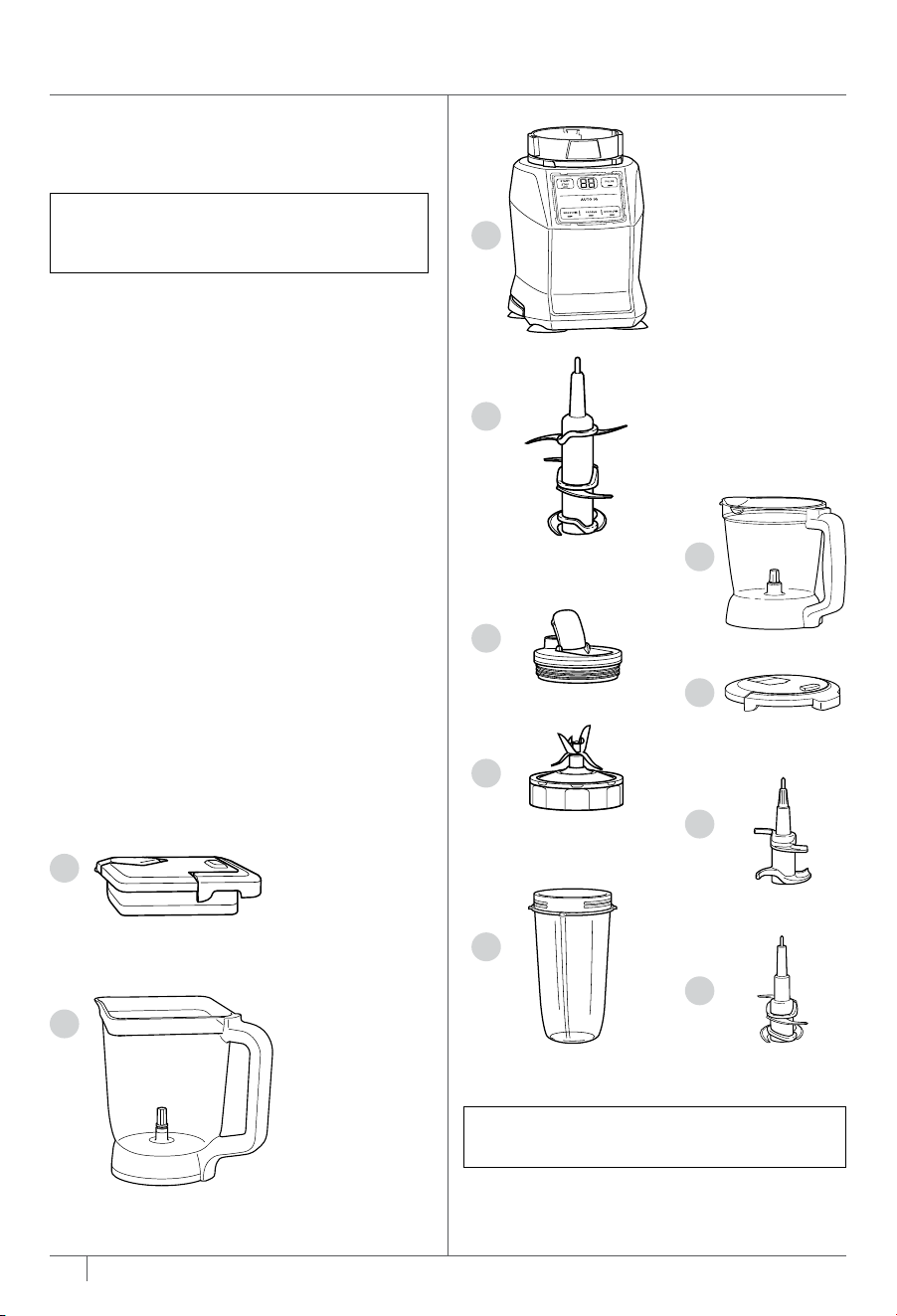
A Pitcher Lid
B 72 oz.* Total Crushing® Pitcher
C Motor Base
(attached power cord not shown)
D Stacked Blade Assembly
E Spout Lid
F Pro Extractor Blades® Assembly
G 18 oz. Single-Serve Cup
H 40 oz. Precision Processor® Bowl
I Precision Processor Bowl Lid
J Dough Blade Assembly
K Chopping Blade Assembly
There are a variety of accessories that are
compatible with this blenderseries.
To purchase more accessories and find
great recipes, visit ninjakitchen.com.
NOTE: The top flap of your box shows
the select accessories that are included
with your model.
NOTE: Number of Cups and Spout Lids
vary by model.
1 Remove all packaging materials from
the appliance. Exercise care when
unpacking blade assemblies. All blade
assemblies are sharp.
2 The Chopping Blade Assembly and
Stacked Blade Assembly are NOT
locked in place in their containers.
Handle the Chopping Blade Assembly
and Stacked Blade Assembly by
grasping the top of the shaft.
3 Handle the Pro Extractor Blades®
Assembly by grasping around the
perimeter of the blade assembly base.
4 Wash containers, lids, and blade
assemblies in warm, soapy, water using
a dishwashing utensil with a handle to
avoid direct contact with the blades.
Exercise care when handling blade
assemblies, as the blades are sharp.
5 Thoroughly rinse and air-dry
all parts.
6 Wipe control panel with a soft cloth.
Allow it to dry completely before using.
BEFORE FIRST USE
IMPORTANT: Review all warnings on
pages 4–7 before proceeding.
DID YOU KNOW?
• You can take your drinks on the go using
the spout lid.
• The containers, lids, and blade assemblies
are BPA free and dishwasher safe.
NOTE: All attachments are dishwasher
safe. It is recommended that
the containers, lids, and blade
assemblies be placed on the top
rack of the dishwasher. Ensure blade
assemblies and lids are removed
from the containers before placing
in the dishwasher. Exercise care when
handling blade assemblies.
*64 oz. max liquid capacity

9ninjakitchen.com
8 ninjakitchen.com
PARTS
A
C
E
I
J
K
F
G
B
D
H
PARTS
A Pitcher Lid
B 72 oz.* Total Crushing® Pitcher
C Motor Base
(attached power cord not shown)
D Stacked Blade Assembly
E Spout Lid
F Pro Extractor Blades® Assembly
G 18 oz. Single-Serve Cup
H 40 oz. Precision Processor® Bowl
I Precision Processor Bowl Lid
J Dough Blade Assembly
K Chopping Blade Assembly
There are a variety of accessories that are
compatible with this blenderseries.
To purchase more accessories and find
great recipes, visit ninjakitchen.com.
NOTE: The top flap of your box shows
the select accessories that are included
with your model.
NOTE: Number of Cups and Spout Lids
vary by model.
1 Remove all packaging materials from
the appliance. Exercise care when
unpacking blade assemblies. All blade
assemblies are sharp.
2 The Chopping Blade Assembly and
Stacked Blade Assembly are NOT
locked in place in their containers.
Handle the Chopping Blade Assembly
and Stacked Blade Assembly by
grasping the top of the shaft.
3 Handle the Pro Extractor Blades®
Assembly by grasping around the
perimeter of the blade assembly base.
4 Wash containers, lids, and blade
assemblies in warm, soapy, water using
a dishwashing utensil with a handle to
avoid direct contact with the blades.
Exercise care when handling blade
assemblies, as the blades are sharp.
5 Thoroughly rinse and air-dry
all parts.
6 Wipe control panel with a soft cloth.
Allow it to dry completely before using.
BEFORE FIRST USE
IMPORTANT: Review all warnings on
pages 4–7 before proceeding.
DID YOU KNOW?
• You can take your drinks on the go using
the spout lid.
• The containers, lids, and blade assemblies
are BPA free and dishwasher safe.
NOTE: All attachments are dishwasher
safe. It is recommended that
the containers, lids, and blade
assemblies be placed on the top
rack of the dishwasher. Ensure blade
assemblies and lids are removed
from the containers before placing
in the dishwasher. Exercise care when
handling blade assemblies.
*64 oz. max liquid capacity
11ninjakitchen.com
10 ninjakitchen.com
FEATURES
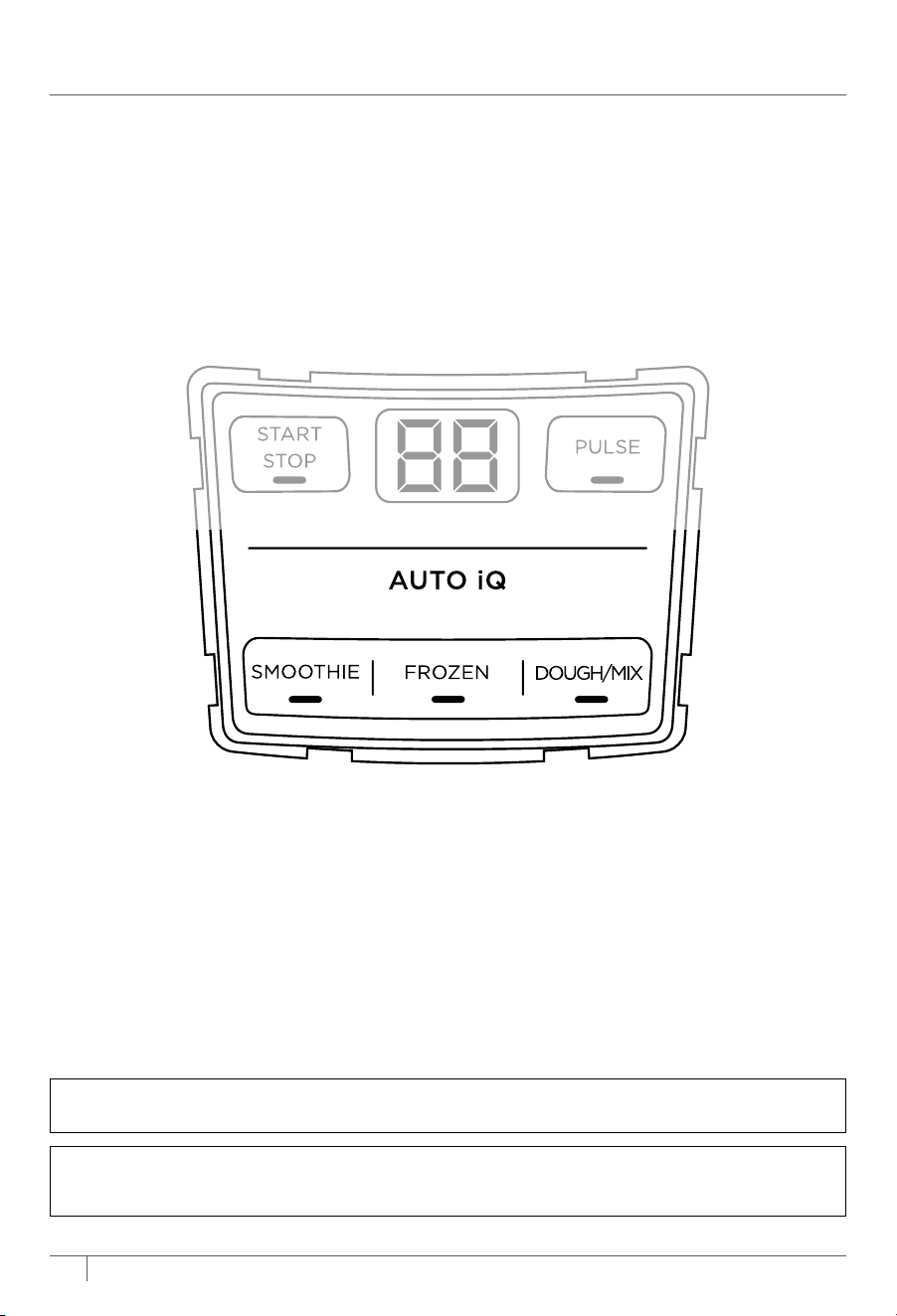
SMOOTHIE
Make a batch
of super-smooth,
sippable drinks
and shakes from
fresh or frozen fruit,
liquids, and ice.
FROZEN
Turn ice, juices,
and fruit into expertly
blended frozen drinks.
DOUGH
Ideal for creating delicious
dough for pizza, bread, and
baked goods.
MIX
Use the pitcher to blend
batters and sauces that
are ready to pour.
AUTO-IQ PROGRAMS
AUTO-IQ®
Intelligent preset programs combine unique blending and pausing patterns that do
the work for you. Once a preset program is selected, it will start immediately and
automatically stop when blending is complete. To stop blending before the end of the
program, press the currently active button again.
MANUAL PROGRAMS
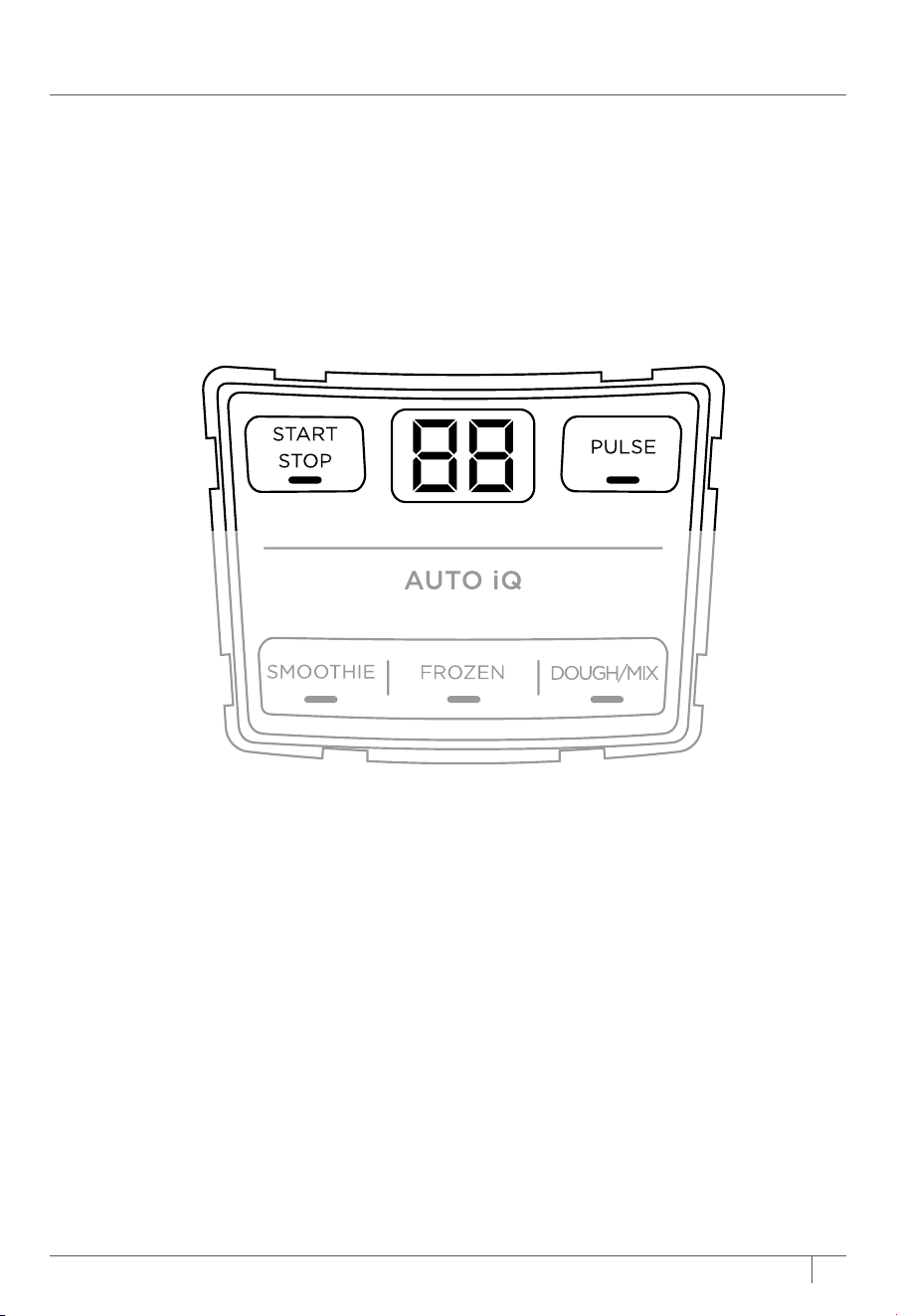
START/STOP
Pressing the START/STOP button will run
the unit on high speed up to 60 seconds.
You can also press this button to stop
any program that is running.
PULSE
Oers greater control of blending.
Operates only when PULSE is pressed.
Use short presses for short pulses and
long presses for long pulses.
NOTE: The unit can detect which container is installed on the motor base. Only the
functions available for a particular container will illuminate on the control panel.
NOTE: Dough can only be made in the Precision Processor® Bowl using the Dough Blade
Assembly.
11ninjakitchen.com
10 ninjakitchen.com
FEATURES
SMOOTHIE
Make a batch
of super-smooth,
sippable drinks
and shakes from
fresh or frozen fruit,
liquids, and ice.
FROZEN
Turn ice, juices,
and fruit into expertly
blended frozen drinks.
DOUGH
Ideal for creating delicious
dough for pizza, bread, and
baked goods.
MIX
Use the pitcher to blend
batters and sauces that
are ready to pour.
AUTO-IQ PROGRAMS
AUTO-IQ®
Intelligent preset programs combine unique blending and pausing patterns that do
the work for you. Once a preset program is selected, it will start immediately and
automatically stop when blending is complete. To stop blending before the end of the
program, press the currently active button again.
MANUAL PROGRAMS
START/STOP
Pressing the START/STOP button will run
the unit on high speed up to 60 seconds.
You can also press this button to stop
any program that is running.
PULSE
Oers greater control of blending.
Operates only when PULSE is pressed.
Use short presses for short pulses and
long presses for long pulses.
NOTE: The unit can detect which container is installed on the motor base. Only the
functions available for a particular container will illuminate on the control panel.
NOTE: Dough can only be made in the Precision Processor® Bowl using the Dough Blade
Assembly.
13ninjakitchen.com
12 ninjakitchen.com
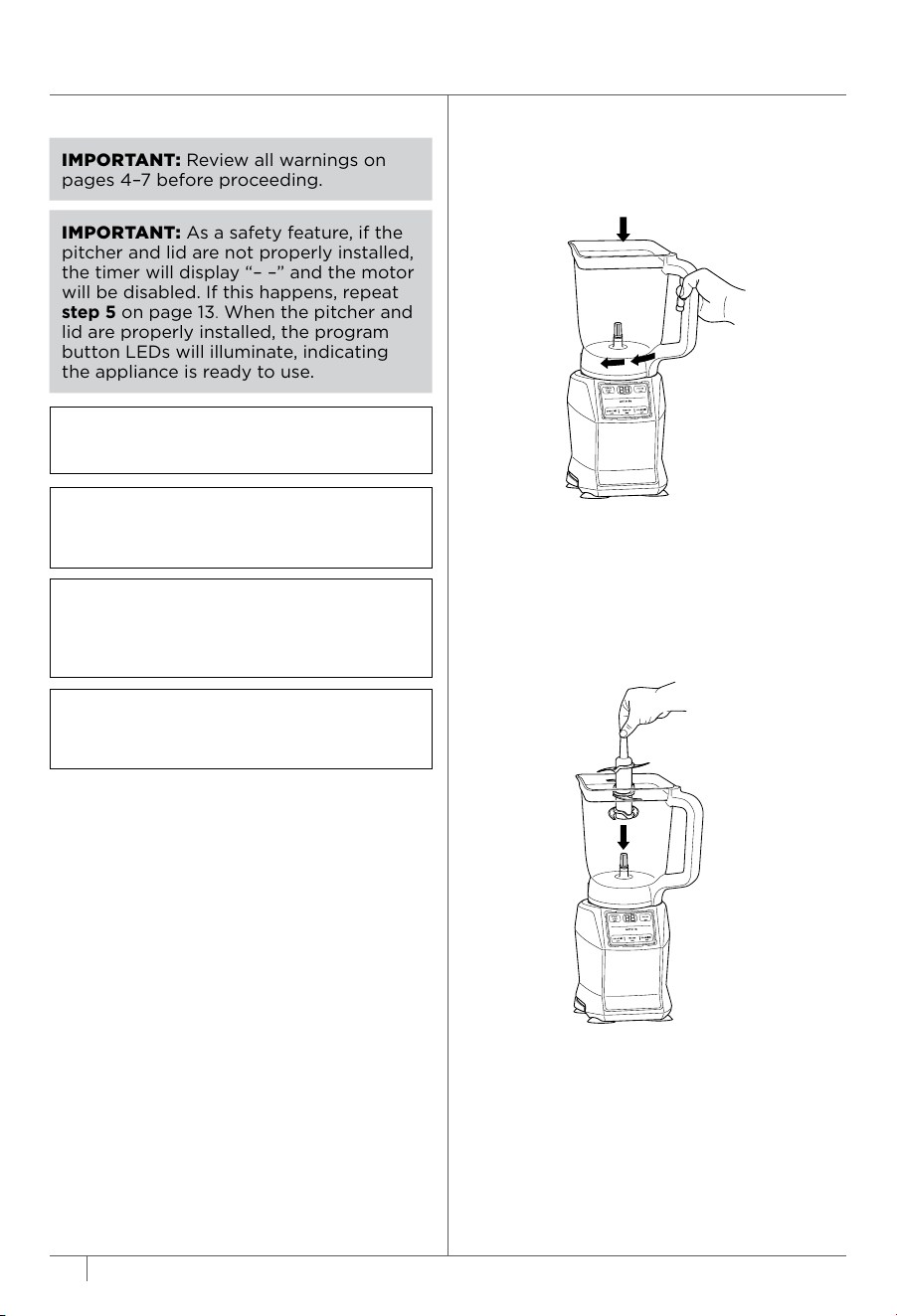
1 Plug in motor base and place on a clean,
dry, level surface such as a countertop
or table.
2 Lower the Total Crushing Pitcher onto
the motor base. The handle should
be aligned slightly to the right and the
pitcher should be oriented so the LOCK
symbols are visible on the motor base.
Rotate the pitcher clockwise until it
clicks into place.
USING THE TOTAL CRUSHING® PITCHER
3 Exercising care, grasp the Stacked
Blade Assembly by the top of the shaft
and place it onto the drive gear inside
the pitcher. Note that the blade assembly
will fit loosely onto the drive gear.
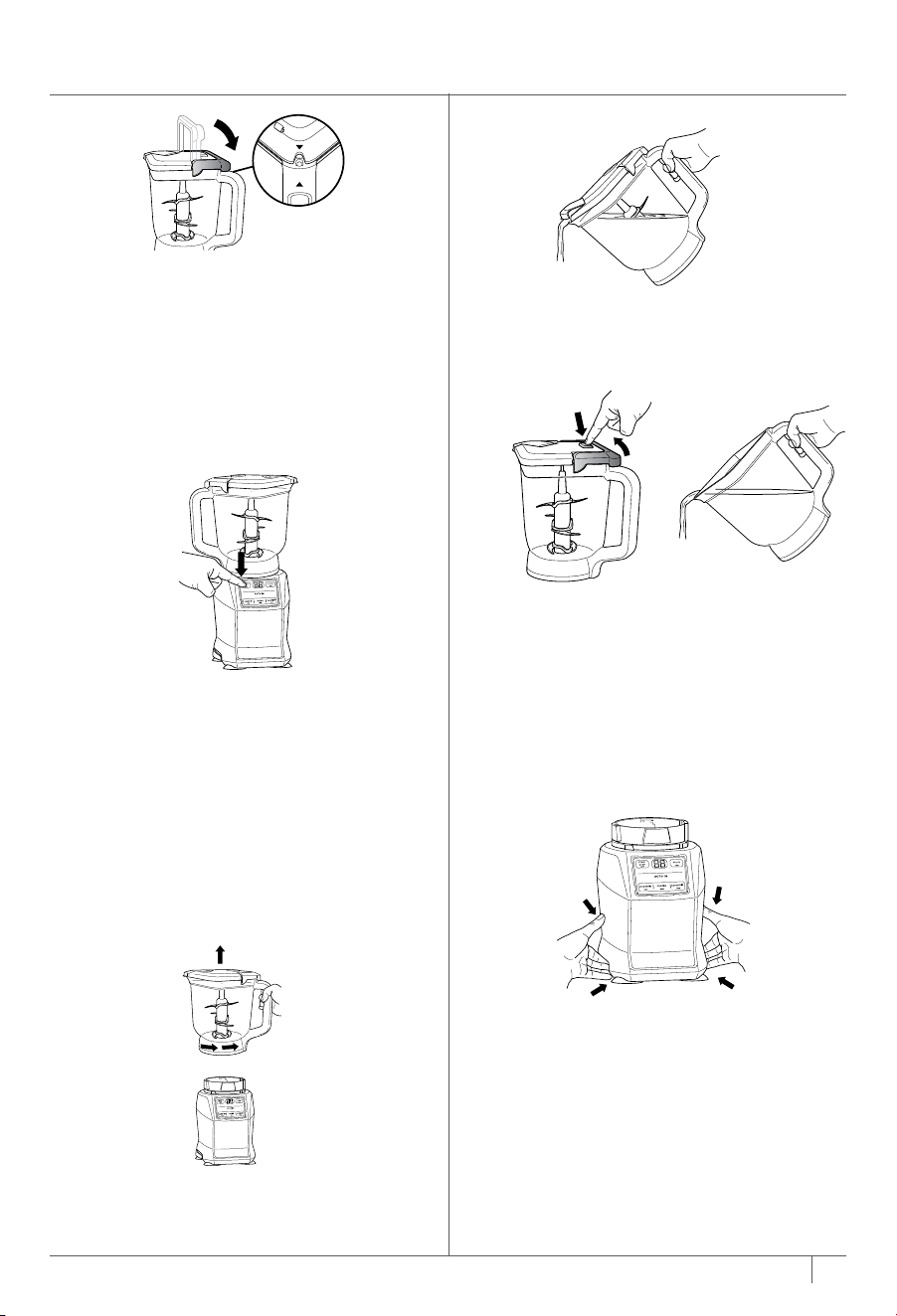
4 Add ingredients to the pitcher. DO NOT
add ingredients past the MAX LIQUID
line on the pitcher.
5 Place the lid on the pitcher, aligning
the triangle symbol on the lid with the
triangle symbol on the handle. Press
down on the handle until it clicks into
place. The triangle symbols MUST be
aligned for the lid to lock and the unit
to operate. Once the lid is locked in
place, the available program buttons
will illuminate and the unit will be ready
for use.
IMPORTANT: Review all warnings on
pages 4–7 before proceeding.
NOTE: Preset programs have pauses and
changes in speed throughout the cycle.
NOTE: The pitcher can only be installed
in one orientation. The handle must be
positioned on the front-right corner of
the motor base to operate the appliance.
NOTE: DO NOT add ingredients before
completing installation of the Stacked
Blade Assembly.
TIP:
If the Stacked Blade Assembly is not
fully seated, you will not be able to install
and lock the lid.
6a If using an Auto-IQ® program, the preset
feature will automatically stop at the end
of the program. To pause the unit at any
time, press the currently active button
again.
6b If using START/STOP, once ingredients
have reached the desired consistency,
press START/STOP again and wait for
the unit to come to a complete stop.
7 To remove the pitcher from the motor
base, turn the pitcher counterclockwise
and then lift it.
8a To pour out thinner mixtures, ensure
the lid is locked in place, then open the
pour spout cap.
IMPORTANT:
As a safety feature, if the
pitcher and lid are not properly
installed,
the timer will display
“– –”
and the motor
will be disabled. If this happens, repeat
step 5 on page 13. When the pitcher and
lid are properly installed, the program
button LEDs will illuminate, indicating
the appliance is ready to use.
8b For thicker mixtures that cannot be
emptied through the pour spout,
remove the lid and Stacked Blade
Assembly before pouring. To remove
the lid, press the RELEASE button and
lift the handle. To remove the blade
assembly, carefully grasp it by the
top of the shaft. The pitcher can then
be emptied.
9 Unplug the unit when finished. Refer
to the Care & Maintenance section for
cleaning and storage instructions.
13ninjakitchen.com
12 ninjakitchen.com
1 Plug in motor base and place on a clean,
dry, level surface such as a countertop
or table.
2 Lower the Total Crushing Pitcher onto
the motor base. The handle should
be aligned slightly to the right and the
pitcher should be oriented so the LOCK
symbols are visible on the motor base.
Rotate the pitcher clockwise until it
clicks into place.
USING THE TOTAL CRUSHING® PITCHER
3 Exercising care, grasp the Stacked
Blade Assembly by the top of the shaft
and place it onto the drive gear inside
the pitcher. Note that the blade assembly
will fit loosely onto the drive gear.
4 Add ingredients to the pitcher. DO NOT
add ingredients past the MAX LIQUID
line on the pitcher.
5 Place the lid on the pitcher, aligning
the triangle symbol on the lid with the
triangle symbol on the handle. Press
down on the handle until it clicks into
place. The triangle symbols MUST be
aligned for the lid to lock and the unit
to operate. Once the lid is locked in
place, the available program buttons
will illuminate and the unit will be ready
for use.
IMPORTANT: Review all warnings on
pages 4–7 before proceeding.
NOTE: Preset programs have pauses and
changes in speed throughout the cycle.
NOTE: The pitcher can only be installed
in one orientation. The handle must be
positioned on the front-right corner of
the motor base to operate the appliance.
NOTE: DO NOT add ingredients before
completing installation of the Stacked
Blade Assembly.
TIP:
If the Stacked Blade Assembly is not
fully seated, you will not be able to install
and lock the lid.
6a If using an Auto-IQ® program, the preset
feature will automatically stop at the end
of the program. To pause the unit at any
time, press the currently active button
again.
6b If using START/STOP, once ingredients
have reached the desired consistency,
press START/STOP again and wait for
the unit to come to a complete stop.
7 To remove the pitcher from the motor
base, turn the pitcher counterclockwise
and then lift it.
8a To pour out thinner mixtures, ensure
the lid is locked in place, then open the
pour spout cap.
IMPORTANT:
As a safety feature, if the
pitcher and lid are not properly
installed,
the timer will display
“– –”
and the motor
will be disabled. If this happens, repeat
step 5 on page 13. When the pitcher and
lid are properly installed, the program
button LEDs will illuminate, indicating
the appliance is ready to use.
8b For thicker mixtures that cannot be
emptied through the pour spout,
remove the lid and Stacked Blade
Assembly before pouring. To remove
the lid, press the RELEASE button and
lift the handle. To remove the blade
assembly, carefully grasp it by the
top of the shaft. The pitcher can then
be emptied.
9 Unplug the unit when finished. Refer
to the Care & Maintenance section for
cleaning and storage instructions.
15ninjakitchen.com
14 ninjakitchen.co m
1 Plug in motor base and place on a
clean, dry, level surface such as a
countertop or table.
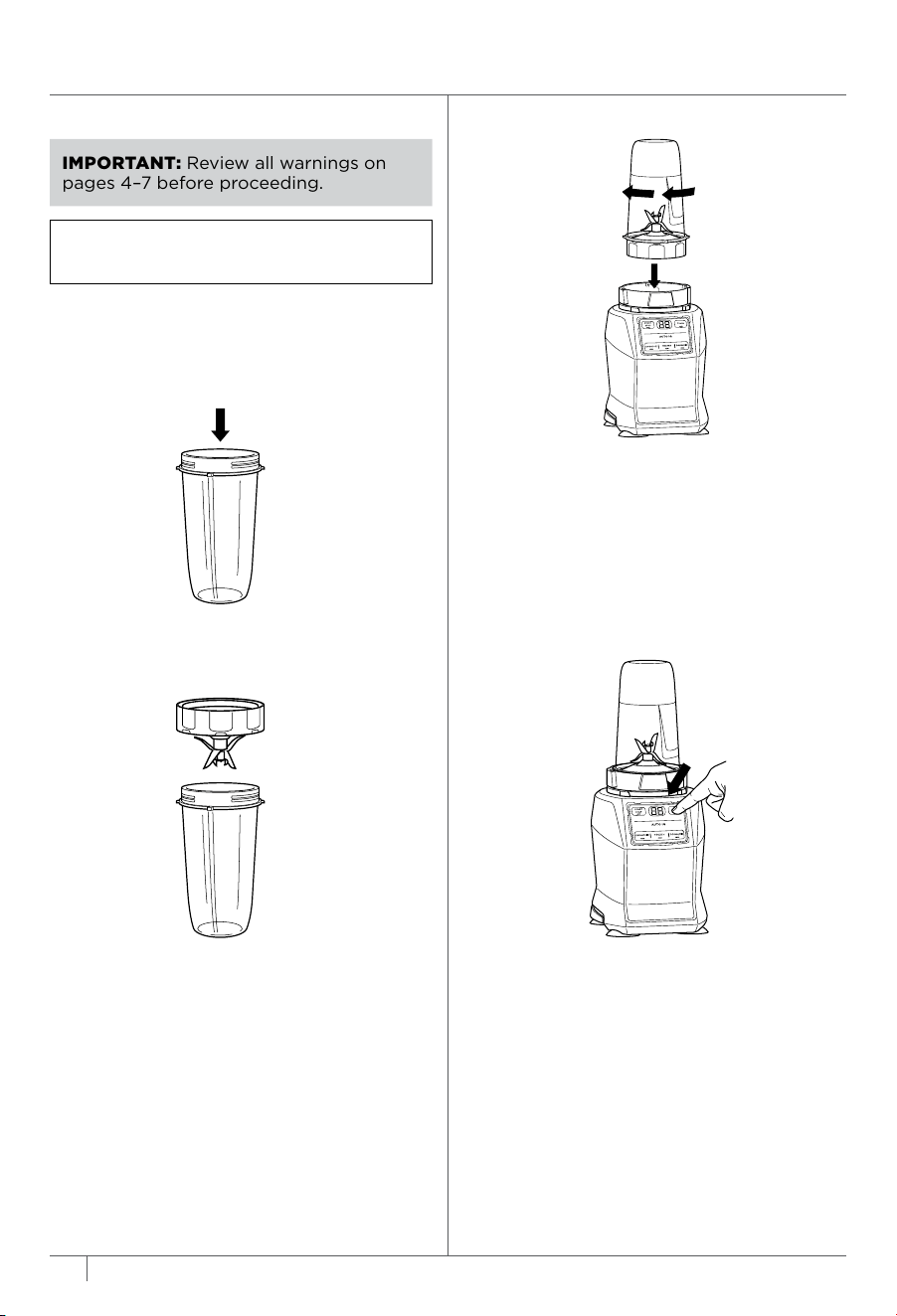
2 Add ingredients to the Single-Serve
Cup. DO NOT add ingredients past
the MAX LIQUID line on the cup.
3 Install the Pro Extractor Blades®
Assembly onto the top of the cup.
Twist the lid clockwise until it’s sealed
tightly.
4 Turn the cup upside down and install
on the motor base. Align the tabs on
the cup with the slots on the base,
then rotate cup clockwise until it clicks
into place. Once the cup is locked in
place, the available program buttons
will illuminate and the unit will be
ready for use.
IMPORTANT: Review all warnings on
pages 4–7 before proceeding.
NOTE: Preset programs have pauses and
changes in speed throughout the cycle.
USING THE SINGLE-SERVE CUP
5a If using an Auto-IQ® program, the preset
feature will automatically stop at the end
of the program. To stop the program
at any time, press the currently active
program again.
5b If using START/STOP, once ingredients
have reached the desired consistency,
press START/STOP again and wait for
the unit to come to a complete stop.
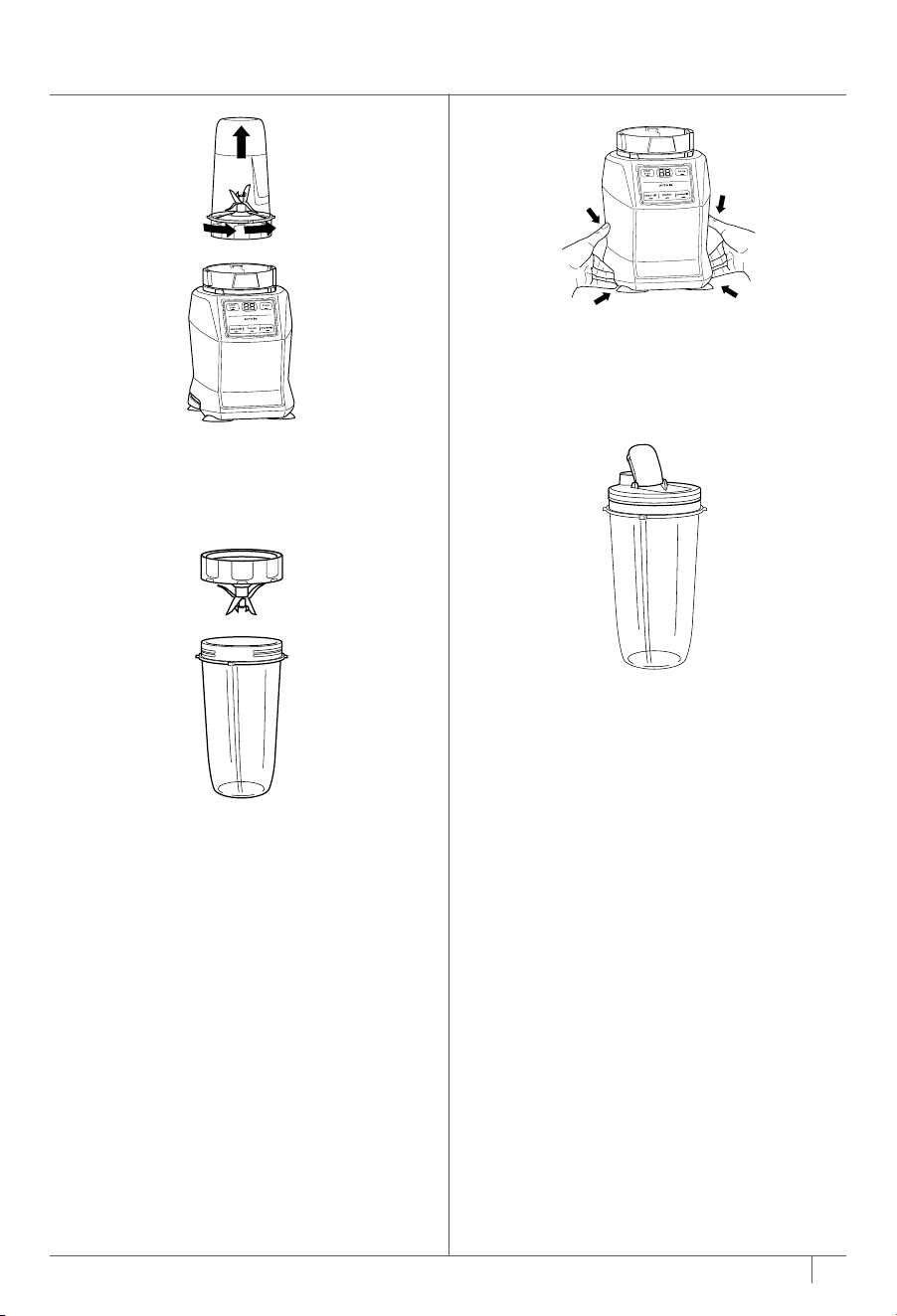
6 To remove the cup from the motor
base, turn the cup counterclockwise
and then lift it.
7 Remove the Pro Extractor
Blades® Assembly by twisting
counterclockwise. DO NOT store
blended contents with Pro Extractor
Blades Assembly attached. Exercise
care when handling the blade
assembly, as the blades are sharp.
8 Unplug the unit when finished. Refer
to the Care & Maintenance section for
cleaning and storage instructions.
9 To enjoy your drink on the go, place
the Spout Lid onto the Single-Serve
Cup and twist lid clockwise until firmly
sealed. For storing ingredients in the
cup, use only the Spout Lid to cover.
15ninjakitchen.com
14 ninjakitchen.co m
1 Plug in motor base and place on a
clean, dry, level surface such as a
countertop or table.
2 Add ingredients to the Single-Serve
Cup. DO NOT add ingredients past
the MAX LIQUID line on the cup.
3 Install the Pro Extractor Blades®
Assembly onto the top of the cup.
Twist the lid clockwise until it’s sealed
tightly.
4 Turn the cup upside down and install
on the motor base. Align the tabs on
the cup with the slots on the base,
then rotate cup clockwise until it clicks
into place. Once the cup is locked in
place, the available program buttons
will illuminate and the unit will be
ready for use.
IMPORTANT: Review all warnings on
pages 4–7 before proceeding.
NOTE: Preset programs have pauses and
changes in speed throughout the cycle.
USING THE SINGLE-SERVE CUP
5a If using an Auto-IQ® program, the preset
feature will automatically stop at the end
of the program. To stop the program
at any time, press the currently active
program again.
5b If using START/STOP, once ingredients
have reached the desired consistency,
press START/STOP again and wait for
the unit to come to a complete stop.
6 To remove the cup from the motor
base, turn the cup counterclockwise
and then lift it.
7 Remove the Pro Extractor
Blades® Assembly by twisting
counterclockwise. DO NOT store
blended contents with Pro Extractor
Blades Assembly attached. Exercise
care when handling the blade
assembly, as the blades are sharp.
8 Unplug the unit when finished. Refer
to the Care & Maintenance section for
cleaning and storage instructions.
9 To enjoy your drink on the go, place
the Spout Lid onto the Single-Serve
Cup and twist lid clockwise until firmly
sealed. For storing ingredients in the
cup, use only the Spout Lid to cover.
17ninjakitchen.com
16 ninjakitchen.com
17ninjakitchen.com
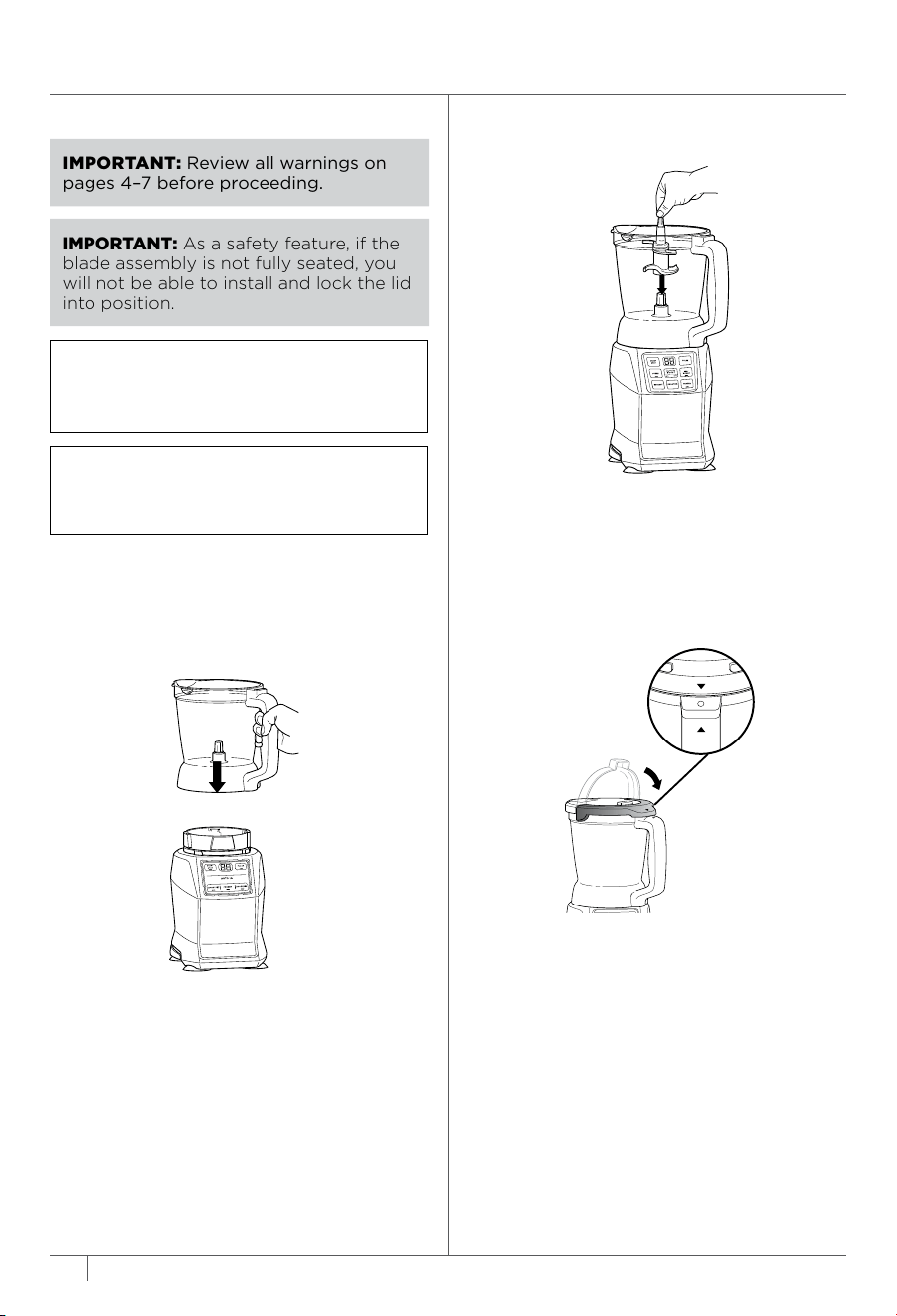
IMPORTANT: As a safety feature, if the
blade assembly is not fully seated, you
will not be able to install and lock the lid
into position.
IMPORTANT: Review all warnings on
pages 4–7 before proceeding.
NOTE: DO NOT add ingredients before
completing installation of the blade
assembly.
NOTE: Please follow the same instructions
to install the Chopping Blade Assembly
and Dough Blade Assembly.
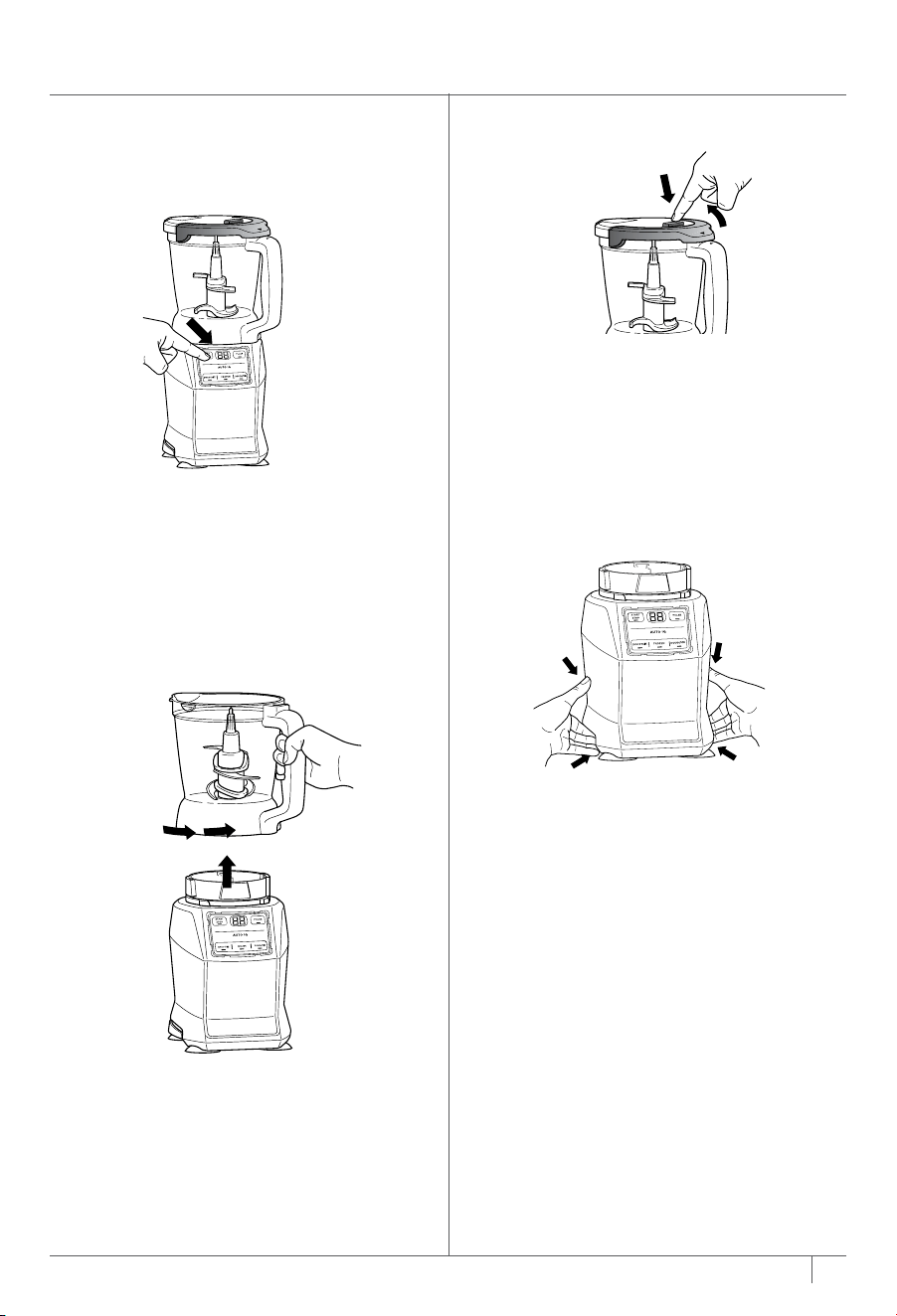
7
Remove the lid by pressing the release
button on the front tab and lifting
up. Always remove the Chopping
Blade Assembly before emptying the
ingredients from the bowl. To remove
the Chopping Blade Assembly, carefully
grasp it by the top of the shaft and lift it
out of the bowl.
8 Unplug the unit when finished. Refer
to the Care & Maintenance section for
cleaning and storage instructions.
1 Plug in motor base and place on a clean,
dry, level surface such as a countertop
or table.
2 Lower the Precision Processor Bowl
onto the motor base and rotate
clockwise until it clicks into place.
5a If using an Auto-IQ® program, the preset
feature will automatically stop the unit
at the end of the program. To pause
the unit at any time, press the currently
active program again.
5b If using START/STOP, once ingredients
have reached the desired consistency,
press START/STOP again and wait for
the unit to come to a complete stop.
6 To remove the bowl from the motor
base, turn the bowl counterclockwise
and then lift it.
3 Exercising care, grasp the Chopping or
Dough Blade Assembly by the shaft and
place it onto the drive gear inside the
pitcher. Note that the blade assembly
will fit loosely on the drive gear.
4 Place the lid on the bowl, aligning the
triangle symbol on the lid with the
triangle symbol on the handle. Press
down on the handle until it clicks into
place. Once the lid is locked in place, the
available program buttons will illuminate.
USING THE PRECISION PROCESSOR® BOWL
BLEND
PULSE
17ninjakitchen.com
16 ninjakitchen.com
17ninjakitchen.com
IMPORTANT: As a safety feature, if the
blade assembly is not fully seated, you
will not be able to install and lock the lid
into position.
IMPORTANT: Review all warnings on
pages 4–7 before proceeding.
NOTE: DO NOT add ingredients before
completing installation of the blade
assembly.
NOTE: Please follow the same instructions
to install the Chopping Blade Assembly
and Dough Blade Assembly.
7
Remove the lid by pressing the release
button on the front tab and lifting
up. Always remove the Chopping
Blade Assembly before emptying the
ingredients from the bowl. To remove
the Chopping Blade Assembly, carefully
grasp it by the top of the shaft and lift it
out of the bowl.
8 Unplug the unit when finished. Refer
to the Care & Maintenance section for
cleaning and storage instructions.
1 Plug in motor base and place on a clean,
dry, level surface such as a countertop
or table.
2 Lower the Precision Processor Bowl
onto the motor base and rotate
clockwise until it clicks into place.
5a If using an Auto-IQ® program, the preset
feature will automatically stop the unit
at the end of the program. To pause
the unit at any time, press the currently
active program again.
5b If using START/STOP, once ingredients
have reached the desired consistency,
press START/STOP again and wait for
the unit to come to a complete stop.
6 To remove the bowl from the motor
base, turn the bowl counterclockwise
and then lift it.
3 Exercising care, grasp the Chopping or
Dough Blade Assembly by the shaft and
place it onto the drive gear inside the
pitcher. Note that the blade assembly
will fit loosely on the drive gear.
4 Place the lid on the bowl, aligning the
triangle symbol on the lid with the
triangle symbol on the handle. Press
down on the handle until it clicks into
place. Once the lid is locked in place, the
available program buttons will illuminate.
USING THE PRECISION PROCESSOR® BOWL
BLEND
PULSE

19ninjakitchen.com
18 ninjakitchen.com
CARE & MAINTENANCE
CLEANING
Separate all parts. Wash all containers in
warm, soapy water with a soft cloth.
• Hand-Washing
Wash blade assemblies in warm, soapy
water using a dishwashing utensil with
a handle to avoid direct contact with
the blades. Exercise care when handling
blade assemblies as the blades are sharp.
Thoroughly rinse and air-dry all parts.
• Dishwasher
All attachments are dishwasher safe. It is
recommended that the lids, containers,
and blade assemblies be placed on the
top rack of the dishwasher ONLY. Ensure
the blade assemblies are removed from
their containers before placing in the
dishwasher. Exercise care when handling
blade assemblies.
• Motor Base
Unplug the motor base before cleaning.
Wipe motor base with a clean, damp
cloth.
DO NOT use abrasive cloths, pads, or
brushes to clean the base.
STORING
Wrap the power cord around the cord
wrap on the back of the motor base.
Store the unit upright and store all blade
assemblies inside or attached to their
respective containers with their lids locked
into place.
DO NOT store blended or unblended
ingredients in the Single-Serve Cup with
the Pro Extractor Blades® assembly
attached.
DO NOT stack items on top of the
containers. Store any remaining
attachments alongside the unit or in a
cabinet where they will not be damaged
or create a hazard.
RESETTING THE MOTOR
This unit features a unique safety system
that prevents damage to the motor and
drive system should you inadvertently
overload the it. If the unit is overloaded,
the motor will be temporarily disabled.
Should this occur, follow the reset
procedure below.
1 Unplug the unit from the
electricaloutlet.
2 Allow the unit to cool for approximately
30 minutes.
3 Remove the container’s lid and blade
assembly. Empty the container and
ensure no ingredients are jamming the
blade assembly.
IMPORTANT: Ensure that maximum
capacities are not exceeded. This is the
most typical cause of appliance overload.
If your unit needs servicing, please call
Customer Service at 1-877-646-5288.
So we may better assist you, please
register your product online at
registeryourninja.com and have the
product on hand when you call.
ORDERING REPLACEMENT PARTS
To order additional parts and attachments,
visit ninjaaccessories.com.
TROUBLESHOOTING GUIDE
WARNING: To reduce the risk of shock and unintended operation,
turn power o and unplug unit before troubleshooting�
Unit doesn’t turn on�
• Make sure unit is plugged in. Try a dierent outlet if unit is still not working.
• Make sure lids and blades are correctly installed on their correct containers.
• Insert and rotate container clockwise in the base until it clicks into place.
Unit doesn’t turn o�
• Remove container from base by rotating it counterclockwise and lifting it up. The display
will flash “--”. Unplug the power cord from the outlet. If the unit remains plugged in, the
display will time out after 3 minutes of inactivity. Press any button to wake the unit.
Lid/Pro Extractor Blades® Assembly is hard to install on the cup�
• Set the cup on a level surface. Carefully place the lid or Pro Extractor Blades Assembly
on the top of the cup and align the threads so the lid/Pro Extractor Blades Assembly sits
flat on the cup. Twist clockwise until you have a tight seal.
Unit doesn’t mix well; ingredients get stuck�
• Using the Auto-IQ® programs is the easiest way to achieve great results. The pulses
and pauses allow the ingredients to settle toward the blade assembly. If ingredients are
routinely getting stuck, adding some liquid will usually help.
• When filling the cup, start with fresh fruit or veggies, then leafy greens or herbs. Next
add liquids or yogurt, then seeds, powders, or nut butters. Finally, add ice or frozen
ingredients.
Motor base won’t stick to counter or tabletop�
• Make sure surface and suction feet are wiped clean. Suction feet will only stick to
smooth surfaces.
• Suction feet will not stick on some surfaces such as wood, tile, and non-polished finishes.
• DO NOT attempt to use unit when the motor base is stuck to a surface that is not secure
(cutting board, platter, plates, etc.).
Unit is dicult to remove from counter for storage�
• Place your hands underneath both sides of the motor base and gently pull the unit up
and toward you.
Unit displays a blinking “--” message�
• If the unit is powered on and no container is installed, the unit will display “--”
Be sure the lid is fully installed on the container and the container is properly attached to
the motor base.
Food is not evenly chopped�
• For best results when chopping, cut ingredients in a uniform size and don’t overfill the
Precision Processor® Bowl.

19ninjakitchen.com
18 ninjakitchen.com
CARE & MAINTENANCE
CLEANING
Separate all parts. Wash all containers in
warm, soapy water with a soft cloth.
• Hand-Washing
Wash blade assemblies in warm, soapy
water using a dishwashing utensil with
a handle to avoid direct contact with
the blades. Exercise care when handling
blade assemblies as the blades are sharp.
Thoroughly rinse and air-dry all parts.
• Dishwasher
All attachments are dishwasher safe. It is
recommended that the lids, containers,
and blade assemblies be placed on the
top rack of the dishwasher ONLY. Ensure
the blade assemblies are removed from
their containers before placing in the
dishwasher. Exercise care when handling
blade assemblies.
• Motor Base
Unplug the motor base before cleaning.
Wipe motor base with a clean, damp
cloth.
DO NOT use abrasive cloths, pads, or
brushes to clean the base.
STORING
Wrap the power cord around the cord
wrap on the back of the motor base.
Store the unit upright and store all blade
assemblies inside or attached to their
respective containers with their lids locked
into place.
DO NOT store blended or unblended
ingredients in the Single-Serve Cup with
the Pro Extractor Blades® assembly
attached.
DO NOT stack items on top of the
containers. Store any remaining
attachments alongside the unit or in a
cabinet where they will not be damaged
or create a hazard.
RESETTING THE MOTOR
This unit features a unique safety system
that prevents damage to the motor and
drive system should you inadvertently
overload the it. If the unit is overloaded,
the motor will be temporarily disabled.
Should this occur, follow the reset
procedure below.
1 Unplug the unit from the
electricaloutlet.
2 Allow the unit to cool for approximately
30 minutes.
3 Remove the container’s lid and blade
assembly. Empty the container and
ensure no ingredients are jamming the
blade assembly.
IMPORTANT: Ensure that maximum
capacities are not exceeded. This is the
most typical cause of appliance overload.
If your unit needs servicing, please call
Customer Service at 1-877-646-5288.
So we may better assist you, please
register your product online at
registeryourninja.com and have the
product on hand when you call.
ORDERING REPLACEMENT PARTS
To order additional parts and attachments,
visit ninjaaccessories.com.
TROUBLESHOOTING GUIDE
WARNING: To reduce the risk of shock and unintended operation,
turn power o and unplug unit before troubleshooting�
Unit doesn’t turn on�
• Make sure unit is plugged in. Try a dierent outlet if unit is still not working.
• Make sure lids and blades are correctly installed on their correct containers.
• Insert and rotate container clockwise in the base until it clicks into place.
Unit doesn’t turn o�
• Remove container from base by rotating it counterclockwise and lifting it up. The display
will flash “--”. Unplug the power cord from the outlet. If the unit remains plugged in, the
display will time out after 3 minutes of inactivity. Press any button to wake the unit.
Lid/Pro Extractor Blades® Assembly is hard to install on the cup�
• Set the cup on a level surface. Carefully place the lid or Pro Extractor Blades Assembly
on the top of the cup and align the threads so the lid/Pro Extractor Blades Assembly sits
flat on the cup. Twist clockwise until you have a tight seal.
Unit doesn’t mix well; ingredients get stuck�
• Using the Auto-IQ® programs is the easiest way to achieve great results. The pulses
and pauses allow the ingredients to settle toward the blade assembly. If ingredients are
routinely getting stuck, adding some liquid will usually help.
• When filling the cup, start with fresh fruit or veggies, then leafy greens or herbs. Next
add liquids or yogurt, then seeds, powders, or nut butters. Finally, add ice or frozen
ingredients.
Motor base won’t stick to counter or tabletop�
• Make sure surface and suction feet are wiped clean. Suction feet will only stick to
smooth surfaces.
• Suction feet will not stick on some surfaces such as wood, tile, and non-polished finishes.
• DO NOT attempt to use unit when the motor base is stuck to a surface that is not secure
(cutting board, platter, plates, etc.).
Unit is dicult to remove from counter for storage�
• Place your hands underneath both sides of the motor base and gently pull the unit up
and toward you.
Unit displays a blinking “--” message�
• If the unit is powered on and no container is installed, the unit will display “--”
Be sure the lid is fully installed on the container and the container is properly attached to
the motor base.
Food is not evenly chopped�
• For best results when chopping, cut ingredients in a uniform size and don’t overfill the
Precision Processor® Bowl.

21ninj akitchen.com
20 ninjakitchen.com
The One (1) Year Limited Warranty applies to purchases made from authorized retailers of
SharkNinja Operating LLC. Warranty coverage applies to the original owner and to the
original product only and is not transferable.
SharkNinja warrants that the unit shall be free from defects in material and workmanship
for a period of one (1) year from the date of purchase when it is used under normal
household conditions and maintained according to the requirements outlined in the
Owner’s Guide, subject to the following conditions and exclusions:
What is covered by this warranty?
1. The original unit and/or non-wearable parts deemed defective, in SharkNinja’s sole
discretion, will be repaired or replaced up to one (1) year from the original purchase date.
2. In the event a replacement unit is issued, the warranty coverage ends six (6) months
following the receipt date of the replacement unit or the remainder of the existing
warranty, whichever is later. SharkNinja reserves the right to replace the unit with one
of equal or greater value.
What is not covered by this warranty?
1. Normal wear and tear of wearable parts (such as blending vessels, lids, blades,
blender bases, etc.), which require regular maintenance and/or replacement to ensure
the proper functioning of your unit, are not covered by this warranty. Replacement
parts are available for purchase at ninjaaccessories.com.
2. Any unit that has been tampered with or used for commercial purposes
3. Damage caused by misuse, abuse, negligent handling, failure to perform required
maintenance (e.g., failure to keep the well of the motor base clear of food spills and
other debris), or damage due to mishandling in transit.
4. Consequential and incidental damages.
5. Defects caused by repair persons not authorized by SharkNinja. These defects
include damages caused in the process of shipping, altering, or repairing the
SharkNinja product (or any of its parts) when the repair is performed by a repair
person not authorized by SharkNinja.
6. Products purchased, used, or operated outside North America.
How to get service
If your appliance fails to operate properly while in use under normal household conditions
within the warranty period, visit ninjakitchen.com/support for product care and maintenance
self-help. Our Customer Service Specialists are also available at 1-877-646-5288 to assist
with product support and warranty service options, including the possibility of upgrading
to our VIP warranty service options for select product categories. So we may better assist
you, please register your product online at registeryourninja.com and have the product on
hand when you call.
SharkNinja will cover the cost for the customer to send in the unit to us for repair or
replacement. A fee of $20.95 (subject to change) will be charged when SharkNinja ships
the repaired or replacement unit.
How to initiate a warranty claim
You must call 1-877-646-5288 to initiate a warranty claim. You will need the receipt as proof
of purchase. We also ask that you register your product online at registeryourninja.com and
have the product on hand when you call, so we may better assist you. A Customer Service
Specialist will provide you with return and packing instruction information.
How state law applies
This warranty gives you specific legal rights, and you also may have other rights that vary
from state to state. Some states do not permit the exclusion or limitation of incidental or
consequential damages, so the above may not apply to you.
ONE (1) YEAR LIMITED WARRANTY
NOTES

21ninj akitchen.com
20 ninjakitchen.com
The One (1) Year Limited Warranty applies to purchases made from authorized retailers of
SharkNinja Operating LLC. Warranty coverage applies to the original owner and to the
original product only and is not transferable.
SharkNinja warrants that the unit shall be free from defects in material and workmanship
for a period of one (1) year from the date of purchase when it is used under normal
household conditions and maintained according to the requirements outlined in the
Owner’s Guide, subject to the following conditions and exclusions:
What is covered by this warranty?
1. The original unit and/or non-wearable parts deemed defective, in SharkNinja’s sole
discretion, will be repaired or replaced up to one (1) year from the original purchase date.
2. In the event a replacement unit is issued, the warranty coverage ends six (6) months
following the receipt date of the replacement unit or the remainder of the existing
warranty, whichever is later. SharkNinja reserves the right to replace the unit with one
of equal or greater value.
What is not covered by this warranty?
1. Normal wear and tear of wearable parts (such as blending vessels, lids, blades,
blender bases, etc.), which require regular maintenance and/or replacement to ensure
the proper functioning of your unit, are not covered by this warranty. Replacement
parts are available for purchase at ninjaaccessories.com.
2. Any unit that has been tampered with or used for commercial purposes
3. Damage caused by misuse, abuse, negligent handling, failure to perform required
maintenance (e.g., failure to keep the well of the motor base clear of food spills and
other debris), or damage due to mishandling in transit.
4. Consequential and incidental damages.
5. Defects caused by repair persons not authorized by SharkNinja. These defects
include damages caused in the process of shipping, altering, or repairing the
SharkNinja product (or any of its parts) when the repair is performed by a repair
person not authorized by SharkNinja.
6. Products purchased, used, or operated outside North America.
How to get service
If your appliance fails to operate properly while in use under normal household conditions
within the warranty period, visit ninjakitchen.com/support for product care and maintenance
self-help. Our Customer Service Specialists are also available at 1-877-646-5288 to assist
with product support and warranty service options, including the possibility of upgrading
to our VIP warranty service options for select product categories. So we may better assist
you, please register your product online at registeryourninja.com and have the product on
hand when you call.
SharkNinja will cover the cost for the customer to send in the unit to us for repair or
replacement. A fee of $20.95 (subject to change) will be charged when SharkNinja ships
the repaired or replacement unit.
How to initiate a warranty claim
You must call 1-877-646-5288 to initiate a warranty claim. You will need the receipt as proof
of purchase. We also ask that you register your product online at registeryourninja.com and
have the product on hand when you call, so we may better assist you. A Customer Service
Specialist will provide you with return and packing instruction information.
How state law applies
This warranty gives you specific legal rights, and you also may have other rights that vary
from state to state. Some states do not permit the exclusion or limitation of incidental or
consequential damages, so the above may not apply to you.
ONE (1) YEAR LIMITED WARRANTY
NOTES

23ninjakitchen.com
22 ninjakitchen.com
NOTES NOTES

23ninjakitchen.com
22 ninjakitchen.com
NOTES NOTES

SharkNinja Operating LLC
US: Needham, MA 02494
CAN: Ville St-Laurent, QC H4S 1A7
1-877-646-5288
ninjakitchen�com
Illustrations may dier from actual product. We are constantly striving to improve our products,
therefore the specifications contained herein are subject to change withoutnotice.
AUTO-IQ, NINJA, PRECISION PROCESSOR, PRO EXTRACTOR BLADES, and TOTAL CRUSHING are
registered trademarks of SharkNinja Operating LLC.
This product may be covered by one or more U.S. patents.
See sharkninja.com/patents for more information.
© 2022 SharkNinja Operating LLC
AMZ493BRN�IB�MP�Mv12
@ninjakitchen