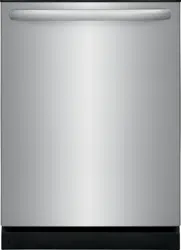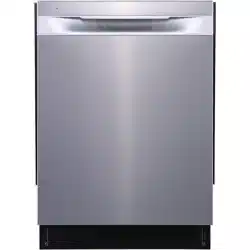

Frigidaire.com USA 1-800-374-4432 Frigidaire.ca Canada 1-800-265-8352
use
&
care
DISHWASHER
A2
8805101 (August 2021)
Introduction
.......................................................2
Important Safety information.....................3
Features ..............................................................5
Controls and settings ....................................6
Operating Instructions ..................................8
Care and Cleaning ......................................... 11
Troubleshooting ............................................. 19
Limited Warranty ......................................... 22
2
INTRODUCTION
Welcome to our
family
Thank you for bringing Frigidaire into
your home! We see your purchase as the
beginning of a long relationship together.
This manual is your resource for the use
and care of your product. Please read
it before using your appliance. Keep it
handy for quick reference. If something
doesn’t seem right, the troubleshooting
section will help you with common issues.
FAQs, helpful tips and videos, cleaning
products, and kitchen and home accessories
are available at www.frigidaire.com.
We are here for you! Visit our website,
chat with an agent, or call us if you need
help. We may be able to help you avoid
a service visit. If you do need service, we
can get that started for you.
Let’s make it ocial! Be sure to register
your product.
Keep your product info here so it’s easy
to find.
Model Number
Serial Number
Purchase Date
NOTE
Why Energy Ecient Units run long
cycles: Several factors are important to
washing dishware. The energy use of
the dishwasher was reduced by applying
more of the factors that don’t use so
much energy and less of the ones that
use more. As a result, you will see that
the wash cycles take longer.
NOTE
Not all cycles and options available on
all models.
NOTE
The dishwasher is programmed to
remember your last cycle so you do not
have to reset each time. To start the
dishwasher using the same cycle and
options selected on the previous wash,
just press the START pad.
NOTE
Very Important Information - Read
Before Operating Your Dishwasher!
Normal Operating Sounds
This dishwasher does not sound like
most dishwashers - IT’S QUIETER.
Your Direct Feed Wash System dish-
washer uses energy ecient motors for
the wash and drain portions of the cy-
cle you select. Each cycle has a series
of water fills and drains for washing and
rinsing dishes. As each cycle begins,
you may-or may not- hear the drain
motor. The next sound you will hear is
the splashing water as it enters the tub.
PLEASE BE ADVISED: If you compare
this dishwasher to previous models, you
may be surprised at what you DON’T
hear.
NOTE
The filters will need to be cleaned to
maximize wash performance during
the life of your dishwasher. See “Rec-
ommended Frequency to Clean Your
Filters” for a cleaning schedule.
3
IMPORTANT SAFETY INFORMATION
WARNING
This symbol will help alert you to such
dangers as personal injury, burns, fire
and electrical shock.
WARNING
To reduce the risk of fire, electrical
shock or injury when using your
dishwasher, follow the above basic
precautions.
For your Safety
• Use your dishwasher only as
instructed in this User Manual.
• This Manual does not cover every
possible condition and situation that
may occur. Use common sense and
caution when installing, operating
and maintaining any appliance.
• NSF certified residential dishwashers
are not intended for licensed food
establishments.
• DISHWASHER MUST BE
ELECTRICALLY GROUNDED. Read
the Installation Instructions for details.
• This dishwasher is designed to operate
on regular house current (120V,
60Hz). Use a circuit equipped with
a 15 ampere fuse or circuit breaker.
Use a 20 ampere fuse if dishwasher is
connected with a food disposer.
• Do not operate dishwasher unless all
enclosure panels are in their proper
place.
• To avoid entrapment and/or
suocation, remove door or door
latch mechanism from any dishwasher
that is discarded or not in use.
• Keep young children and infants away
from dishwasher when it is operating.
• Do not let children abuse, sit, stand or
play on door or racks of a dishwasher.
• Use only detergents and rinse agents
recommended for use in a dishwasher.
• Store dishwasher detergent and rinse
agents out of the reach of children.
• Do not wash plastic items unless
marked: “Dishwasher Safe” or
equivalent. Check with manufacturer
for recommendations, if not
marked. Items that are not marked
dishwasher safe may melt and create
a potential fire hazard.
• Disconnect electrical power to
dishwasher before servicing.
• If the dishwasher drains into a food
disposer, make sure disposer is
completely empty before running
dishwasher.
WARNING
P
lease read all instructions before using
this dishwasher.
• Repairs should be done by a qualified
technician.
• Do not tamper with controls.
• Do not touch the heating element
during or immediately after
• Use care unloading the dishwasher
when the Sanitize option has been
selected. Contents may be hot to
the touch immediately after the end
of cycle.
• Water vapor in the tub may be hot
when Sanitize or other high
temperature programs has been
selected. Use care and do not let
small children play around or touch
the hot vapor area when open the
door during washing cycle.
• When loading items to be washed:
Locate sharp items and knives
so that they are not likely to
damage the door seal or tub.
Load sharp items and knives
with the handles up to reduce
the risk of cut-type injuries.
• Under certain conditions, hydrogen
gas may be produced in a hot water,
system that has not been used for
2 weeks or more. HYDROGEN GAS
IS EXPLOSIVE. If hot water system
has not been used for such a period,
before using dishwasher, turn on
for several minutes This will release
any accumulated hydrogen gas.
HYDROGEN GAS IS FLAMMABLE.
Do no smoke or use an open flame
during this time.
• Do not store or use combustible
materials, gasoline or other
flammable vapors and liquids in the
vicinity of this or any other appliance.
4
SAVE THESE INSTRUCTIONS
WARNING
WARNING indicates a potentially
hazardous situation which, if not
avoided, could result in death or serious
injury.
IMPORTANT
IMPORTANT indicates installation, oper-
ation or maintenance information which
is important but not hazard-related.
DANGER
DANGER indicates an imminently
hazardous situation which, if not
avoided, will result in death or serious
injury.
CAUTION
CAUTION indicates a potentially
hazardous situation which, if not
avoided, may result in minor or
moderate injury.
Safety Definitions
This is the safety alert symbol. It is
used to alert of potential personal injury
hazards. Obey all safety messages that
follow this symbol to avoid possible injury
or death.
Safety Instructions
• DO NOT store or use gasoline, or
other flammable liquids in the vicinity
of this or any other appliance. Read
product labels for warnings regarding
flammability and other hazards.
• Remove all staples from the carton.
Staples can cause severe cuts, and
also destroy finishes if they come
in contact with other appliances or
furniture.
WARNING
Please read all instructions before using
this appliance.
Child Safety
Destroy or recycle the carton, plastic
bags, and any exterior wrapping material
immediately after the dishwasher is
unpacked. Children should NEVER use
these items to play. Cartons covered with
rugs, bedspreads, plastic sheets or stretch
wrap may become airtight chambers, and
can quickly cause suocation.
IMPORTANT SAFETY INFORMATION
WARNING
To reduce the risk of fire, electrical
shock or injury when using your
dishwasher, follow the previous basic
precautions .
5
A
B
C
D
H
E
F
G
J
I
K
IMPORTANT
Accessories are available for your appliance and may be purchased at
Frigidaire.com or by calling 1-800-374-4432 (Frigidaire.ca or 1-800-265-8352 in
Canada) or from an authorized seller.
FEATURES
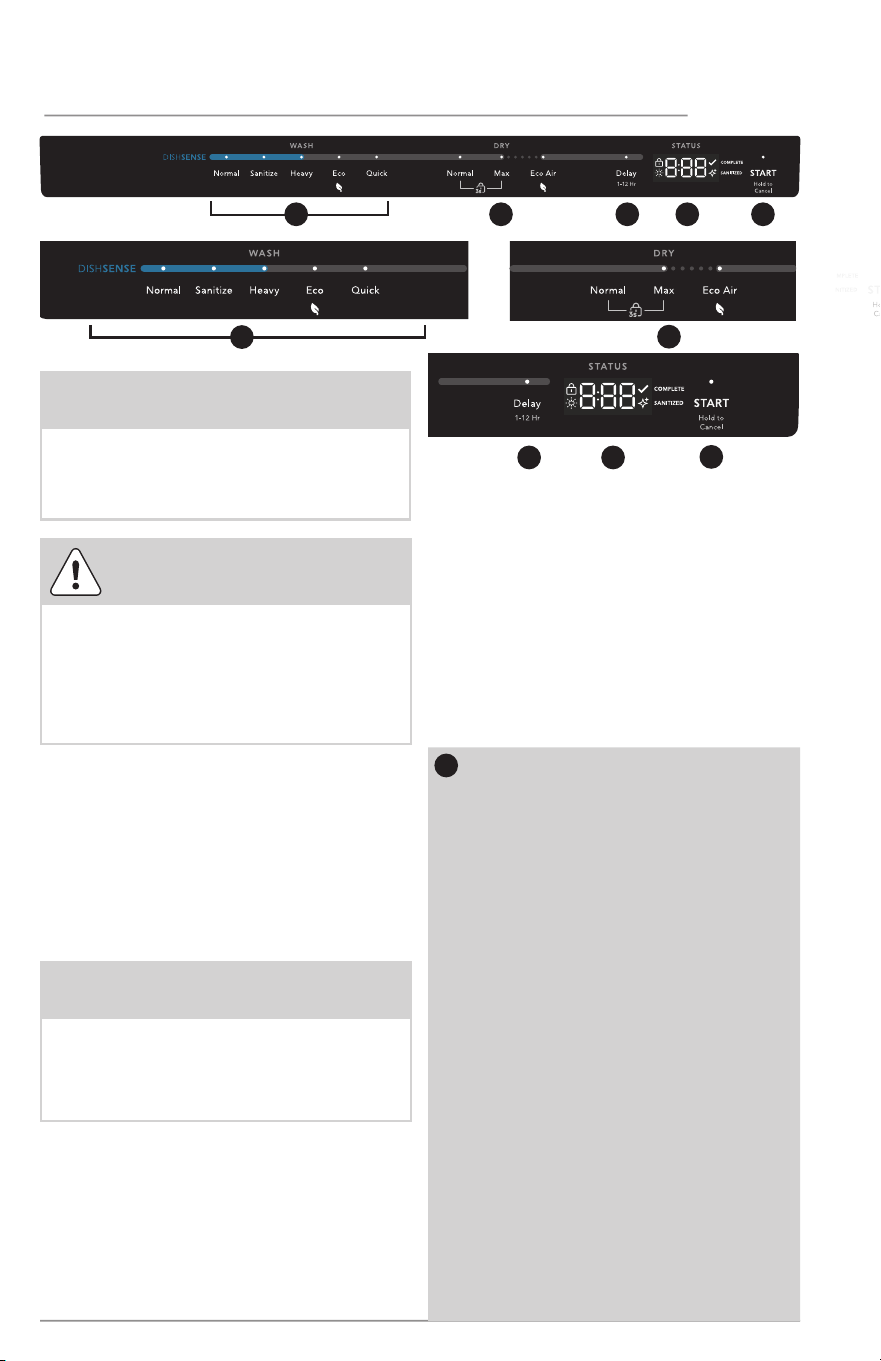
A
Top Rack
B
Cup Shelves
C
Middle Spray Arm
D
Lower Rack
E
F
Silverware Basket
G
Lower Spray Arm
H
Heating Element
I
Filter
J
Overfill Protector
K
Rinse Aid Compartment
Detergent Dispenser
Your dishwasher cleans by spraying a mixture of hot water and detergent through
the spray arms against soiled surfaces. First, the dishwasher drains for a few seconds
to remove soils dropped while loading, then fills with water covering the filter area.
Water is then pumped through the spray arms. Soil particles go through and across
the filter and down the drain as the water is pumped out. This series of steps are
repeated as needed. The number of water fills varies with the cycle being used.
Features may vary according to model
6
CONTROLS AND SETTINGS
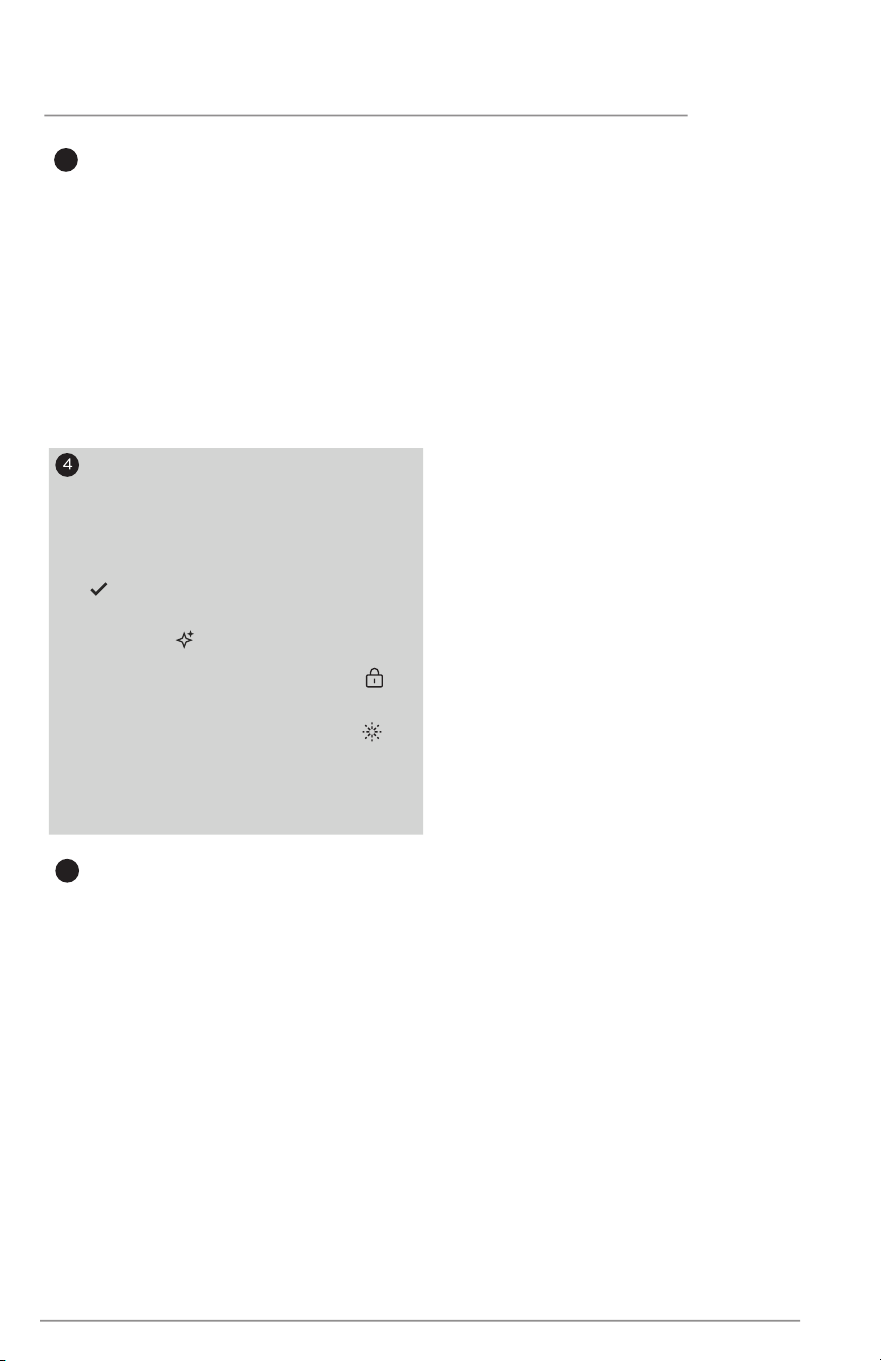
1
Normal
Normal cycle is to completely wash and dry a
full load of normally soiled dishes. The energy
usage label is based on this cycle and option
combination with the upper rack in the raised
position.This cycle uses a DishSense.
Sanitize
T
he sanitize option sanitizes dishes and
glassware in accordance with NSF
Inter
national NSF/ANSI Standard 184 for
Residential Dishwashers. Certified residential
dishwashers are not intended for use in
licensed food establishments.This cycle uses
a DishSense
Heavy
He
avy cycle is for pots, pans, casseroles and
dinnerware with dried-on or baked on
soil.This cycle uses a DishSense
ECO
This cycle is selected for an energy saving
performance. NormalDry and MaxDry are not
optional with this cycle.
Quick
Q
uick cycle is for lightly soiled or well-rinsed
dish loads.
CAUTION
Property Damage Hazard
Before starting dishwasher be sure that
the water is connected and turned on.
Failure to do so may cause damage
to the pump seal and result in water
leakage.
Cycle times are approximate and will
vary with options selected. Hot water
is necessary to activate dishwasher
detergent and melt fatty food soils. An
automatic sensor will check the incoming
water temperature and, if it is not hot
enough, the cycle will be lengthened for
automatic water heating in the main
wash and final rinse of all cycles.
NOTE
Your dishwasher uses a DishSense
TM
Technology to understand how much
food is on the dishes and then adjusts
the cycle accordingly.
2
3 4
5
2 3 4 51
1
NOTE
Lights on the console will remain on
once the door is shut and wash cycle
begins. If it is preferred to have the
lights turn o while cycle is running see
Console Lights section for instructions.
Recommended Cycle for typical
use:
The Normal Wash cycle with its factory
default options of normal temperature
and heated dry together provide the
best all around performance. This cycle
selection is recommended for everyday
use and is suitable for a large range of
both dish load sizes and food quantities
remaining on those dishes.
Wash Cycle Selections
Press button to select
corres
ponding washing cycle and
the cycle indicator will illuminate.
Normal, Sanitize, Heavy, ECO,
Quick can be selected.

7
CONTROLS AND SETTINGS
2
Dry Options
The programmed cycles default
to the Eco Air option, except
Quick cycle.
The programmed cycles default
to the NormalDry option, except
ECO cycle.
NormalDry
When NormalDry option is
selected, the heater will work
during the drying process.
MaxDry
When the MaxDry option is
selected, the heater operation
time will be extended to further
improve drying performance.
MaxDry option can be used with
all cycles except ECO.
Eco Air
When Eco Air option is selected,
the door will open automatically
at the end of cycle to achieve
better drying performance. Eco
Air option can be used with all
cycles except Quick.
Air Dry
When NormalDry, MaxDry and
Eco Air are not selected, the
heater will be de-activated during
the drying phase of the selected
wash cycle. Air Dry means drying
with residual air heat.
Child Lock Controls
Lock the dishwasher controls by
pressing and holding the NormalDry
button and MaxDry button
simultaneously until the lock icon
comes on to prevent children from
starting the dishwasher or
accidentally changing the wash
cycle. To unlock the controls, press
and hold the NormalDry button and
MaxDry button until the lock icon
goes off.
Automatic Door Opener (ADO)
To get a better drying performance, the
door will open automatically at the end
of washing cycle. To protect the cabinet
from corroding by the steam, please
paste the protective tape which is
provided as accessory before secure the
dishwasher.
Refer to the installation instructions for
more information.
8
OPERATING INSTRUCTIONS
Getting Started
1. Load Dishwasher (See Preparing
and Loading Dishes).
2. Add detergent (See Dishwasher
Dispenser & Detergents).
3. Add Rinse Aid, if needed (See Rinse
Aid).
4. Run hot water faucet nearest
dishwasher until water is hot. Turn
water o.
5. Select desired Cycle (See Cycle
Chart).
6. Select desired (See Dry
7. To start, press START/Cancel pad
and close door immediately.
To Start a Cycle
When cycle and options are selected,
LEDs of selected cycle and options are
illuminated. The status window displays
the cycle time and the LED above the
START/Cancel button illuminates.
To start the cycle, press START/Cancel
button and immediately close the
dishwasher door.
The status window displays “CLOSE”
after the START/Cancel button is pressed.
5
START/Cancel Button
When cycle and options are
selected, LEDs of selected cycle and
options are illuminated. The status
window displays the cycle time.
To start the cycle, press the START/
Cancel button and immediately
close the dishwasher door.
You can cancel a cycle anytime
during the cycle. Press and hold the
START/Cancel pad for 3 seconds.
The light above the cycle and option
selected will go out, and the START/
Cancel light will remain illuminated,
the dishwasher will start a 60
second
drain. At the end of the
drain, select the next desired
cycle. Press and hold the Start/
Cancel
pad for another 3 seconds to
cancel the drain phase.
3
Delay
The Delay option allows you to
automatically delay starting your
dishwasher 1-12 hours.
To start the Delay option, press
Delay until the desired delay time
shows in the Status window. Press
the START/Cancel button to start
the delay option. If the delay
option is interrupted, the START/
Cancel button will have to be
pressed again to return to delay
option.
Dry Option
Option Selections).
Status Window
The Status Window indicates the
number of delay start hours, the
number of minutes left in a cycle,
and the CLOSE message.
When full cycle is complete,
COMPLETE is illuminated.
When Sanitize is selected and
achieved,
SANITIZED is illuminated.
When Child Lock is activated,
illuminated.
When rinse aid is insu˜cient,
illuminated.
This indicator is OFF as default,
press and hold Normal+Quick to
activate it.
is
is

9
OPERATING INSTRUCTIONS
Status Window
The STATUS window, available on some
models, indicates the following activity:
In the unlikely event that the dishwasher
malfunctions, displays the error code
“E1”(E2/E3/E4/Ed), or gives poor
performance you can call the Frigidaire
Customer Care Center at
1-800-944-9044. They will be able to
provide assistance in troubleshooting the
problem and/or locating an authorized
service technician, if needed.
To Cancel a Cycle and Delay
Cycle
Both a running cycle and a delay cycle can
be canceled at any time.
Open the dishwasher door and press the
START/Cancel button until the cycle and
option LEDs turn o. The running cycle or
delay countdown is canceled.
Then the status window will display “60”.
If close the door immediately, the
dishwasher will go into a 60-second
draining phase.
Press and hold the Start/Cancel pad for
another 3 seconds to cancel the drain
phase.
Opening the door during cycle
If you open the door while a cycle is
running or delay is counting down, the
dishwasher will stop running.
The LEDs of selected cycle and options
are illuminated, the status window displays
the remaining cycle time. The LED above
START/Cancel button will blink to press
start.
To resume, press START/Cancel
button and close the dishwasher door
immediately.
The status window displays “CLOSE ”
after the START/Cancel button is pressed.
Status Indicator Lights
The console lights provide information
about the cycle selection and current
status. During operation, while the door
is closed, these lights will remain on. At
the completion of the cycle, the clean
light will come on. The Sanitized light
will also come on if that option was
selected and sanitization was achieved
during the wash cycle.
White Light
The WHITE LIGHT in front of the console
illuminates when the wash is complete.
Blue Light
The BLUE LIGHT in front of the console
illuminates to indicate that the wash cycle
is operating.
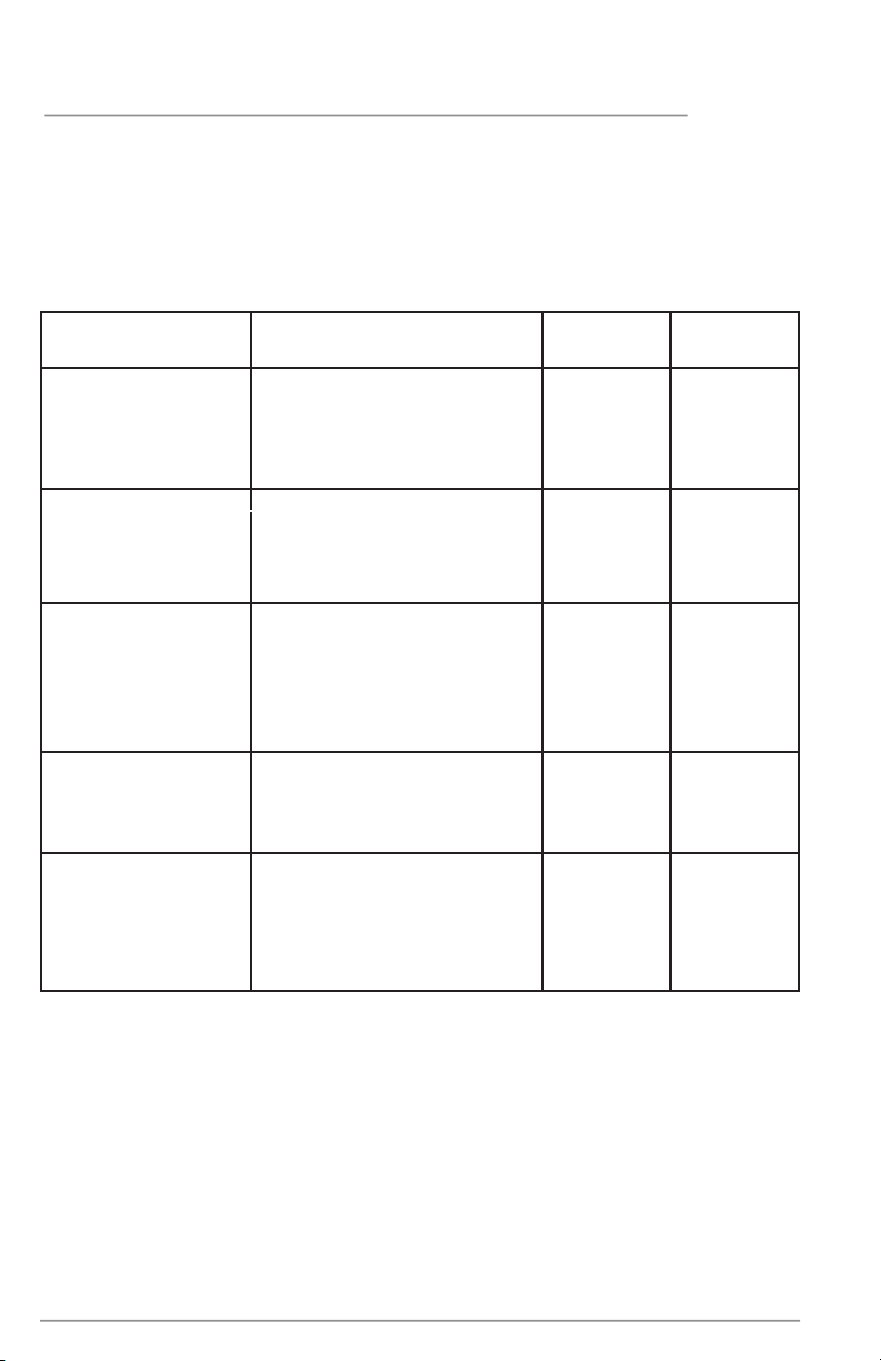
1h- 12h.............
MINUTES..........
Number of delay start
hours. The last hour
will count down in
minutes.
Number of minutes
left in cycle (1-299).
CLOSE .... Close door will
scroll one time in the
status window.
10
OPERATING INSTRUCTIONS
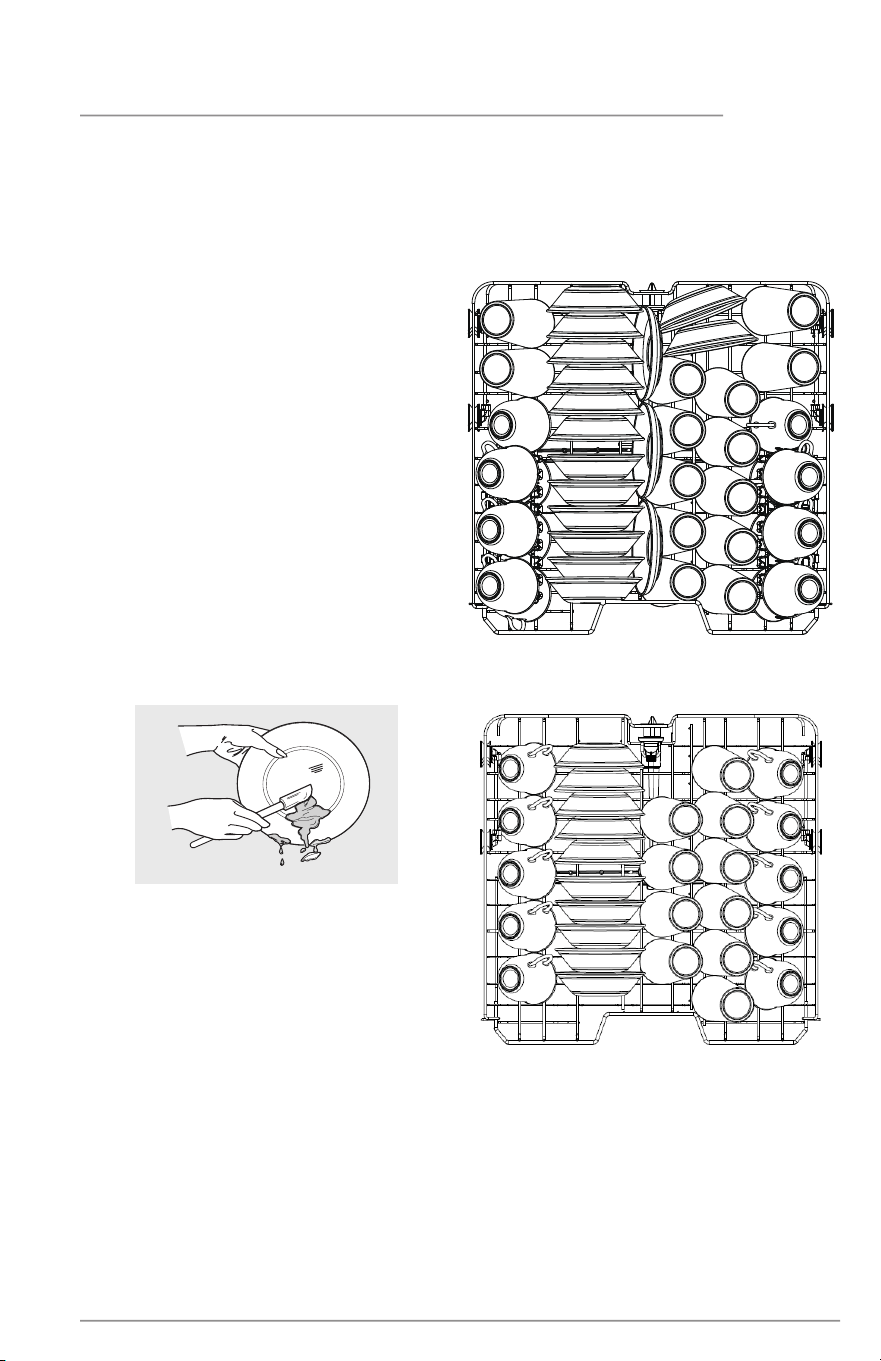
The DishSense
TM
Technology checks the soil level on your dishes in the Normal,
Sanitize, Heavy cycles . In response, automatic cycle adjustments are made to
assure the dishware gets clean - with less food the cycle gets shorter. Cycle time
will also vary based on the options selected and the incoming water temperature.
Not all cycles available on all models.
Cycle and Option Chart
* Cycle uses Soil Sensing feature to determine best Wash performance.
Cycle
Available Options
Water
(approx.)
Time
*(Hours)
Normal*
Recommended for
lightly to heavily
soiled loads.
Drying: NormalDry, MaxDry,
Eco Air
3 - 7 gal.
11.5 - 26.6 L.
1
3
/
4
- 3
Sanitize*
Recommended for
lightly to heavily
soiled loads.
Drying: NormalDry, MaxDry,
Eco Air
2
1
/
2
- 3
Heavy*
Recommended
for
pots,pans, casseroles
and dinnerware
having light to
heavily soiled loads.
Drying: NormalDry,
MaxDry, Eco Air
1
/
2
Eco
Recommended for
lightly soiled loads.
Drying: Eco Air 5.2 gal.
19.7 L.
2
Quick
Recommended for
lightly soiled loads
only.
Drying: NormalDry, MaxDry
4 gal.
15.2 L.
1
1
/
3
3 -
7 gal.
11.5 - 26.5 L.
3 -
7 gal.
11.5
- 26.5 L.
2-3
1
/
2
11
CARE AND CLEANING
Dish Preparation
Scrape away large pieces of food, bones,
pits, toothpicks, etc. The continuously
filtered wash fluid will remove remaining
food particles. Burned-on foods should
be loosened before loading. Empty
liquids from glasses and cups.
Foods such as mustard, mayonnaise,
vinegar, lemon juice and tomato based
products may cause discoloration of
stainless steel and plastics if allowed to
sit for a long period of time. Unless the
dishwasher is to be operated at once, it
is best to pre-rinse to rinse off these
food soils.
• Load racks so that large items do
not prevent the detergent dispenser
from opening.
• Check manufacturer’s
recommendations before washing
items in question.
• If the dishwasher drains into a
Food Disposer, be sure disposer is
completely empty before starting
dishwasher.
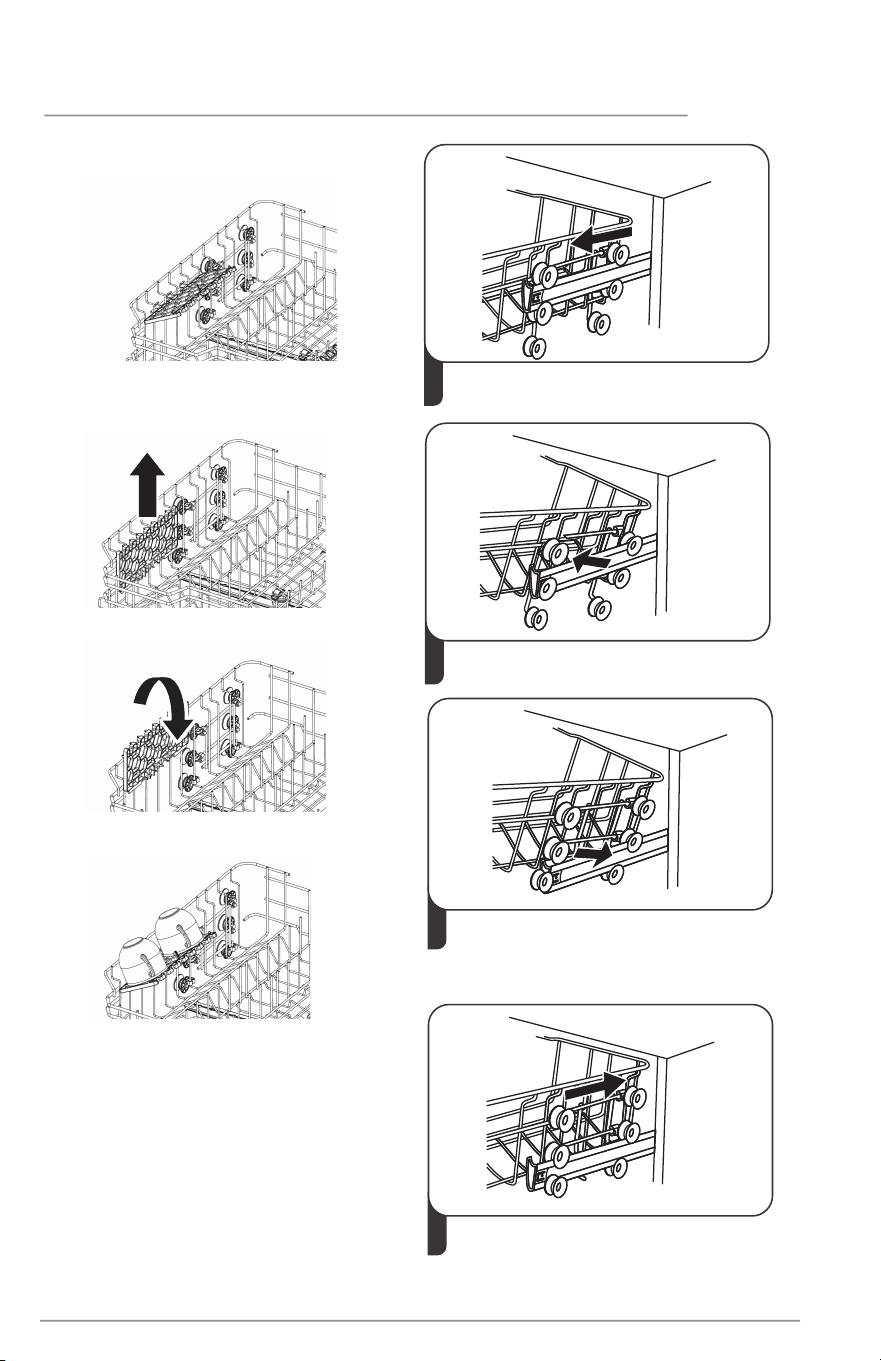
Loading the Top Rack
Features and appearance of racks and
silverware basket as shown may vary
from your model.
The upper rack is designed for flexibility
in loading a wide variety of items
including cups, glasses, stemware, small
plates, bowls, etc.
Load glasses in top rack only. Damage
may occur if placed in bottom rack.
Load plastic items in top rack only.
Melting may occur if placed in bottom
rack.
Load items with open ends facing down
for better cleaning and draining.
Damage may occur if delicate items
touch each other during dishwasher
operation.
14 place settings standard loading pattern
10 place settings standard loading
pattern
Some models have a fold-down cup shelf
or a cup shelf/stemware holder. They
can be used to load two levels of cups,
juice glasses, and other short items.
Stagger items on upper level so that
water can reach all inside surfaces. Fold
up to load tall glasses.
Long-handled knives and utensils can be
placed in top rack.
Be sure nothing protrudes through the
bottom of the rack to block rotation of
middle spray arm.
12 CARE AND CLEANING
Cup Shelves
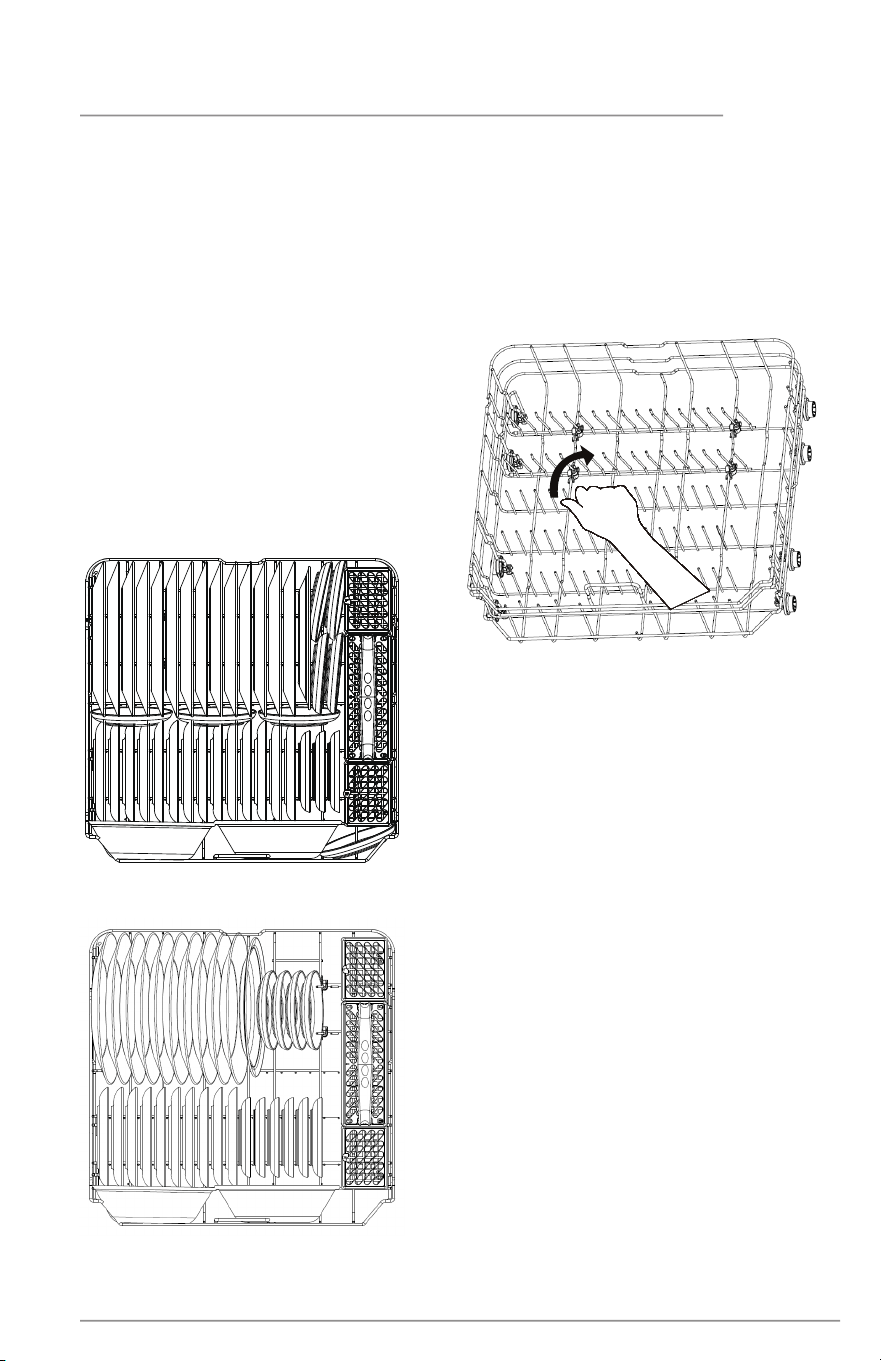
Adjustable Upper Rack
IMPORTANT:
Remove all items before adjusting the
rack. The rack must be empty.
To adjust the height of the upper rack,
follow these steps:
2
Remove the upper basket.
1
lower position
Pull out the upper basket.
3
Re-attach the upper basket to upper
or lower rollers.
4
upper position
Push in the upper basket.
1. Lift the shelves up.
Cup shelves are used to load extra cups.
Fold them down if not needed.
2. Flip the shelves to the right position.
3. Load cups on the shelves.
13
CARE AND CLEANING
Features and appearance of racks and
silverware basket as shown may vary
from your model.
The lower rack is best for plates, saucers,
bowls, and cookware. Large items should
be placed along the edge so they do not
block the spray arm rotation.
For best For best
results, place bowls, casseroles, and sauce results, place bowls, casseroles, and sauce
pans with soiled surface facing down and pans with soiled surface facing down and
toward the center. Tilt slightly for better toward the center. Tilt slightly for better
drainage.drainage.
Spin the middle spray arm to make sure
that tall items do not block the rotation
Be sure pan handles do not protrude
through the bottom of the rack and block
the lower spray arm rotation.
Loading the Bottom Rack
14 place settings standard loading pattern.
10 place settings standard loading pattern
Fold-down Tines
The fold-down tines in the lower rack
make easy loading for those extra large
and hard-to-fit items. The tines may be
left up for normal use or folded down
for more flexible loading. Fold down for
more space to load large pots or pans.
14
CARE AND CLEANING
Features and appearance of racks and
silverware basket as shown may vary
from your model.
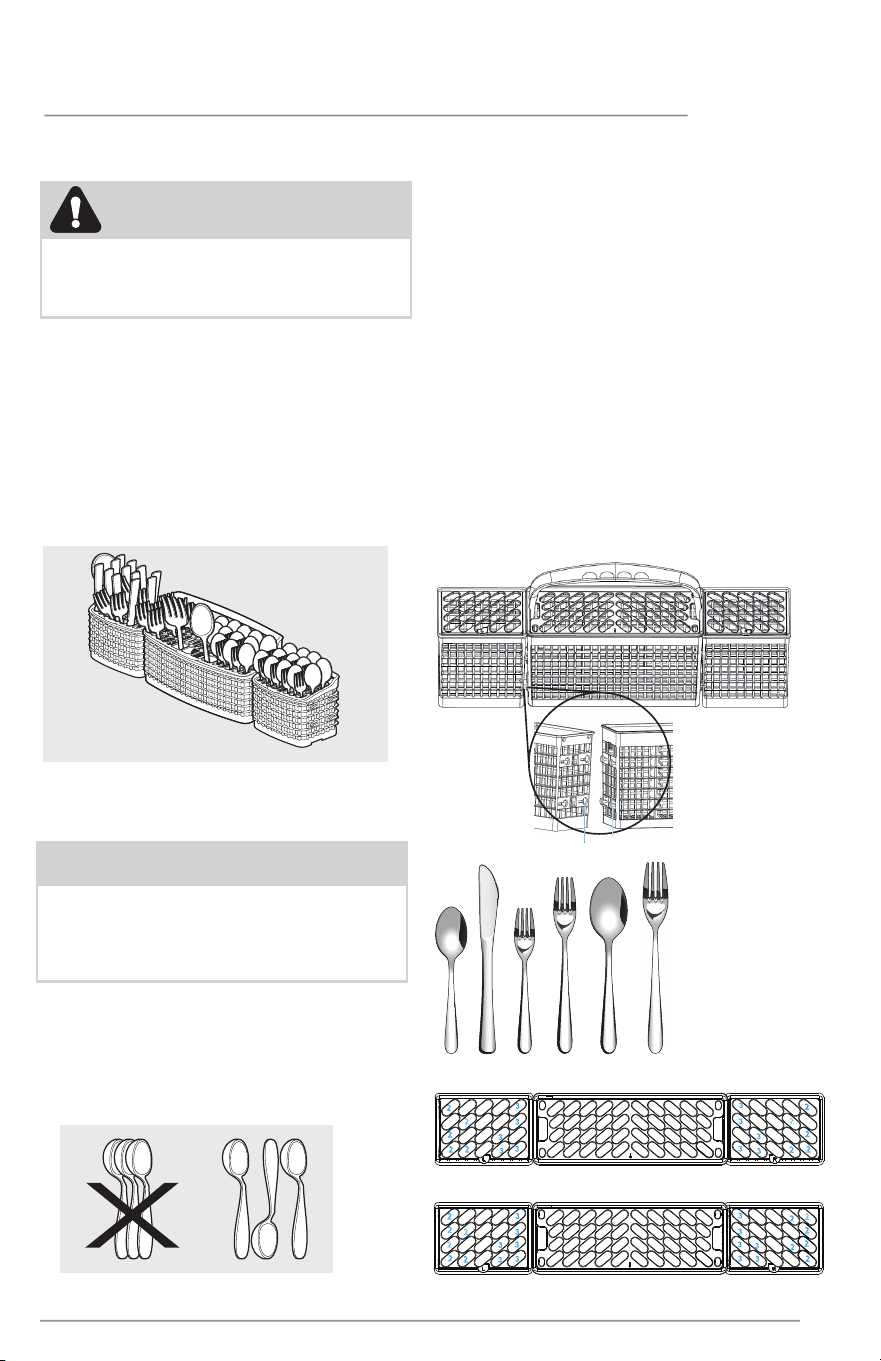
Load the silverware basket while it is in
the bottom rack or take the basket out
for loading on a counter or table.
For baskets with lids, small items like
baby bottle caps, jar lids, corn cob
holders, etc., can be placed in a covered
section to hold them in place.
Loading the Silverware Basket
Use suggested loading patterns, as
shown, to increase washability of the
silverware.
To avoid damaging the silver finish do
not mix silver and stainless.
When covers are up, mix items in each
section of the basket with some pointing
up and some down to avoid nesting.
Water spray cannot reach nested items.
• Lift handle to remove the silverware
basket and set the basket on a
counter or table top.
• Lift up on each side section to
disengage the center section from
the keyhole slots in the side sections.
• Either replace the section(s) in the
bottom rack and load the silverware,
OR load the silverware while the
section(s) are on the countertop and
then replace the basket in the
bottom rack.
THREE-PIECE SILVERWARE
BASKET
The silverware basket consists of three
separate sections. For optimum loading
flexibility, the center section of the basket
can be used individually, joined with one or
both side sections or removed.
CAUTION
Load sharp items (knives, skewers, etc.)
pointing down.
Failure to do so may result in injury.
a Keyhole Slots
b Prongs
a
b
1 2 3 4 5 6
1. Spoons
2. Knives
3. Salad Forks
4. Forks
5. Large Spoons
6. Large Forks
22
4
4
1
1 1
6
1
1
1
4
4
22
2
4
1
1
5
1
1
1
4
2
22
4
1
1
1
4
2
2
22
22
4
1
1 1
5
1
1
1
4
22
2
2
10 Place Settings
22
4
4
1
1
1
1
6
1
1
1
1
4
4
22
2
22
2
4
4
1
1
5
1
1
4
4
22
2
4
1
1
1
1
4
2
2
2
2
22
22
4
1
1
1
1
5
1
1
1
1
4
22
14 Place Settings
NOTE
Make su
re the loaded items do not
interfere with the rotation of the spray
arm. Check this by rotating the spray
arm by hand.
2
1
5
4
3
6
3
4
5
1
22
15
• Use only fresh automatic dishwashing
detergent. Other detergents may
cause oversudsing.
• When using automatic dishwashing
detergent tablets or packets, use only
one tablet or packet, place in the
main wash cup and close.
• Add detergent just before starting
cycle.
• Store detergent in a cool, dry
location
and discard any that becomes moist
or caked.
Filing the Detergent Dispenser
The detergent dispenser has two
detergent cups. The smaller one is for
addition to the pre-wash and the larger is
for release to the main wash.
CARE AND CLEANING
CAUTION
The use of industrial grade detergent
can damage the heating coil and other
parts of the dishwasher leading to
damage to the unit and surrounding
property. Use only household grade
automatic dishwasher detergents.
How much Deter
gent to use
The amount of detergent to use depends
on the soil level of your load, the type of
detergent used and the hardness of your
water.
•If you use too little detergent, dishes
won’t be clean.
•If you have soft water and use too much
detergent, glassware will etch.
Water Hardness
Water hardness varies depending on
your water source. For the best results,
your dishwasher is designed to operate
with water that has a hardness of no
more than 7 grains per gallon. Test kits
are available from all major appliance
parts retail outlets. If your water has a
hardness over 8 grains per gallon, you
may consider installing a water softener
or regularly use an additive to enhance
the performance of your detergent.
Adding a Dish
To add or remove items after wash cycle
starts:
• Unlatch door and wait a few seconds until
wash action stops before opening.
• Add the item, move the door to a near-
closed position, and wait a few
seconds
while the cold air slowly expands inside
the dishwasher.
• Press the START/Cancel button then
immediately close the door firmly to
resume.
WARNING
Open the door very slowly & carefully if
the dishwasher is operating. There is a
risk of hot water squirting out.
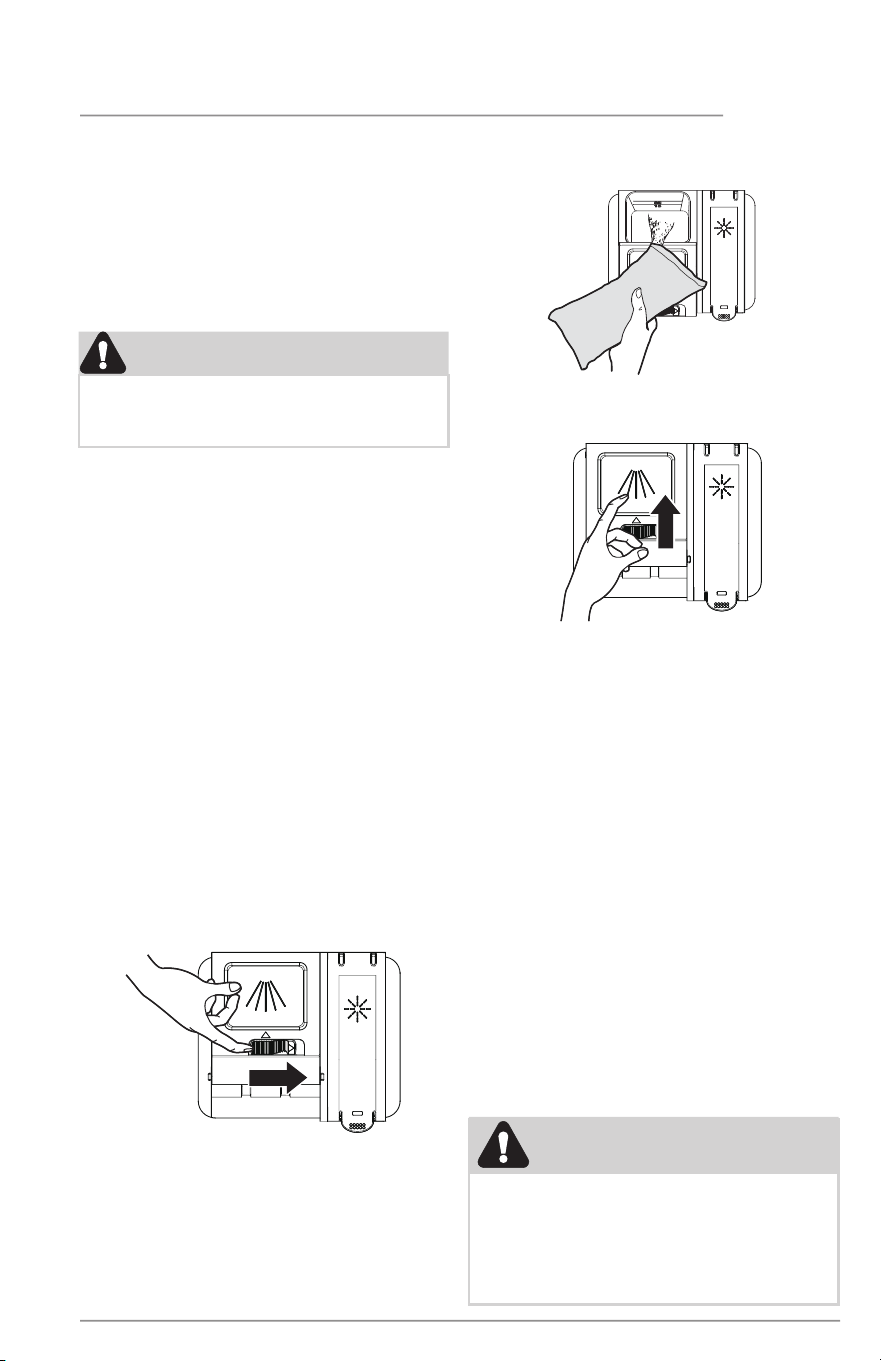
1. Push the dispenser cover release catch
to open the main wash detergent
compartment.
NOTE:
The flap is always open at the end of a
dishwashing cycle.
2. Add the recommended amount of
detergent to the detergent compartment.
3. Press down on the top of the cover
to secure.
16
IMPORTANT
Before starting a cycle, run hot water to
clear cool water from pipe.
Rinse Aid
Rinse aid grRinse aid greaeatly imprtly improovves drying andes drying and
rreduceduces wes waatter spots.er spots. With it water
“
sheets” o dishes rather than forming
water droplets that cling and leave spots.
A dispenser, located next to the
detergent cup, automatically releases a
measured amount of rinse aid during the
last
rinse. If spotting and poor drying are
problems, increase the amount of rinse
aid dispensed by below steps:
1.Open the door when dishwasher is in
standby mode.
2.Within 60 seconds after opening the
door, press and hold Quick
button for
more than 5 seconds to enter the set
mode. The rinse aid indicator blinks.
3.Press Quick button again to select the
proper set according to your using habits,
the setting will change in the following
sequence: 3→4 →5 →1 →2 →3. The higher
the number, the more rinse aid the
dishwasher uses.
4.Without operation in 5 seconds to
complete the setup and exit the setting
mode.
Under normal conditions, you will need to
fill the rinse aid dispenser approximately
once a month. Rinse aid is released
through an opening in the dispenser. You
do not need to wait until the dispenser is
empty to refill it. Try to keep it full, but be
careful not to overfill it.
• Turn on hot water faucet nearest
dishwasher for several minutes to
clear cool water from pipes.
• Hold a candy or meat thermometer
in the water stream to check the
temperature.
• If temperature is below 120°
F (49°
C), have a qualified person raise the
hot water heater thermostat setting.
Water Pressure
The hot water line to dishwasher must
provide water pressure between 20 and
80 psi.
Low Water pressure may occur when
laundry or showers are in operation. If
you experience poor wash performance
you may need to wait until water use is
reduced before starting dishwasher.
Water Temperature
Hot water is needed for best
dishwashing and drying results. Water
entering dishwasher should be at least
120°F to 150°F(49℃
to 66℃)to give
satisfactory results.
To check water temperature entering
dishwasher:
CARE AND CLEANING
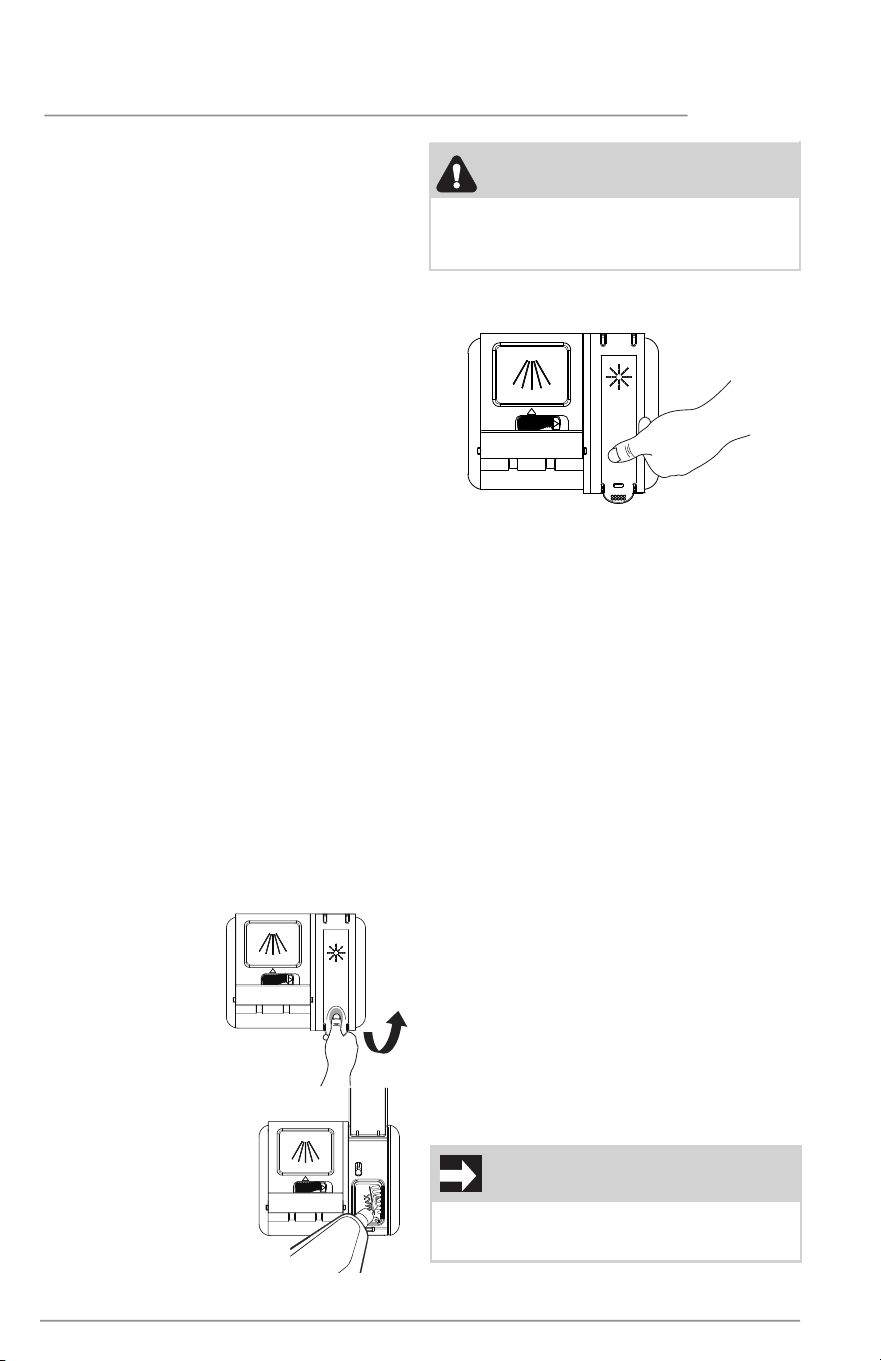
2. Fill the rinse aid
dispenser with liquid
rinse aid until full.
DO NOT overfill.
NOTE:
Use the viewing port when filling the rinse
aid reservoir.
To refill the rinse
aid dispenser
1. Lift up the end tab
of rinse aid cover to
open.
WARNING
Do not fill the reservoir above the full
level indicator. Excess rinse aid can
overflow during the wash cycle.
3. Press the rinse aid cover down
firmly to close.
17
CARE AND CLEANING
Outer Door - Clean outer door with warm
soapy wat
er and a dishcloth or sponge.
Rinse with clean water and a dry cloth.
Do not use harsh cleaners.
Inside - The inside of the dishwasher and
filter are self-cleaning with normal use.
If needed, clean around the tub gasket
area with a damp cloth. The filter is
self-cleaning. A glass trap located in the
center of the filter is designed to collect
pieces of broken glass, straws, bones and
pits.
Overfill Protector- keeps dishwasher
from overfilling and is located in the right
front corner of the tub.
• Clean occasionally with household
cleaner containing vinegar or bleach
to dissolve any buildup.
• Overfill Protector should move up
and down freely about one inch.
If it does not move, lift and clean
underneath.
CLEANING THE FI
LTERS
Check and clean the filters regularly for
best performance.
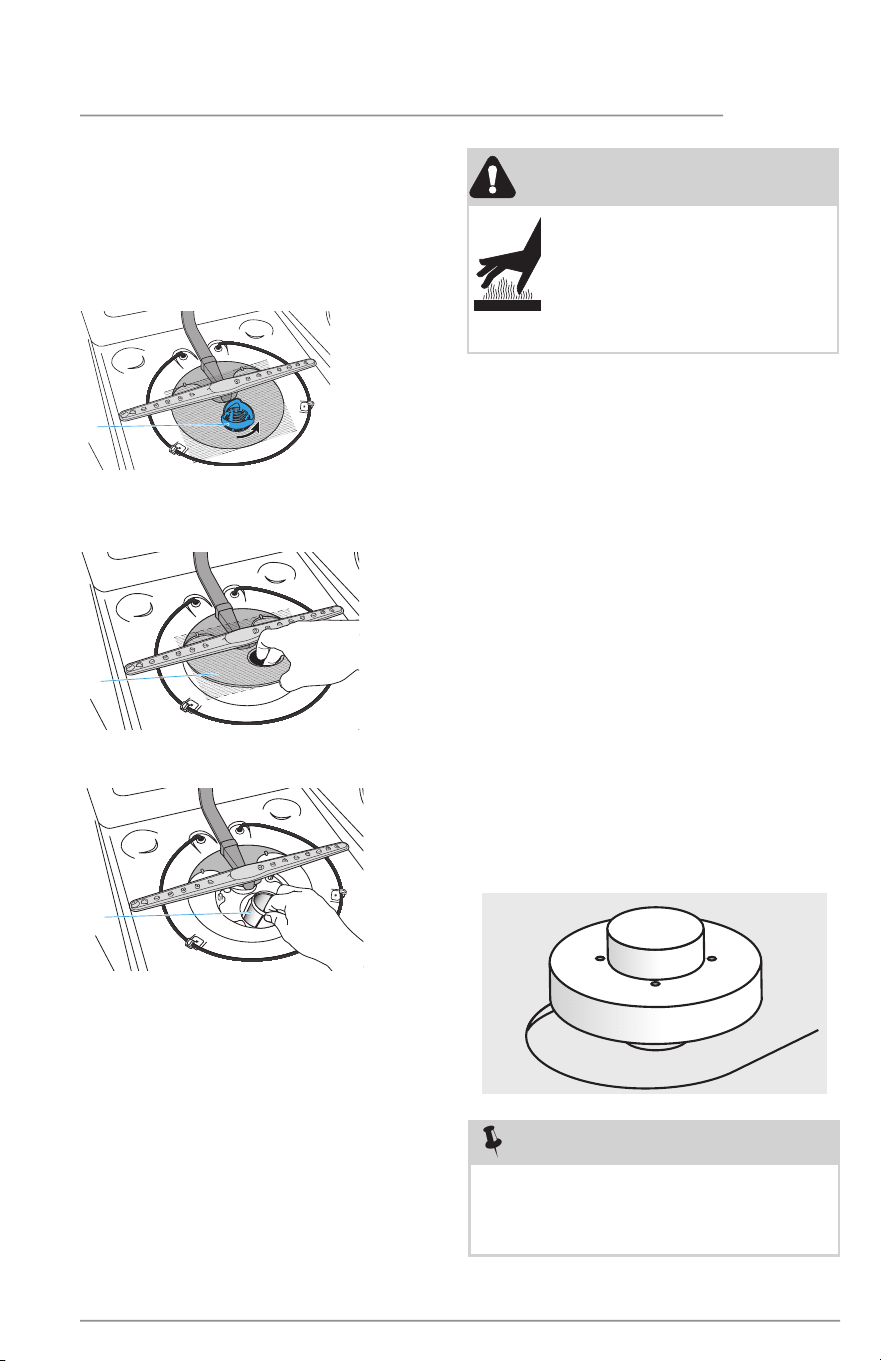
1.Remove the lower dishwasher rack.
2.Rotate the Cylinder filter
counterclockwise a quarter turn and lift
up to remove.
WARNING
Burn Hazard
Allow heating element to
cool before cleaning the
interior.
Failure to do so can result in
burns.
NOTE
Hard water may cause lime deposit
buildup on the interior of the
dishwasher. For cleaning instructions
see “Removing Spots and film” section.
a
a Cylinder
Filter
3.Empty the Cylinder filter and rinse it
under running water.
4.Remove the Fine filter.
5. Remove the Micro filter from the
bottom of the tub.
6.Inspect both the Fine filter and the
Micro filter for debris, and then clean
them by holding the filters under slow
running water.
NOTE: A stiff, plastic bristle brush may
be needed to remove some debris.
7.Reinstall the filters in reverse order
making sure the Cylinder filter locks
into place.
a
a Fine
Filter
a
a Micro
Filter
18
CARE AND CLEANING
Care of Drain Air Gap
If a drain air gap was installed for your
built-in dishwasher, check to make sure
it is clean so the dishwasher will drain
properly. A drain air gap is usually
mounted on countertop and can be
inspected by removing the cover. This
is not part of your dishwasher and is not
covered by warranty.
Winterizing
A dishwasher left in an unheated place
should be protected from freezing. Have
a qualified person do the following:
To Restore Service:
1. Direct water line discharge into a
pan and open the valve to flush the
line.
2. Reconnect the water, drain, and
electrical power supply.
3. Turn on water and electrical power
supply.
4. Fill both detergent cups and run
dishwasher through a Heavy Wash
cycle.
5. Check connections to make sure
they do not leak.
To Disconnect Service:
1. Turn o electrical power to the
dishwasher at the supply source by
removing fuses or tripping circuit
breaker.
2. Shut o water supply
3. Place a pan under the inlet valve.
Disconnect water line from inlet
valve and drain into pan.
4. Disconnect drain line from pump
and drain water into pan.
CAUTION
Property Damage Hazard
Freezing temperatures may cause
water lines to rupture. Be sure all
supply lines to and circulating lines
within dishwasher are protected.
Failure to do so could result in property
damage.
NOTE
See Installation Instructions for more
details on disconnecting and restoring
service to your dishwasher.

19
TROUBLESHOOTING
Before calling for service, review this
list. It may save you both time and
expense. This list includes common
experiences that are not the result of
defective workmanship or material in your
dishwasher.
Food Soils Left on Dishes
• Choose another cycle for longer
washing time.
• Check rack loading section for
proper loading-avoid nesting items.
• Home water pressure may be too
low-should be 20 to 80 pounds per
square inch (psi).
• Check incoming water temperature.
It should be about 120° F (49° C).
(See Factors Affecting
Performance.)
• Check water hardness. For
extremely hard water, it may be
necessary to install a water softener.
(See Detergent Chart).
• Use Fresh Detergent.
• Make sure items are not blocking the
spray arms, preventing them from
rotating.
• Do not overload the dishwasher
(See Preparing and Loading Dishes).
• Check to verify that the glass trap is
maintained and installed properly
(See Care and Cleaning).
Dishes not Dry
• Select MaxDry or Eco Air dry
option.
• Make sure the rinse aid dispenser is
filled.
• Increase the discharge setting of
rinse aid. (See Rinse Aid).
• Check the incoming water
temperature. Be sure it is at least
120° F (49° C).
• Check for proper loading-avoid
nesting items.
• Cups with a concave bottom will
collect water. Load them at the far
left and right of the upper rack so
they will be held in a tilted position.
Glassware/Flatware Spotted or Cloudy
• Check water hardness. For extremely
hard water, it may be necessary
to install a water softener. (See
Detergent Chart).
• Water temperature may be low.
Avoid extremely low or high
temperatures. (See Factors Aecting
Performance.
• Avoid overloading and improper
loading. (See Preparing and Loading
Dishes).
• Use fresh detergent. Old detergent
is ineective.
• Make sure rinse aid dispenser is filled.
• Check to see that proper amount
of detergent is being used for cycle
selected. (See Detergent Dispenser).
• Home water pressure may be too
low-it should be 20 to 120 pounds
per square inch (psi).
Dishware Chipped
• Load with care and do not overload.
(See Preparing and Loading Dishes).
• Place delicate items in top rack.
• Place glasses securely against pins
and not over pins.
• Load items so they are secure and
don’t jar loose when moving racks
in and out. Move racks in and out
slowly.
• Make sure tall glasses and stemware
will clear top of tub when rack is
pushed in.
• Fine antique china and crystal should
be hand-washed.
• Containers, bowls, pots/pans, and
any dishware with concave surfaces
that can collect water should be
placed in the rack facing or angled
down so that water is able to drain
even from the lowest point.
• Plastic items may need to be towel
dried.

20
TROUBLESHOOTING
Etching
• Using too much detergent especially
in soft or softened water causes
damage that looks like a film but
cannot be removed.
• Adjust the amount of detergent
based on the water hardness. (Check
Detergent Chart).
• Lower the water temperature
by selecting one of the lower
temperature options.
Detergent Left in Cups
• Detergent may be old. Discard and
use fresh detergent.
• Be sure the dish load doesn’t block
spray from entering the detergent cup.
• Check to see if cycle has been
completed.
• Make sure items do not prevent the
detergent dispenser from opening.
Dishwasher Leaks
• Check that the door gasket is
pressed into its mounting channel,
reaches to the bottom of the tub and
does not extend beyond the end rib
so as to interfere with door closure.
• Spilled rinse aide can cause foam and
lead to overflowing. Wipe up any
spills with a damp cloth.
• Check to see that the dishwasher is
level. (See Installation Instructions).
• Avoid oversudsing by using the
correct amount of detergent
designed for automatic dishwashers.
• Check to see that dishwasher is level.
(See Installation Instructions).
Normal Sounds You Will Hear
• Normal sounds include water fill,
water spray, draining and motor
sounds.
• There is a noticeable change in sound
when the wash action switches
between the lower and middle spray
arm. This is normal since each spray
arm has its own sound.
• It is normal for the dishwasher to
pause (no sound) when the wash
action is switching between the lower
and middle spray arms.
Dishware Stained or Discolored
• Tea and coee can stain cups.
Remove the stains by hand washing
in a solution of 1/2 cup (120 ml)
bleach and one quart (1L) of warm
water. Rinse thoroughly.
• Iron deposits in water can cause a
yellow or brown film. A special filter
installed in the water supply line will
correct this problem. (See Removing
Spots and Film).
• Aluminum utensils can leave gray/
black marks when they rub against
other items. Load Properly.
• Certain high acid foods can cause
discoloration of stainless steel and
plastics if allowed to sit for a long
period. Use the Rinse Only cycle
or rinse by hand if not operating
dishwasher at once.
• Mixing stainless steel and silver
utensils in silverware basket can
cause pitting of the stainless steel
blades. Avoid mixing stainless steel
and silver.
Water in Bottom of Tub
• Water left in the tub bottom after
the cycle is complete is not normal.
If water remains in the bottom of
the tub, the dishwasher may not be
draining properly. (See Dishwasher
Does not Drain Properly).
Cycle Takes a Long Time
• The cycle may have been
automatically lengthened to reach
key temperatures due to some factor
such as a cool water supply or a large
load of dishes.
• Delay Start option may have been
selected.
• Choose lower temperature options to
shorten the cycle.
• Cycles that are soil-sensing adjust
automatically to assure a good wash
- heavier soils will elicit a longer cycle
response.

21
TROUBLESHOOTING
Dishwasher Won’t Run
• Check to see if circuit breaker is
tripped or if a fuse is blown.
• Make sure water supply is turned on.
• Check to see if cycle is set correctly.
(See Operating Instructions).
• Is dishwasher set for Delay Start
Option?
• Make sure START/Cancel button
is pressed after cycle has been
selected.
• Make sure door is closed and latched
immediately after pressing the
START/Cancel button
Dishwasher Won’t Fill
• Assure the water supply is turned on.
• Check that the overfill protector
moves up and down freely. (See
Overfill Protector section).
Dishwasher Does Not Drain Properly
• If unit is hooked up to a food waste
disposer, make sure the disposer is
empty.
• Assure the knockout plug has been
removed from inside the food waste
disposer inlet.
• Assure the drain hose isn’t kinked.
• Make sure cycle is complete, not in a
pause.
• Assure the glass trap is maintained
and installed properly assuring no
clogs (See Care and Cleaning).
Dishwasher has an Odor
• Soiled dishes left in dishwasher too
long can create an odor.
• There will be a “new” smell when first
installed. This is normal.
• Check to see if unit is draining
properly. (See Dishwasher Does Not
D
rain Properly).
Stains on Tub Interior
• Washing large amounts of dishware
with tomato based soil can cause a
pink/orange appearance. This will
not affect performance and
will
gradually fade over time. Pre-
rinsing will reduce the chance of
staining. Using no heat dry option
will lessen staining.
Opening the door during cycle
• If the dishwasher door is opened
while the unit is running, the START/
Cancel button must be pressed and
the door shut immediately to return
the unit to the selected cycle and
option, this must happen within 10
minutes for the unit to continue the
cycle.
Removing Spots and Film
Hard water can cause lime deposit
buildup on the interior of the dishwasher.
Dishes and glasses may also get spots
and film for a number of reasons. (See
Glassware/Flatware Spotted or Cloudy
section). To remove buildup, and film,
clean using the following instructions:
1. Load clean dishes and glasses in
normal manner. Do not load any
metal utensils or silverware.
2. Do not add detergent.
3. Select the NORMAL cycle. Press
ST
AR
T/Cancel button. Close the
door.
4. Allow dishwasher to run until
it starts the second water fill
(approximately 8 minutes).
5. Open the door
, pour 2 cups of
white vinegar into the bottom of
dishwasher
.
6. Press START/Cancel button. Close
the door and allow cycle to finish.
22
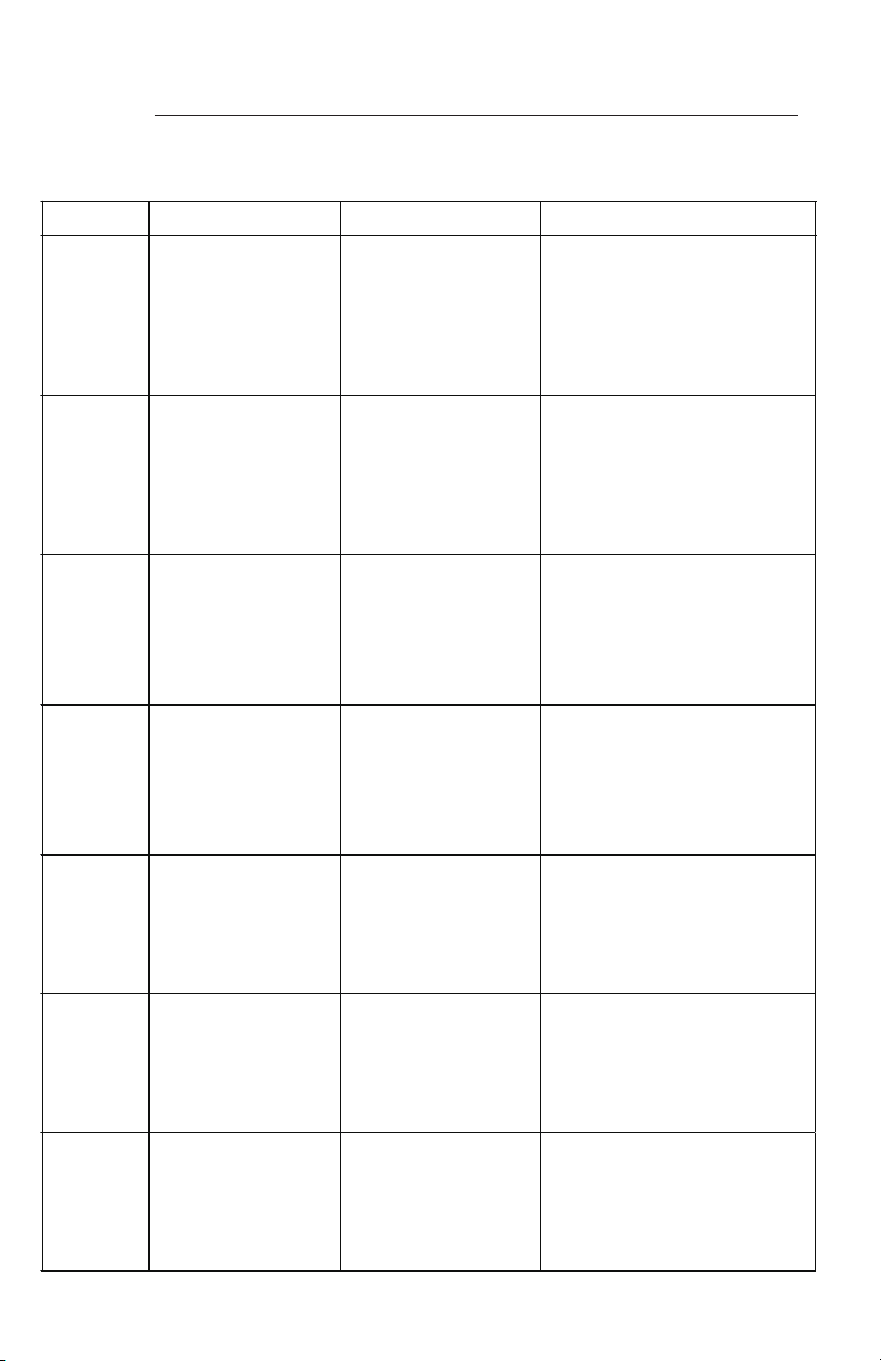
Error code and descprition
When occur
Error code
E1
E2
E3
E4
E6
E7
Ed
Symptom
Possible Causes
When the non-water switch
work in wash step at Pre-
wash phase.
All driving parts except for
the drain part are turned off
and draining is performed
for 120 seconds.(without
retry)
The water supply pressure is low. The
water supply valve is closed. the non-
water switch is broken. the wash
pump doesn’t work.
The Main PBA has some problems.
When the high-water float
switch is on for 5 seconds
in 5 �mes.
When the high water float
switch is on for 120
seconds.
All driving parts except for the
drain part are turnedoff and
draining isperformed for
120 seconds.(without retry)
When the hea�ng
con�nually for 60
minutes,yet s�ll not arrive
the an�cipated
temperature.
The high-water float switch is
broken. The water value is always
open(It cannot be closed).
The
Main PBA has some problems.
All driving parts except for
the drain part are turned off
and draining is performed
for 120 seconds.(without
retry)
The heater is broken.
The thermistor doesn't work
The Main PBA has some problems.
When the water leakage
sensor date is equal to less
than 3V for 2 seconds.
All driving parts except for
the drain part are turned off
and draining is performed
for 120 seconds.(without
retry)
When the thermistor is
under open-circuit failure.
The case brake fails to detect the
pulse.
The valve water is out of order.
The overflow sensor is broken.
There is a water leakage.
All driving parts except for
the drain part are turned off
and draining is performed
for 120 seconds.(without
retry)
The Thermistor is broken.
The main PBA fails to detect
the pulse.
When the thermistor is
under short-circuit failure.
All driving parts except for
the drain part are turned off
and draining is performed
for 120 seconds.(without
retry)
The Thermistor is broken.
The main PBA fails to detect the pulse.
Keep going remained cycle
When communica�ons
between the main PBA and
the sub PBA fails for 20
seconds
normally.
The main PBA or sub PBA is out of
order.
The communica�ons connec�on for the
main PBA or sub PBA is not properly
connected.
When error occurs, press Normal+Sanitize+Delay to power off and reset the
dishwasher.
23
Your appliance is covered by a one year limited warranty. For one year from your original date of
purchase, Electrolux will pay all costs for repairing or replacing any parts of this appliance that
prove to be defective in materials or workmanship when such appliance is installed, used and
maintained in accordance with the provided instructions.
Exclusions
This warranty does not cover the following:
1. Products with original serial numbers that have been removed, altered or cannot be readily
determined.
2. Product that has been transferred from its original owner to another party or removed
outside the USA or Canada.
3. Rust on the interior or exterior of the unit.
4. Products purchased “as-is” are not covered by this warranty.
5. Food loss due to any refrigerator or freezer failures.
6. Products used in a commercial setting.
7. Service calls which do not involve malfunction or defects in materials or workmanship, or
for appliances not in ordinary household use or used other than in accordance with the
provided instructions.
8. Service calls to correct the installation of your appliance or to instruct you how to use your
appliance.
9. Expenses for making the appliance accessible for servicing, such as removal of trim, cupboards,
shelves, etc., which are not a part of the appliance when it is shipped from the factory.
10. Service calls to repair or replace appliance light bulbs, air filters, water filters, other
consumables, or knobs, handles, or other cosmetic parts.
11. Surcharges including, but not limited to, any after hour, weekend, or holiday service calls,
tolls, ferry trip charges, or mileage expense for service calls to remote areas, including the
state of Alaska.
12. Damages to the finish of appliance or home incurred during installation, including but not
limited to floors, cabinets, walls, etc.
13. Damages caused by: services performed by unauthorized service companies; use of parts
other than genuine Electrolux parts or parts obtained from persons other than authorized
service companies; or external causes such as abuse, misuse, inadequate power supply,
accidents, fires, or acts of God.
DISCLAIMER OF IMPLIED WARRANTIES; LIMITATION OF REMEDIES
CUSTOMER’S SOLE AND EXCLUSIVE REMEDY UNDER THIS LIMITED WARRANTY SHALL BE
PRODUCT REPAIR OR REPLACEMENT AS PROVIDED HEREIN. CLAIMS BASED ON IMPLIED
WARRANTIES, INCLUDING WARRANTIES OF MERCHANTABILITY OR FITNESS FOR A PARTICULAR
PURPOSE, ARE LIMITED TO ONE YEAR OR THE SHORTEST PERIOD ALLOWED BY LAW, BUT NOT
LESS THAN ONE YEAR. ELECTROLUX SHALL NOT BE LIABLE FOR CONSEQUENTIAL OR INCIDENTAL
DAMAGES SUCH AS PROPERTY DAMAGE AND INCIDENTAL EXPENSES RESULTING FROM ANY
BREACH OF THIS WRITTEN LIMITED WARRANTY OR ANY IMPLIED WARRANTY. SOME STATES AND
PROVINCES DO NOT ALLOW THE EXCLUSION OR LIMITATION OF INCIDENTAL OR CONSEQUENTIAL
DAMAGES, OR LIMITATIONS ON THE DURATION OF IMPLIED WARRANTIES, SO THESE LIMITATIONS
OR EXCLUSIONS MAY NOT APPLY TO YOU. THIS WRITTEN WARRANTY GIVES YOU SPECIFIC LEGAL
RIGHTS. YOU MAY ALSO HAVE OTHER RIGHTS THAT VARY FROM STATE TO STATE.
If You Need Service
Keep your receipt, delivery slip, or some other appropriate payment record to establish the
warranty period should service be required. If service is performed, it is in your best interest
to obtain and keep all receipts. Service under this warranty must be obtained by contacting
Electrolux at the addresses or phone numbers below.
This warranty only applies in the USA and Canada. In the USA, your appliance is warranted by
Electrolux Major Appliances North America, a division of Electrolux Home Products, Inc. In Canada,
your appliance is warranted by Electrolux Canada Corp. Electrolux authorizes no person to change or
add to any obligations under this warranty. Obligations for service and parts under this warranty must
be performed by Electrolux or an authorized service company. Product features or specifications as
described or illustrated are subject to change without notice.
USA
1-800-374-4432
Frigidaire
10200 David Taylor Drive
Charlotte, NC 28262
Canada
1.800.265.8352
Electrolux Canada Corp.
5855 Terry Fox Way
Mississauga, Ontario, Canada
L5V 3E4
LIMITED WARRANTY

welcome
home
Frigidaire.com
1-800-374-4432
Frigidaire.ca
1-800-265-8352
owner support
accessories
service
Our home is your home. Visit us if you
need help with any of these things:
registration
(See your registration card
for more information.)