Scan QR code or enter the URL
below into your web browser:
MEEaudio.com/CA1vid
SETUP GUIDE
Bluetooth Wireless Audio Transmitter
for AirPods
®
and Other Headphones
AIR
POWERED BY
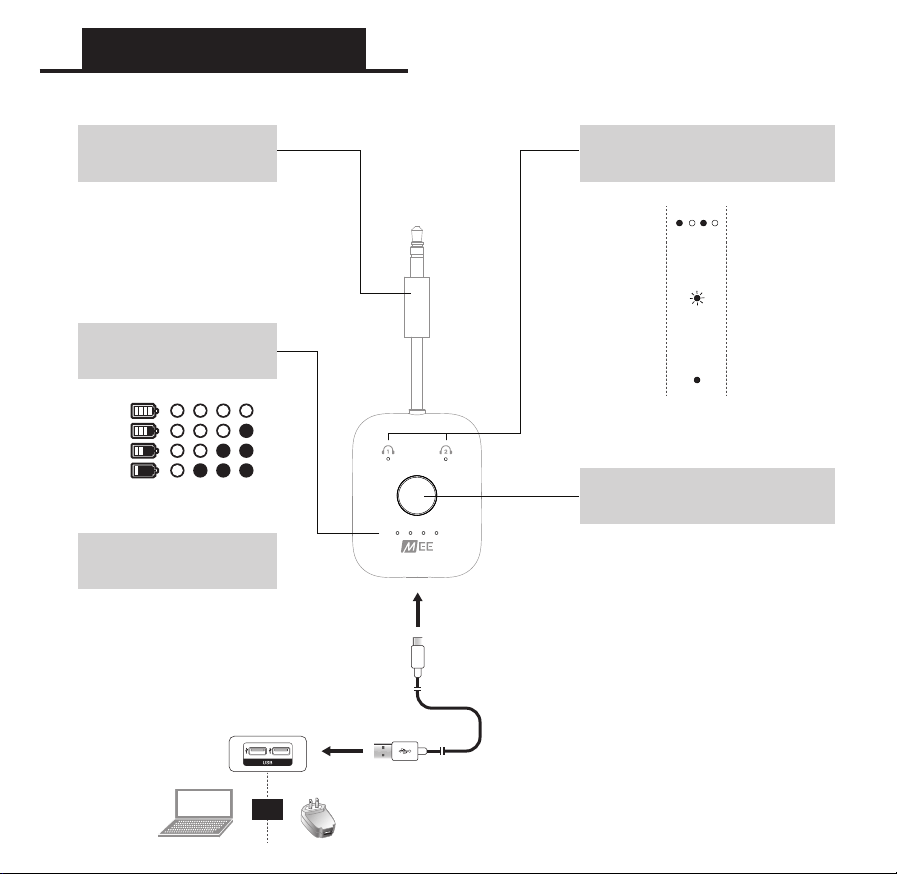
Product Overview
Plug the charging cable
into the Connect Air and
a USB charging port
Charging time: 2 hours
USB-C
CHARGING PORT
100%
75%
50%
25%
BATTERY
INDICATOR LIGHTS
OR
Blue & Red
Alternating
Blinking
Blue
Solid Blue
MULTIFUNCTION
BUTTON
HEADPHONE
INDICATOR LIGHTS
Power On: HOLD 2 seconds
Bluetooth Pairing Mode: PRESS 2X
Check Battery Status: PRESS 1X
Power Off: HOLD 2 seconds
Bluetooth
Pairing Mode
Standby,
Ready to
Connect
Connected
3.5 MM
AUDIO CONNECTOR
Plug into an in-flight
entertainment system or
other 3.5 mm audio source

Other Headphones / Speakers
Consult the user manual of your Bluetooth
headphones or speakers for instructions on
putting them into pairing mode
To pair the Connect Air with your device, put them in pairing mode simultaneously. Once they are
both in pairing mode, they will pair and connect. Once connected, the Connect Air indicator light will
turn blue.
AirPods
Place AirPods in charging case
Open charging case lid
Press and hold the button on the
back of the charging case until
the light on the case flashes white
Note: Once paired, AirPods
charging case light turns solid
green
STEP 1 - Put Your Headphones / Speakers in Pairing Mode
STEP 2 - Put the Connect Air in Pairing Mode
Getting Started
PAIRING A 2ND HEADPHONE (OPTIONAL)
The Connect Air allows up
to two Bluetooth devices to
be connected at the same
time. After connecting the
first device, repeat the
pairing steps to connect
a second.
Note: Once the second
device is connected,
both headphone lights
on the Connect Air will
be solid blue.
SUBSEQUENT USE
The Connect Air will automatically reconnect to
previously paired headphones or speakers.
To reconnect, power on your headphones or
speakers first, then power on the Connect Air. A
solid blue headphone light on the Connect Air
indicates that a connection has been
established.
Press and hold the multifunction button for 2 seconds to power on
Double press the multifunction button to put the Connect Air in pairing mode
Once the Connect Air is in pairing mode, alternating red and blue lights will flash
The pairing process is complete once the
indicator light on the Connect Air turns solid blue
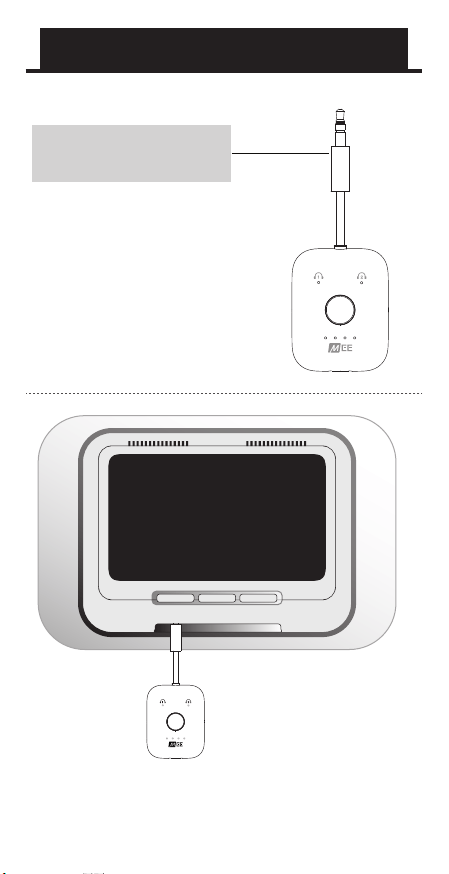
Plug the Connect Air into
an in-flight entertainment
system or any other
3.5 mm audio source
Increase volume on the entertainment system
if necessary, then use volume controls on your
headphones (if available) to adjust volume.
3.5 MM
AUDIO CONNECTOR
Connecting to Audio Source
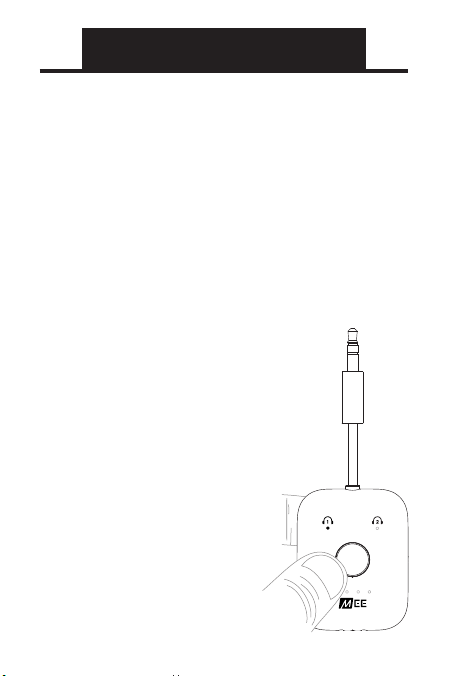
FACTORY RESET
A factory reset can be used to delete all
previous Bluetooth pairings from memory.
To perform a factory
reset, make sure the
Connect Air is powered
on, then press the
multifunction button
6 times until both blue
lights flash momentarily.
The Connect Air will then
go into pairing mode, as
indicated by the red and
blue flashing lights.
All previously paired
devices will be cleared from
memory and a new pairing
will need to be created.
Most issues can be solved by powering the
Connect Air off and then back on. When
reconnecting a set of previously-paired
headphones, power on the headphones first,
then power on the Connect Air.
Troubleshooting
PRESS
6x
FOR ADDITIONAL SUPPORT
QUESTIONS?
WE’RE HERE TO HELP!
Phone Support: 626-965-1008
Monday ~ Friday 9:00 am to 5:00 pm PST
Email Support: [email protected]
All emails are responded to within 2 business days
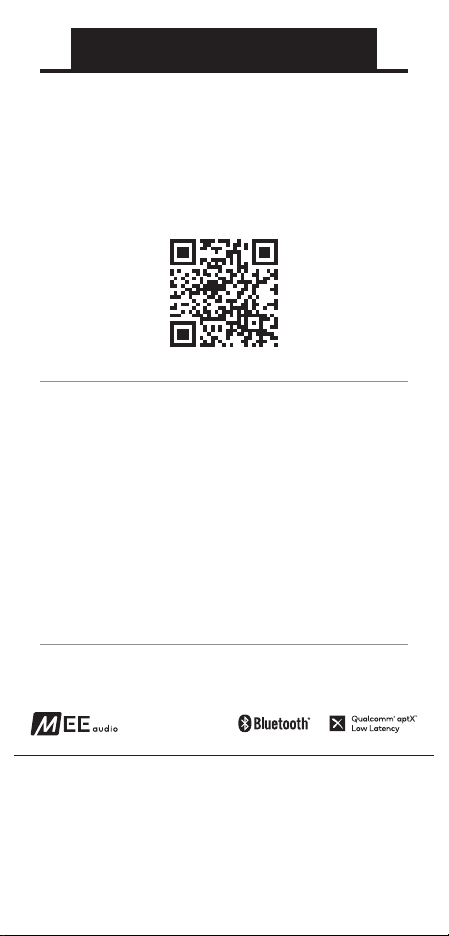
VIEW OUR VIDEO SETUP GUIDE
Scan QR code or enter the URL
below into your web browser:
MEEaudio.com/CA1Vid
MEE audio
and its logo are registered trademarks of S2E, Inc. All rights reserved.
The Bluetooth
®
word mark and logos are registered trademarks owned by Bluetooth SIG,
Inc. and any use of such marks by MEE audio is under license. Other trademarks and trade
names are those of their respective owners.
Qualcomm aptX is a product of Qualcomm Technologies, Inc. and/or its subsidiaries.
Qualcomm is a trademark of Qualcomm Incorporated, registered in the United States and
other countries. aptX is a trademark of Qualcomm Technologies International, Ltd.,
registered in the United States and other countries.
Apple and AirPods are trademarks of Apple Inc., registered in the U.S. and other countries
POWERED BY

WARRANTY
MEE audio products purchased from authorized resellers are covered by a 1-year manufacturer
warranty. For more information, contact your local MEE audio dealer or visit
MEEaudio.com/Support
FCC RULES
This equipment has been tested and found to comply with the limits for a Class B digital
device, pursuant to part 15 of the FCC Rules. These limits are designed to provide reasonable
protection against harmful interference in a residential installation. This equipment generates,
uses and can radiate radio frequency energy and, if not installed and used in accordance with
the instruction manual, may cause harmful interference to radio communications.
However, there is no guarantee that interference will not occur in a particular installation. If this
equipment does cause harmful interference to radio or television reception, which can be
determined by turning the equipment off and on, the user is encouraged to try to correct the
interference by one or more of the following measures:
Relocate the receiving antenna.
Increase the separation between equipment and receiver.
Connect the equipment into an outlet on a circuit different from that to which the receiver is
connected.
Consult the dealer or an experienced radio/TV technician for help.
•
•
•
•
DISPOSAL AND RECYCLING
Dispose of this product in accordance with all local laws and regulations. Because this product
contains electronic components and a battery, it must be disposed of separately from
household waste. Contact local authorities to learn about disposal and recycling options.
COMPLIANCE INFORMATION
This device complies with part 15 of the FCC Rules. Operation is subject to the following two
conditions: (1) This device may not cause harmful interference, and (2) this device must accept any
interference received, including interference that may cause undesired operation.
•
•
•
•
•
•
WARNINGS
Using headphones at high volumes for extended periods of time will result in permanent
hearing damage. It is advised you keep volume levels moderate to low at all times for your
safety. Turn the volume all the way down after connecting your earphones, then gradually
increase the volume until you reach a comfortable listening level. Do not use headphones while
driving a car, cycling, operating machinery, or performing other activities that require hearing
surrounding sounds.
Keep the device and packaging out of reach of children.
This device is designed and manufactured to operate within its defined design limits. Misuse
may result in electric shock or fire. Read and follow these instructions carefully.
If submersed in water, do not turn the device on until completely dried. Note: liquid
submersion voids the warranty.
Danger of explosion or fire if batteries are damaged. Keep away from direct sunlight, naked
flames, flammable gasses, or heat sources such as radiators or stoves
Battery performance will be severely decreased when stored in extreme temperatures: below
-10°C/14°F or above 45°C/113°F including direct sunlight
Do not use around flammable gasses as fire or explosion may occur.
There are no user replaceable/reparable parts in the device. Disassembling it will void your
warranty.
Only use attachments/accessories specified by the manufacturer
Changes or modifications to this unit not expressly approved by MEE audio could void the
user’s authority to operate the equipment.

Bluetooth Wireless Audio Transmitter
for AirPods
®
and Other Headphones
AIR
NEED HELP?
VIEW OUR VIDEO SETUP GUIDE
Scan QR code or enter the URL
below into your web browser:
MEEaudio.com/CA1Vid