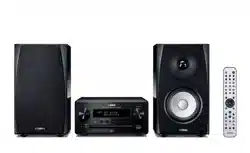
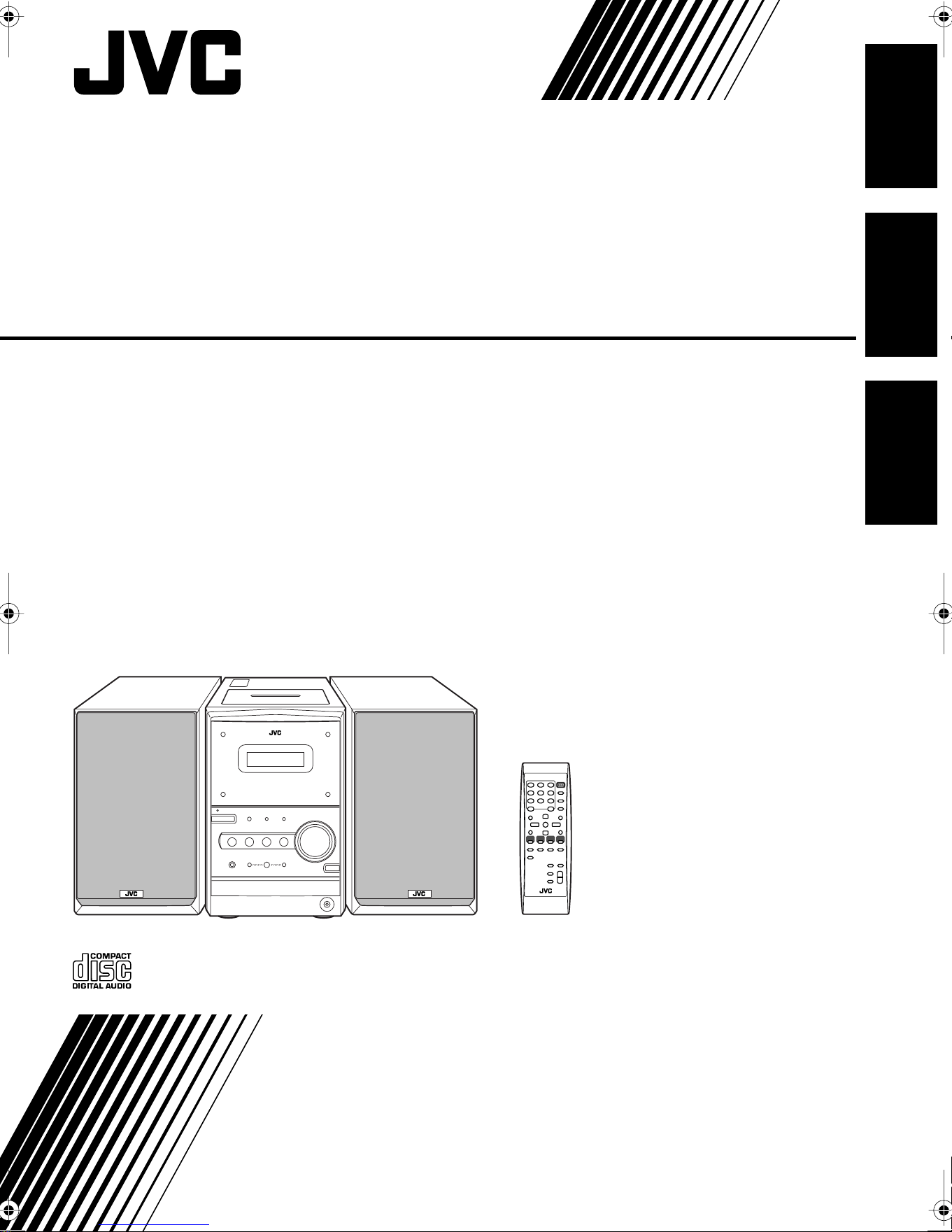
MICRO COMPONENT SYSTEM
SISTEMAS DE MICROCOMPONENTES
SISTEMA DE MICRO COMPONENTES
UX-P400
—
Consists of CA-UXP400 and SP-UXP400
—
Se compone de CA-UXP400 y SP-UXP400
—
Composto por CA-UXP400 e SP-UXP400
INSTRUCTIONS
MANUAL DE INSTRUCCIONES
INSTRUÇÕES
GVT0128-002A
[UW]
English
EnglishEspañol
Português
Downloaded from www.ManualsFile.com manuals search engine
G-1
Warnings, Cautions and Others
Avisos, precauciones y otras notas
Advertências, precauções e outras notas
CAUTION—STANDBY/ON button!
Disconnect the mains plug to shut the power off completely (all lamps and indications go off).
The STANDBY/ON button in any position does not disconnect the mains line.
• When the unit is on standby, the STANDBY/ON lamp lights in red.
• When the unit is turned on, the STANDBY/ON lamp lights in green.
The power can be remote controlled.
PRECAUCIÓN—Botón STANDBY/ON
Desconecte el enchufe tomacorriente para desconectar la alimentación completamente (se
apagan todas las lámparas e indicaciones). Ninguna posición del botón STANDBY/ON
conseguirá desconectar la red de alimentación eléctrica.
• Cuando la unidad está en espera, la lámpara STANDBY/ON se enciende en rojo.
• Cuando la unidad está encendida, la lámpara STANDBY/ON se enciende en verde.
La alimentación puede controlarse mediante control remoto.
CUIDADO—botão STANDBY/ON !
Desligue a ficha da tomada da parede para desligar completamente a alimentação (todas as
luzes e indicadores apagam-se). O botão STANDBY/ON , quer esteja premido ou solto,
não desliga a alimentação principal.
• Quando a unidade estiver em standby, a luz STANDBY/ON fica vermelha.
• Quando a unidade estiver ligada, a luz STANDBY/ON fica verde.
A alimentação pode ser controlada à distância.
Downloaded from www.ManualsFile.com manuals search engine
G-2
CAUTION
To reduce the risk of electrical shocks, fire, etc.:
1. Do not remove screws, covers or cabinet.
2. Do not expose this appliance to rain or moisture.
PRECAUCIÓN
Para reducir riesgos de choques eléctricos, incendio, etc.:
1. No extraiga los tornillos, los cubiertas ni la caja.
2. No exponga este aparato a la lluvia o a la humedad.
PRECAUÇÃO
Para reduzir riscos de choques elétricos, incêndio, etc.:
1. Não remova parafusos e tampas ou desmonte a caixa.
2. Não exponha este aparelho à chuva nem à umidade.
CAUTION
• Do not block the ventilation openings or holes.
(If the ventilation openings or holes are blocked by a
newspaper or cloth, etc., the heat may not be able to get
out.)
• Do not place any naked flame sources, such as lighted
candles, on the apparatus.
• When discarding batteries, environmental problems must
be considered and local rules or laws governing the
disposal of these batteries must be followed strictly.
• Do not expose this apparatus to rain, moisture, dripping or
splashing and that no objects filled with liquids, such as
vases, shall be placed on the apparatus.
PRECAUCIÓN
• No obstruya las rendijas o los orificios de ventilación.
(Si las rendijas o los orificios de ventilación quedan
tapados con un periódico, un trozo de tela, etc., no se
podrá disipar el calor).
• No ponga sobre el aparato ninguna llama al descubierto,
como velas encendidas.
• Cuando tenga que descartar las pilas, tenga en cuenta los
problemas ambientales y observe estrictamente los
reglamentos o las leyes locales sobre disposición de las
pilas.
• No exponga este aparato a la lluvia, humedad, goteos o
salpicaduras. Tampoco ponga recipientes conteniendo
líquidos, como floreros, encima del aparato.
PRECAUÇÃO
• Não obstrua as aberturas e orifícios de ventilação.
(Se os orifícios ou aberturas de ventilação estiverem
obstruídos por qualquer papel ou tecido, não haverá
circulação do ar quente.)
• Não coloque nenhum objeto com chamas, como velas
acesas, sobre o aparelho.
• Ao descartar as baterias, leve em consideração os
problemas que possam ser causados ao meio ambiente e
os regulamentos e leis locais e governamentais sobre
recolhimento dessas baterias devem ser rigorosamente
seguidos.
• Não exponha este aparelho à chuva, umidade, pingos ou
esguichos de água, nem coloque em cima do mesmo
qualquer tipo de recipiente que contenha líquidos, como
por exemplo vasos.
Downloaded from www.ManualsFile.com manuals search engine
G-3
IMPORTANT FOR LASER PRODUCTS
1. CLASS 1 LASER PRODUCT
2.
CAUTION:
Do not open the top cover. There are no user serviceable parts inside the unit; leave all servicing to qualified service
personnel.
3.
CAUTION:
Visible and invisible laser radiation when open and interlock failed or defeated. Avoid direct exposure to beam.
4. REPRODUCTION OF LABEL: CAUTION LABEL, PLACED INSIDE THE UNIT.
IMPORTANTE PARA PRODUCTOS LÁSER
1. PRODUCTO LÁSER CLASE 1
2.
PRECAUCIÓN:
No abra la tapa superior. En el interior de la unidad no hay piezas que pueda reparar el usuario; encargue el
servicio a personal técnico cualificado.
3.
PRECAUCIÓN:
Radiación láser visible e invisible en caso de apertura o con interbloqueo averiado o defectuoso. Evite la
exposición directa a los haces.
4. REPRODUCCIÓN DE LA ETIQUETA: ETIQUETA DE PRECAUCIÓN, COLOCADA EN EL INTERIOR DE LA UNIDAD.
PARA PRODUTOS LASER, IMPORTANTE
1. PRODUTO LASER DE CLASSE 1
2.
PRECAUÇÃO:
não abrir a cobertura superior. Dentro da unidade não existem partes cuja manutenção tenha de ser feita pelo
usuário; deixe qualquer manutenção a cargo do pessoal de serviço qualificado.
3.
PRECAUÇÃO:
radiação laser visível e invisível quando se abre e com a conexão interna em falha ou frustrada. Evite a
exposição direta ao raio.
4. REPRODUÇÃO DE ETIQUETA: ETIQUETA DE AVISO SITUADA NO INTERIOR DA UNIDADE.
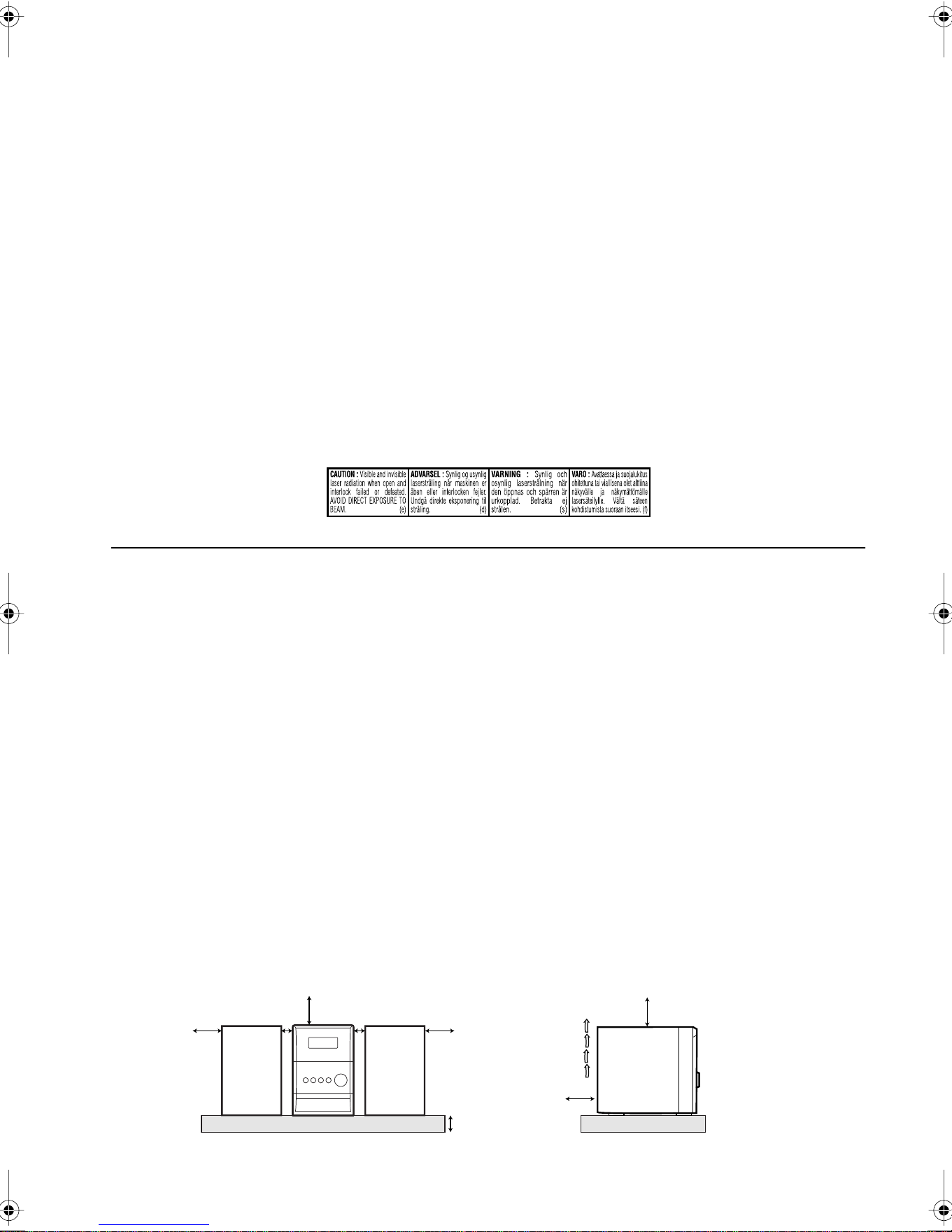
Caution: Proper Ventilation
To avoid risk of electric shock and fire, and to prevent damage, locate the apparatus as follows:
1. Front: No obstructions and open spacing.
2. Sides/Top/Back: No obstructions should be placed in the areas shown by the dimensions below.
3. Bottom: Place on the level surface. Maintain an adequate air path for ventilation by placing on a stand with a height of 10 cm or
more.
Precaución: Ventilación correcta
Para evitar el riesgo de descargas eléctricas e incendio y prevenir posibles daños, instale el equipo en un lugar que
cumpla los siguientes requisitos:
1. Parte frontal: Sin obstrucciones, espacio abierto.
2. Lados/parte superior/parte posterior: No debe haber ninguna obstrucción en las áreas mostradas por las
3. Parte inferior: Sitúe el equipo sobre una superficie nivelada. Mantenga un espacio adecuado para permitir el paso del aire y
una correcta ventilación, situando el equipo sobre un soporte de 10 o más cm de allura.
Precaução: Ventilação adequada
Para evitar riscos de choques elétricos e incêndios, e prevenir avarias, instale o aparelho como segue:
1. Parte frontal: Sem obstruções e espaços abertos.
2. Partes laterais/tampa/posterior: Nenhuma obstrução deverá ser colocada entre as áreas cujas dimensões são indicadas
abaixo.
3. Parte inferior: Instale-o sobre uma superfície plana. Deverá ser mantido espaço suficiente para a ventilação se este for instalado
numa posição que tenha uma altura de 10 cm ou mais.
10 cm
15 cm
1 cm
15 cm
15 cm
1 cm
15 cm
15 cm
CA-UXP400CA-UXP400 SP-UXP400SP-UXP400
Downloaded from www.ManualsFile.com manuals search engine
1
English
Contents
Introduction........................................................ 2
Precautions..........................................................................2
How to Read This Manual..................................................2
Getting Started ................................................... 3
Step 1: Unpack....................................................................3
Step 2: Prepare the Remote Control ...................................3
Step 3: Hook Up ................................................................ 4
Before Operating the System ............................ 7
Daily Operations—Playback............................. 8
Listening to the Radio.........................................................9
Playing Back a Disc..........................................................10
Playing Back a Tape .........................................................11
Daily Operations—Sound &Other
Adjustments...................................................... 12
Adjusting the Volume.......................................................12
Adjusting the Sound .........................................................12
Changing the Display Brightness ....................................13
Setting the Clock...............................................................13
Turning Off the Power Automatically..............................13
Advanced Disc Operations .............................. 14
Programming the Playing Order—Program Play .............14
Playing at Random—Random Play ..................................15
Playing Repeatedly—Repeat Play....................................16
Prohibiting Disc Ejection—Child Lock............................16
Advanced Tape Operations............................. 17
Recording on a Tape.........................................................17
Synchronized Disc Recording ..........................................18
Timer Operations............................................. 19
Setting the Timer ..............................................................19
Additional Information ................................... 22
Learning More about This System ...................................22
Troubleshooting................................................................23
Maintenance......................................................................23
Specifications....................................................................24
Parts Index ........................................................................24
Downloaded from www.ManualsFile.com manuals search engine

2
English
Introduction
Precautions
Installation
• Install in a place which is level, dry and neither too hot nor
too cold—between 5°C and 35°C.
• Install the System in a location with adequate ventilation to
prevent internal heat buildup inside the System.
• Leave sufficient distance between the System and the TV.
• Keep the speakers away from the TV to avoid interference
with TV.
Power sources
• When unplugging the System from the wall outlet, always
pull on the plug, not the AC power cord.
Moisture condensation
Moisture may condense on the lenses inside the System in
the following cases:
• After starting to heat the room
• In a damp room
• If the System is brought directly from a cold to a warm
place
Should this occur, the System may malfunction. In this case,
leave the System turned on for a few hours until the moisture
evaporates, unplug the AC power cord, then plug it in again.
Others
• Should any metallic object or liquid fall into the System,
unplug the AC power cord and consult your dealer before
operating any further.
• If you are not going to operate the System for an extended
period of time, unplug the AC power cord from the wall
outlet.
If anything goes wrong, unplug the AC power cord and
consult your dealer.
How to Read This Manual
To make this manual as simple and easy-to-understand as
possible, we have adapted the following methods:
• Button and control operations are explained as listed in the
table below. In this manual, the operations using the
remote control is mainly explained; however, you can use
the buttons and controls on the main unit if they have the
same (or similar) name and marks.
•
Some related tips and notes are explained later in the
sections “Learning More about This System” and
“Troubleshooting,” but not in the same section
explaining the operations.
If you want to know more
about the functions, or if you have a doubt about the
functions, go to these sections and you will find the
answers.
DO NOT install the System in a location near
heat sources, or in a place subject to direct
sunlight, excessive dust or vibration.
DO NOT handle the AC power cord with wet
hands.
DO NOT disassemble the System since there
are no user serviceable parts inside.
Indicates that you press the button
briefly
.
Indicates that you press the button
briefly and repeatedly
until an
option you want is selected.
Indicates that you press one of the
buttons.
Indicate that you
press and hold
the
button for specified seconds.
• The number inside the arrow
indicates the period of press (in this
example, 2 seconds).
• If no number is inside the arrow,
press and hold until the entire
procedure is complete or until you
get a result you want.
Indicate that you turn the control
toward the specified direction(s).
Indicates that this operation is only
possible using the remote control.
Indicates that this operation is only
possible using the buttons and controls on
the main unit.
2 sec.
Remote
ONLY
Main Unit
ONLY
Downloaded from www.ManualsFile.com manuals search engine
3
English
Getting Started
Step
1
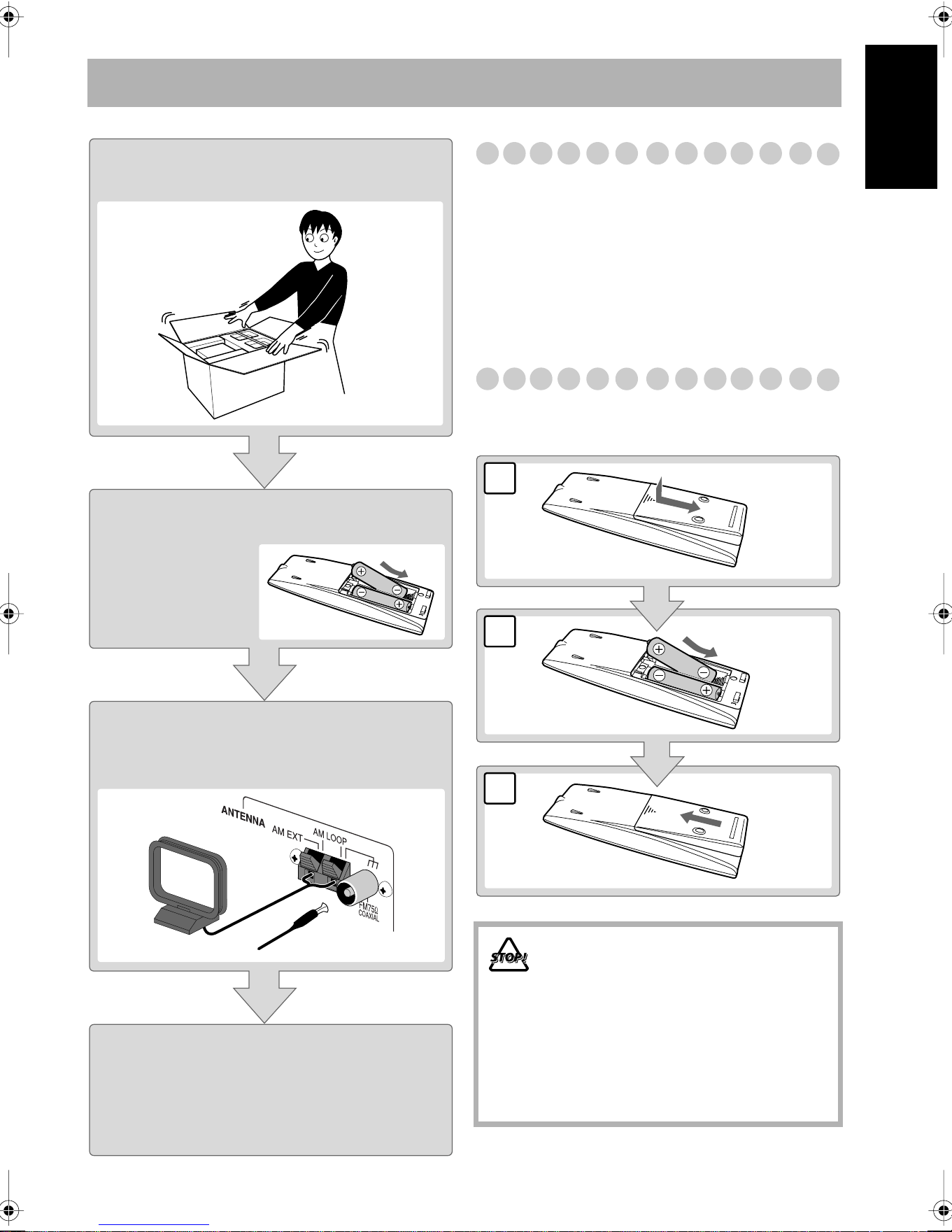
: Unpack
After unpacking, check to be sure that you have all the
following items. The number in parentheses indicates the
quantity of each piece supplied.
• FM antenna (1)
• AM loop antenna (1)
• Remote control (1)
• Batteries (2)
• AC plug adaptor (1)
If any item is missing, consult your dealer immediately.
Step
2
: Prepare the Remote Control
Insert the batteries into the remote control by matching the
polarity (+ and –) correctly.
Step 1:Unpack the package and
check the accessories.
Step 2: Prepare the remote control.
Step 3: Hook up the components such
as AM/FM antennas, speakers,
etc. (see pages 4 to 6).
Finally plug the AC power cord.
• If the wall outlet does not match the AC plug, use the
supplied AC plug adaptor.
Now you can operate the System.
• DO NOT use an old battery together with a
new one.
• DO NOT use different types of batteries
together.
• DO NOT expose batteries to heat or flame.
• DO NOT leave the batteries in the battery
compartment when you are not going to use
the remote control for an extended period of
time. Otherwise, the remote control will be
damaged from battery leakage.
3
2
1
R6(SUM-3)/AA(15F)
Downloaded from www.ManualsFile.com manuals search engine
4
English
Step
3
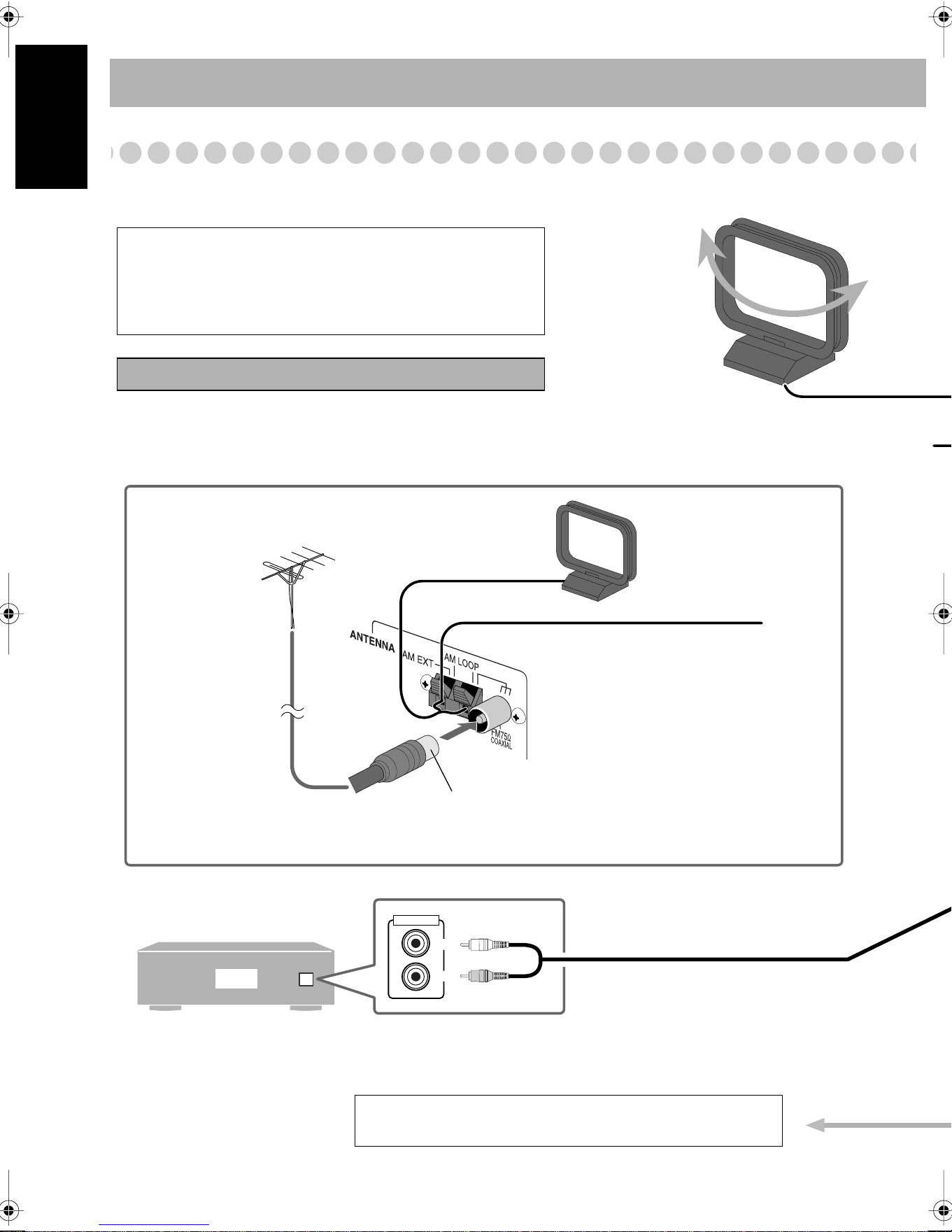
: Hook Up
If you need more detailed information, see page 6.
AUX
LEFT
RIGHT
AUDIO OUT
Illustrations of the input/output terminals below are typical
examples.
When you connect other components, refer also to their
manuals since the terminal names actually printed on the rear
may vary.
Turn the power off to all components before connections.
Audio cord (not supplied)
To a wall outlet
Plug the AC power cord only after all connections are complete.
VCR, etc.
Disconnect the supplied FM antenna, and connect to an outdoor FM
antenna using a 75 Ω wire with coaxial type connector (IEC or DIN45325).
Vynile-covered wire (not supplied)
Extend it horizontally.
AM loop antenna
Keep it connected.
For better FM/AM reception
Outdoor FM
antenna
(not supplied)
White
Red
AM loop antenna (supplied)
Turn it until the best reception is obtained.
Downloaded from www.ManualsFile.com manuals search engine
5
English
PUSH OPEN
AUTO REVERSE
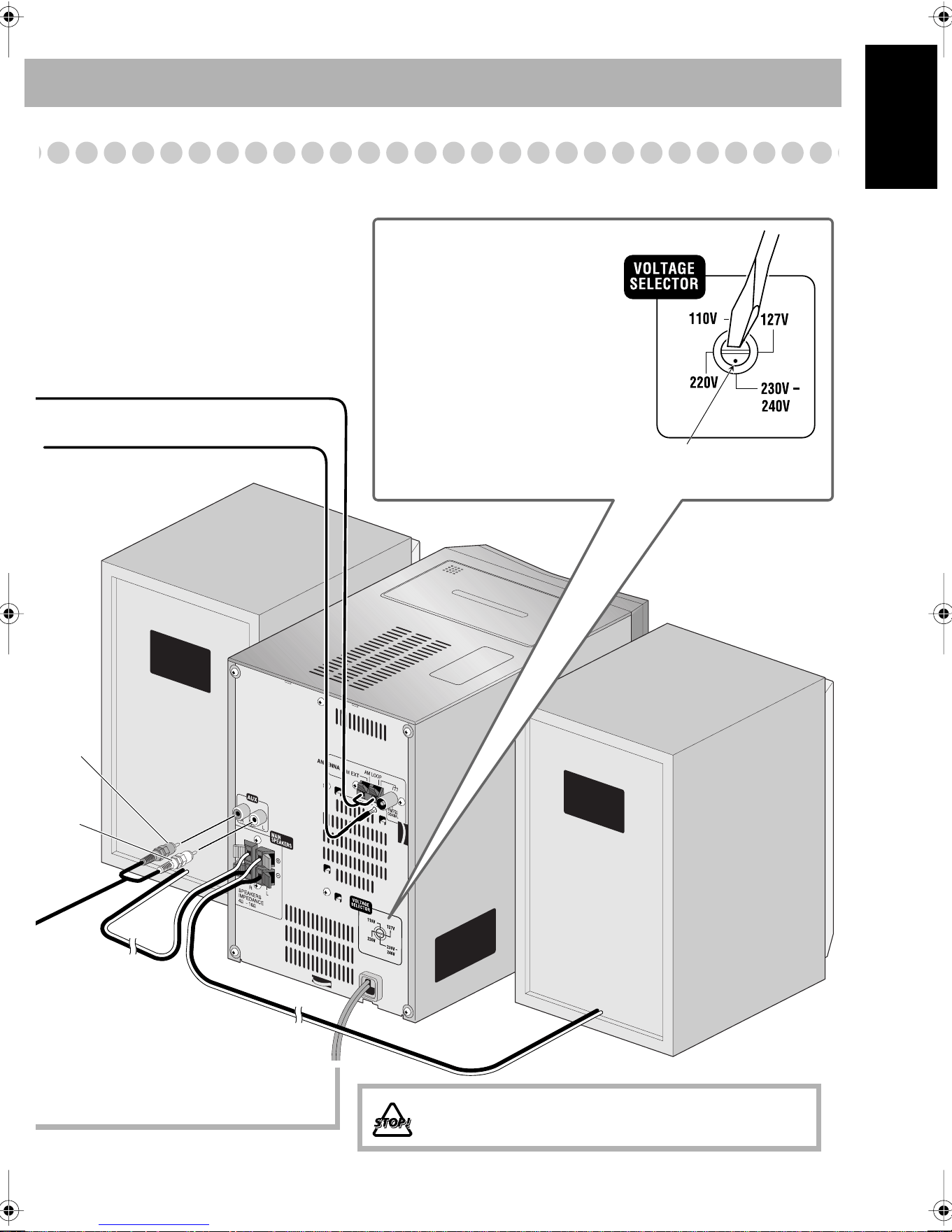
FM antenna (supplied)
Extend it so that you can obtain the best
reception.
Red
White
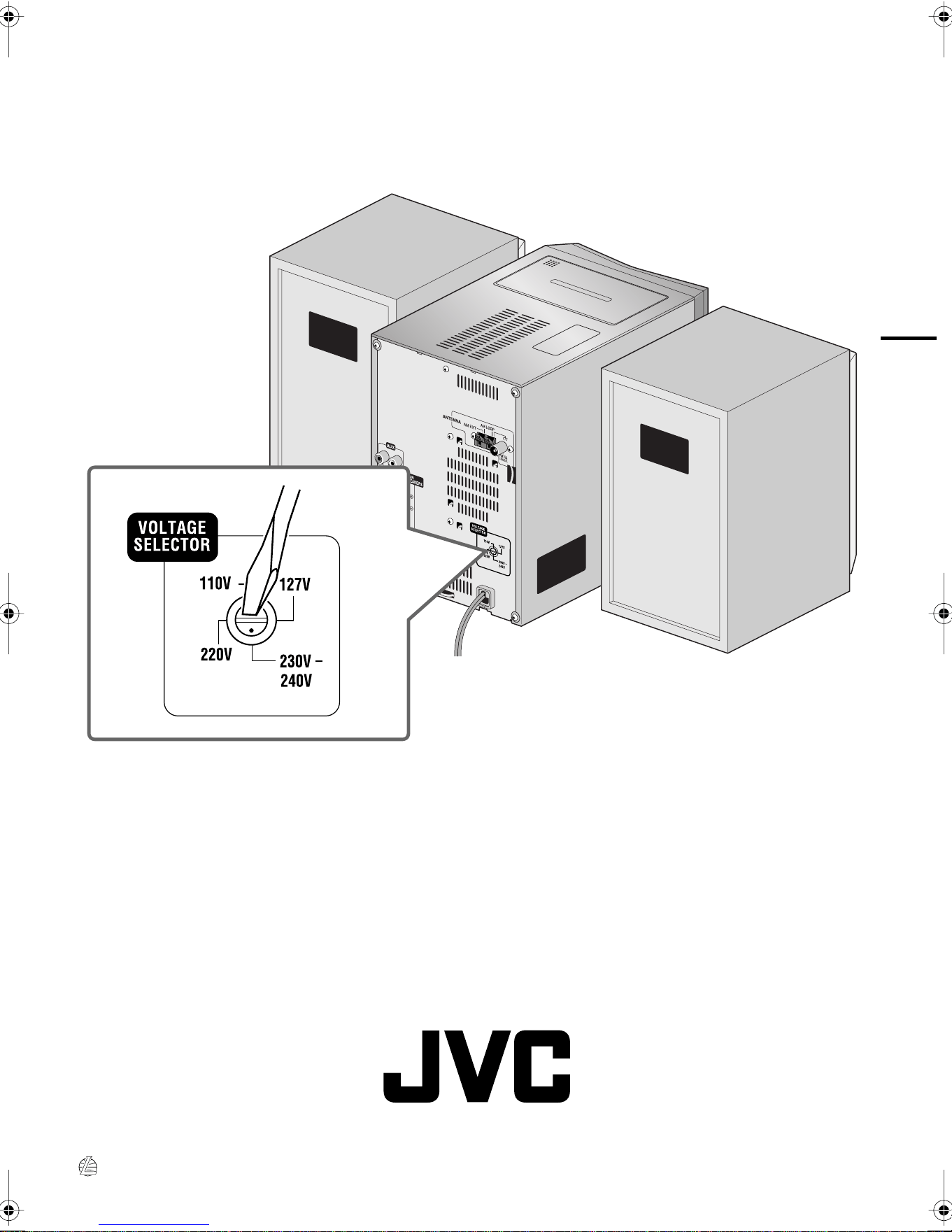
DO NOT plug in before setting the voltage selector and all
connection procedures are complete.
Before plugging in the System
Set the correct voltage for your area
with the voltage selector on the rear.
Use a screwdriver to rotate the voltage
selector so that the voltage marker is
pointing at the same voltage as where
you are plugging in the unit. (See also
the back cover page.)
Voltage marker
Downloaded from www.ManualsFile.com manuals search engine
6
English
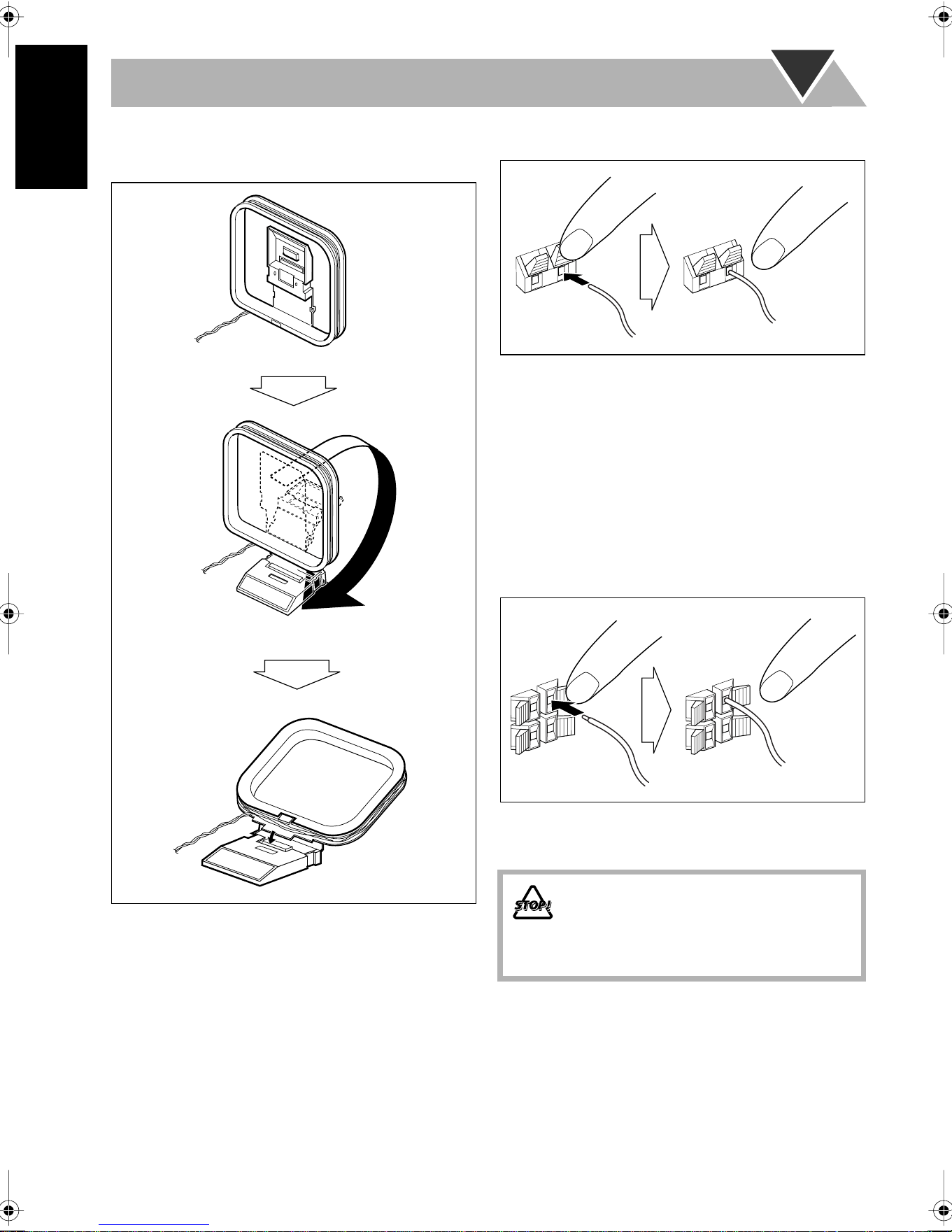
To assemble and connect the AM loop antenna
To assemble the AM loop antenna
To connect the AM loop antenna
• If the AM loop antenna wire or speaker cords are covered
with vinyl, remove the vinyl to expose the tip of the
antenna by twisting the vinyl.
• Make sure the antenna conductors do not touch any other
terminals, connecting cords and power cord. Also, keep the
antennas away from metallic parts of the System,
connecting cords, and the AC power cord. This could cause
poor reception.
To connect the speaker cords
Make sure the both speakers are connected correctly and
firmly.
When connecting the speaker cords, match the polarity of
the speaker terminals: Red cord to (+) and black cord to (–).
• DO NOT connect more than one speaker to
each terminal.
• DO NOT allow the conductor of the speaker
cords to be in touch with the metallic parts of
the System.
1 Hold
2 Insert
3 Release
1 Hold
2 Insert
3 Release
Downloaded from www.ManualsFile.com manuals search engine
7
English
Before Operating the System
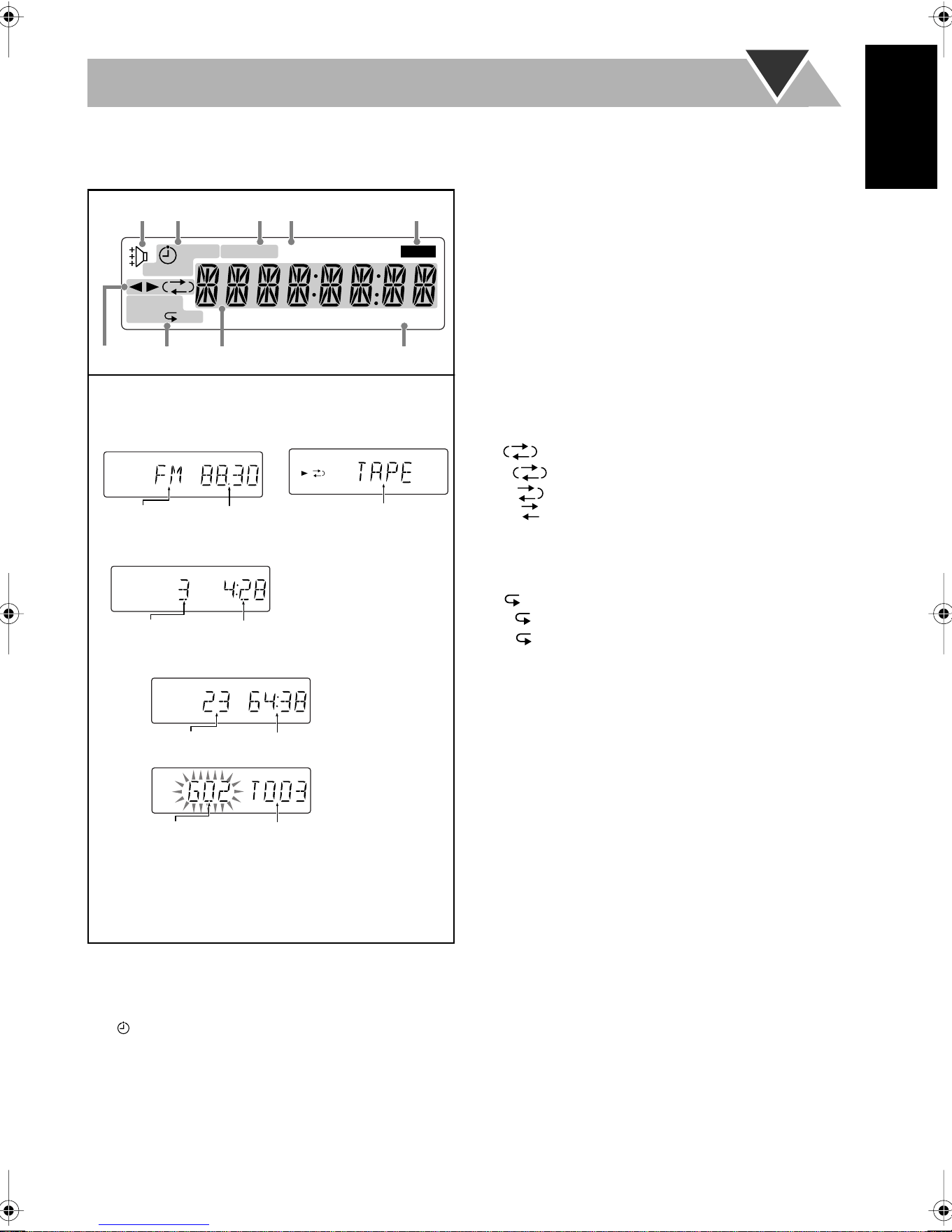
The indications on the display teach you a lot of things while you are operating the System.
Before operating the System, be familiar with when and how the indicator illuminates on the display.
1
Rhythm Ax indicator
• Lights when Rhythm Ax is activated.
2
Timer indicators
• : lights when Daily Timer or Recording Timer stands
by; flashes while setting or working.
• 1/2/3: lights when a Daily Timer (1, 2, or 3) stands by;
flashes while setting or working.
• REC: lights when the Recording Timer stands by; flashes
while setting or working.
• SLEEP: lights when the Sleep Timer is activated.
3
FM reception indicators
• MONO: lights while receiving an FM stereo station in
monaural.
• ST (stereo): lights while an FM stereo station with
sufficient signal strength is tuned in.
4
MP3 indicator
• Lights when an MP3 track is detected.
5
REC indicator
• Lights while recording.
6
Tape operation indicators
•
2
3
(tape direction):
– Lights to indicate the current tape running direction.
– Flashes slowly during playback and recording.
– Flashes quickly while rewinding a tape.
• (reverse mode):
– : tape play continues endlessly.
– : tape automatically reverses once.
– : tape play stops at the end of one side.
7
Disc operation indicators
• RANDOM: lights when Random Play mode is activated.
• PRGM (program): lights when Program Play mode is
activated.
•
(repeat)/
ALL:
– : lights when One Track Repeat is activated.
– : lights when All Track Repeat is activated.
8
Main display
9
A(auto). STANDBY indicator
• Lights when Auto Standby is activated.
• Flashes when disc or tape playback stops with Auto
Standby activated.
SLEEP
123 REC
RANDOM
PRGM ALL
A.STANDBY
MONO ST MP3 REC
12 34 5
67
8
9
RDS
ST
• While listening to radio:
Band
Frequency
• While selecting “TAPE”
or “AUX”:
Track number
Elapsed playing time
• While disc play is stopped:
Total track number
Total playing time
Group number Track number
CD:
MP3:
• While playing a CD/MP3*:
Source name
* When you start playing an MP3 disc, the group number,
track number, track name, (and ID3 Tag) will be shown
before the elapsed playing time appears.
Indications on the main display
ALL
Downloaded from www.ManualsFile.com manuals search engine
8
English
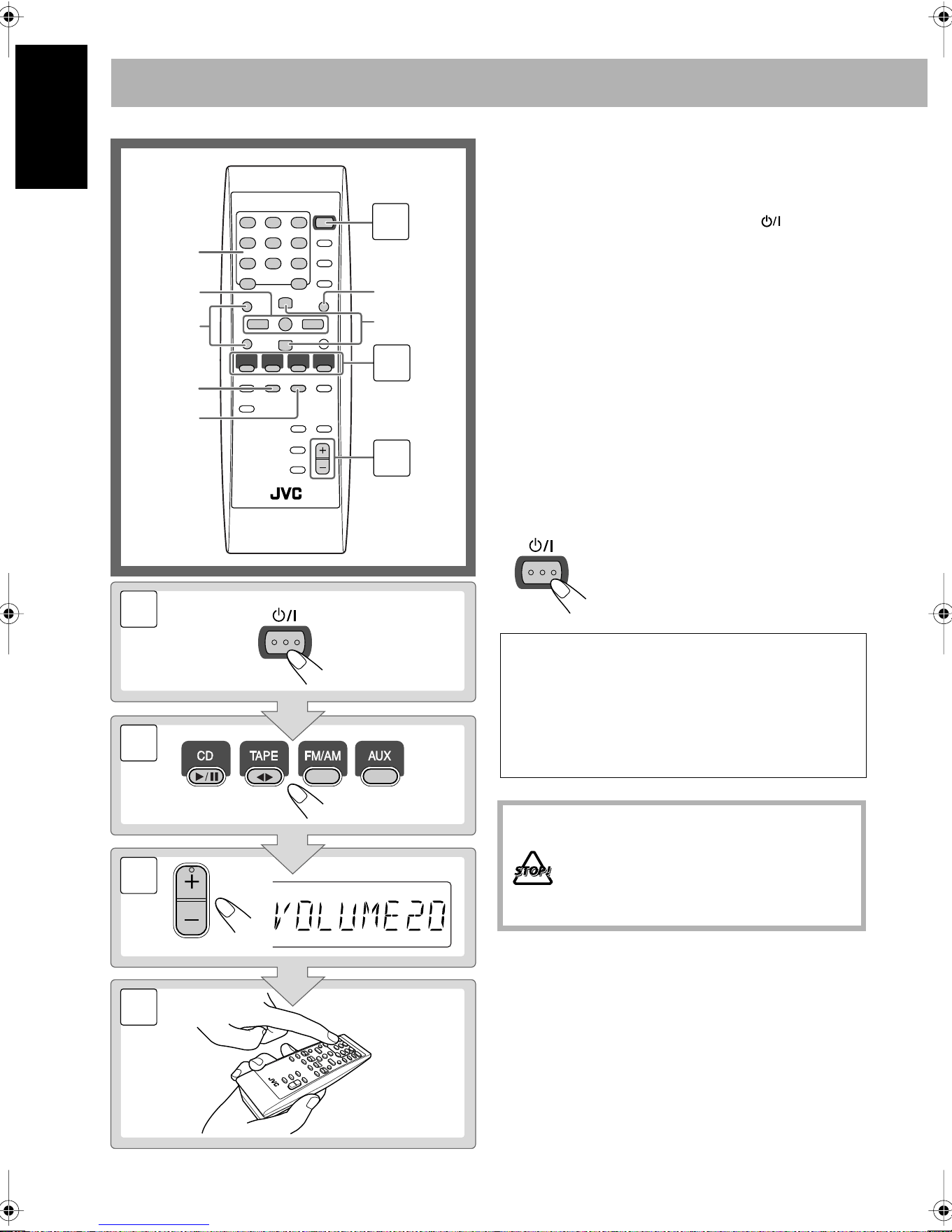
Daily Operations
—Playback
1
Turn on the power.
The STANDBY/ON lamp on the main unit lights in
green.
• Without pressing STANDBY/ON , the System
turns on by pressing one of the source selecting
buttons in the next step.
2
Select the source.
Playback automatically starts if the selected source is
ready to start.
• If you press AUX, start playback source on the
external component.
3
Adjust the volume.
4
Operate the target source as explained
later.
To turn off (stand by) the unit
2
1
3
PRESET UP
PRESET DOWN
GROUP UP
GROUP DOWN
4,7,¢
REV.
MODE
FM MODE
SET
10 keys
2
1
VOLUME
STANDBY/ON
3
4
The STANDBY/ON lamp on the main unit
lights in red.
• A small amount of power is always
consumed even while on standby.
For private listening
Connect a pair of headphones to the PHONES jack on the
main unit. The sound will no longer come out of the
speakers. Be sure to turn down the volume before
connecting or putting the headphones.
• Disconnecting the headphones will activate the
speakers again.
DO NOT turn off (stand by) the System with
the volume set to an extremely high level;
Otherwise, the sudden blast of sound can
damage your hearing, speakers and/or
headphones when you turn on the System or
start playback.
STANDBY/ON
Downloaded from www.ManualsFile.com manuals search engine
9
English
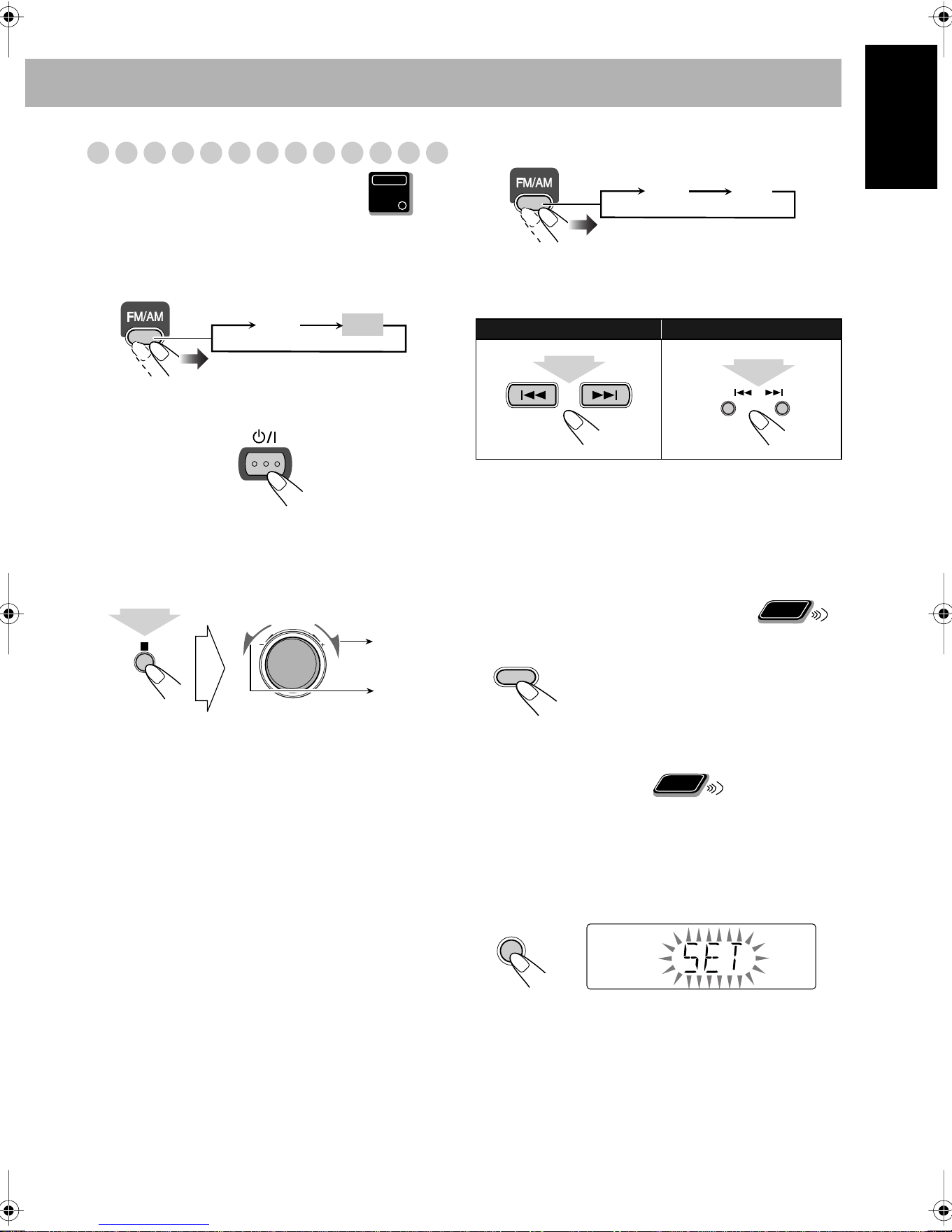
Listening to the Radio
To set the AM tuner interval spacing
Before operating the tuner, it is required to select the
appropriate AM space interval used for your area.
1
Select the AM band.
2
Turn off the power.
3
Select the appropriate AM space interval for your
area.
• You can only use the button and the control on the front
panel
.
To select the band (FM or AM)
To tune in to a station
While FM or AM is selected...
Frequency starts changing on the display.
When a station (frequency) with sufficient signal strength is
tuned in, the frequency stops changing.
•
When you repeatedly press the button, the frequency changes
step by step.
To stop searching manually,
press either button.
If the received FM station is hard to listen
To preset the stations
You can preset 30 FM and 15 AM stations.
1
Tune in to a station you want to preset.
• You can also store the monaural reception mode for FM
preset stations if selected (see above).
2
Activate the preset number entry mode.
• Finish the following process while the indication on the
display is flashing.
Main Unit
ONLY
FM AM
STANDBY/ON
10 K
(10 kHz interval)
9 K
(9 kHz interval)
VOLUME
While holding...
Remote control:
Main unit:
The MONO indicator lights on the display.
Reception will improve though stereo
effect is lost—Monaural reception mode.
To restore the stereo effect,
press the
button again (the MONO indicator goes
off).
FM AM
2 sec.
2 sec.
DOWN
UP
Remote
ONLY
FM
MODE
Remote
ONLY
SET
Downloaded from www.ManualsFile.com manuals search engine
10
English
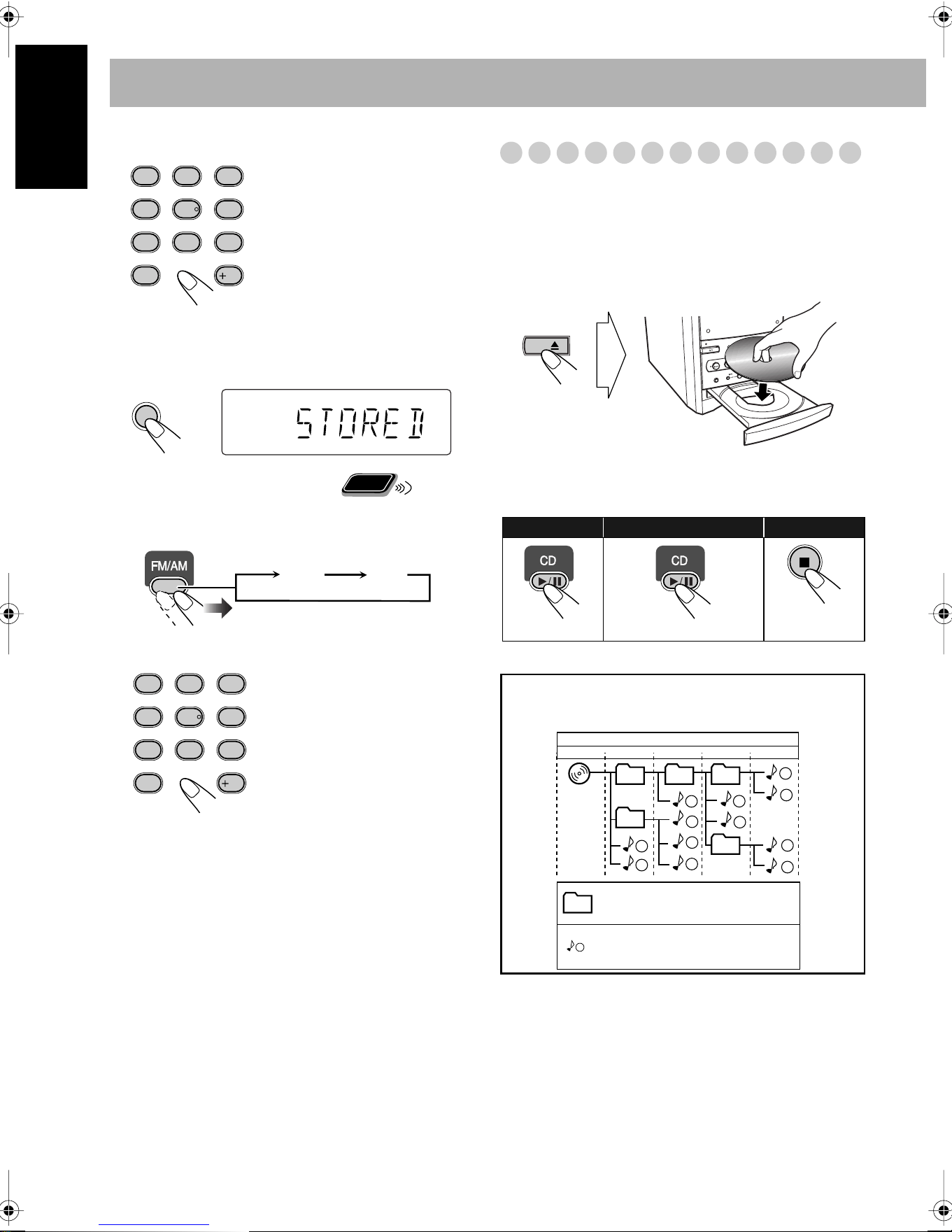
3
Select a preset number for the station you store.
• You can also use the PRESET UP/PRESET DOWN
buttons.
4
Store the station.
To tune in to a preset station
1
Select the band (FM or AM).
2
Select a preset number for the station you store.
Playing Back a Disc
This System can play back the following discs—regular CD
and CD-R/CD-RW (recorded either in the audio CD or MP3
format).
To insert a disc
You can insert a disc while playing another source.
To close the disc tray,
press 0
again.
• If you press 3
, disc tray closes automatically and playback
starts.
Examples:
To select preset number 5, press
5.
To select preset number 15,
press +10, then 5.
To select preset number 30,
press +10, +10, then 10.
• You can also use the
PRESET UP/PRESET
DOWN buttons.
1
4
7
10
2
5
8
3
6
9
10
SET
Remote
ONLY
FM AM
1
4
7
10
2
5
8
3
6
9
10
To start:
To pause: To stop:
To release, press again.
CD
1
1
2
3
10
11
12
4
5
6
7
8
9
01
01
02
03 04
05
Hierarchy
ROOT
Level 1 Level 2 Level 3 Level 4 Level 5
MP3 groups/tracks configuration
This System plays back MP3 tracks as follows.
Group with its play order
MP3 track with its play order
Downloaded from www.ManualsFile.com manuals search engine
11
English
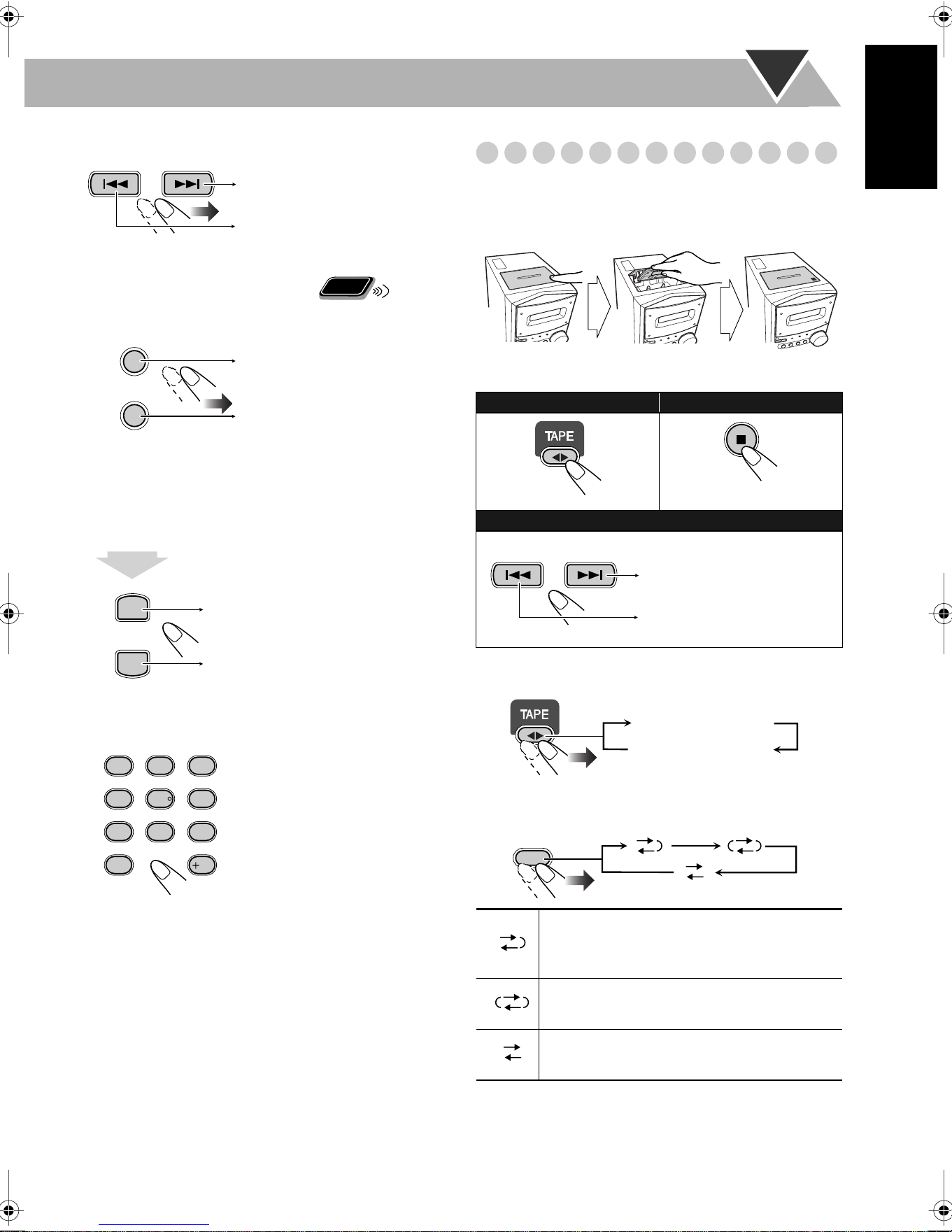
To select a track
To select a group (MP3 only)
Before starting playback...
Group number and group name appear.
To locate a particular portion
While playing a disc, press and hold until the portion you
want is reached.
To locate a track directly and start play
Playing Back a Tape
To insert a tape
You can play back tapes of types I, II, and IV.
To change the tape running direction
To reverse the tape automatically
Examples:
To select track number 5, press
5.
To select track number 15, press
+10, then 5.
To select track number 30, press
+10, +10, then 10.
Decreases the track numbers.
Increases the track numbers.
Remote
ONLY
GROUP UP
GROUP DOWN
Increases the group numbers.
Decreases the group numbers.
PRESET UP
PRESET DOWN
Fast-forwards the track.
Fast-reverses the track.
1
4
7
10
2
5
8
3
6
9
10
To start:
To stop:
To rewind tape:
Before or after play...
Tape is played from the forward side to the
reverse side. When the reverse side is played
back, playback stops.
Tape is automatically reversed, and playback
repeats until you stop it.
Tape will not be reversed. When the current
side of the tape reaches its end, playback stops.
Push Insert Close
With the tape side facing outside
Rewind the tape to the right.
Rewind the tape to the left.
3 (forward play)
2 (reverse play)
REV.
MODE
Downloaded from www.ManualsFile.com manuals search engine
12
English
Daily Operations
—Sound&Other Adjustments
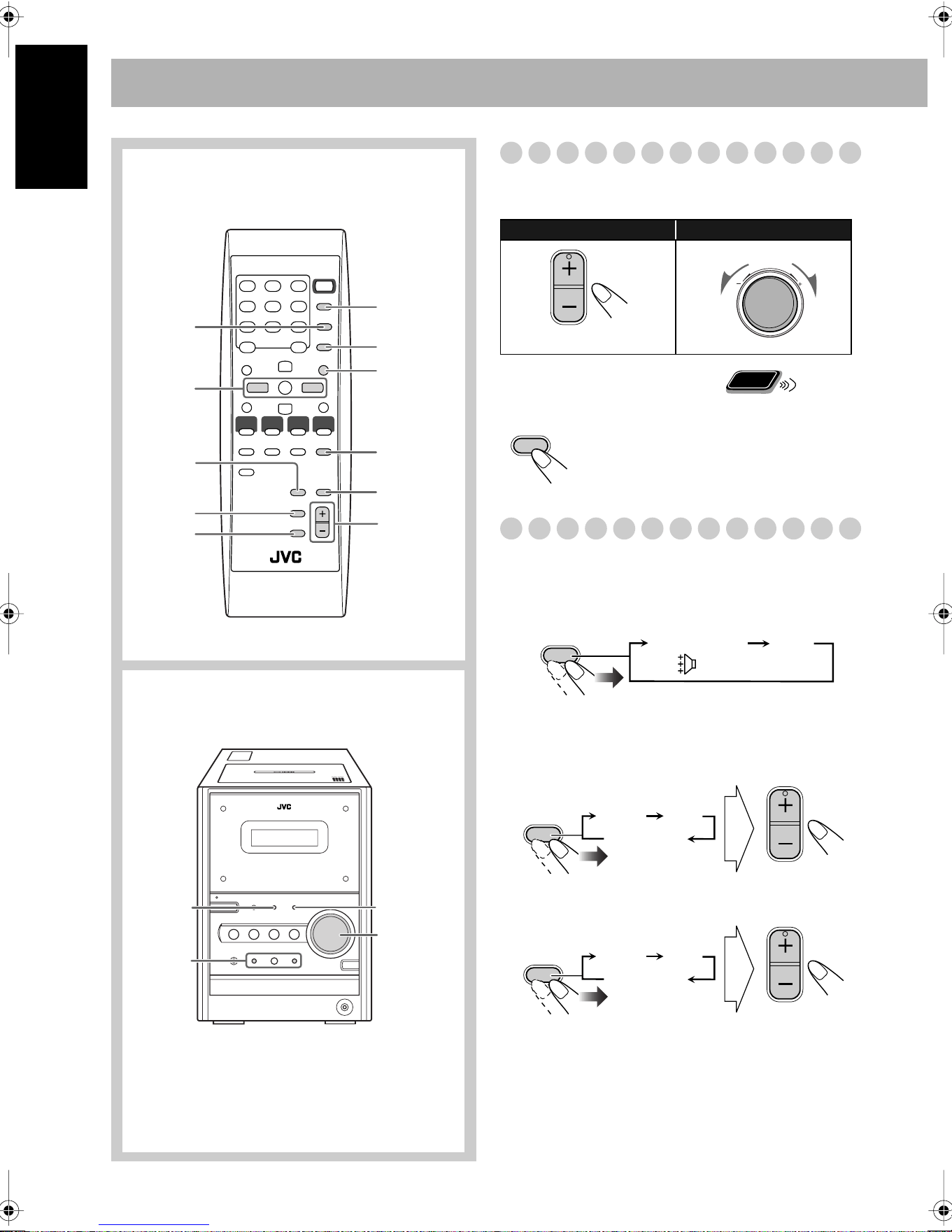
Adjusting the Volume
You can adjust the volume level from level 0 (VOL MIN) to
level 40 (VOL MAX).
To drop the volume in a moment
Adjusting the Sound
To emphasize rhythm feeling—RHYTHM AX
This function emphasizes bass attack feeling, and also
changes the subwoofer level.
To adjust the tone
You can adjust the bass and treble level from –5 to +5.
To adjust the bass
To adjust the treble
SLEEP
A.STANDBY
RHYTHM AX
SET
VOLUME
+/–
DISPLAY
CLOCK/
TIMER
BASS/
TREBLE
4/¢
DIMMER
FADE
MUTING
BASS
/TREBLE
VOLUME +/–
RHYTHM AX
4/¢
Remote control
Main unit
Remote control:
Main unit:
To restore the volume,
press again, or
adjust the volume level.
VOLUME
VOLUME
Remote
ONLY
FADE
MUTING
RHYTHM AX
RHYTHMAX OFF
(Canceled)
BASS/
TREBLE
VOLUME
BASS
TRE
Canceled
BASS/
TREBLE
VOLUME
BASS
TRE
Canceled
Downloaded from www.ManualsFile.com manuals search engine
13
English
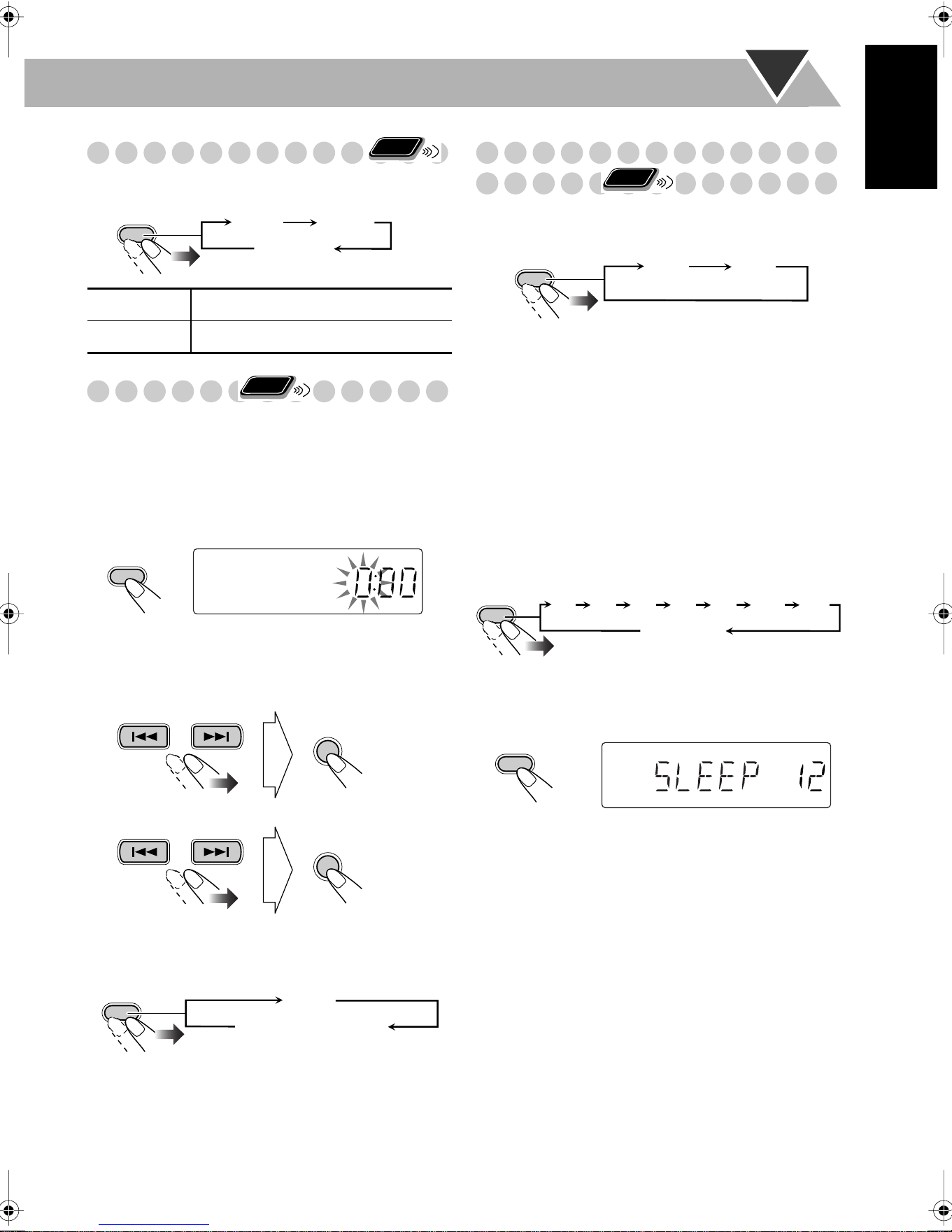
Changing the Display Brightness
You can dim the display window.
Setting the Clock
Without setting the built-in clock, you cannot use Daily/
Recording Timers (see page 19) and Sleep Timer.
• To exit from the clock setting, press CLOCK/TIMER as
required.
• To go back to the previous step, press CANCEL.
1
Activate the clock setting mode.
• If you have already adjusted the clock before, press the
button repeatedly until the clock setting mode is
selected.
2
Adjust the hour.
3
Adjust the minute.
Now the built-in clock starts working.
To check the current time during play
Turning Off the Power
Automatically
To turn off the unit after playback is over—Auto
Standby
When Auto Standby is in use, the A.STANDBY indicator
lights on the display.
When the tape or disc play stops, the A.STANDBY indicator
starts flashing. If no operation is done for about 3 minutes
while the indicator is flashing, the System turns off (stands
by) automatically.
• Auto Standby does not work while you are listening to
radio and the external component (AUX).
To turn off the unit after a certain period of time
—Sleep Timer
1
Specify the time (in minutes).
2
Wait until the set time goes off.
To check the time remaining until the shut-off time
• If you press the button repeatedly, you can change the shut-
off time.
DIM 1
Dims the display.
DIM 2
Erases the display illumination.
Remote
ONLY
DIMMER
DIM 1
DIM 2
DIM OFF
(Canceled)
Remote
ONLY
CLOCK/
TIMER
SET
SET
DISPLAY
Clock
Source information
Remote
ONLY
A.STANDBY
ON OFF
(Canceled)
SLEEP
10 20 30 60 90 120
Canceled
150
SLEEP
SLEEP
Downloaded from www.ManualsFile.com manuals search engine
14
English
Advanced Disc Operations
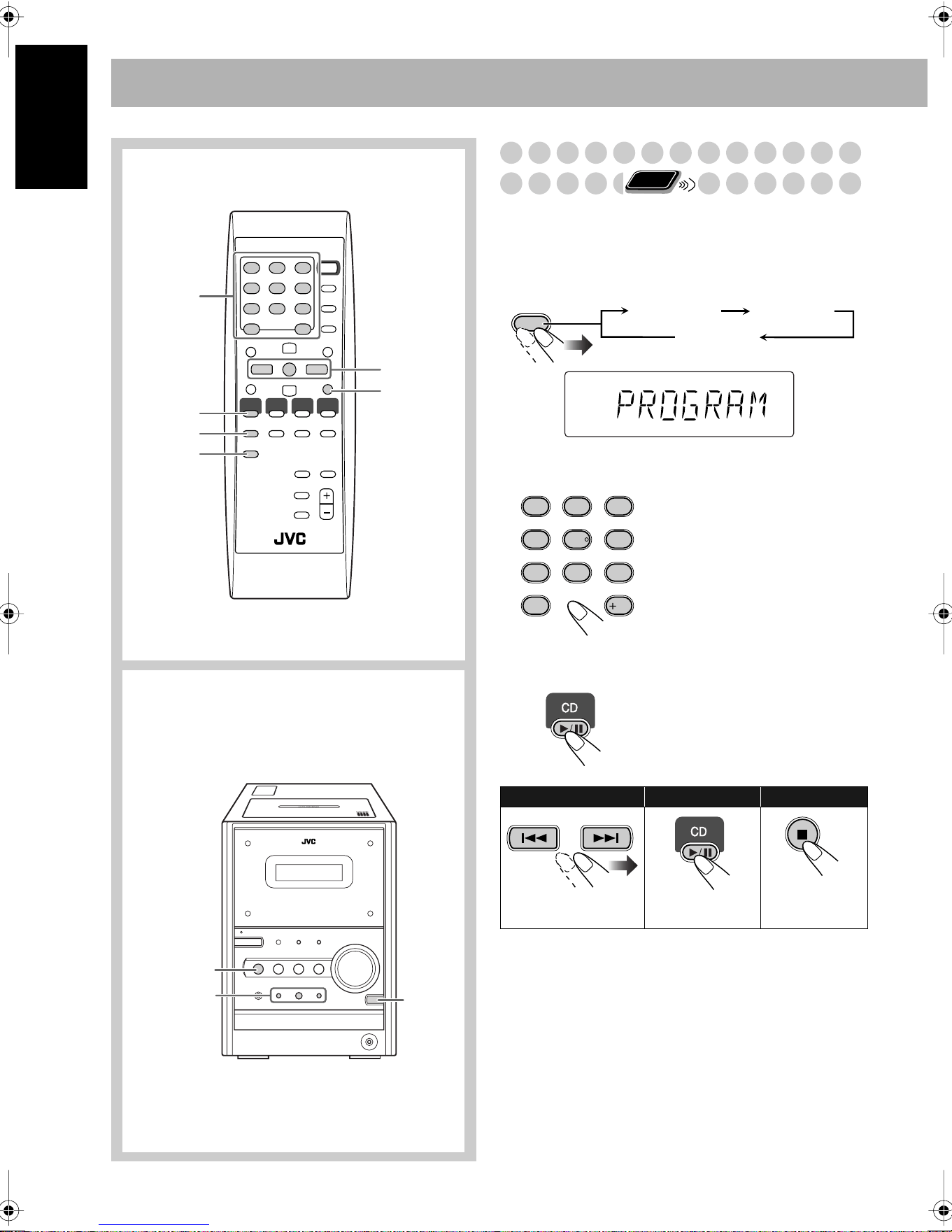
Programming the Playing Order—
Program Play
You can arrange the playing order of the tracks (up to 50)
before you start playback.
1
Before starting playback, activate Program Play.
2
Select tracks you want for Program Play.
3
Start playback.
4
,7
,¢
CD 6
CD 0
CANCEL
REPEAT
10 keys
CD 6
PLAY
MODE
4,7,¢
Remote control
Main unit
Examples:
To select track number 5, press
5.
To select track number 15, press
+10, then 5.
To select track number 30, press
+10, +10, then 10.
The tracks you have selected are
played back in the order you
have programmed.
To skip a track:
To pause: To stop:
To release, press
again.
Remote
ONLY
PLAY
MODE
PROGRAM RANDOM
Canceled
PRGM
1
4
7
10
2
5
8
3
6
9
10
Downloaded from www.ManualsFile.com manuals search engine
15
English
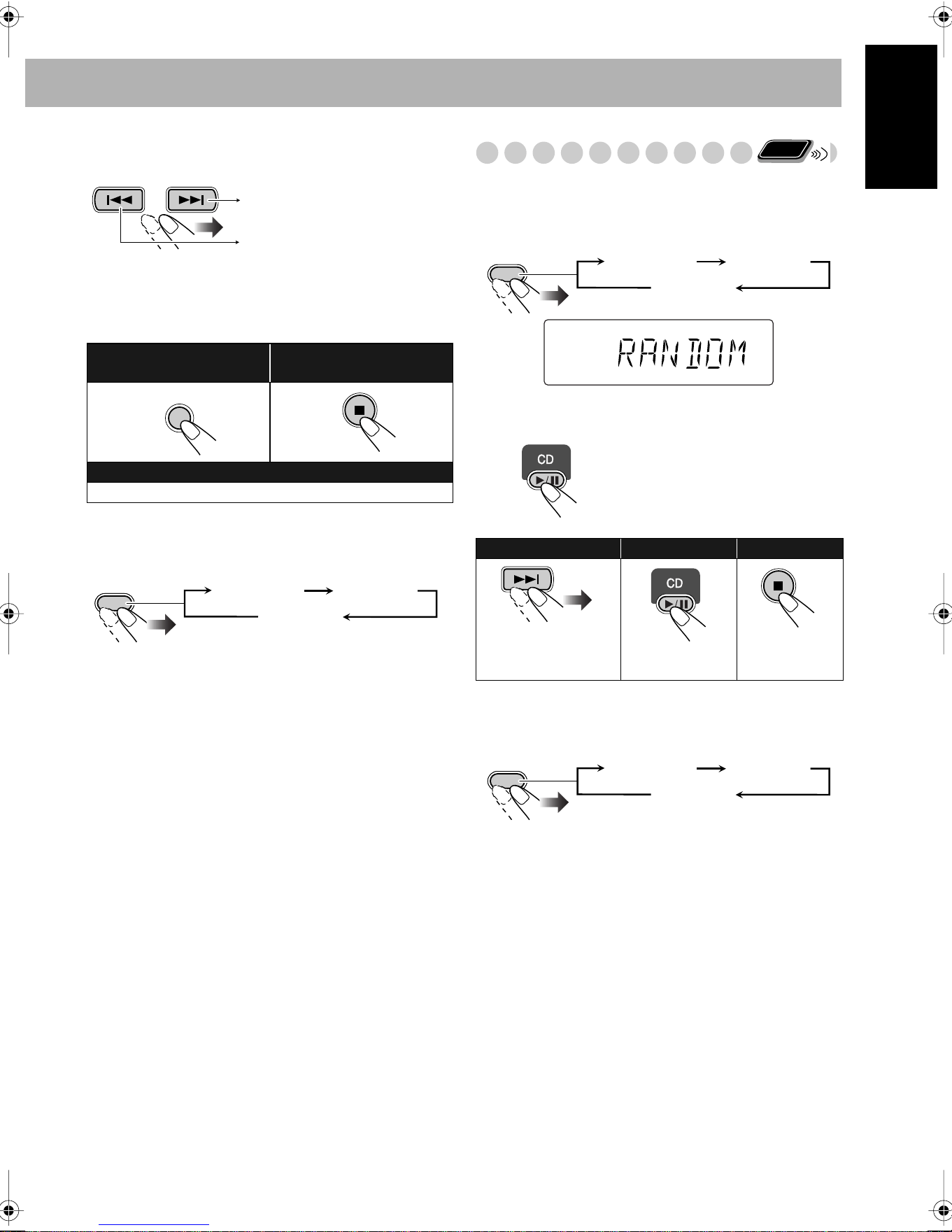
To check the programmed contents
Before or after playback...
To modify the program
Before or after playback...
To exit from Program Play
Before or after playback...
• Exiting from Program Play erases the stored program.
Playing at Random—Random Play
You can play all tracks at random.
1
Before starting playback, activate Random Play.
2
Start playback.
To exit from Random Play
Before or after playback...
To erase the last step:
To erase the entire
program:
To add steps in the program:
Repeat step
2
.
In the programmed order.
In the reverse order.
CANCEL
PLAY
MODE
PROGRAM RANDOM
Canceled
Playback starts in random order.
Random Play ends when all
tracks are played.
To skip a track:
To pause: To stop:
4
does not work.
To release, press
again.
Remote
ONLY
PLAY
MODE
PROGRAM RANDOM
Canceled
RANDOM
PLAY
MODE
PROGRAM RANDOM
Canceled
Downloaded from www.ManualsFile.com manuals search engine
16
English
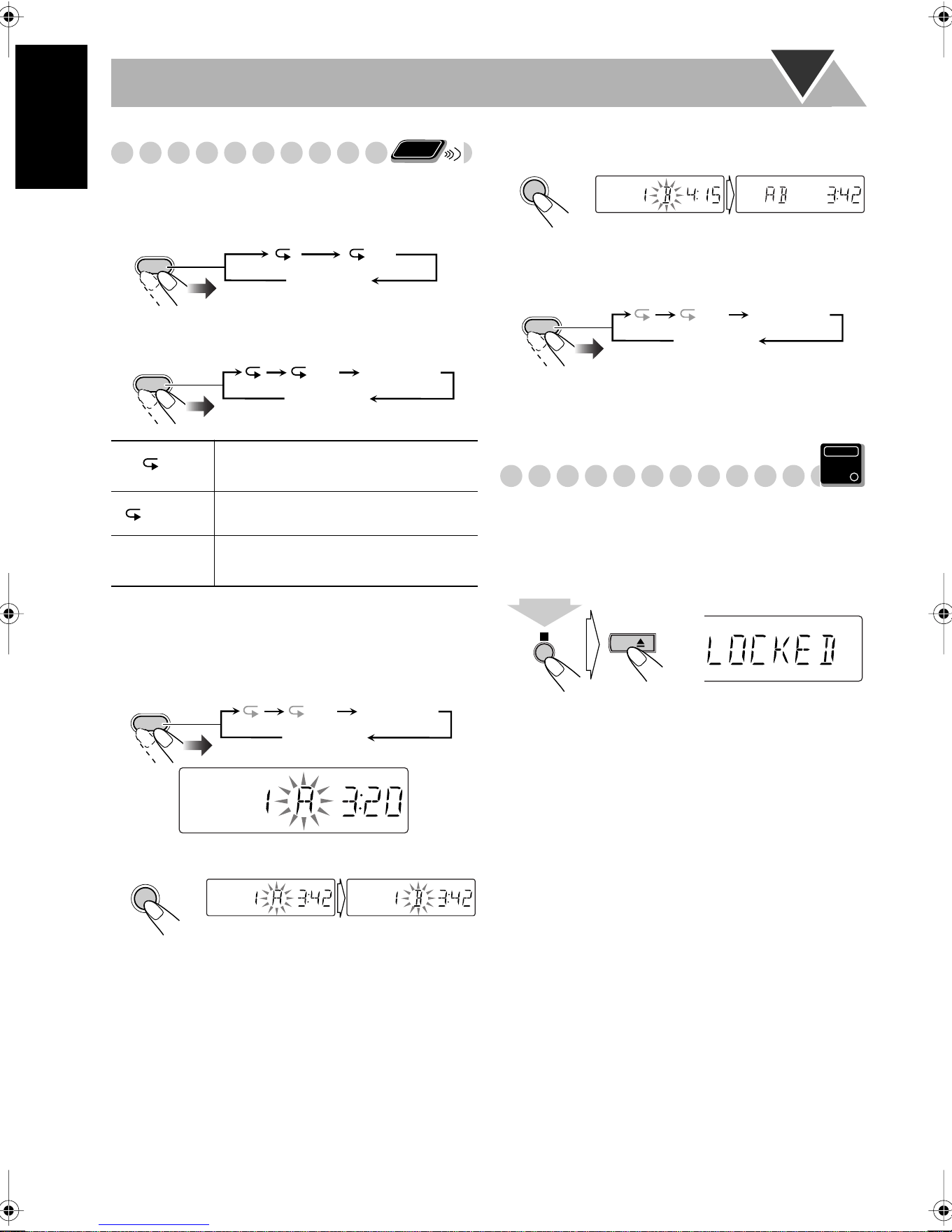
Playing Repeatedly—Repeat Play
You can repeat playback.
Before starting playback...
While playing...
To repeat a particular portion—A-B Repeat
You can repeat a particular portion while playing back a CD.
1
During playback, activate A-B Repeat.
2
Select the start point (A).
3
Select the end point (B).
A-B Repeat starts. The selected portion plays repeatedly.
To cancel A-B Repeat
• A-B Repeat will also be canceled when you stop playback.
Prohibiting Disc Ejection—Child Lock
You can lock the disc tray so that no one can eject the loaded
disc.
• This is possible while the System is on standby.
While the disc tray is closed...
To cancel the prohibition,
repeat the same procedure.
“UNLOCKED” appears on the display.
Repeats the current (or specified)
track—One Track Repeat.
Repeats all tracks—All Track Repeat.
A-B Repeat
See below for details.
“A” starts flashing in the main display.
Remote
ONLY
REPEAT
ALL
Canceled
(No indication)
REPEAT
ALL A-B Repeat
Canceled
(No indication)
ALL
REPEAT
ALL A-B Repeat
Canceled
(No indication)
SET
SET
REPEAT
ALL A-B Repeat
Canceled
(No indication)
Main Unit
ONLY
CD
(at the same time)
Downloaded from www.ManualsFile.com manuals search engine
17
English
Advanced Tape Operations
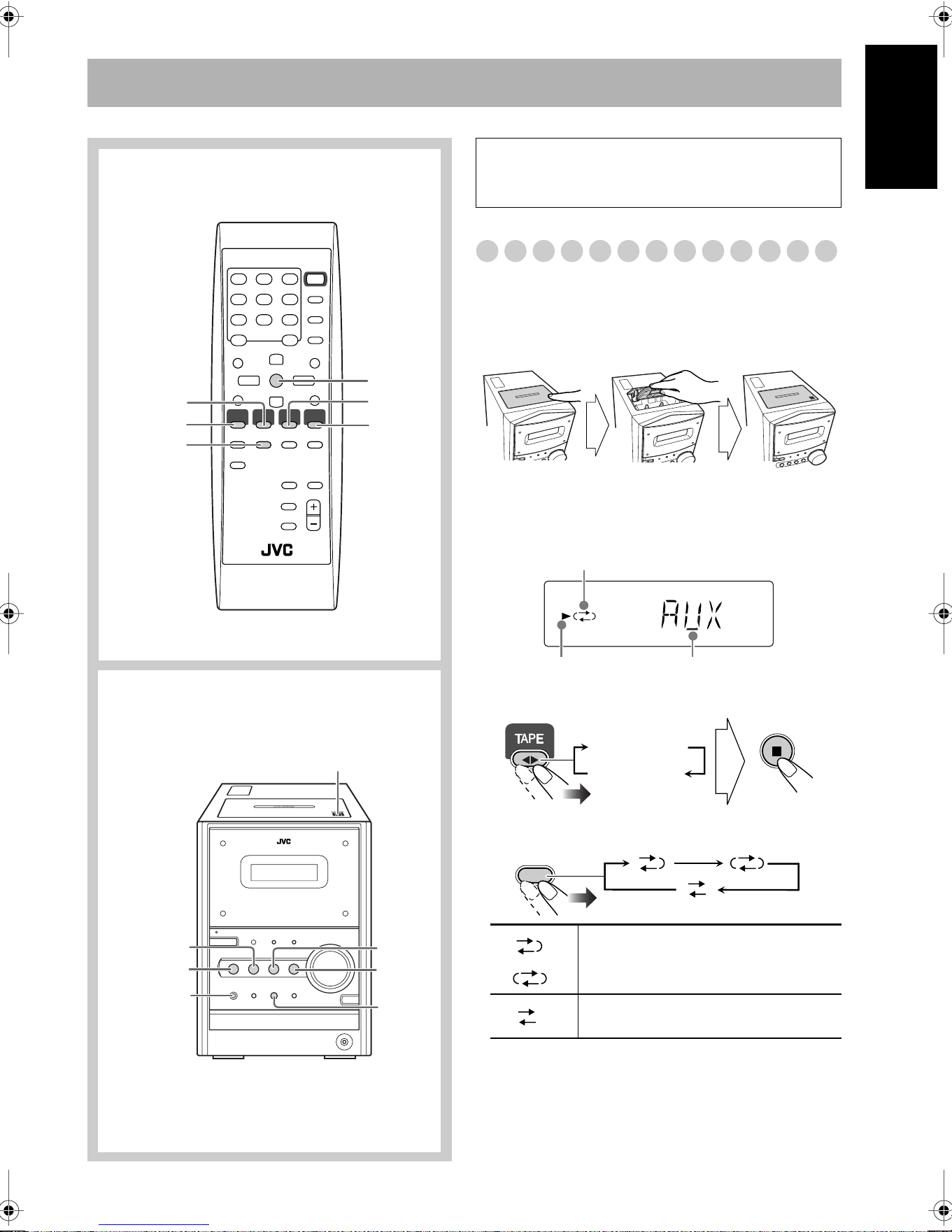
Recording on a Tape
You can use type I tapes for recording.
• To play a tape, see page 11.
1
Insert a recordable cassette.
2
Check the tape running direction and Reverse Mode
settings on the display.
To change the direction
To change the Reverse mode if necessary
REV.
MODE
TAPE 2 3
7
CD 6
AUX
FM/AM
REC
7
CD 6
PUSH OPEN 0
TAPE 2 3
AUX
FM/AM
Remote control
Main unit
IMPORTANT
It may be unlawful to record or play back copyrighted
material without the consent of the copyright owner.
()
To record on both sides.
•
When using Reverse Mode, start
recording in the forward (
3
) direction.
To record on only one side.
With the tape side facing outside
Push Insert
Close
Tape direction indicator
Reverse mode indicator
Current source
3 (forward)
2 (reverse)
REV.
MODE
Downloaded from www.ManualsFile.com manuals search engine
18
English
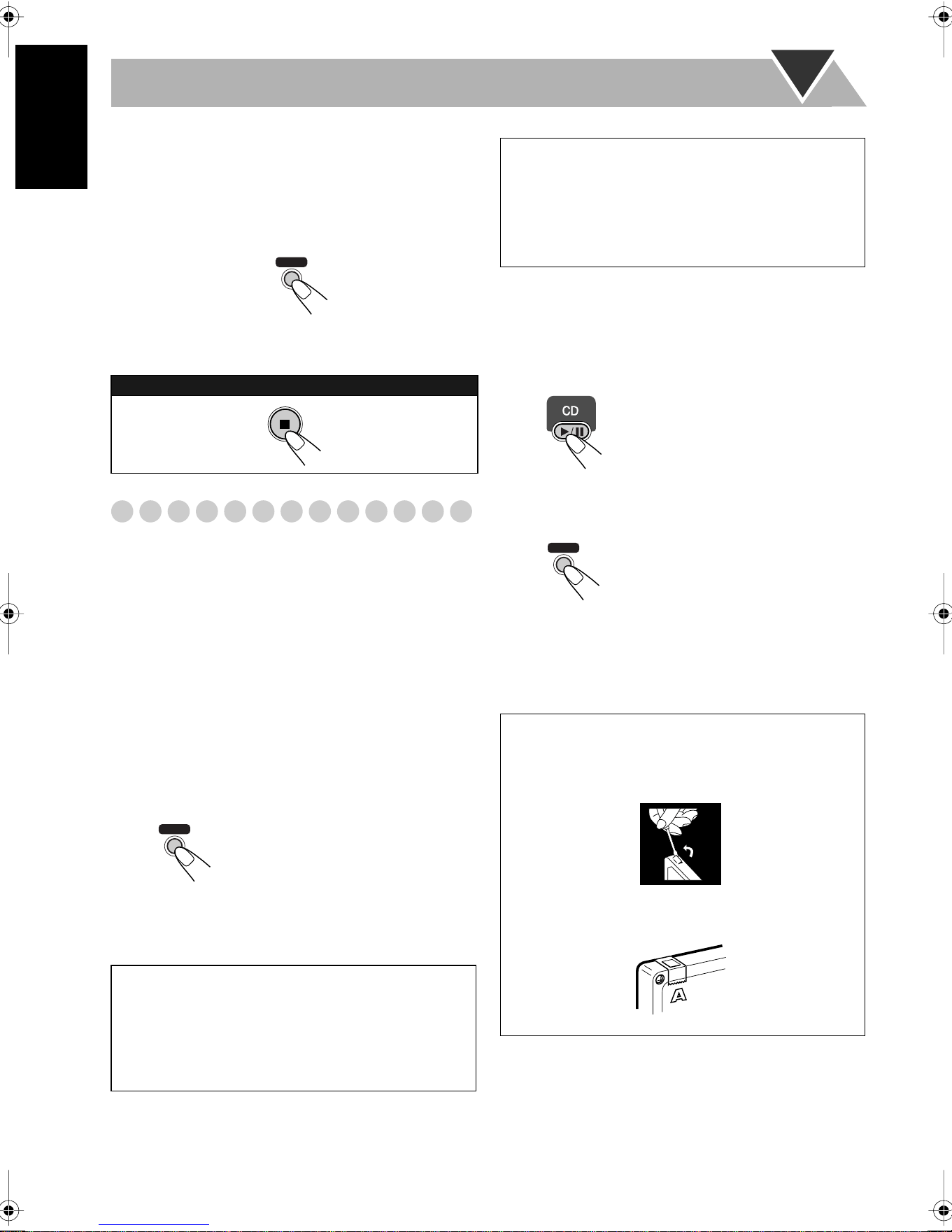
3
Select and start playing the source—“FM,” “AM,”
“CD,” or “AUX.”
• When recording a disc, you can also use “Synchronized
Disc Recording” (see below).
4
Start recording.
Synchronized Disc Recording
You can start and stop both disc play and tape recording at
the same time.
To record the entire disc
1
Load a disc and insert a recordable cassette.
• If the current playing source is not the CD player, press
CD 3
/8
, then 7
.
2
Check the tape running direction and Reverse Mode
settings on the display.
• See step
2
of “Recording on a Tape” on page 17.
3
Start recording.
• When either CD play or recording ends, both CD player
and the cassette deck stop at the same time.
To record only your favorite track
You can specify tracks to be recorded on the tape while
listening to a disc.
1
Start playing a disc.
2
While a track you want to record on the tape is
playing...
3
Repeat steps
2
and
3
to record other tracks you want.
• You can exchange the discs if necessary.
To stop recording:
On the main unit
The System automatically
creates 4-second blanks between
the tunes recorded on the tapes.
To record a “Live” disc
It will not be desirable to put 4-second blank portions
between the tunes recorded on the tape.
To record the entire disc without any interruption
recorded, pause the disc play (press CD 3
/8
twice)
before pressing REC.
REC
On the main unit
REC
To record Program Play or Random Play
1 Select Program Play (and make a program) or Random
Play, but do not start playback.
2 Press REC to start recording.
• When CD play stops, recording continues. It is required
that recording be stopped manually.
The CD player returns to the
beginning of that track and the
track is recorded on the tape.
After recording the track, the CD
player and cassette deck
automatically stop.
To protect your recording
Cassettes have two small tabs on the back to protect
from unexpected erasure or re-recording.
To protect your recording,
remove these tabs.
To re-record on a protected tape,
cover the holes with
adhesive tape.
REC
On the main unit
Downloaded from www.ManualsFile.com manuals search engine
19
English
Timer Operations
Setting the Timer
Using Daily Timer, you can wake up with your favorite
song. On the other hand, with Recording Timer, you can
make a tape of a radio broadcast automatically.
• You can store three Daily Timer settings and one
Recording Timer setting; however, you can activate only
one of Daily Timers and Recording Timer at the same time.
• To exit from the timer setting, press CLOCK/TIMER as
required.
• To correct a misentry during the process, press CANCEL.
You can return to the previous step.
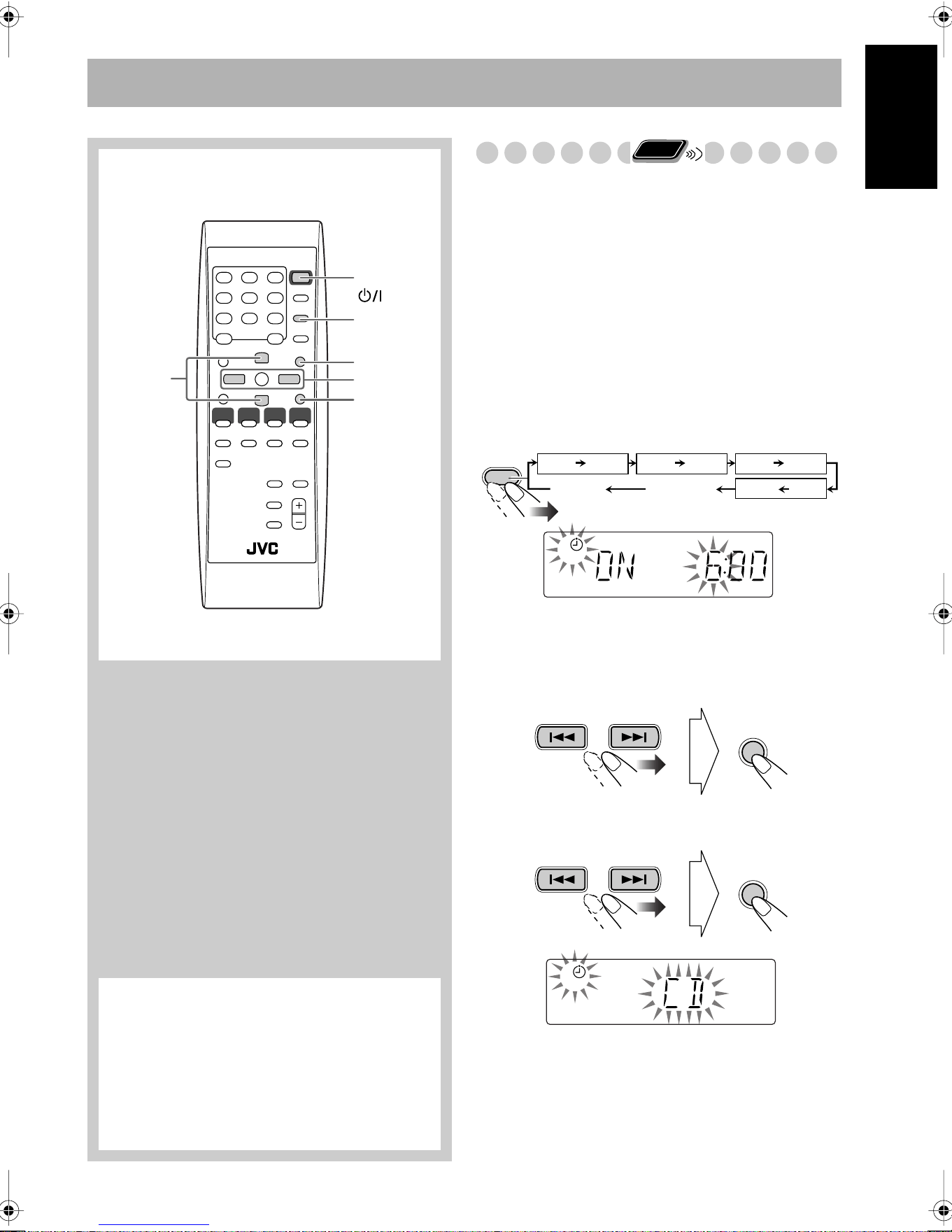
1
Select one of the timer setting modes you want to set—
Daily 1 ON time, Daily 2 ON time, Daily 3 ON time, or
Recording Timer ON time.
2
Make the timer setting as you want.
For Daily Timers:
1
Set the hour then the minute for on-time.
2
Select the playback source—“TUNER,” “CD,” or
“TAPE.”
4/¢
STANDBY/ON
PRESET
UP/DOWN
SET
CANCEL
CLOCK/
TIMER
Remote control
* Daily Timer initial settings when shipped from the
factory
•Daily 1: ON Time (6:00)/Source (TUNER)/
Volume level (8)
•Daily 2: ON Time (7:00)/Source (TUNER)/
Volume level (8)
•Daily 3: ON Time (10:00)/Source (TUNER)/
Volume level (8)
Remote
ONLY
CLOCK/
TIMER
Daily 1*
ON (Time) ON (Time) ON (Time)
ON (Time)
Daily 2* Daily 3*
REC
Clock setting
(see page 13)
Canceled
Daily 1 Timer Daily 2 Timer Daily 3 Timer
Recording Timer
1
Ex. When Daily Timer 1 setting mode is selected
SET
SET
1
Downloaded from www.ManualsFile.com manuals search engine
20
English
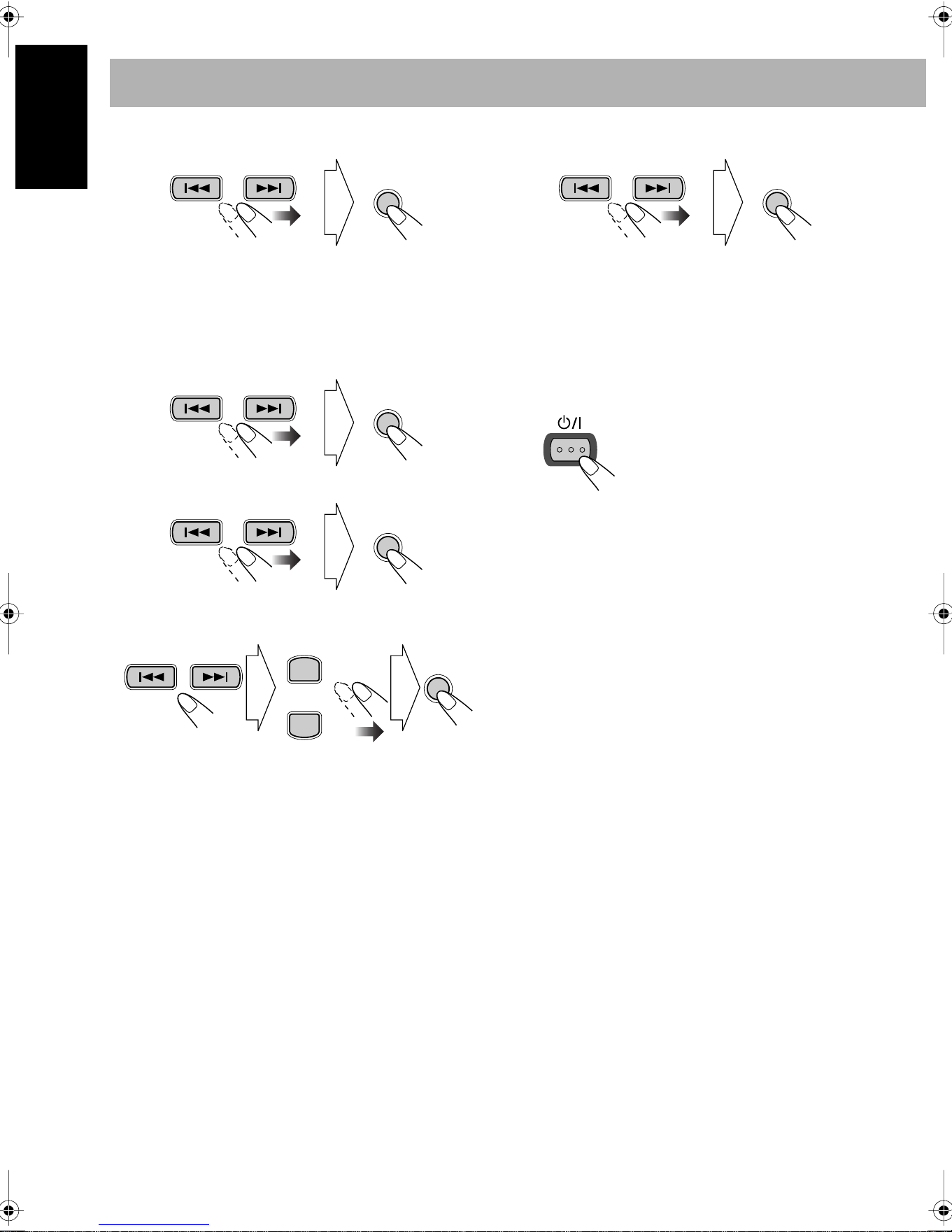
3
Select the volume level.
• You can select the volume level (“VOLUME 0” to
“VOLUME 40” and “VOLUME – –”). If you select
“VOLUME – –,” the volume is set to the last level
when the unit has been turned off.
For Recording Timer:
1
Set the hour then the minute for on-time.
2
Set the hour then the minute for off-time.
3
Select a preset station number.
• Select “FM” or “AM,” then a preset number.
4
Select the volume level.
• You can select the volume level (“VOLUME 0” to
“VOLUME 40” and “VOLUME – –”). If you select
“VOLUME – –,” the volume is set to the last level
when the unit has been turned off.
3
Turn off the unit (on standby) if you have set the timer
with the System turned on.
SET
SET
SET
SET
PRESET UP
PRESET DOWN
Select the band. Select a preset
number.
SET
STANDBY/ON
Downloaded from www.ManualsFile.com manuals search engine

21
English
To turn off the Timer after its setting is done
Since Daily Timer is activated at the same time everyday,
you may need to cancel it on some particular days.
• Recording Timer can also be canceled temporarily.
1
Select the Timer you want to cancel.
2
Turn off the selected Timer.
To turn on the Timer again,
repeat the above steps and
press in step
2
...
How Daily Timer actually works
Once the Daily Timer has been set, the timer ( )
indicator and timer number indicator (1/2/3) are lit on the
display. Daily Timer is activated at the same time
everyday until the timer is turned off manually (see the
next column) or another Daily Timer is activated.
When the on-time comes
The System turns on, tunes in to the last received station
or start playing the loaded disc, and sets the volume level
to the preset level.
About one hour after the playback starts, the System
stops it, and turns off (stands by) automatically.
• The timer setting remains in memory until you change
it.
• Without canceling the Daily Timer, you can change the
source or adjust the volume after Daily Timer starts
playback.
How Recording Timer actually works
When Recording Timer has been set, Timer ( )
indicator and the REC indicator are lit on the display.
Recording Timer works only once.
When the on-time comes
The System turns on, tunes in to the specified station, sets
the volume level to the preset level, and starts recording.
When the off-time comes
The System stops recording, and turns off (stands by).
• The timer setting remains in memory until you change
it.
CLOCK/
TIMER
Daily 1
ON (Time) ON (Time) ON (Time)
ON (Time)
Daily 2 Daily 3
REC
Clock setting
(see page 13)
Canceled
Daily 1 Timer Daily 2 Timer Daily 3 Timer
Recording Timer
1
Ex.When Daily
Timer 1
The current set source and on time appears.
CANCEL
SET
Downloaded from www.ManualsFile.com manuals search engine
22
English
Additional Information
Learning More about This System
Daily Operations—Playback
(see pages 8 to 11)
Listening to the Radio:
• If you store a new station into an occupied preset number, the
previously stored station in that number will be erased.
• When you unplug the AC power cord or if a power failure
occurs, the preset stations will be erased in a few days. If this
happens, preset the stations again.
Playing Back a Disc:
• When using an 8 cm disc, place it on the inner circle of the disc
tray.
• This System cannot play “packet write” discs.
• For MP3 playback...
– MP3 discs are required a longer readout time than regular
CDs. (It depends on the complexity of the group/file
configuration.)
– Some MP3 files cannot be played back and will be skipped.
This result from their recording processes and conditions.
– When making MP3 discs, use ISO 9660 Level 1 or Level 2
for the disc format.
– This system can play back MP3 files with the extension code
<.mp3> (regardless of the letter case—upper/lower).
– It is recommended that you make each MP3 file at a
sampling rate of 44.1 kHz and at bit rate of 128 kbps. This
System cannot play back files made at bit rate of less than 64
kbps.
– This System can recognize the total of 255 tracks and of 64
groups. Those exceeding the maximum number cannot be
recognized.
– Playback order of MP3 tracks may be different from the one
you have intended while recording (see page 10). If a folder
does not include MP3 tracks, they are ignored.
Playing Back a Tape:
• It is not recommended to use the C-120 or longer tapes. These
tapes easily jams in the pinch rollers and the capstans, and may
cause characteristic deterioration.
Daily Operations—Sound & Other Adjustments
(see pages 12 to 13)
Adjusting the Volume:
• Be sure to turn down the volume before connecting or putting
the headphones.
Adjusting the Sound:
• This function also affects the sound through the headphones.
• This function does not affect recording.
Setting the Clock:
• “0:00” will flash on the display until you set the clock.
• The clock may gain or lose 1 to 2 minutes per month. If this
happens, reset the clock.
Advanced Disc Operations
(see pages 14 to 16)
Programming the Playing Order—Program Play:
• You cannot specify a group number of an MP3 disc for
Program Play.
• If you try to program a 51st track, “FULL” appears on the
display.
• While programming steps...
Your entry will be ignored if you have tried to program an item
number that does not exist on the disc (for example, selecting
track 14 on a disc that only has 12 tracks).
Advanced Tape Operations
(see pages 17 to 18)
Recording on a Tape:
• The recording level is automatically set correctly. Thus, you
can adjust the sound you are actually listening to without
affecting the recording level.
• There is leader tape which cannot be recorded onto at the start
and end of cassette tapes. Thus, when recording CDs or radio
broadcasts, wind the leader tape first to ensure that the
recording will be made without any music part lost.
• If you start recording with no cassette inserted, “NO TAPE”
appears on the display. If a protected tape has been inserted,
“NO REC” appears.
• When using Reverse Mode for recording, start recording in the
forward (
3
) direction first; otherwise, recording will stop
when only one side (reverse) of the tape is recorded.
• You can also change Reverse Mode setting ( and )
after starting recording.
• You cannot open or close the disc tray while recording.
Synchronized Disc Recording:
• When the tape reaches its end in the forward direction (3
)
during recording with Reverse Mode set to , the last tune
will be re-recorded at the beginning of the reverse side.
• You cannot open the cassette holder during Synchronized
Disc Recording.
Timer Operations
(see pages 19 to 21)
• When you unplug the AC power cord or if a power failure
occurs, the timer will be canceled. You need to set the clock
first, then the timer again.
• Without stopping the recording, you cannot change the source
after Recording Timer start recording.
• If you set the Sleep Timer after Daily Timer starts playing the
selected source, Daily Timer is canceled.
• If you set the Sleep Timer after Recording Timer starts
recording, Recording Timer is canceled, but recording
continues until Sleep Timer shuts off the power.
Downloaded from www.ManualsFile.com manuals search engine
23
English
Troubleshooting
If you are having a problem with your System, check this list
for a possible solution before calling for service.
General:
Adjustments or settings are suddenly canceled before
you finish.
]
There is a time limit. Repeat the procedure again.
Operations are disabled.
]
The built-in microprocessor may malfunction due to
external electrical interference.
Unplug the AC power cord
and then plug it back in.
Unable to operate the System from the remote control.
]
The path between the remote control and the remote sensor
on the System is blocked.
]
The batteries are exhausted.
No sound is heard.
]
Speaker connections are incorrect or loose.
]
Headphones are connected.
Radio Operations:
Hard to listen to broadcasts because of noise.
]
Antennas connections are incorrect or loose.
]
The AM loop antenna is too close to the System.
]
The FM antenna is not properly extended and positioned.
Disc Operations:
The disc does not play.
]
The disc is placed upside down. Place the disc with the label
side up.
ID3 Tag on an MP3 disc cannot be shown.
]
There are two types of ID3 Tag—Version 1 and Version 2.
This System can only show ID3 Tag Version 1.
MP3 groups and tracks are not played back as you
expect.
]
The playing order is determined when the disc was
recorded. It depends on the writing application.
The disc sound is discontinuous.
]
The disc is scratched or dirty.
The disc tray does not open or close.
]
The AC power cord is not plugged in.
]
Child Lock is in use (see page 16).
Tape Operations:
The cassette holder cannot be opened.
]
Power supply from the AC power cord has been cut off
while the tape was running. Turn on the System.
Recordings:
Impossible to record.
]
Small tabs on the back of the cassette are removed. Cover
the holes with adhesive tape.
Timer Operations:
Daily Timer and Recording Timer do not work.
]
The System has been turned on when the on-time comes.
Timer starts working only when the System is turned off.
Maintenance
To get the best performance of the System, keep your discs,
tapes, and mechanism clean.
Handling discs
• When removing the disc from its case, hold it at the edge while
pressing the center hole lightly.
• Do not touch the shiny surface of the disc, or bend the disc.
• Put the disc back in its case after use to prevent warping.
• Be careful not to scratch the surface of the disc.
• Avoid exposure to direct sunlight, temperature extremes, and
moisture.
To clean the disc:
Wipe the disc with a soft cloth in a straight line from center to
edge.
Handling cassette tapes
• If the tape is loose in its cassette, take up the slack by inserting
a pencil in one of the reels and rotate it.
– If the tape is loose, it may get stretched, cut, or caught in the
cassette.
• Be careful not to touch the tape surface.
• Avoid the following places to store the tape—in dusty places,
in direct sunlight or heat, in moist areas, on a TV or speaker,
or near a magnet.
To keep the best recording and playback sound quality
• Use a cotton swab moistened with alcohol to clean the heads,
capstans, and pinch rollers.
• Use a head demagnetizer (available at electronics and audio
shops) to demagnetize the heads (when the System turned off).
Cleaning the System
• Stains should be wiped off with a soft cloth. If the System is
heavily stained, wipe it with a cloth soaked in water-diluted
neutral detergent and wrung well, then wipe clean with a dry
cloth.
• Since the System may deteriorate in quality, it become
damaged or get its paint peeled off, be careful about the
following:
– DO NOT wipe it with a hard cloth.
– DO NOT wipe it strongly.
– DO NOT wipe it with thinner or benzine.
– DO NOT apply any volatile substance such as insecticides
to it.
– DO NOT allow any rubber or plastic to remain in contact for
a long time.
Downloaded from www.ManualsFile.com manuals search engine
24
English
Specifications
Amplifier section
Output Power:
40 W (20 W + 20 W) at 4
Ω
(10% THD)
Speakers/Impedance: 4
Ω
– 16
Ω
Audio Input AUX: 400 mV/50 k
Ω
Tuner section
FM tuning range: 87.50 MHz – 108.00 MHz
AM (MW) tuning range:
531 kHz – 1 710 kHz (at 9 kHz intervals)
530 kHz – 1 710 kHz (at 10 kHz intervals)
CD player section
Dynamic range: 88 dB
Signal-to-noise ratio: 93 dB
Wow and flutter: Immeasurable
Cassette deck section
Frequency response
Normal (type I): 50 Hz – 14 000 Hz
Wow and flutter: 0.15% (WRMS)
Speakers
Speaker units: 10 cm cone x 1
Impedance: 4
Ω
Dimensions (approx.): 145 mm x 230 mm x 191 mm
(W/H/D)
Mass (approx.): 1.8 kg each
Supplied Accessories
See page 3.
General
Power requirement: AC 110 V/AC 127 V/AC 220 V/
AC 230 V – AC 240 V (adjustable with the voltage
selector), 50 Hz/60 Hz
Power consumption: 50 W (at operation)
4.4 W (on standby)
Dimensions (approx.): 170 mm x 230 mm x 311 mm
(W/H/D)
Mass (approx.): 4.5 kg
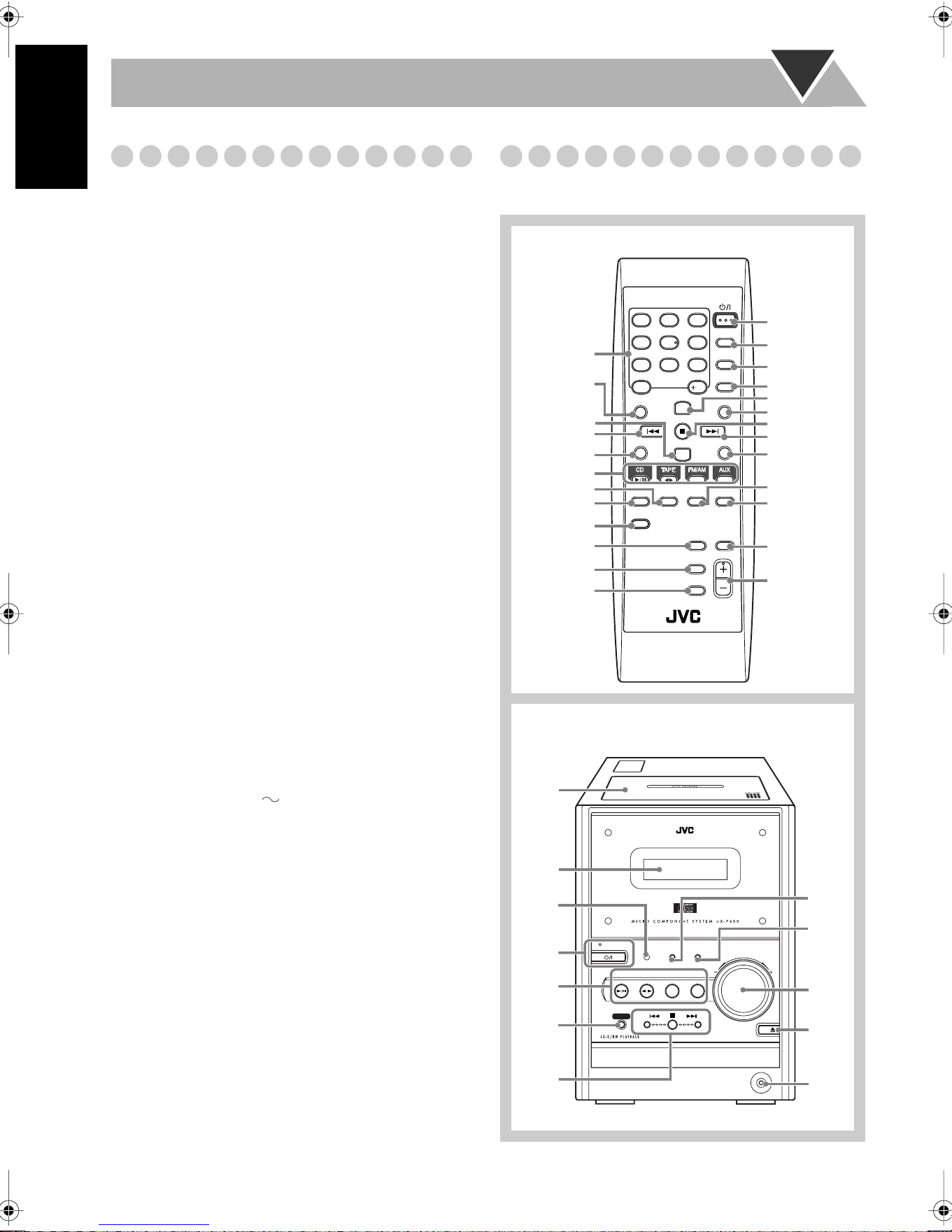
Parts Index
Refer to the pages to see how to use the buttons and controls.
SLEEP
CLOCK/
TIMER
FADE
MUTING
REV.
MODE
FM
MODE
PLAY
MODE
BASS/
TREBLE
RHYTHM AX
DISPLAY
GROUP UP
PRESET UP
CANCEL
SET
GROUP DOWN
VOLUME
1
4
7
10
2
5
8
3
6
9
10
RM-SUXP400U REMOTE CONTROL
PRESET DOWN
DIMMER
STANDBY/ON
REPEAT A.STANDBY
STANDBY/ON
BASS
/TREBLE
RHYTHM AX
TAPE
DOWN
REC
UP
PHONES
CD
CD
FM/AM AUX
VOLUME
Remote control
Main unit
9, 13, 14, 19
10, 11
11
8, 10, 11, 14
11
16
14, 15
12
13
12
11
10, 11
13
13, 19
13
10, 11
13, 19
10
9, 13, 14, 19
15, 19
9
13
12
8, 12
11
7
Remote
sensor
8
8, 10,
11, 14
18
9, 13,
14, 19
12
12
8, 12
10,16
8
8
Downloaded from www.ManualsFile.com manuals search engine
VICTOR COMPANY OF JAPAN, LIMITED
0404AIMMDWJEM
EN, SP, PR
© 2004 VICTOR COMPANY OF JAPAN, LIMITED
UX-P400 MICRO COMPONENT SYSTEM
Mains (AC) Line Instruction (not applicable for Europe, U.S.A., Canada,
Australia, and U.K.)
Instrucción sobre la línea de la red (CA) (no aplicable para Europa,
EE.UU., Canadá, Australia, ni el Grã-Bretanha)
Instrução sobre a tensão da rede eléctrica (CA) (não aplicável para a
Europa, os E.U.A., o Canadá, a Austrália e o Reino Unido)
PUSH
OP
EN
A
UT
O
R
E
V
E
R
SE
CAUTION for mains (AC) line
BEFORE PLUGGING IN, do check
that your mains (AC) line voltage
corresponds with the position of the
voltage selector switch provided on
the outside of this equipment and, if
different, reset the voltage selector
switch, to prevent from a damage or
risk of fire/electric shock.
PRECAUCIÓN para la línea de la
red (CA)
ANTES DE ENCHUFAR EL EQUIPO,
compruebe si la tensión de la línea de
la red (CA) corresponde con la
posición del selector de tensión
situado en la parte exterior del
equipo, y si es diferente, reajuste el
selector de tensión para evitar el
riesgo de incendios/descargas
eléctricas.
PRECAUÇÃO para a ligação à
tensão da rede (CA)
ANTES DE LIGAR O APARELHO A
UMA TOMADA DA REDE, verifique
se a tensão da rede CA corresponde
á posição do seletor de voltagem
localizado na parte externa deste
equipamento. Caso não corresponda,
reajuste o seletor de voltagem a fim
de evitar avarias ou riscos de incêndio
e choque elétrico.
Downloaded from www.ManualsFile.com manuals search engine