
CONTENTS
Precautions.................................................................................................................................................1
Use Caution
..............................................................................................................................
1
Lithium Battery Cell Warnings
s ..........................................................................................................................................1
Installation ..................................................................................................................................................
2
Installation Procedures .......................................................................................................................... 2
Installation Opening................................................................................................................................2
Uninstall the Main Unit
...........................................................................................................................
3
Wiring Connections ................................................................................................................................3
Overview of the Components .....................................................................................................................
4
General Operation
......................................................................................................................................
4
Turn Unit on/off
.........................................................................................................................................
4
4
RADIO Operation
USB Operation .......................................................................................................................................... 7
Auxiliarly Operation ................................................................................................................................... 8
Bluetooth Operation ......................................................................................................................................................... 8
Pair and Connect .................................................................................................................................. 8
Make a Call ........................................................................................................................................... 8
Redial Last Dialed Number ................................................................................................................... 8
Answer / Reject / End a Call ................................................................................................................. 8
Switch Audio Between Car Audio and mobile Phone ........................................................................... 9
Adjust Call Volume ............................................................................................................................... 9
Audio Streaming (A2DP) ...................................................................................................................... 9
Push-To-Talk ........................................................................................................................................ 9
Remote Control ....................................................................................................................................... 10
Specifications .......................................................................................................................................... 11
.......................................................................................................................................
6
Switch Between US and EU Frequency
Insert USB Device........................................................................................................................................................ 7
Next/Previous Track, Fast Forward/Backward......................................................................................................... 7
Play / Pause ................................................................................................................................................................. 7
Introduction Scan (INT) ............................................................................................................................................... 7
Repeat Playback (RPT) .............................................................................................................................................. 7
Playing all tracks in Random ...................................................................................................................................... 7
Track/Folder Navigation .............................................................................................................................................. 7
Select the track or file for playback in MP3 format .................................................................................................... 7
Change Bands.............................................................................................................................................................. 6
To Store / Recall Preset Stations................................................................................................................................
Manual Tuning / Auto Seek Tuing..............................................................................................................................
Automatic Store Preset station / Preset Scan ..........................................................................................................
LOCAL/DX ...................................................................................................................................................................
STEREO/MONO ......................................................................................................................................................... 6
....................................................................................................
6
6
6
6
6
Adjust Volume (VOL)
....................................................................................................................
...................................................................................................................................
5
Setting the Clock
...........................................................................................................................................
5
Mute On/Off
.....................................................................................................................................................
5
Reset
........................................................................................................................
5
USB Port, AUX IN Jack
Change the Source (SRC)
.............................................................................................................................
4
Adjust Menu Options (SEL)
..................................................................................................................
5
PRECAUTIONS
1
Lithium Battery Cell Warnings
• Cell leakage may cause damage to the remote control.
• Do not throw cells into as this may cause an explosion.
• Keep battery cells out of reach of children.
Use cautions
•
•
•
•
•
•
Be sure to lower the volume before switching off the unit or the ignition key.
Some MP3/WMA files may not be playable.
, CAUTION
For coin/button battery used, please refer for further information to the user manual.
Attention should be drawn to the environmental aspects of battery disposal.
CAUTION
Danger of explosion if battery is incorrectly replaced.
Replace only with the same or equivalent type.
The batteries (battery pack or batteries installed) shall not be exposed to excessive heat such as
sunshine, fire or the like.
WARNING
Do not ingest the battery, Chemical Burn Hazard (The remote control supplied with)
This product contains a coin/button cell battery. If the coin/button cell battery is swallowed, it can cause
severe internal burns in just 2 hours and can lead to death.
Keep new and used batteries away from children.
If the battery compartment does not close securely, stop using the product and keep it away from
children.
If you think batteries might have been swallowed or placed inside any part of the body, seek immediate
medical attention.
• The use of apparatus in moderate climates.
• The symbol indicates DC voltage.
INSTALLATION
2
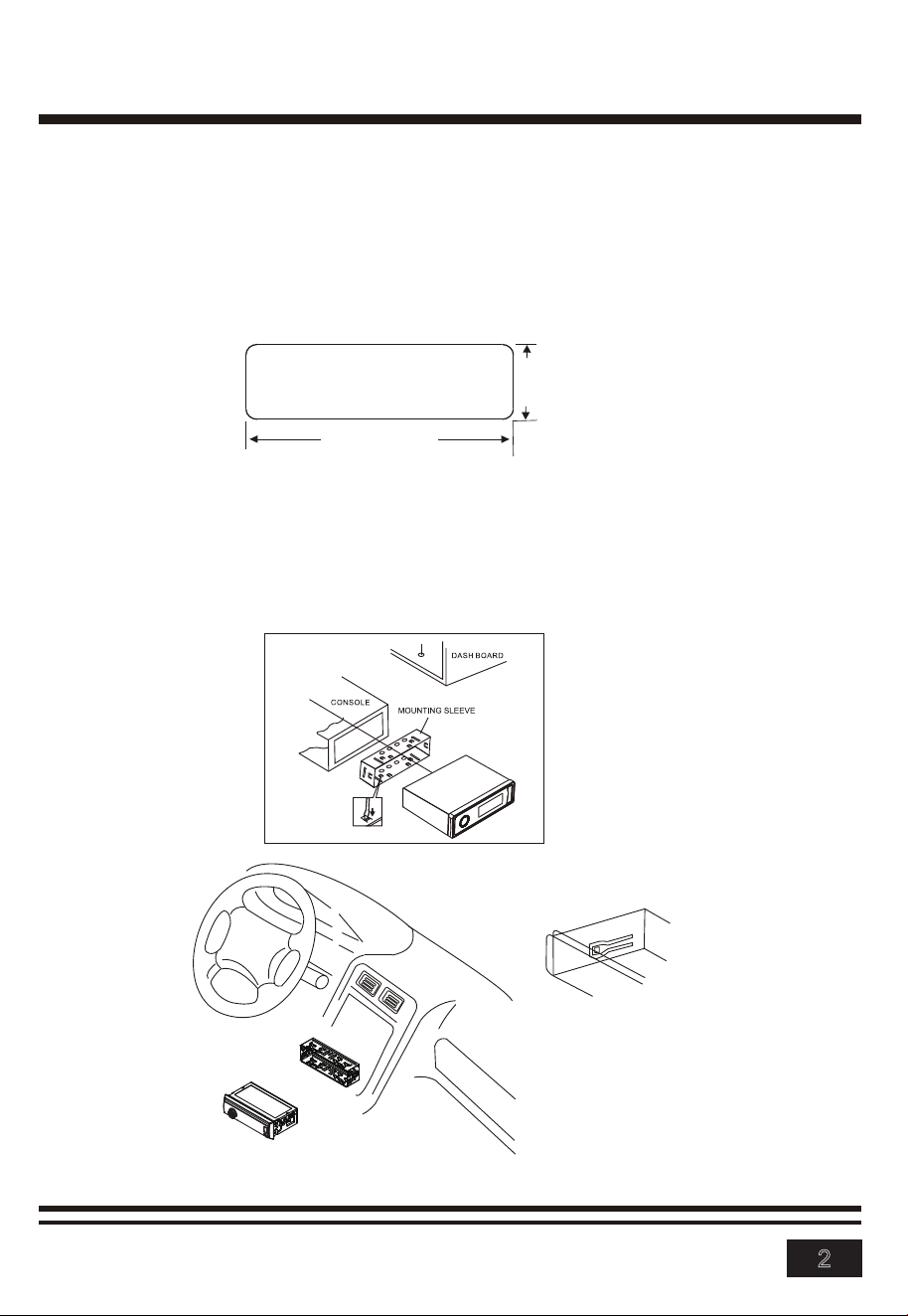
Installation Procedures
First complete the electrical connections and then check for correctness.
Insert mounting collar into the dashboard and bend the mounting tabs out with
a screwdriver.
Make sure that lock lever is flush with the mounting collar( not projecting outward).
Installation Opening
This unit can be installed in any dashboard Having an opening as shown
below.
2.05 inches
7.20 inches
INSTALLATION(CONT.)
3
Uninstall the Main Unit
1.
Remove the plastic trim out from the main unit.
2. Insert a bracket key into the left and right side of the main unit and draw the
unit out of the mounting sleeve.
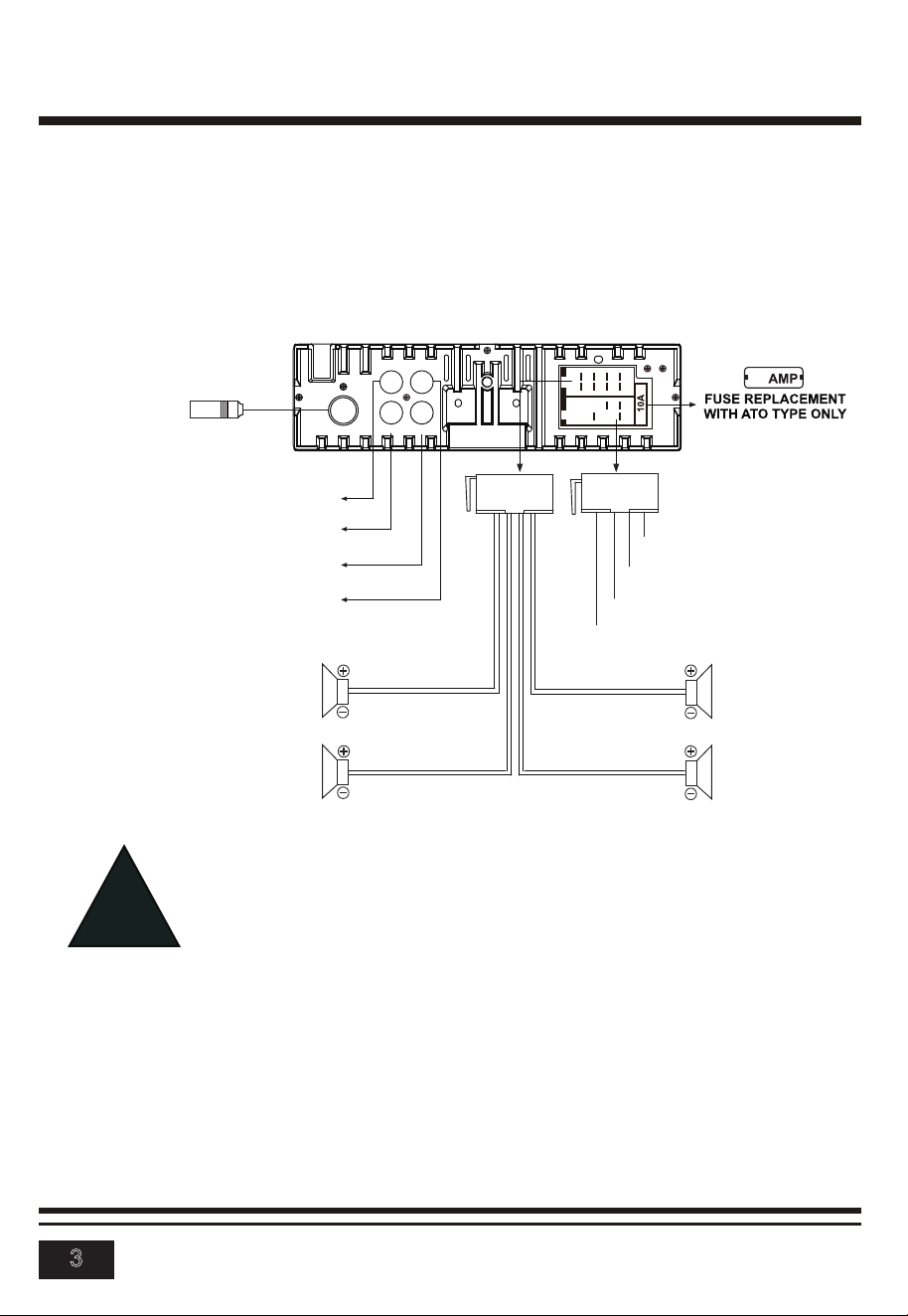
- Only support speakers of 4 ohms or above.
- The maximum current of the auto antenna is 200mA.
- The equipment shall be protected by the circuit with max. 10
Amperes of the front end of DC source.
Connect all wiring harness and slide the head unit into the mounting
collar until it clicks into place.
!
Wiring Connections
ANT
F-R R-R
F-L R-L
10
Radio Antenna
White
Front Left
Speaker
Rear Left
Speaker
Front Right
Speaker
Rear Right
Speaker
White/Black
ACC + (Red)
GND - (Black)
ANT + (Blue)
Power B+ (Yellow)
Gray/Black
Purple
Purple/Black
Green
Green/Black
Gray
Red: Front Right PRE-AMP Output
White: Front Left PRE-AMP Output
White: Rear Left PRE-AMP Output
Red: Rear Right PRE-AMP Output
4
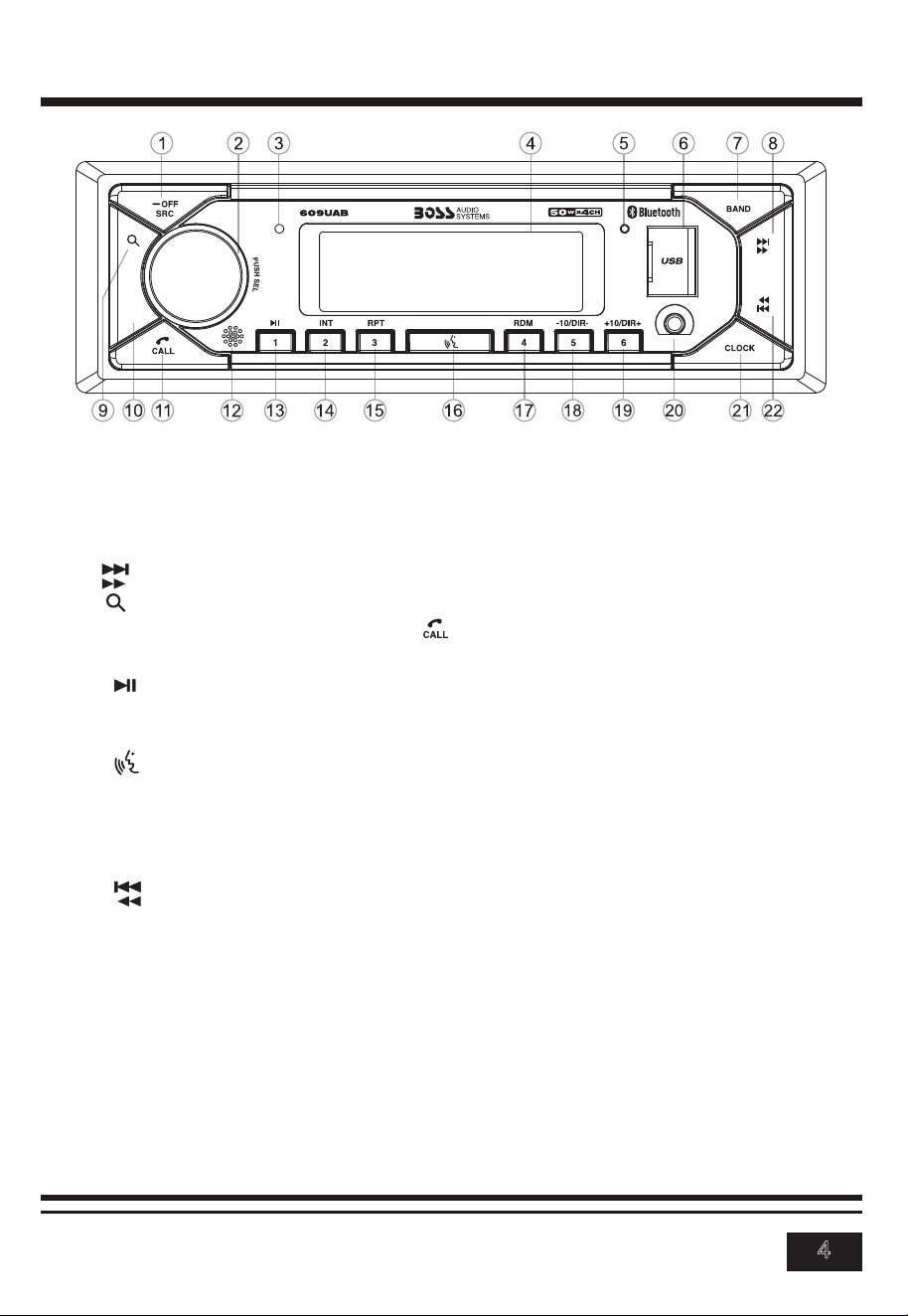
Overview of the Components
Turn Unit on/off, Change the Source
• Press the -OFF/SRC button to turn on the unit. Press and hold the -OFF/
SRC button to turn off the unit.
• Press the -OFF/SRC button to select the different modes: Radio, USB(with
USB device inserted), AUX-IN(auxiliary input) and BT(Bluetooth) modes.
Adjust the volume (VOL)
Rotate the VOL knob to increase or decrease the volume level.
General Operation
- OFF(power On/Off) / SRC (source) button
3. Hands-free Microphone 4. LCD Display 5. Reset button
6. USB Port 7. BAND button
8. (tune/ seek up, next track, fast forward) button
9. (automatic store / preset station scan, automatic music search) button
10. MUTE button 11. (Answer Call / End Call) button
12. IR remote sensor
13. (pause/play), Preset station 1 button
14. INT (intro), Preset station 2 button
15. RPT (repeat), Preset station 3 button
16. (Push-To-Talk) button
17. RDM (random), Preset station 4 button
18. -10(previous 10 tracks), previous folder, Preset station 5 button
19. +10(next 10 tracks), next folder, Preset station 6 button
20. AUX IN (auxiliary input) jack 21. CLOCK(clock setting) button
22. (tune/seek down, previous track, fast reverse) button
1.
2. VOL (volume) knob and SEL (select/menu) button
MUTE

5
General Operation
Adjust Menu Options (SEL)
• Press SEL button repeatedly to cycle through the following adjustable
audio functions:
- ILL MID/HI/LOW: This receiver is equipped with 3 brightness settings.
- BASS/TREBLE:-7, -6, ~, 1, 0, +1,~, +6, +7
Note: BASS and TREBLE settings are only enabled when EQ setting is turned OFF.
- BALANCE:L7, L6,~, L1, L=R, R1,~,R6, R7
- FADER:R7, R6, ~, R1, 0, F1, ~ ,F6, F7
- EQ(Equalizer) Setting: OFF, CLASS, ROCK, POP, FLAT
- Loudness: LOUD ON/OFF
- DX/LOCAL: Enables or disables the local broadcast mode (LOCAL).
- Stereo/Mono: Switches between MONO and STEREO reception mode
for radio frequencies.
- CLOCK 12/24: Select between 12 hours and 24 hours display.
Note: If 12 hour display is selected , AM= Morning; PM= Afternoon
- AREA US/EU: This car radio is equipped the USA / Europe frequency.
Rotate the volume knob to switch between USA and Europe frequency.
The system will change the frequency setting in about 3 seconds.
• Rotate the VOL knob to adjust the selected item.
Setting the Clock
Press the CLOCK button to display time. Press and hold the CLOCK button,
the hours digits start flashing on the display. Set hours by rotating the VOL
knob. Briefly press the CLOCK button. The minute digits start flashing.
Set minutes by rotating the VOL knob.
Finally press the CLOCK button to confirm your settings.
LCD Display
Mute On/Off
In power on mode, briefly press the MUTE button to toggle mute on or off.
USB Port
Hands-free Microphone
Auxiliary Input Jack
Reset
Push the RESET button with a thin object with a pointed end to reset all
parameters to factory default settings.This function may be used when the
LCD does not display normally or sound is distorted, or when any of controls
are disabled.
6
Switch Between USA area and Europe area Frequency
In radio mode, press the SEL button to enter the switch state of the US
(USA) and EU(europe)frequency, then rotate it to switch between US(USA)
and EU(europe) frequency. The system will change the frequency setting in
about 3 seconds.
Change Bands
In radio mode, shortly press the BAND button to switch between the
FM1(F1), FM2(F2), FM3(F3) and AM1(A1), AM2(A2) bands.
To Store / Recall Preset Stations
The radio can be stored 6 preset stations for each band (FM1, FM2, FM3,
AM1 and AM2) for atotal of 30 preset stations.
- To memorize a station:
Press and hold the desired preset buttons (1-6) to save a radio station.
- To recall a preset station:
Briefly press the respective station button (1-6) to recall the corresponding
preset station.
Manual Tuning
In the radio mode:
Press and hold the or button to enter the manual tuning mode.
In manual tuning mode, briefly press the or button to search the next
or previous frequency step by step.
Seek Tuning
In radio mode, press the or button, the automatic search will start, it
will search upward or downward for the strong signal radio station within the
current band. The auto searching will stop until find a station.
Automatic Store Station / preset station scan ( )
Press and hold the button to store 18 FM stations and 12 AM stations
automatically.
Briefly press the button to recall each preset station that stored in the
memories in each band.
LOCAL/DX
In urban areas, most stations are strong enough and “LOCAL ON” mode
should be selected. Switch to LOCAL OFF mode to search for stations with
weaker signals. Press the LOC button on the remote control to choose local or
distant reception mode.
STEREO/MONO
FM station is received in stereo mode. However, if the signal is weak or reception
is not asgood as you would like, switching to MONO mode usually improves
the overall sound quality. Press the ST button on the remote control to choose
FM STEREO or MONO audio effect.
Radio Operation

7
USB Operation
Play MP3/WMA music inside a USB stick.
Insert the USB stick with MP3/WMA musics into the USB port, it will play
automatically.Note: the USB port also supports charging mobile phone, the
maximumcharging ability is 5V / 1A.
Select Next Track or Previous Track
In the USB mode, briefly press the or button to play the the next or
previou track.
Fast Forward/Reverse
Press and hold the or button to fast forward or reverse a track.
Play / Pause
Press the button to interrupt the playback of a music (pause function).
Press this button again to continue the playback.
Introduction Scan
Press the INT button to play the first 10 seconds of all track.
Press again to stop the introduction scan, and play the current track.
Repeating the track
Press the RPT button to toggle between RPT ALL (Play all track), RPT FLR
(Continuously repeat all tracks in current folder) and RPT ONE
(Continuously repeat current track).
Playing all tracks in random
Press RDM once, play all tracks randomly. Press RDM once again, exit from
random playback.
Track/Folder Navigation
- Press the -10/+10 buttons to jump 10 tracks backward or forward.
It is required that over 10 tracks be available on the storage medium.
- Press and hold the -10/+10 button to select the previous or the next folder.
(If there are folders on the storage medium.)
Select the track or file for playback in MP3 format
a) Press and hold the button to enter track search mode.
First “TRK0000“ will appear on the display.
b) Rotate the volume knob to select the number of your favorite track with
high speed.
c) When the desired track number appears, confirm your selection by
pressing SEL button.
If no any operation in 5 seconds,it will play the current track.

8
Using this socket, it is possible to hear the sound of other playback devices
such as MP3 players, CD players etc. through the car loudspeaker.
1. Please connect the external device with a 3.5 mm stereo jack plug to the
AUX socket.
2. Press the SRC button repeatedly until “AUX IN” appears in the display.
3. You hear the playback from the external device via the loudspeakers.
You can adjust the volume of the external device to a comfortable level with
the volume control of this device.
Auxiliarly Operation
Bluetooth Operation
Pair and Connect
Pair the mobile phone with the device before using it.
1. In any mode, prior to pairing and connecting, the BT logo in the LCD
indicating that no device is connected. To begin pairing, enable BT mode
on your mobile phone.
2. When the phone finds the car audio system, the “BOSS AUDIO 609UAB”
name will be displayed.
3. Choose the “BOSS AUDIO 609UAB” from the device list to pair and
connect with the car audio system. Upon confirming, the BT logo will stop
flashing.
4. When pairing is complete, the mobile phone audio will automatically
transfer to the car audio system whenever a call is made or received, or
when the mobile phone plays music.
Make a Call
To make a call, dial the call directly from the paired mobile phone.
Redial Last Dialed Number
Press and hold the button on the control panel to redial the last dialed
phone number.
Answer a Call
• When the mobile phone is called, the incoming telephone number displays
on the LCD.
• To receive the call, press the button on the front panel or button on
the remote control.
Reject or End a Call
To reject or end the call, the button on the front panel or button on
the remote control.
9
Bluetooth Operation
Switch Audio Between Car Audio and mobile Phone
During a call, press the VOL knob/button to switch the audio source from the
car audio system back to your mobile phone.
Adjust Call Volume
During a call, use VOL knob to adjust the call volume level.
Audio Streaming (A2DP)
The unit supports A2DP (advanced audio distribution profile) wireless
streaming audio from your Bluetooth mobile device directly to your head unit.
You can also control your music from the front panel of the head unit using
AVRCP (audio video remote control profile).
1. After pairing, connecting and enabling streaming audio from a compatible
mobile device,
press the SRC button to enter BT mode and the “BT AUDIO” will be shown
on the LCD display.
2. When a mobile device is paired, music played through that device will
automatically be heard through the car audio system.
3. Press the or button to play the next or previous on the mobile
phone.
4. Press the button to pause or resume music playback.
Push-To-Talk
This Push-To-Talk feature allows direct access to Android and IOS smart-
phones voice assistant capability when user establish the bluetooth
connection between user’s smartphone and this receiver.
Simply connect directly from this receiver via Bluetooth with button.
Note:
Before using the Push-To-Talk, user must enable the mobile data on user’s
smartphone.
To use the navigation feature, switch to the BT Audio source to hear voice
commands over your vehicles speakers.
10
Remote Control
1. (Power on/off) button
2. VOL+/VOL-(volume increase/decrease) button
3. Band button, (answer call) button
4. PREV: tune down, seek down;
Track down, fast reverse
5. SEL(selection) button
6. NEXT: tune up, seek up;
Track up, fast forward
7. Mute button, DEL(Delete) button
8. CLK(clock setting) button,
(end call) button
9. button, preset station 1 button,
keypad 1
10. INT(intro) button, preset station 2 button,
keypad 2
11. RPT(repeat) button, preset station 3 button,
keypad 3
12. RDM(random), preset station 4 button, keypad 4
13. -10(previous 10 tracks), preset station 5 button, keypad 5
14. +10(next 10 tracks), preset station 6 button, keypad 6
15. ST(stereo) button, keypad 7
16. LOUD(loudness) button, keypad 8
17. AMS(automatic music search) button, keypad 9
18. SRC(Source) button, keypad *
19. EQ(Equalizer) button, keypad 0
20. LOC(local)/DX button, keypad #
Note: When using the remote control for the first time, you must pull out the
portective plastic tab from the battery compartment found on the back of the
remote control.
11
2
10
4
12
15
9
18
19
20
1
3
8
14
6
7
5
17
16
13

Specifications
General
Power supply Requirement : DC 12V
Maximum power output : 50W X 4CH
Speaker impedance : 4 - 8 Ohm
Unit Dimensions(WxHxD) : 7.0 X 2.0 X 2.76 inches
Weight : 1.04 lbs
Fuse : 10 A
FM
Frequency Range: 87.5 MHz - 107.9 MHz (USA)
87.5 MHz - 108.0MHz (EUROPE)
Channel step: 200 KHz(USA)
50 KHz(EUROPE)
AM
Frequency Range: 530 KHz - 1710 KHz (USA)
522-1620 KHz(EUROPE)
Channel step: 10 KHz(USA)
9 KHz(EUROPE)
USB
RADIO
Usable Audio Formats: MP3/WMA
Pre-amp Output: Front and Rear
Frequency Response: 20 Hz - 20KHz
S/N Ratio: 60dB
USB Port Type: 2.0
USB Charging: 5V/1A
BT
BT Profile supports: Headset, Handsfree and A2DP & AVRCP
Range of frequency: 2.4GHz
11