
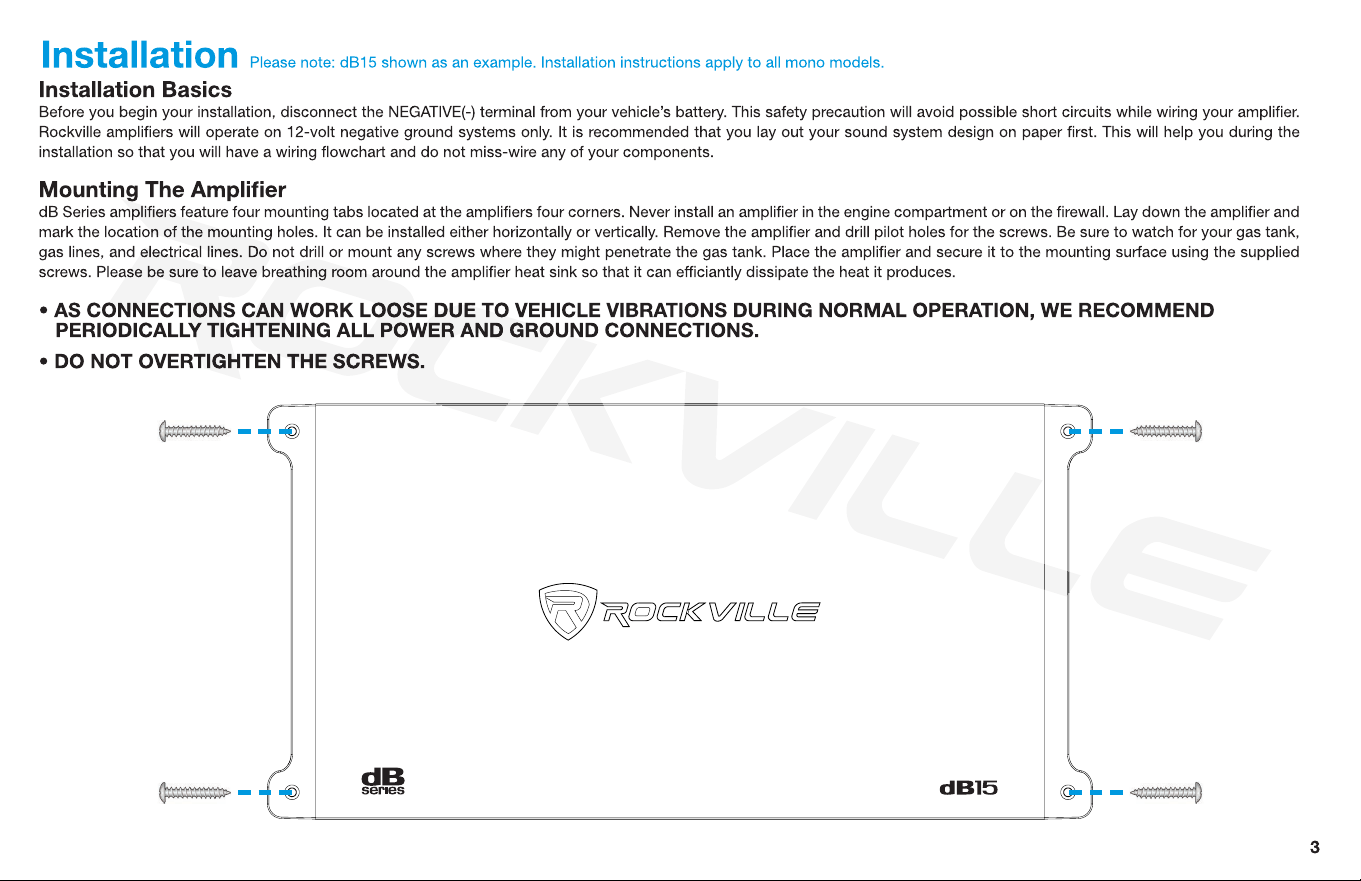
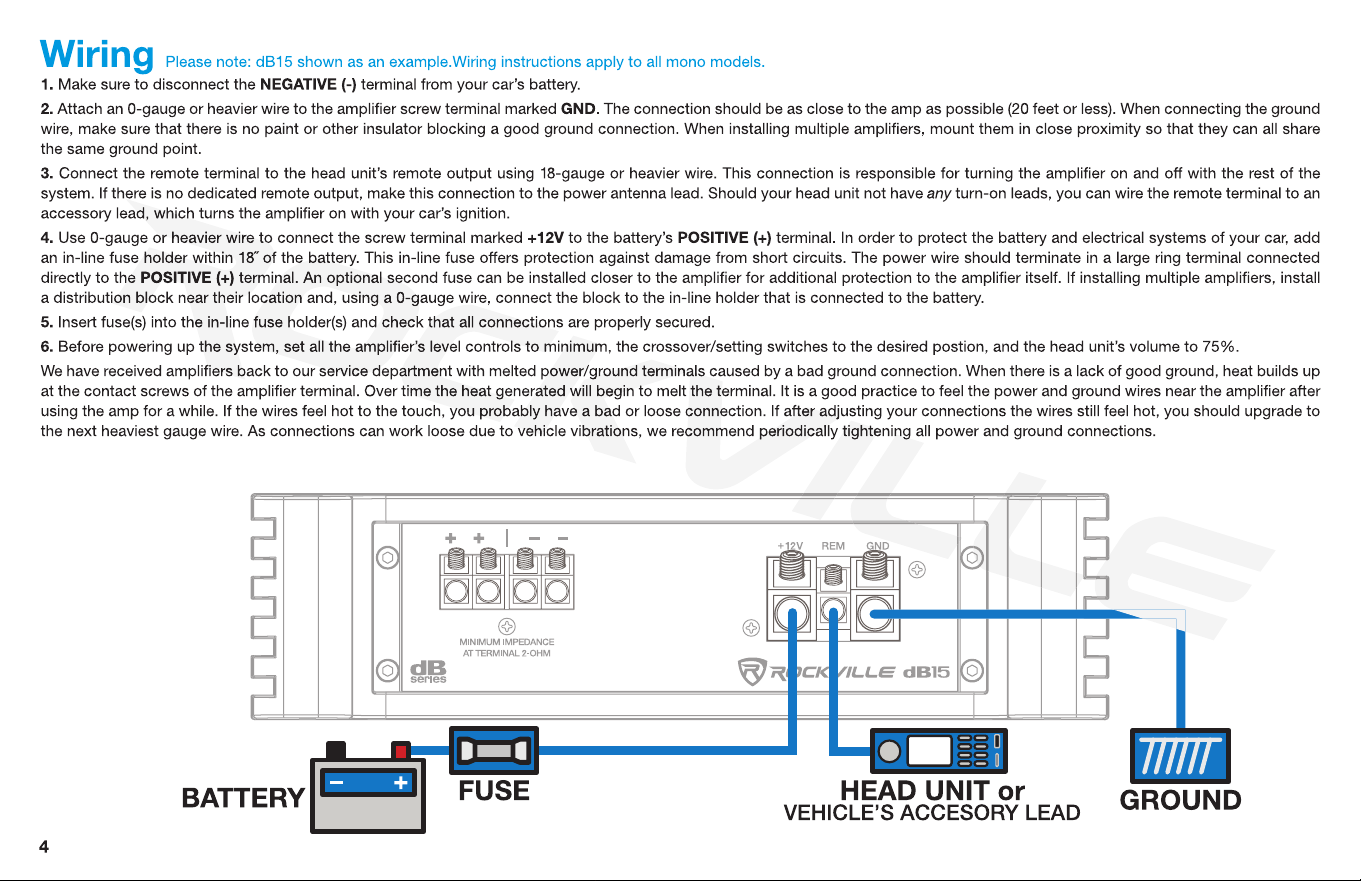
5
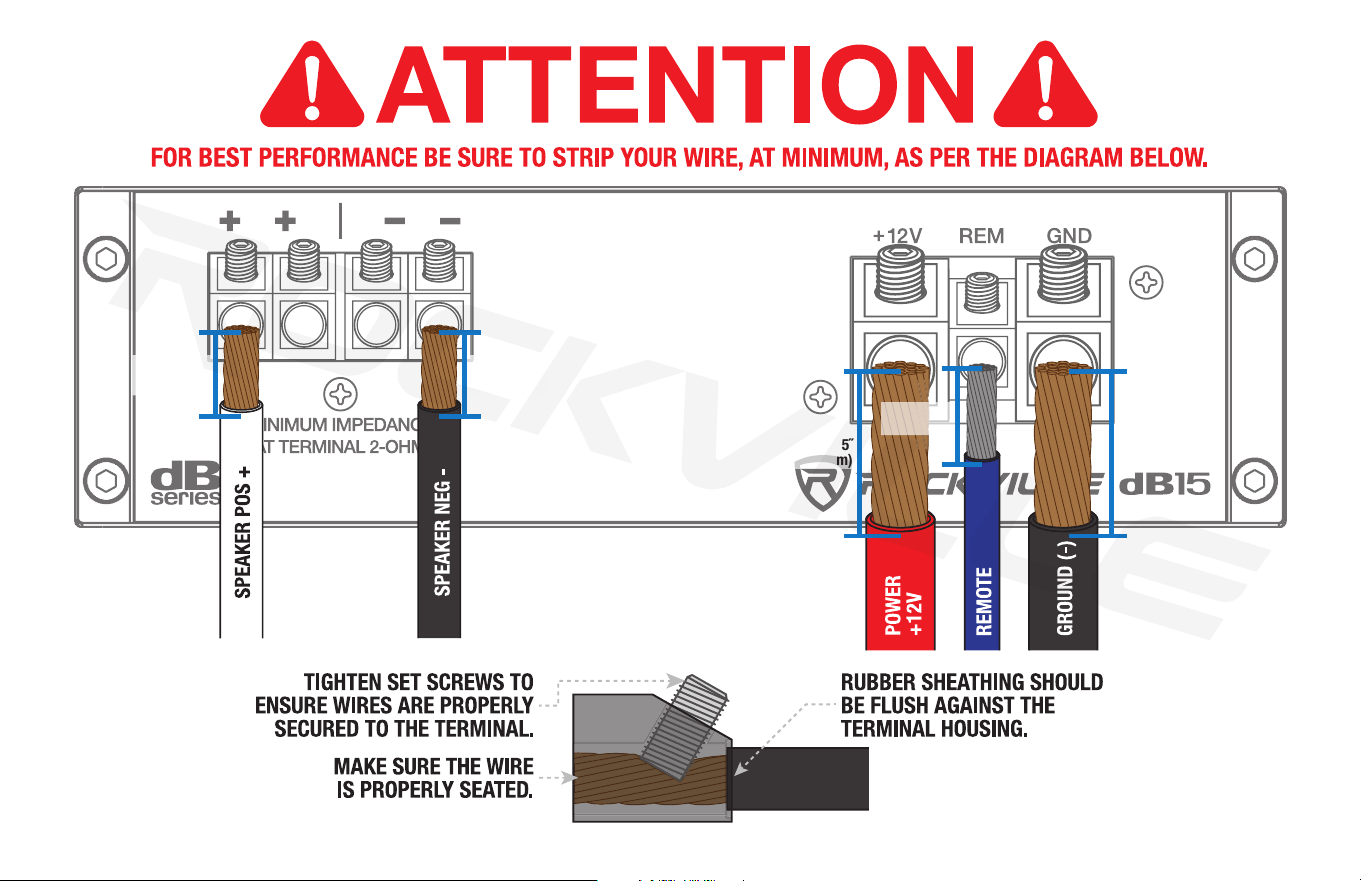
.75˝
(19.05mm)
.75˝
(19.05mm)
USE 16 GAUGE
SPEAKER WIRE
1.25˝
(31.75mm)
1.25˝
(31.75mm)
.75˝
(19.05mm)
6
Settings
Adjusting the System
1. Once the system is operational, set all crossover points to the approximate settings. In the case of a basic subwoofer system, set the Low Pass Filter (LPF) crossover at 100Hz or so.
Set the Bass EQ to 0dB. Turn the controls using a small athead screwdriver. Do not apply any pressure while turning as this might break the control unit.
2. Set the amplier’s Input Sensitivity using the control accessible on the side of the amplier marked INPUT LEVEL (gain). Turn it counterclockwise to the MIN position. Adjust your head
unit’s volume gain to the maximum it can go before signal distorts or to the loudest gain, which is usually about 75% – 85% on most head units (you can also use an oscilloscope to see at
what gain level your head unit distorts). When you begin to hear distortion, back down one notch. Now turn the INPUT LEVEL control on the amp clockwise until you hear distortion, then
turn it counterclockwise by a notch or until the distortion is gone. The amp’s input sensitivity is now set. It is helpful to have a second person to help you set the gain. When setting up a
multi-amp system, set each amplier’s level controls separately. Start off with the bass amplier, then adjust the highs amplier’s level control to match. Please note that the level control
of any car amplier should not be mistaken for a volume control. It is a sophisticated device designed to match the output level of your source unit to the input level of the amplier. Do not
adjust the amplier level to maximum unless your input level requires it. Your system can also be extremely sensitive to noise when the input level is set to maximum and does not match
your input signal. These adjustments need to be made only once when rst setting up the system.
3. Once you are satised with the level control settings, use any equalizer controls to adjust the system’s tonal level for personal preference. Keep in mind that after equalizing you may
have to go back and reset the amplier’s level controls.
If your unit has been professionally installed, please do not change the gain settings set by the installer. He is the professional!
Audio Preamp Input
This amplier features RCA preamp inputs. Run RCA cables from your sound source to the amplier’s inputs. We suggest you use high-quality, shielded RCA patch cords to help reduce and
eliminate unwanted electrical noise to your system. Use good quality RCA interconnect cables. Cheaper cables usually have poor shielding that can cause interference pickup.
Be sure to run the RCA cables on the side of the vehicle opposite to the side used to carry the power and ground leads of the amplier.
Using the Built-In Low Pass Electronic Crossover
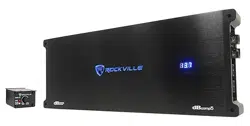
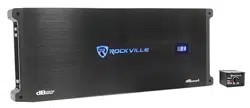
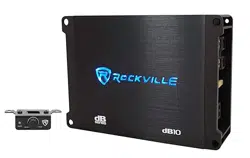
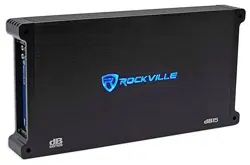
dB Series Mono Block ampliers feature a 12dB per octave fully adjustable crossover with differential circuitry.
The knob marked LOW PASS will control the low-pass frequencies from 50Hz – 250Hz. A frequent error made is setting the low-pass frequency too low, especially when using vented
subwoofer enclosures. We recommend that for most installations you set the frequency knob between 80Hz – 150Hz depending on your preference and the rest of your audio system.
Using the Subsonic High Pass Filter
Subsonic frequencies are very low and can cause damage to your subwoofers. The Subsonic High Pass Filter will allow you to attenuate any frequencies below the set limit.
Using the Phase Shift
The Phase Shift control synchronizes the phase of your subwoofer output to that of the other speakers in the vehicle. It can be set anywhere between 0 to 180 degrees. Set the amp to
0 and listen to a track with some bass. Now set the control to 180 degrees, listen to the same track, and see if the bass output improves or becomes worse. Adjust the switch until you
achieve the best results.
7
Sealed Enclosures
Sealed boxes are tuned by enclosure volume: larger enclosures tune lower; smaller enclosures tune higher. Subsonic frequencies can cause damage to your woofer as they cause it to
play below the enclosure’s tuning, forcing it to the limits of its excursion and making it expend a lot of energy. To avoid damage to your woofer, set the Subsonic HPF to 25Hz – 35Hz.
Ported Enclosures
The enclosure’s port should be tuned to a certain frequency so that the enclosure is capable of playing all frequencies above that tuning. The enclosure can play below that frequency, but
only half and an octave before the cone starts to overextend. Hence, set the Subsonic HPF to half an octave below the tuned frequency.
Here is a simple formula to help you gure out the proper Subsonic HPF setting for your particular ported enclosure. Keep in mind that one octave up is double the frequency and one
octave down is half the frequency:
1. Divide the tuning frequency of your port by 4.
2. Now subtract the quotient (answer) of Step1 from the port’s tuning frequency. This is half an octave lower than your tuning frequency.
Example:
Port tuning frequency is 46Hz:
1. 46Hz ÷ 4 = 11.5Hz (half an octave lower)
2. 46Hz – 11.5Hz = 34.5Hz (Round up to 35Hz.) This is half an octave lower than 46Hz.
Please note: The subsonic lter is NOT a cutoff. It has a roll-off slope that will attenuate the frequency it is set to. Attenuation will increase as the frequencies get lower, meaning the power
to the woofer decreases at the ltered frequencies, which reduces excursion and the potential for damage.
Subsonic lters have steep slopes such as 3rd or 4th order (18 or 24dB/Oct) so they can be set as close to your half-octave frequency as possible, or 25Hz – 35Hz sealed, without losing
power in the surrounding frequencies.

8
Input Configurations Please note: dB15 shown as an example. Congurations apply to all mono models.
Connect your head unit’s RCA outputs to the amplier’s Left and Right RCA input jacks. This amplier features RCA preamp line outputs for feeding a full-range signal to a secondary
full-range dB Series amp in a multi-amp system.
SOURCE
9
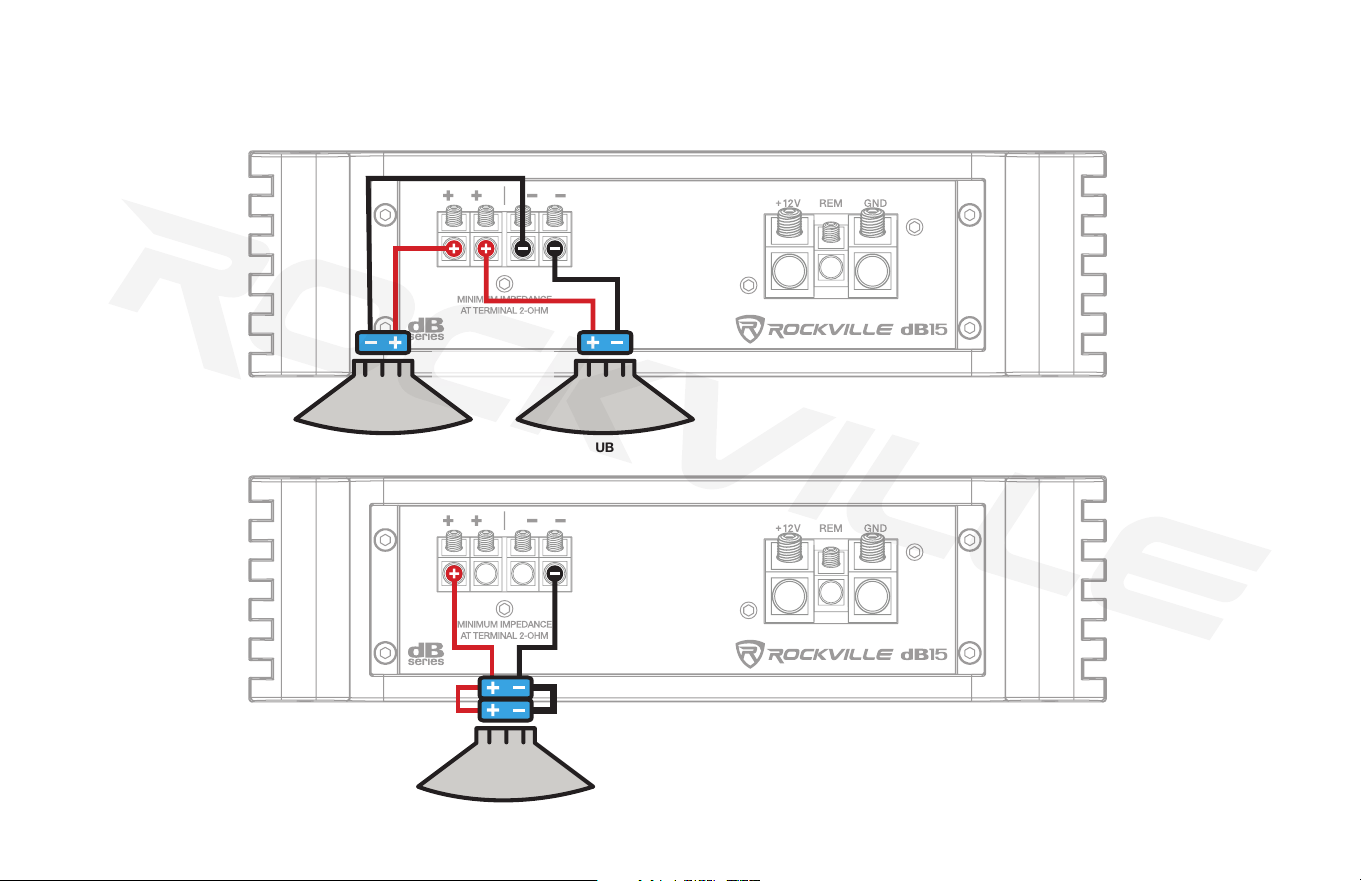
These amps are 2-ohm stable mono block ampliers. No matter how many woofers you choose to wire up to these models, the final impedance should not fall below 2 ohm. Please see
pages 14 and 15 for various speaker impedance congurations. The dual positive and negative terminals are connected in parallel inside the amplier. Connecting two speakers, each to one set
of positive and negative terminals, will result in a parallel speaker connection. If connecting only one pair of speaker wires, it is not necessary to use both sets of connections.
Output Configurations Please note: dB15 shown as an example. Congurations apply to all mono models.
4-OHM SUBWOOFER 4-OHM SUBWOOFER
SUBWOOFER IMPEDANCE
4 OHMS DVC
2 OHM
MINIMUM LOAD

10
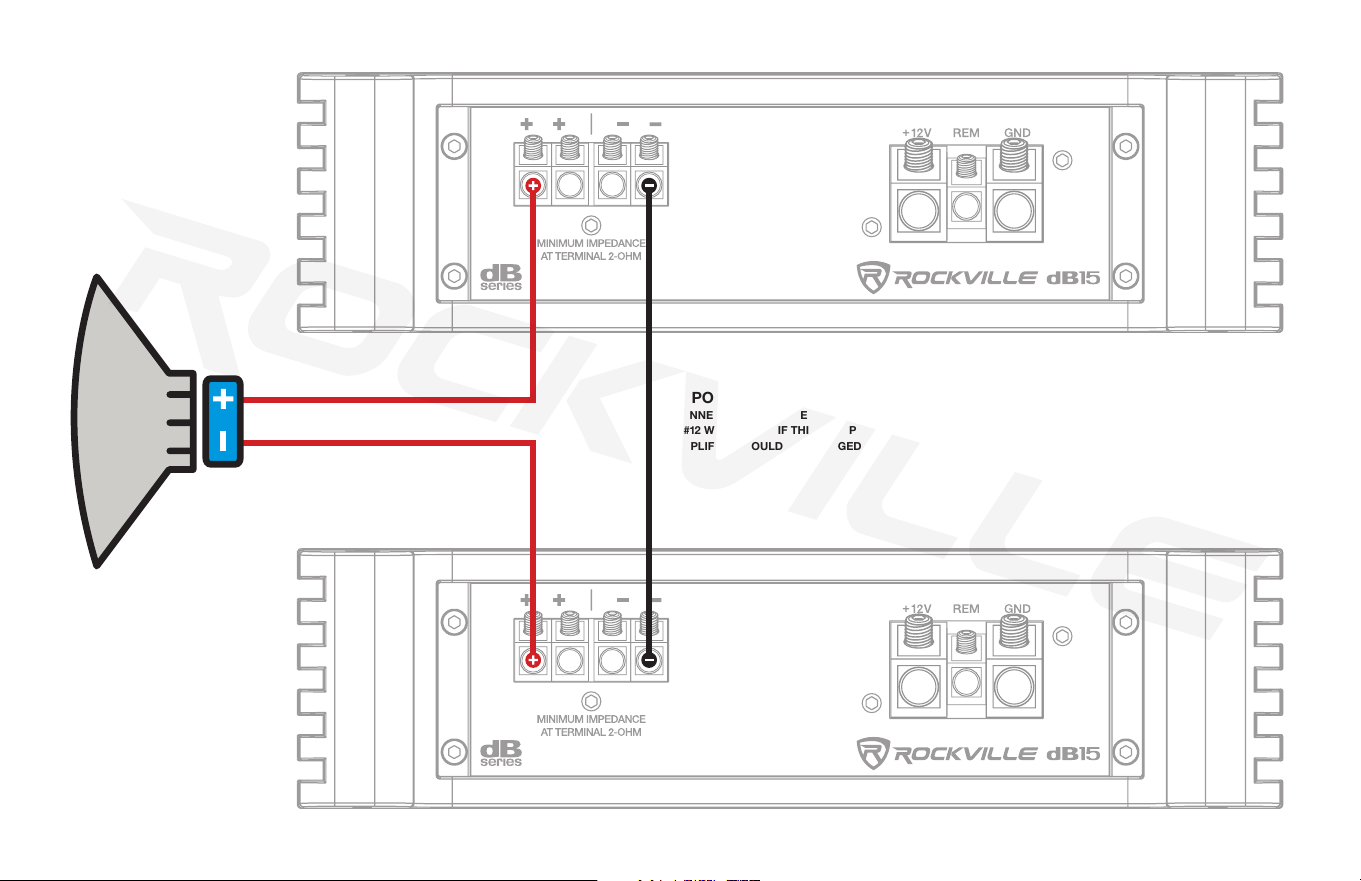
Twin Amp Bridging (dB14, dB15, dB16 only)
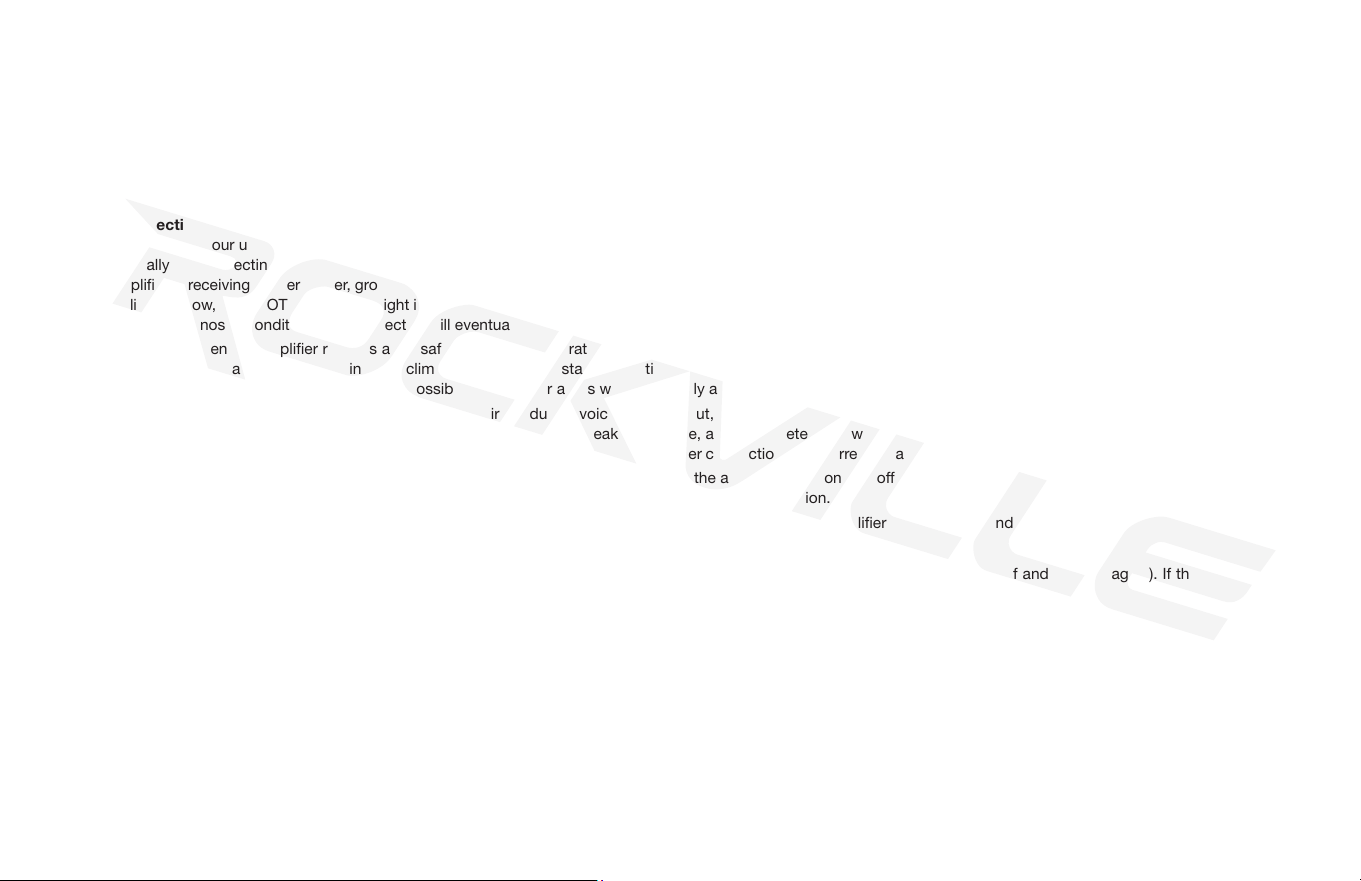
The dB14, dB15, and dB16 can be bridged together for double the power output into a single 4-ohm load. When bridging two ampliers together, the nal impedance load of the
bridged ampliers should be no lower than 4 ohms. Double power will occur at 4 ohms. Input the head unit signal into the PRIMARY amplifer and set the Bridged Mode switch to
Output Master. Use a MONO RCA to RCA cable to send the fully processed signal from the PRIMARY amplier to the SECONDARY amplier and set the Bridged Mode switch on
that amp to Input Slave. Do not input any signal to the Slave amplier’s RCA inputs. All settings will be controlled by the PRIMARY amplier including input gain levels. There is no
need to gain-match the two ampliers, it will occur automatically. The remote dash bass control should be plugged into the Master amplier and it will control both ampliers. This
same input/output control system can be utilized when daisy-chaining two amplifers to two independent 2-ohm woofers as long as you don’t bridge the two amplier’s outputs
together. PRIMARY amplifer’s positive (+) speaker terminal should be wired to the positive terminal of the subwoofer. SECONDARY amplier’s positive (+) speaker terminal should
be wired to the negative terminal of the subwoofer. Connect a heavy gauge wire (12-Gauge) between the negative (-) terminal of the PRIMARY amplier and the negative (-) terminal
of the SECONDARY amplier. When daisy-chaining two ampliers for independent woofers, wire up the the woofers as you would typically wire them when installing individual
systems, even down to 2-ohm. By using the PRIMARY/SECONDARY input confguration you gain the advantage of having one amplifer’s preamp section control both ampliers,
eliminating the need to gain-match and crossover match your system between ampliers.
You can only bridge two of the same amplifiers together.
DO NOT BRIDGE DIFFERENT MODELS TOGETHER.
SWITCH SET
TO SLAVE
SWITCH SET
TO MASTER
REMOTE SUBWOOFER
LEVEL CONTROL
PRIMARY
SECONDARY
MASTER/SLAVE
LINK
SOURCE
11
PRIMARY
SECONDARY
IMPORTANT NOTE:
CONNECT THE TWO SPEAKER NEGATIVES TOGETHER WITH
A # 12 WIRE STRAP. IF THIS STRAP IS NOT INSTALLED, THE
AMPLIFIERS COULD BE DAMAGED!
SUBWOOFER MINIMUM
IMPEDANCE 4 OHMS
12
Features
Bass Equalization Circuitry
A narrow “Q” peaking equalization circuit is included in the ampliers. The equalization system is preset at 45Hz. The equalizer control allows you to add up to 12dB of bass boost.
Utilize the bass equalizer to tailor your bass response to your system’s needs. Make sure your speakers can handle the extra power output! It would be foolish to add 12dB of gain to low
excursion 8˝ and 10˝ subwoofers or mid ranges and tweeters. It’s a sure way to blow your speakers.
Audio Output Section
The audio output sections of the dB Series mono block amps feature rugged, fast-switching MOSFETs.
Power and Protection Circuitry
These ampliers feature our unique IC-controlled protection circuitry. This sophisticated circuit constantly monitors the heat sink internal temperature and various voltages, adjusting the
amp automatically and protecting it from dangerous conditions. The two LEDs located on the side of the amplier provide indication of the amplier status. The POWER LED will light
when the amplier is receiving proper power, ground, and remote voltages, and the IC-monitoring sequence indicates the amp is functional. In case the amplier encounters a diagnostic
condition as listed below, the PROTECT LED will light indicating a diagnostic condition. When a diagnostic condition is sensed, the amplier will then turn into self-preservation mode and
if the cause of the diagnostic condition is not corrected will eventually shut down. There are certain critical diagnostic conditions that will turn the amplier off immediately.
Thermal Protection: When the amplier reaches an unsafe operating temperature of 80 degrees Celsius, the amplier will turn off. Once the amplier cools down to a safe temperature,
it will automatically turn on again. If you live in a hot climate, we suggest installing additional cooling fans in your trunk to exhaust the hot air that can build up in the trunk. This will help
keep the ambient temperature in the trunk as low as possible so that your amps work awlessly and without any musical interruption.
Speaker Short Circuit Protection: Should your speakers short circuit due to voice coil burn out, or should the amplier sense an impedance too low to handle, the protection LED will
light, indicating a diagnostic condition. Turn off your system, disconnect one speaker at a time, and try to determine which speaker might be faulty. Correct the condition and restart the
amplier. You must reset the amplier by turning it OFF and then ON again by the Remote power connection after correcting a diagnostic condition. (Turn your radio off and then on again.)
Input Overload Protection: This circuit will either shut down the amplier completely or make the amplier spurt on and off indicating that it is in a diagnostic condition. Turn the system
off and reduce the gain on the amplier or volume from your head unit. This should result in a corrected condition.
DC Offset Protection: Should any DC voltage try to enter the amplier via the speaker terminals it will cause the amplier to shut down and not operate until this condition is remedied.
This circuit will also protect damaging high DC voltages from reaching your speakers should your amplier ever malfunction.
PLEASE NOTE: You must reset the amplier by turning it OFF and then ON again after correcting a diagnostic condition (turn your radio off and then on again). If the amplier stays in
protection after a reset, it is most likely faulty.
Mute Circuit
This is an anti-thump, mute and delay circuit that eliminates irritating, speaker-damaging turn-on and turn-off transients normally experienced with less expensive ampliers.
Bass Remote
The dash-mounted bass remote allows you to control the amplier’s bass level from the comfort of the driver’s seat. It features a power LED which indicates the unit is receiving power
and operating nominally.
Battery Voltage
Rockville dB Series ampliers are rated and regulated to 13.8 volts and below. Increasing voltage to 14.4 volts will increase the power output of the amplier in the same proportion.
Maximum input voltage is 14.4 volts while the minimum voltage is 12 volts.

13
Specifications
Additional Features
• High-Speed MOSFET Power Supply
• Optical Coupler Class “D” Technology
• Fully Adjustable 12dB/Octave Crossover with Differential Circuitry
• Low Pass: 50Hz – 250Hz
• Subsonic Filter: 15Hz – 55Hz
• Fully Adjustable 12dB Bass Equalizer
• Mute and Delay Soft Start System
• Phase Control Switch
• RCA Preamp Line Output
• Master/Slave Amplier Daisy Chain and Bridging Capability (dB14, dB15, and dB16 only)
• Remote Dashboard Subwoofer Control
• Full IC-Controlled Protection Circuitry
• Status Mode LED Indicator
• 8 Volt Preamp Circuitry
dB12
• Dyno Certied RMS Power Ratings:
2 Ohm: 500 Watts x 1 Channel
4 Ohm: 300 Watts x 1 Channel
• Peak Power:
2 Ohm: 2000 Watts x 1 Channel
4 Ohm: 1200 Watts x 1 Channel
• Minimum THD at Rated Power: <0.1%
• Frequency Response: 15Hz – 250Hz
• S / N Ratio: >90dB
• Damping Factor: >150 @ 100Hz
• 60 Amp Maxi Fuse
• Dimensions ( W x H x L ): 9˝ x 2.4˝ x 13.1˝
dB13
• Dyno Certied RMS Power Ratings:
2 Ohm: 750 Watts x 1 Channel
4 Ohm: 450 Watts x 1 Channel
• Peak Power:
2 Ohm: 3000 Watts x 1 Channel
4 Ohm: 1800 Watts x 1 Channel
• Minimum THD at Rated Power: <0.1%
• Frequency Response: 15Hz – 250Hz
• S / N Ratio: >90dB
• Damping Factor: >150 @ 100Hz
• 80 Amp Maxi Fuse
• Dimensions ( W x H x L ): 9˝ x 2.4˝ x 14.7˝
dB14
• Dyno Certied RMS Power Ratings:
2 Ohm: 1000 Watts x 1 Channel
4 Ohm: 600 Watts x 1 Channel
• Peak Power:
2 Ohm: 4000 Watts x 1 Channel
4 Ohm: 2400 Watts x 1 Channel
• Minimum THD at Rated Power: <0.1%
• Frequency Response: 15Hz – 250Hz
• S / N Ratio: >90dB
• Damping Factor: >150 @ 100Hz
• 100 Amp Maxi Fuse
• Dimensions ( W x H x L ): 9˝ x 2.4˝ x 15.5˝

14
Specifications (continued)
dB16
• Dyno Certied RMS Power Ratings:
2 Ohm: 2000 Watts x 1 Channel
4 Ohm: 1200 Watts x 1 Channel
• Peak Power:
2 Ohm: 8000 Watts x 1 Channel
4 Ohm: 4800 Watts x 1 Channel
• Minimum THD at Rated Power: <0.1%
• Frequency Response: 15Hz – 250Hz
• S / N Ratio: >90dB
• Damping Factor: >150 @ 100Hz
• 200 Amp Maxi Fuse
• Dimensions ( W x H x L ): 9˝ x 2.4˝ x 19.8˝
dB15
• Dyno Certied RMS Power Ratings:
2 Ohm: 1500 Watts x 1 Channel
4 Ohm: 900 Watts x 1 Channel
• Peak Power:
2 Ohm: 6000 Watts x 1 Channel
4 Ohm: 3600 Watts x 1 Channel
• Minimum THD at Rated Power: <0.1%
• Frequency Response: 15Hz – 250Hz
• S / N Ratio: >90dB
• Damping Factor: >150 @ 100Hz
• 150 Amp Maxi Fuse
• Dimensions ( W x H x L ): 9˝ x 2.4˝ x 17.8˝

15
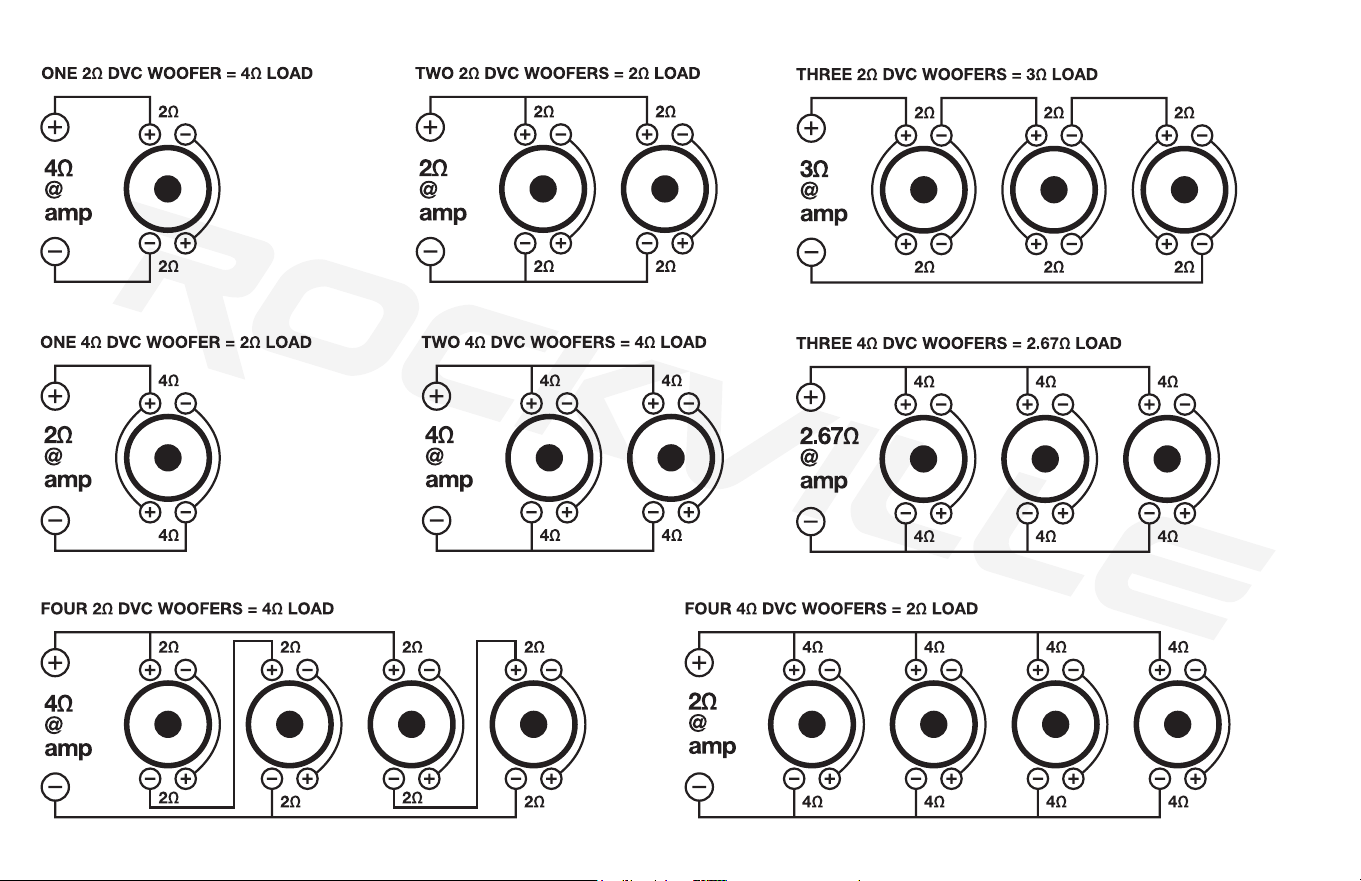
Woofer Wiring Guide
SVC Configurations
The minimum impedance for a single dB Series Class D mono
amplier is 2 ohm. Lower impedance loads will cause overheating
and may damage the ampliers.
Do not mix dierent impedance speakers in series and/or parallel
combinations, as unequal power sharing and acoustic outputs will
result.
16
DVC Configurations
17
Troubleshooting
PROBLEM
Amp goes into protect mode
1. Short circuit protection - Caused by the power or ground wire not being fastened tightly.
Disconnect the speakers from the amp. If the amp is still in protect mode, you now know the issue is some-
where with the power, ground, or remote wire. You should check and make sure the ground is tight. You
should check the power wire terminals. Make sure the positive is going to the positive, and the negative is
going to the negative. If all this is secure, you can use a multimeter and make sure you are getting 12 – 14.4
volts coming from your power wire. If this is all checking out properly, then you should check that the remote
wire is properly connected to the remote wire on your receiver. Many times people mistakenly connect it to
the antenna wire instead. If this is correct, you should also use a multimeter and make sure your remote wire
is getting 5 volts.
2. Thermal protection - This happens when the amplier overheats. Check that your subwoofers are com-
patible with your amp and that they are wired correctly.
3. Blown speaker - To check for a blown speaker, disconnect all the speakers from the amplier. If the amp
goes out of protect mode, then the problem is indeed a blown speaker. Find which speaker is blown and
replace it.
4. Wrong speaker impedance - Replace the speaker(s) with one of the proper impedance.
5. Speaker wires touching - If the positive and negative speaker wires that run from your speakers to your
amplier touch each other either by the speaker terminals or by the amplier terminals, the amp will go into
protect mode. Check all speaker connections to ensure that the wires are not touching.
6. Reverse polarity protection - Reverse polarity means the positive and negative power wires are back-
ward. Connect the speaker wires to the correct terminals.
7. Power wire gauge - If your power and ground wire are not thick enough, the amp will go into protect mode
to protect itself from unsafe signals. Be sure to use the proper gauge wires.
8. RCA cables - RCA patch cables that are grounded out or otherwise faulty can also cause the protect light
to come on. To check this, you can simply hook up a set of known good RCA cables to your head unit and
amp. If that causes the light to turn off, replacing the RCA cables will x the problem.
CAUSE/SOLUTION
18
PROBLEM
Amp won’t power on
Power but no sound
1. The external fuse is not properly secured to the power wire or is not making proper contact to the wire.
Ensure the fuse is properly seated and making contact.
2. Your external fuse (inside the fuse holder) is blown. Replace the fuse. Never replace the supplied external
fuse with one of a larger value.
3. Check the ground wire. Make sure the connection is 100% secure and tight.
4. Power wire is not connected properly to the ring terminal or it has acid corrosion on it. Check the connec-
tion to the ring terminal and use a wire brush to clean any corrosion off the ring.
5. Check the power wire. Make sure the positive is wired to the positive, and the negative is going to the
negative. Make sure the power wire is secure.
6. Check the remote turn-on wire. Make sure that this wire is connected securely to the amplier on one end,
and make sure the other end is connected to the remote turn-on of the receiver. A common error we see is
the remote turn-on gets connected to the antenna wire instead of the remote turn-on wire of the head unit.
Please note the remote turn-on wire is a required wire. The amp will not work if this is not connected.
It is also possible the remote terminal is loose and fell out.
7. Power wire is connected to the ground terminal of the amplier. Connect the power wire to the +12V
terminal of the amp.
8. Power or ground wire became loose. Check all connections and make sure they are tight.
1. Check if any protection lights are on. If protection lights are on, please refer to the “Power and Protection
Circuitry” section on page 12 and the “Amp goes into protect mode” section on page 18.
2. Make sure the RCA cable that is plugged into your amplier is plugged into the RCA input. If you have it
plugged into the RCA output, then the amplier will not get any sound.
3. Check the RCA cable that is going from the amplier to the receiver. We recommend having a spare RCA
cable to test with. Many times RCA cables go bad since they are thin cables. You can also test your
CAUSE/SOLUTION
19
PROBLEM
Power but no sound
Amp is clipping
RCA signal using a multimeter.
4. The next thing to check is the speaker wire that is going from the amp to the speakers. If the amplier is
in bridged mode, then be sure you connected the speaker wire to the proper terminals.
5. Check your gain – on the amp and/or on your bass remote. If it is on 0, then turn it up slowly.
6. Check the RCA cable that is plugged into your receiver. Make sure you plugged the amplier into the pre-
amp output that is red and white. In many cases we have seen customers plug the RCA into the RCA video
of their receiver, which is yellow. If this is the case, just plug the RCA into the proper connections and your
problem will be solved.
7. There is a setting on your receiver that can disable your RCA outputs. The setting is under fader/balance
control. On your receiver navigate to fader/balance and nd the setting, then make sure you enable front,
rear, and sub preamp outputs. Sometimes the head unit will allow you only to enable front and rear, which
would cause the amp to have no sound.
8. Speaker wire is not making a good contact on the speaker output of the amp or on the speaker terminal.
You need to make sure the speaker wire is securely tightened into the speaker terminal and the amplier
terminal.
9. A pinched or cut speaker wire that is now not running a signal. Speaker wire is very thin and can rip or
tear easily. If you have spare speaker wire, then you can test this issue with new speaker wire and see if that
solves your issue. You can also visually inspect your current speaker wire.
10. Make sure the positive and negative speaker wire are running to the positive and negative speaker termi-
nal of the amp. If they are reversed, then the speaker will play no sound or very little sound.
1. Speakers/subs are too powerful for the amplier you are using. Check the compatibility of your speakers/
subs. Replace incompatible speakers/subs with compatible ones.
2. If the speakers/subs are wired at a lower impedance (ohms) than the amp is supposed to be playing, this
can cause the amp to clip. Wire the speakers/subs at the proper impedance.
CAUSE/SOLUTION
20
PROBLEM
Amp is clipping
Distortion, background noise,
crackling, or hissing in the
speakers
3. If the gain setting is too high, this can cause the amp to clip. The proper way to set your gain is to turn
your receiver volume to 75% of the max, and then slowly turn your gain up. The second you hear any slight
distortion, turn it down one notch and leave it at that setting. Amps are not meant to be played with the gain
up to the max. If this is the case, lower your gain slowly until you hear the amplier stop clipping.
4. A poor ground cable connection can cause your amp to clip because improper power is getting to the
amp. Check your ground connection and make sure that the cable is securely tightened.
5. A very common cause of amplier clipping is power and ground wire that is too thin of a gauge size for the
amplier. Determine the proper wire gauge necessary and replace existing wires.
6. If using multiple devices that all have a volume control (such as an equalizer or processor, receiver, and the
amp), then you would need to lower one or two of those devices to stop the amp from clipping.
1. First check to see how your wires are run. If your RCA cables and speaker wire are run alongside your
power cables, they will pick up feedback. If this is the case, you will need to run the RCA cable on the other
side separate from your power cable.
2. A poor ground cable connection can cause your amp to clip because improper power is getting to the
amp. Check your ground connection and make sure that the cable is securely tightened.
3. Engine noise – you will know it is engine noise if every time you rev your engine the noise gets louder. You
can install a ground loop isolator on the receiver’s power lead to cut down on signal pollution. Most often,
however, engine noise comes from a loose or intermittent ground connection. Make sure your ground con-
nection is tight and that you are using the proper gauge cable.
4. If your gain on your amp is set to the max and your receiver has a high preamp voltage, it will cause some
unwanted noise. To properly set your gain, play a CD or other music. Now put the receiver volume to 75% –
80% of the max. Then slowly turn the gain of the amp to a setting where you do not hear a loud hiss. A low
hiss is acceptable, as with music playing you will never hear it. Please note the amp gain is not a volume
control. It is meant to be matched to the preamp voltage of a head unit. It is important to properly set your
gain when you buy a new amp.
CAUSE/SOLUTION
21
PROBLEM
Distortion, background noise,
crackling, or hissing in the
speakers
Sound is too low
Amp keeps blowing fuses
5. Noise can be picked up due to bad RCA cables. Specially the super cheap ones. We recommend doing a
test with different RCA cables. Replace the RCA cables if needed.
6. Low-quality speaker wires will also cause noise. We recommend you buy high-quality insulated speaker
wire made for vehicle applications.
1. This can be caused by wiring at too high of an impedance (ohms) and the amp puts out low power, at 4
or 8 ohms for example. To resolve this, you will have to properly wire your speakers/subs to the amplier.
2. Check the gain level on the amp. You may need to turn it up.
3. Power and ground wire that are too thin of a gauge size for the amplier may cause low sound. Determine
the proper wire gauge necessary and replace existing wires.
4. Make sure your positive and negative speaker wires are not reversed, as this would cause the sub to move
but not make much noise.
5. Check your HPF control setting on your amplier. You may need to lter out more high frequencies, which
your sub is not meant to play. Try lowering the frequency of that LPF control and see if that helps.
6. On your receiver it is very common to have a volume level control for the preamp outputs (separate from
your master volume control). To x this, you can navigate to the audio settings, and search for subwoofer
level controls, as well as front and rear preamp output controls. Crank up the level on this setting and you
will be back in business.
7. Amplier may not be powerful enough. If this is the case, we recommend upgrading to a more powerful
amplier.
Main Fuse - If you determine that your main fuse is blowing, then you’ll want to pay attention to when it
blows. Try inserting a good, properly rated fuse with your head unit—and amplier—turned off. If the fuse
blows immediately, when everything is off, then you’re probably dealing with some kind of short in the power
cable between the main fuse and the distribution block, or between the main fuse and the amplier if there
is no distribution block in the system.
CAUSE/SOLUTION
22
PROBLEM
Amp keeps blowing fuses
Amp gets very hot
Distribution Block Amp Fuse (if applicable) - If both sides of the main fuse have power, and one side of the
distribution block has power, but the other side of that fuse is dead, then you’re either dealing with a shorted
power wire or an internal amplier fault. There are a few ways to determine which one is the culprit, depend-
ing on how your amp is installed and where the wires are routed.
1. Check if you can see power wire that connects the distribution block to your amp. In an ideal situation,
you’ll be able to see the entire length of the wire. If that isn’t possible, then the next best thing is to just dis-
connect the power wire from your amp, make sure that the loose end isn’t in contact with ground, and check
whether the fuse still blows. If it does, then the problem is in the power wire, and replacing it will almost
certainly x your problem. Of course, you’ll have to take care when routing the new wire so that it doesn’t
end up shorting out as well. If the fuse doesn’t blow with the power wire disconnected from your amp, then
you have an internal amplier problem.
Internal Amplifier Fuse (if applicable) - If the fuse blows when the amp is turned up, then you likely have
subwoofers that are either incompatible or that are wired at too low of an impedance. Rewire to achieve
proper impedance, or replace the subwoofers with compatible ones. Check and make sure the power and
ground wires did not get crossed. Also, check and make sure your speaker wires are not crossed.
1. The main reason amps overheat is if the impedance they are running at is very low, or if the subwoofer
requires more power than the amp can give it. Also if the wiring cannot give the proper current fast enough,
it can cause the amp to get hot as well. Make sure the amp is running at the proper impedance, or use
subwoofers that are compatible with the amp. Make sure the wiring is correct and you are using the proper
wires for your system.
2. A poor ground cable connection can cause your amp to get very hot. Check your ground connection and
make sure that the cable is securely tightened.
3. Check the location where your amp is mounted. Make sure it is in a spot where it will receive proper ven-
tilation.
CAUSE/SOLUTION

23
PROBLEM
Amp or powered sub does
not turn off when you turn off
the vehicle
One channel on the amp isn’t
working
1. This situation happens when you connect the remote turn-on wire to a constant 12V power wire (often this
is a yellow wire) instead of to the remote turn-on wire of your receiver’s wire harness. Pull out your receiver
and plug the amplier’s remote turn-on wire into the proper remote turn-on terminal of your receiver’s wire
harness.
2. In a rare situation, the remote turn-on wire input is touching the power wire, which can also cause this
same issue. If this is what is happening, then simply take the remote turn-on wire out of the amplier terminal
and carefully put it back in so that it is not touching the power wire.
1. Check the RCA cable that is going from the amplier to the receiver. We recommend having a spare RCA
cable to test with. Many times RCA cables go bad since they are thin cables. You can also test your RCA
signal using a multimeter.
2. Check the RCA cable that is plugged into your receiver. Make sure you plugged the amplier into the pre-
amp output that is red and white. In many cases we have seen customers plug the RCA into the RCA video
of their receiver, which is yellow. If this is the case, just plug the RCA into the proper connections and your
problem will be solved.
3. There is a setting on your receiver that can disable your RCA outputs. The setting is under fader/balance
control. On your receiver navigate to fader/balance and nd the setting, then make sure you enable front,
rear, and sub preamp outputs. Sometimes the head unit will allow you only to enable front and rear, which
would cause the amp to have no sound.
4. Speaker wire is not making a good contact on the speaker output of the amp or on the speaker terminal.
You need to make sure the speaker wire is securely tightened into the speaker terminal and the amplier
terminal.
5. Make sure the positive speaker wire is connected to the positive terminal on the speaker and on the amp,
and make sure the negative is connected to the negative.
6. Make sure the gain of the amplier is turned up.
CAUSE/SOLUTION

©
2021 ROCKVILLE // Features and specications are subject to change and/or improvement without notice. Though we
tried our best to ensure that this manual is free and clear of errors please don’t hold us responsible for printing errors.